
JTAGICE3. Introduction. Programmers and Debuggers USER GUIDE
|
|
|
- Rodney Carpenter
- 9 years ago
- Views:
Transcription
1 Programmers and Debuggers JTAGICE3 USER GUIDE Introduction The Atmel JTAGICE3 is a powerful development tool for debugging and programming ARM Cortex -M based Atmel SAM and Atmel AVR microcrontrollers with On-Chip Debug capability. Programming and on-chip debugging of all Atmel AVR 32-bit microcontrollers on both JTAG and awire interfaces Programming and on-chip debugging of all Atmel AVR XMEGA family devices on both JTAG and PDI 2-wire interfaces Programming (JTAG and SPI) and debugging of all Atmel AVR 8-bit microcontrollers with OCD support on both JTAG or debugwire interfaces Programming and debugging of all Atmel SAM ARM Cortex-M based microcontrollers on both SWD and JTAG interfaces. (Firmware version 3.0 and later.)

2 Table of Contents Introduction Features Atmel JTAGICE3 Features System Requirements Getting Started with the Atmel JTAGICE Kit Contents Assembling the Atmel JTAGICE Opening the Atmel JTAGICE Powering the Atmel JTAGICE Connecting to the Host Computer USB Driver Installation Windows Connecting the Atmel JTAGICE Connecting to a JTAG Target Using the JTAG 10-pin Connector Connecting to an awire Target Connecting to a PDI Target Connecting to a debugwire Target Connecting to an SPI Target Connecting to an SWD Target Using the Atmel JTAGICE3 with Atmel STK Using the Atmel JTAGICE3 with Atmel STK On-Chip Debugging Introduction to On-Chip Debugging (OCD) Physical Interfaces JTAG awire PDI Physical debugwire SPI SWD Atmel OCD Implementations Atmel AVR UC3 OCD (JTAG and awire) Atmel AVR XMEGA OCD (JTAG and PDI physical) Atmel megaavr OCD (JTAG) Atmel megaavr / tinyavr OCD (debugwire) ARM Coresight Components Hardware Description LEDs Rear Panel

3 5.3. Bottom Panel Architecture Description Atmel JTAGICE3 Main Board Atmel JTAGICE3 Target Connectors Atmel JTAGICE3 Target Connectors Part Numbers Software Integration Atmel Studio Software Integration in Atmel Studio Programming Options Debug Options Command Line Utility Advanced Debugging Techniques Atmel AVR UC3 Targets EVTI / EVTO Usage debugwire Targets Software Breakpoints Firmware Upgrade Release History and Known Issues What's New Firmware Release History Atmel Studio 6.2 SP Atmel Studio Atmel Studio 6.2 (beta) Atmel Studio 6.1 SP Atmel Studio Atmel Studio AVR Studio AVR Studio AVR Studio (beta) Known Issues Concerning the Atmel JTAGICE Atmel AVR XMEGA OCD Specific Issues Atmel megaavr OCD and Atmel tinyavr OCD Specific Issues Product Compliance RoHS and WEEE CE and FCC Revision History

4 1. Features 1.1. Atmel JTAGICE3 Features Fully compatible with Atmel Studio Supports programming and debugging of all Atmel AVR UC3 32-bit microcontrollers Supports programming and debugging of all 8-bit AVR XMEGA devices Supports programming and debugging of all 8-bit Atmel megaavr and tinyavr devices with OCD Supports programming and debugging of all SAM ARM Cortex-M based microcontrollers Target operating voltage range of 1.65V to 5.5V Draws less than 3mA from target VTref during operation Supports JTAG clock frequencies from 32kHz to 15MHz Supports PDI clock frequencies from 32kHz to 10MHz Supports debugwire baud rates from 4kbit/s to 0.5Mbit/s Supports awire baud rates from 7.5kbit/s to 7.5Mbit/s Supports SPI clock frequencies from 8kHz to 1.875MHz Supports SWD clock frequencies from 32kHz to 2MHz USB 2.0 high-speed host interface ITM serial trace capture at up to 1MB/s Supports 10-pin 50-mil JTAG connector, as well as 10-pin 100mil JTAG, 6-pin 50-mil SPI, and 6-pin 100-mil SPI interfaces using adapters 1.2. System Requirements The Atmel JTAGICE3 unit requires that a front-end debugging environment Atmel Studio or AVR Studio 5.0 or later is installed on your computer. The JTAGICE3 should be connected to the host computer using the USB cable provided. 4


5 2. Getting Started with the Atmel JTAGICE Kit Contents The Atmel JTAGICE3 kit contains these items: JTAGICE3 unit USB cable (1.8m, high-speed, Mini-B) Adapter board containing 50-mil SPI, 100-mil SPI, and 100-mil JTAG adapters 50-mil JTAG cable 50-mil 10-pin mini squid cable AVR Technical Library DVD Figure 2-1 JTAGICE3 Kit Contents 2.2. Assembling the Atmel JTAGICE3 The Atmel JTAGICE3 unit is shipped with no cables attached. Two cable options are provided in the accessory kit: 50-mil 10-pin IDC flat cable 50-mil 10-pin mini-squid cable with 10 x 100-mil sockets 5


6 Figure 2-2 JTAGICE3 Cables For most purposes, the 50-mil 10-pin IDC flat cable can be used along with one of the adapters provided in the accessory kit. Three adapters are provided in one small PCB panel section. To separate the adapters, simply break off each one by gently bending the panel backwards and forwards. Take care to avoid any sharp edges, which may result from the separation process. The following adapters are included: A A 100-mil 10-pin JTAG adapter A B 100-mil 6-pin SPI/debugWIRE/PDI/aWire adapter A C 50-mil 6-pin SPI/debugWIRE/PDI/aWire adapter Figure 2-3 JTAGICE3 Adapters Note that a 50-mil JTAG adapter has not been provided - this is because the 50-mil 10-pin IDC cable can be used to connect directly to a 50-mil JTAG header. For the part number of the component used for the 50-mil 10-pin connector, see target connectors part numbers. To assemble your JTAGICE3 into its 'default' configuration, connect the 10-pin 50-mil IDC cable to the unit as shown below. Be sure to orient the cable so that the red wire (pin 1) on the cable aligns with the triangular indicator on the blue belt of the enclosure. The cable should connect upwards from the unit. 6


7 Figure 2-4 Atmel JTAGICE3 Cable Connection Next, snap off the 100-mil 10-pin JTAG adapter from the adapter panel, and connect it to the other side of the IDC cable. Your Atmel JTAGICE3 is now ready to use in its basic JTAG configuration. Figure 2-5 JTAGICE3 Probe Adapter Connection 2.3. Opening the Atmel JTAGICE3 Note: For normal operation, the Atmel JTAGICE3 unit must not be opened. Opening the unit is done at your own risk. Anti-static precautions should be taken. The JTAGICE3 enclosure consists of three separate plastic components - top cover, bottom cover, and blue belt - which are snapped together during assembly. To open the unit, simply insert a large flat screwdriver into the openings in the blue belt, apply some inward pressure, and twist gently. Repeat the process on the other snapper holes, and the top cover will pop off. 7

8 Figure 2-6 Opening the JTAGICE3 (1) Figure 2-7 Opening the JTAGICE3 (2) Figure 2-8 Opening the JTAGICE3 (3) To close the unit again, simply align the top and bottom covers correctly, and press together firmly Powering the Atmel JTAGICE3 The Atmel JTAGICE3 is powered by the USB bus voltage. It requires less than 100mA to operate, and can therefore be powered through a USB hub. The power LED will illuminate when the unit is plugged in. When not connected in an active programming or debugging session, the unit will enter low-power consumption mode to preserve your computer's battery. The JTAGICE3 cannot be powered down - it should be unplugged when not in use Connecting to the Host Computer Before plugging in the Atmel JTAGICE3 for the first time, be sure to install the USB driver on the host computer. This is done automatically when installing the front-end software provided free by Atmel. See for further information or to download the latest front-end software. The JTAGICE3 must be connected to an available USB port on the host computer using the USB cable provided. The JTAGICE3 contains a USB 2.0 compliant controller, and can operate in both full-speed and high-speed modes. For best results, connect the JTAGICE3 directly to a USB 2.0 compliant high-speed hub on the host computer using the cable provided. 8

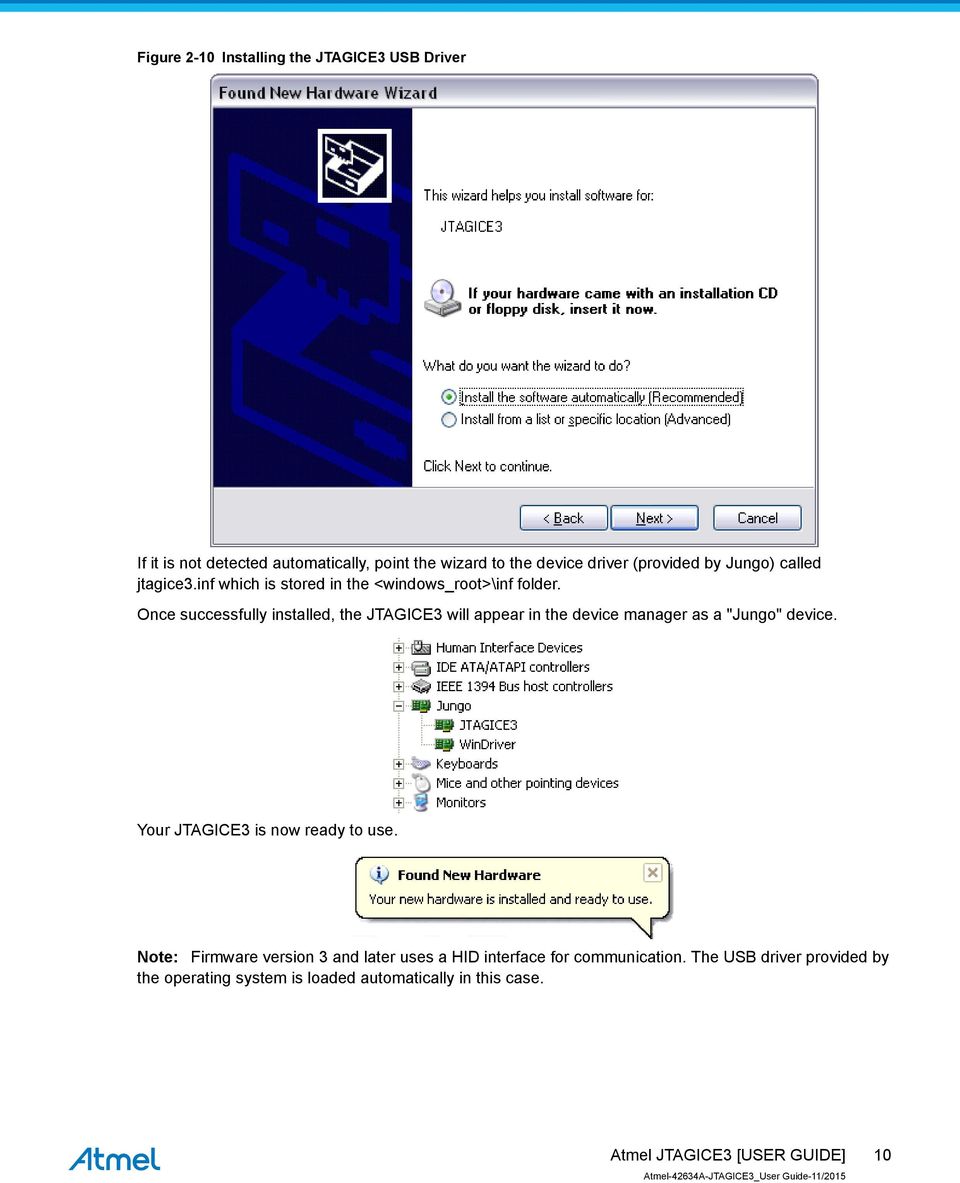
9 2.6. USB Driver Installation Windows When installing the Atmel JTAGICE3 on a computer running Microsoft Windows, the USB driver is loaded when the JTAGICE3 is first plugged in. Note: Be sure to install the front-end software packages before plugging the unit in for the first time! Proceed with the default ("recommended") options through the New Hardware Wizard. Figure 2-9 Installing the JTAGICE3 USB Driver 9


10 Figure 2-10 Installing the JTAGICE3 USB Driver If it is not detected automatically, point the wizard to the device driver (provided by Jungo) called jtagice3.inf which is stored in the <windows_root>\inf folder. Once successfully installed, the JTAGICE3 will appear in the device manager as a "Jungo" device. Your JTAGICE3 is now ready to use. Note: Firmware version 3 and later uses a HID interface for communication. The USB driver provided by the operating system is loaded automatically in this case. 10
11 3. Connecting the Atmel JTAGICE Connecting to a JTAG Target The Atmel JTAGICE3 probe has a 50-mil 10-pin JTAG connector accessible on the front of the tool's enclosure. The kit includes a 50-mil 10-pin cable, which can be used to connect directly to a 50-mil JTAG header on your target board. Should your target board be fitted with a 100-mil JTAG header (e.g.: Atmel STK 600), the 100-mil adapter provided (A A) in the kit can be used. If your target board does not have a compliant 10-pin JTAG header in 50- or 100-mil, you can map to a custom pinout using the 10- pin "mini-squid" cable provided, which gives access to 10 individual 100-mil sockets Using the JTAG 10-pin Connector The pinout for the 10-pin JTAG connector is shown in Figure 4-2 JTAG Header Pinout on page 19. Be sure to use the correct orientation of the 10-pin header when connecting the JTAGICE3 to the target application PCB. The red wire on the probe cable indicates PIN1, as does the 'dot' on the 100-mil adapter Connecting to an awire Target The awire interface requires only one data line in addition to V CC and GND. The 10-pin mini-squid cable should be used to connect between the Atmel JTAGICE3 target connector and the target board. Three connections are required, as described in the table below. Table 3-1 Connecting to awire using the Mini-squid Cable JTAGICE3 pins Target pins Mini-squid pin awire pinout Pin 1 (TCK) 1 Pin 2 (GND) GND 2 6 Pin 3 (TDO) DATA 3 1 Pin 4 (VTG) VTG 4 2 Pin 5 (TMS) 5 Pin 6 (nsrst) 6 Pin 7 (Not connected) 7 Pin 8 (ntrst) 8 11

12 JTAGICE3 pins Target pins Mini-squid pin awire pinout Pin 9 (TDI) 9 Pin 10 (GND) Connecting to a PDI Target The pinout for the 6-pin PDI connector is shown in Figure 4-5 PDI Header Pinout on page 21. The adapters provided in the kit (A B and A C) can be used to connect to this pinout in either 50-mil or 100-mil options. Be sure to use the correct orientation of the 6-pin header when connecting the Atmel JTAGICE3 to the target application PCB. A 'dot' on the adapter board indicates pin 1. When connecting to a target that does not have the standard 6-pin header, you can use the 10-pin minisquid cable between the JTAGICE3 target connector and the target board. Four connections are required, and the table below describes where to connect them. Note: There is a difference from the JTAGICE mkii JTAG probe, where PDI_DATA is connected to pin 9. The JTAGICE3 is compatible with the pinout used by the Atmel AVR ONE! and Atmel AVR Dragon products. Table 3-2 Connecting to PDI using the Mini-squid Cable JTAGICE3 pin Target pins Mini-squid pin Atmel STK600 PDI pinout Pin 1 (TCK) 1 Pin 2 (GND) GND 2 6 Pin 3 (TDO) PDI_DATA 3 1 Pin 4 (VTG) VTG 4 2 Pin 5 (TMS) 5 Pin 6 (nsrst) PDI_CLK 6 5 Pin 7 (Not connected) 7 Pin 8 (ntrst) 8 Pin 9 (TDI) 9 Pin 10 (GND) 0 12

13 3.4. Connecting to a debugwire Target The pinout for the 6-pin debugwire (SPI) connector is shown in Figure 4-6 debugwire (SPI) Header Pinout on page 21. The adapters provided in the kit (A B and A C) can be used to connect to this pinout in either 50-mil or 100-mil options. Be sure to use the correct orientation of the 6-pin header when connecting the Atmel JTAGICE3 to the target application PCB. A 'dot' on the adapter board indicates pin 1. Although the debugwire interface only requires one signal line (RESET), V CC, and GND to operate correctly, it is advised to have access to the full SPI connector so that the debugwire interface can be enabled and disabled using SPI programming. When the DWEN fuse is enabled the SPI interface is overridden internally in order for the OCD module to have control over the RESET pin. The debugwire OCD is capable of disabling itself temporarily (using the button on the debugging tab in the properties dialog in Atmel Studio), thus releasing control of the RESET line. The SPI interface is then available again (only if the SPIEN fuse is programmed), allowing the DWEN fuse to be un-programmed using the SPI interface. If power is toggled before the DWEN fuse is un-programmed, the debugwire module will again take control of the RESET pin. It is HIGHLY ADVISED to simply let Atmel Studio handle setting and clearing of the DWEN fuse! It is not possible to use the debugwire Interface if the lockbits on the target Atmel AVR are programmed. Always be sure that the lockbits are cleared before programming the DWEN fuse and never set the lockbits while the DWEN fuse is programmed. If both the debugwire enable fuse (DWEN) and lockbits are set, one can use High Voltage Programming to do a chip erase, and thus clear the lockbits. When the lockbits are cleared the debugwire Interface will be re-enabled. The SPI Interface is only capable of reading fuses, reading signature, and performing a chip erase when the DWEN fuse is un-programmed. Table 3-3 Connecting to debugwire using the Mini-squid Cable JTAGICE3 pin Target pins Mini-squid pin Pin 1 (TCK) 1 Pin 2 (GND) GND 2 Pin 3 (TDO) 3 Pin 4 (VTG) VTG 4 Pin 5 (TMS) 5 Pin 6 (nsrst) RESET 6 Pin 7 (Not connected) 7 Pin 8 (ntrst) 8 13

14 JTAGICE3 pin Target pins Mini-squid pin Pin 9 (TDI) 9 Pin 10 (GND) Connecting to an SPI Target The pinout for the 6-pin SPI connector is shown in Figure 4-7 SPI Header Pinout on page 22. The adapters provided in the kit (A B and A C) can be used to connect to this pinout in either 50-mil or 100-mil options. Be sure to use the correct orientation of the 6-pin header when connecting the Atmel JTAGICE3 to the target application PCB. A 'dot' on the adapter board indicates pin 1. Note: The SPI interface is effectively disabled when the debugwire enable fuse (DWEN) is programmed, even if SPIEN fuse is also programmed. To re-enable the SPI interface, the 'disable debugwire' command must be issued while in a debugwire debugging session. Disabling debugwire in this manner requires that the SPIEN fuse is already programmed. If Atmel Studio fails to disable debugwire, it is probable that the SPIEN fuse is NOT programmed. If this is the case, it is necessary to use a high-voltage programming interface to program the SPIEN fuse. It is HIGHLY ADVISED to simply let Atmel Studio handle setting and clearing of the DWEN fuse! The 10-pin mini-squid cable can also be used to connect between the Atmel JTAGICE3 target connector and the SPI target board. Six connections are required, as described in the table below. Table 3-4 Connecting to SPI using the Mini-squid Cable JTAGICE3 pins Target pins Mini-squid pin SPI pinout Pin 1 (TCK) SCK 1 3 Pin 2 (GND) GND 2 6 Pin 3 (TDO) MISO 3 1 Pin 4 (VTG) VTG 4 2 Pin 5 (TMS) 5 Pin 6 (nsrst) /RESET 6 5 Pin 7 (Not connected) 7 Pin 8 (ntrst) 8 Pin 9 (TDI) MOSI 9 4 Pin 10 (GND) 0 14

15 3.6. Connecting to an SWD Target The ARM SWD interface is s subset of the JTAG interface, making use of TCK and TMS pins, which means that when connecting to an SWD device, the 10-pin JTAG connector can technically be used. The ARM JTAG and AVR JTAG connectors are however not pin-compatible, so this depends upon the layout of the target board in use. When using STK600 or a board making use of the AVR JTAG pinout, the standard JTAG connector can be used. When connecting to a board which makes use of the ARM JTAG pinout, the 10-pin "mini-squid" cable must be used. (There are no adapters available from Atmel to make this mapping.) Table 3-5 Connecting to SWD using the Mini-squid Cable JTAGICE3 pin Target pins Mini-squid pin ARM SWD pin Pin 1 (TCK) SWDCLK 1 4 (SWDCLK) Pin 2 (GND) GND 2 3, 5, 9 (GND) Pin 3 (TDO) SWO (optional) 3 6 Pin 4 (VTG) VTG 4 1 (VCC) Pin 5 (TMS) SWDIO 5 2 (SWDIO) Pin 6 (nsrst) RESET 6 10 (nreset) Pin 7 (Not connected) 7 Pin 8 (ntrst) 8 Pin 9 (TDI) 9 Pin 10 (GND) 0 3, 5, 9 (GND) 3.7. Using the Atmel JTAGICE3 with Atmel STK500 The Atmel STK500 starter kit can be used to house Atmel AVR devices to which the Atmel JTAGICE3 can connect through JTAG, debugwire, and SPI interfaces. When connecting to a JTAG target, simply use the ATSTK500_JTAG_ADAPTER, which is supplied with the STK500 kit, available from store.atmel.com. 15

16 Connecting to debugwire and SPI targets is done using the 6-pin 100 mil adapter. When using the debugwire interface, be sure to remove the STK500's RESET jumper to allow the reset line to be driven as required. Alternatively, the JTAGICE3 can be connected to any target interface using the 10-pin mini-squid cable provided Using the Atmel JTAGICE3 with Atmel STK600 The Atmel STK600 starter kit can be used to house AVR devices to which the Atmel JTAGICE3 can connect through the JTAG, debugwire, PDI, SPI, and awire interfaces. When connecting to a JTAG target, simply use the 10-pin 100mil adapter provided to connect to the JTAG connector on the STK

17 When connecting to a PDI, debugwire, SPI, or awire target, simply use the 6-pin 100mil adapter provided to connect to the SPI/PDI header connector. 17

18 4. On-Chip Debugging 4.1. Introduction to On-Chip Debugging (OCD) A traditional Emulator is a tool which tries to imitate the exact behaviour of a target device. The closer this behaviour is to the actual device s behaviour, the better the emulation will be. The Atmel JTAGICE3 is not a traditional Emulator. Instead, the JTAGICE3 interfaces with the internal On- Chip Debug system inside the target Atmel AVR device, providing a mechanism for monitoring and controlling its execution. In this way the application being debugged is not emulated, but actually executed on the real AVR target device. With an OCD system, the application can be executed whilst maintaining exact electrical and timing characteristics in the target system something not technically realisable with a traditional emulator. Run Mode When in Run mode, the execution of code is completely independent of the JTAGICE3. The JTAGICE3 will continuously monitor the target AVR to see if a break condition has occurred. When this happens the OCD system will interrogate the device through its debug interface, allowing the user to view the internal state of the device. Stopped Mode When a breakpoint is reached, program execution is halted, but all I/O will continue to run as if no breakpoint had occurred. For example assume that a USART transmit has just been initiated when a breakpoint is reached. In this case the USART continues to run at full speed completing the transmission, even though the core is in stopped mode. Hardware Breakpoints The AVR OCD module contains a number of program counter comparators implemented in hardware. When the program counter matches the value stored in one of the comparator registers, the OCD enters stopped mode. Since hardware breakpoints require dedicated hardware on the OCD module, the number of breakpoints available depends upon the size of the OCD module implemented on the AVR target. Usually one such hardware comparator is reserved by the debugger for internal use. For more information on the hardware breakpoints available in the various OCD modules, see the OCD implementations section. Software Breakpoints A software breakpoint is a BREAK instruction placed in program memory on the target device. When this instruction is loaded, program execution will break and the OCD enters stopped mode. To continue execution a "start" command has to be given from the OCD. Not all AVR devices have OCD modules supporting the BREAK instruction. For more information on the software breakpoints available in the various OCD modules, see the OCD implementations section Physical Interfaces JTAG The Atmel JTAGICE3 supports several hardware interfaces as described in the sections that follow. The JTAG interface consists of a 4-wire Test Access Port (TAP) controller that is compliant with the IEEE standard. The IEEE standard was developed to provide an industry-standard way to efficiently test 18


19 circuit board connectivity (Boundary Scan). Atmel AVR devices have extended this functionality to include full Programming and On-Chip Debugging support. Figure 4-1 JTAG Interface Basics When designing an application PCB which includes an Atmel AVR with the JTAG interface, it is recommended to use the pinout as shown in Figure 4-2 JTAG Header Pinout on page 19. The JTAGICE3 can connect to both 100-mil and 50-mil variants of this pinout. Figure 4-2 JTAG Header Pinout Table 4-1 JTAG pin description Name Pin Description TCK 1 Test Clock (clock signal from the JTAGICE3 into the target device) TMS 5 Test Mode Select (control signal from the JTAGICE3 into the target device) TDI 9 Test Data In (data transmitted from the JTAGICE3 into the target device) TDO 3 Test Data Out (data transmitted from the target device into the JTAGICE3) ntrst 8 Test Reset (optional, only on some AVR devices). Used to reset the JTAG TAP controller. nsrst 6 Reset (optional) Used to reset the target device. Connecting this pin is recommended since it allows the JTAGICE3 to hold the target device in a reset state, which can be essential to debugging in certain scenarios. VTG 4 Target voltage reference. The JTAGICE3 samples the target voltage on this pin in order to power the level converters correctly. The JTAGICE3 draws less than 1mA from this pin. GND 2, 10 Ground. Both must be connected to ensure that the JTAGICE3 and the target device share the same ground reference. 19

20 Tip: Remember to include a decoupling capacitor between pin 4 and GND. The JTAG interface allows for several devices to be connected to a single interface in a daisy-chain configuration. The target devices must all be powered by the same supply voltage, share a common ground node, and must be connected as shown in Figure 4-3 JTAG Daisy-chain on page 20. Figure 4-3 JTAG Daisy-chain When connecting devices in a daisy-chain, the following points must be considered: All devices must share a common ground, connected to GND on the JTAGICE3 probe All devices must be operating on the same target voltage. VTG on the JTAGICE3 must be connected to this voltage. TMS and TCK are connected in parallel; TDI and TDO are connected in a serial chain. nsrst on the JTAGICE3 probe must be connected to RESET on the devices if any of the devices in the chain disables its JTAG port "Devices before" refers to the number of JTAG devices that the TDI signal has to pass through in the daisy chain before reaching the target device. Similarly "devices after" is the number of devices that the signal has to pass through after the target device before reaching the JTAGICE3 TDO pin. "Instruction bits before" and "after" refers to the sum total of all JTAG devices' instruction register lengths, which are connected before and after the target device in the daisy chain The total IR length (instruction bits before + Atmel AVR IR length + instruction bits after) is limited to a maximum of 256 bits. The number of devices in the chain is limited to 15 before and 15 after. Daisy chaining example: TDI ATmega1280 ATxmega128A1 ATUC3A0512 TDO In order to connect to the Atmel AVR XMEGA device, the daisy chain settings are: Devices before: 1 Devices after: 1 Instruction bits before: 4 (8-bit AVR devices have 4 IR bits) Instruction bits before: 5 (32-bit AVR devices have 5 IR bits) awire The awire interface makes use of the RESET wire of the AVR device to allow programming and debugging functions. A special enable sequence is transmitted by the Atmel JTAGICE3, which disables the default RESET functionality of the pin. When designing an application PCB which includes an Atmel AVR with the awire interface, it is recommended to use the pinout as shown in Figure 4-4 awire Header Pinout on page 21. The JTAGICE3 ships with both 100-mil and 50-mil adapters supporting this pinout. 20

21 Figure 4-4 awire Header Pinout Tip: Since awire is a half-duplex interface, a pull-up resistor on the RESET line in the order of 47k is recommended to avoid false start-bit detection when changing direction. The awire interface can be used as both a programming and debugging interface, all features of the OCD system available through the 10-pin JTAG interface can also be accessed using awire PDI Physical The Program and Debug Interface (PDI) is an Atmel proprietary interface for external programming and on-chip debugging of a device. PDI Physical is a 2-pin interface providing a bi-directional half-duplex synchronous communication with the target device. When designing an application PCB which includes an Atmel AVR with the PDI interface, the pinout shown in Figure 4-5 PDI Header Pinout on page 21 should be used. One of the 6-pin adapters provided with the Atmel JTAGICE3 kit can then be used to connect the JTAGICE3 probe to the application PCB. Figure 4-5 PDI Header Pinout debugwire The debugwire interface was developed by Atmel for use on low pin-count devices. Unlike the JTAG interface which uses four pins, debugwire makes use of just a single pin (RESET) for bi-directional halfduplex asynchronous communication with the debugger tool. When designing an application PCB which includes an Atmel AVR with the debugwire interface, the pinout shown in Figure 4-6 debugwire (SPI) Header Pinout on page 21 should be used. Figure 4-6 debugwire (SPI) Header Pinout Note: The debugwire interface can not be used as a programming interface. This means that the SPI interface must also be available (as shown in Figure 4-7 SPI Header Pinout on page 22) in order to program the target. When the debugwire enable (DWEN) fuse is programmed and lockbits are un-programmed, the debugwire system within the target device is activated. The RESET pin is configured as a wire-and (open-drain) bi-directional I/O pin with pull-up enabled and becomes the communication gateway between target and debugger. 21
22 SPI In-System Programming uses the target Atmel AVR s internal SPI (Serial Peripheral Interface) to download code into the flash and EEPROM memories. It is not a debugging interface. When designing an application PCB which includes an AVR with the SPI interface, the pinout shown in Figure 4-7 SPI Header Pinout on page 22 should be used. Figure 4-7 SPI Header Pinout SWD The ARM SWD interface is a subset of the JTAG interface, making use of TCK and TMS pins. The ARM JTAG and AVR JTAG connectors are however not pin-compatible, so when designing an application PCB, which uses a SAM device with SWD or JTAG interface, it is recommended to use the ARM pinout shown in Figure 4-8 Recommended ARM SWD/JTAG Header Pinout on page 22, and use the squid cable or an adapter to map to the AVR pinout used by the JTAGICE3. (There are no adapters available from Atmel to make this mapping.) Figure 4-8 Recommended ARM SWD/JTAG Header Pinout The JTAGICE3 is capable of streaming UART-format ITM trace to the host computer. Trace is captured on the TRACE/SWO pin of the 10-pin header (JTAG TDO pin). Data is buffered internally on the JTAGICE3 and is sent over the HID interface to the host computer. The maximum reliable data rate is about 1MB/s Atmel OCD Implementations Atmel AVR UC3 OCD (JTAG and awire) The Atmel AVR UC3 OCD system is designed in accordance with the Nexus 2.0 standard (IEEE-ISTO ), which is a highly flexible and powerful open on-chip debug standard for 32-bit microcontrollers. It supports the following features: Nexus compliant debug solution OCD supports any CPU speed Six program counter hardware breakpoints Two data breakpoints Breakpoints can be configured as watchpoints Hardware breakpoints can be combined to give break on ranges 22
23 Real-time program counter branch tracing, data trace, process trace (not supported by Atmel JTAGICE3) For more information regarding the UC3 OCD system, consult the AVR32UC Technical Reference Manuals, located on Atmel AVR XMEGA OCD (JTAG and PDI physical) The Atmel AVR XMEGA OCD is otherwise known as PDI (Program and Debug Interface). Two physical interfaces (JTAG and PDI physical) provide access to the same OCD implementation within the device. It supports the following features: Complete program flow control One dedicated program address comparator or symbolic breakpoint (reserved) Four hardware comparators Unlimited number of user program breakpoints (using BREAK) No limitation on system clock frequency Atmel megaavr OCD (JTAG) The Atmel megaavr OCD is based on the JTAG physical interface. It supports the following features: Complete program flow control Four program memory (hardware) breakpoints (one is reserved) Hardware breakpoints can be combined to form data breakpoints Unlimited number of program breakpoints (using BREAK) (except ATmega128[A]) Atmel megaavr / tinyavr OCD (debugwire) The debugwire OCD is a specialized OCD module with a limited feature set specially designed for Atmel AVR devices with low pin-count. It supports the following features: Complete program flow control Unlimited Number of User Program Breakpoints (using BREAK) Automatic baud configuration based on target clock ARM Coresight Components Atmel ARM Cortex-M based microcontrollers implement Coresight compliant OCD components. The features of these components can vary from device to device. For further information consult the device's datasheet. 23
24 5. Hardware Description 5.1. LEDs The Atmel JTAGICE3 top panel has three LEDs which indicate the status of current debug or programming sessions. Table 5-1 LEDs LED Function Description Left Target power GREEN when target power is OK. Flashing indicates a target power error. Does not light up until a programming/debugging session connection is started. Middle Main power RED when main-board power is OK Right Status Flashing GREEN when the target is running/stepping. OFF when target is stopped 5.2. Rear Panel The rear panel of the Atmel JTAGICE3 houses the Mini-B USB connector Bottom Panel The bottom panel of the Atmel JTAGICE3 has a sticker which shows the serial number and date of manufacture. When seeking technical support, include these details. 24

25 5.4. Architecture Description The Atmel JTAGICE3 architecture is shown in the block diagram in Figure 5-1 JTAGICE3 Block Diagram on page 25. Figure 5-1 JTAGICE3 Block Diagram Atmel JTAGICE3 Main Board Power is supplied to the Atmel JTAGICE3 from the USB bus, regulated to 3.3V by a step-down switchmode regulator. A small amount of power (less than 1mA) is also drawn from the target application by the VTG pin, and is used to power the variable-voltage side of the on-board level converters. At the heart of the JTAGICE3 main board is the Atmel AVR UC3 microcontroller AT32UC3A3256, which runs at between 1MHz and 60MHz depending on the tasks being processed. The microcontroller includes an on-chip USB 2.0 high-speed module, allowing high data throughput to and from the debugger. Communication between the JTAGICE3 and the target device is done through a bank of level converters that shift signals between the target's operating voltage and the internal voltage level on the JTAGICE3. Also in the signal path are series termination resistors and ESD protection diodes. All signal channels can be operated in the range 1.65V to 5.5V. Maximum operating frequency varies according to the target interface in use. 25
26 Atmel JTAGICE3 Target Connectors The Atmel JTAGICE3 does not have an active probe. A 50-mil IDC cable is used to connect to the target application either directly, or through one of the adapters provided. For more information on the cabling and adapters, see section Assembling the JTAGICE Atmel JTAGICE3 Target Connectors Part Numbers In order to connect the JTAGICE3 50-mil IDC cable directly to a target board, any standard 50-mil 10-pin header should suffice. It is advised to use keyed headers to ensure correct orientation when connecting to the target, such as those used on the adapter board included with the kit. The part number for this header is: FTSH L-DV-K-A-P from SAMTEC. 26
27 6. Software Integration 6.1. Atmel Studio Software Integration in Atmel Studio Atmel Studio is an Integrated Development Environment (IDE) for writing and debugging Atmel AVR applications in Windows environments. Atmel Studio provides a project management tool, source file editor, simulator, assembler and front-end for C/C++, programming, emulation, and on-chip debugging. Atmel Studio or AVR Studio 5.0 or later must be used in conjunction with the Atmel JTAGICE Programming Options Atmel Studio supports programming of Atmel AVR and Atmel SAM D20 ARM devices using the Atmel JTAGICE3. The programming dialog can be configured to use JTAG, awire, SPI, PDI, or SWD modes, according to the target device selected. When configuring the clock frequency, different rules apply for different interfaces and target families: SPI programming makes use of the target clock. Configure the clock frequency to be lower than one fourth of the frequency at which the target device is currently running. JTAG programming on Atmel megaavr devices is clocked by the programmer. This means that the programming clock frequency is limited to the maximum operating frequency of the device itself. (Usually 16MHz.) AVR XMEGA programming on both JTAG and PDI interfaces is clocked by the programmer. This means that the programming clock frequency is limited to the maximum operating frequency of the device itself. (Usually 32MHz.) AVR UC3 programming on JTAG interface is clocked by the programmer. This means that the programming clock frequency is limited to the maximum operating frequency of the device itself. (Limited to 33MHz.) AVR UC3 programming on awire interface is clocked by the programmer. The optimal frequency is given by the SAB bus speed in the target device. The JTAGICE3 debugger will automatically tune the awire baud rate to meet this criteria. Although it is usually not necessary, the user can limit the maximum baud rate if needed (e.g. in noisy environments). SAM D20 ARM programming on SWD interface is clocked by the programmer. The maximum frequency supported by JTAGICE3 is 2MHz. The frequency should not exceed the target CPU frequency * Debug Options When debugging an Atmel AVR device using Atmel Studio, the 'Tool' tab in the project properties view contains some important configuration options. The options which need further explanation are: Target Clock Frequency Target clock frequency: Accurately setting the target clock frequency is vital to achieve reliable debugging of Atmel megaavr device over the JTAG interface. This setting should be less than one fourth of the lowest operating frequency of your AVR target device in the application being debugged. Debug sessions on debugwire target devices are clocked by the target device itself, and thus no frequency setting is required. The Atmel JTAGICE3 will automatically select the correct baud rate for communicating at the start of a debug session. However, if you are experiencing reliability 27
28 problems related to a noisy debug environment, it is possible to force the debugwire speed to a fraction of its "recommended" setting. Debug sessions on AVR XMEGA target devices can be clocked at up to the maximum speed of the device itself (usually 32MHz). Debug sessions on AVR UC3 target devices over the JTAG interface can be clocked at up to the maximum speed of the device itself (limited to 33MHz). However, the optimal frequency will be slightly below the current SAB clock on the target device. Debug sessions on UC3 target devices over the awire interface will be automatically tuned to the optimal baud rate by the JTAGICE3 itself. However, if you are experiencing reliability problems related to a noisy debug environment, it is possible to force the awire speed below a configurable limit. Debug sessions on SAM D20 ARM target devices over the SWD interface can be clocked at up to the target CPU clock *10 (limited to 2MHz maximum). Preserve EEPROM Select this option to avoid erasing the EEPROM during reprogramming of the target before a debug session. Use External Reset If your target application disables the JTAG interface, the external reset must be pulled low during programming. Selecting this option avoids repeatedly being asked whether to use the external reset. 28
29 7. Command Line Utility Atmel Studio comes with a command line utility called that can be used to program targets using the Atmel SAM4S Xplained Pro. During the Atmel Studio installation a shortcut called Atmel Studio 6.2 Command Prompt were created in the Atmel folder on the Start menu. By double clicking this shortcut a command prompt will be opened and programming commands can be entered. The command line utility is installed in the Atmel Studio installation path in the folder Atmel/Atmel Studio 6.2/atbackend/. To get more help on the command line utility type the command: atprogram --help. 29
30 8. Advanced Debugging Techniques 8.1. Atmel AVR UC3 Targets EVTI / EVTO Usage The EVTI and EVTO pins are not accessible on the Atmel JTAGICE3. However, they can still be used in conjunction with other external equipment. EVTI can be used for the following purposes: The target can be forced to stop execution in response to an external event. If the Event In Control (EIC) bits in the DC register are written to 0b01, high-to-low transition on the EVTI pin will generate a breakpoint condition. EVTI must remain low for one CPU clock cycle to guarantee that a breakpoint is triggered. The External Breakpoint bit (EXB) in DS is set when this occurs. Generating trace synchronization messages. Not used by the JTAGICE3. EVTO can be used for the following purposes: Indicating that the CPU has entered debug mode. Setting the EOS bits in DC to 0b01 causes the EVTO pin to be pulled low for one CPU clock cycle when the target device enters debug mode. This signal can be used as a trigger source for an external oscilloscope. Indicating that the CPU has reached a breakpoint or watchpoint. By setting the EOC bit in a corresponding Breakpoint / Watchpoint Control Register, breakpoint or watchpoint status is indicated on the EVTO pin. The EOS bits in DC must be set to 0xb10 to enable this feature. The EVTO pin can then be connected to an external oscilloscope in order to examine watchpoint timing. Generating trace timing signals. Not used by the JTAGICE debugwire Targets Software Breakpoints The debugwire OCD is drastically scaled down when compared to the Atmel megaavr (JTAG) OCD. This means that it does not have any program counter breakpoint comparators available to the user for debugging purposes. One such comparator does exist for purposes of run-to-cursor and single-step operations, but user breakpoints are not supported in hardware. Instead, the debugger must make use of the Atmel AVR BREAK instruction. This instruction can be placed in FLASH, and when it is loaded for execution will cause the AVR CPU to enter stopped mode. To support breakpoints during debugging, the debugger must insert a BREAK instruction into FLASH at the point at which the users requests a breakpoint. The original instruction must be cached for later replacement. When single stepping over a BREAK instruction, the debugger has to execute the original cached instruction in order to preserve program behavior. In extreme cases, the BREAK has to be removed from FLASH and replaced later. All these scenarios can cause apparent delays when single stepping from breakpoints, which will be exacerbated when the target clock frequency is very low. It is thus recommended to observe the following guidelines, where possible: Always run the target at as high a frequency as possible during debugging. The debugwire physical interface is clocked from the target clock. Try to minimize on the number of breakpoint additions and removals, as each one require a FLASH page to be replaced on the target 30
31 Try to add or remove a small number of breakpoints at a time, to minimize the number of FLASH page write operations If possible, avoid placing breakpoints on double-word instructions 31
32 9. Firmware Upgrade For information on how to upgrade the firmware, see the Atmel Studio user guide. 32
33 10. Release History and Known Issues What's New Firmware version 3 adds SAM support When installing Atmel Studio 6.1 SP2, the JTAGICE3 will receive a major firmware increment from version 2 to version 3. While version 2 firmware enumerates as a Jungo USB tool in the device manager, version 3 appears as a HID device (with a new USB PID), much like the EDBG included in Xplained Pro series of evaluation kits. The new JTAGICE3 firmware brings support for all Atmel SAM ARM Cortex-M based microcontrollers to the JTAGICE3, while preserving all of the AVR functionality. As of version 3.11, the JTAGICE3 also supports serial ITM trace capture. Note: After upgrading to firmware version 3, the JTAGICE3 will NOT be recognized by previous versions of Atmel Studio. In order to use the JTAGICE3 with an older version of Atmel Studio, it must first be downgraded back to version 2 firmware. The atfw.exe command-line firmware upgrade utility must be used with the -a archive-name switch to give the utility the path to the version 2 firmware zip file. After the downgrade, older versions of Atmel Studio will work as expected. The atfw.exe command-line upgrade utility can be downloaded from the Atmel website or from the Atmel Gallery. The Atmel Gallery download contains atfw.exe and the needed firmware version. For information on connecting the JTAGICE3 to SAM devices using SWD, see Connecting to an SWD Target on page Firmware Release History Atmel Studio 6.2 SP1 Table 10-1 New in this Release Release platform Atmel Studio 6.2 SP1 Firmware version 3.30 New features None Fixes Fixed target power led issue Fixed issue related to JTAG daisy chains with more than 64 instruction bits Atmel Studio 6.2 Table 10-2 New in this Release Release platform Atmel Studio 6.2 (final) Firmware version
34 New features Support for all SAM ARM Cortex-M based microcontrollers ITM trace capture Fixes Fixed oscillator calibration command Improved debugwire reliability Atmel Studio 6.2 (beta) Table 10-3 New in this Release Release platform Atmel Studio 6.2 (beta) Firmware version 3.18 New features Support for all SAM ARM Cortex-M based microcontrollers ITM trace capture Fixes N/A Atmel Studio 6.1 SP2 Table 10-4 New in this Release Release platform Atmel Studio 6.1 SP2 Firmware version 3.7 New features Fixes Support for SAM D20 ARM Cortex-M0+ based microcontrollers N/A Atmel Studio 6.1 Table 10-5 New in this Release Release platform Atmel Studio 6.1 Firmware version 2.15 New features Fixes None Minor bug fixes Atmel Studio 6.0 Table 10-6 New in this Release Release platform Atmel Studio 6.0 Firmware version 2.10 New features Fixes None Minor internal bug fixes only 34
35 AVR Studio 5.1 Table 10-7 New in this Release Release platform AVR Studio 5.1 Firmware version 1.34 New features JTAG daisy-chain support Improved external- and software-reset handing Support for high SUT values on Atmel AVR XMEGA devices Fixes awire auto-baud calculation improvements Chip erase timeout corrected for newer Atmel AVR XMEGA devices Fixed XMEGA flash page programming error (seen at low voltages) Improved debugwire single-stepping performance AVR Studio 5 Table 10-8 New in this Release Release platform AVR Studio 5 Firmware version 1.22 New features Fixes Improved status LEDs Release platform AVR Studio (beta) Firmware version 1.17 New features Fixes Improved awire speed Improved debugwire reliability Improved LED behavior AVR Studio (beta) Table 10-9 New in this Release Release platform AVR Studio (beta) Firmware version 1.8 New features Fixes - 35
36 10.3. Known Issues Concerning the Atmel JTAGICE Atmel AVR XMEGA OCD Specific Issues For the ATxmegaA1 family, only revision G or later is supported PDI might not work at certain frequencies if there is much undershoot on the PDI clock signal. On some target board configurations the PDI clock has shown a fair amount of undershoot. This undershoot might result in the Atmel JTAGICE3 not being able to communicate with the target. To get around this problem the PDI clock frequency should be lowered. This can be done on the Interface settings tab in the programming dialog or on the Tool tab in the project Properties of a debug project. If a higher PDI clock frequency is required some kind of termination must be added to the PDI clock line. For example adding a small capacitor (in the order of 100pF) on the target board between the PDI clock and V CC has proven to be effective. Adding a series resistor is not effective unless it is added to the JTAGICE3 main board Atmel megaavr OCD and Atmel tinyavr OCD Specific Issues Cycling power on ATmega32U6 during a debug session may cause a loss of contact with the device 36
37 11. Product Compliance RoHS and WEEE The Atmel JTAGICE3 (kit ATJTAGICE3) and its accessories are manufactured in accordance to both the RoHS Directive (2002/95/EC) and the WEEE Directive (2002/96/EC) CE and FCC The Atmel JTAGICE3 unit has been tested in accordance to the essential requirements and other relevant provisions of Directives: Directive 2004/108/EC (class B) FCC part 15 subpart B 2002/95/EC (RoHS, WEEE) The following standards are used for evaluation: EN (2007) EN (2007) FCC CRF 47 Part 15 (2008) The Technical Construction File is located at: Atmel Norway Vestre Rosten Tiller Norway Every effort has been made to minimise electromagnetic emissions from this product. However, under certain conditions, the system (this product connected to a target application circuit) may emit individual electromagnetic component frequencies which exceed the maximum values allowed by the abovementioned standards. The frequency and magnitude of the emissions will be determined by several factors, including layout and routing of the target application with which the product is used. 37
38 12. Revision History Doc. Rev. Date Comments 42634A 11/2015 Initial document release. 38
39 Atmel Corporation 1600 Technology Drive, San Jose, CA USA T: (+1)(408) F: (+1)(408) Atmel Corporation. / Rev.: Atmel, Atmel logo and combinations thereof, Enabling Unlimited Possibilities, AVR, AVR Studio, megaavr, STK, tinyavr, XMEGA, and others are registered trademarks or trademarks of Atmel Corporation in U.S. and other countries. ARM, ARM Connected logo and others are the registered trademarks or trademarks of ARM Ltd. Windows is a registered trademark of Microsoft Corporation in U.S. and or other countries. Other terms and product names may be trademarks of others. DISCLAIMER: The information in this document is provided in connection with Atmel products. No license, express or implied, by estoppel or otherwise, to any intellectual property right is granted by this document or in connection with the sale of Atmel products. EXCEPT AS SET FORTH IN THE ATMEL TERMS AND CONDITIONS OF SALES LOCATED ON THE ATMEL WEBSITE, ATMEL ASSUMES NO LIABILITY WHATSOEVER AND DISCLAIMS ANY EXPRESS, IMPLIED OR STATUTORY WARRANTY RELATING TO ITS PRODUCTS INCLUDING, BUT NOT LIMITED TO, THE IMPLIED WARRANTY OF MERCHANTABILITY, FITNESS FOR A PARTICULAR PURPOSE, OR NON-INFRINGEMENT. IN NO EVENT SHALL ATMEL BE LIABLE FOR ANY DIRECT, INDIRECT, CONSEQUENTIAL, PUNITIVE, SPECIAL OR INCIDENTAL DAMAGES (INCLUDING, WITHOUT LIMITATION, DAMAGES FOR LOSS AND PROFITS, BUSINESS INTERRUPTION, OR LOSS OF INFORMATION) ARISING OUT OF THE USE OR INABILITY TO USE THIS DOCUMENT, EVEN IF ATMEL HAS BEEN ADVISED OF THE POSSIBILITY OF SUCH DAMAGES. Atmel makes no representations or warranties with respect to the accuracy or completeness of the contents of this document and reserves the right to make changes to specifications and products descriptions at any time without notice. Atmel does not make any commitment to update the information contained herein. Unless specifically provided otherwise, Atmel products are not suitable for, and shall not be used in, automotive applications. Atmel products are not intended, authorized, or warranted for use as components in applications intended to support or sustain life. SAFETY-CRITICAL, MILITARY, AND AUTOMOTIVE APPLICATIONS DISCLAIMER: Atmel products are not designed for and will not be used in connection with any applications where the failure of such products would reasonably be expected to result in significant personal injury or death ( Safety-Critical Applications ) without an Atmel officer's specific written consent. Safety-Critical Applications include, without limitation, life support devices and systems, equipment or systems for the operation of nuclear facilities and weapons systems. Atmel products are not designed nor intended for use in military or aerospace applications or environments unless specifically designated by Atmel as military-grade. Atmel products are not designed nor intended for use in automotive applications unless specifically designated by Atmel as automotive-grade.
The Atmel-ICE Debugger
 Programmers and Debuggers Atmel-ICE USER GUIDE The Atmel-ICE Debugger Atmel-ICE is a powerful development tool for debugging and programming ARM Cortex -M based Atmel SAM and Atmel AVR microcontrollers
The Atmel-ICE Debugger
 USER GUIDE Atmel-ICE The Atmel-ICE Debugger Atmel-ICE is a powerful development tool for debugging and programming ARM Cortex -M based Atmel SAM and Atmel AVR microcontrollers with OnChip Debug capability.
USER GUIDE EDBG. Description
 USER GUIDE EDBG Description The Atmel Embedded Debugger (EDBG) is an onboard debugger for integration into development kits with Atmel MCUs. In addition to programming and debugging support through Atmel
APPLICATION NOTE. AT07175: SAM-BA Bootloader for SAM D21. Atmel SAM D21. Introduction. Features
 APPLICATION NOTE AT07175: SAM-BA Bootloader for SAM D21 Atmel SAM D21 Introduction Atmel SAM Boot Assistant (Atmel SAM-BA ) allows In-System Programming (ISP) from USB or UART host without any external
SMARTCARD XPRO. Preface. SMART ARM-based Microcontrollers USER GUIDE
 SMART ARM-based Microcontrollers SMARTCARD XPRO USER GUIDE Preface Atmel SMARTCARD Xplained Pro is an extension board to the Atmel Xplained Pro evaluation platform. Atmel SMARTCARD Xplained Pro is designed
Introducing AVR Dragon
 Introducing AVR Dragon ' Front Side Back Side With the AVR Dragon, Atmel has set a new standard for low cost development tools. AVR Dragon supports all programming modes for the Atmel AVR device family.
AT88CK490 Evaluation Kit
 AT88CK490 Evaluation Kit CryptoAuthentication USB Dongle HARDWARE USER GUIDE Atmel AT88CK490 CryptoAuthentication Evaluation Kit Introduction The Atmel AT88CK490 CryptoAuthentication Evaluation Kit is
AVR151: Setup and Use of the SPI. Introduction. Features. Atmel AVR 8-bit Microcontroller APPLICATION NOTE
 Atmel AVR 8-bit Microcontroller AVR151: Setup and Use of the SPI APPLICATION NOTE Introduction This application note describes how to set up and use the on-chip Serial Peripheral Interface (SPI) of the
AVR1900: Getting started with ATxmega128A1 on STK600. 8-bit Microcontrollers. Application Note. 1 Introduction
 AVR1900: Getting started with ATxmega128A1 on STK600 1 Introduction This document contains information about how to get started with the ATxmega128A1 on STK 600. The first three sections contain information
QT1 Xplained Pro. Preface. Atmel QTouch USER GUIDE
 Atmel QTouch QT1 Xplained Pro USER GUIDE Preface Atmel QT1 Xplained Pro kit is a set of two extension boards that enables evaluation of self- and mutual capacitance mode touch using the Peripheral Touch
AVR1922: Xplain Board Controller Firmware. 8-bit Microcontrollers. Application Note. Features. 1 Introduction
 AVR1922: Xplain Board Controller Firmware Features USB interface - Mass-storage to on-board DataFlash memory Atmel AVR XMEGA TM reset control 1 Introduction The Xplain board controller, an AT90USB1287,
Atmel AT32UC3A3256 microcontroller 64MBit SDRAM Analog input (to ADC) Temperature sensor RC filter
 APPLICATION NOTE Features Atmel AVR32918: UC3-A3 Xplained Hardware User s Guide Atmel AT32UC3A3256 microcontroller 64MBit SDRAM Analog input (to ADC) Temperature sensor RC filter I/O One mechanical button
APPLICATION NOTE. AVR042: AVR Hardware Design Considerations. AVR 8-bit Microcontrollers. Features. Description
 APPLICATION NOTE AVR042: AVR Hardware Design Considerations AVR 8-bit Microcontrollers Features Providing robust supply voltage, digital, and analog Connection of RESET line SPI interface for In-System
APPLICATION NOTE. AT16268: JD Smart Cloud Based Smart Plug Getting. Started Guide ATSAMW25. Introduction. Features
 APPLICATION NOTE AT16268: JD Smart Cloud Based Smart Plug Getting Started Guide ATSAMW25 Introduction This application note aims to help readers to get started with the Atmel smart plug reference design
USER GUIDE. ZigBit USB Stick User Guide. Introduction
 USER GUIDE ZigBit USB Stick User Guide Introduction This user guide describes how to get started with the Atmel ZigBit USB sticks. The ZigBit USB sticks is targeted for evaluating the USB features of the
CryptoAuth Xplained Pro
 CryptoAuth Xplained Pro CryptoAuthentication Xplained Pro Extension Board HARDWARE USER GUIDE Atmel CryptoAuth Xplained Pro Extension Board Introduction The Atmel CryptoAuth Xplained Pro (CAXPro) Evaluation
AVR115: Data Logging with Atmel File System on ATmega32U4. Microcontrollers. Application Note. 1 Introduction. Atmel
 AVR115: Data Logging with Atmel File System on ATmega32U4 Microcontrollers 01101010 11010101 01010111 10010101 Application Note 1 Introduction Atmel provides a File System management for AT90USBx and ATmegaxxUx
8-bit. Application Note. Microcontrollers. AVR282: USB Firmware Upgrade for AT90USB
 AVR282: USB Firmware Upgrade for AT90USB Features Supported by Atmel FLIP program on all Microsoft O/S from Windows 98SE and later FLIP 3.2.1 or greater supports Linux Default on chip USB bootloader In-System
32-bit AVR UC3 Microcontrollers. 32-bit AtmelAVR Application Note. AVR32769: How to Compile the standalone AVR32 Software Framework in AVR32 Studio V2
 AVR32769: How to Compile the standalone AVR32 Software Framework in AVR32 Studio V2 1. Introduction The purpose of this application note is to show how to compile any of the application and driver examples
AVR042: AVR Hardware Design Considerations. Introduction. Features. 8-bit AVR Microcontroller APPLICATION NOTE
 8-bit AVR Microcontroller AVR042: AVR Hardware Design Considerations APPLICATION NOTE Introduction This application note provides basic guidelines to be followed while designing hardware using Atmel AVR
Figure 1. 8-Bit USB Debug Adapter
 8-BIT USB DEBUG ADAPTER USER S GUIDE 1. Introduction The 8-bit USB Debug Adapter (UDA) provides the interface between the PC s USB port and the Silicon Labs 8-bit target device s in-system debug/programming
AVR033: Getting Started with the CodeVisionAVR C Compiler. 8-bit Microcontrollers. Application Note. Features. 1 Introduction
 AVR033: Getting Started with the CodeVisionAVR C Compiler Features Installing and Configuring CodeVisionAVR to Work with the Atmel STK 500 Starter Kit and AVR Studio Debugger Creating a New Project Using
How To Use An Atmel Atmel Avr32848 Demo For Android (32Bit) With A Microcontroller (32B) And An Android Accessory (32D) On A Microcontroller (32Gb) On An Android Phone Or
 APPLICATION NOTE Atmel AVR32848: Android Accessory Demo 32-bit Atmel Microcontrollers Features Control an accessory from an Android device Send data to and from an Android device to an accessory Supported
AT15007: Differences between ATmega328/P and ATmega328PB. Introduction. Features. Atmel AVR 8-bit Microcontrollers APPLICATION NOTE
 Atmel AVR 8-bit Microcontrollers AT15007: Differences between ATmega328/P and ATmega328PB APPLICATION NOTE Introduction This application note assists the users of Atmel ATmega328 variants to understand
USBSPYDER08 Discovery Kit for Freescale MC9RS08KA, MC9S08QD and MC9S08QG Microcontrollers User s Manual
 USBSPYDER08 Discovery Kit for Freescale MC9RS08KA, MC9S08QD and MC9S08QG Microcontrollers User s Manual Copyright 2007 SofTec Microsystems DC01197 We want your feedback! SofTec Microsystems is always on
Atmel AVR1017: XMEGA - USB Hardware Design Recommendations. 8-bit Atmel Microcontrollers. Application Note. Features.
 Atmel AVR1017: XMEGA - USB Hardware Design Recommendations Features USB 2.0 compliance - Signal integrity - Power consumption - Back driver voltage - Inrush current EMC/EMI considerations Layout considerations
APPLICATION NOTE Atmel AT02509: In House Unit with Bluetooth Low Energy Module Hardware User Guide 8-bit Atmel Microcontroller Features Description
 APPLICATION NOTE Atmel AT259: In House Unit with Bluetooth Low Energy Module Hardware User Guide Features 8-bit Atmel Microcontroller Low power consumption Interface with BLE with UART Bi-direction wake
AVR106: C Functions for Reading and Writing to Flash Memory. Introduction. Features. AVR 8-bit Microcontrollers APPLICATION NOTE
 AVR 8-bit Microcontrollers AVR106: C Functions for Reading and Writing to Flash Memory APPLICATION NOTE Introduction The Atmel AVR devices have a feature called Self programming Program memory. This feature
AVR131: Using the AVR s High-speed PWM. Introduction. Features. AVR 8-bit Microcontrollers APPLICATION NOTE
 AVR 8-bit Microcontrollers AVR131: Using the AVR s High-speed PWM APPLICATION NOTE Introduction This application note is an introduction to the use of the high-speed Pulse Width Modulator (PWM) available
APPLICATION NOTE. AT12405: Low Power Sensor Design with PTC. Atmel MCU Integrated Touch. Introduction
 APPLICATION NOTE AT12405: Low Power Sensor Design with PTC Atmel MCU Integrated Touch Introduction A ma saved (reduced) is a mah gained the philosophical engineer The challenges for improving battery life
AVR1510: Xplain training - XMEGA USART. 8-bit Microcontrollers. Application Note. Prerequisites. 1 Introduction
 AVR1510: Xplain training - XMEGA USART Prerequisites Required knowledge AVR1500: Xplain training XMEGA Basics AVR1502: Xplain training XMEGA Direct Memory Access Controller Software prerequisites Atmel
Atmel AVR4921: ASF - USB Device Stack Differences between ASF V1 and V2. 8-bit Atmel Microcontrollers. Application Note. Features.
 Atmel AVR4921: ASF - USB Device Stack Differences between ASF V1 and V2 Features Advantages Implementation differences Integration Migration from stack V1 to stack V2 8-bit Atmel Microcontrollers Application
Atmel AVR ATxmega384C3 microcontroller OLED display with 128 32 pixels resolution Analog sensors. Ambient light sensor Temperature sensor
 APPLICATION NOTE AVR1925: XMEGA-C3 Xplained Hardware User s Guide Features Atmel AVR ATxmega384C3 microcontroller OLED display with 128 32 pixels resolution Analog sensors Ambient light sensor Temperature
ISP Engineering Kit Model 300
 TM ISP Engineering Kit Model 300 December 2013 Model 300 Overview The Model 300 programmer supports JTAG programming of all Lattice devices that feature non-volatile configuration elements. The Model 300
APPLICATION NOTE. Atmel AVR134: Real Time Clock (RTC) Using the Asynchronous Timer. Atmel AVR 8-bit Microcontroller. Introduction.
 APPLICATION NOTE Atmel AVR134: Real Time Clock (RTC) Using the Asynchronous Timer Introduction Atmel AVR 8-bit Microcontroller This application note describes how to implement a real time counter (RTC)
Complete Integrated Development Platform. 2013 Copyright Atmel Corporation
 Complete Integrated Development Platform 2013 Copyright Atmel Corporation MCU Developer s Challenge 80% increase in SW in next MCU project Top Engineering Concern: Hitting Schedules More complex end user
ET-BASE AVR ATmega64/128
 ET-BASE AVR ATmega64/128 ET-BASE AVR ATmega64/128 which is a Board Microcontroller AVR family from ATMEL uses MCU No.ATmega64 and ATmega128 64PIN. Board ET-BASE AVR ATmega64/128 uses MCU s resources on
Application Note. 8-bit Microcontrollers. AVR270: USB Mouse Demonstration
 AVR270: USB Mouse Demonstration Features Runs with AT90USB Microcontrollers at 8MHz USB Low Power Bus Powered Device (less then 100mA) Supported by any PC running Windows (98SE or later), Linux or Mac
Two mechanical buttons Two user LEDs Four expansion headers. Board controller with USB interface. One power LED and one status LED
 APPLICATION NOTE Features Atmel AT02667: XMEGA-E5 Xplained Hardware User s Guide Atmel AVR ATxmega32E5 microcontroller OLED display with 128 32 pixels resolution Ambient light sensor Analog filter Rotary
AVR127: Understanding ADC Parameters. Introduction. Features. Atmel 8-bit and 32-bit Microcontrollers APPLICATION NOTE
 Atmel 8-bit and 32-bit Microcontrollers AVR127: Understanding ADC Parameters APPLICATION NOTE Introduction This application note explains the basic concepts of analog-to-digital converter (ADC) and the
APPLICATION NOTE. Atmel AT01095: Joystick Game Controller Reference Design. 8-/16-bit Atmel Microcontrollers. Features.
 APPLICATION NOTE Features Atmel AT01095: Joystick Game Controller Reference Design 8-/16-bit Atmel Microcontrollers Joystick Game Controller Atmel ATxmega32A4U microcontroller In System Programming (ISP)
AVR126: ADC of megaavr in Single Ended Mode. Introduction. Features. AVR 8-bit Microcontrollers APPLICATION NOTE
 AVR 8-bit Microcontrollers AVR126: ADC of megaavr in Single Ended Mode APPLICATION NOTE Introduction Atmel megaavr devices have a successive approximation Analog-to- Digital Converter (ADC) capable of
STK500... User Guide
 STK500... User Guide Table of Contents Section 1 Introduction... 1-1 1.1 Starter Kit Features...1-1 1.2 Device Support...1-2 Section 2 Getting Started... 2-1 2.1 Unpacking the System...2-1 2.2 System
Atmel AVR4920: ASF - USB Device Stack - Compliance and Performance Figures. Atmel Microcontrollers. Application Note. Features.
 Atmel AVR4920: ASF - USB Device Stack - Compliance and Performance Figures Features Compliance to USB 2.0 - Chapters 8 and 9 - Classes: HID, MSC, CDC, PHDC Interoperability: OS, classes, self- and bus-powered
AC-PG-USBASP USBASP AVR Programmer
 AC-PG-USBASP-UG TABLE OF CONTENTS 1. OVERVIEW... 1 1.1. Introduction... 1 1.2. References... 1 1.2.1. Referenced Web Pages... 1 1.2.2. Acronyms and Abbreviations... 1 1.3. Supported Microcontrollers...
AVR1309: Using the XMEGA SPI. 8-bit Microcontrollers. Application Note. Features. 1 Introduction SCK MOSI MISO SS
 AVR1309: Using the XMEGA SPI Features Introduction to SPI and the XMEGA SPI module Setup and use of the XMEGA SPI module Implementation of module drivers Polled master Interrupt controlled master Polled
JTAG ICE.... User Guide
 JTAG ICE... User Guide Table of Contents Table of Contents Section 1 Introduction... 1-1 1.1 Features...1-1 1.2 JTAG ICE and the OCD Concept...1-2 1.2.4.1 Software Breakpoints...1-3 1.2.4.2 Hardware Breakpoints...1-3
The Programming Interface
 : In-System Programming Features Program any AVR MCU In-System Reprogram both data Flash and parameter EEPROM memories Eliminate sockets Simple -wire SPI programming interface Introduction In-System programming
APPLICATION NOTE. Authentication Counting. Atmel CryptoAuthentication. Features. Introduction
 APPLICATION NOTE Authentication Counting Atmel CryptoAuthentication Features How to achieve high endurance counters in excess of 800,000 counts. How to disable the Atmel CryptoAuthentication ATSHA204A
Atmel Norway 2005. XMEGA Introduction
 Atmel Norway 005 XMEGA Introduction XMEGA XMEGA targets Leadership on Peripheral Performance Leadership in Low Power Consumption Extending AVR market reach XMEGA AVR family 44-100 pin packages 16K 51K
SAM G55 Xplained Pro. Preface. SMART ARM-based Microcontrollers USER GUIDE
 SMART ARM-based Microcontrollers SAM G55 Xplained Pro USER GUIDE Preface The Atmel SAM G55 Xplained Pro evaluation kit is a hardware platform to evaluate the ATSAMG55J19 microcontroller. This kit is supported
AT11805: Capacitive Touch Long Slider Design with PTC. Introduction. Features. Touch Solutions APPLICATION NOTE
 Touch Solutions AT11805: Capacitive Touch Long Slider Design with PTC APPLICATION NOTE Introduction Slider is a one-dimensional sensor that detects the linear movement of a finger during touch. Sliders
SAM D20 Xplained Pro. Preface. SMART ARM-based Microcontrollers USER GUIDE
 SMART ARM-based Microcontrollers SAM D20 Xplained Pro USER GUIDE Preface The Atmel SAM D20 Xplained Pro evaluation kit is a hardware platform to evaluate the ATSAMD20J18A microcontroller. Supported by
AN10866 LPC1700 secondary USB bootloader
 Rev. 2 21 September 2010 Application note Document information Info Content Keywords LPC1700, Secondary USB Bootloader, ISP, IAP Abstract This application note describes how to add a custom secondary USB
Using CryptoMemory in Full I 2 C Compliant Mode. Using CryptoMemory in Full I 2 C Compliant Mode AT88SC0104CA AT88SC0204CA AT88SC0404CA AT88SC0808CA
 Using CryptoMemory in Full I 2 C Compliant Mode 1. Introduction This application note describes how to communicate with CryptoMemory devices in full I 2 C compliant mode. Full I 2 C compliance permits
TCP/IP MODULE CA-ETHR-A INSTALLATION MANUAL
 TCP/IP MODULE CA-ETHR-A INSTALLATION MANUAL w w w. c d v g r o u p. c o m CA-ETHR-A: TCP/IP Module Installation Manual Page Table of Contents Introduction...5 Hardware Components... 6 Technical Specifications...
SAM D21 Xplained Pro. Preface. SMART ARM-based Microcontrollers USER GUIDE
 SMART ARM-based Microcontrollers SAM D21 Xplained Pro USER GUIDE Preface The Atmel SAM D21 Xplained Pro evaluation kit is a hardware platform to evaluate the ATSAMD21J18A microcontroller. Supported by
APPLICATION NOTE. Atmel AT04389: Connecting SAMD20E to the AT86RF233 Transceiver. Atmel SAMD20. Description. Features
 APPLICATION NOTE Atmel AT04389: Connecting SAMD20E to the AT86RF233 Transceiver Description Atmel SAMD20 This application note describes a method to connect an Atmel ATSAMD20E microcontroller to an Atmel
ARM Ltd 110 Fulbourn Road, Cambridge, CB1 9NJ, UK. *[email protected]
 Serial Wire Debug and the CoreSight TM Debug and Trace Architecture Eddie Ashfield, Ian Field, Peter Harrod *, Sean Houlihane, William Orme and Sheldon Woodhouse ARM Ltd 110 Fulbourn Road, Cambridge, CB1
Atmel AVR4903: ASF - USB Device HID Mouse Application. Atmel Microcontrollers. Application Note. Features. 1 Introduction
 Atmel AVR4903: ASF - USB Device HID Mouse Application Features USB 2.0 compliance - Chapter 9 compliance - HID compliance - Low-speed (1.5Mb/s) and full-speed (12Mb/s) data rates Standard USB HID mouse
AVR317: Using the Master SPI Mode of the USART module. 8-bit Microcontrollers. Application Note. Features. Introduction
 AVR317: Using the Master SPI Mode of the USART module Features Enables Two SPI buses in one device Hardware buffered SPI communication Polled communication example Interrupt-controlled communication example
DATASHEET. ADAM Arduino Display Adaptor Module. Arduino Compatible Shield P/N: 4Display-Shield-FT843 For the 4D Systems 4DLCD-FT843 Display
 DATASHEET ADAM Arduino Display Adaptor Module Arduino Compatible Shield P/N: 4Display-Shield-FT843 For the 4D Systems 4DLCD-FT843 Display Document Date: 8 th January 2014 Document Revision: 1.0 Uncontrolled
National CR16C Family On-Chip Emulation. Contents. Technical Notes V9.11.75
 _ V9.11.75 Technical Notes National CR16C Family On-Chip Emulation Contents Contents... 1 1 Introduction... 2 2 Emulation options... 3 2.1 Hardware Options... 3 2.2 Initialization Sequence... 4 2.3 JTAG
APPLICATION NOTE. Secure Personalization with Transport Key Authentication. ATSHA204A, ATECC108A, and ATECC508A. Introduction.
 APPLICATION NOTE Secure Personalization with Transport Key Authentication ATSHA204A, ATECC108A, and ATECC508A Introduction The Atmel CryptoAuthentication ATSHA204A, ATECC108A, and ATECC508A devices (crypto
APPLICATION NOTE. Atmel AT02985: User s Guide for USB-CAN Demo on SAM4E-EK. Atmel AVR 32-bit Microcontroller. Features. Description.
 APPLICATION NOTE Atmel AT02985: User s Guide for USB-CAN Demo on SAM4E-EK Atmel AVR 32-bit Microcontroller Features USB-CAN gateway USB CDC class (virtual serial port) provides low level data stream Customized
AVR-ISP-MK2 programmer USER S MANUAL Revision I, October 2013 Designed by OLIMEX Ltd, 2012
 AVR-ISP-MK2 programmer USER S MANUAL Revision I, October 2013 Designed by OLIMEX Ltd, 2012 All boards produced by Olimex LTD are ROHS compliant DISCLAIMER 2013 Olimex Ltd. Olimex, logo and combinations
Atmel Power Line Communications. Solutions for the Smart Grid
 Atmel Power Line Communications Solutions for the Smart Grid Key Applications Powering the Smart Grid Home and industrial automation Control systems Smart metering Intelligent lighting Smart appliances
SPI and JTAG In-System Programming (ISP) guidelines for the Atmel ATmega AVR FLASH Microcontroller Family
 Report No: AN101 Title: SPI and JTAG In-System Programming (ISP) guidelines for the Atmel ATmega AVR FLASH Microcontroller Family Author: Date: Version Number: John Marriott 12 th June 2007 1.07 Abstract:
Keep it Simple Timing
 Keep it Simple Timing Support... 1 Introduction... 2 Turn On and Go... 3 Start Clock for Orienteering... 3 Pre Start Clock for Orienteering... 3 Real Time / Finish Clock... 3 Timer Clock... 4 Configuring
AVR Butterfly Training. Atmel Norway, AVR Applications Group
 AVR Butterfly Training Atmel Norway, AVR Applications Group 1 Table of Contents INTRODUCTION...3 GETTING STARTED...4 REQUIRED SOFTWARE AND HARDWARE...4 SETTING UP THE HARDWARE...4 SETTING UP THE SOFTWARE...5
P&E Microcomputer Systems, Inc. P.O. Box 2044, Woburn, MA 01888, USA
 P&E Microcomputer Systems, Inc. P.O. Box 2044, Woburn, MA 01888, USA TEL: (617) 353-9206 FAX: (617) 353-9205 http://www.pemicro.com USB-ML-CF, ColdFire Multilink Rev A Technical Summary Document # PE3332,
User Manual. AS-Interface Programmer
 AS-Interface Programmer Notice: RESTRICTIONS THE ZMD AS-INTERFACE PROGRAMMER HARDWARE AND ZMD AS-INTERFACE PROGRAMMER SOFTWARE IS DESIGNED FOR IC EVALUATION, LABORATORY SETUP AND MODULE DEVELOPMENT ONLY.
APPLICATION NOTE. Atmel AVR600: STK600 Expansion, Routing and Socket Boards. Atmel Microcontrollers. Introduction
 APPLICATION NOTE Atmel AVR600: STK600 Expansion, Routing and Socket Boards Introduction Atmel Microcontrollers This application note describes the process of developing new routing, socket and expansion
RIGtalk. Revision 5. Owner s Manual 2012.
 RIGtalk Revision 5 Owner s Manual 2012 www.westmountainradio.com 1020 Spring City Drive Waukesha, WI 53186 262-522-6503 [email protected] 2012 West Mountain Radio, All rights reserved. All trademarks
WICE-SPI Hardware Operation Manual
 Contents 1.Hardware Instruction...1 2. Pin Definition Of WICE-SPI Connector...2 3. Peripheral Circuit Arrangements...3 4. On-Board Programming...4 5. Off-Line Programming...8 1.Hardware Instruction 1.WICE-SPI
JTAG-HS2 Programming Cable for Xilinx FPGAs. Overview. Revised January 22, 2015 This manual applies to the HTAG-HS2 rev. A
 1300 Henley Court Pullman, WA 99163 509.334.6306 www.digilentinc.com Programming Cable for Xilinx FPGAs Revised January 22, 2015 This manual applies to the HTAG-HS2 rev. A Overview The Joint Test Action
_ v1.0. EVB-56x Evaluation & Development Kit for Motorola PowerPC MPC56x Microcontrollers USERS MANUAL. isystem, February 2003 1/8.
 _ v1.0 USERS MANUAL EVB-56x Evaluation & Development Kit for Motorola PowerPC MPC56x Microcontrollers EVB-563 EVB-565 Ordering code ITMPC563 ITMPC565 Copyright 2003 isystem, GmbH. All rights reserved.
In-System Programmer USER MANUAL RN-ISP-UM RN-WIFLYCR-UM-.01. www.rovingnetworks.com 1
 RN-WIFLYCR-UM-.01 RN-ISP-UM In-System Programmer 2012 Roving Networks. All rights reserved. Version 1.1 1/19/2012 USER MANUAL www.rovingnetworks.com 1 OVERVIEW You use Roving Networks In-System-Programmer
AVR311: Using the TWI Module as I2C Slave. Introduction. Features. AVR 8-bit Microcontrollers APPLICATION NOTE
 AVR 8-bit Microcontrollers AVR311: Using the TWI Module as I2C Slave APPLICATION NOTE Introduction The Two-wire Serial Interface (TWI) is compatible with Philips I 2 C protocol. The bus allows simple,
TAP CONNECT JTAG CABLE
 TAP CONNECT JTAG Cable Application Notes TAP CONNECT JTAG CABLE ontap JTAG Test & Programming Cable Installation and Setup Instructions for Standard and Low Voltage Cable Rev. V Table of Contents About
AVR125: ADC of tinyavr in Single Ended Mode. 8-bit Microcontrollers. Application Note. Features. 1 Introduction
 AVR125: ADC of tinyavr in Single Ended Mode Features Up to 10bit resolution Up to 15kSPS Auto triggered and single conversion mode Optional left adjustment for ADC result readout Driver source code included
AT91SAM ARM-based Flash MCU. Application Note
 Modbus Slave Stack for the Atmel Family of SAM3 Microcontrollers (Free Modbus Stack from Embedded Solutions) 1. Scope This application note provides directions and instructions to application engineers
Data Sheet. Adaptive Design ltd. Arduino Dual L6470 Stepper Motor Shield V1.0. 20 th November 2012. L6470 Stepper Motor Shield
 Arduino Dual L6470 Stepper Motor Shield Data Sheet Adaptive Design ltd V1.0 20 th November 2012 Adaptive Design ltd. Page 1 General Description The Arduino stepper motor shield is based on L6470 microstepping
AVR315: Using the TWI Module as I2C Master. Introduction. Features. AVR 8-bit Microcontrollers APPLICATION NOTE
 AVR 8-bit Microcontrollers AVR315: Using the TWI Module as I2C Master APPLICATION NOTE Introduction The Two-wire Serial Interface (TWI) is compatible with Philips I 2 C protocol. The bus allows simple,
APPLICATION NOTE. Atmel AVR2033: SAM-ICE Adapter Hardware User Manual. 8-bit Atmel Microcontrollers. Features. Introduction
 APPLICATION NOTE Features Atmel AVR2033: SAM-ICE Adapter Hardware User Manual 8-bit Atmel Microcontrollers 10-pin connector for Atmel RF231USB USB radio stick 20-pin connector for ARM JTAG programmer 6-pin
Using the Agilent 3070 Tester for In-System Programming in Altera CPLDs
 Using the Agilent 3070 Tester for In-System Programming in Altera CPLDs AN-628-1.0 Application Note This application note describes how to use the Agilent 3070 test system to achieve faster programming
USB 2.0 VGA ADAPTER USER MANUAL
 USB 2.0 VGA ADAPTER USER MANUAL CONTENTS INTRODUCTION... 3 FEATURES... 3 SYSTEM REQUIREMENTS... 3 PACKAGE CONTENTS... 3 SUPPORTED COMMON DISPLAY RESOLUTION... 4 TECHNICAL SPECIFICATIONS... 4 INSTALLATION
TURBO PROGRAMMER USB, MMC, SIM DEVELOPMENT KIT
 TURBO PROGRAMMER USB, MMC, SIM DEVELOPMENT KIT HARDWARE GUIDE This document is part of Turbo Programmer documentation. For Developer Documentation, Applications and Examples, see http:/// PRELIMINARY (C)
RC2200DK Demonstration Kit User Manual
 Demonstration Kit User Manual Table of contents TABLE OF CONTENTS... 1 QUICK INTRODUCTION... 2 INTRODUCTION... 3 DEMONSTRATION BOARD... 4 POWER SUPPLY SECTION... 5 RS-232 INTERFACE... 6 CONNECTORS... 7
Atmel AVR1923: XMEGA-A3BU Xplained Hardware User Guide. 8-bit Atmel Microcontrollers. Application Note. Features. 1 Introduction
 Atmel AVR1923: XMEGA-A3BU Xplained Hardware User Guide Features Atmel AVR ATxmega256A3BU microcontroller FSTN LCD display with 128x32 pixels resolution Battery backup Analog sensors - Ambient light sensor
Introducing a platform to facilitate reliable and highly productive embedded developments
 Beyond the IDE Introducing a platform to facilitate reliable and highly productive embedded developments Author: Joerg Bertholdt, Director of Marketing, MCU Tools and Software, Atmel Corporation Beyond
Application Note. 8-bit Microcontrollers. AVR272: USB CDC Demonstration UART to USB Bridge
 AVR272: USB CDC Demonstration UART to USB Bridge Features Supported by Windows 2000 or later No driver installation Virtual COM Port Enumeration USB to RS232 Bridge with dynamic baudrate Bus powered 8-bit
APPLICATION NOTE. AT05558: Wireless Manufacturing Test Kit. Atmel ATmega256RFR2. Description. Features
 APPLICATION NOTE AT05558: Wireless Manufacturing Test Kit Atmel ATmega256RFR2 Description Manufacturers need rapid test capability for mass production of wireless products. This Manufacturing Tool Kit
USER GUIDE. ATWINC1500B Hardware Design Guidelines - IEEE 802.11 b/g/n IoT Module. Atmel SmartConnect. Introduction
 USER GUIDE ATWINC1500B Hardware Design Guidelines - IEEE 802.11 b/g/n IoT Module Atmel SmartConnect Introduction This document details the hardware design guidelines for a customer to design the Atmel
GPS/GLONASS SiRFstarV Evaluation Kit EVA5100-A
 GPS/GLONASS SiRFstarV Evaluation Kit EVA5100-A A Description of the Evaluation Board for Maestro s GPS/GLONASS Receiver Module A5100-A User s Manual Version 0.1 Revision History Rev. Date Description 0.1
Programming Device Manual Booklet AVR Prog USB v2
 Programming Device Manual Booklet AVR Prog USB v2 Programming device manual booklet: AVR Prog USB v2, STK500 v2 www.and-tech.pl Page 1 Content 1. Installation...3 2. HID mode drivers installation....3
PolyBot Board. User's Guide V1.11 9/20/08
 PolyBot Board User's Guide V1.11 9/20/08 PolyBot Board v1.1 16 pin LCD connector 4-pin SPI port (can be used as digital I/O) 10 Analog inputs +5V GND GND JP_PWR 3-pin logic power jumper (short top 2 pins
PCAN-USB CAN Interface for USB. User Manual. Document version 2.3.2 (2015-09-03)
 PCAN-USB CAN Interface for USB User Manual Document version 2.3.2 (2015-09-03) Products taken into account Product Name Model Part Number PCAN-USB IPEH-002021 PCAN-USB opto-decoupled Galvanic isolation
8-bit RISC Microcontroller. Application Note. AVR910: In-System Programming
 AVR910: In-System Programming Features Complete In-System Programming Solution for AVR Microcontrollers Covers All AVR Microcontrollers with In-System Programming Support Reprogram Both Data Flash and
AVR353: Voltage Reference Calibration and Voltage ADC Usage. 8-bit Microcontrollers. Application Note. Features. 1 Introduction
 AVR353: Voltage Reference Calibration and Voltage ADC Usage Features Voltage reference calibration. - 1.100V +/-1mV (typical) and < 90ppm/ C drift from 10 C to +70 C. Interrupt controlled voltage ADC sampling.