
Debugging Machine Check Exceptions on Embedded IA Platforms
|
|
|
- Mark Johnson
- 9 years ago
- Views:
Transcription
1 White Paper Ashley Montgomery Platform Application Engineer Intel Corporation Tian Tian Platform Application Engineer Intel Corporation Debugging Machine Check Exceptions on Embedded IA Platforms July

2 Executive Summary Embedded systems need to be able to detect, recover from, and report errors. This is a critical feature not only during debugging but also for quality control after product manufacturing has begun. The importance of advanced error handling capabilities is often magnified for embedded systems because many are deployed in a large number of units, dispersed widely, and are running mission-critical type applications. Further, the embedded systems present a unique challenge due to their diverse form factors, vastly different feature sets, and special usage models. IA processors include Machine Check Architecture, which has built-in capability to detect, report, and attempt recovery from the system errors the CPU observes. As IA gets increasingly popular in the embedded space, the value and significance of machine check exceptions grows. Embedded products are often running critical applications non-stop for extended periods of time where unexpected system resets may present significant impact. Many times, machine check exceptions are the only available clue that the customer has during system failures and they provide a starting point for debugging. Diagnosing the cause of machine check exceptions can be challenging and time consuming. They are often difficult to reproduce in a timely manner. There are also many potential suspects involved, such as: platform design issues, the CPU operating out of specification, overloading of power supplies, software applications, and BIOS. This makes the debugging process extremely challenging. Machine check architecture has been available in IA processors since the Pentium days to report and record errors in the system as observed by 2

3 the CPU. When the CPU detects critical machine check exceptions and the errors are not correctable, the CPU will reset the system to prevent error situations from getting worse. The MCE registers capture some of the error information as seen by the CPU at the point of failure, which can be important information in order to get to the root cause of the error. This application note is intended to provide recommendations on how to debug machine check exceptions on embedded IA platforms. It also goes over the Machine Check Architecture and uses the Intel Core Duo processor and Intel Core 2 Duo processor as examples. However, the information and methodology is generic to all newer IA processors. This document presents a step-by-step approach to debugging Machine check exceptions, understanding their causes, and reaching timely resolution of the errors on embedded IA platforms. The Intel Embedded Design Center provides qualified developers with web-based access to technical resources. Access Intel Confidential design materials, step-by step guidance, application reference solutions, training, Intel s tool loaner program, and connect with an e-help desk and the embedded community. Design Fast. Design Smart. Get started today. 3

4 Contents Machine Check Architecture... 5 Machine Check Exceptions in Embedded Applications... 5 Potential Causes for Machine Check Exceptions... 6 Impact of MCEs to embedded customers... 6 Examples of MCEs in Embedded Applications... 7 Machine Check Architecture elements... 7 MCA Capability Register... 7 IA32_MCG_CTL MSR... 8 MCA Global Status Register... 8 MCE Bank Registers... 8 MCE Bank Status Registers... 8 MCE Bank Control Registers... 9 MCE Bank Address Registers... 9 MCE Bank MISC Registers MCE Coding Tables Multi-core implications Debug Process Flow Confirm platform is operating within specification Gather MCE error code displayed by OS Identify error frequency Confirm whether the MCE is reproducible on the same platform Collect as much information as possible about configuration Decode and understand MCE message Make sure latest MCU and BIOS updates are in place Research CPU Spec Update for relevant CPU errata Try to reproduce on Customer Reference Board Debug Checklist Related documents Summary

5 Machine Check Architecture IA Machine Check Architecture is an evolving technology adding new features and enhancements with each new processor generation. The common types of errors that are detectable by the CPU include: ECC errors, cache errors, system bus errors, parity errors, etc. As processors become more integrated with new additions of memory and fast I/O, the types of errors the MCA can cover become more diverse and the feature sets get even broader. By using this architecture, the CPU can be configured to generate machine check exceptions (MCEs). Some MCEs are correctable, which means that the hardware can recover from the error and correct them without being reset. Correctable MCEs do not need to generate any interrupts in earlier generations of IA processors. Beginning with the 45nm Intel 64 processor with CPUID signature 06H_1AH, the processor is able to report pertinent information related to corrected machine check errors and send a programmable interrupt to allow the software to respond to the machine check errors. This is known as corrected machine check error interrupt (CMCI). So, this option is available in case users want to take actions on correctable MCEs. Some MCEs are uncorrectable and the system will need to reset to recover itself. In this situation the CPU has concluded that the system is no longer in a safe or reliable operating mode, or the cost of trying to recover from the error (either by hardware or software) is prohibitive. The machine check architecture consists of a set of model-specific registers (MSRs) that set up the machine checking as well as additional banks of MSRs used for the recording of detected hardware errors. Machine check architecture communicates critical hardware errors to the software as well as possibly recovering from catastrophic system failures. This architecture provides error handling features, which contribute to high processor reliability, reliable error containment and recording, serviceability, and error correction without program interruption. Machine Check Exceptions in Embedded Applications The embedded IA products bring a new set of challenges to the process of analyzing and debugging machine check exceptions. These products are often deployed in large volumes in the field and it may be hard to retrieve a faulty 5

6 unit in a timely fashion in order to debug. The parts may be operating in all kinds of environments including extreme temperatures or high altitudes, which add to the complexity of trouble-shooting and the task of eliminating suspects. The embedded designs tend to have diverse characteristics compared to desktop/laptop designs. They often run non-standard applications, or have unique form factors, and have longer life cycles. Each product often comes with its own unique set of components (battery-less design, or lack of some components such as graphics or video), features, customized BIOS, OS (embedded real-time OS such as VxWorks, or some in-house solution). As a result, there may not be a standard reference platform to compare with. Each machine check exception situation may need to be treated quite differently throughout the debug process. Potential Causes for Machine Check Exceptions MCEs are difficult to debug mostly because of the large number of potential causes. Some of the potential factors are: Violations to board design guidelines. For example, routing traces over power and ground planes may cause unwanted noise and inadequate signal spacing may cause signal integrity issues. Operating the processor out of specification. Examples include overclocking of the CPU and front-side bus speeds. The behavior of the system cannot be predicted when the processor operates out of specification. Environmental factors, such as: alpha particles or cosmic ray hits, extremely hot, and cold temperatures. Improperly fitted heat sinks or fans and incorrect hardware installation. Missing proper microcode updates that could contain fixes for known processor errata. BIOS setup issue or OS issue may cause MCE handling scheme to behave differently. Faulty components, such as: add-in cards, DIMMs, etc., can also cause system errors that may eventually lead to a MCE. Impact of MCEs to embedded customers The impact of can be quite diverse but of significance especially when critical applications are running that require extreme accuracy, reliability, and are time sensitive. Some examples of embedded market segments where MCEs would be of high impact are industrial controls, financial markets, medical products, aviation, and defense to name a few. Many of these segments utilize real-time operating systems for their applications, which may not have the flexibility of recovering from critical hardware errors as compared to the 6

7 mobile and desktop markets. Several of the embedded applications are also required to operate non-stop for 7-10 years with extremely low error rates. Examples of MCEs in Embedded Applications 1. Product X is a customized, small form-factor motherboard. However, the design routes FSB data lines too close to and through ground plane voids near the board s processor heat sink mounting holes. This FSB layout causes FSB data parity errors and results in an MCE event. 2. Product Y receives an MCE event when running unique application software. The customer uses a custom PCIe NIC due to design constraints. During signal integrity analysis by this customer, the PCIe eye diagram is observed to be outside specification. The MCE event is root caused to be related to the custom PCIe NIC card. 3. Product Z is experiencing sporadic MCE events on different systems in the field during the period of a year that are not reproducible. The customer is using a customized RTOS and their own BIOS that is unable to be updated as the systems have been deployed and are currently in use by end customers. This MCE event would be very difficult to debug without a reproducible failing system. Machine Check Architecture elements This section summarizes the key elements provided by IA Machine Check Architecture. For further details on the MCA and MCE registers, refer to Ref [1]. MCA Capability Register IA32_MCG_CAP MSR is a read-only register that provides information on the MCA of the processor. Table 1. IA32_MCG_CAP register 7

8 Some of the bits may not be available in some older generation IA processors. For detailed definitions, refer to Ref [1]. These register fields can tell the OS and MCE handler what capabilities this particular processor has in terms of the MCA. IA32_MCG_CTL MSR It is important to determine if the machine check features are enabled in order for MCEs to be captured. The IA32_MCG_CTL controls the reporting of machine check exceptions. The IA32_MCG_CTL MSR is present if the capability flag, MCG_CTL_P is set in the IA32_MCG_CAP MSR register. If present, writing 1s to this register enables MCE features and writing all 0s disables MCE features. Refer to Ref [1] for more information. MCA Global Status Register This register provides information on the current status of the MCE. It will also determine if the instruction pointer is related to the MCE or if CPU operation can restart from the instruction that was pushed on the stack when the MCE was generated. Table 2 IA32_MCG_STATUS MCE Bank Registers A finer degree of the MCE is controlled and reported by the MCE Bank Registers. Each error-reporting register bank can contain IA32_MCi_CTRL, IA32_MCi_STATUS, IA32_MCi_ADDR, and IA32_MCi_MISC MSRs. Each bank usually has a special focus area in terms of the types of errors it covers. The number of banks depends on the specific processor family. MCE Bank Status Registers Each IA32_MCi_STATUS MSR contains information related to a machine check exception if its VAL (valid) flag is set (see Table 5). Software is responsible for clearing IA32_MCi_STATUS MSRs by explicitly writing 0s to them; writing 1s to them causes a general-protection exception. 8
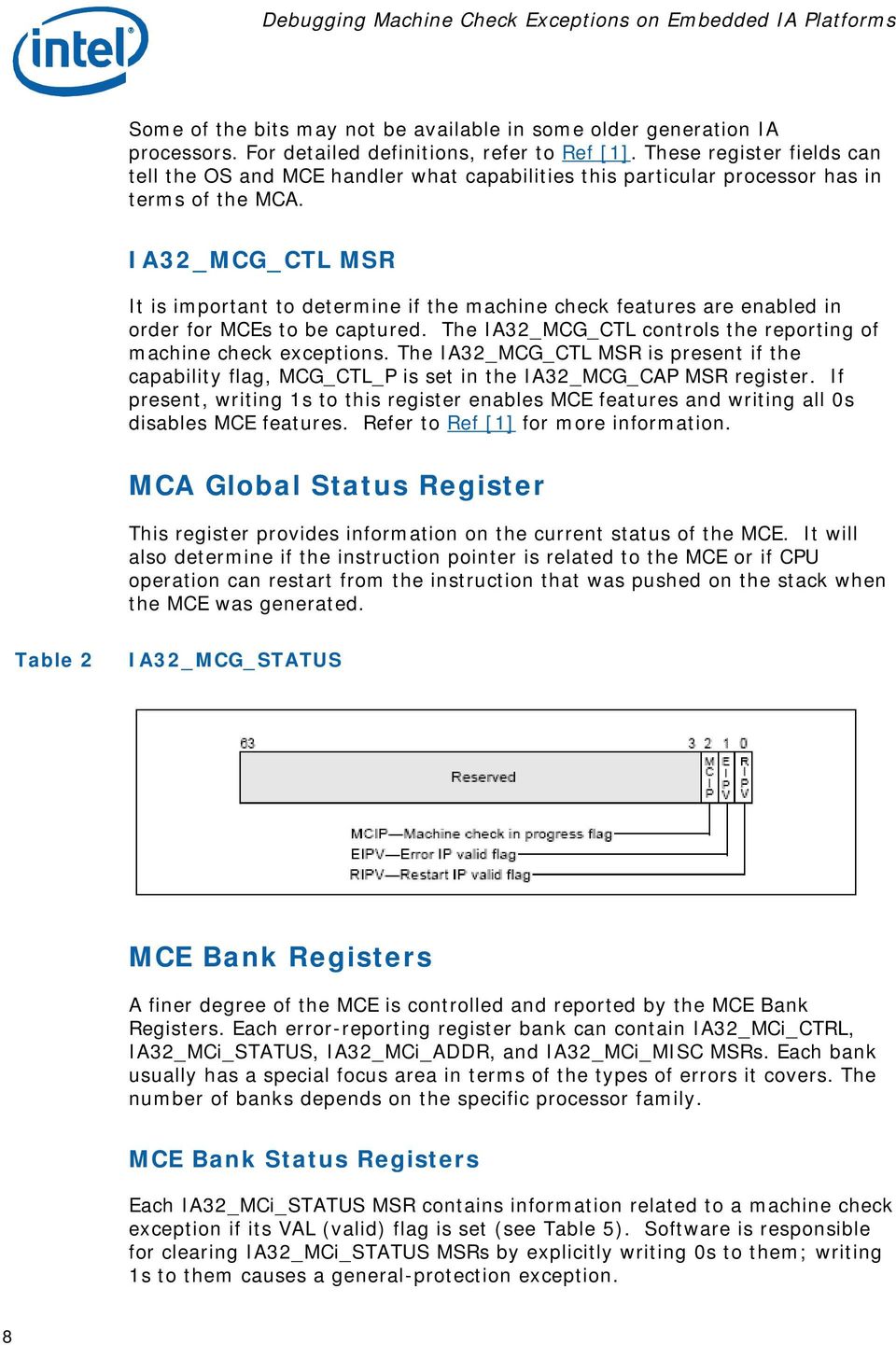
9 Table 3 IA32_MCi_STATUS register A more detailed description of the MCE Status Registers can be found in the Machine-Check MSRs section in Ref [1]. MCE Bank Control Registers IA32_MCi_CTL MSRs control error reporting for errors produced by a particular hardware unit. Each of the 64 flags represents a potential error. If the bit is implemented on the processor, setting the bit enables the reporting. Table 4 IA32_MCi_CTL registers MCE Bank Address Registers The IA32_MCi_ADDR MSR contains the address of the code or data memory location that produced the machine check exception if the ADDRV flag in the IA32_MCi_STATUS register is set. 9

10 MCE Bank MISC Registers The IA32_MCi_MISC MSR contains additional information describing the machine check exception if the MISCV flag in the IA32_MCi_STATUS register is set. For detailed register definition information when MISCV is valid, refer to Ref [1] and [2]. MCE Coding Tables To determine the type of error being reported the machine check exception handler must read from the MCA error code field [15:0] of the IA32_MCi_STATUS register. There are two types of MCA error codes: simple error codes and compound error codes. Table 5 shows the simple error codes. These codes indicate global error information. Table 5 IA32_MCi_Status [15:0] Simple Error Code Encoding Notes: 1. BINIT# assertion will cause a machine check exception if the processor (or any processor on the same external bus) has BINIT# observation enabled during power-on configuration (hardware strapping) and if machine check exceptions are enabled (by setting CR4.MCE = 1). 2. At least one X must equal one. Internal unclassified errors have not been classified. Table 6 shows the general form of the compound error codes related to the TLBs, memory, caches, bus and interconnect logic, and internal timer. These compound errors also consist of sub-fields that describe the type of access, level in the cache, and type of request. 10
![MCE Coding Tables To determine the type of error being reported the machine check exception handler must read from the MCA error code field [15:0] of the IA32_MCi_STATUS register.](/docs-images/44/20775079/images/page_10.jpg "There are two types of MCA error codes: simple error codes and compound error codes. Table 5 shows the simple error codes. These codes indicate global error information.")
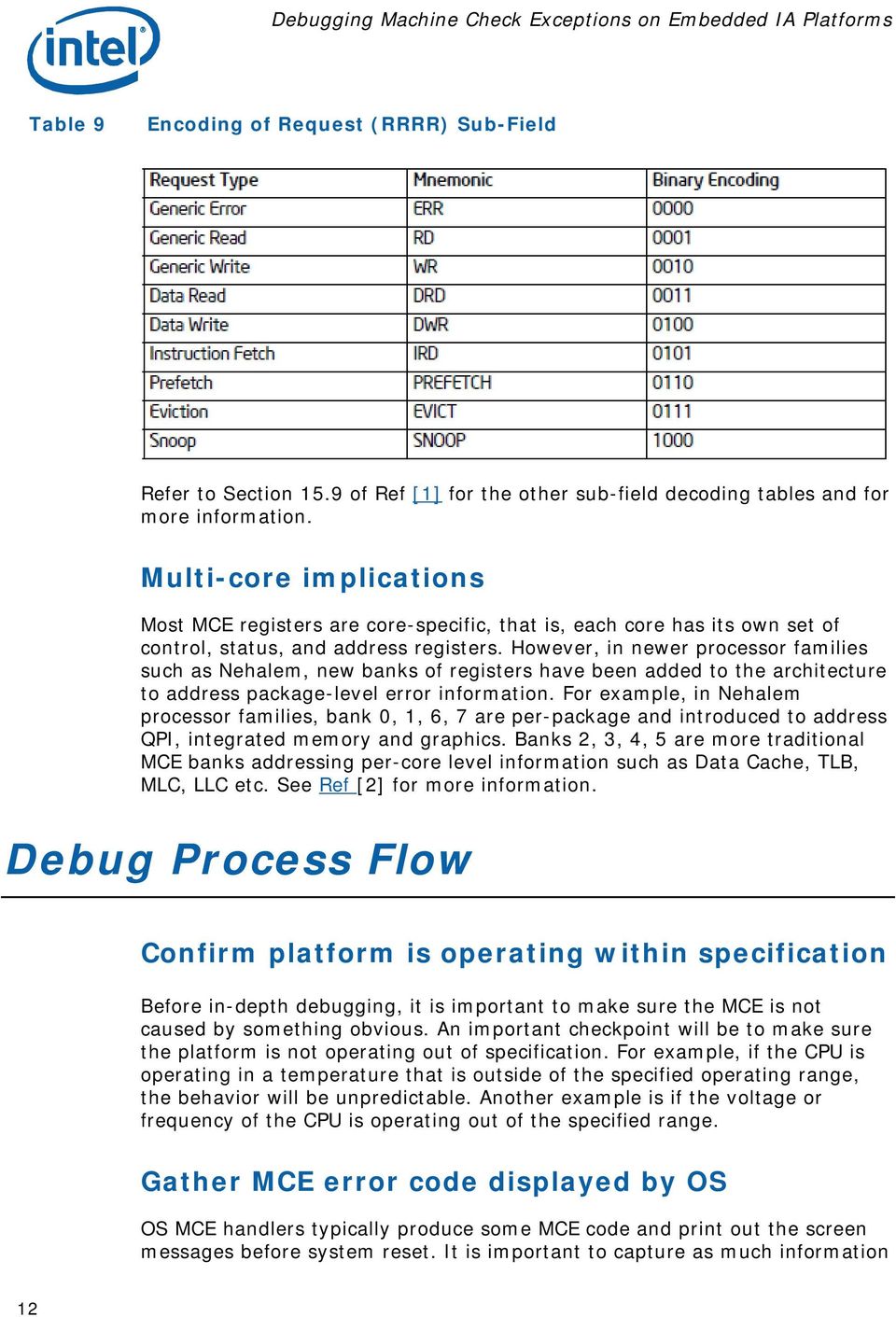
11 Table 6 IA32_MCi_Status [15:0] Compound Error Code Encoding The Interpretation column indicates the name of a compound error, which is constructed by substituting mnemonics for the sub-field names in the curly braces. Table 7 shows the 2-bit transaction type (TT) sub-field. Table 7 Encoding for TT (Transaction Type) Sub-Field Table 8 shows the 2-bit level (LL) sub-field, which indicates the level in memory hierarchy where the error occurred. Table 8 Level Encoding for LL (Memory Hierarchy Level) Sub-Field Table 9 shows the 4-bit request (RRRR) sub-field, which indicates the type of action associated with the error. 11

12 Table 9 Encoding of Request (RRRR) Sub-Field Refer to Section 15.9 of Ref [1] for the other sub-field decoding tables and for more information. Multi-core implications Most MCE registers are core-specific, that is, each core has its own set of control, status, and address registers. However, in newer processor families such as Nehalem, new banks of registers have been added to the architecture to address package-level error information. For example, in Nehalem processor families, bank 0, 1, 6, 7 are per-package and introduced to address QPI, integrated memory and graphics. Banks 2, 3, 4, 5 are more traditional MCE banks addressing per-core level information such as Data Cache, TLB, MLC, LLC etc. See Ref [2] for more information. Debug Process Flow Confirm platform is operating within specification Before in-depth debugging, it is important to make sure the MCE is not caused by something obvious. An important checkpoint will be to make sure the platform is not operating out of specification. For example, if the CPU is operating in a temperature that is outside of the specified operating range, the behavior will be unpredictable. Another example is if the voltage or frequency of the CPU is operating out of the specified range. Gather MCE error code displayed by OS OS MCE handlers typically produce some MCE code and print out the screen messages before system reset. It is important to capture as much information 12
13 as possible by carefully recording the screen message. Turning on debug message levels to get extra system messages and getting screen log messages recorded is also a good idea to help identify what is happening before the MCE event. The details to turn on debug messages are OS specific. For example, Linux has different levels of debug message displays. Identify error frequency Error frequency is an important piece of data but may be hard for a small sample size. The frequency of the MCE may shed some light on what may be causing it. For example, if the frequency of the MCE is relatively high and easily reproducible, it may indicate issues with board designs or system applications. Otherwise, if the frequency is extremely low, it may be related to environmental disturbance. Confirm whether the MCE is reproducible on the same platform It is helpful to confirm whether the issue is reproducible on the same platform. However, in some cases it is possible the error will not occur on the same platform. Collect as much information as possible about configuration Capture all the platform/os/bios information for the failing system, including: CPU stepping/sku info MCU version Chipset stepping/sku info BIOS (vendor name, whether it has the latest MCU and necessary known BIOS fixes) OS information Software applications that are running, the main transactions (I/O, memory) The kind of environment (high altitude, Extreme cold/hot) Decode and understand MCE message Correctly decoding the MCE message is a necessary and important step. An example of how to decode an MCE message follows. 13

14 For example, if the compound error code reported is: MC1_STATUS: 0xf This can be decoded by looking at the MCA error code field bits [15:0], which is 0151 of the above register. Convert this value to binary ( ) and refer to Table 6 to determine the compound error code form. In this case, the form is (000F 0001 RRRR TTLL) and is a cache hierarchy error. Next, the sub-fields can be determined: TT=00, LL=01, RRRR=0101. By using the sub-field Tables 7, 8, 9 and the corresponding interpretation form from Table 6, ({TT}CACHE{LL}_{RRRR}_ERR), the MCE is decoded as an L1 instruction fetch error. This error is an uncorrected error as can be seen by bit 61 being set in the MC1_STATUS register. The messages provided by the MCE error code can be used to understand what may potentially be causing the errors. Refer to this section for some potential common causes. Refer to Appendix E, Interpreting Machine-Check Error Codes in Ref [2] for more information on interpreting the MCA error code, model-specific error code, and other information error code fields. Make sure latest MCU and BIOS updates are in place Ensure the correct MCU and BIOS are in place. Check with BIOS vendors for relevant BIOS updates. Make sure the latest MCU code is being used as each MCU may contain bug fixes or enhancements. Research CPU Spec Update for relevant CPU errata Research the CPU Specification Update for known CPU errata that match the failure symptoms. If the errata calls for suggestions on certain software practices, then these suggestions should be reviewed, considered, and tested. Try to reproduce on Customer Reference Board When issues are highly reproducible on customer platforms, gather a reference data point by testing it on Intel CRBs. If users can re-create the same issue on Intel CRBs, this will potentially eliminate a lot of possibilities and streamline the debug process. When an MCE can be reproduced on an Intel CRB, there are usually two possibilities related to the cause. One is a potential sighting of a possible 14

15 silicon issue, or the SW/OS/BIOS that is running. If this is the case, it is recommended to alert the silicon vendor. If the MCE is reproducible on the CRB and in a common software environment, then it may be easier to engage in a productive trouble-shooting process. Debug Checklist Steps Checklist Item Outcome 1 Confirm platform is operating within specification 2 Gather MCE error code 3 Identify error frequency 4 Confirm if MCE is reproducible on the same platform 5 Collect as much information as possible about configuration (OS, BIOS version, software applications that are running) 6 Understand the MCE code 7 Make sure latest MCU & BIOS updates are in place 8 Research CPU spec update for any relevant CPU errata 9 Try to reproduce on customer reference board Related documents Ref. # Document Title Document Number/Location [1] Intel 64 and IA-32 Architectures Software Developer s Manual, Volume 3A: System Programming Guide [2] Intel 64 and IA-32 Architectures Software Developer s Manual Volume 3B: System Programming Guide Summary This application note gives an overview of machine check architecture and its purpose in detecting and reporting system errors. This architecture provides an opportunity to capture a group of error situations visible to the CPU at the point of failure. Newer additions of the MCA also make it possible to wire 15

16 interrupts to correctable MCEs, in case users are interested in checking these events as well. This document described the importance of machine check architecture to embedded products given the valuable information captured in MCE registers, which are often the only clue to what has happened. Debugging machine check exceptions on any system is a challenging task due to the number of suspects that may be involved. Embedded systems add a new dimension to the difficulty due to their vastly diverse system configuration, environments, and usage models. This document provides a quick review of machine check architecture and its key elements for debugging. It also provides recommendations on how to debug MCEs in embedded systems and provides a sample approach to help system developers debug such issues. As each failure event is rather unique, every error situation will need to be approached differently. Nevertheless, this step by step guide provides a list of items that may be helpful to this debug process. The Intel Embedded Design Center provides qualified developers with webbased access to technical resources. Access Intel Confidential design materials, step-by step guidance, application reference solutions, training, Intel s tool loaner program, and connect with an e-help desk and the embedded community. Design Fast. Design Smart. Get started today. Authors Ashley Montgomery is a Platform Application Engineer with Intel s Embedded and Communications Group. Tian Tian is a Platform Application Engineer with Intel s Embedded and Communications Group. 16

17 INFORMATION IN THIS DOCUMENT IS PROVIDED IN CONNECTION WITH INTEL PRODUCTS. NO LICENSE, EXPRESS OR IMPLIED, BY ESTOPPEL OR OTHERWISE, TO ANY INTELLECTUAL PROPERTY RIGHTS IS GRANTED BY THIS DOCUMENT. EXCEPT AS PROVIDED IN INTEL S TERMS AND CONDITIONS OF SALE FOR SUCH PRODUCTS, INTEL ASSUMES NO LIABILITY WHATSOEVER, AND INTEL DISCLAIMS ANY EXPRESS OR IMPLIED WARRANTY, RELATING TO SALE AND/OR USE OF INTEL PRODUCTS INCLUDING LIABILITY OR WARRANTIES RELATING TO FITNESS FOR A PARTICULAR PURPOSE, MERCHANTABILITY, OR INFRINGEMENT OF ANY PATENT, COPYRIGHT OR OTHER INTELLECTUAL PROPERTY RIGHT. UNLESS OTHERWISE AGREED IN WRITING BY INTEL, THE INTEL PRODUCTS ARE NOT DESIGNED NOR INTENDED FOR ANY APPLICATION IN WHICH THE FAILURE OF THE INTEL PRODUCT COULD CREATE A SITUATION WHERE PERSONAL INJURY OR DEATH MAY OCCUR. Intel may make changes to specifications and product descriptions at any time, without notice. This paper is for informational purposes only. THIS DOCUMENT IS PROVIDED "AS IS" WITH NO WARRANTIES WHATSOEVER, INCLUDING ANY WARRANTY OF MERCHANTABILITY, NONINFRINGEMENT, FITNESS FOR ANY PARTICULAR PURPOSE, OR ANY WARRANTY OTHERWISE ARISING OUT OF ANY PROPOSAL, SPECIFICATION OR SAMPLE. Intel disclaims all liability, including liability for infringement of any proprietary rights, relating to use of information in this specification. No license, express or implied, by estoppel or otherwise, to any intellectual property rights is granted herein. BunnyPeople, Celeron, Celeron Inside, Centrino, Centrino Inside, Core Inside, i960, Intel, the Intel logo, Intel AppUp, Intel Atom, Intel Atom Inside, Intel Core, Intel Inside, the Intel Inside logo, Intel NetBurst, Intel NetMerge, Intel NetStructure, Intel SingleDriver, Intel SpeedStep, Intel Sponsors of Tomorrow., the Intel Sponsors of Tomorrow. logo, Intel StrataFlash, Intel Viiv, Intel vpro, Intel XScale, InTru, the InTru logo, InTru soundmark, Itanium, Itanium Inside, MCS, MMX, Moblin, Pentium, Pentium Inside, skoool, the skoool logo, Sound Mark, The Journey Inside, vpro Inside, VTune, Xeon, and Xeon Inside are trademarks of Intel Corporation in the U.S. and other countries. *Other names and brands may be claimed as the property of others. Copyright 2010 Intel Corporation. All rights reserved. 17

Upgrading Intel AMT 5.0 drivers to Linux kernel v2.6.31
 White Paper Zerene Sangma Platform Application Engineer Intel Corporation Upgrading Intel AMT 5.0 drivers to Linux kernel v2.6.31 For Intel Q45 and Intel GM45 based embedded platforms June 2010 323961
ARM* to Intel Atom Microarchitecture - A Migration Study
 White Paper Mark Oliver Senior Systems Engineer Intel Corporation ARM* to Intel Atom Microarchitecture - A Migration Study November 2011 326398-001 1 Introduction At Intel, our engineers do not perform
Processor Reorder Buffer (ROB) Timeout
 White Paper Ai Bee Lim Senior Platform Application Engineer Embedded Communications Group Performance Products Division Intel Corporation Jack R Johnson Senior Platform Application Engineer Embedded Communications
Internal LVDS Dynamic Backlight Brightness Control
 White Paper Ho Nee Shen Senior Software Engineer Intel Corporation Chan Swee Tat System Engineer Intel Corporation Internal LVDS Dynamic Backlight Brightness Control A platform and software design using
Intel Platform Controller Hub EG20T
 Intel Platform Controller Hub EG20T General Purpose Input Output (GPIO) Driver for Windows* Order Number: 324257-002US Legal Lines and Disclaimers INFORMATION IN THIS DOCUMENT IS PROVIDED IN CONNECTION
Using GStreamer for hardware accelerated video decoding on Intel Atom Processor E6xx series
 White Paper Abhishek Girotra Graphics SW TME Intel Corporation Using GStreamer for hardware accelerated video decoding on Intel Atom Processor E6xx series September 2010 324294 Contents Executive Summary...3
DDR2 x16 Hardware Implementation Utilizing the Intel EP80579 Integrated Processor Product Line
 Utilizing the Intel EP80579 Integrated Processor Product Line Order Number: 320296-002US Legal Lines and Disclaimers INFORMATION IN THIS DOCUMENT IS PROVIDED IN CONNECTION WITH INTEL PRODUCTS. NO LICENSE,
PHYSICAL CORES V. ENHANCED THREADING SOFTWARE: PERFORMANCE EVALUATION WHITEPAPER
 PHYSICAL CORES V. ENHANCED THREADING SOFTWARE: PERFORMANCE EVALUATION WHITEPAPER Preface Today s world is ripe with computing technology. Computing technology is all around us and it s often difficult
Embedded Controller Usage in Low Power Embedded Designs
 White Paper Matthew Lee Platform Application Engineer Intel Corporation Embedded Controller Usage in Low Power Embedded Designs An Overview September 2011 326133 Executive Summary Embedded Controllers
White Paper David Hibler Jr Platform Solutions Engineer Intel Corporation. Considerations for designing an Embedded IA System with DDR3 ECC SO-DIMMs
 White Paper David Hibler Jr Platform Solutions Engineer Intel Corporation Considerations for designing an Embedded IA System with DDR3 ECC SO-DIMMs September 2012 326491 Executive Summary What are ECC
Enabling new usage models for Intel Embedded Platforms
 White Paper David Galus Graphics Platform Application Engineer Kirk Blum Graphics Solution Architect Intel Corporation Hybrid Multimonitor Support Enabling new usage models for Intel Embedded Platforms
Considerations for Designing an Embedded Intel Architecture System with System Memory Down
 White Paper David Hibler Jr Technical Marketing Engineer Intel Corporation Considerations for Designing an Embedded Intel Architecture System with System Memory Down August 2009 322506 Executive Summary
Cyber Security Framework: Intel s Implementation Tools & Approach
 Cyber Security Framework: Intel s Implementation Tools & Approach Tim Casey Senior Strategic Risk Analyst @timcaseycyber NIST Workshop #6 October 29, 2014 Intel s Goals in Using the CSF Establish alignment
Implementing Multiple Displays with IEGD Multi-GPU - Multi-Monitor Mode on Intel Atom Processor with Intel System Controller Hub US15W Chipset
 White Paper Chris Wojslaw Lead Technical Marketing Engineer Kirk Blum Graphics Solution Architect Intel Corporation Implementing Multiple Displays with IEGD Multi-GPU - Multi-Monitor Mode on Intel Atom
White Paper Amy Chong Yew Ee Online Sales Account Manager APAC Online Sales Center Intel Corporation. BOM Cost Reduction by Removing S3 State
 White Paper Amy Chong Yew Ee Online Sales Account Manager APAC Online Sales Center Intel Corporation BOM Cost Reduction by Removing S3 State May 2011 325448 Executive Summary In today s embedded design,
MCA Enhancements in Future Intel Xeon Processors June 2013
 MCA Enhancements in Future Intel Xeon Processors June 2013 Reference Number: 329176-001, Revision: 1.0 INFORMATION IN THIS DOCUMENT IS PROVIDED IN CONNECTION WITH INTEL PRODUCTS. NO LICENSE, EXPRESS OR
Intel Rapid Storage Technology (Intel RST) in Linux*
 White Paper Ramu Ramakesavan (Technical Marketing Engineer) Patrick Thomson (Software Engineer) Intel Corporation Intel Rapid Storage Technology (Intel RST) in Linux* August 2011 326024 Executive Summary
Inside Linux* graphics
 White Paper Ragav Gopalan Platform Applications Engineer Intel Corporation Inside Linux* graphics Understanding the components, upgrading drivers, and advanced use cases April 2011 325350 Inside Linux*
Video Encoding on Intel Atom Processor E38XX Series using Intel EMGD and GStreamer
 White Paper Lim Siew Hoon Graphics Software Engineer Intel Corporation Kumaran Kalaiyappan Graphics Software Engineer Intel Corporation Tay Boon Wooi Graphics Software Engineer Intel Corporation Video
Enhanced Intel SpeedStep Technology for the Intel Pentium M Processor
 Enhanced Intel SpeedStep Technology for the Intel Pentium M Processor White Paper March 2004 Order Number: 301170-001 INFORMATION IN THIS DOCUMENT IS PROVIDED IN CONNECTION WITH INTEL PRODUCTS. NO LICENSE,
Intel IXP42X Product Line of Network Processors and IXC1100 Control Plane Processor: Spread-Spectrum Clocking to Reduce EMI
 Intel IXP42X Product Line of Network Processors and IXC1100 Control Plane Processor: Spread-Spectrum Clocking to Reduce EMI Application Note July 2004 Document Number: 254028-002 INFORMATION IN THIS DOCUMENT
CPU Monitoring With DTS/PECI
 White Paper Michael Berktold Thermal/Mechanical Engineer Tian Tian Technical Marketing Engineer Intel Corporation CPU Monitoring With DTS/PECI September 2010 322683 Executive Summary This document describes
Development for Mobile Devices Tools from Intel, Platform of Your Choice!
 Development for Mobile Devices Tools from Intel, Platform of Your Choice! Sergey Lunev, Intel Corporation HTML5 Tools Development Manager Optional: Download App Preview Android bit.ly/1i8vegl ios bit.ly/1a3w7bk
CT Bus Clock Fallback for Linux Operating Systems
 CT Bus Clock Fallback for Linux Operating Systems Demo Guide August 2005 05-1900-002 INFORMATION IN THIS DOCUMENT IS PROVIDED IN CONNECTION WITH INTEL PRODUCTS. NO LICENSE, EXPRESS OR IMPLIED, BY ESTOPPEL
Measuring Cache and Memory Latency and CPU to Memory Bandwidth
 White Paper Joshua Ruggiero Computer Systems Engineer Intel Corporation Measuring Cache and Memory Latency and CPU to Memory Bandwidth For use with Intel Architecture December 2008 1 321074 Executive Summary
Developing secure software A practical approach
 Developing secure software A practical approach Juan Marcelo da Cruz Pinto Security Architect Legal notice Intel Active Management Technology requires the computer system to have an Intel(R) AMT-enabled
Accessing the Real Time Clock Registers and the NMI Enable Bit
 White Paper Sam Fleming Technical Marketing Engineer Intel Corporation Accessing the Real Time Clock Registers and the NMI Enable Bit A Study in I/O Locations 0x70-0x77 January 2009 321088 1 Executive
Using Windows* 7/Windows Embedded Standard 7* with Platforms Based on the Intel Atom Processor Z670/Z650 and Intel SM35 Express Chipset
 Using Windows* 7/Windows Embedded Standard 7* with Platforms Based on the Intel Atom Processor Z670/Z650 and Intel SM35 Express Chipset Quick Start Guide December 2011 Document Number: 326555-001 Introduction
Intel EP80579 Software for Security Applications on Intel QuickAssist Technology Cryptographic API Reference
 Intel EP80579 Software for Security Applications on Intel QuickAssist Technology Cryptographic API Reference Automatically generated from sources, May 19, 2009. Reference Number: 320184, Revision -003
ASF: Standards-based Systems Management. Providing remote access and manageability in OS-absent environments
 ASF: Standards-based Systems Management Providing remote access and manageability in OS-absent environments Contents Executive Summary 3 The Promise of Systems Management 3 Historical Perspective 3 ASF
Intel Server Board S3420GPV
 Server WHQL Testing Services Enterprise Platforms and Services Division Intel Server Board S3420GPV Rev 1.0 Server Test Submission (STS) Report For the Microsoft Windows Logo Program (WLP) Dec. 30 th,
Intel Media SDK Features in Microsoft Windows 7* Multi- Monitor Configurations on 2 nd Generation Intel Core Processor-Based Platforms
 Intel Media SDK Features in Microsoft Windows 7* Multi- Monitor Configurations on 2 nd Generation Intel Core Processor-Based Platforms Technical Advisory December 2010 Version 1.0 Document Number: 29437
Intel RAID Controller Troubleshooting Guide
 Intel RAID Controller Troubleshooting Guide A Guide for Technically Qualified Assemblers of Intel Identified Subassemblies/Products Intel order number C18781-001 September 2, 2002 Revision History Troubleshooting
Xen in Embedded Systems. Ray Kinsella Senior Software Engineer Embedded and Communications Group Intel Corporation
 Xen in Embedded Systems Ray Kinsella Senior Software Engineer Embedded and Communications Group Intel Corporation Legal Notices INFORMATION IN THIS DOCUMENT IS PROVIDED IN CONNECTION WITH INTEL PRODUCTS.
Intel(R) IT Director User's Guide
 Intel(R) IT Director User's Guide Table of Contents Disclaimer and Legal Information... 1 Introduction... 3 To set up Intel IT Director:... 3... 3 System Configuration... 5... 5 Settings Page: Overview...
Intel Embedded Virtualization Manager
 White Paper Kelvin Lum Fee Foon Kong Platform Application Engineer, ECG Penang Intel Corporation Kam Boon Hee (Thomas) Marketing Development Manager, ECG Penang Intel Corporation Intel Embedded Virtualization
Intel 815 Chipset Platform for Use with Universal Socket 370
 Intel 815 Chipset Platform for Use with Universal Socket 370 Design Guide Update October 2002 Notice: The Intel 815 Chipset family may contain design defects or errors known as errata which may cause the
Intel Desktop Board DG31GL
 Intel Desktop Board DG31GL Basic Certified Motherboard Logo Program (MLP) Report 4/1/2008 Purpose: This report describes the DG31GL Motherboard Logo Program testing run conducted by Intel Corporation.
BIOS Update Release Notes
 PRODUCTS: DX58SO (Standard BIOS) BIOS Update Release Notes BIOS Version 3435 February 11, 2009 SOX5810J.86A.3435.2009.0210.2311 Intel(R) RAID for SATA - ICH10: Raid Option ROM 8.7.0.1007 Added nvidia*
Intel Desktop Board DP35DP. MLP Report. Motherboard Logo Program (MLP) 6/17/2008
 Motherboard Logo Program (MLP) Intel Desktop Board DP35DP MLP Report 6/17/2008 Purpose: This report describes the DP35DP Motherboard Logo Program testing run conducted by Intel Corporation. THIS TEST REPORT
Contents -------- Overview and Product Contents -----------------------------
 ------------------------------------------------------------------------ Intel(R) Threading Building Blocks - Release Notes Version 2.0 ------------------------------------------------------------------------
Software Solutions for Multi-Display Setups
 White Paper Bruce Bao Graphics Application Engineer Intel Corporation Software Solutions for Multi-Display Setups January 2013 328563-001 Executive Summary Multi-display systems are growing in popularity.
Intel RAID Controllers
 Intel RAID Controllers Best Practices White Paper April, 2008 Enterprise Platforms and Services Division - Marketing Revision History Date Revision Number April, 2008 1.0 Initial release. Modifications
Customizing Boot Media for Linux* Direct Boot
 White Paper Bruce Liao Platform Application Engineer Intel Corporation Customizing Boot Media for Linux* Direct Boot October 2013 329747-001 Executive Summary This white paper introduces the traditional
Intel Desktop Board DG43NB
 Intel Desktop Board DG43NB Specification Update August 2010 Order Number: E49122-009US The Intel Desktop Board DG43NB may contain design defects or errors known as errata, which may cause the product to
Intel Data Direct I/O Technology (Intel DDIO): A Primer >
 Intel Data Direct I/O Technology (Intel DDIO): A Primer > Technical Brief February 2012 Revision 1.0 Legal Statements INFORMATION IN THIS DOCUMENT IS PROVIDED IN CONNECTION WITH INTEL PRODUCTS. NO LICENSE,
Intel Server Board S3420GPRX Intel Server System SR1630GPRX Intel Server System SR1630HGPRX
 Server WHQL Testing Services Enterprise Platforms and Services Division Intel Server Board S3420GPRX Intel Server System SR1630GPRX Intel Server System SR1630HGPRX Rev 1.0 Server Test Submission (STS)
Intel Desktop Board D975XBX2
 Intel Desktop Board D975XBX2 Premium Certified MLP Motherboard Logo Program (MLP) Report 8/22/2007 Purpose: This report describes the D975XBX2 Motherboard Logo Program testing run conducted by Intel Corporation.
Intel Core TM i3 Processor Series Embedded Application Power Guideline Addendum
 Intel Core TM i3 Processor Series Embedded Application Power Guideline Addendum July 2012 Document Number: 327705-001 INFORMATION IN THIS DOCUMENT IS PROVIDED IN CONNECTION WITH INTEL PRODUCTS. NO LICENSE,
Solution Recipe: Remote PC Management Made Simple with Intel vpro Technology and Intel Active Management Technology
 Solution Recipe: Remote PC Management Made Simple with Intel vpro Technology and Intel Active Management Technology Preface Intel has developed a series of unique Solution Recipes designed for channel
Intel Core i5 processor 520E CPU Embedded Application Power Guideline Addendum January 2011
 Intel Core i5 processor 520E CPU Embedded Application Power Guideline Addendum January 2011 Document Number: 324818-001 INFORMATION IN THIS DOCUMENT IS PROVIDED IN CONNECTION WITH INTEL PRODUCTS. NO LICENSE,
Specification Update. January 2014
 Intel Embedded Media and Graphics Driver v36.15.0 (32-bit) & v3.15.0 (64-bit) for Intel Processor E3800 Product Family/Intel Celeron Processor * Release Specification Update January 2014 Notice: The Intel
Intel Server S3200SHL
 Server WHQL Testing Services Enterprise Platforms and Services Division Intel Server S3200SHL Server Test Submission (STS) Report For the Microsoft Windows Logo Program (WLP) Rev 1.0 October 16, 2006 This
Intel Dialogic System Software for PCI Products on Windows
 Intel Dialogic System Software for PCI Products on Windows Administration Guide November 2003 05-1910-001 INFORMATION IN THIS DOCUMENT IS PROVIDED IN CONNECTION WITH INTEL PRODUCTS. NO LICENSE, EXPRESS
White Paper Amit Aneja Platform Architect Intel Corporation. Xen* Hypervisor Case Study - Designing Embedded Virtualized Intel Architecture Platforms
 White Paper Amit Aneja Platform Architect Intel Corporation Xen* Hypervisor Case Study - Designing Embedded Virtualized Intel Architecture Platforms March 2011 325258 Executive Summary Virtualization technology
Intel Extreme Memory Profile (Intel XMP) DDR3 Technology
 Intel Extreme Memory Profile (Intel XMP) DDR3 Technology White Paper January 2009 Document Number: 319124-002 INFORMATION IN THIS DOCUMENT IS PROVIDED IN CONNECTION WITH INTEL PRODUCTS. NO LICENSE, EXPRESS
Intel architecture. Platform Basics. White Paper Todd Langley Systems Engineer/ Architect Intel Corporation. September 2010
 White Paper Todd Langley Systems Engineer/ Architect Intel Corporation Intel architecture Platform Basics September 2010 324377 Executive Summary Creating an Intel architecture design encompasses some
PC Solutions That Mean Business
 PC Solutions That Mean Business Desktop and notebook PCs for small business Powered by the Intel Core 2 Duo Processor The Next Big Thing in Business PCs The Features and Performance to Drive Business Success
Intel Desktop Board DQ45CB
 Intel Desktop Board DQ45CB Specification Update July 2010 Order Number: E53961-007US The Intel Desktop Board DQ45CB may contain design defects or errors known as errata, which may cause the product to
How To Install An Intel System Studio 2015 For Windows* For Free On A Computer Or Mac Or Ipa (For Free)
 Intel System Studio 2015 for Windows* Installation Guide and Release Notes Installation Guide and Release Notes for Windows* Host and Windows* target Document number: 331182-002US 8 October 2014 Contents
Leading Virtualization 2.0
 Leading Virtualization 2.0 How Intel is driving virtualization beyond consolidation into a solution for maximizing business agility within the enterprise White Paper Intel Virtualization Technology (Intel
Universal Serial Bus Implementers Forum EHCI and xhci High-speed Electrical Test Tool Setup Instruction
 Universal Serial Bus Implementers Forum EHCI and xhci High-speed Electrical Test Tool Setup Instruction Revision 0.41 December 9, 2011 1 Revision History Rev Date Author(s) Comments 0.1 June 7, 2010 Martin
RAID and Storage Options Available on Intel Server Boards and Systems
 and Storage Options Available on Intel Server Boards and Systems Revision 1.0 March, 009 Revision History and Storage Options Available on Intel Server Boards and Systems Revision History Date Revision
Intel Storage System SSR212CC Enclosure Management Software Installation Guide For Red Hat* Enterprise Linux
 Intel Storage System SSR212CC Enclosure Management Software Installation Guide For Red Hat* Enterprise Linux Order Number: D58855-002 Disclaimer Information in this document is provided in connection with
Intel Service Assurance Administrator. Product Overview
 Intel Service Assurance Administrator Product Overview Running Enterprise Workloads in the Cloud Enterprise IT wants to Start a private cloud initiative to service internal enterprise customers Find an
Intel Server System S7000FC4URE-HWR
 Server WHQL Testing Services Enterprise Platforms and Services Division Rev 2.0 Intel Server System S7000FC4URE-HWR Server Test Submission (STS) Report For the Microsoft Windows Logo Program (WLP) June
Device Management API for Windows* and Linux* Operating Systems
 Device Management API for Windows* and Linux* Operating Systems Library Reference September 2004 05-2222-002 INFORMATION IN THIS DOCUMENT IS PROVIDED IN CONNECTION WITH INTEL PRODUCTS. NO LICENSE, EXPRESS
Intel 810 and 815 Chipset Family Dynamic Video Memory Technology
 Intel 810 and 815 Chipset Family Dynamic Video Technology Revision 3.0 March 2002 March 2002 1 Information in this document is provided in connection with Intel products. No license, express or implied,
Monthly Specification Update
 Monthly Specification Update Intel Server Board S1400FP Family August, 2013 Enterprise Platforms and Services Marketing Enterprise Platforms and Services Marketing Monthly Specification Update Revision
Intel Rapid Storage Technology
 Intel Rapid Storage Technology User Guide August 2011 Revision 1.0 1 Document Number: XXXXXX INFORMATION IN THIS DOCUMENT IS PROVIDED IN CONNECTION WITH INTEL PRODUCTS. NO LICENSE, EXPRESS OR IMPLIED,
Intel Desktop Board DG45FC
 Intel Desktop Board DG45FC Specification Update July 2010 Order Number: E46340-007US The Intel Desktop Board DG45FC may contain design defects or errors known as errata, which may cause the product to
Mini-ITX Addendum Version 1.1 To the microatx Motherboard Interface Specification Version 1.2. April 2009
 Mini-ITX Addendum Version 1.1 To the microatx Motherboard Interface Specification Version 1.2 April 2009 1. INTEL CORPORATION ( INTEL ) MAKES NO WARRANTIES WITH REGARD TO THIS SPECIFICATION ( SPECIFICATION
Intel Desktop Board DG43RK
 Intel Desktop Board DG43RK Specification Update December 2010 Order Number: E92421-003US The Intel Desktop Board DG43RK may contain design defects or errors known as errata, which may cause the product
Intel Server Board S5000PALR Intel Server System SR1500ALR
 Server WHQL Testing Services Enterprise Platforms and Services Division Intel Server Board S5000PALR Intel Server System SR1500ALR Intel Server System SR2500ALBRPR Server Test Submission (STS) Report For
Enhanced Diagnostics Improve Performance, Configurability, and Usability
 Application Note Enhanced Diagnostics Improve Performance, Configurability, and Usability Improved Capabilities Available for Dialogic System Release Software Application Note Enhanced Diagnostics Improve
Intel Media SDK Library Distribution and Dispatching Process
 Intel Media SDK Library Distribution and Dispatching Process Overview Dispatching Procedure Software Libraries Platform-Specific Libraries Legal Information Overview This document describes the Intel Media
How To Get A Client Side Virtualization Solution For Your Financial Services Business
 SOLUTION BRIEF Financial Services Industry 2nd Generation Intel Core i5 vpro and Core i7 vpro Processors Benefits of Client-Side Virtualization A Flexible, New Solution for Improving Manageability, Security,
Page Modification Logging for Virtual Machine Monitor White Paper
 Page Modification Logging for Virtual Machine Monitor White Paper This document is intended only for VMM or hypervisor software developers and not for application developers or end-customers. Readers are
Intel Server Raid Controller. RAID Configuration Utility (RCU)
 Intel Server Raid Controller RAID Configuration Utility (RCU) Revision 1.1 July 2000 Revision History Date Rev Modifications 02/13/00 1.0 Initial Release 07/20/00 1.1 Update to include general instructions
Intel N440BX Server System Event Log (SEL) Error Messages
 Intel N440BX Server System Event Log (SEL) Error Messages Revision 1.00 5/11/98 Copyright 1998 Intel Corporation DISCLAIMERS Information in this document is provided in connection with Intel products.
Creating Full Screen Applications Across Multiple Displays in Extended Mode
 White Paper Anthony See Platform Application Engineer Intel Corporation Ho Nee Shen Software Engineering Manager Intel Corporation Creating Full Screen Applications Across Multiple Displays in Extended
Intel Desktop Board DG45ID. MLP Report. Motherboard Logo Program (MLP) 9/29/2009
 Motherboard Logo Program (MLP) Intel Desktop Board DG45ID MLP Report 9/29/2009 Purpose: This report describes the DG45ID Motherboard Logo Program testing run conducted by Intel Corporation. THIS TEST REPORT
Intel X58 Express Chipset
 Product Brief Intel X58 Express Chipset Highest performing desktop platform for extreme gamers and demanding enthusiasts Desktop PC platforms based on the Intel X58 Express Chipset and Intel Core i7 processor
Intel Virtualization Technology FlexMigration Application Note
 Intel Virtualization Technology FlexMigration Application Note This document is intended only for VMM or hypervisor software developers and not for application developers or end-customers. Readers are
Accelerating Business Intelligence with Large-Scale System Memory
 Accelerating Business Intelligence with Large-Scale System Memory A Proof of Concept by Intel, Samsung, and SAP Executive Summary Real-time business intelligence (BI) plays a vital role in driving competitiveness
Intel Virtualization Technology (VT) in Converged Application Platforms
 Intel Virtualization Technology (VT) in Converged Application Platforms Enabling Improved Utilization, Change Management, and Cost Reduction through Hardware Assisted Virtualization White Paper January
Intel Desktop Board DP43BF
 Intel Desktop Board DP43BF Specification Update September 2010 Order Number: E92423-004US The Intel Desktop Board DP43BF may contain design defects or errors known as errata, which may cause the product
Intel Ethernet Switch Load Balancing System Design Using Advanced Features in Intel Ethernet Switch Family
 Intel Ethernet Switch Load Balancing System Design Using Advanced Features in Intel Ethernet Switch Family White Paper June, 2008 Legal INFORMATION IN THIS DOCUMENT IS PROVIDED IN CONNECTION WITH INTEL
Recovery BIOS Update Instructions for Intel Desktop Boards
 Recovery BIOS Update Instructions for Intel Desktop Boards All BIOS update files for Intel Desktop Boards are available on Intel's Download Center at http://downloadcenter.intel.com/. Important Notes:
Intel Desktop Board D925XECV2 Specification Update
 Intel Desktop Board D925XECV2 Specification Update Release Date: July 2006 Order Number: C94210-005US The Intel Desktop Board D925XECV2 may contain design defects or errors known as errata, which may cause
Intel Desktop Board DQ35JO
 Intel Desktop Board DQ35JO Specification Update May 2008 Order Number E21492-002US The Intel Desktop Board DQ35JO may contain design defects or errors known as errata, which may cause the product to deviate
Intel Server Board S3420GPLX Intel Server Board S3420GPLC Intel Server System SR1630GP Intel Server System SR1630HGP
 Server WHQL Testing Services Enterprise Platforms and Services Division Intel Server Board S3420GPLX Intel Server Board S3420GPLC Intel Server System SR1630GP Intel Server System SR1630HGP Rev 1.0 Server
Intel Itanium Quad-Core Architecture for the Enterprise. Lambert Schaelicke Eric DeLano
 Intel Itanium Quad-Core Architecture for the Enterprise Lambert Schaelicke Eric DeLano Agenda Introduction Intel Itanium Roadmap Intel Itanium Processor 9300 Series Overview Key Features Pipeline Overview
Intel Desktop Board D945GNT
 Intel Desktop Board D945GNT Specification Update Release Date: November 2007 Order Number: D23992-007US The Intel Desktop Board D945GNT may contain design defects or errors known as errata, which may cause
Intel Desktop Board DG965RY
 Intel Desktop Board DG965RY Specification Update May 2008 Order Number D65907-005US The Intel Desktop Board DG965RY contain design defects or errors known as errata, which may cause the product to deviate
Intel Active Management Technology Embedded Host-based Configuration in Intelligent Systems
 WHITE PAPER Intel vpro Technology Embedded Host-based Configuration in Intelligent Systems Easy activation of Intel vpro technology remote manageability without trade-offs in security, functionality, and
Intel 64 and IA-32 Architectures Software Developer s Manual
 Intel 64 and IA-32 Architectures Software Developer s Manual Volume 3B: System Programming Guide, Part 2 NOTE: The Intel 64 and IA-32 Architectures Software Developer's Manual consists of eight volumes:
Intel Desktop Board DG41TY
 Intel Desktop Board DG41TY Specification Update July 2010 Order Number E58490-006US The Intel Desktop Board DG41TY may contain design defects or errors known as errata, which may cause the product to deviate