
Creating a Design Token Library for ABB s CommonUX Design System. Topias Saari
|
|
|
- Michael Barton
- 5 years ago
- Views:
Transcription

1 Creating a Design Token Library for ABB s CommonUX Design System Topias Saari Bachelor s Thesis Degree Programme in Business Information Technology 2019
2 Abstract Business Information Technology Authors Topias Saari The title of your thesis Creating a Design Token Library for ABB s CommonUX Design System Supervisors Jarmo Peltoniemi Group BITe Number of pages and appendices 43+2 This commissioned product-thesis describes the process of creating a design token library for ABB s Design System. The objective of the thesis is to create a design token library which aims to improve the design handoff process within the CommonUX-team. The goal of the thesis is to improve the knowledge and skills of the thesis worker. The research questions of the thesis are: what is a design token library and how can it improve the design handoff process? These goals are met by describing the structure of design systems in general, which is followed by a definition of design tokens. The definition, together with an overview of the design system is then applied to create a project plan that consists of first level token architecture and a command line tool for importing the design tokens into a language agnostic format for the developers to use. The development process is described in a thesis diary, which is finally evaluated and discussed. The conclusion to the research questions is that a design token library is a set of values that can be used to maintain and organize design decisions within a design system. It can improve the design handoff process by being a centralized and visible set of values that the designers and developers can agree upon and refer to by using a shared language. Key words UX-design, Software development, Design system, Design token
3 Table of contents 1 Assessment statement Introduction Project definition Pre-study ABB CommonUX Design System Design systems Design tokens Tools of CommonUX Creation of Design Tokens Thesis diary Results Architecture Implementation Design handoff Discussion Reflection on thesis diary Limitations Suggestions for further development Feedback Conclusions References Appendices Appendix 1. Main function of the Figma API to JSON token generator Appendix 2. README of the token generator Table of figures Figure 1. UI Layout using CommonUX (ABB 2019)... 4 Figure 2. Atomic Design methodology (Frost, 2016)... 6 Figure 3. Mind map of a design system... 7 Figure 4. Example of second level design token architecture Figure 5. Timeline of the project Figure 6. First Figma API test Figure 7. Token dashboard test Figure 8. Optimizing structure (week 30) Figure 9. Token creation instructions in Figma Figure 10. Naming conventions Figure 11. Figma to JSON Figure 12. Figma document structure (Laptev, 2019) Figure 13. Design handoff Table 1. Common token definitions in public design systems Table 2. Token categories... 31
4 1 Assessment statement This project was assigned by ABB to design and develop a design token library as a feature to the CommonUX Design System. The thesis was commissioned in the spring of The project was conducted during June and July 2019.
5 2 Introduction This product-driven thesis aims to create a design token library for ABB s CommonUX Design System. The design token library will consist of a token architecture and implementation, as well as documentation of the final product and the development process. This thesis includes terminology and concepts related to the field, which require prior knowledge of web development as well as UX-design. A pre-study will be conducted. First, the context, aims and framework for the project will be defined. A definition of a design system is presented to help contextualize the aim of the thesis project. After defining what a design system is, what is it used for, what are the benefits, use purposes and tools, design tokens will be defined. As there are no definite industry standards for design systems or design tokens since they are fairly new concepts and serve a variety of use cases, the definitions used in this thesis will be constructed using multiple literary sources and examples as well as a benchmarking of existing design token libraries. The exploration of design tokens will include benefits, disadvantages and common practices. The action part of the thesis will consist of a proposal for the design token architecture and a technical implementation. Afterwards a thesis diary will be presented in order to evaluate the implementation for further improvements or changes. The diary is also used to present the progress and learnings of the thesis worker. To conclude, the process will be evaluated by the representatives of ABB. A retroactive look at the project will be given to summarize the process along with proposals for further development. 2.1 Project definition The research questions of the thesis are: what is a design token library and how can it improve the design handoff process? These research questions are used to gain understanding of existing design token libraries. The thesis project is commissioned by ABB to implement a design token library into CommonUX Design System. The design token library is done in order to improve the process of translating base level design decisions into development and maintaining consistency within the CommonUX team. The term design handoff is used of this process. The thesis will evaluate the success of the technical implementation, not the effects of the product in the long run. 1
6 The theory section of the thesis aims to answer the first part of the research question: what a design token library is, and the action part of the thesis will discuss and demonstrate how to build one to improve the design handoff process in this particular case. The development and progress of the thesis worker will be demonstrated through the thesis diary as producing the deliverables for the commissioning party. The theory part will be constructed using the pre-study as well as a benchmarking of existing design token architectures to gain knowledge of the current state and standards in use. Additionally, an overview of the tools and processes of CommonUX will be gathered. The action part of the thesis will include a project plan, thesis diary as well as a description of the design token library. The theory part will be applied to create a project plan. This project plan will be implemented by the thesis worker in cooperation with the CommonUX team. This process will be documented in a thesis diary that will constitute towards the learning goals of the project. As a final result of the project, the thesis worker will deliver the commissioning party a functional design token library that is integrated to the current tools and methods of the CommonUX Design System along with this thesis. The commissioned thesis project aims to fulfill the following business benefits: reducing maintenance overhead and decreasing initiation cost to implement new components in the design system. The former is achieved through creating a tool, the design token library, that decreases the resources needed in the design handoff process. The latter of these business benefits will be achieved through making the tool in such a way, that it serves the intended purposes and use cases as optimally as possible within the frames of the thesis. The design token library at first will work as an internal tool. The focus of the thesis is to service of the workflow of the team to improve and maintain the design system. Even though the solution will be for internal use, the end user will be kept in mind for further development and possible release as part of the design system. The schedule for the thesis is ten weeks. The ten-week project will include one to two weeks of research, that is represented in the theory section of this thesis. The project timeline will span from the beginning of June of 2019 to the end of July of
7 3 Pre-study The pre-study for the thesis project introduces ABB, design systems as well as design tokens. 3.1 ABB ABB (Asea Brown Boveri) is a multi-national corporation that operates in about 100 countries. It was founded in 1988 when two European companies, ASEA and Brown, Boveri & Cie merged. It deals mostly in infrastructure, industry and transport technology. In 2017 ABB s revenue was 34.3 billion US Dollars with 1% growth from previous year. (ABB 2019) ABB has a notable presence in Finland with around 5000 employees and 2,2 billion revenue. This presence has long roots that started back in 1889 with a Finnish company Oy Strömberg Ab that was later acquired by ASEA, which would become ABB later on. In Helsinki, the ABB premises range notably from Valimo to Pitäjänmäki with over half of the Finnish ABB employees located in the area thus generating daily commuter traffic from the surrounding metropolitan area. Pitäjänmäki factories produces motors, generators, frequency converters, multiple electrical products, industry automation technology as well as research and development. (ABB 2019). 3.2 CommonUX Design System In 2018, an initiative to unify the look and feel of ABB s digital products was created. This effort was carried out by a dedicated central UX-design team that consists of UX-designers and frontend developers. The goal of the design system is to improve the quality of the digital offering of the company, that spans multiple different sectors of industrial and commercial use. (ABB 2019) The CommonUX Design System consists of design principles, foundational styling instructions, design tools such as toolkits for the vector graphics editors Adobe Illustrator and Sketch as well as development tools in the form of reusable components built using frontend frameworks React, Angular and WPF. In addition, references to example layouts (figure 1) and how to build these user interfaces is described an online guideline which is a website that acts as a portal to all of the resources for the design system. The main 3
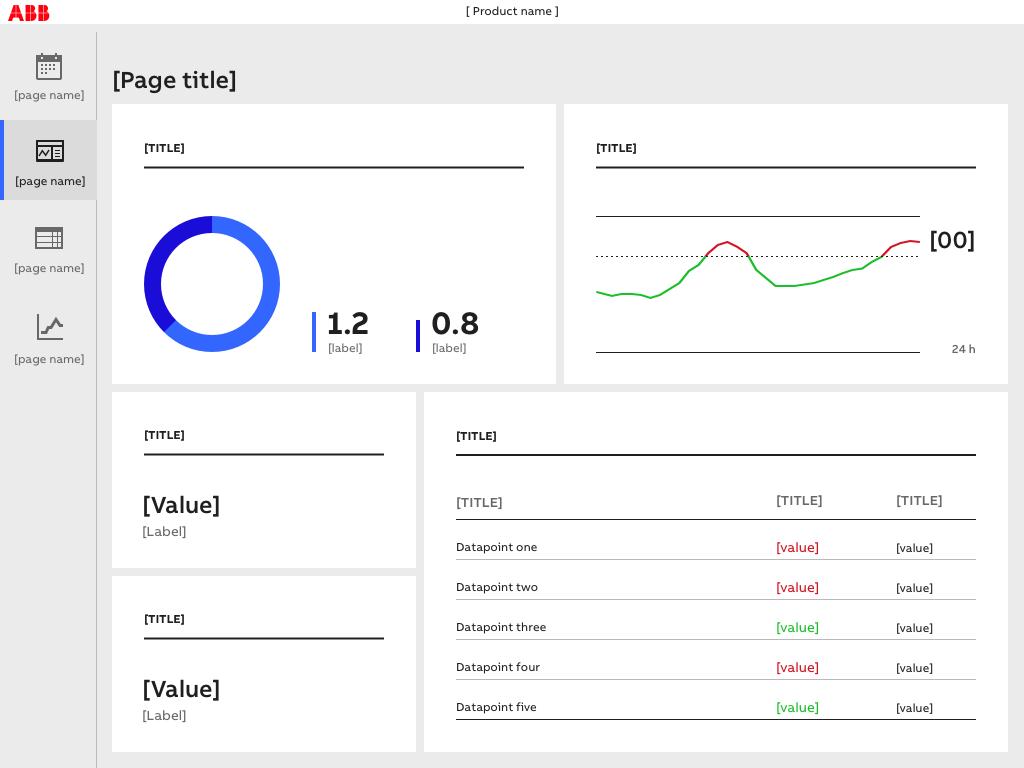
8 responsibility of the team is to provide tools and instructions on how to create brand consistent, meaningful and UX standard user interfaces to ABB s customer facing digital products as well as internal tools. (ABB 2019) Figure 1. UI Layout using CommonUX (ABB 2019) 4
9 3.3 Design systems The process of branding is used to create a consistent image for a product or a company. (Business Dictionary 2019). In user interfaces, the visual style, UX-patterns and other design decisions can be used to create consistent branding (Qubstudio 2019). Style guides are one of the ways used to ensure visual consistency. In web design, traditionally a style guide defines a color palette, size classes and other stylings that can be used to create the intended style. (McNaughton, 2019) But a design system is not just a style guide. For example, a style guide is typically a reference pdf or a website that is used to check that the design matches intended colors. Whereas a design system tells one what the colors are, how to use them and in what context, as well as gives tools for designers and developers to use the colors in a reusable manner (Curtis, 2017). The following quote from Nathan Curtis helps to sum the difference between style guides and design systems. A style guide is an artifact of the design process. A design system is a living, funded product with a roadmap & backlog, serving an ecosystem. Nathan Curtis. (Curtis, 2015) The idea of reusability in design is not a new one, even though all modern design systems are arguably less than ten years old, a modular approach to software development has been in use since the 1960 s (Fanguy, 2018). Historically it has been stated that design and programming assets have been largely disconnected from each other, and any thorough attempts to reach interface reusability and consistency through style guides have failed (Gale, ). Alexander, Ishikawa and Silverstein in the book A Pattern Language (1977) define a language based on 253 patterns as a way to create buildings, neighborhoods or other architectural projects. This idea of patterns, and small set of defined building blocks creating a language (Alexander, Ishikawa, Silverstein, 1977, xi) is discussed by Frost in his work Atomic Design (2016). He defines the cornerstone of design systems as being style guides that present design elements in a clear way as well as providing guidelines, usage and guardrails (Frost, 2016, 45). Frost s work is not concerned with buildings or strictly brand guidelines however, but creating a design methodology, a way of analyzing and compartmentalizing a user interface as a set of small parts and using these parts to create UI s using a defined palette of elements. This idea of dividing the user interfaces into small 5
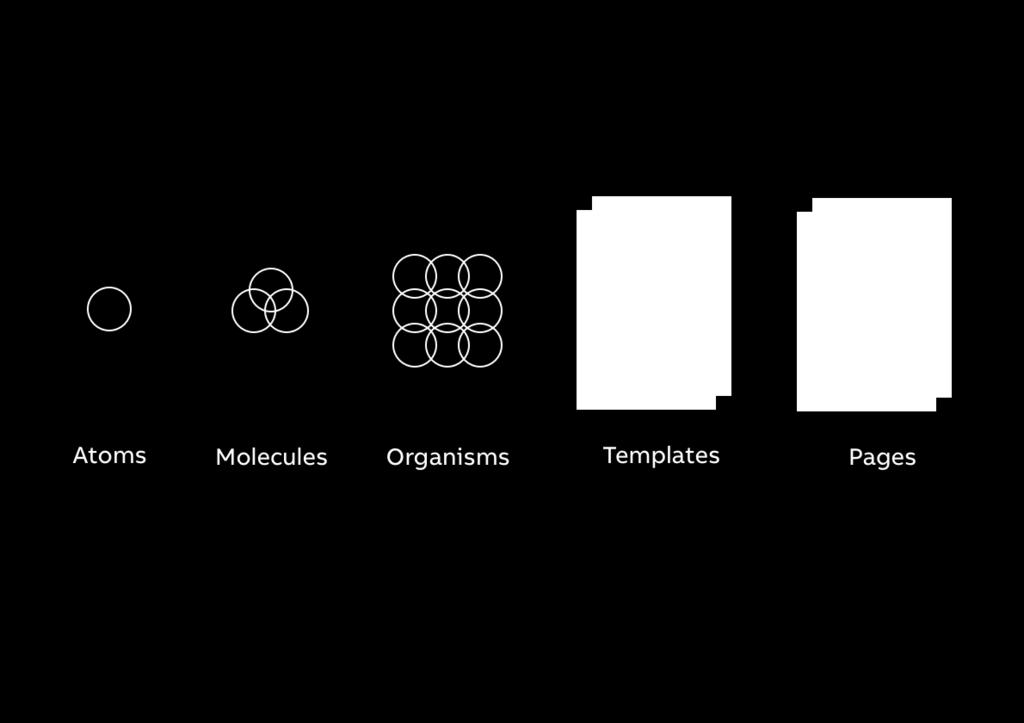
10 parts is crucial for the idea of reusability as most UI s consist of complex elements and interactions. In the Atomic Design methodology, the smallest units are called atoms. Atoms are elements such as buttons or checkboxes. These atoms form molecules, such as an input element. Together atoms and molecules can create organisms that are complex structures, like a header on a site. All of the aforementioned together create templates on top of which content is put to create pages (Frost, 2016, 83-90). All different levels of this methodology are interlinked. A design system encompasses all of these elements, and how to use them. It provides functioning atoms, molecules and organisms in the form of UI components, and instructs how to create pages based on rules and guidelines that make functioning templates. Figure 2. Atomic Design methodology (Frost, 2016) The Atomic Design methodology is a useful tool to help understand and define design systems. The methodology defines the building blocks of user interfaces (figure 2). Having a systematic approach in the creation of patterns and guides becomes logical. What is relevant to understand in the context of this thesis is that design systems approach reusability and consistency in design by defining elements of the system and providing tools to use them (Nguyen. 2018, 42). So, a design system is not just a style guide, but a more full-fledged and encompassing set of tools, such as design principles, design toolkits, reusable components and pattern libraries. Design systems can be thought of creating the application programming interface API for design (Saarinen, 2017). 6
11 The content and purpose of a design system can vary based on the use case. See figure 3 for an illustration of possible elements that can be included in a design system. The following aspects of design systems are presented shortly to give context of the functions and content that design systems typically include. Figure 3. Mind map of a design system Design principles are the foundational grounding values that help define a design system. The principles are not quantifiable, but good principles are authentic, practical and easy to remember. (Kholmatova, 2017, ) A typical design principle is something along the lines of clear or approachable. The design principles are used to guide the decisionmaking process when determining specific parts of the design system. A component library is a collection of reusable components to create user interfaces (Catakli, 2018). A software component library can be created for example by using a frontend development framework such as React, Angular or Vue.js. Web-based component libraries are not limited JavaScript based frameworks, even though they have become prevalent in previous years (Wanyoike, 2018). The component library works as an asset for the developers to implement designs without having to build the components from scratch, as would be necessary with traditional style guides. One of the benefits that reusable components provide, is consistency in functionality. Some design systems support multiple platforms that require separate implementations of the UI components. For example, Google s Material design supports ios, Android, Flutter and Web (Google 2019), which is an example of one of the more robust design systems currently that requires different technologies for different platforms. 7
12 Design toolkit is to designers what the software component library is to developers. It can include for example components, color palettes and example layouts. A design toolkit can be delivered in design tools such as Sketch, Adobe XD, Figma, Illustrator or InVision. (Slegtenhorst, 2018) The aforementioned tools are used to create example layouts or prototypes using components, colors or other tools that the design system provides for the tool. These design toolkits can be useful in design systems that function mostly as branding guidelines that focuses on the visual aspects over usability. Design toolkits allow creation of faster mockups and prototypes without the need to create the user interfaces from nothing. The design principles, toolkits and component libraries together with a community of users create the design system. A traditional style guide is mostly a one-way street, rules and guides to be followed. The discussion on design systems usually involves the community aspect. It is mentioned here as well to emphasize the fact that the impact of the design system reveals itself through communication using a shared vocabulary (Anne, 2019). The usability of the components, the look and feel, the implementation process, all are aspects of the system that benefit from feedback. Consistency in branding and reusable tools are profitable endeavors in the long run despite of the initiation costs that a design system requires (Arruda, 2016; Huang. 2019, 49). Once established and stable, a design system can decrease the resources used for unnecessary repetition in the design and development processes. A design system as a tool provides scale, efficiency and consistency in design (Araújo, 2018). Quality is usability and learnability as software products become aligned and consistent. It can be said, that although design systems are relatively new and, on the rise, there are recognized challenges. Most design systems are standalone products and have the same needs as other kinds of products. A design system requires a holistic approach, attention and resources. The most common challenges that a design system faces, are short term mentality, allocating resources (being treated as an auxiliary project) and the need for maintenance and governance. All of these elements can cause friction and failure to take into use. (Frost. 2016, 67-74; Kravets, 2017) Madsen (2017) has claimed, that design systems do not focus on the real problems, namely the processes and tools. (Madsen, 2017) How to maintain the system? Where are the definitions? How to deal with systematic change? Just to mention a few. As the design 8
13 system is a complex and time-consuming effort, it is important to remember that it ultimately should serve the designers and developers that use it. 3.4 Design tokens In the context of Atomic Design methodology, design tokens can be considered as the sub-atomic level. If a button is considered as the atom, then the colors, sizes and other values are what make up the atom. Tokens are common style definitions that act as labels for design decisions that are stored as code-level attributes. (Curtis, 2016) The tokens act as an abstraction that helps designers and developers to discuss the attributes in the same terms, as well as to assist in the aforementioned difficulty of reusability. In enterprise contexts, design systems can affect multiple different platforms. Not just web, but native formats as well. It is important to clarify that design tokens are not CSSvariables, they are not CSS at all. The tokens can be presented and utilized using CSS, or any other format for that matter. (Rendle, 2019) The design token can be presented in many ways, but since CSS is purely for web, using some other format can be more beneficial. Jina Anne, who is credited for inventing the design token term, has referred design tokens being the single source of truth for style decisions (Anne, 2016). A design token library can include one or more levels of tokens (Curtis, 2016). Primary first level tokens, such as a color value: color-black are ones that present the design options in the context of the design system, the raw decisions made on a base level. In addition to primary first level tokens for the raw values, there are second level tokens that present specific decisions (Curtis, 2016). Sometimes tertiary level of component specific tokens can be created for even more granular use cases. For example, a font-color-primary can be a specific second level token that is mapped to the first level token colorblack-1 which is mapped to the hex-value # (figure 4). Second level tokens are defined using first level tokens. 9
14 Figure 4. Example of second level design token architecture Component specific tokens are mostly implemented in design systems that give users plain base components that are meant to be given case specific attributes. In that use context, including a definition for specific component attributes helps when specific styling changes are needed. Based on the benchmarking of the content of design token libraries in design systems that utilize web technologies and frameworks (table 1.) the design systems that included design tokens, all had color definitions. Almost all of the design token libraries defined typographic elements, scaling and from there to a varying degree content areas, z-axis s, durations and shadow properties. They were mostly distributed either in a data-serialization format such as JSON or XML and from there distributed into specific formats like the preprocessor for CSS, SASS in web development. Second level tokens were used for color elements that served very specific purposes, such as application background or brand colors. Specific font styles were also defined as second level tokens. Overall there seems to be currently large variations on the structure and content of design token libraries. The commonality being a centralized location for definition of the tokens and including color values. 10
15 Table 1. Common token definitions in public design systems Design System Color Font size Font family Font weight Line height Spacing Salesforce Lightning x x x x x Google Material x x x FirefoxUI x Mozilla Protocol x x x x Shopify Polaris x x x x Github Primer x x x x Mineral UI x x x x x x Skyscanner Backpack x x x x x Microsoft Fabric x x x x Lonely planet Rizzo x x x Buzzfeed Solid x x x x x x Uber Base Web x x x x x x Discovery Comet x x x x 11
16 There are only two hard things in Computer Science: cache invalidation and naming things. Phil Karlton There is no one standard for naming design tokens. Phil Kartlon s famous quote is easily applicable here as in many other cases. Some conventions in use are modified versions of the CSS methodology BEM (block-element-modifier), which specifies first the main level block, then the element and lastly modifier. An example of this being.button statesuccess ( Strukchinsky, Starkov. 2018). This naming convention is used for CSS classes and might not always translate into tokens, since design tokens are not bound to CSS. In various design token libraries, the convention of category-definition such as color-green seems to be the most prominent (Verou, 2018). There are also attempts to make color naming semantic, based on what they literally are, but unsuccessfully, since remembering a token name such as mainbrandcolor can become difficult due to the quantity of different tokens (Coyier, 2018). On the other hand, having semantic names for more specific tokens like button-color-text allows one to change the complete color behind the token, where as color-button-red will need to be red by definition. For first level tokens, this specificity is clear, but using semantic naming in the second level tokens creates flexibility (Anne, 2016). Jackson argues that having human readable variables is crucial to their benefit. In his experience designers and developers both seem to prefer button over btn even though there is no concrete aspect of what makes them considered intuitive or human readable in either one. Overall Jacksons position on design tokens is one of seeing value in standard theming formats (Jackson, 2019). Thus, it could be argued that being aware of current naming conventions and being consistent is the most important factor in achieving a system of naming design tokens that serves its main purpose, being readable and clear, a common language for all parties involved. The presentation of tokens varies on the design system as well as the role that the tokens play in it. Some were presented only in the codebase, and in some cases a list of tokens that can be easily browsed on a website among the other guidelines was presented. Some systems create foundational pages presenting and explaining the functions and benefits of the tokens to the end-user. In the cases where end-users were presented with a webpage about the design tokens, component specific tokens were not mentioned, but they were mostly presented in the codebase. Whereas main branding colors, or other generic second level tokens were mentioned much in the fashion of traditional style guides. 12
17 According to Frost, having a strategy to maintain and govern the design system is crucial (Frost, ). Design tokens work as a low-level organizing tool for a design system, which once established decreases overhead and provides clarity in the design handoff process by setting a standardized set of core values and giving them names that both developers and designers understand, a shared vocabulary. A common language is beneficial for all parties, since it allows the whole team to discuss in the same terms as well as to have a clear understanding of the baseline. While improving the design system, understanding the palette available, and possible deviations from it allows the designer to create more consistent work that is easier to hand to the developers (Curtis, 2016; Anne, 2016). Design tokens are beneficial due to abstraction. When a design system includes 20 active colors in over 40 different components, the smallest change in the sub-atomic level of the system causes a ripple effect. For example, if a color value changes in the code, only the definition of the specific color requires changing, not all the use cases of the color in specific components. The benefits of second level tokens are created by even further abstraction. When a specific component value needs to be changed, a second level token can decrease the amount of manual labor needed even further. Instead of having to check all of the first level tokens, changing only the specific occurrence of the specific component token provides changes in the needed place. Also, the amount of errors should decrease due to more intuitive naming conventions than understanding the structure of the styling document. Having a name such as button-border-color immediately tells the developer what the value correlates to. By having second level tokens for different states of a component, comparing and checking that all values are in order becomes easier. A concrete example of this is localization. In cultures where red means down versus red meaning up can be localized through a second level token for up or down (Anne, 2016). To sum up, the benefits of design tokens for developers include reusability and less manual labor required when change occurs. For designers the tokens provide a palette upon which to create consistent designs while being certain of the core elements of the design system. The design tokens also help to create a common language amongst the two, improving cooperation and so the design handoff process. 13
18 The main disadvantage that can be recognized while using tokens arises from the same source as the main benefit: abstraction. More specifically differing levels of abstraction. While consistent use of second level tokens can decrease the amount of upkeep and mental lifting at the developing end, having too broad tokens and realizing that they don t fit creates a double amount of distraction. This can cause errors to spread wide. If a second level token is too wide, changing the token becomes impossible as it tries to cover too many varying elements. Definitions set in stone create limitations to the design work. They give a framework but also can lead to constrains with the flexibility of the system and affect the usability. While systematic basis does give certainty when facing problems where the design system is against the end user through accessibility or other factors, the designer is facing a decision to either follow the rules or break them in order to create a better design. Optimally these situations should not happen, but realistically they will. The disadvantage caused by a design token library is dealing with these situations. They require more immediate attention. It can be argued, that this is also a positive quality, not only a restraint. As mentioned in the earlier section, design systems require a community to improve it. Situations where the design system are a hinderance is a perfect opportunity for discussion and improvement of the system itself. As mentioned earlier, the perceived disadvantage of design systems is the need for upkeep and being viewed as a secondary project. A design token library can have the same effect even within the design system. Setting up and maintaining a design token library also causes work, especially during initiation. The token library should service the design system, just like the design system should serve its users. 14
19 3.5 Tools of CommonUX To create a functioning design token library for CommonUX, the tools and processes of the component work need to be defined. This chapter does not aim to fully describe or analyze CommonUX in its entirety, but to look at the relevant processes and tools in place to determine a basis for the thesis project implementation. There are some limitations to documenting the design system due to its nature as an internal tool for ABB. The tools in use are described in order to successfully create and integrate the design token library into the CommonUX Design System. The information presented in this chapter is collected through discussions with the CommonUX team and observations of the thesis worker who has worked as a part of the team previously. CommonUX Design System has been in production for the past 15 months and is partly based on the previous UI style guide by ABB. It includes around 30 components. These components are developed in three different frameworks for the web and desktop: React, Angular and WPF. The development is mainly led by creating the React components, which are also presented in the online guideline along with design principles, foundations, references and toolkits. The Angular and WPF implementations are created based on the React implementation. Due to a wide of different tech frameworks in use at ABB, many of the product-teams apply specific frameworks, and therefore the system aims to provide tools for the developers to create the components based on the designs solely. The current iteration of the design system focuses on desktop and large form factors, and mobile will be supported in near future. The design system is available as an online site that ties all of the tools and guides together. It is an internal website that offers foundational instructions on the use of colors, icons, motion and other elements. It also gives reasoning for the system in the first place as well as instructions on how to use the components, providing links to the Angular and React documentation as well as Figma redlines. The online guideline serves as the main touchpoint for the end-users. Currently the CommonUX team maintains two design toolkits. One for Sketch and Illustrator. Out of these two, Sketch is updated more constantly and is in regular use inside the team. There is a version control system in place, which makes the workflow easier. The problem with Sketch is that it is available only on MacOS which is not a standard 15
20 workstation operating system many industrial companies like ABB. Illustrator on the other hand is becoming slowly outdated by Adobe XD, so the future of the Illustrator toolkit is under question. In CommonUX design system the redlines consist of color definitions and dimensions for all components. The purpose of the redlines is for the designers to define the software component specifications that the developers will use later to create the software implementation. Thus, it works as the common ground for both aspects of the work. The redlines for components are presented in a design tool Figma. It is available in the browser as well as a desktop application for Windows and MacOS. Unlike most design tools, it allows live editing amongst multiple users simultaneously. The Figma redlines are referred to as the single source of truth in the CommonUX team. The redlines are also outwards facing. The product groups within ABB that do not use the supported frameworks can use the redlines to construct the software components. The current redlines show constant use of colors, which are presented as hex-values. The dimensions are presented in pixels. After gathering and evaluating the values found in the redlines it can be concluded that there is a clear pattern that does follow the foundation of the design system, which also supports the creation of design tokens for colors as well as dimensions and other factors. The current redlines can then also be updated to use the design tokens. The current software component implementation for web is distributed through a monorepo that hosts the React, Angular and styles. The component styles use a PostCSSpreprocessor. WPF is its separate repository and is distributed through different means as the monorepository. There are some differences between the frameworks due to structural limitations. The styles repository is accessible only through the Node Packet Manager (NPM) and is not presented in a way that is easy for non-developers to access. If a developer wants to implement the software components styles without using the supported frameworks, they have to check both redlines and the styles of the existing software component implementations. The design handoff process within the CommonUX team currently is such that when the redlines change, the designers notify the developer of changes that are then implemented. The current values in the code are not always identical to the values in the redlines due to the way CSS operates. For example, a four-pixel margin in the redlines might actually be three pixels in the code due to the box-model of CSS. 16
21 Figma functions as the common ground for both designers and developers. It hosts most required information regarding UI component work. According to members of the CommonUX team, in the past there has been problems with confirming the correct values that are not available in the redlines, such as the color palette. The design and development of components has been iterative. In most cases, a basic version of the implementation has been made to include the base functions. Then a design has been presented, which is then reviewed together with the developer. This design is then implemented, and possible improvements are discussed and acted upon in an iterative manner. The whole process heavily relies on communication between the designer and the developer. The findings presented in this chapter and the pre-study into existing design tokens suggests that the workflow of documenting and implementing design decisions into the software component library currently requires manual labor that could benefit from design tokens. As the software components differ based on the framework and the design system functions also as a branding guideline, creating component specific tokens is not advisable at this stage. The component specific second level tokens would prove useful if the aim of the component library would be to provide easily visually customizable components. One factor to consider in the implementation is the maturity of the visual design. If multiple changes in the outlook of the established components can be expected in the future, the benefits of second level tokens would become useful. Currently, in an optimal case for a team using one of the supported frameworks would not need to look at the CSS-styles at any point. The main customization with the components is provided on the API-side of the components. The design tokens should be easily updated and distributed. Even though the core values of the system are quite established on the component level, presenting the values in a clear and distinct manner eases the maintenance and further development of the design system. As redlines work as the central tool that developers and designers use already to communicate design decisions, including the design token library in the same will decrease need for browsing multiple places to find necessary information for the design handoff. 17
22 Even though Sketch is also used internally by some of the designers, the distribution and centralization give Figma an advantage as a place for the design handoff with less steps required. To conclude, the design token architecture needs to be simple and easy to handle in order for the design token library to be successfully integrated and taken into use. The use of second level tokens is currently not a priority, and the design token library should be centralized, preferably within the existing tools, namely Figma, in order to decrease initiation costs. 18
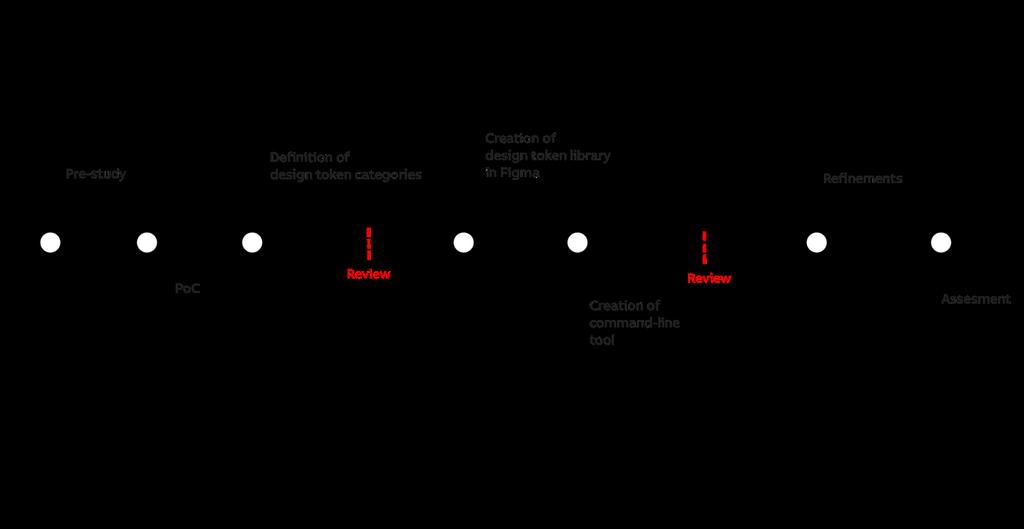
23 4 Creation of Design Tokens Based on the pre-study, the following plan was constructed to implement the design token library. The theory part is not included in the following timeline of the project shown in figure 5. Figure 5. Timeline of the project Firstly, definitions for the design token library will be created using the knowledge gained from the previous chapters. The tokens will be reviewed and approved by the representative of ABB before beginning of implementation. The naming conventions for the tokens should strive to be intuitive, the aim being that the designer and developer could derive the required token from other tokens naturally. The naming should not be too long to avoid unnecessary typing, while still staying descriptive enough. The final design tokens should include values that occur more than twice in the system, adhere to the rules set in the design system and are agreed upon by the designers and developers within the team. Once the design token categories are defined, the tokens will be listed in Figma as a part of the redlines. To export these tokens into a format that the developers can easily use, a tool that utilizes the application programming interface (API) of Figma will be created. This tool will be implemented using Node.js, a JavaScript run-time environment, to create a command line tool that gets desired values from Figma and parses the token information into files using JavaScript Object Notation. The JSON-format will serve as a lightweight and agnostic format to distribute the tokens. These technologies are used mostly due to the recommendations from the developers. 19
24 After creating the architecture and implementation, simple documentation will be created to ensure knowledge transfer and to make using the token library easy and seamless. In the development side, the documentation will be in form of a README-document in the application describing the uses and functions of the system. In Figma, the tokens will include an example token frame that can be used as a template to create a new token category or a single token. 20
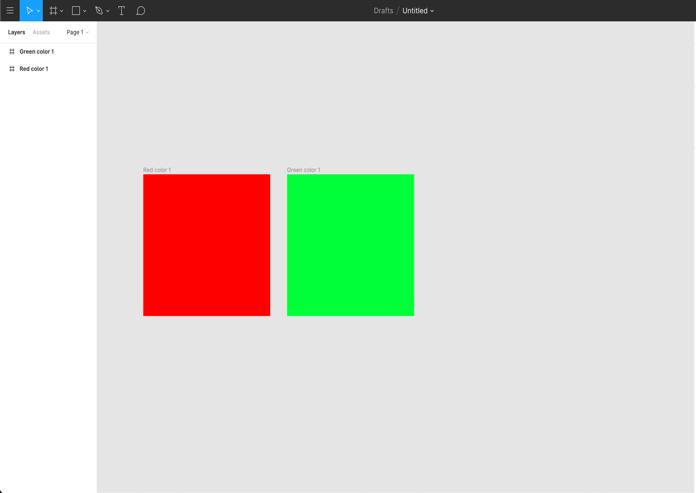
25 5 Thesis diary On week 23, after conducting the initial pre-study about design systems and design tokens in relation, I began to browse through the codebases and content of the online guideline to define the basis of the design system. From the online guideline and redlines I found the following base attributes: color palette, grid and typographic scale. I listed these elements and by checking with the analysis of the redlines that was done for the pre-study. I concluded that the colors used in the components and redlines matched with the ones defined in the online guideline. To check this, I had to use three different tools at the same time, online guideline, Figma and a text editor for the codebase, which felt excessive to see that everything is correct as the Figma redlines are the single source of truth by definition. During the week I had a discussion with the development lead of the team to discuss the initial ideas of the implementation; agnostic file format from Figma to distribute to the code. He approved this and said that he would prefer JSON as the format since it can be easily distributed to React, Angular and WPF. Based on my previous discussions, pre-study and Figma API documentation. I created a proof of concept (PoC) for the tool to export values from Figma into a JSON-file (figure 6). At first navigating the Figma file structure felt difficult. After finding the specific place in the file, I managed to print two values and translate them into hex-values. To check that Figma permissions with shared documents allowed this method, I copied the aforementioned file in the CommonUX Figma-folder and successfully imported the colors again. Figure 6. First Figma API test 21
26 This took some time, and while this was a success, my limited understanding of Node.js did feel like a barrier at some points. I understand that in the time span of the project I will not be able to get to know Node.js very widely, but fortunately I can check and review the process with the developers in the team. On week 24, after concluding that the PoC was successful, I began analyzing the redline research further to see which values were repeated enough times to be potential tokens. Based on my research it became evident that colors were a necessary token definition. The colors were easily divided into categories: grey, ui-blue (action color), data visualization colors and brand colors. As the color palette was defined very clearly on the site and used in the redlines, this step was quite straight forward. Even though the colors seem to follow very similar patterns, the values do not correlate enough to create universal tokens for state changes. As mentioned earlier in the theory section, I aimed to keep the token definitions agnostic and as reusable as possible is valuable. Thus, creating separate margin and content definitions seemed unlikely, whereas the 8px grid that is used by the design system is mostly implemented also in the components by multipliers of 0,5 to 5. Overall generic size classes based on t-shirt sizing provide some ease in the development by decreasing amount of sizing errors, and for the designer acknowledging when to stray from the set grid. For example, a margin value of s, s, 10px,s raises the question why one of the values doesn t conform to the grid. It also seemed that a few CSS specific tokens would be fairly useful, as two types of shadows are presented in the redlines that were used in multiple components. Same applied to duration in animations. This was discussed with the lead developer, who notified that some of the project teams are not working with CSS and keeping this in mind was important. In regard to the typographic values, font-families and sizes correlate in the redlines and online guideline, thus creating tokens for the basic values became quite straight-forward. The naming convention of the typographic sizes was still under question at the time. At the end of the week I began looking into possibly using BEM naming, which is introduced in chapter 3.4. One week was not enough to create the token categories. I was hoping to get it mostly done during week 25, but it proved to be a larger operation than suspected. 22
27 While mapping tokens and analyzing the online guideline during week 26 I found out that the page mentions that default line-height is 1,5x the font. This does not apply to any value in the redlines. Most font sizes correlate to a single line height. This raised the question, whether the line height tokens should follow the guideline or the redlines. I decided to create the tokens based on the current values to prevent breaking stylistic changes in the redlines. Of course, this also illustrated a great point for the use of the tokens themselves. Most likely a clarification to one direction or the other will be made in the future, and then, updating the tokens is easier than the separate values. While searching for the naming conventions I began testing different variables such as: 'color-ui-blue-100' and 'ui-blue-10'. As well as possible names for font sizes such as: fontsize-text-xs, f1, fs-1 or text-1. With fonts, the shorter naming convention seemed appealing, since having different attributes to headings and text is not defined clearly in the design system, and thus would have given attribute to values that are not pre-existent. This also facilitates the creation of second level tokens for heading definitions later on. Mixing up t-shirt sizes xs-s-m-l-xl with numerical values brings dissonance in the overall logic of the token library. This being said, the t-shirt sizing does work in relation with size class definitions, since the t-shirt sizes are indeed correlating to concrete change in size. But adding in-between values becomes harder since there is a very limited scale. Although in the future there will probably be a limited number of new components added, and thus adding many basic first level tokens seems unrealistic. If there are exceptions in the design, acknowledging it and taking it to consideration in the process has its own value as well. If the categorical result is that sizes go up with number, that logic will need to be applied to all tokens to stay constant. In the future, having semantic naming to second level tokens like font-size-h1 would create an acceptable distinction. The naming convention I decided upon during week 26 uses pattern category-type-variation with a few exceptions. The section for sizing doesn t include the prefix size due to the constant usage, as well as use cases such as margin: $size-xxs $size-xxs $size-m $size-xs which would make the notation extremely difficult to read. Instead, a shorter 23
28 notation of margin: $xxs $xxs $m $s is easier to update and is more intuitive. The problem with the t-shirt sizes is the so-called in-between sizes such as medium large ml. At the end of week 26, I got permission from ABB to continue. The first level token definitions were accepted, and the technical implementation plans confirmed. After getting the confirmation on the token categories, I began to create a Figma representation of them during week 27. Each token category is represented by a frame to create clearer visual distinction, whereas when exported to JSON, they are presented as a tree-formatted list. With colors, creating the representation / visualizer was quite easy since the color values could be linked to symbols that can be used straight out of the box. With units of size, I decided to use dotted line illustrations. With opacity and shadow creating a simple visual representation was quite straight forward. After finalizing the Figma-file I noticed that the structure of the file and its complexity would bring some problems to the Node.js command line tool that exports the values. The initial proof of concept tool was experiencing some of the structural difficulties already with two values, not to mention the whole design token library which will span over a hundred values in different frames. The frames have to have a similar structure to avoid unnecessary filtering rules in the code. The structure that caused the least friction, and could allow the most variance, was creating a group within a frame. Each group represents a token, that is named based on the token. All of the tokens have a title and a value. Currently the tokens don t have any other attributes, but this structure allows in the future adding other things like aliases or metadata. In terms of maintenance, this requirement of specific structure was not optimal, but couldn t be avoided. In a sense, the Figma-file serves as the main element to the structure, so if the export tool breaks in the future, it will only require small fixes. An interesting learning experience was that trying to export the full document from Figma into JSON using Postmate, the application crashed more than once. Presumably because of the size of the document. This was quite interesting, since I ve noticed that during development, fetching the values from Figma takes the most time, usually over a minute. Optimizing this time was not a priority at the time because when in production, it s likely that this application will be used quite rarely and so a difference of less than a minute does not matter too much. Still I hoped to fix this if there was time. Another optimization factor was that having a straight representation of the tokens on the main redline page seemed too volatile because all changes are live and auto saved. Having some sort of 24
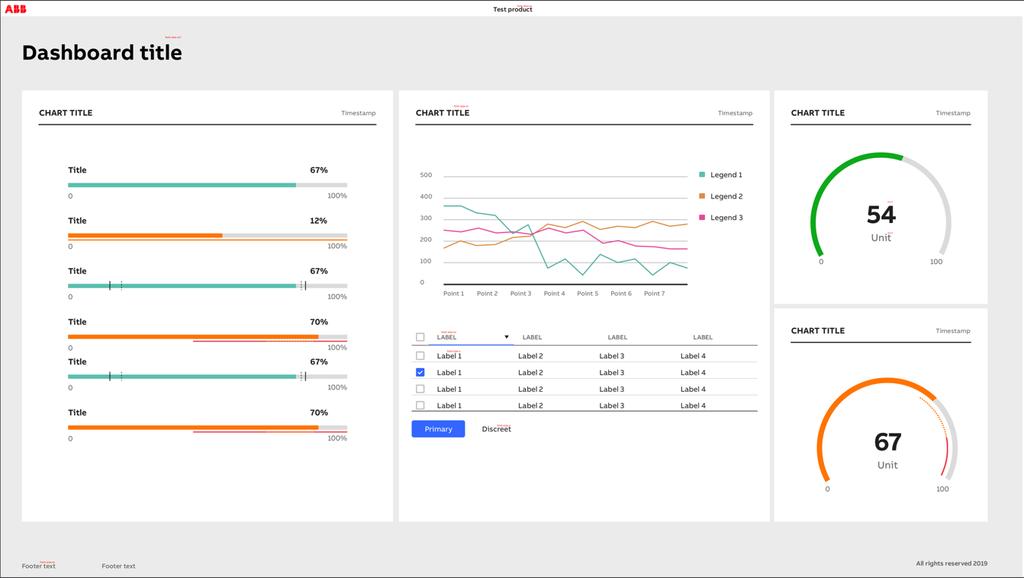
29 symbol or library etc. that is exported to redlines like with the software components would make this more secure, when the changes would have to be agreed upon and exported. This would also help maintain the document structure. Navigating the file structure of Figma files was quite difficult. Efficient use of the debugger helped. The main challenge during the implementation was extracting the child-elements. At the time I was using a regular expression to filter the elements that include the pixel values: const value = c.children.filter(child => /[0-9]+px/.test(child.name))[0].name; With the fonts decided to put the font stack, line height, font size and family, in the same JSON-file. I was also thinking of putting more CSS-specific definitions such shadow, opacity, border, radius duration and transition in the same file. Since categories like opacity and shadow have less than three values, creating separate files seems useless, whereas colors themselves already make a long file with many categories. As the application is meant for other people to use as well, I was actively adding comments and expanding the README-file to keep the application approachable. The first iteration of the design token library was finished at the end of week 27. I didn t face that many obstacles, but there is a lot of optimization to be done in the implementation side. Assessing the naming conventions and categories of the tokens at this stage was quite difficult, since the usefulness would be proved once in production and applied to the redlines. As an exercise to use the tokens, I tried making a sample dashboard (figure 7) and listed all the tokens required for the layout afterwards. The typographic content was pretty easily fit into three sizes and one for heading. The gauge, which is defined in the redlines through percentages and not in pixels as all other values, did not understandably match. With colors, the matching was quite simple. Having the palette names and numbers available when using the data visualization colors made having matching colors feel straight forward. This exercise helped to gain some understanding on the concrete number of tokens that a user interface could include. Also, most of the color values in the scale were floating in the same 10-increment states for similar elements, which is proof of successfully consistent design amongst the components. 25
30 Figure 7. Token dashboard test During week 28 I had a meeting with the representative of Haaga-Helia about the project. The meeting mostly concerned the writing of the thesis with useful points. During the week I also reviewed the JSON-file structure with one of the developers to determine which of the following two structures would be nicer to use: Title [Value: value, Metadata: value] or the original [Title: value]. In his opinion, the more complex structure was better, since when in production, one can avoid confusion with more specific queries while also allowing addition of other features to each token such as metadata or aliases. I decided to consult the other developers as well about this once they would return to work after the summer. After finishing the first complete version during week 28, I began to look into updating the redlines. As the redlines themselves are outwards facing, the production file cannot be changed straight to tokens. Thus, a separate redline-file that includes the tokens and has software component specifications marked down in tokens would be needed to ensure that the solution works before releasing into production. At first when starting the conversion of redlines, it was hard to remember the token values by heart, but surprisingly fast it became fairly easy. The first problem seemed to be that there was a missing category for non-font-icons. As font-icons are covered by the fontfamily tokens, basic dimensions for boxes were left out, like 10x10. 26

31 The whole redline document consisted of 128 frames. During the first hour I converted 5 frames. The rate differs based on frame, but the whole process took more than 30 hours of manual changes. Some of the token did not match existing redline values. Due to this the class I added indication-line, as it served a different purpose than border-width. All in all, changing the concrete values to first level tokens covered most of the values. The ones that were not covered by the tokens were icon sizes outside font icons as well as names of font icons and few specification values that did not match the 8px grid. The one remaining change that is still required is adding tokens for icon sizes that are not font icons. Week 29 was the most monotonous one. It was nice to notice that when there were a few small changes that I needed to make into the redlines, I could do the change in the token definitions. What remains to be seen is that will the use of sizes be useful in the redlines. On week 30 I realized that the application is doing unnecessary repetition. Previously each type-specific function was getting the values from Figma separately, which increased the loading time significantly. The improved version first fetches the file, then filters the tokens in separate files for each function, which makes handling the functions easier, then it exports all of the tokens to type-specific files (figure 8). For the main function to run, the old version took 75 seconds, whereas the improved one takes 18 seconds. Figure 8. Optimizing structure (week 30) 27
32 This was a happy surprise when successful, considering that I had spent approximately three times more time for no reason when updating the values. With hindsight I d say that focusing on this aspect would have been valuable in an earlier phase. I also updated the README-file (appendix 2) and token creation instructions (figure 9). Figure 9. Token creation instructions in Figma During week 31 the lead developer returned from summer holidays and we had a review session on the implementation work done during the summer. He thought that the overall structure of the Figma token definitions was clear. He had an improvement suggestion to make the filtering type-specific functions a bit more accurate by changing the filtering method. I implemented this and it required changing the name of the value element in Figma to value instead of being the concrete value to avoid any confusion. Previously the filtering was done by selecting the child element in the group that included numbers, but this would prove problematic if in the future a token name would include a number. The new filtering method requires more work on the Figma-side but is more self-evident. In addition, he proposed small improvements to the logic of the main function, mainly by using keys instead of using a separate array to determine the token names and by changing the writing of the file to synchronous. The tokenized redlines were also approved of and in his opinion, it helped to understand what values match the set design system, and which values are a deviation. The problem 28
33 that the tokenized redlines cause at the current point is that they will be soon outdated if not taken into production. When presented to the designers, the overall reaction towards the base level tokens was positive. There was conversation on the overall uses and purposes of the redlines, but the value of the systematical base values was recognized. The concept and use cases for the tokens were explained and understood with no notable mishaps or problems. 29
34 6 Results The design token library architecture consists of first level design token definitions that are presented in Figma and a command-line application that can be used to export the tokens as JSON-files. 6.1 Architecture The token architecture has been created with simplicity and consistency in mind. The token categories were kept to the minimum while covering most of the core elements of the design system. The current implementation does not introduce second level tokens, as there were no universally applicable patterns that follow the same values, and the optional route of using component specific second level tokens would create additional maintenance costs that do not bring benefit to the current internal workflows, and mostly would benefit visual reskinning of components that is not the intended use case. The current system does allow expanding the token library to include second level tokens, this is further discussed in chapter 7. Figure 10. Naming conventions The naming convention draws from the BEM methodology that is introduced in chapter 4.3 but is optimized for the specific use case and content while following usual conventions. The naming structure follows category-type-variation -pattern which allows better searchability in code. The only variation from this naming convention is the category of size. As mentioned in the thesis diary, having the sizes be as precise and easy as possible allows efficient use, especially in a case where multiple values are in one definition 30
35 such as margins in CSS (figure 10). One should not have to think what the size names are, nor should it feel like a chore to type them out. The naming categories were agreed upon by the developers and designers of the team. The token categories presented in table 2 cover most of the base elements of the design system: typography, colors and scale. The sizing is based on t-shirt sizes ranging from xxs to xxl which is designed to correlate with the 8px grid of the design system while keeping the values human readable. For example, line-height, font-size and margin sizes s work well together. In design and development, its intuitive to try larger or smaller sizes. If the small size feels too small, one can try medium-small or medium. Table 2. Token categories Category Example Size $s Line-height Font-size Font-family Color Duration Transition Border-radius Border-width Indication line Shadow Opacity $line-height-s $font-size-s $font-abb-regular $color-grey-50 $duration-in-ease-out $transition-s $border-radius-s $border-width-s $indication-line-s $shadow-s $opacity-half 31
36 6.2 Implementation The implementation part of this thesis had two steps. Firstly, the token list that is available in the redlines in Figma that is available to the CommonUX team and secondly the command line tool that takes values from Figma using their API and exports the values into JSON-files. See figure 11 for an illustration of the structure. Figure 11. Figma to JSON The command-line tool uses specific asynchronous functions to search the document for intended types of tokens. By separating the token search into specific functions, the whole application remains customizable and adaptive to further changes while staying manageable in terms of search queries that the application uses to filter and fetch the values. If the structure of the Figma-file were to change drastically, the new location could be easily picked. These type-specific functions search the Figma document structure (figure 12) for the specific names, types and values by filtering the frames, which are named based on the token categories. It then maps all wanted values by taking the group names and filtering the values from there. 32
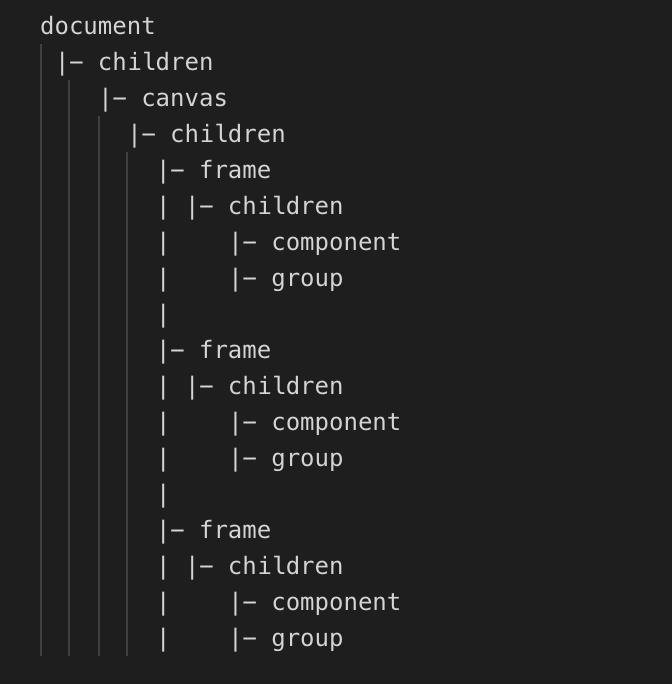
37 Figure 12. Figma document structure (Laptev, 2019) In the main function (appendix 1), the Figma-file is first fetched, then given to the typespecific functions where they are filtered. Then, these type-specific functions export the filtered tokens. The main function then maps these tokens into separate JSON-files using the file system module of Node.js. The current iteration of the tool is wrapped in a whileloop, allowing for the user to make changes in the Figma, then fetching and exporting the JSON without having to restart the application. 6.3 Design handoff The created implementation and architecture together facilitate the following design handoff procedure (figure 13). The distribution of the tokens to the end users needs to be defined separately based on the needs of the user. The straightforward distribution method would be to use the version-control system Git in the monorepo and deliver the tokens as a part of the NPM package. The design aspect of the distribution will provide more challenges, since there are multiple different toolkits and tools in use. In general, the 33
38 communication of changing values in redlines should be separately discussed. This is outside the scope of the project. Figure 13. Design handoff The following use case examples are presented to illustrate the benefits of design handoff procedure that the design token library allows. These examples are modelled based on the current workflow of the CommonUX team. The third example is presented to illustrate the theoretical benefits for a product team for future reference. The descriptions were created with the assistance of the team. They are meant solely to present a fictional example that is similar to the processes in place, and how the created solution can improve said processes. To gain further knowledge, a user study will have to be conducted, but is not part of the current project scope. 34
39 USE CASE - Updating a color, a foundational feature: The central CommonUX team decides to update the color palette. After the decision to update certain colors, the existing design toolkits (Sketch and Illustrator) and redlines (Figma) are updated. After the values are updated in the redlines, the developer must be notified of the changes, and they will need to change the color values in all of the components individually. After implementing the design token library, when a design decision is made, the decision is updated in Figma to the appropriate frame that has the values listed. Then, the designer notifies the developer of this change. The developer in turn runs the Node.js application to update the JSON-files, from there the change is applied to the codebase based on the developers own implementation. The benefits created by this are increased documentation and a centralized location for design decisions that is easy to communicate to the whole team. The solution also helps to avoid possible manual errors. USE CASE - Adding a new component to CommonUX: When creating a new component into the component library, a designer creates first draft version that will be reviewed by another designer as well as a developer. After getting feedback on what is possible on the implementation side as well as getting an alternative view, the designer will create a redline of the component that includes the dimensions as well as colors and interaction patterns of the component. After multiple iterative rounds amongst the team, a first version of the implementation is created. At this point the developer uses the redlines to create a functioning software component using React. To implement the colors and dimensions, they crosscheck using the online guideline and the redlines. When changes occur in the design, the designer informs the developer of the change and then they crosscheck again the redlines and the codebase. With the design token library, when the initial design work is done for the components, the redlines include specifications in the form of design tokens. The developer inputs these values to the code using the variables extracted from the JSON-files. If changes occur in 35
40 the core design of the design system, the designer informs which tokens have been changed. The benefits produced are that the amount of manual errors decreases due to the use of tokens which are defined outside the CSS. Discussions about the specifications of the component becomes easier when a definite set of values is defined as a framework in which the conversation happens. Tweaking and constant changes are common in this iterative process. The design token library lowers the frustration caused by the iterative nature of this work. USE CASE - Implementing a component in a non-supported frontend framework: A product team in a business unit decides to implement CommonUX into their existing product. They are not using any supported frameworks, and thus need to rely on the provided redlines. To implement the colors, the developer uses the CommonUX online guideline Foundation-pages to find the available color palette. The redlines include pixel values as well as some color variables. To input the hex-values in their component styles, the developer has to crosscheck from both the Foundation-page as well as the redlines, and later check that the color values, match the styling. After implementing the design token library, to implement the colors, the developer downloads the JSON-files that include the design tokens. Then they import the tokens as variables and input said variables into their styles in a desired format. The benefits created are that there is no crosschecking required. The solution is also agnostic to development language. 36
41 7 Discussion In the following chapter the results, limitation and the process of the thesis are discussed. In addition, suggestions for further development are presented before the conclusions. 7.1 Reflection on thesis diary The process of researching and developing the design token library was a challenge for me on multiple fronts. I had previous experience with working as a part of the CommonUX team, but this was the first time I directly contributed to the design aspects of the design system. My previous contributions have had to do with the maintenance of the online guideline. The development of the command-line tool was the most work. At first it was discussed with the commissioning party whether the application was necessary, but based on the research and understanding the aims, I felt that the tool would serve the project well. This was my first time working with external API s, JSON and JavaScript development with Node.js. There is probably a lot of things that could be more streamlined, but for example the progress made during week 30 with the optimization of the program was gratifying. The help and consultation of the CommonUX team was important in terms of achieving the learning goal of the project. In conclusion the thesis project felt like a good kickoff to the design token project as a part of the design system. There are a lot of improvements and use cases that could be researched and developed further. Overall, I am satisfied with the result and it reflects the project plan and goals set at the start. Biggest dissatisfaction regarding the project was mostly related to the scope of the project, which needed to stay as linear as possible to stay in the given frame of a bachelor s thesis. I have to admit that I could have done a wider scope, but we wanted to keep this project in the timeframe of a bachelor s thesis. I feel that during this thesis process I have learned a lot. Not only about the meta-level of design systems and constructing one, but also software development and utilizing multiple different tools to benefit the ways of working in a team environment. 37
42 7.2 Limitations The project faced some limitations regarding the current scope of the design system. Mainly creating the second level token architecture became obstructed due to some missing definitions in the design system. This being said, the creation of said second level tokens was not deemed necessary in the initiation of the design token library, as the architecture allows expansion. The alternative would be to create widespread overall tokens that use the patterns of the design system. This would have required changes and decisions that were not possible within the project timeline due to scheduling. User testing would have benefitted the project. To gain more legitimate validation and important information on the success of the thesis. A project team could have been contacted to determine whether the created design token library matched their needs as well to ensure successful future development and release of the design token library. 7.3 Suggestions for further development Based on the research conducted for the project, implementing a second level token library could provide useful. Component specific second level tokens would not create enough benefits in exchange for the maintenance required. General level second level tokens that present documented patterns in the system would be useful, but currently there are some dissonances in the use of patterns that does not allow consistent tokens. As a second suggestion the token library could be presented outwards, as a part of the design system. As defined in the theory section, most common way for this would be to have a page in the online guideline with simple description of the uses. The list itself could be generated using the Figma-file. Having more research into how to expand the Figma symbol library would allow the creation of an extensive symbol library based on the tokens. Currently the color palette is formatted as symbols that are available and the font types are included, but this could in theory be expanded to other tokens as well. Right after the development period, Figma introduced plug-ins (Sicking, 2019). This could provide some interesting options for the tokens. Finally, the structure of the JSON-files that contain the design tokens allow for other attributes than value. These attributes could include metadata or aliases. 38
43 7.4 Feedback The feedback to the thesis project from ABB was positive. The results were presented to the CommonUX team and discussed afterwards. The discussion was focused on what steps would be necessary to design and implement second level tokens. The discussion also touched on the nature of the current redlines and what technologies overall should be used in the design handoff process. Neither designers or developers raised concerns and seemed satisfied with the results. They agreed with the design token definitions. Since the presentation, further meetings have been had regarding the further development of the design token library. 7.5 Conclusions The research questions of the thesis were: what is a design token library and how can it improve the design handoff process? Based on the pre-study of this thesis it can be concluded that a design token library is a set of values that can be used to maintain and organize design decisions within a design system. The design token library can have a varying level of abstraction ranging from first level tokens which benefit the design system in terms of maintaining consistency to more specific second level tokens which can be component specific or general. The second level tokens are used to distribute and upkeep design decisions that affect the specific factors of the design system. Based on the action part of the thesis, it can be summarized that the design token library can improve the design handoff process by being a centralized and visible set of values that the designers and developers can agree upon and refer to by using a shared language. A design token library can be used to create consistency within a design system. A design token library was defined, built and implemented with the focus on helping to improve the design handoff process in a company setting. This library includes a first level design token architecture, that is built to suit the CommonUX Design System at ABB. In addition, a tool that integrates the design token library into the workflow of the CommonUX team using Figma and a Node.js application to deliver the tokens in a language agnostic format JSON was created. The design and implementation processes are described in a thesis diary. The project was successfully executed, and the deliverables were approved by the commissioning party. The design token library was integrated into the current design system by creating a duplicate redline-file that changes all raw values to have design tokens. As the current redlines 39
44 are outward facing and in production, the redlines that include the design tokens function mostly as an internal tool but could be transferred to production quite easily. The whole project will be taken into a trial period in internal use to determine possible changes. The release and distribution to the project teams is outside the thesis scope. The long-term success of the created design token library depends on adaptation as well as clarity. By design, the architecture is built with simplicity and approachability in mind. As the CommonUX Design System covers a lot of ground when compared to other contemporary design systems, the simplicity of it seems necessary for a successful integration. Analyzing the long-time implications of the design token library are out of the scope of this thesis, and thus all conclusions have been made based on the first reactions and the overall execution of the project. 40
45 References ABB URL: Accessed: 20 th March ABB ABB Suomessa. URL: Accessed: 20 th March ABB CommonUX. Internal Accessed: 19 th June ABB SoftwareUI style guide. Internal. Accessed: 19 th June Alexander, C. Ishikawa, S. Silverstein, M A Pattern Language: Towns, Buildings, Constructions. Oxford University Press. New York, USA. Araújo, J Design Systems: benefits, challenges & solutions. URL: Accessed: 24 th June Arruda, W. Why Consistency Is the Key to Successful Branding. URL: Accessed: 28 th August Anne, J UIE Virtual Seminar Recording - Design Tokens: Scaling Design with a Single Source of Truth URL: Accessed: 26 th June Anne, J Measure the impact of a design system URL: Accessed: 19 th June Business Dictionary Definition: Branding URL: Accessed: 1 st July
46 Catakli, T Why Should You Use a React Component Library for your Project? URL: Accessed: 28 th August Coyier, C What do you name color variables? URL: Accessed: 25 th June Curtis, N Twitter status. URL: Accessed: 19 th June Curtis, N Tokens in Design Systems. URL: Accessed: 20 th March Curtis, N Defining Design Systems. URL: Accessed: 5 th September Fanguy, W lessons learned from the history of design systems. URL: Accessed: 28 th August Frost, B Atomic Design. Self-published, Pennsylvania, USA Gale, S A collaborative approach to developing style guides, in Proceedings of the SIGCHI Conference on Human Factors in Computing Systems, CHI 96, ACM, New York, NY, USA, URL: Google Material Design Develop. URL: Accessed: 24 th June Huang, Y Developing a design system for an e-commerce website. URL: Kholmatova, A Design Systems. Smashing Media AG, Freiburg, Germany Kravets, U Why Design System Fail. URL: 42
47 Accessed: 2 st of July Laptev, P Design Tokens with Figma URL: Accessed: 20 th June Madsen, R The User Experience of Design Systems URL: Accessed: 22 th July McNaughton, H Style Guides: The Key to Visual Brand Consistency. URL: Accessed: 28 th August Nguyen, G Design system: A tool for scaling product design in large technology companies. URL: Qubstudio, Branding in Web Interfaces: How Customer Experience Can Make You Stand Out. URL: Accessed: 28 th August Rendle, R What Are Design Tokens? URL: Accessed: 28 th August Saarinen, K Building a Visual Language URL: Accessed: 29 th April Sicking, J Plugins are coming to Figma. URL: Accessed: 2 nd August Slegtenhorst, C Building a design system not just a UI kit. URL: Accessed: 28 th August Strukchinsky, V, Starkov, V Get BEM Introduction. URL: Accessed: 25 th June Verou, L Twitter status. URL: Accessed 25 th June
48 Wanyoike, M History of front-end frameworks Accessed 30 th July
49 Appendices async function main() { while (true) { console.log('fetching data...'); //Gets Figma-file with API-key and file-id const FigmaAPIKey; const fileid; const result = await fetch(' + fileid, { method: 'GET', headers: { 'X-Figma-Token': FigmaAPIKey } }); const figmafile = await result.json(); // Gets tokens using the imported functions, requires the fetched figma-file. console.log('writing JSON data...'); const tokens = {}; tokens['color'] = await colors(figmafile).catch(e => console.log(e)); tokens['size'] = await sizes(figmafile).catch(e => console.log(e)); tokens['font'] = await fonts(figmafile).catch(e => console.log(e)); tokens['other'] = await others(figmafile).catch(e => console.log(e)); const keys = Object.keys(tokens); for (let i = 0; i < keys.length; i++) { const k = keys[i]; try { // Create a json-files that includes wanted token categories, sends error if fail fs.writefilesync(`tokens/${k}.json`, JSON.stringify(tokens[k], null, 2) + '\n'); console.log(k + ' exported'); } catch (err) { console.log(k + ' error', err); } } console.log('finished'); } } /* Enter to refresh */ readlinesync.question('\npress ENTER TO EXPORT FILES\n '); Appendix 1. Main function of the Figma API to JSON token generator 45
50 Exports design token values from Figma. FIRST TIME: npm install TO RUN: npm start App structure: - color.js "getcolors()" --> grey, ui-blue, data-viz, status, brand - size.js "getsizes()" --> sizes - font.js "getfonts()" --> font-family, font-size, line-height - others.js "getothers()" ---> shadows, border-radius, border-width, duration, opacity, indication-line - app.js "main()" --> fetches figma-file, gets values using functions described above and prints to separate json-files Figma file structure: document - children - canvas - children - FRAME (border-radius) - children - group (border-radius-xs) - title - value (2px) - visuals* - alias* - metadata* - frame - children - group - frame - children - group *optional child elements The functions take the category of token from FRAME name. Name of each token from GROUP ( not the title within group to avoid filtering problems). Searched for a child element called 'value' and maps it to GROUP name, then prints. IN COLORS: does the exact same, but instead of searching for VALUE, searches for rgb-value of VISUALS which is type RECTANGLE (because linked to a symbol in figma). TODO: - error notifications (if file empty or path doesn't work) - including optional info about a token (metadata,alias,etc) Appendix 2. README of the token generator 46
Spiel. Connect to people by sharing stories through your favorite discoveries
 Spiel Connect to people by sharing stories through your favorite discoveries Addison Leong Joanne Jang Katherine Liu SunMi Lee Development & user Development & user Design & product Development & testing
MENDIX FOR MOBILE APP DEVELOPMENT WHITE PAPER
 MENDIX FOR MOBILE APP DEVELOPMENT WHITE PAPER TABLE OF CONTENTS Market Demand for Enterprise Mobile Mobile App Development Approaches Native Apps Mobile Web Apps Hybrid Apps Mendix Vision for Mobile App
IBM Digital Experience. Using Modern Web Development Tools and Technology with IBM Digital Experience
 IBM Digital Experience Using Modern Web Development Tools and Technology with IBM Digital Experience Agenda The 2015 web development landscape and IBM Digital Experience Modern web applications and frameworks
2/24/2010 ClassApps.com
 SelectSurvey.NET Training Manual This document is intended to be a simple visual guide for non technical users to help with basic survey creation, management and deployment. 2/24/2010 ClassApps.com Getting
Microsoft Publisher 2010 What s New!
 Microsoft Publisher 2010 What s New! INTRODUCTION Microsoft Publisher 2010 is a desktop publishing program used to create professional looking publications and communication materials for print. A new
Web Accessibility Report
 Web Accessibility Report AnnArborCIL.org Divye Bokdia Introduction AnnArborcil.org is an accessible website with AAA conformance. Team of four Michigan students (refer team section) and a staff member
Voluntary Product Accessibility Template Blackboard Learn Release 9.1 April 2014 (Published April 30, 2014)
 Voluntary Product Accessibility Template Blackboard Learn Release 9.1 April 2014 (Published April 30, 2014) Contents: Introduction Key Improvements VPAT Section 1194.21: Software Applications and Operating
Intellect Platform - The Workflow Engine Basic HelpDesk Troubleticket System - A102
 Intellect Platform - The Workflow Engine Basic HelpDesk Troubleticket System - A102 Interneer, Inc. Updated on 2/22/2012 Created by Erika Keresztyen Fahey 2 Workflow - A102 - Basic HelpDesk Ticketing System
Guideline for Implementing the Universal Data Element Framework (UDEF)
 Guideline for Implementing the Universal Data Element Framework (UDEF) Version 1.0 November 14, 2007 Developed By: Electronic Enterprise Integration Committee Aerospace Industries Association, Inc. Important
HTML5 Data Visualization and Manipulation Tool Colorado School of Mines Field Session Summer 2013
 HTML5 Data Visualization and Manipulation Tool Colorado School of Mines Field Session Summer 2013 Riley Moses Bri Fidder Jon Lewis Introduction & Product Vision BIMShift is a company that provides all
Features List Contents
 Features List Contents Map Creation... 2 Map Formatting & Building... 3 Analysis... 4 Task and Project management... 5 Presentation... 7 Communication, Import & Export... 7 Mobile Integration... 8 Windows
Meeting Workspace Alternatives
 Meeting Workspace Alternatives Three Solutions for SharePoint and SharePoint Online MARK ECKERT AND EARON SOTTO Contents Introduction... 1 Benefits and Configuration Examples of the Meeting Workspace in
CONTENTM WEBSITE MANAGEMENT SYSTEM. Getting Started Guide
 CONTENTM WEBSITE MANAGEMENT SYSTEM Getting Started Guide Table of Contents CONTENTM WEBSITE MANAGEMENT SYSTEM... 1 GETTING TO KNOW YOUR SITE...5 PAGE STRUCTURE...5 Templates...5 Menus...5 Content Areas...5
Ektron to EPiServer Digital Experience Cloud: Information Architecture
 Ektron to EPiServer Digital Experience Cloud: Information Architecture This document is intended for review and use by Sr. Developers, CMS Architects, and other senior development staff to aide in the
Modeling Guidelines Manual
 Modeling Guidelines Manual [Insert company name here] July 2014 Author: John Doe [email protected] Page 1 of 22 Table of Contents 1. Introduction... 3 2. Business Process Management (BPM)... 4 2.1.
Software Re-Engineering and Ux Improvement for ElegantJ BI Business Intelligence Suite
 2011 2012 2013 2014 Q1 Q2 Q3 Q4 Jan Feb Mar Apr May Jun Jul Aug Sep Oct Nov Dec 1 2 3 4 5 6 7 8 9 10 11 12 13 14 15 16 17 18 19 20 21 22 23 24 25 26 27 28 29 30 31 Sales Performance by Category 2014 Product
MERVIN FRANCIS JOHNSINGH
 MERVIN FRANCIS JOHNSINGH Email Address: [email protected] LinkedIn Profile : http://in.linkedin.com/in/mervinfjohnsingh SUMMARY Nearly 7 Years of Professional work experience spanning software development,
WHITEPAPER. Managing Design Changes in Enterprise SBM Installations
 WHITEPAPER Managing Design Changes in Enterprise SBM Installations By Tom Clement Serena Software, Inc. October 2013 Summary This document explains how to organize your SBM maintenance and development
Test Data Management Concepts
 Test Data Management Concepts BIZDATAX IS AN EKOBIT BRAND Executive Summary Test Data Management (TDM), as a part of the quality assurance (QA) process is more than ever in the focus among IT organizations
Source Code Translation
 Source Code Translation Everyone who writes computer software eventually faces the requirement of converting a large code base from one programming language to another. That requirement is sometimes driven
Graphical Environment Tool for Development versus Non Graphical Development Tool
 Section 4 Computing, Communications Engineering and Signal Processing & Interactive Intelligent Systems Graphical Environment Tool for Development versus Non Graphical Development Tool Abstract S.Daniel
Adobe Dreamweaver Exam Objectives
 Adobe Dreamweaver audience needs for a website. 1.2 Identify webpage content that is relevant to the website purpose and appropriate for the target audience. 1.3 Demonstrate knowledge of standard copyright
How to Build a Successful Website
 How to Build a Successful Website November 17, 2010 By Alhan Keser This is a guide meant to help you create a successful website. There are many ways of going about developing a website that can lead to
MODULE 7: TECHNOLOGY OVERVIEW. Module Overview. Objectives
 MODULE 7: TECHNOLOGY OVERVIEW Module Overview The Microsoft Dynamics NAV 2013 architecture is made up of three core components also known as a three-tier architecture - and offers many programming features
PORTAL ADMINISTRATION
 1 Portal Administration User s Guide PORTAL ADMINISTRATION GUIDE Page 1 2 Portal Administration User s Guide Table of Contents Introduction...5 Core Portal Framework Concepts...5 Key Items...5 Layouts...5
VIDEO 1: WHY IS USER-FOCUSED DESIGN IMPORTANT?
 VIDEO 1: WHY IS USER-FOCUSED DESIGN IMPORTANT? Hello again! Are you ready to think about the user experience? This is Angela with HubSpot Academy. Feel free to connect with the me on twitter or the entire
BALANCED SCORECARD What is the Balanced Scorecard?
 BALANCED SCORECARD What is the Balanced Scorecard? January 2014 Table of Contents Table of Contents... 1 The Balanced Scorecard... 2 The Four Perspectives... 3 Key Performance Indicators (KPIs)... 4 Scorecard
DKAN. Data Warehousing, Visualization, and Mapping
 DKAN Data Warehousing, Visualization, and Mapping Acknowledgements We d like to acknowledge the NuCivic team, led by Andrew Hoppin, which has done amazing work creating open source tools to make data available
OpenText Information Hub (ihub) 3.1 and 3.1.1
 OpenText Information Hub (ihub) 3.1 and 3.1.1 OpenText Information Hub (ihub) 3.1.1 meets the growing demand for analytics-powered applications that deliver data and empower employees and customers to
Kentico CMS, 2011 Kentico Software. Contents. Mobile Development using Kentico CMS 6 2 Exploring the Mobile Environment 1
 Contents Mobile Development using Kentico CMS 6 2 Exploring the Mobile Environment 1 Time for action - Viewing the mobile sample site 2 What just happened 4 Time for Action - Mobile device redirection
WebSphere Business Modeler
 Discovering the Value of SOA WebSphere Process Integration WebSphere Business Modeler Workshop SOA on your terms and our expertise Soudabeh Javadi Consulting Technical Sales Support WebSphere Process Integration
COGNOS Query Studio Ad Hoc Reporting
 COGNOS Query Studio Ad Hoc Reporting Copyright 2008, the California Institute of Technology. All rights reserved. This documentation contains proprietary information of the California Institute of Technology
COLUMN. Planning your SharePoint intranet project. Intranet projects on SharePoint need a clear direction APRIL 2011. Challenges and opportunities
 KM COLUMN APRIL 2011 Planning your SharePoint intranet project Starting a SharePoint intranet project, whether creating a new intranet or redeveloping an existing one, can be daunting. Alongside strategy
M-Files Gantt View. User Guide. App Version: 1.1.0 Author: Joel Heinrich
 M-Files Gantt View User Guide App Version: 1.1.0 Author: Joel Heinrich Date: 02-Jan-2013 Contents 1 Introduction... 1 1.1 Requirements... 1 2 Basic Use... 1 2.1 Activation... 1 2.2 Layout... 1 2.3 Navigation...
Visualizing an OrientDB Graph Database with KeyLines
 Visualizing an OrientDB Graph Database with KeyLines Visualizing an OrientDB Graph Database with KeyLines 1! Introduction 2! What is a graph database? 2! What is OrientDB? 2! Why visualize OrientDB? 3!
This Readme includes information pertaining to Novell Service Desk 7.0.
 Novell Service Desk 7.0 November 14, 2012 Novell Novell Service Desk is a complete service management solution that allows you to easily monitor and solve services issues so that there is minimal disruption
DataPA OpenAnalytics End User Training
 DataPA OpenAnalytics End User Training DataPA End User Training Lesson 1 Course Overview DataPA Chapter 1 Course Overview Introduction This course covers the skills required to use DataPA OpenAnalytics
USDA Web Standards and Style Guide. Version 2.0
 USDA Web Standards and Style Guide Version 2.0 Table of Contents 1) INTRODUCTION... 3 2) FEDERAL LAWS AND REGULATIONS... 4 3) OVERVIEW OF USDA.GOV... 4 4) REQUIRED ELEMENTS... 4 a) Masthead... 4 (1) Usage
Visualizing a Neo4j Graph Database with KeyLines
 Visualizing a Neo4j Graph Database with KeyLines Introduction 2! What is a graph database? 2! What is Neo4j? 2! Why visualize Neo4j? 3! Visualization Architecture 4! Benefits of the KeyLines/Neo4j architecture
ADOBE DREAMWEAVER CS3 TUTORIAL
 ADOBE DREAMWEAVER CS3 TUTORIAL 1 TABLE OF CONTENTS I. GETTING S TARTED... 2 II. CREATING A WEBPAGE... 2 III. DESIGN AND LAYOUT... 3 IV. INSERTING AND USING TABLES... 4 A. WHY USE TABLES... 4 B. HOW TO
Sitecore InDesign Connector 1.1
 Sitecore Adaptive Print Studio Sitecore InDesign Connector 1.1 - User Manual, October 2, 2012 Sitecore InDesign Connector 1.1 User Manual Creating InDesign Documents with Sitecore CMS User Manual Page
Andrew Hill USER EXPERIENCE DESIGN PORTFOLIO
 Andrew Hill USER EXPERIENCE DESIGN PORTFOLIO Projects Medical Device Call Center & Field Service Management Desktop & Mobile Apps (Siebel Open UI, ios) User Shadowing & Ethnographic Research Observation
CREATING YOUR OWN PROFESSIONAL WEBSITE
 First go to Google s main page (www.google.com). If you don t already have a Gmail account you will need one to continue. Click on the Gmail link and continue. 1 Go ahead and sign in if you already have
Sisense. Product Highlights. www.sisense.com
 Sisense Product Highlights Introduction Sisense is a business intelligence solution that simplifies analytics for complex data by offering an end-to-end platform that lets users easily prepare and analyze
50 shades of Siebel mobile
 50 shades of Siebel mobile Markus Schneeweis ec4u expert consulting AG 1 Agenda Start Part 1 The disruption Part 2 What means mobile? Part 3 Siebel Mobile clash of the generations? Part 4 Our offer 7 Key
Mobile Technique and Features
 Smart evision International, Inc. Mobile Technique and Features Smart evision White Paper Prepared By: Martin Hu Last Update: Oct 16, 2013 2013 1 P a g e Overview Mobile Business intelligence extends and
Digital Marketplace - G-Cloud
 Digital Marketplace - G-Cloud SharePoint Services Core offer 22 services in this area: 1. SharePoint Forms SharePoint comes with out-of-the-box web-based forms that allow for data to be captured for your
Manual English KOI Desktop App 2.0.x
 Manual English KOI Desktop App 2.0.x KOI Kommunikation, Organisation, Information Comm-Unity EDV GmbH 2010 Contents Introduction... 3 Information on how to use the documentation... 3 System requirements:...
ORACLE BUSINESS INTELLIGENCE WORKSHOP
 ORACLE BUSINESS INTELLIGENCE WORKSHOP Integration of Oracle BI Publisher with Oracle Business Intelligence Enterprise Edition Purpose This tutorial mainly covers how Oracle BI Publisher is integrated with
BI DESIGN AND DEVELOPMENT
 CHAPTER BI DESIGN AND DEVELOPMENT 14 INFORMATION IN THIS CHAPTER: BI design BI user interface Privacy, security, access standards Design methods Prototyping lifecycle Application development tasks BI application
Designing a Graphical User Interface
 Designing a Graphical User Interface 1 Designing a Graphical User Interface James Hunter Michigan State University ECE 480 Design Team 6 5 April 2013 Summary The purpose of this application note is to
Excel -- Creating Charts
 Excel -- Creating Charts The saying goes, A picture is worth a thousand words, and so true. Professional looking charts give visual enhancement to your statistics, fiscal reports or presentation. Excel
Subversion Integration for Visual Studio
 Subversion Integration for Visual Studio VisualSVN Team VisualSVN: Subversion Integration for Visual Studio VisualSVN Team Copyright 2005-2008 VisualSVN Team Windows is a registered trademark of Microsoft
Microsoft Visio 2010 Top 10 Benefits
 Microsoft Visio 2010 Top 10 Benefits The advanced diagramming tools of Microsoft Visio 2010 help you simplify complexity with dynamic, data-driven visuals and new ways to share on the Web in real-time.
Brock University Content Management System Training Guide
 Brock University Content Management System Training Guide Table of Contents Brock University Content Management System Training Guide...1 Logging In...2 User Permissions...3 Content Editors...3 Section
TUTORIAL 4 Building a Navigation Bar with Fireworks
 TUTORIAL 4 Building a Navigation Bar with Fireworks This tutorial shows you how to build a Macromedia Fireworks MX 2004 navigation bar that you can use on multiple pages of your website. A navigation bar
Advantage of Jquery: T his file is downloaded from
 What is JQuery JQuery is lightweight, client side JavaScript library file that supports all browsers. JQuery is a fast and concise JavaScript Library that simplifies HTML document traversing, event handling,
Microsoft Office System Tip Sheet
 Experience the 2007 Microsoft Office System The 2007 Microsoft Office system includes programs, servers, services, and solutions designed to work together to help you succeed. New features in the 2007
Best Practices of Project Management and Tracking Tools
 Best Practices of Project Management and Tracking Tools A solid Lean Six Sigma deployment requires a mechanism for recording, storing, viewing, and reporting on the on going project work. This level of
SellerDeck 2013 Reviewer's Guide
 SellerDeck 2013 Reviewer's Guide Help and Support Support resources, email support and live chat: http://www.sellerdeck.co.uk/support/ 2012 SellerDeck Ltd 1 Contents Introduction... 3 Automatic Pagination...
The Stacks Approach. Why It s Time to Start Thinking About Enterprise Technology in Stacks
 The Stacks Approach Why It s Time to Start Thinking About Enterprise Technology in Stacks CONTENTS Executive Summary Layer 1: Enterprise Competency Domains Layer 2: Platforms Layer 3: Enterprise Technology
GENERIC AGENCY STATEMENT OF WORK. Website Redesign Project Generic Company
 GENERIC AGENCY STATEMENT OF WORK Generic Company TABLE OF CONTENTS Our Envisioning Methodology... 3 Promote a Friendly Image to Prospective & Current Clients... 3 Enable Ease of Use... 3 Create a Design
Evaluation of Xamarin Forms for MultiPlatform Mobile Application Development
 Grand Valley State University ScholarWorks@GVSU Technical Library School of Computing and Information Systems 2016 Evaluation of Xamarin Forms for MultiPlatform Mobile Application Development Amer A. Radi
Search Engine Optimization with Jahia
 Search Engine Optimization with Jahia Thomas Messerli 12 Octobre 2009 Copyright 2009 by Graduate Institute Table of Contents 1. Executive Summary...3 2. About Search Engine Optimization...4 3. Optimizing
Web Development I & II*
 Web Development I & II* Career Cluster Information Technology Course Code 10161 Prerequisite(s) Computer Applications Introduction to Information Technology (recommended) Computer Information Technology
A tool to facilitate interactive and collaborative learning of execution flow and code for novice computer science students
 Institution of Innovation, Design and Engineering A tool to facilitate interactive and collaborative learning of execution flow and code for novice computer science students Author: Robert Westerlund Examiner:
Online Packaging Management Solution
 Online Packaging Management Solution WebCenter WebCenter is a powerful web-based Packaging Management platform to manage your business process, approval cycles and digital packaging assets. Specification
White Paper April 2006
 White Paper April 2006 Table of Contents 1. Executive Summary...4 1.1 Scorecards...4 1.2 Alerts...4 1.3 Data Collection Agents...4 1.4 Self Tuning Caching System...4 2. Business Intelligence Model...5
Qlik REST Connector Installation and User Guide
 Qlik REST Connector Installation and User Guide Qlik REST Connector Version 1.0 Newton, Massachusetts, November 2015 Authored by QlikTech International AB Copyright QlikTech International AB 2015, All
Salesforce Customer Portal Implementation Guide
 Salesforce Customer Portal Implementation Guide Salesforce, Winter 16 @salesforcedocs Last updated: December 10, 2015 Copyright 2000 2015 salesforce.com, inc. All rights reserved. Salesforce is a registered
An Introduction to. Metrics. used during. Software Development
 An Introduction to Metrics used during Software Development Life Cycle www.softwaretestinggenius.com Page 1 of 10 Define the Metric Objectives You can t control what you can t measure. This is a quote
White Paper: Designing Resourceful Graphical User Interfaces (GUIs) for Healthcare Applications
 Accelerate Development Reduce Time to Product Automate Critical Tasks White Paper: Designing Resourceful Graphical User Interfaces (GUIs) for Healthcare Applications The ASHVINS GROUP, Inc. 6161 Blue Lagoon
Student Writing Guide. Fall 2009. Lab Reports
 Student Writing Guide Fall 2009 Lab Reports The manuscript has been written three times, and each rewriting has discovered errors. Many must still remain; the improvement of the part is sacrificed to the
Fairsail PDF Template Generator: A Complete Guide
 Fairsail PDF Template Generator: A Complete Guide Version 12 FS-HCM-PTG-COMP-201506--R012.00 Fairsail 2015. All rights reserved. This document contains information proprietary to Fairsail and may not be
ORACLE PROJECT MANAGEMENT
 ORACLE PROJECT MANAGEMENT KEY FEATURES Oracle Project Management provides project managers the WORK MANAGEMENT Define the workplan and associated resources; publish and maintain versions View your schedule,
Microsoft Office System Tip Sheet
 The 2007 Microsoft Office System The 2007 Microsoft Office system is a complete set of desktop and server software that can help streamline the way you and your people do business. This latest release
COGNOS 8 Business Intelligence
 COGNOS 8 Business Intelligence QUERY STUDIO USER GUIDE Query Studio is the reporting tool for creating simple queries and reports in Cognos 8, the Web-based reporting solution. In Query Studio, you can
API Architecture. for the Data Interoperability at OSU initiative
 API Architecture for the Data Interoperability at OSU initiative Introduction Principles and Standards OSU s current approach to data interoperability consists of low level access and custom data models
Remote Usability Evaluation of Mobile Web Applications
 Remote Usability Evaluation of Mobile Web Applications Paolo Burzacca and Fabio Paternò CNR-ISTI, HIIS Laboratory, via G. Moruzzi 1, 56124 Pisa, Italy {paolo.burzacca,fabio.paterno}@isti.cnr.it Abstract.
Interfaces. Ways of helping the user. Balancing function with fashion. Metaphors Data Display. Faulkner, Section 4.2. Structure Affordances Visuals
 UX Design (Part 2) Interfaces Ways of helping the user Metaphors Data Display Structure Affordances Visuals Balancing function with fashion Faulkner, Section 4.2 What is a Metaphor? A metaphor is something
Digital Commons Design Customization Guide
 bepress Digital Commons Digital Commons Reference Material and User Guides 6-2016 Digital Commons Design Customization Guide bepress Follow this and additional works at: http://digitalcommons.bepress.com/reference
Digital Marketing EasyEditor Guide Dynamic
 Surveys ipad Segmentation Reporting Email Sign up Email marketing that works for you Landing Pages Results Digital Marketing EasyEditor Guide Dynamic Questionnaires QR Codes SMS 43 North View, Westbury
Ansur Test Executive. Users Manual
 Ansur Test Executive Users Manual April 2008 2008 Fluke Corporation, All rights reserved. All product names are trademarks of their respective companies Table of Contents 1 Introducing Ansur... 4 1.1 About
Voice Driven Animation System
 Voice Driven Animation System Zhijin Wang Department of Computer Science University of British Columbia Abstract The goal of this term project is to develop a voice driven animation system that could take
CHOOSING THE RIGHT HTML5 FRAMEWORK To Build Your Mobile Web Application
 BACKBONE.JS Sencha Touch CHOOSING THE RIGHT HTML5 FRAMEWORK To Build Your Mobile Web Application A RapidValue Solutions Whitepaper Author: Pooja Prasad, Technical Lead, RapidValue Solutions Contents Executive
Designing portal site structure and page layout using IBM Rational Application Developer V7 Part of a series on portal and portlet development
 Designing portal site structure and page layout using IBM Rational Application Developer V7 Part of a series on portal and portlet development By Kenji Uchida Software Engineer IBM Corporation Level: Intermediate
Structured Content: the Key to Agile. Web Experience Management. Introduction
 Structured Content: the Key to Agile CONTENTS Introduction....................... 1 Structured Content Defined...2 Structured Content is Intelligent...2 Structured Content and Customer Experience...3 Structured
CONTEXT AWARE CONTENT MARKETING
 CONTEXT AWARE CONTENT MARKETING FOUR STEPS TO THE FUTURE OF CONTENT, CONTEXT AND MARKETING SUCCESS Introduction Managing, delivering and consuming web content has changed. Yes, again. The universe of options
2) Sharing Projects Made easy by IntelliGantt s Share Wizard, there are three share options to fit the needs of your project.
 Introduction TeamDirection IntelliGantt solutions allows you and the rest of your project team to collaborate on your projects together. How you would like work together is up to you. The project manager
Set Up and Maintain Customer Support Tools
 Set Up and Maintain Customer Support Tools Salesforce, Winter 16 @salesforcedocs Last updated: December 10, 2015 Copyright 2000 2015 salesforce.com, inc. All rights reserved. Salesforce is a registered
SimplyCast emarketing Email User Guide
 SimplyCast emarketing Email User Guide Email User Guide Page 1 Contents 1. Email Overview... 3 2. Features Overview... 3 3. Email Editor Features... 8 4. How to Create an Email Campaign?... 5 5. Additional
User experience prototype requirements FINAL REPORT
 Tallinn University Institute of Informatics User experience prototype requirements FINAL REPORT Authors Roger Puks Erkki Saarnit Ekaterina Shafeeva Maria Angelica Medina Angarita Lecturer Peeter Normak,
Information Management & Data Governance
 Data governance is a means to define the policies, standards, and data management services to be employed by the organization. Information Management & Data Governance OVERVIEW A thorough Data Governance
CATIA V5 Surface Design
 CATIA V5 Training Foils CATIA V5 Surface Design Version 5 Release 19 August 2008 EDU_CAT_EN_V5S_FI_V5R19 1 Lesson 1: Introduction to Generative Shape Design About this Course Introduction CATIA is a robust
Developing And Marketing Mobile Applications. Presented by: Leesha Roberts, Senior Instructor, Center for Education Programmes, UTT
 Developing And Marketing Mobile Applications Presented by: Leesha Roberts, Senior Instructor, Center for Education Programmes, UTT MOBILE MARKETING What is a Mobile App? A mobile app is a software application
Creating Interactive PDF Forms
 Creating Interactive PDF Forms Using Adobe Acrobat X Pro Information Technology Services Outreach and Distance Learning Technologies Copyright 2012 KSU Department of Information Technology Services This