
Fixed Assets & Depreciation Software
|
|
|
- Abraham Ramsey
- 9 years ago
- Views:
Transcription
1 Fixed Assets & Depreciation Software AppFinity and CharterHouse Software have developed a complete Fixed Assets & Depreciation Software (FADS) system that is easy to use and meets the United States Fixed Assets Requirements. This package allows you to properly manage your fixed assets and streamline the various fixed assets-related functions. User-Friendly User Interface CharterHouse FADS is designed so that users will not have any difficulty using the software. Functions of a similar nature are grouped together for your convenience. All functions related to master files are grouped under the Systems menu; the processes required to create various transactions are grouped under the Process menu; generating reports are grouped under the Reports menu and all administrative functions are grouped under the Admin menu. You have the option to create your personal menu where you can create shortcuts to the common functions that you use in your everyday transactions. Control Panel Main Screen CharterHouse FADS Detail Feature Listing (rev-1.1) - 1

2 The Books CharterHouse FADS allows you to maintain five books, three of which are predefined and two are user-defined. Financial Book The Financial Book is for internal accounting used in monitoring the fixed asset s depreciation. Federal Book The Federal Book is for monitoring fixed asset depreciation information that will be reported to the IRS on the company s federal tax return for regular tax purposes. State Book The State Book is for monitoring fixed asset depreciation information that will be reported on the company s state tax return. 2 User-defined Books These are the books that the company may use in compliance with special industry regulations, insurance valuations, additional state books and other purposes that may warrant the use of additional books. Adherence to Different Tax Regulations CharterHouse FADS supports the following fixed assets tax filing requirements: filing of form 4562, Investment Tax Credit (ITC), 179 Option, mid-quarter convention and luxury and electric vehicle cap. Asset Card Register Screen CharterHouse FADS Detail Feature Listing (rev-1.1) - 2

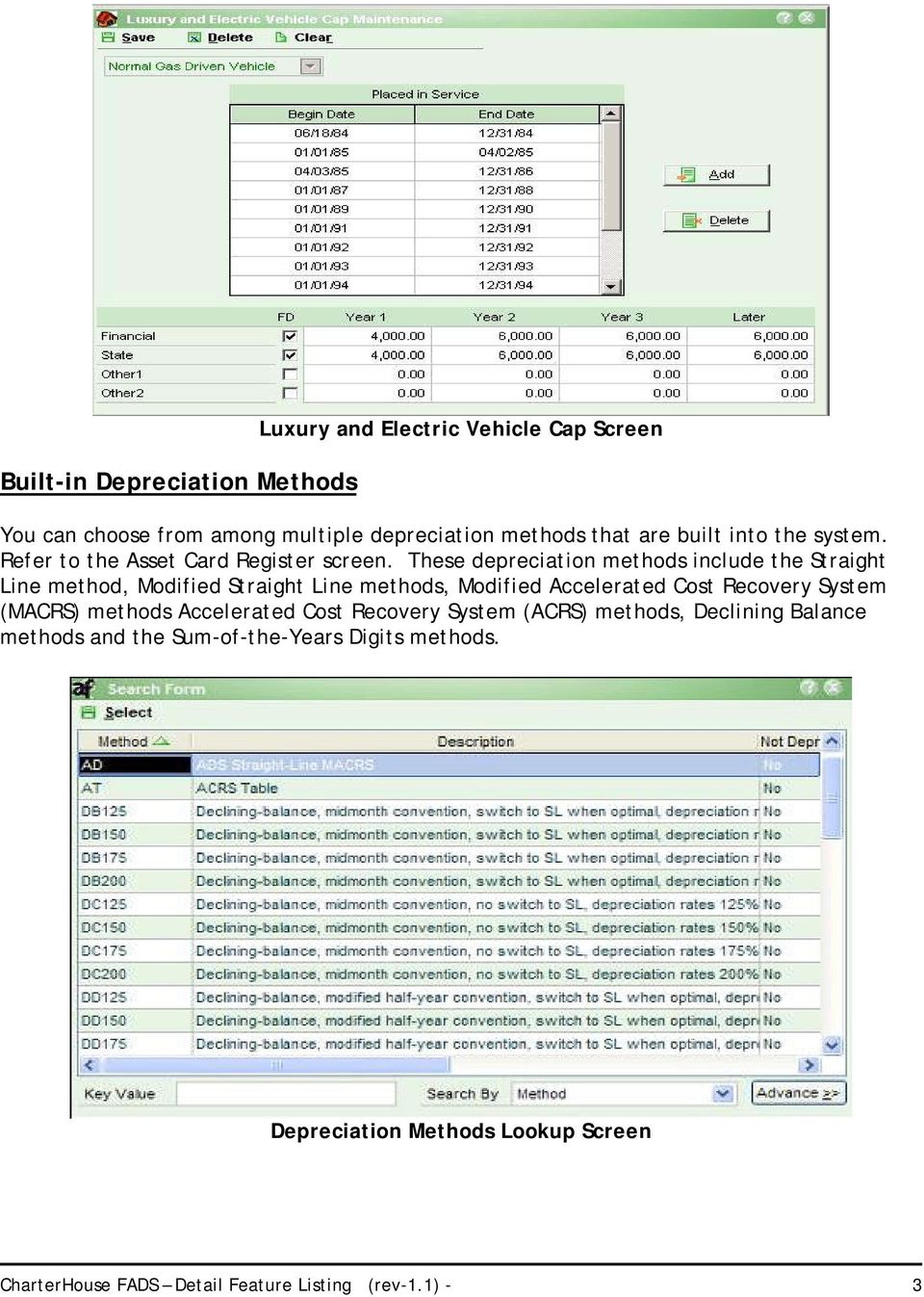
3 Built-in Depreciation Methods Luxury and Electric Vehicle Cap Screen You can choose from among multiple depreciation methods that are built into the system. Refer to the Asset Card Register screen. These depreciation methods include the Straight Line method, Modified Straight Line methods, Modified Accelerated Cost Recovery System (MACRS) methods Accelerated Cost Recovery System (ACRS) methods, Declining Balance methods and the Sum-of-the-Years Digits methods. Depreciation Methods Lookup Screen CharterHouse FADS Detail Feature Listing (rev-1.1) - 3
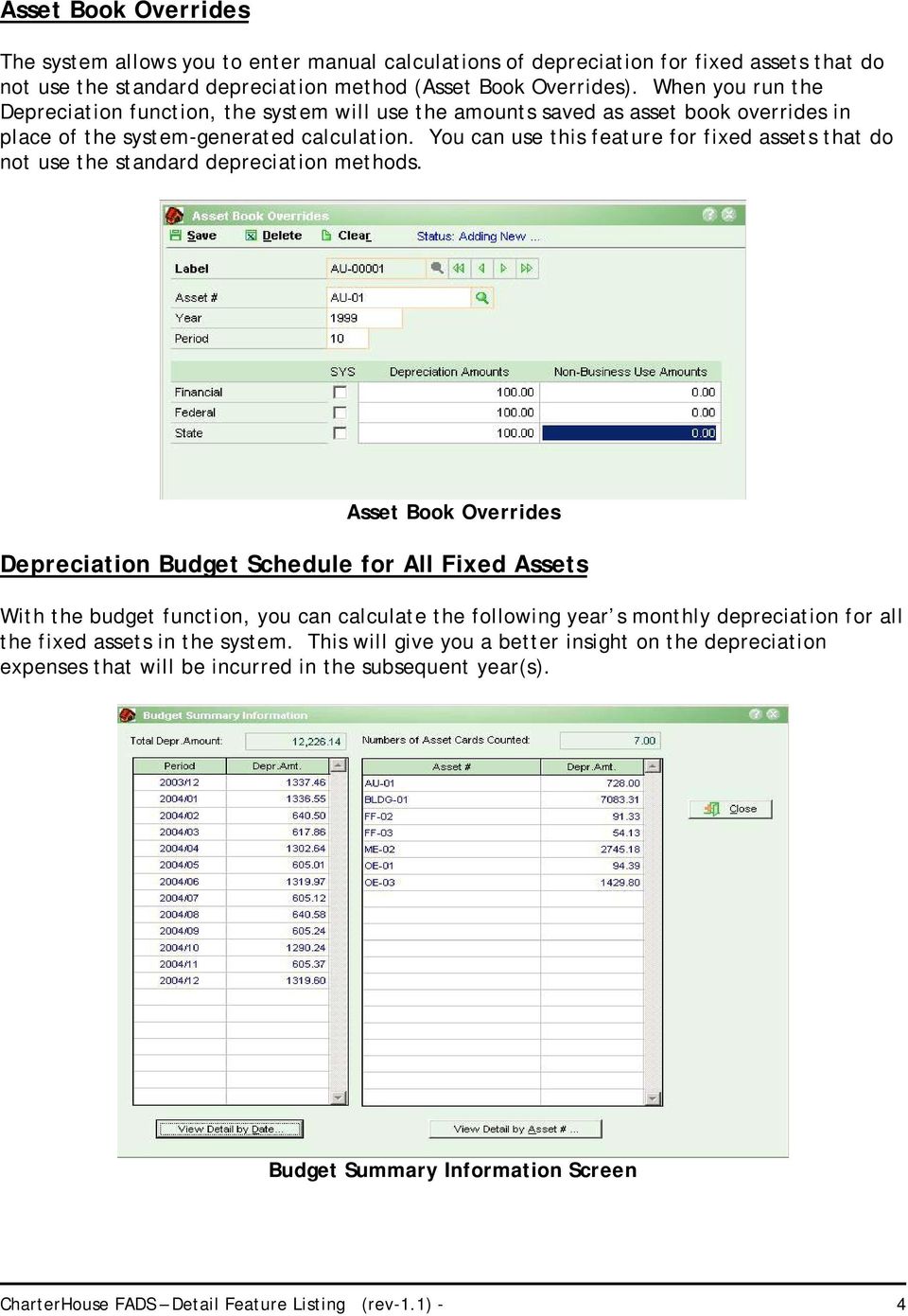
4 Asset Book Overrides The system allows you to enter manual calculations of depreciation for fixed assets that do not use the standard depreciation method (Asset Book Overrides). When you run the Depreciation function, the system will use the amounts saved as asset book overrides in place of the system-generated calculation. You can use this feature for fixed assets that do not use the standard depreciation methods. Asset Book Overrides Depreciation Budget Schedule for All Fixed Assets With the budget function, you can calculate the following year s monthly depreciation for all the fixed assets in the system. This will give you a better insight on the depreciation expenses that will be incurred in the subsequent year(s). Budget Summary Information Screen CharterHouse FADS Detail Feature Listing (rev-1.1) - 4
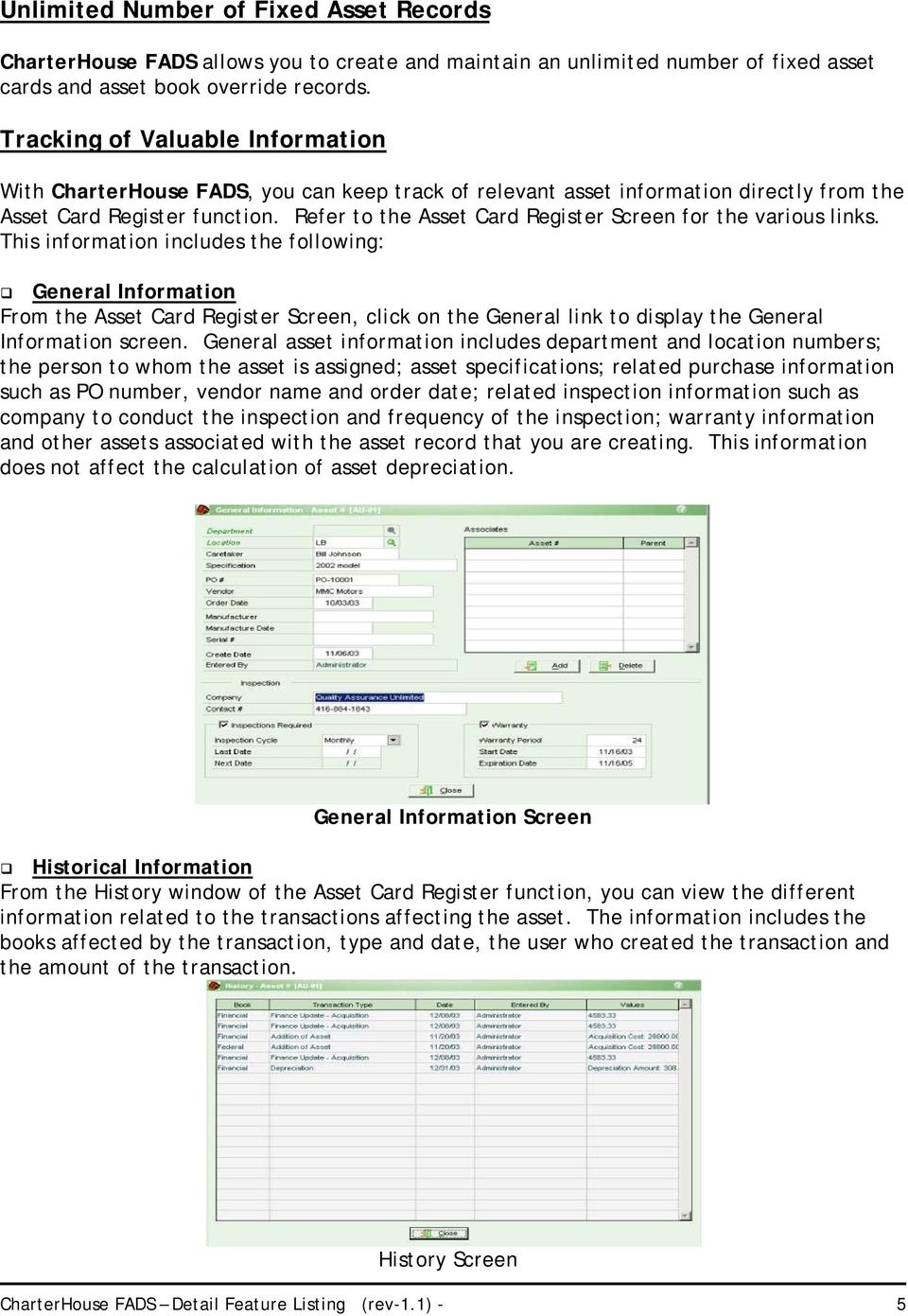
5 Unlimited Number of Fixed Asset Records CharterHouse FADS allows you to create and maintain an unlimited number of fixed asset cards and asset book override records. Tracking of Valuable Information With CharterHouse FADS, you can keep track of relevant asset information directly from the Asset Card Register function. Refer to the Asset Card Register Screen for the various links. This information includes the following: General Information From the Asset Card Register Screen, click on the General link to display the General Information screen. General asset information includes department and location numbers; the person to whom the asset is assigned; asset specifications; related purchase information such as PO number, vendor name and order date; related inspection information such as company to conduct the inspection and frequency of the inspection; warranty information and other assets associated with the asset record that you are creating. This information does not affect the calculation of asset depreciation. General Information Screen Historical Information From the History window of the Asset Card Register function, you can view the different information related to the transactions affecting the asset. The information includes the books affected by the transaction, type and date, the user who created the transaction and the amount of the transaction. History Screen CharterHouse FADS Detail Feature Listing (rev-1.1) - 5
6 Financing and Insurance Information The system also allows you to monitor the financing structure entered into by the company in acquiring the asset and the related insurance information. Click on the Finance Link in the Asset Card Register screen to display the Finance screen. The details entered into this screen in conjunction with the Finance Update function do not result in any accounting entry. These merely serve as a reference to help you keep track of what you have paid, view the financing structure and the related insurance that you obtained for the acquired asset. Finance Screen Cost Center Allocation This feature allows you to properly allocate the cost of the acquired fixed assets. You can properly identify to which department or location an asset belongs. You can specify more than one department in case more than one department is using the asset. Cost Allocation Screen CharterHouse FADS Detail Feature Listing (rev-1.1) - 6

7 Bar Code Number Entry You can assign barcode numbers to your fixed assets and enter the numbers with the use of a barcode scanner. This makes asset card registry entry faster and more reliable. Asset Card Register Screen Barcode Attach Related Image and Other Files CharterHouse FADS allows you to attach related files to an asset record. Files could range from a scanned insurance policy, financing agreement or image of the fixed asset. You can view the related files by clicking the Attachment link in the Asset Card Register screen. Attachment Screen CharterHouse FADS Detail Feature Listing (rev-1.1) - 7

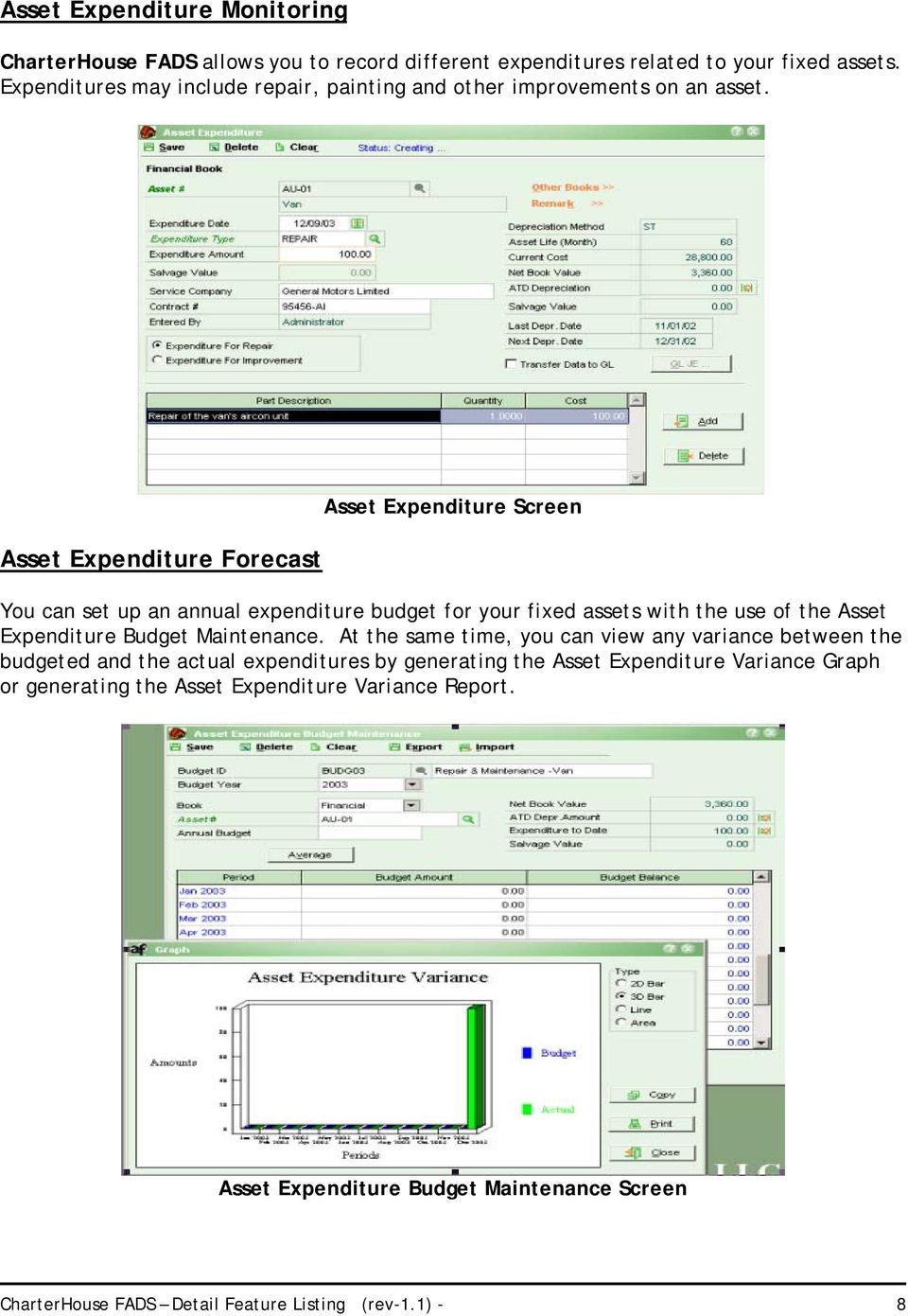
8 Asset Expenditure Monitoring CharterHouse FADS allows you to record different expenditures related to your fixed assets. Expenditures may include repair, painting and other improvements on an asset. Asset Expenditure Forecast Asset Expenditure Screen You can set up an annual expenditure budget for your fixed assets with the use of the Asset Expenditure Budget Maintenance. At the same time, you can view any variance between the budgeted and the actual expenditures by generating the Asset Expenditure Variance Graph or generating the Asset Expenditure Variance Report. Asset Expenditure Budget Maintenance Screen CharterHouse FADS Detail Feature Listing (rev-1.1) - 8
9 Asset Sale, Disposal, or Exchange CharterHouse FADS allows you to closely monitor the movement of your fixed assets, from the acquisition to sale, exchange or disposal. The system allows you to record the exchange, sale or disposal and any related gain or loss resulting from such transactions. With the Asset Change History report, you can view the different transactions affecting your fixed assets. You can also generate the Disposal Report and Asset Exchange Report. Sale of Asset Screen Asset Disposal Screen CharterHouse FADS Detail Feature Listing (rev-1.1) - 9

10 Change in Depreciation Method, Location, Department or Asset Class Under exceptional circumstances, a fixed asset s attributes that normally would not need changing may need to be changed. CharterHouse FADS allows you to perform these functions by choosing from among the four options in the Asset Adjustment function. Generation of GL Account Distribution Asset Adjustment Screen CharterHouse FADS allows you to generate a GL account distribution text file that you can use in importing the information to your General Ledger system. You may select to generate a single batch or multiple batches. Generate GL Distribution Screen Separate Void Functions There are instances that may necessitate voiding of some transactions that you had created. CharterHouse FADS has separated the void functions from the regular transaction functions. You can use these functions to void the last depreciation calculated for a specific asset; to void disposal, sale or exchange of an asset; and to void the last finance update that you performed. CharterHouse FADS Detail Feature Listing (rev-1.1) - 10

11 Print Fixed Asset Labels You can print detailed fixed asset labels that you can tag to the applicable fixed assets for proper identification. Print Asset Label Sort By Asset # Screen Generate Various Relevant Reports Asset Reports These are the reports in the Asset Reports section that provide general information and analysis. Asset Card Listing Asset Distribution Report Asset Basis Report Print Asset Label Asset Change History Asset Association Report Asset Balance Worksheet Asset Book Override Listing Mid-quarter Applicability Report Asset Class Reports These reports relate specifically to the analysis of Asset Classes. Asset Class Listing Asset Class Worksheet Depreciation Reports These reports provide information used in calculating depreciation expense and the expense calculated during each fixed asset s depreciation cycle. Depreciation Expense Report Department Depreciation Expense Report Depreciation Detail Listing Expenditure Report The Asset Expenditure Report provides information on the different types of expenditure transactions. You can generate a report sorted by asset, location and expenditure type. You can also generate a report that shows the difference between the actual expenditure vs. the budgeted expenditure. Asset Expenditure Report Asset Expenditure Variance Report CharterHouse FADS Detail Feature Listing (rev-1.1) - 11

12 Disposal Report The Disposal Report provides you with the information related to the disposal of particular assets. You may choose to generate this report by asset number or by disposal date. Asset Exchange Report To monitor the different asset exchange transactions, you will need the Asset Exchange Report. You may choose to generate the report by new asset number or old asset number. Asset Finance Update Report This report provides you with the finance update transactions that you had performed. You may include only insurance type-related transactions or the acquisition type-related transactions or both. Form 4562 Worksheet CharterHouse FADS allows you to generate this report and use it as the basis for completing the Form 4562 worksheet. CharterHouse FADS Detail Feature Listing (rev-1.1) - 12
Fixed Asset Management
 Fixed Asset Management MICROSOFT BUSINESS SOLUTIONS GREAT PLAINS Fixed Asset Management helps you gain insight to make better decisions and put assets to the best use within your organisation by enabling
Fixed Assets. Depreciation tables may be created for methods not already included with the package.
 Fixed Assets Solution-IV Fixed Assets is designed to help you manage your assets and calculate depreciation. You may have as many depreciation calculations on an asset as required for your business. Different
Norming Asset Management. To make asset management easy and automatic with Sage Accpac ERP
 Norming Asset Management To make asset management easy and automatic with Sage Accpac ERP Modules Asset Accounting Asset Maintenance Asset Leasing Asset Tracking Highlights Integrates with Sage Accpac
How To Account For Fixed Assets In A Fas Asset Accounting System
 Sage FAS Fixed Assets FAS Asset Inventory Efficiently create and track multiple physical inventories of assets and enjoy complete control over your entire asset inventory at every step with FAS Asset Inventory.
DATA IMPORT FORMAT BASSET FIXED ASSET SYSTEM. Spreadsheet Field Data Column Name Type Length Decimal Notes
 DATA IMPORT FORMAT BASSET FIXED ASSET SYSTEM Spreadsheet Field Data Column Name Type Length Decimal Notes A Description Character 25 Note 1 B Location Character 25 C Location State Character 25 D Company
BASSETS Fixed Asset System. A Hole in Your SOX Compliance - FA Software. Accurate Financial Reports
 1 About the Author: Steven Schimpff has 30 years experience developing and implementing financial and accounting systems. For the last 14 years, Steve has implemented the Bassets System in all industries
EMAS EXECUTIVE MANAGEMENT ACCOUNTING SYSTEM Financial and Distribution application solutions PRODUCT OVERVIEW
 EXECUTIVE MANAGEMENT ACCOUNTING SYSTEM Financial and Distribution application solutions INDEX GENERAL INFORMATION Common Features Page 3 Technical Information Page 3 Product Objectives.. Page 3 MODULE
DEPRECIATION DATA CONVERSION ProSystem fx Fixed Assets to Fixed Assets CS
 DEPRECIATION DATA CONVERSION ProSystem fx Fixed Assets to This application converts your depreciation data from ProSystem fx Fixed Assets versions 2012.01000 through 2014.01030. You can then import this
New Fleet Management Software System
 New Fleet Management Software System The Fleet Services staff received training in October 2003, and early 2004, in preparation for the installation of a new fleet management software system. Training
TMT FLEET MAINTENANCE
 TMT FLEET MAINTENANCE Maintenance Management Software With the equipment and maintenance management software...we have been able to cut $100k in admin costs, $140k in parts & boosted warranty recovery
Uniform Accounting Network Inventory Manual. Table of Contents. Warranty Maintenance Debt Management Depreciation Disposal
 Inventory Manual Uniform Accounting Network Inventory Manual Table of Contents Introduction Parts of the Manual Part 1 Assets Chapter 1 Acquisition Warranty Maintenance Debt Management Depreciation Disposal
Sage MAS 90 and 200 ERP
 Sage MAS 90 and 200 ERP What s New in Sage MAS 90 and 200 4.4? Something for Everyone in 4.4 Based on the solid foundation that Sage MAS 90 and Sage MAS 200 ERP solutions have continued to build on for
Asset Management Configuration Document Created - 3/6/2003 Current - 3/17/2003. PeopleSoft Financials Release 8.4
 Asset Management Configuration Document Created - 3/6/2003 Current - 3/17/2003 PeopleSoft Financials Release 8.4 Table of Contents 1 Background and Overview... 1 2 Asset Management Processes Overview...
Strategic Asset Tracking System User Guide
 Strategic Asset Tracking System User Guide Contents 1 Overview 2 Web Application 2.1 Logging In 2.2 Navigation 2.3 Assets 2.3.1 Favorites 2.3.3 Purchasing 2.3.4 User Fields 2.3.5 History 2.3.6 Import Data
QAD Fixed Assets Demonstration Guide. August 7, 2015 EAM 2015 / EE2015
 QAD Fixed Assets Demonstration Guide August 7, 2015 EAM 2015 / EE2015 Overview This demonstration focuses on one aspect of QAD Enterprise Financials Fixed Assets and shows how this functionality supports
WARRANTY MANAGEMENT REDESIGN
 TECHNICAL SERVICE DEPARTMENT Jan/2014 SUMMARY The Technical Service Department has established a set of business principles to support a variety of Departments within the District that includes Maintenance,
Products Financial Accounting for DNA
 Products Financial Accounting for DNA A Comprehensive Financial Information Management Suite of Solutions That Streamline Accounting Processes and Improve Decision-Making Products Sound financial accounting
Conquering the Myths of Inventory Management with MobileInventory. www.waspbarcode.com
 Conquering the Myths of Inventory Management with MobileInventory www.waspbarcode.com Copyright 2006, Wasp Technologies. All rights reserved. No part of this publication may be copied, or used in any form
TheFinancialEdge. Records Guide for Fixed Assets
 TheFinancialEdge Records Guide for Fixed Assets 101811 2011 Blackbaud, Inc. This publication, or any part thereof, may not be reproduced or transmitted in any form or by any means, electronic, or mechanical,
for Sage 100 ERP General Ledger Overview Document
 for Sage 100 ERP General Ledger Document 2012 Sage Software, Inc. All rights reserved. Sage Software, Sage Software logos, and the Sage Software product and service names mentioned herein are registered
Track Em Version 3.1
 Track Em Version 3.1 Getting Started Guide Table of Contents Introduction 3 Running Track Em over a Network 4 Testing Portable Scanner Communications 4 General Startup Steps 5 Assets (items with unique
Microsoft Dynamics GP. Payables Management
 Microsoft Dynamics GP Payables Management Copyright Copyright 2010 Microsoft. All rights reserved. Limitation of liability This document is provided as-is. Information and views expressed in this document,
MICROSOFT SQL SERVER DATABASE
 Karmak Fusion, our flagship Windows-based solution is designed specifically for the heavy-duty industry to handle the varied demands of operating a full-service business. From easy onboarding to real-time
FAS 50 Asset Accounting User s Guide
 FAS 50 Asset Accounting User s Guide Version 2012 Contents Chapter 1. Introduction Welcome to Sage FAS Fixed Assets........................................................... 1-1 Verifying Your Computer
How To Use Pastel Evolution With Fixed Assets
 PASTEL EVOLUTION FIXED ASSETS LEARNING OUTCOME This course will take you through the process of setting up the Fixed Assets Module to assist with the depreciation journals as well as keeping track of all
Abila MIP Fund Accounting
 Abila MIP Fund Accounting Module Overview Award-winning Abila MIP Fund Accounting (formerly Sage 100 Fund Accounting) is the financial management solution preferred by nonprofit and government organizations
Sage ERP X3 What's new in Sage ERP X3 6.5?
 Sage ERP X3 What's new in Sage ERP X3 6.5? Sage ERP X3 6.5 improves productivity, simplifies installation, and offers you new specialized features through cloud services. Enhancements include Electronic
Fixed Assets. User Guide
 Fixed Assets User Guide 2005, Jenzabar, Inc. 5 Cambridge Center Cambridge, MA 02142 1.877.535.0222 www.jenzabar.net This document is confidential and contains proprietary information. The use of this
GoldTech Retail Manager System Features List
 For retail organizations looking to drive success, GoldTech, Inc. GoldTech Retail Manager offers an easy to use, flexible solution that that helps you manage operations and performance across your enterprise.
Hierarchy of a Standard PEO. Company
 Client Maintenance This section details the procedures necessary to create a PEO client and describes the fields and options that appear on the Client Maintenance window. For details on setting up an ASO
Imagine software that manages every aspect of your dealership in a simple, yet powerful system That s exactly what Total Management will do for you.
 Dealership Software, LLC 85 Industrial Circle, Unit 2105 Lincoln, RI 02865 Ph: 401-305-3740 Fax: 401-305-3746 www.dealershipsoftware.net Imagine software that manages every aspect of your dealership in
Accounts Payable Guide
 Accounts Payable Guide 2006 Sage Software, Inc. All Rights Reserved. This document contains proprietary information which is protected by copyright. No part of this document may be photocopied, reproduced,
Distribution Training Guide. D100 Inventory Management: Basic
 Distribution Training Guide D100 Inventory Management: Basic Certification Course Prerequisites The course consists of a hands- on guide that will walk you through the specifics of Acumatica s Inventory
Keeping Track of Fixed Assets with Microsoft Dynamics GP LEVERAGING MICROSOFT DYNAMICS GP AND BARCODE TECHNOLOGY
 Keeping Track of Fixed Assets with Microsoft Dynamics GP LEVERAGING MICROSOFT DYNAMICS GP AND BARCODE TECHNOLOGY October 2011 ne Need to get a better handle on managing your fixed assets? Panatrack has
Barcode Support. Table of Contents
 Barcode Support Table of Contents Barcode Scanning and Labeling Support... 2 Scanning in Barcodes... 2 Basic Scanning Techniques... 2 Quick Barcode Scanning... 2 Using the Quick Find Fields with Scanners...
4 Steps to Select a Fixed Asset Management & Depreciation Solution
 4 Steps to Select a Fixed Asset Management & Depreciation Solution By Matthew P. Kennedy About the Author: Matthew Kennedy has analyzed, developed and tested software applications for over 20 years. Matthew
ORACLE GRANTS ACCOUNTING
 ORACLE GRANTS ACCOUNTING KEY FEATURES AWARD MANAGEMENT Maintain award funding details and terms and conditions Track award personnel, sponsor contact details, and reporting requirements BUDGETING Maintain
How To Manage Time And Expense On A Computer Or Tablet Or Ipad Or Ipa Or Ipo Or Ipod Or Ipode Or Ipro Or Ipor Or Ipora Or Ipore Or Ipot Or Ipos Or Ipom Or Ip
 M4 Systems Advanced Time and Expense Management Brochure M4 Systems Ltd Tel: 0845 5000 777 International: +44 (0)1443 863910 www.m4systems.com www.dynamicsplus.net Table of Contents Introduction ------------------------------------------------------------------------------------------------------------------
GP REPORTS VIEWER USER GUIDE
 GP Reports Viewer Dynamics GP Reporting Made Easy GP REPORTS VIEWER USER GUIDE For Dynamics GP Version 2015 (Build 5) Dynamics GP Version 2013 (Build 14) Dynamics GP Version 2010 (Build 65) Last updated
Service Management Series Realize Improved Service and Higher Profitability
 Service Management Series Realize Improved Service and Higher Profitability Designed to meet the diverse needs of asset-based service organizations, the WennSoft Service Management Series can help effectively
With Contract Collector, all the functions and features you will ever need for Loan Servicing are available in one complete integrated system.
 With Contract Collector, all the functions and features you will ever need for Loan Servicing are available in one complete integrated system. Powerful Contract Collector comes complete with a General
Inventory Management Overview Document. for Sage 100 ERP
 Document for Sage 100 ERP 2012 Sage Software, Inc. All rights reserved. Sage Software, Sage Software logos, and the Sage Software product and service names mentioned herein are registered trademarks or
What s New In Sage MAS 90/200 version 4.4?
 Martin and Associates April 2010 www.martinandassoc.com Volume 1, Issue 2 What s New In Sage MAS 90/200 version 4.4? Based on the solid foundation that Sage MAS 90 and 200 ERP solutions have continued
EMAS EXECUTIVE MANAGEMENT ACCOUNTING SYSTEM Financial and Distribution application solutions PRODUCT OVERVIEW
 EXECUTIVE MANAGEMENT ACCOUNTING SYSTEM Financial and Distribution application solutions INDEX GENERAL INFORMATION Common Features Page 3 Technical Information Page 3 Product Objectives.. Page 3 MODULE
IDEAS Property Clerk Enterprise Property Management Accounting Software. IDEAS Software 1-866-346-6700 www.ideascomputer.com
 IDEAS Property Clerk Enterprise Property Management Accounting Software IDEAS Software 1-866-346-6700 www.ideascomputer.com Table of Contents IDEAS Property Clerk Enterprise Product Overview...1 Key Benefits
Accounts Payable and Inventory Management
 Accounts Payable and Inventory Management 2013 SedonaOffice Users Conference Presented by: Lisa Gambatese & Laurie Goodrich Table of Contents Accounts Payable G/L Account Defaults (AP) 4 A/P Setup Processing
Sage 300 ERP 2012. What's New
 Sage 300 ERP 2012 What's New This is a publication of Sage Software, Inc. Version 2012 Copyright 2012. Sage Software, Inc. All rights reserved. Sage, the Sage logos, and the Sage product and service names
RedBeam Asset Tracking User Manual
 RedBeam Asset Tracking User Manual Contact us at www.redbeam.com. Page 1 Table of Contents Table of Contents... 2 Overview... 4 PC Prerequisites... 4 Mobile Computer Prerequisites... 4 Section 1: Installation...
CLIENT BOOKKEEPING SOLUTION PAYCHECK. Getting Started. version 2007.x.x
 CLIENT BOOKKEEPING SOLUTION PAYCHECK Getting Started version 2007.x.x TL 20744 (06/08/09) Copyright Information Text copyright 1997 2009 by Thomson Reuters/Tax & Accounting. All rights reserved. Video
IQ Accounting +, Business, Enterprise & POS
 IQ,, Enterprise & POS Overview & Features System Comparison IQ IQ IQ Enterprise IQ POS Point of Sale Stock Processing Limited Debtors Creditors Ledger Utilities Multiple Branch Centralisation & Stock Sync
High-Performance Maintenance Management Software With All-Terrain Capabilities
 TMT Fleet Maintenance High-Performance Maintenance Management Software With All-Terrain Capabilities from A TRIMBLE COMPANY R TMT Fleet Maintenance Maintenance Management Software By TMW Systems Every
MobileAsset Users Manual Web Module
 MobileAsset Users Manual Web Module Copyright Wasp Barcode Technologies 2010 No part of this publication may be reproduced or transmitted in any form or by any means without the written permission of Wasp
Accounts Payable Entry Tips
 [MU-FN-6-E] [MU-FN-10-E) Accounts Payable Entry Tips Munis-Financials: Accounts Payable CLASS DESCRIPTION This class will examine new ways to improve efficiency and streamline functionality within the
ASSETMAXX. Asset Tracking System. Users Manual. Revised 2/27/09
 ASSETMAXX Asset Tracking System Users Manual Revised 2/27/09 Minimum Requirements for Assetmaxx: Any system connected to the internet, configured with either Internet Explorer 6.0 or higher or Netscape
TheFinancialEdge. Dashboard Guide
 TheFinancialEdge Dashboard Guide 101911 2011 Blackbaud, Inc. This publication, or any part thereof, may not be reproduced or transmitted in any form or by any means, electronic, or mechanical, including
HansaWorld Enterprise
 HansaWorld Enterprise Integrated Accounting, CRM and ERP System for Macintosh, Windows, Linux, PocketPC 2002 and AIX Assets Program version: 4.2 2005-03-04 2004 HansaWorld Ireland Limited, Dublin, Ireland
1 - ACCOUNTS RECEIVABLE
 1 - ACCOUNTS RECEIVABLE ACCOUNTS RECEIVABLE 1.01 User defined GL posting dates for receivables documents (e.g. orders, invoices, etc.) to be either the Transaction Date or the System Date. 1.02 User configuration
Moving Beyond Compliance: The Evolution of Massachusetts General Hospital s Research Capital Asset Management System
 Moving Beyond Compliance: The Evolution of Massachusetts General Hospital s Research Capital Asset Management System Lauren Barsanti, Space Analyst Patricia Frederico, Manager of Research Operations Research
Accounting & Finance Solutions
 Did you get into business to crunch numbers? We didn t think so. iprocess Online crunches all your numbers more quickly and cost effectively than you ever could, providing a comprehensive portfolio of
Accounts Payable Invoice Entry Monroe County, WI
 2014 Accounts Payable Invoice Entry Invoice scanners are responsible for entering vendor invoice data and documentation into Munis. This document outlines the procedure of invoice entry and batch scanning.
SIMPLICITY SOFTWARE TECHNOLOGIES INC
 SIMPLICITY SOFTWARE TECHNOLOGIES INC INDUSTRIAL STRENGTH SOFWARE MADE SIMPLE! ABOUT SIMPLICITY SOFTWARE TECHNOLOGIES INC. The founder of Simplicity Software Technologies started working in the industrial
Background. ECRI-AIMS Overview
 Background Over the last decade, ECRI Institute s Hospital Equipment Control System, HECS4 for Windows, has been the system of choice for many hospitals worldwide, including 40 hospitals in the UK and
How To Use Hansaworld Enterprise
 HansaWorld Enterprise Integrated Accounting, CRM and ERP System for Macintosh, Windows, Linux, PocketPC 2003 and AIX Stock Module Program version: 5.1 2006-10-20 2006 HansaWorld Ireland Limited, Dublin,
Fixed Asset Policy & Procedures. Content
 Content 1. Purpose... 3 2. Definitions... 3 3. Responsibility... 3 4. Tagging and Identifying Inventoriable Assets... 4 5. Additions to Fixed Assets... 4 6. Transfer of Assets... 5 7. Disposition of Assets...
AFN-FixedAssets-062502
 062502 2002 Blackbaud, Inc. This publication, or any part thereof, may not be reproduced or transmitted in any form or by any means, electronic, or mechanical, including photocopying, recording, storage
CIMS: Centralized Inventory and Maintenance Software
 CIMS: Centralized Inventory and Maintenance Software February 2014 DragonPoint, Inc. 877-542-0657 1 Contents Contents... 1 Executive Overview... 2 Consistency Contributes to Ease of Use... 3 Work Orders...
Fixed Assets Management: What You Need to Know
 Fixed Assets Management: What You Need to Know Fixed Assets Management: What You Need to Know by Nancy Faussett, CPA 1.0 Introduction 3 2.0 Defining a Fixed Asset 4 2.1 Defining a Fixed Asset 4 3.0 Critical
CLOCKWORK Training Manual and Reference: Inventory. TechnoPro Computer Solutions, Inc.
 CLOCKWORK Training Manual and Reference: Inventory TechnoPro Computer Solutions, Inc. Table of Contents Inventory Learning Objectives License Key 5 Create a Catalog 6 Assign Permissions 9 Categories and
The Form 4562 Explained
 The Form 4562 Explained Depreciation & Amortization Overview Owen E. McCafferty, CPA, Inc. Definitions and Concepts Depreciation Defined According to the IRS, Depreciation is the yearly deduction allowed
Dynamics GP 50 More Tips in 50 Minutes
 Financial Tip #1 Use Keyboard Shortcuts for Marking Cleared Transactions in Bank Rec Transactions >> Financial >> Reconcile Bank Statement Select the first transaction, then type CTRL+B (Begin Range).
MobileAsset.EDU Asset Tracking Solutions for Education
 MobileAsset.EDU Asset Tracking Solutions for Education Wasp Barcode Technologies Looking for a more efficient way to track your school s valuable assets? MobileAsset.EDU Wasp Barcode Technologies Easily
Banner Finance Fixed Assets Training Workbook
 Banner Finance Fixed Assets Training Workbook Release 8.0 - April 2008 Updated 3/24/2009 HIGHER EDUCATION What can we help you achieve? SunGard Higher Education 4 Country View Road Malvern, Pennsylvania
BANNER FIXED ASSET MODULE PROCEDURES
 BANNER FIXED ASSET MODULE PROCEDURES A. INTRODUCTION All fixed assets received on or after July 1, 2005 are processed using $500 as the minimum capitalization amount. Also, beginning July 1, 2005, all
Asset4000. Fixed Asset Accounting Software. Real Asset. Management
 Asset4000 Fixed Asset Accounting Software Real Asset Management Asset4000 Get real when it comes to managing your fixed assets R eal Asset Management (RAM) is a leading provider of fixed assets software,
Product. Prologue Accounts Payable Automate Your Accounts Payable Processing
 Product Prologue Accounts Payable Automate Your Accounts Payable Processing Product The foundation of effective enterprise performance management is sound business intelligence intelligence that requires
MIE Solutions UK Ltd www.mie-solutions.co.uk
 MIE Solutions UK Ltd www.mie-solutions.co.uk MIE Trak PRO ERP Software Overview Sections Modules (included) Functions and Reports Quoting RFQ Logs and manages RFQs Creates Quote Letter Email to customer
Audit Program for Fixed Assets
 Form AP 35 Index Audit Program for Fixed Assets Legal Company Name Client: Balance Sheet Date: Instructions: The auditor should refer to the audit planning documentation to gain an understanding of the
SKYLINE 2014. Release Notes
 SKYLINE 2014 Release Notes Contents WELCOME TO SKYLINE... 1 SKYLINE Release Overview... 1 Contact Us... 1 Sales and General Information... 1 Service... 1 Support... 1 ENHANCEMENTS... 2 Enhanced Budgeting...
for Sage 100 ERP Purchase Order Overview Document
 for Sage 100 ERP Purchase Order Document 2012 Sage Software, Inc. All rights reserved. Sage Software, Sage Software logos, and the Sage Software product and service names mentioned herein are registered
PROPERTY, PLANT & EQUIPMENT (ACQUISITIONS & DISPOSALS) UNSW Accounting Procedure
 PROPERTY, PLANT & EQUIPMENT (ACQUISITIONS & DISPOSALS) UNSW Accounting Procedure Linked UNSW Policy Responsible Officer Director, Corporate Finance & Advisory Services Contact Officer Senior Manager, Capital
Fixed Asset Inventory
 Fixed Asset Inventory The purpose of the district-wide fixed asset inventory system is to gather information for the preparation of financial statements, including estimated annual depreciation costs of
BANNER FIXED ASSET MODULE PROCEDURES
 BANNER FIXED ASSET MODULE PROCEDURES A. INTRODUCTION All fixed assets received on or after July 1, 2001 are processed using $5,000 as the minimum capitalization amount. Also, beginning July 1, 1998, all
Asset Management. Global Leader in Real Estate, Infrastructure, and Facilities Management Solutions
 Asset Management Global Leader in Real Estate, Infrastructure, and Facilities Management Solutions A SatNav Technologies Product Asset Management You can get data of how many assets are available in each
WalkThrough FIXED ASSETS CS. Tax Year 2014
 FIXED ASSETS CS WalkThrough Tax Year 2014 Invest a few hours of your time to experience the power of Fixed Assets CS the fixed asset management application that puts you in complete control of managing
Need help? The Accounts Payable Help Documentation is designed to make your Accounts Payable experience as efficient as possible.
 Need help? The Accounts Payable Help Documentation is designed to make your Accounts Payable experience as efficient as possible. All you have to do to navigate through this document is simply use the
Document Scanning and 2D Barcodes
 Document Scanning and 2D Barcodes Contents Sample 2D Barcodes... 1 Scanning Hardcopies... 3 Reconciling Unprocessed Images... 7 Viewing Hardcopy / Rx Image from F12 Screen... 13 Scanning MedsCheck Reports...
AccuPOS to MAS90/200 Integration Guide
 AccuPOS to MAS90/200 Integration Guide Part I - MAS90 Company Setup In order to use AccuPOS Point of Sale and have it integrate with MAS90/200 for inventory and accounting purposes, we ask that you setup
Asset Management User Guide
 Asset Management User Guide Version 9.0 May 2006 Document Number AMUG-90UW-02 Lawson Enterprise Financial Management Legal Notices Lawson does not warrant the content of this document or the results of
Claims Manager. Accident Claim Tracking Made Easy
 Claims Manager Accident Claim Tracking Made Easy RentWorks Version 4 Claims Manager (Loss Control & Subrogation Module) User Guide Table of Contents Overview... 1 Installation... 2 Claims Setup... 3 Claims