
LG Packaged Terminal Air Conditioner/Heat Pump
|
|
|
- Elinor Robbins
- 9 years ago
- Views:
Transcription
1 LG LG Packaged Terminal Air Conditioner/Heat Pump SERVICE MANUAL CAUTION BEFORE SERVICING THE UNIT, READ THE SAFETY PRECAUTIONS IN THIS MANUAL. FOR AUTHORIZED SERVICE ONLY.

2 CONTENTS 1. PREFACE 1.1 SPECIFICATIONS FEATURES AND BENEFITS CONTROL LOCATIONS ADDITIONAL CONTROLS DISASSEMBLY INSTRUCTIONS 2.1 MECHANICAL PARTS FRONT GRILLE CONTROL BOX AIR HANDLING PARTS ELECTRIC HEATER AND CROSS FLOW FAN (Electric heater model only) AXIAL FAN SHROUD ELECTRICAL PARTS OUTDOOR MOTOR INDOOR MOTOR COMPRESSOR CAPACITOR POWER CORD P.C.B CAPILLARY TUBE INSTALLATION 3.1 HOW TO INSTALL THE UNIT WALLSLEEVE INSTALLATION WALL SLEEVE INSTALLATION DATA PREPARATION OF FRONT GRILLE UNIT INSTALLATION ELECTRICAL REQUIREMENTS ELECTRICAL DATA (FOR 230V/208 MODEL) ELECTRICAL SAFETY FIELD INSTALLED ACCESSORIES FERFORMANCE DATA TROUBLESHOOTING GUIDE 6.1 OUTSIDE DIMENSIONS PIPING SYSTEM TROUBLESHOOTING GUIDE SCHEMATIC DIAGRAM EXPLODED VIEW REFRIGERATION CYCLE CONDENSER EVAPORATOR PREFACE This SERVICE MANUAL provides various service information, including the mechanical and electrical parts, etc. This room air conditioner was manufactured and assembled under a strict quality control system. The refrigerant is charged at the factory. Be sure to read the safety precautions prior to servicing the unit. 2

3 1.1 SPECIFICATIONS LP 12 0 C E M Digits 1,2 - LG Packaged Terminal Air Conditioner Digit 6 - Product Type Digits 3,4 - Unit Cooling Capacity C = Air Conditoner 07 = 7,000 Btu/h H = Heat Pump 09 = 9,000 Btu/h Digit 7- Electric Heat 12 = 12,000 Btu/h E = Electric Heater 15 = 15,000 Btu/h Digit 8 - D = Digital M = Mechanical Digit 9 - Electric Voltage 1 = 265V, 60Hz None = 230V, 60Hz Models Cooling Capacity W Btu/h Heating Capacity W Btu/h Electric Heatier Capacity W Power Input Cooling/Heating W Running Current Cooling/Heating A Starting Current Cooling/Heating A EER W/W Btu/h.W COP W/W Power Supply Ø / V / Hz Air Flow Rate Indoor,Max m 3 G/min(cfm) Outdoor,Max m 3 G/min(cfm) Moisture Removal l/h Sound Level Indoor,H/M/L db(a)+3 Outdoor,Max db(a)+3 Refrigerant & Charge g(oz) Compressor Type Model Motor Type Oil Type Oil Charge cc O.L.P Name Fan Type(In/Out) Motor Type Motor OutputW Power Supply Cable No.*mm 2 Dimension W*H*D mm inch Net Weight Indoor kg(lbs) Tool Code(Chassis) Functions Temperature Control Energy Saver Switch Prefilter(washable/anti-fungus) Plasma Filter Steps, Fan/Cool/Heat Airflow Direction Control(up&down) Airflow Direction Control(left&right) Remocon Type Setting Temperature Cooling Range Heating Auto Operation (Micom Control) Panel Touch Type Timer Air Discharge Air Ventilation Device Control(Defrost) Hot Start Look Cabinet Type(Chassis Type) Special Function LP070CED1 LP090CED1 LP120CED1 LP150CED /- -/- -/- -/ / 265 / 60 1 / 265 / 60 1 / 265 / 60 1 / 265 / (300) 8.5(300) 12.0(420) 12.0(420) /-/43 45/-/43 49/-/47 49/-/47 60/58 60/58 63/61 63/61 R22,645(22.8) R22, 690(24.3) R22, 680(24.0) R22, 650(22.9) Rotaty(Non Tropical) Rotaty(Non Tropical) Rotaty(Non Tropical) Rotaty(Non Tropical) 2R9S276A6A 2R12S276A6B 2P16S276A1A 2K20S276A6A PSC PSC PSC PSC ATMOS M60 or SUNISO 4GDID ATMOS M60 or SUNISO 4GDID ATMOS M60 or SUNISO 4GDID ATMOS M60 or SUNISO 4GDID Internal Internal Internal Internal Cross Flow Fan / Axial Fan Cross Flow Fan / Axial Fan Cross Flow Fan / Axial Fan Cross Flow Fan / Axial Fan 4 POLES 4 POLES 4 POLES 4 POLES *2.1 3*2.1 3*2.1 3* *406* *406* *406* *406*505 42*16*19-7/8 42*16*19-7/8 42*16*19-7/8 42*16*19-7/8 39.8(88) 39.3(87) 42.5(94) 46.3(102) YA YA YA YA Thermistor Thermistor Thermistor Thermistor O O O O O O O O /2/2 2/2/2 2/2/2 2/2/2 Manual Manual Manual Manual F~86 F(12.2 C~30 C) 54 F~86 F(12.2 C~30 C) 54 F~86 F(12.2 C~30 C) 54 F~86 F(12.2 C~30 C) 54 F~86 F(12.2 C~30 C) 54 F~86 F(12.2 C~30 C) 54 F~86 F(12.2 C~30 C) 54 F~86 F(12.2 C~30 C) Micom Micom Micom Micom 12h, On/Off 12h, On/Off 12h, On/Off 12h, On/Off Rear Rear Rear Rear O O O O L-Look L-Look L-Look L-Look Electric Heater Electric Heater Electric Heater Electric Heater 3

4 Models Cooling Capacity W Btu/h Heating Capacity W Btu/h Electric Heater Capacity W Power Input Cooling/Heating W Running Current Cooling/Heating A Starting Current Cooling/Heating A EER W/W Btu/h.W COP W/W Power Supply Ø / V / Hz Air Flow Rate Indoor,Max m 3 G/min(cfm) Outdoor,Max m 3 G/min(cfm) Moisture Removal l/h Sound Level Indoor,H/M/L db(a)+3 Outdoor,Max db(a)+3 Refrigerant & Charge Compressor Fan Type Model Motor Type Oil Type Oil Charge O.L.P Name Type(In/Out) Motor Type Motor OutputW g(oz) Power Supply Cable No.*mm 2 Dimension W*H*D mm inch Net Weight Indoor kg(lbs) Tool Code(Chassis) Functions cc Temperature Control Energy Saver Switch Prefilter(washable/anti-fungus) Plasma Filter Steps, Fan/Cool/Heat Airflow Direction Control(up&down) Airflow Direction Control(left&right) Remocon Type Setting Temperature Cooling Range Heating Auto Operation (Micom Control) Panel Touch Type Timer Air Discharge Air Ventilation Device Control(Defrost) Hot Start Look Cabinet Type(Chassis Type) Special Function LP070HED1 LP090HED1 LP120HED1 LP150HED / / / / / / / /5.3 -/- -/- -/- -/ / 265 / 60 1 / 265 / 60 1 / 265 / 60 1 / 265 / (300) 8.5(300) 12.0(420) 12.0(420) /-/43 45/-/43 49/-/47 49/-/47 60/58 60/58 63/61 63/61 R22, 625(22.0) R22, 730(25.8) R22, 970(34.2) R22, 890(31.4) Rotaty(Non Tropical) Rotaty(Non Tropical) Rotaty(Non Tropical) Rotaty(Non Tropical) 2R10S276A6C(RSM284) 2R13S276A6C 2P17S276(PSM312) 2K21S276A6C PSC PSC PSC PSC ATMOS M60 or SUNISO 4GDID ATMOS M60 or SUNISO 4GDID ATMOS M60 or SUNISO 4GDID ATMOS M60 or SUNISO 4GDID Internal Internal Internal Internal Cross Flow Fan / Axial Fan Cross Flow Fan / Axial Fan Cross Flow Fan / Axial Fan Cross Flow Fan / Axial Fan 4 POLES 4 POLES 4 POLES 4 POLES *2.1 3*2.1 3*2.1 3* *406* *406* *406* *406*505 42*16*19-7/8 42*16*19-7/8 42*16*19-7/8 42*16*19-7/8 41.2(91) 41.8(92) 45.0(99) 48.3(106) YA YA YA YA Thermistor Thermistor Thermistor Thermistor O O O O O O O O /2/2 2/2/2 2/2/2 2/2/2 Manual Manual Manual Manual F~86 F(12.2 C~30 C) 54 F~86 F(12.2 C~30 C) 54 F~86 F(12.2 C~30 C) 54 F~86 F(12.2 C~30 C) 54 F~86 F(12.2 C~30 C) 54 F~86 F(12.2 C~30 C) 54 F~86 F(12.2 C~30 C) 54 F~86 F(12.2 C~30 C) Micom Micom Micom Micom 12h, On/Off 12h, On/Off 12h, On/Off 12h, On/Off Rear Rear Rear Rear O O O O O O O O L-Look L-Look L-Look L-Look Electric Heater Electric Heater Electric Heater Electric Heater 4

5 1.2 FEATURES AND BENEFITS The PTAC has many features, some of which are different than those found on conventional PTAC units. The servicer must be familiar with these features in order to properly service the unit. VERTICAL AIR DEFLECTOR (Horizontal Louver) THE SLEEVE AND THE REAR GRILLE (Available as an option) SLEEVE ASSEMBLY (Including Aluminum Rear Grille) REAR GRILLE (Aluminum Rear Grille) AIR FILTER INDOOR INLET GRILLE (Air Intake) EXPANDED METAL GRILLE (Superior for a performance) IIR (Infinite Impulse Response) The IIR function senses the temperature several times per second and makes micro-adjustments several times per Compressor Restart Delay This feature extends the overall life of compressor by preventing the short-cycling of the air-conditioner. When the compressor restarts, LG PTAC is designed to give a minimum of three minutes to have a time of equalizing the refrigerant pressures for optimizing cycling. Fan-Only Setting - High/Low The fan can run at HIGH or LOW speed without COOLING or HEATING to provide air circulation and ventilation. Indoor Fan Speed Selections - High/Low The fan can run at HIGH or LOW speed for either COOLING or HEATING. Two Fan motors The unit has two fan motors to provide quiet operation and maximum efficiency. 5

6 Indoor Filters The unit uses two indoor filters which slide in and cut easily. The filters may be cleaned by washing and brushing without removing the front grille. Rotary Compressor The unit uses a rotary compressor for quiet, reliable operation and long life. 2 Position Discharge Grille The discharge grille can provide air flows upward at an angle of 40 off vertical or 15 degree off vertical. The angle is changed by removing the front grille and 4 screws that fasten the discharge grille to the front grille and rotating the louvers to an alternate position. Indoor Room Freeze Protection When the unit senses the room temperature falls to less than 40 F the unit activates the fan motor and either the electric resistance heater or the hydronic heater to prevent pipes or fixtures from freezing. This also overrides front desk control of the unit mounted or wall mounted controls. Door Switch/Occupancy Sensor The unit is capable of accommodating a field installed door switch and occupancy sensor to operate the energy management feature. For additional information, refer to the unit operation section. Compressor Overload Protection This feature prevents the damage of the compressor by sensing the indoor tube temperature in heating. If the indoor temperature is over 130 F, the outdoor fan will be switched off and back on when the temperature drops below 120 F. Outdoor Air Temperature Switchover This will effectively change the unit from heat pump mode to total electric resistance heat. Temperature limits The unit is programmed to provide both heating and cooling temperature limits by dip switches on control panel from 54 F to 86 F. Temperature limits help to prevent overheating and overcooling and reduce energy costs. Condensate Drain Valve The unit has a condensate drain valve to prevent water from collecting or freezing in the basepan. Quick Heater Recovery The unit is designed to operate the electric heater to warm the room to the temperature set point as soon as heat pump cycle is on in heating. This feature has an advantage of reducing the time to reach the set point and improving the temperature increase for better comfort. Reverse Cycle Defrosting - (PTHDs only) The unit will activate the reverse cycle defrost when the outdoor coil temperature has remained at a cold temperature to form the ice on the coil.this ice will reduce airflow though the coil and will also reduce the efficiency of unit. The LG PTHP will employ an active reverse cycle defrost function to melt the ice off the outdoor coil for insuring room comfort conditions and savings from extended operation. High Temperature Heat Pump Operation Protection The compressor will be switched off to prevent damage when the heat pump is operated in high outdoor temperatures. Remote Thermostat Control Each unit is built to be operated from any standard 4 or 5 wire remote-mounted thermostat, if desired. The unit has a built-in low voltage power source which can accommodate a large variety of thermostat choices-manual, auto changeover, or programmable. A remote thermostat can also be added to any installed unit. Zone Sensor Occupants enjoy ultimate comfort with consistent climate control. Attach an optional, inexpensive remote Zone Sensor to exactly match the functions of the PTAC without disabling any features. 6

7 1.3 CONTROL LOCATIONS OPERATION ELECTRIC HEATING MODEL TEMPERATURE CONTROL Set the Thermostat control to the desired temperature mark 5 (the mid-point is a good starting position). If the room temperature is not satisfactory after a reasonable time, adjust the control to a cooler or warmer setting, as appropriate. VENTILATION The ventilation lever is located to the lower left side of the unit. The ventilation lever must be in the CLOSE position in order to maintain the best cooling conditions. When fresh air is necessary in the room, set the ventilation lever to the OPEN position. The damper is opened and outdoor air is drawn into the room. This will reduce the cooling or heating efficiency. COOLING ONLY MODEL OPERATION MODE SELECTOR Turns air conditioner off. LOW FAN Low speed fan operation without cooling. HIGH FAN High speed fan operation without cooling. LOW COOL Cooling with the low speed fan operation. HIGH COOL Cooling with the high speed fan operation. LOW HEAT Heating with the low speed fan operation. HIGH HEAT Heating with the high speed fan operation. CAUTION When the air conditioner has performed a cooling or heating operation and is turned off or set to the fan position, wait at least 3 minutes before resetting to the cooling operation. VENT OPEN VENT CLOSE NOTE A slight heat odor may come from the unit when first switching to HEAT after the cooling season is over. This odor, caused by fine dust particles on the heater, will disappear quickly. This is harmless. 7

8 ELECTRONIC CONTROLS The controls will look like one of the following. FAN SPEED Every time you push this button, it cycles through the settings as follows: {High(F2) Low(F1) High(F2) Low(F1)} 'F E/SAVE HEAT TEMP FAN COOL MODE HIGH LOW FAN TIMER TIMER ON POWER To turn the air conditioner ON, push this button. To turn the air conditioner, push the button again. This button takes priority over any other button. MODE - Push this button to cycle through the modes from COOL FAN HEAT COOL. - COOL Fan runs continually for normal cooling operation. - ENERGY SAVER The fan stops when the compressor stops cooling. Approximately every 3 minutes the fan will turn on and the unit will check the room air temperature to determine if cooling is needed. - FAN Fan operation without heating or cooling. - HEAT Fan runs continually for normal heating operation. TEMPERATURE SETTING Use this button to automatically control the temperature of the room. The temperature can be set within a range of 54 F to 86 F by increments of 2 F. The setting appears in the display. TIMER - SHUT- TIME You will usually use shut-off time while you sleep. If unit is running, use Timer to set number of hours until shut-off. For your sleeping comfort, once Time is set, the Temperature setting will raise 2 F after 30 minutes, and once again after another 30 minutes. Push Timer to cycle through the settings from 1 Hour 2 Hours Hours maximum. 8

9 1.4 ADDITIONAL CONTROLS REMOVING THE FRONT GRILLE Additional controls are available after removing the front grille and option cover of control box. To remove the front grille, pull out the bottom of front grille and then lift up. To replace the front grille, place the tabs over the top of the unit and push the bottom of front grille until the clips snap into place. ADDITIONAL CONTROLS The additional controls are located behind the option cover of control box. The standard settings will be in the position. The authorized servicer has to check switches and ensure the switches are in the desired position. REMOTE ON ON ON ON ON LOCAL Remote/Local Energy Saver LOCAL Temperature Limit Temperature Limit 2 Temperature Limit 3 PTAC/PTHP UNIT TYPE TEMPERATURE LIMITING Temperature Limiting can save money by limiting the lowest temperature for cooling and the highest temperature for heating. The temperature limiting is controlled by switches #1 - #3. This temperature limiting is not available with the Remote Wall Thermostat. Temperature Temperature Temperature Cooling Operation Heating Operation Limit #1 Limit #2 Limit #3 Lowest Temp. Highest Temp. Lowest Temp. Highest Temp. 54 F (12.2 C) 86 F (30.0 C) 54 F (12.2 C) 86 F (30.0 C) ON 56 F (13.3 C) 86 F (30.0 C) 54 F (12.2 C) 84 F (28.9 C) ON 58 F (14.4 C) 86 F (30.0 C) 54 F (12.2 C) 82 F (27.8 C) ON ON 60 F (15.5 C) 86 F (30.0 C) 54 F (12.2 C) 80 F (26.7 C) ON 62 F (16.6 C) 86 F (30.0 C) 54 F (12.2 C) 78 F (25.5 C) ON ON 64 F (17.7 C) 86 F (30.0 C) 54 F (12.2 C) 76 F (24.4 C) ON ON 66 F (18.9 C) 86 F (30.0 C) 54 F (12.2 C) 74 F (23.3 C) ON ON ON 68 F (20.0 C) 86 F (30.0 C) 54 F (12.2 C) 72 F (22.2 C) #6 ON ON #7 ON ON Cooling+Electric Heater+Heat Pump Cooling+Electric Heater Heat Pump Only Cooling Only Unit Type 9

10 REMOVING THE FRONT GRILLE Additional controls are available after removing the front grille and option cover of control box. To remove the front grille, pull out the bottom of front grille and then lift up. To replace the front grille, place the tabs over the top of the unit and push the bottom of front grille until the clips snap into place. ADDITIONAL CONTROLS The additional controls are located behind the option cover of control box. The standard settings will be in the position. The authorized service man has to check switches and ensure the switches are in the desired position. REMOTE ON ON ON ON ON LOCAL 1 2 Remote/Local Energy Saver Temperature Limit 1 Temperature Limit 2 Temperature Limit LOCAL TEMPERATURE LIMITING Temperature Limiting can save money by limiting the lowest temperature for cooling and the highest temperature for heating. The temperature limiting is controlled by dip switch #1 - #3. This temperature limiting is not available with the Remote Wall Thermostat. Temperature Temperature Temperature Cooling Operation Heating Operation Limit #1 Limit #2 Limit #3 Lowest Temp. Highest Temp. Lowest Temp. Highest Temp. 54 F (12.2 C) 86 F (30.0 C) 54 F (12.2 C) 86 F (30.0 C) ON 56 F (13.3 C) 86 F (30.0 C) 54 F (12.2 C) 84 F (28.9 C) ON 58 F (14.4 C) 86 F (30.0 C) 54 F (12.2 C) 82 F (27.8 C) ON ON 60 F (15.5 C) 86 F (30.0 C) 54 F (12.2 C) 80 F (26.7 C) ON 62 F (16.6 C) 86 F (30.0 C) 54 F (12.2 C) 78 F (25.5 C) ON ON 64 F (17.7 C) 86 F (30.0 C) 54 F (12.2 C) 76 F (24.4 C) ON ON 66 F (18.9 C) 86 F (30.0 C) 54 F (12.2 C) 74 F (23.3 C) ON ON ON 68 F (20.0 C) 86 F (30.0 C) 54 F (12.2 C) 72 F (22.2 C) 10

11 REMOTE/LOCAL CONTROL When remote/local switch #1 is on, it allow the unit to operate by the Remote Wall Thermostat. The unit control by knobs are not available. ENERGY SAVER The energy saver switch #2 is on. This switch is set at cycle fan to provide continuous fan operation in cool or heat modes. When the switch is off the continuous fan allows continuous circulation of room air and make the more balanced temperature of the room. When the switch is on, the fan is on or off with the compressor or with the heater. FRONT DESK CONTROL When the pair wire is connected to the connector FD2 and FD1, the unit can be turned ON or with a switch located at the Front Desk Control panel. When the front desk switch is ON, the fan operates according to the setting without working compressor and heater. When the front desk switch is, the unit can operate according to the setting of controls. Wire # AWG Maximum Length # ft (180 m) # ft (270 m) # ft (450 m) # ft (610 m) Motion Sensor Motion Sensor Door Switch Door Switch Front Desk Control Front Desk Control Note: The following figures show wiring schematics for heat pump and straight cool units with electric heat, respectively. Wiring Schematic for Remote Heat Pump FD2 FD1 DR2 DR1 MS2 MS1 (Molex Housing Spec V) REMOTE WALL THERMOSTAT When the wires are connected, the unit will be controlled by a remote wall thermostat. The thermostat connections supply the 24 Volt AC. When you install the digital/electronic thermostat, you must set it to 24 Volt AC. See the installation Instruction in this manual for the Remote Wall Thermostat. Wiring Schematic for Straight Cool Unit. 24 Volt-N 24 Volt-L Compressor Heater Reversing Valve High Fan Low Fan GL GH O W Y R C (Molex Housing Spec V) 11

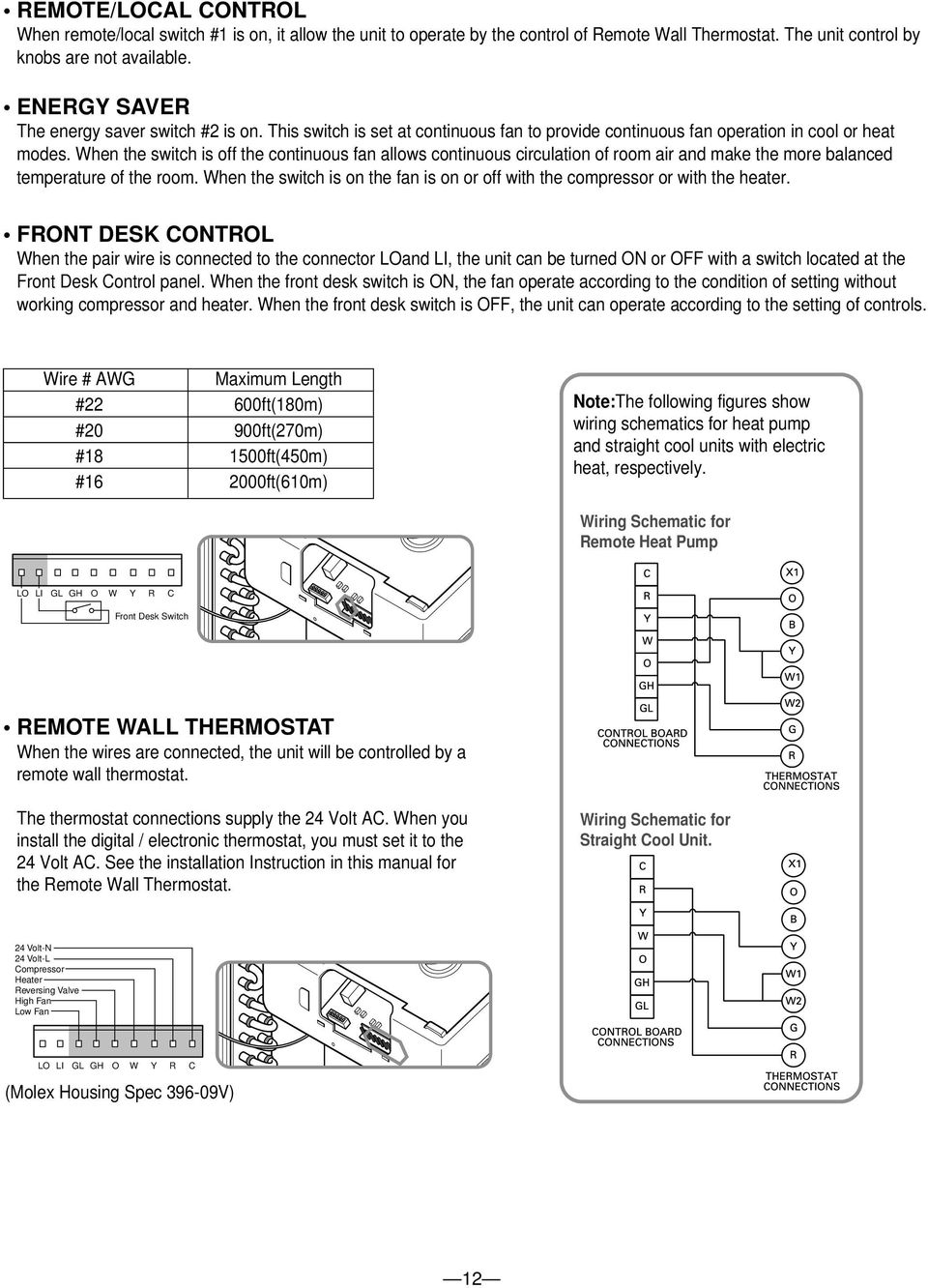
12 REMOTE/LOCAL CONTROL When remote/local switch #1 is on, it allow the unit to operate by the control of Remote Wall Thermostat. The unit control by knobs are not available. ENERGY SAVER The energy saver switch #2 is on. This switch is set at continuous fan to provide continuous fan operation in cool or heat modes. When the switch is off the continuous fan allows continuous circulation of room air and make the more balanced temperature of the room. When the switch is on the fan is on or off with the compressor or with the heater. FRONT DESK CONTROL When the pair wire is connected to the connector LOand LI, the unit can be turned ON or with a switch located at the Front Desk Control panel. When the front desk switch is ON, the fan operate according to the condition of setting without working compressor and heater. When the front desk switch is, the unit can operate according to the setting of controls. Wire # AWG Maximum Length #22 600ft(180m) #20 900ft(270m) # ft(450m) # ft(610m) Note:The following figures show wiring schematics for heat pump and straight cool units with electric heat, respectively. Wiring Schematic for Remote Heat Pump LO LI GL GH O W Y R C Front Desk Switch REMOTE WALL THERMOSTAT When the wires are connected, the unit will be controlled by a remote wall thermostat. The thermostat connections supply the 24 Volt AC. When you install the digital / electronic thermostat, you must set it to the 24 Volt AC. See the installation Instruction in this manual for the Remote Wall Thermostat. Wiring Schematic for Straight Cool Unit. 24 Volt-N 24 Volt-L Compressor Heater Reversing Valve High Fan Low Fan LO LI GL GH O W Y R C (Molex Housing Spec V) 12
13 2. DISASSEMBLY INSTRUCTIONS Before the following disassembly, POWER SWITCH is set to and disconnected the power cord. 2.1 MECHANICAL PARTS FRONT GRILLE 1. Remove the front grille. (See Figure 1) 2. To remove the front grille, pull out the bottom of the front grille and then lift up. Re-install the component by referring to the removal procedure. 3. To replace the front grille, place the tabs over the top of the unit and push the bottom of front grille until the clips snap into place. Figure 1 This Room Air Conditioner (PTAC) discharges air from the top of the unit through reversible, 2-position discharge grille louvers. The unit is shipped from the factory with the discharge grille louvers at an angle of 40 off vertical. In the alternate position, the louvers will be at an angle of 15 off vertical To adjust air direction, remove the front grille. Remove the 4 screws that fasten the discharge grille to the front grille. Screws Flip the discharge grille 180, then reattach the discharge grille to the front grille with 4 screws. 13

14 2.1.2 CONTROL BOX 1. Remove the front grille. (Refer to section 2.1.1) 2. Remove the two screws which fasten the control box. (See Figure 2) 3. Pull the control box from the Air guide. Figure 2 4. Remove the control box cover. (See Figure 3) 5. Disconnect wire housings on the control box. Figure 3 6. Pull the control box assembly out from the unit. (See Figure 4) 7. Re-install the components by referring to the removal procedure. Figure 4 14

15 2.2 AIR HANDLING PARTS HEATER ASSEMBLY AND CROSS FLOW FAN 1. Remove the front grille. (Refer to section 2.1.1) 2. Remove the control box assembly. (Refer to section 2.1.3) 3. Remove the 3 screws which fasten the net steel. (See Fig. 5) 4. Remove the 3 screws which fasten the electric heater assembly.(electric heater model only) (See Fig.5). Figure 5 5. Loosen the hexagon screw with the Hexwrench(See Fig.6) Figure 6 6. Remove the 4 screws which fasten the indoor motor and the earth wire. (See Fig. 6, 7) 7. Re-install the components by referring to the removal procedure, above FAN 1. Remove the brace. 2. Remove the 4 screws which fasten the condenser with the shroud and the basepan. 3. Move the condenser sideways carefully. 4. Remove the clamp which secures the fan with plier. 5. Remove the fan. (See Fig. 8) 6. Re-install the components by referring to the removal procedure, above. Figure 7 Figure 8 15

16 2.2.3 SHROUD 1. Remove the axial fan. (Refer to section 2.2.3) 2. Remove the 4 screws which fasten the condenser with the shroud and the basepan. 3. Remove the shroud. 4. Re-install the component by referring to the removal procedure ELECTRICAL PARTS OUTDOOR MOTOR 1. Remove the clamp cord and disconnect a wire housing in control box. (Refer to section 2.1.2) 2. Remove the axial fan. (Refer to section 2.2.3) 3. Remove the 2 screws which fasten the motor. (See Figure 10) 4. Remove the motor 5. Re-install the component by referring to the removal procedure, above. Figure INDOOR MOTOR (Refer to section 2.2.2) COMPRESSOR 1. Discharge the refrigerant system using a refrigerant recovery system. If there is no valve to attach the recovery system, install one (such as a WATCO A-1) before venting the refrigerant. Leave the valve in place after servicing the system. 2. Disconnect the 3 leads from the compressor. 3. After purging the unit completely, unbraze the suction and discharge tubes at the compressor connections. 4. Remove the 3 nuts and the 3 washers which fasten the compressor. (See Figure 11) 5. Remove the compressor. 6. Re-instill the components by referring to the removal procedure, above. Figure 10 Figure CAPACITOR 1. Remove the control box. (Refer to section 2.1.2) 2. Remove 1 screw and disconnect the leads which connected to the box type capacitor. (See Figure 12) 3. Remove 1 screw and the clamp which fastens the can-type capacitor. 4. Disconnect all the leads of capacitor terminals. 5. Re-install the components by referring to the removal procedure, above. Figure 12 16

17 2.3.5 POWER CORD 1. Remove the control box. (Refer to section 2.1.2) 2. Disconnect the grounding screw from the control box. 3. Disconnect 2 receptacles. 4. Remove a screw which fastens the clip cord. 5. Separate the power cord from the control box. (See Figure 13) 6. Re-install the component by referring to the removal procedure, above. (Use only one ground-marked hole for ground connection.) 7. If the supply cord of this appliance is damaged, it must be replaced by an exact replacement part. (The special cord means the cord which has the same specification marked on the supply cord fitted to the unit.) Figure P.C.B. 1. Remove the escutcheon. 2. Remove the two knobs. 3. Remove the 2 screws which fasten P.C.B. cover. 4. Disconnect all the leads which connected to the P.C.B. 5. Remove the two screws which fasten the P.C.B. board. 6. Re-install the components by referring to the removal procedure, above. WARNING After servicing control box,make sure that AC and DC wires are separated and tied up properly. The wires should also be pressed a little downwards to prevent touching it to the display pcb. Figure 14 17

18 2.4 REFRIGERATION CYCLE CAUTION Discharge the refrigerant system using a refrigerant recovery system. If there is no valve to attach the recovery system, install one (such as a WATCO A-1) before venting the refrigerant. Leave the valve in place after servicing the system CONDENSER 1. Remove the brace and the shroud. (Refer to section 2.2.2) 2. Remove the 4 screws which fasten the shroud. (Refer to section 2.2.2) 3. Push forward the shroud and remove the 2 screws which fasten the condenser with the basepan. 4. After discharging the refrigerant completely, unbraze the interconnecting tube at the condenser connections. 5. Remove the condenser. 6. Re-install the components by referring to notes. (See Figure 15) Figure EVAPORATOR 1. Remove the front grille. (Refer to section 2.1.1) 2. Discharge the refrigerant completely. 3. Remove the control box assembly. (Refer to section 2.1.2) 4. Remove the 4 screws which fasten the evaporator at the left side and the right side. 5. Move the evaporator sideward carefully and then unbraze the interconnecting tube at the evaporator connectors. 6. Remove the evaporator. 7. Re-install the components by referring to notes. (See Figure 16) Figure CAPILLARY TUBE 1. After discharging the refrigerant completely, unbraze the interconnecting tube at the capillary tube. 2. Remove the capillary tube. 3. Re-install the components by referring to notes. 18

19 NOTES Replacement of the refrigeration cycle. 1. When replacing the refrigeration cycle, be sure to discharge the refrigerant system using a refrigerant recovery system. If there is no valve to attach the recovery system, install one (such as a WATCO A-1) before venting the refrigerant. Leave the valve in place after servicing the system. 2. After discharging the unit completely, remove the desired component, and unbraze the pinch-off tubes. 3. Solder service valves into the pinch-off tube ports, leaving the valves open. 4. Solder the pinch-off tubes with service valves. 5. Evacuate as follows. 1) Connect the vacuum pump, as illustrated Figure 17 A. 2) Start the vacuum pump, slowly open manifold valves A and B with two full turns counterclockwise and leave the valves closed. The vacuum pump is now pulling through valves A and B up to valve C by means of the manifold and entire system. CAUTION If high vacuum equipment is used, just crack valves A and B for a few minutes, then open slowly with the two full turns counterclockwise. This will keep oil from foaming and being drawn into the vacuum pump. 3) Operate the vacuum pump for 20 to 30 minutes, until 600 microns of vacuum are obtained. Close valves A and B, and observe the vacuum gauge for a few minutes. A rise in pressure would indicate a possible leak or moisture remaining in the system. With valves A and B closed, stop the vacuum pump. 4) Remove the hose from the vacuum pump and place it on the charging cylinder. See Figure 16 B. Open valve C. Discharge the line at the manifold connection. 5) The system is now ready for final charging. 6. Recharge as follows : 1) Refrigeration cycle systems are charged from the high-side. If the total charge cannot be put in the high-side, the balance will be put in the suction line through the access valve which you installed as the system was opened. 2) Connect the charging cylinder as shown in Figure 17B. With valve C open, discharge the hose at the manifold connection. 3) Open valve A and allow the proper charge to enter the system. Valve B is still closed. 4) If more charge is required, the high-side will not take it. Close valve A. 5) With the unit running, open valve B and add the balance of the charge. a. Do not add the liquid refrigerant to the lowside. b. Watch the low-side gauge; allow pressure to rise to 30 lbs. c. Turn off valve B and allow pressure to drop. d. Repeat steps B and C until the balance of the charge is in the system. 6) When satisfied the unit is operating correctly, use the pinch-off tool with the unit still running and clamp on to the pinch-off tube. Using a tube cutter, cut the pinch-off tube about 2 inches from the pinch-off tool. Use sil-fos solder and solder pinch-off tube closed. Turn off the unit, allow it to set for a while, and then test the leakage of the pinch-off connection. 19

20 Equipment needed: Vacuum pump, charging cylinder, manifold gauge, brazing equipment. pinch-off tool capable of making a vapor-proof seal, leak detector, tubing cutter, hand tools to remove components, service valve. CONDENSER (HIGH PRESSURE SIDE) COMPOUND GAUGE MANIFOLD GAUGE B A CAPILLARY TUBE SEE INSETS BELOW EVAPORATOR (LOW PRESSURE SIDE) COMPRESSOR LOW HI B A B A EXTERNAL VACUUM PUMP CHARGING CYLINDER C Figure 17A-Pulling Vacuum Figure 17B-Charging 20

21 3. INSTALLATION 3.1 HOW TO INSTALL THE UNIT CAUTION There are sharp edges that can cause serious cuts. When lifting the air conditioner, it is HEAVY. Use 2 people to lift. For existing sleeve, you should measure the wall sleeve dimensions. Install the new air conditioner according to these installation instructions to achieve the best performence. All wall sleeves used to mount the new air conditioner must be in good structural condition and have a rear grille that securely attaches to the sleeve or the flange of the sleeve to secure the new air conditioner. To avoid vibration and noise, make sure the unit is installed securely and firmly. Dimension of air conditioner 1,066 mm (42") 349 mm (13 3/4") 505 mm (20") 406 mm (16") Dimension of sleeve assembly (optional) 1066 mm (42") When installing the sleeve, make certain there is nothing within 20" of the back that would interfere with heat radiation and exhaust air flow. Recommended 13-3/4" COOLED AIR INSULATION INTAKE AIR 1/4" Bubble of the level WALL WALL 349 mm (13 3/4") Wall opening 16-1/4"x42-1/4" Insulation strip must be attached to prevent the re-circulation of exhaust air to inward side from the either side of condenser space. The insulation strip is provided with the box. Refer to the diagram below. TOP VIEW 42" GRILLE ROOM CABINET SLEEVE HEAT RADIATION Over 20" 406 mm (16") 1) Take out the insulation strip from the upper packing. 2) Attach the insulation strip onto the rear upper side of the wall sleeve. 3) To improve unit energy efficiency, it is recommended the change of outside grille for an unit protection and an addition of a plastic rear grille. (This is optional.) 4) Insulation strip prevents the exhaust air from re-entering from either side of condenser space which may decrease the cooling efficiency of condenser. 280 mm (11") Front Sleeve Rear Insulation Strip 21
22 3.2 WALL SLEEVE INSTALLATION Wall Case Installation Data General Generally, units are installed 3" to 5" above the floor (flush to finished floor installation is possible) as near to the center of the room as possible; underneath a window or a glass panel is typical. Normal installation of the wall case allows installation flexibility; from flush with the finished interior wall to a minimum of 1/4" of the wall case extending beyond the finished exterior of the building. Special consideration must be given to installations where the wall case does not extend a minimum of 1/4" beyond the finished exterior wall. framing, moving electrical outlets, and other expensive modifications. For existing construction it is important that carpentry, masonry and electrical work be performed by competent, qualified personnel. Since installations in existing construction may involve removal of building material from the structure, locating the wall case must be done correctly. Regardless of the installation, there are several things to consider when selecting a location for installing the unit. For instance, drapery location could interfere with air discharge, and placement of furniture may have an impact on the performance of the unit. The following information is intended to minimize installation problems and assure you of trouble-free installation. Refer to page 24 for required wall opening dimensions. Minimum recommended interior and exterior case projection for standard wall thicknesses are shown in the drawings in this manual. The case may be installed flush with the finished indoor wall. Mounting an outdoor grille or louver section to the building face may cause a space between the outdoor coil and the louver section. Air splitters, aligned with the ends of the outdoor coil, must be installed between the outdoor coil inlet and outlet air streams. Gaps between the outdoor coil and the louver section may allow condenser air recirculation and affect the operation of the unit. See page 40 for requirements for custom louver sections. The wall case should be level from side to side and from level to 1/4 bubble tilt to the outdoors. The condensate disposal system in the unit is designed to dissipate the condensate water generated during cooling operation in accordance with ARI standards and actually uses this water for maximum unit efficiency. A level unit will also insure proper performance of the Internal Condensate Removal (ICR) system optional on heat pump units. For new construction, early planning with the architect is necessary. Unit location, electrical connection locations, and wall openings of the proper dimensions are essential to avoid the necessity of rework, fillers, 22
23 3.2.2 PREPARATION OF THE FRONT GRILLE Carefully remove shipping tape from the front grille. The outside edge of the wall case should extend at least 1/4" beyond the outside wall. This is necessary for proper caulking, to prevent sealing thedrain holes in the rear flange of the wall case, and to facilitate the installation of an accessory drain, if used. Shipping Tape Brick, Frame, Stucco and Shingle Construction For new construction, the opening for the wall case should be framed and the wall case inserted into the opening during construction. Lintels should be used when the building material is heavy and is not self supporting (such as brick). The wall case will fit an opening of six courses of standard brick or five courses of jumbo brick. Wall framing in this type construction is normally on 16" centers and the wall case will fit a framed opening spanning three 16" O.C. 2" x 4" stud spaces. For existing construction the indoor and outdoor wall will need to be cut out, allowing for clearances of 1/8" on all sides of the wall case. Work should begin on the inside wall. Cut the correct dimensions and mark (using drill holes) the outside wall from each corner of the inside cutout. Studding that interferes with the opening must be removed and a suitable frame constructed to secure the wall case and provide adequate support for case and chassis. Preparation of the Wall Case for All Types of Construction As shipped, the LG wall sleeve is ready for installation. Do not remove the stiffener from inside the wall case or the weather closure panel from the outside face of the wall case until the outdoor grille and chassis are ready to be installed. The wall case should be level from side to side and from level to 1/4 bubble tilt to the outdoors. The condensate disposal system in the unit is designed to dissipate the condensate water generated during cooling operation in accordance with ARI standards and actually uses this water for maximum unit efficiency. A level unit will also insure proper performance of the Internal Condensate Removal (ICR) system optional on heat pump units. 2. The wall case should be secured to the wall at both sides. Use a minimum of two screws or other fastening device on each side. See Figure 2 page 19. Mark the wall case on each side 2" from the bottom and 2" from the top at a point where basic wall structure is located. Drill wall case and use fasteners appropriate for wall construction. All holes for fasteners in the side of the wall case must be at least 2" up from the bottom of the wall case. Never locate screws or put other holes in the bottom of the wall case. If the wall opening is greater than the case dimensions, spacers must be used on the sides between the wall case and the wall support structure to prevent distorting the wall case. 3. Caulk or gasket the entire opening on the outside between the wall case and exterior wall surface (4 sides) to provide total water and air seal. 4. Caulk or gasket room-side opening between wall case and interior wall surface (4 sides). Opening beneath or around the wall case can allow outdoor air to leak into the room resulting in increased operating costs and improper room temperature control. Care should be taken in location of electrical supply entry in relationship to wall sleeve to assure access to receptacle or junction box once unit is installed. Installation of Wall Case in Wall Opening 1. Position the wall case into the wall. The room side edge of the wall case should be at least flush with the finished wall for line cord installations and permanent connection installations when no sub-base is used, and should project into the room at least 2-3/8" when a sub-base is used. If the minimum exterior dimensions are not met, refer to page
24 24
25 WALL SECTION DETAILED SIDE VIEW FRAME AND BRICK VENEER INSTALLATION Cord Set Connected CAULK* STEEL LINTEL CAULK* RAB /4" RAB /8" 20-7/8" (RAB71) 21" (RAB77) MOUNTING SCREWS BY INSTALLER OUTDOOR GRILLE ROOM CABINET 2" MIN. WALL CASE CAULK* CAULK* 1/4" MIN. 3" MIN. 5" MAX. FINISHED FLOOR OR TOP OF CARPET WALL RECEPTACLE (BY OTHERS) POWER SUPPLY CONDUIT FINISHED FLOOR OR TOP OF CARPET *Caulk around perimeter of wall case all four sides where it joins the building - Interior and Exterior. Sub-Base Connected LINTEL 2-3/8" CAULK* 1/4" CAULK* MOUNTING SCREWS BY INSTALLER OUTDOOR GRILLE ROOM CABINET WALL CASE SIDE CHANNEL 2" MIN. 1-5/16" SUB-BASE (RAK204) CAULK* 3-11/16" *Caulk around perimeter of wall case all four sides where it joins the building - Interior and Exterior. POWER SUPPLY CONDUIT (ALTERNATE ENTRY) 25
26 3.2.3 UNIT INSTALLATION 1. Remove the shipping screw from the ventilation door. (See Figure 20) Figure Remove the front gille by pulling it out at the bottom to release it, then lift it up along the unit top front. (See Figure 21) Figure Slide the unit into the wall sleeve and secure with 6 screws through the unit flange holes. (See Figure 22) Figure Reinstall the front grille by hooking the top over the unit top, then pushing it in at the bottom. (See Figure 23) Figure 23 26
27 3.3 ELECTRICAL REQUIREMENTS ELECTRICAL DATA (FOR 265V MODEL) CAUTION 1. Do not use an extension cord with this unit. 2. When the unit is in the position, the power supply to the electrical controls is still energized. 3. Disconnect the power to the unit before servicing the unit. 4. Remove the power cord from the wall receptacle. 5. Remove or turn off the protective device (fuses or circuit breaker). Standard 265V grounding receptacle rated 20A Use 20AMP,time delay fuse or 20AMP circuit breaker (2500W Heater Wirings including installation of the receptacle must comply with the NEC and local codes, local regulations. FUSE- Use a time-delay fuse or circuit breaker. Refer to the nameplate for proper power supply requirements. "If unit equipped with cords and plugs as long as they are installed with sub-bases, and the cord and plug are enclosed within the sub-base." "The sub-base must have means for permanent connection." "The sub-base must have an outlet for the connection of the cord and plug." "To complete the installation of this PTAC, there must be a sub-base" Standard 265V grounding receptacle rated 25A Use 25AMP,time delay fuse or 25AMP circuit breaker (2500W Heater ELECTRICAL SAFETY IMPORTANT GROUNDING INSTRUCTIONS The air conditioner has a three-prong grounding plug on its power supply cord which must be plugged into properly grounded three-prong wall receptacle for your protection against possible shock hazard. FUSE Use a time-delay fuse or circuit breaker. Refer to the nameplate for proper power supply requirements. 265 VOLT UNITS These units are equipped with a three-prong grounding plug on the power supply cord which must be plugged into a matching properly grounded three-prong wall receptacle for your protection against possible shock hazard. If such an outlet is not present, one must be installed by a qualified electrician in accordance with the National Electrical Code and local codes and ordinances. NOTE: DO NOT USE AN EXTENSION CORD on 265 Volt units. 27
28 4. FIELD INSTALLED ACCESSORIES Note: The installation and servicing of this equipment must be performed by qualifieed. experienced technicians NOTICE: Warnings and Cautions appear at appropriate sections throughout this manual. Read these carefully. WARNING - Indicates a potentially hazardous situation which, if not avoided, could result in death or serious injury. CAUTION - Indicates a potentially hazardous situation which, if not avoided, may result in minor or moderate injury. It may also be used to alert against unsafe practices. CAUTION Indicates a situation that may result in equipment or property-damage-only accidents. Control Panel Key Lock Part No: AYCP Remove existing door assembly by lifting door halfway and using both hands, bow door just enough for door hinge pins to slide out of mating holes. (Figure 25) Figure 25 - Door Removal Description The Key Lock kit prevents tampering of the controls used to set temperatures and heating or cooling functions. Receiving Upon receipt of the product, inspect the shipping carton for signs of visible damage. Report any damage or shortage to the carrier and note it on the delivery receipt. Unit must be stored in its original shipping carton in a dry, secure place prior to its installation and use. Installation The installation and servicing of the equipment referred to in this booklet should be performed by qualified, experienced technicians. 1. Remove front from unit by pulling bottom out and then lifting upward. (Figure 24) Figure 24 - Remove Front 3. Install the new door assembly with the key lock by bowing the door with both hands and aligning the door hinge pins with their bracket in the front. (Figure 26) Important Note: Personal Risk Hazard Underwriter s Laboratories Inc. listed. For institutional use only where supervisory monitoring is available. Any other use may increase the risk of personal injury or property damage. Figure 26 - New Door Installation Door Hinge Pins (Each Side) Front Brackets (Each Side) 28
29 Condensate Disposal Pump Kit Installation Part No: AYSB3101 Description The internal condensate pump serves as a means for disposing of condensate generated during heat pump operation by transferring it to the indoor coil. The warm coil surface and the warm room air help in evaporation of the condensate while adding humidity to the room. As with any equipment of this type, the addition of this kit will decrease the effective heating capacity of the unit. This kit is not intended for use in seacoast or corrosive environments. NOTE: Under extreme high humidity conditions, the internal condensate pump may not be able to dispose of all the condensate produced, and condensate would then drip from the outside of the wall sleeve. If this condensation is unacceptable, then a drain system (including factory approved drain kit for the wall sleeve) should be installed. 2. Unplug and remove the PTAC chassis from the wallsleeve. Move the chassis where the front and back of the chassis can be easily accessed. 3. Remove the top cover assembly, net steel.(figure 27) Figure Lift the heater/discharge deck assembly approximately 10 inches by unscrewing three screws (two on the left side, one on the right side of the discharge deck) holding the discharge deck to the chassis. Lift upward being careful not to pinch heater wires. (Figure 28) Receiving Upon receipt of the product, inspect the shipping carton for signs of visible damage. Report any damage or shortage to the carrier and note it on the delivery receipt. Unit must be stored in its original shipping carton in a dry, secure place prior to its installation and use. Figure 28 Mounting Screws Installation The installation and servicing of the equipment referred to in this booklet should be performed by qualified, experienced technicians. WARNING Hazardous Voltage! Disconnect all electric power, including remote disconnects before servicing. Follow proper lockout/tagout procedures to ensure the power can not be inadvertently energized. Failure to disconnect power before servicing could result in death or serious injury. Important Note: The unit switch does not disconnect all electrical power to this unit. Condensate Tube 5. Place coil cover on top of the evaporator coil with flanges pointing down. Make sure cover is over entire top of coil. (Figure 28) 6. Position the short end of the condensate tube through the back wall of the partition panel using existing hole. The condensate tube should protrude through the partition panel by 1-3/4 inches. Rotate the condensate tube so the tube lays flat on the coil cover. (Figures 28 & 29) 1. Remove front by rotating bottom outward and then lifting up and out from chassis. 29
30 Figure 29 Condensate Tube 11. Place the pump bracket onto the end of the pump by feeding the pump cord through the hole in the bracket and pushing the bracket onto the threads of the pump. Slide the supplied washer onto the threads of the pump. Screw the pump nut onto the threads of the pump and tighten the nut so that the bracket is secure against the pump. (Figure 32) Figure Position the condensate tube through existing hole (located right side of blower deck). 8. Make sure the holes in the condensate tube are facing inward toward the blower wheel. 9. Lower the discharge deck over the condensate tube and screw the discharge deck to the chassis with the existing screws. Replace the discharge screen and screw the screen to the discharge deck with the existing screws. 10. Using the overflow tube holder and the overflow tube, hold the tube with the metal holder and screw the holder to the partition panel with the provided 1/2 inch #8 screw. (Figures 30 & 31) 12. Position the pump in the back left corner of the basepan and screw the pump bracket to the basepan with the provided two 1/2 inch #8 screws. (Figure 33) Figure 33 Figure 30 Screws Figure 31 Holder Tube 13. Remove the protective adhesive backing from the plastic U clip and mount the U clip to the plastic condenser shroud in approximately the position shown. (Figure 34) 14. Snap the provided round plastic grommet into the top condenser baffle. (Figure 34) 30
31 15. Place one of the hose clamps over one end of the 16-inch vinyl hose. Place the same end over the barbed discharge tube of the pump assembly. Place a hose clamp on the other end of the 16 inch hose. Place this same end over the shorter leg of the overflow tube and secure the hose with the hose clamp. (Figure 34) Figure 34 U Clip Plastic Grommet 18. To gain access inside the control panel, remove the knobs and escutcheon. Remove the two screws holding the panel in position. Tilt the control panel forward, being careful not to pinch any wires. (Figure 36) 19. Lift the control panel up so the control panel is free of its hinges. Position the control panel so there is easy access for mounting components to the control panel. (Figure 36) Figure 36 Mode Switch Thermostat Overflow Tube Remove two screws to gain access inside Control Panel Fuse Holder Knockouts under panel 16. Place a hose clamp over one end of the 11-inch long hose. Push this same end over the longer leg of the overflow tube and secure with the hose clamp. Place another hose clamp over the other end of the 11-inch hose. Push this same end over the condensate tube protruding out from the back of the partition panel and secure with the hose clamp. (Figure 34) 17. Route the condensate pump cord through the U clip on the condenser shroud, through the plastic grommet in the sheet metal condenser wing, through the plastic ring in the panel, and then through the hole in the panel where the compressor wires are routed through the panel. NOTE: The permagum may have to be removed to feed the wires through the panel, make sure wires have no slack and replace the permagum to prevent air leaks. (Figures 34 and 35) Figure Connect the condensate pump to the ICR relay on the terminal board per Figure Install the basepan drain plug into the basepan drain hole by pushing it up into the drain hole from the bottom of the basepan. This will defeat the thermostatic controlled drain valve. The basepan drain is located to the left of the outside coil (as viewed from the back of the unit). Figure 37 - Internal Condensate Removal Pump Wiring Permagum Plastic Ring Grommet Condensate Pump Cord 31
32 Architecture Grille Aluminum - Single Pack Part No: AYAGALA01 Stamped Aluminum Grille Note: A baffle kit must not be used with a stamped aluminum grille on any PTAC installation. Stamped Aluminum Grille 1. Prepare the wall sleeve for installation of the grille by removing the cardboard stiffener and rear enclosure panel from the sleeve. These items may be removed from inside of the building. Architecture Grille Note: The sleeve stiffener must be taken out before the rear sleeve enclosure panel can be removed from the sleeve. Description Outdoor grilles are attached to the wall sleeve and exposed to the exterior wall. The grilles are an industry standard size of 42" x 16". Receiving Upon receipt of the product, inspect the shipping carton for signs of visible damage. Report any damage or shortage to the carrier and note it on the delivery receipt. The unit must be stored in its original shipping carton in a dry, secure place prior to its installation and use. Installation The installation and servicing of the equipment referred to in this booklet should be performed by qualified, experienced technicians. WARNING Hazardous Voltage! Disconnect all electric power, including remote disconnects before servicing. Follow proper lockout/tagout procedures to ensure the power can not be inadvertently energized. Failure to disconnect power before servicing could result in death or serious injury. Important Note: The unit switch does not disconnect all electrical power to this unit. 2. Prepare the stamped aluminum grille for installation on the sleeve by inserting the six (6) plastic grommets into the square holes located near the outer edges of all four sides of the grille. With the grille positioned so the flanges of all four sides are in the up position, insert the grommets so the square end protrudes through the grille in the opposite direction from the flanges. 3. Turn the grille so it can be removed through the rear sleeve opening. 4. Install the stamped aluminum grille by aligning the guide pins located in the lower right and left hand corners of the grille with the corresponding holes in the rear of the wall sleeve. 5. Secure the grille by threading each of the screws into the plastic grommets. 6. Remove the wire handle (not shown in the picture) from the center of the grille prior to installing the chassis into the sleeve. Note: Be sure to keep a firm grip on wire handle and grille to prevent it from dropping and/or causing possible injury or property damage. Architectural Grille 1. Remove the cardboard sleeve stiffener and the rear enclosure of the sleeve as described in Step 1 of the stamped aluminum grille instructions. 2. Turn the grille so it can be removed through the rear sleeve opening. 3. Install the grille by aligning the four screws supplied to their corresonding holes in the architectural grille. 32
33 4. Secure the grille to the sleeve by tightening the four screws to their corresponding holes in the grille. 5. Remove the wire handle after the installation is complete. Note: The stamped aluminum grille includes 6 screws, washers, nuts, and plastic grommets. The architectural grille includes 4 screws. Condensate Drain kit Part No: AYDR101 Receiving Upon receipt of the product, inspect the shipping carton for signs of visible damage. Report any damage or shortage to the carrier and note it on the delivery receipt. The product must be stored in its original shipping carton in a dry, secure place prior to its installation and use. Installation The installation and servicing of the equipment referred to in this booklet should be performed by qualified, experienced technicians. Figure 38 Components of Drain Kits DRAIN FITTING PLATE B BLANK- PLATE C BLANK- PLATE C Description Condensate water will drain from the chassis into the sleeve during normal heat pump operation. This can also occur during times of high humidity when in cooling operation. Install either the outdoor or indoor drain kit components to control the condensate water where normal drainage from the wall sleeve is not possible or undesirable. See Figure 38 for all components of the drain kit. 1/2" DRAIN FITTING MTG. SCREWS BLANK- PLATE D GASKETS A MTG. SCREWS GASKET E FOR PLATE D WARNING Hazardous Voltage! Disconnect all electric power, including remote disconnects before servicing. Follow proper lockout/ tagout procedures to ensure the power can not be inadvertently energized. Failure to disconnect power before servicing could result in death or serious injury. Important Note: The unit switch does not disconnect all electrical power to this unit. Drain Installation Note: The optional drain kit serves only as a link between the unit and field-supplied condensate drain system. Installing the kit without connecting it to a drainage system will result in inadequate condensate removal, possible leakage and corrosion. Algaecide: Some algaecide products may cause damage to the unit basepan and therefore should not be used. Contact your sales representative when considering the use of a commercial algaecide. See Figure 38 for components of the drain kit. 33
34 Figure 39 Outdoor Drain Kit Installation contact the front edge of sleeve. Secure the chassis to the wall sleeve on each side with screws provided. Re-install the cabinet front. DRAIN FITTING PLATE B BLANK- PLATE C See the following pages for installation instructions of indoor drain kit. 1/2" DRAIN FITTING GASKETS A Figure 40 Figure 41 MTG. SCREWS Outdoor Drain Kit Installation Before installing the wall sleeve louvered condenser grille, it must be determined if the optional outdoor wall sleeve drain kit is to be installed. The drain kit will allow the condensate from the outdoor and indoor coils to be routed to a suitable area. The drain kit can be installed so the condensate can be drained from the right or left hand side of the wall sleeve. See Figure 39. See local codes for proper condensate disposal. Figure 42 G PLATE "B" DRAIN FITTING To install the outdoor drain components proceed as follows: 1. Remove the rear enclosure panel and the sleeve stiffener. These items may be removed from the inside of the building. 2. The drain fitting can be installed on the left or right hand side of the sleeve. (Illustration will be for a right hand installation.) Insert the drain fitting in the opening of gasket A and hole of plate B. Secure this assembly to the rear of the sleeve with two sheet metal screws into holes G provided in sleeve. See Figures 40 and Locate the other gasket A on the back of blank off plate C and secure the assembly to the left rear of wall sleeve with sheet metal screws provided. See Figure 42 for finished left hand side installation. If the unit chassis is to be installed right away, install the condenser grille to wall sleeve with hardware provided. See condenser grille installation instructions. If the unit chassis will not be installed right away, replace the rear enclosure panel in the wall sleeve. This will help protect the inside of the building from weather damage. BLANK- PLATE Figure 43 Gasket Cover Plate SHEET METAL SCREWS Gasket (2) (4) Mounting Screws Sleeve overflow port Do not close up this port Wall Sleeve Bottom 1/2" Outdoor Drain Fitting MTG. Screws (2) Detail A See Detail A Blank-off Plate (2) If a subbase is used, be sure the right hand subbase cover is removed before the chassis is installed in the sleeve. Slide the chassis into the wall sleeve until the chassis flanges 34
35 Indoor Drain Kit Installation The internal drain is installed on the bottom of the wall sleeve when it is required to drain the condensate into a drain system inside of the building. The components of the wall sleeve drain kit are shown in Detail A. Use components C (2), D, E, mounting screws (6) and the Outdoor drain fitting. 1. The components D, E, and drain fitting of the kit are mounted on the bottom of the wall sleeve prior to the installation of the sleeve. It may be located in a feasible area on the bottom of the sleeve which is inside of the room except when a subbase is used. When a subbase is installed, the drain may be a minimum of 3 1/2 " from the front flange of the wall sleeve. The minimum clearance should provide adequate clearance for the subbase, see Figures 43 and Cut out the template in the lower right hand corner of these instructions to locate the field drilled holes. (Two to mount the plate and one for the Outdoor drain fitting). See Detail A on how the components have to be installed after the holes are drilled in the bottom of the wall sleeve. If the drain fitting is not connected to an indoor drainage system immediately after the wall sleeve is installed, it must be plugged with a cork to prevent indoor water damage in case it rains. An indoor tube or hose (furnished by others) must be installed on the drain fitting and interconnected to the drain system inside of the building. Install the two blank-off plates C and gaskets A on the outdoor portion of the wall sleeve as shown in Figure 43. These components may be installed after the sleeve is secured in the wall opening just prior to the installation of the condenser grille and chassis. Figure 44 Leveling Legs Part No: AYLL101 Description Leveling legs are designed to provide extra front support and leveling of the wall sleeve. Two leg assemblies are required per unit and are provided in each kit. Four screws are also provided with each kit for attachment to the wall sleeve. See Figure 45. The leveling legs must be installed before the chassis is installed, but after the wall sleeve is in place. Holes must be drilled in each side of the wall sleeve, below the duct package holes, for attachment to the wall sleeve. Receiving Compare kit identification number with sales order to ensure that the correct kit has been received. Inspect the leveling legs for shipping damage. File damage claims with the delivering carrier immediately. Installation The installation and servicing of this equipment should be performed by qualified, experienced technicians. WARNING Hazardous Voltage! Disconnect all electric power, including remote disconnects before servicing. Follow proper lockout/tagout procedures to ensure the power can not be inadvertently energized. Failure to disconnect power before servicing could result in death or serious injury. Important Note: The unit switch does not disconnect all electrical power to this unit. Checklist The following is an abbreviated guide to leveling leg installation. Refer to appropriate areas for more detailed information. 35
36 Leveling Leg Assembly To install the leveling leg assembly, complete the following: 1. Drill two 1/8-inch holes in each side of the wall sleeve, as shown in Figure 45, using the leveling leg assembly as a template. Locations near the front of the sleeve provide more support. 2. Adjust the leveling legs to the approximate height needed and install them on either side of the wall sleeve, using the screws provided. Bottom of wall sleeve can be anywhere from three to five inches above the screw base. Caulk around screws to prevent water leaks. 3. Level the sleeve horizontally from side-to-side. Provide a slight slope (one-quarter bubble in the sight glass) toward the outside. Check the level again after the unit has been installed. Adjust the legs as needed. Figure 45 - Leveling Leg Assembly Installation on Wall Sleeve 1. Drill four 1/8-inch diameter holes in the wall sleeve, two on each side, using the leveling legs as a template. Caulk around screws to prevent water leaks. 2. Attach the legs to the wall sleeve, using the screws provided. 3. Adjust the leveling legs to level the wall sleeve from side to side and provide a slight pitch to the outside (one-quarter bubble in sight glass). Figure 46 - Leveling Leg Installation on Wall Sleeve 1/8" Diameter holes (four required per unit field-drilled) Speed Grip Nut Leveler Bracket 1/2" 1" Adjuster Screw 1/4" NOTES: 1. Two leveling legs are supplied in each kit. 2. One kit is required per unit. 3. Fout mounting screws are provided in each kit. 36
37 Hard Wire Kit Part No: AYAGALA01 Description Hard Wire Junction Box (Direct Wire Sub-Base) The hard wire junction box kit is used to hard wire the unit when it is not desirable to use the standard unit subbase or the unit power cord. The junction box provides a protected enclosure for electrical connections as required by some electrical codes. The hard wire junction box is intended to be mounted on the floor or the adjacent wall. The junction box is furnished with approximately 2-1/2 feet of 1/2-inch flexible steel conduit and a metal box for securing the conduit to the unit cabinet at the incoming power opening. An optional 230/208V or 265V power switch assembly is available for use with the hard wire junction box or subbase. The switch provides a POWER ON/ function at the unit as required by some electrical codes. A replacement junction box cover plate is provided with each switch kit. For additional information, refer to the Power Switch Installation Instructions. Receiving Upon receipt of the product, inspect the shipping carton for signs of visible damage. Report any damage or shortage to the carrier and note it on the delivery receipt. Unit must be stored in its original shipping carton in a dry, secure place prior to its installation and use. Installation The installation and servicing of this equipment should performed by qualified, experienced technicians. Junction Box Kit Installation and Wiring Procedure EIectrical connections at the unit must be made after the unit chassis is installed in the wall sleeve. The installer must determine and supply the mounting components for attaching the junction box to the wall or door. WARNING Hazardous Voltage! Disconnect all electric power, including remote disconnects before servicing. Follow proper lockout/tagout procedures to ensure the power can not be inadvertently energized. Failure to disconnect power before servicing could result in death or serious injury. Important Note: The unit switch does not disconnect all electrical power to this unit. CAUTION Use Copper Conductors Only! Unit terminals are not designed to accept other types of conductors. Failure to use copper conductors may result in equipment damage. Important Note: All wiring must comply with applicable local and national codes. Types and location of disconnect switches must comply with all applicable codes. 1. Remove the cover plate from the junction box 2. Mount the junction box to the wall or floor within 28 inches (711 mm) of the lower right corner of the wall sleeve. 3. If a disconnect switch is to be used, make electrical connections to it and mount the switch in the junction box. Refer to the Power Switch Installation Instructions. 4. Remove control panel assembly by removing the two screws holding control panel in place. Rotate the panel forward. 5. Disconnect the power cord leads from all electrical connections including the ground wire. 6. Remove the power cord clamp and the power cord from the unit. 7. For 208/230-volt units, remove and discard the white lead from the wire assembly. For 265-volt units, remove and discard the red lead from the wire assembly. 8. Remove the retaining ring from the threaded portion of the straight conduit clamp. Insert the three wires into the metal box through one of the two openings in the box. Replace the hole cover grommet into the unused hole to prevent objects from entering the box. 9. Replace the retaining ring back on the conduit clamp inside the metal box and tighten the ring securely. 10. Insert the three wires extending from the metal box into the incoming power opening on the unit so that approximately 20 inches (508 mm) of the wires protrude through the opening. 11. Attach the metal box to the chassis with the two screws provided. 12. Insert the wire tie into the 1/4-inch diameter hole located just above the incoming power opening. Tie all wires together securely with the wire tie. See Figure
38 265 Volt Units 1. Remove and discard the red lead from the wire assembly. 2. Connect the black lead to the center terminal of the fuse holder. 3. Connect the white lead to the common (C) terminal on the capacitor. 4. Connect the ground wire to the partition panel where the ground wire on the power cord was located. Use the supplied green ground screw. 5. Connect the white lead of the wire assembly at the junction box to the white lead of the field power source. 6. Connect the black lead of the wire assembly at the junction box to the black lead of the field power source. 7. Connect the ground wire of the field power supply to the bare ground wire of the wire assembly at the junction box. 8. Install the junction box cover plate. 9. Reinstall the control panel assembly. Figure 48 - Mounting Hard Wire Junction Box Kit Cover plate Wall Sleeve 28 Inch es Max Conduit Figure 48 - Metal Box Location Ground Wie with Eyelet Terminal Power Leads with Push on Connectors Metal Box with Straight Clamp Control Panel Base Pan Bracket Figure 49 - Electrical Wiring Routing Wire Tie Right Side of Chassis 3/16 Inch Diamenter Hole Electrical Supply Wires Back of Control Panel 38
39 Fuse Holder Kit Part No: AYFH1101 Description This optional fuse holder kit can be installed directly in the chassis or in the optional subbase. Fuse holder kits are available in 230/ 208 volt ratings. The installer should supply time delay fuses at 15, 20, 25, or 30 amps in accordance with the Maximum Overcurrent Protection as listed on the unit nameplate. Fuses may be purchased from the parts department. Note: The installation and servicing of this equipment must be performed by qualified, experienced technicians only. CAUTION Use Copper Conductors Only! Unit terminals are not designed to accept other types of conductors. Failure to use copper conductors may result in equipment damage. Important Note: All wiring must comply with applicable local and national codes. Type and location of fused disconnect switch(es) must comply with all applicable codes. Failure to follow these codes could result in overheating and equipment failure. Receiving Upon receipt of the product, inspect the shipping carton for signs of visible damage. Report any damage or shortage to the carrier and note it on the delivery receipt. Unit must be stored in its original shipping carton in a dry, secure place prior to its installation and use. Installation The installation and servicing of the equipment referred to in this booklet should be performed by qualified, experienced technicians. Fuse Holder Kit Installation (Without Subbase) 1. Remove front by rotating bottom outward and then lifting up and out from chassis. Figure 50 - Control Panel WARNING Hazardous Voltage! Disconnect all electric power, including remote disconnects before servicing. Follow proper lockout/ tagout procedures to ensure the power can not be inadvertently energized. Failure to disconnect power before servicing could result in death or serious injury. Important Note: The unit switch does not disconnect all electrical power to this unit. Mode Switch Thermostat Remove two screws to gain access inside Control Panel Fuse Holder Knockouts under panel 39
40 2. To gain access inside the control panel, after removing the knobs and escutcheon, remove the screws holding panel in position. Tilt control panel forward, being careful not to pinch any wires. (Figure 50) 3. As viewed from the front, remove both knockouts on the control panel. 4. Insert two fuse holders from the front. The fuse holders should be oriented so the quick-connect tabs are toward the center of the unit. Attach fuse holders using the screws and nuts provided. (Figure 50) 5. Remove both power cord leads, one lead from the capacitor and one from the electronic board. 6. Install one power cord lead on the center terminal of one fuse holder. (Figure 51) 7. Install the remaining power cord lead on the center terminal of the second fuse holder. (Figure 51) 8. Connect BK-10 wire from the side terminal of one fuse holder to the Line terminal on the electronic board. (Figure 50) 9. Connect RD-10 wire from the side terminal of the other fuse holder to the common (C) terminal on the capacitor. (Figure 51) 10. Tilt control panel back to original location, being careful not to pinch any wires. Align the control panel with the cover and screw panels into place with original screws. Replace escutcheon and control knobs. Fuse Holder Kit Installation (With Subbase) See previous section for installation in the control panel. 1. Remove both knockouts at the fuse holder location. (Figure 52) 2. Install the fuse holders using screws provided. The side connector tab on the fuse holders should be towards the left. 3. Connect a stripped BK-9 wire to the center of the quickconnect tab of the fuse holders. Wire nut the other end of this wire to the black field connection wire (TB1). (Figure 53) 4. Connect the other stripped BK-9 wire to the quick-connect tab on the side of the same fuse holder. Wire nut the other end to black subbase wire leading to receptacle. (Figure 53) Figure 51 - Fuse Holder Diagram Control Panel Installation Terminal Blocks Behind the Control Panel Status Light FUSEHOLDERS 5. Connect the stripped RD-9 wire to the center quick-connect tab of the second fuse holder. Wire nut the other end to the red field connection wire (TB3). (Figure 53) 6. Connect the other stripped RD-9 wire to the quick-connect tab on the side of the second fuse holder. Wire nut other end to red subbase wire which leads to receptacle. (Figure 53) 7. Insert time delay fuses into the fuse holders. Size all fuses by the Maximum Overcurrent Protection shown on the nameplate. Also refer to the serial plate on the unit. Leveling Leg Fuseholder Fuseholder WH GN BK Figure 52 - Subbase (Left Side) Fuse Holder Knockouts BK-9 RD-9 Control Board Power Switch Knockouts Transformer Figure 53 - Fuse Holder Diagram Subbase Installation Electrical Receptacle Green Field Connection Wiring Black Red 40
41 Remote Escutcheon Kit Part No: AYRE110 Description This kit provides an attractive replacement escutcheon (see Figure 54). The kit allows the removal of control knobs and graphics, which are not required when a wall thermostat is used to control the unit. Receiving Upon receipt of the product, inspect the shipping carton for signs of visible damage. Report any damage or shortage to the carrier and note it on the delivery receipt. The unit must be stored in its original shipping carton in a dry, secure place prior to its installation and use. Figure 55 Installation The installation and servicing of the equipment referred to in this booklet should be performed by qualified, experienced technicians. WARNING Hazardous Voltage! Disconnect all electric power, including remote disconnects before servicing. Follow proper lockout/ tagout procedures to ensure the power can not be inadvertently energized. Failure to disconnect power before servicing could result in death or serious injury. Important Note: The unit switch does not disconnect all electrical power to this unit. 1. Grasp the cabinet front as shown in Figure Pull the bottom of the cabinet front away from the chassis until the retaining clips disengage as in Figure Lift the cabinet front off the chassis. 4. Lifting the front edge of the escutcheon, slide the tabs at the top of the escutcheon out of the retaining holes and remove the escutcheon. See Figure 57. Figure 56 Figure 51 Standard Escutcheon 'F HEAT E/SAVE F1 LOW F2 HIGH FAN HIGH TEMP/TIME COOL LOW TIMER MODE FAN TIMER ON 41
42 5. Replace the escutcheon with the one from this kit by inserting the tabs at the top of the escutcheon into the retaining holes and laying the escutcheon flat on the control panel. 6. Replace the front by reversing steps 1 through Store the control knobs and escutcheon just removed from the unit for possible reinstallation if the wall thermostat is no longer desired. Figure 57 Escutcheon Installation The installation and servicing of the equipment referred to in this booklet should be performed by qualified, experienced technicians. WARNING Hazardous Voltage! Disconnect all electric power, including remote disconnects before servicing. Follow proper lockout/ tagout procedures to ensure the power can not be inadvertently energized. Failure to disconnect power before servicing could result in death or serious injury. Important Note: The unit switch does not disconnect all electrical power to this unit. Subbase Part No: AYSB3101 (265V 20A) AYSB4101 (265V 30A) CAUTION Use Copper Conductors Only! Unit terminals are not designed to accept other types of conductors. Failure to use copper conductors may result in equipment damage. Note: When using a subbase, the wall sleeve must be installed a minimum of 3-1 /4 inches (83 mm) above a finished floor and a minimum of 2-3 /4 inches (70 mm) from a finished wall. Description The subbase may be installed on the wall sleeve before or after installing the wall sleeve. The subbase is prewired. Electrical connections can be made on the left side after the access cover is removed. A grounding screw is provided. Receiving Upon receipt of the product, inspect the shipping carton for signs of visible damage. Report any damage or shortage to the carrier and note it on the delivery receipt. The unit must be stored in its original shipping carton in a dry, secure place prior to its installation and use. 1. Remove parts B and C (Figure 58, next page) from the subbase and join together using two metal screws provided. This assembly now becomes the right front cover (Part F) of the subbase. (Figure 58, next page) 2. Position subbase under the front of the wall sleeve. 3. Align the back edge of the flange on cover A (Figure 54, next page) to front of the wall sleeve flange. (Figure 60, next page) 4. Drill four 1/8 inch holes in wall sleeve to line up with holes in subbase. (Figure 58, Location D, next page) Mount subbase to wall sleeve with four sheet metal screws provided with kit. (Figure 58, Location D, next page) 5. Remove the left front cover from the subbase. (Figure 58, Part A, next page) 6. Position skirting on each side of wall sleeve to prevent the entry of foreign materials. Trim skirting to desired length. Attach skirting with four sheet metal screws provided with kit. (Figure 58, Location E, next page) 7. Wire subbase for appropriate voltage (Figure 61, next page). 42
43 Note: The proper subbase must be ordered to obtain the correct electrical receptacle. (Figure 62) Figure 60 - Dimensions 8. After wiring is complete, mount covers A and F to the subbase with provided screws. (Figure 59) 9. When installing optional accessories to the subbase, refer to each installation instruction for that accessory. Figure 58 Wall Sleeve (Outdoor Side) 16" 16" 13 3/4" 2 5/8" 2 3/4" 2 3/4" Wall Sleeve Inside Edge Back of Flange "A" Figure 59 - Part/Location Identification Part/Location Identification A Left Front Cover B Right Front Cover C Front Cord Panel D Wall Sleeve Hole Location E Skirting Hole Location F Right Cover Assembly 2" (50 mm) Ground Screw Location 13-7/8" (352 mm) 1-3/8" (35 mm) 3-1/16" (78 mm) Figure 61 - Wiring Diagram Left End View Concentric Knockouts In Bottom Top View Receptacle Provided Inside subbase Accessory Concentric Knockouts In Rear Front View 20-5/16" (515.5 mm) 4" (101 mm) 2" (50 mm) Max. Adjustment 2-5/8" (67 mm) Wall Sleeve NEMA 7-20R Receptacle E D NEMA 7-30R Receptacle Field Wiring Line Voltage 265 VAC Field Schematic Figure 61 - NEMA Plug Configurations Voltage Unit Plug Subbase Receptacle Cover Wiring Access A B F D 2-13/16" (71 mm) Subbase Box Assy C E Low Voltage Compartment 11-13/16" (300 mm) 43
44 5. PERFORMANCE DATA Air conditioner and Heat Pump Performance Data LP070CED1 LP090CED1 LP120CED1 LP150CED1 LP070HED1 LP150HED1 LP090HED1 LP120HED1 Voltage (V) 1 / 265 / 60 1 / 265 / 60 1 / 265 / 60 1 / 265 / 60 1 / 265 / 60 1 / 265 / 60 1 / 265 / 60 1 / 265 / 60 Cooling Data Cooling Capacity (Btu/h) Cooling Amps (A) / / Cooling Power (W) / / EER (Btu/h.Watt) Moisture Removal (Pts/h) Heat Pump Heating Data Heating Capacity (Btu/h) Heating Amps (A) / / Heating Power (W) / / COP (W/W) Airflow Indoor CFM (Wet)@0.3ESP(Hi) Indoor CFM (Wet)@0.3ESP(Lo) Indoor CFM (Dry)@0.3ESP(Hi) Indoor CFM (Dry)@0.3ESP(Lo) Electric Heat Data LP070CED1 LP070HED1 LP090CED1 LP090HED1 LP120CED1 LP120HED1 LP150CED1 LP150HED1 Heater Size(kw) Btu/Hr Heating Watt Heating Amps
45 Cooling Wattage-Air conditioners and Heat Pumps Model Temperature Outdoor Air Return Air Dry Bulb Wet Bulb Rating wattage LP070CED1 LP090CED1 LP120CED1 LP150CED1 LP070HED1 LP090HED1 LP120HED1 LP150HED1 Total Wattage Input Total Wattage Input Total Wattage Input Total Wattage Input Total Wattage Input Total Wattage Input Total Wattage Input Total Wattage Input Min Max Min Max Min Max Min Max Min Max Min Max Min Max Min Max
46 Cooling Change of Temperature-Air conditioners and Heat Pumps Room Air Dry Bulb Rating Btu/h Rating CFM Room Air Wet Bulb Model LP070CED1 LP090CED1 LP120CED1 LP150CED1 LP070HED1 LP090HED1 LP120HED1 LP150HED1 Temperature Across Temperature Across Temperature Across Temperature Across Temperature Across Temperature Across Temperature Across Temperature Across Indoor Coil ( T) Indoor Coil ( T) Indoor Coil ( T) Indoor Coil ( T) Indoor Coil ( T) Indoor Coil ( T) Indoor Coil ( T) Indoor Coil ( T) Min Max Min Max Min Max Min Max Min Max Min Max Min Max Min Max
47 Heating Change of Temperature - Heat Pumps Room Air Dry Bulb Rating Btu/h Rating CFM Room Air Wet Bulb Model LP070HED1 LP090HED1 LP120HED1 LP150HED1 Temperature Across Temperature Across Temperature Across Temperature Across Indoor Coil ( T) Indoor Coil ( T) Indoor Coil ( T) Indoor Coil ( T) Min Max Min Max Min Max Min Max Cooling Ampere Chart - Air conditioners and Heat Pumps Cond Inlet Air Model Model Model Model Model Model Model Model Temperature LP070CED1 LP090CED1 LP120CED1 LP150CED1 LP070HED1 LP090HED1 LP120HED1 LP150HED1 Amperage Amperage Amperage Amperage Amperage Amperage Amperage Amperage Min Max Min Max Min Max Min Max Min Max Min Max Min Max Min Max Rating ampere
48 Heating Wattage - Heat Pumps Temperature Outside Air Dry Bulb Room Air Dry Bulb Rating wattage LP070HED1 LP090HED1 LP120HED1 LP150HED1 Total Wattage Input Total Wattage Input Total Wattage Input Total Wattage Input Min Max Min Max Min Max Min Max
49 Heat Pump Reverse Cycle Heating Capacity Model LP070HED1 LP090HED1 LP120HED1 LP150HED1 Voltage Amps Watts Btu/h COP CFM(Dry) Heating Btu/h Outdoor Ambient Rating Point Watts Outdoor Ambient Rating Point
50 6. TROUBLESHOOTING GUIDE 6.1 OUTSIDE DIMENSIONS 1,066mm (42") 406mm (16") 505mm (20") 406mm (16") 6.2 PIPING SYSTEM Following is a brief description of the important components and their functions in the refrigeration system. Refer to Figure 63 to follow the refrigeration cycle and the flow of the refrigerant in the cooling cycle. COOLED AIR EVAPORATOR COILS COMPLETE LIQUID BOIL POINT ROOM AIR HEAT LOAD ROOM AIR CONDITIONER CYCLE OF REFRIGERATION SUCTION LIME COOL LOW PRESSURE VAPOR VAPOR INLET CONDENSER COILS HOT DISCHARGED AIR MOTOR OUTSIDE COOLING AIR FOR REFRIGERANT PASS THROUGH COMPRESSOR LIQUID PRESSURE DROP OIL (LIQUID REFRIGERANT) CAPILLARY TUBE Figure 63 LIQUID OUTLET HIGH PRESSURE VAPOR LIQUID PEFRIGERANT LOW PRESSURE VAPOR 50
51 6.3 TROUBLESHOOTING GUIDE In general, possible trouble is classified in two causes. The one is Starting Failure which is caused from an electrical defect, and the other is Ineffective Air Conditioning caused by a defect in the refrigeration circuit and improper application. Unit is running but cooling is ineffective Ineffective Cooling Check of cold air circulation for smooth flow. Check of outdoor coil (heat exchanger) & the fan operation. Check heat load increase. Dirty indoor coil (Heat exchanger) Check gas leakage. Unexpected residue Malfunction of fan Repair gas leak. Overloaded Circuit Clogged of air filter Replacement of unit if the unit is beyond repair. Check of inside gas pressure. Obstruction at air outlet Adjusting of refrigerant charge Correct above trouble Malfunction of compressor Check clogging in refrigeration circuit. Replacement of compressor Repair clogging in refrigeration circuit. Satisfactory operation with temperature difference of inlet & outlet air 44.6~50 F (7~10 C) 51
52 Fails to Start Check power source. Check circuit breaker and fuse. Check control switch setting. Gas leakage of feeler bulb of thermostat Check control switch. Only compressor fails to start. Only fan fails to start. Drop of power voltage. Defect of compressor capacitor. Check capacitor. Replacement. Improper thermostat setting Loose terminal connection. Improper wiring Improper wiring. Defect of fan motor capacitor. Irregular motor resistance ( ). Irregular motor insulation ( ). Replacement of fan motor Irregular motor resistance ( ) Regular but fails to start Irregular motor insulation ( ) Replacement of compressor (Motor damaged) Replacement of compressor (locking of rotor, metal) 52
53 COMPLAINT CAUSE REMEDY Fan motor will not run. Fan motor runs intermittently Fan motor noise. No power Power supply cord Rotary switch Wire disconnected or connection loose Capacitor (Discharge capacitor before testing.) Will not rotate Revolves on overload. Grommets Fan Turbo fan Loose set screw Worn bearings Check voltage at outlet. Correct if none. Check voltage to rotary switch. If none, check power supply cord. Replace cord if circuit is open. Check switch continuity. Refer to wiring diagram for terminal identification. Replace switch if defective. Connect wire. Refer to wiring diagram for terminal identification. Repair or replace loose terminal. Test capacitor. Replace if not within ±10% of manufacturer's rating. Replace if shorted, open, or damaged. Fan blade hitting shroud or cross flow fan hitting scroll. Realign assembly. Units using slinger ring condenser fans must have 1 /4 to 5 /16 inch clearance to the base. If it is hitting the base, shim up the bottom of the fan motor with mounting screw(s). Check fan motor bearings; if motor shaft will not rotate, replace the motor. Check voltage. See limits on this page. If not within limits, call an electrician. Test capacitor. Check bearings. Does the fan blade rotate freely? If not, replace fan motor. Pay attention to any change from high speed to low speed. If the speed does not change, replace the motor. Check grommets; if worn or missing, replace them. If cracked, out of balance, or partially missing, replace it. If cracked, out of balance, or partially missing, replace it. Tighten it. If knocking sounds continue when running or loose, replace the motor. If the motor hums or noise appears to be internal while running, replace motor. 53
54 COMPLAINT CAUSE REMEDY Compressor will not run, but fan motor runs. Voltage Wiring Rotary Thermostat Capacitor (Discharge capacitor before servicing.) Compressor Overload Check voltage. See the limits on the preceding. page. If not within limits, call an electrician. Check the wire connections, if loose, repair or replace the terminal. If wires are off, refer to wiring diagram for identification, and replace. Check wire locations. If not per wiring diagram, correct. Check for continuity, refer to the wiring diagram for terminal identification. Replace the switch if circuit is open. Check the position of knob If not at the coldest setting, advance the knob to this setting and restart unit. Check continuity of the thermostat. Replace thermostat if circuit is open. Check the capacitor. Replace if not within ±10% of manufacturers rating. Replace if shorted, open, or damaged. Check the compressor for open circuit or ground. If open or grounded, replace the compressor. Check the compressor overload, if externally mounted. Replace if open. (If the compressor temperature is high, remove the overload, cool it, and retest.) ROOM AIR CONDITIONER VOLTAGE LIMITS NAME PLATE RATING MINIMUM MAXIMUM 265V 239V 292V 54
55 COMPLAINT CAUSE REMEDY Compressor cycles on overload. Insufficient cooling or heating Excessive noise. Voltage Overload Fan motor Condenser air flow restriction Condenser fins (damaged) Capacitor Wiring Refrigerating system Air filter Exhaust damper door Unit undersized Cross flow fan Copper tubing Check the voltage. See the limits on the preceding page. If not within limits, call an electrician. Check overload, if externally mounted. Replace if open. (If the compressor temperature is high, remove the overload, cool, and retest.) If not running, determine the cause. Replace if required. Remove the cabinet. inspect the interior surface of the condenser; if restricted, clean carefully with a vacuum cleaner (do not damage fins) or brush. Clean the interior base before reassembling. If condenser fins are closed over a large area on the coil surface, head pressures will increase, causing the compressor to cycle. Straighten the fins or replace the coil. Test capacitor. Check the terminals. If loose, repair or replace. Check the system for restriction. If restricted, clean of replace. Close if open. Determine if the unit is properly sized for the area to be cooled. Check the set screw or clamp. If loose or missing, correct. If the blower or fan is hitting air guide, rearrange the air handling parts. Carefully rearrange tubing not to contact, compressor, shroud, and barrier. 55
56 7. SCHEMATIC DIAGRAM NEUTRAL WH LIVE BK GN/YL In part "A", there are 3 types. BK1 BK2 BK3 BK4 RD BL RD BL TB1 WH OR OR TB2 OR BK Type.1 OUTDOOR FAN MOTOR BK BL RD OR(BR) YL BK OR(BR) YL Type.2 BK BK INDOOR COIL THERMISTOR INDOOR AIR THERMISTOR OUTDOOR FAN MOTOR BK BL RD OR(BR) YL BL OR(BR) YL Type.3 OUTDOOR FAN MOTOR BK BL RD OR(BR) YL "A" BK OR(BR) YL F INDOOR COIL THERMISTOR INDOOR AIR THERMISTOR OUTDOOR FAN MOTOR In part "B", there are 2 types. Type.1 BK BL RD OR(BR) YL RD OR(BR) YL R COMP OLP BK RD BL BK RD BL HERM INDOOR FAN MOTOR GN/YL BK BL RD OR BR YL BL RD OR BR YL "B" INDOOR FAN MOTOR GN/YL BK BL RD OR BR YL BL RD OR BR YL FAN CAPACITOR Type.2 INDOOR FAN MOTOR BK BL RD OR BR YL BK RD OR BR YL GN/YL CN-ODT CN-DISP1 CN-DISP2 P/NO:3850A20594H CN-IDAT CN-IDPT CN-AUX_S CN-THERMO_S CN-LINK CN-IDF CN-4WAY CN-ODF CN-ICR 56
57 EXPLODED VIEW(ELECTRICAL COOLING) C D F E B A W A W0CZZ-2 W0CZZ W TEMP/TIME MODE HEAT HEAT E/SAVE E/SAVE FAN FAN COOL COOL HIGH HIGH LOW LOW TIMER TIMER FAN TIMER 'F ON ON ON ON
58 EXPLODED VIEW(ELECTRICAL HEATING) C D F E B W A W0CZZ-2 W0CZZ W TEMP/TIME MODE HEAT HEAT E/SAVE E/SAVE FAN FAN COOL COOL HIGH HIGH LOW LOW TIMER TIMER FAN TIMER 'F ON ON ON ON
59 P/No.: 3828A20308K February, 2007 Printed in Korea
LG Packaged Terminal Air Conditioner/Heat Pump SVC MANUAL(Exploded View)
 Internal Use Only http://biz.lgservice.com LG Packaged Terminal Air Conditioner/Heat Pump SVC MANUAL(Exploded View) MODEL : LP123HD3A CAUTION Before Servicing the unit, read the safety precautions in General
LG Packaged Terminal Air Conditioner SVC MANUAL(Exploded View)
 Internal Use Only http://biz.lgservice.com LG Packaged Terminal Air Conditioner SVC MANUAL(Exploded View) MODEL : LP073CD2A CAUTION Before Servicing the unit, read the safety precautions in General SVC
Packaged Terminal Air Conditioner Wall Sleeve Installation
 Installation & Maintenance Data IM 1196 Group: PTAC Part Number: 910141799 Date: October 2013 Packaged Terminal Air Conditioner Installation x 42" PGAN with Top-Mounted Hydronic Heat Note: Installation
Service manual. Website: www.andico.com.au CAUTION - BEFORE SERVICING THE UNIT, READ THE SAFETY - PRECAUTIONS IN THIS MANUAL.
 Website: www.andico.com.au Service manual CAUTION - BEFORE SERVICING THE UNIT, READ THE SAFETY - PRECAUTIONS IN THIS MANUAL. - ONLY FOR AUTHORISED SERVICE PERSONNEL. MODELS: MPK1-09CR-QB8 MPK1-12ER-QB6
LG PACKAGED TERMINAL AIR CONDITIONER/HEAT PUMP
 http://www.lgservice.com LG PACKAGED TERMINAL AIR CONDITIONER/HEAT PUMP OWNER'S MANUAL Please read the operating instructions and safety precautions carefully and thoroughly before installing and operating
Portable Air Conditioner
 Portable Air Conditioner Owner's Manual Model:3 in 1 12,000 Btu/h Series 3 Please read this owner s manual carefully before operation and retain it for future reference. CONTENTS 1. SUMMARY...1 2. PORTABLE
WINDOW ROOM AIR CONDITIONER
 WINDOW ROOM AIR CONDITIONER Installation and Operation Manual Electromechanical Remote Control CAPACITIES 220V - 60 HZ. 12,000; 18,000; 24000 BTU/HR 220V-240V - 50 HZ. 12,000; 18,000; 24000 BTU/HR Please
PACKAGED TERMINAL AIR CONDITIONER (PTAC) / PACKAGED TERMINAL HEAT PUMP (PTHP) AND ACCESSORY INSTALLATION INSTRUCTIONS
 PACKAGED TERMINAL AIR CONDITIONER (PTAC) / PACKAGED TERMINAL HEAT PUMP (PTHP) AND ACCESSORY INSTALLATION INSTRUCTIONS PTAC/PTHP AND ACCESSORY SAFETY... PLANNING THE INSTALLATION... Typical Unit Components...
 0150506194 C Limited 2nd through 5th Year Functional Parts Warranty During the 2nd through 5th year,haier will provide functional parts which prove to be defective due to workmanship
TECHNICAL & SERVICE MANUAL WINDOW TYPE AIR CONDITIONER SA 79G SA 99G FILE NO. SA 79G SA 99G REFERENCE NO. SM700402
 TECHNICAL & SERVICE MANUAL SA 79G SA 99G FILE NO. WINDOW TYPE AIR CONDITIONER Model No. Product Code No. Destination SA-79G-A 1 851 005 18 General (50Hz) & Europe SA-99G-A 1 851 005 19 SA 79G SA 99G REFERENCE
Installation Instructions For Slider Casement Air Conditioners
 Installation Instructions For Slider Casement Air Conditioners NOTE: These instructions describe installation in a typical wood framed window with a wood SLIDE-BY sash, or installation in a metal CASEMENT
OWNER S GUIDE OPERATION & INSTALLATION
 OWNER S GUIDE OPERATION & INSTALLATION CARRIER RECREATIONAL VEHICLE AIR CONDITIONER PRODUCT INFORMATION Model Number Date in Service Unit Serial Number Ceiling Assembly Serial Number INSTALLER Date of
ROOM AIR CONDITIONER SERVICE MANUAL
 ROOM AIR CONDITIONER SERVICE MANUAL CAUTION - BEFORE SERVICING THE UNIT, READ THE SAFETY PRECAUTIONS IN THIS MANUAL. - ONLY FOR AUTHORIZED SERVICE MODEL: BG-81A/LT0810CR/LT080CSG BG-101A/LT1010CR/LT1030CR
Cooktop Low-Profile Ventilation Hoods
 INSTALLATION GUIDE Cooktop Low-Profile Ventilation Hoods Contents Wolf Cooktop Low-Profile Ventilation Hoods........ 3 Cooktop Low-Profile Hood Specifications.......... 4 Cooktop Low-Profile Hood Installation............
Installation Instructions
 Installation Instructions READ BEFORE INSTALLING UNIT For Low Profile Window Air Conditioner INSTALLATION WARNINGS AND CAUTION Carefully read the installation manual before beginning. Follow each step
Roof Top Air Conditioner INSTALLATION AND OPERATING INSTRUCTIONS
 Roof Top Air Conditioner INSTALLATION AND OPERATING INSTRUCTIONS Ducted System RECORD THIS UNIT INFORMATION FOR FUTURE REFERENCE: Model Number: Serial Number: Date Purchased: This manual must be read and
INSTALLATION INSTRUCTIONS Fan Coil Replacement Coil Kit EBX & EBXX
 Fan Coil Replacement Coil Kit EBX & EBXX These instructions must be read and understood completely before attempting installation. These instructions covers the installation of replacement coil kit into
Room Air Conditioner Service and Parts Manual
 Fan Only Cool Dry Money Saver Temp Room Air Conditioner Service and Parts Manual Mode Timer 0n/ 0ff 0F hr Fan Speed Auto Swing Power 115Volts CP10F10 CP12F10 CP10 - CP12 Svc Parts 2010 (05/10) Air Conditioner
Vertical Display and Storage B1350-2. SKOPE Gen2: Three Door Chiller
 Vertical Display and Storage User Manual MAN1227 Rev. 3.0 March 2008 edition CONTACT ADDRESSES Designed and Manufactured by New Zealand SKOPE INDUSTRIES LIMITED PO Box 1091, Christchurch New Zealand Freephone:
5800 Temperature Sensor Cable Assembly
 5800 Temperature Sensor Cable Assembly Removal and Replacement Instruction Sheet #60-4702-070 Revision D, January 14, 2013 Overview The 5800 has two refrigeration temperature sensors, one attached to the
AROS SMART WINDOW AIR CONDITIONER
 AROS SMART WINDOW AIR CONDITIONER Part of the Quirky + GE collection of smart products, Aros is an app-enabled air conditioning unit that reacts to its surroundings to save you Time, Energy & Money. TABLE
Installation Instructions
 READ BEFORE INSTALLING UNIT For Slider Casement Air Conditioners To avoid risk of personal injury, property damage, or product damage due to the weight of this device and sharp edges that may be exposed:
CONTENTS 1. IMPORTANT NOTICE 2 2. TECHNICAL SPECIFICATION 3 3. OPERATION DETAILS 4 4. ELECTRICAL SCHEMATIC DIAGRAM 13 5. EXPLOSION VIEW 16 6
 TCL WALL MOUNTED SPLIT-TYPE AIR CONDITIONERS SERVICE MANUAL No.TE080528 Models KFTHP-12 KFTHP-18 KFTHP-24 CONTENTS 1. IMPORTANT NOTICE 2 2. TECHNICAL SPECIFICATION 3 3. OPERATION DETAILS 4 4. ELECTRICAL
USER S MANUAL HSC-24A
 AIRREX AIR CONDITIONER USER S MANUAL HSC-24A Thank you for purchasing an AIRREX AIR CONDITIONER. BEFORE operation please read this user s manual carefully. Keep this manual readily available. It is ESSENTIAL
Installation Instructions
 Installation Instructions For Use with PXPV230, PXPV265, PXPD230, and PXPD265 models Attention! - Please read these instructions completely before attempting installation. Always unplug the power supply
SERVICE MANUAL. Domestic Air Conditioner. Model. Feature HW-05LN03
 Domestic Air Conditioner SERVICE MANUAL Model HW-05LN03 Feature Anti-mold filter Mechanical control Easy clean filters Slide chassis 4-way airflow direction 2 cool settings, 2 fan settings Serial Number:
Central Air Conditioner
 Central Air Conditioner USER S INFORMATION MANUAL FOR THE OPERATION AND MAINTENANCE OF YOUR NEW RESIDENTIAL AIR CONDITIONER NOTE TO INSTALLER: THIS MANUAL MUST BE LEFT WITH THE EQUIPMENT USER. WELCOME
26 AND 27 SLEEVES. IDEAL for NEW CONSTRUCTION, RETROFITS and REMODELS.
 T H R U - T H E - W A L L A I R C O N D I T I O N E R S 26 AND 27 SLEEVES. IDEAL for NEW CONSTRUCTION, RETROFITS and REMODELS. W A L L M A S T E R T H R U - T H E - W A L L A I R C O N D I T I O N E R
Figure 2 The fan and shroud also needs to be removed for access to the four a/c compressor bolts and removal of the compressor from the top.
 Here are some pictures to show what s required when replacing the A/C compressor, expansion valve and receiver/drier on a 2001 Volvo V70. Even if you don t replace these A/C parts these pictures can help
Installation Instructions
 Installation Instructions One-Piece Deep Wall Sleeve For Use with Packaged Terminal Units Please read these instructions completely before attempting installation. NOTE: Ensure that the unit is only installed
Dehumidifier Users manual. For Models: DH45S DH65S
 Dehumidifier Users manual For Models: DH45S DH65S 950-0062-revD Jan. 9 2007 FORWARD The appearance of the units that you purchase might be slightly different from the ones described in the Manual, but
BUILT-IN DISHWASHER INSTALLATION INSTRUCTIONS
 BUILT-IN DISHWASHER INSTALLATION INSTRUCTIONS PLEASE READ COMPLETE INSTRUCTIONS BEFORE YOU BEGIN LEAVE INSTALLATION INSTRUCTIONS AND USER'S GUIDE WITH OWNER ALL ELECTRIC WIRING AND PLUMBING MUST BE DONE
INSTALLATION INSTRUCTIONS COMMERCIAL ROOM VENTILATORS WITH EXHAUST
 INSTALLATION INSTRUCTIONS COMMERCIAL ROOM VENTILATORS WITH EXHAUST MODEL CHCRV-5 For Use with Bard CH Series 3, 4 & 5 Ton 2-Stage Wall Mount Heat Pumps AND W38H, W43H, W49H and W61H Single Stage Wall Mount
CONTENTS 1. IMPORTANT NOTICE 2 2. TECHNICAL SPECIFICATION 3 3. OPERATION DETAILS 4 4. WIRING DIAGRAM 11 5. EXPLOSION VIEW 12 6.
 TCL WALL MOUNTED SPLIT-TYPE AIR CONDITIONERS SERVICE MANUAL No.TE051220 Models TAC-09CHSA/GI TAC-12CHSA/GI CONTENTS 1. IMPORTANT NOTICE 2 2. TECHNICAL SPECIFICATION 3 3. OPERATION DETAILS 4 4. WIRING DIAGRAM
specializing in AIR CONDITIONING, PARTS AND SYSTEMS for your classic vehicle PERFECT FIT IN-DASH HEAT/ COOL/ DEFROST 1967-72 CHEVROLET PICKUP
 specializing in AIR CONDITIONING, PARTS AND SYSTEMS for your classic vehicle PERFECT FIT IN-DASH HEAT/ COOL/ DEFROST 1967-72 CHEVROLET PICKUP CONTROL & OPERATING INSTRUCTIONS The controls on your new Perfect
PERFECT FIT SERIES IN-DASH HEAT/ COOL/ DEFROST 1967 CHEVROLET IMPALA
 specializing in AIR CONDITIONING, PARTS AND SYSTEMS for your classic vehicle PERFECT FIT SERIES IN-DASH HEAT/ COOL/ DEFROST 1967 CHEVROLET IMPALA CONTROL & OPERATING INSTRUCTIONS The controls on your new
USER INSTRUCTIONS FOR GET PORTABLE 12k BTU AIR CONDITIONER MODEL No. GPACU12HR
 USER INSTRUCTIONS FOR GET PORTABLE 12k BTU AIR CONDITIONER MODEL No. GPACU12HR CONTENTS Introduction Safety Notes Identification of parts Installation instructions Operation instructions Maintenance Troubleshooting
NewAir AC-10100E / AC-10100H Portable Air Conditioner Owner s Manual PLEASE READ AND SAVE THESE INSTRUCTIONS
 NewAir AC-10100E / AC-10100H Portable Air Conditioner Owner s Manual PLEASE READ AND SAVE THESE INSTRUCTIONS ELECTRICAL SAFETY This appliance is for indoor use only. Always turn off the unit and unplug
FOXAIR 60/50 ALL MODELS
 FOXAIR 60/50 ALL MODELS OPERATION AND SERVICE MANUAL UNIT WEIGHT - ALL MODELS APPROX. 300 POUNDS FOXTRONICS, INC. 38 L x 28 W x 24 H Love Field-Dallas TX MADE IN THE USA 3448 West Mockingbird Lane Dallas,
Roof Top Unit. Description Model Type Use With Air Distribution Box. Heat Pump B3200 3242 3311669.018 Integral Mechanical
 RECORD THIS UNIT INFORMATION FOR FUTURE REFERENCE: Type Number Product Number Serial Number ADB Number ADB Serial Number Date Purchased Roof Top Unit Description Model Type Use With Air Distribution Box
INSTALLATION INSTRUCTIONS FOR INTERNATIONAL 9000 SERIES ROOF TOP AIR CONDITIONERS
 RV Products Division INSTALLATION INSTRUCTIONS FOR INTERNATIONAL 9000 SERIES ROOF TOP AIR CONDITIONERS Service Contact: Coast to Coast RV Services Pty Ltd. 20 George Young St. Auburn NSW 2144 Australia
TECHNICAL DATA & SERVICE MANUAL SPLIT SYSTEM AIR CONDITIONER INDOOR UNIT: AW52AL AW64AL AW52AL 387030095 AW64AL 0.8180.463.0 07/05
 TECHNICAL DATA & SERVICE MANUAL INDOOR UNIT: AW52AL AW64AL SPLIT SYSTEM AIR CONDITIONER Model No. Product Code No. AW52AL 387030095 AW64AL 387030096 0.8180.463.0 07/05 IMPORTANT! Please read before installation
Important Safety Information. Operating Instructions The Controls on Your Zoneline Care of Product
 Zoneline Heat Pump Model 5100 Series Zoneline Owner s Manual Important Safety Information 3 Operating Instructions The Controls on Your Zoneline Care of Product 4 Installation Instructions Important Electrical
PORTABLE AIR CONDITIONER
 PORTABLE AIR CONDITIONER MAC 7500 Owner s Manual Air Conditioner Dehumidifier Oscillating Fan Please read this owner s manual carefully before operating the unit. POWERED BY 66126113.p65 17 INTRODUCTION
AIR CONDITIONER & HEAT PUMP DIGITAL CONTROL FOR DUCTED SYSTEM INSTALLATION AND OPERATING INSTRUCTIONS
 AIR CONDITIONER & HEAT PUMP DIGITAL CONTROL FOR DUCTED SYSTEM INSTALLATION AND OPERATING INSTRUCTIONS FOR AC135, AC150, AC135HP, AC150HP, ACRG12, ACTH12 RECORD THIS UNIT INFORMATION FOR FUTURE REFERENCE:
Air Conditioner Water Heater - A Product of HotSpot Energy LLC
 Air Conditioner Water Heater - A Product of HotSpot Energy LLC PLEASE READ THIS BEFORE YOU INSTALL THE UNIT 1. This air conditioner must be installed and/or repaired by a qualified technician. If you perform
Cooling system components, removing and installing
 Engine BHW Cooling system components, removing and installing Page 1 / 24 19-1 Cooling system components, removing and installing Warning! When doing any repair work, especially in the engine compartment,
Cooling system components, removing and installing
 Page 1 of 34 19-1 Cooling system components, removing and installing WARNING! The cooling system is pressurized when the engine is warm. When opening the expansion tank, wear gloves and other appropriate
UB1 AIR CONDITIONING UNIT INSTALLATION INSTRUCTIONS
 UB1 AIR CONDITIONING UNIT INSTALLATION INSTRUCTIONS INSTALLATION INSTRUCTIONS: Carefully read these instructions before installing your new air-conditioner. AUSTRALIAN AUTOMOTIVE AIR AL00500054E 1 Table
Model. Roof-Top Air Conditioner CARAVAN MODEL B3200 TYPE 3253.331 INSTALLATION & OPERATING INSTRUCTIONS B3200
 RECORD THIS UNIT INFORMATION FOR FUTURE REFERENCE: Model Number Serial Number Date Purchased Roof-Top Air Conditioner CARAVAN MODEL B200 TYPE 25.1 SERVICE OFFICE Dometic Corporation For Information Contact:
Model: AC-S13CG x 2. Model No: AC-S13CGx2.doc Version 1.0
 Air Conditioner Service Manual 2 3 Model: AC-S13CG x 2 3 Content Technical specification.. 4 Performance curve.5 Outline & dimension of indoor unit..10 Outline & dimension of outdoor unit 11 Exploded view
Portable Evaporative Air Cooler. OWNER S MANUAL Read and save these instructions before use. Model: CL30XC
 Portable Evaporative Air Cooler OWNER S MANUAL Read and save these instructions before use Model: CL30XC Power rating: 250 Watts Voltage rating: 230 Volt, 50Hz Made in P.R.C. QUICK START GUIDE Fill with
AIR CONDITIONER INSTALLATION MANUAL
 INSTALLATION MANUAL AIR CONDITIONER Please read this installation manual completely before installing the product. Installation work must be performed in accordance with the national wiring standards by
Installation Instructions and Owner's Manual. Double-Hung Windows Room Air Conditioner. This manual must be left with the owner of the equipment.
 Double-Hung Windows Room Air Conditioner Installation Instructions and Owner's Manual This manual must be left with the owner of the equipment. Before using your air conditioner, please read this manual
SERVICE MANUAL. Room Air Conditioner Multi Split Wall-Mounted Type Indoor. FSAI-Pro-91AE2 FSAI-Pro-121AE2 FSAIF-Pro-181AE2
 SERVICE MANUAL Room Air Conditioner Multi Split Wall-Mounted Type Indoor FSAI-Pro-91AE2 FSAI-Pro-121AE2 FSAIF-Pro-181AE2 NOTE: Before servicing the unit, please read this at first. Always contact with
OPERATING & MAINTENANCE MANUAL. Packaged Terminal Air Conditioner (PTAC) World Class Comfort.
 OPERATING & MAINTENANCE MANUAL Packaged Terminal Air Conditioner (PTAC) World Class Comfort. OPERATING & MAINTENANCE MANUAL PACKAGED TERMINAL AIR CONDITIONER (PTAC) WELCOME Congratulations on your selection
Care and Cleaning Air Filters...11 Base Pan...10 Outdoor Coils...10 Room Cabinet and Case...10 Vent Filter...10
 ge.com Zoneline Air Conditioners Safety Instructions...........2 Operating Instructions Air Direction.................4 Auxiliary Controls...........5 9 Controls.....................3 To Remove the Room
SWIMMING POOL HEAT PUMP
 SWIMMING POOL HEAT PUMP Installation & User Manual Model HP40B HP50B HP65B Hayward Pool Products Canada, Inc. T: 1-888-238-7665 www.haywardpool.ca CONTENT I. Application 4 II. Features 4 III. Technical
IMPORTANT INSTRUCTIONS & OPERATING MANUAL. Houston 50 Inch Electric Wall Mounted Fireplace Black / White
 IMPORTANT INSTRUCTIONS & OPERATING MANUAL Houston 50 Inch Electric Wall Mounted Fireplace Black / White Model Number:MFE5050BK Model Number:MFE5050WH Read these instructions carefully before attempting
Owner s Manual. Important Safety Information. Operating Instructions The Controls on Your Air Conditioner Care of Product
 Models: ABN08 ABP10 ABN10 ABV10 Air Conditioner Owner s Manual Important Safety Information 3 Operating Instructions The Controls on Your Air Conditioner Care of Product 4 Installation Instructions Important
PRODUCT: WASHER / WASHER-DRYER COMBO MODEL: AW 120 / AW 122 / AW 125 AWD 120 / AWD 121 / AWD 129
 PRODUCT: WASHER / WASHER-DRYER COMBO MODEL: The information included in this Splendide Repair Manual may change without notice. Please see our web site www.splendide.com/service/docs.html for updates,
TYPE. MODEL B3200 Roof-Top Air Conditioner used with Mechanical Air Distribution Box INSTALLATION & OPERATING INSTRUCTIONS. 3253.332 Air Conditioner
 Type 5. Installation and Operating Instructions RECORD THIS UNIT INFORMATION FOR FUTURE REFERENCE: Model Number Serial Number Date Purchased MODEL B00 Roof-Top Air Conditioner used with Mechanical Air
IMPORTANT SAFETY INSTRUCTIONS WARNING READ AND SAVE THESE OPERATING AND SAFETY INSTRUCTIONS BEFORE USING THIS HEATER.
 THERMAWAVE CERAMIC HEATER Model HZ-850 Series Model HZ-860 Series IMPORTANT SAFETY INSTRUCTIONS WARNING READ AND SAVE THESE OPERATING AND SAFETY INSTRUCTIONS BEFORE USING THIS HEATER. Warning Failure to
AROS SMART WINDOW AIR CONDITIONER
 AROS SMART WINDOW AIR CONDITIONER Part of the Quirky + GE collection of smart products, Aros is an app-enabled air conditioner that reacts to its surroundings to save you time, energy and money. TABLE
Room Air Conditioner Installation and Operating Manual
 Room Air Conditioner Installation and Operating Manual EPA DOE KStar KQ08E10 Registering Your Room Air Conditioner Model information can be found on the name plate located on the side of the unit near
ADDING AN ELECTRIC AUXILIARY FAN TO RADIATOR STACK ON 03 ALPINE COACH
 ADDING AN ELECTRIC AUXILIARY FAN TO RADIATOR STACK ON 03 ALPINE COACH The original design of the 03 Alpine Coaches (and perhaps other years as well) did not include any kind of engine fan engage mechanism
Taurus Series YORK Window Air Conditioners
 Taurus Series YORK Window Air Conditioners IOM IOWRCAG50220711A1 Warning 1. Before using the Air conditioner please read the instructions carefully. They contain important advise about the installation,
ICE AIR. Console Water Source Heat Pump (WSHP) OPERATING & MAINTENANCE MANUAL. Wo r l d C l a s s C o m f o r t. www.ice-air.com
 80 Hartford Avenue Mount Vernon New York 10553 Tel: 914-668-4700 EXT. 203 Fax: 914-668-5643 www.ice-air.com Wo r l d C l a s s C o m f o r t Console Water Source Heat Pump (WSHP) OPERATING & MAINTENANCE
PROAIR Water-Cooled Air Conditioner. CR43WC Model INSTRUCTION MANUAL. Rev. E 2013 Pentair Technical Products P/N 10-1008-167
 PROAIR Water-Cooled Air Conditioner CR43WC Model INSTRUCTION MANUAL Rev. E 2013 Pentair Technical Products P/N 10-1008-167 87976466 TABLE OF CONTENTS HANDLING & TESTING THE AIR CONDITIONER...3 INSTALLATION
SECTION 23 00 01 HEATING, VENTILATION AND AIR CONDITIONING EQUIPMENT
 SECTION 23 00 01 HEATING, VENTILATION AND AIR CONDITIONING EQUIPMENT PART 1 - GENERAL 1.1 DESCRIPTION A. The Work specified in this Section consists of designing, furnishing and installing factory-assembled
PORTABLE AIR CONDITIONER
 VERY IMPORTANT! MODEL: GDC-AC9RW / GDC-AC9RCS GDC-AC9RCW / GDC-AC12RW GDC-AC12RB / GDC-AC12RCB GDC-AC12RCW INSTRUCTIONS FOR USE PORTABLE AIR CONDITIONER Do not install and use your portable air conditioner
SPLIT WALL MOUNTED TYPE AIR CONDITIONERS OWNER'S MANUAL
 SPLIT WALL MOUNTED TYPE AIR CONDITIONERS OWNER'S MANUAL Thank you for choosing our Air Conditioner. Please read this OWNER'S MANUAL carefully prior to use and keep it for further reference. CONTENTS Contents
Oil and Coolant Circulating Heating System. Model - OCSM
 Oil and Coolant Circulating Heating System Model - OCSM Installation & Operation Manual 216280-000 REV 2 Identifying Your System The HOTSTART heating system is designed to heat fluids for use in marine
Installer s Guide 18-AH39D1-13
 18-AH39D1-13 Cased Aluminum "Convertible" Coils 4TXCA018BC3HC** 4TXCA024BC3HC** 4TXCB025BC3HC** 4TXCB026BC3HC** 4TXCB031BC3HC** 4TXCB032BC3HC** ALL phases of this installation must comply with NATIONAL,
Heating, Ventilation, Air Conditioning and Refrigeration (HVACR)
 Heating, Ventilation, Air Conditioning and Refrigeration (HVACR) I. Demonstrate safety skills in typical HVACR work situations to NATE Core Installer Knowledge Areas for Technician Excellence for Safety
HEAT PUMP FREQUENTLY ASKED QUESTIONS HEAT PUMP OUTDOOR UNIT ICED-UP DURING COLD WEATHER:
 HEAT PUMP FREQUENTLY ASKED QUESTIONS HEAT PUMP OUTDOOR UNIT ICED-UP DURING COLD WEATHER: It is normal for a heat pump to have a build up of white frost on the outside coil during cold damp weather. The
SERVICE MANUAL SPLIT SYSTEM ROOM AIR CONDITIONER SHARP CORPORATION SHARP CORPORATION CONTENTS
 SERVICE MANUAL SPLIT SYSTEM ROOM AIR CONDITIONER INDOOR UNIT AH-129 AH-MP14 OUTDOOR UNIT AU-129 AU-MP14 CONTENTS SPECIFICATIONS...2 EXTERNAL DIMENSIONS...4 WIRING DIAGRAMS...5 ELECTRICAL PARTS...6 MICROCOMPUTER
AFE424 SERVICE PARTS
 This is the parts list for the AFE. When looking up part numbers, always check the complete model and serial numbers to be certain of ordering the correct parts. The Air Cooled model has also been manufactured
COOLING SYSTEM Section Page
 5 COOLING SYSTEM Section Page 5.1 COOLANT PRE-HEATER... 5-3 5.2 COOLANT PUMP NON-EGR ENGINE... 5-7 5.3 COOLANT PUMP EGR ENGINE... 5-13 5.4 FRONT CONNECTOR HOUSING NON-EGR ENGINE... 5-17 5.5 FRONT CONNECTOR
Split Type Room Air Conditioner. KSWM units
 OWNER S MANUAL Split Type Room Air Conditioner KSWM units Please read the operating instructions and safety precautions carefully and thoroughly before installing and operating your room air conditioner.
Split-type Air-Conditioner INSTALLATION MANUAL CONTENTS FOR INSTALLER MXZ-3A30NA MXZ-4A36NA ATTENTION. English. Français. Español
 Split-type Air-Conditioner MXZ-3A30NA MXZ-4A36NA INSTALLATION MANUAL Refer to the installation manual of each indoor unit for indoor unit installation. English Français Español ATTENTION This manual mentions
USER MANUAL WARNING! CONTENTS MODEL 1 SPECIFICATIONS READ ALL INSTRUCTIONS BEFORE PROCEEDING. Non-Programmable Single Stage Heat/Cool Thermostat
 Builder MODEL 1010 Series Non-Programmable Single Stage Heat/Cool Thermostat USER MANUAL Compatible with low voltage single stage gas, oil or electric heating or cooling systems, including single stage
LOBOY 16 AIR CONDITIONERS
 INSTRUCTION MANUAL FOR: LOBOY 16 AIR CONDITIONERS McLean Midwest Corp. dba: McLean Cooling Technology 11611 Business Park Blvd. N Champlin, MN 55316 Tel: 763-323-8200 Fax: 763-576-3200 www.mcleancoolingtech.com
G26 Corp. 9721-L11 Revised 07-2001 LENNOXOEMPARTS.COM. Service Literature G26 SERIES UNITS
 Service Literature G26 SERIES UNITS G26 series units are high-efficiency upflow gas furnaces manufactured with DuralokPlust aluminized steel clamshell-type heat exchangers. G26 units are available in heating
SECTION 15750 PACKAGED ROOFTOP AIR CONDITIONING UNITS
 SECTION 15750 PART 1 - GENERAL 1.01 DESCRIPTION A. Section includes requirements for roof mounted, self-contained units, with electric cooling, and electric or reverse refrigeration cycle (heat pump) heating
OASIS-PLUS 120V READ ALL INSTRUCTIONS BEFORE OPERATING READ ALL INSTRUCTIONS BEFORE OPERATING OZONE IS A POWERFUL OXIDIZER AND MUST BE USED WITH CARE
 OASIS-PLUS 120V INFORMATION & OPERATING INSTRUCTIONS READ ALL INSTRUCTIONS BEFORE OPERATING READ ALL INSTRUCTIONS BEFORE OPERATING OZONE IS A POWERFUL OXIDIZER AND MUST BE USED WITH CARE 56041852 WARNING:
Air Conditioning System
 Owner s Information Manual Air Conditioning ystem NOTE TO EQUIPMENT OWNER: For your convenience, please record the model and serial numbers of your new equipment in the space provided. This information,
Geyser-R Heat pump water heater Installation manual
 Geyser-R Heat pump water heater Installation manual 1 Version 2.9 SAFETY INFORMATION Please read carefully to prevent serious accidents or injury. The Geyser-R Heat Pump Water Heater must be installed
PTAC Preventive Maintenance Guide. Step-by-step instructions and information to keep your units operating in peak condition
 PTAC Preventive Maintenance Guide Step-by-step instructions and information to keep your units operating in peak condition The Importance of Proper PTAC Maintenance Welcome to the PTAC Preventive Maintenance
PC1130 Electric Air Compressor
 Senco Products Inc. 8485 Broadwell Road Cincinnati, Ohio 45244 PC1130 Electric Air Compressor Operating Instructions 2006 by Senco Products, Inc. Warnings for the safe use of this tool are included in
ROOM AIR CONDITIONER INSTALLATION MANUAL
 ROOM AIR CONDITIONER INSTALLATION MANUAL ( Split Type) Please read this installation manual completely before installing the product When the power cord is damaged, replacement work shall be performed
OWNER'S MANUAL R-410A Duct Free Split System Air Conditioner and Heat Pump
 R-410A Duct Free Split System Air Conditioner and Heat Pump Product Family: DFS4(A/H)-System, DFC4(A/H)3-Outdoor, DFF4(A/H)H-Indoor Please read the operating instructions and safety precautions carefully
READ AND SAVE THESE INSTRUCTIONS. INSTALLATION AND WIRING MUST BE IN ACCORDANCE WITH CEC, NEC AND LOCAL ELECTRICAL CODES.
 16EC SERIES UPFLOW PACKAGED TERMINAL AIR CONDITIONERS Electric Heating and Cooling Unit Cooling - Only Unit INSTALLATION & OPERATION MANUAL IMPORTANT: READ AND SAVE THESE INSTRUCTIONS. INSTALLATION AND
Please read this owner s Manual carefully before operating the unit. - Cooling - Heating - Dehumidifying - Fan
 Please read this owner s Manual carefully before operating the unit. - Cooling - Heating - Dehumidifying - Fan TABLE OF CONTENTS INTRODUCTION 2 IMPORTANT SAFEGUARDS...2 PACKAGE CONTAINS..2 NAMES OF PARTS.3
PC1131 Electric Air Compressor
 Senco Products Inc. 8485 Broadwell Road Cincinnati, Ohio 45244 PC1131 Electric Air Compressor Operating Instructions 2006 by Senco Products, Inc. Warnings for the safe use of this tool are included in
CARING FOR YOUR WATER HEATER
 http://waterheatertimer.org/troubleshoot-rheem-tankless-water-heater.html Water Heater Inspections CARING FOR YOUR WATER HEATER Venting System (Direct Vent Only) The venting system should be inspected
OWNER S MANUAL DRAINVAC ATOMIK PRINTED APRIL 4-2011
 OWNER S MANUAL th DRAINVAC ATOMIK PRINTED APRIL 4-2011 INTRODUCTION We take this opportunity to express our gratitude and extend our congratulations for your decision to purchase a Drainvac product. A
Air Conditioner 457915 B57915 459516 B59516 540315 540316 640312 640315
 RECORD THIS INFORMATION FOR FUTURE REFERENCE: Number Serial Number ADB Number ADB Serial Number Date Purchased USA SERVICE OFFICE Dometic Corporation 2320 Industrial Parkway Elkhart, IN 46516 CANADA Dometic