
Application Note. Firewall Requirements for the Onsight Mobile Collaboration System and Hosted Librestream SIP Service v5.0
|
|
|
- Lorena Black
- 9 years ago
- Views:
Transcription
1 Application Note Firewall Requirements for the Onsight Mobile Collaboration System and Hosted Librestream SIP Service v5.0

2 1 FIREWALL REQUIREMENTS FOR ONSIGHT MOBILE VIDEO COLLABORATION SYSTEM AND HOSTED SIP SERVICE Overview Endpoint Registration to SIP Server FIREWALL REQUIREMENTS ALLOWING SIP TRAFFIC Firewall Diagram Example Firewall Configuration ONSIGHT: NETWORK PROTOCOLS AND PORTS Network Protocols and Ports Table ONSIGHT ENDPOINT SIP SERVER CALLS THROUGH FIREWALLS Session Initiation Protocol Communication Exchange ONSIGHT TEAMLINK HTTP TUNNELING SERVICE TeamLink Encapsulation Firewall Detect POTENTIAL ISSUES: TeamLink Firewall Detect Limitations Cisco SIP Aware SIP SERVICE CHECK LIST...11 Application Note: Firewall Requirements for Onsight Librestream



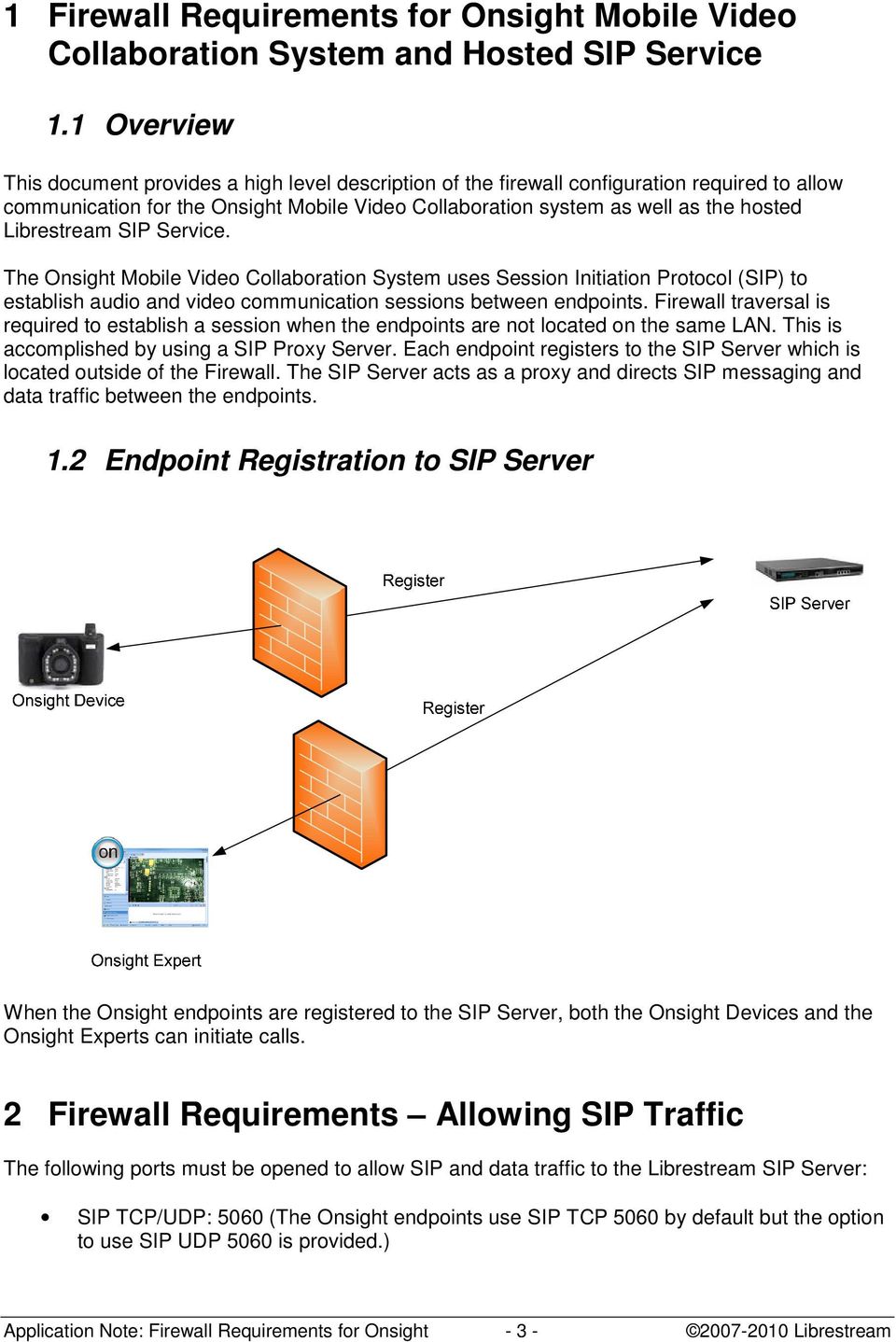
3 1 Firewall Requirements for Onsight Mobile Video Collaboration System and Hosted SIP Service 1.1 Overview This document provides a high level description of the firewall configuration required to allow communication for the Onsight Mobile Video Collaboration system as well as the hosted Librestream SIP Service. The Onsight Mobile Video Collaboration System uses Session Initiation Protocol (SIP) to establish audio and video communication sessions between endpoints. Firewall traversal is required to establish a session when the endpoints are not located on the same LAN. This is accomplished by using a SIP Proxy Server. Each endpoint registers to the SIP Server which is located outside of the Firewall. The SIP Server acts as a proxy and directs SIP messaging and data traffic between the endpoints. 1.2 Endpoint Registration to SIP Server When the Onsight endpoints are registered to the SIP Server, both the Onsight Devices and the Onsight Experts can initiate calls. 2 Firewall Requirements Allowing SIP Traffic The following ports must be opened to allow SIP and data traffic to the Librestream SIP Server: SIP TCP/UDP: 5060 (The Onsight endpoints use SIP TCP 5060 by default but the option to use SIP UDP 5060 is provided.) Application Note: Firewall Requirements for Onsight Librestream
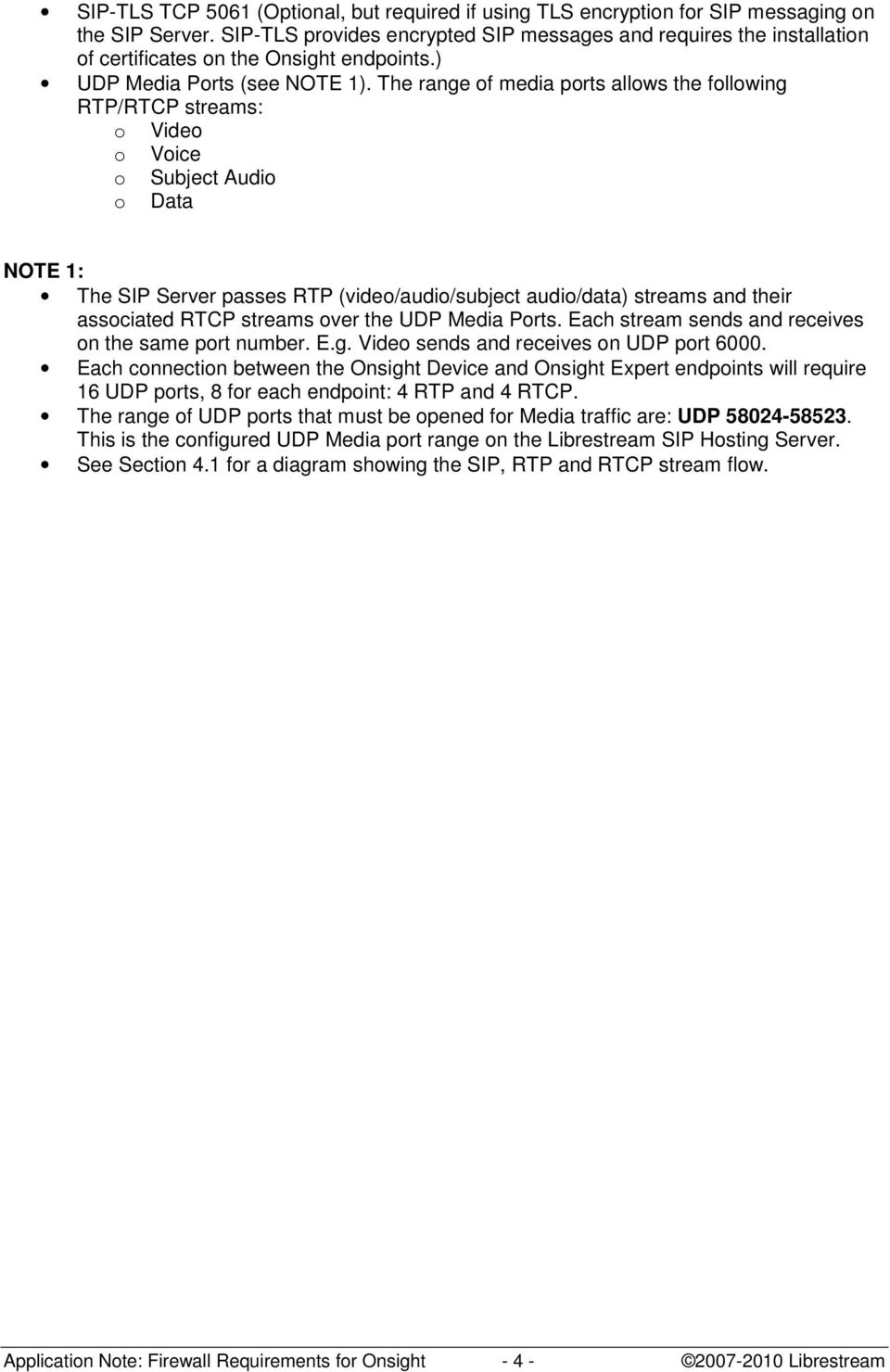
4 SIP-TLS TCP 5061 (Optional, but required if using TLS encryption for SIP messaging on the SIP Server. SIP-TLS provides encrypted SIP messages and requires the installation of certificates on the Onsight endpoints.) UDP Media Ports (see NOTE 1). The range of media ports allows the following RTP/RTCP streams: o Video o Voice o Subject Audio o Data NOTE 1: The SIP Server passes RTP (video/audio/subject audio/data) streams and their associated RTCP streams over the UDP Media Ports. Each stream sends and receives on the same port number. E.g. Video sends and receives on UDP port Each connection between the Onsight Device and Onsight Expert endpoints will require 16 UDP ports, 8 for each endpoint: 4 RTP and 4 RTCP. The range of UDP ports that must be opened for Media traffic are: UDP This is the configured UDP Media port range on the Librestream SIP Hosting Server. See Section 4.1 for a diagram showing the SIP, RTP and RTCP stream flow. Application Note: Firewall Requirements for Onsight Librestream
5 2.1 Firewall Diagram LAN FireWall Internet SIP Server Open Ports: SIP udp/tcp: 5060 SIP-TLS tcp: 5061 UDP ports: FireWall Onsight Device LAN Onsight Expert Application Note: Firewall Requirements for Onsight Librestream

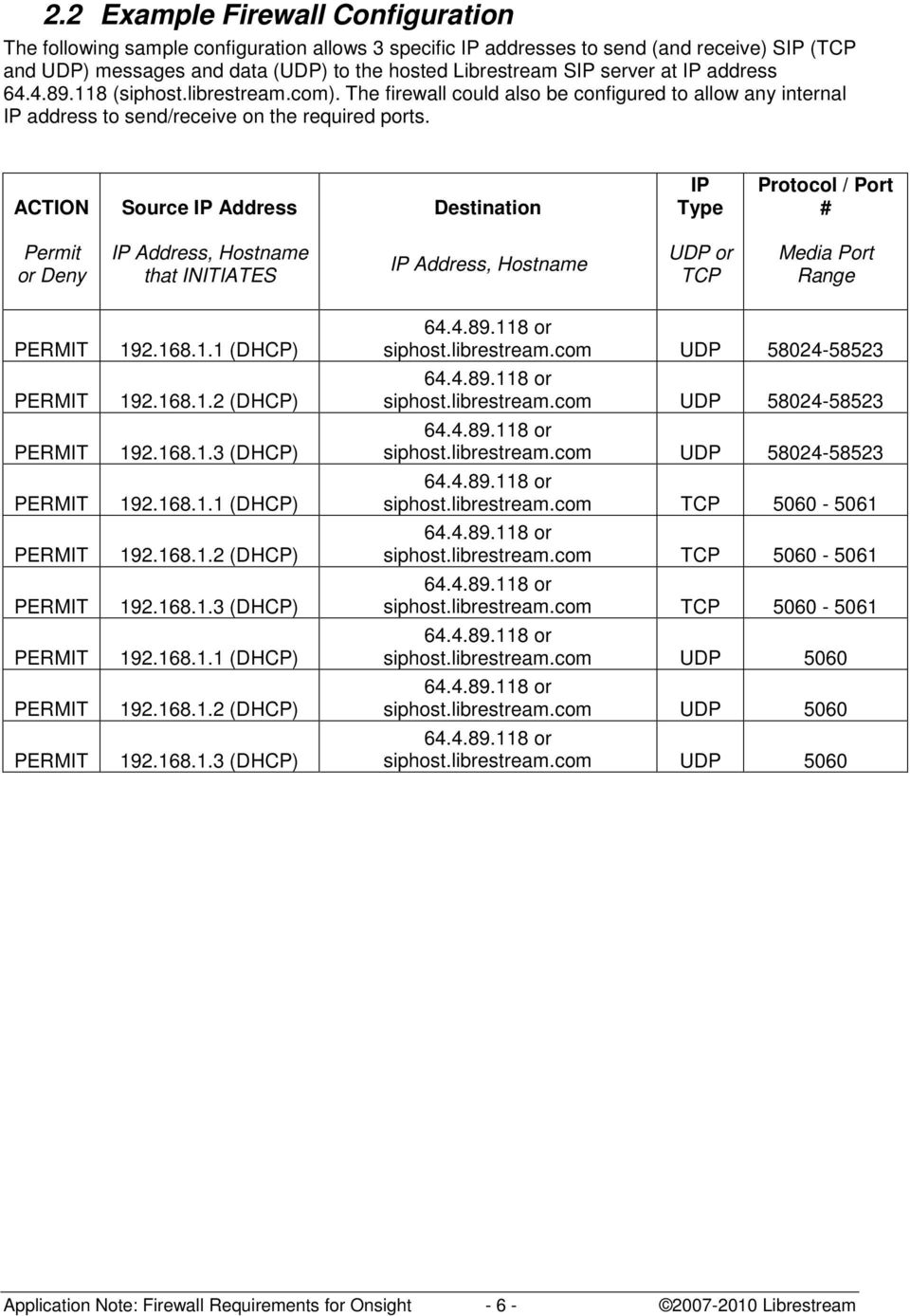
6 2.2 Example Firewall Configuration The following sample configuration allows 3 specific IP addresses to send (and receive) SIP (TCP and UDP) messages and data (UDP) to the hosted Librestream SIP server at IP address (siphost.librestream.com). The firewall could also be configured to allow any internal IP address to send/receive on the required ports. ACTION Source IP Address Destination IP Type Protocol / Port # Permit or Deny IP Address, Hostname that INITIATES IP Address, Hostname UDP or TCP Media Port Range (DHCP) (DHCP) (DHCP) (DHCP) (DHCP) (DHCP) (DHCP) (DHCP) (DHCP) siphost.librestream.com UDP siphost.librestream.com UDP siphost.librestream.com UDP siphost.librestream.com TCP siphost.librestream.com TCP siphost.librestream.com TCP siphost.librestream.com UDP 5060 siphost.librestream.com UDP 5060 siphost.librestream.com UDP 5060 Application Note: Firewall Requirements for Onsight Librestream
7 3 Onsight: Network Protocols and Ports 3.1 Network Protocols and Ports Table This table describes the protocols and ports used by the Onsight Mobile Collaboration System for SIP messaging and data transfer. Category Protocol SRC Port(s) Notes Detail 3,8 SIP Signaling SIP Signaling TCP 5 Random 7 Used for calls that do not use a SIP proxy server TCP Random 7 SIP proxy server based calls sends SIP/TCP pkts out with SRC=x and DST=5060 sends SIP/TCP pkts out with SRC=x and DST=5060 Video RTP 6000/ sends RTP/RTCP/UDP pkts out with SRC= and DST=y Subject Audio RTP 6002/ sends RTP/RTCP/UDP pkts out with SRC= and DST=y Voice RTP 6004/6005 2,1 Twoway voice Data RTP ,6 Status, control, data, etc. sends RTP/RTCP/UDP pkts out with SRC= and DST=y sends RTP/RTCP/UDP pkts out with SRC=6006 and DST=y receives SIP/TCP pkts with SRC=5060 and DST=x receives SIP/TCP pkts with SRC=5060 and DST=x receives RTP/RTCP/UDP pkts with SRC=y and DST= receives RTP/RTCP/UDP pkts with SRC=y and DST= receives RTP/RTCP/UDP pkts with SRC=y and DST= receives RTP/RTCP/UDP pkts with SRC=y and DST= Device OS 2.34 (and lower) used random ports. PC Application (and lower) used random ports. 2. The SRC ports shown are the first choice when a call is established. If a requested port is in use on the PC, the port number will increment (to a limit of 6200) until an available port is located. The Device will not have conflicts and will use the ports shown. 3. 'x' are random ports determined during SIP negotiation. 4. Device OS 2.xx used UDP. PC Application 2.x.x used UDP. 5. Optionally configurable as UDP. 6. Device OS 3.76 (and lower) used port PC Application (and lower) used port Send DST port is 5060, or 5061 if TLS is enabled. 8. 'y' are ports determined by the SIP proxy server during call negotiation usually from a limited range configured by the SIP proxy server administrator. Application Note: Firewall Requirements for Onsight Librestream

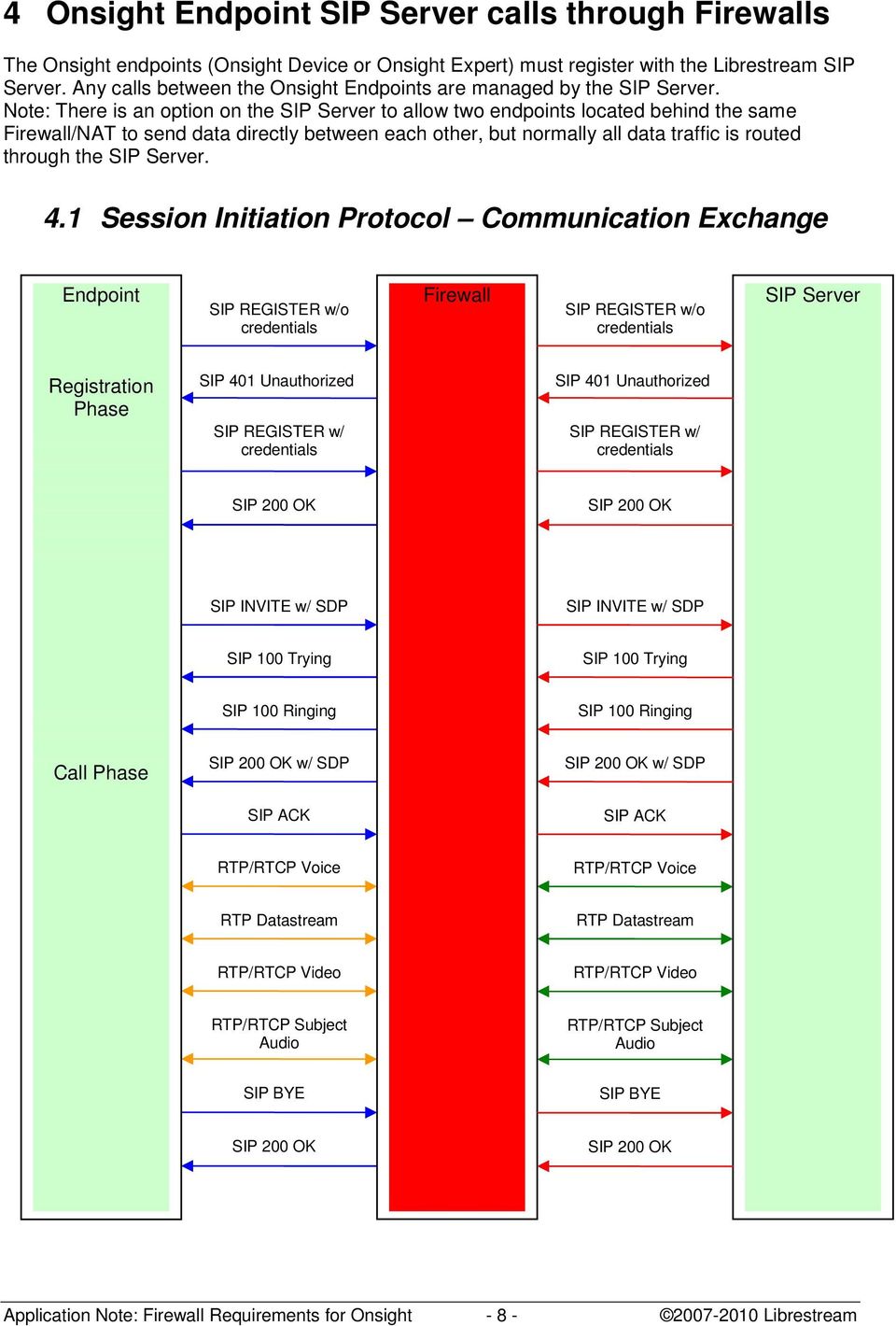
8 4 Onsight Endpoint SIP Server calls through Firewalls The Onsight endpoints (Onsight Device or Onsight Expert) must register with the Librestream SIP Server. Any calls between the Onsight Endpoints are managed by the SIP Server. Note: There is an option on the SIP Server to allow two endpoints located behind the same Firewall/NAT to send data directly between each other, but normally all data traffic is routed through the SIP Server. 4.1 Session Initiation Protocol Communication Exchange Endpoint SIP REGISTER w/o credentials Firewall SIP REGISTER w/o credentials SIP Server Registration Phase SIP 401 Unauthorized SIP REGISTER w/ credentials SIP 401 Unauthorized SIP REGISTER w/ credentials SIP 200 OK SIP 200 OK SIP INVITE w/ SDP SIP INVITE w/ SDP SIP 100 Trying SIP 100 Trying SIP 100 Ringing SIP 100 Ringing Call Phase SIP 200 OK w/ SDP SIP 200 OK w/ SDP SIP ACK SIP ACK RTP/RTCP Voice RTP/RTCP Voice RTP Datastream RTP Datastream RTP/RTCP Video RTP/RTCP Video RTP/RTCP Subject Audio RTP/RTCP Subject Audio SIP BYE SIP BYE SIP 200 OK SIP 200 OK Application Note: Firewall Requirements for Onsight Librestream

9 5 Onsight TeamLink HTTP Tunneling Service In situations where it is not possible or practical to open the required SIP and UDP ports on the Firewall, TeamLink can be used to tunnel all SIP and Media traffic encapsulated in HTTP/S packets to an TeamLink Server. The TeamLink Server will proxy all traffic to the SIP Server on behalf of the Onsight Endpoint behind the Firewall. The advantage of this method is that TeamLink uses existing open ports on the Firewall, TCP 80 for HTTP and TCP 443 for HTTPS. Librestream will provide TeamLink accounts upon request. This information is entered on the Onsight Endpoint to allow registration with the TeamLink Server. 5.1 TeamLink Encapsulation When using TeamLink the Onsight Endpoint will encapsulate SIP (TCP) and Media (RTP/RTCP/UDP) traffic in either HTTP or HTTPS protocol packets. The TEAMLINK Server receives these packets and strips off the HTTP/HTTPS encapsulation before forwarding them to the SIP Server. The SIP Server will send responses to the TeamLink Server. TeamLink encapsulates the packets before sending them back to the Onsight Endpoint. 5.2 Firewall Detect Firewall Detect is an Onsight System feature that tests the open ports on the Firewall and determines the best method for SIP Registration. If SIP ports are open the Onsight Endpoint will SIP register directly to the SIP Server, if SIP ports are closed the Onsight Endpoint will use TeamLink to SIP register by proxy, using TeamLink, to the SIP Server. *Firewall Detection Settings: The tested range of TCP, HTTP, HTTPS and UDP ports can be configured within the Onsight Endpoint. Application Note: Firewall Requirements for Onsight Librestream

10 6 Potential Issues: 6.1 TeamLink Firewall Detect Limitations The firewall detection implementation of TeamLink and the OE/OD clients have these known issues: 1. TeamLink won't detect firewalls that have already been configured to work with unknown SIP Servers which may result in the use of HTTP/HTTPS tunneling when it is not required. This is because the SIP ports are tested using the TeamLink Server as the destination. If the Firewall blocks SIP to TeamLink but allows it to another unknown SIP Server this will be reported as SIP blocked. (Note: the term unknown SIP Server is meant only to indicate that TeamLink is unaware of the SIP Server in terms of Firewall Detect.) 2. TeamLink won't detect VCS Expressway/Control pairs and depending on configuration, SIP calls may fail. 3. CUCM is not supported and would not work without an alternative firewall traversal mechanism. CASE 1: An existing customer already has firewall rules to allow SIP/UDP to a certain SIP Server. If there are no similar rules on the firewall defined for the TeamLink, the firewall detection algorithms on the OD/OE will report that SIP is not available and use tunneling by default. Recommendation is that existing and new customers should apply firewall rules for SIP/UDP for both the TeamLink and the existing SIP Server; otherwise they should disable the TeamLink configuration when inside the firewall. CASE2: A customer has a VCS Expressway and VCS Control pair. In this case the TeamLink may report that SIP is not available when behind the firewall and tunneling may not work if the SIP settings are pointing to the VCS Control. Customers in this configuration already have to repoint the SIP settings to the VCS Express or VCS Control when they cross from one side of the firewall to the other. It is recommended that you disable the TeamLink configuration when behind the firewall and enable the TeamLink configuration when on the outside of the firewall. CASE3: Customers with Cisco Unified Communications Manager (CUCM). The CUCM installations we've seen do not have any firewall/nat traversal mechanisms and are generally always behind the firewall. In this case, since the TeamLink is in the cloud, it cannot contact the CUCM and will not be able to tunnel. 6.2 Cisco SIP Aware Cisco Routers have a SIP aware feature that is enabled by default. It rewrites header information in the SIP packets, which confuses the SIP Server and must be turned OFF in order for the SIP Server communication to work correctly. To turn OFF Cisco SIP aware: show fixup sip 5060 no fixup protocol sip 5060 Application Note: Firewall Requirements for Onsight Librestream
11 Or no ip nat service sip udp port 5060 no ip nat service sip tcp port 5060 Alternatively, the Onsight endpoints can be configured to use SIP-TLS for the Authentication transport. This requires a certificate to be installed on the endpoints. SIP-TLS encrypts the SIP messaging headers and therefore the headers are ignored by the SIP aware feature of the Cisco router. 7 SIP Service Check List Firewall ports have been configured Onsight devices are connected to the network (WiFi or Ethernet) Endpoints have been configured with SIP Account information SIP server address o URI o User name and password o Authentication Transport Setting Install Certificates (if necessary, for SIP-TLS) If required, TeamLink has been enabled. TeamLink accounts have been configured o Server, Path, User ID, Password o HTTP Port, HTTPS Port For further information regarding SIP Registration Setup consult the Onsight mobile device and Onsight Expert User Manuals. Application Note: Firewall Requirements for Onsight Librestream
Application Note. Onsight Connect Network Requirements V6.1
 Application Note Onsight Connect Network Requirements V6.1 1 ONSIGHT CONNECT SERVICE NETWORK REQUIREMENTS... 3 1.1 Onsight Connect Overview... 3 1.2 Onsight Connect Servers... 4 Onsight Connect Network
Application Note. Onsight TeamLink And Firewall Detect v6.3
 Application Note Onsight And Firewall Detect v6.3 1 ONSIGHT TEAMLINK HTTPS TUNNELING SERVER... 3 1.1 Encapsulation... 3 1.2 Firewall Detect... 3 1.2.1 Firewall Detect Test Server Options:... 5 1.2.2 Firewall
Application Note. Onsight Connect Network Requirements v6.3
 Application Note Onsight Connect Network Requirements v6.3 APPLICATION NOTE... 1 ONSIGHT CONNECT NETWORK REQUIREMENTS V6.3... 1 1 ONSIGHT CONNECT SERVICE NETWORK REQUIREMENTS... 3 1.1 Onsight Connect Overview...
Application Note. Onsight Mobile Collaboration Video Endpoint Interoperability v5.0
 Application Note Onsight Mobile Collaboration Video Endpoint Interoperability v5. Onsight Mobile Collaboration Video Endpoint Interoperability... 3 Introduction... 3 Adding Onsight to a Video Conference
IP Ports and Protocols used by H.323 Devices
 IP Ports and Protocols used by H.323 Devices Overview: The purpose of this paper is to explain in greater detail the IP Ports and Protocols used by H.323 devices during Video Conferences. This is essential
Application Note: Cisco Integration with Onsight Connect
 Application Note: Cisco Integration with Onsight Connect Table of Contents Application Note:... 1 Cisco Integration with Onsight Connect... 3 Direct Onsight Device to Cisco Endpoint Calls... 3 Cisco Unified
Cisco TelePresence Video Communication Server (Cisco VCS) IP Port Usage for Firewall Traversal. Cisco VCS X8.5 December 2014
 Cisco TelePresence Video Communication Server (Cisco VCS) IP Port Usage for Firewall Traversal Cisco VCS X8.5 December 2014 Contents: Cisco VCS IP port usage Which IP ports are used with Cisco VCS? Which
Cisco TelePresence Video Communication Server Basic Configuration (Control with Expressway)
 Cisco TelePresence Video Communication Server Basic Configuration (Control with Expressway) Deployment Guide Cisco VCS X8.1 D14651.08 August 2014 Contents Introduction 4 Example network deployment 5 Network
LifeSize Transit Deployment Guide June 2011
 LifeSize Transit Deployment Guide June 2011 LifeSize Tranist Server LifeSize Transit Client LifeSize Transit Deployment Guide 2 Firewall and NAT Traversal with LifeSize Transit Firewalls and Network Address
NAT TCP SIP ALG Support
 The feature allows embedded messages of the Session Initiation Protocol (SIP) passing through a device that is configured with Network Address Translation (NAT) to be translated and encoded back to the
Setting up a reflector-reflector interconnection using Alkit Reflex RTP reflector/mixer
 Setting up a reflector-reflector interconnection using Alkit Reflex RTP reflector/mixer Mathias Johanson Alkit Communications AB Introduction The Alkit Reflex reflector/mixer system can be set-up to interconnect
Unified Communications in RealPresence Access Director System Environments
 [Type the document title] 3.0 October 2013 3725-78704-001B1 Deploying Polycom Unified Communications in RealPresence Access Director System Environments Polycom Document Title 1 Trademark Information Polycom
Cisco Expressway IP Port Usage for Firewall Traversal. Cisco Expressway X8.1 D15066.01 December 2013
 Cisco Expressway IP Port Usage for Firewall Traversal Cisco Expressway X8.1 D15066.01 December 2013 Contents: Cisco Expressway IP port usage Which IP ports are used with Cisco Expressway? Which IP ports
Internet Privacy Options
 2 Privacy Internet Privacy Sirindhorn International Institute of Technology Thammasat University Prepared by Steven Gordon on 19 June 2014 Common/Reports/internet-privacy-options.tex, r892 1 Privacy Acronyms
Personal Telepresence. Place the VidyoPortal/VidyoRouter on a public Static IP address
 NAT Introduction: Vidyo Conferencing in Firewall and NAT Deployments Vidyo Technical Note Section 1 The VidyoConferencing platform utilizes reflexive addressing to assist in setup of Vidyo calls. Reflexive
StarLeaf Network Guide
 Network Guide Contents Introduction------------------------------------------------------------------------------------------------------------------------- 3 Registration to the ------------------------------------------------------------------------------------------
VIDEOCONFERENCING. Video class
 VIDEOCONFERENCING Video class Introduction What is videoconferencing? Real time voice and video communications among multiple participants The past Channelized, Expensive H.320 suite and earlier schemes
TECHNICAL CHALLENGES OF VoIP BYPASS
 TECHNICAL CHALLENGES OF VoIP BYPASS Presented by Monica Cultrera VP Software Development Bitek International Inc 23 rd TELELCOMMUNICATION CONFERENCE Agenda 1. Defining VoIP What is VoIP? How to establish
Session Initiation Protocol (SIP) The Emerging System in IP Telephony
 Session Initiation Protocol (SIP) The Emerging System in IP Telephony Introduction Session Initiation Protocol (SIP) is an application layer control protocol that can establish, modify and terminate multimedia
Media Gateway Controller RTP
 1 Softswitch Architecture Interdomain protocols Application Server Media Gateway Controller SIP, Parlay, Jain Application specific Application Server Media Gateway Controller Signaling Gateway Sigtran
Firewall Support for SIP
 Firewall Support for SIP The Firewall Support for SIP feature integrates Cisco IOS firewalls, Voice over IP (VoIP) protocol, and Session Initiation Protocol (SIP) within a Cisco IOS-based platform, enabling
MyIC setup and configuration (with sample configuration for Alcatel Lucent test environment)
 MyIC setup and configuration (with sample configuration for Alcatel Lucent test environment) N.B. Goto MyIC Preferences in the System Toolbar. Description: this may be any appropriate description of the
Network Convergence and the NAT/Firewall Problems
 Network Convergence and the NAT/Firewall Problems Victor Paulsamy Zapex Technologies, Inc. Mountain View, CA 94043 Samir Chatterjee School of Information Science Claremont Graduate University Claremont,
White Paper. Traversing Firewalls with Video over IP: Issues and Solutions
 Traversing Firewalls with Video over IP: Issues and Solutions V Table of Contents Introduction Role of a Firewall Deployment Issues Relating to IP Video and Firewall Traversal The VCON SecureConnect Solution
Cisco Expressway Basic Configuration
 Cisco Expressway Basic Configuration Deployment Guide Cisco Expressway X8.1 D15060.03 August 2014 Contents Introduction 4 Example network deployment 5 Network elements 6 Internal network elements 6 DMZ
Chapter 10 Session Initiation Protocol. Prof. Yuh-Shyan Chen Department of Computer Science and Information Engineering National Taipei University
 Chapter 10 Session Initiation Protocol Prof. Yuh-Shyan Chen Department of Computer Science and Information Engineering National Taipei University Outline 12.1 An Overview of SIP 12.2 SIP-based GPRS Push
VidyoWay IT Guide Product Version 3.0 Document Version 3.0 A 5/9/2014
 VidyoWay IT Guide Product Version 3.0 Document Version 3.0 A 5/9/2014 433 Hackensack Ave Hackensack, NJ 07601 USA 2014 Vidyo, Inc. all rights reserved. Vidyo s technology is covered by one or more issued
Application Note - Using Tenor behind a Firewall/NAT
 Application Note - Using Tenor behind a Firewall/NAT Introduction This document has been created to assist Quintum Technology customers who wish to install equipment behind a firewall and NAT (Network
How To Understand The Purpose Of A Sip Aware Firewall/Alg (Sip) With An Alg (Sip) And An Algen (S Ip) (Alg) (Siph) (Network) (Ip) (Lib
 NetVanta Unified Communications Technical Note The Purpose of a SIP-Aware Firewall/ALG Introduction This technical note will explore the purpose of a Session Initiation Protocol (SIP)-aware firewall/application
Virtual private network. Network security protocols VPN VPN. Instead of a dedicated data link Packets securely sent over a shared network Internet VPN
 Virtual private network Network security protocols COMP347 2006 Len Hamey Instead of a dedicated data link Packets securely sent over a shared network Internet VPN Public internet Security protocol encrypts
Polycom RealPresence Access Director System
 Release Notes 3.1 January 2014 3725-78700-001C Polycom RealPresence Access Director System Polycom announces the release of the Polycom RealPresence Access Director system, version 3.1. This document provides
Polycom. RealPresence Ready Firewall Traversal Tips
 Polycom RealPresence Ready Firewall Traversal Tips Firewall Traversal Summary In order for your system to communicate with end points in other sites or with your customers the network firewall in all you
Sample Configuration for SIP Trunking between Avaya IP Office R8.0 and Cisco Unified Communications Manager 8.6.2 Issue 1.0
 Avaya Solution & Interoperability Test Lab Sample Configuration for SIP Trunking between Avaya IP Office R8.0 and Cisco Unified Communications Manager 8.6.2 Issue 1.0 Abstract These Application Notes describe
User Manual. Onsight Management Suite Version 5.1. Another Innovation by Librestream
 User Manual Onsight Management Suite Version 5.1 Another Innovation by Librestream Doc #: 400075-06 May 2012 Information in this document is subject to change without notice. Reproduction in any manner
Cisco EXAM - 300-075. Implementing Cisco IP Telephony and Video, Part 2 (CIPTV2) Buy Full Product. http://www.examskey.com/300-075.
 Cisco EXAM - 300-075 Implementing Cisco IP Telephony and Video, Part 2 (CIPTV2) Buy Full Product http://www.examskey.com/300-075.html Examskey Cisco 300-075 exam demo product is here for you to test the
6.40A AudioCodes Mediant 800 MSBG
 AudioCodes Mediant 800 MSBG Page 1 of 66 6.40A AudioCodes Mediant 800 MSBG 1. Important Notes Check the SIP 3 rd Party Validation Website for current validation status. The SIP 3 rd party Validation Website
Unified Communications Mobile and Remote Access via Cisco VCS
 Unified Communications Mobile and Remote Access via Cisco VCS Deployment Guide Cisco VCS X8.2 Cisco Unified CM 9.1(2)SU1 or later January 2015 Contents Mobile and remote access overview 4 Jabber client
UIP1868P User Interface Guide
 UIP1868P User Interface Guide (Firmware version 0.13.4 and later) V1.1 Monday, July 8, 2005 Table of Contents Opening the UIP1868P's Configuration Utility... 3 Connecting to Your Broadband Modem... 4 Setting
TSIN02 - Internetworking
 TSIN02 - Internetworking Lecture 9: SIP and H323 Literature: Understand the basics of SIP and it's architecture Understand H.323 and how it compares to SIP Understand MGCP (MEGACO/H.248) SIP: Protocol
EE4607 Session Initiation Protocol
 EE4607 Session Initiation Protocol Michael Barry [email protected] [email protected] Outline of Lecture IP Telephony the need for SIP Session Initiation Protocol Addressing SIP Methods/Responses Functional
ThinkTel ITSP with Registration Setup Quick Start Guide
 January 13 ThinkTel ITSP with Registration Setup Quick Start Guide Author: Zultys Technical Support This configuration guide was created to assist knowledgeable vendors with configuring the Zultys MX Phone
Session Border Controller
 CHAPTER 13 This chapter describes the level of support that Cisco ANA provides for (SBC), as follows: Technology Description, page 13-1 Information Model Objects (IMOs), page 13-2 Vendor-Specific Inventory
Video Conferencing and Firewalls
 Video Conferencing and Firewalls Out with the Old, in with the New Video Conferencing is leaving ISDN for a better transport medium, IP. It s been happening for a long time in Europe but now ISDN is well
VoIP LAB. 陳 懷 恩 博 士 助 理 教 授 兼 所 長 國 立 宜 蘭 大 學 資 訊 工 程 研 究 所 Email: [email protected] TEL: 03-9357400 # 255
 SIP Traversal over NAT 陳 懷 恩 博 士 助 理 教 授 兼 所 長 國 立 宜 蘭 大 學 資 訊 工 程 研 究 所 Email: [email protected] TEL: 03-9357400 # 255 Outline Introduction to SIP and NAT NAT Problem Definition NAT Solutions on NTP VoIP
UCi2i Video Conference Endpoint Firewall Requirements. UCi2i Video Conference Endpoint Firewall Requirements
 1 UCi2i Video Conference Endpoint Firewall Requirements 2 UCi2i VC Endpoint Firewall Requirements Dear customer, Due to the implementation of our secure video network, there are a few firewall rules that
ReadyNAS Remote White Paper. NETGEAR May 2010
 ReadyNAS Remote White Paper NETGEAR May 2010 Table of Contents Overview... 3 Architecture... 3 Security... 4 Remote Firewall... 5 Performance... 5 Overview ReadyNAS Remote is a software application that
nexvortex Setup Guide
 nexvortex Setup Guide CUDATEL COMMUNICATION SERVER September 2012 510 S P R I N G S T R E E T H E R N D O N V A 2 0 1 7 0 + 1 8 5 5. 6 3 9. 8 8 8 8 Introduction This document is intended only for nexvortex
White paper. SIP An introduction
 White paper An introduction Table of contents 1 Introducing 3 2 How does it work? 3 3 Inside a normal call 4 4 DTMF sending commands in sip calls 6 5 Complex environments and higher security 6 6 Summary
Ecessa Proxy VoIP Manual
 Ecessa Proxy VoIP Manual Table of Contents Introduction...1 Configuration Overview...2 VoIP failover requirements...2 Import VoIP Authentication...3 Add a user manually...3 Setup...3 Hosted setup...3 Example
NTP VoIP Platform: A SIP VoIP Platform and Its Services
 NTP VoIP Platform: A SIP VoIP Platform and Its Services Speaker: Dr. Chai-Hien Gan National Chiao Tung University, Taiwan Email: [email protected] Date: 2006/05/02 1 Outline Introduction NTP VoIP
Vega 100G and Vega 200G Gamma Config Guide
 Vega 100G and Vega 200G Gamma Config Guide This document aims to go through the steps necessary to configure the Vega SBC to be used with a Gamma SIP Trunk. When a SIP trunk is provisioned by Gamma a list
MiaRec. Cisco Built-in-Bridge Recording Interface Configuration Guide. Revision 1.1 (2014-07-01)
 Cisco Built-in-Bridge Recording Interface Configuration Guide Revision 1.1 (2014-07-01) Table of Contents 1 Overview... 3 1.1 Purpose... 3 2 Architecture... 4 3 Requirements... 5 4 Identify Phones that
Why SSL is better than IPsec for Fully Transparent Mobile Network Access
 Why SSL is better than IPsec for Fully Transparent Mobile Network Access SESSION ID: SP01-R03 Aidan Gogarty HOB Inc. [email protected] What are we all trying to achieve? Fully transparent network access
SIP : Session Initiation Protocol
 : Session Initiation Protocol EFORT http://www.efort.com (Session Initiation Protocol) as defined in IETF RFC 3261 is a multimedia signaling protocol used for multimedia session establishment, modification
Technical White Paper for Traversal of Huawei Videoconferencing Systems Between Private and Public Networks
 Technical White Paper for Traversal of Huawei Videoconferencing Systems Between Private and Public Networks Huawei Technologies Co., Ltd. All rights reserved. Contents Contents 1 Overview... 1 2 H.323...
Hosted Voice. Best Practice Recommendations for VoIP Deployments
 Hosted Voice Best Practice Recommendations for VoIP Deployments Thank you for choosing EarthLink! EarthLinks best in class Hosted Voice phone service allows you to deploy phones anywhere with a Broadband
Appendix A: Configuring Firewalls for a VPN Server Running Windows Server 2003
 http://technet.microsoft.com/en-us/library/cc757501(ws.10).aspx Appendix A: Configuring Firewalls for a VPN Server Running Windows Server 2003 Updated: October 7, 2005 Applies To: Windows Server 2003 with
DEPLOYMENT GUIDE Version 1.2. Deploying the BIG-IP LTM for SIP Traffic Management
 DEPLOYMENT GUIDE Version 1.2 Deploying the BIG-IP LTM for SIP Traffic Management Table of Contents Table of Contents Configuring the BIG-IP LTM for SIP traffic management Product versions and revision
Source-Connect Network Configuration Last updated May 2009
 Source-Connect Network Configuration Last updated May 2009 For further support: Chicago: +1 312 706 5555 London: +44 20 7193 3700 [email protected] This document is designed to assist IT/Network
To ensure you successfully install Timico VoIP for Business you must follow the steps in sequence:
 To ensure you successfully install Timico VoIP for Business you must follow the steps in sequence: Firewall Settings - you may need to check with your technical department Step 1 Install Hardware Step
Unit 23. RTP, VoIP. Shyam Parekh
 Unit 23 RTP, VoIP Shyam Parekh Contents: Real-time Transport Protocol (RTP) Purpose Protocol Stack RTP Header Real-time Transport Control Protocol (RTCP) Voice over IP (VoIP) Motivation H.323 SIP VoIP
Customer Guide. BT Business - BT SIP Trunks. BT SIP Trunks: Firewall and LAN Guide. Issued by: BT Business Date 14.02.2012. Issue: v1.
 Customer Guide BT Business - BT SIP Trunks BT SIP Trunks: Firewall and LAN Guide Issue: v1.3 1 Contents 1 Overview 3 2 Firewalls 3 3 Recommendations 4 4 Ports 5 5 Warning & Disclaimer 5 Issue: v1.3 2 1
A Comparative Study of Signalling Protocols Used In VoIP
 A Comparative Study of Signalling Protocols Used In VoIP Suman Lasrado *1, Noel Gonsalves *2 Asst. Prof, Dept. of MCA, AIMIT, St. Aloysius College (Autonomous), Mangalore, Karnataka, India Student, Dept.
SIP Trunk Configuration V/IPedge Feature Description 5/22/13
 SIP Trunk Configuration V/IPedge Feature Description 5/22/13 OVERVIEW Session Initiation Protocol (SIP) is an application layer protocol used for establishing sessions in an IP network. SIP trunks allow
Time Warner ITSP Setup Guide
 October 14 Time Warner ITSP Setup Guide Author: Zultys Technical Support This configuration guide was created to assist knowledgeable vendors with configuring the Zultys MX Phone System with Time Warner
Configuration Note for Jeron Provider 790 and Cisco CallManager
 Configuration Note for Jeron Provider 790 and Cisco CallManager 1. Jeron Provider 790 Setup 1.1 Configure the SIP Server Connectivity Set Brekeke SIP Server's IP address in the [SIP Server IP] field and
Application Notes for Avaya IP Office 7.0 Integration with Skype Connect R2.0 Issue 1.0
 Avaya Solution & Interoperability Test Lab Application Notes for Avaya IP Office 7.0 Integration with Skype Connect R2.0 Issue 1.0 Abstract These Application Notes describe the steps to configure an Avaya
Voice over IP Fundamentals
 Voice over IP Fundamentals Duration: 5 Days Course Code: GK3277 Overview: The aim of this course is for delegates to gain essential data networking and Voice over IP (VoIP) knowledge in a single, week-long
Smart Tips. Enabling WAN Load Balancing. Key Features. Network Diagram. Overview. Featured Products. WAN Failover. Enabling WAN Load Balancing Page 1
 Smart Tips Enabling WAN Load Balancing Overview Many small businesses today use broadband links such as DSL or Cable, favoring them over the traditional link such as T1/E1 or leased lines because of the
Secured Communications using Linphone & Flexisip
 Secured Communications using Linphone & Flexisip Solution description Office: Le Trident Bat D 34, avenue de l Europe 38100 Grenoble France Tel. : +33 (0)9 52 63 65 05 Headquarters: 12, allée des Genêts
AT&T IP Flex Reach/ IP Toll Free Configuration Guide IC 3.0 with Interaction SIP Proxy
 INTERACTIVE INTELLIGENCE AT&T IP Flex Reach/ IP Toll Free Configuration Guide IC 3.0 with Interaction SIP Proxy Version 1.7 9/2/2009 TABLE OF CONTENTS 1 AT&T... 5 1.1 Introduction... 5 1.2 Product Descriptions...
Broadband Telephony. Terminal Equipment Requirements and Specifications
 Broadband Telephony Terminal Equipment Requirements and Specifications TABLE OF CONTENTS 1 Introduction... 3 1.1 Scope... 3 1.2 Intended audience... 3 1.3 Notice... 3 1.4 Definitions... 3 2 BBT Service
Internet Technology Voice over IP
 Internet Technology Voice over IP Peter Gradwell BT Advert from 1980s Page 2 http://www.youtube.com/v/o0h65_pag04 Welcome to Gradwell Gradwell provides technology for every line on your business card Every
How to Configure the Avaya IP Office 6.1 for use with Integra Telecom SIP Solutions
 How to Configure the Avaya IP Office 6.1 for use with Integra Telecom SIP Solutions Overview This document provides a reference for configuration of the Avaya IP Office to connect to Integra Telecom SIP
SIP Trunking Manual 05.15. Technical Support Web Site: http://ws1.necii.com (registration is required)
 SIP Trunking Manual 05.15 Technical Support Web Site: http://ws1.necii.com (registration is required) This manual has been developed by NEC Unified Solutions, Inc. It is intended for the use of its customers
Acano solution. Third Party Call Control Guide. March 2015 76-1055-01-E
 Acano solution Third Party Call Control Guide March 2015 76-1055-01-E Contents Contents 1 Introduction... 3 1.1 How to Use this Guide... 3 1.1.1 Commands... 4 2 Example of Configuring a SIP Trunk to CUCM...
Application Notes for Configuring Cablevision Optimum Voice SIP Trunking with Avaya IP Office - Issue 1.1
 Avaya Solution & Interoperability Test Lab Application Notes for Configuring Cablevision Optimum Voice SIP Trunking with Avaya IP Office - Issue 1.1 Abstract These Application Notes describe the procedures
Basic Vulnerability Issues for SIP Security
 Introduction Basic Vulnerability Issues for SIP Security By Mark Collier Chief Technology Officer SecureLogix Corporation [email protected] The Session Initiation Protocol (SIP) is the future
An outline of the security threats that face SIP based VoIP and other real-time applications
 A Taxonomy of VoIP Security Threats An outline of the security threats that face SIP based VoIP and other real-time applications Peter Cox CTO Borderware Technologies Inc VoIP Security Threats VoIP Applications
1.1.3 Versions Verified SIP Carrier status as of 18 Sep 2014 : validated on CIC 4.0 SU6.
 1 SIP Carriers 1.1 Telstra 1.1.1 Warnings Check the SIP 3 rd Party SIP Carrier Matrix for certification status, and supported features. More info about the SIP 3 rd Party SIP Carrier Matrix can be found
Crossing firewalls. Liane Tarouco Leandro Bertholdo RNP POP/RS. Firewalls block H.323 ports
 Crossing firewalls Liane Tarouco Leandro Bertholdo RNP POP/RS Firewalls block H.323 ports 1 H.323 ports Security issues For the H.323 protocol to cross a firewall, the specific static ports and all ports
ADTRAN SBC and Cisco Unified Call Manager SIP Trunk Interoperability
 6AOSSG0004-42A April 2013 Interoperability Guide ADTRAN SBC and Cisco Unified Call Manager SIP Trunk Interoperability This guide describes an example configuration used in testing the interoperability
Internet Working 15th lecture (last but one) Chair of Communication Systems Department of Applied Sciences University of Freiburg 2005
 15th lecture (last but one) Chair of Communication Systems Department of Applied Sciences University of Freiburg 2005 1 43 administrational stuff Next Thursday preliminary discussion of network seminars
MINIMUM NETWORK REQUIREMENTS 1. REQUIREMENTS SUMMARY... 1
 Table of Contents 1. REQUIREMENTS SUMMARY... 1 2. REQUIREMENTS DETAIL... 2 2.1 DHCP SERVER... 2 2.2 DNS SERVER... 2 2.3 FIREWALLS... 3 2.4 NETWORK ADDRESS TRANSLATION... 4 2.5 APPLICATION LAYER GATEWAY...
Configuring IPSec VPN Tunnel between NetScreen Remote Client and RN300
 Configuring IPSec VPN Tunnel between NetScreen Remote Client and RN300 This example explains how to configure pre-shared key based simple IPSec tunnel between NetScreen Remote Client and RN300 VPN Gateway.
TELUS Business Connect Customer Onboarding Guide. How to successfully set up your service
 TELUS Business Connect Customer Onboarding Guide How to successfully set up your service Contents The onboarding process............ 2 Network readiness.............. 3 Web registration...............
Grandstream Networks, Inc. GXP2130/2140/2160 Auto-configuration Plug and Play
 Grandstream Networks, Inc. GXP2130/2140/2160 Auto-configuration Plug and Play Introduction: This is a technical guide targeted to PBX developers that want to learn the different mechanisms that GXP2130/2140/2160
Installation of the On Site Server (OSS)
 Installation of the On Site Server (OSS) rev 1.1 Step #1 - Initial Connection to the OSS Having plugged in power and an ethernet cable in the eth0 interface (see diagram below) you can connect to the unit
Cisco RV 120W Wireless-N VPN Firewall
 TheGreenBow IPSec VPN Client Configuration Guide Cisco RV 120W Wireless-N VPN Firewall WebSite: Contact: http://www.thegreenbow.com [email protected] IPSec VPN Router Configuration Property of TheGreenBow
Internet Security. Internet Security Voice over IP. Introduction. ETSF10 Internet Protocols 2011-11-22. ETSF10 Internet Protocols 2011
 Internet Security Voice over IP ETSF10 Internet Protocols 2011 Kaan Bür & Jens Andersson Department of Electrical and Information Technology Internet Security IPSec 32.1 SSL/TLS 32.2 Firewalls 32.4 + Voice
Asymetrical keys. Alices computer generates a key pair. A public key: XYZ123345 (Used to encrypt) A secret key: ABC98765 (Used to decrypt)
 Encryption keys Symmetrical keys Same key used for encryption and decryption Exchange of symmetrical keys between parties difficult without risk of interception Asymmetrical keys One key for encryption
TLS and SRTP for Skype Connect. Technical Datasheet
 TLS and SRTP for Skype Connect Technical Datasheet Copyright Skype Limited 2011 Introducing TLS and SRTP Protocols help protect enterprise communications Skype Connect now provides Transport Layer Security
HOSTED VOICE Bring Your Own Bandwidth & Remote Worker. Install and Best Practices Guide
 HOSTED VOICE Bring Your Own Bandwidth & Remote Worker Install and Best Practices Guide 2 Thank you for choosing EarthLink! EarthLinks' best in class Hosted Voice phone service allows you to deploy phones
Encapsulating Voice in IP Packets
 Encapsulating Voice in IP Packets Major VoIP Protocols This topic defines the major VoIP protocols and matches them with the seven layers of the OSI model. Major VoIP Protocols 15 The major VoIP protocols
Multimedia Communication in the Internet. SIP: Advanced Topics. Dorgham Sisalem, Sven Ehlert Mobile Integrated Services FhG FOKUS
 Multimedia Communication in the Internet SIP: Advanced Topics Dorgham Sisalem, Sven Ehlert Mobile Integrated Services FhG FOKUS SIP and NAT NAT Concept NAT = Network Address Translation Share one IP address
OpenScape Business V2
 OpenScape Business V2 Tutorial Support of SIP Endpoints connected via the internet Version 2.1 Definitions HowTo An OpenScape Business HowTo describes the configuration of an OpenScape Business feature
Mediatrix 4404 Step by Step Configuration Guide June 22, 2011
 Mediatrix 4404 Step by Step Configuration Guide June 22, 2011 Proprietary 2011 Media5 Corporation Table of Contents First Steps... 3 Identifying your MAC Address... 3 Identifying your Dynamic IP Address...
Unified Communications Mobile and Remote Access via Cisco Expressway
 Unified Communications Mobile and Remote Access via Cisco Expressway Deployment Guide Cisco Expressway X8.1.1 or later Cisco Unified CM 9.1(2)SU1 or later January 2015 Contents Mobile and remote access