
Version 2.5 MEDICARE AND MEDICAID PLANS A TECHNICAL GUIDE TO ELIGIBILITY AND ENROLLMENT TRANSACTION PROCESSING
|
|
|
- Spencer Francis
- 9 years ago
- Views:
Transcription
1 Version 2.5 MEDICARE AND MEDICAID PLANS A TECHNICAL GUIDE TO ELIGIBILITY AND ENROLLMENT TRANSACTION PROCESSING Date: 12/10/2015

2 CONTENTS MEDICARE AND MEDICAID PLANS... 1 A TECHNICAL GUIDE TO ELIGIBILITY AND ENROLLMENT TRANSACTION PROCESSING... 1 CONTENTS... 2 REVISION HISTORY Medicare Eligibility Inquiry Medicare Transaction Processing Medicare Transaction Processing All transaction types except 76 and Medicare Transaction Processing 76 residential address change Medicare Transaction Processing 90 REPORTING IDENTIFIED DRUG OVERUTILIZERS Medicare Transaction Response Transaction Error Codes Medicare Transaction matrix of required and optional fields by Contract type Web Service Medicare Eligibility eligibilityquery method Web Service Errors CMS Submission Transmission schedule Blackout dates Response from CMS CMS Transaction Transmission Data File Layout Version /10/2015 2

3 5. Eligibility Eligibility+ Plan Enrollment (from CMS MBD extract) Layout Eligibility+ Member Data Changes (between prior and current CMS MBD extract) Layout Enrollment Reconciliation Extract Enrollment Reconciliation Extract Layout Batch Completion Status Summary of Failed Transactions Help Desk Support Version /10/2015 3

4 12/10/2015 Version 2.5 REVISION HISTORY The MMP technical guide has been updated with version 2.5 to reflect the CMS February 2016 Software changes, as documented in the final CMS HPMS notice, dated December 1, Important notes: CMS will implement the February software changes on the February 2016 CMS Plan Data Due date which will occur on Friday, February 5 th, The Infocrossing MBD eligibility updates, however, will not occur until after CMS provides an updated MBD eligibility file on Monday February 15, The CMS changes that are applicable to this interface document are as follows: - CMS has added up to 10 occurrences of Medicare Plan Ineligibility start and end dates due to unlawful presence. These dates, along with a Medicare Plan ineligibility data occurrence field, have been added to the MBD response file layout as described in section 1, beginning on page 28 of this document. - Take note that although CMS is also adding 10 occurrences of incarceration start and end dates to the CMS BEQ response file, these same updates will not be reflected on the Infocrossing MBD eligibility response file. CMS will add these data elements to the MBD eligibility file at a later date. The exact date will be communicated to MMP and State organizations as soon as the information is made available by CMS. - The addition of the Medicare ineligibility start and end dates will not increase the MBD response record size. It remains at 1,300 bytes. All new data fields have been added at the end of the layout by using existing filler. This will allow ample time for MMP and State organizations to prepare for the new Medicare ineligibility data. However, please take note that the next MBD response layout change that CMS will implement to reflect the Medicare ineligibility due to incarceration will require an increase in record layout size in the MBD response file. Please plan accordingly for this impact on a future software change implementation. - A new error code 76 will be generated on a new enrollment transaction if the effective date of the enrollment falls during a Medicare Plan Ineligibility period. Section 2.5, page 55 of this document has been changed to reflect this new error code. - The web service layout has changed to accommodate the Medicare ineligibility start and end dates due to unlawful presence. Refer to section 3 of this document for details. Version /10/2015 4

5 - The ELIGIBILITY+ response file has been modified to include the unlawful presence Medicare Ineligibility data. Changes are described in section 5, beginning on page States and MMP sponsors must be prepared to accept and process new Transaction Reply Codes (TRCs) as described in Attachment C, figure 1 of the CMS February Software release document. CMS will also generate a new disenrollment reason code of 71 on involuntary disenrollments due to a not lawfully present period (refer to Attachment C, figure 2 of the CMS February 2016 Software release). The newly introduced TRCs are: o TRC 348 (Enrollment Rejected Not Lawfully Present Period) o TRC 349 (Disenrollment due to Not Lawfully Present Period) Direct access to the CMS memo publication can be obtained by following this link: Technology/mapdhelpdesk/Downloads/Announcement-of-the-February-2016-Software- Release.pdf 08/31/2015 Version 2.4 The MMP technical guide has been updated with version 2.4 to reflect the CMS November 2015 Software changes, as documented in the final CMS HPMS notice, dated August 28, The Infocrossing edit changes will be implemented on the November 2015 CMS Plan Data Due date which will occur on Friday November 6 th, The actual implementation time will be right after 08:00 P.M. Eastern Time. As part of the November software changes, CMS will require the PBP# field on 51 disenrollment and 81 disenrollment cancellation transactions. - Section 2.1 (Medicare Transaction Processing) and section 2.6 (Medicare Transaction matrix) of this document have been changed as follows: The PBP# field on the batch enrollment/disenrollment/cancellation record on page 31 has been updated to indicate that it is a required field on 51 and 81 transaction types. Section 2.6 (Medicare Transaction matrix) has been modified on pages 53 and 54 to indicate that the PBP# is required on 51 and 81 transactions. - Infocrossing edits will reject 51 and 81 transactions that do not include the PBP# field when required with existing error code: 51 - PBP# REQUIRED. VALUE MUST BE NUMERIC Version /10/2015 5
6 - MMP organizations will be able to test this new CMS requirement with the Infocrossing application system beginning on Monday, September 14, Another small change that is unrelated to the CMS November software changes will be implemented to improve consistency and clarity: the text description for error code 48 will be changed from the existing message of Signature Date Invalid to the new message: Application Receipt Date Invalid. Section Transaction Error Codes on page 49 has been changed accordingly. With August 2015 CMS software release, MMPs and States can now request CMS address data on a batch basis using the MARx Batch Eligibility Query (BEQ) file exchange process. The August 27, 2015 CMS HPMS memo entitled Batch Eligibility Query (BEQ) Enhancement Mailing and Residence Address Data Available Through MARx BEQ Response File explains the new capability and introduces the newly formatted BEQ response file layout. For more details about the BEQ request file/response file layouts, please see section F.6 and F.7 (pages F-47 thru F-59) in the PCUG Appendices located under the Download section in this webpage: Technology/mapdhelpdesk/Plan_Communications_User_Guide.html 06/08/2015 Version 2.3 Involuntary Disenrollment Due to Confirmed Incarceration Status New Transaction Reply Codes and Disenrollment Reason Code CMS has recently published the August 2015 Software Release document. Section 5 of the document, which is titled Eligibility for Enrollment and Involuntary Disenrollment due to incarceration Status is of primary concern for the MMP program. States and MMP sponsors must be prepared to accept and process new Transaction Reply Codes (TRCs): - TRC 345 (Enrollment Rejected Confirmed Incarceration) - TRC 346 (Disenrollment due to Confirmed Incarceration) - TRC 347 (Reenrollment due to Closed Incarceration Period) CMS will start producing these new TRCs on the daily TRR files once the August Software changes are implemented on the week-end of Friday, August 7, Direct access to the CMS memo publication can be obtained by following this link: Technology/mapdhelpdesk/Downloads/Announcement-of-the-August-2015-Software- Release.pdf Version /10/2015 6
7 System Enhancements to Batch Eligibility Query (BEQ) Response File and MARx eligibility screen (M232) On May 10, 2015, CMS has expanded the record length of the BEQ response file from 750 to 1500 positions and added four extra data elements: Plan Benefit Package (PBP) Number, Plan Type Code, Employer Group Health Plan (EGHP) Indicator, and End Stage Renal Disease (ESRD) Indicator. These new data fields allow states to select the right dual-eligible individuals and determine anyone who are found ineligible prior to submitting MMP passive enrollment transactions to CMS. This will help state s passive notice mailings go to the targeted passive enrollment population. In addition to MMA/TBQ file exchanges, States are highly encouraged to use this batch eligible query/file exchange process since it provides more real-time Medicare eligibility information. Also, with the May 10th 2015 CMS system release, State Medicaid Agency staffs and their brokers may notice the new Plan Type Code and Description to the MARx eligibility screen (M232). This was added for the state users and enrollment brokers to better determine MMP enrollment eligibility of the dual-eligible individual. See Section 1 of the CMS May 2015 Software Release document for more information: Technology/mapdhelpdesk/Downloads/Announcement-of-the-May-2015-Software- Release.pdf Section 6 of the MMP technical guide documents an enrollment reconciliation tool that is available to all State and MMP organizations. The enrollment reconciliation tool can be used to research any Medicare transaction for a given MMP contract within a specific time frame. You can validate the date and time of any Medicare transaction that was sent to CMS and match it against all the CMS Transaction Reply responses. This information can be used to identify any potential discrepancies and help determine the necessary corrective actions. There are two ways to access this tool from the website: Version /10/2015 7
8 1. From the Main Menu choose Enroll Recon tab. This allows you to research Medicare transactions within a limited time period of three months at a time. The information displayed is high level and meant to serve as a first validation step on a case by case scenario. For a more in-depth reconciliation process involving a much larger time period and volume of data, you can choose the second available option as described below. 2. From the Main Menu choose File Transfer tab. Locate the following section: Enrollment - Enrollment Reconciliation Report Enrollment Recon Extract Request Enrollment Recon Report Download Enrollment Recon Data Download To place a request, click on the Enrollment Recon Extract Request link. Choose any date range that could span over several months or years for a given contract. Once your selection is submitted, the system will provide the results in two formats: 1. A detail report with summary statistic totals can be retrieved under the Enrollment Recon Report Download link. 2. A data file can be retrieved under the Enrollment Recon Data Download link. This file can be loaded into your internal application systems. The layout of the reconciliation file is described in section 6 of this document. The Infocrossing MBD File response layout and Web service will be modified and implemented on Saturday, August the 15 th, 2015 to incorporate the CMS BEQ changes that were implemented on May 10, The MBD eligibility file response layout is now being updated with the same changes. Section 1 of this document has been updated as follows (all changes are highlighted in red within this document for ease of reference): - Note that the MBD file response layout size (as described in section 1 of this document) does not change and remains at 1,300 bytes. However, the EGHP indicator value in position 213 and the plan enrollment related fields (positions 478 to 525) have changed as follows: Version /10/2015 8

9 Position 213 of the MBD response file is now defined as FILLER. This change occurs on page 17. The EGHP indicator is now defined for each one of the two plan membership occurrences for the beneficiary as follows: Two occurrences of plan enrollment information now include the PBP ID, the EGHP INDICATOR and the PLAN TYPE CODE. Please reference the MBD response file layout in section 1 of this document, beginning on page Note that the ESRD STATUS indicator continues to be reported on the MBD response layout with no changes. 2. The MBD eligibility file+ response layout is also being updated with the same changes as described above for section 1. Section 5 of this document, beginning on page 67 has also been updated accordingly. 3. The web service section (section 3, beginning on page 59) of this document has been changed to accommodate the new field additions and changes as follows: - The eghpind field has been removed from the Eligibility Query Return Data portion and added to the Enrollment Data section. - The pbpid and plantype fields have been added to the Enrollment Data section. 4. These MBD field additions and changes will also be reflected on the Eligibility tab of the website 01/30/2015 Version 2.2 These software changes will be implemented on Monday March 2 nd, Version 2.2 reflects changes that are meant to improve the processing and turnaround of both enrollment and eligibility files. Currently, when MMP Plan Sponsors and State organizations submit data files containing invalid or missing header record information, the Infocrossing edits abort the process and the help desk notifies the end-user that the file must be corrected and resubmitted. As of March the 2 nd, both automated FTP and manual Web upload file submissions will automatically reject all detail transactions when invalid header record information is submitted. 1. For eligibility files, the HICN Found/Not Found field in position of 26 of the eligibility response file will have a new value of F (Failed) populated for all detail transactions. No eligibility match will be attempted against the Medicare beneficiary database. Version /10/2015 9

10 2. For enrollment file submissions, all detail transactions will be rejected with a new error code of 60. The file must be corrected to contain a valid header record and resubmitted for processing. - The edit requirement for the TC 90 Implementation date to be at least 30 days after the Notification date has been removed. The corresponding error code 3A has been disabled. The editing of a 4RX TC 72 effective date has been improved by ensuring that the date falls within valid enrollment periods for the given contract. The historical CMS TRRs will be reviewed as necessary to accomplish this and help ensure that CMS does not generate a TRC 209 rejection response. Wipro will reject 72 transactions that do not show a valid enrollment period with a new error code of /03/2014 Version 2.1 The Remarks section for the Application Receipt date field in Section 2.1 Medicare Transaction Processing All transaction types except 76 and 90 has changed. For passive MMP enrollments, the old description of: The Application Receipt date field is the 1st day of the 2nd month prior to the actual month of enrollment. For example, if the enrollment month is June 1, 2013, the application receipt date is April 1, has been removed and replaced with: The Application Receipt date field is the date the transaction is submitted to CMS (which must be no later than 60 days before the effective date). 01/06/2014 Version This document has been updated to reflect the CMS February 2014 Software changes. All relevant changes will be implemented on the February 2014 CMS Plan Data Due date which will be on Friday February the 7 th, The actual implementation will occur after 08:00 P.M. Eastern Time. 1. Section 2.3. Medicare Transaction Processing 90 Reporting Identified Drug Overutilizers on page 37 has been added to document the record layout and field definitions for the new Transaction Code Section 2.4 Medicare Transaction response has been modified to accommodate the new Tran code 90 data fields. It is important to note that positions 214 through 245 of the response file are shared by both Tran code 76 residential address change and the new Tran Code 90 data fields. You must keep track of the Transaction Code value shown in positions 14 through 15 (data values 76 or 90 ) of the response record Version /10/

11 to determine whether Tran Code 90 or Tran Code 76 data field values are reported. 3. The new Transaction Code 90 requires the addition of new transaction batch response error codes. As a result, we are now producing alphanumeric error codes (Errors 1A through 9A ). See section 2.5 Transaction Error Codes to review the new error codes. It is important to adjust your internal application systems to accommodate an alphanumeric data type. 4. Section 2.6 Matrix of Required/Optional fields has been updated to add the new Tran Code Section 4.4 CMS Transaction Transmission Data File Layout has been changed to accommodate the new Tran Code 90 data fields. 6. A batch processing edit enhancement will be implemented alongside the Tran Code 90 changes. Currently the entire batch enrollment file is rejected if it contains any blank records. As of February 7, 2014, blank records will be rejected with error code 78 - Invalid Record Type. Record Bypassed. This will allow for the entire file to process and have all its valid records accepted and sent to CMS as quickly as possible. 7. Section 2.5 Transaction Error Codes, has been changed to update error code 98. This error is not applicable to MMP processing and has been changed from MEMBER MUST BE ENROLLED IN PART B WITH NO PART A ENTITLEMENT to: RESERVED FOR FUTURE USE. 8. Section 2.1 has been updated to allow the submission of an EGHP or Employer subsidy Enrollment Override flag. Refer to the remarks section of each data field for instructions. 09/09/2013 Version 1.4 The allowable value for the Premium Payment Option/ Part C-D field in position 77 of the Medicare input transaction layout has changed. The previous guidance provided for this field was to initialize the field to spaces. The correct value should be N (No Premium Applicable). Please see page 27 of the document for details. 06/24/2013 Version 1.3 Version 1.3 changes reflect the latest CMS directive to remove the Part D Opt-Out Transaction code 79. This document has been updated to remove all references to the 79 transaction code. 05/06/2013 Version 1.2 Version 1.2 changes will be implemented on Monday, May the 27 th, Version /10/

12 The Transaction tracking ID is now a required field for all MMP transaction processing. State or MMP submitted Medicare transactions (enrollments, disenrollments or changes) must contain the Infocrossing assigned account# in the first 7 positions of the 15 digit Transaction tracking ID. Positions 8 through 15 are free form and optional. Infocrossing edits will automatically populate your account number on the transaction if positions 1 through 7 are blank. The transaction will reject with a new error code of 73 if invalid data is found. The remarks section of the Transaction Tracking ID field has been updated accordingly on page 29 and 32 of this document. - The Part D Opt Out transaction code 79 has been added. The Part D Opt Out flag has also been modified to now optionally allow beneficiaries to opt out of Part D if they already have a third party insurance that covers drugs. Please refer to the CMS MMP Enrollment and Disenrollment guidance document, section , Passive Enrollment, section E. Opt-Out for further guidance. - This document contains some errors which are not relevant to MMP transaction processing. These errors have been identified with the description (CAN BE IGNORED BY MMP PROCESSING). The errors in question are Errors 24, 33, 34, 37, 39, 41, 45, 53, 82, 86, 87 and 88 as documented in section Transaction Error codes beginning on page The previously defined MMP enrollment source code of M has been removed from the remarks section of the Enrollment Source code field on page New error codes are now in effect. Some existing errors previously labeled as Reserved for future use will now be generated based on conditions found as shown below (note that error codes 24 and 82 are new but not relevant to MMP processing): 03 Trans type not applicable to MMP (this error is generated if an MMP or State organization submits any of the 74 EGHP, 75 Payment Option, 77 Segment ID and 80 cancellation transations which are not applicable to MMP processing). 73 MMP Tracking-ID must begin with HCF# (error is generated when an MMP or State organization populates the first 7 positions of the transaction tracking ID field with the wrong value) 84 EGHP flag not applicable to MMP (error is generated when an MMP or State organization submits a 61 enrollment with the EGHP flag populated). 91 Premium Pymt Opt not applicable to MMP (error is generated when an MMP or State organization submits a 61enrollment with a value in the premium payment option field. 12/10/2012 Version 1.1 Version /10/

13 - Section 2.4 (Transaction Error Codes) of this document has been revised to provide additional information. Each error code is now mapped to the relevant transaction type and input data field. Two unused errors have been retired and their descriptions have been changed to Reserved for future use. These errors used to be defined as: 03 Middle Init MBD membership Mismatch 24 Member currently enrolled General Description This document describes the interface to the Infocrossing applications for Medicare Eligibility verification and Enrollment submission to the CMS MARx systems. There are 3 ways to interface with the Infocrossing systems: 1) manually upload a batch file via Version /10/
14 the Infocrossing secure web site 2) automated file transfer of a Pretty Good Privacy (PGP) encrypted input file or 3) a programmatic call of a Web service. 1. Manual upload of a batch file via the Infocrossing secure web site where the user logs in and selects the menu option to transfer a file. Users will be able to select a file from their workstation to upload to the Infocrossing server. Refer to the Batch Eligibility Layout and Batch Enrollment Layout as described in this document for more information. 2. File Transfer (FTP - File transfer Protocol) of a PGP encrypted input file. Infocrossing and the client will need to exchange public keys for the encryption. This process can use either a customer s FTP site or the Infocrossing FTP site. Files are processed at a predetermined frequency specified by the customer. The File transfer process can be fully automated. Refer to the Batch Eligibility Layout and Batch Enrollment Layout as described in this document. 3. A Web Service is provided for doing real time Medicare Eligibility inquiry. This Simple Object Access Protocol (SOAP) based interface allows for programmable access to the Infocrossing Eligibility Inquiry service. Eligibility Information is queried using the Medicare HICN (Health Insurance Claim Number) and the first 6 characters of a beneficiary s last name. Alternatively, the HICN and the beneficiary Date of Birth can be used as key fields to retrieve Medicare eligibility entitlement information. A Web Service Descriptor Language (WSDL) file containing the web service description is available. The Web Service section (Section 3) of this document provides you with more detailed information regarding this process. Version /10/

15 1. MEDICARE ELIGIBILITY INQUIRY The Medicare Eligibility query service can be used when States or Medicare/Medicaid Plan personnel have selected a beneficiary for Medicare enrollment and there is a need to ensure that the person meets all Medicare eligibility criteria. This query eligibility verification process must be completed before any enrollment activity occurs and applies whether a given beneficiary has elected to enroll or whether the State agency has made the selection as a passive enrollment. The eligibility response that is provided will help verify and confirm Medicare Eligibility entitlements and other related information. INPUT RECORD LAYOUT FOR BATCH ELIGIBILITY INQUIRY RECORD FORMAT = FB (Fixed Block) RECORD LENGTH = 80 HEADER RECORD FIELD NAME SIZE POSITION FORMAT COMMENT RECORD TYPE Char H Required field used to uniquely identify the record as a header. Value must always be set to H. ACCOUNT Char Account number Assigned by Infocrossing Required field TRANSACTION DATE Numeric CCYYMMDD FILLER Char Spaces Version /10/

16 DETAIL INPUT RECORD FIELD NAME SIZE POSITION FORMAT COMMENT RECORD TYPE Char D Required field. Each detail record in the file must have the value of D in position 1. HICN Char Required field Beneficiary s Health Insurance Claim Number LAST NAME Char Required field Beneficiary s Last Name SEQUENCE NUMBER Char Optional Free form custom field that can be used to track HICN query submissions. FILLER Char Spaces DATE OF BIRTH * Char Optional Beneficiary s Date of Birth in CCYYMMDD format (See additional information supplied below). FILLER Char Spaces * The eligibility process will first attempt to find a match by using the HICN and the last name provided. If no match is obtained and the optional Date of Birth field is provided, a second attempt will be made by using the HICN and the Date of Birth fields. If prior match attempts using the HICN are unsuccessful, one more attempt will be made to match the HICN and last name fields against the Medicare Beneficiary Database XREF (Cross Reference) HICN field. The XREF HICN represents any prior HICN number that might have been assigned to a beneficiary in the past. Version /10/

17 OUTPUT RECORD LAYOUT FOR BATCH ELIGIBILITY INQUIRY RECORD FORMAT = FB (Fixed Block) LENGTH = 1300 HEADER RECORD The output header record is in the same format as the input header record except for the addition of two MBD (Medicare Beneficiary Database) related data fields and an expanded record layout to 1,300 bytes. FIELD NAME SIZE POSITION FORMAT COMMENT RECORD TYPE Char H (copied from input header record) ACCOUNT Char Infocrossing supplied Account number (copied from input header record) TRANSACTION Numeric CCYYMMDD DATE MBD (Medicare beneficiary Database) LOAD EFF DATE Numeric CCYYMMDD Date MBD data is refreshed by CMS and loaded on POTENTIAL UNCOV MONTHS EFF DATE Infocrossing database Numeric CCYYMM Payment month MBD data is received from CMS FILLER Char Spaces Version /10/

18 DETAIL OUTPUT RECORD For a successful match, the full user supplied HICN must be found on the Eligibility database and the first 6 bytes of the user supplied last name must match the first 6 bytes of the beneficiary last name as found on the Eligibility database. Note that the Date of Birth could also be supplied and used to match the Eligibility database beneficiary record. The Date of Birth will be used as a second match attempt only if a last name match is unsuccessful. IMPORTANT NOTES: Once an HICN match is found, the MBD response data will be categorized as follows: 1. Eligibility response Inquiry Type field in position 476 of the output file is set to E : in such cases, the beneficiary does not show membership in the requesting Medicare contract or Plan ID (For purposes of clarification, the terms Contract and Plan ID are interchangeable). Note that each Infocrossing account number is assigned to its authorized Medicare contract number(s). The response record is considered to be an eligibility inquiry and the Inquiry Type field value is set to E. 2. Membership response Inquiry Type field in position 476 of the output file is set to M : beneficiary is enrolled in the requesting plan. The beneficiary shows active enrollment in one of two Plan ID response fields supplied in positions 478 and 492. The response record is considered to be a membership inquiry and the Inquiry Type field value is set to M. 3. MBD Eligibility data is released when both the HICN found and Name/DOB found fields are set to Y or a match is obtained against the CMS XREF Claim Number field and the HICN found flag is set to X. When a successful match is obtained, all applicable response data fields starting from position 28 are populated with MBD data. Version /10/

19 FIELD NAME SIZE POSITION FORMAT COMMENT RECORD TYPE Char D User supplied, copied from input file HICN CLAIM NUMBER Char User supplied HICN copied from input file LAST NAME Char User supplied Last Name copied from input file HICN FOUND/NOT FOUND NAME or BIRTHDATE FOUND/NOT FOUND Char Y= found, N= not found X= Match on XREF HICN found F= Failed Cannot process records Char Y= found, N= not found Medicare Eligibility and entitlement data follows: LAST NAME Char. FIRST NAME Char. MIDDLE INIT Char. GENDER Char Gender ( F or M ) BIRTHDATE Numeric CCYYMMDD PART A ENTITLEMENT DATE PART A ENTITLEMENT END DATE PART B ENTITLEMENT DATE PART B ENTITLEMENT END DATE Numeric CCYYMMDD. The Entitlement Start Date of the beneficiary's most recent or active Medicare Part A entitlement period Numeric CCYYMMDD. The Entitlement End Date of the beneficiary's most recent or active Medicare Part A entitlement period Numeric CCYYMMDD. The Entitlement Start Date of the beneficiary's most recent or active Medicare Part B entitlement period Numeric CCYYMMDD. The Entitlement End Date of the beneficiary's most recent or active Medicare Part B entitlement period. STATE CODE Numeric. COUNTY CODE Numeric. HOSPICE STATUS Char Y/spaces HOSPICE START Numeric CCYYMMDD DATE HOSPICE END DATE Numeric CCYYMMDD INSTITUTIONAL Char Y/spaces STATUS INSTITUTIONAL Numeric CCYYMMDD START DATE INSTITUTIONAL END Numeric CCYYMMDD DATE ESRD STATUS Char Y/spaces ESRD START DATE Numeric CCYYMMDD Version /10/

20 FIELD NAME SIZE POSITION FORMAT COMMENT ESRD END DATE Numeric CCYYMMDD MEDICAID STATUS Char Y/spaces MEDICAID START Numeric CCYYMMDD DATE MEDICAID END DATE Numeric CCYYMMDD FILLER Char LIVING STATUS Char A or D ( Alive or Deceased ) DEATH DATE Numeric CCYYMMDD XREF CLAIM NUMBER Char Previously known HICN number as supplied by CMS on the MBD RACE CODE Char Values as supplied by CMS are: 0 or blank = unknown, 1 = White, 2 = Black, 3 = other, 4 = Asian, 5 = Hispanic, 6 = North American Native FILLER Part D LIS Info PARTD ELIGIBLE START DATE Numeric CCYYMMDD. This field identifies the date the beneficiary became DEEMED/LOW INCOME SUBSIDY START DATE (OCCURRENCE 1) DEEMED/LOW INCOME SUBSIDY END DATE (OCCURRENCE 1) CO-PAYMENT LEVEL IDENTIFIER (OCCURRENCE 1) PRTD PREMIUM SUBSIDY PERCENT (OCCURRENCE 1) DEEMED/LOW INCOME SUBSIDY START DATE (OCCURRENCE 2) eligible for Part D Benefits Numeric CCYYMMDD. Effective start date of the deeming period or Low Income Subsidy. This will be the first day of the month in which the deeming was made or the start date of the Low Income Subsidy (most recent or presently active) Numeric CCYYMMDD. The end date of the Deemed period or Low Income Subsidy (most recent or presently active) Char This field indicates the Co- Payment level for the beneficiary Char If beneficiary is Deemed, subsidy is 100 percent. If beneficiary is LIS, this field identifies the portion of Part D Premium subsidized Numeric CCYYMMDD. Effective start date of the deeming period or Low Income Subsidy. This will be the first day of the month in which the deeming was made or the start date of the Low Income Subsidy (second most recent). Version /10/
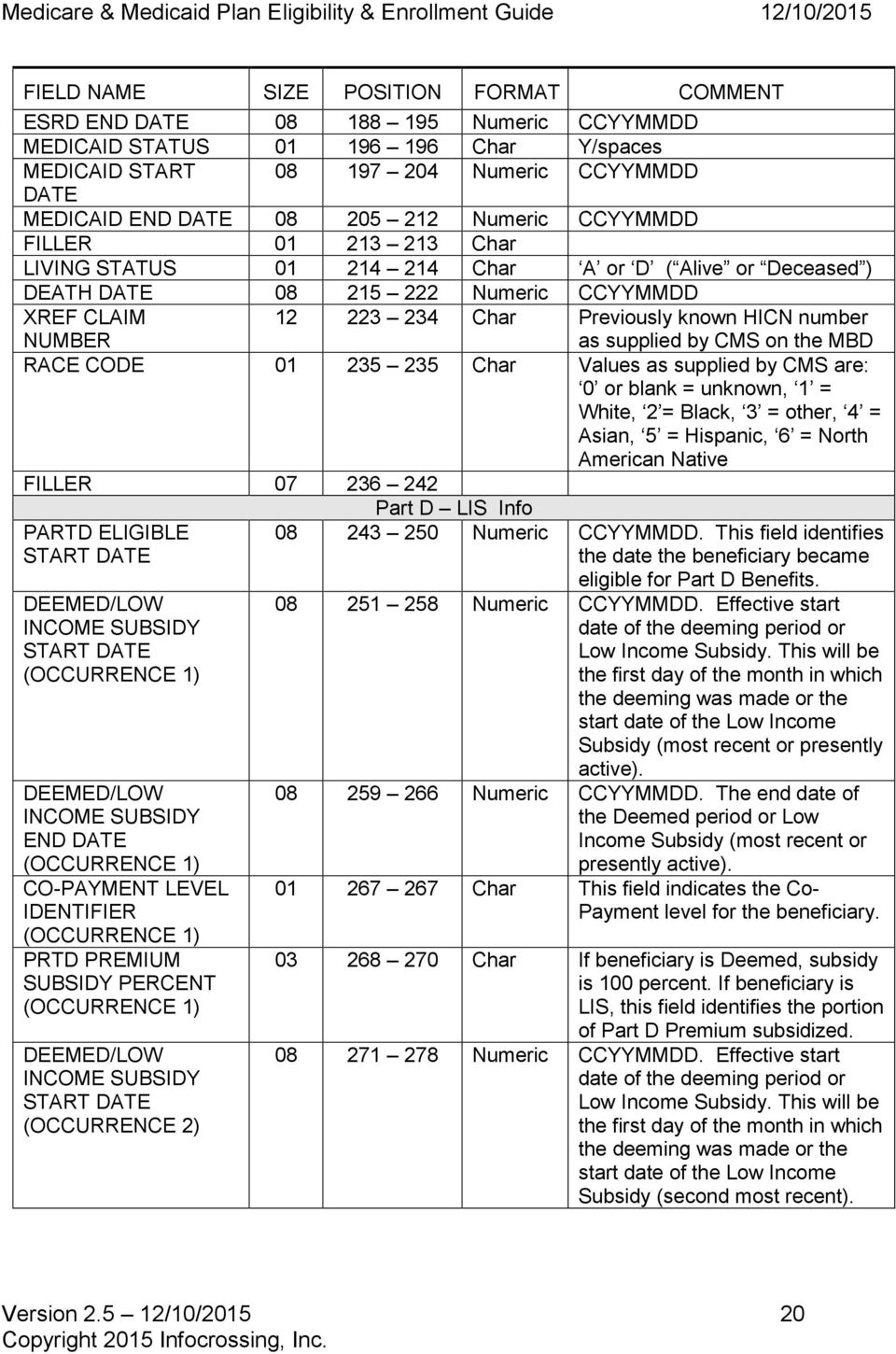
21 FIELD NAME SIZE POSITION FORMAT COMMENT DEEMED/LOW INCOME SUBSIDY END DATE (OCCURRENCE 2) CO-PAYMENT LEVEL IDENTIFIER (OCCURRENCE 2) PRTD PREMIUM SUBSIDY PERCENT (OCCURRENCE 2) Numeric CCYYMMDD. The end date of the Deemed period or Low Income Subsidy (second most recent) Char This field indicates the Co- Payment level for the beneficiary Char If beneficiary is Deemed, subsidy is 100 percent. If beneficiary is LIS, this field identifies the portion of Part D Premium subsidized. FILLER PARTD Char. OCCURRENCES PARTD ENROLLMENT EFFECTIVE DATE (OCCURRENCE 1) PARTD DISENROLLMENT DATE (OCCURRENCE 1) Char CCYYMMDD. Effective start date of the Part D plan for the beneficiary (most recent or presently active) Char CCYYMMDD. Effective disenrollment date of the Part D plan (most recent). FILLER Char. PARTD ENROLLMENT EFFECTIVE DATE (OCCURRENCE 2) PARTD DISENROLLMENT DATE (OCCURRENCE 2) Char CCYYMMDD. Effective start date of the Part D plan (second most recent) Char CCYYMMDD. Effective disenrollment date of the Part D plan (second most recent). FILLER Char. PARTD ENROLLMENT EFFECTIVE DATE (OCCURRENCE 3) PARTD DISENROLLMENT DATE (OCCURRENCE 3) Char CCYYMMDD. Effective start date of the Part D plan (third most recent) Char CCYYMMDD. Effective disenrollment date of the Part D plan (third most recent). FILLER Char. PARTD ENROLLMENT EFFECTIVE DATE (OCCURRENCE 4) PARTD DISENROLLMENT DATE (OCCURRENCE 4) Char CCYYMMDD. Effective start date of the Part D plan (fourth most recent) Char CCYYMMDD. Effective disenrollment date of the Part D plan (fourth most recent). FILLER Char. Version /10/
22 FIELD NAME SIZE POSITION FORMAT COMMENT PARTD ENROLLMENT EFFECTIVE DATE (OCCURRENCE 5) PARTD DISENROLLMENT DATE (OCCURRENCE 5) Char CCYYMMDD. Effective start date of the Part D plan (fifth most recent) Char CCYYMMDD. Effective disenrollment date of the Part D plan (fifth most recent). FILLER Char. PARTD ENROLLMENT EFFECTIVEDATE (OCCURRENCE 6) PARTD DISENROLLMENT DATE (OCCURRENCE 6) Char CCYYMMDD. Effective start date of the Part D plan (sixth most recent) Char CCYYMMDD. Effective disenrollment date of the Part D plan (sixth most recent). FILLER Char. PARTD ENROLLMENT EFFECTIVE DATE (OCCURRENCE 7) PARTD DISENROLLMENT DATE (OCCURRENCE 7) Char CCYYMMDD. Effective start date of the Part D plan (seventh most recent) Char CCYYMMDD. Effective disenrollment date of the Part D plan (seventh most recent). FILLER Char. PARTD ENROLLMENT EFFECTIVE DATE (OCCURRENCE 8) PARTD DISENROLLMENT DATE (OCCURRENCE 8) Char CCYYMMDD. Effective start date of the Part D plan (eighth most recent) Char CCYYMMDD. Effective disenrollment date of the Part D plan (eighth most recent). FILLER Char. PARTD ENROLLMENT EFFECTIVE DATE (OCCURRENCE 9) PARTD DISENROLLMENT DATE (OCCURRENCE 9) Char CCYYMMDD. Effective start date of the Part D plan (ninth most recent) Char CCYYMMDD. Effective disenrollment date of the Part D plan (ninth most recent). FILLER Char. PARTD ENROLLMENT EFFECTIVE DATE (OCCURRENCE 10) PARTD DISENROLLMENT DATE (OCCURRENCE 10) Char CCYYMMDD. Effective start date of the Part D plan (tenth and oldest) Char CCYYMMDD. Effective disenrollment date of the Part D plan (tenth and oldest date). FILLER Char. Version /10/
23 FIELD NAME SIZE POSITION FORMAT COMMENT POTENTIAL UNCOVERED MONTHS** Char = No uncovered months 2. Any value higher that zero (with leading zeroes) represents the number of potential uncovered months. 3. N/A = Unable to calculate due to following reasons: - Part D end date is greater that Part D start date. - Beneficiary is deceased - Beneficiary does not have entitlement dates - Invalid Part D dates INQUIRY TYPE Char E = Eligibility M = Membership ENROLLMENT INFO OCCURRENCES (space) = No HICN match Char 0 to maximum of 2 Enrollment Info 1 PLAN ID Char. PBP ID Char. EGHP INDICATOR Char Y/Spaces PLAN-TYPE-CODE Char. PLAN ENROLLMENT DATE DRUG PLAN INDICATOR Numeric CCYYMMDD Char Y N Enrollment Info 2 PLAN ID Char. PBP ID Char. EGHP INDICATOR Char. PLAN-TYPE-CODE Char. PLAN ENROLLMENT Numeric CCYYMMDD DATE DRUG PLAN INDICATOR Char Y N FILLER Char. NUMBER OF UNCOVERED MONTHS (NUNCMO) OCCURENCES Numeric 0 to a maximum of 20 UNCOVERED MONTHS START DATE Numeric CCYYMMDD UNCOV MONTHS Numeric. NUNCMO INDICATOR Char. TOTAL UNCOVERED MONTHS Numeric. Version /10/
24 FIELD NAME SIZE POSITION FORMAT COMMENT UNCOVERED Numeric CCYYMMDD MONTHS START DATE2 UNCOV MONTHS Numeric. NUNCMO INDICATOR Char. TOTAL UNCOVERED Numeric. MONTHS2 UNCOVERED Numeric CCYYMMDD MONTHS START DATE3 UNCOV MONTHS Numeric. NUNCMO INDICATOR Char. TOTAL UNCOVERED Numeric. MONTHS3 UNCOVERED Numeric CCYYMMDD MONTHS START DATE4 UNCOV MONTHS Numeric. NUNCMO INDICATOR Char. TOTAL UNCOVERED Numeric. MONTHS4 UNCOVERED Numeric CCYYMMDD MONTHS START DATE5 UNCOV MONTHS Numeric. NUNCMO INDICATOR Char. TOTAL UNCOVERED Numeric. MONTHS5 UNCOVERED Numeric CCYYMMDD MONTHS START DATE6 UNCOV MONTHS Numeric. NUNCMO INDICATOR Char. TOTAL UNCOVERED Numeric. MONTHS6 UNCOVERED Numeric CCYYMMDD MONTHS START DATE7 UNCOV MONTHS Numeric. NUNCMO INDICATOR Char. TOTAL UNCOVERED Numeric. MONTHS7 UNCOVERED Numeric CCYYMMDD MONTHS START DATE8 UNCOV MONTHS Numeric. NUNCMO INDICATOR Char. Version /10/
25 FIELD NAME SIZE POSITION FORMAT COMMENT TOTAL UNCOVERED Numeric. MONTHS8 UNCOVERED Numeric CCYYMMDD MONTHS START DATE9 UNCOV MONTHS Numeric. NUNCMO INDICATOR Char. TOTAL UNCOVERED Numeric. MONTHS9 UNCOVERED Numeric CCYYMMDD MONTHS START DATE10 UNCOV MONTHS Numeric. NUNCMO Char. INDICATOR10 TOTAL UNCOVERED Numeric. MONTHS10 UNCOVERED Numeric CCYYMMDD MONTHS START DATE11 UNCOV MONTHS Numeric. NUNCMO Char. INDICATOR11 TOTAL UNCOVERED Numeric. MONTHS11 UNCOVERED Numeric CCYYMMDD MONTHS START DATE12 UNCOV MONTHS Numeric. NUNCMO Char. INDICATOR12 TOTAL UNCOVERED Numeric. MONTHS12 UNCOVERED Numeric CCYYMMDD MONTHS START DATE13 UNCOV MONTHS Numeric. NUNCMO Char. INDICATOR13 TOTAL UNCOVERED Numeric. MONTHS13 UNCOVERED Numeric CCYYMMDD MONTHS START DATE14 UNCOV MONTHS Numeric. NUNCMO INDICATOR Char. Version /10/
26 FIELD NAME SIZE POSITION FORMAT COMMENT TOTAL UNCOVERED Numeric. MONTHS14 UNCOVERED Numeric CCYYMMDD MONTHS START DATE15 UNCOV MONTHS Numeric. NUNCMO Char. INDICATOR15 TOTAL UNCOVERED Numeric. MONTHS15 UNCOVERED Numeric CCYYMMDD MONTHS START DATE16 UNCOV MONTHS Numeric. NUNCMO Char. INDICATOR16 TOTAL UNCOVERED Numeric. MONTHS16 UNCOVERED Numeric CCYYMMDD MONTHS START DATE17 UNCOV MONTHS Numeric. NUNCMO Char. INDICATOR17 TOTAL UNCOVERED Numeric. MONTHS17 UNCOVERED Numeric CCYYMMDD MONTHS START DATE18 UNCOV MONTHS Numeric. NUNCMO Char. INDICATOR18 TOTAL UNCOVERED Numeric. MONTHS18 UNCOVERED Numeric CCYYMMDD MONTHS START DATE19 UNCOV MONTHS Numeric. NUNCMO Char. INDICATOR19 TOTAL UNCOVERED Numeric. MONTHS19 UNCOVERED Numeric CCYYMMDD MONTHS START DATE20 UNCOV MONTHS Numeric. NUNCMO INDICATOR Char. Version /10/
27 FIELD NAME SIZE POSITION FORMAT COMMENT TOTAL UNCOVERED Numeric. MONTHS20 RDS OCCURRENCES Char Number of RDS occurrences RETIREE SUBSIDY EFFECTIVE DATE (OCCURRENCE 1) Char CCYYMMDD. Effective start date of the Retiree Drug Subsidy (most recent or presently active). RETIREE SUBSIDY DISENROLLMENT DATE (OCCURRENCE 1) RETIREE SUBSIDY EFFECTIVE DATE (OCCURRENCE 2) RETIREE SUBSIDY DISENROLLMENT DATE (OCCURRENCE 2) RETIREE SUBSIDY EFFECTIVE DATE (OCCURRENCE 3) RETIREE SUBSIDY DISENROLLMENT DATE (OCCURRENCE 3) RETIREE SUBSIDY EFFECTIVE DATE (OCCURRENCE 4) RETIREE SUBSIDY DISENROLLMENT DATE (OCCURRENCE 4) RETIREE SUBSIDY EFFECTIVE DATE (OCCURRENCE 5) RETIREE SUBSIDY DISENROLLMENT DATE (OCCURRENCE 5) RETIREE SUBSIDY EFFECTIVE DATE (OCCURRENCE 6) RETIREE SUBSIDY DISENROLLMENT DATE (OCCURRENCE 6) RETIREE SUBSIDY EFFECTIVE DATE (OCCURRENCE 7) Char CCYYMMDD. Effective end date of the Retiree Drug Subsidy (most recent) Char CCYYMMDD. Effective start date of the Retiree Drug Subsidy (second most recent) Char CCYYMMDD. Effective end date of the Retiree Drug Subsidy (second most recent) Char CCYYMMDD. Effective start date of the Retiree Drug Subsidy (third most recent) Char CCYYMMDD. Effective end date of the Retiree Drug Subsidy (third most recent) Char CCYYMMDD. Effective start date of the Retiree Drug Subsidy (fourth most recent) Char CCYYMMDD. Effective end date of the Retiree Drug Subsidy (fourth most recent) Char CCYYMMDD. Effective start date of the Retiree Drug Subsidy (fifth most recent) Char CCYYMMDD. Effective end date of the Retiree Drug Subsidy (fifth most recent) Char CCYYMMDD. Effective start date of the Retiree Drug Subsidy (sixth most recent) Char CCYYMMDD. Effective end date of the Retiree Drug Subsidy (sixth most recent) Char CCYYMMDD. Effective start date of the Retiree Drug Subsidy (seventh most). Version /10/
28 FIELD NAME SIZE POSITION FORMAT COMMENT RETIREE SUBSIDY DISENROLLMENT DATE (OCCURRENCE 7) RETIREE SUBSIDY EFFECTIVE DATE (OCCURRENCE 8) RETIREE SUBSIDY DISENROLLMENT DATE (OCCURRENCE 8) RETIREE SUBSIDY EFFECTIVE DATE (OCCURRENCE 9) RETIREE SUBSIDY DISENROLLMENT DATE (OCCURRENCE 9) RETIREE SUBSIDY EFFECTIVE DATE (OCCURRENCE 10) RETIREE SUBSIDY DISENROLLMENT DATE (OCCURRENCE 10) Char CCYYMMDD. Effective end date of the Retiree Drug Subsidy (seventh most recent) Char CCYYMMDD. Effective start date of the Retiree Drug Subsidy (eighth most recent) Char CCYYMMDD. Effective end date of the Retiree Drug Subsidy (eighth most recent) Char CCYYMMDD. Effective start date of the Retiree Drug Subsidy (ninth most recent) Char CCYYMMDD. Effective end date of the Retiree Drug Subsidy (ninth most recent) Char CCYYMMDD. Effective start date of the Retiree Drug Subsidy (tenth most recent) Char CCYYMMDD. Effective end date of the Retiree Drug Subsidy (tenth most recent) SEQUENCE NUMBER Char Sequence number provided on the input transaction -Optional MBD HICN CLAIM NUMBER Char MBD claim number is returned when the HIC Found/Not Found MEDICARE PLAN INELIGIBILITY DATA OCCURRENCES flag is set to X Char Number of Medicare Plan Ineligibility Data occurrences. 10 occurrences maximum. MEDICARE PLAN INELIGIBILITY START DATE (OCCURRENCE 1) MEDICARE PLAN INELIGIBILITY END DATE (OCCURRENCE 1) MEDICARE PLAN INELIGIBILITY START DATE (OCCURRENCE 2) Char CCYYMMDD. Medicare Plan Ineligibility due to Unlawful Presence Start Date. (first occurrence) Char CCYYMMDD. Medicare Plan Ineligibility due to Unlawful Presence End Date. (first occurrence) Char CCYYMMDD. Medicare Plan Ineligibility due to Unlawful Presence Start Date. (second occurrence) Version /10/
29 FIELD NAME SIZE POSITION FORMAT COMMENT MEDICARE PLAN INELIGIBILITY END DATE (OCCURRENCE 2) MEDICARE PLAN INELIGIBILITY START DATE (OCCURRENCE 3) MEDICARE PLAN INELIGIBILITY END DATE (OCCURRENCE 3) MEDICARE PLAN INELIGIBILITY START DATE (OCCURRENCE 4) MEDICARE PLAN INELIGIBILITY END DATE (OCCURRENCE 4) MEDICARE PLAN INELIGIBILITY START DATE (OCCURRENCE 5) MEDICARE PLAN INELIGIBILITY END DATE (OCCURRENCE 5) MEDICARE PLAN INELIGIBILITY START DATE (OCCURRENCE 6) MEDICARE PLAN INELIGIBILITY END DATE (OCCURRENCE 6) MEDICARE PLAN INELIGIBILITY START DATE (OCCURRENCE 7) MEDICARE PLAN INELIGIBILITY END DATE (OCCURRENCE 7) MEDICARE PLAN INELIGIBILITY START DATE (OCCURRENCE 8) Char CCYYMMDD. Medicare Plan Ineligibility due to Unlawful Presence End Date. (second occurrence) Char CCYYMMDD. Medicare Plan Ineligibility due to Not Lawful Presence Start Date. (third occurrence) Char CCYYMMDD. Medicare Plan Ineligibility due to Unlawful Presence End Date. (third occurrence) Char CCYYMMDD. Medicare Plan Ineligibility due to Unlawful Presence Start Date. (fourth occurrence) Char CCYYMMDD. Medicare Plan Ineligibility due to Unlawful Presence End Date. (fourth occurrence) Char CCYYMMDD. Medicare Plan Ineligibility due to Unlawful Presence Start Date. (fifth occurrence) Char CCYYMMDD. Medicare Plan Ineligibility due to Unlawful Presence End Date. (fifth occurrence) Char CCYYMMDD. Medicare Plan Ineligibility due to Unlawful Presence Start Date. (sixth occurrence) Char CCYYMMDD. Medicare Plan Ineligibility due to Unlawful Presence End Date. (sixth occurrence) Char CCYYMMDD. Medicare Plan Ineligibility due to Unlawful Presence Start Date. (seventh occurrence) Char CCYYMMDD. Medicare Plan Ineligibility due to Unlawful Presence End Date. (seventh occurrence) Char CCYYMMDD. Medicare Plan Ineligibility due to Unlawful Presence Start Date. (eighth occurrence) Version /10/
30 FIELD NAME SIZE POSITION FORMAT COMMENT MEDICARE PLAN INELIGIBILITY END DATE (OCCURRENCE 8) MEDICARE PLAN INELIGIBILITY START DATE (OCCURRENCE 9) MEDICARE PLAN INELIGIBILITY END DATE (OCCURRENCE 9) MEDICARE PLAN INELIGIBILITY START DATE (OCCURRENCE 10) MEDICARE PLAN INELIGIBILITY END DATE (OCCURRENCE 10) FILLER **Potential Uncovered Months Char CCYYMMDD. Medicare Plan Ineligibility due to Unlawful Presence End Date. (eighth occurrence) Char CCYYMMDD. Medicare Plan Ineligibility due to Unlawful Presence Start Date. (ninth occurrence) Char CCYYMMDD. Medicare Plan Ineligibility due to Unlawful Presence End Date. (ninth occurrence) Char CCYYMMDD. Medicare Plan Ineligibility due to Unlawful Presence Start Date. (tenth occurrence) Char CCYYMMDD. Medicare Plan Ineligibility due to Unlawful Presence End Date. (tenth occurrence) Important Note: The Number of Uncovered months (number of months in which a Medicare eligible beneficiary did not have creditable drug coverage for a continuous period of 63 days or more) is an important rule of the Medicare Prescription Drug program. Although the Medicare & Medicaid Plan enrollment (MMP) program is subject to the Medicare Prescription Drug rules, beneficiaries that become eligible to enroll in the MMP program will get any prior number of uncovered months reset as soon as their low income subsidy eligibility status is established. As such, while this field should not be considered in the initial enrollment of beneficiaries in the demonstration program, it could have a potential use in identifying payment reconciliation issues. ** As of November 9, 2007, when applicable, CMS requires plans to submit the latest incremental number of uncovered months, rather than the cumulative process that used to be in place. The Infocrossing new potential incremental uncovered months is reported as follows: The Potential Uncovered Months field represents the latest calculated incremental number of months for which the beneficiary was NOT enrolled in a Part D or Retiree Drug Subsidy plan. We subtracted the latest Part D end date from the uncovered months effective date.if there are no Part D dates, then, the end of the beneficiary s Part D ICP date, or May, 2006, whichever is later, is used. Version /10/
31 Example 1: If the beneficiary is currently enrolled in a Part D plan, then, the potential incremental uncovered months is zero. If the latest Part D end date is zeros, then uncovered months is zero. Example 2: If the beneficiary terminated membership in a Part D plan on October 31, 2007 and the uncovered months effective date is December 1, 2008, then this is less than 63 days from the calculation date and the uncovered months is set to zero. Example 3: If the beneficiary terminated membership in Part D plan August 31, 2007 and uncovered months effective date is December 1, 2008, which is greater then 63 days, the number of uncovered months is 3 months. Prior to November 8, 2007, the number of uncovered months reported by plans to CMS was considered cumulative.the calculation for the potential cumulative number of uncovered months was as follows: This field is the number of months that a beneficiary does not appear to have been enrolled in a Part D plan or Retiree Drug Subsidy (RDS) plan. This field is calculated by first looking at the beneficiary s Part D eligibility date. We then look for periods of time of 63 consecutive days or more where the CMS record does not indicate that the individual was enrolled in a Part D or RDS plan. If any such gaps exist, we then add up the number of full calendar months from the beginning of each of the identified potential gaps. These months are only the potential uncovered months. Plans must follow CMS guidance on Creditable Coverage and the Late Enrollment Penalty to determine the actual number of uncovered months and report this number to CMS. Example Calculation: John Doe was eligible for Part D on 01/01/2006. He joined plan S9999 at that time. He then disenrolled from plan S9999 on 12/31/2006. There are no other Part D plan or RDS plan enrollment periods in the CMS record. He is now enrolling in plan S9998 for a 09/01/2007 effective date. He has a potential gap of 63 or greater days. His potential uncovered months would be calculated as eight. Plan S9998 would need to follow CMS guidance on Credible Coverage/Late enrollment penalty to determine the actual number of uncovered months, which may be anywhere from zero to eight in this example, and submit this information to CMS. Version /10/
32 2. MEDICARE TRANSACTION PROCESSING BATCH TRANSACTION PROCESSING Clients that wish to do batch transaction processing should contact an Infocrossing customer service representative at Infocrossing by calling The Infocrossing help desk personnel can assist you in assigning an account number which is needed to submit both Eligibility and Enrollment files and assist with any questions that you might have. A batch job will be implemented to automatically process client submitted Medicare transaction files. Depending upon the client s requirements, Infocrossing will process the transactions as part of a nightly job or within 5 to 15 minutes of upload. Whether a batch job is run after-hours or during the day, the system will generate error/response data in report and/or data formats, ready for downloading. The client s input data file will be deleted by the batch job. The transaction file supplied by the customer must contain one header record followed by Medicare transactions. The following pages explain the format of the data and individual field positions. The record length is 300 bytes. All applicable fields are validated against the MBD eligibility database. Version /10/
33 2.1 MEDICARE TRANSACTION PROCESSING ALL TRANSACTION TYPES EXCEPT 76 AND 90 This document is intended for readers to use as a supplement to the CMS literature and should primarily be used as a guide to build the Infocrossing required record layout. Batch Enrollment/Disenrollment/Change/Cancellation transactions Header Record Data Element Size Format Position Remarks Record type 1 Num 1 1 Header record Account 7 Char 2-8 Account number assigned by Infocrossing. Filler 1 Char 9 Space Planid 5 Char Plan id (contract) supplied by CMS Filler 1 Char 15 Space Batch-Number 6 Num Any Numeric Value identifying the group of transactions Trans-Count 8 Num Numeric Value specifying the number of type 3 detail records sent Batch File Type ** 5 Char Note: RETRO, POVER and SVIEW submissions are special file submissions that are initiated only with specific guidance from CMS. spaces = Normal transaction which conforms to CMS CCM processing rules. RETRO = Retroactive Transaction Submission. POVER = Plan Rollover Transaction Submission SVIEW = Special Organizational Review CMS Approval Request ID *** Transaction Submission 10 Char Leave as spaces when Batch File Type is spaces. Otherwise, obtain the appropriate value from the CMS MARx UI screens when Batch File Type is RETRO, POVER or SVIEW. Filler 256 Char Spaces ** If RETRO POVER or SVIEW is populated, only one Header record must be included in the file submission to Infocrossing. *** Obtain the appropriate value for the CMS Approval Request ID from the CMS MARX screens when you need to submit a RETRO, POVER or SVIEW file to Infocrossing. Note: This value must be populated when Batch File Type is populated. Your file submission will be rejected if multiple header records are sent with the Batch File Type field populated or an invalid value is supplied in the Batch File Type. Version /10/
34 Batch Enrollment/Disenrollment/Change/Cancellation transactions Detail Record ** The remarks section can be used to build your transaction records. The CMS Plan Communication User Guide document should be used primarily. Note: For ease of reference, the 76 residential Address Change transaction layout has been defined in a separate section. Please keep in mind that all transaction types can be submitted together in one batch file to Infocrossing for processing. Additional important notes: - All references to Medicare and Medicaid Plans are used with the acronym: MMP - The CMS MARx system input file layout requirement allows for many different types of organizations to submit data to CMS. While this document contains references to these organizations, Medicare and Medicaid Plan personnel should strictly concern themselves with data specific to MMP processing requirements. Some example acronyms of such organizations are: MAs (Medicare Advantage Plans), MAPDs (Medicare Advantage Prescription Drug Plans) and PDPs (Prescription Drug Plans) - While the CMS MARx system processes several different types of transactions for various organizations concerned with the MARx processing interface, only the transactions that are applicable to MMPs are described in this document. Transaction types 74 (Employer Group Health Plan Change), 75 (Premium Payment Option Change) and 77 (Segment ID change) are excluded from this document and are not applicable to MMPs. Version /10/
35 Data Element Size Format Position Remarks Record-Type 1 Num 1 3 -transaction record. Health Insurance Claim-Number (HICN) 12 Char 2-13 Valid Health insurance Claim Number. Must exist in CMS Eligibility for enrollments. Required on all transactions. Surname 12 Char Last name. No blank or spaces. Required on all transactions. First Name 7 Char First name. No blank or spaces. Required on all transactions. Middle Initial 1 Char 33 Middle Initial. Can be a blank or space. Optional on all transactions. Gender 1 Char 34 1 = male, 2 = female, 0 = unknown. Required on all transactions. Birth Date 8 Num Birth date in CCYYMMDD format. Required on all transactions. EGHP Flag 1 Char 43 To identify Employer Group Health Plan (EGHP). Values are Y or blank as applicable. Used on 61 transactions. Report Y for type 61 transactions if EGHP, otherwise leave blank. Leave blank for all other transactions. PBP # 3 Char Plan Benefit Package. Required on transactions 61, 51, 72, 73, 78, 81, 82, 83 if plan has PBPs. Leave field blank only if not applicable for the contract. Otherwise, PBP is required for all organizations to report a 3 character numeric number (zero-padded, ). Version /10/
36 Data Element Size Format Position Remarks Election Type 1 Char 47 While all election type values as explained below are valid in the CMS MARx system for many organizations, as far as the MMP plans are concerned, the appropriate election type value for all transactions is U LIS/Duals, Special Enrollment Period. Required on 61 and 51 transactions. Leave as space if not applicable. A (AEP)Annual Enrollment: Oct 15 Dec 07 D (MADP) 45-Day MA Disenrollment Period between January 1 and February 14 of each year with February 1 or March 1 effective dates. E (IEP) Initial Enrollment Period is 3 months prior and 3 months after the 65th birthday. F (IEP 2) Second Initial Enrollment Period for Part D. I (ICEP) Initial Coverage Enrollment Period: 3 months prior to Eligibility Part A and Part B date S (SEP) Special Election Period T (OEPI) Open Enrollment for Institutionalized. First 3 months of the year. Additional Special Election types: U SEP for Dual-eligible individuals or individuals who lose their Dual-Eligibility and SEP for Non-Dual Eligible individuals with LIS and individuals who lose LIS V SEP for changes in Residence W SEP EGHP X Administrative Action SEP Y Casework exceptional condition Z MA Auto-Enrollment Period R SEP enrollment into a 5-Star rated Plan. Plan-ID (Contract # ) 5 Char Contract Number Required on all transactions: 61, 51, 72, 73, 78, 81, 82 and 83 H**** = identifies MMP plans (All asterisks must be replaced by valid CMS assigned numeric values) Version /10/
37 Data Element Size Format Position Remarks Application Receipt Date Transaction Code Disenrollment reason 8 Num CCYYMMDD format. Required on 61 transactions. For Passive MMP enrollments: The Application Receipt date field is the date the transaction is submitted to CMS (which must be no later than 60 days before the effective date). For passive enrollments effective January 1, the application date will be October 14 of the current year. Use an enrollment Source Code value of J State submitted passive enrollment (see Enrollment Source Code in position 193). For Beneficiary Elected MMP enrollments: Application date is the date the Plan received the beneficiary s enrollment request. Refer to the CMS Enrollment guidance for additional detailed explanation. Use an enrollment Source Code value of L MMP beneficiary election. Not applicable on transactions 72 through 78, 81, 82, 83 and Num Enrollments: 61 Disenrollments: 51 4rx Change: 72 Uncovered Months Change: 73 Part C Premium Change: 78 Disenrollment Cancellation: 81 MMP Enrollment Cancellation: 82 MMP Opt-Out Update: 83 2 Num MMP disenrollment reasons: 11 Voluntary disenrollment 63 MMP Opt-Out After Enrolled 64 Loss of Demonstration Eligibility 92 Involuntary disenrollment for a move out of plan s service area Blank Valid only on transaction 51. Leave blank on all other transactions. Required for Involuntary Disenrollments Effective Date 8 Num Effective date in CCYYMMDD format. Required on all transactions. Day field must always contain the first of the month. Segment ID 3 Char This field is not applicable to Medicare & Medicaid Plans (MMPs). Leave it initialized to blank on all transactions. Version /10/
38 Data Element Size Format Position Remarks ESRD Override (Prior Commercial Override) Premium Payment Option / Parts C-D Part C Premium Amount Creditable Coverage Flag 1 Char 76 Applicable to 61 transactions only. The override field is required if beneficiary has ESRD and wants to enroll in an MMP Plan. Not required if plan is special-needs-plan (SNP). Use Alpha-numeric, 1-9 and A-F to report ESRD override condition. Zero (0) and blank = no override to report. 1 Char 77 This field is not applicable to Medicare & Medicaid Plans (MMPs). Populate this field with a value of N (No Premium Applicable) 6 Num For MMP Plans, initialize this field with zeroes during initial enrollment. The total Part C premium owed by the member; including amounts related to optional supplemental benefits. CMS collects the premiums from SSA/RRB/OPM and forwards them to the plan for members that elect to have them withheld from their benefit checks. 6-digits with leading zeroes, or blank if premium does not apply. Decimal point assumed 2-digits from right, XXXXvXX. A value of is an acceptable changeto value meaning $0.00. A value of is $37 and $125 is Required on 61 and 78 transactions. Not applicable on all other transactions. 1 Char 84 Note for MMP enrollments: the creditable coverage field is always set to Y since uncovered months is not reported. Used in determining the higher premium charge for late enrollment. For 61 transactions, valid values are Y, N, R and blank. For 73 transactions, valid values are Y, N, R, U and blank. Y - if covered N - if not covered. R - Used on 61/73 transactions to reset uncovered months to zero. U - Undo a previously submitted R (reset) Not applicable on all other transactions. Version /10/
39 Data Element Size Format Position Remarks Number of Uncovered Months Employer Subsidy Enrollment Override Flag Part D Opt- Out Flag 3 Num Note for MMP enrollments: The NUNCMO field is always set to 000. Count of total months without drug coverage. If a beneficiary fails to enroll in a Part D plan timely, a higher premium is assessed based on the number of months that the individual lacked drug coverage. This is used in determining the higher premium amount. Format 999 with leading zeroes, i.e. 3 is 003. When Creditable Coverage flag is Y, R, U or blank, value should be zero. Value should be greater than 0 if Creditable Coverage Flag is N. Required on 61 and 73 transactions. 1 Char 88 To allow enrollment into an MMP plan by an individual that is already covered by an employer subsidized by CMS to provide drug coverage. If the beneficiary is in a plan receiving an employer subsidy, but still wants to enroll, submit the enrollment with the override flag set to Y ; otherwise, leave blank. Used on 61 transactions if beneficiary has Employer Subsidy status; otherwise leave blank. Not applicable on all other transactions. 1 Char 89 Optional Field on a 51 transaction. Y = Beneficiary already has a third Party insurance that covers drugs and does not wish to be auto-enrolled in part D. Blank = leave field blank if beneficiary has not opted-out of Part D. Part D Rx ID 20 Char Not Required on Passive MMP enrollments. The member ID assigned to the Beneficiary. Required for all MAPD and Part D plans. Left-justified with trailing spaces. Uppercase alpha A-Z and/or numeric 0-9 only. Required for all part D plans on 61 and 72 transactions. Required on 72 transactions when changing primary Rx insurance. Version /10/
40 Data Element Size Format Position Remarks Part D Rx Group Secondary Drug Insurance Flag Secondary Rx ID Secondary Rx Group 15 Char Not Required on Passive MMP demonstration enrollments. The identifying number assigned to the cardholder group or employer group. Optional field. Change-to-value (used by all MAPD and Part D plans). Left-justified with trailing spaces. Uppercase alpha A-Z and/or numeric 0-9 only. Applicable to 61 and 72 transactions. Not applicable on all other transactions. 1 Char 125 To support coordination of benefits. Optional field on 61 and 72 transactions. Y = beneficiary has secondary drug insurance N = beneficiary does not have secondary drug insurance available. blank = do not know whether beneficiary has secondary drug insurance. Change-to-value on 72 transactions. 20 Char The ID # assigned to the member by the secondary insurer. It supports coordination of benefits. Secondary insurance plan s ID number for beneficiary. Alphanumeric, upper case when alpha; left justified. Upper case printable characters and default value of spaces. Optional field used on 61and 72 transactions for if there is secondary insurance. 15 Char The Group # assigned to the member by the secondary insurer. It supports coordination of benefits. Secondary insurance plan s group ID number for beneficiary. Alphanumeric, upper case when alpha; left justified. Upper case printable characters and default value of spaces. Optional field used on 61and 72 transactions if there is secondary insurance. Version /10/
41 Data Element Size Format Position Remarks Part D Rx BIN 6 Char Not Required on Passive MMP enrollments. The card issuer identifier or a Bank Identifying Number used for network routing. Required for all MAPD and PDP plans Right justified, zero filled. Numeric 0-9 only. Applicable for transaction types 61 and 72. Part D Rx PCN Secondary Drug BIN Secondary Drug PCN Enrollment Source 10 Char Not Required on Passive MMP enrollments. The number assigned by the processor. Optional field. Change-to-value (used by all MAPD and Part D plans). Left-justified with trailing spaces. Uppercase alpha A-Z and/or numeric 0-9 only. Applicable for transaction types 61 and Char Applicable on 61 and 72 transactions for MA-PD and PDP if there is secondary insurance. If specified, field must be right justified, zero filled, numeric 0-9 only. Change if secondary Drug Insurance Flag change-to value is Y. 10 Char Optional field used for MA-PD and PDP if there is secondary insurance. If specified, must be alphanumeric, uppercase when alpha and left justified. Applicable on 61 and 72 transactions for MA-PD and PDP if there is secondary insurance. 1 Char 193 A Auto-enrolled by CMS B Beneficiary election C Facilitated enrollment by CMS D CMS annual rollover E Plan-submitted auto-enrollment F Plan-submitted facilitated enrollment G Point of Sale (POS) submitted enrollment H CMS submitted reassignment enrollment J State submitted passive enrollment K CMS submitted passive enrollment L MMP beneficiary election Blank Valid on 61 enrollment transactions. State * 2 Char Numeric State code i.e. 05 for CA *Use Optionally on 61 enrollments only. Version /10/
42 Data Element Size Format Position Remarks County * 3 Char Numeric County code *Use Optionally on 61 enrollments only. State/County Validation Flag * 1 Char 199 State and County validation indicator Y Validate State/County against CMS data blank or N Do not validate State/County *Use Optionally on 61 enrollments only. SNP ESRD 1 Char 200 S for SNP plan to bypass Prior- override Flag PBP Change Flag MMP Opt-Out Flag Commercial-Override edit. 1 Char 201 Enter a value of Y to indicate the 61 single enrollment transaction is a PBP change. Value of Y is required when submitting a PBP change with an election type of Z and an enrollment source code of E. 1 Char 202 Valid on 51, 82 and 83 transactions. Optional on 51 and 82 transactions, required on an 83 transaction. Y = Opted out of passive enrollment into MMP Plan N =Not opted out of passive enrollment into MMP plan. Spaces = Not Applicable Filler 81 Char Spaces Transaction Maintenance- Flag 1 Char 284 D to delete transaction record U to modify transaction record or else leave blank Override-Flag 1 Char 285 Valid Y to bypass edit or (space). Transaction Tracking ID 15 Char Must use the Infocrossing supplied account# (ex: HCF**** where the asterisks represent a unique Infocrossing assigned number) in the first 7 bytes. Positions 8 through 15 are optional and free-form. * Used if you wish to have state and county codes checked against the MBD eligibility database. Please contact the Infocrossing Help desk for further explanation. Version /10/
43 2.2 MEDICARE TRANSACTION PROCESSING 76 RESIDENTIAL ADDRESS CHANGE The Interface to Medicare-solution document is intended for plans to use as a supplement to the CMS literature and should primarily be used as a guide to build the Infocrossing required record layout. Batch Residential Address Change transaction Header Record Data Element Size Format Position Remarks Record type 1 Num 1 1 Header record Account 7 Char 2-8 Account number assigned by Infocrossing. Filler 1 Char 9 Space Planid 5 Char Plan id supplied by CMS (contract#) Filler 1 Char 15 Space Batch-Number 6 Num Any Numeric Value identifying the group of transactions Trans-Count 8 Num Numeric Value specifying the number of type 3 detail records sent Filler 271 Char Spaces Version /10/
44 Batch Residential Address Change transaction Detail Record ** The remarks section can be used to build your transaction record. The CMS Plan Communication User Guide document should be used primarily. Data Element Size Format Position Remarks Record-Type 1 Num 1 3 -transaction record. Health Insurance Claim-Number (HICN) 12 Char 2-13 Valid Claim Number. Must exist in CMS Eligibility for enrollments. Required on all transactions. Surname 12 Char Last name. No blank or spaces. Required on all transactions. First Name 7 Char First name. No blank or spaces. Required on all transactions Middle Initial 1 Char 33 Middle Initial. Can be a blank or space. Optional on all transactions. Gender 1 Char 34 1 = male, 2 = female, 0 = unknown. Required on all transactions. Birth Date 8 Num Birth date in CCYYMMDD format. Required on all transactions. Filler 5 Char Leave blank on 76 transaction. Plan-ID (Contract # ) 5 Char Contract Number Required on 76 transaction. H**** = identifies MMP plans. (All asterisks must be replaced by valid CMS assigned numeric values) Filler 8 Char Leave blank on 76 transaction. Transaction Code 2 Num Required: Residence Address Change code: 76 Filler 2 Char Leave blank on 76 transaction. Effective Date 8 Num Effective date in CCYYMMDD format. Required on all transactions. Day field must always contain the first of the month. Filler 3 Char Leave blank on 76 transaction Residence Address Line1 65 Char Street Address. Required when Address Update/Delete Flag is Update Residence Address 65 Char Optional. Apartment or Suite number Line2 Address Update/Delete Flag 1 Char 206 Required. U = Adding a new address or modifying an existing address. D = Deleting an existing address Residence City 57 Char City Name. Required when Address Update/Delete Flag is Update. Version /10/
45 Data Element Size Format Position Remarks Residence State 2 Char USPS two-character state abbreviation. Required when Address Update/Delete Flag is Update. Residence Zip Code 5 Num USPS five-character numeric Zip Code. Required when Address Update/Delete Flag is Update. Residence Zip Code+4 4 Num USPS four-character numeric Zip Code+4. Optional field. End Date 8 Num Optional. CCYYMMDD format. Last day of the month in which the specific residence address was active. Filler 1 Char 283 Spaces Transaction Maintenance-Flag 1 Char 284 D to delete transaction record U to modify transaction record or else leave blank Override-Flag 1 Char 285 Valid Y to bypass edit or (space). Transaction Tracking ID 15 Char Must use the Infocrossing supplied account# (ex: HCF**** where the asterisks represent a unique Infocrossing assigned number) in the first 7 bytes. Positions 8 through 15 are optional and free-form. Version /10/
46 2.3 MEDICARE TRANSACTION PROCESSING 90 REPORTING IDENTIFIED DRUG OVERUTILIZERS The Interface to Medicare-solution document is intended for plans to use as a supplement to the CMS literature and should primarily be used as a guide to build the Infocrossing required record layout. Transaction Code 90 Reporting Drug Overutilizers Header Record Data Element Size Format Position Remarks Record type 1 Num 1 1 Header record Account 7 Char 2-8 Account number assigned by Infocrossing. Filler 1 Char 9 Space Planid 5 Char Plan id supplied by CMS (contract#) Filler 1 Char 15 Space Batch-Number 6 Num Any Numeric Value identifying the group of transactions Trans-Count 8 Num Numeric Value specifying the number of type 3 detail records sent Filler 271 Char Spaces Version /10/
47 Transaction Code 90 Reporting Drug Overutilizers Detail Record ** The remarks section can be used to build your transaction record. The CMS Plan Communication User Guide document should be used primarily. Data Element Size Format Position Remarks Record-Type 1 Num 1 3 -transaction record. Health Insurance Claim-Number (HICN) 12 Char 2-13 Valid Claim Number. Must exist in CMS Eligibility for enrollments. Required on all transactions. Surname 12 Char Last name. No blank or spaces. Required. First Name 7 Char First name. No blank or spaces. Required. Middle Initial 1 Char 33 Middle Initial. Can be a blank or space. Optional. Gender 1 Char 34 1 = male, 2 = female, 0 = unknown. Required. Birth Date 8 Num Birth date in CCYYMMDD format. Required. Filler 5 Char Leave blank. Plan-ID (Contract # ) 5 Char Contract Number. Required. H**** = identifies MMP plans. (All asterisks must be replaced by valid CMS assigned numeric values) Filler 8 Char Leave blank. Transaction Code 2 Num Required: 90 Filler 13 Char Leave blank Update/Delete Flag 1 Char 76 Required. Values are: U update D delete POS Drug Edit Status 1 Char 77 Required. Valid values are: N Notification I Implementation T Termination POS Drug Edit Class 3 Char Required Value of OPI POS Drug Edit Code 3 Char Required Valid values are PS1 or PS2 Notification Date 8 Num Required. CCYYMMDD format. Implementation Date 8 Num Required when POS Drug Edit Status is I. CCYYMMDD format. Termination Date 8 Num Required when POS Drug Edit Status is T. CCYYMMDD format. Filler 176 Char Leave blank. Transaction Maintenance-Flag 1 Char 284 D to delete transaction record U to modify transaction record or else leave blank Override-Flag 1 Char 285 Valid Y to bypass edit or (space). Transaction Tracking ID 15 Char Must use the Infocrossing supplied account# (ex: HCF**** where the asterisks represent a unique Infocrossing assigned number) in the first 7 bytes. Positions 8-15 are optional. Version /10/
48 2.4 MEDICARE TRANSACTION RESPONSE Header record: record length = 470 Header Record DATA ELEMENT SIZE STARTING POSITION REMARKS Record Type 1 1 Value 1 - copied from input Account# Account number assigned by Infocrossing as submitted in the input file header Filler 1 9 Space Planid (Contract) Plan id as submitted in the input file header Filler 1 15 Space Batch-Number Numeric value as submitted in the input file header Trans-Count Numeric value as submitted in the input file header Batch File Type File type value as submitted in the input file header CMS Approval Request ID CMS request ID as submitted in the input file header (if applicable) Filler Space Version /10/
49 File attributes: record length = 470 Detail Record DATA ELEMENT SIZE STARTING POSITION REMARKS Record Type 1 1 Value 3. Copied from input Claim Number (HICN#) Transaction Code 2 14 Values: 51, 61, 72 through 78, 81, 82, 83, 90. Last Name First Name Middle Initial 1 35 Gender Birth Date 8 37 CCYYMMDD EGHP flag PBP # Election Type Plan ID (contract#) Application Receipt Date Disenrollment Reason Effective Date Segment ID Plan Designation 4 76 MMP - MMP program will have an Infocrossing designation of MMP. Note that this is only an Infocrossing assigned value. Filler ESRD Override/Prior Commercial Premium Withhold Option C-D Part C premium Amt Filler Creditable Coverage Flag Number of Uncovered Months Employer subsidy Enr override flag Part D opt-out flag Part D Rx ID Part D Rx Group ndry Drug Ins. Flag ndry RX ID ndry RX Group Part D Rx BIN Part D Rx PCN ndry Rx BIN ndry Rx PCN Enrollment Source Code Tran record delete or update flag Value D U or blank Version /10/
50 DATA ELEMENT SIZE STARTING POSITION REMARKS State and county codes PBP change Flag MMP Opt-Out Flag Filler Note: Data grouping below is. reused/redefined depending on transaction types 76 and 90 Tran Code 90 Data Elements:. TC 90 Update/Delete Flag TC 90 POS Drug Edit Status TC 90 POS Drug Edit Class TC 90 POS Drug Edit Code TC 90 Notification Date TC 90 Implementation Date TC 90 Termination Date Tran Code 76 Data Elements:. Residence Address Line Residence Address Line Address Update/Delete Flag Residence City Residence State Residence Zip Code Residence Zip Code Residence End Date Transaction Tracking ID Filler Error Codes Up to 10 occurrences of 2 position error codes Notes: The information in each field (HICN, Last Name, etc.) is the same value sent on the input record. Record Type: The value of 1 is used for the header record. This is the same header record sent to Infocrossing in the batch upload file. Some customers use the header for auditing and/or balancing purposes. Transaction Code: The value in this field corresponds to the type of CMS transaction record: 51 = disenrollment, 61 = enrollment, 72 = 4Rx Change, 73 = Uncovered Months Change, 76 = Residence Address Change, 78 = Part C premium Change, 81 = Disenrollment Cancellation, 82 = MMP Enrollment Cancellation, 83 = MMP Opt-OUT Update, 90 = Reporting Identified Drug Overutilizers. Version /10/
51 2.5 TRANSACTION ERROR CODES These error codes represent a list of all the possible error code values that Infocrossing generates when processing input transactions received from various organizations including but not limited to MMP plans. Only some of these error codes will apply to MMP concerned organizations (those that do not apply, have the designation (Can be ignored by MMP processing). Transactions that are returned to you with a 00 or 99 code (records accepted or accepted with an override) are automatically sent to CMS for processing. All others must be addressed for correction and re-sent to Infocrossing for eventual acceptance and submission to the CMS MARx system. Error Code and Message Data Element Name Transaction Code 00 RECORD ACCEPTED does not map All Transactions 99 RECORD ACCEPTED OVERRIDE does not map All Transactions 01 LAST NAME MBD DATABASE Surname 61 MISMATCH 02 FIRST NAME MBD DATABASE First Name 61 MISMATCH 03 TRANS TYPE NOT APPLICABLE TO MMP does not map 73, 74, 75, 77, 78, 80, GENDER MBD DATABASE Gender 61 MISMATCH 05 LAST NAME MBD MEMBERSHIP MISMATCH 06 FIRST NAME MBD MEMBERSHIP MISMATCH 07 NO DAILY TRR MATCH FOUND FOR TRAN CODE 80 CANCELLATION 08 GENDER MBD MEMBERSHIP MISMATCH 09 PLAN NUMBER MBD DATABASE MISMATCH 10 CLAIM NUMBER INVALID Claim-Number Surname 51, 72, 73, 74, 75, 76, 77, 78, 79, 80, 81, 82, 83, 90 First Name 51, 72, 73, 74, 75, 76, 77, 78, 79, 80, 81, 82, 83, 90 does not map 80 Gender 51, 72, 73, 74, 75, 76, 77, 78, 79, 82, 83, 90 Plan-ID (Contract 51 #) All Transactions (HICN#) 11 LAST NAME INVALID Surname All Transactions 12 FIRST NAME INVALID First Name All Transactions 13 NO DAILY TRR MATCH FOUND FOR does not map 81 TRAN CODE 81 CANCELLATION 14 GENDER CODE INVALID Gender All Transactions Version /10/
52 Error Code and Message Data Element Name Transaction Code 15 PLAN NUMBER INVALID Plan-ID (Contract All Transactions #) 16 EFFECTIVE DATE INVALID Effective Date All Transactions 17 TRANSACTION CODE REQUIRED OR Transaction Code All Transactions INVALID 18 CLAIM # NOT FOUND ON MBD Claim-Number All transactions DATABASE (HICN#) 19 ADDRESS CHG UPDATE FLAG MUST Address 76 BE U OR D Update/Delete Flag 20 ADDRESS CHG END DATE MUST BE End Date 76 IN CCYYMMDD FORMAT 21 TRANSACTION RECORD ALREADY EXISTS does not map 51, 61, 74, 75, 76, 77, 78, 79, 80, 81, 22 MEDICARE CONTRACT CANNOT BE VALIDATED 23 MEMBERSHIP CLAIM# NOT FOUND ON MBD DB 24 TRANS TYPE APPLICABLE ONLY TO MMP (CAN BE IGNORED BY MMP PROCESSING) 25 ADDRESS/CITY/ST/ZIP REQUIRED WHEN UPDATE FLAG IS U 82, 83, 90 Plan-ID (Contract All transactions #) Claim-Number 51 (HICN#) does not map 82, 83 Residence Address Line1 Residence City Residence State Residence Zip Code 26 BENEFICIARY IS DECEASED does not map INVALID STATE OR ZIP CODE Residence State 76 SPECIFIED ON 76 TRANSACTION Residence Zip REC MUST CONTAIN DATA SPECIFIC TO 4RX CHANGE REC MUST CONTAIN DATA SPECIFIC TO NUNCMO CHANGE Code any data element which is not pertinent to the 72 transaction any data element which is not pertinent to the 73 transaction 30 NOT ENROLLED IN PART B does not map EFFECTIVE DATE LESS THAN PART Effective Date 61 B EFFECTIVE DATE 32 ESRD OVERRIDE/AGED-IN INDICATOR INVALID 61 ESRD Override (Prior Commercial Override) Version /10/
53 Error Code and Message Data Element Name Transaction Code REC MUST CONTAIN DATA any data element 74 SPECIFIC TO EGHP CHANGE (CAN which is not BE IGNORED BY MMP PROCESSING) pertinent to the EGHP EFFECTIVE DATE RANGE IS: CCM 3 THRU CCM+3 (CAN BE IGNORED BY MMP PROCESSING) transaction Effective Date BIRTH DATE NOT NUMERIC Birth Date All Transactions 36 BIRTH DATE MBD DATABASE MISMATCH Birth Date 61, 72, 73, 74, 75, 76, 77, 78, 79, 80, 81, 82, 83, INVALID EGHP FLAG EGHP Flag PROCESSING EFFECTIVE DATE Effective Date 61 RANGE IS: CCM -1 THRU CCM REC MUST CONTAIN DATA any data element 75 SPECIFIC TO PAYMENT OPTION which is not CHANGE (CAN BE IGNORED BY MMP pertinent to the 75 PROCESSING) REC MUST CONTAIN DATA SPECIFIC TO ADDRESS CHANGE REC MUST CONTAIN DATA SPECIFIC TO SEGMENT CHANGE (CAN BE IGNORED BY MMP PROCESSING) transaction any data element which is not pertinent to the 76 transaction any data element which is not pertinent to the 77 transaction 42 NOT ENROLLED IN PART A does not map REC MUST CONTAIN DATA 78 SPECIFIC TO PREMIUM CHANGE 44 ESRD OR HOSPICE INDICATOR FOUND REC MUST CONTAIN DATA SPECIFIC TO OPT-OUT CHANGE (CAN BE IGNORED BY MMP PROCESSING) 46 EFFECTIVE DATE LESS THAN PART A DATE 47 INVALID DISENROLLMENT REASON CODE 48 APPLICATION RECEIPT DATE INVALID 49 RECORD TO MODIFY / DELETE NOT FOUND any data element which is not pertinent to the 78 transaction does not map 61 any data element 79 which is not pertinent to the 79 transaction Effective Date 61 Disenrollment reason Application Receipt Date does not map 51, All Transactions Version /10/
54 Error Code and Message Data Element Name Transaction Code 50 STATE/COUNTY MBD DATABASE State 61 MISMATCH County 51 PBP# REQUIRED. VALUE MUST BE NUMERIC PBP # 51, 61, 72, 73, 74, 75, 76, 77, 78, 79, PBP CHANGE FLAG IS INVALID PBP Change Flag SEGMENT ID MUST BE NUMERIC Segment ID 77 (CAN BE IGNORED BY MMP PROCESSING) 54 INVALID ELECTION TYPE Election Type 51, INVALID AEP EFFECTIVE DATE Effective Date INVALID ICEP/IEP EFF DATE Effective Date MADP INVALID FOR CALENDAR Election Type 51 PERIOD 58 RX INFO APPLICABLE TO DRUG PLAN ONLY Plan-ID (Contract 72 #) and PBP # Relates to how the plan-id and PBP specified in transaction are defined on the M/CARE system. Effective Date EFF DATE DOES NOT MATCH ENROLLMENT 60 FILE REJECTED-MISSING/INVALID File level Rejection All HEADER 61 INVALID PREMIUM WITHOLD OPTION Premium Payment 61, 75 Option / Parts C-D 62 INVALID PART C PREMIUM AMOUNT Part C Premium 61, 78 Amount 63 RESERVED FOR FUTURE USE N/A N/A 64 INVALID CREDITABLE COVERAGE Creditable 61, 73 FLAG Coverage Flag 65 INVALID NUMBER OF UNCOVERED Number of 61, 73 MONTHS Uncovered Months 66 EMPLOYER SUBSIDY FLAG MUST BE Employer Subsidy 61 Y/BLANK Enrollment Override Flag 67 PART D OPT-OUT FLAG MUST BE N, Part D Opt-Out 51, 61, 79 Y OR BLANK Flag 68 RX-ID BLANK OR INVALID Part D Rx ID 61, RX GROUP INVALID Part D Rx Group 61, SECONDARY DRUG INS FLAG Secondary Drug 61, 72 INVALID Insurance Flag Version /10/
55 Error Code and Message Data Element Name Transaction Code 71 2ND RX-ID BLANK OR INVALID Secondary Rx ID 61, ND RX-GRP INVALID Secondary Rx 61, 72 Group 73 MMP TRACKING-ID MUST BEGIN does not map All transactions WITH HCF# CANCELLATION CANNOT BE does not map 82 MATCHED TO PREVIOUS ENROLLMENT 75 MMP OPT-OUT FLAG VALUE MUST MMP Opt-Out Flag 51, 83 BE Y, N OR BLANK 76 UNLAWFUL PRESENCE INELIGIBLITY N/A PLAN ENROLLMENT NOT MEDICAID does not map 61 ELIGIBILE 78 INVALID RECORD TYPE. RECORD Record-Type All Transactions BYPASSED 79 PLAN DESIGNATION INVALID NOT = Plan-ID (Contract 61 MA, MA-PD or PDP #) and PBP # Relates to how the plan-id and PBP specified in transaction are defined on the M/CARE system 80 RESERVED FOR FUTURE USE N/A N/A 81 DUPLICATE ACCEPTED TXN FOUND does not map 51, 61 ON TRR 82 MMP OPT OUT ONLY APPLICABLE TO MMP (CAN BE IGNORED BY MMP PROCESSING) N/A N/A 83 ON AEP, THE APPLICATION RECEIPT DATE MUST BE FROM 10/15 THRU 12/07 Application Receipt Date 84 EGHP FLAG NOT APPLICABLE TO EGHP Flag 61 MMP 85 RESERVED FOR FUTURE USE N/A N/A 86 PACE PLANS: AGE MUST BE AT LEAST 55 (CAN BE IGNORED BY MMP PROCESSING) does not map PACE PLANS: MBD HOSPICE IND. IS ON (CAN BE IGNORED BY MMP PROCESSING) 88 PACE PLANS: ELECTION TYPE MUST BE "S" (CAN BE IGNORED BY MMP PROCESSING) 61 does not map 61 Election Type ND RX-BIN BLANK OR INVALID Secondary Drug BIN 61, 72 Version /10/
56 Error Code and Message Data Element Name Transaction Code 90 2ND RX-PCN INVALID Secondary Drug 61, 72 PCN 91 PREMIUM PYMT OPT NOT Premium Payment 61 APPLICABLE TO MMP Option 92 RESERVED FOR FUTURE USE N/A N/A 93 RX-BIN BLANK OR INVALID Part D Rx BIN 61, RX-PCN INVALID Part D Rx PCN 61, INVALID ENROLLMENT SOURCE Enrollment Source 61 CODE 96 NUNCMO INVALID EFFECTIVE Effective Date 73 DATE 97 NUNCMO VALUE MUST BE ZERO Number of 61, 73 WHEN CC FLAG IS R OR U Uncovered Months 98 RESERVED FOR FUTURE USE N/A N/A 1A NOTIFICATION, IMPLEMENTATION Notification, 90 OR TERMINNATION DATE IS Termination or OUTSIDE Implementation OF CONTRACT ENROLLMENT dates PERIOD 2A DATA VALUE INCONSISTENCY BETWEEN POS STATUS FIELD AND NOTIFICATION, IMPLEMENTATION OR TERMINATION DATE FIELDS POS Drug Edit Status, Notification, Termination or Implementation dates 3A RESERVED FOR FUTURE USE N/A N/A 4A NOTIFICATION, IMPLEMENTATION Notification, 90 OR TERMINATION DATE EXCEEDS Termination or CCM+1 Implementation 5A INVALID NOTIFICATION, IMPLEMENTATION OR TERMINATION DATE 6A INVALID POS DRUG EDIT STATUS FIELD 7A INVALID POS DRUG EDIT CLASS FIELD 8A INVALID POS DRUG EDIT CODE FIELD 9A INVALID POS DRUG EDIT UPDATE/DELETE FLAG dates Notification, Termination or Implementation dates POS Drug Edit Status POS Drug Edit Class POS Drug Edit Code POS Drug Update/Delete Flag Version /10/
57 2.6 MEDICARE TRANSACTION MATRIX OF REQUIRED AND OPTIONAL FIELDS BY CONTRACT TYPE Enrollment and Disenrollment transactions Matrix of Required/Optional fields Transactions 61 and 51: R: Required field O: Optional Field can be left blank N/A: Not Applicable Field should be filled with spaces Field Name Enrollment (61) Disenrollment (51) HICN R R Surname R R First Name R R Middle Initial O O Gender R R Birth Date R R EGHP Flag Blank N/A Blank N/A PBP # R R Election Type R R Contract Number R R Application Receipt Date R N/A Transaction Code R R Disenrollment reason N/A Required for Disenrollments Effective Date R R Segment ID Blank N/A Blank N/A Prior Commercial - ESRD Override R If applies N/A Premium Withhold Option/ Part C- Blank N/A N/A D Part C Premium Amt Initialize with Zeroes N/A Creditable Cov Flag Set to Y N/A Number of Uncovered Months Set to 000 N/A Employer Subsidy Enrollment Blank N/A N/A Override Part D Opt-Out Flag Blank N/A N/A Part D Rx ID Not required on N/A Passive enrollments Part D Rx Group Not required on N/A Passive enrollments Secondary Drug Insurance Flag O N/A Secondary Rx ID O N/A Secondary Rx Group O N/A Rx BIN Not required on Passive enrollments N/A Version /10/
58 Field Name Enrollment (61) Disenrollment (51) Rx PCN Not required on N/A Passive enrollments Secondary Drug BIN O N/A Secondary Drug PCN O N/A Enrollment Source R N/A MMP Opt-Out N/A O Trans Tracking ID R R Cancellation transactions Matrix of Required/Optional fields Transactions 82 and 81: R: Required field O: Optional Field can be left blank N/A: Not Applicable Field should be filled with spaces Field Name Cancel Enrollment Transaction (82) HICN R R Surname R R First Name R R Middle Initial O O Gender R R Birth Date R R EGHP Flag N/A N/A PBP # R R Election Type N/A N/A Contract Number R R Application Receipt Date N/A N/A Transaction Code R R Disenrollment reason N/A N/A Effective Date R R Segment ID N/A N/A Prior Commercial - ESRD Override N/A N/A Premium Withhold Option/ Part C-D N/A N/A Part C Premium Amt N/A N/A Creditable Cov Flag N/A N/A Number of Uncovered Months N/A N/A Employer Subsidy Enrollment Override N/A N/A Part D Opt-Out Flag N/A N/A Part D Rx ID N/A N/A Part D Rx Group N/A N/A Secondary Drug Insurance Flag N/A N/A Secondary Rx ID N/A N/A Cancel Disenrollment Transaction (81) Version /10/
59 Field Name Cancel Enrollment Transaction (82) Secondary Rx Group N/A N/A Rx BIN N/A N/A Rx PCN N/A N/A Secondary Drug BIN N/A N/A Secondary Drug PCN N/A N/A Enrollment Source N/A N/A MMP Opt out O N/A Trans Tracking ID R R Cancel Disenrollment Transaction (81) Miscellaneous Change transactions Matrix of Required/Optional fields Transactions 72, 73, 78 and 83: R: Required field O: Optional Field can be left blank N/A: Not Applicable Field should be filled with spaces Field Name 4RX Data Change (72) NUNCMO Change (73) Part C premiu m (78) Claim Number R R R R Surname R R R R First Name R R R R Middle Initial O O O O Gender R R R R Birth Date R R R R EGHP Flag N/A N/A N/A N/A PBP # R R R R Election Type N/A N/A N/A N/A Contract Number R R R R Application Receipt Date N/A N/A N/A N/A Transaction Code R R R R Disenrollment reason N/A N/A N/A N/A Effective Date R R R R Segment ID N/A N/A N/A N/A Prior Commercial -ESRD Override N/A N/A N/A N/A Premium Withhold Option / Part C-D N/A N/A N/A N/A Part C Premium Amt N/A N/A R N/A Creditable Cov Flag N/A R N/A N/A Number of Uncovered Months N/A R Blank = N/A N/A Zero Employer-Subsidy Enrollment Override N/A N/A N/A N/A MMP optout (83) Version /10/
60 Field Name 4RX Data Change (72) NUNCMO Change (73) Part C premiu m (78) Part D Opt-Out Flag N/A N/A N/A N/A Part D Rx ID R if applies N/A N/A N/A Part D Rx Group Blank /change to N/A N/A N/A value Secondary Drug Insurance flag Blank or change N/A N/A N/A to value Secondary Rx ID R if applies N/A N/A N/A Secondary Rx Group R if applies N/A N/A N/A Rx BIN R N/A N/A N/A Rx PCN Blank or change N/A N/A N/A to value Secondary Drug BIN N/A N/A N/A N/A Secondary Drug PCN N/A N/A N/A N/A Enrollment Source N/A N/A N/A N/A MMP Opt Out N/A N/A N/A R Trans Tracking ID R R R R MMP optout (83) Miscellaneous Change transactions Matrix of Required/Optional fields Transaction 76: R: Required field O: Optional Field can be left blank N/A: Not Applicable Field should be filled with spaces Field Name Claim Number Surname First Name Middle Initial Gender Birth Date EGHP Flag PBP # Election Type Contract Number Application Receipt Date Transaction Code Disenrollment reason Effective Date Segment ID Prior Commercial - ESRD Override Premium Withhold Option/ Part C-D R R R O R R N/A N/A N/A R N/A R N/A R N/A N/A N/A Residence Address Change(76) Version /10/
61 Field Name Part C Premium Amt Creditable Cov Flag Number of Uncovered Months Employer Subsidy Enrollment Override Part D Opt-Out Flag Part D Rx ID Part D Rx Group Secondary Drug Insurance Flag Secondary Rx ID Secondary Rx Group Rx BIN Rx PCN Secondary Drug BIN Secondary Drug PCN Enrollment Source Trans Tracking ID Address Update/Delete Flag Residence Address Line1 Residence Address Line2 Residence City Residence State Residence Zip Code Residence Zip Code+4 Residence End Date Residence Address Change(76) N/A N/A N/A N/A N/A N/A N/A N/A N/A N/A N/A N/A N/A N/A N/A R R R if flag = Update O R if flag = Update R if flag = Update R if flag = Update O R Version /10/
62 Tran Code 90 Drug Overutilization Transaction Matrix of Required/Optional fields Transaction 90: R: Required field O: Optional Field can be left blank C: Conditional Only Tran Code 90 applicable fields are shown Field Name POS Drug Edit (90) Claim Number R Surname R First Name R Middle Initial O Gender R Birth Date R Contract Number R Transaction Code R Update/Delete Flag R POS Drug Edit Status R POS Drug Edit Class R POS Drug Edit Code R Notification Date R Implementation Date C Termination Date C Trans Tracking ID O Version /10/
63 3. WEB SERVICE The real time eligibility inquiry web service is a SOAP based interface. The following method is provided for eligibility verification. Web Service calls are secured by using the HTTPS protocol, authentication is performed on the User Id and Password included on the Web Service call. Version /10/
64 3.1 MEDICARE ELIGIBILITY ELIGIBILITYQUERY METHOD Eligibility Query Input Data Field userid Password hicnbr lastname birthdate * Description Web Service User Id Web Service Password Medicare ID First 6 characters of member last name Birth Date (CCYYMMDD) * The eligibility process will first attempt to find a match by using the HICN and the last name provided. If no match is obtained and the optional Date of Birth field is provided, a second attempt will be made by using the HICN and the Date of Birth. If prior match attempts using the HICN are unsuccessful, one more attempt will be made to match the plan provided HICN and last name against the MBD XREF claim number. ** The BENEFICIARY NOT FOUND condition should be determined by looking at the foundhicnbr and foundnameordob fields. Fields other than txndate, mbdloaddate, requesthicnbr, and requestlastname will only be populated if foundhicnbr is set to Y or X and foundnameordob is set to Y. Eligibility Query Return Data Field Description txndate Date the transaction was made Current Date/Time formatted as CCYYMMDDHHMMSS mbdloadeffdate Date of the MBD load (CCYYMMDD) ** requesthicnbr The Hic Nbr from the request requestlastname The Last Name from the request requestdob The Date of Birth from the request foundhicnbr Y= found, X=Match on XRef Hic Nbr, N= not found ** foundnameordob Y= found, N= not found ** inquiryresponse M = Membership, E = Eligibility hicnbr Current Medicare ID of the member, may be different that the requested Hic Number if match is found on the XRef Hic Number lastname Member Last Name firstname Member First Name middleinitial Member Middle Initial gendercd Gender Code 1 Male 2 Female racecd Values as supplied by CMS are: 0 or blank = unknown, 1 = White, 2 = Black, 3 = other, 4 = Asian, 5 = Hispanic, 6 = North American Native birthdate Birth Date (CCYYMMDD) Version /10/
65 Field prtaentitlementdate prtaentitleenddate prtbentitlementdate prtbentitleenddate statecd countycd hospicestatus hospicestartdate hospiceenddate inststatus inststartdate instenddate esrdstatus esrdstartdate esrdenddate medicaidstatus medicaidstartdate medicaidenddate livingstatus deathdate xrefhicnbr enrollmentinfo potentialuncvrdmths potentialuncvrdmthsef fdate prtdeligibledate lisinfo prtdhistinfo nuncmoinfo rdshistinfo MedicareIneligibilityInf o Description Part A Entitlement Date (CCYYMMDD) Part A Entitlement End Date (CCYYMMDD) Part B Entitlement Date (CCYYMMDD) Part B Entitlement End Date (CCYYMMDD) State Code 2 digit postal code County Code 3 digit postal code Hospice Status Y/spaces Hospice Start date (CCYYMMDD) Hospice End date (CCYYMMDD) Institutionalized Status Y/spaces Institutionalized Start date (CCYYMMDD) Institutionalized End date (CCYYMMDD) ESRD Status Y/spaces ESRD Start date (CCYYMMDD) ESRD End date (CCYYMMDD) Medicaid Status Y/spaces Medicaid Start date (CCYYMMDD) Medicaid End date (CCYYMMDD) Living Status (A/D) Death Date (CCYYMMDD) Previously Known Claim Number as supplied by CMS 0 to 2 occurrences of Enrollment Data Potential number of uncovered Months Date for which the potential uncovered month field applies to (CCYYMM) Part D Eligible Start Date 2 occurrences of LIS Data 0 to 10 occurrences of Part D History 0 to 20 occurrences of nuncmo Data 0 to 10 occurrences of RDS History 0 to 10 occurrences of Unlawful presence History LIS Data Field subsidystartdate subsidyenddate copaylevel prtdpremsubpct Description Subsidy Start Date Subsidy End Date Copay Level Part D Premium Subsidy Percent Version /10/
66 Enrollment Data Field planid pbpid eghpind plantype planenrollmentdate drugplanind Description Plan Id Plan Benefit Package Employer Group Health Plan Indicator (Y/space) Plan Type Plan Enrollment Date (CCYYMMDD) Y / N Part D History Field prtdstartdate prtdenddate Description Part D Start Date (CCYYMMDD) Part D End Date (CCYYMMDD) RDS History Field rdsstartdate rdsenddate Description Retiree Subsidy Start Date (CCYYMMDD) Retiree Subsidy End Date (CCYYMMDD) NUNCMO Data (Number of Uncovered Months) Field Description uncovmthsstartdate Uncovered months start date ( CCYYMMDD ) uncovmths Number of uncovered months nuncmoind Number of uncovered months indicator totuncovmths Total number of uncovered months Medicare Ineligibility due to Unlawful Presence Field MedicareIneligibilityStartDate MedicareIneligibilityEndDate Description Medicare Ineligibility Start Date (CCYYMMDD) Medicare ineligibility End Date (CCYYMMDD) Version /10/
67 3.2 WEB SERVICE ERRORS Errors can be detected by checking the faultcode and faultstring objects in the soap return envelope. Errors occurring in the Eligibility Service will have a fault code from the table listed below. Fault codes of SOAP-ENV:Server or SOAP-ENV:Client are internal SOAP messaging errors. The fault string will contain the description of the fault. The variety of possible messages prevents listing in the table. Fault codes from the Eligibility Service will have a format MSS-nnnnn Eligibility Inquiry Error Code Table SOAP Fault Code SOAP Fault Message SOAP-ENV:Server. SOAP-ENV:Client. MSS System In Maintenance Mode MSS Invalid Logon Id / Password MSS User id is not active MSS Password Expired MSS Configuration Error MSS Internal Processing Error MSS Internal Processing Error Version /10/
68 4. CMS SUBMISSION 4.1 TRANSMISSION SCHEDULE - Infocrossing submits all received and accepted Medicare transactions in the required CMS MARx format three times per day, seven days per week. The transmission times occur at 07:00 A.M., 04:00 P.M. and 08:00 P.M., all times are PST. - Calendar month-end submission. This schedule will occur on the last day of each calendar month to accommodate the CMS MARx system CCM rules (Current Calendar Month):There will be one morning transmission and a second 02:00 P.M. PST transmission. 4.2 BLACKOUT DATES There will be no data file transmission to CMS on scheduled CMS blackout dates. The data will be accumulated and transmitted to CMS on the next non-blackout day. 4.3 RESPONSE FROM CMS - CMS performs a preliminary validation of Marx transaction data files and returns any potential failed transactions in a batch completion status summary file. This file will be available to download in the rare instance where a file submission does not pass the initial CMS validation. - CMS generates the Daily Transaction Reply Report (DTRR) data file on a nightly basis, detailing all accepted and rejected records. This file will be available to download on the Infocrossing web portal and designated FTP servers. - CMS generates many monthly files that are made available on the Infocrossing web portal. Additional information on these files can be obtained from the CMS Plan Communications User Guide document (PCUG) in the appendices section. Version /10/
69 4.4 CMS TRANSACTION TRANSMISSION DATA FILE LAYOUT This service provides you with a detail of all Medicare transactions that were submitted to CMS. This data file complements the report file version and gets generated every time Medicare transactions are sent to CMS. This file does not contain a header record. CMS Transmission Layout RECORD FORMAT = FB LENGTH = 457 DETAIL RECORD FIELD NAME SIZE POSITION FORMAT COMMENT HEALTH INSURANCE Char. CLAIM NUMBER (HICN#) SURNAME Char. FIRST NAME Char. MIDDLE INITIAL Char. GENDER Char Values 0, 1 and 2 when applicable BIRTH DATE Char CCYYMMDD format when applicable EGHP FLAG Char N/A PBP # Char. ELECTION TYPE Char. PLAN ID (CONTRACT#) Char. APPLICATION RECEIPT DATE Char CCYYMMDD format when applicable TRANSACTION CODE Num. DISENROLLMENT REASON Char. EFFECTIVE DATE Char CCYYMMDD format SEGMENT ID Char N/A ESRD OVERRIDE Char. PREMIUM WITHHOLD Char N/A OPTION PART C PREMIUM AMOUNT Char Numeric when applicable FILLER Char Spaces CREDITABLE COVERAGE Char. FLAG NUMBER OF UNCOVERED MONTHS Char. Version /10/
70 FIELD NAME SIZE POSITION FORMAT COMMENT EMPLOYEE SUBSIDY Char N/A ENROLLMENT OVERRIDE FLAG PART D OPT-OUT FLAG Char N/A PART D Rx ID Char. PART D Rx GROUP Char. SECONDARY DRUG Char. INSURANCE FLAG SECONDAY Rx ID Char. SECONDARY Rx GROUP Char. ENROLLMENT SOURCE Char. FILLER Char. TC 90 UPDATE/DELETE Char. POS DRUG EDIT STATUS Char. POS DRUG EDIT CLASS Char. POS DRUG EDIT CODE Char. NOTIFICATION DATE Char. IMPLEMENTATION DATE Char. TERMINATION DATE Char. FILLER Char. PARTD Rx BIN Char. PARTD Rx PCN Char. SECONDAY Rx BIN Char. SECONDAY Rx PCN Char. MMP OPT-OUT FLAG Char. ADDRESS DELETE/UPD Char. FLAG RESIDENCE ADDRESS Char. LINE1 RESIDENCE ADDRESS Char. LINE2 RESIDENCE CITY Char. RESIDENCE STATE Char. RESIDENCE ZIP CODE Char. RESIDENCE ZIP CODE Char. RESIDENCE END DATE Char. TRANSACTION TRACKING ID Char. Version /10/
71 5. ELIGIBILITY+ 5.1 ELIGIBILITY+ PLAN ENROLLMENT (FROM CMS MBD EXTRACT) LAYOUT This service provides you with a Medicare membership roster of all your contracted Medicare plans in your organization. Two separate files are produced. The first file, a 1300 byte file as shown below, will report all the beneficiaries that are enrolled in your organization according to the CMS MBD extract. The second file, as shown in section 5.2, will report the changes for each beneficiary in your PLAN between the prior CMS MBD extract and current MBD extract. Eligibility+ Plan Enrollment Layout RECORD FORMAT = FB LENGTH = 1300 HEADER RECORD FIELD NAME SIZE POSITION FORMAT COMMENT RECORD TYPE Char H ACCOUNT Char Account number TRANSACTION DATE Numeric CCYYMMDD MBD LOAD EFF DATE Numeric CCYYMMDD Date MBD data is loaded POTENTIAL UNCOV MONTHS EFF DATE Numeric CCYYMM Payment month MBD data is received from CMS FILLER Char Spaces DETAIL RECORD FIELD NAME SIZE POSITION FORMAT COMMENT RECORD TYPE Char D CURRENT PLANID Char Primary Contract ID CURRENT COPLANID Char Secondary Contract ID MBD HICN Char. FILLER Char. MBD LAST NAME Char. FIRST NAME Char. MIDDLE INIT Char. GENDER Char Gender ( F or M ) BIRTHDATE Numeric CCYYMMDD Version /10/
72 FIELD NAME SIZE POSITION FORMAT COMMENT PART A ENTITLEMENT DATE PART A ENTITLEMENT END DATE PART B ENTITLEMENT DATE PART B ENTITLEMENT END DATE Numeric CCYYMMDD. The Entitlement Start Date of the beneficiary's most recent or active Medicare Part A entitlement period Numeric CCYYMMDD. The Entitlement End Date of the beneficiary's most recent or active Medicare Part A entitlement period Numeric CCYYMMDD. The Entitlement Start Date of the beneficiary's most recent or active Medicare Part B entitlement period Numeric CCYYMMDD. The Entitlement End Date of the beneficiary's most recent or active Medicare Part B entitlement period. STATE CODE Numeric. COUNTY CODE Numeric. HOSPICE STATUS Char Y/spaces HOSPICE START DATE Numeric CCYYMMDD HOSPICE END DATE Numeric CCYYMMDD INSTITUTIONAL STATUS Char Y/spaces INSTITUTIONAL START Numeric CCYYMMDD DATE INSTITUTIONAL END Numeric CCYYMMDD DATE ESRD STATUS Char Y/spaces ESRD START DATE Numeric CCYYMMDD ESRD END DATE Numeric CCYYMMDD MEDICAID STATUS Char Y/spaces MEDICAID START DATE Numeric CCYYMMDD MEDICAID END DATE Numeric CCYYMMDD FILLER Char. LIVING STATUS Char A or D ( Alive or Deceased ) DEATH DATE Numeric CCYYMMDD XREF HEALTH INSURANCE CLAIM NUMBER Char Previously known claim number as supplied by CMS on the MBD RACE CODE Char Values as supplied by CMS are: 0 or blank = unknown, 1 = White, 2 = Black, 3 = other, 4 = Asian, 5 = Hispanic, 6 = North American Native FILLER Version /10/
73 FIELD NAME SIZE POSITION FORMAT COMMENT Part D LIS Info.... PARTD ELIGIBLE START DATE Numeric CCYYMMDD. This field identifies the date the beneficiary became eligible for DEEMED/LOW INCOME SUBSIDY START DATE (OCCURRENCE 1) DEEMED/LOW INCOME SUBSIDY END DATE (OCCURRENCE 1) CO-PAYMENT LEVEL IDENTIFIER (OCCURRENCE 1) PRTD PREMIUM SUBSIDY PERCENT (OCCURRENCE 1) DEEMED/LOW INCOME SUBSIDY START DATE (OCCURRENCE 2) DEEMED/LOW INCOME SUBSIDY END DATE (OCCURRENCE 2) CO-PAYMENT LEVEL IDENTIFIER (OCCURRENCE 2) PRTD PREMIUM SUBSIDY PERCENT (OCCURRENCE 2) Part D Benefits Numeric CCYYMMDD. Effective start date of the deeming period or Low Income Subsidy. This will be the first day of the month in which the deeming was made or the start date of the Low Income Subsidy (most recent or presently active) Numeric CCYYMMDD. The end date of the Deemed period or Low Income Subsidy (most recent or presently active) Char This field indicates the Co- Payment level for the beneficiary Char If beneficiary is Deemed, subsidy is 100 percent. If beneficiary is LIS, this field identifies the portion of Part D Premium subsidized Numeric CCYYMMDD. Effective start date of the deeming period or Low Income Subsidy. This will be the first day of the month in which the deeming was made or the start date of the Low Income Subsidy (second most recent) Numeric CCYYMMDD. The end date of the Deemed period or Low Income Subsidy (second most recent) Char This field indicates the Co- Payment level for the beneficiary Char If beneficiary is Deemed, subsidy is 100 percent. If beneficiary is LIS, this field identifies the portion of Part D Premium subsidized. FILLER PARTD OCCURRENCES Char. Version /10/
74 FIELD NAME SIZE POSITION FORMAT COMMENT PARTD ENROLLMENT EFFECTIVE DATE (OCCURRENCE 1) PARTD DISENROLLMENT DATE (OCCURRENCE 1) Char CCYYMMDD. Effective start date of the Part D plan for the beneficiary (most recent or presently active) Char CCYYMMDD. Effective disenrollment date of the Part D plan (most recent). FILLER Char. PARTD ENROLLMENT EFFECTIVE DATE (OCCURRENCE 2) PARTD DISENROLLMENT DATE (OCCURRENCE 2) Char CCYYMMDD. Effective start date of the Part D plan (second most recent) Char CCYYMMDD. Effective disenrollment date of the Part D plan (second most recent). FILLER Char. PARTD ENROLLMENT EFFECTIVE DATE (OCCURRENCE 3) PARTD DISENROLLMENT DATE (OCCURRENCE 3) Char CCYYMMDD. Effective start date of the Part D plan (third most recent) Char CCYYMMDD. Effective disenrollment date of the Part D plan (third most recent). FILLER Char. PARTD ENROLLMENT EFFECTIVE DATE (OCCURRENCE 4) PARTD DISENROLLMENT DATE (OCCURRENCE 4) Char CCYYMMDD. Effective start date of the Part D plan (fourth most recent) Char CCYYMMDD. Effective disenrollment date of the Part D plan (fourth most recent). FILLER Char. PARTD ENROLLMENT EFFECTIVE DATE (OCCURRENCE 5) PARTD DISENROLLMENT DATE (OCCURRENCE 5) Char CCYYMMDD. Effective start date of the Part D plan (fifth most recent) Char CCYYMMDD. Effective disenrollment date of the Part D plan (fifth most recent). FILLER Char. PARTD ENROLLMENT EFFECTIVE DATE (OCCURRENCE 6) PARTD DISENROLLMENT DATE (OCCURRENCE 6) Char CCYYMMDD. Effective start date of the Part D plan (sixth most recent) Char CCYYMMDD. Effective disenrollment date of the Part D plan (sixth most recent). FILLER Char. PARTD ENROLLMENT EFFECTIVE DATE (OCCURRENCE 7) Char CCYYMMDD. Effective start date of the Part D plan (seventh most recent). Version /10/
75 FIELD NAME SIZE POSITION FORMAT COMMENT PARTD DISENROLLMENT DATE (OCCURRENCE 7) Char CCYYMMDD. Effective disenrollment date of the Part D plan (seventh most recent). FILLER Char. PARTD ENROLLMENT EFFECTIVE DATE (OCCURRENCE 8) PARTD DISENROLLMENT DATE (OCCURRENCE 8) Char CCYYMMDD. Effective start date of the Part D plan (eighth most recent) Char CCYYMMDD. Effective disenrollment date of the Part D plan (eighth most recent). FILLER Char. PARTD ENROLLMENT EFFECTIVE DATE (OCCURRENCE 9) PARTD DISENROLLMENT DATE (OCCURRENCE 9) Char CCYYMMDD. Effective start date of the Part D plan (ninth most recent) Char CCYYMMDD. Effective disenrollment date of the Part D plan (ninth most recent). FILLER Char. PARTD ENROLLMENT EFFECTIVE DATE (OCCURRENCE 10) PARTD DISENROLLMENT DATE (OCCURRENCE 10) Char CCYYMMDD. Effective start date of the Part D plan (tenth and oldest) Char CCYYMMDD. Effective disenrollment date of the Part D plan (tenth and oldest date). FILLER Char. POTENTIAL UNCOVERED MONTHS** Char = No uncovered months 2. Any value higher that zero (with leading zeroes) represents the number of potential uncovered months. 3. N/A = Unable to calculate due to following reasons: - Part D end date is greater that Part D start date. - Beneficiary is deceased - Beneficiary does not have entitlement dates - Invalid Part D dates INQUIRY TYPE Char Value is always M (Membership) Char 0 to maximum of 2 ENROLLMENT INFO OCCURRENCES Enrollment Info PLAN ID Char. PBP ID Char. EGHP INDICATOR Char. PLAN-TYPE-CODE Char. Version /10/
76 FIELD NAME SIZE POSITION FORMAT COMMENT PLAN ENROLLMENT Numeric CCYYMMDD DATE DRUG PLAN INDICATOR Y or N Enrollment Info PLAN ID Char. PBP ID Char. EGHP INDICATOR Char. PLAN-TYPE-CODE Char. PLAN ENROLLMENT Numeric CCYYMMDD DATE DRUG PLAN INDICATOR Y or N FILLER NUMBER OF Numeric 0 to a maximum of 20 UNCOVERED MONTHS (NUNCMO) OCCURENCES UNCOVERED MONTHS Numeric CCYYMMDD START DATE1 UNCOV MONTHS Numeric. NUNCMO INDICATOR Char. TOTAL UNCOVERED Numeric. MONTHS1 UNCOVERED MONTHS Numeric CCYYMMDD START DATE2 UNCOV MONTHS Numeric. NUNCMO INDICATOR Char. TOTAL UNCOVERED Numeric. MONTHS2 UNCOVERED MONTHS Numeric CCYYMMDD START DATE3 UNCOV MONTHS Numeric. NUNCMO INDICATOR Char. TOTAL UNCOVERED Numeric. MONTHS3 UNCOVERED MONTHS Numeric CCYYMMDD START DATE4 UNCOV MONTHS Numeric. NUNCMO INDICATOR Char. TOTAL UNCOVERED Numeric. MONTHS4 UNCOVERED MONTHS Numeric CCYYMMDD START DATE5 UNCOV MONTHS Numeric. NUNCMO INDICATOR Char. TOTAL UNCOVERED MONTHS Numeric. Version /10/
77 FIELD NAME SIZE POSITION FORMAT COMMENT UNCOVERED MONTHS Numeric CCYYMMDD START DATE6 UNCOV MONTHS Numeric. NUNCMO INDICATOR Char. TOTAL UNCOVERED Numeric. MONTHS6 UNCOVERED MONTHS Numeric CCYYMMDD START DATE7 UNCOV MONTHS Numeric. NUNCMO INDICATOR Char. TOTAL UNCOVERED Numeric. MONTHS7 UNCOVERED MONTHS Numeric CCYYMMDD START DATE8 UNCOV MONTHS Numeric. NUNCMO INDICATOR Char. TOTAL UNCOVERED Numeric. MONTHS8 UNCOVERED MONTHS Numeric CCYYMMDD START DATE9 UNCOV MONTHS Numeric. NUNCMO INDICATOR Char. TOTAL UNCOVERED Numeric. MONTHS9 UNCOVERED MONTHS Numeric CCYYMMDD START DATE10 UNCOV MONTHS Numeric. NUNCMO INDICATOR Char. TOTAL UNCOVERED Numeric. MONTHS10 UNCOVERED MONTHS Numeric CCYYMMDD START DATE11 UNCOV MONTHS Numeric. NUNCMO INDICATOR Char. TOTAL UNCOVERED Numeric. MONTHS11 UNCOVERED MONTHS Numeric CCYYMMDD START DATE12 UNCOV MONTHS Numeric. NUNCMO INDICATOR Char. TOTAL UNCOVERED Numeric. MONTHS12 UNCOVERED MONTHS Numeric CCYYMMDD START DATE13 UNCOV MONTHS Numeric. NUNCMO INDICATOR Char. Version /10/
78 FIELD NAME SIZE POSITION FORMAT COMMENT TOTAL UNCOVERED Numeric. MONTHS13 UNCOVERED MONTHS Numeric CCYYMMDD START DATE14 UNCOV MONTHS Numeric. NUNCMO INDICATOR Char. TOTAL UNCOVERED Numeric. MONTHS14 UNCOVERED MONTHS Numeric CCYYMMDD START DATE15 UNCOV MONTHS Numeric. NUNCMO INDICATOR Char. TOTAL UNCOVERED Numeric. MONTHS15 UNCOVERED MONTHS Numeric CCYYMMDD START DATE16 UNCOV MONTHS Numeric. NUNCMO INDICATOR Char. TOTAL UNCOVERED Numeric. MONTHS16 UNCOVERED MONTHS Numeric CCYYMMDD START DATE17 UNCOV MONTHS Numeric. NUNCMO INDICATOR Char. TOTAL UNCOVERED Numeric. MONTHS17 UNCOVERED MONTHS Numeric CCYYMMDD START DATE18 UNCOV MONTHS Numeric. NUNCMO INDICATOR Char. TOTAL UNCOVERED Numeric. MONTHS18 UNCOVERED MONTHS Numeric CCYYMMDD START DATE19 UNCOV MONTHS Numeric. NUNCMO INDICATOR Char. TOTAL UNCOVERED Numeric. MONTHS19 UNCOVERED MONTHS Numeric CCYYMMDD START DATE20 UNCOV MONTHS Numeric. NUNCMO INDICATOR Char. TOTAL UNCOVERED Numeric. MONTHS20 RDS OCCURRENCES Char Number of RDS occurrences Version /10/
79 FIELD NAME SIZE POSITION FORMAT COMMENT RETIREE SUBSIDY EFFECTIVE DATE (OCCURRENCE 1) RETIREE SUBSIDY DISENROLLMENT DATE (OCCURRENCE 1) RETIREE SUBSIDY EFFECTIVE DATE (OCCURRENCE 2) RETIREE SUBSIDY DISENROLLMENT DATE (OCCURRENCE 2) RETIREE SUBSIDY EFFECTIVE DATE (OCCURRENCE 3) RETIREE SUBSIDY DISENROLLMENT DATE (OCCURRENCE 3) RETIREE SUBSIDY EFFECTIVE DATE (OCCURRENCE 4) RETIREE SUBSIDY DISENROLLMENT DATE (OCCURRENCE 4) RETIREE SUBSIDY EFFECTIVE DATE (OCCURRENCE 5) RETIREE SUBSIDY DISENROLLMENT DATE (OCCURRENCE 5) RETIREE SUBSIDY EFFECTIVE DATE (OCCURRENCE 6) RETIREE SUBSIDY DISENROLLMENT DATE (OCCURRENCE 6) RETIREE SUBSIDY EFFECTIVE DATE (OCCURRENCE 7) RETIREE SUBSIDY DISENROLLMENT DATE (OCCURRENCE 7) RETIREE SUBSIDY EFFECTIVE DATE (OCCURRENCE 8) Char CCYYMMDD. Effective start date of the Retiree Drug Subsidy (most recent or presently active) Char CCYYMMDD. Effective end date of the Retiree Drug Subsidy (most recent) Char CCYYMMDD. Effective start date of the Retiree Drug Subsidy (second most recent) Char CCYYMMDD. Effective end date of the Retiree Drug Subsidy (second most recent) Char CCYYMMDD. Effective start date of the Retiree Drug Subsidy (third most recent) Char CCYYMMDD. Effective end date of the Retiree Drug Subsidy (third most recent) Char CCYYMMDD. Effective start date of the Retiree Drug Subsidy (fourth most recent) Char CCYYMMDD. Effective end date of the Retiree Drug Subsidy (fourth most recent) Char CCYYMMDD. Effective start date of the Retiree Drug Subsidy (fifth most recent) Char CCYYMMDD. Effective end date of the Retiree Drug Subsidy (fifth most recent) Char CCYYMMDD. Effective start date of the Retiree Drug Subsidy (sixth most recent) Char CCYYMMDD. Effective end date of the Retiree Drug Subsidy (sixth most recent) Char CCYYMMDD. Effective start date of the Retiree Drug Subsidy (seventh most) Char CCYYMMDD. Effective end date of the Retiree Drug Subsidy (seventh most recent) Char CCYYMMDD. Effective start date of the Retiree Drug Subsidy (eighth most recent). Version /10/
80 FIELD NAME SIZE POSITION FORMAT COMMENT RETIREE SUBSIDY DISENROLLMENT DATE (OCCURRENCE 8) RETIREE SUBSIDY EFFECTIVE DATE (OCCURRENCE 9) RETIREE SUBSIDY DISENROLLMENT DATE (OCCURRENCE 9) RETIREE SUBSIDY EFFECTIVE DATE (OCCURRENCE 10) RETIREE SUBSIDY DISENROLLMENT DATE (OCCURRENCE 10) MBD HICN CLAIM NUMBER MEDICARE PLAN INELIGIBILITY DATA OCCURRENCES MEDICARE PLAN INELIGIBILITY START DATE (OCCURRENCE 1) MEDICARE PLAN INELIGIBILITY END DATE (OCCURRENCE 1) MEDICARE PLAN INELIGIBILITY START DATE (OCCURRENCE 2) MEDICARE PLAN INELIGIBILITY END DATE (OCCURRENCE 2) MEDICARE PLAN INELIGIBILITY START DATE (OCCURRENCE 3) MEDICARE PLAN INELIGIBILITY END DATE (OCCURRENCE 3) Char CCYYMMDD. Effective end date of the Retiree Drug Subsidy (eighth most recent) Char CCYYMMDD. Effective start date of the Retiree Drug Subsidy (ninth most recent) Char CCYYMMDD. Effective end date of the Retiree Drug Subsidy (ninth most recent) Char CCYYMMDD. Effective start date of the Retiree Drug Subsidy (tenth most recent) Char CCYYMMDD. Effective end date of the Retiree Drug Subsidy (tenth most recent) Char MBD claim number is returned when the HICN Found/Not Char Char Char Char Char Char Char Found flag is set to X Number of Medicare Plan Ineligibility Data occurrences. 10 occurrences maximum. CCYYMMDD. Medicare Plan Ineligibility due to Unlawful Presence Start Date. (first occurrence) CCYYMMDD. Medicare Plan Ineligibility due to Unlawful Presence End Date. (first occurrence) CCYYMMDD. Medicare Plan Ineligibility due to Unlawful Presence Start Date. (second occurrence) CCYYMMDD. Medicare Plan Ineligibility due to Unlawful Presence End Date. (second occurrence) CCYYMMDD. Medicare Plan Ineligibility due to Unlawful Presence Start Date. (third occurrence) CCYYMMDD. Medicare Plan Ineligibility due to Unlawful Presence End Date. (third occurrence) Version /10/
81 FIELD NAME SIZE POSITION FORMAT COMMENT MEDICARE PLAN INELIGIBILITY START DATE (OCCURRENCE 4) MEDICARE PLAN INELIGIBILITY END DATE (OCCURRENCE 4) MEDICARE PLAN INELIGIBILITY START DATE (OCCURRENCE 5) MEDICARE PLAN INELIGIBILITY END DATE (OCCURRENCE 5) MEDICARE PLAN INELIGIBILITY START DATE (OCCURRENCE 6) MEDICARE PLAN INELIGIBILITY END DATE (OCCURRENCE 6) MEDICARE PLAN INELIGIBILITY START DATE (OCCURRENCE 7) MEDICARE PLAN INELIGIBILITY END DATE (OCCURRENCE 7) MEDICARE PLAN INELIGIBILITY START DATE (OCCURRENCE 8) MEDICARE PLAN INELIGIBILITY END DATE (OCCURRENCE 8) MEDICARE PLAN INELIGIBILITY START DATE (OCCURRENCE 9) MEDICARE PLAN INELIGIBILITY END DATE (OCCURRENCE 9) Char Char Char Char Char Char Char Char Char Char Char Char CCYYMMDD. Medicare Plan Ineligibility due to Unlawful Presence Start Date. (fourth occurrence) CCYYMMDD. Medicare Plan Ineligibility due to Unlawful Presence End Date. (fourth occurrence) CCYYMMDD. Medicare Plan Ineligibility due to Unlawful Presence Start Date. (fifth occurrence) CCYYMMDD. Medicare Plan Ineligibility due to Unlawful Presence End Date. (fifth occurrence) CCYYMMDD. Medicare Plan Ineligibility due to Unlawful Presence Start Date. (sixth occurrence) CCYYMMDD. Medicare Plan Ineligibility due to Unlawful Presence End Date. (sixth occurrence) CCYYMMDD. Medicare Plan Ineligibility due to Unlawful Presence Start Date. (seventh occurrence) CCYYMMDD. Medicare Plan Ineligibility due to Unlawful Presence End Date. (seventh occurrence) CCYYMMDD. Medicare Plan Ineligibility due to Unlawful Presence Start Date. (eighth occurrence) CCYYMMDD. Medicare Plan Ineligibility due to Unlawful Presence End Date. (eighth occurrence) CCYYMMDD. Medicare Plan Ineligibility due to Unlawful Presence Start Date. (ninth occurrence) CCYYMMDD. Medicare Plan Ineligibility due to Unlawful Presence End Date. (ninth occurrence) Version /10/
82 FIELD NAME SIZE POSITION FORMAT COMMENT MEDICARE PLAN INELIGIBILITY START DATE (OCCURRENCE 10) MEDICARE PLAN INELIGIBILITY END DATE (OCCURRENCE ) FILLER Char CCYYMMDD. Medicare Plan Ineligibility due to Unlawful Presence Start Date. (tenth occurrence) Char CCYYMMDD. Medicare Plan Ineligibility due to Unlawful Presence End Date. (tenth occurrence) ELIGIBILITY+ MEMBER DATA CHANGES (BETWEEN PRIOR AND CURRENT CMS MBD EXTRACT) LAYOUT RECORD FORMAT = FB LENGTH = 200 Eligibility+ Member Data Changes Layout Data Element Size Format Position Remarks Current Plan Id 5 Char 1-5 Primary Contract Id Current CoPlan ID 5 Char 6-10 Secondary Contract Id HICN Number 12 Char Medicare ID Name of field being changed 40 Char Name of Field where change is detected Previous value 50 Char Value of changed field in prior MBD extract Current value 50 Char Value of changed field in current MBD extract Current time stamp 26 Char Time stamp of latest value Filler 12 Char Blank Version /10/
83 6. ENROLLMENT RECONCILIATION EXTRACT 6.1 ENROLLMENT RECONCILIATION EXTRACT LAYOUT This process can be requested on an ADHOC basis to get a listing of all the transactions that were sent to CMS based on a desired date range. Any matching TRR transactions that are returned from CMS are also reported on. RECORD FORMAT = FB LENGTH = 371 Enrollment Reconciliation Extract Layout Data Element Size Format Position Remarks Source code 1 Char 1 T Enrollment transaction sent to CMS C CMS TRR sent back PlanID (Contract#) 5 Char 2-6 Contract ID Effective date 8 Char 7-14 Enrollment Effective date HICN number 12 Char Beneficiary Medicare ID Transaction code 2 Char MCO Correction 41 Update to Opt-Out Flag Submitted by CMS 42 MMP Opt-Out Update ( Medicare 61 Enrollment 51 Disenrollment 54 Disenrollment (1-800-Medicare) 72 4Rx Record Change 73 Uncovered Months Change 76 Residential Address Change 78 Part C premium Change 81 Disenrollment Cancellation 82 MMP Enrollment Cancellation 83 MMP Opt Out Update 90 POS Drug Edit Filler 1 Char 29 Spaces Application Receipt 8 Char date Election type 1 Char 38. PBP # 3 Char Plan Benefit Package PBP Segment ID 3 Char Transaction Reply Code 3 Char If source code is C (CMS TRR record) then the TRC code is the actual value from the TRR record. If source code is T (Enrollment transaction sent to CMS) then this field will be blank. Last name 12 Char Version /10/
84 Data Element Size Format Position Remarks First name 7 Char Middle Initial 1 Char 67. Gender 1 Char 68 1 Male 2 Female Birth date 8 Char Source ID 5 Char Trans Tracking ID 15 Char Residence Address 1 65 Char Residence Address 2 65 Char Residence City 57 Char Residence State 2 Char Residence Zip 5 Char Residence Zip4 4 Char Residence UPD Flag 1 Char 295. Residence End Date 8 Char CCYYMMDD MMP Opt Out Flag 1 Char 304. DRC 2 Char Disenrollment Reason Code POS-UPD-DEL-FLG 1 Char 307. POS-STATUS 1 Char 308. POS-CLASS 3 Char POS-CODE 3 Char POS-NOTIFICATION 8 Char POS- 8 Char IMPLEMENTATION POS-TERMINATION 8 Char NOTIFICATION-POS- 3 Char EDIT-CD END-DATE 8 Char SUBMITTED-UNCOV- 3 Char MONTHS Timestamp 19 Char Version /10/
85 7. BATCH COMPLETION STATUS SUMMARY OF FAILED TRANSACTIONS FAILED HEADER RECORD FIELD NAME SIZE POSITION FORMAT COMMENT Record Description Char Constant: #BATCHDSPSTN BATCHID Char MARx System Assigned Batch Run Start Date Char Format: YYYY-MM-DD Batch Run Start Time Char Format: HH-MM-SS FILLER Char Spaces Failed Transaction Char Failed Count: ZZZZZZZ9 Count FILLER Char Spaces Submitter ID Char Infocrossing Submitter ID Date Stamp of Char Format: YYYY-MM-DD transaction file Time Stamp of Char Format: HH-MM-SS transaction file FILLER Char Spaces End of Failed header Transaction Record Char Constant: ; FAILED DETAIL RECORD FIELD NAME SIZE POSITION FORMAT COMMENT Record Header Char Constant: #FAILEDTRANS Transaction Record Counter Char Sequential count, ZZZZZZZ9 of failed records Failed Input Numeric From input transaction Transaction Record Text FILLER Char Spaces Transaction Reply Codes Char Up to 5 three character reason for failure reply codes End of Failed Detail Transaction Record Char Constant: ;; Version /10/
86 8. HELP DESK SUPPORT The Infocrossing support team is available to assist with questions as follows: All times are Pacific Standard Time. Toll free Monday - Friday 5:00 AM 5:00 PM (Live person) 5:00 PM 8:00 PM PT ( or voic notification) Saturday 9:00 AM 4:00 PM PT (On call personnel) After Hours, Sunday, and Holidays: or voic notification Next business day response Observed Holidays are: New Year s Day, President s Day, Memorial Day, Independence Day, Labor Day, Thanksgiving Day, Day after Thanksgiving Day, Christmas Day. Version /10/
Enrollment Processing and Technical Assistance for Medicare-Medicaid Demonstration States
 Enrollment Processing and Technical Assistance for Medicare-Medicaid Demonstration States December 16, 2014 2:00 PM Eastern The Integrated Care Resource Center, an initiative of the Centers for Medicare
Medicare s Limited Income Newly Eligible Transition (NET) Program. Four Steps for Pharmacy Providers
 Medicare s Limited Income Newly Eligible Transition (NET) Program Four Steps for Pharmacy Providers The Limited Income NET Program (or LI NET) is designed to eliminate any gaps in coverage for low-income
Aetna Golden Medicare Plan Aetna Golden Choice Plan
 Group Administration Manual Aetna Golden Medicare Plan Aetna Golden Choice Plan 7A-31168 (12/03) Group Administration Manual Overview The Aetna Golden Medicare Plan and the Aetna Golden Choice Plan are
Medicare Managed Care Manual
 Medicare Managed Care Manual Chapter 2 - Medicare Advantage Enrollment and Disenrollment Updated: August 19, 2011 (Revised November 16, 2011, August 7, 2012, August 30, 2013 & August 14, 2014) This guidance
Start here Tear and separate pages along the perforated edge before completing
 Start here Tear and separate pages along the perforated edge before completing Medicare Plus (Cost) GROUP/FEHB ENROLLMENT FORM Kaiser Foundation Health Plan of the Mid-Atlantic States, Inc. 2101 East Jefferson
COBRA & Billing Administration Administration Services Guide. Welcome!
 Welcome! V4.4/2009 Table of Contents: Welcome Message COBRA & Billing Administrator Contact Information COBRA & Billing Administration Overview COBRA Administration Functions Procedures for Full COBRA
Guide to the D&B Post-65 Retiree SilverScript Prescription Drug Plan
 Guide to the D&B Post-65 Retiree SilverScript Prescription Drug Plan What s Inside: Get to Know the D&B Post-65 Retiree SilverScript Prescription Drug Plan...1 Understand These Plan Features...2 Additional
Retiree Health Care Strategy
 Retiree Health Care Strategy Medicare Part D Prescription Drug Coverage for Montgomery County Government Retirees June 4, 2014 Prepared by Consulting Health & Benefits Retirement Medicare Retirees Prescription
Cathay Business Online Banking
 Cathay Business Online Banking A QUICK GUIDE TO CATHAY BUSINESS ONLINE BANKING R6119 CATHAY 8_5x11 Cover V2.indd 1 6/11/13 5:50 PM Welcome Welcome to Cathay Business Online Banking (formerly known as Cathay
HEALTH NET LIFE INSURANCE COMPANY MEDICARE SUPPLEMENT GUARANTEE ISSUE GUIDE
 HEALTH NET LIFE INSURANCE COMPANY MEDICARE SUPPLEMENT GUARANTEE ISSUE GUIDE Dear Potential Member: If you have recently become eligible for Medicare, or lost or ended your healthcare coverage with another
Medicare Plans Enrollment Request Form
 Medicare Plans Enrollment Request Form STEP 1. To enroll, please provide the following information: First name: Last name: Middle initial: Birth date (mm/dd/yyyy): / / Sex: M F Permanent residence street
FREQUENTLY ASKED QUESTIONS (FAQs) About Your New Retiree Prescription Drug Plan
 DRAFT: 4B World Bank Group RMIP DATE: 9/08/15 FAQS for Pre-pre-enrollment mailing Sept 2015 FREQUENTLY ASKED QUESTIONS (FAQs) About Your New Retiree Prescription Drug Plan On January 1, 2016, SilverScript
The Medicare Master Beneficiary Summary File
 The Medicare Master Beneficiary Summary File THE OLD AND NEW INFORMATION IT CONTAINS Marshall McBean, M.D., M.Sc. Principle Investigator and Director, ResDAC Professor, University of Minnesota Beneficiary-Level
Patient-Level Instructions
 Patient-Level Instructions HEDIS 2012 Patient-Level Data File Submission Instructions (2011 Measurement Year) Version 1.0 January 9, 2012 Prepared for: Barbara Crawley Project Officer CMS/CBC/BEAG/DBA7500
HMSA s. COBRA Assist INSTRUCTION GUIDE C ONSOLIDATED O MNIBUS B UDGET R ECONCILIATION A CT
 HMSA s COBRA INSTRUCTION GUIDE To assist employers in meeting their obligations under the final federal COBRA regulations, HMSA s COBRA contains sample notices that incorporate the new requirements. As
Prescription Drug Plan (PDP)
 Prescription Drug Plan (PDP) Blue Shield of California Medicare Rx Plan (PDP) Evidence of Coverage Effective January 1, 2015 Blue Shield of California is a PDP with a Medicare contract. Enrollment in Blue
Newly-Eligible Medicare Advantage TRAIL Members FAQs What do I need to know about TRAIL as a newly-eligible annuitant or survivor?
 Newly-Eligible Medicare Advantage TRAIL Members FAQs What do I need to know about TRAIL as a newly-eligible annuitant or survivor? TRAIL is a retiree healthcare program sponsored by the Teachers Retirement
Medicare and Your CalPERS Health Benefits. Laurie: Welcome to Medicare and Your CalPERS Health Benefits webinar.
 Date: October 21, 2015 Presenter: Jim Cale and Laurie Daniels Laurie: Welcome to Medicare and Your CalPERS Health Benefits webinar. Jim: In this webinar, we ll cover information you may need to know regarding
2015 Evidence of Coverage
 2015 Evidence of Coverage Akamai Advantage Complete Plus (PPO) HMSA Akamai Advantage An Independent Licensee of the Blue Cross and Blue Shield Association H3832_1127_15_AA_Complete_Plus Accepted January
Kaiser Permanente Guide to Medicare Basics
 Kaiser Permanente Guide to Medicare Basics The National Medicare program, which was created in 1965, has given people peace of mind and the security of knowing they ll have access to health coverage. Medicare
TECHNICAL SPECIFICATIONS GUIDE CANADA SAVINGS BONDS. csb.gc.ca PAYROLL SAVINGS PROGRAM 20$ 40$ 80$ 50 $ 30$ TECHGUIDE-14
 7 TECHNICAL SPECIFICATIONS GUIDE CANADA SAVINGS BONDS PAYROLL SAVINGS PROGRAM csb.gc.ca 40 5 30 0 20 80 70 0 What are you saving for? 50 40 20 0 80 4 20 7 7 TECHGUIDE-4 TECHNICAL SPECIFICATIONS GUIDE For
Legacy Medigap SM. Plan A and Plan C. Outline of Medigap insurance coverage and enrollment application for
 2015 Medicare Supplement Coverage offered by Blue Cross Blue Shield of Michigan Legacy Medigap SM Outline of Medigap insurance coverage and enrollment application for Plan A and Plan C LEGM_S_LegacyMedigapBrochure
Medicare Factsheet What is Medicare? Original Medicare (Part A and Part B) Medicare Advantage Plan (Part C) Prescription Drug Plans (Part D),
 Medicare Factsheet If you are enrolled in Medicare, you do not need to do anything with Covered California. If you have Medicare you are covered. No matter how you receive your Medicare benefits, whether
Medicare doesn t have to be complicated. This guide is provided to help you better understand Medicare and how a Medicare Advantage plan may offer
 clarity YOUR GUIDE TO MEDicare AdvantaGE Medicare doesn t have to be complicated. This guide is provided to help you better understand Medicare and how a Medicare Advantage plan may offer the coverage
Simple Instructions. Questions? Call: 1-800-243-8100 BUSINESS REPLY MAIL. 1. Print and complete the application. 2. Include a voided check
 Simple Instructions 1. Print and complete the application 2. Include a voided check 3. Fax or mail your application to: Fax: 1-800-501-9222 or Mail: For free postage, cut and paste this label onto your
Sandia Group Medicare Advantage Plan Enrollment Form
 To Enroll, Please Provide the Following Information: Senior Advantage Health Plan Choices (Choose One): Lovelace Senior Plan n Presbyterian MediCare PPO n Name of Employer: Sandia National Laboratories
Enrollment Form. Harvard Pilgrim Health Care MAPD Individual Enrollment Request Form ENROLLMENT INSTRUCTIONS
 Enrollment Form Harvard Pilgrim Health Care MAPD Individual Enrollment Request Form ENROLLMENT INSTRUCTIONS The following steps must be completed to become a member of Harvard Pilgrim Health Care - an
& Medicare NYSHIP. January 2014. New York State Department of Civil Service, Employee Benefits Division
 January 2014 & Medicare NYSHIP NY and PE Retirees Important Health Insurance Information for Retirees, Vestees, Dependent Survivors, Preferred List Enrollees and their Enrolled Dependents and Young Adult
& Medicare NYSHIP. January 2013. New York State Department of Civil Service, Employee Benefits Division
 January 2013 & Medicare NYSHIP NY and PE Retirees Important Health Insurance Information for Retirees, Vestees, Dependent Survivors, Preferred List Enrollees and their Enrolled Dependents and Young Adult
Special Enrollment Periods for Medicare Advantage Plans and Medicare Part D Drug Plans 1
 Last Updated: April 2015 Special Enrollment Periods for Medicare Advantage Plans and Medicare Part D Drug Plans 1 You re limited in when and how often you can join, change or leave a Medicare Advantage
Welcome to SharpConnect
 Welcome to SharpConnect User Guide for Sharp Health Plan Brokers Version 1.1 www.sharphealthplan.com SharpConnect User Guide for Brokers page 1 TABLE OF CONTENTS Page I. Introduction to SharpConnect...
Evidence of Coverage
 January 1 December 31, 2016 Evidence of Coverage Your Medicare Health Benefits and Services and Prescription Drug Coverage as a Member of Kaiser Permanente Senior Advantage Medicare Medicaid (HMO SNP)
Memorial Hermann Advantage (HMO)
 Memorial Hermann Advantage (HMO) 2016 Enrollment Form Follow these easy steps to enroll in a Memorial Hermann Advantage Health Maintenance Organization (HMO). 1. Each applicant must fill out a separate
Medicare 101 What is the difference between Medicare and Medicaid? What is Medicare Part A? What is Medicare Part B? What is Medicare Part C?
 Medicare 101 What is the difference between Medicare and Medicaid? Medicare is a national health insurance program administered by the federal government that provides health insurance coverage to most
General Notice. COBRA Continuation Coverage Notice (and Addendum)
 University Human Resources Benefits Office 3810 Beardshear Hall Ames, Iowa 50011-2033 515-294-4800 / 1-877-477-7485 Phone 515-294-8226 FAX General Notice And COBRA Continuation Coverage Notice (and Addendum)
Dartmouth / SilverScript Retiree Prescription Drug Plan
 Dartmouth / SilverScript Retiree Prescription Drug Plan Agenda What s Happening /Why the Change? What is Medicare Part-D? Who is SilverScript? How is this affecting my Dartmouth coverage? What do I need
24HourFlex 7100 E. Belleview Ave. Suite 300 Greenwood Village, CO 80111 7/8/2015
 24HourFlex 7100 E. Belleview Ave. Suite 300 Greenwood Village, CO 80111 Demo Guy & Family 7100 E. Belleview Ave. Ste 300 Greenwood Village, CO 80111 7/8/2015 Dear Demo Guy & Family: As your life events
Data Exchange Preparation Procedures
 July 3, 2012 Copyright Notices Connect:Direct is a trademark of Sterling Commerce, a subsidiary of SBC Communications, Inc. All rights reserved. Windows is a trademark of Microsoft Corp. All rights reserved.
Medicare Prescription Drug Benefit Manual Chapter 13 - Premium and Cost-Sharing Subsidies for Low-Income Individuals
 Medicare Prescription Drug Benefit Manual Chapter 13 - Premium and Cost-Sharing Subsidies for Low-Income Individuals (Rev. 13, 07-29-11) Transmittals for Chapter 13 10 Introduction 20 Definitions 30 Eligibility
IVG Master File Download via FTP
 Overview On a daily basis, a copy of the Illinois Veteran Grant (IVG) Master file, in an electronic format with a predefined layout, is made available to schools to download via File Transfer Protocol
Please review all plan information carefully before making your selection. Once you have selected a plan, make sure you:
 Instructions on How to Fill Out the Blue MedicareRx SM (PDP) Enrollment Form NOTE: If you would like to save time and enroll online in one of our Blue MedicareRx plans, please go to www.rxmedicareplans.com,
2016 Enrollment Request Form
 2016 Enrollment Request Form Please contact Health First Health Plans if you need information in another language or format (Braille). To Enroll in Health First Health Plans, Please Provide the Following
CAQH ProView. Practice Manager Module User Guide
 CAQH ProView Practice Manager Module User Guide Table of Contents Chapter 1: Introduction... 1 CAQH ProView Overview... 1 System Security... 2 Chapter 2: Registration... 3 Existing Practice Managers...
Enrollment Application Instructions 2015 Plan Year
 Enrollment Application Instructions 2015 Plan Year Please read before completing your enrollment request form. You are eligible to join Care N Care Health Plan(s) HMO if: You are entitled to Medicare Part
XEROX EDI GATEWAY, INC.
 XEROX EDI GATEWAY, INC. HEALTH CARE CLAIM PAYMENT/ADVICE COLORADO MEDICAL ASSISTANCE PROGRAM DEPARTMENT OF HEALTH CARE POLICY AND FINANCING (DHCPF) COMPANION GUIDE May 16 2014 2013 Xerox Corporation. All
Evidence of Coverage:
 January 1 December 31, 2016 Evidence of Coverage: Your Medicare Health Benefits and Services and Prescription Drug Coverage as a Member of Advantra Silver (HMO) This booklet gives you the details about
Medicare Enrollment Periods
 FACT SHEET Medicare Enrollment Periods (A-008) p. 1 of 5 Medicare Enrollment Periods There are certain periods when you can join, change or drop the different parts of Medicare (A, B, C, and D). In other
2016 Evidence of Coverage for Passport Advantage
 2016 Evidence of Coverage for Passport Advantage EVIDENCE OF COVERAGE January 1, 2016 - December 31, 2016 Your Medicare Health Benefits and Services and Prescription Drug Coverage as a Member of Passport
September 15, 2009. <<First>> <<Last>> <<Address>> <<City>>, <<State>> <<Zip>> SUBJECT: CALPERS RETIREE HEALTH INSURANCE
 C Office of Employer and Member Health Services P.O. Box 942714 Sacramento, CA 94229-2714 (888) CalPERS 225-7377 Telecommunications Device for the Deaf - 916-795-3240 FAX 916-795-1277 September 15, 2009
Health Savings Account Contribution Guide Version 7.0
 Health Savings Account Contribution Guide Version 7.0 Page 1 Introduction... 3 Getting started... 3 Step 1 Sign up for the Account Number File (ANF)... 3 Step 2 Select a contribution method... 4 Step 3
Commonwealth Coordinated Care Enrollment Application Form
 Keep a copy of this form for your records Commonwealth Coordinated Care Enrollment Application Form To join a Commonwealth Coordinated Care plan, you must have Medicare Part A, Medicare Part B, and Medicaid.
PRESCRIPTION MONITORING PROGRAM (PMP)
 PRESCRIPTION MONITORING PROGRAM (PMP) DATA REPORTING MANUAL Effective Date: April 1, 2012 Contact Information: (505) 222-9830 [email protected] 1 P a g e Table of Contents Reporting requirements
Individual Enrollment Request Form
 Please contact Network Health Medicare Advantage plans if you need information in another language or format (Braille). To Enroll in a Network Health Medicare Advantage Plan, Please Provide the Following
How To Get A Health Insurance Plan From Ctf
 Overview of Health Insurance Options for Medicare-Eligible Members The following pages offer general descriptions of the types of plans offered to CTPF retirees who are eligible for and maintain active
Funding and Reimbursement
 Funding and Reimbursement Inside You ll Learn How to use your Extend Health online account How to submit claims for reimbursement Which documents you should save for use We are changing our name! Extend
Instructions to help you complete your enrollment form for the HPHC Medicare Supplement Plan
 Instructions to help you complete your enrollment form for the HPHC Medicare Supplement Plan Massachusetts THIS ENROLLMENT FORM IS IN SECTIONS. PLEASE REMOVE THIS TAB TO SEPARATE THE SECTIONS BEFORE YOU
Quick Reference Guide Version 1 January 19, 2012
 Centers for Medicare & Medicaid Services (CMS) MMSEA Section 111 Mandatory Insurer Reporting Quick Reference Guide Version 1 January 19, 2012 For Non-Group Health Plan (NGHP) Insurers The What, Why and
Frequently Asked Questions (FAQs) for
 Frequently Asked Questions (FAQs) for AT&T Medicare-Eligible Retirees and Medicare-Eligible Dependents Transitioning to the Aon Retiree Health Exchange ( the Aon Exchange ) These questions and answers
Rights and Responsibilities upon disenrollment with UPMC for Life
 Rights and Responsibilities upon disenrollment with UPMC for Life SECTION 1: Introduction Ending your membership with UPMC for Life may be voluntary (your own choice) or involuntary (not your own choice):
PROCEDURES MANUAL FOR IMPLEMENTATION OF THE FLORIDA MOTOR VEHICLE NO-FAULT LAW AND FINANCIAL RESPONSIBILITY LAW INITIAL/RELOAD REQUIREMENTS
 PROCEDURES MANUAL FOR IMPLEMENTATION OF THE FLORIDA MOTOR VEHICLE NO-FAULT LAW AND FINANCIAL RESPONSIBILITY LAW INITIAL/RELOAD REQUIREMENTS STATE OF FLORIDA DEPARTMENT OF HIGHWAY SAFETY AND MOTOR VEHICLES
Special Enrollment Periods for Medicare Advantage Plans and Medicare Part D Drug Plans 1
 Last Updated: March 2014 Special Enrollment Periods for Medicare Advantage Plans and Medicare Part D Drug Plans 1 You re limited in when and how often you can join, change or leave a Medicare Advantage
Contact Social Security
 Medicare Contact Social Security Visit our website Our website, www.socialsecurity.gov, is a valuable resource for information about all of Social Security s programs. At our website you also can: Apply
Sales Enrollment Calendar. December 31 January 1 January 31 February 1 February 28 March 31
 Election Periods Available to Medicare Beneficiaries. When beneficiaries first become eligible for Medicare, they are considered age-ins and have the ability to enroll into a PDP or Medicare Advantage
Chapter 10 Health Insurance Coverage and Related Benefits
 Chapter 10 Health Insurance Coverage and Related Benefits State of New York Department of Civil Service, Employee Benefits Division 518-457-5754 or 1-800-833-4344 (United States, Canada, Puerto Rico, Virgin
Scripps Classic offered by SCAN Health Plan (HMO) Scripps Signature offered by SCAN Health Plan (HMO)
 Scripps Classic offered by (HMO) Scripps Signature offered by (HMO) Evidence of Coverage for 2015 San Diego County Y0057_SCAN_8642_2014F File & Use Accepted 08272014 G8659 09/14 January 1 December 31,
EMPLOYER Medicare guide CALIFORNIA. Medicare and Kaiser Permanente Senior Advantage (KPSA)
 CALIFORNIA Medicare and Kaiser Permanente Senior Advantage (KPSA) contents Introduction...Page 3 Medicare overview...page 3 Medicare eligibility...page 4 How to enroll in Medicare...Page 4 Kaiser Permanente
Evidence of Coverage:
 January 1 December 31, 2014 Evidence of Coverage: Your Medicare Health Benefits and Services and Prescription Drug Coverage as a Member of First Choice VIP Care (HMO-SNP) This booklet gives you the details
Guidance and Call Center Information for Medicare Advantage (MA) Organizations and Medicare Prescription Drug Plans (PDPs) in Michigan
 DEPARTMENT OF HEALTH & HUMAN SERVICES Centers for Medicare & Medicaid Services 7500 Security Boulevard Baltimore, Maryland 21244-1850 CENTER FOR MEDICARE DATE: February 12, 2015 TO: FROM: Medicare Advantage
Priority Health Medicare
 Priority Health Medicare To enroll online please visit our website at prioritymedicare.com Enrollment instructions To avoid delays in processing your enrollment, please follow these helpful tips. Make
SIF Validation Tool. Wages Protection System Qatar Central Bank& Ministry of Labour And Social Affairs. End User Guide
 SIF Validation Tool Wages Protection System Qatar Central Bank& Ministry of Labour And Social Affairs End User Guide [1] SIF Validation Tool at a Glance Content 1 SIF VALIDATION TOOL AT A GLANCE 3 2 GETTING
evidence of coverage
 evidence of coverage Your Medicare Health Benefits and Services and Prescription Drug Coverage as a Member of Blue Shield 65 Plus Choice Plan (HMO) Los Angeles (partial) and Orange counties January 1 December
User Manual. Rate and Benefits Information System
 Centers for Medicare & Medicaid Services Center for Consumer Information and Insurance Oversight Rusty Shropshire 7501 Wisconsin Avenue Bethesda, MD 20814 Rate and Benefits Information System User Manual
State of Nevada Department of Health and Human Services (DHHS) Division of Health Care Financing and Policy (DHCFP)
 Hewlett Packard Enterprise for HIPAA Compliant Electronic Transactions Nevada Medicaid Management Information System (NV MMIS) State of Nevada Department of Health and Human Services (DHHS) Division of
Arrah Tabe-Bedward Director, Medicare Enrollment & Appeals Group
 DEPARTMENT OF HEALTH & HUMAN SERVICES Centers for Medicare & Medicaid Services 7500 Security Boulevard Baltimore, Maryland 21244-1850 MEDICARE ENROLLMENT & APPEALS GROUP DATE: December 1, 2014 TO: FROM: