
Training Description For UC&C HUAWEI ENTERPRISE ICT SOLUTIONS A BETTER WAY. Training Description For UC&C. Issue 1.0.
|
|
|
- Jennifer Bradford
- 9 years ago
- Views:
Transcription
1 Training Description For UC&C Issue 1.0 Date Copyright Huawei Page 1 of 290

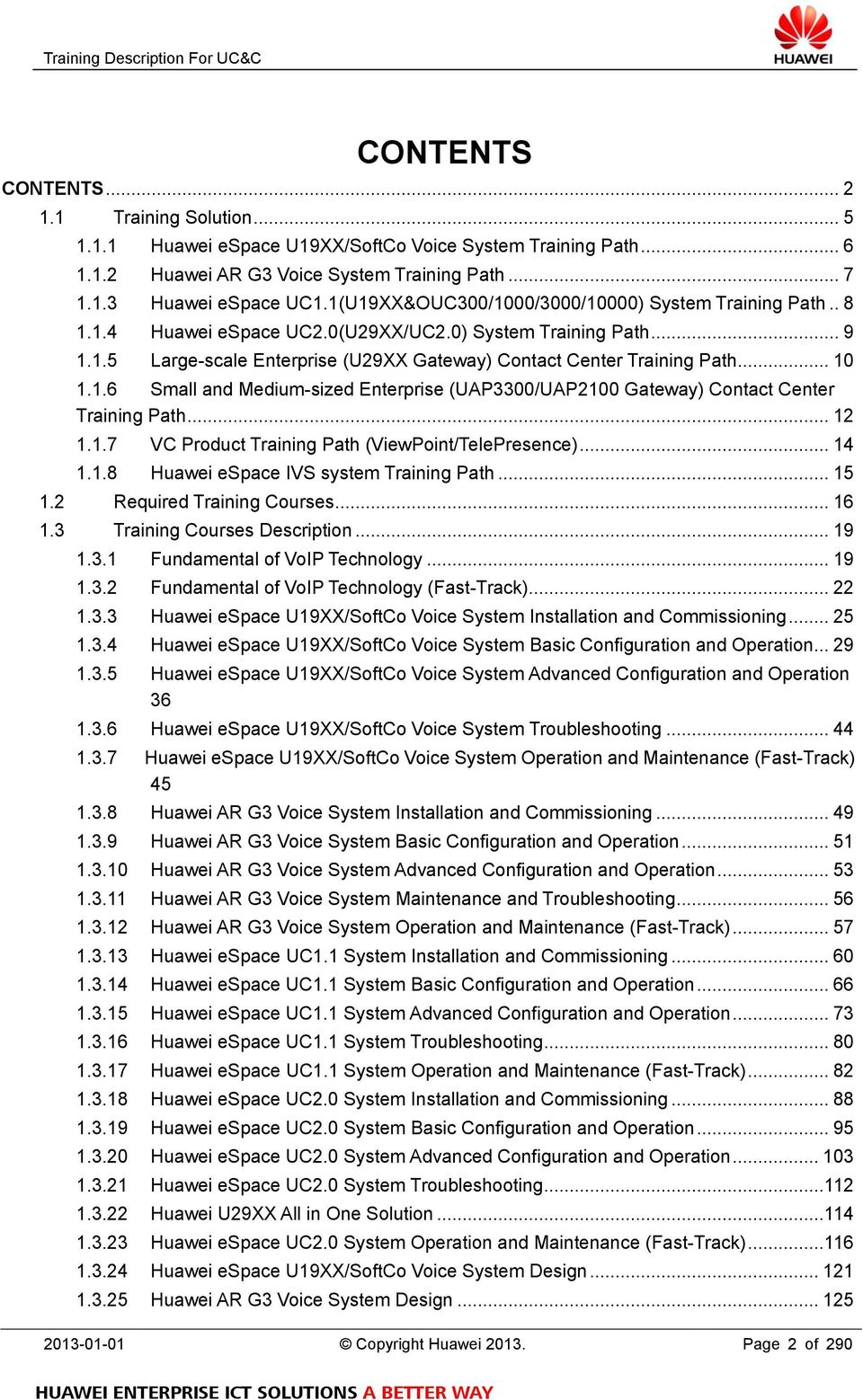
2 CONTENTS CONTENTS Training Solution Huawei espace U19XX/SoftCo Voice System Training Path Huawei AR G3 Voice System Training Path Huawei espace UC1.1(U19XX&OUC300/1000/3000/10000) System Training Path Huawei espace UC2.0(U29XX/UC2.0) System Training Path Large-scale Enterprise (U29XX Gateway) Contact Center Training Path Small and Medium-sized Enterprise (UAP3300/UAP2100 Gateway) Contact Center Training Path VC Product Training Path (ViewPoint/TelePresence) Huawei espace IVS system Training Path Required Training Courses Training Courses Description Fundamental of VoIP Technology Fundamental of VoIP Technology (Fast-Track) Huawei espace U19XX/SoftCo Voice System Installation and Commissioning Huawei espace U19XX/SoftCo Voice System Basic Configuration and Operation Huawei espace U19XX/SoftCo Voice System Advanced Configuration and Operation Huawei espace U19XX/SoftCo Voice System Troubleshooting Huawei espace U19XX/SoftCo Voice System Operation and Maintenance (Fast-Track) Huawei AR G3 Voice System Installation and Commissioning Huawei AR G3 Voice System Basic Configuration and Operation Huawei AR G3 Voice System Advanced Configuration and Operation Huawei AR G3 Voice System Maintenance and Troubleshooting Huawei AR G3 Voice System Operation and Maintenance (Fast-Track) Huawei espace UC1.1 System Installation and Commissioning Huawei espace UC1.1 System Basic Configuration and Operation Huawei espace UC1.1 System Advanced Configuration and Operation Huawei espace UC1.1 System Troubleshooting Huawei espace UC1.1 System Operation and Maintenance (Fast-Track) Huawei espace UC2.0 System Installation and Commissioning Huawei espace UC2.0 System Basic Configuration and Operation Huawei espace UC2.0 System Advanced Configuration and Operation Huawei espace UC2.0 System Troubleshooting Huawei U29XX All in One Solution Huawei espace UC2.0 System Operation and Maintenance (Fast-Track) Huawei espace U19XX/SoftCo Voice System Design Huawei AR G3 Voice System Design Copyright Huawei Page 2 of 290
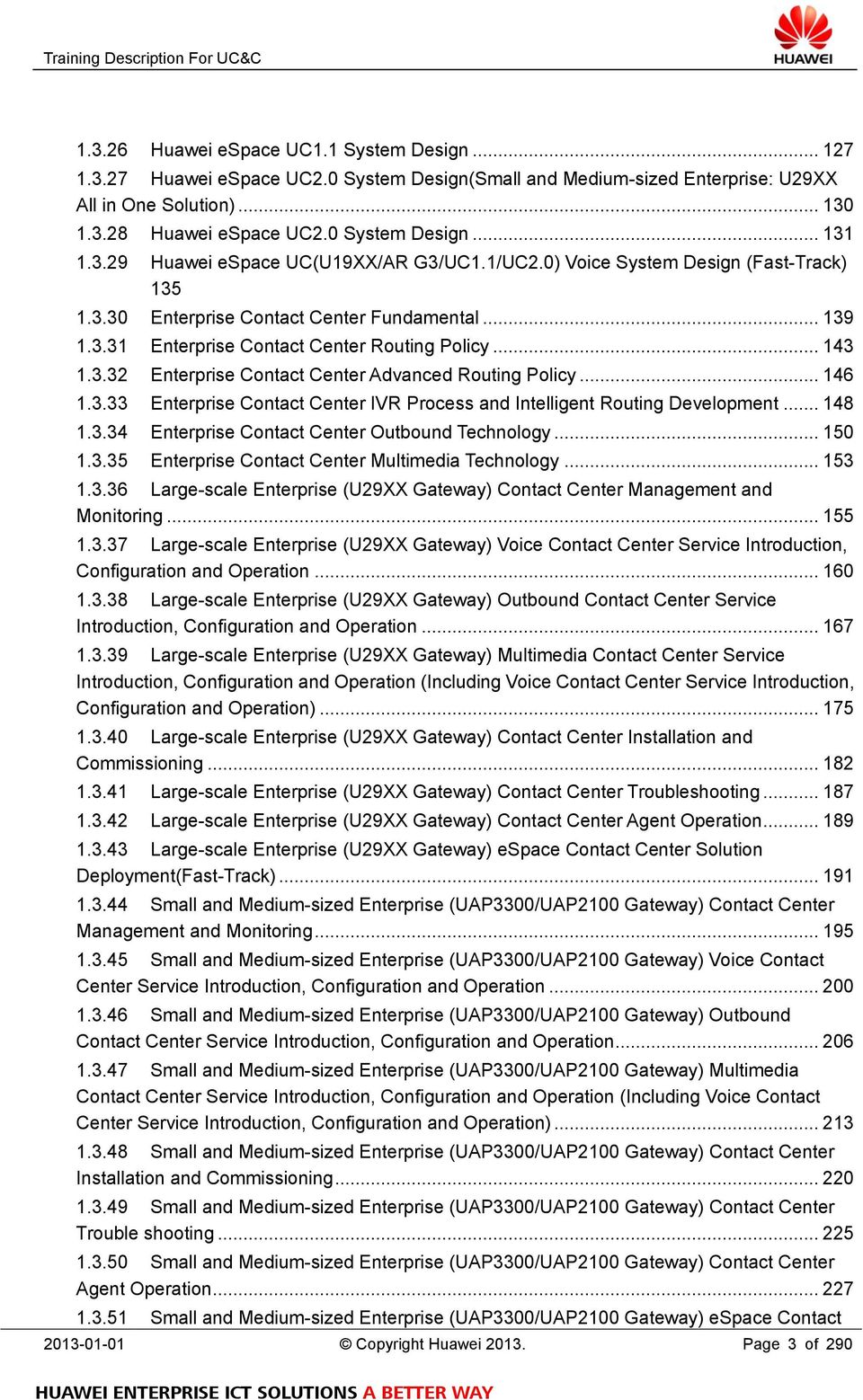
3 Huawei espace UC1.1 System Design Huawei espace UC2.0 System Design(Small and Medium-sized Enterprise: U29XX All in One Solution) Huawei espace UC2.0 System Design Huawei espace UC(U19XX/AR G3/UC1.1/UC2.0) Voice System Design (Fast-Track) Enterprise Contact Center Fundamental Enterprise Contact Center Routing Policy Enterprise Contact Center Advanced Routing Policy Enterprise Contact Center IVR Process and Intelligent Routing Development Enterprise Contact Center Outbound Technology Enterprise Contact Center Multimedia Technology Large-scale Enterprise (U29XX Gateway) Contact Center Management and Monitoring Large-scale Enterprise (U29XX Gateway) Voice Contact Center Service Introduction, Configuration and Operation Large-scale Enterprise (U29XX Gateway) Outbound Contact Center Service Introduction, Configuration and Operation Large-scale Enterprise (U29XX Gateway) Multimedia Contact Center Service Introduction, Configuration and Operation (Including Voice Contact Center Service Introduction, Configuration and Operation) Large-scale Enterprise (U29XX Gateway) Contact Center Installation and Commissioning Large-scale Enterprise (U29XX Gateway) Contact Center Troubleshooting Large-scale Enterprise (U29XX Gateway) Contact Center Agent Operation Large-scale Enterprise (U29XX Gateway) espace Contact Center Solution Deployment(Fast-Track) Small and Medium-sized Enterprise (UAP3300/UAP2100 Gateway) Contact Center Management and Monitoring Small and Medium-sized Enterprise (UAP3300/UAP2100 Gateway) Voice Contact Center Service Introduction, Configuration and Operation Small and Medium-sized Enterprise (UAP3300/UAP2100 Gateway) Outbound Contact Center Service Introduction, Configuration and Operation Small and Medium-sized Enterprise (UAP3300/UAP2100 Gateway) Multimedia Contact Center Service Introduction, Configuration and Operation (Including Voice Contact Center Service Introduction, Configuration and Operation) Small and Medium-sized Enterprise (UAP3300/UAP2100 Gateway) Contact Center Installation and Commissioning Small and Medium-sized Enterprise (UAP3300/UAP2100 Gateway) Contact Center Trouble shooting Small and Medium-sized Enterprise (UAP3300/UAP2100 Gateway) Contact Center Agent Operation Small and Medium-sized Enterprise (UAP3300/UAP2100 Gateway) espace Contact Copyright Huawei Page 3 of 290
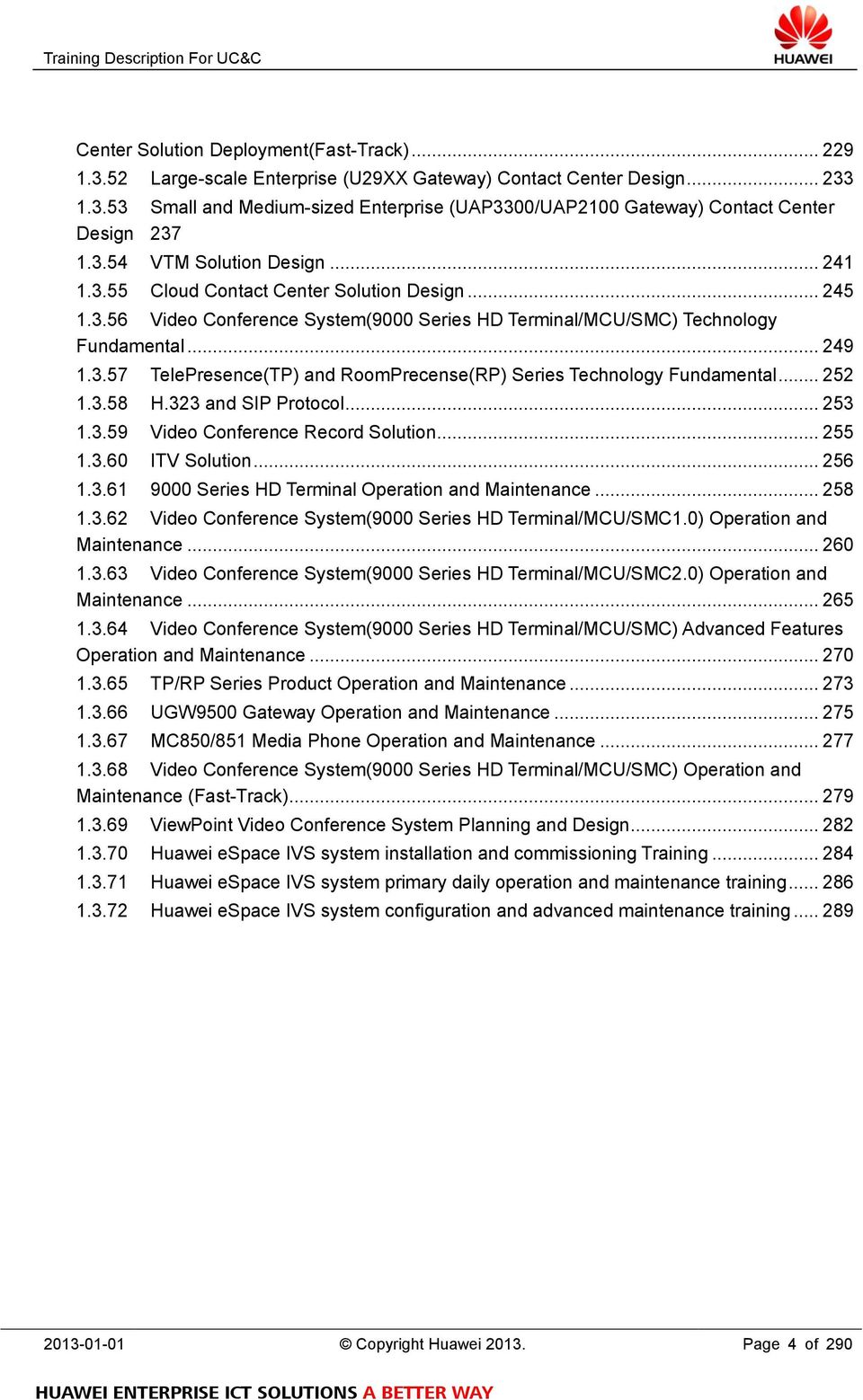
4 Center Solution Deployment(Fast-Track) Large-scale Enterprise (U29XX Gateway) Contact Center Design Small and Medium-sized Enterprise (UAP3300/UAP2100 Gateway) Contact Center Design VTM Solution Design Cloud Contact Center Solution Design Video Conference System(9000 Series HD Terminal/MCU/SMC) Technology Fundamental TelePresence(TP) and RoomPrecense(RP) Series Technology Fundamental H.323 and SIP Protocol Video Conference Record Solution ITV Solution Series HD Terminal Operation and Maintenance Video Conference System(9000 Series HD Terminal/MCU/SMC1.0) Operation and Maintenance Video Conference System(9000 Series HD Terminal/MCU/SMC2.0) Operation and Maintenance Video Conference System(9000 Series HD Terminal/MCU/SMC) Advanced Features Operation and Maintenance TP/RP Series Product Operation and Maintenance UGW9500 Gateway Operation and Maintenance MC850/851 Media Phone Operation and Maintenance Video Conference System(9000 Series HD Terminal/MCU/SMC) Operation and Maintenance (Fast-Track) ViewPoint Video Conference System Planning and Design Huawei espace IVS system installation and commissioning Training Huawei espace IVS system primary daily operation and maintenance training Huawei espace IVS system configuration and advanced maintenance training Copyright Huawei Page 4 of 290
5 1.1 Training Solution Plan & Design Implement & Operate Improve Planning and Design Training Operation and Maintenance Training Advanced Technology Training XXX Design Training Xd XXX Product Installation and Commissioning Training Xd XXX Advanced Technology Training Xd XXX Product Basic Operation and Maintenance Training Xd XXX Product Operation and Maintenance Training (Including the Basic O/M Training) Xd Fast-Track XXX Product Operation and Maintenance Training (Fast-Track) Xd Technology Fundamentals Training XXX Technology Fundamentals Xd Fast-Track XXX Technology Fundamentals (Fast-Track) Xd Copyright Huawei Page 5 of 290

6 1.1.1 Huawei espace U19XX/SoftCo Voice System Training Path Plan & Design Implement & Operate Improve Operation and Maintenance Training Operation and Maintenance Training Advanced Technology Training Huawei espace U19XX/SoftCo Voice System Design Fast-Track 4d Huawei espace UC (U19XX/AR G3/UC1.1/UC2.0) Voice System Design (Fast-Track) 3d Huawei espace U19XX/SoftCo Voice System Installation and Commissioning 3d Huawei espace U19XX/SoftCo Voice System Basic Configuration and Operation 5d Huawei espace U19XX/SoftCo Voice System Advanced Configuration and Operation (including Basic Configuration and Operation) 8d Huawei espace U19XX/SoftCo Voice System Maintenance and Troubleshooting 1d Fast-Track Huawei espace U19XX/SoftCo Voice System Operation and Maintenance (Fast-Track) 3d Fast-Track Technology Fundamentals Training Fundamental of VoIP Technology 5d Fundamental of VoIP Technology (Fast-Track) 3d Elective Guide: Programs in this path are prepared for training projects using U19XX/SoftCo voice system. Electing by customer: System Designer/System Maintainer/Installation engineer are corresponding to System Design/Configuration and Operation/Installation and Commissioning. Customers with related technology background are recommended to elect Operation and Maintenance Training (Fast-Track) Copyright Huawei Page 6 of 290

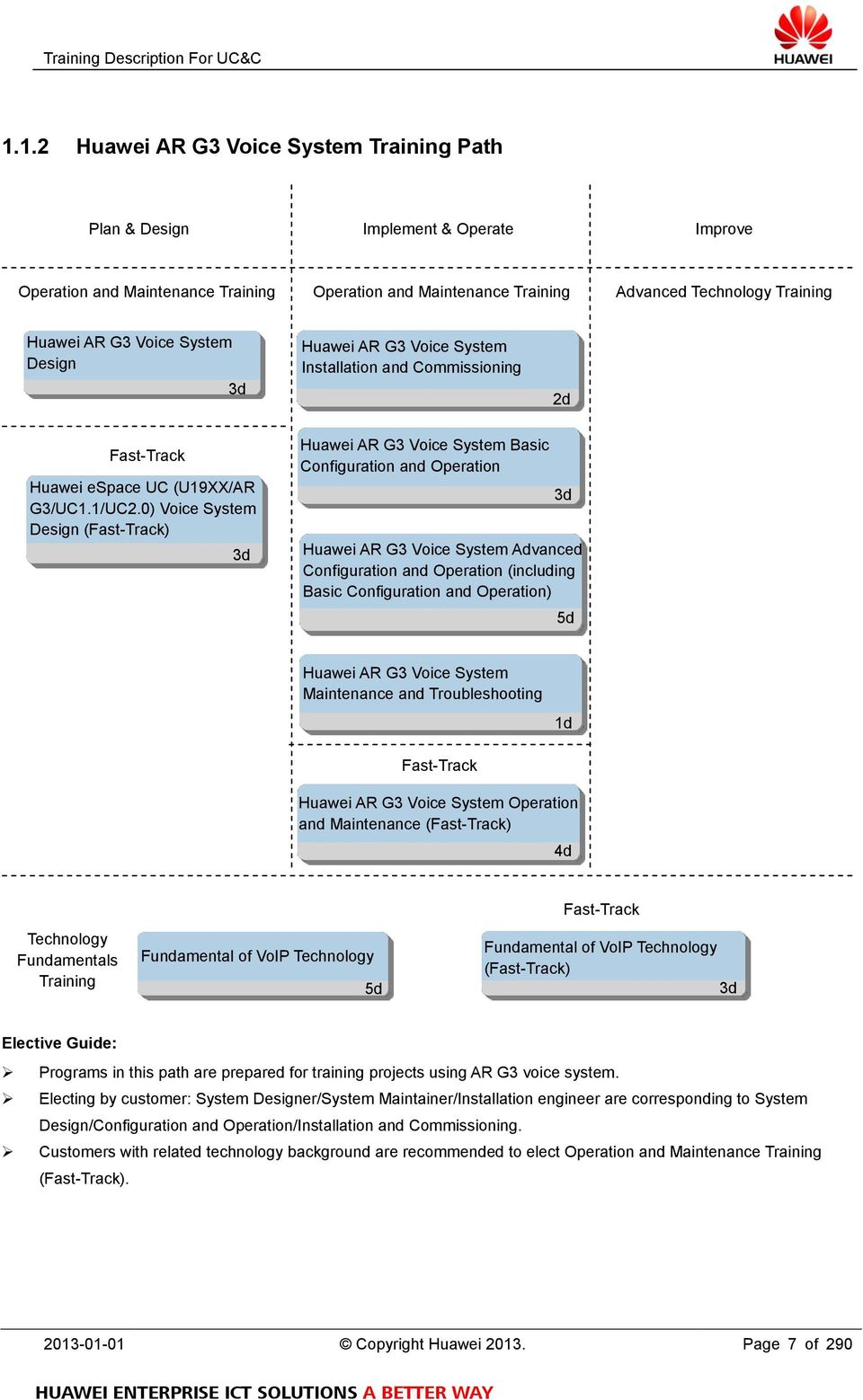
7 1.1.2 Huawei AR G3 Voice System Training Path Plan & Design Implement & Operate Improve Operation and Maintenance Training Operation and Maintenance Training Advanced Technology Training Huawei AR G3 Voice System Design 3d Huawei AR G3 Voice System Installation and Commissioning 2d Fast-Track Huawei espace UC (U19XX/AR G3/UC1.1/UC2.0) Voice System Design (Fast-Track) 3d Huawei AR G3 Voice System Basic Configuration and Operation 3d Huawei AR G3 Voice System Advanced Configuration and Operation (including Basic Configuration and Operation) 5d Huawei AR G3 Voice System Maintenance and Troubleshooting 1d Fast-Track Huawei AR G3 Voice System Operation and Maintenance (Fast-Track) 4d Fast-Track Technology Fundamentals Training Fundamental of VoIP Technology 5d Fundamental of VoIP Technology (Fast-Track) 3d Elective Guide: Programs in this path are prepared for training projects using AR G3 voice system. Electing by customer: System Designer/System Maintainer/Installation engineer are corresponding to System Design/Configuration and Operation/Installation and Commissioning. Customers with related technology background are recommended to elect Operation and Maintenance Training (Fast-Track) Copyright Huawei Page 7 of 290
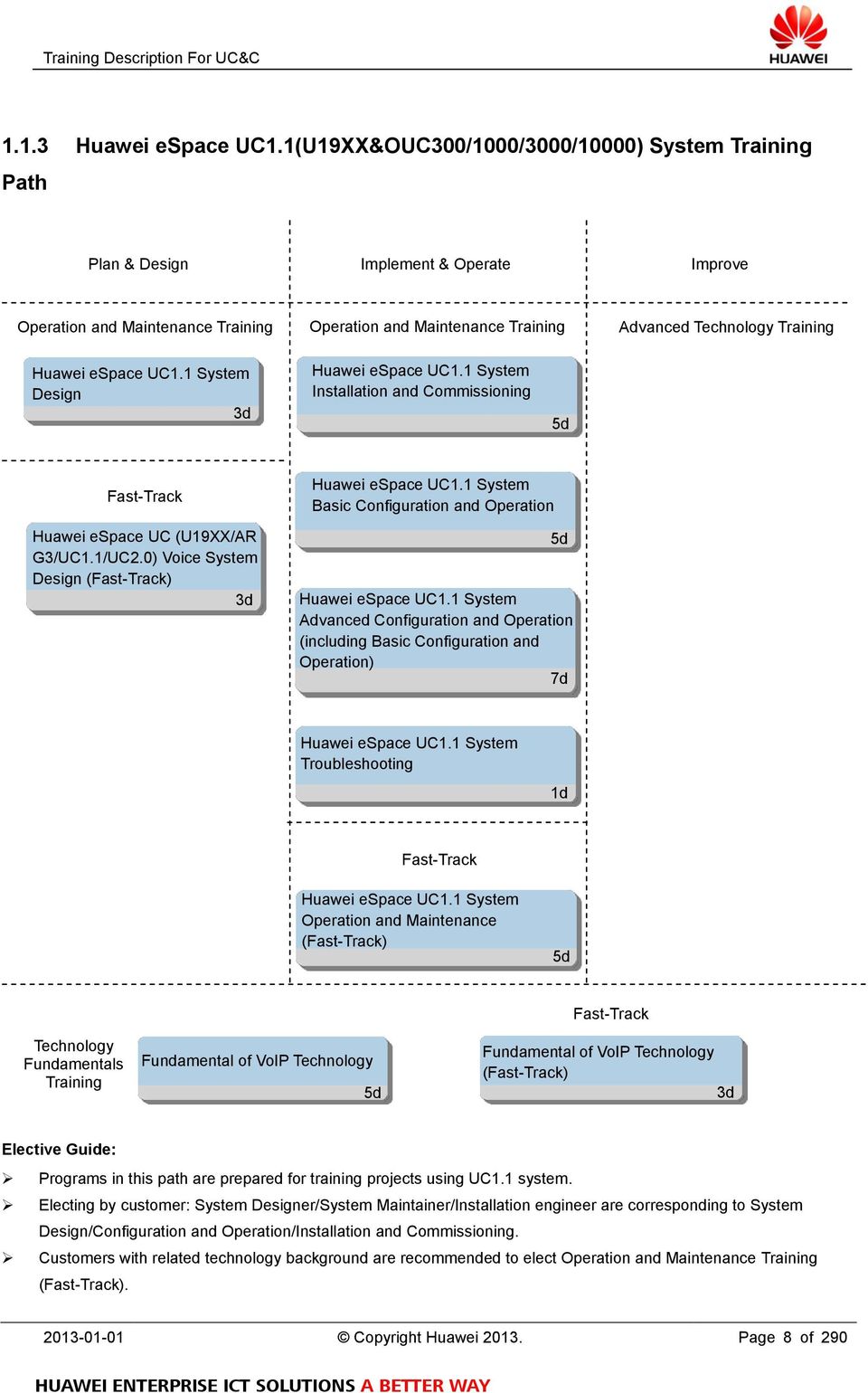
8 1.1.3 Huawei espace UC1.1(U19XX&OUC300/1000/3000/10000) System Training Path Plan & Design Implement & Operate Improve Operation and Maintenance Training Operation and Maintenance Training Advanced Technology Training Huawei espace UC1.1 System Design 3d Huawei espace UC1.1 System Installation and Commissioning 5d Fast-Track Huawei espace UC (U19XX/AR G3/UC1.1/UC2.0) Voice System Design (Fast-Track) 3d Huawei espace UC1.1 System Basic Configuration and Operation 5d Huawei espace UC1.1 System Advanced Configuration and Operation (including Basic Configuration and Operation) 7d Huawei espace UC1.1 System Troubleshooting 1d Fast-Track Huawei espace UC1.1 System Operation and Maintenance (Fast-Track) 5d Technology Fundamentals Training Fundamental of VoIP Technology 5d Fast-Track Fundamental of VoIP Technology (Fast-Track) 3d Elective Guide: Programs in this path are prepared for training projects using UC1.1 system. Electing by customer: System Designer/System Maintainer/Installation engineer are corresponding to System Design/Configuration and Operation/Installation and Commissioning. Customers with related technology background are recommended to elect Operation and Maintenance Training (Fast-Track) Copyright Huawei Page 8 of 290
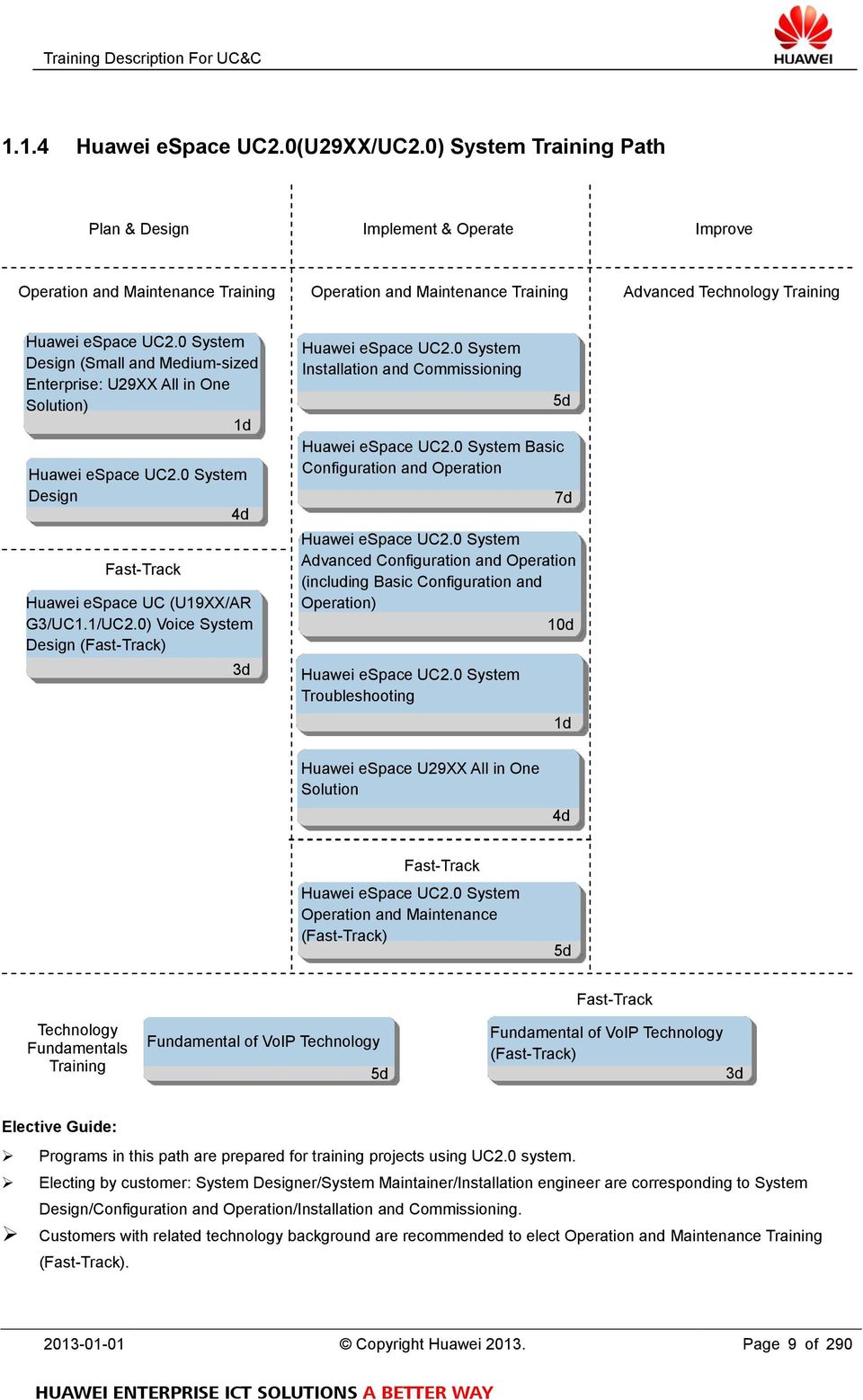
9 1.1.4 Huawei espace UC2.0(U29XX/UC2.0) System Training Path Plan & Design Implement & Operate Improve Operation and Maintenance Training Operation and Maintenance Training Advanced Technology Training Huawei espace UC2.0 System Design (Small and Medium-sized Enterprise: U29XX All in One Solution) 1d Huawei espace UC2.0 System Design ( 大 型 企 业 ) 4d Fast-Track Huawei espace UC (U19XX/AR G3/UC1.1/UC2.0) Voice System Design (Fast-Track) 3d Huawei espace UC2.0 System Installation and Commissioning Huawei espace UC2.0 System Basic Configuration and Operation 5d 7d Huawei espace UC2.0 System Advanced Configuration and Operation (including Basic Configuration and Operation) 10d Huawei espace UC2.0 System Troubleshooting 1d Huawei espace U29XX All in One Solution 4d Fast-Track Huawei espace UC2.0 System Operation and Maintenance (Fast-Track) 5d Technology Fundamentals Training Fundamental of VoIP Technology 5d Fast-Track Fundamental of VoIP Technology (Fast-Track) 3d Elective Guide: Programs in this path are prepared for training projects using UC2.0 system. Electing by customer: System Designer/System Maintainer/Installation engineer are corresponding to System Design/Configuration and Operation/Installation and Commissioning. Customers with related technology background are recommended to elect Operation and Maintenance Training (Fast-Track) Copyright Huawei Page 9 of 290
10 1.1.5 Large-scale Enterprise (U29XX Gateway) Contact Center Training Path Plan & Design Implement & Operate Improve Planning and Design Training Large-scale Enterprise (U29XX Gateway) Contact Center Design 2d VTM Solution Design Cloud Contact Center Design 3d 3d Operation and Maintenance Training Large-scale Enterprise (U29XX Gateway) Contact Center Management and Monitoring 3d Large-scale Enterprise (U29XX Gateway) Voice Contact Center Service Introduction, Configuration and Operation 5d Large-scale Enterprise (U29XX Gateway) Outbound Contact Center Service Introduction, Configuration and Operation 5d Large-scale Enterprise (U29XX Gateway) Multimedia Contact Center Service Introduction, Configuration and Operation (Including Voice Contact Center Service Introduction, Configuration and Operation) 7d Advanced Technology Training Enterprise Contact Center Advanced Routing Policy 2d Enterprise Contact Center IVR Process and Intelligent Routing Development 3d Enterprise Contact Center Outbound Technology Enterprise Contact Center Multimedia Technology 1d 2d Technology Fundamentals Training Enterprise Contact Center Fundamental Large-scale Enterprise (U29XX Gateway) Contact Center Installation and Commissioning 5d Large-scale Enterprise (U29XX d Gateway) Contact Center Troubleshooting 2d Large-scale Enterprise (U29XX d Gateway) Contact Center Agent Operation 1d d Fast-Track Large-scale Enterprise (U29XX Gateway) espace Contact Center Solution Deployment (Fast-Track) 3d (Fast-Track) 2d Enterprise Contact Center Routing Policy 2d Elective-Guide: Programs in this path are prepared for training projects using U29XX access gateway. Electing by Scenario: The main scenarios are Voice Contact Center/Outbound Contact Center/Multimedia Contact Center. Electing by customer: Manager/System Maintainer/Installation engineer are corresponding to Management and Monitoring/Service introduction, configuration and operation/installation and Commissioning. Customers with related technology background are recommended to elect Contact Center Certification Training Copyright Huawei Page 10 of 290

11 (Fast-Track) Copyright Huawei Page 11 of 290

12 1.1.6 Small and Medium-sized Enterprise (UAP3300/UAP2100 Gateway) Contact Center Training Path Plan & Design Implement & Operate Improve Planning and Design Training Operation and Maintenance Training Advanced Technology Training Small and Medium-sized Enterprise (UAP3300/UAP2100 Gateway) Contact Center Design 2d VTM Solution Design Cloud Contact Center Design 3d 3d Small and Medium-sized Enterprise (UAP3300/UAP2100 Gateway) Contact Center Management and Monitoring 3d Small and Medium-sized Enterprise (UAP3300/UAP2100 Gateway) Voice Contact Center Service Introduction, Configuration and Operation 5d Small and Medium-sized Enterprise (UAP3300/UAP2100 Gateway) Outbound Contact Center Service Introduction, Configuration and Operation 5d Small and Medium-sized Enterprise (UAP3300/UAP2100 Gateway) Multimedia Contact Center Service Introduction, Configuration and Operation (Including Voice Contact Center Service Introduction, Configuration and Operation 7d Small and Medium-sized Enterprise (UAP3300/UAP2100 Gateway) Contact Center Installation and Commissioning 5d Small and Medium-sized Enterprise (UAP3300/UAP2100 Gateway) Contact Center Troubleshooting 2d Small and Medium-sized Enterprise (UAP3300/UAP2100 Gateway) Contact Center Agent Operation 1d Fast-Track Small and Medium-sized Enterprise (UAP3300/UAP2100 Gateway) espace Contact Center Solution Deployment (Fast-Track) 3d Enterprise Contact Center Advanced Routing Policy 2d Enterprise Contact Center IVR Process and Intelligent Routing Development 3d Enterprise Contact Center Outbound Technology Enterprise Contact Center Multimedia Technology 1d 2d Technology Fundamentals Training Enterprise Contact Center Fundamental 2d Enterprise Contact Center Routing Policy 2d Elective-Guide: Programs in this path are prepared for training projects using U29XX access gateway. Electing by Scenario: The main scenarios are Voice Contact Center/Outbound Contact Center/Multimedia Contact Center. Electing by customer: Manager/System Maintainer/Installation engineer are corresponding to Management and Copyright Huawei Page 12 of 290
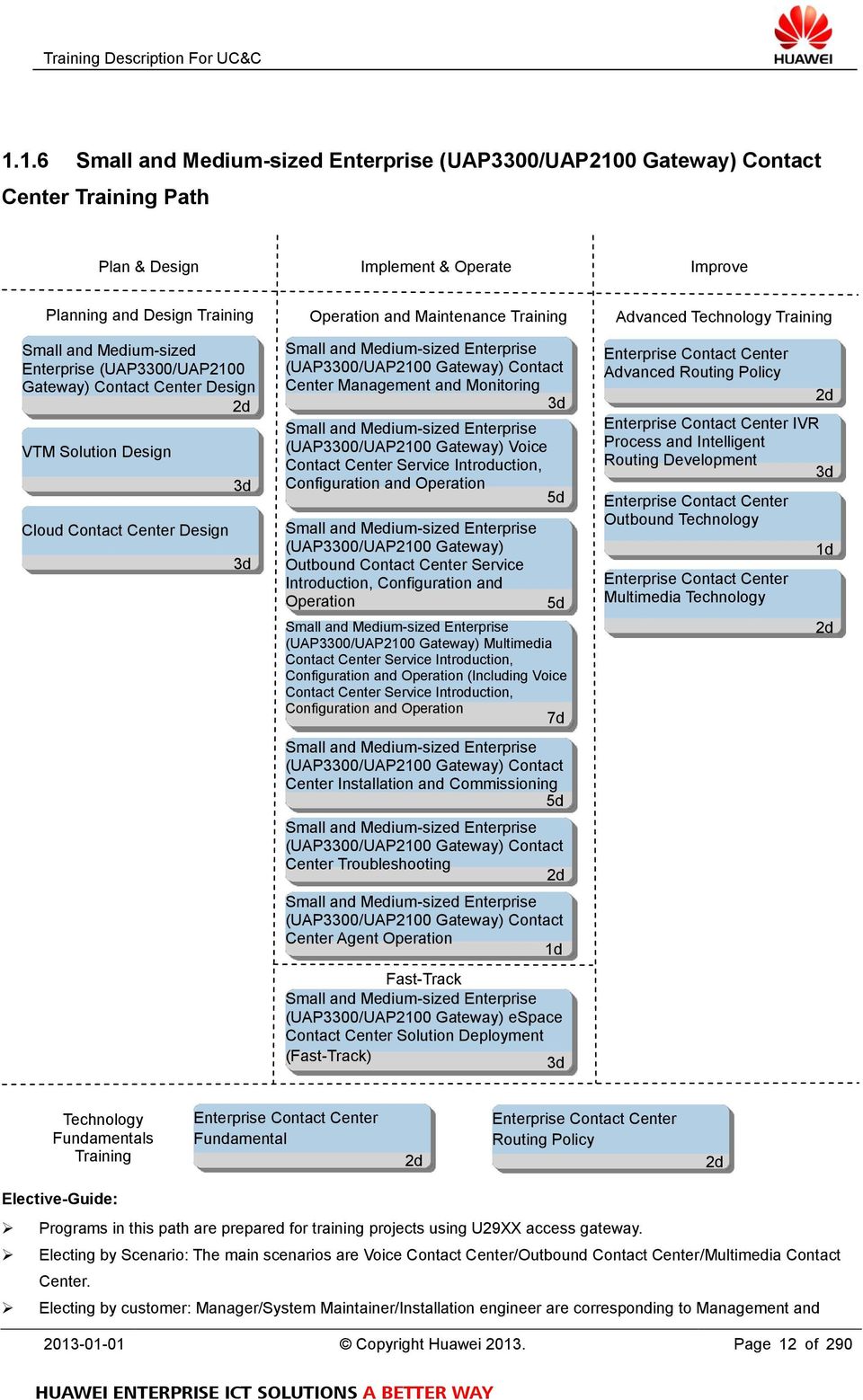
13 Monitoring/Service introduction, configuration and operation/installation and Commissioning. Customers with related technology background are recommended to elect Contact Center Certification Training (Fast-Track) Copyright Huawei Page 13 of 290

14 1.1.7 VC Product Training Path (ViewPoint/TelePresence) Plan & Design Implement & Operate Improve Planning and Design Training Operation and Maintenance Training Advanced Technology Training ViewPoint Video Conference System Planning and Design 2d 9000 Series HD Terminal Operation and Maintenance 1d H.323 and SIP Protocol 2d Video Conference System(9000 Series HD Terminal/MCU/ SMC1.0) Operation and Maintenance 5d Video Conference Record Solution 1d Video Conference System(9000 Series HD Terminal/MCU/ SMC2.0) Operation and Maintenance 5d ITV Solution 2d Video Conference System(9000 Series HD Terminal/MCU/SMC) Advanced Features Operation and Maintenance 5d TP/RP Series Product Operation and Maintenance 2d UGW9500 Gateway Operation and Maintenance 1d MC850/851 Media Phone Operation and Maintenance 1d Fast-Track Video Conference System(9000 Series HD Terminal/MCU/SMC) Operation and Maintenance (Fast-Track) 2d Technology Fundamentals Training Video Conference System(9000 Series HD Terminal/MCU/SMC) Technology Fundamental 2d TelePresence(TP) and RoomPrecense(RP) Series Technology Fundamental 1d Elective Guide The Operation and Maintenance Training is designed for general audiences. The Fast-Track Training is designed for the audiences of relevant technical background Copyright Huawei Page 14 of 290

15 1.1.8 Huawei espace IVS system Training Path Plan & Design Implement & Operate Improve Planning and Design Training Operation and Maintenance Training Advanced Technology Training Huawei espace IVS system installation and commissioning 2d Huawei espace IVS system primary daily operation and maintenance 3d Huawei espace IVS system configuration and advanced maintenance 3d Fast -Track Technology Fundamentals Training Elective-Guide: Programs in this path are prepared for training projects using Huawei espace IVS system. Electing by customer: Manager/System Maintainer/Installation engineer are corresponding to Management and Monitoring/Service introduction, configuration and operation/installation and Commissioning Copyright Huawei Page 15 of 290

16 1.2 Required Training Courses Enterprise UC&C Training Courses are designed as follows: Training Courses Fundamental of VoIP Technology Training Courses Level Duration (working days) Class Size Fundamental of VoIP Technology Ⅱ 5 6 ~ 12 Fundamental of VoIP Technology (Fast-Track) Ⅱ 3 6 ~ 12 Huawei espace U19XX/SoftCo Voice System Training Courses Huawei espace U19XX/SoftCo Voice System Installation and Commissioning Ⅱ 3 6 ~ 12 Huawei espace U19XX/SoftCo Voice System Basic Configuration and Operation Ⅱ 5 6 ~ 12 Huawei espace U19XX/SoftCo Voice System Advanced Configuration and Operation (including Basic Ⅲ 8 6 ~ 12 Configuration and Operation) Huawei espace U19XX/SoftCo Voice System Troubleshooting Ⅲ 1 6 ~ 12 Huawei espace U19XX/SoftCo Voice Operation and Maintenance (Fast-Track) Ⅱ 3 6 ~ 12 Huawei AR G3 Voice System Training Courses Huawei AR G3 Voice System Installation and Commissioning Ⅱ 2 6 ~ 12 Huawei AR G3 Voice System Basic Configuration and Operation Ⅱ 3 6 ~ 12 Huawei AR G3 Voice System Advanced Configuration and Operation (including Basic Configuration and Ⅲ 5 6 ~ 12 Operation) Huawei AR G3 Voice System Maintenance and Troubleshooting Ⅲ 1 6 ~ 12 Huawei AR G3 Voice System Operation and Maintenance (Fast-Track) Ⅱ 4 6 ~ 12 Huawei espace UC1.1(U19XX&UC300/1000/3000/10000) System Training Courses Huawei espace UC1.1 System Installation and Commissioning Ⅱ 5 6 ~ 12 Huawei espace UC1.1 System Basic Configuration and Operation Ⅱ 5 6 ~ 12 Huawei espace UC1.1 System Advanced Configuration and Operation (including Basic Configuration and Ⅲ 7 6 ~ 12 Operation) Huawei espace UC1.1 System Troubleshooting Ⅲ 1 6 ~ 12 Huawei espace UC1.1 System Operation and Maintenance (Fast-Track) Ⅱ 5 6 ~ 12 Huawei espace UC2.0(U29XX/UC2.0) System Training Courses Huawei espace UC2.0 System Installation and Commissioning Ⅱ 5 6 ~ 12 Huawei espace UC2.0 System Basic Configuration and Operation Ⅱ 7 6 ~ 12 Huawei espace UC2.0 System Advanced Configuration and Operation (including Basic Configuration and Ⅲ 10 6 ~ 12 Operation) Huawei espace UC2.0 System Troubleshooting Ⅲ 1 6 ~ Copyright Huawei Page 16 of 290
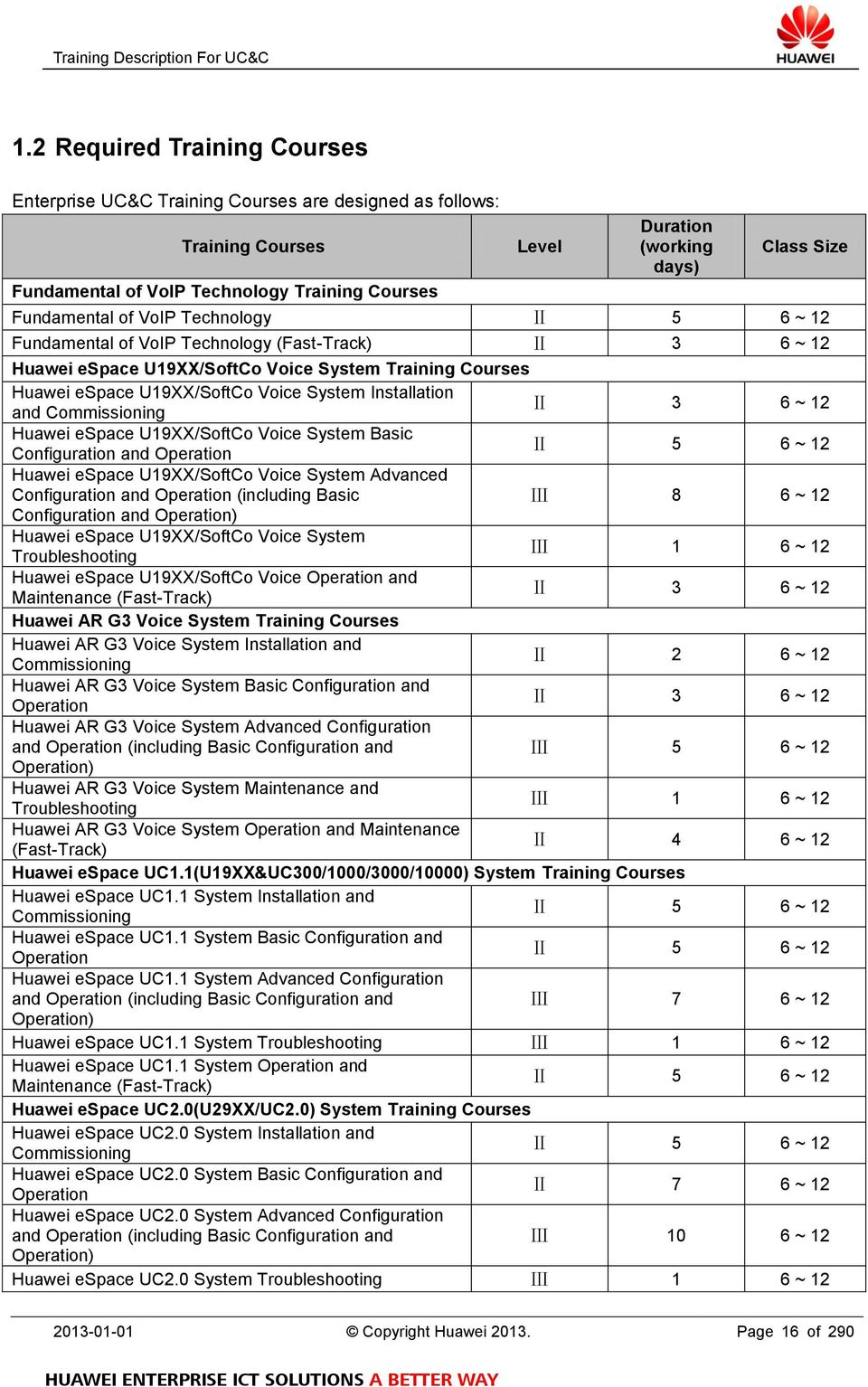
17 Huawei espace U29XX All in One Solution Ⅲ 4 6 ~ 12 Huawei espace UC2.0 System Operation and Maintenance (Fast-Track) Ⅱ 5 6 ~ 12 UC Planning and Design Training Courses Huawei espace U19XX/SoftCo Voice System Design Ⅲ 4 6 ~ 12 Huawei AR G3 Voice System Design Ⅲ 1 6 ~ 12 Huawei espace UC1.1 System Design Ⅲ 3 6 ~ 12 Huawei espace UC2.0 System Design(Small and Medium-sized Enterprise: U29XX All in One Solution) Ⅲ 1 6 ~ 12 Huawei espace UC2.0 System Design Ⅲ 4 6 ~ 12 Huawei espace UC (U19XX/AR G3/UC1.1/UC2.0) Voice System Design (Fast-Track) Ⅲ 3 6 ~ 12 CC Technology Fundamental Principles Training Courses Enterprise Contact Center Fundamental Ⅱ 2 6 ~ 12 Enterprise Contact Center Routing Policy Ⅱ 2 6 ~ 12 CC Advanced Technology Training Courses Enterprise Contact Center Advanced Routing Policy Ⅲ 2 6 ~ 12 Enterprise Contact Center IVR Process and Intelligent Routing Development Ⅲ 3 6 ~ 12 Enterprise Contact Center Outbound Technology Ⅲ 1 6 ~ 12 Enterprise Contact Center Multimedia Technology Ⅲ 2 6 ~ 12 CC Large-scale Enterprise (U29XX Gateway) Operation and Maintenance Training Large-scale Enterprise (U29XX Gateway)Contact Center Management and Monitoring Ⅱ 3 6 ~ 12 Large-scale Enterprise (U29XX Gateway) Voice Contact Center Service Introduction, Configuration and Operation Ⅱ 5 6 ~ 12 Large-scale Enterprise (U29XX Gateway) Outbound Contact Center Service Introduction, Configuration and Ⅱ 5 6 ~ 12 Operation Large-scale Enterprise (U29XX Gateway) Multimedia Contact Center Service Introduction, Configuration and Operation (Including Contact Center Service Introduction, Ⅱ 7 6 ~ 12 Configuration and Operation) Large-scale Enterprise (U29XX Gateway) Contact Center Installation and Commissioning Ⅱ 5 6 ~ 12 Large-scale Enterprise (U29XX Gateway) Contact Center Troubleshooting Ⅲ 2 6 ~ 12 Large-scale Enterprise (U29XX Gateway) Contact Center Agent Operation Ⅰ 1 6 ~ 12 Large-scale Enterprise (U29XX Gateway) espace Contact Center Solution Deployment (Fast-Track) Ⅱ 3 6 ~ 12 CC Small and Medium-sized Enterprise (UAP3300/UAP2100 Gateway) Operation and Maintenance Training Small and Medium-sized Enterprise (UAP3300/UAP2100 Gateway) Contact Center Management and Monitoring Ⅱ 3 6 ~ 12 Small and Medium-sized Enterprise (UAP3300/UAP2100 Gateway) Voice Contact Center Service Introduction, Ⅱ 5 6 ~ 12 Configuration and Operation Small and Medium-sized Enterprise (UAP3300/UAP2100 Gateway) Outbound Contact Center Service Introduction, Ⅱ 5 6 ~ 12 Configuration and Operation Small and Medium-sized Enterprise (UAP3300/UAP2100 Gateway) Multimedia Contact Center Service Introduction, Configuration and Operation (Including Voice Contact Ⅱ 7 6 ~ Copyright Huawei Page 17 of 290
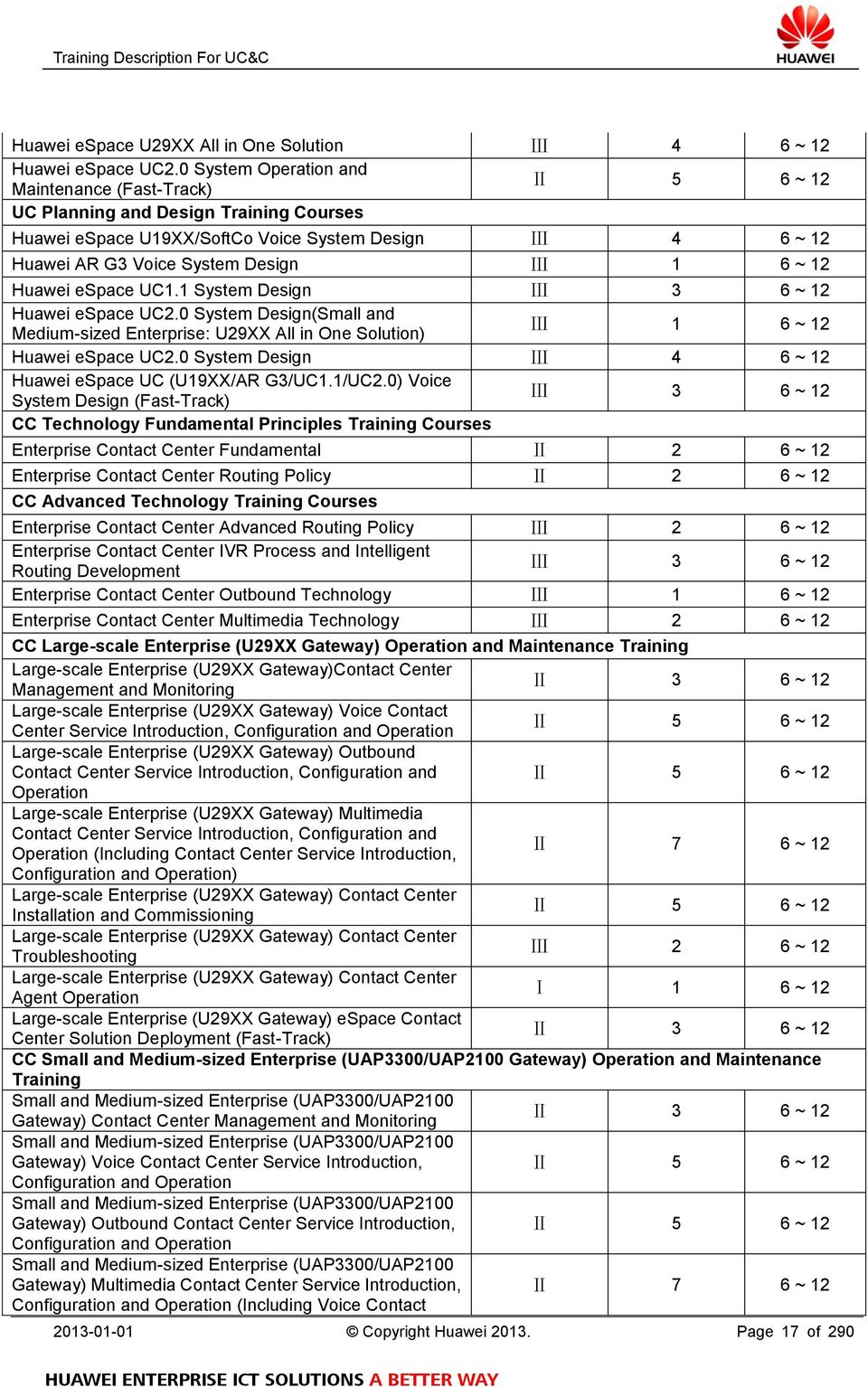
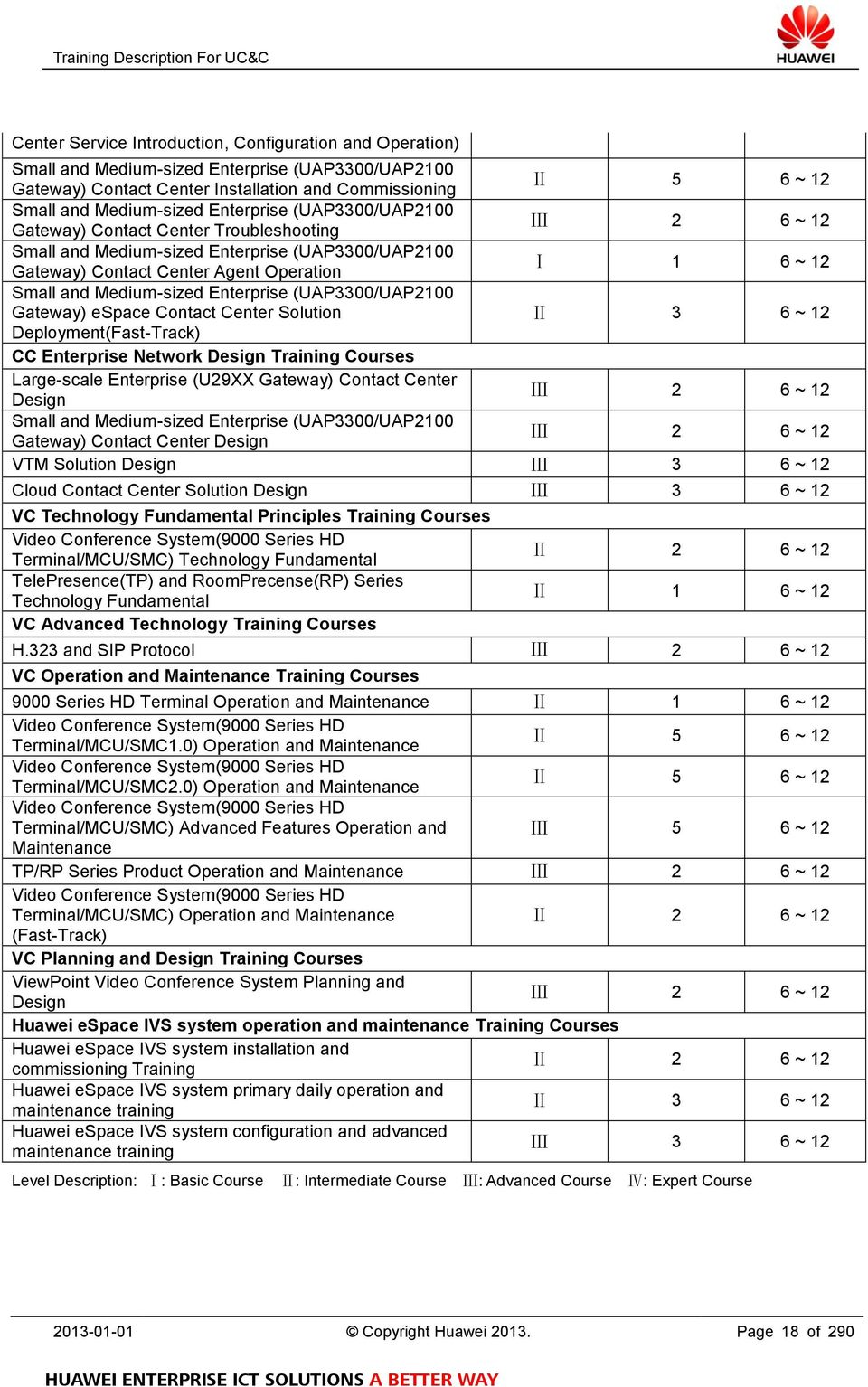
18 Center Service Introduction, Configuration and Operation) Small and Medium-sized Enterprise (UAP3300/UAP2100 Gateway) Contact Center Installation and Commissioning Ⅱ 5 6 ~ 12 Small and Medium-sized Enterprise (UAP3300/UAP2100 Gateway) Contact Center Troubleshooting Ⅲ 2 6 ~ 12 Small and Medium-sized Enterprise (UAP3300/UAP2100 Gateway) Contact Center Agent Operation Ⅰ 1 6 ~ 12 Small and Medium-sized Enterprise (UAP3300/UAP2100 Gateway) espace Contact Center Solution Ⅱ 3 6 ~ 12 Deployment(Fast-Track) CC Enterprise Network Design Training Courses Large-scale Enterprise (U29XX Gateway) Contact Center Design Ⅲ 2 6 ~ 12 Small and Medium-sized Enterprise (UAP3300/UAP2100 Gateway) Contact Center Design Ⅲ 2 6 ~ 12 VTM Solution Design Ⅲ 3 6 ~ 12 Cloud Contact Center Solution Design Ⅲ 3 6 ~ 12 VC Technology Fundamental Principles Training Courses Video Conference System(9000 Series HD Terminal/MCU/SMC) Technology Fundamental TelePresence(TP) and RoomPrecense(RP) Series Technology Fundamental VC Advanced Technology Training Courses Ⅱ 2 6 ~ 12 Ⅱ 1 6 ~ 12 H.323 and SIP Protocol Ⅲ 2 6 ~ 12 VC Operation and Maintenance Training Courses 9000 Series HD Terminal Operation and Maintenance Ⅱ 1 6 ~ 12 Video Conference System(9000 Series HD Terminal/MCU/SMC1.0) Operation and Maintenance Ⅱ 5 6 ~ 12 Video Conference System(9000 Series HD Terminal/MCU/SMC2.0) Operation and Maintenance Ⅱ 5 6 ~ 12 Video Conference System(9000 Series HD Terminal/MCU/SMC) Advanced Features Operation and Ⅲ 5 6 ~ 12 Maintenance TP/RP Series Product Operation and Maintenance Ⅲ 2 6 ~ 12 Video Conference System(9000 Series HD Terminal/MCU/SMC) Operation and Maintenance Ⅱ 2 6 ~ 12 (Fast-Track) VC Planning and Design Training Courses ViewPoint Video Conference System Planning and Design Ⅲ 2 6 ~ 12 Huawei espace IVS system operation and maintenance Training Courses Huawei espace IVS system installation and commissioning Training Ⅱ 2 6 ~ 12 Huawei espace IVS system primary daily operation and maintenance training Ⅱ 3 6 ~ 12 Huawei espace IVS system configuration and advanced maintenance training Ⅲ 3 6 ~ 12 Level Description: Ⅰ: Basic Course Ⅱ: Intermediate Course Ⅲ: Advanced Course Ⅳ: Expert Course Copyright Huawei Page 18 of 290
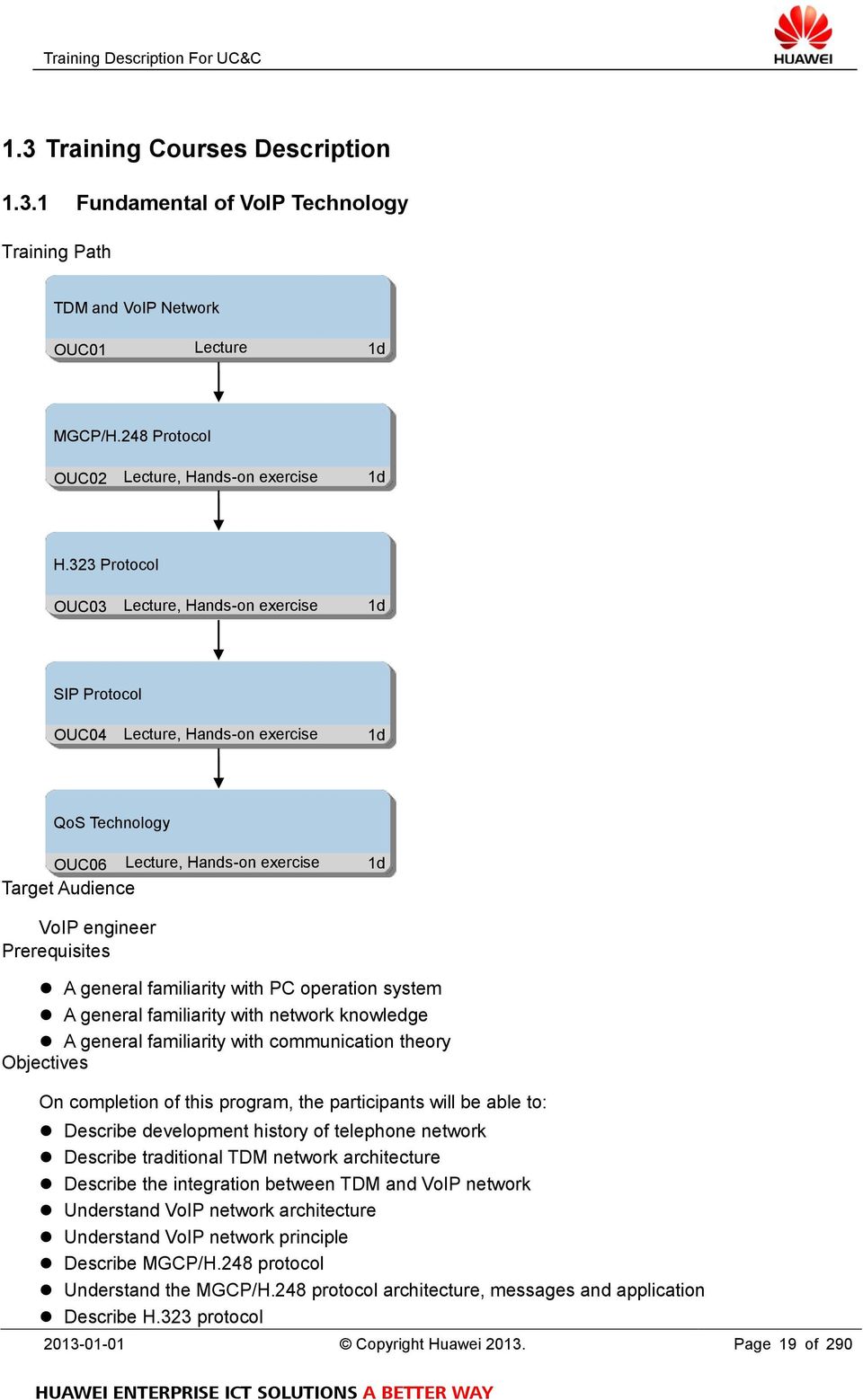
19 1.3 Training Courses Description Fundamental of VoIP Technology Training Path TDM and VoIP Network OUC01 Lecture 1d MGCP/H.248 Protocol OUC02 Lecture, Hands-on exercise 1d H.323 Protocol OUC03 Lecture, Hands-on exercise 1d SIP Protocol OUC04 Lecture, Hands-on exercise 1d QoS Technology OUC06 Lecture, Hands-on exercise Target Audience 1d VoIP engineer Prerequisites A general familiarity with PC operation system A general familiarity with network knowledge A general familiarity with communication theory Objectives On completion of this program, the participants will be able to: Describe development history of telephone network Describe traditional TDM network architecture Describe the integration between TDM and VoIP network Understand VoIP network architecture Understand VoIP network principle Describe MGCP/H.248 protocol Understand the MGCP/H.248 protocol architecture, messages and application Describe H.323 protocol Copyright Huawei Page 19 of 290
20 Understand the H.323 protocol architecture, messages and application Describe SIP protocol Understand the SIP protocol architecture, messages and application Describe the reasons cause to voice quality in the VoIP network Understand QoS technology principle Describe QoS technology application scenarios Content TDM Network History Telephone TDM Network Development TDM Network Introduction TDM Network TDM Network Architecture TDM Network Components TDM Pros And Cons TDM Network Signals Signals Overview TDM Network Signals VoIP Network VoIP Network History VoIP Network Components VoIP Network Pros and Cons VoIP Network Protocols MGCP And H.248 Overview MGCP And H.248 Introduction MGCP And H.248 Protocol Overview MGCP Protocol MGCP Protocol Architecture MGCP Protocol Messages MGCP Protocol Practice H.248 Protocol H.248 Protocol H.248 Protocol Messages H.248 Protocol Practice MGCP And H.248 MGCP And H.248 Relations MGCP and H.248 Comparison H.323 Concepts H.323 Protocol History H.323 Protocol Overview H.323 Protocol H.323 Protocol Architecture Copyright Huawei Page 20 of 290

21 Duration H.323 Protocol Component Functions H.323 Protocol Messages H.323 Protocol Practice H.323 Call Flow H.323 Call Flow H.323 Fast Call Flow SIP Concepts SIP Protocol History SIP Protocol Overview SIP Protocol SIP Protocol Architecture SIP Protocol Componenent Functions SIP Protocol Messages SIP Protocol Practice SIP Call Flow SIP Call Flow QoS Overview Ideal Voice Network Introduction QoS History QoS Concepts QoS Model QoS Technology Classification Marking Traffic Policing Congestion Avoidance Congestion Management Traffic Shaping HQoS Technology HQoS Technology QoS Scenario QoS Practice 5 working day, including hands-on exercise 2 working day Class Size Min 6, Max Copyright Huawei Page 21 of 290
22 1.3.2 Fundamental of VoIP Technology (Fast-Track) Training Path TDM and VoIP Network OUC01 Lecture 1d VoIP Protocol OUC02 Lecture, Hands-on exercise 1d QoS Technology OUC05 Target Audience Lecture, Hands-on exercise 1d VoIP engineer Prerequisites A general familiarity with PC operation system A general familiarity with network knowledge A general familiarity with communication theory Objectives On completion of this program, the participants will be able to: Describe development history of telephone network Describe traditional TDM network architecture Describe the integration between TDM and VoIP network Understand VoIP network architecture Understand VoIP network principle Describe MGCP/H.248 protocol Understand the MGCP/H.248 protocol architecture and application Describe H.323 protocol Understand the H.323 protocol architecture and application Describe SIP protocol Understand the SIP protocol architecture and application Describe the reasons cause to voice quality in the VoIP network Understand QoS technology principle Describe QoS technology application scenarios Content TDM Network History Telephone TDM Network Development TDM Network Introduction Copyright Huawei Page 22 of 290
23 TDM Network TDM Network Architecture TDM Network Components TDM Pros And Cons TDM Network Signals Signals Overview TDM Network Signals VoIP Network VoIP Network History VoIP Network Components VoIP Network Pros and Cons VoIP Network Protocols VoIP Protocol VoIP Protocol History VoIP Protocol Overview MGCP/H.248 Protocol MGCP/H.248 Protocol Architecture MGCP/H.248 Protocol Components Functions MGCP/H.248 Protocol Messages MGCP/H.248 Protocol Practice H.323 Protocol H.323 Protocol Architecture H.323 Protocol Components Functions H.323 Protocol Messages H.323 Protocol Practice SIP Protocol SIP Protocol Architecture SIP Protocol Components Functions SIP Protocol Messages SIP Protocol Practice Call Flow MGCP/H.248 Call Flow H.323 Call Flow SIP Call Flow QoS Overview Ideal Voice Network Introduction QoS History QoS Concepts QoS Model QoS Technology Classification Copyright Huawei Page 23 of 290
24 Duration Marking Traffic Policing Congestion Avoidance Congestion Management Traffic Shaping HQoS Technology HQoS Technology QoS Scenario QoS Practice 3 working day, including hands-on exercise 1 working day Class Size Min 6, Max Copyright Huawei Page 24 of 290
25 1.3.3 Huawei espace U19XX/SoftCo Voice System Installation and Commissioning Training Path U19XX/SoftCo System Introduction OUC11 Lecture 0.5d U19XX/SoftCo System Installation and Commissioning OUC12 Lecture, Hands-on exercise 0.5d EGW Introduction OUC51 Lecture 0.5d IAD Introduction and Installation OUC61 Lecture, Hands-on exercise 0.5d IP Phone Installation, Upgrade and Configuration OUC71 Lecture, Hands-on exercise 0.5d espace EMS System Introduction and Installation OUC91 Lecture, Hands-on exercise 0.5d Target Audience Installers and Commissioning Staffs Prerequisites A general familiarity with PC operation system A general familiarity with network knowledge A general familiarity with communication theory A general familiarity with VoIP knowledge Objectives On completion of this program, the participants will be able to: Describe the U19XX/SoftCo system composition Describe the U19XX/SoftCo system function Describe the classification of U19XX/SoftCo system Perform the installation and commissioning of U19XX/SoftCo system Copyright Huawei Page 25 of 290
26 Describe the EGW system function Describe the classification of EGW system Perform the installation and commissioning of EGW system Describe the IAD function Describe the classification of IAD Perform the installation of IAD system Describe the IP phone function Describe the classification of IP phone Perform the installation and commissioning of IP phone Describe the espace EMS system function Describe the classification of espace EMS system Perform the installation and commissioning of espace EMS system Content U19XX/SoftCo System Positioning Product Positioning Product Highlight U19XX/SoftCo System Application Scenario Centralized Networking Scenario Distributed Networking Scenario Capacity Expansion Scenario (Only For U1910) U19XX/SoftCo System Product Architecture Shelf Board U19XX/SoftCo System Functions and Features Basic Voice Services Supplementary Services Advanced Services Voice Conference Automatic Switchboard Service CDR Intelligent Routing Security U19XX/SoftCo System Management and Maintenance Methods LMT Management System CLI Management Mode U19XX/SoftCo System Technical Specifications Physical Specifications Performance and Capacity Ports and Protocols U19XX/SoftCo System Hardware Installation Hardware Installation Procedure Hardware Installation Preparation Copyright Huawei Page 26 of 290
27 Installing U19XX/SoftCo U19XX/SoftCo System Software Installation Logining into U19XX/SoftCo System for the First Time Installing LMT Updating U19XX/SoftCo System Software Version Loading the License File U19XX/SoftCo System Commissioning System Hardware State Checking and Configuration System Parameters Commissioning System Original Data Loading (Optional) Basic Subscriber Call Setting EGW Product Introduction Product Positioning and Highlights Application Scenarios Product Structure Features and Functions Operation Guide and Maintenance Technical Specification EGW Installation Checking the Installation Environment Preparing Installation Tools Installing EGW Connecting EGW Cables Power on and Checking the Indicators IAD Product Introduction Product Description Features and Functions Product Types Appearance, Ports and Indicators Boards and Cables Technical Specification Local regeneration Local Switch and Power-Off/Network Interruption Survival IAD Installation Installation Tools Introduction Connecting cables cascading IP phone Introduction IP phone and Traditional phone Functions Classification Copyright Huawei Page 27 of 290
28 Duration IP phone Installation and Configuration IP phone Installation IP phone Configuring Modes Automatic configuration Web Configuration Local Configuration IP phone Upgrade Auto/Manual Upgrade Unified Upgrade EMS Overview EMS System Positioning EMS Managed Objects EMS Features EMS Reliability EMS Technical Specification EMS System Structure EMS System Architecture EMS System Configuration EMS External Interfaces EMS Functions and Features NE Access NE Management Topology Management Fault Management Performance Management Security Management Log Management Message Tracing Northbound Interface EMS Installation EMS Installation scenarios Introduction Installing System (Linux) Installing System (Windows) EMS Commissioning Checking EMS Installation 3 working day, including hands-on exercise 1 working day Class Size Min 6, Max Copyright Huawei Page 28 of 290
29 1.3.4 Huawei espace U19XX/SoftCo Voice System Basic Configuration and Operation Training Path U19XX/SoftCo System Introduction OUC11 Lecture 0.5d U19XX/SoftCo System Configuration OUC13 Lecture, Hands-on exercise 1d EGW Introduction OUC51 Lecture 0.5d EGW Configuration and Maintenance OUC52 Lecture, Hands-on exercise 0.5d IAD Introduction and Installation OUC61 Lecture, Hands-on exercise 0.5d IAD Configuration and Maintenance OUC6 2 Lecture, Hands-on exercise 0.5d IP Phone Installation, Upgrade and Configuration OUC71 Lecture, Hands-on exercise 0.5d espace EMS System Introduction and Installation OUC91 Lecture, Hands-on exercise 0.5d Copyright Huawei Page 29 of 290
30 espace EMS System Configuration and Maintenance OUC92 Lecture, Hands-on exercise 0.5d Target Audience Operators and Maintainers Prerequisites A general familiarity with PC operation system A general familiarity with network knowledge A general familiarity with communication theory A general familiarity with VoIP knowledge A general familiarity with U19XX/SoftCo voice system Objectives On completion of this program, the participants will be able to: Describe the U19XX/SoftCo system composition Describe the U19XX/SoftCo system function Describe the classification of U19XX/SoftCo system Perform U19XX/SoftCo system configuration Describe the EGW system function Describe the classification of EGW system Describe EGW system hardware architecture Perform EGW system installation and configuration Describe the IAD function Describe the classification of IAD Describe IAD hardware architecture Perform IAD installation and configuration Describe IP phone classification and function Describe IP phone installation, upgrade and Configuration Describe the espace EMS system function Describe the classification of espace EMS system Perform espace EMS system installation Perform espace EMS system configuration and maintenance Content U19XX/SoftCo System Positioning Product Positioning Product Highlight U19XX/SoftCo System Application Scenario Centralized Networking Scenario Distributed Networking Scenario Capacity Expansion Scenario (Only For U1910) U19XX/SoftCo System Product Architecture Shelf Board Copyright Huawei Page 30 of 290
31 U19XX/SoftCo System Functions and Features Basic Voice Services Supplementary Services Advanced Services Voice Conference Automatic Switchboard Service CDR Intelligent Routing Security U19XX/SoftCo System Management and Maintenance Methods LMT Management System CLI Management Mode U19XX/SoftCo System Technical Specifications Physical Specifications Performance and Capacity Ports and Protocols U19XX/SoftCo System Glossary Prefix, Office Route, Office Route Selection Code, Trunk U19XX/SoftCo System Configuration Basis LMT and CLI System Information Configuration Managing Device Passwords Configuration Procedure Introduction U19XX/SoftCo System User Data Configuration POTS Users(Optional) SIP Users U19XX/SoftCo System Trunk Data Configuration Office Route Configuration Trunk Configuration Signaling Configuration U19XX/SoftCo System Basic Services Configuration Call Services Configuration Callback Services Configuration Pickup Services Configuration EGW Product Introduction Product Positioning and Highlights Application Scenarios Product Structure Features and Functions Operation Guide and Maintenance Technical Specification Copyright Huawei Page 31 of 290
32 EGW Installation Checking the Installation Environment Preparing Installation Tools Installing EGW Connecting EGW Cables Power on and Checking the Indicators EGW Quick Configuration TWO Modes UC Mode Common Mode EGW Feature UC Mode Common Mode EGW Diagnosis Enabling the Debug Log Configuring Traffic Mirroring Black Box Files Coredump Files EGW Maintenance Alarm and Security Logs EGW State Backup and Recovery Security Maintenance EGW Troubleshooting Troubleshooting Process Voice-Specific Faults IAD Product Introduction Product Description Features and Functions Product Types Appearance, Ports and Indicators Boards and Cables Technical Specification Local regeneration Local Switch and Power-Off/Network Interruption Survival IAD Installation Installation Tools Introduction Connecting cables cascading IAD Configuration IAD Configuration Modes Copyright Huawei Page 32 of 290
33 Automatic Configuration Web Configuration CLI IAD Basic Maintenance IAD Login Accounts Backup and Recovery Backing up Data Loading Data Controlling the Terminal Information Upgrading IAD Software Rebooting IAD Security Maintenance IAD Security Overview Application Layer Security System Layer Security Network Layer Security Management Layer Security IP phone Introduction IP phone and Traditional phone Functions Classification IP phone Installation and Configuration IP phone Installation IP phone Configuring Modes Automatic configuration Web Configuration Local Configuration IP phone Upgrade Auto/Manual Upgrade Unified Upgrade EMS Overview EMS System Positioning EMS Managed Objects EMS Features EMS Reliability EMS Technical Specification EMS System Structure EMS System Architecture EMS System Configuration EMS External Interfaces EMS Functions and Features Copyright Huawei Page 33 of 290
34 NE Access NE Management Topology Management Fault Management Performance Management Security Management Log Management Message Tracing Northbound Interface EMS Installation EMS Installation scenarios Introduction Installing System (Linux) Installing System (Windows) EMS Commissioning Checking EMS Installation EMS NE Configuration EMS Commissioning Overview UC NE Access Creating a Network Topology Alarm Management Performance Management Security Parameters Commissioning Northbound Interfaces Non-UC NE Configuration EMS Security Hardening Configuration Windows Linux EMS System Management Logining in EMS Starting/Turning off EMS Managing EMS Server Managing EMS Database Managing Logs EMS GDR Maintenance EMS Maintenance Maintenance Aims Daily Maintenance Weekly Maintenance Monthly Maintenance Backup and Recovery Security Maintenance Copyright Huawei Page 34 of 290
35 Duration 5 working day, including hands-on exercise 2 working day Class Size Min 6, Max Copyright Huawei Page 35 of 290
36 1.3.5 Huawei espace U19XX/SoftCo Voice System Advanced Configuration and Operation Training Path U19XX/SoftCo System Introduction OUC11 Lecture 0.5d U19XX/SoftCo System Configuration OUC13 Lecture, Hands-on exercise 1d U19XX/SoftCo System Advanced Configuration OUC14 Lecture, Hands-on exercise 1.5d U19XX/SoftCo System Maintenance OUC15 Lecture, Hands-on exercise 0.5d EGW Introduction OUC51 Lecture 0.5d EGW Configuration and Maintenance OUC52 Lecture, Hands-on exercise 0.5d IAD Introduction and Installation OUC61 Lecture, Hands-on exercise 0.5d IAD Configuration and Maintenance OUC62 Lecture, Hands-on exercise 0.5d IP Phone Installation, Upgrade and Configuration OUC71 Lecture, Hands-on exercise 0.5d QoS Technology OUC06 Lecture, Hands-on exercise 1d espace EMS System Introduction and Installation OUC91 Lecture, Hands-on exercise 0.5d Copyright Huawei Page 36 of 290
37 espace EMS System Configuration and Maintenance OUC92 Lecture, Hands-on exercise 0.5d Target Audience Operators and Maintainers Prerequisites A general familiarity with PC operation system A general familiarity with network knowledge A general familiarity with communication theory A general familiarity with VoIP knowledge Objectives On completion of this program, the participants will be able to: Describe the U19XX/SoftCo system composition Describe the U19XX/SoftCo system function Describe the classification of U19XX/SoftCo system Perform U19XX/SoftCo system configuration Perform U19XX/SoftCo system feature configuration Perform U19XX/SoftCo system advanced service configuration Perform U19XX/SoftCo system maintenance Describe the EGW system function Describe the classification of EGW system Describe EGW system hardware architecture Perform EGW system installation and configuration Describe the IAD function Describe the classification of IAD Describe IAD hardware architecture Perform IAD installation and configuration Describe IP phone classification and function Describe IP phone installation, upgrade and Configuration Describe the espace EMS system function Describe the classification of espace EMS system Perform espace EMS system installation Perform espace EMS system configuration and maintenance Content U19XX/SoftCo System Positioning Product Positioning Product Highlight U19XX/SoftCo System Application Scenario Centralized Networking Scenario Distributed Networking Scenario Capacity Expansion Scenario (Only For U1910) U19XX/SoftCo System Product Architecture Shelf Board U19XX/SoftCo System Functions and Features Copyright Huawei Page 37 of 290
38 Basic Voice Services Supplementary Services Advanced Services Voice Conference Automatic Switchboard Service CDR Intelligent Routing Security U19XX/SoftCo System Management and Maintenance Methods LMT Management System CLI Management Mode U19XX/SoftCo System Technical Specifications Physical Specifications Performance and Capacity Ports and Protocols U19XX/SoftCo System Glossary Prefix, Office Route, Office Route Selection Code, Trunk U19XX/SoftCo System Configuration Basis LMT and CLI System Information Configuration Managing Device Passwords Configuration Procedure Introduction U19XX/SoftCo System User Data Configuration POTS Users(Optional) SIP Users U19XX/SoftCo System Trunk Data Configuration Office Route Configuration Trunk Configuration Signaling Configuration U19XX/SoftCo System Basic Services Configuration Call Services Configuration Callback Services Configuration Pickup Services Configuration U19XX/SoftCo System Automatic Switchboard Configuration Configuration Automatic Switchboard Customization Voice File Editing VU Scripts Running VU Command Lines U19XX/SoftCo System Number Conversion Mode Configuration Number Change Long Number and Short Number Copyright Huawei Page 38 of 290
39 Number Mapping U19XX/SoftCo System Intelligent Routing Configuration Rerouting Time-Based Routing Routing Based on Charging Rate Routing Based on Load Balancing Routing Based on Load Percentage Routing Based on the User Right Level Routing Based on Trunk Link Balance U19XX/SoftCo System Call Restriction Policies Configuration Trunk-based Call Restriction User Right Configuration Multi-Level Right Call Restriction Reanalysis Prefix Call Restriction Blacklist and Whitelist Call Restriction VoIP Domain Call Restriction Full-CDR-Pool Call Restriction Outgoing Call Rights for a Calling Number Prefix U19XX/SoftCo System Maintenance Maintenance Item List Checking Indicators System Security Maintenance Backing Up and Restoring Data U19XX/SoftCo System Emergency Maintenance Host Device Breakdown Board Breakdown Global Service Congestion Partial Service Congestion Typical Emergency Cases Resetting Boards Rebooting the System EGW Product Introduction Product Positioning and Highlights Application Scenarios Product Structure Features and Functions Operation Guide and Maintenance Technical Specification EGW Installation Checking the Installation Environment Preparing Installation Tools Copyright Huawei Page 39 of 290
40 Installing EGW Connecting EGW Cables Power on and Checking the Indicators EGW Quick Configuration TWO Modes UC Mode Common Mode EGW Feature UC Mode Common Mode EGW Diagnosis Enabling the Debug Log Configuring Traffic Mirroring Black Box Files Coredump Files EGW Maintenance Alarm and Security Logs EGW State Backup and Recovery Security Maintenance EGW Troubleshooting Troubleshooting Process Voice-Specific Faults IAD Product Introduction Product Description Features and Functions Product Types Appearance, Ports and Indicators Boards and Cables Technical Specification Local regeneration Local Switch and Power-Off/Network Interruption Survival IAD Installation Installation Tools Introduction Connecting cables cascading IAD Configuration IAD Configuration Modes Automatic Configuration Web Configuration CLI Copyright Huawei Page 40 of 290
41 IAD Basic Maintenance IAD Login Accounts Backup and Recovery Backing up Data Loading Data Controlling the Terminal Information Upgrading IAD Software Rebooting IAD Security Maintenance IAD Security Overview Application Layer Security System Layer Security Network Layer Security Management Layer Security IP phone Introduction IP phone and Traditional phone Functions Classification IP phone Installation and Configuration IP phone Installation IP phone Configuring Modes Automatic configuration Web Configuration Local Configuration IP phone Upgrade Auto/Manual Upgrade Unified Upgrade QoS Overview Ideal Voice Network Introduction QoS History QoS Concepts QoS Model QoS Technology Classification Marking Traffic Policing Congestion Avoidance Congestion Management Traffic Shaping HQoS Technology HQoS Technology Copyright Huawei Page 41 of 290
42 EMS Overview EMS System Positioning EMS Managed Objects EMS Features EMS Reliability EMS Technical Specification EMS System Structure EMS System Architecture EMS System Configuration EMS External Interfaces EMS Functions and Features NE Access NE Management Topology Management Fault Management Performance Management Security Management Log Management Message Tracing Northbound Interface EMS Installation EMS Installation scenarios Introduction Installing System (Linux) Installing System (Windows) EMS Commissioning Checking EMS Installation EMS NE Configuration EMS Commissioning Overview UC NE Access Creating a Network Topology Alarm Management Performance Management Security Parameters Commissioning Northbound Interfaces Non-UC NE Configuration EMS Security Hardening Configuration Windows Linux EMS System Management Logining in EMS Starting/Turning off EMS Copyright Huawei Page 42 of 290
43 Duration Managing EMS Server Managing EMS Database Managing Logs EMS GDR Maintenance EMS Maintenance Maintenance Aims Daily Maintenance Weekly Maintenance Monthly Maintenance Backup and Recovery Security Maintenance 8 working day, including hands-on exercise 3.5 working day Class Size Min 6, Max Copyright Huawei Page 43 of 290
44 1.3.6 Huawei espace U19XX/SoftCo Voice System Troubleshooting Training Path U19XX/SoftCo System Troubleshooting OUC17 Lecture, Hands-on exercise 1d Target Audience Operators and Maintainers Prerequisites A general familiarity with PC operation system A general familiarity with network knowledge A general familiarity with communication theory A general familiarity with VoIP knowledge A general familiarity with U19XX/SoftCo system configuration Objectives On completion of this program, the participants will be able to: Describe the U19XX/SoftCo system composition Describe the classification of U19XX/SoftCo system Perform U19XX/SoftCo system configuration List the fault handling process of U19XX/SoftCo system Perform the fault location of U19XX/SoftCo system List the common fault of U19XX/SoftCo system Content Duration Troubleshooting Methods for Locating Faults Call Faults Trunk Faults Service faults System Device Faults LMT Faults 1 working day, including hands-on exercise 0.5 working day Class Size Min 6, Max Copyright Huawei Page 44 of 290
45 1.3.7 Huawei espace U19XX/SoftCo Voice System Operation and Maintenance (Fast-Track) Training Path U19XX/SoftCo System Configuration OUC13 Lecture, Hands-on exercise 1d U19XX/SoftCo System Maintenance OUC15 Lecture, Hands-on exercise 0.5d IAD Introduction and Installation OUC61 Lecture, Hands-on exercise 0.5d IAD Configuration and Maintenance OUC62 Lecture, Hands-on exercise 0.5d IP Phone Installation, Upgrade and Configuration OUC71 Lecture, Hands-on exercise 0.5d Target Audience Operators and Maintainers Prerequisites A general familiarity with PC operation system A general familiarity with network knowledge A general familiarity with communication theory A general familiarity with VoIP knowledge A general familiarity with U19XX/SoftCo system configuration Objectives On completion of this program, the participants will be able to: Describe the U19XX/SoftCo system composition Describe the U19XX/SoftCo system function Describe the classification of U19XX/SoftCo system Perform U19XX/SoftCo system configuration Perform U19XX/SoftCo system feature configuration Perform U19XX/SoftCo system advanced service configuration Copyright Huawei Page 45 of 290
46 Perform U19XX/SoftCo system maintenance Describe the IAD function Describe the classification of IAD Describe IAD hardware architecture Perform IAD installation and configuration Describe IP phone classification and function Describe IP phone installation, upgrade and Configuration Content U19XX/SoftCo System Glossary Prefix, Office Route, Office Route Selection Code, Trunk U19XX/SoftCo System Configuration Basis LMT and CLI System Information Configuration Managing Device Passwords Configuration Procedure Introduction U19XX/SoftCo System User Data Configuration POTS Users(Optional) SIP Users U19XX/SoftCo System Trunk Data Configuration Office Route Configuration Trunk Configuration Signaling Configuration U19XX/SoftCo System Basic Services Configuration Call Services Configuration Callback Services Configuration Pickup Services Configuration U19XX/SoftCo System Maintenance Maintenance Item List Checking Indicators System Security Maintenance Backing Up and Restoring Data U19XX/SoftCo System Emergency Maintenance Host Device Breakdown Board Breakdown Global Service Congestion Partial Service Congestion Typical Emergency Cases Resetting Boards Rebooting the System IAD Product Introduction Product Description Features and Functions Copyright Huawei Page 46 of 290
47 Product Types Appearance, Ports and Indicators Boards and Cables Technical Specification Local regeneration Local Switch and Power-Off/Network Interruption Survival IAD Installation Installation Tools Introduction Connecting cables cascading IAD Configuration IAD Configuration Modes Automatic Configuration Web Configuration CLI IAD Basic Maintenance IAD Login Accounts Backup and Recovery Backing up Data Loading Data Controlling the Terminal Information Upgrading IAD Software Rebooting IAD Security Maintenance IAD Security Overview Application Layer Security System Layer Security Network Layer Security Management Layer Security IP phone Introduction IP phone and Traditional phone Functions Classification IP phone Installation and Configuration IP phone Installation IP phone Configuring Modes Automatic configuration Web Configuration Local Configuration IP phone Upgrade Auto/Manual Upgrade Copyright Huawei Page 47 of 290
48 Duration Unified Upgrade 3 working day, including hands-on exercise 1.5 working day Class Size Min 6, Max Copyright Huawei Page 48 of 290
49 1.3.8 Huawei AR G3 Voice System Installation and Commissioning Training Path AR G3 Voice System Introduction and Network Design OUC41 Lecture 0.5d AR G3 Voice System Installation and Commissioning OUC45 Lecture, Hands-on exercise 1.5d Target Audience Installers and Commissioning Staffs Prerequisites A general familiarity with PC operation system A general familiarity with network knowledge A general familiarity with communication theory A general familiarity with VoIP knowledge Objectives On completion of this program, the participants will be able to: Describe the AR G3 voice system composition Describe the AR G3 voice system function Describe the classification of AR G3 voice system Perform the AR G3 voice system installation and commissioning Describe the EGW system function Describe the classification of EGW system Perform the interconnection commissioning between AR G3 voice system and EGW Describe the IAD function Describe the classification of IAD Perform the interconnection commissioning between AR G3 voice system and IAD Describe the IP phone function Describe the classification of IP phone Perform the interconnection commissioning between AR G3 voice system and IP phone Content AR G3 Voice System Introduction System Positioning Voice System Application Scenario Voice Features Hardware Description Voice Module Description Voice License Introduction AR G3 Voice System Feature Description Copyright Huawei Page 49 of 290
50 Duration SIPAG Mode Description PBX Mode Description PBX Mode Concept AR G3 Voice System Design Current Voice Requirement Analysis Voice Requirement Development Trend Analysis Hardware Selection Number and Media Resource Plan Network Design AR G3 Voice System Installation Physical Structure Description Board Structure Description Voice Module Installation Voice License Installation AR G3 Voice System Commissioning System Basic Voice Function Commissioning IP Phone Registration Commissioning Analog Phone Registration Commissioning IAD Product Registration Commissioning EGW Registration Commissioning EGW Docking Commissioning 2 working day, including hands-on exercise 0.75 working day Class Size Min 6, Max Copyright Huawei Page 50 of 290
51 1.3.9 Huawei AR G3 Voice System Basic Configuration and Operation Training Path AR G3 Voice System Introduction and Network Design OUC41 Lecture 0.5d AR G3 Voice System Basic Configuration and Operation OUC42 Lecture, Hands-on exercise 2.5d Target Audience Operators and Maintainers Prerequisites A general familiarity with PC operation system A general familiarity with network knowledge A general familiarity with communication theory A general familiarity with VoIP knowledge Objectives On completion of this program, the participants will be able to: Describe the AR G3 voice system composition Describe the AR G3 voice system function Describe the classification of AR G3 voice system Perform the AR G3 voice system configuration Describe the EGW system function Describe the classification of EGW system Describe EGW system hardware architecture Perform service configuration in the interconnection configuration between AR G3 voice system and EGW Describe the IAD function Describe the classification of IAD Describe IAD hardware architecture Perform service configuration in the interconnection configuration between AR G3 voice system and IAD Describe IP phone classification and function Perform service configuration in the interconnection configuration between AR G3 voice system and IP phone Content AR G3 Voice System Introduction System Positioning Voice System Application Scenario Voice Features Copyright Huawei Page 51 of 290
52 Duration Hardware Description Voice Module Description Voice License Introduction AR G3 Voice System Feature Description SIPAG Mode Description PBX Mode Description PBX Mode Concept AR G3 Voice System Design Current Voice Requirement Analysis Voice Requirement Development Trend Analysis Hardware Selection Number and Media Resource Plan Network Design AR G3 Voice System Installation Physical Structure Description Board Structure Description Voice Module Installation Voice License Installation AR G3 Voice System Commissioning System Basic Voice Function Commissioning IP Phone Registration Commissioning Analog Phone Registration Commissioning IAD Product Registration Commissioning EGW Registration Commissioning EGW Docking Commissioning 3 working day, including hands-on exercise 1.25 working day Class Size Min 6, Max Copyright Huawei Page 52 of 290
53 Huawei AR G3 Voice System Advanced Configuration and Operation Training Path AR G3 Voice System Introduction and Network Design OUC41 0.5d Lecture AR G3 Voice System Basic Configuration and Operation OUC42 Lecture, Hands-on exercise 2.5d AR G3 Voice System Advanced Configuration OUC43 Lecture, Hands-on exercise 2d Target Audience Operators and Maintainers Prerequisites A general familiarity with PC operation system A general familiarity with network knowledge A general familiarity with communication theory A general familiarity with VoIP knowledge Objectives On completion of this program, the participants will be able to: Describe the AR G3 voice system composition Describe the AR G3 voice system function Describe the classification of AR G3 voice system Perform AR G3 voice system configuration Perform AR G3 voice system feature configuration Perform AR G3 voice system advanced service configuration Perform AR G3 voice system maintenance Describe the EGW system function Describe the classification of EGW system Describe EGW system hardware architecture Perform service configuration in the interconnection configuration between AR G3 voice system and EGW Describe the IAD function Describe the classification of IAD Describe IAD hardware architecture Perform service configuration in the interconnection configuration between AR G3 voice system and IAD Copyright Huawei Page 53 of 290
54 Describe IP phone classification and function Perform service configuration in the interconnection configuration between AR G3 voice system and IP phone Perform AR G3 voice system SBC configuration Content AR G3 Voice System Introduction System Positioning Voice System Application Scenario Voice Features Hardware Description Voice Module Description Voice License Introduction AR G3 Voice System Feature Description SIPAG Mode Description PBX Mode Description PBX Mode Concept AR G3 Voice System Design Current Voice Requirement Analysis Voice Requirement Development Trend Analysis Hardware Selection Number and Media Resource Plan Network Design AR G3 System Voice Configuration Preparation Hardware Capacity Checking Software Conditions Checking (Including License) Voice System Basic Configuration SIPAG Mode Configuration SIPAG Mode Setting SIPAG Port Configuration SIPAG User Configuration SIPAG Mode Configuration Cases PBX Mode Configuration PBX Configuration Procedure PBX User Configuration Trunk Group Configuration Call Route Configuration PBX Mode Configuration Cases AR G3 Basic Services Configuration Call Forwarding Services Meeting Services AR G3 Voice System Parameter Configuration Copyright Huawei Page 54 of 290
55 Duration Physical Voice Port Parameter Configuration Voice System Parameter Configuration SIP Protocol Suite Parameter Configuration DSP Function Parameter SIPAG Mode SIPAG User Expanding Services and Functions Local Survival Functions PBX Mode SBC Agent Functions CDR Server PBX Personal Services PBX Non-Personal Services 5 working day, including hands-on exercise 2.25 working day Class Size Min 6, Max Copyright Huawei Page 55 of 290
56 Huawei AR G3 Voice System Maintenance and Troubleshooting Training Path AR G3 Voice System Maintenance and Troubleshooting OUC44 Lecture, Hands-on exercise 1d Target Audience Operators and Maintainers Prerequisites A general familiarity with PC operation system A general familiarity with network knowledge A general familiarity with communication theory A general familiarity with VoIP knowledge A general familiarity with AR G3 voice system A general familiarity with AR G3 voice system configuration Objectives On completion of this program, the participants will be able to: Describe the AR G3 voice system composition Describe the classification of AR G3 voice system Perform AR G3 voice system configuration Perform AR G3 voice system maintenance List the fault handling process of AR G3 voice system List the common fault of AR G3 voice system Content AR G3 Voice System Maintenance Checking the Basic Device Information Checking the Device Running Status Checking the Interface Information Checking Voice Services AR G3 Voice System Data Backup and Recovery Data Backup Data Recovery AR G3 Voice System Troubleshooting Board Registration Troubleshooting No Dial Tone Is Heard After Offhook Call Quality Is Low A Call Fails to Be Connected A SIP AG Cannot Work Properly Duration 1 working day, including hands-on exercise 0.5 working day Class Size Min 6, Max Copyright Huawei Page 56 of 290
57 Huawei AR G3 Voice System Operation and Maintenance (Fast-Track) Training Path AR G3 Voice System Introduction and Network Design OUC41 Lecture 0.5d AR G3 Voice System Basic Configuration and Operation OUC42 Lecture, Hands-on exercise 2.5d AR G3 Voice System Maintenance and Troubleshooting OUC44 Lecture, Hands-on exercise 1d Target Audience Operators and Maintainers Prerequisites A general familiarity with PC operation system A general familiarity with network knowledge A general familiarity with communication theory A general familiarity with VoIP knowledge Objectives On completion of this program, the participants will be able to: Describe the AR G3 voice system composition Describe the AR G3 voice system function Describe the classification of AR G3 voice system Perform AR G3 voice system configuration Perform AR G3 voice system feature configuration Perform the interconnection commissioning between AR G3 system and other voice devices Perform AR G3 voice system maintenance List the fault handling process of AR G3 voice system List the common fault of AR G3 voice system Content AR G3 Voice System Introduction System Positioning Voice System Application Scenario Voice Features Hardware Description Voice Module Description Voice License Introduction AR G3 Voice System Feature Description Copyright Huawei Page 57 of 290
58 Duration SIPAG Mode Description PBX Mode Description PBX Mode Concept AR G3 Voice System Design Current Voice Requirement Analysis Voice Requirement Development Trend Analysis Hardware Selection Number and Media Resource Plan Network Design AR G3 System Voice Configuration Preparation Hardware Capacity Checking Software Conditions Checking (Including License) Voice System Basic Configuration SIPAG Mode Configuration SIPAG Mode Setting SIPAG Port Configuration SIPAG User Configuration SIPAG Mode Configuration Cases PBX Mode Configuration PBX Configuration Procedure PBX User Configuration Trunk Group Configuration Call Route Configuration PBX Mode Configuration Cases AR G3 Basic Services Configuration Call Forwarding Services Meeting Services AR G3 Voice System Maintenance Checking the Basic Device Information Checking the Device Running Status Checking the Interface Information Checking Voice Services AR G3 Voice System Data Backup and Recovery Data Backup Data Recovery AR G3 Voice System Troubleshooting Board Registration Troubleshooting No Dial Tone Is Heard After Offhook Call Quality Is Low A Call Fails to Be Connected A SIP AG Cannot Work Properly 4 working day, including hands-on exercise 1.75 working day Copyright Huawei Page 58 of 290
59 Class Size Min 6, Max Copyright Huawei Page 59 of 290
60 Huawei espace UC1.1 System Installation and Commissioning Training Path UC1.1 System Introduction OUC81 Lecture 0.5d U19XX/SoftCo System Introduction OUC11 Lecture 0.5d U19XX/SoftCo System Installation and Commissioning OUC12 Lecture, Hands-on exercise 0.5d UC1.1 System Installation and Commissioning OUC82 Lecture, Hands-on exercise 1d espace UMS System Introduction, Installation and Network Design OUCA1 Lecture 0.5d EGW Introduction OUC51 Lecture 0.5d IAD Introduction and Installation OUC61 0.5d Lecture, Hands-on exercise IAD Configuration and Maintenance OUC62 0.5d Lecture, Hands-on exercise IP Phone Installation, Upgrade and Configuration OUC71 Lecture, Hands-on exercise 0.5d Copyright Huawei Page 60 of 290
61 Target Audience Installers and Commissioning Staffs Prerequisites A general familiarity with PC operation system A general familiarity with network knowledge A general familiarity with communication theory A general familiarity with VoIP knowledge Objectives On completion of this program, the participants will be able to: Describe the UC1.1 system composition Describe the UC1.1 system function Describe the classification of UC1.1 system Perform the UC1.1 system installation and commissioning Describe the U19XX/SoftCo system function Describe the classification of U19XX/SoftCo system Perform the installation and commissioning of U19XX/SoftCo system Describe the espace system function Describe the classification of espace UMS system Perform the installation and commissioning of espace UMS system Describe the EGW system function Describe the classification of EGW system Perform the installation and commissioning of EGW system Describe the IAD function Describe the classification of IAD Perform the installation and commissioning of IAD Describe the IP phone function Describe the classification of IP phone Perform the installation and commissioning of IP phone Content UC1.1 Solution Description Solution Description Solution Architecture UC1.1System Components System Architecture Terminal Access Layer Data Bearer Layer Network Control Layer Service Layer BMU and EMS Services and Functions Basic Voice Services Advanced Services Supplementary Services Signaling and Protocols System Signaling and Protocol Distribution Signaling and Protocols Copyright Huawei Page 61 of 290
62 Network and Application espace UC Solution Network Application Solutions Maintainability BMU EMS Reliability and Security Two-Node Cluster Backup and Local Regeneration IAD Power-Off Survival and Network Interruption Survival Multi-Level Security Management Technical Specifications U19XX/SoftCo System Positioning Product Positioning Product Highlight U19XX/SoftCo System Application Scenario Centralized Networking Scenario Distributed Networking Scenario Capacity Expansion Scenario (Only For U1910) U19XX/SoftCo System Product Architecture Shelf Board U19XX/SoftCo System Functions and Features Basic Voice Services Supplementary Services Advanced Services Voice Conference Automatic Switchboard Service CDR Intelligent Routing Security U19XX/SoftCo System Management and Maintenance Methods LMT Management System CLI Management Mode U19XX/SoftCo System Technical Specifications Physical Specifications Performance and Capacity Ports and Protocols U19XX/SoftCo System Hardware Installation Hardware Installation Procedure Hardware Installation Preparation Installing U19XX/SoftCo Copyright Huawei Page 62 of 290
63 U19XX/SoftCo System Software Installation Logining into U19XX/SoftCo System for the First Time Installing LMT Updating U19XX/SoftCo System Software Version Loading the License File U19XX/SoftCo System Commissioning System Hardware State Checking and Configuration System Parameters Commissioning System Original Data Loading (Optional) Basic Subscriber Call Setting UC1.1 Installation Choose a suitable Installation Method Installation Process Installation Plan Installing the Unified Gateway Installing the Basic Software Installing the espace UC Server UC1.1 Commissioning Commissioning Overview Configuring Peripheral NEs Configuring and Verifying the Voice Service Configuring and Verifying an espace Meeting Configuring and Verifying the UMS Configuring the Console System Huawei UMS Overview Unified Messaging Introduction Huawei UMS System UMS Functions and Features UMS System Introduction UMS Networking UMS Principles UMS Installing and Commissioning Process UMS Commissioning IPPBX Commissioning UMS System Design UMS Services Requirement Analysis UMS Product Selection EGW Product Introduction Product Positioning and Highlights Application Scenarios Copyright Huawei Page 63 of 290
64 Product Structure Features and Functions Operation Guide and Maintenance Technical Specification EGW Installation Checking the Installation Environment Preparing Installation Tools Installing EGW Connecting EGW Cables Power on and Checking the Indicators IAD Product Introduction Product Description Features and Functions Product Types Appearance, Ports and Indicators Boards and Cables Technical Specification Local regeneration Local Switch and Power-Off/Network Interruption Survival IAD Installation Installation Tools Introduction Connecting cables cascading IAD Configuration IAD Configuration Modes Automatic Configuration Web Configuration CLI IAD Basic Maintenance IAD Login Accounts Backup and Recovery Backing up Data Loading Data Controlling the Terminal Information Upgrading IAD Software Rebooting IAD Security Maintenance IAD Security Overview Application Layer Security System Layer Security Network Layer Security Copyright Huawei Page 64 of 290
65 Duration Management Layer Security IP phone Introduction IP phone and Traditional phone Functions Classification IP phone Installation and Configuration IP phone Installation IP phone Configuring Modes Automatic configuration Web Configuration Local Configuration IP phone Upgrade Auto/Manual Upgrade Unified Upgrade 5 working day, including hands-on exercise 1.75 working day Class Size Min 6, Max Copyright Huawei Page 65 of 290
66 Huawei espace UC1.1 System Basic Configuration and Operation Training Path UC1.1 System Introduction OUC81 Lecture 0.5d U19XX/SoftCo System Introduction OUC11 Lecture 0.5d U19XX/SoftCo System Configuration OUC13 Lecture, Hands-on exercise 1d UC1.1 System Configuration and Maintenance OUC83 Lecture, Hands-on exercise 0.5d espace UMS System Introduction, Installation and Network Design OUCA1 Lecture, Hands-on exercise 0.5d espace UMS System Operation and Maintenance OUCA2 Lecture, Hands-on exercise 0.5d EGW Configuration and Maintenance OUC52 Lecture, Hands-on exercise 0.5d IAD Configuration and Maintenance OUC62 0.5d Lecture IP Phone Installation, Upgrade and Configuration OUC71 Lecture 0.5d Copyright Huawei Page 66 of 290
67 Target Audience Operators and Maintainers Prerequisites A general familiarity with PC operation system A general familiarity with network knowledge A general familiarity with communication theory A general familiarity with VoIP knowledge A general familiarity with U19XX/SoftCo system configuration A general familiarity with UC1.1 system Objectives On completion of this program, the participants will be able to: Describe the UC1.1 system composition Describe the UC1.1 system function Describe the classification of UC1.1 system Perform UC1.1 system configuration Describe the U19XX/SoftCo system composition Describe the U19XX/SoftCo system function Describe the classification of U19XX/SoftCo system Perform U19XX/SoftCo system configuration Describe the espace UMS system function Perform espace UMS system installation and configuration Describe the EGW system function Describe the classification of EGW system Describe EGW system hardware architecture Perform EGW system installation and configuration Describe the IAD function Describe the classification of IAD Describe IAD hardware architecture Perform IAD configuration Describe IP phone classification and function Describe IP phone installation, upgrade and Configuration Content UC1.1 Solution Description Solution Description Solution Architecture UC1.1System Components System Architecture Terminal Access Layer Data Bearer Layer Network Control Layer Service Layer BMU and EMS Copyright Huawei Page 67 of 290
68 Services and Functions Basic Voice Services Advanced Services Supplementary Services Signaling and Protocols System Signaling and Protocol Distribution Signaling and Protocols Network and Application espace UC Solution Network Application Solutions Maintainability BMU EMS Reliability and Security Two-Node Cluster Backup and Local Regeneration IAD Power-Off Survival and Network Interruption Survival Multi-Level Security Management Technical Specifications U19XX/SoftCo System Positioning Product Positioning Product Highlight U19XX/SoftCo System Application Scenario Centralized Networking Scenario Distributed Networking Scenario Capacity Expansion Scenario (Only For U1910) U19XX/SoftCo System Product Architecture Shelf Board U19XX/SoftCo System Functions and Features Basic Voice Services Supplementary Services Advanced Services Voice Conference Automatic Switchboard Service CDR Intelligent Routing Security U19XX/SoftCo System Management and Maintenance Methods LMT Management System CLI Management Mode U19XX/SoftCo System Technical Specifications Copyright Huawei Page 68 of 290
69 Physical Specifications Performance and Capacity Ports and Protocols U19XX/SoftCo System Glossary Prefix, Office Route, Office Route Selection Code, Trunk U19XX/SoftCo System Configuration Basis LMT and CLI System Information Configuration Managing Device Passwords Configuration Procedure Introduction U19XX/SoftCo System User Data Configuration POTS Users(Optional) SIP Users U19XX/SoftCo System Trunk Data Configuration Office Route Configuration Trunk Configuration Signaling Configuration U19XX/SoftCo System Basic Services Configuration Call Services Configuration Callback Services Configuration Pickup Services Configuration UC1.1 Administrator Guide Managing Services on the BMU espace EMS Daily Maintenance UC1.1 Maintenance System Maintenance Preparations Maintenance Tool Manual Maintenance Maintenance Methods UC1.1 Security Maintenance Security Maintenance Overview Application Layer Security System Layer Security Network Layer Security Management Layer Security Typical Security Fault Cases UC1.1 Backup and Recovery Backup Scheme Restore Scheme Huawei UMS Overview Unified Messaging Introduction Copyright Huawei Page 69 of 290
70 Huawei UMS System UMS Functions and Features UMS System Introduction UMS Networking UMS Principles UMS Installing and Commissioning Process UMS Commissioning IPPBX Commissioning UMS System Design UMS Services Requirement Analysis UMS Product Selection Super Manager Web Operation Guide Login Management UI Authority Management UMS Configuration Common Manager Web Operation Guide Login Management UI Managing user Accounts User Web Operation Guide Login user UI Inbox Sending Fax Sent Fax Directory Personal data Maintenance UMS System Process Voice mail Process Picking up Voice mail Process EGW Quick Configuration TWO Modes UC Mode Common Mode EGW Feature UC Mode Common Mode EGW Diagnosis Enabling the Debug Log Configuring Traffic Mirroring Black Box Files Coredump Files Copyright Huawei Page 70 of 290
71 EGW Maintenance Alarm and Security Logs EGW State Backup and Recovery Security Maintenance EGW Troubleshooting Troubleshooting Process Voice-Specific Faults IAD Configuration IAD Configuration Modes Automatic Configuration Web Configuration CLI IAD Basic Maintenance IAD Login Accounts Backup and Recovery Backing up Data Loading Data Controlling the Terminal Information Upgrading IAD Software Rebooting IAD Security Maintenance IAD Security Overview Application Layer Security System Layer Security Network Layer Security Management Layer Security IP phone Introduction IP phone and Traditional phone Functions Classification IP phone Installation and Configuration IP phone Installation IP phone Configuring Modes Automatic configuration Web Configuration Local Configuration IP phone Upgrade Auto/Manual Upgrade Unified Upgrade Copyright Huawei Page 71 of 290
72 Duration 5 working day, including hands-on exercise 2 working day Class Size Min 6, Max Copyright Huawei Page 72 of 290
73 Huawei espace UC1.1 System Advanced Configuration and Operation Training Path UC1.1 System Introduction OUC81 0.5d Lecture U19XX/SoftCo System Introduction OUC11 Lecture 0.5d U19XX/SoftCo System Configuration OUC 13 Lecture, Hands-on exercise 1d U19XX/SoftCo System Advanced Configuration OUC14 Lecture, Hands-on exercise 1.5d U19XX/SoftCo System Maintenance OUC15 0.5d Lecture, Hands-on exercise UC1.1 System Configuration and Maintenance OUC83 Lecture, Hands-on exercise 0.5d espace UMS System Introduction, Installation and Network Design OUCA1 Lecture, Hands-on exercise 0.5d espace UMS System Operation and Maintenance OUCA2 Lecture, Hands-on exercise 0.5d EGW Configuration and Maintenance OUC52 0.5d Lecture, Hands-on exercise IAD Configuration and Maintenance OUC62 0.5d Lecture IP Phone Installation, Upgrade and Configuration OUC71 Lecture 0.5d Copyright Huawei Page 73 of 290
74 Target Audience Operators and Maintainers Prerequisites A general familiarity with PC operation system A general familiarity with network knowledge A general familiarity with communication theory A general familiarity with VoIP knowledge A general familiarity with UC1.1 system Objectives On completion of this program, the participants will be able to: Describe the UC1.1 system composition Describe the classification and function of UC1.1 system Perform UC1.1 system configuration Describe the call and data flows of UC1.1 system Describe the U19XX/SoftCo system composition Describe the classification and function of U19XX/SoftCo system Perform U19XX/SoftCo system configuration Perform U19XX/SoftCo system feature configuration Perform U19XX/SoftCo system advanced service configuration Perform U19XX/SoftCo system maintenance Describe the espace UMS system function Perform espace UMS system installation and configuration Describe the classification and function of EGW system Describe EGW system hardware architecture Perform EGW system installation and configuration Describe the classification and function of IAD Describe IAD hardware architecture Perform IAD configuration Describe IP phone classification and function Describe IP phone installation, upgrade and Configuration Content UC1.1 Solution Description Solution Description Solution Architecture UC1.1System Components System Architecture Terminal Access Layer Data Bearer Layer Network Control Layer Service Layer BMU and EMS Services and Functions Basic Voice Services Advanced Services Copyright Huawei Page 74 of 290
75 Supplementary Services Signaling and Protocols System Signaling and Protocol Distribution Signaling and Protocols Network and Application espace UC Solution Network Application Solutions Maintainability BMU EMS Reliability and Security Two-Node Cluster Backup and Local Regeneration IAD Power-Off Survival and Network Interruption Survival Multi-Level Security Management Technical Specifications U19XX/SoftCo System Positioning Product Positioning Product Highlight U19XX/SoftCo System Application Scenario Centralized Networking Scenario Distributed Networking Scenario Capacity Expansion Scenario (Only For U1910) U19XX/SoftCo System Product Architecture Shelf Board U19XX/SoftCo System Functions and Features Basic Voice Services Supplementary Services Advanced Services Voice Conference Automatic Switchboard Service CDR Intelligent Routing Security U19XX/SoftCo System Management and Maintenance Methods LMT Management System CLI Management Mode U19XX/SoftCo System Technical Specifications Physical Specifications Performance and Capacity Ports and Protocols Copyright Huawei Page 75 of 290
76 U19XX/SoftCo System Glossary Prefix, Office Route, Office Route Selection Code, Trunk U19XX/SoftCo System Configuration Basis LMT and CLI System Information Configuration Managing Device Passwords Configuration Procedure Introduction U19XX/SoftCo System User Data Configuration POTS Users(Optional) SIP Users U19XX/SoftCo System Trunk Data Configuration Office Route Configuration Trunk Configuration Signaling Configuration U19XX/SoftCo System Basic Services Configuration Call Services Configuration Callback Services Configuration Pickup Services Configuration U19XX/SoftCo System Automatic Switchboard Configuration Configuration Automatic Switchboard Customizing Voice File Editing VU Scripts Running VU Command Lines U19XX/SoftCo System Number Conversion Mode Configuration Number Change Long Number and Short Number Number Mapping U19XX/SoftCo System Intelligent Routing Configuration Rerouting Time-Based Routing Routing Based on Charging Rate Routing Based on Load Balancing Routing Based on Load Percentage Routing Based on the User Right Level Routing Based on Trunk Link Balance U19XX/SoftCo System Call Restriction Policies Configuration Trunk-based Call Restriction User Right Configuration Multi-Level Right Call Restriction Reanalysis Prefix Call Restriction Blacklist and Whitelist Call Restriction Copyright Huawei Page 76 of 290
77 VoIP Domain Call Restriction Full-CDR-Pool Call Restriction Outgoing Call Rights for a Calling Number Prefix U19XX/SoftCo System Maintenance Maintenance Item List Checking Indicators System Security Maintenance Backing Up and Restoring Data U19XX/SoftCo System Emergency Maintenance Host Device Breakdown Board Breakdown Global Service Congestion Partial Service Congestion Typical Emergency Cases Resetting Boards Rebooting the System UC1.1 Administrator Guide Managing Services on the BMU espace EMS Daily Maintenance UC1.1 Maintenance System Maintenance Preparations Maintenance Tool Manual Maintenance Maintenance Methods UC1.1 Security Maintenance Security Maintenance Overview Application Layer Security System Layer Security Network Layer Security Management Layer Security Typical Security Fault Cases UC1.1 Backup and Recovery Backup Scheme Restore S Huawei UMS Overview Unified Messaging Introduction Huawei UMS System UMS Functions and Features UMS System Introduction UMS Networking UMS Principles UMS Installing and Commissioning Copyright Huawei Page 77 of 290
78 Process UMS Commissioning IPPBX Commissioning UMS System Design UMS Services Requirement Analysis UMS Product Selection Super Manager Web Operation Guide Login Management UI Authority Management UMS Configuration Common Manager Web Operation Guide Login Management UI Managing user Accounts User Web Operation Guide Login user UI Inbox Sending Fax Sent Fax Directory Personal data Maintenance UMS System Process Voice mail Process Picking up Voice mail Process EGW Quick Configuration TWO Modes UC Mode Common Mode EGW Feature UC Mode Common Mode EGW Diagnosis Enabling the Debug Log Configuring Traffic Mirroring Black Box Files Coredump Files EGW Maintenance Alarm and Security Logs EGW State Backup and Recovery Security Maintenance EGW Troubleshooting Copyright Huawei Page 78 of 290
79 Duration Troubleshooting Process Voice-Specific Faults IAD Configuration IAD Configuration Modes Automatic Configuration Web Configuration CLI IAD Basic Maintenance IAD Login Accounts Backup and Recovery Backing up Data Loading Data Controlling the Terminal Information Upgrading IAD Software Rebooting IAD Security Maintenance IAD Security Overview Application Layer Security System Layer Security Network Layer Security Management Layer Security IP phone Introduction IP phone and Traditional phone Functions Classification IP phone Installation and Configuration IP phone Installation IP phone Configuring Modes Automatic configuration Web Configuration Local Configuration IP phone Upgrade Auto/Manual Upgrade Unified Upgrade 7 working day, including hands-on exercise 2.5 working day Class Size Min 6, Max Copyright Huawei Page 79 of 290
80 Huawei espace UC1.1 System Troubleshooting Training Path UC1.1 System Troubleshooting OUC84 Target Audience Lecture, Hands-on exercise 1d Operators and Maintainers Prerequisites A general familiarity with PC operation system A general familiarity with network knowledge A general familiarity with communication theory A general familiarity with VoIP knowledge A general familiarity with UC1.1 system A general familiarity with UC1.1 system configuration Objectives On completion of this program, the participants will be able to: Perform UC1.1 system configuration Perform UC1.1 system maintenance List the fault handling process of UC1.1 system List the common fault of UC1.1 system List the fault handling process of U19XX/SoftCo system List the common fault between UC1.1 and U19XX/SoftCo system Content UC1.1 Emergency Maintenance System Plays a Prompt Message When a Call Is Initiated to an Outer-Office User Using SIP Trunks, Indicating That the Call Cannot Be Connected Because the Number of Calls Is Limited Call Restriction Prompt Message Is Played for espace Clients Called to Any Phone Numbers Most Users Cannot Log In to Their espace Desktops BMU Is Inaccessible All SoftConsoles Exit Abnormally UC1.1 Troubleshooting Guide Overall Troubleshooting Process Collecting Fault Scenario Information Locating and Rectifying the Fault UC1.1 Typical Troubleshooting Cases Login Faults espace Service Usage Faults License Faults Conference Service Faults Copyright Huawei Page 80 of 290
81 Duration Console System Service Faults CDR Faults 1 working day, including hands-on exercise 0.5 working day Class Size Min 6, Max Copyright Huawei Page 81 of 290
82 Huawei espace UC1.1 System Operation and Maintenance (Fast-Track) Training Path UC1.1 System Introduction OUC81 Lecture 0.5d U19XX/SoftCo System Introduction OUC11 Lecture 0.5d U19XX/SoftCo System Configuration OUC13 Lecture, Hands-on exercise 1d U19XX/SoftCo System Maintenance OUC15 Lecture, Hands-on exercise 0.5d UC1.1 System Configuration and Maintenance OUC83 Lecture, Hands-on exercise 0.5d espace UMS System Introduction, Installation and Network Design OUCA1 Lecture, Hands-on exercise 0.5d espace UMS System Operation and Maintenance OUCA2 Lecture, Hands-on exercise 0.5d IAD Configuration and Maintenance OUC62 Lecture, Hands-on exercise 0.5d IP Phone Installation, Upgrade and Configuration OUC71 Lecture, Hands-on exercise 0.5d Copyright Huawei Page 82 of 290
83 Target Audience Operators and Maintainers Prerequisites A general familiarity with PC operation system A general familiarity with network knowledge A general familiarity with communication theory A general familiarity with VoIP knowledge Objectives On completion of this program, the participants will be able to: Describe the UC1.1 system composition Describe the UC1.1 system function Describe the classification of UC1.1 system Perform UC1.1 system configuration Describe the call and data flows of UC1.1 system Describe the U19XX/SoftCo system composition Describe the U19XX/SoftCo system function Describe the classification of U19XX/SoftCo system Perform U19XX/SoftCo system configuration Perform U19XX/SoftCo system feature configuration Perform U19XX/SoftCo system maintenance Describe the espace UMS system function Perform espace UMS system installation and configuration Describe the IAD function Describe the classification of IAD Describe IAD hardware architecture Perform IAD installation and configuration Describe IP phone classification and function Describe IP phone installation, upgrade and Configuration Content UC1.1 Solution Description Solution Description Solution Architecture UC1.1System Components System Architecture Terminal Access Layer Data Bearer Layer Network Control Layer Service Layer BMU and EMS Services and Functions Basic Voice Services Advanced Services Copyright Huawei Page 83 of 290
84 Supplementary Services Signaling and Protocols System Signaling and Protocol Distribution Signaling and Protocols Network and Application espace UC Solution Network Application Solutions Maintainability BMU EMS Reliability and Security Two-Node Cluster Backup and Local Regeneration IAD Power-Off Survival and Network Interruption Survival Multi-Level Security Management Technical Specifications U19XX/SoftCo System Positioning Product Positioning Product Highlight U19XX/SoftCo System Application Scenario Centralized Networking Scenario Distributed Networking Scenario Capacity Expansion Scenario (Only For U1910) U19XX/SoftCo System Product Architecture Shelf Board U19XX/SoftCo System Functions and Features Basic Voice Services Supplementary Services Advanced Services Voice Conference Automatic Switchboard Service CDR Intelligent Routing Security U19XX/SoftCo System Management and Maintenance Methods LMT Management System CLI Management Mode U19XX/SoftCo System Technical Specifications Physical Specifications Performance and Capacity Ports and Protocols Copyright Huawei Page 84 of 290
85 U19XX/SoftCo System Glossary Prefix, Office Route, Office Route Selection Code, Trunk U19XX/SoftCo System Configuration Basis LMT and CLI System Information Configuration Managing Device Passwords Configuration Procedure Introduction U19XX/SoftCo System User Data Configuration POTS Users(Optional) SIP Users U19XX/SoftCo System Trunk Data Configuration Office Route Configuration Trunk Configuration Signaling Configuration U19XX/SoftCo System Basic Services Configuration Call Services Configuration Callback Services Configuration Pickup Services Configuration U19XX/SoftCo System Maintenance Maintenance Item List Checking Indicators System Security Maintenance Backing Up and Restoring Data U19XX/SoftCo System Emergency Maintenance Host Device Breakdown Board Breakdown Global Service Congestion Partial Service Congestion Typical Emergency Cases Resetting Boards Rebooting the System UC1.1 Administrator Guide Managing Services on the BMU espace EMS Daily Maintenance UC1.1 Maintenance System Maintenance Preparations Maintenance Tool Manual Maintenance Maintenance Methods UC1.1 Security Maintenance Security Maintenance Overview Copyright Huawei Page 85 of 290
86 Application Layer Security System Layer Security Network Layer Security Management Layer Security Typical Security Fault Cases UC1.1 Backup and Recovery Backup Scheme Restore Scheme Huawei UMS Overview Unified Messaging Introduction Huawei UMS System UMS Functions and Features UMS System Introduction UMS Networking UMS Principles UMS Installing and Commissioning Process UMS Commissioning IPPBX Commissioning UMS System Design UMS Services Requirement Analysis UMS Product Selection Super Manager Web Operation Guide Login Management UI Authority Management UMS Configuration Common Manager Web Operation Guide Login Management UI Managing user Accounts User Web Operation Guide Login user UI Inbox Sending Fax Sent Fax Directory Personal data Maintenance UMS System Process Voice mail Process Picking up Voice mail Process IAD Configuration IAD Configuration Modes Copyright Huawei Page 86 of 290
87 Duration Automatic Configuration Web Configuration CLI IAD Basic Maintenance IAD Login Accounts Backup and Recovery Backing up Data Loading Data Controlling the Terminal Information Upgrading IAD Software Rebooting IAD Security Maintenance IAD Security Overview Application Layer Security System Layer Security Network Layer Security Management Layer Security IP phone Introduction IP phone and Traditional phone Functions Classification IP phone Installation and Configuration IP phone Installation IP phone Configuring Modes Automatic configuration Web Configuration Local Configuration IP phone Upgrade Auto/Manual Upgrade Unified Upgrade 5 working day, including hands-on exercise 2 working day Class Size Min 6, Max Copyright Huawei Page 87 of 290
88 Huawei espace UC2.0 System Installation and Commissioning Training Path UC2.0 System Introduction OUCB1 Lecture 0.5d U29XX System Introduction OUC21 0.5d Lecture U29XX System Installation and Commissioning OUC22 Lecture, Hands-on exercise 0.5d U19XX/SoftCo System Installation and Commissioning OUC12 Lecture, Hands-on exercise 0.5d UC2.0 System Installation OUCB2 Lecture, Hands-on exercise 0.5d espace EMS System Introduction and Installation OUC91 Lecture, Hands-on exercise 0.5d espace UMS System Introduction, Installation and Network Design OUCA1 Lecture, Hands-on exercise 0.5d EGW Introduction OUC51 Lecture 0.5d IAD Introduction and Installation OUC61 Lecture, Hands-on exercise 0.5d IP Phone Installation, Upgrade and Configuration OUC71 Lecture, Hands-on exercise 0.5d Copyright Huawei Page 88 of 290
89 Target Audience Operators and Maintainers Prerequisites A general familiarity with PC operation system A general familiarity with network knowledge A general familiarity with communication theory A general familiarity with VoIP knowledge Objectives On completion of this program, the participants will be able to: Describe the UC2.0 system composition Describe the UC2.0 system function Describe the classification of UC2.0 system Perform the UC2.0 system installation and commissioning Describe the U29XX system function Describe the classification of U29XX system Perform the U29XX system installation and commissioning Describe the U19XX/SoftCo system function Describe the classification of U19XX/SoftCo system Perform the installation and commissioning of U19XX/SoftCo system Describe the espace EMS system function Describe the classification of espace EMS system Perform the espace EMS system installation and commissioning Describe the espace system function Describe the classification of espace UMS system Perform the installation and commissioning of espace UMS system Describe the EGW system function Describe the classification of EGW system Perform the installation and commissioning of EGW system Describe the IAD function Describe the classification of IAD Perform the installation of IAD system Describe the IP phone function Describe the classification of IP phone Perform the installation and commissioning of IP phone Content UC2.0 system Overview Functions Advantages UC2.0 system Architecture Architecture Description Terminal Layer Access Layer Session Control Layer Application Layer Copyright Huawei Page 89 of 290
90 Integration Layer O&M Layer UC2.0 system Typical Networking Dual center Networking Single center Networking All in One Networking IMS Networking UC2.0 system Applications IPT Application UC Application UC2.0 system Features Reliability Security Open UC2.0 system Interface Interconnection Interface Internal Interface UC2.0 system Technical Specifications Capacity and Performance U29XX System introduction Product Positioning Features U29XX series Hardware Description Frame Subrack Hardware logical structure U29XX series Software Description Software structure Maintenance Data flow Interfaces and Protocols Interconnection interfaces Signaling and Protocols Networking Applications Centralized Networking Distributed Networking File Server Networking Function and Standard U29XX system basic information introduction Typical Networking Maintenance Tools Opening Flow Copyright Huawei Page 90 of 290
91 U29XX system Installation Hardware Installation Software Installation Data Configuration Peripheral configuration File Server Configuration License Management Commissioning U29XX intercommunicating telephone Dialing U19XX/SoftCo System Hardware Installation Hardware Installation Procedure Hardware Installation Preparation Installing U19XX/SoftCo U19XX/SoftCo System Software Installation Logining into U19XX/SoftCo System for the First Time Installing LMT Updating U19XX/SoftCo System Software Version Loading the License File U19XX/SoftCo System Commissioning System Hardware State Checking and Configuration System Parameters Commissioning System Original Data Loading (Optional) Basic Subscriber Call Setting UC2.0 system Installation Overview Internal components List Installation Process UC2.0 system Data Planning IP Address Disk Space Database User names and Passwords Service Planning UC2.0 system Preparing for the Installation Installing the Operating System Installing Oracle Database UC2.0 Service Components Installation Uploading Software Packages Installing service Components Checking the Installation Loading Safety certificate Installing License Copyright Huawei Page 91 of 290
92 Applying License Loading License EMS Overview EMS System Positioning EMS Managed Objects EMS Features EMS Reliability EMS Technical Specification EMS System Structure EMS System Architecture EMS System Configuration EMS External Interfaces EMS Functions and Features NE Access NE Management Topology Management Fault Management Performance Management Security Management Log Management Message Tracing Northbound Interface EMS Installation EMS Installation scenarios Introduction Installing System (Linux) Installing System (Windows) EMS Commissioning Checking EMS Installation Huawei UMS Overview Unified Messaging Introduction Huawei UMS System UMS Functions and Features UMS System Introduction UMS Networking UMS Principles UMS Installing and Commissioning Process UMS Commissioning IPPBX Commissioning UMS System Design UMS Services Requirement Analysis Copyright Huawei Page 92 of 290
93 UMS Product Selection EGW Product Introduction Product Positioning and Highlights Application Scenarios Product Structure Features and Functions Operation Guide and Maintenance Technical Specification EGW Installation Checking the Installation Environment Preparing Installation Tools Installing EGW Connecting EGW Cables Power on and Checking the Indicators IAD Product Introduction Product Description Features and Functions Product Types Appearance, Ports and Indicators Boards and Cables Technical Specification Local regeneration Local Switch and Power-Off/Network Interruption Survival IAD Installation Installation Tools Introduction Connecting cables cascading IP phone Introduction IP phone and Traditional phone Functions Classification IP phone Installation and Configuration IP phone Installation IP phone Configuring Modes Automatic configuration Web Configuration Local Configuration IP phone Upgrade Auto/Manual Upgrade Unified Upgrade Copyright Huawei Page 93 of 290
94 Duration 5 working day, including hands-on exercise 1.75 working day Class Size Min 6, Max Copyright Huawei Page 94 of 290
95 Huawei espace UC2.0 System Basic Configuration and Operation Training Path UC2.0 System Introduction OUCB1 Lecture 0.5d U29XX System Introduction OUC21 Lecture 0.5d U29XX System Configuration OUC23 Lecture, Hands-on exercise 1d U19XX/SoftCo System Introduction OUC11 Lecture 0.5d U19XX/SoftCo System Configuration OUC13 Lecture, Hands-on exercise 1d UC2.0 System Configuration OUCB3 Lecture, Hands-on exercise 1d espace EMS System Configuration and Maintenance OUC92 Lecture, Hands-on exercise 0.5d espace UMS System Operation and Maintenance OUCA2 Lecture, Hands-on exercise 0.5d EGW Configuration and Maintenance OUC52 Lecture, Hands-on exercise 0.5d IAD Configuration and Maintenance OUC62 Lecture, Hands-on exercise 0.5d IP Phone Installation, Upgrade and Configuration OUC71 Lecture, Hands-on exercise 0.5d Copyright Huawei Page 95 of 290
96 Target Audience Operators and Maintainers Prerequisites A general familiarity with PC operation system A general familiarity with network knowledge A general familiarity with communication theory A general familiarity with VoIP knowledge Objectives On completion of this program, the participants will be able to: Describe the UC2.0 system composition Describe the UC2.0 system function Describe the classification of UC2.0 system Perform the UC2.0 system configuration Describe the U29XX system function Describe the classification of U29XX system Perform the U29XX system configuration Describe the U19XX/SoftCo system function Describe the classification of U19XX/SoftCo system Perform the U19XX/SoftCo system configuration Describe the espace EMS system function Describe the classification of espace EMS system Perform the espace EMS system configuration Describe the espace system function Describe the classification of espace UMS system Perform the espace UMS system configuration Describe the EGW system function Describe the classification of EGW system Perform the espace EGW system configuration Describe the IAD function Describe the classification of IAD Perform IAD configuration Describe the IP phone function Describe the classification of IP phone Perform IP phone installation and configuration Content UC2.0 system Overview Functions Advantages UC2.0 system Architecture Architecture Description Terminal Layer Access Layer Session Control Layer Copyright Huawei Page 96 of 290
97 Application Layer Integration Layer O&M Layer UC2.0 system Typical Networking Dual center Networking Single center Networking All in One Networking IMS Networking UC2.0 system Applications IPT Application UC Application UC2.0 system Features Reliability Security Open UC2.0 system Interface Interconnection Interface Internal Interface UC2.0 system Technical Specifications Capacity and Performance U29XX System introduction Product Positioning Features U29XX series Hardware Description Frame Subrack Hardware logical structure U29XX series Software Description Software structure Maintenance Data flow Interfaces and Protocols Interconnection interfaces Signaling and Protocols Networking Applications Centralized Networking Distributed Networking File Server Networking Function and Standard U29XX System Basic Data Configuration Signaling and Trunk Number Analysis Copyright Huawei Page 97 of 290
98 Configuration Workflow LMT Introduction U29XX system Data Configuration Configuration Workflow Process and Process Group Configuration Content U29XX system Office Data Configuration Configuring ISUP Data Configuring SIP Data U29XX system Service Data Configuration Configuring Number Analysis Data Configuring Interworking Data Configuring Resource Data Feature Configuration U19XX/SoftCo System Positioning Product Positioning Product Highlight U19XX/SoftCo System Application Scenario Centralized Networking Scenario Distributed Networking Scenario Capacity Expansion Scenario (Only For U1910) U19XX/SoftCo System Product Architecture Shelf Board U19XX/SoftCo System Functions and Features Basic Voice Services Supplementary Services Advanced Services Voice Conference Automatic Switchboard Service CDR Intelligent Routing Security U19XX/SoftCo System Management and Maintenance Methods LMT Management System CLI Management Mode U19XX/SoftCo System Technical Specifications Physical Specifications Performance and Capacity Ports and Protocols U19XX/SoftCo System Glossary Copyright Huawei Page 98 of 290
99 Prefix, Office Route, Office Route Selection Code, Trunk U19XX/SoftCo System Configuration Basis LMT and CLI System Information Configuration Managing Device Passwords Configuration Procedure Introduction U19XX/SoftCo System User Data Configuration POTS Users(Optional) SIP Users U19XX/SoftCo System Trunk Data Configuration Office Route Configuration Trunk Configuration Signaling Configuration U19XX/SoftCo System Basic Services Configuration Call Services Configuration Callback Services Configuration Pickup Services Configuration UC2.0 Configuring for Intercommunication Commissioning Overview Preparing for Commissioning Configuring EMS Configuring Unified Gateway Configuring UC Basic Data Commissioning for UC interworking with other systems Commissioning for UC interworking with Branch Gateway Configuring the TLS Encryption Commissioning function Feature Customization UC2.0 system Feature configuration Instant messaging Directory Conferencing Security UC2.0 Typical scenarios Configuration Centralized Networking Distributed Networking EMS NE Configuration EMS Commissioning Overview UC NE Access Creating a Network Topology Alarm Management Copyright Huawei Page 99 of 290
100 Performance Management Security Parameters Commissioning Northbound Interfaces Non-UC NE Configuration EMS Security Hardening Configuration Windows Linux EMS System Management Logining in EMS Starting/Turning off EMS Managing EMS Server Managing EMS Database Managing Logs EMS GDR Maintenance EMS Maintenance Maintenance Aims Daily Maintenance Weekly Maintenance Monthly Maintenance Backup and Recovery Security Maintenance Super Manager Web Operation Guide Login Management UI Authority Management UMS Configuration Common Manager Web Operation Guide Login Management UI Managing user Accounts User Web Operation Guide Login user UI Inbox Sending Fax Sent Fax Directory Personal data Maintenance UMS System Process Voice mail Process Picking up Voice mail Process EGW Quick Configuration TWO Modes UC Mode Copyright Huawei Page 100 of 290
101 Common Mode EGW Feature UC Mode Common Mode EGW Diagnosis Enabling the Debug Log Configuring Traffic Mirroring Black Box Files Coredump Files EGW Maintenance Alarm and Security Logs EGW State Backup and Recovery Security Maintenance EGW Troubleshooting Troubleshooting Process Voice-Specific Faults IAD Configuration IAD Configuration Modes Automatic Configuration Web Configuration CLI IAD Basic Maintenance IAD Login Accounts Backup and Recovery Backing up Data Loading Data Controlling the Terminal Information Upgrading IAD Software Rebooting IAD Security Maintenance IAD Security Overview Application Layer Security System Layer Security Network Layer Security Management Layer Security IP phone Introduction IP phone and Traditional phone Functions Classification IP phone Installation and Configuration Copyright Huawei Page 101 of 290
102 Duration IP phone Installation IP phone Configuring Modes Automatic configuration Web Configuration Local Configuration IP phone Upgrade Auto/Manual Upgrade Unified Upgrade 7 working day, including hands-on exercise 2.25 working day Class Size Min 6, Max Copyright Huawei Page 102 of 290
103 Huawei espace UC2.0 System Advanced Configuration and Operation Training Path UC2.0 System Introduction OUCB2 Lecture 0.5d U29XX System Introduction OUC21 Lecture 0.5d U29XX System Configuration OUC23 Lecture, Hands-on exercise U19XX/SoftCo System Introduction 1d OUC11 Lecture 0.5d U19XX/SoftCo System Configuration OUC13 Lecture, Hands-on exercise 1d U19XX/SoftCo System Advanced Configuration OUC14 Lecture, Hands-on exercise 1.5d UC2.0 System Installation OUCB1 Lecture 0.5d UC2.0 System Configuration OUCB3 Lecture, Hands-on exercise 1d UC2.0 System Operation and Maintenance OUCB4 Lecture, Hands-on exercise 1d espace EMS System Configuration and Maintenance OUC92 Lecture, Hands-on exercise 0.5d espace UMS System Operation and Maintenance OUCA2 Lecture, Hands-on exercise 0.5d EGW Configuration and Maintenance OUC52 Lecture, Hands-on exercise 0.5d IAD Configuration and Maintenance OUC62 Lecture, Hands-on exercise 0.5d IP Phone Installation, Upgrade and Configuration OUC71 Lecture, Hands-on 0.5d exercise Copyright Huawei Page 103 of 290
104 Target Audience Operators and Maintainers Prerequisites A general familiarity with PC operation system A general familiarity with network knowledge A general familiarity with communication theory A general familiarity with VoIP knowledge Objectives On completion of this program, the participants will be able to: Describe the UC2.0 system composition Describe the UC2.0 system function Describe the classification of UC2.0 system Perform the UC2.0 system configuration Describe the call and data flows of UC2.0 system Describe the U29XX system function Describe the classification of U29XX system Perform the U29XX system configuration Describe the call flows of U29XX system Describe the U19XX/SoftCo system function Describe the classification of U19XX/SoftCo system Perform the U19XX/SoftCo system configuration Describe the call flows of U19XX/SoftCo system Perform U19XX/SoftCo system advanced service configuration Describe the espace EMS system function Describe the classification of espace EMS system Perform the espace EMS system configuration Describe the espace system function Describe the classification of espace UMS system Perform the espace UMS system configuration Describe the EGW system function Describe the classification of EGW system Perform the espace EGW system configuration Perform IAD installation and configuration Perform IP phone installation and configuration Content UC2.0 system Overview Functions Advantages UC2.0 system Architecture Architecture Description Terminal Layer Access Layer Session Control Layer Application Layer Integration Layer O&M Layer UC2.0 system Typical Networking Dual center Networking Copyright Huawei Page 104 of 290
105 Single center Networking All in One Networking IMS Networking UC2.0 system Applications IPT Application UC Application UC2.0 system Features Reliability Security Open UC2.0 system Interface Interconnection Interface Internal Interface UC2.0 system Technical Specifications Capacity and Performance U29XX System introduction Product Positioning Features U29XX series Hardware Description Frame Subrack Hardware logical structure U29XX series Software Description Software structure Maintenance Data flow Interfaces and Protocols Interconnection interfaces Signaling and Protocols Networking Applications Centralized Networking Distributed Networking File Server Networking Function and Standard U29XX System Basic Data Configuration Signaling and Trunk Number Analysis Configuration Workflow LMT Introduction U29XX system Data Configuration Configuration Workflow Process and Process Group Copyright Huawei Page 105 of 290
106 Configuration Content U29XX system Office Data Configuration Configuring ISUP Data Configuring SIP Data U29XX system Service Data Configuration Configuring Number Analysis Data Configuring Interworking Data Configuring Resource Data Feature Configuration U19XX/SoftCo System Positioning Product Positioning Product Highlight U19XX/SoftCo System Application Scenario Centralized Networking Scenario Distributed Networking Scenario Capacity Expansion Scenario (Only For U1910) U19XX/SoftCo System Product Architecture Shelf Board U19XX/SoftCo System Functions and Features Basic Voice Services Supplementary Services Advanced Services Voice Conference Automatic Switchboard Service CDR Intelligent Routing Security U19XX/SoftCo System Management and Maintenance Methods LMT Management System CLI Management Mode U19XX/SoftCo System Technical Specifications Physical Specifications Performance and Capacity Ports and Protocols U19XX/SoftCo System Glossary Prefix, Office Route, Office Route Selection Code, Trunk U19XX/SoftCo System Configuration Basis LMT and CLI System Information Configuration Managing Device Passwords Copyright Huawei Page 106 of 290
107 Configuration Procedure Introduction U19XX/SoftCo System User Data Configuration POTS Users(Optional) SIP Users U19XX/SoftCo System Trunk Data Configuration Office Route Configuration Trunk Configuration Signaling Configuration U19XX/SoftCo System Basic Services Configuration Call Services Configuration Callback Services Configuration Pickup Services Configuration U19XX/SoftCo System Automatic Switchboard Configuration Configuration Automatic Switchboard Customizing Voice File Editing VU Scripts Running VU Command Lines U19XX/SoftCo System Number Conversion Mode Configuration Number Change Long Number and Short Number Number Mapping U19XX/SoftCo System Intelligent Routing Configuration Rerouting Time-Based Routing Routing Based on Charging Rate Routing Based on Load Balancing Routing Based on Load Percentage Routing Based on the User Right Level Routing Based on Trunk Link Balance U19XX/SoftCo System Call Restriction Policies Configuration Trunk-based Call Restriction User Right Configuration Multi-Level Right Call Restriction Reanalysis Prefix Call Restriction Blacklist and Whitelist Call Restriction VoIP Domain Call Restriction Full-CDR-Pool Call Restriction Outgoing Call Rights for a Calling Number Prefix UC2.0 system Installation Overview Internal components List Installation Process Copyright Huawei Page 107 of 290
108 UC2.0 system Data Planning IP Address Disk Space Database User names and Passwords Service Planning UC2.0 system Preparing for the Installation Installing the Operating System Installing Oracle Database UC2.0 Service Components Installation Uploading Software Packages Installing service Components Checking the Installation Loading Safety certificate Installing License Applying License Loading License UC2.0 Configuring for Intercommunication Commissioning Overview Preparing for Commissioning Configuring EMS Configuring Unified Gateway Configuring UC Basic Data Commissioning for UC interworking with other systems Commissioning for UC interworking with Branch Gateway Configuring the TLS Encryption Commissioning function Feature Customization UC2.0 system Feature configuration Instant messaging Directory Conferencing Security UC2.0 Typical scenarios Configuration Centralized Networking Distributed Networking UC2.0 system BMP Operation by administrators BMP system basic Operations BMP system Roles BMP Task Overview Preparation for Registering Enterprise Members Copyright Huawei Page 108 of 290
109 Preparation and Deregistering Enterprise Member Administrator Maintaining system parameters BMP Common Operations Statistics Reports and Logs UC2.0 system Operation Guide espace Portal Operation Guide espace Meeting Operation Guide espace Desktop Operation Guide SoftConsole Operation Guide espace Mobile User Operation Guide espace Mobile HD User Operation Guide UC2.0 Maintenance Maintenance Tools Remote Maintenance Onsite Maintenance PMI Maintenance UC2.0 Security Maintenance Security Maintenance Overview Application Layer Security System Layer Security Network Layer Security Management Layer Security EMS NE Configuration EMS Commissioning Overview UC NE Access Creating a Network Topology Alarm Management Performance Management Security Parameters Commissioning Northbound Interfaces Non-UC NE Configuration EMS Security Hardening Configuration Windows Linux EMS System Management Logining in EMS Starting/Turning off EMS Managing EMS Server Managing EMS Database Managing Logs Copyright Huawei Page 109 of 290
110 EMS GDR Maintenance EMS Maintenance Maintenance Aims Daily Maintenance Weekly Maintenance Monthly Maintenance Backup and Recovery Security Maintenance Super Manager Web Operation Guide Login Management UI Authority Management UMS Configuration Common Manager Web Operation Guide Login Management UI Managing user Accounts User Web Operation Guide Login user UI Inbox Sending Fax Sent Fax Directory Personal data Maintenance UMS System Process Voice mail Process Picking up Voice mail Process EGW Quick Configuration TWO Modes UC Mode Common Mode EGW Feature UC Mode Common Mode EGW Diagnosis Enabling the Debug Log Configuring Traffic Mirroring Black Box Files Coredump Files EGW Maintenance Alarm and Security Logs EGW State Backup and Recovery Copyright Huawei Page 110 of 290
111 Duration Security Maintenance EGW Troubleshooting Troubleshooting Process Voice-Specific Faults IAD Configuration IAD Configuration Modes Automatic Configuration Web Configuration CLI IAD Basic Maintenance IAD Login Accounts Backup and Recovery Backing up Data Loading Data Controlling the Terminal Information Upgrading IAD Software Rebooting IAD Security Maintenance IAD Security Overview Application Layer Security System Layer Security Network Layer Security Management Layer Security IP phone Introduction IP phone and Traditional phone Functions Classification IP phone Installation and Configuration IP phone Installation IP phone Configuring Modes Automatic configuration Web Configuration Local Configuration IP phone Upgrade Auto/Manual Upgrade Unified Upgrade 10 working day, including hands-on exercise 4 working day Class Size Min 6, Max Copyright Huawei Page 111 of 290
112 Huawei espace UC2.0 System Troubleshooting Training Path UC2.0 System Troubleshooting OUCB5 Lecture, Hands-on exercise 1d Target Audience Operators and Maintainers Prerequisites A general familiarity with PC operation system A general familiarity with network knowledge A general familiarity with communication theory A general familiarity with VoIP knowledge A general familiarity with U29XX system configuration A general familiarity with UC2.0 system configuration Objectives On completion of this program, the participants will be able to: Perform the UC2.0 system configuration Perform UC2.0 system maintenance List the fault handling process of UC2.0 system List the common fault of UC2.0 system Perform the U29XX system configuration Perform U29XX system maintenance List the fault handling process of U29XX system List the common fault of U29XX system Content UC2.0 system Emergency Maintenance Emergency Classification Emergency Handling Process Common Operation Guide Checking Network Connection Checking Resource Usage VCS Two-nodes Operation Guide Checking the Running Status of Each Service Restarting NE Process Switching Between Two Nodes Restarting Services Running in the Single-Node System and Two-Node Cluster Database Emergency Maintenance General Guidelines for Rectifying Database Faults Emergency Faults in the Oracle Database UC2.0 Troubleshooting Overview Frequently Used Methods for Locating Faults Copyright Huawei Page 112 of 290
113 Duration Alarm Analysis Log Analysis Capturing and Analyzing Packets Message Tracing Troubleshooting Procedure Registration and Deregistration Faults Login Faults Message Faults Friend Management and Status Faults Communication Faults Group Faults Temporary Group Fault Fault information Collection Logs of All Servers Operating System VCS Database PC client Information UC2.0 Alarm Handling Alarm Handling 1 working day, including hands-on exercise 0.5 working day Class Size Min 6, Max Copyright Huawei Page 113 of 290
114 Huawei U29XX All in One Solution Training Path espace UC All in One System Introduction and Network Design OUC31 Lecture 1d espace UC All in One System Configuration and Maintenance OUC32 Lecture, Hands-on exercise 3d Target Audience Operators and Maintainers Prerequisites A general familiarity with PC operation system A general familiarity with network knowledge A general familiarity with communication theory A general familiarity with VoIP knowledge A general familiarity with UC2.0 system Objectives On completion of this program, the participants will be able to: Describe the UC2.0 system composition Describe the UC2.0 system function Perform the UC2.0 system configuration Describe the call and data flows of UC2.0 system Describe the U29XX system function Describe the classification of U29XX system Perform the U29XX system configuration Describe the call flows of U29XX system Perform UC All in One system installation Perform UC All in One system configuration Perform UC All in One system maintenance Content UC All in One system Introduction Overview Architecture Typical Networks Features Capacity and Performance UC All in One system Design Current UC Requirement Analysis Trend of development for UC Requirement Copyright Huawei Page 114 of 290
115 Duration UC All in One System Selection UC All in One Number and Resource Programming UC All in One Installation Overview Installation Plan Installing and Configuring Gateway UC Installation Preparation Installing UC Services UC All in One System Configuration System Commissioning Feature Commissioning UC All in One Operation Guide and Maintenance BMP Administrator Operation Guide Maintenance Guide PMI Tools Introduction and Scenario Security Maintenance 4 working day, including hands-on exercise 1.5 working day Class Size Min 6, Max Copyright Huawei Page 115 of 290
116 Huawei espace UC2.0 System Operation and Maintenance (Fast-Track) Training Path UC2.0 System Introduction OUCB1 Lecture 0.5d U29XX System Configuration OUC23 Lecture, Hands-on exercise 1d U19XX/SoftCo System Configuration OUC13 Lecture, Hands-on exercise 1d UC2.0 System Configuration OUCB3 Lecture, Hands-on exercise 1d UC2.0 System Operation and Maintenance OUCB4 Lecture, Hands-on exercise 1d IAD Configuration and Maintenance OUC62 Target Audience Lecture, Hands-on exercise 0.5d Operators and Maintainers Prerequisites A general familiarity with PC operation system A general familiarity with network knowledge A general familiarity with communication theory A general familiarity with VoIP knowledge Objectives On completion of this program, the participants will be able to: Describe the UC2.0 system composition Describe the UC2.0 system function Describe the classification of UC2.0 system Copyright Huawei Page 116 of 290
117 Perform the UC2.0 system configuration Describe the call and data flows of UC2.0 system Describe the U29XX system function Describe the classification of U29XX system Perform the U29XX system configuration Describe the call flows of U29XX system Describe the U19XX/SoftCo system function Describe the classification of U19XX/SoftCo system Perform the U19XX/SoftCo system configuration Describe the call flows of U19XX/SoftCo system Perform U19XX/SoftCo system advanced service configuration Describe the IAD function Describe the classification of IAD Perform IAD configuration Content UC2.0 system Overview Functions Advantages UC2.0 system Architecture Architecture Description Terminal Layer Access Layer Session Control Layer Application Layer Integration Layer O&M Layer UC2.0 system Typical Networking Dual center Networking Single center Networking All in One Networking IMS Networking UC2.0 system Applications IPT Application UC Application UC2.0 system Features Reliability Security Open UC2.0 system Interface Interconnection Interface Internal Interface UC2.0 system Technical Specifications Copyright Huawei Page 117 of 290
118 Capacity and Performance U29XX System Basic Data Configuration Signaling and Trunk Number Analysis Configuration Workflow LMT Introduction U29XX system Data Configuration Configuration Workflow Process and Process Group Configuration Content U29XX system Office Data Configuration Configuring ISUP Data Configuring SIP Data U29XX system Service Data Configuration Configuring Number Analysis Data Configuring Interworking Data Configuring Resource Data Feature Configuration U19XX/SoftCo System Glossary Prefix, Office Route, Office Route Selection Code, Trunk U19XX/SoftCo System Configuration Basis LMT and CLI System Information Configuration Managing Device Passwords Configuration Procedure Introduction U19XX/SoftCo System User Data Configuration POTS Users(Optional) SIP Users U19XX/SoftCo System Trunk Data Configuration Office Route Configuration Trunk Configuration Signaling Configuration U19XX/SoftCo System Basic Services Configuration Call Services Configuration Callback Services Configuration Pickup Services Configuration UC2.0 Configuring for Intercommunication Commissioning Overview Preparing for Commissioning Configuring EMS Configuring Unified Gateway Copyright Huawei Page 118 of 290
119 Configuring UC Basic Data Commissioning for UC interworking with other systems Commissioning for UC interworking with Branch Gateway Configuring the TLS Encryption Commissioning function Feature Customization UC2.0 system Feature configuration Instant messaging Directory Conferencing Security UC2.0 Typical scenarios Configuration Centralized Networking Distributed Networking UC2.0 system BMP Operation by administrators BMP system basic Operations BMP system Roles BMP Task Overview Preparation for Registering Enterprise Members Preparation and Deregistering Enterprise Member Administrator Maintaining system parameters BMP Common Operations Statistics Reports and Logs UC2.0 system Operation Guide espace Portal Operation Guide espace Meeting Operation Guide espace Desktop Operation Guide SoftConsole Operation Guide espace Mobile User Operation Guide espace Mobile HD User Operation Guide UC2.0 Maintenance Maintenance Tools Remote Maintenance Onsite Maintenance PMI Maintenance UC2.0 Security Maintenance Security Maintenance Overview Application Layer Security System Layer Security Network Layer Security Copyright Huawei Page 119 of 290
120 Duration Management Layer Security IAD Configuration IAD Configuration Modes Automatic Configuration Web Configuration CLI IAD Basic Maintenance IAD Login Accounts Backup and Recovery Backing up Data Loading Data Controlling the Terminal Information Upgrading IAD Software Rebooting IAD Security Maintenance IAD Security Overview Application Layer Security System Layer Security Network Layer Security Management Layer Security 5 working day, including hands-on exercise 2.25 working day Class Size Min 6, Max Copyright Huawei Page 120 of 290
121 Huawei espace U19XX/SoftCo Voice System Design Training Path TDM and VoIP Network OUC01 Lecture 1d U19XX/SoftCo System Network Design OUC16 Lecture 1d EGW Introduction OUC51 Lecture 0.5d IAD Network Design OUC63 Lecture 0.5d espace Audio Record System Introduction and Design OUCC1 Lecture 0.5d SBC System Network Design OUCD3 Lecture 0.5d Target Audience Planners and Designers Prerequisites A general familiarity with PC operation system A general familiarity with network knowledge A general familiarity with communication theory A general familiarity with the products in U19xx/SoftCo system and its capacity Objectives On completion of this program, the participants will be able to: Describe development history of telephone network Describe traditional TDM network architecture Describe the integration between TDM and VoIP network Understand VoIP network architecture Copyright Huawei Page 121 of 290
122 List the common protocols in VoIP network Describe the U19XX/SoftCo system composition Describe the U19XX/SoftCo system function Describe the classification of U19XX/SoftCo system Describe U19XX/SoftCo system capacity Perform U19XX/SoftCo system network design Describe EGW/IAD function Describe the classification of EGW/IAD Describe EGW/IAD capacity Perform EGW/IAD network design Describe Audio Record/SBC system function Describe the classification of Audio Record/SBC system Describe Audio Record/SBC system capacity Perform Audio Record / SBC System Network Design Content TDM Network History Telephone TDM Network Development TDM Network Introduction TDM Network TDM Network Architecture TDM Network Components TDM Pros And Cons TDM Network Signals Signals Overview TDM Network Signals VoIP Network VoIP Network History VoIP Network Components VoIP Network Pros and Cons VoIP Network Protocols Voice Requirement Analysis Current Voice Requirement Analysis (Total NO, Trunk.etc) Trend of development for future Voice Requirement U19XX/SoftCo Hardware and Software Selection Hardware Board Function Requirement List U19XX/SoftCo Networking Centralized Networking Distributed Networking U19XX/SoftCo Copyright Huawei Page 122 of 290
123 Plan Intra-office User Numbers Plan specific Numbers Plan Function Codes EGW Product Introduction Product Positioning and Highlights Application Scenarios Product Structure Features and Functions Operation Guide and Maintenance Technical Specification EGW Installation Checking the Installation Environment Preparing Installation Tools Installing EGW Connecting EGW Cables Power on and Checking the Indicators IAD Product Introduction Product Description Features and Functions Product Types Appearance, Ports and Indicators Boards and Cables Technical Specification Local regeneration Local Switch and Power-Off/Network Interruption Survival IAD Networking Design Position in UC Analog lines requirement Analysis Equipment Selection Audio Record Overview Description Product Positioning Product Features Huawei Audio Record System Hardware Architecture Functional Features Software Features Working Methods Components Functions Huawei Audio Record Network Design Network Design Copyright Huawei Page 123 of 290
124 Duration Implementation Design SBC Marketing Analysis Present SBC Marketing Analysis Future SBC Marketing Trends SBC System Hardware And Software Selecting SBC Products Technical Index SBC Products Selecting UC2.0 Service Function List SBC System Network Design Edge Of Enterprise Network Behind Of Enterprise Firewall SBC System Practice 4 working day Class Size Min 6, Max 12 SIP Trunk Multi-Vendor Multi-Protocol Interconnection Recording Solution Encryption And Convert Copyright Huawei Page 124 of 290
125 Huawei AR G3 Voice System Design Training Path AR G3 Voice System Introduction and Network Design OUC41 Lecture 0.5d IAD Network Design OUC63 Lecture 0.5d Target Audience Planners and Designers Prerequisites A general familiarity with PC operation system A general familiarity with network knowledge A general familiarity with communication theory Objectives On completion of this program, the participants will be able to: Describe the AR G3 voice system composition Describe the AR G3 voice system function Describe the classification of AR G3 voice system Describe AR G3 system capacity Perform AR G3 system network design Describe the IAD function Describe the classification of IAD Describe IAD capacity Perform IAD network design Content AR G3 Voice System Introduction System Positioning Voice System Application Scenario Voice Features Hardware Description Voice Module Description Voice License Introduction AR G3 Voice System Feature Description SIPAG Mode Description PBX Mode Description PBX Mode Concept AR G3 Voice System Design Current Voice Requirement Analysis Copyright Huawei Page 125 of 290
126 Duration Voice Requirement Development Trend Analysis Hardware Selection Number and Media Resource Plan Network Design IAD Product Introduction Product Description Features and Functions Product Types Appearance, Ports and Indicators Boards and Cables Technical Specification Local regeneration Local Switch and Power-Off/Network Interruption Survival IAD Networking Design 1 working day Class Size Min 6, Max 12 Position in UC Analog lines requirement Analysis Equipment Selection Copyright Huawei Page 126 of 290
127 Huawei espace UC1.1 System Design Training Path TDM and VoIP Network OUC01 Lecture 1d UC1.1 System Planning and Design OUC85 Lecture 0.5d U19XX/SoftCo System Network Design OUC16 Lecture 1d Target Audience IAD Network Design OUC63 Lecture 0.5d Planners and Designers Prerequisites A general familiarity with PC operation system A general familiarity with network knowledge A general familiarity with communication theory A general familiarity with the products in U19xx/SoftCo system and its capacity A general familiarity with the products in UC1.1 system and its capacity Objectives On completion of this program, the participants will be able to: Describe development history of telephone network Describe traditional TDM network architecture Describe the integration between TDM and VoIP network Understand VoIP network architecture List the common protocols in VoIP network Describe the UC1.1 system composition Describe the UC1.1 system function Describe the classification of UC1.1 system Describe UC1.1 system capacity Perform UC1.1 system network design Describe the U19XX/SoftCo system function Describe the classification of U19XX/SoftCo system Copyright Huawei Page 127 of 290
128 Describe U19XX/SoftCo system capacity Perform U19XX/SoftCo system network design Describe the IAD function Describe the classification of IAD Describe IAD capacity Perform IAD network design Content TDM Network History Telephone TDM Network Development TDM Network Introduction TDM Network TDM Network Architecture TDM Network Components TDM Pros And Cons TDM Network Signals Signals Overview TDM Network Signals VoIP Network VoIP Network History VoIP Network Components VoIP Network Pros and Cons VoIP Network Protocols UC Services Requirement Analysis Current UC Services Requirement Analysis (Functions, NO. etc) Trend of development for Future Services requirement Analysis UC1.1 Hardware and Software Selection UC1.1Technical specification Introduction UC1.1 Product Selection UC1.1 Service module Introduction UC1.1 Service Function Requirement List UC1.1 Networking Design UC1.1 Typical Networks UC1.1 Reliability UC1.1 Interworking with Others UC1.1 Calculate Band width Voice Requirement Analysis Current Voice Requirement Analysis (Total NO, Trunk.etc) Trend of development for future Voice Requirement U19XX/SoftCo Hardware and Software Selection Hardware Board Copyright Huawei Page 128 of 290
129 Duration Function Requirement List U19XX/SoftCo Networking Centralized Networking Distributed Networking U19XX/SoftCo Plan Intra-office User Numbers Plan specific Numbers Plan Function Codes IAD Product Introduction Product Description Features and Functions Product Types Appearance, Ports and Indicators Boards and Cables Technical Specification Local regeneration Local Switch and Power-Off/Network Interruption Survival IAD Networking Design 3 working day Class Size Min 6, Max 12 Position in UC Analog lines requirement Analysis Equipment Selection Copyright Huawei Page 129 of 290
130 Huawei espace UC2.0 System Design(Small and Medium-sized Enterprise: U29XX All in One Solution) Training Path espace UC All in One System Introduction and Network Design OUC31 Target Audience Lecture 1d Planners and Designers Prerequisites A general familiarity with PC operation system A general familiarity with network knowledge A general familiarity with communication theory A general familiarity with U2980 and its capacity A general familiarity with UC2.0 system and its capacity Objectives On completion of this program, the participants will be able to: Describe the UC All in One system composition Describe the UC All in One system function Describe the UC All in One system capacity Describe the devices in the UC All in One system Describe the modules used in the UC All in One system Understand the function of each module used in All in One system Perform the All in One system planning and design Content Duration UC All in One system Introduction Overview Architecture Typical Networks Features Capacity and Performance UC All in One system Design 1 working day Class Size Min 6, Max 12 Current UC Requirement Analysis Trend of development for UC Requirement UC All in One System Selection UC All in One Number and Resource Programming Copyright Huawei Page 130 of 290
131 Huawei espace UC2.0 System Design Training Path UC2.0 System Network Design OUCB6 Lecture 0.5d U29XX System Network Design OUC25 Lecture 0.5d U19XX/SoftCo System Network Design OUC16 Lecture 1d SBC System Network Design OUCD3 Lecture 0.5d espace UMS System Introduction, Installation and Network Design OUCA1 Lecture, Hands-on exercise 0.5d EGW Introduction OUC51 Lecture 0.5d Target Audience IAD Network Design OUC63 Lecture 0.5d Planners and Designers Prerequisites A general familiarity with PC operation system A general familiarity with network knowledge A general familiarity with communication theory A general familiarity with U29XX system and its capacity A general familiarity with UC2.0 system and its capacity Copyright Huawei Page 131 of 290
132 Objectives On completion of this program, the participants will be able to: Describe the UC2.0 system composition Describe the UC2.0 system function Describe the classification of UC2.0 system Perform the UC2.0 System Network Design Describe the U29XX system function Describe the classification of U29XX system Perform U29XX system network design Describe the U19XX/SoftCo system function Describe the classification of U19XX/SoftCo system Describe U19XX/SoftCo system capacity Perform U19XX/SoftCo system network design Describe the SBC/UMS/EGW/IAD function Describe the classification of SBC/UMS/EGW/IAD Describe the SBC/UMS/EGW/IAD capacity Perform the SBC/UMS/EGW/IAD network design Content UC Services Requirement Analysis Current UC Services Requirement Analysis (Functions, NO. etc) Trend of development for Future Services requirement Analysis UC2.0 system Hardware and Software Selection UC2.0 Technical specification Introduction UC2.0 Product Selection UC2.0 Service module Introduction UC2.0 Function Requirement List UC2.0 system Networking Centralized Networking Distributed Networking UC2.0 Networking scenarios Corporate Large Network Scenario Voice Requirement Analysis Current Voice Requirement Analysis Trend of development for Voice Requirement U29XX Hardware and Software Selection Hardware Board Function Requirement List U29XX Networking Centralized Networking Distributed Networking U29XX Numbers Planning Copyright Huawei Page 132 of 290
133 Plan Intra-office Numbers Plan Specific Numbers Plan Function Codes Voice Requirement Analysis Current Voice Requirement Analysis (Total NO, Trunk.etc) Trend of development for future Voice Requirement U19XX/SoftCo Hardware and Software Selection Hardware Board Function Requirement List U19XX/SoftCo Networking Centralized Networking Distributed Networking U19XX/SoftCo Plan Intra-office User Numbers Plan specific Numbers Plan Function Codes SBC Marketing Analysis Present SBC Marketing Analysis Future SBC Marketing Trends SBC System Hardware And Software Selecting SBC Products Technical Index SBC Products Selecting UC2.0 Service Function List SBC System Network Design Edge Of Enterprise Network Behind Of Enterprise Firewall SBC System Practice SIP Trunk Multi-Vendor Multi-Protocol Interconnection Recording Solution Encryption And Convert Huawei UMS Overview Unified Messaging Introduction Huawei UMS System UMS Functions and Features UMS System Introduction UMS Networking UMS Principles UMS Installing and Commissioning Process Copyright Huawei Page 133 of 290
134 Duration UMS Commissioning IPPBX Commissioning UMS System Design UMS Services Requirement Analysis UMS Product Selection EGW Product Introduction Product Positioning and Highlights Application Scenarios Product Structure Features and Functions Operation Guide and Maintenance Technical Specification EGW Installation Checking the Installation Environment Preparing Installation Tools Installing EGW Connecting EGW Cables Power on and Checking the Indicators IAD Product Introduction Product Description Features and Functions Product Types Appearance, Ports and Indicators Boards and Cables Technical Specification Local regeneration Local Switch and Power-Off/Network Interruption Survival IAD Networking Design Position in UC Analog lines requirement Analysis Equipment Selection 4 working day, including hands-on exercise 0.25 working day Class Size Min 6, Max Copyright Huawei Page 134 of 290
135 Huawei espace UC(U19XX/AR G3/UC1.1/UC2.0) Voice System Design (Fast-Track) Training Path UC2.0 System Network Design OUCB6 Lecture 0.5d U29XX System Network Design OUC25 Lecture 0.5d UC1.1 System Planning and Design OUC85 Lecture 0.5d U19XX/SoftCo System Network Design OUC16 Lecture 1d AR G3 Voice System Introduction and Network Design OUC41 Lecture 0.5d Target Audience Planners and Designers Prerequisites A general familiarity with PC operation system A general familiarity with network knowledge A general familiarity with communication theory A general familiarity with the products in U19xx/SoftCo system and its parameter A general familiarity with U29XX system and its capacity A general familiarity with the products in UC1.1 system and its capacity A general familiarity with UC2.0 system and its capacity Copyright Huawei Page 135 of 290
136 Objectives On completion of this program, the participants will be able to: Describe the UC2.0 system composition Describe the UC2.0 system function Describe the classification of UC2.0 system Perform the UC2.0 system network design Describe the U29XX system function Describe the classification of U29XX system Perform U29XX system network design Describe the UC1.1 system composition Describe the UC1.1 system function Describe the classification of UC1.1 system Describe UC1.1 system capacity Perform UC1.1 system network design Describe the U19XX/SoftCo system function Describe the classification of U19XX/SoftCo system Describe U19XX/SoftCo system capacity Describe the AR G3 voice system composition Describe the AR G3 voice system function Describe the classification of AR G3 voice system Describe AR G3 system capacity Perform AR G3 system network design Content UC Services Requirement Analysis Current UC Services Requirement Analysis (Functions, NO. etc) Trend of development for Future Services requirement Analysis UC2.0 system Hardware and Software Selection UC2.0 Technical specification Introduction UC2.0 Product Selection UC2.0 Service module Introduction UC2.0 Function Requirement List UC2.0 system Networking Centralized Networking Distributed Networking UC2.0 Networking scenarios Corporate Large Network Scenario Voice Requirement Analysis Current Voice Requirement Analysis Trend of development for Voice Requirement U29XX Hardware and Software Selection Hardware Board Copyright Huawei Page 136 of 290
137 Function Requirement List U29XX Networking Centralized Networking Distributed Networking U29XX Numbers Planning Plan Intra-office Numbers Plan Specific Numbers Plan Function Codes UC Services Requirement Analysis Current UC Services Requirement Analysis (Functions, NO. etc) Trend of development for Future Services requirement Analysis UC1.1 Hardware and Software Selection UC1.1Technical specification Introduction UC1.1 Product Selection UC1.1 Service module Introduction UC1.1 Service Function Requirement List UC1.1 Networking Design UC1.1 Typical Networks UC1.1 Reliability UC1.1 Interworking with Others UC1.1 Calculate Band width Voice Requirement Analysis Current Voice Requirement Analysis (Total NO, Trunk.etc) Trend of development for future Voice Requirement U19XX/SoftCo Hardware and Software Selection Hardware Board Function Requirement List U19XX/SoftCo Networking Centralized Networking Distributed Networking U19XX/SoftCo Plan Intra-office User Numbers Plan specific Numbers Plan Function Codes AR G3 Voice System Introduction System Positioning Voice System Application Scenario Voice Features Hardware Description Voice Module Description Copyright Huawei Page 137 of 290
138 Duration Voice License Introduction AR G3 Voice System Feature Description SIPAG Mode Description PBX Mode Description PBX Mode Concept AR G3 Voice System Design 3 working day Class Size Min 6, Max 12 Current Voice Requirement Analysis Voice Requirement Development Trend Analysis Hardware Selection Number and Media Resource Plan Network Design Copyright Huawei Page 138 of 290
139 Enterprise Contact Center Fundamental Training Path IPCC System Overview CC01 Lecture 0.5d UAP Series Gateway Overview OCC11 Lecture 0.5d U29XX Series Gateway Overview OCC21 Lecture 0.5d CTI Software System OCC31 Lecture 0.5d Target Audience Managers Planners and Designers Operators and Maintainers Installers and Commissioning Staffs Agents Prerequisites A general familiarity with PC operation system Computer basics Objectives On completion of this program, the participants will be able to: Describe enterprise communication concepts Describe IPCC concepts Describe IPCC system architecture Describe IVR function Describe IPCC multimedia features Describe IPCC outbound function Describe IPCC report function Describe IPCC QC function Describe IPCC monitoring function Copyright Huawei Page 139 of 290
140 Describe IPCC agent function Describe UAP series gateway system structure and function Describe UAP series gateway hardware structure Describe UAP series gateway protocols and interfaces Analyze UAP series gateway networking Describe U29XX series gateway system structure and function DescribeU29XX series gateway hardware structure DescribeU29XX series gateway software structure Describe U29XX series gateway interfaces and protocols Describe U29XX series gateway function and specification Analyze U29XX series gateway networking Describe CTI platform concepts Describe Huawei CTI platform logical architecture Describe CTI platform components function Describe CTI platform two-cluster machine switchover Training Content IPCC System Overview Enterprise Communication Fundamental Enterprise PBX communication introduction CTI Technology Introduction IPCC introduction What s Contact Center Contact Center category Contact Center development history Huawei Contact Center Solution Huawei Contact Center history Huawei espace Contact Center solution Contact Center Service Introduction Agent service Automatic service Multimedia service Outbound service Virtual Contact Center service Huawei espace solution features UAP Series Gateway Overview UAP series product introduction Product orientation Product features UAP series product hardware structure Frame Boards Copyright Huawei Page 140 of 290
141 Hardware logical structure Interfaces and protocol External interfaces introduction Signaling and protocol Networking and application Centralized Networking Distributed Networking Multi-layered networking U29XX Series Gateway Overview U29XX series product introduction Product orientation Product features U29XX series product hardware structure Frame Board Hardware logical structure U29XX series product software architecture Software architecture Maintenance data flow Interfaces and protocols External interfaces introduction Signaling and protocols Networking and application Centralized networking Distributed networking File server networking Function specification CTI Software System CTI Platform Overview IPCC system structure CTI platform components CTI software environment CTI architecture and components Media accessing layer and key component introduction Media adapting layer and key component Introduction Service supporting layer and key component introduction Application layer and key component introduction Two-cluster machine switchover Basic concepts Core service switchover principle CTI-Link switchover principle Copyright Huawei Page 141 of 290
142 Duration 2 working day Class Size Min 6, Max Copyright Huawei Page 142 of 290
143 Enterprise Contact Center Routing Policy Training Path IPCC System Overview CC01 Lecture 0.5d CTI Software System OCC31 Lecture 0.5d Enterprise Contact Center Routing Policy OCC36 Lecture, Hands-on exercise 1d Target Audience Managers Planners and Designers Operators and Maintainers Installers and Commissioning Staffs Prerequisites A general familiarity with PC operation system Computer basics Objectives On completion of this program, the participants will be able to: Describe enterprise communication concepts Describe IPCC concepts Describe IPCC system architecture Describe IVR function Describe IPCC multimedia features Describe IPCC outbound function Describe IPCC report function Describe IPCC QC function Describe IPCC monitoring function Describe IPCC agent function Describe CTI platform concepts Describe Huawei CTI platform logical architecture Describe CTI platform components function Describe CTI platform two-cluster machine switchover Copyright Huawei Page 143 of 290
144 Describe Contact Center skill concepts Describe Contact Center queue concepts Describe Agent surplus scenario Describe call surplus scenario Describe Contact Center fundamental routing policy Training Content IPCC System Overview Enterprise Communication Fundamental Enterprise PBX communication introduction CTI Technology Introduction IPCC introduction What s Contact Center Contact Center category Contact Center development history Huawei Contact Center Solution Huawei Contact Center history Huawei espace Contact Center solution Contact Center Service Introduction Agent service Automatic service Multimedia service Outbound service Virtual Contact Center service Huawei espace solution features CTI Software System CTI Platform Overview IPCC system structure CTI platform components CTI software environment CTI architecture and components Media accessing layer and key component introduction Media adapting layer and key component Introduction Service supporting layer and key component introduction Application layer and key component introduction Two-cluster machine switchover Basic concepts Core service switchover principle CTI-Link switchover principle Enterprise Contact Center Routing Policy Contact Center routing related concepts Skill introduction Copyright Huawei Page 144 of 290
145 Queue introduction Intelligent routing Skill routing Agent surplus scenario introduction Call surplus scenario introduction Huawei Contact Center fundamental routing policy Fundamental queuing Policy Skill routing policy VDN allocating policy CCS routing policy Layered service introduction Duration 2 working day, including hands-on exercise 0.5 working day Class Size Min 6, Max Copyright Huawei Page 145 of 290
146 Enterprise Contact Center Advanced Routing Policy Training Path Enterprise Contact Center Advanced Routing Policy OCC37 Lecture, Hands-on exercise 2d Target Audience Managers Planners and Designers Operators and Maintainers Installers and Commissioning Staffs Prerequisites A general familiarity with PC operation system Computer basics Objectives On completion of this program, the participants will be able to: Describe Contact Center skill concepts Describe Contact Center queue Concepts Describe agent surplus scenario Describe Call surplus scenario Describe layered services concepts Describe Contact Center advanced routing policy Implement Contact Center advanced routing policy configuration Training Content Enterprise Contact Center Advanced Routing Policy Contact Center routing related concepts Skill introduction Queue introduction Intelligent routing Skill routing Agent surplus scenario introduction Call surplus scenario introduction Huawei Contact Center fundamental routing policy Fundamental queuing policy Skill routing policy VDN allocating policy CCS routing policy Copyright Huawei Page 146 of 290
147 Huawei Contact Center Advanced Routing Policy Call completion rate analysis Layered services principle and policy Level-Based Service Policies of Customer Groups Level-Based Service Policies of Skill Queues Duration 2 working day, including hands-on exercise 1 working day Class Size Min 6, Max Copyright Huawei Page 147 of 290
148 Enterprise Contact Center IVR Process and Intelligent Routing Development Training Path IVR Process and Intelligent Routing Development OCC41 Lecture, Hands-on exercise 3d Target Audience Planners and Designers Operators and Maintainers Installers and Commissioning Staffs Developer Prerequisites A general familiarity with PC operation system Computer basics Contact Center basics Objectives On completion of this program, the participants will be able to: Describe Huawei IVR principle Describe Huawei IVR components and modules Describe intelligent routing concepts Describe Huawei process file development tool Use Huawei process file development tool Describe process file types and structure Describe process development procedure Analyze Contact Center automatic flow and intelligent routing demand Design automatic voice process and intelligent routing process Development IVR scripts Test IVR process file Use IVR process file Training Content IVR Process and Intelligent Routing Development Huawei IVR introduction Huawei IVR principle Common IVR process and intelligent routing process introduction Huawei IVR solution architecture Huawei IVR components and modules Huawei IVR function features Copyright Huawei Page 148 of 290
149 Huawei IVR process development tool Process file types SCE IVR IDE IVR intelligent routing script development Demand analysis and examples Process design and examples Process development and examples Process online and Contact Center platform related configuration Duration 3 working day, including hands-on exercise 2 working day Class Size Min 6, Max Copyright Huawei Page 149 of 290
150 Enterprise Contact Center Outbound Technology Training Path Enterprise Contact Center Outbound System Overview OCC61 Lecture 0.5d Enterprise Contact Center Platform Configuration OCC62 Lecture, Hands-on exercise 0.5d Target Audience Planners and Designers Operators and Maintainers Installers and Commissioning Staffs Developer Agents Prerequisites A general familiarity with PC operation system Computer basics Contact Center basics Objectives On completion of this program, the participants will be able to: Describe Huawei outbound solution Describe OBS system Describe OBS system outbound policy Analyze predictive outgoing policy Describe Huawei HPS Describe HPS typical networking Describe HPS typical application Describe HPS development interface Describe HPS agent function Implement HPS system installation Create outbound policy Create outbound campaign Implement OBS configuration Implement outbound Implement OBS monitoring Copyright Huawei Page 150 of 290
151 Training Content Enterprise Contact Center Outbound System Overview Outbound System Introduction The necessity of active outbound Agent manual outbound solution Outbound unify solution OBS system introduction Outbound methods Preoccupied Dialing Predictive Dialing Preview Dialing Predictive outbound principle IVR automatic outbound HPS system introduction HPS system introduction Web service interfaces of HPS HPS typical networking HPS typical application HPS administrator introduction HPS outbound attribute HPS outbound data management HPS processing result management HPS questionnaire management HPS agent function introduction Enterprise Contact Center Platform Configuration Configuring HPS Outbound procedure introduction Outbound principle introduction Configuring administrator Configuring campaign preparation Configuring campaign Configuring OBS Configuring outbound control information Configuring OBS Configuring outbound data source Configuring VDN outbound parameters Commissioning HPS agent page Start OBS service Monitoring OBS in WAS platform Monitoring OBS in HPS Copyright Huawei Page 151 of 290
152 Duration 1 working day, including hands-on exercise 0.25 working day Class Size Min 6, Max Copyright Huawei Page 152 of 290
153 Enterprise Contact Center Multimedia Technology Training Path Enterprise Contact Center Multimedia Technology OCC51 Lecture, Hands-on exercise 2d Target Audience Installers and Commissioning Staffs Operators and Maintainers Prerequisites A general familiarity with PC operation system Computer basics Contact Center basics Objectives On completion of this program, the participants will be able to: Describe Huawei WECC application scenario Describe Huawei call scenario Describe Huawei Fax call scenario Describe Huawei SMS call scenario Implement text chat service configuration Implement click to dial service configuration Implement call back request service configuration Implement escorted browsing service configuration Training Content Enterprise Contact Center Multimedia Technology Multimedia service introduction WECC service introduction service introduction Fax service introduction SMS service introduction WECC service configuration Web call flow introduction Configuring text chat service Configuring click to dial service Configuring call back request service Configuring escorted browsing service Service verifying Copyright Huawei Page 153 of 290
154 Duration 2 working day, including hands-on exercise 1 working day Class Size Min 6, Max Copyright Huawei Page 154 of 290
155 Large-scale Enterprise (U29XX Gateway) Contact Center Management and Monitoring Training Path IPCC System Overview CC01 Lecture 0.5d Enterprise Contact Center Agent Operation OCCA1 Lecture, Hands-on exercise 1d Enterprise Contact Center Report Configuration and Operation OCC71 Lecture, Hands-on exercise 0.5d Enterprise Contact Center QC Platform Configuration and Operation OCC81 Lecture, Hands-on exercise 0.5d Enterprise Contact Center Monitoring Platform Operation OCC91 Lecture, Hands-on exercise 0.5d Target Audience Installers and Commissioning Staffs Operators and Maintainers Service Managers Managers Prerequisites A general familiarity with PC operation system Computer basics Objectives On completion of this program, the participants will be able to: Describe enterprise communication concepts Describe IPCC concepts Describe IPCC system architecture Copyright Huawei Page 155 of 290
156 Describe IVR function Describe IPCC multimedia features Describe IPCC outbound function Describe IPCC report function Describe IPCC QC function Describe IPCC monitoring function Describe IPCC agent function Describe Huawei Contact Center agent concepts Describe Huawei Contact Center voice terminals Describe CCCBar agent function and application Describe JCccBar agent function and application Describe agent server agent function and application Use CCCBar Use customized agent interface Describe Huawei report solution Describe the flow of original bill data to database Describe report system structure Describe report typical configuration Use iweb report Use BIR report Implement Datastation installation configuration Implement iweb installation configuration Describe report secondary development principle Describe Huawei contact center voice recording system principle Describe conference recording principle Describe soft phone recording principle Describe VOIP voice recording principle Describe Huawei 3 rd party voice recording platform integration principle Describe Huawei screen recording system structure Operate Huawei web QC system Training Content IPCC System Overview Enterprise Communication Fundamental Enterprise PBX communication introduction CTI Technology Introduction IPCC introduction What s Contact Center Contact Center category Contact Center development history Huawei Contact Center Solution Huawei Contact Center history Copyright Huawei Page 156 of 290
157 Huawei espace Contact Center solution Contact Center Service Introduction Agent service Automatic service Multimedia service Outbound service Virtual Contact Center service Huawei espace solution features Enterprise Contact Center Agent Operation Voice terminal overview IP phone introduction espace iagent introduction IAD introduction Agent function introduction Agent working principle Agent connection function Agent query function Agent software introduction CCCBar JCccBar Agent Server Customized agent Enterprise Contact Center Report Configuration and Operation Huawei report solution introduction Datastation introduction iweb introduction BIR introduction Report data acquisition Report data generated procedure Load balance and automatic recovery Report platform installation Datastation installation and configuration iweb installation and configuration Configuring outbound data source Configuring VDN outbound parameters Report secondary development introduction Platform report data flow Platform daily settlement data flow Platform report data source Typical development process Enterprise Contact Center QC Platform Configuration and Operation Copyright Huawei Page 157 of 290
158 Huawei voice recording solution Voice recording introduction Conference recording configuration Soft phone recording configuration 3rd party recording integration configuration Huawei screen recording solution Screen recording system introduction Screen recording system structure Screen recording system configuration Screen recording system commissioning Huawei web QC platform Platform architecture Platform function QC management and configuration QC service flow introduction Enterprise Contact Center Monitoring Platform Operation Huawei WEB monitoring platform introduction Platform introduction Platform architecture System monitoring operation CCS monitoring CTI server monitoring WebM monitoring Configuration server monitoring CTI-Link monitoring IVR monitoring Aplogic monitoring VDN monitoring operation System introduction Configuring monitoring object Configuring site Configuring access code Configuring the Maximum Number of Busy-Indicating Agents Allocating monitoring rights and objects Use VDN monitoring console Skill monitoring Monitoring statistics Duration 3 working day, including hands-on exercise 1.25 working day Copyright Huawei Page 158 of 290
159 Class Size Min 6, Max Copyright Huawei Page 159 of 290
160 Large-scale Enterprise (U29XX Gateway) Voice Contact Center Service Introduction, Configuration and Operation Training Path IPCC System Overview CC01 Lecture 0.5d U29XX Series Gateway Overview OCC21 Lecture 0.5d U29XX Series Gateway System Configuration OCC23 Lecture, Hands-on exercise 1d CTI Software System OCC31 Lecture 0.5d CTI Platform Service Commissioning OCC33 Lecture, Hands-on exercise 1d Enterprise Contact Center Report Configuration and Operation OCC71 Lecture, Hands-on exercise 0.5d Enterprise Contact Center QC Platform Configuration and Operation OCC81 Lecture, Hands-on exercise 0.5d Enterprise Contact Center Monitoring Platform Operation OCC91 Lecture, Hands-on exercise 0.5d Target Audience Installers and Commissioning Staffs Copyright Huawei Page 160 of 290
161 Operators and Maintainers Prerequisites A general familiarity with PC operation system Computer basics Objectives On completion of this program, the participants will be able to: Describe enterprise communication concepts Describe IPCC concepts Describe IPCC system architecture Describe IVR function Describe IPCC multimedia features Describe IPCC outbound function Describe IPCC report function Describe IPCC QC function Describe IPCC monitoring function Describe IPCC agent function Describe U29XX series gateway system structure and function DescribeU29XX series gateway hardware structure DescribeU29XX series gateway software structure Describe U29XX series gateway interfaces and protocols Describe U29XX series gateway function and specification Analyze U29XX series gateway networking Describe prefix, office direction, signaling link, trunk circuit Implement U29XX series gateway basic operation Implement U29XX series gateway device data configuration Implement U29XX series gateway office data configuration Implement U29XX series gateway service data configuration Describe CTI platform concepts Describe Huawei CTI platform logical architecture Describe CTI platform components function Describe CTI platform two-cluster machine switchover Conclude Huawei IPCC service flow Describe Huawei IPCC service flow principle Implement Huawei IPCC agent service enabling Implement Huawei IPCC automatic agent service enabling Describe Huawei report solution Describe the flow of original bill data to database Describe report system structure Describe report typical configuration Use iweb report Copyright Huawei Page 161 of 290
162 Use BIR report Implement Datastation installation configuration Implement iweb installation configuration Describe report secondary development principle Describe Huawei contact center voice recording system principle Describe conference recording principle Describe soft phone recording principle Describe VOIP voice recording principle Describe Huawei 3 rd party voice recording platform integration principle Describe Huawei screen recording system structure Operate Huawei web QC system Describe Huawei Contact Center monitoring platform features Describe Huawei Contact Center monitoring platform architecture Describe Huawei system monitoring Use monitoring platform monitoring IPCC components Describe Huawei VDN monitoring Use VDN monitoring console to monitor service Use management system client to monitor service Training Content IPCC System Overview Enterprise Communication Fundamental Enterprise PBX communication introduction CTI Technology Introduction IPCC introduction What s Contact Center Contact Center category Contact Center development history Huawei Contact Center Solution Huawei Contact Center history Huawei espace Contact Center solution Contact Center Service Introduction Agent service Automatic service Multimedia service Outbound service Virtual Contact Center service Huawei espace solution features U29XX Series Gateway Overview U29XX series product introduction Product orientation Product features Copyright Huawei Page 162 of 290
163 U29XX series product hardware structure Frame Board Hardware logical structure U29XX series product software architecture Software architecture Maintenance data flow Interfaces and protocols External interfaces introduction Signaling and protocols Networking and application Centralized networking Distributed networking File server networking Function specification U29XX Series Gateway System Configuration U29XX series gateway system configuration fundamental Signaling and trunk Number analysis Configuration process introduction Using LMT U29XX series gateway device data configuration Configuration process Process and process group concepts Configuration introduction U29XX series gateway office data configuration ISUP data configuration SIP data configuration U29XX series gateway service data configuration Number analysis data configuration Interface and function configuration MRP interconnection configuration Resource data configuration CTI Software System CTI Platform Overview IPCC system structure CTI platform components CTI software environment CTI architecture and components Media accessing layer and key component introduction Media adapting layer and key component Introduction Copyright Huawei Page 163 of 290
164 Service supporting layer and key component introduction Application layer and key component introduction Two-cluster machine switchover Basic concepts Core service switchover principle CTI-Link switchover principle CTI Platform Service Commissioning espace CC service flow and commissioning Agent Service introduction and commissioning Automatic service introduction and commissioning WECC service introduction related service introduction NIRC related flow introduction Outbound flow introduction QC flow introduction espace CC platform control Prompt voice configuration Voice Recording and announcement policy configuration VDN control policy espace CC service monitoring Monitoring function introduction Monitoring function configuration Enterprise Contact Center Report Configuration and Operation Huawei report solution introduction Datastation introduction iweb introduction BIR introduction Report data acquisition Report data generated procedure Load balance and automatic recovery Report platform installation Datastation installation and configuration iweb installation and configuration Configuring outbound data source Configuring VDN outbound parameters Report secondary development introduction Platform report data flow Platform daily settlement data flow Platform report data source Typical development process Enterprise Contact Center QC Platform Configuration and Operation Copyright Huawei Page 164 of 290
165 Huawei voice recording solution Voice recording introduction Conference recording configuration Soft phone recording configuration 3rd party recording integration configuration Huawei screen recording solution Screen recording system introduction Screen recording system structure Screen recording system configuration Screen recording system commissioning Huawei web QC platform Platform architecture Platform function QC management and configuration QC service flow introduction Enterprise Contact Center Monitoring Platform Operation Huawei WEB monitoring platform introduction Platform introduction Platform architecture System monitoring operation CCS monitoring CTI server monitoring WebM monitoring Configuration server monitoring CTI-Link monitoring IVR monitoring Aplogic monitoring VDN monitoring operation System introduction Configuring monitoring object Configuring site Configuring access code Configuring the Maximum Number of Busy-Indicating Agents Allocating monitoring rights and objects Use VDN monitoring console Skill monitoring Monitoring statistics Duration 5 working day, including hands-on exercise 1.75 working day Copyright Huawei Page 165 of 290
166 Class Size Min 6, Max Copyright Huawei Page 166 of 290
167 Large-scale Enterprise (U29XX Gateway) Outbound Contact Center Service Introduction, Configuration and Operation Training Path IPCC System Overview CC01 Lecture 0.5d U29XX Series Gateway Overview OCC21 Lecture 0.5d U29XX Series Gateway System Configuration OCC23 Lecture, Hands-on exercise 1d CTI Software System OCC31 Lecture, Hands-on exercise 0.5d Enterprise Contact Center Outbound System Overview OCC61 Lecture 0.5d Enterprise Contact Center Outbound Platform Configuration OCC62 Lecture, Hands-on exercise 0.5d Enterprise Contact Center Report Configuration and Operation OCC71 Lecture, Hands-on exercise 0.5d Enterprise Contact Center QC Platform Configuration and Operation OCC81 Lecture, Hands-on exercise 0.5d Copyright Huawei Page 167 of 290
168 Enterprise Contact Center Monitoring Platform Operation OCC91 Lecture, Hands-on exercise 0.5d Target Audience Installers and Commissioning Staffs Operators and Maintainers Prerequisites A general familiarity with PC operation system Computer basics Objectives On completion of this program, the participants will be able to: Describe enterprise communication concepts Describe IPCC concepts Describe IPCC system architecture Describe IVR function Describe IPCC multimedia features Describe IPCC outbound function Describe IPCC report function Describe IPCC QC function Describe IPCC monitoring function Describe IPCC agent function Describe U29XX series gateway system structure and function DescribeU29XX series gateway hardware structure DescribeU29XX series gateway software structure Describe U29XX series gateway interfaces and protocols Describe U29XX series gateway function and specification Analyze U29XX series gateway networking Describe prefix, office direction, signaling link, trunk circuit Implement U29XX series gateway basic operation Implement U29XX series gateway device data configuration Implement U29XX series gateway office data configuration Implement U29XX series gateway service data configuration Describe CTI platform concepts Describe Huawei CTI platform logical architecture Describe CTI platform components function Describe CTI platform two-cluster machine switchover Describe Huawei outbound solution Describe OBS system Describe OBS system outbound policy Copyright Huawei Page 168 of 290
169 Analyze predictive outgoing policy Describe Huawei HPS Describe HPS typical networking Describe HPS typical application Describe HPS development interface Describe HPS agent function Implement HPS system installation Create outbound policy Create outbound campaign Implement OBS configuration Implement outbound Implement OBS monitoring Describe Huawei report solution Describe the flow of original bill data to database Describe report system structure Describe report typical configuration Use iweb report Use BIR report Implement Datastation installation configuration Implement iweb installation configuration Describe report secondary development principle Describe Huawei contact center voice recording system principle Describe conference recording principle Describe soft phone recording principle Describe VOIP voice recording principle Describe Huawei 3 rd party voice recording platform integration principle Describe Huawei screen recording system structure Operate Huawei web QC system Describe Huawei Contact Center monitoring platform features Describe Huawei Contact Center monitoring platform architecture Describe Huawei system monitoring Use monitoring platform monitoring IPCC components Describe Huawei VDN monitoring Use VDN monitoring console to monitor service Use management system client to monitor service Training Content IPCC System Overview Enterprise Communication Fundamental Enterprise PBX communication introduction CTI Technology Introduction IPCC introduction Copyright Huawei Page 169 of 290
170 What s Contact Center Contact Center category Contact Center development history Huawei Contact Center Solution Huawei Contact Center history Huawei espace Contact Center solution Contact Center Service Introduction Agent service Automatic service Multimedia service Outbound service Virtual Contact Center service Huawei espace solution features U29XX Series Gateway Overview U29XX series product introduction Product orientation Product features U29XX series product hardware structure Frame Board Hardware logical structure U29XX series product software architecture Software architecture Maintenance data flow Interfaces and protocols External interfaces introduction Signaling and protocols Networking and application Centralized networking Distributed networking File server networking Function specification U29XX Series Gateway System Configuration U29XX series gateway system configuration fundamental Signaling and trunk Number analysis Configuration process introduction Using LMT U29XX series gateway device data configuration Configuration process Process and process group concepts Copyright Huawei Page 170 of 290
171 Configuration introduction U29XX series gateway office data configuration ISUP data configuration SIP data configuration U29XX series gateway service data configuration Number analysis data configuration Interface and function configuration MRP interconnection configuration Resource data configuration CTI Software System CTI Platform Overview IPCC system structure CTI platform components CTI software environment CTI architecture and components Media accessing layer and key component introduction Media adapting layer and key component Introduction Service supporting layer and key component introduction Application layer and key component introduction Two-cluster machine switchover Basic concepts Core service switchover principle CTI-Link switchover principle Enterprise Contact Center Outbound System Overview Outbound System Introduction The necessity of active outbound Agent manual outbound solution Outbound unify solution OBS system introduction Outbound methods Preoccupied Dialing Predictive Dialing Preview Dialing Predictive outbound principle IVR automatic outbound HPS system introduction HPS system introduction Web service interfaces of HPS HPS typical networking HPS typical application HPS administrator introduction Copyright Huawei Page 171 of 290
172 HPS outbound attribute HPS outbound data management HPS processing result management HPS questionnaire management HPS agent function introduction Enterprise Contact Center Outbound Platform Configuration Configuring HPS Outbound procedure introduction Outbound principle introduction Configuring administrator Configuring campaign preparation Configuring campaign Configuring OBS Configuring outbound control information Configuring OBS Configuring outbound data source Configuring VDN outbound parameters Commissioning HPS agent page Start OBS service Monitoring OBS in WAS platform Monitoring OBS in HPS Enterprise Contact Center Report Configuration and Operation Huawei report solution introduction Datastation introduction iweb introduction BIR introduction Report data acquisition Report data generated procedure Load balance and automatic recovery Report platform installation Datastation installation and configuration iweb installation and configuration Configuring outbound data source Configuring VDN outbound parameters Report secondary development introduction Platform report data flow Platform daily settlement data flow Platform report data source Typical development process Enterprise Contact Center QC Platform Configuration and Operation Copyright Huawei Page 172 of 290
173 Huawei voice recording solution Voice recording introduction Conference recording configuration Soft phone recording configuration 3rd party recording integration configuration Huawei screen recording solution Screen recording system introduction Screen recording system structure Screen recording system configuration Screen recording system commissioning Huawei web QC platform Platform architecture Platform function QC management and configuration QC service flow introduction Enterprise Contact Center Monitoring Platform Operation Huawei WEB monitoring platform introduction Platform introduction Platform architecture System monitoring operation CCS monitoring CTI server monitoring WebM monitoring Configuration server monitoring CTI-Link monitoring IVR monitoring Aplogic monitoring VDN monitoring operation System introduction Configuring monitoring object Configuring site Configuring access code Configuring the Maximum Number of Busy-Indicating Agents Allocating monitoring rights and objects Use VDN monitoring console Skill monitoring Monitoring statistics Duration 5 working day, including hands-on exercise 1.75 working day Copyright Huawei Page 173 of 290
174 Class Size Min 6, Max Copyright Huawei Page 174 of 290
175 Large-scale Enterprise (U29XX Gateway) Multimedia Contact Center Service Introduction, Configuration and Operation (Including Voice Contact Center Service Introduction, Configuration and Operation) Training Path IPCC System Overview CC01 Lecture 0.5d U29XX Series Gateway Overview OCC21 Lecture 0.5d U29XX Series Gateway System Configuration OCC23 Lecture, Hands-on exercise 1d CTI Software System OCC31 Lecture 0.5d CTI Platform Service Commissioning OCC33 Lecture, Hands-on exercise 1d Enterprise Contact Center Multimedia Technology OCC51 Lecture, Hands-on exercise 2d Enterprise Contact Center Report Configuration and Operation OCC71 Lecture, Hands-on exercise 0.5d Enterprise Contact Center QC Platform Configuration and Operation OCC81 Lecture, Hands-on exercise 0.5d Copyright Huawei Page 175 of 290
176 Enterprise Contact Center Monitoring Platform Operation OCC91 Lecture, Hands-on exercise 0.5d Target Audience Installers and Commissioning Staffs Operators and Maintainers Prerequisites A general familiarity with PC operation system Computer basics Objectives On completion of this program, the participants will be able to: Describe enterprise communication concepts Describe IPCC concepts Describe IPCC system architecture Describe IVR function Describe IPCC multimedia features Describe IPCC outbound function Describe IPCC report function Describe IPCC QC function Describe IPCC monitoring function Describe IPCC agent function Describe U29XX series gateway system structure and function DescribeU29XX series gateway hardware structure DescribeU29XX series gateway software structure Describe U29XX series gateway interfaces and protocols Describe U29XX series gateway function and specification Analyze U29XX series gateway networking Describe prefix, office direction, signaling link, trunk circuit Implement U29XX series gateway basic operation Implement U29XX series gateway device data configuration Implement U29XX series gateway office data configuration Implement U29XX series gateway service data configuration Describe CTI platform concepts Describe Huawei CTI platform logical architecture Describe CTI platform components function Describe CTI platform two-cluster machine switchover Conclude Huawei IPCC service flow Describe Huawei IPCC service flow principle Copyright Huawei Page 176 of 290
177 Implement Huawei IPCC agent service enabling Implement Huawei IPCC automatic agent service enabling Describe Huawei WECC application scenario Describe Huawei call scenario Describe Huawei Fax call scenario Describe Huawei SMS call scenario Implement text chat service configuration Implement click to dial service configuration Implement call back request service configuration Implement escorted browsing service configuration Describe Huawei report solution Describe the flow of original bill data to database Describe report system structure Describe report typical configuration Use iweb report Use BIR report Implement Datastation installation configuration Implement iweb installation configuration Describe report secondary development principle Describe Huawei contact center voice recording system principle Describe conference recording principle Describe soft phone recording principle Describe VOIP voice recording principle Describe Huawei 3 rd party voice recording platform integration principle Describe Huawei screen recording system structure Operate Huawei web QC system Describe Huawei Contact Center monitoring platform features Describe Huawei Contact Center monitoring platform architecture Describe Huawei system monitoring Use monitoring platform monitoring IPCC components Describe Huawei VDN monitoring Use VDN monitoring console to monitor service Use management system client to monitor service Training Content IPCC System Overview Enterprise Communication Fundamental Enterprise PBX communication introduction CTI Technology Introduction IPCC introduction What s Contact Center Contact Center category Copyright Huawei Page 177 of 290
178 Contact Center development history Huawei Contact Center Solution Huawei Contact Center history Huawei espace Contact Center solution Contact Center Service Introduction Agent service Automatic service Multimedia service Outbound service Virtual Contact Center service Huawei espace solution features U29XX Series Gateway Overview U29XX series product introduction Product orientation Product features U29XX series product hardware structure Frame Board Hardware logical structure U29XX series product software architecture Software architecture Maintenance data flow Interfaces and protocols External interfaces introduction Signaling and protocols Networking and application Centralized networking Distributed networking File server networking Function specification U29XX Series Gateway System Configuration U29XX series gateway system configuration fundamental Signaling and trunk Number analysis Configuration process introduction Using LMT U29XX series gateway device data configuration Configuration process Process and process group concepts Configuration introduction U29XX series gateway office data configuration Copyright Huawei Page 178 of 290
179 ISUP data configuration SIP data configuration U29XX series gateway service data configuration Number analysis data configuration Interface and function configuration MRP interconnection configuration Resource data configuration CTI Software System CTI Platform Overview IPCC system structure CTI platform components CTI software environment CTI architecture and components Media accessing layer and key component introduction Media adapting layer and key component Introduction Service supporting layer and key component introduction Application layer and key component introduction Two-cluster machine switchover Basic concepts Core service switchover principle CTI-Link switchover principle CTI Platform Service Commissioning espace CC service flow and commissioning Agent Service introduction and commissioning Automatic service introduction and commissioning WECC service introduction related service introduction NIRC related flow introduction Outbound flow introduction QC flow introduction espace CC platform control Prompt voice configuration Voice Recording and announcement policy configuration VDN control policy espace CC service monitoring Monitoring function introduction Monitoring function configuration Enterprise Contact Center Multimedia Technology Multimedia service introduction WECC service introduction service introduction Copyright Huawei Page 179 of 290
180 Fax service introduction SMS service introduction WECC service configuration Web call flow introduction Configuring text chat service Configuring click to dial service Configuring call back request service Configuring escorted browsing service Service verifying Enterprise Contact Center Report Configuration and Operation Huawei report solution introduction Datastation introduction iweb introduction BIR introduction Report data acquisition Report data generated procedure Load balance and automatic recovery Report platform installation Datastation installation and configuration iweb installation and configuration Configuring outbound data source Configuring VDN outbound parameters Report secondary development introduction Platform report data flow Platform daily settlement data flow Platform report data source Typical development process Enterprise Contact Center QC Platform Configuration and Operation Huawei voice recording solution Voice recording introduction Conference recording configuration Soft phone recording configuration 3rd party recording integration configuration Huawei screen recording solution Screen recording system introduction Screen recording system structure Screen recording system configuration Screen recording system commissioning Huawei web QC platform Platform architecture Platform function Copyright Huawei Page 180 of 290
181 QC management and configuration QC service flow introduction Enterprise Contact Center Monitoring Platform Operation Huawei WEB monitoring platform introduction Platform introduction Platform architecture System monitoring operation CCS monitoring CTI server monitoring WebM monitoring Configuration server monitoring CTI-Link monitoring IVR monitoring Aplogic monitoring VDN monitoring operation System introduction Configuring monitoring object Configuring site Configuring access code Configuring the Maximum Number of Busy-Indicating Agents Allocating monitoring rights and objects Use VDN monitoring console Skill monitoring Monitoring statistics Duration 7 working day, including hands-on exercise 2.75 working day Class Size Min 6, Max Copyright Huawei Page 181 of 290
182 Large-scale Enterprise (U29XX Gateway) Contact Center Installation and Commissioning Training Path IPCC System Overview CC01 Lecture 0.5d U29XX Series Gateway Installation and Commissioning OCC22 Lecture, Hands-on exercise 0.5d U29XX Series Gateway System Configuration OCC23 Lecture, Hands-on exercise 1d CTI Software System OCC31 Lecture 0.5d CTI Platform Installation OCC32 Lecture, Hands-on exercise 0.5d CTI Platform Service Commissioning OCC33 Lecture, Hands-on exercise 1d CTI Platform Maintenance and Troubleshooting OCC34 Lecture, Hands-on exercise 1d Target Audience Installers and Commissioning Staffs Operators and Maintainers Prerequisites A general familiarity with PC operation system Computer basics Copyright Huawei Page 182 of 290
183 Objectives On completion of this program, the participants will be able to: Describe enterprise communication concepts Describe IPCC concepts Describe IPCC system architecture Describe IVR function Describe IPCC multimedia features Describe IPCC outbound function Describe IPCC report function Describe IPCC QC function Describe IPCC monitoring function Describe IPCC agent function DescribeU29XX series gateway typical networking DescribeU29XX series gateway deployment process flow Implement U29XX series gateway installation Commission U29XX Series Gateway Service Describe prefix, office direction, signaling link, trunk circuit Implement U29XX series gateway basic operation Implement U29XX series gateway device data configuration Implement U29XX series gateway office data configuration Implement U29XX series gateway service data configuration Describe CTI platform concepts Describe Huawei CTI platform logical architecture Describe CTI platform components function Describe CTI platform two-cluster machine switchover Implement espace CC box product one-click installation Implement espace CC box product configuration Describe espace CC safety solution Operate espace CC monitoring system Conclude Huawei IPCC service flow Describe Huawei IPCC service flow principle Implement Huawei IPCC agent service enabling Implement Huawei IPCC automatic agent service enabling Implement CTI platform alarm handling Implement CTI platform troubleshooting Implement CTI platform emergency maintenance Training Content IPCC System Overview Enterprise Communication Fundamental Enterprise PBX communication introduction Copyright Huawei Page 183 of 290
184 CTI Technology Introduction IPCC introduction What s Contact Center Contact Center category Contact Center development history Huawei Contact Center Solution Huawei Contact Center history Huawei espace Contact Center solution Contact Center Service Introduction Agent service Automatic service Multimedia service Outbound service Virtual Contact Center service Huawei espace solution features U29XX Series Gateway Installation and Comissioning U29XX series gateway basic information introduction Typical networking Maintenance tool introduction Deployment process flow U29XX series gateway installation Hardware installation Software installation Data configuration Peripheral devices configuration File server configuration License management Service commissioning Enabling internal extension call Enabling Contact Center agent service Enabling IVR service U29XX Series Gateway System Configuration U29XX series gateway system configuration fundamental Signaling and trunk Number analysis Configuration process introduction Using LMT U29XX series gateway device data configuration Configuration process Process and process group concepts Configuration introduction Copyright Huawei Page 184 of 290
185 U29XX series gateway office data configuration ISUP data configuration SIP data configuration U29XX series gateway service data configuration Number analysis data configuration Interface and function configuration MRP interconnection configuration Resource data configuration CTI Software System CTI Platform Overview IPCC system structure CTI platform components CTI software environment CTI architecture and components Media accessing layer and key component introduction Media adapting layer and key component Introduction Service supporting layer and key component introduction Application layer and key component introduction Two-cluster machine switchover Basic concepts Core service switchover principle CTI-Link switchover principle CTI Platform Installation espace CC BOX product installation IPCC common networking Introduction One-click installation Box product One or Two-Node cluster configuration espace CC safety solution Safety maintenance solution safety reinforcing solution Anti-virus solution espace CC system monitoring Platform monitoring system Third party monitoring system CTI Platform Service Commissioning espace CC service flow and commissioning Agent Service introduction and commissioning Automatic service introduction and commissioning WECC service introduction related service introduction NIRC related flow introduction Copyright Huawei Page 185 of 290
186 Outbound flow introduction QC flow introduction espace CC platform control Prompt voice configuration Voice Recording and announcement policy configuration VDN control policy espace CC service monitoring Monitoring function introduction Monitoring function configuration CTI Platform Maintenance and Troubleshooting CTI platform common alarm and handling Public alarm and handling Media adapting layer alarm and handling Service supporting layer alarm and handling External alarm and handling Troubleshooting Troubleshooting procedure Faults category and handling methods Using common troubleshooting tools Emergency maintenance Emergency maintenance overview Emergency troubleshooting methods Emergency maintenance examples Duration 5 working day, including hands-on exercise 2 working day Class Size Min 6, Max Copyright Huawei Page 186 of 290
187 Large-scale Enterprise (U29XX Gateway) Contact Center Troubleshooting Training Path U29XX Series Gateway Maintenance and Troubleshooting OCC24 Lecture, Hands-on exercise 1d CTI Platform Maintenance and Troubleshooting OCC34 Lecture, Hands-on exercise 1d Target Audience Installers and Commissioning Staffs Operators and Maintainers Prerequisites A general familiarity with PC operation system Computer basics Objectives On completion of this program, the participants will be able to: Describe U29XX series gateway routine maintenance Describe U29XX series gateway common faults Analysis U29XX troubleshooting examples Use UAP series gateway troubleshooting tool Implement CTI platform alarm handling Implement CTI platform troubleshooting Implement CTI platform emergency maintenance Training Content U29XX Series Gateway Maintenance and Troubleshooting U29XX series gateway routine maintenance Daily maintenance Daily maintenance Monthly maintenance Annual maintenance Common faults and handling Loading failure on a board Blocked signaling link Traffic statistic fault CRC error Troubleshooting methods Copyright Huawei Page 187 of 290
188 Alarm analysis/signaling tracing Log analysis Packet capture and analysis ICDDebug message analysis CTI Platform Maintenance and Troubleshooting CTI platform common alarm and handling Public alarm and handling Media adapting layer alarm and handling Service supporting layer alarm and handling External alarm and handling Troubleshooting Troubleshooting procedure Faults category and handling methods Using common troubleshooting tools Emergency maintenance Emergency maintenance overview Emergency troubleshooting methods Emergency maintenance examples Duration 2 working day, including hands-on exercise 1 working day Class Size Min 6, Max Copyright Huawei Page 188 of 290
189 Large-scale Enterprise (U29XX Gateway) Contact Center Agent Operation Training Path Enterprise Contact Center Agent Operation OCCA1 Lecture, Hands-on exercise 1d Target Audience Operators and Maintainers Agents Prerequisites A general familiarity with PC operation system Computer basics Objectives On completion of this program, the participants will be able to: Describe Huawei Contact Center agent concepts Describe Huawei Contact Center voice terminals Describe CCCBar agent function and application Describe JCccBar agent function and application Describe agent server agent function and application Use CCCBar Use customized agent interface Training Content Enterprise Contact Center Agent Operation Voice terminal overview IP phone introduction espace iagent introduction IAD introduction Agent function introduction Agent working principle Agent connection function Agent query function Agent software introduction CCCBar JCccBar Agent Server Customized agent Copyright Huawei Page 189 of 290
190 Duration 1 working day, including hands-on exercise 0.5 working day Class Size Min 6, Max Copyright Huawei Page 190 of 290
191 Large-scale Enterprise (U29XX Gateway) espace Contact Center Solution Deployment(Fast-Track) Training Path IPCC System Overview CC01 Lecture 0.5d U29XX Series Gateway Overview OCC21 Lecture 0.5d CTI Software System OCC31 Lecture 0.5d CTI Platform Service Commissioning OCC33 Lecture, Hands-on exercise 1d CTI Network Design OCC35 Lecture 0.5d Target Audience Installers and Commissioning Staffs Operators and Maintainers Prerequisites A general familiarity with PC operation system Computer basics Objectives On completion of this program, the participants will be able to: Describe enterprise communication concepts Describe IPCC concepts Describe IPCC system architecture Describe IVR function Describe IPCC multimedia features Describe IPCC outbound function Copyright Huawei Page 191 of 290
192 Describe IPCC report function Describe IPCC QC function Describe IPCC monitoring function Describe IPCC agent function Describe U29XX series gateway system structure and function DescribeU29XX series gateway hardware structure DescribeU29XX series gateway software structure Describe U29XX series gateway interfaces and protocols Describe U29XX series gateway function and specification Analyze U29XX series gateway networking Describe CTI platform concepts Describe Huawei CTI platform logical architecture Describe CTI platform components function Describe CTI platform two-cluster machine switchover Conclude Huawei IPCC service flow Describe Huawei IPCC service flow principle Implement Huawei IPCC agent service enabling Implement Huawei IPCC automatic agent service enabling Describe Huawei espace CC Box product series Describe CTI two-cluster machine principle Describe NIRC principle Describe IPCC centralized networking and distributed networking Training Content IPCC System Overview Enterprise Communication Fundamental Enterprise PBX communication introduction CTI Technology Introduction IPCC introduction What s Contact Center Contact Center category Contact Center development history Huawei Contact Center Solution Huawei Contact Center history Huawei espace Contact Center solution Contact Center Service Introduction Agent service Automatic service Multimedia service Outbound service Virtual Contact Center service Huawei espace solution features Copyright Huawei Page 192 of 290
193 U29XX Series Gateway Overview U29XX series product introduction Product orientation Product features U29XX series product hardware structure Frame Board Hardware logical structure U29XX series product software architecture Software architecture Maintenance data flow Interfaces and protocols External interfaces introduction Signaling and protocols Networking and application Centralized networking Distributed networking File server networking Function specification CTI Software System CTI Platform Overview IPCC system structure CTI platform components CTI software environment CTI architecture and components Media accessing layer and key component introduction Media adapting layer and key component Introduction Service supporting layer and key component introduction Application layer and key component introduction Two-cluster machine switchover Basic concepts Core service switchover principle CTI-Link switchover principle CTI Platform Service Commissioning espace CC service flow and commissioning Agent Service introduction and commissioning Automatic service introduction and commissioning WECC service introduction related service introduction NIRC related flow introduction Outbound flow introduction Copyright Huawei Page 193 of 290
194 QC flow introduction espace CC platform control Prompt voice configuration Voice Recording and announcement policy configuration VDN control policy espace CC service monitoring Monitoring function introduction Monitoring function configuration CTI Network Design Huawei espace CC Box product series HCS1600 HCS2600 HCS3600 espace CC project networking Project networking topology CTI two-cluster machine service flow CTI two-cluster machine switchover principle NIRC networking NIRC principle NIRC service flow IPCC networking Centralized Networking Distributed Networking Duration 3 working day, including hands-on exercise 0.5 working day Class Size Min 6, Max Copyright Huawei Page 194 of 290
195 Small and Medium-sized Enterprise (UAP3300/UAP2100 Gateway) Contact Center Management and Monitoring Training Path IPCC System Overview CC01 Lecture 0.5d Enterprise Contact Center Agent Operation OCCA1 Lecture, Hands-on exercise 1d Enterprise Contact Center Report Configuration and Operation OCC71 Lecture, Hands-on exercise 0.5d Enterprise Contact Center QC Platform Configuration and Operation OCC81 Lecture, Hands-on 0.5d exercise Enterprise Contact Center Monitoring Platform Operation OCC91 Lecture, Hands-on 0.5d exercise Target Audience Installers and Commissioning Staffs Operators and Maintainers Service Managers Managers Prerequisites A general familiarity with PC operation system Computer basics Objectives On completion of this program, the participants will be able to: Describe enterprise communication concepts Describe IPCC concepts Describe IPCC system architecture Copyright Huawei Page 195 of 290
196 Describe IVR function Describe IPCC multimedia features Describe IPCC outbound function Describe IPCC report function Describe IPCC QC function Describe IPCC monitoring function Describe IPCC agent function Describe Huawei Contact Center agent concepts Describe Huawei Contact Center voice terminals Describe CCCBar agent function and application Describe JCccBar agent function and application Describe agent server agent function and application Use CCCBar Use customized agent interface Describe Huawei report solution Describe the flow of original bill data to database Describe report system structure Describe report typical configuration Use iweb report Use BIR report Implement Datastation installation configuration Implement iweb installation configuration Describe report secondary development principle Describe Huawei contact center voice recording system principle Describe conference recording principle Describe soft phone recording principle Describe VOIP voice recording principle Describe Huawei 3 rd party voice recording platform integration principle Describe Huawei screen recording system structure Operate Huawei web QC system Training Content IPCC System Overview Enterprise Communication Fundamental Enterprise PBX communication introduction CTI Technology Introduction IPCC introduction What s Contact Center Contact Center category Contact Center development history Huawei Contact Center Solution Huawei Contact Center history Copyright Huawei Page 196 of 290
197 Huawei espace Contact Center solution Contact Center Service Introduction Agent service Automatic service Multimedia service Outbound service Virtual Contact Center service Huawei espace solution features Enterprise Contact Center Agent Operation Voice terminal overview IP phone introduction espace iagent introduction IAD introduction Agent function introduction Agent working principle Agent connection function Agent query function Agent software introduction CCCBar JCccBar Agent Server Customized agent Enterprise Contact Center Report Configuration and Operation Huawei report solution introduction Datastation introduction iweb introduction BIR introduction Report data acquisition Report data generated procedure Load balance and automatic recovery Report platform installation Datastation installation and configuration iweb installation and configuration Configuring outbound data source Configuring VDN outbound parameters Report secondary development introduction Platform report data flow Platform daily settlement data flow Platform report data source Typical development process Enterprise Contact Center QC Platform Configuration and Operation Copyright Huawei Page 197 of 290
198 Huawei voice recording solution Voice recording introduction Conference recording configuration Soft phone recording configuration 3rd party recording integration configuration Huawei screen recording solution Screen recording system introduction Screen recording system structure Screen recording system configuration Screen recording system commissioning Huawei web QC platform Platform architecture Platform function QC management and configuration QC service flow introduction Enterprise Contact Center Monitoring Platform Operation Huawei WEB monitoring platform introduction Platform introduction Platform architecture System monitoring operation CCS monitoring CTI server monitoring WebM monitoring Configuration server monitoring CTI-Link monitoring IVR monitoring Aplogic monitoring VDN monitoring operation System introduction Configuring monitoring object Configuring site Configuring access code Configuring the Maximum Number of Busy-Indicating Agents Allocating monitoring rights and objects Use VDN monitoring console Skill monitoring Monitoring statistics Duration 3 working day, including hands-on exercise 1.25 working day Copyright Huawei Page 198 of 290
199 Class Size Min 6, Max Copyright Huawei Page 199 of 290
200 Small and Medium-sized Enterprise (UAP3300/UAP2100 Gateway) Voice Contact Center Service Introduction, Configuration and Operation Training Path IPCC System Overview CC01 Lecture 0.5d UAP Series Gateway Overview OCC11 Lecture 0.5d UAP Series Gateway System Configuration OCC13 Lecture, Hands-on exercise 1d CTI Software System OCC31 Lecture 0.5d CTI Platform Service Commissioning OCC33 Lecture, Hands-on exercise 1d Enterprise Contact Center Report Configuration and Operation OCC71 Lecture, Hands-on exercise 0.5d Enterprise Contact Center QC Platform Configuration and Operation OCC81 Lecture, Hands-on exercise 0.5d Enterprise Contact Center Monitoring Platform Operation OCC91 Lecture, Hands-on exercise 0.5d Target Audience Installers and Commissioning Staffs Copyright Huawei Page 200 of 290
201 Operators and Maintainers Prerequisites A general familiarity with PC operation system Computer basics Objectives On completion of this program, the participants will be able to: Describe enterprise communication concepts Describe IPCC concepts Describe IPCC system architecture Describe IVR function Describe IPCC multimedia features Describe IPCC outbound function Describe IPCC report function Describe IPCC QC function Describe IPCC monitoring function Describe IPCC agent function Describe UAP series gateway system structure and function Describe UAP series gateway hardware structure Describe UAP series gateway protocols and interfaces Analyze UAP series gateway networking Describe prefix, office direction, signaling link, trunk circuit Implement UAP series gateway basic operation Implement UAP series gateway agent data configuration Implement terminal data configuration Implement UAP series gateway trunk data configuration Implement UAP series gateway service data configuration Describe CTI platform concepts Describe Huawei CTI platform logical architecture Describe CTI platform components function Describe CTI platform two-cluster machine switchover Conclude Huawei IPCC service flow Describe Huawei IPCC service flow principle Implement Huawei IPCC agent service enabling Implement Huawei IPCC automatic agent service enabling Describe Huawei report solution Describe the flow of original bill data to database Describe report system structure Describe report typical configuration Use iweb report Use BIR report Copyright Huawei Page 201 of 290
202 Implement Datastation installation configuration Implement iweb installation configuration Describe report secondary development principle Describe Huawei contact center voice recording system principle Describe conference recording principle Describe soft phone recording principle Describe VOIP voice recording principle Describe Huawei 3 rd party voice recording platform integration principle Describe Huawei screen recording system structure Operate Huawei web QC system Describe Huawei Contact Center monitoring platform features Describe Huawei Contact Center monitoring platform architecture Describe Huawei system monitoring Use monitoring platform monitoring IPCC components Describe Huawei VDN monitoring Use VDN monitoring console to monitor service Use management system client to monitor service Training Content IPCC System Overview Enterprise Communication Fundamental Enterprise PBX communication introduction CTI Technology Introduction IPCC introduction What s Contact Center Contact Center category Contact Center development history Huawei Contact Center Solution Huawei Contact Center history Huawei espace Contact Center solution Contact Center Service Introduction Agent service Automatic service Multimedia service Outbound service Virtual Contact Center service Huawei espace solution features UAP Series Gateway Overview UAP series product introduction Product orientation Product features UAP series product hardware structure Copyright Huawei Page 202 of 290
203 Frame Boards Hardware logical structure Interfaces and protocol External interfaces introduction Signaling and protocol Networking and application Centralized Networking Distributed Networking Multi-layered networking UAP Series Gateway System Configuration UAP Series Gateway System Configuration Fundamental Signaling and trunk Number analysis Configuration process introduction Remote login System basic operation UAP series gateway agent terminal configuration Agent background knowledge Configuration preparation Configuring POTS agent Configuring SIP agent IP phone configuration IP phone introduction Configuration procedure and mode Implement configuration UAP series gateway office data configuration UAP prefix configuration UAP trunk configuration UAP service configuration CTI Software System CTI Platform Overview IPCC system structure CTI platform components CTI software environment CTI architecture and components Media accessing layer and key component introduction Media adapting layer and key component Introduction Service supporting layer and key component introduction Application layer and key component introduction Two-cluster machine switchover Copyright Huawei Page 203 of 290
204 Basic concepts Core service switchover principle CTI-Link switchover principle CTI Platform Service Commissioning espace CC service flow and commissioning Agent Service introduction and commissioning Automatic service introduction and commissioning WECC service introduction related service introduction NIRC related flow introduction Outbound flow introduction QC flow introduction espace CC platform control Prompt voice configuration Voice Recording and announcement policy configuration VDN control policy espace CC service monitoring Monitoring function introduction Monitoring function configuration Enterprise Contact Center Report Configuration and Operation Huawei report solution introduction Datastation introduction iweb introduction BIR introduction Report data acquisition Report data generated procedure Load balance and automatic recovery Report platform installation Datastation installation and configuration iweb installation and configuration Configuring outbound data source Configuring VDN outbound parameters Report secondary development introduction Platform report data flow Platform daily settlement data flow Platform report data source Typical development process Enterprise Contact Center QC Platform Configuration and Operation Huawei voice recording solution Voice recording introduction Conference recording configuration Copyright Huawei Page 204 of 290
205 Soft phone recording configuration 3rd party recording integration configuration Huawei screen recording solution Screen recording system introduction Screen recording system structure Screen recording system configuration Screen recording system commissioning Huawei web QC platform Platform architecture Platform function QC management and configuration QC service flow introduction Enterprise Contact Center Monitoring Platform Operation Huawei WEB monitoring platform introduction Platform introduction Platform architecture System monitoring operation CCS monitoring CTI server monitoring WebM monitoring Configuration server monitoring CTI-Link monitoring IVR monitoring Aplogic monitoring VDN monitoring operation System introduction Configuring monitoring object Configuring site Configuring access code Configuring the Maximum Number of Busy-Indicating Agents Allocating monitoring rights and objects Use VDN monitoring console Skill monitoring Monitoring statistics Duration 5 working day, including hands-on exercise 1.75 working day Class Size Min 6, Max Copyright Huawei Page 205 of 290
206 Small and Medium-sized Enterprise (UAP3300/UAP2100 Gateway) Outbound Contact Center Service Introduction, Configuration and Operation Training Path IPCC System Overview CC01 Lecture 0.5d UAP Series Gateway Overview OCC11 Lecture 0.5d UAP Series Gateway System Configuration OCC13 Lecture, Hands-on exercise 1d CTI Software System OCC31 Lecture 0.5d Enterprise Contact Center Outbound System Overview OCC61 Lecture 0.5d Enterprise Contact Center Outbound Platform Configuration OCC62 Lecture, Hands-on exercise 0.5d Enterprise Contact Center Report Configuration and Operation OCC71 Lecture, Hands-on exercise 0.5d Enterprise Contact Center QC Platform Configuration and Operation OCC81 Lecture, Hands-on exercise 0.5d Copyright Huawei Page 206 of 290
207 Enterprise Contact Center Monitoring Platform Operation OCC91 Lecture, Hands-on exercise 0.5d Target Audience Installers and Commissioning Staffs Operators and Maintainers Prerequisites A general familiarity with PC operation system Computer basics Objectives On completion of this program, the participants will be able to: Describe enterprise communication concepts Describe IPCC concepts Describe IPCC system architecture Describe IVR function Describe IPCC multimedia features Describe IPCC outbound function Describe IPCC report function Describe IPCC QC function Describe IPCC monitoring function Describe IPCC agent function Describe UAP series gateway system structure and function Describe UAP series gateway hardware structure Describe UAP series gateway protocols and interfaces Analyze UAP series gateway networking Describe prefix, office direction, signaling link, trunk circuit Implement UAP series gateway basic operation Implement UAP series gateway agent data configuration Implement terminal data configuration Implement UAP series gateway trunk data configuration Implement UAP series gateway service data configuration Describe CTI platform concepts Describe Huawei CTI platform logical architecture Describe CTI platform components function Describe CTI platform two-cluster machine switchover Describe Huawei outbound solution Describe OBS system Describe OBS system outbound policy Analyze predictive outgoing policy Copyright Huawei Page 207 of 290
208 Describe Huawei HPS Describe HPS typical networking Describe HPS typical application Describe HPS development interface Describe HPS agent function Implement HPS system installation Create outbound policy Create outbound campaign Implement OBS configuration Implement outbound Implement OBS monitoring Describe Huawei report solution Describe the flow of original bill data to database Describe report system structure Describe report typical configuration Use iweb report Use BIR report Implement Datastation installation configuration Implement iweb installation configuration Describe report secondary development principle Describe Huawei contact center voice recording system principle Describe conference recording principle Describe soft phone recording principle Describe VOIP voice recording principle Describe Huawei 3 rd party voice recording platform integration principle Describe Huawei screen recording system structure Operate Huawei web QC system Describe Huawei Contact Center monitoring platform features Describe Huawei Contact Center monitoring platform architecture Describe Huawei system monitoring Use monitoring platform monitoring IPCC components Describe Huawei VDN monitoring Use VDN monitoring console to monitor service Use management system client to monitor service Training Content IPCC System Overview Enterprise Communication Fundamental Enterprise PBX communication introduction CTI Technology Introduction IPCC introduction What s Contact Center Copyright Huawei Page 208 of 290
209 Contact Center category Contact Center development history Huawei Contact Center Solution Huawei Contact Center history Huawei espace Contact Center solution Contact Center Service Introduction Agent service Automatic service Multimedia service Outbound service Virtual Contact Center service Huawei espace solution features UAP Series Gateway Overview UAP series product introduction Product orientation Product features UAP series product hardware structure Frame Boards Hardware logical structure Interfaces and protocol External interfaces introduction Signaling and protocol Networking and application Centralized Networking Distributed Networking Multi-layered networking UAP Series Gateway System Configuration UAP Series Gateway System Configuration Fundamental Signaling and trunk Number analysis Configuration process introduction Remote login System basic operation UAP series gateway agent terminal configuration Agent background knowledge Configuration preparation Configuring POTS agent Configuring SIP agent IP phone configuration IP phone introduction Copyright Huawei Page 209 of 290
210 Configuration procedure and mode Implement configuration UAP series gateway office data configuration UAP prefix configuration UAP trunk configuration UAP service configuration CTI Software System CTI Platform Overview IPCC system structure CTI platform components CTI software environment CTI architecture and components Media accessing layer and key component introduction Media adapting layer and key component Introduction Service supporting layer and key component introduction Application layer and key component introduction Two-cluster machine switchover Basic concepts Core service switchover principle CTI-Link switchover principle Enterprise Contact Center Outbound System Overview Outbound System Introduction The necessity of active outbound Agent manual outbound solution Outbound unify solution OBS system introduction Outbound methods Preoccupied Dialing Predictive Dialing Preview Dialing Predictive outbound principle IVR automatic outbound HPS system introduction HPS system introduction Web service interfaces of HPS HPS typical networking HPS typical application HPS administrator introduction HPS outbound attribute HPS outbound data management HPS processing result management Copyright Huawei Page 210 of 290
211 HPS questionnaire management HPS agent function introduction Enterprise Contact Center Outbound Platform Configuration Configuring HPS Outbound procedure introduction Outbound principle introduction Configuring administrator Configuring campaign preparation Configuring campaign Configuring OBS Configuring outbound control information Configuring OBS Configuring outbound data source Configuring VDN outbound parameters Commissioning HPS agent page Start OBS service Monitoring OBS in WAS platform Monitoring OBS in HPS Enterprise Contact Center Report Configuration and Operation Huawei report solution introduction Datastation introduction iweb introduction BIR introduction Report data acquisition Report data generated procedure Load balance and automatic recovery Report platform installation Datastation installation and configuration iweb installation and configuration Configuring outbound data source Configuring VDN outbound parameters Report secondary development introduction Platform report data flow Platform daily settlement data flow Platform report data source Typical development process Enterprise Contact Center QC Platform Configuration and Operation Huawei voice recording solution Voice recording introduction Conference recording configuration Copyright Huawei Page 211 of 290
212 Soft phone recording configuration 3rd party recording integration configuration Huawei screen recording solution Screen recording system introduction Screen recording system structure Screen recording system configuration Screen recording system commissioning Huawei web QC platform Platform architecture Platform function QC management and configuration QC service flow introduction Enterprise Contact Center Monitoring Platform Operation Huawei WEB monitoring platform introduction Platform introduction Platform architecture System monitoring operation CCS monitoring CTI server monitoring WebM monitoring Configuration server monitoring CTI-Link monitoring IVR monitoring Aplogic monitoring VDN monitoring operation System introduction Configuring monitoring object Configuring site Configuring access code Configuring the Maximum Number of Busy-Indicating Agents Allocating monitoring rights and objects Use VDN monitoring console Skill monitoring Monitoring statistics Duration 5 working day, including hands-on exercise 1.75 working day Class Size Min 6, Max Copyright Huawei Page 212 of 290
213 Small and Medium-sized Enterprise (UAP3300/UAP2100 Gateway) Multimedia Contact Center Service Introduction, Configuration and Operation (Including Voice Contact Center Service Introduction, Configuration and Operation) Training Path IPCC System Overview CC01 Lecture 0.5d UAP Series Gateway Overview OCC11 Lecture 0.5d UAP Series Gateway System Configuration OCC13 Lecture, Hands-on exercise 1d CTI Software System OCC31 Lecture 0.5d CTI Platform Service Commissioning OCC33 Lecture, Hands-on exercise 1d Enterprise Contact Center Multimedia Technology OCC51 Lecture, Hands-on exercise 2d Enterprise Contact Center Report Configuration and Operation OCC71 Lecture, Hands-on exercise 0.5d Enterprise Contact Center QC Platform Configuration and Operation OCC81 Lecture, Hands-on exercise 0.5d Copyright Huawei Page 213 of 290
214 Enterprise Contact Center Monitoring Platform Operation OCC91 Lecture, Hands-on exercise 0.5d Target Audience Installers and Commissioning Staffs Operators and Maintainers Prerequisites A general familiarity with PC operation system Computer basics Objectives On completion of this program, the participants will be able to: Describe enterprise communication concepts Describe IPCC concepts Describe IPCC system architecture Describe IVR function Describe IPCC multimedia features Describe IPCC outbound function Describe IPCC report function Describe IPCC QC function Describe IPCC monitoring function Describe IPCC agent function Describe UAP series gateway system structure and function Describe UAP series gateway hardware structure Describe UAP series gateway protocols and interfaces Analyze UAP series gateway networking Describe prefix, office direction, signaling link, trunk circuit Implement UAP series gateway basic operation Implement UAP series gateway agent data configuration Implement terminal data configuration Implement UAP series gateway trunk data configuration Implement UAP series gateway service data configuration Describe CTI platform concepts Describe Huawei CTI platform logical architecture Describe CTI platform components function Describe CTI platform two-cluster machine switchover Conclude Huawei IPCC service flow Describe Huawei IPCC service flow principle Implement Huawei IPCC agent service enabling Implement Huawei IPCC automatic agent service enabling Copyright Huawei Page 214 of 290
215 Describe Huawei WECC application scenario Describe Huawei call scenario Describe Huawei Fax call scenario Describe Huawei SMS call scenario Implement text chat service configuration Implement click to dial service configuration Implement call back request service configuration Implement escorted browsing service configuration Describe Huawei report solution Describe the flow of original bill data to database Describe report system structure Describe report typical configuration Use iweb report Use BIR report Implement Datastation installation configuration Implement iweb installation configuration Describe report secondary development principle Describe Huawei contact center voice recording system principle Describe conference recording principle Describe soft phone recording principle Describe VOIP voice recording principle Describe Huawei 3 rd party voice recording platform integration principle Describe Huawei screen recording system structure Operate Huawei web QC system Describe Huawei Contact Center monitoring platform features Describe Huawei Contact Center monitoring platform architecture Describe Huawei system monitoring Use monitoring platform monitoring IPCC components Describe Huawei VDN monitoring Use VDN monitoring console to monitor service Use management system client to monitor service Training Content IPCC System Overview Enterprise Communication Fundamental Enterprise PBX communication introduction CTI Technology Introduction IPCC introduction What s Contact Center Contact Center category Contact Center development history Huawei Contact Center Solution Copyright Huawei Page 215 of 290
216 Huawei Contact Center history Huawei espace Contact Center solution Contact Center Service Introduction Agent service Automatic service Multimedia service Outbound service Virtual Contact Center service Huawei espace solution features UAP Series Gateway Overview UAP series product introduction Product orientation Product features UAP series product hardware structure Frame Boards Hardware logical structure Interfaces and protocol External interfaces introduction Signaling and protocol Networking and application Centralized Networking Distributed Networking Multi-layered networking UAP Series Gateway System Configuration UAP Series Gateway System Configuration Fundamental Signaling and trunk Number analysis Configuration process introduction Remote login System basic operation UAP series gateway agent terminal configuration Agent background knowledge Configuration preparation Configuring POTS agent Configuring SIP agent IP phone configuration IP phone introduction Configuration procedure and mode Implement configuration UAP series gateway office data configuration Copyright Huawei Page 216 of 290
217 UAP prefix configuration UAP trunk configuration UAP service configuration CTI Software System CTI Platform Overview IPCC system structure CTI platform components CTI software environment CTI architecture and components Media accessing layer and key component introduction Media adapting layer and key component Introduction Service supporting layer and key component introduction Application layer and key component introduction Two-cluster machine switchover Basic concepts Core service switchover principle CTI-Link switchover principle CTI Platform Service Commissioning espace CC service flow and commissioning Agent Service introduction and commissioning Automatic service introduction and commissioning WECC service introduction related service introduction NIRC related flow introduction Outbound flow introduction QC flow introduction espace CC platform control Prompt voice configuration Voice Recording and announcement policy configuration VDN control policy espace CC service monitoring Monitoring function introduction Monitoring function configuration Enterprise Contact Center Multimedia Technology Multimedia service introduction WECC service introduction service introduction Fax service introduction SMS service introduction WECC service configuration Web call flow introduction Copyright Huawei Page 217 of 290
218 Configuring text chat service Configuring click to dial service Configuring call back request service Configuring escorted browsing service Service verifying Enterprise Contact Center Report Configuration and Operation Huawei report solution introduction Datastation introduction iweb introduction BIR introduction Report data acquisition Report data generated procedure Load balance and automatic recovery Report platform installation Datastation installation and configuration iweb installation and configuration Configuring outbound data source Configuring VDN outbound parameters Report secondary development introduction Platform report data flow Platform daily settlement data flow Platform report data source Typical development process Enterprise Contact Center QC Platform Configuration and Operation Huawei voice recording solution Voice recording introduction Conference recording configuration Soft phone recording configuration 3rd party recording integration configuration Huawei screen recording solution Screen recording system introduction Screen recording system structure Screen recording system configuration Screen recording system commissioning Huawei web QC platform Platform architecture Platform function QC management and configuration QC service flow introduction Enterprise Contact Center Monitoring Platform Operation Huawei WEB monitoring platform introduction Copyright Huawei Page 218 of 290
219 Platform introduction Platform architecture System monitoring operation CCS monitoring CTI server monitoring WebM monitoring Configuration server monitoring CTI-Link monitoring IVR monitoring Aplogic monitoring VDN monitoring operation System introduction Configuring monitoring object Configuring site Configuring access code Configuring the Maximum Number of Busy-Indicating Agents Allocating monitoring rights and objects Use VDN monitoring console Skill monitoring Monitoring statistics Duration 7 working day, including hands-on exercise 2.75 working day Class Size Min 6, Max Copyright Huawei Page 219 of 290
220 Small and Medium-sized Enterprise (UAP3300/UAP2100 Gateway) Contact Center Installation and Commissioning Training Path IPCC System Overview CC01 Lecture 0.5d UAP Series Gateway Installation and Commissioning OCC12 Lecture, Hands-on exercise 0.5d UAP Series Gateway System Configuration OCC13 Lecture, Hands-on exercise 1d CTI Software System OCC31 Lecture 0.5d CTI Platform Installation OCC32 Lecture, Hands-on exercise 0.5d CTI Platform Service Commissioning OCC33 Lecture, Hands-on exercise 1d CTI Platform Maintenance and Troubleshooting OCC34 Lecture, Hands-on exercise 1d Target Audience Installers and Commissioning Staffs Operators and Maintainers Prerequisites A general familiarity with PC operation system Computer basics Copyright Huawei Page 220 of 290
221 Objectives On completion of this program, the participants will be able to: Describe enterprise communication concepts Describe IPCC concepts Describe IPCC system architecture Describe IVR function Describe IPCC multimedia features Describe IPCC outbound function Describe IPCC report function Describe IPCC QC function Describe IPCC monitoring function Describe IPCC agent function Describe UAP series gateway typical networking Describe UAP series gateway deployment process Implement UAP series gateway installation Commission UAP series gateway service Describe prefix, office direction, signaling link, trunk circuit Implement UAP series gateway basic operation Implement UAP series gateway agent data configuration Implement terminal data configuration Implement UAP series gateway trunk data configuration Implement UAP series gateway service data configuration Describe CTI platform concepts Describe Huawei CTI platform logical architecture Describe CTI platform components function Describe CTI platform two-cluster machine switchover Implement espace CC box product one-click installation Implement espace CC box product configuration Describe espace CC safety solution Operate espace CC monitoring system Conclude Huawei IPCC service flow Describe Huawei IPCC service flow principle Implement Huawei IPCC agent service enabling Implement Huawei IPCC automatic agent service enabling Implement CTI platform alarm handling Implement CTI platform troubleshooting Implement CTI platform emergency maintenance Training Content IPCC System Overview Enterprise Communication Fundamental Copyright Huawei Page 221 of 290
222 Enterprise PBX communication introduction CTI Technology Introduction IPCC introduction What s Contact Center Contact Center category Contact Center development history Huawei Contact Center Solution Huawei Contact Center history Huawei espace Contact Center solution Contact Center Service Introduction Agent service Automatic service Multimedia service Outbound service Virtual Contact Center service Huawei espace solution features UAP Series Gateway Installation and Comissioning UAP series gateway basic Introduction Typical networking Maintenance tool introduction Deployment process UAP series gateway installation Hardware installation Software installation Data configuration Peripheral Devices configuration File server configuration License management Service commissioning Enabling internal extension call Enabling Contact Center agent service Enabling IVR service UAP Series Gateway System Configuration UAP Series Gateway System Configuration Fundamental Signaling and trunk Number analysis Configuration process introduction Remote login System basic operation UAP series gateway agent terminal configuration Agent background knowledge Copyright Huawei Page 222 of 290
223 Configuration preparation Configuring POTS agent Configuring SIP agent IP phone configuration IP phone introduction Configuration procedure and mode Implement configuration UAP series gateway office data configuration UAP prefix configuration UAP trunk configuration UAP service configuration CTI Software System CTI Platform Overview IPCC system structure CTI platform components CTI software environment CTI architecture and components Media accessing layer and key component introduction Media adapting layer and key component Introduction Service supporting layer and key component introduction Application layer and key component introduction Two-cluster machine switchover Basic concepts Core service switchover principle CTI-Link switchover principle CTI Platform Installation espace CC BOX product installation IPCC common networking Introduction One-click installation Box product One or Two-Node cluster configuration espace CC safety solution Safety maintenance solution safety reinforcing solution Anti-virus solution espace CC system monitoring Platform monitoring system Third party monitoring system CTI Platform Service Commissioning espace CC service flow and commissioning Agent Service introduction and commissioning Automatic service introduction and commissioning Copyright Huawei Page 223 of 290
224 WECC service introduction related service introduction NIRC related flow introduction Outbound flow introduction QC flow introduction espace CC platform control Prompt voice configuration Voice Recording and announcement policy configuration VDN control policy espace CC service monitoring Monitoring function introduction Monitoring function configuration CTI Platform Maintenance and Troubleshooting CTI platform common alarm and handling Public alarm and handling Media adapting layer alarm and handling Service supporting layer alarm and handling External alarm and handling Troubleshooting Troubleshooting procedure Faults category and handling methods Using common troubleshooting tools Emergency maintenance Emergency maintenance overview Emergency troubleshooting methods Emergency maintenance examples Duration 5 working day, including hands-on exercise 2 working day Class Size Min 6, Max Copyright Huawei Page 224 of 290
225 Small and Medium-sized Enterprise (UAP3300/UAP2100 Gateway) Contact Center Trouble shooting Training Path UAP Series Gateway Maintenance and Troubleshooting OCC14 Lecture, Hands-on exercise 1d CTI Platform Maintenance and Troubleshooting OCC34 Lecture, Hands-on exercise 1d Target Audience Installers and Commissioning Staffs Operators and Maintainers Prerequisites A general familiarity with PC operation system Computer basics Objectives On completion of this program, the participants will be able to: Describe UAP series gateway emergency maintenance Describe UAP series gateway common faults Implement UAP series gateway emergency maintenance Use UAP series gateway troubleshooting tool Implement CTI platform alarm handling Implement CTI platform troubleshooting Implement CTI platform emergency maintenance Training Content UAP Series Gateway Maintenance and Troubleshooting UAP Series Gateway Emergency maintenance Overview Emergency fault definition Emergency fault examples Emergency processing flow Common faults and handling Host breakdown Board breakdown Global service congestion Partial service congestion Copyright Huawei Page 225 of 290
226 Troubleshooting methods Comparing/Replacement/Alarm analysis/signaling tracing Log analysis Packet capture and analysis Trunk recording ICDDebug message analysis CTI Platform Maintenance and Troubleshooting CTI platform common alarm and handling Public alarm and handling Media adapting layer alarm and handling Service supporting layer alarm and handling External alarm and handling Troubleshooting Troubleshooting procedure Faults category and handling methods Using common troubleshooting tools Emergency maintenance Emergency maintenance overview Emergency troubleshooting methods Emergency maintenance examples Duration 2 working day, including hands-on exercise 1 working day Class Size Min 6, Max Copyright Huawei Page 226 of 290
227 Small and Medium-sized Enterprise (UAP3300/UAP2100 Gateway) Contact Center Agent Operation Training Path Enterprise Contact Center Agent Operation OCCA1 Lecture, Hands-on exercise 1d Target Audience Operators and Maintainers Agents Prerequisites A general familiarity with PC operation system Computer basics Objectives On completion of this program, the participants will be able to: Describe Huawei Contact Center agent concepts Describe Huawei Contact Center voice terminals Describe CCCBar agent function and application Describe JCccBar agent function and application Describe agent server agent function and application Use CCCBar Use customized agent interface Training Content Enterprise Contact Center Agent Operation Voice terminal overview IP phone introduction espace iagent introduction IAD introduction Agent function introduction Agent working principle Agent connection function Agent query function Agent software introduction CCCBar JCccBar Agent Server Copyright Huawei Page 227 of 290
228 Duration Customized agent 1 working day, including hands-on exercise 0.5 working day Class Size Min 6, Max Copyright Huawei Page 228 of 290
229 Small and Medium-sized Enterprise (UAP3300/UAP2100 Gateway) espace Contact Center Solution Deployment(Fast-Track) Training Path IPCC System Overview CC01 Lecture 0.5d UAP Series Gateway Overview OCC11 Lecture 0.5d CTI Software System OCC31 Lecture 0.5d CTI Platform Service Commissioning OCC33 Lecture, Hands-on exercise 1d CTI Network Design OCC35 Lecture 0.5d Target Audience Installers and Commissioning Staffs Operators and Maintainers Prerequisites A general familiarity with PC operation system Computer basics Objectives On completion of this program, the participants will be able to: Describe enterprise communication concepts Describe IPCC concepts Describe IPCC system architecture Describe IVR function Describe IPCC multimedia features Describe IPCC outbound function Copyright Huawei Page 229 of 290
230 Describe IPCC report function Describe IPCC QC function Describe IPCC monitoring function Describe IPCC agent function Describe UAP series gateway system structure and function Describe UAP series gateway hardware structure Describe UAP series gateway protocols and interfaces Analyze UAP series gateway networking Describe CTI platform concepts Describe Huawei CTI platform logical architecture Describe CTI platform components function Describe CTI platform two-cluster machine switchover Conclude Huawei IPCC service flow Describe Huawei IPCC service flow principle Implement Huawei IPCC agent service enabling Implement Huawei IPCC automatic agent service enabling Describe Huawei espace CC Box product series Describe CTI two-cluster machine principle Describe NIRC principle Describe IPCC centralized networking and distributed networking Training Content IPCC System Overview Enterprise Communication Fundamental Enterprise PBX communication introduction CTI Technology Introduction IPCC introduction What s Contact Center Contact Center category Contact Center development history Huawei Contact Center Solution Huawei Contact Center history Huawei espace Contact Center solution Contact Center Service Introduction Agent service Automatic service Multimedia service Outbound service Virtual Contact Center service Huawei espace solution features UAP Series Gateway Overview UAP series product introduction Copyright Huawei Page 230 of 290
231 Product orientation Product features UAP series product hardware structure Frame Boards Hardware logical structure Interfaces and protocol External interfaces introduction Signaling and protocol Networking and application Centralized Networking Distributed Networking Multi-layered networking CTI Software System CTI Platform Overview IPCC system structure CTI platform components CTI software environment CTI architecture and components Media accessing layer and key component introduction Media adapting layer and key component Introduction Service supporting layer and key component introduction Application layer and key component introduction Two-cluster machine switchover Basic concepts Core service switchover principle CTI-Link switchover principle CTI Platform Service Commissioning espace CC service flow and commissioning Agent Service introduction and commissioning Automatic service introduction and commissioning WECC service introduction related service introduction NIRC related flow introduction Outbound flow introduction QC flow introduction espace CC platform control Prompt voice configuration Voice Recording and announcement policy configuration VDN control policy espace CC service monitoring Copyright Huawei Page 231 of 290
232 Monitoring function introduction Monitoring function configuration CTI Network Design Huawei espace CC Box product series HCS1600 HCS2600 HCS3600 espace CC project networking Project networking topology CTI two-cluster machine service flow CTI two-cluster machine switchover principle NIRC networking NIRC principle NIRC service flow IPCC networking Centralized Networking Distributed Networking Duration 3 working day, including hands-on exercise 0.5 working day Class Size Min 6, Max Copyright Huawei Page 232 of 290
233 Large-scale Enterprise (U29XX Gateway) Contact Center Design Training Path IPCC System Overview CC01 Lecture 0.5d U29XX Series Gateway Overview OCC21 Lecture 0.5d Large-scale Enterprise Contact Center Gateway Networking OCC25 Lecture 0.5d CTI Network Design OCC35 Lecture 0.5d Target Audience Installers and Commissioning Staffs Operators and Maintainers Planners and Designers Prerequisites A general familiarity with PC operation system Computer basics Communication basics Objectives On completion of this program, the participants will be able to: Describe enterprise communication concepts Describe IPCC concepts Describe IPCC system architecture Describe IVR function Describe IPCC multimedia features Describe IPCC outbound function Describe IPCC report function Describe IPCC QC function Describe IPCC monitoring function Describe IPCC agent function Copyright Huawei Page 233 of 290
234 Describe U29XX series gateway system structure and function DescribeU29XX series gateway hardware structure DescribeU29XX series gateway software structure Describe U29XX series gateway interfaces and protocols Describe U29XX series gateway function and specification Analyze U29XX series gateway networking DescribeU29XX series gateway function DescribeU29XX series gateway networking Implement U29XX series gateway capacity design Describe Huawei espace CC Box product series Describe CTI two-cluster machine principle Describe NIRC principle Describe IPCC centralized networking and distributed networking Training Content IPCC System Overview Enterprise Communication Fundamental Enterprise PBX communication introduction CTI Technology Introduction IPCC introduction What s Contact Center Contact Center category Contact Center development history Huawei Contact Center Solution Huawei Contact Center history Huawei espace Contact Center solution Contact Center Service Introduction Agent service Automatic service Multimedia service Outbound service Virtual Contact Center service Huawei espace solution features U29XX Series Gateway Overview U29XX series product introduction Product orientation Product features U29XX series product hardware structure Frame Board Hardware logical structure U29XX series product software architecture Copyright Huawei Page 234 of 290
235 Software architecture Maintenance data flow Interfaces and protocols External interfaces introduction Signaling and protocols Networking and application Centralized networking Distributed networking File server networking Function specification Large-scale Enterprise Contact Center Gateway Networking U29XX Series Gateway Function Access function Resource function Agent function U29XX Series Gateway Networking Centralized Networking Distributed Networking Network Contact Center Self-load balance networking File server networking UAP series gateway stacking IP agent distributed networking U29XX Series Gateway Capacity Design Process group plan Board plan CTI Network Design Huawei espace CC Box product series HCS1600 HCS2600 HCS3600 espace CC project networking Project networking topology CTI two-cluster machine service flow CTI two-cluster machine switchover principle NIRC networking NIRC principle NIRC service flow IPCC networking Centralized Networking Distributed Networking Copyright Huawei Page 235 of 290
236 Duration 2 working day Class Size Min 6, Max Copyright Huawei Page 236 of 290
237 Small and Medium-sized Enterprise (UAP3300/UAP2100 Gateway) Contact Center Design Training Path IPCC System Overview CC01 Lecture 0.5d UAP Series Gateway Overview OCC11 Lecture 0.5d Small-and-medium-sized Enterprise Contact Center Gateway Networking OCC15 Lecture 0.5d CTI Network Design OCC35 Lecture 0.5d Target Audience Installers and Commissioning Staffs Operators and Maintainers Planners and Designers Prerequisites A general familiarity with PC operation system Computer basics Communication basics Objectives On completion of this program, the participants will be able to: Describe enterprise communication concepts Describe IPCC concepts Describe IPCC system architecture Describe IVR function Describe IPCC multimedia features Describe IPCC outbound function Describe IPCC report function Describe IPCC QC function Copyright Huawei Page 237 of 290
238 Describe IPCC monitoring function Describe IPCC agent function Describe UAP series gateway system structure and function Describe UAP series gateway hardware structure Describe UAP series gateway protocols and interfaces Analyze UAP series gateway networking Describe UAP series gateway function Describe UAP series gateway networking Implement UAP series gateway capacity design Describe Huawei espace CC Box product series Describe CTI two-cluster machine principle Describe NIRC principle Describe IPCC centralized networking and distributed networking Training Content IPCC System Overview Enterprise Communication Fundamental Enterprise PBX communication introduction CTI Technology Introduction IPCC introduction What s Contact Center Contact Center category Contact Center development history Huawei Contact Center Solution Huawei Contact Center history Huawei espace Contact Center solution Contact Center Service Introduction Agent service Automatic service Multimedia service Outbound service Virtual Contact Center service Huawei espace solution features U29XX Series Gateway Overview U29XX series product introduction Product orientation Product features U29XX series product hardware structure Frame Board Hardware logical structure U29XX series product software architecture Copyright Huawei Page 238 of 290
239 Software architecture Maintenance data flow Interfaces and protocols External interfaces introduction Signaling and protocols Networking and application Centralized networking Distributed networking File server networking Function specification Small-and-medium-sized Enterprise Contact Center Gateway Networking UAP Series Gateway Function Access function Resource function Agent Function UAP series gateway networking Centralized networking Distributed networking Network Contact Center File server networking UAP series gateway stacking UAP series gateway capacity design Board configuration standard Capacity design CTI Network Design Huawei espace CC Box product series HCS1600 HCS2600 HCS3600 espace CC project networking Project networking topology CTI two-cluster machine service flow CTI two-cluster machine switchover principle NIRC networking NIRC principle NIRC service flow IPCC networking Centralized Networking Distributed Networking Duration 2 working day Copyright Huawei Page 239 of 290
240 Class Size Min 6, Max Copyright Huawei Page 240 of 290
241 VTM Solution Design Training Path VTM System Overview OCCC1 Lecture 0.5d CTI Software System OCC31 Lecture 0.5d CTI Network Design OCC35 Lecture 0.5d VTM Platform Installation and Commissioning OCCC2 Lecture 0.5d VTM Platform Operation and Maintenance OCCC3 Lecture 1d Target Audience Installers and Commissioning Staffs Operators and Maintainers Planners and Designers Prerequisites A general familiarity with PC operation system Computer basics Objectives On completion of this program, the participants will be able to: Describe VTM system orientation Describe VTM system architecture Describe VTM system networking Describe VTM virtual counter system function Describe VTC subsystem function Describe VTA subsystem function Copyright Huawei Page 241 of 290
242 Describe CTI platform concepts Describe Huawei CTI platform logical architecture Describe CTI platform components function Describe CTI platform two-cluster machine switchover Describe Huawei espace CC Box product series Describe CTI two-cluster machine principle Describe NIRC principle Describe IPCC centralized networking and distributed networking Describe VTM platform installation prerequisites Describe VTM platform installation flow Implement VTM single parts installation Implement VTM solution commissioning Implement VTM administrator operation Implement VTM QC inspector operation Implement Quick Teller operation Training Content VTM System Overview VTM System Overview VTM overview VTM system structure System networking VTM System VTM terminal function module VTM terminal biometric identification VTM terminal electronic signature VTC system VTC architecture VTC call flow Video server Media control center Collaborative management server Management sever Report server VTA system VTA architecture Quick Teller VTA basic configuration CTI Software System CTI Platform Overview IPCC system structure CTI platform components Copyright Huawei Page 242 of 290
243 CTI software environment CTI architecture and components Media accessing layer and key component introduction Media adapting layer and key component Introduction Service supporting layer and key component introduction Application layer and key component introduction Two-cluster machine switchover Basic concepts Core service switchover principle CTI-Link switchover principle CTI Network Design Huawei espace CC Box product series HCS1600 HCS2600 HCS3600 espace CC project networking Project networking topology CTI two-cluster machine service flow CTI two-cluster machine switchover principle NIRC networking NIRC principle NIRC service flow IPCC networking Centralized Networking Distributed Networking VTM Platform Installation and Commissioning VTM installation prerequisites Installing CTI Installing UAP3300 VTM installation overview VTM installation procedure VTM networking introduction Installation data plan Obtain installation package Installing fundamental software Installing single parts VTM platform commissioning Configuring fundamental data Configuring network element connection Commissioning voice and video service Commissioning voice recording and screen recording service Copyright Huawei Page 243 of 290
244 VTM Platform Operation and Maintenance VTM management platform operation System introduction VTM configuration manager operation Synchronize CTI data Import data source Configuring system parameters Configuring service queue Allocate service media ID Query users Query logs VTM QC inspector operation Real time QC Historical QC Quick Teller Operation System introduction Login and logout Call processing Counter status switch System configuration Duration 3 working day Class Size Min 6, Max Copyright Huawei Page 244 of 290
245 Cloud Contact Center Solution Design Training Path Cloud Contact Center Overview OCCB1 Lecture 0.5d CTI Software System OCC31 Lecture 0.5d CTI Network Design OCC35 Lecture 0.5d Cloud Contact Center Platform Installation and Commissioning OCCB2 Lecture 0.5d Cloud Contact Center Platform Operation and Maintenance OCCB3 Lecture 1d Target Audience Installers and Commissioning Staffs Operators and Maintainers Planners and Designers Prerequisites A general familiarity with PC operation system Computer basics Objectives On completion of this program, the participants will be able to: Describe Huawei cloud terminal concepts Describe Huawei cloud desktop solution Describe Huawei Citrix XenDesktop5 solution Describe cloud Contact Center solution Describe the differences between cloud Contact center and traditional Contact Center Describe CTI platform concepts Copyright Huawei Page 245 of 290
246 Describe Huawei CTI platform logical architecture Describe CTI platform components function Describe CTI platform two-cluster machine switchover Describe Huawei espace CC Box product series Describe CTI two-cluster machine principle Describe NIRC principle Describe IPCC centralized networking and distributed networking Describe the content of Cloud desktop plan Implement Cloud Agent commissioning Implement Cloud Contact Center management Describe Cloud CC routine maintenance Implement Cloud CC management system server maintenance Implement Cloud CC database maintenance Training Content Cloud Contact Center Overview Cloud terminal introduction Desktop virtualization introduction Green agent introduction Cloud terminal benefits Cloud desktop solution Physical networking Logical networking Application pool joint XenDesktop5 networking XenDesktop5 component XenDesktop5 high availability Cloud platform introduction Cloud CC solution introduction Cloud Contact Center and traditional Contact Center Cloud Contact Center benefits Cloud CC multiple tenants mapping to CTI CTI Software System CTI Platform Overview IPCC system structure CTI platform components CTI software environment CTI architecture and components Media accessing layer and key component introduction Media adapting layer and key component Introduction Service supporting layer and key component introduction Application layer and key component introduction Copyright Huawei Page 246 of 290
247 Two-cluster machine switchover Basic concepts Core service switchover principle CTI-Link switchover principle CTI Network Design Huawei espace CC Box product series HCS1600 HCS2600 HCS3600 espace CC project networking Project networking topology CTI two-cluster machine service flow CTI two-cluster machine switchover principle Cloud Contact Center Platform Installation and Commissioning Cloud desktop plan Server plan Virtual machine plan Storage plan IP plan XenDesktop5 Configuration Create and allocate virtual machine Configuring AD domain policy Configuring HDX policy Configuring HA policy Cloud CC configuration Open aoccount for tenants Operating administrator operation Tenant administrator operation Bill and communication list processing Cloud Contact Center Platform Operation and Maintenance Cloud CC routine maintenance Routine maintenance objective Routine maintenance requirements Routine maintenance period Cloud CC management system server maintenance Daily maintenance Monthly maintenance Database maintenance Daily maintenance Monthly maintenance Copyright Huawei Page 247 of 290
248 Duration 3 working day Class Size Min 6, Max Copyright Huawei Page 248 of 290
249 Video Conference System(9000 Series HD Terminal/MCU/SMC) Technology Fundamental Training Path Video Conference System Overview OVC01 Lecture 0.5d 9000 Series HD Terminal Introduction OVC11 Lecture 0.5d MCU Introduction OVC21 Lecture 0.5d Target Audience Operators and Maintainers Administrators Prerequisites A basic understanding of computer technology A basic understanding of IP technology A basic understanding of computer technology Objectives SMC1.0 System Introduction OVC31 Lecture 0.5d On completion of this program, the participants will be able to: Know video conference communication basic knowledge Know video conference development process and tend Describe Huawei Video Conference System Overview Describe Huawei video conference technology innovation Describe Huawei video conference solution Describe 9000series HD video conference terminal function feature Master 9000series HD video conference terminal principle Know 9000series HD video conference terminal related component Master 9000series HD video conference terminal hardware connection Know MCU structure composing Copyright Huawei Page 249 of 290
250 Know MCU basic feature Know MCU boards and subboards Know MCU typical Know SMC1.0basic concept Describe SMC1.0system structure Master SMC1.0principle Master SMC1.0main function Content OVC01 Video Conference System Overview Video Conference System Overview video conference system definition video conference development process and tend video conference system key points Huawei Video Conference System Overview Huawei video conference technology innovations Huawei video conference solution OVC Series HD Terminal Introduction 9000 series HD Terminal product introduction video conference terminal definition video conference terminal function feature video conference terminal principle Camera M210 microphone Remoter Controller One screen output hardware connection Tow screen output hardware connection OVC21 MCU Introduction MCU product introduction MCU definition MCU products MCU boards introduction MCU subboards introduction MCU typical configuration OVC31 SMC1.0 System Introduction SMC1.0 system introduction SMC1.0 functions in video conference system SMC1.0 structure and principle SMC1.0 feature Describe conference access number conference special service number cascading Copyright Huawei Page 250 of 290
251 Duration service area multi-user level rights 2 working days Class Size Min 6, Max Copyright Huawei Page 251 of 290
252 TelePresence(TP) and RoomPrecense(RP) Series Technology Fundamental Training Path TP/RP System Introduction OVC41 Target Audience Lecture 1d Operators and Maintainers Administrators Prerequisites A general familiarity with PC operation system A basic understanding of computer technology A basic understanding of computer technology Objectives On completion of this program, the participants will be able to: Know Huawei TP basic feature Know Huawei TP development and tend Know Huawei TP series product Know Huawei TP product principle Know Huawei TP product structure Describe Huawei TP application scenarios Content OVC41 TP/RP System Introduction TP product introduction TP overview TP advantage TP solution introduction TP 1.0 TP 2.0 RP series TP TP structure optimization TP application scenarios Duration 1 working day Class Size Min 6, Max Copyright Huawei Page 252 of 290
253 H.323 and SIP Protocol Training Path H.323 Protocol OVC06 Lecture 0.5d Monitoring Staffs Operators and Maintainers Planners and Designers Prerequisites A general familiarity with PC operation system A basic understanding of computer technology A basic understanding of computer technology Objectives Content SIP Protocol OVC07 Lecture, Hands-on 1.5d exercise Target Audience On completion of this program, the participants will be able to: Describe H.323 protocol structure Describe H.323 protocol registration flow Master video conference schedule signaling flow Master routine signaling fault localization analysis methods Describe SIP protocol definition Describe SIP message concept and structure Master SIP protocol call flow Master SIP protocol typical application scenarios OVC06 H.323 Protocol H.323 protocol OVC07 SIP Protocol H323protocol point-to-point call signaling flow MCU schedule signaling flow routine signaling flow troubleshooting analysis SIP protocol SIP definition Copyright Huawei Page 253 of 290
254 Duration SIP development process SIP protocol design principle SIP protocol key points SIP call flows 2 working days, including Hands-on exercise 0.75 working days Class Size Min 6, Max Copyright Huawei Page 254 of 290
255 Video Conference Record Solution Training Path Video Conference Record Solution OVC51 Target Audience Lecture 1d Operators and Maintainers Administrators Planners and Designers Prerequisites A general familiarity with PC operation system A basic understanding of computer technology A basic understanding of computer technology Objectives On completion of this program, the participants will be able to: Know record concept Master record principle Describe record feature List record application scenarios Master record operation methods Content OVC51 Video Conference Record Solution record solution introduction video conference record definition record operation methods record principle record application scenarios record solution operation and Maintenance record server basic configuration Coding server basic configuration record operation record file application record system routine Maintenance and fault disposal Duration 1 working day Class Size Min 6, Max Copyright Huawei Page 255 of 290
256 ITV Solution Training Path ITV Solution OVC52 Target Audience Lecture 2d Operators and Maintainers Administrators Planners and Designers Prerequisites A general familiarity with PC operation system A basic understanding of computer technology A basic understanding of computer technology Objectives On completion of this program, the participants will be able to: Know Huawei Digital Signature System(DSS) solution configuration Huawei DSS service Describe Huawei DSS routine troubleshooting and disposal Know Huawei ESS system software Know Huawei Live Head End product function Know Huawei set-top box product function Master Huawei ESS system routine operation Describe Huawei Live Head End system solution Describe Huawei Live Head End product IDR6000 function Describe Huawei Live Head End product DME6000 function Content OVC52 ITV Solution DSS Digital Signature Digital Signature definition DSS Digital Signature system all series products DSS system software installation DSS system upgrade DSS system function introduction DSS routine fault disposal Enterprise Steaming System (ESS) Enterprise Steaming System (ESS) concept Enterprise Steaming System (ESS)product introduction Copyright Huawei Page 256 of 290
257 Enterprise Steaming System (ESS) function introduction Enterprise Steaming System (ESS) software installation Enterprise Steaming System (ESS) operation guide Enterprise Steaming System (ESS )routine troubleshooting Huawei Live Head End Huawei ITV solution introduction IRD6000 product introduction IRD6000 product web operation IRD6000 fault disposal DME6000 product introduction DME6000 product web operation DME6000 fault disposal Duration 2 working days Class Size Min 6, Max Copyright Huawei Page 257 of 290
258 Series HD Terminal Operation and Maintenance Training Path 9000 Series HD Terminal Introduction OVC11 Lecture 0.5d 9000 Series HD Terminal Operation and Maintenance OVC12 Lecture, Hands-on 0.5d exercise Target Audience Operators and Maintainers Administrators Prerequisites A general familiarity with PC operation system A basic understanding of computer technology A basic understanding of computer technology Objectives On completion of this program, the participants will be able to: Describe 9000series HD video conference terminal function feature Master 9000series HD video conference terminal principle Know 9000series HD video conference terminal related component Master 9000series HD video conference terminal hardware connection Master 9000series HD video conference terminal basic settings Master 9000series HD video conference terminal point-to-point conference operation Master 9000series HD video conference terminal multi-sites conference operation Master 9000series HD video conference terminal conference control Master 9000series HD video conference terminal advanced settings Master 9000series HD video conference terminal system troubleshooting methods Master 9000series HD video conference terminal software upgrade Know 9000series HD video conference terminal fault disposal typical cases Training Content OVC Series HD Terminal Introduction 9000 series HD Terminal product introduction video conference terminal definition video conference terminal function feature video conference terminal principle Camera M210 microphone Copyright Huawei Page 258 of 290
259 Remoter Controller One screen output hardware connection Tow screen output hardware connection OVC Series HD Terminal Operation and Maintenance 9000 series HD Terminal operation and Maintenance basic parameters settings point-to-point conference basic operations multi-sites conference basic operations Two streams conference advanced settings software upgrade basic troubleshooting methods introduction Duration 1 working day, including Hands-on exercise 0.25 working days Class Size Min 6, Max Copyright Huawei Page 259 of 290
260 Video Conference System(9000 Series HD Terminal/MCU/SMC1.0) Operation and Maintenance Training Path Video Conference System Overview OVC01 Lecture 0.5d H.323 Protocol OVC06 Lecture 0.5d 9000 Series HD Terminal Introduction OVC11 Lecture 0.5d 9000 Series HD Terminal Operation and Maintenance OVC12 Lecture, Hands-on exercise 0.5d MCU Introduction OVC21 Lecture 0.5d MCU Conference Data Configuration OVC22 Lecture, Hands-on 0.5d exercise MCU Operation and Maintenance OVC23 Lecture, Hands-on 0.5d exercise SMC1.0 System Introduction OVC31 Lecture 0.5d Copyright Huawei Page 260 of 290
261 SMC1.0 Installation and Basic Configuration OVC32 Lecture, Hands-on 0.5d exercise Monitoring Staffs Operators and Maintainers Administrators Planners and Designers Prerequisites A general familiarity with PC operation system A basic understanding of computer technology A basic understanding of computer technology Objectives SMC1.0 Operation and Maintenance OVC33 Lecture, Hands-on 0.5d exercise Target Audience On completion of this program, the participants will be able to: Know video conference communication basic knowledge Know video conference development process and tend Describe Huawei Video Conference System Overview Describe Huawei video conference technology innovation Describe Huawei video conference solution Describe 9000series HD video conference terminal function feature Describe H.323 protocol structure Describe H.323 protocol registration flow Master video conference schedule signaling flow Master routine signaling fault localization analysis methods Describe 9000series HD video conference terminal function feature Master 9000series HD video conference terminal principle Know 9000series HD video conference terminal related component Master 9000series HD video conference terminal hardware connection Master 9000series HD video conference terminal basic settings Master 9000series HD video conference terminal point-to-point conference operation Master 9000series HD video conference terminal multi-sites conference operation Master 9000series HD video conference terminal conference control Master 9000series HD video conference terminal advanced settings Master 9000series HD video conference terminal system troubleshooting methods Master 9000series HD video conference terminal software upgrade Copyright Huawei Page 261 of 290
262 Know 9000series HD video conference terminal fault disposal typical cases Know MCU structure composing Know MCU basic feature Know MCU boards and subboards Know MCU typical Master MCU Web basic configuration Master MCU outside GK scenario conference configuration Master MCU built-in GK scenario conference configuration Know MCU Web advanced settings Master MCU software upgrade Master MCU fault disposal flow Master MCU fault disposal routine methods Master MCU routine fault disposal methods Know SMC1.0basic concept Describe SMC1.0system structure Master SMC1.0principle Master SMC1.0main function Master SMC1.0system software installation Master SMC1.0system initiation configuration Master SMC1.0 conference schedule Master SMC1.0 conference control Master SMC1.0 routine Maintenance Master SMC1.0 routine fault disposal Content OVC01 Video Conference System Overview Video Conference System Overview video conference system definition video conference development process and tend video conference system key points Huawei Video Conference System Overview Huawei video conference technology innovations Huawei video conference solution OVC06 H.323 Protocol H.323 protocol H323protocol point-to-point call signaling flow MCU schedule signaling flow routine signaling flow troubleshooting analysis OVC Series HD Terminal Introduction 9000 series HD Terminal product introduction video conference terminal definition Copyright Huawei Page 262 of 290
263 video conference terminal function feature video conference terminal principle Camera M210microphone Remoter Controller One screen output hardware connection Tow screen output hardware connection OVC Series HD Terminal Operation and Maintenance 9000 series HD Terminal operation and Maintenance basic parameters settings point-to-point conference basic operations multi-sites conference basic operations Two streams conference advanced settings software upgrade basic troubleshooting methods introduction OVC21 MCU Introduction MCU product introduction MCU definition MCU products MCU boards introduction MCU subboards introduction MCU typical configuration OVC22 MCU Conference Data Configuration MCU conference configuration MCU web management system Outside GK configuration methods built-in GK configuration methods built-in Web conference schedule and conference control OVC23 MCU Operation and Maintenance MCU Operation and Maintenance MCU software Web upgrade MCU command line upgrade MCU fault disposal methods MCU routine fault cases analysis OVC31 SMC1.0 System Introduction SMC1.0 system introduction SMC1.0 functions in video conference system SMC1.0 structure and principle SMC1.0 feature Describe conference access number Copyright Huawei Page 263 of 290
264 conference special service number cascading service area multi-user level rights OVC32 SMC1.0 Installation and Basic Configuration SMC1.0 software installation and basic configuration SMC1.0 configuration file SMC1.0 license application SMC1.0 system initiation configuration OVC33 SMC1.0 Operation and Maintenance SMC1.0 Operation and Maintenance SMC1.0conference preparation configuration SMC1.0conference schedule SMC1.0conference control SMC1.0routine Maintenance SMC1.0routine fault analysis Duration 5 working days, including Hands-on exercise 1.25 working days Class Size Min 6, Max Copyright Huawei Page 264 of 290
265 Video Conference System(9000 Series HD Terminal/MCU/SMC2.0) Operation and Maintenance Training Path Video Conference System Overview OVC01 Lecture 0.5d H.323 Protocol OVC06 Lecture 0.5d 9000 Series HD Terminal Introduction OVC11 Lecture 0.5d 9000 Series HD Terminal Operation and Maintenance OVC12 Lecture, Hands-on exercise 0.5d MCU Introduction OVC21 Lecture 0.5d MCU Conference Data Configuration OVC22 Lecture, Hands-on 0.5d exercise MCU Operation and Maintenance OVC23 Lecture, Hands-on 0.5d exercise SMC2.0 系 统 介 绍 OVC34 Lecture 0.5d Copyright Huawei Page 265 of 290
266 SMC2.0 Operation and Maintenance OVC35 Target Audience Lecture, Hands-on exercise 1d Monitoring Staffs Operators and Maintainers Administrators Planners and Designers Prerequisites A general familiarity with PC operation system A basic understanding of computer technology A basic understanding of computer technology Objectives On completion of this program, the participants will be able to: Know video conference communication basic knowledge Know video conference development process and tend Describe Huawei Video Conference System Overview Describe Huawei video conference technology innovation Describe Huawei video conference solution Describe 9000series HD video conference terminal function feature Describe H.323 protocol structure Describe H.323 protocol registration flow Master video conference schedule signaling flow Master routine signaling fault localization analysis methods Describe 9000series HD video conference terminal function feature Master 9000series HD video conference terminal principle Know 9000series HD video conference terminal related component Master 9000series HD video conference terminal hardware connection Master 9000series HD video conference terminal basic settings Master 9000series HD video conference terminal point-to-point conference operation Master 9000series HD video conference terminal multi-sites conference operation Master 9000series HD video conference terminal conference control Master 9000series HD video conference terminal advanced settings Master 9000series HD video conference terminal system troubleshooting methods Master 9000series HD video conference terminal software upgrade Know 9000series HD video conference terminal fault disposal typical cases Know MCU structure composing Know MCU basic feature Know MCU boards and subboards Know MCU typical Copyright Huawei Page 266 of 290
267 Master MCU Web basic configuration Master MCU outside GK scenario conference configuration Master MCU built-in GK scenario conference configuration Know MCU Web advanced settings Master MCU software upgrade Master MCU fault disposal flow Master MCU fault disposal routine methods Master MCU routine fault disposal methods Know SMC2.0definition Describe SMC2.0 functions of Huawei video conference Master SMC2.0 system structure Master SMC2.0 system main function Master SMC2.0 routine operation Master SMC2.0 routine Maintenance Master SMC2.0 routine fault and exclude methods Content OVC01 Video Conference System Overview Video Conference System Overview video conference system definition video conference development process and tend video conference system key points Huawei Video Conference System Overview Huawei video conference technology innovations Huawei video conference solution OVC06 H.323 Protocol H.323 protocol H323protocol point-to-point call signaling flow MCU schedule signaling flow routine signaling flow troubleshooting analysis OVC Series HD Terminal Introduction 9000 series HD Terminal product introduction video conference terminal definition video conference terminal function feature video conference terminal principle Camera M210microphone Remoter Controller One screen output hardware connection Tow screen output hardware connection OVC Series HD Terminal Operation and Maintenance Copyright Huawei Page 267 of 290
268 9000 series HD Terminal operation and Maintenance basic parameters settings point-to-point conference basic operations multi-sites conference basic operations Two streams conference advanced settings software upgrade basic troubleshooting methods introduction OVC21 MCU Introduction MCU product introduction MCU definition MCU products MCU boards introduction MCU subboards introduction MCU typical configuration OVC22 MCU Conference Data Configuration MCU conference configuration MCU web management system Outside GK configuration methods built-in GK configuration methods built-in Web conference schedule and conference control OVC23 MCU Operation and Maintenance MCU Operation and Maintenance MCU software Web upgrade MCU command line upgrade MCU fault disposal methods MCU routine fault cases analysis OVC34 SMC2.0 System Introduction SMC2.0 System Introduction SMC2.0 definition SMC2.0 system structure SMC2.0 service feature SMC2.0 and SMC1.0 comparison SMC2.0 basic introduction SMC2.0 organization management SMC2.0 conference management SMC2.0 report statistic SMC2.0 system management SMC2.0 License management OVC35 SMC2.0 Operation and Maintenance SMC2.0 Operation and Maintenance Copyright Huawei Page 268 of 290
269 Duration SMC2.0 conference preparation SMC2.0 conference schedule SMC2.0 conference control SMC2.0 routine Maintenance SMC2.0 routine fault and exclude methods 5 working days, including Hands-on exercise 1.25 working days Class Size Min 6, Max Copyright Huawei Page 269 of 290
270 Video Conference System(9000 Series HD Terminal/MCU/SMC) Advanced Features Operation and Maintenance Training Path SIP Protocol OVC07 Lecture, Hands-on 1.5d exercise Video Conference Room Integration OVC04 Lecture 0.5d Video Conference Advanced Features OVC02 Lecture, Hands-on exercise Video Conference Firewall Traversal Solutions OVC03 Lecture 1d 1d Video Conference Troubleshooting OVC05 Lecture, Hands-on exercise Target Audience 1d Monitoring Staffs Operators and Maintainers Administrators Planners and Designers Prerequisites A general familiarity with PC operation system A basic understanding of computer technology A basic understanding of computer technology Objectives On completion of this program, the participants will be able to: Describe SIP protocol definition Describe SIP message concept and structure Master SIP protocol call flow Copyright Huawei Page 270 of 290
271 Master SIP protocol typical application scenarios Know optic basic knowledge Know acoustic basic knowledge Describe video conference decoration requirements Describe SEC2.0ARQagainst packet lost feature Master multi-channel cascading, continuous presence Know video IVR feature Master MCU backup mode Master MCU two network cards ride mode Describe Multicast feature Know firewall basis Describe video conference service firewall problem Master video conference firewall traversal solution Master video conference system troubleshooting basic methods Master video conference system troubleshooting routine tool configuration video conference system routine command Content OVC07 SIP Protocol SIP protocol SIP definition SIP development process SIP protocol design principle SIP protocol key points SIP call flow OVC04 Video Conference Room Integration video conference room integration Optic basic principle video conference product and Optic factors Acoustic basic principle video conference product and optic factors conference room configuration solution cases OVC02 Video Conference Advanced Features video conference product advanced feature SEC2.0ARQagainst packet lost feature multi-channel cascading continuous presence MCU advanced feature Multicast feature OVC03 Video Conference Firewall Traversal Solutions video conference system firewall traversal solution firewall concept firewall problem overview Copyright Huawei Page 271 of 290
272 Port block problem public-private network traversal problem Static NAT firewall ALG solution SNP solution H.460solution public-private network firewall configuration OVC05 Video Conference Troubleshooting video conference system troubleshooting troubleshooting basic methods troubleshooting tool introduction Terminal product troubleshooting System software troubleshooting MCU troubleshooting Duration 5 working days, including Hands-on exercise 1.75 working days Class Size Min 6, Max Copyright Huawei Page 272 of 290
273 TP/RP Series Product Operation and Maintenance Training Path TP/RP System Introduction OVC41 Lecture 1d TP/RP Operation and Upgrade OVC42 Lecture, Hands-on 0.5d exercise TP/RP Routine Maintenance and Troubleshooting OVC43 Lecture 0.5d Target Audience Operators and Maintainers Administrators Prerequisites A general familiarity with PC operation system A basic understanding of computer technology A basic understanding of computer technology Objectives On completion of this program, the participants will be able to: Know Huawei TP basic feature Know Huawei TP development and tend Know Huawei TP series product Know Huawei TP product principle Know Huawei TP product structure Describe Huawei TP application scenarios Master Huawei TP convene conference operation Master Huawei TP conference control operation Master Huawei TP conference troubleshooting Know Huawei TP series product software upgrade Know TP product fault classification Master TP product troubleshooting methods Describe TP product troubleshooting cases Know TP product fault classification Master TP product troubleshooting methods Copyright Huawei Page 273 of 290
274 Describe TP product troubleshooting cases Content OVC41 TP/RP System Introduction TP product introduction TP overview TP advantage TP solution introduction TP 1.0 TP 2.0 RP series TP TP structure optimization TP application scenarios OVC42 TP/RP Operation and Upgrade TP operation and software upgrade TP1.0 operation guide TP2.0 operation guide RP series TP operation guide TP1.0 product upgrade TP2.0 product upgrade RP series TP product upgrade OVC43 TP/RP Routine Maintenance and Troubleshooting TP Maintenance and Troubleshooting TP product fault types TP product troubleshooting methods and methods TP product troubleshooting cases Duration 2 working days, including Hands-on exercise 0.25 working days Class Size Min 6, Max Copyright Huawei Page 274 of 290
275 UGW9500 Gateway Operation and Maintenance Training Path UGW9500 Gateway Introduction OVC24 Lecture 0.5d UGW9500 Gateway Operation and Maintenance OVC25 Lecture, Hands-on 0.5d exercise Target Audience Operators and Maintainers Administrators Prerequisites A general familiarity with PC operation system A basic understanding of computer technology A basic understanding of computer technology Objectives On completion of this program, the participants will be able to: Know UGW9500 gateway product localization Know UGW9500 gateway product appearance and function specifications Describe UGW9500 gateway product features Describe UGW9500 gateway routine networking Describe UGW9500 gateway typical application scenarios Know UGW9500 gateway product value ExecuteUGW9500 gateway H.323 networking configuration ExecuteUGW9500 gateway IMS networking configuration Master UGW9500 gateway routine fault disposal Execute UGW9500 gateway routine Maintenance Content OVC24 UGW9500 Gateway Introduction UGW9500 gateway product introduction UGW9500 gateway product localization UGW9500 gateway product features TP site and Cisco Telepresence interaction networking TP site join Cisco Telepresence multi-sites conference networking multi-group interaction Multi-gateway stack Copyright Huawei Page 275 of 290
276 OVC25 UGW9500 Gateway Operation and Maintenance UGW9500 gateway operation and Maintenance H.323 networking configuration IMS networking configuration UGW9500 gateway routine troubleshooting Duration 1 working day, including Hands-on exercise 0.25 working days Class Size Min 6, Max Copyright Huawei Page 276 of 290
277 MC850/851 Media Phone Operation and Maintenance Training Path MC850/851 Media Phone Introduction OVC14 Lecture 0.5d Operators and Maintainers Administrators Prerequisites A general familiarity with PC operation system A basic understanding of computer technology A basic understanding of computer technology Objectives Content MC850/851 Media Phone Operation and Maintenance OVC15 Lecture, Hands-on 0.5d exercise Target Audience On completion of this program, the participants will be able to: Know Media Phone hardware structure Describe Media Phone function Know Media Phone support protocol Describe Media Phone scenarios service networking configuration Media Phone basic information configuration Media Phone registration Master Media Phone call operation Describe Media Phone routine Maintenance methods OVC14 MC850/851 Media Phone Introduction MC850/851 Media Phone introduction MC Media Phone definition MC Media Phone main function MC Media Phone structure MC Media Phone interface MC Media Phone support protocol IMS system networking NGN system networking IPTV service networking Copyright Huawei Page 277 of 290
278 OVC15 MC850/851 Media Phone Operation and Maintenance MC850/851 Media Phone operation and Maintenance Media Phone basic information configuration Media Phone call operation Media Phone routine Maintenance methods Duration 1 working day, including Hands-on exercise 0.25 working days Class Size Min 6, Max Copyright Huawei Page 278 of 290
279 Video Conference System(9000 Series HD Terminal/MCU/SMC) Operation and Maintenance (Fast-Track) Training Path 9000 Series HD Terminal Operation and Maintenance OVC12 Lecture, Hands-on 0.5d exercise MCU Conference Data Configuration OVC22 Lecture, Hands-on 0.5d exercise SMC1.0 System Introduction OVC31 Lecture 0.5d SMC1.0 Installation and Basic Configuration Target Audience Operators and Maintainers Administrators Prerequisites A general familiarity with PC operation system A basic understanding of computer technology A basic understanding of computer technology Objectives OVC32 Lecture, Hands-on 0.5d exercise On completion of this program, the participants will be able to: Describe 9000series HD video conference terminal function feature Master 9000series HD video conference terminal principle Know 9000series HD video conference terminal related component Master 9000series HD video conference terminal hardware connection Know MCU structure composing Know MCU basic feature Know MCU boards and subboards Know MCU typical Master MCU Web basic configuration Master MCU outside GK scenario conference configuration Copyright Huawei Page 279 of 290
280 Master MCU built-in GK scenario conference configuration Know MCU Web advanced settings Know SMC1.0 basic concept Describe SMC1.0 system structure Master SMC1.0 principle Master SMC1.0 main function Content OVC Series HD Terminal Operation and Maintenance 9000 series HD Terminal operation and Maintenance basic parameters settings point-to-point conference basic operations multi-sites conference basic operations Two streams conference advanced settings software upgrade basic troubleshooting methods introduction OVC22 MCU Conference Data Configuration MCU conference configuration MCU web management system Outside GK configuration methods built-in GK configuration methods built-in Web conference schedule and conference control OVC31 SMC1.0 System Introduction SMC1.0 system introduction SMC1.0 functions in video conference system SMC1.0 structure and principle SMC1.0 feature Describe conference access number conference special service number cascading service area multi-user level rights OVC32 SMC1.0 Installation and Basic Configuration SMC1.0 software installation and basic configuration SMC1.0 configuration file SMC1.0 license application SMC1.0 system initiation configuration Duration 2 working days, including Hands-on exercise 0.75 working days Copyright Huawei Page 280 of 290
281 Class Size Min 6, Max Copyright Huawei Page 281 of 290
282 ViewPoint Video Conference System Planning and Design Training Path Video Conference System Overview OVC01 Lecture 0.5d Video Conference Room Integration OVC04 Lecture 0.5d Video Conference Typical Networks OVC53 Target Audience Lecture, Hands-on exercise 1d Operators and Maintainers Administrators Planners and Designers Prerequisites A general familiarity with PC operation system A basic understanding of computer technology A basic understanding of computer technology Objectives Content On completion of this program, the participants will be able to: Know video conference communication basic knowledge Know video conference development process and tend Describe Huawei Video Conference System Overview Describe Huawei video conference technology innovation Describe Huawei video conference solution Know optic basic knowledge Know acoustic basic knowledge Describe video conference decoration requirements Know video conference system routine networking solution Describe video conference system and SoftCo merging networking solution Describe video conference system and Microsoft MSUC merging solution OVC01 Video Conference System Overview Video Conference System Overview video conference system definition Copyright Huawei Page 282 of 290
283 video conference development process and tend video conference system key points Huawei Video Conference System Overview Huawei video conference technology innovations Huawei video conference solution OVC04 Video Conference Room Integration video conference room integration Optic basic principle video conference product and Optic factors Acoustic basic principle video conference product and optic factors conference room configuration solution case OVC53 Video Conference Typical Networks video conference Networking typical solution video conference system routine networking solution video conference MSUC merging solution video conference system and SoftCo merging networking solution Duration 2 working days, including Hands-on exercise 0.5 working days Class Size Min 6, Max Copyright Huawei Page 283 of 290
284 Huawei espace IVS system installation and commissioning Training Training Path Huawei small-sized espace IVS installation OVS10 Lecture, Hands-on exercise 0.5day Huawei medium and large-sized Space IVS installation OVS11 Lecture, Hands-on exercise 0.5day Huawei espace IVS deployment setup and configuration OVS12 Lecture, Hands-on exercise 1day Target Audience Installers and Commissioning Staffs Operators and Maintainers Prerequisites A general familiarity with PC operation system A basic understanding of computer technology Objectives On completion of this program, the participants will be able to: Describe the function of ideploy tools Perform operation of ideploy tools Describe the function of PCG Describe the function of SCU Describe the function of DCG Describe the function of MDU Describe the function of MRU Describe the function of MTU Describe the function of MAU Describe the function of SMU Describe the function of OMU Perform installation of espace IVS system Perform installation espace IPC Content ideploy tools introduction ideploy tools introduction ideploy tools configuration Copyright Huawei Page 284 of 290
285 Duration Huawei espace IVS system modules introduction PCG introduction SCU introduction DCG introduction MDU introduction MRU introduction SMU introduction OMU introduction Huawei espace IVS all components installation installation preparation system installation ideploy tools introduction ideploy tools introduction ideploy tools configuration Huawei espace IVS system modules introduction PCG introduction SCU introduction DCG introduction MDU introduction MRU introduction MTU introduction MAU introduction SMU introduction OMU introduction Huawei espace IVS distributed installation installation preparation system installation Huawei espace IVS deployment mode all components deployment mode distributed deployment mode Huawei espace IVS system configuration Platform configuration and docking Components debugging 2 working days,including hands-on exercise 1 working day Class Size Min 6, Max Copyright Huawei Page 285 of 290
286 Huawei espace IVS system primary daily operation and maintenance training Training Path Huawei espace IVS system overview OVS13 Lecture 0.5day Huawei espace IVS system primary daily operation and maintenance(c/s) OVS14 Lecture, Hands-on exercise 1day Huawei espace IVS primary daily operation and maintenance training (B/S) OVS15 Lecture, Hands-on exercise 0.5day Huawei espace IPC primary daily operation and maintenance OVS20 Lecture, Hands-on exercise 0.5day Huawei espace codec primary daily operation and maintenance OVS30 Target Audience Administrators Lecture, Hands-on exercise Operators and Maintainers Prerequisites 0.5day A general familiarity with PC operation system A basic understanding of computer technology Objectives On completion of this program, the participants will be able to: Describe the function of espace IVS client Describe the components of espace IVS client Describe the system architecture of espace IVS Outline the function of espace IVS CS client Outline the function of espace IVS BS client Perform login operation of espace IVS CS client Perform live operation of espace IVS CS client Perform map operation of espace IVS CS client Perform record operation of espace IVS CS client Copyright Huawei Page 286 of 290
287 Perform alarm operation of espace IVS CS client Perform other operation of espace IVS CS client Perform login operation of espace IVS BS client Perform live operation of espace IVS BS client Perform map operation of espace IVS BS client Perform record operation of espace IVS BS client Perform alarm operation of espace IVS BS client Perform other operation of espace IVS BS client Perform live operation of espace IPC Perform alarm operation of espace IPC Perform playback operation of espace IPC Perform live operation of espace codec Perform alarm operation of espace codec Perform playback operation of espace codec Content espace IVS client espace IVS client overview compositions of espace IVS client espace IVS system architecture espace IVS CS client introduction function introduction espace IVS BS client introduction function introduction login operation of espace IVS CS client live operation of espace IVS CS client map operation of espace IVS CS client record operation of espace IVS CS client alarm operation of espace IVS CS client other operation of espace IVS CS client login operation of espace IVS BS client live operation of espace IVS BS client map operation of espace IVS BS client record operation of espace IVS BS client alarm operation of espace IVS BS client other operation of espace IVS BS client espace IVS IPC classification introduction espace IVS IPC daily operation live operation alarm operation playback operation espace IVS codec daily operation Copyright Huawei Page 287 of 290
288 Duration live operation alarm operation playback operation 3 working days,including hands-on exercise 1.5 working days Class Size Min 6, Max Copyright Huawei Page 288 of 290
289 Huawei espace IVS system configuration and advanced maintenance training Training Path Huawei espace IVS system overview and network design OVS16 Lecture 0.5day Huawei espace IVS system configuration and advanced maintenance OVS17 Lecture, Hands-on exercise 1.5days Huawei espace IPC configuration and advanced maintenance OVS21 Lecture, Hands-on exercise 0.5day Huawei espace codec configuration and advanced maintenance OVS31 Lecture, Hands-on exercise 0.5day Target Audience Installers and Commissioning Staffs Operators and Maintainers Prerequisites A general familiarity with PC operation system A basic understanding of computer technology A basic understanding of Huawei espace IVS system primary daily operation and maintenance Objectives On completion of this program, the participants will be able to: Describe the media flow of espace IVS system Describe the control flow of espace IVS system Describe the network solution of espace IVS system Perform configuration of espace IVS system Perform business realization of espace IVS system Describe advanced features of espace IVS system Perform configuration of espace IVS system advanced features Perform business realization of espace IVS system advanced features Perform hardware installation of espace IPC Perform docking platform of espace IPC Perform an upgrade of espace IPC Perform hardware installation of espace codec Copyright Huawei Page 289 of 290
290 Perform docking platform of espace codec Perform an upgrade of espace codec Content Duration espace IVS system protocol control protocol introduction media protocol introduction espace IVS system network solution network solution introduction espace IVS system platform management system configuration business realization espace IVS advanced features advanced features introduction advanced features configuration business realization espace IVS IPC operation and maintenance hardware installation platform docking upgrade operation espace IVS codec operation and maintenance hardware installation platform docking upgrade operation 3 working days,including hands-on exercise 1.5 working days Class Size Min 6, Max Copyright Huawei Page 290 of 290
AudioCodes Gateway in the Lync Environment
 AudioCodes Gateway in the Lync Environment Course: Audience: Prerequisites: Products: Four days hands-on, technical instruction covering installation, configuration, maintenance, troubleshooting and administration
Customer Training Catalog Training Programs CN OSS
 Customer Training Catalog Training Programs Customer Training Catalog Training Programs CN OSS HUAWEI Learning Service 2015 COMMERCIAL IN CONFIDENCE 1 CONTENTS Customer Training Catalog Training Programs
640-460 - Implementing Cisco IOS Unified Communications (IIUC)
 640-460 - Implementing Cisco IOS Unified Communications (IIUC) Course Introduction Course Introduction Module 1 - Cisco Unified Communications System Introduction Cisco Unified Communications System Introduction
Introducing Cisco Voice and Unified Communications Administration Volume 1
 Introducing Cisco Voice and Unified Communications Administration Volume 1 Course Introduction Overview Learner Skills and Knowledge Course Goal and Course Flow Additional Cisco Glossary of Terms Your
Implementing Cisco Collaboration Devices CICD v1.0; 5 Days; Instructor-led
 Implementing Cisco Collaboration Devices CICD v1.0; 5 Days; Instructor-led Course Description Implementing Cisco Collaboration Devices (CICD v1.0) is an extended hours 5-day course focusing on providing
Core Solutions of Microsoft Lync Server 2013
 Course 20336A: Core Solutions of Microsoft Lync Server 2013 Length: Audience(s): 5 Days Level: 300 IT Professionals Technology: Microsoft Lync Server 2013 Type: Delivery Method: Course Instructor-led (classroom)
Integrating VoIP Phones and IP PBX s with VidyoGateway
 Integrating VoIP Phones and IP PBX s with VidyoGateway Updated February 2011 INDEX: I. ABSTRACT.1 II. III. IV. VIDYOGATEWAY OVERVIEW.. 1 NETWORK TOPOLOGIES AND DEFINITIONS...2 CONNECTING TO VIDYOCONFERENCES
OpenScape Enterprise Express is
 OpenScape Enterprise Express An all-in-one solution OpenScape Enterprise Express combines enterprise Voice, Unified Communication and Collaboration and Mobility into one streamlined package for mid-size
Implementing Cisco IOS Telephony and Unified Communications Express (IITUCX)
 Implementing Cisco IOS Telephony and Unified Communications Express (IITUCX) Course Objectives Explain the benefits and components of a Cisco Unified Communications system Describe how traditional telephony
Course Outline. Course 20336B: Core Solutions of Microsoft Lync Server 2013. Duration: 5 Days
 Course 20336B: Core Solutions of Microsoft Lync Server 2013 Duration: 5 Days What you will learn This instructor-led course teaches IT professionals how to plan, design, deploy, configure, and administer
Level: 3 Credit value: 9 GLH: 80. QCF unit reference R/507/8351. This unit has 6 learning outcomes.
 This unit has 6 learning outcomes. 1. Know telephony principles. 1.1. Demonstrate application of traffic engineering concepts Prioritization of voice traffic Trunking requirements Traffic shaping. 1.2.
Implementing Cisco IOS Telephony and Unified Communications Express (IITUCX)
 Implementing Cisco IOS Telephony and Unified Communications Express (IITUCX) Who should attend The primary audience for this course is as follows: Network administrators Network engineers Systems engineers
20336B: Core Solutions of Microsoft Lync Server 2013
 20336B: Core Solutions of Microsoft Lync Server Course Details Course Code: Duration: Notes: 20336B 5 days This course syllabus should be used to determine whether the course is appropriate for the students,
Implementing Cisco IP Telephony & Video, Part 1
 Course Code: CI-CIPTV1 Vendor: Cisco Course Overview Duration: 5 RRP: 2,320 Implementing Cisco IP Telephony & Video, Part 1 Overview Implementing Cisco IP Telephony & Video, Part 1 (CIPTV1) v1.0 is a five-day
ZyXEL IP PBX Support Note. ZyXEL IP PBX (X2002) VoIP. Support Notes
 ZyXEL IP PBX (X2002) VoIP Support Notes Version 1.00 October 2008 1 Contents Overview ZyXEL IP PBX Support Note 1. How to manage and maintain your IPPBX?...3 1.1 Firmware Upgrade..3 1.2 Backing up your
Course 20336: Core Solutions of Microsoft Lync Server 2013
 Course 20336: Core Solutions of Microsoft Lync Server 2013 Type:Course Audience(s):IT Professionals Technology:Microsoft Lync Server Level:300 This Revision:B Delivery method: Instructor-led (classroom)
How To Use Cisco Cucm For A Test Drive
 IMPLEMENTING CISCO IP TELEPHONY & VIDEO, PART 1 V1.0 (CIPTV1) COURSE OVERVIEW: Implementing Cisco IP Telephony & Video, Part 1 (CIPTV1) v1.0 is a five-day course that prepares the learner for implementing
Implementing Cisco IP Telephony & Video, Part 1 CIPTV1 v1.0; 5 Days; Instructor-led
 Implementing Cisco IP Telephony & Video, Part 1 CIPTV1 v1.0; 5 Days; Instructor-led Course Description Implementing Cisco IP Telephony & Video, Part 1 (CIPTV1) v1.0 is a five-day course that prepares the
Course Outline. Core Solutions of Microsoft Lync Server 2013 Course 20336B: 5 days Instructor Led. About this Course.
 Core Solutions of Microsoft Lync Server 2013 Course 20336B: 5 days Instructor Led About this Course This instructor-led course teaches IT professionals how to plan, design, deploy, configure, and administer
Microsoft 20336 - Core Solutions of Microsoft Lync Server 2013
 1800 ULEARN (853 276) www.ddls.com.au Microsoft 20336 - Core Solutions of Microsoft Lync Server 2013 Length 5 days Price $4070.00 (inc GST) Version B Overview This instructor-led course teaches IT professionals
Troubleshooting Voice Over IP with WireShark
 Hands-On Course Description Voice over IP is being widely implemented both within companies and across the Internet. The key problems with IP voice services are maintaining the quality of the voice service
IP PBX. SD Card Slot. FXO Ports. PBX WAN port. FXO Ports LED, RED means online
 1 IP PBX SD Card Slot FXO Ports PBX LAN port PBX WAN port FXO Ports LED, RED means online 2 Connect the IP PBX to Your LAN Internet PSTN Router Ethernet Switch FXO Ports 3 Access the PBX s WEB GUI The
Table of Contents. Cisco Mapping Outbound VoIP Calls to Specific Digital Voice Ports
 Table of Contents Mapping Outbound VoIP Calls to Specific Digital Voice Ports...1 Introduction...1 Before You Begin...1 Conventions...1 Prerequisites...1 Components Used...1 Configure...2 Network Diagram...2
ICTTEN5168A Design and implement an enterprise voice over internet protocol and a unified communications network
 ICTTEN5168A Design and implement an enterprise voice over internet protocol and a unified communications network Release: 1 ICTTEN5168A Design and implement an enterprise voice over internet protocol and
Application Notes for Configuring QuesCom 400 IP/GSM Gateway with Avaya IP Office using H.323 trunks Issue 1.0
 Avaya Solution & Interoperability Test Lab Application Notes for Configuring QuesCom 400 IP/GSM Gateway with Avaya IP Office using H.323 trunks Issue 1.0 Abstract These Application Notes describe the configuration
Core Solutions of Microsoft Lync Server 2013
 MS20336 Längd: 5 dagar Core Solutions of Microsoft Lync Server 2013 This instructor-led course teaches IT professionals how to plan, design, deploy, configure, and administer a Microsoft Lync Server 2013
Gateways and Their Roles
 Gateways and Their Roles Understanding Gateways This topic describes the role of voice gateways and their application when connecting VoIP to traditional PSTN and telephony equipment. Analog vs. Digital
Network Overview. Background Traditional PSTN Equipment CHAPTER
 CHAPTER 1 Background Traditional PSTN Equipment Traditional telephone services are engineered and offered over the public switched telephone network (PSTN) via plain old telephone service (POTS) equipment
Core Solutions of Microsoft Lync Server 2013
 About this Course Core Solutions of Microsoft Lync This instructor-led course teaches IT professionals how to plan, design, deploy, configure, and administer a Microsoft Lync solution. The course emphasizes
IMPLEMENTING CISCO IOS TELEPHONY AND UNIFIED COMMUNICATIONS EXPRESS (IITUCX)
 Temario IMPLEMENTING CISCO IOS TELEPHONY AND UNIFIED COMMUNICATIONS EXPRESS (IITUCX) This course is designed to be the primary training for Cisco Unified Communications Manager Express and Cisco Unity
Training Proposal. Training Description for Enterprise Network COMMERCIAL IN CONFIDENCE 1
 Training Proposal Training Description for Enterprise Network COMMERCIAL IN CONFIDENCE 1 Training Proposal CONTENTS CONTENTS... 2 1 Training Solution... 7 1.1 Routing and Switching Certification Training
Deploying, Configuring, and Administering Microsoft Lync Server 2010
 Course 10533: Deploying, Configuring, and Administering Microsoft Lync Server 2010 Page 1 of 9 Deploying, Configuring, and Administering Microsoft Lync Server 2010 Course 10533: 4 days; Instructor-Led
shortcut Tap into learning NOW! Visit www.informit.com/shortcuts for a complete list of Short Cuts. Your Short Cut to Knowledge
 shortcut Your Short Cut to Knowledge The following is an excerpt from a Short Cut published by one of the Pearson Education imprints. Short Cuts are short, concise, PDF documents designed specifically
Multimedia Conferencing Solutions
 Multimedia Solutions Fixed users are migrating to... Mobile Audio users are migrating to... Video CSPs are migrating to... Radisys ECONOMICAL FLEXIBLE RELIABLE DIFFERENTIATED INTEGRATED SCALABLE The conferencing
640-461: Introducing Cisco Voice and Unified Communications Administration (ICOMM) v8.0 Course Introduction
 640-461: Introducing Cisco Voice and Unified Communications Administration (ICOMM) v8.0 Course Introduction Course Introduction Module 01 - Overview of Cisco Unified Communications Solutions Understanding
"Charting the Course... Implementing Cisco IP Telephony & Video, Part 1 v1.0 ( CIPTV1 ) Course Summary
 Description Course Summary Implementing Cisco IP Telephony & Video, Part 1 (CIPTV1) v1.0 is a five-day course that prepares the learner for implementing a Cisco Collaboration solution at a single-site
RealPresence Platform: Installation, Configuration and Troubleshooting - RPIIT202
 Polycom University RealPresence Platform: Installation, Configuration and Troubleshooting - RPIIT202 Course Description A blended program including self-study and classroom training that provides the knowledge
Implementing Cisco Voice Communications and QoS
 Implementing Cisco Voice Communications and QoS Course CVOICE v8.0; 5 Days, Instructor-led Course Description Implementing Cisco Voice Communications and QoS (CVOICE) v8.0 teaches learners about voice
ZXUN USPP. Configuration Management Description. Universal Subscriber Profile Platform. Version: V4.14.10
 ZXUN USPP Universal Subscriber Profile Platform Configuration Management Description Version: V4.14.10 ZTE CORPORATION No. 55, Hi-tech Road South, ShenZhen, P.R.China Postcode: 518057 Tel: +86-755-26771900
Configuration Guide for connecting the Eircom Advantage 4800/1500/1200 PBXs to the Eircom SIP Voice platform.
 Configuration Guide for connecting the Eircom Advantage 4800/1500/1200 PBXs to the Eircom SIP Voice platform. 1 Contents Introduction.... 3 Installing the Applications Module... 4 Ordering a Licence for
How To Use The Cisco Ace Module For A Load Balancing System
 Course: Duration: 4 Day Hands-On Lab & Lecture Course Price: $ 2,995.00 Learning Credits: 30 Hitachi HiPass: 4 Description: (ACESM) is a four-day, instructor-led, lecture and lab course that teaches learners
Implementing the Application Control Engine Service Module
 Course: Implementing the Application Control Engine Service Module Duration: 4 Day Hands-On Lab & Lecture Course Price: $ 2,995.00 Learning Credits: 30 Hitachi HiPass: 4 Description: Implementing the Application
AudioCodes. MP-20x Telephone Adapter. Frequently Asked Questions (FAQs)
 AudioCodes MP-20x Telephone Adapter Frequently Asked Questions (FAQs) Page 2 AudioCodes Customer Support Table of Contents Introduction... 6 Frequently Asked Questions... 7 Web Access... 7 Q1: How must
November 2013. Defining the Value of MPLS VPNs
 November 2013 S P E C I A L R E P O R T Defining the Value of MPLS VPNs Table of Contents Introduction... 3 What Are VPNs?... 4 What Are MPLS VPNs?... 5 What Are the Benefits of MPLS VPNs?... 8 How Do
Course 10533A: Deploying, Configuring, and Administering Microsoft Lync Server 2010
 Sales 406/256-5700 Support 406/252-4959 Fax 406/256-0201 Evergreen Center North 1501 14 th St West, Suite 201 Billings, MT 59102 Course 10533A: Deploying, Configuring, and Administering Microsoft Lync
Citrix NetScaler 10 Essentials and Networking
 Citrix NetScaler 10 Essentials and Networking CNS205 Rev 04.13 5 days Description The objective of the Citrix NetScaler 10 Essentials and Networking course is to provide the foundational concepts and advanced
Course MS20696A Managing Enterprise Devices and Apps using System Center Configuration Manager
 3 Riverchase Office Plaza Hoover, Alabama 35244 Phone: 205.989.4944 Fax: 855.317.2187 E-Mail: [email protected] Web: www.discoveritt.com Course MS20696A Managing Enterprise Devices and Apps using
PREPARED FOR ABC CORPORATION
 NETWORK DESIGN PROPOSAL PREPARED FOR ABC CORPORATION Prepared by Crystal Technologies PROPRIETARY AND CO NF IDE NTIAL Network Design Proposal PREPARED FOR ABC CORPORATION INC. ARTICLE I. OVERVIEW/HISTORY
MX Platform Architecture Overview
 MX Platform Architecture Overview Table of Contents MPATHIX MX PLATFORM: OVERVIEW...1 Open Architecture...1 Transitioning to VoIP?...1 MX PLATFORM MULTI-TIERED ARCHITECTURE...1 Key Architectural Interfaces...2
Sample Configuration for SIP Trunking between Avaya IP Office R8.0 and Cisco Unified Communications Manager 8.6.2 Issue 1.0
 Avaya Solution & Interoperability Test Lab Sample Configuration for SIP Trunking between Avaya IP Office R8.0 and Cisco Unified Communications Manager 8.6.2 Issue 1.0 Abstract These Application Notes describe
EUR 2500,00 (including training materials, lunch and refreshments) per student
 Avaya IP Office Platform Basic Integration and Configuration Workshop (7720C) Course code: 7720C Course standard price: EUR 2500,00 (including training materials, lunch and refreshments) per student Avaya
Private to Public Overflow between IP Media Gateways
 1 of 5 04/10/2013 15:29 Version 02, October 2006 Private to Public Overflow between IP Media Gateways Detailed description Table of contents Steps of an Overflow Overflow to a DID Set Overflow to DID Set
Managing Enterprise Devices and Apps using System Center Configuration Manager 20696B; 5 Days, Instructor-led
 Managing Enterprise Devices and Apps using System Center Configuration Manager 20696B; 5 Days, Instructor-led Course Description Get expert instruction and hands-on practice configuring and managing clients
SIP Trunking Quick Reference Document
 SIP Trunking Quick Reference Document Publication Information SAMSUNG TELECOMMUNICATIONS AMERICA reserves the right without prior notice to revise information in this publication for any reason. SAMSUNG
20696B: Administering System Center Configuration Manager and Intune
 20696B: Administering System Center Configuration Manager and Intune Course Details Course Code: Duration: Notes: 20696B 5 days This course syllabus should be used to determine whether the course is appropriate
Deploying Cisco Unified Contact Center Express - Digital
 Course Code: CUCCX Vendor: Cisco Course Overview Duration: 5 RRP: 2,396 Deploying Cisco Unified Contact Center Express - Digital Overview This course provides you with hands-on experience and knowledge
OpenScape Session Border Controller Delivering security, interoperability and cost savings to the enterprise network border
 Siemens Enterprise Communications Session Border Controller Delivering security, interoperability and cost savings to the enterprise network border April 2011 Agenda 1 Industry Trends 2 Customer Initiatives
Avaya Top Gun Training
 2015 Fall Technical Conference Avaya Top Gun Training Technical Training Track 2012 Avaya Inc. All rights reserved. 1 Communication Manager Survivability Track #1 The Communication Manager Track #1 will
Abstract. Avaya Solution & Interoperability Test Lab
 Avaya Solution & Interoperability Test Lab Application Notes for the Nuance Communications OnDemand Hosted IVR MediaServer/SIP Proxy Configuration with Avaya Communication Manager and Avaya SIP Enablement
CISCO UNIFIED COMMUNICATIONS MANAGER SIP INTEGRATION
 CISCO UNIFIED COMMUNICATIONS MANAGER SIP INTEGRATION Validated Integrations: 8.5 with xic version 3.0 SU-10 and greater INTEGRATION DOCUMENT Version 2.03 7601 Interactive Way Indianapolis, IN 46278 Telephone/Fax:
Convergence Technologies Professional (CTP) Course 1: Data Networking
 Convergence Technologies Professional (CTP) Course 1: Data Networking The Data Networking course teaches you the fundamentals of networking. Through hands-on training, you will learn the vendor-independent
Alcatel-Lucent OXO Configuration Guide. For Use with AT&T s IP Flexible Reach Service. Version 1 / Issue 1 Date July 28, 2009
 Alcatel-Lucent OmniPCX Office R7.1 Configuration Guide For Use with AT&T s IP Flexible Reach Service Version 1 / Issue 1 Date July 28, 2009 www.alcatel-lucent.com AT&T IP Flexible Reach TABLE OF CONTENTS
Huawei espace Unified Communications Product Portfolio
 Huawei Unified Communications Product Portfolio HUAWEI ENTERPRISE ICT SOLUTIONS A BETTER WAY Huawei Unified Communications Product Portfolio UC Application IP PBX Access Endpoint IAD IP Phone U1910 (100
Авторизованное обучение по направлению унифицированных коммуникаций Cisco
 Авторизованное обучение по направлению унифицированных коммуникаций Cisco Докладчик: Фисенко Евгений, Старший инструктор-консультант CCNP, CCVP, CCSI#32087 Центр Знаний Cisco Career Certifications Cisco
Enabling Users for Lync services
 Enabling Users for Lync services 1) Login to collaborate.widevoice Server as admin user 2) Open Lync Server control Panel as Run As Administrator 3) Click on Users option and click Enable Users option
CIPT1_8- Implementing Cisco Unified Communications Manager Part 1
 CIPT1_8- Implementing Cisco Unified Communications Manager Part 1 Description Implementing Cisco Unified Communications Manager, Part 1 (CIPT1) v8.0 prepares you for implementing a Cisco Unified Communications
Customer Training Catalog Training Programs IDC
 Customer Training Catalog Training Programs Customer Training Catalog Training Programs IDC HUAWEI Learning Service 2014 COMMERCIAL IN CONFIDENCE 1 CONTENTS Customer Training Catalog Training Programs
SIP Trunking. Cisco Press. Christina Hattingh Darryl Sladden ATM Zakaria Swapan. 800 East 96th Street Indianapolis, IN 46240
 SIP Trunking Christina Hattingh Darryl Sladden ATM Zakaria Swapan Cisco Press 800 East 96th Street Indianapolis, IN 46240 SIP Trunking Contents Introduction xix Part I: From TDM Trunking to SIP Trunking
Packetized Telephony Networks
 Packetized Telephony Networks Benefits of Packet Telephony Networks Traditionally, the potential savings on long-distance costs was the driving force behind the migration to converged voice and data networks.
Allo PRI Gateway and Elastix Server
 Allo PRI Gateway and Elastix Server Setup Guide http://www.elastix.org 1.0 Setup Diagram Figure 1-1 is a setup diagram for a single Allo PRI Gateway configuration. We re going to configure a SIP Trunk
Administering Cisco Unified Contact Center Enterprise, Part 2 AUCCE2 v10.0; 5 Days, Instructor-led
 Administering Cisco Unified Contact Center Enterprise, Part 2 AUCCE2 v10.0; 5 Days, Instructor-led Course Description Administering Cisco Unified Contact Center Enterprise Part 2 (AUCCE2) is a 5 day instructor-led
2012A Toshiba UCS IPedge Training UCS Website. IPedge Version 1.1 Calvin Lee
 2012A Toshiba UCS IPedge Training UCS Website July 2012 IPedge Version 1.1 Calvin Lee Agenda IPT Survivability IPT Auto Config T.38 Fax EC RAID 1 EM RAID 5 Hard Drive Redundancy Follow Me Enhancement IPedge
Mellanox Academy Online Training (E-learning)
 Mellanox Academy Online Training (E-learning) 2013-2014 30 P age Mellanox offers a variety of training methods and learning solutions for instructor-led training classes and remote online learning (e-learning),
Software-Powered VoIP
 Software-Powered VoIP Ali Rohani Anthony Murphy Scott Stubberfield Unified Communications Architecture Core Scenarios UC endpoints QOE Monitoring Archiving CDR AOL Public IM Clouds Yahoo Remote Users MSN
210-060. Implementing Cisco Collaboration Devices v1.0. Version: Demo. Page <<1/10>>
 210-060 Implementing Cisco Collaboration Devices v1.0 Version: Demo Page 1. Which two technologies comprise a Cisco Presence deployment? (Choose two.) A. Cisco Unified Presence Server B. Cisco
Smart Tips. Enabling WAN Load Balancing. Key Features. Network Diagram. Overview. Featured Products. WAN Failover. Enabling WAN Load Balancing Page 1
 Smart Tips Enabling WAN Load Balancing Overview Many small businesses today use broadband links such as DSL or Cable, favoring them over the traditional link such as T1/E1 or leased lines because of the
Exam Preparation Guide HP0-Y29: Installing an HP Networking IP Telephony Solution
 HP Certified Professional Program Exam Preparation Guide HP0-Y29: Installing an HP Networking IP Telephony Solution The intent of this guide is to set expectations about the context of the exam and to
Huawei espace U1930 Interoperability Testing Report Cisco
 Huawei espace U1930 Interoperability Testing Report Cisco Huawei Technologies Co., Ltd. All rights reserved. Change History Date Issue Description Author 2013-01-25 V1.00 Fang Wenxun 00187848 Liu Shanshan
"Charting the Course...
 Description "Charting the Course... Course Summary Interconnecting Cisco Networking Devices: Accelerated (CCNAX), is a course consisting of ICND1 and ICND2 content in its entirety, but with the content
SIP Proxy Server. Administrator Installation and Configuration Guide. V2.31b. 09SIPXM.SY2.31b.EN3
 SIP Proxy Server Administrator Installation and Configuration Guide V2.31b 09SIPXM.SY2.31b.EN3 DSG, DSG logo, InterPBX, InterServer, Blaze Series, VG5000, VG7000, IP590, IP580, IP500, IP510, InterConsole,
Deploying Cisco Unified Contact Center Express Volume 1
 Deploying Cisco Unified Contact Center Express Volume 1 Course Introduction Learner Skills and Knowledge Course Goal and Course Flow Additional References Your Training Curriculum General Administration
IP-PBX Quick Start Guide
 IP-PBX Quick Start Guide Introduce... 3 Configure and set up the IP-PBX... 4 How to change the IP address... 7 Set up extensions and make internal calls... 8 How to make calls via the FXO port... 10 How
Need for Signaling and Call Control
 Need for Signaling and Call Control VoIP Signaling In a traditional voice network, call establishment, progress, and termination are managed by interpreting and propagating signals. Transporting voice
SIP Trunking using Optimum Business SIP Trunk Adaptor and the Panasonic KX-NCP500 IP PBX V2.0502
 PANASONIC SIP Trunking using Optimum Business SIP Trunk Adaptor and the Panasonic KX-NCP500 IP PBX V2.0502 Goal The purpose of this configuration guide is to describe the steps needed to configure the
Deploying Unified Contact Center Enterprise DUCCE v10.0; 5 Days, Instructor-led
 Deploying Unified Contact Center Enterprise DUCCE v10.0; 5 Days, Instructor-led Course Description Deploying Cisco Unified Contact Center Enterprise (DUCCE) is a 5-day instructor-led course that helps
With 360 Cloud VoIP, your company will benefit from more advanced features:
 Voice over IP (VoIP) has emerged as the new leader in cost-effective standards based communications. 360 Cloud VoIP enables customers have the benefits of an Enterprise PBX for a fraction of the cost of
Implementing Intercluster Lookup Service
 Appendix 11 Implementing Intercluster Lookup Service Overview When using the Session Initiation Protocol (SIP), it is possible to use the Uniform Resource Identifier (URI) format for addressing an end
Leveraging Asterisk to Deliver Large Scale VoIP Services in a Carrier Environment. JR Richardson
 Leveraging Asterisk to Deliver Large Scale VoIP Services in a Carrier Environment JR Richardson Early VoIP Environment Telecom Act of 1996, mass competition, Telco's needed value add features and capabilities,
Grandstream Networks, Inc. How to Integrate UCM6100 with Microsoft Lync Server
 Grandstream Networks, Inc. How to Integrate UCM6100 with Microsoft Lync Server Index Table of Contents OVERVIEW... 3 UCM6100 CONFIGURATION... 4 STEP 1: CREATE SIP PEER TRUNK... 4 STEP 2: CONFIGURE OUTBOUND
Vega 100G and Vega 200G Gamma Config Guide
 Vega 100G and Vega 200G Gamma Config Guide This document aims to go through the steps necessary to configure the Vega 100G and 200G gateways to be used with a Gamma SIP Trunk. When a SIP trunk is provisioned
VitalPBX. Hosted Voice That Works. For You
 VitalPBX Hosted Voice That Works For You Vital Voice & Data s VitalPBX VVD Hosted PBX solutions provide you with the stability of a traditional telephone PBX system and the flexibility that only a next
District of Columbia Courts Attachment 1 Video Conference Bridge Infrastructure Equipment Performance Specification
 1.1 Multipoint Control Unit (MCU) A. The MCU shall be capable of supporting (20) continuous presence HD Video Ports at 720P/30Hz resolution and (40) continuous presence ports at 480P/30Hz resolution. B.
Integrating Asterisk FreePBX with Lync Server 2010
 1 Integrating Asterisk FreePBX with Lync Server 2010 Author: Baaskar R 1 www.baaskarcharles.com 2 Integrating Asterisk FreePBX with Lync Server 2010... 1 AsteriskNow package Source... 3 Installing AsteriskNow...
Implementing Cisco Collaboration Applications **Part of the CCNP Collaboration certification track**
 Course: Duration: Price: $ 3,795.00 Learning Credits: 38 Certification: Implementing Cisco Collaboration Applications Implementing Cisco Collaboration Applications**Part of the CCNP Collaboration certification
MyPBX Security Configuration Guide
 MyPBX Security Configuration Guide Version: V1.4 Date: March 25 th, 2013 Yeastar Technology Co., Ltd. http://www.yeastar.com 1/16 Contents 1. Security Configuration for Web GUI..3 1.1 Change the default