
Bomgar License Comparison
|
|
|
- Kristin Burns
- 9 years ago
- Views:
Transcription
1 Feature Standard Enterprise Multi-OS Support Support customers who are using Windows 95-Vista or the latest versions of Macintosh, SuSE, Ubuntu, RedHat, Fedora, Windows Mobile, and Blackberry. For providing support, you can run the representative console on Windows, SuSE, or Mac. Multi-Session Support A tabbed support interface simplifies management of multiple simultaneous remote support sessions. International Character Sets Bomgar supports multi-language character sets in chat, file transfer, and so forth, enabling international customers and representatives to communicate more effectively. Multi-Language Support View your Bomgar site, representative consoles, and customer clients in English or in another language. Current language options include German, EU Spanish, Latin American Spanish, EU French, Italian, Dutch, Brazilian Portuguese, Japanese, and Simplified Chinese. English +1 additional language All available languages Ultra-Small Download The customer and representative can start a session in about ten seconds. Bomgar s customer client download is very small, making it fast even over dial-up. 256-bit AES SSL Encryption Bomgar session traffic is protected by 256-bit AES SSL encryption to ensure that the entire data stream is fully secure. The Bomgar login is password-protected, and all logins are via an SSL-secured web site. Bomgar Button Deploy a Bomgar Button to the customer s desktop to enable the customer to initiate support sessions with one click. This button can be configured to place the customer in queue for a specific representative or team, or the customer can enter a session key to start a session with a specific representative. The Bomgar Button does not maintain a persistent connection to the Bomgar Box; only a user at the remote location can initiate the session via the Bomgar Button. Click-to-Chat Customers can initiate a Flash-enabled chat session with a representative without the need to download the full customer client. Full-Featured Chat The customer can chat with the representative without the need to grant any permissions. Chat is tied to each session. Additionally, representatives may chat with each other. Canned Messages Create pre-built chat messages for efficient and accurate responses to frequent questions. Messages can be organized into categories so that support teams can access messages specific to their needs. Screen Sharing View the remote computer in order to provide virtual support. The customer may grant you permission to only see the remote screen or to gain full mouse and keyboard control. 1

2 Application Sharing Customers can restrict screen sharing to specific applications to allow a representative to troubleshoot only certain programs without gaining unnecessary access to other applications. Multi-Monitor Support View the user s entire desktop, even if that includes multiple monitors in multiple configurations. Only one display at a time can be viewed. Virtual Pointer Display a pointer on the customer s screen during a full-control or view-only session. Reboot & Reconnect The end-user need not be present to re-initiate the session or log back onto the remote PC after a reboot or logoff/logon. If running as an administrator, log back in with known credentials. Alternatively, request the end-user to pre-specify credentials to be used for a later reboot. Special Actions Access frequently needed items such as the Registry Editor and Event Viewer from the special actions menu in the representative client. View all Control Panel options in a fly-out menu. System Restore Set a Windows restore point via the special actions drop-down once screen sharing is established, allowing you to erase changes made after the specified point. File Transfer Request access to a customer s file system to send, receive, open, or edit files using a few simple controls. To ensure security, customers see a visual notification when a file transfer is in progress. A representative s permissions may be restricted to only upload or download or to access only certain paths on the local or remote computer. Remote Command Shell Issue command prompts on the remote computer via a virtual command line interface to increase the speed of troubleshooting. Work in multiple shells simultaneously. Canned Scripting Create custom scripts to be used in command shell sessions. The results of an executed script will display in the command shell interface. System Info View a complete snapshot of the remote computer s system information to speed time to diagnosis and issue resolution. Session Notes Representatives can add more detail to session reports by notating details about their interactions with customers. Show My Screen During a session, flip the connection to enable the customer to view your screen for training purposes, and grant mouse and keyboard control of your computer to the customer. Presentation Mode Perform training sessions by showing your screen to multiple participants, with the option to grant mouse and keyboard control to an attendee. 2

3 Session Sharing and Transfer Collaborate with additional representatives by sharing a session, or transfer a session to another representative or team. Front-End Portal Customization Customize multiple entry points to a single site. Customization options include the HTML template, session start options, exit surveys, and more. Support Site Branding Edit your public site HTML from the administrative interface to brand your support portal to fit the look and feel of your company s web site. Session Initiation Options Customize the support portal to allow sessions to be initiated by selecting a representative by name from a list, by entering a unique session key, or by filling out a front-end survey, which places the customer in the appropriate team queue. You may also display a list of ongoing presentations. Session Keys Prevent unknown clients from connecting to representatives by requiring clients to connect using randomly generated, single-use session keys. Set Session Key TTL at Creation The administrator can enable representatives to decide how long a generated session key is valid. The time to live can be set per session key. Session Queues View queues of customers waiting for support. You will see a queue for each team to which you belong. Queues provide efficient session viewing and remote control, ensuring that your customers reach the right representatives the first time and that sessions are easy to manage for support representatives. Customizable Customer Client Brand the support and presentation clients with your own logo. You may customize a pre-session agreement to be displayed at the beginning of each support session, along with a hold message, which customers will see while waiting for a support representatives to accept their session. If no representative is logged in when a session is requested, set how long to wait before displaying an orphaned session message to customers and optionally redirecting them to another page. You may also customize the uninstall messages shown at the end of support sessions and presentations. Exit Surveys Monitor customer satisfaction and feedback, and require representatives to comment on each issue. Both surveys are completely customizable. Up to ten questions can be asked per survey. Customer Downloads Allow your customer to download a copy of the chat transcript and a Flash (.flv) recording of the screen sharing session once the issue is resolved, helping to prevent multiple calls regarding the same issue. Session Fallback Allow orphaned sessions to fall into a team queue or the general queue, or disallow to automatically end the dropped session. 3

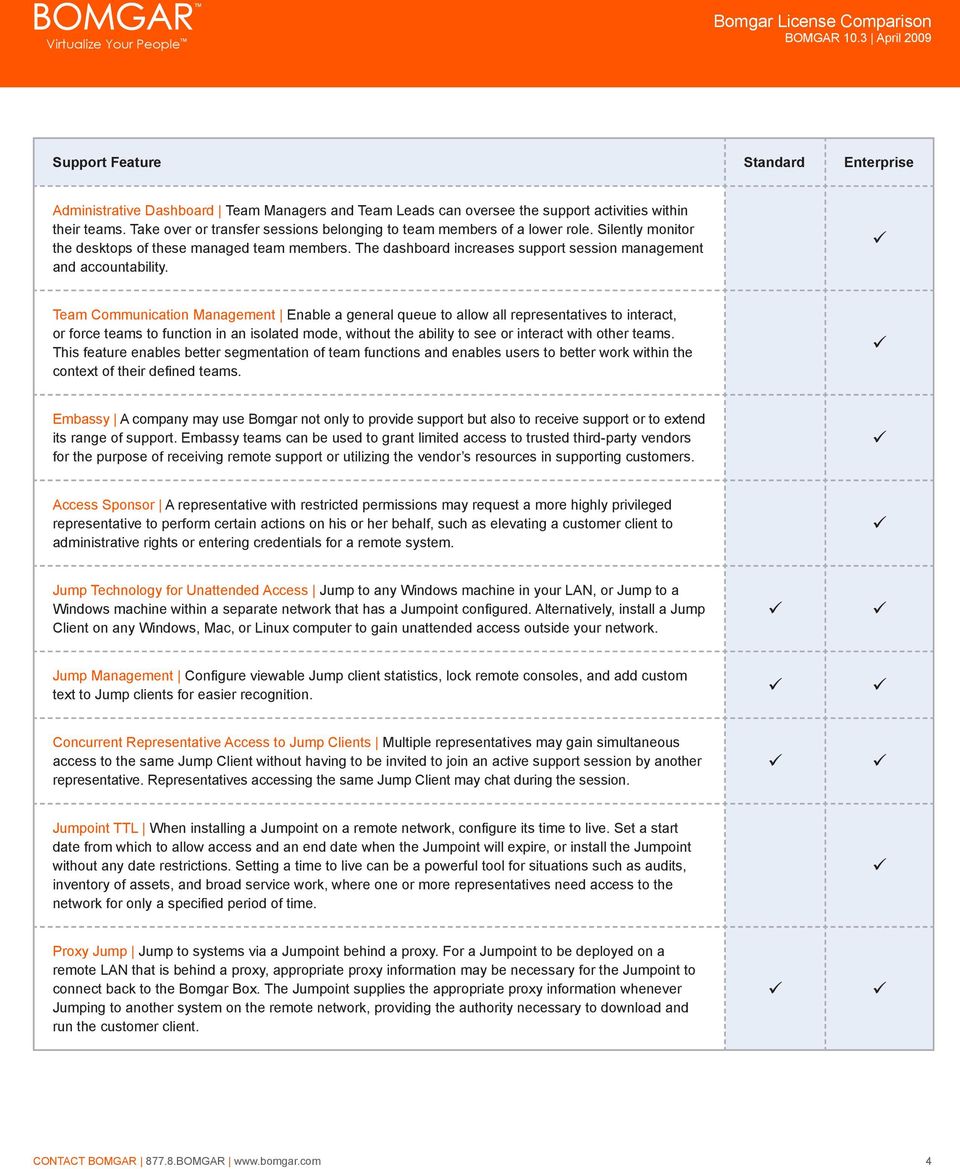
4 Administrative Dashboard Team Managers and Team Leads can oversee the support activities within their teams. Take over or transfer sessions belonging to team members of a lower role. Silently monitor the desktops of these managed team members. The dashboard increases support session management and accountability. Team Communication Management Enable a general queue to allow all representatives to interact, or force teams to function in an isolated mode, without the ability to see or interact with other teams. This feature enables better segmentation of team functions and enables users to better work within the context of their defined teams. Embassy A company may use Bomgar not only to provide support but also to receive support or to extend its range of support. Embassy teams can be used to grant limited access to trusted third-party vendors for the purpose of receiving remote support or utilizing the vendor s resources in supporting customers. Access Sponsor A representative with restricted permissions may request a more highly privileged representative to perform certain actions on his or her behalf, such as elevating a customer client to administrative rights or entering credentials for a remote system. Jump Technology for Unattended Access Jump to any Windows machine in your LAN, or Jump to a Windows machine within a separate network that has a Jumpoint configured. Alternatively, install a Jump Client on any Windows, Mac, or Linux computer to gain unattended access outside your network. Jump Management Configure viewable Jump client statistics, lock remote consoles, and add custom text to Jump clients for easier recognition. Concurrent Representative Access to Jump Clients Multiple representatives may gain simultaneous access to the same Jump Client without having to be invited to join an active support session by another representative. Representatives accessing the same Jump Client may chat during the session. Jumpoint TTL When installing a Jumpoint on a remote network, configure its time to live. Set a start date from which to allow access and an end date when the Jumpoint will expire, or install the Jumpoint without any date restrictions. Setting a time to live can be a powerful tool for situations such as audits, inventory of assets, and broad service work, where one or more representatives need access to the network for only a specified period of time. Proxy Jump Jump to systems via a Jumpoint behind a proxy. For a Jumpoint to be deployed on a remote LAN that is behind a proxy, appropriate proxy information may be necessary for the Jumpoint to connect back to the Bomgar Box. The Jumpoint supplies the appropriate proxy information whenever Jumping to another system on the remote network, providing the authority necessary to download and run the customer client. 4
5 Remote Desktop Protocol & Fast User Switching Support Support Microsoft Windows servers utilizing Microsoft s Remote Desktop Protocol, as well as Microsoft Windows desktop and workstation computers utilizing Microsoft s Fast User Switching option. Message Broadcast Broadcast messages to all logged-in representatives via the administrative interface to keep representatives up to date with crucial data. Support Teams Group your support representatives into support teams according to specialization or skill. Assign issues to each support team, managing which issues each team should handle. Issues are directly linked to the front-end survey. License Reservation and Allocation Allocate and reserve the minimum number of licenses for the administered teams. This eliminates the possibility of depleting all Bomgar licenses in one team while some licenses are needed by another team. Effective licenses usage management results in improved productivity and efficiency. License Monitoring Configure the Bomgar Box to send an when more than a specified number of licenses are in use, enabling you to ensure that your support representatives are adequately equipped to achieve maximum performance. Unlimited User Accounts Create an unlimited number of representative accounts. Because Bomgar licenses are based on concurrent usage, individual representatives are welcome to share licenses, but only one representative can use a shared license at a time. User Identification and Authentication Differentiate administrators from representatives. You can also set various parameters for representative passwords. These include password complexity, failed password lockout, password expiration, and idle user timeout. You can even determine the features and level of control allowed to individual reps. LDAP Integration LDAP integration simplifies the task of help desk management and user account administration. Centrally manage your support representatives or support teams in Active Directory or other LDAP directories, and assign privileges based on pre-defined groups. Multi-Factor Authentication Integrate Bomgar with RSA and other multi-factor authentication mechanisms via RADIUS for an extra layer of security. Single Sign-On Access Bomgar accounts using integrated Windows authentication, public/private key certificates, or web-based single-sign. Single sign-on via Kerberos increases security and reduces overhead. 5

6 Bomgar Box Redundancy/Failover Use the web interface to assign primary and backup roles to appliances. In this configuration, data between two appliances is automatically synchronized, and the appliances can be configured for automatic failover. The backup appliances polls the primary appliance to check for activity. Based on predefined minimum thresholds, if the primary device is determined to be down, automatic routing to the backup appliance will occur. Use of a redundant appliance aids in faster failover, increased uptime, and reduction in the risk of data loss. Logging and Reporting Your Bomgar Box collects support session data automatically, enabling you to keep a detailed audit trail securely within your own infrastructure. You can view and manage these session logs in the administrative interface. Download summary or detailed reports of all session activity. Run reports based on team, team members, or representative. View Flash (.flv) recordings of screen sharing sessions, remote command shells, and presentations, useful for training and auditing purposes. Record Chat Sessions Record all text transmitted through the chat feature. Service Stats View reports on the number of sessions handled by each representative. Syslog Integration Configure the Bomgar Box to send log messages to an existing syslog server. Open API Integrate Bomgar with external databases and systems according to your business needs. Configure the API to export software backups or reports of session data from the Bomgar Box into your own database on a scheduled or ad hoc basis. Generate sessions from external programs, and utilize outbound events to trigger real-time actions in external programs. Integration Client The Integration Client allows for extendable data storage through a user interface. The Integration Client supports SQL Server and File System plug-ins, with the option to create your own plug-ins using Bomgar s SDK. Use the Integration Client to store session data, software backups, and more by transferring data to an external source. Software Development Kit Create custom plug-ins for use with Bomgar s Integration Client using a Visual Studio template. Archival & Reporting Use Bomgar s Archival & Reporting plug-in with the Integration Client to write session data to a SQL Server or an Oracle Database. Use the reporting tool to run custom reports in HTML, CSV, or PDF format. 6

7 Additional Integration Options Additional integration options, not tied to licensing, are available to Bomgar customers. Start support sessions and view customizable reports from within your service management solution. These integration options are described in detail in the Bomgar Integration Options document, available at HP Service Center 6.2 and up HP Service Manager 7.0 and up BMC Remedy Action Request System 6.3 and up Pre-Packaged Integration Adapter Automate your integration of Bomgar with HP Service Center, HP Service Manager, or BMC Remedy Action Request System by purchasing a pre-packaged integration adapter, thus drastically reducing integration time. The adapter ensures integration between bomgar and the chosen service management solution for current and future releases of both products. BMC Service Desk Express 9.0 and up Built-In Integration BMC has implemented and maintains Bomgar s integration with its Service Desk Express product. No additional purchase is necessary for Service Desk Express customers who wish to integrate with Bomgar. Professional Integration Services Third-Party Integration You may also select a third-party professional services provider to handle your integration needs. Because Bomgar s API, Integration Client, and SDK conform to industry protocols, it is possible for customers to contract with a professional services company to outsource integration needs. 7

Bomgar 10.6 License Comparison
 Bomgar 10.6 License Comparison Multi-Platform Support Customer Technician/Representative Windows Windows 95-Windows 7 Server 2003 Server 2008 Windows 2000-Windows 7 Server 2003 Server 2008 Mac OS X OS
Bomgar 13.1 License Comparison
 Bomgar 13.1 License Comparison FEATURES FOR SUPPORT REPRESENTATIVES Feature Name Description License Type Multi-Platform Support Customer Representative Windows Windows 2000 - Windows 8 Server 2000-2012
Bomgar 14.1 License Comparison
 Bomgar 14.1 License Comparison Features for Support Representatives Feature Name Description License Type Multi-Platform Support Customer Representative Windows Windows 2000 - Windows 8 Server 2000-2012
Bomgar 14.2 Available Features
 Bomgar 14.2 Available Features Features for Support Representatives Feature Name Multi-Platform Support 1 Customer Representative Windows Windows 2000 - Windows 8.1 Server 2000-2012 Windows 2000 - Windows
Privileged Access Management 15.2 Available Features
 Privileged Access Management 15.2 Available Features Features for Access Console Users Feature Name Multi-Platform Support Endpoint Access Console Windows Windows 2000 Pro SP4 Windows XP Pro SP3 Windows
Bomgar Remote Support 15.1 Available Features
 Bomgar Remote Support 15.1 Available Features Features for Support Representatives Feature Name Multi-Platform Support Customer Representative Windows Windows 2000 - Windows 8.1 Server 2000-2012 Windows
Bomgar Support 15.2 Evaluation Comparison
 Bomgar Support 15.2 Evaluation Comparison This table allows you to compare the Bomgar Free Trial with the Bomgar Evaluation offerings. Please discuss your specific support needs with your sales representative.
Privileged Access Management 15.3 Available Features
 Privileged Access Management 15.3 Available Features Features for Access Console Users Feature Name Multi-Platform Support Endpoint Access Console Windows Windows 2000 Pro SP4 Windows XP Pro SP3 Windows
Representative Console for Android Phone. Version 2.1
 Representative Console for Android Phone Version 2.1 Thank you for using Bomgar. At Bomgar, customer service is a top priority. Help us provide you with excellent service. If you have any feedback, including
BOMGAR.COM BOMGAR VS. GOTOASSIST UPDATED: 9/8/2015
 BOMGAR.COM BOMGAR VS. GOTOASSIST UPDATED: 9/8/2015 Bomgar VS. GoToAssist LICENSING & DEPLOYMENT The proliferation of solutions has undoubtedly provided certain advantages for organizations seeking alternatives
Bomgar Cloud Support Admin 15.1
 Bomgar Cloud Support Admin 15.1 2015 Bomgar Corporation. All rights reserved worldwide. BOMGAR and the BOMGAR logo are trademarks of Bomgar Corporation; other trademarks shown are the property of their
Copyright 2012 Trend Micro Incorporated. All rights reserved.
 Trend Micro Incorporated reserves the right to make changes to this document and to the products described herein without notice. Before installing and using the software, please review the readme files,
Administrative Guide 13.1. Enterprise Licensing
 Administrative Guide 13.1 Enterprise Licensing TABLE OF CONTENTS Bomgar Administrative Interface 4 Login to the Administrative Interface 5 Status 6 Information: View Bomgar Software Details 6 Representatives:
Dell SonicWALL SRA 7.5 Secure Virtual Meeting and Secure Virtual Assist
 Dell SonicWALL SRA 7.5 Secure Virtual Meeting and Secure Virtual Assist Document Scope This document describes how to configure and use the Dell SonicWALL SRA Secure Virtual Meeting feature and the Dell
Supporting Apple ios Devices
 Supporting Apple ios Devices 2016 Bomgar Corporation. All rights reserved worldwide. BOMGAR and the BOMGAR logo are trademarks of Bomgar Corporation; other trademarks shown are the property of their respective
Administrative Guide 14.2
 Administrative Guide 14.2 2014 Bomgar Corporation. All rights reserved worldwide. BOMGAR and the BOMGAR logo are trademarks of Bomgar Corporation; other trademarks shown are the property of their respective
Representative Guide 14.2
 Representative Guide 14.2 2014 Bomgar Corporation. All rights reserved worldwide. BOMGAR and the BOMGAR logo are trademarks of Bomgar Corporation; other trademarks shown are the property of their respective
BlackBerry Enterprise Server for Microsoft Exchange Version: 5.0 Service Pack: 2. Feature and Technical Overview
 BlackBerry Enterprise Server for Microsoft Exchange Version: 5.0 Service Pack: 2 Feature and Technical Overview Published: 2010-06-16 SWDT305802-1108946-0615123042-001 Contents 1 Overview: BlackBerry Enterprise
Powerful Remote Support
 Deliver secure on-demand remote support to PCs, Macs and mobile devices. LogMeIn is a comprehensive web-based remote support solution that provides on-demand permissionbased access to remote PCs, Macs
Support Center User Guide
 Support Center User Guide Installing, Managing and Using Support Center Version 8.0 2013 ENC Technology Corp. All rights reserved. 2244 Faraday Ave STE 120 Carlsbad CA 92008 (760) 727-7277 Fax: (760) 454-0487
BOMGAR FOR VENDOR ACCESS SECURE REMOTE ACCESS FOR THIRD-PARTIES
 BOMGAR FOR VENDOR ACCESS SECURE REMOTE ACCESS FOR THIRD-PARTIES SECURE REMOTE ACCESS FOR THIRD-PARTIES In many organisations, a significant number of external technicians may require periodic remote access
Security Provider Integration RADIUS Server
 Security Provider Integration RADIUS Server 2015 Bomgar Corporation. All rights reserved worldwide. BOMGAR and the BOMGAR logo are trademarks of Bomgar Corporation; other trademarks shown are the property
Open Cloud Store. End-user manual. For
 Open Cloud Store - End-user manual For 1 Version control... 3 2 Introduction to BackupAgent... 4 3 Configuring BackupAgent... 5 3.1 Create a BackupAgent account... 5 3.2 Download and install the BackupAgent
S E C U R I T Y A S S E S S M E N T : B o m g a r A p p l i a n c e s
 S E C U R I T Y A S S E S S M E N T : B o m g a r A p p l i a n c e s During the period between November 2012 and March 2013, Symantec Consulting Services partnered with Bomgar to assess the security
Manual - TeamViewer 6.0
 Manual - TeamViewer 6.0 Revision TeamViewer 6.0 9947c Table of Contents Table of Contents 1 Scope of Service... 1 1.1 About TeamViewer... 1 1.2 New with Version 6.0... 1 1.3 Functions of Mac and Linux
Secure Virtual Assist/ Access/Meeting
 Secure Virtual Assist/ Access/Meeting Easy-to-use tools for secure remote support, PC control and collaboration Technical support by phone, email, chat and pre-installed remote support clients can be cumbersome,
BOMGAR.COM BOMGAR VS. LOGMEIN RESCUE UPDATED: 10/6/2015
 BOMGAR.COM BOMGAR VS. LOGMEIN RESCUE UPDATED: 10/6/2015 Bomgar VS. LogMeIn Rescue LICENSING & DEPLOYMENT The proliferation of SaaS solutions has undoubtedly provided certain advantages for organizations
VMware Mirage Web Manager Guide
 Mirage 5.1 This document supports the version of each product listed and supports all subsequent versions until the document is replaced by a new edition. To check for more recent editions of this document,
ManageEngine SupportCenter Plus 7.7 Edition Comparison
 ManageEngine SupportCenter Plus 7.7 Edition Comparison Detailed Comparison of SupportCenter Plus 7.7 Editions. Zoho Corporation Official Document. ManageEngine is a part of Zoho Corporation ( Formerly
Cloud Attached Storage 3.1 EA
 Release Notes Cloud Attached Storage 3.1 EA March 2012 Cloud Attached Storage 3.1 EA Release Notes 1 1 Release Contents Copyright 2009-2012 CTERA Networks Ltd. All rights reserved. No part of this document
SonicWALL SSL VPN 3.5: Virtual Assist
 SonicWALL SSL VPN 3.5: Virtual Assist Document Scope This document describes how to use the SonicWALL Virtual Assist add-on for SonicWALL SSL VPN security appliances. This document contains the following
Remote Support Jumpoint Guide: Unattended Access to Computers in a Network 3. Requirements and Considerations to Install a Jumpoint 4.
 Jumpoint Guide 2015 Bomgar Corporation. All rights reserved worldwide. BOMGAR and the BOMGAR logo are trademarks of Bomgar Corporation; other trademarks shown are the property of their respective owners.
Feature and Technical
 BlackBerry Enterprise Server for Microsoft Exchange Version: 5.0 Service Pack: 4 Feature and Technical Overview Published: 2013-11-07 SWD-20131107160132924 Contents 1 Document revision history...6 2 What's
How To Configure A Bomgar.Com To Authenticate To A Rdius Server For Multi Factor Authentication
 Security Provider Integration RADIUS Server 2015 Bomgar Corporation. All rights reserved worldwide. BOMGAR and the BOMGAR logo are trademarks of Bomgar Corporation; other trademarks shown are the property
Unicenter Remote Control r11
 Data Sheet Unicenter Remote Control r11 Unicenter Remote Control TM is a highly reliable and secure application for controlling and supporting remote Windows and Linux systems. It delivers all of the features
BlackBerry Business Cloud Services. Administration Guide
 BlackBerry Business Cloud Services Administration Guide Published: 2012-07-25 SWD-20120725193410416 Contents 1 About BlackBerry Business Cloud Services... 8 BlackBerry Business Cloud Services feature overview...
Copyright 2013 Trend Micro Incorporated. All rights reserved.
 Trend Micro Incorporated reserves the right to make changes to this document and to the products described herein without notice. Before installing and using the software, please review the readme files,
WhatsUp Gold v16.3 Installation and Configuration Guide
 WhatsUp Gold v16.3 Installation and Configuration Guide Contents Installing and Configuring WhatsUp Gold using WhatsUp Setup Installation Overview... 1 Overview... 1 Security considerations... 2 Standard
Gigabyte Management Console User s Guide (For ASPEED AST 2400 Chipset)
 Gigabyte Management Console User s Guide (For ASPEED AST 2400 Chipset) Version: 1.4 Table of Contents Using Your Gigabyte Management Console... 3 Gigabyte Management Console Key Features and Functions...
System Administration Training Guide. S100 Installation and Site Management
 System Administration Training Guide S100 Installation and Site Management Table of contents System Requirements for Acumatica ERP 4.2... 5 Learning Objects:... 5 Web Browser... 5 Server Software... 5
ACP ThinManager Tech Notes What's New, or Why Upgrade ThinManager?
 ACP ThinManager Tech Notes What's New, or Why Upgrade ThinManager? Use the F1 button on any page of a ThinManager wizard to launch Help for that page. Visit www.thinmanager.com/technotes/ to download the
Remote Support Jump Client Guide: Unattended Access to Systems in Any Network 3. Deploy Jump Clients During a Support Session or Prior to Support 4
 Jump Client Guide 2015 Bomgar Corporation. All rights reserved worldwide. BOMGAR and the BOMGAR logo are trademarks of Bomgar Corporation; other trademarks shown are the property of their respective owners.
Remote Management Reference
 www.novell.com/documentation Remote Management Reference ZENworks 11 Support Pack 2 October 2013 Legal Notices Novell, Inc., makes no representations or warranties with respect to the contents or use of
Novell Filr. Windows Client
 Novell Filr Windows Client 0 Table of Contents Supported Environments 2 Supported Languages 2 Getting Started 3 Which Folders Are Synchronized 3 What Actions Are Supported 4 Configuring Folders to Synchronize
Law Conferencing uses the Webinterpoint 8.2 web conferencing platform. This service is completely reservationless and available 24/7.
 Law Conferencing uses the Webinterpoint 8.2 web conferencing platform. This service is completely reservationless and available 24/7. This document contains detailed instructions on all features. Table
Syslog Message Reference Guide. Bomgar 14.1
 Syslog Message Reference Guide Bomgar 14.1 TABLE OF CONTENTS Syslog Message Reference Guide 5 Syslog Message Format 5 Syslog Message Segmentation 5 Syslog Payload Format 6 Integrated Login Syslog Messages
Connection Broker Managing User Connections to Workstations, Blades, VDI, and More. Quick Start with Microsoft Hyper-V
 Connection Broker Managing User Connections to Workstations, Blades, VDI, and More Quick Start with Microsoft Hyper-V Version 8.1 October 21, 2015 Contacting Leostream Leostream Corporation http://www.leostream.com
Comparison Document. SupportCenter Plus Comparison Documents 1
 Comparison Document Your Customer Support Software evaluation is not complete until you check out the comparison between different features of. Here is a list prepared based on customer queries. Comparison
Contents. Platform Compatibility. Directory Connector SonicWALL Directory Services Connector 3.1.7
 Directory Connector SonicWALL Directory Services Connector 3.1.7 Contents Platform Compatibility... 1 New Features... 2 Known Issues... 3 Resolved Issues... 4 Overview... 7 About SonicWALL Single Sign-On
owncloud Architecture Overview
 owncloud Architecture Overview Time to get control back Employees are using cloud-based services to share sensitive company data with vendors, customers, partners and each other. They are syncing data
NetSupport Manager v11
 Remote Support For Any Environment NetSupport Manager v11 NetSupport Manager has been helping organizations optimize the delivery of their IT support services since 1989 and while the use of Remote Control
PROPALMS TSE 6.0 March 2008
 PROPALMS March 2008 An Analysis of and Terminal Services: Contents System Administration... 2 Server Management... 3 Application Management... 5 Security... 7 End User Experience... 8 Monitoring and Reporting...
What s New in Propalms VPN 3.5?
 What s New in Propalms VPN 3.5? Contents Improved Management Console Interface... 2 Inline Help on Management Console... 2 Graphical Dashboard on Management Console... 2 Multiple Authentication Server
Remote Application Server Version 14. Last updated: 25-02-15
 Remote Application Server Version 14 Last updated: 25-02-15 Information in this document is subject to change without notice. Companies, names, and data used in examples herein are fictitious unless otherwise
Cisco Unified Workforce Quality Management
 New and Updated Features, page 1 Deprecated Features, page 3 Important Notes, page 3 Removed and Unsupported Features, page 7 Third-party Software Impacts, page 7 New and Updated Features New Features
Kaseya Server Instal ation User Guide June 6, 2008
 Kaseya Server Installation User Guide June 6, 2008 About Kaseya Kaseya is a global provider of IT automation software for IT Solution Providers and Public and Private Sector IT organizations. Kaseya's
Inter-Tel Web Conferencing and Remote Support
 MITEL Inter-Tel Web Conferencing and Remote Support User Guide Notice This user guide is released by Inter-Tel (Delaware), Incorporated as a guide for end users. It provides information necessary to use
IBM Tivoli Remote Control
 Robust remote desktop management across the enterprise IBM Tivoli Remote Control Highlights Enables organizations to Supports Federal Desktop Core remotely manage thousands of Configuration (FDCC) and
DiskPulse DISK CHANGE MONITOR
 DiskPulse DISK CHANGE MONITOR User Manual Version 7.9 Oct 2015 www.diskpulse.com [email protected] 1 1 DiskPulse Overview...3 2 DiskPulse Product Versions...5 3 Using Desktop Product Version...6 3.1 Product
NETWRIX USER ACTIVITY VIDEO REPORTER
 NETWRIX USER ACTIVITY VIDEO REPORTER ADMINISTRATOR S GUIDE Product Version: 1.0 January 2013. Legal Notice The information in this publication is furnished for information use only, and does not constitute
Avalanche Remote Control User Guide. Version 4.1.3
 Avalanche Remote Control User Guide Version 4.1.3 ii Copyright 2012 by Wavelink Corporation. All rights reserved. Wavelink Corporation 10808 South River Front Parkway, Suite 200 South Jordan, Utah 84095
Aspera Connect User Guide
 Aspera Connect User Guide Windows XP/2003/Vista/2008/7 Browser: Firefox 2+, IE 6+ Version 2.3.1 Chapter 1 Chapter 2 Introduction Setting Up 2.1 Installation 2.2 Configure the Network Environment 2.3 Connect
Maximize the Productivity of Your Help Desk With Proxy Networks Remote Support Software
 FAST, RELIABLE, & JUST WORKS! White Paper Maximize the Productivity of Your Help Desk With Proxy Networks Remote Support Software Proxy Networks, Inc. 877-PROXY-US or 617-453-2700 www.proxynetworks.com
Remote Support. User Guide 7.23
 Remote Support User Guide 7.23 Copyright 1997 2011 Cisco and/or its affiliates. All rights reserved. WEBEX, CISCO, Cisco WebEx, the CISCO logo, and the Cisco WebEx logo are trademarks or registered trademarks
Security Provider Integration LDAP Server
 Security Provider Integration LDAP Server 2015 Bomgar Corporation. All rights reserved worldwide. BOMGAR and the BOMGAR logo are trademarks of Bomgar Corporation; other trademarks shown are the property
HP Service Manager. Software Version: 9.40 For the supported Windows and Linux operating systems. Application Setup help topics for printing
 HP Service Manager Software Version: 9.40 For the supported Windows and Linux operating systems Application Setup help topics for printing Document Release Date: December 2014 Software Release Date: December
NETWRIX EVENT LOG MANAGER
 NETWRIX EVENT LOG MANAGER ADMINISTRATOR S GUIDE Product Version: 4.0 July/2012. Legal Notice The information in this publication is furnished for information use only, and does not constitute a commitment
Remote Application Server Version 14. Last updated: 06-02-15
 Remote Application Server Version 14 Last updated: 06-02-15 Information in this document is subject to change without notice. Companies, names, and data used in examples herein are fictitious unless otherwise
Server Manager Help 10/6/2014 1
 Server Manager Help 10/6/2014 1 Table of Contents Server Manager Help... 1 Getting Started... 7 About SpectorSoft Server Manager... 8 Client Server Architecture... 9 System Requirements... 10 Screencasts...
Virtual Appliance Setup Guide
 Virtual Appliance Setup Guide 2015 Bomgar Corporation. All rights reserved worldwide. BOMGAR and the BOMGAR logo are trademarks of Bomgar Corporation; other trademarks shown are the property of their respective
Vector Asset Management User Manual
 Vector Asset Management User Manual This manual describes how to set up Vector Asset Management 6.0. It describes how to use the: Vector AM Console Vector AM Client Hardware Inventory Software Inventory
Administration Quick Start
 www.novell.com/documentation Administration Quick Start ZENworks 11 Support Pack 3 February 2014 Legal Notices Novell, Inc., makes no representations or warranties with respect to the contents or use of
Gigabyte Content Management System Console User s Guide. Version: 0.1
 Gigabyte Content Management System Console User s Guide Version: 0.1 Table of Contents Using Your Gigabyte Content Management System Console... 2 Gigabyte Content Management System Key Features and Functions...
NMS300 Network Management System
 NMS300 Network Management System User Manual June 2013 202-11289-01 350 East Plumeria Drive San Jose, CA 95134 USA Support Thank you for purchasing this NETGEAR product. After installing your device, locate
www.novell.com/documentation Administration Guide Messenger 2.2 July 30, 2013
 www.novell.com/documentation Administration Guide Messenger 2.2 July 30, 2013 Legal Notices Novell, Inc. makes no representations or warranties with respect to the contents or use of this documentation,
An Analysis of Propalms TSE and Microsoft Remote Desktop Services
 An Analysis of TSE and Remote Desktop Services JULY 2010 This document illustrates how TSE can extend your Remote Desktop Services environment providing you with the simplified and consolidated management
Connection Broker Managing User Connections to Workstations, Blades, VDI, and more. Security Review
 Connection Broker Managing User Connections to Workstations, Blades, VDI, and more Security Review Version 8.1 October 21, 2015 Contacting Leostream Leostream Corporation http://www.leostream.com 465 Waverley
1. Installation Overview
 Quick Install Guide 1. Installation Overview Thank you for selecting Bitdefender Business Solutions to protect your business. This document enables you to quickly get started with the installation of Bitdefender
Complete Patch Management
 Complete Patch Management Complete - Flexible Unique In- Depth Secunia CSI 7 Corporate Software Inspector Take control of the vulnerability threat and optimize your IT security investments. The Secunia
FilesAnywhere Feature List
 FilesAnywhere Feature List FilesAnywhere Page 1 of 9 3/31/2014 Contents Basic Features... 3 Advanced Features... 7 Enterprise Features... 9 FilesAnywhere Page 2 of 9 3/31/2014 Basic Features No File Size
Remote Support Jump Client Guide: Unattended Access to Systems in Any Network 3. Deploy Jump Clients During a Support Session or Prior to Support 4
 Jump Client Guide 2016 Bomgar Corporation. All rights reserved worldwide. BOMGAR and the BOMGAR logo are trademarks of Bomgar Corporation; other trademarks shown are the property of their respective owners.
FireSIGHT User Agent Configuration Guide
 Version 2.2 August 20, 2015 THE SPECIFICATIONS AND INFORMATION REGARDING THE PRODUCTS IN THIS MANUAL ARE SUBJECT TO CHANGE WITHOUT NOTICE. ALL STATEMENTS, INFORMATION, AND RECOMMENDATIONS IN THIS MANUAL
Secure Access Using VPN
 Secure Access Using VPN WHAT IS CISCO SSL VPN? Cisco is the brand name of the VPN appliance (hardware). The SSL VPN stands for Secure Sockets Layer Virtual Private Network. SSL VPN is a service that allows
RSA Authentication Manager 7.1 Security Best Practices Guide. Version 2
 RSA Authentication Manager 7.1 Security Best Practices Guide Version 2 Contact Information Go to the RSA corporate web site for regional Customer Support telephone and fax numbers: www.rsa.com. Trademarks
Administration Guide NetIQ Privileged Account Manager 3.0.1
 Administration Guide NetIQ Privileged Account Manager 3.0.1 December 2015 www.netiq.com/documentation Legal Notice For information about NetIQ legal notices, disclaimers, warranties, export and other use
Bomgar Connect Representative Guide 16.1
 Bomgar Connect Representative Guide 16.1 2016 Bomgar Corporation. All rights reserved worldwide. BOMGAR and the BOMGAR logo are trademarks of Bomgar Corporation; other trademarks shown are the property
The All-in-One Support Solution. Easy & Secure. Secure Advisor
 The All-in-One Support Solution. Easy & Secure. Secure Advisor Secure Advisor - A Perfect Solution for Online Support Fast and easy remote support from anywhere Problems that often sound complicated on
Sharp Remote Device Manager (SRDM) Server Software Setup Guide
 Sharp Remote Device Manager (SRDM) Server Software Setup Guide This Guide explains how to install the software which is required in order to use Sharp Remote Device Manager (SRDM). SRDM is a web-based
www.novell.com/documentation Server Installation ZENworks Mobile Management 2.7.x August 2013
 www.novell.com/documentation Server Installation ZENworks Mobile Management 2.7.x August 2013 Legal Notices Novell, Inc., makes no representations or warranties with respect to the contents or use of this
Getting Started With Halo for Windows For CloudPassage Halo
 Getting Started With Halo for Windows For CloudPassage Halo Protecting your Windows servers in a public or private cloud has become much easier and more secure, now that CloudPassage Halo is available
2X ApplicationServer & LoadBalancer & VirtualDesktopServer Manual
 2X ApplicationServer & LoadBalancer & VirtualDesktopServer Manual 2X VirtualDesktopServer Contents 1 2X VirtualDesktopServer Contents 2 URL: www.2x.com E-mail: [email protected] Information in this document
Enterprise Solution for Remote Desktop Services... 2. System Administration... 3. Server Management... 4. Server Management (Continued)...
 CONTENTS Enterprise Solution for Remote Desktop Services... 2 System Administration... 3 Server Management... 4 Server Management (Continued)... 5 Application Management... 6 Application Management (Continued)...
Metalogix SharePoint Backup. Advanced Installation Guide. Publication Date: August 24, 2015
 Metalogix SharePoint Backup Publication Date: August 24, 2015 All Rights Reserved. This software is protected by copyright law and international treaties. Unauthorized reproduction or distribution of this
Aspera Connect 2.4.7. Linux 32/64-bit. Document Version: 1
 Aspera Connect 2.4.7 Linux 32/64-bit Document Version: 1 2 Contents Contents Introduction... 3 Setting Up... 4 Upgrading from a Previous Version...4 Installation... 4 Set Up Network Environment... 5 Basic
Ad Hoc Transfer Plug-in for Outlook Installation Guide
 IPSWITCH TECHNICAL BRIEF Ad Hoc Transfer Plug-in for Outlook Installation Guide In This Document Installing the Ad Hoc Transfer Plug-in for Outlook...1 Silent Install for Ad Hoc Transfer Plug-in for Outlook...3