
GSPIM: Graphical Visualization Tool for MIPS Assembly
|
|
|
- Sheena Warren
- 9 years ago
- Views:
Transcription
1 GSPIM: Graphical Visualization Tool for MIPS Assembly Programming and Simulation Patrick Borunda Science University of Arizona Chris Brewer Science University of Arizona Cesim Erten Science and Engineering Işık University ABSTRACT We describe our system, GSPIM, used for visualization of low-level MIPS Assembly programming and simulation. Although many visualization tools for algorithms and highlevel programs have been considered in educational settings, visualization specific to low-level programs have not received enough consideration. One desirable property of such a visualization is that it should close the gap between high-level programming constructs and the sequential nature of lowlevel programs. Secondly it should provide techniques to present information specific to the simulation of the code. GSPIM supports both properties and is publicly available at Categories and Subject Descriptors D.2.2 [Software Engineering]: Design Tools and Techniques User interfaces; H.5.2 [Information Interfaces and Presentation]: User interfaces Graphical user interfaces; H.4 [Information Systems Applications]: Miscellaneous General Terms Design, Human Factors, Languages Keywords Visualization, assembly code, computer organization 1. INTRODUCTION Software visualization has emerged as an area where the goal is to provide models and systems to help programmers illustrate and present computer programs, processes, and algorithms. Such models and systems can be used effectively in teaching to aid students in building a better understanding of their code, the actual behavior of their programs, and Permission to make digital or hard copies of all or part of this work for personal or classroom use is granted without fee provided that copies are not made or distributed for profit or commercial advantage and that copies bear this notice and the full citation on the first page. To copy otherwise, to republish, to post on servers or to redistribute to lists, requires prior specific permission and/or a fee. SIGSCE 06 Houston, Texas USA Copyright 200X ACM X-XXXXX-XX-X/XX/XX...$5.00.? Exit: while ( A[i] = = k ) i + +; Loop: sll $t1, $s3, 2 add $t1, $t1, $s6 lw $t0, 0($t1) bne $t0, $s5, Exit add $s3, $s3, 1 j Loop Figure 1: Top: High-level code segment in C; Bottom: Equivalent low-level MIPS assembly code. Lack of high-level constructs, such as loops, makes it hard to learn and understand assembly programming. the underlying more abstract algorithmic concepts behind them; see [9] for a nice survey. Although visualization has been used effectively in educational settings to help students understand otherwise abstract concepts, its use has usually been limited to higher level abstractions such as algorithms or to programs written in high-level languages. On the other hand visualization of low-level programs and its role in computer science education has not received enough consideration. Because of the fact that common undergraduate curricula include computer organization courses with an introduction to low-level assembly programming after introductory computer science courses with an emphasis on high-level languages such as Java or C, such a visualization becomes especially important. The student constructs a mental model of programming with the concepts of high-level languages before being introduced to assembly programming; see Figure 1. For instance, one important distinction between high-level programming languages and their low-level counterparts is the sequential nature of the latter. High-level constructs such as procedures, loops, conditional statements do not exist in low-level languages. These high-level constructs are usually implemented via simple low-level branching instructions.
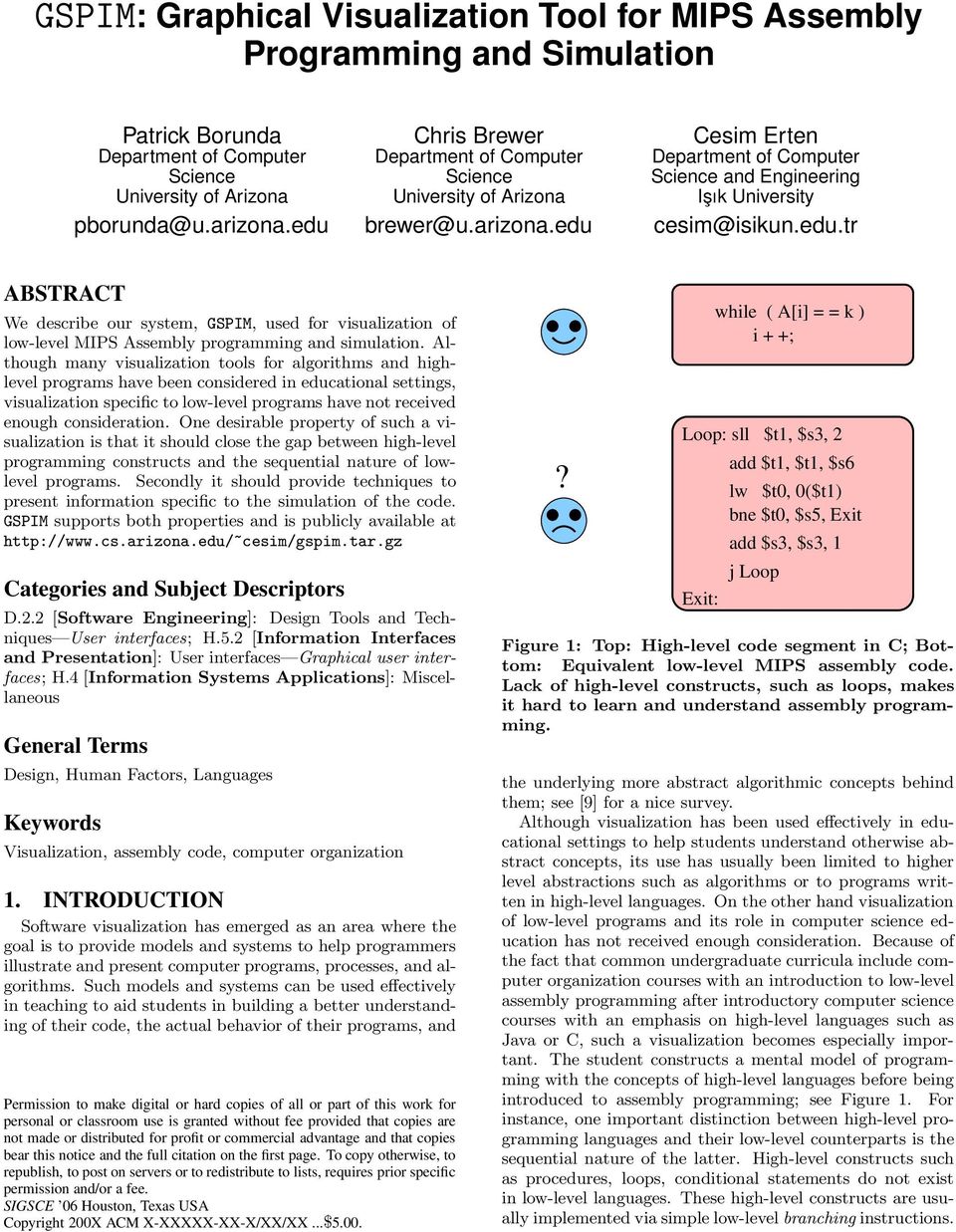
2 Because of the sequential nature of these programs the user then has to follow the branching instructions in order to make sense of the program. A visualization model for lowlevel languages that allows the user make the connection between high-level constructs and their low-level implementations more intuitive would prove quite useful for courses designed to introduce assembly language in the general context of computer organization. In this paper we describe such a model and present our system, GSPIM, designed for the purposes of closing the gaps between high-level language constructs and low-level assembly programming and providing an environment for visualizing the simulation of such programs. 1.1 Related Work Many visualization systems have been designed for algorithm visualization to help user understand the workings of algorithms in visual forms mostly via animations; see [5] for a general survey on the topic. The Matrix system provides a set of visual concepts for data structure visualization and algorithm animation [6]. The techniques of Kaleidoscope, Lattice, and MAP were introduced as part of the COMIND tool [10]. JAWAA is a tool for creating animations of data structures and displaying them with a web browser [8]. Software visualization models and systems have been built to support maintenance, understanding, and inspection of programs. In addition to providing an overall understanding of the code, the visualization systems can be used to aid in reverse engineering and debugging. Among the notable educational software visualization tools is Jeliot, a family of program animation systems [1]. The Object Visualizer of [3] aims to introduce object-oriented concepts through visualization. Regarding visualization in low-level assembly programming, SPIMbot, an extension to SPIM, is introduced as a tool that allows virtual robots to be controlled by writing programs in MIPS [11]. It provides a framework for simulating robots and their interactions with a virtual world and a graphical display to visualize the robots. 1.2 Our Contributions We provide a visualization model for low-level assembly programming and simulation that aims to close the gaps between high-level programming concepts and the sequential nature of low-level programs. We present our system, GSPIM, built with this model in mind for MIPS assembly code. It is inspired by James Larus s widely-used MIPS simulator SPIM [7] and it can be considered a simple graphical version of SPIM. The main components of the GSPIM system can be summarized as follows: Understanding assembly programs: We create a graphical view of the assembly program which represents the call relations and control flow of the code. These relations are automatically laid out using specialized layout algorithms that apply to user-constructed MIPS assembly programs and thus provide nice visualizations. Simulating assembly programs: All MIPS instructions, including some common pseudoinstructions, are simulated. The functionality is no less than that of SPIM in the sense that all simulation outputs of SPIM are also provided. Simulation is visualized through animation within the graphical view and the original text of the program. Static/dynamic aids: To avoid unnecessary complication, unreachable code parts are removed from the graphical view statically. Regarding simulation of the code, color animation is introduced in graphical view to distinguish parts of code executed commonly from those executed rarely. The GSPIM system was implemented as part of a project designed for the Honors section of the Computer Organization class at the University of Arizona in Spring-05. All authors were involved in the class and were thus able to reflect their first-hand experience with assembly programming using MIPS in designing a visualization system for low-level programming and simulation that can be of use in similar courses. The system is operational and can be downloaded at [2]. The rest of the paper is organized as follows: Next section describes the static visualization model in the form of graphical view and how the static attributes of assembly code is represented in GSPIM. Section 3 describes how simulation of assembly code is represented and concentrates on the dynamics of the code. The GSPIM GUI features are described in Section 4 and finally we conclude in Section GRAPHICAL VIEW MODEL The graphical view consists of statically visualizing the assembly code in the form of graphs. A nice visualization of assembly code should be able to present the high-level constructs that are not explicit in the code. One way of presenting such constructs is to use the compiler graphs, since they can be considered intermediate tools between high-level code and low-level assembly code. Although visualization of compiler graphs to aid in program analysis is not a new idea, the following views of such visualization in educational settings have not been considered: As a median to increase learner s understanding of static low-level code by providing a sense of similarity with high-level code constructs. As a dynamic tool to provide the learner with an intuition about the simulation of low-level code. With these goals in mind the main model we use is the simultaneous representation of call graph and control flow graphs of the assembly code, which we call graphical view, together with the original textual code itself. Note that the graph concepts used in the graphical view are heavily used in compiler analysis. However one advantage of our visualization system is that the user does not have to know any details about these graphs. Simply knowing what each graph represents is enough for visualization purposes. 2.1 MIPS Assembly and Call Graphs A call graph is an abstract representation (in the form of a directed graph) of the procedures of a program. It represents the parent(caller)-child (callee) relationships of procedures in a program. Each node in the graph corresponds to a procedure and there is a directed edge from a caller node to a callee node. Assembly programs do not have a syntactic separation between a normal instruction and a procedure call.

3 Figure 2: GSPIM user interface. The graphical view consists of the call graph and control flow graph layouts. The current nodes in the call graph and the control flow graph are indicated with green borders. All nodes start out gray and the popular nodes (heavily executing code segments) become red during simulation. The textual code segment corresponds to the current block in the flow graph. Contents of registers and memory cells can be viewed. However in MIPS Assembly there are certain instructions that must be executed before running a procedure and before returning from the procedure: jal ProcedureAddress must be executed before a call and jr $ra must be executed before returning. Here ProcedureAddress indicates the label of the code segment corresponding to the procedure and $ra is the register that holds the return address. Through simple text processing of the code the call graph can be constructed using these instructions as indicators. The main GUI contains a panel that shows the call graph of the assembly code; see Figure 2. Visualizing the call graph gives the user a better overall understanding of the assembly code. The user can differentiate the procedures within the code from other constructs such as loops and conditional statements which are represented in detail in the control flow graph view. 2.2 MIPS Assembly and Flow Graphs A control flow graph (CFG) is an abstract representation of a procedure. Each node in the graph represents a basic block, i.e., a straight-line piece of code without any branches or branch-targets; branch targets start a block and branches end a block. There are two specially designated blocks: the entry block, through which the control enters the flow graph, and the exit block, through which all control flow leaves. In order to construct the control flow graph representation of a procedure first we identify the headers (the first instruction of a basic block) using the following: Add new nodes Entry and Exit as headers. First instruction in the code is a header. The target of any branch is a header. The instruction following any branch is a header. Then for each header we add successive instructions into current basic block which can be identified by its header, until we reach the next header. Once the nodes of the graph are found then the task is to find the edges: There is a directed edge from basic block B 1 to basic block B 2 if either there is a branch from last instruction in B 1 to header of B 2 or B 2 immediately follows B 1 and B 1 does not end in an unconditional branch. There is an edge from Entry to each initial basic block. There is an edge from each final basic block to Exit. There is at most one directed edge from a basic block B 1 to a basic block B 2. The control flow graph of the currently executing procedure is visualized in a panel in the main GUI; see Figure 2.

4 Another simplifying assumption is that every node in the flow graph has outdegree at most two. This is actually a property of the flow graphs of MIPS Assembly code as the branches in MIPS are naturally two-way branches. This property simplifies the layout process of the flow graph and enhances better visualization. Although we cover the construction of the control flow graphs in depth here, the user does not have to know all these details. The flow graphs resulting from MIPS Assembly code are usually simple. Figure 4 shows the usual structure of if then else statement and the while loop in MIPS. Once the user gets acquainted with visualization of such constructs in the graphical view, it is fairly straightforward to make sense of a piece of code segment written in assembly. For example the code segment for the binary procedure in Figure 2 consists of a sequence of if then else constructs recursively embedded within the same construct. (a) (b) Figure 3: Back edges are identified in the flow graph and are drawn in red, pointing upward. Other edges are drawn in black and pointing downward. It simplifies the recognition of loops within the code. We make some simplifying assumptions regarding the control flow graphs. First of all we assume that the resulting flow graphs are reducible. A node m dominates node n if every path in the flow graph from the entry block to n contains m. If a flow graph is reducible then edge (n, m) is backward (a back edge) if and only if either n = m or m dominates n in the graph. Thus, the backward edges of a reducible flow graph are unique [4]. This property of reducible flow graphs allows us to identify back edges. Once the back edges are found our layout algorithm draws every back edge in such a way that the edge points upward and it is drawn with a distinguishable color. Every other edge is drawn downward with a dark color. This helps user recognize loop constructs more easily and differentiate them from other constructs such as conditional statements; see Figure 3. Note that the assumption regarding the reducibility of the flow graphs is not an artificial one. Reducible flow graphs constitute a subclass of flow graphs that include all those derived from structured programs, i.e., programs that do not use variants of goto statements that carry the flow into arbitrary points in the program. Assuming a programming experience gained from a structured high-level language, the user is likely to generate assembly code that gives rise to reducible flow graphs. Even if the flow graph is irreducible our system produces a layout for the flow graph, but in that case the arguments about the back edges no longer hold. Figure 4: a) The structure of if then else statement in MIPS. b) The structure of while statement in MIPS. 3. SIMULATION Once the static graphical view is constructed by GSPIM the user can then simulate the assembly code and visualize the simulation output and statistics. 3.1 Simulation Output Simulation output in the form of register data is shown as a separate panel in the GUI; see Figure 2. While the simulation is taking place the values shown in the register data change accordingly. Aside from the code segment corresponding to a basic block, MIPS assembly programs usually have a data section which corresponds to the space in memory that is allocated for the program. The user can view the data section of the code by clicking on the Show Data button. In case of user interactive assembly programs a separate window pops up and asks user for input if necessary. The user can also view the output of the program, normally directed to the console, by clicking on the Show Output button. 3.2 Simulation Statistics and Animation The current node in the call graph which is the currently executing procedure, and the current node in the control flow graph which is the currently executing block within the current procedure are highlighted during the simulation. The user has the option of simulating the code up to completion or choosing the stepwise simulation by specifying the number of instructions at each simulation step. In either

5 case the currently executing instruction is highlighted. If the instruction writes into a register that register value is also highlighted. These effects help user follow simulation and its output more easily. At any point the user can stop the simulation and examine the registers, the code segments, or the graphs of interest in more detail. In order to distinguish between parts of the code executing commonly from the ones executing rarely we implement a color animation in the graphical view. All nodes in the graphical view start out with light gray in color. As the simulation proceeds we keep a record of the number of times the code segments corresponding to each node is executed. A node s color becomes more red as the simulation goes through that node and it reaches its darkest tone possible (determined by the simulation statistics) when the simulation ends. For instance in Figure 2 the node binary is more red than the node main in the call graph which indicates the procedure binary has executed more than the procedure main. Similarly in the control flow graph the only nodes that are pink are the leftmost branch nodes, which indicates that those blocks are the only ones executed so far within the procedure binary. 4. OTHER GSPIM GUI FEATURES The GSPIM GUI allows the user to download a MIPS Assembly program. Within the graphical view the user is given the capability to zoom in/out the parts of the graph of interest. Once the user clicks on the Enable Zoom button then the parts of the graph under the mouse is enlarged. The system provides an automatic layout of the graphs under consideration. The edges are drawn as orthogonal segments and the layout algorithm places the nodes in layers in such a way that the number of crossings between edges is reduced via known heuristics which we do not discuss here. Some of these heuristics are enhanced by the special assumptions regarding the flow graphs arising from MIPS Assembly code. The user also has the option of changing the layout in case the provided automatic layout is not desirable. Clicking on the update button brings the layout back to the original automatic layout computed by the system. 5. CONCLUSIONS We presented the GSPIM system, used for visualization of low-level MIPS Assembly programming and simulation. Our system is designed for the purpose of closing the gap between high-level programming constructs and the sequential nature of low-level programs by providing a visualization of MIPS Assembly code in the form of graphs. Moreover our system provides tools that aim to enhance the user s understanding of the simulation of the code. Although the current system is designed to aid the low-level assembly language learner, we believe it can also be used to aid the study of compiler graphs and can enhance compiler analysis. Although we followed a hands-on approach while designing the system as the authors were involved in a class that included learning how to code in low-level assembly language, we have not yet used our system exclusively in such a class. We plan to test our system and its usability in the future. We also plan to investigate on the possibility of providing the capability to create the call and control flow graphs so that the user can view the resulting MIPS Assembly code without creating a text-based code. We would like to experiment whether such an idea would enhance the user s learning experience of low-level assembly code without being concerned with the syntactic details of a specific assembly language. 6. ACKNOWLEDGMENTS We would like to thank Raphael Bressel and Andreea Danielescu for their help in the implementation. We would also like to thank Peter Eades for helpful discussions regarding the use of reducible flow graphs as a restricted class of flow graphs suitable for user-created low-level code. 7. ADDITIONAL AUTHORS Additional authors: Nolan King, Zach Nation, and Maxim Shokhriev. 8. REFERENCES [1] M. Ben-Ari, N. Myller, E. Sutinen, and J. Tarhio. Perspectives on program animation with jeliot. In Software Visualization: International Seminar, LNCS 2269, pages 31 45, [2] P. Borunda, R. Bressel, C. Brewer, A. Danielescu, C. Erten, N. King, Z. Nation, and M. Shokriev. Gspim: Graphical visualization tool for assembly programming and simulation. In cesim/gspim.tar.gz. [3] H. L. Dershem and J. Vanderhyde. Java class visualization for teaching object-oriented concepts. ACM SIGCSE Bulletin, 30(1):53 57, [4] M. S. Hecht and J. D. Ullman. Characterizations of reducible flow graphs. Journal of the ACM (JACM), 21(3): , [5] C. D. Hundhausen, S. A. Douglas, and J. T. Stasko. A meta-study of algorithm visualization effectiveness. Journal of Visual Languages and Computing, 13(3): , June [6] A. Korhonen and L. Malmi. Matrix-concept animation and algorithm simulation system. In Proceedings of the Working Conference on Advanced Visual Interfaces, pages ACM, May [7] J. Larus. Spim: A mips r2000/r3000 simulator. In larus/spim.html. [8] W. Pierson and S. Rodger. Web-based animation of data structures using jawaa. In Proceedings of the twenty-ninth SIGCSE technical symposium on Computer science education, pages ACM, [9] B. A. Price, R. M. Baecker, and I. S. Small. A principled taxonomy of software visualization. Journal of Visual Languages and Computing, 4(2): , [10] P. Pu and D. Lalanne. Interactive problem solving via algorithm visualization. In Proceedings of the IEEE Symposium on Information Visualization, pages , October [11] C. Zilles. Spimbot: an engaging, problem-based approach to teaching assembly language programming. ACM SIGCSE Bulletin, 37(1): , 2005.

JAWAA: Easy Web-Based Animation from CS 0 to Advanced CS Courses
 JAWAA: Easy Web-Based Animation from CS 0 to Advanced CS Courses Ayonike Akingbade, Thomas Finley, Diana Jackson, Pretesh Patel, and Susan H. Rodger Department of Computer Science Duke University Durham,
HAVING a good mental model of how a
 DUSTIN RHODES CMPS261 PROJECT PROPOSAL 1 Dynamic Visualization of Code Control Flow Dustin Rhodes Abstract Having a good mental model of how computers execute code is important to becoming a good computer
PRODUCING AN EDUCATIONALLY EFFECTIVE AND USABLE TOOL FOR LEARNING, THE CASE OF JELIOT FAMILY
 PRODUCING AN EDUCATIONALLY EFFECTIVE AND USABLE TOOL FOR LEARNING, THE CASE OF JELIOT FAMILY Andrés Moreno and Niko Myller, University of Joensuu Introduction Jeliot Family is a group of program visualization
Figure 1: Graphical example of a mergesort 1.
 CSE 30321 Computer Architecture I Fall 2011 Lab 02: Procedure Calls in MIPS Assembly Programming and Performance Total Points: 100 points due to its complexity, this lab will weight more heavily in your
Program Visualization for Programming Education Case of Jeliot 3
 Program Visualization for Programming Education Case of Jeliot 3 Roman Bednarik, Andrés Moreno, Niko Myller Department of Computer Science University of Joensuu [email protected] Abstract:
Introducing PyLighter: Dynamic Code Highlighter
 Introducing PyLighter: Dynamic Code Highlighter Michael G. Boland and Curtis Clifton Department of Computer Science and Software Engineering Rose-Hulman Institute of Technology 5500 Wabash Ave. Terre Haute,
A tool to facilitate interactive and collaborative learning of execution flow and code for novice computer science students
 Institution of Innovation, Design and Engineering A tool to facilitate interactive and collaborative learning of execution flow and code for novice computer science students Author: Robert Westerlund Examiner:
Animating Programs and Students in the Laboratory
 Animating Programs and Students in the Laboratory James F. Korsh Paul S. LaFollette, Jr. Department of Computer and Information Sciences Temple University Philadelphia, PA 19122 Raghvinder Sangwan Department
METHODOLOGIES FOR STUDIES OF PROGRAM VISUALIZATION
 Full paper ABSTRACT METHODOLOGIES FOR STUDIES OF PROGRAM VISUALIZATION Niko Myller & Roman Bednarik Department of Computer Science University of Joensuu PO Box 111, FI-80101 [email protected]
VisCG: Creating an Eclipse Call Graph Visualization Plug-in. Kenta Hasui, Undergraduate Student at Vassar College Class of 2015
 VisCG: Creating an Eclipse Call Graph Visualization Plug-in Kenta Hasui, Undergraduate Student at Vassar College Class of 2015 Abstract Call graphs are a useful tool for understanding software; however,
Effective Features of Algorithm Visualizations
 Effective Features of Algorithm Visualizations Purvi Saraiya, Clifford A. Shaffer, D. Scott McCrickard and Chris North Department of Computer Science Virginia Tech Blacksburg, VA 24061 {psaraiya shaffer
GAZETRACKERrM: SOFTWARE DESIGNED TO FACILITATE EYE MOVEMENT ANALYSIS
 GAZETRACKERrM: SOFTWARE DESIGNED TO FACILITATE EYE MOVEMENT ANALYSIS Chris kankford Dept. of Systems Engineering Olsson Hall, University of Virginia Charlottesville, VA 22903 804-296-3846 [email protected]
Stack machines The MIPS assembly language A simple source language Stack-machine implementation of the simple language Readings: 9.1-9.
 Code Generation I Stack machines The MIPS assembly language A simple source language Stack-machine implementation of the simple language Readings: 9.1-9.7 Stack Machines A simple evaluation model No variables
Optimizations. Optimization Safety. Optimization Safety. Control Flow Graphs. Code transformations to improve program
 Optimizations Code transformations to improve program Mainly: improve execution time Also: reduce program size Control low Graphs Can be done at high level or low level E.g., constant folding Optimizations
What a Novice Wants: Students Using Program Visualization in Distance Programming Course
 Third Program Visualization Workshop 1 What a Novice Wants: Students Using Program Visualization in Distance Programming Course Osku Kannusmäki, Andrés Moreno, Niko Myller, and Erkki Sutinen Department
Matrix A Framework for Interactive Software Visualization
 Teknillinen korkeakoulu Tietotekniikan osasto Tietojenkäsittelyopin laboratorio B Helsinki University of Technology Department of Computer Science and Engineering Laboratory of Information Processing Science
SignalDraw: GUI Tool For Generating Pulse Sequences
 SignalDraw: GUI Tool For Generating Pulse Sequences Konstantin Berlin Department of Computer Science University of Maryland College Park, MD 20742 [email protected] December 9, 2005 Abstract Generating
An Extensible Framework for Providing Dynamic Data Structure Visualizations in a Lightweight IDE
 An Extensible Framework for Providing Dynamic Data Structure Visualizations in a Lightweight IDE T. Dean Hendrix, James H. Cross II, and Larry A. Barowski Computer Science and Software Engineering Auburn
Departamento de Investigación. LaST: Language Study Tool. Nº 143 Edgard Lindner y Enrique Molinari Coordinación: Graciela Matich
 Departamento de Investigación LaST: Language Study Tool Nº 143 Edgard Lindner y Enrique Molinari Coordinación: Graciela Matich Noviembre 2005 Para citar este documento: Lindner, Edgard; Enrique Molinari,
A static representation for ToonTalk programs
 A static representation for ToonTalk programs Mikael Kindborg [email protected] www.ida.liu.se/~mikki Department of Computer and Information Science Linköping University Sweden Abstract Animated and static
VISUALIZING HIERARCHICAL DATA. Graham Wills SPSS Inc., http://willsfamily.org/gwills
 VISUALIZING HIERARCHICAL DATA Graham Wills SPSS Inc., http://willsfamily.org/gwills SYNONYMS Hierarchical Graph Layout, Visualizing Trees, Tree Drawing, Information Visualization on Hierarchies; Hierarchical
Guide To Creating Academic Posters Using Microsoft PowerPoint 2010
 Guide To Creating Academic Posters Using Microsoft PowerPoint 2010 INFORMATION SERVICES Version 3.0 July 2011 Table of Contents Section 1 - Introduction... 1 Section 2 - Initial Preparation... 2 2.1 Overall
Texas Essential Knowledge and Skills Correlation to Video Game Design Foundations 2011 N130.0993. Video Game Design
 Texas Essential Knowledge and Skills Correlation to Video Game Design Foundations 2011 N130.0993. Video Game Design STANDARD CORRELATING PAGES Standard (1) The student demonstrates knowledge and appropriate
Lifting the Hood of the Computer: * Program Animation with the Teaching Machine
 Lifting the Hood of the Computer: * Program Animation with the Teaching Machine Michael P. Bruce-Lockhart and Theodore S. Norvell Electrical and Computer Engineering Faculty of Engineering and Applied
Some programming experience in a high-level structured programming language is recommended.
 Python Programming Course Description This course is an introduction to the Python programming language. Programming techniques covered by this course include modularity, abstraction, top-down design,
Instruction Set Architecture (ISA)
 Instruction Set Architecture (ISA) * Instruction set architecture of a machine fills the semantic gap between the user and the machine. * ISA serves as the starting point for the design of a new machine
New Generation of Software Development
 New Generation of Software Development Terry Hon University of British Columbia 201-2366 Main Mall Vancouver B.C. V6T 1Z4 [email protected] ABSTRACT In this paper, I present a picture of what software development
Usability Testing Jeliot 3- Program Visualization Tool: Evaluation Using Eye-Movement Tracking
 Usability Testing Jeliot 3- Program Visualization Tool: Evaluation Using Eye-Movement Tracking Roman Bednarik University of Joensuu Connet course 281: Usability in Everyday Environment February 2005 Contents
LOCATION-AWARE MOBILE LEARNING OF SPATIAL ALGORITHMS
 LOCATION-AWARE MOBILE LEARNING OF SPATIAL ALGORITHMS Ville Karavirta Department of Computer Science and Engineering, Aalto University PO. Box 15400, FI-00076 Aalto, FINLAND ABSTRACT Learning an algorithm
EVALUATING METRICS AT CLASS AND METHOD LEVEL FOR JAVA PROGRAMS USING KNOWLEDGE BASED SYSTEMS
 EVALUATING METRICS AT CLASS AND METHOD LEVEL FOR JAVA PROGRAMS USING KNOWLEDGE BASED SYSTEMS Umamaheswari E. 1, N. Bhalaji 2 and D. K. Ghosh 3 1 SCSE, VIT Chennai Campus, Chennai, India 2 SSN College of
Component visualization methods for large legacy software in C/C++
 Annales Mathematicae et Informaticae 44 (2015) pp. 23 33 http://ami.ektf.hu Component visualization methods for large legacy software in C/C++ Máté Cserép a, Dániel Krupp b a Eötvös Loránd University [email protected]
CS Standards Crosswalk: CSTA K-12 Computer Science Standards and Oracle Java Programming (2014)
 CS Standards Crosswalk: CSTA K-12 Computer Science Standards and Oracle Java Programming (2014) CSTA Website Oracle Website Oracle Contact http://csta.acm.org/curriculum/sub/k12standards.html https://academy.oracle.com/oa-web-introcs-curriculum.html
Lumousoft Visual Programming Language and its IDE
 Lumousoft Visual Programming Language and its IDE Xianliang Lu Lumousoft Inc. Waterloo Ontario Canada Abstract - This paper presents a new high-level graphical programming language and its IDE (Integration
Advanced compiler construction. General course information. Teacher & assistant. Course goals. Evaluation. Grading scheme. Michel Schinz 2007 03 16
 Advanced compiler construction Michel Schinz 2007 03 16 General course information Teacher & assistant Course goals Teacher: Michel Schinz [email protected] Assistant: Iulian Dragos INR 321, 368 64
RECEPTIVENESS OF EDUCATIONAL MULTIMEDIA TOOLS IN COMPUTER PROGRAMMING EDUCATION
 RECEPTIVENESS OF EDUCATIONAL MULTIMEDIA TOOLS IN COMPUTER PROGRAMMING EDUCATION Nouf Albarakati 1, Ibrahim Albidewi 2 1,2 College of Computer Science and Information Technology King Abdul Aziz University
Intelligent Human Machine Interface Design for Advanced Product Life Cycle Management Systems
 Intelligent Human Machine Interface Design for Advanced Product Life Cycle Management Systems Zeeshan Ahmed Vienna University of Technology Getreidemarkt 9/307, 1060 Vienna Austria Email: [email protected]
TEXT-FILLED STACKED AREA GRAPHS Martin Kraus
 Martin Kraus Text can add a significant amount of detail and value to an information visualization. In particular, it can integrate more of the data that a visualization is based on, and it can also integrate
Advanced Presentation Features and Animation
 There are three features that you should remember as you work within PowerPoint 2007: the Microsoft Office Button, the Quick Access Toolbar, and the Ribbon. The function of these features will be more
Glossary of Object Oriented Terms
 Appendix E Glossary of Object Oriented Terms abstract class: A class primarily intended to define an instance, but can not be instantiated without additional methods. abstract data type: An abstraction
Lecture Outline. Stack machines The MIPS assembly language. Code Generation (I)
 Lecture Outline Code Generation (I) Stack machines The MIPS assembl language Adapted from Lectures b Profs. Ale Aiken and George Necula (UCB) A simple source language Stack- machine implementation of the
Integration of Mathematical Concepts in the Computer Science, Information Technology and Management Information Science Curriculum
 Integration of Mathematical Concepts in the Computer Science, Information Technology and Management Information Science Curriculum Donald Heier, Kathryn Lemm, Mary Reed, Erik Sand Department of Computer
Thomas Jefferson High School for Science and Technology Program of Studies Foundations of Computer Science. Unit of Study / Textbook Correlation
 Thomas Jefferson High School for Science and Technology Program of Studies Foundations of Computer Science updated 03/08/2012 Unit 1: JKarel 8 weeks http://www.fcps.edu/is/pos/documents/hs/compsci.htm
Programming LEGO NXT Robots using NXC
 Programming LEGO NXT Robots using NXC This text programming language derived from C language is bended together with IDE BricxCC on standard firmware LEGO Mindstorms. This can be very convenient for those,
MIPS Assembly Code Layout
 Learning MIPS & SPIM MIPS assembly is a low-level programming language The best way to learn any programming language is to write code We will get you started by going through a few example programs and
Integrating Formal Models into the Programming Languages Course
 Integrating Formal Models into the Programming Languages Course Allen B. Tucker Robert E. Noonan Computer Science Department Computer Science Department Bowdoin College College of William and Mary Brunswick,
Voice Driven Animation System
 Voice Driven Animation System Zhijin Wang Department of Computer Science University of British Columbia Abstract The goal of this term project is to develop a voice driven animation system that could take
Visualizing molecular simulations
 Visualizing molecular simulations ChE210D Overview Visualization plays a very important role in molecular simulations: it enables us to develop physical intuition about the behavior of a system that is
Algorithms and Data Structures
 Algorithms and Data Structures Part 2: Data Structures PD Dr. rer. nat. habil. Ralf-Peter Mundani Computation in Engineering (CiE) Summer Term 2016 Overview general linked lists stacks queues trees 2 2
Chapter 12 Programming Concepts and Languages
 Chapter 12 Programming Concepts and Languages Chapter 12 Programming Concepts and Languages Paradigm Publishing, Inc. 12-1 Presentation Overview Programming Concepts Problem-Solving Techniques The Evolution
Competitive Analysis of On line Randomized Call Control in Cellular Networks
 Competitive Analysis of On line Randomized Call Control in Cellular Networks Ioannis Caragiannis Christos Kaklamanis Evi Papaioannou Abstract In this paper we address an important communication issue arising
A Business Process Services Portal
 A Business Process Services Portal IBM Research Report RZ 3782 Cédric Favre 1, Zohar Feldman 3, Beat Gfeller 1, Thomas Gschwind 1, Jana Koehler 1, Jochen M. Küster 1, Oleksandr Maistrenko 1, Alexandru
Gadget: A Tool for Extracting the Dynamic Structure of Java Programs
 Gadget: A Tool for Extracting the Dynamic Structure of Java Programs Juan Gargiulo and Spiros Mancoridis Department of Mathematics & Computer Science Drexel University Philadelphia, PA, USA e-mail: gjgargiu,smancori
SAS BI Dashboard 3.1. User s Guide
 SAS BI Dashboard 3.1 User s Guide The correct bibliographic citation for this manual is as follows: SAS Institute Inc. 2007. SAS BI Dashboard 3.1: User s Guide. Cary, NC: SAS Institute Inc. SAS BI Dashboard
TEACHING INTRODUCTORY COMPUTER GRAPHICS WITH THE PROCESSING LANGUAGE
 TEACHING INTRODUCTORY COMPUTER GRAPHICS WITH THE PROCESSING LANGUAGE Dino Schweitzer, Jeff Boleng, Paul Graham United States Air Force Academy, CO 80840 [email protected] ABSTRACT Different approaches
Chapter 13: Program Development and Programming Languages
 15 th Edition Understanding Computers Today and Tomorrow Comprehensive Chapter 13: Program Development and Programming Languages Deborah Morley Charles S. Parker Copyright 2015 Cengage Learning Learning
1 Introduction. 2 Overview of the Tool. Program Visualization Tool for Educational Code Analysis
 Program Visualization Tool for Educational Code Analysis Natalie Beams University of Oklahoma, Norman, OK [email protected] Program Visualization Tool for Educational Code Analysis 1 Introduction
Rethinking the First Year Programming Course
 Rethinking the First Year Programming Course William David Lubitz Assistant Professor, School of Engineering, University of Guelph [email protected] Abstract The use of microcontrollers in beginning
Technical paper review. Program visualization and explanation for novice C programmers by Matthew Heinsen Egan and Chris McDonald.
 Technical paper review Program visualization and explanation for novice C programmers by Matthew Heinsen Egan and Chris McDonald Garvit Pahal Indian Institute of Technology, Kanpur October 28, 2014 Garvit
Compute Cluster Server Lab 3: Debugging the parallel MPI programs in Microsoft Visual Studio 2005
 Compute Cluster Server Lab 3: Debugging the parallel MPI programs in Microsoft Visual Studio 2005 Compute Cluster Server Lab 3: Debugging the parallel MPI programs in Microsoft Visual Studio 2005... 1
Hierarchical Data Visualization. Ai Nakatani IAT 814 February 21, 2007
 Hierarchical Data Visualization Ai Nakatani IAT 814 February 21, 2007 Introduction Hierarchical Data Directory structure Genealogy trees Biological taxonomy Business structure Project structure Challenges
A Real-time Monitoring System for Programming Education using a Generator of Program Animation Systems
 12 JOURNAL OF COMPUTERS, VOL. 2, NO. 3, MAY 2007 A Real-time Monitoring System for Programming Education using a Generator of Program Animation Systems Youzou Miyadera Tokyo Gakugei University / Division
Picture Maze Generation by Successive Insertion of Path Segment
 1 2 3 Picture Maze Generation by Successive Insertion of Path Segment 4 5 6 7 8 9 10 11 12 13 14 15 16 17 18 19 20 21 22 23 24 25 26 27 28 29 30 31 32. ABSTRACT Tomio Kurokawa 1* 1 Aichi Institute of Technology,
Central Processing Unit Simulation Version v2.5 (July 2005) Charles André University Nice-Sophia Antipolis
 Central Processing Unit Simulation Version v2.5 (July 2005) Charles André University Nice-Sophia Antipolis 1 1 Table of Contents 1 Table of Contents... 3 2 Overview... 5 3 Installation... 7 4 The CPU
Toward a community enhanced programming education
 Toward a community enhanced programming education Ryo Suzuki University of Tokyo Tokyo, Japan [email protected] Permission to make digital or hard copies of all or part of this work for
Robot Task-Level Programming Language and Simulation
 Robot Task-Level Programming Language and Simulation M. Samaka Abstract This paper presents the development of a software application for Off-line robot task programming and simulation. Such application
Computer Science Concepts in Scratch
 Computer Science Concepts in Scratch (Scratch 1.4) Version 1.0 Michal Armoni and Moti Ben-Ari c 2013 by Michal Armoni, Moti Ben-Ari, Weizmann Institute of Science. This work is licensed under the Creative
Péter Hegedűs, István Siket MTA-SZTE Research Group on Artificial Intelligence, Szeged, Hungary {hpeter,siket}@inf.u-szeged.hu
 QualityGate SourceAudit: A Tool for Assessing the Technical Quality of Software Tibor Bakota FrontEndART Software Ltd. Zászló u. 3 I./5. H-6722 Szeged, Hungary [email protected] Péter Hegedűs, István
Chapter 13: Program Development and Programming Languages
 Understanding Computers Today and Tomorrow 12 th Edition Chapter 13: Program Development and Programming Languages Learning Objectives Understand the differences between structured programming, object-oriented
SAS BI Dashboard 4.3. User's Guide. SAS Documentation
 SAS BI Dashboard 4.3 User's Guide SAS Documentation The correct bibliographic citation for this manual is as follows: SAS Institute Inc. 2010. SAS BI Dashboard 4.3: User s Guide. Cary, NC: SAS Institute
Visual Analysis Tool for Bipartite Networks
 Visual Analysis Tool for Bipartite Networks Kazuo Misue Department of Computer Science, University of Tsukuba, 1-1-1 Tennoudai, Tsukuba, 305-8573 Japan [email protected] Abstract. To find hidden features
Topics. Introduction. Java History CS 146. Introduction to Programming and Algorithms Module 1. Module Objectives
 Introduction to Programming and Algorithms Module 1 CS 146 Sam Houston State University Dr. Tim McGuire Module Objectives To understand: the necessity of programming, differences between hardware and software,
Creating Online Surveys with Qualtrics Survey Tool
 Creating Online Surveys with Qualtrics Survey Tool Copyright 2015, Faculty and Staff Training, West Chester University. A member of the Pennsylvania State System of Higher Education. No portion of this
SYSM 6304: Risk and Decision Analysis Lecture 5: Methods of Risk Analysis
 SYSM 6304: Risk and Decision Analysis Lecture 5: Methods of Risk Analysis M. Vidyasagar Cecil & Ida Green Chair The University of Texas at Dallas Email: [email protected] October 17, 2015 Outline
Designing a Graphical User Interface
 Designing a Graphical User Interface 1 Designing a Graphical User Interface James Hunter Michigan State University ECE 480 Design Team 6 5 April 2013 Summary The purpose of this application note is to
Understanding Software Static and Dynamic Aspects
 Understanding Software Static and Dynamic Aspects Welf Löwe IPD, Universität Karlsruhe PF 6980, 76128 Karlsruhe Germany [email protected] Andreas Ludwig IPD, Universität Karlsruhe PF 6980, 76128 Karlsruhe
WoPeD - An Educational Tool for Workflow Nets
 WoPeD - An Educational Tool for Workflow Nets Thomas Freytag, Cooperative State University (DHBW) Karlsruhe, Germany [email protected] Martin Sänger, 1&1 Internet AG, Karlsruhe, Germany [email protected]
Analysis Of Source Lines Of Code(SLOC) Metric
 Analysis Of Source Lines Of Code(SLOC) Metric Kaushal Bhatt 1, Vinit Tarey 2, Pushpraj Patel 3 1,2,3 Kaushal Bhatt MITS,Datana Ujjain 1 [email protected] 2 [email protected] 3 [email protected]