
Arrays. Introduction. Chapter 7
|
|
|
- Dwayne Wilcox
- 10 years ago
- Views:
Transcription
1 CH07 p /30/07 1:02 PM Page 375 Chapter 7 Arrays Introduction The sequential nature of files severely limits the number of interesting things you can easily do with them.the algorithms we have examined so far have all been sequential algorithms: algorithms that can be performed by examining each data item once, in sequence.there is an entirely different class of algorithms that can be performed when you can access the data items multiple times and in an arbitrary order. This chapter examines a new object called an array that provides this more flexible kind of access.the concept of arrays is not complex, but it can take a while for a novice to learn all of the different ways that an array can be used. The chapter begins with a general discussion of arrays and then moves into a discussion of common array manipulations as well as advanced array techniques. 7.1 Array Basics Constructing and Traversing an Array Accessing an Array A Complete Array Program Random Access Arrays and Methods The For-Each Loop Initializing Arrays Limitations of Arrays 7.2 Array-Traversal Algorithms Printing an Array Searching and Replacing Testing for Equality Reversing an Array 7.3 Advanced Array Techniques Shifting Values in an Array Arrays of Objects Command-Line Arguments 7.4 Multidimensional Arrays (Optional) Rectangular Two- Dimensional Arrays Jagged Arrays 7.5 Case Study: Hours Worked Version 1: Reading the Input File Version 2: Cumulative Sum Version 3: Row Sum and Column Print 375
2 CH07 p /30/07 1:02 PM Page Chapter 7 Arrays 7.1 Array Basics An array is a flexible structure for storing a sequence of values all of the same type. Array A structure that holds multiple values of the same type. The values stored in an array are called elements. The individual elements are accessed using an integer index. Index An integer indicating the position of a value in a data structure. As an analogy, consider post office boxes. The boxes are indexed with numbers, so you can refer to an individual box by using a description like PO Box 884. You already have experience using an index to indicate positions within a String, when calling methods like charat or substring. As was the case with String indexes, array indexes start with 0. This is a convention known as zero-based indexing. Zero-Based Indexing A numbering scheme used throughout Java in which a sequence of values is indexed starting with 0 (element 0, element 1, element 2, and so on). It might seem more natural to have indexes that start with 1 instead of 0, but Sun decided that Java would use the same indexing scheme that is used in C and C++. Constructing and Traversing an Array Suppose you want to store some different temperature readings. You could keep them in a series of variables: double temperature1; double temperature2; double temperature3; This isn t a bad solution if you have just 3 temperatures, but suppose you need to store 3000 temperatures. Then you would want something more flexible. You can instead store the temperatures in an array. When using an array, you first need to declare a variable for it, so you have to know what type to use. The type will depend on the type of elements you want to have in your array. To indicate that you want an array, follow the type name with a set of square brackets. For temperatures, you want a sequence of values of type double, so you use the type double[]. Thus, you can declare a variable for storing your array as follows: double[] temperature;

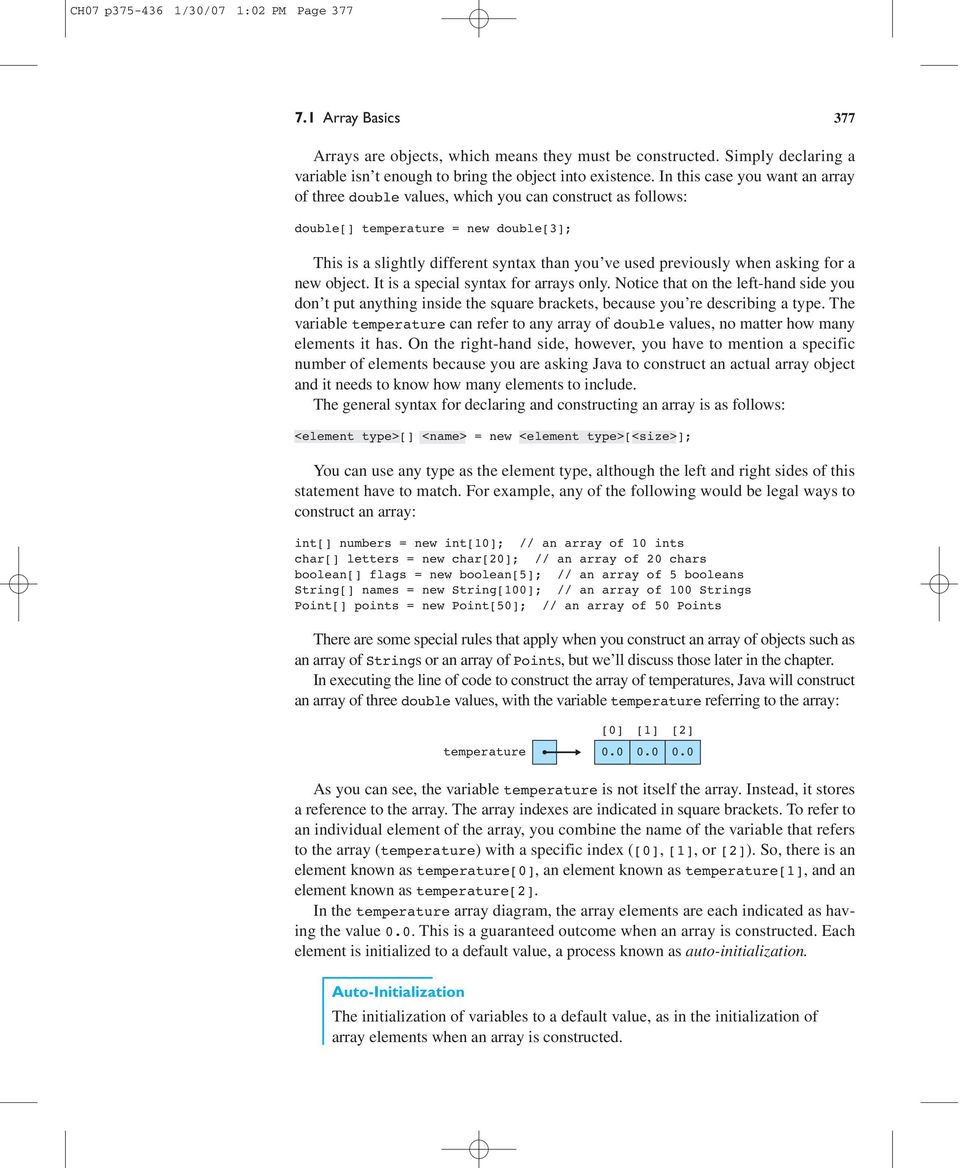
3 CH07 p /30/07 1:02 PM Page Array Basics 377 Arrays are objects, which means they must be constructed. Simply declaring a variable isn t enough to bring the object into existence. In this case you want an array of three double values, which you can construct as follows: double[] temperature = new double; This is a slightly different syntax than you ve used previously when asking for a new object. It is a special syntax for arrays only. Notice that on the left-hand side you don t put anything inside the square brackets, because you re describing a type. The variable temperature can refer to any array of double values, no matter how many elements it has. On the right-hand side, however, you have to mention a specific number of elements because you are asking Java to construct an actual array object and it needs to know how many elements to include. The general syntax for declaring and constructing an array is as follows: <element type>[] <name> = new <element type>[<size>]; You can use any type as the element type, although the left and right sides of this statement have to match. For example, any of the following would be legal ways to construct an array: int[] numbers = new int[10]; // an array of 10 ints char[] letters = new char[20]; // an array of 20 chars boolean[] flags = new boolean[5]; // an array of 5 booleans String[] names = new String[100]; // an array of 100 Strings Point[] points = new Point[50]; // an array of 50 Points There are some special rules that apply when you construct an array of objects such as an array of Strings or an array of Points, but we ll discuss those later in the chapter. In executing the line of code to construct the array of temperatures, Java will construct an array of three double values, with the variable temperature referring to the array: temperature As you can see, the variable temperature is not itself the array. Instead, it stores a reference to the array. The array indexes are indicated in square brackets. To refer to an individual element of the array, you combine the name of the variable that refers to the array (temperature) with a specific index (,, or ). So, there is an element known as temperature, an element known as temperature, and an element known as temperature. In the temperature array diagram, the array elements are each indicated as having the value 0.0. This is a guaranteed outcome when an array is constructed. Each element is initialized to a default value, a process known as auto-initialization. Auto-Initialization The initialization of variables to a default value, as in the initialization of array elements when an array is constructed.
4 CH07 p /30/07 1:02 PM Page Chapter 7 Arrays TABLE 7.1 Zero-Equivalent Auto-Initialization Values Type Value int 0 double 0.0 char boolean objects '\0' false null When Java performs auto-initialization, it always initializes to the zero-equivalent for the type. Table 7.1 indicates the zero-equivalent values for various types. Notice that the zero-equivalent for type double is 0.0, which is why the array elements were initialized to that value. Using the indexes, you can store the specific temperature values you want to work with: temperature = 74.3; temperature = 68.4; temperature = 70.3; This code modifies the array to have the following values: temperature Obviously an array isn t particularly helpful when you have just three values to store, but you can request a much larger array. For example, you could request an array of 100 temperatures by saying: double[] temperature = new double[100]; This is almost the same line of code you executed before. The variable is still declared to be of type double[], but in constructing the array you request 100 elements instead of 3, which constructs a much larger array: [...] [99] temperature Notice that the highest index is 99 rather than 100 because of zero-based indexing. You are not restricted to simple literal values inside the brackets. You can use any integer expression. This allows you to combine arrays with loops, which greatly simplifies the code you write. For example, suppose you want to read a series of temperatures from a Scanner. You could read each value individually, as in:

5 CH07 p /30/07 1:02 PM Page Array Basics 379 temperature = input.nextdouble(); temperature = input.nextdouble(); temperature = input.nextdouble();... temperature[99] = input.nextdouble(); But since the only thing that changes from one statement to the next is the index, you can capture this pattern in a for loop with a control variable that takes on the values 0 to 99: for (int i = 0; i < 100; i++) { temperature[i] = input.nextdouble(); This is a very concise way to initialize all the elements of the array. The preceding code works when the array has a length of 100, but you can imagine the array having a different length. Java provides a useful mechanism for making this code more general. Each array keeps track of its own length. You re using the variable temperature to refer to your array, which means you can ask for temperature.length to find out the length of the array. By using temperature.length in the for loop test instead of the specific value 100, you make your code more general: for (int i = 0; i < temperature.length; i++) { temperature[i] = input.nextdouble(); Notice that the array convention is different from the String convention. If you have a String variable s, you ask for the length of the String by referring to s.length(). For an array variable, you don t include the parentheses after the word length. This is another one of those unfortunate inconsistencies that Java programmers just have to memorize. The previous code provides a pattern that you will see often with array-processing code: a for loop that starts at 0 and that continues while the loop variable is less than the length of the array, doing something with element [i] in the body of the loop. This goes through each array element sequentially, which we refer to as traversing the array. Array Traversal Processing each array element sequentially from the first to the last. This pattern is so useful that it is worth including it in a more general form: for (int i = 0; i < <array>.length; i++) { <do something with array [i]>; We will see this traversal pattern repeatedly as we explore common array algorithms.
![for (int i = 0; i < 100; i++) { temperature[i] = input.nextdouble(); This is a very concise way to initialize all the elements of the array.](/docs-images/50/15471683/images/page_5.jpg "The preceding code works when the array has a length of 100, but you can imagine the array having a different length. Java provides a useful mechanism for making this code more general.")
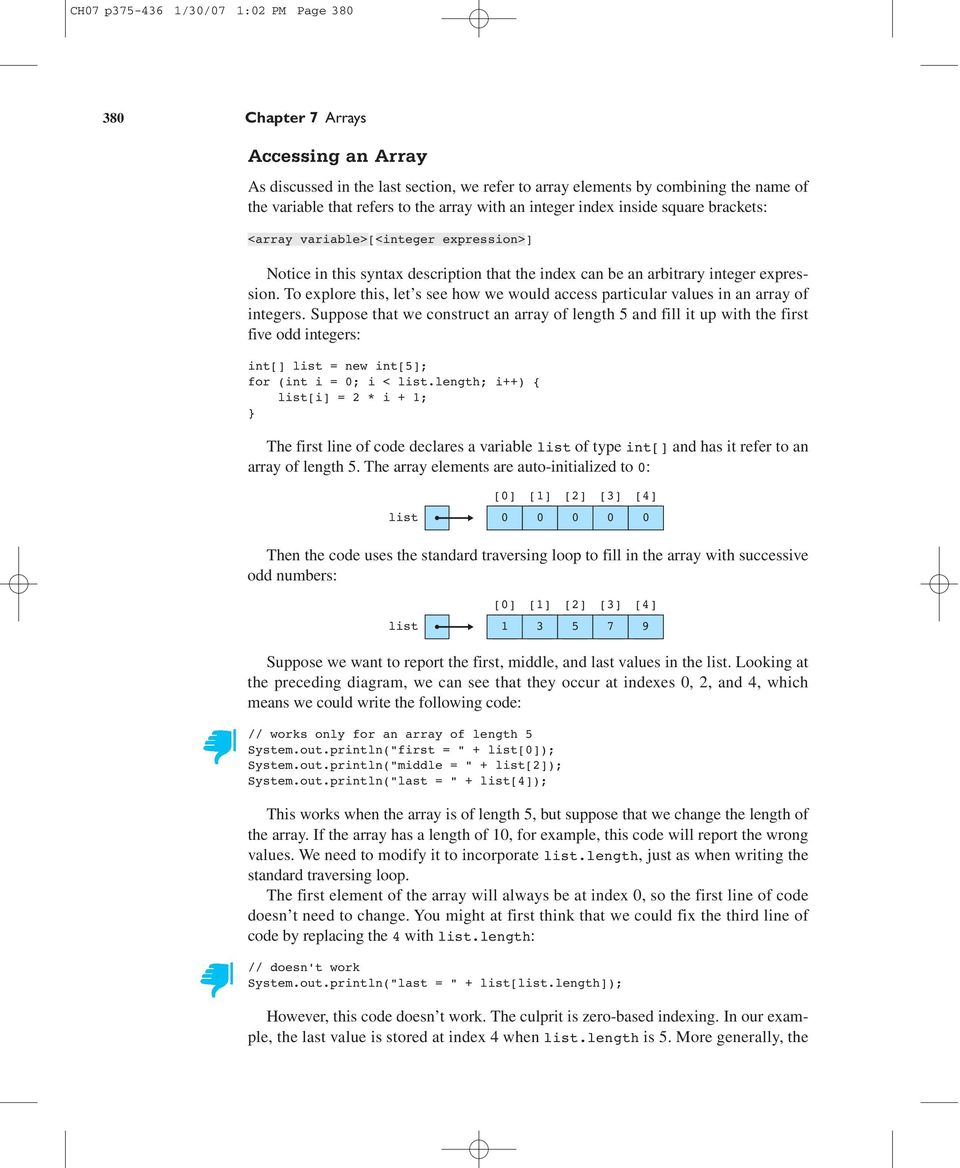
6 CH07 p /30/07 1:02 PM Page Chapter 7 Arrays Accessing an Array As discussed in the last section, we refer to array elements by combining the name of the variable that refers to the array with an integer index inside square brackets: <array variable>[<integer expression>] Notice in this syntax description that the index can be an arbitrary integer expression. To explore this, let s see how we would access particular values in an array of integers. Suppose that we construct an array of length 5 and fill it up with the first five odd integers: int[] list = new int[5]; for (int i = 0; i < list.length; i++) { list[i] = 2 * i + 1; The first line of code declares a variable list of type int[] and has it refer to an array of length 5. The array elements are auto-initialized to 0: list Then the code uses the standard traversing loop to fill in the array with successive odd numbers: list Suppose we want to report the first, middle, and last values in the list. Looking at the preceding diagram, we can see that they occur at indexes 0, 2, and 4, which means we could write the following code: // works only for an array of length 5 System.out.println("first = " + list); System.out.println("middle = " + list); System.out.println("last = " + list); This works when the array is of length 5, but suppose that we change the length of the array. If the array has a length of 10, for example, this code will report the wrong values. We need to modify it to incorporate list.length, just as when writing the standard traversing loop. The first element of the array will always be at index 0, so the first line of code doesn t need to change. You might at first think that we could fix the third line of code by replacing the 4 with list.length: // doesn't work System.out.println("last = " + list[list.length]); However, this code doesn t work. The culprit is zero-based indexing. In our example, the last value is stored at index 4 when list.length is 5. More generally, the
7 CH07 p /30/07 1:02 PM Page Array Basics 381 last value will be at index list.length 1. We can use this expression directly in our println statement: // this one works System.out.println("last = " + list[list.length 1]); Notice that what appears inside the square brackets is an integer expression (the result of subtracting 1 from list.length). A simple approach to finding the middle value is to divide the length in half: // is this right? System.out.println("middle = " + list[list.length / 2]); When list.length is 5, this expression evaluates to 2, which prints the correct value. But what about when list.length is 10? In that case the expression evaluates to 5, and we would print list[5]. But when the list has even length, there are actually two values in the middle, so it is not clear which one should be returned. For a list of length 10, the two values would be at list and list[5]. In general, the preceding expression would always return the second of the two values in the middle for a list of even length. If we wanted to instead get the first of the two values in the middle, we could subtract one from the length before dividing by two. Here is a complete set of println statements that follows this approach: System.out.println("first = " + list); System.out.println("middle = " + list[(list.length 1) / 2]); System.out.println("last = " + list[list.length 1]); As you learn how to use arrays, you will find yourself wondering what exactly you can do with an array element that you are accessing. For example, with the array of integers called list, what exactly can you do with list[i]? The answer is that you can do anything with list[i] that you would normally do with any variable of type int. For example, if you have a variable called x of type int, you know that you can say any of the following: x = 3; x++; x *= 2; x ; That means that you can say the same things for list[i] if list is an array of integers: list[i] = 3; list[i]++; list[i] *= 2; list[i] ; From Java s point of view, because list is declared to be of type int[], anarray element like list[i] is of type int and can be manipulated as such. For example, to increment every value in the array, you could use the standard traversing loop as follows:
![A simple approach to finding the middle value is to divide the length in half: // is this right? System.out.println("middle = " + list[list.length / 2]); When list.](/docs-images/50/15471683/images/page_7.jpg "length is 5, this expression evaluates to 2, which prints the correct value. But what about when list.length is 10? In that case the expression evaluates to 5, and we would print list[5].")
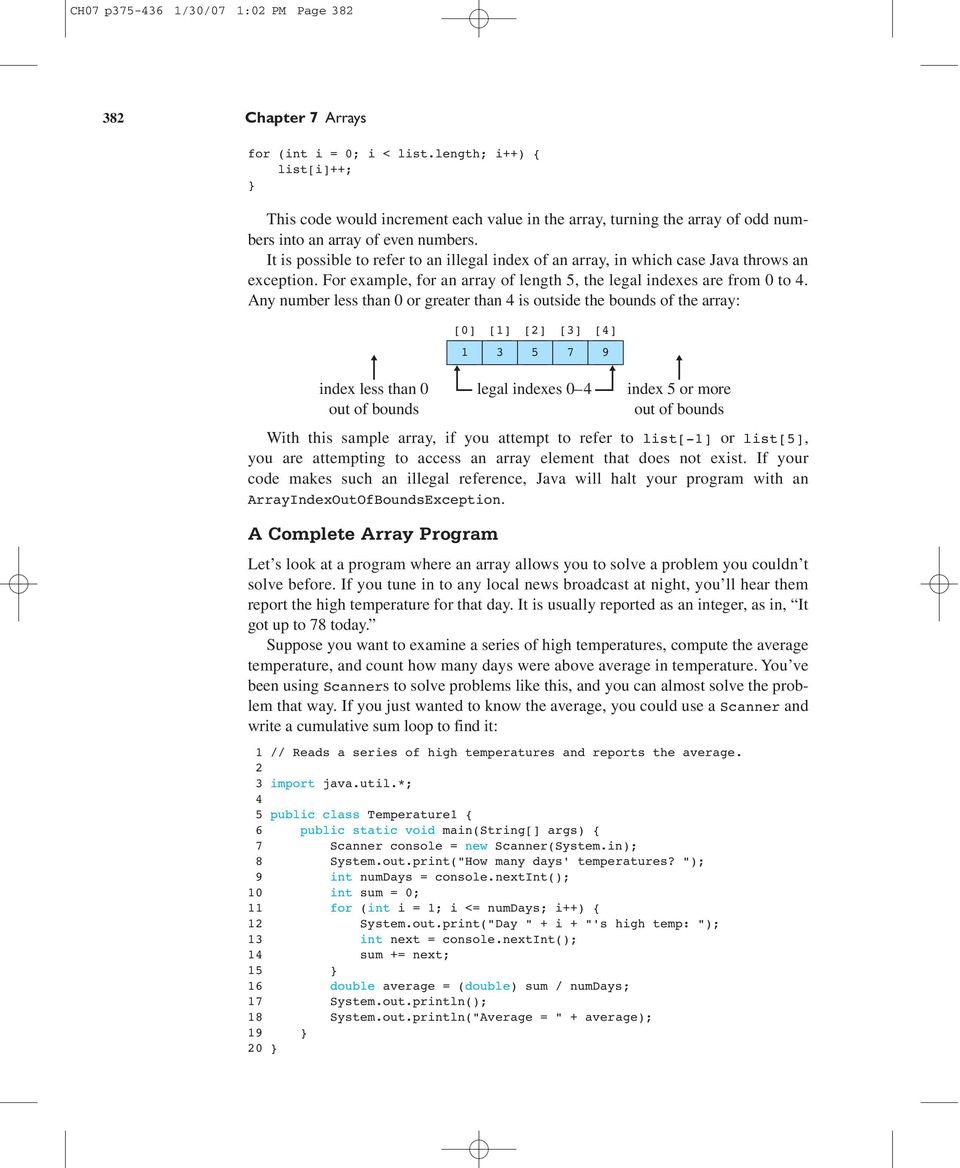
8 CH07 p /30/07 1:02 PM Page Chapter 7 Arrays for (int i = 0; i < list.length; i++) { list[i]++; This code would increment each value in the array, turning the array of odd numbers into an array of even numbers. It is possible to refer to an illegal index of an array, in which case Java throws an exception. For example, for an array of length 5, the legal indexes are from 0 to 4. Any number less than 0 or greater than 4 is outside the bounds of the array: index less than 0 out of bounds legal indexes 0 4 index 5 or more out of bounds With this sample array, if you attempt to refer to list[-1] or list[5], you are attempting to access an array element that does not exist. If your code makes such an illegal reference, Java will halt your program with an ArrayIndexOutOfBoundsException. A Complete Array Program Let s look at a program where an array allows you to solve a problem you couldn t solve before. If you tune in to any local news broadcast at night, you ll hear them report the high temperature for that day. It is usually reported as an integer, as in, It got up to 78 today. Suppose you want to examine a series of high temperatures, compute the average temperature, and count how many days were above average in temperature. You ve been using Scanners to solve problems like this, and you can almost solve the problem that way. If you just wanted to know the average, you could use a Scanner and write a cumulative sum loop to find it: 1 // Reads a series of high temperatures and reports the average. 2 3 import java.util.*; 4 5 public class Temperature1 { 6 public static void main(string[] args) { 7 Scanner console = new Scanner(System.in); 8 System.out.print("How many days' temperatures? "); 9 int numdays = console.nextint(); 10 int sum = 0; 11 for (int i = 1; i <= numdays; i++) { 12 System.out.print("Day " + i + "'s high temp: "); 13 int next = console.nextint(); 14 sum += next; double average = (double) sum / numdays; 17 System.out.println(); 18 System.out.println("Average = " + average); 19 20
9 CH07 p /30/07 1:02 PM Page Array Basics 383 Did You Know? Buffer Overruns One of the earliest and still most common sources of computer security problems is a buffer overrun (also known as a buffer overflow). A buffer overrun is similar to an array index out of bounds exception. It occurs when a program writes data beyond the bounds of the buffer set aside for that data. For example, you might have space allocated for the 12-character String James T Kirk : 3J 3a 3m 3e 3s 3 3T 3 3K 3i 3r 3k 12-character buffer Suppose that you tell the computer to overwrite this buffer with the String Jean Luc Picard. There are 15 letters in Picard s name, so if you write all of those characters into the buffer, you overrun it by writing three extra characters: 3J 3e 3a 3n 3 3L 3u 3c 3 3P 3i 3c 3a 3r 3d 12-character buffer overrun The last three letters of Picard s name ( ard ) are being written to a part of memory that is beyond the end of the buffer. This is a very dangerous situation, because it will overwrite any data that is already there. This would be like a fellow student grabbing three sheets of paper from you and erasing anything you had written on them. You are likely to have useful information written on those sheets of paper, so the overrun is likely to cause a problem. When a buffer overrun happens accidentally, the program usually halts with some kind of error condition. However, buffer overruns are particularly dangerous when they are done on purpose by a malicious program. If the attacker can figure out just the right memory location to overwrite, the attacking software can take over your computer and instruct it to do things you haven t asked it to do. Three of the most famous internet worms were built on buffer overruns: the 1988 Morris worm, the 2001 Code Red worm, and the 2003 SQLSlammer worm. Buffer overruns are often written as array code. You might wonder how such a malicious program could be written if the computer checks the bounds when you access an array. The answer is that older programming languages like C and C++ do not check bounds when you access an array. By the time Java was designed in the early 1990s, the danger of buffer overruns was clear and the designers of the language decided to include array-bounds checking so that Java would be more secure. Microsoft included similar bounds checking when it designed the language C# in the late 1990s.

10 CH07 p /30/07 1:02 PM Page Chapter 7 Arrays This program does a pretty good job. Here is a sample execution: How many days' temperatures? 5 Day 1's high temp: 78 Day 2's high temp: 81 Day 3's high temp: 75 Day 4's high temp: 79 Day 5's high temp: 71 Average = 76.8 But how do you count how many days were above average? You could try to incorporate it into the loop, but that won t work. The problem is that you can t figure out the average until you ve gone through all of the data. That means you ll need to make a second pass through the data to figure out how many days were above average. You can t do that with a Scanner, because a Scanner has no reset option that allows you to see the data a second time. You d have to prompt the user to enter the temperature data a second time, which would be silly. Fortunately, you can solve the problem with an array. As you read numbers in and compute the cumulative sum, you can fill up an array that stores the temperatures. Then you can use the array to make the second pass through the data. In the previous temperature example you used an array of double values, but here you want an array of int values. So, instead of declaring a variable of type double[], declare a variable of type int[]. You re asking the user how many days of temperature data to include, so you can construct the array right after you ve read that information: int numdays = console.nextint(); int[] temps = new int[numdays]; The old loop looks like this: for (int i = 1; i <= numdays; i++) { System.out.print("Day " + i + "'s high temp: "); int next = console.nextint(); sum += next; Because you re using an array, you ll want to change this to a loop that starts at 0 to match the array indexing. But just because you re using zero-based indexing inside the program doesn t mean that you have to confuse the user by asking for Day 0 s high temp. You can modify the println to prompt for day (i + 1). Furthermore, you no longer need the variable next because you ll be storing the values in the array instead. So, the loop code becomes: for (int i = 0; i < numdays; i++) { System.out.print("Day " + (i + 1) + "'s high temp: "); temps[i] = console.nextint(); sum += temps[i];

11 CH07 p /30/07 1:02 PM Page Array Basics 385 Notice that you re now testing whether the index is strictly less than numdays. After this loop executes, you compute the average as we did before. Then you can write a new loop that counts how many days were above average using our standard traversing loop: int above = 0; for (int i = 0; i < temps.length; i++) { if (temps[i] > average) { above++; In this loop the test involves temps.length. You could instead have tested whether the variable is less than numdays; either choice works in this program because they should be equal to each other. If you put these various code fragments together and include code to report the number of days above average, you get the following complete program: 1 // Reads a series of high temperatures and reports the 2 // average and the number of days above average. 3 4 import java.util.*; 5 6 public class Temperature2 { 7 public static void main(string[] args) { 8 Scanner console = new Scanner(System.in); 9 System.out.print("How many days' temperatures? "); 10 int numdays = console.nextint(); 11 int[] temps = new int[numdays]; // record temperatures and find average 14 int sum = 0; 15 for (int i = 0; i < numdays; i++) { 16 System.out.print("Day " + (i + 1) 17 + "'s high temp: "); 18 temps[i] = console.nextint(); 19 sum += temps[i]; double average = (double) sum / numdays; // count days above average 24 int above = 0; 25 for (int i = 0; i < temps.length; i++) { 26 if (temps[i] > average) { 27 above++; // report results 32 System.out.println(); 33 System.out.println("Average = " + average); 34 System.out.println(above + " days above average"); 35 36

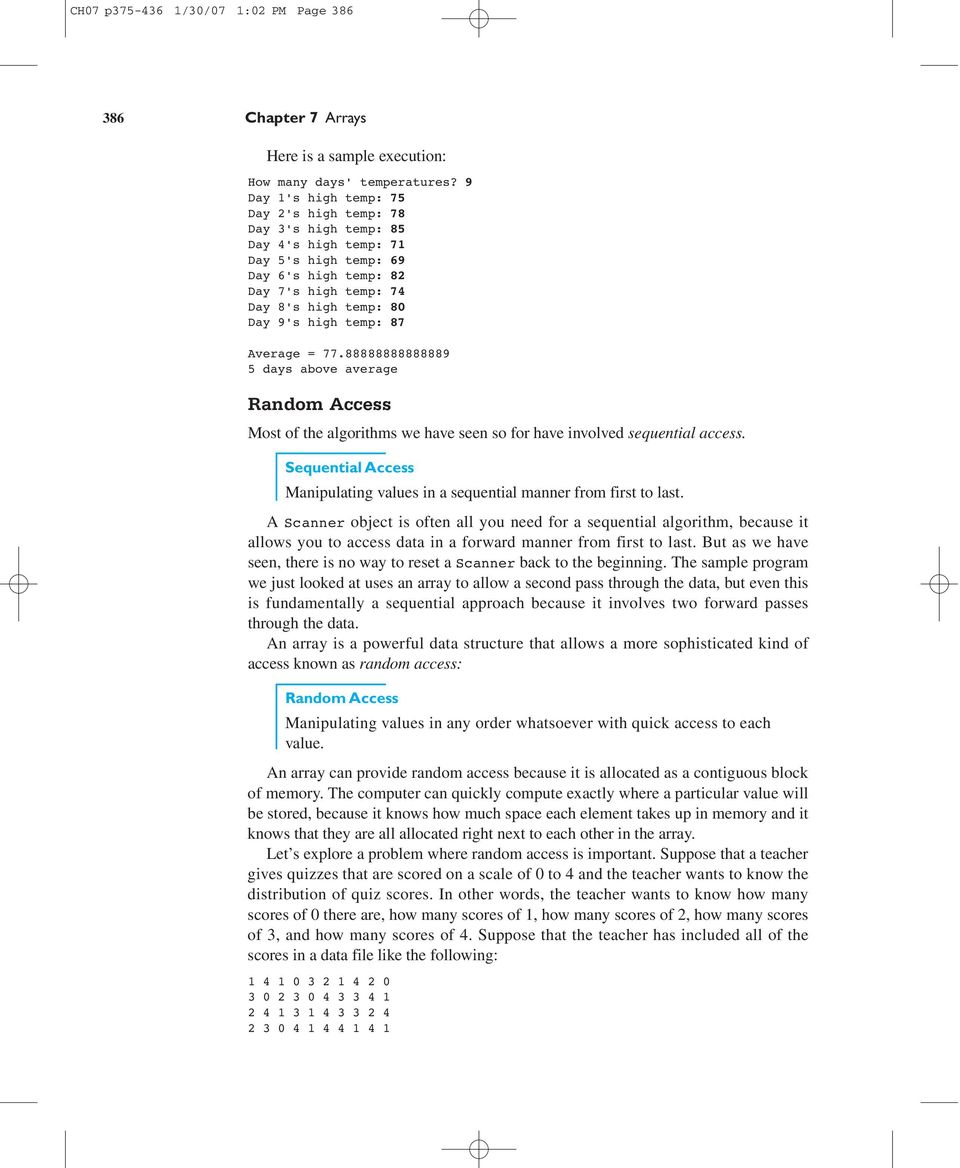
12 CH07 p /30/07 1:02 PM Page Chapter 7 Arrays Here is a sample execution: How many days' temperatures? 9 Day 1's high temp: 75 Day 2's high temp: 78 Day 3's high temp: 85 Day 4's high temp: 71 Day 5's high temp: 69 Day 6's high temp: 82 Day 7's high temp: 74 Day 8's high temp: 80 Day 9's high temp: 87 Average = days above average Random Access Most of the algorithms we have seen so for have involved sequential access. Sequential Access Manipulating values in a sequential manner from first to last. A Scanner object is often all you need for a sequential algorithm, because it allows you to access data in a forward manner from first to last. But as we have seen, there is no way to reset a Scanner back to the beginning. The sample program we just looked at uses an array to allow a second pass through the data, but even this is fundamentally a sequential approach because it involves two forward passes through the data. An array is a powerful data structure that allows a more sophisticated kind of access known as random access: Random Access Manipulating values in any order whatsoever with quick access to each value. An array can provide random access because it is allocated as a contiguous block of memory. The computer can quickly compute exactly where a particular value will be stored, because it knows how much space each element takes up in memory and it knows that they are all allocated right next to each other in the array. Let s explore a problem where random access is important. Suppose that a teacher gives quizzes that are scored on a scale of 0 to 4 and the teacher wants to know the distribution of quiz scores. In other words, the teacher wants to know how many scores of 0 there are, how many scores of 1, how many scores of 2, how many scores of 3, and how many scores of 4. Suppose that the teacher has included all of the scores in a data file like the following:
13 CH07 p /30/07 1:02 PM Page Array Basics 387 Common Programming Error: Off-by-One Bug In converting the Temperature1 program to one that uses an array, you modified the for loop to start with an index of 0 instead of 1. The original for loop was written this way: for (int i = 1; i <= numdays; i++) { System.out.print("Day " + i + "'s high temp: "); int next = console.nextint(); sum += next; Because you were storing the values into an array rather than reading them into a variable called next, you replaced next with temps[i]: // wrong loop bounds for (int i = 1; i <= numdays; i++) { System.out.print("Day " + i + "'s high temp: "); temps[i] = console.nextint(); sum += temps[i]; Because the array is indexed starting at 0, you changed the bounds of the for loop to start at 0 and adjusted the print statement. Suppose those were the only changes you made: // still wrong loop bounds for (int i = 0; i <= numdays; i++) { System.out.print("Day " + (i + 1) + "'s high temp: "); temps[i] = console.nextint(); sum += temps[i]; This loop generates an error when you run it. It asks for an extra day s worth of data and then throws an exception, as in the following sample execution: How many days' temperatures? 5 Day 1's high temp: 82 Day 2's high temp: 80 Day 3's high temp: 79 Day 4's high temp: 71 Day 5's high temp: 75 Day 6's high temp: 83 Exception in thread "main" java.lang.arrayindexoutofboundsexception: 5 at Temperature2.main(Temperature2.java:18) The problem is that if you re going to start the for loop variable at 0, you need to test for it being strictly less than the number of iterations you want. You

14 CH07 p /30/07 1:02 PM Page Chapter 7 Arrays changed the 1 to a 0 but left the <= test. As a result, the loop is performing an extra iteration and trying to make a reference to an array element temps[5] that doesn t exist. This is a classic off-by-one error. The fix is to change the loop bounds to use a strictly less-than test: // correct bounds for (int i = 0; i < numdays; i++) { System.out.print("Day " + (i + 1) + "'s high temp: "); temps[i] = console.nextint(); sum += temps[i]; The teacher could hand-count the scores, but it would be much easier to use a computer to do the counting. How can you solve the problem? First you have to recognize that you are doing five separate counting tasks: You are counting the occurrences of the number 0, the number 1, the number 2, the number 3, and the number 4. You will need five counters to solve this problem, which means that an array is a great way to store the data. In general, whenever you find yourself thinking that you need n of some kind of data, you should think about using an array of length n. Each counter will be an int, so you want an array of five int values: int[] count = new int[5]; This will allocate the array of five integers and will auto-initialize each to 0: count You re reading from a file, so you ll need a Scanner and a loop that reads scores until there are no more scores to read: Scanner input = new Scanner(new File("tally.dat")); while (input.hasnextint()) { int next = input.nextint(); // process next To complete this code, you need to figure out how to process each value. You know that next will be one of five different values: 0, 1, 2, 3, or 4. If it is 0 you want to increment the counter for 0, which is count, if it is 1, you want to increment the counter for 1, which is count, and so on. We have been solving problems like this one with nested if/else statements:
![The fix is to change the loop bounds to use a strictly less-than test: // correct bounds for (int i = 0; i < numdays; i++) { System.out.print("Day " + (i + 1) + "'s high temp: "); temps[i] = console.](/docs-images/50/15471683/images/page_14.jpg "nextint(); sum += temps[i]; The teacher could hand-count the scores, but it would be much easier to use a computer to do the counting. How can you solve the problem?")
15 CH07 p /30/07 1:02 PM Page Array Basics 389 if (next == 0) { count++; else if (next == 1) { count++; else if (next == 2) { count++; else if (next == 3) { count++; else { // next == 4 count++; But with an array, you can solve this problem much more directly: count[next]++; This line of code is so short compared to the nested if/else construct that you might not realize at first that it does the same thing. Let s simulate exactly what happens as various values are read from the file. When the array is constructed, all of the counters are initialized to 0: count The first value in the input file is a 1, so the program reads that into next. Then it executes this line of code: count[next]++; Because next is 1, this becomes: count++; So the counter at index is incremented: count Then a 4 is read from the input file, which means count is incremented: count Next, another 1 is read from the input file, which increments count: count Then a 0 is read from the input file, which increments count: count
![this problem much more directly: count[next]++; This line of code is so short compared to the nested if/else construct that you might not realize at first that it does the same thing.](/docs-images/50/15471683/images/page_15.jpg "Let s simulate exactly what happens as various values are read from the file.")
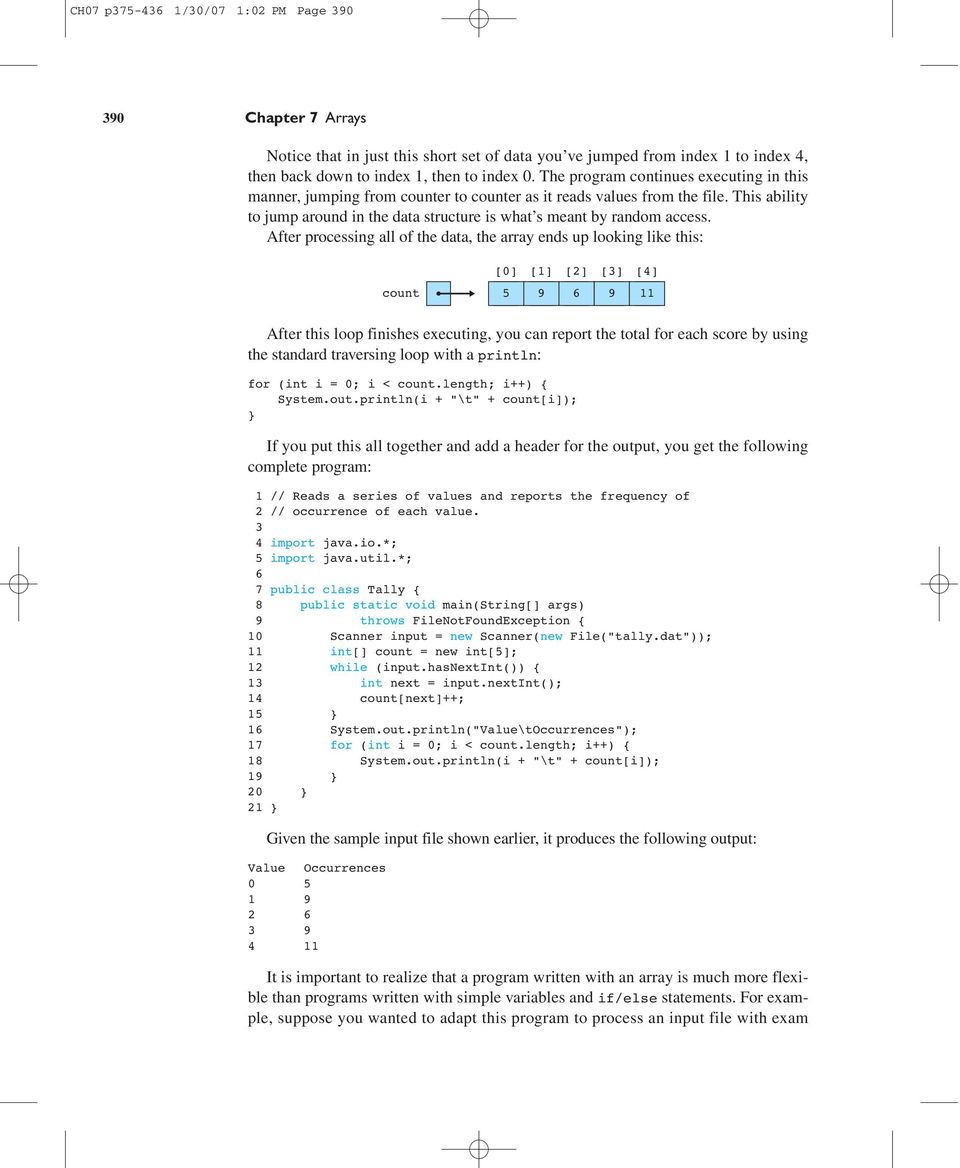
16 CH07 p /30/07 1:02 PM Page Chapter 7 Arrays Notice that in just this short set of data you ve jumped from index 1 to index 4, then back down to index 1, then to index 0. The program continues executing in this manner, jumping from counter to counter as it reads values from the file. This ability to jump around in the data structure is what s meant by random access. After processing all of the data, the array ends up looking like this: count After this loop finishes executing, you can report the total for each score by using the standard traversing loop with a println: for (int i = 0; i < count.length; i++) { System.out.println(i + "\t" + count[i]); If you put this all together and add a header for the output, you get the following complete program: 1 // Reads a series of values and reports the frequency of 2 // occurrence of each value. 3 4 import java.io.*; 5 import java.util.*; 6 7 public class Tally { 8 public static void main(string[] args) 9 throws FileNotFoundException { 10 Scanner input = new Scanner(new File("tally.dat")); 11 int[] count = new int[5]; 12 while (input.hasnextint()) { 13 int next = input.nextint(); 14 count[next]++; System.out.println("Value\tOccurrences"); 17 for (int i = 0; i < count.length; i++) { 18 System.out.println(i + "\t" + count[i]); Given the sample input file shown earlier, it produces the following output: Value Occurrences It is important to realize that a program written with an array is much more flexible than programs written with simple variables and if/else statements. For example, suppose you wanted to adapt this program to process an input file with exam
17 CH07 p /30/07 1:02 PM Page Array Basics 391 scores that range from 0 to 100. The only change you would would have to make would be to allocate a larger array: int[] count = new int[101]; If you had written the program with an if/else approach, you would have to add 96 new branches to account for the new range of values. With the array solution, you just have to modify the overall size of the array. Notice that the array size is one more than the highest score (101 rather than 100) because the array is zero-based and because you can actually get 101 different scores on the test when 0 is a possibility. Arrays and Methods You ve spent so much time learning how to manipulate variables of type int and double that it will probably take you awhile to get used to some of the differences that arise when you manipulate arrays. Remember that primitive types like int and double have value semantics. For example, in Chapter 3 we examined the following method that was intended to double a number: public static void doublenumber(int number) { System.out.println("Initial value of number = " + number); number *= 2; System.out.println("Final value of number = " + number); The printlns made it clear that the method successfully doubles the local variable called number, but we found that it did not double a variable that we included as a parameter in the call. That is because with the value semantics of primitive types like int, parameters are copies that have no effect on the original. Because arrays are objects, they have reference semantics, which means that array variables store references to array objects and parameter passing involves copying references. Let s explore a specific example to better understand this. Earlier in the chapter we saw the following code for constructing an array of odd numbers and incrementing each array element: int[] list = new int[5]; for (int i = 0; i < list.length; i++) { list[i] = 2 * i + 1; for (int i = 0; i < list.length; i++) { list[i]++; Let s see what happens when we move the incrementing loop into a method. It will need to take the array as a parameter. We ll rename it data instead of list to make it easier to distinguish it from the original array variable. Remember that the array is of type int[], so we would write the method as follows:

18 CH07 p /30/07 1:02 PM Page Chapter 7 Arrays public static void incrementall(int[] data) { for (int i = 0; i < data.length; i++) { data[i]++; You might think this method, like the doublenumber method, will have no effect whatsoever, or that we have to return the array to cause the change to be remembered. But with an array as a parameter, this approach actually works. We can replace the incrementing loop in the original code with a call on our method: int[] list = new int[5]; for (int i = 0; i < list.length; i++) { list[i] = 2 * i + 1; incrementall(list); This code produces the same result as the original. Let s see why it works. After executing the for loop, the array will contain the first five odd numbers: list Then we call the incrementall method, passing it the array as a parameter. At this point we see the critical difference between the behavior of a simple int and the behavior of an array. In effect, we make a copy of the variable list. But the variable list is not itself the array; rather, it stores a reference to the array. So, when we make a copy of that reference, we end up with two references to the same object: list data Because data and list both refer to the same object, when we change data by saying data[i]++, we end up changing the object that list refers to. So, after the loop increments each element of data, we end up with the following: list data At this point the method finishes executing and the parameter data goes away. We return to the original code with an array that has been changed by the method. The key lesson to draw from this is that when we pass an array as a parameter to a method, that method has the ability to change the contents of the array. We don t need to return the array to allow this to happen.
![But with an array as a parameter, this approach actually works. We can replace the incrementing loop in the original code with a call on our method: int[] list = new int[5]; for (int i = 0; i < list.](/docs-images/50/15471683/images/page_18.jpg "length; i++) { list[i] = 2 * i + 1; incrementall(list); This code produces the same result as the original. Let s see why it works.")
19 CH07 p /30/07 1:02 PM Page Array Basics 393 Now let s rewrite the Tally program to demonstrate a complete array program with methods and parameter passing. The program begins by constructing a Scanner and an array, and then it has two loops: one to read the input file and one to report the results. We can put each loop in its own method. The first loop reads from the Scanner and stores its result in the array, so it will need both objects as parameters. The second reports the values in the array, so it needs just the array as a parameter. Thus, the main method can be rewritten as follows: public static void main(string[] args) throws FileNotFoundException { Scanner input = new Scanner(new File("tally.dat")); int[] count = new int[5]; readdata(input, count); reportresults(count); To write the readdata method, we just need to move the file-processing loop into the method and provide an appropriate header: public static void readdata(scanner input, int[] count) { while (input.hasnextint()) { int next = input.nextint(); count[next]++; As with the incrementall method, this method would change the array even though it does not return it. But this isn t the best approach to use in this situation. It seems odd that the readdata method requires you to construct an array and pass it as a parameter. Why doesn t readdata construct the array itself? That would simplify the call to the method, particularly if we ended up calling it multiple times. If readdata is going to construct the array, it will have to return a reference to it. Otherwise, only the method will have a reference to the newly constructed array. In its current form, the readdata method assumes that the array has already been constructed, which is why we wrote these two lines of code in main: int[] count = new int[5]; readdata(input, count); If the method is going to construct the array, it doesn t have to be passed as a parameter, but it will have to be returned by the method. Thus, we can rewrite these two lines of code from main as a single line: int[] count = readdata(input); and we can rewrite the readdata method so that it constructs and returns the array: public static int[] readdata(scanner input) { int[] count = new int[5]; while (input.hasnextint()) {

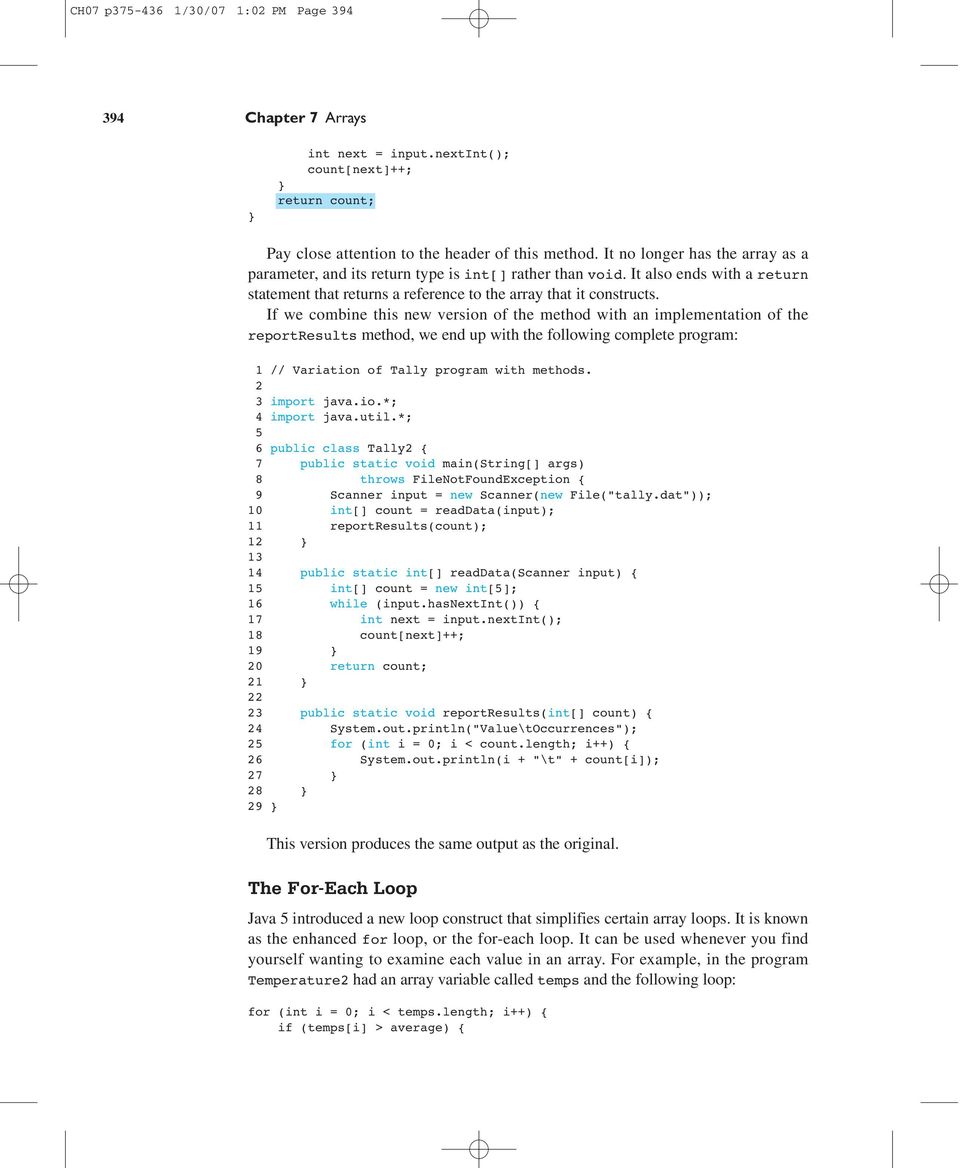
20 CH07 p /30/07 1:02 PM Page Chapter 7 Arrays int next = input.nextint(); count[next]++; return count; Pay close attention to the header of this method. It no longer has the array as a parameter, and its return type is int[] rather than void. It also ends with a return statement that returns a reference to the array that it constructs. If we combine this new version of the method with an implementation of the reportresults method, we end up with the following complete program: 1 // Variation of Tally program with methods. 2 3 import java.io.*; 4 import java.util.*; 5 6 public class Tally2 { 7 public static void main(string[] args) 8 throws FileNotFoundException { 9 Scanner input = new Scanner(new File("tally.dat")); 10 int[] count = readdata(input); 11 reportresults(count); public static int[] readdata(scanner input) { 15 int[] count = new int[5]; 16 while (input.hasnextint()) { 17 int next = input.nextint(); 18 count[next]++; return count; public static void reportresults(int[] count) { 24 System.out.println("Value\tOccurrences"); 25 for (int i = 0; i < count.length; i++) { 26 System.out.println(i + "\t" + count[i]); This version produces the same output as the original. The For-Each Loop Java 5 introduced a new loop construct that simplifies certain array loops. It is known as the enhanced for loop, or the for-each loop. It can be used whenever you find yourself wanting to examine each value in an array. For example, in the program Temperature2 had an array variable called temps and the following loop: for (int i = 0; i < temps.length; i++) { if (temps[i] > average) {
21 CH07 p /30/07 1:02 PM Page Array Basics 395 above++; We can rewrite this as a for-each loop: for (int n : temps) { if (n > average) { above++; This loop is normally read as, For each int n in temps.... The basic syntax of the for-each loop is: for (<type> <name> : <array>) { <statement>; <statement>;... <statement>; There is nothing special about the variable name, as long as you are consistent in the body of the loop. For example, the previous loop could be written with the variable x instead of the variable n: for (int x : temps) { if (x > average) { above++; The for-each loop is most useful when you simply want to examine each value in sequence. There are many situations where a for-each loop is not appropriate. For example, the following loop would double every value in an array called list: for (int i = 0; i < list.length; i++) { list[i] *= 2; Because the loop is changing the array, you can t replace it with a for-each loop: for (int n : list) { n *= 2; // changes only n, not the array As the comment indicates, the preceding loop doubles the variable n without changing the array elements. Also, in some cases the for-each loop isn t the most convenient even when the code involves examining each array element in sequence. Consider, for example, this loop from the Tally program: for (int i = 0; i < count.length; i++) { System.out.println(i + "\t" + count[i]);
22 CH07 p /30/07 1:02 PM Page Chapter 7 Arrays A for-each loop could be used to replace the array access: for (int n : count) { System.out.println(i + "\t" + n); // not quite legal However, this would cause a problem. We want to print the value of i, but we eliminated i when we converted this to a for-each loop. We would have to add extra code to keep track of the value of i, as in: // legal but clumsy int i = 0; for (int n : count) { System.out.println(i + "\t" + n); i++; In this case, the for-each loop doesn t really simplify things, and the original version is probably clearer. Initializing Arrays Java has a special syntax for initializing an array when you know exactly what you want to put into it. For example, you could write the following code to initialize an array of integers to keep track of how many days are in each month ( Thirty days hath September... ) and an array of Strings to keep track of the abbreviations for the names of the days of the week: int[] daysin = new int[12]; daysin = 31; daysin = 28; daysin = 31; daysin = 30; daysin = 31; daysin[5] = 30; daysin[6] = 31; daysin[7] = 31; daysin[8] = 30; daysin[9] = 31; daysin[10] = 30; daysin[11] = 31; String[] daynames = new String[7]; daynames = "Mon"; daynames = "Tue"; daynames = "Wed"; daynames = "Thu"; daynames = "Fri"; daynames[5] = "Sat"; daynames[6] = "Sun"; This works, but it s a rather tedious way to declare these arrays. Java provides a shorthand:
23 CH07 p /30/07 1:02 PM Page Array Basics 397 int[] daysin = {31, 28, 31, 30, 31, 30, 31, 31, 30, 31, 30, 31; String[] daynames = {"Mon", "Tue", "Wed", "Thu", "Fri", "Sat", "Sun"; The general syntax for array initialization is as follows: <element type>[] <name> = {<value>, <value>,..., <value>; You use the curly braces to enclose a series of values that will be stored in the array. Order is important. The first value will go into index 0, the second value will go into index 1, and so on. Java counts how many values you include and constructs an array of just the right size. It then stores the various values into the appropriate spots in the array. This is one of only two examples we have seen in which Java will construct an object without the new keyword. The other place we saw this was with String literals, where Java constructs String objects for you without you having to call new. Both of these are conveniences for programmers. These tasks are so common that the designers of the language wanted to make it easy to do them. Limitations of Arrays You should be aware of some general limitations of arrays: You can t change the size of an array in the middle of program execution. You can t compare arrays for equality using a simple == test. Remember that arrays are objects, so if you ask whether one array is == to another array, you are asking whether they are the same object, not whether they store the same values. You can t print an array using a simple print or println statement. You will get odd output when you do so. These limitations have existed in Java since the language was first introduced. Over the years, Sun has introduced several additions to the Java class libraries to address them. The Arrays class provides a solution to the second and third limitations. You can compare two arrays for equality by calling the method Arrays.equals, and you can convert an array into a useful text equivalent by calling the method Arrays.toString. Both of these methods will be discussed in detail in the next section, when we explore how they are written. The first limitation is more difficult to overcome. Because an array is allocated as a contiguous block of memory, it is not easy to make it larger. To make an array bigger, you d have to construct a new array that is larger than the old one and copy values from the old to the new array. Java provides a class called ArrayList that does this growing operation automatically. It also provides methods for inserting values in and deleting values from the middle of a list. We will explore how to use the ArrayList class in Chapter 10.
24 CH07 p /30/07 1:02 PM Page Chapter 7 Arrays The Arrays class is part of the java.util package that also includes Scanner, so to use it you must include an import declaration in your program. 7.2 Array-Traversal Algorithms The last section presented two standard patterns for manipulating an array. The first is the traversing loop, which uses a variable of type int to index each array value: for (int i = 0; i < <array>.length; i++) { <do something with array[i]>; The second is the for-each loop: for (<type> <name> : <array>) { <statement>; <statement>;... <statement>; In this section we will explore some common array algorithms that can be implemented with these patterns. Of course, not all array operations can be implemented this way the section ends with an example that requires a modified version of the standard code. We will implement each operation as a method. Java does not allow you to write generic array code, so we have to pick a specific type. We ll assume that you are operating on an array of int values. If you are writing a program to manipulate a different kind of array, you ll have to modify the code for the type you are using (e.g., changing int[] to double[] if you are manipulating an array of double values). Printing an Array Suppose you have an array of int values like the following: [5] [6] list How would you go about printing the values in the array? For other types of data you can use a println statement, as in: System.out.println(list); Unfortunately, with an array this produces strange output like the following: [I@6caf43 This is not helpful output, and it tells us nothing about the contents of the array. Java provides a solution to this problem in the form of a method called
25 CH07 p /30/07 1:02 PM Page Array-Traversal Algorithms 399 Arrays.toString that converts the array into a convenient text form. You can rewrite the println as follows to include a call on Arrays.toString: System.out.println(Arrays.toString(list)); This produces the following output: [17, 3, 42, 8, 12, 2, 103] This is a reasonable way to show the contents of the array, and in many situations it will be sufficient. However, for those situations where you want something different, you can write your own method. Suppose you want to write each number on a line by itself. In that case, you can use a for-each loop that does a println for each value: public static void print(int[] list) { for (int n : list) { System.out.println(n); You can then call this method with the variable list: print(list); This call produces the following output: There may be some cases where the for-each loop doesn t get you quite what you want, though. For example, think of how the Arrays.toString method must be written. It produces a list of values that are separated by commas, which is a classic fencepost problem (e.g., seven values are separated by six commas). To solve the fencepost problem, you d want to use an indexing loop instead of a for-each loop so that you could print the first value before the loop: System.out.print(list); for (int i = 1; i < list.length; i++) { System.out.print(", " + list[i]); System.out.println(); Notice that i is initialized to 1 instead of 0 because list is printed before the loop. This code produces the following output for the preceeding sample array: 17, 3, 42, 8, 12, 2, 103
26 CH07 p /30/07 1:02 PM Page Chapter 7 Arrays Even this code is not correct, though, because it assumes that there is a list to print. It is possible for arrays to be empty, with a length of 0, in which case this code will generate an ArrayIndexOutOfBoundsException. The following is a version of the method that behaves the same way Arrays.toString behaves. The printing statements just before and just after the loop have been modified to include square brackets, and a special case has been included for empty arrays: public static void print(int[] list) { if (list.length == 0) { System.out.println("[]"); else { System.out.print("[" + list); for (int i = 1; i < list.length; i++) { System.out.print(", " + list[i]); System.out.println("]"); Searching and Replacing Often with an array, you want to search for a specific value. For example, you might want to count how many times a particular value appears in an array. Suppose you have an array of int values like the following: [5] [6] list Counting occurrences is the simplest search task, because you always examine each value in the array and you don t need to change the contents of the array. As a result, you can accomplish this with a for-each loop that keeps a count of the number of occurrences of the value you re searching for: public static int count(int[] list, int target) { int count = 0; for (int n : list) { if (n == target) { count++; return count; Given this method, you can make the following call to figure out how many 8s are in the list: int number = count(list, 8); This call would set number to 3 for the sample array, because there are three occurrences of 8 in the list. If you instead made the following call:
27 CH07 p /30/07 1:02 PM Page Array-Traversal Algorithms 401 int number = count(list, 2); number would be set to 0, because there are no occurrences of 2 in the list. Sometimes you want to find out where something is in a list. You can accomplish this by writing a method that will return the index of the first occurrence of the value in the list. Because you don t know exactly where you ll find the value, you might try this with a while loop, as in the following pseudocode: int i = 0; while (we haven't found it yet) { i++; However, there is a simpler approach. Because you re writing a method that returns a value, you can return the appropriate index as soon as you find a match. That means you can use the standard traversal loop to solve this problem: for (int i = 0; i < list.length; i++) { if (list[i] == target) { return i; Remember that a return statement terminates a method, so you ll break out of this loop as soon as the target value is found. But what if the value isn t found? What if you traverse the entire array and find no matches? In that case, the for loop will finish executing without ever returning a value. There are many things you can do if the value is not found. The convention used throughout the Java class libraries is to return the value -1 to indicate that the value is not anywhere in the list. So you can add an extra return statement after the loop that will be executed only in cases where the target value is not found. Putting all this together, you get the following method: public static int indexof(int[] list, int target) { for (int i = 0; i < list.length; i++) { if (list[i] == target) { return i; return 1; Given that method, you can make the following call to find the first occurrence of the value 7 in the list: int position = indexof(list, 7); This call would set position to 1 for the sample array, because the first occurrence of 7 is at index 1. There is another occurrence of 7 later in the array, at index 5, but this code terminates as soon as it finds the first match.
28 CH07 p /30/07 1:02 PM Page Chapter 7 Arrays If you instead made the following call: int position = indexof(list, 42); position would be set to -1 because there are no occurrences of 42 in the list. As a final variation, consider the problem of replacing all occurrences of a value with some new value. This is similar to the counting task. You ll want to traverse the array looking for a particular value and replace the value with something new when you find it. You can t accomplish that with a for-each loop, because changing the loop variable has no effect on the array. Instead, use a standard traversing loop: public static void replaceall(int[] list, int target, int replacement) { for (int i = 0; i < list.length; i++) { if (list[i] == target) { list[i] = replacement; Notice that even though the method is changing the contents of the array, you don t need to return it to have that change take place. As noted at the beginning of this section, these examples involve an array of integers, and you would have to change the type if you were to manipulate an array of a different type (for example, changing int[] to double[] if you instead had an array of double values). But the change isn t quite so simple if you instead have an array of objects, such as Strings. String values need to be compared with a call on the equals method rather than using a simple == comparison. Here is a modified version of the replaceall method that would be appropriate for an array of Strings: public static void replaceall(string[] list, String String replacement) { for (int i = 0; i < list.length; i++) { if (list[i].equals(target)) { list[i] = replacement; target, Testing for Equality Because arrays are objects, testing them for equality is more complex than it is for primitive values like integers and doubles. For example, consider the following code that initializes two array objects to store a sequence of odd numbers and sets a third array variable to point to the second array: int[] list1 = new int[5]; int[] list2 = new int[5]; for (int i = 0; i < list1.length; i++) { list1[i] = 2 * i + 1; list2[i] = 2 * i + 1; int[] list3 = list2;
29 CH07 p /30/07 1:02 PM Page Array-Traversal Algorithms 403 The code is written in such a way that list2 will always have the exact same length and sequence of values as list1. After executing this code, memory would look like this: list list list3 We ve seen this situation before. We have three variables but only two objects. The variables list2 and list3 both refer to the same array object. As a result, if we ask whether list2 == list3, the answer will be yes (the expression evaluates to true). But if we ask whether list1 == list2, the answer will be no (the expression evaluates to false). There are times in programming when you want to know whether two variables refer to exactly the same object, but you ll also often find yourself just wanting to know if two objects are somehow equivalent in value. In this case, the two arrays have been intentionally constructed to match, so you might want to ask whether the two arrays are equivalent in value. For arrays, that would mean that they have the same length and store the same sequence of values. The method Arrays.equals provides this functionality. So, you could write code like the following: if (Arrays.equals(list1, list2)) { System.out.println("The arrays are equal"); As with the Arrays.toString method, often the Arrays.equals method will be all you need. But sometimes you ll want slight variations, so it s worth exploring how to write the method yourself. The method will take two arrays as parameters and will return a boolean result indicating whether or not the two arrays are equal. So, the method will look like this: public static boolean equals(int[] list1, int[] list2) {... When you sit down to write a method like this, you probably think in terms of defining equality: The two arrays are equal if their lengths are equal and they store the same sequence of values. But this isn t the easiest approach. For example, you could begin by testing that the lengths are equal, but what would you do then? public static boolean equals(int[] list1, int[] list2) { if (list1.length == list2.length) { // what do we do?......
30 CH07 p /30/07 1:02 PM Page Chapter 7 Arrays Methods like this are generally easier to write if you think in terms of the opposite condition: What would make the two arrays unequal? Instead of testing for the lengths being equal, start by testing that the lengths are unequal. In that case, you know exactly what to do. If the lengths are not equal, you can return a value of false because you ll know the arrays are not equal to each other: public static boolean equals(int[] list1, int[] list2) { if (list1.length!= list2.length) { return false;... If you get past the if statement, you know that the arrays are of equal length. Then you ll want to check whether they store the same sequence of values. Again, test for inequality rather than equality, returning false if there s a difference: public static boolean equals(int[] list1, int[] list2) { if (list1.length!= list2.length) { return false; for (int i = 0; i < list1.length; i++) { if (list1[i]!= list2[i]) { return false;... If you get past the for loop, you ll know that the two arrays are of equal length and that they store exactly the same sequence of values. In that case, you ll want to return the value true to indicate that the arrays are equal. This completes the method: public static boolean equals(int[] list1, int[] list2) { if (list1.length!= list2.length) { return false; for (int i = 0; i < list1.length; i++) { if (list1[i]!= list2[i]) { return false; return true; This is a common pattern for a method like equals: You test all of the ways that the two objects might not be equal, returning false if you find any differences, and you return true at the very end so that if all the tests are passed the two objects are declared to be equal.
31 CH07 p /30/07 1:02 PM Page Array-Traversal Algorithms 405 Reversing an Array As a final example of common operations, let s consider the task of reversing the order of the elements stored in an array. For example, suppose you have an array with the following values stored in it: [5] list One approach would be to create a new array and to store the values from the first array into the second array in reverse order. While that approach would be reasonable, you should be able to solve the problem without constructing a second array. Another approach is to consider the problem as a series of exchanges or swaps. For example, the value 3 at the front of the list and the value 78 at the end of the list need to be swapped: [5] list swap these After swapping that pair, you can swap the next pair in (the values at indexes 1 and 4): [5] list then swap these and continue swapping until the entire list has been reversed. Before we look at the reversing code, let s consider the general problem of swapping two values. Suppose you have two integer variables x and y with the values 3 and 78: int x = 3; int y = 78; How would you swap these values? A naive approach is to simply assign in each direction: // will not swap properly x = y; y = x; Unfortunately, this doesn t work. You start out with the following: x 3 y 78
32 CH07 p /30/07 1:02 PM Page Chapter 7 Arrays When the first assignment statement is executed, you copy the value of y into x: x 78 3 y 78 You want x to eventually become equal to 78, but if you attempt to solve the problem this way, you lose the old value of x. The second assignment statement then copies the new value of x, 78, back into y, which leaves you with two variables equal to 78. The standard solution is to introduce a temporary variable that you can use to store the old value of x while you re giving x its new value. You can then copy the old value of x from the temporary variable into y to complete the swap: int temp = x; x = y; y = temp; With this code, you start by copying the old value of x into temp: x 3 y 78 temp 3 Then you put the value of y into x: x 78 3 y 78 temp 3 Next, you copy the old value of x from temp to y: x 78 3 y 3 temp 3 At this point you have successfully swapped the values of x and y, so you don t need temp anymore. In some languages you can define this as a swap method that can be used to exchange two int values: // this method won't work public static void swap(int x, int y) { int temp = x; x = y; y = temp; As you ve seen, this kind of method won t work in Java because the x and y that are swapped will be copies of any integer values passed to them. But because arrays are stored as objects, you can write a variation of this method that takes an array and two indexes as parameters and swaps the values at those indexes: public static void swap(int[] list, int i, int j) { int temp = list[i]; list[i] = list[j]; list[j] = temp;
33 CH07 p /30/07 1:02 PM Page Array-Traversal Algorithms 407 The code in this method matches the code in the previous method, but instead of using x and y it uses list[i] and list[j]. This method will work because instead of changing simple int variables, it s changing the contents of the array. Given this swap method, you can fairly easily write a reversing method. You just have to think about what combinations of values to swap. Start by swapping the first and last values. The sample array has a length of 6, which means this involves swapping the values at indexes 0 and 5. But you want to write the code so that it works for an array of any length. In general, the first swap you ll want to perform is to swap element 0 with element (list.length - 1): swap(list, 0, list.length 1); Then you ll want to swap the second value with the second-to-last value: swap(list, 1, list.length 2); and the third value with the third-to-last value: swap(list, 2, list.length 3); There is a pattern to these swaps that you can capture with a loop. If you use a variable i for the first parameter of the call on swap and introduce a local variable j to store an expression for the second parameter to swap, each of these calls will take the following form: int j = list.length i 1; swap(list, i, j); To implement the reversal, you could put this inside the standard traversal loop: // doesn't quite work for (int i = 0; i < list.length; i++) { int j = list.length i 1; swap(list, i, j); If you were to test this code, though, you d find that it seems to have no effect whatsoever. The list stores the same values after executing this code as it stores initially. The problem is that this loop does too much swapping. Here is a trace of the six swaps that are performed, with an indication of the values of i and j for each step: [5] list i j list i j list i j
34 CH07 p /30/07 1:02 PM Page Chapter 7 Arrays list j i list j i list j i The values of i and j cross halfway through this process. As a result, the first three swaps successfully reverse the array, and then the three swaps that follow undo the work of the first three. To fix this problem, you need to stop it halfway through the process. This is easily accomplished by changing the test: for (int i = 0; i < list.length / 2; i++) { swap(list, i, list.length i 1); In the sample array, list.length is 6. Half of that is 3, which means that this loop will execute exactly three times. That is just what you want in this case (the first three swaps), but you should be careful to consider other possibilities. For example, what if list.length is 7? Half of that is also 3, because of truncating division. Is three the correct number of swaps for an odd-length list? The answer is yes. If there are an odd number of elements, there is a value in the middle of the list that does not need to be swapped. So, in this case, a simple division by 2 turns out to be the right approach. Including this code in a method, you end up with the following overall solution: public static void reverse(int[] list) { for (int i = 0; i < list.length / 2; i++) { swap(list, i, list.length i 1); 7.3 Advanced Array Techniques In this section we ll discuss some advanced uses of arrays, such as algorithms that cannot be solved with straightforward traversals. We ll also see how to create arrays that store objects instead of primitive values. Shifting Values in an Array You ll often want to move a series of values in an array. For example, suppose you have an array of integers that stores the sequence of values (3, 8, 9, 7, 5) and you want to rotate the values so that the value at the front of the list goes to the back and the order of the other values stays the same. In other words, you want to move the 3 to the back, yielding the list (8, 9, 7, 5, 3). Let s explore how to write code to perform that action.
35 CH07 p /30/07 1:02 PM Page Advanced Array Techniques 409 Suppose you have a variable of type int[] called list of length 5 that stores the values (3, 8, 9, 7, 5): list The shifting operation is similar to the swap operation discussed in the last section, and you ll find that it is useful to use a temporary variable here as well. The 3 at the front of the list is supposed to go to the back of the list, and the other values are supposed to rotate forwards. You can make the task easier by storing the value at the front of the list (3, in this example) into a local variable: int first = list; With that value safely tucked away, you now have to shift the other four values left by one position: list list The overall task breaks down into four different shifting operations, each of which is a simple assignment statement: list = list; list = list; list = list; list = list; Obviously you d want to write this as a loop rather than writing a series of individual assignment statements. Each of the preceding statements is of the form: list[i] = list[i + 1]; You ll replace list element [i] with the value currently stored in list element [i + 1], which shifts that value to the left. As a first attempt, you can put this line of code inside the standard traversing loop: for (int i = 0; i < list.length; i++) { list[i] = list[i + 1]; This is almost the right answer, but it has an off-by-one bug. This loop will execute five times for the sample array, but you only want to shift four values (you want to do the assignment for i equal to 0, 1, 2, and 3, but not for i equal to 4). So, this
36 CH07 p /30/07 1:02 PM Page Chapter 7 Arrays loop goes one too many times. On the last iteration of the loop, when i is equal to 4, it executes this line of code: list[i] = list[i + 1]; which becomes: list = list[5]; There is no value list[5] because the array has only five elements, with indexes 0 through 4. So, this code generates an ArrayIndexOutOfBoundsException.Tofix the problem, alter the loop so that it stops one early: for (int i = 0; i < list.length 1; i++) { list[i] = list[i + 1]; In place of the usual list.length, use (list.length - 1). You can think of the minus one in this expression as offsetting the plus one in the assignment statement. Of course, there is one detail left to deal with. After shifting the values to the left, you ve made room at the end of the list for the value that used to be at the front of the list (which is currently stored in a local variable called first). After the loop executes, you have to place it at index 4: list[list.length 1] = first; Putting all of this together into a static method, you get: public static void rotateleft(int[] list) { int first = list; for (int i = 0; i < list.length 1; i++) { list[i] = list[i + 1]; list[list.length 1] = first; An interesting variation is to rotate the values to the right instead of rotating to the left, which is the inverse operation. In this case, you want to take the value that is currently at the end of the list and bring it to the front, shifting the remaining values to the right. So, if a variable called list initially stores the values (3, 8, 9, 7, 5), it should bring the 5 to the front and store the values (5, 3, 8, 9, 7). Begin by tucking away the value that is being rotated into a temporary variable: int last = list[list.length 1]; Then shift the other values to the right: list list
37 CH07 p /30/07 1:02 PM Page Advanced Array Techniques 411 In this case, the four individual assignment statements would be: list = list; list = list; list = list; list = list; Or, written more generally: list[i] = list[i 1]; If you put this inside the standard for loop, you get: // doesn't work for (int i = 0; i < list.length; i++) { list[i] = list[i 1]; There are two problems with this code. First, there is another off-by-one bug. The first assignment statement you want to perform would set list to be what is currently in list, but this loop sets list to list[-1]. That generates an ArrayIndexOutOfBoundsException because there is no value list[-1]. You want to start i at 1, not 0: // still doesn't work for (int i = 1; i < list.length; i++) { list[i] = list[i 1]; However, this doesn t work either. It avoids the ArrayIndexOutOfBoundsException, but think about what it does. The first time through the loop it assigns list to what is in list: list list What happened to the value 8? It s overwritten with the value 3. The next time through the loop list is set to be list: list list
38 CH07 p /30/07 1:02 PM Page Chapter 7 Arrays You might say, Wait a minute... list isn t a 3, it s an 8. It was an 8 when you started, but the first iteration of the loop replaced the 8 with a 3, and now that 3 has been copied into the spot where 9 used to be. The loop continues in this way, putting 3 into every cell of the array. Obviously, that s not what you want. To make this code work, you have to run the loop in reverse order (from right to left instead of left to right). So let s back up to where we started: list We tucked away the final value of the list into a local variable. That frees up the final array position. Now, assign list to be what is in list: list list This wipes out the 5 that was at the end of the list, but that value is safely stored away in a local variable. And once you ve performed this assignment statement, you free up list, which means you can now set list to be what is currently in list: list list The process continues in this manner, copying the 8 from index 1 to index 2 and copying the 3 from index 0 to index 1, leaving you with the following: list At this point, the only thing left to do is to put the 5 stored in the local variable at the front of the list: list You can reverse the for loop by changing the i++ to i and adjusting the initialization and test. Putting all this together, you get the following method:
39 CH07 p /30/07 1:02 PM Page Advanced Array Techniques 413 public static void rotateright(int[] list) { int last = list[list.length 1]; for (int i = list.length 1; i > 0; i ) { list[i] = list[i 1]; list = last; Arrays of Objects All of the arrays we have looked at so far have stored primitive values like simple int values, but you can have arrays of any Java type. Arrays of objects behave slightly differently, though, because objects are stored as references rather than as data values. Constructing an array of objects is usually a two-step process, because you normally have to construct both the array and the individual objects. Consider, for example, the following statement: Point[] points = new Point; This declares a variable called points that refers to an array of length 3 that stores references to Point objects. The new keyword doesn t construct any actual Point objects. Instead it constructs an array of length 3, each element of which can store a reference to a Point. When Java constructs the array, it auto-initializes these array elements to the zero-equivalent for the type. The zero-equivalent for all reference types is the special value null, which indicates no object : The actual Point objects must be constructed separately with the new keyword, as in: Point[] points = new Point; points = new Point(3, 7); points = new Point(4, 5); points = new Point(6, 2); points null 3 After these lines of code execute, you would have individual Point objects referred to by the various array elements: null 3 null 3 points x 3 y 7 x 34 y 5 x 36 y 2 Notice that the new keyword is required in four different places, because there are four objects to be constructed: the array itself and the three individual Point objects.
40 CH07 p /30/07 1:02 PM Page Chapter 7 Arrays You could also use the curly brace notation for initializing the array, in which case you don t need the new keyword to construct the array itself: Point[] points = {new Point(3, 7), new Point(4, 5), new Point(6, 2); Command-Line Arguments As you ve seen since Chapter 1, whenever you define a main method, you re required to include as its parameter String[] args, which is an array of String objects. Java itself initializes this array if the user provides what are known as command-line arguments when invoking Java. For example, a Java class called DoSomething would normally be started from the command interface by a command like this: java DoSomething The user has the option to type extra arguments, as in: java DoSomething temperature.dat temperature.out In this case the user has specified two extra arguments that are file names that the program should use (e.g., the names of an input and output file). If the user types these extra arguments when starting up Java, the String[] args parameter to main will be initialized to an array of length 2 storing these two strings: args "temperature.dat" "temperature.out" 7.4 Multidimensional Arrays (Optional) The array examples in the previous sections all involved what are known as onedimensional arrays (a single row or a single column of data). Often, you ll want to store data in a multidimensional way. For example, you might want to store a twodimensional grid of data that has both rows and columns. Fortunately, you can form arrays of arbitrarily many dimensions: double: one double double[]: a one-dimensional array of doubles double[][]: a two-dimensional grid of doubles double[][][]: a three-dimensional collection of doubles...
41 CH07 p /30/07 1:02 PM Page Multidimensional Arrays (Optional) 415 Arrays of more than one dimension are called multidimensional arrays. Multidimensional Array An array of arrays, the elements of which are accessed with multiple integer indexes. Rectangular Two-Dimensional Arrays The most common use of a multidimensional array is a two-dimensional array of a certain width and height. For example, suppose that on three separate days you took a series of five temperature readings. You can define a two-dimensional array that has three rows and five columns as follows: double[][] temps = new double[5]; Notice that on both the left and right sides of this assignment statement, you have to use a double set of square brackets. When describing the type on the left, you have to make it clear that this is not just a one-dimensional sequence of values, which would be of type double[], but instead a two-dimensional grid of values, which is of type double[][]. On the right, in constructing the array, you must specify the dimensions of the grid. The normal convention is to list the row first followed by the column. The resulting array would look like this: temps As with one-dimensional arrays, the values are initialized to 0.0 and the indexes start with 0 for both rows and columns. Once you ve created such an array, you can refer to individual elements by providing specific row and column numbers (in that order). For example, to set the fourth value of the first row to 98.3 and to set the first value of the third row to 99.4, you would say: temps = 98.3; // fourth value of first row temps = 99.4; // first value of third row After executing these lines of code, the array would look like this: temps
42 CH07 p /30/07 1:02 PM Page Chapter 7 Arrays It is helpful to think of this in a stepwise fashion, starting with the name of the array. For example, if you want to refer to the first value of the third row, you obtain that through the following steps: temps temps temps the entire grid the entire third row the first element of the third row You can pass multidimensional arrays as parameters just as you pass onedimensional arrays. You need to be careful about the type, though. To pass the temperature grid, you would have to use a parameter of type double[][] (with both sets of brackets). For example, here is a method that prints the grid: public static void print(double[][] grid) { for (int i = 0; i < grid.length; i++) { for (int j = 0; j < grid[i].length; j++) { System.out.print(grid[i][j] + " "); System.out.println(); Notice that to ask for the number of rows you ask for grid.length and to ask for the number of columns you ask for grid[i].length. The Arrays.toString method mentioned earlier in this chapter does work on multidimensional arrays, but it produces a poor result. When used with the preceding array temps, it can be used to produce output such as the following: [[D@14b081b, [D@1015a9e, [D@1e45a5c] This is because Arrays.toString works by concatenating the String representations of the array s elements. In this case the elements are arrays themselves, so they do not convert into Strings properly. To correct the problem you can use a different method, called Arrays.deepToString that will return better results for multidimensional arrays: System.out.println(Arrays.deepToString(temps)); The call produces the following output: [[0.0, 0.0, 0.0, 98.3, 0.0], [0.0, 0.0, 0.0, 0.0, 0.0], [99.4, 0.0, 0.0, 0.0, 0.0]] Arrays can have as many dimensions as you want. For example, if you want a three-dimensional 4 by 4 by 4 cube of integers, you would say: int[][][] numbers = new int; The normal convention would be to assume that this is the plane number followed by the row number followed by the column number, although you can use any convention you want as long as your code is written consistently.
43 CH07 p /30/07 1:02 PM Page Multidimensional Arrays (Optional) 417 Jagged Arrays The previous examples have involved rectangular grids that have a fixed number of rows and columns. It is also possible to create a jagged array, where the number of columns varies from row to row. To construct a jagged array, divide the construction into two steps: Construct the array for holding rows first, and then construct each individual row. For example, to construct an array that has two elements in the first row, four elements in the second row, and three elements in the third row, you can say: int[][] jagged = new int[]; jagged = new int; jagged = new int; jagged = new int; This would construct an array that looks like this: jagged We can explore this technique by writing a program that produces the rows of what is known as Pascal s Triangle. The numbers in the triangle have many useful mathematical properties. For example, row n of Pascal s triangle contains the coefficients obtained when you expand: (x + y) n Here are the results for n between 0 and 4: (x + y) 0 = 1 (x + y) 1 = x + y (x + y) 2 = x 2 + 2xy + y 2 (x + y) 3 = x 3 + 3x 2 y + 3xy 2 +y 3 (x + y) 4 = x 4 + 4x 3 y + 6x 2 y 2 + 4xy 3 +y 4 If you pull out just the coefficients, you get the following: This is Pascal s triangle. One of the properties of the triangle is that given any row, you can use it to compute the next row. For example, let s start with the last row from the preceding triangle:
44 CH07 p /30/07 1:02 PM Page Chapter 7 Arrays We can compute the next row by adding adjacent pairs of values together. So, we add together the first pair of numbers (1 + 4), then the second pair of numbers (4 + 6), and so on: (1 + 4) (4 + 6) (6 + 4) (4 + 1) Then we put a 1 at the front and back of this list of numbers, and we end up with the next row of the triangle: This property of the triangle provides a technique for computing it. We can construct it row by row, computing each new row from the values in the previous row. In other words, we are going to write a loop like this (assuming we have a twodimensional array called triangle in which to store the answer): for (int i = 0; i < triangle.length; i++) { construct triangle[i] using triangle[i - 1]. We just need to flesh out the details of how a new row is constructed. This is going to be a jagged array because each row has a different number of elements. Looking at the triangle, you ll see that the first row (row 0) has one value in it, the second row (row 1) has two values in it, and so on. In general, row i has (i + 1) values, so we can refine our pseudocode as follows: for (int i = 0; i < triangle.length; i++) { triangle[i] = new int[i + 1]; fill in triangle[i] using triangle[i - 1]. We know that the first and last values in the row should be 1: for (int i = 0; i < triangle.length; i++) { triangle[i] = new int[i + 1]; triangle[i] = 1; triangle[i][i] = 1; fill in the middle of triangle[i] using triangle[i - 1] And we know that the middle values comes from the previous row. To figure out how to do this, let s draw a picture of the array we are attempting to build:
45 CH07 p /30/07 1:02 PM Page Multidimensional Arrays (Optional) 419 triangle [5] [5] 31 We have already written code to fill in the 1 that appears at the beginning and end of each row. We now need to write code to fill in the middle values. Look at row 5 for an example. The value 5 in column 1 comes from the sum of the values 1 and 4 in columns 0 and 1 in the previous row. The value 10 in column 2 comes from the sum of the values in columns 1 and 2 in the previous row. More generally, each of these middle values is the sum of the two values from the previous row that appear just above and just above and to the left of it. In other words, for column j: triangle[i][j] = (value above and left) + (value above); We can turn this into actual code by using the appropriate array indexes: triangle[i][j] = triangle[i 1][j 1] + triangle[i 1][j]; We need to include this statement in a for loop so that it assigns all of the middle values, which allows us to finish converting our pseudocode into actual code: for (int i = 0; i < triangle.length; i++) { triangle[i] = new int[i + 1]; triangle[i] = 1; triangle[i][i] = 1; for (int j = 1; j < i; j++) { triangle[i][j] = triangle[i 1][j 1] + triangle[i 1][j]; If we include this code in a method along with a printing method similar to the gridprinting method described earlier, we end up with the following complete program: 1 // This program constructs a jagged two-dimensional array 2 // that stores Pascal's Triangle. It takes advantage of the 3 // fact that each value other than the 1s that appear at the 4 // beginning and end of each row is the sum of two values 5 // from the previous row. 6 7 public class PascalsTriangle { 8 public static void main(string[] args) { 9 int[][] triangle = new int[11][]; 10 fillin(triangle); 11 print(triangle);
46 CH07 p /30/07 1:02 PM Page Chapter 7 Arrays public static void fillin(int[][] triangle) { 15 for (int i = 0; i < triangle.length; i++) { 16 triangle[i] = new int[i + 1]; 17 triangle[i] = 1; 18 triangle[i][i] = 1; 19 for (int j = 1; j < i; j++) { 20 triangle[i][j] = triangle[i 1][j 1] 21 + triangle[i 1][j]; public static void print(int[][] triangle) { 27 for (int i = 0; i < triangle.length; i++) { 28 for (int j = 0; j < triangle[i].length; j++) { 29 System.out.print(triangle[i][j] + " "); System.out.println(); It produces the following output: Case Study: Hours Worked Let s look at a more complex program example that involves using arrays. Suppose we have an input file containing data indicating how many hours an employee has worked, with each line of the input file indicating the hours worked for a different week. Each week has seven days, so there could be up to seven numbers listed on each line. We generally consider Monday to be the start of the work week, so let s assume that each line lists hours worked on Monday followed by hours worked on Tuesday, and so on, ending with hours worked on Sunday. But we ll allow the lines to have fewer than seven numbers, because the person may not always work seven days. Here is a sample input file that we ll call hours.txt:
47 CH07 p /30/07 1:02 PM Page Case Study: Hours Worked Let s write a program that reads this input file, reporting totals for each row and each column. The totals for each row will tell us how many hours the person has worked each week. The totals for each column will tell us how many hours the person worked on Mondays versus Tuesdays versus Wednesdays, and so on. One way to approach this problem would be to store all of the data in a twodimensional array and then add up the individual rows and columns. However, we don t need quite such a complicated solution for this particular task. We have to process the input file one line at a time, so it makes sense to read each line of data into an array and to report the total for that line as soon as we have read it in. This takes care of reporting the sum for each row. To report the sum for each column, we can have a second array that keeps track of the running sum for the columns (the sum up to this line of the input file). This array will have to be constructed before the file-processing loop and can be printed after the loop finishes reading the input file. This approach is an array equivalent of the cumulative sum algorithm. The basic approach is outlined in the following pseudocode: construct array for total. for (each line of the input file) { transfer the next line of data into an array. report the sum of the array (sum for this row). add this data to total array. print total array. We will once again develop the program in stages: 1. A program that reads each line of the input file into an array, printing each array to verify that the file is being read correctly 2. A program that reads each line of the input file into an array, adding it into a total array that sums the columns 3. A complete program that reports the sum of each row and that prints the total in an easy-to-read format Version 1: Reading the Input File In the first version of the program, we ll write the basic file-processing code that will read each line of data into an array. Eventually we will have to process that data, but for now we will simply print the array to verify that the code is working properly.
48 CH07 p /30/07 1:02 PM Page Chapter 7 Arrays The main method can be fairly short, opening the input file we want to read and calling a method to process the file: public static void main(string[] args) throws FileNotFoundException { Scanner input = new Scanner(new File("hours.txt")); processfile(input); That leaves us the task of writing the code for processfile. We saw in Chapter 6 that for line-oriented data, we can generally use the following pattern as a starting point for file-processing code: while (input.hasnextline()) { String text = input.nextline(); process text. For this version of the program, processing the text involves transferring data from the String into an array and printing the contents of the array. We can put the transfer code in its own method to keep processfile short and we can use Arrays.toString to print the array, which means that the body of processfile becomes: while (input.hasnextline()) { String text = input.nextline(); int[] next = transferfrom(text); System.out.println(Arrays.toString(next)); The transferfrom method is given a String as a parameter and is supposed to construct a new array containing the numbers from the String. As usual, we will construct a Scanner from the String that allows us to read the individual numbers. Each input line has at most seven numbers, but it might have fewer. As a result, it makes sense to use a while loop that tests whether there are more numbers left to read from the Scanner: construct a Scanner and array. while (the Scanner has a next int) { process next int from scanner. In this case, processing the next integer from the input means storing it in the array. The first number should go into index 0, the second number in index 1, the third number in index 2, and so on. That means we need some kind of integer counter that increments by one each time through the loop: construct a Scanner and array. initialize i to 0. while (the Scanner has a next int) { store data.nextint() in position i of the array. increment i.
49 CH07 p /30/07 1:02 PM Page Case Study: Hours Worked 423 This is now fairly easy to translate into actual code: Scanner data = new Scanner(text); int[] result = new int[7]; int i = 0; while (data.hasnextint()) { result[i] = data.nextint(); i++; If we put these pieces together, we end up with the following program: 1 // First version of program that simply reads and echos. 2 3 import java.io.*; 4 import java.util.*; 5 6 public class Hours1 { 7 public static void main(string[] args) 8 throws FileNotFoundException { 9 Scanner input = new Scanner(new File("hours.txt")); 10 processfile(input); public static void processfile(scanner input) { 14 while (input.hasnextline()) { 15 String text = input.nextline(); 16 int[] next = transferfrom(text); 17 System.out.println(Arrays.toString(next)); public static int[] transferfrom(string text) { 22 Scanner data = new Scanner(text); 23 int[] result = new int[7]; 24 int i = 0; 25 while (data.hasnextint()) { 26 result[i] = data.nextint(); 27 i++; return result; The program produces the following output: [8, 8, 8, 8, 8, 0, 0] [8, 4, 8, 4, 8, 4, 4] [8, 4, 8, 4, 8, 0, 0] [3, 0, 0, 8, 6, 4, 4] [8, 8, 0, 0, 0, 0, 0] [0, 0, 8, 8, 0, 0, 0] [8, 8, 4, 8, 4, 0, 0] If you compare this output to the original input file, you ll see that it is properly reading each line of data into an array of length 7. When the input line has fewer than seven numbers the array is padded with 0s, which is exactly the behavior that we want.
50 CH07 p /30/07 1:02 PM Page Chapter 7 Arrays Notice that none of this output will be included in the final version of the program. Programmers often include output like this that helps to debug a program while it is being developed. Version 2: Cumulative Sum The primary change we want to make in this version of the program is to introduce the second array that keeps track of the column sums. That means we re going to extend the code for processfile, which currently looks like this: while (input.hasnextline()) { String text = input.nextline(); int[] next = transferfrom(text); System.out.println(Arrays.toString(next)); We need to construct the total array before the loop, and we want to print it after the loop. Inside the loop, we want to add the next line of data into the overall total. To keep this method short, we can introduce another method that will perform the addition: int[] total = new int[7]; while (input.hasnextline()) { String text = input.nextline(); int[] next = transferfrom(text); addto(total, next); System.out.println(Arrays.toString(total)); This version drops the println inside the loop because we have already verified that the individual rows of data are being read properly into an array. At this point it is worth noting that we have already used the number 7 twice in the program to construct the two arrays. It is essential that the two arrays be of the same length, so it makes sense to define a class constant that we can use instead: public static final int DAYS = 7; // # of days in a week We can also use this constant for our various for loops instead of the usual array length. To complete the second version, we have to write the addto method. We will be given two arrays, one with the total hours and one with the next week s hours. Let s consider where we ll be in the middle of processing the sample input file. The first three lines of input are as follows: Suppose we have properly processed the first two lines and have just read in the third line for processing. Our two arrays will look like this:
51 CH07 p /30/07 1:02 PM Page Case Study: Hours Worked 425 [5] [6] total [5] [6] next It would be nice if we could just say: total += next; // does not compile Unfortunately, we can t use operations like + and += on arrays. However, those operations can be performed on simple integers, and these arrays are composed of simple integers. So, we basically just have to tell the computer to do seven different += operations on the individual array elements. This can be easily written with a for loop: public static void addto(int[] total, int[] next) { for (int i = 0; i < DAYS; i++) { total[i] += next[i]; So, our second version ends up looking like this: 1 // Second version of program that computes column sums. 2 3 import java.io.*; 4 import java.util.*; 5 6 public class Hours2 { 7 public static final int DAYS = 7; // # of days in a week 8 9 public static void main(string[] args) 10 throws FileNotFoundException { 11 Scanner input = new Scanner(new File("hours.txt")); 12 processfile(input); public static void processfile(scanner input) { 16 int[] total = new int[days]; 17 while (input.hasnextline()) { 18 String text = input.nextline(); 19 int[] next = transferfrom(text); 20 addto(total, next); System.out.println(Arrays.toString(total)); public static int[] transferfrom(string text) { 26 Scanner data = new Scanner(text); 27 int[] result = new int[days]; 28 int i = 0; 29 while (data.hasnextint()) { 30 result[i] = data.nextint();
52 CH07 p /30/07 1:02 PM Page Chapter 7 Arrays 31 i++; return result; public static void addto(int[] total, int[] next) { 37 for (int i = 0; i < DAYS; i++) { 38 total[i] += next[i]; This version produces the following single line of output: [43, 32, 36, 40, 34, 8, 8] You can use a calculator to verify that these are the correct column totals, which means that we are ready to move on to version 3. Version 3: Row Sum and Column Print The core of the program has already been written. It properly reads each line of the input file into an array, and it uses a second array to keep track of the sums of the different columns. In this final version we are simply finishing some of the minor details of the output. We want to make two changes to our existing code: We want to report the sum for each row and we want to print the column sums in a format that is easier to read. Each of these changes will require changing the central processfile method. To keep processfile short, we can write a method for each of these changes. The body of the processfile method currently looks like this: int[] total = new int[days]; while (input.hasnextline()) { String text = input.nextline(); int[] next = transferfrom(text); addto(total, next); System.out.println(Arrays.toString(total)); We need to add a call on a new method to report the sum of the row inside the loop, and we need to replace the simple println after the loop with a call on a method that will print the total in a more meaningful way: int[] total = new int[days]; while (input.hasnextline()) { String text = input.nextline(); int[] next = transferfrom(text); System.out.println("Total hours = " + sum(next)); addto(total, next); System.out.println(); print(total);
53 CH07 p /30/07 1:02 PM Page Case Study: Hours Worked 427 Now we just have to write the sum and print methods. For the sum method, we want to add up the numbers stored in the array. This is a classic cumulative sum problem, and we can use a for-each loop to accomplish the task: public static int sum(int[] numbers) { int sum = 0; for (int n : numbers) { sum += n; return sum; The print method should print the column totals (the totals for each day of the week). We could accomplish this with a for-each loop, as in: for (int n : total) { System.out.println(n); But we don t want to simply write out seven lines of output each with a number on it. It would be nice to give some information about what the numbers mean. We know that total represents the total hours worked on various Mondays, total represents the total hours worked on Tuesdays, and so on, but somebody reading the output might not know that. So, it would be helpful to label the output with some information about which day goes with each total. We can do this by defining our own array of String literals: String[] daynames = {"Mon", "Tue", "Wed", "Thu", "Fri", "Sat", "Sun"; Given that we want to manipulate two arrays at once, we need to switch from a for-each loop to a for loop with an index: for (int i = 0; i < DAYS; i++) { System.out.println(dayNames[i] + " hours = " + total[i]); We can also call the sum method to write out the overall total hours worked after the for loop, which results in the following complete method: public static void print(int[] total) { String[] daynames = {"Mon", "Tue", "Wed", "Thu", "Fri", "Sat", "Sun"; for (int i = 0; i < DAYS; i++) { System.out.println(dayNames[i] + " hours = " + total[i]); System.out.println("Total hours = " + sum(total)); Putting all the pieces together, we end up with the following complete program:
54 CH07 p /30/07 1:02 PM Page Chapter 7 Arrays 1 // This program reads an input file with information about 2 // hours worked and produces a list of total hours worked each 3 // week and total hours worked for each day of the week. 4 5 import java.io.*; 6 import java.util.*; 7 8 public class Hours3 { 9 public static final int DAYS = 7; // # of days in a week public static void main(string[] args) 12 throws FileNotFoundException { 13 Scanner input = new Scanner(new File("hours.txt")); 14 processfile(input); // contains the overall file-processing loop 18 public static void processfile(scanner input) { 19 int[] total = new int[days]; 20 while (input.hasnextline()) { 21 String text = input.nextline(); 22 int[] next = transferfrom(text); 23 System.out.println("Total hours = " + sum(next)); 24 addto(total, next); System.out.println(); 27 print(total); // constructs an array of integers and transfers 31 // data from the given String into the array in order 32 // pre: text has at most DAYS integers 33 public static int[] transferfrom(string text) { 34 Scanner data = new Scanner(text); 35 int[] result = new int[days]; 36 int i = 0; 37 while (data.hasnextint()) { 38 result[i] = data.nextint(); 39 i++; return result; // returns the sum of the integers in the given array 45 public static int sum(int[] numbers) { 46 int sum = 0; 47 for (int n : numbers) { 48 sum += n; return sum; // adds the values in next to their corresponding 54 // entries in total 55 public static void addto(int[] total, int[] next) { 56 for (int i = 0; i < DAYS; i++) { 57 total[i] += next[i]; 58
55 CH07 p /30/07 1:02 PM Page 429 Chapter Summary Chapter Summary // prints information about the totals including total 62 // hours for each day of the week and total hours overall 63 public static void print(int[] total) { 64 String[] daynames = {"Mon", "Tue", "Wed", "Thu", 65 "Fri", "Sat", "Sun"; 66 for (int i = 0; i < DAYS; i++) { 67 System.out.println(dayNames[i] + " hours = " 68 + total[i]); System.out.println("Total hours = " + sum(total)); It produces the following output: Total hours = 40 Total hours = 40 Total hours = 32 Total hours = 25 Total hours = 16 Total hours = 16 Total hours = 32 Mon hours = 43 Tue hours = 32 Wed hours = 36 Thu hours = 40 Fri hours = 34 Sat hours = 8 Sun hours = 8 Total hours = 201 An array is an object that groups multiple primitive values or objects of the same type under one name. Each individual value, called an element, is accessed using an integer index from 0 to one less than the array s length. Attempting to access an array element with an index of less than 0 or greater than or equal to the array s length will cause the program to crash with an ArrayIndexOutOfBoundsException. Arrays are often traversed using for loops. The length of an array is found by accessing its length field, so the loop over an array can process indexes from 0 to length - 1. Array elements can also be accessed in order using a type of loop called a foreach loop. Arrays have several limitations, such as fixed size and lack of support for common operations like == and println. To perform these operations, you must often write for loops that process each element of the array. Several common array algorithms, such as printing an array or comparing two arrays to each other for equality, are implemented by traversing the elements and examining or modifying each one.
56 CH07 p /30/07 1:02 PM Page Chapter 7 Arrays Arrays of objects are actually arrays of references to objects. A newly declared and initialized array of objects actually stores null in all of its element indexes, so each element must be initialized individually or in a loop to store an actual object. A multidimensional array is an array of arrays. These are often used to store two-dimensional data, such as data in rows and columns or x/y data in a 2D space. Self-Check Problems Section 7.1: Array Basics 1. What expression should be used to access the first element of an array of integers called numbers? What expression should be used to access the last element of numbers, assuming it contains 10 elements? What expression can be used to access its last element, regardless of its length? 2. Write code that creates an array of integers named data of size 5 with the following contents: data Write code that stores all odd numbers between 6 and 38 into an array using a loop. Make the array s size exactly large enough to store the numbers. Try generalizing your code so that it will work for any minimum and maximum values, not just 6 and What elements does the array numbers contain after the following code is executed? int[] numbers = new int[8]; numbers = 4; numbers = 99; numbers[7] = 2; int x = numbers; numbers[x] = 44; numbers[numbers[7]] = 11; // uses numbers[7] as index 5. What is wrong with the following code? int[] first = new int; first = 3; first = 7; int[] second = new int; second = 3; second = 7; // print the array elements System.out.println(first); System.out.println(second); // see if the elements are the same if (first == second) { System.out.println("They contain the same elements."); else { System.out.println("The elements are different.");
57 CH07 p /30/07 1:02 PM Page 431 Self-Check Problems Write a piece of code that declares an array called data with the elements 7, -1, 13, 24, and 6. Use only one statement to initialize the array. 7. Describe how to modify the Tally program from this section to support scores of between 100,000,000 and 100,000,004 rather than between 0 and 4. (Hint: Your array should not be one hundred million elements in length!) 8. Write a piece of code that examines an array of integers and reports the maximum value in the array. Consider putting your code into a method called max that accepts the array as a parameter and returns the maximum value. Assume that the array contains at least one element. 9. Write code that computes the average (arithmetic mean) of all elements in an array of integers as a double. For example, if the array passed contains the values {1, 2, 4, 4, 9, 6, 16, 8, 25, 10, the calculated average should be 2.5. You may wish to put this code into a method called average that accepts an array of integers as its parameter and returns the average. Section 7.2: Array-Traversal Algorithms 10. What is an array traversal? Give an example of a problem that can be solved by traversing an array. 11. Write code that uses a for loop to print each element of an array named data that contains five integers, as follows: element is 14 element is 5 element is 27 element is 3 element is 2598 Consider generalizing your code so that it will work on an array of any size. 12. Write a piece of code that prints an array of integers in reverse order, in the same format as the print method written in this section. Consider putting your code into a method called printbackwards that accepts the array as a parameter. 13. Describe the modifications that would be necessary to change the count and equals methods you developed in this section to process arrays of Strings instead of arrays of integers. 14. Write a method called allless that accepts two arrays of integers and returns true if each element in the first array is less than the element at the same index in the second array. Your method should return false if the arrays are not the same length. 15. Why does a method to swap two array elements work correctly when a method to swap two integer values does not? 16. Write a method called swappairs that accepts an array of integers and swaps the elements at adjacent indexes. That is, elements 0 and 1 are swapped, elements 2 and 3 are swapped, and so on. If the array has an odd length, the final element should be left unmodified. For example, the list {10, 20, 30, 40, 50 should become {20, 10, 40, 30, 50 after a call to your method. Section 7.3: Advanced Array Techniques 17. What are the values of the elements in the array numbers after the following code is executed? int[] numbers = {10, 20, 30, 40, 50, 60, 70, 80, 90, 100; for (int i = 0; i < 9; i++) { numbers[i] = numbers[i + 1];
58 CH07 p /30/07 1:02 PM Page Chapter 7 Arrays 18. What are the values of the elements in the array numbers after the following code is executed? int[] numbers = {10, 20, 30, 40, 50, 60, 70, 80, 90, 100; for (int i = 1; i < 10; i++) { numbers[i] = numbers[i 1]; 19. Consider the following method, mystery: public static void mystery(int[] a, int[] b) { for (int i = 0; i < a.length; i++) { a[i] += b[b.length 1 i]; What are the values of the elements in array a1 after the following code executes? int[] a1 = {1, 3, 5, 7, 9; int[] a2 = {1, 4, 9, 16, 25; mystery(a1, a2); 20. Consider the following method, mystery2: public static void mystery2(int[] a, int[] b) { for (int i = 0; i < a.length; i++) { a[i] = a[2 * i % a.length] b[3 * i % b.length]; What are the values of the elements in array a1 after the following code executes? int[] a1 = {2, 4, 6, 8, 10, 12, 14, 16; int[] a2 = {1, 1, 2, 3, 5, 8, 13, 21; mystery2(a1, a2); 21. Consider the following method, mystery3: public static void mystery3(int[] data, int x, int y) { data[data[x]] = data[y]; data[y] = x; What are the values of the elements in the array numbers after the following code executes? int[] numbers = {3, 7, 1, 0, 25, 4, 18, 1, 5; mystery3(numbers, 3, 1); mystery3(numbers, 5, 6); mystery3(numbers, 8, 4); 22. Write a piece of code that computes the average String length of the elements of an array of Strings. For example, if the array contains {"belt", "hat", "jelly", "bubble gum", the average length is 5.5.
59 CH07 p /30/07 1:02 PM Page 433 Exercises Write code that accepts an array of Strings as its argument and indicates whether that array is a palindrome that is, reads the same forwards as backwards. For example, the array {"alpha", "beta", "gamma", "delta", "gamma", "beta", "alpha" is a palindrome. Section 7.4: Multidimensional Arrays (Optional) 24. Assume that a two-dimensional rectangular array of integers called data has been declared with four rows and seven columns. Write a loop to initialize the third row of data to store the numbers 1 through Write a piece of code that constructs a two-dimensional array of integers with 5 rows and 10 columns. Fill the array with a multiplication table, so that array element [i][j] contains the value i * j. Use nested for loops to build the array. 26. Assume that a two-dimensional rectangular array of integers called matrix has been declared with six rows and eight columns. Write a loop to copy the contents of the second column into the fifth column. 27. Write a piece of code that constructs a jagged two-dimensional array of integers with five rows and an increasing number of columns in each row, such that the first row has one column, the second row has two, the third has three, and so on. The array elements should have increasing values in top-to-bottom, left-to-right order (also called rowmajor order). In other words, the array s contents should be: 1 2, 3 4, 5, 6 7, 8, 9, 10 11, 12, 13, 14, 15 Use nested for loops to build the array. Exercises 1. Write a method called lastindexof that accepts an array of integers and an integer value as its parameters and returns the last index at which the value occurs in the array. The method should return 1 if the value is not found. For example, in the array {74, 85, 102, 99, 101, 85, 56, the last index of the value 85 is Write a method called countinrange that accepts an array of integers, a minimum value, and a maximum value as parameters and returns the count of how many elements from the array fall between the minimum and maximum (inclusive). For example, in the array {14, 1, 22, 17, 36, 7, 43, 5, there are four elements whose values fall between 4 and Write a method called copyall that accepts two arrays of integers as its arguments and copies the element values from the first array into the second array. For example, consider the following code: int[] array1 = {2, 1, 4, 3, 6, 5; int[] array2 = new int[6]; copyall(array1, array2); After your copyall method executes, the array array2 should have the contents {2, 1, 4, 3, 6, 5, just like array1. You may assume that the second array always contains at least as many elements as the first array. Also try writing a variation of this method that accepts only one array as a parameter and returns the copied array. Inside the method, create a second array of numbers to hold the copy and return it.
60 CH07 p /30/07 1:02 PM Page Chapter 7 Arrays 4. Write a method called copyrange that takes as parameters two arrays a1 and a2, two starting indexes i1 and i2, and a length l, and copies the first l elements of a1 starting at index i1 into array a2 starting at index i2. Assume that the arguments values are valid, that the arrays are large enough to hold the data, and so on. 5. Write a method called mode that returns the most frequently occurring element of an array of integers. Assume that the array has at least one element and that every element in the array has a value between 0 and 100 inclusive. Break ties by choosing the lower value. For example, if the array passed contains the values {27, 15, 15, 11, 27, your method should return 15. (Hint: You may wish to look at the Tally program from earlier in this chapter to get an idea of how to solve this problem.) Can you write a version of this method that does not rely on the values being between 0 and 100? 6. Write a method called stdev that returns the standard deviation of an array of integers. Standard deviation is computed by taking the square root of the sum of the squares of the differences between each element and the mean, divided by one less than the number of elements. (It s just that simple!) More concisely and mathematically, the standard deviation of an array a is written as follows: For example, if the array passed contains the values {1, 2, 4, 4, 9, 6, 16, 8, 25, 10, your method should return approximately Write a method called kthlargest that accepts an integer k and an array a as its parameters and returns the element such that k elements have greater or equal value. If k = 0, return the largest element; if k = 1, return the secondlargest element, and so on. For example, if the array passed contains the values {74, 85, 102, 99, 101, 56, 84 and the integer k passed is 2, your method should return 99 because there are two values at least as large as 99 (101 and 102). Assume that 0 k < a.length. (Hint: Consider sorting the array, or a copy of the array first.) 8. Write a method called median that accepts an array of integers as its argument and returns the median of the numbers in the array. The median is the number that will appear in the middle if you arrange the elements in order. Assume that the array is of odd size (so that one sole element constitutes the median) and that the numbers in the array are between 0 and 99 inclusive. For example, the median of {5, 2, 4, 17, 55, 4, 3, 26, 18, 2, 17 is 5 and the median of {42, 37, 1, 97, 1, 2, 7, 42, 3, 25, 89, 15, 10, 29, 27 is 25. (Hint: You may wish to look at the Tally program from earlier in this chapter for ideas.) 9. Rewrite the median method from the previous exercise so that it works regardless of the elements values and works for arrays of even size. (The median of an array of even size is the average of the middle two elements.) 10. Use your median method from the previous exercises to write a program that reads a file full of integers and prints the median of those integers. 11. Write a method called wordlengths that accepts a String representing a file name as its argument. Your method should open the given file, count the number of letters in each token in the file, and output a result diagram of how many words contain each number of letters. For example, if the file contains the following text: Before sorting: hello how are you feeling today After sorting: are feeling hello how today you stdev1a2 R a.length 1 a i 0 1a3i4 average1a22 2 a.length 1
61 CH07 p /30/07 1:02 PM Page 435 Programming Projects 435 your method should produce the following output to the console: 1: 0 2: 6 ****** 3: 10 ********** 4: 0 5: 5 ***** 6: 1 * 7: 2 ** 8: 2 ** Assume that no token in the file is more than 80 characters in length. 12. Write a method called matrixadd that accepts a pair of two-dimensional arrays of integers as parameters, treats the arrays as 2D matrixes, and adds them, returning the result. The sum of two matrixes A and B is a matrix C, where for every row i and column j, C ij = A ij + B ij. You may assume that the arrays passed as parameters have the same dimensions. 13. Write a method called equals that accepts a pair of two-dimensional arrays of integers as parameters and returns true if the arrays contain the same elements in the same order. If the arrays are not the same length in either dimension, it should return false. Programming Projects 1. Java s type int has a limit on how large an integer it can store. This limit can be circumvented by representing an integer as an array of digits. Write an interactive program that adds two integers of up to 50 digits each. 2. Write a game of Hangman using arrays. Allow the user to guess letters and represent which letters have been guessed in an array. 3. Write a program that plays a variation of the game of Mastermind with a user. For example, the program can use pseudorandom numbers to generate a four-digit number. The user should be allowed to make guesses until she gets the number correct. Clues should be given to the user indicating how many digits of the guess are correct and in the correct place, and how many are correct but in the wrong place. 4. Write a program to score users responses to the classic Myers-Briggs personality test. Assume that the test has 70 questions that determine a person s personality in four dimensions. Each question has two answer choices that we ll call the A and B answers. Questions are organized into 10 groups of seven questions, with the following repeating pattern in each group: The first question in each group (questions 1, 8, 15, 22, etc.) tells whether the person is introverted or extroverted. The next two questions (questions 2 and 3, 9 and 10, 16 and 17, 23 and 24, etc.) test whether the person is guided by his senses or his intuitions. The next two questions (questions 4 and 5, 11 and 12, 18 and 19, 25 and 26, etc.) test whether the person focuses on thinking or feeling. The final two questions in each group (questions 6 and 7, 13 and 14, 20 and 21, 27 and 28, etc.) test whether the person prefers to judge or be guided by perception.
62 CH07 p /30/07 1:02 PM Page Chapter 7 Arrays In other words, if we consider introversion/extraversion (I/E) to be dimension 1, sensing/intuition (S/N) to be dimension 2, thinking/feeling (T/F) to be dimension 3, and judging/perception (J/P) to be dimension 4, the map of questions to their respective dimensions would look like this: BABAAAABAAAAAAABAAAABBAAAAAABAAAABABAABAAABABABAABAAAAAABAAAAAABAAAAAA The following is a partial sample input file of names and responses: Betty Boop BABAAAABAAAAAAABAAAABBAAAAAABAAAABABAABAAABABABAABAAAAAABAAAAAABAAAAAA Snoopy AABBAABBBBBABABAAAAABABBAABBAAAABBBAAABAABAABABAAAABAABBBBAAABBAABABBB If the person has less than 50% B responses for a given personality dimension, her type for that dimension should be the first of its two choices. If the person has 50% or more B responses, her type for that dimension is the second choice. Your program should output each person s name, number of A and B responses for each dimension, percentage of Bs in each dimension, and overall personality type. The following should be your program s output for the preceding input data: Betty Boop: 1A 9B 17A 3B 18A 2B 18A 2B [90%, 15%, 10%, 10%] = ISTJ Snoopy: 7A 3B 11A 9B 14A 6B 6A 14B [30%, 45%, 30%, 70%] = ESTP 5. Write a game of Tic-Tac-Toe that represents the board using a 2D array.
MULTIPLE CHOICE. Choose the one alternative that best completes the statement or answers the question.
 Exam Name MULTIPLE CHOICE. Choose the one alternative that best completes the statement or answers the question. 1) The JDK command to compile a class in the file Test.java is A) java Test.java B) java
Chapter 2: Elements of Java
 Chapter 2: Elements of Java Basic components of a Java program Primitive data types Arithmetic expressions Type casting. The String type (introduction) Basic I/O statements Importing packages. 1 Introduction
Object Oriented Software Design
 Object Oriented Software Design Introduction to Java - II Giuseppe Lipari http://retis.sssup.it/~lipari Scuola Superiore Sant Anna Pisa September 14, 2011 G. Lipari (Scuola Superiore Sant Anna) Introduction
LOOPS CHAPTER CHAPTER GOALS
 jfe_ch04_7.fm Page 139 Friday, May 8, 2009 2:45 PM LOOPS CHAPTER 4 CHAPTER GOALS To learn about while, for, and do loops To become familiar with common loop algorithms To understand nested loops To implement
Iteration CHAPTER 6. Topic Summary
 CHAPTER 6 Iteration TOPIC OUTLINE 6.1 while Loops 6.2 for Loops 6.3 Nested Loops 6.4 Off-by-1 Errors 6.5 Random Numbers and Simulations 6.6 Loop Invariants (AB only) Topic Summary 6.1 while Loops Many
Introduction to Java
 Introduction to Java The HelloWorld program Primitive data types Assignment and arithmetic operations User input Conditional statements Looping Arrays CSA0011 Matthew Xuereb 2008 1 Java Overview A high
AP Computer Science File Input with Scanner
 AP Computer Science File Input with Scanner Subset of the Supplement Lesson slides from: Building Java Programs, Chapter 6 by Stuart Reges and Marty Stepp (http://www.buildingjavaprograms.com/ ) Input/output
Using Files as Input/Output in Java 5.0 Applications
 Using Files as Input/Output in Java 5.0 Applications The goal of this module is to present enough information about files to allow you to write applications in Java that fetch their input from a file instead
qwertyuiopasdfghjklzxcvbnmqwerty uiopasdfghjklzxcvbnmqwertyuiopasd fghjklzxcvbnmqwertyuiopasdfghjklzx cvbnmqwertyuiopasdfghjklzxcvbnmq
 qwertyuiopasdfghjklzxcvbnmqwerty uiopasdfghjklzxcvbnmqwertyuiopasd fghjklzxcvbnmqwertyuiopasdfghjklzx cvbnmqwertyuiopasdfghjklzxcvbnmq Introduction to Programming using Java wertyuiopasdfghjklzxcvbnmqwertyui
Install Java Development Kit (JDK) 1.8 http://www.oracle.com/technetwork/java/javase/downloads/index.html
 CS 259: Data Structures with Java Hello World with the IntelliJ IDE Instructor: Joel Castellanos e-mail: joel.unm.edu Web: http://cs.unm.edu/~joel/ Office: Farris Engineering Center 319 8/19/2015 Install
J a v a Quiz (Unit 3, Test 0 Practice)
 Computer Science S-111a: Intensive Introduction to Computer Science Using Java Handout #11 Your Name Teaching Fellow J a v a Quiz (Unit 3, Test 0 Practice) Multiple-choice questions are worth 2 points
Chapter 3. Input and output. 3.1 The System class
 Chapter 3 Input and output The programs we ve looked at so far just display messages, which doesn t involve a lot of real computation. This chapter will show you how to read input from the keyboard, use
Chapter 2 Introduction to Java programming
 Chapter 2 Introduction to Java programming 1 Keywords boolean if interface class true char else package volatile false byte final switch while throws float private case return native void protected break
JDK 1.5 Updates for Introduction to Java Programming with SUN ONE Studio 4
 JDK 1.5 Updates for Introduction to Java Programming with SUN ONE Studio 4 NOTE: SUN ONE Studio is almost identical with NetBeans. NetBeans is open source and can be downloaded from www.netbeans.org. I
Object Oriented Software Design
 Object Oriented Software Design Introduction to Java - II Giuseppe Lipari http://retis.sssup.it/~lipari Scuola Superiore Sant Anna Pisa October 28, 2010 G. Lipari (Scuola Superiore Sant Anna) Introduction
First Java Programs. V. Paúl Pauca. CSC 111D Fall, 2015. Department of Computer Science Wake Forest University. Introduction to Computer Science
 First Java Programs V. Paúl Pauca Department of Computer Science Wake Forest University CSC 111D Fall, 2015 Hello World revisited / 8/23/15 The f i r s t o b l i g a t o r y Java program @author Paul Pauca
Sample CSE8A midterm Multiple Choice (circle one)
 Sample midterm Multiple Choice (circle one) (2 pts) Evaluate the following Boolean expressions and indicate whether short-circuiting happened during evaluation: Assume variables with the following names
Building Java Programs
 Building Java Programs Chapter 3 Lecture 3-3: Interactive Programs w/ Scanner reading: 3.3-3.4 self-check: #16-19 exercises: #11 videos: Ch. 3 #4 Interactive programs We have written programs that print
University of Hull Department of Computer Science. Wrestling with Python Week 01 Playing with Python
 Introduction Welcome to our Python sessions. University of Hull Department of Computer Science Wrestling with Python Week 01 Playing with Python Vsn. 1.0 Rob Miles 2013 Please follow the instructions carefully.
Moving from CS 61A Scheme to CS 61B Java
 Moving from CS 61A Scheme to CS 61B Java Introduction Java is an object-oriented language. This document describes some of the differences between object-oriented programming in Scheme (which we hope you
VB.NET Programming Fundamentals
 Chapter 3 Objectives Programming Fundamentals In this chapter, you will: Learn about the programming language Write a module definition Use variables and data types Compute with Write decision-making statements
WA2099 Introduction to Java using RAD 8.0 EVALUATION ONLY. Student Labs. Web Age Solutions Inc.
 WA2099 Introduction to Java using RAD 8.0 Student Labs Web Age Solutions Inc. 1 Table of Contents Lab 1 - The HelloWorld Class...3 Lab 2 - Refining The HelloWorld Class...20 Lab 3 - The Arithmetic Class...25
Visual Logic Instructions and Assignments
 Visual Logic Instructions and Assignments Visual Logic can be installed from the CD that accompanies our textbook. It is a nifty tool for creating program flowcharts, but that is only half of the story.
Building Java Programs
 Building Java Programs Chapter 4 Lecture 4-1: Scanner; if/else reading: 3.3 3.4, 4.1 Interactive Programs with Scanner reading: 3.3-3.4 1 Interactive programs We have written programs that print console
CS 141: Introduction to (Java) Programming: Exam 1 Jenny Orr Willamette University Fall 2013
 Oct 4, 2013, p 1 Name: CS 141: Introduction to (Java) Programming: Exam 1 Jenny Orr Willamette University Fall 2013 1. (max 18) 4. (max 16) 2. (max 12) 5. (max 12) 3. (max 24) 6. (max 18) Total: (max 100)
CSE 1223: Introduction to Computer Programming in Java Chapter 2 Java Fundamentals
 CSE 1223: Introduction to Computer Programming in Java Chapter 2 Java Fundamentals 1 Recall From Last Time: Java Program import java.util.scanner; public class EggBasket { public static void main(string[]
Building Java Programs
 Building Java Programs Chapter 5 Lecture 5-2: Random Numbers reading: 5.1-5.2 self-check: #8-17 exercises: #3-6, 10, 12 videos: Ch. 5 #1-2 1 The Random class A Random object generates pseudo-random* numbers.
Python Lists and Loops
 WEEK THREE Python Lists and Loops You ve made it to Week 3, well done! Most programs need to keep track of a list (or collection) of things (e.g. names) at one time or another, and this week we ll show
Topic 11 Scanner object, conditional execution
 Topic 11 Scanner object, conditional execution "There are only two kinds of programming languages: those people always [complain] about and those nobody uses." Bjarne Stroustroup, creator of C++ Copyright
System.out.println("\nEnter Product Number 1-5 (0 to stop and view summary) :
 Benjamin Michael Java Homework 3 10/31/2012 1) Sales.java Code // Sales.java // Program calculates sales, based on an input of product // number and quantity sold import java.util.scanner; public class
Introduction to Python
 WEEK ONE Introduction to Python Python is such a simple language to learn that we can throw away the manual and start with an example. Traditionally, the first program to write in any programming language
Building Java Programs
 Building Java Programs Chapter 3 Lecture 3-3: Interactive Programs w/ Scanner reading: 3.3-3.4 self-check: #16-19 exercises: #11 videos: Ch. 3 #4 Interactive programs We have written programs that print
Handout 1. Introduction to Java programming language. Java primitive types and operations. Reading keyboard Input using class Scanner.
 Handout 1 CS603 Object-Oriented Programming Fall 15 Page 1 of 11 Handout 1 Introduction to Java programming language. Java primitive types and operations. Reading keyboard Input using class Scanner. Java
Java Basics: Data Types, Variables, and Loops
 Java Basics: Data Types, Variables, and Loops If debugging is the process of removing software bugs, then programming must be the process of putting them in. - Edsger Dijkstra Plan for the Day Variables
AP Computer Science Java Subset
 APPENDIX A AP Computer Science Java Subset The AP Java subset is intended to outline the features of Java that may appear on the AP Computer Science A Exam. The AP Java subset is NOT intended as an overall
java.util.scanner Here are some of the many features of Scanner objects. Some Features of java.util.scanner
 java.util.scanner java.util.scanner is a class in the Java API used to create a Scanner object, an extremely versatile object that you can use to input alphanumeric characters from several input sources
Computer Programming I
 Computer Programming I COP 2210 Syllabus Spring Semester 2012 Instructor: Greg Shaw Office: ECS 313 (Engineering and Computer Science Bldg) Office Hours: Tuesday: 2:50 4:50, 7:45 8:30 Thursday: 2:50 4:50,
Mobile App Design Project #1 Java Boot Camp: Design Model for Chutes and Ladders Board Game
 Mobile App Design Project #1 Java Boot Camp: Design Model for Chutes and Ladders Board Game Directions: In mobile Applications the Control Model View model works to divide the work within an application.
Introduction to Java Applications. 2005 Pearson Education, Inc. All rights reserved.
 1 2 Introduction to Java Applications 2.2 First Program in Java: Printing a Line of Text 2 Application Executes when you use the java command to launch the Java Virtual Machine (JVM) Sample program Displays
CS106A, Stanford Handout #38. Strings and Chars
 CS106A, Stanford Handout #38 Fall, 2004-05 Nick Parlante Strings and Chars The char type (pronounced "car") represents a single character. A char literal value can be written in the code using single quotes
Writing Simple Programs
 Chapter 2 Writing Simple Programs Objectives To know the steps in an orderly software development process. To understand programs following the Input, Process, Output (IPO) pattern and be able to modify
8.1. Example: Visualizing Data
 Chapter 8. Arrays and Files In the preceding chapters, we have used variables to store single values of a given type. It is sometimes convenient to store multiple values of a given type in a single collection
VISUAL GUIDE to. RX Scripting. for Roulette Xtreme - System Designer 2.0
 VISUAL GUIDE to RX Scripting for Roulette Xtreme - System Designer 2.0 UX Software - 2009 TABLE OF CONTENTS INTRODUCTION... ii What is this book about?... iii How to use this book... iii Time to start...
CS 106 Introduction to Computer Science I
 CS 106 Introduction to Computer Science I 01 / 21 / 2014 Instructor: Michael Eckmann Today s Topics Introduction Homework assignment Review the syllabus Review the policies on academic dishonesty and improper
We will learn the Python programming language. Why? Because it is easy to learn and many people write programs in Python so we can share.
 LING115 Lecture Note Session #4 Python (1) 1. Introduction As we have seen in previous sessions, we can use Linux shell commands to do simple text processing. We now know, for example, how to count words.
Unit 6. Loop statements
 Unit 6 Loop statements Summary Repetition of statements The while statement Input loop Loop schemes The for statement The do statement Nested loops Flow control statements 6.1 Statements in Java Till now
Translating to Java. Translation. Input. Many Level Translations. read, get, input, ask, request. Requirements Design Algorithm Java Machine Language
 Translation Translating to Java Introduction to Computer Programming The job of a programmer is to translate a problem description into a computer language. You need to be able to convert a problem description
Debugging. Common Semantic Errors ESE112. Java Library. It is highly unlikely that you will write code that will work on the first go
 Debugging ESE112 Java Programming: API, Psuedo-Code, Scope It is highly unlikely that you will write code that will work on the first go Bugs or errors Syntax Fixable if you learn to read compiler error
AppendixA1A1. Java Language Coding Guidelines. A1.1 Introduction
 AppendixA1A1 Java Language Coding Guidelines A1.1 Introduction This coding style guide is a simplified version of one that has been used with good success both in industrial practice and for college courses.
In this Chapter you ll learn:
 Now go, write it before them in a table, and note it in a book. Isaiah 30:8 To go beyond is as wrong as to fall short. Confucius Begin at the beginning, and go on till you come to the end: then stop. Lewis
Example of a Java program
 Example of a Java program class SomeNumbers static int square (int x) return x*x; public static void main (String[] args) int n=20; if (args.length > 0) // change default n = Integer.parseInt(args[0]);
CS 2112 Spring 2014. 0 Instructions. Assignment 3 Data Structures and Web Filtering. 0.1 Grading. 0.2 Partners. 0.3 Restrictions
 CS 2112 Spring 2014 Assignment 3 Data Structures and Web Filtering Due: March 4, 2014 11:59 PM Implementing spam blacklists and web filters requires matching candidate domain names and URLs very rapidly
Pseudo code Tutorial and Exercises Teacher s Version
 Pseudo code Tutorial and Exercises Teacher s Version Pseudo-code is an informal way to express the design of a computer program or an algorithm in 1.45. The aim is to get the idea quickly and also easy
Python Loops and String Manipulation
 WEEK TWO Python Loops and String Manipulation Last week, we showed you some basic Python programming and gave you some intriguing problems to solve. But it is hard to do anything really exciting until
MIDTERM 1 REVIEW WRITING CODE POSSIBLE SOLUTION
 MIDTERM 1 REVIEW WRITING CODE POSSIBLE SOLUTION 1. Write a loop that computes (No need to write a complete program) 100 1 99 2 98 3 97... 4 3 98 2 99 1 100 Note: this is not the only solution; double sum
Informatica e Sistemi in Tempo Reale
 Informatica e Sistemi in Tempo Reale Introduction to C programming Giuseppe Lipari http://retis.sssup.it/~lipari Scuola Superiore Sant Anna Pisa October 25, 2010 G. Lipari (Scuola Superiore Sant Anna)
Chapter 2 Elementary Programming
 Chapter 2 Elementary Programming 2.1 Introduction You will learn elementary programming using Java primitive data types and related subjects, such as variables, constants, operators, expressions, and input
Name: Class: Date: 9. The compiler ignores all comments they are there strictly for the convenience of anyone reading the program.
 Name: Class: Date: Exam #1 - Prep True/False Indicate whether the statement is true or false. 1. Programming is the process of writing a computer program in a language that the computer can respond to
14:440:127 Introduction to Computers for Engineers. Notes for Lecture 06
 14:440:127 Introduction to Computers for Engineers Notes for Lecture 06 Rutgers University, Spring 2010 Instructor- Blase E. Ur 1 Loop Examples 1.1 Example- Sum Primes Let s say we wanted to sum all 1,
Building Java Programs
 Building Java Programs Chapter 4: Conditional Execution These lecture notes are copyright (C) Marty Stepp and Stuart Reges, 2007. They may not be rehosted, sold, or modified without expressed permission
Understanding class definitions
 OFWJ_C02.QXD 2/3/06 2:28 pm Page 17 CHAPTER 2 Understanding class definitions Main concepts discussed in this chapter: fields methods (accessor, mutator) constructors assignment and conditional statement
Programming in Java. 2013 Course Technology, a part of Cengage Learning.
 C7934_chapter_java.qxd 12/20/11 12:31 PM Page 1 Programming in Java Online module to accompany Invitation to Computer Science, 6th Edition ISBN-10: 1133190820; ISBN-13: 9781133190820 (Cengage Learning,
Programming Fundamentals I CS 110, Central Washington University. November 2015
 Programming Fundamentals I CS 110, Central Washington University November 2015 Next homework, #4, was due tonight! Lab 6 is due on the 4 th of November Final project description + pseudocode are due 4th
The Rules 1. One level of indentation per method 2. Don t use the ELSE keyword 3. Wrap all primitives and Strings
 Object Calisthenics 9 steps to better software design today, by Jeff Bay http://www.xpteam.com/jeff/writings/objectcalisthenics.rtf http://www.pragprog.com/titles/twa/thoughtworks-anthology We ve all seen
Exercise 1: Python Language Basics
 Exercise 1: Python Language Basics In this exercise we will cover the basic principles of the Python language. All languages have a standard set of functionality including the ability to comment code,
Third AP Edition. Object-Oriented Programming and Data Structures. Maria Litvin. Gary Litvin. Phillips Academy, Andover, Massachusetts
 Third AP Edition Object-Oriented Programming and Data Structures Maria Litvin Phillips Academy, Andover, Massachusetts Gary Litvin Skylight Software, Inc. Skylight Publishing Andover, Massachusetts Skylight
Summit Public Schools Summit, New Jersey Grade Level / Content Area: Mathematics Length of Course: 1 Academic Year Curriculum: AP Computer Science A
 Summit Public Schools Summit, New Jersey Grade Level / Content Area: Mathematics Length of Course: 1 Academic Year Curriculum: AP Computer Science A Developed By Brian Weinfeld Course Description: AP Computer
arrays C Programming Language - Arrays
 arrays So far, we have been using only scalar variables scalar meaning a variable with a single value But many things require a set of related values coordinates or vectors require 3 (or 2, or 4, or more)
Masters programmes in Computer Science and Information Systems. Object-Oriented Design and Programming. Sample module entry test xxth December 2013
 Masters programmes in Computer Science and Information Systems Object-Oriented Design and Programming Sample module entry test xxth December 2013 This sample paper has more questions than the real paper
Introduction to Object-Oriented Programming
 Introduction to Object-Oriented Programming Programs and Methods Christopher Simpkins [email protected] CS 1331 (Georgia Tech) Programs and Methods 1 / 8 The Anatomy of a Java Program It is customary
JavaScript: Introduction to Scripting. 2008 Pearson Education, Inc. All rights reserved.
 1 6 JavaScript: Introduction to Scripting 2 Comment is free, but facts are sacred. C. P. Scott The creditor hath a better memory than the debtor. James Howell When faced with a decision, I always ask,
13 File Output and Input
 SCIENTIFIC PROGRAMMING -1 13 File Output and Input 13.1 Introduction To make programs really useful we have to be able to input and output data in large machinereadable amounts, in particular we have to
High-Level Programming Languages. Nell Dale & John Lewis (adaptation by Michael Goldwasser)
 High-Level Programming Languages Nell Dale & John Lewis (adaptation by Michael Goldwasser) Low-Level Languages What are disadvantages of low-level languages? (e.g., machine code or assembly code) Programming
Conditionals: (Coding with Cards)
 10 LESSON NAME: Conditionals: (Coding with Cards) Lesson time: 45 60 Minutes : Prep time: 2 Minutes Main Goal: This lesson will introduce conditionals, especially as they pertain to loops and if statements.
Curriculum Map. Discipline: Computer Science Course: C++
 Curriculum Map Discipline: Computer Science Course: C++ August/September: How can computer programs make problem solving easier and more efficient? In what order does a computer execute the lines of code
COMP 110 Prasun Dewan 1
 COMP 110 Prasun Dewan 1 12. Conditionals Real-life algorithms seldom do the same thing each time they are executed. For instance, our plan for studying this chapter may be to read it in the park, if it
PROBLEM SOLVING SEVENTH EDITION WALTER SAVITCH UNIVERSITY OF CALIFORNIA, SAN DIEGO CONTRIBUTOR KENRICK MOCK UNIVERSITY OF ALASKA, ANCHORAGE PEARSON
 PROBLEM SOLVING WITH SEVENTH EDITION WALTER SAVITCH UNIVERSITY OF CALIFORNIA, SAN DIEGO CONTRIBUTOR KENRICK MOCK UNIVERSITY OF ALASKA, ANCHORAGE PEARSON Addison Wesley Boston San Francisco New York London
1 Stored Procedures in PL/SQL 2 PL/SQL. 2.1 Variables. 2.2 PL/SQL Program Blocks
 1 Stored Procedures in PL/SQL Many modern databases support a more procedural approach to databases they allow you to write procedural code to work with data. Usually, it takes the form of SQL interweaved
This loop prints out the numbers from 1 through 10 on separate lines. How does it work? Output: 1 2 3 4 5 6 7 8 9 10
 Java Loops & Methods The while loop Syntax: while ( condition is true ) { do these statements Just as it says, the statements execute while the condition is true. Once the condition becomes false, execution
AP Computer Science Java Mr. Clausen Program 9A, 9B
 AP Computer Science Java Mr. Clausen Program 9A, 9B PROGRAM 9A I m_sort_of_searching (20 points now, 60 points when all parts are finished) The purpose of this project is to set up a program that will
CompSci 125 Lecture 08. Chapter 5: Conditional Statements Chapter 4: return Statement
 CompSci 125 Lecture 08 Chapter 5: Conditional Statements Chapter 4: return Statement Homework Update HW3 Due 9/20 HW4 Due 9/27 Exam-1 10/2 Programming Assignment Update p1: Traffic Applet due Sept 21 (Submit
Test Driven Development
 Test Driven Development Introduction Test Driven development (TDD) is a fairly recent (post 2000) design approach that originated from the Extreme Programming / Agile Methodologies design communities.
Introduction to SQL for Data Scientists
 Introduction to SQL for Data Scientists Ben O. Smith College of Business Administration University of Nebraska at Omaha Learning Objectives By the end of this document you will learn: 1. How to perform
Chapter 2 Basics of Scanning and Conventional Programming in Java
 Chapter 2 Basics of Scanning and Conventional Programming in Java In this chapter, we will introduce you to an initial set of Java features, the equivalent of which you should have seen in your CS-1 class;
Chulalongkorn University International School of Engineering Department of Computer Engineering 2140105 Computer Programming Lab.
 Chulalongkorn University Name International School of Engineering Student ID Department of Computer Engineering Station No. 2140105 Computer Programming Lab. Date Lab 2 Using Java API documents, command
Building a Multi-Threaded Web Server
 Building a Multi-Threaded Web Server In this lab we will develop a Web server in two steps. In the end, you will have built a multi-threaded Web server that is capable of processing multiple simultaneous
Programming in Access VBA
 PART I Programming in Access VBA In this part, you will learn all about how Visual Basic for Applications (VBA) works for Access 2010. A number of new VBA features have been incorporated into the 2010
Introduction to Java. CS 3: Computer Programming in Java
 Introduction to Java CS 3: Computer Programming in Java Objectives Begin with primitive data types Create a main class with helper methods Learn how to call built-in class methods and instance methods
9 Control Statements. 9.1 Introduction. 9.2 Objectives. 9.3 Statements
 9 Control Statements 9.1 Introduction The normal flow of execution in a high level language is sequential, i.e., each statement is executed in the order of its appearance in the program. However, depending
The following program is aiming to extract from a simple text file an analysis of the content such as:
 Text Analyser Aim The following program is aiming to extract from a simple text file an analysis of the content such as: Number of printable characters Number of white spaces Number of vowels Number of
Explain the relationship between a class and an object. Which is general and which is specific?
 A.1.1 What is the Java Virtual Machine? Is it hardware or software? How does its role differ from that of the Java compiler? The Java Virtual Machine (JVM) is software that simulates the execution of a
Form Validation. Server-side Web Development and Programming. What to Validate. Error Prevention. Lecture 7: Input Validation and Error Handling
 Form Validation Server-side Web Development and Programming Lecture 7: Input Validation and Error Handling Detecting user error Invalid form information Inconsistencies of forms to other entities Enter
1) Which of the following is a constant, according to Java naming conventions? a. PI b. Test c. x d. radius
 Programming Concepts Practice Test 1 1) Which of the following is a constant, according to Java naming conventions? a. PI b. Test c. x d. radius 2) Consider the following statement: System.out.println("1
C Compiler Targeting the Java Virtual Machine
 C Compiler Targeting the Java Virtual Machine Jack Pien Senior Honors Thesis (Advisor: Javed A. Aslam) Dartmouth College Computer Science Technical Report PCS-TR98-334 May 30, 1998 Abstract One of the
Exercise 4 Learning Python language fundamentals
 Exercise 4 Learning Python language fundamentals Work with numbers Python can be used as a powerful calculator. Practicing math calculations in Python will help you not only perform these tasks, but also
UIL Computer Science for Dummies by Jake Warren and works from Mr. Fleming
 UIL Computer Science for Dummies by Jake Warren and works from Mr. Fleming 1 2 Foreword First of all, this book isn t really for dummies. I wrote it for myself and other kids who are on the team. Everything
CS 121 Intro to Programming:Java - Lecture 11 Announcements
 CS 121 Intro to Programming:Java - Lecture 11 Announcements Next Owl assignment up, due Friday (it s short!) Programming assignment due next Monday morning Preregistration advice: More computing? Take
COSC 1020 3.0 Introduction to Computer Science I Section A, Summer 2005. Question Out of Mark A Total 16. B-1 7 B-2 4 B-3 4 B-4 4 B Total 19
 Term Test #2 COSC 1020 3.0 Introduction to Computer Science I Section A, Summer 2005 Family Name: Given Name(s): Student Number: Question Out of Mark A Total 16 B-1 7 B-2 4 B-3 4 B-4 4 B Total 19 C-1 4
CS 111 Classes I 1. Software Organization View to this point:
 CS 111 Classes I 1 Software Organization View to this point: Data Objects and primitive types Primitive types operators (+, /,,*, %). int, float, double, char, boolean Memory location holds the data Objects