
Using FreePBX with Twilio Elastic SIP Trunking
|
|
|
- Harvey Walker
- 10 years ago
- Views:
Transcription
1 Using FreePBX with Twilio Elastic SIP Trunking FreePBX works great with Twilio! We support it, it is what many of us use. There are a few tricks, especially for Origination, that are documented here, that one would probably not know about. This is a fairly long document, but that is because it is thorough, not difficult! Do not let the length intimidate you, this doc will walk you through each step. Definitions Origination Termination Termination Calls Configuring your trunk in the Twilio Portal Basic Configuration Authentication IP Access Control Lists Credential List Summary Configuring Your Twilio Trunk in FreePBX Creating the Trunk Creating the Outbound Route Summary Origination Calls Firewall Settings Configuring Your Origination Settings in the Twilio Portal Configuring Your Twilio Origination (inbound) Trunks in FreePBX IP Addresses for each region: Creating an Inbound Route for your Twilio Number Summary Definitions Origination Origination refers to calls from the PSTN, to a Twilio Number that are redirected to your SIP PBX. Termination Calls from your PBX to the PSTN, via Twilio. Termination Calls Configuring your trunk in the Twilio Portal First we need to configure your Trunk in the Twilio Portal. Basic Configuration Log in to your Twilio account, then in the upper left corner pulldown choose "Elastic SIP Trunking"

2 Now that you are in the Elastic SIP Trunking scree, click on Configure, Trunks, and click the "Create SIP Trunk" button in the upper right of the page as shown here: Give the trunk a "Friendly Name" to identify it, click "Create"

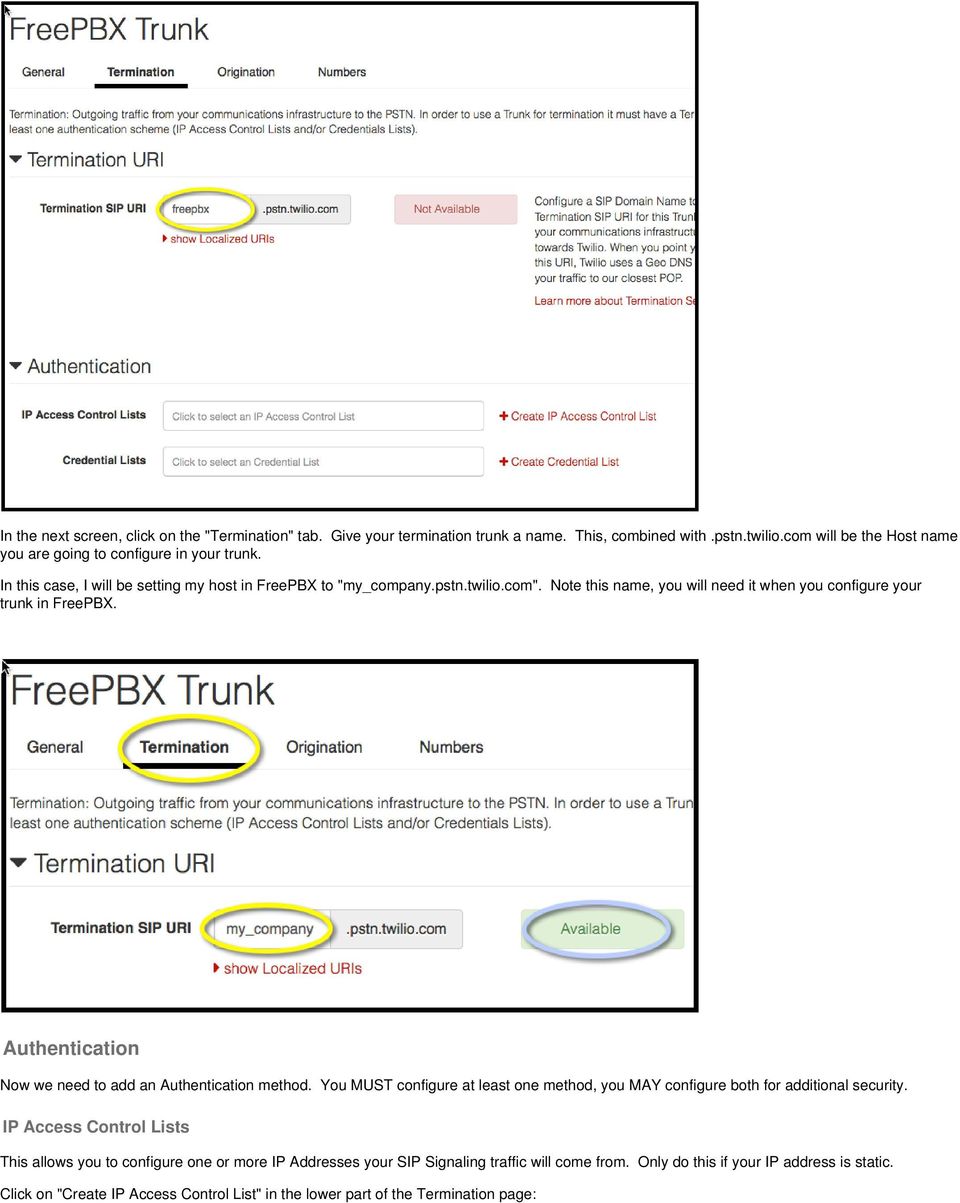
3 In the next screen, click on the "Termination" tab. Give your termination trunk a name. This, combined with.pstn.twilio.com will be the Host name you are going to configure in your trunk. In this case, I will be setting my host in FreePBX to "my_company.pstn.twilio.com". Note this name, you will need it when you configure your trunk in FreePBX. Authentication Now we need to add an Authentication method. You MUST configure at least one method, you MAY configure both for additional security. IP Access Control Lists This allows you to configure one or more IP Addresses your SIP Signaling traffic will come from. Only do this if your IP address is static. Click on "Create IP Access Control List" in the lower part of the Termination page:
4 You will then get this popup box. Give the list a name, then add the first IP address. You can add more addresses to the list later, in most cases you are done with 1 IP Address. Credential List If your IP address is not static, or you want an additional layer of security, you can create username(s) and and password for the account. Click "Create Credential List" in the authentication section of the page.

5 Note the strict password complexity requirements: Note the username and password your created, you will need this info when creating your trunk in FreePBX! Summary You should be done in the Twilio Portal now, and have a trunk that looks something like this: Configuring Your Twilio Trunk in FreePBX This part is very straightforward for Termination trunks. If you have done this before, very easy. One trick is making sure the outbound number is coded in E.164 format with a leading + sign. This will be demonstrated below. Creating the Trunk In the FreePBX GUI, go to Connectivity/Trunks/Add Trunk/SIP Trunk
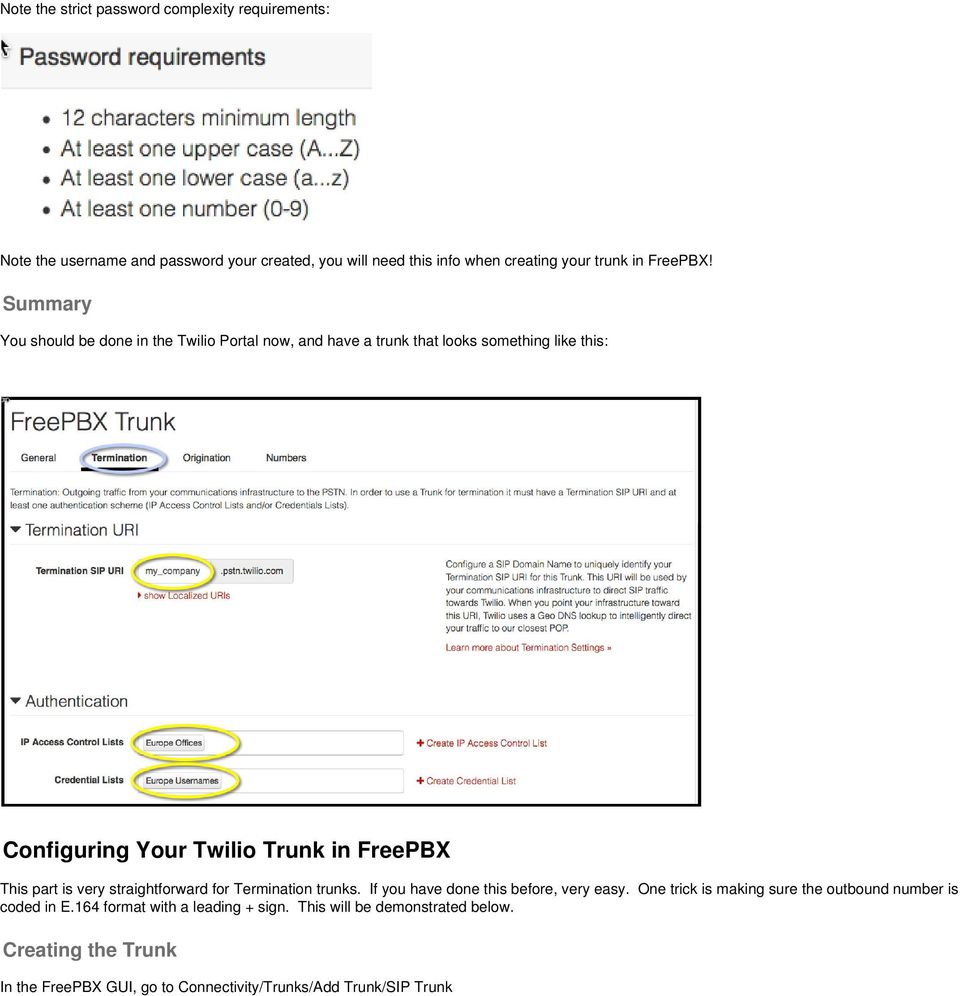
6 Let's step through each of the settings in the screen above: Trunk Name: set as you see fit Outbound Caller ID: Set this with the full E.164 format (with leading + sign) of a Twilio Number or Verified number in your account if you have a Free Trial account. You can set this more freely in a paid account, but E.164 format with the + is recommended for best results. CID Options: For a free Trial account, set this to forced. For paid accounts, set this as you see fit. Dialed Number Maniuplation: is going to vary by system. The objective is to get the number into E.164 format (for example: for a US number, for UK number, etc.) Outbound Dial Prefix: Set this to "+". This will add the + sign to the E.164 number. This is REQUIRED! Outgoing Trunk Name: Set this as you see fit Outgoing Host: Set this to the Terminating Trunk URI you created in the Twilio portal earlier Username. Set this to the username if you created credentials. Omit this line if you did not create credentials Secret. This is the password matching the username. Same as above. Type: Set this to peer as shown

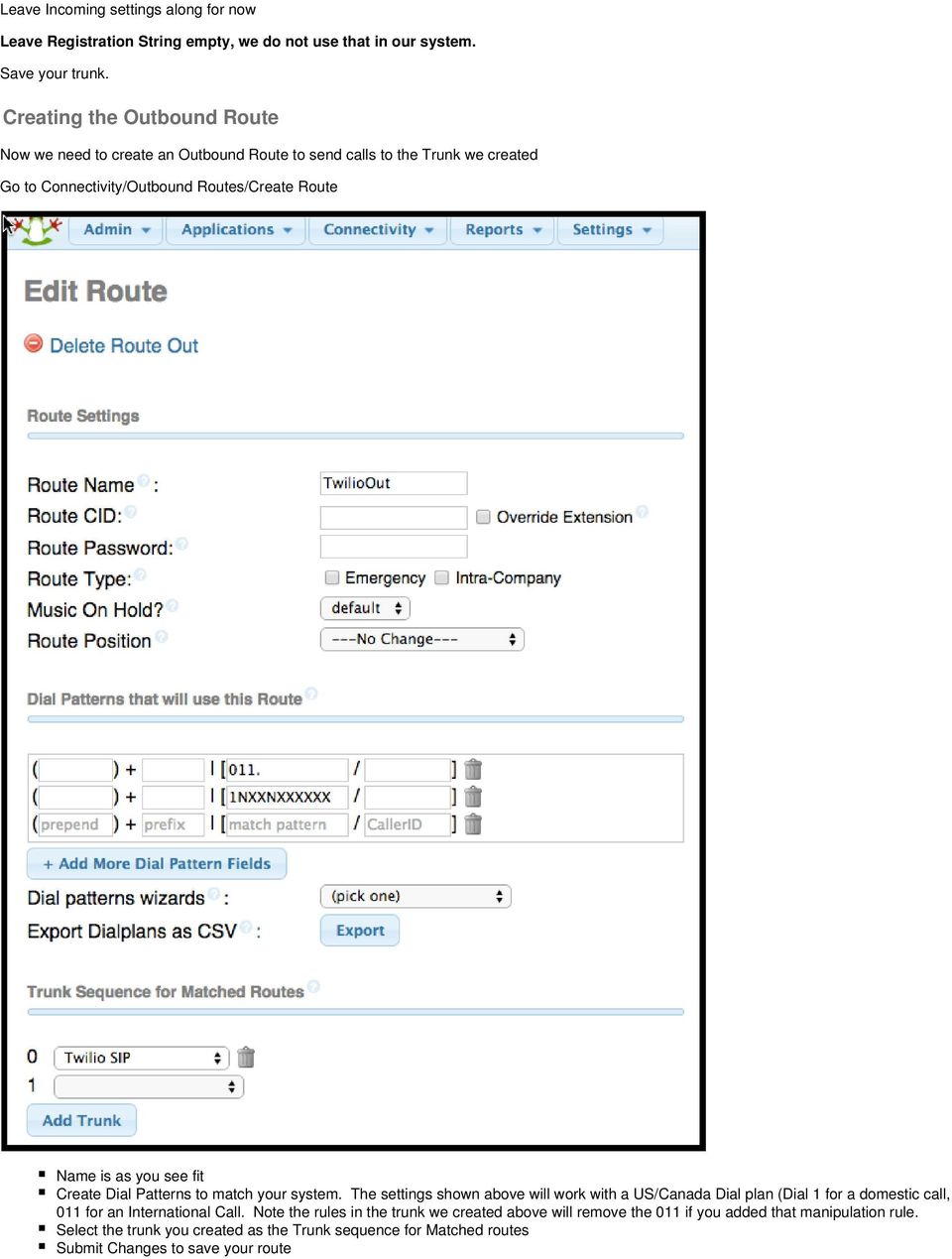
7 Leave Incoming settings along for now Leave Registration String empty, we do not use that in our system. Save your trunk. Creating the Outbound Route Now we need to create an Outbound Route to send calls to the Trunk we created Go to Connectivity/Outbound Routes/Create Route Name is as you see fit Create Dial Patterns to match your system. The settings shown above will work with a US/Canada Dial plan (Dial 1 for a domestic call, 011 for an International Call. Note the rules in the trunk we created above will remove the 011 if you added that manipulation rule. Select the trunk you created as the Trunk sequence for Matched routes Submit Changes to save your route
8 Summary You should now be configured to send calls to the PSTN via Twilio. Remember, the objective is to get calls out in E.164 format. Depending on how you configured your dial plan, you may need to dial the 1 for US/Canada call, or something else outside US/Canada. Dialpans are beyond the scope of this document, though basic US/Canada usage are shown in the screen captures above. Origination Calls Origination calls are calls coming in from the PSTN through Twilio, to your PBX. Firewall Settings That is a bit beyond the scope of this document. You will need to open holes, and, if NAT is in use, forward to the internal address of your PBX the addresses shown in the section" IP Addresses for each region" Ports to be allowed/forwarded are: 5060/udp for signaling /udp for media Configuring Your Origination Settings in the Twilio Portal Go back to your trunk, we are now going to configure one item in the Origination tab: Configure your IP or machine name, prefixed with "sip:". For example: sip: if your IP is or sip:freepbx.example.com if you prefer to use a machine name. For now, leave the Disaster Recovery empty unless you are familiar with TwiML. That is it for the Twilio Portal part of this. Configuring Your Twilio Origination (inbound) Trunks in FreePBX Twilio sends calls from 3-4 IP addresses, depending on your region. We are going to create a separate peer for each IP address, something similar to this:

9 Trunk Name: As you see fit, I chose a scheme to make it simple. This must be unique in your system. Outgoing Trunk Name: We are not going to use this peer for outgoing, but FreePBX will force this to be filled in. As above, I chose a scheme to keep them unique and simple. Leave the rest of the peer settings for Outgoing empty (clear the filler out) Incoming User Context: Again, this must be unique in the system. I chose TwilioIn1, 2, etc. Host: Set this to one of the IPs in the list below for your region. You should cover each IP address in your region in a separate trunk. so you will end up with 3-4 peers depending on your region.

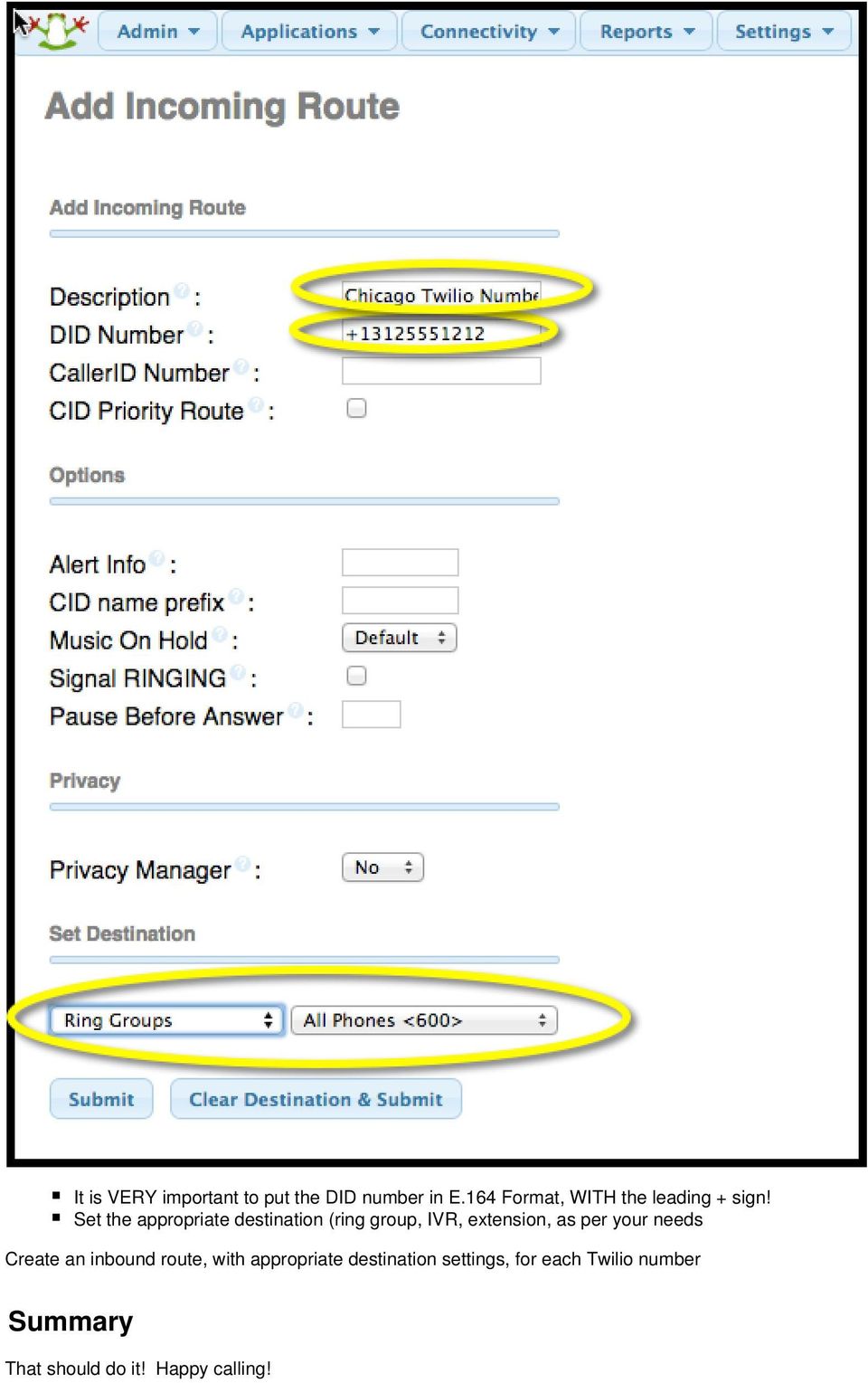
10 IP Addresses for each region: UNITED STATES ( YOURTRUNKNAME.pstn.us1.twilio.com) /23 AUSTRALIA ( YOURTRUNKNAME.pstn.au1.twilio.com) /26 IRELAND ( YOURTRUNKNAME.pstn.ie1.twilio.com) /26 SINGAPORE ( YOURTRUNKNAME.pstn.sg1.twilio.com) /26 JAPAN ( YOURTRUNKNAME.pstn.jp1.twilio.com) /26 BRAZIL ( YOURTRUNKNAME.pstn.br1.twilio.com) /26 Creating an Inbound Route for your Twilio Number You need to tell FreePBX what to do with a call from your trunk. Go to Connectivity/Inbound Routes/Add Incoming Route

11 It is VERY important to put the DID number in E.164 Format, WITH the leading + sign! Set the appropriate destination (ring group, IVR, extension, as per your needs Create an inbound route, with appropriate destination settings, for each Twilio number Summary That should do it! Happy calling!
A Guide to Connecting to FreePBX
 A Guide to Connecting to FreePBX FreePBX is a basic web Graphical User Interface that manages Asterisk PBX. It includes many features available in other PBX systems such as voice mail, conference calling,
SIP Trunk Configuration for nexvortex
 SIP Trunk Configuration for nexvortex Document version: 1.0 Modification date: June 25, 2013 Prerequisites The nexvortex customer service provides the following communication parameters: Parameter Example
Configuring Positron s V114 as a VoIP gateway for a 3cx system
 Assumptions: Configuring Positron s V114 as a VoIP gateway for a 3cx system The IP address of the V114 is 192.168.1.2 The IP address of the 3CX PBX System is 192.168.1.110 3CX already has some IP phones
Allo PRI Gateway and Elastix Server
 Allo PRI Gateway and Elastix Server Setup Guide http://www.elastix.org 1.0 Setup Diagram Figure 1-1 is a setup diagram for a single Allo PRI Gateway configuration. We re going to configure a SIP Trunk
SIP Trunk Configuration for Broadvox
 Document version: 1.0 Modification date: December 09, 2009 Prerequisites The Broadvox customer service provides the following communication parameters: Parameter Example Explanation BTN & Username: 4801234560
VoIPon www.voipon.co.uk [email protected] Tel: +44 (0)1245 808195 Fax: +44 (0)1245 808299
 VoiceGear/3CX Integration Guide Ver.0.1 Page 2 1. OVERVIEW... 3 1.1 SETTING UP 3CX PBX...4 1.2 SETTING UP VOICEGEAR GATEWAY...5 2. VOICEGEAR-3CX SIP INTEGRATION... 6 2.1 3CX CONFIGURATION...7 2.2 VOICEGEAR
Grandstream Networks, Inc.
 Grandstream Networks, Inc. Interoperability Tutorial: Configuring UCM6100 Series with FreePBX Grandstream Networks, Inc. www.grandstream.com FreePBX is a Registered Trademark of Schmooze Com, Inc. Index
1) How do I setup my SIP trunk for inbound/outbound calling? We authenticate IP-PBX SIP Trunking traffic by:
 1) How do I setup my SIP trunk for inbound/outbound calling? We authenticate IP-PBX SIP Trunking traffic by: IP Authentication (IP address) or Digest Authentication (account and SIP password) After you
Application Notes for BT Wholesale/HIPCOM SIP Trunk Service and Avaya IP Office 8.0 Issue 1.0
 Avaya Solution & Interoperability Test Lab Application Notes for BT Wholesale/HIPCOM SIP Trunk Service and Avaya IP Office 8.0 Issue 1.0 Abstract These Application Notes describe the procedures for configuring
Configuring Quadro IP PBXs with "SIP Connect"
 Configuring Quadro IP PBXs with "SIP Connect" Revision: 1.0 Abstract: This document describes how to configure the Quadro IP PBXs to use the IP-PSTN service from SIP Connect PAGE 1 Document Revision History
How to extend Skype to MyPBX
 How to extend Skype to MyPBX 1. Activate Skype for SIP on Skype... 2 1.1 Register for Skype Manager... 2 1.2 Create a SIP Profile and buy a Channel Subscription... 2 1.3 Allocate Skype Credit to the SIP
General Guidelines for SIP Trunking Installations
 General Guidelines for SIP Trunking Installations 1) How do I setup my SIP trunk for inbound/outbound calling? We authenticate IP-PBX SIP Trunking traffic by: IP Authentication (IP address) or Digest Authentication
General Guidelines for SIP Trunking Installations
 SIP Trunking Installations General Guidelines for SIP Trunking Installations 1) How do I setup my SIP trunk for inbound/outbound calling? We authenticate IP-PBX SIP Trunking traffic by: IP Authentication
SIP Trunking using the EdgeMarc Network Services Gateway and the Mitel 3300 ICP IP-PBX
 June 26th, 2014 SIP Trunking using the EdgeMarc Network Services Gateway and the Mitel 3300 ICP IP-PBX Page 1 of 30 Table of Contents 1 Overview... 3 2 Prerequisites... 3 3 Network Topology... 4 4 Description
Integrating Asterisk FreePBX with Lync Server 2010
 1 Integrating Asterisk FreePBX with Lync Server 2010 Author: Baaskar R 1 www.baaskarcharles.com 2 Integrating Asterisk FreePBX with Lync Server 2010... 1 AsteriskNow package Source... 3 Installing AsteriskNow...
3CX Guide sip.orbtalk.co.uk
 3CX Guide sip.orbtalk.co.uk Table of Contents 1. Outbound Dialling 2. Inbound Routing 3. Outbound CLI 4. Additional Network Configuration 1. Outbound dialling: The Customer will have been provided with
Configuration BCP Skype for Business
 Configuring Skype for Business using Grandstream CPE Devices Thank you for your interest in configuring Grandstream s SIP devices for Skype s SIP Trunking Service. This document describes the basic configuration
Port: Normally 5060 is used. If you are having problems with an Application Layer Gateway (ALGs), use 5160.
 Barracuda Phone System: Flowroute SIP Trunk Configuration Methods: SIP Registration Method IP-Based Authentication Method SIP Registration Method (Simplest Method) Description: This section describes the
Application Notes for Avaya IP Office 7.0 Integration with Skype Connect R2.0 Issue 1.0
 Avaya Solution & Interoperability Test Lab Application Notes for Avaya IP Office 7.0 Integration with Skype Connect R2.0 Issue 1.0 Abstract These Application Notes describe the steps to configure an Avaya
CompleteSBC: Getting Started Guide
 CompleteSBC: Getting Started Guide Default CompleteSBC Configuration CompleteSBC (SBC) is pre-configured to perform the following actions: registration caching limiting the number of concurrent calls via
3CX IP PBX with Twilio Elastic SIP Trunking Interconnection Guide
 3CX IP PBX with Twilio Elastic SIP Trunking Interconnection Guide Hello and welcome to our guide on how to set up a 3CX IP PBX for use with Twilio s Elastic SIP Trunking service. This guide covers the
Connecting with Vonage
 Connecting with Vonage Vonage (http://www.vonage.com/) offers telephone service using the VoIP (Voice over Internet Protocol) standard SIP (Session Initiation Protocol). The service allow users making
nexvortex Setup Guide
 nexvortex Setup Guide CUDATEL COMMUNICATION SERVER September 2012 510 S P R I N G S T R E E T H E R N D O N V A 2 0 1 7 0 + 1 8 5 5. 6 3 9. 8 8 8 8 Introduction This document is intended only for nexvortex
Application Notes for Configuring Avaya IP Office 9.0 with HIPCOM SIP Trunk Issue 1.0
 Avaya Solution & Interoperability Test Lab Application Notes for Configuring Avaya IP Office 9.0 with HIPCOM SIP Trunk Issue 1.0 Abstract These Application Notes describe the procedures for configuring
Application Notes for Configuring Broadvox SIP Trunking with Avaya IP Office - Issue 1.0
 Avaya Solution & Interoperability Test Lab Application Notes for Configuring Broadvox SIP Trunking with Avaya IP Office - Issue 1.0 Abstract These Application Notes describe the procedures for configuring
SIP Trunk Configuration Guide. using
 SIP Trunk Configuration Guide using www.cbeyond.net 1-877-441-9783 The information contained in this document is specific to setting up SIP connections between Vertical SBX IP 320 and Cbeyond. If you require
Digium IP-PBX. SIP Trunking using the Optimum Business SIP Trunk Adaptor and the Digium IP-PBX
 SIP Trunking using the Optimum Business SIP Trunk Adaptor and the Digium IP-PBX Table of Contents 1. Overview 3 2. Prerequisites 3 3. Digium PBX Configuration 3 3.1 SIP Trunking 4 3.2 Extensions/DID 7
nexvortex Setup Template
 nexvortex Setup Template ZULTYS, INC. April 2013 5 1 0 S P R I N G S T R E E T H E R N D O N V A 2 0 1 7 0 + 1 8 5 5. 6 3 9. 8 8 8 8 Introduction This document is intended only for nexvortex customers
SIP Trunking with Elastix. Configuration Guide for Matrix SETU VTEP
 SIP Trunking with Elastix Configuration Guide for Matrix SETU VTEP Contents Setup Diagram 3 SIP Trunk Configuration in Elastix for SETU VTEP 4 Outgoing Call configuration in Elastix 7 Incoming call configuration
SIPSTATION User Guide. Schmooze Com Inc.
 Schmooze Com Inc. Chapters Overview Logging In & Adding a Key Account Settings Route & Trunk Configuration DID Configuration Recap Overview The SIPSTATION module, when combined with a SIPSTATION SIP Trunk
Application Notes for Configuring Cablevision Optimum Voice SIP Trunking with Avaya IP Office - Issue 1.1
 Avaya Solution & Interoperability Test Lab Application Notes for Configuring Cablevision Optimum Voice SIP Trunking with Avaya IP Office - Issue 1.1 Abstract These Application Notes describe the procedures
SIP Trunking Configuration. Lisa Hallingström Paul Donald Bogdan Musat Adnan Khalid Per Johnsson Rickard Nilsson
 SIP Trunking Configuration Lisa Hallingström Paul Donald Bogdan Musat Adnan Khalid Per Johnsson Rickard Nilsson Table of Contents How To Use Your SIP Operator Account Via Ingate Firewall/SIParator...3
Connecting with Free IP Call
 Connecting with Free IP Call Free IP Call (http://www.freeipcall.com/) offers telephone service using the VoIP standard SIP. The service allow users making/receiving VoIP calls to/from VoIP telephone numbers
How to Configure MTG200 with FreePBX
 How to Configure MTG200 with FreePBX A. FreePBX Setup Procedure To setup the FreePBX sever for Dinstar MTG200 A1. Login the FreePBX Open the web of the FreePBX server with its IP address, the IP is assigned
DINSTAR DAG1000-4S4O with Elastix Setup Guide
 DINSTAR DAG1000-4S4O with Elastix Setup Guide Shenzhen Dinstar Technologies Co., Ltd. Address: Floor 6, Guoxing Building, Changxing Road, Nanshan District, Shenzhen, China 518057 Telephone: +86 755 2645
Configuration guide for Switchvox and Cbeyond.
 Configuration guide for Switchvox and Cbeyond. This document will guide a Switchvox administrator through configuring the system to utilize Cbeyond s BeyondVoice with SIPconnect service. After you have
Integrating VoIP Phones and IP PBX s with VidyoGateway
 Integrating VoIP Phones and IP PBX s with VidyoGateway Updated February 2011 INDEX: I. ABSTRACT.1 II. III. IV. VIDYOGATEWAY OVERVIEW.. 1 NETWORK TOPOLOGIES AND DEFINITIONS...2 CONNECTING TO VIDYOCONFERENCES
Application Notes for Configuring Intelepeer SIP Trunking with Avaya IP Office 7.0 - Issue 1.0
 Avaya Solution & Interoperability Test Lab Application Notes for Configuring Intelepeer SIP Trunking with Avaya IP Office 7.0 - Issue 1.0 Abstract These Application Notes describe the procedures for configuring
SIP Trunking using the Optimum Business SIP Trunk Adaptor and the FortiVoice IP-PBX
 SIP Trunking using the Optimum Business SIP Trunk Adaptor and the FortiVoice IP-PBX 1 Table of Contents 1. Overview 3 2. Prerequisites 3 3. FortiVoice Configuration 3 3.1 Global Settings 4 3.2 SIP Registration
Basic configuration of the GXW410x with Trixbox
 Basic configuration of the GXW410x with Trixbox Please note that due to the customizable nature of both the GXW410x and Trixbox and the vast deployment possibilities, these instructions should be taken
Guideline for SIP Trunk Setup
 Guideline for SIP Trunk Setup with ZONETEL Table of contents Sample sip.conf (it applies to asterisk 1.4.x)...3 Sample elastix setup... 3 Ports required... 4 Caller ID...4 FAQ... 5 After i dial out, the
Setup Guide: on the MyNetFone Service. Revision History
 Setup Guide: on the MyNetFone Service Revision History Version Author Revision Description Release Date 1.0 Sampson So Initial Draft 02/01/2008 2.0 Sampson So Update 27/09/2011 1 Table of Contents Introduction...
How to Connect MyPBX to Skype
 Version: 2.0 Yeastar Technology Co., Ltd. Date: 2014.11.20 Table of Contents About This Guide... 3 1. Register Skype SIP Trunk on MyPBX... 4 2. Configure MyPBX with Inbound Calling... 7 2.1 Receive Incoming
3CX PBX v12.5. SIP Trunking using the Optimum Business Sip Trunk Adaptor and the 3CX PBX v12.5
 SIP Trunking using the Optimum Business Sip Trunk Adaptor and the 3CX PBX v12.5 Table of Contents 1. Overview 3 2. Prerequisites 3 3. PBX Configuration 3 4. Creating Extensions 4 5. VoIP Provider Setup
How To Guide. SIP Trunking Configuration Using the SIP Trunk Page
 How To Guide SIP Trunking Configuration Using the SIP Trunk Page For the Ingate SIParators and Firewalls using software release 4.9.2 or later. Updated to show features available from release 4.10.x May
Connecting with sipgate
 Connecting with sipgate sipgate (http://www.sipgate.co.uk/) offers telephone service using the VoIP standard SIP. sipgate covers every area code within the United Kingdom and provides a local Direct Inward
PBX Setup Basic setup procedures
 Basic setup procedures 1) Configure the SpoTel PBX & Voip phones to a router/switch 2) Setup Extensions on SpoTel PBX -> Testing: Call between Extension phones 3) Setup Trunks on Spotel PBX 4) Setup Outbound
Knowledgebase Solution
 Knowledgebase Solution Updated: 2/27/2014 Configuring an EdgeMarc for SIP trunking with an IP PBX This document describes the steps needed to configure an IP PBX behind the EdgeMarc which is pointing to
SIP Trunking using the Optimum Business SIP Trunk adaptor and the AltiGen Max1000 IP PBX version 6.7
 SIP Trunking using the Optimum Business SIP Trunk adaptor and the AltiGen Max1000 IP PBX version 6.7 Goal The purpose of this configuration guide is to describe the steps needed to configure the AltiGen
SIP Trunking using Optimum Business Sip Trunk Adaptor and the Zultys MX250 IP PBX
 SIP Trunking using Optimum Business Sip Trunk Adaptor and the Zultys MX250 IP PBX Table of Contents Goal 3 Prerequisites 3 Zultys MX250 Configuration 4 Network Settings 4 Phone Registration and Assignment
Application Note. IP8000 Conference Phone Configuration Guide. Table of Contents. Overview. Requirements. ST-10010 October 25, 2007
 Application Note ST-10010 October 25, 2007 IP8000 Conference Phone Configuration Guide This application note provides the details on adding the IP8000 conference phone to the ShoreTel IP phone system.
Tech Bulletin 2012-002. IPitomy AccessLine SIP Provider Configuration
 [email protected] 941.306.2200 Tech Bulletin 2012-002 Description This guide is intended to streamline the installation of AccessLine SIP trunks in the IPitomy IP PBX. In our combined testing we determined
Copyright ZYCOO All Rights Reserved 1 / 8
 Copyright ZYCOO All Rights Reserved 1 / 8 If you have a scenario where you have two CooVox IP PBXs in two different locations then you can integrate them together to make free phone calls between locations.
Mediatrix 3000 with Asterisk June 22, 2011
 Mediatrix 3000 with Asterisk June 22, 2011 Proprietary 2011 Media5 Corporation Table of Contents Introduction... 3 Network Topology... 3 Equipment Detail... 3 Configuration of the Fax Extension... 4 Configuration
Application Notes for Configuring Microsoft Office Communications Server 2007 R2 and Avaya IP Office PSTN Call Routing - Issue 1.0
 Avaya Solution & Interoperability Test Lab Application Notes for Configuring Microsoft Office Communications Server 2007 R2 and Avaya IP Office PSTN Call Routing - Issue 1.0 Abstract These Application
Configuration guide on common features of OM20 with NeeHau APP
 Configuration guide on common features of OM20 with NeeHau APP Part 1: OM20 OM20 is a full-featured IP-Telephony system with 20 extensions, providing features such as auto-attendant, mobile extension,
ScopTEL TM IP PBX Software. Managing Incoming Lines
 Managing Incoming Lines Incoming Lines Incoming Lines must be created to Route incoming calls to required destinations From Configuration > Telephony > Lines > Incoming Lines Click on Add a new Incoming
nexvortex Setup Guide
 nexvortex Setup Guide CISCO UC500 March 2012 Introduction This document is intended only for nexvortex customers and resellers as an aid to setting up the Cisco PBX software to connect to the nexvortex
Configuring Mitel 3300 for Spitfire SIP Trunks
 Configuring Mitel 3300 for Spitfire SIP Trunks This document is a guideline for configuring Spitfire SIP trunks onto Mitel 3300 and includes the settings required for Inbound DDI routing and Outbound CLI
PSTN Survivability - Sentinel in the LAN with PBX Registering to Sentinel. Dgw v2.0.30.549 Revision 01 April 30, 2015. www.media5corp.
 PSTN Survivability - Sentinel in the LAN with PBX Registering to Sentinel Dgw v2.0.30.549 Revision 01 April 30, 2015 www.media5corp.com PSTN Survivability - Sentinel in the LAN with PBX Registering to
3rd Party VoIP Phone Setup Guide (Panasonic 500-550b)
 3rd Party VoIP Phone Setup Guide (Panasonic 500-550b) We are changing how we add 3rd party VoIP phones to accounts. Going forward, you can simply add a 3rd Party Softphone and use those credentials to
How to Configure the Avaya IP Office 6.1 for use with Integra Telecom SIP Solutions
 How to Configure the Avaya IP Office 6.1 for use with Integra Telecom SIP Solutions Overview This document provides a reference for configuration of the Avaya IP Office to connect to Integra Telecom SIP
nexvortex SIP Trunking Implementation & Planning Guide V1.5
 nexvortex SIP Trunking Implementation & Planning Guide V1.5 510 S PRING S TREET H ERNDON VA 20170 +1 855.639.8888 Introduction Welcome to nexvortex! This document is intended for nexvortex Customers and
IP PBX. SD Card Slot. FXO Ports. PBX WAN port. FXO Ports LED, RED means online
 1 IP PBX SD Card Slot FXO Ports PBX LAN port PBX WAN port FXO Ports LED, RED means online 2 Connect the IP PBX to Your LAN Internet PSTN Router Ethernet Switch FXO Ports 3 Access the PBX s WEB GUI The
OfficeServ 7100 IP-PBX. SIP Trunking using the Optimum Business Sip Trunk Adaptor and the Samsung
 SIP Trunking using the Optimum Business Sip Trunk Adaptor and the Samsung OfficeServ 7100 IP-PBX 1 Table of Contents 1. Overview 3 2. Prerequisites 3 3. OfficeServ 7100 PBX Configuration 3 3.1 Network
Using the NetVanta 7100 Series
 MENU OK CANCEL 1 2 3 4 5 6 7 8 9 * 0 # MENU MENU OK CANCEL CANCEL 1 2 3 4 5 6 7 8 9 * 0 # MENU OK CANCEL CANCEL 1 2 3 4 5 6 7 8 9 * 0 # MENU OK CANCEL CANCEL 1 2 3 4 5 6 7 8 9 * 0 # MENU OK CANCEL 1 2
Khomp KGSM-USB SPX and Elastix Server
 Khomp KGSM-USB SPX and Elastix Server Setup Guide http://www.elastix.org 1.0 Setup Diagram Figure 1-1 is a setup diagram for a single Khomp KGSM-USB SPX Interface Card configuration. Figure 1-1. Setup
CREATE A CUSTOMER... 2 SIP TRUNK ACCOUNTS...
 Contents CREATE A CUSTOMER... 2 SIP TRUNK ACCOUNTS... 3 CREATE THE MAIN SIP TRUNK ACCOUNT... 3 SETUP THE SIP TRUNK ACCOUNT... 4 EXTRA DIDS... 7 HOW TO..... 9 BILL FOR THE SIP TRUNKING SERVICE... 9 LIMIT
AudioCodes Mediant 1000 Configuration Guide
 AudioCodes Mediant 1000 Configuration Guide 2010 FaxBack, Inc. All Rights Reserved. NET SatisFAXtion and other FaxBack products, brands and trademarks are property of FaxBack, Inc. Other products, brands
Avaya IP Office 8.1 Configuration Guide
 Avaya IP Office 8.1 Configuration Guide Performed By tekvizion PVS, Inc. Contact: 214-242-5900 www.tekvizion.com Revision: 1.1 Date: 10/14/2013 Copyright 2013 by tekvizion PVS, Inc. All Rights Reserved.
Digium Switchvox AA65 PBX Configuration
 Digium Switchvox SIP Trunking using Optimum Business SIP Trunk Adaptor and the Digium Switchvox AA65 IP-PBX v23695 Goal The purpose of this configuration guide is to describe the steps needed to configure
Application Notes for MultiTech FaxFinder FFx40 Software version 1.1.8 with Avaya IP Office 8.0 Issue 1.0
 Avaya Solution & Interoperability Test Lab Application Notes for MultiTech FaxFinder FFx40 Software version 1.1.8 with Avaya IP Office 8.0 Issue 1.0 Abstract These Application Notes describe the configuration
Configuration BCP Skype for Business
 Configuring Skype For Business using Grandstream CPE Devices Thank you for interest in configuring Grandstream SIP devices for Skype s SIP Trunking Service. This document describes the basic configuration
IP Office Technical Tip
 IP Office Technical Tip Tip no: 188 Release Date: September 27, 2007 Region: GLOBAL Verifying IP Office SIP Trunk Operation IP Office back-to-back SIP Line testing IP Office Release 4.0 supports SIP trunking.
Device SIP Trunking Administrator Manual
 Table of Contents Device SIP Trunking Administrator Manual Version 20090401 Table of Contents... 1 Your SIP Trunking Service... 2 Terminology and Definitions... 2 PBX, IP-PBX or Key System... 2 Multi-port
Configuring Elastix 2.0.0 57 for Spitfire SIP Trunks
 Configuring Elastix 2.0.0 57 for Spitfire SIP Trunks This document is a guideline for configuring Spitfire SIP trunks onto Elastix 2.0.0 and includes the settings required for Inbound DDI routing and Outbound
SIP Trunking using Optimum Business SIP Trunk Adaptor and the Allworx 6x IP PBX 7.1.6.1
 ALLWORX SIP Trunking using Optimum Business SIP Trunk Adaptor and the Allworx 6x IP PBX 7.1.6.1 Goal The purpose of this configuration guide is to describe the steps needed to configure the Allworx 6x
First Steps after Installation Guide
 First Steps after Installation Guide Index 1. Login to your IVR 2. License activation 3. Security Recommendations 4. Configure your first SIP extension or device 5. Configure your first SIP trunk 6. Configure
Application Note Configuring the Synapse SB67070 SIP Gateway for Broadvox GO! SIP Trunking
 Configuring the Synapse SB67070 SIP Gateway for Broadvox GO! SIP Trunking 2012 Advanced American Telephones. All Rights Reserved. AT&T and the AT&T logo are trademarks of AT&T Intellectual Property licensed
ScopTEL TM IP PBX Software. Back to Back SIP Trunking Configuration
 Back to Back SIP Trunking Configuration Usage Cases Usage Cases Implementing DNIS: SIP TIE trunks: A private network is created to dial extensions between systems using Access Codes Tandem Dialing: PSTN
Optimum Business SIP Trunk Set-up Guide
 Optimum Business SIP Trunk Set-up Guide For use with IP PBX only. SIPSetup 07.13 FOR USE WITH IP PBX ONLY Important: If your PBX is configured to use a PRI connection, do not use this guide. If you need
TECH ARTICLE Date: 03/04/08
 TechnicalArticle.doc Version1.0 23/10/07 TECH ARTICLE Date: 03/04/08 Topic / Issue: Written By: Configuring ISDN Settings on Quadro PBX Chris Pulsford This document describes the configuration of the ISDN
SIP Trunking using Optimum Business SIP Trunk Adaptor and ShoreTel IP PBX Phone System
 SHORETEL SIP Trunking using Optimum Business SIP Trunk Adaptor and ShoreTel IP PBX Phone System Goal The purpose of this configuration guide is to describe the steps needed to configure the ShoreTel IP
How to Configure the Toshiba Strata CIX for use with Integra Telecom SIP Solutions
 How to Configure the Toshiba Strata CIX for use with Integra Telecom SIP Solutions Overview: This document provides a reference for configuration of the Toshiba Strata CIX IP PBX to connect to Integra
Internet Telephony PBX System
 Internet Telephony PBX System T1/E1 Gateway With IP PBX Application Copyright PLANET Technology Corporation. All rights reserved. Case 35: With IP PBX Application Head Office E1 PABX interconnect with
THINKTEL COMMUNICATIONS CUDATEL PHONE SYSTEM 270. High Availability and SIP-TRUNK Configuration
 THINKTEL COMMUNICATIONS CUDATEL PHONE SYSTEM 270 High Availability and TABL E OF CO NTENTS 1.1 CONFIGURING TELEPHONE SERVICE PROVIDER (THINKTEL)... 3 1.2 OUTBOUND CALL ROUTING... 5 1.3 INBOUND CALL FROM
SIP Trunking using Optimum Business SIP Trunk Adaptor and the Cisco Call Manager Express Version 8.5
 CISCO SIP Trunking using Optimum Business SIP Trunk Adaptor and the Cisco Call Manager Express Version 8.5 Goal The purpose of this configuration guide is to describe the steps needed to configure the
Fonality. Optimum Business Trunking and the Fonality Trixbox Pro IP PBX Standard Edition V4.1.2- p13 Configuration Guide
 Fonality Optimum Business Trunking and the Fonality Trixbox Pro IP PBX Standard Edition V4.1.2- p13 Configuration Guide Fonality Table of Contents 1. Overview 2. SIP Trunk Adaptor Set-up Instructions 3.
Integrating a Mitel 3300 ICP system with a IPCM System.
 Integrating a Mitel 3300 ICP system with a IPCM System. Version: 1.0 Created by: Francisco Piedra Date: Nov 27 th 2008 Web Site: E-Mail: [email protected] Phone: +34935906366 Chapter 1: Mitel SIP Configuration
UCM61xx Configuration
 UCM61xx Configuration Grandstream UCM61xx IPPBX firmware version 1.0.4.7 has passed SIP Trunk interoperability testing with Broadvox on February 12 th, 2014. This document introduces major configuration
THINKTEL COMMUNICATIONS DIGIUM G100/G200 PRI OVER IP SIP TRUNKING
 THINKTEL COMMUNICATIONS DIGIUM G100/G200 PRI OVER IP SIP TRUNKING TA B L E O F C O N T E N T S 1.1 NETWORK DIAGRAM... 3 1.2 COLLABORATION OF MONARQUE TELECOM... 3 1.3 CONNECTING TO THE DIGIUM G100... 4
SIP Trunking using Optimum Business SIP Trunk Adaptor and the Panasonic KX-NCP500 IP PBX V2.0502
 PANASONIC SIP Trunking using Optimum Business SIP Trunk Adaptor and the Panasonic KX-NCP500 IP PBX V2.0502 Goal The purpose of this configuration guide is to describe the steps needed to configure the
Application Notes for Configuring Avaya IP Office 8.1 with Colt VoIP Access service Issue 1.0
 Avaya Solution & Interoperability Test Lab Application Notes for Configuring Avaya IP Office 8.1 with Colt VoIP Access service Issue 1.0 Abstract These Application Notes describe the procedures for configuring
Configuring a Mediatrix 500 / 600 Enterprise SIP Trunk SBC June 28, 2011
 Configuring a Mediatrix 500 / 600 Enterprise SIP Trunk SBC June 28, 2011 Proprietary 2011 Media5 Corporation Table of Contents Introduction... 3 Solution Overview... 3 Network Topology... 4 Network Configuration...
Abstract. Avaya Solution & Interoperability Test Lab
 Avaya Solution & Interoperability Test Lab Application Notes for Configuring IntelePeer SIP Trunking Service with Avaya IP Office R9.0.1 and Avaya Session Border Controller for Enterprise 6.2.1 - Issue
Quick Installation Guide
 Quick Installation Guide PRI Gateway Version 2.4 Table of Contents Hardware Setup... 1 Accessing the WEB GUI... 2 Notification LEDs (On the Front Panel of the Gateway)... 3 Creating SIP Trunks... 4 Creating
Soft Solutions, Inc. 4-Sight FAX 7.5. Getting Started. Soft Solutions, Inc. http://www.4sightfax.com/
 4-Sight FAX 7.5 Getting Started Soft Solutions, Inc. http://www.4sightfax.com/ Introduction Thank you for your interest in 4-Sight FAX version 7.5. This guide documents the general configuration for using
THINKTEL COMMUNICATIONS 3CX PHONE SYSTEM V.11. 3CX Phone System THINKTEL SIP TRUNK from scratch
 THINKTEL COMMUNICATIONS 3CX PHONE SYSTEM V.11 3CX Phone System THINKTEL SIP TRUNK from scratch TA B L E O F C O N T E N T S 1.1 INTRODUCTION... 3 2.1 REQUIREMENTS... 4 2.2 3CX PHONE SYSTEME INSTALLATION...
How to Configure the Allworx 6x, 24x and 48x for use with Integra Telecom SIP Solutions
 How to Configure the Allworx 6x, 24x and 48x for use with Integra Telecom SIP Solutions Overview: This document provides a reference for configuration of the Allworx 6x IP PBX to connect to Integra Telecom
How to use IP-0x to connect to Skype
 How to use IP-0x to connect to Skype Product Guide Version: 1.0 2010-10-14 Content CONTACT ATCOM... 2 HOW TO USE IP-0X TO CONNECT TO SKYPE... 2 YOU NEED TO SIGN UP A SKYPE MANAGER ACCOUNT.... 2 REGISTER