
Sun Microsystems, Inc JavaMail API Design Specification version 1.0b
|
|
|
- Elvin Eaton
- 10 years ago
- Views:
Transcription
1 Sun Microsystems, Inc JavaMail API Design Specification version 1.0b Please send feedback to Java Mail 1.0b Version 1.0b March 27, 1998
2 JavaMail Copyright 1998 by Sun Microsystems Inc Garcia Avenue, Mountain View, CA All rights reserved. RESTRICTED RIGHTS: Use, duplication or disclosure by the government is subject to the restrictions as set forth in subparagraph (c) (1) (ii) of the Rights in Technical Data and Computer Software Clause as DFARS and FAR Sun, Sun Microsystems, the Sun logo, Java, and JavaSoft, are trademarks or registered trademarks of Sun Microsystems, Inc. THIS PUBLICATION IS PROVIDED AS IS WITHOUT WARRANTY OF ANY KIND, EITHER EXPRESS OR IMPLIED, INCLUDING, BUT NOT LIMITED TO, THE IMPLIED WARRANTIES OF MECHANTABIL- ITY, FITNESS FOR A PARTICULAR USE, OR NON-INFRINGEMENT. THIS PUBLICATION COULD INCLUDE TECHNICAL INACCURACIES OR TYPOGRAPHICAL ER- RORS. CHANGES ARE PERIODICALLY ADDED TO THE INFORMATION HEREIN; THESE CHANGES WILL BE INCORPORATED IN NEW EDITIONS OF THE PUBLICATION. SUN MICROSYSTEMS, INC., MAY MAKE NEW IMPROVEMENTS AND/OR CHANGES IN THE PRODUCT(S) AND/OR THE PRO- GRAM(S) DESCRIBED IN THIS PUBLICATION AT ANY TIME. JavaSoft ii 3/20/98

3 Table Of Contents 1. Introduction Goals and Design Principles Architectural Overview The Message Class The Mail Session Message Storage And Retrieval The JavaBeans Activation Framework Message Composition Transport Protocols and Mechanisms Internet Mail 10-1 A. Environment Properties A-1 B. Examples Using the Mail API B-1 B.1 Example: Showing a Message B-1 B.2 Example : Listing Folders B-4 B.3 Example: Search a Folder for a Message B-6 B.4 Example: Monitoring a Mailbox B-9 B.5 Example: Sending a Message B-11 C. Message Security C-1 iii

4 C.1.1 Displaying an Encryted/Signed Message C-1 C Encrypted/Signed C-3 D. Part and Multipart Class Diagram D-1 E. MimeMessage Object Hierarchy E-1 iv Book Title Month 1996

5 1 Introduction In the two years since it s first release, the Java TM language has matured to become a complete platform. The Java platform now provides a complete operating system, distributed computing with RMI and the CORBA bridge, a component architecture(javabeans TM ), a middleware layer (Enterprise JavaBeans TM ), a server toolkit, and a WebTop environment. Having proven successful, many Java-based applications have matured with the language and now need a Java-based mail and messaging framework. The JavaMail TM API described in this specification satisfies that need. The JavaMail API provides a set of abstract classes defining objects that comprise a mail system. The API defines classes like Message, Store and Transport. The API can be extended and can be subclassed to provide new protocols and to functionality when necessary. In addition, the API provides concrete subclasses of the abstract classes. These subclasses, including MimeMessage and MimeBodyPart, implement widely used Internet mail protocols and conform to specifications RFC822 and RFC2045. They are ready to be used in application development. 1.1 Target Audience The JavaMail API is designed to serve several audiences: Client, server, or middleware developers interested in building Java-based mail and messaging applications. Application developers who need to mail-enable their applications. Service Providers who need to implement specific access and transfer protocols. For example; a telecommunications company can use the JavaMail API to implement a PAGER Transport protocol that sends mail messages to alphanumeric pagers. 1.2 Acknowledgments The authors of this specification are John Mani, Bill Shannon, Max Spivak, Kapono Carter and Chris Cotton. We would like to acknowledge the following people for their comments and feedback on the initial drafts of this document: Terry Cline, John Russo, Bill Yeager, Monica Gaines and John Togasaki: Sun Microsystems. Chapter 1 Introduction 1-1

6 Arn Perkins and John Ragan: Novell, Inc. Nick Shelness: Lotus Development Corporation. Juerg von Kaenel: IBM Corporation. Prasad Yendluri, Jamie Zawinski, Terry Weissman and Gena Cunanan: Netscape Communications Corporation. 1-2 JavaMail API Design Specification March 1998

7 2 Goals and Design Principles The JavaMail API is designed to make mail-enabling of simple applications easy, while also supporting the creation of sophisticated user interfaces. It includes appropriate convenience classes which encapsulate common mail functions and protocols. It fits with other Java language packages in order to facilitate its use with other Java language APIs, and it uses familiar Java language programming models. The JavaMail API is therefore designed to satisfy the following development and runtime requirements: Simple, straightforward class design is easy for a developer to learn and implement. Use of familiar concepts and programming models support code development that interfaces well with other Java language APIs. Uses familiar exception-handling and JDK 1.1 event-handling programming models. Uses features from the JavaBeans Activation Framework (JAF) to handle access to data based on data-type and to facilitate the addition of data types and commands on those data types. The JavaMail API provides convenience functions to simplify these coding tasks. Lightweight classes and interfaces make it easy to add basic mail-handling tasks to any application. Supports the development of robust mail-enabled applications, that can handle a variety of complex mail message formats, data types, and access and transport protocols. The JavaMail API draws heavily from IMAP, MAPI, CMC, c-client and other messaging system APIs - many of the concepts present in these other systems are also present in the JavaMail API. It is simpler to use because it uses Java language features not available to these other APIs, and because it uses the Java language object model to shelter applications from implementation complexity. The JavaMail API design is driven by the needs of the applications it supports - but it is also important to consider the needs of API implementors. It is critically important to enable the implementation of Javabased messaging systems that interoperate with existing messaging systems-- especially Internet mail. It is also important to anticipate the development of new messaging systems. The JavaMail API conforms to current standards while not being so constrained by current standards that it stifles future innovation. The JavaMail API supports many different messaging system implementations - different message stores, different message formats, and different message transports. The JavaMail API provides a set of base Chapter 2 Goals and Design Principles 2-1
8 classes and interfaces that define the API for client applications. Many simple applications will only need to interact with the messaging system through these base classes and interfaces. JavaMail subclasses can expose additional messaging system features. For instance, the MimeMessage subclass exposes and implements common characteristics of an Internet mail message, as defined by RFC822 and MIME standards. Developers can subclass JavaMail classes to provide the implementations of particular messaging systems, such as IMAP4, POP3, and SMTP. The base JavaMail classes include many convenience APIs that simplify use of the API, but don t add any functionality. The implementation subclasses are not required to implement those convenience methods. The implementation subclasses must implement only the core classes and methods that provide functionality required for the implementation. Alternately, a messaging system can choose to implement all of the JavaMail API directly, allowing it to take advantage of performance optimizations, perhaps through use of batched protocol requests. The IMAP4 protocol implementation takes advantage of this approach. The JavaMail API uses the Java language to good effect to strike a balance between simplicity and sophistication. Simple tasks are easy, and sophisticated functionality is possible. 2-2 JavaMail API Design Specification March 1998
9 3 Architectural Overview This Section describes the JavaMail architecture, defines major classes and interfaces comprising that architecture, and lists major functions that the architecture implements. JavaMail provides elements that are used to construct an interface to a messaging system, including system components and interfaces. While this Specification does not define any specific implementation, JavaMail does include several classes that implement RFC822 and MIME Internet messaging standards. These classes are delivered as part of the JavaMail class package. 3.1 JavaMail Layered Architecture The JavaMail architectural components are layered as shown below: The Abstract Layer declares Classes, Interfaces and abstract methods intended to support mail handling functions that all mail systems support. API elements comprising the Abstract Layer are intended to be subclassed and extended as necessary in order to support standard data types, and to interface with message access and message transport protocols as necessary. The internet implementation layer implements part of the abstract layer using internet standards - RFC822 and MIME. JavaMail uses the JavaBeans Activation Framework (JAF) in order to encapsulate message data, and to handle commands intended to interact with that data. Interaction with message data should take place via JAF-aware JavaBeans, which are not provided by the JavaMail API. JavaMail clients use the JavaMail API and Service Providers implement the JavaMail API. The layered design architecture allows clients to use the same JavaMail API calls to send, receive and store a variety of messages using different data-types from different message stores and using different message transport protocols. Chapter 3 Architectural Overview 3-1
10 Mail-enabled Application Java Bean - used to interact and display message content JavaMail API JavaMail Abstract Class Layer Internet Mail Implementation Class Layer IMAP / POP3 / NNTP implementation Layer 3-2 JavaMail API Design Specification March 1998

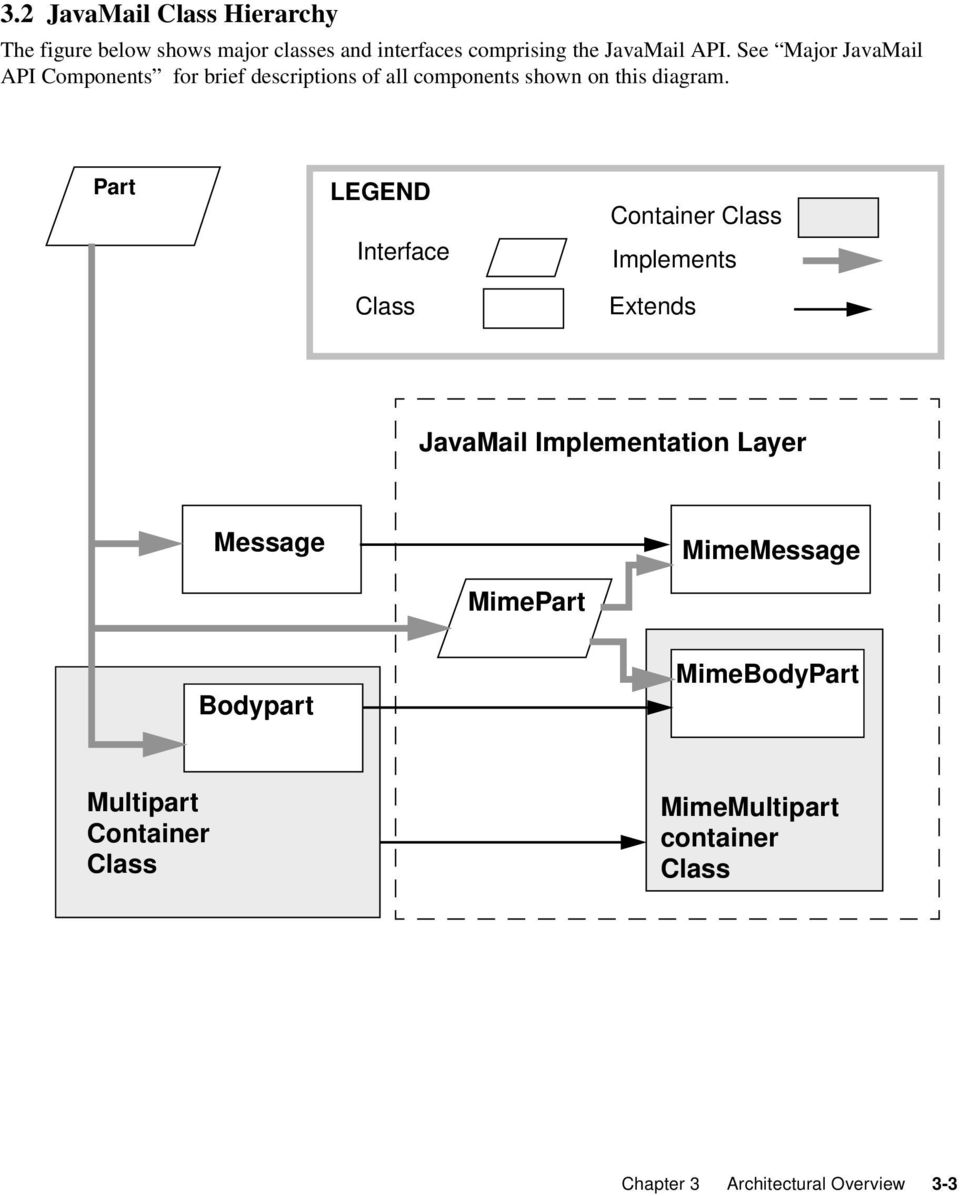
11 3.2 JavaMail Class Hierarchy The figure below shows major classes and interfaces comprising the JavaMail API. See Major JavaMail API Components for brief descriptions of all components shown on this diagram. Part LEGEND Interface Class Container Class Implements Extends JavaMail Implementation Layer Message MimeMessage MimePart Bodypart MimeBodyPart Multipart Container Class MimeMultipart container Class Chapter 3 Architectural Overview 3-3
12 3.3 The JavaMail Framework The JavaMail API is intended to perform the following functions, which comprise the standard Mail handling process for a typical client application: Create a Mail Message consisting of a collection of header attributes and a block of data of some known data type as specified in the Content-Type header field. JavaMail uses the Part interface and the Message class to define a mail message. It uses the JAF-defined DataHandler object to contain data placed in the message. Create a session object, which authenticates the user, and controls access to the message store and transport. Send the message to its recipient list. Retrieve a message from a message store. Execute a high-level command on a retrieved message. High-level commands like view and print are intended to be implemented via JAF-Aware JavaBeans. Note The JavaMail framework does not define mechanisms that support message delivery, security, disconnected operation, directory services or filter functionality. Security, disconnected operation and filtering support will be added in future releases. This figure illustrates the JavaMail message-handling process. 3-4 JavaMail API Design Specification March 1998
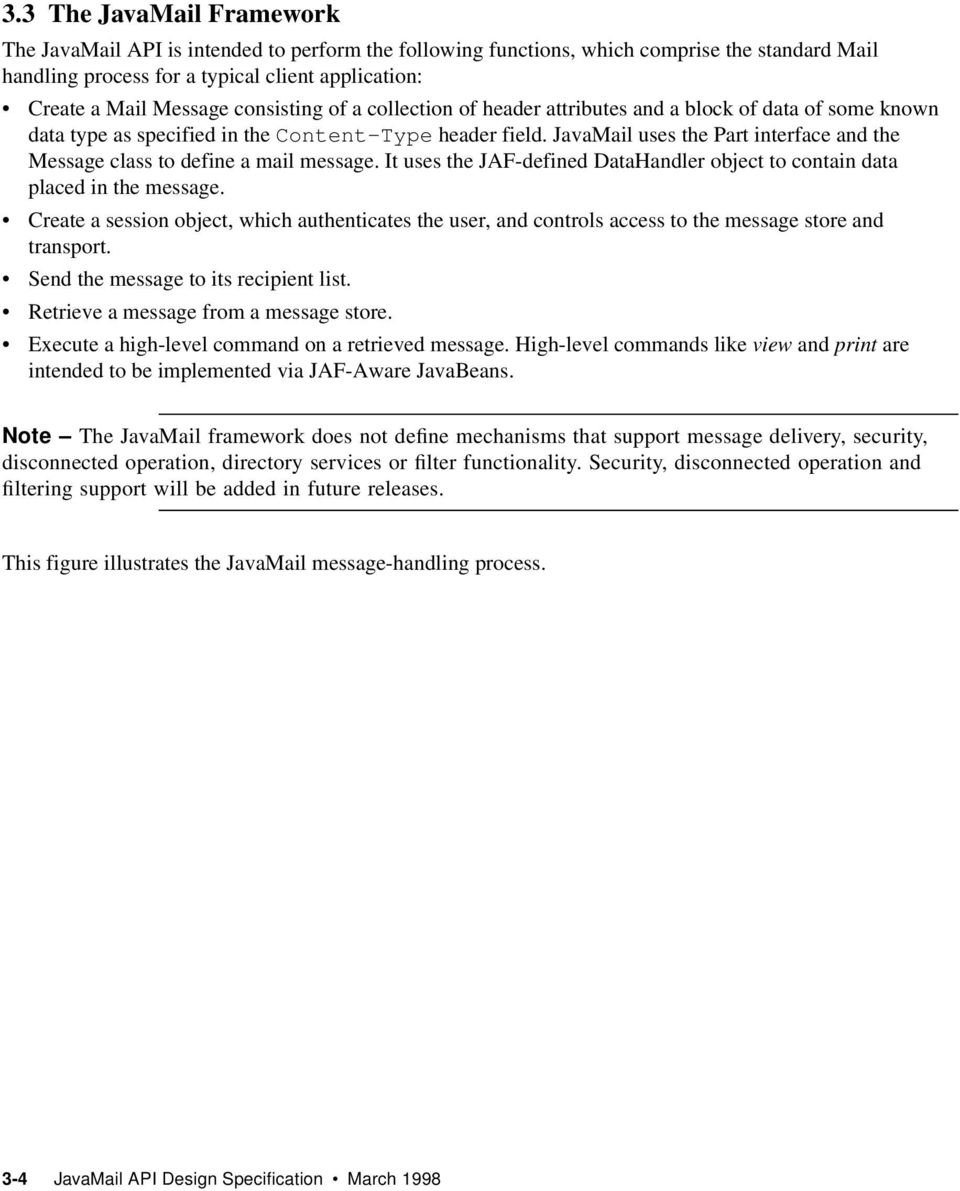
13 MESSAGE Send a Message MESSAGE TRANSPORT Submit a Message Contains Messages FOLDERS Network Infrastructure Receive a Message STORE 3.4 Major JavaMail API Components This Section reviews major components comprising the JavaMail architecture The Message Class Message is an abstract class that defines a set of attributes and a content for a mail message. Message attributes specify addressing information and define the structure of the content, including the content type. The content is represented as a DataHandler object that wraps around the actual data. The Message class implements the Part interface. Part defines attributes that are required to define and format data content carried by a Message object, and to interface successfully to a mail system. The Message class adds From, To, Subject, Reply-To, and other attributes necessary for message routing via a message transport system. When contained in a Folder, a Message object has a set of flags associated with it. JavaMail provides Message subclasses that support specific messaging implementations. The content of a Message is a collection of bytes, or a reference to a collection of bytes, encapsulated within a Message object. JavaMail has no knowledge of the data type or format of the message content. A Message object interacts with its content through an intermediate layer - the JavaBeans Activation Framework (JAF). This separation allows a Message object to handle any arbitrary content and to transmit it using any appropriate transmission protocol by using calls to the same API methods. The Message recipient usually knows the content data type and format and knows how to handle that content. Chapter 3 Architectural Overview 3-5

14 The JavaMail API also supports multipart Message objects, where each Bodypart defines its own set of attributes and content Message Storage and Retrieval Messages are stored in Folder objects. A Folder can contain subfolders as well as messages, thus providing a tree-like folder hierarchy. The Folder class declares methods that fetch, append, copy and delete Messages. Folder can also send events to components registered as event listeners. The Store class defines a database that holds a folder hierarchy together with its messages. The Store also specifies the access protocol that accesses folders and retrieves messages stored in folders. Store also provides methods to establish a connection to the database, to fetch Folders and to close a connection. Service providers implementing Message Access protocols (IMAP4, POP3 etc.) start off by subclassing Store. A user typically starts a session with the Mail system by connecting to a particular Store implementation Message Composition and Transport A client creates a new message by instantiating an appropriate Message subclass. It sets attributes like the recipient addresses and the subject, and inserts the content into the Message object. Finally, it sends the Message by invoking the Transport.send() method. The Transport class models the transport agent that routes a message to its destination addresses. This class provides methods that send a Message to a list of recipients. Invoking the Transport.send() method with a Message object identifies the appropriate transport based on its destination addresses The Session Class The Session class defines global and per-user Mail-related properties that define the interface between a mail-enabled client and the network. JavaMail system components use the Session object to set and get specific properties. The Session class also provides a default authenticated session object that desktop applications can share. Session is a final concrete class. It cannot be subclassed. The Session also acts as a factory for Store and Transport objects that implement specific access and transport protocols. By calling the appropriate factory method on a Session object, the client can obtain Store and Transport objects that support specific protocols. 3.5 The JavaMail Event Model The JavaMail event model conforms to the Java JDK 1.1 Event model specification, as described in the JavaBeans Specification. The JavaMail API follows the design patterns defined in the Beans Specification for naming events, event methods and event listener registration. All events are subclassed from MailEvent. Clients listen for specific events by registering themselves as listeners for those events. Events notify listeners of state changes as a session progresses. During a session, a JavaMail component generates a specific event-type to notify objects registered as listeners for that event- 3-6 JavaMail API Design Specification March 1998

15 type. The JavaMail Store, Folder, and Transport classes are event sources. This Specification describes a specific event in the Section that describes the class that generates that event. 3.6 Using the JavaMail API This Section defines the syntax and lists the order in which a client application calls some JavaMail methods in order to access and open a Message located in a folder: A JavaMail client typically begins a mail handling task by obtaining the default JavaMail Session object. Session session = Session.getDefaultInstance( props, authenticator); The client uses the Session object s getstore() method to connect to the default Store. The getstore() method returns a Store object subclass that supports the access protocol defined in the user properties object, which will typically contain per-user preferences. Store store = session.getstore(); store.connect(); If the connection is successful, the client can list available folders in the Store, and then fetch and view specific Message objects. // get the INBOX folder Folder inbox = store.getfolder("inbox"); // open the INBOX folder inbox.open(folder.read_write); Message m = inbox.getmessage(1); // get Message # 1 String subject = m.getsubject(); // get Subject Object content = m.getcontent(); // get content.... Finally, the client closes all open Folders, and then closes the Store. inbox.close(); // Close the INBOX store.close(); // Close the Store See Examples Using the JavaMail API for a more complete example. Chapter 3 Architectural Overview 3-7

16 3-8 JavaMail API Design Specification March 1998

17 4 The Message Class Message is an abstract class that defines a set of attributes and a content for a mail message. Message attributes specify message addressing information and define the structure of the content, including the content type. The content is represented by a DataHandler object that wraps around the actual data. The Message class is an abstract class that implements the Part interface. Message subclasses can implement several standard message formats. For example, the JavaMail API provides the MimeMessage class, that extends Message in order to implement the RFC822 and MIME standards. Implementations can typically construct themselves from byte streams and generate byte streams for transmission. A Message subclass instantiates an object that holds message content, together with attributes that specify addresses for the sender and recipients, structural information about the message, and the content type of the message body. Messages placed into a Folder also have a set of flags that describe the state of the message within the folder. The figure below illustrates the Message class structure. Chapter 4 The Message Class 4-1
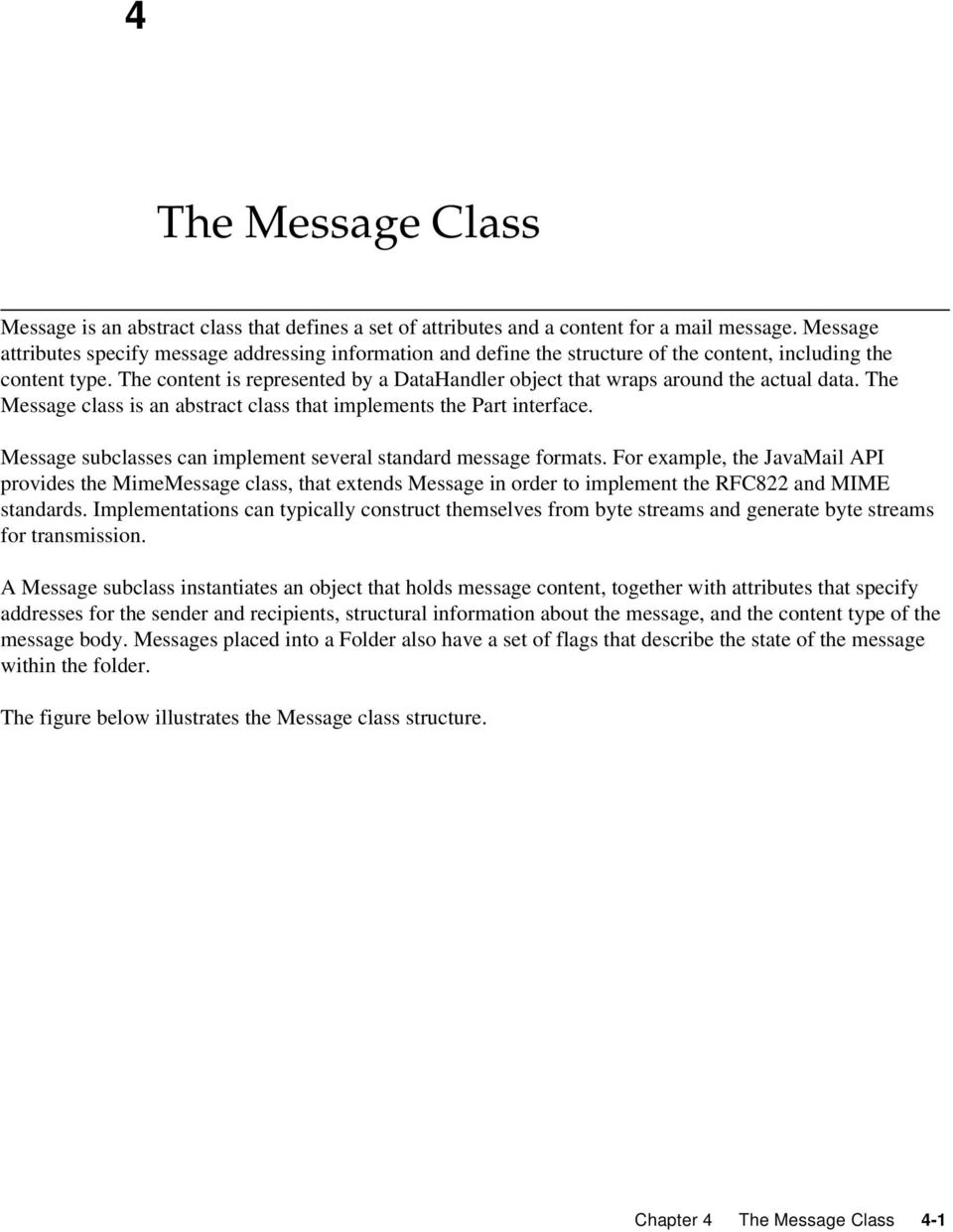
18 Part interface Message Class Header Attributes Attributes defined by the Part interface, including Content-Type. Attributes added by the Message Class. DataHandler Class JavaBean queries the DataHandler object in order to view and handle content body. Optional attributes added by a Message Subclass, such as MimeMessage. Content Body DataHandler Object Contains data that conforms to the Content-Type attribute, together with methods that provide access to that data. The Message object has no direct knowledge of the nature or semantics of its content. This separation of structure from content allows the message object to contain any arbitrary content. Message objects are either retrieved from a Folder or constructed by instantiating a new Message object of the appropriate subclass. Messages stored within a Folder are sequentially numbered, starting at 1. An assigned message number can change when the folder is expunged, since the expunge operation removes deleted messages from the folder and also renumbers the remaining messages. A Message object can contain multiple parts, where each part contains its own set of attributes and content. The content of a Multipart Message is a Multipart object that contains BodyPart objects representing each individual part. The Part interface defines the structural and semantic similarity between the Message class and the BodyPart class. 4-2 JavaMail API Design Specification March 1998

19 The figure below illustrates a Message instance hierarchy, where the Message contains attributes, a set of flags, and content. See MimeMessage Object Hierarchy for an illustration of the MimeMessage object hierarchy. Part Flags Message Attributes Legend Content Interface Class Contains Implements References The Message class provides methods to perform the following tasks: Get, Set and Create its attributes and content: public String getsubject() throws MessagingException; public void setsubject(string subject) throws MessagingException; public String[] getheader(string name) throws MessagingException; public void setheader(string name, String value) throws MessagingException; public Object getcontent() throws MessagingException; public void setcontent(object content, String type) throws MessagingException Chapter 4 The Message Class 4-3

20 Save changes to its containing folder. public void savechanges() throws MessagingException; This method also ensures that the Message header fields are updated to be consistent with the changed message contents. Generate a bytestream for the Message object. public void writeto(outputstream os) throws Exception, MessagingException; This byte stream can be used to save the message or send it to a Transport object. 4.1 The Part Interface The Part interface defines a set of standard headers common to most mail systems, specifies the data-type assigned to data comprising a content block, and defines set and get methods for each of these members. It is the basic data component in the JavaMail API and provides a common interface for both the Message and the BodyPart classes. See the JavaMail API (Javadoc) documentation for details. Note A Message object can not be contained directly in a multipart object, but must be embedded in a BodyPart first Message Attributes The Message class adds its own set of standard attributes to those it inherits from the Part interface. These attributes include the sender and recipient addresses, the subject, flags, and sent and received dates. The Message class also supports non-standard attributes in the form of Headers. See the JavaMail API (Javadoc) Documentation for the list of standard attributes defined in the Message class. Not all messaging systems will support arbitrary headers, and the availability and meaning of particular header names is specific to the messaging system implementation The ContentType Attribute The ContentType attribute specifies the data type of the content, following the MIME typing specification (RFC 2045). A MIME type is composed of a primary type that declares the general type of the content, and a subtype that specifies a specific format for the content. A MIME type also includes an optional set of typespecific parameters. 4-4 JavaMail API Design Specification March 1998

21 JavaMail API components can access content via these mechanisms: As an input stream As a DataHandler object As a Java object The Part interface declares the getinputstream() method that returns an input stream to the content. Note that Part implementations must decode any mail-specific transfer encoding before providing the input stream. The Part interface declares the getdatahandler() method that returns a javax.activation.datahandler object that wraps around the content. The DataHandler object allows clients to discover the operations available to perform on the content, and to instantiate the appropriate component to perform those operations. See The JavaBeans Activation Framework for details describing the DataTyping framework The Part interface declares the getcontent() method that returns the content as a Java object. The type of the returned object is dependent on the content data type. If the content is of type multipart, the getcontent() returns a Multipart object, or a Multipart subclass object. getcontent() returns an input stream for unknown content-types. Note that getcontent() uses the DataHandler internally to obtain the native form. The setdatahandler(datahandler) method specifies content for a new Part object, as a step toward the construction of a new Message. Part also provides some convenience methods to set up most common content types. Part provides the writeto() method that writes its byte stream in mail-safe form suitable for transmission. This byte stream is typically an aggregation of the Part attributes and the byte stream for its content. 4.2 The Address Class The Address class represents addresses. Address is an abstract class. Subclasses provide implementation-specific semantics. 4.3 The BodyPart Class BodyPart is an abstract class that implements the Part interface in order to define the attribute and content body definitions that Part declares. It does not declare attributes that set From, To, Subject, ReplyTo, or other address header fields, as a Message object does. A BodyPart object is intended to be inserted into a Multipart container, later accessed via a Multipart Message. Chapter 4 The Message Class 4-5
22 4.4 The Multipart Class The Multipart class implements Multipart Messages. A Multipart Message is a Message object where the content-type specifier has been set to multipart. Multipart is a container class that contains objects of type Bodypart. A Bodypart object is an instantiation of the Part interface-- it contains either a new Multipart container object, or a DataHandler object. The figure below illustrates the structure and content of a Multipart Message: Message Header Attributes Normal Message, includes a Content- Type attribute set to Multipart.. Content Body Normal Message, includes a Content body of type multipart. A Multipart Message is a simple message object where the Content-Type is set to multipart, and the Content Body carries a reference to a Multipart object. A Multipart object is a container of Bodypart objects, where each Bodypart can contain either a DataHandler object, or another Multipart object. Multipart Object Bodypart Object Header Attributes Attributes defined by the Part interface only. Attributes include a second Content-Type attribute. Content Body The content body itself can be either a DataHandler object containing data, or another Multipart object. Bodypart Object A Multipart Message can hold more than one Multipart Object. Note that Multipart objects can be nested to any reasonable depth within a Multipart Message, in order to build an appropriate structure for data carried in DataHandler objects. Therefore, it is important to check the ContentType header for each BodyPart element stored within a Multipart container. The figure below illustrates a typical nested Multipart Message. 4-6 JavaMail API Design Specification March 1998
23 Message Object Carries addresses for the entire tree. Content body references a Multipart container object. Multipart Container Object Bodypart object that carries a DataHandler object holding data. Bodypart object that holds a DataHandler object holding a Multipart Container object. Other Bodypart objects. Other Optional Multipart Objects New bodyparts, containing a Datahandler object. Bodypart Bodypart Bodypart Typically, the client calls getcontenttype() to get the ContentType of a message. If getcontenttype() returns a MIME-type whose primary type is multipart, then the client calls getcontent() to get the Multipart container object. Multipart supports several methods that get, create, and remove individual BodyPart objects. public int getcount() throws MessagingException; public Body getbodypart(int index) throws MessagingException; public void addbodypart(bodypart part) throws MessagingException; public void removebodypart(bodypart body) throws MessagingException; public void removebodypart(int index) throws MessagingException; Chapter 4 The Message Class 4-7
24 Multipart implements the javax.beans.datasource interface. It can act as the DataSource object for javax.beans.datahandlers and javax.beans.datacontenthandlers. This allows message-aware content handlers to handle Multipart data sources more efficiently, since the data has already been parsed into individual parts. This diagram illustrates the structure of a Multipart Message, and shows associated Message and Multipart calls for a typical call sequence returning a bodypart containing text/plain content. Message getcontenttype() multipart/mixed getcontent() Multipart getbodypart(index) 0... n-1 getcontenttype() BodyPart Legend extends contains text/plain getcontent() Text In this figure, the ContentType attribute of a Message object indicates that it holds a multipart content. Use the getcontent() method to obtain the Multipart object. This code sample below shows the retrieval of a Multipart object. See Examples Using the JavaMail API for examples that traverse a Multipart Message and examples that create new Multipart Messages. Multipart mp = (Multipart)message.getContent(); int count = mp.getcount(); BodyPart body_part; 4-8 JavaMail API Design Specification March 1998
25 for (int i = 0; i < count; i++) body_part = mp.getbodypart(i); 4.5 The Flags Class Flags objects carry flag settings that describe the state of a Message within its containing folder. Message.getFlags() returns a Flags object that holds all the flags currently set for that message. The setflags(flags f, boolean set) method sets the specified flags for that Message. The add(flags.flag f) method on a Flags object sets the specified flag; the contains(flags. Flag f) method returns whether the specified flag is set. ANSWERED DRAFT FLAGGED RECENT SEEN DELETED Clients set this flag to indicate that this Message has been answered. Indicates that this Message is a draft. No defined semantics. Clients can use this flag to mark a message in some user-defined manner. This Message is newly arrived in this Folder. This flag is set when the message is first delivered into the folder and cleared when the containing folder is closed. Clients cannot set this flag. Marks a message that has been opened. A Client sets this flag implicitly when the message contents are retrieved. Allows undoable message deletion. Setting this flag for a message marks it 'deleted' but does not physically remove the message from its folder. The client calls expunge() on a folder to remove all deleted messages in that folder. Note that a Folder is not guaranteed to support either standard system flags or arbitrary user flags. The getpermanentflags() method in a Folder returns a Flags object that contains all the system flags supported by that Folder implementation. The presence of the special USER flag indicates that the client can set arbitrary user-definable flags on any Message belonging to this folder. 4.6 Message Creation And Transmission Message is an abstract class, so an appropriate subclass must be instantiated to create a new Message object. A client creates a message by instantiating an appropriate Message subclass. For example, the MimeMessage subclass handles Internet messages. Typically, the client application creates an message by instantiating a MimeMessage object, and passing required attribute values to that object. In an message, the client defines Subject, From, and To attributes. The client then passes Chapter 4 The Message Class 4-9
26 message content into the MimeMessage object by using a suitably configured DataHandler object. See Message Composition for details. After the Message object is constructed, the client calls the Transport.send() method to route it to its specified recipients. See Transport Protocols and Mechanisms for a discussion of the Transport process JavaMail API Design Specification March 1998
27 5 The Mail Session A mail Session object manages the configuration options and user authentication information used to interact with messaging systems. The JavaMail API supports simultaneous multiple sessions. Each session can access multiple message stores and transports. Any desktop application that needs to access the current primary message store can share the default session. Typically the mail-enabled application establishes the default session, which initializes the authentication information necessary to access the user s Inbox folder. Other desktop applications then use the default session when sending or accessing mail on behalf of the user. When sharing the session object, all applications share authentication information, properties, and the rest of the state of the object. For example: A Session object is created using a static factory method: Session session = Session.getInstance(props, authenticator); to create an unshared session, or to access the default session. Session defaultsession = Session.getDefaultInstance(props, authenticator); The Properties object that initializes the Session contains default values and other configuration information. It is expected that clients using the APIs set the values for the listed properties, especially mail.store.protocol, mail.transport.protocol, mail.host, mail.user, and mail.from, since the defaults are unlikely to work in all cases. See Appendix A, Environment Properties on page 1 for a list of properties used by the JavaMail APIs and their defaults. Some messaging system implementations can use additional properties. Typically the properties object contains user-defined customizations in addition to system-wide defaults. Mail-enabled application logic determines the appropriate set of properties. Lacking a specific requirement, the application can use the system properties object retrieved from System.getProperties(). The Authenticator object controls security aspects for the session object. The messaging system uses it as a callback mechanism to interact with the user when a password is required to login to a messaging system. It indirectly controls access to the default session, as described below. Chapter 5 The Mail Session 5-1
28 Clients using JavaMail can register PasswordAuthentication objects with the Session object for use later in the session or for use by other users of the same session. Because PasswordAuthentication objects contain passwords, access to this information must be carefully controlled. Applications that create Session objects must restrict access to those objects appropriately. In addition, the Session class shares some responsibility for controlling access to the default session object. The first call to getdefaultinstance() creates a new Session object and associates it with the Authenticator object. Subsequent calls to getdefaultinstance() compare the Authenticator object passed in with the Authenticator object saved in the default session. Access to the default session is allowed if both objects have been loaded by the same class loader. Typically, this is the case when both the default session creator and the program requesting default session access are in the same "security domain." Also, if both objects are null, access is allowed. Using null to gain access is discouraged, because this allows access to the default session from any security domain. A mail-enabled client uses the Session object to retrieve a Store or Transport object in order to read or send mail. Typically, the client retrieves the default Store or Transport object based on properties loaded for that session: Store store = session.getstore(); The client can override the session defaults and access a Store or Transport that implements a particular protocol. Store store = session.getstore("imap"); See "The Provider Registry" for details. Implementations of Store and Transport objects will be told the session to which they have been assigned. They can then make the Session object available to other objects contained within this Store or Transport using application-dependent logic. 5.1 The Provider Registry The Provider Registry allows providers to register their protocol implementations to be used by JavaMail APIs. It provides a mechanism for discovering available protocol, for registering new protocols, and for specifying default implementations Resource Files The providers for JavaMail APIs are configured using the following files: javamail.providers and javamail.default.providers javamail.address.map and javamail.default.address.map Each javamail.x resource file is searched in the following order: 5-2 JavaMail API Design Specification March 1998
29 1. <java.home>/lib/javamail.x 2. META-INF/javamail.X 3. META-INF/javamail.default.X Method 1 allows the user to include their own version of the resource file by placing it in the lib directory where the java.home property points. Method 2 allows an application that uses the JavaMail APIs to include their own resource files in their application s or jar file s META-INF directory. The javamail.default.x default files are part of the JavaMail mail.jar file. File location depends upon how the ClassLoader.getResource()method is implemented. Usually, getresource() searches through CLASSPATH until it finds the requested file and then stops. JDK 1.1 has a limitation that the number of files of each type that will be found in the CLASSPATH is limited to one. However, this only affects method 2 above; method 1 is loaded from a specific location (if allowed by the SecurityManager) and method 3 uses a different name to ensure that the default resource file is always loaded successfully. The ordering of entries in the resource files matters. If multiple entries exist, the first entries take precedence over the latter entries as the initial defaults. For example, the first IMAP provider found will be set as the default imap implementation until explicitly changed by the application. The user- or system-supplied resource files augment, they do not override, the default files included with the JavaMail APIs. This means that all entries in all files loaded will be available javamail.providers and javamail.default.providers These resource files specify the stores and transports that are available on the system, allowing an application to "discover" what store and transport implementations are available. The protocol implementations are listed one per line. The file format defines four attributes that describe a protocol implementation. Each attribute is an "="-separated name-value pair with the name in lowercase. Each namevalue pair is semi-colon (";") separated. protocol type class vendor version Name assigned to protocol. For example, smtp for Transport. Valid entries are "store" and "transport" Class name that implements this protocol. Optional string identifying the vendor. Optional string identifying the version. Chapter 5 The Mail Session 5-3
30 Here s an example of META-INF/javamail.default.providers file contents: protocol=imap; type=store;class=com.sun.mail.imap.imapstore;vendor=sunmicrosystems,inc; protocol=smtp; type=transport; class=com.sun.mail.smtp.smtptransport; javamail.address.map and javamail.default.address.map These resource files map transport address types to the transport protocol. The javax.mail.address.gettype() method returns the address type. The javamail.address.map file maps the transport type to the protocol. The file format is a series of name-value pairs. Each key name should correspond to an address type that is currently installed on the system; there should also be an entry for each javax.mail.address implementation that is present if it is to be used. For example, javax.mail.internet.internetaddress.gettype() returns rfc822. Each referenced protocol should be installed on the system. For the case of news, below, the client should install a Transport provider supporting the nntp protocol. Here are the typical contents of a javamail.address.map file. rfc822=smtp news=nntp Provider Provider is a class that describes a protocol implementation. The values come from the javamail.providers and javamail.default.providers resource files Protocol Selection and Defaults The constructor for the Session object initializes the appropriate variables from the resource files. The order of the protocols in the resource files determines the initial defaults for protocol implementations. The methods, getproviders(), {getprovider()and setprovider() allow the client to discover the available (installed) protocol implementations, and to set the protocols to be used by default. At runtime, an application may set the default implementation for a particular protocol. It can set the mail.protocol.class property when it creates the Session object. This property specifies the class to use for a particular protocol. The getprovider() method consults this property first. The code can also call setproviders() passing in a Provider that was returned by the discovery methods. A Provider object cannot be explicitly created; it must be retrieved using the getproviders() method. In either case, the provider specified must be one of the ones configured in the resource files. Note that the methods described here allow the client to choose from among preconfigured implementations, but doesn t allow it to configure a new implementation. 5-4 JavaMail API Design Specification March 1998
31 5.1.4 Example Scenarios Scenario 1: The client application invokes the default protocols: class Application1 { init() { // application properties include the JavaMail // required properties: mail.store.protocol, // mail.transport.protocol, mail.host, mail.user Properties props = loadapplicationprops(); Session session = Session.getInstance(props, null); // get the store implementation of the protocol // defined in mail.store.protocol; the implementation // returned will be defined by the order of entries in // javamail.providers & javamail.default.providers try { Store store = session.getstore(); store.connect(); catch (MessagingException mex) {... Scenario 2: The client application presents available implementations to the user and then sets the user s choice as the default implementation: class Application2 { init() { // application properties include the JavaMail // properties: mail.store.protocol, // mail.transport.protocol, mail.host, mail.user Properties props = loadapplicationprops(); Session session = Session.getInstance(props, null); // find out which implementations are available Provider[] providers = session.getproviders(); Chapter 5 The Mail Session 5-5
32 // ask the user which implementations to use // user s response may include a number of choices, // i.e. imap & nntp store providers & smtp transport Provider[] userchosenproviders = askuserwhichproviderstouse(providers); // set the defaults based on users response for (int i = 0; i < userchosenproviders.length; i++) session.setprovider(userchosenproviders[i]); // get the store implementation of the protocol // defined in mail.store.protocol; the implementation // returned will be the one configured previously try { Store store = session.getstore(); store.connect(); catch (MessagingException mex) {... Scenario 3 Application wants to specify an implementation for a given protocol: class Application3 { init() { // application properties include the JavaMail // required properties: mail.store.protocol, // mail.transport.protocol, mail.host, mail.user Properties props = loadapplicationprops(); // hard-code an implementation to use // "com.acme.smtptransport" props.put("mail.smtp.class", "com.acme.smtptransport"); Session session = Session.getInstance(props, null); // get the smtp transport implementation; the // implementation returned will be com.acme.smtptransport // if it was correctly configured in the resource files. // If com.acme.smtptransport can t be loaded, a // MessagingException is thrown. 5-6 JavaMail API Design Specification March 1998
33 try { Transport transport = session.gettransport("smtp"); catch (MessagingException mex) { quit(); Managing Security The Session class allows messaging system implementations to use the Authenticator object that was registered when the session was created. The Authenticator object is created by the application and allows interaction with the user to obtain a user name and password. The user name and password is returned in a PasswordAuthentication object. The messaging system implementation can ask the session to associate a user name and password with a particular message store using the setpasswordauthentication() method. This information is retrieved using the getpasswordauthentication() method. This avoids the need to ask the user for a password when reconnecting to a Store that has disconnected, or when a second application sharing the same session needs to create its own connection to the same Store. Messaging system implementations can register PasswordAuthentication objects with the Session object for use later in the session or for use by other users of the same session. Because PasswordAuthentication objects contain passwords, access to this information must be carefully controlled. Applications that create Session objects must restrict access to those objects appropriately. In addition, the Session class shares some responsibility for controlling access to the default Session object. The first call to getdefaultinstance() creates a new Session object and associates the Authenticator object with the Session object. Later calls to getdefaultinstance() compare the Authenticator object passed in, to the Authenticator object saved in the default session. If both objects have been loaded by the same class loader, then getdefaultinstance() will allow access to the default session. Typically, this is the case when both the creator of the default session and the code requesting access to the default session are in the same "security domain." Also, if both objects are null, access is allowed. This last case is discouraged because setting objects to null allows access to the default session from any security domain. In the future, JDK 1.2 security Permissions could control access to the default session. Note that the Authenticator and PasswordAuthentication classes and their use in JavaMail is similar to the classes with the same names provided in the java.net package in JDK 1.2. As new authentication mechanisms are added to the system, new methods can be added to the Authenticator class to request the needed information. The default implementations of these new methods will fail, but new clients that understand these new authentication mechanisms can provide implementations of these methods. New classes other than PasswordAuthentication could be needed to contain the new authentication information, and new methods could be needed in the Session class to store such information. JavaMail design evolution will be patterned after the corresponding JDK classes. Chapter 5 The Mail Session 5-7
34 5.3 Store and Folder URLs To simplify message folder naming and to minimize the need to manage Store and Transport objects, folders can be named using URLNames. URLNames are similar to URLs except they only include the parsing of the URL string. The Session class provides methods to retrieve a Folder object given a URLName: Folder f = session.getfolder(urlname); // or Store s = session.getstore(urlname); ; 5-8 JavaMail API Design Specification March 1998
35 6 Message Storage And Retrieval This Section describes JavaMail message storage facilities supported by the Store and Folder classes. Messages are contained in Folders. New messages are usually delivered to folders by a transport protocol or a delivery agent. Clients retrieve messages from folders using an access protocol. 6.1 The Store Class The Store class defines a database that holds a Folder hierarchy and the messages within. The Store also defines the access protocol used to access folders and retrieve messages from folders. Store is an abstract class. Subclasses implement specific message databases and access protocols. Clients gain access to a Message Store by obtaining a Store object that implements the database access protocol. Most message stores require the user to be authenticated before they allow access. connect() performs that authentication. For many message stores, a host name, user name, and password are sufficient to authenticate a user. The JavaMail API provides a connect() method that takes this information as input parameters. Store also provides a default connect() method. In either case, the client can obtain missing information from the Session object s properties, or by interacting with the user by accessing the Session s Authenticator object. The default implementation of the connect method in the Store class uses these techniques to retrieve all needed information and then calls the protocolconnect() method. The messaging system must provide an appropriate implementation of this method. The messaging system can also choose to directly override the connect() method. By default, Store queries the following properties for the user name and host name: mail.user, or user.name system property (if mail.user is not set) mail.host These global defaults can be overridden on a per-protocol basis by the properties: mail.<protocol>.user Chapter 6 Message Storage And Retrieval 6-1
36 mail.<protocol>.host Note that Passwords can not be specified using properties. The Store presents a default namespace to clients. Store implementations can also present other namespaces. The getdefaultfolder() method on Store returns the root folder for the default namespace. Clients terminate a session by calling the close() method on the Store object. Once a Store is closed (either explicitly using the close() method; or externally, if the Mail server dies), all Messaging components belonging to that Store become invalid. Typically, clients will try to recover from an unexpected termination by calling connect() to reconnect to the Store object, and then fetching new Folder objects and new Message objects Store Events Store sends the following events to interested listeners: ConnectionEvent StoreEvent FolderEvent Generated when a connection is successfully made to the Store, or when an existing connection is terminated or disconnected. Communicates alerts and notification messages from the Store to the end user. The getmessagetype() method returns the event type, which can be one of: ALERT or NOTICE. The client must display ALERT events in some fashion that calls the user s attention to the message. Communicates changes to any folder contained within the Store. These changes include creation of a new Folder, deletion of an existing Folder, and renaming of an existing Folder. 6.2 The Folder Class The Folder class represents a folder containing messages. Folders can contain subfolders as well as messages, thus providing a hierarchical structure. The gettype() method returns whether a Folder can hold subfolders, messages, or both. Folder is an abstract class. Subclasses implement protocol-specific Message Folders. The getdefaultfolder() method for the corresponding Store object returns the root folder of a user s default folder hierarchy. The list() method for a Folder returns all the subfolders under that folder. The getfolder(string name) method for a Folder returns the named subfolder. Note that this subfolder need not exist physically in the Store. The exists() method in a folder indicates whether this folder exists. A folder is created in the Store by invoking its create() method. A closed folder allows certain operations; they include deleting the folder, renaming the folder, listing 6-2 JavaMail API Design Specification March 1998
37 subfolders, creating subfolders and monitoring for new messages. The open() method opens a Folder. All Folder methods except open(), delete(), and renameto() are valid on an open Folder. Note that the open() method is applicable only on Folders that can contain messages. The messages within a Folder are sequentially numbered, from 1 through the total number of messages. This ordering is referred to as the "mailbox order" and is usually based on the arrival time of the messages in the folder. As each new message arrives into a folder, it is assigned a sequence number that is one higher than the previous number of messages in that folder. The getmessagenumber() method on a Message returns its sequence number. The sequence number assigned to a Message is valid within a session, but only as long as it retains its relative position within the Folder. Any change in message ordering can change the Message object's sequence number. Currently this occurs when the client calls expunge() to remove deleted messages and renumber messages remaining in the folder. A client can reference a message stored within a Folder either by its sequence number, or by the corresponding Message object itself. Since a sequence number can change within a session, it is preferable to use Message objects rather than sequence numbers as cached references to messages. Clients extending JavaMail are expected to provide light-weight Message objects that get filled on-demand, so that calling getmessages() on a Folder object is an inexpensive operation - both in terms of CPU cycles and memory. For instance, an IMAP implementation could return Message objects that contain only the corresponding IMAP UIDs The FetchProfile Method The Message objects returned by a Folder are expected to be light-weight objects. Invoking getxxx() methods on a Message cause the corresponding data items to be loaded into the object on demand. Certain Store implementations support batch fetching of data items for a range of Messages. Clients can use such optimizations, for example, when filling the header-list window for a range of messages. The FetchProfile() method allows a client to list the items it will fetch in a batch for a certain message range. The following code illustrates the use of FetchProfile() when fetching Messages from a Folder. The client fills its header-list window with the Subject, From, and X-mailer headers for all messages in the folder. Message[] msgs = folder.getmessages(); FetchProfile fp = new FetchProfile(); fp.add(fetchprofile.item.envelope); fp.add("x-mailer"); folder.fetch(msgs, fp); for (int i = 0; i < folder.getmessagecount(); i++) { display(msgs[i].getfrom()); display(msgs[i].getsubject()); display(msgs[i].getheader("x-mailer")); Chapter 6 Message Storage And Retrieval 6-3
38 6.2.2 Folder Events Folders generate events to notify listeners of any change in either the folder or in its Messages list. The client can register listeners to a closed Folder, but generates a notification event only after that folder is opened. Folder supports the following events: ConnectionEvent This event is generated when a Folder is opened or closed. When a Folder closes (either because the client has called close() or from some external cause), all Messaging components belonging to that Folder become invalid. Typically, clients will attempt to recover by reopening that Folder, and then fetching Message objects. FolderEvent MessageCountEvent This event is generated when the client creates, deletes or renames this folder. Note that the Store object containing this folder can also generate this event. This event notifies listeners that the message count has changed. The following actions can cause this change: Addition of new Messages into the Folder, either by a delivery agent or because of an append() operation. The new Message objects are included in the event. Removal of existing messages from this Folder. Removed messages are referred to as expunged messages. The isexpunged() method returns true for removed Messages and the getmessagenumber() method returns the original sequence number assigned to that message. All other Message methods throw a MessageRemovedException. See The Folder Class for a discussion of removing deleted messages in shared folders. The expunged Message objects are included in the event. An expunged message is invalid and should be pruned from the client's view as early as possible. See The Expunge Process for details on the expunge() method The Expunge Process Deleting messages from a Folder is a two-phase operation. Setting the DELETED flag on messages marks 6-4 JavaMail API Design Specification March 1998
39 them as deleted, but it does not remove them from the Folder. The deleted messages are removed only when the client invokes the expunge() method on that Folder. The Folder then notifies listeners by firing an appropriate MessageEvent. The MessageEvent contains the expunged Message objects. Note that the expunge() method also returns the expunged Message objects. The Folder also renumbers the messages falling after the expunged messages in the message list. Thus, when the expunge() method returns, the sequence number of those Message objects will change. Note, however, that the expunged messages still retain their original sequence numbers. Since expunging a folder can remove some messages from the folder and renumber others, it is important that the client synchronize itself with the expunged folder as early as possible. The next Sections describe a set of recommendations for clients wanting to expunge a Folder: Expunge the folder; close it; and then reopen and refetch messages from that Folder. This ensures that the client was notified of the updated folder state. In fact, the client can just issue the close() method with the expunge parameter set to true to force an expunge of the Folder during the close operation, thus even avoiding the explicit call to expunge(). The previous solution might prove to be too simple or too drastic in some circumstances. This paragraph describes the scenario of a more complex client expunging a single access folder; for example, a folder that allows only one read-write connection at a time. The recommended steps for such a client after it issues the expunge() command on the folder are: Update its message count, either by decrementing it by the number of expunged messages, or by invoking the getmessagecount() method on the Folder. If the client uses sequence numbers to reference Messages, it must account for the renumbering of Messages subsequent to the expunged messages. Thus if a Folder has 5 messages as shown below, (sequence numbers are within parenthesis), and if the client is notified that Messages A and C are removed, it should account for the renumbering of the remaining Messages as shown in the second figure.. A (1) B (2) C (3) D (4) E (5) B (1) D (2) E (3) The client should prune expunged messages from its internal storage as early as possible. The Expunge process becomes complex when dealing with a shared folder that can be edited. Consider the case where two clients are operating on the same folder. Each client possesses its own Folder object, but each Folder object actually represents the same physical folder. If one client expunges the shared folder, any deleted messages are physically removed from the folder. The primary client can probably deal with this appropriately since it initiated this process and is ready to handle Chapter 6 Message Storage And Retrieval 6-5
40 the consequences. However, secondary clients are not guaranteed to be in a state where they can handle an unexpected Message removed event-- especially if the client is heavily multithreaded or if it uses sequence numbers. To allow clients to handle such situations gracefully, the JavaMail API applies following restrictions to Folder implementations: A Folder can remove and renumber its Messages only when it is explicitly expunged using the expunge() method. When the folder is implicitly expunged, it marks any expunged messages as expunged, but it still maintains access to those Message objects. This means that the following state is maintained when the Folder is implicitly expunged: getmessages() returns expunged Message objects together with valid message objects. However; an expunged message can throw the MessageExpungedException if direct access is attempted. The messages in the Folder should not be renumbered. The implicit expunge operation can not change the total Folder message count. A Folder can notify listeners of 'implicit' expunges by generating appropriate MessageEvents. However, the removed field in the event must be set to false to indicate that the message is still in the folder. When this Folder is explicitly expunged, then the Folder must remove all expunged messages, renumber it's internal Message cache, and generate MessageEvents for all the expunged messages, with each removed flag set to true. The recommended set of actions for a client under the above situation is as follows: Multithreaded clients that expect to handle shared folders are advised not to use sequence numbers. If a client receives a MessageEvent indicating message removal, it should check the removed flag. If the flag is false, this indicates that another client has removed the message from this folder. This client might want to issue an expunge() request on the folder object to synchronize it with the physical folder (but note the caveats in the previous section about using a shared folder). Alternatively, this client might want to close the Folder object (without expunging) and reopen it to synchronize with the physical folder (but note that all message objects would need to be refreshed in this case). The client may also mark the expeunged messages in order to notify the end user. If the removed flag was set to true, the client should follow earlier recommendations on dealing with explicit expunges. 6.3 The Search Process Search criteria are expressed as a tree of search-terms, forming a parse tree for the search expression. The SearchTerm class represents search terms. This is an abstract class with a single method: public boolean match(message msg); Subclasses implement specific matching algorithms by implementing the match() method. Thus new 6-6 JavaMail API Design Specification March 1998
41 search terms and algorithms can be easily introduced into the search framework by writing the required Java language code. The search package provides a set of standard search terms that implement specific match criteria on Message objects. For example, SubjectTerm pattern-matches the given String with the subject header of the given message. public final class SubjectTerm extends StringTerm { public SubjectTerm(String pattern); public boolean match(message m); The search package also provides a set of standard logical operator terms that can be used to compose complex search terms. These include AndTerm, OrTerm and NotTerm. final class AndTerm extends SearchTerm { public AndTerm(SearchTerm t1, SearchTerm t2); public boolean match(message msg) { // The AND operator for (int i=0; i < terms.length; i++) if (!terms[i].match(msg)) return false; return true; The Folder class supports searches on messages through these search() method versions: public Message[] search(searchterm term) public Message[] search(searchterm term, Message[] msgs) These methods return the Message objects matching the specified search Term. The default implementation applies the search term on each Message object in the specified range. Other implementations may optimize this; for example, the IMAP Folder implementation maps the search Term into an IMAP SEARCH command that the server executes. Chapter 6 Message Storage And Retrieval 6-7
42 6-8 JavaMail API Design Specification March 1998
43 7 The JavaBeans Activation Framework JavaMail relies heavily on the JavaBeans Activation Framework (JAF) to determine the MIME data type, to determine the commands available on that data, and to provide a software component corresponding to a particular behavior. The JAF specification is part of the "Glasgow" JavaBeans specification. More details can be obtained from This section explains how the JavaMail and JAF APIs work together to manage message content. It describes how clients using JavaMail can access and operate on the content of Messages and BodyParts. This discussion assumes you are familiar with the JAF specification posted at Accessing the Content For a client using JavaMail, arbitrary data is introduced to the system in the form of mail messages. The javax.mail.part interface allows the client to access the content. Part consists of a set of attributes and a "content". The Part interface is the common base interface for Messages and BodyParts. A typical mail message has one or more body parts, each of a particular MIME type. Anything that deals with the content of a Part will use the Part s DataHandler. The content is available through the DataHandlers either as an InputStream or as a Java Object. The Part also defines convenience methods that call through to the DataHandler. For example; Part.getContent() is the same as Part.getDataHandler().getContent() and Part.getInputStream() is the same as Part.getDataHandler().getInputStream(). The content returned (either via an InputStream or a Java Object) depends on the MIME type. For example: a Part that contains a picture (GIF) returns the following: Part.getContentType() returns image/gif Part.getInputStream() returns an InputStream with the bytes of the GIF image as the stream Part.getContent() returns a java.awt.image object Content is returned either as an input stream, or as a Java Object. When an InputStream is returned, any mail-specific encodings are decoded before the stream is Chapter 7 The JavaBeans Activation Framework 7-1
44 returned. When a Java Object is returned using the getcontent() method. the returned object depends upon the content itself. In the JavaMail API, any Part with a main content type set to "multipart/" (any kind of multipart) should return a javax.mail.multipart object from getcontent(). A Part with a content type of message/rfc822 returns a javax.mail.message object from getcontent() Example: Message Output This example shows how you can traverse Parts and display the data contained in the message. public void printparts(part p) { Object o = p.getcontent(); if (o instanceof String) { System.out.println("This is a String"); System.out.println((String)o); else if (o instanceof Multipart) { System.out.println("This is a Multipart"); Multipart mp = (Multipart)o; int count = mp.getcount(); for (int i = 0; i < count; i++) { printparts(mp.getbodypart(i)); else if (o instanceof InputStream) { System.out.println("This is just an input stream"); InputStream is = (InputStream)o; int c; // while ((c = is.read())!= -1) System.out.write(c); 7.2 Operating on the Content The DataHandler allows clients to discover the operations available on the content of a Message, and to instantiate the appropriate JavaBeans to perform those operations. The most common operations on Message content are view, edit and print Example: Viewing a Message Consider a Message "Viewer" Bean that presents a user interface that displays a mail message. This example shows how a viewer bean can be used to display the content of a message (that usually is text/ plain, text/html, or multipart/mixed). 7-2 JavaMail API Design Specification March 1998
45 Note Perform error checking to ensure that a valid Component was created. // message passed in as parameter void setmessage(message msg) { DataHandler dh = msg.getdatahandler(); CommandInfo cinfo = dh.getcommand("view"); Component comp = dh.getbean(cinfo); this.setmainviewer(comp); Example: Showing Attachments In this example, the user has selected an attachment and wishes to display it in a separate dialog. The client locates the correct viewer object as follows. // Retrieve the BodyPart from the current attachment BodyPart bp = getselectedattachment(); DataHandler dh = bp.getdatahandler(); CommandInfo cinfo = dh.getcommand("view"); Component comp = dh.getbean(cinfo); // Add viewer to dialog Panel MyDialog mydialog = new MyDialog(); mydialog.add(viewer); // display dialog on screen mydialog.show(); See Setting Message Content for examples that construct a message for a send operation. 7.3 Adding Support for Content Types Support for commands acting on message data is an implementation task left to the client. JavaMail and JAF APIs intend for this support to be provided by a JAF-Aware JavaBean. Almost all data will require edit and view support. Currently, the JavaMail API does not provide viewer JavaBeans. The JAF does provide two very simple JAF-aware viewer beans: A Text Viewer and Image Viewer. These beans handle data where content-type has been set to text/plain or image/gif. Chapter 7 The JavaBeans Activation Framework 7-3
46 Developers writing a JavaMail client need to write additional viewers that support some of the basic content types-- specifically message/rfc822, multipart/mixed, and text/plain. These are the usual content-types encountered when displaying a Message, and they provide the look and feel of the application. Content developers providing additional data types should refer to the JAF specification, that discusses how to create DataContentHandlers and Beans that operate on those contents. 7-4 JavaMail API Design Specification March 1998
47 8 Message Composition This Section describes the process used to instantiate a message object, add content to that message, and send it to its intended list of recipients. The JavaMail API allows a client program to create a message of arbitrary complexity. Messages are instantiated from the Message subclass. The client program can manipulate any message as if it had been retrieved from a Store. 8.1 Building a Message Object To create a message, a client program instantiates a Message object, sets appropriate attributes, and then inserts the content. The attributes specify the message address and other values necessary to send, route, receive, decode and store the message. Attributes also specify the message structure and data content type. Message content is carried in a DataHandler object, that carries either data or a Multipart object. A DataHandler carries the content body and provides methods the client uses to handle the content. A Multipart object is a container that contains one or more Bodypart objects, each of which can in turn contain DataHandler objects. 8.2 Message Creation javax.mail.message is an abstract class that implements the Part interface. Therefore, to create a message object, select a message subclass that implements the appropriate message type. For example, to create a Mime message, a JavaMail client instantiates an empty javax.mail.internet.mimemessage object passing the current Session object to it: Message msg = new MimeMessage(session); 8.3 Setting Message Attributes The Message class provides a set of methods that specify standard attributes common to all messages. The MimeMessage class provides additional methods that set MIME-specific attributes. The client program can also set non-standard attributes (custom headers) as name-value pairs. Chapter 8 Message Composition 8-1
48 The methods for setting standard attributes are listed below: public class Message { public void setfrom(address addr); public void setfrom(); // retrieves from system public void setrecipients(recipienttype type, Address[] addrs); public void setreplyto(address[] addrs); public void setsentdate(date date); public void setsubject(string subject);... The Part interface specifies the following method, that sets custom headers: public void setheader(string name, String value) The setrecipients() method takes a RecipientType as its first parameter, which specifies which recipient field to use. Currently, Message.RecipientType.TO, Message.RecipientType.CC, and Message.RecipientType.BCC are defined. Additional RecipientTypes may be defined as necessary. The Message class provides two versions of the of the setfrom() method: setfrom(address addr) specifies the sender explicitly from an Address object parameter. setfrom() retrieves the sender s username from the local system. The code sample below sets attributes for the MimeMessage just created. First, it instantiates address objects to be used as To and From addresses. Then, it calls set methods, which equate those addresses to appropriate message attributes. The Message class provides two versions of the of the setfrom( The Message class provides two versions of the of the setfrom(address toaddrs[] = new InternetAddress[1]; toaddrs[0] = new InternetAddress("[email protected]"); Address fromaddr = new InternetAddress("[email protected]"); msg.setfrom(fromaddr); msg.setrecipients(message.recipienttype.to, toaddrs); msg.setsubject("takeoff time."); msg.setsentdate(new Date()); 8-2 JavaMail API Design Specification March 1998
49 8.4 Setting Message Content The Message object carries content data within a DataHandler object. To add content to a Message, a client creates content, instantiates a DataHandler object, places content into that DataHandler object, and places that object into a Message object that has had its attributes defined. The JavaMail API provides two techniques that set message content. The first technique uses the setdatahandler() method. The second technique uses the setcontent() method. Typically, clients add content to a DataHandler object by calling setdatahandler(datahandler) on a Message object. The DataHandler is an object that encapsulates data. The data is passed to the DataHandler's constructor as either a DataSource (a stream connected to the data) or as a Java object. The InputStream object creates the DataSource. See The JavaBeans Activation Framework for additional information. public class DataHandler { DataHandler(DataSource datasource); DataHandler(Object data, String mimetype); The code sample below shows how to place text content into an InternetMessage. First, create the text as a string object. Then, pass the string into a DataHandler object, together with its MIME type. Finally, add the DataHandler object to the message object: // create brief message text String content = "Leave at 300."; // instantiate the DataHandler object DataHandler data = new DataHandler(content, "text/plain"); // Use setdatahandler() to insert data into the // new Message object msg.setdatahandler(data); Alternately, setcontent() implements a simpler technique that takes the data object and its MIME type. setcontent() creates the DataHandler object automatically: // create the message text String content = "Leave at 300."; // call setcontent to pass content and content type // together into the message object Chapter 8 Message Composition 8-3
50 msg.setcontent(content, "text/plain"); When the client calls Transport.send()to send this message, the recipient will receive the message below, using either technique: Date: Wed, 23 Apr :38: (PDT) From: Subject: Takeoff time To: Leave at Building a MIME Multipart Message Follow these steps to create a MIME Multipart Message: 1. Instantiate a new MimeMultipart object, or a subclass. 2. Create MimeBodyParts for the specific message parts. Use setcontent() or setdatahandler() to create the content for each Bodypart, as described in the previous section. Note The default subtype for a MimeMultipart object is mixed. It can be set to other subtypes as required. MimeMultipart subclasses might already have their subtype set appropriately. 3. Insert the Multipart object into the Message object by calling setcontent(multipart) within a newly-constructed Message object. The example below creates a Multipart object and then adds two message parts to it. The first message part is a text string, Spaceport Map, and the second contains a document of type application/postscript. Finally, this multipart object is added to a MimeMessage object of the type described above. // Instantiate a Multipart object MimeMultipart mp = new MimeMultipart(); // create the first bodypart object MimeBodyPart b1 = new MimeBodyPart(); // create textual content // and add it to the bodypart object b1.setcontent("spaceport Map","text/plain"); mp.addbodypart(b1); 8-4 JavaMail API Design Specification March 1998
51 // Multipart messages usually have more than // one body part. Create a second body part // object, add new text to it, and place it // into the multipart message as well. This // second object holds postscript data. MimeBodyPart b2 = new MimeBodyPart(); b2.setcontent(map,"application/postscript"); mp.addbodypart(b2); // Create a new message object as described above, // and set its attributes. Add the multipart // object to this message and call savechanges() // to write other message headers automatically. Message msg = new MimeMessage(session); // Set message attrubutes as in a singlepart // message. msg.setcontent(mp); msg.savechanges(); // add Multipart // save changes After all message parts are created and inserted, call savechanges() to ensure that the client writes appropriate message headers. This is identical to the process followed with a single part message. Note that the JavaMail API calls savechanges() implicitly during the send() process, so invoking it is unnecessary and expensive if the message is to be sent immediately. Chapter 8 Message Composition 8-5
52 8-6 JavaMail API Design Specification March 1998
53 9 Transport Protocols and Mechanisms The Transport abstract class defines the message submission and transport protocol. Transport subclasses implement SMTP and other transport protocols. 9.1 Obtaining the Transport Object The Transport object is seldom explicitly created. gettransport() obtains a transport object from the Session factory. The JavaMail API provides three versions of gettransport(): public class Session { public Transport gettransport(address address); public Transport gettransport(string protocol); public Transport gettransport(); gettransport(address address) returns the implementation of the transport class based on the address type. A user-extensible map defines which transport type to use for a particular address. For example, if the address is an InternetAddress, and InternetAddress is mapped to a protocol that supports SMTP then SMTPTransport can be returned. The client can also call gettransport("smtp") to request SMTP, or another transport implementation protocol. gettransport() returns the transport specified in the mail.transport.protocol property. See The Mail Session for details Transport Methods The Transport class provides connect() and protocolconnect() methods, which operate similarly to those on the Store class. See The Store Class for details. Chapter 9 Transport Protocols and Mechanisms 9-1
54 Transport generates a ConnectionEvent to notify its listeners of a successful or a failed connection. Transport can throw an IOException if the connection fails. Transport implementations should ensure that the message specified is of a known type. If the type is known, then the transport object sends the message to its specified destinations. If the type is not known, then the Transport object can attempt to reformat the Message into a suitable version using gatewaying techniques, or it can throw a MessagingException, indicating failure. For example, the SMTP transport implementation recognizes MimeMessages. It invokes the writeto() method on MimeMessage to generate a RFC822 format byte stream that is sent to the SMTP host. The message is sent using the Transport.send() static method or sendmessage() instance method. Transport.send() is a convenience method that instantiates the transports necessary to send the message, depending on the recipients' addresses, and then passes the message to each transport's sendmessage() method. Alternatively, the client can get the transport that implements a particular protocol itself and send the message using the sendmessage() method. This adds the benefit of being able to register as event listeners on the individual transports. Note that the Address[] argument passed to the send() and sendmessage() methods do not need to match the addresses provided in the message headers. Although these arguments usually will match, the enduser determines where the messages are actually sent. This is useful for implementing the Bcc: header, and other similar functions. 9.2 Transport Events Clients can register as listeners for events generated by transport implementations. (Note that the abstract Transport class doesn't fire any events, only particular protocol implementations generate events). There are two events generated: ConnectionEvent and TransportEvent ConnectionEvent If the transport connects successfully, it will fire the ConnectionEvent with the type set to OPENED. If the connection times out or is closed, ConnectionEvent with type CLOSED is generated TransportEvent The sendmessage() method generates TransportEvent to its listeners. That event contains information about the method s success or failure. There are three types of TransportEvent: MESSAGE_DELIVERED, MESSAGE_NOT_DELIVERED, MESSAGE_PARTIALLY_DELIVERED. The event contains three arrays of addresses: validsent[], validunsent[] and invalid[] that list the valid and invalid addresses for this message and protocol. 9-2 JavaMail API Design Specification March 1998
55 MESSAGE_DELIVERED MESSAGE_NOT_ DELIVERED When the message has been successfully sent to all recipients by this transport. validsent[ ] contains all the addresses. validunsent[ ] and invalid[ ] are null. When ValidSent[] is null, the message was not successfully sent to any recipients. validunsent[ ] may have addresses that are valid. invalidsent[] may contain invalid addresses. MESSAGE_PARTIALLY_ DELIVERED Message was successfully sent to some recipients but not to all. ValidSent[] holds addresses of recipients to whom the message was sent. validunsent[] holds valid addresses but the message wasn't sent to them. invalid[] holds invalid addresses 9.3 Using The Transport Class The code segment below sends an InternetMessage using a Transport class implementing the SMTP protocol. The client creates two InternetAddresses that specify the recipients and retrieves a transport object from the default Session that supports sending messages to InternetAddresses. Then the session object uses a transport object to send the message. // Get a session Session session = Session.getInstance(props, null); // Create an empty MimeMessage and its part Message msg = new MimeMessage(session);... add headers and message parts as before // create two destination addresses Address[] addrs = {new InternetAddress("[email protected]"), new InternetAddress("[email protected]"); // get a transport that can handle sending message to // InternetAddresses. This will probably map to a transport // that supports SMTP. Chapter 9 Transport Protocols and Mechanisms 9-3
56 Transport trans = session.gettransport(addrs[0]); // add ourselves as ConnectionEvent and TransportEvent listeners trans.addconnectionlistener(this); trans.addtransportlistener(this); // connect method determines what host to use from the // session properties trans.connect(); // send the message to the addresses we specified above trans.sendmessage(msg, addrs); 9-4 JavaMail API Design Specification March 1998
57 10 Internet Mail The JavaMail specification does not define any implementation. However, the API does include a set of classes that implement Internet Mail standards. Although not part of the specification, these classes can be considered part of the JavaMail package. They show how to adapt an existing messaging architecture to the JavaMail framework. These classes implement the Internet Mail Standards defined by the RFCs listed below: RFC822 (Standard for the Format of Internet Text Messages) RFC2045, RFC2046, RFC2047 (MIME) RFC822 describes the structure of messages exchanged across the Internet. Messages are viewed as having a header and contents. The header is composed of a set of standard and optional header fields. The header is separated from the content by a blank line. The RFC specifies the syntax for all header fields and the semantics of the standard header fields. It does not however, impose any structure on the message contents. The MIME RFCs 2045, 2046 and 2047 define message content structure by defining structured body parts, a typing mechanism for identifying different media types, and a set of encoding schemes to encode data into mail-safe characters. The Internet Mail package allows clients to create, use and send messages conforming to the standards listed above. It gives service providers a set of base classes and utilities they can use to implement Stores and Transports that use the Internet mail protocols. See MimeMessage Object Hierarchy for a Mime class and interface hierarchy diagram. The JavaMail MimePart interface models an entity as defined in RFC2045, Section 2.4. MimePart extends the JavaMail Part interface to add MIME-specific methods and semantics. The MimeMessage and MimeBodyPart classes implement the MimePart interface. The following figure shows the class hierarchy of these classes. Chapter 10 Internet Mail 10-1
58 Message MimePart MimeMessage Legend Extends Implements BodyPart MimePart MimeBodyPart 10.1 The MimeMessage Class The MimeMessage class extends Message and implements MimePart. This class implements an message that conforms to the RFC822 and MIME standards. MimeMessage provides a default constructor that creates an empty MimeMessage object. The client can fill in the message later by invoking the parse() method on an RFC822 input stream. Note that parse() is protected, so that only this class and its subclasses can use this method. Service providers implementing light-weight Message objects that are filled in on demand can generate the appropriate byte stream and invoke parse() when a component is requested from a message. Service providers that can provide a separate byte stream for the message body (distinct from the message header) can override the getcontentstream() method. The client can also use the default constructor to create new MimeMessage objects for sending. The client sets appropriate attributes and headers, inserts content into the message object, and finally calls the send() method for that MimeMessage object. This code sample creates a new MimeMessage object for sending. See Message Composition and Transport Protocols and Mechanisms for details. MimeMessage m = new MimeMessage(session); 10-2 JavaMail API Design Specification March 1998
59 // Set FROM: m.setfrom(new // Set TO: InternetAddress a[] = new InternetAddress[1]; a[0] = new InternetAddress("[email protected]"); m.setrecipients(message.recipienttype.to, a); // Set content m.setcontent(data, "text/plain"); // Send message m.send(); MimeMessage also provides a constructor that uses an input stream to instantiate itself. The constructor internally invokes parse() to fill in the message. The InputStream object is left positioned at the end of the message body. InputStream in = getmailsource(); // a stream of mail messages MimeMessage m = null; for (; ;) { try { m = new MimeMessage(session,in); catch (MessagingException ex) { // reached end of message stream break; MimeMessage implements the writeto() method by writing an RFC822-formatted byte stream of its headers and body. This is accomplished in two steps: First, the MimeMessage object writes out its headers; then it delegates the rest to the DataHandler object representing the content The MimeBodyPart Class The MimeBodyPart class extends BodyPart and implements the MimePart interface. This class represents a Part inside a Multipart. MimeBodyPart implements a Body Part as defined by RFC2045, Section 2.5. getbodypart(int index) returns the MimeBodyPart object at the given index. MimeMultipart also allows the client to fetch MimeBodyPart objects based on their Content-IDs. addbodypart() adds a new MimeBodyPart object to a MimeMultipart as a step towards constructing a new multipart MimeMessage The MimeMultipart Class The MimeMultipart class extends Multipart and models a MIME multipart content within a message or a body part. Chapter 10 Internet Mail 10-3
60 A MimeMultipart is obtained from a MimePart containing a ContentType attribute set to "multipart," by invoking that part's getcontent()method. The client creates a new MimeMultipart object by invoking its default constructor. To create a new multipart MimeMessage, create a MimeMultipart object (or its subclass); use set methods to fill in the appropriate MimeBodyParts; and finally, use setcontent(multipart)to insert it into the MimeMessage. MimeMultipart also provides a constructor that takes an input stream positioned at the beginning of a MIME multipart stream. This class parses the input stream and creates the child body parts. The getsubtype() method returns the multipart message MIME subtype. The subtype defines the relationship among the individual body parts of a multipart message. More semantically complex multipart subtypes are implemented as subclasses of MimeMultipart, providing additional methods that expose specific functionality. Note that a multipart content object is treated like any other content. When parsing a MIME Multipart stream, the JavaMail implementation uses the JAF framework to locate a suitable DataContentHandler for the specific subtype and uses that handler to create the appropriate Multipart instance. Similarly, when generating the output stream for a Multipart object, the appropriate DataContentHandler is used to generate the stream The MimeUtility Class MimeUtility is a utility class that provides MIME-related functions. All methods in this class are static methods. These methods currently perform the functions listed below: Content Encoding and Decoding Data sent over RFC 821/822-based mail systems are restricted to 7-bit US-ASCII bytes. Therefore, any non- US-ASCII content needs to be encoded into the 7-bit US-ASCII (mail-safe) format. MIME (RFC 2045) specifies the "base64" and "quoted-printable" encoding schemes to perform this encoding. The following methods support content encoding: The getencoding() method takes a DataSource object and returns the Content-Transfer-Encoding that should be applied to the data in that Datasource object to make it mail-safe. The encode() method wraps an encoder around the given output stream based on the specified Content-Transfer-Encoding. The decode() method decodes the given input stream, based on the specified Content-Transfer-Encoding Header Encoding and Decoding RFC 822 restricts the data in message headers to 7bit US-ASCII characters. MIME (RFC 2047) specifies a mechanism to encode non 7bit US-ASCII characters so that they are suitable for inclusion in message headers. This section describes the methods that enable this functionality JavaMail API Design Specification March 1998
61 The header-related methods (getheader, setheader) in Part and Message operate on Strings. String objects contain (16 bit) Unicode characters. Since RFC 822 prohibits non US-ASCII characters in headers, clients invoking the setheader() methods must ensure that the header values are appropriately encoded if they contain non US-ASCII characters. The encoding process (based on RFC 2047) consists of two steps: 1. Convert the Unicode String into an array of bytes in another charset. This step is required because Unicode is not yet a widely used charset. Therefore, a client must convert the Unicode characters into a charset that is more palatable to the recipient. 2. Apply a suitable encoding format that ensures that the bytes obtained in the previous step are mail-safe. The encodetext() method combines the two steps listed above to create an encoded header. Note that as RFC 2047 specifies, only "unstructured" headers and user-defined extension headers can be encoded. It is prudent coding practice to run such header values through the encoder to be safe. Also note that encodetext() encodes header values only if they contain non US-ASCII characters. The reverse of this process (decoding) needs to be performed when handling header values obtained from a MimeMessage or MimeBodyPart using the getheader() set of methods, since those headers might be encoded as per RFC The decodetext() method takes a header value, applies RFC 2047 decoding standards, and returns the decoded value as a Unicode String. Note that this method should be invoked only on "unstructured" or user-defined headers. Also note that decodetext() attempts decoding only if the header value was encoded in RFC 2047 style. It is advised that you always run header values through the decoder to be safe The ContentType Class The ContentType class is a utility class that parses and generates MIME content-type headers. To parse a MIME content-type value, create a ContentType object and invoke the tostring() method. The ContentType class also provides methods that match Content-Type values. The following code fragment illustrates the use of this class to extract a MIME parameter. String type = part.getcontenttype(); ContentType ctype = new ContentType(type); if (ctype.match("application/x-foobar")) istring color = ctype.getparameter("color"); This code sample uses this class to construct a MIME Content-Type value: ContentType ctype = new ContentType(); Chapter 10 Internet Mail 10-5
62 ctype.setprimarytype("application"); ctype.setsubtype("x-foobar"); ctype.setparameter("color", "red"); String contenttype = ctype.tostring(); 10-6 JavaMail API Design Specification March 1998
63 A Environment Properties This section lists the environment properties that are used by the JavaMail APIs. Note that Applets can not determine some defaults listed in this Appendix. When writing an applet, you must specify the properties you require. Property mail.store.protocol mail.transport. protocol mail.host Description Specifies the default Message Access Protocol. The Session.getStore() method returns a Store object that implements this protocol. The protocol can be explicitly specified by using Session.getStore(String protocol). Defaults to the first appropriate protocol in the config fies. Specifies the default Transport Protocol. The Session.getTransport() method returns a Transport object that implements this protocol. The client can explicitly specify the protocol by using Session.getTransport(String protocol). Specifies the default Mail server. The Store and Transport connect() methods use this property (if the protocol-specific host property is absent) to locate the target host. Defaults to the local machine. Chapter A Environment Properties A-1
64 Property mail.user mail.<protocol>.host mail.<protocol>.user mail.from Description Specifies the username provided when connecting to a Mail server. The Store and Transport connect() methods use this property (if the protocol-specific username property is absent) to obtain the username. Defaults to user.name. Specifies the protocol-specific default Mail server. This overrides the mail.host property. Specifies the protocol-specific default username for connecting to the Mail server. This overrides the mail.user property. Specifies the return address of the current user. Used by the InternetAddress.getLocal- Address() method to specify the current user s address. Defaults to "username@host" A-2 JavaMail API Design Specification March 1998
65 B Examples Using the JavaMail API Following are some example programs that illustrate the use of the Java Mail APIs. These examples are also included in the JavaMail implementation. B.1 Example: Showing a Message import java.util.*; import java.io.*; import javax.mail.*; import javax.mail.internet.*; /* * Demo app that exercises the Message interfaces. * Show information about and contents of messages. * * msgshow protocol host user password mailbox msgnum */ public class msgshow { public static void main(string argv[]) { try { if (argv.length!= 6) { System.out.println( "usage: msgshow protocol host user password mailbox msgnum"); System.exit(1); boolean debug = false; String protocol = argv[0]; String host = argv[1]; String user = argv[2]; Chapter B Examples Using the JavaMail API B-1
66 String password = argv[3]; String mbox = argv[4]; // mailbox name // which message number to retrieve int msgnum = Integer.parseInt(argv[5]); // Get a Session object Properties props = System.getProperties(); Session session = Session.getDefaultInstance(props, null); // Get a Store object Store store = session.getstore(protocol); store.connect(host, user, password); // Open the Folder Folder folder = store.getdefaultfolder(); if (folder == null) { System.out.println("No default folder"); System.exit(1); folder = folder.getfolder(mbox); if (folder == null) { System.out.println("Invalid folder"); System.exit(1); folder.open(folder.read_write); int totalmessages = folder.getmessagecount(); int newmessages = folder.getnewmessagecount(); System.out.println("Total messages = " + totalmessages); System.out.println("New messages = " + newmessages); System.out.println(" "); if (msgnum == -1) { // Attributes & Flags for all messages.. Message[] msgs = folder.getmessages(); // Use a suitable FetchProfile FetchProfile fp = new FetchProfile(); fp.add(fetchprofile.item.envelope); fp.add(fetchprofile.item.flags); fp.add("x-mailer"); folder.fetch(msgs, fp); for (int i = 0; i < msgs.length; i++) { System.out.println(" "); System.out.println("MESSAGE #" + (i + 1) + ":"); B-2 JavaMail API Design Specification March 1998
67 dumpenvelope(msgs[i]); else { System.out.println("Getting message number: " + msgnum); Message m = folder.getmessage(msgnum); dumppart(m); folder.close(false); store.close(); catch (Exception ex) { ex.printstacktrace(); public static void dumppart(part p) throws Exception { if (p instanceof Message) dumpenvelope((message)p); System.out.println("CONTENT-TYPE: " + p.getcontenttype()); Object o = p.getcontent(); if (o instanceof String) { System.out.println("This is a String"); System.out.println((String)o); else if (o instanceof Multipart) { System.out.println("This is a Multipart"); Multipart mp = (Multipart)o; int count = mp.getcount(); for (int i = 0; i < count; i++) dumppart(mp.getbodypart(i)); else if (o instanceof InputStream) { System.out.println("This is just an input stream"); InputStream is = (InputStream)o; int c; while ((c = is.read())!= -1) System.out.write(c); public static void dumpenvelope(message m) throws Exception { Address[] a; if ((a = m.getfrom())!= null) { for (int j = 0; j < a.length; j++) System.out.println("FROM: " + a[j].tostring()); Chapter B Examples Using the JavaMail API B-3
68 if ((a = m.getrecipients(message.recipienttype.to))!= null) { for (int j = 0; j < a.length; j++) System.out.println("TO: " + a[j].tostring()); System.out.println("SUBJECT: " + m.getsubject()); Date d = m.getsentdate(); System.out.println("SendDate: " + (d!= null? d.tostring() : "UNKNOWN")); Flags flags = m.getflags(); StringBuffer sb = new StringBuffer(); Flags.Flag[] sf = flags.getsystemflags(); // get the system flags boolean first = true; for (int i = 0; i < sf.length; i++) { String s; Flags.Flag f = sf[i]; if (f == Flags.Flag.ANSWERED) s = "\\Answered"; else if (f == Flags.Flag.DELETED) s = "\\Deleted"; else if (f == Flags.Flag.DRAFT) s = "\\Draft"; else if (f == Flags.Flag.FLAGGED) s = "\\Flagged"; else if (f == Flags.Flag.RECENT) s = "\\Recent"; else if (f == Flags.Flag.SEEN) s = "\\Seen"; else continue; if (first) first = false; else sb.append(' '); sb.append(s); // skip it String[] uf = flags.getuserflags(); // get the user flag strings for (int i = 0; i < uf.length; i++) { if (first) first = false; else sb.append(' '); sb.append(uf[i]); System.out.println("FLAGS = " + sb.tostring()); B-4 JavaMail API Design Specification March 1998
69 B.2 Example : Listing Folders import java.util.properties; import javax.mail.*; /** * Demo app that exercises the Message interfaces. * List information about folders. */ public class listfolders { public static void main(string argv[]) throws Exception { String protocol = argv[0]; String host = argv[1]; String user = argv[2]; String password = argv[3]; String root = argv[4]; String pattern = argv[5]; // normally "%" boolean recursive = Boolean.valueOf(argv[6]).booleanValue(); // Get a Session object Session session = Session.getDefaultInstance( System.getProperties(), null); session.setdebug(true); // Get a Store object Store store = session.getstore(protocol); store.connect(host, user, password); // Open a Folder Folder folder = store.getfolder(argv[3]); if (folder == null!folder.exists()) { System.out.println("Invalid folder"); System.exit(1); // List namespace Folder rf; if (root.length()!= 0) rf = store.getfolder(root); else rf = store.getdefaultfolder(); Folder[] f = rf.list(pattern); for (int i = 0; i < f.length; i++) Chapter B Examples Using the JavaMail API B-5
70 dumpfolder(f[i], "", recursive); static void dumpfolder(folder folder, String tab, boolean recurse) throws Exception { System.out.println(tab + "Name: " + folder.getname()); System.out.println(tab + "Full Name: " + folder.getfullname()); if (!folder.issubscribed()) System.out.println(tab + "Not Subscribed"); if (((folder.gettype() & Folder.HOLDS_MESSAGES)!= 0) && folder.hasnewmessages()) System.out.println(tab + "Has New Messages"); if ((folder.gettype() & Folder.HOLDS_FOLDERS)!= 0) { System.out.println(tab + "Is Directory"); if (recurse) { Folder[] f = folder.list(); for (int i=0; i < f.length; i++) dumpfolder(f[i], tab + "", recurse); B.3 Example: Search a Folder for a Message import javax.mail.*; import javax.mail.internet.*; import javax.mail.search.*; import java.util.date; /* * Search the given folder for messages matching the given * criteria. */ public class searchmessages { public static void main(string argv[]) { if (argv.length!= 8) { B-6 JavaMail API Design Specification March 1998
71 System.out.println( "Usage: monitor <protocol> <host> <user> <password> <mbox> " + "<subject> <from> and or"); System.exit(1); String protocol = argv[0]; String host = argv[1]; String user = argv[2]; String password = argv[3]; String mbox = argv[4]; String subject = argv[5]; String from = argv[6]; boolean or = argv[7].equalsignorecase("or"); try { // Get a Session object Session session = Session.getDefaultInstance( System.getProperties(), null); session.setdebug(true); // Get a Store object Store store = session.getstore(protocol); store.connect(host, user, password); // Open the Folder Folder folder = store.getdefaultfolder(); if (folder == null) { System.out.println("No default folder"); System.exit(1); folder = folder.getfolder(mbox); if (folder == null) { System.out.println("Invalid folder"); System.exit(1); folder.open(folder.read_only); SearchTerm term = null; if (subject.length()!= 0) term = new SubjectTerm(subject); if (from.length()!= 0) { FromTerm fromterm = new FromTerm(new InternetAddress(from)); if (term!= null) { if (or) term = new OrTerm(term, fromterm); Chapter B Examples Using the JavaMail API B-7
72 else term = new AndTerm(term, fromterm); else term = fromterm; Message[] msgs = folder.search(term); if (msgs!= null) System.out.println("FOUND " + msgs.length + " MESSAGES"); else { System.out.println(" NO MATCHES"); System.exit(1); // Use a suitable FetchProfile FetchProfile fp = new FetchProfile(); fp.add(fetchprofile.item.envelope); folder.fetch(msgs, fp); for (int i = 0; i < msgs.length; i++) { System.out.println(" "); System.out.println("MESSAGE #" + (i + 1) + ":"); dumpmessage(msgs[i]); folder.close(false); store.close(); catch (Exception ex) { ex.printstacktrace(); System.exit(1); public static void dumpmessage(message m) throws Exception { Address[] a; if ((a = m.getfrom())!= null) { for (int j = 0; j < a.length; j++) System.out.println("FROM: " + a[j].tostring()); if ((a = m.getrecipients(message.recipienttype.to))!= null) { for (int j = 0; j < a.length; j++) System.out.println("TO: " + a[j].tostring()); System.out.println("SUBJECT: " + m.getsubject()); B-8 JavaMail API Design Specification March 1998
73 Date d = m.getsentdate(); if (d == null) { System.out.println("SendDate: UNKNOWN"); else { System.out.println("SendDate: " + d.tostring()); Flags flags = m.getflags(); StringBuffer sb = new StringBuffer(); Flags.Flag[] sf = flags.getsystemflags(); // get the system flags boolean first = true; for (int i = 0; i < sf.length; i++) { String s; Flags.Flag f = sf[i]; if (f == Flags.Flag.ANSWERED) s = "\\Answered"; else if (f == Flags.Flag.DELETED) s = "\\Deleted"; else if (f == Flags.Flag.DRAFT) s = "\\Draft"; else if (f == Flags.Flag.FLAGGED) s = "\\Flagged"; else if (f == Flags.Flag.RECENT) s = "\\Recent"; else if (f == Flags.Flag.SEEN) s = "\\Seen"; else continue; if (first) first = false; else sb.append(' '); sb.append(s); // skip it String[] uf = flags.getuserflags(); // get the user flag strings for (int i = 0; i < uf.length; i++) { if (first) first = false; else sb.append(' '); sb.append(uf[i]); System.out.println("FLAGS = " + sb.tostring()); Chapter B Examples Using the JavaMail API B-9
74 B.4 Example: Monitoring a Mailbox import java.io.*; import javax.mail.*; import javax.mail.event.*; /* Monitors given mailbox for new mail */ public class monitormailbox { public static void main(string argv[]) { if (argv.length!= 6) { System.out.println( "Usage: monitor <protocol> <host> <user> <password> <mbox> <freq>"); System.exit(1); String protocol = argv[0]; String host = argv[1]; String user = argv[2]; String password = argv[3]; String mbox = argv[4]; String freqarg = argv[5]; System.out.println("\nTesting monitor\n"); try { // Get a Session object Session session = Session.getDefaultInstance( System.getProperties(), null); session.setdebug(true); // Get a Store object Store store = session.getstore(protocol); // Connect store.connect(host, user, password); // Open a Folder Folder folder = store.getfolder(mbox); if (folder == null!folder.exists()) { System.out.println("Invalid folder"); System.exit(1); B-10 JavaMail API Design Specification March 1998
75 folder.open(folder.read_write); // Add messagecountlistener to listen for new messages folder.addmessagecountlistener(new MessageCountAdapter() { public void messagesadded(messagecountevent ev) { Message[] msgs = ev.getmessages(); System.out.println("Got " + msgs.length + " new messages"); ); // Just dump out the new messages for (int i = 0; i < msgs.length; i++) { try { msgs[i].writeto(system.out); catch (Exception ex) { ex.printstacktrace(); // Check mail once in "freq" MILLIseconds int freq = Integer.parseInt(freqarg); while (true) { Thread.sleep(freq); // sleep for freq milliseconds // This is to force the IMAP server to send us // EXISTS notifications. folder.getmessagecount(); catch (Exception ex) { ex.printstacktrace(); B.5 Example: Sending a Message import java.util.*; import javax.mail.*; import javax.mail.internet.*; Chapter B Examples Using the JavaMail API B-11
76 /** * usage: sendmessage to from smtphost multipart * * Send a simple text/plain message to the "to" * address, from the "from" address, using the * smtphost as the machine with the smtp server * running. * * if multipart is "true" send a multipart message * else if multipart is "false" send a text/plain * message. */ public class sendmessage { public static void main(string[] args) { if (args.length!= 4) { System.out.println( "usage: sendmessage <to> <from> <smtphost> <true false>"); System.exit(1); boolean debug = false; // change to get more information String msgtext = "A body.\nthe second line."; String msgtext2 = "Another body.\nmore lines"; boolean sendmultipart = Boolean.valueOf(args[3]).booleanValue(); // set the host Properties props = new Properties(); props.put("mail.smtp.host", args[2]); // create some properties and get the default Session Session session = Session.getDefaultInstance(props, null); session.setdebug(debug); try { // create a message Message msg = new MimeMessage(session); // set the from InternetAddress from = new InternetAddress(args[1]); msg.setfrom(from); InternetAddress[] address = {new InternetAddress(args[0]); msg.setrecipients(message.recipienttype.to, address); msg.setsubject("javamail APIs Test"); if (!sendmultipart) { // send a plain text message B-12 JavaMail API Design Specification March 1998
77 msg.setcontent(msgtext, "text/plain"); else { // send a multipart message // create and fill the first message part MimeBodyPart mbp1 = new MimeBodyPart(); mbp1.setcontent(msgtext, "text/plain"); // create and fill the second message part MimeBodyPart mbp2 = new MimeBodyPart(); mbp2.setcontent(msgtext2, "text/plain"); // create the Multipart and its parts to it Multipart mp = new MimeMultipart(); mp.addbodypart(mbp1); mp.addbodypart(mbp2); // add the Multipart to the message msg.setcontent(mp); Transport.send(msg); catch (MessagingException mex) { mex.printstacktrace(); Chapter B Examples Using the JavaMail API B-13
78 B-14 JavaMail API Design Specification March 1998
79 C Message Security C.1 Overview This is not a full specification of how Message Security will be integrated into the JavaMail system. This is a description of implementation strategy. The purpose of this section is to declare that it is possible to integrate message security, not to define how it will be integrated. The final design for Message Security will change based on feedback and finalization of the S/MIME IETF specification. This section discusses encrypting/decrypting messages, and signing/verifying signatures. It will not discuss how Security Restrictions on untrusted or signed applets will work, nor will it discuss a general authentication model for Stores (For example; a GSS API in Java.) C.1.1 Displaying an Encrypted/Signed Message Displaying an encrypted or signed message is the same as displaying any other message. The client uses the Datahandler for that encrypted message together with the "view" command. This returns a bean that displays the data. There will be both a multipart/signed and multipart/encrypted viewer bean (can be the same bean). The beans will need to be aware of the MultiPartSigned/MultiPartEncrypted classes. C.1.2 MultiPartEncrypted/Signed Classes The JavaMail API will probably add two new content classes: MultiPartEncrypted and MultiPartSigned. They subclass the MultiPart class and handle the MIME types multipart/encrypted and multipart/signed. There are many possible "protocols" that specify how a message has been encrypted and/or signed. The MPE/MPS classes will find all the installed protocols. The ContentType s protocol parameter determines which protocol class to use. There needs to be a standard registration of protocol objects or a way to search for valid packages and instantiate a particular class. The MultiPart classes will hand off the control information, other parameters, and the data to be manipulated (either the signed or encrypted block) through Chapter C Message Security C-1
80 some defined Protocol interface. C.1.3 Reading the Contents There will be times when an applet/application needs to retrieve the content of the message without displaying it. The code sample below shows one possible technique with a message containing encrypted content: Message msg = // message gotten from some folder. if (msg.ismimetype("multipart/encrypted")) { Object o = msg.getcontent(); if (o instanceof MultiPartEncrypted) { MultiPartEncrypted mpe = (MultiPartEncrypted) o; mpe.decrypt(); // use the default keys/certs from the user. // We should alsobe able to determine // whether or not to interact with the user // should then be able to use the multipart methods to // get any contained blocks getcontent() returns a MultiPartEncrypted object. There will be methods on this class to decrypt the content. The decryption could either determine which keys needed to be used, use the defaults (maybe the current user s keys) or explicitly pass which keys/certificates to use. C.1.4 Verifying Signatures Applications/applets will need to verify the validity of a signature. The code sample below shows how this might be done: Message msg = // message gotten from some folder if (msg.ismimetype("multipart/signed")) { Object o = msg.getcontent(); if (o instanceof MultiPartSigned) { MultiPartSigned mps = (MultiPartSigned) o; boolean validsig = mps.verifysignature(); // could already get the other blocks // even if it wasn't a valid signature If the signature is invalid, the application can still access the data. There will be methods in C-2 JavaMail API Design Specification March 1998
81 MultiPartSigned that allow the setting of which keys or certificates to use when verifying the signature. C.1.5 Creating a Message There are two methods for creating an Encrypted/Signed message. Users will probably see an editor bean for the content types multipart/signed and multipart/encrypted. These beans would handle the UI components to allow the user to select how they want to encrypt/sign the message. The beans could be integrated into an application s Message Composition window. C Encrypted/Signed The non-gui method of creating the messages involves using the MultiPartEncrypted/Signed classes. The classes can be created and used as the content for a message. The following code shows how might work: MultiPartEncrypted mpe = new MultiPartEncrypted(); // Can setup parameters for how you want to encrypt the // message; otherwise, it will use the user's preferences. // Set the content you wish to encrypt (to encrypt multiple // contents a multipart/mixed block should be used) String ourcontent = "Please encrypt me!"; mpe.setcontent(ourcontent); MimeMessage m = new MimeMessage(session); m.setcontent(mpe); The message will be encrypted when the message is sent. There will be other methods that allow the setting of which encryption scheme shall be used, and the keys involved. Creating a Multipart Signed message is very similar to creating a Multipart Encrypted message, except that a Multipart Signed object is created instead. Chapter C Message Security C-3
82 C-4 JavaMail API Design Specification March 1998
83 D Part and Multipart Class Diagram This Appendix illustrates relationships between Part interfaces and Message classes. Chapter D Part and Multipart Class Diagram D-1
84 D-2 JavaMail API Design Specification March 1998
85 E MimeMessage Object Hierarchy This Appendix illustrates the MimeMessage object hierarchy. Chapter E MimeMessage Object Hierarchy E-1
86 <address of message sender> (0) (1) (2) E-2 JavaMail API Design Specification March 1998
Sun Microsystems Inc. Java Transaction Service (JTS)
 Sun Microsystems Inc. Java Transaction Service (JTS) This is a draft specification for Java Transaction Service (JTS). JTS specifies the implementation of a transaction manager which supports the JTA specification
CA Data Protection. Content Provider Development Guide. Release 15.0
 CA Data Protection Content Provider Development Guide Release 15.0 This Documentation, which includes embedded help systems and electronically distributed materials (hereinafter referred to as the Documentation
White Paper March 1, 2005. Integrating AR System with Single Sign-On (SSO) authentication systems
 White Paper March 1, 2005 Integrating AR System with Single Sign-On (SSO) authentication systems Copyright 2005 BMC Software, Inc. All rights reserved. BMC, the BMC logo, all other BMC product or service
IBM WebSphere Adapter for Email 7.0.0.0. Quick Start Tutorials
 IBM WebSphere Adapter for Email 7.0.0.0 Quick Start Tutorials Note: Before using this information and the product it supports, read the information in "Notices" on page 182. This edition applies to version
SERVLETS - SENDING EMAIL
 SERVLETS - SENDING EMAIL http://www.tutorialspoint.com/servlets/servlets-sending-email.htm Copyright tutorialspoint.com To send an email using your a Servlet is simple enough but to start with you should
How To Install Caarcserve Backup Patch Manager 27.3.2.2 (Carcserver) On A Pc Or Mac Or Mac (Or Mac)
 CA ARCserve Backup Patch Manager for Windows User Guide r16 This Documentation, which includes embedded help systems and electronically distributed materials, (hereinafter referred to as the Documentation
WebSphere MQ Oracle Enterprise Gateway Integration Guide
 An Oracle White Paper June 2011 WebSphere MQ Oracle Enterprise Gateway Integration Guide 1 / 30 Disclaimer The following is intended to outline our general product direction. It is intended for information
2- Electronic Mail (SMTP), File Transfer (FTP), & Remote Logging (TELNET)
 2- Electronic Mail (SMTP), File Transfer (FTP), & Remote Logging (TELNET) There are three popular applications for exchanging information. Electronic mail exchanges information between people and file
CA RiskMinder. Java Developer's Guide. r3.1
 CA RiskMinder Java Developer's Guide r3.1 This Documentation, which includes embedded help systems and electronically distributed materials, (hereinafter referred to as the Documentation ) is for your
CA Performance Center
 CA Performance Center Single Sign-On User Guide 2.4 This Documentation, which includes embedded help systems and electronically distributed materials, (hereinafter referred to as the Documentation ) is
Email Gate User's Guide javaprssrvr 4.0
 Email Gate User's Guide javaprssrvr 4.0 EmailGate - Copyright 2013 - Pete Loveall AE5PL [email protected] Use of the software is acceptance of the agreement to not hold the author or anyone associated with
CA Nimsoft Monitor. Probe Guide for Microsoft Exchange Server Response Monitoring. ews_response v1.1 series
 CA Nimsoft Monitor Probe Guide for Microsoft Exchange Server Response Monitoring ews_response v1.1 series CA Nimsoft Monitor Copyright Notice This online help system (the "System") is for your informational
Adaptive Server Enterprise
 Using Backup Server with IBM Tivoli Storage Manager Adaptive Server Enterprise 15.7 DOCUMENT ID: DC01176-01-1570-01 LAST REVISED: September 2011 Copyright 2011 by Sybase, Inc. All rights reserved. This
IBM. Implementing SMTP and POP3 Scenarios with WebSphere Business Integration Connect. Author: Ronan Dalton
 IBM Implementing SMTP and POP3 Scenarios with WebSphere Business Integration Connect Author: Ronan Dalton Table of Contents Section 1. Introduction... 2 Section 2. Download, Install and Configure ArGoSoft
Nokia for Business. Nokia and Nokia Connecting People are registered trademarks of Nokia Corporation
 Nokia for Business Nokia and Nokia Connecting People are registered trademarks of Nokia Corporation Nokia E50 Legal Notice Copyright Nokia 2006. All rights reserved. Reproduction, transfer, distribution
RMI Client Application Programming Interface
 RMI Client Application Programming Interface Java Card 2.2 Java 2 Platform, Micro Edition Sun Microsystems, Inc. 901 San Antonio Road Palo Alto, CA 94303 U.S.A. 650-960-1300 June, 2002 Copyright 2002 Sun
Email Electronic Mail
 Email Electronic Mail Electronic mail paradigm Most heavily used application on any network Electronic version of paper-based office memo Quick, low-overhead written communication Dates back to time-sharing
9236245 Issue 2EN. Nokia and Nokia Connecting People are registered trademarks of Nokia Corporation
 9236245 Issue 2EN Nokia and Nokia Connecting People are registered trademarks of Nokia Corporation Nokia 9300 Configuring connection settings Legal Notice Copyright Nokia 2005. All rights reserved. Reproduction,
1. Seam Mail Introduction 2. Configuration 3. Core Usage 4. Templating 5. Advanced Features
 Seam Mail 1. Seam Mail Introduction... 1 1.1. Getting Started... 1 2. Configuration... 3 2.1. Minimal Configuration... 3 3. Core Usage... 5 3.1. Intro... 5 3.2. Contacts... 5 3.2.1. String Based... 5
2- Electronic Mail (SMTP), File Transfer (FTP), & Remote Logging (TELNET)
 2- Electronic Mail (SMTP), File Transfer (FTP), & Remote Logging (TELNET) There are three popular applications for exchanging information. Electronic mail exchanges information between people and file
Siebel Application Deployment Manager Guide. Siebel Innovation Pack 2013 Version 8.1/8.2 September 2013
 Siebel Application Deployment Manager Guide Siebel Innovation Pack 2013 Version 8.1/8.2 September 2013 Copyright 2005, 2013 Oracle and/or its affiliates. All rights reserved. This software and related
TIBCO Runtime Agent Authentication API User s Guide. Software Release 5.8.0 November 2012
 TIBCO Runtime Agent Authentication API User s Guide Software Release 5.8.0 November 2012 Important Information SOME TIBCO SOFTWARE EMBEDS OR BUNDLES OTHER TIBCO SOFTWARE. USE OF SUCH EMBEDDED OR BUNDLED
CA Identity Manager. Glossary. r12.5 SP8
 CA Identity Manager Glossary r12.5 SP8 This documentation, which includes embedded help systems and electronically distributed materials, (hereinafter referred to as the Documentation ) is for your informational
DevTest Solutions. Using the SDK. Version 8.0
 DevTest Solutions Using the SDK Version 8.0 This Documentation, which includes embedded help systems and electronically distributed materials, (hereinafter referred to as the Documentation ) is for your
CA Nimsoft Monitor Snap
 CA Nimsoft Monitor Snap Configuration Guide for Email Gateway emailgtw v2.7 series Legal Notices Copyright 2013, CA. All rights reserved. Warranty The material contained in this document is provided "as
Introduction to Web Services
 Department of Computer Science Imperial College London CERN School of Computing (icsc), 2005 Geneva, Switzerland 1 Fundamental Concepts Architectures & escience example 2 Distributed Computing Technologies
CA Nimsoft Monitor. Probe Guide for Lotus Notes Server Monitoring. notes_server v1.5 series
 CA Nimsoft Monitor Probe Guide for Lotus Notes Server Monitoring notes_server v1.5 series Legal Notices This online help system (the "System") is for your informational purposes only and is subject to
VISUAL VOICE MAIL INTERFACE SPECIFICATION
 PUBLISHED OMTP VISUAL VOICE MAIL INTERFACE SPECIFICATION VERSION: v1.3 STATUS: Published DATE OF LAST EDIT: June 11 th, 2010 OWNER: OMTP Limited CONTENTS 1 INTRODUCTION... 5 1.1 DOCUMENT PURPOSE... 5 1.2
Product Standard General Interworking: Internet Server
 General Interworking: Internet Server The Open Group Copyright August 1998, The Open Group All rights reserved. No part of this publication may be reproduced, stored in a retrieval system, or transmitted,
Networking Applications
 Networking Dr. Ayman A. Abdel-Hamid College of Computing and Information Technology Arab Academy for Science & Technology and Maritime Transport Electronic Mail 1 Outline Introduction SMTP MIME Mail Access
Oracle WebLogic Server
 Oracle WebLogic Server Monitoring and Managing with the Java EE Management APIs 10g Release 3 (10.3) July 2008 Oracle WebLogic Server Monitoring and Managing with the Java EE Management APIs, 10g Release
SDK Code Examples Version 2.4.2
 Version 2.4.2 This edition of SDK Code Examples refers to version 2.4.2 of. This document created or updated on February 27, 2014. Please send your comments and suggestions to: Black Duck Software, Incorporated
www.novell.com/documentation Jobs Guide Identity Manager 4.0.1 February 10, 2012
 www.novell.com/documentation Jobs Guide Identity Manager 4.0.1 February 10, 2012 Legal Notices Novell, Inc. makes no representations or warranties with respect to the contents or use of this documentation,
CA VPN Client. User Guide for Windows 1.0.2.2
 CA VPN Client User Guide for Windows 1.0.2.2 This Documentation, which includes embedded help systems and electronically distributed materials, (hereinafter referred to as the Documentation ) is for your
Copyright. Restricted Rights Legend. Trademarks or Service Marks. Copyright 2003 BEA Systems, Inc. All Rights Reserved.
 Version 8.1 SP4 December 2004 Copyright Copyright 2003 BEA Systems, Inc. All Rights Reserved. Restricted Rights Legend This software and documentation is subject to and made available only pursuant to
CA Clarity Project & Portfolio Manager
 CA Clarity Project & Portfolio Manager Using CA Clarity PPM with Open Workbench and Microsoft Project v12.1.0 This documentation and any related computer software help programs (hereinafter referred to
OpenLDAP Oracle Enterprise Gateway Integration Guide
 An Oracle White Paper June 2011 OpenLDAP Oracle Enterprise Gateway Integration Guide 1 / 29 Disclaimer The following is intended to outline our general product direction. It is intended for information
JAVAMAIL API - SMTP SERVERS
 JAVAMAIL API - SMTP SERVERS http://www.tutorialspoint.com/javamail_api/javamail_api_smtp_servers.htm Copyright tutorialspoint.com SMTP is an acronym for Simple Mail Transfer Protocol. It is an Internet
IBM Rational Rapid Developer Components & Web Services
 A Technical How-to Guide for Creating Components and Web Services in Rational Rapid Developer June, 2003 Rev. 1.00 IBM Rational Rapid Developer Glenn A. Webster Staff Technical Writer Executive Summary
Unisys INFOIMAGE FOLDER ON WINDOWS NT. Connector for Microsoft Exchange. Getting Started Guide
 INFOIMAGE FOLDER ON WINDOWS NT Connector for Microsoft Exchange Unisys Getting Started Guide Copyright 1999 Unisys Corporation. All rights reserved. Unisys is a registered trademark of Unisys Corporation.
EMC Documentum Composer
 EMC Documentum Composer Version 6.5 User Guide P/N 300 007 217 A02 EMC Corporation Corporate Headquarters: Hopkinton, MA 01748 9103 1 508 435 1000 www.emc.com Copyright 2008 EMC Corporation. All rights
Email Integration for Open Text Fax Appliance and Open Text Fax Appliance, Premier Edition
 Email Integration for Open Text Fax Appliance and Open Text Fax Appliance, Premier Edition Open Text Fax and Document Distribution Group October 2009 2 White Paper Contents Introduction...3 Who Should
TIBCO ActiveMatrix BusinessWorks Plug-in for Microsoft SharePoint User s Guide
 TIBCO ActiveMatrix BusinessWorks Plug-in for Microsoft SharePoint User s Guide Software Release 1.0 Feburary 2013 Two-Second Advantage Important Information SOME TIBCO SOFTWARE EMBEDS OR BUNDLES OTHER
User Pass-Through Authentication in IBM Cognos 8 (SSO to data sources)
 User Pass-Through Authentication in IBM Cognos 8 (SSO to data sources) Nature of Document: Guideline Product(s): IBM Cognos 8 BI Area of Interest: Security Version: 1.2 2 Copyright and Trademarks Licensed
Administration Quick Start
 www.novell.com/documentation Administration Quick Start ZENworks 11 Support Pack 3 February 2014 Legal Notices Novell, Inc., makes no representations or warranties with respect to the contents or use of
bbc Developing Service Providers Adobe Flash Media Rights Management Server November 2008 Version 1.5
 bbc Developing Service Providers Adobe Flash Media Rights Management Server November 2008 Version 1.5 2008 Adobe Systems Incorporated. All rights reserved. Adobe Flash Media Rights Management Server 1.5
CA Nimsoft Monitor. Probe Guide for Active Directory Response. ad_response v1.6 series
 CA Nimsoft Monitor Probe Guide for Active Directory Response ad_response v1.6 series Legal Notices This online help system (the "System") is for your informational purposes only and is subject to change
A technical guide for monitoring Adobe LiveCycle ES deployments
 Technical Guide A technical guide for monitoring Adobe LiveCycle ES deployments Table of contents 1 Section 1: LiveCycle ES system monitoring 4 Section 2: Internal LiveCycle ES monitoring 5 Section 3:
www.virtualians.pk CS506 Web Design and Development Solved Online Quiz No. 01 www.virtualians.pk
 CS506 Web Design and Development Solved Online Quiz No. 01 Which of the following is a general purpose container? JFrame Dialog JPanel JApplet Which of the following package needs to be import while handling
MailEnable Web Mail End User Manual V 2.x
 MailEnable Web Mail End User Manual V 2.x MailEnable Messaging Services for Microsoft Windows NT/2000/2003 MailEnable Pty. Ltd. 486 Neerim Road Murrumbeena VIC 3163 Australia t: +61 3 9569 0772 f: +61
CA Spectrum and CA Embedded Entitlements Manager
 CA Spectrum and CA Embedded Entitlements Manager Integration Guide CA Spectrum Release 9.4 - CA Embedded Entitlements Manager This Documentation, which includes embedded help systems and electronically
CA Nimsoft Monitor. Probe Guide for URL Endpoint Response Monitoring. url_response v4.1 series
 CA Nimsoft Monitor Probe Guide for URL Endpoint Response Monitoring url_response v4.1 series Legal Notices This online help system (the "System") is for your informational purposes only and is subject
Linux Network Administration
 Linux Network Administration Sendmail Evolution of Email The birth of electronic mail (email) occurred in the early 1960s The mailbox was a file in a user's home directory that was readable only by that
Fundamentals of Java Programming
 Fundamentals of Java Programming This document is exclusive property of Cisco Systems, Inc. Permission is granted to print and copy this document for non-commercial distribution and exclusive use by instructors
EMC DOCUMENTUM BUSINESS OBJECT FRAMEWORK
 White Paper EMC DOCUMENTUM BUSINESS OBJECT FRAMEWORK Abstract This white paper provides a general overview of the Business Object Framework (BOF). It broadly outlines the fundamentals of BOF, types of
The Application Layer. CS158a Chris Pollett May 9, 2007.
 The Application Layer CS158a Chris Pollett May 9, 2007. Outline DNS E-mail More on HTTP The Domain Name System (DNS) To refer to a process on the internet we need to give an IP address and a port. These
Oracle Service Bus Examples and Tutorials
 March 2011 Contents 1 Oracle Service Bus Examples... 2 2 Introduction to the Oracle Service Bus Tutorials... 5 3 Getting Started with the Oracle Service Bus Tutorials... 12 4 Tutorial 1. Routing a Loan
IBM WebSphere Message Broker - Integrating Tivoli Federated Identity Manager
 IBM WebSphere Message Broker - Integrating Tivoli Federated Identity Manager Version 1.1 Property of IBM Page 1 of 18 Version 1.1, March 2008 This version applies to Version 6.0.0.3 of IBM WebSphere Message
E-mail Listeners. E-mail Formats. Free Form. Formatted
 E-mail Listeners 6 E-mail Formats You use the E-mail Listeners application to receive and process Service Requests and other types of tickets through e-mail in the form of e-mail messages. Using E- mail
Table of Contents Chapter 1 INTRODUCTION TO MAILENABLE SOFTWARE... 3 MailEnable Webmail Introduction MailEnable Requirements and Getting Started
 Webmail User Manual Table of Contents Chapter 1 INTRODUCTION TO MAILENABLE SOFTWARE... 3 MailEnable Webmail Introduction MailEnable Requirements and Getting Started Chapter 2 MAILENABLE KEY FEATURES OVERVIEW...
How To Create A C++ Web Service
 A Guide to Creating C++ Web Services WHITE PAPER Abstract This whitepaper provides an introduction to creating C++ Web services and focuses on:» Challenges involved in integrating C++ applications with
Netwrix Auditor for File Servers
 Netwrix Auditor for File Servers Quick-Start Guide Version: 7.0 7/7/2015 Legal Notice The information in this publication is furnished for information use only, and does not constitute a commitment from
FAQs for Oracle iplanet Proxy Server 4.0
 FAQs for Oracle iplanet Proxy Server 4.0 Get answers to the questions most frequently asked about Oracle iplanet Proxy Server Q: What is Oracle iplanet Proxy Server (Java System Web Proxy Server)? A: Oracle
CA APM Cloud Monitor. Scripting Guide. Release 8.2
 CA APM Cloud Monitor Scripting Guide Release 8.2 This Documentation, which includes embedded help systems and electronically distributed materials, (hereinafter referred to as the Documentation ) is for
CA Nimsoft Service Desk
 CA Nimsoft Service Desk Single Sign-On Configuration Guide 6.2.6 This Documentation, which includes embedded help systems and electronically distributed materials, (hereinafter referred to as the Documentation
ONE-TOUCH MAIL V 2.3 MANUAL
 ONE-TOUCH MAIL V 2.3 MANUAL The Email Solution for a Mobile World One-Touch Mail combines a number of state-of-the-art technologies in one small package to give you access to vital information and keep
Agentry SAP Framework. SAP Mobile Platform 3.0
 SAP Mobile Platform 3.0 DOCUMENT ID: DC-01-0300-01 LAST REVISED: November 2013 Copyright 2013 by SAP AG or an SAP affiliate company. All rights reserved. No part of this publication may be reproduced or
Mediasite A Video Content Management & Distribution Platform. Technical planner: TP-10
 Mediasite A Video Content Management & Distribution Platform Technical planner: TP-10 2012 Sonic Foundry, Inc. All rights reserved. No part of this document may be copied and/or redistributed without the
FileMaker Server 10 Help
 FileMaker Server 10 Help 2007-2009 FileMaker, Inc. All Rights Reserved. FileMaker, Inc. 5201 Patrick Henry Drive Santa Clara, California 95054 FileMaker, the file folder logo, Bento and the Bento logo
1 Introduction: Network Applications
 1 Introduction: Network Applications Some Network Apps E-mail Web Instant messaging Remote login P2P file sharing Multi-user network games Streaming stored video clips Internet telephone Real-time video
Getting Started Guide
 Getting Started Guide Mulberry IMAP Internet Mail Client Versions 3.0 & 3.1 Cyrusoft International, Inc. Suite 780 The Design Center 5001 Baum Blvd. Pittsburgh PA 15213 USA Tel: +1 412 605 0499 Fax: +1
IBM Unica emessage Version 8 Release 5 February 19, 2014. Transactional Email Administration Guide
 IBM Unica emessage Version 8 Release 5 February 19, 2014 Transactional Email Administration Guide Note Before using this information and the product it supports, read the information in Notices on page
CA Nimsoft Monitor. Probe Guide for E2E Application Response Monitoring. e2e_appmon v2.2 series
 CA Nimsoft Monitor Probe Guide for E2E Application Response Monitoring e2e_appmon v2.2 series Copyright Notice This online help system (the "System") is for your informational purposes only and is subject
Nokia E90 Communicator E-mail support
 Nokia E90 Communicator Nokia E90 Communicator Legal Notice Nokia, Nokia Connecting People, Eseries and E90 Communicator are trademarks or registered trademarks of Nokia Corporation. Other product and company
Appendix. Web Command Error Codes. Web Command Error Codes
 Appendix Web Command s Error codes marked with * are received in responses from the FTP server, and then returned as the result of FTP command execution. -501 Incorrect parameter type -502 Error getting
A Java proxy for MS SQL Server Reporting Services
 1 of 5 1/10/2005 9:37 PM Advertisement: Support JavaWorld, click here! January 2005 HOME FEATURED TUTORIALS COLUMNS NEWS & REVIEWS FORUM JW RESOURCES ABOUT JW A Java proxy for MS SQL Server Reporting Services
The basic groups of components are described below. Fig X- 1 shows the relationship between components on a network.
 Elements of Email Email Components There are a number of software components used to produce, send and transfer email. These components can be broken down as clients or servers, although some components
MailEnable Connector for Microsoft Outlook
 MailEnable Connector for Microsoft Outlook Version 2.23 This guide describes the installation and functionality of the MailEnable Connector for Microsoft Outlook. Features The MailEnable Connector for
PHP Integration Kit. Version 2.5.1. User Guide
 PHP Integration Kit Version 2.5.1 User Guide 2012 Ping Identity Corporation. All rights reserved. PingFederate PHP Integration Kit User Guide Version 2.5.1 December, 2012 Ping Identity Corporation 1001
An introduction to creating JSF applications in Rational Application Developer Version 8.0
 An introduction to creating JSF applications in Rational Application Developer Version 8.0 September 2010 Copyright IBM Corporation 2010. 1 Overview Although you can use several Web technologies to create
Managing, Monitoring, and Troubleshooting the Exchange Organization...
 6 Managing, Monitoring, and Troubleshooting the Exchange Organization............................................... Terms you ll need to understand: Back-end server Child folder Default public folder
Integrating VoltDB with Hadoop
 The NewSQL database you ll never outgrow Integrating with Hadoop Hadoop is an open source framework for managing and manipulating massive volumes of data. is an database for handling high velocity data.
Evolution of the WWW. Communication in the WWW. WWW, HTML, URL and HTTP. HTTP Abstract Message Format. The Client/Server model is used:
 Evolution of the WWW Communication in the WWW World Wide Web (WWW) Access to linked documents, which are distributed over several computers in the History of the WWW Origin 1989 in the nuclear research
Building a Multi-Threaded Web Server
 Building a Multi-Threaded Web Server In this lab we will develop a Web server in two steps. In the end, you will have built a multi-threaded Web server that is capable of processing multiple simultaneous
The Win32 Network Management APIs
 The Win32 Network Management APIs What do we have in this session? Intro Run-Time Requirements What's New in Network Management? Windows 7 Windows Server 2003 Windows XP Network Management Function Groups
Feature and Technical
 BlackBerry Enterprise Server for Microsoft Exchange Version: 5.0 Service Pack: 4 Feature and Technical Overview Published: 2013-11-07 SWD-20131107160132924 Contents 1 Document revision history...6 2 What's
CA Technologies SiteMinder
 CA Technologies SiteMinder Agent for Microsoft SharePoint r12.0 Second Edition This Documentation, which includes embedded help systems and electronically distributed materials, (hereinafter referred to
CA Process Automation
 CA Process Automation Glossary Service Pack 04.0.01 This Documentation, which includes embedded help systems and electronically distributed materials, (hereinafter referred to as the Documentation ) is
CA Nimsoft Monitor. Probe Guide for Cloud Monitoring Gateway. cuegtw v1.0 series
 CA Nimsoft Monitor Probe Guide for Cloud Monitoring Gateway cuegtw v1.0 series Legal Notices This online help system (the "System") is for your informational purposes only and is subject to change or withdrawal
CA Nimsoft Monitor. Probe Guide for NT Event Log Monitor. ntevl v3.8 series
 CA Nimsoft Monitor Probe Guide for NT Event Log Monitor ntevl v3.8 series Legal Notices Copyright 2013, CA. All rights reserved. Warranty The material contained in this document is provided "as is," and
BlackBerry Enterprise Server for Microsoft Exchange Version: 5.0 Service Pack: 2. Feature and Technical Overview
 BlackBerry Enterprise Server for Microsoft Exchange Version: 5.0 Service Pack: 2 Feature and Technical Overview Published: 2010-06-16 SWDT305802-1108946-0615123042-001 Contents 1 Overview: BlackBerry Enterprise
Emails sent to the FaxFinder fax server must meet the following criteria to be processed for sending as a fax:
 FaxFinder FFx30 T.37 Store & Forward Fax (T.37) Introduction The FaxFinder implements T.37 Store and Forward Fax (RFC2304) to convert emails into facsimile transmissions. The FaxFinder fax server accepts
OnCommand Performance Manager 1.1
 OnCommand Performance Manager 1.1 Installation and Setup Guide For Red Hat Enterprise Linux NetApp, Inc. 495 East Java Drive Sunnyvale, CA 94089 U.S. Telephone: +1 (408) 822-6000 Fax: +1 (408) 822-4501
Crystal Reports XI. Overview. Contents. Understanding the CRConfig.xml File
 Understanding the Config.xml File Overview This document provides information about the Config.xml configuration file that is shipped with Crystal Reports XI. In particular, this document discusses the
CA Mobile Device Management 2014 Q1 Getting Started
 CA Mobile Device Management 2014 Q1 Getting Started This Documentation, which includes embedded help systems and electronically distributed materials, (hereinafter referred to as the Documentation ) is