
HP-MPI User s Guide. 11th Edition. Manufacturing Part Number : B September 2007
|
|
|
- Frederica Hubbard
- 10 years ago
- Views:
Transcription
1 HP-MPI User s Guide 11th Edition Manufacturing Part Number : B September 2007 Copyright Hewlett-Packard Development Company, L.P.

2 Table 1 Revision history Edition MPN Description Eleventh B Released with HP-MPI Windows V1.1 September, Tenth B Released with HP-MPI V2.2.5 June, Ninth B Released with HP-MPI V2.1 April, Eighth B Released with HP MPI V2.0 September, Seventh B Released with HP MPI V1.8 June, Sixth B Released with HP MPI V1.7 March, Fifth B Released with HP MPI V1.6 June, Fourth B Released with HP MPI V1.5 February, Third B Released with HP MPI V1.4 June, Second B Released with HP MPI V1.3 October, First B Released with HP MPI V1.1 January, ii

3 Notice Reproduction, adaptation, or translation without prior written permission is prohibited, except as allowed under the copyright laws. The information contained in this document is subject to change without notice. Hewlett-Packard makes no warranty of any kind with regard to this material, including, but not limited to, the implied warranties of merchantability and fitness for a particular purpose. Hewlett-Packard shall not be liable for errors contained herein or for incidental or consequential damages in connection with the furnishing, performance or use of this material. Parts of this book came from Cornell Theory Center s web document. That document is copyrighted by the Cornell Theory Center. Parts of this book came from MPI: A Message Passing Interface. That book is copyrighted by the University of Tennessee. These sections were copied by permission of the University of Tennessee. Parts of this book came from MPI Primer/Developing with LAM. That document is copyrighted by the Ohio Supercomputer Center. These sections were copied by permission of the Ohio Supercomputer Center. iii

4 iv

5 Contents Preface Platforms supported xvii Notational conventions xxi Documentation resources xxii Credits xxiii 1. Introduction The message passing model MPI concepts Point-to-point communication Collective operations MPI datatypes and packing Multilevel parallelism Advanced topics Getting started Getting started using HP-UX or Linux Configuring your environment Compiling and running your first application Directory structure for HP-UX and Linux HP-UX and Linux man pages Licensing Policy for Linux Version identification Getting started using Windows Configuring your environment Compiling and running your first application Building and running on a single host Building and running multihost on Windows CCS clusters Building and running MPMD applications on Windows CCS Building an MPI application on Windows with Visual Studio and using the property pages Building and running on a Windows 2003/XP cluster using appfiles Directory structure for Windows Windows man pages Licensing Policy for Windows Understanding HP-MPI Compilation wrapper script utilities v

6 Contents Compiling applications C++ bindings (for HP-UX and Linux) Non-g++ ABI compatible C++ compilers Autodouble functionality MPI functions bit support HP-UX Linux Windows Thread-compliant library CPU binding MPICH object compatibility for HP-UX and Linux Examples of building on HP-UX and Linux Running applications on HP-UX and Linux More information about appfile runs Running MPMD applications Modules on Linux Runtime utility commands Interconnect support Running applications on Windows Running HP-MPI from CCS Running HP-MPI on Windows 2003/XP Submitting jobs Submitting jobs from the CCS GUI Running HP-MPI from command line on CCS systems Automatic job submittal Running on CCS with an appfile Running on CCS with an appfile - advanced usage Running with a hostfile using CCS Running with a hostlist using CCS Building and running on a Windows 2003/XP cluster using -hostlist Performing multi-ccs runs with the same resources Remote Launch service for Windows 2003/XP mpidiag tool for Windows 2003/XP and HP-MPI Remote Launch service MPI options mpirun options Runtime environment variables List of runtime environment variables vi

7 Contents Scalability Interconnect support of MPI-2 functionality Resource usage of TCP/IP communication Resource usage of RDMA communication modes Improved deregistration via ptmalloc (Linux only) Signal Propagation (HP-UX and Linux only) Dynamic Processes MPI-2 name publishing support Native language support Profiling Using counter instrumentation Creating an instrumentation profile Viewing ASCII instrumentation data Using the profiling interface Fortran profiling interface C++ profiling interface Tuning Tunable parameters MPI_FLAGS=y MPI_TCP_CORECVLIMIT MPI_SOCKBUFSIZE cpu_bind, MPI_BIND_MAP, MPI_CPU_AFFINITY, MPI_CPU_SPIN intra MPI_RDMA_INTRALEN, MPI_RDMA_MSGSIZE, MPI_RDMA_NENVELOPE. 184 MPI_USE_LIBELAN_SUB Message latency and bandwidth Multiple network interfaces Processor subscription Processor locality Binding ranks to ldoms (-cpu_bind) MPI routine selection Multilevel parallelism Coding considerations Using HP Caliper Debugging and troubleshooting vii

8 Contents Debugging HP-MPI applications Using a single-process debugger Using a multi-process debugger Using the diagnostics library Enhanced debugging output Backtrace functionality Debugging tutorial for Windows Troubleshooting HP-MPI applications Building on HP-UX and Linux Building on Windows Starting on HP-UX and Linux Starting on Windows Running on HP-UX, Linux, and Windows Completing Testing the network on HP-UX and Linux Testing the network on Windows A. Example applications send_receive.f send_receive output ping_pong.c ping_pong output ping_pong_ring.c (HP-UX and Linux) ping_pong_ring.c output ping_pong_ring.c (Windows) ping_pong_ring.c output compute_pi.f compute_pi output master_worker.f master_worker output cart.c cart output communicator.c communicator output multi_par.f multi_par.f output io.c io output viii

9 Contents thread_safe.c thread_safe output sort.c sort.c output compute_pi_spawn.f compute_pi_spawn.f output B. Standard-flexibility in HP-MPI HP-MPI implementation of standard flexibility C. mpirun using implied prun or srun Implied prun Implied srun D. Frequently asked questions General Installation and setup Building applications Performance problems Network specific Windows specific Glossary ix

10 Contents x

11 Figures Figure 3-1. Job Allocation Figure 3-2. Daemon communication Figure 4-1. ASCII instrumentation profile Figure 5-1. Multiple network interfaces Figure A-1. Array partitioning xi

12 Figures xii

13 Tables Table 1. Revision history ii Table 2. Supported platforms, interconnects, and operating systems xvii Table 3. Typographic conventions xxi Table 1-1. Six commonly used MPI routines Table 1-2. MPI blocking and nonblocking calls Table 2-1. Directory Structure for HP-UX and Linux Table 2-2. HP-UX and Linux man page categories Table 2-3. Directory Structure for Windows Table 2-4. Windows man page categories Table 3-1. Compiler selection Table 3-2. mpicc Utility Table 3-3. mpif90 Utility Table and 64-bit support Table 3-5. Interconnect command line options Table 3-6. Scalability Table 5-1. Subscription types Table 6-1. Non-buffered messages and deadlock Table A-1. Example applications shipped with HP-MPI Table B-1. HP-MPI implementation of standard-flexible issues xiii

14 Tables xiv

15 Preface This guide describes the HP-MPI (version 2.2.5) implementation of the Message Passing Interface (MPI) standard. The guide helps you use HP-MPI to develop and run parallel applications. xv

16 You should already have experience developing UNIX applications. You should also understand the basic concepts behind parallel processing, be familiar with MPI, and with the MPI 1.2 and MPI-2 standards (MPI: A Message-Passing Interface Standard and MPI-2: Extensions to the Message-Passing Interface, respectively). You can access HTML versions of the MPI 1.2 and 2 standards at This guide supplements the material in the MPI standards and MPI: The Complete Reference. Some sections in this book contain command line examples used to demonstrate HP-MPI concepts. These examples use the /bin/csh syntax for illustration purposes. xvi

17 Platforms supported Table 2 Supported platforms, interconnects, and operating systems Platform Interconnect Operating System Intel IA 32 TCP/IP Myrinet GM-2 and MX InfiniBand RDMA Ethernet Red Hat Enterprise Linux AS 3.0 and 4.0, SuSE Linux Enterprise Server 9, 9.1, 9.2, 9.3, 10 Red Hat Enterprise Linux AS 3.0 and 4.0, SuSE Linux Enterprise Server 9, 9.1, 9.2, 9.3, 10 Red Hat Enterprise Linux AS 3.0 and 4.0, SuSE Linux Enterprise Server 9, 9.1, 9.2, 9.3, 10 Red Hat 3 WS/ES, SuSE Linux Enterprise Server 9, 9.1, 9.2, 9.3, 10 xvii

18 Table 2 Supported platforms, interconnects, and operating systems Platform Interconnect Operating System Intel Itanium -based TCP/IP QsNet Elan4 InfiniBand Myrinet GM-2 and MX Red Hat Enterprise Linux AS 3.0 and 4.0, SuSE Linux Enterprise Server 9, 9.1, 9.2, 9.3, 10 Windows CCS, HP-UX 11i, HP-UX 11i V2 Red Hat Enterprise Linux AS 3.0 and 4.0, SuSE Linux Enterprise Server 9, 9.1, 9.2, 9.3, 10 Red Hat Enterprise Linux AS 3.0 and 4.0, SuSE Linux Enterprise Server 9, 9.1, 9.2, 9.3, 10 Windows CCS, HP-UX 11i V2 1 Red Hat Enterprise Linux AS 3.0 and 4.0, SuSE Linux Enterprise Server 9, 9.1, 9.2, 9.3, 10 xviii

19 Table 2 Supported platforms, interconnects, and operating systems Platform Interconnect Operating System AMD Opteron -based Intel 64 HP XC3000 Clusters TCP/IP Myrinet GM-2 and MX InfiniBand QsNet Elan4 Myrinet GM-2 and MX TCP/IP InfiniBand Myrinet GM-2 and MX TCP/IP InfiniBand Red Hat Enterprise Linux AS 3.0 and 4.0, SuSE Linux Enterprise Server 9, 9.1, 9.2, 9.3, 10 Red Hat Enterprise Linux AS 3.0 and 4.0, SuSE Linux Enterprise Server 9, 9.1, 9.2, 9.3, 10 Red Hat Enterprise Linux AS 3.0 and 4.0, SuSE Linux Enterprise Server 9, 9.1, 9.2, 9.3, 10 Red Hat Enterprise Linux AS 3.0 and 4.0, SuSE Linux Enterprise Server 9, 9.1, 9.2, 9.3, 10 Red Hat Enterprise Linux AS 3.0 and 4.0, SuSE Linux Enterprise Server 9, 9.1, 9.2, 9.3, 10 Red Hat Enterprise Linux AS 3.0 and 4.0, SuSE Linux Enterprise Server 9, 9.1, 9.2, 9.3, 10 Red Hat Enterprise Linux AS 3.0 and 4.0, SuSE Linux Enterprise Server 9, 9.1, 9.2, 9.3, 10 HP XC Linux xix
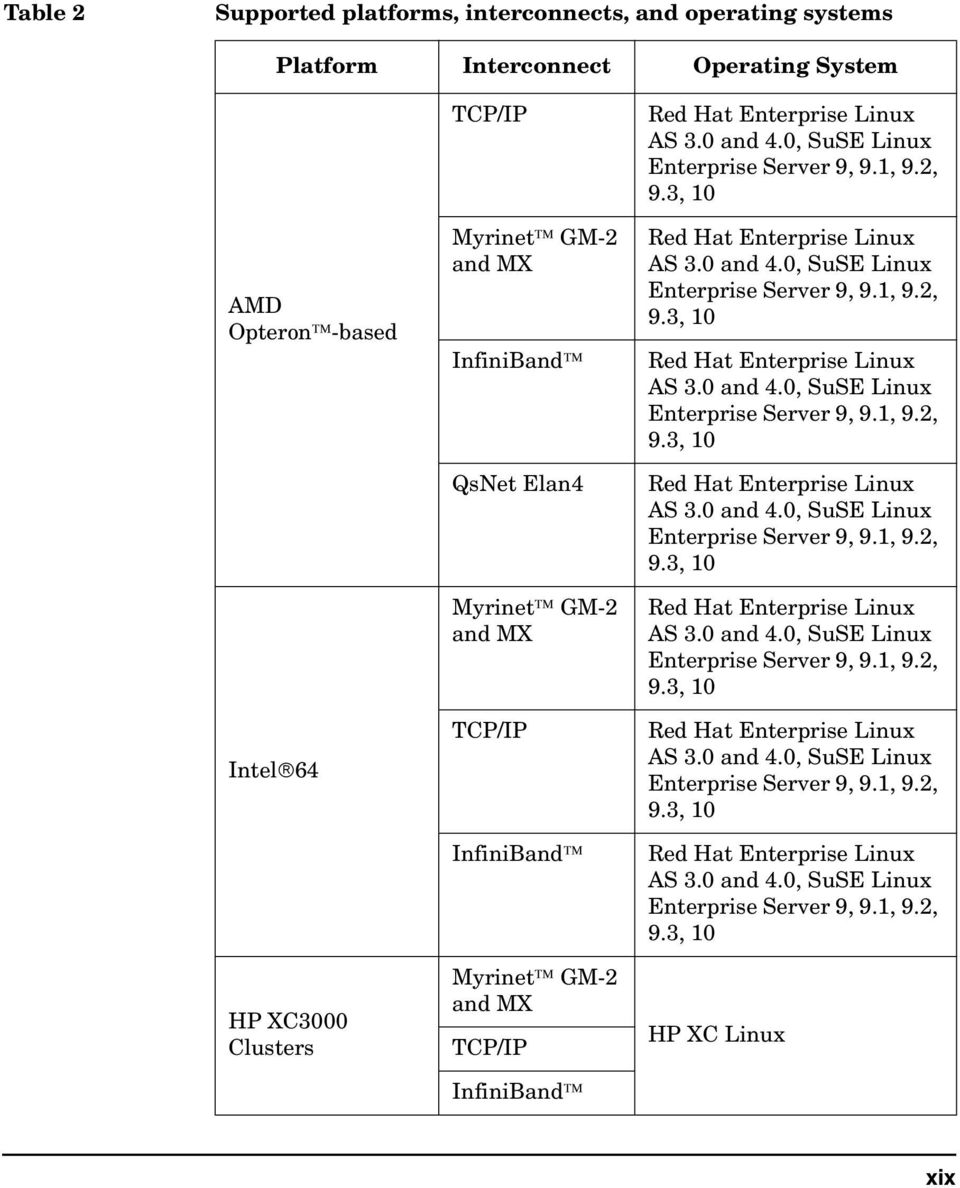
20 Table 2 Supported platforms, interconnects, and operating systems Platform Interconnect Operating System QsNet Elan4 HP XC4000 Clusters HP XC6000 Clusters HP Cluster Platforms Myrinet GM-2 and MX TCP/IP InfiniBand TCP/IP QsNet Elan4 InfiniBand TCP/IP InfiniBand HP XC Linux HP XC Linux Microsoft Windows Compute Cluster Pack (CCP) PA-RISC TCP/IP HP-UX 1 Supported on HP InfiniBand solutions for HP-UX. xx

21 Table 3 Notational conventions This section describes notational conventions used in this book. Typographic conventions bold monospace monospace italic In command examples, bold monospace identifies input that must be typed exactly as shown. In paragraph text, monospace identifies command names, system calls, and data structures and types. In command examples, monospace identifies command output, including error messages. In paragraph text, italic identifies titles of documents. In command syntax diagrams, italic identifies variables that you must provide. The following command example uses brackets to indicate that the variable output_file is optional: command input_file [output_file] Brackets ( [ ] ) KeyCap In command examples, square brackets designate optional entries. In paragraph text, KeyCap indicates the keyboard keys or the user-selectable buttons on the Graphical User Interface (GUI) that you must press to execute a command. NOTE A note highlights important supplemental information. CAUTION A caution highlights procedures or information necessary to avoid damage to equipment, damage to software, loss of data, or invalid test results. xxi
22 Documentation resources Documentation resources include: HP-MPI product information available at MPI: The Complete Reference (2 volume set), MIT Press MPI 1.2 and 2.0 standards available at MPI: A Message-Passing Interface Standard MPI-2: Extensions to the Message-Passing Interface TotalView documents available at TotalView Command Line Interface Guide TotalView User s Guide TotalView Installation Guide Parallel Programming Guide for HP-UX Systems HP-MPI release notes available at and Argonne National Laboratory s MPICH implementation of MPI at Argonne National Laboratory s implementation of MPI I/O at University of Notre Dame s LAM implementation of MPI at Intel Trace Collector/Analyzer product information (formally known as Vampir) at and LSF product information at HP XC product information at HP Windows CCS product information at xxii
23 Credits HP-MPI is based on MPICH from Argonne National Laboratory and LAM from the University of Notre Dame and Ohio Supercomputer Center. HP-MPI includes ROMIO, a portable implementation of MPI I/O developed at the Argonne National Laboratory. xxiii
24 xxiv
25 1 Introduction This chapter provides a brief introduction about basic Message Passing Interface (MPI) concepts and the HP implementation of MPI. Chapter 1 1
26 Introduction This chapter contains the syntax for some MPI functions. Refer to MPI: A Message-Passing Interface Standard for syntax and usage details for all MPI standard functions. Also refer to MPI: A Message-Passing Interface Standard and to MPI: The Complete Reference for in-depth discussions of MPI concepts. The introductory topics covered in this chapter include: The message passing model MPI concepts Point-to-point communication Collective operations MPI datatypes and packing Multilevel parallelism Advanced topics 2 Chapter 1
27 Introduction The message passing model The message passing model Programming models are generally categorized by how memory is used. In the shared memory model each process accesses a shared address space, while in the message passing model an application runs as a collection of autonomous processes, each with its own local memory. In the message passing model processes communicate with other processes by sending and receiving messages. When data is passed in a message, the sending and receiving processes must work to transfer the data from the local memory of one to the local memory of the other. Message passing is used widely on parallel computers with distributed memory, and on clusters of servers. The advantages of using message passing include: Portability Message passing is implemented on most parallel platforms. Universality Model makes minimal assumptions about underlying parallel hardware. Message-passing libraries exist on computers linked by networks and on shared and distributed memory multiprocessors. Simplicity Model supports explicit control of memory references for easier debugging. However, creating message-passing applications may require more effort than letting a parallelizing compiler produce parallel applications. In 1994, representatives from the computer industry, government labs, and academe developed a standard specification for interfaces to a library of message-passing routines. This standard is known as MPI 1.0 (MPI: A Message-Passing Interface Standard). Since this initial standard, versions 1.1 (June 1995), 1.2 (July 1997), and 2.0 (July 1997) have been produced. Versions 1.1 and 1.2 correct errors and minor omissions of MPI 1.0. MPI-2 (MPI-2: Extensions to the Message-Passing Interface) adds new functionality to MPI 1.2. You can find both standards in HTML format at MPI-1 compliance means compliance with MPI 1.2. MPI-2 compliance means compliance with MPI 2.0. Forward compatibility is preserved in the standard. That is, a valid MPI 1.0 program is a valid MPI 1.2 program and a valid MPI-2 program. Chapter 1 3
28 Introduction MPI concepts MPI concepts The primary goals of MPI are efficient communication and portability. Although several message-passing libraries exist on different systems, MPI is popular for the following reasons: Support for full asynchronous communication Process communication can overlap process computation. Group membership Processes may be grouped based on context. Synchronization variables that protect process messaging When sending and receiving messages, synchronization is enforced by source and destination information, message labeling, and context information. Portability All implementations are based on a published standard that specifies the semantics for usage. An MPI program consists of a set of processes and a logical communication medium connecting those processes. An MPI process cannot directly access memory in another MPI process. Inter-process communication requires calling MPI routines in both processes. MPI defines a library of routines through which MPI processes communicate. The MPI library routines provide a set of functions that support Point-to-point communications Collective operations Process groups Communication contexts Process topologies Datatype manipulation. Although the MPI library contains a large number of routines, you can design a large number of applications by using the six routines listed in Table Chapter 1
29 Introduction MPI concepts Table 1-1 Six commonly used MPI routines MPI routine MPI_Init MPI_Finalize MPI_Comm_rank MPI_Comm_size MPI_Send MPI_Recv Description Initializes the MPI environment Terminates the MPI environment Determines the rank of the calling process within a group Determines the size of the group Sends messages Receives messages You must call MPI_Finalize in your application to conform to the MPI Standard. HP-MPI issues a warning when a process exits without calling MPI_Finalize. CAUTION There should be no code before MPI_Init and after MPI_Finalize. Applications that violate this rule are non-portable and may give incorrect results. As your application grows in complexity, you can introduce other routines from the library. For example, MPI_Bcast is an often-used routine for sending or broadcasting data from one process to other processes in a single operation. Use broadcast transfers to get better performance than with point-to-point transfers. The latter use MPI_Send to send data from each sending process and MPI_Recv to receive it at each receiving process. The following sections briefly introduce the concepts underlying MPI library routines. For more detailed information refer to MPI: A Message-Passing Interface Standard. Chapter 1 5
30 Introduction MPI concepts Point-to-point communication Point-to-point communication involves sending and receiving messages between two processes. This is the simplest form of data transfer in a message-passing model and is described in Chapter 3, Point-to-Point Communication in the MPI 1.0 standard. The performance of point-to-point communication is measured in terms of total transfer time. The total transfer time is defined as total_transfer_time = latency + (message_size/bandwidth) where latency message_size bandwidth Specifies the time between the initiation of the data transfer in the sending process and the arrival of the first byte in the receiving process. Specifies the size of the message in Mbytes. Denotes the reciprocal of the time needed to transfer a byte. Bandwidth is normally expressed in Mbytes per second. Low latencies and high bandwidths lead to better performance. Communicators A communicator is an object that represents a group of processes and their communication medium or context. These processes exchange messages to transfer data. Communicators encapsulate a group of processes such that communication is restricted to processes within that group. The default communicators provided by MPI are MPI_COMM_WORLD and MPI_COMM_SELF. MPI_COMM_WORLD contains all processes that are running when an application begins execution. Each process is the single member of its own MPI_COMM_SELF communicator. Communicators that allow processes within a group to exchange data are termed intracommunicators. Communicators that allow processes in two different groups to exchange data are called intercommunicators. Many MPI applications depend upon knowing the number of processes and the process rank within a given communicator. There are several communication management functions; two of the more widely used are MPI_Comm_size and MPI_Comm_rank. The process rank is a unique 6 Chapter 1
31 Introduction MPI concepts number assigned to each member process from the sequence 0 through (size-1), where size is the total number of processes in the communicator. To determine the number of processes in a communicator, use the following syntax: MPI_Comm_size (MPI_Comm comm, int *size); where comm Represents the communicator handle size Represents the number of processes in the group of comm To determine the rank of each process in comm, use MPI_Comm_rank(MPI_Comm comm, int *rank); where comm Represents the communicator handle rank Represents an integer between zero and (size - 1) A communicator is an argument to all communication routines. The C code example, communicator.c on page 249 displays the use MPI_Comm_dup, one of the communicator constructor functions, and MPI_Comm_free, the function that marks a communication object for deallocation. Sending and receiving messages There are two methods for sending and receiving data: blocking and nonblocking. In blocking communications, the sending process does not return until the send buffer is available for reuse. In nonblocking communications, the sending process returns immediately, and may only have started the message transfer operation, not necessarily completed it. The application may not safely reuse the message buffer after a nonblocking routine returns until MPI_Wait indicates that the message transfer has completed. In nonblocking communications, the following sequence of events occurs: 1. The sending routine begins the message transfer and returns immediately. Chapter 1 7
32 Introduction MPI concepts 2. The application does some computation. 3. The application calls a completion routine (for example, MPI_Test or MPI_Wait) to test or wait for completion of the send operation. Blocking communication Blocking communication consists of four send modes and one receive mode. The four send modes are: Standard (MPI_Send) The sending process returns when the system can buffer the message or when the message is received and the buffer is ready for reuse. Buffered (MPI_Bsend) The sending process returns when the message is buffered in an application-supplied buffer. Avoid using the MPI_Bsend mode because it forces an additional copy operation. Synchronous (MPI_Ssend) The sending process returns only if a matching receive is posted and the receiving process has started to receive the message. Ready (MPI_Rsend) The message is sent as soon as possible. You can invoke any mode by using the appropriate routine name and passing the argument list. Arguments are the same for all modes. For example, to code a standard blocking send, use MPI_Send (void *buf, int count, MPI_Datatype dtype, int dest, int tag, MPI_Comm comm); where buf Specifies the starting address of the buffer. count Indicates the number of buffer elements. dtype Denotes the datatype of the buffer elements. dest tag comm To code a blocking receive, use Specifies the rank of the destination process in the group associated with the communicator comm. Denotes the message label. Designates the communication context that identifies a group of processes. 8 Chapter 1
33 Introduction MPI concepts MPI_Recv (void *buf, int count, MPI_datatype dtype, int source, int tag, MPI_Comm comm, MPI_Status *status); where buf Specifies the starting address of the buffer. count Indicates the number of buffer elements. dtype Denotes the datatype of the buffer elements. source tag comm Specifies the rank of the source process in the group associated with the communicator comm. Denotes the message label. Designates the communication context that identifies a group of processes. status Returns information about the received message. Status information is useful when wildcards are used or the received message is smaller than expected. Status may also contain error codes. Examples send_receive.f on page 223, ping_pong.c on page 225, and master_worker.f90 on page 243 all illustrate the use of standard blocking sends and receives. NOTE You should not assume message buffering between processes because the MPI standard does not mandate a buffering strategy. HP-MPI does sometimes use buffering for MPI_Send and MPI_Rsend, but it is dependent on message size. Deadlock situations can occur when your code uses standard send operations and assumes buffering behavior for standard communication mode. Nonblocking communication MPI provides nonblocking counterparts for each of the four blocking send routines and for the receive routine. Table 1-2 lists blocking and nonblocking routine calls. Table 1-2 MPI blocking and nonblocking calls Blocking mode MPI_Send Nonblocking mode MPI_Isend Chapter 1 9
34 Introduction MPI concepts Table 1-2 MPI blocking and nonblocking calls Blocking mode MPI_Bsend MPI_Ssend MPI_Rsend MPI_Recv Nonblocking mode MPI_Ibsend MPI_Issend MPI_Irsend MPI_Irecv Nonblocking calls have the same arguments, with the same meaning as their blocking counterparts, plus an additional argument for a request. To code a standard nonblocking send, use MPI_Isend(void *buf, int count, MPI_datatype dtype, int dest, int tag, MPI_Comm comm, MPI_Request *req); where req Specifies the request used by a completion routine when called by the application to complete the send operation. To complete nonblocking sends and receives, you can use MPI_Wait or MPI_Test. The completion of a send indicates that the sending process is free to access the send buffer. The completion of a receive indicates that the receive buffer contains the message, the receiving process is free to access it, and the status object, that returns information about the received message, is set. Collective operations Applications may require coordinated operations among multiple processes. For example, all processes need to cooperate to sum sets of numbers distributed among them. MPI provides a set of collective operations to coordinate operations among processes. These operations are implemented such that all processes call the same operation with the same arguments. Thus, when sending and receiving messages, one collective operation can replace multiple sends and receives, resulting in lower overhead and higher performance. 10 Chapter 1
35 Introduction MPI concepts Collective operations consist of routines for communication, computation, and synchronization. These routines all specify a communicator argument that defines the group of participating processes and the context of the operation. Collective operations are valid only for intracommunicators. Intercommunicators are not allowed as arguments. Communication Collective communication involves the exchange of data among all processes in a group. The communication can be one-to-many, many-to-one, or many-to-many. The single originating process in the one-to-many routines or the single receiving process in the many-to-one routines is called the root. Collective communications have three basic patterns: Broadcast and Scatter Root sends data to all processes, including itself. Gather Root receives data from all processes, including itself. Allgather and Alltoall Each process communicates with each process, including itself. The syntax of the MPI collective functions is designed to be consistent with point-to-point communications, but collective functions are more restrictive than point-to-point functions. Some of the important restrictions to keep in mind are: The amount of data sent must exactly match the amount of data specified by the receiver. Collective functions come in blocking versions only. Collective functions do not use a tag argument meaning that collective calls are matched strictly according to the order of execution. Collective functions come in standard mode only. For detailed discussions of collective communications refer to Chapter 4, Collective Communication in the MPI 1.0 standard. The following examples demonstrate the syntax to code two collective operations; a broadcast and a scatter: Chapter 1 11
36 Introduction MPI concepts To code a broadcast, use MPI_Bcast(void *buf, int count, MPI_Datatype dtype, int root, MPI_Comm comm); where buf Specifies the starting address of the buffer. count Indicates the number of buffer entries. dtype Denotes the datatype of the buffer entries. root Specifies the rank of the root. comm Designates the communication context that identifies a group of processes. For example compute_pi.f on page 241 uses MPI_BCAST to broadcast one integer from process 0 to every process in MPI_COMM_WORLD. To code a scatter, use MPI_Scatter (void* sendbuf, int sendcount, MPI_Datatype sendtype, void* recvbuf, int recvcount, MPI_Datatype recvtype, int root, MPI_Comm comm); where sendbuf Specifies the starting address of the send buffer. sendcount Specifies the number of elements sent to each process. sendtype Denotes the datatype of the send buffer. recvbuf Specifies the address of the receive buffer. recvcount Indicates the number of elements in the receive buffer. recvtype Indicates the datatype of the receive buffer elements. root Denotes the rank of the sending process. comm Designates the communication context that identifies a group of processes. Computation Computational operations do global reduction operations, such as sum, max, min, product, or user-defined functions across all members of a group. There are a number of global reduction functions: Reduce Returns the result of a reduction at one node. 12 Chapter 1
37 Introduction MPI concepts All reduce Reduce-Scatter Scan Returns the result of a reduction at all nodes. Combines the functionality of reduce and scatter operations. Performs a prefix reduction on data distributed across a group. Section 4.9, Global Reduction Operations in the MPI 1.0 standard describes each of these functions in detail. Reduction operations are binary and are only valid on numeric data. Reductions are always associative but may or may not be commutative. You can select a reduction operation from a predefined list (refer to section in the MPI 1.0 standard) or define your own operation. The operations are invoked by placing the operation name, for example MPI_SUM or MPI_PROD, in op as described in the MPI_Reduce syntax below. To implement a reduction, use MPI_Reduce(void *sendbuf, void *recvbuf, int count, MPI_Datatype dtype, MPI_Op op, int root, MPI_Comm comm); where sendbuf Specifies the address of the send buffer. recvbuf Denotes the address of the receive buffer. count Indicates the number of elements in the send buffer. dtype Specifies the datatype of the send and receive buffers. op Specifies the reduction operation. root Indicates the rank of the root process. comm Designates the communication context that identifies a group of processes. For example compute_pi.f on page 241 uses MPI_REDUCE to sum the elements provided in the input buffer of each process in MPI_COMM_WORLD, using MPI_SUM, and returns the summed value in the output buffer of the root process (in this case, process 0). Chapter 1 13
38 Introduction MPI concepts Synchronization Collective routines return as soon as their participation in a communication is complete. However, the return of the calling process does not guarantee that the receiving processes have completed or even started the operation. To synchronize the execution of processes, call MPI_Barrier. MPI_Barrier blocks the calling process until all processes in the communicator have called it. This is a useful approach for separating two stages of a computation so messages from each stage do not overlap. To implement a barrier, use MPI_Barrier(MPI_Comm comm); where comm Identifies a group of processes and a communication context. For example, cart.c on page 245 uses MPI_Barrier to synchronize data before printing. MPI datatypes and packing You can use predefined datatypes (for example, MPI_INT in C) to transfer data between two processes using point-to-point communication. This transfer is based on the assumption that the data transferred is stored in contiguous memory (for example, sending an array in a C or Fortran application). When you want to transfer data that is not homogeneous, such as a structure, or that is not contiguous in memory, such as an array section, you can use derived datatypes or packing and unpacking functions: Derived datatypes Specifies a sequence of basic datatypes and integer displacements describing the data layout in memory. You can use user-defined datatypes or predefined datatypes in MPI communication functions. Packing and Unpacking functions 14 Chapter 1
39 Introduction MPI concepts Provide MPI_Pack and MPI_Unpack functions so that a sending process can pack noncontiguous data into a contiguous buffer and a receiving process can unpack data received in a contiguous buffer and store it in noncontiguous locations. Using derived datatypes is more efficient than using MPI_Pack and MPI_Unpack. However, derived datatypes cannot handle the case where the data layout varies and is unknown by the receiver, for example, messages that embed their own layout description. Section 3.12, Derived Datatypes in the MPI 1.0 standard describes the construction and use of derived datatypes. The following is a summary of the types of constructor functions available in MPI: Contiguous (MPI_Type_contiguous) Allows replication of a datatype into contiguous locations. Vector (MPI_Type_vector) Allows replication of a datatype into locations that consist of equally spaced blocks. Indexed (MPI_Type_indexed) Allows replication of a datatype into a sequence of blocks where each block can contain a different number of copies and have a different displacement. Structure (MPI_Type_struct) Allows replication of a datatype into a sequence of blocks such that each block consists of replications of different datatypes, copies, and displacements. After you create a derived datatype, you must commit it by calling MPI_Type_commit. HP-MPI optimizes collection and communication of derived datatypes. Section 3.13, Pack and unpack in the MPI 1.0 standard describes the details of the pack and unpack functions for MPI. Used together, these routines allow you to transfer heterogeneous data in a single message, thus amortizing the fixed overhead of sending and receiving a message over the transmittal of many elements. Refer to Chapter 3, User-Defined Datatypes and Packing in MPI: The Complete Reference for a discussion of this topic and examples of construction of derived datatypes from the basic datatypes using the MPI constructor functions. Chapter 1 15
40 Introduction MPI concepts Multilevel parallelism By default, processes in an MPI application can only do one task at a time. Such processes are single-threaded processes. This means that each process has an address space together with a single program counter, a set of registers, and a stack. A process with multiple threads has one address space, but each process thread has its own counter, registers, and stack. Multilevel parallelism refers to MPI processes that have multiple threads. Processes become multi threaded through calls to multi threaded libraries, parallel directives and pragmas, or auto-compiler parallelism. Refer to Thread-compliant library on page 57 for more information on linking with the thread-compliant library. Multilevel parallelism is beneficial for problems you can decompose into logical parts for parallel execution; for example, a looping construct that spawns multiple threads to do a computation and joins after the computation is complete. The example program, multi_par.f on page 251 is an example of multilevel parallelism. Advanced topics This chapter only provides a brief introduction to basic MPI concepts. Advanced MPI topics include: Error handling Process topologies User-defined datatypes Process grouping Communicator attribute caching The MPI profiling interface To learn more about the basic concepts discussed in this chapter and advanced MPI topics refer to MPI: The Complete Reference and MPI: A Message-Passing Interface Standard. 16 Chapter 1
41 2 Getting started This chapter describes how to get started quickly using HP-MPI. The semantics of building and running a simple MPI program are described, for single- and multiple-hosts. You learn how to configure your Chapter 2 17
42 Getting started environment before running your program. You become familiar with the file structure in your HP-MPI directory. The HP-MPI licensing policy is explained. The goal of this chapter is to demonstrate the basics to getting started using HP-MPI. It is separated into two major sections: Getting started using HP-UX or Linux, and Getting started using Windows. For complete details about running HP-MPI and analyzing and interpreting profiling data, refer to Understanding HP-MPI on page 41 and Profiling on page 173. The topics covered in this chapter are: Getting started using HP-UX or Linux Configuring your environment Setting PATH Setting shell Compiling and running your first application Building and running on a single host Building and running on a Linux cluster using appfiles Building and running on an XC cluster using srun Directory structure for HP-UX and Linux HP-UX and Linux man pages Licensing Policy for Linux Version identification Getting started using Windows Configuring your environment Compiling and running your first application Building and running on a single host Building and running multihost on Windows CCS clusters Building and running MPMD applications on Windows CCS Building an MPI application on Windows with Visual Studio and using the property pages 18 Chapter 2
43 Getting started Building and running on a Windows 2003/XP cluster using appfiles Directory structure for Windows Windows man pages Licensing Policy for Windows Chapter 2 19
44 Getting started Getting started using HP-UX or Linux Getting started using HP-UX or Linux Configuring your environment Setting PATH If you move the HP-MPI installation directory from its default location in /opt/mpi for HP-UX, and /opt/hpmpi for Linux: Set the MPI_ROOT environment variable to point to the location where MPI is installed. Add $MPI_ROOT/bin to PATH. Add $MPI_ROOT/share/man to MANPATH. MPI must be installed in the same directory on every execution host. Setting shell By default, HP-MPI attempts to use ssh on Linux and remsh on HP-UX. On Linux, we recommend that ssh users set StrictHostKeyChecking=no in their ~/.ssh/config. To use rsh on Linux instead, the following script needs to be run as root on each node in the cluster: % /opt/hpmpi/etc/mpi.remsh.default Or, to use rsh on Linux, use the alternative method of manually populating the files /etc/profile.d/hpmpi.csh and /etc/profile.d/hpmpi.sh with the following settings respectively: % setenv MPI_REMSH rsh % export MPI_REMSH=rsh On HP-UX, MPI_REMSH specifies a command other than the default remsh to start remote processes. The mpirun, mpijob, and mpiclean utilities support MPI_REMSH. For example, you can set the environment variable to use a secure shell: % setenv MPI_REMSH /bin/ssh 20 Chapter 2
45 Getting started Getting started using HP-UX or Linux HP-MPI allows users to specify the remote execution tool to use when HP-MPI needs to start processes on remote hosts. The tool specified must have a call interface similar to that of the standard utilities: rsh, remsh and ssh. An alternate remote execution tool, such as ssh, can be used on HP-UX by setting the environment variable MPI_REMSH to the name or full path of the tool to use: % export MPI_REMSH=ssh % $MPI_ROOT/bin/mpirun <options> -f <appfile> HP-MPI supports setting MPI_REMSH using the -e option to mpirun: % $MPI_ROOT/bin/mpirun -e MPI_REMSH=ssh <options> -f \ <appfile> HP-MPI also supports setting MPI_REMSH to a command which includes additional arguments: % $MPI_ROOT/bin/mpirun -e MPI_REMSH="ssh -x" <options> \ -f <appfile> When using ssh on HP-UX, first ensure that it is possible to use ssh from the host where mpirun is executed to the other nodes without ssh requiring any interaction from the user. Chapter 2 21
46 Getting started Getting started using HP-UX or Linux Compiling and running your first application To quickly become familiar with compiling and running HP-MPI programs, start with the C version of a familiar hello_world program. This program is called hello_world.c and prints out the text string "Hello world! I m r of s on host" where r is a process s rank, s is the size of the communicator, and host is the host on which the program is run. The processor name is the host name for this implementation. The source code for hello_world.c is stored in $MPI_ROOT/help and is shown below. #include <stdio.h> #include "mpi.h" void main(argc, argv) int char argc; *argv[]; { int char rank, size, len; name[mpi_max_processor_name]; MPI_Init(&argc, &argv); MPI_Comm_rank(MPI_COMM_WORLD, &rank); MPI_Comm_size(MPI_COMM_WORLD, &size); MPI_Get_processor_name(name, &len); printf("hello world!i'm %d of %d on %s\n", rank, size, name); MPI_Finalize(); exit(0); } Building and running on a single host This example teaches you the basic compilation and run steps to execute hello_world.c on your local host with four-way parallelism. To build and run hello_world.c on a local host named jawbone: Step 1. Change to a writable directory. 22 Chapter 2
47 Getting started Getting started using HP-UX or Linux Step 2. Compile the hello_world executable file: % $MPI_ROOT/bin/mpicc -o hello_world \ $MPI_ROOT/help/hello_world.c Step 3. Run the hello_world executable file: % $MPI_ROOT/bin/mpirun -np 4 hello_world where -np 4 specifies 4 as the number of processes to run. Step 4. Analyze hello_world output. HP-MPI prints the output from running the hello_world executable in non-deterministic order. The following is an example of the output: Hello world! I'm 1 of 4 on jawbone Hello world! I'm 3 of 4 on jawbone Hello world! I'm 0 of 4 on jawbone Hello world! I'm 2 of 4 on jawbone For information on running more complex applications, refer to Running applications on HP-UX and Linux on page 65. Building and running on a Linux cluster using appfiles The following is an example of basic compilation and run steps to execute hello_world.c on a cluster with 4-way parallelism. To build and run hello_world.c on a cluster using an appfile: Step 1. Change to a writable directory. Step 2. Compile the hello_world executable file: % $MPI_ROOT/bin/mpicc -o hello_world \ $MPI_ROOT/help/hello_world.c Step 3. Create a file "appfile" for running on nodes n01 and n02 as: -h n01 -np 2 /path/to/hello_world -h n02 -np 2 /path/to/hello_world Step 4. Run the hello_world executable file: % $MPI_ROOT/bin/mpirun -f appfile By default, mpirun will rsh/remsh to the remote machines n01 and n02. If desired, the environment variable MPI_REMSH can be used to specify a different command, such as /usr/bin/ssh or "ssh -x". Chapter 2 23
48 Getting started Getting started using HP-UX or Linux Step 5. Analyze hello_world output. HP-MPI prints the output from running the hello_world executable in non-deterministic order. The following is an example of the output: Hello world! I'm 1 of 4 n01 Hello world! I'm 3 of 4 n02 Hello world! I'm 0 of 4 n01 Hello world! I'm 2 of 4 n02 Refer to LSF on non-xc systems on page 77 for examples using LSF. Building and running on an XC cluster using srun The following is an example of basic compilation and run steps to execute hello_world.c on a XC cluster with 4-way parallelism. To build and run hello_world.c on a XC cluster (assuming LSF is not installed): Step 1. Change to a writable directory. Step 2. Compile the hello_world executable file: % $MPI_ROOT/bin/mpicc -o hello_world \ $MPI_ROOT/help/hello_world.c Step 3. Run the hello_world executable file: % $MPI_ROOT/bin/mpirun -srun -n4 hello_world where -n4 specifies 4 as the number of processes to run from SLURM. Step 4. Analyze hello_world output. HP-MPI prints the output from running the hello_world executable in non-deterministic order. The following is an example of the output: I'm 1 of 4 n01 Hello world! I'm 3 of 4 n02 Hello world! I'm 0 of 4 n01 Hello world! I'm 2 of 4 n02 Hello world! Refer to LSF on XC systems on page 77 for examples using LSF. Directory structure for HP-UX and Linux All HP-MPI files are stored in the /opt/mpi directory for HP-UX and the /opt/hpmpi directory for Linux. The directory structure is organized as described in Table Chapter 2
49 Getting started Getting started using HP-UX or Linux If you move the HP-MPI installation directory from its default location in /opt/mpi, set the MPI_ROOT environment variable to point to the new location. Refer to Configuring your environment on page 20. Table 2-1 Directory Structure for HP-UX and Linux Subdirectory bin help include lib/pa2.0 lib/pa20_64 lib/hpux32 lib/hpux64 lib/linux_ia32 lib/linux_ia64 lib/linux_amd64 MPICH1.2/ newconfig/ share/man/man1* share/man/man3* doc Contents Command files for the HP-MPI utilities gather_info script Source files for the example programs Header files HP-MPI PA-RISC 32-bit libraries HP-MPI PA-RISC 64-bit libraries HP-MPI HP-UX Itanium 32-bit libraries HP-MPI HP-UX Itanium 64-bit libraries HP-MPI Linux 32-bit libraries HP-MPI Linux 64-bit libraries for Itanium HP-MPI Linux 64-bit libraries for Opteron and Intel 64 MPICH compatibility wrapper libraries Configuration files and release notes man pages for the HP-MPI utilities man pages for HP-MPI library Release notes HP-UX and Linux man pages The man pages are located in the $MPI_ROOT/share/man/man1* subdirectory for HP-UX and Linux. They can be grouped into three categories: general, compilation, and run time. There is one general man Chapter 2 25
50 Getting started Getting started using HP-UX or Linux page, MPI.1, that is an overview describing general features of HP-MPI. The compilation and run-time man pages are those that describe HP-MPI utilities. Table 2-2 describes the three categories of man pages in the man1 subdirectory that comprise man pages for HP-MPI utilities. Table 2-2 HP-UX and Linux man page categories Category man pages Description General Compilation Runtime MPI.1 mpicc.1 mpicc.1 mpif77.1 mpif90.1 mpiclean.1 mpidebug.1 mpienv.1 mpiexec.1 mpijob.1 mpimtsafe.1 mpirun.1 mpirun.all.1 mpistdio.1 autodbl.1 Describes the general features of HP-MPI Describes the available compilation utilities. Refer to Compiling applications on page 45 for more information Describes runtime utilities, environment variables, debugging, thread-safe and diagnostic libraries Licensing Policy for Linux HP-MPI for Linux uses FLEXlm licensing technology. A license is required to use HP-MPI for Linux. Licenses can be purchased from HP s software depot at or contact your HP representative. Demo licenses for HP-MPI are also available from HP s software depot. If you re running on an HP XC system, no license is required at runtime. 26 Chapter 2
51 Getting started Getting started using HP-UX or Linux HP-MPI has an Independent Software Vendor (ISV) program that allows participating ISVs to freely distribute HP-MPI with their applications. When the application is part of the HP-MPI ISV program, there is no licensing requirement for the end user. The ISV provides a licensed copy of HP-MPI. Contact your application vendor to find out if they participate in the HP-MPI ISV program. The copy of HP-MPI distributed with a participating ISV will only work with that application. An HP-MPI license is required for all other applications. Licensing for Linux HP-MPI for Linux uses FLEXlm licensing technology. A license file can be named either as license.dat or any file name with an extension of.lic. The default location to place MPI license files is in the default installation directory /opt/hpmpi/licenses. You will need to provide the hostname and hostid number of the system where the FLEXlm daemon for HP-MPI for Linux will run. The hostid, which is the MAC address of eth0, can be obtained by typing the following command if HP-MPI is already installed on the system: % /opt/hpmpi/bin/licensing/<arch>/lmutil lmhostid Or: % /sbin/ifconfig egrep "^eth0" awk'{print $5}' \ sed s/://g The hostname can be obtained by entering the command hostname. The default search path used to find an MPI license file is: % $MPI_ROOT/licenses:/opt/hpmpi/licenses:. For example, if MPI_ROOT=/home/hpmpi, license files will be searched in the following order: /home/hpmpi/licenses/license.dat /home/hpmpi/licenses/*.lic /opt/hpmpi/licenses/license.dat /opt/hpmpi/licenses/*.lic./license.dat./*.lic Chapter 2 27
52 Getting started Getting started using HP-UX or Linux If the license needs to be placed in another location which would not be found by the above search, the user may set the environment variable LM_LICENSE_FILE to explicitly specify the location of the license file. For more information, see Installing License Files A valid license file contains the system hostid and the associated license key. License files can be named either as license.dat or any name with extension of *.lic (like mpi.lic, for example). Copy the license file under the directory /opt/hpmpi/licenses. The command to run the license server is: % $MPI_ROOT/bin/licensing/<arch>/lmgrd -c mpi.lic License Testing Build and run the hello_world program in $MPI_ROOT/help/hello_world.c to check for a license. If your system is not properly licensed, you will receive the following error message: ( MPI BUG: Valid MPI license not found in search path ) Merging Licenses Newer HP-MPI licenses use the INCREMENT feature which allows separate HP-MPI licenses to be used in combination by concatenating files. For example: License 1: SERVER myserver 0014c2c1f34a DAEMON HPQ INCREMENT HP-MPI HPQ 1.0 permanent 8 9A40ECDE2A38 \ NOTICE="License Number = AAAABBBB1111" SIGN=E5CEDE3E5626 License 2: SERVER myserver 0014c2c1f34a DAEMON HPQ INCREMENT HP-MPI HPQ 1.0 permanent 16 BE468B74B592 \ NOTICE="License Number = AAAABBBB2222" SIGN=9AB4034C6CB2 Here, License 1 is for 8 ranks, and License 2 is for 16 ranks. The two licenses can be combined into a single file: 28 Chapter 2
53 Getting started Getting started using HP-UX or Linux SERVER myserver 0014c2c1f34a DAEMON HPQ INCREMENT HP-MPI HPQ 1.0 permanent 8 9A40ECDE2A38 \ NOTICE="License Number = AAAABBBB1111" SIGN=E5CEDE3E5626 SERVER myserver 0014c2c1f34a DAEMON HPQ INCREMENT HP-MPI HPQ 1.0 permanent 16 BE468B74B592 \ NOTICE="License Number = AAAABBBB2222" SIGN=9AB4034C6CB2 The result is a valid license for 24 ranks. Version identification To determine the version of an HP-MPI installation, use the what command on HP-UX. Use the ident or rpm command on Linux. For example: % what $MPI_ROOT/bin/mpirun or % ident $MPI_ROOT/bin/mpirun or % rpm -qa grep hpmpi Chapter 2 29
54 Getting started Getting started using Windows Getting started using Windows Configuring your environment The default install directory location for HP-MPI for Windows is one of the following directories: On 64-bit Windows: C:\Program Files (x86)\hewlett-packard\hp-mpi On 32-bit Windows: C:\Program Files \Hewlett-Packard\HP-MPI The default install will define the system environment variable MPI_ROOT, but will not put "%MPI_ROOT%\bin" in the system path or your user path. If you choose to move the HP-MPI installation directory from its default location: Change the system environment variable MPI_ROOT to reflect the new location. You may need to add "%MPI_ROOT%\bin\mpirun.exe", "%MPI_ROOT%\bin\mpidiag.exe", "%MPI_ROOT%\bin\mpisrvutil.exe", and "%MPI_ROOT%\bin\mpid.exe" to the firewall exceptions depending on how your system is configured. HP-MPI must be installed in the same directory on every execution host. To determine the version of an HP-MPI installation, use the -version flag on the mpirun command: C:\> "%MPI_ROOT%\bin\mpirun" -version Compiling and running your first application To quickly become familiar with compiling and running HP-MPI programs, start with the C version of the familiar hello_world program. This program is called hello_world.c and prints out the text string "Hello world! I m r of s on host" where r is a process s rank, s is the size of the communicator, and host is the host on which the program is run. 30 Chapter 2
55 Getting started Getting started using Windows The source code for hello_world.c is stored in %MPI_ROOT%\help and can be seen in Compiling and running your first application on page 22. Building and running on a single host The example teaches you the basic compilation and run steps to execute hello_world.c on your local host with four-way parallelism. To build and run hello_world.c on a local host named mpiccp1: Step 1. Change to a writable directory. Step 2. Open a Visual Studio command window. (This example uses a 64-bit version, so a Visual Studio x64 command window is opened.) Step 3. Compile the hello_world executable file: X:\Demo> "%MPI_ROOT%\bin\mpicc" -mpi64 ^ "%MPI_ROOT%\help\hello_world.c" Microsoft C/C++ Optimizing Compiler Version for x64 Copyright Microsoft Corporation. All rights reserved. hello_world.c Microsoft Incremental Linker Version Copyright Microsoft Corporation. All rights reserved. /out:hello_world.exe "/libpath:c:\program Files (x86)\hewlett-packard\hp-mpi\lib" /subsystem:console libhpmpi64.lib libmpio64.lib hello_world.obj Step 4. Run the hello_world executable file: X:\Demo> "%MPI_ROOT%\bin\mpirun" -np 4 hello_world.exe where -np 4 specifies 4 as the number of processors to run. Step 5. Analyze hello_world output. HP-MPI prints the output from running the hello_world executable in non-deterministic order. The following is an example of the output: Hello world! I'm 0 of 4 on mpiccp1 Hello world! I'm 3 of 4 on mpiccp1 Hello world! I'm 1 of 4 on mpiccp1 Hello world! I'm 2 of 4 on mpiccp1 Chapter 2 31
56 Getting started Getting started using Windows Building and running multihost on Windows CCS clusters The following is an example of basic compilation and run steps to execute hello_world.c on a cluster with 16-way parallelism. To build and run hello_world.c on a CCS cluster: Step 1. Change to a writable directory on a mapped drive. The mapped drive should be to a shared folder for the cluster. Step 2. Open a Visual Studio command window. (This example uses a 64-bit version, so a Visual Studio x64 command window is opened.) Step 3. Compile the hello_world executable file: X:\Demo> "%MPI_ROOT%\bin\mpicc" -mpi64 ^ "%MPI_ROOT%\help\hello_world.c" Microsoft C/C++ Optimizing Compiler Version for x64 Copyright Microsoft Corporation. All rights reserved. hello_world.c Microsoft Incremental Linker Version Copyright Microsoft Corporation. All rights reserved. /out:hello_world.exe "/libpath:c:\program Files (x86)\hewlett-packard\hp-mpi\lib" /subsystem:console libhpmpi64.lib libmpio64.lib hello_world.obj Step 4. Create a new job requesting the number of CPUs to use. Resources are not yet allocated, but the job is given a JOBID number which is printed to stdout: > job new /numprocessors:16 Job queued, ID: 4288 Step 5. Add a single-cpu mpirun task to the newly created job. Note that mpirun will create more tasks filling the rest of the resources with the compute ranks, resulting in a total of 16 compute ranks for this example: 32 Chapter 2
57 Getting started Getting started using Windows > job add 4288 /numprocessors:1 ^ /stdout:\\node\path\to\a\shared\file.out ^ /stderr:\\node\path\to\a\shared\file.err ^ "%MPI_ROOT%\bin\mpirun" -ccp \\node\path ^ \to\hello_world.exe Step 6. Submit the job. The machine resources are allocated and the job is run. > job submit /id:4288 Building and running MPMD applications on Windows CCS To run Multiple-Program Multiple-Data (MPMD) applications or other more complex configurations that require further control over the application layout or environment, use an appfile to submit the HP-MPI job through the CCS scheduler. Create the appfile indicating the node for the ranks using the -h <node> flag, and the rank count for the given node using the -n X flag. Ranks will be laid out in the order they appear in the appfile. Submit the job using mpirun -ccp -f <appfile>. For this example, the hello_world.c program will be copied to simulate a server and client program in an MPMD application. The print statement for each will be modified to indicate server or client program so the MPMD application can be demonstrated: Step 1. Change to a writable directory on a mapped drive. The mapped drive should be to a shared folder for the cluster. Step 2. Open a Visual Studio command window. This example uses a 64-bit version, so a Visual Studio x64 command window is opened. Step 3. Copy the hello_world.c source to server.c and client.c. Then edit each file to change the print statement and include 'server' and 'client' in each: X:\Demo> copy "%MPI_ROOT\help\hello_world.c".\server.c X:\Demo> copy "%MPI_ROOT\help\hello_world.c".\server.c Now, edit each to modify the print statement for both.c files to include 'server' or 'client' in the print so the executable being run is visible. Step 4. Compile the server.c and client.c programs: Chapter 2 33
58 Getting started Getting started using Windows X:\Demo> "%MPI_ROOT%\bin\mpicc" /mpi64 server.c Microsoft (R) C/C++ Optimizing Compiler Version for x64 Copyright (C) Microsoft Corporation. All rights reserved. server.c Microsoft (R) Incremental Linker Version Copyright (C) Microsoft Corporation. All rights reserved. /out:server.exe "/libpath:c:\program Files (x86)\hewlett-packard\hp-mpi\lib" /subsystem:console libhpmpi64.lib libmpio64.lib server.obj X:\Demo> "%MPI_ROOT%\bin\mpicc" /mpi64 client.c Microsoft (R) C/C++ Optimizing Compiler Version for x64 Copyright (C) Microsoft Corporation. All rights reserved. client.c Microsoft (R) Incremental Linker Version Copyright (C) Microsoft Corporation. All rights reserved. /out:client.exe "/libpath:c:\program Files (x86)\hewlett-packard\hp-mpi\lib" /subsystem:console libhpmpi64.lib libmpio64.lib client.obj Step 5. Create an appfile which uses your two different executables. For example, create the following appfile, appfile.txt: -np 1 -h node1 server.exe -np 1 -h node1 client.exe -np 2 -h node2 client.exe -np 2 -h node3 client.exe This appfile will run one 'server' rank on node1, and 5 'client' ranks: one on node1, two on node2, and two on node3. 34 Chapter 2
59 Getting started Getting started using Windows Step 6. Submit the job using appfile mode: X:\work> "%MPI_ROOT%\bin\mpirun" -ccp -f appfile.txt This will submit the job to the scheduler, allocating the nodes indicated in the appfile. Output and error files will default to appfile-<jobid>-<taskid>.out and appfile-<jobid>-<taskid>.err respectively. These file names can be altered using the -ccpout and -ccperr flags. Step 7. Check your results. Assuming the job submitted was job ID 98, the file appfile-98.1.out was created. The file content is: X:\Demo> type appfile-98.1.out Hello world (Client)! I'm 2 of 6 on node2 Hello world (Client)! I'm 1 of 6 on node1 Hello world (Server)! I'm 0 of 6 on node1 Hello world (Client)! I'm 4 of 6 on node3 Hello world (Client)! I'm 5 of 6 on node3 Hello world (Client)! I'm 3 of 6 on node2 Building an MPI application on Windows with Visual Studio and using the property pages To build an MPI application on Windows in C or C++ with VS2005, use the property pages provided by HP-MPI to help link applications. Two pages are included with HP-MPI, and are located at the installation location (MPI_ROOT) in help\hpmpi.vsprops and HPMPI64.vsprops. Go to VS Project, select View, select Property Manager and expand the project. This will display the different configurations and platforms set up for builds. Include the appropriate property page (HPMPI.vsprops for 32-bit apps, HPMPI64.vsprops for 64-bit apps) in the Configuration/Platform section. Select this page by either double-clicking the page or by right-clicking on the page and selecting Properties. Go to the User Macros section. Set MPI_ROOT to the desired location (i.e. the installation location of HP-MPI). This should be set to the default installation location: %ProgramFiles(x86)%\Hewlett-Packard\HP-MPI Chapter 2 35
60 Getting started Getting started using Windows NOTE This is the default location on 64-bit machines. The location for 32-bit machines is %ProgramFiles%\Hewlett-Packard\HP-MPI The MPI application can now be built with HP-MPI. The property page sets the following fields automatically, but can also be set manually if the property page provided is not used: C/C++ Additional Include Directories Set to "%MPI_ROOT%\include\[32 64]" Linker Additional Dependencies Set to libhpmpi32.lib or libhpmpi64.lib depending on the application. Additional Library Directories Set to "%MPI_ROOT%\lib" Building and running on a Windows 2003/XP cluster using appfiles The example shows the basic compilation and run steps to execute hello_world.c on a cluster with 4-way parallelism. To build and run hello_world.c on a cluster using an appfile, perform Steps 1 and 2 from Building and running on a single host on page 31. NOTE Specify the bitness using -mpi64 or -mpi32 for mpicc to link in the correct libraries. Verify you are in the correct 'bitness' compiler window. Using -mpi64 in a Visual Studio 32-bit command window will not work. Step 1. Create a file "appfile" for running on nodes n01 and n02 as: -h n01 -np 2 \\node01\share\path\to\hello_world.exe -h n02 -np 2 \\node01\share\path\to\hello_world.exe Step 2. For the first run of the hello_world executable, use -cache to cache your password: 36 Chapter 2
61 Getting started Getting started using Windows > "%MPI_ROOT%\bin\mpirun" -cache -f appfile Password for MPI runs: When typing, the password is not echoed to the screen. The HP-MPI Remote Launch service must be registered and started on the remote nodes. (Refer to Remote Launch service for Windows 2003/XP on page 112 for details on how to register and start.) mpirun will authenticate with the service and create processes using your encrypted password to obtain network resources. If you do not provide a password, if the password is incorrect, or if you use -nopass, remote processes will be created but will not have access to network shares. (i.e. In this example, the remote process will not be able to read the hello_world.exe file.) Step 3. Analyze hello_world output. HP-MPI prints the output from running the hello_world executable in non-deterministic order. The following is an example of the output: Hello world! I'm 1 of 4 on n01 Hello world! I'm 3 of 4 on n02 Hello world! I'm 0 of 4 on n01 Hello world! I'm 2 of 4 on n02 Directory structure for Windows All HP-MPI for Windows files are stored in the directory specified at install time. The default directory is C:\Program Files (x86)\ Hewlett-Packard\HP-MPI. The directory structure is organized as described in Table 2-3. If you move the HP-MPI installation directory from its default location, set the MPI_ROOT environment variable to point to the new location. Table 2-3 Directory Structure for Windows bin help Subdirectory Contents Command files for the HP-MPI utilities Source files for the example programs, Visual Studio Property pages Chapter 2 37
62 Getting started Getting started using Windows Table 2-3 Directory Structure for Windows (Continued) Subdirectory Contents include\32 include\64 lib man devtools licenses doc 32-bit header files 64-bit header files HP-MPI libraries HP-MPI man pages in HTML format Windows HP-MPI services Repository for HP-MPI license file Release notes, Debugging with HP-MPI Tutorial Windows man pages The man pages are located in the "%MPI_ROOT%\man\" subdirectory for Windows. They can be grouped into three categories: general, compilation, and run time. There is one general man page, MPI.1, that is an overview describing general features of HP-MPI. The compilation and run-time man pages are those that describe HP-MPI utilities. Table 2-4 describes the three categories of man pages in the man1 subdirectory that comprise man pages for HP-MPI utilities. Table 2-4 Windows man page categories Category man pages Description General Compilation MPI.1 mpicc.1 mpif90.1 Describes the general features of HP-MPI Describes the available compilation utilities. Refer to Compiling applications on page 45 for more information 38 Chapter 2
63 Getting started Getting started using Windows Table 2-4 Windows man page categories (Continued) Category man pages Description Runtime mpidebug.1 mpienv.1 mpimtsafe.1 mpirun.1 mpistdio.1 autodbl.1 Describes runtime utilities, environment variables, debugging, thread-safe and diagnostic libraries Licensing Policy for Windows HP-MPI for Windows uses FLEXlm licensing technology. A license is required to use HP-MPI for Windows. Licenses can be purchased from HP s software depot at or contact your HP representative. Demo licenses for HP-MPI are also available from HP s software depot. HP-MPI has an Independent Software Vendor (ISV) program that allows participating ISVs to freely distribute HP-MPI with their applications. When the application is part of the HP-MPI ISV program, there is no licensing requirement for the end user. The ISV provides a licensed copy of HP-MPI. Contact your application vendor to find out if they participate in the HP-MPI ISV program. The copy of HP-MPI distributed with a participating ISV will only work with that application. An HP-MPI license is required for all other applications. Licensing for Windows HP-MPI for Windows uses FLEXlm licensing technology. A license file can be named either as license.dat or any file name with an extension of.lic. The license file must be placed in the installation directory (default C:\Program Files (x86)\hewlett-packard\ HP-MPI\licenses) on all the runtime systems, and on the license server. You will need to provide the hostname and hostid number of the system where the FLEXlm daemon for HP-MPI for Windows will run. The hostid can be obtained by typing the following command if HP-MPI is already installed on the system: %MPI_ROOT%\bin\licensing\<arch>\lmutil lmhostid Chapter 2 39
64 Getting started Getting started using Windows The hostname can be obtained using the control panel by following Control Panel -> System -> Computer Name tab. The default search path used to find an MPI license file is: "%MPI_ROOT%\licenses:.". If the license needs to be placed in another location which would not be found by the above search, the user may set the environment variable LM_LICENSE_FILE to explicitly specify the location of the license file. For more information, see Installing License Files A valid license file contains the system hostid and the associated license key. License files can be named either as license.dat or any name with extension of *.lic (like mpi.lic, for example). The license file must be copied to the installation directory (default C:\Program Files (x86)\hewlett-packard\hp-mpi\ licenses) on all runtime systems, and to the license server. The command to run the license server is: "%MPI_ROOT%\bin\licensing\<arch>\lmgrd" -c mpi.lic License Testing Build and run the hello_world program in %MPI_ROOT%\help\hello_world.c to check for a license. If your system is not properly licensed, you will receive the following error message: ( MPI BUG: Valid MPI license not found in search path ) 40 Chapter 2
65 3 Understanding HP-MPI This chapter provides information about the HP-MPI implementation of MPI. The topics covered include details about compiling and running your HP-MPI applications: Chapter 3 41
66 Understanding HP-MPI Compilation wrapper script utilities Compiling applications Fortran 90 C command line basics for Windows systems Fortran command line basics for Windows systems C++ bindings (for HP-UX and Linux) Non-g++ ABI compatible C++ compilers Autodouble functionality MPI functions 64-bit support HP-UX Linux Windows Thread-compliant library CPU binding MPICH object compatibility for HP-UX and Linux Examples of building on HP-UX and Linux Running applications on HP-UX and Linux More information about appfile runs Running MPMD applications MPMD with appfiles MPMD with prun MPMD with srun Modules on Linux Runtime utility commands mpirun mpirun.all mpiexec 42 Chapter 3
67 Understanding HP-MPI mpijob mpiclean Interconnect support Protocol-specific options and information Interconnect selection examples Running applications on Windows Running HP-MPI from CCS Running HP-MPI on Windows 2003/XP Submitting jobs Submitting jobs from the CCS GUI Running HP-MPI from command line on CCS systems Automatic job submittal Running on CCS with an appfile Running with a hostfile using CCS Running with a hostlist using CCS Building and running on a Windows 2003/XP cluster using -hostlist Performing multi-ccs runs with the same resources Remote Launch service for Windows 2003/XP MPI options mpirun options Runtime environment variables List of runtime environment variables Scalability Improved deregistration via ptmalloc (Linux only) Signal Propagation (HP-UX and Linux only) Dynamic Processes MPI-2 name publishing support Chapter 3 43
68 Understanding HP-MPI Native language support 44 Chapter 3
69 Understanding HP-MPI Compilation wrapper script utilities Compilation wrapper script utilities Table 3-1 HP-MPI provides compilation utilities for the languages shown in Table 3-1. In general, if a particular compiler is desired, it is best to set the appropriate environment variable such as MPI_CC. Without such a setting, the utility script will search the PATH and a few default locations for a variety of possible compilers. Although in many environments this search produces the desired results, explicitly setting the environment variable is safer. Command line options take precedence over environment variables. Compiler selection Language Wrapper Script Environment Variable Command Line C mpicc MPI_CC -mpicc <compiler> C++ mpicc MPI_CXX -mpicxx <compiler> Fortran 77 mpif77 MPI_F77 -mpif77 <compiler> Fortran 90 mpif90 MPI_F90 -mpif90 <compiler> mpisyntax MPI_WRAPPER_ SYNTAX -mpisyntax \ <windows/unix> Compiling applications The compiler you use to build HP-MPI applications depends upon which programming language you use. The HP-MPI compiler utilities are shell scripts that invoke the appropriate native compiler. You can pass the pathname of the MPI header files using the -I option and link an MPI library (for example, the diagnostic or thread-compliant library) using the -Wl, -L or -l option. By default, HP-MPI compiler utilities include a small amount of debug information in order to allow the TotalView debugger to function. However, certain compiler options are incompatible with this debug information. Use the -notv option to exclude debug information. The -notv option will also disable TotalView usage on the resulting executable. The -notv option applies to archive libraries only. Chapter 3 45
70 Understanding HP-MPI Compilation wrapper script utilities HP-MPI offers a -show option to compiler wrappers. When compiling by hand, run as mpicc -show and a line will print displaying exactly what the job was going to do (and skips the actual build). Fortran 90 In order to use the 'mpi' Fortran 90 module, the user must create the module file by compiling the module.f file in /opt/hpmpi/include/64/module.f for 64-bit compilers. For 32-bit compilers, compile the module.f file in /opt/hpmpi/include/32/module.f. NOTE Each vendor (e.g. PGI, Qlogic/Pathscale, Intel, Gfortran, etc.) has a different module file format. Since compiler implementations vary in their representation of a module file, a PGI module file is not usable with Intel and so on. Additionally, we cannot guarantee forward compatibility from older to newer versions of a specific vendor's compiler. Because of compiler version compatibility and format issues, we do not build the module files. In each case, you will need to build (just once) the module that corresponds to 'mpi' with the compiler you intend to use. For example, with hpmpi/bin and pgi/bin in path: pgf90 -c /opt/hpmpi/include/64/module.f cat >hello_f90.f90 program main use mpi implicit none integer :: ierr, rank, size call MPI_INIT(ierr) call MPI_COMM_RANK(MPI_COMM_WORLD, rank, ierr) call MPI_COMM_SIZE(MPI_COMM_WORLD, size, ierr) print *, "Hello, world, I am ", rank, " of ", size call MPI_FINALIZE(ierr) End mpif90 -mpif90 pgf90 hello_f90.f90 hello_f90.f90: mpirun./a.out Hello, world, I am 0 of 1 46 Chapter 3
71 Understanding HP-MPI Compilation wrapper script utilities C command line basics for Windows systems The utility "%MPI_ROOT%\bin\mpicc" is included to aid in command line compilation. To compile with this utility, set the MPI_CC environment variable to the path of the command line compiler you want to use. Specify -mpi32 or -mpi64 to indicate if you are compiling a 32- or 64-bit application. Specify the command line options that you would normally pass to the compiler on the mpicc command line. The mpicc utility will add additional command line options for HP-MPI include directories and libraries. The -show option can be specified to indicate that mpicc should display the command generated without actually executing the compilation command. See the mpicc man page for more information. In order to construct the desired compilation command, the mpicc utility needs to know what command line compiler is to be used, the bitness of the executable that compiler will produce, and the syntax accepted by the compiler. These can be controlled by environment variables or from the command line. Table 3-2 mpicc Utility Environment Variable Value Command Line MPI_CC MPI_BITNESS MPI_WRAPPER_SYNTAX desired compiler (default cl) 32 or 64 (no default) windows or unix (default windows) -mpicc <value> -mpi32 or -mpi64 -mpisyntax <value> For example, to compile hello_world.c with a 64-bit 'cl' contained in your PATH use the following command since 'cl' and the 'Windows' syntax are defaults: "%MPI_ROOT%\bin\mpicc" /mpi64 hello_world.c /link ^ /out:hello_world_cl64.exe Or, use the following example to compile using the PGI compiler which uses a more UNIX-like syntax: "%MPI_ROOT%\bin\mpicc" -mpicc pgcc -mpisyntax unix -mpi32 ^ hello_world.c -o hello_world_pgi32.exe Chapter 3 47
72 Understanding HP-MPI Compilation wrapper script utilities To compile C code and link against HP-MPI without utilizing the mpicc tool, start a command prompt that has the appropriate environment settings loaded for your compiler, and use it with the compiler option: /I"%MPI_ROOT%\include\[32 64]" and the linker options: /libpath:"%mpi_root%\lib" /subsystem:console ^ [libhpmpi64.lib libhpmpi32.lib] Specify bitness where indicated. The above assumes the environment variable MPI_ROOT is set. For example, to compile hello_world.c from the %MPI_ROOT%\help directory using Visual Studio (from a Visual Studio 2005 command prompt window): cl hello_world.c /I"%MPI_ROOT%\include\64" ^ /link /out:hello_world.exe ^ /libpath:"%mpi_root%\lib" ^ /subsystem:console libhpmpi64.lib The PGI compiler uses a more UNIX-like syntax. From a PGI command prompt: pgcc hello_world.c -I"%MPI_ROOT%\include\64" ^ -o hello_world.exe -L"%MPI_ROOT%\lib" -lhpmpi64 Fortran command line basics for Windows systems The utility "%MPI_ROOT%\bin\mpif90" is included to aid in command line compilation. To compile with this utility, set the MPI_F90 environment variable to the path of the command line compiler you want to use. Specify -mpi32 or -mpi64 to indicate if you are compiling a 32- or 64-bit application. Specify the command line options that you would normally pass to the compiler on the mpif90 command line. The mpif90 utility will add additional command line options for HP-MPI include directories and libraries. The -show option can be specified to indicate that mpif90 should display the command generated without actually executing the compilation command. See the mpif90 man page for more information. 48 Chapter 3
73 Understanding HP-MPI Compilation wrapper script utilities In order to construct the desired compilation command, the mpif90 utility needs to know what command line compiler is to be used, the bitness of the executable that compiler will produce, and the syntax accepted by the compiler. These can be controlled by environment variables or from the command line. Table 3-3 mpif90 Utility Environment Variable Value Command Line MPI_F90 MPI_BITNESS MPI_WRAPPER_SYNTAX desired compiler (default ifort) 32 or 64 (no default) windows or unix (default windows) -mpif90 <value> -mpi32 or -mpi64 -mpisyntax <value> For example, to compile compute_pi.f with a 64-bit 'ifort' contained in your PATH use the following command since 'ifort' and the 'Windows' syntax are defaults: "%MPI_ROOT%\bin\mpif90" /mpi64 compute_pi.f /link ^ /out:compute_pi_ifort.exe Or, use the following example to compile using the PGI compiler which uses a more UNIX-like syntax: "%MPI_ROOT%\bin\mpif90" -mpif90 pgf90 -mpisyntax unix ^ -mpi32 compute_pi.f -o compute_pi_pgi32.exe To compile compute_pi.f using Intel Fortran without utilizing the mpif90 tool (from a command prompt that has the appropriate environment settings loaded for your Fortran compiler): ifort compute_pi.f /I"%MPI_ROOT%\include\64" ^ /link /out:compute_pi.exe ^ /libpath:"%mpi_root%\lib" ^ /subsystem:console libhpmpi64.lib Chapter 3 49
74 Understanding HP-MPI C++ bindings (for HP-UX and Linux) C++ bindings (for HP-UX and Linux) HP-MPI supports C++ bindings as described in the MPI-2 Standard. (See Documentation resources on page xxii.) If compiling and linking with the mpicc command, no additional work is needed to include and use the bindings. You can include either mpi.h or mpicc.h in your C++ source files. The bindings provided by HP-MPI are an interface class, calling the equivalent C bindings. To profile your application, users should profile the equivalent C bindings. If the user builds without the mpicc command, they will need to include -lmpicc to resolve C++ references. If you want to use an alternate libmpicc.a with mpicc, use the -mpicclib <LIBRARY> option. A 'default' g++ ABI compatible library is provided for each architecture except Alpha. Non-g++ ABI compatible C++ compilers The C++ library provided by HP-MPI, libmpicc.a, was built with g++. If you are using a C++ compiler which is not g++ ABI compatible (e.g. Portland Group Compiler), you must build your own libmpicc.a and include this in your build command. The sources and Makefiles to build an appropriate library are located in /opt/hpmpi/lib/arch/mpiccsrc. To build your private version of libmpicc.a and include it in the builds using mpicc, do the following: NOTE This example assumes your HP-MPI install directory is /opt/hpmpi. It also assumes that the pgcc compiler is in your path and working properly. 1. Copy the file needed to build libmpicc.a into a working location. % setenv MPI_ROOT /opt/hpmpi % cp -r $MPI_ROOT/lib/linux_amd64/mpiCCsrc ~ % cd ~/mpiccsrc 50 Chapter 3
75 Understanding HP-MPI C++ bindings (for HP-UX and Linux) 2. Compile and create the libmpicc.a library. % make CXX=pgCC MPI_ROOT=$MPI_ROOT pgcc -c intercepts.cc -I/opt/hpmpi/include -DHPMP_BUILD_CXXBINDING PGCC-W-0155-Nova_start() seen (intercepts.cc:33) PGCC/x86 Linux/x : compilation completed with warnings pgcc -c mpicxx.cc - I/opt/hpmpi/include -DHPMP_BUILD_CXXBINDING ar rcs libmpicc.a intercepts.o mpicxx.o 3. Using a testcase, test that the library works as expected. % mkdir test ; cd test % cp $MPI_ROOT/help/sort.C. % $MPI_ROOT/bin/mpiCC HPMPI_CC=pgCC sortc -mpicclib \../libmpicc.a sort.c: % $MPI_ROOT/bin/mpirun -np 2./a.out Rank Chapter 3 51
76 Understanding HP-MPI Autodouble functionality Autodouble functionality HP-MPI supports Fortran programs compiled 64-bit with any of the following options (some of which are not supported on all Fortran compilers): For HP-UX: +i8 Set default KIND of integer variables is 8. +r8 Set default size of REAL to 8 bytes. +autodbl4 Same as +i8 and +r8. +autodbl Same as +i8, +r8, and set default size of REAL to 16 bytes. For Linux: -i8 Set default KIND of integer variables is 8. -r8 Set default size of REAL to 8 bytes. -r16 Set default size of REAL to 16 bytes. -autodouble Same as -r8. The decision of how the Fortran arguments will be interpreted by the MPI library is made at link time. If the mpif90 compiler wrapper is supplied with one of the above options at link time, the necessary object files will automatically link, informing MPI how to interpret the Fortran arguments. 52 Chapter 3
77 Understanding HP-MPI Autodouble functionality NOTE This autodouble feature is supported in the regular and multithreaded MPI libraries, but not in the diagnostic library. For Windows: /integer_size:64 /4I8 -i8 /real_size:64 /4R8 /Qautodouble -r8 If these flags are given to the mpif90.bat script at link time, then the application will be linked enabling HP-MPI to interpret the datatype MPI_REAL as 8 bytes (etc. as appropriate) at runtime. However, if your application is written to explicitly handle the autodoubled datatypes (e.g. if a variable is declared real and the code is compiled -r8 and corresponding MPI calls are given MPI_DOUBLE for the datatype), then the autodouble related command line arguments should not be passed to mpif90.bat at link time (because that would cause the datatypes to be automatically changed). Chapter 3 53
78 Understanding HP-MPI MPI functions MPI functions The following MPI functions accept user-defined functions and require special treatment when autodouble is used: MPI_Op_create() MPI_Errhandler_create() MPI_Keyval_create() MPI_Comm_create_errhandler() MPI_Comm_create_keyval() MPI_Win_create_errhandler() MPI_Win_create_keyval() The user-defined callback passed to these functions should accept normal-sized arguments. These functions are called internally by the library where normally-sized data types will be passed to them. 54 Chapter 3
79 Understanding HP-MPI 64-bit support 64-bit support Table 3-4 HP-MPI provides support for 64-bit libraries as shown in Table 3-4. More detailed information about HP-UX, Linux, and Windows systems is provided in the following sections. 32- and 64-bit support OS/ Architecture Supported Libraries Default Notes HP-UX 11i and higher 32- and 64-bit 32-bit Compile with +DD64 to build/link with 64-bit libraries Linux IA bit 32-bit Linux Itanium2 64-bit 64-bit Linux Opteron & Intel and 64-bit (InfiniBand only supports 64-bit) 64-bit Use -mpi32 and appropriate compiler flag. See compiler man page for 32-bit flag Windows 32- and 64-bit N/A HP-UX HP-MPI supports a 64-bit version on platforms running HP-UX 11.i and higher. Both 32- and 64-bit versions of the library are shipped with this platform, however you cannot mix 32-bit and 64-bit executables in the same application. The mpicc and mpicc compilation commands link the 64-bit version of the library if you compile with the +DD64 option on HP-UX. Use the following syntax: [mpicc mpicc] +DD64 -o filename filename.c Chapter 3 55
80 Understanding HP-MPI 64-bit support When you use mpif90, compile with the +DD64 option to link the 64-bit version of the library. Otherwise, mpif90 links the 32-bit version. For example, to compile the program myprog.f90 and link the 64-bit library enter: % mpif90 +DD64 -o myprog myprog.f90 If you re using a third party compiler on HP-UX, you must implicitly pass -mpi32 and -mpi64 options to the compiler wrapper. Linux HP-MPI supports both 32- and 64-bit versions running Linux on AMD Opteron or Intel 64 systems. Both 32- and 64-bit versions of the library are shipped with these systems, however, you cannot mix 32-bit and 64-bit executables in the same application. HP-MPI includes -mpi32 and -mpi64 options for the compiler wrapper script on Opteron and Intel 64 systems. These options should be used to indicate the bitness of the application to be invoked so that the availability of interconnect libraries can be properly determined by the HP-MPI utilities mpirun and mpid. The default is -mpi64. Mellanox only provides a 64-bit InfiniBand driver. Therefore, 32-bit apps are not supported on InfiniBand when running on Opteron or Intel 64 machines. The following table summarizes 32- and 64-bit libraries supported by HP-MPI. Refer to the appropriate compiler man page for compiler options. Windows HP-MPI supports both 32- and 64-bit versions running Windows on AMD Opteron or Intel 64. Both 32- and 64-bit versions of the library are shipped with these systems, however you cannot mix 32-bit and 64-bit executables in the same application. HP-MPI includes -mpi32 and -mpi64 options for the compiler wrapper script on Opteron and Intel 64 systems. These options are only necessary for the wrapper scripts so the correct libhpmpi32.dll or libhpmpi64.dll is linked with the application. It is not necessary when invoking the application. 56 Chapter 3
81 Understanding HP-MPI Thread-compliant library Thread-compliant library HP-MPI provides a thread-compliant library. By default, the non thread-compliant library (libmpi) is used when running HP-MPI jobs. Linking to the thread-compliant library is now required only for applications that have multiple threads making MPI calls simultaneously. In previous releases, linking to the thread-compliant library was required for multithreaded applications even if only one thread was making a MPI call at a time. See Table B-1 on page 280. To link with the thread-compliant library on HP-UX and Linux systems, specify the -libmtmpi option to the build scripts when compiling the application. To link with the thread-compliant library on Windows systems, specify the -lmtmpi option to the build scripts when compiling the application. Application types that no longer require linking to the thread-compliant library include: Implicit compiler-generated parallelism (e.g. +O3 +Oparallel in HP-UX) Thread parallel applications utilizing the HP MLIB math libraries OpenMP applications pthreads (Only if no two threads call MPI at the same time. Otherwise, use the thread-compliant library for pthreads.) Chapter 3 57
82 Understanding HP-MPI CPU binding CPU binding The mpirun option -cpu_bind binds a rank to an ldom to prevent a process from moving to a different ldom after startup. The binding occurs before the MPI application is executed. To accomplish this, a shared library is loaded at startup which does the following for each rank: Spins for a short time in a tight loop to let the operating system distribute processes to CPUs evenly. This duration can be changed by setting the MPI_CPU_SPIN environment variable which controls the number of spins in the initial loop. Default is 3 seconds. Determines the current CPU and ldom Checks with other ranks in the MPI job on the host for oversubscription by using a "shm" segment created by mpirun and a lock to communicate with other ranks. If no oversubscription occurs on the current CPU, then lock the process to the ldom of that CPU. If there is already a rank reserved on the current CPU, then find a new CPU based on least loaded free CPUs and lock the process to the ldom of that CPU. Similar results can be accomplished using "mpsched" but the procedure outlined above has the advantage of being a more load-based distribution, and works well in psets and across multiple machines. HP-MPI supports CPU binding with a variety of binding strategies (see below). The option -cpu_bind is supported in appfile, command line, and srun modes. % mpirun -cpu_bind[_mt]=[v,][option][,v] -np \ 4 a.out Where _mt implies thread aware CPU binding; v, and,v request verbose information on threads binding to CPUs; and [option] is one of: rank Schedule ranks on CPUs according to packed rank id. map_cpu Schedule ranks on CPUs in cyclic distribution through MAP variable. mask_cpu Schedule ranks on CPU masks in cyclic distribution through MAP variable. 58 Chapter 3
83 Understanding HP-MPI CPU binding ll least loaded (ll) Bind each rank to the CPU it is currently running on. For NUMA-based systems, the following options are also available: ldom Schedule ranks on ldoms according to packed rank id. cyclic Cyclic dist on each ldom according to packed rank id. block Block dist on each ldom according to packed rank id. rr round robin (rr) Same as cyclic, but consider ldom load average. fill Same as block, but consider ldom load average. packed Bind all ranks to same ldom as lowest rank. slurm slurm binding. ll least loaded (ll) Bind each rank to ldoms it is currently running on. map_ldom Schedule ranks on ldoms in cyclic distribution through MAP variable. To generate the current supported options: % mpirun -cpu_bind=help./a.out Environment variables for CPU binding: MPI_BIND_MAP allows specification of the integer CPU numbers, ldom numbers, or CPU masks. These are a list of integers separated by commas (,). MPI_CPU_AFFINITY is an alternative method to using -cpu_bind on the command line for specifying binding strategy. The possible settings are LL, RANK, MAP_CPU, MASK_CPU, LDOM, CYCLIC, BLOCK, RR, FILL, PACKED, SLURM, AND MAP_LDOM. MPI_CPU_SPIN allows selection of spin value. The default is 2 seconds. This value is used to let processes busy spin such that the operating system schedules processes to processors. The the processes bind themselves to the appropriate processor, or core, or ldom as appropriate. For example, the following selects a 4 second spin period to allow 32 MPI ranks (processes) to settle into place and then bind to the appropriate processor/core/ldom. % mpirun -e MPI_CPU_SPIN=4 -cpu_bind -np\ 32./linpack Chapter 3 59
84 Understanding HP-MPI CPU binding MPI_FLUSH_FCACHE Can be set to a threshold percent of memory (0-100) which, if the file cache currently in use meets or exceeds, initiates a flush attempt after binding and essentially before the user s MPI program starts. Refer to See MPI_FLUSH_FCACHE on page 144 for more information. MPI_THREAD_AFFINITY controls thread affinity. Possible values are: none Schedule threads to run on all cores/ldoms. This is the default. cyclic Schedule threads on ldoms in cyclic manner starting after parent. cyclic_cpu Schedule threads on cores in cyclic manner starting after parent. block Schedule threads on ldoms in block manner starting after parent. packed Schedule threads on same ldom as parent. empty No changes to thread affinity are made. MPI_THREAD_IGNSELF When set to 'yes', parent is not included in scheduling consideration of threads across remaining cores/ldoms. This method of thread control can be used for explicit pthreads or OpenMP threads. Three -cpu_bind options require the specification of a map/mask description. This allows for very explicit binding of ranks to processors. The three options are map_ldom, map_cpu, and mask_cpu. Syntax: -cpu_bind=[map_ldom,map_cpu,mask_cpu] [:<settings>, =<settings>, -e MPI_BIND_MAP=<settings>] Examples: -cpu_bind=map_ldom -e MPI_BIND_MAP=0,2,1,3 # map rank 0 to ldom 0, rank 1 to ldom 2, rank 2 to ldom1 and rank 3 to ldom 3. -cpu_bind=map_ldom=0,2,3,1 # map rank 0 to ldom 0, rank 1 to ldom 2, rank 2 to ldom 3 and rank 3 to ldom 1. -cpu_bind=map_cpu:0,6,5 # map rank 0 to cpu 0, rank 1 to cpu 6, rank 2 to cpu Chapter 3
85 Understanding HP-MPI CPU binding -cpu_bind=mask_cpu:1,4,6 # map rank 0 to cpu 0 (0001), rank 1 to cpu 2 (0100), rank 2 to cpu 1 or 2 (0110). A rank binding on a clustered system uses the number of ranks and the number of nodes combined with the rank count to determine the CPU binding. Cyclic or blocked launch is taken into account. On a cell-based system with multiple users, the LL strategy is recommended rather than RANK. LL allows the operating system to schedule the computational ranks. Then the -cpu_bind capability locks the ranks to the CPU as selected by the operating system scheduler. Chapter 3 61
86 Understanding HP-MPI MPICH object compatibility for HP-UX and Linux MPICH object compatibility for HP-UX and Linux The MPI standard specifies the function prototypes for the MPI functions, but does not specify the types of the MPI opaque objects like communicators or the values of the MPI constants. Hence an object file compiled using one vendor's MPI will generally not function correctly if linked against another vendor's MPI library. There are some cases where such compatibility would be desirable. For instance a third party tool such as Intel trace/collector might only be available using the MPICH interface. To allow such compatibility, HP-MPI includes a layer of MPICH wrappers which provides an interface identical to MPICH 1.2.5, and translates these calls into the corresponding HP-MPI interface. This MPICH compatibility interface is only provided for functions defined in MPICH and cannot be used by an application which calls functions outside the scope of MPICH HP-MPI can be used in MPICH mode by compiling using "mpicc.mpich" and running using "mpirun.mpich". The compiler script mpicc.mpich uses an include file which defines the interfaces the same as MPICH 1.2.5, and at link time it links against libmpich.so which is the set of wrappers defining MPICH compatible entrypoints for the MPI functions. The mpirun.mpich takes the same arguments as the traditional HP-MPI mpirun, but sets LD_LIBRARY_PATH so that libmpich.so is found. An example of using a program with Intel Trace Collector: % export MPI_ROOT=/opt/hpmpi % $MPI_ROOT/bin/mpicc.mpich -o prog.x \ $MPI_ROOT/help/communicator.c -L/path/to/itc/lib \ -lvt -lvtunwind -ldwarf -lnsl -lm -lelf -lpthread % $MPI_ROOT/bin/mpirun.mpich -np 2./prog.x Here, the program communicator.c is being compiled with MPICH compatible interfaces and is being linked against Intel's Trace Collector libvt.a first from the command line option, followed by HP-MPI's 62 Chapter 3
87 Understanding HP-MPI MPICH object compatibility for HP-UX and Linux libmpich.so then libmpi.so which are added by the mpicc.mpich compiler wrapper script. Thus libvt.a sees only the MPICH compatible interface to HP-MPI. In general, object files built with HP-MPI's MPICH mode can be used in an MPICH application, and conversely object files built under MPICH can be linked into an HP-MPI app using MPICH mode. However using MPICH compatibility mode to produce a single executable to run under both MPICH and HP-MPI will be problematic and is not advised. communicator.c could be compiled under HP-MPI MPICH compatibility mode as: % export MPI_ROOT=/opt/hpmpi % $MPI_ROOT/bin/mpicc.mpich -o prog.x \ $MPI_ROOT/help/communicator.c and run the resulting prog.x under MPICH. However, various problems will be encountered. First, the MPICH installation will need to be built to include shared libraries and a soft link would need to be created for libmpich.so, since their libraries might be named differently. Next an appropriate LD_LIBRARY_PATH setting must be added manually since MPICH expects the library path to be hard coded into the executable at link time via -rpath. Finally, while the resulting executable would run over any supported interconnect under HP-MPI, it would not under MPICH due to not being linked against libgm/libelan etc. Similar problems would be encountered if linking under MPICH and running under HP-MPI's MPICH compatibility. MPICH's use of -rpath to hard code the library path at link time would keep the executable from being able to find the HP-MPI MPICH compatibility library via HP-MPI s LD_LIBRARY_PATH setting. C++ bindings are not supported with MPICH compatibility mode. MPICH compatibility mode is not supported on HP-MPI V1.0 for Windows. Chapter 3 63
88 Understanding HP-MPI Examples of building on HP-UX and Linux Examples of building on HP-UX and Linux This example shows how to build hello_world.c prior to running. Step 1. Change to a writable directory that is visible from all hosts on which the job will run. Step 2. Compile the hello_world executable file. % $MPI_ROOT/bin/mpicc -o hello_world \ $MPI_ROOT/help/hello_world.c This example uses shared libraries, which is recommended. HP-MPI also includes archive libraries which can be used by specifying the appropriate compiler option. NOTE HP-MPI uses the dynamic loader to interface with various interconnect libraries. Therefore, dynamic linking is required when building applications that will use HP-MPI. 64 Chapter 3
89 Understanding HP-MPI Running applications on HP-UX and Linux Running applications on HP-UX and Linux This section introduces the methods to run your HP-MPI application on HP-UX and Linux. Using one of the mpirun methods is required. The examples below demonstrate six basic methods. Refer to mpirun on page 74 for all the mpirun command line options. HP-MPI includes -mpi32 and -mpi64 options for the launch utility mpirun on Opteron and Intel 64. These options should be used to indicate the bitness of the application to be invoked so that the availability of interconnect libraries can be properly determined by the HP-MPI utilities mpirun and mpid. The default is -mpi64. There are six methods you can use to start your application, depending on what kind of system you are using: Use mpirun with the -np # option and the name of your program. For example, % $MPI_ROOT/bin/mpirun -np 4 hello_world starts an executable file named hello_world with four processes. This is the recommended method to run applications on a single host with a single executable file. Use mpirun with an appfile. For example, % $MPI_ROOT/bin/mpirun -f appfile where -f appfile specifies a text file (appfile) that is parsed by mpirun and contains process counts and a list of programs. Although you can use an appfile when you run a single executable file on a single host, it is best used when a job is to be run across a cluster of machines which does not have its own dedicated launching method such as srun or prun (which are described below), or when using multiple executables. For details about building your appfile, refer to Creating an appfile on page 78. Use mpirun with -prun using the Quadrics Elan communication processor on Linux. For example, % $MPI_ROOT/bin/mpirun [mpirun options] -prun \ <prun options> <program> <args> This method is only supported when linking with shared libraries. Chapter 3 65
90 Understanding HP-MPI Running applications on HP-UX and Linux Some features like mpirun -stdio processing are unavailable. Rank assignments within HP-MPI are determined by the way prun chooses mapping at runtime. The -np option is not allowed with -prun. The following mpirun options are allowed with -prun: % $MPI_ROOT/bin/mpirun [-help] [-version] [-jv] [-i <spec>] [-universe_size=#] [-sp <paths>] [-T] [-prot] [-spawn] [-1sided] [-tv] [-e var[=val]] -prun <prun options> <program> [<args>] For more information on prun usage: % man prun The following examples assume the system has the Quadrics Elan interconnect and is a collection of 2-CPU nodes. % $MPI_ROOT/bin/mpirun -prun -N4./a.out will run a.out with 4 ranks, one per node, ranks are cyclically allocated. n00 rank1 n01 rank2 n02 rank3 n03 rank4 % $MPI_ROOT/bin/mpirun -prun -n4./a.out (assuming nodes have 2 processors/cores each) will run a.out with 4 ranks, 2 ranks per node, ranks are block allocated. Two nodes used. n00 rank1 n00 rank2 n01 rank3 n01 rank4 Other forms of usage include allocating the nodes you wish to use, which creates a subshell. Then jobsteps can be launched within that subshell until the subshell is exited. % $MPI_ROOT/bin/mpirun -prun -A -N6 This allocates 6 nodes and creates a subshell. % $MPI_ROOT/bin/mpirun -prun -n4 -m block./a.out 66 Chapter 3
91 Understanding HP-MPI Running applications on HP-UX and Linux This uses 4 ranks on 4 nodes from the existing allocation. Note that we asked for block. n00 rank1 n00 rank2 n02 rank3 n03 rank4 Use mpirun with -srun on HP XC clusters. For example, % $MPI_ROOT/bin/mpirun <mpirun options> -srun \ <srun options> <program> <args> Some features like mpirun -stdio processing are unavailable. The -np option is not allowed with -srun. The following options are allowed with -srun: % $MPI_ROOT/bin/mpirun [-help] [-version] [-jv] [-i <spec>] [-universe_size=#] [-sp <paths>] [-T] [-prot] [-spawn] [-tv] [-1sided] [-e var[=val]] -srun <srun options> <program> [<args>] For more information on srun usage: % man srun The following examples assume the system has the Quadrics Elan interconnect, SLURM is configured to use Elan, and the system is a collection of 2-CPU nodes. % $MPI_ROOT/bin/mpirun -srun -N4./a.out will run a.out with 4 ranks, one per node, ranks are cyclically allocated. n00 rank1 n01 rank2 n02 rank3 n03 rank4 % $MPI_ROOT/bin/mpirun -srun -n4./a.out will run a.out with 4 ranks, 2 ranks per node, ranks are block allocated. Two nodes used. Other forms of usage include allocating the nodes you wish to use, which creates a subshell. Then jobsteps can be launched within that subshell until the subshell is exited. Chapter 3 67
92 Understanding HP-MPI Running applications on HP-UX and Linux % srun -A -n4 This allocates 2 nodes with 2 ranks each and creates a subshell. % $MPI_ROOT/bin/mpirun -srun./a.out This runs on the previously allocated 2 nodes cyclically. n00 rank1 n00 rank2 n01 rank3 n01 rank4 Use XC LSF and HP-MPI HP-MPI jobs can be submitted using LSF. LSF uses the SLURM srun launching mechanism. Because of this, HP-MPI jobs need to specify the -srun option whether LSF is used or srun is used. % bsub -I -n2 $MPI_ROOT/bin/mpirun -srun./a.out LSF creates an allocation of 2 processors and srun attaches to it. % bsub -I -n12 $MPI_ROOT/bin/mpirun -srun -n6 \ -N6./a.out LSF creates an allocation of 12 processors and srun uses 1 CPU per node (6 nodes). Here, we assume 2 CPUs per node. LSF jobs can be submitted without the -I (interactive) option. An alternative mechanism for achieving the one rank per node which uses the -ext option to LSF: % bsub -I -n3 -ext "SLURM[nodes=3]" \ $MPI_ROOT/bin/mpirun -srun./a.out The -ext option can also be used to specifically request a node. The command line would look something like the following: % bsub -I -n2 -ext "SLURM[nodelist=n10]" mpirun -srun \./hello_world Job <1883> is submitted to default queue <interactive>. <<Waiting for dispatch...>> <<Starting on lsfhost.localdomain>> Hello world! I'm 0 of 2 on n10 Hello world! I'm 1 of 2 on n10 68 Chapter 3
93 Understanding HP-MPI Running applications on HP-UX and Linux Including and excluding specific nodes can be accomplished by passing arguments to SLURM as well. For example, to make sure a job includes a specific node and excludes others, use something like the following. In this case, n9 is a required node and n10 is specifically excluded: % bsub -I -n8 -ext "SLURM[nodelist=n9;exclude=n10]" \ mpirun -srun./hello_world Job <1892> is submitted to default queue <interactive>. <<Waiting for dispatch...>> <<Starting on lsfhost.localdomain>> Hello world! I'm 0 of 8 on n8 Hello world! I'm 1 of 8 on n8 Hello world! I m 6 of 8 on n12 Hello world! I m 2 of 8 on n9 Hello world! I m 4 of 8 on n11 Hello world! I m 7 of 8 on n12 Hello world! I m 3 of 8 on n9 Hello world! I m 5 of 8 on n11 In addition to displaying interconnect selection information, the mpirun -prot option can be used to verify that application ranks have been allocated in the desired manner: % bsub -I -n12 $MPI_ROOT/bin/mpirun -prot -srun \ -n6 -N6./a.out Job <1472> is submitted to default queue <interactive>. <<Waiting for dispatch...>> <<Starting on lsfhost.localdomain>> Host 0 -- ip ranks 0 Host 1 -- ip ranks 1 Host 2 -- ip ranks 2 Host 3 -- ip ranks 3 Host 4 -- ip ranks 4 Host 5 -- ip ranks 5 host ====== =============================== 0 : SHM VAPI VAPI VAPI VAPI VAPI 1 : VAPI SHM VAPI VAPI VAPI VAPI 2 : VAPI VAPI SHM VAPI VAPI VAPI 3 : VAPI VAPI VAPI SHM VAPI VAPI 4 : VAPI VAPI VAPI VAPI SHM VAPI 5 : VAPI VAPI VAPI VAPI VAPI SHM Hello world! I'm 0 of 6 on n8 Hello world! I'm 3 of 6 on n11 Hello world! I m 5 of 6 on n13 Hello world! I m 4 of 6 on n12 Hello world! I m 2 of 6 on n10 Hello world! I m 1 of 6 on n9 Use LSF on non-xc systems Chapter 3 69
94 Understanding HP-MPI Running applications on HP-UX and Linux On non-xc systems, to invoke the Parallel Application Manager (PAM) feature of LSF for applications where all processes execute the same program on the same host: % bsub <lsf_options> pam -mpi mpirun \ <mpirun_options> program <args> In this case, LSF assigns a host to the MPI job. For example: % bsub pam -mpi $MPI_ROOT/bin/mpirun -np 4 compute_pi requests a host assignment from LSF and runs the compute_pi application with four processes. The load-sharing facility (LSF) allocates one or more hosts to run an MPI job. In general, LSF improves resource utilization for MPI jobs that run in multihost environments. LSF handles the job scheduling and the allocation of the necessary hosts and HP-MPI handles the task of starting up the application's processes on the hosts selected by LSF. By default mpirun starts the MPI processes on the hosts specified by the user, in effect handling the direct mapping of host names to IP addresses. When you use LSF to start MPI applications, the host names, specified to mpirun or implicit when the -h option is not used, are treated as symbolic variables that refer to the IP addresses that LSF assigns. Use LSF to do this mapping by specifying a variant of mpirun to execute your job. To invoke LSF for applications that run on multiple hosts: % bsub [lsf_options] pam -mpi mpirun [mpirun_options] -f appfile [-- extra_args_for_appfile] In this case, each host specified in the appfile is treated as a symbolic name, referring to the host that LSF assigns to the MPI job. For example: % bsub pam -mpi $MPI_ROOT/bin/mpirun -f my_appfile runs an appfile named my_appfile and requests host assignments for all remote and local hosts specified in my_appfile. If my_appfile contains the following items: -h voyager -np 10 send_receive -h enterprise -np 8 compute_pi 70 Chapter 3
95 Understanding HP-MPI Running applications on HP-UX and Linux Host assignments are returned for the two symbolic links voyager and enterprise. When requesting a host from LSF, you must ensure that the path to your executable file is accessible by all machines in the resource pool. More information about appfile runs This example teaches you to run the hello_world.c application that you built in Examples of building on HP-UX and Linux (above) using two hosts to achieve four-way parallelism. For this example, the local host is named jawbone and a remote host is named wizard. To run hello_world.c on two hosts, use the following procedure, replacing jawbone and wizard with the names of your machines: Step 1. Edit the.rhosts file on jawbone and wizard. Add an entry for wizard in the.rhosts file on jawbone and an entry for jawbone in the.rhosts file on wizard. In addition to the entries in the.rhosts file, ensure that the correct commands and permissions are set up on all hosts so that you can start your remote processes. Refer to Setting shell on page 20 for details. Step 2. Ensure that the executable is accessible from each host either by placing it in a shared directory or by copying it to a local directory on each host. Step 3. Create an appfile. An appfile is a text file that contains process counts and a list of programs. In this example, create an appfile named my_appfile containing the following two lines: -h jawbone -np 2 /path/to/hello_world -h wizard -np 2 /path/to/hello_world The appfile file should contain a separate line for each host. Each line specifies the name of the executable file and the number of processes to run on the host. The -h option is followed by the name of the host where the specified processes must be run. Instead of using the host name, you may use its IP address. Step 4. Run the hello_world executable file: % $MPI_ROOT/bin/mpirun -f my_appfile Chapter 3 71
96 Understanding HP-MPI Running applications on HP-UX and Linux The -f option specifies the filename that follows it is an appfile. mpirun parses the appfile, line by line, for the information to run the program. In this example, mpirun runs the hello_world program with two processes on the local machine, jawbone, and two processes on the remote machine, wizard, as dictated by the -np 2 option on each line of the appfile. Step 5. Analyze hello_world output. HP-MPI prints the output from running the hello_world executable in non-deterministic order. The following is an example of the output: Hello world! I'm 2 of 4 on wizard Hello world! I'm 0 of 4 on jawbone Hello world! I'm 3 of 4 on wizard Hello world! I'm 1 of 4 on jawbone Notice that processes 0 and 1 run on jawbone, the local host, while processes 2 and 3 run on wizard. HP-MPI guarantees that the ranks of the processes in MPI_COMM_WORLD are assigned and sequentially ordered according to the order the programs appear in the appfile. The appfile in this example, my_appfile, describes the local host on the first line and the remote host on the second line. Running MPMD applications A multiple program multiple data (MPMD) application uses two or more separate programs to functionally decompose a problem. This style can be used to simplify the application source and reduce the size of spawned processes. Each process can execute a different program. MPMD with appfiles To run an MPMD application, the mpirun command must reference an appfile that contains the list of programs to be run and the number of processes to be created for each program. A simple invocation of an MPMD application looks like this: % $MPI_ROOT/bin/mpirun -f appfile where appfile is the text file parsed by mpirun and contains a list of programs and process counts. Suppose you decompose the poisson application into two source files: poisson_master (uses a single master process) and poisson_child (uses four child processes). 72 Chapter 3
97 Understanding HP-MPI Running applications on HP-UX and Linux The appfile for the example application contains the two lines shown below (refer to Creating an appfile on page 78 for details). -np 1 poisson_master -np 4 poisson_child To build and run the example application, use the following command sequence: % $MPI_ROOT/bin/mpicc -o poisson_master poisson_master.c % $MPI_ROOT/bin/mpicc -o poisson_child poisson_child.c % $MPI_ROOT/bin/mpirun -f appfile See Creating an appfile on page 78 for more information about using appfiles. MPMD with prun prun also supports running applications with MPMD using procfiles. Please refer to the prun documentation at MPMD with srun MPMD is not directly supported with srun. However, users can write custom wrapper scripts to their application to emulate this functionality. This can be accomplished by using the environment variables SLURM_PROCID and SLURM_NPROCS as keys to selecting the appropriate executable. Modules on Linux Modules are a convenient tool for managing environment settings for various packages. HP-MPI for Linux provides an hp-mpi module at /opt/hpmpi/modulefiles/hp-mpi which sets MPI_ROOT and adds to PATH and MANPATH. To use it, either copy this file to a system-wide module directory, or append /opt/hpmpi/modulefiles to the MODULEPATH environment variable. Some useful module-related commands are: % module avail what modules can be loaded % module load hp-mpi load the hp-mpi module % module list list currently loaded modules Chapter 3 73
98 Understanding HP-MPI Running applications on HP-UX and Linux % module unload hp-mpi unload the hp-mpi module Modules are only supported on Linux. NOTE On XC Linux, the HP-MPI module is named mpi/hp/default and can be abbreviated 'mpi'. Runtime utility commands HP-MPI provides a set of utility commands to supplement the MPI library routines. These commands are listed below and described in the following sections: mpirun mpirun.all (see restrictions under mpirun.all on page 81) mpiexec mpijob mpiclean mpirun This section includes a discussion of mpirun syntax formats, mpirun options, appfiles, the multipurpose daemon process, and generating multihost instrumentation profiles. The HP-MPI start-up mpirun requires that MPI be installed in the same directory on every execution host. The default is the location from which mpirun is executed. This can be overridden with the MPI_ROOT environment variable. Set the MPI_ROOT environment variable prior to starting mpirun. See Configuring your environment on page 20. mpirun syntax has six formats: Single host execution Appfile execution prun execution srun execution LSF on XC systems 74 Chapter 3
99 Understanding HP-MPI Running applications on HP-UX and Linux LSF on non-xc systems Single host execution To run on a single host, the -np option to mpirun can be used. For example: % $MPI_ROOT/bin/mpirun -np 4./a.out will run 4 ranks on the local host. Appfile execution For applications that consist of multiple programs or that run on multiple hosts, here is a list of the most common options. For a complete list, see the mpirun man page: mpirun [-help] [-version] [-djpv] [-ck] [-t spec] [-i spec] [-commd] [-tv] -f appfile [-- extra_args_for_ appfile] Where -- extra_args_for_appfile specifies extra arguments to be applied to the programs listed in the appfile A space separated list of arguments. Use this option at the end of your command line to append extra arguments to each line of your appfile. Refer to the example in Adding program arguments to your appfile on page 78 for details. These extra args also apply to spawned ne applications if specified on the mpirun command line. In this case, each program in the application is listed in a file called an appfile. Refer to Appfiles on page 77 for more information. For example: % $MPI_ROOT/bin/mpirun -f my_appfile runs using an appfile named my_appfile, which might have contents such as: -h hosta -np 2 /path/to/a.out -h hostb -np 2 /path/to/a.out which specify that two ranks are to run on hosta and two on hostb. prun execution Chapter 3 75
100 Understanding HP-MPI Running applications on HP-UX and Linux Use the -prun option for applications that run on the Quadrics Elan interconnect. When using the -prun option, mpirun sets environment variables and invokes prun utilities. Refer to Runtime environment variables on page 131 for more information about prun environment variables. The -prun argument to mpirun specifies that the prun command is to be used for launching. All arguments following -prun are passed unmodified to the prun command. % $MPI_ROOT/bin/mpirun <mpirun options> -prun \ <prun options> The -np option is not allowed with prun. Some features like mpirun -stdio processing are unavailable. % $MPI_ROOT/bin/mpirun -prun -n 2./a.out launches a.out on two processors. % $MPI_ROOT/bin/mpirun -prot -prun -n 6 -N 6./a.out turns on the print protocol option (-prot is an mpirun option, and therefore is listed before -prun) and runs on 6 machines, one CPU per node. For more details about using prun, refer to Running applications on HP-UX and Linux on page 65. HP-MPI also provides implied prun mode. The implied prun mode allows the user to omit the -prun argument from the mpirun command line with the use of the environment variable MPI_USEPRUN. For more information about the implied prun mode see Appendix C, on page 285. srun execution Applications that run on XC clusters require the -srun option. Startup directly from srun is not supported. When using this option, mpirun sets environment variables and invokes srun utilities. Refer to Runtime environment variables on page 131 for more information about srun environment variables. The -srun argument to mpirun specifies that the srun command is to be used for launching. All arguments following -srun are passed unmodified to the srun command. 76 Chapter 3
101 Understanding HP-MPI Running applications on HP-UX and Linux % $MPI_ROOT/bin/mpirun <mpirun options> -srun \ <srun options> The -np option is not allowed with srun. Some features like mpirun -stdio processing are unavailable. % $MPI_ROOT/bin/mpirun -srun -n 2./a.out launches a.out on two processors. % $MPI_ROOT/bin/mpirun -prot -srun -n 6 -N 6./a.out turns on the print protocol option (-prot is an mpirun option, and therefore is listed before -srun) and runs on 6 machines, one CPU per node. For more details about using srun, refer to Running applications on HP-UX and Linux on page 65. HP-MPI also provides implied srun mode. The implied srun mode allows the user to omit the -srun argument from the mpirun command line with the use of the environment variable MPI_USESRUN. For more information about the implied srun mode see Appendix C, on page 285. LSF on XC systems HP-MPI jobs can be submitted using LSF. LSF uses the SLURM srun launching mechanism. Because of this, HP-MPI jobs need to specify the -srun option whether LSF is used or srun is used. % bsub -I -n2 $MPI_ROOT/bin/mpirun -srun./a.out For more details on using LSF on XC systems, refer to Running applications on HP-UX and Linux on page 65. LSF on non-xc systems On non-xc systems, to invoke the Parallel Application Manager (PAM) feature of LSF for applications where all processes execute the same program on the same host: % bsub <lsf_options> pam -mpi mpirun \ <mpirun_options> program <args> For more details on using LSF on non-xc systems, refer to Running applications on HP-UX and Linux on page 65. Appfiles An appfile is a text file that contains process counts and a list of programs. When you invoke mpirun with the name of the appfile, mpirun parses the appfile to get information for the run. Chapter 3 77
102 Understanding HP-MPI Running applications on HP-UX and Linux Creating an appfile The format of entries in an appfile is line oriented. Lines that end with the backslash (\) character are continued on the next line, forming a single logical line. A logical line starting with the pound (#) character is treated as a comment. Each program, along with its arguments, is listed on a separate logical line. The general form of an appfile entry is: [-h remote_host] [-e var[=val] [...]] [-l user] [-sp paths] [-np #] program [args] where -h remote_host Specifies the remote host where a remote executable file is stored. The default is to search the local host. remote_host is either a host name or an IP address. -e var=val Sets the environment variable var for the program and gives it the value val. The default is not to set environment variables. When you use -e with the -h option, the environment variable is set to val on the remote host. -l user Specifies the user name on the target host. The default is the current user name. -sp paths -np # program args Sets the target shell PATH environment variable to paths. Search paths are separated by a colon. Both -sp path and -e PATH=path do the same thing. If both are specified, the -e PATH=path setting is used. Specifies the number of processes to run. The default value for # is 1. Specifies the name of the executable to run. mpirun searches for the executable in the paths defined in the PATH environment variable. Specifies command line arguments to the program. Options following a program name in your appfile are treated as program arguments and are not processed by mpirun. Adding program arguments to your appfile When you invoke mpirun using an appfile, arguments for your program are supplied on each line of your appfile Refer to Creating an appfile on page 78. HP-MPI also provides an option on your mpirun command line to provide additional program arguments to those in your appfile. This is useful if you wish to specify extra arguments for each program listed in your appfile, but do not wish to edit your appfile. To use an appfile when you invoke mpirun, use one of the following as described in mpirun on page 74: 78 Chapter 3
103 Understanding HP-MPI Running applications on HP-UX and Linux mpirun [mpirun_options] -f appfile \ [-- extra_args_for_appfile] bsub [lsf_options] pam -mpi mpirun [mpirun_options] -f appfile \ [-- extra_args_for_appfile] The -- extra_args_for_appfile option is placed at the end of your command line, after appfile, to add options to each line of your appfile. CAUTION Arguments placed after - - are treated as program arguments, and are not processed by mpirun. Use this option when you want to specify program arguments for each line of the appfile, but want to avoid editing the appfile. For example, suppose your appfile contains -h voyager -np 10 send_receive arg1 arg2 -h enterprise -np 8 compute_pi If you invoke mpirun using the following command line: mpirun -f appfile -- arg3 -arg4 arg5 The send_receive command line for machine voyager becomes: send_receive arg1 arg2 arg3 -arg4 arg5 The compute_pi command line for machine enterprise becomes: compute_pi arg3 -arg4 arg5 When you use the -- extra_args_for_appfile option, it must be specified at the end of the mpirun command line. Setting remote environment variables To set environment variables on remote hosts use the -e option in the appfile. For example, to set the variable MPI_FLAGS: -h remote_host -e MPI_FLAGS=val [-np #] program [args] For instructions on how to set environment variables on HP-UX and Linux, refer to Setting environment variables on the command line for HP-UX and Linux on page 131. For instructions on how to set environment variables on Windows CCP, refer to Runtime environment variables for Windows CCP on page 97. Assigning ranks and improving communication The ranks of the processes in MPI_COMM_WORLD are assigned and sequentially ordered according to the order the programs appear in the appfile. Chapter 3 79
104 Understanding HP-MPI Running applications on HP-UX and Linux For example, if your appfile contains -h voyager -np 10 send_receive -h enterprise -np 8 compute_pi HP-MPI assigns ranks 0 through 9 to the 10 processes running send_receive and ranks 10 through 17 to the 8 processes running compute_pi. You can use this sequential ordering of process ranks to your advantage when you optimize for performance on multihost systems. You can split process groups according to communication patterns to reduce or remove interhost communication hot spots. For example, if you have the following: A multi-host run of four processes Two processes per host on two hosts There is higher communication traffic between ranks 0 2 and 1 3. You could use an appfile that contains the following: -h hosta -np 2 program1 -h hostb -np 2 program2 However, this places processes 0 and 1 on hosta and processes 2 and 3 on hostb, resulting in interhost communication between the ranks identified as having slow communication: process 0 process 2 Slow communication process 1 process 3 hosta hostb A more optimal appfile for this example would be -h hosta -np 1 program1 -h hostb -np 1 program2 -h hosta -np 1 program1 -h hostb -np 1 program2 80 Chapter 3
105 Understanding HP-MPI Running applications on HP-UX and Linux This places ranks 0 and 2 on hosta and ranks 1 and 3 on hostb. This placement allows intrahost communication between ranks that are identified as communication hot spots. Intrahost communication yields better performance than interhost communication. process 0 process 1 Fast communication process 2 process 3 hosta hostb Multipurpose daemon process HP-MPI incorporates a multipurpose daemon process that provides start up, communication, and termination services. The daemon operation is transparent. HP-MPI sets up one daemon per host (or appfile entry) for communication. NOTE Because HP-MPI sets up one daemon per host (or appfile entry) for communication, when you invoke your application with -np x, HP-MPI generates x+1 processes. Generating multihost instrumentation profiles When you enable instrumentation for multihost runs, and invoke mpirun either on a host where at least one MPI process is running, or on a host remote from all your MPI processes, HP-MPI writes the instrumentation output file (prefix.instr) to the working directory on the host that is running rank 0. mpirun.all We recommend using the mpirun launch utility. However, for HP-UX and PA-RISC systems, HP-MPI provides a self-contained launch utility, mpirun.all that allows HP-MPI to be used without installing it on all hosts. The restrictions for mpirun.all include Chapter 3 81
106 Understanding HP-MPI Running applications on HP-UX and Linux Applications must be linked statically Start-up may be slower TotalView is unavailable to executables launched with mpirun.all Files will be copied to a temporary directory on target hosts The remote shell must accept stdin mpirun.all is not available on HP-MPI for Linux or Windows. mpiexec The MPI-2 standard defines mpiexec as a simple method to start MPI applications. It supports fewer features than mpirun, but it is portable. mpiexec syntax has three formats: mpiexec offers arguments similar to a MPI_Comm_spawn call, with arguments as shown in the following form: mpiexec [-n maxprocs][-soft ranges][-host host][-arch arch][-wdir dir][-path dirs][-file file]command-args For example: % $MPI_ROOT/bin/mpiexec -n 8./myprog.x creates an 8 rank MPI job on the local host consisting of 8 copies of the program myprog.x, each with the command line arguments 1, 2, and 3. It also allows arguments like a MPI_Comm_spawn_multiple call, with a colon separated list of arguments, where each component is like the form above. For example: % $MPI_ROOT/bin/mpiexec -n 4./myprog.x : -host host2 -n \ 4 /path/to/myprog.x creates a MPI job with 4 ranks on the local host and 4 on host2. Finally, the third form allows the user to specify a file containing lines of data like the arguments in the first form. mpiexec [-configfile file] For example: % $MPI_ROOT/bin/mpiexec -configfile cfile 82 Chapter 3
107 Understanding HP-MPI Running applications on HP-UX and Linux gives the same results as in the second example, but using the -configfile option (assuming the file cfile contains -n 4./myprog.x -host host2 -n 4 -wdir /some/path./myprog.x) where mpiexec options are: -n maxprocs Create maxprocs MPI ranks on the specified host. -soft range-list Ignored in HP-MPI. -host host Specifies the host on which to start the ranks. -arch arch Ignored in HP-MPI. -wdir dir Working directory for the created ranks. -path dirs PATH environment variable for the created ranks. -file file Ignored in HP-MPI. This last option is used separately from the options above. -configfile file Specify a file of lines containing the above options. mpiexec does not support prun or srun startup. mpiexec is not available on HP-MPI V1.0 for Windows. mpijob mpijob lists the HP-MPI jobs running on the system. mpijob can only be used for jobs started in appfile mode. Invoke mpijob on the same host as you initiated mpirun. mpijob syntax is shown below: mpijob [-help] [-a] [-u] [-j id] [id id...]] where -help Prints usage information for the utility. -a Lists jobs for all users. -u Sorts jobs by user name. -j id Provides process status for job id. You can list a number of job IDs in a space-separated list. When you invoke mpijob, it reports the following information for each job: JOB HP-MPI job identifier. Chapter 3 83
108 Understanding HP-MPI Running applications on HP-UX and Linux USER User name of the owner. NPROCS Number of processes. PROGNAME Program names used in the HP-MPI application. By default, your jobs are listed by job ID in increasing order. However, you can specify the -a and -u options to change the default behavior. An mpijob output using the -a and -u options is shown below listing jobs for all users and sorting them by user name. JOB USER NPROCS PROGNAME charlie 12 /home/watts keith 14 /home/richards mick 100 /home/jagger ron 4 /home/wood When you specify the -j option, mpijob reports the following for each job: RANK Rank for each process in the job. HOST Host where the job is running. PID Process identifier for each process in the job. LIVE Indicates whether the process is running (an x is used) or has been terminated. PROGNAME Program names used in the HP-MPI application. mpijob does not support prun or srun startup. mpijob is not available on HP-MPI V1.0 for Windows. mpiclean mpiclean kills processes in HP-MPI applications started in appfile mode. Invoke mpiclean on the host on which you initiated mpirun. The MPI library checks for abnormal termination of processes while your application is running. In some cases, application bugs can cause processes to deadlock and linger in the system. When this occurs, you can use mpijob to identify hung jobs and mpiclean to kill all processes in the hung application. mpiclean syntax has two forms: 1. mpiclean [-help] [-v] -j id [id id...] 2. mpiclean [-help] [-v] -m 84 Chapter 3
109 Understanding HP-MPI Running applications on HP-UX and Linux where -help Prints usage information for the utility. -v Turns on verbose mode. -m Cleans up your shared-memory segments. -j id Kills the processes of job number id. You can specify multiple job IDs in a space-separated list. Obtain the job ID using the -j option when you invoke mpirun. You can only kill jobs that are your own. The second syntax is used when an application aborts during MPI_Init, and the termination of processes does not destroy the allocated shared-memory segments. mpiclean does not support prun or srun startup. mpiclean is not available on HP-MPI V1.0 for Windows. Interconnect support Table 3-5 HP-MPI supports a variety of high-speed interconnects. On HP-UX and Linux, HP-MPI will attempt to identify and use the fastest available high-speed interconnect by default. On Windows, the selection must be made explicitly by the user. On HP-UX and Linux, the search order for the interconnect is determined by the environment variable MPI_IC_ORDER (which is a colon separated list of interconnect names), and by command line options which take higher precedence. Interconnect command line options command line option protocol specified applies to OS -ibv / -IBV IBV OFED InfiniBand Linux -vapi / -VAPI VAPI Mellanox Verbs API Linux -udapl / -UDAPL udapl InfiniBand and some others Linux -psm / -PSM PSM QLogic InfiniBand Linux Chapter 3 85
110 Understanding HP-MPI Running applications on HP-UX and Linux Table 3-5 Interconnect command line options (Continued) command line option protocol specified applies to OS -mx / -MX MX Myrinet Linux Windows -gm / -GM GM Myrinet Linux -elan / -ELAN Quadrics Elan3 or Elan4 Linux -itapi / -ITAPI ITAPI InfiniBand HP-UX -ibal / -IBAL IBAL Windows IB Access Layer Windows -TCP TCP/IP All The interconnect names used in MPI_IC_ORDER are like the command line options above, but without the dash. On Linux, the default value of MPI_IC_ORDER is ibv:vapi:udapl:psm:mx:gm:elan:tcp If command line options from the above table are used, the effect is that the specified setting is implicitly prepended to the MPI_IC_ORDER list, thus taking higher precedence in the search. Interconnects specified in the command line or in the MPI_IC_ORDER variable can be lower or upper case. Lower case means the interconnect will be used if available. Upper case instructs HP-MPI to abort if the specified interconnect is unavailable. The availability of an interconnect is determined based on whether the relevant libraries can be dlopened / shl_loaded, and on whether a recognized module is loaded in Linux. If either condition is not met, the interconnect is determined to be unavailable. On Linux, the names and locations of the libraries to be opened, and the names of the recognized interconnect module names are specified by a collection of environment variables which are contained in $MPI_ROOT/etc/hpmpi.conf. The hpmpi.conf file can be used for any environment variables, but arguably its most important use is to consolidate the environment variables related to interconnect selection. 86 Chapter 3
111 Understanding HP-MPI Running applications on HP-UX and Linux The default value of MPI_IC_ORDER is specified there, along with a collection of variables of the form MPI_ICLIB_XXX YYY MPI_ICMOD_XXX YYY where XXX is one of the interconnects (IBV, VAPI, etc.) and YYY is an arbitrary suffix. The MPI_ICLIB_* variables specify names of libraries to be dlopened. The MPI_ICMOD_* variables specify regular expressions for names of modules to search for. An example is the following two pairs of variables for PSM: MPI_ICLIB_PSM PSM_MAIN = libpsm_infinipath.so.1 MPI_ICMOD_PSM PSM_MAIN = "^ib_ipath " and MPI_ICLIB_PSM PSM_PATH = /usr/lib64/libpsm_infinipath.so.1 MPI_ICMOD_PSM PSM_PATH = "^ib_ipath " The suffixes PSM_MAIN and PSM_PATH are arbitrary, and represent two different attempts that will be made when determining if the PSM interconnect is available. The list of suffixes is contained in the variable MPI_IC_SUFFIXES which is also set in the hpmpi.conf file. So, when HP-MPI is determining the availability of the PSM interconnect, it will first look at MPI_ICLIB_PSM PSM_MAIN MPI_ICMOD_PSM PSM_MAIN for the library to dlopen and module name to look for. Then, if that fails, it will continue on to the next pair MPI_ICLIB_PSM PSM_PATH MPI_ICMOD_PSM PSM_PATH which in this case specifies a full path to the PSM library. The MPI_ICMOD_* variables allow relatively complex values to specify what module names will be considered as evidence that the specified interconnect is available. Consider the example MPI_ICMOD_VAPI VAPI_MAIN = \ "^mod_vapi " "^mod_vip " "^ib_core " Chapter 3 87
112 Understanding HP-MPI Running applications on HP-UX and Linux This means any of those three names will be accepted as evidence that VAPI is available. Each of the three strings individually is a regular expression that will be grepped for in the output from /sbin/lsmod. In many cases, if a system has a high-speed interconnect that is not found by HP-MPI due to changes in library names and locations or module names, the problem can be fixed by simple edits to the hpmpi.conf file. Contacting HP-MPI support for assistance is encouraged. Protocol-specific options and information This section briefly describes the available interconnects and illustrates some of the more frequently used interconnects options. The environment variables and command line options mentioned below are described in more detail in mpirun options on page 119, and List of runtime environment variables on page 134. TCP/IP TCP/IP is supported on many types of cards. Machines often have more than one IP address, and a user may wish to specify which interface is to be used to get the best performance. HP-MPI does not inherently know which IP address corresponds to the fastest available interconnect card. By default IP addresses are selected based on the list returned by gethostbyname(). The mpirun option -netaddr can be used to gain more explicit control over which interface is used. IBAL IBAL is only supported on Windows. Lazy deregistration is not supported with IBAL. IBV HP-MPI supports OpenFabrics Enterprise Distribution (OFED) V1.0 and V1.1. The HP-MPI V release adds support for OFED V1.2. In order to use OFED on Linux, the memory size for locking must be specified. It is controlled by the /etc/security/limits.conf file for Red Hat and the /etc/syscntl.conf file for SuSE. * soft memlock * hard memlock Chapter 3
113 Understanding HP-MPI Running applications on HP-UX and Linux The example above uses the max locked-in-memory address space in KB units. The recommendation is to set the value to half of the physical memory. Machines can have multiple InfiniBand cards. By default each HP-MPI rank selects one card for its communication, and the ranks cycle through the available cards on the system, so the first rank uses the first card, the second rank uses the second card, etc. The environment variable MPI_IB_CARD_ORDER can be used to control which card the different ranks select. Or, for increased potential bandwidth and greater traffic balance between cards, each rank can be instructed to use multiple cards by using the variable MPI_IB_MULTIRAIL. Lazy deregistration is a performance enhancement used by HP-MPI on several of the high speed interconnects on Linux. This option is turned on by default, and requires the application to be linked in such a way that HP-MPI is able to intercept calls to malloc, munmap, etc. Most applications are linked that way, but if one is not then HP-MPI's lazy deregistration can be turned off with the command line -ndd. Some applications decline to directly link against libmpi and instead link against a wrapper library which is in turn linked against libmpi. In this case it is still possible for HP-MPI's malloc etc. interception to be used by supplying the --auxiliary option to the linker when creating the wrapper library, by using a compiler flag such as -Wl, --auxiliary, libmpi.so. Note that dynamic linking is required with all InfiniBand use on Linux. HP-MPI does not use the Connection Manager (CM) library with OFED. VAPI The MPI_IB_CARD_ORDER card selection option and the -ndd option described above for IBV applies to VAPI. udapl The -ndd option described above for IBV applies to udapl. GM The -ndd option described above for IBV applies to GM. Elan HP-MPI supports the Elan3 and Elan4 protocols for Quadrics. By default HP-MPI uses Elan collectives for broadcast and barrier. If messages are outstanding at the time the Elan collective is entered and the other side of the message enters a completion routine on the outstanding message before entering the collective call, it is possible for Chapter 3 89
114 Understanding HP-MPI Running applications on HP-UX and Linux the application to hang due to lack of message progression while inside the Elan collective. This is actually a rather uncommon situation in real applications. But if such hangs are observed, then the use of Elan collectives can be disabled by using the environment variable MPI_USE_LIBELAN=0. ITAPI On HP-UX InfiniBand is available by using the ITAPI protocol, which requires MLOCK privileges. When setting up InfiniBand on an HP-UX system, all users (other than root) who wish to use InfiniBand need to have their group id in the /etc/privgroup file and the permissions for access must be enabled via: % setprivgrp -f /etc/privgroup The above may be done automatically at boot time, but should also be performed once manually after setup of the InfiniBand drivers to ensure access. For example: % grep user /etc/passwd user:ujqaknccseslo,o.fq:836:1007:user Name:/home/user:/bin/tcsh % grep 1007 /etc/group ibusers::1007: % cat /etc/privgroup ibusers MLOCK #add entries to /etc/privgroup % setprivgrp -f /etc/privgroup A one-time setting can also be done using: /usr/sbin/setprivgrp <group> MLOCK The above setting will not survive a reboot. Interconnect selection examples The default MPI_IC_ORDER will generally result in the fastest available protocol being used. The following example uses the default ordering and also supplies a -netaddr setting, in case TCP/IP is the only interconnect available. % echo MPI_IC_ORDER ibv:vapi:udapl:psm:mx:gm:elan:tcp % export MPIRUN_SYSTEM_OPTIONS="-netaddr /24" 90 Chapter 3
115 Understanding HP-MPI Running applications on HP-UX and Linux % export MPIRUN_OPTIONS="-prot" % $MPI_ROOT/bin/mpirun -srun -n4./a.out The command line for the above will appear to mpirun as $MPI_ROOT/bin/mpirun -netaddr /24 -prot -srun -n4./a.out and the interconnect decision will look for IBV, then VAPI, etc. down to TCP/IP. If TCP/IP is chosen, it will use the * subnet. If TCP/IP is desired on a machine where other protocols are available, the -TCP option can be used. This example is like the previous, except TCP is searched for and found first. (TCP should always be available.) So TCP/IP would be used instead of IBV or Elan, etc. % $MPI_ROOT/bin/mpirun -TCP -srun -n4./a.out The following example output shows three runs on an Elan system; first using Elan as the protocol, then using TCP/IP over GigE, then using TCP/IP over the Quadrics card. This runs on Elan [user@opte10 user]$ bsub -I -n3 -ext "SLURM[nodes=3]" $MPI_ROOT/bin/mpirun -prot -srun./a.out Job <59304> is submitted to default queue <normal>. <<Waiting for dispatch...>> <<Starting on lsfhost.localdomain>> Host 0 -- ELAN node 0 -- ranks 0 Host 1 -- ELAN node 1 -- ranks 1 Host 2 -- ELAN node 2 -- ranks 2 host ====== ================ 0 : SHM ELAN ELAN 1 : ELAN SHM ELAN 2 : ELAN ELAN SHM Hello world! I'm 0 of 3 on opte6 Hello world! I'm 1 of 3 on opte7 Hello world! I'm 2 of 3 on opte8 This runs on TCP/IP over the GigE network configured as x.x on eth0 [user@opte10 user]$ bsub -I -n3 -ext "SLURM[nodes=3]" $MPI_ROOT/bin/mpirun -prot -TCP -srun./a.out Job <59305> is submitted to default queue <normal>. <<Waiting for dispatch...>> <<Starting on lsfhost.localdomain>> Chapter 3 91
116 Understanding HP-MPI Running applications on HP-UX and Linux Host 0 -- ip ranks 0 Host 1 -- ip ranks 1 Host 2 -- ip ranks 2 host ====== ================ 0 : SHM TCP TCP 1 : TCP SHM TCP 2 : TCP TCP SHM Hello world! I'm 0 of 3 on opte6 Hello world! I'm 1 of 3 on opte7 Hello world! I'm 2 of 3 on opte8 This uses TCP/IP over the Elan subnet using the -TCP option in combination with the -netaddr option for the Elan interface x.x [user@opte10 user]$ bsub -I -n3 -ext "SLURM[nodes=3]" $MPI_ROOT/bin/mpirun -prot -TCP -netaddr srun./a.out Job <59307> is submitted to default queue <normal>. <<Waiting for dispatch...>> <<Starting on lsfhost.localdomain>> Host 0 -- ip ranks 0 Host 1 -- ip ranks 1 Host 2 -- ip ranks 2 host ====== ================ 0 : SHM TCP TCP 1 : TCP SHM TCP 2 : TCP TCP SHM Hello world! I'm 0 of 3 on opte2 Hello world! I'm 1 of 3 on opte3 Hello world! I'm 2 of 3 on opte4 Elan interface [user@opte10 user]$ /sbin/ifconfig eip0 eip0 Link encap:ethernet HWaddr 00:00:00:00:00:0F inet addr: Bcast: Mask: UP BROADCAST RUNNING MULTICAST MTU:65264 Metric:1 RX packets:38 errors:0 dropped:0 overruns:0 frame:0 TX packets:6 errors:0 dropped:3 overruns:0 carrier:0 collisions:0 txqueuelen:1000 RX bytes:1596 (1.5 Kb) TX bytes:252 (252.0 b) GigE interface [user@opte10 user]$ /sbin/ifconfig eth0 eth0 Link encap:ethernet HWaddr 00:00:1A:19:30:80 inet addr: Bcast: Mask: UP BROADCAST RUNNING MULTICAST MTU:1500 Metric:1 RX packets: errors:0 dropped:0 overruns:0 92 Chapter 3
117 Understanding HP-MPI Running applications on HP-UX and Linux frame:0 TX packets: errors:0 dropped:0 overruns:0 carrier:0 collisions:0 txqueuelen:1000 RX bytes: ( Mb) TX bytes: ( Mb) Interrupt:31 Chapter 3 93
118 Understanding HP-MPI Running applications on Windows Running applications on Windows Running HP-MPI from CCS There are two ways to run HP-MPI: command line and scheduler GUI. Both approaches can be used to access the functionality of the scheduler. The command line scheduler options are similar to the GUI options. The following instructions are in the context of the GUI, but equivalent command line options are also listed. Microsoft Compute Cluster Pack job scheduler uses the term 'job' to refer to an allocation of resources, while a 'task' is command that is scheduled to run using a portion of a job allocation. It is important that HP-MPI s mpirun be submitted as a task that uses only a single processor. This allows the remaining resources within the job to be used for the creation of the remaining application ranks (and daemons). This is different from MSMPI, which requires that all of the processors in the job be allocated to the MSMPI mpiexec task. Figure 3-1 shows the relationship between HP-MPI processes and the job allocation. A single task, "Task 1" is submitted and assigned a single CPU resource inside a larger job allocation. This task contains the mpirun command. Solid lines show the creation of local daemons and ranks using standard process creation calls. The creation of remote ranks are handled by mpirun by creating additional tasks within the job allocation. Only the task which starts mpirun is submitted by the user. 94 Chapter 3
119 Understanding HP-MPI Running applications on Windows Figure 3-1 Job Allocation To run an MPI application, submit the mpirun command to the scheduler. HP-MPI uses the environment of the task and job where mpirun is executing to launch the required mpids that start the ranks. It is important that mpirun uses only a single processor for its task within the job so the resources can be used by the other processes within the MPI application. (This is the opposite of MSMPI, which requires all of the processor to be allocated to the mpiexec task by the MPI application.) Running HP-MPI on Windows 2003/XP To run HP-MPI on Windows 2003/XP systems use appfile mode or the -hostlist/-hostfile flags. Chapter 3 95
120 Understanding HP-MPI Running applications on Windows In order for remote processes to have access to network resources (such as file shares), a domain password must be provided. This user password will be used to create processes on the remote notes. The password is SSPI encrypted before being sent across the network. Passwords are provided using the -pass or -cache flags. The user will be prompted for a password when the -pass or -cache flags are used. Cached passwords are stored in an encrypted format. Authentication does not require a password, but remote access to network resources does. Because of this, using a -nopass option will create remote processes that will only run if all libraries and executables are located on local disks (including the user s executable). For experienced Linux or HP-UX HP-MPI users, mpirun appfile mode options are the same on Windows 2003/XP, with the exception of the -package, -token, -pass, -cache, -nopass, -iscached, and -clearcache options. For details on how to run in appfile mode, see Building and running on a Windows 2003/XP cluster using appfiles on page 36. For details on how to run using -hostlist, see Building and running on a Windows 2003/XP cluster using -hostlist on page 110. Submitting jobs The section includes general information for submitting jobs either from the GUI or the command line. As part of the mpirun task submitted, the following flags are commonly used with mpirun: -ccp -nodex -np N -ccpblock Automatically creates an appfile which matches the CCP job allocation. The number of ranks run will equal the number of processors requested. When used in conjunction with the -ccp flag, will run one rank per node in the CCP job allocation. (i.e. number of ranks equals number of nodes, one rank per node.) Indicates the number of ranks to execute. Uses block scheduling to place ranks on allocated nodes. Nodes will be processed in the order they were allocated by the scheduler, with each node being fully populated up to the total number of CPUs before 96 Chapter 3
121 Understanding HP-MPI Running applications on Windows moving on to the next node. Only valid when the -ccp option is used. May not be used with the -f, -hostfile, or -hostlist options. -ccpcyclic Uses cyclic scheduling to place ranks on allocated nodes. Nodes will be processed in the order they were allocated by the scheduler, with one rank allocated per node on each cycle through the node list. The node list will be traversed as many times as is necessary to reach the total rank count requested. Only valid when the -ccp option is used. May not be used with the -f, -hostfile, or -hostlist options. -netaddr X.X.X.X Specifies the TCP network to use. -TCP, -IBAL,-MX Specifies the network protocol to use. To use WSD protocol, specify -TCP and use -netaddr X.X.X.X to select the IPoIB or IP over MX subnet. Verify that rank.exe is on a shared directory. Included in the help directory is an example template (.xml file). To use this template, change the processor count on the Submit Jobs window, Processors tab, and edit the Tasks command to include flags and the rank executable. The job will run with ranks being equal to the number of processors, or the number of nodes if the -nodex flag is used. Runtime environment variables for Windows CCP Below are some useful CCP environment variables for naming the job name or stdout/err fileshare: CCP_CLUSTER_NAME - Cluster name CCP_JOBID - Job ID CCP_JOBNAME - Job name CCP_TASKCONTEXT - Task content (jobid.taskid) CCP_TASKID - Task ID The method for setting environment variables for a Windows HP-MPI job depends on how you submit the job. Chapter 3 97
122 Understanding HP-MPI Running applications on Windows From the GUI, use the Task Properties window, Environment tab to set the desired environment variable. Environment variables should be set on the mpirun task. Environment variables can also be set using the flag /env. For example: > job add JOBID /numprocessors:1/env: ^ "MPI_ROOT=\\shared\alternate\location"... Submitting jobs from the CCS GUI To execute an HP-MPI job from the CCS GUI: 1. Bring up the Compute Cluster Job Manager. If a cluster name is requested, use the name of the head node. If running on the Compute Cluster Job Manager from the head node, select localhost. 2. Select File->Submit Job. This will bring up the Submit Job window. 3. On the General tab, enter the job name (and project name if desired). 98 Chapter 3
123 Understanding HP-MPI Running applications on Windows NOTE Examples were generated using CCP V1.0. Chapter 3 99
124 Understanding HP-MPI Running applications on Windows 4. On the Processors tab, select the total number of processors to allocate to the job (usually the number of ranks). 100 Chapter 3
125 Understanding HP-MPI Running applications on Windows 5. Select the Tasks tab and enter the 'mpirun' command as the task. Then highlight the task and select edit. In the above example, the following line has been added into the "Command Line:" by selecting the text box and clicking Add. "%MPI_ROOT%\bin\mpirun.exe" -ccp -netaddr ^ -TCP \\share\dir\pallas.exe NOTE Unselecting "Use job s allocated processors" and setting the processors count to 1 now will eliminate Step 7. Chapter 3 101
126 Understanding HP-MPI Running applications on Windows 6. Specify stdout, stderr, and stdin (if necessary) on the Tasks tab. In the above example, the stderr and stdout files are specified using CCP environment variables defined by the job. This is an easy way to create output files unique for each task. \\share\dir\%ccp_jobname%-%ccp_taskcontext%.out 102 Chapter 3
127 Understanding HP-MPI Running applications on Windows 7. On the Task Properties window, select the Processors tab and set to one processor for the mpirun task. NOTE In Step 5, you can unselect the "Use job s allocated processors" box and set the processors count to 1. This eliminates setting the processor count in the task window as shown here in Step To set environment variables for the MPI job, use the Environment tab in the Task Properties window. 9. Select OK on the Task Properties window. Chapter 3 103
128 Understanding HP-MPI Running applications on Windows 10. If you want to restrict the run to a set of machines, on the Submit Job window select the Advanced tab and set the desired machines. NOTE This step is not necessary. The job will select from any available processors if this step is not done. 11. To run the job, select the Submit on the Submit Job window. For convenience, generic templates can be created and saved using Save As Template in the Submit Job window. 104 Chapter 3
129 Understanding HP-MPI Running applications on Windows Running HP-MPI from command line on CCS systems To perform the same steps via command line, execute 3 commands: 1. job new [options] 2. job add JOBID mpirun [mpirun options] 3. job submit /id:jobid For example: > job new /jobname:[example job]/numprocessors:12 ^ /projectname:hpmpi Job Queued, ID: 242 This will create a job resource and return a jobid, but not submit it. > job add 242 /stdout:"\\shared\dir\%ccp_jobname%-^ %CCPTASKCONTEXT%.out"/stderr:"\\shared\dir\%CCP_JOBNAME%-^ %CCPTASKCONTEXT%.err""%MPI_ROOT%\bin\mpirun" -ccp -prot ^ -netaddr /24 -TCP \\shared\dir\rank.exe -arg1 ^ -arg2 > job submit /id:242 Automatic job submittal HP-MPI has added functionality which will automatically create, schedule, and submit an mpirun command to the scheduler from the command line. Although this functionality is limited, it is the easiest way to quickly start mpirun. To have HP-MPI submit the mpirun to the CCP scheduler, type your mpirun command from the command prompt, and include the -ccp flag. mpirun will detect it is not running in a CCP job and will automatically submit the mpirun command to the scheduler. Flags that have special meaning when doing so are as follows: -e MPI_WORKDIR=<directory> Used to indicate the working directory. The default is the current directory. -f <appfile> Specifies a text file (appfile) that is parsed by mpirun and contains process counts and a list of programs. Chapter 3 105
130 Understanding HP-MPI Running applications on Windows -hostfile <filename> Indicates what nodes to use for the job. This filename should contain a list of nodes separated by spaces or new lines. -hostlist <quoted-host-list> Indicates what nodes to use for the job. This hostlist may be delimited with spaces or commas. If spaces are used as delimiters anywhere in the hostlist, it may be necessary to place the entire hostlist inside quotes to prevent the command shell from interpreting it as multiple options. -np N Indicates the number of ranks to execute. The -np option is required if none of -f, -hostfile, or -hostlist have been specified. When submitting a job, mpirun will set the job s 'working directory' to the current directory, or MPI_WORKDIR if provided, with the assumption the resulting directory name will be valid across the entire cluster. It will construct the stdout and stderr filenames from the root name of the rank, and append the jobid and taskid to the filenames, with the extensions.out and.err respectively. Because it is important that the working directory be a UNC path of a shared folder, HP-MPI will try to convert the mapped drive of the current directory to a UNC path and set this to the working directory. If the user is not in a mapped drive, HP-MPI cannot convert the drive to a UNC path. The following is an example of submitting a job via the automatic submittal: C:\> Documents and Settings\smith> ^ "%MPI_ROOT%\bin\mpirun.exe" -ccp -np 6 ^ -e MPI_WORKDIR=\\share\directory\smith ^ \\share\directory\smith\helloworld.exe mpirun: Submitting job to scheduler and exiting Submitting job to ccp scheduler on this node mpirun: Drive is not a network mapped - using local drive. mpirun: HPMPI Job 1116 submitted to cluster mpiccp1 This will schedule and run 6 ranks of HelloWorld.exe. Standard output and standard error are placed in the working directory, \\share\directory\smith, named HelloWorld out and HelloWorld err respectively. 106 Chapter 3
131 Understanding HP-MPI Running applications on Windows The following example changes the directory to a share drive, and uses the current directory as the work directory for the submitted job: C:\> Documents and Settings\smith>s: S:\> cd smith S:\smith> "%MPI_ROOT%\bin\mpirun.exe" -ccp -np 6 ^ -hostlist mpiccp1,mpiccp2 HelloWorld.exe mpirun: Submitting job to scheduler and exiting Submitting job to ccp scheduler on this node mpirun: HPMPI Job 1117 submitted to cluster mpiccp1 Here the 'S:' drive is interpreted as the mapped network drive. The rank HelloWorld.exe is located in the current directory, and the stdout and stderr files are placed in the current working directory. In the example above, mpirun is instructed to run 6 ranks across the machines mpiccp1 and mpiccp2 with the layout having ranks 0, 2, and 4 on mpiccp1 and ranks 1, 3, and 5 on mpiccp2. So mpirun creates a CCP job allocation specifically requesting hosts mpiccp1 and mpiccp2, and launches the task onto those nodes. Running on CCS with an appfile The preferred method of running CCS with an appfile is to allow mpirun.exe to determine which nodes are required for the job (by reading the user-supplied appfile), request those nodes from the CCS scheduler, then submit the job to CCS when the requested nodes have been allocated. The user writes a brief appfile calling out the exact nodes and rank counts needed for the job. For example: Perform Steps 1 and 2 from Building and running on a single host on page 31. Step 1. Create an appfile for running on nodes n01 and n02 as: -h n01 -np 2 hello_world.exe -h n02 -np 2 hello_world.exe Step 2. Submit the job to CCS with the following command: X:\Demo> mpirun -ccp -f appfile Step 3. Analyze hello_world output. HP-MPI prints the output from running the hello_world executable in non-deterministic order. The following is an example of the output. Chapter 3 107
132 Understanding HP-MPI Running applications on Windows Hello world! I'm 2 of 4 on n02 Hello world! I'm 1 of 4 on n01 Hello world! I'm 0 of 4 on n01 Hello world! I'm 3 of 4 on n02 Running on CCS with an appfile - advanced usage Another method for running with an appfile using CCS is to write a submission script that uses mpi_nodes.exe to dynamically generate an appfile based on the CCS allocation. The -ccp flag will generate an appfile that uses the allocated CCP job resources as the machines and rank counts in the appfile, and then launch the mpirun job using this appfile. If the user wishes to provide their own appfile, the tools described below have been provided. The executable mpi_nodes.exe (located in "%MPI_ROOT%\bin") has been provided which will return the job resources, in the same format as the CCP_NODES environment variable. Alternately, the user could write an appfile, then select the exact resources needed from the Submit jobs window, then the Advanced tab as needed. But this defeats the purpose of the job scheduler because the CCP_NODES environment variable only lists the resources allocated to the task, not the job. <Node-Count> [<Node> <Processors-on-node>]... The script submission_script.vbs (found in "%MPI_ROOT%\help") is an example of using mpi_nodes.exe to generate an appfile, and submit the mpirun command. There are many other ways to accomplish the same thing. Other scripting languages can be used to convert the output of mpi_nodes.exe into the appropriate appfile. Or a script using all the job resources and the CCP_NODES environment variable can construct the appropriate appfile, then submit a single processor mpirun task to CCP_JOBID and exit. Here the mpirun task will be queued up with no available processors until the script (using all job processors) finishes, then start executing. Again, there are many different ways to generate your own appfile for use by mpirun. In all cases, the mpirun command will use the -ccp flag, and the -f <appfile> flag using the generated file as the appfile name. 108 Chapter 3
133 Understanding HP-MPI Running applications on Windows mpirun -ccp -f generated-appfile [other HP-MPI options] Refer to More information about appfile runs on page 71. Running with a hostfile using CCS Perform Steps 1 and 2 from Building and running on a single host on page 31. Step 1. Change to a writable directory on a mapped drive. The mapped drive should be to a shared folder for the cluster. Step 2. Create a file "hostfile" containing the list of nodes on which to run: n01 n02 n03 n04 Step 3. Submit the job to CCS. X:\Demo> "%MPI_ROOT%\bin\mpirun" -ccp -hostfile hfname ^ -np 8 hello_world.exe Nodes will be allocated in the order that they appear in the hostfile. Nodes are scheduled cyclically, so if you have requested more ranks than there are nodes in the hostfile, nodes will be used multiple times. Step 4. Analyze hello_world output. HP-MPI prints the output from running the hello_world executable in non-deterministic order. The following is an example of the output: Hello world! I'm 5 of 8 on n02 Hello world! I'm 0 of 8 on n01 Hello world! I'm 2 of 8 on n03 Hello world! I'm 6 of 8 on n03 Hello world! I'm 1 of 8 on n02 Hello world! I'm 3 of 8 on n04 Hello world! I'm 4 of 8 on n01 Hello world! I'm 7 of 8 on n04 Chapter 3 109
134 Understanding HP-MPI Running applications on Windows Running with a hostlist using CCS Perform Steps 1 and 2 from Building and running on a single host on page 31. Step 1. Change to a writable directory on a mapped drive. The mapped drive should be to a shared folder for the cluster. Step 2. Submit the job to CCS, including the list of nodes on the command line. X:\Demo> "%MPI_ROOT%\bin\mpirun" -ccp -hostlist ^ n01,n02,n03,n04 -np 8 hello_world.exe Nodes will be allocated in the order that they appear in the hostlist. Nodes are scheduled cyclically, so if you have requested more ranks than there are nodes in the hostlist, nodes will be used multiple times. Step 3. Analyze hello_world output. HP-MPI prints the output from running the hello_world executable in non-deterministic order. The following is an example of the output: Hello world! I'm 5 of 8 on n02 Hello world! I'm 0 of 8 on n01 Hello world! I'm 2 of 8 on n03 Hello world! I'm 6 of 8 on n03 Hello world! I'm 1 of 8 on n02 Hello world! I'm 3 of 8 on n04 Hello world! I'm 4 of 8 on n01 Hello world! I'm 7 of 8 on n04 Building and running on a Windows 2003/XP cluster using -hostlist Perform Steps 1 and 2 from the previous section Building and running on a single host on page 31. Step 1. Use the -cache password if this is your first run of HP-MPI on the node and in this user account. Use the -hostlist flag to indicate which hosts to run: X:\Demo> "%MPI_ROOT%\bin\mpirun" -cache -hostlist ^ n01:2,n02:2 hello_world.exe Password for MPI runs: 110 Chapter 3
135 Understanding HP-MPI Running applications on Windows This example uses the -hostlist flag to indicate which nodes to run on. Also note that the MPI_WORKDIR will be set to your current directory. If this is not a network mapped drive, HP-MPI will not be able to convert this to a Universal Naming Convention (UNC) path, and you will need to specify the full UNC path for hello_world.exe. Step 2. Analyze hello_world output. HP-MPI prints the output from running the hello_world executable in non-deterministic order. The following is an example of the output: Hello world! I'm 1 of 4 on n01 Hello world! I'm 3 of 4 on n02 Hello world! I'm 0 of 4 on n01 Hello world! I'm 2 of 4 on n02 Step 3. Any future HP-MPI runs can now use the cached password. Any additional runs of ANY HP-MPI application from the same node and same user account will not require a password: X:\Demo> "%MPI_ROOT%\bin\mpirun" -hostlist n01:2,n02:2 ^ hello_world.exe Hello world! I'm 1 of 4 on n01 Hello world! I'm 3 of 4 on n02 Hello world! I'm 0 of 4 on n01 Hello world! I'm 2 of 4 on n02 Performing multi-ccs runs with the same resources In some instances, such as when running performance benchmarks, it will be necessary to perform multiple application runs against the same set of CCS nodes. The following example is one method of accomplishing this. First, perform Steps 1 and 2 from Building and running on a single host on page 31. Step 1. Request a CCS allocation of sufficient size to run the required application(s). Add the /rununtilcanceled option to have CCS maintain the allocation until it is explicitly canceled. > job new /numprocessors:8 /rununtilcanceled:true Job queued, ID: 4288 Chapter 3 111
136 Understanding HP-MPI Running applications on Windows Step 2. Submit the job to CCS without adding any tasks. > job submit /id:4288 Job 4288 has been submitted. Step 3. Run the application(s) as a task in the allocation, optionally waiting for each to finish before starting the following one. > "%MPI_ROOT%\bin\mpirun" -ccp -ccpwait -jobid 4288 ^ \\node\share\hello_world.exe mpirun: Submitting job to ccp scheduler on this node mpirun: HPMPI Job 4288 submitted to cluster mpiccp1 mpirun: Waiting for HPMPI Job 4288 to finish... mpirun: HPMPI Job 4288 finished. NOTE HP-MPI automatic job submittal will convert the mapped drive to a UNC path, which is necessary for the compute nodes to access files correctly. Because this example uses Microsoft Compute Cluster commands for submitting the job, the user must explicitly indicate a UNC path for the MPI application (i.e. hello_world.exe) or include the /workdir flag to set the appropriate shared directory as the working directory. Step 4. Repeat Step 3 until all required runs are complete. Step 5. Explicitly cancel the job, freeing the allocated nodes. > job cancel 4288 Remote Launch service for Windows 2003/XP Remote Launch service is available for Windows 2003/XP systems. To run multihost, the HP-MPI Remote Launch service must be installed and started on all systems. Refer to your HP-MPI release note for installation instructions. The HP-MPI Remote Launch service is located in "%MPI_ROOT%\sbin\HPMPIWin32Service.exe". MPI_ROOT must be located on a local disk or the service will not run properly. 112 Chapter 3
137 Understanding HP-MPI Running applications on Windows To run the service manually, you must register and start the service. To register the service manually, run the service executable with the -i option. To start the service manually, run the service after it is installed with the -start option. The service executable is located at "%MPI_ROOT%\sbin\HPMPIWin32Service.exe". For example: C:\> "%MPI_ROOT%\sbin\HPMPIWin32Service.exe" -i Creating Event Log Key 'HPMPI'... Installing service 'HP-MPI SMPID'... OpenSCManager OK CreateService Succeeded Service installed. C:\> "%MPI_ROOT%\sbin\HPMPIWin32Service.exe" -start Service started... The HP-MPI Remote Launch service runs continually as a Windows service, listening on a port for HP-MPI requests from remote mpirun.exe's. This port must be the same port on all machines, and is established when the service starts. The default TCP port is If this port is not available, or to change the port, include a port number as a parameter to -i. As an example, to install the service with port number 5004: C:\> "%MPI_ROOT%\sbin\HPMPIWin32Service.exe" -i 5004 Or, you can stop the service, then set the port key, and start the service again. For example, using port 5004: C:\> "%MPI_ROOT%\sbin\HPMPIWin32Service.exe" -stop Service stopped... C:\> "%MPI_ROOT%\sbin\HPMPIWin32Service.exe" -setportkey ^ 5004 Setting Default Port key...'hpmpi'... Port Key set to 5004 C:\> "%MPI_ROOT%\sbin\HPMPIWin32Service.exe" -start Service started... For additional HP-MPI Remote Launch service options, use -help. Usage: hpmpiwin32service.exe [cmd [param]] where cmd can be one of the following commands: Chapter 3 113
138 Understanding HP-MPI Running applications on Windows -? -h -help show command usage -s -status show service status -k -removeeventkey remove service event log key -r -removeportkey remove default port key -t -setportkey <port> remove default port key -i -install [<port>] remove default port key -start start an installed service -stop stop an installed service -restart restart an installed service NOTE It is very important that all remote services use the same port. If you are not using the default port, make sure you select a port that is available on all remote nodes. mpidiag tool for Windows 2003/XP and HP-MPI Remote Launch service HP-MPI for Windows 2003/XP includes the mpidiag diagnostic tool. It is located in %MPI_ROOT%\bin\mpidaig.exe. This tool is useful to diagnose remote service access without running mpirun. To use the tool, run mpidiag with -s <remote-node> <options>, where options include: -help Show the options to mpidiag. -s <remote-node> Connect to and diagnose this node s remote service. -at -st Authenticates with the remote service and returns the remote authenticated user s name. Authenticates with remote service and returns service status. 114 Chapter 3
139 Understanding HP-MPI Running applications on Windows -et <echo-string> Authenticates with the remote service and performs a simple echo test, returning the string. -sys Authenticates with the remote service and returns remote system information, including node name, CPU count, and username. -ps [username] Authenticates with the remote service, and lists processes running on the remote system. If a username is included, only that user s processes are listed. -dir <path> -sdir <path> Authenticates with the remote service and lists the files for the given path. This is a useful tool to determine if access to network shares are available to the authenticated user. Same as -dir, but will list a single file. No directory contents are listed. Only the directory is listed if accessible. -kill <pid> Authenticates with remote service and terminates the remote process indicated by the pid. The process is terminated as the authenticated user. So, if the user does not have permission to terminate the indicated process, the process will not be terminated. mpidiag authentication options are the same as mpirun authentication options. These include: -pass, -cache, -clearcache, -iscached, -token/-tg, -package/-pk. See mpirun options on page 119 for detailed descriptions of these options. The mpidiag tool can be very helpful in debugging issues with remote launch and access to remote systems through the HP-MPI Remote Launch service. To use the tool, you must always supply a 'server' with the -s option. Then you can use various commands to test the access to the remote service, and check a limited number of remote machine resource. For example, to test if machine 'winbl16' HP-MPI remote launch service is running, use the -at flag: Chapter 3 115
140 Understanding HP-MPI Running applications on Windows X:\Demo> "%MPI_ROOT%\bin\mpidiag" -s winbl16 -at connect() failed: Cannot establish connection with server. SendCmd(): send() sent a different number of bytes than expected: Here the machine cannot connect to the service on the remote machine. After checking (and finding the service was not started), the service is restarted and the command is run again: X:\Demo> "%MPI_ROOT%\bin\mpidiag" -s winbl16 -at Message received from Service: user1 Now the service responded and authenticated correctly. To check what processes are running on a remote machine, use the -ps command: X:\Demo> "%MPI_ROOT%\bin\mpidiag" -s winbl16 -ps Process List: ProcessName Username PID CPU Time Memory rdpclip.exe user explorer.exe user reader_sl.exe user cmd.exe user ccapp.exe user mpid.exe user Pallas.exe user CMD Finished successfully. Here you can see the processes by the current user 'user1' running in 'winbl16'. Two of the processes are MPI jobs: mpid.exe and Pallas.exe. If these are not supposed to be running, you can use mpidiag to kill the remote process: X:\Demo> "%MPI_ROOT%\bin\mpidiag" -s winbl16 -kill 604 CMD Finished successfully. X:\Demo> "%MPI_ROOT%\bin\mpidiag" -s winbl16 -ps Process List: ProcessName Username PID CPU Time Memory 116 Chapter 3
141 Understanding HP-MPI Running applications on Windows rdpclip.exe user explorer.exe user reader_sl.exe user cmd.exe user ccapp.exe user CMD Finished successfully. Here you can see Pallas.exe was killed, and HP-MPI cleaned up the remaining HP-MPI processes. Another useful command is a short 'system info' command, indicating the machine name, system directories, CPU count and memory: X:\Demo> "%MPI_ROOT%\bin\mpidiag" -s winbl16 -sys SystemInfo: Computer name : WINBL16 User name : user1 System Directory : C:\WINDOWS\system32 Windows Directory : C:\WINDOWS CPUs : 2 TotalMemory : Small selection of Environment Variables: OS = Windows_NT PATH = C:\Perl\bin\;C:\WINDOWS\system32; C:\WINDOWS;C:\WINDOWS\System32\Wbem HOMEPATH = %HOMEPATH% TEMP = C:\WINDOWS\TEMP CMD Finished successfully. And finally, you can view directories accessible from the remote machine when authenticated by the user: X:\Demo> "%MPI_ROOT%\bin\mpidiag" -s winbl16 -dir ^ \\mpiccp1\scratch\user1 Directory/File list: Searching for path: \\mpiccp1\scratch\user1 Directory: \\mpiccp1\scratch\user1.. BaseRel Beta-HPMPI BuildTests DDR2-Testing Chapter 3 117
142 Understanding HP-MPI Running applications on Windows dir.pl exportedpath.reg FileList.txt h1.xml HelloWorld-HP err HelloWorld-HP out HelloWorld-HP err HelloWorld-HP out 118 Chapter 3
143 Understanding HP-MPI MPI options MPI options The following sections provide definitions of mpirun options and runtime environment variables. mpirun options This section describes the specific options included in <mpirun_options> for all of the preceding examples. They are listed by the categories: Interconnect selection Launching specifications Debugging and informational RDMA control MPI-2 functionality Environment control Special HP-MPI mode Windows CCP Windows 2003/XP Interconnect selection options Network selection Refer to Table 3-5 on page 85 for information on the following options presented in a table format. -ibv/-ibv -vapi/-vapi Explicit command line interconnect selection to use OFED InfiniBand. The lower and upper case options are analogous to the Elan options (explained above). Explicit command line interconnect selection to use Mellanox Verbs API. The lower and upper case options are analogous to the Elan options (explained above). Dynamic linking is required with VAPI. Do not link -static. Chapter 3 119
144 Understanding HP-MPI MPI options -udapl/-udapl Explicit command line interconnect selection to use udapl. The lower and upper case options are analogous to the Elan options (explained above). Dynamic linking is required with udapl. Do not link -static. -psm/-psm -mx/-mx -gm/-gm Explicit command line interconnect selection to use QLogic InfiniBand. The lower and upper case options are analogous to the Elan options (explained above). Explicit command line interconnect selection to use Myrinet MX. The lower and upper case options are analogous to the Elan options (explained above). Explicit command line interconnect selection to use Myrinet GM. The lower and upper case options are analogous to the Elan options (explained above). -elan/-elan Explicit command line interconnect selection to use Quadrics Elan. The lower case option is taken as advisory and indicates that the interconnect should be used if it is available. The upper case option is taken as mandatory and instructs MPI to abort if the interconnect is unavailable. The interaction between these options and the related MPI_IC_ORDER variable is that any command line interconnect selection here is implicitly prepended to MPI_IC_ORDER. -itapi/-itapi Explicit command line interconnect selection to use ITAPI. The lower and upper case options are analogous to the Elan options (explained above). -ibal/-ibal -TCP Explicit command line interconnect selection to use the Windows IB Access Layer. The lower and upper case options are analogous to the Elan options (explained above). Specifies that TCP/IP should be used instead of another high-speed interconnect. If you have multiple TCP/IP interconnects, use -netaddr to specify which one to use. Use -prot to see which one was selected. Example: % $MPI_ROOT/bin/mpirun -TCP -srun -N8./a.out 120 Chapter 3
145 Understanding HP-MPI MPI options -commd Routes all off-host communication through daemons rather than between processes. Local host communication method -intra=mix This same functionality is available through the environment variable MPI_INTRA which can be set to shm, nic, or mix. Use shared memory for small messages. The default is 256k bytes, or what is set by MPI_RDMA_INTRALEN. For larger messages, the interconnect is used for better bandwidth. This option does not work with TCP, Elan, MX, or PSM. -intra=nic Use the interconnect for all intra-host data transfers. (Not recommended for high performance solutions.) -intra=shm Use shared memory for all intra-host data transfers. This is the default. TCP interface selection -netaddr This option is similar to -subnet, but allows finer control of the selection process for TCP/IP connections. MPI has two main sets of connections: those between ranks and/or daemons where all the real message traffic occurs, and connections between mpirun and the daemons where little traffic occurs (but are still necessary). The -netaddr option can be used to specify a single IP/mask to use for both of these purposes, or specify them individually. The latter might be needed if mpirun happens to be run on a remote machine that doesn't have access to the same ethernet network as the rest of the cluster. To specify both, the syntax would be -netaddr IP-specification[/mask]. To specify them individually it would be -netaddr mpirun:spec,rank:spec. The string launch: can be used in place of mpirun:. The IP-specification can be a numeric IP address like or it can be a hostname. If a hostname is used, the value will be the first IP address returned by gethostbyname(). The optional mask can be specified as a dotted quad, or can be given as a number Chapter 3 121
146 Understanding HP-MPI MPI options -subnet representing how many bits are to be matched. So, for example, a mask of "11" would be equivalent to a mask of " ". If an IP and mask are given, then it is expected that one and only one IP will match at each lookup. An error or warning is printed as appropriate if there are no matches, or too many. If no mask is specified, then the IP matching will simply be done by the longest matching prefix. This functionality can also be accessed using the environment variable MPI_NETADDR. Allows the user to select which default interconnect should be used for communication for TCP/IP. The interconnect is chosen by using the subnet associated with the hostname or IP address specified with -subnet. % $MPI_ROOT/bin/mpirun -subnet \ <hostname-or-ip-address> This option will be deprecated in favor of -netaddr in a future release. Launching specifications options Job launcher/scheduler Options for LSF users These options launch ranks as they are in appfile mode on the hosts specified in the environment variable. -lsb_hosts Launches the same executable across multiple hosts. Uses the list of hosts in the environment variable $LSB_HOSTS. Can be used with -np option. -lsb_mcpu_hosts Launches the same executable across multiple hosts. Uses the list of hosts in the environment variable $LSB_MCPU_HOSTS. Can be used with -np option. Options for prun users -prun Enables start-up with Elan usage. Only supported when linking with shared libraries. Some features like mpirun -stdio processing are unavailable. The -np 122 Chapter 3
147 Understanding HP-MPI MPI options option is not allowed with -prun. Any arguments on the mpirun command line that follow -prun are passed down to the prun command. Options for SLURM users -srun Enables start-up on XC clusters. Some features like mpirun -stdio processing are unavailable. The -np option is not allowed with -srun. Any arguments on the mpirun command line that follow -srun are passed to the srun command. Start-up directly from the srun command is not supported. Remote shell launching -f appfile Specifies the appfile that mpirun parses to get program and process count information for the run. Refer to Creating an appfile on page 78 for details about setting up your appfile. -hostfile <filename> Launches the same executable across multiple hosts. Filename is a text file with hostnames separated by spaces or new lines. Can be used with the -np option. -hostlist <list> Launches the same executable across multiple hosts. Can be used with the -np option. This hostlist may be delimited with spaces or commas. Hosts can be followed with an optional rank count, which is delimited from the hostname with either a space or colon. If spaces are used as delimiters anywhere in the hostlist, it may be necessary to place the entire hostlist inside quotes to prevent the command shell from interpreting it as multiple options. -h host Specifies a host on which to start the processes (default is local_host). Only applicable when running in single host mode (mpirun -np...). Refer to the -hostlist option which provides more flexibility. -l user Specifies the username on the target host (default is local username). -l is not available on HP-MPI for Windows. Chapter 3 123
148 Understanding HP-MPI MPI options -np # Specifies the number of processes to run. Generally used in single host mode, but also valid with -hostfile, -hostlist, -lsb_hosts, and -lsb_mcpu_hosts. -stdio=[options] Specifies standard IO options. Refer to External input and output on page 210 for more information on standard IO, as well as a complete list of stdio options. This applies to appfiles only. Process placement -cpu_bind Binds a rank to an ldom to prevent a process from moving to a different ldom after startup. Refer to CPU binding on page 58 for details on how to use this option. Application bitness specification -mpi32 Option for running on Opteron and Intel 64. Should be used to indicate the bitness of the application to be invoked so that the availability of interconnect libraries can be properly determined by the HP-MPI utilities mpirun and mpid. The default is -mpi64. -mpi64 Option for running on Opteron and Intel 64. Should be used to indicate the bitness of the application to be invoked so that the availability of interconnect libraries can be properly determined by the HP-MPI utilities mpirun and mpid. The default is -mpi64. Debugging and informational options -help -version -prot Prints usage information for mpirun. Prints the major and minor version numbers. Prints the communication protocol between each host (e.g. TCP/IP or shared memory). The exact format and content presented by this option is subject to change as new interconnects and communication protocols are added to HP-MPI. 124 Chapter 3
149 Understanding HP-MPI MPI options -ck Behaves like the -p option, but supports two additional checks of your MPI application; it checks if the specified host machines and programs are available, and also checks for access or permission problems. This option is only supported when using appfile mode. -d Debug mode. Prints additional information about application launch. -j Prints the HP-MPI job ID. -p Turns on pretend mode. That is, the system goes through the motions of starting an HP-MPI application but does not create processes. This is useful for debugging and checking whether the appfile is set up correctly. This option is for appfiles only. -v Turns on verbose mode. -i spec Enables runtime instrumentation profiling for all processes. spec specifies options used when profiling. The options are the same as those for the environment variable MPI_INSTR. For example, the following is a valid command line: % $MPI_ROOT/bin/mpirun -i mytrace:l:nc \ -f appfile Refer to MPI_INSTR on page 147 for an explanation of -i options. -T Prints user and system times for each MPI rank. -tv RDMA control options Specifies that the application runs with the TotalView debugger for LSF launched applications. TV is only supported on XC systems. -dd Use deferred deregistration when registering and deregistering memory for RDMA message transfers. The default is to use deferred deregistration. Note that using this option also produces a statistical summary of the deferred deregistration activity when MPI_Finalize is called. The option is ignored if the Chapter 3 125
150 Understanding HP-MPI MPI options -ndd -rdma -srq underlying interconnect does not use an RDMA transfer mechanism, or if the deferred deregistration is managed directly by the interconnect library. Occasionally deferred deregistration is incompatible with a particular application or negatively impacts performance. Use -ndd to disable this feature if necessary. Deferred deregistration of memory on RDMA networks is not supported on HP-MPI for Windows. Disable the use of deferred deregistration. Refer to the -dd option for more information. Specifies the use of envelope pairs for short message transfer. The pre-pinned memory will increase continuously with the job size. Specifies use of the shared receiving queue protocol when OFED, Myrinet GM, ITAPI, Mellanox VAPI or udapl V1.2 interfaces are used. This protocol uses less pre-pinned memory for short message transfers. For more information, refer to Scalability on page 163. MPI-2 functionality options -1sided -spawn Enables one-sided communication. Extends the communication mechanism of HP-MPI by allowing one process to specify all communication parameters, both for the sending side and for the receiving side. The best performance is achieved if an RDMA enabled interconnect, like InfiniBand, is used. With this interconnect, the memory for the one-sided windows can come from MPI_Alloc_mem or from malloc. If TCP/IP is used, the performance will be lower, and in that case the memory for the one-sided windows must come from MPI_Alloc_mem. Enables dynamic processes. See Dynamic Processes on page 169 for more information. 126 Chapter 3
151 Understanding HP-MPI MPI options Environment control options -e var[=val] Sets the environment variable var for the program and gives it the value val if provided. Environment variable substitutions (for example, $FOO) are supported in the val argument. In order to append additional settings to an existing variable, %VAR can be used as in the example in Setting remote environment variables on page 79. -sp paths Special HP-MPI mode option Sets the target shell PATH environment variable to paths. Search paths are separated by a colon. -ha Eliminates a teardown when ranks exit abnormally. Further communications involved with ranks that are unreachable return error class MPI_ERR_EXITED, but do not force the application to teardown, as long as the MPI_Errhandler is set to MPI_ERRORS_RETURN. Some restrictions apply: Communication is done via TCP/IP (Does not use shared memory for intranode communication.) Cannot be used with the diagnostic library. Cannot be used with -i option Windows CCP The following are specific mpirun command line options for Windows CCP users. -ccp Indicates that the job is being submitted through the Windows CCP job scheduler/launcher. This is the recommended method for launching jobs. Required for all CCP jobs. -ccperr <filename> Assigns the job s standard error file to the given filename when starting a job through the Windows CCP automatic job scheduler/launcher feature of HP-MPI. This flag has no effect if used for an existing CCP job. Chapter 3 127
152 Understanding HP-MPI MPI options -ccpin <filename> Assigns the job s standard input file to the given filename when starting a job through the Windows CCP automatic job scheduler/launcher feature of HP-MPI. This flag has no effect if used for an existing CCP job. -ccpout <filename> Assigns the job s standard output file to the given filename when starting a job through the Windows CCP automatic job scheduler/launcher feature of HP-MPI. This flag has no effect if used for an existing CCP job. -ccpwait Causes the mpirun command to wait for the CCP job to finish before returning to the command prompt when starting a job through automatic job submittal feature of HP-MPI. By default, mpirun automatic jobs will not wait. This flag has no effect if used for an existing CCP job. -ccpblock Uses block scheduling to place ranks on allocated nodes. Nodes will be processed in the order they were allocated by the scheduler, with each node being fully populated up to the total number of CPUs before moving on to the next node. Only valid when the -ccp option is used. May not be used with the -f, -hostfile, or -hostlist options. -ccpcluster <headnode> Specifies the headnode of the CCP cluster that should be used to run the job. Assumed to be the local host if omitted. -ccpcyclic Uses cyclic scheduling to place ranks on allocated nodes. Nodes will be processed in the order they were allocated by the scheduler, with one rank allocated per node on each cycle through the node list. The node list will be traversed as many times as is necessary to reach the total rank count requested. Only valid when the -ccp option is used. May not be used with the -f, -hostfile, or -hostlist options. 128 Chapter 3
153 Understanding HP-MPI MPI options -headnode <headnode> This option is used on Windows CCP to indicate the headnode to submit the mpirun job. If omitted, localhost is used. This option can only be used as a command line option when using the mpirun automatic submittal functionality. -hosts This option used on Windows CCP allows you to specify a node list to HP-MPI. Ranks are scheduled according to the host list. The nodes in the list must be in the job allocation or a scheduler error will occur. The HP-MPI program %MPI_ROOT%\bin\mpi_nodes.exe returns a string in the proper -hosts format with scheduled job resources. -jobid <job-id> This flag used on Windows CCP will schedule an HP-MPI job as a task to an existing job. It will submit the command as a single CPU mpirun task to the existing job indicated by the parameter job-id. This option can only be used as a command line option when using the mpirun automatic submittal functionality. -nodex Windows 2003/XP Used on Windows CCP in addition to -ccp to indicate that only one rank is to be used per node, regardless of the number of CPU s allocated with each host. The following are specific mpirun command line options for Windows 2003/XP users. -package <package-name> -pk <package-name> When HP-MPI authenticates with the HP-MPI Remote Launch service, it will authenticate using an installed Windows security package (e.g. Kerberos, NTLM, Negotiate, etc.). By default, HP-MPI will negotiate the package to use with the service, and no interaction or package specification is required by the user. If a specific installed Windows security package is preferred, use this flag to indicate that security package on the client. This flag is rarely necessary as the client (mpirun) and the server (HP-MPI Remote Launch service) will negotiate the security package to be used for authentication. Chapter 3 129
154 Understanding HP-MPI MPI options -token <token-name> -tg <token-name> Authenticates to this token with the HP-MPI Remote Launch service. Some authentication packages require a token name. The default is no token. -pass -cache -nopass -iscached -clearcache Prompts the user for his domain account password. Used to authenticate and create remote processes. A password is required to allow the remote process to access network resources (such as file shares). The password provided is encrypted using SSPI for authentication. The password is not cached when using this option. Prompts the user for his domain account password. Used to authenticate and create remote processes. A password is required to allow the remote process to access network resources (such as file shares). The password provided is encrypted using SSPI for authentication. The password will be cached so that future mpirun commands will use the cached password. Passwords are cached in encrypted form, using Windows Encryption APIs. Executes the mpirun command with no password. If a password is cached, it is not accessed and no password is used to create the remote processes. Using no password will result in the remote processes not having access to network resources. This option will also suppress the 'no password cached' warning. This is useful when no password is desired for SMP jobs. Indicates if a password is stored in the user password cache and stops execution. The MPI application will not launch if this option is included on the command line. Clears the password cache and stops. The MPI application will not launch if this option is included on the command line. 130 Chapter 3
155 Understanding HP-MPI MPI options Runtime environment variables Environment variables are used to alter the way HP-MPI executes an application. The variable settings determine how an application behaves and how an application allocates internal resources at runtime. Many applications run without setting any environment variables. However, applications that use a large number of nonblocking messaging requests, require debugging support, or need to control process placement may need a more customized configuration. Launching methods influence how environment variables are propagated. To ensure propagating environment variables to remote hosts, specify each variable in an appfile using the -e option. See Creating an appfile on page 78 for more information. Setting environment variables on the command line for HP-UX and Linux Environment variables can be set globally on the mpirun command line. Command line options take precedence over environment variables. For example, on HP-UX and Linux: % $MPI_ROOT/bin/mpirun -e MPI_FLAGS=y40 -f appfile In the above example, if some MPI_FLAGS setting was specified in the appfile, then the global setting on the command line would override the setting in the appfile. To add to an environment variable rather than replacing it, use %VAR as in the following command: % $MPI_ROOT/bin/mpirun -e MPI_FLAGS=%MPI_FLAGS,y -f appfile In the above example, if the appfile specified MPI_FLAGS=z, then the resulting MPI_FLAGS seen by the application would be z, y. % $MPI_ROOT/bin/mpirun -e \ LD_LIBRARY_PATH=%LD_LIBRARY_PATH:/path/to/third/party/lib \ -f appfile In the above example, the user is appending to LD_LIBRARY_PATH. Setting environment variables in an hpmpi.conf file HP-MPI supports setting environment variables in an hpmpi.conf file. These variables are read by mpirun and exported globally, as if they had been included on the mpirun command line as "-e VAR=VAL" settings. Chapter 3 131
156 Understanding HP-MPI MPI options The hpmpi.conf file search is performed in three places and each one is parsed, which allows the last one parsed to overwrite values set by the previous files. The three locations are: $MPI_ROOT/etc/hpmpi.conf /etc/hpmpi.conf $HOME/.hpmpi.conf This feature can be used for any environment variable, and is most useful for interconnect specifications. A collection of variables is available which tells HP-MPI which interconnects to search for and which libraries and modules to look for with each interconnect. These environment variables are the primary use of hpmpi.conf. Syntactically, single and double quotes in hpmpi.conf can be used to create values containing spaces. If a value containing a quote is desired, two adjacent quotes are interpreted as a quote to be included in the value. When not contained within quotes, spaces are interpreted as element separators in a list, and are stored as tabs. NOTE This explanation of the hpmpi.conf file is provided only for awareness that this functionality is available. Making changes to the hpmpi.conf file without contacting HP-MPI support is strongly discouraged. Setting environment variables on Windows for CCS jobs For Windows CCS jobs, environment variables can be set from the GUI, or on the command line. 132 Chapter 3
157 Understanding HP-MPI MPI options From the GUI, use the Task Properties window, Environment tab to set the desired environment variable. NOTE These environment variables should be set on the mpirun task. Environment variables can also be set using the flag /env. For example: > job add JOBID /numprocessors:1 /env:"mpi_root=\\shared\alternate\location"... Chapter 3 133
158 Understanding HP-MPI MPI options List of runtime environment variables The environment variables that affect the behavior of HP-MPI at runtime are described in the following sections categorized by the following functions: General CPU bind Miscellaneous Interconnect InfiniBand Memory usage Connection related RDMA prun/srun TCP Elan Rank ID All environment variables are listed below in alphabetical order. MPI_2BCOPY MPI_BIND_MAP MPI_COMMD MPI_CPU_AFFINITY MPI_CPU_SPIN MPI_DLIB_FLAGS MPI_ELANLOCK MPI_FLAGS MPI_FLUSH_FCACHE MP_GANG MPI_GLOBMEMSIZE MPI_IB_CARD_ORDER 134 Chapter 3
159 Understanding HP-MPI MPI options MPI_IB_PKEY MPI_IBV_QPPARAMS MPI_IC_ORDER MPI_IC_SUFFIXES MPI_INSTR MPI_LOCALIP MPI_MAX_REMSH MPI_MAX_WINDOW MPI_MT_FLAGS MPI_NETADDR MPI_NO_MALLOCLIB MPI_NOBACKTRACE MPI_PAGE_ALIGN_MEM MPI_PHYSICAL_MEMORY MPI_PIN_PERCENTAGE MPI_PRUNOPTIONS MPI_RANKMEMSIZE MPI_RDMA_INTRALEN MPI_RDMA_MSGSIZE MPI_RDMA_NENVELOPE MPI_RDMA_NFRAGMENT MPI_RDMA_NONESIDED MPI_RDMA_NSRQRECV MPI_REMSH MPI_ROOT MPI_SHMEMCNTL MPI_SOCKBUFSIZE MPI_SPAWN_PRUNOPTIONS Chapter 3 135
160 Understanding HP-MPI MPI options MPI_SPAWN_SRUNOPTIONS MPI_SRUNOPTIONS MPI_TCP_CORECVLIMIT MPI_USE_LIBELAN MPI_USE_LIBELAN_SUB MPI_USE_MALLOPT_AVOID_MMAP MPI_USEPRUN MPI_USEPRUN_IGNORE_ARGS MPI_USESRUN MPI_USESRUN_IGNORE_ARGS MPI_VAPI_QPPARAMS MPI_WORKDIR MPIRUN_OPTIONS TOTALVIEW General environment variables MPIRUN_OPTIONS MPIRUN_OPTIONS is a mechanism for specifying additional command line arguments to mpirun. If this environment variable is set, then any mpirun command will behave as if the arguments in MPIRUN_OPTIONS had been specified on the mpirun command line. For example: % export MPIRUN_OPTIONS="-v -prot" % $MPI_ROOT/bin/mpirun -np 2 /path/to/program.x would be equivalent to running % $MPI_ROOT/bin/mpirun -v -prot -np 2 /path/to/program.x When settings are supplied on the command line, in the MPIRUN_OPTIONS variable, and in an hpmpi.conf file, the resulting command line is as if the hpmpi.conf settings had appeared first, followed by the MPIRUN_OPTIONS, followed by the actual command line. And since the settings are parsed left to right, this means the later settings have higher precedence than the earlier ones. 136 Chapter 3
161 Understanding HP-MPI MPI options MPI_FLAGS MPI_FLAGS modifies the general behavior of HP-MPI. The MPI_FLAGS syntax is a comma separated list as follows: [edde,][exdb,][egdb,][eadb,][ewdb,][l,][f,][i,] [s[a p][#],][y[#],][o,][+e2,][c,][d,][e,][t,][z] where edde exdb egdb eadb ewdb epathdb l Starts the application under the dde debugger. The debugger must be in the command search path. See Debugging HP-MPI applications on page 197 for more information. Starts the application under the xdb debugger. The debugger must be in the command search path. See Debugging HP-MPI applications on page 197 for more information. Starts the application under the gdb debugger. The debugger must be in the command search path. See Debugging HP-MPI applications on page 197 for more information. Starts the application under adb the absolute debugger. The debugger must be in the command search path. See Debugging HP-MPI applications on page 197 for more information. Starts the application under the wdb debugger. The debugger must be in the command search path. See Debugging HP-MPI applications on page 197 for more information. Starts the application under the path debugger. The debugger must be in the command search path. See Debugging HP-MPI applications on page 197 for more information. Reports memory leaks caused by not freeing memory allocated when an HP-MPI job is run. For example, when you create a new communicator or user-defined datatype after you call MPI_Init, you must free the memory allocated to these objects before you call MPI_Finalize. In C, this is analogous to making calls to malloc() and free() for each object created during program execution. Chapter 3 137
162 Understanding HP-MPI MPI options f i s[a p][#] Setting the l option may decrease application performance. Forces MPI errors to be fatal. Using the f option sets the MPI_ERRORS_ARE_FATAL error handler, ignoring the programmer s choice of error handlers. This option can help you detect nondeterministic error problems in your code. If your code has a customized error handler that does not report that an MPI call failed, you will not know that a failure occurred. Thus your application could be catching an error with a user-written error handler (or with MPI_ERRORS_RETURN) which masks a problem. Turns on language interoperability concerning the MPI_BOTTOM constant. MPI_BOTTOM Language Interoperability Previous versions of HP-MPI were not compliant with Section of the MPI-2 Standard which requires that sends/receives based at MPI_BOTTOM on a data type created with absolute addresses must access the same data regardless of the language in which the data type was created. If compliance with the standard is desired, set MPI_FLAGS=i to turn on language interoperability concerning the MPI_BOTTOM constant. Compliance with the standard can break source compatibility with some MPICH code. Selects signal and maximum time delay for guaranteed message progression. The sa option selects SIGALRM. The sp option selects SIGPROF. The # option is the number of seconds to wait before issuing a signal to trigger message progression. The default value for the MPI library is sp0, which never issues a progression related signal. If the application uses both signals for its own purposes, you cannot enable the heart-beat signals. This mechanism may be used to guarantee message progression in applications that use nonblocking messaging requests followed by prolonged periods of time in which HP-MPI routines are not called. 138 Chapter 3
163 Understanding HP-MPI MPI options y[#] Generating a UNIX signal introduces a performance penalty every time the application processes are interrupted. As a result, while some applications will benefit from it, others may experience a decrease in performance. As part of tuning the performance of an application, you can control the behavior of the heart-beat signals by changing their time period or by turning them off. This is accomplished by setting the time period of the s option in the MPI_FLAGS environment variable (for example: s600). Time is in seconds. You can use the s[a][p]# option with the thread-compliant library as well as the standard non thread-compliant library. Setting s[a][p]# for the thread-compliant library has the same effect as setting MPI_MT_FLAGS=ct when you use a value greater than 0 for #. The default value for the thread-compliant library is sp0. MPI_MT_FLAGS=ct takes priority over the default MPI_FLAGS=sp0. Refer to MPI_MT_FLAGS on page 143 and Thread-compliant library on page 57 for additional information. Set MPI_FLAGS=sa1 to guarantee that MPI_Cancel works for canceling sends. To use gprof on XC systems, set to environment variables: MPI_FLAGS=s0 GMON_OUT_PREFIX=/tmp/app/name These options are ignored on HP-MPI for Windows. Enables spin-yield logic. # is the spin value and is an integer between zero and 10,000. The spin value specifies the number of milliseconds a process should block waiting for a message before yielding the CPU to another process. How you apply spin-yield logic depends on how well synchronized your processes are. For example, if you have a process that wastes CPU time blocked, waiting for messages, you can use spin-yield to ensure that the Chapter 3 139
164 Understanding HP-MPI MPI options process relinquishes the CPU to other processes. Do this in your appfile, by setting y[#] to y0 for the process in question. This specifies zero milliseconds of spin (that is, immediate yield). If you are running an application stand-alone on a dedicated system, the default setting which is MPI_FLAGS=y allows MPI to busy spin, thereby improving latency. To avoid unnecessary CPU consumption when using more ranks than cores, consider using a setting such as MPI_FLAGS=y40. Specifying y without a spin value is equivalent to MPI_FLAGS=y10000, which is the default. NOTE Except when using srun or prun to launch, if the ranks under a single mpid exceed the number of CPUs on the node and a value of MPI_FLAGS=y is not specified, the default is changed to MPI_FLAGS=y0. o If the time a process is blocked waiting for messages is short, you can possibly improve performance by setting a spin value (between 0 and 10,000) that ensures the process does not relinquish the CPU until after the message is received, thereby reducing latency. The system treats a nonzero spin value as a recommendation only. It does not guarantee that the value you specify is used. The option writes an optimization report to stdout. MPI_Cart_create and MPI_Graph_create optimize the mapping of processes onto the virtual topology only if rank reordering is enabled (set reorder=1). In the declaration statement below, see reorder=1 int numtasks, rank, source, dest, outbuf, i, tag=1, inbuf[4]={mpi_proc_null,mpi_proc_null,mpi_proc_ NULL,MPI_PROC_NULL,}, nbrs[4], dims[2]={4,4}, periods[2]={0,0}, reorder=1, coords[2]; For example: 140 Chapter 3
165 Understanding HP-MPI MPI options /opt/mpi/bin/mpirun -np 16 -e MPI_FLAGS=o./a.out Reordering ranks for the call MPI_Cart_create(comm(size=16), ndims=2, dims=[4 4], periods=[false false], reorder=true) Default mapping of processes would result communication paths between hosts : 0 between subcomplexes : 0 between hypernodes : 0 between CPUs within a hypernode/smp: 24 Reordered mapping results communication paths between hosts : 0 between subcomplexes : 0 between hypernodes : 0 between CPUs within a hypernode/smp: 24 Reordering will not reduce overall communication cost. Void the optimization and adopted unreordered mapping. rank= 2 coords= 0 2 neighbors(u,d,l,r)= rank= 0 coords= 0 0 neighbors(u,d,l,r)= rank= 1 coords= 0 1 neighbors(u,d,l,r)= rank= 10 coords= 2 2 neighbors(u,d,l,r)= rank= 2 inbuf(u,d,l,r)= rank= 6 coords= 1 2 neighbors(u,d,l,r)= rank= 7 coords= 1 3 neighbors(u,d,l,r)= rank= 4 coords= 1 0 neighbors(u,d,l,r)= rank= 0 inbuf(u,d,l,r)= rank= 5 coords= 1 1 neighbors(u,d,l,r)= Chapter 3 141
166 Understanding HP-MPI MPI options rank= 11 coords= 2 3 neighbors(u,d,l,r)= rank= 1 inbuf(u,d,l,r)= rank= 14 coords= 3 2 neighbors(u,d,l,r)= rank= 9 coords= 2 1 neighbors(u,d,l,r)= rank= 13 coords= 3 1 neighbors(u,d,l,r)= rank= 15 coords= 3 3 neighbors(u,d,l,r)= rank= 10 inbuf(u,d,l,r)= rank= 12 coords= 3 0 neighbors(u,d,l,r)= rank= 8 coords= 2 0 neighbors(u,d,l,r)= rank= 3 coords= 0 3 neighbors(u,d,l,r)= rank= 6 inbuf(u,d,l,r)= rank= 7 inbuf(u,d,l,r)= rank= 4 inbuf(u,d,l,r)= rank= 5 inbuf(u,d,l,r)= rank= 11 inbuf(u,d,l,r)= rank= 14 inbuf(u,d,l,r)= rank= 9 inbuf(u,d,l,r)= rank= 13 inbuf(u,d,l,r)= rank= 15 inbuf(u,d,l,r)= rank= 8 inbuf(u,d,l,r)= rank= 12 inbuf(u,d,l,r)= rank= 3 inbuf(u,d,l,r)= E2 Sets -1 as the value of.true. and 0 as the value for.false. when returning logical values from HP-MPI routines called within Fortran 77 applications. C Disables ccnuma support. Allows you to treat the system as a symmetric multiprocessor. (SMP) 142 Chapter 3
167 Understanding HP-MPI MPI options D E[on off] T z Dumps shared memory configuration information. Use this option to get shared memory values that are useful when you want to set the MPI_SHMEMCNTL flag. Function parameter error checking is turned off by default. It can be turned on by setting MPI_FLAGS=Eon. Prints the user and system times for each MPI rank. Enables zero-buffering mode. Set this flag to convert MPI_Send and MPI_Rsend calls in your code to MPI_Ssend, without rewriting your code. MPI_MT_FLAGS MPI_MT_FLAGS controls runtime options when you use the thread-compliant version of HP-MPI. The MPI_MT_FLAGS syntax is a comma separated list as follows: [ct,][single,][fun,][serial,][mult] where ct single fun serial mult Creates a hidden communication thread for each rank in the job. When you enable this option, be careful not to oversubscribe your system. For example, if you enable ct for a 16-process application running on a 16-way machine, the result will be a 32-way job. Asserts that only one thread executes. Asserts that a process can be multithreaded, but only the main thread makes MPI calls (that is, all calls are funneled to the main thread). Asserts that a process can be multithreaded, and multiple threads can make MPI calls, but calls are serialized (that is, only one call is made at a time). Asserts that multiple threads can call MPI at any time with no restrictions. Setting MPI_MT_FLAGS=ct has the same effect as setting MPI_FLAGS=s[a][p]#, when the value of # that is greater than 0. MPI_MT_FLAGS=ct takes priority over the default MPI_FLAGS=sp0 setting. Refer to MPI_FLAGS on page 137. Chapter 3 143
168 Understanding HP-MPI MPI options The single, fun, serial, and mult options are mutually exclusive. For example, if you specify the serial and mult options in MPI_MT_FLAGS, only the last option specified is processed (in this case, the mult option). If no runtime option is specified, the default is mult. For more information about using MPI_MT_FLAGS with the thread-compliant library, refer to Thread-compliant library on page 57. MPI_ROOT MPI_ROOT indicates the location of the HP-MPI tree. If you move the HP-MPI installation directory from its default location in /opt/mpi for HP-UX and /opt/hpmpi for Linux, set the MPI_ROOT environment variable to point to the new location. See Directory structure for HP-UX and Linux on page 24 for more information. MPI_WORKDIR MPI_WORKDIR changes the execution directory. This variable is ignored when srun or prun is used. CPU Bind environment variables MPI_BIND_MAP MPI_BIND_MAP allows specification of the integer CPU numbers, ldom numbers, or CPU masks. These are a list of integers separated by commas (,). MPI_CPU_AFFINITY MPI_CPU_AFFINITY is an alternative method to using -cpu_bind on the command line for specifying binding strategy. The possible settings are LL, RANK, MAP_CPU, MASK_CPU, LDOM, CYCLIC, BLOCK, RR, FILL, PACKED, SLURM, and MAP_LDOM. MPI_CPU_SPIN MPI_CPU_SPIN allows selection of spin value. The default is 2 seconds. MPI_FLUSH_FCACHE MPI_FLUSH_FCACHE clears the file-cache (buffer-cache). Add "-e MPI_FLUSH_FCACHE[=x]" to the mpirun command line and the file-cache will be flushed before the code starts; where =x is an optional percent of memory at which to flush. If the memory in the file-cache is greater than x, the memory is flushed. The default value is 0 (in which case a flush is always performed). Only the lowest rank# on each host flushes the file-cache; limited to one flush per host/job. Setting this environment variable saves time if, for example, the file-cache is currently using 8% of the memory and =x is set to 10. In this case, no flush is performed. Example output: 144 Chapter 3
169 Understanding HP-MPI MPI options MPI_FLUSH_FCACHE set to 0, fcache pct = 22, attempting to flush fcache on host opteron2 MPI_FLUSH_FCACHE set to 10, fcache pct = 3, no fcache flush required on host opteron2 Memory is allocated with mmap, then munmap'd afterwards. MP_GANG MP_GANG enables gang scheduling on HP-UX systems only. Gang scheduling improves the latency for synchronization by ensuring that all runable processes in a gang are scheduled simultaneously. Processes waiting at a barrier, for example, do not have to wait for processes that are not currently scheduled. This proves most beneficial for applications with frequent synchronization operations. Applications with infrequent synchronization, however, may perform better if gang scheduling is disabled. Process priorities for gangs are managed identically to timeshare policies. The timeshare priority scheduler determines when to schedule a gang for execution. While it is likely that scheduling a gang will preempt one or more higher priority timeshare processes, the gang-schedule policy is fair overall. In addition, gangs are scheduled for a single time slice, which is the same for all processes in the system. MPI processes are allocated statically at the beginning of execution. As an MPI process creates new threads, they are all added to the same gang if MP_GANG is enabled. The MP_GANG syntax is as follows: [ON OFF] where ON Enables gang scheduling. OFF Disables gang scheduling. For multihost configurations, you need to set MP_GANG for each appfile entry. Refer to the -e option in Creating an appfile on page 78. You can also use the HP-UX utility mpsched to enable gang scheduling. Refer to the HP-UX gang_sched and mpsched man pages for more information. NOTE The MP_GANG feature will be deprecated in a future release. Chapter 3 145
170 Understanding HP-MPI MPI options Miscellaneous environment variables MPI_2BCOPY Point-to-point bcopy() is disabled by setting MPI_2BCOPY to 1. Valid on PA-RISC only. MPI_MAX_WINDOW MPI_MAX_WINDOW is used for one-sided applications. It specifies the maximum number of windows a rank can have at the same time. It tells HP-MPI to allocate enough table entries. The default is 5. % export MPI_MAX_WINDOW=10 The above example allows 10 windows to be established for one-sided communication. Diagnostic/debug environment variables MPI_DLIB_FLAGS MPI_DLIB_FLAGS controls runtime options when you use the diagnostics library. The MPI_DLIB_FLAGS syntax is a comma separated list as follows: [ns,][h,][strict,][nmsg,][nwarn,][dump:prefix,] [dumpf:prefix][xnum] where ns h strict nmsg nwarn dump:prefix Disables message signature analysis. Disables default behavior in the diagnostic library that ignores user specified error handlers. The default considers all errors to be fatal. Enables MPI object-space corruption detection. Setting this option for applications that make calls to routines in the MPI-2 standard may produce false error messages. Disables detection of multiple buffer writes during receive operations and detection of send buffer corruptions. Disables the warning messages that the diagnostic library generates by default when it identifies a receive that expected more bytes than were sent. Dumps (unformatted) all sent and received messages to prefix.msgs.rank where rank is the rank of a specific process. 146 Chapter 3
171 Understanding HP-MPI MPI options dumpf:prefix Dumps (formatted) all sent and received messages to prefix.msgs.rank where rank is the rank of a specific process. xnum Defines a type-signature packing size. NUM is an unsigned integer that specifies the number of signature leaf elements. For programs with diverse derived datatypes the default value may be too small. If NUM is too small, the diagnostic library issues a warning during the MPI_Finalize operation. Refer to Using the diagnostics library on page 201 for more information. MPI_NOBACKTRACE On PA-RISC systems, a stack trace is printed when the following signals occur within an application: SIGILL SIGBUS SIGSEGV SIGSYS In the event one of these signals is not caught by a user signal handler, HP-MPI will display a brief stack trace that can be used to locate the signal in the code. Signal 10: bus error PROCEDURE TRACEBACK: (0) 0x c bar + 0xc [././a.out] (1) 0x000048c4 foo + 0x1c [,/,/a.out] (2) 0x000049d4 main + 0xa4 [././a.out] (3) 0xc013750c _start + 0xa8 [/usr/lib/libc.2] (4) 0x0003b50 $START$ + 0x1a0 [././a.out] This feature can be disabled for an individual signal handler by declaring a user-level signal handler for the signal. To disable for all signals, set the environment variable MPI_NOBACKTRACE: % setenv MPI_NOBACKTRACE See Backtrace functionality on page 203 for more information. MPI_INSTR MPI_INSTR enables counter instrumentation for profiling HP-MPI applications. The MPI_INSTR syntax is a colon-separated list (no spaces between options) as follows: Chapter 3 147
172 Understanding HP-MPI MPI options prefix[:l][:nc][:off] where prefix Specifies the instrumentation output file prefix. The rank zero process writes the application s measurement data to prefix.instr in ASCII. If the prefix does not represent an absolute pathname, the instrumentation output file is opened in the working directory of the rank zero process when MPI_Init is called. l Locks ranks to CPUs and uses the CPU s cycle counter for less invasive timing. If used with gang scheduling, the :l is ignored. nc Specifies no clobber. If the instrumentation output file exists, MPI_Init aborts. off Specifies counter instrumentation is initially turned off and only begins after all processes collectively call MPIHP_Trace_on. Refer to Using counter instrumentation on page 175 for more information. Even though you can specify profiling options through the MPI_INSTR environment variable, the recommended approach is to use the mpirun command with the -i option instead. Using mpirun to specify profiling options guarantees that multihost applications do profiling in a consistent manner. Refer to mpirun on page 74 for more information. Counter instrumentation and trace-file generation are mutually exclusive profiling techniques. NOTE When you enable instrumentation for multihost runs, and invoke mpirun either on a host where at least one MPI process is running, or on a host remote from all your MPI processes, HP-MPI writes the instrumentation output file (prefix.instr) to the working directory on the host that is running rank Chapter 3
173 Understanding HP-MPI MPI options TOTALVIEW When you use the TotalView debugger, HP-MPI uses your PATH variable to find TotalView. You can also set the absolute path and TotalView specific options in the TOTALVIEW environment variable. This environment variable is used by mpirun. % setenv TOTALVIEW /opt/totalview/bin/totalview Interconnect selection environment variables MPI_IC_ORDER MPI_IC_ORDER is an environment variable whose default contents are "ibv:vapi:udapl:psm:mx:gm:elan:itapi:tcp" and instructs HP-MPI to search in a specific order for the presence of an interconnect. Lowercase selections imply use if detected, otherwise keep searching. An uppercase option demands that the interconnect option be used, and if it cannot be selected the application will terminate with an error. For example: % export MPI_IC_ORDER="ibv:vapi:udapl:psm:mx:gm:elan: \ itapi:tcp" % export MPIRUN_OPTIONS="-prot" % $MPI_ROOT/bin/mpirun -srun -n4./a.out The command line for the above will appear to mpirun as $MPI_ROOT/bin/mpirun -prot -srun -n4./a.out and the interconnect decision will look for the presence of Elan and use it if found. Otherwise, interconnects will be tried in the order specified by MPI_IC_ORDER. The following is an example of using TCP over GigE, assuming GigE is installed and corresponds to the ethernet interface with GigE. Note the implicit use of -netaddr is required to effectively get TCP over the proper subnet. % export MPI_IC_ORDER="ibv:vapi:udapl:psm:mx:gm:elan: \ itapi:tcp" % export MPIRUN_SYSTEM_OPTIONS="-netaddr " % $MPI_ROOT/bin/mpirun -prot -TCP -srun -n4./a.out On an XC system, the cluster installation will define the MPI interconnect search order based on what is present on the system. Chapter 3 149
174 Understanding HP-MPI MPI options MPI_IC_SUFFIXES When HP-MPI is determining the availability of a given interconnect on Linux, it tries to open libraries and find loaded modules based on a collection of variables of the form This is described in more detail in Interconnect support on page 85. The use of interconnect environment variables MPI_ICLIB_ELAN, MPI_ICLIB_GM, MPI_ICLIB_ITAPI, MPI_ICLIB_MX, MPI_ICLIB_UDAPL, MPI_ICLIB_VAPI, and MPI_ICLIB_VAPIDIR has been deprecated. Refer to Interconnect support on page 85 for more information on interconnect environment variables. MPI_COMMD MPI_COMMD routes all off-host communication through daemons rather than between processes. The MPI_COMMD syntax is as follows: out_frags,in_frags where out_frags Specifies the number of 16Kbyte fragments available in shared memory for outbound messages. Outbound messages are sent from processes on a given host to processes on other hosts using the communication daemon. The default value for out_frags is 64. Increasing the number of fragments for applications with a large number of processes improves system throughput. in_frags Specifies the number of 16Kbyte fragments available in shared memory for inbound messages. Inbound messages are sent from processes on one or more hosts to processes on a given host using the communication daemon. The default value for in_frags is 64. Increasing the number of fragments for applications with a large number of processes improves system throughput. Only works with the -commd option. When -commd is used, MPI_COMMD specifies daemon communication fragments. InfiniBand environment variables MPI_IB_CARD_ORDER Defines mapping of ranks to IB cards. 150 Chapter 3
175 Understanding HP-MPI MPI options % setenv MPI_IB_CARD_ORDER <card#>[:port#] Where: card# ranges from 0 to N-1 port# ranges from 0 to 1 Card:port can be a comma separated list which drives the assignment of ranks to cards and ports within the cards. Note that HP-MPI numbers the ports on a card from 0 to N-1, whereas utilities such as vstat display ports numbered 1 to N. Examples: To use the 2nd IB card: % mpirun -e MPI_IB_CARD_ORDER=1... To use the 2nd port of the 2nd card: % mpirun -e MPI_IB_CARD_ORDER=1:1... To use the 1st IB card: % mpirun -e MPI_IB_CARD_ORDER=0... To assign ranks to multiple cards: % mpirun -e MPI_IB_CARD_ORDER=0,1,2 will assign the local ranks per node in order to each card. % mpirun -hostlist "host0 4 host1 4" creates ranks 0-3 on host0 and ranks 4-7 on host1. Will assign rank 0 to card 0, rank 1 to card 1, rank 2 to card 2, rank 3 to card 0 all on host0. And will assign rank 4 to card 0, rank 5 to card 1, rank 6 to card 2, rank 7 to card 0 all on host1. % mpirun -hostlist -np 8 "host0 host1" creates ranks 0 through 7 alternatingly on host0, host1, host0, host1, etc. Will assign rank 0 to card 0, rank 2 to card 1, rank 4 to card 2, rank 6 to card 0 all on host0. And will assign rank 1 to card 0, rank 3 to card 1, rank 5 to card 2, rank 7 to card 0 all on host1. MPI_IB_PKEY HP-MPI supports IB partitioning via Mellanox VAPI and OFED Verbs API. Chapter 3 151
176 Understanding HP-MPI MPI options By default, HP-MPI will search the unique full membership partition key from the port partition key table used. If no such pkey is found, an error is issued. If multiple pkeys are found, all such pkeys are printed and an error message is issued. If the environment variable MPI_IB_PKEY has been set to a value, either in hex or decimal, the value is treated as the pkey, and the pkey table is searched for the same pkey. If the pkey is not found, an error message is issued. When a rank selects a pkey to use, a check is made to make sure all ranks are using the same pkey. If ranks are not using the same pkey, and error message is issued. MPI_IBV_QPPARAMS MPI_IBV_QPPARAMS=a,b,c,d,e Specifies QP settings for IBV where: a b Time-out value for IBV retry if no response from target. Minimum is 1. Maximum is 31. Default is 18. The retry count after time-out before error is issued. Minimum is 0. Maximum is 7. Default is 7. c The minimum Receiver Not Ready (RNR) NAK timer. After this time, an RNR NAK is sent back to the sender. Values: 1(0.01ms) - 31(491.52ms); 0(655.36ms). The default is 24(40.96ms). d RNR retry count before error is issued. Minimum is 0. Maximum is 7. Default is 7 (infinite). e The max inline data size. Default is 128 bytes. MPI_VAPI_QPPARAMS MPI_VAPI_QPPARAMS=a,b,c,d specifies time-out setting for VAPI where: a b c Time out value for VAPI retry if no response from target. Minimum is 1. Maximum is 31. Default is 18. The retry count after time-out before error is issued. Minimum is 0. Maximum is 7. Default is 7. The minimum Receiver Not Ready (RNR) NAK timer. After this time, an RNR NAK is set back to the sender. Values: 1(0.01ms) - 31(491.52ms); 0(655.36ms). The default is 24(40.96ms). 152 Chapter 3
177 Understanding HP-MPI MPI options d RNR retry count before error is issued. Minimum is 0. Maximum is 7. Default is 7 (infinite). Memory usage environment variables MPI_GLOBMEMSIZE MPI_GLOBMEMSIZE=e Where e is the total bytes of shared memory of the job. If the job size is N, then each rank has e/n bytes of shared memory. 12.5% is used as generic. 87.5% is used as fragments. The only way to change this ratio is to use MPI_SHMEMCNTL. MPI_NO_MALLOCLIB Set MPI_NO_MALLOCLIB to avoid using HP-MPI s ptmalloc implementation and instead use the standard libc implementation (or perhaps a malloc implementation contained in the application). See Improved deregistration via ptmalloc (Linux only) on page 166 for more information. MPI_PAGE_ALIGN_MEM MPI_PAGE_ALIGN_MEM causes the HP-MPI library to page align and page pad memory. This is for multi-threaded InfiniBand support. % export MPI_PAGE_ALIGN_MEM=1 MPI_PHYSICAL_MEMORY MPI_PHYSICAL_MEMORY allows the user to specify the amount of physical memory in kilobytes available on the system. MPI normally attempts to determine the amount of physical memory for the purpose of determining how much memory to pin for RDMA message transfers on InfiniBand and Myrinet GM. The value determined by HP-MPI can be displayed using the -dd option. If HP-MPI specifies an incorrect value for physical memory, this environment variable can be used to specify the value explicitly: % export MPI_PHYSICAL_MEMORY= The above example specifies that the system has 1GB of physical memory. MPI_PIN_PERCENTAGE and MPI_PHYSICAL_MEMORY are ignored unless InfiniBand or Myrinet GM is in use. MPI_RANKMEMSIZE MPI_RANKMEMSIZE=d Where d is the total bytes of shared memory of the rank. Specifies the shared memory for each rank. 12.5% is used as generic. 87.5% is used as fragments. The only way to change this ratio is to use MPI_SHMEMCNTL. MPI_RANKMEMSIZE differs Chapter 3 153
178 Understanding HP-MPI MPI options from MPI_GLOBMEMSIZE, which is the total shared memory across all the ranks on the host. MPI_RANKMEMSIZE takes precedence over MPI_GLOBMEMSIZE if both are set. Both MPI_RANKMEMSIZE and MPI_GLOBMEMSIZE are mutually exclusive to MPI_SMEMCNTL. If MPI_SHMEMCNTL is set, then the user cannot set the other two, and vice versa. MPI_PIN_PERCENTAGE MPI_PIN_PERCENTAGE communicates the maximum percentage of physical memory (see MPI_PHYSICAL_MEMORY) that can be pinned at any time. The default is 20%. % export MPI_PIN_PERCENTAGE=30 The above example permits the HP-MPI library to pin (lock in memory) up to 30% of physical memory. The pinned memory is shared between ranks of the host that were started as part of the same mpirun invocation. Running multiple MPI applications on the same host can cumulatively cause more than one application s MPI_PIN_PERCENTAGE to be pinned. Increasing MPI_PIN_PERCENTAGE can improve communication performance for communication intensive applications in which nodes send and receive multiple large messages at a time, such as is common with collective operations. Increasing MPI_PIN_PERCENTAGE allows more large messages to be progressed in parallel using RDMA transfers, however pinning too much of physical memory may negatively impact computation performance. MPI_PIN_PERCENTAGE and MPI_PHYSICAL_MEMORY are ignored unless InfiniBand or Myrinet GM is in use. MPI_SHMEMCNTL MPI_SHMEMCNTL controls the subdivision of each process s shared memory for the purposes of point-to-point and collective communications. It cannot be used in conjunction with MPI_GLOBMEMSIZE. The MPI_SHMEMCNTL syntax is a comma separated list as follows: nenv, frag, generic where nenv frag Specifies the number of envelopes per process pair. The default is 8. Denotes the size in bytes of the message-passing fragments region. The default is 87.5 percent of shared memory after mailbox and envelope allocation. 154 Chapter 3
179 Understanding HP-MPI MPI options generic Specifies the size in bytes of the generic-shared memory region. The default is 12.5 percent of shared memory after mailbox and envelope allocation. The generic region is typically used for collective communication. MPI_SHMEMCNTL=a,b,c where: a b c The number of envelopes for shared memory communication. The default is 8. The bytes of shared memory to be used as fragments for messages. The bytes of shared memory for other generic use, such as MPI_Alloc_mem() call. MPI_USE_MALLOPT_AVOID_MMAP Instructs the underlying malloc implementation to avoid mmaps and instead use sbrk() to get all the memory used. The default is MPI_USE_MALLOPT_AVOID_MMAP=0. Connection related environment variables MPI_LOCALIP MPI_LOCALIP specifies the host IP address that is assigned throughout a session. Ordinarily, mpirun determines the IP address of the host it is running on by calling gethostbyaddr. However, when a host uses a SLIP or PPP protocol, the host s IP address is dynamically assigned only when the network connection is established. In this case, gethostbyaddr may not return the correct IP address. The MPI_LOCALIP syntax is as follows: xxx.xxx.xxx.xxx where xxx.xxx.xxx.xxx specifies the host IP address. MPI_MAX_REMSH MPI_MAX_REMSH=N HP-MPI includes a startup scalability enhancement when using the -f option to mpirun. This enhancement allows a large number of HP-MPI daemons (mpid) to be created without requiring mpirun to maintain a large number of remote shell connections. When running with a very large number of nodes, the number of remote shells normally required to start all of the daemons can exhaust the available file descriptors. To create the necessary daemons, mpirun uses the remote shell specified with MPI_REMSH to create up to 20 daemons only, by default. This number can be changed using the environment Chapter 3 155
180 Understanding HP-MPI MPI options variable MPI_MAX_REMSH. When the number of daemons required is greater than MPI_MAX_REMSH, mpirun will create only MPI_MAX_REMSH number of remote daemons directly. The directly created daemons will then create the remaining daemons using an n-ary tree, where n is the value of MPI_MAX_REMSH. Although this process is generally transparent to the user, the new startup requires that each node in the cluster is able to use the specified MPI_REMSH command (e.g. rsh, ssh) to each node in the cluster without a password. The value of MPI_MAX_REMSH is used on a per-world basis. Therefore, applications which spawn a large number of worlds may need to use a small value for MPI_MAX_REMSH. MPI_MAX_REMSH is only relevant when using the -f option to mpirun. The default value is 20. MPI_NETADDR Allows control of the selection process for TCP/IP connections. The same functionality can be accessed by using the -netaddr option to mpirun. See mpirun options on page 119 for more information. MPI_REMSH By default, HP-MPI attempts to use ssh on Linux and remsh on HP-UX. On Linux, we recommend that ssh users set StrictHostKeyChecking=no in their ~/.ssh/config. To use rsh on Linux instead, the following script needs to be run as root on each node in the cluster: % /opt/hpmpi/etc/mpi.remsh.default Or, to use rsh on Linux, use the alternative method of manually populating the files /etc/profile.d/hpmpi.csh and /etc/profile.d/hpmpi.sh with the following settings respectively: setenv MPI_REMSH rsh export MPI_REMSH=rsh On HP-UX, MPI_REMSH specifies a command other than the default remsh to start remote processes. The mpirun, mpijob, and mpiclean utilities support MPI_REMSH. For example, you can set the environment variable to use a secure shell: % setenv MPI_REMSH /bin/ssh HP-MPI allows users to specify the remote execution tool to use when HP-MPI needs to start processes on remote hosts. The tool specified must have a call interface similar to that of the standard utilities: rsh, remsh and ssh. 156 Chapter 3
181 Understanding HP-MPI MPI options An alternate remote execution tool, such as ssh, can be used on HP-UX by setting the environment variable MPI_REMSH to the name or full path of the tool to use: % export MPI_REMSH=ssh % $MPI_ROOT/bin/mpirun <options> -f <appfile> HP-MPI also supports setting MPI_REMSH using the -e option to mpirun: % $MPI_ROOT/bin/mpirun -e MPI_REMSH=ssh <options> -f \ <appfile> HP-MPI also supports setting MPI_REMSH to a command which includes additional arguments: % $MPI_ROOT/bin/mpirun -e 'MPI_REMSH="ssh -x"' <options> \ -f <appfile> When using ssh, first ensure that it is possible to use ssh from the host where mpirun is executed to the other nodes without ssh requiring any interaction from the user. RDMA tunable environment variables MPI_RDMA_INTRALEN -e MPI_RDMA_INTRALEN= Specifies the size (in bytes) of the transition from shared memory to interconnect when -intra=mix is used. For messages less than or equal to the specified size, shared memory will be used. For messages greater than that size, the interconnect will be used. TCP/IP, Elan, MX, and PSM do not have mixed mode. MPI_RDMA_MSGSIZE MPI_RDMA_MSGSIZE=a,b,c Specifies message protocol length where: a b Short message protocol threshold. If the message length is bigger than this value, middle or long message protocol is used. The default is bytes, but on HP-UX bytes is used. Middle message protocol. If the message length is less than or equal to b, consecutive short messages are used to send the whole message. By default, b is set to bytes, the same as a, to effectively turn off middle message protocol. On IBAL, the default is bytes. Chapter 3 157
182 Understanding HP-MPI MPI options c Long message fragment size. If the message is greater than b, the message is fragmented into pieces up to c in length (or actual length if less than c) and the corresponding piece of the user s buffer is pinned directly. The default is bytes, but on Myrinet GM and IBAL the default is bytes. MPI_RDMA_NENVELOPE MPI_RDMA_NENVELOPE=N Specifies the number of short message envelope pairs for each connection if RDMA protocol is used, where N is the number of envelope pairs. The default is between 8 and 128 depending on the number of ranks. MPI_RDMA_NFRAGMENT MPI_RDMA_NFRAGMENT=N Specifies the number of long message fragments that can be concurrently pinned down for each process, either sending or receiving. The max number of fragments that can be pinned down for a process is 2*N. The default value of N is 128. MPI_RDMA_NONESIDED MPI_RDMA_NONESIDED=N Specifies the number of one-sided operations that can be posted concurrently for each rank, no matter the destination. The default is 8. MPI_RDMA_NSRQRECV MPI_RDMA_NSRQRECV=K Specifies the number of receiving buffers used when the shared receiving queue is used, where K is the number of receiving buffers. If N is the number of offhost connection from a rank, then the default value can be calculated as: The smaller of the values Nx8 and In the above example, the number of receiving buffers are calculated as 8 times the number of offhost connections. If this number is greater than 2048, then 2048 is used as the maximum number. prun/srun environment variables MPI_SPAWN_PRUNOPTIONS Allows prun options to be implicitly added to the launch command when SPAWN functionality is used to create new ranks with prun. MPI_SPAWN_SRUNOPTIONS Allows srun options to be implicitly added to the launch command when SPAWN functionality is used to create new ranks with srun. MPI_SRUNOPTIONS Allows additional srun options to be specified such as --label. 158 Chapter 3
183 Understanding HP-MPI MPI options % setenv MPI_SRUNOPTIONS <option> MPI_USEPRUN HP-MPI provides the capability to automatically assume that prun is the default launching mechanism. This mode of operation automatically classifies arguments into 'prun' and 'mpirun' arguments and correctly places them on the command line. The assumed prun mode also allows appfiles to be interpreted for command line arguments and translated into prun mode. The implied prun method of launching is useful for applications which embed or generate their mpirun invocations deeply within the application. See Appendix C for more information. MPI_USEPRUN_IGNORE_ARGS Provides an easy way to modify the arguments contained in an appfile by supplying a list of space-separated arguments that mpirun should ignore. % setenv MPI_USEPRUN_IGNORE_ARGS <option> MPI_USESRUN HP-MPI provides the capability to automatically assume that srun is the default launching mechanism. This mode of operation automatically classifies arguments into 'srun' and 'mpirun' arguments and correctly places them on the command line. The assumed srun mode also allows appfiles to be interpreted for command line arguments and translated into srun mode. The implied srun method of launching is useful for applications which embed or generate their mpirun invocations deeply within the application. This allows existing ports of an application from an HP-MPI supported platform to XC. See Appendix C for more information. MPI_USESRUN_IGNORE_ARGS Provides an easy way to modify the arguments contained in an appfile by supplying a list of space-separated arguments that mpirun should ignore. % setenv MPI_USESRUN_IGNORE_ARGS <option> In the example below, the command line contains a reference to -stdio=bnone which is filtered out because it is set in the ignore list. % setenv MPI_USESRUN_VERBOSE 1 % setenv MPI_USESRUN_IGNORE_ARGS -stdio=bnone % setenv MPI_USESRUN 1 Chapter 3 159
184 Understanding HP-MPI MPI options % setenv MPI_SRUNOPTION --label % bsub -I -n4 -ext "SLURM[nodes=4]" \ $MPI_ROOT/bin/mpirun -stdio=bnone -f appfile -- pingpong Job <369848> is submitted to default queue <normal>. <<Waiting for dispatch...>> <<Starting on lsfhost.localdomain>> /opt/hpmpi/bin/mpirun unset MPI_USESRUN;/opt/hpmpi/bin/mpirun -srun./pallas.x -npmin 4 pingpong MPI_PRUNOPTIONS Allows prun specific options to be added automatically to the mpirun command line. For example: % export MPI_PRUNOPTIONS="-m cyclic -x host0" % mpirun -prot -prun -n2./a.out is equivalent to: % mpirun -prot -prun -m cyclic -x host0 -n2./a.out TCP environment variables MPI_TCP_CORECVLIMIT The integer value indicates the number of simultaneous messages larger than 16KB that may be transmitted to a single rank at once via TCP/IP. Setting this variable to a larger value can allow HP-MPI to utilize more parallelism during its low-level message transfers, but can greatly reduce performance by causing switch congestion. Setting MPI_TCP_CORECVLIMIT to zero will not limit the number of simultaneous messages a rank may receive at once. The default value is 0. MPI_SOCKBUFSIZE Specifies, in bytes, the amount of system buffer space to allocate for sockets when using the TCP/IP protocol for communication. Setting MPI_SOCKBUFSIZE results in calls to setsockopt (..., SOL_SOCKET, SO_SNDBUF,...) and setsockopt (..., SOL_SOCKET, SO_RCVBUF,...). If unspecified, the system default (which on many systems is bytes) is used. 160 Chapter 3
185 Understanding HP-MPI MPI options Elan environment variables MPI_USE_LIBELAN By default when Elan is in use, the HP-MPI library uses Elan s native collective operations for performing MPI_Bcast and MPI_ Barrier operations on MPI_COMM_WORLD sized communicators. This behavior can be changed by setting MPI_USE_LIBELAN to false or 0, in which case these operations will be implemented using point-to-point Elan messages. To turn off: % export MPI_USE_LIBELAN=0 MPI_USE_LIBELAN_SUB The use of Elan s native collective operations may be extended to include communicators which are smaller than MPI_COMM_WORLD by setting the MPI_USE_LIBELAN_SUB environment variable to a positive integer. By default, this functionality is disabled due to the fact that libelan memory resources are consumed and may eventually cause runtime failures when too many sub-communicators are created. % export MPI_USE_LIBELAN_SUB=10 MPI_ELANLOCK By default, HP-MPI only provides exclusive window locks via Elan lock when using the Elan interconnect. In order to use HP-MPI shared window locks, the user must turn off Elan lock and use window locks via shared memory. In this way, both exclusive and shared locks are from shared memory. To turn off Elan locks, set MPI_ELANLOCK to zero. % export MPI_ELANLOCK=0 Rank Identification Environment Variables HP-MPI sets several environment variables to let the user access information about the MPI rank layout prior to calling MPI_Init. These variables differ from the others in this section in that the user doesn t set these to provide instructions to HP-MPI; HP-MPI sets them to give information to the user s application. HPMPI=1 MPI_NRANKS MPI_RANKID This variable is set so that an application can conveniently tell if it is running under HP-MPI. This is set to the number of ranks in the MPI job. This is set to the rank number of the current process. Chapter 3 161
186 Understanding HP-MPI MPI options MPI_LOCALNRANKS This is set to the number of ranks on the local host. MPI_LOCALRANKID This is set to the rank number of the current process relative to the local host (0.. MPI_LOCALNRANKS-1). Note that these settings are not available when running under srun or prun. However, similar information can be gathered from the variables set by those systems; such as SLURM_NPROCS and SLURM_PROCID. 162 Chapter 3
187 Understanding HP-MPI Scalability Scalability Interconnect support of MPI-2 functionality HP-MPI has been tested on InfiniBand clusters with as many as 2048 ranks using the VAPI protocol. Most HP-MPI features function in a scalable manner. However, a few are still subject to significant resource growth as the job size grows. Table 3-6 Scalability Feature spawn one-sided shared lock/unlock one-sided exclusive lock/unlock one-sided other Affected Interconnect/ Protocol All All except VAPI and IBV All except VAPI, IBV, and Elan TCP/IP Scalability Impact Forces use of pairwise socket connections between all mpid s (typically one mpid per machine) Only VAPI and IBV provide low-level calls to efficiently implement shared lock/unlock. All other interconnects require mpid s to satisfy this feature. VAPI, IBV, and Elan provide low-level calls which allow HP-MPI to efficiently implement exclusive lock/unlock. All other interconnects require mpid s to satisfy this feature. All interconnects other than TCP/IP allow HP-MPI to efficiently implement the remainder of the one-sided functionality. Only when using TCP/IP are mpid s required to satisfy this feature. Chapter 3 163
188 Understanding HP-MPI Scalability Resource usage of TCP/IP communication HP-MPI has also been tested on large Linux TCP/IP clusters with as many as 2048 ranks. Because each HP-MPI rank creates a socket connection to each other remote rank, the number of socket descriptors required increases with the number of ranks. On many Linux systems, this requires increasing the operating system limit on per-process and system-wide file descriptors. The number of sockets used by HP-MPI can be reduced on some systems at the cost of performance by using daemon communication. In this case, the processes on a host use shared memory to send messages to and receive messages from the daemon. The daemon, in turn, uses a socket connection to communicate with daemons on other hosts. Using this option, the maximum number of sockets opened by any HP-MPI process grows with the number of hosts used by the MPI job rather than the number of total ranks. Figure 3-2 Daemon process Daemon communication Socket connection Daemon process Outbound/Inbound shared-memory fragments A Application processes E B C D host1 host2 164 Chapter 3
189 Understanding HP-MPI Scalability To use daemon communication, specify the -commd option in the mpirun command. Once you have set the -commd option, you can use the MPI_COMMD environment variable to specify the number of shared-memory fragments used for inbound and outbound messages. Refer to mpirun on page 74 and MPI_COMMD on page 150 for more information. Daemon communication can result in lower application performance. Therefore, it should only be used to scale an application to a large number of ranks when it is not possible to increase the operating system file descriptor limits to the required values. Resource usage of RDMA communication modes When using InfiniBand or GM, a certain amount of memory is pinned, which means it is locked to physical memory and cannot be paged out. The amount of pre-pinned memory HP-MPI uses can be adjusted using several tunables, such as MPI_RDMA_MSGSIZE, MPI_RDMA_NENVELOPE, MPI_RDMA_NSRQRECV, and MPI_RDMA_NFRAGMENT. By default when the number of ranks is less than or equal to 512, each rank will pre-pin 256k per remote rank; thus making each rank pin up to 128Mb. If the number of ranks is above 512 but less than or equal to 1024, then each rank will only pre-pin 96k per remote rank; thus making each rank pin up to 96Mb. If the number of ranks is over 1024, then the 'shared receiving queue' option is used which reduces the amount of pre-pinned memory used for each rank to a fixed 64Mb regardless of how many ranks are used. HP-MPI also has a safeguard variables MPI_PHYSICAL_MEMORY and MPI_PIN_PERCENTAGE which set an upper bound on the total amount of memory an HP-MPI job will pin. An error will be reported during startup if this total is not large enough to accommodate the pre-pinned memory. Chapter 3 165
190 Understanding HP-MPI Improved deregistration via ptmalloc (Linux only) Improved deregistration via ptmalloc (Linux only) To achieve the best performance on RDMA enabled interconnects like InfiniBand and Myrinet, the MPI library must be aware when memory is returned to the system in malloc() and free() calls. To enable more robust handling of that information, HP-MPI contains a copy of the ptmalloc implementation and uses it by default. For applications with particular needs, there are a number of available modifications to this default configuration. To avoid using HP-MPI's ptmalloc implementation and instead use the standard libc implementation (or perhaps a malloc implementation contained in the application), set the environment variable MPI_NO_MALLOCLIB at runtime. If the above option is applied so that the ptmalloc contained in HP-MPI is not used, then there is a risk of MPI not being informed of when memory is returned to the system. This can be alleviated with the settings MPI_USE_MALLOPT_SBRK_PROTECTION and MPI_USE_MALLOPT_AVOID_MMAP at runtime, which essentially results in the libc malloc implementation not returning memory to the system. There are cases where these two settings cannot keep libc from returning memory to the system, in particular when multiple threads call malloc/free at the same time. In these cases, the only remaining option is to disable HP-MPI's lazy deregistration by giving the -ndd flag to mpirun. Note that in the default case where the ptmalloc contained within HP-MPI is used, the above cases are all avoided and lazy deregistration works correctly as is. So the above tunables are only recommended for applications with special requirements concerning their malloc/free usage. 166 Chapter 3
191 Understanding HP-MPI Signal Propagation (HP-UX and Linux only) Signal Propagation (HP-UX and Linux only) HP-MPI supports the propagation of signals from mpirun to application ranks. The mpirun executable traps the following signals and propagates them to the ranks: SIGINT SIGTERM SIGABRT SIGALRM SIGFPE SIGHUP SIGILL SIGPIPE SIGQUIT SIGSEGV SIGUSR1 SIGUSR2 SIGBUS SIGPROF SIGSYS SIGTRAP SIGURG SIGVTALRM SIGPOLL SIGCONT SIGTSTP If prun/srun is used for launching the application, then mpirun sends the signal to the responsible launcher and relies on the signal propagation capabilities of the launcher to ensure that the signal is propagated to the ranks. When using prun, SIGTTIN is also intercepted by mpirun, but is not propagated. When using an appfile, HP-MPI propagates these signals to remote HP-MPI daemons (mpid) and local ranks. Each daemon propagates the signal to the ranks it created. An exception is the treatment of SIGTSTP. When a daemon receives a SIGTSTP signal, it propagates SIGSTOP to the ranks it created and then raises SIGSTOP on itself. This allows all processes related to an HP-MPI execution to be suspended and resumed using SIGTSTP and SIGCONT. Chapter 3 167
192 Understanding HP-MPI Signal Propagation (HP-UX and Linux only) The HP-MPI library also changes the default signal handling properties of the application in a few specific cases. When using the -ha option to mpirun, SIGPIPE is ignored. When using MPI_FLAGS=U, an MPI signal handler for printing outstanding message status is established for SIGUSR1. When using MPI_FLAGS=sa, an MPI signal handler used for message propagation is established for SIGALRM. When using MPI_FLAGS=sp, an MPI signal handler used for message propagation is established for SIGPROF. In general, HP-MPI relies on applications terminating when they are sent SIGTERM. Applications which intercept SIGTERM may not terminate properly. 168 Chapter 3
193 Understanding HP-MPI Dynamic Processes Dynamic Processes HP-MPI provides support for dynamic process management, specifically the spawn, join, and connecting of new processes. MPI_Comm_spawn() starts MPI processes and establishes communication with them, returning an intercommunicator. MPI_Comm_spawn_multiple() starts several different binaries (or the same binary with different arguments), placing them in the same comm_world and returning an intercommunicator. The MPI_Comm_spawn() and MPI_Comm_spawn_multiple() routines provide an interface between MPI and the runtime environment of an MPI application. MPI_Comm_accept() and MPI_Comm_connect() along with MPI_Open_port() and MPI_Close_port() allow two independently run MPI applications to connect to each other and combine their ranks into a single communicator. MPI_Comm_join() allows two ranks in independently run MPI applications to connect to each other and form an intercommunicator given a socket connection between them. Each collection of spawned ranks only talks to the others through the comm daemons via sockets. Even if two comm_worlds are on the same host, the ranks within one comm_world will talk among themselves through shared memory, but ranks between the two comm_worlds will not talk to each other through shared memory. Spawn functions supported in HP MPI: MPI_Comm_get_parent() MPI_Comm_spawn() MPI_Comm_spawn_multiple() MPI_Comm_accept() MPI_Comm_connect() MPI_Open_port() MPI_Close_port() MPI_Comm_join() Chapter 3 169
194 Understanding HP-MPI Dynamic Processes Keys interpreted in the info argument to the spawn calls: host -- We accept standard host.domain strings and start the ranks on the specified host. Without this key, the default is to start on the same host as the root of the spawn call. wdir -- We accept /some/directory strings. path -- We accept /some/directory:/some/other/directory:.. A mechanism for setting arbitrary environment variables for the spawned ranks is not provided. Dynamic processes are not supported in HP-MPI V1.0 for Windows. 170 Chapter 3
195 Understanding HP-MPI MPI-2 name publishing support MPI-2 name publishing support HP-MPI supports the MPI-2 dynamic process functionality MPI_Publish_name, MPI_Unpublish_name, MPI_Lookup_name, with the restriction that a separate nameserver must be started up on a server. The service can be started as: % $MPI_ROOT/bin/nameserver and it will print out an IP and port. Then when running mpirun, the extra option -nameserver with an IP address and port must be provided: % $MPI_ROOT/bin/mpirun -spawn -nameserver <IP:port>... The scope over which names are published and retrieved consists of all mpiruns which are started using the same IP:port for the nameserver. Chapter 3 171
196 Understanding HP-MPI Native language support Native language support By default, diagnostic messages and other feedback from HP-MPI are provided in English. Support for other languages is available through the use of the Native Language Support (NLS) catalog and the internationalization environment variable NLSPATH. The default NLS search path for HP-MPI is $NLSPATH. Refer to the environ(5) man page for NLSPATH usage. When an MPI language catalog is available, it represents HP-MPI messages in two languages. The messages are paired so that the first in the pair is always the English version of a message and the second in the pair is the corresponding translation to the language of choice. Refer to the hpnls (5), environ (5), and lang (5) man pages for more information about Native Language Support. 172 Chapter 3
197 4 Profiling This chapter provides information about utilities you can use to analyze HP-MPI applications. The topics covered are: Using counter instrumentation Chapter 4 173
198 Profiling Creating an instrumentation profile Viewing ASCII instrumentation data Using the profiling interface Fortran profiling interface C++ profiling interface 174 Chapter 4
199 Profiling Using counter instrumentation Using counter instrumentation Counter instrumentation is a lightweight method for generating cumulative runtime statistics for your MPI applications. When you create an instrumentation profile, HP-MPI creates an output file in ASCII format. You can create instrumentation profiles for applications linked with the standard HP-MPI library. For applications linked with HP-MPI version 2.1 or later, you can also create profiles for applications linked with the thread-compliant library (-lmtmpi). Instrumentation is not supported for applications linked with the diagnostic library (-ldmpi). Creating an instrumentation profile Counter instrumentation is a lightweight method for generating cumulative runtime statistics for MPI applications. When you create an instrumentation profile, HP-MPI creates an ASCII format file containing statistics about the execution. Instrumentation is not supported for applications linked with the diagnostic library (-ldmpi). The syntax for creating an instrumentation profile is: mpirun -i prefix[:l][:nc][:off] where prefix l nc Specifies the instrumentation output file prefix. The rank zero process writes the application s measurement data to prefix.instr in ASCII. If the prefix does not represent an absolute pathname, the instrumentation output file is opened in the working directory of the rank zero process when MPI_Init is called. Locks ranks to CPUs and uses the CPU s cycle counter for less invasive timing. If used with gang scheduling, the :l is ignored. Specifies no clobber. If the instrumentation output file exists, MPI_Init aborts. Chapter 4 175
200 Profiling Using counter instrumentation off Specifies counter instrumentation is initially turned off and only begins after all processes collectively call MPIHP_Trace_on. For example, to create an instrumentation profile for an executable called compute_pi: % $MPI_ROOT/bin/mpirun -i compute_pi -np 2 compute_pi This invocation creates an ASCII file named compute_pi.instr containing instrumentation profiling. Although -i is the preferred method of controlling instrumentation, the same functionality is also accessible by setting the MPI_INSTR environment variable. Refer to MPI_INSTR on page 147 for syntax information. Specifications you make using mpirun -i override any specifications you make using the MPI_INSTR environment variable. MPIHP_Trace_on and MPIHP_Trace_off By default, the entire application is profiled from MPI_Init to MPI_Finalize. However, HP-MPI provides the nonstandard MPIHP_Trace_on and MPIHP_Trace_off routines to collect profile information for selected code sections only. To use this functionality: 1. Insert the MPIHP_Trace_on and MPIHP_Trace_off pair around code that you want to profile. 2. Build the application and invoke mpirun with the -i <prefix> off; option. -i <index> off; specifies that counter instrumentation is enabled but initially turned off (refer to mpirun on page 74 and MPI_INSTR on page 147). Data collection begins after all processes collectively call MPIHP_Trace_on. HP-MPI collects profiling information only for code between MPIHP_Trace_on and MPIHP_Trace_off Viewing ASCII instrumentation data The ASCII instrumentation profile is a text file with the.instr extension. For example, to view the instrumentation file for the compute_pi.f application, you can print the prefix.instr file. If you defined prefix for 176 Chapter 4
201 Profiling Using counter instrumentation the file as compute_pi, as you did when you created the instrumentation file in Creating an instrumentation profile on page 175, you would print compute_pi.instr. The ASCII instrumentation profile provides the version, the date your application ran, and summarizes information according to application, rank, and routines. Figure 4-1 on page 177 is an example of an ASCII instrumentation profile. The information available in the prefix.instr file includes: Overhead time The time a process or routine spends inside MPI. For example, the time a process spends doing message packing or spinning waiting for message arrival. Blocking time The time a process or routine is blocked waiting for a message to arrive before resuming execution. NOTE Overhead and blocking times are most useful when using -e MPI_FLAGS=y0. Communication hot spots The processes in your application between which the largest amount of time is spent in communication. Message bin The range of message sizes in bytes. The instrumentation profile reports the number of messages according to message length. Figure 4-1 displays the contents of the example report compute_pi.instr. Figure 4-1 ASCII instrumentation profile Version: HP MPI B6060BA - HP-UX 11.0 Date: Mon Apr 01 15:59: Processes: 2 User time: 6.57% MPI time : 93.43% [Overhead:93.43% Blocking:0.00%] Instrumentation Data Application Summary by Rank (second): Rank Proc CPU Time User Portion System Portion ( 25.00%) ( 75.00%) ( 33.33%) ( 66.67%) Chapter 4 177
202 Profiling Using counter instrumentation Rank Proc Wall Time User MPI ( 6.60%) ( 93.40%) ( 6.54%) ( 93.46%) Rank Proc MPI Time Overhead Blocking (100.00%) ( 0.00%) (100.00%) ( 0.00%) Routine Summary by Rank: Rank Routine Statistic Calls Overhead(ms) Blocking(ms) MPI_Bcast MPI_Finalize MPI_Init MPI_Reduce MPI_Bcast MPI_Finalize MPI_Init MPI_Reduce Message Summary by Rank Pair: SRank DRank Messages (minsize,maxsize)/[bin] Totalbytes (4, 4) 4 1 [0..64] (8, 8) 8 1 [0..64] Chapter 4
203 Profiling Using the profiling interface Using the profiling interface The MPI profiling interface provides a mechanism by which implementors of profiling tools can collect performance information without access to the underlying MPI implementation source code. Because HP-MPI provides several options for profiling your applications, you may not need the profiling interface to write your own routines. HP-MPI makes use of MPI profiling interface mechanisms to provide the diagnostic library for debugging. In addition, HP-MPI provides tracing and lightweight counter instrumentation. For details, refer to Using counter instrumentation on page 175 Using the diagnostics library on page 201 The profiling interface allows you to intercept calls made by the user program to the MPI library. For example, you may want to measure the time spent in each call to a certain library routine or create a log file. You can collect your information of interest and then call the underlying MPI implementation through an alternate entry point as described below. All routines in the HP-MPI library begin with the MPI_ prefix. Consistent with the Profiling Interface section of the MPI 1.2 standard, routines are also accessible using the PMPI_ prefix (for example, MPI_Send and PMPI_Send access the same routine). To use the profiling interface, write wrapper versions of the MPI library routines you want the linker to intercept. These wrapper routines collect data for some statistic or perform some other action. The wrapper then calls the MPI library routine using its PMPI_ prefix. Fortran profiling interface When writing profiling routines, do not call Fortran entry points from C profiling routines, and visa versa. In order to profile Fortran routines, separate wrappers need to be written for the Fortran calls. For example: #include <stdio.h> #include <mpi.h> int MPI_Send(void *buf, int count, MPI_Datatype type, Chapter 4 179
204 Profiling Using the profiling interface int to, int tag, MPI_Comm comm) { printf("calling C MPI_Send to %d\n", to); return PMPI_Send(buf, count, type, to, tag, comm); } #pragma weak (mpi_send mpi_send) void mpi_send(void *buf, int *count, int *type, int *to, int *tag, int *comm, int *ierr) { printf("calling Fortran MPI_Send to %d\n", *to); pmpi_send(buf, count, type, to, tag, comm, ierr); } C++ profiling interface The HP-MPI C++ bindings are wrappers to the C calls. No profiling library exists for the C++ bindings. To profile the C++ interface, write the equivalent C wrapper version of the MPI library routines you want to profile. See the section above for details on profiling the C MPI libraries. 180 Chapter 4
205 5 Tuning This chapter provides information about tuning HP-MPI applications to improve performance. The topics covered are: Tunable parameters Chapter 5 181
206 Tuning Message latency and bandwidth Multiple network interfaces Processor subscription Processor locality MPI routine selection Multilevel parallelism Coding considerations Using HP Caliper The tuning information in this chapter improves application performance in most but not all cases. Use this information together with the output from counter instrumentation to determine which tuning changes are appropriate to improve your application s performance. When you develop HP-MPI applications, several factors can affect performance. These factors are outlined in this chapter. 182 Chapter 5
207 Tuning Tunable parameters Tunable parameters HP-MPI provides a mix of command line options and environment variables that can be used to influence the behavior, and thus the performance of the library. The full list of command line options and environment variables are presented in the sections mpirun options and Runtime environment variables of Chapter 3. The options and variables of interest to performance tuning include the following: MPI_FLAGS=y This option can be used to control the behavior of the HP-MPI library when waiting for an event to occur, such as the arrival of a message. See MPI_FLAGS on page 137 for more information. MPI_TCP_CORECVLIMIT Setting this variable to a larger value can allow HP-MPI to utilize more parallelism during its low-level message transfers, but can greatly reduce performance by causing switch congestion. See MPI_TCP_CORECVLIMIT on page 160 for more information. MPI_SOCKBUFSIZE Increasing this value has shown performance gains for some applications running on TCP networks. See MPI_SOCKBUFSIZE on page 160 for more information. -cpu_bind, MPI_BIND_MAP, MPI_CPU_AFFINITY, MPI_CPU_SPIN The -cpu_bind command line option and associated environment variables can improve the performance of many applications by binding a process to a particular CPU. See mpirun options on page 119, CPU Bind environment variables on page 144, and Binding ranks to ldoms (-cpu_bind) on page 190 for more information. Chapter 5 183
208 Tuning Tunable parameters -intra The -intra command line option controls how messages are transferred to local processes and can impact performance when multiple ranks execute on a host. See Local host communication method on page 121 for more information. MPI_RDMA_INTRALEN, MPI_RDMA_MSGSIZE, MPI_RDMA_NENVELOPE These environment variables control various aspects of the way message traffic is handled on RDMA networks. The default settings have been carefully selected to be appropriate for the majority of applications. However, some applications may benefit from adjusting these values depending on their communication patterns. See the corresponding man pages for more information. MPI_USE_LIBELAN_SUB Setting this environment variable may provide some performance benefits on the ELAN interconnect. However, some applications may experience resource problems. See MPI_USE_LIBELAN_SUB on page 161 for more information. 184 Chapter 5
209 Tuning Message latency and bandwidth Message latency and bandwidth Latency is the time between the initiation of the data transfer in the sending process and the arrival of the first byte in the receiving process. Latency is often dependent upon the length of messages being sent. An application s messaging behavior can vary greatly based upon whether a large number of small messages or a few large messages are sent. Message bandwidth is the reciprocal of the time needed to transfer a byte. Bandwidth is normally expressed in megabytes per second. Bandwidth becomes important when message sizes are large. To improve latency or bandwidth or both: Reduce the number of process communications by designing applications that have coarse-grained parallelism. Use derived, contiguous data types for dense data structures to eliminate unnecessary byte-copy operations in certain cases. Use derived data types instead of MPI_Pack and MPI_Unpack if possible. HP-MPI optimizes noncontiguous transfers of derived data types. Use collective operations whenever possible. This eliminates the overhead of using MPI_Send and MPI_Recv each time when one process communicates with others. Also, use the HP-MPI collectives rather than customizing your own. Specify the source process rank whenever possible when calling MPI routines. Using MPI_ANY_SOURCE may increase latency. Double-word align data buffers if possible. This improves byte-copy performance between sending and receiving processes because of double-word loads and stores. Use MPI_Recv_init and MPI_Startall instead of a loop of MPI_Irecv calls in cases where requests may not complete immediately. For example, suppose you write an application with the following code section: j = 0 for (i=0; i<size; i++) { if (i==rank) continue; MPI_Irecv(buf[i], count, dtype, i, 0, comm, &requests[j++]); Chapter 5 185
210 Tuning Message latency and bandwidth } MPI_Waitall(size-1, requests, statuses); Suppose that one of the iterations through MPI_Irecv does not complete before the next iteration of the loop. In this case, HP-MPI tries to progress both requests. This progression effort could continue to grow if succeeding iterations also do not complete immediately, resulting in a higher latency. However, you could rewrite the code section as follows: j = 0 for (i=0; i<size; i++) { if (i==rank) continue; MPI_Recv_init(buf[i], count, dtype, i, 0, comm, &requests[j++]); } MPI_Startall(size-1, requests); MPI_Waitall(size-1, requests, statuses); In this case, all iterations through MPI_Recv_init are progressed just once when MPI_Startall is called. This approach avoids the additional progression overhead when using MPI_Irecv and can reduce application latency. 186 Chapter 5
211 Tuning Multiple network interfaces Multiple network interfaces You can use multiple network interfaces for interhost communication while still having intrahost exchanges. In this case, the intrahost exchanges use shared memory between processes mapped to different same-host IP addresses. To use multiple network interfaces, you must specify which MPI processes are associated with each IP address in your appfile. For example, when you have two hosts, host0 and host1, each communicating using two ethernet cards, ethernet0 and ethernet1, you have four host names as follows: host0-ethernet0 host0-ethernet1 host1-ethernet0 host1-ethernet1 If your executable is called work.exe and uses 64 processes, your appfile should contain the following entries: -h host0-ethernet0 -np 16 work.exe -h host0-ethernet1 -np 16 work.exe -h host1-ethernet0 -np 16 work.exe -h host1-ethernet1 -np 16 work.exe Chapter 5 187
212 Tuning Multiple network interfaces Now, when the appfile is run, 32 processes run on host0 and 32 processes run on host1 as shown in Figure 5-1. Figure 5-1 Multiple network interfaces Ranks 0-15 ethernet0 ethernet0 Ranks shmem shmem Ranks ethernet1 ethernet1 Ranks host0 host1 Host0 processes with rank 0-15 communicate with processes with rank through shared memory (shmem). Host0 processes also communicate through the host0-ethernet0 and the host0-ethernet1 network interfaces with host1 processes. 188 Chapter 5
213 Tuning Processor subscription Processor subscription Table 5-1 Subscription refers to the match of processors and active processes on a host. Table 5-1 lists possible subscription types. Subscription types Subscription type Under subscribed Fully subscribed Over subscribed Description More processors than active processes Equal number of processors and active processes More active processes than processors When a host is over subscribed, application performance decreases because of increased context switching. Context switching can degrade application performance by slowing the computation phase, increasing message latency, and lowering message bandwidth. Simulations that use timing sensitive algorithms can produce unexpected or erroneous results when run on an over-subscribed system. In a situation where your system is oversubscribed but your MPI application is not, you can use gang scheduling to improve performance. Refer to MP_GANG on page 145 for details. This is only available on HP-UX systems. Chapter 5 189
214 Tuning Processor locality Processor locality The mpirun option -cpu_bind binds a rank to a locality domain (ldom) to prevent a process from moving to a different ldom after startup. The binding occurs before the MPI application is executed. Similar results can be accomplished using "mpsched" but this has the advantage of being more load-based distribution, and works well in psets and across multiple machines. Binding ranks to ldoms (-cpu_bind) On SMP systems, processes sometimes move to a different ldom shortly after startup or during execution. This increases memory latency and can cause slower performance as the application is now accessing memory across cells. Applications which are very memory latency sensitive can show large performance degradation when memory access is mostly off-cell. To solve this problem, ranks need to reside in the same ldom which they were originally created. To accomplish this, HP-MPI provides the -cpu_bind flag, which locks down a rank to a specific ldom and prevents it from moving during execution. To accomplish this, the -cpu_bind flag will preload a shared library at startup for each process, which does the following: 1. Spins for a short time in a tight loop to let the operating system distribute processes to CPUs evenly. 2. Determines the current CPU and ldom of the process and if no oversubscription occurs on the current CPU, it will lock the process to the ldom of that CPU. This will evenly distribute the ranks to CPUs, and prevents the ranks from moving to a different ldom after the MPI application starts, preventing cross-memory access. See -cpu_bind under mpirun options on page 119 for more information. 190 Chapter 5
215 Tuning MPI routine selection MPI routine selection To achieve the lowest message latencies and highest message bandwidths for point-to-point synchronous communications, use the MPI blocking routines MPI_Send and MPI_Recv. For asynchronous communications, use the MPI nonblocking routines MPI_Isend and MPI_Irecv. When using blocking routines, try to avoid pending requests. MPI must advance nonblocking messages, so calls to blocking receives must advance pending requests, occasionally resulting in lower application performance. For tasks that require collective operations, use the appropriate MPI collective routine. HP-MPI takes advantage of shared memory to perform efficient data movement and maximize your application s communication performance. Chapter 5 191
216 Tuning Multilevel parallelism Multilevel parallelism There are several ways to improve the performance of applications that use multilevel parallelism: Use the MPI library to provide coarse-grained parallelism and a parallelizing compiler to provide fine-grained (that is, thread-based) parallelism. An appropriate mix of coarse- and fine-grained parallelism provides better overall performance. Assign only one multithreaded process per host when placing application processes. This ensures that enough processors are available as different process threads become active. 192 Chapter 5
217 Tuning Coding considerations Coding considerations The following are suggestions and items to consider when coding your MPI applications to improve performance: Use HP-MPI collective routines instead of coding your own with point-to-point routines because HP-MPI s collective routines are optimized to use shared memory where possible for performance. Use commutative MPI reduction operations. Use the MPI predefined reduction operations whenever possible because they are optimized. When defining your own reduction operations, make them commutative. Commutative operations give MPI more options when ordering operations allowing it to select an order that leads to best performance. Use MPI derived datatypes when you exchange several small size messages that have no dependencies. Minimize your use of MPI_Test() polling schemes to reduce polling overhead. Code your applications to avoid unnecessary synchronization. In particular, strive to avoid MPI_Barrier calls. Typically an application can be modified to achieve the same end result using targeted synchronization instead of collective calls. For example, in many cases a token-passing ring may be used to achieve the same coordination as a loop of barrier calls. Chapter 5 193
218 Tuning Using HP Caliper Using HP Caliper HP Caliper is a general-purpose performance analysis tool for applications, processes, and systems. HP Caliper allows you to understand the performance and execution of an application, and identify ways to improve runtime performance. NOTE When running HP-MPI applications under HP Caliper on Linux hosts, it may be necessary to set the HPMPI_NOPROPAGATE_SUSP environment variable to prevent application aborts. % setenv HPMPI_NOPROPAGATE_SUSP 1 % export HPMPI_NOPROPAGATE_SUSP=1 For more information, refer to the HP Caliper User Guide available at Chapter 5
219 6 Debugging and troubleshooting This chapter describes debugging and troubleshooting HP-MPI applications. The topics covered are: Debugging HP-MPI applications Chapter 6 195
220 Debugging and troubleshooting Using a single-process debugger Using a multi-process debugger Using the diagnostics library Enhanced debugging output Backtrace functionality Debugging tutorial for Windows Troubleshooting HP-MPI applications Building on HP-UX and Linux Building on Windows Starting on HP-UX and Linux Starting on Windows Running on HP-UX, Linux, and Windows Completing Testing the network on HP-UX and Linux Testing the network on Windows 196 Chapter 6
221 Debugging and troubleshooting Debugging HP-MPI applications Debugging HP-MPI applications HP-MPI allows you to use single-process debuggers to debug applications. The available debuggers are ADB, DDE, XDB, WDB, GDB, and PATHDB. You access these debuggers by setting options in the MPI_FLAGS environment variable. HP-MPI also supports the multithread, multiprocess debugger, TotalView on Linux and HP-UX for Itanium-based systems. In addition to the use of debuggers, HP-MPI provides a diagnostic library (DLIB) for advanced error checking and debugging. HP-MPI also provides options to the environment variable MPI_FLAGS that report memory leaks (l), force MPI errors to be fatal (f), print the MPI job ID (j), and other functionality. This section discusses single- and multi-process debuggers and the diagnostic library; refer to MPI_FLAGS on page 137 for information about using the MPI_FLAGS option. Using a single-process debugger Because HP-MPI creates multiple processes and ADB, DDE, XDB, WDB, GDB, and PATHDB only handle single processes, HP-MPI starts one debugger session per process. HP-MPI creates processes in MPI_Init, and each process instantiates a debugger session. Each debugger session in turn attaches to the process that created it. HP-MPI provides MPI_DEBUG_CONT to control the point at which debugger attachment occurs. MPI_DEBUG_CONT is a variable that HP-MPI uses to temporarily halt debugger progress beyond MPI_Init. By default, MPI_DEBUG_CONT is set to 0 and you must reset it to 1 to allow the debug session to continue past MPI_Init. The following procedure outlines the steps to follow when you use a single-process debugger: Step 1. Set the eadb, exdb, edde, ewdb, egdb, or epathdb option in the MPI_FLAGS environment variable to use the ADB, XDB, DDE, WDB, GDB, or PATHDB debugger respectively. Refer to MPI_FLAGS on page 137 for information about MPI_FLAGS options. Step 2. On remote hosts, set DISPLAY to point to your console. In addition, use xhost to allow remote hosts to redirect their windows to your console. Chapter 6 197
222 Debugging and troubleshooting Debugging HP-MPI applications Step 3. Run your application. When your application enters MPI_Init, HP-MPI starts one debugger session per process and each debugger session attaches to its process. Step 4. (Optional) Set a breakpoint anywhere following MPI_Init in each session. Step 5. Set the global variable MPI_DEBUG_CONT to 1 using each session s command line interface or graphical user interface. The syntax for setting the global variable depends upon which debugger you use: (adb) mpi_debug_cont/w 1 (dde) set mpi_debug_cont = 1 (xdb) print *MPI_DEBUG_CONT = 1 (wdb) set MPI_DEBUG_CONT = 1 (gdb) set MPI_DEBUG_CONT = 1 Step 6. Issue the appropriate debugger command in each session to continue program execution. Each process runs and stops at the breakpoint you set after MPI_Init. Step 7. Continue to debug each process using the appropriate commands for your debugger. CAUTION To improve performance on HP-UX systems, HP-MPI supports a process-to-process, one-copy messaging approach. This means that one process can directly copy a message into the address space of another process. Because of this process-to-process bcopy (p2p_bcopy) implementation, a kernel thread is created for each process that has p2p_bcopy enabled. This thread deals with page and protection faults associated with the one-copy operation. This extra kernel thread can cause anomalous behavior when you use DDE on HP-UX 11i and higher. If you experience such difficulty, you can disable p2p_bcopy by setting the MPI_2BCOPY environment variable to Chapter 6
223 Debugging and troubleshooting Debugging HP-MPI applications Using a multi-process debugger HP-MPI supports the TotalView debugger on Linux and HP-UX for Itanium-based systems. The preferred method when you run TotalView with HP-MPI applications is to use the mpirun runtime utility command. For example, % $MPI_ROOT/bin/mpicc myprogram.c -g % $MPI_ROOT/bin/mpirun -tv -np 2 a.out In this example, myprogram.c is compiled using the HP-MPI compiler utility for C programs (refer to Compiling and running your first application on page 22). The executable file is compiled with source line information and then mpirun runs the a.out MPI program: -g Specifies that the compiler generate the additional information needed by the symbolic debugger. -np 2 Specifies the number of processes to run (2, in this case). -tv Specifies that the MPI ranks are run under TotalView. Alternatively, use mpirun to invoke an appfile: % $MPI_ROOT/bin/mpirun -tv -f my_appfile -tv Specifies that the MPI ranks are run under TotalView. -f appfile Specifies that mpirun parses my_appfile to get program and process count information for the run. Refer to Creating an appfile on page 78 for details about setting up your appfile. Refer to mpirun on page 74 for details about mpirun. Refer to the MPI_FLAGS on page 137 and the TotalView documentation for details about MPI_FLAGS and TotalView command line options, respectively. By default, mpirun searches for TotalView in your PATH.You can also define the absolute path to TotalView using the TOTALVIEW environment variable: % setenv TOTALVIEW /opt/totalview/bin/totalview \ [totalview-options] The TOTALVIEW environment variable is used by mpirun. Chapter 6 199
224 Debugging and troubleshooting Debugging HP-MPI applications NOTE When attaching to a running MPI application that was started using appfiles, you should attach to the MPI daemon process to enable debugging of all the MPI ranks in the application. You can identify the daemon process as the one at the top of a hierarchy of MPI jobs (the daemon also usually has the lowest PID among the MPI jobs). Limitations The following limitations apply to using TotalView with HP-MPI applications: 1. All the executable files in your multihost MPI application must reside on your local machine, that is, the machine on which you start TotalView. Refer to TotalView multihost example on page 200 for details about requirements for directory structure and file locations. 2. TotalView sometimes displays extra HP-UX threads that have no useful debugging information. These are kernel threads that are created to deal with page and protection faults associated with one-copy operations that HP-MPI uses to improve performance. You can ignore these kernel threads during your debugging session. To improve performance, HP-MPI supports a process-to-process, one-copy messaging approach. This means that one process can directly copy a message into the address space of another process. Because of this process-to-process bcopy (p2p_bcopy) implementation, a kernel thread is created for each process that has p2p_bcopy enabled. This thread deals with page and protection faults associated with the one-copy operation. TotalView multihost example The following example demonstrates how to debug a typical HP-MPI multihost application using TotalView, including requirements for directory structure and file locations. The MPI application is represented by an appfile, named my_appfile, which contains the following two lines: -h local_host -np 2 /path/to/program1 -h remote_host -np 2 /path/to/program2 200 Chapter 6
225 Debugging and troubleshooting Debugging HP-MPI applications my_appfile resides on the local machine (local_host) in the /work/mpiapps/total directory. To debug this application using TotalView (in this example, TotalView is invoked from the local machine): 1. Place your binary files in accessible locations. /path/to/program1 exists on local_host /path/to/program2 exists on remote_host To run the application under TotalView, the directory layout on your local machine, with regard to the MPI executable files, must mirror the directory layout on each remote machine. Therefore, in this case, your setup must meet the following additional requirement: /path/to/program2 exists on local_host 2. In the /work/mpiapps/total directory on local_host, invoke TotalView by passing the -tv option to mpirun: % $MPI_ROOT/bin/mpirun -tv -f my_appfile Using the diagnostics library HP-MPI provides a diagnostics library (DLIB) for advanced run time error checking and analysis. DLIB provides the following checks: Message signature analysis Detects type mismatches in MPI calls. For example, in the two calls below, the send operation sends an integer, but the matching receive operation receives a floating-point number. if (rank == 1) then MPI_Send(&buf1, 1, MPI_INT, 2, 17, MPI_COMM_WORLD); else if (rank == 2) MPI_Recv(&buf2, 1, MPI_FLOAT, 1, 17, MPI_COMM_WORLD, &status); MPI object-space corruption Detects attempts to write into objects such as MPI_Comm, MPI_Datatype, MPI_Request, MPI_Group, and MPI_Errhandler. Multiple buffer writes Detects whether the data type specified in a receive or gather operation causes MPI to write to a user buffer more than once. Chapter 6 201
226 Debugging and troubleshooting Debugging HP-MPI applications To disable these checks or enable formatted or unformatted printing of message data to a file, set the MPI_DLIB_FLAGS environment variable options appropriately. See MPI_DLIB_FLAGS on page 146 for more information. To use the diagnostics library, specify the -ldmpi option to the build scripts when you compile your application. This option is supported on HP-UX, Linux, and Windows. NOTE Using DLIB reduces application performance. Also, you cannot use DLIB with instrumentation. Enhanced debugging output HP-MPI provides the stdio option to allow improved readability and usefulness of MPI processes stdout and stderr. Options have been added for handling standard input: Directed: Input is directed to a specific MPI process. Broadcast: Input is copied to the stdin of all processes. Ignore: Input is ignored. The default behavior when using stdio is to ignore standard input. Additional options are available to avoid confusing interleaving of output: Line buffering, block buffering, or no buffering Prepending of processes ranks to their stdout and stderr Simplification of redundant output For more information on stdio, refer to External input and output on page 210. This functionality is not provided when using -srun or -prun. See --label option of srun in Appendix C for similar functionality. 202 Chapter 6
227 Debugging and troubleshooting Debugging HP-MPI applications Backtrace functionality HP-MPI handles several common termination signals on PA-RISC differently than earlier versions of HP-MPI. If any of the following signals are generated by an MPI application, a stack trace is printed prior to termination: SIGBUS - bus error SIGSEGV - segmentation violation SIGILL - illegal instruction SIGSYS - illegal argument to system call The backtrace is helpful in determining where the signal was generated and the call stack at the time of the error. If a signal handler is established by the user code before calling MPI_Init, no backtrace will be printed for that signal type and the user s handler will be solely responsible for handling the signal. Any signal handler installed after MPI_Init will also override the backtrace functionality for that signal after the point it is established. If multiple processes cause a signal, each of them will print a backtrace. In some cases, the prepending and buffering options available in HP-MPI standard IO processing are useful in providing more readable output of the backtrace information. The default behavior is to print a stack trace. Backtracing can be turned off entirely by setting the environment variable MPI_NOBACKTRACE. See MPI_NOBACKTRACE on page 147. Debugging tutorial for Windows A browser-based tutorial is provided that contains information on how to debug applications that use HP-MPI in the Windows environment. The tutorial provides step-by-step procedures for performing common debugging tasks using Visual Studio The tutorial is located in the %MPI_ROOT%\help subdirectory. Chapter 6 203
228 Debugging and troubleshooting Troubleshooting HP-MPI applications Troubleshooting HP-MPI applications This section describes limitations in HP-MPI, some common difficulties you may face, and hints to help you overcome those difficulties and get the best performance from your HP-MPI applications. Check this information first when you troubleshoot problems. The topics covered are organized by development task and also include answers to frequently asked questions: Building on HP-UX and Linux Starting on HP-UX and Linux Running on HP-UX, Linux, and Windows Completing Testing the network on HP-UX and Linux To get information about the version of HP-MPI installed on your HP-UX system, use the what command. The following is an example of the command and its output: % what $MPI_ROOT/bin/mpicc $MPI_ROOT/bin/mpicc: HP MPI (dd/mm/yyyy) B6060BA - HP-UX 11.i This command returns the HP-MPI version number, the release date, HP-MPI product numbers, and the operating system version. For Linux systems, use % ident $MPI_ROOT/bin/mpirun or % rpm -qa grep hpmpi For Windows systems, use > "%MPI_ROOT%\bin\mprun" -version mpirun: HP MPI Windows 32 major version 100 minor version Chapter 6
229 Debugging and troubleshooting Troubleshooting HP-MPI applications Building on HP-UX and Linux You can solve most build-time problems by referring to the documentation for the compiler you are using. If you use your own build script, specify all necessary input libraries. To determine what libraries are needed, check the contents of the compilation utilities stored in the HP-MPI $MPI_ROOT/bin subdirectory. HP-MPI supports a 64-bit version of the MPI library on 64-bit platforms. Both 32- and 64-bit versions of the library are shipped on 64-bit platforms. You cannot mix 32-bit and 64-bit executables in the same application. HP-MPI does not support Fortran applications that are compiled with the following option: +autodblpad Fortran 77 programs Building on Windows Make sure you are running the build wrappers (i.e. mpicc, mpif90) in a compiler command window. This window is usually an option on the Start->All Programs menu. Each compiler vendor provides their own command window option which includes all the necessary paths for compiler and libraries. On Windows, the HP-MPI libraries include the 'bitness' in the library name. HP-MPI provides support for both 32- and 64-bit libraries. The.lib files are located in "%MPI_ROOT%\lib". Starting on HP-UX and Linux When starting multihost applications using an appfile, make sure that: All remote hosts are listed in your.rhosts file on each machine and you can remsh to the remote machines. The mpirun command has the -ck option you can use to determine whether the hosts and programs specified in your MPI application are available, and whether there are access or permission problems. Refer to mpirun on page 74. MPI remsh can be used to specify other commands to be used, such as ssh, instead of remsh. Chapter 6 205
230 Debugging and troubleshooting Troubleshooting HP-MPI applications Application binaries are available on the necessary remote hosts and are executable on those machines The -sp option is passed to mpirun to set the target shell PATH environment variable. You can set this option in your appfile The.cshrc file does not contain tty commands such as stty if you are using a /bin/csh-based shell Starting on Windows When starting multihost applications using Windows CCS: Don't forget the -ccp flag. Use UNC paths for your file names. Drives are usually not mapped on remote nodes. If using the AutoSubmit feature, make sure you are running from a mapped network drive and don't specify file paths for binaries. HP-MPI will convert the mapped drive to a UNC path and set MPI_WORKDIR to your current directory. If you are running on a local drive, HP-MPI cannot map this to a UNC path. Don't submit any scripts or commands which require a command window. These commands usually fail when trying to 'change directory' to a UNC path. Don't forget to quote any filenames or commands with paths that have spaces. The default HP-MPI install location includes spaces: "C:\Program Files (x86)\hewlett-packard\hp-mpi\bin\mpirun" OR "%MPI_ROOT%\bin\mpirun" When starting multihost applications using appfiles on Windows 2003/XP, make sure that: HP-MPI Remote Launch service is registered and started on all remote nodes. Check this by accessing the list of Windows services through Administrator Tools -> Services. Look for the 'HP-MPI Remote Launch' service. HP-MPI is installed in the same location on all remote nodes. All HP-MPI libraries and binaries must be in the same MPI_ROOT. 206 Chapter 6
231 Debugging and troubleshooting Troubleshooting HP-MPI applications Application binaries are accessible from the remote nodes. If the binaries are located on a file share, use the UNC path (i.e. \\node\share\path) to refer to the binary, as these may not be properly mapped to a drive letter by the authenticated logon token. If a password is not already cached, use the -cache option for your first run, or use the -pass option on all runs so the remote service can authenticate with network resources. Without these options (or using -nopass), remote processes will not have access to network shares. If problems occur when trying to launch the remote processes, use the mpidiag tool to verify remote authentication and access. Also view the event logs to see if the service is issuing errors. Don't forget to quote any filenames or commands with paths that have spaces. The default HP-MPI install location includes spaces: "C:\Program Files (x86)\hewlett-packard\hp-mpi\bin ^ \mpirun" OR "%MPI_ROOT%\bin\mpirun" Running on HP-UX, Linux, and Windows Run time problems originate from many sources and may include: Shared memory Message buffering Propagation of environment variables Fortran 90 programming features UNIX open file descriptors External input and output Shared memory When an MPI application starts, each MPI daemon attempts to allocate a section of shared memory. This allocation can fail if the system-imposed limit on the maximum number of allowed shared-memory identifiers is exceeded or if the amount of available physical memory is not sufficient to fill the request. Chapter 6 207
232 Debugging and troubleshooting Troubleshooting HP-MPI applications After shared-memory allocation is done, every MPI process attempts to attach to the shared-memory region of every other process residing on the same host. This shared memory allocation can fail if the system is not configured with enough available shared memory. Consult with your system administrator to change system settings. Also, MPI_GLOBMEMSIZE is available to control how much shared memory HP-MPI tries to allocate. See MPI_GLOBMEMSIZE on page 153 for more information. Message buffering Table 6-1 According to the MPI standard, message buffering may or may not occur when processes communicate with each other using MPI_Send. MPI_Send buffering is at the discretion of the MPI implementation. Therefore, you should take care when coding communications that depend upon buffering to work correctly. For example, when two processes use MPI_Send to simultaneously send a message to each other and use MPI_Recv to receive the messages, the results are unpredictable. If the messages are buffered, communication works correctly. If the messages are not buffered, however, each process hangs in MPI_Send waiting for MPI_Recv to take the message. For example, a sequence of operations (labeled "Deadlock") as illustrated in Table 6-1 would result in such a deadlock. Table 6-1 also illustrates the sequence of operations that would avoid code deadlock. Non-buffered messages and deadlock Deadlock No Deadlock Process 1 Process 2 Process 1 Process 2 MPI_Send(,...2,...) MPI_Send(,...1,...) MPI_Send(,...2,...) MPI_Recv(,...1,...) MPI_Recv(,...2,...) MPI_Recv(,...1,...) MPI_Recv(,...2,...) MPI_Send(,...1,...) Propagation of environment variables When working with applications that run on multiple hosts using an appfile, if you want an environment variable to be visible by all application ranks you must use the -e option with an appfile or as an argument to mpirun. One way to accomplish this is to set the -e option in the appfile: 208 Chapter 6
233 Debugging and troubleshooting Troubleshooting HP-MPI applications -h remote_host -e var=val [-np #] program [args] Refer to Creating an appfile on page 78 for details. On XC, systems the environment variables are automatically propagated by srun. Environment variables can be established by the user with either setenv or export and are passed along to the MPI processes by the SLURM srun utility. Thus, on XC systems, it is not necessary to use the "-e name=value" approach to passing environment variables. Although the "-e name=value" will also work on XC systems using SLURM s srun. Fortran 90 programming features The MPI 1.1 standard defines bindings for Fortran 77 but not Fortran 90. Although most Fortran 90 MPI applications work using the Fortran 77 MPI bindings, some Fortran 90 features can cause unexpected behavior when used with HP-MPI. In Fortran 90, an array is not always stored in contiguous memory. When noncontiguous array data are passed to an HP-MPI subroutine, Fortran 90 copies the data into temporary storage, passes it to the HP-MPI subroutine, and copies it back when the subroutine returns. As a result, HP-MPI is given the address of the copy but not of the original data. In some cases, this copy-in and copy-out operation can cause a problem. For a nonblocking HP-MPI call, the subroutine returns immediately and the temporary storage is deallocated. When HP-MPI tries to access the already invalid memory, the behavior is unknown. Moreover, HP-MPI operates close to the system level and needs to know the address of the original data. However, even if the address is known, HP-MPI does not know if the data are contiguous or not. UNIX open file descriptors UNIX imposes a limit to the number of file descriptors that application processes can have open at one time. When running a multihost application, each local process opens a socket to each remote process. An HP-MPI application with a large amount of off-host processes can quickly reach the file descriptor limit. Ask your system administrator to increase the limit if your applications frequently exceed the maximum. Chapter 6 209
234 Debugging and troubleshooting Troubleshooting HP-MPI applications External input and output You can use stdin, stdout, and stderr in your applications to read and write data. By default, HP-MPI does not perform any processing on either stdin or stdout. The controlling tty determines stdio behavior in this case. This functionality is not provided when using -srun or -prun. If your application depends on mpirun s "-stdio=i" to broadcast input to all ranks, and you are using SLURM s srun on an XC system, then a reasonable substitute is "--stdin=all". For example: % mpirun -srun --stdin-all... See --label option of srun in Appendix C for similar functionality. HP-MPI does provide optional stdio processing features. stdin can be targeted to a particular process, or can be broadcast to every process. stdout processing includes buffer control, prepending MPI rank numbers, and combining repeated output. HP-MPI standard IO options can be set by using the following options to mpirun: mpirun -stdio=[bline[#] bnone[#] b[#], [p], [r[#]], [i[#]] where i Broadcasts standard input to all MPI processes. i [#] Directs standard input to the process with global rank #. The following modes are available for buffering: b [#>0] bnone [#>0] Specifies that the output of a single MPI process is placed to the standard out of mpirun after # bytes of output have been accumulated. The same as b[#] except that the buffer is flushed both when it is full and when it is found to contain any data. Essentially provides no buffering from the user s perspective. bline [#>0] Displays the output of a process after a line feed is encountered, or the # byte buffer is full. The default value of # in all cases is 10k bytes 210 Chapter 6
235 Debugging and troubleshooting Troubleshooting HP-MPI applications The following option is available for prepending: p Enables prepending. The global rank of the originating process is prepended to stdout and stderr output. Although this mode can be combined with any buffering mode, prepending makes the most sense with the modes b and bline. The following option is available for combining repeated output: r [#>1] Combines repeated identical output from the same process by prepending a multiplier to the beginning of the output. At most, # maximum repeated outputs are accumulated without display. This option is used only with bline. The default value of # is infinity. Completing In HP-MPI, MPI_Finalize is a barrier-like collective routine that waits until all application processes have called it before returning. If your application exits without calling MPI_Finalize, pending requests may not complete. When running an application, mpirun waits until all processes have exited. If an application detects an MPI error that leads to program termination, it calls MPI_Abort instead. You may want to code your error conditions using MPI_Abort, which cleans up the application. Each HP-MPI application is identified by a job ID, unique on the server where mpirun is invoked. If you use the -j option, mpirun prints the job ID of the application that it runs. Then, you can invoke mpijob with the job ID to display the status of your application. If your application hangs or terminates abnormally, you can use mpiclean to kill any lingering processes and shared-memory segments. mpiclean uses the job ID from mpirun -j to specify the application to terminate. Chapter 6 211
236 Debugging and troubleshooting Troubleshooting HP-MPI applications Testing the network on HP-UX and Linux Often, clusters might have both ethernet and some form of higher speed interconnect such as InfiniBand. This section describes how to use the ping_pong_ring.c example program to confirm that you are able to run using the desired interconnect. Running a test like this, especially on a new cluster, is useful to ensure that the appropriate network drivers are installed and that the network hardware is functioning properly. If any machine has defective network cards or cables, this test can also be useful at identifying which machine has the problem. To compile the program, set the MPI_ROOT environment variable (not required, but recommended) to a value such as /opt/hpmpi (for Linux) or /opt/mpi (for HP-UX), then run % export MPI_CC=gcc (whatever compiler you want) % $MPI_ROOT/bin/mpicc -o pp.x \ $MPI_ROOT/help/ping_pong_ring.c Although mpicc will perform a search for what compiler to use if you don't specify MPI_CC, it is preferable to be explicit. If you have a shared filesystem, it is easiest to put the resulting pp.x executable there, otherwise you will have to explicitly copy it to each machine in your cluster. Use the startup that is appropriate for your cluster. Your situation should resemble one of the following: If there is no job scheduler (such as srun, prun, or LSF) available, run a command like: $MPI_ROOT/bin/mpirun -prot -hostlist \ hosta,hostb,...hostz pp.x You may need to specify what remote shell command to use (the default is ssh) by setting the MPI_REMSH environment variable. For example: % export MPI_REMSH="rsh -x" (optional) If LSF is being used, create an appfile such as: 212 Chapter 6
237 Debugging and troubleshooting Troubleshooting HP-MPI applications -h hosta -np 1 /path/to/pp.x -h hostb -np 1 /path/to/pp.x -h hostc -np 1 /path/to/pp.x... -h hostz -np 1 /path/to/pp.x Then run one of the following commands: % bsub pam -mpi $MPI_ROOT/bin/mpirun -prot -f appfile % bsub pam -mpi $MPI_ROOT/bin/mpirun -prot -f appfile \ Note that when using LSF, the actual hostnames in the appfile are ignored. If the srun command is available, run a command like: % $MPI_ROOT/bin/mpirun -prot -srun -N 8 -n 8 \ /path/to/pp.x % $MPI_ROOT/bin/mpirun -prot -srun -N 8 -n 8 \ /path/to/pp.x replacing "8" with the number of hosts. Or if LSF is being used, then the command to run might be: % bsub -I -n 16 $MPI_ROOT/bin/mpirun -prot -srun \ /path/to/pp.x % bsub -I -n 16 $MPI_ROOT/bin/mpirun -prot -srun \ /path/to/pp.x If the prun command is available, use the same commands as above for srun replacing srun with prun. In each case above, the first mpirun uses 0 bytes per message and is checking latency. The second mpirun uses bytes per message and is checking bandwidth. Example output might look like: Host 0 -- ip ranks 0 Host 1 -- ip ranks 1 Host 2 -- ip ranks 2 Host 3 -- ip ranks 3 host ====== ===================== 0 : SHM VAPI VAPI VAPI 1 : VAPI SHM VAPI VAPI 2 : VAPI VAPI SHM VAPI 3 : VAPI VAPI VAPI SHM Chapter 6 213
238 Debugging and troubleshooting Troubleshooting HP-MPI applications [0:hostA] ping-pong 0 bytes... 0 bytes: 4.24 usec/msg [1:hostB] ping-pong 0 bytes... 0 bytes: 4.26 usec/msg [2:hostC] ping-pong 0 bytes... 0 bytes: 4.26 usec/msg [3:hostD] ping-pong 0 bytes... 0 bytes: 4.24 usec/msg The table showing SHM/VAPI is printed because of the -prot option (print protocol) specified in the mpirun command. It could show any of the following settings: VAPI: VAPI on InfiniBand UDAPL: udapl on InfiniBand IBV: IBV on InfiniBand PSM: PSM on InfiniBand MX: Myrinet MX IBAL: on InfiniBand (for Windows only) IT: IT-API on InfiniBand GM: Myrinet GM2 ELAN: Quadrics Elan4 TCP: TCP/IP MPID: daemon communication mode SHM: shared memory (intra host only) If the table shows TCP for one or more hosts, it is possible that the host doesn't have appropriate network drivers installed. If one or more hosts show considerably worse performance than another, it can often indicate a bad card or cable. Other possible reasons for failure could be: A connection on the switch is running in 1X mode instead of 4X mode. A switch has degraded a port to SDR (assumes DDR switch, cards). A degraded SDR port could be due to using a non-ddr cable. 214 Chapter 6
239 Debugging and troubleshooting Troubleshooting HP-MPI applications If the run aborts with some kind of error message, it's possible that HP-MPI incorrectly determined what interconnect was available. One common way to encounter this problem is to run a 32-bit application on a 64-bit machine like an Opteron or Intel 64. It's not uncommon for some network vendors to provide only 64-bit libraries. HP-MPI determines which interconnect to use before it even knows the application's bitness. So in order to have proper network selection in that case, one must specify if the app is 32-bit when running on Opteron/Intel 64 machines. % $MPI_ROOT/bin/mpirun -mpi32... Testing the network on Windows Often, clusters might have both ethernet and some form of higher-speed interconnect such as InfiniBand. This section describes how to use the ping_pong_ring.c example program to confirm that you are able to run using the desired interconnect. Running a test like this, especially on a new cluster, is useful to ensure that the appropriate network drivers are installed and that the network hardware is functioning properly. If any machine has defective network cards or cables, this test can also be useful for identifying which machine has the problem. To compile the program, set the MPI_ROOT environment variable to the location of HP-MPI. The default is "C:\Program Files (x86)\hewlett-packard\hp-mpi" for 6-bit systems, and "C:\Program Files \Hewlett-Packard\HP-MPI" for 32-bit systems. This may already be set by the HP-MPI install. Open a command window for the compiler you plan on using. This will include all libraries and compilers in path, and compile the program using the mpicc wrappers: > "%MPI_ROOT%\bin\mpicc" -mpi64 /out:pp.exe ^ "%MPI_ROOT%\help\ping_ping_ring.c" Use the startup that is appropriate for your cluster. Your situation should resemble one of the following: If running on Windows CCS using appfile mode: Create an appfile such as: Chapter 6 215
240 Debugging and troubleshooting Troubleshooting HP-MPI applications -h hosta -np 1 \\node\share\path\to\pp.x -h hostb -np 1 \\node\share\path\to\pp.x -h hostc -np 1 \\node\share\path\to\pp.x Submit the command to the scheduler using Automatic scheduling, from a mapped share drive: > "%MPI_ROOT%\bin\mpirun" -ccp -prot -IBAL -f appfile > "%MPI_ROOT%\bin\mpirun" -ccp -prot -IBAL -f appfile ^ If running on Windows CCS using automatic scheduling: Submit the command to the scheduler, but include the total number of processes needed on the nodes as the -np command. This is NOT the rank count when used in this fashion. Also include the -nodex flag to indicate only one rank/node. Assume we have 4 CPUs/nodes in this cluster. The command would be: > "%MPI_ROOT%\bin\mpirun" -ccp -np 12 -IBAL -nodex -prot ^ ping_ping_ring.exe > "%MPI_ROOT%\bin\mpirun" -ccp -np 12 -IBAL -nodex -prot ^ ping_ping_ring.exe If running on Windows 2003/XP using appfile mode: Create an appfile such as: -h hosta -np 1 \\node\share\path\to\pp.x -h hostb -np 1 \\node\share\path\to\pp.x -h hostc -np 1 \\node\share\path\to\pp.x Submit the command to the scheduler using Automatic scheduling, from a mapped share drive: > "%MPI_ROOT%\bin\mpirun" -ccp -prot -IBAL -f appfile > "%MPI_ROOT%\bin\mpirun" -ccp -prot -IBAL -f appfile ^ In each case above, the first mpirun uses 0 bytes per message and is checking latency. The second mpirun uses bytes per message and is checking bandwidth. Example output might look like: 216 Chapter 6
241 Debugging and troubleshooting Troubleshooting HP-MPI applications Host 0 -- ip ranks 0 Host 1 -- ip ranks 1 Host 2 -- ip ranks 2 host ===== ================ 0 : SHM IBAL IBAL 1 : IBAL SHM IBAL 2 : IBAL IBAL SHM [0:mpiccp3] ping-pong bytes bytes: usec/msg bytes: MB/sec [1:mpiccp4] ping-pong bytes bytes: usec/msg bytes: MB/sec [2:mpiccp5] ping-pong bytes bytes: usec/msg bytes: MB/sec The table showing SHM/IBAL is printed because of the -prot option (print protocol) specified in the mpirun command. It could show any of the following settings: IBAL: IBAL on InfiniBand MX: Myrinet Express TCP: TCP/IP MPID: daemon communication mode SHM: shared memory (intra host only) If one or more hosts show considerably worse performance than another, it can often indicate a bad card or cable. If the run aborts with some kind of error message, it is possible that HP-MPI incorrectly determined which interconnect was available. Chapter 6 217
242 Debugging and troubleshooting Troubleshooting HP-MPI applications 218 Chapter 6
243 A Example applications This appendix provides example applications that supplement the conceptual information throughout the rest of this book about MPI in general and HP-MPI in particular. Table A-1 summarizes the examples in this appendix. The example codes are also included in the Appendix A 219
244 Example applications $MPI_ROOT/help subdirectory in your HP-MPI product. Table A-1 Example applications shipped with HP-MPI Name Language Description -np argument send_receive.f Fortran 77 Illustrates a simple send and receive operation. ping_pong.c C Measures the time it takes to send and receive data between two processes. ping_pong_ring.c C Confirms that an app can run using the desired interconnect compute_pi.f Fortran 77 Computes pi by integrating f(x)=4/(1+x 2 ). master_worker.f90 Fortran 90 Distributes sections of an array and does computation on all sections in parallel. cart.c C++ Generates a virtual topology. communicator.c C Copies the default communicator MPI_COMM_WORLD. multi_par.f Fortran 77 Uses the alternating direction iterative (ADI) method on a 2-dimensional compute region. -np >= 2 -np = 2 -np >= 2 -np >= 1 -np >= 2 -np = 4 -np = 2 -np >= Appendix A
245 Example applications Table A-1 Example applications shipped with HP-MPI (Continued) Name Language Description -np argument io.c C Writes data for each process to a separate file called iodatax, where x represents each process rank in turn. Then, the data in iodatax is read back. thread_safe.c C Tracks the number of client requests handled and prints a log of the requests to stdout. sort.c C++ Generates an array of random integers and sorts it. compute_pi_spawn.f Fortran 77 A single initial rank spawns 3 new ranks that all perform the same computation as in compute_pi.f ping_pong_clustertest.c C Identifies slower than average links in your high-speed interconnect hello_world.c C Prints host name and rank -np >= 1 -np >= 2 -np >= 1 -np >= 1 -np >2 -np >=1 These examples and the Makefile are located in the $MPI_ROOT/help subdirectory. The examples are presented for illustration purposes only. They may not necessarily represent the most efficient way to solve a given problem. To build and run the examples follow the following procedure: Step 1. Change to a writable directory. Appendix A 221
246 Example applications Step 2. Copy all files from the help directory to the current writable directory: % cp $MPI_ROOT/help/*. Step 3. Compile all the examples or a single example. To compile and run all the examples in the /help directory, at your prompt enter: % make To compile and run the thread_safe.c program only, at your prompt enter: % make thread_safe 222 Appendix A
247 Example applications send_receive.f send_receive.f In this Fortran 77 example, process 0 sends an array to other processes in the default communicator MPI_COMM_WORLD. program main include 'mpif.h' integer rank, size, to, from, tag, count, i, ierr integer src, dest integer st_source, st_tag, st_count integer status(mpi_status_size) double precision data(100) call MPI_Init(ierr) call MPI_Comm_rank(MPI_COMM_WORLD, rank, ierr) call MPI_Comm_size(MPI_COMM_WORLD, size, ierr) if (size.eq. 1) then print *, 'must have at least 2 processes' call MPI_Finalize(ierr) stop endif print *, 'Process ', rank, ' of ', size, ' is alive' dest = size - 1 src = 0 if (rank.eq. src) then to = dest count = 10 tag = 2001 do i=1, 10 data(i) = 1 enddo call MPI_Send(data, count, MPI_DOUBLE_PRECISION, + to, tag, MPI_COMM_WORLD, ierr) endif if (rank.eq. dest) then tag = MPI_ANY_TAG count = 10 from = MPI_ANY_SOURCE call MPI_Recv(data, count, MPI_DOUBLE_PRECISION, + from, tag, MPI_COMM_WORLD, status, ierr) call MPI_Get_Count(status, MPI_DOUBLE_PRECISION, + st_count, ierr) Appendix A 223
248 Example applications send_receive.f st_source = status(mpi_source) st_tag = status(mpi_tag) print *, 'Status info: source = ', st_source, + ' tag = ', st_tag, ' count = ', st_count print *, rank, ' received', (data(i),i=1,10) endif call MPI_Finalize(ierr) stop end send_receive output The output from running the send_receive executable is shown below. The application was run with -np = 10. Process 0 of 10 is alive Process 1 of 10 is alive Process 2 of 10 is alive Process 3 of 10 is alive Process 4 of 10 is alive Process 5 of 10 is alive Process 6 of 10 is alive Process 7 of 10 is alive Process 8 of 10 is alive Process 9 of 10 is alive Status info: source = 0 tag = 2001 count = 10 9 received Appendix A
249 Example applications ping_pong.c ping_pong.c This C example is used as a performance benchmark to measure the amount of time it takes to send and receive data between two processes. The buffers are aligned and offset from each other to avoid cache conflicts caused by direct process-to-process byte-copy operations To run this example: Define the CHECK macro to check data integrity. Increase the number of bytes to at least twice the cache size to obtain representative bandwidth measurements. #include <stdio.h> #include <stdlib.h> #include <math.h> #include <mpi.h> #define NLOOPS 1000 #define ALIGN 4096 main(argc, argv) int char argc; *argv[]; { int i, j; double start, stop; int nbytes = 0; int rank, size; MPI_Status status; char *buf; MPI_Init(&argc, &argv); MPI_Comm_rank(MPI_COMM_WORLD, &rank); MPI_Comm_size(MPI_COMM_WORLD, &size); if (size!= 2) { processes\n"); } if (! rank) printf("ping_pong: must have two MPI_Finalize(); exit(0); nbytes = (argc > 1)? atoi(argv[1]) : 0; if (nbytes < 0) nbytes = 0; /* Appendix A 225
250 Example applications ping_pong.c * Page-align buffers and displace them in the cache to avoid collisions. */ buf = (char *) malloc(nbytes (ALIGN - 1)); if (buf == 0) { MPI_Abort(MPI_COMM_WORLD, MPI_ERR_BUFFER); exit(1); } buf = (char *) ((((unsigned long) buf) + (ALIGN - 1)) & ~(ALIGN - 1)); if (rank == 1) buf += ; memset(buf, 0, nbytes); /* * Ping-pong. */ if (rank == 0) { printf("ping-pong %d bytes...\n", nbytes); /* * warm-up loop */ MPI_COMM_WORLD); &status); /* * timing loop */ for (i = 0; i < 5; i++) { MPI_Send(buf, nbytes, MPI_CHAR, 1, 1, } MPI_Recv(buf, nbytes, MPI_CHAR,1, 1, MPI_COMM_WORLD, start = MPI_Wtime(); for (i = 0; i < NLOOPS; i++) { #ifdef CHECK for (j = 0; j < nbytes; j++) buf[j] = (char) (j + i); #endif MPI_Send(buf, nbytes, MPI_CHAR,1, i, MPI_COMM_WORLD); #ifdef CHECK memset(buf, 0, nbytes); #endif MPI_Recv(buf, nbytes, MPI_CHAR,1, i, MPI_COMM_WORLD,&status); 226 Appendix A
251 Example applications ping_pong.c #ifdef CHECK %d\n",j, #endif for (j = 0; j < nbytes; j++) { if (buf[j]!= (char) (j + i)) { printf("error: buf[%d] = %d, not } stop = MPI_Wtime(); } } buf[j], j + i); break; ); printf("%d bytes: %.2f usec/msg\n", nbytes, (stop - start) / NLOOPS / 2 * if (nbytes > 0) { printf("%d bytes: %.2f MB/sec\n", nbytes,nbytes / / ((stop - start) / NLOOPS / 2)); } } else { /* * warm-up loop */ for (i = 0; i < 5; i++) { MPI_Recv(buf, nbytes, MPI_CHAR,0, 1, MPI_COMM_WORLD, &status); MPI_Send(buf, nbytes, MPI_CHAR, 0, 1, MPI_COMM_WORLD); } for (i = 0; i < NLOOPS; i++) { MPI_Recv(buf, nbytes, MPI_CHAR,0, i, MPI_COMM_WORLD,&status); MPI_Send(buf, nbytes, MPI_CHAR,0, i, MPI_COMM_WORLD); } } MPI_Finalize(); exit(0); } ping_pong output The output from running the ping_pong executable is shown below. The application was run with -np2. Appendix A 227
252 Example applications ping_pong.c ping-pong 0 bytes... 0 bytes: 1.03 usec/msg 228 Appendix A
253 Example applications ping_pong_ring.c (HP-UX and Linux) ping_pong_ring.c (HP-UX and Linux) Often a cluster might have both regular ethernet and some form of higher speed interconnect such as InfiniBand. This section describes how to use the ping_pong_ring.c example program to confirm that you are able to run using the desired interconnect. Running a test like this, especially on a new cluster, is useful to ensure that the appropriate network drivers are installed and that the network hardware is functioning properly. If any machine has defective network cards or cables, this test can also be useful at identifying which machine has the problem. To compile the program, set the MPI_ROOT environment variable (not required, but recommended) to a value such as /opt/hpmpi (Linux) or /opt/mpi (HP-UX), then run % export MPI_CC=gcc (whatever compiler you want) % $MPI_ROOT/bin/mpicc -o pp.x \ $MPI_ROOT/help/ping_pong_ring.c Although mpicc will perform a search for what compiler to use if you don't specify MPI_CC, it is preferable to be explicit. If you have a shared filesystem, it is easiest to put the resulting pp.x executable there, otherwise you will have to explicitly copy it to each machine in your cluster. As discussed elsewhere, there are a variety of supported startup methods, and you need to know which is appropriate for your cluster. Your situation should resemble one of the following: No srun, prun, or CCS job scheduler command is available For this case you can create an appfile such as the following: -h hosta -np 1 /path/to/pp.x -h hostb -np 1 /path/to/pp.x -h hostc -np 1 /path/to/pp.x... -h hostz -np 1 /path/to/pp.x And you can specify what remote shell command to use (Linux default is ssh) in the MPI_REMSH environment variable. For example you might want Appendix A 229
254 Example applications ping_pong_ring.c (HP-UX and Linux) % export MPI_REMSH="rsh -x" (optional) Then run % $MPI_ROOT/bin/mpirun -prot -f appfile % $MPI_ROOT/bin/mpirun -prot -f appfile Or if LSF is being used, then the hostnames in the appfile wouldn't matter, and the command to run would be % bsub pam -mpi $MPI_ROOT/bin/mpirun -prot -f appfile % bsub pam -mpi $MPI_ROOT/bin/mpirun -prot -f appfile \ The srun command is available For this case then you would run a command like % $MPI_ROOT/bin/mpirun -prot -srun -N 8 -n 8 /path/to/pp.x % $MPI_ROOT/bin/mpirun -prot -srun -N 8 -n 8 /path/to/ \ pp.x replacing "8" with the number of hosts. Or if LSF is being used, then the command to run might be % bsub -I -n 16 $MPI_ROOT/bin/mpirun -prot -srun \ /path/to/pp.x % bsub -I -n 16 $MPI_ROOT/bin/mpirun -prot -srun \ /path/to/pp.x The prun command is available This case is basically identical to the srun case with the obvious change of using prun in place of srun. In each case above, the first mpirun uses 0-bytes of data per message and is for checking latency. The second mpirun uses bytes per message and is for checking bandwidth. #include <stdio.h> #include <stdlib.h> #ifndef _WIN32 #include <unistd.h> #endif #include <string.h> #include <math.h> #include <mpi.h> 230 Appendix A
255 Example applications ping_pong_ring.c (HP-UX and Linux) #define NLOOPS 1000 #define ALIGN 4096 #define SEND(t) MPI_Send(buf, nbytes, MPI_CHAR, partner, (t), \ MPI_COMM_WORLD) #define RECV(t) MPI_Recv(buf, nbytes, MPI_CHAR, partner, (t), \ MPI_COMM_WORLD, &status) #ifdef CHECK # define SETBUF()for (j=0; j<nbytes; j++) { \ buf[j] = (char) (j + i); \ } # define CLRBUF()memset(buf, 0, nbytes) # define CHKBUF()for (j = 0; j < nbytes; j++) { \ if (buf[j]!= (char) (j + i)) { \ printf("error: buf[%d] = %d, " \ "not %d\n", \ j, buf[j], j + i); \ break; \ } \ } #else # define SETBUF() # define CLRBUF() # define CHKBUF() #endif int main(argc, argv) int argc; char *argv[]; { int i; #ifdef CHECK int j; #endif double start, stop; intn bytes = 0; int rank, size; int root; int partner; MPI_Status status; char *buf, *obuf; char myhost[mpi_max_processor_name]; int len; char str[1024]; MPI_Init(&argc, &argv); MPI_Comm_rank(MPI_COMM_WORLD, &rank); MPI_Comm_size(MPI_COMM_WORLD, &size); MPI_Get_processor_name(myhost, &len); Appendix A 231
256 Example applications ping_pong_ring.c (HP-UX and Linux) if (size < 2) { if (! rank) printf("rping: must have two+ processes\n"); MPI_Finalize(); exit(0); } nbytes = (argc > 1)? atoi(argv[1]) : 0; if (nbytes < 0) nbytes = 0; /* * Page-align buffers and displace them in the cache to avoid collisions. */ buf = (char *) malloc(nbytes (ALIGN - 1)); obuf = buf; if (buf == 0) { MPI_Abort(MPI_COMM_WORLD, MPI_ERR_BUFFER); exit(1); } buf = (char *) ((((unsigned long) buf) + (ALIGN - 1)) & ~(ALIGN - 1)); if (rank > 0) buf += ; memset(buf, 0, nbytes); /* * Ping-pong. */ for (root=0; root<size; root++) { if (rank == root) { partner = (root + 1) % size; sprintf(str, "[%d:%s] ping-pong %d bytes...\n", root, myhost, nbytes); /* * warm-up loop */ for (i = 0; i < 5; i++) { SEND(1); RECV(1); } /* * timing loop */ start = MPI_Wtime(); for (i = 0; i < NLOOPS; i++) { SETBUF(); SEND( i); CLRBUF(); RECV( i); CHKBUF(); } stop = MPI_Wtime(); sprintf(&str[strlen(str)], "%d bytes: %.2f usec/msg\n", nbytes, (stop - start) / NLOOPS / 2 * 1024 * 1024); 232 Appendix A
257 Example applications ping_pong_ring.c (HP-UX and Linux) if (nbytes > 0) { sprintf(&str[strlen(str)], "%d bytes: %.2f MB/sec\n", nbytes, nbytes / (1024. * 1024.) / ((stop - start) / NLOOPS / 2)); } fflush(stdout); } else if (rank == (root+1)%size) { /* * warm-up loop */ partner = root; for (i = 0; i < 5; i++) { RECV(1); SEND(1); } for (i = 0; i < NLOOPS; i++) { CLRBUF(); RECV( i); CHKBUF(); SETBUF(); SEND( i); } } } MPI_Bcast(str, 1024, MPI_CHAR, root, MPI_COMM_WORLD); if (rank == 0) { printf("%s", str); } } free(obuf); MPI_Finalize(); exit(0); ping_pong_ring.c output Example output might look like: > Host 0 -- ip ranks 0 > Host 1 -- ip ranks 1 > Host 2 -- ip ranks 2 > Host 3 -- ip ranks 3 > > host > ====== ===================== > 0 : SHM VAPI VAPI VAPI > 1 : VAPI SHM VAPI VAPI > 2 : VAPI VAPI SHM VAPI > 3 : VAPI VAPI VAPI SHM > > [0:hostA] ping-pong 0 bytes... > 0 bytes: 4.57 usec/msg Appendix A 233
258 Example applications ping_pong_ring.c (HP-UX and Linux) > [1:hostB] ping-pong 0 bytes... > 0 bytes: 4.38 usec/msg > [2:hostC] ping-pong 0 bytes... > 0 bytes: 4.42 usec/msg > [3:hostD] ping-pong 0 bytes... > 0 bytes: 4.42 usec/msg The table showing SHM/VAPI is printed because of the "-prot" option (print protocol) specified in the mpirun command. In general, it could show any of the following settings: VAPI: InfiniBand UDAPL: InfiniBand IBV: InfiniBand PSM: InfiniBand MX: Myrinet MX IBAL: InfiniBand (on Windows only) IT: IT-API on InfiniBand GM: Myrinet GM2 ELAN: Quadrics Elan4 TCP: TCP/IP MPID: commd SHM: Shared Memory (intra host only) If the table shows TCP/IP for one or more hosts, it is possible that the host doesn't have the appropriate network drivers installed. If one or more hosts show considerably worse performance than another, it can often indicate a bad card or cable. If the run aborts with some kind of error message, it is possible that HP-MPI determined incorrectly what interconnect was available. One common way to encounter this problem is to run a 32-bit application on a 64-bit machine like an Opteron or Intel 64. It is not uncommon for the network vendors for InfiniBand and others to only provide 64-bit libraries for their network. HP-MPI makes its decision about what interconnect to use before it even knows the application's bitness. In order to have proper network selection in that case, one must specify if the app is 32-bit when running on Opteron and Intel 64 machines: 234 Appendix A
259 Example applications ping_pong_ring.c (HP-UX and Linux) % $MPI_ROOT/bin/mpirun -mpi32... Appendix A 235
260 Example applications ping_pong_ring.c (Windows) ping_pong_ring.c (Windows) Often, clusters might have both ethernet and some form of higher-speed interconnect such as InfiniBand. This section describes how to use the ping_pong_ring.c example program to confirm that you are able to run using the desired interconnect. Running a test like this, especially on a new cluster, is useful to ensure that the appropriate network drivers are installed and that the network hardware is functioning properly. If any machine has defective network cards or cables, this test can also be useful for identifying which machine has the problem. To compile the program, set the MPI_ROOT environment variable to the location of HP-MPI. The default is "C:\Program Files (x86)\hewlett-packard\hp-mpi" for 64-bit systems, and "C:\Program Files\Hewlett-Packard\HP-MPI" for 32-bit systems. This may already be set by the HP-MPI install. Open a command window for the compiler you plan on using. This will include all libraries and compilers in path, and compile the program using the mpicc wrappers: > "%MPI_ROOT%\bin\mpicc" -mpi64 /out:pp.exe ^ "%MPI_ROOT%\help\ping_ping_ring.c" Use the startup that is appropriate for your cluster. Your situation should resemble one of the following: If running on Windows CCS using automatic scheduling: Submit the command to the scheduler, but include the total number of processes needed on the nodes as the -np command. This is NOT the rank count when used in this fashion. Also include the -nodex flag to indicate only one rank/node. Assume we have 4 CPUs/nodes in this cluster. The command would be: > "%MPI_ROOT%\bin\mpirun" -ccp -np 12 -IBAL -nodex -prot ^ ping_ping_ring.exe > "%MPI_ROOT%\bin\mpirun" -ccp -np 12 -IBAL -nodex -prot ^ ping_ping_ring.exe Appendix A
261 Example applications ping_pong_ring.c (Windows) In each case above, the first mpirun uses 0 bytes per message and is checking latency. The second mpirun uses bytes per message and is checking bandwidth. #include <stdio.h> #include <stdlib.h> #ifndef _WIN32 #include <unistd.h> #endif #include <string.h> #include <math.h> #include <mpi.h> #define NLOOPS 1000 #define ALIGN 4096 #define SEND(t) MPI_Send(buf, nbytes, MPI_CHAR, partner, (t), \ MPI_COMM_WORLD) #define RECV(t) MPI_Recv(buf, nbytes, MPI_CHAR, partner, (t), \ MPI_COMM_WORLD, &status) #ifdef CHECK # define SETBUF()for (j=0; j<nbytes; j++) { \ buf[j] = (char) (j + i); \ } # define CLRBUF()memset(buf, 0, nbytes) # define CHKBUF()for (j = 0; j < nbytes; j++) { \ if (buf[j]!= (char) (j + i)) { \ printf("error: buf[%d] = %d, " \ "not %d\n", \ j, buf[j], j + i); \ break; \ } \ } #else # define SETBUF() # define CLRBUF() # define CHKBUF() #endif int main(argc, argv) int argc; char *argv[]; { int i; #ifdef CHECK int j; #endif double start, stop; intn bytes = 0; Appendix A 237
262 Example applications ping_pong_ring.c (Windows) int rank, size; int root; int partner; MPI_Status status; char *buf, *obuf; char myhost[mpi_max_processor_name]; int len; char str[1024]; MPI_Init(&argc, &argv); MPI_Comm_rank(MPI_COMM_WORLD, &rank); MPI_Comm_size(MPI_COMM_WORLD, &size); MPI_Get_processor_name(myhost, &len); if (size < 2) { if (! rank) printf("rping: must have two+ processes\n"); MPI_Finalize(); exit(0); } nbytes = (argc > 1)? atoi(argv[1]) : 0; if (nbytes < 0) nbytes = 0; /* * Page-align buffers and displace them in the cache to avoid collisions. */ buf = (char *) malloc(nbytes (ALIGN - 1)); obuf = buf; if (buf == 0) { MPI_Abort(MPI_COMM_WORLD, MPI_ERR_BUFFER); exit(1); } buf = (char *) ((((unsigned long) buf) + (ALIGN - 1)) & ~(ALIGN - 1)); if (rank > 0) buf += ; memset(buf, 0, nbytes); /* * Ping-pong. */ for (root=0; root<size; root++) { if (rank == root) { partner = (root + 1) % size; sprintf(str, "[%d:%s] ping-pong %d bytes...\n", root, myhost, nbytes); /* * warm-up loop */ for (i = 0; i < 5; i++) { SEND(1); RECV(1); } /* * timing loop */ 238 Appendix A
263 Example applications ping_pong_ring.c (Windows) start = MPI_Wtime(); for (i = 0; i < NLOOPS; i++) { SETBUF(); SEND( i); CLRBUF(); RECV( i); CHKBUF(); } stop = MPI_Wtime(); sprintf(&str[strlen(str)], "%d bytes: %.2f usec/msg\n", nbytes, (stop - start) / NLOOPS / 2 * 1024 * 1024); if (nbytes > 0) { sprintf(&str[strlen(str)], "%d bytes: %.2f MB/sec\n", nbytes, nbytes / (1024. * 1024.) / ((stop - start) / NLOOPS / 2)); } fflush(stdout); } else if (rank == (root+1)%size) { /* * warm-up loop */ partner = root; for (i = 0; i < 5; i++) { RECV(1); SEND(1); } for (i = 0; i < NLOOPS; i++) { CLRBUF(); RECV( i); CHKBUF(); SETBUF(); SEND( i); } } } MPI_Bcast(str, 1024, MPI_CHAR, root, MPI_COMM_WORLD); if (rank == 0) { printf("%s", str); } } free(obuf); MPI_Finalize(); exit(0); ping_pong_ring.c output Example output might look like: Appendix A 239
264 Example applications ping_pong_ring.c (Windows) Host 0 -- ip ranks 0 Host 1 -- ip ranks 1 Host 2 -- ip ranks 2 host ===== ================ 0 : SHM IBAL IBAL 1 : IBAL SHM IBAL 2 : IBAL IBAL SHM [0:mpiccp3] ping-pong bytes bytes: usec/msg bytes: MB/sec [1:mpiccp4] ping-pong bytes bytes: usec/msg bytes: MB/sec [2:mpiccp5] ping-pong bytes bytes: usec/msg bytes: MB/sec The table showing SHM/IBAL is printed because of the -prot option (print protocol) specified in the mpirun command. It could show any of the following settings: IBAL: IBAL on InfiniBand TCP: TCP/IP MPID: daemon communication mode SHM: shared memory (intra host only) If one or more hosts show considerably worse performance than another, it can often indicate a bad card or cable. If the run aborts with some kind of error message, it is possible that HP-MPI incorrectly determined which interconnect was available. 240 Appendix A
265 Example applications compute_pi.f compute_pi.f This Fortran 77 example computes pi by integrating f(x) = 4/(1 + x 2 ). Each process: Receives the number of intervals used in the approximation Calculates the areas of its rectangles Synchronizes for a global summation Process 0 prints the result of the calculation. program main include 'mpif.h' double precision PI25DT parameter(pi25dt = d0) double precision mypi, pi, h, sum, x, f, a integer n, myid, numprocs, i, ierr C C Function to integrate C f(a) = 4.d0 / (1.d0 + a*a) call MPI_INIT(ierr) call MPI_COMM_RANK(MPI_COMM_WORLD, myid, ierr) call MPI_COMM_SIZE(MPI_COMM_WORLD, numprocs, ierr) print *, "Process ", myid, " of ", numprocs, " is alive" sizetype = 1 sumtype = 2 if (myid.eq. 0) then n = 100 endif call MPI_BCAST(n, 1, MPI_INTEGER, 0, MPI_COMM_WORLD, ierr) C C Calculate the interval size. C h = 1.0d0 / n sum = 0.0d0 do 20 i = myid + 1, n, numprocs x = h * (dble(i) - 0.5d0) sum = sum + f(x) 20 continue mypi = h * sum Appendix A 241
266 Example applications compute_pi.f C C Collect all the partial sums. C call MPI_REDUCE(mypi, pi, 1, MPI_DOUBLE_PRECISION, + MPI_SUM, 0, MPI_COMM_WORLD, ierr) C C Process 0 prints the result. C if (myid.eq. 0) then write(6, 97) pi, abs(pi - PI25DT) 97 format(' pi is approximately: ', F18.16, + ' Error is: ', F18.16) endif call MPI_FINALIZE(ierr) stop end compute_pi output The output from running the compute_pi executable is shown below. The application was run with -np = 10. Process 0 of 10 is alive Process 1 of 10 is alive Process 2 of 10 is alive Process 3 of 10 is alive Process 4 of 10 is alive Process 5 of 10 is alive Process 6 of 10 is alive Process 7 of 10 is alive Process 8 of 10 is alive Process 9 of 10 is alive pi is approximately: Error is: Appendix A
267 Example applications master_worker.f90 master_worker.f90 In this Fortran 90 example, a master task initiates (numtasks - 1) number of worker tasks. The master distributes an equal portion of an array to each worker task. Each worker task receives its portion of the array and sets the value of each element to (the element s index + 1). Each worker task then sends its portion of the modified array back to the master. program array_manipulation include 'mpif.h' integer (kind=4) :: status(mpi_status_size) integer (kind=4), parameter :: ARRAYSIZE = 10000, MASTER = 0 integer (kind=4) :: numtasks, numworkers, taskid, dest, index, i integer (kind=4) :: arraymsg, indexmsg, source, chunksize, int4, real4 real (kind=4) :: data(arraysize), result(arraysize) integer (kind=4) :: numfail, ierr call MPI_Init(ierr) call MPI_Comm_rank(MPI_COMM_WORLD, taskid, ierr) call MPI_Comm_size(MPI_COMM_WORLD, numtasks, ierr) numworkers = numtasks - 1 chunksize = (ARRAYSIZE / numworkers) arraymsg = 1 indexmsg = 2 int4 = 4 real4 = 4 numfail = 0! ******************************** Master task ****************************** if (taskid.eq. MASTER) then data = 0.0 index = 1 do dest = 1, numworkers call MPI_Send(index, 1, MPI_INTEGER, dest, 0, MPI_COMM_WORLD, ierr) call MPI_Send(data(index), chunksize, MPI_REAL, dest, 0, & MPI_COMM_WORLD, ierr) index = index + chunksize end do do i = 1, numworkers source = i call MPI_Recv(index, 1, MPI_INTEGER, source, 1, MPI_COMM_WORLD, & status, ierr) Appendix A 243
268 Example applications master_worker.f90 1, & call MPI_Recv(result(index), chunksize, MPI_REAL, source, end do MPI_COMM_WORLD, status, ierr) do i = 1, numworkers*chunksize if (result(i).ne. (i+1)) then print *, 'element ', i, ' expecting ', (i+1), ' actual is ', result(i) numfail = numfail + 1 endif enddo if (numfail.ne. 0) then print *, 'out of ', ARRAYSIZE, ' elements, ', numfail, ' wrong answers' else print *, 'correct results!' endif end if! ******************************* Worker task ******************************* if (taskid.gt. MASTER) then call MPI_Recv(index, 1, MPI_INTEGER, MASTER, 0, MPI_COMM_WORLD, & status, ierr) call MPI_Recv(result(index), chunksize, MPI_REAL, MASTER, 0, & MPI_COMM_WORLD, status, ierr) do i = index, index + chunksize - 1 result(i) = i + 1 end do call MPI_Send(index, 1, MPI_INTEGER, MASTER, 1, MPI_COMM_WORLD, ierr) call MPI_Send(result(index), chunksize, MPI_REAL, MASTER, 1, & MPI_COMM_WORLD, ierr) end if call MPI_Finalize(ierr) end program array_manipulation master_worker output The output from running the master_worker executable is shown below. The application was run with -np = 2. correct results! 244 Appendix A
269 Example applications cart.c cart.c This C++ program generates a virtual topology. The class Node represents a node in a 2-D torus. Each process is assigned a node or nothing. Each node holds integer data, and the shift operation exchanges the data with its neighbors. Thus, north-east-south-west shifting returns the initial data. #include <stdio.h> #include <mpi.h> #define NDIMS 2 typedef enum { NORTH, SOUTH, EAST, WEST } Direction; // A node in 2-D torus class Node { private: MPI_Comm comm; int dims[ndims], coords[ndims]; int grank, lrank; int data; public: Node(void); ~Node(void); void profile(void); void print(void); void shift(direction); }; // A constructor Node::Node(void) { int i, nnodes, periods[ndims]; // Create a balanced distribution MPI_Comm_size(MPI_COMM_WORLD, &nnodes); for (i = 0; i < NDIMS; i++) { dims[i] = 0; } MPI_Dims_create(nnodes, NDIMS, dims); // Establish a cartesian topology communicator for (i = 0; i < NDIMS; i++) { periods[i] = 1; } MPI_Cart_create(MPI_COMM_WORLD, NDIMS, dims, periods, 1, &comm); // Initialize the data MPI_Comm_rank(MPI_COMM_WORLD, &grank); if (comm == MPI_COMM_NULL) { lrank = MPI_PROC_NULL; data = -1; } else { MPI_Comm_rank(comm, &lrank); Appendix A 245
270 Example applications cart.c } } data = lrank; MPI_Cart_coords(comm, lrank, NDIMS, coords); // A destructor Node::~Node(void) { if (comm!= MPI_COMM_NULL) { MPI_Comm_free(&comm); } } // Shift function void Node::shift(Direction dir) { if (comm == MPI_COMM_NULL) { return; } int direction, disp, src, dest; if (dir == NORTH) { direction = 0; disp = -1; } else if (dir == SOUTH) { direction = 0; disp = 1; } else if (dir == EAST) { direction = 1; disp = 1; } else { direction = 1; disp = -1; } MPI_Cart_shift(comm, direction, disp, &src, &dest); MPI_Status stat; MPI_Sendrecv_replace(&data, 1, MPI_INT, dest, 0, src, 0, comm, &stat); } // Synchronize and print the data being held void Node::print(void) { if (comm!= MPI_COMM_NULL) { MPI_Barrier(comm); if (lrank == 0) { puts(""); } // line feed MPI_Barrier(comm); printf("(%d, %d) holds %d\n", coords[0], coords[1], data); } } // Print object's profile void Node::profile(void) { // Non-member does nothing if (comm == MPI_COMM_NULL) { return; } // Print "Dimensions" at first if (lrank == 0) { printf("dimensions: (%d, %d)\n", dims[0], dims[1]); } 246 Appendix A
271 Example applications cart.c MPI_Barrier(comm); // Each process prints its profile printf("global rank %d: cartesian rank %d, coordinate (%d, %d)\n", grank, lrank, coords[0], coords[1]); } // Program body // // Define a torus topology and demonstrate shift operations. // void body(void) { Node node; node.profile(); node.print(); node.shift(north); node.print(); node.shift(east); node.print(); node.shift(south); node.print(); node.shift(west); node.print(); } // // Main program---it is probably a good programming practice to call // MPI_Init() and MPI_Finalize() here. // int main(int argc, char **argv) { MPI_Init(&argc, &argv); body(); MPI_Finalize(); } cart output The output from running the cart executable is shown below. The application was run with -np = 4. Dimensions: (2, 2) global rank 0: cartesian rank 0, coordinate (0, 0) global rank 1: cartesian rank 1, coordinate (0, 1) global rank 3: cartesian rank 3, coordinate (1, 1) global rank 2: cartesian rank 2, coordinate (1, 0) (0, 0) holds 0 (1, 0) holds 2 Appendix A 247
272 Example applications cart.c (1, 1) holds 3 (0, 1) holds 1 (0, 0) holds 2 (1, 0) holds 0 (0, 1) holds 3 (1, 1) holds 1 (0, 0) holds 3 (0, 1) holds 2 (1, 0) holds 1 (1, 1) holds 0 (0, 0) holds 1 (1, 0) holds 3 (0, 1) holds 0 (1, 1) holds 2 (0, 0) holds 0 (1, 0) holds 2 (0, 1) holds 1 (1, 1) holds Appendix A
273 Example applications communicator.c communicator.c This C example shows how to make a copy of the default communicator MPI_COMM_WORLD using MPI_Comm_dup. #include <stdio.h> #include <stdlib.h> #include <mpi.h> int main(argc, argv) int char { int MPI_Status MPI_Comm argc; *argv[]; rank, size, data; status; libcomm; MPI_Init(&argc, &argv); MPI_Comm_rank(MPI_COMM_WORLD, &rank); MPI_Comm_size(MPI_COMM_WORLD, &size); if (size!= 2) { if (! rank) printf("communicator: must have two processes\n"); MPI_Finalize(); exit(0); } MPI_Comm_dup(MPI_COMM_WORLD, &libcomm); if (rank == 0) { data = 12345; MPI_Send(&data, 1, MPI_INT, 1, 5, MPI_COMM_WORLD); data = 6789; MPI_Send(&data, 1, MPI_INT, 1, 5, libcomm); } else { MPI_Recv(&data, 1, MPI_INT, 0, 5, libcomm, &status); printf("received libcomm data = %d\n", data); MPI_Recv(&data, 1, MPI_INT, 0, 5, MPI_COMM_WORLD, &status); printf("received data = %d\n", data); } } MPI_Comm_free(&libcomm); MPI_Finalize(); return(0); Appendix A 249
274 Example applications communicator.c communicator output The output from running the communicator executable is shown below. The application was run with -np = 2. received libcomm data = 6789 received data = Appendix A
275 Example applications multi_par.f multi_par.f The Alternating Direction Iterative (ADI) method is often used to solve differential equations. In this example, multi_par.f, a compiler that supports OPENMP directives is required in order to achieve multi-level parallelism. multi_par.f implements the following logic for a 2-dimensional compute region: DO J=1,JMAX DO I=2,IMAX A(I,J)=A(I,J)+A(I-1,J) ENDDO ENDDO DO J=2,JMAX DO I=1,IMAX A(I,J)=A(I,J)+A(I,J-1) ENDDO ENDDO There are loop carried dependencies on the first dimension (array's row) in the first innermost DO loop and the second dimension (array's column) in the second outermost DO loop. A simple method for parallelizing the fist outer-loop implies a partitioning of the array in column blocks, while another for the second outer-loop implies a partitioning of the array in row blocks. With message-passing programming, such a method will require massive data exchange among processes because of the partitioning change. "Twisted data layout" partitioning is better in this case because the Appendix A 251
276 Example applications multi_par.f partitioning used for the parallelization of the first outer-loop can accommodate the other of the second outer-loop. The partitioning of the array is shown in Figure A-1. Figure A-1 Array partitioning column block row block In this sample program, the rank n process is assigned to the partition n at distribution initialization. Because these partitions are not contiguous-memory regions, MPI's derived datatype is used to define the partition layout to the MPI system. Each process starts with computing summations in row-wise fashion. For example, the rank 2 process starts with the block that is on the 0th-row block and 2nd-column block (denoted as [0,2]). The block computed in the second step is [1,3]. Computing the first row elements in this block requires the last row elements in the [0,3] block (computed in the first step in the rank 3 process). Thus, the rank 2 process receives the data from the rank 3 process at the beginning of the second step. Note that the rank 2 process also sends the last row elements of the [0,2] block to the rank 1 process that computes [1,2] in the second step. By repeating these steps, all processes finish summations in row-wise fashion (the first outer-loop in the illustrated program). 252 Appendix A
277 Example applications multi_par.f The second outer-loop (the summations in column-wise fashion) is done in the same manner. For example, at the beginning of the second step for the column-wise summations, the rank 2 process receives data from the rank 1 process that computed the [3,0] block. The rank 2 process also sends the last column of the [2,0] block to the rank 3 process. Note that each process keeps the same blocks for both of the outer-loop computations. This approach is good for distributed memory architectures on which repartitioning requires massive data communications that are expensive. However, on shared memory architectures, the partitioning of the compute region does not imply data distribution. The row- and column-block partitioning method requires just one synchronization at the end of each outer loop. For distributed shared-memory architectures, the mix of the two methods can be effective. The sample program implements the twisted-data layout method with MPI and the row- and column-block partitioning method with OPENMP thread directives. In the first case, the data dependency is easily satisfied as each thread computes down a different set of columns. In the second case we still want to compute down the columns for cache reasons, but to satisfy the data dependency, each thread computes a different portion of the same column and the threads work left to right across the rows together. implicit none include 'mpif.h' integer nrow! # of rows integer ncol! # of columns parameter(nrow=1000,ncol=1000) double precision array(nrow,ncol)! compute region integer blk! block iteration counter integer rb! row block number integer cb! column block number integer nrb! next row block number integer ncb! next column block number integer rbs(:)! row block start subscripts integer rbe(:)! row block end subscripts integer cbs(:)! column block start subscripts integer cbe(:)! column block end subscripts integer rdtype(:)! row block communication datatypes integer cdtype(:)! column block communication datatypes integer twdtype(:)! twisted distribution Appendix A 253
278 Example applications multi_par.f datatypes integer ablen(:)! array of block lengths integer adisp(:)! array of displacements integer adtype(:)! array of datatypes allocatable rbs,rbe,cbs,cbe,rdtype,cdtype,twdtype,ablen,adisp, * adtype integer rank! rank iteration counter integer comm_size! number of MPI processes integer comm_rank! sequential ID of MPI process integer ierr! MPI error code integer mstat(mpi_status_size)! MPI function status integer src! source rank integer dest! destination rank integer dsize! size of double precision in bytes double precision startt,endt,elapsed! time keepers external compcolumn,comprow! subroutines execute in threads c c c MPI initialization call mpi_init(ierr) call mpi_comm_size(mpi_comm_world,comm_size,ierr) call mpi_comm_rank(mpi_comm_world,comm_rank,ierr) c c c Data initialization and start up if (comm_rank.eq.0) then write(6,*) 'Initializing',nrow,' x',ncol,' array...' call getdata(nrow,ncol,array) write(6,*) 'Start computation' endif call mpi_barrier(mpi_comm_world,ierr) startt=mpi_wtime() c c Compose MPI datatypes for row/column send-receive c c Note that the numbers from rbs(i) to rbe(i) are the indices c of the rows belonging to the i'th block of rows. These indices c specify a portion (the i'th portion) of a column and the c datatype rdtype(i) is created as an MPI contiguous datatype c to refer to the i'th portion of a column. Note this is a c contiguous datatype because fortran arrays are stored c column-wise. c c For a range of columns to specify portions of rows, the situation c is similar: the numbers from cbs(j) to cbe(j) are the indices c of the columns belonging to the j'th block of columns. These 254 Appendix A
279 Example applications multi_par.f c the c refer c c c c indices specify a portion (the j'th portion) of a row, and datatype cdtype(j) is created as an MPI vector datatype to to the j'th portion of a row. Note this a vector datatype because adjacent elements in a row are actually spaced nrow elements apart in memory. allocate(rbs(0:comm_size-1),rbe(0:comm_size-1),cbs(0:comm_size-1), * cbe(0:comm_size-1),rdtype(0:comm_size-1), * cdtype(0:comm_size-1),twdtype(0:comm_size-1)) do blk=0,comm_size-1 call blockasgn(1,nrow,comm_size,blk,rbs(blk),rbe(blk)) call mpi_type_contiguous(rbe(blk)-rbs(blk)+1, * mpi_double_precision,rdtype(blk),ierr) call mpi_type_commit(rdtype(blk),ierr) call blockasgn(1,ncol,comm_size,blk,cbs(blk),cbe(blk)) call mpi_type_vector(cbe(blk)-cbs(blk)+1,1,nrow, * mpi_double_precision,cdtype(blk),ierr) call mpi_type_commit(cdtype(blk),ierr) enddo c Compose MPI datatypes for gather/scatter c c Each block of the partitioning is defined as a set of fixed length c vectors. Each process'es partition is defined as a struct of such c blocks. c allocate(adtype(0:comm_size-1),adisp(0:comm_size-1), * ablen(0:comm_size-1)) call mpi_type_extent(mpi_double_precision,dsize,ierr) do rank=0,comm_size-1 do rb=0,comm_size-1 cb=mod(rb+rank,comm_size) call mpi_type_vector(cbe(cb)-cbs(cb)+1,rbe(rb)-rbs(rb)+1, * nrow,mpi_double_precision,adtype(rb),ierr) call mpi_type_commit(adtype(rb),ierr) adisp(rb)=((rbs(rb)-1)+(cbs(cb)-1)*nrow)*dsize ablen(rb)=1 enddo call mpi_type_struct(comm_size,ablen,adisp,adtype, * twdtype(rank),ierr) call mpi_type_commit(twdtype(rank),ierr) do rb=0,comm_size-1 call mpi_type_free(adtype(rb),ierr) enddo enddo deallocate(adtype,adisp,ablen) Appendix A 255
280 Example applications multi_par.f c Scatter initial data with using derived datatypes defined above c for the partitioning. MPI_send() and MPI_recv() will find out the c layout of the data from those datatypes. This saves application c programs to manually pack/unpack the data, and more importantly, c gives opportunities to the MPI system for optimal communication c strategies. c if (comm_rank.eq.0) then do dest=1,comm_size-1 call mpi_send(array,1,twdtype(dest),dest,0,mpi_comm_world, * ierr) enddo else call mpi_recv(array,1,twdtype(comm_rank),0,0,mpi_comm_world, * mstat,ierr) endif c c Computation c c Sum up in each column. c Each MPI process, or a rank, computes blocks that it is assigned. c The column block number is assigned in the variable 'cb'. The c starting and ending subscripts of the column block 'cb' are c stored in 'cbs(cb)' and 'cbe(cb)', respectively. The row block c number is assigned in the variable 'rb'. The starting and ending c subscripts of the row block 'rb' are stored in 'rbs(rb)' and c 'rbe(rb)', respectively, as well. src=mod(comm_rank+1,comm_size) dest=mod(comm_rank-1+comm_size,comm_size) ncb=comm_rank do rb=0,comm_size-1 cb=ncb c c Compute a block. The function will go thread-parallel if the c compiler supports OPENMP directives. c call compcolumn(nrow,ncol,array, * rbs(rb),rbe(rb),cbs(cb),cbe(cb)) if (rb.lt.comm_size-1) then c c Send the last row of the block to the rank that is to compute the 256 Appendix A
281 Example applications multi_par.f c block next to the computed block. Receive the last row of the c block that the next block being computed depends on. c nrb=rb+1 ncb=mod(nrb+comm_rank,comm_size) call mpi_sendrecv(array(rbe(rb),cbs(cb)),1,cdtype(cb),dest, * 0,array(rbs(nrb)-1,cbs(ncb)),1,cdtype(ncb),src,0, * mpi_comm_world,mstat,ierr) endif enddo c c Sum up in each row. c The same logic as the loop above except rows and columns are c switched. c src=mod(comm_rank-1+comm_size,comm_size) dest=mod(comm_rank+1,comm_size) do cb=0,comm_size-1 rb=mod(cb-comm_rank+comm_size,comm_size) call comprow(nrow,ncol,array, * rbs(rb),rbe(rb),cbs(cb),cbe(cb)) if (cb.lt.comm_size-1) then ncb=cb+1 nrb=mod(ncb-comm_rank+comm_size,comm_size) call mpi_sendrecv(array(rbs(rb),cbe(cb)),1,rdtype(rb),dest, * 0,array(rbs(nrb),cbs(ncb)-1),1,rdtype(nrb),src,0, * mpi_comm_world,mstat,ierr) endif enddo c c Gather computation results c call mpi_barrier(mpi_comm_world,ierr) endt=mpi_wtime() if (comm_rank.eq.0) then do src=1,comm_size-1 call mpi_recv(array,1,twdtype(src),src,0,mpi_comm_world, * mstat,ierr) enddo elapsed=endt-startt write(6,*) 'Computation took',elapsed,' seconds' else call mpi_send(array,1,twdtype(comm_rank),0,0,mpi_comm_world, * ierr) endif c Appendix A 257
282 Example applications multi_par.f c c c c c c c c c c c Dump to a file if (comm_rank.eq.0) then print*,'dumping to adi.out...' open(8,file='adi.out') write(8,*) array close(8,status='keep') endif Free the resources do rank=0,comm_size-1 call mpi_type_free(twdtype(rank),ierr) enddo do blk=0,comm_size-1 call mpi_type_free(rdtype(blk),ierr) call mpi_type_free(cdtype(blk),ierr) enddo deallocate(rbs,rbe,cbs,cbe,rdtype,cdtype,twdtype) c c Finalize the MPI system c call mpi_finalize(ierr) end c************************************************************* ********* subroutine blockasgn(subs,sube,blockcnt,nth,blocks,blocke) c c This subroutine: c is given a range of subscript and the total number of blocks in c which the range is to be divided, assigns a subrange to the caller c that is n-th member of the blocks. c implicit none integer subs! (in) subscript start integer sube! (in) subscript end integer blockcnt! (in) block count integer nth! (in) my block (begin from 0) integer blocks! (out) assigned block start subscript integer blocke! (out) assigned block end subscript c integer d1,m1 c d1=(sube-subs+1)/blockcnt m1=mod(sube-subs+1,blockcnt) blocks=nth*d1+subs+min(nth,m1) blocke=blocks+d1-1 if(m1.gt.nth)blocke=blocke+1 end c 258 Appendix A
283 Example applications multi_par.f c************************************************************* ********* subroutine compcolumn(nrow,ncol,array,rbs,rbe,cbs,cbe) c c This subroutine: c does summations of columns in a thread. c implicit none integer nrow! # of rows integer ncol! # of columns double precision array(nrow,ncol)! compute region integer rbs! row block start subscript integer rbe! row block end subscript integer cbs! column block start subscript integer cbe! column block end subscript c c c Local variables integer i,j c c The OPENMP directive below allows the compiler to split the c values for "j" between a number of threads. By making i and j c private, each thread works on its own range of columns "j", c and works down each column at its own pace "i". c c Note no data dependency problems arise by having the threads all c working on different columns simultaneously. c C$OMP PARALLEL DO PRIVATE(i,j) do j=cbs,cbe do i=max(2,rbs),rbe array(i,j)=array(i-1,j)+array(i,j) enddo enddo C$OMP END PARALLEL DO end c************************************************************* ********* subroutine comprow(nrow,ncol,array,rbs,rbe,cbs,cbe) c c This subroutine: c does summations of rows in a thread. c Appendix A 259
284 Example applications multi_par.f implicit none integer nrow! # of rows integer ncol! # of columns double precision array(nrow,ncol)! compute region integer rbs! row block start subscript integer rbe! row block end subscript integer cbs! column block start subscript integer cbe! column block end subscript c c c Local variables integer i,j c c The OPENMP directives below allow the compiler to split the c values for "i" between a number of threads, while "j" moves c forward lock-step between the threads. By making j shared c and i private, all the threads work on the same column "j" at c any given time, but they each work on a different portion "i" c of that column. c c This is not as efficient as found in the compcolumn subroutine, c but is necessary due to data dependencies. c C$OMP PARALLEL PRIVATE(i) do j=max(2,cbs),cbe C$OMP DO do i=rbs,rbe array(i,j)=array(i,j-1)+array(i,j) enddo C$OMP END DO enddo C$OMP END PARALLEL end c c************************************************************* ********* subroutine getdata(nrow,ncol,array) c c Enter dummy data c 260 Appendix A
285 Example applications multi_par.f c integer nrow,ncol double precision array(nrow,ncol) do j=1,ncol do i=1,nrow array(i,j)=(j-1.0)*ncol+i enddo enddo end multi_par.f output The output from running the multi_par.f executable is shown below. The application was run with -np1. Initializing 1000 x 1000 array... Start computation Computation took E-02 seconds Appendix A 261
286 Example applications io.c io.c In this C example, each process writes to a separate file called iodatax, where x represents each process rank in turn. Then, the data in iodatax is read back. #include <stdio.h> #include <string.h> #include <stdlib.h> #include <mpi.h> #define SIZE (65536) #define FILENAME "iodata" /*Each process writes to separate files and reads them back. The file name is iodata and the process rank is appended to it.*/ main(argc, argv) int argc; char **argv; { int *buf, i, rank, nints, len, flag; char *filename; MPI_File fh; MPI_Status status; MPI_Init(&argc, &argv); MPI_Comm_rank(MPI_COMM_WORLD, &rank); buf = (int *) malloc(size); nints = SIZE/sizeof(int); for (i=0; i<nints; i++) buf[i] = rank* i; /* each process opens a separate file called FILENAME.'myrank' */ filename = (char *) malloc(strlen(filename) + 10); sprintf(filename, "%s.%d", FILENAME, rank); MPI_File_open(MPI_COMM_SELF, filename, MPI_MODE_CREATE MPI_MODE_RDWR, MPI_INFO_NULL, &fh); MPI_File_set_view(fh, (MPI_Offset)0, MPI_INT, MPI_INT, "native", MPI_INFO_NULL); MPI_File_write(fh, buf, nints, MPI_INT, &status); MPI_File_close(&fh); /* reopen the file and read the data back */ 262 Appendix A
287 Example applications io.c for (i=0; i<nints; i++) buf[i] = 0; MPI_File_open(MPI_COMM_SELF, filename, MPI_MODE_CREATE MPI_MODE_RDWR, MPI_INFO_NULL, &fh); MPI_File_set_view(fh, (MPI_Offset)0, MPI_INT, MPI_INT, "native", MPI_INFO_NULL); MPI_File_read(fh, buf, nints, MPI_INT, &status); MPI_File_close(&fh); /* check if the data read is correct */ flag = 0; for (i=0; i<nints; i++) if (buf[i]!= (rank* i)) { printf("process %d: error, read %d, should be %d\n", rank, buf[i], rank* i); flag = 1; } rank); if (!flag) { printf("process %d: data read back is correct\n", } MPI_File_delete(filename, MPI_INFO_NULL); free(buf); free(filename); } MPI_Finalize(); exit(0); io output The output from running the io executable is shown below. The application was run with -np = 4. Process 0: data read back is correct Process 1: data read back is correct Process 2: data read back is correct Process 3: data read back is correct Appendix A 263
288 Example applications thread_safe.c thread_safe.c In this C example, N clients loop MAX_WORK times. As part of a single work item, a client must request service from one of Nservers at random. Each server keeps a count of the requests handled and prints a log of the requests to stdout. Once all the clients are done working, the servers are shutdown. #include <stdio.h> #include <mpi.h> #include <pthread.h> #define MAX_WORK 40 #define SERVER_TAG 88 #define CLIENT_TAG 99 #define REQ_SHUTDOWN -1 static int service_cnt = 0; int process_request(request) int request; { if (request!= REQ_SHUTDOWN) service_cnt++; return request; } void* server(args) void *args; { int rank, request; MPI_Status status; rank = *((int*)args); while (1) { MPI_Recv(&request, 1, MPI_INT, MPI_ANY_SOURCE, SERVER_TAG, MPI_COMM_WORLD, &status); if (process_request(request) == REQ_SHUTDOWN) break; status.mpi_source, MPI_Send(&rank, 1, MPI_INT, CLIENT_TAG, MPI_COMM_WORLD); client %d\n", } printf("server [%d]: processed request %d for rank, request, status.mpi_source); printf("server [%d]: total service requests: %d\n", rank, service_cnt); 264 Appendix A
289 Example applications thread_safe.c } return (void*) 0; void client(rank, size) int rank; int size; { int w, server, ack; MPI_Status status; for (w = 0; w < MAX_WORK; w++) { server = rand()%size; MPI_Sendrecv(&rank, 1, MPI_INT, server, SERVER_TAG, &ack, 1,MPI_INT,server,CLIENT_TAG,MPI_COMM_WORLD, &status); if (ack!= server) { printf("server failed to process my request\n"); MPI_Abort(MPI_COMM_WORLD, MPI_ERR_OTHER); } } } void shutdown_servers(rank) int rank; { int request_shutdown = REQ_SHUTDOWN; MPI_Barrier(MPI_COMM_WORLD); MPI_Send(&request_shutdown, 1, MPI_INT, rank, SERVER_TAG, MPI_COMM_WORLD); } main(argc, argv) int argc; char *argv[]; { int rank, size, rtn; pthread_t mtid; MPI_Status status; int my_value, his_value; MPI_Init(&argc, &argv); MPI_Comm_rank(MPI_COMM_WORLD, &rank); MPI_Comm_size(MPI_COMM_WORLD, &size); rtn = pthread_create(&mtid, 0, server, (void*)&rank); if (rtn!= 0) { printf("pthread_create failed\n"); MPI_Abort(MPI_COMM_WORLD, MPI_ERR_OTHER); } Appendix A 265
290 Example applications thread_safe.c client(rank, size); shutdown_servers(rank); rtn = pthread_join(mtid, 0); if (rtn!= 0) { printf("pthread_join failed\n"); MPI_Abort(MPI_COMM_WORLD, MPI_ERR_OTHER); } } MPI_Finalize(); exit(0); thread_safe output The output from running the thread_safe executable is shown below. The application was run with -np = 2. server [1]: processed request 1 for client 1 server [0]: processed request 1 for client 1 server [1]: processed request 1 for client 1 server [1]: processed request 0 for client 0 server [0]: processed request 0 for client 0 server [1]: processed request 1 for client 1 server [1]: processed request 0 for client 0 server [1]: processed request 1 for client 1 server [1]: processed request 1 for client 1 server [0]: processed request 1 for client 1 server [1]: processed request 0 for client 0 server [0]: processed request 1 for client 1 server [1]: processed request 1 for client 1 server [1]: processed request 1 for client 1 server [0]: processed request 1 for client 1 server [1]: processed request 1 for client 1 server [0]: processed request 1 for client 1 server [1]: processed request 0 for client 0 server [0]: processed request 0 for client 0 server [0]: processed request 0 for client 0 server [1]: processed request 1 for client 1 server [1]: processed request 1 for client 1 server [1]: processed request 0 for client 0 server [1]: processed request 0 for client 0 server [0]: processed request 1 for client 1 server [0]: processed request 0 for client 0 server [0]: processed request 1 for client 1 server [1]: processed request 0 for client 0 server [0]: processed request 0 for client 0 server [0]: processed request 1 for client 1 server [1]: processed request 0 for client 0 server [1]: processed request 0 for client 0 server [0]: processed request 1 for client 1 server [0]: processed request 0 for client 0 server [0]: processed request 0 for client 0 server [0]: processed request 0 for client 0 server [0]: processed request 0 for client Appendix A
291 Example applications thread_safe.c server [0]: processed request 0 for client 0 server [0]: processed request 1 for client 1 server [1]: processed request 0 for client 0 server [0]: processed request 0 for client 0 server [1]: processed request 1 for client 1 server [1]: processed request 0 for client 0 server [0]: processed request 1 for client 1 server [1]: processed request 0 for client 0 server [1]: processed request 1 for client 1 server [1]: processed request 1 for client 1 server [0]: processed request 1 for client 1 server [0]: processed request 0 for client 0 server [0]: processed request 0 for client 0 server [0]: processed request 0 for client 0 server [1]: processed request 0 for client 0 server [0]: processed request 1 for client 1 server [1]: processed request 0 for client 0 server [0]: processed request 1 for client 1 server [1]: processed request 0 for client 0 server [1]: processed request 1 for client 1 server [1]: processed request 1 for client 1 server [1]: processed request 1 for client 1 server [1]: processed request 1 for client 1 server [0]: processed request 1 for client 1 server [1]: processed request 0 for client 0 server [0]: processed request 1 for client 1 server [0]: processed request 0 for client 0 server [0]: processed request 1 for client 1 server [0]: processed request 0 for client 0 server [0]: processed request 0 for client 0 server [1]: processed request 0 for client 0 server [1]: processed request 0 for client 0 server [1]: processed request 0 for client 0 server [0]: processed request 0 for client 0 server [1]: processed request 0 for client 0 server [0]: processed request 0 for client 0 server [1]: processed request 1 for client 1 server [1]: processed request 1 for client 1 server [1]: processed request 1 for client 1 server [0]: processed request 1 for client 1 server [1]: processed request 1 for client 1 server [0]: processed request 1 for client 1 server [0]: total service requests: 38 server [1]: total service requests: 42 Appendix A 267
292 Example applications sort.c sort.c This program does a simple integer sort in parallel. The sort input is built using the "rand" random number generator. The program is self-checking and can run with any number of ranks. #define NUM_OF_ENTRIES_PER_RANK100 #include <stdio.h> #include <stdlib.h> #include <iostream.h> #include <mpi.h> #include <limits.h> #include <iostream.h> #include <fstream.h> // // Class declarations. // class Entry { private: int value; public: Entry() { value = 0; } Entry(int x) { value = x; } Entry(const Entry &e) { value = e.getvalue(); } Entry& operator= (const Entry &e) { value = e.getvalue(); return (*this); } int getvalue() const { return value; } int operator> (const Entry &e) const { return (value > e.getvalue()); } }; class BlockOfEntries { private: 268 Appendix A
293 Example applications sort.c Entry **entries; int numofentries; public: BlockOfEntries(int *numofentries_p, int offset); ~BlockOfEntries(); int getnumofentries() { return numofentries; } void setleftshadow(const Entry &e) { *(entries[0]) = e; } void setrightshadow(const Entry &e) { *(entries[numofentries-1]) = e; } const Entry& getleftend() { return *(entries[1]); } const Entry& getrightend() { return *(entries[numofentries-2]); } void singlestepoddentries(); void singlestepevenentries(); void verifyentries(int myrank, int baseline); void printentries(int myrank); }; // // Class member definitions. // const Entry MAXENTRY(INT_MAX); const Entry MINENTRY(INT_MIN); // //BlockOfEntries::BlockOfEntries // //Function:- create the block of entries. // BlockOfEntries::BlockOfEntries(int *numofentries_p, int myrank) { // // Initialize the random number generator's seed based on the caller's rank; // thus, each rank should (but might not) get different random values. // srand((unsigned int) myrank); numofentries = NUM_OF_ENTRIES_PER_RANK; Appendix A 269
294 Example applications sort.c *numofentries_p = numofentries; // // Add in the left and right shadow entries. // numofentries += 2; // // Allocate space for the entries and use rand to initialize the values. // entries = new Entry *[numofentries]; for(int i = 1; i < numofentries-1; i++) { entries[i] = new Entry; *(entries[i]) = (rand()%1000) * ((rand()%2 == 0)? 1 : -1); } // // Initialize the shadow entries. // entries[0] = new Entry(MINENTRY); entries[numofentries-1] = new Entry(MAXENTRY); } // //BlockOfEntries::~BlockOfEntries // //Function:- delete the block of entries. // BlockOfEntries::~BlockOfEntries() { for(int i = 1; i < numofentries-1; i++) { delete entries[i]; } delete entries[0]; delete entries[numofentries-1]; delete [] entries; } // 270 Appendix A
295 Example applications sort.c //BlockOfEntries::singleStepOddEntries // //Function: - Adjust the odd entries. // void BlockOfEntries::singleStepOddEntries() { for(int i = 0; i < numofentries-1; i += 2) { if (*(entries[i]) > *(entries[i+1]) ) { Entry *temp = entries[i+1]; entries[i+1] = entries[i]; entries[i] = temp; } } } // //BlockOfEntries::singleStepEvenEntries // //Function: - Adjust the even entries. // void BlockOfEntries::singleStepEvenEntries() { } for(int i = 1; i < numofentries-2; i += 2) { if (*(entries[i]) > *(entries[i+1]) ) { Entry *temp = entries[i+1]; entries[i+1] = entries[i]; entries[i] = temp; } } // //BlockOfEntries::verifyEntries // //Function: - Verify that the block of entries for rank myrank // is sorted and each entry value is greater than // or equal to argument baseline. // void BlockOfEntries::verifyEntries(int myrank, int baseline) { Appendix A 271
296 Example applications sort.c for(int i = 1; i < numofentries-2; i++) { if (entries[i]->getvalue() < baseline) { cout << "Rank " << myrank << " wrong answer i = " << i << " baseline = " << baseline << " value = " << entries[i]->getvalue() << endl; MPI_Abort(MPI_COMM_WORLD, MPI_ERR_OTHER); } } } if (*(entries[i]) > *(entries[i+1]) ) { cout << "Rank " << myrank << " wrong answer i = " << i << " value[i] = " << entries[i]->getvalue() << " value[i+1] = " << entries[i+1]->getvalue() << endl; MPI_Abort(MPI_COMM_WORLD, MPI_ERR_OTHER); } // //BlockOfEntries::printEntries // //Function: - Print myrank's entries to stdout. // void BlockOfEntries::printEntries(int myrank) { cout << endl; cout << "Rank " << myrank << endl; for(int i = 1; i < numofentries-1; i++) cout << entries[i]->getvalue() << endl; } int main(int argc, char **argv) { int myrank, numranks; MPI_Init(&argc, &argv); MPI_Comm_rank(MPI_COMM_WORLD, &myrank); MPI_Comm_size(MPI_COMM_WORLD, &numranks); 272 Appendix A
297 Example applications sort.c // // Have each rank build its block of entries for the global sort. // int numentries; BlockOfEntries *ablock = new BlockOfEntries(&numEntries, myrank); // // Compute the total number of entries and sort them. // numentries *= numranks; for(int j = 0; j < numentries / 2; j++) { // // Synchronize and then update the shadow entries. // MPI_Barrier(MPI_COMM_WORLD); int recvval, sendval; MPI_Request sortrequest; MPI_Status status; // // Everyone except numranks-1 posts a receive for the right's rightshadow. // if (myrank!= (numranks-1)) { MPI_Irecv(&recvVal, 1, MPI_INT, myrank+1, MPI_ANY_TAG, MPI_COMM_WORLD, &sortrequest); } // // Everyone except 0 sends its leftend to the left. // if (myrank!= 0) { sendval = ablock->getleftend().getvalue(); MPI_Send(&sendVal, 1, MPI_INT, myrank-1, 1, MPI_COMM_WORLD); } if (myrank!= (numranks-1)) { Appendix A 273
298 Example applications sort.c } MPI_Wait(&sortRequest, &status); ablock->setrightshadow(entry(recvval)); // // Everyone except 0 posts for the left's leftshadow. // if (myrank!= 0) { MPI_Irecv(&recvVal, 1, MPI_INT, myrank-1, MPI_ANY_TAG, MPI_COMM_WORLD, &sortrequest); } // // Everyone except numranks-1 sends its rightend right. // if (myrank!= (numranks-1)) { sendval = ablock->getrightend().getvalue(); MPI_Send(&sendVal, 1, MPI_INT, myrank+1, 1, MPI_COMM_WORLD); } if (myrank!= 0) { MPI_Wait(&sortRequest, &status); ablock->setleftshadow(entry(recvval)); } // // Have each rank fix up its entries. // } ablock->singlestepoddentries(); ablock->singlestepevenentries(); // // Print and verify the result. // if (myrank == 0) { intsendval; ablock->printentries(myrank); ablock->verifyentries(myrank, INT_MIN); sendval = ablock->getrightend().getvalue(); if (numranks > 1) MPI_Send(&sendVal, 1, MPI_INT, 1, 2, MPI_COMM_WORLD); 274 Appendix A
299 Example applications sort.c } else { int recvval; MPI_Status Status; MPI_Recv(&recvVal, 1, MPI_INT, myrank-1, 2, MPI_COMM_WORLD, &Status); ablock->printentries(myrank); ablock->verifyentries(myrank, recvval); if (myrank!= numranks-1) { recvval = ablock->getrightend().getvalue(); MPI_Send(&recvVal, 1, MPI_INT, myrank+1, 2, MPI_COMM_WORLD); } } } delete ablock; MPI_Finalize(); exit(0); sort.c output The output from running the sort executable is shown below. The application was run with -np4. Rank Rank Rank Appendix A 275
300 Example applications sort.c Rank Appendix A
301 Example applications compute_pi_spawn.f compute_pi_spawn.f This example computes pi by integrating f(x) = 4/(1 + x**2) using MPI_Spawn. It starts with one process and spawns a new world that does the computation along with the original process. Each newly spawned process receives the # of intervals used, calculates the areas of its rectangles, and synchronizes for a global summation. The original process 0 prints the result and the time it took. program mainprog include 'mpif.h' double precision PI25DT parameter(pi25dt = d0) double precision mypi, pi, h, sum, x, f, a integer n, myid, numprocs, i, ierr integer parenticomm, spawnicomm, mergedcomm, high C C Function to integrate C f(a) = 4.d0 / (1.d0 + a*a) \ call MPI_INIT(ierr) call MPI_COMM_RANK(MPI_COMM_WORLD, myid, ierr) call MPI_COMM_SIZE(MPI_COMM_WORLD, numprocs, ierr) call MPI_COMM_GET_PARENT(parenticomm, ierr) if (parenticomm.eq. MPI_COMM_NULL) then print *, "Original Process ", myid, " of ", numprocs, + " is alive" call MPI_COMM_SPAWN("./compute_pi_spawn", MPI_ARGV_NULL, 3, + MPI_INFO_NULL, 0, MPI_COMM_WORLD, spawnicomm, + MPI_ERRCODES_IGNORE, ierr) call MPI_INTERCOMM_MERGE(spawnicomm, 0, mergedcomm, ierr) call MPI_COMM_FREE(spawnicomm, ierr) else print *, "Spawned Process ", myid, " of ", numprocs, + " is alive" call MPI_INTERCOMM_MERGE(parenticomm, 1, mergedcomm, ierr) call MPI_COMM_FREE(parenticomm, ierr) endif call MPI_COMM_RANK(mergedcomm, myid, ierr) call MPI_COMM_SIZE(mergedcomm, numprocs, ierr) print *, "Process ", myid, " of ", numprocs, + " in merged comm is alive" C sizetype = 1 sumtype = 2 if (myid.eq. 0) then n = 100 endif call MPI_BCAST(n, 1, MPI_INTEGER, 0, mergedcomm, ierr) Appendix A 277
302 Example applications compute_pi_spawn.f C Calculate the interval size. C h = 1.0d0 / n sum = 0.0d0 do 20 i = myid + 1, n, numprocs x = h * (dble(i) - 0.5d0) sum = sum + f(x) 20 continue mypi = h * sum C C Collect all the partial sums. C call MPI_REDUCE(mypi, pi, 1, MPI_DOUBLE_PRECISION, + MPI_SUM, 0, mergedcomm, ierr) C C Process 0 prints the result. C if (myid.eq. 0) then write(6, 97) pi, abs(pi - PI25DT) 97 format(' pi is approximately: ', F18.16, + ' Error is: ', F18.16) endif call MPI_COMM_FREE(mergedcomm, ierr) call MPI_FINALIZE(ierr) stop end compute_pi_spawn.f output The output from running the compute_pi_spawn executable is shown below. The application was run with -np1 and with the -spawn option. Original Process 0 of 1 is alive Spawned Process 0 of 3 is alive Spawned Process 2 of 3 is alive Spawned Process 1 of 3 is alive Process 0 of 4 in merged comm is alive Process 2 of 4 in merged comm is alive Process 3 of 4 in merged comm is alive Process 1 of 4 in merged comm is alive pi is approximately: Error is: Appendix A
303 B Standard-flexibility in HP-MPI Appendix B 279
304 Standard-flexibility in HP-MPI HP-MPI implementation of standard flexibility HP-MPI implementation of standard flexibility HP-MPI contains a full MPI-2 standard implementation. There are items in the MPI standard for which the standard allows flexibility in implementation. This appendix identifies HP-MPI s implementation of many of these standard-flexible issues. Table B-1 displays references to sections in the MPI standard that identify flexibility in the implementation of an issue. Accompanying each reference is HP-MPI s implementation of that issue. Table B-1 HP-MPI implementation of standard-flexible issues Reference in MPI standard MPI implementations are required to define the behavior of MPI_Abort (at least for a comm of MPI_COMM_WORLD). MPI implementations may ignore the comm argument and act as if comm was MPI_COMM_WORLD. See MPI-1.2 Section 7.5. An implementation must document the implementation of different language bindings of the MPI interface if they are layered on top of each other. See MPI-1.2 Section 8.1. MPI does not mandate what an MPI process is. MPI does not specify the execution model for each process; a process can be sequential or multithreaded. See MPI-1.2 Section 2.6. HP-MPI s implementation MPI_Abort kills the application. comm is ignored, uses MPI_COMM_WORLD. Fortran is layered on top of C and profile entry points are given for both languages. MPI processes are UNIX or Win32 Console processes and can be multithreaded. 280 Appendix B
305 Standard-flexibility in HP-MPI HP-MPI implementation of standard flexibility Table B-1 HP-MPI implementation of standard-flexible issues (Continued) Reference in MPI standard MPI does not provide mechanisms to specify the initial allocation of processes to an MPI computation and their initial binding to physical processes. See MPI-1.2 Section 2.6. MPI does not mandate that any I/O service be provided, but does suggest behavior to ensure portability if it is provided. See MPI-1.2 Section 2.8. The value returned for MPI_HOST gets the rank of the host process in the group associated with MPI_COMM_WORLD. MPI_PROC_NULL is returned if there is no host. MPI does not specify what it means for a process to be a host, nor does it specify that a HOST exists. MPI provides MPI_GET_PROCESSOR_NAME to return the name of the processor on which it was called at the moment of the call. See MPI-1.2 Section The current MPI definition does not require messages to carry data type information. Type information might be added to messages to allow the system to detect mismatches. See MPI-1.2 Section HP-MPI s implementation HP-MPI provides the mpirun -np # utility and appfiles as well as startup integrated with other job schedulers and launchers. Refer to the relevant sections in this guide. Each process in HP-MPI applications can read and write data to an external drive. Refer to External input and output on page 210 for details. HP-MPI always sets the value of MPI_HOST to MPI_PROC_NULL. If you do not specify a host name to use, the hostname returned is that of gethostname. If you specify a host name using the -h option to mpirun, HP-MPI returns that host name. The default HP-MPI library does not carry this information due to overload, but the HP-MPI diagnostic library (DLIB) does. To link with the diagnostic library, use -ldmpi on the link line. Appendix B 281
306 Standard-flexibility in HP-MPI HP-MPI implementation of standard flexibility Table B-1 HP-MPI implementation of standard-flexible issues (Continued) Reference in MPI standard Vendors may write optimized collective routines matched to their architectures or a complete library of collective communication routines can be written using MPI point-to-point routines and a few auxiliary functions. See MPI-1.2 Section 4.1. Error handlers in MPI take as arguments the communicator in use and the error code to be returned by the MPI routine that raised the error. An error handler can also take stdargs arguments whose number and meaning is implementation dependent. See MPI-1.2 Section 7.2 and MPI-2.0 Section MPI implementors may place a barrier inside MPI_FINALIZE. See MPI-2.0 Section MPI defines minimal requirements for thread-compliant MPI implementations and MPI can be implemented in environments where threads are not supported. See MPI-2.0 Section 8.7. HP-MPI s implementation Use HP-MPI s collective routines instead of implementing your own with point-to-point routines. HP-MPI s collective routines are optimized to use shared memory where possible for performance. To ensure portability, HP-MPI s implementation does not take stdargs. For example in C, the user routine should be a C function of type MPI_handler_function, defined as: void (MPI_Handler_function) (MPI_Comm *, int *); HP-MPI s MPI_FINALIZE behaves as a barrier function such that the return from MPI_FINALIZE is delayed until all potential future cancellations are processed. HP-MPI provides a thread-compliant library (lmtmpi). Use -lmtmpi on the link line to use the libmtmpi. Refer to Thread-compliant library on page 57 for more information. 282 Appendix B
307 Standard-flexibility in HP-MPI HP-MPI implementation of standard flexibility Table B-1 HP-MPI implementation of standard-flexible issues (Continued) Reference in MPI standard The format for specifying the filename in MPI_FILE_OPEN is implementation dependent. An implementation may require that filename include a string specifying additional information about the file. See MPI-2.0 Section HP-MPI s implementation HP-MPI I/O supports a subset of the MPI-2 standard using ROMIO, a portable implementation developed at Argonne National Laboratory. No additional file information is necessary in your filename string. Appendix B 283
308 Standard-flexibility in HP-MPI HP-MPI implementation of standard flexibility 284 Appendix B
309 C mpirun using implied prun or srun Appendix C 285
310 mpirun using implied prun or srun Implied prun Implied prun HP-MPI provides an implied prun mode. The implied prun mode allows the user to omit the -prun argument from the mpirun command line with the use of the environment variable MPI_USEPRUN. Set the environment variable: % setenv MPI_USEPRUN 1 HP-MPI will insert the -prun argument. The following arguments are considered to be prun arguments: -n -N -m -w -x -e MPI_WORKDIR=/path will be translated to the prun argument --chdir=/path any argument that starts with -- and is not followed by a space -np will be translated to -n -prun will be accepted without warning. The implied prun mode allows the use of HP-MPI appfiles. Currently, an appfile must be homogenous in its arguments with the exception of -h and -np. The -h and -np arguments within the appfile are discarded. All other arguments are promoted to the mpirun command line. Additionally, arguments following -- are also processed. Additional environment variables provided: MPI_PRUNOPTIONS Allows additional prun options to be specified such as --label. % setenv MPI_PRUNOPTIONS <option> MPI_USEPRUN_IGNORE_ARGS Provides an easy way to modify the arguments contained in an appfile by supplying a list of space-separated arguments that mpirun should ignore. % setenv MPI_USEPRUN_IGNORE_ARGS <option> prun arguments: 286 Appendix C
311 mpirun using implied prun or srun Implied prun -n, --ntasks=ntasks Specify the number of processes to run. -N, --nodes=nnodes Request that nnodes nodes be allocated to this job. -m, --distribution=(block cyclic) Specify an alternate distribution method for remote processes. -w, --nodelist=host1,host2,... or filename Request a specific list of hosts. -x, --exclude=host1,host2,... or filename Request that a specific list of hosts not be included in the resources allocated to this job. -l, --label Prepend task number to lines of stdout/err. For more information on prun arguments, refer to the prun man page. Using the -prun argument from the mpirun command line is still supported. Appendix C 287
312 mpirun using implied prun or srun Implied srun Implied srun HP-MPI also provides an implied srun mode. The implied srun mode allows the user to omit the -srun argument from the mpirun command line with the use of the environment variable MPI_USESRUN. Set the environment variable: % setenv MPI_USESRUN 1 HP-MPI will insert the -srun argument. The following arguments are considered to be srun arguments: -n -N -m -w -x any argument that starts with -- and is not followed by a space -np will be translated to -n -srun will be accepted without warning. The implied srun mode allows the use of HP-MPI appfiles. Currently, an appfile must be homogenous in its arguments with the exception of -h and -np. The -h and -np arguments within the appfile are discarded. All other arguments are promoted to the mpirun command line. Additionally, arguments following -- are also processed. Additional environment variables provided: MPI_SRUNOPTIONS Allows additional srun options to be specified such as --label. % setenv MPI_SRUNOPTIONS <option> MPI_USESRUN_IGNORE_ARGS Provides an easy way to modify the arguments contained in an appfile by supplying a list of space-separated arguments that mpirun should ignore. % setenv MPI_USESRUN_IGNORE_ARGS <option> In the example below, the appfile contains a reference to -stdio=bnone which is filtered out because it is set in the ignore list. % setenv MPI_USESRUN_VERBOSE Appendix C
313 mpirun using implied prun or srun Implied srun % setenv MPI_USESRUN_IGNORE_ARGS -stdio=bnone % setenv MPI_USESRUN 1 % setenv MPI_SRUNOPTION --label % bsub -I -n4 -ext "SLURM[nodes=4]" \ $MPI_ROOT/bin/mpirun -stdio=bnone -f appfile \ -- pingpong Job <369848> is submitted to default queue <normal>. <<Waiting for dispatch...>> <<Starting on lsfhost.localdomain>> /opt/hpmpi/bin/mpirun unset MPI_USESRUN;/opt/hpmpi/bin/mpirun -srun./pallas.x -npmin 4 pingpong srun arguments: -n, --ntasks=ntasks Specify the number of processes to run. -N, --nodes=nnodes Request that nnodes nodes be allocated to this job. -m, --distribution=(block cyclic) Specify an alternate distribution method for remote processes. -w, --nodelist=host1,host2,... or filename Request a specific list of hosts. -x, --exclude=host1,host2,... or filename Request that a specific list of hosts not be included in the resources allocated to this job. -l, --label Prepend task number to lines of stdout/err. For more information on srun arguments, refer to the srun man page. The following is an example using the implied srun mode. Note how the contents of the appfile are passed along except for -np and -h which are discarded. Also note how some arguments are pulled from the appfile and others after the --. Appendix C 289
314 mpirun using implied prun or srun Implied srun Here is the appfile: -np 1 -h foo -e MPI_FLAGS=T./pallas.x -npmin 4 % setenv MPI_SRUNOPTION "--label" these are required to use the new feature: % setenv MPI_USESRUN 1 % bsub -I -n4 $MPI_ROOT/bin/mpirun -f appfile -- sendrecv Job <2547> is submitted to default queue <normal>. <<Waiting for dispatch...>> <<Starting on localhost>> 0: # : # PALLAS MPI Benchmark Suite V2.2, MPI-1 part 0: # : # Date : Thu Feb 24 14:24: : # Machine : ia64# System : Linux 0: # Release : hp.XCsmp 0: # Version : #1 SMP Mon Oct 25 02:21:29 EDT : 0: # 0: # Minimum message length in bytes: 0 0: # Maximum message length in bytes: : # 0: # MPI_Datatype : MPI_BYTE 0: # MPI_Datatype for reductions : MPI_FLOAT 0: # MPI_Op : MPI_SUM 0: # 0: # 0: 0: # List of Benchmarks to run: 0: 0: # Sendrecv 0: 0: # : # Benchmarking Sendrecv 0: # ( #processes = 4 ) 0: # : #bytes #repetitions t_min t_max t_avg Mbytes/sec 0: : : : : : : : : : : : : : : Appendix C
315 mpirun using implied prun or srun Implied srun 0: : : : : : : : : : : #===================================================== 0: # 0: # Thanks for using PMB2.2 0: # 0: # The Pallas team kindly requests that you 0: # give us as much feedback for PMB as possible. 0: # 0: # It would be very helpful when you sent the 0: # output tables of your run(s) of PMB to 0: # 0: # ####################### 0: # # # 0: # # [email protected] # 0: # # # 0: # ####################### 0: # 0: # You might also add 0: # 0: # - personal information (institution, motivation 0: # for using PMB) 0: # - basic information about the machine you used 0: # (number of CPUs, processor type e.t.c.) 0: # 0: #===================================================== 0: MPI Rank User (seconds) System (seconds) 0: : : : : : Total: srun is supported on XC systems with SLURM. Using the -srun argument from the mpirun command line is still supported. Appendix C 291
316 mpirun using implied prun or srun Implied srun 292 Appendix C
317 D Frequently asked questions This section describes frequently asked HP-MPI questions. The following category of issues are addressed: General Appendix D 293
318 Frequently asked questions Installation and setup Building applications Performance problems Network specific Windows specific 294 Appendix D
319 Frequently asked questions General General QUESTION: Where can I get the latest version of HP-MPI? ANSWER: External customers can go to HP Independent Software Vendors (ISVs) can go to QUESTION: Where can I get a license for HP-MPI? ANSWER: First, determine if a license is necessary. A license is not necessary if you are running on HP-UX or an HP XC system. Licenses are not necessary for supported ISV applications. Currently supported ISV applications are: Acusim Software (AcuSolve) ADINA R&D, Inc. (ADINA) ANSYS, Inc. (ANSYS CFX) ABAQUS, Inc. (ABAQUS) Accelrys (CASTEP, DMol3, Discover, MesoDyn, ONETEP, GULP) Allied Engineering Corp. (ADVC) AVL (FIRE, SWIFT) CD-adapco (STAR-CD) ESI Group (PAM-CRASH, PAM-FLOW) Exa Corp. (PowerFLOW) Fluent (FLUENT) LSTC (LS-DYNA) MAGMA (MAGMASOFT) Mecalog Group (RADIOSS) Metacomp Technologies (Metacomp) MSC Software (Marc, Nastran) Ricardo (VECTIS) Roxar (Roxar) Appendix D 295
320 Frequently asked questions General TNO (TASS) UGS (NX Nastran) University of Birmingham (Molpro) University of Texas (AMLS) You must have a sufficiently new version of these applications to ensure the ISV licensing mechanism is used. In all other cases, a license is required. If you do need a license, then follow the instructions you received with your purchase. Go to and enter the information received with your order. QUESTION: Can I use HP-MPI in my C++ application? ANSWER: Yes, HP-MPI currently provides C++ classes for the MPI bindings.the classes provided are an inlined interface class to the MPI C bindings. Although most of the classes are inlined, a small portion is a pre-built library. This library is g++ ABI compatible. Because some C++ compilers are not g++ ABI compatible, we provide the source files and instructions on how to build this library with your C++ compiler if necessary. For more information, see C++ bindings (for HP-UX and Linux) on page 50. QUESTION: How can I tell what version of HP-MPI I m using? ANSWER: Try one of the following: % mpirun -version (on HP-UX) % swlist -l product grep "HPMPI" (on Linux) % rpm -qa grep "hpmpi" For Windows, see the Windows FAQ section. QUESTION: What Linux versions does HP-MPI support? ANSWER: RedHat Enterprise Linux AS 2.1, 3.0, 4.0, and SuSE SLES 9, and 9.1, 9.2, 9.3, and 10.0 are officially supported. Other versions may work, but are not tested and officially supported. QUESTION: What is MPI_ROOT that I see referenced in the documentation? 296 Appendix D
321 Frequently asked questions General ANSWER: MPI_ROOT is an environment variable that HP-MPI (mpirun) uses to determine where HP-MPI is installed and therefore which executables and libraries to use. It is particularly helpful when you have multiple versions of HP-MPI installed on a system. A typical invocation of HP-MPI on systems with multiple MPI_ROOTs installed is: % setenv MPI_ROOT /scratch/test-hp-mpi-2.2.5/ % $MPI_ROOT/bin/mpirun... Or % export MPI_ROOT=/scratch/test-hp-mpi % $MPI_ROOT/bin/mpirun... If you only have one copy of HP-MPI installed on the system and it is in /opt/hpmpi or /opt/mpi, then you do not need to set MPI_ROOT. For Windows, see the Windows FAQ section. QUESTION: Can you confirm that HP-MPI is include-file-compatible with MPICH? ANSWER: HP-MPI can be used in what we refer to as MPICH compatibility mode. In general, object files built with HP-MPI s MPICH mode can be used in an MPICH application, and conversely object files built under MPICH can be linked into an HP-MPI application using MPICH mode. However, using MPICH compatibility mode to produce a single executable to run under both MPICH and HP_MPI will be more problematic and is not recommended. Refer to MPICH object compatibility for HP-UX and Linux on page 62 for more information. Appendix D 297
322 Frequently asked questions Installation and setup Installation and setup QUESTION: Do I need a license to run HP-MPI? ANSWER: A license is not necessary if you are running on HP-UX or an HP XC system. Licenses are not necessary for supported ISV applications. See General on page 295 for a list of currently supported ISV applications. In all other cases, a license is required. If you do need a license, then follow the instructions you received with your purchase. Go to and enter the information received with your order. QUESTION: How are the ranks launched? (Or, why do I get the message "remshd: Login incorrect" or "Permission denied"?) ANSWER: There are a number of ways that HP-MPI can launch the ranks, but some way must be made available: Allow passwordless rsh access by setting up hosts.equiv and/or.rhost files to allow the mpirun machine to rsh into the execution nodes. Allow passwordless ssh access from the mpirun machine to the execution nodes and set the environment variable MPI_REMSH to the full path of ssh. Use SLURM (srun) by using the -srun option to mpirun. Under Quadrics, use RMS (prun) by using the -prun option to mpirun. For Windows, see the Windows FAQ section. QUESTION: How can I verify that HP-MPI is installed and functioning optimally on my system? ANSWER: A simple hello_world test is available in $MPI_ROOT/help/hello_world.c that can validate basic launching and connectivity. Other more involved tests are there as well, including a simple ping_pong_ring.c test to ensure that you are getting the bandwidth and latency you expect. Refer to ping_pong_ring.c (HP-UX and Linux) on page 229 for details. 298 Appendix D
323 Frequently asked questions Installation and setup QUESTION: Can I have multiple versions of HP-MPI installed and how can I switch between them? ANSWER: You can install multiple HP-MPI s and they can be installed anywhere, as long as they are in the same place on each host you plan to run on. You can switch between them by setting MPI_ROOT. See General on page 295 for more information on MPI_ROOT. QUESTION: How do I install in a non-standard location? ANSWER: Two possibilities are: % rpm --prefix=/wherever/you/want -ivh hpmpi-xxxxx.xxx.rpm Or, you can basically "untar" an rpm using: % rpm2cpio hpmpi-xxxxx.xxx.rpm cpio -id For Windows, see the Windows FAQ section. QUESTION: How do I install a permanent license for HP-MPI? ANSWER: You can install the permanent license on the server it was generated for by running lmgrd -c <full path to license file>. Appendix D 299
324 Frequently asked questions Building applications Building applications QUESTION: Which compilers does HP-MPI work with? ANSWER: HP-MPI works well with all compilers. We explicitly test with gcc, Intel, PathScale, and Portland, as well as HP-UX compilers. HP-MPI strives not to introduce compiler dependencies. For Windows, see the Windows FAQ section. QUESTION: What MPI libraries do I need to link with when I build? ANSWER: We recommend using the mpicc, mpif90, and mpi77 scripts in $MPI_ROOT/bin to build. If you absolutely do not want to build with these scripts, we recommend using them with the -show option to see what they are doing and use that as a starting point for doing your build. The -show option will just print out the command it would use to build with. Because these scripts are readable, you can examine them to understand what gets linked in and when. For Windows, see the Windows FAQ section. QUESTION: How do I specifically build a 32-bit application on a 64-bit architecture? ANSWER: On Linux, HP-MPI contains additional libraries in a 32-bit directory for 32-bit builds. $MPI_ROOT/lib/linux_ia32 Use the -mpi32 flag to mpicc to ensure that the 32-bit libraries are used. In addition, your specific compiler may require a flag to indicate a 32-bit compilation. For example: On an Opteron system using gcc, you need to tell gcc to generate 32-bit via the flag -m32. In addition, the -mpi32 is used to ensure 32-bit libraries are selected. % setenv MPI_ROOT /opt/hpmpi % setenv MPI_CC gcc % $MPI_ROOT/bin/mpicc hello_world.c -mpi32 -m32 % file a.out 300 Appendix D
325 Frequently asked questions Building applications a.out: ELF 32-bit LSB executable, Intel 80386, version 1 (SYSV), for GNU/Linux 2.2, dynamically linked (uses shared libraries), not stripped For more information on running 32-bit applications, see Network specific on page 304. For Windows, see the Windows FAQ section. Appendix D 301
326 Frequently asked questions Performance problems Performance problems QUESTION: How does HP-MPI clean up when something goes wrong? ANSWER: HP-MPI uses several mechanisms to clean up job files. Note that all processes in your application must call MPI_Finalize. When a correct HP-MPI program (that is, one that calls MPI_Finalize) exits successfully, the root host deletes the job file. If you use mpirun, it deletes the job file when the application terminates, whether successfully or not. When an application calls MPI_Abort, MPI_Abort deletes the job file. If you use mpijob -j to get more information on a job, and the processes of that job have all exited, mpijob issues a warning that the job has completed, and deletes the job file. QUESTION: My MPI application hangs at MPI_Send. Why? ANSWER: Deadlock situations can occur when your code uses standard send operations and assumes buffering behavior for standard communication mode. You should not assume message buffering between processes because the MPI standard does not mandate a buffering strategy. HP-MPI does sometimes use buffering for MPI_Send and MPI_Rsend, but it is dependent on message size and at the discretion of the implementation. QUESTION: How can I tell if the deadlock is because my code depends on buffering? ANSWER: To quickly determine whether the problem is due to your code being dependent on buffering, set the z option for MPI_FLAGS. MPI_FLAGS modifies the general behavior of HP-MPI, and in this case converts MPI_Send and MPI_Rsend calls in your code to MPI_Ssend, without you having to rewrite your code. MPI_Ssend guarantees synchronous send semantics, that is, a send can be started whether or not a matching receive is posted. However, the send completes successfully only if a matching receive is posted and the receive operation has started to receive the message sent by the synchronous send. 302 Appendix D
327 Frequently asked questions Performance problems If your application still hangs after you convert MPI_Send and MPI_Rsend calls to MPI_Ssend, you know that your code is written to depend on buffering. You should rewrite it so that MPI_Send and MPI_Rsend do not depend on buffering. Alternatively, use non-blocking communication calls to initiate send operations. A non-blocking send-start call returns before the message is copied out of the send buffer, but a separate send-complete call is needed to complete the operation. Refer also to Sending and receiving messages on page 7 for information about blocking and non-blocking communication. Refer to MPI_FLAGS on page 137 for information about MPI_FLAGS options. QUESTION: How do I turn on MPI collection of message lengths? I want an overview of MPI message lengths being sent within the application. ANSWER: The information is available through HP-MPI s instrumentation feature. Basically, including -i <filename> on the mpirun command line will create <filename> with a report that includes number and sizes of messages sent between ranks. Refer to Creating an instrumentation profile on page 175 for more information. Appendix D 303
328 Frequently asked questions Network specific Network specific QUESTION: What extra software do I need to allow HP-MPI to run on my InfiniBand hardware? ANSWER: On HP-UX, download the IB4X-00 driver from the software depot at Configure /etc/privgroup. (See ITAPI on page 90). Otherwise, consult your interconnect vendor. QUESTION: I get an error when I run my 32-bit executable on my AMD64 or Intel(R)64 system. dlopen for MPI_ICLIB_IBV IBV_MAIN could not open libs in list libibverbs.so: libibverbs.so: cannot open shared object file: No such file or directory x: Rank 0:0: MPI_Init: ibv_resolve_entrypoints() failed x: Rank 0:0: MPI_Init: Can't initialize RDMA device x: Rank 0:0: MPI_Init: MPI BUG: Cannot initialize RDMA protocol dlopen for MPI_ICLIB_IBV IBV_MAIN could not open libs in list libibverbs.so: libibverbs.so: cannot open shared object file: No such file or directory x: Rank 0:1: MPI_Init: ibv_resolve_entrypoints() failed x: Rank 0:1: MPI_Init: Can't initialize RDMA device x: Rank 0:1: MPI_Init: MPI BUG: Cannot initialize RDMA protocol MPI Application rank 0 exited before MPI_Init() with status 1 MPI Application rank 1 exited before MPI_Init() with status 1 ANSWER: Note that not all messages that say "Can t initialize RDMA device" are caused by this problem. This message can show up when running a 32-bit executable on a 64-bit Linux machine. The 64-bit daemon used by HP-MPI cannot determine the bitness of the executable and thereby uses incomplete information to determine the availability of high performance interconnects. To work around the problem, use flags (-TCP, -VAPI, etc.) to explicitly specify the network to use. Or, with HP-MPI and later, use the -mpi32 flag to mpirun. QUESTION: Where does HP-MPI look for the shared libraries for the high-performance networks it supports? ANSWER: For detailed information on high-performance networks, see Interconnect support on page 85. QUESTION: How can I control which interconnect is used for running my application? 304 Appendix D
329 Frequently asked questions Network specific ANSWER: The environment variable MPI_IC_ORDER instructs HP-MPI to search in a specific order for the presence of an interconnect. The contents are a colon separated list. For a list of the default contents, see Interconnect support on page 85. Or, mpirun command line options can be used which take higher precedence than MPI_IC_ORDER. Lowercase selections imply to use if detected, otherwise keep searching. Uppercase selections demand the interconnect option be used, and if it cannot be selected the application will terminate with an error. For a list of command line options, see Table 3-5 on page 85. An additional issue is how to select a subnet when TCP/IP is used and multiple TCP/IP subnets are available between the nodes. This can be controlled by using the -netaddr option to mpirun. For example: % mpirun -TCP -netaddr f appfile This will cause TCP/IP to be used over the subnet associated with the network interface with IP address For more detailed information and examples, see Interconnect support on page 85. For Windows, see the Windows FAQ section. Appendix D 305
330 Frequently asked questions Windows specific Windows specific QUESTION: What versions of Windows does HP-MPI support? ANSWER: HP-MPI for Windows V1.0 supports Windows CCS. HP-MPI for Windows V1.1 supports Windows 2003 and Windows XP multinode runs with the HP-MPI Remote Launch service running on the nodes. This service is provided with V1.1. The service is not required to run in an SMP mode. QUESTION: What is MPI_ROOT that I see referenced in the documentation? ANSWER: MPI_ROOT is an environment variable that HP-MPI (mpirun) uses to determine where HP-MPI is installed and therefore which executables and libraries to use. It is particularly helpful when you have multiple versions of HP-MPI installed on a system. A typical invocation of HP-MPI on systems with multiple MPI_ROOTs installed is: >set MPI_ROOT=\\nodex\share\test-hp-mpi >"%MPI_ROOT%\bin\mpirun"... When HP-MPI is installed in Windows, it will automatically set MPI_ROOT for the system to the default location. The default install location differs between 32- and 64-bit Windows. For 32-bit Windows, the default is: C:\Program Files \Hewlett-Packard\HP-MPI For 64-bit Windows, the default is: C:\Program Files (x86)\hewlett-packard\hp-mpi QUESTION: How are ranks launched on Windows? ANSWER: On Windows CCS, ranks are launched by scheduling HP-MPI tasks to the existing job. These tasks are used to launch the remote ranks. Because CPUs need to be available to schedule these tasks, the initial mpirun task submitted must only use a single task in the job allocation. For additional options, refer to the release note for your specific version. QUESTION: How do I install in a non-standard location on Windows? ANSWER: To install HP-MPI on Windows, double-click the setup.exe, and follow the instructions. One of the initial windows is the Select Directory window, which indicates where to install HP-MPI. 306 Appendix D
331 Frequently asked questions Windows specific If you are installing using command line flags, use /DIR="<path>" to change the default location. QUESTION: Which compilers does HP-MPI for Windows work with? ANSWER: HP-MPI works well with all compilers. We explicitly test with Visual Studio, Intel, and Portland compilers. HP-MPI strives not to introduce compiler dependencies. QUESTION: What libraries do I need to link with when I build? ANSWER: We recommend using the mpicc and mpif90 scripts in %MPI_ROOT%\bin to build. If you absolutely do not want to build with these scripts, we recommend using them with the -show option to see what they are doing and use that as a starting point for doing your build. The -show option will print out the command to be used for the build and not execute. Because these scripts are readable, you can examine them to understand what gets linked in and when. If you are building a project using Visual Studio IDE, we recommend adding the provided HPMPI.vsprops (for 32-bit applications) or HPMPI64.vsprops (for 64-bit applications) to the property pages by using Visual Studio's Property Manager. Add this property page for each MPI project in your solution. QUESTION: How do I specifically build a 32-bit application on a 64-bit architecture? ANSWER: On windows, open the appropriate compiler command window to get the correct 32-bit or 64-bit compilers. When using mpicc or mpif90 scripts, include the -mpi32 or -mpi64 flag to link in the correct MPI libraries. QUESTION: How can I control which interconnect is used for running my application? ANSWER: The default protocol on Windows is TCP. Windows currently does not have automatic interconnect selection. To use InfiniBand, you have two choices: WSD or IBAL. WSD uses the same protocol as TCP. You must select the appropriate IP subnet, specifically the IPoIB subnet for the InfiniBand drivers. To select the desired subnet, use the -netaddr flag. For example: R:\> mpirun -TCP -netaddr ccp -np 12 rank.exe This will force TCP/IP to be used over the subnet associated with the network interface with IP address Appendix D 307
332 Frequently asked questions Windows specific To use the low-level InfiniBand protocol, use the -IBAL flag instead of -TCP. For example: R:\> mpirun -IBAL -netaddr ccp -np 12 rank.exe The use of -netaddr is not required when using -IBAL, but HP-MPI still uses this subnet for administration traffic. By default, it will use the TCP subnet available first in the binding order. This can be found and changed by going to the Network Connections->Advanced Settings windows. IBAL is the desired protocol when using InfiniBand. IBAL performance for both latency and bandwidth is considerably better than WSD. For more information, see Interconnect support on page 85. QUESTION: When I use 'mpirun -ccp -np 2 -nodex rank.exe' I only get one node, not two. Why? ANSWER: When using the automatic job submittal feature of mpirun, the -np X is used to request the number of CPUs for the scheduled job. This is usually equal to the number of ranks. But when using -nodex to indicate only one rank/node, the actual number of CPUs for the job is greater than the number of ranks. Because compute nodes can have different CPUs on each node, and mpirun cannot determine the number of CPUs required until the nodes are allocated to the job, the user must provide the total number of CPUs desired for the job. Then the -nodex flag will limit the number of ranks scheduled to just one/node. In other words, -np X is the number of CPUs for the job, and -nodex is telling mpirun to only use one CPU/node. QUESTION: What is a UNC path? ANSWER: A Universal Naming Convention (UNC) path is a path that is visible as a network share on all nodes. The basic format is \\node-name\exported-share-folder\paths UNC paths are usually required because mapped drives may not be consistent from node to node, and many times don t get established for all logon tokens. QUESTION: I am using mpirun automatic job submittal to schedule my job while in C:\tmp, but the job won t run. Why? 308 Appendix D
333 Frequently asked questions Windows specific ANSWER: The automatic job submittal will set the current working directory for the job to the current directory. (Equivalent to using -e MPI_WORKDIR=<path>.) Because the remote compute nodes cannot access the local disks, they need a UNC path for the current directory. HP-MPI can convert the local drive to a UNC path if the local drive is a mapped network drive. So running from the mapped drive instead of the local disk allows HP-MPI to set a working directory to a visible UNC path on remote nodes. QUESTION: I run a batch script before my MPI job, but it fails. Why? ANSWER: Batch files run in a command window. When the batch file starts, Windows will first start a command window and try to set the directory to the 'working directory' indicated by the job. This is usually a UNC path so all remote nodes can see this directory. But command windows cannot change directory to a UNC path. One option is to use VBScript instead of.bat files for scripting tasks. Appendix D 309
334 Frequently asked questions Windows specific 310 Appendix D
335 Glossary application In the context of HP-MPI, an application is one or more executable programs that communicate with each other via MPI calls. asynchronous Communication in which sending and receiving processes place no constraints on each other in terms of completion. The communication operation between the two processes may also overlap with computation. bandwidth Data transmission capacity of a communications channel. The greater a channel s bandwidth, the more information it can carry per unit of time. barrier Collective operation used to synchronize the execution of processes. MPI_Barrier blocks the calling process until all receiving processes have called it. This is a useful approach for separating two stages of a computation so messages from each stage are not overlapped. blocking receive Communication in which the receiving process does not return until its data buffer contains the data transferred by the sending process. blocking send Communication in which the sending process does not return until its associated data buffer is available for reuse. The data transferred can be copied directly into the matching receive buffer or a temporary system buffer. broadcast One-to-many collective operation where the root process sends a message to all other processes in the communicator including itself. buffered send mode Form of blocking send where the sending process returns when the message is buffered in application-supplied space or when the message is received. buffering Amount or act of copying that a system uses to avoid deadlocks. A large amount of buffering can adversely affect performance and make MPI applications less portable and predictable. cluster Group of computers linked together with an interconnect and software that functions collectively as a parallel machine. collective communication Communication that involves sending or receiving messages among a group of processes at the same time. The communication can be one-to-many, many-to-one, or many-to-many. The main collective routines are MPI_Bcast, MPI_Gather, and MPI_Scatter. communicator Global object that groups application processes together. Processes in a communicator can communicate with each other or with processes in another group. Conceptually, communicators define a communication context and a static group of processes within that context. context Internal abstraction used to define a safe communication space for processes. Within a communicator, context separates point-to-point and collective communications. data-parallel model Design model where data is partitioned and distributed to each process in an application. Operations are performed on each set of data in parallel and intermediate results are exchanged between processes until a problem is solved. Glossary 311
336 Glossary derived data types derived data types User-defined structures that specify a sequence of basic data types and integer displacements for noncontiguous data. You create derived data types through the use of type-constructor functions that describe the layout of sets of primitive types in memory. Derived types may contain arrays as well as combinations of other primitive data types. determinism A behavior describing repeatability in observed parameters. The order of a set of events does not vary from run to run. domain decomposition Breaking down an MPI application s computational space into regular data structures such that all computation on these structures is identical and performed in parallel. executable A binary file containing a program (in machine language) which is ready to be executed (run). explicit parallelism Programming style that requires you to specify parallel constructs directly. Using the MPI library is an example of explicit parallelism. functional decomposition Breaking down an MPI application s computational space into separate tasks such that all computation on these tasks is performed in parallel. gather Many-to-one collective operation where each process (including the root) sends the contents of its send buffer to the root. granularity Measure of the work done between synchronization points. Fine-grained applications focus on execution at the instruction level of a program. Such applications are load balanced but suffer from a low computation/communication ratio. Coarse-grained applications focus on execution at the program level where multiple programs may be executed in parallel. group Set of tasks that can be used to organize MPI applications. Multiple groups are useful for solving problems in linear algebra and domain decomposition. intercommunicators Communicators that allow only processes in two different groups to exchange data. intracommunicators Communicators that allow processes within the same group to exchange data. instrumentation Cumulative statistical information collected and stored in ASCII format. Instrumentation is the recommended method for collecting profiling data. latency Time between the initiation of the data transfer in the sending process and the arrival of the first byte in the receiving process. load balancing Measure of how evenly the work load is distributed among an application s processes. When an application is perfectly balanced, all processes share the total work load and complete at the same time. locality Degree to which computations performed by a processor depend only upon local data. Locality is measured in several ways including the ratio of local to nonlocal data accesses. 312 Glossary
337 locality domain (ldom) Consists of a related collection of processors, memory, and peripheral resources that compose a fundamental building block of the system. All processors and peripheral devices in a given locality domain have equal latency to the memory contained within that locality domain. mapped drive In a network, drive mappings reference remote drives, and you have the option of assigning the letter of your choice. For example, on your local machine you might map S: to refer to drive C: on a server. Each time S: is referenced on the local machine, the drive on the server is substituted behind the scenes. The mapping may also be set up to refer only to a specific folder on the remote machine, not the entire drive. message bin A message bin stores messages according to message length. You can define a message bin by defining the byte range of the message to be stored in the bin use the MPI_INSTR environment variable. message-passing model Model in which processes communicate with each other by sending and receiving messages. Applications based on message passing are nondeterministic by default. However, when one process sends two or more messages to another, the transfer is deterministic as the messages are always received in the order sent. MIMD Multiple instruction multiple data. Category of applications in which many instruction streams are applied concurrently to multiple data sets. Glossary nonblocking send MPI Message-passing interface. Set of library routines used to design scalable parallel applications. These routines provide a wide range of operations that include computation, communication, and synchronization. MPI-2 is the current standard supported by major vendors. MPMD Multiple data multiple program. Implementations of HP-MPI that use two or more separate executables to construct an application. This design style can be used to simplify the application source and reduce the size of spawned processes. Each process may run a different executable. multilevel parallelism Refers to multithreaded processes that call MPI routines to perform computations. This approach is beneficial for problems that can be decomposed into logical parts for parallel execution (for example, a looping construct that spawns multiple threads to perform a computation and then joins after the computation is complete). multihost A mode of operation for an MPI application where a cluster is used to carry out a parallel application run. nonblocking receive Communication in which the receiving process returns before a message is stored in the receive buffer. Nonblocking receives are useful when communication and computation can be effectively overlapped in an MPI application. Use of nonblocking receives may also avoid system buffering and memory-to-memory copying. nonblocking send Communication in which the sending process returns before a message is stored in the send buffer. Glossary 313
338 Glossary non determinism Nonblocking sends are useful when communication and computation can be effectively overlapped in an MPI application. non determinism A behavior describing non-repeatable parameters. A property of computations which may have more than one result. The order of a set of events depends on run time conditions and so varies from run to run. OpenFabrics Alliance (OFA) A not-for-profit organization dedicated to expanding and accelerating the adoption of Remote Direct Memory Access (RDMA) technologies for server and storage connectivity. OpenFabrics Enterprise Distribution (OFED) The open-source software stack developed by OFA that provides a unified solution for the two major RDMA fabric technologies: InfiniBand and iwarp (also known as RDMA over Ethernet). parallel efficiency An increase in speed in the execution of a parallel application. point-to-point communication Communication where data transfer involves sending and receiving messages between two processes. This is the simplest form of data transfer in a message-passing model. polling Mechanism to handle asynchronous events by actively checking to determine if an event has occurred. process Address space together with a program counter, a set of registers, and a stack. Processes can be single threaded or multithreaded. Single-threaded processes can only perform one task at a time. Multithreaded processes can perform multiple tasks concurrently as when overlapping computation and communication. race condition Situation in which multiple processes vie for the same resource and receive it in an unpredictable manner. Race conditions can lead to cases where applications do not run correctly from one invocation to the next. rank Integer between zero and (number of processes - 1) that defines the order of a process in a communicator. Determining the rank of a process is important when solving problems where a master process partitions and distributes work to slave processes. The slaves perform some computation and return the result to the master as the solution. ready send mode Form of blocking send where the sending process cannot start until a matching receive is posted. The sending process returns immediately. reduction Binary operations (such as addition and multiplication) applied globally to all processes in a communicator. These operations are only valid on numeric data and are always associative but may or may not be commutative. scalable Ability to deliver an increase in application performance proportional to an increase in hardware resources (normally, adding more processors). scatter One-to-many operation where the root s send buffer is partitioned into n segments and distributed to all processes such that the ith process receives the ith segment. n represents the total number of processes in the communicator. 314 Glossary
339 Security Support Provider Interface (SSPI) A common interface between transport-level applications such as Microsoft Remote Procedure Call (RPC), and security providers such as Windows Distributed Security. SSPI allows a transport application to call one of several security providers to obtain an authenticated connection. These calls do not require extensive knowledge of the security protocol s details. send modes Point-to-point communication in which messages are passed using one of four different types of blocking sends. The four send modes include standard mode (MPI_Send), buffered mode (MPI_Bsend), synchronous mode (MPI_Ssend), and ready mode (MPI_Rsend). The modes are all invoked in a similar manner and all pass the same arguments. shared memory model Model in which each process can access a shared address space. Concurrent accesses to shared memory are controlled by synchronization primitives. SIMD Single instruction multiple data. Category of applications in which homogeneous processes execute the same instructions on their own data. SMP Symmetric multiprocessor. A multiprocess computer in which all the processors have equal access to all machine resources. Symmetric multiprocessors have no manager or worker processes. spin-yield Refers to an HP-MPI facility that allows you to specify the number of milliseconds a process should block (spin) waiting for a message before yielding the Glossary tag CPU to another process. Specify a spin-yield value in the MPI_FLAGS environment variable. SPMD Single program multiple data. Implementations of HP-MPI where an application is completely contained in a single executable. SPMD applications begin with the invocation of a single process called the master. The master then spawns some number of identical child processes. The master and the children all run the same executable. standard send mode Form of blocking send where the sending process returns when the system can buffer the message or when the message is received. stride Constant amount of memory space between data elements where the elements are stored noncontiguously. Strided data are sent and received using derived data types. synchronization Bringing multiple processes to the same point in their execution before any can continue. For example, MPI_Barrier is a collective routine that blocks the calling process until all receiving processes have called it. This is a useful approach for separating two stages of a computation so messages from each stage are not overlapped. synchronous send mode Form of blocking send where the sending process returns only if a matching receive is posted and the receiving process has started to receive the message. tag Integer label assigned to a message when it is sent. Message tags are one of the synchronization variables used to ensure that a message is delivered to the correct receiving process. Glossary 315
340 Glossary task task Uniquely addressable thread of execution. thread Smallest notion of execution in a process. All MPI processes have one or more threads. Multithreaded processes have one address space but each process thread contains its own counter, registers, and stack. This allows rapid context switching because threads require little or no memory management. thread-compliant An implementation where an MPI process may be multithreaded. If it is, each thread can issue MPI calls. However, the threads themselves are not separately addressable. trace Information collected during program execution that you can use to analyze your application. You can collect trace information and store it in a file for later use or analyze it directly when running your application interactively. UNC A Universal Naming Convention (UNC) path is a path that is visible as a network share on all nodes. The basic format is \\node-name\exported-share-folder \paths. UNC paths are usually required because mapped drives may not be consistent from node to node, and many times don t get established for all logon tokens. yield See spin-yield. 316 Glossary
341 Symbols +DA2 option, 55 +DD64 option, 55.mpiview file, 175 /opt/hpmpi subdirectories, 25 /opt/hpmpi directory organization of, 25 /opt/hpmpi/bin, 25 /opt/hpmpi/doc, 25 /opt/hpmpi/help, 25 /opt/hpmpi/include, 25 /opt/hpmpi/lib/linux_ia32, 25 /opt/hpmpi/lib/linux_ia64, 25 /opt/hpmpi/newconfig/, 25 /opt/hpmpi/share/man/man1*, 25 /opt/hpmpi/share/man/man3*, 25 /opt/mpi subdirectories, 25 /opt/mpi directory organization of, 25 /opt/mpi/bin, 25 /opt/mpi/doc, 25 /opt/mpi/help, 25 /opt/mpi/include, 25 /opt/mpi/lib/hpux32, 25 /opt/mpi/lib/hpux64, 25 /opt/mpi/lib/pa2.0, 25 /opt/mpi/lib/pa20_64, 25 /opt/mpi/newconfig/, 25 /opt/mpi/share/man/man1*, 25 /opt/mpi/share/man/man3*, 25 Numerics -1sided option, bit applications, bit error, bit support, 55 A ADB, 197 allgather, 11 all-reduce, 13 alltoall, 11 alternating direction iterative method, 220, 251 app bitness spec options, 124 appfile configure for multiple network interfaces, 187 description of, 71 run on Windows, 107 with mpirun, 65 appfile execution, 75 appfile runs, 71 appfiles adding program arguments, 78 assigning ranks in, 79 creating, 78 improving communication on multihost systems, 79 setting remote environment variables in, 79 application hangs, 302 argument checking, enable, 143 array partitioning, 252 ASCII instrumentation profile, 176 asynchronous communication, 4 autodouble HP-UX, 52 Linux, 52 Windows, 53 B backtrace, 203 bandwidth, 6, 185, 191 barrier, 14, 193 binding ranks to ldoms, 190 blocking communication, 7 buffered mode, 8 MPI_Bsend, 8 MPI_Recv, 8 MPI_Rsend, 8 MPI_Send, 8 MPI_Ssend, 8 read mode, 8 receive mode, 8 send mode, 8 standard mode, 8 synchronous mode, 8 blocking receive, 8 blocking send, 8 broadcast, 11, 12 buf variable, 8, 9, 10, 12 buffered send mode, 8 build examples, 221 MPI on Linux cluster using appfiles, 23 MPI on multiple hosts, 78, 84 MPI on single host HP-UX, Linux, 22 MPI on XC cluster, 24 MPI with Visual Studio,
342 problems HP-UX and Linux, 205 problems Windows, 205 building applications, 64 C C bindings, 296 C examples communicator.c, 220, 249 io.c, 262 ping_pong.c, 220, 225 ping_pong_ring.c, 220, 229 thread_safe.c, 264 C++, 296 C++ bindings, 50 C++ compilers, 50 C++ examples cart.c, 220, 245 sort.c, 268 C++ profiling, 180 -cache option, 130 caliper, 194 cart.c, 220 -ccp option, 127 -ccpblock option, 128 -ccpcluster option, 128 -ccpcyclic option, 128 -ccperr option, 127 -ccpin option, 128 -ccpout option, 128 -ccpwait option, 128 change execution location, 144, 152 -ck option, 125 clean up, 302 -clearcache option, 130 code a blocking receive, 8 blocking send, 8 broadcast, 12 nonblocking send, 10 scatter, 12 code error conditions, 211 collect profile information ASCII report, 176 collective communication, 11 all-reduce, 13 reduce, 12 reduce-scatter, 13 scan, 13 collective operations, 10, communication, 11 computation, 12 synchronization, 14 comm variable, 8, 9, 10, 12, 13 -commd option, 121 communication context, 9, 13 hot spot, 177 hot spots, 80 improving interhost, 79 communicator defaults, 6 determine no. of processes, 7 freeing memory, 137 communicator.c, 220 commutative reductions, 193 compilation utilities, 26 utilities Windows, 38 compilation utilities, 45 compiler options +autodbl, 52 +autodbl4, 52 +DD64, 55 +i8, 52 +r8, and 64-bit library, 55 -autodouble, 52 -i8, 52 -L, 45 -l, 45 -notv, 45 -r16, 52 -r8, 52 -show, 46 -Wl, 45 compilers, 300 default, 45 compiling Windows, 30 compiling applications, 45 completing HP MPI, 211 completion routine, 8 computation, 12 compute_pi.f, 220 configuration files, 25 configure environment HP-UX, Linux, 20 setenv MPI_ROOT HP-UX, Linux, 25 setenv NLSPATH, 172 configuring your environment 318
343 Windows, 30 constructor functions contiguous, 15 indexed, 15 structure, 15 vector, 15 context communication, 9, 13 context switching, 189 contiguous and noncontiguous data, 14 contiguous constructor, 15 count variable, 8, 9, 10, 12 counter instrumentation, 147, 175 ASCII format, 176 create profile, 175 cpu binding, 58 -cpu_bind, 190 -cpu_bind option, 124 create appfile, 78 ASCII profile, 175 instrumentation profile, 175 D -d option, 125 daemons multipurpose, 81 number of processes, 81 -dd option, 125 DDE, 137, 197 debug HP MPI, 137, 197 debuggers, 197 debugging windows tutorial, 203 debugging options, 124 default compilers, 45 deferred deregistration, 125 deregistration, 166 derived data types, 14 dest variable, 8, 10 determine group size, 5 no. of processes in communicator, 7 rank of calling process, 5 diagnostics library message signature analysis, 201 MPI object-space corruption, 201 multiple buffer writes detection, 201 using, 201 directory structure Windows, 37 directory structure, MPI HP-UX, Linux, 24 distribute sections/compute in parallel, 220, 243 download hp-mpi, 295 dtype variable, 8, 9, 10, 12, 13 dump shmem configuration, 142, 143 dynamic processes, 169 E -e option, 127 eadb, 197 edde, 137, 197 egdb, 137, 197 Elan, 65 elan, 89 -elan option, 120 enhanced debugging output, 202 environment control options, 127 environment variables MP_GANG, 145 MPI_2BCOPY, 146, 198 MPI_BIND_MAP, 144 MPI_CC, 45 MPI_COMMD, 150 MPI_CPU_AFFINITY, 144 MPI_CPU_SPIN, 144 MPI_CXX, 45 MPI_DLIB_FLAGS, 146 MPI_ELANLOCK, 161 MPI_F77, 45 MPI_F90, 45 MPI_FLAGS, 137, 197 MPI_FLUSH_FCACHE, 144 MPI_GLOBMEMSIZE, 153 MPI_IB_CARD_ORDER, 150 MPI_IB_PKEY, 151 MPI_IBV_QPPARAMS, 152 MPI_IC_ORDER, 149 MPI_IC_SUFFIXES, 150 MPI_INSTR, 147, 176 MPI_LOCALIP, 155 MPI_MAX_REMSH, 155 MPI_MAX_WINDOW, 146 MPI_MT_FLAGS, 143 MPI_NETADDR, 156 MPI_NO_MALLOCLIB, 153 MPI_NOBACKTRACE, 147 MPI_PAGE_ALIGN_MEM, 153 MPI_PHYSICAL_MEMORY, 153 MPI_PIN_PERCENTAGE,
344 MPI_PRUNOPTIONS, 160 MPI_RANKMEMSIZE, 153 MPI_RDMA_INTRALEN, 157 MPI_RDMA_MSGSIZE, 157 MPI_RDMA_NENVELOPE, 158 MPI_RDMA_NFRAGMENT, 158 MPI_RDMA_NONESIDED, 158 MPI_RDMA_NSRQRECV, 158 MPI_REMSH, 156 MPI_ROOT, 144 MPI_SHMEMCNTL, 154 MPI_SOCKBUFSIZE, 160 MPI_SPAWN_PRUNOPTIONS, 158 MPI_SPAWN_SRUNOPTIONS, 158 MPI_SRUNOPTIONS, 158 MPI_TCP_CORECVLIMIT, 160 MPI_USE_LIBELAN, 161 MPI_USE_LIBELAN_SUB, 161 MPI_USE_MALLOPT_AVOID_MMAP, 155 MPI_USEPRUN, 159 MPI_USEPRUN_IGNORE_ARGS, 159 MPI_USESRUN, 159 MPI_USESRUN_IGNORE_ARGS, 159 MPI_VAPI_QPPARAMS, 152 MPI_WORKDIR, 144 MPIRUN_OPTIONS, 136 NLSPATH, 172 run-time, 131 runtime, setting in appfiles, 79 setting in hpmpi.conf file, 131 setting on HP-UX, 131 setting on Linux, 131 setting on Windows, 132 setting via command line, 79, 131 TOTALVIEW, 149 epathdb, 197 error checking, enable, 143 error conditions, 211 ewdb, 137, 197 example applications, cart.c, 220, 245 communicator.c, 220, 249 compiling and running, 221 compute_pi.f, 220, 241 compute_pi_spawn.f, 277 copy default communicator, 220, 249 distribute sections/compute in parallel, 220, 243 generate virtual topology, 220 interconnect confirmation, 220 io.c, 262 master_worker.f90, 220, 243 measure send/receive time, 220 multi_par.f, 220, 251 ping_pong.c, 220, 225 ping_pong_ring.c, 220, 229, 236 receive operation, 220 send operation, 220 send_receive.f, 223 sort.c, 268 thread_safe.c, 264 use ADI on 2D compute region, 220 exceeding file descriptor limit, 209 exdb, 137, 197 external input and output, 210 F -f option, 123 faq, 293 file descriptor limit, 209 Fortran 77 examples array partitioning, 252 compute_pi.f, 220, 241 multi_par.f, 220, 251 send_receive.f, 220, 223 Fortran 90 examples master_worker.f90, 243 Fortran 90 troubleshooting, 209 Fortran profiling, 179 Fortran77 examples compute_pi_spawn.f, 277 fortran90, 46 freeing memory, 137 frequently asked questions, 293 functions MPI, 54 G gang scheduling, 145, 189 gather, 11 GDB, 137, 197 gethostname, 280 getting started HP-UX, 17 Linux, 17 Windows, 17, 30 ght, 175 global reduce-scatter,
345 global reduction, 12 global variables MPI_DEBUG_CONT, 197 gm, 89 -gm option, 120 gprof on XC, 139 group membership, 4 group size, 5 H -h option, 123 -ha option, 127 header files, 25, 38 -headnode option, 129 heart-beat signals, 139 -help option, 124 hostfile, 109 -hostfile option, 123 -hostlist, 110 hostlist, 110 -hostlist option, 123 hosts assigning using LSF, 70 multiple, 78, hosts option, 129 HP MPI building HP-UX and Linux, 205 building Windows, 205 change behavior, 137 completing, 211 debug, 195 jobs running, 83 kill, 84 multi-process debuggers, 199 running, 207 single-process debuggers, 197 specify shared memory, 153 starting, 74 starting HP-UX and Linux, 205 starting Windows, 206 troubleshooting, 204 twisted-data layout, 253 utility files, 37 utility files HP-UX, Linux, 25 HP MPI utility files, 37 HP MPI utility files HP-UX, Linux, 25 hpmpi.conf, 131 HP-UX getting started, 17 HP-UX gang scheduling, 145, 189 I -i option, 125, 148 I/O, 280 ibal, 88 -ibal option, 120 ibv, 88 -ibv option, 119 implement barrier, 14 reduction, 13 implied prun, 286 implied prun mode, 76 implied srun, 288 implied srun mode, 77 improve bandwidth, 185 coding HP MPI, 193 latency, 185 network performance, 187 improving interhost communication, 79 indexed constructor, 15 InfiniBand, 304 informational options, 124 initialize MPI environment, 5 installation, 299 installation directory HP-UX, 20 Linux, 20 Windows, 30 instrumentation ASCII profile, 177 counter, 175 creating profile, 175 multihost, 81 output file, 176 intercommunicators, 6 interconnect command line options, 85 interconnect selection, 85, 304 interconnect selection examples, 90 interconnect selection options, 119 interconnects testing, 212 interconnects supported, xvii -intra=mix option, 121 -intra=nic option, 121 -intra=shm option, 121 intracommunicators, 6 -iscached option, 130 itapi, 90 -itapi option,
346 J -j option, 125 job launcher options, 122 job scheduler options, 122 -jobid option, 129 K kill MPI jobs, 84 L -l option, 123 language bindings, 280 language interoperability, 138 latency, 6, 185, 191 launch spec options, 122 launching ranks, 298 LD_LIBRARY_PATH appending, 131 ldom, 190 libraries to link, 300 license installing on Linux, 28 installing on Windows, 40 merging on Linux, 28 testing on Linux, 28 testing on Windows, 40 licenses Windows, 38 licensing, 295, 298 Linux, 26 Windows, 39 linking thread-compliant library, 57 Linux getting started, 17 Linux support, 296 local host interconnect options, 121 logical values in Fortran77, 142 -lsb_hosts option, 122 -lsb_mcpu_hosts option, 122 LSF non-xc systems, 70, 77 on XC, 68 LSF (load sharing facility), 70 invoking, 70, 77 M Makefile, 221 man pages categories, 26 categories Windows, 38 compilation utilities, 26 compilation utilities Windows, 38 general HP MPI, 26 general HP MPI Windows, 38 HP MPI library, 25 HP MPI utilities, 25, 38 HP-UX, 25 Linux, 25 runtime, 26 runtime Windows, 39 master_worker.f90, 220 memory leaks, 137 message bandwidth achieve highest, 191 message buffering problems, 208 message label, 9 message latency achieve lowest, 191 message latency/bandwidth, 183, 185 message lengths, 303 message passing advantages, 3 message signature analysis, 201 message size, 6 message status, 8 mode option, 127 module.f, 46 modules, 73 MP_GANG, 134, 145 MPI allgather operation, 11 alltoall operation, 11 broadcast operation, 11 build application on Linux cluster using appfiles, 23 build application on single host HP-UX, Linux, 22 build application on XC cluster, 24 build application with Visual Studio, 35 change execution source, 144, 152 directory structure HP-UX, Linux, 24 gather operation, 11 initialize environment, 5 prefix, 179 routine selection, 191 run application HP-UX, Linux, 22 run application on Elan interconnect, 66 run application on HP-UX, 65 run application on Linux,
347 run application on Linux cluster using appfiles, 23 run application on multiple hosts, 71 run application on single host HP-UX, Linux, 22 run application on Windows, 94 run application on XC cluster, 24 scatter operation, 11 terminate environment, 5 MPI application, starting on HP-UX, Linux, 22 MPI clean up, 302 MPI concepts, 4 16 MPI functions, 54 MPI library extensions 32-bit Fortran, bit Linux, bit Fortran, bit Linux, 25 MPI library routines MPI_Comm_rank, 5 MPI_Comm_size, 5 MPI_Finalize, 5 MPI_init, 5 MPI_Recv, 5 MPI_Send, 5 number of, 4 MPI object-space corruption, 201 MPI options, 119 MPI_2BCOPY, 134, 146, 198 MPI_Abort, 280 MPI_Barrier, 14, 193 MPI_Bcast, 5, 12 MPI_BIND_MAP, 59, 134, 144 MPI_BOTTOM, 138 MPI_Bsend, 8 MPI_Cancel, 139 MPI_Comm_rank, 5 MPI_COMM_SELF, 6 MPI_Comm_size, 5 MPI_COMM_WORLD, 6 MPI_COMMD, 134, 150 MPI_CPU_AFFINITY, 59, 134, 144 MPI_CPU_SPIN, 59, 134, 144 MPI_DEBUG_CONT, 197 MPI_DLIB_FLAGS, 134, 146 MPI_ELANLOCK, 134, 161 MPI_Finalize, 5 MPI_FLAGS, 134, 137, 183 using to troubleshoot, 197 MPI_FLAGS options ADB, 197 DDE, 197 GDB, 197 PATHDB, 197 WDB, 197 XDB, 197 MPI_FLUSH_FCACHE, 60, 134, 144 MPI_GET_PROCESSOR_NAME, 280 MPI_GLOBMEMSIZE, 134, 153 MPI_handler_function, 280 MPI_IB_CARD_ORDER, 134, 150 MPI_IB_PKEY, 135, 151 MPI_Ibsend, 10 MPI_IBV_QPPARAMS, 135, 152 MPI_IC_ORDER, 135, 149 MPI_IC_SUFFIXES, 135, 150 MPI_Init, 5 MPI_INSTR, 135, 147, 176 MPI_Irecv, 10 MPI_Irsend, 10 MPI_Isend, 9, 10 MPI_Issend, 10 MPI_LOCALIP, 135, 155 MPI_LOCALNRANKID, 162 MPI_LOCALNRANKS, 162 MPI_Lookup _name, 171 MPI_MAX_REMSH, 135, 155 MPI_MAX_WINDOW, 135, 146 MPI_MT_FLAGS, 135, 143, 147, 153, 154, 156, 160 MPI_NETADDR, 135, 156 MPI_NO_MALLOCLIB, 135, 153 MPI_NOBACKTRACE, 135, 147 MPI_NRANKS, 161 MPI_PAGE_ALIGN_MEM, 135, 153 MPI_PHYSICAL_MEMORY, 135, 153 MPI_PIN_PERCENTAGE, 135, 154 MPI_PRUNOPTIONS, 135, 160 MPI_Publish _name, 171 MPI_RANKID, 161 MPI_RANKMEMSIZE, 135, 153 MPI_RDMA_INTRALEN, 135, 157 MPI_RDMA_MSGSIZE, 135, 157 MPI_RDMA_NENVELOPE, 135, 158 MPI_RDMA_NFRAGMENT, 135, 158 MPI_RDMA_NONESIDED, 135, 158 MPI_RDMA_NSRQRECV, 135, 158 MPI_Recv, 5, 9 high message bandwidth, 191 low message latency, 191 MPI_Reduce, 13 MPI_REMSH, 135, 156 MPI_ROOT, 135, 144,
348 MPI_ROOT variable HP-UX, Linux, 25 MPI_Rsend, 8 convert to MPI_Ssend, 143 MPI_Scatter, 12 MPI_Send, 5, 8 application hangs, 302 convert to MPI_Ssend, 143 high message bandwidth, 191 low message latency, 191 MPI_SHMCNTL, 142, 143 MPI_SHMEMCNTL, 135, 154 MPI_SOCKBUFSIZE, 135, 160 MPI_SPAWN_PRUNOPTIONS, 135, 158 MPI_SPAWN_SRUNOPTIONS, 136, 158 MPI_SRUNOPTIONS, 136, 158, 288 MPI_Ssend, 8 MPI_TCP_CORECVLIMIT, 136, 160 MPI_THREAD_AFFINITY, 60 MPI_THREAD_IGNSELF, 60 MPI_Unpublish _name, 171 MPI_USE_LIBELAN, 136, 161 MPI_USE_LIBELAN_SUB, 136, 161 MPI_USE_MALLOPT_AVOID_MMAP, 136, 155 MPI_USEPRUN, 136, 159 MPI_USEPRUN_IGNORE_ARGS, 136, 159 MPI_USESRUN, 136, 159 MPI_USESRUN_IGNORE_ARGS, 136, 159, 288 MPI_VAPI_QPPARAMS, 136, 152 MPI_WORKDIR, 136, 144 MPI-2 options, 126 -mpi32 option, 124 -mpi64 option, 124 mpicc on Windows, 47 mpicc utility, 45 mpicc utility, 45 mpicc.mpich, 62 MPICH compatibility, 297 MPICH object compatibility, 62 mpiclean, 74, 84, 211 mpidiag tool, 114 mpiexec, 74, 82 command line options, 83 mpif77 utility, 45 mpif90 on Windows, 48 mpif90 utility, 45 MPIHP_Trace_off, 176 MPIHP_Trace_on, 176 mpijob, 74, 83 mpirun, 74 appfiles, 77 mpirun.all, 74, 81 mpirun.mpich, 62 MPIRUN_OPTIONS, 136 MPMD, 313 with appfiles, 72 with prun, 73 with srun, 73 MPMD applications, 72, 78 multi_par.f, 220 multilevel parallelism, 16, 192 multiple buffer writes detection, 201 multiple hosts, 71, assigning ranks in appfiles, 79 communication, 79 multiple network interfaces, 187 configure in appfile, 187 diagram of, 188 improve performance, 187 using, 187 multiple threads, 16, 192 multiple versions, 299 multi-process debugger, 199 -mx option, 120 N name publishing, 171 Native Language Support (NLS), 172 -ndd option, 126 -netaddr option, 121 network interfaces, 187 network selection options, 119 NLS, 172 NLSPATH, 172 no clobber, 148, 175 -nodex option, 129 nonblocking communication, 7, 9 buffered mode, 10 MPI_Ibsend, 10 MPI_Irecv, 10 MPI_Irsend, 10 MPI_Isend, 9 MPI_Issend, 10 ready mode, 10 receive mode, 10 standard mode, 9 synchronous mode, 10 nonblocking send, 10 noncontiguous and contiguous data, 14 nonportable code, uncovering, 143 -nopass option, 130 notational conventions, xxi -np option,
349 number of MPI library routines, 4 O object compatibility, 62 ofed, 85, 88, 119 one-sided option, 126 op variable, 13 OPENMP, block partitioning, 253 operating systems supported, xvii optimization report, 140 options MPI, 119 windows 2003/xp, 129 windows ccp, 127 P -p option, 125 p2p_bcopy, 198 -package option, 129 packing and unpacking, 14 parent process, 11 -pass option, 130 PATH setting, 20 PATHDB, 197 performance collective routines, 193 communication hot spots, 80 derived data types, 193 latency/bandwidth, 183, 185 polling schemes, 193 synchronization, 193 permanent license, 299 ping_pong.c, 220 ping_pong_ring.c, 212, 220 -pk option, 129 platforms supported, xvii PMPI prefix, 179 point-to-point communications overview, 6 portability, 4 prefix for output file, 176 MPI, 179 PMPI, 179 problems build HP-UX and Linux, 205 build Windows, 205 exceeding file descriptor limit, 209 external input and output, 210 Fortran 90 behavior, 209 message buffering, 208 performance, 183, propagation of environment variables, 208 runtime, 207, 209 shared memory, 207 UNIX open file descriptors, 209 process multi-threaded, 16 rank, 6 rank of root, 13 rank of source, 9 reduce communications, 185 single-threaded, 16 process placement multihost, 80 process placement options, 124 processor locality, 190 processor subscription, 189 process-to-process copy, 198 profiling interface, 179 using counter instrumentation, 175 progression, 186 propagation of environment variables, 208 -prot option, 124 prun, 76 implied, 286 MPI on Elan interconnect, 66 with mpirun, 65 prun execution, 75 -prun option, 122 -psm option, 120 pthreads, 57 ptmalloc, 166 R race condition, 197 rank, 6 of calling process, 5 of root process, 13 of source process, 9 reordering, 140 rank environment variables, 161 -rdma option, 126 RDMA options, 125 ready send mode, 8 receive message information, 9 message methods, 7 messages, 5, 6 325
350 receive buffer address, 13 data type of, 13 data type of elements, 9 number of elements in, 9 starting address, 9 recvbuf variable, 12, 13 recvcount variable, 12 recvtype variable, 12 reduce, 12 reduce-scatter, 13 reduction, 13 operation, 13 release notes, 25, 38 remote launch service, 112 remote shell, 71 remsh command, 156, 205 secure, 20, 156 remote shell launching options, 123 remsh, 20, 71 reordering, rank, 140 req variable, 10 rhosts file, 71, 205 root process, 11 root variable, 12, 13 routine selection, 191 rsh, 20 run application HP-UX, Linux, 22 LSF on non-xc systems, 69 MPI application, 207 MPI HP-UX application, 65 MPI Linux application, 65 MPI on Elan interconnect, 66 MPI on Linux cluster using appfiles, 23 MPI on multiple hosts, 71, 78, MPI on non-xc Linux, 77 MPI on single host HP-UX, Linux, 22 MPI on Windows with appfile, 107 MPI on XC, 77 MPI on XC cluster, 24 MPI Windows application, 94 MPI with appfiles, 75 MPI with prun, 75 MPI with srun, 76 single host execution, 75 run examples, 221 running Windows, 30 running appfiles, 71 running jobs from the CCS via command line, 105 runtime environment variables, 131 problems, utilities, 26 utilities Windows, 39 utility commands, 74 mpiclean, 84 mpijob, 83 mpirun, 74 mpirun.all, 81 run-time environment variables MP_GANG, 145 runtime environment variables MP_GANG, 134, 145 MPI_2BCOPY, 134, 146 MPI_BIND_MAP, 134, 144 MPI_COMMD, 134, 150 MPI_CPU_AFFINITY, 134, 144 MPI_CPU_SPIN, 134, 144 MPI_DLIB_FLAGS, 134, 146 MPI_ELANLOCK, 134, 161 MPI_FLAGS, 134, 137 MPI_FLUSH_FCACHE, 134, 144 MPI_GLOBMEMSIZE, 134, 153 MPI_IB_CARD_ORDER, 134, 150 MPI_IB_PKEY, 135, 151 MPI_IBV_QPPARAMS, 135, 152 MPI_IC_ORDER, 135, 149 MPI_IC_SUFFIXES, 135, 150 MPI_INSTR, 135, 147 MPI_LOCALIP, 135, 155 MPI_MAX_REMSH, 135, 155 MPI_MAX_WINDOW, 135, 146 MPI_MT_FLAGS, 135, 143 MPI_NETADDR, 135, 156 MPI_NO_MALLOCLIB, 135, 153 MPI_NOBACKTRACE, 135, 147 MPI_PAGE_ALIGN_MEM, 135, 153 MPI_PHYSICAL_MEMORY, 135, 153 MPI_PIN_PERCENTAGE, 135, 154 MPI_PRUNOPTIONS, 135, 160 MPI_RANKMEMSIZE, 135, 153 MPI_RDMA_INTRALEN, 135, 157 MPI_RDMA_MSGSIZE, 135, 157 MPI_RDMA_NENVELOPE, 135, 158 MPI_RDMA_NFRAGMENT, 135, 158 MPI_RDMA_NONESIDED, 135,
351 MPI_RDMA_NSRQRECV, 135, 158 MPI_REMSH, 135, 156 MPI_ROOT, 135, 144 MPI_SHMCNTL, 142, 143 MPI_SHMEMCNTL, 135, 154 MPI_SOCKBUFSIZE, 135, 160 MPI_SPAWN_PRUNOPTIONS, 135, 158 MPI_SPAWN_SRUNOPTIONS, 136, 158 MPI_SRUNOPTIONS, 136, 158 MPI_TCP_CORECVLIMIT, 136, 160 MPI_USE_LIBELAN, 136, 161 MPI_USE_LIBELAN_SUB, 136, 161 MPI_USE_MALLOPT_AVOID_MMAP, 136, 155 MPI_USEPRUN, 136, 159 MPI_USEPRUN_IGNORE_ARGS, 136, 159 MPI_USESRUN, 136, 159 MPI_USESRUN_IGNORE_ARGS, 136, 159 MPI_VAPI_QPPARAMS, 136, 152 MPI_WORKDIR, 136, 144 MPIRUN_OPTIONS, 136 TOTALVIEW, 136 S s, 139 scalability, 163 scan, 13 scatter, 11, 12 secure shell, 20, 156 select reduction operation, 13 send buffer address, 13 data type of, 13 number of elements in, 13 sendbuf variable, 12, 13 sendcount variable, 12 sending data in one operation, 5 messages, 5 7 sendtype variable, 12 setenv MPI_ROOT HP-UX, Linux, 25 setting PATH, 20 shared libraries, 304 shared memory control subdivision of, 154, 157, 158 default settings, 142, 143 MPI_SHMEMCNTL, 154 MPI_SOCKBUFSIZE, 160 MPI_SPAWN_PRUNOPTIONS, 158 MPI_SPAWN_SRUNOPTIONS, 158 specify, 153 system limits, 207 shell setting, 20 SIGBUS, 203 SIGILL, 203 signal propagation, 167 SIGSEGV, 203 SIGSYS, 203 single host execution, 70, 75, 76, 77 single-process debuggers, 197 single-threaded processes, 16 SMP, 315 source variable, 9, 10 -sp option, 127 spawn, 169 -spawn option, 126 spin/yield logic, 139 SPMD, 315 -srq option, 126 srun, 76, 77 examples, 67 implied, 288 MPI_SRUNOPTIONS, 158 with mpirun, 67, 76 srun arguments, 288, 289 srun execution, 76 -srun option, 123 ssh, 20, 156 standard send mode, 8 starting HP MPI HP-UX and Linux, 205 HP MPI Windows, 206 HP-MPI HP-UX, Linux, 22 Linux cluster applications using appfiles, 23 multihost applications, 71, 205 singlehost applications on HP-UX, Linux, 22 XC cluster applications, 24 start-up, 65 status, 8 status variable, 9 stdargs, 280 stdin, 210 stdio, 210, 280 -stdio option, 124 stdout, 210 structure constructor, 15 subdivision of shared memory, 154, 157, 158 submitting jobs from the CCS GUI,
352 submitting Windows jobs, 96 -subnet option, 122 subscription definition of, 189 synchronization, 14 performance, and, 193 variables, 4 synchronous send mode, 8 system test, 298 T -T option, 125 tag variable, 8, 9, 10 tcp interface options, 121 -TCP option, 120 tcp/ip, 88 terminate MPI environment, 5 test system, 298 testing the network, 215 thread multiple, 16 thread-compliant library, 57 +O3, 57 +Oparallel, 57 -tk option, 130 -token option, 130 total transfer time, 6 TOTALVIEW, 136, 149 troubleshooting, 195 Fortran 90, 209 HP MPI, 204 message buffering, 208 MPI_Finalize, 211 UNIX file descriptors, 209 using MPI_FLAGS, 197 version information, 204 tunable parameters, 183 tuning, tv option, 125 twisted-data layout, 253 U udapl, 89 -udapl option, 120 UNIX open file descriptors, 209 unpacking and packing, 14 using counter instrumentation, 175 gang scheduling, 145 multiple network interfaces, 187 profiling interface, 179 V -v option, 125 vapi, 89 -vapi option, 119 variables buf, 8, 9, 10, 12 comm, 8, 9, 10, 12, 13 count, 8, 9, 10, 12 dest, 8, 10 dtype, 8, 9, 10, 12, 13 MPI_DEBUG_CONT, 197 MPI_ROOT HP-UX, Linux, 25 op, 13 recvbuf, 12, 13 recvcount, 12 recvtype, 12 req, 10 root, 12, 13 runtime, sendbuf, 12, 13 sendcount, 12 sendtype, 12 source, 9, 10 status, 9 tag, 8, 9, 10 vector constructor, 15 version, 29, 296 -version option, 124 viewing ASCII profile, 176 W WDB, 137, 197 what command, 204 Windows getting started, 17, 30 windows 2003/xp command line options, 129 windows ccp command line options, 127 windows ccp env var, 97 with mpirun, 76 X XDB, 137, 197 Y yield/spin logic, 139 Z zero-buffering,
LOAD BALANCING DISTRIBUTED OPERATING SYSTEMS, SCALABILITY, SS 2015. Hermann Härtig
 LOAD BALANCING DISTRIBUTED OPERATING SYSTEMS, SCALABILITY, SS 2015 Hermann Härtig ISSUES starting points independent Unix processes and block synchronous execution who does it load migration mechanism
MPI Application Development Using the Analysis Tool MARMOT
 MPI Application Development Using the Analysis Tool MARMOT HLRS High Performance Computing Center Stuttgart Allmandring 30 D-70550 Stuttgart http://www.hlrs.de 24.02.2005 1 Höchstleistungsrechenzentrum
Session 2: MUST. Correctness Checking
 Center for Information Services and High Performance Computing (ZIH) Session 2: MUST Correctness Checking Dr. Matthias S. Müller (RWTH Aachen University) Tobias Hilbrich (Technische Universität Dresden)
High performance computing systems. Lab 1
 High performance computing systems Lab 1 Dept. of Computer Architecture Faculty of ETI Gdansk University of Technology Paweł Czarnul For this exercise, study basic MPI functions such as: 1. for MPI management:
Lecture 6: Introduction to MPI programming. Lecture 6: Introduction to MPI programming p. 1
 Lecture 6: Introduction to MPI programming Lecture 6: Introduction to MPI programming p. 1 MPI (message passing interface) MPI is a library standard for programming distributed memory MPI implementation(s)
Parallelization: Binary Tree Traversal
 By Aaron Weeden and Patrick Royal Shodor Education Foundation, Inc. August 2012 Introduction: According to Moore s law, the number of transistors on a computer chip doubles roughly every two years. First
Lightning Introduction to MPI Programming
 Lightning Introduction to MPI Programming May, 2015 What is MPI? Message Passing Interface A standard, not a product First published 1994, MPI-2 published 1997 De facto standard for distributed-memory
HPCC - Hrothgar Getting Started User Guide MPI Programming
 HPCC - Hrothgar Getting Started User Guide MPI Programming High Performance Computing Center Texas Tech University HPCC - Hrothgar 2 Table of Contents 1. Introduction... 3 2. Setting up the environment...
To connect to the cluster, simply use a SSH or SFTP client to connect to:
 RIT Computer Engineering Cluster The RIT Computer Engineering cluster contains 12 computers for parallel programming using MPI. One computer, cluster-head.ce.rit.edu, serves as the master controller or
MPI Runtime Error Detection with MUST For the 13th VI-HPS Tuning Workshop
 MPI Runtime Error Detection with MUST For the 13th VI-HPS Tuning Workshop Joachim Protze and Felix Münchhalfen IT Center RWTH Aachen University February 2014 Content MPI Usage Errors Error Classes Avoiding
Compute Cluster Server Lab 3: Debugging the parallel MPI programs in Microsoft Visual Studio 2005
 Compute Cluster Server Lab 3: Debugging the parallel MPI programs in Microsoft Visual Studio 2005 Compute Cluster Server Lab 3: Debugging the parallel MPI programs in Microsoft Visual Studio 2005... 1
RA MPI Compilers Debuggers Profiling. March 25, 2009
 RA MPI Compilers Debuggers Profiling March 25, 2009 Examples and Slides To download examples on RA 1. mkdir class 2. cd class 3. wget http://geco.mines.edu/workshop/class2/examples/examples.tgz 4. tar
Parallel Programming with MPI on the Odyssey Cluster
 Parallel Programming with MPI on the Odyssey Cluster Plamen Krastev Office: Oxford 38, Room 204 Email: [email protected] FAS Research Computing Harvard University Objectives: To introduce you
Message Passing with MPI
 Message Passing with MPI Hristo Iliev (Христо Илиев) PPCES 2012, 2013 Christian Iwainsky PPCES 2011 Rechen- und Kommunikationszentrum (RZ) Agenda Motivation MPI Part 1 Concepts Point-to-point communication
MARMOT- MPI Analysis and Checking Tool Demo with blood flow simulation. Bettina Krammer, Matthias Müller [email protected], mueller@hlrs.
 MARMOT- MPI Analysis and Checking Tool Demo with blood flow simulation Bettina Krammer, Matthias Müller [email protected], [email protected] HLRS High Performance Computing Center Stuttgart Allmandring 30
Basic System. Vyatta System. REFERENCE GUIDE Using the CLI Working with Configuration System Management User Management Logging VYATTA, INC.
 VYATTA, INC. Vyatta System Basic System REFERENCE GUIDE Using the CLI Working with Configuration System Management User Management Logging Vyatta Suite 200 1301 Shoreway Road Belmont, CA 94002 vyatta.com
Introduction. Reading. Today MPI & OpenMP papers Tuesday Commutativity Analysis & HPF. CMSC 818Z - S99 (lect 5)
 Introduction Reading Today MPI & OpenMP papers Tuesday Commutativity Analysis & HPF 1 Programming Assignment Notes Assume that memory is limited don t replicate the board on all nodes Need to provide load
- An Essential Building Block for Stable and Reliable Compute Clusters
 Ferdinand Geier ParTec Cluster Competence Center GmbH, V. 1.4, March 2005 Cluster Middleware - An Essential Building Block for Stable and Reliable Compute Clusters Contents: Compute Clusters a Real Alternative
Advanced MPI. Hybrid programming, profiling and debugging of MPI applications. Hristo Iliev RZ. Rechen- und Kommunikationszentrum (RZ)
 Advanced MPI Hybrid programming, profiling and debugging of MPI applications Hristo Iliev RZ Rechen- und Kommunikationszentrum (RZ) Agenda Halos (ghost cells) Hybrid programming Profiling of MPI applications
VERITAS Bare Metal Restore 4.6 for VERITAS NetBackup
 VERITAS Bare Metal Restore 4.6 for VERITAS NetBackup System Administrator s Guide for UNIX and Windows N09870C Disclaimer The information contained in this publication is subject to change without notice.
Introduction to MPI Programming!
 Introduction to MPI Programming! Rocks-A-Palooza II! Lab Session! 2006 UC Regents! 1! Modes of Parallel Computing! SIMD - Single Instruction Multiple Data!!processors are lock-stepped : each processor
TIBCO Rendezvous Concepts. Software Release 8.3.0 July 2010
 TIBCO Rendezvous Concepts Software Release 8.3.0 July 2010 Important Information SOME TIBCO SOFTWARE EMBEDS OR BUNDLES OTHER TIBCO SOFTWARE. USE OF SUCH EMBEDDED OR BUNDLED TIBCO SOFTWARE IS SOLELY TO
Technical Overview of Windows HPC Server 2008
 Technical Overview of Windows HPC Server 2008 Published: June, 2008, Revised September 2008 Abstract Windows HPC Server 2008 brings the power, performance, and scale of high performance computing (HPC)
System Administration of Windchill 10.2
 System Administration of Windchill 10.2 Overview Course Code Course Length TRN-4340-T 3 Days In this course, you will gain an understanding of how to perform routine Windchill system administration tasks,
MPI / ClusterTools Update and Plans
 HPC Technical Training Seminar July 7, 2008 October 26, 2007 2 nd HLRS Parallel Tools Workshop Sun HPC ClusterTools 7+: A Binary Distribution of Open MPI MPI / ClusterTools Update and Plans Len Wisniewski
Debugging with TotalView
 Tim Cramer 17.03.2015 IT Center der RWTH Aachen University Why to use a Debugger? If your program goes haywire, you may... ( wand (... buy a magic... read the source code again and again and...... enrich
Connector Guide for Microsoft Exchange Release 9.1.1
 [1]Oracle Identity Manager Connector Guide for Microsoft Exchange Release 9.1.1 E11198-17 October 2015 Oracle Identity Manager Connector Guide for Microsoft Exchange, Release 9.1.1 E11198-17 Copyright
Introduction to Hybrid Programming
 Introduction to Hybrid Programming Hristo Iliev Rechen- und Kommunikationszentrum aixcelerate 2012 / Aachen 10. Oktober 2012 Version: 1.1 Rechen- und Kommunikationszentrum (RZ) Motivation for hybrid programming
Symmetric Multiprocessing
 Multicore Computing A multi-core processor is a processing system composed of two or more independent cores. One can describe it as an integrated circuit to which two or more individual processors (called
VERITAS NetBackup TM 6.0
 VERITAS NetBackup TM 6.0 System Administrator s Guide, Volume II for UNIX and Linux N15258B September 2005 Disclaimer The information contained in this publication is subject to change without notice.
MPI-Checker Static Analysis for MPI
 MPI-Checker Static Analysis for MPI Alexander Droste, Michael Kuhn, Thomas Ludwig November 15, 2015 Motivation 2 / 39 Why is runtime analysis in HPC challenging? Large amount of resources are used State
Security Overview of the Integrity Virtual Machines Architecture
 Security Overview of the Integrity Virtual Machines Architecture Introduction... 2 Integrity Virtual Machines Architecture... 2 Virtual Machine Host System... 2 Virtual Machine Control... 2 Scheduling
Streamline Computing Linux Cluster User Training. ( Nottingham University)
 1 Streamline Computing Linux Cluster User Training ( Nottingham University) 3 User Training Agenda System Overview System Access Description of Cluster Environment Code Development Job Schedulers Running
Asynchronous Dynamic Load Balancing (ADLB)
 Asynchronous Dynamic Load Balancing (ADLB) A high-level, non-general-purpose, but easy-to-use programming model and portable library for task parallelism Rusty Lusk Mathema.cs and Computer Science Division
A Java Based Tool for Testing Interoperable MPI Protocol Conformance
 A Java Based Tool for Testing Interoperable MPI Protocol Conformance William George National Institute of Standards and Technology 100 Bureau Drive Stop 8951 Gaithersburg MD 20899 8951 1 301 975 4943 [email protected]
Services. Vyatta System. REFERENCE GUIDE DHCP DHCPv6 DNS Web Caching LLDP VYATTA, INC.
 VYATTA, INC. Vyatta System Services REFERENCE GUIDE DHCP DHCPv6 DNS Web Caching LLDP Vyatta Suite 200 1301 Shoreway Road Belmont, CA 94002 vyatta.com 650 413 7200 1 888 VYATTA 1 (US and Canada) COPYRIGHT
Microsoft Windows Compute Cluster Server 2003 Getting Started Guide
 Microsoft Windows Compute Cluster Server 2003 Getting Started Guide Part Number 434709-003 March 2007 (Third Edition) Copyright 2006, 2007 Hewlett-Packard Development Company, L.P. The information contained
ComTrade Citrix Smart Plugin for HP Software (SPI for Citrix)
 ComTrade Citrix Smart Plugin for HP Software (SPI for Citrix) (This version, Version 03.60, is for use with HP Operations Manager for Linux and UNIX) User s Guide Contents Notices...................................................
HP Intelligent Management Center v7.1 Virtualization Monitor Administrator Guide
 HP Intelligent Management Center v7.1 Virtualization Monitor Administrator Guide Abstract This guide describes the Virtualization Monitor (vmon), an add-on service module of the HP Intelligent Management
Scheduler Job Scheduling Console
 Tivoli IBM Tivoli Workload Scheduler Job Scheduling Console Feature Level 1.3 (Revised December 2004) User s Guide SC32-1257-02 Tivoli IBM Tivoli Workload Scheduler Job Scheduling Console Feature Level
The Double-layer Master-Slave Model : A Hybrid Approach to Parallel Programming for Multicore Clusters
 The Double-layer Master-Slave Model : A Hybrid Approach to Parallel Programming for Multicore Clusters User s Manual for the HPCVL DMSM Library Gang Liu and Hartmut L. Schmider High Performance Computing
TIBCO Rendezvous Administration. Software Release 8.3.0 July 2010
 TIBCO Rendezvous Administration Software Release 8.3.0 July 2010 Important Information SOME TIBCO SOFTWARE EMBEDS OR BUNDLES OTHER TIBCO SOFTWARE. USE OF SUCH EMBEDDED OR BUNDLED TIBCO SOFTWARE IS SOLELY
MUSIC Multi-Simulation Coordinator. Users Manual. Örjan Ekeberg and Mikael Djurfeldt
 MUSIC Multi-Simulation Coordinator Users Manual Örjan Ekeberg and Mikael Djurfeldt March 3, 2009 Abstract MUSIC is an API allowing large scale neuron simulators using MPI internally to exchange data during
How To Monitor Infiniband Network Data From A Network On A Leaf Switch (Wired) On A Microsoft Powerbook (Wired Or Microsoft) On An Ipa (Wired/Wired) Or Ipa V2 (Wired V2)
 INFINIBAND NETWORK ANALYSIS AND MONITORING USING OPENSM N. Dandapanthula 1, H. Subramoni 1, J. Vienne 1, K. Kandalla 1, S. Sur 1, D. K. Panda 1, and R. Brightwell 2 Presented By Xavier Besseron 1 Date:
Performance and scalability of MPI on PC clusters
 CONCURRENCY AND COMPUTATION: PRACTICE AND EXPERIENCE Concurrency Computat.: Pract. Exper. 24; 16:79 17 (DOI: 1.12/cpe.749) Performance Performance and scalability of MPI on PC clusters Glenn R. Luecke,,
How To Visualize Performance Data In A Computer Program
 Performance Visualization Tools 1 Performance Visualization Tools Lecture Outline : Following Topics will be discussed Characteristics of Performance Visualization technique Commercial and Public Domain
Technical Computing Suite Job Management Software
 Technical Computing Suite Job Management Software Toshiaki Mikamo Fujitsu Limited Supercomputer PRIMEHPC FX10 PRIMERGY x86 cluster Outline System Configuration and Software Stack Features The major functions
HP OpenView Storage Data Protector Integration Guide
 HP OpenView Storage Data Protector Integration Guide for Oracle SAP Manual Edition: October 2004 Manufacturing Part Number: B6960-90109 Release A.05.50 Copyright Hewlett-Packard Development Company, L.P.2004.
Debugging and Profiling Lab. Carlos Rosales, Kent Milfeld and Yaakoub Y. El Kharma [email protected]
 Debugging and Profiling Lab Carlos Rosales, Kent Milfeld and Yaakoub Y. El Kharma [email protected] Setup Login to Ranger: - ssh -X [email protected] Make sure you can export graphics
TIBCO Administrator User s Guide. Software Release 5.7.1 March 2012
 TIBCO Administrator User s Guide Software Release 5.7.1 March 2012 Important Information SOME TIBCO SOFTWARE EMBEDS OR BUNDLES OTHER TIBCO SOFTWARE. USE OF SUCH EMBEDDED OR BUNDLED TIBCO SOFTWARE IS SOLELY
Firewall REFERENCE GUIDE. VYATTA, INC. Vyatta System. IPv4 Firewall IPv6 Firewall Zone-Based Firewall. Title
 Title VYATTA, INC. Vyatta System Firewall REFERENCE GUIDE IPv4 Firewall IPv6 Firewall Zone-Based Firewall Vyatta Suite 200 1301 Shoreway Road Belmont, CA 94002 vyatta.com 650 413 7200 1 888 VYATTA 1 (US
Workflow Administration of Windchill 10.2
 Workflow Administration of Windchill 10.2 Overview Course Code Course Length TRN-4339-T 2 Days In this course, you will learn about Windchill workflow features and how to design, configure, and test workflow
Symantec NetBackup for DB2 Administrator's Guide
 Symantec NetBackup for DB2 Administrator's Guide UNIX, Windows, and Linux Release 7.5 Symantec NetBackup for DB2 Administrator's Guide The software described in this book is furnished under a license agreement
Command Line Interface User Guide for Intel Server Management Software
 Command Line Interface User Guide for Intel Server Management Software Legal Information Information in this document is provided in connection with Intel products. No license, express or implied, by estoppel
Firewall. Vyatta System. REFERENCE GUIDE IPv4 Firewall IPv6 Firewall Zone Based Firewall VYATTA, INC.
 VYATTA, INC. Vyatta System Firewall REFERENCE GUIDE IPv4 Firewall IPv6 Firewall Zone Based Firewall Vyatta Suite 200 1301 Shoreway Road Belmont, CA 94002 vyatta.com 650 413 7200 1 888 VYATTA 1 (US and
Copyright 1999-2011 by Parallels Holdings, Ltd. All rights reserved.
 Parallels Virtuozzo Containers 4.0 for Linux Readme Copyright 1999-2011 by Parallels Holdings, Ltd. All rights reserved. This document provides the first-priority information on Parallels Virtuozzo Containers
Java 7 Recipes. Freddy Guime. vk» (,\['«** g!p#« Carl Dea. Josh Juneau. John O'Conner
 1 vk» Java 7 Recipes (,\['«** - < g!p#«josh Juneau Carl Dea Freddy Guime John O'Conner Contents J Contents at a Glance About the Authors About the Technical Reviewers Acknowledgments Introduction iv xvi
Professional. SlickEdif. John Hurst IC..T...L. i 1 8 О 7» \ WILEY \ Wiley Publishing, Inc.
 Professional SlickEdif John Hurst IC..T...L i 1 8 О 7» \ WILEY \! 2 0 0 7 " > Wiley Publishing, Inc. Acknowledgments Introduction xiii xxv Part I: Getting Started with SiickEdit Chapter 1: Introducing
SRNWP Workshop. HP Solutions and Activities in Climate & Weather Research. Michael Riedmann European Performance Center
 SRNWP Workshop HP Solutions and Activities in Climate & Weather Research Michael Riedmann European Performance Center Agenda A bit of marketing: HP Solutions for HPC A few words about recent Met deals
Implementing and Administering an Enterprise SharePoint Environment
 Implementing and Administering an Enterprise SharePoint Environment There are numerous planning and management issues that your team needs to address when deploying SharePoint. This process can be simplified
Also on the Performance tab, you will find a button labeled Resource Monitor. You can invoke Resource Monitor for additional analysis of the system.
 1348 CHAPTER 33 Logging and Debugging Monitoring Performance The Performance tab enables you to view the CPU and physical memory usage in graphical form. This information is especially useful when you
Analysis and Implementation of Cluster Computing Using Linux Operating System
 IOSR Journal of Computer Engineering (IOSRJCE) ISSN: 2278-0661 Volume 2, Issue 3 (July-Aug. 2012), PP 06-11 Analysis and Implementation of Cluster Computing Using Linux Operating System Zinnia Sultana
Firewall. Vyatta System. REFERENCE GUIDE IPv4 Firewall IPv6 Firewall Zone Based Firewall VYATTA, INC.
 VYATTA, INC. Vyatta System Firewall REFERENCE GUIDE IPv4 Firewall IPv6 Firewall Zone Based Firewall Vyatta Suite 200 1301 Shoreway Road Belmont, CA 94002 vyatta.com 650 413 7200 1 888 VYATTA 1 (US and
McMPI. Managed-code MPI library in Pure C# Dr D Holmes, EPCC [email protected]
 McMPI Managed-code MPI library in Pure C# Dr D Holmes, EPCC [email protected] Outline Yet another MPI library? Managed-code, C#, Windows McMPI, design and implementation details Object-orientation,
Client/Server Computing Distributed Processing, Client/Server, and Clusters
 Client/Server Computing Distributed Processing, Client/Server, and Clusters Chapter 13 Client machines are generally single-user PCs or workstations that provide a highly userfriendly interface to the
Oracle Fusion Middleware
 Oracle Fusion Middleware Modeling and Implementation Guide for Oracle Business Process Management 11g Release 1 (11.1.1) E15176-02 July 2010 Describes how to design and implement business processes using
Interconnect Efficiency of Tyan PSC T-630 with Microsoft Compute Cluster Server 2003
 Interconnect Efficiency of Tyan PSC T-630 with Microsoft Compute Cluster Server 2003 Josef Pelikán Charles University in Prague, KSVI Department, [email protected] Abstract 1 Interconnect quality
Scalability and Classifications
 Scalability and Classifications 1 Types of Parallel Computers MIMD and SIMD classifications shared and distributed memory multicomputers distributed shared memory computers 2 Network Topologies static
Optimization tools. 1) Improving Overall I/O
 Optimization tools After your code is compiled, debugged, and capable of running to completion or planned termination, you can begin looking for ways in which to improve execution speed. In general, the
TIBCO ActiveMatrix BusinessWorks SmartMapper Plug-in Release Notes
 TIBCO ActiveMatrix BusinessWorks SmartMapper Plug-in Release Notes Software Release 6.0.0 November 2013 Two-Second Advantage Important Information SOME TIBCO SOFTWARE EMBEDS OR BUNDLES OTHER TIBCO SOFTWARE.
AppFabric. Pro Windows Server. Stephen Kaufman. Danny Garber. Apress. INFORMATIONSBIBLIOTHbK TECHNISCHE. U N! V En SIT AT S R!
 Pro Windows Server AppFabric Stephen Kaufman Danny Garber Apress TECHNISCHE INFORMATIONSBIBLIOTHbK T1B/UB Hannover 133 294 706 U N! V En SIT AT S R! B L' OT H E K HANNOVER Contents it Contents at a Glance
Parallel Computing. Parallel shared memory computing with OpenMP
 Parallel Computing Parallel shared memory computing with OpenMP Thorsten Grahs, 14.07.2014 Table of contents Introduction Directives Scope of data Synchronization OpenMP vs. MPI OpenMP & MPI 14.07.2014
QuickSpecs. HP Integrity Virtual Machines (Integrity VM) Overview. Currently shipping versions:
 Currently shipping versions: HP Integrity VM (HP-UX 11i v2 VM Host) v3.5 HP Integrity VM (HP-UX 11i v3 VM Host) v4.1 Integrity Virtual Machines (Integrity VM) is a soft partitioning and virtualization
VERITAS NetBackup Microsoft Windows User s Guide
 VERITAS NetBackup Microsoft Windows User s Guide Release 3.2 Windows NT/95/98 May, 1999 P/N 100-001004 1994-1999 VERITAS Software Corporation. All rights reserved. Portions of this software are derived
NAT REFERENCE GUIDE. VYATTA, INC. Vyatta System NAT. Title
 Title VYATTA, INC. Vyatta System NAT REFERENCE GUIDE NAT Vyatta Suite 200 1301 Shoreway Road Belmont, CA 94002 vyatta.com 650 413 7200 1 888 VYATTA 1 (US and Canada) Copyright COPYRIGHT Copyright 2005
Oracle Fusion Middleware
 Oracle Fusion Middleware Installation Guide for Oracle Business Intelligence 11g Release 1 (11.1.1) E10539-05 February 2013 Explains how to install and deinstall Oracle Business Intelligence products (including
Our Systems Experience, Specifically:
 Our Systems Experience, Specifically: This list is not all encompassing; if you are looking for something in particular that is not listed, we hope you please call or email. Windows Server 2003/XP/Vista
Basics of VTune Performance Analyzer. Intel Software College. Objectives. VTune Performance Analyzer. Agenda
 Objectives At the completion of this module, you will be able to: Understand the intended purpose and usage models supported by the VTune Performance Analyzer. Identify hotspots by drilling down through
Trend Micro Incorporated reserves the right to make changes to this document and to the products described herein without notice.
 Trend Micro Incorporated reserves the right to make changes to this document and to the products described herein without notice. Before installing and using the software, please review the readme files,
DS-5 ARM. Using the Debugger. Version 5.7. Copyright 2010, 2011 ARM. All rights reserved. ARM DUI 0446G (ID092311)
 ARM DS-5 Version 5.7 Using the Debugger Copyright 2010, 2011 ARM. All rights reserved. ARM DUI 0446G () ARM DS-5 Using the Debugger Copyright 2010, 2011 ARM. All rights reserved. Release Information The
capacity management for StorageWorks NAS servers
 application notes hp OpenView capacity management for StorageWorks NAS servers First Edition (February 2004) Part Number: AA-RV1BA-TE This document describes how to use HP OpenView Storage Area Manager
Tivoli Access Manager Agent for Windows Installation Guide
 IBM Tivoli Identity Manager Tivoli Access Manager Agent for Windows Installation Guide Version 4.5.0 SC32-1165-03 IBM Tivoli Identity Manager Tivoli Access Manager Agent for Windows Installation Guide
VERITAS NetBackup 6.0 for Microsoft SQL Server
 VERITAS NetBackup 6.0 for Microsoft SQL Server System Administrator s Guide for Windows N152678 September 2005 Disclaimer The information contained in this publication is subject to change without notice.
Job Management Partner 1/Performance Management - Remote Monitor for Virtual Machine Description, User's Guide and Reference
 Job Management Partner 1 Version 10 Job Management Partner 1/Performance Management - Remote Monitor for Virtual Machine Description, User's Guide and Reference 3021-3-353(E) Relevant program products
Audit Trail Administration
 Audit Trail Administration 0890431-030 August 2003 Copyright 2003 by Concurrent Computer Corporation. All rights reserved. This publication or any part thereof is intended for use with Concurrent Computer
PARALLELS SERVER BARE METAL 5.0 README
 PARALLELS SERVER BARE METAL 5.0 README 1999-2011 Parallels Holdings, Ltd. and its affiliates. All rights reserved. This document provides the first-priority information on the Parallels Server Bare Metal
HP TippingPoint Security Management System User Guide
 HP TippingPoint Security Management System User Guide Version 4.0 Abstract This information describes the HP TippingPoint Security Management System (SMS) client user interface, and includes configuration
EMC RepliStor for Microsoft Windows ERROR MESSAGE AND CODE GUIDE P/N 300-002-826 REV A02
 EMC RepliStor for Microsoft Windows ERROR MESSAGE AND CODE GUIDE P/N 300-002-826 REV A02 EMC Corporation Corporate Headquarters: Hopkinton, MA 01748-9103 1-508-435-1000 www.emc.com Copyright 2003-2005
Postgres Enterprise Manager Installation Guide
 Postgres Enterprise Manager Installation Guide January 22, 2016 Postgres Enterprise Manager Installation Guide, Version 6.0.0 by EnterpriseDB Corporation Copyright 2013-2016 EnterpriseDB Corporation. All
Thomas Jefferson High School for Science and Technology Program of Studies Foundations of Computer Science. Unit of Study / Textbook Correlation
 Thomas Jefferson High School for Science and Technology Program of Studies Foundations of Computer Science updated 03/08/2012 Unit 1: JKarel 8 weeks http://www.fcps.edu/is/pos/documents/hs/compsci.htm
The Asterope compute cluster
 The Asterope compute cluster ÅA has a small cluster named asterope.abo.fi with 8 compute nodes Each node has 2 Intel Xeon X5650 processors (6-core) with a total of 24 GB RAM 2 NVIDIA Tesla M2050 GPGPU
Windchill Service Information Manager 10.2. Curriculum Guide
 Windchill Service Information Manager 10.2 Curriculum Guide Live Classroom Curriculum Guide Introduction to Windchill Service Information Manager 10.2 Building Information Structures with Windchill Service
Firewall Security Toolbox User s Guide
 Tivoli Management Framework Firewall Security Toolbox User s Guide Version 1.3 GC23-4826-00 Tivoli Management Framework Firewall Security Toolbox User s Guide Version 1.3 GC23-4826-00 Note Before using
Middleware. Peter Marwedel TU Dortmund, Informatik 12 Germany. technische universität dortmund. fakultät für informatik informatik 12
 Universität Dortmund 12 Middleware Peter Marwedel TU Dortmund, Informatik 12 Germany Graphics: Alexandra Nolte, Gesine Marwedel, 2003 2010 年 11 月 26 日 These slides use Microsoft clip arts. Microsoft copyright
HPC Software Requirements to Support an HPC Cluster Supercomputer
 HPC Software Requirements to Support an HPC Cluster Supercomputer Susan Kraus, Cray Cluster Solutions Software Product Manager Maria McLaughlin, Cray Cluster Solutions Product Marketing Cray Inc. WP-CCS-Software01-0417