
Presented by Greg Lindsay Technical Writer Windows Server Information Experience. Presented at: Seattle Windows Networking User Group April 7, 2010
|
|
|
- Justina Grant
- 10 years ago
- Views:
Transcription
1 Presented by Greg Lindsay Technical Writer Windows Server Information Experience Presented at: Seattle Windows Networking User Group April 7, 2010
2 Windows 7 DNS client DNS devolution Security-awareness: DNSSEC Name Resolution Policy Table (NRPT)

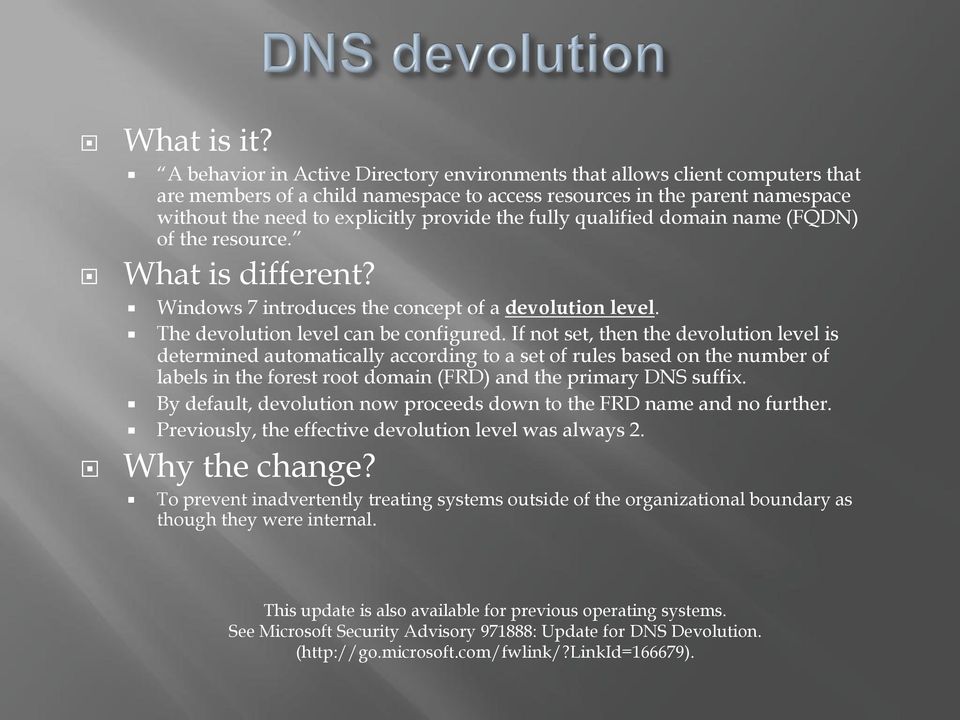
3 What is it? A behavior in Active Directory environments that allows client computers that are members of a child namespace to access resources in the parent namespace without the need to explicitly provide the fully qualified domain name (FQDN) of the resource. What is different? Windows 7 introduces the concept of a devolution level. The devolution level can be configured. If not set, then the devolution level is determined automatically according to a set of rules based on the number of labels in the forest root domain (FRD) and the primary DNS suffix. By default, devolution now proceeds down to the FRD name and no further. Previously, the effective devolution level was always 2. Why the change? To prevent inadvertently treating systems outside of the organizational boundary as though they were internal. This update is also available for previous operating systems. See Microsoft Security Advisory : Update for DNS Devolution. (
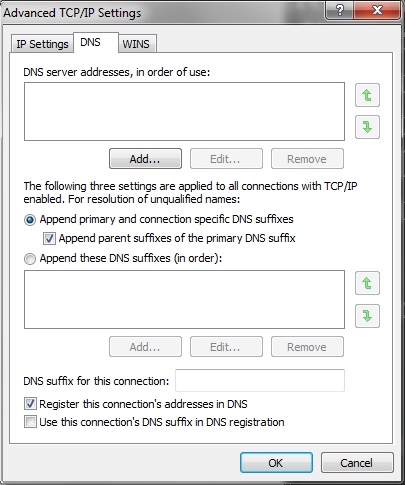
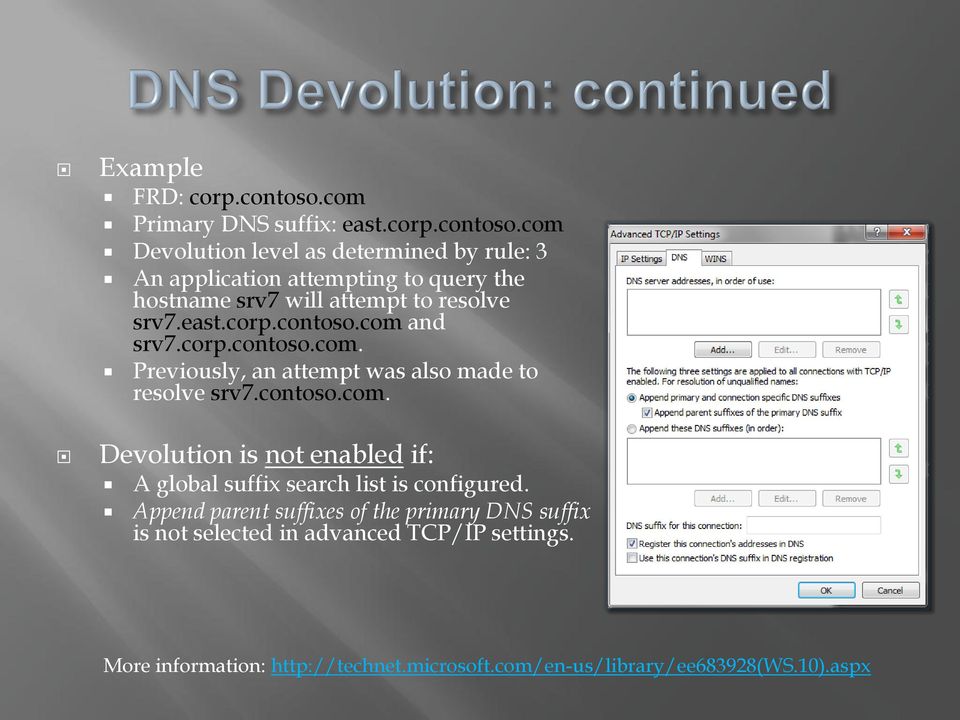
4 Example FRD: corp.contoso.com Primary DNS suffix: east.corp.contoso.com Devolution level as determined by rule: 3 An application attempting to query the hostname srv7 will attempt to resolve srv7.east.corp.contoso.com and srv7.corp.contoso.com. Previously, an attempt was also made to resolve srv7.contoso.com. Devolution is not enabled if: A global suffix search list is configured. Append parent suffixes of the primary DNS suffix is not selected in advanced TCP/IP settings. More information:
5 The Windows 7 DNS client is a Non-validating security-aware stub resolver. Non-validating: The client will not validate on its own that DNS responses have not been modified in transit. The non-validating DNS client relies on a DNS server to perform DNS security extensions (DNSSEC) signature validation. Security-aware: The client is capable of establishing a secured channel to a security-aware name server. The security-aware client will expect the DNS server to indicate results of the DNSSEC validation when returning the response. This is done by setting the Authenticated Data (AD) bit in the response. If the DNS server fails to validate successfully (as indicated by the AD bit not being set in the response), the DNS client can reject the response. Stub resolver: The client does not perform recursion itself but rather relies on the DNS server to perform recursion as defined in RFC1034, section


6 Query Local Recursive DNS Recursive query Authoritative DNS Authentic Response Cache Authentic Response Spoofed Responses Spoofed Responses DNS does not inherently provide security Attacker


7 DNS query Validation requested IPsec Authentic, validated Response DNSSEC validation Local Recursive DNS Trust anchor Cache Recursive DNS query Authentic Response DNSKEY Authoritative DNS A Windows Server 2008 R2 DNS server deployed as a forwarder or a recursive DNS server retrieves DNSKEY resource records required to perform DNSSEC validation if it receives a query for information in a zone for which it has a configured trust anchor. Spoofed responses to queries for DNSSEC protected zones will fail validation because they cannot provide the correct DNSKEY RRs. The Windows 7 DNS client can be configured to fail queries that are not successfully validated using a new feature in Windows Server 2008 R2 called the Name Resolution Policy Table (NRPT). For more information, see Understanding DNSSEC in Windows (

8 DirectAccess is a new feature in Windows 7 and Windows Server 2008 R2 that enables users to access corporate resources anytime they have an internet connection, without the need to establish a VPN connection. Internet DirectAccess server intranet DirectAccess uses a new feature in Windows Server 2008 R2 called the Name Resolution Policy Table (NRPT) to define DNS policy settings so that you can separate Internet traffic from intranet traffic. NRPT rules define DNS client behavior for specific namespaces. You can specify policy settings for a certain DNS suffix, prefix, FQDN, or IPv4 and IPv6 subnet.

9 Computer Configuration \Policies\Windows Settings\Name Resolution Policy Workgroup clients can obtain settings from Local Group Policy. **Do not use Local Group Policy Editor as this is currently bugged. Group Policy: HKLM\SOFTWARE\Policies\Microsoft\Windows NT\DNSClient\DnsPolicyConfig Local Group Policy: HKEY_LOCAL_MACHINE\SYSTEM\CurrentControlSet\services\Dnscache\Parameters\DnsPolicyConfig View policy settings Netsh namespace show policy Netsh namespace show effectivepolicy Netsh dns show state

10 Namespace (required) Suffix, prefix, FQDN, subnet Certification authority (optional) Used with IPsec Enable DNSSEC or Enable DirectAccess (required) Require validation (optional) Use IPsec (optional) Encryption type: none, low, medium, high


11 DNS servers (optional) Conditional forwarding Web proxy(optional) For HTTP traffic Use IPsec (optional) Encryption type: none, low, medium, high

12 Advanced global policy settings are not applied to DNSSEC rules Network Location Dependency Always and never use DA settings in the NRPT are mostly for debugging purposes Query Failure When you fail a query on a public network and fall back, there is a risk of being redirected. Query Resolution

13 The Windows 7 DNS client includes an update to DNS devolution. Earlier operating systems can install this update Windows 7 is a security-aware, non-validating DNS client. DNSSEC and DirectAccess are two new features available with Windows Server 2008 R2. The Windows 7 client operating system is required The Name Resolution Policy Table is used to configure settings for DNS resolution when you deploy DNSSEC or DirectAccess.

14

Module 11. Configuring Domain Name System. Contents: Lesson 1: Install and Configure DNS in an AD DS Domain 11-3. Lab A: Install the DNS Service 11-11
 Configuring Domain Name System 11-1 Module 11 Configuring Domain Name System Contents: Lesson 1: Install and Configure DNS in an AD DS Domain 11-3 Lab A: Install the DNS Service 11-11 Lesson 2: Integration
With a little bit of IPv6 magic: Windows 7 DirectAccess
 With a little bit of IPv6 magic: Windows 7 DirectAccess Click to edit Master subtitle style Thomas Treml Technologieberater Microsoft Deutschland GmbH [email protected] Networking and Access Landscape
Joe Davies. Principal Writer Windows Server Information Experience. Presented at: Seattle Windows Networking User Group June 1, 2011
 Joe Davies Principal Writer Windows Server Information Experience Presented at: Seattle Windows Networking User Group June 1, 2011 2011 Microsoft Corporation IPv6 addressing and DNS review IPv6 subnetting
1. Introduction to DirectAccess. 2. Technical Introduction. 3. Technical Details within Demo. 4. Summary
 1. Introduction to DirectAccess 2. Technical Introduction 3. Technical Details within Demo 4. Summary Section 2: Technical Introduction Solution Overview Compliant Client Compliant Client Internet
DirectAccess in Windows 7 and Windows Server 2008 R2. Aydin Aslaner Senior Support Escalation Engineer Microsoft MEA Networking Team
 DirectAccess in Windows 7 and Windows Server 2008 R2 Aydin Aslaner Senior Support Escalation Engineer Microsoft MEA Networking Team 0 Introduction to DirectAccess Increasingly, people envision a world
Configuring Windows Server 2008 Network Infrastructure
 Configuring Windows Server 2008 Network Infrastructure Course Number: 70-642 Certification Exam This course is preparation for the Microsoft Technical Specialist (TS) exam, Exam 70-642: TS: Windows Server
Networking Domain Name System
 IBM i Networking Domain Name System Version 7.2 IBM i Networking Domain Name System Version 7.2 Note Before using this information and the product it supports, read the information in Notices on page
VNLINFOTECH JOIN US & MAKE YOUR FUTURE BRIGHT. mcsa (70-413) Microsoft certified system administrator. (designing & implementing server infrasturcure)
 VNLINFOTECH JOIN US & MAKE YOUR FUTURE BRIGHT mcsa (70-413) Microsoft certified system administrator (designing & implementing server infrasturcure) www.vnlinfotech.com MODULE 1 : Considerations for Upgrades
Internal Server Names and IP Address Requirements for SSL:
 Internal Server Names and IP Address Requirements for SSL: Guidance on the Deprecation of Internal Server Names and Reserved IP Addresses provided by the CA/Browser Forum June 2012, Version 1.0 Introduction
The secret life of a DNS query. Igor Sviridov <[email protected]> 20120522
 The secret life of a DNS query Igor Sviridov 20120522 Preface Nowadays, when we type URL (or is it a search string? ;-) into a browser (or mobile device) many things happen. While most of
Designing and Implementing a Server Infrastructure
 Course 20413C: Designing and Implementing a Server Infrastructure Course Details Course Outline Module 1: Planning Server Upgrade and Migration This module explains how to plan a server upgrade and migration
Step-by-Step Guide for Setting Up IPv6 in a Test Lab
 Step-by-Step Guide for Setting Up IPv6 in a Test Lab Microsoft Corporation Published: July, 2006 Author: Microsoft Corporation Abstract This guide describes how to configure Internet Protocol version 6
This module explains how to configure and troubleshoot DNS, including DNS replication and caching.
 Module 1: Configuring and Troubleshooting Domain Name System This module explains how to configure and troubleshoot DNS, including DNS replication and caching. Configuring the DNS Server Role Configuring
IT SYSTEMS ADMINISTRATOR PROGRAM
 NH204-1011 Installing, Configuring & Administrating 136 Total Hours Windows Server 2012 COURSE TITLE: Installing, Configuring & Administrating Windows Server 2012 COURSE OVERVIEW: After completing this
Load Balancing Microsoft 2012 DirectAccess. Deployment Guide
 Load Balancing Microsoft 2012 DirectAccess Deployment Guide rev. 1.0.5 Copyright 2002 2015 Loadbalancer.org, Inc. Table of Contents About this Guide...4 Appliances Supported...4 Microsoft Windows Versions
Administering Windows Server 2012
 Administering Windows Server 2012 Course Summary Configuring and Troubleshooting Domain Name System Maintaining Active Directory Domain Services Managing User and Service Accounts Implementing a Group
Implementing Domain Name Service (DNS)
 Implementing Domain Name Service (DNS) H C A 1 P T E R ITINERARY Objective 1.01 Objective 1.02 Objective 1.03 Install and Configure DNS for Active Directory Integrate Active Directory DNS Zones with Existing
Step By Step Guide: Demonstrate DirectAccess in a Test Lab
 Step By Step Guide: Demonstrate DirectAccess in a Test Lab Microsoft Corporation Published: May 2009 Updated: October 2009 Abstract DirectAccess is a new feature in the Windows 7 and Windows Server 2008
Planning and Maintaining a Microsoft Windows Server Network Infrastructure
 Unit 27: Planning and Maintaining a Microsoft Windows Server Network Infrastructure Learning outcomes A candidate following a programme of learning leading to this unit will be able to: Configure security
Administering Windows Server 2012
 20411D - Version: 1 25 June 2016 Administering Windows Server 2012 Administering Windows Server 2012 20411D - Version: 1 5 days Course Description: Get hands-on instruction and practice administering Windows
Implementing, Managing, and Maintaining a Microsoft Windows Server 2003 Network Infrastructure
 Question Number (ID) : 1 (jaamsp_mngnwi-025) Lisa would like to configure five of her 15 Web servers, which are running Microsoft Windows Server 2003, Web Edition, to always receive specific IP addresses
COURSE 20413C: DESIGNING AND IMPLEMENTING A SERVER INFRASTRUCTURE
 ABOUT THIS COURSE This 5 day course covers the knowledge and skills needed to provide an enterprise solution that supports manual and automated server installations in a physical and virtual environment
Designing and Implementing a Server Infrastructure
 Course Code: M20413 Vendor: Microsoft Course Overview Duration: 5 RRP: 2,025 Designing and Implementing a Server Infrastructure Overview Get hands-on instruction and practice planning, designing and deploying
Configuring and Troubleshooting a Windows Server 2008 Network Infrastructure (6421B)
 Configuring and Troubleshooting a Windows Server 2008 Network Infrastructure (6421B) Overview This five-day instructor-led course provides students with the knowledge and skills to configure and troubleshoot
Designing and Implementing a Server Infrastructure
 Page 1 of 7 Overview This 5-day instructor-led course provides you with the skills and knowledge needed to plan, design, and deploy a physical and logical Windows Server 2012 Active Directory Domain Services
Designing and Implementing a Server Infrastructure 20413C; 5 days, Instructor-led
 Designing and Implementing a Server Infrastructure 20413C; 5 days, Instructor-led Course Description Get hands-on instruction and practice planning, designing and deploying a physical and logical Windows
Part 5 DNS Security. SAST01 An Introduction to Information Security 2015-09-21. Martin Hell Department of Electrical and Information Technology
 SAST01 An Introduction to Information Security Part 5 DNS Security Martin Hell Department of Electrical and Information Technology How DNS works Amplification attacks Cache poisoning attacks DNSSEC 1 2
Administering Windows Server 2012
 Course 20411C Administering Windows Server 2012 Course Length: 5 days Overview Get hands-on instruction and practice administering Windows Server 2012, including Windows Server 2012 R2, in this 5-day Microsoft
Course 20413: Designing and Implementing a Server Infrastructure
 Course 20413: Designing and Implementing a Server Infrastructure Overview About this course Get hands-on instruction and practice planning, designing and deploying a physical and logical Windows Server
Windows 2008 Server. Domain Name System Administración SSII
 Windows 2008 Server Domain Name System Administración SSII Contenidos Introducción Configuración DNS Transferencia de zona Herramientas DNS Introducción Domain Name System is a hierarchical distributed
Use Domain Name System and IP Version 6
 Use Domain Name System and IP Version 6 What You Will Learn The introduction of IP Version 6 (IPv6) into an enterprise environment requires some changes both in the provisioned Domain Name System (DNS)
Desingning and Implementing a Server Infrastructure
 About this Course Desingning and Implementing a Server Get hands-on instruction and practice planning, designing and deploying a physical and logical Windows Server 2012 R2 enterprise infrastructure in
MOC 20413C: Designing and Implementing a Server Infrastructure
 MOC 20413C: Designing and Implementing a Server Infrastructure Course Overview This course provides students with the knowledge and skills to provide an enterprise solution that supports manual and automated
MS 6421 Configuring and Troubleshooting a Windows Server 2008 Infrastructure
 MS 6421 Configuring and Troubleshooting a Windows Server 2008 Infrastructure Description: Days: 5 Prerequisites: This five-day instructor-led course provides students with the knowledge and skills to configure
How to Install the Active Directory Domain Services (AD DS) Role in Windows Server 2008 R2 and Promote a Server to a Domain Controller
 How to Install the Active Directory Domain Services (AD DS) Role in Windows Server 2008 R2 and Promote a Server to a Domain Controller I am not responsible for your actions or their outcomes, in any way,
411-Administering Windows Server 2012
 411-Administering Windows Server 2012 Course Duration: 5 Days Module 1: Configuring and Troubleshooting Domain Name System This module explains how to configure and troubleshoot DNS, including DNS replication
AV-006: Installing, Administering and Configuring Windows Server 2012
 AV-006: Installing, Administering and Configuring Windows Server 2012 Career Details Duration 105 hours Prerequisites This course requires that student meet the following prerequisites, including that
Windows Server. Introduction to Windows Server 2008 and Windows Server 2008 R2
 Copyright 2006-2013 MilliByte SS Windows Server DƏRS Introduction to Windows Server 2008 and Windows Server 2008 R2 Functionality of Windows Server 2008 Windows Server 2008 Editions 1 Microsoft Hyper-V
Introduction to Active Directory Services
 Introduction to Active Directory Services Tom Brett A DIRECTORY SERVICE A directory service allow businesses to define manage, access and secure network resources including files, printers, people and
This is a distance learning course.
 ITMC 2075 Course Syllabus 1. Name of Course: Windows Server 2008 Network Infrastructure, Configuring 2. Number of Clock Hours: 48 3. Course Description: This course provides students with the knowledge
Administering Windows Server 2012
 www.etidaho.com (208) 327-0768 Course 20411D: Administering Windows Server 2012 5 Days About this Course Get hands on instruction and practice administering Windows Server 2012, including Windows Server
70-642 R4: Configuring Windows Server 2008 Network Infrastructure
 70-642 R4: Configuring Windows Server 2008 Network Infrastructure Course Introduction Chapter 01 - Understanding and Configuring IP Lesson: Introducing the OSI Model Understanding the Network Layers OSI
Training Name Installing and Configuring Windows Server 2012
 Training Name Installing and Configuring Windows Server 2012 Exam Code 70 410 At Course Completion After completing this course, students will be able to: Install and configure Windows Server 2012. Describe
Fundamentals of Windows Server 2008 Network and Applications Infrastructure
 Fundamentals of Windows Server 2008 Network and Applications Infrastructure MOC6420 About this Course This five-day instructor-led course introduces students to network and applications infrastructure
Administering Windows Server 2012
 Course 20411D: Administering Windows Server 2012 Course Details Course Outline Module 1: Configuring and Troubleshooting Domain Name System This module explains how to configure and troubleshoot DNS, including
Administering Windows Server 2012
 Course 20411C: Administering Windows Server 2012 Page 1 of 8 Administering Windows Server 2012 Course 20411C: 4 days; Instructor-Led Introduction Get hands-on instruction and practice administering Windows
COURSE OUTLINE MOC 20413: DESIGNING AND IMPLEMENTING A SERVER INFRASTRUCTURE
 COURSE OUTLINE MOC 20413: DESIGNING AND IMPLEMENTING A SERVER INFRASTRUCTURE MODULE 1: PLANNING SERVER UPGRADE AND MIGRATION This module explains how to plan a server upgrade and migration strategy. Considerations
You can specify IPv4 and IPv6 addresses while performing various tasks in this feature. The resource
 The feature enables the configuration of a Virtual Private Network (VPN) routing and forwarding instance (VRF) table so that the domain name system (DNS) can forward queries to name servers using the VRF
Designing and Implementing a Server Infrastructure MOC 20413
 Designing and Implementing a Server Infrastructure MOC 20413 Course Outline Module 1: Planning a Server Upgrade and Migration This module explains how to plan a server upgrade and migration strategy. Upgrade
Exam : 070-642 Title : TS: Windows Server 2008 Network Infrastructure, Configuring Ver : 08-13-2008
 Exam : 070-642 Title : TS: Windows Server 2008 Network Infrastructure, Configuring Ver : 08-13-2008 QUESTION 1: Certkiller.com has an IPv6 network which has 25 segments. As an administrator, you deploy
COURSE 20411D: ADMINISTERING WINDOWS SERVER 2012
 ABOUT THIS COURSE Get hands-on instruction and practice administering Windows Server 2012, including Windows Server 2012 R2, in this five-day Microsoft Official course. This course is part two in a series
Administering Windows Server 2012
 Course Code: M20411 Vendor: Microsoft Course Overview Duration: 5 RRP: 2,025 Administering Windows Server 2012 Overview Get hands-on instruction and practice administering Windows Server 2012, including
MS 20687 Configuring Windows 8.1
 P a g e 1 of 12 MS 20687 Configuring Windows 8.1 About this Course Get expert instruction and hands-on practice administering and configuring Windows 8.1 in this 5-day Microsoft Official Course. This course
Designing and Implementing a Server Infrastructure
 WINDOWS 2012 COURSE OUTLINE Visit Our Website to Enroll Now Www.ITBigBang.Com/IT-Training Designing and Implementing a Server Infrastructure Course Title Designing and Implementing a Server Infrastructure
Module 2. Configuring and Troubleshooting DNS. Contents:
 Configuring and Troubleshooting DNS 2-1 Module 2 Configuring and Troubleshooting DNS Contents: Lesson 1: Installing the DNS Server Role 2-3 Lesson 2: Configuring the DNS Server Role 2-9 Lesson 3: Configuring
Administering Windows Server 2012
 WINDOWS 2012 COURSE OUTLINE Visit Our Website to Enroll Now Www.ITBigBang.Com/IT-Training Administering Windows Server 2012 Course Title Administering Windows Server 2012 Course Code 20411D Days / Duration
Designing and Implementing a Server Infrastructure
 Course 20413C: Designing and Implementing a Server Infrastructure Page 1 of 7 Designing and Implementing a Server Infrastructure Course 20413: 4 days; Instructor-Led Introduction This 4-day instructor-led
Configuring, Managing and Maintaining Windows Server 2008-based Servers
 Course 6419B: Configuring, Managing and Maintaining Windows Server 2008-based Servers OVERVIEW About this Course This five-day instructor-led course provides students with the knowledge and skills that
SKV PROPOSAL TO CLT FOR ACTIVE DIRECTORY AND DNS IMPLEMENTATION
 SKV PROPOSAL TO CLT FOR ACTIVE DIRECTORY AND DNS IMPLEMENTATION Date: April 22,2013 Prepared by: Sainath K.E.V Microsoft Most Valuable Professional Introduction: SKV Consulting is a Premier Consulting
Course 6419B: Configuring, Managing and Maintaining Windows Server 2008-based Servers
 Course 6419B: Configuring, Managing and Maintaining Windows Server 2008-based Servers Length: Delivery Method: 5 Days Instructor-led (classroom) About this Course This five-day instructor-led course provides
Administering Windows Server 2012
 Course 20411D: Administering Windows Server 2012 Page 1 of 8 Administering Windows Server 2012 Course 20411D: 4 days; Instructor-Led Introduction Get hands-on instruction and practice administering Windows
Networking Domain Name System
 System i Networking Domain Name System Version 5 Release 4 System i Networking Domain Name System Version 5 Release 4 Note Before using this information and the product it supports, read the information
Designing and Implementing a Server Infrastructure
 MS20413 Length: 5 days Designing and Implementing a Server Infrastructure This 5-day instructor-led course provides you with the skills and knowledge needed to plan, design, and deploy a physical and logical
MS 6419 Configuring, Managing and Maintaining Windows Server 2008-based Servers
 MS 6419 Configuring, Managing and Maintaining Windows Server 2008-based Servers Description: Days: 5 Prerequisites: This five-day instructor-led course provides students with the knowledge and skills that
DNS: How it works. DNS: How it works (more or less ) DNS: How it Works. Technical Seminars Spring 2010 1. Paul Semple psemple@rm.
 DNS: How it works Paul Semple [email protected] DNS: How it works (more or less ) Paul Semple [email protected] 1 Objectives What DNS is and why we need it DNS on Windows Server networks / Community Connect
Lesson Plans Managing a Windows 2003 Network Infrastructure
 Lesson Plans Managing a Windows 2003 Network Infrastructure (Exam 70-291) Table of Contents Course Overview... 2 Section 0.1: Introduction... 3 Section 1.1: Client Configuration... 4 Section 1.2: IP Addressing...
"Charting the Course... MOC 20411 D Administering Windows Server 2012. Course Summary
 Course Summary Description Get hands-on instruction and practice administering Windows Server 2012, including Windows Server 2012 R2, in this five-day Microsoft Official Course. This course is part two
NE-20411D Administering Windows Server 2012
 NE-20411D Administering Windows Server 2012 Summary Duration Vendor Audience 5 Days Microsoft IT Professionals Published Level Technology 13 May 2014 200 Windows Server 2012 Delivery Method Instructor-led
MS 20688 Managing and Maintaining Windows 8
 P a g e 1 of 9 MS 20688 Managing and Maintaining Windows 8 About this Course In this course, students learn how to plan and implement the installation, management, and maintenance of Windows 8. Course
Designing a Windows Server 2008 Network Infrastructure
 Designing a Windows Server 2008 Network Infrastructure MOC6435 About this Course This five-day course will provide students with an understanding of how to design a Windows Server 2008 Network Infrastructure
70-685: Enterprise Desktop Support Technician
 70-685: Enterprise Desktop Support Technician Course Introduction Course Introduction Chapter 01 - Identifying Cause and Resolving Desktop Application Issues Identifying Cause and Resolving Desktop Application
The Domain Name System
 The Domain Name System Antonio Carzaniga Faculty of Informatics University of Lugano October 9, 2012 2005 2007 Antonio Carzaniga 1 IP addresses and host names Outline DNS architecture DNS process DNS requests/replies
6421B: How to Install and Configure DirectAccess
 Demonstration Overview Introduction In preparation for this demonstration, the following computers have been configured: NYC-DC1 is an Active Directory Domain Services (AD DS) domain controller and DNS
DNS Cache Poisoning Vulnerability Explanation and Remedies Viareggio, Italy October 2008
 DNS Cache Poisoning Vulnerability Explanation and Remedies Viareggio, Italy October 2008 Kim Davies Internet Assigned Numbers Authority Internet Corporation for Assigned Names & Numbers Agenda How do you
What s in Installing and Configuring Windows Server 2012 (70-410):
 Brewster New York 10509 What s in Installing and Configuring Windows Server 2012 (70-410): The course provides skills and knowledge necessary to implement a core Windows Server 2012 infrastructure in an
Lesson Plans Configuring Windows Server 2008 Network Infrastructure
 Lesson Plans Configuring Windows Server 2008 Network Infrastructure (Exam 70-642) Table of Contents Course Overview... 3 Section 0.1: Introduction... 5 Section 0.2: Server Management... 6 Section 0.3:
20413C: Designing and Implementing a Server Infrastructure
 20413C: Designing and Implementing a Server Course Details Course Code: Duration: Notes: 20413C 5 days This course syllabus should be used to determine whether the course is appropriate for the students,
5 Configuring a DNS Infrastructure
 5 Configuring a DNS Infrastructure Exam Objectives in this Chapter: Configure a DNS server. Configure DNS zone options. Configure DNS forwarding. Manage DNS zone settings. Manage DNS server options. Why
70-413: Designing and Implementing a Server Infrastructure
 70-413: Designing and Implementing a Server Infrastructure Course Overview This course covers everything you need to know about designing and implementing a server infrastructure. Students will learn about
NIIT Education and Training, Doha, Qatar - www.niitqatar.com Contact: +974-44551796/1798; 50656051
 413: Designing and Implementing a Server Infrastructure Duration: 40 Hours Overview About this Course Get hands-on instruction and practice planning, designing and deploying a physical and logical Windows
Creating the Conceptual Design by Gathering and Analyzing Business and Technical Requirements
 Creating the Conceptual Design by Gathering and Analyzing Business and Technical Requirements Analyze the impact of Active Directory on the existing technical environment. Analyze hardware and software
Windows 7, Enterprise Desktop Support Technician
 Windows 7, Enterprise Desktop Support Technician Course Number: 70-685 Certification Exam This course is preparation for the Microsoft Certified IT Professional (MCITP) Exam, Exam 70-685: Pro: Windows
Module 1: Overview of Network Infrastructure Design This module describes the key components of network infrastructure design.
 SSM6435 - Course 6435A: Designing a Windows Server 2008 Network Infrastructure Overview About this Course This five-day course will provide students with an understanding of how to design a Windows Server
MS6419B: Configuring, Managing and Maintaining Windows Server 2008-Based Servers
 40 HORAS INTRODUCTION This five-day instructor-led course provides students with the knowledge and skills that are required to manage accounts and resources, maintain server resources, monitor server performance,
Windows 7, Enterprise Desktop Support Technician
 Course 50331D: Windows 7, Enterprise Desktop Support Technician Page 1 of 11 Windows 7, Enterprise Desktop Support Technician Course 50331D: 4 days; Instructor-Led Introduction This four-day instructor-ledcourse
Network System Management. Creating an Active Directory Domain
 Network System Management Creating an Active Directory Domain Objectives Identify the procedures involved in the promotion of a stand-alone Windows Server to an active directory services (ADS) domain controller