
Citrix XenDesktop 7.1 on Microsoft Hyper-V Server 2012 R2 on Cisco UCS C- Series Hardware. Deployment Guide
|
|
|
- Merilyn Taylor
- 10 years ago
- Views:
Transcription

1 Citrix XenDesktop 7.1 on Microsoft Hyper-V Server 2012 R2 on Cisco UCS C- Series Hardware Deployment Guide Citrix Validated Solutions July 10 th 2014 Prepared by: APAC Solutions

2 TABLE OF CONTENTS Section 1: Solution Overview... 3 Project Overview... 4 Reference Architecture... 4 Scope... 4 Supporting Documentation... 4 Architecture Overview... 5 Citrix Virtual Desktop Types... 5 Citrix Validated Solution Overview... 6 Section 2: Deployment Framework... 8 Work Breakdown Schedule... 9 Establishing the Baseline Architecture Scale out by adding a Node Assumptions General Requirements Global DNS Servers Networking and IP Addressing Service Accounts and Groups Citrix and Microsoft Software Section 3: ESTABLISHING THE BASELINE ARCHITECTURE Deployment Hardware Rack & Stack Network Ports and ToR Switching Hypervisor Deployment Local Storage and Windows Storage Spaces Microsoft SCVMM Deployment Guest Virtual Machine Deployment Supporting Infrastructure Deployment Citrix Environment Deployment Section 4: Scaling out Scaling Out by a Single Node Hardware Rack & Stack Hypervisor Deployment Integration of new Hyper-V Node

3 Section 5: APPENDICES Appendix A. Server Inventory HSD Servers (Support up to 1,000 User Desktop Sessions) HVD Servers (Support up to 1,000 Virtual Desktop Sessions) Appendix B. XenDesktop Policies CVS Test Environment Policy Settings Appendix C. Cisco C240 M3 SFF Server BIOS Settings Processor Memory Appendix D. References Citrix Cisco Revision History

4 Section 1: SOLUTION OVERVIEW 3

5 Project Overview Reference Architecture In order to facilitate rapid and successful deployment of the Citrix XenDesktop FlexCast models, Citrix Consulting APAC have built and tested a solution using the components described in this document. The Citrix Validated Solution ( CVS ) provides prescriptive guidance for these components including design, configuration and deployment settings thereby allowing customers to quickly deploy a desktop virtualization solution using Citrix XenDesktop. Validation was performed by extensive testing using Login VSI to simulate real-world workloads and determine optimal configuration for the integration of components that make up the overall solution. Scope This Deployment Guide document is created as part of a Citrix Validated Solution and is intended to describe the high level activities and configuration details required to build and deploy Citrix XenDesktop on the Cisco UCS C-series servers with Microsoft Hyper-V 2012 R2 using the CVS framework. This document is not intended to be a step-by-step deployment guide. It is assumed the readers of this document will be technically proficient and certified on the following key technologies: Citrix XenDesktop and associated technologies Microsoft Hyper-V 2012 R2 hypervisor and associated technologies Knowledge of application, desktop and server virtualization, virtual machine management and Windows server infrastructure Cisco UCS C-series hardware Cisco Nexus network switches Supporting Documentation Refer to the following documentation for more details: Low Cost CVS on Cisco C-Series Solution Design v1.1.docx Citrix XenDesktop Product edocs 4
6 Architecture Overview This Citrix Validated Solution and its components was designed, built and validated to support two distinct Citrix virtual desktop types. The architecture for each desktop type is described to support up to 1,000 and beyond user desktop sessions: Hosted Shared Desktops. Shared user sessions running XenDesktop Hosted Shared Desktops on Windows Server 2008 R2 Remote Desktop Session Hosts or Hosted Virtual Desktops. Individual user sessions running XenDesktop Hosted Virtual Desktops on Windows 7 Enterprise x64. Each of these desktop types is described in the Citrix FlexCast model operating as virtual machine instances on Microsoft Hyper-V Server 2012 R2. This architecture is a single, self-supporting modular component identified as a Pod, described to support up to 1,000 users sessions allowing customers to consistently build and deploy scalable environments. Additional pods may be deployed thus scaling out the proposed architecture beyond 1,000 seats. Citrix Virtual Desktop Types This Citrix Validated Solution document references Citrix Hosted Shared Desktops and Citrix Hosted Virtual Desktops. Both types of virtual desktops are discussed below for reference. For more information, refer to Citrix FlexCast delivery methods Hosted Shared Desktop (HSD). A Windows Remote Desktop Session (RDS) Host using Citrix XenDesktop to deliver Hosted Shared Desktops in a locked down, streamlined and standardised manner with a core set of applications. Using a published desktop on to the Remote Desktop Session Host, users are presented a desktop interface similar to a Windows 7 look and feel. Each user runs in a separate session on the RDS server. Hosted Virtual Desktop (HVD) aka Hosted VDI. A Windows 7 desktop instance running as a virtual machine where a single user connects to the machine remotely. Consider this as a 1:1 relationship of one user to one desktop. There are differing types of the hosted virtual desktop model (existing, installed, pooled, dedicated and streamed). This document exclusively refers to the pooled type of HVD. This document will discuss for the delivery of non-persistent or state-less desktop types - Hosted Shared Desktops and Hosted Virtual Desktops (pooled desktops). 5

7 Citrix Validated Solution Overview The Illustration below depicts the layers of the Citrix XenDesktop Hosted Shared Desktop technology stack utilised in the solution. Figure 1. Citrix Validated Solution Stack depicting HSD Workloads The Illustration below depicts the layers of the Citrix XenDesktop Hosted Virtual Desktop technology stack utilised in the solution. Figure 2. Citrix Validated Solution Stack depicting HVD Workloads 6

8 Citrix XenDesktop. Two virtualised Desktop Delivery Controller servers will be deployed to support the XenDesktop Site. A single XenDesktop Site will be utilised to manage the initial desktop pod. Virtual Desktops. This solution will focus on the delivery of the two discrete virtual desktops types: o o Hosted Virtual Desktops (HVD). Describing the delivery of 1,000 Pooled Windows 7 virtual desktops powered by Citrix XenDesktop 7.1. Hosted Shared Desktops (HSD). Describing the delivery of 1,000 Shared virtual desktop based on Microsoft Windows Server 2008 R2 Remote Desktop Session host workloads powered by Citrix XenDesktop 7.1. Microsoft Hyper-V Server 2012 R2 (Hyper-V). The hypervisor selected to host the virtualised desktop and server instances for this solution is Microsoft Hyper-V Server 2012 R2. Hyper-V will be deployed onto the Cisco C240 M3 SFF servers utilising local storage. Virtual Desktop Provisioning. This document describes the use of Citrix Machine Creation Services ( MCS ) for the provisioning of HSD and HVD guest workloads using a predefined master image containing the optimised operating system and Tier-1 application set. Applications. Tier-2 1 applications which may include line of business or customer specific applications that are not embedded as part of the master disk image may be delivered using Citrix XenDesktop RDS workloads or Microsoft App-V 2. Citrix StoreFront. Virtualised StoreFront servers will be deployed to provide application and desktop resource enumeration. Citrix Performance Management. Citrix Director and Citrix EdgeSight will provide monitoring capabilities into the virtual desktops and user sessions. Cisco Nexus Switches. As per the test environment, a pair of Cisco Nexus 3048TP 1GbE Top of Rack (ToR) switches have been used. The Customer can opt to leverage their existing 1GbE network switch infrastructure to minimise hardware acquisition cost. Supporting Infrastructure. The following components are assumed to exist within the customer environment and are required infrastructure components: o o o o o Microsoft Active Directory Domain Services. A suitable Microsoft SQL database platform to support the solution database requirements. Licensing servers to provide Microsoft licenses are assumed to exist. CIFS SMB File sharing is required to support User profile data. This can be provisioned as part of the solution using Windows 2012 R2 File Services. DHCP Services with sufficient IP addresses to support the proposed virtual desktop workloads. This can be provisioned as part of the solution using the Windows Server 2012 R2 DHCP Role. This deployment document will focus on the desktop virtualisation components which include the desktop workload, desktop delivery mechanism, hypervisor, hardware, network and storage platforms. 1 The solution design for Tier-2 applications delivered by Citrix XenDesktop or Citrix XenApp is out of scope for this document. 2 The solution design of Microsoft App-V components is out of scope for this document. 7

9 Section 2: DEPLOYMENT FRAMEWORK 8


10 Work Breakdown Schedule The Illustration below depicts the two distinct phases of deploying this Citrix Validated Solution. Establishing the Baseline Architecture refers to the tasks and activities required to establish a working Citrix XenDesktop environment. This will see the deployment of the required hardware and key infrastructure server components which will allow the solution to scale-out. Scale out by adding a Node refers to the tasks and activities required to incrementally scale-out the solution by adding a server node to increase the capacity. This document defines the sequence of steps required to scale out by a single server node however the same steps can be leveraged if deploying multiple server nodes at a time. Figure 3. Deployment Framework 9

11 Establishing the Baseline Architecture The table below defines the sequence of activities to establish the baseline XenDesktop architecture as per the CVS framework. Phase Design Uplift Description Project Kick-off Analysis and requirements gathering Design document uplift/update using CVS Solution Design template Table 1: Design Uplift Phase Hardware Rack and Stack (2 x Physical Nodes) Description Racking of physical servers Network cabling (assumes integration into existing 1GbE switching fabric) Power and cabling (assumes integration into existing rack/pdu system) Server console and cabling Firmware upgrade of server nodes Microsoft Hyper-V 2012 R2 Server Core Deployment (2 x Physical Nodes) Deploy and configure Hyper-V 2012 R2 Server Core as per CVS Solution Design Configure NIC Teaming on Hyper-V 2012 R2 Server as per CVS Solution Design Configure local storage with Storage Spaces and Tiering as per CVS Solution Design Deploy Windows Server 2012 R2 Base Images, Syspreped and convert to VM image template Deploy SQL Server 2012 Standard Node 1 (Guest VM) 3 Deploy SQL Server 2012 Standard Node 2 (Guest VM) 4 Deploy SCVMM 2012 R2 Management Server (Guest VM) Using the VM template, deploy the Infrastructure Server Guest VMs Citrix Environment Build Deploy and configure Citrix StoreFront/Web Interface Node 1 (Guest VM) Deploy and configure Citrix StoreFront/Web Interface Node 2 (Guest VM) Configure network/server load balancing of Citrix StoreFront/Web Interface servers (DNS Round Robin) Deploy and configure licensing services for Citrix and Microsoft services, i.e. Microsoft RDS and Citrix XenDesktop Deploy and configure Desktop Controller Node 1 (Guest VM) 3 If SQL Server Deployment is In Scope, otherwise assume existing SQL Server environment exists. 4 If SQL Server Deployment is In Scope, otherwise assume existing SQL Server environment exists. 10

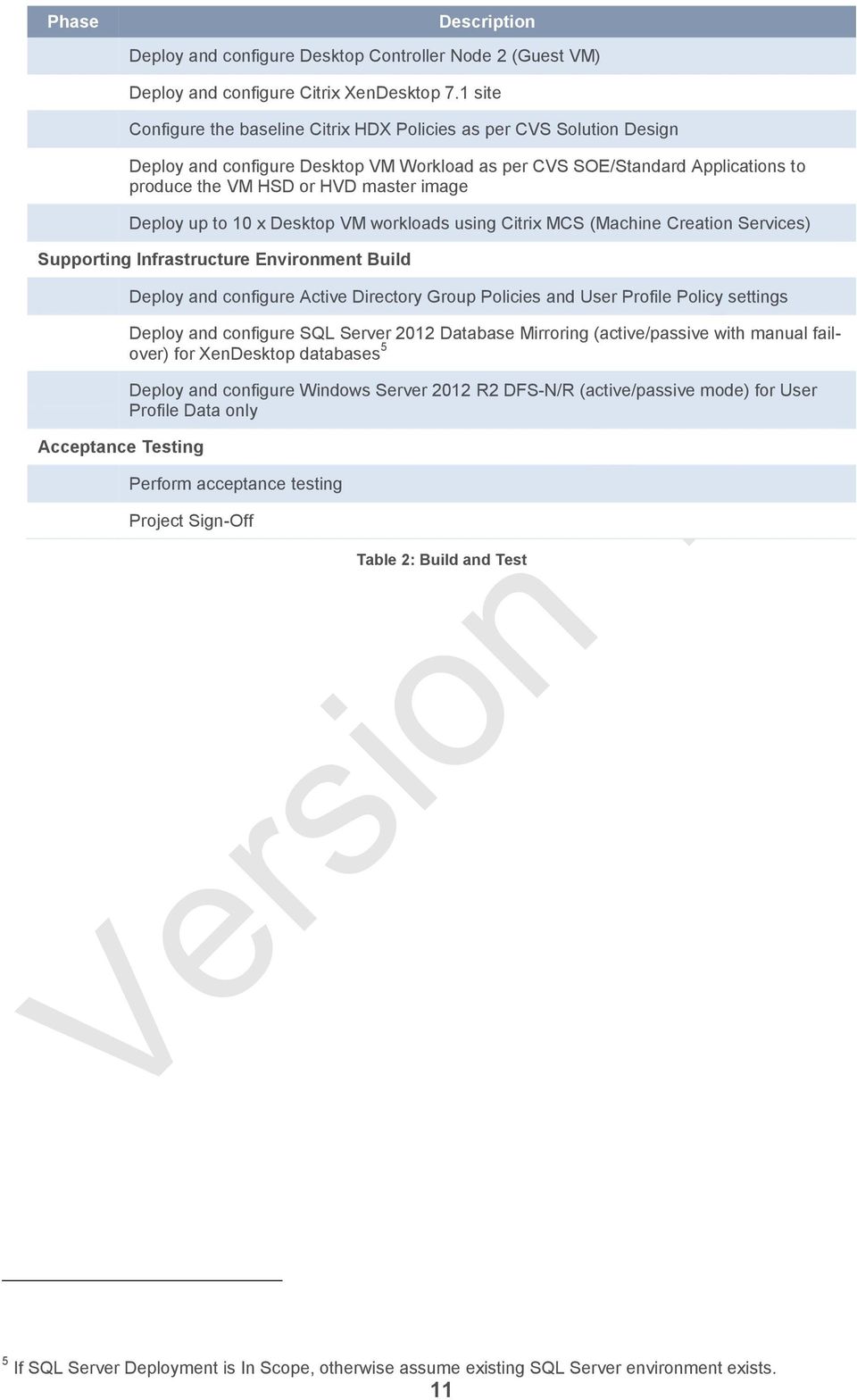
12 Phase Description Deploy and configure Desktop Controller Node 2 (Guest VM) Deploy and configure Citrix XenDesktop 7.1 site Configure the baseline Citrix HDX Policies as per CVS Solution Design Deploy and configure Desktop VM Workload as per CVS SOE/Standard Applications to produce the VM HSD or HVD master image Deploy up to 10 x Desktop VM workloads using Citrix MCS (Machine Creation Services) Supporting Infrastructure Environment Build Acceptance Testing Deploy and configure Active Directory Group Policies and User Profile Policy settings Deploy and configure SQL Server 2012 Database Mirroring (active/passive with manual failover) for XenDesktop databases 5 Deploy and configure Windows Server 2012 R2 DFS-N/R (active/passive mode) for User Profile Data only Perform acceptance testing Project Sign-Off Table 2: Build and Test 5 If SQL Server Deployment is In Scope, otherwise assume existing SQL Server environment exists. 11
13 Scale out by adding a Node The table below defines the sequence of activities required to scale out the existing XenDesktop environment by adding a server node. Phase Design Uplift Description Design documentation update - uplift/update using CVS Solution Design template Table 3: Scale Out Design Uplift Phase Hardware Rack and Stack (additional node/s) Description Racking of physical server/s Network cabling (assumes integration into existing 1GbE switching fabric) Power and cabling (assumes integration into existing rack/pdu system) Server console and cabling Firmware upgrade of server nodes Microsoft Hyper-V 2012 R2 Server Core Deployment (additional node/s) Deploy and configure Hyper-V 2012 R2 Server Core Configure NIC Teaming on Hyper V 2012 R2 Server as per CVS Solution Design Configure local storage with Storage Spaces and Tiering as per CVS Solution Design Add new Hyper-V 2012 R2 node/s into existing SCVMM 2012 R2 Management Server Citrix Environment Build Acceptance Testing Deploy up to 10 x Desktop VM workloads using Citrix MCS (Machine Creation Services) using existing master image Perform acceptance testing Project Sign-Off Table 4: Scale Out Build and Test 12

14 Assumptions Customer will have hardware, rack and network ready and available. Any delays will require scope adjustment/addendum. Customer will have physical and network access to the deployment kit and site. Any delays will require scope adjustment/addendum. Customer will have access to Citrix and Microsoft software and licences. Assumes a Microsoft Key Management Server (KMS) exists within the customer environment. Customers will need to provide certificates for the Citrix StoreFront Servers using an existing internal CA or Public certificate. Delivery of root or intermediate certificates to client devices is out of scope. CVS Partners will be highly skilled and certified on Citrix, Microsoft and Cisco technologies The CVS platform will provide a BASELINE XenDesktop platform on which the customer together with the professional services partner can build/deploy additional value-add services and capabilities. The CVS platform will provide a BASELINE configuration of Citrix Profile Management. Deployment of SQL Server and SQL DB Mirroring for Citrix XenDesktop database(s) and MS SCVMM database. SQL deployed in Active/Passive setup with manual fail-over 6. Load balancing of the two Citrix StoreFront/Web Integrate Servers using DNS Round Robin. Work effort assumes a single datacenter deployment. Deployment of 10 x desktop workloads leveraging the built HVD or HSD master image using Citrix MCS. The intent is to show the customer the process, allowing them to deploy the rest of the desktops. BASELINE SOE for Hosted Virtual Desktop SOE only. Application integration is out of scope BASELINE SOE for Hosted Shared Desktop SOE only. Application integration is out of scope. Deliver BASELINE Active Directory polices and Group Policy Objects specific to XenDesktop with optimisations as per CVS testing. Custom policies are out of scope. Citrix Receiver Client will be deployed by the customer using existing software distribution software or other automated tools. Work effort assumes the deployment of a single master image, either HSD or HVD only. Assumes the HSD virtual machine specifications are as per what's defined in the CVS Solution Design. Assumes the HVD virtual machine specifications are as per what's defined in the CVS Solution Design. Assumes the latest version of Citrix receiver or what's been tested as part of CVS will be deployed. 6 If SQL Server Deployment is In Scope, otherwise assume existing SQL Server environment exists. 13

15 General Requirements Global DNS Servers DNS Server IP Address Description DNS Server 1 DNS Server 2 IP Address IP Address Global DNS server to be used throughout the environment Global DNS server to be used throughout the environment Networking and IP Addressing Hyper-V Host(s) Table 5: Global DNS Servers Host Name CIMC IP Mgmt IP Live-M IP <Host Name> IP Address: IP Address: IP Address: Subnet Mask: Subnet Mask: Subnet Mask: Vlan ID Vlan ID: Vlan ID: Hype-V Host 1 ID D-Gateway: Switch port: Trunk Port or ID D-Gateway: Switch port: Native vlan ID D-Gateway: N/A Switch port: Trunk Port Access Port <Host Name> IP Address: IP Address: IP Address: Subnet Mask: Subnet Mask: Subnet Mask: Hype-V Host n Vlan ID ID D-Gateway: Switch port: Trunk Port or Vlan ID: ID D-Gateway: Switch port: Native vlan Vlan ID: ID D-Gateway: N/A Switch port: Trunk Port Access Port Table 6: Hyper-V Host IP Addressing, vlan requirements 14

16 Guest Virtual Machines Host Name Vlan ID IP Address Default Gateway SQL Server 1 <Host Name> ID SQL Server 2 <Host Name> ID SCVMM <Host Name> ID File Server 1 <Host Name> ID File Server 2 <Host Name> ID License Server <Host Name> ID Desktop Delivery Controller 1 Desktop Delivery Controller 2 <Host Name> ID <Host Name> ID StoreFront Server 1 <Host Name> ID StoreFront Server 2 <Host Name> ID Table 7: Guest Virtual Machine IP Addressing, vlan requirements HSD Virtual Machines Host Name Vlan ID IP Address Default Gateway HSD Guest VM 1- n e.g. HSD-01-HSD-34 ID DHCP DHCP Table 8: HSD Guest Virtual Machine IP Addressing, vlan requirements HVD Virtual Machines Host Name Vlan ID IP Address Default Gateway HVD Guest VM 1- n e.g. HVD-0001-HVD-1000 ID DHCP DHCP Table 9: HVD Guest Virtual Machine IP Addressing, vlan requirements HSD DHCP Scope (1,000 Desktops) # Address IP Address Range Default Gateway HSD VMs ~40 Addresses Example: Minimum Subnet Mask: (62 hosts per network) Start: End: Table 10: HSD DHCP Scope information, vlan requirements 15

17 HVD DHCP Scopes (1,000 Desktops) # Address IP Address Range Default Gateway Range 1:(500 Addresses) HVD VMs ~1,000 Addresses Example: Subnet Mask: (510 hosts per network) Start: End: Range 2:(500 Addresses) Start: End: Table 11: HVD DHCP Scope information, vlan requirements Service Accounts and Groups Service Accounts Account Description Name (Example Only) Permissions/ACL SCVMM Service Account SCVMM Run as Account Optionally used for XenDesktop host connection to VMM server Role Groups svc.scvmm svc.scvmm-runas Table 12: Service Accounts Member of: Group: VMM-Full-Admins Member of: Group: VMM-Full-Admins Group Role Description Name (Example Only) Permissions/ACL XenDesktop Administrators XenDesktop-Site-Admins XenDesktop Site Administrators XenDesktop Server Administrators System Center & Hyper-V Administrators Other Nomenclature Description SCVMM Database Name XenDesktop Databases XenDesktop-Server-Admins VMM-Full-Admins Table 13: Role Groups Name (Example Only) Prod-VMM-db-name Prod-Site-db-name Prod-Config-db-name Prod-Monitoring-db-name XenDesktop Site Administrators Local Administrator: XenDesktop Controllers Local Administrator: Hyper-V Hosts SCVMM Determine naming convention for databases (e.g. Production preproduction test etc) Determine naming convention for databases (e.g. Production preproduction test etc) 16

18 Description Name (Example Only) XenDesktop Site Name XD-Site-01 Determine appropriate name XenDesktop Catalog Names XenDesktop Delivery Group(s) Names AD GPO Naming AD Organisational Unit Naming StoreFront Server URL (DNS Alias) Hyper-V01-HSD-MCS-01 Name: Win7-MCS-Pooled- CallCenter-01 Display Name: Call Center Desktop Determine corporate naming standard Determine corporate naming standard Determine naming for certificate subject name for StoreFront servers Determine appropriate name: Recommend: (Example only) Catalog Naming <hyperv_vhostname>-<desktop Type> + <Deployment Type>-<Ordinal Number> For a Catalog delivering Hosted Shared Desktops on Hyper_V host Hyper-V01 using MCS: Hyper-V01-HSD-MCS-01 Determine appropriate name and Display name. (what end users see) Required if only for documentation purposes Required if only for documentation purposes URL will be visible to end users and must match the certificate subject name CIMC Host name Host-CIMC-001 DNS A Record Table 14: Other Nomenclature 17

19 Citrix and Microsoft Software Microsoft Software Item Microsoft Hyper-V Server 2012 R2 Microsoft System Center 2012 R2 Virtual Machine Manager Windows Assessment and Deployment Kit for Windows 8.1 Microsoft Windows Server 2012 R2 Standard Microsoft SQL Server Standard 2012 (64-bit) Microsoft Windows Server 2008 R2 (SP1) Standard Microsoft Windows 7 Enterprise (SP1) (64-bit) Microsoft Office Professional 2010 (SP2) Microsoft SQL Server 2008 R2 Management Objects Microsoft SQL CLR Types (x64) Microsoft System Center 2012 R2 Virtual Machine Manager (Console only) Type 1 Hypervisor: SCVMM: SCVMM: Description / Target All Physical Servers Virtual Machine Management Prerequisite Software All Guest Virtual machine servers as defined in the scope of this document: Various Roles and Features required Database platform Hosted Shared Desktop, RDS workloads Hosted Virtual Desktop, workloads All Desktop workloads (HSD and HVD) XenDesktop Delivery Controllers XenDesktop Delivery Controllers XenDesktop Delivery Controllers Management Server Citrix Software Table 15: Microsoft Software Inventory Item Citrix XenDesktop 7.1 Citrix XenDesktop 7.1 (Private Patch for MCS) LA5693-SCVMM-Fix Citrix StoreFront 2.5 Citrix Virtual Delivery Agent 71. Citrix Receiver 14.1 Citrix Profile Management ( ) Description / Target XenDesktop Delivery Controllers XenDesktop Delivery Controllers StoreFront servers (Access controllers) All Desktop workloads (HSD and HVD) All Desktop workloads (HSD and HVD) Installed as part of the Delivery Agent All Desktop workloads (HSD and HVD) Table 16: Citrix Software Inventory 18

20 Section 3: ESTABLISHING THE BASELINE ARCHITECTURE 19

21 Deployment The high-level steps required to deploy the baseline architecture are described below: 1. Hardware Rack & Stack 2. Configure Network Ports and ToR switching 3. Update Firmware on the physical servers 4. Configure Cisco Hardware 5. Install Microsoft Hyper-V on the physical servers 6. Configure Hypervisor Storage (Windows Storage Spaces) 7. Deploy, configure and integrate Active Directory Organisational Units and Group Policy objects 8. Deploy and configure the Microsoft SCVMM environment (Assume this is the first Guest VM build and a suitable SQL environment already exists) 9. Create Virtual Machine templates for use within the environment 10. Deploy Windows File Services and DFS Solution 11. Deploy License Server/services (Microsoft and Citrix) 12. Deploy Citrix XenDesktop 13. Deploy Citrix StoreFront 14. Create Citrix MCS Master Images and deploy MCS Catalogs 20
22 Hardware Rack & Stack Rack Rack # Location Server 1 Rack # Location Server 2 Rack # Location Server n Power Power Supply Connection TBD during installation TBD during installation TBD during installation Table 17: Rack Information 2 x Power Cord, 250VAC 10A 3112 Plug (Australia) (2 x 650 W AC) per server Refer to the C-240 M3 SFF Server Specification sheet for further details Table 18: Power Connection Information 21
23 Network Ports and ToR Switching This section defines the network port requirements based on the number of Cisco C240 M3 servers that will be deployed. Existing 1GbE network switching infrastructure can be utilised to further minimise the integration and hardware acquisition costs associated with deploying this solution provided the following requirements are considered. Switch Requirements Requirements Minimum Recommendation Comments 1GbE NIC Ports 5 ports per Server Node Refer to the below Network Port Density Table for the scale out model VLAN Support 802.1Q tagging Capability to create VLANs Stacking or Redundant Capabilities Uplink to Core or Upstream Switching Yes Multi-Gigabit or 10GbE Uplink Switches should be redundant Sufficient upstream bandwidth to Core network Table 19: Network Requirements Network Port Densities Configuration Value Number of HSD/HVD Users # of HSD Users ,020 1,200 1,380 1,560 1,740 # of HVD Users ,100 1,250 1,400 Hardware Specifics # of Cisco C240 M3 Nodes # of 1GbE Ports (Hyper-V) # of 1GbE Ports (CIMC) Total # of 1GbE NIC Ports # of 48-port ToR Switches X Table 20: 1GbE Switch and NIC port requirements CIMC Access CIMC Access Browser Access Console Access: Press F8 to enter CIMC Configuration Utility Enter Management IP Address details Connect to Address> for each server Default Username: admin Default Password: password Table 21: CIMC Connection Information 22
24 Hypervisor Deployment Cisco C240 M3 BIOS and Hardware Configuration Review Hardware configuration BIOS Firmware Upgrade Create a RAID-1 Mirror for the Operating System Presenting the remaining Drives to the Operating System (Storage Spaces) Login to the CIMC and select <Server Tab\Inventory> Review the hardware present Login to the CIMC and select <Server tab\bios> Configure as per the Appendix: Review the BIOS and Firmware versions. To upgrade, download the appropriate host utilities kit from Cisco.com. Example: ucs-c240-huu-1.5.4b.iso From the CIMC launch the KVM Console and map the ISO as virtual media. The server will boot from the media (BIOS is set to boot from CD/DVD). From the host utilities kit review the on screen information in regards to the upgrade (look for warnings or errors). Select Upgrade All. At the end of the upgrade the CIMC will also reboot and the connection will drop for over a minute, this is expected. After the upgrade review the versions and the CIMC log Login to the CIMC and select <Storage\Controller Info> Select create Virtual Drive from unused Physical Drives Select the 2 x 300GB 10K drives and proceed to create the RAID-1 Mirror Select <Storage Tab\Virtual Drive Info> select the newly created virtual drive and select Set as boot drive Login to the CIMC and select <Storage\Controller Info> Select each drive individually and create a RAID-0 configuration naming each virtual drive as appropriate to the media type e.g.: SSD-01 SSD-02 HDD-01 HDD-02 Each of the drives will then be presented to the operating system as individual physical disks. These will be used with Storage Spaces Table 22: Example Hardware Configurations 23
25 Hyper V Installation Installation Driver installation Post Installation Login to the CIMC launch the KVM Console and connect to the server console: Map the Hyper-V Install media ISO as virtual media: Proceed to install Hyper-V Server 2012 R2. Select the RAID-1 Mirror previously created (300GB) as the system drive. Login to the CIMC launch the KVM Console and connect to the server console: Map the driver ISO (e.g. ucs-cxxx-drivers.1.5.4c.iso)as virtual media: From the server console navigate to the Chipset directory e.g.: F:\Windows\ChipSet\Intel\C240M3\W2K12R2 Execute the setup.exe and accept the defaults Reboot if prompted. Login to the CIMC launch the KVM Console and connect to the server console: Map the driver ISO (e.g. ucs-cxxx-drivers.1.5.4c.iso)as virtual media: Navigate to the Installer directory e.g.: F:\Windows\Installers\Cisco\12x5x\W2K12R2\x64 Execute the msi select custom and install the VIC Ethernet Only Reboot if prompted. Login to the CIMC launch the KVM Console and connect to the server console: The Network should now be available. Rename interfaces as appropriate e.g.: (if possible shutdown interfaces on the switches to verify correct switch port- adaptor connection details) Rename: Cisco 1GigE 1350 LOM to Mgmt-Interface-1 Cisco 1GigE 1350 LOM #2 to Mgmt-Interface-2 Cisco 1GigE 1350 LOM #3 to VMNet-Interface-1 Cisco 1GigE 1350 LOM #4 to VMNet-Interface-2 PowerShell to View Adapters Get-NetAdapter PowerShell command to rename the interfaces Rename-NetAdapter OldName -NewName NewName Create Network Teams Create two Lbfo Teams Example below describes the creation of a single Lbfo Team: Team Name: Team-VMNet (Team B) Team Members: VMNet-Interface-1 VMNet-Interface-2 Teaming Mode SwitchIndependent Load Balancing Mode HyperVPort Active Adapters (All) 24
26 PowerShell Example: New-NetLbfoTeam -Name Team1 -TeamMembers VMNet-Interface-1, VMNet-Interface-2 -TeamingMode SwitchIndependent -LoadBalancingAlgorithm HyperVPort Create the Secondary Interface on the management Team For Live Migration a secondary interface is required and will be created on the Team: Team-Mgmt (Team A) Add-NetLbfoTeamNic -Team Team-Mgmt VlanID 33 -Name Live-Migration-Vlan Assign IP Addressing information to the Teamed interfaces Windows Firewall Assign an appropriate IP Address to the management and Live Migration interfaces using the Server Core console e.g. from a command prompt execute: sconfig.cmd Select the appropriate options to configure IP Addressing Example Exceptions for Windows Firewall PowerShell Example: Allow Ping (IPv4): Set-NetFirewallRule DisplayName File and Printer Sharing (Echo Request - ICMPv4-In) -Enabled True Set-NetFirewallRule DisplayName File and Printer Sharing (Echo Request - ICMPv4-Out) -Enabled True Allow Remote Computer Management: Set-NetFirewallRule DisplayGroup "Remote Event Log Management" -Profile Domain -Enabled True Set-NetFirewallRule DisplayGroup "Remote Volume Management" -Profile Domain -Enabled True Remote Administration Create a Hyper-V Switch Enabled Create a single virtual switch specifying the Team: Team-VMNet (Team B) PowerShell Example: New-VMSwitch -Name VM-Switch -NetAdapterName "Team-VMNet" -AllowManagementOS:$false Table 23: Example Hyper-V Installation, post Installation Configurations 25

27 Local Storage and Windows Storage Spaces Creating the Storage Pool Create the Storage Pool 4 Disks make up the storage pool: 2 x SSD (identify by size if media not detected) 2 x HDD (identify by size if media not detected) PowerShell Examples: View available disks that can be pooled: Get-PhysicalDisk CanPool $true Output should be similar to: Create the Storage Pool: $SSytem = Get-StorageSubSystem New-StoragePool -StorageSubSystemId $SSytem.UniqueId -FriendlyName Pool1 -PhysicalDisks (Get- PhysicalDisk -CanPool $true) Output should be similar to: Configure the Media Types for the Storage Pool The Media Types should be 2 x SSD 2 x HDD PowerShell Examples: Changing the Media Types on the physical Disk objects: Set-PhysicalDisk FriendlyName PhysicalDisk5 MediaType HDD Set-PhysicalDisk FriendlyName PhysicalDisk7 MediaType SSD Once Completed the output should be similar to: Get-PhysicalDisk FT MediaType -AutoSize Unspecified in the above dialog refers to other drives in the system not used for Storage Spaces e.g. Operating System Disk(s) Table 24: Example Storage Pool Configuration 26

28 Creating the Storage Space Tiers Create Storage Tiers Define the two Storage Tiers to be used when creating the storage space PowerShell Examples: Define the Storage Tiers: Get-StoragePool Pool1 New-StorageTier FriendlyName SSDTier MediaType SSD Get-StoragePool Pool1 New-StorageTier FriendlyName SSDTier MediaType HDD $SSD = Get-StorageTier -FriendlyName SSDTier $HDD = Get-StorageTier -FriendlyName HDDTier Table 25: Example Storage Tier Configuration Creating the Storage Space (vdisk) Create Storage Space Define the Actual virtual disk (storage space) PowerShell Examples: Creating the virtual Disk: Get-StoragePool Pool1 New-VirtualDisk -FriendlyName vdisk1 -ResiliencySettingName Mirror - StorageTiers $SSD, $HDD -StorageTierSizes 270GB, 277GB WriteCacheSize 5GB Once Completed the output should be similar to (Note disk sizes will be different): Alternatively to specifying the virtual disk size use the switch UseMaximumSize Creating the Volume (D:\) Table 26: Example Storage Space Configuration Create Storage Volume Create the logical Volume seen by the operating system Disconnect all virtual media within the KVM and reboot the server to ensure the new volume is initiated with the correct disk number and avoid errors or misconfigurations. PowerShell Examples: Creating the virtual Volume: Get-VirtualDisk vdisk1 Get-Disk Set-Disk -IsReadOnly 0 Get-VirtualDisk vdisk1 Get-Disk Set-Disk -IsOffline 0 Get-VirtualDisk vdisk1 Get-Disk Initialize-Disk -PartitionStyle GPT Get-VirtualDisk vdisk1 Get-Disk New-Partition -DriveLetter D -UseMaximumSize Initialize-Volume -DriveLetter D -FileSystem NTFS -Confirm:$false Create the root path to store virtual machines: MD D:\VMs Table 27: Example Volume Configuration 27
29 Microsoft SCVMM Deployment The following steps must be completed from a management workstation with the appropriate Hyper-V Tools available, this is a temporary requirement until the environment has been established and specific management servers are designated. SCVMM Database Ensure the appropriate database server is available and sufficient rights are available to create the database before or during the installation of SCVMM SCVMM Server Create Virtual Machine Install SCVMM Prerequisite Software Install SCVMM Create a new Server 2012 R2 Standard virtual machine: 2 vcpu 8GB RAM C:\100GB D:\150GB Install Windows Server 2012 R2 Standard edition and configure to customers base server Managed Operating Environment (MOE) Run Sysprep on this virtual machine Make a copy of the virtual machine hard disk file (C:\.vhdx). This copied.vhdx file can be used later to create the base template for virtual machines once the SCVMM environment has been established Configure Network components and Join this virtual machine to the domain and place in the appropriate OU Microsoft.NET Framework 4.5 Windows Assessment and Deployment Kit (WADK) for Windows Server 2012 R2 Ensure database is pre-created or sufficient access to create the database is provided. Specify the non-default Library location D: Table 28: SCVMM installation steps 28

30 Configure SCVMM (Minimal Requirement) Define the run-asaccount Create Logical Networks Create VM Networks Add Hosts Settings\Security\Run As Accounts: e.g. CustomerDomain\scvmm-runasaccount Networking\Logical Networks: Define a logical network for each virtual machine vlan and specify the vlan ID VMs and Services\VM Networks: Define a VM Network for each virtual machine vlan and associate it with the appropriate logical network created in the above steps VMs and Services\All Hosts: Add each Hyper-V Host using the run as account previously specified For each host added define the following parameters: Example: Host Properties\Hardware\Network Adapters\Microsoft Network Adaptor Multiplexor Driver ## (Team-VMNet)\Logical Network: Check the available network previously created: Placement Paths: D:\VMs Table 29: SCVMM Configuration steps 29
31 Guest Virtual Machine Deployment Windows Server 2012 R2 Standard VM Create Virtual Machine Template Within SCVMM create a new virtual machine Windows Server 2012 R2 Standard with the following specifications: 2 vcpu 4GB RAM C:\100GB Single vnic (Server Infrastructure vlan) Install Windows Server 2012 R2 Standard edition and configure to customers base server Managed Operating Environment (MOE): Within SCVMM create a template for this virtual machine (Sysprep). Deploy virtual machines from this template as required to create the infrastructure virtual machines. e.g. StoreFront, File servers. Table 30: SCVMM Template Creation for Windows Server 2012 R2 Standard Windows 7 Enterprise VM (MCS Master Image) Create Virtual Machine Template Within SCVMM create a new virtual machine 64-bit edition of Windows 7 with the following specifications: 2 vcpu GB Dynamic RAM C:\100GB Single vnic (HSD_vlan) Install Windows 7 x64 Enterprise and configure to customers base desktop Standard Operating Environment (SOE). Install tier-1 applications. Do not install the XenDesktop VDA software Within SCVMM create a template for this virtual machine (Sysprep). Deploy a single virtual machine from this template as required to create and define the MCS master image Install the XenDesktop VDA Software Create a Checkpoint of the master image for use with MCS Table 31: SCVMM Template Creation for Windows 7 Enterprise Windows 2008 R2 Standard VM (MCS Master Image) Create Virtual Machine Template 30 Within SCVMM create a new virtual machine 64-bit edition of Windows Server 2008 R2 with the following specifications: 8 vcpu 16GB RAM C:\100GB Single vnic (HVD_vlan) Install Windows Server 2008 R2 Standard and configure to customers base Server Standard Operating Environment (SOE).
32 Install tier-1 applications. Do not install the XenDesktop VDA software Within SCVMM create a template for this virtual machine (Sysprep). Deploy a single virtual machine from this template as required to create and define the MCS master image Install the XenDesktop VDA Software Create a Checkpoint of the master image for use with MCS Table 32: SCVMM Template Creation for Windows Server 2008 R2 Standard 31
33 Supporting Infrastructure Deployment Active Directory & Group Policy Integration The following tables represents the GPO settings used during validation testing and are provided for guidance purposes only. The settings within each GPO can be used to supplement existing customer based GPOs or serve as a starting point for creating a new GPO. The polices supplied are not intended to provide a complete configuration but only a guideline, in some cases, paths, group names etc that are utilised will not be relevant. In all cases it is anticipated that the customer will apply policy settings based on functional roles, delegated administration and other environment specific settings. Hypervisor and Management GPOs Hyper-V Machine Applied to all Hyper-V Hosts MachineGPO-HyperV -Server-Minimum Security Baseline-v1.0.htm SCVMM Machine Applied to SCVMM Servers MachineGPO-SCVMM -Server-Minimum Security Baseline-v1.0.htm HVD Machine GPOs Table 33: Hyper-V and SCVMM Machine GPO Examples HVD Machine Applied to all HVD Machines MachineGPO-VDI-Wi n7-mcs-1.3.htm HVD Machine Applied to all HVD Machines MachineGPO-VDI-Wi n7 Optimization-MCS-1.2.htm HVD User GPOs HVD User Table 34: HVD Machine GPO Examples Applied to all HVD Users (Loopback mode) UserGPO-VDI-User-1.0.htm Table 35: HVD User GPO Examples 32
34 HSD Machine GPOs HSD Machine Applied to all HSD Machines MachineGPO-XA-XD7 -HSD-MCS-v1.0.htm HSD Machine Applied to all HSD Machines MachineGPO-XA-XD7 -HSD-Optimisations-MCS-v2.htm HSD User GPOs HSD User Table 36: HSD Machine GPO Examples Applied to all HSD Users (Loopback mode) UserGPO-HSD-XD7-U ser-1.0.htm Table 37: HSD User GPO Examples 33
35 SQL 2012 Server Deployment Deploy SQL Server VM(s) Using the template previously created deploy the following virtual machine: 2 x SQL Servers: 4 vcpu 8GB RAM C:\100GB D:\100GB (Databases) Single vnic (Server Infrastructure vlan) Additional Deployment Tasks Configure network address details Join the virtual machine(s) to the Domain Logical place the virtual machines in the appropriate OU Update and patch to current corporate standard Apply any corporate Security polices/patches Table 38: SQL Server VM specifications/steps SCVMM Database XenDesktop Database Microsoft SCVMM: Please refer to the following article for further details: XenDesktop: Create and configure the XenDesktop database as described in this document: Please refer to the following article for further details: Table 39: Database Configuration 34
36 Windows File Services and DFS Deployment Deploy File Server VM(s) Using the template previously created deploy the following virtual machines: 2 x File Servers: 2 vcpu 8GB RAM C:\100GB D:\500GB (Profile Data) Single vnic (Server Infrastructure vlan) Additional Deployment Tasks Configure network address details Join the virtual machine(s) to the Domain Logical place the virtual machines in the appropriate OU Update and patch to current corporate standard Apply any corporate Security polices/patches Install Server Roles The Following Role Services are required: File Server Data Deduplication DFS Namespaces DFS Replication Storage Services The following Roles and Features are required: DFS Management Share and storage Management Tool The following example describes the DFS Namespace configuration: Folder Targets: DFS Namespace Note: Replication is not enabled on the Target Folders: Note: Only a single Target is configured (Single Target shown): Table 40: File Server Configuration/Steps 35

37 The following example describe the configuration of the replicated folders: DFS Replication Note: DFS001 is currently configured as the primary in the example. Table 41: DFS Replication Configuration/Steps 36
38 Citrix Environment Deployment License Services Optional: Deploy to Desktop Controller to save on MS Licensing Deploy License Server VM Using the template previously created deploy the following virtual machine: 1 x License server : 2 vcpu 4GB RAM C:\100GB Single vnic (Server Infrastructure vlan) Additional Deployment Tasks Configure network address details Join the virtual machine(s) to the Domain Logical place the virtual machines in the appropriate OU Update and patch to current corporate standard Apply any corporate Security polices/patches XenDesktop Delivery Controllers Table 42: License Server Configuration/Steps Deploy Delivery Controller VMs Using the template previously created deploy the following virtual machines: 2 x Desktop Delivery Controllers: 4 vcpu 8GB RAM C:\100GB Single vnic (Server Infrastructure vlan) Additional Deployment Tasks Configure network address details Join the virtual machine(s) to the Domain Logical place the virtual machines in the appropriate OU Update and patch to current corporate standard Apply any corporate Security polices/patches Citrix Installation Create the XenDesktop Site SCVMM Console XenDesktop Databases Download and Install the XenDesktop media to both Desktop Delivery Controllers. Install MCS Private Patch for Hyper-V on each Desktop Delivery Controller. Applicable to XenDesktop 7.1 only LA5693-SCVMM-Fix (Private Patch for MCS) From a single Desktop Controller, create the XenDesktop Site: Specify the databases created in the database section Specify the License server Add the secondary Desktop Controller to the Site Install the SCVMM Console on to each Delivery Controller Once the XenDesktop Site is created open Desktop Studio and navigate to the Configuration item in the tree view: Note the Site Database should already be using the mirrored instance 37

39 previously created. For Logging and Monitoring change these databases to use the mirrored instances previously created. Create the XenDesktop Host Connection to the SCVMM server: Example: Create Host Connection Enter the details of the SCVMM server Enter the appropriate account to connect to SCVMM typically this is the Run as Account Within the Host connection create the following resources for each Hyper-V host: Create Resources Cluster: Hostname of the Hyper-V server Network: Check the box next to the appropriate vlans e.g. HVD_vlan_1 & HVD_vlan_2 Storage: Select the Hyper-V hosts local storage Table 43: XenDesktop Delivery Controllers Configuration/Steps Catalogs Create a Catalog for each Hyper-V host Note the Master image being deployed must reside on the hyper_v host where the Catalog is being created. Live Migration may be used when deploying the master image to each Hyper-V host. Example: Catalog Naming <hyperv_v-hostname>-<desktop Type> + <Deployment Type>-<Ordinal Number> For a Catalog delivering Hosted Shared Desktops on Hyper_V host Hyper-V01 using MCS: Hyper-V01-HSD-MCS-01 Create Delivery Groups Create the Delivery groups based on customer specific requirements. A single Delivery group can contain desktops from any or all of the Catalogs previously created. Table 44: XenDesktop Catalogs, Configuration/Steps StoreFront (Example base configuration only) Deploy StoreFront Server VMs Using the template previously created deploy the following virtual machines: 2 x StoreFront Servers: 2 vcpu 4GB RAM C:\100GB Single vnic (Server Infrastructure vlan) Additional Deployment Configure network address details 38
40 Tasks Join the virtual machine(s) to the Domain Logical place the virtual machines in the appropriate OU Update and patch to current corporate standard Apply any corporate Security polices/patches Server Certificate DNS Alias and Round Robin Configuration Server Groups Authentication Stores Install a Server certificate based on DNS Alias to each server: e.g. Create 2 DNS Aliases for each StoreFront server: e.g. mydesktops.customer.domain IP Address Storefront server 1 mydesktops.customer.domain IP Address Storefront server 2 Add both servers to the same Server Group User name password Specify both Delivery Controllers Table 45: StoreFront Server, Configuration/Steps Citrix Policies Please refer to the Appendix for further information on Citrix Policies 39
41 Section 4:SCALING OUT 40
42 Scaling Out by a Single Node Hardware Rack & Stack Rack Refer to the Section Hardware Rack & Stack Power Refer to the Section Hardware Rack & Stack Network Refer to the Section Hardware Rack & Stack Hypervisor Deployment Cisco C240 M3 BIOS and Hardware Configuration Refer to the Section Cisco C240 M3 SFF Server BIOS Settings Hyper V Installation Refer to the Section Hypervisor Deployment Storage & Windows Storage Spaces Refer to the Section Local Storage and Windows Storage Spaces Network Refer to the Section Network Ports and ToR Switching Integration of new Hyper-V Node Adding a node to the existing SCVMM Deployment Refer to the Section Configure SCVMM Adding a node to the existing XenDesktop Site Refer to the Section Delivery Controllers 41
43 Section 5:APPENDICES 42
44 Appendix A. Server Inventory HSD Servers (Support up to 1,000 User Desktop Sessions) Qty OS Server role Type CPU RAM Disk NIC Physical Servers (Hyper-V Hosts) 6 MS Hyper-V Server 2012 R2 Hyper-V Host (Infrastructure) Cisco C240 M3 SFF 2 x 10 - Core 128GB C:\300 GB D:\1,600 GB Onboard 4 port, 1GbE Guest Virtual Machines 2 Windows Server 2012 R2 Standard Citrix Desktop Delivery Controllers VM 4 vcpu 8GB 100GB 1 vnic 2 Windows Server 2012 R2 Standard Citrix StoreFront VM 2 vcpu 4GB 100GB 1 vnic 1 Windows Server 2012 R2 Standard Citrix License VM 2 vcpu 4GB 100GB 1 vnic 2 Windows Server 2012 R2 Standard Windows File Services and DHCP Services VM 2 vcpu 8GB C: \100GB D:\500GB 1 vnic 1 Windows Server 2012 R2 Standard Virtual Machine Manager VM 2 vcpu 8GB C:\100GB D:\150GB 1 vnic 34 Windows Server 2012 R2 Standard XenApp RDS VM 8 vcpu 16GB 100GB 1 vnic Assume customer will leverage existing SQL Server environment. Sample configuration. 2 Windows Server 2012 R2 Standard SQL Server 2012 Standard VM 2 vcpu 8GB C:\100GB D:\100GB 1 vnic Table 46: Server Inventory for HSD 43
45 HVD Servers (Support up to 1,000 Virtual Desktop Sessions) Qty OS Server role Type CPU RAM Disk NIC Physical Servers (Hyper-V Hosts) 8 MS Hyper-V Server 2012 R2 Hyper-V Host (Infrastructure) Cisco C240 M3 SFF 2 x 10 - Core 320GB C:\300 GB D:\1,600 GB Onboard 4 port, 1GbE Guest Virtual Machines 2 Windows Server 2012 R2 Standard Citrix Desktop Delivery Controller VM 4 vcpu 8GB 100GB 1 vnic 2 Windows Server 2012 R2 Standard Citrix StoreFront VM 2 vcpu 4GB 100GB 1 vnic 1 Windows Server 2012 R2 Standard Citrix License VM 2 vcpu 4GB 100GB 1 vnic 2 Windows Server 2012 R2 Standard Windows File Services and DHCP Services VM 2 vcpu 8GB C: \100GB D:\500GB 1 vnic 1 Windows Server 2012 R2 Standard Virtual Machine Manager VM 2 vcpu 8GB C:\100GB D:\150GB 1 vnic 1,00 0 Windows 7 Enterprise x64 SP1 Hosted Virtual Desktop VM 2 VCPU 2.5GB 100GB 1 vnic Assume customer will leverage existing SQL Server environment. Sample configuration. 2 Windows Server 2012 R2 Standard SQL Server 2012 Standard VM 2 vcpu 8GB C:\100GB D:\100GB 1 vnic Table 47: Server Inventory for HVD 44
46 Appendix B. XenDesktop Policies The Policies described below where used throughout validation testing and are provided for reference only. These must be reviewed for customer/environmental suitability: CVS Test Environment Policy Settings Policy Setting Configuration State / Value ICA\Audio quality Medium optimised for speech ICA\Auto connect client drives Disabled ICA\Auto-create client printers Do not Auto-create client printers ICA\Automatic installation of in-box printer drivers Disabled ICA\client driver redirection Prohibited ICA\client microphone redirection Prohibited ICA\Desktop wallpaper Prohibited ICA\Legacy graphics mode Enabled ICA\Menu animation Prohibited ICA\Multimedia conferencing Prohibited ICA\Target frame rate 10 fps ICA\View window content while dragging Prohibited Adobe Flash Delivery\Flash acceleration Disabled Table 48: XenDesktop Policies used for testing of the Citrix Validated Solution 45
47 Appendix C. Cisco C240 M3 SFF Server BIOS Settings The following table described the BIOS settings used throughout validation testing: Processor Setting Value BIOS (Boot Order) Configured Boot Order: CD/DVD HDD TPM Support Disabled Reboot Host immediately Disabled Hyper-Threading Enabled Number of Cores All Execute Disable Enabled Intel VT Enabled Intel VT-d Enabled Intel VT-d Coherency support Enabled Intel VT-d ATS support Enabled CPU Performance Enterprise Hardware Prefetcher Disabled Adjacent Cache Line Prefetcher Disabled DCU Streamer Prefetch Disabled DCU Streamer IP Prefetch Disabled Direct Cache Access Support Enabled Power Technology Custom Enhanced Intel Speedstep Technology Disabled Intel Turbo Boost Technology Disabled Processor Power state C6 Disabled processor Power state C1 Enhanced Disabled Frequency Floor Override Enabled P-STATE Coordination HW ALL Table 49: Cisco C240 M3 SFF Server BIOS Settings (Processor) 46
48 Memory Setting Value Select Memory RAS Maximum Performance DRAM Clock Throttling Performance NUMA Enabled Low Voltage DDR Mode Performance Mode Channel Interleaving Auto Rank Interleaving Auto DRAM Refresh Rate Auto Patrol Scrub Disabled Demand Scrub Disabled Altitude 300 M (Default) Table 50: Cisco C240 M3 SFF Server BIOS Settings (Memory) 47
49 Appendix D. References Citrix For more information on Citrix products and other collateral, refer to the below: Information Low Cost CVS on Cisco C- Series Solution Design Citrix Validated Solutions Citrix XenDesktop Product edocs XenDesktop Tech Info Citrix FlexCast Citrix XenApp and XenDesktop edocs Citrix Articles and Support URL link Low Cost CVS on Cisco C-Series Solution Design v Cisco For more information on Cisco products and other collateral, refer to the below: Information Cisco UCS C-Series Rack Servers - At-a-Glance Cisco UCS C240 M3 Rack Server Data Sheet Cisco UCS C240 M3 Server Installation and Service Guide URL link tall/c240/install.html 48
50 Revision History Revision Change Description Updated By Date 1.0 Document Created/Released APAC Solutions 10 th June Document Updated APAC Solutions 10 th July 2014 The copyright in this report and all other works of authorship and all developments made, conceived, created, discovered, invented or reduced to practice in the performance of work during this engagement are and shall remain the sole and absolute property of Citrix, subject to a worldwide, non-exclusive license to you for your internal distribution and use as intended hereunder. No license to Citrix products is granted herein. Citrix products must be licensed separately. Citrix warrants that the services have been performed in a professional and workman-like manner using generally accepted industry standards and practices. Your exclusive remedy for breach of this warranty shall be timely re-performance of the work by Citrix such that the warranty is met. THE WARRANTY ABOVE IS EXCLUSIVE AND IS IN LIEU OF ALL OTHER WARRANTIES, EXPRESS, IMPLIED, STATUTORY OR OTHERWISE WITH RESPECT TO THE SERVICES OR PRODUCTS PROVIDED UNDER THIS AGREEMENT, THE PERFORMANCE OF MATERIALS OR PROCESSES DEVELOPED OR PROVIDED UNDER THIS AGREEMENT, OR AS TO THE RESULTS WHICH MAY BE OBTAINED THEREFROM, AND ALL IMPLIED WARRANTIES OF MERCHANTIBILITY, FITNESS FOR A PARTICULAR PURPOSE, OR AGAINST INFRINGEMENT. Citrix liability to you with respect to any services rendered shall be limited to the amount actually paid by you. IN NO EVENT SHALL EITHER PARTY BY LIABLE TO THE OTHER PARTY HEREUNDER FOR ANY INCIDENTAL, CONSEQUENTIAL, INDIRECT OR PUNITIVE DAMAGES (INCLUDING BUT NOT LIMITED TO LOST PROFITS) REGARDLESS OF WHETHER SUCH LIABILITY IS BASED ON BREACH OF CONTRACT, TORT, OR STRICT LIABILITY. Disputes regarding this engagement shall be governed by the internal laws of the State of Florida. Level 3, 1 Julius Avenue North Ryde, Sydney Copyright 2013 Citrix Systems, Inc. All rights reserved. Citrix, the Citrix logo, Citrix ICA, Citrix XenDesktop, and other Citrix product names are trademarks of Citrix Systems, Inc. All other product names, company names, marks, logos, and symbols are trademarks of their respective owners. 49
Citrix XenDesktop 7.1 on Microsoft Hyper-V Server 2012 R2 on Cisco UCS C- Series Hardware. Solution Design
 Citrix XenDesktop 7.1 on Microsoft Hyper-V Server 2012 R2 on Cisco UCS C- Series Hardware Solution Design Citrix Validated Solutions July 10 th 2014 Prepared by: APAC Solutions TABLE OF CONTENTS Section
Citrix XenDesktop 7.1 on Microsoft Hyper-V Server 2012 R2 on Nutanix Virtual Computing Platform. Solution Design
 Citrix XenDesktop 7.1 on Microsoft Hyper-V Server 2012 R2 on Nutanix Virtual Computing Platform Solution Design Citrix Validated Solutions June 25 th 2014 Prepared by: Citrix APAC Solutions TABLE OF CONTENTS
Citrix XenDesktop 7.6 on Citrix XenServer 6.5 with FlexPod Express. Solution Design
 Citrix XenDesktop 7.6 on Citrix XenServer 6.5 with FlexPod Express Solution Design Citrix Validated Solutions March 25 th 2015 Prepared by: Citrix APAC Solutions TABLE OF CONTENTS Section 1: Executive
Citrix XenDesktop 7.5 on Microsoft Hyper-V Server 2012 R2 with FlexPod Express. Solution Design
 Citrix XenDesktop 7.5 on Microsoft Hyper-V Server 2012 R2 with FlexPod Express Solution Design Citrix Validated Solutions December 11 th 2014 Prepared by: Citrix APAC Solutions TABLE OF CONTENTS Section
XenApp 7.7 Deployment ISO. 5 th January 2016
 5 th January 2016 Document Details Document Name Author DG Version 1.0 Date 5th January 2016 Status Released Document History Date Modification Details 5/01/2016 N/A First Release Contents 1. Introduction...
Citrix XenDesktop 7.1 on Microsoft Hyper-V Server 2012 High-Level Design
 Citrix XenDesktop 7.1 on Microsoft Hyper-V Server 2012 High-Level Design Citrix Validated Solutions 17 th December 2013 Prepared by: Citrix Consulting Revision History Revision Change Description Updated
Parallels Remote Application Server. Parallels Remote Application Server on Nutanix Enterprise Cloud Platform Design VMware ESX & vcenter
 Parallels Remote Application Server Parallels Remote Application Server on Nutanix Enterprise Cloud Platform Design VMware ESX & vcenter Contents 01...Project Overview 02...Architecture Overview 02...Parallels
XenDesktop Implementation Guide
 Consulting Solutions WHITE PAPER Citrix XenDesktop XenDesktop Implementation Guide Pooled Desktops (Local and Remote) www.citrix.com Contents Contents... 2 Overview... 4 Initial Architecture... 5 Installation
App Orchestration Setup Checklist
 App Orchestration Setup Checklist This checklist is a convenient tool to help you plan and document your App Orchestration deployment. Use this checklist along with the Getting Started with Citrix App
Virtualizing your Datacenter
 Virtualizing your Datacenter with Windows Server 2012 R2 & System Center 2012 R2 Part 2 Hands-On Lab Step-by-Step Guide For the VMs the following credentials: Username: Contoso\Administrator Password:
Index C, D. Background Intelligent Transfer Service (BITS), 174, 191
 Index A Active Directory Restore Mode (DSRM), 12 Application profile, 293 Availability sets configure possible and preferred owners, 282 283 creation, 279 281 guest cluster, 279 physical cluster, 279 virtual
Citrix Desktop Virtualization Fast Track
 Citrix Desktop Virtualization Fast Track Description: Days: 5 Prerequisites: This fast-paced course provides the foundation necessary for students to effectively centralize and manage desktops and applications
Citrix XenDesktop Modular Reference Architecture Version 2.0. Prepared by: Worldwide Consulting Solutions
 Citrix XenDesktop Modular Reference Architecture Version 2.0 Prepared by: Worldwide Consulting Solutions TABLE OF CONTENTS Overview... 2 Conceptual Architecture... 3 Design Planning... 9 Design Examples...
App Orchestration 2.0
 App Orchestration 2.0 Integrated Provisioning Deployment Guide Prepared by: Nicholas Ceballos Commissioning Editor: Linda Belliveau Version: 6.0 Last Updated: December 12, 2013 Page 1 Contents Integrated
MULTIMEDIA REDIRECTION: EFFECT ON SERVER CAPACITY FOR CITRIX XENDESKTOP VIRTUAL DESKTOPS
 MULTIMEDIA REDIRECTION: EFFECT ON SERVER CAPACITY FOR CITRIX XENDESKTOP VIRTUAL DESKTOPS OUR FINDINGS Organizations considering deploying virtual desktops as part of a Virtual Desktop Infrastructure (VDI)
How to Test Out Backup & Replication 6.5 for Hyper-V
 How to Test Out Backup & Replication 6.5 for Hyper-V Mike Resseler May, 2013 2013 Veeam Software. All rights reserved. All trademarks are the property of their respective owners. No part of this publication
Cisco, Citrix, Microsoft, and NetApp Deliver Simplified High-Performance Infrastructure for Virtual Desktops
 Cisco, Citrix, Microsoft, and NetApp Deliver Simplified High-Performance Infrastructure for Virtual Desktops Greater Efficiency and Performance from the Industry Leaders Citrix XenDesktop with Microsoft
Quick Start Guide for VMware and Windows 7
 PROPALMS VDI Version 2.1 Quick Start Guide for VMware and Windows 7 Rev. 1.1 Published: JULY-2011 1999-2011 Propalms Ltd. All rights reserved. The information contained in this document represents the
Integration Guide: Using Unidesk 3.x with Citrix XenDesktop
 TECHNICAL WHITE PAPER Integration Guide: Using Unidesk 3.x with Citrix XenDesktop This document provides a high- level overview of the Unidesk product as well as design considerations for deploying Unidesk
Connection Broker Managing User Connections to Workstations, Blades, VDI, and More. Quick Start with Microsoft Hyper-V
 Connection Broker Managing User Connections to Workstations, Blades, VDI, and More Quick Start with Microsoft Hyper-V Version 8.1 October 21, 2015 Contacting Leostream Leostream Corporation http://www.leostream.com
CMB-207-1I Citrix XenApp and XenDesktop Fast Track
 1800 ULEARN (853 276) www.ddls.com.au CMB-207-1I Citrix XenApp and XenDesktop Fast Track Length 5 days Price $5995.00 (inc GST) This fast-paced course covers select content from training courses CXA-206
605: Design and implement a desktop virtualization solution based on a mock scenario. Hands-on Lab Exercise Guide
 605: Design and implement a desktop virtualization solution based on a mock scenario Hands-on Lab Exercise Guide Contents Overview... 2 Scenario... 5 Quick Design Phase...11 Lab Build Out...12 Implementing
Pivot3 Reference Architecture for VMware View Version 1.03
 Pivot3 Reference Architecture for VMware View Version 1.03 January 2012 Table of Contents Test and Document History... 2 Test Goals... 3 Reference Architecture Design... 4 Design Overview... 4 The Pivot3
Bosch Video Management System High Availability with Hyper-V
 Bosch Video Management System High Availability with Hyper-V en Technical Service Note Bosch Video Management System Table of contents en 3 Table of contents 1 Introduction 4 1.1 General Requirements
Citrix XenApp-7.6 Administration Training. Course
 Citrix XenApp-7.6 Administration Training Course Course Duration : 20 Working Days Class Duration : 3 hours per day Fast Track: - Course duration 10days (Per day 8 hours) Get Fee Details Module 1: Citrix
CMB-207-1I Citrix Desktop Virtualization Fast Track
 CMB-207-1I Citrix Desktop Virtualization Fast Track Description This fast-paced course provides the foundation necessary for students to effectively centralize and manage desktops and applications in the
CITRIX 1Y0-A14 EXAM QUESTIONS & ANSWERS
 CITRIX 1Y0-A14 EXAM QUESTIONS & ANSWERS Number: 1Y0-A14 Passing Score: 800 Time Limit: 90 min File Version: 42.2 http://www.gratisexam.com/ CITRIX 1Y0-A14 EXAM QUESTIONS & ANSWERS Exam Name: Implementing
StarWind Virtual SAN Installation and Configuration of Hyper-Converged 2 Nodes with Hyper-V Cluster
 #1 HyperConverged Appliance for SMB and ROBO StarWind Virtual SAN Installation and Configuration of Hyper-Converged 2 Nodes with MARCH 2015 TECHNICAL PAPER Trademarks StarWind, StarWind Software and the
Windows Server 2012 R2 Hyper-V: Designing for the Real World
 Windows Server 2012 R2 Hyper-V: Designing for the Real World Steve Evans @scevans www.loudsteve.com Nick Hawkins @nhawkins www.nickahawkins.com Is Hyper-V for real? Microsoft Fan Boys Reality VMware Hyper-V
VDI Without Compromise with SimpliVity OmniStack and Citrix XenDesktop
 VDI Without Compromise with SimpliVity OmniStack and Citrix XenDesktop Page 1 of 11 Introduction Virtual Desktop Infrastructure (VDI) provides customers with a more consistent end-user experience and excellent
CMB 207 1I Citrix XenApp and XenDesktop Fast Track
 CMB 207 1I Citrix XenApp and XenDesktop Fast Track This fast paced course provides the foundation necessary for students to effectively centralize and manage desktops and applications in the datacenter
Installing the Operating System or Hypervisor
 Installing the Operating System or Hypervisor If you purchased E-Series Server Option 1 (E-Series Server without preinstalled operating system or hypervisor), you must install an operating system or hypervisor.
Provisioning Server Service Template
 Provisioning Server Service Template Provisioning Server 7.1 Service Template Technology Preview for System Center - Virtual Machine Manager The Citrix Provisioning Server System Center - Virtual Machine
Citrix Training. Course: Citrix Training. Duration: 40 hours. Mode of Training: Classroom (Instructor-Led)
 Citrix Training Course: Citrix Training Duration: 40 hours Mode of Training: Classroom (Instructor-Led) Virtualization has redefined the way IT resources are consumed and services are delivered. It offers
Building a Virtual Desktop Infrastructure A recipe utilizing the Intel Modular Server and VMware View
 Building a Virtual Desktop Infrastructure A recipe utilizing the Intel Modular Server and VMware View December 4, 2009 Prepared by: David L. Endicott NeoTech Solutions, Inc. 2816 South Main St. Joplin,
Getting Started with ESXi Embedded
 ESXi 4.1 Embedded vcenter Server 4.1 This document supports the version of each product listed and supports all subsequent versions until the document is replaced by a new edition. To check for more recent
Citrix Lab Manager 3.6 SP 2 Quick Start Guide
 WHITE PAPER Citrix Essentials for Microsoft Hyper-V Citrix Lab Manager 3.6 SP 2 Quick Start Guide www.citrix.com Contents Document Summary... 3 Preparation... 3 Architectural Review of Lab Manager... 3
Tim Tharratt, Technical Design Lead Neil Burton, Citrix Consultant
 Tim Tharratt, Technical Design Lead Neil Burton, Citrix Consultant Replacement solution for aging heritage branch infrastructures (Co-op and Britannia) New unified app delivery platform for the bank to
Course: CXD-202 Implementing Citrix XenDesktop Administration
 Course: CXD-202 Implementing Citrix XenDesktop Administration Overview This course provides the foundation necessary for administrators to effectively centralize and manage desktops in the datacenter and
Cost Efficient VDI. XenDesktop 7 on Commodity Hardware
 Cost Efficient VDI XenDesktop 7 on Commodity Hardware 1 Introduction An increasing number of enterprises are looking towards desktop virtualization to help them respond to rising IT costs, security concerns,
Quick Start Guide for Parallels Virtuozzo
 PROPALMS VDI Version 2.1 Quick Start Guide for Parallels Virtuozzo Rev. 1.1 Published: JULY-2011 1999-2011 Propalms Ltd. All rights reserved. The information contained in this document represents the current
Core Protection for Virtual Machines 1
 Core Protection for Virtual Machines 1 Comprehensive Threat Protection for Virtual Environments. Installation Guide e Endpoint Security Trend Micro Incorporated reserves the right to make changes to this
VELOCITY. Quick Start Guide. Citrix XenServer Hypervisor. Server Mode (Single-Interface Deployment) Before You Begin SUMMARY OF TASKS
 If you re not using Citrix XenCenter 6.0, your screens may vary. VELOCITY REPLICATION ACCELERATOR Citrix XenServer Hypervisor Server Mode (Single-Interface Deployment) 2013 Silver Peak Systems, Inc. This
Installing the Cisco Nexus 1000V for Microsoft Hyper-V
 CHAPTER 1 Installing the Cisco Nexus 1000V for Microsoft Hyper-V This chapter includes the following sections: Prerequisites, page 1-2 System Requirements, page 1-2 VSM Ordering, page 1-3 Basic Topology,
Synchronizer Installation
 Synchronizer Installation Synchronizer Installation Synchronizer Installation This document provides instructions for installing Synchronizer. Synchronizer performs all the administrative tasks for XenClient
NETFORT LANGUARDIAN INSTALLING LANGUARDIAN ON MICROSOFT HYPER V
 NETFORT LANGUARDIAN INSTALLING LANGUARDIAN ON MICROSOFT HYPER V Instructions apply to installs on Windows Server 2012 R2 Before you begin When deployed in a Hyper V environment, LANGuardian will capture
Deploy XenApp 7.5 and 7.6 and XenDesktop 7.5 and 7.6 with Amazon VPC
 XenApp 7.5 and 7.6 and XenDesktop 7.5 and 7.6 Deploy XenApp 7.5 and 7.6 and XenDesktop 7.5 and 7.6 with Amazon VPC Prepared by: Peter Bats Commissioning Editor: Linda Belliveau Version: 5.0 Last Updated:
RSA Authentication Manager 8.1 Virtual Appliance Getting Started
 RSA Authentication Manager 8.1 Virtual Appliance Getting Started Thank you for purchasing RSA Authentication Manager 8.1, the world s leading two-factor authentication solution. This document provides
Part 1 - What s New in Hyper-V 2012 R2. [email protected] Datacenter Specialist
 Part 1 - What s New in Hyper-V 2012 R2 [email protected] Datacenter Specialist Microsoft Cloud OS Vision Public Cloud Azure Virtual Machines Windows Azure Pack 1 Consistent Platform Windows Azure
5.6 Microsoft Hyper-V 2008 R2 / SCVMM 2012. 5,000 Users. Contributing Technology Partners:
 5.6 Microsoft Hyper-V 28 R2 / SCVMM 212 5, Users Contributing Technology Partners: Table of Contents EXECUTIVE SUMMARY... 1 ABBREVIATIONS AND NAMING CONVENTIONS... 2 KEY COMPONENTS... 3 SOLUTIONS ARCHITECTURE...
StarWind Virtual SAN Hyper-Converged Platform Quick Start Guide
 Hardware-less VM Storage StarWind Virtual SAN Hyper-Converged Platform Quick Start Guide DATE: MAY 2015 TECHNICAL PAPER Trademarks StarWind, StarWind Software and the StarWind and the StarWind Software
Storage Sync for Hyper-V. Installation Guide for Microsoft Hyper-V
 Installation Guide for Microsoft Hyper-V Egnyte Inc. 1890 N. Shoreline Blvd. Mountain View, CA 94043, USA Phone: 877-7EGNYTE (877-734-6983) www.egnyte.com 2013 by Egnyte Inc. All rights reserved. Revised
Consolidated Monitoring, Analysis and Automated Remediation For Hybrid IT Infrastructures. Goliath Performance Monitor Installation Guide v11.
 Consolidated Monitoring, Analysis and Automated Remediation For Hybrid IT Infrastructures Goliath Performance Monitor Installation Guide v11.5 (v11.5) Document Date: March 2015 www.goliathtechnologies.com
70-417: Upgrading Your Skills to MCSA Windows Server 2012
 70-417: Upgrading Your Skills to MCSA Windows Server 2012 Course Overview This course prepares students to demonstrate your real-world knowledge of Windows Server 2012 core infrastructure services. Exam
Citrix Provisioning Services Administrator s Guide Citrix Provisioning Services 5.1 SP2
 Citrix Provisioning Services Administrator s Guide Citrix Provisioning Services 5.1 SP2 December 2009 Revision 4 Copyright and Trademark Notice Information in this document is subject to change without
Installing and Configuring Windows Server 2008. Module Overview 14/05/2013. Lesson 1: Planning Windows Server 2008 Installation.
 Installing and Configuring Windows Server 2008 Tom Brett Module Overview Planning Windows Server 2008 Installations Performing a Windows Server 2008 Installation Configuring Windows Server 2008 Following
Table of Contents. Introduction... 3. Prerequisites... 5. Installation... 6. Configuration... 7. Conclusion... 19. Recommended Reading...
 Software to Simplify and Share SAN Storage Implementing a Highly Scalable and Highly Available Server and Desktop Provisioning Solution Using Citrix Provisioning Server 5.0, Sanbolic Melio FS 2008 and
Thinspace deskcloud. Quick Start Guide
 Thinspace deskcloud Quick Start Guide Version 1.2 Published: SEP-2014 Updated: 16-SEP-2014 2014 Thinspace Technology Ltd. All rights reserved. The information contained in this document represents the
Interworks. Interworks Cloud Platform Installation Guide
 Interworks Interworks Cloud Platform Installation Guide Published: March, 2014 This document contains information proprietary to Interworks and its receipt or possession does not convey any rights to reproduce,
Tintri VMstore with Hyper-V Best Practice Guide
 TECHNICAL WHITE PAPER Tintri VMstore with Hyper-V Best Practice Guide Technical Best Practices Paper, Rev 1.2, Feb 2nd, 2015 www.tintri.com Contents Intended Audience... 4 Introduction... 4 VMstore: Application-aware
Team Foundation Server 2012 Installation Guide
 Team Foundation Server 2012 Installation Guide Page 1 of 143 Team Foundation Server 2012 Installation Guide Benjamin Day [email protected] v1.0.0 November 15, 2012 Team Foundation Server 2012 Installation
Agency Pre Migration Tasks
 Agency Pre Migration Tasks This document is to be provided to the agency and will be reviewed during the Migration Technical Kickoff meeting between the ICS Technical Team and the agency. Network: Required
HP Client Automation Standard Fast Track guide
 HP Client Automation Standard Fast Track guide Background Client Automation Version This document is designed to be used as a fast track guide to installing and configuring Hewlett Packard Client Automation
Dell High Availability Solutions Guide for Microsoft Hyper-V
 Dell High Availability Solutions Guide for Microsoft Hyper-V www.dell.com support.dell.com Notes and Cautions NOTE: A NOTE indicates important information that helps you make better use of your computer.
Microsoft.Test-inside.70-669.v2013-11-28.by.ROD.239q
 Microsoft.Test-inside.70-669.v2013-11-28.by.ROD.239q Number: 70-669 Passing Score: 800 Time Limit: 120 min File Version: 16.5 http://www.gratisexam.com/ Exam Code: 70-669 Exam Name: TS: Windows Server
Deploying SAP on Microsoft SQL Server 2008 Environments Using the Hitachi Virtual Storage Platform
 1 Deploying SAP on Microsoft SQL Server 2008 Environments Using the Hitachi Virtual Storage Platform Implementation Guide By Sean Siegmund June 2011 Feedback Hitachi Data Systems welcomes your feedback.
MCTS Guide to Microsoft Windows 7. Chapter 13 Enterprise Computing
 MCTS Guide to Microsoft Windows 7 Chapter 13 Enterprise Computing Objectives Understand Active Directory Use Group Policy to control Windows 7 Control device installation with Group Policy settings Plan
Bosch Video Management System High availability with VMware
 Bosch Video Management System High availability with VMware en Technical Note Bosch Video Management System Table of contents en 3 Table of contents 1 Introduction 4 1.1 Restrictions 4 2 Overview 5 3
Virtual Appliance Setup Guide
 The Virtual Appliance includes the same powerful technology and simple Web based user interface found on the Barracuda Web Application Firewall hardware appliance. It is designed for easy deployment on
Configuring Windows Server Clusters
 Configuring Windows Server Clusters In Enterprise network, group of servers are often used to provide a common set of services. For example, Different physical computers can be used to answer request directed
Exam 70-410: Installing and Configuring Windows Server 2012
 Exam 70-410: Installing and Configuring Windows Server 2012 Course Overview This course is part one, of a series of three courses, which validate the skills and knowledge necessary to implement a core
You need to recommend a monitoring solution to ensure that an administrator can review the availability information of Service1. What should you do?
 QUESTION 1 Your network contains the following: 20 Hyper-V hosts 100 virtual machines 2,000 client computers You need to recommend an update infrastructure design to meet the following requirements: Deploy
Hyper-V Server 2008 Setup and Configuration Tool Guide
 Hyper-V Server 2008 Setup and Configuration Tool Guide Microsoft Corporation Published: October 2008 Author: Cynthia Nottingham Abstract This guide will help you set up and configure Microsoft Hyper-V
Greatexam.1Y0-401.Premium.VCE.205q. Vendor: Citrix. Exam Code: 1Y0-401. Exam Name: Designing Citrix XenDesktop 7.6 Solutions. Version: 15.
 Greatexam.1Y0-401.Premium.VCE.205q Number: 1Y0-401 Passing Score: 925 Time Limit: 120 min File Version: 15.071 http://www.gratisexam.com/ Vendor: Citrix Exam Code: 1Y0-401 Exam Name: Designing Citrix XenDesktop
Dell Compellent Storage Center SAN & VMware View 1,000 Desktop Reference Architecture. Dell Compellent Product Specialist Team
 Dell Compellent Storage Center SAN & VMware View 1,000 Desktop Reference Architecture Dell Compellent Product Specialist Team THIS WHITE PAPER IS FOR INFORMATIONAL PURPOSES ONLY, AND MAY CONTAIN TYPOGRAPHICAL
Microsoft SQL Server 2012 on Cisco UCS with iscsi-based Storage Access in VMware ESX Virtualization Environment: Performance Study
 White Paper Microsoft SQL Server 2012 on Cisco UCS with iscsi-based Storage Access in VMware ESX Virtualization Environment: Performance Study 2012 Cisco and/or its affiliates. All rights reserved. This
Microsoft Hyper-V Server 2008 R2 Getting Started Guide
 Microsoft Hyper-V Server 2008 R2 Getting Started Guide Microsoft Corporation Published: July 2009 Abstract This guide helps you get started with Microsoft Hyper-V Server 2008 R2 by providing information
Springpath Data Platform with Cisco UCS Servers
 Springpath Data Platform with Cisco UCS Servers Reference Architecture March 2015 SPRINGPATH DATA PLATFORM WITH CISCO UCS SERVERS Reference Architecture 1.0 Introduction to Springpath Data Platform 1 2.0
CXD-202-1 Citrix XenDesktop 5 Administration
 CXD-202-1 Citrix XenDesktop 5 Administration This course provides the foundation necessary for administrators to effectively centralize and manage desktops in the datacenter and deliver them as a service
Foundation for Windows as a Service. With FlexCast Management Architecture (FMA)
 Foundation for Windows as a Service With FlexCast Management Architecture (FMA) FlexCast Delivery Technology Simplified approaches to deployment flexibility Central Management Application & Desktop Delivery
XenClient Enterprise Synchronizer Installation Guide
 XenClient Enterprise Synchronizer Installation Guide Version 5.1.0 March 26, 2014 Table of Contents About this Guide...3 Hardware, Software and Browser Requirements...3 BIOS Settings...4 Adding Hyper-V
HP CloudSystem Enterprise
 HP CloudSystem Enterprise F5 BIG-IP and Apache Load Balancing Reference Implementation Technical white paper Table of contents Introduction... 2 Background assumptions... 2 Overview... 2 Process steps...
AdminStudio 2013. Release Notes. 16 July 2013. Introduction... 3. New Features... 6
 AdminStudio 2013 Release Notes 16 July 2013 Introduction... 3 New Features... 6 Microsoft App-V 5.0 Support... 6 Support for Conversion to App-V 5.0 Virtual Packages... 7 Automated Application Converter
PROPALMS VDI. Version 2.1. Administrators Guide. Rev. 2.1.5
 PROPALMS VDI Version 2.1 Administrators Guide Rev. 2.1.5 Published: JUNE 2012 1999-2012 Propalms Ltd. All rights reserved. The information contained in this document represents the current view of Propalms
StarWind iscsi SAN: Configuring Global Deduplication May 2012
 StarWind iscsi SAN: Configuring Global Deduplication May 2012 TRADEMARKS StarWind, StarWind Software, and the StarWind and StarWind Software logos are trademarks of StarWind Software that may be registered
Step by step guide for installing highly available System Centre 2012 Virtual Machine Manager Management server:
 Step by step guide for installing highly available System Centre 2012 Virtual Machine Manager Management server: Here are the pre-requisites for a HA VMM server installation: 1. Failover clustering feature
PHD Virtual Backup for Hyper-V
 PHD Virtual Backup for Hyper-V version 7.0 Installation & Getting Started Guide Document Release Date: December 18, 2013 www.phdvirtual.com PHDVB v7 for Hyper-V Legal Notices PHD Virtual Backup for Hyper-V
RED HAT ENTERPRISE VIRTUALIZATION FOR SERVERS: COMPETITIVE FEATURES
 RED HAT ENTERPRISE VIRTUALIZATION FOR SERVERS: COMPETITIVE FEATURES RED HAT ENTERPRISE VIRTUALIZATION FOR SERVERS Server virtualization offers tremendous benefits for enterprise IT organizations server
NSi Mobile Installation Guide. Version 6.2
 NSi Mobile Installation Guide Version 6.2 Revision History Version Date 1.0 October 2, 2012 2.0 September 18, 2013 2 CONTENTS TABLE OF CONTENTS PREFACE... 5 Purpose of this Document... 5 Version Compatibility...
Cisco FlexFlash: Use and Manage Cisco Flexible Flash Internal SD Card for Cisco UCS C-Series Standalone Rack Servers
 Cisco FlexFlash: Use and Manage Cisco Flexible Flash Internal SD Card for Cisco UCS C-Series Standalone Rack Servers White Paper February 2014 What You Will Learn The Cisco UCS C220 M3, C240 M3, C420 M3,
CVE-401/CVA-500 FastTrack
 CVE-401/CVA-500 FastTrack Description The CVE-400-1I Engineering a Citrix Virtualization Solution course teaches Citrix engineers how to plan for and perform the tasks necessary to successfully integrate
Course Venue :- Lab 302, IT Dept., Govt. Polytechnic Mumbai, Bandra (E)
 Information Technology Department CEP on CLOUD COMPUTING (Starting from 3 rd Jan 2015) Module No Course No Course Title Duration Fees Module 1 Course 1 RHCSA (Red Hat certified System 3 Weeks Rs. 6000
Windows Server 2012 R2 Evaluation Guide
 Windows Server 2012 R2 Evaluation Guide Copyright Information 2013 Microsoft Corporation. All rights reserved. This document is provided "as-is." Information and views expressed in this document, including
Virtual desktops made easy
 Product test: DataCore Virtual Desktop Server 2.0 Virtual desktops made easy Dr. Götz Güttich The Virtual Desktop Server 2.0 allows administrators to launch and maintain virtual desktops with relatively
Introduction to VMware EVO: RAIL. White Paper
 Introduction to VMware EVO: RAIL White Paper Table of Contents Introducing VMware EVO: RAIL.... 3 Hardware.................................................................... 4 Appliance...............................................................
McAfee MOVE AntiVirus 2.6.0
 Deployment Guide McAfee MOVE AntiVirus 2.6.0 For use with epolicy Orchestrator 4.5.0, 4.6.0 Software COPYRIGHT Copyright 2012 McAfee, Inc. Do not copy without permission. TRADEMARK ATTRIBUTIONS McAfee,
Installing and Using the vnios Trial
 Installing and Using the vnios Trial The vnios Trial is a software package designed for efficient evaluation of the Infoblox vnios appliance platform. Providing the complete suite of DNS, DHCP and IPAM
Citrix XenApp Hosted Shared Desktop on Microsoft Hyper-V Server 2012 High-Level Design
 Citrix XenApp Hosted Shared Desktop on Microsoft Hyper-V Server 2012 High-Level Design Citrix Validated Solutions 10 th June 2013 Prepared by: Citrix Consulting Revision History Revision Change Description