
Test plan for eid and esign compliant terminal software with EACv2
|
|
|
- Claude Cain
- 10 years ago
- Views:
Transcription
1 Technical Guideline BSI TR Part 5.3 Test plan for eid and esign compliant terminal software with EACv2 Version: 2.0 Date:
2 Bundesamt für Sicherheit in der Informationstechnik Postfach Bonn Internet: Bundesamt für Sicherheit in der Informationstechnik 2015
3 Contents Contents 1 Introduction Validation Rules Verification Task and Scope Test Object Test Track Testing over the PS/SC Interface or CCID Interface Functions, Options and Profiles eid-clients Implementation Conformance Statement Supported profiles and functions Cryptographic algorithms Terminal type Passwords Definition of Configuration Data for the Tests Certificates Terminal Certificates Certificate specification for Terminal Authentication CERT_CV_TERM_4_A CERT_CV_DV_4_A CERT_CV_LINK_4_* CERT_CV_CVCA_4_* Extension of PC/SC Interface InBuffer (for GetReadersPACECapabilities) OutBuffer (for GetReadersPACECapabilities) InBuffer (for EstablishPACEChannel) OutBuffer (for EstablishPACEChannel) Communication Steps at the Card Interface PACE Terminal Authentication Chip Authentication Select the esign Application Reading Data from the eid Application Writing Data into the eid Application Restricted Identification Auxiliary Data Verification PIN Management Changing password Unblocking password Activating / Deactivating password Reading Data from the epassport Application Test Specification PACE List of Test Cases PCSC/CCID Support General Preliminary Remarks Bundesamt für Sicherheit in der Informationstechnik 3

4 Inhaltsverzeichnis List of Test Cases Terminal Authentication General Preliminary Remarks List of Test Cases Certificates for Terminal Authentication General Preliminary Remarks List of Test Cases Chip Authentication General Preliminary Remarks List of Test Cases Access to the eid Application General Preliminary Remarks List of Test Cases Access to Biometric Data General Preliminary Remarks List of Test Cases Use of the Signature Application General Preliminary Remarks List of Test Cases Reading Binary Files General Preliminary Remarks List of Test Cases Annex Bibliography List of Figures Figure 1: Test track for the terminal software: (left) Terminal Device (right) Terminal Software...9 Figure 2: Certificates of CERT_SET_ List of Tables Table 1: Functions of the whole system Table 2: Options of the whole system Table 3: Profiles defined for DUT Table 4: Profiles for DUT Table 5: Supported Interfaces of the DUT Table 6: Functions for DUT Table 7: Supported algorithms Table 8: Supported terminal roles Table 9: Matrix for the passwords dependent on the terminal role supported by DUT...14 Table 10: Structure of a certificate Table 11: Choice of access rights for Inspection Systems...16 Table 12: Choice of access rights for Authentication Terminals...16 Table 13: Choice of access rights for Signature Terminals...16 Table 14: Choice of access rights for CA certificates (Inspection Systems)...17 Table 15: Choice of access rights for CA certificates (Authentication Terminals)...17 Table 16: Choice of access rights for CA certificates (Signature Terminals)...17 Table 17: Description of CERT_CV_TERM_4_A...18 Table 18: Description of CERT_CV_DV_4_A Table 19: Description of CERT_CV_LINK_4_* Bundesamt für Sicherheit in der Informationstechnik
5 Contents Table 20: Description of CERT_CV_CVCA_4_* Table 21: Example for CERT_DESC Table 22: Structure of the CHAT data object Table 23: Bitmap for functions supported by the reader...21 Table 24: Structure of a table to define test cases...29 Table 25: Verification requirements for PACE, execution in DUT...35 Table 26: Verification requirements for PC/SC, CCID interfaces...36 Table 27: Verification requirements for Terminal Authentication, execution in DUT...39 Table 28: Verification requirements for Certificate handling of Terminal Authentication...40 Table 29: Verification requirements for chip authentication, execution in DUT...41 Table 30: Verification requirements for eid application, execution in DUT...43 Table 31: Verification requirements for access to biometric data, execution in DUT...44 Table 32: Verification requirements use of the signature application, execution in DUT...47 Table 33: Verification requirements for reading binary files, execution in DUT...48 Bundesamt für Sicherheit in der Informationstechnik 5
6

7 Introduction 1 1 Introduction This Technical Guideline describes conformity criteria for eid and esign compliant reader systems with EACv2. Its focus is on terminal functionalities implemented outside the physical smart card reader. The functions executed outside the hardware actually performing the reading operations on the smart card are grouped into a software component called Terminal Software. Terminal Software may occur in different variations, i.e., in form of an eid client as part of the Online Authentication or as integrated software of an inspection device. The conformity tests defined in this Technical Guideline are functional tests that shall guarantee the interoperability between smart cards and Terminal Software. Security issues are not considered, these topics are treated elsewhere. The criteria in this document hold for OSI layers 6 and 7 and are based on the EACv2 specification [TR ] and on the specification of the contactless interface for signature generation [TR-03117]. Specific criteria for Terminal Software supporting PC/SC or CCID interfaces are based on the specifications of [TR-03119]. The document is organized in 5 chapters. Chapter 2 contains validation rules, i.e. a description of the test object Terminal Software, its test interfaces and its functions as well as the verification requirements. Chapter 2 states the information needed for the Implementation Conformance Statement. In chapter 3 the configuration of the test device and showcases for the protocol runs are given. The test specification in chapter 4 contains the general structure of test cases. Chapter 5 describes the test cases, states which parameters to use and specifies the profiles for which they are relevant. The test cases themselves together with the necessary steps for test preparation, test execution and evaluation of the test results are described in a set of XML files. Bundesamt für Sicherheit in der Informationstechnik 7
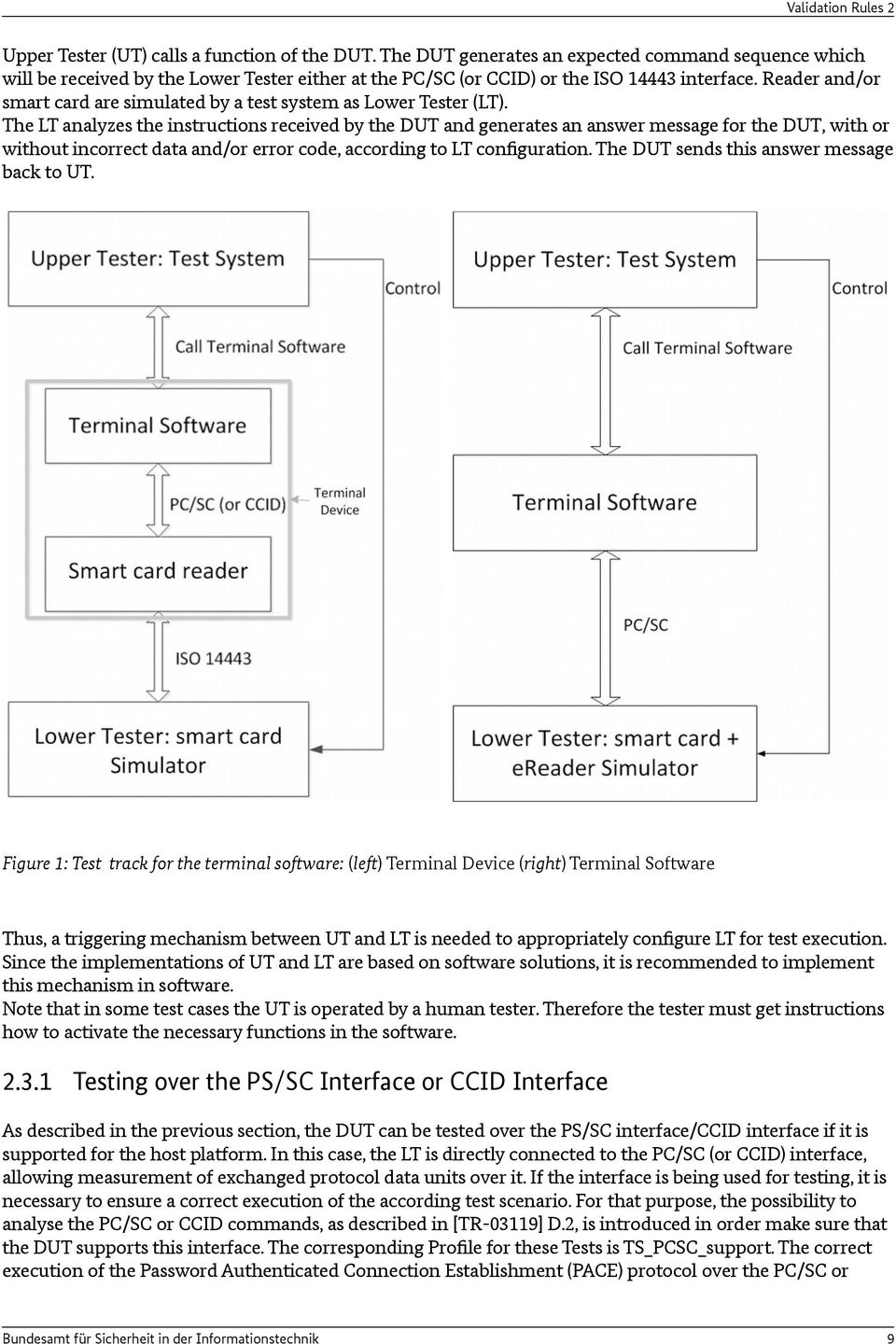
8 2 Validation Rules 2 Validation Rules 2.1 Verification Task and Scope The verification task consists in proving interoperability between smart card readers and host applications that access that reader functions. Here conformity to the EACv2 specification [TR ] and to the specification of the contactless interface for signature generation [TR-03117] must be proven. The scope for the verification task can be outlined as follows: prove conformity of interfaces exclusively for OSI layers 6 and 7, verify exclusively functions, that are needed for access to eid and biometric data as well as for QES over the contactless interface, restrict focus to PC/SC (or CCID) for the interface between host PC and reader or the ISO interface between PC and smart card for Terminal Devices, respectively, other interfaces as CT-API and SICCT are not relevant in this framework, do not examine the behavior of the smart card reader at other interfaces, especially at the display and at the contact interface. If a test case cannot be run because of certain reasons, e. g. if an eid-client is used and pre-verification fails, the test case shall be marked as not feasible. If a manufacturer does not use a PC/SC (or CCID) interface, he has to provide an appropriate adapter to perform the tests. 2.2 Test Object Parts of the terminal functions that may be implemented outside the reader are implemented in the host PC and called Terminal Software. A system that comprises Terminal Software as well as a reader in a closed environment is called Terminal Device (See Figure 1). A possible Terminal Software implementation is the ecard API framework as specified in [TR ]. The decision, whether a function of a test object must be included into a test or not, depends on the relevance of this function for the contactless reader interface. Thus, functions for signature generation are incorporated into the tests, but functions for signature verification are not. Depending on the reader architecture, PACE, terminal authentication and chip authentication protocols as well as the access to the eid application, biometric data and the esign application have to be performed as a whole or in parts by the Terminal Software and are therefore subject to the conformity tests. Test Object Terminal Software and Test Object Terminal Device will be referred to as Device Under Test (DUT) in the following. 2.3 Test Track The DUT has a test track which will be described in the following. In order to access eid and biometric data as well as to use QES, the DUT supports two technical interfaces: 1. the interface via the calling host PC application, 2. an interface via PC/SC (or CCID) or if this interface is not accessible, an interface via ISO Thus, the test system consists of an Upper Tester (UT) at the interface of the calling host PC application and a Lower Tester (LT) that either simulates both the reader and the smart card, in case the DUT is a Terminal Software, or simulates directly the smart card, in case the DUT is a Terminal Device. The resulting test track for testing the DUT is shown in Figure 1, left for Terminal Device, right for Terminal Software only. 8 Bundesamt für Sicherheit in der Informationstechnik
![Here conformity to the EACv2 specification [TR-03110-2] and to the specification of the contactless interface for signature generation [TR-03117] must be proven.](/docs-images/45/10899573/images/page_8.jpg "The scope for the verification task can be outlined as follows: prove conformity of interfaces exclusively for OSI layers 6 and 7, verify exclusively functions, that are needed for access to eid and")
9 Validation Rules 2 Upper Tester (UT) calls a function of the DUT. The DUT generates an expected command sequence which will be received by the Lower Tester either at the PC/SC (or CCID) or the ISO interface. Reader and/or smart card are simulated by a test system as Lower Tester (LT). The LT analyzes the instructions received by the DUT and generates an answer message for the DUT, with or without incorrect data and/or error code, according to LT configuration. The DUT sends this answer message back to UT. Figure 1: Test track for the terminal software: (left) Terminal Device (right) Terminal Software Thus, a triggering mechanism between UT and LT is needed to appropriately configure LT for test execution. Since the implementations of UT and LT are based on software solutions, it is recommended to implement this mechanism in software. Note that in some test cases the UT is operated by a human tester. Therefore the tester must get instructions how to activate the necessary functions in the software Testing over the PS/SC Interface or CCID Interface As described in the previous section, the DUT can be tested over the PS/SC interface/ccid interface if it is supported for the host platform. In this case, the LT is directly connected to the PC/SC (or CCID) interface, allowing measurement of exchanged protocol data units over it. If the interface is being used for testing, it is necessary to ensure a correct execution of the according test scenario. For that purpose, the possibility to analyse the PC/SC or CCID commands, as described in [TR-03119] D.2, is introduced in order make sure that the DUT supports this interface. The corresponding Profile for these Tests is TS_PCSC_support. The correct execution of the Password Authenticated Connection Establishment (PACE) protocol over the PC/SC or Bundesamt für Sicherheit in der Informationstechnik 9
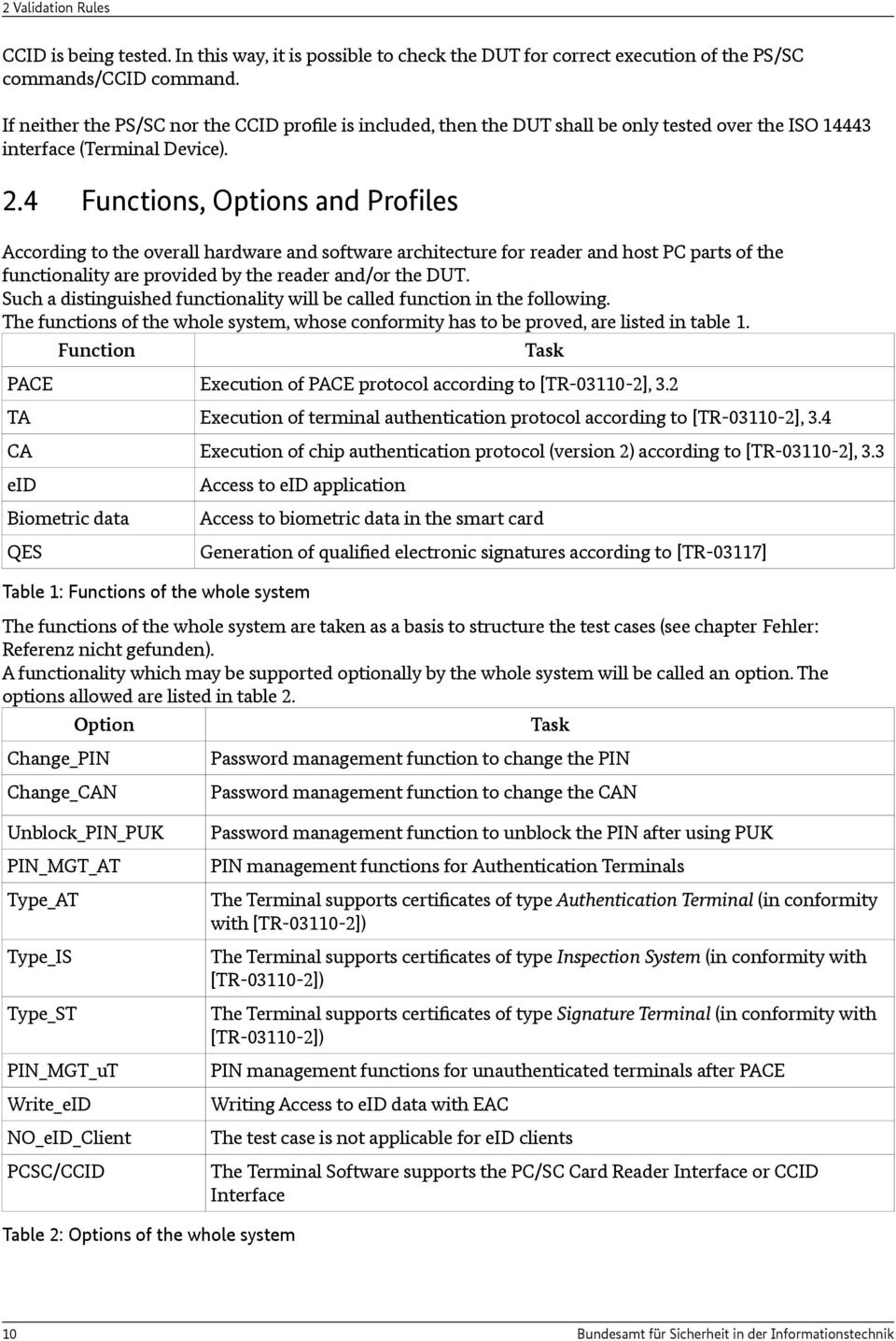
10 2 Validation Rules CCID is being tested. In this way, it is possible to check the DUT for correct execution of the PS/SC commands/ccid command. If neither the PS/SC nor the CCID profile is included, then the DUT shall be only tested over the ISO interface (Terminal Device). 2.4 Functions, Options and Profiles According to the overall hardware and software architecture for reader and host PC parts of the functionality are provided by the reader and/or the DUT. Such a distinguished functionality will be called function in the following. The functions of the whole system, whose conformity has to be proved, are listed in table 1. Function Task PACE Execution of PACE protocol according to [TR ], 3.2 TA Execution of terminal authentication protocol according to [TR ], 3.4 CA Execution of chip authentication protocol (version 2) according to [TR ], 3.3 eid Biometric data QES Access to eid application Access to biometric data in the smart card Generation of qualified electronic signatures according to [TR-03117] Table 1: Functions of the whole system The functions of the whole system are taken as a basis to structure the test cases (see chapter Fehler: Referenz nicht gefunden). A functionality which may be supported optionally by the whole system will be called an option. The options allowed are listed in table 2. Option Change_PIN Task Password management function to change the PIN Change_CAN Unblock_PIN_PUK PIN_MGT_AT Type_AT Type_IS Type_ST PIN_MGT_uT Write_eID NO_eID_Client PCSC/CCID Password management function to change the CAN Password management function to unblock the PIN after using PUK PIN management functions for Authentication Terminals The Terminal supports certificates of type Authentication Terminal (in conformity with [TR ]) The Terminal supports certificates of type Inspection System (in conformity with [TR ]) The Terminal supports certificates of type Signature Terminal (in conformity with [TR ]) PIN management functions for unauthenticated terminals after PACE Writing Access to eid data with EAC The test case is not applicable for eid clients The Terminal Software supports the PC/SC Card Reader Interface or CCID Interface Table 2: Options of the whole system 10 Bundesamt für Sicherheit in der Informationstechnik
11 Validation Rules 2 For the build-up of the tests it is essential whether a function or an option is implemented in the DUT. Therefore, a profile defines the assignment of a function or option to test object. The profiles allowed are listed in table 3. Profile Function Option TS_TA TS_CTA TS_CA TS_eID TS_bio TS_Sig PACE TA TA CA eid Biometric data QES TS_Chg_PIN TS_Chg_CAN TS_UNLK_PIN_PUK TS_PIN_MGT_AT TS_PIN_MGT_uT TS_Write_eID TS_Type_AT TS_Type_IS TS_Type_ST TS_PCSC_support Change PIN Change CAN Unblock_PIN after PUK PIN_MGT_AT PIN_MGT_uT Write_eID NO_eID_Client Type_AT Type_IS Type_ST PCSC_support Table 3: Profiles defined for DUT 2.5 eid-clients Some DUTs, especially eid-clients, support a pre-verification mechanism (see [TR ], Part 7, Section ). In this case, the DUT checks the Terminal Authentication certificate chain before establishing a communication channel with the LT. If this pre-verification fails, no connection is established with the LT, leading to the non-execution of further protocols such as PACE. Hence pre-verification can influence test results and shall be taken into consideration when analyzing test results. A good example would be a test case where PACE is expected to be successfully executed, but the DUT does not even establish communication with the LT because of pre-verification. In this case the test case would have negative results even though PACE could not be executed at all (neither failed nor successful execution of PACE). If a test case cannot be run because of pre-verification, the test case shall be marked as not feasible. Furthermore, eid-clients may modify the access rights in the CV-Certificate received by the UT before passing it to the LT. In particular, an eid-client has to clear all bits which are not presented to the user during the CHAT dialogue. Bundesamt für Sicherheit in der Informationstechnik 11

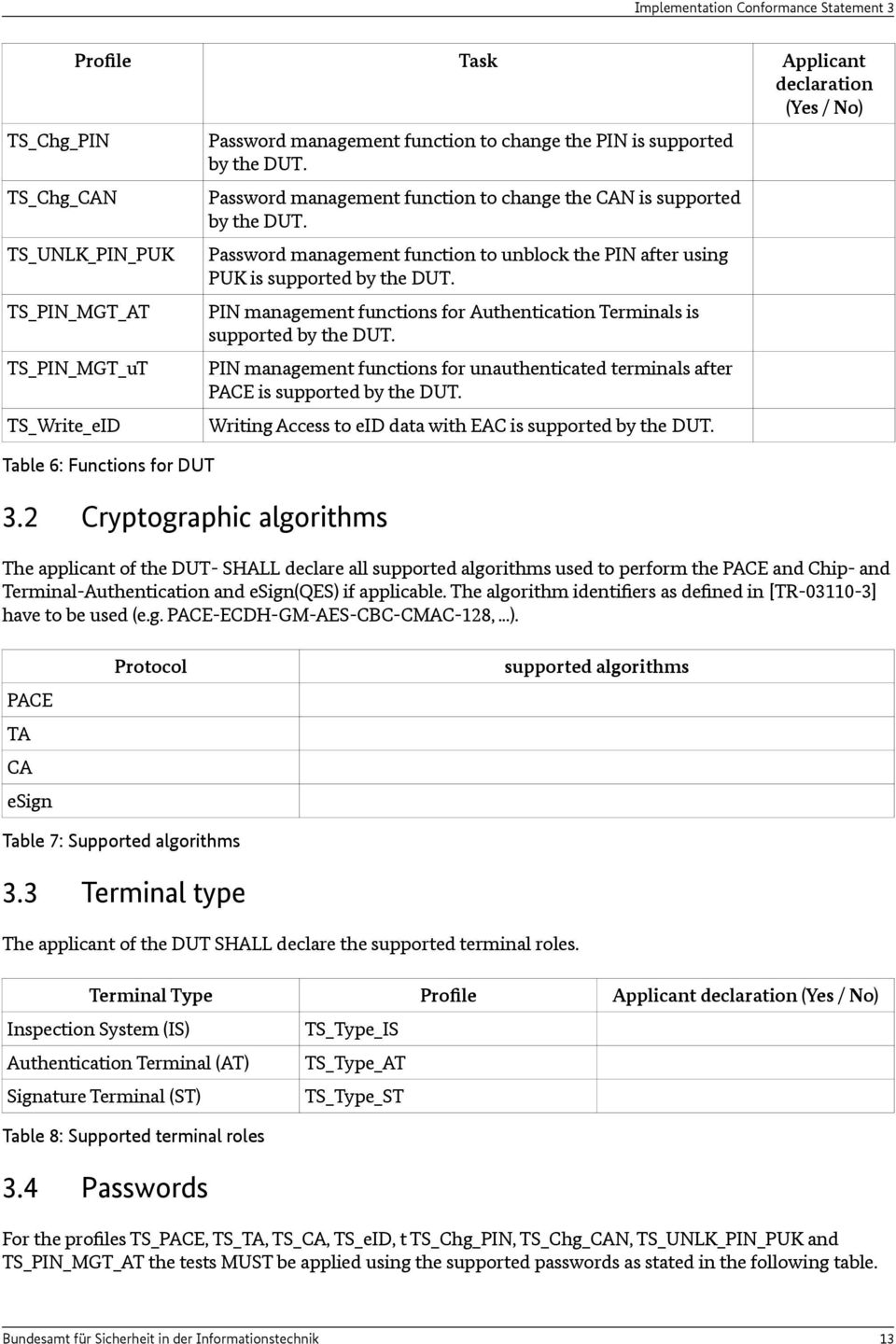
12 3 Implementation Conformance Statement 3 Implementation Conformance Statement The purpose of the Implementation Conformance Statement is the declaration of optional functionality of the product to be approved by the applicant. The declarations of the applicant are used for the determination of the set of test cases appropriated to the functionality of the product. The Implementation Conformance Statement must be filled completely by the applicant. The information of the filled ICS must be documented in the test report. The test result will only cover the function declared in this statement. 3.1 Supported profiles and functions All test cases of a profile which is declared with Yes by the applicant, have to be performed completely. The test coverage can be limited by declarations in chapter 3.3 and 3.4. Profile Task Applicant declaration (Yes / No) TS_TA / TS_CTA TS_CA TS_eID TS_ePass TS_Sig TS_PCSC_support DUT supports execution of PACE protocol according to [TR ], 3.2 DUT supports execution of terminal authentication protocol according to [TR ], 3.4. This implies that the profile TS_TA and the profile TS_CTA is performed. DUT supports execution of chip authentication protocol (version 2) according to [TR ], 3.3 DUT supports access to eid application DUT supports access to biometric data in the smart card DUT supports generation of qualified electronic signatures according to [TR-03117] DUT is not an eid-client DUT accessible via PC/SC and/or CCID interface Table 4: Profiles for DUT In case the DUT supports the TS_PCSC_support profile, i.e., provides either a PC/SC or an CCID interface, the applicant has to declare in Table 12 which interface is supported. In case PC/SC and CCID is provided, the tests for the Profile TS_PCSC_support have to be executed once for each interface. Supported Interfaces Applicant declaration (Yes / No) PC/SC interface is supported CCID interface is supported Table 5: Supported Interfaces of the DUT 12 Bundesamt für Sicherheit in der Informationstechnik

13 Implementation Conformance Statement 3 TS_Chg_PIN TS_Chg_CAN Profile Task Applicant declaration (Yes / No) TS_UNLK_PIN_PUK TS_PIN_MGT_AT TS_PIN_MGT_uT TS_Write_eID Table 6: Functions for DUT 3.2 Cryptographic algorithms Password management function to change the PIN is supported by the DUT. Password management function to change the CAN is supported by the DUT. Password management function to unblock the PIN after using PUK is supported by the DUT. PIN management functions for Authentication Terminals is supported by the DUT. PIN management functions for unauthenticated terminals after PACE is supported by the DUT. Writing Access to eid data with EAC is supported by the DUT. The applicant of the DUT- SHALL declare all supported algorithms used to perform the PACE and Chip- and Terminal-Authentication and esign(qes) if applicable. The algorithm identifiers as defined in [TR ] have to be used (e.g. PACE-ECDH-GM-AES-CBC-CMAC-128,...). PACE TA CA esign Protocol supported algorithms Table 7: Supported algorithms 3.3 Terminal type The applicant of the DUT SHALL declare the supported terminal roles. Terminal Type Profile Applicant declaration (Yes / No) Inspection System (IS) Authentication Terminal (AT) Signature Terminal (ST) Table 8: Supported terminal roles 3.4 Passwords TS_Type_IS TS_Type_AT TS_Type_ST For the profiles, TS_TA, TS_CA, TS_eID, t TS_Chg_PIN, TS_Chg_CAN, TS_UNLK_PIN_PUK and TS_PIN_MGT_AT the tests MUST be applied using the supported passwords as stated in the following table. Bundesamt für Sicherheit in der Informationstechnik 13
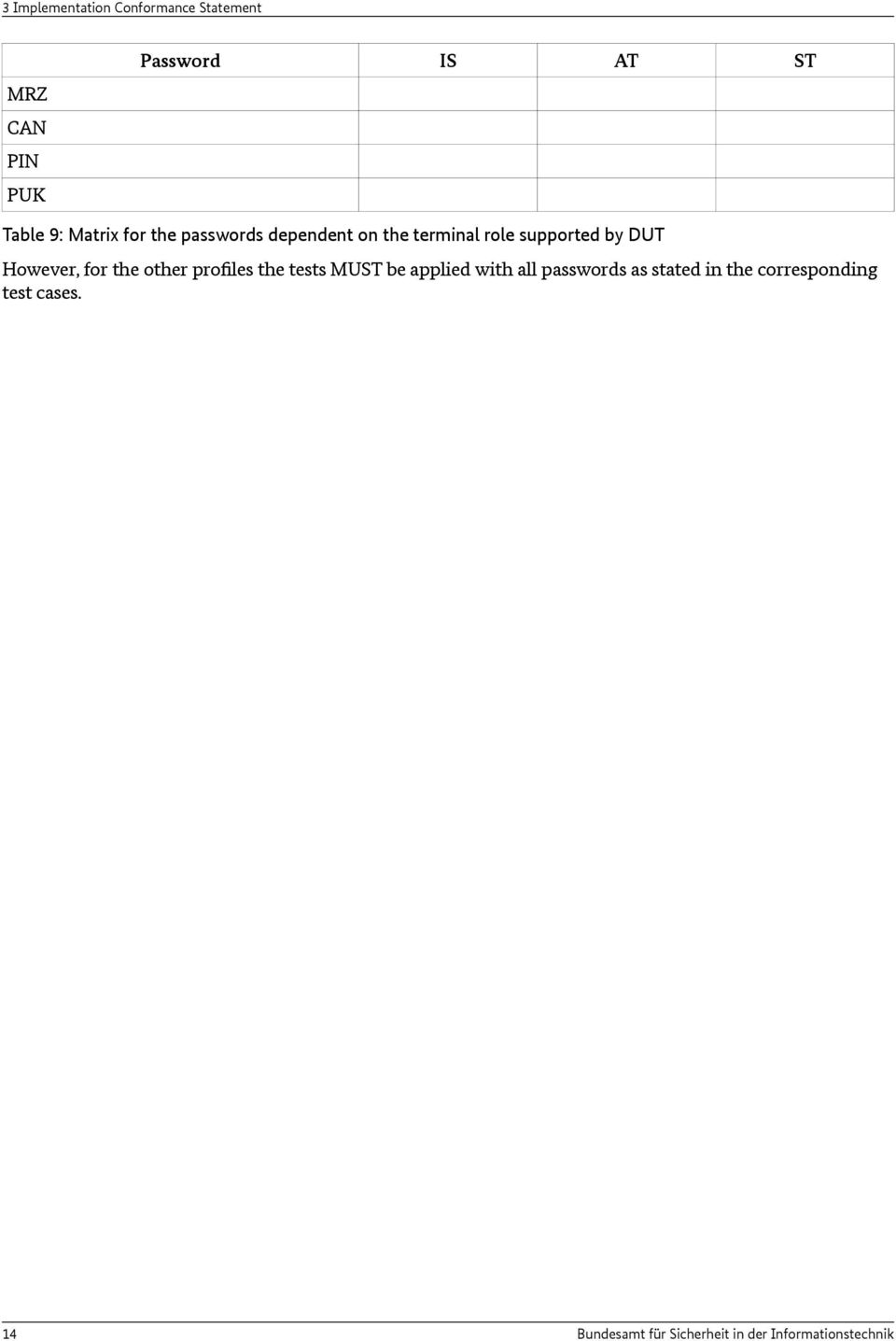
14 3 Implementation Conformance Statement MRZ CAN PIN PUK Password IS AT ST Table 9: Matrix for the passwords dependent on the terminal role supported by DUT However, for the other profiles the tests MUST be applied with all passwords as stated in the corresponding test cases. 14 Bundesamt für Sicherheit in der Informationstechnik
15 Definition of Configuration Data for the Tests 4 4 Definition of Configuration Data for the Tests 4.1 Certificates Terminal Certificates Terminal certificates used in the tests are built up as follows: '7F 21' var. Certificate template (tag, length) '7F 4E' 'XX' Certificate body (tag, length) '5F 29' '01' 'XX' Certificate profile identifier '42' var. 'XX.. XX' Certificate authority reference '7F 49' var. 'XX.. XX' Public key '5F 20' var. 'XX.. XX' Certificate holder reference '7F 4C' var. Certificate Holder Authorization Template (CHAT) (tag, length) '06' '09' ' F RR' Object identifier for role RR: RR = 01: Inspection System RR = 02: Authentication Terminal RR = 03: Signature Terminal '53' 'LZ' 'XX.. XX' Discretionary data (access rights) Value see tables 11 to 16 = 01, if RR = 01 LZ = 05, if RR = 02 LZ = 01, if RR = 03 '5F 25' '06' 'XX.. XX' Certificate effective date '5F 24' '06' 'XX.. XX' Certificate expiration date '65' var. Certificate extensions (Tag, Length) '73' var. Discretionary Data Template (Tag, Length) '06' '0A' ' F ' Object identifier for certificate description (plain text format) '80' var. 'XX.. XX' Hash value over certificate description '73' var. Discretionary data template (tag, length) '06' '09' ' F ' Object identifier for terminal sector '80' var. 'XX.. XX' Hash value over public key DO 1 st sector '81' var. 'XX.. XX' Hash value over public key DO 2 nd sector '5F 37' var. 'XX.. XX' Certificate signature Bundesamt für Sicherheit in der Informationstechnik 15
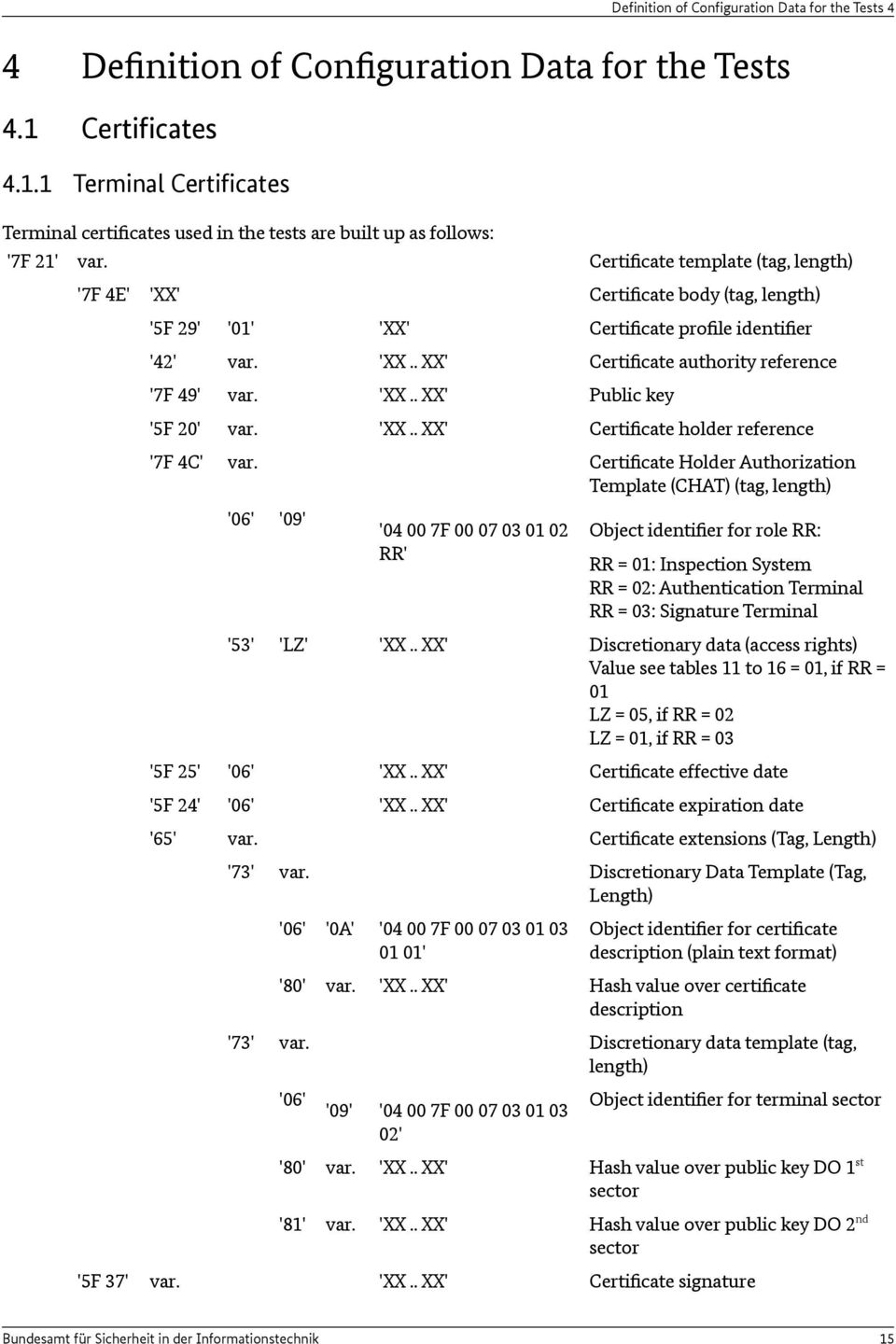
16 4 Definition of Configuration Data for the Tests Table 10: Structure of a certificate No. Value Description 1 '03' Universal rights: Reading access to biometric data of epassport 2 '00' No access to eid- and epassport functions Table 11: Choice of access rights for Inspection Systems No. Value Description 1 '3E 1F FF FF F7' Universal rights: Write access to DG 17 DG 21 Read access to DG 1 DG 21 Right to install qualified certificates Right to install certificates Right to execute password management functions Right to use CAN Right to perform restricted identification Right to perform community ID verification Right to perform age identification 2 ' ' Write access to DG 17 and DG 18 Right to perform community ID verification 3 '3E 1F FF FF 17' Write access to DG 17 DG 21 Read access to DG 1 DG 21 Right to use CAN Right to perform restricted identification Right to perform community ID verification Right to perform age identification 4 1 ' FB 07' Read access to DG 1, DG 2, DG 4 DG 10, DG 13 and DG 17 Right to perform restricted identification Right to perform community ID verification Right to perform age identification Table 12: Choice of access rights for Authentication Terminals No. Value Description 1 '03' Universal rights: Right to generate ES + QES 2 '00' No signature generation Table 13: Choice of access rights for Signature Terminals 1 The tests for an eid-client should be performed with the access rights set in No 1 and the eid-client is expected to clear unnecessary access bits. However, if the tests with the settings in No 1 fail, the access rights of No 4 may be used. 16 Bundesamt für Sicherheit in der Informationstechnik
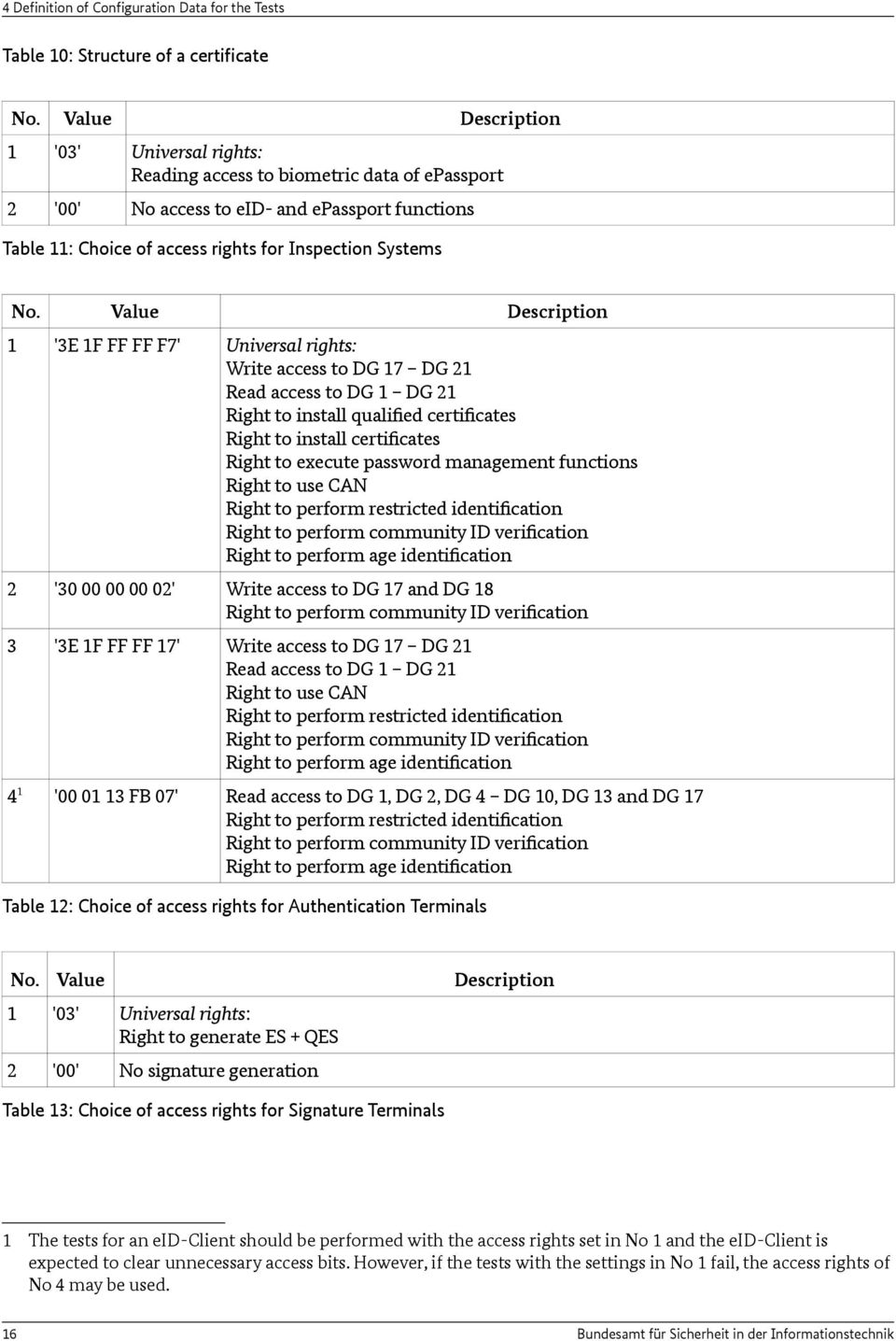
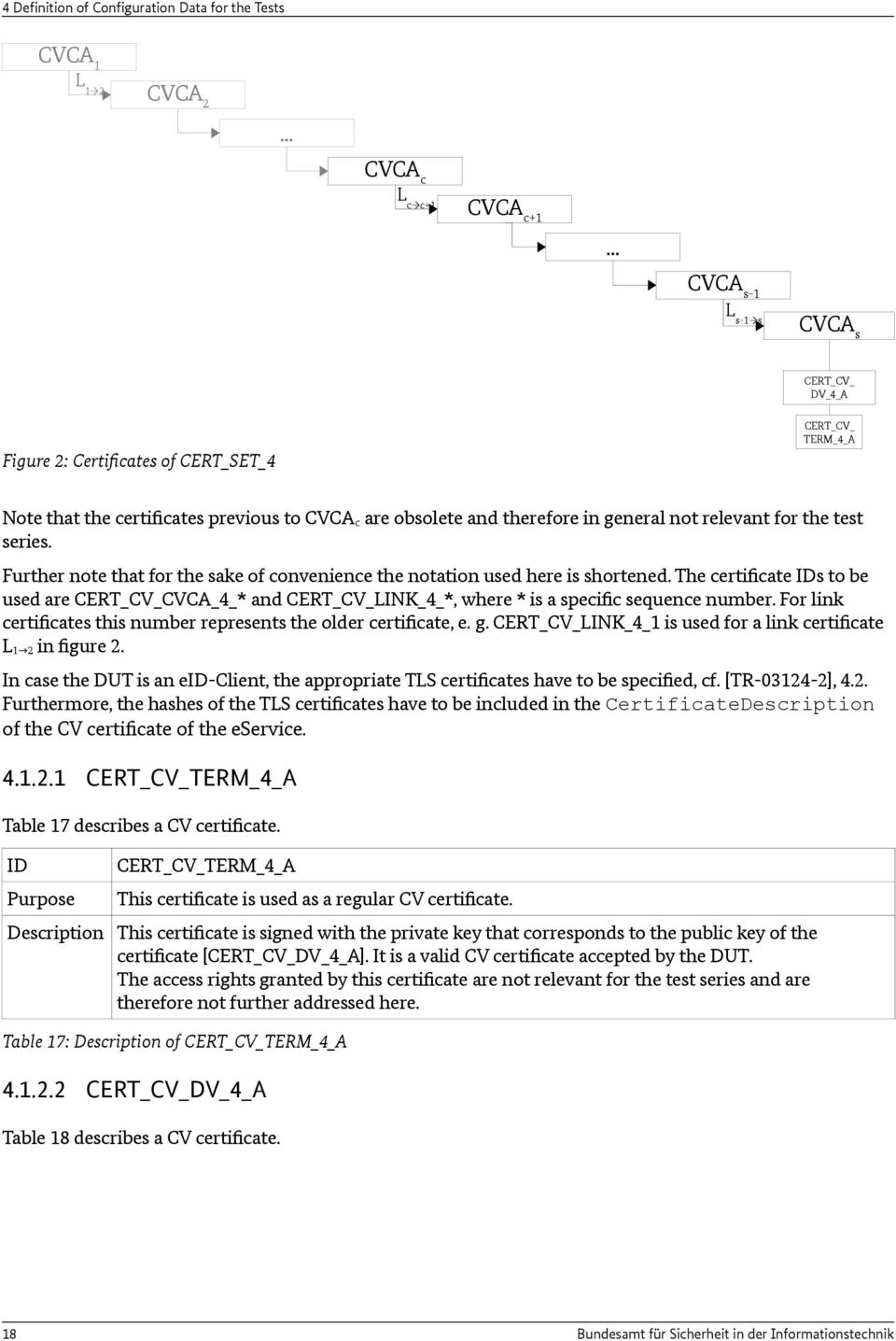
17 Definition of Configuration Data for the Tests 4 No. Value Description 1 C3 CVCA 2 '83' Document Verifier (official domestic) Table 14: Choice of access rights for CA certificates (Inspection Systems) No. Value Description 1 'FE 1F FF FF F7' CVCA 2 '7E 1F FF FF F7' Document Verifier (non official / foreign) Table 15: Choice of access rights for CA certificates (Authentication Terminals) No. Value Description 1 'C3' CVCA 2 '43' Document Verifier (certification service provider) Table 16: Choice of access rights for CA certificates (Signature Terminals) Certificate specification for Terminal Authentication This section provides a description of the certificates required to perform certificate tests for Terminal Authentication for different trust point setups (cf. TS_CTA). The intention of this certificate set is to provide the DUT with the certificates corresponding to the trust store of the test object. The content of the trust store MUST therefore be provided in the ICS. Consequently only certificate templates can be defined here as every DUT can have different trust points in its trust store. These templates are resolved into specific certificates during the preparation stage. For any particular conformity test the certificates CVCA c (Card) and CVCA s (Server) have to be determined. The remaining intermediate root and link certificates are generated accordingly. The following notation is used to denote certificates within this set (see figure 2): CVCA 1 is the initial self signed root CVCA certificate. It may no longer be valid. CVCA 2 is a self signed root CVCA certificate replacing CVCA 1. It may no longer be valid. CVCA c is the oldest self signed root CVCA certificate in the trust store that is still valid. CVCA s is the most current self signed CVCA root certificate used by the eservice to perform the Online-Authentication. L 1 2 is the link CVCA certificate chaining CVCA 1 with CVCA 2. L s-1 s is the link CVCA certificate chaining CVCA s-1 with CVCA s. CERT_CV_DV_4_A is the current DV certificate of the eservice. CERT_CV_TERM_4_A is the current AT certificate of the eservice. Bundesamt für Sicherheit in der Informationstechnik 17

18 4 Definition of Configuration Data for the Tests CVCA 1 L 1 2 CVCA 2... CVCA c L c c+1 CVCA c+1... CVCA s-1 L s-1 s CVCAs CERT_CV_ DV_4_A Figure 2: Certificates of CERT_SET_4 CERT_CV_ TERM_4_A Note that the certificates previous to CVCA c are obsolete and therefore in general not relevant for the test series. Further note that for the sake of convenience the notation used here is shortened. The certificate IDs to be used are CERT_CV_CVCA_4_* and CERT_CV_LINK_4_*, where * is a specific sequence number. For link certificates this number represents the older certificate, e. g. CERT_CV_LINK_4_1 is used for a link certificate L 1 2 in figure 2. In case the DUT is an eid-client, the appropriate TLS certificates have to be specified, cf. [TR ], 4.2. Furthermore, the hashes of the TLS certificates have to be included in the CertificateDescription of the CV certificate of the eservice CERT_CV_TERM_4_A Table 17 describes a CV certificate. ID Purpose CERT_CV_TERM_4_A This certificate is used as a regular CV certificate. Description This certificate is signed with the private key that corresponds to the public key of the certificate [CERT_CV_DV_4_A]. It is a valid CV certificate accepted by the DUT. The access rights granted by this certificate are not relevant for the test series and are therefore not further addressed here. Table 17: Description of CERT_CV_TERM_4_A CERT_CV_DV_4_A Table 18 describes a CV certificate. 18 Bundesamt für Sicherheit in der Informationstechnik
19 Definition of Configuration Data for the Tests 4 ID Purpose CERT_CV_DV_4_A This certificate is used as a regular DV certificate. Description This certificate is signed with the private key of the certificate CERT_CV_CVCA_4_s. It is a valid CV certificate accepted by the DUT. This certificate can be used to successfully verify the certificate [CERT_CV_TERM_4_A] of this set. Table 18: Description of CERT_CV_DV_4_A CERT_CV_LINK_4_* Table 19 describes a CV certificate. ID Purpose CERT_CV_LINK_4_* This certificate is used as regular CVCA link certificate. Description This is a template CVCA certificate representing all link certificates within this set. All link certificates chain older self signed root certificates with the successors and have the same properties. They are signed with the respective private key of the older self signed root certificate. Further these are valid CV certificates accepted by the DUT. The most current certificate CERT_CV_LINK_4_s-1 can be used to successfully verify the certificate [CERT_CV_DV_4_A] of this set. Table 19: Description of CERT_CV_LINK_4_* CERT_CV_CVCA_4_* Table 20 describes a CV certificate. ID Purpose CERT_CV_CVCA_4_* This certificate is used as a regular self signed root CVCA certificate. Description This is a template self signed root CVCA certificate representing all root certificates within this set. All root certificates have the same properties. They are valid CV certificates accepted by the DUT. The most current certificate CERT_CV_CVCA_4_s can be used to successfully verify the certificate [CERT_CV_LINK_4_s-1] of this set. Table 20: Description of CERT_CV_CVCA_4_* 4.2 Extension of PC/SC Interface According to [TR-03119], D.2 the call of the PC/SC function SCardControl from [PCSC10] is extended by GetReadersPACECapabilities and EstablishPACEChannel. InBuffer und OutBuffer of SCardControl are specified as follows: InBuffer (for GetReadersPACECapabilities) According to [TR-03119], D.3, D1.1. the value for InBuffer in GetReadersPACECapabilities is: Bundesamt für Sicherheit in der Informationstechnik 19
![This certificate can be used to successfully verify the certificate [CERT_CV_TERM_4_A] of this set. Table 18: Description of CERT_CV_DV_4_A 4.1.2.](/docs-images/45/10899573/images/page_19.jpg "3 CERT_CV_LINK_4_* Table 19 describes a CV certificate. ID Purpose CERT_CV_LINK_4_* This certificate is used as regular CVCA link certificate.")
20 4 Definition of Configuration Data for the Tests OutBuffer (for GetReadersPACECapabilities) According to [TR-03119], D.2, D.1.1. the value for OutBuffer in GetReadersPACECapabilities is: <Result_Code> <Bit_Map> Result_Code: Result code according to [TR-03119], D.1.2 Bit_Map: Bit map according to table InBuffer (for EstablishPACEChannel) According to [TR-03119], D.3, D.1.2. the value for InBuffer in EstablishPACEChannel is: 02 <L_inputData> <Password-ID> <L_CHAT> <CHAT> <L_PIN> <PIN> <L_CERT_DESC> <CERT_DESC> Password-ID: '01' (MRZ-Password), '02' (CAN), '03' (PIN) or '04' (PUK) CHAT: Restricted CHAT for terminal certificate (coding see table 22) or empty PIN: if provided by host; e. g. CAN CERT_DESC: complete description of certificate as described in [TR-03119] D.1.2 and [TR ] See table 21 for an example. T L Value T L V Comment 06 0A F descriptio ntype A1 11 0C 0F D A2 1A A 2F 2F E E A3 0F Table 21: Example for CERT_DESC 0C 0D D A A 2F 2F E E A C E A 20 0D 0A D D 0A C C3 A E D 0A F 72 6E 0D 0A 0D 0A 45 2D 4D C 2D A 20 0D 0A 6E E D 0A 0D 0A 5A B C F E A 20 0D 0A D 69 6E 61 6C 73 2E issuername [1] issuerurl [2] subjectnam e [3] subjecturl [4] termsofusa ge [5] 20 Bundesamt für Sicherheit in der Informationstechnik
![2.3 InBuffer (for EstablishPACEChannel) According to [TR-03119], D.3, D.1.2. the value for InBuffer in EstablishPACEChannel is: 02 <L_inputData> <Password-ID> <L_CHAT> <CHAT> <L_PIN> <PIN>](/docs-images/45/10899573/images/page_20.jpg "<L_CERT_DESC> <CERT_DESC> Password-ID: '01' (MRZ-Password), '02' (CAN), '03' (PIN) or '04' (PUK) CHAT: Restricted CHAT for terminal certificate (coding see table 22) or empty PIN: if provided by")
21 Definition of Configuration Data for the Tests 4 Pos. Length (in Bytes) Value 1 1 '06' Tag for Object Identifier (Role) Description 2 1 '09' Length for Object Identifier (Role) 3 9 ' F RR' Object identifier for role RR: RR = 01: Inspection System RR = 02: Authentication Terminal RR = 03: Signature Terminal 4 1 '53' Tag for discretionary data (access rights) 5 1 'XX' Length for discretionary data (access rights): XX = 01, if RR = 01 XX = 05, if RR = 02 XX = 01, if RR = 03 6 var. 'XX.. XX' Discretionary data (access rights) Value see tables 11 to 13 Table 22: Structure of the CHAT data object OutBuffer (for EstablishPACEChannel) According to [TR-03119], D.3, D.1.2. the value for OutBuffer in EstablishPACEChannel is: <Result_Code> <L_outputData> <status_mse> <L_dca> <data_card_acc> <L_CAR1> <CAR1> <L_CAR2> <CAR2> <L_IDPICC> <IDPICC> Result_Code: Result code according to [TR-03119], D1.2 status_mse: Status bytes in response to MSE: Set AT data_card_acc: Data for card access CAR1: Current certificate authority reference (CAR) CAR2: Previous certificate authority reference (CAR) IDPICC: ID_PICC, necessary for TA Remark: If the reader uses a certificate with role Signature Terminal, the data objects <CAR1>, <CAR2> and <IDPICC> are omitted according to [TR-03119], D.2, since the secure channel between smart card and reader will be established automatically. b7 b6 b5 b4 b3 b2 b1 b0 0 RFU 1 PACE supported 1 eid-function supported 1 Signature function supported RFU Table 23: Bitmap for functions supported by the reader Bundesamt für Sicherheit in der Informationstechnik 21
22 4 Definition of Configuration Data for the Tests 4.3 Communication Steps at the Card Interface The following protocol descriptions have to be executed at the card interface. Some of them can be called directly from the UT while other must not be called from the UT directly but from the reader. If not described in an other way, all passwords have to be entered directly on the readers PIN Pad (4.3.1 PACE and PIN Management) PACE The PACE protocol can be executed without or with Secure Messaging. If executed with Secure Messaging the SM keys have been derived by a former PACE protocol. If not explicitly mentioned otherwise, the PACE protocol is performed without SM in the test cases. In the following, a showcase for the protocol steps of PACE is given. Details on the steps and a normative description and sequence can be found in [TR ], B.1. Step Description 1 DUT gets content of EF.CardAccess. 2 LT receives command MSE: Set AT (mutual authentication in PACE) 3 LT sends response to Parameters: OID, Password-ID, OID-Role, Access Rights 2 4 LT receives command General Authenticate (Step 1) 5 LT derives encryption key K_pi from smart card password, generates nonce s and computes encrypted nonce encnonce = E(K_pi, s). 6 LT sends response to General Authenticate (Step 1) 7 LT receives command General Authenticate (Step 2) 8 LT sends response to 9 LT receives command General Authenticate (Step 3) 10 LT generates data Deph = Map(D_PICC, s) and, using Deph, the ephemeral key pair (SKeph_PICC, PKeph_PICC). LT checks that PKeph_ICC is different from PKeph_PCD. 11 LT sends response to General Authenticate (Step 3) 12 LT receives command General Authenticate (Step 4) 13 LT computes key material KA(SKeph_PICC, PKeph_PCD, Deph), extracts Kmac from key material and checks that T_PCD is identical to MAC(Kmac, PKeph_PICC). LT computes authentication token T_PICC = MAC(Kmac, PKeph_PCD). 14 LT sends response to General Authenticate (Step 4) Terminal Authentication A showcase for the protocol steps for Terminal Authentication is given in the following. Note that the DUT might process the received messages from the LT directly without interaction with the UT. Hence, in this case, the UT neither can nor needs to perform the Steps 5, 10, 15 and/or 19. Details on the steps and a normative description and sequence can be found in [TR ], B.3. Step Description 2 The DUT may modify the access rights by setting bits to zero, see Section 2.5, 22 Bundesamt für Sicherheit in der Informationstechnik
23 Definition of Configuration Data for the Tests 4 1 The UT initiates Terminal Authentication. 2 LT receives command MSE: Set DST for certificate verification 3 LT sends response to 4 UT receives response to 5 UT sends/initiates command PSO: Verify Certificate 6 LT receives command 7 LT sends response to 8 UT receives response to The steps 1-8 are performed for all certificates in the certificate chain, i. e. CA certificates and terminal certificate. 9 DUT generates new ephemeral key pair (SKeph_PCD, PKeph_PCD) and computes Comp(PKeph_PCD). Moreover DUT provides auxiliary data for key exchange A_PCD. 10 UT initiates command MSE: Set AT for external authentication 11 LT receives command 12 LT sends response to 13 UT receives response to 14 UT initiates command Get Challenge 3 15 LT receives command 16 LT sends response to 17 UT receives response to 18 DUT computes s_pcd = Sign(SKeph_PCD, ID_PICC r1_picc Comp(PKeph_PCD) A_PCD). (Hint: ID_PICC has been provided to DUT at the end of the PACE protocol). 19 UT initiates command External Authenticate 20 LT receives command 21 LT sends response to 22 UT receives response to Chip Authentication Before performing Chip Authentication the EF.CardSecurity shall be read and Passive Authentication with the Security Object shall be performed. A showcase for the protocol steps is given in the following. Note that the DUT might process the received messages from the LT directly without interaction with the UT. Hence, in this case, the UT neither can nor needs to perform Step 5. Details on the steps and a normative description and sequence can be found in [TR ], B.2. Step Description 1 The UT initiates Chip Authentication 2 LT receives command MSE: Set AT for internal authentication 3 LT sends response to 3 Note that the position of the Get Challange command within this sequence may change. Bundesamt für Sicherheit in der Informationstechnik 23
24 4 Definition of Configuration Data for the Tests 4 UT receives response to 5 UT initiates command General Authenticate 6 LT receives command 7 LT generates random number r2_picc and computes key material K = KA(SK_PICC, PKeph_PCD, D_PICC), K_MAC = KDF_MAC(K, r2_picc), K_ENC = KDF_ENC(K, r2_picc) and T_PICC = MAC(K_MAC, PKeph_PCD). 8 LT sends response to General Authenticate 9 UT receives response to 10 DUT computes K = KA(SKeph_PCD, PK_PICC, D_PICC), K_MAC = KDF_MAC(K, r2_picc), K_ENC = KDF_ENC(K, r2_picc) and checks that T_PICC is identical to MAC(K_MAC, PKeph_PCD). K_MAC and K_ENC are the session keys for secure messaging when generating digital signatures or for access to the eid application that ask for authentication with PACE, TA and CA Select the esign Application The following table presents a showcase for selecting the esign Application. Further details can be found in [ISO-7816]. Step Description 1 UT sends/initiates command Select 2 LT receives command Parameter AID of the esign application: 3 LT sends response to 'A E' 4 UT receives response to Reading Data from the eid Application The following table presents a showcase for reading data from the eid Application. Further details can be found in [ISO-7816]. Step Description 1 UT sends/initiates command Select 2 LT receives command Parameter AID of eid application: 'E F ' 3 LT sends response to 4 UT receives response to 5 UT sends/initiates command Read Binary 6 LT receives command Parameter P1: '81' (SFI '01' for DG1) 7 LT sends response to '82' (SFI '02' for DG2) 8 UT receives response '83' (SFI '03' for DG3) '89' (SFI '09' for DG9) '8A' (SFI '0A' for DG10) Bundesamt für Sicherheit in der Informationstechnik
25 Definition of Configuration Data for the Tests 4 '8F' (SFI '0F' for DG15) '90' (SFI '10' for DG16) '95' (SFI '15' for DG21) Writing Data into the eid Application The following table presents a showcase for writing data into the eid Application. Further details can be found in [ISO-7816]. Step Description 1 UT sends/initiates command Select 2 LT receives command Parameter AID of eid application: 'E F ' 3 LT sends response to 4 UT receives response 5 UT sends/initiates command Update Binary 6 LT receives command Parameter P1: '81' (SFI '01' for DG1) 7 LT sends response to '82' (SFI '02' for DG2) 8 UT receives response '83' (SFI '03' for DG3) '89' (SFI '09' for DG9) '8A' (SFI '0A' for DG10) '8F' (SFI '0F' for DG15) '90' (SFI '10' for DG16) '95' (SFI '15' for DG21) Restricted Identification The following table is a showcase for restricted identification. Further details can be found in [ISO-7816]. Step Description 1 UT sends/initiates command MSE: Set AT for internal authentication 2 LT receives secured command Parameter: OID: OID for RI 3 LT sends response to sk_id_ref: Reference to private key SK_ID in the smart 4 UT receives response to card, used for RI 5 UT sends/initiates command General Authenticate 6 LT receives secured command Parameter: pk_sec: public key of the sector (PK_Sector) 7 LT generates its sector specific identifier I_sector_ID using SK_ID and PK_Sector. 8 LT sends response to General Authenticate 9 UT receives secured response to Parameter: sec_id: sector specific identifier I_sector_ID Bundesamt für Sicherheit in der Informationstechnik 25
26 4 Definition of Configuration Data for the Tests Auxiliary Data Verification The following table is a showcase for auxiliary data verification. Further details can be found in [ISO-7816]. Step Description 1 UT sends/initiates command Verify Parameter: OID: OID of the auxiliary data to be verified (age verification, document validity verification or community ID verification) 2 LT receives secured command 3 LT sends response to 4 UT receives response to PIN Management In the following tables different showcases for PIN management are given. Further details can be found in [ISO-7816]. The PIN management routines are initiated by the UT. Depending on whether the DUT comprises a PIN pad, the UT sends a PC/SC command or directly an APDU with appropriate parameters Changing password Step Description 1 LT receives secured command Reset Retry Counter 2 LT sends response to 3 UT receives response to Unblocking password Step Description 1 LT receives secured command Reset Retry Counter 2 LT sends response to 3 UT receives response to Activating / Deactivating password Step Description 1 UT sends/initiates command Activate / Deactivate 2 LT receives secured command Parameter INS: '44' (for Activate), '04' (for Deactivate) 3 LT sends response to 4 UT receives response to 26 Bundesamt für Sicherheit in der Informationstechnik
27 Definition of Configuration Data for the Tests Reading Data from the epassport Application The following table is a showcase for reading data from the epassport application. Further details can be found in [ISO-7816]. Step Description 1 UT sends/initiates command Select 2 LT receives command Parameter: AID of epassport application 3 LT sends response to 4 UT receives response to 5 UT sends/initiates command Read Binary 6 LT receives command Parameter: P1: 80 + <SFI DF_to_be_read> 7 LT sends response to 8 UT receives response to Bundesamt für Sicherheit in der Informationstechnik 27
28 5 Test Specification 5 Test Specification They refine these requirements by defining a test goal, all conditions, test steps and verifications that are necessary for the implementation and execution of a test. All test cases are described within a set of XML files. An overview over the corresponding XML scheme is given in the following. Each test is an object of the type TestCase. All test cases are organized hierarchically which is realized in XML using the abstract base type called TestHierarchy. Each TestCase object has a unique id attribute and contains the following elements: Title: title of the test case. Version: current version of the test case. Purpose: a short description of the intention of the test. Profile: links to all relevant profiles. Reference: optional reference to any kind of specification this test case is based on. Precondition: all requirements which need to be fulfilled before running the test. TestStep: this XML element is a complex type and consists of the different sub-elements addressed below. MetaData: optional elements in form of key-value pairs containing meta information. If a test has been moved or deleted, the body of TestCase only contains a Title and a respective description in the Comment element. The TestStep object of type ActionStep is used at least once and contains the elements: Command: represents the actual action that is performed within a single step. TechnicalCommand: can optionally be used to specify a technical representation of the command to be able to process the step automatically by some testing suite. TestDataReference: If the step refers to some predefined test data, such as certificates, the data element is referred using this element. Description: adds further information about the command that is performed in the step. ExpectedResult: denotes the behavior of the test object in order to pass the test. For all test cases where no terminal role and password type is defined, these parameters can be chosen from these which are supported by the DUT (see chapter 3.3 Terminal type). If no terminal type and/or password is defined, the priority of the terminal type to use in the test cases are: AT, IS and ST. The priority of the password to use in the test cases are CAN, PIN and MRZ. That does mean, first select the first supported terminal type then select the first supported password type which is supported in combination with the terminal type. The used terminal type and password must be documented in the test report. An overview of all test cases is given in the following sections, which are structured along the functions in separate sections of the following overview and in different directories of the XML files. They describe which aspects must be validated with respect to the behavior of the DUT at the relevant interfaces. The test cases of the same section/directory are described in one table. Table 24 shows the structure of such a table: 28 Bundesamt für Sicherheit in der Informationstechnik
29 Test Specification 5 Test_ID Name in table column Description Contents Identifier for test ID built up as follows: <code test object>_<code function>_<no. VR>.<No. para> <code test object>: TS (for Terminal Software) <code function>: PACE (for PACE protocol) PCSC (for the PC/SC or CCID interface) TA (for terminal authentication protocol) CTA (for the certificates for terminal authentication) CA (for chip authentication protocol) eid (for eid application) epass (for biometric data) Sig (for esign application) READ_BINARY (for accessing binary files) <No. VR> (verification objective number): 1, 2, 3... <No. para> (distinguish parameters within a verification objective): 1, 2, 3 The actual name of the XML file is the Test_ID followed by a letter indicating the used terminal type (a= TS_Type_IS, b=ts_type_at, c=ts_type_st) and a number indicating the used password (1=MRZ, 2=CAN, 3=PIN, 4=MRZ). Short description of the test case Parameter Parameter in focus of examination; this also includes combinations of parameters Profiles Profiles for which the test case is relevant. Table 24: Structure of a table to define test cases 5.1 PACE List of Test Cases Test ID _ 1.1 Check correct execution of PACE protocol in the DUT Description Parameter Profiles Use certificate role Inspection System with specified access rights and Password-ID = MRZ and CAN. Use appropriate certificates for Document Verifier. 1.2 Use certificate role Authentication Terminal with specified access rights and Password-ID = CAN and PIN. Use appropriate certificates for Document Verifier. AND TS_NO_eID_Clie nt 1.3 Use certificate role Signature Terminal with specified AND Bundesamt für Sicherheit in der Informationstechnik 29
30 5 Test Specification Test ID _ Description Parameter Profiles access rights and Password-ID = CAN, PIN and PUK. Use appropriate certificates for Document Verifier. 1.4 Use an unauthenticated terminal with CAN, PIN and PUK 1.5 Check correct execution of PACE protocol in the DUT. Use of different algorithms. Use exact one PACEInfo with standardized domain parameter 1.6 Check correct execution of PACE protocol in the DUT. Use three different PACEInfo in EF.CardAccess with different algorithms and standardized domain parameters 1.7 Check correct execution of PACE protocol in the DUT. Use one PACEInfo with standardized domain parameters and one PACEInfo with proprietary domain parameters in PACEDomainParam eterinfo within EF.CardAccess 1.8 Check correct execution of PACE protocol in the DUT 1.9 Check correct execution of PACE protocol in the DUT. The PACE protocol is executed twice. Check that the ephemeral key is not in both executions the and Password-ID = CAN and PIN. and Password-ID = CAN and PIN. and Password-ID = CAN and PIN. Use certificate role Inspection System, Authentication Terminal and Signature Terminal with specified access rights and Password-ID = MRZ, CAN and PIN. and Password-ID = MRZ, CAN and PIN. TS_NO_eID_Clie nt 30 Bundesamt für Sicherheit in der Informationstechnik
31 Test Specification 5 Test ID _ same Check correct execution of PACE protocol in the DUT. The test is executed with additional entries in SecurityInfos which should be ignored by the DUT 1.11 The test is executed with EF.CardAccess containing two PACEInfo and one PACEDomainParam eter. Check that DUT can handle two different PACE parameters and perform one possible option. 2.1 Check that DUT aborts PACE protocol when LT derives cryptographic key from CAN incorrectly 2.2 Check that DUT aborts PACE protocol when LT derives cryptographic key from PIN incorrectly 2.3 Check that DUT aborts PACE protocol when LT returns error code to command MSE: Set AT 2.4 LT transmits incorrect data for mapping function Map in answer to card command General Description Parameter Profiles Use certificate role Inspection System, Authentication Terminal and Signature Terminal with specified access rights and Password-ID = MRZ, CAN, PIN and PUK. Use certificate role Inspection System, Authentication Terminal and Signature Terminal with specified access rights and Password-ID = MRZ, CAN, PIN and PUK. and Password-ID = CAN. Use certificate role Authentication Terminal with specified access rights and Password-ID = PIN. and Password-ID = CAN and PIN. and Password-ID = CAN and PIN. AND TS_NO_eID_Clie nt Bundesamt für Sicherheit in der Informationstechnik 31
32 5 Test Specification Test ID _ Description Parameter Profiles Authenticate (Step 2). 2.5 LT generates incorrect internal data with function Map. 2.6 LT computes key data for secure messaging (SM) incorrectly. 3.1 Check that DUT aborts PACE protocol when LT transmits incorrect PACE parameters and Password-ID = CAN and PIN. and Password-ID = CAN and PIN. Inconsistent data in these parameters. and Password-ID = CAN and PIN. 3.2 Standardized domain parameter identifier contained in these parameters which is not supported by the DUT. and Password-ID = CAN and PIN. 3.3 Incorrect cryptogram in response message to card command General Authenticate (Step 1) 3.4 Ephemeral public key received from LT is identical to ephemeral public key generated by DUT 3.5 LT transmits incorrect cryptogram that has been generated with derived SM key data 3.6 LT transmits authentication token that has been generated with a wrong algorithm 3.7 Test that DUT aborts PACE when LT transmits an and Password-ID = CAN and PIN. and Password-ID = CAN and PIN. and Password-ID = CAN and PIN. and Password-ID = CAN. and Password-ID = CAN and PIN. AND TS_NO_eID_Clie nt 32 Bundesamt für Sicherheit in der Informationstechnik
33 Test Specification 5 Test ID _ Description Parameter Profiles invalid ephemeral public key in response message to card command General Authenticate (Step 3). 3.8 Test that DUT aborts PACE when LT transmits an invalid response message to card command General Authenticate (Step 1). 3.9 Test that DUT aborts PACE when LT transmits an invalid response message to card command General Authenticate (Step 2) Test that DUT aborts PACE when LT transmits an invalid response message to card command General Authenticate (Step 2) (wrong tag '92h' instead of '82h') Test that DUT aborts PACE when LT transmits an invalid response message to card command General Authenticate (Step 3) Test that DUT aborts PACE when LT transmits an invalid response message to card command General Authenticate (Step 3) (wrong tag '94h' and Password-ID = MRZ, CAN and PIN. and Password-ID = MRZ, CAN and PIN. and Password-ID = MRZ, CAN and PIN. and Password-ID = MRZ, CAN and PIN. and Password-ID = MRZ, CAN and PIN. Bundesamt für Sicherheit in der Informationstechnik 33
34 5 Test Specification Test ID _ Description Parameter Profiles instead of '84h') Test that DUT aborts PACE when LT transmits an invalid response message to card command General Authenticate (Step 3) (error on ephemeral public key) Test that DUT aborts PACE when LT transmits an invalid response message to card command General Authenticate (Step 4) Test that DUT aborts PACE when LT transmits an invalid response message to card command General Authenticate (Step 4) (wrong tag '96h' instead of '86h') Test that DUT aborts PACE when LT transmits an incorrect parameterid in PACEInfo. 4.1 Check that DUT aborts PACE protocol when receiving incorrect input data from UT and Password-ID = MRZ, CAN and PIN. and Password-ID = MRZ, CAN and PIN. and Password-ID = MRZ, CAN and PIN. and Password-ID = MRZ, CAN and PIN. Incorrect password CAN and Password-ID = CAN. 4.2 Use certificate role Authentication Terminal with specified access rights and Incorrect password PIN. 4.3 Use certificate role Inspection System with specified access rights and Incorrect password MRZ. 4.4 Check that DUT aborts PACE protocol when an Use certificate with role Authentication Terminal, that is not authorized to use the CAN. AND TS_NO_eID_Clie nt AND TS_NO_eID_Clie nt AND TS_NO_eID_Clie nt 34 Bundesamt für Sicherheit in der Informationstechnik
35 Test Specification 5 Test ID _ Description Parameter Profiles 4.5 incorrect combination of Password-ID and CHAT is transmitted by UT Use certificate with role Inspection System, that is not authorized to use the PIN. Table 25: Verification requirements for PACE, execution in DUT 5.2 PCSC/CCID Support General Preliminary Remarks AND TS_NO_eID_Clie nt The following test cases verify the correct execution of PC/SC or CCID commands in case the DUT supports a PC/SC and/or a CCID interface (TS_PCSC_support in Table 4). The tests have to be performed for the interfaces specified in Table 5. If PC/SC and CCID interfaces are provided, all tests in this section have to be performed twice: for each interface once. Bundesamt für Sicherheit in der Informationstechnik 35
36 5 Test Specification List of Test Cases Test ID TS_PSCS_ 1.1 The command GetReaderPACECap abilities is used to query the PACE features supported by the DUT 1.2 The function EstablishPACEChan nel is used to establish a password authenticated secure channel via the PACE protocol including the necessary user interaction. 1.3 The command VerifyPIN is used to verify a PIN inside a pre-established secure channel. 1.4 The command Modify PIN is used to modify a PIN inside a pre-established secure channel. 1.5 The command DestroyPACEChann el is used to close an established PACE channel. Thereby, the session keys of the channel are deleted. 2.1 LT returns an error on command FEATURE_VERIFY_ PIN_DIRECT 2.2 LT returns an error on command FEATURE_MODIFY _PIN_DIRECT Description Parameter Profiles This command takes no input and returns the supported capabilities. Table 26: Verification requirements for PC/SC, CCID interfaces AND TS_PCSC_suppor t AND TS_PCSC_suppor t AND TS_PCSC_suppor t AND TS_PCSC_suppor t AND TS_PCSC_suppor t AND TS_PCSC_suppor t AND TS_PCSC_suppor t 36 Bundesamt für Sicherheit in der Informationstechnik
37 Test Specification Terminal Authentication General Preliminary Remarks The following testcases verify the correct execution of the protocol for Terminal Authentication. For all test cases for terminal authentication the precondition is to successful establish a PACE channel. Where no terminal role and password type is defined, these parameters can be chosen from these which are supported by the DUT (see chapter 3.3 Terminal type). If no terminal type and/or password is defined, the priority of the terminal type to use in the test cases are: AT, IS and ST. The priority of the password to use in the test cases are CAN, PIN and MRZ. That does mean, first select the first supported terminal type then select the first supported password type which is supported in combination with the terminal type. The used terminal type and password must be documented in the test report. If this test unit is used for testing eid-clients according to [TR ], then all certificates with role Authentication Terminal and access rights according to table table 12, No. 1 MAY be replaced with the certificates with access rights according to table 12, No List of Test Cases Test ID TS_TA_ 1.1 Check correct execution of Terminal Authentication Description Parameter Profiles Use certificate role Inspection System with specified access rights 1.2 Use certificate role Authentication Terminal with specified access rights protocol in the DUT 1.3 Use certificate role Signature Terminal with specified access rights 1.4 Use of different algorithms for terminal authentication. 2.1 Check that DUT aborts terminal authentication when discovering inconsistent internal data 3.1 Check that DUT aborts Terminal Authentication when detecting internal error or error communicated by LT CHAT of terminal certificate used in Terminal Authentication different from CHAT used in PACE protocol. Use OID for Authentication Terminal in PACE CHAT. LT returns error code to command MSE: Set DST (setting public key for certificate verification) 3.2 LT returns error code to command PSO: Verify Certificate when verifying terminal certificates 3.3 LT returns error code to command MSE: Set AT (transmitting parameters for AND TS_TA AND AND TS_TA AND AND TS_TA AND AND TS_TA AND TS_TA AND TS_TA AND TS_TA AND TS_TA Bundesamt für Sicherheit in der Informationstechnik 37
38 5 Test Specification Test ID TS_TA_ Description Parameter Profiles Terminal Authentication to LT) 3.4 LT returns error code to command Get Challenge (random number for Terminal Authentication) 3.5 LT returns error code to command External Authenticate when checking signed data from UT in Terminal Authentication protocol. 4.1 Check that DUT aborts Terminal Authentication on Secure Messaging error in LT 4.2 Check that the DUT aborts terminal authentication if it receives incorrect SM data objects from LT in response to the command Get Challenge DUT does not receive SM data objects from LT in answer messages of LT wrong tag '98' instead of '99' for the processing status AND TS_TA AND TS_TA AND TS_TA AND TS_TA 4.3 wrong cryptogram in the MAC data object AND TS_TA 4.4 Test that DUT recognizes a SM error generated by the LT. 4.5 Test that DUT recognizes incorrect secure messaging data in response to command Get Challenge (MAC missing). 4.6 Test that DUT recognizes incorrect secure messaging data in response to command Get Challenge (cryptogram missing). 4.7 Test that DUT recognizes incorrect secure messaging data in response to command Get Challenge (missing Use certificate role Inspection System with specified access rights Use certificate role Inspection System with specified access rights Use certificate role Inspection System with specified access rights Use certificate role Inspection System with specified access rights AND TS_TA AND TS_TA AND TS_TA AND TS_TA 38 Bundesamt für Sicherheit in der Informationstechnik
39 Test Specification 5 Test ID TS_TA_ Description Parameter Profiles tag '99' for the processing status). 4.8 Test that DUT recognizes incorrect secure messaging data in response to command Get Challenge (using padding '00' instead of '80'). Use certificate role Inspection System with specified access rights Table 27: Verification requirements for Terminal Authentication, execution in DUT 5.4 Certificates for Terminal Authentication General Preliminary Remarks AND TS_TA The following testcases verify the correct handling of certificates when performing Terminal Authentication. For all test cases the precondition is to successful establish a PACE channel. Where no terminal role and password type is defined, these parameters can be chosen from these which are supported by the DUT (see chapter 3.3 Terminal type). If no terminal type and/or password is defined, the priority of the terminal type to use in the test cases are: AT, IS and ST. The priority of the password to use in the test cases are CAN, PIN and MRZ. That does mean, first select the first supported terminal type then select the first supported password type which is supported in combination with the terminal type. The used terminal type and password must be documented in the test report. If this test unit is used for testing eid-clients according to [TR ], then all certificates with role Authentication Terminal and access rights according to table table 12, No. 1 MAY be replaced with the certificates with access rights according to table 12, No List of Test Cases Test ID TS_CTA_ 1.1 Check correct execution of Terminal Authentication protocol in the DUT when the LT sends Description Parameter Profiles The LT is configured to have an old trust point. Use certificate role Inspection System, Authentication Terminal and Signature Terminal with specified access rights. 1.2 different trust The LT is configured to have a new trust points point. Use certificate role Inspection System, Authentication Terminal and Signature Terminal with specified access rights. 1.3 The LT is configured to have the two newest trust points. Use certificate role Inspection System, Authentication AND TS_TA AND TS_CTA AND TS_TA AND TS_CTA AND TS_TA AND TS_CTA Bundesamt für Sicherheit in der Informationstechnik 39
40 5 Test Specification Test ID TS_CTA_ Description Parameter Profiles Terminal and Signature Terminal with specified access rights. Table 28: Verification requirements for Certificate handling of Terminal Authentication 5.5 Chip Authentication General Preliminary Remarks For all test cases for chip authentication the precondition is to successful establish a PACE channel. Where no terminal role and password type is defined, these parameters can be chosen from these which are supported by the DUT (see chapter 3.3 Terminal type). If no terminal type and/or password is defined, the priority of the terminal type to use in the test cases are: AT, IS and ST. The priority of the password to use in the test cases are CAN, PIN and MRZ. That does mean, first select the first supported terminal type then select the first supported password type which is supported in combination with the terminal type. The used terminal type and password must be documented in the test report. If this test unit is used for testing eid-clients according to, then all certificates with role Authentication Terminal and access rights according to table table 12, No. 1 MAY be replaced with the certificates with access rights according to table 12, No List of Test Cases Test ID TS_CA_ 1.1 Check correct execution of chip authentication protocol in the DUT Description Parameter Profiles Use certificate role Inspection System with specified access rights 1.2 Use certificate role Authentication Terminal with specified access rights 1.3 Use certificate role Signature Terminal with specified access rights 1.4 Use of different algorithms and multiple key pairs. The values for ChipAuthenticationInfo and ChipAuthenticationDomainParameterInf o within EF.CardAccess of the LT indicates that LT supports exactly one algorithm and one static key pair. 1.5 Use of several algorithms and multiple keys for the chip authentication protocol. This means that in EF.CardAccess two SecurityInfos with AND TS_TA AND TS_CA AND AND TS_TA AND TS_CA AND TS_TA AND TS_CA AND AND TS_TA AND TS_CA AND TS_TA AND TS_CA AND 40 Bundesamt für Sicherheit in der Informationstechnik
41 Test ID TS_CA_ 1.6 Check for correct selection of key in chip authentication protocol in the DUT 2.1 Check that DUT aborts chip authen-tication when detecting internal error or error communicated by LT Description Parameter Profiles ChipAuthenticationInfo and ChipAuthenticationDomainParameterInf o are available and that EF.CardSecurity contains two public keys. The chip is personalized with two keys for chip authentication. First key is supported by DUT while second key is not supported LT returns error code to command MSE: Set AT (transmitting parameters for chip authentication to LT) 2.2 LT returns error code to command General Authenticate when verifying the ephemeral public key of the reader 3.1 Check that DUT aborts chip authen-tication when receiving incorrect data from LT LT returns incorrect random number in answer message to command General Authenticate 3.2 LT transmits authentication token that has been generated with a wrong algorithm 3.3 LT transmits authentication token that has been generated with a wrong static key pair Table 29: Verification requirements for chip authentication, execution in DUT 5.6 Access to the eid Application General Preliminary Remarks AND TS_TA AND TS_CA AND TS_TA AND TS_CA AND TS_TA AND TS_CA AND TS_TA AND TS_CA AND AND TS_TA AND TS_CA AND AND TS_TA AND TS_CA AND The access to the eid application is only admitted after successful execution of the EAC protocol (General Authentication Procedure). Here using the DUT, UT must have been authenticated to LT with certificate role Inspection System or Authentication Terminal. After performing EAC the SM channel is established between UT and LT, i. e. the commands for the eid application are transmitted by the DUT in transparent mode. Therefore the verification requirements for the eid application exclusively handle positive tests. If this test unit is used for testing eid-clients according to [TR ], then all certificates with role Authentication Terminal and access rights according to table table 12, No. 1 MAY be replaced with the certificates with access rights according to table 12, No. 4. Bundesamt für Sicherheit in der Informationstechnik 41
42 5.6.2 List of Test Cases Test ID TS_eID_ 1.1 Check correct reading access to eid data with EAC by the DUT Description Parameter Profiles Use certificate role Inspection System with specified access rights. 1.2 Use certificate role Authentication Terminal with specified access rights. 1.3 Use of different algorithms for Secure Messaging. Use certificate role Authentication Terminal. 2.1 Check correct writing access to eid data with EAC by the DUT 3.1 Check DUT for correct execution of restricted identification for sector-specific revocation Use certificate role Authentication Terminal with specified access rights Certificate role Authentication Terminal with access right for restricted identification 3.2 Certificate role Authentication Terminal with access right age verification: Execute age verification for card holder 3.3 Certificate role Authentication Terminal with access right community ID verification: Execute verification of card holder's community ID 3.4 Check DUT for correct execution of restricted identification for sector-specific identification 4.1 Password management functions for authenticated terminals Certificate with access right for restricted identification. The PACE, terminal authentication and chip authentication protocols have been executed successfully with role Authentication Terminal. Certificate role Authentication Terminal with access right password management: Changing PIN in LT optional (if supported by terminal) 4.2 Certificate role Authentication Terminal with access right password management: Changing CAN in LT optional (if supported by terminal) AND TS_TA AND TS_CA AND TS_eID AND AND TS_TA AND TS_CA AND TS_eID AND TS_TA AND TS_CA AND TS_eID AND TS_TA AND TS_CA AND TS_eID AND Write_eID AND AND TS_TA AND TS_CA AND TS_eID AND TS_TA AND TS_CA AND TS_eID AND TS_TA AND TS_CA AND TS_eID AND AND TS_TA AND TS_CA AND TS_eID AND TS_TA AND TS_CA AND TS_eID AND (TS_Chg_PIN OR TS_PIN_MGT_AT) AND AND TS_TA AND TS_CA AND TS_eID AND TS_Chg_CAN AND 4.3 Certificate role Authentication Terminal AND TS_TA AND 42 Bundesamt für Sicherheit in der Informationstechnik
43 Test ID TS_eID_ Description Parameter Profiles with access right password management: Unblock PIN in LT 4.4 Certificate role Authentication Terminal with access right password management: Activate PIN in LT 4.5 Certificate role Authentication Terminal with access right password management: Deactivate PIN in LT 5.1 Password management functions for unauthenticated terminals after PACE Setting a new PIN using the currently valid PIN Consider the special case that the current PIN is not a transport PIN 5.2 Setting a new PIN using the currently valid PIN Consider the special case that the current PIN is a transport PIN TS_CA AND TS_eID AND TS_PIN_MGT_AT AND AND TS_TA AND TS_CA AND TS_eID AND TS_PIN_MGT_AT AND AND TS_TA AND TS_CA AND TS_eID AND TS_PIN_MGT_AT AND AND TS_eID AND TS_PIN_MGT_uT AND TS_eID AND TS_PIN_MGT_uT 5.3 Resetting retry counter for PIN using PUK AND TS_eID AND TS_PIN_MGT_uT 5.4 Setting a new PIN using PUK optional (if supported by reader) AND TS_eID AND TS_UNLK_PIN_PUK AND 5.5 Resume temporarily a PIN using CAN AND TS_eID AND TS_PIN_MGT_uT AND 5.6 Resume a temporarily resumed PIN by using it in PACE protocol Table 30: Verification requirements for eid application, execution in DUT 5.7 Access to Biometric Data General Preliminary Remarks AND TS_eID AND TS_PIN_MGT_uT AND The access to the data groups of the epassport application containing biometric data is admitted for Inspection Systems with appropriate access rights after successful execution of the EAC protocol (General Authentication Procedure). Bundesamt für Sicherheit in der Informationstechnik 43
44 5.7.2 List of Test Cases Test ID TS_ePass_ 1.1 Check correct reading access to biometric data with EAC by the DUT Description Parameter Profiles Use certificate role Inspection System with access rights for DG 3 (Fingerprint) and DG 4 (Iris) of the epassport application Table 31: Verification requirements for access to biometric data, execution in DUT 5.8 Use of the Signature Application General Preliminary Remarks AND TS_TA AND TS_CA AND TS_bio AND The access to the esign application is admitted for Authentication and Signature Terminals with appropriate access rights Install Qualified Certificate for Authentication Terminals and Generate qualified electronic signature for Signature Terminals. The successful authentications PACE, Terminal Authentication and Chip Authentication are preconditions for the execution of functions concerning the qualified electronic signature List of Test Cases Test ID TS_Sig_ Description Parameter Profiles 1.1 Verification of the correct execution of the key pair generation initiated by the QCA Use of the role Authentication Terminal (of the QCA) with the access rights to read personal data of the smart card-user as well as for issuing and installation of the qualified certificate ( Install Qualified Certificate ) Use of the PIN for the PACE protocol 1.2 Access with the Authentication Terminal of the QCA to the necessary identification data of the smart card-user (stored in the smart card) according to 5 clause 1 SigG and 3 clause 1 SigV (where necessary DG1 to DG21) Retrieval of personal data 1.3 Access with the Authentication Terminal to the esign application Key pair generation and retrieval of public key 2.1 Verification that the DUT handles the key pair generation properly when Authentication Terminal does not have the access right Install Qualified Certificate Use Password-ID PIN TS_Sig AND TS_Sig AND TS_Sig AND TS_Sig AND 44 Bundesamt für Sicherheit in der Informationstechnik
45 Test ID TS_Sig_ Description Parameter Profiles 2.2 detecting internal error or error communicated by LT Authentication Terminal does not have the access right Install Qualified Certificate PACE protocol is performed with the CAN (instead of the PIN) 2.3 Check that the DUT of an Authenticaton Terminal of the QCA aborts key pair generation if the esign application could not be selected 2.4 Check that the DUT of an Authenticaton Terminal of the QCA aborts key pair generation if the LT returns an error code to the command Generate Asymmetric Key Pair. 3.1 Verification of the correct execution of a signature generation 3.2 Check correct execution of the esign-pin verification via the DUT of a Signature Terminal 3.3 Check correct execution of a signature generation via the DUT of a Signature Terminal 4.1 Verification that the DUT handles the signature generation properly when detecting internal error or error communicated by LT 4.2 Check that the execution of a signature generation via the DUT of a Signature Terminal is Authentication Terminal with access right Install Qualified Certificate Execute PACE protocol with Password-ID PIN Authentication Terminal with access right Install Qualified Certificate Execute PACE protocol with Password-ID PIN Use of a Signature Terminal (of the smart card-user) with the access right Generate qualified electronic signature The UT selects the esign application and requires a password verification via the Signature Terminal Response from the LT to the software and transfer the UT The UT requires the generation of a digital signature Return of the generated signature from the LT to the software and transfer to the UT Signature Terminal does not have the access right Generate qualified electronic signature Use of certificate with role Signature Terminal with access right Generate qualified electronic signature. The test for the PACE protocol is executed with Password-ID CAN which is transmitted by the UT to the LT TS_Sig AND TS_Sig AND TS_Sig AND TS_Sig AND TS_Sig AND TS_Sig AND TS_Sig AND TS_Sig AND Bundesamt für Sicherheit in der Informationstechnik 45
46 Test ID TS_Sig_ Description Parameter Profiles 4.3 aborted if the signature Use of certificate with role Signature generation fails Terminal with access right Generate qualified electronic signature. The test for the PACE protocol is executed with Password-ID CAN which is transmitted by the UT to the LT 5.1 Verification of the correct execution of esign-pin management functions Use of a Signature Terminal (of the smart card-user) with the access right Generate qualified electronic signature Setting esign-pin in LT with PIN 5.2 Use of a Signature Terminal (of the smart card-user) with the access right Generate qualified electronic signature Changing esign-pin in LT with CAN 5.3 Use of a Signature Terminal (of the smart card-user) with the access right Generate qualified electronic signature Resetting retry counter for esign-pin in LT with PUK 6.1 Verification that the DUT handles the password management function properly when detecting internal error or error Use of a Signature Terminal with the access right Generate qualified electronic signature. The test for the PACE protocol is executed with Password-ID PUK 6.2 Use of certificate with role Signature communicated by LT Terminal with access right Generate qualified electronic signature. The test for the PACE protocol is executed with Password-ID PUK 7.1 Check correct execution of the termination of the esign-pin via the DUT of a Signature Terminal 7.2 Check correct execution of the termination of the private signature key via the DUT of a Signature Terminal Use of certificate with role Signature Terminal with access right Generate qualified electronic signature. The test for the PACE protocol is executed with Password-ID PIN which is transmitted by the UT to the LT Use of certificate with role Signature Terminal with access right Generate qualified electronic signature. The test for the PACE protocol is executed with Password-ID PIN which is transmitted by the UT to the LT TS_Sig AND TS_Sig AND TS_Sig AND TS_Sig AND TS_Sig AND TS_Sig AND TS_Sig AND TS_Sig AND 46 Bundesamt für Sicherheit in der Informationstechnik
47 Test ID TS_Sig_ Description Parameter Profiles 8.1 Check that the execution of the termination of the esign-pin via the DUT of a Signature Terminal is aborted if the termination fails 8.2 Check that the execution of the termination of the private signature key via the DUT of a Signature Terminal is aborted if the termination fails Use of certificate with role Signature Terminal with access right Generate qualified electronic signature. The test for the PACE protocol is executed with Password-ID PIN which is transmitted by the UT to the LT Use of certificate with role Signature Terminal with access right Generate qualified electronic signature. The test for the PACE protocol is executed with Password-ID PIN which is transmitted by the UT to the LT Table 32: Verification requirements use of the signature application, execution in DUT 5.9 Reading Binary Files General Preliminary Remarks TS_Sig AND TS_Sig AND The access to the binary files of the epassport application is admitted for Inspection Systems with appropriate access rights after successful execution of the EAC protocol (General Authentication Procedure). Bundesamt für Sicherheit in der Informationstechnik 47
48 5.9.2 List of Test Cases Test ID TS_READ_ BINARY 1.1 Check that DUT recognizes a file selection failure due to a data group declared in EF.COM but does not exist in the file system. 1.2 Check that DUT is capable of reading large binary files. 1.3 Check that DUT recognizes the end of a binary file. 1.4 Check that DUT is capable of using odd instruction bytes (odd ins). Description Parameter Profiles 1.5 Check that DUT is capable of reading data groups with empty files. Use terminal type Inspection System, password MRZ and CAN. Use terminal type Inspection System, password MRZ and CAN. Use a face image of size larger than 32k. Use terminal type Inspection System, password MRZ and CAN. DG 2 contains parts of a face image stored in a binary file that is too small for the whole image data. Use terminal type Inspection System, password MRZ and CAN. Use terminal type Inspection System, password MRZ and CAN. DG 2 contains parts of a face image with size 0. Table 33: Verification requirements for reading binary files, execution in DUT AND AND AND AND AND 48 Bundesamt für Sicherheit in der Informationstechnik
49 Annex Annex Bibliography TR BSI: Technical Guideline TR Advanced Security Mechanisms for Machine Readable Travel Documents and eidas Token Part 2 Protocols for electronic IDentification, Authentication and trust Services (eidas) TR BSI: Technische Richtlinie TR-03117, ecards mit kontaktloser Schnittstelle als sichere Signaturerstellungseinheit; Version 1.0 TR BSI: Technische Richtlinie BSI TR , ecard-api-framework TR BSI: Technische Richtlinie TR-03119, Requirements for Smart Card Readers Supporting eid and esign Based on Extended Access Control, Version 1.3 TR BSI: Technical Guideline TR , ecard-api-framework Protocols, Version TR BSI: Technical Guideline TR Advanced Security Mechanisms for Machine Readable Travel Documents and eidas Token Part 3 Common Specifications PCSC10 Apple etc.:interoperability Specifications for ICCs and Personal Computer Systems, Part 10 IFDs with Secure PIN Entry Capabilities, Revision , April 2009 TR BSI: Technical Guideline TR Advanced Security Mechanisms for Machine Readable Travel Documents and eidas Token Part 4 Applications and Document Profiles ISO-7816 ISO 7816: Identification Cards - Integrated Circuit Cards with Contacts TR BSITechnical Guideline TR : eid-client Part 2: ConformanceTest Specification, Version 1.2 TR BSITechnical Guideline TR : eid-client Part 1: Specifications, Version 1.2 Bundesamt für Sicherheit in der Informationstechnik 49
50 Annex Abbreviation Explanation AID API AT CA CAN CHAT CIA CLI CT-API CVCA DF DG DST DUT EAC eid ID LT MRZ MSE OSI PACE PC/SC PIN Application Identification Application Programming Interface Authentication Template Chip Authentication Card Access Number Card Holder Authorization Template Cryptographic Information Application Contactless Interface Card Terminal API Country Verifying Certification Authority Dedicated File Data Group Digital Signature Template Device Under Test Extended Access Control Electronic Identity Identifier Lower Tester Machine Readable Zone Manage Security Environment Open Systems Interconnection Reference Model Password Authenticated Connection Establishment Personal Computer / Smart card Personal Identification Number 50 Bundesamt für Sicherheit in der Informationstechnik
51 Annex Abbreviation Explanation PSO PUK QCA QES RI SICCT SigG SigV SM SSCD TA UT Perform Security Operation PIN Unblocking Key Certification Authority issuing qualified certificates Qualified Electronic Signature Restricted Identification Secure Interoperable Chip Card Terminal Digital Signature Act (German) Digital Signature Ordinance (German) Secure Messaging Secure Signature Creation Device Terminal Authentication Upper Tester Bundesamt für Sicherheit in der Informationstechnik 51
Advanced Security Mechanisms for Machine Readable Travel Documents and eidas Token
 Technical Guideline TR-03110-4 Advanced Security Mechanisms for Machine Readable Travel Documents and eidas Token Part 4 Applications and Document Profiles Version 2.20 3. February 2015 History Version
Preventing fraud in epassports and eids
 Preventing fraud in epassports and eids Security protocols for today and tomorrow by Markus Mösenbacher, NXP Machine-readable passports have been a reality since the 1980s, but it wasn't until after 2001,
COMMON CERTIFICATE POLICY FOR THE EXTENDED ACCESS CONTROL INFRASTRUCTURE FOR PASSPORTS AND TRAVEL DOCUMENTS ISSUED BY EU MEMBER STATES
 COMMON CERTIFICATE POLICY FOR THE EXTENDED ACCESS CONTROL INFRASTRUCTURE FOR PASSPORTS AND TRAVEL DOCUMENTS ISSUED BY EU MEMBER STATES BSI TR-03139 Version 2.1 27 May 2013 Foreword The present document
Advanced Security Mechanisms for Machine Readable Travel Documents
 Technical Guideline TR-03110-3 Advanced Security Mechanisms for Machine Readable Travel Documents Part 3 Common Specifications Version 2.10 20. March 2012 History Version Date Comment 1.00 2006-02-08 Initial
eidas as blueprint for future eid projects cryptovision mindshare 2015 HJP Consulting Holger Funke
 eidas as blueprint for future eid projects cryptovision mindshare 2015 HJP Consulting Holger Funke Agenda eidas Regulation TR-03110 V2.20 German ID card POSeIDAS Summary cryptovision mindshare 2015: eidas
Biometrics for Public Sector Applications
 Technical Guideline TR-03121-2 Biometrics for Public Sector Applications Part 2: Software Architecture and Application Profiles Version 2.3 Bundesamt für Sicherheit in der Informationstechnik Postfach
Technical Guideline TR-03112-7 ecard-api-framework Protocols. Version 1.1.5
 Technical Guideline TR-03112-7 ecard-api-framework Protocols Version 1.1.5 7. April 2015 Bundesamt für Sicherheit in der Informationstechnik Postfach 20 03 63 53133 Bonn E-Mail: [email protected] Internet:
HIGHSEC eid App Administration User Manual
 HIGHSEC eid App Administration User Manual Contents 1 Introduction... 3 2 Application overview... 3 3 Managing HIGHSEC eid App... 3 3.1 Deleting card pairings... 4 4 Inspecting smart card contents... 5
An Open Source eid Simulator Open Identity Summit 9th -11th September 2013
 An Open Source eid Simulator Open Identity Summit 9th -11th September 2013 BSI Tobias Senger HJP Consulting Holger Funke Agenda Requirements of BSI Current state Simulator Virtual Smart Card Reader Community
Introducing etoken. What is etoken?
 Introducing etoken Nirit Bear September 2002 What is etoken? Small & portable reader-less Smartcard Standard USB connectivity Logical and physical protection Tamper evident (vs. tamper proof) Water resistant
Common Criteria Protection Profile. Electronic Identity Card (ID_Card PP) BSI-CC-PP-0061. Approved by the Federal Ministry of Interior. Version 1.
 Common Criteria Protection Profile Approved by the Federal Ministry of Interior Version 1.03, 1 Common Criteria Protection Profile Version 1.03, Foreword This Protection Profile is issued by Bundesamt
How to Use ISO/IEC 24727-3 with Arbitrary Smart Cards
 How to Use ISO/IEC 24727-3 with Arbitrary Smart Cards Detlef Hühnlein 1 and Manuel Bach 2 1 secunet Security Networks AG, Sudetenstraße 16, 96247 Michelau, Germany [email protected] 2 Federal
Technical Guideline eid-server. Part 2: Security Framework
 Technical Guideline eid-server Part 2: Security Framework BSI TR-03130-2 Version 2.0.1 January 15, 2014 Federal Office for Information Security Post Box 20 03 63 D-53133 Bonn Phone: +49 22899 9582-0 E-Mail:
Functional Specification of the OpenPGP application on ISO Smart Card Operating Systems
 Functional Specification of the OpenPGP application on ISO Smart Card Operating Systems Version 2.0.1 Author: Achim Pietig 2009 April 22 Author: Achim Pietig Lippstädter Weg 14 32756 Detmold Germany Email:
ETSI TS 102 176-2 V1.2.1 (2005-07)
 TS 102 176-2 V1.2.1 (2005-07) Technical Specification Electronic Signatures and Infrastructures (ESI); Algorithms and Parameters for Secure Electronic Signatures; Part 2: Secure channel protocols and algorithms
Description of the Technical Component:
 Confirmation concerning Products for Qualified Electronic Signatures according to 15 Sec. 7 S. 1, 17 Sec. 4 German Electronic Signature Act 1 and 11 Sec. 2 and 15 German Electronic Signature Ordinance
Common Criteria Protection Profile for Inspection Systems (IS) BSI-CC-PP-0064. Version 1.01 (15 th April 2010)
 Common Criteria Protection Profile for BSI-CC-PP-0064 Version 1.01 (15 th April 2010) Federal Office for Information Security Postfach 20 03 63 53133 Bonn Phone: +49 228 99 9582-0 e-mail: [email protected]
Technical Guideline BSI TR-03119. Requirements for Smart Card Readers Supporting eid and esign Based on Extended Access Control
 Technical Guideline BSI TR-03119 Requirements for Smart Card Readers Supporting eid and esign Based on Extended Access Control Version 1.3 22. March 2013 Bundesamt für Sicherheit in der Informationstechnik
JCB Terminal Requirements
 Version 1.0 April, 2008 2008 JCB International Co., Ltd. All rights reserved. All rights regarding this documentation are reserved by JCB Co., Ltd. ( JCB ). This documentation contains confidential and
Conformance test specification for BSI-TR 03121 Biometrics for public sector applications
 Technical Guideline TR-03122-1 Conformance test specification for BSI-TR 03121 Biometrics for public sector applications Part 1: Framework Version 3.0 Bundesamt für Sicherheit in der Informationstechnik
Biometrics for public sector applications
 Technical Guideline TR-03121-1 Biometrics for public sector applications Part 1: Framework Version 3.0 Bundesamt für Sicherheit in der Informationstechnik Postfach 20 03 63, 53133 Bonn, Germany Email:
SecureStore I.CA. User manual. Version 2.16 and higher
 User manual Version 2.16 and higher Contents SecureStore I.CA 1. INTRODUCTION...3 2. ACCESS DATA FOR THE CARD...3 2.1 Card initialisation...3 3. MAIN SCREEN...4 4. DISPLAYING INFORMATION ABOUT THE PAIR
TPM Key Backup and Recovery. For Trusted Platforms
 TPM Key Backup and Recovery For Trusted Platforms White paper for understanding and support proper use of backup and recovery procedures for Trusted Computing Platforms. 2006-09-21 V0.95 Page 1 / 17 Contents
Application-Specific Biometric Templates
 Application-Specific Biometric s Michael Braithwaite, Ulf Cahn von Seelen, James Cambier, John Daugman, Randy Glass, Russ Moore, Ian Scott, Iridian Technologies Inc. Introduction Biometric technologies
Government Smart Card Interoperability Specification
 Interagency Report 6887-2003 Edition Government Smart Card Interoperability Specification Version 2.1 Teresa Schwarzhoff Jim Dray John Wack Eric Dalci Alan Goldfine Michaela Iorga July 16, 2003 NIST Interagency
SLE66CX322P or SLE66CX642P / CardOS V4.2B FIPS with Application for Digital Signature
 Security Confirmation and Report T-Systems.02192.TE.08.2007 SLE66CX322P or SLE66CX642P / CardOS V4.2B FIPS with Application for Digital Signature Siemens AG Confirmation concerning Products for Qualified
FAQs Electronic residence permit
 FAQs Electronic residence permit General 1) When was the electronic residence permit introduced? Since 1 September 2011, foreigners in Germany have been issued with the new electronic residence permit
Yubico PIV Management Tools
 Yubico PIV Management Tools Active Directory Smart Card Logon using the YubiKey NEO or NEO-n Document Version 1.0 April 15, 2015 Yubico PIV Management Tools 2015 Yubico. All rights reserved. Page 1 of
TrustKey Tool User Manual
 TrustKey Tool User Manual 1 Table of Contents 1 Introduction... 5 2 TrustKey Product...6 2.1 TrustKey Tool... 6 2.2 TrustKey function modules...7 2.3 TrustKey using environment...7 3 TrustKey Tool Installation...
RF-Enabled Applications and Technology: Comparing and Contrasting RFID and RF-Enabled Smart Cards
 RF-Enabled Applications and Technology: Comparing and Contrasting RFID and RF-Enabled Smart Cards January 2007 Developed by: Smart Card Alliance Identity Council RF-Enabled Applications and Technology:
Technical Guideline TR-03124-1 eid-client Part 1: Specifications
 Technical Guideline TR-03124-1 eid-client Part 1: Specifications Version 1.2 24. February 2015 Federal Office for Information Security Post Box 20 03 63 D-53133 Bonn Phone: +49 22899 9582-0 E-Mail: [email protected]
Electronic machine-readable travel documents (emrtds) The importance of digital certificates
 Electronic machine-readable travel documents (emrtds) The importance of digital certificates Superior security Electronic machine-readable travel documents (emrtds) are well-known for their good security.
Arkansas Department of Information Systems Arkansas Department of Finance and Administration
 Arkansas Department of Information Systems Arkansas Department of Finance and Administration Title: Electronic Signature Standard Document Number: SS 70 011 Effective Date: Act 722 of 2007 requires state
Security by Politics - Why it will never work. Lukas Grunwald DN-Systems GmbH Germany DefCon 15 Las Vegas USA
 Security by Politics - Why it will never work Lukas Grunwald DN-Systems GmbH Germany DefCon 15 Las Vegas USA Agenda Motivation Some basics Brief overview epassport (MRTD) Why cloning? How to attack the
EUROPEAN CARD FOR e-services
 Ce document est la propriété des sociétés membres de la section carte à puce du GIXEL qui acceptent son libre usage mais se dégagent de toute responsabilité quant à son EUROPEAN CARD FOR e-services AND
FAQs - New German ID Card. General
 FAQs - New German ID Card General 1) How to change from the old ID card to the new one? The new Law on Identification Cards came into effect on 1 November 2010. Since then, citizens can apply for the new
Server based signature service. Overview
 1(11) Server based signature service Overview Based on federated identity Swedish e-identification infrastructure 2(11) Table of contents 1 INTRODUCTION... 3 2 FUNCTIONAL... 4 3 SIGN SUPPORT SERVICE...
Specifications for the Smart-Card Operating System for Transport Applications (SCOSTA)
 Specifications for the Smart-Card Operating System for Transport Applications (SCOSTA) Addendum to Version 1.2b dated March 15, 2002 Dated: January 23, 2003 National Informatics Centre Ministry of Communication
Authentication Application
 Authentication Application KERBEROS In an open distributed environment servers to be able to restrict access to authorized users to be able to authenticate requests for service a workstation cannot be
Standardizing PKI in Higher Education Apple PKI and Universal Hi-Ed Spec proposal
 Standardizing PKI in Higher Education Apple PKI and Universal Hi-Ed Spec proposal Shawn Geddis Security Consulting Engineer, Apple Enterprise [email protected] 703-264-5103 1 Agenda A View of Apples PKI
TLS-RSA-PSK. Channel Binding using Transport Layer Security with Pre Shared Keys
 TLS-RSA-PSK Channel Binding using Transport Layer Security with Pre Shared Keys Christian J. Dietrich dietrich [at] internet-sicherheit. de Institut für Internet-Sicherheit https://www.internet-sicherheit.de
MUSCLE Cryptographic Card Edge Definition for Java 1 Enabled Smartcards
 MUSCLE Cryptographic Card Edge Definition for Java 1 Enabled Smartcards David Corcoran Tommaso Cucinotta This document is provided on an as-is basis. Neither the authors nor the MUSCLE project are responsible
Protection Profile for UK Dual-Interface Authentication Card
 Protection Profile for UK Dual-Interface Authentication Card Version 1-0 10 th July 2009 Reference: UNKT-DO-0002 Introduction This document defines a Protection Profile to express security, evaluation
[SMO-SFO-ICO-PE-046-GU-
 Presentation This module contains all the SSL definitions. See also the SSL Security Guidance Introduction The package SSL is a static library which implements an API to use the dynamic SSL library. It
Keep Out of My Passport: Access Control Mechanisms in E-passports
 Keep Out of My Passport: Access Control Mechanisms in E-passports Ivo Pooters June 15, 2008 Abstract Nowadays, over 40 different countries issue biometric passports to increase security on there borders.
TechNote 0006: Digital Signatures in PDF/A-1
 TechNote 0006: Digital Signatures in PDF/A-1 Digital signatures are primarily used to check the integrity of the signed part of the document. They also can be used to authenticate the signer s identity
ISO/IEC 24727 for secure mobile web applications
 ISO/IEC 24727 for secure mobile web applications Jan Eichholz 1 Detlef Houdeau 2 Detlef Hühnlein 3 Manuel Bach 4 1 Giesecke & Devrient GmbH, [email protected] 2 Infineon Technologies AG, [email protected]
Certification Report. Utimaco Safeware AG. debiszert-dsz-itsec-04007-1999. SafeGuard Sign&Crypt, Version 2.0. The Modern Service Provider
 Certification Report SafeGuard Sign&Crypt, Version 2.0 Utimaco Safeware AG debiszert-dsz-itsec-04007-1999 debis IT Security Services The Modern Service Provider SafeGuard Sign&Crypt, Version 2.0 /E2 debiszert
DEPARTMENT OF DEFENSE PUBLIC KEY INFRASTRUCTURE EXTERNAL CERTIFICATION AUTHORITY MASTER TEST PLAN VERSION 1.0
 DEFENSE INFORMATION SYSTEMS AGENCY JOINT INTEROPERABILITY TEST COMMAND FORT HUACHUCA, ARIZONA DEPARTMENT OF DEFENSE PUBLIC KEY INFRASTRUCTURE EXTERNAL CERTIFICATION AUTHORITY MASTER TEST PLAN VERSION 1.0
Full page passport/document reader Regula model 70X4M
 Full page passport/document reader Regula model 70X4M Full page passport reader with no moving parts inside. Automatic reading and authenticity verification of passports, IDs, visas, driver s licenses
State of Arkansas Policy Statement on the Use of Electronic Signatures by State Agencies June 2008
 State of Arkansas Policy Statement on the Use of Electronic Signatures by State Agencies June 2008 Background In the last ten years Arkansas has enacted several laws to facilitate electronic transactions
Smart Card- An Alternative to Password Authentication By Ahmad Ismadi Yazid B. Sukaimi
 Smart Card- An Alternative to Password Authentication By Ahmad Ismadi Yazid B. Sukaimi Purpose This paper is intended to describe the benefits of smart card implementation and it combination with Public
NISTIR 7676 Maintaining and Using Key History on Personal Identity Verification (PIV) Cards
 NISTIR 7676 Maintaining and Using Key History on Personal Identity Verification (PIV) Cards David A. Cooper NISTIR 7676 Maintaining and Using Key History on Personal Identity Verification (PIV) Cards David
Contactless Smart Cards vs. EPC Gen 2 RFID Tags: Frequently Asked Questions. July, 2006. Developed by: Smart Card Alliance Identity Council
 Contactless Smart Cards vs. EPC Gen 2 RFID Tags: Frequently Asked Questions July, 2006 Developed by: Smart Card Alliance Identity Council Contactless Smart Cards vs. EPC Gen 2 RFID Tags: Frequently Asked
Self Testing and Product Qualification Processes
 GlobalPlatform Self Testing and Product Qualification Processes Version 1.2.1 Public Release May 2013 Document Reference: GPC_PRO_042 Recipients of this document are invited to submit, with their comments,
CALIFORNIA SOFTWARE LABS
 ; Digital Signatures and PKCS#11 Smart Cards Concepts, Issues and some Programming Details CALIFORNIA SOFTWARE LABS R E A L I Z E Y O U R I D E A S California Software Labs 6800 Koll Center Parkway, Suite
Technical Guideline TR-03107-1 Electronic Identities and Trust Services in E-Government
 Technical Guideline TR-03107-1 Electronic Identities and Trust Services in E-Government Part 1: Assurance levels and mechanisms Version 1.0 This translation is informative only. The normative version is
EMV (Chip-and-PIN) Protocol
 EMV (Chip-and-PIN) Protocol Märt Bakhoff December 15, 2014 Abstract The objective of this report is to observe and describe a real world online transaction made between a debit card issued by an Estonian
Electronic Identity Cards for User Authentication Promise and Practice
 Electronic Identity Cards for User Authentication Promise and Practice Andreas Poller Ulrich Waldmann Sven Vowé Sven Türpe Fraunhofer Institute for Secure Information Technology (SIT) Rheinstraße 75, 64295
Security Guide. BlackBerry Enterprise Service 12. for ios, Android, and Windows Phone. Version 12.0
 Security Guide BlackBerry Enterprise Service 12 for ios, Android, and Windows Phone Version 12.0 Published: 2015-02-06 SWD-20150206130210406 Contents About this guide... 6 What is BES12?... 7 Key features
The German eid-card. Jens Bender. Federal Office for Information Security Bundesamt für Sicherheit in der Informationstechnik
 The German eid-card Federal Office for Information Security Bundesamt für Sicherheit in der Informationstechnik eid Workshop KU Leuven / The German Electronic ID-Card (Elektronischer Personalausweis) Motivation
Best Solutions for Biometrics and eid
 Best Solutions for Biometrics and eid In times of virtual communication even a person s identity is converted into an electronic form with the help of biometrics and then organised through intricate technical
VeriSign PKI Client Government Edition v 1.5. VeriSign PKI Client Government. VeriSign PKI Client VeriSign, Inc. Government.
 END USER S GUIDE VeriSign PKI Client Government Edition v 1.5 End User s Guide VeriSign PKI Client Government Version 1.5 Administrator s Guide VeriSign PKI Client VeriSign, Inc. Government Copyright 2010
Global eid Developments. Detlef Eckert Chief Security Advisor Microsoft Europe, Middle East, and Africa
 Global eid Developments Detlef Eckert Chief Security Advisor Microsoft Europe, Middle East, and Africa Agenda Country View on eid initiatives Trustworthy Identity Scenarios Microsoft eid update Summary
Implementation of biometrics, issues to be solved
 ICAO 9th Symposium and Exhibition on MRTDs, Biometrics and Border Security, 22-24 October 2013 Implementation of biometrics, issues to be solved Eugenijus Liubenka, Chairman of the Frontiers / False Documents
Common Criteria Protection Profile. Electronic Identity Card (ID_Card PP)
 elektronischer Die PDF-Datei der amtlichen Veröffentlichung ist aus Sicherheitsgründen mit einer qualifizierten elektronischen Signatur gemäß 2 Nr. 3 Signaturgesetz (SigG) versehen. Solange die elektronische
EMV 96 Integrated Circuit Card Terminal Specification for Payment Systems
 EMV 96 Integrated Circuit Card Terminal Specification for Payment Systems Version 3.0 June 30, 1996 1996 Europay International S.A., MasterCard International Incorporated, and Visa International Service
Microsoft Identity Lifecycle Manager & Gemalto.NET Solutions. Jan 23 rd, 2007
 Microsoft Identity Lifecycle Manager & Gemalto.NET Solutions Jan 23 rd, 2007 Microsoft ILM is a comprehensive, integrated, identity and access solution within the Microsoft system architecture. It includes
Biometrics, Tokens, & Public Key Certificates
 Biometrics, Tokens, & Public Key Certificates The Merging of Technologies TOKENEER Workstations WS CA WS WS Certificate Authority (CA) L. Reinert S. Luther Information Systems Security Organization Biometrics,
CS 356 Lecture 28 Internet Authentication. Spring 2013
 CS 356 Lecture 28 Internet Authentication Spring 2013 Review Chapter 1: Basic Concepts and Terminology Chapter 2: Basic Cryptographic Tools Chapter 3 User Authentication Chapter 4 Access Control Lists
Moving to Multi-factor Authentication. Kevin Unthank
 Moving to Multi-factor Authentication Kevin Unthank What is Authentication 3 steps of Access Control Identification: The entity makes claim to a particular Identity Authentication: The entity proves that
GlobalPlatform. Card Specification. Version 2.2
 GlobalPlatform Card Specification Version 2.2 March 2006 Recipients of this document are invited to submit, with their comments, notification of any relevant patent rights or other intellectual property
Measurement and Analysis Introduction of ISO7816 (Smart Card)
 Measurement and Analysis Introduction of ISO7816 (Smart Card) ISO 7816 is an international standard related to electronic identification cards with contacts, especially smart cards, managed jointly by
Two Factor Authentication. Software Version (SV) 1.0
 Two Factor Authentication Software Version (SV) 1.0 Property of: Worldwide Interactive Services, Inc. 5025 South Orange Avenue Orlando, FL 32809 The data contained in this documentation is PROPRIETARY
Electronic Passports in a Nutshell
 Electronic Passports in a Nutshell Wojciech Mostowski and Erik Poll Radboud University, Nijmegen, The Netherlands {woj,erikpoll}@cs.ru.nl Abstract. This document tries to give concise, (semi)formal specifications
A Note on the Relay Attacks on e-passports
 A Note on the Relay Attacks on e-passports The Case of Czech e-passports Martin Hlaváč 1 and Tomáš Rosa 1,2 [email protected] and [email protected] 1 Department of Algebra, Charles University
SIM CARD PROTOCOLS. This paper attempts in broad strokes to outline the construction of these protocols and how they are used.
 SIM CARD PROTOCOLS Though rarely thought about by most users their mobile phone contains a remarkable computing device that enables them to go about their business of making calls, text messaging or playing
Using etoken for SSL Web Authentication. SSL V3.0 Overview
 Using etoken for SSL Web Authentication Lesson 12 April 2004 etoken Certification Course SSL V3.0 Overview Secure Sockets Layer protocol, version 3.0 Provides communication privacy over the internet. Prevents
Open Mobile API Test Specification for Transport API
 Open Mobile Test Specification for Transport V1 Copyright 2014 SIMalliance ltd. The information contained in this document may be used, disclosed and reproduced without the prior written authorization
Chapter 15 User Authentication
 Chapter 15 User Authentication 2015. 04. 06 Jae Woong Joo SeoulTech ([email protected]) Table of Contents 15.1 Remote User-Authentication Principles 15.2 Remote User-Authentication Using Symmetric
Smart Card Application Standard Draft
 Smart Card Application Standard Draft Contents 1 SCOPE... 6 1.1 DEFINITIONS / DOCUMENT CONVENTIONS... 6 2 KEY DATA ELEMENTS AND CONCEPTS... 7 2.1 STATIC CARD INFORMATION... 7 2.1.1 Card ID (CdID)... 7
VoIP Security. Seminar: Cryptography and Security. 07.06.2006 Michael Muncan
 VoIP Security Seminar: Cryptography and Security Michael Muncan Overview Introduction Secure SIP/RTP Zfone Skype Conclusion 1 Introduction (1) Internet changed to a mass media in the middle of the 1990s
Technical Guideline TR-03112-1 ecard-api-framework Overview. Version 1.1.5 draft
 Technical Guideline TR-03112-1 ecard-api-framework Overview Version 1.1.5 draft 7. April 2015 Bundesamt für Sicherheit in der Informationstechnik Postfach 20 03 63 53133 Bonn E-Mail: [email protected]
Part I. Universität Klagenfurt - IWAS Multimedia Kommunikation (VK) M. Euchner; Mai 2001. Siemens AG 2001, ICN M NT
 Part I Contents Part I Introduction to Information Security Definition of Crypto Cryptographic Objectives Security Threats and Attacks The process Security Security Services Cryptography Cryptography (code
Security and Security Certificates for OpenADR systems. Background. Content:
 Security and Security Certificates for OpenADR systems Content: Background... 1 Setup for OpenADR... 2 Test-, Evaluation-, and Production Certificates... 3 Responsibilities... 3 Certificate Requesting
Technical Guideline TR-03112-2 ecard-api-framework ecard-interface. Version 1.1.5
 Technical Guideline TR-03112-2 ecard-api-framework ecard-interface Version 1.1.5 7. April 2015 Bundesamt für Sicherheit in der Informationstechnik Postfach 20 03 63 53133 Bonn E-Mail: [email protected]
Stronger(Security(and( Mobile'Payments'! Dramatically*Faster!and$ Cheaper'to'Implement"
 !!!! Stronger(Security(and( Mobile'Payments'! Dramatically*Faster!and$ Cheaper'to'Implement" Here$is$a$simple,$cost$effective$way$to$achieve$transaction$security$for$ mobile$payments$that$allows$easy$and$secure$provisioning$of$cards.$
Guide for Securing E-mail With WISeKey CertifyID Personal Digital Certificate (Personal eid)
 The World Internet Security Company Solutions for Security Guide for Securing E-mail With WISeKey CertifyID Personal Digital Certificate (Personal eid) Wherever Security relies on Identity, WISeKey has
MyKey is the digital signature software governed by Malaysia s Digital Signature Act 1997 & is accepted by the courts of law in Malaysia.
 About Digital Signature using MyKey Purpose MyKey is the digital signature software governed by Malaysia s Digital Signature Act 1997 & is accepted by the courts of law in Malaysia. A document digitally
Security Digital Certificate Manager
 IBM i Security Digital Certificate Manager 7.1 IBM i Security Digital Certificate Manager 7.1 Note Before using this information and the product it supports, be sure to read the information in Notices,
Understanding digital certificates
 Understanding digital certificates Mick O Brien and George R S Weir Department of Computer and Information Sciences, University of Strathclyde Glasgow G1 1XH [email protected], [email protected]
Using Entrust certificates with VPN
 Entrust Managed Services PKI Using Entrust certificates with VPN Document issue: 1.0 Date of issue: May 2009 Copyright 2009 Entrust. All rights reserved. Entrust is a trademark or a registered trademark
Audio: This overview module contains an introduction, five lessons, and a conclusion.
 Homeland Security Presidential Directive 12 (HSPD 12) Overview Audio: Welcome to the Homeland Security Presidential Directive 12 (HSPD 12) overview module, the first in a series of informational modules
PrintFleet Enterprise Security Overview
 PrintFleet Inc. is committed to providing software products that are secure for use in all network environments. PrintFleet software products only collect the critical imaging device metrics necessary