
Auto Archiving Folders in Outlook XP
|
|
|
- Ira Todd
- 10 years ago
- Views:
Transcription
1 Auto Archiving Folders in Outlook XP Your Outlook account on the Exchange server is allotted 50 megabytes of storage space on the server. Items in the Inbox, Calendar, Sent Items, Deleted Items, and other folders impact the amount of space your account utilizes on the server. s with file attachments consume more space, depending on the size of the attached file. Proper care of managing space utilization on the Exchange server should be taken by all Outlook users to keep individual service from being interrupted. Over time the Inbox and other folders will accumulate many items. Unwanted items can be deleted to conserve space on the server. Remember the Deleted Items folder must also be emptied regularly. It s also recommended that items no longer needed in the Sent Items folder be deleted as well. However, other items in the Inbox, Sent Items, Calendar, and other folders may need to be kept for future reference. To keep your Inbox and other folders manageable and to conserve storage space on the Exchange server, you need another place to store (archive) the old important items that may not be frequently used. Further, you need a way to automatically move those old items to the archive location and to discard outdated items. The Auto Archive feature in Outlook takes care of these processes for you. Auto Archive enables you to automatically transfer old items from the Inbox or other folders to a storage file on the hard drive of the computer being used. Archived items will only be accessible from that computer. Old items are those that reach the archiving age you specify. Expired items are mail and meeting items whose content is no longer valid after reaching a certain date, like an appointment six months ago that still appears on your calendar. With Auto Archive you can permanently delete expired items, and delete or archive old items to an archive file. Auto Archive is a two step process. First Auto Archive must be turned on. The second step is to set the Auto Archive properties for each folder that you want archived. Those running Office 2003 will have the ability to setup default archive settings, but may need to turn on archiving on each folder. These directions assume you are logged into your Exchange account using the Microsoft Outlook XP program on your office computer. The Auto Archive feature is also available in Outlook 2000 and To turn on Auto Archive: 1. From the menu bar, select Tools, Options; 2. Click on the Other tab; 3. Click on the Auto Archive button; Auto Archiving Folders in Outlook XP.doc Page 1 of 5 Staff Education, UK Hosp. May 04

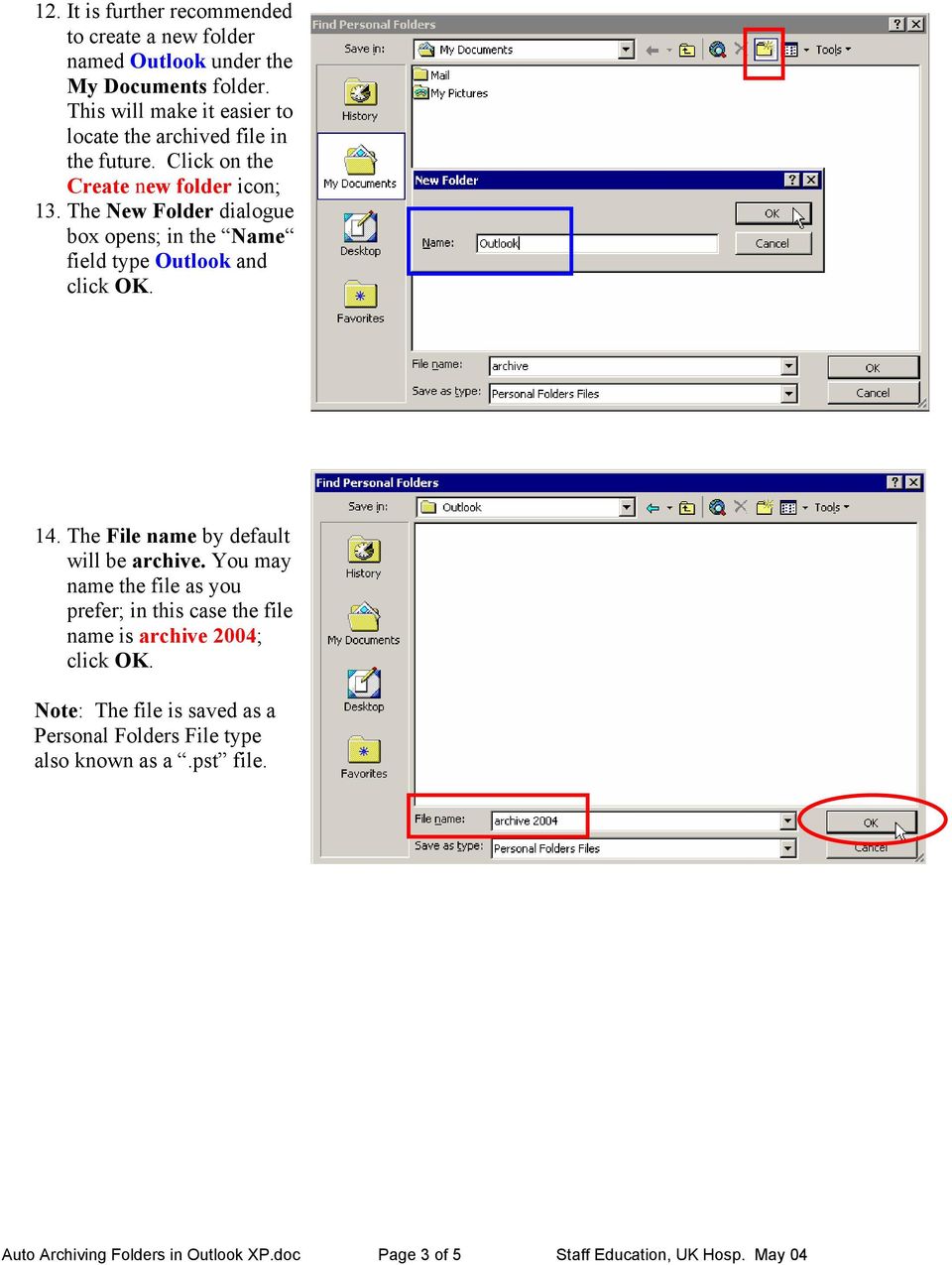
2 4. The Auto Archive dialogue box opens; 5. To set Auto Archive to turn on when you start Outlook, click in the box beside Run Auto Archive every ; 6. To specify how often the Auto Archive process will run, enter a number in the box beside days ; 7. To be notified before the items are archived, click in the box beside Prompt before Auto Archive runs ; 8. In the During Auto Archive area, select the options you prefer. For an explanation of any option, click the? box in the upper right hand corner of the screen and then click on the item to be explained. It is recommend to select Show archive folder in folder list in order to see the archived folders in the Folder List view. 9. In the Default folder settings for archiving area, set the time frame for old items to be cleaned out. 10. In the Move old items to area, specify the location where the archive file will be stored. It is recommended to click the Browse button, and click the drop-down arrow beside the Save in: field to locate the My Documents folder; 11. Click on My Documents to select it. Auto Archiving Folders in Outlook XP.doc Page 2 of 5 Staff Education, UK Hosp. May 04

3 12. It is further recommended to create a new folder named Outlook under the My Documents folder. This will make it easier to locate the archived file in the future. Click on the Create new folder icon; 13. The New Folder dialogue box opens; in the Name field type Outlook and click OK. 14. The File name by default will be archive. You may name the file as you prefer; in this case the file name is archive 2004; click OK. Note: The file is saved as a Personal Folders File type also known as a.pst file. Auto Archiving Folders in Outlook XP.doc Page 3 of 5 Staff Education, UK Hosp. May 04
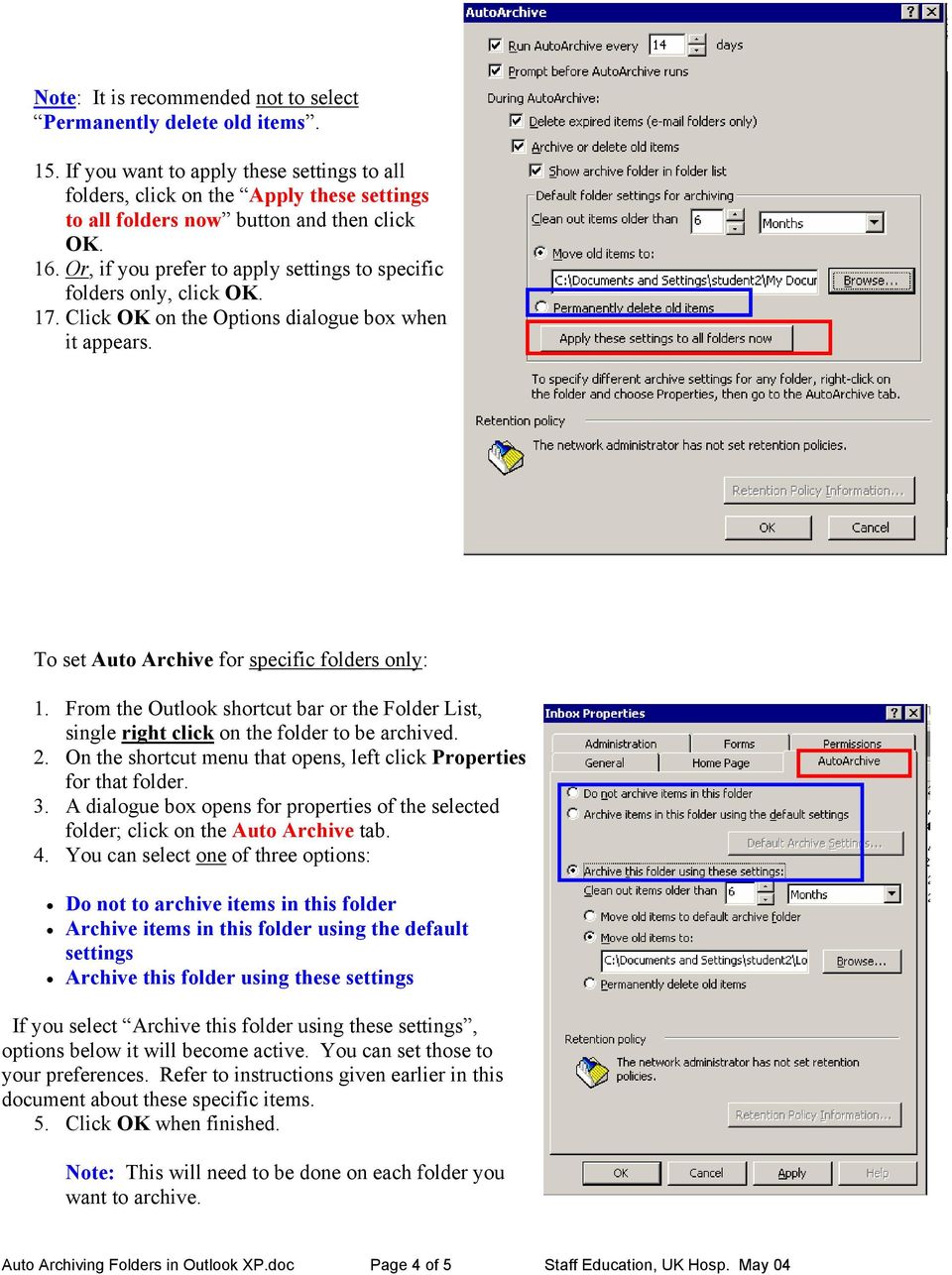
4 Note: It is recommended not to select Permanently delete old items. 15. If you want to apply these settings to all folders, click on the Apply these settings to all folders now button and then click OK. 16. Or, if you prefer to apply settings to specific folders only, click OK. 17. Click OK on the Options dialogue box when it appears. To set Auto Archive for specific folders only: 1. From the Outlook shortcut bar or the Folder List, single right click on the folder to be archived. 2. On the shortcut menu that opens, left click Properties for that folder. 3. A dialogue box opens for properties of the selected folder; click on the Auto Archive tab. 4. You can select one of three options: Do not to archive items in this folder Archive items in this folder using the default settings Archive this folder using these settings If you select Archive this folder using these settings, options below it will become active. You can set those to your preferences. Refer to instructions given earlier in this document about these specific items. 5. Click OK when finished. Note: This will need to be done on each folder you want to archive. Auto Archiving Folders in Outlook XP.doc Page 4 of 5 Staff Education, UK Hosp. May 04
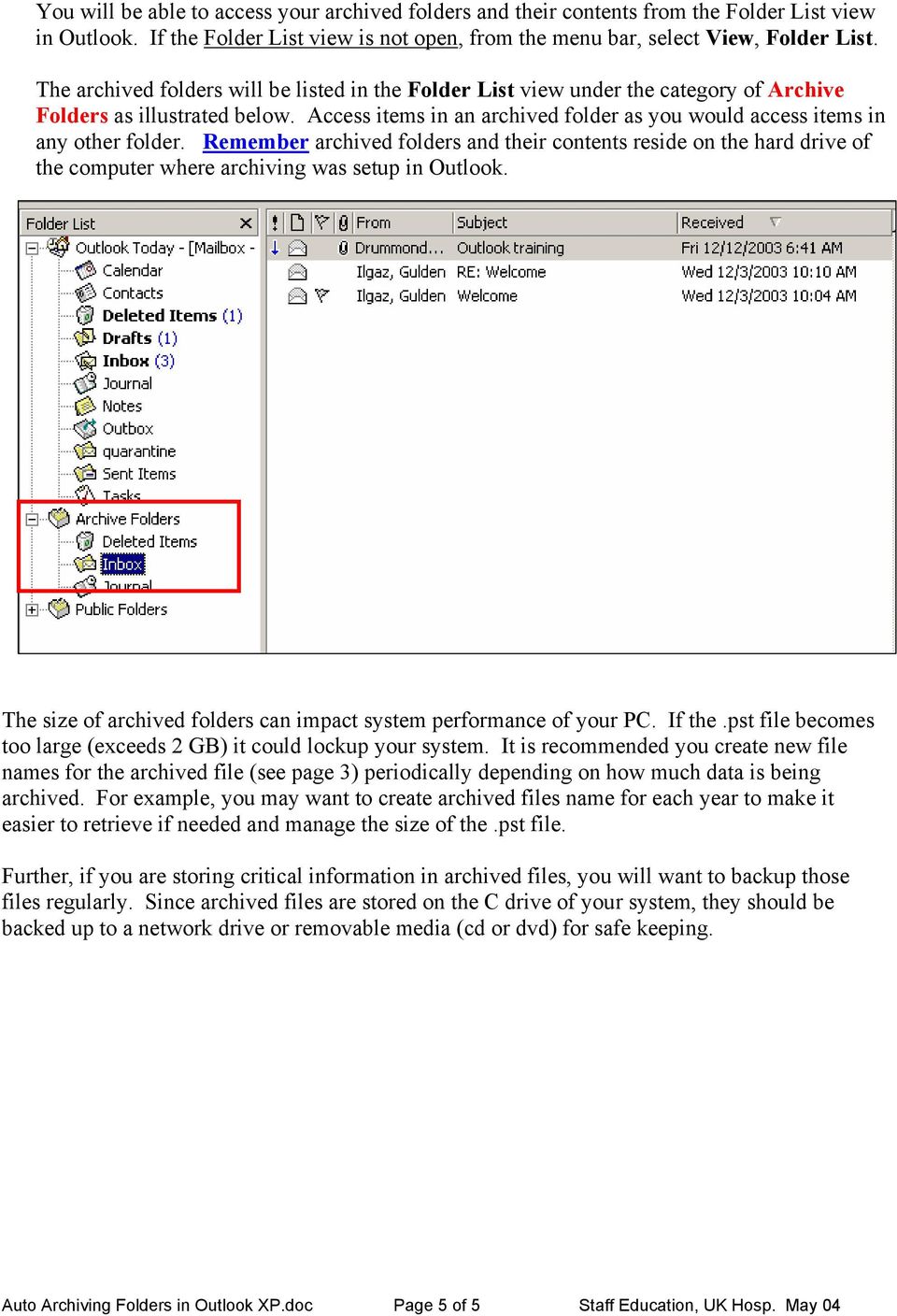
5 You will be able to access your archived folders and their contents from the Folder List view in Outlook. If the Folder List view is not open, from the menu bar, select View, Folder List. The archived folders will be listed in the Folder List view under the category of Archive Folders as illustrated below. Access items in an archived folder as you would access items in any other folder. Remember archived folders and their contents reside on the hard drive of the computer where archiving was setup in Outlook. The size of archived folders can impact system performance of your PC. If the.pst file becomes too large (exceeds 2 GB) it could lockup your system. It is recommended you create new file names for the archived file (see page 3) periodically depending on how much data is being archived. For example, you may want to create archived files name for each year to make it easier to retrieve if needed and manage the size of the.pst file. Further, if you are storing critical information in archived files, you will want to backup those files regularly. Since archived files are stored on the C drive of your system, they should be backed up to a network drive or removable media (cd or dvd) for safe keeping. Auto Archiving Folders in Outlook XP.doc Page 5 of 5 Staff Education, UK Hosp. May 04
Note: Make sure the.pst file is stored in your U: drive, this drive is protected by backups.
 Email Management Best Practices I. Introduction: The School Board Network Infrastructure that we use daily is a huge investment involving workstations, servers, storage, software and backup equipment.
Archiving Your Mail in Outlook 2007
 About Archiving Archiving Your Mail in Outlook 2007 All messages, contact information, calendars and other data you create in Microsoft Outlook 2007 are kept in your mailbox on the Exchange (FIUmail) server.
Managing Contacts in Outlook
 Managing Contacts in Outlook This document provides instructions for creating contacts and distribution lists in Microsoft Outlook 2007. In addition, instructions for using contacts in a Microsoft Word
REDUCING YOUR MICROSOFT OUTLOOK MAILBOX SIZE
 There are several ways to eliminate having too much email on the Exchange mail server. To reduce your mailbox size it is recommended that you practice the following tasks: Delete items from your Mailbox:
Archiving your mail with Outlook 2003
 Archiving your mail with Outlook 2003 Introduction and Purpose According to the OIT policy and procedure manual, it is the responsibility of the client/user to maintain the size of their own mail file
Outlook Managing Your Items
 Course Description Managing your items is essential if you want Outlook to run as efficiently and effectively as possible. As with any filing system the longer you put off doing anything the larger the
Outlook 2010 Archiving Email CPAC Workshop Summer 2014
 Outlook 2010 Archiving Email CPAC Workshop Summer 2014 Presenters: Kaleo Kelikani and Linda Holdzkom, ITS Technical Services Contents Tips and Tools for the Desktop Version of Outlook Page 2-4 What is
Outlook E-Mail. Step 1: Open and Configure Outlook
 Outlook E-Mail Step 1: Open and Configure Outlook 1. Click the Microsoft Button in the lower left task bar 2. Select All Programs 3. Select Microsoft Office 4. Select Microsoft Outlook 5. Follow the Start
Outlook Archiving and Storage
 Outlook Archiving and Storage This document provides information related to storing and archiving e-mail in Outlook, including Outlook s auto archive feature, techniques for avoiding reaching your mailbox
Cleaning out Outlook E mail
 Cleaning out Outlook E mail The following are tips to keeping Outlook E mail folder sizes to a minimum. If users have any questions, please call the Helpdesk on 619 4357. Empty the Deleted Items folder
Bucks PSN. Export & Import BLP Mail Mailbox to and from Outlook Data File (.pst) Version 1.0
 Bucks PSN Export & Import BLP Mail Mailbox to and from Outlook Data File (.pst) Version 1.0 Updata Infrastructure Ltd Page 2 of 4 Overview The purpose of this Guide is to provide detailed step by step
Email Archiving. Follow these steps to archive your email:
 Email Archiving Archiving is a process by which your email messages and attached files are moved from the database on our email server to a location on your computer. This document contains step-by-step
CONTENTS. Introduction... 3. Outlook at a glance... 3. Configure Outlook 2010 on-campus... 3. Creating Folders... 4. Sorting Emails...
 OFFICE OF INFORMATION TECHNOLOGY Academic Technology Unit Microsoft Outlook 2010 Basics Workbook CONTENTS Introduction... 3 Outlook at a glance... 3 Configure Outlook 2010 on-campus... 3 Creating Folders...
Archiving Your Mail in Outlook 2010
 About Archiving Archiving Your Mail in Outlook 2010 All messages, contact information, calendars and other data you create in Microsoft Outlook 2010 are kept in your mailbox on the Exchange server. But
AUTO ARCHIVING. December, 6 th 2005
 AUTO ARCHIVING December, 6 th 2005 What is Auto Archiving? Archiving allows the user to keep their emails but not count them towards the set quota. By keeping emails archived, the quota will never be met
CommuniGate Mail Archiving and Cleanup with Outlook 2007
 CommuniGate Mail Archiving and Cleanup with Outlook 2007 Some users are hitting quota limits in CommuniGate e-mail accounts. In other words, there are too many e-mails in their account folders on the server.
Personal Folders Backup
 Personal Folders Backup The Personal Folders Backup tool is designed for use in Outlook 2000 and later and the operating systems that support each respective Outlook version. The tool provides a quick
Backing up Microsoft Outlook Email For the PC Using MS Outlook 2000 Keith Roberts
 WIN1020 November 2003 Backing up Microsoft Outlook Email For the PC Using MS Outlook 2000 Keith Roberts INTRODUCTION... 1 PREPARATION... 1 BACKING UP EMAIL... 2 RESTORING EMAIL FROM A PERSONAL FILE FOLDER...
Outlook: Storing Email
 Outlook: Storing Email Academic Computing Services www.ku.edu/acs Abstract: Use AutoArchive to move items to an archive file (.pst). Archiving copies items to the archive file and then removes them from
MS Word 2007. Microsoft Outlook 2010 Mailbox Maintenance
 MS Word 2007 Microsoft Outlook 2010 Mailbox Maintenance INTRODUCTION... 1 Understanding the MS Outlook Mailbox... 1 BASIC MAILBOX MAINTENANCE... 1 Mailbox Cleanup... 1 Check Your Mailbox Size... 1 AutoDelete
Wilkes University Mail Storage & Housekeeping for Students using Outlook 2003
 The following instructions apply to those users who have setup Outlook 2003 on their PCs. Email systems are not designed for long term storage. The more mail (especially with attachments) each of us keeps
Using the City of Stamford / Stamford Public Schools. Web Email System
 Using the City of Stamford / Stamford Public Schools Web Email System Open the Login Screen: Go to the following site: www.stamfordct.gov/mail and choose the login link. The login screen will look like
Archiving in Microsoft Outlook. This document looks at archiving and saving space in the Microsoft Outlook email program. INFORMATION SYSTEMS SERVICES
 INFORMATION SYSTEMS SERVICES Archiving in Microsoft Outlook This document looks at archiving and saving space in the Microsoft Outlook email program. AUTHOR: ISS DATE: December 2005 EDITION: 2.0 TUT 104
How to Archive Email in Outlook 2010
 How to Archive Email in Outlook 2010 If you are using Outlook 2010 as your email client for a considerable period of time, you will notice that your PST file that stores your calendar entries, email messages,
Managing Mailbox Space and Personal Folders
 Managing Mailbox space and Using Personal Folders Based on documentation developed at the University of Iowa Revised for Iowa State University Extension August, 2005 ISU 100 EIT Bldg Iowa State University
AutoArchive settings explained
 AutoArchive settings explained Your Microsoft Office Outlook mailbox grows as you create and receive items (item: An item is the basic element that holds information in Outlook (similar to a file in other
Migrating From Bobcat Mail To Google Apps (Using Microsoft Outlook and Google Apps Sync)
 Migrating From Bobcat Mail To Google Apps (Using Microsoft Outlook and Google Apps Sync) This document is intended for those users moving from WVWC s Bobcat Mail system to the new Google Apps mail system
Archiving and Managing Your Mailbox
 Archiving and Managing Your Mailbox We Need You to Do Your Part We ask everyone to participate in routinely cleaning out their mailbox. Large mailboxes with thousands of messages impact backups and may
Managing Your Outlook Mailbox
 Managing Your Outlook Mailbox How To Organize And Store E-Mail Messages and Attachments Written by Fern Ness Modified by Robin Sawh, Andy Yan and Wil Corpuz Revised Mar, 2009 Resource Planning Page 1 of
Outlook Web App. in Office 365. The Outlook Window. Signing In. (Outlook Exchange Faculty & Staff) Getting Started
 Outlook Web App in Office 365 (Outlook Exchange Faculty & Staff) Getting Started The Outlook Window Navigation Bar Settings Navigation Pane View Pane Reading Pane Navigation Bar switch between Outlook,
Exporting emails from Outlook Version 1.00
 Exporting emails from Outlook Version 1.00 The rapid growth in volume of emails means that there is a growing need to archive old emails to media such as external hard disks and DVD s. The document will
Quick Reference Guide Outlook 2010 for Windows: Outside the Mailbox Outlook Data Management
 Quick Reference Guide Outlook 2010 for Windows: Outside the Mailbox Outlook Data Management There are ramifications for having a Large Outlook mailbox and/or Large Outlook main folders. You may experience
USING MICROSOFT OUTLOOK 2013
 USING MICROSOFT OUTLOOK 2013 Staff Development Technology 0 P a g e TABLE OF CONTENTS Outlook 2013 Ribbon... 1 Viewing Inbox... 1 Background Color and Themes... 2 INBOX... 3 Reading Pane... 3 Turn off/on
Division of Student Affairs Email Quota Practices / Guidelines
 Division of Student Affairs Email Quota Practices / Guidelines Table of Contents Quota Rules:... 1 Mailbox Organization:... 2 Mailbox Folders... 2 Mailbox Rules... 2 Mailbox Size Monitoring:... 3 Using
Outlook 2007: Managing your mailbox
 Outlook 2007: Managing your mailbox Find its size and trim it down Use Mailbox Cleanup On the Tools menu, click Mailbox Cleanup. You can do any of the following from this one location: View the size of
Quick Reference Guide Outlook 2013 for Windows Outlook Data Management
 Quick Reference Guide Outlook 2013 for Windows Outlook Data Management There are ramifications for having a Large Outlook mailbox and/or Large Outlook main folders. You may experience slow response time
There are several ways you can reduce the size of your mailbox, they include:
 Managing Your Outlook Mailbox 1. Introduction Email quotas control the amount of email that can be stored in your Outlook mailbox on the FM Realty Email service. FM Realty users are issued an email quota
Introduction. Creating an Archive file TO CREATE AN ARCHIVE FOLDER ON YOUR H: SPACE: Guide to Outlook 2010: Archiving email http://www.lse.ac.
 Guide to Outlook 2010: Archiving email http://www.lse.ac.uk/imt Contents > Creating an Archive file, Working with archived mail, Archiving email using drag and drop, Delete Archived Mail Messages, Compact
Creating an Email Archive in Outlook
 Creating an Email Archive in Outlook Setting up AutoArchive Auto Archiving is the suggested method for archiving mail in Outlook. Mailbox items are AutoArchived on last modification date, not the date
Microsoft Exchange 2007
 Microsoft Exchange 2007 On September 14, 2009 the College will convert its employee email system to Exchange 2007. This affects the email that you send and receive via your bucks.edu account. This conversion
The Archive Feature in Outlook 2003
 The Archive Feature in Outlook 2003 Table of Contents Clogged Mailboxes... 1 Empty Deleted Items folder upon exiting... 1 Mailbox Size Properties... 2 View Mailbox Size... 3 Archiving... 4 Folder structure...
EVault User Guide. For more on the EVault service, visit the IT KB at http://kb.mcgill.ca/it/evault.
 EVault User Guide Enterprise Vault (EVault) is email storing software that can be used with your Microsoft Exchange Server mailbox to store your email items and free up space in your inbox (for McGill
Outlook 2013 ~ Advanced
 Mail Using Categories 1. Select the message that for the category. 2. Select the appropriate category. 3. The category color displays next to the message. Renaming Categories 1. Select a message. 2. Select
Mac Outlook Calendar/Scheduler and Tasks
 Introduction Schedule an event and/or meeting. Schedule all-day and recurring events. Assign tasks to another user and use special shortcut keys. Contents Introduction Contents Calendar View Edit an appointment
PREMIUM MAIL ADMINISTRATOR GUIDE
 PREMIUM MAIL ADMINISTRATOR GUIDE WHO THIS USER GUIDE IS FOR This document is for the: Administrator of the BigPond Premium Mail service. Users who have purchased the Solo Manager or a Solo Manager Plus
Using Microsoft Office 2013: Outlook. Gerry Kruyer
 Using Microsoft Office 2013: Outlook Table of Contents Outlook 2013 Ribbon... 4 Viewing Inbox... 4 Folders... 4 Home Tab... 5 Background Colour and Themes... 5 Inbox... 6 Reading Pane... 6 Turn off/on
How to make a backup copy of a.pst file
 How to make a backup copy of a.pst file If you do not use Outlook with Microsoft Exchange Server, Outlook stores all its data in a.pst file. You can use the backup copy to restore your Outlook data if
Outlook Web Access End User Guide
 Outlook Web Access End User Guide Page 0 Outlook Web Access is an online, limited version of an Outlook client which can be used to access an exchange account from a web browser, without having an Outlook
Lesson 7: Maintenance
 Lesson 7: Maintenance This lesson introduces you to processes that will help you with the overall maintenance of Outlook 2007. The processes outlined in this section are: Mailbox Cleanup: Helps you focus
You must have at least Editor access to your own mail database to run archiving.
 Archiving An archive is a copy of a database you can create to store information no longer in use. Like a replica, an archive contains all documents and design elements in the original database, but unlike
Microsoft Office 365 online archive features and FAQs
 Microsoft Office 365 online archive features and FAQs 1 Contents Contents... 2 Purpose... 3 Document Support Boundaries... 3 Examples used in this document... 3 Office 365 Archive... 4 Office 365 Archive
WHAT S NEW IN OUTLOOK 2010 & HOW TO CUSTOMIZE IT
 WHAT S NEW IN OUTLOOK 2010 & HOW TO CUSTOMIZE IT THE RIBBON... 2 CONTEXTUAL TABS... 4 THE FILE TAB... 4 DIALOG BOXES... 5 MINIMIZING THE RIBBON... 5 CUSTOMIZING THE RIBBON... 6 CUSTOMIZING THE QUICK ACCESS
Wilkes University Information & Instructions for Students using Outlook 2003
 Outlook 2003 Wilkes University These tips are for how use some of the features of Outlook 2003. You will first have to install Outlook 2003 on your personal computer. After installing Outlook follow the
Using an Automatic Back Up for Outlook 2003 and Outlook 2007 Personal Folders
 Using an Automatic Back Up for Outlook 2003 and Outlook 2007 Personal Folders Part 1 Install the Personal Folder Backup Utility Note: You should close Outlook and any other applications before installing
How To Restore Your Data On A Backup By Mozy (Windows) On A Pc Or Macbook Or Macintosh (Windows 2) On Your Computer Or Mac) On An Pc Or Ipad (Windows 3) On Pc Or Pc Or Micro
 Online Backup by Mozy Restore Common Questions Document Revision Date: June 29, 2012 Online Backup by Mozy Common Questions 1 How do I restore my data? There are five ways of restoring your data: 1) Performing
Creating a Distribution List from an Excel Spreadsheet
 Creating a Distribution List from an Excel Spreadsheet Create the list of information in Excel Create an excel spreadsheet. The following sample file has the person s first name, last name and email address
You can also get to OWA by typing https://mymail.saisd.net. You have now entered the new and improved Web Outlook.
 Access E-Mail from Anywhere through the Internet Start your Internet Browser i.e. Internet Explorer Go to www.saisd.net Refer to Quick Links on the right side of the page Click on Web Outlook Were it shows
Microsoft Exchange 2010 Email Training. Microsoft Outlook 2007 Outlook Web App
 Microsoft Exchange 2010 Email Training Microsoft Outlook 2007 Outlook Web App Table of Contents INTRODUCTION 1.1 What Does Microsoft Exchange Do? 1.2 Advantage/Disadvantage 1.3 Outlook 2007 vs. Outlook
Contents. Changing Your Outlook View To Folder List. Adding Exchange Server Quota Info To The Status Bar. See Quota Info
 Managing Outlook Data By Christopher A. Leonti Information Technology Support Specialist College of Ag / Montana Ag Experiment Station Montana State University-Bozeman http://ag.montana.edu/infotech This
416 Agriculture Hall Michigan State University 517-355-3776 http://support.anr.msu.edu [email protected]
 416 Agriculture Hall Michigan State University 517-355-3776 http://support.anr.msu.edu [email protected] Title: ANR TS How To Efficiently Remove Items In Outlook To Free Up Space Document No. - 162 Revision
Outlook Web App (OWA) To create a new message:
 What you ll see in Mail 1. Create a new message by clicking New mail. 2. Folder list. The folder list includes the folders in your mailbox. It may include other folders, such as Favorites and archive folders.
OUTLOOK 2007 USER GUIDE
 Using Outlook 2007 The information below will guide you through some of the Outlook features that can help you to manage your email. Topics listed below are: Sorting Messages Saving Attachments Emptying
Adding Outlook to a Blackberry, Downloading, Installing and Configuring Blackberry Desktop Manager
 Adding Outlook to a Blackberry, Downloading, Installing and Configuring Blackberry Desktop Manager The following instructions work for the District provided Blackberrys from Sprint, but I think it should
How to Use AutoArchive to Manage the Size of Your Outlook Mailbox
 How to Use AutoArchive to Manage the Size of Your Outlook Mailbox Your Microsoft Office Outlook Mailbox grows over time as you create, send and receive items (messages, appointments, contacts, tasks, notes,
UH Mail Server Retirement
 University Information Technology UH Mail Server Retirement Technology Services and Support Davis, Ivey S!" Table of Contents The University of Houston s Mail.Uh.edu Server Retirement... 2 Introduction...
Outlook Hosted Exchange Account Configuration
 Outlook Hosted Exchange Account Configuration Thank you for choosing Erado for your Exchange hosting needs. This document is designed to assist you in exporting your existing exchange or email account
CITY OF BURLINGTON PUBLIC SCHOOLS MICROSOFT EXCHANGE 2010 OUTLOOK WEB APP USERS GUIDE
 CITY OF BURLINGTON PUBLIC SCHOOLS MICROSOFT EXCHANGE 2010 OUTLOOK WEB APP USERS GUIDE INTRODUCTION You can access your email account from any workstation at your school using Outlook Web Access (OWA),
How To Use Exhange On Outlook 2007 2007 On A Pc Or Macintosh Outlook 2007 On Your Pc Or Ipad (For Windows Xp) On Your Ipad Or Ipa (For Your Windows Xp). (For A Macintosh) On A
 Configure Microsoft Outlook 2007 to use Exchange Email Setting Important 1. Before configure your Microsoft outlook 2007 to use exhange you MUST log into the Web Exchange page to login and change your
Auto-Archiving your Emails in Outlook
 Changing the AutoArchive Settings for all your Mailbox Folders Changing the AutoArchive Settings for all your Mailbox Folders (cont.) One way to minimize the amount of server space you are using for your
1. Open Thunderbird. If the Import Wizard window opens, select Don t import anything and click Next and go to step 3.
 Thunderbird The changes that need to be made in the email programs will be the following: Incoming mail server: newmail.one-eleven.net Outgoing mail server (SMTP): newmail.one-eleven.net You will also
Outlook Web Access. PRECEDED by v\
 Outlook Web Access Logging in to OWA (Outlook Web Access) from Home 1. Login page http://mail.vernonct.org/exchange 2. To avoid these steps each time you login, you can add the login page to your favorites.
Outlook 2007 - Exchange
 Information Technology MS Office Outlook 2007 Users Guide Outlook 2007 - Exchange Mail, Calendar, Contacts, Notes & Tasks Folders IT Training & Development 677-1700 [email protected] TABLE OF CONTENTS
Junk E-mail Settings. Options
 Outlook 2003 includes a new Junk E-mail Filter. It is active, by default, and the protection level is set to low. The most obvious junk e-mail messages are caught and moved to the Junk E-Mail folder. Use
Moving your GroupWise archive to Outlook 2010 Key step to take the day after your e-mail upgrade
 Moving your GroupWise archive to Outlook 2010 Key step to take the day after your e-mail upgrade About this guide /transformation Who should use it This guide is intended for those DBHDD (Department of
If you are you are using Microsoft outlook 2007, then new toolbar will be added below the Outlook menu bar,
 Enjay SugarCRM Add-on for MS-Outlook 2010 Configuration 1. Launch MS-Outlook 2007 or 2010 2. Click on Enjay Tab shown in figure below If you are you are using Microsoft outlook 2007, then new toolbar will
Office 365 Employee Email San Jac Outlook 2013
 Office 365 Employee Email San Jac Outlook 2013 Interface Overview 1. Quick Access Toolbar contains shortcuts for the most commonly used tools. 2. File tab (Backstage View) contains tools to manage account
Figure 1: Restore Tab
 Apptix Online Backup by Mozy Restore How do I restore my data? There are five ways of restoring your data: 1) Performing a Restore Using the Restore Tab You can restore files from the Apptix Online Backup
Archiving Email - Outlook 2003
 Archiving Email - Outlook 2003 Archiving data automatically Configuring the Automatic Archiving of Items Archiving data manually Restoring Data Archiving data automatically Over time you will likely want
Microsoft Outlook 2003 Basic Guide
 Microsoft Outlook 2003 Basic Guide Table of Contents Introduction... 2 Getting Help... 2 Exploring Outlook... 3 Drop-Down Menus... 3 Navigation Pane... 4 Folder Pane... 7 Reading Pane... 7 Toolbars...
Quick Guide on How to Clean up your Mailbox
 Quick Guide on How to Clean up your Mailbox Quick Guide Check your Mailbox size Empty the Deleted Items and Junk E-Mail folders Delete unnecessary Sent Items Search for your largest messages Save and remove
Before You Begin: NOTE: Please read each step of these instructions carefully as not all steps include accompanying pictures.
 This document will walk you through the process of migrating your existing mail, contacts, and calendar from WOU s Webmail system to the WOU Gmail system. If you are not interested in migrating your mail,
Migrating From WVWC Mail to Google Apps
 Migrating From WVWC Mail to Google Apps This document is intended for those users moving from WVWC s old mail server to the new Google Apps mail system. If you DO NOT have bobcats in your email address,
SENDING EMAILS & MESSAGES TO GROUPS
 SENDING EMAILS & MESSAGES TO GROUPS Table of Contents What is the Difference between Emails and Selltis Messaging?... 3 Configuring your Email Settings... 4 Sending Emails to Groups Option A: Tasks...
OUTLOOK 2013 - GETTING STARTED
 OUTLOOK 2013 - GETTING STARTED Information Technology September 1, 2014 1 GETTING STARTED IN OUTLOOK 2013 Backstage View Ribbon Navigation Pane View Pane Navigation Bar Reading Pane 2 Backstage View contains
Exchange / Outlook. Items in the Exchange Folder area will be accessible from any computer anywhere that has Internet access via
 Exchange / Outlook Microsoft Exchange/Outlook offers employees the opportunity to access their email anywhere at anytime through Web Access. Changes made through the Exchange Server will be shared to the
How to Manage Email. Guidance for staff
 How to Manage Email Guidance for staff 1 Executive Summary Aimed at Note Purpose Benefits staff Necessary skills to All staff who use email This guidance does NOT cover basic IT literacy skills. Staff
Storage of E-mail Messages Using Microsoft Outlook
 2-07-2007 1 Storage of E-mail Messages Using Microsoft Outlook Electronic mail (e-mail), created or maintained by public agencies, meets the statutory definition of a public record in Kentucky (see KRS
Exchange 2003 Mailboxes
 Exchange 2003 Mailboxes Microsoft will stop supporting Exchange 2003 mailboxes in 2014 as it comes to the end of it s life. To maintain our levels of support and performance of all our customers, we will
Outlook Web Access (OWA) 2010 Email Cheat Sheet
 June 9, 2014 Outlook Web Access (OWA) 2010 Email Cheat Sheet Outlook Web Access 2010 allows you to gain access to your messages, calendars, contacts, tasks and public folders from any computer with internet
Outlook Web Access E-mail
 Outlook Web Access E-mail A. Accessing the mailbox via the Internet 1. Open your browser Firebox or Internet Explorer 2. In the URL address location box, key mail.asbury.edu for students and mail2.asbury.edu
IMAP and SMTP Setup in Email Clients
 IMAP and SMTP Setup in Email Clients Configuring an Email Client for IMAP Configuring an Email Client for the SMTP Server Overview Internet Message Access Protocol (IMAP), or a remote connection through
Using Outlook AutoArchive (2007, 2010, 2013)
 Using Outlook AutoArchive (2007, 2010, 2013) Your Microsoft Outlook mailbox grows as items are created in the same way that papers pile up on your desk. In the paper-based world, you can occasionally shuffle
GUIDEWIRE. Introduction to Using WebMail. macrobatix. Learn how to: august 2008
 macrobatix GUIDEWIRE august 2008 Introduction to Using WebMail Learn how to: Manage Your Inbox Compose a Message Activate Spam Filter Modify Spam Settings Check Held Messages *To download the complete
Introducing Unlimited* Email Storage protected and stored for 10 years in
 Introducing Unlimited* Email Storage protected and stored for 10 years in Securely store and access all your email from anywhere, anytime! Free up valuable time by letting your e-vault manage storage limits
Email Blitz! Finding your inbox unmanageable? Follow the tips in this document to take back control.
 Finding your inbox unmanageable? Follow the tips in this document to take back control. Turn on reading pane to speed up checking When having a clear out, the reading pane lets you check the content of
Outlook 2013 ~ e Mail Quick Tips
 The Ribbon: Home tab New Email to send a new mail New Items to send a new mail, a new appointment, a new meeting, a new contact, a new task, a new Lync Meeting Ignore to ignore a request Clean Up to clean