
Voting Systems Security, Testing & More
|
|
|
- Oscar Logan
- 10 years ago
- Views:
Transcription
1 Voting Systems Security, Testing & More Montana Secretary of State Linda McCulloch Elections and Government Services Division sos.mt.gov 2014 Election Official Certification Training February 2014
2 Covered Items Voting System Testing A brief overview of the certification process Acceptance Test County Internal Test Public Test Election Day Test Test Deck Creation Tools needed Different techniques Security Security Seals Ballot & Voting System Security Log Chain of Custody log Inventory Management 2

3 Voting System Testing A quick overview of certification, and the counties role in maintaining secure systems 3

4 The Certification Process The U.S Election Assistance Commission (EAC) has the primary responsibility for assuring that voting system designs meet the applicable EAC guidelines. An EAC certification is an official recognition that a voting system (in a specific configuration or configurations) has been tested to and has met an identified set of Federal Voting Standards. Our current version of Unity meets the 2002 Voting System Standards (2002 VSS) If an application for certification is received, state officials are responsible for testing voting systems to ensure that they will support the specific requirements of each State. The state will decide whether or not to issue certification. Based on technical and non technical issues. A list of all certified systems can be found on our website. 4

5 A (very) brief overview of federal certification Voting System Manufacturer EAC Voting System Testing Laboratory Secretary of State 5

6 The Counties Role in the Process If a county uses a voting system they are responsible for the following four tests: Acceptance Testing County Internal Testing Public Certification Testing Election Day Testing 6
7 Acceptance Testing This style of test should be performed any time a device leaves your control and is returned. For example: When a machine is returned from getting repaired. If the machine is borrowed from an organization for demonstration purposes. This test is important as it verifies the machine that you receive is identical to the equipment certified on the federal and state level. It is also necessary to test to ensure that the contractual requirements of the purchase. It is included as required testing in the EAC s Voting System Testing and Certification Program Manual. 7

8 County Internal This test should be run as soon as you receive the ballots and the election media. It should be run on every machine. The benefits of running this test include: It s a dry run before your public test. Ensures it is correct before the public test. It helps get your office on board with what to expect during your public test. It will allow you to discover any potential problems in your programming or with your ballots. It should give you ample time to fix any errors prior to the election. 8
9 Public Testing The public test is done with a test deck prepared by the election administrator. It cannot be done more than 30 days before an election. Must post a public notice of the time, date and location of the testing. This test should be run on all machines, ballot styles, and backup equipment being used by the county. Once tested please fill out the Public Testing Certification form, which can be found on the SOS website. The Secretary of State s office will request certification documentation on at least 10% of each system used in that calendar year. 9
10 Election Day Testing On Election Day 5% of each type of voting system must be randomly tested. Required to certify testing. Document can be found on the SOS Forms website, or at the back of the Uniform Ballot and Voting System Procedures Guide. 10

11 Testing Made Eas To make testing easier and more efficient, The Secretary of State created a series of checklists. These testing checklists were designed for each of the four previously mentioned tests and they were also designed for the type of system being tested. Use one checklist per machine. If you are looking to test 10 AutoMARKS, you will need 10 copies of the checklist. 11
12 Testing Made Eas The checklists are broken down into four subsections: Physical Analysis Diagnostic Analysis Functional Analysis Security and Storage 12

13 Physical Analysis This test is used to verify that the device is not physically damaged. This test includes: Inspection of the outer shell or case that contains the device. Inspection of the latches and hinges on the outer shell or case. Inspection of all doors and lock. 13

14 Example: Physical Analysis 14

15 Diagnostic Analysis This portion of the test is used to confirm that all of the mechanical and electronic components of the device are operating correctly. This test includes: Checking to see if the correct version of the firmware is installed on the device. Test of all input/output devices, such as card readers and printers. Tests of touch screen clarity and calibration Tests of time, date selection 15

16 Example: Diagnostic Analysis VAT BALLOT TABULATOR 16

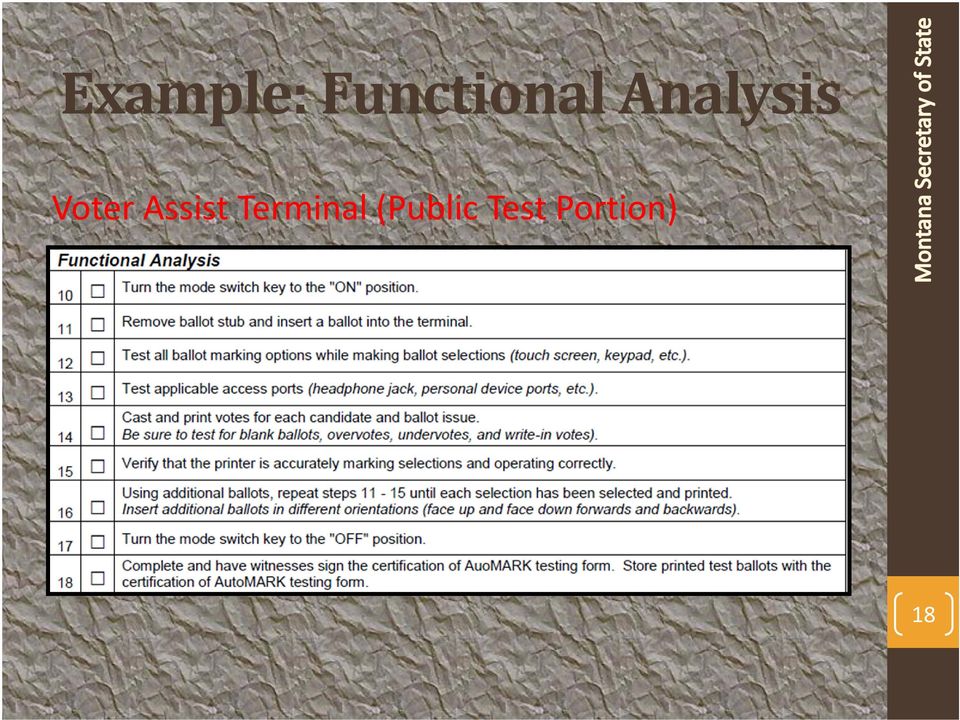
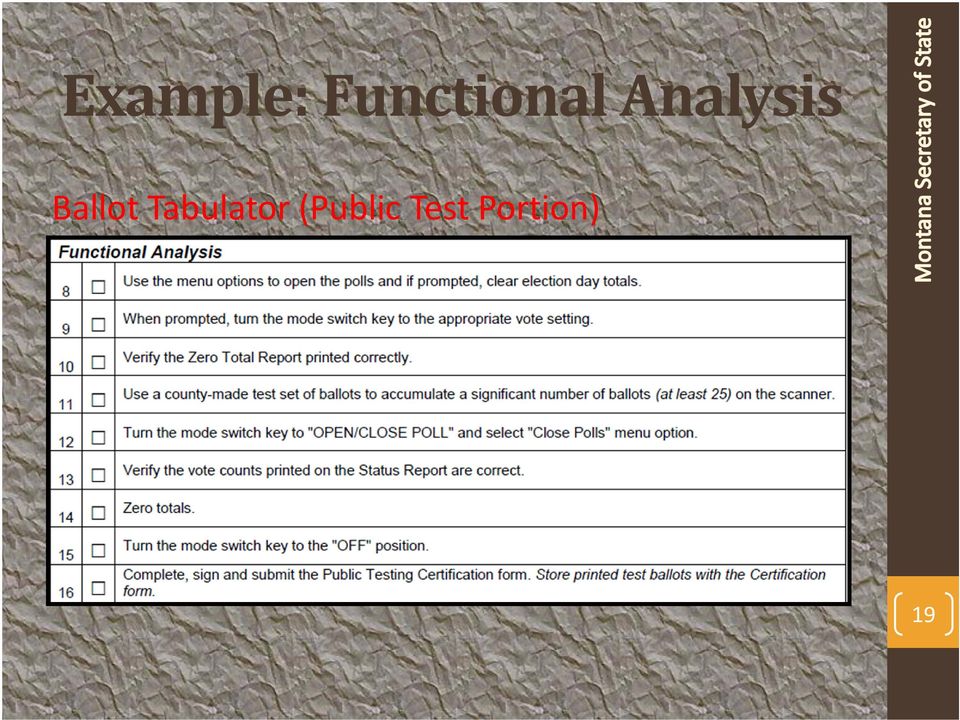
17 Functional Analysis Tests connections for external devices, such as earphones and personal accessibility devices. Test of the ballot feed paths. This test consists of loading an election onto the device, casting or marking a known test set of ballots and then counting the votes and comparing the results with the known vote total. Ensure the correct media is with the correct machine. This is the test that most people think about when they hear Voting System Test. 17

18 Example: Functional Analysis Voter Assist Terminal (Public Test Portion) 18
19 Example: Functional Analysis Ballot Tabulator (Public Test Portion) 19
20 Storage and Security This section is test dependent and covers sealing and verifying the security of the machine tested. 20

21 Example: Storage & Security Voter Assist Terminal (Public Test Portion) Ballot Tabulator (Public Test Portion) 21
22 A few thoughts on the checklists.. The checklists are test specific, so an Acceptance Test checklist is slightly different from a Election Day Test checklist. It s recommended that your office maintains a copy of the test and the results of every test ever conducted on your equipment. These checklists can be found on our website in the forms section or in the Uniform Voting Systems Guide. 22
23 Test Decks Ideas, recommendations and approaches 23
24 Don t rely on the vendors test deck The test deck the vendor supplies has likely already been run through and tested before reaching your office. Running the test deck just verifies that the deck created by the vendor works on the vendor s machines, with the vendor s programming. The tests that you run on these machines are the only tests that will be done before an election to verify the programming is correct. The test deck is the only thing that protects the election results from an error in the programming. 24
25 Create your own test deck! Things you will need Ballots Media Ballot Key Time 25
26 Test Deck Basics Every ballot variation should be included in your test deck. Every precinct Each party in the primary Each precinct will have at least two ballot variations (D/R) 2014 could have a third primary ballot variation. Each split (if applicable) The number of ballots in each test deck may vary from precinct to precinct, depending on number of contests and candidates. 26
27 A Test Deck Includes: One Blank Ballot Ensures that the machine is not picking up any marks on the ballot at all. One completely blacked out ballot (Minus the tracking marks and the designated marking locations). This test verifies that the software is not reading marks in undesignated areas. 27
28 Also Include: Overvoted ballot. Undervoted ballot. At least one vote for each candidate or ballot issue, including write ins. Different vote totals for each candidate/issue This helps verify that the correct choice is getting the correct vote. 28
29 Test Folded Ballots It may also be wise to test a stack of folded ballots. Ensure the ballots are folded in the same manner as your absentee ballots. If you are testing a M650 Nest the ballots together Single orientation w/corner cut in the upper right corner Scan small stacks: ballots If you are testing a DS850 Nest ballots together You can run the ballots through any orientation Start with small stacks: 100 ballots 29
30 Creating a Ballot Key A ballot key contains the predetermined vote total for each race. Should be one ballot key per precinct being tested. Tip: To help organization, if you are using Excel, ensure that every sheet is titled with the precinct you are working with. The ballot key should be kept secret until you are ready to verify the results. 30
31 A Possible Testing Approach The key takeaways of this method should include: Ensures that each choice receives one vote. Each choice in the race receives a different verifiable total. Filling out the ovals on the ballot is extremely easy as it follows a pattern. 31
32 Pattern Ballot Key/Test Deck Ballot #1 Fill out the oval for the first candidate or ballot issue in every race. Ballot #2 Fill out the oval for the second candidate or ballot issue in every race. Ballot #3 Fill out the oval for the third candidate. If a race has less than three candidates or choices, skip this race. Ballot #4 Fill out the oval for the fourth candidate. If a race has less than four candidates or choices, skip this race. Ballot #5 continue this pattern until every candidate in every race has one vote. 32
33 Pattern Ballot Key/Test Deck You should now have as many ballots as the race with the most candidates (including write ins). Example Race #1, has 5 choices you should have 5 ballots. 33
34 The First Five Ballots At this point a sample ballot key would look like this. Candidate Names The top row contains the ballot numbers The Ballot Marking Process Notice what happens if a race does not have A second/third/etc choice. 34
35 The First Five Ballots Notice that ballot 1 contains votes for the candidate/ballot issue in ballot position 1, same goes for ballot 2 and so on. 35
36 The Next Four Ballots To ensure that every choice in the race has a different vote total, you would want to take the race with the most choices (5 in our example) and give one choice that many ballot votes. (In our example we gave candidate E, 5 votes.) Note: That no other race has five choices so no votes are given on this ballot. 36
37 The Next Three Ballots Repeat the process for the next choice. 37
38 The Next Two.. and the next choice 38
39 And The Last Ballot And on the last choice 39
40 And The Final Product The sample test key is complete. Every Oval is tested. Each candidate receives a different # of votes. 40
41 Final Thoughts On This Process This approach ensures that each oval on the ballot gets tested. Makes it easier to verify that the vote is getting associated to the correct choice. Easy to create a test deck and ballot creators will not suffer from fatigue. This is a sample of one precinct in the total test deck. 41
42 Final Thoughts on this Process Does not require an excessive amount of ballots. 3 candidate max race = 6 ballots 4 candidate max race = 10 ballots 5 candidate max race = 15 ballots 6 candidate max race = 21 ballots 7 candidate max race = 28 ballots 8 candidate max race = 36 ballots Note: This total does not include ballots for other tests you may want to conduct (overvotes, blank ballots, marginal mark, etc). This is only an example of one precinct. Our checklists recommend at least 25 ballots in a test deck. 42
43 Just remember This is just one possible method for creating a test deck and it is not foolproof. Testing the programming of your media can be a very difficult task. Not all counties are the same and an alternative method may be better suited. Counties with precinct tabulators may not prefer to have this many undervotes. You may want to test more ballots. You may have a different method set up for determining your ballot key. You may have a race that is multi vote. 43
44 Test like you might find a problem. Voting Systems can be very hard to test. The system has many decision points that it makes over the course of a ballot. If you think of something else that you want to test for, do it. The best way to avoid a potential issue on election day is to test for it while you have the opportunity to fix it. If you would like to read more on ballot testing recommendations, read the paper called Guidelines for Creating Test Ballots by Josh Washburn h/votingsystems/assure/2009/documents/other/guidelines forcreatingtestballots%20with% %20 .pdf 44
45 Security Seals Where they go & why they are important 45
46 Where do they go? The AutoMARK 2 Security Seals Election Media Door Across case halves Do not put seal on ADA Port! 46
47 Where do they go? Precinct Tabulators The M100 3 Security Seals Access Slots, 2 seals Printer/Key access, 1 seal The M100 Ballot Box 3 Security Seals Ballot Doors, 2 Seals Accessory Bin, 1 seal 47
48 Where do they go? Precinct Tabulators DS200 2 Security Seals USB/Power door Across the case halves DS200 Ballot Box Ballot box doors, 2 seals Accessory bin, 1 seal 48
49 Where do they go? Central Count Tabulators Model Security Seals Across the media drives Across the rear door Model DS850 6 Security Seals Right hand side of the machine, while facing it, one seal on each USB door. 3 Seals total. Left hand side of the machine, while facing it, one seal on door holding power cords. One seal on the back door of the machine One seal located on the back of the machine on the top panel. 49
50 Where do they go? Election Management Software The computer you use for Election Management software will differ from county to county, so the number of seals will vary. Ensure that you are securing USB ports and drives. Verify that the machine is not connected to either the Internet or the Network. 50
51 Why are they important? Security Seals are tamper proof and are numbered for easy tracking. They ensure that the machines have not been tampered with. This includes: All Media Ports (USB, PMCIA, Compact Flash, Zip, etc) On/Off switches Other points of access: Doors Areas that someone could remove the housing They are also important for non machine security as well, including: Ballots and Ballot Boxes Backup Equipment 51
52 NOW THAT THE MACHINES ARE SEALED, WHAT DO WE DO? 52
53 Implement a Voting System Storage Access log. This log helps track who is coming and going into the area where you keep your voting systems. It has a location for the date, the time in and time out as well as the reason for accessing the area. You can find a copy of this form on our website or in the back of the Uniform Ballot and Voting System Procedures Guide. 53
54 Ballot and Voting System Security Logs Ballot & Voting Systems and Chain of Custody Log 54
55 Security Seal Log (Top) Part 1: (to be completed by election administrator) Materials prepared at election office to be delivered to the polling place County: Precinct: Polling Place: Election Date: County A 1 Courthouse AutoMARK Serial # Flashcard Door Seal # Side of Unit Seal # Other: Other: AM M100 /DS200 Serial # Key/Printer Door Seal # Media Access Seal # Access Panel Seal # Ballot Box Seal # Other: M M650/DS850 Serial # Media Drive Seal # Access Door seal # USB Door 2 # USB Door 3 # Power Door # Verified by: Election Administrator Signature 11/12/13 Election Administrator (Date/Time) Part 2: (to be completed by chief election judge or polling place manager before the polls open) Jane Doe and one other official AutoMARK Serial # Flashcard Door Seal # Side of Unit Seal # Other: Other: AM M100 /DS200 Serial # Key/Printer Door Seal # Media Access Seal # Access Panel Seal # Ballot Box Seal # Other: M M650/DS850 Serial # Media Drive Seal # Access Door seal # USB Door 2 # USB Door 3 # Power Door # Before Polls Open Seals verified by: Chief Election Judge 11/2/13 Polling Place Manager or Chief Election Judge (Date/Time) John Doe Election Judge 55
56 Security Seal Log (bottom) Part 3: (to be completed by chief election judge or polling place manager after polls close) AutoMARK Serial # Flashcard Door Seal # Side of Unit Seal # Other: Other: M100 /DS200 Serial # Key/Printer Door Seal # Media Access Seal # Access Panel Seal # Ballot Box Seal # Other: AM M M650/DS850 Serial # Media Drive Seal # Access Door seal # USB Door 2 # USB Door 3 # Power Door # After Polls Closed Seals verified by: Chief Election Judge 11/12/13 Polling Place Manager or Chief Election Judge (Date/Time) John Doe Election Judge Part 4: (to be completed by election administrator or upon return to the election office) AutoMARK Serial # Flashcard Door Seal # Side of Unit Seal # Other: Other: AM M100 /DS200 Serial # Key/Printer Door Seal # Media Access Seal # Access Panel Seal # Ballot Box Seal # Other: M M650/DS850 Serial # Media Drive Seal # Access Door seal # USB Door 2 # USB Door 3 # Power Door # Upon Return to Election Office Seals Verified by: 56 Election Administrator Signature 11/12/13 Jane Doe Election Administrator (Date/Time) and one other official
57 Removed Seal Machine Type Machine Number Machine Seal Location Seal Number Removed/Placed Reason Removed Date Initials (place removed seal here) AutoMARK X M100 M650 DS200 DS850 Media Card Access Panel X Key panel Removed to close polls JD (place removed seal here) AutoMARK M100 M650 DS200 DS850 Media Card Access Panel (place removed seal here) AutoMARK M100 M650 DS200 DS850 Media Card Access Panel (place removed seal here) AutoMARK M100 M650 DS200 DS850 Media Card Access Panel (place removed seal here) AutoMARK M100 M650 DS200 DS850 Media Card Access Panel (place removed seal here) AutoMARK M100 M650 DS200 DS850 Media Card Access Panel 57
58 Benefits of the logs. The log keeps track of every step the machine takes from the time it was sealed up until the time it gets returned after the election. Ensures the machine has not been tampered with. If you notice a discrepancy on these logs, contact your Election Administrator. If you need more security seals, please contact the SOS elections office at [email protected] or
59 Ballot Chain of Custody & Security Seal Log SOS has also designed a chain of custody & security seal log for ballots and media. This form is similar in form and function to the previously demo d log, but contains information specific to ballots and media. You can find a sample of this form in the back of the Uniform Ballot and Voting Systems Procedures Guide or you can download additional copies from our website in the forms section. This form will automatically print out two copies of the Chain of Custody form. The second copy will be used for counties that do early pick up of ballots. So one log can stay at the polls, and the second can accompany the early pickup. 59
60 60
61 Close up. 61
62 Bottom portion of the log 62
63 63
64 When you are done with the election And you go to store your voting systems, it is recommended that you keep the machines sealed and maintain a log. You will need the log and fresh seals when routine maintenance is performed on your machine. Always be in the room when maintenance is being done on your machines. Keeping the machines sealed is a good way to ensure that the machines were not tampered with between elections. Utilize the Voting Systems Access Log 64
65 Voting System Inventory Log The EAC conducted an audit in 2009 that recommended that the State implement an inventory control for electronic voting equipment. In February of 2010 the Secretary of State designed a log to comply with the audit requirement and sent it to all counties to verify and update. This log is not necessarily meant to replace your existing inventory control mechanism, but we need to receive standardized data to make it easier to compile and work with. 65
66 What information is needed? The following fields are on the log: Description of the property. AutoMARK, M100, DS850, etc Serial Number of the property. Source of the property Titleholder of property. Usually your county name. Date of acquisition. In the AutoMARKS case it was 5/1/2006 for all counties. Property cost. Total Value of purchase Percentage of Federal Participation in the cost of the property (if any). Location of property. Election Day and Storage Use and Condition of the property. Disposition data and sale price of the property (if applicable). 66
67 Sample Inventory Log 67
68 Take away: Testing The test deck is the only thing that protects the election results from an error in the programming. Make sure you design and create a test deck and ballot key to verify the election programming. Don t rely on the vendors test deck. Maintain testing information on each machine. Use SOS created checklists to assist in machine testing. Ensure that each choice gets at least one vote. Each choice should have a different total # of votes. Test Folded Ballots. Ensure that these ballots are folded in the same way as your absentee ballots. Test overvotes/undervotes 68
69 Take away: Chain of Custody The Chain of Custody Log is the best way to document security information as the machines/ballots move from the Election Office to the polls and back. This log ensures that every step of the process is tracked. The Security Seal Log ensures that when seals are removed, the whys, whos, whats, wheres are all tracked. The SOS office has created a tracking log for ballots/media and for voting systems. 69
70 Take away: Security Maintaining proper security procedures helps reduce risk of tampering to machines. Utilize the Voting System Storage Access log. Helps track access to the location where voting systems are stored. Ensure machines are sealed at all times. Always have a healthy supply of security seals on hand. Ensure voting systems are stored in a secure location. 70
71 Some Closing Thoughts The Secretary of State s office has updated the Uniform Ballot and Voting System Procedures Guide. Each County will receive a copy. It is also available on the forms section of the SOS website. This guide has all the information covered here, and more. Some other useful information in this guide include: Trouble shooting guides for each machine. The SOS would recommend that each poll worker should have access to a copy of these trouble shooting guides so they can do basic troubleshooting, if need be. Contact numbers of the SOS office, as well as ES&S support. Equipment set up. A copy of all the logs mentioned in this presentation. 71
72 Any Questions? 72
AutoMARK Pre-election/ L&A/Post-test Procedures
 AutoMARK Pre-election/ L&A/Post-test Procedures Installing the Compact Flash Card (Machine is OFF) 1. Using the Access Door key provided, unlock the Access Door containing the compact flash card. 2. Remove
ES&S AutoMARK. Pre-Election Day Checklist
 ES&S AutoMARK Pre-Election Day Checklist Rear Access Door Touch Screen Monitor Lid Compact Flash Access Door Lid Latches Key-Operated Mode Switch Keypad Ballot Feed Tray ADA Port Headphone Jacks 1 Checking
PUBLIC REPORT. Red Team Testing of the ES&S Unity 3.0.1.1 Voting System. Freeman Craft McGregor Group (FCMG) Red Team
 PUBLIC REPORT Red Team Testing of the Voting System Freeman Craft McGregor Group (FCMG) Red Team Prepared for the California Secretary of State by: Jacob D. Stauffer, FCMG Red Team Project Manager Page
South Dakota State Board of Elections ES&S Voting System (EVS) 5.2.0.0 State Certification
 South Dakota State Board of Elections ES&S Voting System (EVS) 5.2.0.0 State Certification Pursuant to South Dakota Codified Law (SDCL) 12-17B-2, please accept this report as official application for certification
United States Election Assistance Commission. Certificate of Conformance ES&S EVS 5.2.0.3
 United States Election Assistance Commission Certificate of Conformance ES&S EVS 5.2.0.3 The voting system identified on this certificate has been evaluated at an accredited voting system testing laboratory
Introduction. Conducting a Security Review
 Chapter 3 PHYSICAL SECURITY Introduction In elections, physical security refers to standards, procedures, and actions taken to protect voting systems and related facilities and equipment from natural and
SECURITY ASSESSMENT SUMMARY REPORT FOR ES&S EVS 5.0.0.0 VOTING SYSTEM. Appendix A.10
 SECURITY ASSESSMENT SUMMARY REPORT FOR ES&S EVS 5.0.0.0 VOTING SYSTEM Appendix A.10 TOC Wyle Report No. T59087.01, Appendix A.11 TABLE OF CONTENTS Page No. 1.0 INTRODUCTION... 1 2.0 SCOPE OF TESTING 2.1
12543 Westella, Suite 100, Houston, Texas 77077, 281-293-0101. Recount Procedures
 5 12543 Westella, Suite 100, Houston, Texas 77077, 281-293-0101 Recount Procedures Prepare and Organize. Conduct every election as if it will be recounted. Public Perception is vital in conducting a recount.
Data Normalization in Electronic Voting Systems: A County Perspective
 Data Normalization in Electronic Voting Systems: A County Perspective Paul Lux, CERA Supervisor of Elections Okaloosa County, Florida Data Elements The common elements shared by election systems, specifically
Volume I, Section 4 Table of Contents
 Volume I, Section 4 Table of Contents 4 Software Standards...4-1 4.1 Scope...4-1 4.1.1 Software Sources...4-2 4.1.2 Location and Control of Software and Hardware on Which it Operates...4-2 4.1.3 Exclusions...4-3
5CHAPTER. Setting Up the Polling Place. IMPORTANT: The electronic poll book MUST be set up first and you MUST begin the update by 5:15 am.
 5CHAPTER Setting Up the Polling Place Election Day - 5:00 AM TO 6:00 AM 14 IMPORTANT: The electronic poll book MUST be set up first and you MUST begin the update by 5:15 am. n All judges of election and
Colorado Secretary of State Election Rules [8 CCR 1505-1]
![Colorado Secretary of State Election Rules [8 CCR 1505-1]](/thumbs/40/21456281.jpg "Colorado Secretary of State Election Rules [8 CCR 1505-1]") Rule 7. Elections Conducted by the County Clerk and Recorder 7.1 Mail ballot plans 7.1.1 The county clerk must submit a mail ballot plan to the Secretary of State by email no later than 90 days before
Rule 7. Elections Conducted by the County Clerk and Recorder 7.1 Mail ballot plans 7.1.1 The county clerk must submit a mail ballot plan to the Secretary of State by email no later than 90 days before
What items constitute an event as it relates to the requirements of a voting system's audit logging?
 EAC Decision on Request for Interpretation 2009-04 (Audit Log Events) 2002 VSS Volume I: 2.2.4.1, Common Standards, 2.2.5.1 System Audit 2005 VVSG Volume I: 2.1.4 Integrity, 2.1.5 System Audit, 2.1.5.1
Summary of Results from California Testing of the ES&S Unity 3.0.1.1/AutoMARK Voting System
 Summary of Results from California Testing of the ES&S Unity 3.0.1.1/AutoMARK Voting System The California Secretary of State tasked Freeman Craft McGregor Group (FCMG) to perform functional testing, accessibility
SCORE An Overview. State of Colorado Registration and Election Management
 SCORE An Overview State of Colorado Registration and Election Management Table of Contents The Voter Registration Module 3 The Voter Search Module 4 The Voter Merge Module 5 The Batch Scan/Commit Batch
ES&S Unity 3.2.0.0 Election Systems & Software
 United States Election Assistance Commission Certificate of Conformance ES&S Unity 3.2.0.0 Election Systems & Software The voting system identified on this certificate has been evaluated at an accredited
Voting System Qualification Test Report. Dominion Voting Systems, Inc. Sequoia WinEDS Release 4.0.175, Version 2
 Dominion Voting Systems, Inc. Sequoia WinEDS Release 4.0.175, Version 2 August 2015 Florida Department of State R. A. Gray Building, Room 316 500 S. Bronough Street Tallahassee, FL 32399-0250 Contents
State of Wisconsin\Government Accountability Board
 212 East Washington Avenue, 3 rd Floor Post Office Box 7984 Madison, WI 53707-7984 Voice (608) 266-8005 Fax (608) 267-0500 E-mail: [email protected] http://gab.wi.gov State of Wisconsin\Government Accountability
Administration. april 2010. www.eac.gov
 Elections Office Administration april 2010 www.eac.gov 1 The Quick Start Management Guide on Elections Office Administration is part of a series of brochures designed to highlight and summarize the information
State of Iowa Approved Voting Systems
 General Information About Voting Equipment Certification in Iowa: Only voting systems on this list can be used for elections in Iowa. This equipment has been examined and approved for use by the Iowa Board
Quality Assurance Program
 CLEAR BALLOT GROUP ClearVote 1.0 Quality Assurance Program Abstract: This document outlines the general quality assurance policies followed by Clear Ballot Group to test the ClearVote product. 2012-2015
2015 2017 Election Dates Calendar
 2015 2017 Election Dates Calendar Florida Department of State Division of Elections R. A. Gray Building, Room 316 500 South Bronough Street Tallahassee, FL 32399 0250 (850) 245 6200 Updated on 3/3/2016
Military and Overseas Voters Manual for Election Administrators
 Military and Overseas Voters Manual for Election Administrators Michigan Department of State Bureau of Elections September 2014 Military and Overseas Voters Manual - Table of Contents The Military and
InkaVote Plus Red Team Security Penetration Test. for. California Secretary of State Debra Bowen. 2-7 October 2007
 InkaVote Plus Red Team Security Penetration Test for California Secretary of State Debra Bowen 2-7 October 2007 The Red Team security penetration test for the InkaVote Plus was conducted by atsec information
FLORIDA VOTING SYSTEM CERTIFICATION PROCESS
 1 FLORIDA VOTING SYSTEM CERTIFICATION PROCESS Division of Elections Dr. Gisela Salas, Director State Certification of Voting Systems: Best Practices and Future Direction Kennesaw State University s Center
Election Activity Watchers Colorado law & regulations
 Election Activity Watchers Colorado law & regulations Activity Statute or Rule Allows: Definition of Watcher 1-1-104(51) "Watcher" means an eligible elector other than a candidate on the ballot who has
ARKANSAS TECH UNIVERSITY
 ARKANSAS TECH UNIVERSITY INVENTORY CONTROL MANUAL SEPTEMBER 2005 PROPERTY MANAGEMENT OFFICE 204 BRYAN EXT. 6087 FAX 968-0227 INTRODUCTION The purpose of this Inventory Manual is to present a uniform method
ROM ACCESS CONTROL USER S MANUAL
 ROM ACCESS CONTROL USER S MANUAL Manual Software Pro-Access Page: 1 PRO-ACCESS SOFTWARE GUIDE PRO-ACCESS SOFTWARE GUIDE 1 0. INTRODUCTION 3 1. INSTALLIG THE SOFTWARE 4 2. SOFTWARE OPERATORS AND COMPETENCIES.
Voting and Elections Guide. Alpena County Version 1.0 April 2010
 2010 Voting and Elections Guide Alpena County Version 1.0 April 2010 Voting Information The County Clerk is responsible for preparing and proofreading the ballots for elections held in Alpena County. She
Volume I, Appendix C Table of Contents
 Appendix C for Voting Officials (Informative) Volume I, Appendix C Table of Contents C Appendix for Voting Officials.... 1 C.1 for Human Factors.... 1 C.2 for Security... 4 i May 9, 2005 Appendix C for
DR System Maintenance
 2015 DR System Maintenance Checklist and Guide This document will provide detailed instructions on how to effectively and properly maintain and backup your system for prolonged lifespan and reduced down
User Guide. F912 Rev 201507
 User Guide F912 Rev 201507 Colorado Time Systems Corporate Office 1551 East 11 th Street Loveland, CO 80537 USA Sales: 800-279-0111 or +1 970-667-1000 Service: 1-800-287-0653 or +1 970-667-1000 Service
ClearAccess Administrator's Guide. Version 4.0
 ClearAccess Administrator's Guide Version 4.0 1 ClearAccess Administrator's Guide Part Number: 100052-10002 Copyright 2015, Clear Ballot Group All rights reserved. This document contains proprietary and
2.10 - DEMOCRACY SUITE PERSONNEL DEPLOYMENT AND TRAINING REQUIREMENTS
 2.10 - DEMOCRACY SUITE PERSONNEL DEPLOYMENT AND TRAINING REQUIREMENTS Version: 4.19::63 April 6, 2015 TO LEARN MORE ABOUT OUR TECHNOLOGY, PEOPLE AND SERVICES VISIT DOMINIONVOTING.COM TODAY i NOTICE OF
U.S. ELECTION ASSISTANCE COMMISSION MEDIA AND PUBLIC RELATIONS. October 2007 MANAGEMENT GUIDE. www.eac.gov
 U.S. ELECTION ASSISTANCE COMMISSION MEDIA AND PUBLIC RELATIONS October 2007 MANAGEMENT GUIDE Q QUICK START MANAGEMENT GUIDE MEDIA AND PUBLIC RELATIONS The Quick Start Management Guide for Media and Public
Loss of data can happen in many ways. One of the most common causes is hard drive failure. Hard drives can die without warning.
 Backing up Important Data Data Backup Procedures for Medford High School Faculty & Staff Backup Procedures for saving to: Zip Drives CD-ROM Drives Floppy Disks Data Travelers And how to use the Windows
FrontDesk Installation And Configuration
 Chapter 2 FrontDesk Installation And Configuration FrontDesk v4.1.25 FrontDesk Software Install Online Software Activation Installing State Related Databases Setting up a Workstation Internet Transfer
Personal Assistance System Owner's Guide
 Owner's Guide PSC07 READ THIS FIRST This equipment generates and uses radio frequency energy, and if not installed and used properly, that is, in strict accordance with the manufacturers instructions,
s86 When motion must be decided by secret ballot [SM, s 88]
![s86 When motion must be decided by secret ballot [SM, s 88]](/thumbs/39/18556029.jpg "s86 When motion must be decided by secret ballot [SM, s 88]") Body Corporate and Community Management (Accommodation Module) Regulation 2008 Chapter 4 Body corporate meetings Act, section 104 Part 4 Voting at general meetings s86 When motion must be decided by secret
Body Corporate and Community Management (Accommodation Module) Regulation 2008 Chapter 4 Body corporate meetings Act, section 104 Part 4 Voting at general meetings s86 When motion must be decided by secret
Overview. Responsibility
 Overview Property management is an important function at the University. Prudent inventory practices help protect the University s multi-million dollar investment in equipment, provide documentation needed
1S-2.053 Election Results, Precinct-Level Election Results, Voting History, and Reconciliation Reporting.
 1S-2.053 Election Results, Precinct-Level Election Results, Voting History, and Reconciliation Reporting. (1) General provisions. (a) This rule establishes file format specifications, timelines and other
WYLE REPORT NO. T57381-01. Appendix A.4. Security TEST CASE PROCEDURE SPECIFICATION (T57381.-60)
 WYLE REPORT NO. T57381-01 Appendix A.4 Security TEST CASE PROCEDURE SPECIFICATION (T57381.-60) TABLE OF CONTENTS Page No. 1.0 INTRODUCTION 1 1.1 Scope 1 1.2 References 1 1.3 Terms and Abbreviations 3 1.4
Georgia Secretary of State Organizational Structure
 Georgia Organizational Structure & Related Elections Offices What are some of the responsibilities of the SOS regarding elections? Setting the forms for nomination petitions and ballots Receiving nomination
Federal Write-in Absentee Ballot (FWAB)
 Federal Write-in Absentee Ballot (FWAB) For any questions about this form, consult the Voting Assistance Guide available in hard copy or For absent Uniformed Service members, their families, and citizens
Destiny lets you print copy labels individually, for copies you're adding, for those added after a certain date, or for those in a Resource List.
 How do I print spine and pocket labels? Destiny lets you print copy labels individually, for copies you're adding, for those added after a certain date, or for those in a Resource List. Important: You
NOTICE OF CONFIDENTIALITY AND NONDISCLOSURE
 i NOTICE OF CONFIDENTIALITY AND NONDISCLOSURE This document contains information that is protected as an unpublished work by Dominion Voting Systems (Dominion) under applicable copyright laws. The Recipient
NATIONAL TALLY CENTER (NTC) OPERATIONS PROCEDURES. 2014 Presidential and Provincial Council Elections
 NATIONAL TALLY CENTER (NTC) OPERATIONS PROCEDURES 2014 Presidential and Provincial Council Elections Introduction... 3 Objectives... 4 Data Security and Integrity Measures... 4 Structure and Staffing...
Mobile credit & debit card acceptance for your iphone
 Mobile credit & debit card acceptance for your iphone Datecs Bluepad50 PIN pad Contents Content. Page. User Information...... 1. CardEase Mobile - Introduction......... 2. Basic requirements........3.
Appendix F Wyle Laboratories Test Plan and Test Report
 Appendix F Wyle Laboratories Test Plan and Test Report Revisions REVISION Original REPORT NO. Test Plan DATE April 14, 2011 REV DATE PAGE OR PARAGRAPH AFFECTED DESCRIPTION OF CHANGES --- 4-14-11 Entire
Position Analysis Questionnaire (PAQ) Guidelines
 Position Analysis Questionnaire (PAQ) Guidelines Employee This questionnaire is designed to be completed online by using a MS Word template. Read each section carefully before proceeding to fill out the
Tradeoffs for Internet Voting Options
 Tradeoffs for Internet Voting Options Submitted to SB11 Working Group Jeremy Epstein October 13 2015 Purpose The purpose of this document is to identify advantages and disadvantages of several different
Office of the Secretary of State
 General Office Overview Assembly Government Affairs, February 25, 2011 Office of the Secretary of State Commercial Recordings Securities Notary Division Elections State Business License Domestic Partnership/Athletes
2 TM. Users Manual. SEC100, SEC200 USB Media Alert
 2 TM 2 TM Users Manual SEC100, SEC200 USB Media Alert Version 5.0 10/7/2014 Thank you for purchasing the Sonic-connect USB Media Alert Device, your companion to help you stay connected with today s specialized
Board of Elections and Ethics BBOE (DL0)
 BBOE (DL0) MISSION The, a charter independent agency, is comprised of a three member Board along with a small, but dedicated staff that carries out the agency s mission. The mission of the Board of Elections
Computer Forensics Processing Checklist. Pueblo High-Tech Crimes Unit
 Computer Forensics Processing Checklist Pueblo High-Tech Crimes Unit Cmdr. Dave Pettinari Pueblo County Sheriff's Office [email protected] The purpose of this document is to provide computer forensic technicians
COMMONWEALTH OF PENNSYLVANIA DEPARTMENT OF STATE Harrisburg, PA 17120 BASIC GUIDE TO STUDENT VOTING IN PENNSYLVANIA
 COMMONWEALTH OF PENNSYLVANIA DEPARTMENT OF STATE Harrisburg, PA 17120 PEDRO A. CORTÉS Secretary of the Commonwealth www.dos.state.pa.us BASIC GUIDE TO STUDENT VOTING IN PENNSYLVANIA INTRODUCTION The traveling
PayPal Integration Guide
 PayPal Integration Guide Table of Contents PayPal Integration Overview 2 Sage Accounts Setup 3 Obtaining API credentials from PayPal 4 Installing Tradebox Finance Manager 5 Creating a connection to PayPal
Elfring Fonts, Inc. PCL MICR Fonts
 Elfring Fonts, Inc. PCL MICR Fonts This package contains five MICR fonts (also known as E-13B), to print magnetic encoding on checks, and six Secure Number fonts, to print check amounts. These fonts come
HP Laser Jet 4200/4240/4250/4300/4350 Swing Plate
 HP Laser Jet 4200/4240/4250/4300/4350 Swing Plate 1 Swing Plate Assembly-RM1-0043 1 Swing Plate Kit-5851-2766 (RM1-0043 plus RM1-1091 gear) CAUTION: Fuser may be hot. Turn off printer, unplug it and allow
User Manual GSM Alarm System. www.deltasecurity.cn. All rights reserved by Delta Security Co., Ltd
 User Manual GSM Alarm System All rights reserved by Delta Security Co., Ltd Dear Clients, Thank you for using our GSM Alarm System. We are committed to giving you the best home security available today
Voting System Qualification Test Report Dominion Voting Systems, Inc.
 Dominion Voting Systems, Inc. Democracy Suite, Release 4.14.17, Version 1 August 2013 Florida Department of State R. A. Gray Building, Room 316 500 S. Bronough Street Tallahassee, FL 32399-0250 Page 1
SAGE SCIENCE INC. Pippin Prep IQ/OQ. 460008 Rev. A Originated: March 5, 2015. Sheet 1 of 11. Prepared by: Alex Vira SUMMARY
 SAGE SCIENCE INC Pippin Prep IQ/OQ 460008 Rev. A Originated: March 5, 2015 Sheet 1 of 11 Prepared by: Alex Vira SUMMARY This document provides instructions and records for Installation Qualification (IQ)
Content Sheet 3-1: Equipment Management Overview
 Content Sheet 3-1: Equipment Management Overview Role in quality management system Equipment management is one of the essential elements of a quality management system. Proper management of the equipment
Project E V E R E S T Evaluation and Validation of Election Related Equipment, Standards and Testing
 Project E V E R E S T Evaluation and Validation of Election Related Equipment, Standards and Testing Report of Findings Ohio Secretary of State Jennifer L. Brunner Columbus, Ohio December 14, 2007 Project
PAYMENT CARD INDUSTRY DATA SECURITY STANDARD (PCI) Affordable ~ Clean ~ Safe ~ Simple ~ Flexible
 PAYMENT CARD INDUSTRY DATA SECURITY STANDARD (PCI) Affordable ~ Clean ~ Safe ~ Simple ~ Flexible 2 PCI Compliance What does PCI stand for? Payment Card Industry Data Security Standard Data Security Standards
HOSTED DESKTOP MANUAL
 HOSTED DESKTOP MANUAL TABLE OF CONTENTS REMOTE DESKTOP MANUAL Last revision August 18, 2005 WHAT IS A REMOTE DESKTOP... 1 Security... 1 Terminals...2 SETTING UP YOUR REMOTE DESKTOP... 2 Installing Remote
Arizona Secretary of State. Effective Absentee System for Elections (EASE)2. Technical Proposal. Catalog of Federal Domestic Assistance Number 12.
 Arizona Secretary of State Effective Absentee System for Elections (EASE)2 Technical Proposal Catalog of Federal Domestic Assistance Number 12.219 BAA Number: H98210-13-BAA-0001 No Sub Recipients Technical
SE05: Getting Started with Cognex DataMan Bar Code Readers - Hands On Lab Werner Solution Expo April 8 & 9
 SE05: Getting Started with Cognex DataMan Bar Code Readers - Hands On Lab Werner Solution Expo April 8 & 9 Learning Goals: At the end of this lab, the student should have basic familiarity with the DataMan
1006 Administrator printed a copy of the receipt for the last customer transaction
 Event/Error Codes 1001 Administrator entered the program 1002 Administrator got the balance 1003 Administrator set the balance 1004 Administrator added to the balance 1005 Administrator subtracted from
Novell ZENworks Asset Management
 Novell ZENworks Asset Management Administrative Best Practices and Troubleshooting www.novell.com APRIL 19, 2005 2 GETTING THE MOST OUT OF NOVELL ZENWORKS ASSET MANAGEMENT The award-winning asset tracking
Manual. Start accepting card payments with payleven
 Manual Start accepting card payments with payleven The Chip & PIN card reader Top Magnetic stripe card reader Front Bluetooth symbol Battery life 0-button (pairing button) Cancel Back Confirmation Bottom
SPECIAL GENERAL MEETINGS
 SPECIAL GENERAL MEETINGS Part 6: A Secretary s Satchel - Guide for Secretaries New laws for Victorian incorporated associations In November 2012, the laws regulating Victorian incorporated associations
Xcalibur. Foundation. Administrator Guide. Software Version 3.0
 Xcalibur Foundation Administrator Guide Software Version 3.0 XCALI-97520 Revision A May 2013 2013 Thermo Fisher Scientific Inc. All rights reserved. LCquan, Watson LIMS, and Web Access are trademarks,
Introduction to Mamut Point of Sale
 // Mamut Point of Sale Introduction to Mamut Point of Sale Contents News in Mamut Point of Sale version 3.5... 2 Mamut Point of Sale... 3 Definitions of words and expressions used in the program... 7 Getting
Ansur Test Executive. Users Manual
 Ansur Test Executive Users Manual April 2008 2008 Fluke Corporation, All rights reserved. All product names are trademarks of their respective companies Table of Contents 1 Introducing Ansur... 4 1.1 About
Facilities Planning & Management Maintenance Repair Parts Policies & Procedures
 Facilities Planning & Management Policies & Procedures Revised 10/2013 Facilities Planning & Management Policies & Procedures PURCHASE REQUESTS cspolicy1.wpd 1-4 ISSUES FROM STOCK cspolicy2.wpd 5-7 MONTHLY