
How to configure VLAN and route failover
|
|
|
- Edward Strickland
- 10 years ago
- Views:
Transcription
1 How to configure VLAN and route failover This example requires a DFL-1600 or 2500 to be fully implemented. Most settings can however also be used on a DFL-210 or DFL-800. Two tag based VLANs will be created on lan3, that connect to switch port with VLAN tag. Details: - From lan1, lan2 and lan3: HTTP, HTTPS and DNS connect to Internet via wan2. - From dmz: inbound and outbound SMTP services connect to Internet via wan1. - All internal nets can also access the Mail server in dmz. - Only VLAN2 can access the FTP server in dmz. - If anyone of the wan interfaces is disconnected, the traffic from that interface will be redirected to the other wan interface.

2 1. Addresses Go to Objects -> Address book -> InterfaceAddresses Make sure the configured addresses match the following list, and add the objects that not already exist. To add new objects, select IP address from the add dropdown, enter name and address and click ok. Add a new IP4 Group. Name Address lan1_ip lan1net /24 lan2_ip lan2net /24 lan3_ip lan3net /24 dmz_ip dmznet /24 wan1_ip wan1net /24 wan1-gw wan2_ip wan2net /24 wan2-gw vlan1_ip vlan1net /24 vlan2_ip vlan2net /24 ftp-server mail-server Name: all-lannets Add lan1net, lan2net, vlan1net and vlan2net.

3 2. Ethernet interfaces Go to Interfaces -> Ethernet. Edit the wan1 interface to use the following settings. IP Address: wan1_ip Network: wan1net Default Gateway: wan1_gw In the Advanced tab: Automatic Route Creation: Deselect Add route for interface network and Add default route if default gateway is specified. Edit the wan2 interface according to the following settings. IP Address: wan2_ip Network: wan2net Default Gateway: wan2_gw In the Advanced tab:

4 Automatic Route Creation: Deselect Add route for interface network and Add default route if default gateway is specified. 3. Routes Go to Routing -> Routing Tables. Select main routing table and add a new Route. (This route is mainly for WAN1 interface routeing with link status monitoring only) Interface: wan1 Network: wan1net Gateway: (None) Local IP Address: (None) Metric: 90 In the Monitor tab: Monitoring for Route Failover: Select Monitor This Route

5 Method: Select Monitor Interface Link Status Add a new Route in main routing table. (This route is mainly for WAN1 default route with link status and ARP lookup monitoring) Interface: wan1 Network: all-nets Gateway: wan1_gw Local IP Address: (None) Metric: 90 In the Monitor tab: Monitoring for Route Failover: Select Monitor This Route Method: Select Monitor Interface Link Status Select Monitor Gateway Using ARP Lookup

6 Add a new Route in main routing table. (This route is mainly for WAN2 interface route with link status monitoring only) Interface: wan2 Network: wan2net Gateway: (None) Local IP Address: (None) Metric: 80 In the Monitor tab: Monitoring for Route Failover: Select Monitor This Route Method: Select Monitor Interface Link Status Add a new Route in main routing table. (This route is mainly for WAN2 default route with link status and ARP lookup monitoring) Interface: wan2 Network: all-nets Gateway: wan2_gw Local IP Address: (None) Metric: 80 In the Monitor tab: Monitoring for Route Failover: Select Monitor This Route Method: Select Monitor Interface Link Status Select Monitor Gateway Using ARP Lookup 4. VLAN interfaces Go to Interfaces -> VLAN. Add a new VLAN.

7 Name: vlan1 Interface: lan3 VLAN ID: 1 Address Settings: IP Address: vlan1_ip Network: vlan1net Default Gateway: (None) Click Ok Add a new VLAN. Name: vlan2 Interface: lan3 VLAN ID: 2

8 Address Settings: IP Address: vlan2_ip Network: vlan2net Default Gateway: (None) Click Ok 5. Interface groups Go to Interfaces -> Interface Groups. Add a new Interface Group. Name: all-lan Interfaces: Add lan1, lan2, vlan1 and vlan2 to this group.

9 Add a new Interface Group. Name: all-wan Select Security/Transport Equivalent Interfaces: Add wan1 and wan2 to this group. 6a. Rules to allow HTTP, HTTPS and DNS to Internet Go to Rules -> IP Rules. Add a new IP Rule Folder called all-lan_to_all-wan. In the new folder, add a new IP Rule (to allow outgoing HTTP). Name: allow-http-all
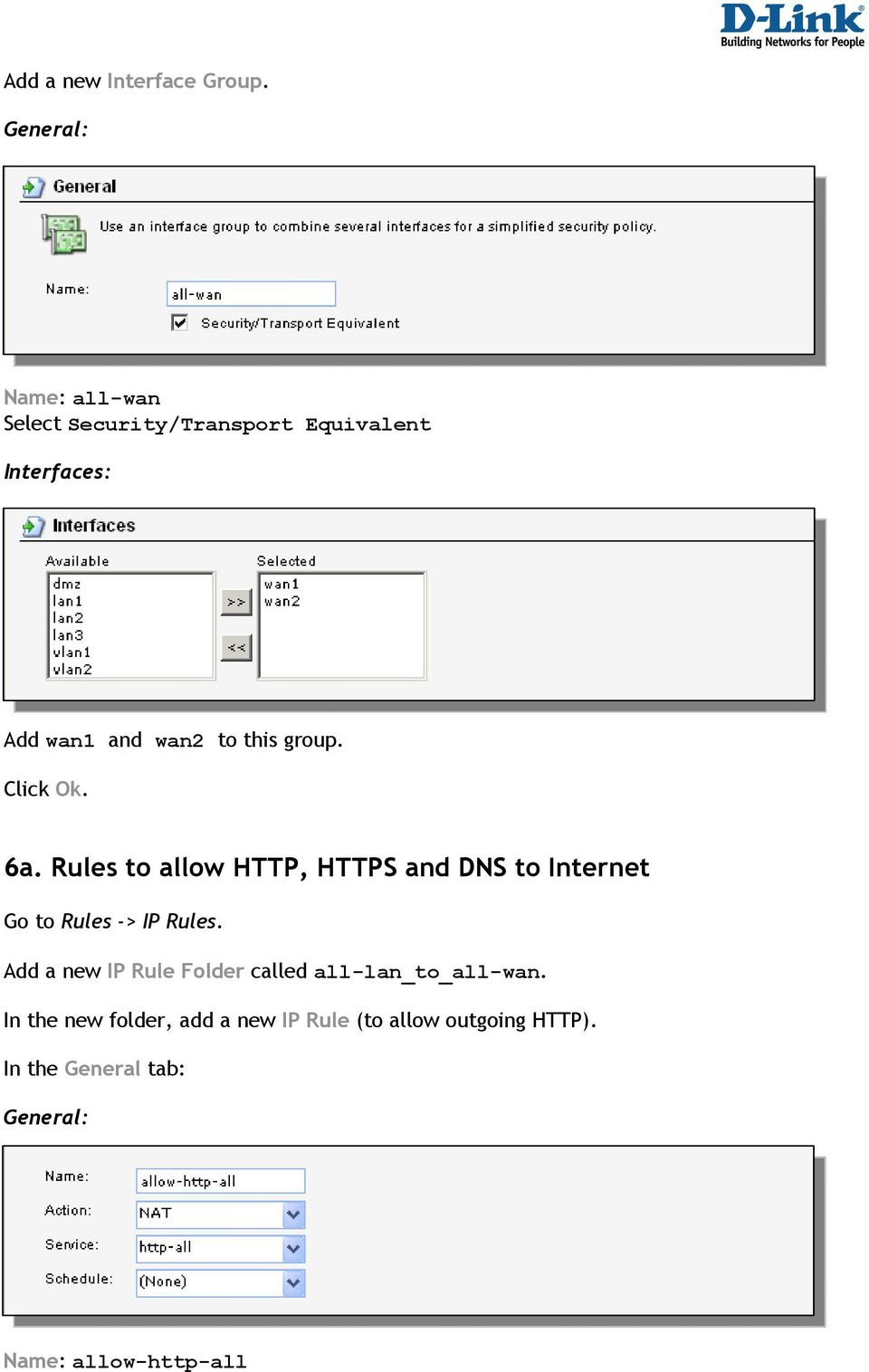
10 Action: NAT Service: http-all Source interface: all-lan Source network: all-lannet Destination interface: all-wan Destination network: all-nets Add a new IP Rule (to allow outgoing dns). Name: allow-dns-all Action: NAT Service: dns-all Source interface: all-lan Source network: all-lannet Destination interface: all-wan Destination network: all-nets 6b. Rules to allow outgoing SMTP from mail server to Internet

11 Add a new IP Rule folder called dmz_to_all-wan. In the new folder, add a new IP Rule (to allow outgoing smtp). Name: allow-smtp-out Action: NAT Service: smtp Source interface: dmz Source network: mail-server Destination interface: all-wan Destination network: all-nets 6c. Rules to allow Internet and internal users to access mail server Add a new IP Rule Folder called all_to_dmz In the new folder, add a new IP Rule (to translate incoming smtp traffic to mailserver). Name: allow-smtp-ext Action: SAT Service: smtp Source interface: wan1 Source network: all-nets Destination interface: core Destination network: wan1_ip In the SAT tab. Select Destination Address New IP Address: mail-server In the all_to_dmz folder, add a new IP Rule (to allow incoming smtp traffic to mailserver). Name: allow-smtp-ext

12 Action: Allow Service: smtp Source interface: wan1 Source network: all-nets Destination interface: core Destination network: wan1_ip In the all_to_dmz folder, add a new IP Rule (to allow internal smtp traffic to mailserver). Name: allow-smtp-int Action: Allow Service: smtp Source interface: any Source network: all-nets Destination interface: dmz Destination network: mail-server 6d. Rules to allow traffic to FTP server from vlan2 Add a new IP Rule folder called vlan2_to_dmz. Add a new IP Rule (to allow ftp from vlan2 to dmz). Name: allow-ftp Action: Allow Service: ftp-passthrough Source interface: vlan2 Source network: vlan2net Destination interface: dmz Destination network: dmznet

13 7. Policy-based Routing Go to Routing -> Routing Tables. Add a new Routing Table. Name: pbrtable Ordering: Only In this routing table, add a new Route. Interface: wan1 Network: all-nets Gateway: wan1_gw Local IP Address: (None) Metric: 0 Add a new Route. Interface: wan2 Network: all-nets Gateway: wan2_gw Local IP Address: (None) Metric: 1

14 Go to Routing -> Routing rules. Add a new RoutingRule. Name: pbr-smtp Forward Table: pbrtable Return Table: <main> Service: smtp Schedule: (None) Source Interface: dmz Source Network: dmznet Destination Interface: any Destination Network: all-nets Save and activate the configuration

Configuration examples for the D-Link NetDefend Firewall series DFL-210/800/1600/2500
 Configuration examples for the D-Link NetDefend Firewall series DFL-210/800/1600/2500 Scenario: How to configure WAN failover for two ISPs using policy based routing Last update: 2005-10-20 Overview In
Configuration examples for the D-Link NetDefend Firewall series DFL-210/800/1600/2500
 Configuration examples for the D-Link NetDefend Firewall series DFL-210/800/1600/2500 Scenario: How to configure Bandwidth Management Last update: 2005-10-20 Overview In this document, the notation Objects->Address
This article describes a detailed configuration example that demonstrates how to configure Cyberoam to provide the access of internal resources.
 How To Configure Port Forwarding using Virtual Host to access devices on Internal network Applicable to versions 9.5.3 build 14 or above This article describes a detailed configuration example that demonstrates
Chapter 7. Address Translation
 Chapter 7. Address Translation This chapter describes NetDefendOS address translation capabilities. Dynamic Network Address Translation, page 204 NAT Pools, page 207 Static Address Translation, page 210
Configuration examples for the D-Link NetDefend Firewall series DFL-210/800/1600/2500
 Configuration examples for the D-Link NetDefend Firewall series DFL-210/800/1600/2500 Scenario: Virtual private network using a PPTP (or L2TP) lan-to-lan tunnel Last update: 2005-10-20 Overview In this
How To Load balance traffic of Mail server hosted in the Internal network and redirect traffic over preferred Interface
 How To Load balance traffic of Mail server hosted in the Internal network and redirect traffic over preferred Interface How To Configure load sharing and redirect mail server traffic over preferred Gateway
PowerLink Bandwidth Aggregation Redundant WAN Link and VPN Fail-Over Solutions
 Bandwidth Aggregation Redundant WAN Link and VPN Fail-Over Solutions Find your network example: 1. Basic network with and 2 WAN lines - click here 2. Add a web server to the LAN - click here 3. Add a web,
How to Open HTTP or HTTPS traffic to a webserver behind the NetVanta 2000 Series unit (Enhanced OS)
 NetVanta 2000 Series Technical Note How to Open HTTP or HTTPS traffic to a webserver behind the NetVanta 2000 Series unit (Enhanced OS) This document is applicable to NetVanta 2600 series, 2700 series,
Chapter 3 Security and Firewall Protection
 Chapter 3 Security and Firewall Protection This chapter describes how to use the basic firewall features of the ADSL2+ Modem Router to protect your network. Firewall Settings You can set up the ADSL2+
DFL-210/260, DFL-800/860, DFL-1600/2500 How to setup IPSec VPN connection
 DFL-210/260, DFL-800/860, DFL-1600/2500 How to setup IPSec VPN connection This setup example uses the following network settings: In our example the IPSec VPN tunnel is established between two LANs: 192.168.0.x
Configuration Examples for the D-Link NetDefend Firewall Series
 Configuration Examples for the D-Link NetDefend Firewall Series Scenario: How to configure Anti-Spam on NetDefend Firewall Platform Compatibility: All NetDefend Firewall Series Last update: 2008-03-13
Firewall Defaults and Some Basic Rules
 Firewall Defaults and Some Basic Rules ProSecure UTM Quick Start Guide This quick start guide provides the firewall defaults and explains how to configure some basic firewall rules for the ProSecure Unified
Enabling NAT and Routing in DGW v2.0 June 6, 2012
 Enabling NAT and Routing in DGW v2.0 June 6, 2012 Proprietary 2012 Media5 Corporation Table of Contents Introduction... 3 Starting Services... 4 Distinguishing your WAN and LAN interfaces... 5 Configuring
How do I configure the bandwidth management/traffic shaping?
 How do I configure the bandwidth management/traffic shaping? This FAQ will demonstrate setting up bandwidth management/traffic shaping on 1Mbps leased line upstream and downstream. For inbound and outbound
Multi-Homing Security Gateway
 Multi-Homing Security Gateway MH-5000 Quick Installation Guide 1 Before You Begin It s best to use a computer with an Ethernet adapter for configuring the MH-5000. The default IP address for the MH-5000
Firewall Defaults, Public Server Rule, and Secondary WAN IP Address
 Firewall Defaults, Public Server Rule, and Secondary WAN IP Address This quick start guide provides the firewall defaults and explains how to configure some basic firewall rules for the ProSafe Wireless-N
Figure 41-1 IP Filter Rules
 41. Firewall / IP Filter This function allows user to enable the functionality of IP filter. Both inside and outside packets through router could be decided to allow or drop by supervisor. Figure 41-1
Configuring a customer owned router to function as a switch with Ultra TV
 Configuring a customer owned router to function as a switch with Ultra TV This method will turn the customer router into a wireless switch and allow the Ultra Gateway to perform routing functions and allow
Optimum Business SIP Trunk Set-up Guide
 Optimum Business SIP Trunk Set-up Guide For use with IP PBX only. SIPSetup 07.13 FOR USE WITH IP PBX ONLY Important: If your PBX is configured to use a PRI connection, do not use this guide. If you need
Mail Server Scenarios and Configurations
 Mail Server Scenarios and Configurations Scenario 1: Using Wingate as the main Mail Server on your network. Computers on your LAN (Local Area Network) Internet Computers In the example above you would
How To - Configure Virtual Host using FQDN How To Configure Virtual Host using FQDN
 How To - Configure Virtual Host using FQDN How To Configure Virtual Host using FQDN Applicable Version: 10.6.2 onwards Overview Virtual host implementation is based on the Destination NAT concept. Virtual
How do I configure multi-wan in Routing Table mode?
 How do I configure multi-wan in Routing Table mode? Fireware/Multi-WAN This document applies to: Appliance Firebox X Core / Firebox X Core e-series / Firebox X Peak / Firebox X Peak e-series Appliance
Document No. FO1101 Issue Date: Work Group: FibreOP Technical Team October 31, 2013 FINAL:
 Document No. FO1101 Issue Date: Work Group: FibreOP Technical Team October 31, 2013 FINAL: Title: FibreOP Business Internet 5 Static IP Customer Configuration Version 1.1 Summary: This document provides
How Your Computer Accesses the Internet through your Wi-Fi for Boats Router
 How Your Computer Accesses the Internet through your Wi-Fi for Boats Router By default, a router blocks any inbound traffic from the Internet to your computers except for replies to your outbound traffic.
Smart Tips. Enabling WAN Load Balancing. Key Features. Network Diagram. Overview. Featured Products. WAN Failover. Enabling WAN Load Balancing Page 1
 Smart Tips Enabling WAN Load Balancing Overview Many small businesses today use broadband links such as DSL or Cable, favoring them over the traditional link such as T1/E1 or leased lines because of the
Firewall VPN Router. Quick Installation Guide M73-APO09-380
 Firewall VPN Router Quick Installation Guide M73-APO09-380 Firewall VPN Router Overview The Firewall VPN Router provides three 10/100Mbit Ethernet network interface ports which are the Internal/LAN, External/WAN,
How To Configure Multiburb Smt On A Sidewinder G2 In A Load Sharing Environment
 A PPLICATION N O T E Configuring multi-burb Sendmail with load sharing High Availability This document provides the steps that are needed to configure multi-burb Sendmail in a load sharing High Availability
Serial Deployment Quick Start Guide
 PaperClip em 4 11/19/2007 Serial Deployment Quick Start Guide This checklist should be completed before installing the em4 Relay. Your answers with the associated screens will enable you to install and
Configuring WAN Failover & Load-Balancing
 SonicOS Configuring WAN Failover & Load-Balancing Introduction This new feature for SonicOS 2.0 Enhanced gives the user the ability to designate one of the user-assigned interfaces as a Secondary or backup
SonicOS Enhanced 4.0: NAT Load Balancing
 SonicOS Enhanced 4.0: NAT Load Balancing This document describes how to configure the Network Address Translation (NAT) & Load Balancing (LB) features in SonicOS Enhanced 4.0. Feature Overview, page 1
Application Description
 Application Description Firewall in front of LAN Different Servers located behind Firewall Firewall to be accessible from Internet Load Balancer to be installed in a TRANSPARENT MODE between Firewall and
UIP1868P User Interface Guide
 UIP1868P User Interface Guide (Firmware version 0.13.4 and later) V1.1 Monday, July 8, 2005 Table of Contents Opening the UIP1868P's Configuration Utility... 3 Connecting to Your Broadband Modem... 4 Setting
Best Practices: Pass-Through w/bypass (Bridge Mode)
 Best Practices: Pass-Through w/bypass (Bridge Mode) EdgeXOS Deployment Scenario: Bridge Pass-Through This document is designed to provide an example as to how the EdgeXOS appliance is configured based
Layer 2 Networking. Overview. VLANs. Tech Note
 Layer 2 Networking Tech Note Overview PAN-OS is very flexible, allowing administrators to mix and match physical firewall interfaces amongst virtual wire, layer 2, layer 3, and tap mode configurations.
Barracuda Link Balancer
 Barracuda Networks Technical Documentation Barracuda Link Balancer Administrator s Guide Version 2.2 RECLAIM YOUR NETWORK Copyright Notice Copyright 2004-2011, Barracuda Networks www.barracuda.com v2.2-110503-01-0503
Configuring High Availability for Embedded NGX Gateways in SmartCenter
 Configuring High Availability for Embedded NGX Gateways in SmartCenter February 2008 Active and Passive Gateway States Contents Introduction...1 High Availability Basics and Terminology...2 Active and
Fonality. Optimum Business Trunking and the Fonality Trixbox Pro IP PBX Standard Edition V4.1.2- p13 Configuration Guide
 Fonality Optimum Business Trunking and the Fonality Trixbox Pro IP PBX Standard Edition V4.1.2- p13 Configuration Guide Fonality Table of Contents 1. Overview 2. SIP Trunk Adaptor Set-up Instructions 3.
ExamPDF. Higher Quality,Better service!
 ExamPDF Higher Quality,Better service! Q&A Exam : 1Y0-A21 Title : Basic Administration for Citrix NetScaler 9.2 Version : Demo 1 / 5 1.Scenario: An administrator is working with a Citrix consultant to
Using SonicWALL NetExtender to Access FTP Servers
 SSL-VPN Using SonicWALL NetExtender to Access FTP Servers Problem: Using NetExtender to access an FTP Server on the LAN segment of a SonicWALL PRO 4060. Solution: Perform the following setup steps. Step
Configuring Network Address Translation (NAT)
 8 Configuring Network Address Translation (NAT) Contents Overview...................................................... 8-3 Translating Between an Inside and an Outside Network........... 8-3 Local and
Hosting more than one FortiOS instance on. VLANs. 1. Network topology
 Hosting more than one FortiOS instance on a single FortiGate unit using VDOMs and VLANs 1. Network topology Use Virtual domains (VDOMs) to divide the FortiGate unit into two or more virtual instances of
Multi-Homing Dual WAN Firewall Router
 Multi-Homing Dual WAN Firewall Router Quick Installation Guide M73-APO09-400 Multi-Homing Dual WAN Firewall Router Overview The Multi-Homing Dual WAN Firewall Router provides three 10/100Mbit Ethernet
Broadband Phone Gateway BPG510 Technical Users Guide
 Broadband Phone Gateway BPG510 Technical Users Guide (Firmware version 0.14.1 and later) Revision 1.0 2006, 8x8 Inc. Table of Contents About your Broadband Phone Gateway (BPG510)... 4 Opening the BPG510's
GlobeSurfer III Port Forwarding
 GlobeSurfer III Port Forwarding nv, Gaston Geenslaan 14, 3001 Leuven - Belgium - Tel +32 16 317 411 - Fax +32 16 207 164 About this document Overview and Purpose This document provides a description of
SonicWALL NAT Load Balancing
 SonicWALL NAT Load Balancing Overview This feature module will detail how to configure the Network Address Translation (NAT) & Load Balancing (LB) features in SonicOS Enhanced 4.0 and newer, to balance
Network Agent Quick Start
 Network Agent Quick Start Topic 50500 Network Agent Quick Start Updated 17-Sep-2013 Applies To: Web Filter, Web Security, Web Security Gateway, and Web Security Gateway Anywhere, v7.7 and 7.8 Websense
1:1 NAT in ZeroShell. Requirements. Overview. Network Setup
 1:1 NAT in ZeroShell Requirements The version of ZeroShell used for writing this document is Release 1.0.beta11. This document does not describe installing ZeroShell, it is assumed that the user already
Quick Note 026. Using the firewall of a Digi TransPort to redirect HTTP Traffic to a proxy server. Digi International Technical Support December 2011
 Quick Note 026 Using the firewall of a Digi TransPort to redirect HTTP Traffic to a proxy server Digi International Technical Support December 2011 Contents 1 Introduction... 3 1.1 Outline... 3 1.2 Assumptions...
Firewall Firewall August, 2003
 Firewall August, 2003 1 Firewall and Access Control This product also serves as an Internet firewall, not only does it provide a natural firewall function (Network Address Translation, NAT), but it also
Service Managed Gateway TM. How to Configure a Firewall
 Service Managed Gateway TM Issue 1.3 Date 10 March 2006 Table of contents 1 Introduction... 3 1.1 What is a firewall?... 3 1.2 The benefits of using a firewall... 3 2 How to configure firewall settings
Create a VPN on your ipad, iphone or ipod Touch and SonicWALL NSA UTM firewall - Part 1: SonicWALL NSA Appliance
 Create a VPN on your ipad, iphone or ipod Touch and SonicWALL NSA UTM firewall - Part 1: SonicWALL NSA Appliance This article will easily explain how to configure your Apple ipad, iphone or ipod Touch
Barracuda Link Balancer Administrator s Guide
 Barracuda Link Balancer Administrator s Guide Version 1.0 Barracuda Networks Inc. 3175 S. Winchester Blvd. Campbell, CA 95008 http://www.barracuda.com Copyright Notice Copyright 2008, Barracuda Networks
MULTI WAN TECHNICAL OVERVIEW
 MULTI WAN TECHNICAL OVERVIEW The Multi WAN feature will allow the service provider to load balanced all client TCP and UDP traffic only. It also provides redundancy for HA. Traffic that is load balanced:
Setting up Microsoft Office 365
 Integration Guide Revision G McAfee SaaS Email Protection Securing Exchange Online in Microsoft Office 365 Setting up Microsoft Office 365 Use this guide to configure Microsoft Office 365 and Microsoft
Setting up Microsoft Office 365
 Setup Guide Revision F Using McAfee SaaS Email Protection to Secure Exchange Online in Microsoft Office 365 Setting up Microsoft Office 365 Use this guide to configure Microsoft Office 365 and Microsoft
How To Configure A Kiwi Ip Address On A Gbk (Networking) To Be A Static Ip Address (Network) On A Ip Address From A Ipad (Netware) On An Ipad Or Ipad 2 (
 UAG715 Support Note Revision 1.00 August, 2012 Written by CSO Scenario 1 - Trunk Interface (Dual WAN) Application Scenario The Internet has become an integral part of our lives; therefore, a smooth Internet
Com.X Router/Firewall Module. Use Cases. White Paper. Version 1.0, 21 May 2014. 2014 Far South Networks
 Com.X Router/Firewall Module Use Cases White Paper Version 1.0, 21 May 2014 2014 Far South Networks Document History Version Date Description of Changes 1.0 2014/05/21 Preliminary 2014 Far South Networks
VPN Configuration Guide D-Link DFL-800
 VPN Configuration Guide D-Link DFL-800 Revision 1.0.0 equinux AG and equinux USA, Inc. 2007 equinux USA, Inc. All rights reserved. Under the copyright laws, this manual may not be copied, in whole or in
A typical router setup between WebSAMS and ITEd network is shown below for reference. DSU. Router
 1. Installation and configuration guidelines for the router replacement This guideline served as a reference for schools which plan to replace the existing WebSAMS router by the recommended router, and
Configuration Example
 Configuration Example Use Public IP Addresses Behind an XTM Device Example configuration files created with WSM v11.7.2 Revised 3/22/2013 Use Case There are several reasons to use publicly routable IP
Supporting Multiple Firewalled Subnets on SonicOS Enhanced
 SONICOS ENHANCED Supporting Multiple Firewalled Subnets on SonicOS Enhanced Introduction This tech note describes how to configure secondary subnets with static ARP which allows multiple subnets to be
Installing Policy Patrol on a separate machine
 Policy Patrol 3.0 technical documentation July 23, 2004 Installing Policy Patrol on a separate machine If you have Microsoft Exchange Server 2000 or 2003 it is recommended to install Policy Patrol on the
For extra services running behind your router. What to do after IP change
 For extra services running behind your router. What to do after IP change This guide is for customers who meet the following conditions: - Customers who have moved from a TPG Layer 3 plan to a TPG Layer
Configuring the Edgewater 4550 for use with the Bluestone Hosted PBX
 Configuring the Edgewater 4550 for use with the Bluestone Hosted PBX NOTE: This is an advisory document to be used as an aid to resellers and IT staff looking to use the Edgewater 4550 in conjunction with
Network Configuration Settings
 Network Configuration Settings Many small businesses already have an existing firewall device for their local network when they purchase Microsoft Windows Small Business Server 2003. Often, these devices
Knowledgebase Solution
 Knowledgebase Solution Goal Enable coexistence of a 3 rd -party VPN / Firewall with an EdgeMarc appliance. Describe characteristics and tradeoffs of different topologies. Provide configuration information
nexvortex Setup Template
 nexvortex Setup Template ZULTYS, INC. April 2013 5 1 0 S P R I N G S T R E E T H E R N D O N V A 2 0 1 7 0 + 1 8 5 5. 6 3 9. 8 8 8 8 Introduction This document is intended only for nexvortex customers
Chapter 3 LAN Configuration
 Chapter 3 LAN Configuration This chapter describes how to configure the advanced LAN features of your ProSafe Dual WAN Gigabit Firewall with SSL & IPsec VPN. This chapter contains the following sections
nexvortex Setup Guide
 nexvortex Setup Guide CISCO UC500 March 2012 Introduction This document is intended only for nexvortex customers and resellers as an aid to setting up the Cisco PBX software to connect to the nexvortex
How To Configure Virtual Host with Load Balancing and Health Checking
 How To Configure Virtual Host with Load How To Configure Virtual Host with Load Balancing and Health Checking Balancing and Health Checking Applicable Version: 10.02.0 Build 473 onwards Overview This article
Volume SYSLOG JUNCTION. User s Guide. User s Guide
 Volume 1 SYSLOG JUNCTION User s Guide User s Guide SYSLOG JUNCTION USER S GUIDE Introduction I n simple terms, Syslog junction is a log viewer with graphing capabilities. It can receive syslog messages
Configuring PA Firewalls for a Layer 3 Deployment
 Configuring PA Firewalls for a Layer 3 Deployment Configuring PAN Firewalls for a Layer 3 Deployment Configuration Guide January 2009 Introduction The following document provides detailed step-by-step
Load Balancing Router. User s Guide
 Load Balancing Router User s Guide TABLE OF CONTENTS 1: INTRODUCTION... 1 Internet Features... 1 Other Features... 3 Package Contents... 4 Physical Details... 4 2: BASIC SETUP... 8 Overview... 8 Procedure...
Setup a transparent firewall /filtering bridge with pfsense
 Setup a transparent firewall /filtering bridge with pfsense This howto describes the way you set up a transparent firewall or fitering ridge with pfsense. Thanks to Scott Ulrich and all the other devs
Digi Connect WAN Application Helper Configuring and Testing the Digi Connect WAN GSM
 Digi Connect WAN Application Helper Configuring and Testing the Digi Connect WAN GSM IP Address and Pre-configuration Information Ethernet Connectivity: Connect your workstation or device to the Digi Connect
Abstract. Avaya Solution & Interoperability Test Lab
 Avaya Solution & Interoperability Test Lab Application Notes for Configuring a Virtual Private Network (VPN) for Avaya IP Office using the Edgewater Networks EdgeMarc 4500 VoIP VPN Appliance - Issue 1.0
How to set up popular firewalls to work with Web CEO
 How to set up popular firewalls to work with Web CEO Contents How to set up popular firewalls to work with Web CEO... 1 Setting up Agnitum Outpost Firewall 2.5... 2 Setting up Black ICE 3... 6 Setting
THINKTEL COMMUNICATIONS CUDATEL PHONE SYSTEM 270. High Availability and SIP-TRUNK Configuration
 THINKTEL COMMUNICATIONS CUDATEL PHONE SYSTEM 270 High Availability and TABL E OF CO NTENTS 1.1 CONFIGURING TELEPHONE SERVICE PROVIDER (THINKTEL)... 3 1.2 OUTBOUND CALL ROUTING... 5 1.3 INBOUND CALL FROM
Quick Note 53. Ethernet to W-WAN failover with logical Ethernet interface.
 Quick Note 53 Ethernet to W-WAN failover with logical Ethernet interface. Digi Support August 2015 1 Contents 1 Introduction... 2 1.1 Introduction... 2 1.2 Assumptions... 3 1.3 Corrections... 3 2 Version...
Configuring Global Protect SSL VPN with a user-defined port
 Configuring Global Protect SSL VPN with a user-defined port Version 1.0 PAN-OS 5.0.1 Johan Loos [email protected] Global Protect SSL VPN Overview This document gives you an overview on how to configure
Virtual Server in SP883
 Virtual Server in SP883 1 Introduction: 1.1 Micronet SP883 is a hard QoS broadband router, means its guaranteed service can provide absolute reservation of resource (bandwidth) for specific traffic;not
1 Data information is sent onto the network cable using which of the following? A Communication protocol B Data packet
 Review questions 1 Data information is sent onto the network cable using which of the following? A Communication protocol B Data packet C Media access method D Packages 2 To which TCP/IP architecture layer
To install the SMTP service:
 To install the SMTP service: From the Start menu, click Control Panel. 2. Double-click Add or Remove Programs. 3. From the left pane, click Add/Remove Windows Components. 4. From the Components list, click
Chapter 4 Customizing Your Network Settings
 Chapter 4 Customizing Your Network Settings This chapter describes how to configure advanced networking features of the RangeMax Dual Band Wireless-N Router WNDR3300, including LAN, WAN, and routing settings.
Owner of the content within this article is www.isaserver.org Written by Marc Grote www.it-training-grote.de
 Owner of the content within this article is www.isaserver.org Written by Marc Grote www.it-training-grote.de Microsoft Forefront TMG How to use TMG network templates Abstract In this article I will show
Setting the Management IP Address
 This chapter includes the following sections: Management IP Address, page 1 Configuring the Management IP Address on a Blade Server, page 2 Configuring the Management IP Address on a Rack Server, page
BR-6624. Load Balancing Router. Manual
 BR-6624 Load Balancing Router Manual TABLE OF CONTENTS 1: INTRODUCTION...1 Internet Features...1 Other Features...3 Package Contents...4 Physical Details...4 2: BASIC SETUP...8 Overview...8 Procedure...8
nexvortex Setup Guide
 nexvortex Setup Guide CUDATEL COMMUNICATION SERVER September 2012 510 S P R I N G S T R E E T H E R N D O N V A 2 0 1 7 0 + 1 8 5 5. 6 3 9. 8 8 8 8 Introduction This document is intended only for nexvortex
Integrating Citrix EasyCall Gateway with SwyxWare
 Integrating Citrix EasyCall Gateway with SwyxWare The EasyCall Gateway has been tested for interoperability with Swyx SwyxWare, versions 6.12 and 6.20. These integration tests were done by using EasyCall
WiNG 5.X How To. Policy Based Routing Cache Redirection. Part No. TME-05-2012-01 Rev. A
 WiNG 5.X How To Policy Based Routing Cache Redirection Part No. TME-05-2012-01 Rev. A MOTOROLA, MOTO, MOTOROLA SOLUTIONS and the Stylized M Logo are trademarks or registered trademarks of Motorola Trademark
Chapter 9 Monitoring System Performance
 Chapter 9 Monitoring System Performance This chapter describes the full set of system monitoring features of your ProSafe Dual WAN Gigabit Firewall with SSL & IPsec VPN. You can be alerted to important
Chapter 1 Personal Computer Hardware------------------------------------------------ 7 hours
 Essential Curriculum Networking Essentials Total Hours: 244 Cisco Discovery 1: Networking for Home and Small Businesses 81.5 hours teaching time Chapter 1 Personal Computer Hardware------------------------------------------------
Dlink DFL 800/1600 series: Using the built-in MS L2TP/IPSEC VPN client with certificates
 Dlink DFL 800/1600 series: Using the built-in MS L2TP/IPSEC VPN client with certificates In this guide we have used Microsoft CA (Certification Authority) to generate client and gateway certificates. Certification
Quick Installation Guide
 Quick Installation Guide PRI Gateway Version 2.4 Table of Contents Hardware Setup... 1 Accessing the WEB GUI... 2 Notification LEDs (On the Front Panel of the Gateway)... 3 Creating SIP Trunks... 4 Creating
Volume GAJSHIELD INFOTECH PVT LTD. Wan Failover & Load Balancing. Administrative Guide
 Volume 1 GAJSHIELD INFOTECH PVT LTD Wan Failover & Load Balancing Administrative Guide WAN FAILOVER & LOAD BALANCING Administrative Guide GajShield Infotech Pvt. Ltd. 4, Peninsula Centre Parel Mumbai India
IP Address and Pre-configuration Information
 IP Address and Pre-configuration Information Ethernet Connectivity: Connect your workstation or device to the Digi Cellular Device via one of these methods: Direct from workstation to Digi Cellular Device
GlobalSCAPE DMZ Gateway, v1. User Guide
 GlobalSCAPE DMZ Gateway, v1 User Guide GlobalSCAPE, Inc. (GSB) Address: 4500 Lockhill-Selma Road, Suite 150 San Antonio, TX (USA) 78249 Sales: (210) 308-8267 Sales (Toll Free): (800) 290-5054 Technical
Scenario 1: One-pair VPN Trunk
 VPN Trunk Load-Balance between Vigor3200 and Other Vigor Router This section will discuss how to build VPN Trunk with load-balance between Vigor3200 and other router (e.g., Vigor3300). Scenario 1: One-pair
Draytek Vigor 2820/2830 Configuration. A guide for Exa Resellers and IT Contractors
 Draytek Vigor 2820/2830 Configuration A guide for Exa Resellers and IT Contractors Contents About this guide...3 Vigor Router Configuration (ADSL)...4 Vigor Router Configuration (FTTC)...4 Vigor Router