
IBM. Tivoli. Netcool Performance Manager. Cisco Class-Based QoS Technology Pack. User Guide. Document Revision R2E1
|
|
|
- Shanna Black
- 10 years ago
- Views:
Transcription
1 Tivoli Netcool Performance Manager Document Revision R2E1 IBM Cisco Class-Based QoS Technology Pack User Guide

2 Note Before using this information and the product it supports, read the information in Notices on page 49. Copyright IBM Corp. 1997, 2011 US Government Users Restricted Rights - Use, duplication or disclosure restricted by GSA ADP Schedule Contract with IBM Corp.

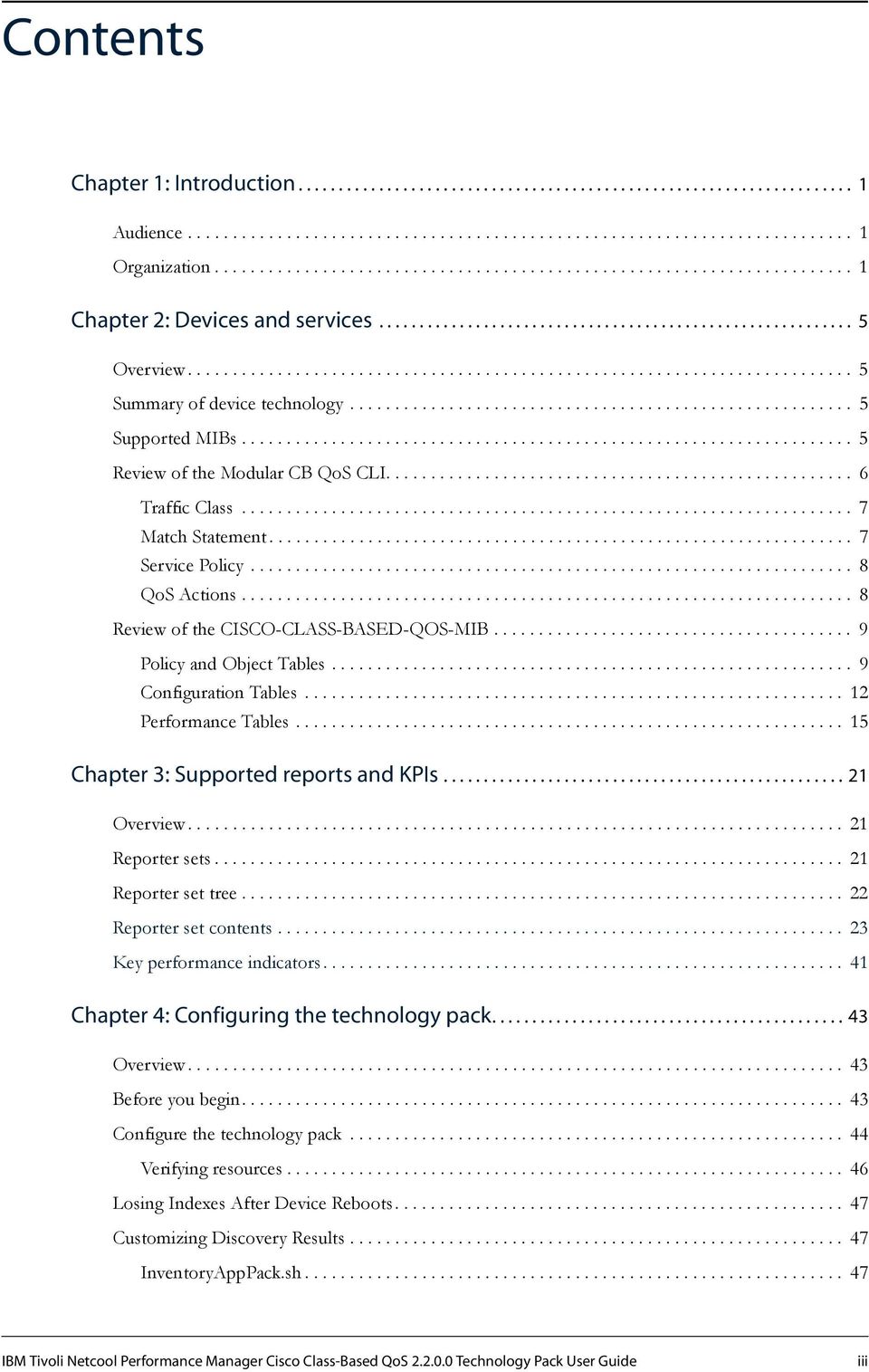
3 Contents Chapter 1: Introduction Audience Organization Chapter 2: Devices and services Overview Summary of device technology Supported MIBs Review of the Modular CB QoS CLI Traffic Class Match Statement Service Policy QoS Actions Review of the CISCO-CLASS-BASED-QOS-MIB Policy and Object Tables Configuration Tables Performance Tables Chapter 3: Supported reports and Overview Reporter sets Reporter set tree Reporter set contents Key performance indicators Chapter 4: Configuring the technology pack Overview Before you begin Configure the technology pack Verifying resources Losing Indexes After Device Reboots Customizing Discovery Results InventoryAppPack.sh IBM Tivoli Netcool Performance Manager Cisco Class-Based QoS Technology Pack User Guide iii
4 Contents cbqos_object_id_mv.pl Notices Additional Copyright Information iv IBM Tivoli Netcool Performance Manager Cisco Class-Based QoS Technology Pack User Guide

5 Chapter 1: Introduction This manual describes the IBM Tivoli Netcool Performance Manager Cisco CBQoS Technology Pack. Specifically, the manual describes the reports that display information about the devices and technologies that operate in the Cisco Class-Based QoS environment. Audience The audiences for this manual are the network administration engineers at IBM customer sites who will install, configure, and use the Cisco CBQoS Technology Pack as part of their Tivoli Netcool Performance Manager installation. IBM Professional Services engineers may also find this manual useful. To install and use the Cisco CBQoS Technology Pack, you should have a working knowledge of the following subjects: Tivoli Netcool Performance Manager DataMart TCP/IP networks Telecommunications network management Administration of the operating system The audiences should also be familiar with the specific technology that the Cisco CBQoS Technology Pack deals with, in this case Cisco Class-Based QoS. Organization This guide is organized as follows: Chapter 1, Introduction Provides a general introduction to the Tivoli Netcool Performance Manager product suite. Chapter 2, Devices and services Provides an overview of the device technology supported by the technology pack. Chapter 3, Supported reports and Provides information about the reporter sets and key performance indicators () that the Cisco CBQoS Technology Pack provides for each device operating in the Cisco Class-Based QoS environment. Chapter 4, Configuring the technology pack Describes how to configure the Cisco CBQoS Technology Pack. The Tivoli Netcool Performance Manager product suite IBM Tivoli Netcool Performance Manager consists of two main components: a wireline component (formerly Tivoli Netcool/Proviso) and a wireless component (formerly Tivoli Netcool Performance Manager for Wireless). The Tivoli Netcool Performance Manager wireline component is made up of the following modules: IBM Tivoli Netcool Performance Manager Cisco Class-Based QoS Technology Pack User Guide 1

6 Chapter 1: Introduction Tivoli Netcool Performance Manager DataMart is a set of management, configuration and troubleshooting GUIs that the Tivoli Netcool Performance Manager system administrator uses to define policies and configuration, as well as to verify and troubleshoot operations. Tivoli Netcool Performance Manager DataLoad provides flexible, distributed data collection and data import of SNMP and non-snmp data to a centralized database. Tivoli Netcool Performance Manager DataChannel aggregates the data collected through Tivoli Netcool Performance Manager DataLoad for use by the Tivoli Netcool Performance Manager DataView reporting functions. It also processes on-line calculations and detects real-time threshold violations. Tivoli Netcool Performance Manager DataView is a reliable application server for on-demand, webbased network reports. Tivoli Netcool Performance Manager Technology Packs extend the Tivoli Netcool Performance Manager system with service-ready reports for network operations, business development, and customer viewing. Figure 1 shows the different Tivoli Netcool Performance Manager modules. Figure 1: Tivoli Netcool Performance Manager modules Tivoli Netcool Performance Manager documentation IBM provides the following Tivoli Netcool Performance Manager documentation: Release notes Configuration recommendations User guides References Technical notes 2 IBM Tivoli Netcool Performance Manager Cisco Class-Based QoS Technology Pack User Guide

7 Chapter 1: Introduction Online help IBM Tivoli Netcool Performance Manager Cisco Class-Based QoS Technology Pack User Guide 3

8 Chapter 1: Introduction 4 IBM Tivoli Netcool Performance Manager Cisco Class-Based QoS Technology Pack User Guide

9 Chapter 2: Devices and services This chapter discusses the following topics: Topic Page Overview 5 Summary of device technology 5 Supported MIBs 5 Review of the Modular CB QoS CLI 6 Review of the CISCO-CLASS-BASED-QOS-MIB 9 Overview This chapter provides a summary of the Cisco Class-Based QoS device technology, and the associated Management Information Bases (MIBs), that the Cisco CBQoS Technology Pack is designed to support. Summary of device technology Cisco provides a capability called Modular Quality of Service (QoS) in its IOS, which lets you configure the QoS functionality of a router. The Modular QoS Command Line Interface (CLI) enables a user to configure various classes of traffic types and actions for the classified traffic. This is an SNMP pack that will gather metrics based on the CISCO-CLASS-BASED-QOS-MIB file. This MIB is the source of all the metrics reported in this technology pack. The Class Based QoS (CB-QoS) MIB reports metrics that correspond to the classes and actions configured with the CLI. The Cisco CBQoS Technology Pack collects and reports performance metrics gathered from this MIB. This will provide the user with the ability to collect statistics for the class defined under the policy. Supported MIBs The Cisco CBQoS Technology Pack collects performance and accounting data using an SNMP collection model. This technology pack requires read-only access to the SNMP Agents associated with the Cisco Class-Based QoS devices that provide SNMP Agent support. The Cisco CBQoS Technology Pack uses the following MIBs to collect performance and accounting related statistics: CISCO-CLASS-BASED-QOS-MIB CISCO-FRAME-RELAY-MIB IBM Tivoli Netcool Performance Manager Cisco Class-Based QoS Technology Pack User Guide 5

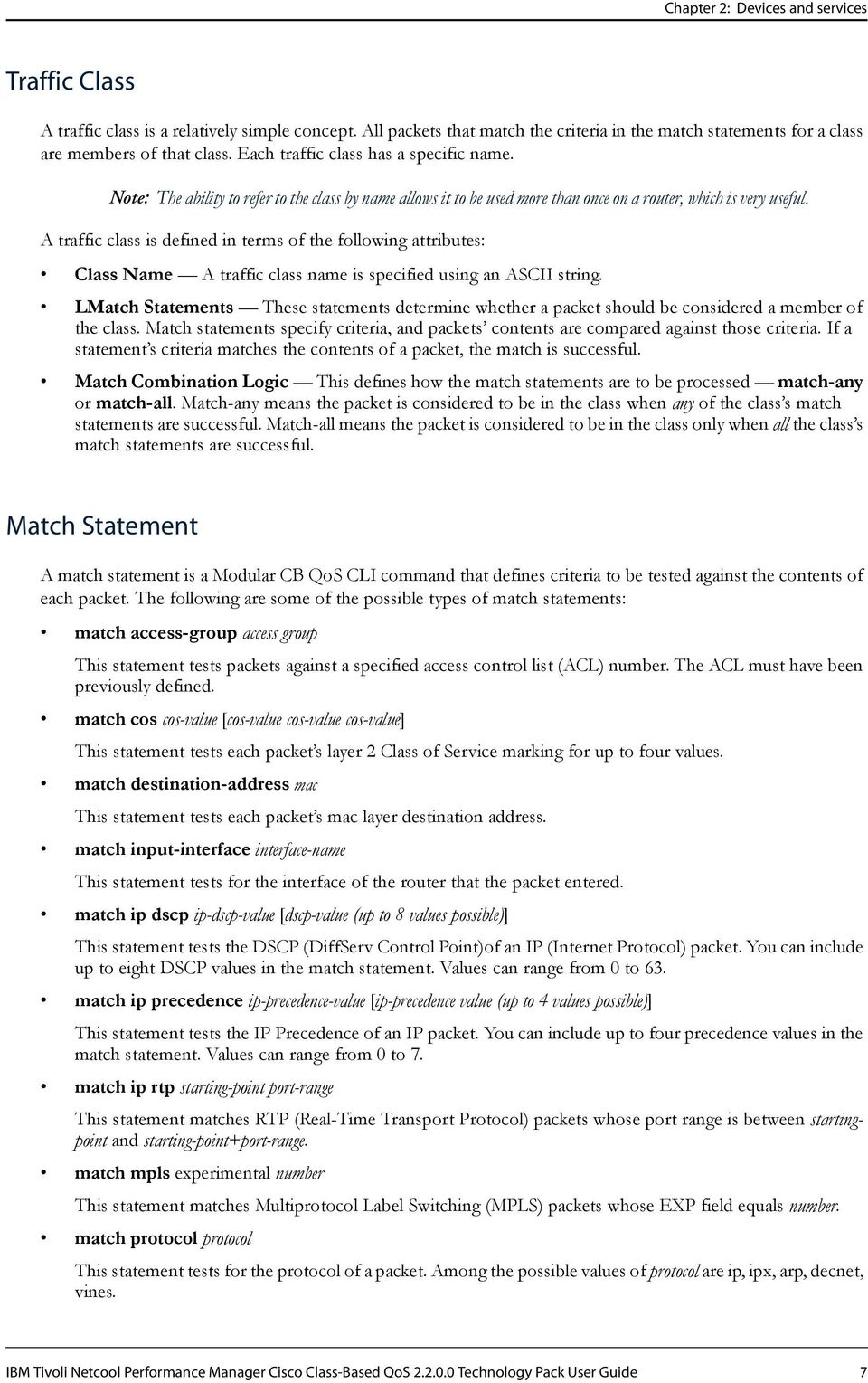
10 Chapter 2: Devices and services CISCO-SMI CISCO-TC IANAifType-MIB rfc1213-mib-ii rfc1155 rfc1315-frame rfc1902-snmpv2-smi rfc1903-snmpv2-tc rfc1907-snmpv2-mib Review of the Modular CB QoS CLI To work with the Cisco CBQoS Technology Pack, you need a basic understanding of Cisco s Modular CB QoS CLI (Modular Class-Based Quality of Service Command Line Interface). This section provides an overview of this CLI. Note: This overview does not explain how to configure Modular QoS on a router. For in-depth information about Cisco s Modular QoS, see the Cisco documentation. As documented in the Cisco document, Modular Quality of Service Command Line Interface Overview, configure Modular QoS by: 1. Defining a traffic class, using the class-map command. 2. Creating a service policy that associates the traffic class with one or more policies using the policy-map command. 3. Attaching the service policy to an interface, using the service-policy command. The configuration of Modular QoS involves the definitions of policies, classes, match statements, and actions and establishing the relationships among them. This section provides a high-level overview of the following components that make up the configuration of Modular QoS using the Modular CB QoS CLI: The Traffic Class or Class-Map definition This is a name, a set of match statements, and a rule for how to apply these rules. Classes can be hierarchically defined. You can define a class in terms of other classes, which enables a user to establish a mix of match-any and match-all rules for a single class. Match Statements These are the different ways that traffic can be mapped to a class. Service Policies These map Classes to QoS Management actions. A service policy maps the class name to a set of actions. More than one service policy can use the same class to define policies. For example, the same class might be managed differently at different interfaces and therefore more than one policy is needed. Actions These are the various QoS traffic management actions that are possible. Attaching a Service Policy to an Interface A service policy must be applied to an interface and traffic direction for it to actually affect traffic. The same service policy can be applied to more than one interface. You apply service policies using the service-policy command, which is a special type of CLI action. Note: You can create a fairly rich and complex set of class, policy, match, and action definitions on a router. However, be advised that a router with many interfaces and many policies could have a very complicated set of definitions for a user to navigate. 6 IBM Tivoli Netcool Performance Manager Cisco Class-Based QoS Technology Pack User Guide

11 Chapter 2: Devices and services Traffic Class A traffic class is a relatively simple concept. All packets that match the criteria in the match statements for a class are members of that class. Each traffic class has a specific name. Note: The ability to refer to the class by name allows it to be used more than once on a router, which is very useful. A traffic class is defined in terms of the following attributes: Class Name A traffic class name is specified using an ASCII string. LMatch Statements These statements determine whether a packet should be considered a member of the class. Match statements specify criteria, and packets contents are compared against those criteria. If a statement s criteria matches the contents of a packet, the match is successful. Match Combination Logic This defines how the match statements are to be processed match-any or match-all. Match-any means the packet is considered to be in the class when any of the class s match statements are successful. Match-all means the packet is considered to be in the class only when all the class s match statements are successful. Match Statement A match statement is a Modular CB QoS CLI command that defines criteria to be tested against the contents of each packet. The following are some of the possible types of match statements: match access-group access group This statement tests packets against a specified access control list (ACL) number. The ACL must have been previously defined. match cos cos-value [cos-value cos-value cos-value] This statement tests each packet s layer 2 Class of Service marking for up to four values. match destination-address mac This statement tests each packet s mac layer destination address. match input-interface interface-name This statement tests for the interface of the router that the packet entered. match ip dscp ip-dscp-value [dscp-value (up to 8 values possible)] This statement tests the DSCP (DiffServ Control Point)of an IP (Internet Protocol) packet. You can include up to eight DSCP values in the match statement. Values can range from 0 to 63. match ip precedence ip-precedence-value [ip-precedence value (up to 4 values possible)] This statement tests the IP Precedence of an IP packet. You can include up to four precedence values in the match statement. Values can range from 0 to 7. match ip rtp starting-point port-range This statement matches RTP (Real-Time Transport Protocol) packets whose port range is between startingpoint and starting-point+port-range. match mpls experimental number This statement matches Multiprotocol Label Switching (MPLS) packets whose EXP field equals number. match protocol protocol This statement tests for the protocol of a packet. Among the possible values of protocol are ip, ipx, arp, decnet, vines. IBM Tivoli Netcool Performance Manager Cisco Class-Based QoS Technology Pack User Guide 7
12 Chapter 2: Devices and services match qos-group qos-group This statement tests the qos-group of a packet. The meaning of each qosgroup and its numerical value are defined locally on a router. If a packet has been determined to be in a specified qos-group, the match is successful. This is an important match statement option. Class maps previously defined can be used within a new class map. Using this option is the only method of including both match-any and match-all statements in a single traffic class. Service Policy A service policy maps a class to a set of actions. A service policy is implemented with the policy-map Modular CB QoS CLI command. A service policy is defined in terms of the following three attributes: Policy Name A policy name is specified using an ASCII string. Class Name This is the name of the traffic class that is to be part of this policy. Traffic in this class will have the actions of this policy applied to it. Actions These are the QoS traffic management actions. The following section, QoS Actions, provides information about the possible actions that can be taken. One of these actions defines a way to nest service policies. In other words, a policy can be defined hierarchically, which makes it easy to reuse them. QoS Actions The Modular CB QoS CLI can perform the following actions: Specifying a minimum bandwidth Policing Shaping Specifying fair queueing Specifying WRED (Weighted Random Early Detection) Some of the possible Modular CB QoS CLI action commands are as follows: bandwidth {bandwidth-kbps percent percent] This action command sets a minimum bandwidth for the traffic class as a raw value or a percent of overall bandwidth. fair-queue number-of-queues This action command sets a number of queues to be reserved for this class. police bps burst-normal burst-max conform-action action exceed-action action violate-action action This action command specifies the maximum bandwidth to be used by this class. Policing is implemented with a token-bucket algorithm, and these are the parameters for it. queue-limit This action command specifies the maximum length of a queue for this traffic (when WRED is not used). random-detect This action command enables WRED drop policy when the class has a guaranteed bandwidth. set ip dscp 8 IBM Tivoli Netcool Performance Manager Cisco Class-Based QoS Technology Pack User Guide

13 Chapter 2: Devices and services This action command sets the DSCP (DiffServ Control Point) field in the IP Header. It must be between 0 and 63. set ip precedence This action command sets the Precedence field in the IP Header. It must be between 0 and 7. shape {average peak} mean-rate [burst-size [excess-burst-size]] This action command shapes the traffic to the indicated burst rate. service-policy {input output} policy-map-name This action command specifies the name of a service policy, which enables the nesting of service-policies. Multiple policies can be applied within a single policy. Note: Once a service policy is defined, it must be mapped to a network interface using this command. Review of the CISCO-CLASS-BASED-QOS-MIB The CISCO-CLASS-BASED-QOS-MIB is the source of all the metrics reported in the Cisco CBQoS Technology Pack. Specifically, the CISCO-CLASS-BASED-QOS-MIB reports metrics associated with the Modular QoS, including configuration and performance information, as well as traffic counts for each of the service policies applied to an interface. You need to understand the CISCO-CLASS-BASED-QOS-MIB only if you intend to customize or augment the contents of the Cisco CBQoS Technology Pack. Note: The actual data reported for an applied policy depends in part upon the type of actions defined for that policy. The CISCO-CLASS-BASED-QOS-MIB (located in the file named CISCO-CLASS-BASED-QOS-MIB.my) is available at the Cisco web site. The following topics promote an understanding of the CISCO-CLASS-BASED-QOS-MIB: Policy and Object Tables Configuration Tables Performance Tables Policy and Object Tables The policy and object tables provide the keys to obtaining the configurations and performance metrics. With these tables you can learn all the run-time service policies and the hierarchy of their components, including classes, match statements, and actions. You can also learn the indexes needed to get configuration and performance metrics for each of these components. The policy and object tables do the following: Support discovery of all the run-time service policies running on a router. These are the policies that have been attached to an interface and traffic direction. A service policy can be attached to more than one interface and traffic direction. There are unique representations for each of these run-time instances of a service policy. Support discovery of the interfaces and traffic directions associated with each run-time service policy. Special support is provided for the Frame Relay and ATM PVC interfaces. The service policies are attached not only to an interface, but also to a circuit or PVC (Permanent Virtual Circuit). IBM Tivoli Netcool Performance Manager Cisco Class-Based QoS Technology Pack User Guide 9
![shape {average peak} mean-rate [burst-size [excess-burst-size]] This action command shapes the traffic to the indicated burst rate.](/docs-images/41/8886963/images/page_13.jpg "service-policy {input output} policy-map-name This action command specifies the name of a service policy, which enables the nesting of service-policies.")
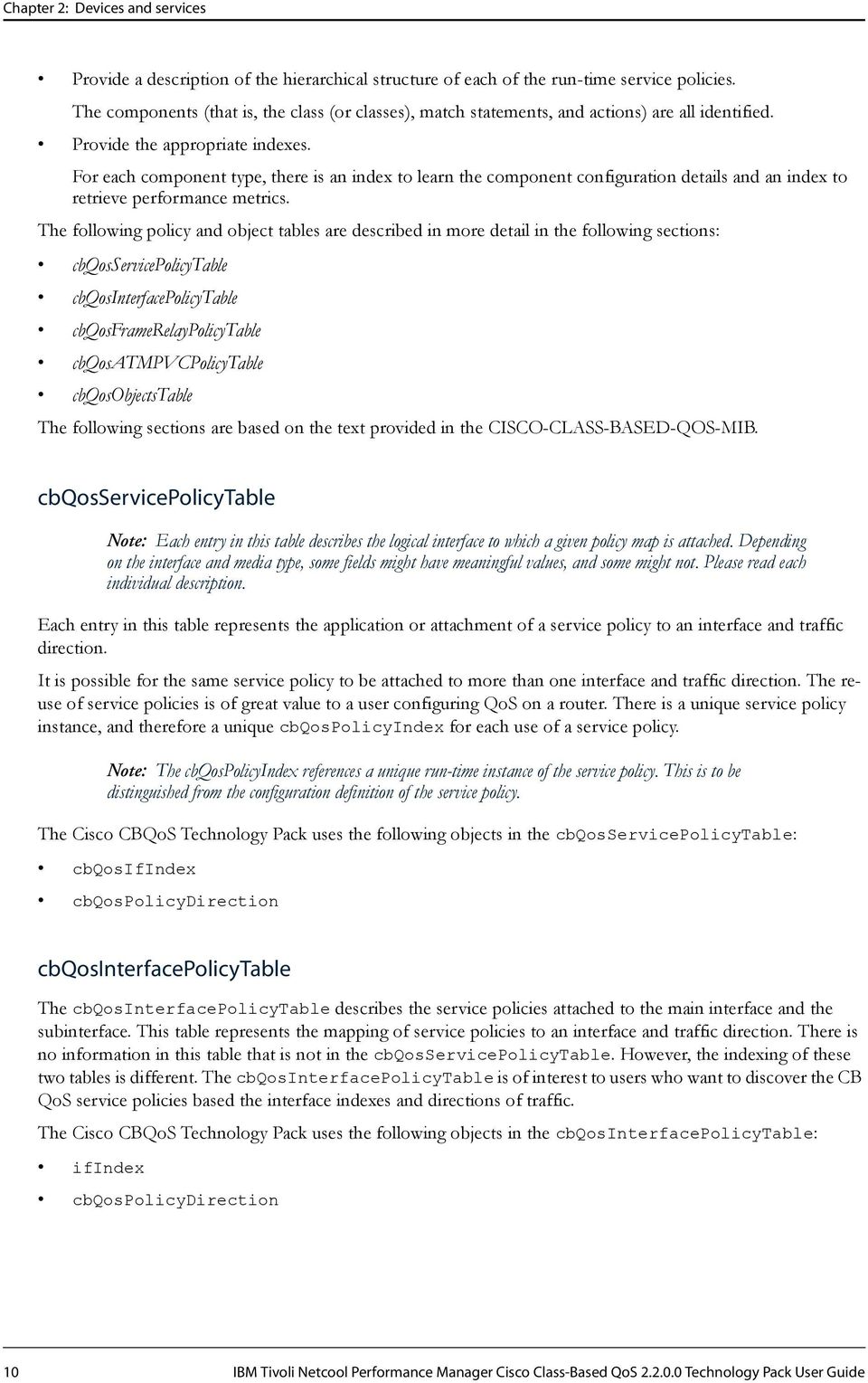
14 Chapter 2: Devices and services Provide a description of the hierarchical structure of each of the run-time service policies. The components (that is, the class (or classes), match statements, and actions) are all identified. Provide the appropriate indexes. For each component type, there is an index to learn the component configuration details and an index to retrieve performance metrics. The following policy and object tables are described in more detail in the following sections: cbqosservicepolicytable cbqosinterfacepolicytable cbqosframerelaypolicytable cbqosatmpvcpolicytable cbqosobjectstable The following sections are based on the text provided in the CISCO-CLASS-BASED-QOS-MIB. cbqosservicepolicytable Note: Each entry in this table describes the logical interface to which a given policy map is attached. Depending on the interface and media type, some fields might have meaningful values, and some might not. Please read each individual description. Each entry in this table represents the application or attachment of a service policy to an interface and traffic direction. It is possible for the same service policy to be attached to more than one interface and traffic direction. The reuse of service policies is of great value to a user configuring QoS on a router. There is a unique service policy instance, and therefore a unique cbqospolicyindex for each use of a service policy. Note: The cbqospolicyindex references a unique run-time instance of the service policy. This is to be distinguished from the configuration definition of the service policy. The Cisco CBQoS Technology Pack uses the following objects in the cbqosservicepolicytable: cbqosifindex cbqospolicydirection cbqosinterfacepolicytable The cbqosinterfacepolicytable describes the service policies attached to the main interface and the subinterface. This table represents the mapping of service policies to an interface and traffic direction. There is no information in this table that is not in the cbqosservicepolicytable. However, the indexing of these two tables is different. The cbqosinterfacepolicytable is of interest to users who want to discover the CB QoS service policies based the interface indexes and directions of traffic. The Cisco CBQoS Technology Pack uses the following objects in the cbqosinterfacepolicytable: ifindex cbqospolicydirection 10 IBM Tivoli Netcool Performance Manager Cisco Class-Based QoS Technology Pack User Guide
15 Chapter 2: Devices and services cbqosframerelaypolicytable The cbqosframerelaypolicytable describes the service policies attached to the Frame Relay DLCIs (Data Link Connection Identifiers). The cbqosframerelaypolicytable provides almost the same information as the cbqosinterfacepolicytable. The difference is that the cbqosinterfacepolicytable describes service policies attached to the main and subinterfaces. Like the cbqosinterfacepolicytable, the cbqosframerelaypolicytable represents the mapping of service policies to an interface and direction. Note: The circuit DLCI is required to identify the index of the service policy attached to the DLCI. The cbqosframerelaypolicytable is of interest to users who wants to discover the CB QoS service policies based the interface indexes and directions of traffic. The Cisco CBQoS Technology Pack uses the following objects in the cbqosframerelaypolicytable: cbqospolicydirection ifindex cbqosatmpvcpolicytable The cbqosatmpvcpolicytable describes the service policies attached to an Asynchronous Transfer Mode (ATM) PVC (Permanent Virtual Circuit). The Cisco CBQoS Technology Pack uses the following objects in the cbqosatmpvcpolicytable: cbqospolicydirection ifindex cbqosobjectstable The cbqosobjectstable includes entries for all objects defined using the Modular CB QoS CLI, as described in Review of the Modular CB QoS CLI on page 6: Classes Match Statements Service Policies Actions Each entry represents a run-time instance of what has been configured using the CLI. For example, the same class can be reused in multiple service policies, and the same classes and service policies can be attached to more than one interface and traffic direction. Each attachment to an interface and traffic direction represents a new run-time instance of a service policy. Also, as each service policy is made up of many components classes, actions and match statements all of these will be represented by their own run-time instances. Besides defining every Modular QoS entity, this table also defines the hierarchical relationships among these entities. For example, a match statement is part of a class, and a class is part of a service policy. The hierarchical relationship is defined using the cbqosparentobjectsindex object in each entry. The Cisco CBQoS Technology Pack uses the following objects in the cbqosobjectstable: cbqosconfigindex cbqosobjectsindex IBM Tivoli Netcool Performance Manager Cisco Class-Based QoS Technology Pack User Guide 11

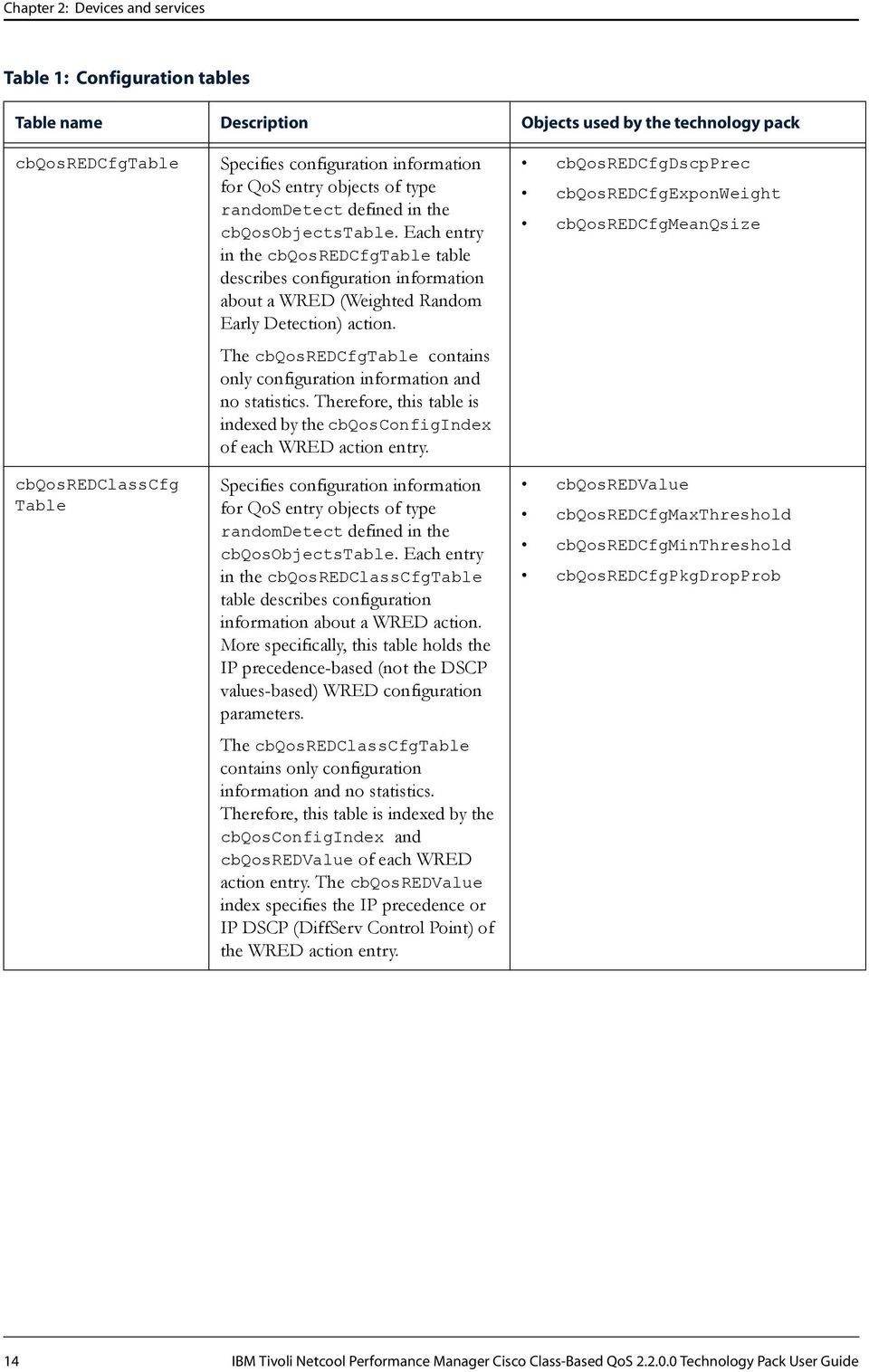
16 Chapter 2: Devices and services cbqosobjectstype cbqosparentobjectsindex Configuration Tables Configuration tables represent the configuration information associated with the QoS object entries defined in the cbqosobjectstable. There are tables for each type of QoS object, because each object has unique properties. The index for all these tables is cbqosconfigindex, the same index returned in the cbqosobjectstable. The Cisco CBQoS Technology Pack works with the following configuration tables that the CISCO-CLASS- BASED-QOS-MIB supports: cbqospolicymapcfgtable cbqoscmcfgtable cbqosmatchstmtcfgtable cbqosqueueingcfgtable cbqosredcfgtable cbqosredclasscfgtable cbqospolicecfgtable cbqostscfgtable Table 1 briefly describe each of these configuration tables. The Cisco CBQoS Technology Pack maps these table objects to appropriately named Tivoli Netcool Performance Manager properties. The Cisco CBQoS Technology Pack also uses these objects in Discovery formulas. Table 1: Configuration tables Table name Description Objects used by the technology pack cbqospolicymapcfg Table Specifies configuration information for QoS entry objects of type policymap defined in the cbqosobjectstable. Each entry in the cbqospolicymapcfgtable table describes configuration information about a policy map. The cbqospolicymapcfgtable contains only configuration information and no statistics. Therefore, this table is indexed by the cbqosconfigindex of each policy map entry. cbqospolicymapname 12 IBM Tivoli Netcool Performance Manager Cisco Class-Based QoS Technology Pack User Guide

17 Chapter 2: Devices and services Table 1: Configuration tables Table name Description Objects used by the technology pack cbqoscmcfgtable cbqosmatchstmtcfg Table cbqosqueueingcfg Table Specifies configuration information for QoS entry objects of type classmap defined in the cbqosobjectstable. Each entry in the cbqoscmcfgtable table describes configuration information about a class map. The cbqoscmcfgtable contains only configuration information and no statistics. Therefore, this table is indexed by the cbqosconfigindex of each class map entry. Specifies configuration information for QoS entry objects of type matchstatement defined in the cbqosobjectstable. Each entry in the cbqosmatchstmtcfgtable table describes configuration information about a match statement. The cbqosmatchstmtcfgtable contains only configuration information and no statistics. Therefore, this table is indexed by the cbqosconfigindex of each match statement entry. Specifies configuration information for QoS entry objects of type queueing defined in the cbqosobjectstable. Each entry in the cbqosqueueingcfgtable table describes configuration information about a queueing action. The cbqosqueueingcfgtable contains only configuration information and no statistics. Therefore, this table is indexed by the cbqosconfigindex of each queueing action entry. cbqoscmname cbqosmatchstmtname cbqosqueueingcfgbandwidth cbqosqueueingcfgbandwidthunits IBM Tivoli Netcool Performance Manager Cisco Class-Based QoS Technology Pack User Guide 13

18 Chapter 2: Devices and services Table 1: Configuration tables Table name Description Objects used by the technology pack cbqosredcfgtable cbqosredclasscfg Table Specifies configuration information for QoS entry objects of type randomdetect defined in the cbqosobjectstable. Each entry in the cbqosredcfgtable table describes configuration information about a WRED (Weighted Random Early Detection) action. The cbqosredcfgtable contains only configuration information and no statistics. Therefore, this table is indexed by the cbqosconfigindex of each WRED action entry. Specifies configuration information for QoS entry objects of type randomdetect defined in the cbqosobjectstable. Each entry in the cbqosredclasscfgtable table describes configuration information about a WRED action. More specifically, this table holds the IP precedence-based (not the DSCP values-based) WRED configuration parameters. The cbqosredclasscfgtable contains only configuration information and no statistics. Therefore, this table is indexed by the cbqosconfigindex and cbqosredvalue of each WRED action entry. The cbqosredvalue index specifies the IP precedence or IP DSCP (DiffServ Control Point) of the WRED action entry. cbqosredcfgdscpprec cbqosredcfgexponweight cbqosredcfgmeanqsize cbqosredvalue cbqosredcfgmaxthreshold cbqosredcfgminthreshold cbqosredcfgpkgdropprob 14 IBM Tivoli Netcool Performance Manager Cisco Class-Based QoS Technology Pack User Guide
19 Chapter 2: Devices and services Table 1: Configuration tables Table name Description Objects used by the technology pack cbqospolicecfg Table cbqostscfgtable Specifies configuration information for QoS entry objects of type police defined in the cbqosobjectstable. Each entry in the cbqospolicecfgtable table describes configuration information about a police action. Specifically, the table holds such policy configuration parameters as rate, burst size, and actions based on traffic rates. The cbqospolicecfgtable contains only configuration information and no statistics. Therefore, this table is indexed by the cbqosconfigindex of each police action entry. Specifies configuration information for QoS entry objects of type trafficshaping defined in the cbqosobjectstable. Each entry in the cbqostscfgtable table describes configuration information about a traffic-shaping action. Specifically, the table holds such traffic shaping configuration parameters as rate, burst size, and shaping types. The cbqostscfgtable contains only configuration information and no statistics. Therefore, this table is indexed by the cbqosconfigindex of each traffic-shaping action entry. cbqospolicecfgburstsize cbqospolicecfgconformaction cbqospolicecfgexceedaction cbqospolicecfgextburstsize cbqospolicecfgrate cbqospolicecfgviolateaction cbqostscfgburstsize cbqostscfgextburstsize cbqostscfgrate Performance Tables Performance tables report statistics associated with the QoS object entries defined in the cbqosobjectstable. There are tables for each type of QoS object, because each object has unique statistics. The Cisco CBQoS Technology Pack works with the following performance tables that the CISCO-CLASS- BASED-QOS-MIB supports: cbqoscmstatstable Object cbqosmatchstmtstatstable Object cbqospolicestatstable Object cbqosqueueingstatstable Object IBM Tivoli Netcool Performance Manager Cisco Class-Based QoS Technology Pack User Guide 15

20 Chapter 2: Devices and services cbqostsstatstable Object cbqosredclassstatstable Object The Cisco CBQoS Technology Pack uses these objects in SNMP collection formulas. cbqoscmstatstable Object The cbqoscmstatstable specifies statistical information for QoS entry objects of type classmap defined in the cbqosobjectstable. Each entry in the cbqoscmstatstable describes statistical information about a class map. The cbqoscmstatstable includes statistics for all the run-time instances of class maps that are components of service policies defined and attached to interfaces and traffic directions using the Modular CB QoS CLI. Specifically, the table holds such class map statistical information as: Traffic counts prior to any QoS policy actions Dropped traffic counts as the result of any QoS actions (for example, policing, WRED, queueing, and so forth) associated with the class within a service policy Dropped traffic counts due to lack of resources The cbqoscmstatstable contains only statistical information and no configuration information. Therefore, this table is indexed by the instance-specific IDs cbqosobjectsindex (defined in the cbqosobjectstable) and cbqospolicyindex (defined in the cbqosservicepolicytable) of each class map entry. These two indexes tie each class map entry to an attached run-time service policy and, therefore, to an interface and traffic direction. The cbqosobjectstable links the run-time class map object to its configuration information and to its place in the hierarchy of QoS objects defined with the Modular CB QoS CLI. The Cisco CBQoS Technology Pack uses the following objects in the cbqoscmstatstable: cbqoscmprepolicybyte64 cbqoscmprepolicypkt64 cbqoscmpostpolicybyte64 cbqoscmdropbyte64 cbqoscmdroppkt64 cbqoscmnobufdroppkt64 The object names have the following meanings: cbqosprepolicy* Objects with this string in their names provide traffic-related metrics that occur prior to applying any QoS policy actions. cbqospostpolicy* Objects with this string in their names provide traffic-related metrics that occur after applying any QoS policy actions. cbqosdrop* Objects with this string in their names provide traffic dropped-related metrics that occur after applying any QoS actions. cbqosnobufdrop* Objects with this string in their names provide traffic dropped-related metrics that occur due to a lack of resources. cbqosmatchstmtstatstable Object The cbqosmatchstmtstatstable specifies statistical information for QoS entry objects of type matchstatement defined in the cbqosobjectstable. Each entry in the cbqosmatchstmtstatstable describes statistical information about a match statement. The cbqosmatchstmtstatstable includes 16 IBM Tivoli Netcool Performance Manager Cisco Class-Based QoS Technology Pack User Guide
21 Chapter 2: Devices and services statistics for all the run-time instances of match statements that are components of service policies defined and attached to interfaces and traffic directions using the Modular CB QoS CLI. Specifically, the table holds such match statement statistical information as packet and byte counter metrics that occur before applying any QoS policy actions. The cbqosmatchstmtstatstable contains only statistical information and no configuration information. Therefore, this table is indexed by the instance-specific IDs cbqosobjectsindex (defined in the cbqosobjectstable) and cbqospolicyindex (defined in the cbqosservicepolicytable) of each match statement entry. These two indexes tie each match statement entry to an attached run-time service policy and, therefore, to an interface and traffic direction. The cbqosobjectstable links the run-time match statement object to its configuration information and to its place in the hierarchy of QoS objects defined with the Modular CB QoS CLI. The Cisco CBQoS Technology Pack uses the following objects in the cbqosmatchstmtstatstable: cbqosmatchprepolicybyte64 cbqosmatchprepolicypkt64 cbqospolicestatstable Object The cbqospolicestatstable specifies statistical information for QoS entry objects of type police defined in the cbqosobjectstable. Each entry in the cbqospolicestatstable describes statistical information about a police action. The cbqospolicestatstable includes statistics for all the run-time instances of police actions that are components of service policies defined and attached to interfaces and traffic directions using the Modular CB QoS CLI. Specifically, the table holds such police action statistical information as conformed, exceeded, and violated packet and byte counter metrics. The cbqospolicestatstable contains only statistical information and no configuration information. Therefore, this table is indexed by the instance-specific IDs cbqosobjectsindex (defined in the cbqosobjectstable) and cbqospolicyindex (defined in the cbqosservicepolicytable) of each police action entry. These two indexes tie each police action entry to an attached run-time service policy and, therefore, to an interface and traffic direction. The cbqosobjectstable links the run-time police action object to its configuration information and to its place in the hierarchy of QoS objects defined with the Modular CB QoS CLI. The Cisco CBQoS Technology Pack uses the following objects in the cbqospolicestatstable: cbqosmatchprepolicybyte64 cbqospoliceconformedbyte64 cbqospoliceconformedpkt64 cbqospoliceexceededbyte64 cbqospoliceexceededpkt64 cbqospoliceviolatedbyte64 cbqospoliceviolatedpkt64 cbqosqueueingstatstable Object The cbqosqueueingstatstable specifies statistical information for QoS entry objects of type queueing defined in the cbqosobjectstable. Each entry in the cbqosqueueingstatstable describes statistical information about a queueing action. The cbqosqueueingstatstable includes statistics for all the run-time instances of queueing actions that are components of service policies defined and attached to interfaces and traffic directions using the Modular CB QoS CLI. IBM Tivoli Netcool Performance Manager Cisco Class-Based QoS Technology Pack User Guide 17
22 Chapter 2: Devices and services Specifically, the table holds such queueing action statistical information as Q depth and discard byte/packet counter metrics. The cbqosqueueingstatstable contains only statistical information and no configuration information. Therefore, this table is indexed by the instance-specific IDs cbqosobjectsindex (defined in the cbqosobjectstable) and cbqospolicyindex (defined in the cbqosservicepolicytable) of each queueing action entry. These two indexes tie each queueing action entry to an attached run-time service policy and, therefore, to an interface and traffic direction. The cbqosobjectstable links the run-time queueing action object to its configuration information and to its place in the hierarchy of QoS objects defined with the Modular CB QoS CLI. The Cisco CBQoS Technology Pack uses the following objects in the cbqosqueueingstatstable: cbqosqueueingdiscardbyte64 cbqosqueueingdiscardpkt64 cbqostsstatstable Object The cbqostsstatstable specifies statistical information for QoS entry objects of type trafficshaping defined in the cbqosobjectstable. Each entry in the cbqostsstatstable describes statistical information about a traffic shaping action. The cbqostsstatstable includes statistics for all the run-time instances of traffic shaping actions that are components of service policies defined and attached to interfaces and traffic directions using the Modular CB QoS CLI. Specifically, the table holds such traffic shaping action statistical information as Q size and delay/drop byte/packet counter metrics. The cbqostsstatstable contains only statistical information and no configuration information. Therefore, this table is indexed by the instance-specific IDs cbqosobjectsindex (defined in the cbqosobjectstable) and cbqospolicyindex (defined in the cbqosservicepolicytable) of each traffic shaping action entry. These two indexes tie each traffic shaping action entry to an attached run-time service policy and, therefore, to an interface and traffic direction. The cbqosobjectstable links the run-time traffic shaping action object to its configuration information and to its place in the hierarchy of QoS objects defined with the Modular CB QoS CLI. The Cisco CBQoS Technology Pack uses the following objects in the cbqostsstatstable: cbqostsstatsdelayedbyte64 cbqostsstatsdelayedpkt64 cbqostsstatsdropbyte64 cbqostsstatsdroppkt64 cbqosredclassstatstable Object The cbqosredclassstatstable specifies statistical information for QoS entry objects of type randomdetect defined in the cbqosobjectstable. Each entry in the cbqosredclassstatstable describes statistical information about a per precedence WRED (Weighted Random Early Detection) action. The cbqosredclassstatstable includes statistics for all the run-time instances of per precedence WRED actions that are components of service policies defined and attached to interfaces and traffic directions using the Modular CB QoS CLI. Specifically, the table holds such per precedence WRED action statistical information as random drop byte/packet, tail drop byte/packet, and transmit byte/packet counter metrics. The cbqosredclassstatstable contains only per precedence/dscp statistical information and no configuration information. Therefore, this table is indexed by the instance-specific IDs cbqosobjectsindex (defined in the cbqosobjectstable) and cbqospolicyindex (defined in the 18 IBM Tivoli Netcool Performance Manager Cisco Class-Based QoS Technology Pack User Guide
23 Chapter 2: Devices and services cbqosservicepolicytable) of each per precedence WRED action entry. These two indexes tie each per precedence WRED action entry to an attached run-time service policy and, therefore, to an interface and traffic direction. The cbqosobjectstable links the run-time per precedence WRED action object to its configuration information and to its place in the hierarchy of QoS objects defined with the Modular CB QoS CLI. In addition to the cbqosobjectsindex and cbqospolicyindex indexes, the cbqosredclassstatstable also provides for an index called cbqosredvalue defined in the cbqosredclasscfgtable. See Configuration Tables on page 12 for more information. The Cisco CBQoS Technology Pack uses the following objects in the cbqosredclassstatstable: cbqosredrandomdropbyte64 cbqosredrandomdroppkt64 cbqosredtaildropbyte64 cbqosredtaildroppkt64 cbqosredtransmitbyte64 cbqosredtransmitpkt64 IBM Tivoli Netcool Performance Manager Cisco Class-Based QoS Technology Pack User Guide 19
24 Chapter 2: Devices and services 20 IBM Tivoli Netcool Performance Manager Cisco Class-Based QoS Technology Pack User Guide
25 Chapter 3: Supported reports and This chapter discusses the following topics: Topic Page Overview 21 Reporter sets 21 Reporter set tree 22 Reporter set contents 23 Key performance indicators 41 Overview The Cisco CBQoS Technology Pack supplies a set of reports to display information about the devices and activity associated with the Cisco Class-Based QoS environment. The reports contain metrics that are generated by the formulas that this technology pack provides. The metric names are the same as the names of the formulas that generate them. For information about a metric that is listed for a particular report, see the description of the associated formula in the Collection Formulas section of the IBM Tivoli Netcool Performance Manager Cisco Class-Based QoS Technology Pack Reference. For information about how to navigate to a particular report on the DataView portal, see the NOC Reporting tree in the Subelement Groups section of the IBM Tivoli Netcool Performance Manager Cisco Class-Based QoS Technology Pack Reference. This chapter provides information about deployed reports only. For information about understanding report types, creating reports, configuring reports, viewing and working with reports, and deploying reports, see the IBM Tivoli Netcool Performance Manager DataView User and Administration Guide. This Technology Pack User Guide assumes an understanding of the report-related topics discussed in the IBM Tivoli Netcool Performance Manager DataView User and Administration Guide. Reporter sets A reporter set contains a group of reporters that together provide information about a specific technology or vendor device. Technology pack developers use the Reporter Set Wizard to choose the type of template on which to base the reporter set. Technology packs use reporter sets as the framework for defining reports. The Cisco CBQoS Technology Pack reports display, on a Web portal, the collected information about the devices and technologies that operate in the Cisco Class-Based QoS environment. IBM Tivoli Netcool Performance Manager Cisco Class-Based QoS Technology Pack User Guide 21
26 Chapter 3: Supported reports and Table 2 shows a summary of the reports in each reporter set provided by the Cisco CBQoS Technology Pack. Table 2: Reporter set summary Reporter set Dashboard Group Resource Detail Threshold Class Match Common Reports Per Policy Police Queue Shape WRED See the IBM Tivoli Netcool Performance Manager DataView User and Administration Guide for more information about reporter sets and the Reporter Set Wizard. Reporter set tree The Cisco CBQoS Technology Pack provides the following reporter sets, which are listed as they appear in the DataView Navigator tree structure: Cisco CBQoS Class Match Common Reports Per Policy Police Queue Shape WRED 22 IBM Tivoli Netcool Performance Manager Cisco Class-Based QoS Technology Pack User Guide
27 Chapter 3: Supported reports and Reporter set contents This section describes the contents of the reporter sets provided in the Cisco CBQoS Technology Pack, including the key performance indicators () for each report. Class Match Match Stmts per Class Group Summary Policy Throughput (bps) Policy Volume (packets) Policy Volume (octets) Policy Volume (packets) Policy Throughput (bps) Match Statement Group Summary Policy Throughput (bps) Policy Volume (packets) Policy Volume (octets) Policy Volume (packets) Policy Throughput (bps) Match Stmts per Class Resource Summary Policy Throughput (bps) Policy Volume (packets) Policy Volume (octets) Policy Throughput (bps) Policy Volume (packets) Match Stmts Details Match Policy Throughput (bps) IBM Tivoli Netcool Performance Manager Cisco Class-Based QoS Technology Pack User Guide 23
28 Chapter 3: Supported reports and Match Policy Volume (packets) Match Policy Volume (octets) Match Policy Throughput (bps) Match Policy Volume (packets) Match Policy Volume (octets) Common Reports Device Health Overview WRED Tail Drops Volume (packets) Policy Drops (percent) WRED Random Drops Volume (packets) Queue Policy Drops (packets) Traffic Shaping Dropped Volume (packets) Policy Drops (packets) Highest Queue Policy Drops (packets) Rank Variations for WRED Tail Drops Volume (packets) Highest WRED Random Drops Volume (packets) Rank Variations for Policy Drops (percent) Highest WRED Tail Drops Volume (packets) Highest Policy Drops (packets) Highest Traffic Shaping Dropped Volume (packets) Highest Policy Drops (percent) Rank Variations for Queue Policy Drops (packets) Rank Variations for Traffic Shaping Dropped Volume (packets) Rank Variations for WRED Random Drops Volume (packets) Rank Variations for Policy Drops (packets) Device Traffic Overview Policing Conformed Throughput (bps) WRED Transmit Rate (bps) Pre-Policy Throughput (bps) Post-Policy Throughput (bps) 24 IBM Tivoli Netcool Performance Manager Cisco Class-Based QoS Technology Pack User Guide
29 Chapter 3: Supported reports and Rank Variations for WRED Transmit Rate (bps) Highest Post-Policy Throughput (bps) Rank Variations for Pre-Policy Throughput (bps) Highest WRED Transmit Rate (bps) Highest Pre-Policy Throughput (bps) Rank Variations for Post-Policy Throughput (bps) Highest Policing Conformed Throughput (bps) Rank Variations for Policing Conformed Throughput (bps) Per Policy Per Policy Health Overview Policy Drops (percent) No Buffer Queue Drops (packets) Policy Drops (packets) Policy Drops (octets) Highest Policy Drops (percent) Rank Variations for Policy Drops (packets) Highest Policy Drops (octets) Rank Variations for Policy Drops (octets) Rank Variations for Policy Drops (percent) Highest Policy Drops (packets) Rank Variations for No Buffer Queue Drops (packets) Highest No Buffer Queue Drops (packets) Top 5 Policies Policy Drops (percent) Pre-Policy Throughput (bps) Post-Policy Throughput (bps) Policy Drops (packets) Rank Variations for Post-Policy Throughput (bps) Highest Pre-Policy Throughput (bps) IBM Tivoli Netcool Performance Manager Cisco Class-Based QoS Technology Pack User Guide 25
30 Chapter 3: Supported reports and Highest Post-Policy Throughput (bps) Highest Policy Drops (percent) Rank Variations for Pre-Policy Throughput (bps) Highest Policy Drops (packets) Rank Variations for Policy Drops (packets) Rank Variations for Policy Drops (percent) Network Policy Health Overview Policy Drops (%) Policy Drops (packets) Highest Policy Drops (packets) Rank Variations for Policy Drops (percent) Highest Policy Drops (percent) Rank Variations for Policy Drops (packets) Network Policy Traffic Overview Pre-Policy Throughput (bps) Post-Policy Throughput (bps) Highest Post-Policy Throughput (bps) Rank Variations for Post-Policy Throughput (bps) Rank Variations for Pre-Policy Throughput (bps) Highest Pre-Policy Throughput (bps) Policy Action Health Overview Queue Policy Drop Rate (bps) Policing Violated Throughput (bps) Traffic Shaping Dropped Throughput (bps) Rank Variations for Traffic Shaping Dropped Throughput (bps) Highest Policing Violated Throughput (bps) Highest Traffic Shaping Dropped Throughput (bps) Highest Queue Policy Drop Rate (bps) 26 IBM Tivoli Netcool Performance Manager Cisco Class-Based QoS Technology Pack User Guide
31 Chapter 3: Supported reports and Rank Variations for Policing Violated Throughput (bps) Rank Variations for Queue Policy Drop Rate (bps) Policy Action Traffic Overview Policing Conformed Throughput (bps) Policing Conformed Volume (packets) Traffic Shaping Delayed Volume (packets) Traffic Shaping Delayed Throughput (bps) Rank Variations for Traffic Shaping Delayed Throughput (bps) Highest Traffic Shaping Delayed Throughput (bps) Highest Policing Conformed Throughput (bps) Highest Traffic Shaping Delayed Volume (packets) Highest Policing Conformed Volume (packets) Rank Variations for Policing Conformed Volume (packets) Rank Variations for Policing Conformed Throughput (bps) Rank Variations for Traffic Shaping Delayed Volume (packets) Per Policy Traffic Overview Pre-Policy Throughput (bps) Post-Policy Throughput (bps) Highest Pre-Policy Throughput (bps) Rank Variations for Post-Policy Throughput (bps) Highest Post-Policy Throughput (bps) Rank Variations for Pre-Policy Throughput (bps) Top 5 Policies I Pre-Policy Volume (packets) Pre-Policy Volume (octets) Policy Drops (octets) Highest Policy Drops (octets) Rank Variations for Policy Drops (octets) IBM Tivoli Netcool Performance Manager Cisco Class-Based QoS Technology Pack User Guide 27
32 Chapter 3: Supported reports and Rank Variations for Pre-Policy Volume (packets) Highest Pre-Policy Volume (packets) Highest Pre-Policy Volume (octets) Rank Variations for Pre-Policy Volume (octets) Policy Group Summary Pre-Policy Volume (packets) Pre-Policy Volume (octets) Policy Drops (percent) Pre-Policy Throughput (bps) Post-Policy Throughput (bps) Policy Drops (packets) Policy Drops (octets) Post-Policy Throughput (bps) Pre-Policy Throughput (bps) Policy Resource Summary Pre-Policy Volume (packets) Pre-Policy Volume (octets) Policy Drops (percent) Pre-Policy Throughput (bps) Post-Policy Throughput (bps) Policy Drops (packets) Policy Drops (octets) Post-Policy Throughput (bps) Pre-Policy Throughput (bps) Policy Details Pre-Policy Volume (packets) Pre-Policy Volume (octets) Policy Drops (percent) Pre-Policy Throughput (bps) Post-Policy Throughput (bps) 28 IBM Tivoli Netcool Performance Manager Cisco Class-Based QoS Technology Pack User Guide
33 Chapter 3: Supported reports and Policy Drops (packets) Policy Drops (octets) Pre-Policy Volume (packets) Post-Policy Throughput (bps) Pre-Policy Throughput (bps) Policy Drops (percent) Policy Drops (octets) Policy Drops (packets) Pre-Policy Volume (octets) Policy Health Details Policy Drops (packets) Policy Drops (percent) Policy Drops (packets) Policy Drops (percent) Policy Traffic Details Post-Policy Throughput (bps) Pre-Policy Throughput (bps) Post-Policy Throughput (bps) Pre-Policy Throughput (bps) Pre-Policy Throughput (bps) Baseline Threshold Violations Pre-Policy Throughput (bps) Post-Policy Throughput (bps) Baseline Threshold Violations Post-Policy Throughput (bps) IBM Tivoli Netcool Performance Manager Cisco Class-Based QoS Technology Pack User Guide 29
34 Chapter 3: Supported reports and Policy Drops (percent) Baseline Threshold Violations Policy Drops (percent) Pre-Policy Throughput (bps) Baseline Threshold Violation Details Pre Policy Throughput (bps) Post-Policy Throughput (bps) Baseline Threshold Violation Details Post Policy Throughput (bps) Policy Drops (percent) Throughput (bps) Baseline Threshold Violation Details Policy Drops (percent) Per Policy Health Details Policy Drops (percent) Policy Drops (octets) Policy Drops (packets) No Buffer Queue Drops (packets) Policy Drops (octets) Policy Drops (percent) Policy Drops (packets) No Buffer Queue Drops (packets) Police Policed Traffic per Class Action Overview Policing Violated Volume (packets) Policing Violated Volume (octets) Policing Exceeded Volume (octets) Policing Exceeded Volume (packets) Policing Conformed Volume (packets) 30 IBM Tivoli Netcool Performance Manager Cisco Class-Based QoS Technology Pack User Guide
35 Chapter 3: Supported reports and Policing Conformed Volume (octets) Highest Policing Conformed Volume (packets) Rank Variations for Policing Exceeded Volume (packets) Rank Variations for Policing Exceeded Volume (octets) Highest Policing Violated Volume (octets) Rank Variations for Policing Violated Volume (octets) Rank Variations for Policing Conformed Volume (packets) Rank Variations for Policing Conformed Volume (octets) Highest Policing Conformed Volume (octets) Highest Policing Violated Volume (packets) Rank Variations for Policing Violated Volume (packets) Highest Policing Exceeded Volume (packets) Highest Policing Exceeded Volume (octets) Policed Traffic per Class Group Summary Policing Violated Volume (packets) Policing Violated Volume (octets) Policing Exceeded Volume (octets) Policing Exceeded Volume (packets) Policing Conformed Volume (packets) Policing Conformed Volume (octets) Policing Conformed Volume (octets) Policing Violated Volume (octets) Policed Traffic per Class Resource Summary Policing Violated Volume (packets) Policing Violated Volume (octets) Policing Exceeded Volume (octets) Policing Exceeded Volume (packets) Policing Conformed Volume (packets) Policing Conformed Volume (octets) Policing Violated Volume (octets) IBM Tivoli Netcool Performance Manager Cisco Class-Based QoS Technology Pack User Guide 31
36 Chapter 3: Supported reports and Policing Conformed Volume (octets) Policed Traffic Details Policing Violated Volume (packets) Policing Violated Volume (octets) Policing Exceeded Volume (octets) Policing Exceeded Volume (packets) Policing Conformed Volume (packets) Policing Conformed Volume (octets) Policing Conformed Volume (octets) Policing Conformed Volume (packets) Policing Violated Volume (octets) Policing Violated Volume (packets) Policing Exceeded Volume (octets) Policing Exceeded Volume (packets) Threshold Violation - Conformed Volume (octets) Policing Conformed Volume (octets) Threshold Violation - Conformed Volume (octets) Details Policing Conformed Volume (octets) Threshold Violation - Conformed Volume (packets) Policing Conformed Volume (packets) Threshold Violation - Conformed Volume (packets) Details Policing Conformed Volume (packets) Threshold Violation - Exceeded Volume (octets) Policing Exceeded Volume (octets) 32 IBM Tivoli Netcool Performance Manager Cisco Class-Based QoS Technology Pack User Guide
37 Chapter 3: Supported reports and Threshold Violation - Exceeded Volume (octets) Details Policing Exceeded Volume (octets) Threshold Violation - Exceeded Volume (packets) Policing Exceeded Volume (packets) Threshold Violation - Exceeded Volume (packets) Details Policing Exceeded Volume (packets) Threshold Violation - Violated Volume (octets) Policing Violated Volume (octets) Threshold Violation - Violated Volume (octets) Details Policing Violated Volume (octets) Threshold Violation - Violated Volume (packets) Policing Violated Volume (packets) Threshold Violation - Violated Volume (packets) Details Policing Violated Volume (packets) Policing Conformed Details Policing Conformed Throughput (bps) Policing Conformed Volume (packets) Policing Conformed Throughput (bps) Policing Conformed Volume (packets) IBM Tivoli Netcool Performance Manager Cisco Class-Based QoS Technology Pack User Guide 33
38 Chapter 3: Supported reports and Policing Exceeded and Violated Details Policing Exceeded Volume (packets) Policing Violated Volume (packets) Policing Exceeded Throughput (bps) Policing Violated Throughput (bps) Policing Violated Throughput (bps) Policing Exceeded Volume (packets) Policing Violated Volume (packets) Policing Exceeded Throughput (bps) Queue Queued Traffic per Class Action Overview Queue Policy Drops (packets) Queue Policy Drop Rate (bps) Queue Policy Drops (octets) Highest Queue Policy Drops (octets) Highest Queue Policy Drop Rate (bps) Rank Variations for Queue Policy Drops (packets) Rank Variations for Queue Policy Drop Rate (bps) Rank Variations for Queue Policy Drops (octets) Highest Queue Policy Drops (packets) Queued Traffic per Class Group Summary Queue Policy Drops (packets) Queue Policy Drop Rate (bps) Queue Policy Drops (octets) Queue Policy Drop Rate (bps) Queue Policy Drops (packets) 34 IBM Tivoli Netcool Performance Manager Cisco Class-Based QoS Technology Pack User Guide
39 Chapter 3: Supported reports and Queued Traffic per Class Resource Summary Queue Policy Drops (packets) Queue Policy Drop Rate (bps) Queue Policy Drops (octets) Queue Policy Drops (packets) Queue Policy Drop Rate (bps) Queued Drops Details Queue Policy Drops (packets) Queue Policy Drop Rate (bps) Queue Policy Drops (octets) Queue Policy Drops (packets) Queue Policy Drop Rate (bps) Queue Policy Drops (octets) Shape Shaped Traffic per Class Action Overview Traffic Shaping Delayed Volume (packets) Traffic Shaping Dropped Throughput (bps) Traffic Shaping Delayed Throughput (bps) Traffic Shaping Dropped Volume (packets) Highest Traffic Shaping Dropped Volume (packets) Rank Variations for Traffic Shaping Delayed Volume (packets) Rank Variations for Traffic Shaping Delayed Throughput (bps) Highest Traffic Shaping Delayed Volume (packets) Highest Traffic Shaping Dropped Throughput (bps) Rank Variations for Traffic Shaping Dropped Throughput (bps) Rank Variations for Traffic Shaping Dropped Volume (packets) Highest Traffic Shaping Delayed Throughput (bps) IBM Tivoli Netcool Performance Manager Cisco Class-Based QoS Technology Pack User Guide 35
40 Chapter 3: Supported reports and Shaped Traffic per Class Group Summary Delayed Volume (packets) Dropped Volume (octets) Dropped Volume (packets) Delayed Volume (octets) Delayed Volume (octets) Dropped Volume (octets) Shaped Traffic per Class Resource Summary Delayed Volume (packets) Dropped Volume (octets) Dropped Volume (packets) Delayed Volume (octets) Dropped Volume (octets) Delayed Volume (octets) Shaped Traffic Details Traffic Shaping Delayed Volume (packets) Traffic Shaping Dropped Volume (octets) Traffic Shaping Dropped Volume (packets) Traffic Shaping Delayed Volume (octets) Delayed Volume (packets) Delayed Volume (octets) Dropped Volume (packets) Dropped Volume (octets) Shaping Traffic Details Traffic Shaping Delayed Volume (packets) Traffic Shaping Delayed Throughput (bps) 36 IBM Tivoli Netcool Performance Manager Cisco Class-Based QoS Technology Pack User Guide
41 Chapter 3: Supported reports and Traffic Shaping Delayed Volume (packets) Traffic Shaping Delayed Throughput (bps) Shaping Health Details Traffic Shaping Dropped Volume (packets) Traffic Shaping Dropped Throughput (bps) Traffic Shaping Dropped Volume (packets) Traffic Shaping Dropped Throughput (bps) Threshold Violation - Shaping Delayed Volume (octets) Traffic Shaping Delayed Volume (octets) Threshold Violation - Shaping Delayed Volume (octets) Details Traffic Shaping Delayed Volume (octets) Threshold Violation - Shaping Delayed Volume (packets) Traffic Shaping Delayed Volume (packets) Threshold Violation - Shaping Delayed Volume (packets) Details Traffic Shaping Delayed Volume (packets) Threshold Violation - Shaping Dropped Volume (octets) Traffic Shaping Dropped Volume (octets) Threshold Violation - Shaping Dropped Volume (octets) Details Traffic Shaping Dropped Volume (octets) IBM Tivoli Netcool Performance Manager Cisco Class-Based QoS Technology Pack User Guide 37
42 Chapter 3: Supported reports and Threshold Violation - Shaping Dropped Volume (packets) Traffic Shaping Dropped Volume (packets) Threshold Violation - Shaping Dropped Volume (packets) Details Traffic Shaping Dropped Volume (packets) Shaping Details Traffic Shaping Dropped Volume (packets) Traffic Shaping Dropped Throughput (bps) Traffic Shaping Delayed Volume (packets) Traffic Shaping Delayed Throughput (bps) Dropped Volume (packets) Dropped Throughput (bps) Delayed Volume (packets) Delayed Throughput (bps) WRED WRED per Class Group Summary Tail Drops Volume (octets) Transmit Volume (octets) Random Drops Volume (octets) Transmit Rate (bps) Tail Drops Volume (octets) Transmit Rate (bps) WRED Group Summary Tail Drops Volume (octets) Transmit Volume (octets) Random Drops Volume (octets) 38 IBM Tivoli Netcool Performance Manager Cisco Class-Based QoS Technology Pack User Guide
43 Chapter 3: Supported reports and Transmit Rate (bps) Tail Drops Volume (octets) Transmit Rate (bps) WRED per Class Resource Summary Tail Drops Volume (octets) Transmit Volume (octets) Random Drops Volume (octets) Transmit Rate (bps) Transmit Volume (bps) Tail Drops Volume (octets) Class WRED Details WRED Transmit Volume (packets) WRED Tail Drops Volume (octets) WRED Transmit Volume (octets) WRED Random Drops Volume (octets) WRED Tail Drops Volume (packets) WRED Transmit Rate (bps) WRED Random Drops Volume (packets) WRED Random Drops Volume (octets) WRED Transmit Rate (bps) WRED Random Drops Volume (packets) WRED Transmit Volume (octets) WRED Tail Drops Volume (octets) WRED Transmit Volume (packets) WRED Tail Drops Volume (packets) Class WRED Health Details WRED Tail Drops Volume (pkts) WRED Random Drops Volume (pkts) IBM Tivoli Netcool Performance Manager Cisco Class-Based QoS Technology Pack User Guide 39
44 Chapter 3: Supported reports and WRED Random Drops Volume (packets) WRED Tail Drops Volume (packets) Class WRED Traffic Details WRED Transmit Rate (bps) WRED Transmit Volume (pkts) WRED Transmit Rate (bps) WRED Transmit Volume (packets) 40 IBM Tivoli Netcool Performance Manager Cisco Class-Based QoS Technology Pack User Guide
45 Chapter 3: Supported reports and Key performance indicators Table 3 lists all of the key performance indicators () supported by the Cisco CBQoS Technology Pack. Table 3: Key performance indicators KPI Comment Class Match Policy Throughput (bps) Per Policy Class-Map Match Statement Throughput (bps) Class Match Policy Volume (octets) Per Class-Map Match Statement Volume (octets) Class Match Policy Volume (pkts) Class Match Policy Volume (pkts) No Buffer Queue Drops (packets) No Buffer Queue Drops per Class-Map Queuing Action defined for congestion Policing Conformed Throughput (bps) Per Policy Policed Traffic Throughput per Class-Map Action Policing Conformed Volume (octets) Per Policy Policed Traffic Conformed (Octets) per Class-Map Action Policing Conformed Volume (packets) Per Policy Policed Traffic Conformed (Packets) per Class-Map Action Policing Exceeded Throughput (bps) Per Policy Policed Traffic Exceeded Throughput (bps) per Class- Map Action Policing Exceeded Volume (octets) Per Policy Policed Traffic Exceeded (octets) per Class-Map Action Policing Exceeded Volume (packets) Per Policy Policed Traffic Exceeded per Class-Map Action Policing Violated Throughput (bps) Per Policy Policed Traffic Violated Throughput (bps) per Class- Map Action Policing Violated Volume (octets) Per Policy Policed Traffic Violated (octets) per Class-Map Action Policing Violated Volume (packets) Per Policy Policed Traffic Violated Traffic (packets) per Class-Map Action Policy Drops (%) Per Policy Dropped Traffic (%) Policy Drops (octets) Per Policy Total Dropped Traffic (octets) per Class-Map Policy Drops (packets) Per Policy Total Dropped Traffic (Packets) per Class-Map Post-Policy Throughput (bps) Post-Policy Throughput (bps) per Class-Map Pre-Policy Throughput (bps) Pre-Policy Throughput (bits per sec) per Class-Map Pre-Policy Volume (octets) Pre-Policy Byte Traffic per Class-Map Pre-Policy Volume (packets) Pre-Policy Packet Traffic per Class-Map Queue Policy Drop Rate (bps) Per Policy Dropped Traffic Rate per Class Queuing Action (bps) Queue Policy Drops (octets) Per Policy Dropped Traffic per Class Queuing Action (octets) Queue Policy Drops (pkts) Per Policy Dropped Traffic per Class Queuing Action (packets) Traffic Shaping Delayed Throughput (bps) Per Policy Traffic Shaped Delayed Throughput (bps) per Class- Map Action IBM Tivoli Netcool Performance Manager Cisco Class-Based QoS Technology Pack User Guide 41
46 Chapter 3: Supported reports and KPI Comment Traffic Shaping Delayed Volume (octets) Traffic Shaping Delayed Volume (packets) Traffic Shaping Dropped Throughput (bps) Traffic Shaping Dropped Volume (octets) Traffic Shaping Dropped Volume (packets) Per Policy Traffic Shaped Delayed (octets) per Class-Map Action Per Policy Traffic Shaped Delayed (packets) per Class-Map Action Per Policy Traffic Shaped Dropped Throughput (bps) per Class- Map Action Per Policy Traffic Shaped Dropped (octets) per Class-Map Action Per Policy Traffic Shaped Dropped (packets) per Class-Map Action WRED Random Drops Volume (octets) Per Policy Random Dropped Traffic per Class WRED prec/dscp Action (octets) WRED Random Drops Volume (pkts) Per Policy Random Dropped Traffic per Class WRED prec/dscp Action (packets) WRED Tail Drops Volume (octets) Per Policy Tail Dropped Traffic per Class WRED prec/dscp Action (octets) WRED Tail Drops Volume (pkts) Per Policy Tail Dropped Traffic per Class WRED prec/dscp Action (octets) WRED Transmit Rate (bps) Per Policy Forwarded Traffic per Class WRED prec/dscp Action (bps) WRED Transmit Volume (octets) Per Policy Forwarded Traffic per Class WRED prec/dscp Action (octets) WRED Transmit Volume (pkts) Per Policy Forwarded Traffic per Class WRED prec/dscp Action (packets) 42 IBM Tivoli Netcool Performance Manager Cisco Class-Based QoS Technology Pack User Guide
47 Chapter 4: Configuring the technology pack This chapter explains how to configure the Cisco CBQoS Technology Pack and consists of the following topics: Topic Page Overview 43 Before you begin 43 Configure the technology pack 44 Losing Indexes After Device Reboots 47 Customizing Discovery Results 47 Overview The Cisco CBQoS Technology Pack is a MIB-based, SNMP pack, and its configuration is relatively straightforward. Before you begin Before configuring the Cisco CBQoS Technology Pack, ensure that you: Have the following software and documentation for your version of Tivoli Netcool Performance Manager: IBM Tivoli Netcool Performance Manager Technology Pack Release Notes for the current technology pack release IBM Tivoli Netcool Performance Manager Installation Guide IBM Tivoli Netcool Performance Manager Technology Pack Installation Guide IBM Tivoli Netcool Performance Manager Upgrade Guide (if you are upgrading the core software) IBM Tivoli Netcool Performance Manager Technology Pack Upgrade Guide (if you are upgrading the technologypack software) IBM Tivoli Netcool Performance Manager DataMart Configuration Guide Important: Refer to this guide to create an inventory profile and initiate a discovery. Access to the Tivoli Netcool Performance Manager DataMart server An X Window server on the DataMart server Note: (Tivoli Netcool Performance Manager ) If there is no graphics card on the DataMart server, you can install the Xvfb virtual frame buffer package to provide X Window services, as described in the IBM Tivoli Netcool Performance Manager Installation Guide. Access to the SilverStream server or Tivoli Intergrated Portal server IBM Tivoli Netcool Performance Manager Cisco Class-Based QoS Technology Pack User Guide 43
48 Chapter 4: Configuring the technology pack Access to the DataChannel server Have completed the following tasks: Reviewed the release notes for the current technology pack. Important: Release notes contain important information you need to consider before installing a technology pack. They also contain information on specific patches that need to be installed before you configure a technology pack. Installed the current version of the Tivoli Netcool Performance Manager components, as described in the IBM Tivoli Netcool Performance Manager Installation Guide. Installed the Cisco CBQoS Technology Pack. Note: Installation instructions for a technology pack can be found in the IBM Tivoli Netcool Performance Manager Technology Pack Installation Guide. Upgrade instructions for a technology pack can be found in the IBM Tivoli Netcool Performance Manager Technology Pack Upgrade Guide. Localization is done automatically during installation of the technology pack. Configured at least one DataChannel. Configured an SNMP collector subchannel. Created a user on the Cisco Class-Based QoS server with permission to ftp and delete files. Configure the technology pack To configure the Cisco CBQoS Technology Pack, follow these steps: 1. Load the DataMart environment. To load the shell with the DataMart environment, follow these steps: 1-a. Log in to the DataMart server as pvuser. 1-b. Change your working directory to the DataMart home directory (/opt/datamart, by default), using the following command: 1-c. cd /opt/datamart Load the shell with the DataMart environment, by sourcing the datamart.env file, as follows:. /opt/datamart/datamart.env Note: After you load the DataMart environment into the shell, the PVMHOME variable is set to the DataMart home directory, /opt/datamart by default. These instructions assume that this variable has been set. 2. Activate data collection requests. During installation of the technology pack, all predefined data collection requests are promoted to the database and set to inactive (that is, idle displays in the Active column of the Tivoli Netcool Performance Manager DataMart Request Editor). You need to activate these predefined data collection requests using the Request Editor. To set data collection requests to active, follow these steps: 2-a. Change your working directory to $PVMHOME/bin (/opt/datamart/bin, by default) on the DataMart server. 2-b. Invoke the DataMart GUI by entering the following command and pressing Enter: pvm 44 IBM Tivoli Netcool Performance Manager Cisco Class-Based QoS Technology Pack User Guide
49 Chapter 4: Configuring the technology pack 2-c. Click the Configuration tab, then click Request Editor to open the Request Editor. 2-d. Click the Collection tab. 2-e. 2-f. 2-g. Click Refresh. The predefined data collection requests are loaded into the Request Editor from the database. Click the Inactive button in the Filter group box to display only idle requests. In the Sub-Element Groups pane, select all idle data collection requests in the following group or groups: Root->Sub-Element Collect->Cisco CBQoS 2-h. Click the Active box under Details. The Request Editor toggles the idle setting for these data collection requests from idle to active in the Active column. 2-i. Click Save. 3. Merge the technology pack subelement inventory text files. Subelement inventory control rules for the Cisco CBQoS Technology Pack are contained in the file cisco_cbqos_inventory_subelements.txt, which is installed in the following directory on the DataMart server: $PVMHOME/APFiles/cisco_cbqos/datamart/conf You must merge the contents of this file with the file inventory_subelements.txt located in $PVMHOME/conf (by default, /opt/datamart/conf) on the DataMart server: Important: You must perform the following steps on MIB II Technology Pack before you perform them on the Cisco CBQoS Technology Pack To merge the subelement inventory control rules for the Cisco CBQoS Technology Pack, follow these steps: 3-a. Change your working directory to $PVMHOME/conf by entering the following command: cd $PVMHOME/conf 3-b. Copy cisco_cbqos_inventory_subelements.txt to the $PVMHOME/conf directory, by entering the following command: cp $PVMHOME/APFiles/cisco_cbqos/datamart/conf/cisco_cbqos_inventory_subelements.txt. 3-c. Make a backup copy of the inventory_subelements.txt file by entering the following command: cp inventory_subelements.txt inventory_subelements.txt.orig 3-d. Append the contents of cisco_cbqos_inventory_subelements.txt to inventory_subelements.txt, by entering the following command: 3-e. 3-f. cat cisco_cbqos_inventory_subelements.txt >> inventory_subelements.txt Important: Ensure that you use two forward brackets (>>); otherwise, the original contents of inventory_subelements.txt will be overwritten. Perform a diff on the backed-up file and the appended file to ensure that the merge succeeded, as shown in the following example: diff inventory_subelements.txt inventory_subelements.txt.orig Configure the cbqos_object_id_mv.pl script by giving the following commands: dos2unix /opt/datamart/apfiles/cisco_cbqos/datamart/bin/cbqos_object_id_mv.pl > /tmp/temp mv /tmp/temp /opt/datamart/bin/cbqos_object_id_mv.pl IBM Tivoli Netcool Performance Manager Cisco Class-Based QoS Technology Pack User Guide 45
50 Chapter 4: Configuring the technology pack 3-g. To change the file permissions for the script files, execute these commands: chmod 777 /opt/datamart/bin/cbqos_object_id_mv.pl chmod 777 /opt/datamart/conf/inventoryapppack.sh Note: You must use the above scripts if the ProfileName parameter evaluates to Cisco_QoS. 4. Run the initial SNMP inventory and initiate a discovery. An inventory collects data about the network resources that the technology pack monitors. After you install an SNMP technology pack, you must create an inventory profile using the Inventory Tool Wizard and then initiate a discovery by executing the inventory profile using the Inventory Tool. Running the initial inventory against SNMP objects is an intricate task and unfortunately beyond the scope of this configuration chapter. For instructions on using the Inventory Tool Wizard to create an inventory profile, and the Inventory Tool to execute the inventory profile, see the IBM Tivoli Netcool Performance Manager DataMart Configuration Guide. 5. Deploy reports. After the technology pack installation completes, the rules for the new device are automatically loaded into the database. The inventory process uses those rules to group elements and subelements. You must manually deploy (auto-group) the reports by associating them with groups in the NOC Reporting tree in the DataMart Resource Editor. To deploy the Cisco CBQoS Technology Pack reports, follow these steps: 5-a. Open the Tivoli Netcool Performance Manager DataMart Resource Editor. 5-b. Click the ReportSEGroup tab. 5-c. Move the cursor to the left pane and scroll up to select any group under the SUB-ELEMENTS->NOC Reporting tree. 5-d. Right-click and select the AutoGrouping option from the menu. The AutoGrouping option places the reports in dynamically generated groups created during inventory. 5-e. 5-f. 5-g. Click Yes to continue. Click Close to exit the message box, or click Details to view a description of any errors. Optional: You can also deploy reports on a regular basis by creating a cron entry that makes use of the inventory CLI command and the -reportgrouping option. This option instructs the inventory command to run the report grouping rules and update the deployed reports stored in the database. Report grouping rules must first have been created before this option can be used. For information on creating report grouping rules, see the IBM Tivoli Netcool Performance Manager DataMart Configuration Guide. The following example shows a cron entry that periodically performs the deploy report operation: 0 * * * *. /opt/datamart/datamart.env && inventory -nox -reportgrouping See the IBM Tivoli Netcool Performance Manager Command Line Interface Guide for more information about the inventory command. Verifying resources Use the Tivoli Netcool Performance Manager DataMart Resource Editor to determine whether the technology pack resources (elements, subelements, properties, and so on) were successfully discovered and created in the database during inventory. See the IBM Tivoli Netcool Performance Manager DataMart Configuration Guide for information about using the Tivoli Netcool Performance Manager DataMart Resource Editor. 46 IBM Tivoli Netcool Performance Manager Cisco Class-Based QoS Technology Pack User Guide
51 Chapter 4: Configuring the technology pack Losing Indexes After Device Reboots After a network device reboot, the CISCO-CLASS-BASED-QOS-MIB must be re-polled to re-establish the following indexes: cbqosconfigindex cbqospolicyindex cbqosobjectsindex This is required because a reboot can cause the order of the Modular Quality of Service (QoS) Command-Line Interface (CLI) (MQC) configuration to differ from the actual configuration order, which is user-driven and unpredictable. Traditionally, MIB persistence is handled by Cisco IOS APIs, which save the index and key information to NVRAM. The data is then retrieved and repopulated after reloading. However, this approach does not work well for the current implementation of the cbqosobjectsindex because of the large amount of information that needs to be saved. An index encoding scheme based on configuration entries instead of operational sequence has been implemented to provide persistent indexes on router reload so that MIB information retains the same set of object values each time that a networking device reboots. You may want to configure networking devices to use the QoS: CBQoS MIB Index Enhancements feature. Customizing Discovery Results The properties of the following subelements are merged with and display as properties of the CB QoS Class Map subelement: CB QoS Queueing Action CB QoS Police Action CB QoS Traffic Shaping Action By modifying the cbqos_object_id_mv.pl script, it is possible to customize the results of the Discovery formulas and to fill in the indexes associated with the QueueID, PoliceID, and ShapeID properties. Edits to the scripts described in the following sections should only be done under the guidance of IBM Professional Services. InventoryAppPack.sh This generic script resides in the $PVMHOME/conf directory. It contains processing logic for a number of technology packs and is configured to perform Cisco QoS-related steps as follows: 1. Determines if the ProfileName, CollectorNumber, and DirProfile parameters are passed to it by InventoryHook.sh. If so, it assigns the parameter values to internal variables. If not, it generates a failure message and exits. 2. Determines if the TaskName parameter evaluates to AfterDiscovery. If not, it generates a failure message and exits. 3. Determines if the ProfileName parameter evaluates to Cisco_QoS. If not, it generates a failure message and exits. 4. Passes the following files to cbqos_object_id_mv.pl: $DirProfile/inventory/subelement_invariant.dat An input file containing index values associated with the QueueID, PoliceID, and ShapeID properties. IBM Tivoli Netcool Performance Manager Cisco Class-Based QoS Technology Pack User Guide 47
52 Chapter 4: Configuring the technology pack $DirProfile/inventory/subelement_invariant.dat_mod An output file to which cbqos_object_id_mv.pl writes the results of its index substitution operations. 5. Waits for cbqos_object_id_mv.pl to process the files and generates an appropriate message if cbqos_object_id_mv.pl returns successfully. Otherwise, it generates a failure message and exits. 6. Copies subelement_invariant.dat to a backup file called subelement_invariant.dat.orig. 7. Moves subelement_invariant.dat_mod to a file named subelement_invariant.dat. This overwrites the input file that was backed up in the previous step. cbqos_object_id_mv.pl Located in $PVMHOME/bin, this script reads the input file, performs a substitution procedure, and writes the results to the output file. The substitution procedure assigns index values to the QueueID, PoliceID, and ShapeID properties so that these properties are assigned to the CB_QoS Class Map subelement. It uses the following steps: 1. Determines if the input (subelement_invariant.dat) and output (subelement_invariant.dat_mod) files were passed to it by InventoryAppPack.sh. If not, it generates a failure message and exits. Otherwise, it opens both files for processing. 2. Searches the input file for the strings QueueID, PoliceID, and ShapeID and stores their associated index values in three internal variables. It then searches for the strings <P1>, <S1>, and <Q1> and replaces them with the stored index values. 3. Prints the results to the output file (subelement_invariant.dat_mod). (If no substitution is performed, it prints no results to the output file.) 4. Closes both files and returns the results to InventoryAppPack.sh. 48 IBM Tivoli Netcool Performance Manager Cisco Class-Based QoS Technology Pack User Guide
53 Notices This information was developed for products and services offered in the U.S.A. IBM may not offer the products, services, or features discussed in this document in other countries. Consult your local IBM representative for information about the products and services currently available in your area. Any reference to an IBM product, program, or service is not intended to state or imply that only that IBM product, program, or service may be used. Any functionally equivalent product, program, or service that does not infringe any IBM intellectual property right may be used instead. However, it is the user s responsibility to evaluate and verify the operation of any non-ibm product, program, or service. IBM may have patents or pending patent applications covering subject matter described in this document. The furnishing of this document does not grant you any license to these patents. You can send license inquiries, in writing, to: IBM Director of Licensing IBM Corporation North Castle Drive Armonk, NY U.S.A. For license inquiries regarding double-byte character set (DBCS) information, contact the IBM Intellectual Property Department in your country or send inquiries, in writing, to: Intellectual Property Licensing Legal and Intellectual Property Law IBM Japan Ltd , Shimotsuruma, Yamato-shi Kanagawa Japan The following paragraph does not apply to the United Kingdom or any other country where such provisions are inconsistent with local law: INTERNATIONAL BUSINESS MACHINES CORPORATION PROVIDES THIS PUBLICATION "AS IS" WITHOUT WARRANTY OF ANY KIND, EITHER EXPRESS OR IMPLIED, INCLUDING, BUT NOT LIMITED TO, THE IMPLIED WARRANTIES OF NON-INFRINGEMENT, MERCHANTABILITY OR FITNESS FOR A PARTICULAR PURPOSE. Some states do not allow disclaimer of express or implied warranties in certain transactions, therefore, this statement might not apply to you. This information could include technical inaccuracies or typographical errors. Changes are periodically made to the information herein; these changes will be incorporated in new editions of the publication. IBM may make improvements and/or changes in the product(s) and/or the program(s) described in this publication at any time without notice. Any references in this information to non-ibm Web sites are provided for convenience only and do not in any manner serve as an endorsement of those Web sites. The materials at those Web sites are not part of the materials for this IBM product and use of those Web sites is at your own risk. IBM may use or distribute any of the information you supply in any way it believes appropriate without incurring any obligation to you. IBM Tivoli Netcool Performance Manager Cisco Class-Based QoS Technology Pack User Guide 49
54 Notices Licensees of this program who wish to have information about it for the purpose of enabling: (i) the exchange of information between independently created programs and other programs (including this one) and (ii) the mutual use of the information which has been exchanged, should contact: IBM Corporation 2Z4A/ Burnet Road Austin, TX U.S.A. Such information may be available, subject to appropriate terms and conditions, including in some cases payment of a fee. The licensed program described in this document and all licensed material available for it are provided by IBM under terms of the IBM Customer Agreement, IBM International Program License Agreement or any equivalent agreement between us. Any performance data contained herein was determined in a controlled environment. Therefore, the results obtained in other operating environments may vary significantly. Some measurements may have been made on developmentlevel systems and there is no guarantee that these measurements will be the same on generally available systems. Furthermore, some measurements may have been estimated through extrapolation. Actual results may vary. Users of this document should verify the applicable data for their specific environment. Information concerning non-ibm products was obtained from the suppliers of those products, their published announcements or other publicly available sources. IBM has not tested those products and cannot confirm the accuracy of performance, compatibility or any other claims related to non-ibm products. Questions on the capabilities of non-ibm products should be addressed to the suppliers of those products. All statements regarding IBM s future direction or intent are subject to change or withdrawal without notice, and represent goals and objectives only. This information is for planning purposes only. The information herein is subject to change before the products described become available. This information contains examples of data and reports used in daily business operations. To illustrate them as completely as possible, the examples include the names of individuals, companies, brands, and products. All of these names are fictitious and any similarity to the names and addresses used by an actual business enterprise is entirely coincidental. COPYRIGHT LICENSE: This information contains sample application programs in source language, which illustrate programming techniques on various operating platforms. You may copy, modify, and distribute these sample programs in any form without payment to IBM, for the purposes of developing, using, marketing or distributing application programs conforming to the application programming interface for the operating platform for which the sample programs are written. These examples have not been thoroughly tested under all conditions. IBM, therefore, cannot guarantee or imply reliability, serviceability, or function of these programs. The sample programs are provided "AS IS", without warranty of any kind. IBM shall not be liable for any damages arising out of your use of the sample programs. If you are viewing this information in softcopy form, the photographs and color illustrations might not appear. Trademarks IBM, the IBM logo, and ibm.com are trademarks or registered trademarks of International Business Machines Corp., registered in many jurisdictions worldwide. Other product and service names might be trademarks of IBM or other companies. A current list of IBM trademarks is available on the Web at Copyright and trademark information at UNIX is a registered trademark of The Open Group in the United States and other countries. 50 IBM Tivoli Netcool Performance Manager Cisco Class-Based QoS Technology Pack User Guide
55 Notices Java and all Java-based trademarks and logos are trademarks of Sun Microsystems, Inc. in the United States, other countries, or both. Other product and service names might be trademarks of IBM or other companies. Copyright IBM Corp. 1997, 2011 US Government Users Restricted Rights Use, duplication or disclosure restricted by GSA ADP Schedule Contract with IBM Corp. IBM Tivoli Netcool Performance Manager Cisco Class-Based QoS Technology Pack User Guide 51
56 Notices 52 IBM Tivoli Netcool Performance Manager Cisco Class-Based QoS Technology Pack User Guide
57 Additional Copyright Information The following copyright information is for software used by Tivoli Netcool Performance Manager. Tcl 8.3.3, Combat/TCL 0.7.3, Combat/TCL 0.7.5, TclX 8.3, TK This software is copyrighted by the Regents of the University of California, Sun Microsystems, Inc., Scriptics Corporation, and other parties. The following terms apply to all files associated with the software unless explicitly disclaimed in individual files. The authors hereby grant permission to use, copy, modify, distribute, and license this software and its documentation for any purpose, provided that existing copyright notices are retained in all copies and that this notice is included verbatim in any distributions. No written agreement, license, or royalty fee is required for any of the authorized uses. Modifications to this software may be copyrighted by their authors and need not follow the licensing terms described here, provided that the new terms are clearly indicated on the first page of each file where they apply. IN NO EVENT SHALL THE AUTHORS OR DISTRIBUTORS BE LIABLE TO ANY PARTY FOR DIRECT, INDIRECT, SPECIAL, INCIDENTAL, OR CONSEQUENTIAL DAMAGES ARISING OUT OF THE USE OF THIS SOFTWARE, ITS DOCUMENTATION, OR ANY DERIVATIVES THEREOF, EVEN IF THE AUTHORS HAVE BEEN ADVISED OF THE POSSIBILITY OF SUCH DAMAGE. THE AUTHORS AND DISTRIBUTORS SPECIFICALLY DISCLAIM ANY WARRANTIES, INCLUDING, BUT NOT LIMITED TO, THE IMPLIED WARRANTIES OF MERCHANTABILITY, FITNESS FOR A PARTICULAR PURPOSE, AND NON-INFRINGEMENT. THIS SOFTWARE IS PROVIDED ON AN "AS IS" BASIS, AND THE AUTHORS AND DISTRIBUTORS HAVE NO OBLIGATION TO PROVIDE MAINTENANCE, SUPPORT, UPDATES, ENHANCEMENTS, OR MODIFICATIONS. GOVERNMENT USE: If you are acquiring this software on behalf of the U.S. government, the Government shall have only "Restricted Rights" in the software and related documentation as defined in the Federal Acquisition Regulations (FARs) in Clause (c) (2). If you are acquiring the software on behalf of the Department of Defense, the software shall be classified as "Commercial Computer Software" and the Government shall have only "Restricted Rights" as defined in Clause (c) (1) of DFARs. Notwithstanding the foregoing, the authors grant the U.S. Government and others acting in its behalf permission to use and distribute the software in accordance with the terms specified in this license. SCOTTY Stack This software is copyrighted by Juergen Schoenwaelder, the Technical University of Braunschweig, the University of Twente, and other parties. The following terms apply to all files associated with the software unless explicitly disclaimed in individual files. The authors hereby grant permission to use, copy, modify, distribute, and license this software and its documentation for any purpose, provided that existing copyright notices are retained in all copies and that this notice is included verbatim in any distributions. No written agreement, license, or royalty fee is required for any of the authorized uses. Modifications to this software may be copyrighted by their authors and need not follow the licensing terms described here, provided that the new terms are clearly indicated on the first page of each file where they apply. IN NO EVENT SHALL THE AUTHORS OR DISTRIBUTORS BE LIABLE TO ANY PARTY FOR DIRECT, INDIRECT, SPECIAL, INCIDENTAL, OR CONSEQUENTIAL DAMAGES ARISING OUT OF THE USE OF THIS SOFTWARE, ITS DOCUMENTATION, OR ANY DERIVATIVES THEREOF, EVEN IF THE AUTHORS HAVE BEEN ADVISED OF THE POSSIBILITY OF SUCH DAMAGE. THE AUTHORS AND DISTRIBUTORS SPECIFICALLY DISCLAIM ANY WARRANTIES, INCLUDING, BUT NOT LIMITED TO, THE IMPLIED WARRANTIES OF MERCHANTABILITY, FITNESS FOR A PARTICULAR PURPOSE, AND NON-INFRINGEMENT. THIS SOFTWARE IS PROVIDED ON AN AS IS BASIS, AND THE AUTHORS AND IBM Tivoli Netcool Performance Manager Cisco Class-Based QoS Technology Pack User Guide 53
58 Additional Copyright information DISTRIBUTORS HAVE NO OBLIGATION TO PROVIDE MAINTENANCE, SUPPORT, UPDATES, ENHANCEMENTS, OR MODIFICATIONS. Various copyrights apply to this package, listed in 3 separate parts below. Please make sure that you include all the parts. Up until 2001, the project was based at UC Davis, and the first part covers all code written during this time. From 2001 onwards, the project has been based at SourceForge, and Networks Associates Technology, Inc hold the copyright on behalf of the wider Net-SNMP community, covering all derivative work done since then. An additional copyright section has been added as Part 3 below also under a BSD license for the work contributed by Cambridge Broadband Ltd. to the project since Part 1: CMU/UCD copyright notice: (BSD like) Copyright 1989, 1991, 1992 by Carnegie Mellon University Derivative Work , Copyright 1996, The Regents of the University of California All Rights Reserved Permission to use, copy, modify and distribute this software and its documentation for any purpose and without fee is hereby granted, provided that the above copyright notice appears in all copies and that both that copyright notice and this permission notice appear in supporting documentation, and that the name of CMU and The Regents of the University of California not be used in advertising or publicity pertaining to distribution of the software without specific written permission. CMU AND THE REGENTS OF THE UNIVERSITY OF CALIFORNIA DISCLAIM ALL WARRANTIES WITH REGARD TO THIS SOFTWARE, INCLUDING ALL IMPLIED WARRANTIES OF MERCHANTABILITY AND FITNESS. IN NO EVENT SHALL CMU OR THE REGENTS OF THE UNIVERSITY OF CALIFORNIA BE LIABLE FOR ANY SPECIAL, INDIRECT OR CONSEQUENTIAL DAMAGES OR ANY DAMAGES WHATSOEVER RESULTING FROM THE LOSS OF USE, DATA OR PROFITS, WHETHER IN AN ACTION OF CONTRACT, NEGLIGENCE OR OTHER TORTIOUS ACTION, ARISING OUT OF OR IN CONNECTION WITH THE USE OR PERFORMANCE OF THIS SOFTWARE. Part 2: Networks Associates Technology, Inc copyright notice (BSD) Copyright 2001, Networks Associates Technology, Inc All rights reserved. Redistribution and use in source and binary forms, with or without modification, are permitted provided that the following conditions are met: Redistributions of source code must retain the above copyright notice, this list of conditions and the following disclaimer. Redistributions in binary form must reproduce the above copyright notice, this list of conditions and the following disclaimer in the documentation and/or other materials provided with the distribution. Neither the name of the NAI Labs nor the names of its contributors may be used to endorse or promote products derived from this software without specific prior written permission. THIS SOFTWARE IS PROVIDED BY THE COPYRIGHT HOLDERS AND CONTRIBUTORS AS IS AND ANY EXPRESS OR IMPLIED WARRANTIES, INCLUDING, BUT NOT LIMITED TO, THE IMPLIED WARRANTIES OF MERCHANTABILITY AND FITNESS FOR A PARTICULAR PURPOSE ARE DISCLAIMED. IN NO EVENT SHALL THE COPYRIGHT HOLDERS OR CONTRIBUTORS BE LIABLE FOR ANY DIRECT, INDIRECT, INCIDENTAL, SPECIAL, EXEMPLARY, OR CONSEQUENTIAL DAMAGES (INCLUDING, BUT NOT LIMITED TO, PROCUREMENT OF SUBSTITUTE GOODS OR SERVICES; LOSS OF USE, DATA, OR PROFITS; OR BUSINESS INTERRUPTION) HOWEVER CAUSED AND ON ANY THEORY OF LIABILITY, WHETHER IN CONTRACT, STRICT LIABILITY, OR TORT (INCLUDING NEGLIGENCE OR OTHERWISE) ARISING IN ANY WAY OUT OF THE USE OF THIS SOFTWARE, EVEN IF ADVISED OF THE POSSIBILITY OF SUCH DAMAGE. Part 3: Cambridge Broadband Ltd. copyright notice (BSD) Portions of this code are copyright 2001, Cambridge Broadband Ltd. All rights reserved. Redistribution and use in source and binary forms, with or without modification, are permitted provided that the following conditions are met: Redistributions of source code must retain the above copyright notice, this list of conditions and the following disclaimer. 54 IBM Tivoli Netcool Performance Manager Cisco Class-Based QoS Technology Pack User Guide
59 Additional Copyright information Redistributions in binary form must reproduce the above copyright notice, this list of conditions and the following disclaimer in the documentation and/or other materials provided with the distribution. The name of Cambridge Broadband Ltd. may not be used to endorse or promote products derived from this software without specific prior written permission. THIS SOFTWARE IS PROVIDED BY THE COPYRIGHT HOLDER AS IS AND ANY EXPRESS OR IMPLIED WARRANTIES, INCLUDING, BUT NOT LIMITED TO, THE IMPLIED WARRANTIES OF MERCHANTABILITY AND FITNESS FOR A PARTICULAR PURPOSE ARE DISCLAIMED. IN NO EVENT SHALL THE COPYRIGHT HOLDER BE LIABLE FOR ANY DIRECT, INDIRECT, INCIDENTAL, SPECIAL, EXEMPLARY, OR CONSEQUENTIAL DAMAGES (INCLUDING, BUT NOT LIMITED TO, PROCUREMENT OF SUBSTITUTE GOODS OR SERVICES; LOSS OF USE, DATA, OR PROFITS; OR BUSINESS INTERRUPTION) HOWEVER CAUSED AND ON ANY THEORY OF LIABILITY, WHETHER IN CONTRACT, STRICT LIABILITY, OR TORT (INCLUDING NEGLIGENCE OR OTHERWISE) ARISING IN ANY WAY OUT OF THE USE OF THIS SOFTWARE, EVEN IF ADVISED OF THE POSSIBILITY OF SUCH DAMAGE. BLT 2.4u Portions (c) 1993 AT&T, (c) Lucent Technologies, (c) Sun Microsystems, Inc., and (c) The Regents of the University of California. Permission to use, copy, modify and distribute this software and its documentation for any purpose and without fee is hereby granted, provided that the above copyright notice appears in all copies and that both that copyright notice and this permission notice appear in supporting documentation, and that the names of AT&T, Lucent Technologies Inc., Sun Microsystems, Inc. and The Regents of the University of California not be used in advertising or publicity pertaining to distribution of the software without specific written permission. THE COPYRIGHT HOLDERS AND OTHER CONTRIBUTORS DISCLAIM ALL WARRANTIES WITH REGARD TO THIS SOFTWARE, INCLUDING ALL IMPLIED WARRANTIES OF MERCHANTABILITY AND FITNESS. IN NO EVENT SHALL THE COPYRIGHT HOLDERS OR OTHER CONTRIBUTORS BE LIABLE FOR ANY SPECIAL, INDIRECT OR CONSEQUENTIAL DAMAGES OR ANY DAMAGES WHATSOEVER RESULTING FROM THE LOSS OF USE, DATA OR PROFITS, WHETHER IN AN ACTION OF CONTRACT, NEGLIGENCE OR OTHER TORTIOUS ACTION, ARISING OUT OF OR IN CONNECTION WITH THE USE OR PERFORMANCE OF THIS SOFTWARE. CMU-SNMP 1.14 CMU/UCD copyright notice: (BSD like) Copyright 1989, 1991, 1992 by Carnegie Mellon University Derivative Work , Copyright 1996, The Regents of the University of California All Rights Reserved Permission to use, copy, modify and distribute this software and its documentation for any purpose and without fee is hereby granted, provided that the above copyright notice appears in all copies and that both that copyright notice and this permission notice appear in supporting documentation, and that the name of CMU and The Regents of the University of California not be used in advertising or publicity pertaining to distribution of the software without specific written permission. CMU AND THE REGENTS OF THE UNIVERSITY OF CALIFORNIA DISCLAIM ALL WARRANTIES WITH REGARD TO THIS SOFTWARE, INCLUDING ALL IMPLIED WARRANTIES OF MERCHANTABILITY AND FITNESS. IN NO EVENT SHALL CMU OR THE REGENTS OF THE UNIVERSITY OF CALIFORNIA BE LIABLE FOR ANY SPECIAL, INDIRECT OR CONSEQUENTIAL DAMAGES OR ANY DAMAGES WHATSOEVER RESULTING FROM THE LOSS OF USE, DATA OR PROFITS, WHETHER IN AN ACTION OF CONTRACT, NEGLIGENCE OR OTHER TORTIOUS ACTION, ARISING OUT OF OR IN CONNECTION WITH THE USE OR PERFORMANCE OF THIS SOFTWARE. Scotty 2.8, incrtcl 3.0, [incr TCL] 3.2 Portions Copyright (c) The Regents of the University of California. Copyright (c) Sun Microsystems, Inc. IBM Tivoli Netcool Performance Manager Cisco Class-Based QoS Technology Pack User Guide 55
60 Additional Copyright information This software is copyrighted by the Regents of the University of California, Sun Microsystems, Inc., and other parties. The following terms apply to all files associated with the software unless explicitly disclaimed in individual files. The authors hereby grant permission to use, copy, modify, distribute, and license this software and its documentation for any purpose, provided that existing copyright notices are retained in all copies and that this notice is included verbatim in any distributions. No written agreement, license, or royalty fee is required for any of the authorized uses. Modifications to this software may be copyrighted by their authors and need not follow the licensing terms described here, provided that the new terms are clearly indicated on the first page of each file where they apply. IN NO EVENT SHALL THE AUTHORS OR DISTRIBUTORS BE LIABLE TO ANY PARTY FOR DIRECT, INDIRECT, SPECIAL, INCIDENTAL, OR CONSEQUENTIAL DAMAGES ARISING OUT OF THE USE OF THIS SOFTWARE, ITS DOCUMENTATION, OR ANY DERIVATIVES THEREOF, EVEN IF THE AUTHORS HAVE BEEN ADVISED OF THE POSSIBILITY OF SUCH DAMAGE. THE AUTHORS AND DISTRIBUTORS SPECIFICALLY DISCLAIM ANY WARRANTIES, INCLUDING, BUT NOT LIMITED TO, THE IMPLIED WARRANTIES OF MERCHANTABILITY, FITNESS FOR A PARTICULAR PURPOSE, AND NON-INFRINGEMENT. THIS SOFTWARE IS PROVIDED ON AN "AS IS" BASIS, AND THE AUTHORS AND DISTRIBUTORS HAVE NO OBLIGATION TO PROVIDE MAINTENANCE, SUPPORT, UPDATES, ENHANCEMENTS, OR MODIFICATIONS. RESTRICTED RIGHTS: Use, duplication or disclosure by the government is subject to the restrictions as set forth in subparagraph (c) (1) (ii) of the Rights in Technical Data and Computer Software Clause as DFARS and FAR Portions Copyright (c) Lucent Technologies, Inc. Permission to use, copy, modify, and distribute this software and its documentation for any purpose and without fee is hereby granted, provided that the above copyright notice appear in all copies and that both that the copyright notice and warranty disclaimer appear in supporting documentation, and that the names of Lucent Technologies any of their entities not be used in advertising or publicity pertaining to distribution of the software without specific, written prior permission. Lucent disclaims all warranties with regard to this software, including all implied warranties of merchantability and fitness. In no event shall Lucent be liable for any special, indirect or consequential damages or any damages whatsoever resulting from loss of use, data or profits, whether in an action of contract, negligence or other tortuous action, arising out of or in connection with the use or performance of this software. UCD SNMP Portions Copyright 1989, 1991, 1992 by Carnegie Mellon University. Derivative Work , , Copyright 1996, The Regents of the University of California All Rights Reserved Permission to use, copy, modify and distribute this software and its documentation for any purpose and without fee is hereby granted, provided that the above copyright notice appears in all copies and that both that copyright notice and this permission notice appear in supporting documentation, and that the name of CMU and The Regents of the University of California not be used in advertising or publicity pertaining to distribution of the software without specific written permission. CMU AND THE REGENTS OF THE UNIVERSITY OF CALIFORNIA DISCLAIM ALL WARRANTIES WITH REGARD TO THIS SOFTWARE, INCLUDING ALL IMPLIED WARRANTIES OF MERCHANTABILITY AND FITNESS. IN NO EVENT SHALL CMU OR THE REGENTS OF THE UNIVERSITY OF CALIFORNIA BE LIABLE FOR ANY SPECIAL, INDIRECT OR CONSEQUENTIAL DAMAGES OR ANY DAMAGES WHATSOEVER RESULTING FROM THE LOSS OF USE, DATA OR PROFITS, WHETHER IN AN ACTION OF CONTRACT, NEGLIGENCE OR OTHER TORTIOUS ACTION, ARISING OUT OF OR IN CONNECTION WITH THE USE OR PERFORMANCE OF THIS SOFTWARE. Portions Copyright: (c) , Networks Associates Technology, Inc, (c) , Cambridge Broadband Ltd, (c) , Sparta, Inc., (c) 2004, Cisco, Inc and Information Network Center of Beijing University of Posts and Telecommunications, (c) Fabasoft R&D Software GmbH & Co KG, 2003 [email protected]. All rights reserved. Redistribution and use in source and binary forms, with or without modification, are permitted provided that the following conditions are met: 1. Redistributions of source code must retain the above copyright notice, this list of conditions and the following disclaimer. 2. Redistributions in binary form must reproduce the above copyright notice, this list of conditions and the following disclaimer in the documentation and/or other materials provided with the distribution. 56 IBM Tivoli Netcool Performance Manager Cisco Class-Based QoS Technology Pack User Guide
61 Additional Copyright information 3. Neither the names of Networks Associates Technology, Inc, Cambridge Broadband Ltd., Sparta, Inc., Cisco, Inc, Beijing University of Posts and Telecommunications, Fabasoft R&D Software GmbH & Co KG or any of its subsidiaries, brand or product names, nor the names of their contributors may be used to endorse or promote products derived from this software without specific prior written permission. THIS SOFTWARE IS PROVIDED BY THE COPYRIGHT HOLDERS AND CONTRIBUTORS ``AS IS'' AND ANY EXPRESS OR IMPLIED WARRANTIES, INCLUDING, BUT NOT LIMITED TO, THE IMPLIED WARRANTIES OF MERCHANTABILITY AND FITNESS FOR A PARTICULAR PURPOSE ARE DISCLAIMED. IN NO EVENT SHALL THE COPYRIGHT HOLDERS OR CONTRIBUTORS BE LIABLE FOR ANY DIRECT, INDIRECT, INCIDENTAL, SPECIAL, EXEMPLARY, OR CONSEQUENTIAL DAMAGES (INCLUDING, BUT NOT LIMITED TO, PROCUREMENT OF SUBSTITUTE GOODS OR SERVICES; LOSS OF USE, DATA, OR PROFITS; OR BUSINESS INTERRUPTION) HOWEVER CAUSED AND ON ANY THEORY OF LIABILITY, WHETHER IN CONTRACT, STRICT LIABILITY, OR TORT (INCLUDING NEGLIGENCE OR OTHERWISE) ARISING IN ANY WAY OUT OF THE USE OF THIS SOFTWARE, EVEN IF ADVISED OF THE POSSIBILITY OF SUCH DAMAGE. JDOM 1.0 Copyright (C) Jason Hunter & Brett McLaughlin. All rights reserved. Redistribution and use in source and binary forms, with or without modification, are permitted provided that the following conditions are met: 1. Redistributions of source code must retain the above copyright notice, this list of conditions, and the following disclaimer. 2. Redistributions in binary form must reproduce the above copyright notice, this list of conditions, and the disclaimer that follows these conditions in the documentation and/or other materials provided with the distribution. 3. The name "JDOM" must not be used to endorse or promote products derived from this software without prior written permission. For written permission, please contact <request_at_jdom_dot_org>. 4. Products derived from this software may not be called "JDOM", nor may "JDOM" appear in their name, without prior written permission from the JDOM Project Management <request_at_jdom_dot_org>. In addition, we request (but do not require) that you include in the end-user documentation provided with the redistribution and/or in the software itself an acknowledgement equivalent to the following: "This product includes software developed by the JDOM Project ( Alternatively, the acknowledgment may be graphical using the logos available at THIS SOFTWARE IS PROVIDED ``AS IS'' AND ANY EXPRESSED OR IMPLIED WARRANTIES, INCLUDING, BUT NOT LIMITED TO, THE IMPLIED WARRANTIES OF MERCHANTABILITY AND FITNESS FOR A PARTICULAR PURPOSE ARE DISCLAIMED. IN NO EVENT SHALL THE JDOM AUTHORS OR THE PROJECT CONTRIBUTORS BE LIABLE FOR ANY DIRECT, INDIRECT, INCIDENTAL, SPECIAL, EXEMPLARY, OR CONSEQUENTIAL DAMAGES (INCLUDING, BUT NOT LIMITED TO, PROCUREMENT OF SUBSTITUTE GOODS OR SERVICES; LOSS OF USE, DATA, OR PROFITS; OR BUSINESS INTERRUPTION) HOWEVER CAUSED AND ON ANY THEORY OF LIABILITY, WHETHER IN CONTRACT, STRICT LIABILITY, OR TORT (INCLUDING NEGLIGENCE OR OTHERWISE) ARISING IN ANY WAY OUT OF THE USE OF THIS SOFTWARE, EVEN IF ADVISED OF THE POSSIBILITY OF SUCH DAMAGE. This software consists of voluntary contributions made by many individuals on behalf of the JDOM Project and was originally created by Jason Hunter <jhunter_at_jdom_dot_org> and Brett McLaughlin <brett_at_jdom_dot_org>. For more information on the JDOM Project, please see < Regex 1.1a Copyright (C) 1996, 1999 Vassili Bykov. It is provided to the Smalltalk community in hope it will be useful. 1. This license applies to the package as a whole, as well as to any component of it. By performing any of the activities described below, you accept the terms of this agreement. 2. The software is provided free of charge, and ``as is'', in hope that it will be useful, with ABSOLUTELY NO WARRANTY. The entire risk and all responsibility for the use of the software is with you. Under no circumstances the author may be held responsible IBM Tivoli Netcool Performance Manager Cisco Class-Based QoS Technology Pack User Guide 57
62 Additional Copyright information for loss of data, loss of profit, or any other damage resulting directly or indirectly from the use of the software, even if the damage is caused by defects in the software. 3. You may use this software in any applications you build. 4. You may distribute this software provided that the software documentation and copyright notices are included and intact. 5. You may create and distribute modified versions of the software, such as ports to other Smalltalk dialects or derived work, provided that: a. any modified version is expressly marked as such and is not misrepresented as the original software; b. credit is given to the original software in the source code and documentation of the derived work; c. the copyright notice at the top of this document accompanies copyright notices of any modified version. Xwpick Copyright 1993, 1994 by Evgeni Chernyaev Permission to use, copy, modify, and distribute this software and its documentation for non-commercial purpose is hereby granted without fee, provided that the above copyright notice appear in all copies and that both the copyright notice and this permission notice appear in supporting documentation. Xwpick is used for printing utilities. Sieve of Eratosthenes Copyright Frank Pilhofer, Redistribution and use in source and binary forms, with or without modification, are permitted provided that the following conditions are met: Redistributions of source code must retain the above copyright notice, this list of conditions and the following disclaimer. Redistributions in binary form must reproduce the above copyright notice, this list of conditions and the following disclaimer in the documentation and/or other materials provided with the distribution. Neither the name of Frank Pilhofer nor the names of its contributors may be used to endorse or promote products derived from this software without specific prior written permission. THIS SOFTWARE IS PROVIDED BY THE COPYRIGHT HOLDERS AND CONTRIBUTORS "AS IS" AND ANY EXPRESS OR IMPLIED WARRANTIES, INCLUDING, BUT NOT LIMITED TO, THE IMPLIED WARRANTIES OF MERCHANTABILITY AND FITNESS FOR A PARTICULAR PURPOSE ARE DISCLAIMED. IN NO EVENT SHALL THE COPYRIGHT OWNER OR CONTRIBUTORS BE LIABLE FOR ANY DIRECT, INDIRECT, INCIDENTAL, SPECIAL, EXEMPLARY, OR CONSEQUENTIAL DAMAGES (INCLUDING, BUT NOT LIMITED TO, PROCUREMENT OF SUBSTITUTE GOODS OR SERVICES; LOSS OF USE, DATA, OR PROFITS; OR BUSINESS INTERRUPTION) HOWEVER CAUSED AND ON ANY THEORY OF LIABILITY, WHETHER IN CONTRACT, STRICT LIABILITY, OR TORT (INCLUDING NEGLIGENCE OR OTHERWISE) ARISING IN ANY WAY OUT OF THE USE OF THIS SOFTWARE, EVEN IF ADVISED OF THE POSSIBILITY OF SUCH DAMAGE. 58 IBM Tivoli Netcool Performance Manager Cisco Class-Based QoS Technology Pack User Guide
63
64 IBM
QoS: Color-Aware Policer
 QoS: Color-Aware Policer First Published: August 26, 2003 Last Updated: February 28, 2006 The QoS: Color-Aware Policer enables a color-aware method of traffic policing. This feature allows you to police
Implementing Cisco Quality of Service QOS v2.5; 5 days, Instructor-led
 Implementing Cisco Quality of Service QOS v2.5; 5 days, Instructor-led Course Description Implementing Cisco Quality of Service (QOS) v2.5 provides learners with in-depth knowledge of QoS requirements,
- QoS Classification and Marking -
 1 - QoS Classification and Marking - Classifying and Marking Traffic Conceptually, DiffServ QoS involves three steps: Traffic must be identified and then classified into groups. Traffic must be marked
"Charting the Course... ... to Your Success!" QOS - Implementing Cisco Quality of Service 2.5 Course Summary
 Course Summary Description Implementing Cisco Quality of Service (QOS) v2.5 provides learners with in-depth knowledge of QoS requirements, conceptual models such as best effort, IntServ, and DiffServ,
Ethernet Overhead Accounting
 The feature enables the router to account for downstream Ethernet frame headers when applying shaping to packets. Finding Feature Information, page 1 Restrictions for, page 1 Information About, page 2
Routing. Static Routing. Fairness. Adaptive Routing. Shortest Path First. Flooding, Flow routing. Distance Vector
 CSPP 57130 Routing Static Routing Fairness Adaptive Routing Shortest Path First Flooding, Flow routing Distance Vector RIP Distance Vector Sometimes called Bellman-FOrd Original Arpanet, DECNet, Novell,
IMPLEMENTING CISCO QUALITY OF SERVICE V2.5 (QOS)
 IMPLEMENTING CISCO QUALITY OF SERVICE V2.5 (QOS) COURSE OVERVIEW: Implementing Cisco Quality of Service (QOS) v2.5 provides learners with in-depth knowledge of QoS requirements, conceptual models such
Cisco Performance Monitor Commands
 1 action (policy react and policy inline react) Cisco Performance Monitor Commands action (policy react and policy inline react) To configure which applications which will receive an alarm or notification,
QoS Queuing on Cisco Nexus 1000V Class-Based Weighted Fair Queuing for Virtualized Data Centers and Cloud Environments
 QoS Queuing on Cisco Nexus 1000V Class-Based Weighted Fair Queuing for Virtualized Data Centers and Cloud Environments Intended Audience Virtualization architects, network engineers or any administrator
QoS: CBQoS Management Policy-to- Interface Mapping Support Configuration Guide, Cisco IOS XE Release 3S (Cisco ASR 1000)
 QoS: CBQoS Management Policy-to- Interface Mapping Support Configuration Guide, Cisco IOS XE Release 3S (Cisco ASR 1000) Americas Headquarters Cisco Systems, Inc. 170 West Tasman Drive San Jose, CA 95134-1706
Description: To participate in the hands-on labs in this class, you need to bring a laptop computer with the following:
 Course: Implementing Cisco Quality of Service Duration: 5 Day Hands-On Lab & Lecture Course Price: $ 3,395.00 Learning Credits: 34 Description: Implementing Cisco Quality of Service (QOS) v2.5 provides
Configuring MPLS QoS
 CHAPTER 45 This chapter describes how to configure Multiprotocol Label Switching (MPLS) quality of service (QoS) in Cisco IOS Release 12.2SX. For complete syntax and usage information for the commands
Optimizing Converged Cisco Networks (ONT)
 Optimizing Converged Cisco Networks (ONT) Module 5: Implement Cisco AutoQoS Introducing Cisco AutoQoS Objectives Describe the features of Cisco Auto QoS. List the prerequisites when using Cisco Auto QoS.
IBM. Netcool /Proviso 4.3-X. Tivoli. NetFlow IPFIX 2.4.1.0 Technology Pack User s Guide. Document Revision R2E1
 Tivoli Netcool /Proviso 4.3-X IBM Document Revision R2E1 NetFlow IPFIX 2.4.1.0 Technology Pack User s Guide Notices This information was developed for products and services offered in the U.S.A. IBM may
Quality of Service (QoS) for Enterprise Networks. Learn How to Configure QoS on Cisco Routers. Share:
 Quality of Service (QoS) for Enterprise Networks Learn How to Configure QoS on Cisco Routers Share: Quality of Service (QoS) Overview Networks today are required to deliver secure, measurable and guaranteed
Configuring QoS CHAPTER
 26 CHAPTER This chapter describes how to use different methods to configure quality of service (QoS) on the Catalyst 3750 Metro switch. With QoS, you can provide preferential treatment to certain traffic
Configuring QoS. Finding Feature Information. Prerequisites for QoS
 Finding Feature Information, page 1 Prerequisites for QoS, page 1 QoS Components, page 2 QoS Terminology, page 3 Information About QoS, page 3 Restrictions for QoS on Wired Targets, page 41 Restrictions
- QoS and Queuing - Queuing Overview
 1 Queuing Overview - QoS and Queuing - A queue is used to store traffic until it can be processed or serialized. Both switch and router interfaces have ingress (inbound) queues and egress (outbound) queues.
Configuring Auto-QoS
 Finding Feature Information, page 1 Prerequisites for Auto-QoS, page 1 Restrictions for Auto-QoS, page 2 Information About, page 3 How to Configure Auto-QoS, page 5 Monitoring Auto-QoS, page 9 Configuration
Monitoring and analyzing audio, video, and multimedia traffic on the network
 Monitoring and analyzing audio, video, and multimedia traffic on the network Slavko Gajin [email protected] AMRES Academic Network of Serbia AMRES Academic Network of Serbia RCUB - Belgrade University
Configuring QoS in a Wireless Environment
 12 CHAPTER This chapter describes how to configure quality of service (QoS) on your Cisco wireless mobile interface card (WMIC). With this feature, you can provide preferential treatment to certain traffic
This topic lists the key mechanisms use to implement QoS in an IP network.
 IP QoS Mechanisms QoS Mechanisms This topic lists the key mechanisms use to implement QoS in an IP network. QoS Mechanisms Classification: Each class-oriented QoS mechanism has to support some type of
Lab 8.1.10.2 Introduction to the Modular QoS Command-Line Interface
 Lab 8.1.10.2 Introduction to the Modular QoS Command-Line Interface Objective Configuring Quality of Service (QoS) involves classifying, marking, and policing traffic flows. It is often necessary to apply
Policing and Shaping Overview
 Policing and Shaping Overview Cisco IOS QoS offers two kinds of traffic regulation mechanisms policing and shaping. The rate-limiting features of committed access rate (CAR) and the Traffic Policing feature
PC-over-IP Protocol Virtual Desktop Network Design Checklist. TER1105004 Issue 2
 PC-over-IP Protocol Virtual Desktop Network Design Checklist TER1105004 Issue 2 Teradici Corporation #101-4621 Canada Way, Burnaby, BC V5G 4X8 Canada p +1 604 451 5800 f +1 604 451 5818 www.teradici.com
This topic describes the basic purpose and function of AutoQoS. One command per interface to enable and configure QoS
 Implementing AutoQoS AutoQoS This topic describes the basic purpose and function of AutoQoS. AutoQoS One command per interface to enable and configure QoS 14 AutoQoS enables customer networks the ability
Configuring Quality of Service
 CHAPTER 33 This chapter describes how to configure quality of service (QoS) with either automatic QoS (auto-qos) commands or standard QoS commands on a switch running Supervisor Engine 7-E. It describes
IP Accounting C H A P T E R
 C H A P T E R 6 IP Accounting This chapter describes the IP Accounting features in Cisco IOS and enables you to distinguish the different IP Accounting functions and understand SNMP MIB details. This chapter
Configuring Network QoS
 CHAPTER 8 This chapter describes how to configure a network qos policy for the Cisco NX-OS device in the Data Center Bridging (DCB) network. This chapter includes the following sections: Note This chapter
Cisco CCNP 642 845 Optimizing Converged Cisco Networks (ONT)
 Cisco CCNP 642 845 Optimizing Converged Cisco Networks (ONT) Course Number: 642 845 Length: 5 Day(s) Certification Exam This course will help you prepare for the following exam: Cisco CCNP Exam 642 845:
How To Manage An Inventory On A Tivoli Netcool Performance Manager Datamart Datamart.Com (Sbt) On A Microsoft Powerbook (Powerbook) On An Ipa (Powerstation) Or Ipa 2 (Powergen
 Tivoli Netcool Performance Manager 1.3.1 Wireline Component Document Revision R2E1 IBM SNMP Inventory Management and Troubleshooting Guide Contents Preface........................................................................................
AutoQoS for Medianet
 Appendix A AutoQoS for Medianet As of August 2010, an updated version of AutoQoS was released for the Catalyst 2960- G/S, 3560-G/E/X, and 3750-G/E/X family of switches (with IOS Release 12.2(55)SE). This
Quality of Service. Traditional Nonconverged Network. Traditional data traffic characteristics:
 Quality of Service 1 Traditional Nonconverged Network Traditional data traffic characteristics: Bursty data flow FIFO access Not overly time-sensitive; delays OK Brief outages are survivable 2 1 Converged
Configuring NetFlow-lite
 CHAPTER 55 Note NetFlow-lite is only supported on Catalyst 4948E Ethernet Switch. This chapter describes how to configure NetFlow-lite on the Catalyst 4948E switch. NetFlow-lite provides traffic monitoring
AlliedWare Plus TM OS How To. Configure QoS to Conform to Standard Marking Schemes. Introduction. Contents
 AlliedWare Plus TM OS How To Configure QoS to Conform to Standard Marking Schemes Introduction This How To Note describes how to deploy a QoS solution across an entire network. It explains how to define
Quality of Service in the Internet. QoS Parameters. Keeping the QoS. Traffic Shaping: Leaky Bucket Algorithm
 Quality of Service in the Internet Problem today: IP is packet switched, therefore no guarantees on a transmission is given (throughput, transmission delay, ): the Internet transmits data Best Effort But:
How To Lower Data Rate On A Network On A 2Ghz Network On An Ipnet 2 (Net 2) On A Pnet 2 On A Router On A Gbnet 2.5 (Net 1) On An Uniden Network On
 Lab 8.1.10.3 QoS Classification and Policing Using CAR Objective Scenario Step 1 This lab uses Committed Access Rate (CAR) to classify and police traffic. Although the classification and policing actions
Lab 8.9.3 QoS Classification and Policing Using CAR
 Lab 8.9.3 QoS Classification and Policing Using CAR Objective Scenario Step 1 This lab uses Committed Access Rate (CAR) to classify and police traffic. Although the classification and policing actions
IBM. Tivoli. Netcool/Proviso. Cisco IP Telephony 2.4.0.0 Technology Pack. User Guide. Document Revision R2E2
 Tivoli Netcool/Proviso Document Revision R2E2 IBM Cisco IP Telephony 2.4.0.0 Technology Pack User Guide Note Before using this information and the product it supports, read the information in Notices on
DS3 Performance Scaling on ISRs
 This document provides guidelines on scaling the performance of DS3 interface (NM-1T3/E3) for the Cisco 2811/2821/2851/3825/3845 Integrated Services Routers. The analysis provides following test results;
Quality of Service (QoS)) in IP networks
 Quality of Service (QoS)) in IP networks Petr Grygárek rek 1 Quality of Service (QoS( QoS) QoS is the ability of network to support applications without limiting it s s function or performance ITU-T T
Technology Overview. Class of Service Overview. Published: 2014-01-10. Copyright 2014, Juniper Networks, Inc.
 Technology Overview Class of Service Overview Published: 2014-01-10 Juniper Networks, Inc. 1194 North Mathilda Avenue Sunnyvale, California 94089 USA 408-745-2000 www.juniper.net Juniper Networks, Junos,
Application Note. Configuring WAN Quality of Service for ShoreTel. Quality of Service Overview. Quality of Service Mechanisms. WAN QoS for ShoreTel 5
 Application Note ST-0130 April 28, 2006 Configuring WAN Quality of Service for ShoreTel This application note discusses configuration techniques and settings that can be used to achieve highquality voice
Firewall Stateful Inspection of ICMP
 The feature categorizes Internet Control Management Protocol Version 4 (ICMPv4) messages as either malicious or benign. The firewall uses stateful inspection to trust benign ICMPv4 messages that are generated
CCNP: Optimizing Converged Networks
 CCNP: Optimizing Converged Networks Cisco Networking Academy Program Version 5.0 This document is exclusive property of Cisco Systems, Inc. Permission is granted to print and copy this document for noncommercial
The Basics. Configuring Campus Switches to Support Voice
 Configuring Campus Switches to Support Voice BCMSN Module 7 1 The Basics VoIP is a technology that digitizes sound, divides that sound into packets, and transmits those packets over an IP network. VoIP
Flow Monitor for WhatsUp Gold v16.2 User Guide
 Flow Monitor for WhatsUp Gold v16.2 User Guide Contents Table of Contents Flow Monitor Overview Welcome to WhatsUp Gold Flow Monitor... 1 What is Flow Monitor?... 2 How does Flow Monitor work?... 2 System
Configuring QoS in a Wireless Environment
 Configuring QoS in a Wireless Environment This chapter describes how to configure quality of service (QoS) on your Cisco wireless interface. With this feature, you can provide preferential treatment to
QoS Parameters. Quality of Service in the Internet. Traffic Shaping: Congestion Control. Keeping the QoS
 Quality of Service in the Internet Problem today: IP is packet switched, therefore no guarantees on a transmission is given (throughput, transmission delay, ): the Internet transmits data Best Effort But:
Configurable device discovery. Belgrade University Computer Centre, Serbia [email protected]
 Configurable device discovery based on SNMP Slavko Gajin Slavko Gajin Belgrade University Computer Centre, Serbia [email protected] Introduction Motivation To avoid manual initial configuration
Best Practice Recommendations for VLANs and QoS with ShoreTel
 Application Note ST AppNote 10325 (AN 10325) August 17, 2011 Best Practice Recommendations for VLANs and QoS with ShoreTel Description: This application note discusses the use of Virtual LANs, DHCP scopes
Cisco - Catalyst 2950 Series Switches Quality of Service (QoS) FAQ
 Page 1 of 8 Catalyst 2950 Series Switches Quality of Service (QoS) FAQ Document ID: 46523 TAC Notice: What's C han g i n g o n T A C We b H el p u s h el p y ou. Questions Introduction What is the software
How To Configure Voip Qos For A Network Connection
 Version History Version Number Date Notes 1 4/16/2001 This document was created. 2 5/15/2001 Incoporated editorial comments. 3 6/30/2001 Incorporated additional editorial comments. discusses various quality
Configure QoS on x900-24, x900-12, and SwitchBlade x908 Series Switches
 AlliedWare Plus TM OS How To Configure QoS on x900-24, x900-12, and SwitchBlade x908 Series Switches Introduction This document describes some generic configuration examples for Quality of Service (QoS)
Improving Quality of Service
 Improving Quality of Service Using Dell PowerConnect 6024/6024F Switches Quality of service (QoS) mechanisms classify and prioritize network traffic to improve throughput. This article explains the basic
Cisco Performance Visibility Manager 1.0.1
 Cisco Performance Visibility Manager 1.0.1 Cisco Performance Visibility Manager (PVM) is a proactive network- and applicationperformance monitoring, reporting, and troubleshooting system for maximizing
CS/ECE 438: Communication Networks. Internet QoS. Syed Faisal Hasan, PhD (Research Scholar Information Trust Institute) Visiting Lecturer ECE
 CS/ECE 438: Communication Networks Internet QoS Syed Faisal Hasan, PhD (Research Scholar Information Trust Institute) Visiting Lecturer ECE Introduction The Internet only provides a best effort service
Configuring Quality of Service
 CHAPTER 37 QoS functionality on Supervisor Engine 6-E, Supervisor Engine 6L-E, Catalyst 49M, and Catalyst 4948E are equivalent. This chapter describes how to configure quality of service (QoS) by using
Configuring the Firewall Management Interface
 Configuring the Firewall Management Interface The firewall management interface can be configured under each firewall context to provide a virtualized management interface (see Figure 7). The management
VoIP Quality of Service - Basic Theory
 VoIP Quality of Service - Basic Theory PacNOG5 VoIP Workshop Papeete, French Polynesia. June 2009 Jonny Martin - [email protected] Intro What is Quality of Service (Qos)? QoS and the PBX Traffic Types
IP SLAs Overview. Finding Feature Information. Information About IP SLAs. IP SLAs Technology Overview
 This module describes IP Service Level Agreements (SLAs). IP SLAs allows Cisco customers to analyze IP service levels for IP applications and services, to increase productivity, to lower operational costs,
Quality of Service (QoS) on Netgear switches
 Quality of Service (QoS) on Netgear switches Section 1 Principles and Practice of QoS on IP networks Introduction to QoS Why? In a typical modern IT environment, a wide variety of devices are connected
WhatsUpGold. v15.0. Flow Monitor User Guide
 WhatsUpGold v15.0 Flow Monitor User Guide Contents CHAPTER 1 Flow Monitor Overview Welcome to WhatsUp Gold Flow Monitor... 1 What is Flow Monitor?... 2 How does Flow Monitor work?... 2 System requirements...
Easy Performance Monitor
 The chapter describes how to configure (ezpm) for Application Visibility and Control (AVC). Finding Feature Information, page 1 Information About, page 2 How to Configure, page 4 Verifying Configuration,
Analysis of IP Network for different Quality of Service
 2009 International Symposium on Computing, Communication, and Control (ISCCC 2009) Proc.of CSIT vol.1 (2011) (2011) IACSIT Press, Singapore Analysis of IP Network for different Quality of Service Ajith
Chapter 4 Rate Limiting
 Chapter 4 Rate Limiting HP s rate limiting enables you to control the amount of bandwidth specific Ethernet traffic uses on specific interfaces, by limiting the amount of data the interface receives or
Best Practices for NetFlow/IPFIX Analysis and Reporting
 WHITEPAPER Best Practices for NetFlow/IPFIX Analysis and Reporting IT managers and network administrators are constantly making decisions affecting critical business activity on the network. Management
Easy Performance Monitor
 First Published: July 30, 2013 The chapter describes how to configure (ezpm) for Application Visibility and Control (AVC). Finding Feature Information Your software release may not support all the features
QoS in PAN-OS. Tech Note PAN-OS 4.1. Revision A 2011, Palo Alto Networks, Inc.
 QoS in PAN-OS Tech Note PAN-OS 4.1 Revision A Contents Overview... 3 Why QoS... 3 Learn about Applications in your Network... 3 Terms and Concepts... 3 Classification... 3 Priority Queues... 4 Limiting
Flow Monitor for WhatsUp Gold v16.1 User Guide
 Flow Monitor for WhatsUp Gold v16.1 User Guide Contents Table of Contents Flow Monitor Overview Welcome to WhatsUp Gold Flow Monitor... 1 What is Flow Monitor?... 2 How does Flow Monitor work?... 2 System
Distributed Systems 3. Network Quality of Service (QoS)
 Distributed Systems 3. Network Quality of Service (QoS) Paul Krzyzanowski [email protected] 1 What factors matter for network performance? Bandwidth (bit rate) Average number of bits per second through
LiveAction Application Note
 LiveAction Application Note Layer 2 Monitoring and Host Location Using LiveAction to monitor and identify inter-/intra-switch VLAN configurations, and locating workstations within the network infrastructure.
Cisco IOS Flexible NetFlow Technology
 Cisco IOS Flexible NetFlow Technology Last Updated: December 2008 The Challenge: The ability to characterize IP traffic and understand the origin, the traffic destination, the time of day, the application
Configuring NetFlow. Information About NetFlow. NetFlow Overview. Send document comments to [email protected]. CHAPTER
 CHAPTER 19 This chapter describes how to configure the NetFlow feature on Cisco NX-OS devices. This chapter includes the following sections: Information About NetFlow, page 19-1 Licensing Requirements
A Preferred Service Architecture for Payload Data Flows. Ray Gilstrap, Thom Stone, Ken Freeman
 A Preferred Service Architecture for Payload Data Flows Ray Gilstrap, Thom Stone, Ken Freeman NASA Research and Engineering Network NASA Advanced Supercomputing Division NASA Ames Research Center Outline
Configuring NetFlow. Information About NetFlow. NetFlow Overview. Send document comments to [email protected]. CHAPTER
 CHAPTER 16 This chapter describes how to configure the NetFlow feature on Cisco NX-OS devices. This chapter includes the following sections: Information About NetFlow, page 16-1 Licensing Requirements
Configuring Denial of Service Protection
 24 CHAPTER This chapter contains information on how to protect your system against Denial of Service (DoS) attacks. The information covered in this chapter is unique to the Catalyst 6500 series switches,
Cisco VoIP CME QoS Labs by Michael T. Durham
 Cisco VoIP CME QoS Labs by Michael T. Durham Welcome to NetCertLabs CCNA Voice Lab series. In this set of labs we will be working with the QoS (Quality of Service). A communications network forms the backbone
Cisco Discovery 3: Introducing Routing and Switching in the Enterprise 157.8 hours teaching time
 Essential Curriculum Computer Networking II Cisco Discovery 3: Introducing Routing and Switching in the Enterprise 157.8 hours teaching time Chapter 1 Networking in the Enterprise-------------------------------------------------
NetFlow Configuration Guide, Cisco IOS Release 15M&T
 Americas Headquarters Cisco Systems, Inc. 170 West Tasman Drive San Jose, CA 95134-1706 USA http://www.cisco.com Tel: 408 526-4000 800 553-NETS (6387) Fax: 408 527-0883 THE SPECIFICATIONS AND INFORMATION
Configuring Control Plane Policing
 CHAPTER 53 This chapter describes how to configure control plane policing (CoPP) with Cisco IOS Release 12.2SX. Note For complete syntax and usage information for the commands used in this chapter, see
MS Series: VolP Deployment Guide
 Solution Guide MS Series: VolP Deployment Guide JULY 2013 How to deploy a distributed VoIP infrastructure with Meraki MS switches. Table of Contents Introduction 3 Getting Started 4 Setting up VoIP using
Cisco Quality of Service and DDOS
 Cisco Quality of Service and DDOS Engineering Issues for Adaptive Defense Network MITRE 7/25/2001 Contents 1. INTRODUCTION...1 2. TESTBED SETUP...1 3. QUALITY OF SERVICE (QOS) TESTS...3 3.1. FIRST IN,
NetFlow Subinterface Support
 NetFlow Subinterface Support Feature History Release Modification 12.2(14)S This feature was introduced. 12.2(15)T This feature was integrated into Cisco IOS Release 12.2 T. This document describes the
APPLICATION NOTE 209 QUALITY OF SERVICE: KEY CONCEPTS AND TESTING NEEDS. Quality of Service Drivers. Why Test Quality of Service?
 QUALITY OF SERVICE: KEY CONCEPTS AND TESTING NEEDS By Thierno Diallo, Product Specialist With the increasing demand for advanced voice and video services, the traditional best-effort delivery model is
Easy Performance Monitor
 The chapter describes how to configure (ezpm) for Application Visibility and Control (AVC). Finding Feature Information, page 1 Information About, page 1 How to Configure, page 3 Configuration Examples
Implementing Cisco IOS Network Security v2.0 (IINS)
 Implementing Cisco IOS Network Security v2.0 (IINS) Course Overview: Implementing Cisco IOS Network Security (IINS) v2.0 is a five-day instructor-led course that is presented by Cisco Learning Partners
Experiences with Class of Service (CoS) Translations in IP/MPLS Networks
 Experiences with Class of Service (CoS) Translations in IP/MPLS Networks Rameshbabu Prabagaran & Joseph B. Evans Information and Telecommunications Technology Center Department of Electrical Engineering
Interconnecting Cisco Network Devices 1 Course, Class Outline
 www.etidaho.com (208) 327-0768 Interconnecting Cisco Network Devices 1 Course, Class Outline 5 Days Interconnecting Cisco Networking Devices, Part 1 (ICND1) v2.0 is a five-day, instructorled training course
Digital Advisory Services Professional Service Description Network Assessment
 Digital Advisory Services Professional Service Description Network Assessment 1. Description of Services. 1.1. Network Assessment. Verizon will perform Network Assessment services for the Customer Network,
Cisco Bandwidth Quality Manager 3.1
 Cisco Bandwidth Quality Manager 3.1 Product Overview Providing the required quality of service (QoS) to applications on a wide-area access network consistently and reliably is increasingly becoming a challenge.
IBM Tivoli Netcool Performance Manager Wireline Component January 2012 Document Revision R2E1. Pack Upgrade Guide
 IBM Tioli Netcool Performance Manager Wireline Component January 2012 Document Reision R2E1 Pack Upgrade Guide Note Before using this information and the product it supports, read the information in Notices
Simple Network Management Protocol
 56 CHAPTER Chapter Goals Discuss the SNMP Management Information Base. Describe SNMP version 1. Describe SNMP version 2. Background The (SNMP) is an application layer protocol that facilitates the exchange
Deployment Guidelines for QoS Configuration in DSL Environment
 White Paper Deployment Guidelines for QoS Configuration in DSL Environment Overview In the late 1980s, DSL technology was developed to provide higher-speed digital data transmission over local telephone
AlliedWare Plus OS How To. Configure QoS to prioritize SSH, Multicast, and VoIP Traffic. Introduction
 AlliedWare Plus OS How To Configure QoS to prioritize SSH, Multicast, and VoIP Traffic Introduction This How To Note explains how to create a QoS policy that prioritizes SSH, multicast, and VoIP traffic
ICND2 NetFlow. Question 1. What are the benefit of using Netflow? (Choose three) A. Network, Application & User Monitoring. B.
 ICND2 NetFlow Question 1 What are the benefit of using Netflow? (Choose three) A. Network, Application & User Monitoring B. Network Planning C. Security Analysis D. Accounting/Billing Answer: A C D NetFlow