
Configuring QoS and Per Port Per VLAN QoS
|
|
|
- Barry Smith
- 10 years ago
- Views:
Transcription
1 27 CHAPTER This chapter describes how to configure quality of service (QoS) by using automatic QoS (auto-qos) commands or by using standard QoS commands on a Catalyst 45 series switch. It also describes how to specify different QoS configurations on different VLANs on a given interface (per-port per-vlan QoS). This chapter consists of these sections: Overview of QoS, page 27-2 Configuring Auto-QoS, page 27-7 Configuring QoS, page OL Software Configuration Guide Release 2.2(25)EWA 27-

2 Overview of QoS For complete syntax and usage information for the switch commands used in this chapter, see the Cisco Catalyst 45 Series Switch Reference and related publications at this location: If the command is not found in the Cisco Catalyst 45 Reference, you can locate it in the larger Cisco IOS library. Refer to the Catalyst 45 Series Switch Cisco IOS Reference and related publications at this location: Overview of QoS Typically, networks operate on a best-effort delivery basis, which means that all traffic has equal priority and an equal chance of being delivered in a timely manner. When congestion occurs, all traffic has an equal chance of being dropped. QoS selects network traffic (both unicast and multicast), prioritizes it according to its relative importance, and uses congestion avoidance to provide priority-indexed treatment; QoS can also limit the bandwidth used by network traffic. QoS can make network performance more predictable and bandwidth utilization more effective. This section contains the following subsections: Prioritization, page 27-2 QoS Terminology, page 27-4 Basic QoS Model, page 27-6 Classification, page 27-6 Policing and Marking, page 27- Mapping Tables, page 27-4 Queueing and Scheduling, page 27-4 Packet Modification, page 27-6 Per Port Per VLAN QoS, page 27-6 QoS and Software Processed Packets, page 27-6 Prioritization The QoS implementation for this release is based on the DiffServ architecture, an emerging standard from the Internet Engineering Task Force (IETF). This architecture specifies that each packet is classified upon entry into the network. The classification is carried in the IP packet header, using 6 bits from the deprecated IP type of service (TOS) field to carry the classification (class) information. Classification can also be carried in the Layer 2 frame. These special bits in the Layer 2 frame or a Layer 3 packet are described here and shown in Figure 27-: Prioritization values in Layer 2 frames: 27-2 Software Configuration Guide Release 2.2(25)EWA OL-685-3
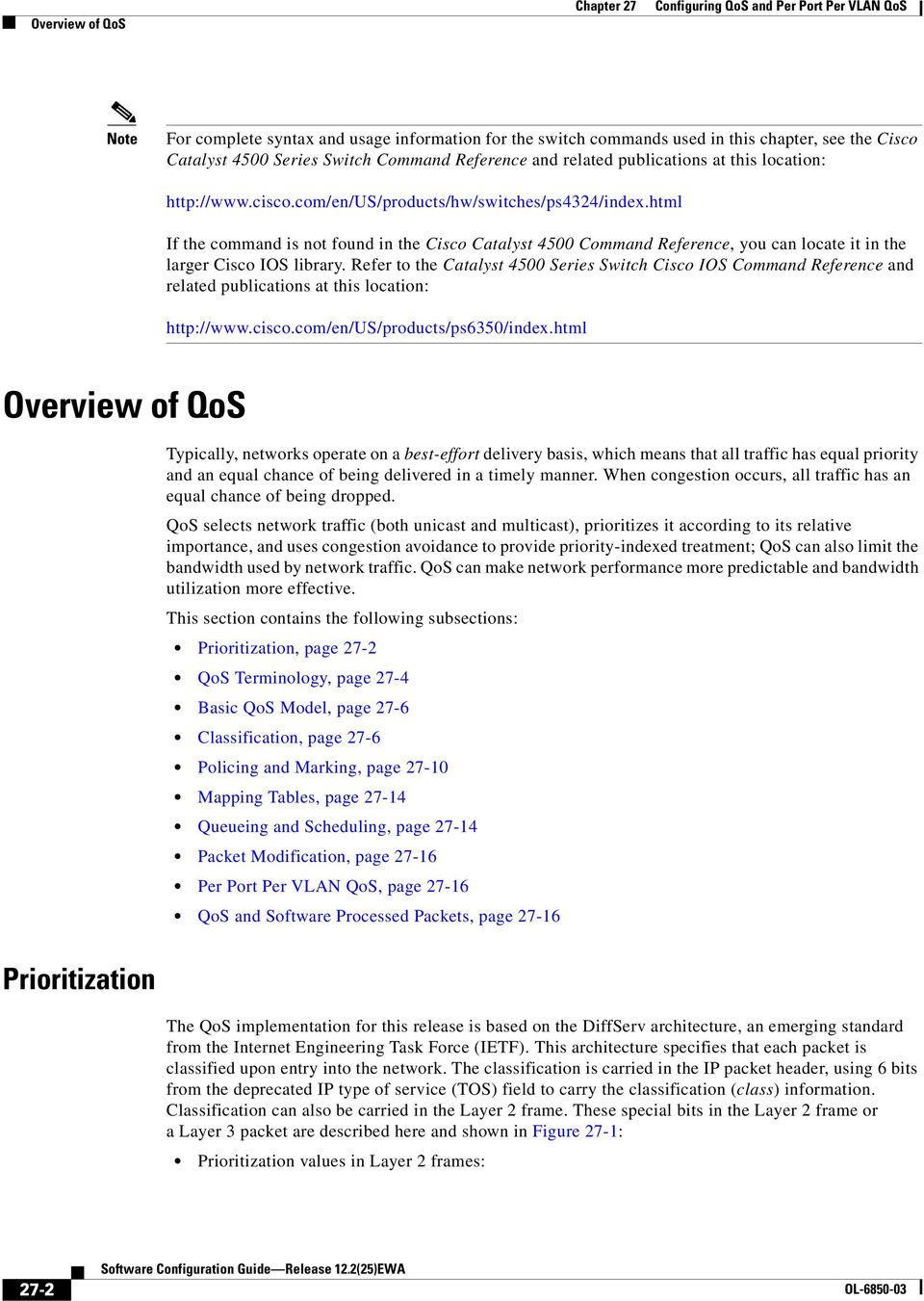
3 Overview of QoS Layer 2 Inter-Switch Link (ISL) frame headers have a -byte User field that carries an IEEE 82.p class of service (CoS) value in the three least-significant bits. On interfaces configured as Layer 2 ISL trunks, all traffic is in ISL frames. Layer 2 82.Q frame headers have a 2-byte Tag Control Information field that carries the CoS value in the three most-significant bits, which are called the User Priority bits. On interfaces configured as Layer 2 82.Q trunks, all traffic is in 82.Q frames except for traffic in the native VLAN. Other frame types cannot carry Layer 2 CoS values. Layer 2 CoS values range from for low priority to 7 for high priority. Prioritization bits in Layer 3 packets: Layer 3 IP packets can carry either an IP precedence value or a Differentiated Services Code Point (DSCP) value. QoS supports the use of either value because DSCP values are backward-compatible with IP precedence values. IP precedence values range from to 7. DSCP values range from to 63. Figure 27- QoS Classification Layers in Frames and Packets Encapsulated Packet Layer 2 header IP header Data Layer 2 ISL Frame ISL header (26 bytes) Encapsulated frame... FCS (4 bytes) Layer 2 82.Q/P Frame 3 bits used for CoS Preamble Start frame delimiter DA SA Tag PT Data FCS 3 bits used for CoS (user priority) Layer 3 IPv4 Packet Version length ToS ( byte) Len ID Offset TTL Proto FCS IP-SA IP-DA Data IP precedence or DSCP All switches and routers across the Internet rely on the class information to provide the same forwarding treatment to packets with the same class information and different treatment to packets with different class information. The class information in the packet can be assigned by end hosts or by switches or routers along the way, based on a configured policy, detailed examination of the packet, or both. Detailed examination of the packet is expected to happen closer to the edge of the network so that the core switches and routers are not overloaded. Switches and routers along the path can use the class information to limit the amount of resources allocated per traffic class. The behavior of an individual device when handling traffic in the DiffServ architecture is called per-hop behavior. If all devices along a path provide a consistent per-hop behavior, you can construct an end-to-end QoS solution. 684 OL Software Configuration Guide Release 2.2(25)EWA 27-3
4 Overview of QoS Implementing QoS in your network can be a simple or complex task and depends on the QoS features offered by your internetworking devices, the traffic types and patterns in your network, and the granularity of control you need over incoming and outgoing traffic. QoS Terminology The following terms are used when discussing QoS features: Packets carry traffic at Layer 3. Frames carry traffic at Layer 2. Layer 2 frames carry Layer 3 packets. Labels are prioritization values carried in Layer 3 packets and Layer 2 frames: Layer 2 class of service (CoS) values, which range between zero for low priority and seven for high priority: Layer 2 Inter-Switch Link (ISL) frame headers have a -byte User field that carries an IEEE 82.p CoS value in the three least significant bits. Layer 2 82.Q frame headers have a 2-byte Tag Control Information field that carries the CoS value in the three most significant bits, which are called the User Priority bits. Other frame types cannot carry Layer 2 CoS values. On interfaces configured as Layer 2 ISL trunks, all traffic is in ISL frames. On interfaces configured as Layer 2 82.Q trunks, all traffic is in 82.Q frames except for traffic in the native VLAN. Layer 3 IP precedence values The IP version 4 specification defines the three most significant bits of the -byte ToS field as IP precedence. IP precedence values range between zero for low priority and seven for high priority. Layer 3 differentiated services code point (DSCP) values The Internet Engineering Task Force (IETF) has defined the six most significant bits of the -byte IP ToS field as the DSCP. The per-hop behavior represented by a particular DSCP value is configurable. DSCP values range between and 63. See the Configuring DSCP Maps section on page Layer 3 IP packets can carry either an IP precedence value or a DSCP value. QoS supports the use of either value, since DSCP values are backwards compatible with IP precedence values. See Table Software Configuration Guide Release 2.2(25)EWA OL-685-3

5 27-5 Software Configuration Guide Release 2.2(25)EWA OL Overview of QoS Classification is the selection of traffic to be marked. Marking, according to RFC 2475, is the process of setting a Layer 3 DSCP value in a packet; in this publication, the definition of marking is extended to include setting Layer 2 CoS values. Scheduling is the assignment of Layer 2 frames to a queue. QoS assigns frames to a queue based on internal DSCP values as shown in Internal DSCP Values, page Policing is limiting bandwidth used by a flow of traffic. Policing can mark or drop traffic. Table 27- IP Precedence and DSCP Values 3-bit IP Precedence 6 MSb of ToS. MSb = most significant bit 6-bit DSCP 3-bit IP Precedence 6 MSb of ToS 6-bit DSCP

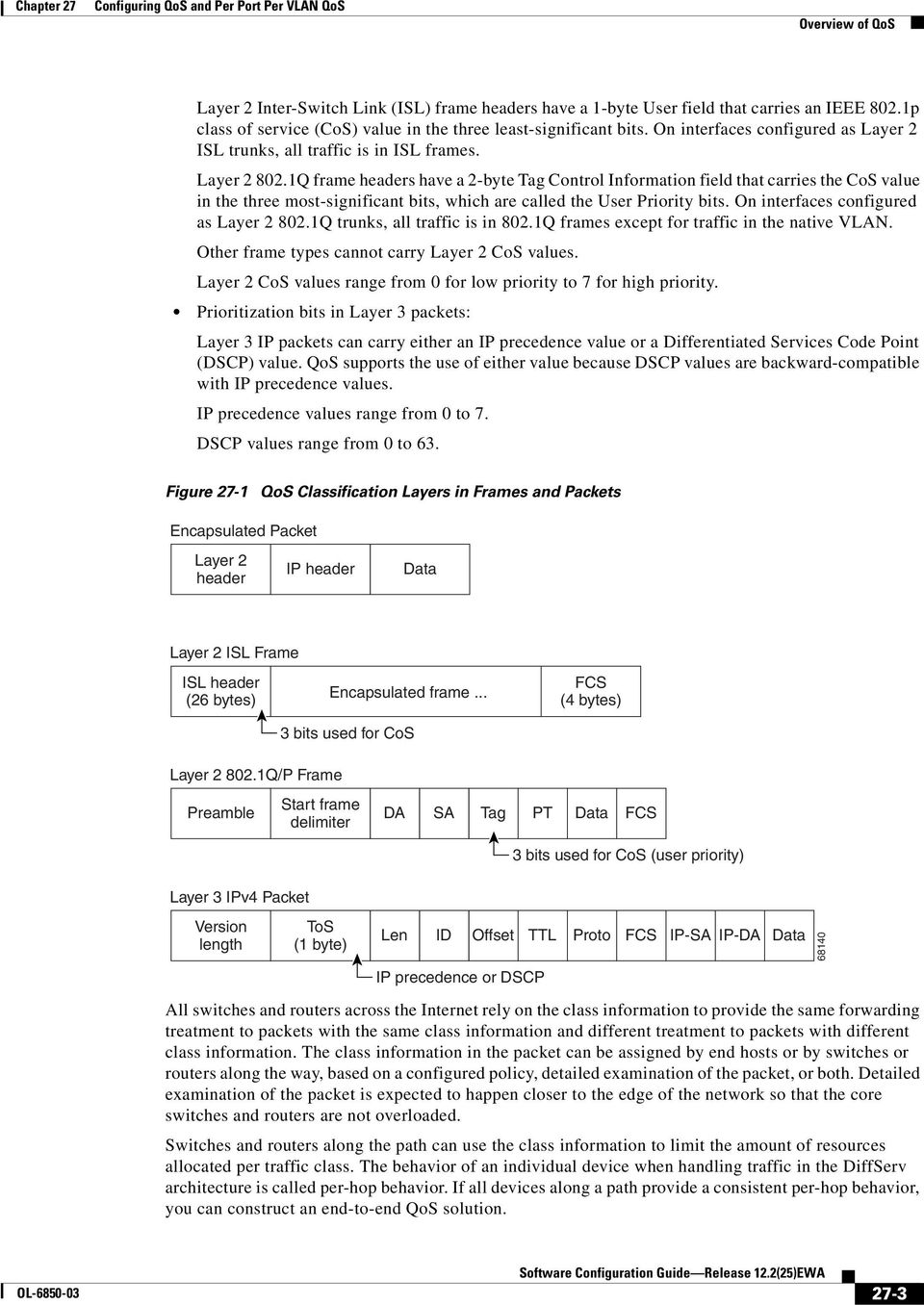
6 Overview of QoS Basic QoS Model Figure 27-2 shows the basic QoS model. Actions at the ingress and egress interfaces include classifying traffic, policing, and marking: Classifying distinguishes one kind of traffic from another. The process generates an internal DSCP for a packet, which identifies all the future QoS actions to be performed on this packet. For more information, see the Classification section on page Policing determines whether a packet is in or out of profile by comparing the traffic rate to the configured policer, which limits the bandwidth consumed by a flow of traffic. The result of this determination is passed to the marker. For more information, see the Policing and Marking section on page 27-. Marking evaluates the policer configuration information regarding the action to be taken when a packet is out of profile and decides what to do with the packet (pass through a packet without modification, mark down the DSCP value in the packet, or drop the packet). For more information, see the Policing and Marking section on page 27-. Actions at the egress interface include queueing and scheduling: Queueing evaluates the internal DSCP and determines which of the four egress queues in which to place the packet. Scheduling services the four egress (transmit) queues based on the sharing and shaping configuration of the egress (transmit) port. Sharing and shaping configurations are described in the Queueing and Scheduling section on page Figure 27-2 Basic QoS Model Actions at ingress and egress Actions at egress Classification Generate DSCP Policing In profile or out of profile Mark Queueing and scheduling Inspect packet and determine the DSCP based on ACLs or the configuration. Map the Layer 2 CoS value to a DSCP value. Compare traffic rate to the configured policer and determine if the packet is in profile or out of profile. Based on whether the packet is in or out of profile and the configured parameters, determine whether to pass through, mark down, or drop the packet. The DSCP and CoS are marked or changed accordingly. Based on the marked DSCP, determine into which of the egress queues to place the packet. Then service the queues according to the configured weights. 684 Classification Classification is the process of distinguishing one kind of traffic from another by examining the fields in the packet. Classification is enabled only if QoS is globally enabled on the switch. By default, QoS is globally disabled, so no classification occurs. You specify which fields in the frame or packet that you want to use to classify incoming traffic. Classification options are shown in Figure Software Configuration Guide Release 2.2(25)EWA OL-685-3
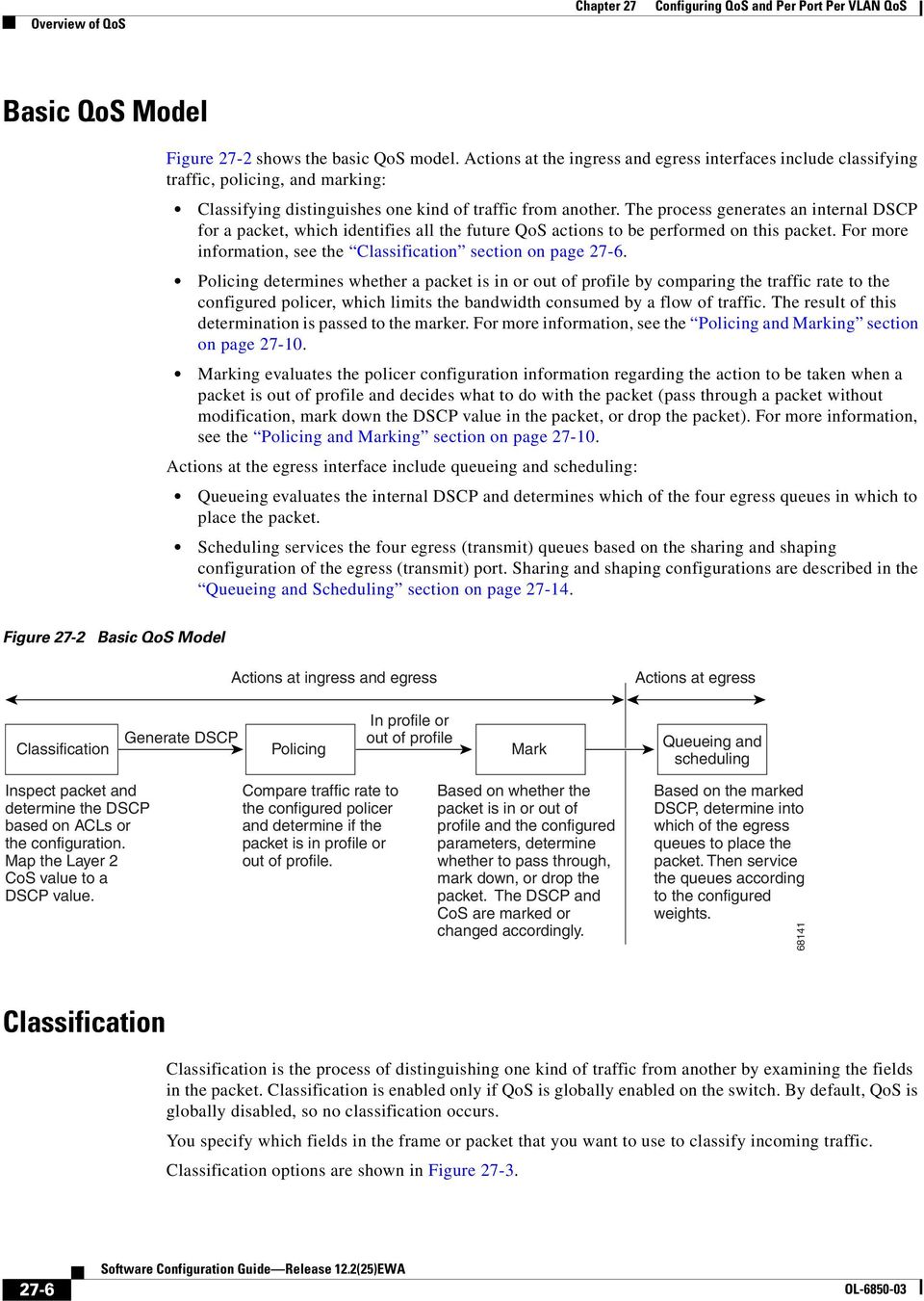
7 Overview of QoS For non-ip traffic, you have the following classification options: Use the port default. If the packet is a non-ip packet, assign the default port DSCP value to the incoming packet. Trust the CoS value in the incoming frame (configure the port to trust CoS). Then use the configurable CoS-to-DSCP map to generate the internal DSCP value. Layer 2 ISL frame headers carry the CoS value in the three least-significant bits of the -byte User field. Layer 2 82.Q frame headers carry the CoS value in the three most-significant bits of the Tag Control Information field. CoS values range from for low priority to 7 for high priority. If the frame does not contain a CoS value, assign the default port CoS to the incoming frame. The trust DSCP configuration is meaningless for non-ip traffic. If you configure a port with trust DSCP and non-ip traffic is received, the switch assigns the default port DSCP. For IP traffic, you have the following classification options: Trust the IP DSCP in the incoming packet (configure the port to trust DSCP), and assign the same DSCP to the packet for internal use. The IETF defines the six most-significant bits of the -byte Type of Service (ToS) field as the DSCP. The priority represented by a particular DSCP value is configurable. DSCP values range from to 63. Trust the CoS value (if present) in the incoming packet, and generate the DSCP by using the CoS-to-DSCP map. Perform the classification based on a configured IP standard or extended ACL, which examines various fields in the IP header. If no ACL is configured, the packet is assigned the default DSCP based on the trust state of the ingress port; otherwise, the policy map specifies the DSCP to assign to the incoming frame. For information on the maps described in this section, see the Mapping Tables section on page For configuration information on port trust states, see the Configuring the Trust State of Interfaces section on page OL Software Configuration Guide Release 2.2(25)EWA 27-7

8 Overview of QoS Figure 27-3 Classification Flowchart Start Read interface configuration for classification. Is there a QoS policy attached to this interface? Yes Are there any more traffic classes with QoS actions? Yes No No Does the packet satisfy the classification match criteria? No Yes Does the policy action specify DSCP for this traffic class Yes Use configured DSCP in ACL No No Is Trust configured for this traffic class Yes Use Port Trust configuration. Use Policy Trust configuration. Trust DSCP? Yes IP Packet? Yes Use DSCP from the packet No No Use Port default DSCP Trust CoS? Yes Packet recieved with Tag (with CoS)? No Use Port CoS No Yes Assign Port default DSCP Generate DSCP from CoS using CoS to DSCP map Done Software Configuration Guide Release 2.2(25)EWA OL-685-3
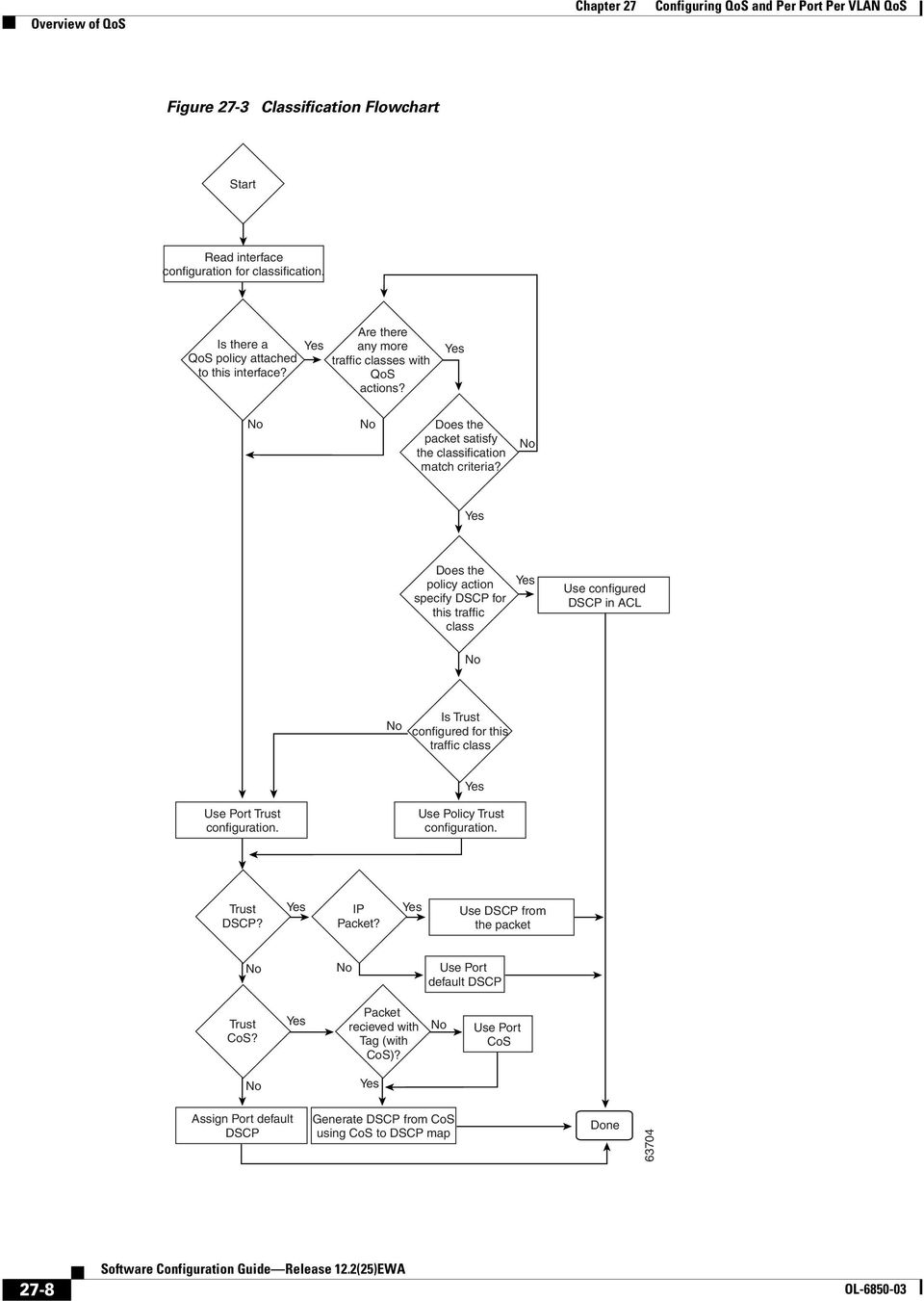
9 Overview of QoS Classification Based on QoS ACLs A packet can be classified for QoS using multiple match criteria, and the classification can specify whether the packet should match all of the specified match criteria or at least one of the match criteria. To define a QoS classifier, you can provide the match criteria using the match statements in a class map. In the 'match' statements, you can specify the fields in the packet to match on, or you can use IP standard or IP extended ACLs. For more information, see the Classification Based on Class Maps and Policy Maps section on page If the class map is configured to match all the match criteria, then a packet must satisfy all the match statements in the class map before the QoS action is taken. The QoS action for the packet is not taken if the packet does not match even one match criterion in the class map. If the class map is configured to match at least one match criterion, then a packet must satisfy at least one of the match statements in the class map before the QoS action is taken. The QoS action for the packet is not taken if the packet does not match any match criteria in the class map. When you use the IP standard and IP extended ACLs, the permit and deny ACEs in the ACL have a slightly different meaning in the QoS context. If a packet encounters (and satisfies) an ACE with a permit, then the packet matches the match criterion in the QoS classification. If a packet encounters (and satisfies) an ACE with a deny, then the packet does not match the match criterion in the QoS classification. If no match with a permit action is encountered and all the ACEs have been examined, then the packet does not match the criterion in the QoS classification. When creating an access list, remember that, by default, the end of the access list contains an implicit deny statement for everything if it did not find a match before reaching the end. After a traffic class has been defined with the class map, you can create a policy that defines the QoS actions for a traffic class. A policy might contain multiple classes with actions specified for each one of them. A policy might include commands to classify the class as a particular aggregate (for example, assign a DSCP) or rate limit the class. This policy is then attached to a particular port on which it becomes effective. You implement IP ACLs to classify IP traffic by using the access-list global configuration command. For configuration information, see the Configuring a QoS Policy section on page Classification Based on Class Maps and Policy Maps A class map is a mechanism that you use to isolate and name a specific traffic flow (or class) from all other traffic. The class map defines the criterion used to match against a specific traffic flow to further classify it; the criteria can include matching the access group defined by the ACL or matching a specific list of DSCP or IP precedence values. If you have more than one type of traffic that you want to classify, you can create another class map and use a different name. After a packet is matched against the class-map criteria, you can specify the QoS actions via a policy map. A policy map specifies the QoS actions for the traffic classes. Actions can include trusting the CoS or DSCP values in the traffic class; setting a specific DSCP or IP precedence value in the traffic class; or specifying the traffic bandwidth limitations and the action to take when the traffic is out of profile. Before a policy map can be effective, you must attach it to an interface. OL Software Configuration Guide Release 2.2(25)EWA 27-9

10 Overview of QoS You create a class map by using the class-map global configuration command. When you enter the class-map command, the switch enters the class-map configuration mode. In this mode, you define the match criteria for the traffic by using the match class-map configuration command. You create and name a policy map by using the policy-map global configuration command. When you enter this command, the switch enters the policy-map configuration mode. In this mode, you specify the actions to take on a specific traffic class by using the trust or set policy-map configuration and policy-map class configuration commands. To make the policy map effective, you attach it to an interface by using the service-policy interface configuration command. The policy map can also contain commands that define the policer, (the bandwidth limitations of the traffic) and the action to take if the limits are exceeded. For more information, see the Policing and Marking section on page 27-. A policy map also has these characteristics: A policy map can contain up to 255 class statements. You can have different classes within a policy map. A policy-map trust state supersedes an interface trust state. For configuration information, see the Configuring a QoS Policy section on page Policing and Marking After a packet is classified and has an internal DSCP value assigned to it, the policing and marking process can begin as shown in Figure Policing involves creating a policer that specifies the bandwidth limits for the traffic. Packets that exceed the limits are out of profile or nonconforming. Each policer specifies the action to take for packets that are in or out of profile. These actions, carried out by the marker, include passing through the packet without modification, dropping the packet, or marking down the packet with a new DSCP value that is obtained from the configurable policed-dscp map. For information on the policed-dscp map, see the Mapping Tables section on page You can create these types of policers: Individual QoS applies the bandwidth limits specified in the policer separately to each matched traffic class for each port/vlan to which the policy map is attached to. You configure this type of policer within a policy map by using the police command under policy-map class configuration mode. Aggregate QoS applies the bandwidth limits specified in an aggregate policer cumulatively to all matched traffic flows. You configure this type of policer by specifying the aggregate policer name within a policy map by using the police aggregate policy-map configuration command. You specify the bandwidth limits of the policer by using the qos aggregate-policer global configuration command. In this way, the aggregate policer is shared by multiple classes of traffic within a policy map. Flow or Microflow With flow-based policing, all the identified flows are policed to the specified rate individually. Because the flows are dynamic, key distinguishing fields must be configured in class maps. Two flow-matching options are provided: source ip based (each flow with unique source IP address is treated as a new flow) and destination ip based (each flow with unique destination IP address is treated as new flow). For information on flow-based policer configuration, see Configuring User Based Rate Limiting on page Software Configuration Guide Release 2.2(25)EWA OL-685-3

11 Overview of QoS When configuring policing and policers, keep these items in mind: For IP packets, only the length of the IP payload (the total length field in the IP header) is used by the policer for policing computation. The Layer 2 header and trailer length are not taken into account. For example, for a 64-byte Ethernet II IP packet, only 46 bytes are taken into account for policing (64 bytes - 4 byte Ethernet Header - 4 bytes Ethernet CRC). For non-ip packets, the Layer 2 length as specified in the Layer 2 Header is used by the policer for policing computation. To specify additional Layer 2 encapsulation length when policing IP packets, use the qos account layer2 encapsulation command. By default, no policers are configured. Only the average rate and committed burst parameters are configurable. Policing for individual and aggregate policers can occur in ingress and egress interfaces. With the Supervisor Engine V-GE (WS-X456-GE), 892 policers are supported on ingress and on egress. With all other supervisor engines, 24 policers are supported on ingress and on egress. Four policers in ingress and egress direction are reserved. Policers can be of individual or aggregate type. On the Supervisor Engine V-GE, flow based policers are supported. Policing for flow policers can occur on ingress Layer 3 interfaces only. 52 unique flow policers can be configured on the Supervisor Engine V-GE. Because one flow policer is reserved by software, 5 unique flow policers can be defined. Greater than, flows can be microflow policed. Microflow currently supports two flow matching options (source IP address based and destination IP address based). When microflow policing is used together with Netflow Statistics Collection, full flow statistics for the flows matching the source IP address or destination IP address will not be available. For information on configuring Netflow Statistics, refer to Enabling NetFlow Statistics Collection on page 7. On an interface configured for QoS, all traffic received or sent through the interface is classified, policed, and marked according to the policy map attached to the interface. However, if the interface is configured to use VLAN-based QoS (using the qos vlan-based command), the traffic received or sent through the interface is classified, policed, and marked according to the policy map attached to the VLAN (configured on the VLAN interface) to which the packet belongs. If there is no policy map attached to the VLAN to which the packet belongs, the policy map attached to the interface is used. After you configure the policy map and policing actions, attach the policy to an ingress or egress interface by using the service-policy interface configuration command. For configuration information, see the Configuring a QoS Policy section on page and the Creating Named Aggregate Policers section on page OL Software Configuration Guide Release 2.2(25)EWA 27-
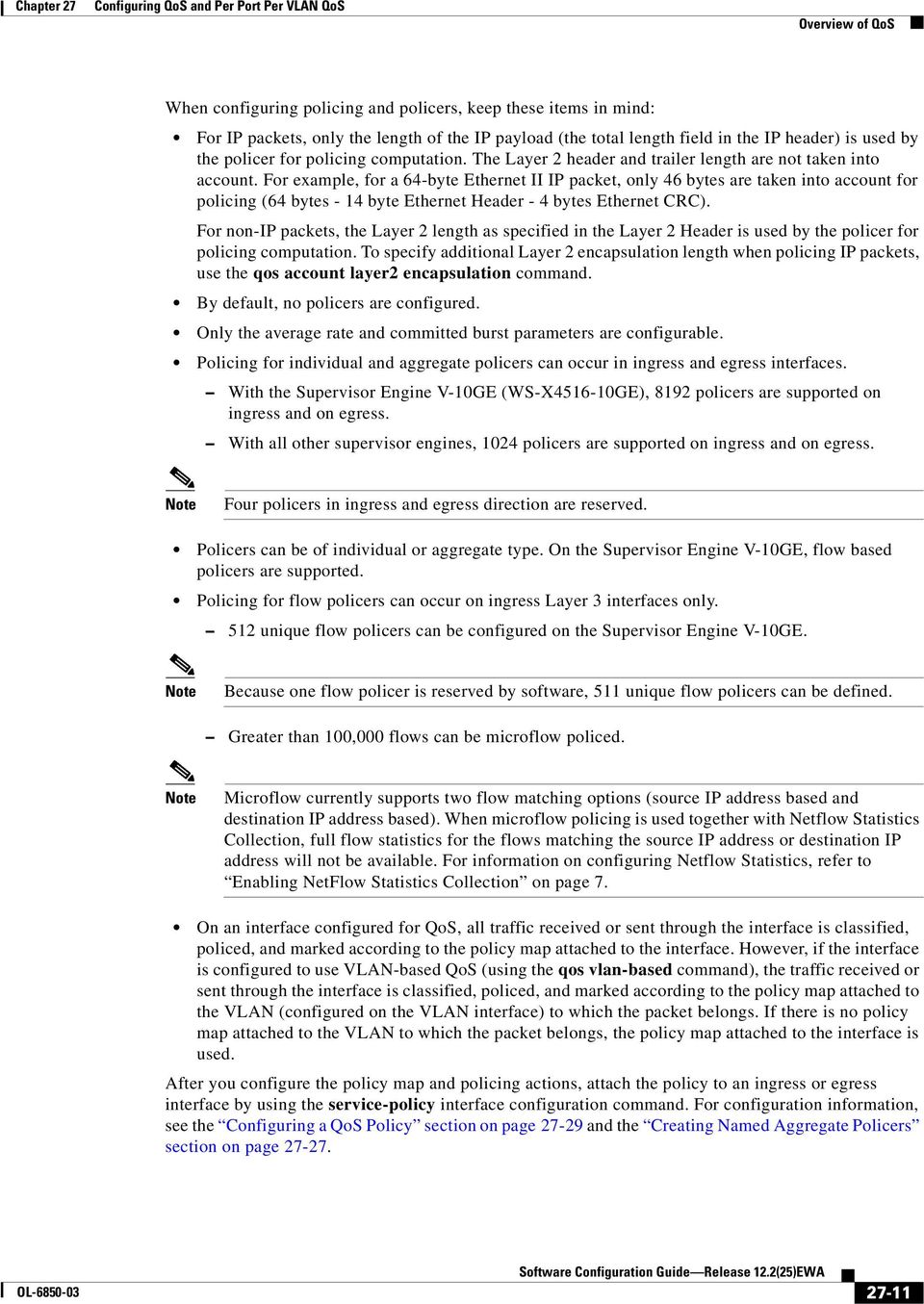
12 Overview of QoS Figure 27-4 Policing and Marking Flowchart Start QoS Policy attached to the port? Yes Port QoS VLANbased? No No Yes QoS Policy attached to the VLAN to which the packet belongs? QoS Policy attached to the VLAN to which the packet belongs? No Yes Yes Use QoS policy on the VLAN Use QoS policy on the port No Any more QoS ACLs in the policy? Yes Packet match a "permit" ACB in the ACL? No Yes No Any more QoSv ACLs in the policy? Yes Packet in-profile for the policer? No Out of Profile Action? Yes Mark-down Transmit Mark-down Done Drop Drop Software Configuration Guide Release 2.2(25)EWA OL-685-3
13 Overview of QoS Internal DSCP Values Internal DSCP Sources Egress ToS and CoS Sources The following sections describe the internal DSCP values: Internal DSCP Sources, page 27-3 Egress ToS and CoS Sources, page 27-3 During processing, QoS represents the priority of all traffic (including non-ip traffic) with an internal DSCP value. QoS derives the internal DSCP value from the following: For trust-cos traffic, from received or ingress interface Layer 2 CoS values For trust-dscp traffic, from received or ingress interface DSCP values For untrusted traffic, from ingress interface DSCP value The trust state of traffic is the trust state of the ingress interface unless set otherwise by a policy action for this traffic class. QoS uses configurable mapping tables to derive the internal 6-bit DSCP value from CoS, which are 3-bit values (see the Configuring DSCP Maps section on page 27-49). For egress IP traffic, QoS creates a ToS byte from the internal DSCP value and sends it to the egress interface to be written into IP packets. For trust-dscp and untrusted IP traffic, the ToS byte includes the original 2 least-significant bits from the received ToS byte. The internal ToS value can mimic an IP precedence value (see Table 27- on page 27-5). For all egress traffic, QoS uses a configurable mapping table to derive a CoS value from the internal ToS value associated with traffic (see the Configuring the DSCP-to-CoS Map section on page 27-5). QoS sends the CoS value to be written into ISL and 82.Q frames. For traffic received on an ingress interface configured to trust CoS using the qos trust cos command, the transmit CoS is always the incoming packet CoS (or the ingress interface default CoS if the packet is received untagged). When the interface trust state is not configured to trust dscp using the qos trust dscp command, the security and QoS ACL classification will always use the interface DSCP and not the incoming packet DSCP. OL Software Configuration Guide Release 2.2(25)EWA 27-3
14 Overview of QoS Mapping Tables During QoS processing, the switch represents the priority of all traffic (including non-ip traffic) with an internal DSCP value: During classification, QoS uses configurable mapping tables to derive the internal DSCP (a 6-bit value) from received CoS. These maps include the CoS-to-DSCP map. During policing, QoS can assign another DSCP value to an IP or non-ip packet (if the packet is out of profile and the policer specifies a marked down DSCP value). This configurable map is called the policed-dscp map. Before the traffic reaches the scheduling stage, QoS uses the internal DSCP to select one of the four egress queues for output processing. The DSCP-to-egress queue mapping can be configured using the qos map dscp to tx-queue command. The CoS-to-DSCP and DSCP-to-CoS map have default values that might or might not be appropriate for your network. For configuration information, see the Configuring DSCP Maps section on page Queueing and Scheduling Active Queue Management Each physical port has four transmit queues (egress queues). Each packet that needs to be transmitted is enqueued to one of the transmit queues. The transmit queues are then serviced based on the transmit queue scheduling algorithm. Once the final transmit DSCP is computed (including any markdown of DSCP), the transmit DSCP to transmit queue mapping configuration determines the transmit queue. The packet is placed in the transmit queue of the transmit port, determined from the transmit DSCP. Use the qos map dscp to tx-queue command to configure the transmit DSCP to transmit queue mapping. The transmit DSCP is the internal DSCP value if the packet is a non-ip packet as determined by the QoS policies and trust configuration on the ingress and egress ports. For configuration information, see the Configuring Transmit Queues section on page Active queue management (AQM) is the pro-active approach of informing you about congestion before a buffer overflow occurs. AQM is done using Dynamic buffer limiting (DBL). DBL tracks the queue length for each traffic flow in the switch. When the queue length of a flow exceeds its limit, DBL will drop packets or set the Explicit Congestion Notification (ECN) bits in the packet headers. DBL classifies flows in two categories, adaptive and aggressive. Adaptive flows reduce the rate of packet transmission once it receives congestion notification. Aggressive flows do not take any corrective action in response to congestion notification. For every active flow the switch maintains two parameters, buffersused and credits. All flows start with max-credits, a global parameter. When a flow with credits less than aggressive-credits (another global parameter) it is considered an aggressive flow and is given a small buffer limit called aggressivebufferlimit. Queue length is measured by the number of packets. The number of packets in the queue determines the amount of buffer space that a flow is given. When a flow has a high queue length the computed value is lowered. This allows new incoming flows to receive buffer space in the queue. This allows all flows to get a proportional share of packets through the queue Software Configuration Guide Release 2.2(25)EWA OL-685-3

15 Overview of QoS Sharing Link Bandwidth Among Transmit Queues The four transmit queues for a transmit port share the available link bandwidth of that transmit port. You can set the link bandwidth to be shared differently among the transmit queues using bandwidth command in interface transmit queue configuration mode. With this command, you assign the minimum guaranteed bandwidth for each transmit queue. By default, all queues are scheduled in a round robin manner. For systems using Supervisor Engine II-Plus, Supervisor Engine II-Plus TS, Supervisor Engine III, and Supervisor Engine IV, bandwidth can be configured on these ports only: Uplink ports on supervisor engines Ports on the WS-X436-GB GBIC linecard Ports on the WS-X456-GB-T CSFP linecard The 2 BASE-X ports on the WS-X4232-GB-RJ linecard The first 2 ports on the WS-X448-GB linecard The two BASE-X ports on the WS-X442-2GB-TX linecard For systems using Supervisor Engine V, bandwidth can be configured on all ports (/ Fast Ethernet, //BASE-T, and BASE-X). Strict Priority / Low Latency Queueing Traffic Shaping You can configure transmit queue 3 on each port with higher priority using the priority high tx-queue configuration command in the interface configuration mode. When transmit queue 3 is configured with higher priority, packets in transmit queue 3 are scheduled ahead of packets in other queues. When transmit queue 3 is configured at a higher priority, the packets are scheduled for transmission before the other transmit queues only if it has not met the allocated bandwidth sharing configuration. Any traffic that exceeds the configured shape rate will be queued and transmitted at the configured rate. If the burst of traffic, exceeds the size of the queue, packets will be dropped to maintain transmission at the configured shape rate. Traffic Shaping provides the ability to control the rate of outgoing traffic in order to make sure that the traffic conforms to the maximum rate of transmission contracted for it. Traffic that meets certain profile can be shaped to meet the downstream traffic rate requirements to handle any data rate mismatches. Each transmit queue can be configured to transmit a maximum rate using the shape command. The configuration allows you to specify the maximum rate of traffic. Any traffic that exceeds the configured shape rate will be queued and transmitted at the configured rate. If the burst of traffic exceeds the size of the queue, packets will be dropped to maintain transmission at the configured shape rate. OL Software Configuration Guide Release 2.2(25)EWA 27-5
16 Overview of QoS Packet Modification A packet is classified, policed, and queued to provide QoS. Packet modifications can occur during this process: For IP packets, classification involves assigning a DSCP to the packet. However, the packet is not modified at this stage; only an indication of the assigned DSCP is carried along. The reason for this is that QoS classification and ACL lookup occur in parallel, and it is possible that the ACL specifies that the packet should be denied and logged. In this situation, the packet is forwarded with its original DSCP to the CPU, where it is again processed through ACL software. For non-ip packets, classification involves assigning an internal DSCP to the packet, but because there is no DSCP in the non-ip packet, no overwrite occurs. Instead, the internal DSCP is used both for queueing and scheduling decisions and for writing the CoS priority value in the tag if the packet is being transmitted on either an ISL or 82.Q trunk port. During policing, IP and non-ip packets can have another DSCP assigned to them (if they are out of profile and the policer specifies a markdown DSCP). Once again, the DSCP in the packet is not modified, but an indication of the marked-down value is carried along. For IP packets, the packet modification occurs at a later stage. Per Port Per VLAN QoS Per-port per-vlan QoS (PVQoS) offers differentiated quality-of-services to individual VLANs on a trunk port. It enables service providers to rate limit individual VLAN-based services on each trunk port to a business or a residence. In an enterprise Voice-over-IP environment, it can be used to rate limit voice VLAN even if an attacker impersonates an IP phone. A per-port per-vlan service policy can be separately applied to either ingress or egress traffic. QoS and Software Processed Packets The Catalyst 45 platform does not apply the QoS marking or policing configuration for any packets that are forwarded or generated by the Cisco IOS software. This means that any input or output QoS policy configured on the port or VLAN is not applied to packets if the Cisco IOS is forwarding or generating packets. However, Cisco IOS marks all the generated control packets appropriately and uses the internal IP DSCP to determine the transmit queue on the output transmission interface. For IP packets, the internal IP DSCP is the IP DSCP field in the IP packet. For non-ip packets, Cisco IOS assigns a packet priority internally and maps it to an internal IP DSCP value. Cisco IOS assigns an IP precedence of 6 to routing protocol packets on the control plane. As noted in RFC 79, "The Internetwork Control designation is intended for use by gateway control originators only." Specifically, Cisco IOS marks the following IP-based control packets: Open Shortest Path First (OSPF), Routing Information Protocol (RIP), Enhanced Interior Gateway Routing Protocol (EIGRP) hellos, and keepalives. Telnet packets to and from the router also receive an IP precedence value of 6. The assigned value remains with the packets when the output interface transmits them into the network. For Layer 2 control protocols, the software assigns an internal IP DSCP. Typically, Layer 2 control protocol packets are assigned an internal DSCP value of 48 (corresponding to an IP precedence value of 6) Software Configuration Guide Release 2.2(25)EWA OL-685-3

17 Configuring Auto-QoS The internal IP DSCP is used to determine the transmit queue to which the packet is enqueued on the transmission interface. See Configuring Transmit Queues on page 46 for details on how to configure the DSCP to transmit queues. The internal IP DSCP is also used to determine the transmit CoS marking if the packet is transmitted with a IEEE 82.q or ISL tag on a trunk interface. See Configuring the DSCP-to-CoS Map on page 5 for details on how to configure the DSCP to CoS mapping. Configuring Auto-QoS You can use the auto-qos feature to simplify the deployment of existing QoS features. Auto-QoS makes assumptions about the network design, and as a result, the switch can prioritize different traffic flows and appropriately use the egress queues instead of using the default QoS behavior. (The default is that QoS is disabled. The switch then offers best-effort service to each packet, regardless of the packet content or size, and sends it from a single queue.) When you enable auto-qos, it automatically classifies traffic based on ingress packet label. The switch uses the resulting classification to choose the appropriate egress queue. You use auto-qos commands to identify ports connected to Cisco IP phones and to identify ports that receive trusted voice over IP (VoIP) traffic through an uplink. Auto-QoS then performs these functions: Detects the presence or absence of IP phones Configures QoS classification Configures egress queues These sections describe how to configure auto-qos on your switch: Generated Auto-QoS Configuration, page 27-7 Effects of Auto-QoS on the Configuration, page 27-8 Configuration Guidelines, page 27-8 Enabling Auto-QoS for VoIP, page 27-9 Generated Auto-QoS Configuration By default, auto-qos is disabled on all interfaces. When you enable the auto-qos feature on the first interface, these automatic actions occur: QoS is globally enabled (qos global configuration command). DBL is enabled globally (qos dbl global configuration command) When you enter the auto qos voip trust interface configuration command, the ingress classification on the specified interface is set to trust the CoS label received in the packet if the specified interface is configured as Layer 2 (and is set to trust DSCP if the interface is configured as Layer 3). (See Table 27-2.) When you enter the auto qos voip cisco-phone interface configuration command, the trusted boundary feature is enabled. It uses the Cisco Discovery Protocol (CDP) to detect the presence or absence of a Cisco IP phone. When a Cisco IP phone is detected, the ingress classification on the OL Software Configuration Guide Release 2.2(25)EWA 27-7

18 Configuring Auto-QoS interface is set to trust the cos label received in the packet, if the interface is configured as Layer 2. (The classification is set to trust DSCP if the interface is configured as Layer 3.) When a Cisco IP phone is absent, the ingress classification is set to not trust the cos label in the packet. For information about the trusted boundary feature, see the Configuring a Trusted Boundary to Ensure Port Security section on page When you enable auto-qos by using the auto qos voip cisco-phone or the auto qos voip trust interface configuration commands, the switch automatically generates a QoS configuration based on the traffic type and ingress packet label and applies the commands listed in Table 27-2 to the interface. Table 27-2 Generated Auto-QoS Configuration Description The switch automatically enables standard QoS and DBL configures the cos-to-dscp map (maps CoS values in incoming packets to a DSCP value). The switch automatically configures the DSCP-to-Tx-queue mapping. The switch automatically sets the ingress classification on the interface to trust the CoS/DSCP value received in the packet. The switch automatically creates a QoS service policy, enables DBL on the policy, and attaches it to the interface. If you entered the auto qos voip cisco-phone command, the switch automatically enables the trusted boundary feature, which uses the CDP to detect the presence or absence of a Cisco IP phone. The switch assigns a higher priority for queue 3. Limit for shaping on queue 3 is selected so that it is 33 percent of the link speed. Configure shaping as 33 percent on those ports where sharing is supported. This procedure ensures that the higher-priority queue does not starve other queues. Automatically Generated Switch(config)# qos Switch(config)# qos map cos 3 to 26 Switch(config)# qos dbl Switch(config)# qos map cos 5 to 46 Switch(config)# qos map dscp b to tx-queue 4 Switch(config)# qos map dscp to tx-queue 4 Switch(config-if)# qos trust cos or Switch(config-if)# qos trust dscp Switch(config)# policy-map autoqos-voip-policy Switch(config-pmap)# class class-default Switch(config-pmap-c)# dbl Switch(config-if)# qos trust device cisco-phone Switch(config-if)# tx-queue 3 Switch(config-if-tx-queue)# priority high Switch(config-if-tx-queue)# shape percent 33 Switch(config-if-tx-queue)# bandwidth percent 33 Effects of Auto-QoS on the Configuration When auto-qos is enabled, the auto qos voip interface configuration command and the generated configuration are added to the running configuration. Configuration Guidelines Before configuring auto-qos, you should be aware of this information: In this release, auto-qos configures the switch only for VoIP with Cisco IP phones Software Configuration Guide Release 2.2(25)EWA OL-685-3

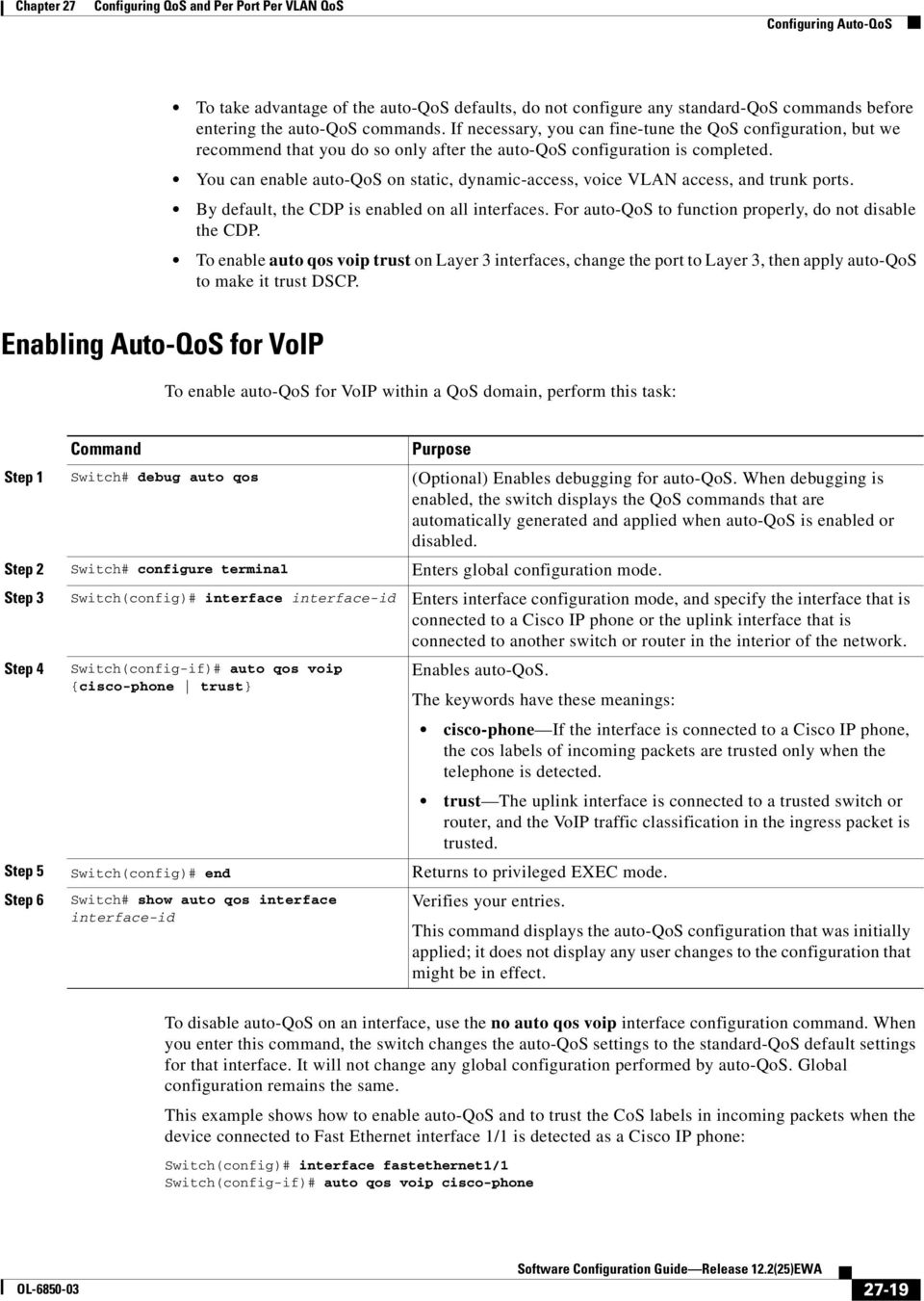
19 Configuring Auto-QoS To take advantage of the auto-qos defaults, do not configure any standard-qos commands before entering the auto-qos commands. If necessary, you can fine-tune the QoS configuration, but we recommend that you do so only after the auto-qos configuration is completed. You can enable auto-qos on static, dynamic-access, voice VLAN access, and trunk ports. By default, the CDP is enabled on all interfaces. For auto-qos to function properly, do not disable the CDP. To enable auto qos voip trust on Layer 3 interfaces, change the port to Layer 3, then apply auto-qos to make it trust DSCP. Enabling Auto-QoS for VoIP To enable auto-qos for VoIP within a QoS domain, perform this task: Step debug auto qos (Optional) Enables debugging for auto-qos. When debugging is enabled, the switch displays the QoS commands that are automatically generated and applied when auto-qos is enabled or disabled. Step 2 configure terminal Enters global configuration mode. Step 3 Switch(config)# interface interface-id Enters interface configuration mode, and specify the interface that is connected to a Cisco IP phone or the uplink interface that is connected to another switch or router in the interior of the network. Step 4 Switch(config-if)# auto qos voip {cisco-phone trust} Enables auto-qos. The keywords have these meanings: cisco-phone If the interface is connected to a Cisco IP phone, the cos labels of incoming packets are trusted only when the telephone is detected. trust The uplink interface is connected to a trusted switch or router, and the VoIP traffic classification in the ingress packet is trusted. Step 5 Switch(config)# end Returns to privileged EXEC mode. Step 6 show auto qos interface interface-id Verifies your entries. This command displays the auto-qos configuration that was initially applied; it does not display any user changes to the configuration that might be in effect. To disable auto-qos on an interface, use the no auto qos voip interface configuration command. When you enter this command, the switch changes the auto-qos settings to the standard-qos default settings for that interface. It will not change any global configuration performed by auto-qos. Global configuration remains the same. This example shows how to enable auto-qos and to trust the CoS labels in incoming packets when the device connected to Fast Ethernet interface / is detected as a Cisco IP phone: Switch(config)# interface fastethernet/ Switch(config-if)# auto qos voip cisco-phone OL Software Configuration Guide Release 2.2(25)EWA 27-9
20 Configuring Auto-QoS This example shows how to enable auto-qos and to trust the cos/dscp labels in incoming packets when the switch or router connected to Gigabit Ethernet interface / is a trusted device: Switch(config)# interface gigabitethernet/ Switch(config-if)# auto qos voip trust This example shows how to display the QoS commands that are automatically generated when auto-qos is enabled: debug auto qos AutoQoS debugging is on configure terminal Enter configuration commands, one per line. End with CNTL/Z. Switch(config)# interface gigabitethernet/ Switch(config-if)# auto qos voip cisco-phone Displaying Auto-QoS Information To display the initial auto-qos configuration, use the show auto qos [interface [interface-id]] privileged EXEC command. To display any user changes to that configuration, use the show running-config privileged EXEC command. You can compare the show auto qos and the show running-config command output to identify the user-defined QoS settings. To display information about the QoS configuration that might be affected by auto-qos, use one of these commands: show qos show qos map show qos interface [interface-id] For more information about these commands, refer to the command reference for this release Software Configuration Guide Release 2.2(25)EWA OL-685-3

21 Configuring Auto-QoS Auto-QoS Configuration Example This section describes how you could implement auto-qos in a network, as shown in Figure Figure 27-5 Auto-QoS Configuration Example Network Cisco router To Internet Gigabit Ethernet / Catalyst 45 switch Intelligent wiring closet Catalyst 45 switch End stations IP Gigabit Ethernet 2/2 Trunk link Gigabit Ethernet 2/ Catalyst 45 switch Gigabit Ethernet / Gigabit Ethernet /2 Trunk link Catalyst 45 switch Gigabit Ethernet / Intelligent wiring closet Catalyst 45 switch Gigabit Ethernet /2 Gigabit Ethernet / Video server IP Fast Ethernet 2/7 Fast Ethernet 2/7 Fast Ethernet 2/5 Fast Ethernet 2/5 IP Fast Ethernet 2/3 Catalyst 45 switch at the edge of the QoS domain Catalyst 45 switch at the edge of the QoS domain IP Fast Ethernet 2/3 IP IP Cisco IP phones Cisco IP phones 9483 The intelligent wiring closets in Figure 27-5 are composed of Catalyst 45 switches. The object of this example is to prioritize the VoIP traffic over all other traffic. To do so, enable auto-qos on the switches at the edge of the QoS domains in the wiring closets. You should not configure any standard QoS commands before entering the auto-qos commands. You can fine-tune the QoS configuration, but we recommend that you do so only after the auto-qos configuration is completed. OL Software Configuration Guide Release 2.2(25)EWA 27-2
22 Configuring Auto-QoS To configure the switch at the edge of the QoS domain to prioritize the VoIP traffic over all other traffic, perform this task: Step debug auto qos Enables debugging for auto-qos. When debugging is enabled, the switch displays the QoS configuration that is automatically generated when auto-qos is enabled. Step 2 configure terminal Enters global configuration mode. Step 3 Switch(config)# cdp enable Enables CDP globally. By default, CDP is enabled. Step 4 Switch(config)# interface Enters interface configuration mode. fastethernet2/3 Step 5 Switch(config-if)# auto qos voip cisco-phone Enables auto-qos on the interface, and specifies that the interface is connected to a Cisco IP phone. The CoS labels of incoming packets are trusted only when the IP phone is detected. Step 6 Step 7 Step 8 Step 9 Step Step Switch(config)# interface fastethernet2/5 Switch(config)# auto qos voip cisco-phone Switch(config)# interface fastethernet2/7 Switch(config)# auto qos voip cisco-phone Switch(config)# interface gigabit/ Switch(config)# auto qos voip trust Enters interface configuration mode. Enables auto-qos on the interface, and specifies that the interface is connected to a Cisco IP phone. Enters interface configuration mode. Enables auto-qos on the interface, and specifies that the interface is connected to a Cisco IP phone. Enters interface configuration mode. Enables auto-qos on the interface, and specifies that the interface is connected to a trusted router or switch. Step 2 Switch(config)# end Returns to privileged EXEC mode. Step 3 show auto qos Verifies your entries. This command displays the auto-qos configuration that is initially applied; it does not display any user changes to the configuration that might be in effect. For information about the QoS configuration that might be affected by auto-qos, see the Displaying Auto-QoS Information section on page Step 4 Step 5 show auto qos interface interface-id copy running-config startup-config Verifies your entries. This command displays the auto-qos configuration that was initially applied; it does not display any user changes to the configuration that might be in effect. Saves the auto qos voip interface configuration commands and the generated auto-qos configuration in the configuration file Software Configuration Guide Release 2.2(25)EWA OL-685-3
23 Configuring QoS Configuring QoS Before configuring QoS, you must have a thorough understanding of these items: The types of applications used and the traffic patterns on your network. Traffic characteristics and needs of your network. Is the traffic bursty? Do you need to reserve bandwidth for voice and video streams? Bandwidth requirements and speed of the network. Location of congestion points in the network. These sections describe how to configure QoS on the Catalyst 4 family switch: Default QoS Configuration, page Configuration Guidelines, page Enabling QoS Globally, page Configuring a Trusted Boundary to Ensure Port Security, page Enabling Dynamic Buffer Limiting, page Creating Named Aggregate Policers, page Configuring a QoS Policy, page Configuring User Based Rate Limiting, page Enabling Per-port Per-VLAN QoS, page 27-4 Enabling or Disabling QoS on an Interface, page Configuring VLAN-Based QoS on Layer 2 Interfaces, page Configuring the Trust State of Interfaces, page Configuring the CoS Value for an Interface, page Configuring DSCP Values for an Interface, page Configuring Transmit Queues, page Configuring DSCP Maps, page Default QoS Configuration Table 27-3 shows the QoS default configuration. Table 27-3 QoS Default Configuration Feature Default Value Global QoS configuration Disabled Interface QoS configuration (port based) Enabled when QoS is globally enabled Interface CoS value Interface DSCP value OL Software Configuration Guide Release 2.2(25)EWA 27-23
24 Configuring QoS Table 27-3 QoS Default Configuration (continued) Feature CoS to DSCP map (DSCP set from CoS values) DSCP to CoS map (CoS set from DSCP values) Marked-down DSCP from DSCP map (Policed-DSCP) Policers Policy maps Transmit queue sharing Transmit queue size Transmit queue shaping Default Value CoS = DSCP CoS = DSCP 8 CoS 2 = DSCP 6 CoS 3 = DSCP 24 CoS 4 = DSCP 32 CoS 5 = DSCP 4 CoS 6 = DSCP 48 CoS 7 = DSCP 56 DSCP 7 = CoS DSCP 8 5 = CoS DSCP 6 23 = CoS 2 DSCP 24 3 = CoS 3 DSCP = CoS 4 DSCP 4 47 = CoS 5 DSCP = CoS 6 DSCP = CoS 7 Marked-down DSCP value equals original DSCP value (no markdown) None None /4 of the link bandwidth /4 of the transmit queue entries for the port. The transmit queue size of a port depends on the type of port, ranging from 24 packets per transmit queue to 92 packets per transmit queue. None DCSP-to-Transmit queue map DSCP 5 Queue DSCP 6 3 Queue 2 DSCP Queue 3 DSCP Queue 4 High priority transmit queue Disabled With QoS disabled Interface trust state Trust DSCP With QoS enabled With QoS enabled and all other QoS parameters at default values, QoS sets IP DSCP to zero and Layer 2 CoS to zero in all traffic transmitted. Interface trust state Untrusted Software Configuration Guide Release 2.2(25)EWA OL-685-3
25 Configuring QoS Configuration Guidelines Before beginning the QoS configuration, you should be aware of this information: If you have EtherChannel ports configured on your switch, you must configure QoS classification and policing on the EtherChannel. The transmit queue configuration must be configured on the individual physical ports that comprise the EtherChannel. If the ip fragments match the source and destination configured in the ACL used to classify the traffic for quality of service, but do not match the layer 4 port numbers in the ACL, they are still matched with the ACL and may get prioritized. If the desired behavior is to give best effort service to ip fragments, following two ACEs should be added to the ACL used to classify the traffic. access-list xxx deny udp any any fragments access-list xxx deny tcp any any fragments It is not possible to match IP options against configured IP extended ACLs to enforce QoS. These packets are sent to the CPU and processed by software. IP options are denoted by fields in the IP header. Control traffic (such as spanning-tree BPDUs and routing update packets) received by the switch are subject to all ingress QoS processing. If you want to use the set command in the policy map, you must enable IP routing (disabled by default) and configure an IP default route to send traffic to the next-hop device that is capable of forwarding. QoS processes both unicast and multicast traffic. Enabling QoS Globally To enable QoS globally, perform this task: Step Switch(config)# qos Enables QoS on the switch. Use the no qos command to globally disable QoS. Step 2 Switch(config)# end Exits configuration mode. Step 3 show qos Verifies the configuration. This example shows how to enable QoS globally: Switch(config)# qos Switch(config)# end This example shows how to verify the configuration: show qos QoS is enabled globally OL Software Configuration Guide Release 2.2(25)EWA 27-25
26 Configuring QoS Configuring a Trusted Boundary to Ensure Port Security In a typical network, you connect a Cisco IP phone to a switch port as discussed in Chapter 28, Configuring Voice Interfaces. Traffic sent from the telephone to the switch is typically marked with a tag that uses the 82.Q header. The header contains the VLAN information and the class of service (CoS) 3-bit field, which determines the priority of the packet. For most Cisco IP phone configurations, the traffic sent from the telephone to the switch is trusted to ensure that voice traffic is properly prioritized over other types of traffic in the network. By using the qos trust cos interface configuration command, you can configure the switch port to which the telephone is connected to trust the CoS labels of all traffic received on that port. In some situations, you also might connect a PC or workstation to the IP phone. In this case, you can use the switchport priority extend cos interface configuration command to configure the telephone through the switch CLI to override the priority of the traffic received from the PC. With this command, you can prevent a PC from taking advantage of a high-priority data queue. However, if a user bypasses the telephone and connects the PC directly to the switch, the CoS labels generated by the PC are trusted by the switch (because of the trusted CoS setting) and can allow misuse of high-priority queues. The trusted boundary feature solves this problem by using the CDP to detect the presence of a Cisco IP phone (such as the Cisco IP Phone 79, 7935, 794, and 796) on a switch port. If CDP is not running on the switch globally or on the port in question, trusted boundary will not work. When you configure trusted boundary on a port, trust is disabled. Then, when a phone is plugged in and detected, trust is enabled. (It may take a few minutes to detect the phone.) Now, when a phone is unplugged (and not detected), the trusted boundary feature disables the trusted setting on the switch port and prevents misuse of a high-priority queue. To enable trusted boundary on a port, perform this task: Step configure terminal Enters global configuration mode. Step 2 Switch(config)# interface interface-id Step 3 Switch(config)# qos trust [cos dscp] Step 4 Switch(config)# qos trust device cisco-phone Enters interface configuration mode, and specifies the interface connected to the IP phone. Valid interfaces include physical interfaces. Configures the interface to trust the CoS value in received traffic. By default, the port is not trusted. Specifies that the Cisco IP phone is a trusted device. You cannot enable both trusted boundary and auto-qos (auto qos voip interface configuration command) at the same time; they are mutually exclusive. Step 5 Switch(config)# end Returns to privileged EXEC mode. Step 6 show qos interface Verifies your entries. interface-id Step 7 copy running-config startup-config (Optional) Saves your entries in the configuration file. To disable the trusted boundary feature, use the no qos trust device cisco-phone interface configuration command Software Configuration Guide Release 2.2(25)EWA OL-685-3
27 Configuring QoS Enabling Dynamic Buffer Limiting To enable DBL globally on the switch, perform this task: Step Switch(config)# qos dbl Enables DBL on the switch. Use the no qos dbl command to disable AQM. Step 2 Switch(config)# end Exits configuration mode. Step 3 show qos dbl Verifies the configuration. This example shows how to enable DBL globally: Switch(config)# qos dbl Global DBL enabled Switch(config)# end This example shows how to verify the configuration: show qos dbl DBL is enabled globally DBL flow includes vlan DBL flow includes l4-ports DBL does not use ecn to indicate congestion DBL exceed-action mark probability:5% DBL max credits:5 DBL aggressive credit limit: DBL aggressive buffer limit:2 packets Creating Named Aggregate Policers To create a named aggregate policer, perform this task: Switch(config)# qos aggregate-policer policer_name rate burst [[conform-action {transmit drop}] [exceed-action {transmit drop policed-dscp-transmit}]] Creates a named aggregate policer. An aggregate policer can be applied to one or more interfaces. However, if you apply the same policer to the input direction on one interface and to the output direction on a different interface, then you have created the equivalent of two different aggregate policers in the switching engine. Each policer has the same policing parameters, with one policing the ingress traffic on one interface and the other policing the egress traffic on another interface. If an aggregate policer is applied to multiple interfaces in the same direction, then only one instance of the policer is created in the switching engine. Similarly, an aggregate policer can be applied to a port or to a VLAN. If you apply the same aggregate policer to a port and to a VLAN, then you have created the equivalent of two different aggregate policers in the switching engine. Each policer has the same policing parameters, with one policing the traffic on the configured port and the other policing the traffic on the configured VLAN. If an aggregate policer is applied to only ports or only VLANs, then only one instance of the policer is created in the switching engine. OL Software Configuration Guide Release 2.2(25)EWA 27-27
28 Configuring QoS In effect, if you apply a single aggregate policer to ports and VLANs in different directions, then you have created the equivalent of four aggregate policers; one for all ports sharing the policer in input direction, one for all ports sharing the policer in output direction, one for all VLANs sharing the policer in input direction and one for all VLANs sharing the policer in output direction. When creating a named aggregate policer, note the following: The valid range of values for the rate parameter is as follows: Minimum 32 kilobits per second Maximum 32 gigabits per second See the Configuration Guidelines section on page Rates can be entered in bits-per-second, or you can use the following abbreviations: k to denote bps m to denote bps g to denote bps You can also use a decimal point. For example, a rate of,, bps can be entered as.m. The valid range of values for the burst parameter is as follows: Minimum kilobyte Maximum 52 megabytes Bursts can be entered in bytes, or you can use the following abbreviation: k to denote bytes m to denote bytes g to denote bytes You can also use a decimal point. For example, a burst of,, bytes can be entered as.m. Optionally, you can specify a conform action for matched in-profile traffic as follows: The default conform action is transmit. Enter the drop keyword to drop all matched traffic. When you configure drop as the conform action, QoS configures drop as the exceed action. Optionally, for traffic that exceeds the CIR, you can specify an exceed action as follows: The default exceed action is drop. Enter the policed-dscp-transmit keyword to cause all matched out-of-profile traffic to be marked down as specified in the markdown map. For no policing, enter the transmit keyword to transmit all matched out-of-profile traffic. You can enter the no qos aggregate-policer policer_name command to delete a named aggregate policer Software Configuration Guide Release 2.2(25)EWA OL-685-3
29 Configuring QoS This example shows how to create a named aggregate policer with a Mbps rate limit and a -MB burst size that transmits conforming traffic and marks down out-of-profile traffic. Switch(config)# qos aggregate-policer aggr- conform-action transmit exceed-action policed-dscp-transmit Switch(config)# end This example shows how to verify the configuration: show qos aggregate-policer aggr- Policer aggr- Rate(bps): Normal-Burst(bytes): conform-action:transmit exceed-action:policed-dscp-transmit Policymaps using this policer: Configuring a QoS Policy The following subsections describe QoS policy configuration: Overview of QoS Policy Configuration, page Configuring a Class Map (Optional), page 27-3 Verifying Class Map Configuration, page 27-3 Configuring a Policy Map, page 27-3 Verifying Policy-Map Configuration, page Attaching a Policy Map to an Interface, page QoS policies process both unicast and multicast traffic. Overview of QoS Policy Configuration Configuring a QoS policy requires you to configure traffic classes and the policies that will be applied to those traffic classes, and to attach the policies to interfaces using these commands: access-list (optional for IP traffic you can filter IP traffic with class-map commands): QoS supports these access list types: Protocol Numbered Access Lists? Extended Access Lists? Named Access Lists? IP Yes: to 99 3 to 999 Yes: to 99 2 to 2699 Yes See Chapter 33, Configuring Network Security with ACLs, for information about ACLs on the Catalyst 45 series switches. class-map (optional) Enter the class-map command to define one or more traffic classes by specifying the criteria by which traffic is classified. (See the Configuring a Class Map (Optional) section on page 27-3.) OL Software Configuration Guide Release 2.2(25)EWA 27-29
30 Configuring QoS policy-map Enter the policy-map command to define the following for each class of traffic: Internal DSCP source Configuring a Class Map (Optional) Creating a Class Map Aggregate or individual policing and marking service-policy Enter the service-policy command to attach a policy map to an interface. The following subsections describe class map configuration: Creating a Class Map, page 27-3 Configuring Filtering in a Class Map, page 27-3 Enter the class-map configuration command to define a traffic class and the match criteria that will be used to identify traffic as belonging to that class. Match statements can include criteria such as an ACL, an IP precedence value, or a DSCP value. The match criteria are defined with one match statement entered within the class-map configuration mode. To create a class map, perform this task: Switch(config)# [no] class-map [match-all match-any] class_name Creates a named class map. Use the no keyword to delete a class map. Configuring Filtering in a Class Map To configure filtering in a class map, perform one of these tasks: Switch(config-cmap)# [no] match access-group {acl_index name acl_name} Switch (config-cmap)# [no] match ip precedence ipp_value [ipp_value2 [ipp_valuen]] Switch (config-cmap)# [no] match ip dscp dscp_value [dscp_value2 [dscp_valuen]] Switch (config-cmap)# [no] match any Switch (config-cmap)# match flow ip {source-address destination-address (Optional) Specifies the name of the ACL used to filter traffic. Use the no keyword to remove the statement from a class map. Access lists are not documented in this publication. See the reference under access-list in the Configuring a QoS Policy section on page (Optional for IP traffic only) Specifies up to eight IP precedence values used as match criteria. Use the no keyword to remove the statement from a class map. (Optional for IP traffic only) Specifies up to eight DSCP values used as match criteria. Use the no keyword to remove the statement from a class map. (Optional) Matches any IP traffic or non-ip traffic. (Optional) Treats each flow with a unique IP source address or destination address as a new flow Software Configuration Guide Release 2.2(25)EWA OL-685-3
31 Configuring QoS Any Input or Output policy that uses a class map with the match ip precedence or match ip dscp class-map commands, requires that the port on which the packet is received, be configured to trust dscp. If the incoming port trust state is not set to trust dscp, the IP packet DSCP/IP-precedence is not used for matching the traffic; instead the receiving port s default DSCP is used. The interfaces on the Catalyst 4 family switch do not support the match classmap, match destination-address, match input-interface, match mpls, match not, match protocol, match qos-group, and match source-address keywords. Verifying Class Map Configuration To verify class-map configuration, perform this task: Step Switch (config-cmap)# end Exits configuration mode. Step 2 show class-map class_name Verifies the configuration. This example shows how to create a class map named ipp5 and how to configure filtering to match traffic with IP precedence 5: configure terminal Enter configuration commands, one per line. End with CNTL/Z. Switch(config)# class-map ipp5 Switch(config-cmap)# match ip precedence 5 Switch(config-cmap)# end This example shows how to verify the configuration: show class-map ipp5 Class Map match-all ipp5 (id ) Match ip precedence 5 Configuring a Policy Map You can attach only one policy map to an interface. Policy maps can contain one or more policy-map classes, each with different match criteria and policers. Configure a separate policy-map class in the policy map for each type of traffic that an interface receives. Put all commands for each type of traffic in the same policy-map class. QoS does not attempt to apply commands from more than one policy-map class to matched traffic. The following sections describe policy-map configuration: Creating a Policy Map, page Configuring Policy-Map Class Actions, page OL Software Configuration Guide Release 2.2(25)EWA 27-3
32 Configuring QoS Creating a Policy Map To create a policy map, perform this task: Switch(config)# [no] policy-map policy_name Creates a policy map with a user-specified name. Use the no keyword to delete the policy map. Configuring Policy-Map Class Actions These sections describe policy-map class action configuration: Configuring the Policy-Map Class Trust State, page Configuring the Policy Map Class DBL State, page Configuring Policy-Map Class Policing, page Using a Named Aggregate Policer, page Configuring a Per-Interface Policer, page Configuring the Policy-Map Class Trust State To configure the policy-map class trust state, perform this task: Switch(config-pmap-c)# [no] trust {cos dscp} Configures the policy-map class trust state, which selects the value that QoS uses as the source of the internal DSCP value (see the Internal DSCP Values section on page 27-3). Use the no keyword to clear a configured value and return to the default. When configuring the policy-map class trust state, note the following: You can enter the no trust command to use the trust state configured on the ingress interface (this is the default). With the cos keyword, QoS sets the internal DSCP value from received or interface CoS. With the dscp keyword, QoS uses received DSCP. Configuring the Policy Map Class DBL State To configure the policy map class DBL state, perform this task: Switch(config-pmap-c)# [no] dbl Configures the policy-map class DBL state, which tracks the queue length of traffic flows (see the Active Queue Management section on page 27-4). Use the no keyword to clear an DBL value and return to the default Software Configuration Guide Release 2.2(25)EWA OL-685-3
33 Configuring QoS When configuring the policy-map class DBL state, note the following: Any class that uses a named aggregate policer must have the same DBL configuration to work. Configuring Policy-Map Class Policing These sections describe configuration of policy-map class policing: Using a Named Aggregate Policer, page Configuring a Per-Interface Policer, page Using a Named Aggregate Policer To use a named aggregate policer (see the Creating Named Aggregate Policers section on page 27-27), perform this task: Switch(config-pmap-c)# [no] police aggregate aggregate_name Uses a previously defined aggregate policer. Use the no keyword to delete the policer from the policy map class. Configuring a Per-Interface Policer To configure a per-interface policer (see the Policing and Marking section on page 27-), perform this task: Switch(config-pmap-c)# [no] police rate burst [[conform-action {transmit drop}] [exceed-action {transmit drop policed-dscp-transmit}]] Configures a per-interface policer. Use the no keyword to delete a policer from the policy map class. When configuring a per-interface policer, note the following: The valid range of values for the rate parameter is as follows: Minimum 32 kilobits per second, entered as 32 Maximum 32 gigabits per second, entered as 32 See the Configuration Guidelines section on page Rates can be entered in bits-per-second, or you can use the following abbreviations: k to denote bps m to denote bps g to denote bps You can also use a decimal point. For example, a rate of,, bps can be entered as.m. OL Software Configuration Guide Release 2.2(25)EWA 27-33
34 Configuring QoS The valid range of values for the burst parameter is as follows: Minimum kilobyte Maximum 52 megabytes Bursts can be entered in bytes, or you can use the following abbreviation: k to denote bytes m to denote bytes g to denote bytes You can also use a decimal point. For example, a burst of,, bytes can be entered as.m. Optionally, you can specify a conform action for matched in-profile traffic as follows: The default conform action is transmit. You can enter the drop keyword to drop all matched traffic. Optionally, for traffic that exceeds the CIR, you can enter the policed-dscp-transmit keyword to cause all matched out-of-profile traffic to be marked down as specified in the markdown map. See Configuring the Policed-DSCP Map section on page For no policing, you can enter the transmit keyword to transmit all matched out-of-profile traffic. This example shows how to create a policy map named ipp5-policy that uses the class map named ipp5. The class map ipp5 is configured to rewrite the packet precedence to 6 and to aggregate police the traffic that matches IP precedence value of 5: configure terminal Enter configuration commands, one per line. End with CNTL/Z. Switch(config)# policy-map ipp5-policy Switch(config-pmap)# class ipp5 Switch(config-pmap-c)# set ip precedence 6 Switch(config-pmap-c)# dbl Switch(config-pmap-c)# police 2 2 conform-action transmit exceed-action policed-dscp-transmit Switch(config-pmap-c)# end Verifying Policy-Map Configuration To verify policy-map configuration, perform this task: Step Switch(config-pmap-c)# end Exits policy-map class configuration mode. Enter additional class commands to create additional classes in the policy map. Step 2 show policy-map policy_name Verifies the configuration Software Configuration Guide Release 2.2(25)EWA OL-685-3
35 Configuring QoS This example shows how to verify the configuration: show policy-map ipp5-policy show policy ipp5-policy Policy Map ipp5-policy class ipp5 set ip precedence 6 dbl police 2 2 conform-action transmit exceed-action policed-dscp-transmit Attaching a Policy Map to an Interface To attach a policy map to an interface, perform this task: Step Switch(config)# interface {vlan vlan_id {fastethernet gigabitethernet} slot/interface Port-channel number} Step 2 Switch(config-if)# [no] service-policy input policy_map_name Selects the interface to configure. Step 3 Switch(config-if)# end Exits configuration mode. Step 4 show policy-map interface {vlan vlan_id {fastethernet gigabitethernet} slot/interface} Attaches a policy map to the input direction of the interface. Use the no keyword to detach a policy map from an interface. Verifies the configuration. This example shows how to attach the policy map named pmap to Fast Ethernet interface 5/36: configure terminal Enter configuration commands, one per line. End with CNTL/Z. Switch(config)# interface fastethernet 5/36 Switch(config-if)# service-policy input pmap Switch(config-if)# end This example shows how to verify the configuration: show policy-map interface fastethernet 5/36 FastEthernet6/ service-policy input:p class-map:c (match-any) packets match:access-group packets police:aggr- Conform: bytes Exceed: bytes class-map:class-default (match-any) packets match:any packets OL Software Configuration Guide Release 2.2(25)EWA 27-35
36 Configuring QoS Configuring User Based Rate Limiting User Based Rate Limiting (UBRL) adopts microflow policing capability to dynamically learn traffic flows and rate limit each unique flow to an individual rate. UBRL is available on Supervisor Engine V-GE with the built-in NetFlow support. UBRL can be applied to ingress traffic on routed interfaces with source or destination flow masks. It can support up to, individual flows and 5 different rates. UBRL is typically used in environments where a per-user, granular rate limiting mechanism is required, such as different outbound traffic rate from inbound traffic rate per user. A flow is defined as a five-tuple (IP source address, IP destination address, IP head protocol field, Layer 4 source and destination ports). Flow-based policers enable you to police traffic on a per flow basis. Because flows are dynamic, they require distinguishing values in the class map. When you specify the match flow command with the source-address keyword, each flow with a unique source address is treated as a new flow. When you specify the match flow command with the destination-address keyword, each flow with a unique destination address is treated as a new flow. If the class map used by the policy map has any flow options configured, it is treated as a flow-based policy map. To configure the flow-based class maps and policy maps, perform this task: Step Switch(config)# class-map match-all class_name Creates a named class map. Step 2 Switch(config-cmap)# match flow ip {source-address destination-address} Specifies the key fields of the flow. Step 3 Switch(config-cmap)# end Exits class-map configuration mode. Step 4 show class-map class-name Verifies the configuration. This example shows how to create a flow-based class map associated with a source address: Switch(config)# class-map match-all c Switch(config-cmap)# match flow ip source-address Switch(config-cmap)# end show class-map c Class Map match-all c (id 2) Match flow ip source-address This example shows how to create a flow-based class map associated with a destination address: Switch(config)# class-map match-all c Switch(config-cmap)# match flow ip destination-address Switch(config-cmap)# end show class-map c Class Map match-all c (id 2) Match flow ip destination-address Software Configuration Guide Release 2.2(25)EWA OL-685-3
37 Configuring QoS Assume there are two active flows on the Fast Ethernet interface 6/ with source addresses and The following example shows how to maintain each flow to Mbps with an allowed burst value of 9 bytes: conf t Enter configuration commands, one per line. End with CNTL/Z. Switch(config)# class-map c Switch(config-cmap)# match flow ip source-address Switch(config-cmap)# exit Switch(config)# policy-map p Switch(config-pmap)# class c Switch(config-pmap-c)# police 9 Switch(config-pmap-c)# exit Switch(config-pmap)# exit Switch(config)# interface fa6/ Switch(config-if)# service-policy input p Switch(config-if)# end write memory show policy-map interface FastEthernet6/ Service-policy input: p Class-map: c (match-all) packets Match: flow ip source-address police: Per-interface Conform: bytes Exceed: bytes Class-map: class-default (match-any) packets Match: any packets Assume there are two active flows on the Fast Ethernet interface 6/ with destination addresses of and The following example shows how to maintain each flow to Mbps with an allowed burst value of 9 byte: conf t Enter configuration commands, one per line. End with CNTL/Z. Switch(config)# class-map c Switch(config-cmap)# match flow ip destination-address Switch(config-cmap)# exit Switch(config)# policy-map p Switch(config-pmap)# class c Switch(config-pmap-c)# police 9 Switch(config-pmap-c)# exit Switch(config-pmap)# exit Switch(config)# interface fa6/ Switch(config-if)# service-policy input p Switch(config-if)# end write memory show policy-map interface FastEthernet6/ Service-policy input: p OL Software Configuration Guide Release 2.2(25)EWA 27-37
38 Configuring QoS Class-map: c (match-all) packets Match: flow ip destination-address police: Per-interface Conform: bytes Exceed: bytes Class-map: class-default (match-any) packets Match: any packets Hierarchical policers Hierarchial policers are only supported on Supervisor Engine V-GE. You can tie flow policers with the existing policers to create dual policing rates on an interface. For example, using dual policing, you can limit all incoming traffic rates on a given interface to 5 Mbps and can limit the rate of each flow that is part of this traffic to 2 Mbps. You can configure hierarchical policers with the service-policy policy-map config command. A policy map is termed flow based if the class map it uses matches any of the flow-based match criteria (such as match flow ip source-address). Each child policy map inherits all the match access-group commands of the parent. You can configure only flow based policy maps as child policy maps. A parent policy map cannot be a flow-based policy map. Both the child policy map and parent policy map must have match-all in their class-map configuration. To configure a flow based policy map as a child of an individual or aggregate policer, perform this task: Step Switch(config)# policy-map policy_name Specifies the individual or aggregate policy-map name. Step 2 Switch(config-pmap)# class class_name Specifies the class-map name of this policy map. Step 3 Switch(config-flow-cache)# service-policy service_policy_name Specifies the name of the flow-based policy map. This example shows how to create a hierarchical policy map. A policy map with the name aggregate-policy has a class map with the name aggregate-class. A flow-based policy map with the name flow-policy is attached to this policy map as a child policy map. Switch(config)# Switch(config)# policy-map aggregate-policy Switch(config-pmap)# class aggregate-class Switch(config-pmap-c)# service-policy flow-policy Switch(config-pmap-c)# end Software Configuration Guide Release 2.2(25)EWA OL-685-3
39 Configuring QoS In the following example, traffic in the IP address range of to is policed to 5 Mbps. Flows ranging from to are individually policed to a rate of 2 Mbps. This traffic goes through two policers: the aggregate policer and the other flow-based policer. The following example shows the configuration for this scenario: class-map match-all flow-class match flow ip source-address match access-group 2! class-map match-all aggregate-class match access-group! policy-map flow-policy class flow-class police 2 bps byte conform-action transmit exceed-action drop! policy-map aggregate-policy class aggregate-class police 5 bps 4 byte conform-action transmit exceed-action drop service-policy flow-policy! access-list permit access-list 2 permit The following example shows how to verify the configuration: show policy-map flow-policy Policy Map flow-policy Class flow-class police 2 bps byte conform-action transmit exceed-action drop show policy-map aggregate-policy Policy Map aggregate-policy Class aggregate-class police 5 bps 4 byte conform-action transmit exceed-action drop service-policy flow-policy show policy-map interface FastEthernet6/ Service-policy input: aggregate-policy Class-map: aggregate-class (match-all) packets Match: access-group police: Per-interface Conform: 3627 bytes Exceed: bytes Service-policy : flow-policy Class-map: flow-class (match-all) 8867 packets Match: access-group 2 Match: flow ip source-address police: Per-interface Conform: bytes Exceed: bytes Class-map: class-default (match-any) packets Match: any packets Class-map: class-default (match-any) 5 packets Match: any 5 packets OL Software Configuration Guide Release 2.2(25)EWA 27-39
40 Configuring QoS Enabling Per-port Per-VLAN QoS The per-port per-vlan QoS feature enables you to specify different QoS configurations on different VLANs on a given interface. Typically, you will use this feature on trunk or voice VLANs (Cisco IP Phone) ports, as they belong to multiple VLANs. To configure per-port per-vlan QoS, perform this task: Step Switch(config)# interface {fastethernet gigabitethernet tengigabitethernet} slot/interface Port-channel number Selects the interface to configure. Step 2 Switch(config-if)# vlan-range vlan_range Specifies the VLANs involved. Step 3 Switch(config-if-vlan-range)# service-policy {input output} policy-map Specifies the policy-map and direction. Step 4 Switch(config-if-vlan-range)# exit Exits class-map configuration mode. Step 5 Switch(config-if)# end Exits configuration interface mode. Step 6 show policy-map interface interface_name Verifies the configuration. Example Figure 27-6 displays a sample topology for configuring PVQoS. The trunk port gi3/ is comprised of multiple VLANs ( and 2). Within a port, you can create your own service policy per VLAN. This policy, performed in hardware, might consist of ingress and egress Policing, trusting DSCP, or giving precedence to voice packet over data. Figure 27-6 Per-Port Per-VLAN Topology Port gi3/ L2 trunk VLAN VLAN 2 2 Police Dscp DSCP DSCP Port gi3/2 VLAN 3 CoS CoS VLAN 4 DSCP DSCP Service Policy/VLAN Within a port Software Configuration Guide Release 2.2(25)EWA OL-685-3
41 Configuring QoS The following configuration file shows how to perform ingress and egress policing per VLAN using the policy-map P3_QOS applied to port Gigabit Ethernet 3/: ip access-list permit ip host any ip access-list 3 permit ip any any Class-map match-all RT match ip access-group Class-map Match all PD match ip access-group 3 Policy-map P3_QoS Class RT Police 2m 6k conform transmit exceed drop Class PD Police m 6k conform transmit exceed drop Interface Gigabit 3/ Switchport Switchport trunk encapsulation dotq Switchport trunk allowed vlan -2 Vlan range Service-policy input P3_QoS Service-policy output P3_QoS Vlan range 2 Service-policy input P32_QoS Service-policy output P32_QoS Example 2 Let us assume that interface Gigabit Ethernet 6/ is a trunk port and belongs to VLANs 2, 3-3, and 4. The following example shows how to apply policy-map p for traffic in VLANs 2 and 4 and policy map p2 to traffic in VLANs 3 through 3: configure terminal Switch(config)# interface gigabitethernet 6/ Switch(config-if)# vlan-range 2,4 Switch(config-if-vlan-range)# service-policy input p Switch(config-if-vlan-range)# exit Switch(config-if)# vlan-range 3-3 Switch(config-if-vlan-range)# service-policy output p2 Switch(config-if-vlan-range)# end Example 3 The following command shows how to display policy-map statistics on VLAN 2 configured on Gigabit Ethernet interface 6/: show policy-map interface gigabitethernet 6/ vlan 2 GigabitEthernet6/ vlan 2 Service-policy input: p OL Software Configuration Guide Release 2.2(25)EWA 27-4
42 Configuring QoS Class-map: class-default (match-any) packets Match: any packets police: Per-interface Conform: bytes Exceed: bytes Example 4 The following command shows how to display policy-map statistics on all VLANs configured on Gigabit Ethernet interface 6/: show policy-map interface gigabitethernet 6/ GigabitEthernet6/ vlan 2 Service-policy input: p Class-map: class-default (match-any) packets Match: any packets police: Per-interface Conform: bytes Exceed: bytes GigabitEthernet6/ vlan 3 Service-policy output: p2 Class-map: class-default (match-any) packets Match: any packets police: Per-interface Conform: bytes Exceed: bytes GigabitEthernet6/ vlan 3 Service-policy output: p2 Class-map: class-default (match-any) packets Match: any packets police: Per-interface Conform: bytes Exceed: bytes GigabitEthernet6/ vlan 4 Service-policy input: p Class-map: class-default (match-any) packets Match: any packets police: Per-interface Conform: bytes Exceed: bytes Enabling or Disabling QoS on an Interface The qos interface command reenables any previously configured QoS features. The qos interface command does not affect the interface queueing configuration Software Configuration Guide Release 2.2(25)EWA OL-685-3
43 Configuring QoS To enable or disable QoS features for traffic from an interface, perform this task: Step Switch(config)# interface {vlan vlan_id {fastethernet gigabitethernet} slot/interface Port-channel number} Selects the interface to configure. Step 2 Switch(config-if)# [no] qos Enables QoS on the interface. Use the no keyword to disable QoS on an interface. Step 3 Switch(config-if)# end Exits configuration mode. Step 4 show qos interface Verifies the configuration. This example shows how to disable QoS on interface VLAN 5: configure terminal Enter configuration commands, one per line. End with CNTL/Z. Switch(config)# interface vlan 5 Switch(config-if)# no qos Switch(config-if)# end This example shows how to verify the configuration: show qos begin QoS is disabled QoS is disabled on the following interfaces: Vl5 <...Output Truncated...> Configuring VLAN-Based QoS on Layer 2 Interfaces By default, QoS uses policy maps attached to physical interfaces. For Layer 2 interfaces, you can configure QoS to use policy maps attached to a VLAN. (See the Attaching a Policy Map to an Interface section on page ) To configure VLAN-based QoS on a Layer 2 interface, perform this task: Step Switch(config)# interface {fastethernet gigabitethernet} slot/interface Port-channel number Selects the interface to configure. Step 2 Switch(config-if)# [no] qos vlan-based Configures VLAN-based QoS on a Layer 2 interface. Use the no keyword to disable VLAN-based QoS on an interface. Step 3 Switch(config-if)# end Exits configuration mode. Step 4 show qos Verifies the configuration. OL Software Configuration Guide Release 2.2(25)EWA 27-43
44 Configuring QoS If no input QoS policy is attached to a Layer 2 interface, then the input QoS policy attached to the VLAN (on which the packet is received), if any, is used even if the port is not configured as VLAN-based. If you do not want this default, attach a placeholder input QoS policy to the Layer 2 interface. Similarly, if no output QoS policy is attached to a Layer 2 interface, then the output QoS policy attached to the VLAN (on which the packet is transmitted), if any, is used even if the port is not configured as VLAN-based. If you do not want this default, attach a placeholder output QoS policy to the layer 2 interface. This example shows how to configure VLAN-based QoS on Fast Ethernet interface 5/42: configure terminal Enter configuration commands, one per line. End with CNTL/Z. Switch(config)# interface fastethernet 5/42 Switch(config-if)# qos vlan-based Switch(config-if)# end This example shows how to verify the configuration: show qos begin QoS is vlan-based QoS is vlan-based on the following interfaces: Fa5/42 When a layer 2 interface is configured with VLAN-based QoS, and if a packet is received on the port for a VLAN on which there is no QoS policy, then the QoS policy attached to the port, if any is used. This applies for both Input and Output QoS policies. Configuring the Trust State of Interfaces This command configures the trust state of interfaces. By default, all interfaces are untrusted. To configure the trust state of an interface, perform this task: Step Switch(config)# interface {vlan vlan_id {fastethernet gigabitethernet} slot/interface Port-channel number} Selects the interface to configure. Step 2 Switch(config-if)# [no] qos trust [dscp cos] Configures the trust state of an interface. Use the no keyword to clear a configured value and return to the default. Step 3 Switch(config-if)# end Exits configuration mode. Step 4 show qos Verifies the configuration. When configuring the trust state of an interface, note the following: You can use the no qos trust command to set the interface state to untrusted. For traffic received on an ingress interface configured to trust CoS using the qos trust cos command, the transmit CoS is always the incoming packet CoS (or the ingress interface default CoS if the packet is received untagged) Software Configuration Guide Release 2.2(25)EWA OL-685-3
45 Configuring QoS When the interface trust state is not configured to trust dscp using the qos trust dscp command, the security and QoS ACL classification will always use the interface DSCP and not the incoming packet DSCP. This example shows how to configure Gigabit Ethernet interface / with the trust cos keywords: configure terminal Enter configuration commands, one per line. End with CNTL/Z. Switch(config)# interface gigabitethernet / Switch(config-if)# qos trust cos Switch(config-if)# end This example shows how to verify the configuration: show qos interface gigabitethernet / include trust Trust state: trust COS Configuring the CoS Value for an Interface QoS assigns the CoS value specified with this command to untagged frames from ingress interfaces configured as trusted and to all frames from ingress interfaces configured as untrusted. To configure the CoS value for an ingress interface, perform this task: Step Switch(config)# interface {fastethernet gigabitethernet} slot/interface Port-channel number} Selects the interface to configure. Step 2 Switch(config-if)# [no] qos cos default_cos Configures the ingress interface CoS value. Use the no keyword to clear a configured value and return to the default. Step 3 Switch(config-if)# end Exits configuration mode. Step 4 show qos interface {fastethernet gigabitethernet} slot/interface Verifies the configuration. This example shows how to configure the CoS 5 as the default on Fast Ethernet interface 5/24: configure terminal Enter configuration commands, one per line. End with CNTL/Z. Switch(config)# interface fastethernet 5/24 Switch(config-if)# qos cos 5 Switch(config-if)# end This example shows how to verify the configuration: show qos interface fastethernet 5/24 include Default COS Default COS is 5 Configuring DSCP Values for an Interface QoS assigns the DSCP value specified with this command to non IPv4 frames received on interfaces configured to trust DSCP and to all frames received on interfaces configured as untrusted. OL Software Configuration Guide Release 2.2(25)EWA 27-45
46 Configuring QoS To configure the DSCP value for an ingress interface, perform this task: Step Switch(config)# interface {fastethernet gigabitethernet} slot/interface Port-channel number Selects the interface to configure. Step 2 Switch(config-if)# [no] qos dscp default_dscp Configures the ingress interface DSCP value. Use the no keyword to clear a configured value and return to the default. Step 3 Switch(config-if)# end Exits configuration mode. Step 4 show qos interface {fastethernet gigabitethernet} slot/interface Verifies the configuration. This example shows how to configure the DSCP 5 as the default on Fast Ethernet interface 5/24: configure terminal Enter configuration commands, one per line. End with CNTL/Z. Switch(config)# interface fastethernet 5/24 Switch(config-if)# qos dscp 5 Switch(config-if)# end This example shows how to verify the configuration: show qos interface fastethernet 6/ QoS is enabled globally Port QoS is enabled Port Trust State:CoS Default DSCP: Default CoS: Tx-Queue Bandwidth ShapeRate Priority QueueSize (bps) (bps) (packets) 325 disabled N/A disabled N/A disabled normal disabled N/A 24 Configuring Transmit Queues The following sections describes how to configure the transmit queues: Mapping DSCP Values to Specific Transmit Queues, page Allocating Bandwidth Among Transmit Queues, page Configuring Traffic Shaping of Transmit Queues, page Configuring a High Priority Transmit Queue, page Depending on the complexity of your network and your QoS solution, you might need to perform all of the procedures in the next sections, but first you will need to make decisions about these characteristics: Which packets are assigned (by DSCP value) to each queue? What is the size of a transmit queue relative to other queues for a given port? Software Configuration Guide Release 2.2(25)EWA OL-685-3
47 Configuring QoS How much of the available bandwidth is allotted to each queue? What is the maximum rate and burst of traffic that can be transmitted out of each transmit queue? Mapping DSCP Values to Specific Transmit Queues To map the DSCP values to a transmit queue, perform this task: Step Switch(config)# [no] qos map dscp dscp-values to tx-queue queue-id Step 2 Switch(config)# end Exits configuration mode. Step 3 show qos maps dscp tx-queues Verifies the configuration. Maps the DSCP values to the transit queue. dscp-list can contain up 8 DSCP values. The queue-id can range from to 4. Use the no qos map dscp to tx-queue command to clear the DSCP values from the transit queue. This example shows how to map DSCP values to transit queue 2. configure terminal Enter configuration commands, one per line. End with CNTL/Z. Switch(config)# qos map dscp 5 to tx-queue 2 Switch(config)# end This example shows how to verify the configuration. show qos maps dscp tx-queue DSCP-TxQueue Mapping Table (dscp = dd2) d :d : : : : : : : Allocating Bandwidth Among Transmit Queues To configure the transmit queue bandwidth, perform this task: Step Switch(config)# interface gigabitethernet slot/interface Selects the interface to configure. Step 2 Switch(config-if)# tx-queue queue_id Selects the transmit queue to configure. Step 3 Switch(config-if-tx-queue)# [no] [bandwidth rate percent percent] Sets the bandwidth rate for the transmit queue. Use the no keyword to reset the transmit queue bandwidth ratios to the default values. OL Software Configuration Guide Release 2.2(25)EWA 27-47
48 Configuring QoS Step 4 Switch(config-if-tx-queue)# end Exits configuration mode. Step 5 show qos interface Verifies the configuration. The bandwidth rate varies with the interface. Bandwidth can be configured on all interfaces on Supervisor Engine V, Supervisor Engine V-GE and Catalyst 4948/Catalyst 4948-GE switches. For other supervisor engines, bandwidth can only be configured on these interfaces: All ports on supervisor engines Ports on the WS-X436-GB linecards Ports on the WS-X456-T linecard The 2 BASE-X ports on the WS-X4232-GB-RJ linecard The first 2 ports on the WS-X448-GB linecard The two BASE-X ports on the WS-X442-2GB-TX linecard This example shows how to configure the bandwidth of Mbps on transmit queue 2. configure terminal Enter configuration commands, one per line. End with CNTL/Z. Switch(config)# interface gigabitethernet / Switch(config-if)# tx-queue 2 Switch(config-if-tx-queue)#bandwidth Switch(config-if-tx-queue)# end Configuring Traffic Shaping of Transmit Queues To guarantee that packets transmitted from a transmit queue do not exceed a specified maximum rate, perform this task: Step Switch(config)# interface {fastethernet gigabitethernet} slot/interface Selects the interface to configure. Step 2 Switch(config-if)# tx-queue queue_id Selects the transmit queue to configure. Step 3 Switch(config-if-tx-queue)# [no] [shape rate percent percent] Sets the transmit rate for the transmit queue. Use the no keyword to clear the transmit queue maximum rate. Step 4 Switch(config-if-tx-queue)# end Exits configuration mode. Step 5 show qos interface Verifies the configuration. This example shows how to configure the shape rate to Mbps on transmit queue 2. configure terminal Enter configuration commands, one per line. End with CNTL/Z. Switch(config)# interface gigabitethernet / Switch(config-if-tx-queue)# tx-queue 2 Switch(config-if-tx-queue)# shape Switch(config-if-tx-queue)# end Software Configuration Guide Release 2.2(25)EWA OL-685-3
49 Configuring QoS Configuring a High Priority Transmit Queue To configure transmit queue 3 at a higher priority, perform this task: Step Switch(config)# interface {fastethernet gigabitethernet} slot/interface Selects the interface to configure. Step 2 Switch(config-if)# tx-queue 3 Selects transmit queue 3 to configure. Step 3 Switch(config-if)# [no] priority high Sets the transmit queue to high priority. Use the no keyword to clear the transmit queue priority. Step 4 Switch(config-if)# end Exits configuration mode. Step 5 show qos interface Verifies the configuration. This example shows how to configure transmit queue 3 to high priority. configure terminal Enter configuration commands, one per line. End with CNTL/Z. Switch(config)# interface gigabitethernet / Switch(config-if-tx-queue)# tx-queue 3 Switch(config-if-tx-queue)# priority high Switch(config-if)# end Configuring DSCP Maps Configuring the CoS-to-DSCP Map The following sections describes how to configure the DSCP maps. It contains this configuration information: Configuring the CoS-to-DSCP Map, page Configuring the Policed-DSCP Map, page 27-5 Configuring the DSCP-to-CoS Map, page 27-5 All the maps are globally defined and are applied to all ports. You use the CoS-to-DSCP map to map CoS values in incoming packets to a DSCP value that QoS uses internally to represent the priority of the traffic. Table 27-4 shows the default CoS-to-DSCP map. Table 27-4 Default CoS-to-DSCP Map CoS value DSCP value If these values are not appropriate for your network, you need to modify them. OL Software Configuration Guide Release 2.2(25)EWA 27-49
50 Configuring QoS To modify the CoS-to-DSCP map, perform this task: Step configure terminal Enters global configuration mode. Step 2 Switch(config)# qos map cos cos... cos8 to dscp dscp Modifies the CoS-to-DSCP map. For cos...cos8, you can enter up to 8 CoS; valid values range from to 7. Separate each CoS value with a space. The dscp range is to 63. Step 3 Switch(config)# end Returns to privileged EXEC mode. Step 4 show qos maps cos-dscp Verifies your entries. Step 5 copy running-config startup-config (Optional) Saves your entries in the configuration file. This example shows how to configure the ingress CoS-to-DSCP mapping for cos : configure terminal Switch(config)# qos map cos to dscp 2 Switch(config)# end show qos maps cos dscp CoS-DSCP Mapping Table: CoS: DSCP: Switch(config)# To return to the default map, use the no qos cos to dscp global configuration command. This example shows how to clear the entire CoS-to-DSCP mapping table: Switch(config)# no qos map cos to dscp Switch(config)# Configuring the Policed-DSCP Map You use the policed-dscp map to mark down a DSCP value to a new value as the result of a policing and marking action. The default policed-dscp map is a null map, which maps an incoming DSCP value to the same DSCP value. To modify the CoS-to-DSCP map, perform this task: Step configure terminal Enters global configuration mode. Step 2 Switch(config)# qos map dscp policed dscp-list to dscp mark-down-dscp Modifies the policed-dscp map. For dscp-list, enter up to 8 DSCP values separated by spaces. Then enter the to keyword. For mark-down-dscp, enter the corresponding policed (marked down) DSCP value Software Configuration Guide Release 2.2(25)EWA OL-685-3
51 Configuring QoS Step 3 Switch(config)# end Returns to privileged EXEC mode. Step 4 show qos maps dscp policed Verifies your entries. Step 5 copy running-config startup-config (Optional) Saves your entries in the configuration file. To return to the default map, use the no qos dscp policed global configuration command. This example shows how to map DSCP 5 to 57 to a marked-down DSCP value of : configure terminal Switch(config)# qos map dscp policed to dscp Switch(config)# end show qos maps dscp policed Policed-dscp map: d : d : : : : : : : In the above policed-dscp map, the marked-down DSCP values are shown in the body of the matrix. The d column specifies the most-significant digit of the original DSCP; the d2 row specifies the least-significant digit of the original DSCP. The intersection of the d and d2 values provides the marked-down value. For example, an original DSCP value of 53 corresponds to a marked-down DSCP value of. Configuring the DSCP-to-CoS Map You use the DSCP-to-CoS map to generate a CoS value. Table 27-5 shows the default DSCP-to-CoS map. Table 27-5 Default DSCP-to-CoS Map DSCP value CoS value If the values above are not appropriate for your network, you need to modify them. OL Software Configuration Guide Release 2.2(25)EWA 27-5
52 Configuring QoS To modify the DSCP-to-CoS map, perform this task: Step configure terminal Enters global configuration mode. Step 2 Switch(config)# qos map dscp dscp-list to cos cos Modifies the DSCP-to-CoS map. For dscp-list, enter up to 8 DSCP values separated by spaces. Then enter the to keyword. For cos, enter only one CoS value to which the DSCP values correspond. The DSCP range is to 63; the CoS range is to 7. Step 3 Switch(config)# end Returns to privileged EXEC mode. Step 4 show qos maps dscp to cos Verifies your entries. Step 5 copy running-config (Optional) Saves your entries in the configuration file. startup-config To return to the default map, use the no qos dscp to cos global configuration command. This example shows how to map DSCP values, 8, 6, 24, 32, 4, 48, and 5 to CoS value and to display the map: configure terminal Switch(config)# qos map dscp to cos Switch(config)# end show qos maps dscp cos Dscp-cos map: d : d : : : : : : : In the above DSCP-to-CoS map, the CoS values are shown in the body of the matrix. The d column specifies the most-significant digit of the DSCP; the d2 row specifies the least-significant digit of the DSCP. The intersection of the d and d2 values provides the CoS value. For example, in the DSCP-to-CoS map, a DSCP value of 8 corresponds to a CoS value of Software Configuration Guide Release 2.2(25)EWA OL-685-3
Configuring Quality of Service
 CHAPTER 37 QoS functionality on Supervisor Engine 6-E, Supervisor Engine 6L-E, Catalyst 49M, and Catalyst 4948E are equivalent. This chapter describes how to configure quality of service (QoS) by using
Configuring Quality of Service
 CHAPTER 33 This chapter describes how to configure quality of service (QoS) with either automatic QoS (auto-qos) commands or standard QoS commands on a switch running Supervisor Engine 7-E. It describes
Configuring QoS. Understanding QoS CHAPTER
 24 CHAPTER This chapter describes how to configure quality of service (QoS) by using standard QoS commands. With QoS, you can give preferential treatment to certain types of traffic at the expense of others.
Configuring Auto-QoS
 Finding Feature Information, page 1 Prerequisites for Auto-QoS, page 1 Restrictions for Auto-QoS, page 2 Information About, page 3 How to Configure Auto-QoS, page 5 Monitoring Auto-QoS, page 9 Configuration
Configuring QoS CHAPTER
 26 CHAPTER This chapter describes how to use different methods to configure quality of service (QoS) on the Catalyst 3750 Metro switch. With QoS, you can provide preferential treatment to certain traffic
Cisco - Catalyst 2950 Series Switches Quality of Service (QoS) FAQ
 Page 1 of 8 Catalyst 2950 Series Switches Quality of Service (QoS) FAQ Document ID: 46523 TAC Notice: What's C han g i n g o n T A C We b H el p u s h el p y ou. Questions Introduction What is the software
Configuring QoS. Finding Feature Information. Prerequisites for QoS
 Finding Feature Information, page 1 Prerequisites for QoS, page 1 QoS Components, page 2 QoS Terminology, page 3 Information About QoS, page 3 Restrictions for QoS on Wired Targets, page 41 Restrictions
AutoQoS. Prerequisites for AutoQoS CHAPTER
 CHAPTER 63 Prerequisites for, page 63-1 Restrictions for, page 63-2 Information About, page 63-2 Default Settings for, page 63-4 How to Configure, page 63-4 For complete syntax and usage information for
The Basics. Configuring Campus Switches to Support Voice
 Configuring Campus Switches to Support Voice BCMSN Module 7 1 The Basics VoIP is a technology that digitizes sound, divides that sound into packets, and transmits those packets over an IP network. VoIP
Quality of Service. Traditional Nonconverged Network. Traditional data traffic characteristics:
 Quality of Service 1 Traditional Nonconverged Network Traditional data traffic characteristics: Bursty data flow FIFO access Not overly time-sensitive; delays OK Brief outages are survivable 2 1 Converged
Improving Quality of Service
 Improving Quality of Service Using Dell PowerConnect 6024/6024F Switches Quality of service (QoS) mechanisms classify and prioritize network traffic to improve throughput. This article explains the basic
Configuring MPLS QoS
 CHAPTER 45 This chapter describes how to configure Multiprotocol Label Switching (MPLS) quality of service (QoS) in Cisco IOS Release 12.2SX. For complete syntax and usage information for the commands
Catalyst 2960-X Switch QoS Configuration Guide, Cisco IOS Release 15.0(2)EX
 Catalyst 2960-X Switch QoS Configuration Guide, Cisco IOS Release 15.0(2)EX First Published: July 10, 2013 Americas Headquarters Cisco Systems, Inc. 170 West Tasman Drive San Jose, CA 95134-1706 USA http://www.cisco.com
This topic lists the key mechanisms use to implement QoS in an IP network.
 IP QoS Mechanisms QoS Mechanisms This topic lists the key mechanisms use to implement QoS in an IP network. QoS Mechanisms Classification: Each class-oriented QoS mechanism has to support some type of
Configuring QoS in a Wireless Environment
 12 CHAPTER This chapter describes how to configure quality of service (QoS) on your Cisco wireless mobile interface card (WMIC). With this feature, you can provide preferential treatment to certain traffic
Configure IOS Catalyst Switches to Connect Cisco IP Phones Configuration Example
 Configure IOS Catalyst Switches to Connect Cisco IP Phones Configuration Example Document ID: 69632 Introduction Prerequisites Requirements Components Used Conventions Background Information Configure
AutoQoS for Medianet
 Appendix A AutoQoS for Medianet As of August 2010, an updated version of AutoQoS was released for the Catalyst 2960- G/S, 3560-G/E/X, and 3750-G/E/X family of switches (with IOS Release 12.2(55)SE). This
Configuring NetFlow-lite
 CHAPTER 55 Note NetFlow-lite is only supported on Catalyst 4948E Ethernet Switch. This chapter describes how to configure NetFlow-lite on the Catalyst 4948E switch. NetFlow-lite provides traffic monitoring
Chapter 7 Lab 7-1, Configuring Switches for IP Telephony Support
 Chapter 7 Lab 7-1, Configuring Switches for IP Telephony Support Topology Objectives Background Configure auto QoS to support IP phones. Configure CoS override for data frames. Configure the distribution
Configuring QoS in a Wireless Environment
 Configuring QoS in a Wireless Environment This chapter describes how to configure quality of service (QoS) on your Cisco wireless interface. With this feature, you can provide preferential treatment to
Implementing Cisco Quality of Service QOS v2.5; 5 days, Instructor-led
 Implementing Cisco Quality of Service QOS v2.5; 5 days, Instructor-led Course Description Implementing Cisco Quality of Service (QOS) v2.5 provides learners with in-depth knowledge of QoS requirements,
- QoS Classification and Marking -
 1 - QoS Classification and Marking - Classifying and Marking Traffic Conceptually, DiffServ QoS involves three steps: Traffic must be identified and then classified into groups. Traffic must be marked
Optimizing Converged Cisco Networks (ONT)
 Optimizing Converged Cisco Networks (ONT) Module 5: Implement Cisco AutoQoS Introducing Cisco AutoQoS Objectives Describe the features of Cisco Auto QoS. List the prerequisites when using Cisco Auto QoS.
Technology Overview. Class of Service Overview. Published: 2014-01-10. Copyright 2014, Juniper Networks, Inc.
 Technology Overview Class of Service Overview Published: 2014-01-10 Juniper Networks, Inc. 1194 North Mathilda Avenue Sunnyvale, California 94089 USA 408-745-2000 www.juniper.net Juniper Networks, Junos,
Cisco VoIP CME QoS Labs by Michael T. Durham
 Cisco VoIP CME QoS Labs by Michael T. Durham Welcome to NetCertLabs CCNA Voice Lab series. In this set of labs we will be working with the QoS (Quality of Service). A communications network forms the backbone
AlliedWare Plus TM OS How To. Configure QoS to Conform to Standard Marking Schemes. Introduction. Contents
 AlliedWare Plus TM OS How To Configure QoS to Conform to Standard Marking Schemes Introduction This How To Note describes how to deploy a QoS solution across an entire network. It explains how to define
Configuring DHCP Snooping
 CHAPTER 19 This chapter describes how to configure Dynamic Host Configuration Protocol (DHCP) snooping on Catalyst 4500 series switches. It provides guidelines, procedures, and configuration examples.
Ethernet Overhead Accounting
 The feature enables the router to account for downstream Ethernet frame headers when applying shaping to packets. Finding Feature Information, page 1 Restrictions for, page 1 Information About, page 2
"Charting the Course... ... to Your Success!" QOS - Implementing Cisco Quality of Service 2.5 Course Summary
 Course Summary Description Implementing Cisco Quality of Service (QOS) v2.5 provides learners with in-depth knowledge of QoS requirements, conceptual models such as best effort, IntServ, and DiffServ,
How To Provide Qos Based Routing In The Internet
 CHAPTER 2 QoS ROUTING AND ITS ROLE IN QOS PARADIGM 22 QoS ROUTING AND ITS ROLE IN QOS PARADIGM 2.1 INTRODUCTION As the main emphasis of the present research work is on achieving QoS in routing, hence this
Quality of Service (QoS) on Netgear switches
 Quality of Service (QoS) on Netgear switches Section 1 Principles and Practice of QoS on IP networks Introduction to QoS Why? In a typical modern IT environment, a wide variety of devices are connected
Routing. Static Routing. Fairness. Adaptive Routing. Shortest Path First. Flooding, Flow routing. Distance Vector
 CSPP 57130 Routing Static Routing Fairness Adaptive Routing Shortest Path First Flooding, Flow routing Distance Vector RIP Distance Vector Sometimes called Bellman-FOrd Original Arpanet, DECNet, Novell,
Quality of Service (QoS): Managing Bandwidth More Effectively on the Series 2600/2600-PWR and Series 2800 Switches
 6 Quality of Service (QoS): Managing Bandwidth More Effectively on the Series 2600/2600-PWR and Series 2800 Switches Contents Introduction................................................... 6-3 Terminology................................................
IMPLEMENTING CISCO QUALITY OF SERVICE V2.5 (QOS)
 IMPLEMENTING CISCO QUALITY OF SERVICE V2.5 (QOS) COURSE OVERVIEW: Implementing Cisco Quality of Service (QOS) v2.5 provides learners with in-depth knowledge of QoS requirements, conceptual models such
02-QOS-ADVANCED-DIFFSRV
 IP QoS DiffServ Differentiated Services Architecture Agenda DiffServ Principles DS-Field, DSCP Historical Review Newest Implementations Per-Hop Behaviors (PHB) DiffServ in Detail DiffServ in other Environments
QoS: Color-Aware Policer
 QoS: Color-Aware Policer First Published: August 26, 2003 Last Updated: February 28, 2006 The QoS: Color-Aware Policer enables a color-aware method of traffic policing. This feature allows you to police
MS Series: VolP Deployment Guide
 Solution Guide MS Series: VolP Deployment Guide JULY 2013 How to deploy a distributed VoIP infrastructure with Meraki MS switches. Table of Contents Introduction 3 Getting Started 4 Setting up VoIP using
Understanding Quality of Service on the Catalyst 6500 Switch
 . White Paper Understanding Quality of Service on the Catalyst 6500 Switch Carl Solder CCIE #2416 Technical Marketing Engineer Internetworking Systems Business Unit Patrick Warichet CCIE #14218 Technical
Configuring LLDP, LLDP-MED, and Location Service
 27 CHAPTER Configuring LLDP, LLDP-MED, and Location Service This chapter describes how to configure the Link Layer Discovery Protocol (LLDP), LLDP Media Endpoint Discovery (LLDP-MED), and Location Service
Lab 7-1 Configuring Switches for IP Telephony Support
 Lab 7-1 Configuring Switches for IP Telephony Support Learning Objectives Configure auto QoS to support IP phones Configure CoS override for data frames Configure the distribution layer to trust access
QoS Parameters. Quality of Service in the Internet. Traffic Shaping: Congestion Control. Keeping the QoS
 Quality of Service in the Internet Problem today: IP is packet switched, therefore no guarantees on a transmission is given (throughput, transmission delay, ): the Internet transmits data Best Effort But:
This topic describes the basic purpose and function of AutoQoS. One command per interface to enable and configure QoS
 Implementing AutoQoS AutoQoS This topic describes the basic purpose and function of AutoQoS. AutoQoS One command per interface to enable and configure QoS 14 AutoQoS enables customer networks the ability
Best Practice Recommendations for VLANs and QoS with ShoreTel
 Application Note ST AppNote 10325 (AN 10325) August 17, 2011 Best Practice Recommendations for VLANs and QoS with ShoreTel Description: This application note discusses the use of Virtual LANs, DHCP scopes
Configuring Network Security with ACLs
 CHAPTER 46 This chapter describes how to use access control lists (ACLs) to configure network security on the Catalyst 4500 series switches. The Catalyst 4500 series switch supports time-based ACLs. For
Configuring EtherChannels
 25 CHAPTER This chapter describes how to configure EtherChannel interfaces. For complete syntax and usage information for the commands used in this chapter, refer to the Catalyst 2950 Desktop Switch Command
Chapter 4 Rate Limiting
 Chapter 4 Rate Limiting HP s rate limiting enables you to control the amount of bandwidth specific Ethernet traffic uses on specific interfaces, by limiting the amount of data the interface receives or
ILTA HAND 8 QoS/CoS. Agenda. What is it?
 ILTA HAND 8 QoS/CoS, Cisco 2011Systems, Inc. www.cisco.com Agenda Remember this is a 101 class. What is it? Do you need QoS? Explain QoS Lab Real World Examples Q&A What is it? Quality of service is the
A Preferred Service Architecture for Payload Data Flows. Ray Gilstrap, Thom Stone, Ken Freeman
 A Preferred Service Architecture for Payload Data Flows Ray Gilstrap, Thom Stone, Ken Freeman NASA Research and Engineering Network NASA Advanced Supercomputing Division NASA Ames Research Center Outline
Configuring Flexible NetFlow
 CHAPTER 62 Note Flexible NetFlow is only supported on Supervisor Engine 7-E, Supervisor Engine 7L-E, and Catalyst 4500X. Flow is defined as a unique set of key fields attributes, which might include fields
Quality of Service in the Internet. QoS Parameters. Keeping the QoS. Traffic Shaping: Leaky Bucket Algorithm
 Quality of Service in the Internet Problem today: IP is packet switched, therefore no guarantees on a transmission is given (throughput, transmission delay, ): the Internet transmits data Best Effort But:
Chapter 5 Configuring QoS
 Chapter 5 Configuring QoS Configuring the Basic and Advanced QoS Settings The navigation pane at the top of the web browser interface contains a QoS tab that enables you to manage your FS700TS Smart Switch
Cisco CCNP 642 845 Optimizing Converged Cisco Networks (ONT)
 Cisco CCNP 642 845 Optimizing Converged Cisco Networks (ONT) Course Number: 642 845 Length: 5 Day(s) Certification Exam This course will help you prepare for the following exam: Cisco CCNP Exam 642 845:
Quality of Service Analysis of site to site for IPSec VPNs for realtime multimedia traffic.
 Quality of Service Analysis of site to site for IPSec VPNs for realtime multimedia traffic. A Network and Data Link Layer infrastructure Design to Improve QoS in Voice and video Traffic Jesús Arturo Pérez,
Description: To participate in the hands-on labs in this class, you need to bring a laptop computer with the following:
 Course: Implementing Cisco Quality of Service Duration: 5 Day Hands-On Lab & Lecture Course Price: $ 3,395.00 Learning Credits: 34 Description: Implementing Cisco Quality of Service (QOS) v2.5 provides
Analysis of IP Network for different Quality of Service
 2009 International Symposium on Computing, Communication, and Control (ISCCC 2009) Proc.of CSIT vol.1 (2011) (2011) IACSIT Press, Singapore Analysis of IP Network for different Quality of Service Ajith
Introduction to Differentiated Services (DiffServ) and HP-UX IPQoS
 Introduction to Differentiated Services (DiffServ) and HP-UX IPQoS What is Quality of Service (QoS)?... 2 Differentiated Services (DiffServ)... 2 Overview... 2 Example XYZ Corporation... 2 Components of
- QoS and Queuing - Queuing Overview
 1 Queuing Overview - QoS and Queuing - A queue is used to store traffic until it can be processed or serialized. Both switch and router interfaces have ingress (inbound) queues and egress (outbound) queues.
Lab 8.1.10.2 Introduction to the Modular QoS Command-Line Interface
 Lab 8.1.10.2 Introduction to the Modular QoS Command-Line Interface Objective Configuring Quality of Service (QoS) involves classifying, marking, and policing traffic flows. It is often necessary to apply
Voice Over IP. MultiFlow 5048. IP Phone # 3071 Subnet # 10.100.24.0 Subnet Mask 255.255.255.0 IP address 10.100.24.171. Telephone.
 Anritsu Network Solutions Voice Over IP Application Note MultiFlow 5048 CALL Manager Serv # 10.100.27 255.255.2 IP address 10.100.27.4 OC-48 Link 255 255 25 IP add Introduction Voice communications over
Investigation and Comparison of MPLS QoS Solution and Differentiated Services QoS Solutions
 Investigation and Comparison of MPLS QoS Solution and Differentiated Services QoS Solutions Steve Gennaoui, Jianhua Yin, Samuel Swinton, and * Vasil Hnatyshin Department of Computer Science Rowan University
Configuring DHCP Snooping and IP Source Guard
 CHAPTER 19 This chapter describes how to configure Dynamic Host Configuration Protocol (DHCP) snooping and IP Source Guard on Catalyst 4500 series switches. It provides guidelines, procedures, and configuration
A Review on Quality of Service Architectures for Internet Network Service Provider (INSP)
 A Review on Quality of Service Architectures for Internet Network Service Provider (INSP) Herman and Azizah bte Abd. Rahman Faculty of Computer Science and Information System Universiti Teknologi Malaysia
PC-over-IP Protocol Virtual Desktop Network Design Checklist. TER1105004 Issue 2
 PC-over-IP Protocol Virtual Desktop Network Design Checklist TER1105004 Issue 2 Teradici Corporation #101-4621 Canada Way, Burnaby, BC V5G 4X8 Canada p +1 604 451 5800 f +1 604 451 5818 www.teradici.com
QoS Queuing on Cisco Nexus 1000V Class-Based Weighted Fair Queuing for Virtualized Data Centers and Cloud Environments
 QoS Queuing on Cisco Nexus 1000V Class-Based Weighted Fair Queuing for Virtualized Data Centers and Cloud Environments Intended Audience Virtualization architects, network engineers or any administrator
APPLICATION NOTE 209 QUALITY OF SERVICE: KEY CONCEPTS AND TESTING NEEDS. Quality of Service Drivers. Why Test Quality of Service?
 QUALITY OF SERVICE: KEY CONCEPTS AND TESTING NEEDS By Thierno Diallo, Product Specialist With the increasing demand for advanced voice and video services, the traditional best-effort delivery model is
Quality of Service (QoS) for Enterprise Networks. Learn How to Configure QoS on Cisco Routers. Share:
 Quality of Service (QoS) for Enterprise Networks Learn How to Configure QoS on Cisco Routers Share: Quality of Service (QoS) Overview Networks today are required to deliver secure, measurable and guaranteed
- Virtual LANs (VLANs) and VTP -
 1 - Virtual LANs (VLANs) and VTP - Collision vs. Broadcast Domains A collision domain is simply defined as any physical segment where a collision can occur. Hubs can only operate at half-duplex, and thus
Configure QoS on x900-24, x900-12, and SwitchBlade x908 Series Switches
 AlliedWare Plus TM OS How To Configure QoS on x900-24, x900-12, and SwitchBlade x908 Series Switches Introduction This document describes some generic configuration examples for Quality of Service (QoS)
18: Enhanced Quality of Service
 18: Enhanced Quality of Service Mark Handley Traditional best-effort queuing behaviour in routers Data transfer: datagrams: individual packets no recognition of flows connectionless: no signalling Forwarding:
AlliedWare Plus OS How To. Configure QoS to prioritize SSH, Multicast, and VoIP Traffic. Introduction
 AlliedWare Plus OS How To Configure QoS to prioritize SSH, Multicast, and VoIP Traffic Introduction This How To Note explains how to create a QoS policy that prioritizes SSH, multicast, and VoIP traffic
Fiber Channel Over Ethernet (FCoE)
 Fiber Channel Over Ethernet (FCoE) Using Intel Ethernet Switch Family White Paper November, 2008 Legal INFORMATION IN THIS DOCUMENT IS PROVIDED IN CONNECTION WITH INTEL PRODUCTS. NO LICENSE, EXPRESS OR
Cisco IOS Software Release 12.2(31)SGA for Cisco Catalyst 4500 Series Supervisor Engines
 Product Bulletin No. 364872 Cisco IOS Software Release 12.2(31)SGA for Cisco Catalyst 4500 Series Engines This product bulletin describes the hardware and software features supported by Cisco IOS Software
WAN Topologies MPLS. 2006, Cisco Systems, Inc. All rights reserved. Presentation_ID.scr. 2006 Cisco Systems, Inc. All rights reserved.
 MPLS WAN Topologies 1 Multiprotocol Label Switching (MPLS) IETF standard, RFC3031 Basic idea was to combine IP routing protocols with a forwarding algoritm based on a header with fixed length label instead
QoS Switching. Two Related Areas to Cover (1) Switched IP Forwarding (2) 802.1Q (Virtual LANs) and 802.1p (GARP/Priorities)
 QoS Switching H. T. Kung Division of Engineering and Applied Sciences Harvard University November 4, 1998 1of40 Two Related Areas to Cover (1) Switched IP Forwarding (2) 802.1Q (Virtual LANs) and 802.1p
Guide to TCP/IP, Third Edition. Chapter 3: Data Link and Network Layer TCP/IP Protocols
 Guide to TCP/IP, Third Edition Chapter 3: Data Link and Network Layer TCP/IP Protocols Objectives Understand the role that data link protocols, such as SLIP and PPP, play for TCP/IP Distinguish among various
How To Switch In Sonicos Enhanced 5.7.7 (Sonicwall) On A 2400Mmi 2400Mm2 (Solarwall Nametra) (Soulwall 2400Mm1) (Network) (
 You can read the recommendations in the user, the technical or the installation for SONICWALL SWITCHING NSA 2400MX IN SONICOS ENHANCED 5.7. You'll find the answers to all your questions on the SONICWALL
What is VLAN Routing?
 Application Note #38 February 2004 What is VLAN Routing? This Application Notes relates to the following Dell product(s): 6024 and 6024F 33xx Abstract Virtual LANs (VLANs) offer a method of dividing one
Configuring Port Security
 CHAPTER 62 This chapter describes how to configure the port security feature. For complete syntax and usage information for the commands used in this chapter, see the Cisco IOS Master List, at this URL:
Quality of Service (QoS)) in IP networks
 Quality of Service (QoS)) in IP networks Petr Grygárek rek 1 Quality of Service (QoS( QoS) QoS is the ability of network to support applications without limiting it s s function or performance ITU-T T
Quality of Service for IP Videoconferencing Engineering White Paper
 Engineering White Paper Subha Dhesikan Cisco Systems June 1 st, 2001 Copyright 2002 Cisco Systems, Inc. Table of Contents 1 INTRODUCTION 4 2 WHY QOS? 4 3 QOS PRIMITIVES 5 4 QOS ARCHITECTURES 7 4.1 DIFFERENTIATED
CCNP: Optimizing Converged Networks
 CCNP: Optimizing Converged Networks Cisco Networking Academy Program Version 5.0 This document is exclusive property of Cisco Systems, Inc. Permission is granted to print and copy this document for noncommercial
VLANs. Application Note
 VLANs Application Note Table of Contents Background... 3 Benefits... 3 Theory of Operation... 4 IEEE 802.1Q Packet... 4 Frame Size... 5 Supported VLAN Modes... 5 Bridged Mode... 5 Static SSID to Static
Distributed Systems 3. Network Quality of Service (QoS)
 Distributed Systems 3. Network Quality of Service (QoS) Paul Krzyzanowski [email protected] 1 What factors matter for network performance? Bandwidth (bit rate) Average number of bits per second through
QoS in IP networks. Computer Science Department University of Crete HY536 - Network Technology Lab II 2000-2001. IETF Integrated Services (IntServ)
 QoS in IP networks Computer Science Department University of Crete HY536 - Network Technology Lab II 2000-2001 IETF Integrated Services (IntServ) Connection-oriented solution (end-to-end) QoS guarantees
Application Note. Configuring WAN Quality of Service for ShoreTel. Quality of Service Overview. Quality of Service Mechanisms. WAN QoS for ShoreTel 5
 Application Note ST-0130 April 28, 2006 Configuring WAN Quality of Service for ShoreTel This application note discusses configuration techniques and settings that can be used to achieve highquality voice
Configuring RADIUS Server Support for Switch Services
 7 Configuring RADIUS Server Support for Switch Services Contents Overview...................................................... 7-2 Configuring a RADIUS Server To Specify Per-Port CoS and Rate-Limiting
Can PowerConnect Switches Be Used in VoIP Deployments?
 PowerConnect Application Note #11 February 2004 Can PowerConnect Switches Be Used in VoIP Deployments? This Application Notes relates to the following Dell PowerConnect products: PowerConnect 33xx PowerConnect
Exhibit n.2: The layers of a hierarchical network
 3. Advanced Secure Network Design 3.1 Introduction You already know that routers are probably the most critical equipment piece in today s networking. Without routers, internetwork communication would
Cisco IOS Software Release 12.2(37)SG for Cisco Catalyst 4500 Series Supervisor Engines
 Cisco IOS Software Release 12.2(37)SG for Cisco Catalyst 4500 Series Engines PB403891 Overview This product bulletin describes the hardware and software features supported by Cisco IOS Software Release
Sampled NetFlow. Feature Overview. Benefits
 Sampled NetFlow This feature module describes the Sampled NetFlow feature. It includes information on the benefits of the new feature, supported platforms, supported standards, and the commands necessary
Configuring Denial of Service Protection
 24 CHAPTER This chapter contains information on how to protect your system against Denial of Service (DoS) attacks. The information covered in this chapter is unique to the Catalyst 6500 series switches,
hp ProLiant network adapter teaming
 hp networking june 2003 hp ProLiant network adapter teaming technical white paper table of contents introduction 2 executive summary 2 overview of network addressing 2 layer 2 vs. layer 3 addressing 2
Implementing and Deploying Quality of Service (QoS) for EtherNet/IP
 Implementing and Deploying Quality of Service (QoS) for EtherNet/IP Abstract Brian Batke Rockwell Automation Presented at the ODVA 2009 CIP Networks Conference & 13 th Annual Meeting February 25, 2009
Configuring an efficient QoS Map
 Configuring an efficient QoS Map This document assumes the reader has experience configuring quality of service (QoS) maps and working with traffic prioritization. Before reading this document, it is advisable
Nortel Ethernet Routing Switch 5000 Series Configuration - Quality of Service. Release: 6.2 Document Revision: 06.01. www.nortel.
 Configuration - Quality of Service Release: 6.2 Document Revision: 06.01 www.nortel.com NN47200-504. . Release: 6.2 Publication: NN47200-504 Document release date: 28 June 2010 While the information in
Traffic Classification
 CHAPTER 5 In a typical network, the traffic through the network is heterogeneous and consists of flows from multiple applications and utilities. Many of these applications are unique and have their own
IP videoconferencing solution with ProCurve switches and Tandberg terminals
 An HP ProCurve Networking Application Note IP videoconferencing solution with ProCurve switches and Tandberg terminals Contents 1. Introduction... 3 2. Architecture... 3 3. Videoconferencing traffic and
DS3 Performance Scaling on ISRs
 This document provides guidelines on scaling the performance of DS3 interface (NM-1T3/E3) for the Cisco 2811/2821/2851/3825/3845 Integrated Services Routers. The analysis provides following test results;
Configure Policy-based Routing
 How To Note How To Configure Policy-based Routing Introduction Policy-based routing provides a means to route particular packets to their destination via a specific next-hop. Using policy-based routing
Cisco Catalyst 3750 Metro Series Switches
 Cisco Catalyst 3750 Metro Series Switches Product Overview Q. What are Cisco Catalyst 3750 Metro Series Switches? A. The Cisco Catalyst 3750 Metro Series is a new line of premier, customer-located switches