
ESS Online Benefit Enrollment Guide
|
|
|
- Job Pearson
- 10 years ago
- Views:
Transcription


1 From your web browser type in: Or from CityPoint: -> City Systems -> Employee Self Service Those departments that use the External Agencies link should notify their employees (ex. Libraries, CIBH and a few others) *Select: Log In *Type in: User name and password (first time users will be prompted to change the password) Employee name here

2 *Select Employee Self Service Employee name here Employee name shows here *Select: Benefits Employee address & phone # is seen here This is what a new hire benefit screen looks like

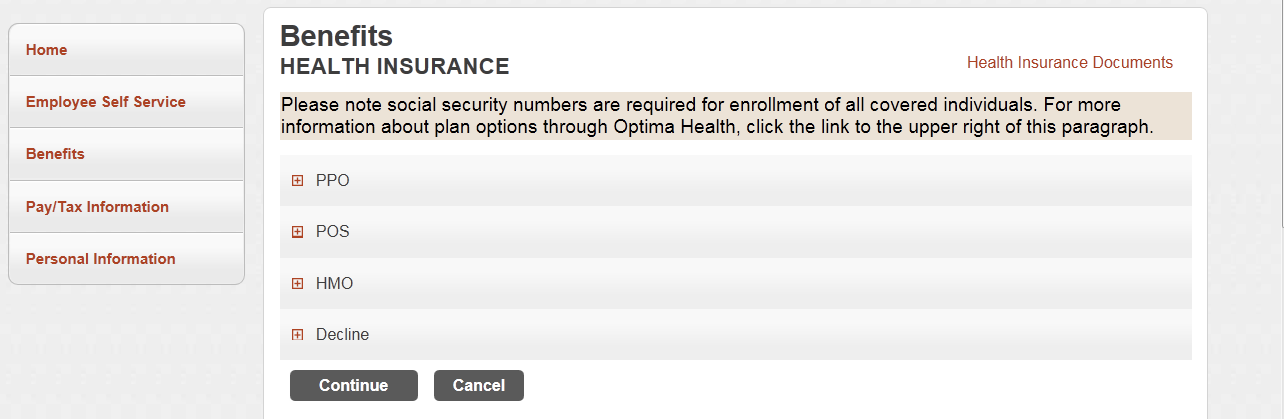
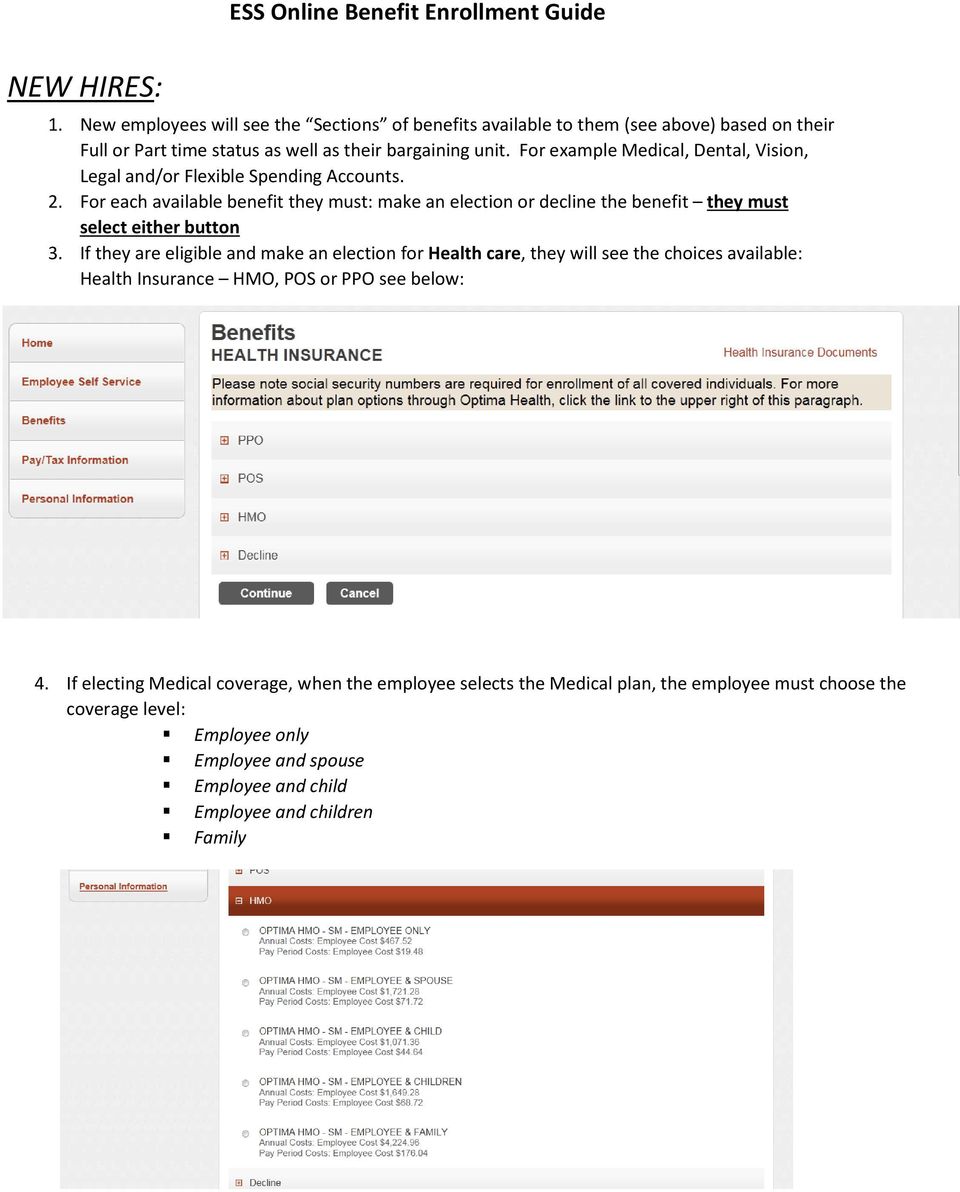
3 NEW HIRES: 1. New employees will see the Sections of benefits available to them (see above) based on their Full or Part time status as well as their bargaining unit. For example Medical, Dental, Vision, Legal and/or Flexible Spending Accounts. 2. For each available benefit they must: make an election or decline the benefit they must select either button 3. If they are eligible and make an election for Health care, they will see the choices available: Health Insurance HMO, POS or PPO see below: 4. If electing Medical coverage, when the employee selects the Medical plan, the employee must choose the coverage level: Employee only Employee and spouse Employee and child Employee and children Family
4 5. When the employee chooses the coverage level, they may see a message if they are required to enter dependent information and cannot proceed without entering that information (name, sex, relationship, date of birth and social security number). 6. If the dependent information is not listed: they select Add new dependent and enter the information required) 7. If the dependent information is already there in the pull down menu (possible for a re-hire): they select that dependent and then Add Coverage. This is an example of an error message that won t allow the employee to continue without adding their dependents, based on the coverage level they selected. 8. When all desired covered dependent names are appearing below the line on the page for that benefit option, the employee selects Continue to make selections for the next available benefit. Important Notes: If the employee is unable to proceed with their enrollment there should be an error message telling them why (such as: you need to list at least one other dependent for this coverage level or Social Security number is required, etc.). When the employee enters the dependent and have to identify the relationship they will see options such as parent or sibling which are not available for coverage under benefit plans listed under ESS. That information is only available so they can select them as a beneficiary for other purposes. Also note: Same sex marriage dependent should be listed as spouse Grandchild (who is covered as a legal dependent with guardianship documentation should be listed as child Proceed Continue) through each benefit option available if selecting multiple benefits, make sure the dependent information is showing below the line at the bottom of the page for EACH of the desired benefits! Listing them under one benefit such as Medical, does not automatically select them for other benefits such as dental or vision. To decline either of the Flexible Spending Accounts use the decline button, DO NOT enter zeros in the amount!


5 QUALIFYING EVENTS/FAMILY STATUS CHANGES: Report /View Life Event select the button (see above) Then select type of life event and the effective date (see below) Finance will receive an that a life event is pending. The employee must provide the documentation for the life event such as: birth letter for a newborn; marriage certificate; divorce decree, document from other employer regarding loss of coverage, with effective date of loss, or new coverage with effective date etc., in order for them to be able to make any benefit changes. Please Note: the Effective Date is the day of the qualifying event: Birth/Adoption = date of birth/adoption Court Order = date the judge signed the order Change in Employment Status = date this occurred Marital Status Change = date of marriage, divorce or legal separation


6 Notes for Life Event changes: Documentation can be faxed to: or ed from work. For security reasons, do not documentation from any personal or outside accounts. When a life event occurs, you can change a coverage tier (ex. go from employee and spouse to family coverage tier) but you cannot change medical plans (you have to wait for Open Enrollment to make a plan change). You can only add new coverage (i.e. dental, vision, etc.) that you did not previously have, if you have lost similar coverage under another plan (otherwise you have to wait until Open Enrollment). Important note: Only employees who do not have access to the active directory should use the forgot password button. Most City Employees who have access to City and the active directory must submit a heat ticket to IT or notify the Help Desk if they have forgotten their password.

Updating Your Benefits Using PeopleSoft
 Updating Your Benefits Using PeopleSoft Use this document to assist in updating your benefits enrollment due to a life event such as marriage, adding a dependent due to loss of coverage, or birth/adoption
Employee Self Service Instructions. For. PULAU Corporation
 Employee Self Service Instructions For PULAU Corporation Company... 2 Directory... 2 Links... 2 Personal... 3 Life Events/New Hire... 3 Address/Phone Number... 10 Emergency Contacts... 11 Leave Status...
FermiWorks Manage Life Events as an Employee
 This document will help a Fermilab employee manage and process the necessary benefit transactions for life events that happen outside of the designated employee benefits open enrollment window. An employee
EMPLOYEE SELF-SERVICE (ESS) ONLINE ANNUAL ENROLLMENT. How To Guide
 EMPLOYEE SELF-SERVICE (ESS) ONLINE ANNUAL ENROLLMENT How To Guide Table of Contents Logon to Portal for Annual Enrollment 3 View Your Current Health Benefits 3 Add/Change Your Dependents 4 ChangeYour Health
Qualified Status Change (QSC) Matrix
 Employee may enroll newly eligible Spouse/Domestic Partner and children. Employee may waive medical coverage. Employee may decline dental and/or vision. Employee may opt out only if proof of other group
Roman Catholic Archdiocese of Boston MyEnroll Administrator User and Reference Guide
 Roman Catholic Archdiocese of Boston MyEnroll Administrator User and Reference Guide Version 2.0 Locations Not on IOI Payroll May 2014 1 Table of Contents Topic Page I. Overview of MyEnroll Modules 3 Lay
MyBenefits Enrollment Resource for New Employees
 MyBenefits Enrollment Resource for New Employees Welcome to the University of Notre Dame! This guide will help you navigate MyBenefits, the University s online benefits enrollment application. All benefit-eligible
SmartBen Life Event Instructions
 SmartBen Life Event Instructions 1 A Life Event According to IRS rules, once you enroll in your benefits choices, your decisions remain in effect for the rest of the year. However, you can make certain
TABLE OF CONTENTS. SECTION 1: How to Access Employee Self Service 2. SECTION 2: Enrolling in Benefits Plans 3 29
 Guide to Enrolling for Benefits with Employee Self Service Step by Step Instructions TABLE OF CONTENTS PAGES SECTION 1: How to Access Employee Self Service 2 SECTION 2: Enrolling in Benefits Plans 3 29
Qualified Status Change (QSC) Matrix
 Employee may enroll newly eligible Spouse/Domestic Partner and children. Employee may waive medical coverage. Employee may decline dental and/or vision. Employee may opt out only if proof of other group
Group Health Insurance Application/Change Form
 FOR INTERNAL USE ONLY HIOS ID#: EC: 78124NY0980025-00 SAAY Group Health Insurance Application/Change Form Please print clearly and complete all sections that apply to you Additional instructions are included
Last Revised: 9/25/15. ERP Human Resources User Guide ebenefits
 Last Revised: 9/25/15 ERP Human Resources User Guide ebenefits REVISION CONTROL Document Title: Author: File Reference: ERP HR: ebenefits User Guide IT Training & Support UG-HR_SS_eBenefits.docx Revision
City of Riverside. Employee Online Benefits Guide
 City of Riverside Employee Online Benefits Guide Preparing to Enroll Online Before you log on to enroll, make sure your decisions are made and you have the information needed to enroll. Important Items
NDPERS Member Self Service Guide. Employee Guide. (Rev. 8.8.2014)
 NDPERS Member Self Service Guide Employee Guide (Rev. 8.8.2014) Table of Contents Getting Your NDPERS Member ID. Page 2 Instructions for Logging into PERSLink Member Self Service (MSS)..Page 3 13 What
User Guide. Welcome to e-people. AHS Email Accounts. The e-people Sign In Page. The e-people Welcome Page. The Employee Home Page
 Welcome to e-people AHS Email Accounts The e-people Sign In Page The e-people Welcome Page The Employee Home Page Changing Your Personal Information Benefits Enrollment The Payroll and Compensation Home
Initiate Life Event Self-Service
 Employee Work Center Revised: April, 2014 Table of Contents: Log in to the Employee Work Center... 3 Initiate a Life Event... 3 Benefit Event Date Examples... 4 Change Benefits Elections... 5 Attachments...
Benefit Changes Effective January 1, 2016
 Benefit Changes Effective January 1, 2016 Open Enrollment Highlights Changes made during open enrollment will be effective January 1, 2016. Premiums for medical, dental and vision insurance, as well as
Online Enrollment Instructions Beneficiary Designation
 Online Enrollment Instructions Beneficiary Designation Open enrollment for faculty, administrative professionals and other eligible non-classified staff is completed via the Campus Administrative Portal
COUNTY OF KERN. HEALTH BENEFITS ELIGIBILITY POLICY for participants without Active Employee Medical Coverage. Rev 6/13
 COUNTY OF KERN HEALTH BENEFITS ELIGIBILITY POLICY for participants without Active Employee Medical Coverage Rev 6/13 Date: June 2013 To: From: Kern County Health Benefits Plan Participants Kern County
Step-By-Step Benefits Enrollment Guide How To Enroll In Benefits Items Needed before Enrolling
 Step-By-Step Benefits Enrollment Guide How To Enroll In Benefits Items Needed before Enrolling Dependents/beneficiary information including date of birth and social security number. Name and address of
Health and Welfare Handbook
 The Johns Hopkins University Health and Welfare Handbook SUMMARY PLAN DESCRIPTIONS June 2015 Contents Chapter 1 The Big Picture... 1 Health and Welfare Benefits-At-A-Glance... 2 Eligibility and Participation...
Initial Notice of COBRA Continuation Coverage Rights Time Inc. Ventures Group Benefits Plan and Cafeteria Plan
 Initial Notice of COBRA Continuation Coverage Rights Time Inc. Ventures Group Benefits Plan and Cafeteria Plan Introduction You are receiving this notice because you have recently become covered under
Manage your Liberty Mutual group benefits online.
 Manage your Liberty Mutual group benefits online. MyLibertyConnection.com offers convenient access to online tools to help you manage your group benefits. To get started, visit www.mylibertyconnection.com
Section 125 Qualifying Events. Revised June 2013
 Section 125 Qualifying Events Revised June 2013 Section 125: Qualifying Events Page 2 of 6 A Section 125 Cafeteria Plan must provide that participant elections are irrevocable and cannot be changed during
and How to Enroll Medical and Vision Care Programs for Pre-Medicare Retirees WE ARE BNSF.
 Who Is Eligible and and How to Enroll Medical and Vision Care Programs for Pre-Medicare Retirees WE ARE BNSF. Who Is Eligible and How to Enroll Medical and Vision Care Programs for Pre-Medicare Retirees
Tufts University Human Resources New Hire Benefits Enrollment
 Online allows fast and convenient processing of your New Hire Benefits Enrollment elections. You will be able to print a confirmation statement after you have completed your. Prior to enrolling online,
FREQUENT ASKED QUESTIONS Revised: October 2014
 FREQUENT ASKED QUESTIONS Revised: October 2014 CONTACT Virgie Bloodworth Insurance Specialist 5801 Sundale Ave. Bakersfield, CA 93309 Phone: (661) 827-3164 E-mail address: [email protected] COST
Medical College of Wisconsin Affiliated Hospitals WPS HEALTH INSURANCE ENROLLMENT FORM
 Medical College of Wisconsin Affiliated Hospitals WPS HEALTH INSURANCE ENROLLMENT FORM Mail Completed Enrollment Form to: MCWAH, 8701 Watertown Plank Road, Milwaukee, WI 53226 OR FAX Completed Enrollment
DSOEA NEW HIRE BENEFIT GUIDE. Dearborn Schools Employee Healthcare Program
 DSOEA 2014 NEW HIRE BENEFIT GUIDE Dearborn Schools Employee Healthcare Program Medicare Part D Prescription Drug Information If you have Medicare or will become eligible for Medicare in the next 12 months,
Employee Self Service Instructions
 Employee Self Service Instructions Logging on to ESS There are two ways to login to ESS: PikePeople (Intranet) - You may access through the PikePeople (Intranet) by going to Quick Links and then clicking
Please complete in blue or black ink only. Section A: Employee Information Last name First name M.I. Social Security no.
 Employee Enrollment Application For 2 50 Employee Small s Virginia care plans offered by Anthem Blue Cross and Blue Shield and Keepers, Inc. PPO health care plans are insurance products offered by Anthem
After You Retire. What Every Pension Recipient Should Know
 After You Retire What Every Pension Recipient Should Know State of Michigan State Employees' Retirement System July 2015 After You Retire What Every Pension Recipient Should Know About the Office of Retirement
How To Get A Pension From The Boeing Company
 Employee Benefits Retiree Medical Plan Retiree Medical Plan Boeing Medicare Supplement Plan Summary Plan Description/2006 Retired Union Employees Formerly Represented by SPEEA (Professional and Technical
Gap Inc. Welcome to Gap Inc. Benefits. Lifestyle Benefits and Programs
 Welcome Eligibility Eligible Employees Eligible Dependents Child Support Orders Enrollment How to Enroll If You Do Not Enroll After You Enroll Late Enrollment for Life Insurance Beneficiaries When Coverage
EMPLOYEE SELF SERVICE PORTAL
 EMPLOYEE SELF SERVICE PORTAL QUICK REFERENCE CARD (QRC) Table of Contents: ESS Portal Login 3 Timesheet Entry (Hourly) 4 Timesheet Entry (Exempt) 12 Viewing/Printing Your Time Statements 19 Viewing/Printing
Please complete in blue or black ink only. Section A: Employee Information Last name First name M.I. Social Security no.
 Employee Enrollment Application For 2 50 Employee Small s Virginia care plans offered by Anthem Blue Cross and Blue Shield and Keepers, Inc. PPO health care plans are insurance products offered by Anthem
Required Verification Documents
 Required Verification Documents Dependent Category Documents Required to Complete Dependent Verification Option 1 2014 1040 Tax Form Option 2 Legal Marriage Certificate Two Joint Financial Documents Legal
MBA HEALTH INSURANCE TRUST
 EPK & Associates, Inc. MBA Health Insurance Trust Administrative Manual MBA HEALTH INSURANCE TRUST Administrative Manual Key Contacts For answers to questions about benefits issues and for help with claims
Open Enrollment Updating and Submitting Elections with New Dependent(s)
 Purpose and Overview The purpose of this quick guide is to detail the steps of updating benefit elections, adding an additional dependent and submitting those updated elections for Open Enrollment. Workday
Banner Self Service for students
 Banner Self Service for students revised April 5, 2006 Table of Contents Get Your UNC Charlotte ID Logging in to Self Service Banner Forgot Your Password? Checking Your Holds Checking Your Registration
Deciding Whether to Elect COBRA Health Care Continuation Coverage After Enactment of HIPAA INTRODUCTION
 Deciding Whether to Elect COBRA Health Care Continuation Coverage After Enactment of HIPAA Notice 98-12 INTRODUCTION A key decision that millions of Americans face each year is whether to elect COBRA 1
How to Apply Online Select School and Program
 How to Apply Online Go to the application site at www.houstonisdschoolchoiceapplication.com. When you are ready to apply for a student within your household, continue to the application by clicking on
CONTINUATION COVERAGE NOTIFICATION (COBRA)
 CONTINUATION COVERAGE NOTIFICATION (COBRA) This notice has important information about your right to continue your health coverage in the Texas Employees Group Benefits Program (GBP), as well as other
Planning Your Service Retirement
 Planning Your Service Retirement California Public Employees Retirement System Planning Your Service Retirement If you re planning to retire, you have some important decisions to make. This brochure includes
Your Life... Take care of it. 2016 EMPLOYEE BENEFIT ENROLLMENT GUIDE
 Your Life... Take care of it. 2016 EMPLOYEE BENEFIT ENROLLMENT GUIDE Welcome to your Benefits Guide As a valued University of the Pacific employee, you are eligible for group and voluntary benefit plans
SMALL EMPLOYER GROUP APPLICATION INSTRUCTIONS
 SMALL EMPLOYER GROUP APPLICATION INSTRUCTIONS This form should be completed with the assistance of your authorized Broker or Horizon Healthcare of New York Sales Representative. Please be sure that all
DEPENDENT ELIGIBILITY AND ENROLLMENT
 Office of Employee Benefits Administrative Manual DEPENDENT ELIGIBILITY AND ENROLLMENT 230 INITIAL EFFECTIVE DATE: October 10, 2003 LATEST REVISION DATE: July 1, 2015 PURPOSE: To provide guidance in determining
Office of Group Benefits Health Plan-Recognized Qualifying Life Events 2016
 Office of Group Benefits -Recognized Qualifying Life Events 2016 BIRTH/ADOPTION plan or PING IN Self YES or YES YES *Birth Birth Certificate or Birth Letter which includes newborn data Employee, new baby;
Enrolling in Your 2016 Benefits
 Enrolling in Your 2016 Benefits 2016 Open Enrollment is October 26 November 16 Be prepared Visit mydzabenefits.com to learn about your 2016 benefits and view available resources to help you make informed
How To Get Health Benefits From Calpers
 CalPERS Health Benefits Into Retirement Objectives Eligibility Health Plans Enrollment Employer Contribution and Vesting Medicare State Dental and Vision Coverage Online Tools & Resources Eligibility 3
COBRA Participant Guide
 COBRA Participant Guide COBRA Participant Guide 1 Table of Contents Introduction........................................... 3 COBRA Checklist........................................ 3 General Timeline
Your Health Care Benefit Program
 Your Health Care Benefit Program HMO ILLINOIS A Blue Cross HMO a product of Blue Cross and Blue Shield of Illinois HMO GROUP CERTIFICATE RIDER This Certificate, to which this Rider is attached to and becomes
ILLUSTRATED INSTRUCTIONS BEGIN ON THE NEXT PAGE
 Add or Change Life Insurance Beneficiaries Please visit the Benefits web site for comprehensive information about Basic life insurance and Supplemental life insurance. Click on a staff category from the
SMALL BUSINESS GROUP ENROLLMENT AND CHANGE FORM
 SMALL BUSINESS GROUP ENROLLMENT AND CHANGE FORM Medical and Life/AD&D plans are provided by Health Net of California, Inc. and/or Health Net Life Insurance Company (together, the Health Net Entities ).
Guide to Enrolling for Health Benefits through Employee Self-Service
 FY2016 Open Enrollment Starts 5/01/2015 Ends 5/22/2015 Effective Coverage Date 07/01/2015 Contact Information Sonia Solivan Ext. 2219 Katy Johnson Ext. 2425 Email: [email protected] Make an informed
NJ State Health Benefits Program 2015 Open Enrollment LOCAL GOVERNMENT Employers
 NJ State Health Benefits Program 2015 Open Enrollment LOCAL GOVERNMENT Employers Presented by Roseann Whypp Pensions Benefits Specialist www.state.nj.us/treasury/pensions 2015 Open Enrollment Overview
Group Life and Disability Coverage Administration Manual
 Group Life and Disability Coverage Administration Manual How to administer your company s life and disability coverage 47664GAEENGGL 9/14 The contents of this manual should not be considered legal advice
Summary Plan Description for the North Las Vegas Fire Fighters Health and Welfare Trust Health Reimbursement Arrangement Plan
 Summary Plan Description for the Health Reimbursement Arrangement Plan General Benefit Information Eligible Expenses All expenses that are eligible under Section 213(d) of the Internal Revenue Code, such
2014 CITY OF FORT LAUDERDALE RETIREES INSURANCE BENEFITS INFORMATION
 2014 CITY OF FORT LAUDERDALE RETIREES INSURANCE BENEFITS INFORMATION This brochure aims to provide relevant information to the continuation of medical, dental and vision insurance coverage for you and
PITTSBURGH BOARD OF EDUCATION BENEFIT PLANS SUMMARY 2013
 PITTSBURGH BOARD OF EDUCATION BENEFIT PLANS SUMMARY 2013 SECTION I: SECTION II: SECTION III: HEALTH INSURANCE INFORMATION DENTAL INSURANCE INFORMATION LIFE INSURANCE COVERAGE ACCIDENTAL DEATH & DISMEMBERMENT
MEMBER S NAME (LAST, FIRST, M.I.) MEMBER ID OR SSN PHONE NUMBER ( ) PHYSICAL ADDRESS (CANNOT BE A PO BOX) COUNTY OF RESIDENCE EMAIL ADDRESS
 Department of Technology, Management & Budget Office of Retirement Services www.michigan.gov/ors (800) 381-5111 P.O. Box 30171 Lansing, MI 48909-7671 Insurance Enrollment/Change Request MEMBER S NAME (LAST,
SUPPLEMENTAL HOSPITALIZATION INSURANCE ELECTION INFORMATION
 SUPPLEMENTAL HOSPITALIZATION INSURANCE ELECTION INFORMATION Save paper. Save a step. Save time. Instead of using this election form, make changes online at https://peoplefirst.myflorida.com. Learn more
OUTSIDE IDAHO MEDICAL, DENTAL, AND VISION PLANS
 This section of the benefits handbook is applicable to Micron Self Insured Health Plans. Team members assigned to a Northern California or Virginia employment location in Micron s internal database are
PROFESSIONAL GROUP PLANS, INC.
 PROFESSIONAL GROUP PLANS, INC. Specializing in Employee Benefits Horizon Healthcare of New York New Business Submission Checklist Small Group Sold Case Checklist Employer Application Copy of Sold Proposal
Continuing Coverage under COBRA
 Continuing Coverage under COBRA The right to purchase a temporary extension of health coverage was created by the Consolidated Omnibus Budget Reconciliation Act of 1985, a federal law commonly known as
Health Benefits Plans (Medical, Dental, and Vision) Summary Plan Description General Information Section
 Health Benefits Plans (Medical, Dental, and Vision) Summary Plan Description General Information Section (Effective: January 1, 2007) The Health Plan Summary Plan Description (SPD) includes three major
OrthoSynetics, Inc. 2016 Medical, Dental, and Vision On-line Open Enrollment Instructions
 OrthoSynetics, Inc. 2016 Medical, Dental, and Vision On-line Open Enrollment Instructions 1. Log onto My Payroll Page (https://oca.ultipro.com). Please disable any pop-up blockers you may have installed
Summary Plan Descriptions for HCA Benefits Plans
 Summary Plan Descriptions for HCA Benefits Plans As of February 1, 2011 Includes: HCA Health and Welfare Benefits Plans HCA 401(k) Plan Esta Descripción del Resumen del Plan y el folleto contienen un resumen
Deadline 11/30/2013 Medical Plan BC/BS PPO Plan 1 Dental Plan EBS Benefit Solutions
 Employee Name: Date of birth: 2014 Carrols Corporation Employee Benefits Open Enrollment Form Only Complete if you are changing or adding benefits Effective Date: EmpID/POS ID 01/01/2014 Complete Address:
Guide for Group Administration. Helpful information for coordinating employee health care benefits
 Guide for Group Administration Helpful information for coordinating employee health care benefits Table of Contents Introduction........................................ 1 HIPAA-AS Privacy Compliance..........................
PeopleSoft 9.0 Employee Self Service User Guide
 Employee Self Service User Guide 3280 Progress Drive, Suite 100 Orlando, Florida 32826-0140 Phone: (407) 823-2771 Table of Contents Welcome to Employee Self Service... 1 Who Do I Call For Help?... 1 How