
Dozer v User's Guide
|
|
|
- Margery Hensley
- 10 years ago
- Views:
Transcription
1 ... Dozer v User's Guide... Franz Garsombke, Matt Tierney, Dmitry Buzdin

2

3 T a b l e o f C o n t e n t s i Table of Contents Table of Contents i 2. Why Map? Getting Started Usage Mappings via Annotations Mappings via API Mappings via XML Mapping Two Classes Basic Property Mapping String To Date Mapping Enum Mapping Collection Mapping Map Backed Properties Index Mapping Deep Mapping Excluding Fields One-Way Mapping Context Based Mapping Global Configuration Custom Converters Custom Bean Factories Custom Create Methods Custom Get/Set Methods Copy By Ref Mapping Inheritance Mapping Dozer Events Expression Language Configuration Logging Proxy Handling Statistics JMX Integration Spring Integration JAXB and XMLBeans Metadata Query Interface FAQ

4 T a b l e o f C o n t e n t s ii

5 1 W h y M a p? 1 1 Why Map? Why Map? A mapping framework is useful in a layered architecture where you are creating layers of abstraction by encapsulating changes to particular data objects vs. propagating these objects to other layers (i.e. external service data objects, domain objects, data transfer objects, internal service data objects). A mapping framework is ideal for using within Mapper type classes that are responsible for mapping data from one data object to another. For distributed systems, a side effect is the passing of domain objects between different systems. Typically, you won't want internal domain objects exposed externally and won't allow for external domain objects to bleed into your system. Mapping between data objects has been traditionally addressed by hand coding value object assemblers (or converters) that copy data between the objects. Most programmers will develop some sort of custom mapping framework and spend countless hours and thousands of lines of code mapping to and from their different data object. A generic mapping framework solves these problems. Dozer is an open source mapping framework that is robust, generic, flexible, reusable, and configurable. Data object mapping is an important part of layered service oriented architectures. Pick and choose the layers you use mapping carefully. Do not go overboard as there is maintenance and performance costs associated with mapping data objects between layers Parallel Object Hierarchies There could be different reasons of why application should support parallel object hierarhchies. To name a few: Integration with External Code Serialization Requirements Framework Integration Separation of Architectural Layers In some cases it is efficient to guard your code base from frequently changing object hierarchy, which you do not control directly. In this case Dozer serves as a bridge between application and external objects. As mapping is performed in reflective manner not all changes break your API. For example if object changes from Number to String the code will keep working as this is resolved automatically. Some frameworks impose Serialization constraints, which does not allow sending any Java objects through the wire. One of the popular examples is Google Web Toolkit (GWT) framework, which restricts developer to sending only objects compiled to JavaScript and marked as Serializable. Dozer helps to convert Rich Domain Model to Presentation Model, which satisfies GWT serialization requirements. Dozer integrates nicely with frameworks such as Apache XmlBeans and JAXB implementations. With help of provided factory classes, conversion between domain model and Xml objects is defined in the same way as plain object to object mappings. In complex enterprise application it is often valuable to separate design to several architectural layers. Each of them would reside on its own abstraction level. A typical simplified example would be presentation, domain and persistence layers. Each of this layers could have own set of Java Beans representing data relevant for this layer. It is not necessary that all data will travel to the upper levels of architecture. For example the same domain object could have different mappings dependant of the presentation layer requirements.
6 2 G e t t i n g S t a r t e d 2 2 Getting Started Getting Started Downloading the Distribution Download Dozer and extract the archive. Add dozer.jar to your classpath. Add required thirdparty runtime jars to your classpath. If you are using Maven, simply copy-paste this dependency to your project. <dependency> <groupid>net.sf.dozer</groupid> <artifactid>dozer</artifactid> <version>5.4.0</version> </dependency> Apache Ivy users can copy-paste the following line instead. <dependency org="net.sf.dozer" name="dozer" rev="5.4.0"/> st Mapping For your first mapping lets assume that the two data objects share all common attribute names. Mapper mapper = new DozerBeanMapper(); DestinationObject destobject = mapper.map(sourceobject, DestinationObject.class); After performing the Dozer mapping, the result will be a new instance of the destination object that contains values for all fields that have the same field name as the source object. If any of the mapped attributes are of different data types, the Dozer mapping engine will automatically perform data type conversion. At this point you have completed your first Dozer mapping. Later sections will go over how to specify custom mappings via custom xml files. IMPORTANT: For real-world applications it is NOT recommended to create a new instance of the Mapper each time you map objects. Typically a system will only have one DozerBeanMapper instance per VM. If you are not using an IOC framework where you can define the Mapper Instance as singleton="true". If needed, a DozerBeanMapperSingletonWrapper convenience class has been provided in the Dozer jar.

7 2 G e t t i n g S t a r t e d Specifying Custom Mappings via XML If the two different types of data objects that you are mapping contain any fields that don't share a common property name, you will need to add a class mapping entry to your custom mapping xml file. These mappings xml files are used at runtime by the Dozer mapping engine. Dozer automatically performs any type conversion when copying the source field data to the destination field. The Dozer mapping engine is bi-directional, so if you wanted to map the destination object to the source object, you do not need to add another class mapping to the xml file. IMPORTANT: Fields that are of the same name do not need to be specified in the mapping xml file. Dozer automatically maps all fields with the same property name from the source object into the destination object. <mapping> <class-a>yourpackage.yoursourceclassname</class-a> <class-b>yourpackage.yourdestinationclassname</class-b> <a>yoursourcefieldname</a> <b>yourdestinationfieldname</b> The complete Dozer mapping xml file would look like the following. The Custom Mappings section contains more information on mapping options that are available to you for more complex use cases.

8 2 G e t t i n g S t a r t e d 4 <?xml version="1.0" encoding="utf-8"?> <mappings xmlns=" xmlns:xsi=" xsi:schemalocation=" <configuration> <stop-on-errors>true</stop-on-errors> <date-format>mm/dd/yyyy HH:mm</date-format> <wildcard>true</wildcard> </configuration> <mapping> <class-a>yourpackage.yoursourceclassname</class-a> <class-b>yourpackage.yourdestinationclassname</class-b> <A>yourSourceFieldName</A> <B>yourDestinationFieldName</B> other custom class mappings would go here... </mappings> Dozer and Dependency Injection Frameworks Dozer is not dependant of any existing Dependency Injection framework (DI). However the general aim is to support the most typical use cases with ready-to-use Wrappers. Check Spring Integration manual for option of initializing Dozer in context of Spring DI framework.

9 3 U s a g e 5 3 Usage General Usage Requirements for running Dozer: Dozer uses SLF4J for logging purposes. Dozer needs a few third-party runtime jars. All of the required runtime jars are in the {dozer.home}/repository directory and need to be in your Classpath The dozer.jar file in the {dozer.home}/dist directory needs to be in your Classpath Dozer Bean Mapper Before we go over setting up custom xml bean mappings, let us look at a simple example of using Dozer. The Dozer mapping implementation has a method called map which takes a source object and either a destination object or destination object class type. After mapping the two objects it then returns the destination object with all of its mapped fields. Mapper mapper = new DozerBeanMapper(); DestinationObject destobject = mapper.map(sourceobject, DestinationObject.class); or DestinationObject destobject = new DestinationObject(); mapper.map(sourceobject, destobject); IMPORTANT: For real-world applications it is not recommended that you create a new instance of the Mapper each time you map objects. Typically a system will only have one DozerBeanMapper instance per VM. If you are not using an IOC framework where you can define the Mapper as singleton="true", a DozerBeanMapperSingletonWrapper convenience class has been provided in the Dozer jar. Dozer operates in two general modes: implicit and explicit. Implicit mode is activated by default and tries to resolve mappings for you. It uses simple assumptions that if two objects are passed for mapping then bean properties with the same names should be mapped. If there are additional mappings needed, which can not be derived by the naming you should add those either via Xml, Annotations or API. Explicit mode assumes that no mappings should be performed or "guessed" until you have specified those specifically. The amount of coding is higher in explicit mode, but sometimes you would like to have full control on what is going on during the mappings process and this approach is also used in many of the productive applications. Implicit/Explicit mapping switch is called "wildcard" in Dozer. Whenever you encounter that in configuration you know what behavior to expect from now on Injecting Custom Mapping Files The Dozer mapping xml file(s) define any custom mappings that can't be automatically performed by the Dozer mapping engine. Any custom Dozer mapping files need to be injected into the Mapper

10 3 U s a g e 6 implementation(org.dozer.dozerbeanmapper). Both setter-based and constructor-based injection are supported. Preferably, you will be using an IOC framework such as Spring for these Dozer injection requirements. Alternatively, the injection of mapping files can be done programmatically. Below is a programmatic approach to creating a bean mapper. Note that this is NOT the recommended way to retrieve the bean mapper. Each new instance needs to be initialized and this consumes time as well as resources. If you are using the mapper this way just wrap it using the singleton pattern. List mymappingfiles = new ArrayList(); mymappingfiles.add("dozerbeanmapping.xml"); mymappingfiles.add("someotherdozerbeanmappings.xml"); DozerBeanMapper mapper = new DozerBeanMapper(); mapper.setmappingfiles(mymappingfiles); DestinationObject destobject = mapper.map(sourceobject, DestinationObject.class); IMPORTANT: Mapper instance(s) should be setup as a Singleton regardless of how you choose to inject the Mapper instance(s). You should configure the Mapper this way so that you do not have to reload and reinitialize the mapping files for each individual mapping during the lifecycle of your app. Reinitializing the mapping files for each mapping would be inefficient and unnecessary. The DozerBeanMapper.java class is thread safe Spring Integration The following is an example how the Mapper bean would be configured via Spring. Sample spring.xml bean definition... <bean id="mapper" class="org.dozer.dozerbeanmapper"> <property name="mappingfiles"> <list> <value>dozer-global-configuration.xml</value> <value>dozer-bean-mappings.xml</value> <value>more-dozer-bean-mappings.xml</value> </list> </property> </bean> Dozer Bean Mapper Singleton Wrapper There is one way to configure the DozerBeanMapperSingletonWrapper to use your custom mapping file. Using one mapping file: A file called dozerbeanmapping.xml file will be loaded if it is in your Classpath. You can find a sample of this file in the {dozer.home}/mappings directory.
11 3 U s a g e 7 The mapping file defines all of the relationships between Java classes and their attributes. The Custom Mappings section details the custom XML mapping options that are available. The following example show how to use the DozerBeanMapperSingletonWrapper. Dozer has a method called map which takes a source object and either a destination object or destination object class type. After mapping the two objects it then returns the destination object with all of its mapped fields. Mapper mapper = DozerBeanMapperSingletonWrapper.getInstance(); DestinationObject destobject = mapper.map(sourceobject, DestinationObject.class); or Mapper mapper = DozerBeanMapperSingletonWrapper.getInstance(); DestinationObject destobject = new DestinationObject(); mapper.map(sourceobject, destobject);
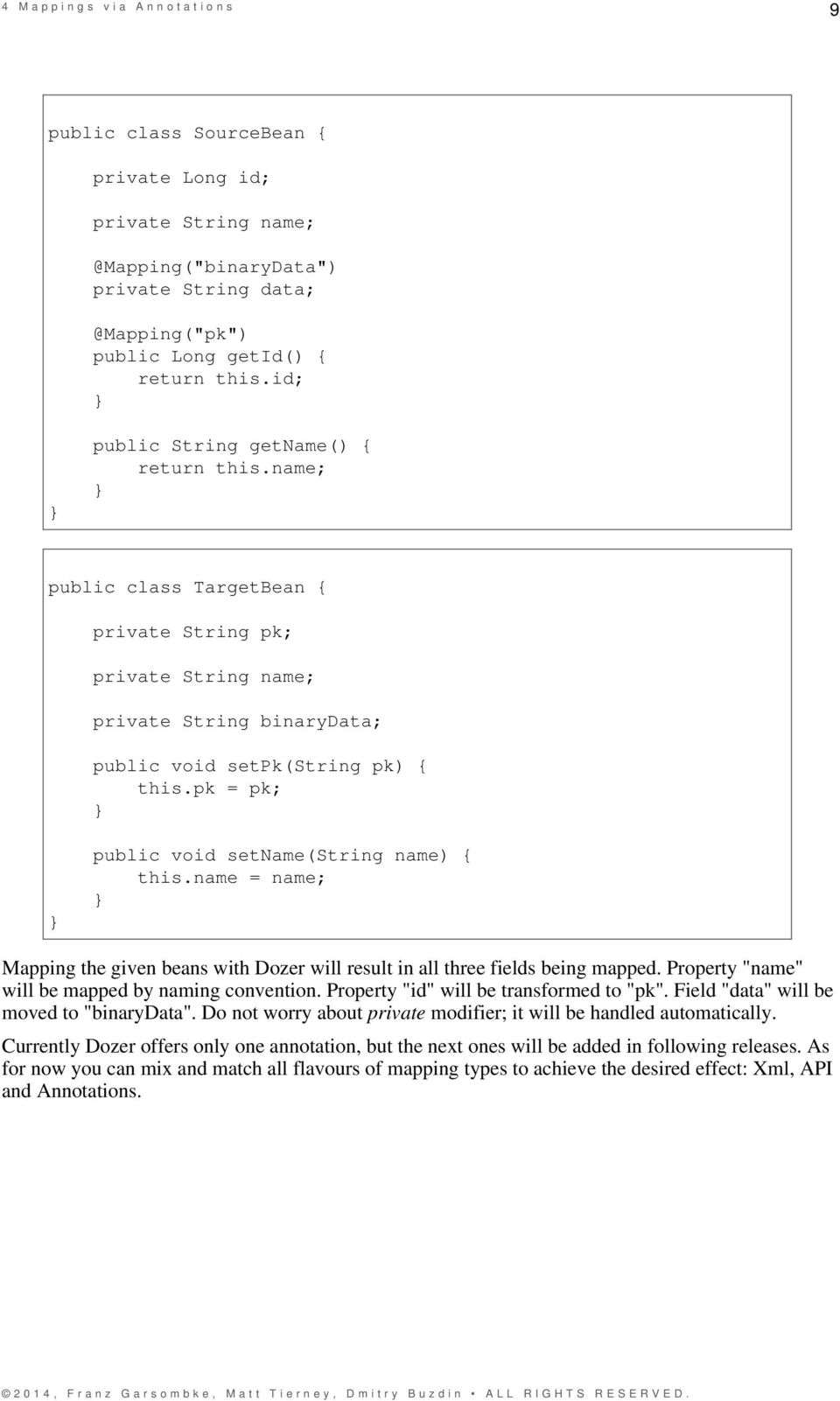
12 4 M a p p i n g s v i a A n n o t a t i o n s 8 4 Mappings via Annotations Annotation Mappings Why Annotations? One of the downsides of using Dozer for the long time was Xml. Since Dozer started during Xmlhype years more than five years ago that was pretty obvious choice back then. After that Java 5 brought us annotations and new industry accepted style of configuring behaviour are Domain-Specific Languages. DSL-like support is provided in form of mapping API, but since version Dozer starts providing annotations support as well. The obvious reasons to use annotations is to avoid duplicating field and method names in your mapping code. The annotation can be put onto the mapped property itself thus reducing the amount of code. However there are cases when annotations should be avoided or even impossible to use. Some of them are the following: You are mapping classes, which are not under your control, but provided in libraries; The mappings are quite complex and require many configurations; In the first case you could be mapping JAXB generated entities or third-party DTOs and have no possibility to put annotations. In the second case there is a choice of putting lots of multi-line annotations or isolating the mapping code with certain duplication of entity names. Overannotated beans could be problematic to read and understand Usage WARNING: Annotation support in Dozer is experimental and does not cover complex use cases yet. However it may be useful to implement that simplest mappings you have had to do in Xml or API before. The idea is very simple. You annotation either on getter of field directly. If Dozer finds that it adds a bi-directional mapping. It means that putting annotation once will create mappings for both conversion types. Type conversions (e.g. String-Long) will be chosen automatically. Global custom converters are resolved as well. Annotations work only if a conversion is subject to wildcard rule (active by default). The following example demonstrates annotations in action.
13 4 M a p p i n g s v i a A n n o t a t i o n s 9 public class SourceBean { private Long id; private String private String public Long getid() { return this.id; } } public String getname() { return this.name; } public class TargetBean { private String pk; private String name; private String binarydata; public void setpk(string pk) { this.pk = pk; } } public void setname(string name) { this.name = name; } Mapping the given beans with Dozer will result in all three fields being mapped. Property "name" will be mapped by naming convention. Property "id" will be transformed to "pk". Field "data" will be moved to "binarydata". Do not worry about private modifier; it will be handled automatically. Currently Dozer offers only one annotation, but the next ones will be added in following releases. As for now you can mix and match all flavours of mapping types to achieve the desired effect: Xml, API and Annotations.
14 5 M a p p i n g s v i a A P I 10 5 Mappings via API API Mappings Since version 5.3 Dozer offers two ways for specifying explicit mappings. First is Xml-based and has been there for years. Second is API-based and it is brand new. On the high level both approaches are functionally equivalent, however there are major differences in using those described further on XML Mapping Flaws XML-based approach is stable and is used in many production projects. However, it imposes several limitations. First, and most important, is that it can not be dynamically generated. All XML mappings should be present on Dozer start-up and can not be modified afterwards. There are tricky ways, when you can generate and put mappings to the file system by your own templating engine, but this approach is not supported by Dozer itself. By generating custom mappings you are able to automate repetitive chunks of low-level Dozer language. Second problem is that you are forced to duplicate all of your Bean class names in Xml mappings. This leads to lots of typing and copy-paste programming. This can be partly compensated by use of Expression Language inside Xml, but it is not solving all of the problems. Refactoring support is limited as IDE should keep track of class names in Xml files and change them when you rename or move the referenced class. Auto-completion support is also not available in all IDEs API Mappings API mappings are intended to solve all of the mentioned problems. To preserve backwards compatibility API mappings can be combined with existing Xml mappings. In fact some parts of the configuration (e.g. global configuration block) are only possible to express in Xml format. To get a feeling of what are these mappings take a look at the following code example.
15 5 M a p p i n g s v i a A P I 11 import static org.dozer.loader.api.fieldsmappingoptions.*; import static org.dozer.loader.api.typemappingoptions.*;... BeanMappingBuilder builder = new BeanMappingBuilder() { protected void configure() { mapping(bean.class, Bean.class, TypeMappingOptions.oneWay(), mapid("a"), mapnull(true) ).exclude("excluded").fields("src", "dest", copybyreference(), collectionstrategy(true, RelationshipType.NON_CUMULATIVE), hinta(string.class), hintb(integer.class), FieldsMappingOptions.oneWay(), usemapid("a"), customconverterid("id") ).fields("src", "dest", customconverter("org.dozer.customconverter") ); } }; Constructed builder object should be then passed to DozerBeanMapper instance. It is possible to add multiple Builder classes. DozerBeanMapper mapper = new DozerBeanMapper(); mapper.addmapping(builder); Don't forget to make a static import of FieldsMappingOptions and TypeMappingOptions classes. That's it.

16 6 M a p p i n g s v i a X M L 12 6 Mappings via XML Custom Mappings Via Dozer XML Files This section will cover setting up custom mappings in xml file(s). If the two different types of data objects that you are mapping contain any fields that don't share a common property name, you will need to add a class mapping entry to your custom mapping xml file. These mappings xml files are used at runtime by the Dozer mapping engine. Dozer automatically performs any type conversion when copying the source field data to the destination field. The Dozer mapping engine is bi-directional, so if you wanted to map the destination object to the source object, you do not need to add another class mapping to the xml file. An example of a mapping file... <?xml version="1.0" encoding="utf-8"?> <mappings xmlns=" xmlns:xsi=" xsi:schemalocation=" <mapping> <class-a>org.dozer.vo.testobject</class-a> <class-b>org.dozer.vo.testobjectprime</class-b> <a>one</a> <b>oneprime</b> <mapping wildcard="false"> <class-a>org.dozer.vo.testobjectfoo</class-a> <class-b>org.dozer.vo.testobjectfooprime</class-b> <a>onefoo</a> <b>onefooprime</b> </mappings> A mappings element has multiple mapping elements, each with class mapping declarations and field level mappings. The wildcard attribute is set to true by default. This means that it will automatically try to map every property in the two objects. When the attribute is set to false it will only map explicitly defined fields. IMPORTANT: Properties that are of the same name do not need to be specified in the mapping xml file. Dozer automatically maps all fields with the same property name from the source object into the destination object.

17 6 M a p p i n g s v i a X M L How Custom Mapping Files Are Loaded Dozer will search the entire classpath looking for the specified file. The generally acceptable way of distributing your mappings is to bundle them inside your application archive. Alternatively, you can load files from outside the classpath by prepending "file:" to the resource name. Ex) "file:c:\somedozermapping.xml" 6.3 Loading Files from Input Stream Since version it is possible to load XML mapping files from provided InputStream object. Check DozerMapper class for the corresponding API calls.

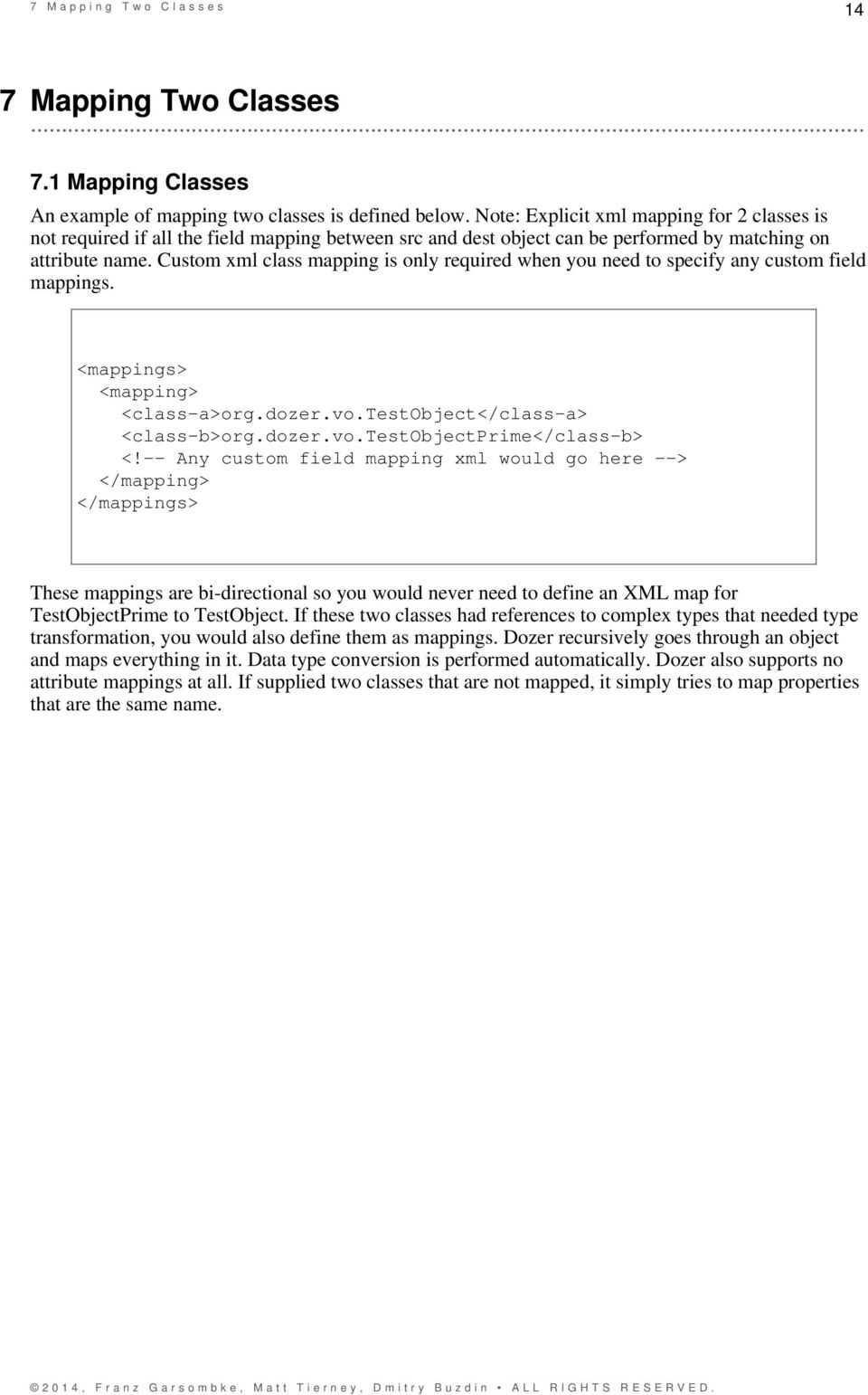
18 7 M a p p i n g T w o C l a s s e s 14 7 Mapping Two Classes Mapping Classes An example of mapping two classes is defined below. Note: Explicit xml mapping for 2 classes is not required if all the field mapping between src and dest object can be performed by matching on attribute name. Custom xml class mapping is only required when you need to specify any custom field mappings. <mappings> <mapping> <class-a>org.dozer.vo.testobject</class-a> <class-b>org.dozer.vo.testobjectprime</class-b> <!-- Any custom field mapping xml would go here --> </mappings> These mappings are bi-directional so you would never need to define an XML map for TestObjectPrime to TestObject. If these two classes had references to complex types that needed type transformation, you would also define them as mappings. Dozer recursively goes through an object and maps everything in it. Data type conversion is performed automatically. Dozer also supports no attribute mappings at all. If supplied two classes that are not mapped, it simply tries to map properties that are the same name.
19 8 B a s i c P r o p e r t y M a p p i n g 15 8 Basic Property Mapping Basic Property Mapping Implicit Property Mapping (bi-directional) Matching field names are automatically handled by Dozer. Properties that are of the same name do not need to be specified in the mapping xml file Simple Mappings (bi-directional) We will start off simple. If you have two properties with different names they can be mapped as such: <a>one</a> <b>oneprime</b> Data type conversion Data type coversion is performed automatically by the Dozer mapping engine. Currently, Dozer supports the following types of conversions: (these are all bi-directional) Primitive to Primitive Wrapper Primitive to Custom Wrapper Primitive Wrapper to Primitive Wrapper Primitive to Primitive Complex Type to Complex Type String to Primitive String to Primitive Wrapper String to Complex Type if the Complex Type contains a String constructor String to Map Collection to Collection Collection to Array Map to Complex Type Map to Custom Map Type Enum to Enum Each of these can be mapped to one another: java.util.date, java.sql.date, java.sql.time, java.sql.timestamp, java.util.calendar, java.util.gregoriancalendar String to any of the supported Date/Calendar Objects. Objects containing a tostring() method that produces a long representing time in (ms) to any supported Date/Calendar object.

20 8 B a s i c P r o p e r t y M a p p i n g Recursive Mapping (bi-directional) Dozer supports full Class level mapping recursion. If you have any complex types defined as field level mappings in your object, Dozer will search the mappings file for a Class level mapping between the two Classes that you have mapped. If you do not have any mappings, it will only map fields that are of the same name between the complex types.

21 9 S t r i n g T o D a t e M a p p i n g 17 9 String To Date Mapping String to Date Mapping A date format for the String can be specified at the field level so that the necessary data type conversion can be performed. <a date-format="mm/dd/yyyy HH:mm:ss:SS">dateString</a> <b>dateobject</b> A default date format can also be specified at the class mapping level. This default date format will be applied to all field mappings unless it is overridden at the field level. <mapping date-format="mm-dd-yyyy HH:mm:ss"> <class-a>org.dozer.vo.testobject</class-a> <class-b>org.dozer.vo.testobjectprime</class-b> <a>datestring</a> <b>dateobject</b> A default date format can also be specified at the very top mappings level. This default date format will be applied to all field mapppings unless it is overridden at a lower level
22 9 S t r i n g T o D a t e M a p p i n g 18 <mappings> <configuration> <date-format>mm/dd/yyyy HH:mm</date-format> </configuration> <mapping wildcard="true"> <class-a>org.dozer.vo.testobject</class-a> <class-b>org.dozer.vo.testobjectprime</class-b> <a>datestring</a> <b>dateobject</b> <mapping> <class-a>org.dozer.vo.someobject</class-a> <class-b>org.dozer.vo.someotherobject</class-b> <a>srcfield</a> <b>destfield</b> </mappings>
23 1 0 E n u m M a p p i n g Enum Mapping JDK 1.5 Enum Mapping To map an enums value to another enum is shown below. <a>status</a> <b>statusprime</b>
24 1 0 E n u m M a p p i n g 20 enum Status { PROCESSING, SUCCESS, ERROR } public class UserGroup { } private Status status; public Status getstatus() { return status; } public void setstatus(status status) { this.status = status; } enum StatusPrime { PROCESSING, SUCCESS, ERROR } public class UserGroupPrime { } private StatusPrime statusprime; public StatusPrime getstatusprime() { return statusprime; } public void setstatusprime(statusprime statusprime) { this.statusprime = statusprime; }
25 1 1 C o l l e c t i o n M a p p i n g Collection Mapping Collection and Array Mapping Dozer automatically maps between collection types and automatically performs any type conversion. Each element in the source collection is mapped to an element in the dest object. Hints are used to specify what type of objects are created in the destination collection. The following collection mapping is automatically handled by Dozer: (These are all bi-directional) List to List List to Array Array to Array Set to Set Set to Array Set to List Using Hints for Collection Mapping Hints are not required if you are using JDK 1.5 Generics or Arrays because the types can be autodetected by Dozer. But if you are not using generics or Arrays, to convert a Collection/Array to a Collection/Array with different type objects you can specify a Hint to let Dozer know what type of objects you want created in the destination list. If a Hint is not specified for the destination field, then the destination Collection will be populated with objects that are the same type as the elements in the src Collection. <!-- converting TheFirstSubClass List to TheFirstSubClassPrime List --> <a>hintlist</a> <b>hintlist</b> <b-hint>org.dozer.vo.thefirstsubclassprime</b-hint> Below is a summary of the mapping logic used when mapping Arrays, Sets, and Lists. This gives a breakdown of what happens when hints are or are not used. List to List Dest Hint req'd: NO Dest Hint allowed: YES If no dest hint specified: Dest list will contain the same data types in the source If hint is speficied: Dest list will contain objects that match dest hint(s) type Array to List Dest Hint req'd: NO Dest Hint allowed: YES If no dest hint specified: Dest list will contain the same data types in the source If hint is speficied: Dest list will contain objects that match dest hint(s) type
26 1 1 C o l l e c t i o n M a p p i n g 22 List to Array Dest Hint req'd: NO Dest Hint allowed: YES If no dest hint specified: Dest array will contain data types defined by the array If hint is speficied: Dest list will contain objects that match dest hint(s) type (only if Object Array) Array to Array Dest Hint req'd: NO Dest Hint allowed: YES If no dest hint specified: Dest array will contain data types defined by the array If hint is speficied: Dest list will contain objects that match dest hint(s) type (only if Object Array) Set to Set Dest Hint req'd: NO Dest Hint allowed: YES If no dest hint specified: Dest list will contain the same data types in the source If hint is speficied: Dest list will contain objects that match dest hint(s) type Array to Set Dest Hint req'd: NO Dest Hint allowed: YES If no dest hint specified: Dest list will contain the same data types in the source If hint is speficied: Dest list will contain objects that match dest hint(s) type Set to Array Dest Hint req'd: NO Dest Hint allowed: YES If no dest hint specified: Dest array will contain data types defined by the array If hint is speficied: Dest list will contain objects that match dest hint(s) type (only if Object Array) List to Set Dest Hint req'd: NO Dest Hint allowed: YES If no dest hint specified: Dest list will contain the same data types in the source If hint is speficied: Dest list will contain objects that match dest hint(s) type Set to List Dest Hint req'd: NO Dest Hint allowed: YES If no dest hint specified: Dest list will contain the same data types in the source If hint is speficied: Dest list will contain objects that match dest hint(s) type Using JDK 1.5 Generics for Collection Mapping Hints are not required when JDK 1.5 Generics are used. To convert a Collection/Array to a Collection/Array with different type objects dozer can determine parameterized types at runtime.
27 1 1 C o l l e c t i o n M a p p i n g 23 public class UserGroup { private Set<User> users; public Set<User> getusers() { return users; } public void setusers(set<user> ausers) { users = ausers; } } public class UserGroupPrime { } private List<UserPrime> users; public List<UserPrime> getusers() { return users; } public void setusers(list<userprime> ausers) { users = ausers; } Object Array to List (bi-directional) When converting an Object array to a List, by default the destination List will contain the same data type as the source Array. <!-- changing an Integer [] to List and back again --> <a>arrayforlists</a> <b>listforarray</b> Use a hint for data type conversion. Because a hint is specified, the destination List will contain String elements instead of Integers.
28 1 1 C o l l e c t i o n M a p p i n g 24 <!-- changing an Integer [] to List and back again --> <a>arrayforlists</a> <b>listforarray</b> <b-hint>java.lang.string</b-hint> Primitive Array to Primitive Array (bi-directional) When converting an Object array to an Array, by default the destination Array will contain the same data type as the source Array. <!-- converting int[] to int [] by name only --> <a>anarray</a> <b>themappedarray</b> Cumulative vs. Non-Cumulative List Mapping (bi-directional) If you are mapping to a Class which has already been initialized, dozer will either 'add' or 'update' objects to your List. If your List or Set already has objects in it dozer checks the mapped List, Set, or Array and calls the contains() method to determine if it needs to 'add' or 'update'. This is determined using the relationship-type attribute on the field tag. The default is 'cumulative'. relationship-type can be specifed at the field mapping, class mapping, or global configuration level. global configuration level... <mappings> <configuration> <relationship-type>non-cumulative</relationship-type> </configuration> </mappings> class mapping level...
29 1 1 C o l l e c t i o n M a p p i n g 25 <mappings> <mapping relationship-type="non-cumulative"> <class-a>org.dozer.vo.testobject</class-a> <class-b>org.dozer.vo.testobjectprime</class-b> <a>somelist</a> <b>somelist</b> </mappings> field mapping level... <!-- objects will always be added to an existing List --> <field relationship-type="cumulative"> <a>hintlist</a> <b>hintlist</b> <a-hint>org.dozer.vo.thefirstsubclass</a-hint> <b-hint>org.dozer.vo.thefirstsubclassprime</b-hint> <!-- objects will updated if already exist in List, added if they are not present --> <field relationship-type="non-cumulative"> <a>unequalnamedlist</a> <b>themappedunequallynamedlist</b> Note: if you do not define custom equals() and hashcode() methods non-cumulative option will not function properly, as Dozer will fail to determine object equality and will rely on JDK generated object Ids. In default case two instances of a class are always treated as different and update will not occure Removing Orphans Orphans are elements which exist in a destination collection that did not exist within the source collection. Dozer will remove orphans by calling the 'remove' method on actual orphans of the underlying destination collection; it will not clear all. To determine elements which are orphans dozer uses the contains() method to check if the results contains orphans. The default setting value is false.
30 1 1 C o l l e c t i o n M a p p i n g 26 <!-- orphan objects will always be removed from an existing destination List --> <field remove-orphans="true"> <a>srclist</a> <b>destlist</b>
31 1 2 M a p B a c k e d P r o p e r t i e s Map Backed Properties Map Backed Property Mapping Map to Map Dozer will map a java.util.map to a java.util.map. If there are complex types with hints it will do deep recursion mapping as well. If the destination map exists it will add elements to the existing map. <mapping> <class-a>org.dozer.vo.map.maptomap</class-a> <class-b>org.dozer.vo.map.maptomapprime</class-b> <a>standardmapwithhint</a> <b>standardmapwithhint</b> <a-hint>org.dozer.vo.testobject</a-hint> <b-hint>org.dozer.vo.testobjectprime</b-hint> Mapping Field Level Properties to a java.util.map or a Custom Map with unique Get/Set methods Dozer supports mapping map backed properties at the field level. The map can either implement the java.util.map Interface or be a custom map with a set of unique Get/Set methods. In this example Field A is a basic String and it is mapped to Field B which is a HashMap. The key in the HashMap will be "stringproperty" (the attribute name) and the value will be whatever value is stored in that attribute. <mapping> <class-a>org.dozer.vo.map.propertytomap</class-a> <class-b>org.dozer.vo.map.maptoproperty</class-b> <a>stringproperty</a> <b>hashmap</b>
32 1 2 M a p B a c k e d P r o p e r t i e s 28 This example shows Field A is a basic String and it is mapped to Field B which is a HashMap. The key in the HashMap will be "mystringproperty" and the value will be whatever value is stored in that attribute. Also notice that Field A has a unique setter() method name. <mapping> <class-a>org.dozer.vo.map.propertytomap</class-a> <class-b>org.dozer.vo.map.maptoproperty</class-b> <a set-method="addstringproperty2">stringproperty2</a> <b key="mystringproperty">hashmap</b> This example shows Field A is a basic String and it is mapped to Field B which is a custom map. The key in the custom map will be "mycustomproperty" and the value will be whatever value is stored in that attribute. Notice that Field B has unique map getter() and map setter() method names. If you are using a custom map you must explicitly set the map Get/Set method names. A destination hint can also be provided if your custom map implements an Interface or is an Abstract class. <mapping> <class-a>org.dozer.vo.map.propertytomap</class-a> <class-b>org.dozer.vo.map.maptoproperty</class-b> <a>stringproperty3</a> <b map-get-method="getvalue" map-set-method="putvalue" key="mycustomproperty">custommap</b> <a>stringproperty4</a> <b map-get-method="getvalue" map-set-method="putvalue" key="mycustomnullproperty">nullcustommap</b> <b-hint>org.dozer.vo.map.custommap</b-hint> <a>stringproperty5</a> <b map-get-method="getvalue" map-set-method="putvalue">custommap</b>
33 1 2 M a p B a c k e d P r o p e r t i e s Mapping Class Level Properties to a java.util.map or a Custom Map with unique Get/Set methods Dozer can also map entire complex objects directly to a java.util.map or a custom map object. This example shows the declaration of a mapping between a complex object (PropertyToMap) and a java.util.map. When doing this you need to explicitly define a unique map-id for the mapping. This is used when determining which map to use at run-time. Every attribute on the PropertyToMap class will be mapped to the java.util.map. You DO NOT need to explicitly define these mappings. Field exclude mappings can be used to exclude fields at run-time. If the attribute name is not the same as the map key just set the key attribute for a custom field mapping. The mapping to stringproperty2 shows an example of this. The second example shows how to setup a custom map object. The only difference here is that you need to explicitly define map-set-method and map-get-method values. These correspond to the java.util.map get() and put() methods. <mapping map-id="mytestmapping"> <class-a>org.dozer.vo.map.propertytomap</class-a> <class-b>java.util.map</class-b> <a set-method="addstringproperty2">stringproperty2</a> <b key="mystringproperty">this</b> <field-exclude> <a>excludeme</a> <b>this</b> </field-exclude> <mapping map-id="mycustomtestmapping"> <class-a>org.dozer.vo.map.propertytomap</class-a> <class-b map-set-method="putvalue" map-get-method="getvalue"> org.dozer.vo.map.custommap </class-b> <a set-method="addstringproperty2">stringproperty2</a> <b key="mystringproperty">this</b> <field-exclude> <a>excludeme</a> <b>this</b> </field-exclude> The example below shows how to use these mappings. Notice that the field mappings reference a map-id. The first field mapping will use the mytestmapping defined mapping and map accordingly. Same goes with the custom mapping.
34 1 2 M a p B a c k e d P r o p e r t i e s 30 <mapping> <class-a>org.dozer.vo.map.maptestobject</class-a> <class-b>org.dozer.vo.map.maptestobjectprime</class-b> <field map-id="mytestmapping"> <a>propertytomap</a> <b>propertytomapmap</b> <field map-id="mytestmapping"> <a>propertytomaptonullmap</a> <b>nullpropertytomapmap</b> <b-hint>java.util.hashmap</b-hint> <field map-id="mycustomtestmapping"> <a>propertytocustommap</a> <b>propertytocustommapmap</b> The Class Level map backed mappings can also be used as a standard mapping. For this dozer has a new API. In addition to the source and destination classes you can now pass in the map reference Id.
35 1 2 M a p B a c k e d P r o p e r t i e s 31 // Example 1 PropertyToMap ptm = new PropertyToMap(); ptm.setstringproperty("stringpropertyvalue"); ptm.addstringproperty2("stringproperty2value"); Map map = Mapper.map(ptm, HashMap.class, "mytestmapping"); // Example 2 CustomMap custommap = mapper.map(ptm, CustomMap.class, "mycustomtestmapping"); // Example 3 CustomMap custom = new CustomMap(); custom.putvalue("mykey", "myvalue"); Mapper.map(ptm, custom, "mycustomtestmapping"); // Example 4 - Map Back Map map = new HashMap(); map.put("stringproperty", "stringpropertyvalue"); PropertyToMap property = mapper.map(map, PropertyToMap.class, "mytestmapping"); assertequals("stringpropertyvalue", property.getstringproperty());
36 1 3 I n d e x M a p p i n g Index Mapping Indexed Property Mapping Fields that need to be looked up or written to by indexed property are supported. <mapping> <class-a>org.dozer.vo.individuals</class-a> <class-b>org.dozer.vo.flatindividual</class-b> <a>usernames[0]</a> <b>username1</b> <a>usernames[1]</a> <b>username2</b> <a>individual.username</a> <b>username2</b> <a>secondnames[1]</a> <b>secondname1</b> <a>secondnames[2]</a> <b>secondname2</b> <a>aliases.otheraliases[0]</a> <b>primaryalias</b>
37 1 4 D e e p M a p p i n g Deep Mapping Deep Property Mapping It is possible to map deep properties. An example would be when you have an object with a String property. Your other object has a String property but it is several levels deep within the object graph. In the example below the DestDeepObj has nested attributes within the object graph that need to be mapped. Type hints are supported for deep field mappings. The attributes copy-by-reference, type=one-way, and relationship-type can also be used.
38 1 4 D e e p M a p p i n g 34 <mapping> <class-a>org.dozer.vo.deep.srcdeepobj</class-a> <class-b>org.dozer.vo.deep.destdeepobj</class-b> <a>srcnestedobj.src1</a> <b>dest1</b> <a>srcnestedobj.src2</a> <b>dest2</b> <a>srcnestedobj.srcnestedobj2.src5</a> <b>dest5</b> <!-- java.util.list to java.util.list --> <a>srcnestedobj.hintlist</a> <b>hintlist</b> <a-hint>java.lang.string</a-hint> <b-hint>java.lang.integer</b-hint> <a>srcnestedobj.hintlist2</a> <b>hintlist2</b> <a-hint>org.dozer.vo.thefirstsubclass</a-hint> <b-hint>org.dozer.vo.thefirstsubclassprime</b-hint> <field copy-by-reference="true"> <a>srcnestedobj.hintlist3</a> <b>hintlist3</b> 14.2 Deep Indexed Mapping Indexed mapping within deep mapping is supported.
39 1 4 D e e p M a p p i n g 35 <a>offspringname</a> <b>pets[1].offspring[2].petname</b> Destination Hints are NOT required if the indexed collection is an Array or if you are using jdk 1.5 Generics. Dozer is able to automatically determine the property type for these use cases. But you will need to provide hints if the data types are not Arrays or if you are not using Generics. This is required so that Dozer knows what types of dest objects to create while it traverses the deep field mapping. The following is an example of using hints... <a>somefield</a> <b>somelist[1].someotherlist[0].someotherfield</b> <b-deep-index-hint>org.dozer.vo.testobject, org.dozer.vo.anothertestobject </b-deep-index-hint>
40 1 5 E x c l u d i n g F i e l d s Excluding Fields Excluding Fields Dozer supports excluding fields from a mapping using the field-exclude tag. We also support field excludes going one-way as shown in the example. <field-exclude> <a>fieldtoexclude</a> <b>fieldtoexclude</b> </field-exclude> <field-exclude type="one-way""> <a>fieldtoexclude</a> <b>fieldtoexclude</b> </field-exclude> Wildcard - excluding default field mappings There's also a flag ( wildcard) set on class mapping which controls whether the default mapping (which applies to pair of properties of the same name) should be done. The default value is true. For example: <mapping wildcard="false"> <class-a>org.dozer.vo.anothertestobject</class-a> <class-b>org.dozer.vo.anothertestobjectprime</class-b> <a>field1</a> <b>field1</b> This configuration would cause only the fields field1 in both classes to be mapped, even if both classes share a property with the same name called field Exclude Mapping Null Values You can bypass the mapping of null values. If this is specified, the dest field mapping is bypassed at runtime and the destination value setter method will not be called if the src value is null. This can be specified at the mapping or class level. For example:
41 1 5 E x c l u d i n g F i e l d s 37 <mapping map-null="false"> <class-a>org.dozer.vo.anothertestobject</class-a> <class-b>org.dozer.vo.anothertestobjectprime</class-b> <a>field4</a> <b>to.one</b> OR... <mapping> <class-a>org.dozer.vo.anothertestobject</class-a> <class-b map-null="false">org.dozer.vo.anothertestobjectprime </class-b> <a>field4</a> <b>to.one</b> Exclude Mapping Empty Strings You can bypass the mapping of empty String values. If this is specified, the dest field mapping is bypassed at runtime and the destination value setter method will not be called if the src value is an empty String. This can be specified at the mapping or class level. For example: <mapping map-empty-string="false"> <class-a>org.dozer.vo.anothertestobject</class-a> <class-b>org.dozer.vo.anothertestobjectprime</class-b> <a>field4</a> <b>to.one</b> OR...
42 1 5 E x c l u d i n g F i e l d s 38 <mapping> <class-a>org.dozer.vo.anothertestobject</class-a> <class-b map-empty-string="false"> org.dozer.vo.anothertestobjectprime </class-b> <a>field4</a> <b>to.one</b>
43 1 6 O n e - W a y M a p p i n g One-Way Mapping One-Way Mapping You can set how a mapping definition behaves as far as direction goes. If you only want to map two classes to go one-way you can set this at the mapping level. The default is bi-directional. This can be set at the mapping level OR the field level. When one-way is specified, "a" is always the src object and "b" is always the destination object. <mapping type="one-way"> <class-a>org.dozer.vo.testobjectfoo</class-a> <class-b>org.dozer.vo.testobjectfooprime</class-b> <a>onefoo</a> <b>onefooprime</b> In the following example the one-way fields are only mapped when "a" object is mapped to "b" object. If "b" is mapped to "a", then the field is not mapped. <mapping> <class-a>org.dozer.vo.testobjectfoo2</class-a> <class-b>org.dozer.vo.testobjectfooprime2</class-b> <field type="one-way"> <a>onefoo2</a> <b>onefooprime2</b> <field type="one-way"> <a>onefoo3.prime</a> <b>onefooprime3</b> Excluding Fields One-Way Dozer supports field excludes going one-way as shown in the example. In the example the field is only excluded when "a" is mapped to "b". If "b" is mapped to "a", then the field is not excluded.
44 1 6 O n e - W a y M a p p i n g 40 <field-exclude type="one-way""> <a>fieldtoexclude</a> <b>fieldtoexclude</b> </field-exclude>
45 1 7 C o n t e x t B a s e d M a p p i n g Context Based Mapping Context Based Mapping Context based mapping can be specified by using the map-id attribute. Note that we also support nested context mapping by specifying a map-id at the field level. <mapping map-id="casea"> <class-a>org.dozer.vo.context.contextmapping</class-a> <class-b>org.dozer.vo.context.contextmappingprime</class-b> <field-exclude> <a>loanno</a> <b>loanno</b> </field-exclude> <field map-id="casec"> <a>contextlist</a> <b>contextlist</b> <b-hint>org.dozer.vo.context.contextmappingnestedprime </b-hint> <mapping map-id="caseb"> <class-a>org.dozer.vo.context.contextmapping</class-a> <class-b>org.dozer.vo.context.contextmappingprime</class-b> <mapping map-id="casec"> <class-a>org.dozer.vo.context.contextmappingnested</class-a> <class-b>org.dozer.vo.context.contextmappingnestedprime </class-b> <field-exclude> <a>loanno</a> <b>loanno</b> </field-exclude> <mapping map-id="cased"> <class-a>org.dozer.vo.context.contextmappingnested</class-a> <class-b>org.dozer.vo.context.contextmappingnestedprime </class-b> </mappings> To use a particular context when invoking the Mapper, you simply specify the map-id in your mapping call.
46 1 7 C o n t e x t B a s e d M a p p i n g 42 ContextMappingPrime cmpa = mapper.map(cm, ContextMappingPrime.class, "casea");
47 1 8 G l o b a l C o n f i g u r a t i o n Global Configuration Global Configuration The configuration block is used to set the global default settings. Also, any Custom Converters are defined in this section. The configuration block is entirely "optional". Dozer supports the ability to have multiple mapping files, but only one global configuration across the multiple mapping files. We recommend having a separate mapping xml file for specifying the single global configuration. Implicit mappings will inherit the default values for configuration. The following is the sample configuration block: <configuration > <date-format>mm/dd/yyyy HH:mm</date-format> <stop-on-errors>true</stop-on-errors> <wildcard>true</wildcard> <trim-strings>false</trim-strings> <custom-converters> <!-- these are always bi-directional --> <converter type="org.dozer.converters.testcustomconverter" > <class-a>org.dozer.vo.testcustomconverterobject</class-a> <class-b>another.type.to.associate</class-b> </converter> </custom-converters> </configuration> 18.2 Overriding Wildcards Each individual mapping section can set its own wildcard policy even if there is a global wildcard policy defined using the configuration block. For example, the following mapping does not allow wildcards: <mapping wildcard="false"> <class-a>org.dozer.vo.springbean</class-a> <class-b>org.dozer.vo.springbeanprime</class-b> <a>anattributetomap</a> <b>anattributetomapprime</b>
48 1 8 G l o b a l C o n f i g u r a t i o n Overriding Date Format The same is true for date format values. Each individual mapping section can set its own date format rules. For example: <!-- Override top level date format default --> <mapping date-format="mm-dd-yyyy HH:mm:ss"> <class-a>org.dozer.vo.testobject</class-a> <class-b>org.dozer.vo.testobjectprime</class-b> <a>one</a> <b>oneprime</b> 18.4 Overriding Error Handling You can override the error handling policy for a particular mapping. For example: <!-- Override top level defaults --> <mapping stop-on-errors="false"> <class-a>org.dozer.vo.testobject</class-a> <class-b>org.dozer.vo.testobjectprime</class-b> <a>one</a> <b>oneprime</b> 18.5 Overriding Trim Strings Policy You can override the trim strings policy for a particular mapping. For example:
49 1 8 G l o b a l C o n f i g u r a t i o n 45 <!-- Override top level defaults --> <mapping trim-strings="true"> <class-a>org.dozer.vo.testobject</class-a> <class-b>org.dozer.vo.testobjectprime</class-b> <a>one</a> <b>oneprime</b>
50 1 9 C u s t o m C o n v e r t e r s Custom Converters Custom Converters Custom converters are used to perform custom mapping between two objects. In the Configuration block, you can add some XML to tell Dozer to use a custom converter for certain class A and class B types. When a custom converter is specified for a class A and class B combination, Dozer will invoke the custom converter to perform the data mapping instead of the standard mapping logic. Your custom converter must implement the org.dozer.customconverter interface in order for Dozer to accept it. Otherwise an exception will be thrown. Custom converters are shared across mapping files. This means that you can define them once in a mapping file and it will be applied to all class mappings in other mapping files that match the Class A - Class B pattern. In the example below, whenever Dozer comes across a mapping where the src/ dest class match the custom converter definition, it will invoke the custom converter class instead of performing the typical mapping. <?xml version="1.0" encoding="utf-8"?> <mappings xmlns=" xmlns:xsi=" xsi:schemalocation=" <configuration> <custom-converters> <!-- these are always bi-directional --> <converter type="org.dozer.converters.testcustomconverter" > <class-a>org.dozer.vo.customdoubleobject</class-a> <class-b>java.lang.double</class-b> </converter> <!-- You are responsible for mapping everything between ClassA and ClassB --> <converter type="org.dozer.converters.testcustomhashmapconverter" > <class-a> org.dozer.vo.testcustomconverterhashmapobject </class-a> <class-b> org.dozer.vo.testcustomconverterhashmapprimeobject </class-b> </converter> </custom-converters> </configuration> </mappings> Custom converters can also be specified at the individual field level. In the example below, Dozer will invoke the custom converter to perform the field mapping.
51 1 9 C u s t o m C o n v e r t e r s 47 <mapping> <class-a>org.dozer.vo.simpleobj</class-a> <class-b>org.dozer.vo.simpleobjprime2</class-b> <field custom-converter= "org.dozer.converters.stringappendcustomconverter"> <a>field1</a> <b>field1prime</b> Custom converter 'instances' can be reused at the individual field level. In the example below, Dozer will invoke the custom converter to perform the field mapping. <mapping> <class-a>org.dozer.vo.simpleobj</class-a> <class-b>org.dozer.vo.simpleobjprime2</class-b> <field custom-converter-id="customconverterwithid"> <a>field1</a> <b>field1prime</b> CustomConverter instances need to be injected into the DozerBeanMapper if you need to do some manipulation with them before they are used in dozer. They can also be set programmatically on the DozerBeanMapper if you do not use Spring.
52 1 9 C u s t o m C o n v e r t e r s 48 <?xml version="1.0" encoding="utf-8"?> <!DOCTYPE beans PUBLIC "-//SPRING//DTD BEAN//EN" " <beans default-lazy-init="false"> <bean id="org.dozer.mapper" class="org.dozer.dozerbeanmapper"> <property name="mappingfiles"> <list> <value>systempropertymapping1.xml</value> <value>dozerbeanmapping.xml</value> <value>injectedcustomconverter.xml</value> </list> </property> <property name="customconverterswithid"> <map> <entry key="customconverterwithid" ref="configurableconverterbeaninstance1"/> <entry key="customconverterwithid2" ref="configurableconverterbeaninstance2"/> </map> </property> </bean> </beans> Sample custom converter implementation: Note: Custom Converters get invoked when the source value is null, so you need to explicitly handle null values in your custom converter implementation.
53 1 9 C u s t o m C o n v e r t e r s 49 public class TestCustomConverter implements CustomConverter { public Object convert(object destination, Object source, Class destclass, Class sourceclass) { if (source == null) { return null; } CustomDoubleObject dest = null; if (source instanceof Double) { // check to see if the object already exists if (destination == null) { dest = new CustomDoubleObject(); } else { dest = (CustomDoubleObject) destination; } dest.setthedouble(((double) source).doublevalue()); return dest; } else if (source instanceof CustomDoubleObject) { double sourceobj = ((CustomDoubleObject) source).getthedouble(); return new Double(sourceObj); } else { throw new MappingException("Converter TestCustomConverter " + "used incorrectly. Arguments passed in were:" + destination + " and " + source); } } CustomConverters can also be injected into the DozerBeanMapper if you need to do some manipulation with them before they are used in dozer.
54 1 9 C u s t o m C o n v e r t e r s 50 <?xml version="1.0" encoding="utf-8"?> <!DOCTYPE beans PUBLIC "-//SPRING//DTD BEAN//EN" " <beans default-lazy-init="false"> <bean id="org.dozer.mapper" class="org.dozer.dozerbeanmapper"> <property name="mappingfiles"> <list> <value>systempropertymapping1.xml</value> <value>dozerbeanmapping.xml</value> <value>injectedcustomconverter.xml</value> </list> </property> <property name="customconverters"> <list> <ref bean="customconvertertest"/> </list> </property> </bean> <!-- custom converter --> <bean id="customconvertertest" class="org.dozer.converters.injectedcustomconverter"> <property name="injectedname"> <value>injectedname</value> </property> </bean> </beans> Support for Array Types You can specify a custom converter for Array types. For example, if you want to use a custom converter for mapping between an array of objects and a String you would use the following mapping notation. Dozer generically uses ClassLoader.loadClass() when parsing the mapping files. For arrays, java expects the class name in the following format... [Lorg.dozer.vo.SimpleObj; <converter type="org.dozer.converters.stringappendcustomconverter" > <class-a>[lorg.dozer.vo.simpleobj;</class-a> <class-b>java.lang.string</class-b> </converter>
55 1 9 C u s t o m C o n v e r t e r s Support for primitives You can specify a custom converter for primitive types. Just use the primitive wrapper class when defining the custom coverter mapping. In the following example, Dozer will use the specified custom converter when mapping between SomeObject and the int primitive type. Note that Dozer will also use the custom converter when mapping between SomeObject and the Integer wrapper type. <converter type="somepackage.somecustomconverter" > <class-a>somepackage.someobject</class-a> <class-b>java.lang.integer</class-b> </converter> Configurable Custom Converters You can define a custom converter, which can be configured from mappings via configuration parameter. In this case you should implement ConfigurableCustomConverter interface instead of usual CustomConverter. Configurable converter has additional attribute provided in runtime - param. Parameter is provided using custom-converter-param attribute. <mapping> <class-a>org.dozer.vo.beana</class-a> <class-b>org.dozer.vo.beanb</class-b> <field custom-converter= "org.dozer.converters.mathoperationconverter" custom-converter-param="+"> <a>amount</a> <b>amount</b> Configurable custom converter should be used when you have similar behaviour in many cases, which can be parametrized, but the number of conbinations is too high to do simple Custom Converter subclassing.
56 1 9 C u s t o m C o n v e r t e r s 52 public class MathOperationConverter implements ConfigurableCustomConverter { } public Object convert(object destinationfieldvalue, Object sourcefieldvalue, Class destinationclass, Class sourceclass, String param) { Integer source = (Integer) sourcefieldvalue; Integer destination = (Integer) destinationfieldvalue; if ("+".equals(param)) { return destination.intvalue + source.intvalue(); } if ("-".equals(param)) { return destination.intvalue - source.intvalue(); } } New Custom Converter API While providing great deal of flexibility Custom Converter API described above is written on fairly low levele of abstraction. This results in converter, which code is difficult to understand and to reuse in other ways than plugging into Dozer mapping. However it is not uncommon situation when the same convertation logic should be called from a place other than bean mapping framework. Latest version of Dozer gets shipped with new - cleaner API for defining custom converter, which gives you more obvious API while taking away certain part of control of the executions flow. The following example demonstrates simple, yet working converter using new API.
57 1 9 C u s t o m C o n v e r t e r s 53 public class NewDozerConverter extends DozerConverter<String, Boolean> { } public NewDozerConverter() { super(string.class, Boolean.class); } public Boolean convertto(string source, Boolean destination) { if ("yes".equals(source)) { return Boolean.TRUE; } else if ("no".equals(source)) { return Boolean.FALSE; } throw new IllegalStateException("Unknown value!"); } public String convertfrom(boolean source, String destination) { if (Boolean.TRUE.equals(source)) { return "yes"; } else if (Boolean.FALSE.equals(source)) { return "no"; } throw new IllegalStateException("Unknown value!"); } Note that Java 5 Generics are supported and you do not need to cast source object to desired type as previously Data Structure Conversions There are cases where it is required to perform programmatic data structure conversion, say copy each odd element in a list as map key, but each even as map value. In this case it is needed to define transformation of the structure while relying on usual Dozer mapping support for individual values. For this purposes it is possible to use MapperAware interface, which injects current mapper instance inside custom converter.
58 1 9 C u s t o m C o n v e r t e r s 54 public static class Converter extends DozerConverter <List, Map> implements MapperAware { private Mapper mapper; public Converter() { super(list.class, Map.class); } public Map convertto(list source, Map destination) { Map originaltomapped = new HashMap(); for (Source item : source) { Target mappeditem = mapper.map(item, Target.class); originaltomapped.put(item, mappeditem); } return originaltomapped; } <...> } public void setmapper(mapper mapper) { this.mapper = mapper; }
59 2 0 C u s t o m B e a n F a c t o r i e s Custom Bean Factories Custom Bean Factories You can configure Dozer to use custom bean factories to create new instances of destination data objects during the mapping process. By default Dozer just creates a new instance of any destination objects using a default constructor. This is sufficient for most use cases, but if you need more flexibility you can specify your own bean factories to instantiate the data objects. Your custom bean factory must implement the org.dozer.beanfactory interface. By default the Dozer mapping engine will use the destination object class name for the bean id when calling the factory. public interface BeanFactory { public Object createbean(object source, Class sourceclass, String targetbeanid); } Next, in your Dozer mapping file(s) you just need to specify a bean-factory xml attribute for any mappings that you want to use a custom factory. In the following example, the SampleCustomBeanFactory will be used to create any new instances of the InsideTestObjectPrime java bean data object. <mapping> <class-a>com.example.vo.insidetestobject</class-a> <class-b bean-factory= "com.example.factories.somecustombeanfactory"> com.example.vo.insidetestobjectprime </class-b> If your factory looks up beans based on a different id than class name, you can specifiy a factorybean-id xml attribute. At runtime the specified factory-bean-id will be passed to the factory instead of class name.
60 2 0 C u s t o m B e a n F a c t o r i e s 56 <mapping> <class-a>com.example.vo.insidetestobject</class-a> <class-b bean-factory= "com.example.factories.somecustombeanfactory" factory-bean-id="somebeanlookupid"> com.example.vo.insidetestobjectprime </class-b> Specifying Default Factories Alternatively, bean factories can be specified in the default configuration section of any Dozer mapping file(s). The default factory would be used for any mappings in that file. <configuration> <stop-on-errors>true</stop-on-errors> <wildcard>true</wildcard> <bean-factory>com.example.factories.somedefaultbeanfactory </bean-factory> </configuration> Bean factories can also be specified at the mapping level. The specified factory would be used for class-a and class-b. <mapping bean-factory= "com.example.factories.somecustombeanfactory"> <class-a>com.example.vo.testobject</class-a> <class-b>com.example.vo.testobjectprime</class-b> Spring bean factory injection Bean factories can be injected via Spring or similar inversion of control techniques.
61 2 0 C u s t o m B e a n F a c t o r i e s 57 <beans> <bean id="org.dozer.mapper" class="org.dozer.dozerbeanmapper"> <property name="mappingfiles"> <list> <value>systempropertymapping1.xml</value> <value>dozerbeanmapping.xml</value> </list> </property> <property name="factories"> <map> <!-- the key matches the name of the factory in the dozerbeanmapping.xml file --> <entry key="org.dozer.factories.samplecustombeanfactory"> <ref bean="samplecustombeanfactory"/> </entry> <!-- more factories can be supplied with additional entry's --> </map> </property> </bean> <bean id="samplecustombeanfactory" class="org.dozer.factories.samplecustombeanfactory"/> </beans> By defining your factories as Spring beans you can then inject them into the DozerBeanMapper class.
62 2 1 C u s t o m C r e a t e M e t h o d s Custom Create Methods Custom Create Methods You can configure Dozer to use custom static create methods to create new instances of destination data objects during the mapping process. This can either be set at the field level or class level. <mapping> <class-a create-method="somecreatemethod"> org.dozer.vo.insidetestobject </class-a> <class-b>org.dozer.vo.insidetestobjectprime</class-b> <a>label</a> <b>labelprime</b> Specifying a custom create method at the Field level... <mapping> <class-a>org.dozer.vo.testobject</class-a> <class-b>org.dozer.vo.testobjectprime</class-b> <a>createmethodtype</a> <b create-method="somecreatemethod">createmethodtype</b> It is also possible to reference different class with static factory method. This is done by providing fully qualified type name and method name separated by dot.... <b create-method="org.dozer.factory.factory.create">field</b>...
63 2 2 C u s t o m G e t / S e t M e t h o d s Custom Get/Set Methods Custom get() set() Methods Mapping a field with no get() or set() methods Use the attribute is-accessible to declare that the field can be accessed directly. Dozer is able to access private properties that do not have getter or setter methods. <a>fieldaccessible</a> <b is-accessible="true">fieldaccessible</b> Custom Set() and Get() methods (bi-directional) For those beans that might have unorthodox getter and setter methods, Dozer support user specified setter and getter methods. To make a bi-directional mapping in this case, look at the following example below. The source field in element A specifies a custom setter method and getter method using attributes. <a set-method="placevalue" get-method="buildvalue">value</a> <b>value</b> In this case we are mapping a String to an ArrayList by calling the addintegertolist() method. Note that this is defined as a one-way field type since we can not map an ArrayList to a String. <!-- we can not map a ArrayList to a String, hence the one-way mapping --> <field type="one-way"> <a>integerstr</a> <b set-method="addintegertolist">integerlist</b> Overloaded Set() methods (bi-directional) Sometimes set() methods can be overloaded. In order to chose the correct one you can add the class type as a parameter.
64 2 2 C u s t o m G e t / S e t M e t h o d s 60 <a>overloadgetfield</a> <b set-method="setoverloadsetfield(java.util.date)"> overloadsetfield </b> Iterate Method Mapping (bi-directional) Dozer also supports iterate method level mapping. In the following example the List applecomputers will be iterated through and for each object the method addcomptuer will be called. Any field that is denoted as type=iterate requires a hint. The get() method can return an Array, List, or Iterator. <a>applecomputers</a> <b set-method="addcomputer" type="iterate">computers</b> <b-hint>org.dozer.vo.applecomputer</b-hint> Below is an example with iterate methods on both fields. <a set-method="addcar" get-method="myiteratecars" type="iterate">iteratecars</a> <b set-method="additeratecar" type="iterate">iteratecars</b> <a-hint>org.dozer.vo.car</a-hint> <b-hint>org.dozer.vo.car</b-hint>
65 2 3 C o p y B y R e f M a p p i n g Copy By Ref Mapping Copying By Object Reference Dozer supports copying an object by reference. No conversion/transformation is done for such objects. This approach allows to decrease a number of object allocations, but is applicable only when Java Beans are to be thrown away (Garbage Collected) after transformation. This approach is generally recommended for performance tuning of the mapping process when possible. Make sure that both object types are the same or you will run into casting problems. The default value is 'false'. <field copy-by-reference="true"> <a>copybyreference</a> <b>copybyreferenceprime</b> This is also supported at the class level. Just define the classes you want to be copied by reference in the configuration block. <configuration>... <copy-by-references> <copy-by-reference> org.dozer.vo.noextendbaseobjectglobalcopybyreference </copy-by-reference> </copy-by-references> </configuration> On the class level wildcard expressions are allowed. Copy by reference is applied via mask, which can inlcude multiple wildcard (*) characters.
66 2 3 C o p y B y R e f M a p p i n g 62 <configuration>... <copy-by-references> <copy-by-reference> org.dozer.vo.* </copy-by-reference> <copy-by-reference> org.dozer.*.vo.*dto </copy-by-reference> </copy-by-references> </configuration> Referencing self (this) in a field mapping Using a field mapping it is possible to map where N == 0 (self, or this). In the following example SimpleAccount is mapped to Address. It is also mapped to Account. Suppose Address was an attribute on Account. How could we map the values on SimpleAccount to that property? The answer is to use the keyword (this) to denote using the class being mapped as the source object. <mapping> <classa>org.dozer.vo.self.simpleaccount</classa> <classb>org.dozer.vo.self.account</classb> <a>this</a> <b>address</b> <mapping> <classa>org.dozer.vo.self.simpleaccount</classa> <classb>org.dozer.vo.self.address</classb> <a>streetname</a> <b>street</b>
67 2 4 I n h e r i t a n c e M a p p i n g Inheritance Mapping Inheritance Mapping Reducing Mapping XML when using base class attributes Properties that are of the same name do not need to be specified in the mapping xml file unless hints are needed. If you are mapping subclasses that also have have base class attributes requiring mapping XML, you might be inclined to reproduce base class field maps in each subclass mapping element, like the following example: <mapping> <class-a>org.dozer.vo.subclass</class-a> <class-b>org.dozer.vo.subclassprime</class-b> <!-- this is the same for all sub classes --> <a>superattribute</a> <b>superattr</b> <a>attribute2</a> <b>attributeprime2</b> <mapping> <class-a>org.dozer.vo.subclass2</class-a> <class-b>org.dozer.vo.subclassprime2</class-b> <!-- this is the same for all sub classes --> <a>superattribute</a> <b>superattr</b> <a>attribute2</a> <b>attributeprime2</b> In the previous mapping, some of the fields were from a common base class, but you had to reproduce them into each mapping of the sub classes.
68 2 4 I n h e r i t a n c e M a p p i n g 64 However, a better way to do it would be to map the base class individually. This can be done for each base class (in the case of a larger heirarchy). Assuming the base class name, below is the refactored mapping xml: <mapping> <class-a>org.dozer.vo.superclass</class-a> <class-b>org.dozer.vo.superclassprime</class-b> <a>superattribute</a> <b>superattr</b> <mapping> <class-a>org.dozer.vo.subclass</class-a> <class-b>org.dozer.vo.subclassprime</class-b> <a>attribute</a> <b>attributeprime</b> <mapping> <class-a>org.dozer.vo.subclass2</class-a> <class-b>org.dozer.vo.subclassprime2</class-b> <a>attribute2</a> <b>attributeprime2</b> The following images explain some of the different scenarios dozer handles. Each diagram shows two mapped class hierarchies and existing relations, which Dozer recognizes and maps.
69 2 4 I n h e r i t a n c e M a p p i n g 65 Scenario 1 shows that if you map SubClass to ClassPrime all attributes from SuperClass -> ClassPrime will be mapped as well. Scenario 2 shows that Dozer has no limitations on the inheritance depth it analyzes to find parent mappings.
70 2 4 I n h e r i t a n c e M a p p i n g 66 Scenario 3 shows that it is possible to map two collections with different subctypes of the same parent type. This is done by providing hints to the collection mapping, describing all potential subclasses. <a>alist</a> <b>blist</b> <a-hint>b1,b2</a-hint> <b-hint>bprime1,bprime2</b-hint>
71 2 5 D o z e r E v e n t s Dozer Events Event Listening By implementing the DozerEventListener interface dozer allows you to listen to 4 different events: mappingstarted mappingfinished prewritingdestinationvalue postwritingdestinationvalue A DozerEvent object is passed into these callback methods which stores information about the ClassMap, FieldMap, Source object, destination object, and destination value. This will allow you to extend dozer and manipulate mapped objects at run-time. The interface is shown below: public interface DozerEventListener { public void mappingstarted(dozerevent event); public void prewritingdestinationvalue(dozerevent event); public void postwritingdestinationvalue(dozerevent event); public void mappingfinished(dozerevent event); } The listeners that you create can be injected to the DozerBeanMapper using an IOC like Spring or set directly on your DozerBeanMapper instance by using the seteventlisteners() method. Below is an example using Spring to inject an event listener:
72 2 5 D o z e r E v e n t s 68 <?xml version="1.0" encoding="utf-8"?> <!DOCTYPE beans PUBLIC "-//SPRING//DTD BEAN//EN" " <beans default-lazy-init="false"> <bean id="eventmapper" class="org.dozer.dozerbeanmapper"> <property name="mappingfiles"> <list> <value>dozerbeanmapping.xml</value> </list> </property> <property name="eventlisteners"> <list> <ref bean="eventtestlistener"/> </list> </property> </bean> <bean id="eventtestlistener" class="org.dozer.event.eventtestlistener"/> </beans>
73 2 6 E x p r e s s i o n L a n g u a g e Expression Language Expression Language Usage Dozer provides optional support for standard java expression language (javax.el). Current support for expressions is start-up time only. Expressions are not resolved during each mapping, but rather during Xml mapping file loading procedure. Each attribute or node value can contain a valid EL expression ${}. Dozer supports any EL implementation written against javax.el standard API. Functionality is tested with JUEL internally, but other EL providers should be working as well. You can define global variables for the mapper in variables configuration block. <configuration> <wildcard>true</wildcard> <variables> <variable name="type_name">org.dozer.sample.mytype </variable> </variables> <mapping> <class-a>${type_name}</class-a>... </configuration> Enabling EL support is an optional feature. If it is not enable it does not affect mapping performance neither it requires additional Jar dependencies to your project. In order to enable EL expression execution dozer.el.enabled parameter should be set to true.
74 2 7 C o n f i g u r a t i o n Configuration Configuration Dozer configuration properties can be customized via an optional Dozer properties file. By default, Dozer will look for a file named dozer.properties to load configuration properties. If a properties file is not found or specified, default values will be used. Dozer is distributed with an example dozer.properties file in /config that shows the various options. Just put the example file in your classpath and customize it. An alternative Dozer properties file can be specified via the dozer.configuration system property. ex) - Ddozer.configuration=someDozerConfigurationFile.properties Dozer Configuration Properties Property Name Description Valid Values Default dozer.statistics.enabled Specifies whether Dozer collects runtime mapping statistics. Note that statistics gathering imposes certain performance overhead. It is not recommended to enable this option in production settings under heavy load. dozer.autoregister.jmx.beansspecifies whether Dozer will auto register it's JMX beans with the PlatformMDBServer on startup. dozer.el.enabled Specifies whether during Xml mappings parsing Dozer will recognize EL expressions. dozer.cache.converter.by.dest.type.maxsize Specifies the max size for one of Dozers internal caches. dozer.cache.super.type.maxsize Specifies the max size for one of Dozers internal caches org.dozer.util.dozerproxyresolver Specifies implementation of DozerProxyResolver to be used org.dozer.util.dozerclassloader Specifies implementation of DozerClassLoader to be used true false true false true false false true false 0 - Long.MAX_VALUE Long.MAX_VALUE Valid class name Valid class name Default implementation Default implementation
75 2 7 C o n f i g u r a t i o n Debugging Initialization One time Dozer initialization information can be optionally sent to System.out to help with debugging. To enable this additional debugging info, set the dozer.debug system property. ex) -Ddozer.debug=true Types of information that will be sent to System.out are loading of configuration file, loading of custom xml mapping files, version info, classloader info dozer: Trying to find Dozer configuration file: dozer.properties dozer: Using URL [file:/local/subversion_projects/dozer/trunk/ta rget/test-classes/dozer.properties] for Dozer global property con figuration dozer: Reading Dozer properties from URL [file:/local/subversion _projects/dozer/trunk/target/test-classes/dozer.properties] dozer: Finished configuring Dozer global properties dozer: Initializing Dozer. Version: ${project.version}, Thread Name:main dozer: Dozer JMX MBean [org.dozer.jmx:type=dozerstatisticscontr oller] auto registered with the Platform MBean Server dozer: Dozer JMX MBean [org.dozer.jmx:type=dozeradmincontroller ] auto registered with the Platform MBean Server dozer: Initializing a new instance of the dozer bean mapper. dozer: Initializing a new instance of the dozer bean mapper. dozer: Using the following xml files to load custom mappings fo r the bean mapper instance: [fieldattributemapping.xml] dozer: Trying to find xml mapping file: fieldattributemapping.x ml dozer: Using URL [file:/local/subversion_projects/dozer/trunk/t arget/test-classes/fieldattributemapping.xml] to load custom xml mappings dozer: Successfully loaded custom xml mappings from URL: [file: /local/subversion_projects/dozer/trunk/target/test-classes/field AttributeMapping.xml]
76 2 8 L o g g i n g Logging Logging The logging facade framework in Dozer is SLF4J. It replaced Commons Logging, which was used in project previously until version 5.3. Please refer to SLF4J Documentation for more information on setting up and configuring different logging implementations.
77 2 9 P r o x y H a n d l i n g Proxy Handling Proxy Objects Overview Dozer supports mappings done on proxy objects. This is typically the case when using persistence framework, which supports sophisticated features like lazy-loading. In this case application is working with fake objects, containing the real objects encapsulated. Implementation of proxies is dependant on the technology you use. Generally speaking, there are two popular libraries for creating Java proxies ( Cglib and Javassist). However, how particular framework makes uses of them could also vary. Dozer offers by default a generic way to handle simple proxy scenarios, both Javassist and Cglib. However it is strongly recommended to tune proxy handling behavior for your particular scenario Configuration Proxy implementation is set-up by modifying configuration file. Currently, besides of default behavior, Hibernate and No-Proxy modes are supported. For the full list of the implementations, see the list of org.dozer.util.dozerproxyresolver interface implementations. The list could be retrieved from JavaDocs. In case you do not map proxied objects - use NoProxy resolver, which imposes minimum performance overhead Custom Scenarios For custom scenarios it is possible to provide your own implementation of org.dozer.util.dozerproxyresolver interface. It is configured in the same way as the standard classes.
78 3 0 S t a t i s t i c s Statistics Statistics If you enable statistics, Dozer will collect a number of runtime mapping metrics. These statistics are global and can be accessed via the GlobalStatistics object. The statistics are also available via JMX. Dozer is distributed with a fully functional JMX DozerStatisticsControllerMBean. Based on our profiling numbers, the overhead of enabling statistics is roughly 3-5%. Dozer Statistics Statistic Type Mapping Success Count Mapping Failure Count Mapping Overall Time Mapping Avg Time Mapping Failure Exception Types Mapping Failure Type Mapper Instances Count Field Mapping Success Count Field Mapping Failure Count Field Mapping Failure Ignored Count Cache Hit Count Cache Miss Count Custom Converter Overall Time Custom Converter Success Count Custom Converter Percentage of Overall Time Description # of successful mappings # of failed mappings Overall time(ms) of successful mappings Average time(ms) of successful mappings # of failures per exception type. This statistic shows what specific exceptions are being thrown when mappings fail # of failures per source and destination class names. This statistic shows which specific mappings have failed per unique src class name and dest class name # of DozerBeanMapper objects created. This should be a low number # of successful field mappings # of failed field mappings # of failed field mappings that were ignored during the mapping process. By default, Dozer throws an exception when any field mappings fail. But this behavior can be overridden. This statistic is useful to understand the impacts of setting stop-on-errors to false # of hits per internal Dozer cache type # of misses per internal Dozer cache type Overall time(ms) of successful custom converter mappings # of successful custom converter mappings Percentage of overall time spent in custom converter mappings
79 3 1 J M X I n t e g r a t i o n JMX Integration JMX Integration Dozer can be managed via JMX. The Dozer distibution contains fully functional JMX MBeans. These MBeans can be found in the org.dozer.jmx package. Dozer auto registers these JMX Beans with the PlatformMBeanServer. You can suppress this behavior with the following Dozer configuration property: dozer.autoregister.jmx.beans = false Dozer JMX MBeans MBean DozerStatisticsControllerMBean DozerAdminControllerMBean Description Runtime mapping statistics. The Statistics section contains more information on the types of statistics that are available. Admin functions such as enabling/disabling statistics gathering at runtime. Note that JMX MBeans are potential source of memory leaks. MBeans should be disposed properly when application is stopped or restarted as in most of todays Web Containers there is no full JVM restart. The proper way to unregister all Dozer JMX Beans is to call destroy() method on DozerBeanMapper object Sample JMX Screen Shots Dozer JMX MBeans via JConsole...
80 3 1 J M X I n t e g r a t i o n 76
81 3 2 S p r i n g I n t e g r a t i o n Spring Integration Spring Framework Integration Since version Spring integration comes within additional module dozer-spring. Add the DozerBeanMapperFactoryBean to your Spring configuration file. The mappingfiles property is where you should specify any custom dozer mapping files that you have created. This list can be empty if you don't have any custom mappings. It is also possible to set custom event listeners and bean factories. Note that this Factory Bean supports Spring Resources, which means that you could load mapping Xml files by classpath mask for example. <bean class="org.dozer.spring.dozerbeanmapperfactorybean"> <property name="mappingfiles" value="classpath*:/*mapping.xml"/> <property name="customconverters"> <list> <bean class= "org.dozer.converters.customconverter"/> </list> </property> <property name="eventlisteners"> <list> <bean class="org.dozer.listeners.eventlistener"/> </list> </property> <property name="factories"> <map> <entry key="id" value-ref="bean-factory-ref"/> </map> </property> </bean> IMPORTANT: You shoud define the Dozer mapper bean is defined as singleton="true". You should configure the Mapper instance(s) this way so that you do not have to reload and reinitialize the mapping files for each individual mapping during the lifecycle of your app. Reinitializing the mapping files for each mapping would be inefficent and unnecessary. The DozerBeanMapper class is thread safe. If you want to avoid clashing of mapping definitions for different functionality it is possible to define own DozerBeanMapper instance for each such use case. A simpler way of registering mapper instance is without wrapping factory bean.
82 3 2 S p r i n g I n t e g r a t i o n 78 <bean id="org.dozer.mapper" class="org.dozer.dozerbeanmapper"> <property name="mappingfiles"> <list> <value>dozer-global-configuration.xml</value> <value>dozer-bean-mappings.xml</value> <value>more-dozer-bean-mappings.xml</value> </list> </property> </bean> Using Spring to retrieve the Dozer Mapper... Mapper mapper = yourspringbeanfactory.getbean("mapperbeanname"); DestinationObject destobject = mapper.map(sourceobject, DestinationObject.class);
83 3 3 J A X B a n d X M L B e a n s JAXB and XMLBeans rd Party Object Factories Dozer supports mapping of plain Java objects to frameworks that require instantiation of objects via certain convention of calling factory methods. To reproduce the expected behavior custom bean factories should be used Mapping JAXB Objects Dozer has support for mapping POJOs to JAXB objects. Use the JAXBBeanFactory for any JAXB objects you want create. <mapping> <class-a>org.dozer.vo.testobject</class-a> <class-b bean-factory="org.dozer.factory.jaxbbeanfactory"> org.dozer.vo.jaxb.employee.employee </class-b> <a>name</a> <b>firstname</b> <a>street</a> <b>address.street</b> Mapping XMLBeans Dozer has support for mapping POJOs to XMLBeans objects. Use the XMLBeanFactory for any XMLBeans you want created. This factory will also be used for mapping any fields that need to be instantiated in a deep mapping that are not regular POJOs but are XMLBeans.
84 3 3 J A X B a n d X M L B e a n s 80 <mapping wildcard="false"> <class-a>org.dozer.vo.testobject</class-a> <class-b bean-factory="org.dozer.factory.xmlbeanfactory"> org.dozer.vo.getweatherbyzipcodedocument </class-b> <a>one</a> <b>getweatherbyzipcode.zipcode</b> The unit test: // Map from TestObject to XMLBeans TestObject to = new TestObject(); to.setone("one"); GetWeatherByZipCodeDocument doc = mapper.map(to, GetWeatherByZipCodeDocument.class); assertequals(to.getone(), doc.getgetweatherbyzipcode().getzipcode()); // Map from XMLBeans to TestObject GetWeatherByZipCodeDocument res = GetWeatherByZipCodeDocument.Factory.newInstance(); GetWeatherByZipCode zipcode = res.addnewgetweatherbyzipcode(); zipcode.setzipcode("one"); TestObject to2 = mapper.map(res, TestObject.class); assertequals(res.getgetweatherbyzipcode().getzipcode(), to2.getone());
85 3 4 M e t a d a t a Q u e r y I n t e r f a c e Metadata Query Interface Querying mapping metadata This section will cover the mapping metadata interface. It provides easy to use read-only access to all important properties or aspects of the currently active mapping definitions. The following sections will give some code examples how to use the mapping query interfaces. The most important interface in the whole process is org.dozer.metadata.mappingmetadata. An instance can be acquired by calling the getmappingmetadata() method of the DozerBeanMapper class. This call will initialize the mappings if the map method has not been called yet. Consider the following mapping file: <?xml version="1.0" encoding="utf-8"?> <mappings xmlns=" xmlns:xsi=" xsi:schemalocation=" <mapping> <class-a>org.dozer.vo.classa</class-a> <class-b>org.dozer.vo.classb</class-b> <a>fielda</a> <b>fieldb</b> </mappings> To begin querying the mapping definitions the following code is needed: DozerBeanMapper mapper = new DozerBeanMapper(); mapper.setmappingfiles(listoffiles); MappingMetadata mapmetadata = beanmapper.getmappingmetadata(); Now that a reference to MappingMetadata is obtained we can start querying for a certain class mapping definition:
86 3 4 M e t a d a t a Q u e r y I n t e r f a c e 82 try { ClassMappingMetadata classmappingmetadata = mapmetadata.getclassmapping(classa.class, ClassB.class); } catch (MetadataLookupException e) { // couldn't find it } When holding a reference to a ClassMappingMetadata interface, queries for individual field mappings can be executed: try { FieldMappingMetadata fieldmetadata = classmetadata.getfieldmappingbysource("fielda"); // Destination: fieldb System.out.println("Destination: " + fieldmetadata.getdestinationname()); } catch (MetadataLookupException e) { // couldn't find it } For extensive documentation on the different interfaces please refer to the JavaDoc.
87 3 5 F A Q FAQ Frequently Asked Questions Common What types of data objects are supported? Will Dozer automatically perform data type conversions? Does Dozer automatically map fields with matching property names? Is Dozer recursive? Will the getter and setter methods be invoked when fields are mapped? Are Collections and Arrays supported? Are Map type objects(i.e HashMap) supported? Are abstract classes, inheritance, and interface mapping supported? Can Dozer be configured via Spring? Which types of data mappings do I need a custom xml mapping definition for? If my src and dest object have all matching attribute names, do I need to specify any xml mapping definitions at all? For mappings that require an xml mapping definition, is the mapping definition bi-directional, or do I need 2 xml definitions if I need to map the two objects both ways? How are the custom xml mapping files loaded? Can I load a mapping file that is not in the classpath? How can I tell if Dozer is initializing correctly and loading my xml mapping files? How does Dozer perform? Which JDK versions are supported? Is Dozer in the maven repository? Is Dozer good for the environment? Advanced Can I implement custom mapping logic between 2 data types and have Dozer invoke this custom logic when it's performing mappings? Can I map one field into another field that is nested n layers deep in the destination object? How do I map multiple fields to a single field? If I am mapping data objects that have bi-directional relationships, will it result in an infinite loop and eventual stack overflow error? How do I map an object contained in a collection to a field? How do I map a Complex object to a HashMap and vice versa? How do I map fields that don't have corresponding getter/setter methods? Some of my data objects don't have public constructors. Does Dozer support this use case? Does Dozer support JDK 1.5 enums? Does Dozer support XMLBeans and JAXB generated data objects? Is there an Eclipse plugin or visual editor for Dozer? When mapping collections, how do I tell Dozer what type of data objects I want in the destination collection? How can I tell Dozer to bypass mapping null or empty string values?
88 3 5 F A Q 84 How do I enable Dozer to collect runtime mapping statistics? Tips, Tricks, and Suggestions Should I encapsulate logic that copies data between objects? Should I write unit tests for data mapping logic that I use Dozer to perform? Should the Dozer mapper be configured as a Singleton? Is it better to have 1 large xml mapping file or to have multiple smaller mapping files? What is the best way to view runtime mapping statistics? What are the best ways to debug Dozer? What is the best way to setup the global configuration? What is the best way to submit a bug, feature request, or patch? 35.2 Answers What types of data objects are supported? Dozer uses reflection to access data object properties, so it is designed to work with data objects that have corresponding getter and setter methods for its fields. For example, a data object that has a field named "message" should have getmessage and setmessage methods. Data objects that don't follow this pattern are also supported, but will most likely require a custom mapping definition. For these unorthodox data objects, you can tell Dozer to directly access fields(including private) and/or explicitly specify which get/set methods to use Will Dozer automatically perform data type conversions? Yes. Most scenarios are supported out of the box. These include primitives, Java Wrapper Objects, Number subclasses, Dates, Calendar, Collections, Arrays, Maps, and Complex types Does Dozer automatically map fields with matching property names? Yes. All fields with matching property names are implicitly mapped. It would be atypical usage, but you could suppress this behavior by setting wilcard="false" Is Dozer recursive? Yes. Dozer recursively maps the entire object graph for all fields Will the getter and setter methods be invoked when fields are mapped? Yes. You can bypass this default behavior by explicitly specifying is-accessible="true" for any of your mappings. If is-accessible is specified, the field(including private fields) is accessed directly and the getter/setter methods are bypassed. It is not recommended that you set is-accessible="true", unless you are dealing with an unorthodox data object that does not contain any getter or setter methods.
89 3 5 F A Q Are Collections and Arrays supported? Yes. Dozer automatically maps between collection types and automatically performs any type conversion Are Map type objects(i.e HashMap) supported? Yes. All Java Map data types are supported in addition to any Custom map data types Are abstract classes, inheritance, and interface mapping supported? Yes Can Dozer be configured via Spring? Yes. Refer to Spring Integration section of the documentation Which types of data mappings do I need a custom xml mapping definition for? Only fields that can't be implicitly mapped by matching on field name, need a custom xml mapping definition. Ideally, the vast majority of your field mappings can be performed automatically and only the few exceptional cases will need an explicit field mapping in the xml mapping file If my src and dest object have all matching attribute names, do I need to specify any xml mapping definitions at all? Nope. Just invoke the mapper. You don't need any explicit xml mapping entries for this combination of source and destination object For mappings that require an xml mapping definition, is the mapping definition bidirectional, or do I need 2 xml definitions if I need to map the two objects both ways? All mapping definitions are bi-directional, so you only need one mapping definition. You can map a -- > b and b--> a using this single mapping definition How are the custom xml mapping files loaded? Dozer will search the entire classpath looking for the specified file(s).
90 3 5 F A Q Can I load a mapping file that is not in the classpath? Yes, you can load files from outside the classpath by prepending "file:" to the resource name. Ex) "file:c:\somedozermapping.xml" How can I tell if Dozer is initializing correctly and loading my xml mapping files? Set the -Ddozer.debug system property. If this is set, Dozer initialization information is also sent to System.out. If you are familiar with log4j, this is similar to the -Dlog4j.debug system property How does Dozer perform? We believe Dozer performs very well and performance is a high priority for us. We have spent a significant amount of time profiling the code and optimizing bottlenecks. Performance is going to depend on the complexity of the use case and the number of fields mapped. In our performance tests for "average" mapping scenarios, the class mapping times vary from 1/8 of a millisecond to 2 milliseconds. This roughly equates to field mappings per millisecond. However, the number of variables in any decent benchmark makes it almost impossible to transfer these results into reasonable conclusions about the performance of your own application. Your application is different and you will have unique use cases. Dozer has been successfully implemented on large, very high transactional enterprise systems, without any resulting performance issues. But we always recommend that you run performance tests on your application to determine the actual performance costs within your system. You can decide for yourself whether those costs are acceptable in the context of the entire system. If you want to see actual Dozer runtime mapping statistics within the context of a system/application, you can enable Dozer statistics. This would be a good way to determine actual mapping times as a percentage of overall system performance. The best way to view the stats is via the Dozer JMX Beans. With the 3.2 release, these JMXBeans are auto registered with the platform mdb server. JConsole is a good way to easily view the MBeans. Based on our profiling numbers, the overhead of enabling statistics is roughly 3-5% Which JDK versions are supported? JDK 1.5 and above Is Dozer in the maven repository? Yes and we will continue to do our best to get future releases of Dozer uploaded into the repository.
91 3 5 F A Q 87 <dependency> <groupid>net.sf.dozer</groupid> <artifactid>dozer</artifactid> <version>${project.version}</version> </dependency> Is Dozer good for the environment? Yes, dozer does not burn any fossil fuels and is within the EPA's recommended emissions Can I implement custom mapping logic between 2 data types and have Dozer invoke this custom logic when it's performing mappings? Yes. A very useful feature provided by Dozer is the concept of custom converters. Custom converters are used to perform custom mapping between two objects. In the Configuration block, you can add some XML to tell Dozer to use a custom converter for certain class A and class B types. When a custom converter is specified for a class A and class B combination, Dozer will invoke the custom converter to perform the data mapping instead of the standard mapping logic. <custom-converters> <converter type="org.dozer.converters.somecustomconverter" > <class-a>org.dozer.vo.somecustomdoubleobject</class-a> <class-b>java.lang.double</class-b> </converter> </custom-converters> Can I map one field into another field that is nested n layers deep in the destination object? Yes. Dozer supports dot notation for nested fields. As with other dozer field mappings, these are bidirectional. <a>somenestedobj.someothernestedobj.somefield</a> <b>someotherfield</b>
92 3 5 F A Q How do I map multiple fields to a single field? Dozer doesn't currently support this. And because of the complexities around implementing it, this feature is not currently on the road map. A possible solution would be to wrap the multiple fields in a custom complex type and then define a custom converter for mapping between the complex type and the single field. This way, you could handle the custom logic required to map the three fields into the single one within the custom converter If I am mapping data objects that contain bi-directional relationships, will it result in an infinite loop and eventual stack overflow error? No. Dozer has built in logic that prevents infinite loops for bi-directional data object relationships How do I map an object contained in a collection to a field? You would use indexed based mapping. <a>usernames[0]</a> <b>username1</b> How do I map a Complex object to a HashMap and vice versa? You can map entire complex objects directly to a java.util.map and vice versa. When doing this you need to explicitly define a unique map-id for the mapping. This is used when determining which map to use at run-time. Every attribute on the complex type will be mapped to the java.util.map. You DO NOT need to explicitly define these mappings. If the attribute name is not the same as the map key just set the key attribute for a custom field mapping. <mapping map-id="mytestmapping"> <class-a>org.dozer.vo.map.somecomplextype</class-a> <class-b>java.util.map</class-b> <a>stringproperty2</a> <b key="mystringproperty">this</b>
93 3 5 F A Q How do I map fields that don't have corresponding getter/setter methods? You can tell Dozer to directly access fields(including private fields) by specifying is-accessible="true" <a>fielda</a> <b is-accessible="true">fieldb</b> Some of my data objects don't have public constructors. Does Dozer support this use case? Yes. When creating a new instance of the destination object if a public no-arg constructor is not found, Dozer will auto detect a private constructor and use that. If the data object does not have a private constructor, you can specify a custom BeanFactory for creating new instances of the destination object Does Dozer support JDK 1.5 enums? Yes. Enum to Enum mapping is automatically handled Does Dozer support XMLBeans and JAXB generated data objects? Dozer supports mapping POJOs to XMLBeans objects. Use the XMLBeanFactory for any XMLBeans you want created. This factory will also be used for mapping any fields that need to be instantiated in a deep mapping that are not regular POJOs but are XMLBeans. Dozer has support for mapping POJOs to JAXB objects. Use the JAXBBeanFactory for any JAXB objects you want created Is there an Eclipse plugin or visual editor for Dozer? No, but we think it would be a great addition. It would be very powerful to be able to graphically map 2 objects and have the custom xml definitions auto generated, along with being able to visually view a mapping definition. If anyone has expertise in creating eclipse plugins and is interested on working on this feature, please let us know! When mapping collections, how do I tell Dozer what type of data objects I want in the destination collection? Hints are supported to handle this use case. Hints are not required if you are using JDK 1.5 Generics because the types can be auto detected by Dozer. But if you are not using generics, to convert a Collection/Array to a Collection/Array with different type objects you can specify a Hint to let Dozer know what type of objects you want created in the destination list. If a Hint is not specified for the
94 3 5 F A Q 90 destination field, then the destination Collection will be populated with objects that are the same type as the elements in the src Collection. <a>somelist</a> <b>otherlist</b> <b-hint>org.dozer.vo.thefirstsubclassprime</b-hint> How can I tell Dozer to bypass mapping null or empty string values? You can bypass the mapping of null values by specifying map-null="false". If this is specified, the dest field mapping is bypassed at runtime and the destination value setter method will not be called if the src value is null. This can be specified at the mapping or class level. You can bypass the mapping of empty String values by specifying map-empty-string="false". If this is specified, the dest field mapping is bypassed at runtime and the destination value setter method will not be called if the src value is an empty String. This can be specified at the mapping or class level How do I enable Dozer to collect runtime mapping statistics? In your dozer.properties file set "dozer.statistics.enabled=true" Should I encapsulate logic that copies data between objects? It is our opinion that you should. Regardless of whether you use Dozer to perform data mapping between objects, we believe this is a good design pattern that promotes reuse, encapsulates the underlying implementation, and makes the code unit testable in isolation. These "Assembler" interfaces encapsulate the logic that is responsible for taking a src object and mapping the data into a dest object. Using assembler type of classes gives you the flexibility of being able to modify the underlying mapping implementation without impacting clients or the contract. One other important benefit of using Assemblers is that it makes writing unit tests specific for the mapping a lot easier and more focused. If you ever need to determine if a particular bug is due to mapping of objects, it is simple to write an Assembler unit test that reproduces the use case. If you encapsulate your data mapping logic, you could use Dozer for most of mappings and if you have a real corner case, you have the flexibility to hand code mappings for any objects or fields. For example, you could run your mapping through Dozer to map 99% of your fields and then have a manual mapping for some odd ball field. This would happen all within the Assembler without the client having any knowledge of the underlying implementation. It seems to work best if these assembler type of classes are "dumb" and are only responsible for simply copying data from the source object into the destination object. Any complex postprocessing business logic that needs to be performed on the destination object can be done at a higher level in classses that have more responsibility.
95 3 5 F A Q 91 The following is a simple example of an assembler type class that uses Dozer for its underlying implementation. public class SomeAssemblerImpl implements SomeAssembler { } private Mapper dozermapper; public DestObject assembledestobject(srcobject src) { return dozermapper.map(src, DestObject.class); } Should I write unit tests for data mapping logic that I use Dozer to perform? Absolutely. And of course, we strongly recommend writing the unit test(s) first. Even if you don't use Dozer to perform the data mapping between two objects, this logic still needs isolated unit tests. Data mapping logic(especially hand coded) is error prone and having a unit test is invaluable. Typically mapping between two objects is required in multiple areas of a system, so a focused unit test of the central mapping logic enables you to test the data mapping logic in isolation. The great thing about encapsulating data mapping logic and having unit tests for the logic is that you can easily switch out the underlying implementation. For existing systems that are wanting to migrate to Dozer, we recommend first encapsulating any existing hand coded data mapping into an assembler type of class and write unit tests for it. Then switch out the hand coded mapping logic with Dozer and the unit tests will be your safety net. The migration to Dozer can be incremental and this is probably the best strategy for exisiting systems. Regardless of whether or not you use Dozer, unit testing data mapping logic is tedious and a necessary evil, but there is a trick that may help. If you have an assembler that supports mapping 2 objects bi-directionally, in your unit test you can do something similar to the following example. This also assumes you have done a good job of implementing the equals() method for your data objects. The idea is that if you map a source object to a destination object and then back again, the original src object should equal the object returned from the last mapping if fields were mapped correctly. In the test case, you should populate all the possible fields in the original source object to ensure that all of the fields are accounted for in the mapping logic.
96 3 5 F A Q 92 public void testassemblesomeobject() throws Exception { SrcObject src = new SrcObject(); src.setsomefield("somevalue"); src.setsomeotherfield("make sure you set all the src fields " + "with values so that you fully test the data mappings"); DestObject dest = assembler.assembledestobject(src); SrcObject mappedsrc = assermbler.assemblesrcobject(dest); } assertequals("fields not mapped correctly", src, mappedsrc); It is also good practice to verify that your assembler handles null values properly. In the following test case none of the source fields are populated. If the assembler doesn't properly handle null values, an exception will be thrown when the assembler is invoked. public void testassemblesomeobject_nullvalues() throws Exception { SrcObject src = new SrcObject(); DestObject dest = assembler.assembledestobject(src); SrcObject mappedsrc = assermbler.assemblesrcobject(dest); } assertequals("fields not mapped correctly", src, mappedsrc); Should the Dozer mapper be configured as a Singleton? Yes. Mapper instance(s) should be setup as a Singleton. For every instance of the DozerBeanMapper, the mapping files are loaded and parsed. You should configure the Mapper as a singleton so that you only incur the cost of loading and initializing the mapping files 1 time. The DozerBeanMapper class is thread safe Is it better to have 1 large xml mapping file or to have multiple smaller mapping files? We recommend componentizing your mapping files instead of having 1 large mapping file What is the best way to view runtime mapping statistics? The best way to view the runtime stats is via the Dozer JMX Beans. These JMXBeans are auto registered with the platform mdb server at startup. JConsole is a good way to easily view the MBeans.
97 3 5 F A Q What are the best ways to debug Dozer? You can specify the -Ddozer.debug system property to view the one time initialization information. You will see output similar to the following... dozer: Trying to find Dozer configuration file: dozer.properties dozer: Using URL [file:/local/subversion_projects/dozer/trunk/ta rget/test-classes/dozer.properties] for Dozer global property configuration dozer: Reading Dozer properties from URL [file:/local/subversion_projects/dozer/trunk/target/test-classes /dozer.properties] dozer: Finished configuring Dozer global properties dozer: Initializing Dozer. Version: ${project.version}, Thread N ame:main dozer: Dozer JMX MBean [org.dozer.jmx:type=dozerstatisticscontro ller] auto registered with the Platform MBean Server dozer: Dozer JMX MBean [org.dozer.jmx:type=dozeradmincontroller] auto registered with the Platform MBean Server dozer: Initializing a new instance of the dozer bean mapper. dozer: Initializing a new instance of the dozer bean mapper. dozer: Using the following xml files to load custom mappings for the bean mapper instance: [fieldattributemapping.xml] dozer: Trying to find xml mapping file: fieldattributemapping.xm l dozer: Using URL [file:/local/subversion_projects/dozer/trunk/ta rget/test-classes/fieldattributemapping.xml] to load custom xml mappings dozer: Successfully loaded custom xml mappings from URL: [file:/local/subversion_projects/dozer/trunk/target/test-classes /fieldattributemapping.xml] To debug individual field mappings between classes, set the logging level "org.dozer.mappingprocessor=debug". For example, if you are using log4j you would add the following entry to your log4j configuration file "log4j.category.org.dozer.mappingprocessor=debug". This will show you every field mapping that Dozer performs along with the actual source and destination values. You will see output similar to the following...
98 3 5 F A Q 94 MAPPED: SimpleObj.field1 --> SimpleObjPrime.field1 VALUES: one --> one MAPID: somemapid MAPPED: SimpleObj.field2 --> SimpleObjPrime.field2 VALUES: 2 --> 2 MAPID: somemapid MAPPED: SimpleObj.field3 --> SimpleObjPrime.field3 VALUES: 3 --> 3 MAPID: somemapid MAPPED: SimpleObj.field4 --> SimpleObjPrime.field4 VALUES: > MAPID: somemapid MAPPED: SimpleObj.field6 --> SimpleObjPrime.field6 VALUES: 66 --> 66 MAPID: somemapid What is the best way to setup the global configuration? We recommend having a separate mapping xml file for global configuration. You could name it something similar to dozer-global-configuration.xml. Sample global configuration file... <?xml version="1.0" encoding="utf-8"?> <mappings xmlns=" xmlns:xsi=" xsi:schemalocation=" <configuration> <stop-on-errors>true</stop-on-errors> <date-format>mm/dd/yyyy HH:mm</date-format> <wildcard>false</wildcard> <custom-converters> <converter type="org.dozer.converters.testcustomconverter" > <class-a>org.dozer.vo.customdoubleobject</class-a> <class-b>java.lang.double</class-b> </converter> </custom-converters> </configuration> </mappings>} What is the best way to submit a bug, feature request, or patch? We value your suggestions and appreciate everyone that takes the time to submit a support request. Please submit all requests via Dozer's Sourceforge project page
FUSE-ESB4 An open-source OSGi based platform for EAI and SOA
 FUSE-ESB4 An open-source OSGi based platform for EAI and SOA Introduction to FUSE-ESB4 It's a powerful OSGi based multi component container based on ServiceMix4 http://servicemix.apache.org/smx4/index.html
Content. Development Tools 2(63)
 Development Tools Content Project management and build, Maven Version control, Git Code coverage, JaCoCo Profiling, NetBeans Static Analyzer, NetBeans Continuous integration, Hudson Development Tools 2(63)
SPRING INTERVIEW QUESTIONS
 SPRING INTERVIEW QUESTIONS http://www.tutorialspoint.com/spring/spring_interview_questions.htm Copyright tutorialspoint.com Dear readers, these Spring Interview Questions have been designed specially to
Introducing Apache Pivot. Greg Brown, Todd Volkert 6/10/2010
 Introducing Apache Pivot Greg Brown, Todd Volkert 6/10/2010 Speaker Bios Greg Brown Senior Software Architect 15 years experience developing client and server applications in both services and R&D Apache
Running and Testing Java EE Applications in Embedded Mode with JupEEter Framework
 JOURNAL OF APPLIED COMPUTER SCIENCE Vol. 21 No. 1 (2013), pp. 53-69 Running and Testing Java EE Applications in Embedded Mode with JupEEter Framework Marcin Kwapisz 1 1 Technical University of Lodz Faculty
e ag u g an L g ter lvin v E ram Neal G g ro va P Ja
 Evolving the Java Programming Language Neal Gafter Overview The Challenge of Evolving a Language Design Principles Design Goals JDK7 and JDK8 Challenge: Evolving a Language What is it like trying to extend
OUR COURSES 19 November 2015. All prices are per person in Swedish Krona. Solid Beans AB Kungsgatan 32 411 19 Göteborg Sweden
 OUR COURSES 19 November 2015 Solid Beans AB Kungsgatan 32 411 19 Göteborg Sweden Java for beginners JavaEE EJB 3.1 JSF (Java Server Faces) PrimeFaces Spring Core Spring Advanced Maven One day intensive
Lecture 7: Class design for security
 Lecture topics Class design for security Visibility of classes, fields, and methods Implications of using inner classes Mutability Design for sending objects across JVMs (serialization) Visibility modifiers
Java Interview Questions and Answers
 1. What is the most important feature of Java? Java is a platform independent language. 2. What do you mean by platform independence? Platform independence means that we can write and compile the java
Java EE Web Development Course Program
 Java EE Web Development Course Program Part I Introduction to Programming 1. Introduction to programming. Compilers, interpreters, virtual machines. Primitive types, variables, basic operators, expressions,
Android Application Development Course Program
 Android Application Development Course Program Part I Introduction to Programming 1. Introduction to programming. Compilers, interpreters, virtual machines. Primitive data types, variables, basic operators,
WHAT ARE PACKAGES? A package is a collection of related classes. This is similar to the notion that a class is a collection of related methods.
 Java Packages KNOWLEDGE GOALS Understand what a package does. Organizes large collections of Java classes Provides access control for variables and methods using the modifier 'protected' Helps manage large
Easy-Cassandra User Guide
 Easy-Cassandra User Guide Document version: 005 1 Summary About Easy-Cassandra...5 Features...5 Java Objects Supported...5 About Versions...6 Version: 1.1.0...6 Version: 1.0.9...6 Version: 1.0.8...6 Version:
PROGRAMMERS GUIDE. Version 1.x
 2013 PROGRAMMERS GUIDE Version 1.x 6 th September 2009 This document is intended for developers to understand how to use SdmxSource in a real life scenario. This document illustrates how to use SdmxSource
Java on Guice Guice 1.0 User's Guide
 http://code.google.com/p/google-guice/ Java on Guice Guice 1.0 User's Guide Guice (pronounced "juice") is an ultra-lightweight, next-generation dependency injection container for Java 5 and later. Introduction
Spring Data JDBC Extensions Reference Documentation
 Reference Documentation ThomasRisberg Copyright 2008-2015The original authors Copies of this document may be made for your own use and for distribution to others, provided that you do not charge any fee
Android Developer Fundamental 1
 Android Developer Fundamental 1 I. Why Learn Android? Technology for life. Deep interaction with our daily life. Mobile, Simple & Practical. Biggest user base (see statistics) Open Source, Control & Flexibility
The Sun Certified Associate for the Java Platform, Standard Edition, Exam Version 1.0
 The following applies to all exams: Once exam vouchers are purchased you have up to one year from the date of purchase to use it. Each voucher is valid for one exam and may only be used at an Authorized
Glassfish, JAVA EE, Servlets, JSP, EJB
 Glassfish, JAVA EE, Servlets, JSP, EJB Java platform A Java platform comprises the JVM together with supporting class libraries. Java 2 Standard Edition (J2SE) (1999) provides core libraries for data structures,
Enterprise Application Development In Java with AJAX and ORM
 Enterprise Application Development In Java with AJAX and ORM ACCU London March 2010 ACCU Conference April 2010 Paul Grenyer Head of Software Engineering [email protected] http://paulgrenyer.blogspot.com
Apache Karaf in real life ApacheCon NA 2014
 Apache Karaf in real life ApacheCon NA 2014 Agenda Very short history of Karaf Karaf basis A bit deeper dive into OSGi Modularity vs Extensibility DIY - Karaf based solution What we have learned New and
YouTrack MPS case study
 YouTrack MPS case study A case study of JetBrains YouTrack use of MPS Valeria Adrianova, Maxim Mazin, Václav Pech What is YouTrack YouTrack is an innovative, web-based, keyboard-centric issue and project
Java Application Developer Certificate Program Competencies
 Java Application Developer Certificate Program Competencies After completing the following units, you will be able to: Basic Programming Logic Explain the steps involved in the program development cycle
To Java SE 8, and Beyond (Plan B)
 11-12-13 To Java SE 8, and Beyond (Plan B) Francisco Morero Peyrona EMEA Java Community Leader 8 9...2012 2020? Priorities for the Java Platforms Grow Developer Base Grow Adoption
Copyright 2013 Consona Corporation. All rights reserved www.compiere.com
 COMPIERE 3.8.1 SOAP FRAMEWORK Copyright 2013 Consona Corporation. All rights reserved www.compiere.com Table of Contents Compiere SOAP API... 3 Accessing Compiere SOAP... 3 Generate Java Compiere SOAP
Mobile App Design Project #1 Java Boot Camp: Design Model for Chutes and Ladders Board Game
 Mobile App Design Project #1 Java Boot Camp: Design Model for Chutes and Ladders Board Game Directions: In mobile Applications the Control Model View model works to divide the work within an application.
CS 2112 Spring 2014. 0 Instructions. Assignment 3 Data Structures and Web Filtering. 0.1 Grading. 0.2 Partners. 0.3 Restrictions
 CS 2112 Spring 2014 Assignment 3 Data Structures and Web Filtering Due: March 4, 2014 11:59 PM Implementing spam blacklists and web filters requires matching candidate domain names and URLs very rapidly
Kotlin for Android Developers
 Kotlin for Android Developers Learn Kotlin in an easy way while developing an Android App Antonio Leiva This book is for sale at http://leanpub.com/kotlin-for-android-developers This version was published
JAXB Tips and Tricks Part 2 Generating Java Classes from XML Schema. By Rob Ratcliff
 JAXB Tips and Tricks Part 2 Generating Java Classes from XML Schema By Rob Ratcliff What is JAXB? Java Architecture for XML Binding Maps an XML Schema into Java Objects Experimental support for DTD, RelaxNG
APAC WebLogic Suite Workshop Oracle Parcel Service Overview. Jeffrey West Application Grid Product Management
 APAC WebLogic Suite Workshop Oracle Parcel Service Overview Jeffrey West Application Grid Product Management Oracle Parcel Service What is it? Oracle Parcel Service An enterprise application to showcase
Tutorial for Creating Resources in Java - Client
 Tutorial for Creating Resources in Java - Client Overview Overview 1. Preparation 2. Creation of Eclipse Plug-ins 2.1 The flight plugin 2.2 The plugin fragment for unit tests 3. Create an integration test
Java with Eclipse: Setup & Getting Started
 Java with Eclipse: Setup & Getting Started Originals of slides and source code for examples: http://courses.coreservlets.com/course-materials/java.html Also see Java 8 tutorial: http://www.coreservlets.com/java-8-tutorial/
JSR-303 Bean Validation
 JSR-303 Bean Validation Emmanuel Bernard JBoss, by Red Hat http://in.relation.to/bloggers/emmanuel Copyright 2007-2010 Emmanuel Bernard and Red Hat Inc. Enable declarative validation in your applications
Portal Factory 1.0 - CMIS Connector Module documentation
 DOCUMENTATION Portal Factory 1.0 - CMIS Connector Module documentation Rooted in Open Source CMS, Jahia s Digital Industrialization paradigm is about streamlining Enterprise digital projects across channels
Java 7 Recipes. Freddy Guime. vk» (,\['«** g!p#« Carl Dea. Josh Juneau. John O'Conner
 1 vk» Java 7 Recipes (,\['«** - < g!p#«josh Juneau Carl Dea Freddy Guime John O'Conner Contents J Contents at a Glance About the Authors About the Technical Reviewers Acknowledgments Introduction iv xvi
OTN Developer Day Enterprise Java. Hands on Lab Manual JPA 2.0 and Object Relational Mapping Basics
 OTN Developer Day Enterprise Java Hands on Lab Manual JPA 2.0 and Object Relational Mapping Basics I want to improve the performance of my application... Can I copy Java code to an HTML Extension? I coded
Fundamentals of Java Programming
 Fundamentals of Java Programming This document is exclusive property of Cisco Systems, Inc. Permission is granted to print and copy this document for non-commercial distribution and exclusive use by instructors
MA-WA1920: Enterprise iphone and ipad Programming
 MA-WA1920: Enterprise iphone and ipad Programming Description This 5 day iphone training course teaches application development for the ios platform. It covers iphone, ipad and ipod Touch devices. This
Specialized Programme on Web Application Development using Open Source Tools
 Specialized Programme on Web Application Development using Open Source Tools A. NAME OF INSTITUTE Centre For Development of Advanced Computing B. NAME/TITLE OF THE COURSE C. COURSE DATES WITH DURATION
Firewall Builder Architecture Overview
 Firewall Builder Architecture Overview Vadim Zaliva Vadim Kurland Abstract This document gives brief, high level overview of existing Firewall Builder architecture.
ODMG-api Guide. Table of contents
 by Armin Waibel Table of contents 1 Introduction.2 2 Specific Metadata Settings..2 3 How to access ODMG-api.. 3 4 Configuration Properties..3 5 OJB Extensions of ODMG. 5 5.1 The ImplementationExt Interface..5
Nintex Workflow 2013 Help
 Nintex Workflow 2013 Help Last updated: Wednesday, January 15, 2014 1 Workflow Actions... 7 1.1 Action Set... 7 1.2 Add User To AD Group... 8 1.3 Assign Flexi Task... 10 1.4 Assign To-Do Task... 25 1.5
CA Aion Rule Manager. Rule Engine: JSR-94 Implementation Guide. r11
 CA Aion Rule Manager Rule Engine: JSR-94 Implementation Guide r11 This documentation and any related computer software help programs (hereinafter referred to as the "Documentation") are for your informational
WHITE PAPER DATA GOVERNANCE ENTERPRISE MODEL MANAGEMENT
 WHITE PAPER DATA GOVERNANCE ENTERPRISE MODEL MANAGEMENT CONTENTS 1. THE NEED FOR DATA GOVERNANCE... 2 2. DATA GOVERNANCE... 2 2.1. Definition... 2 2.2. Responsibilities... 3 3. ACTIVITIES... 6 4. THE
Java SE 8 Programming
 Oracle University Contact Us: 1.800.529.0165 Java SE 8 Programming Duration: 5 Days What you will learn This Java SE 8 Programming training covers the core language features and Application Programming
Web Service Caching Using Command Cache
 Web Service Caching Using Command Cache Introduction Caching can be done at Server Side or Client Side. This article focuses on server side caching of web services using command cache. This article will
Python, C++ and SWIG
 Robin Dunn Software Craftsman O Reilly Open Source Convention July 21 25, 2008 Slides available at http://wxpython.org/oscon2008/ Python & C++ Comparisons Each is a general purpose programming language,
Java (12 Weeks) Introduction to Java Programming Language
 Java (12 Weeks) Topic Lecture No. Introduction to Java Programming Language 1 An Introduction to Java o Java as a Programming Platform, The Java "White Paper" Buzzwords, Java and the Internet, A Short
SharePoint 2013 for Business Process Automation
 SharePoint 2013 for Business Process Automation Course Number: 12966 Category: SharePoint Duration: 3 Days Course Description This three-day instructor-led course teaches business professionals how to
Aspect Oriented Programming. with. Spring
 Aspect Oriented Programming with Spring Problem area How to modularize concerns that span multiple classes and layers? Examples of cross-cutting concerns: Transaction management Logging Profiling Security
Specialized Programme on Web Application Development using Open Source Tools
 Specialized Programme on Web Application Development using Open Source Tools Objective: At the end of the course, Students will be able to: Understand various open source tools(programming tools and databases)
An Object Oriented Database for Network Management Data
 Master Project Report An Object Oriented Database for Network Management Data by Qifeng Zhang Department of Computer Science Rennselaer Polytechnic Institute May 25, 1999 1. INTRODUCTION The goal of this
CrownPeak Java Web Hosting. Version 0.20
 CrownPeak Java Web Hosting Version 0.20 2014 CrownPeak Technology, Inc. All rights reserved. No part of this document may be reproduced or transmitted in any form or by any means, electronic or mechanical,
Module Title: : Cloud Application Development
 CORK INSTITUTE OF TECHNOLOGY INSTITIÚID TEICNEOLAÍOCHTA CHORCAÍ Semester 2 Examinations 2013/14 Module Title: : Cloud Application Development Module Code: SOFT 8022 School: Science and Informatics Programme
Kotlin for Android Developers (Preview)
 Kotlin for Android Developers (Preview) Learn Kotlin in an easy way while developing an Android App Antonio Leiva Kotlin for Android Developers (Preview) Learn Kotlin in an easy way while developing an
SOA REFERENCE ARCHITECTURE: WEB TIER
 SOA REFERENCE ARCHITECTURE: WEB TIER SOA Blueprint A structured blog by Yogish Pai Web Application Tier The primary requirement for this tier is that all the business systems and solutions be accessible
Core Java+ J2EE+Struts+Hibernate+Spring
 Core Java+ J2EE+Struts+Hibernate+Spring Java technology is a portfolio of products that are based on the power of networks and the idea that the same software should run on many different kinds of systems
An introduction to creating JSF applications in Rational Application Developer Version 8.0
 An introduction to creating JSF applications in Rational Application Developer Version 8.0 September 2010 Copyright IBM Corporation 2010. 1 Overview Although you can use several Web technologies to create
Frameworks & Android. Programmeertechnieken, Tim Cocx
 Frameworks & Android Programmeertechnieken, Tim Cocx Discover thediscover world atthe Leiden world University at Leiden University Software maken is hergebruiken The majority of programming activities
core. Volume I - Fundamentals Seventh Edition Sun Microsystems Press A Prentice Hall Title ULB Darmstadt
 core. 2008 AGI-Information Management Consultants May be used for personal purporses only or by libraries associated to dandelon.com network. Volume I - Fundamentals Seventh Edition CAY S. HORSTMANN GARY
Introduction to Synoptic
 Introduction to Synoptic 1 Introduction Synoptic is a tool that summarizes log files. More exactly, Synoptic takes a set of log files, and some rules that tell it how to interpret lines in those logs,
Configuring Java IDoc Adapter (IDoc_AAE) in Process Integration. : SAP Labs India Pvt.Ltd
 Configuring Java IDoc Adapter (IDoc_AAE) in Process Integration Author Company : Syed Umar : SAP Labs India Pvt.Ltd TABLE OF CONTENTS INTRODUCTION... 3 Preparation... 3 CONFIGURATION REQUIRED FOR SENDER
Equinox Framework: A Happier OSGi R6 Implementation
 Equinox Framework: A Happier OSGi R6 Implementation Tom Watson IBM March 18 th 2014 OSGi Alliance Marketing 2008-2010 Page. 1 All Rights Reserved Agenda New to OSGi R6 Core Redesign Core Equinox and Why
Web Applications. Originals of Slides and Source Code for Examples: http://courses.coreservlets.com/course-materials/msajsp.html
 2009 Marty Hall Using and Deploying Web Applications Originals of Slides and Source Code for Examples: http://courses.coreservlets.com/course-materials/msajsp.html Customized Java EE Training: http://courses.coreservlets.com/
Weaving Stored Procedures into Java at Zalando
 Weaving Stored Procedures into Java at Zalando Jan Mussler JUG DO April 2013 Outline Introduction Stored procedure wrapper Problems before the wrapper How it works How to use it More features including
CERTIFIED MULESOFT DEVELOPER EXAM. Preparation Guide
 CERTIFIED MULESOFT DEVELOPER EXAM Preparation Guide v. November, 2014 2 TABLE OF CONTENTS Table of Contents... 3 Preparation Guide Overview... 5 Guide Purpose... 5 General Preparation Recommendations...
Click Stream Data Analysis Using Hadoop
 Governors State University OPUS Open Portal to University Scholarship Capstone Projects Spring 2015 Click Stream Data Analysis Using Hadoop Krishna Chand Reddy Gaddam Governors State University Sivakrishna
Specialized Android APP Development Program with Java (SAADPJ) Duration 2 months
 Specialized Android APP Development Program with Java (SAADPJ) Duration 2 months Our program is a practical knowledge oriented program aimed at making innovative and attractive applications for mobile
Hands on exercise for
 Hands on exercise for João Miguel Pereira 2011 0 Prerequisites, assumptions and notes Have Maven 2 installed in your computer Have Eclipse installed in your computer (Recommended: Indigo Version) I m assuming
Database Application Developer Tools Using Static Analysis and Dynamic Profiling
 Database Application Developer Tools Using Static Analysis and Dynamic Profiling Surajit Chaudhuri, Vivek Narasayya, Manoj Syamala Microsoft Research {surajitc,viveknar,manojsy}@microsoft.com Abstract
MarkLogic Server. Java Application Developer s Guide. MarkLogic 8 February, 2015. Copyright 2015 MarkLogic Corporation. All rights reserved.
 Java Application Developer s Guide 1 MarkLogic 8 February, 2015 Last Revised: 8.0-3, June, 2015 Copyright 2015 MarkLogic Corporation. All rights reserved. Table of Contents Table of Contents Java Application
sql-schema-comparer: Support of Multi-Language Refactoring with Relational Databases
 sql-schema-comparer: Support of Multi-Language Refactoring with Relational Databases Hagen Schink Institute of Technical and Business Information Systems Otto-von-Guericke-University Magdeburg, Germany
Maven or how to automate java builds, tests and version management with open source tools
 Maven or how to automate java builds, tests and version management with open source tools Erik Putrycz Software Engineer, Apption Software [email protected] Outlook What is Maven Maven Concepts and
Gallio: Crafting a Toolchain. Jeff Brown [email protected]
 Gallio: Crafting a Toolchain Jeff Brown [email protected] About Me Jeff Brown Lead Software Engineer at Yellowpages.com Creator of Gallio Open Source Project Lead of MbUnit Open Source Project Coding
Introduction to XML Applications
 EMC White Paper Introduction to XML Applications Umair Nauman Abstract: This document provides an overview of XML Applications. This is not a comprehensive guide to XML Applications and is intended for
Workshop for WebLogic introduces new tools in support of Java EE 5.0 standards. The support for Java EE5 includes the following technologies:
 Oracle Workshop for WebLogic 10g R3 Hands on Labs Workshop for WebLogic extends Eclipse and Web Tools Platform for development of Web Services, Java, JavaEE, Object Relational Mapping, Spring, Beehive,
Introducing Microsoft Sync Framework: Sync Services for File Systems
 Introducing Microsoft Sync Framework: Sync Services for File Systems Microsoft Corporation November 2007 Introduction The Microsoft Sync Framework is a comprehensive synchronization platform that enables
EMC Documentum Composer
 EMC Documentum Composer Version 6.5 User Guide P/N 300 007 217 A02 EMC Corporation Corporate Headquarters: Hopkinton, MA 01748 9103 1 508 435 1000 www.emc.com Copyright 2008 EMC Corporation. All rights
BDD FOR AUTOMATING WEB APPLICATION TESTING. Stephen de Vries
 BDD FOR AUTOMATING WEB APPLICATION TESTING Stephen de Vries www.continuumsecurity.net INTRODUCTION Security Testing of web applications, both in the form of automated scanning and manual security assessment
Smalltalk in Enterprise Applications. ESUG Conference 2010 Barcelona
 Smalltalk in Enterprise Applications ESUG Conference 2010 Barcelona About NovaTec GmbH German software consulting company Offering full IT services for complex business applications Software engineering,
Migration Eclipse 3 to Eclipse 4
 Migration Eclipse 3 to Eclipse 4 June 6th 2013 EclipseCon France 2013 OPCoach 2013 Table des matières I - Presentation 5 II - E3 to E4 migration. 7 A. Partial migration to Eclipse 4... 13 B. Full Migration...
Course Name: ADVANCE COURSE IN SOFTWARE DEVELOPMENT (Specialization:.Net Technologies)
 Course Name: ADVANCE COURSE IN SOFTWARE DEVELOPMENT (Specialization:.Net Technologies) Duration of Course: 6 Months Fees: Rs. 25,000/- (including Service Tax) Eligibility: B.E./B.Tech., M.Sc.(IT/ computer
CS 111 Classes I 1. Software Organization View to this point:
 CS 111 Classes I 1 Software Organization View to this point: Data Objects and primitive types Primitive types operators (+, /,,*, %). int, float, double, char, boolean Memory location holds the data Objects
EMC DOCUMENTUM BUSINESS OBJECT FRAMEWORK
 White Paper EMC DOCUMENTUM BUSINESS OBJECT FRAMEWORK Abstract This white paper provides a general overview of the Business Object Framework (BOF). It broadly outlines the fundamentals of BOF, types of
Dynamic website development using the Grails Platform. Joshua Davis Senior Architect Cognizant Technology Solutions joshua.davis@cognizant.
 Dynamic website development using the Grails Platform Joshua Davis Senior Architect Cognizant Technology Solutions [email protected] Topics Covered What is Groovy? What is Grails? What are the
Objectif. Participant. Prérequis. Remarque. Programme. C# 3.0 Programming in the.net Framework. 1. Introduction to the.
 Objectif This six-day instructor-led course provides students with the knowledge and skills to develop applications in the.net 3.5 using the C# 3.0 programming language. C# is one of the most popular programming
APACHE SLING & FRIENDS TECH MEETUP BERLIN, 26-28 SEPTEMBER 2012. APACHE SLING & SCALA Jochen Fliedner
 APACHE SLING & FRIENDS TECH MEETUP BERLIN, 26-28 SEPTEMBER 2012 APACHE SLING & SCALA Jochen Fliedner About the speaker Jochen Fliedner Senior Developer pro!vision GmbH Wilmersdorfer Str. 50-51 10627 Berlin
Integrating VoltDB with Hadoop
 The NewSQL database you ll never outgrow Integrating with Hadoop Hadoop is an open source framework for managing and manipulating massive volumes of data. is an database for handling high velocity data.
Smooks Dev Tools Reference Guide. Version: 1.1.0.GA
 Smooks Dev Tools Reference Guide Version: 1.1.0.GA Smooks Dev Tools Reference Guide 1. Introduction... 1 1.1. Key Features of Smooks Tools... 1 1.2. What is Smooks?... 1 1.3. What is Smooks Tools?... 2
BPM Scheduling with Job Scheduler
 Document: BPM Scheduling with Job Scheduler Author: Neil Kolban Date: 2009-03-26 Version: 0.1 BPM Scheduling with Job Scheduler On occasion it may be desired to start BPM processes at configured times
Web Applications and Struts 2
 Web Applications and Struts 2 Problem area Problem area Separation of application logic and markup Easier to change and maintain Easier to re use Less error prone Access to functionality to solve routine
Object-Oriented Databases db4o: Part 2
 Object-Oriented Databases db4o: Part 2 Configuration and Tuning Distribution and Replication Callbacks and Translators 1 Summary: db4o Part 1 Managing databases with an object container Retrieving objects
Web Services for Management Perl Library VMware ESX Server 3.5, VMware ESX Server 3i version 3.5, and VMware VirtualCenter 2.5
 Technical Note Web Services for Management Perl Library VMware ESX Server 3.5, VMware ESX Server 3i version 3.5, and VMware VirtualCenter 2.5 In the VMware Infrastructure (VI) Perl Toolkit 1.5, VMware
SOACertifiedProfessional.Braindumps.S90-03A.v2014-06-03.by.JANET.100q. Exam Code: S90-03A. Exam Name: SOA Design & Architecture
 SOACertifiedProfessional.Braindumps.S90-03A.v2014-06-03.by.JANET.100q Number: S90-03A Passing Score: 800 Time Limit: 120 min File Version: 14.5 http://www.gratisexam.com/ Exam Code: S90-03A Exam Name:
Kohsuke Kawaguchi Sun Microsystems, Inc. hk2.dev.java.net, glassfish.dev.java.net. Session ID
 1 Kohsuke Kawaguchi Sun Microsystems, Inc. hk2.dev.java.net, glassfish.dev.java.net Session ID 2 What s GlassFish v3? JavaEE 6 API for REST (JAX-RS) Better web framework support (Servlet 3.0) WebBeans,
Java and RDBMS. Married with issues. Database constraints
 Java and RDBMS Married with issues Database constraints Speaker Jeroen van Schagen Situation Java Application store retrieve JDBC Relational Database JDBC Java Database Connectivity Data Access API ( java.sql,
XML Processing and Web Services. Chapter 17
 XML Processing and Web Services Chapter 17 Textbook to be published by Pearson Ed 2015 in early Pearson 2014 Fundamentals of http://www.funwebdev.com Web Development Objectives 1 XML Overview 2 XML Processing
Enterprise JavaBeans 3.1
 SIXTH EDITION Enterprise JavaBeans 3.1 Andrew Lee Rubinger and Bill Burke O'REILLY Beijing Cambridge Farnham Koln Sebastopol Tokyo Table of Contents Preface xv Part I. Why Enterprise JavaBeans? 1. Introduction