
GE Centricity Practice Solution Screen Shots. Calendar Appointments View (Multiple Providers/Resources)
|
|
|
- Norma Miller
- 10 years ago
- Views:
Transcription
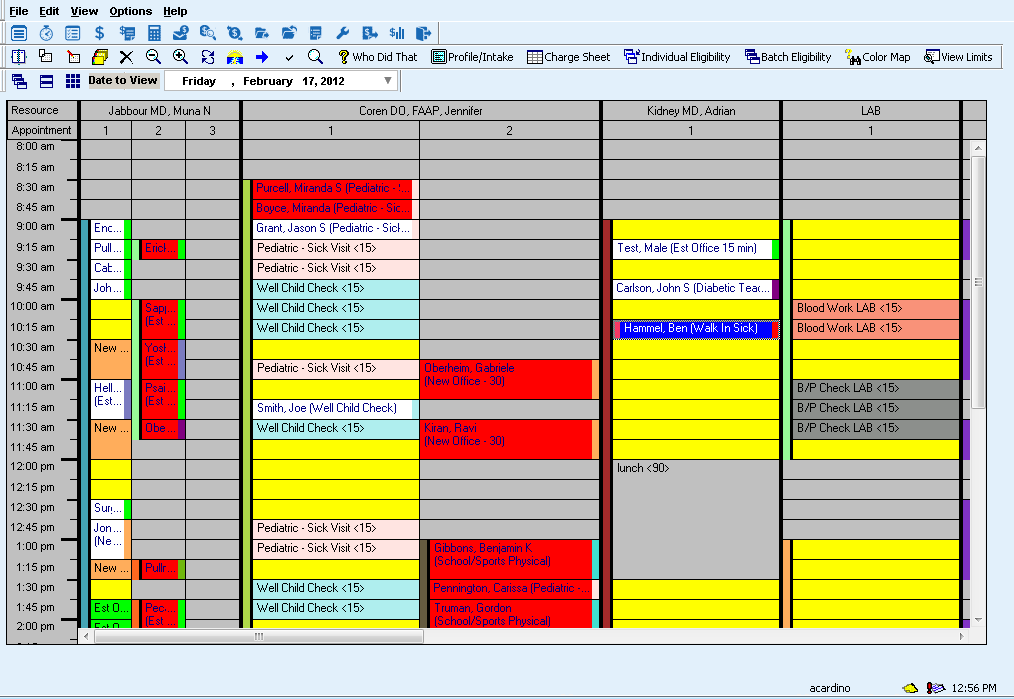
1 GE Centricity Practice Solution Screen Shots Calendar Appointments View (Multiple Providers/Resources) This view shows 3 providers and the in-house lab. It shows examples of double/triple booking. Red appointments are conflicts. Blue appointment slots are indicating that a patient has been checked in. The user can completely customize their view including adding quick buttons to the toolbar. They also can save as many different provider/resource views as they wish.

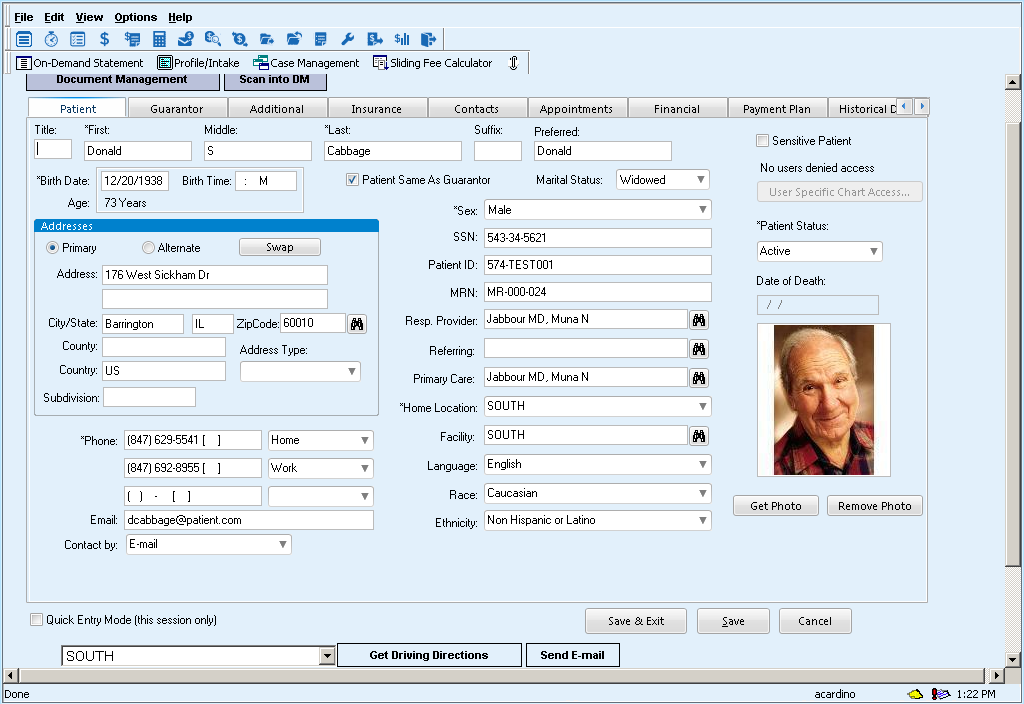
2 REGISTRATION This is the patient demographic portion of a patient s registration information. A user can answer almost any question a patient has within one or two clicks. The tabs along the top hold a patient s appointments, insurance, contacts and more. The user can also add quick link buttons such as Sliding Fee Calculator and On-Demand Patient Statement (both shown above) to help them with their most common tasks. A user can also Get Driving Directions (seen on the bottom of the screen)- this launches Google maps for turn by turn directions. Also send an to patient directly from this screen.

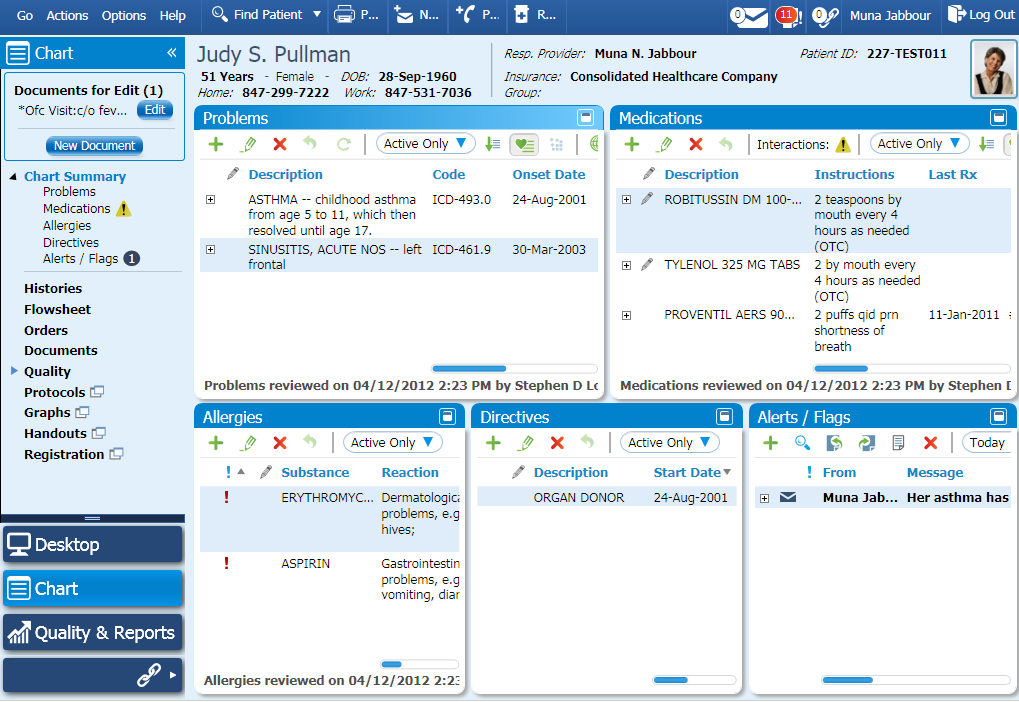
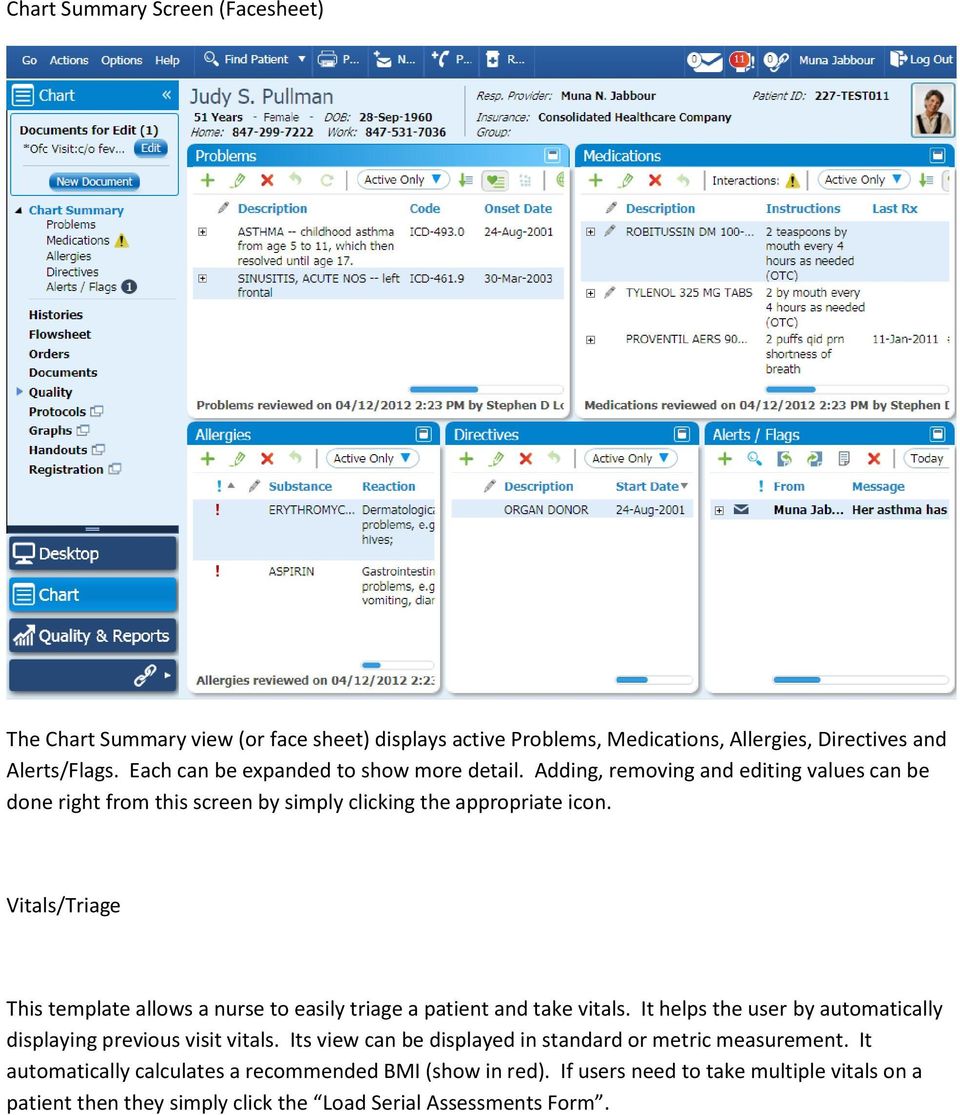
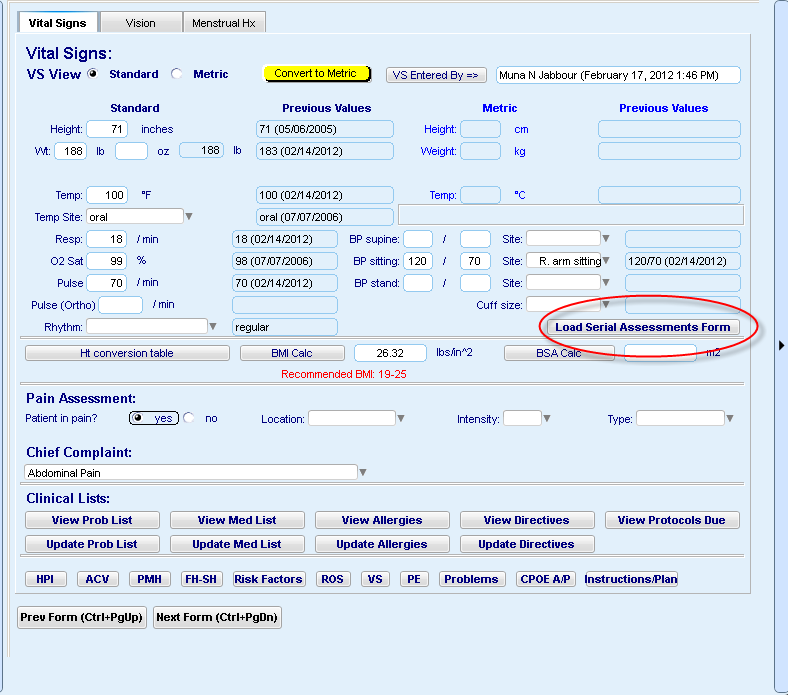
3 Chart Summary Screen (Facesheet) The Chart Summary view (or face sheet) displays active Problems, Medications, Allergies, Directives and Alerts/Flags. Each can be expanded to show more detail. Adding, removing and editing values can be done right from this screen by simply clicking the appropriate icon. Vitals/Triage This template allows a nurse to easily triage a patient and take vitals. It helps the user by automatically displaying previous visit vitals. Its view can be displayed in standard or metric measurement. It automatically calculates a recommended BMI (show in red). If users need to take multiple vitals on a patient then they simply click the Load Serial Assessments Form.
4
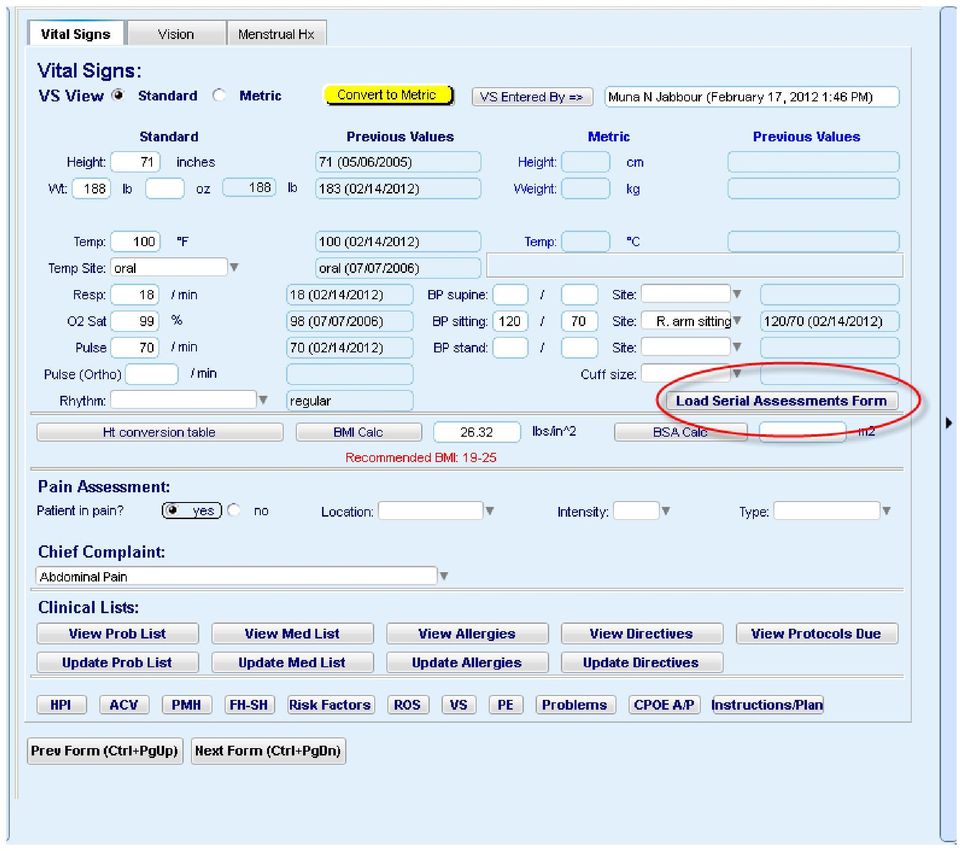

5 Multiple vitals measurements are recorded with time/date stamp. Comments can be added and all values go to the Flowsheet where they can be tracked over time.

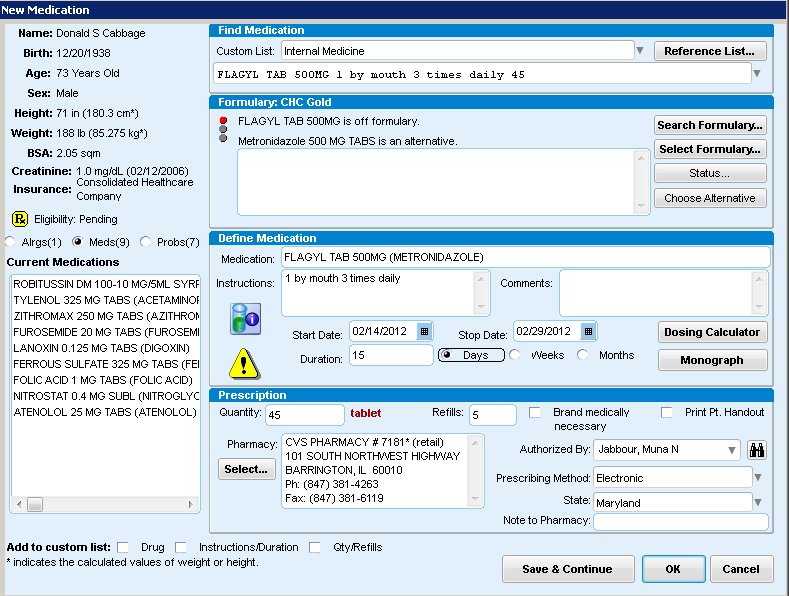
6 Prescription / New Medication The provider can easily choose a new medication from their custom favorites list or search a complete reference list. Patient information is displayed down the left side of the screen. Patient formulary information alerts the physician to medications that are off formulary and provides alternatives. Interaction and Dosing alerts display as visual icons in the middle of the screen. Providers can access more detailed information on the alert by clicking on the icon. A dosing calculator is also provided.


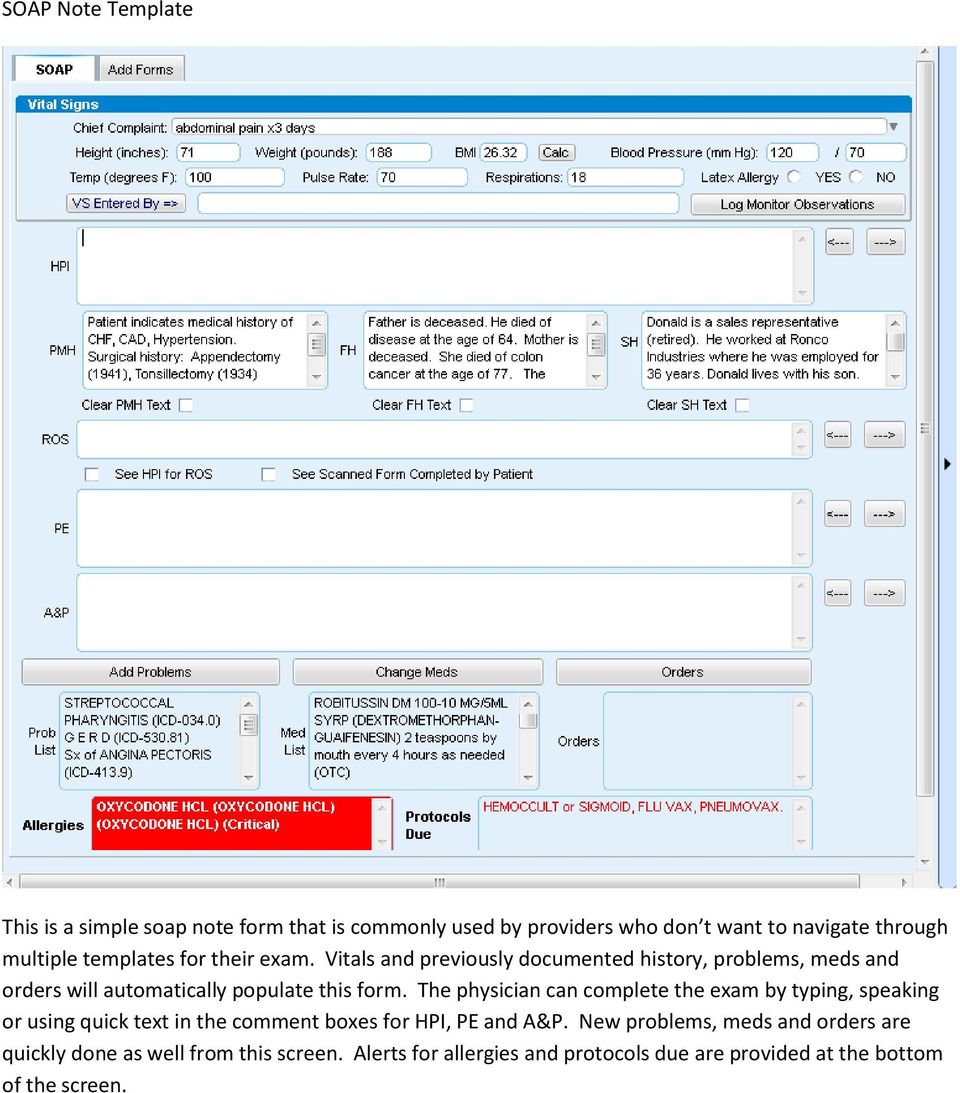
7 SOAP Note Template This is a simple soap note form that is commonly used by providers who don t want to navigate through multiple templates for their exam. Vitals and previously documented history, problems, meds and orders will automatically populate this form. The physician can complete the exam by typing, speaking or using quick text in the comment boxes for HPI, PE and A&P. New problems, meds and orders are quickly done as well from this screen. Alerts for allergies and protocols due are provided at the bottom of the screen.
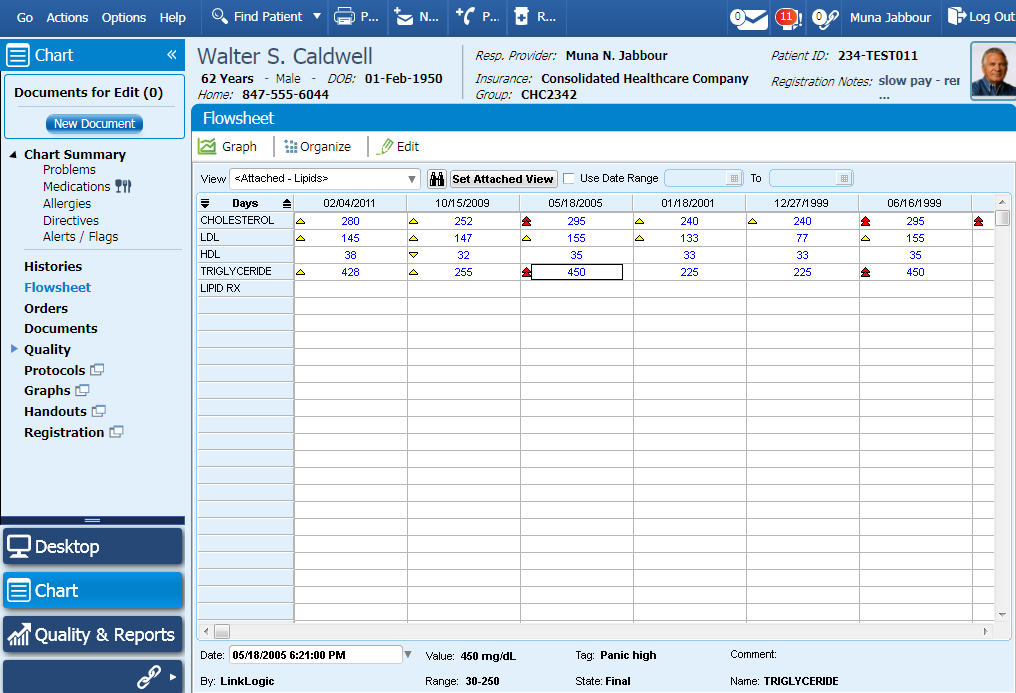
8 Patient Flowsheet Data can be seen longitudinally for a specific patient in a flowsheet. Users can see any type of data that pertains to a patient. In this example, the user wants to track and view Lipids. These lab results populate the flowsheet automatically. Tags which indicate high or low values are represented with the yellow and red arrows next to the results.
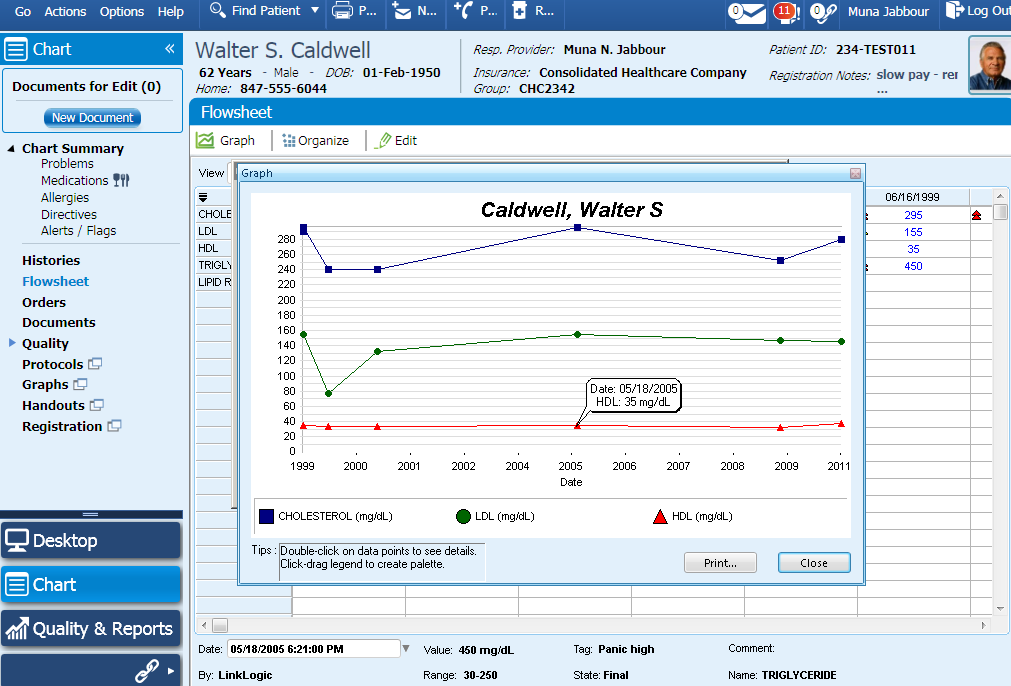
9 Graphing of Flowsheet Values A user can graph any set of flowsheet values. This can be printed and specific dates/results can be displayed on the graph to see details.

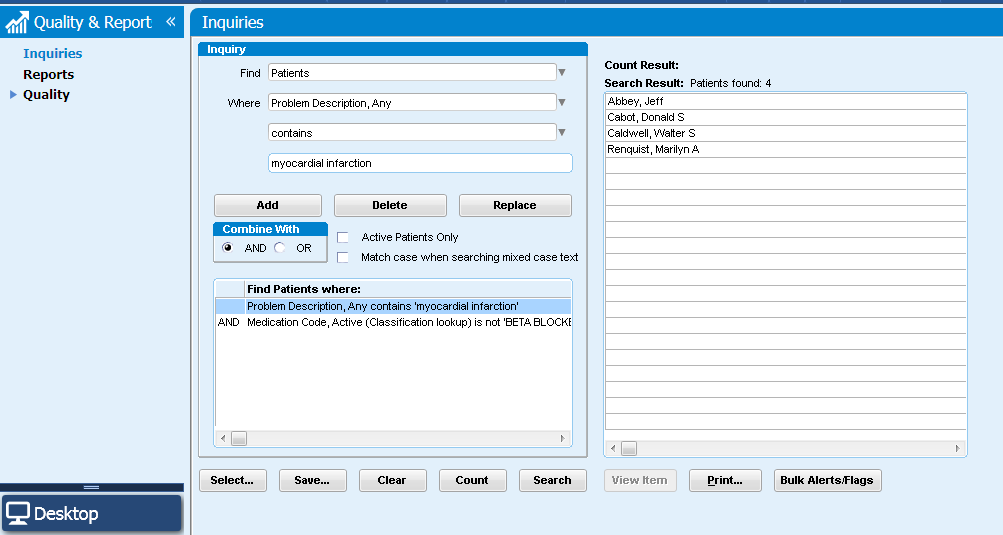
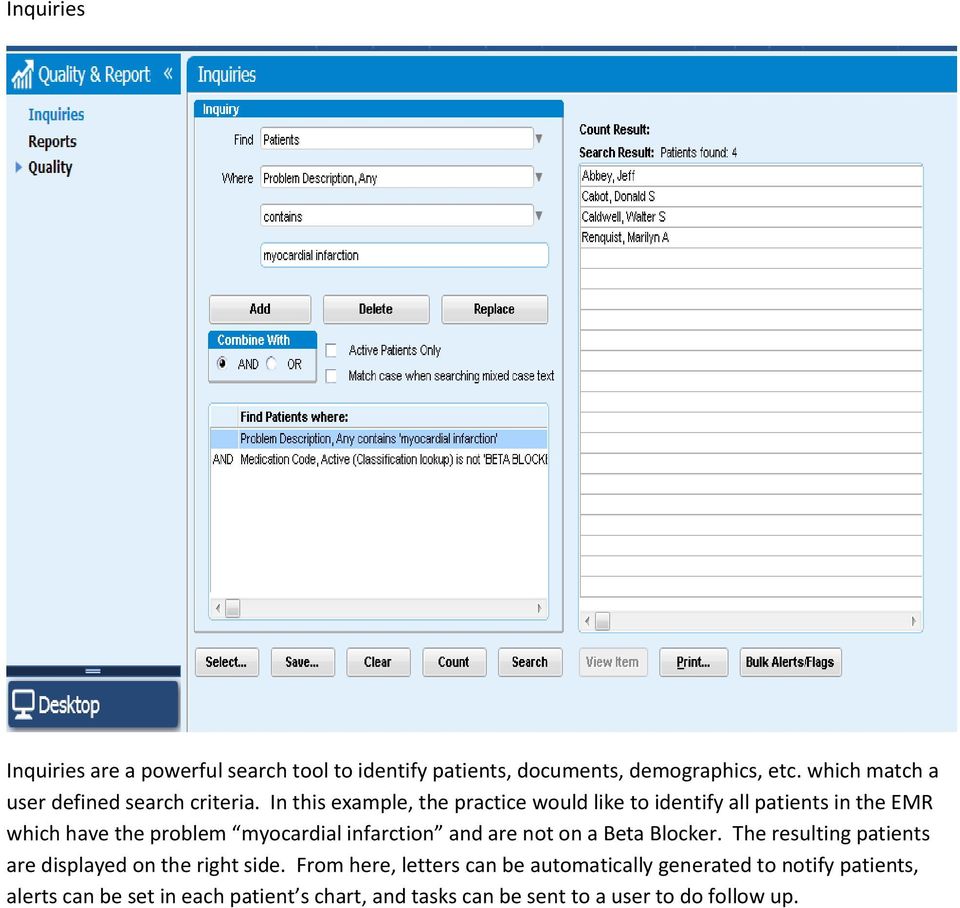
10 Inquiries Inquiries are a powerful search tool to identify patients, documents, demographics, etc. which match a user defined search criteria. In this example, the practice would like to identify all patients in the EMR which have the problem myocardial infarction and are not on a Beta Blocker. The resulting patients are displayed on the right side. From here, letters can be automatically generated to notify patients, alerts can be set in each patient s chart, and tasks can be sent to a user to do follow up.

11 Provider Desktop / Main Screen This is the provider s desktop, which displays their patient s appointments, their messages (in-office ) and documents for review. All messages and documents get routed to the appropriate clinician s desktop. The user can reply, forward, sign and append all messages/ documents. Urgent messages/documents will display with a red exclamation point and move to the top of the user s list. A pencil next to a particular document means that it is awaiting the user s signature.


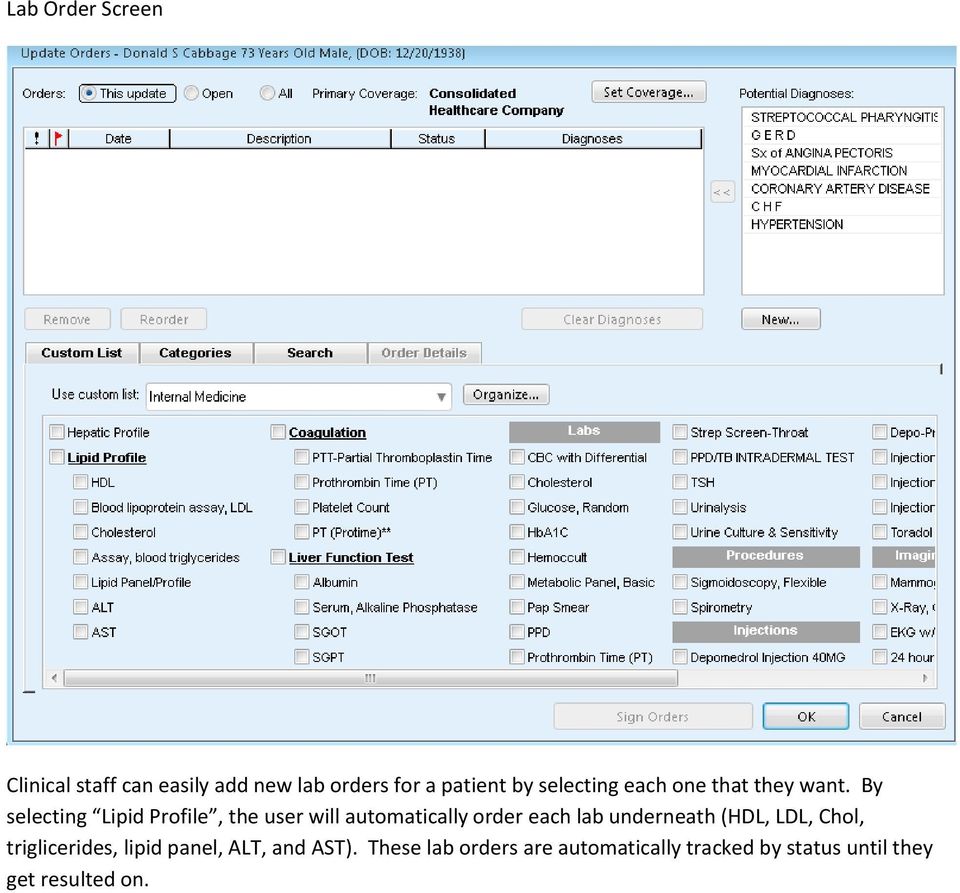
12 Lab Order Screen Clinical staff can easily add new lab orders for a patient by selecting each one that they want. By selecting Lipid Profile, the user will automatically order each lab underneath (HDL, LDL, Chol, triglicerides, lipid panel, ALT, and AST). These lab orders are automatically tracked by status until they get resulted on.

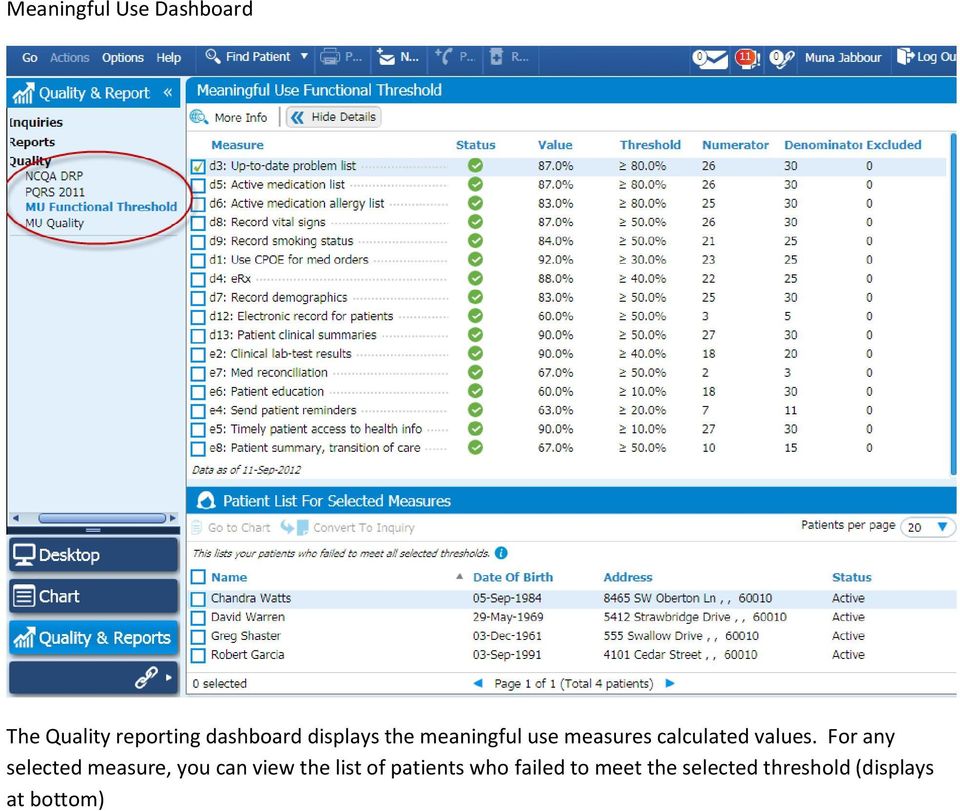
13 Meaningful Use Dashboard The Quality reporting dashboard displays the meaningful use measures calculated values. For any selected measure, you can view the list of patients who failed to meet the selected threshold (displays at bottom)

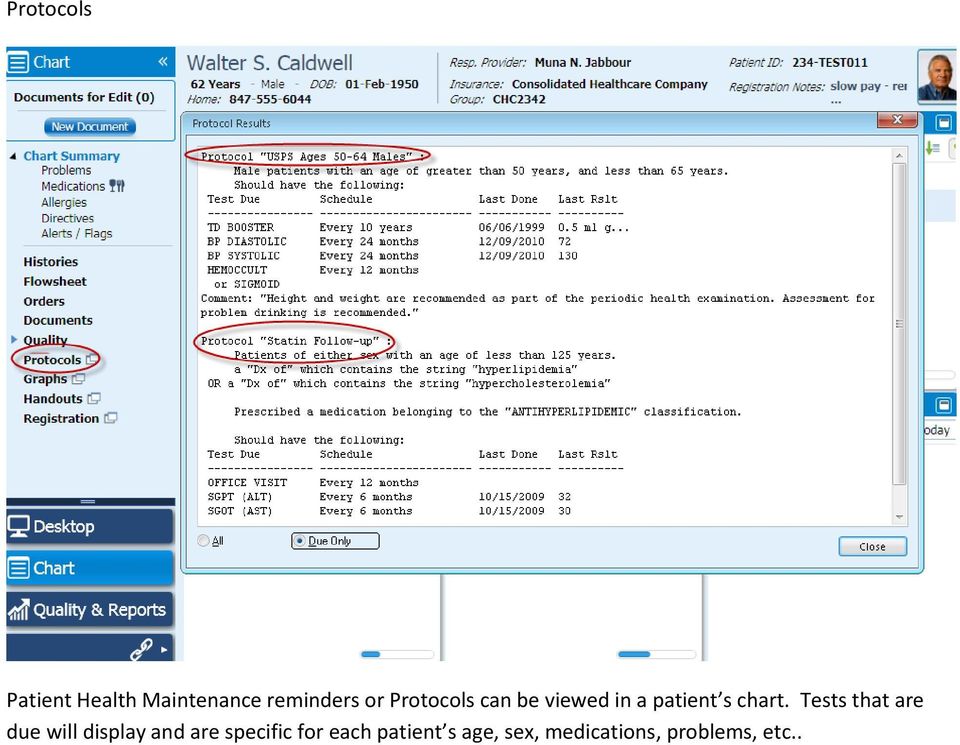
14 Protocols Patient Health Maintenance reminders or Protocols can be viewed in a patient s chart. Tests that are due will display and are specific for each patient s age, sex, medications, problems, etc..

15 Prescription History A medication history can be pulled from the Surescripts prescribing network, which displays all medications that a patient had filled from the last 2 years (or user defined time period). Once these medications are displayed, the user can add these medications to their EMR chart. This is a huge time saver for clinicians and helps verify which specific drugs other providers have prescribed.

Harris CareTracker Training Tasks Workbook Clinical Today eprescribing Clinical Tool Bar Health History Panes Progress Notes
 Harris CareTracker Training Tasks Workbook Clinical Today eprescribing Clinical Tool Bar Health History Panes Progress Notes Practice Name: Name: / Date Started: Date : Clinical Implementation Specialist:
PHYSICIAN USER EMR QUICK REFERENCE MANUAL
 PHYSICIAN USER EMR QUICK REFERENCE MANUAL Epower 4/30/2012 Table of Contents Accessing the system. 3 User Identification Area.. 3 Viewing ED Activity. 4 Accessing patient charts. 4 Documentation Processes.
Health epractice Electronic Medical Record Physician Companion
 Health epractice Electronic Medical Record Physician Companion 1 TABLE OF CONTENTS Section I: How Do I Access 1. St. John HealthPartner Website 4 2. Web Based Training (WBT) Modules.5 3. eclinicalworks
Centricity 9.8 Electronic Medical Record Training Manual
 Centricity 9.8 Electronic Medical Record Training Manual CENTRICITY TRAINING INDEX CENTRICITY TRAINING INDEX... 2 DESKTOP... 5 Logging In To Centricity... 6 Desktop... 7 Viewing Schedules... 9 Alerts/Flags
INSTRUCTIONS FOR USE: OA-RX
 P a g e 1 INSTRUCTIONS FOR USE: OA-RX Welcome to Office Ally s Electronic Prescription module, called OA-Rx. This web-based program has been designed to integrate into Office Ally s Practice Mate and EHR
Seamless flow. Medical Assistant & Nurse Training Guide. Rachel J. Cohen PhD DOHMH Training Manager [email protected].
 Seamless flow 2 eclinicalworks EMR Medical Assistant & Nurse Training Guide Rachel J. Cohen PhD DOHMH Training Manager [email protected] 212 788 5718 1 Contents Introduction... 3 Log In to eclinicalworks...
Sunrise Acute Care (SAC) Module 1 New Provider Basic Course
 Sunrise Acute Care (SAC) Module 1 New Provider Basic Course May 2013 Sunrise Acute Care Training Consists of 5 modules To gain access to Acute Care you will need to: Complete all 5 modules Pass the Acute
EMR Technology Checklist
 Patient Accessibility/Scheduling/Account Maintenance: Able to interact with schedule through an online portal pre register VIP status to move patient to the front of the line Access and pre registration
Care360 Guide for CMS Meaningful Use Audit
 Care360 Guide for CMS Meaningful Use Audit The Centers for Medicare and Medicaid Services (CMS) has contracted with third parties to conduct Meaningful Use audits of certified Electronic Health Record
Patient Portal Users Guide
 e-mds Solution Series Patient Portal Users Guide Version 7.0 How to Use the Patient Portal CHARTING THE FUTURE OF HEALTHCARE e-mds 9900 Spectrum Drive. Austin, TX 78717 Phone 512.257.5200 Fax 512.335.4375
Meaningful Use Cheat Sheet CORE MEASURES: ALL REQUIRED # Measure Exclusions How to Meet in WEBeDoctor
 Meaningful Use Cheat Sheet CORE MEASURES: ALL REQUIRED # Measure Exclusions How to Meet in WEBeDoctor 1 CPOE (Computerized Physician Order Entry) More than 30 percent of all unique patients with at least
Resident Training Manual Allscripts Version 10.2
 Resident Training Manual Allscripts Version 10.2 Allscripts Resident Training Manual 1 Table of Contents Table of Contents... 1 Acknowledgments... 3 Document History... 3 Accessing Allscripts EMR... 4
By the End of This Lesson, You Will Be Able to... 2. Office Visit Workflow Fundamentals for Providers... 2
 Lesson 4: Completing a Basic Office Visit Contents By the End of This Lesson, You Will Be Able to... 2 Office Visit Workflow Fundamentals for Providers... 2 Office Visit: Provider Workflow Diagram... 3
Electronic Medical Records (EMR) Centricity EMR 2005. ---------------- Updating the Patient Record
 Electronic Medical Records (EMR) Centricity EMR 2005 ---------------- Updating the Patient Record Table of Contents Introduction...1 The Chart Update...1 The Process...1 Accessing a Chart Update via your
B. WORKING WITH SCHEDULES...6 1. Daily Schedule... 6 2. Clinical Toolbar...7 3. Personalize...8 4. Multiple Provider Schedules...8
 A. OVERVIEW OF JUP EMR...2 1. Logging in and Logging out...2 2. Vertical Toolbar...3 3. Horizontal Toolbar...3 4. Site Selector VTB...4 5. Locking the Session...5 6. Toolplace...5 B. WORKING WITH SCHEDULES...6
Achieving Meaningful Use Training Manual
 Achieving Meaningful Use Training Manual Terms EP Eligible Professional Medicare Eligible Professional o Doctor of Medicine or Osteopathy o Doctor of Dental Surgery or Dental Medicine o Doctor of Podiatric
This tutorial provides an introduction to NextGen, the electronic health record used at Gardner Packard Children s Health Center.
 This tutorial provides an introduction to NextGen, the electronic health record used at Gardner Packard Children s Health Center. Part 1 of the tutorial addresses Record Review. Part 2 will cover eprescribing
Optum Physician EMR Administration Module Setup Guide for eprescribing
 Optum Physician EMR Administration Module Setup Guide for eprescribing Purpose of this Document This document is a guide through Optum Physician EMR s Practice, Clinical and Setup tabs in the Administration
eclinicalworks EMR Train the Trainer Client/Reseller Program
 eclinicalworks EMR Train the Trainer Client/Reseller Program eclinicalworks LLC 112 Turnpike Road Westborough, MA 01581 eclinicalworks Train the Trainer Program Syllabus (EMR only) Current Revision Date
PowerChart: View Only
 Page 1 of 16 PowerChart: View Only Accessing ecentral ecentral consists of multiple domains: Production, Build, Train, and Cert. The Production domain contains real patient data and is the permanent medical
PARTI: HOW TO IMPORT A CUSTOM EXAM TEMPLATE FOR TOP ASaP PARTICIPATION
 PARTI: HOW TO IMPORT A CUSTOM EXAM TEMPLATE FOR TOP ASaP PARTICIPATION 1. Login to your Wolf EMR. 2. Open Internet Explorer 3. Go the TOP ASaP web site to the EMR Knowledge Resources area at: http://www.topalbertadoctors.org/asap/resourcestools/emrkt/
Optum Patient Portal. 70 Royal Little Drive. Providence, RI 02904. Copyright 2002-2013 Optum. All rights reserved. Updated: 3/7/13
 Optum Patient Portal 70 Royal Little Drive Providence, RI 02904 Copyright 2002-2013 Optum. All rights reserved. Updated: 3/7/13 Table of Contents 1 Patient Portal Activation...1 1.1 Pre-register a Patient...1
RHS VISUAL ICD 9 to ICD 10 Conversion
 RHS VISUAL ICD 9 to ICD 10 Conversion ICD 10 is mandatory as of 10/1/2015 There are two main areas that help you convert your residents ICD 9 codes to ICD 10: 1. The ICD 10 DB (Dashboard) button on the
Documenting a Progress Note Template Training Module
 Documenting a Progress Note Template Training Module 70 Royal Little Drive Providence, RI 02904 Copyright 2002-2013 Optum. All rights reserved. Updated: 3/6/13 Table Of Contents Table of Contents 1 About
INSTRUCTIONS: To complete this training you will need to have a printed copy of this packet.
 INSTRUCTIONS: To complete this training you will need to have a printed copy of this packet. To print this packet, click the Printer Icon on the Adobe Toolbar. This packet is a step by step self-guided
elearning 5.6 Education Plan Guide >> EHR End User
 elearning 5.6 Education Plan Guide >> EHR End User Table of Contents This document is for informational purposes only. You cannot launch elearning courses from this page. Application Overviews - EHR Only
Master Reference Guide. Allscripts v11.1.7 Clinical Staff Guide
 Master Reference Guide Allscripts v11.1.7 Clinical Staff Guide All the speakers and planning committee members have listed no financial interest/arrangement that would be considered a conflict of interest.
INTER TRIBAL HEALTH AUTHORITY ELECTRONIC MEDICAL RECORD (EMR) CASE MANAGEMENT TRAINING MANUAL
 EMR CLINICAL TRAINING MANUAL INTER TRIBAL HEALTH AUTHORITY ELECTRONIC MEDICAL RECORD (EMR) CASE MANAGEMENT TRAINING MANUAL PROFILE VERSION 7 July 1, 2014 TABLE OF CONTENTS Module 1: Case Management - Administration
Medical Records Training Manual for EMR
 Medical Records Training Manual for EMR ENTERPRISE MEDICAL RECORD (EMR) The MEDITECH Enterprise Medical Record (EMR) collects, stores, and displays clinical data such as lab results, transcribed reports,
 Orientation to Sevocity Electronic c Medical Record Geriatrics Rotation INPATIENT OR OUTPATIENT? The First part of this presentation is the OUTPATIENT Orientation Special issues for INPATIENT documentation
By the End of This Lesson, You Will Be Able to... 3. How Does Secure Messaging Work?... 5. What Does The Patient Portal Look Like?...
 Lesson 13: Secure Messaging Table of Contents By the End of This Lesson, You Will Be Able to... 3 MyHealth Patient Portal Secure Messaging System...What Is It?... 4 How Does Secure Messaging Work?... 5
Electronic Medical Records. Centricity EMR 9.2 ---------- Medication Monographs & Dosing Calculator
 Electronic Medical Records Centricity EMR 9.2 ---------- Medication Monographs & Dosing Calculator MEDICATION MONOGRAPHS & DOSING CALCULATOR PURPOSE The intent of this document is to inform and instruct
Tip Sheet for Wolf Users
 Tip Sheet for Wolf Users January, 2014 The Alberta Screening and Prevention Initiative is focused on supporting primary care providers and team members to offer a screening and prevention bundle to all
New Brunswick EMR Program. Functionality Workbook
 New Brunswick EMR Program Functionality Workbook Standard EMR Functionality The following is an abbreviated list of features offered by Velante within the New Brunswick EMR Program. Data Management Highlights
Reducing Medical Errors with an Electronic Medical Records System
 Reducing Medical Errors with an Electronic Medical Records System A recent report by the Institute of Medicine estimated that as many as 98,000 people die in any given year from medical errors in hospitals
elearning 5.6 Education Plan Guide >> EHR CGT
 elearning 5.6 Education Plan Guide >> EHR CGT Table of Contents This document is for informational purposes only. You cannot launch elearning courses from this page. EHR Application Basics v5.6... 4 v5.6
INTRODUCTION... 2 FEATURES... 2 CONFIGURING THE PATIENT PORTAL... 2 GETTING STARTED... 4 APPROVAL... 8 UPLOAD... 10 PROFILE... 11 CHK.CONN...
 Contents INTRODUCTION... 2 FEATURES... 2 CONFIGURING THE PATIENT PORTAL... 2 GETTING STARTED... 4 SETTINGS... 4 PATIENT ACCESS CONTROL... 4 DEMOGRAPHICS AND FORMS... 5 MAIL... 6 ONLINE PAYMENT CONFIGURATION...
Meditech 6.0 BMV Training Manual: ED Introduction to BMV Process
 Meditech 6.0 BMV Training Manual: What is the emar? The emar (Electronic Medication Administration Record) is utilized to capture and edit documentation for medication administrations in an electronic
Using Toolbars to improve clinic efficiency. Cheryl Reid & John Swekla Members of the TELUS Team
 Using Toolbars to improve clinic efficiency Cheryl Reid & John Swekla Members of the TELUS Team Our goal today Demystify the creation of Toolbars in PS Suite and demonstrate how you can increase your clinic
CENTRICITY EMR VITAL SIGNS, PAIN SCREENING HEIGHT & WEIGHT ACTIVITY RECORD. S c r i p p s C e n t e r f o r L e a r n i n g & I n n o v a t i o n
 CENTRICITY EMR VITAL SIGNS, PAIN SCREENING HEIGHT & WEIGHT ACTIVITY RECORD S c r i p p s C e n t e r f o r L e a r n i n g & I n n o v a t i o n T h i s c o u r s e i s b r o u g h t t o y o u b y S c
EHR Version 7.1 New Features
 EHR Version 7.1 New Features New Colors The color scheme has changed. There is now a combination of Green and Blue throughout the product. Login Page You can now enter your signoff password in the second
Now part of ALLSCRIPTS. HealthMatics EMR Application Reference Manual
 Now part of ALLSCRIPTS HealthMatics EMR Application Reference Manual May 9, 2006 Statement of Confidentiality The information contained herein is proprietary and confidential to A 4 HEALTH SYSTEMS. No
NOD Reporting Manual. Nightingale On Demand Reporting Manual Page 1
 NOD Reporting Manual Nightingale On Demand Reporting Manual Page 1 Confidentiality By accepting receipt of this document, recipients acknowledge Nightingale s exclusive right, title and interest in and
EMR DOCUMENTATION LYNX. Instructor Script
 EMR DOCUMENTATION LYNX Instructor Script Table of Contents TABLE OF CONTENTS INFORMATION SECURITY AND CONFIDENTIALITY... 4 OVERVIEW... 5 LEARNING OBJECTIVES... 5 TIPS AND TRICKS... 5 SOLUTION ICONS...
Sample Assignment 1: Workflow Analysis Directions
 Sample Assignment 1: Workflow Analysis Directions Purpose The Purpose of this assignment is to: 1. Understand the benefits of nurse workflow analysis in improving clinical and administrative performance
Meaningful Use. Michael L. Brody, DPM FACFAOM CCHIT Ambulatory Workgroup HITSP Physician Perspective Technical Committee NYeHC
 Meaningful Use Michael L. Brody, DPM FACFAOM CCHIT Ambulatory Workgroup HITSP Physician Perspective Technical Committee NYeHC What is Meaningful Use? Meaningful use is a term defined by CMS and describes
System: Menu option System Files has been renamed
 07/10/2012 MEDGEN EMR Release Notes: Version 6.0 Build 103.6.13 Attached please find recent updates that were made to your Medgen EMR system: Navigation / Display: A significant difference in Version 6
Clinical Optimization
 Clinical Optimization Learning Objectives Uses of the Alt Key User Preferences to customize Accuro for you Home Section Tips Shortcut Keys and their functions Virtual Chart tips Use of the ALT Key Alt+
EMERALD EMR. Arun B. Rajan, M.D.
 EMERALD EMR Arun B. Rajan, M.D. Introduction: I have been using an EMR since 2001. Back then, there were not too many EMRs. I chose an EMR that was cost-effective and something that I would be able to
How To Record Immunizations In Healthteam
 Electronic Medical Records (EMR) NEW IMMUNIZATIONS NEW IMMUNIZATIONS Purpose The intent of this document is to instruct HealthTeam staff and providers on the process used to record immunizations newly
PowerChart Doctor Office Staff Participant Guide
 PowerChart Doctor Office Staff Participant Guide Universal Health Services 367 South Gulph Road King of Prussia, PA 19406-0958 2010 All Rights Reserved Revision History Date Version Description Author
MEDGEN EHR Release Notes: Version 6.2 Build 106.6.20
 10/18/2013 MEDGEN EHR Release Notes: Version 6.2 Build 106.6.20 Special Note: Comtron is excited to announce that over the next few weeks all of our Medgen products will be going through a rebranding process.
Workflow Redesign Templates
 Workflow Redesign Templates Provided By: The National Learning Consortium (NLC) Developed By: Health Information Technology Research Center (HITRC) Practice and Workflow Redesign Community of Practice
AEHR (Allscripts Electronic Health Record) Course Descriptions
 AEHR (Allscripts Electronic Health Record) Course Descriptions Contents AEHR for Providers Page 2 AEHR for Clinical Staff Page 3 AEHR for Check-Out Staff Page 4 AEHR for Billing Page 5 AEHR for Call Center
EMR Adoption Survey. Instructions. This survey contains a series of multiple-choice questions corresponding to the 5-stage EMR Adoption Model.
 EMR Adoption Survey Instructions This survey contains a series of multiple-choice questions corresponding to the -stage EMR Adoption Model. If the respondent is a physician, ask all questions. If the respondent
Attesting for Meaningful Use Stage 2 in 2014 Customer Help Guide
 Attesting for Meaningful Use Stage 2 in 2014 Customer Help Guide Table of Contents PURPOSE OF THIS DOCUMENT 4 MEANINGFUL USE STAGE 2 OVERVIEW 4 ATTESTING FOR CORE OBJECTIVES 5 CORE OBJECTIVE #1: CPOE 7
7.0 Quick Guide. Contents
 7.0 Quick Guide Contents How do I use the scheduler to create appointments/plan visits?... 2 How do I document a visit?... 3 What do I use a Sticky Note for?... 4 How do I set up a new medication in a
Student RN-Reviewing the Chart Lesson Plan
 Student RN-Reviewing the Chart Lesson Plan Agenda... 1 Reviewing Patient Information... 2 Reviewing Past Encounters Chart Review... 5 Past Lab Results Results Review... 7 Agenda The following is a breakdown
Master Reference Guide. Allscripts v11.1.7 Non-Clinical Reference Guide
 Master Reference Guide Allscripts v11.1.7 Non-Clinical Reference Guide All the speakers and planning committee members have listed no financial interest/arrangement that would be considered a conflict
1 CoverMyMeds User s Guide User s Guide
 1 CoverMyMeds User s Guide User s Guide 2 CoverMyMeds User s Guide TABLE OF CONTENTS Overview 3 Starting a Request 3 Using a Key 4 Completing the Request 5 Address Books 5 Required and Important Tags 5
You can also go to the patient portal by clicking this link: https://sballergyportal.gloclouds.com. (no www.)
 THEODORE J. CHU, M.D. 130 BELLEROSE DRIVE (MAIN OFFICE) SAN JOSE, CA 95128 PH. (408) 286-1707 FAX (408)286-1744 ANLIN XU, M.D. 2505 SAMARITAN DRIVE SUITE 407, SAN JOSE CA 95124 PH. (408) 358-1771 FAX (408)
Merchant Center User Guide
 Merchant Center User Guide Logging In The Merchant Center is the online management tool for your Groupon promotions. You can track redemption, read customer comments, and view customer demographic information.
Inpatient Cerner Navigation and Documentation For Nursing Students
 Inpatient Cerner Navigation and Documentation For Nursing Students Audience Note: Purpose: Objectives: Cerner PowerChart training is for all students in the following inpatient areas Med/Surg, OSNO, Oncology,
Optum Physician EMR Administration Module Setup Guide for Clinical Today
 Optum Physician EMR Administration Module Setup Guide for Clinical Today Purpose of this Document This document is a guide through Optum Physician EMR s Practice, Clinical and Setup tabs in the Administration
Frequently Heard Epic Terms
 [Type text] Frequently Heard Epic Terms Account Maintenance (Revenue Cycle) A module that allows billers to see financial activity for a guarantor account (Professional Billing) or hospital account (Hospital
SOP for Screening of Adult Chemotherapy Electronic Prescriptions
 SOP for Screening of Adult Chemotherapy Electronic Prescriptions Contents The following steps should be followed in screening a chemotherapy prescription on ARIA: 1. Patient details 2 2. Patient medical
NextGen EHR: Clinic Password and User Preferences Setup in PROD
 NextGen EHR: Clinic Password and User Preferences Setup in PROD FALL 2014 1 Click the NextGen icon on your desktop. The NextGen Application Window opens. FALL 2014 2 Click the icon for EHR. The EHR login
HealthOffice Anywhere Program Startup s
 HealthOffice Anywhere Program Startup s The following list of suggested procedures help get you started now that you have had your HealthOffice Anywhere Training. If you need help, please contact Healthmaster
Tyler Dashboard Overview/Navigation
 Tyler Dashboard Overview/Navigation The upgrade to MUNIS 9.3 provides users with a new and better approach for accessing and managing the MUNIS applications. The following provides an overview of the Tyler
Meaningful Use Qualification Plan
 Meaningful Use Qualification Plan Overview Certified EHR technology used in a meaningful way is one piece of a broader Health Information Technology infrastructure intended to reform the health care system
Scanned image. If multiple scanner installed in the computer then click here to select desired scanner. Select Resolution, Color, and Scan Type.
 Objectives & Goals Scanning & Document Management Opening & Understanding Multi Scan/Select Scanning & Drag/Drop Documents Set Document Details Set Reminders, Actions and Links Create New Document From
Medical Student Training on Electronic Notes Documentation. For Third and Fourth year Medical Students
 Medical Student Training on Electronic Notes Documentation For Third and Fourth year Medical Students Medical Student Training To review training for; Fourth Year Medical Student Orders and other training
Workflow a.k.a. Avoiding Paralysis (& Bankruptcy)
 Workflow a.k.a. Avoiding Paralysis (& Bankruptcy) James McCulley MD,FACS,FRCOphth(UK) Department of Ophthalmology The University of Texas Southwestern Medical Center And EMR s EMR s are here to stay! Effective
Genesis Student Medical and Immunization Records Steps Screen Displayed Procedures
 1 Medical and Immunization records must be entered on all students attending Polk County Schools. The Polk County Health Department provides guidelines in coordination with the Prevention Services and
Nursing Home Facility Implementation Overview
 DrConnect Improved Communication; Improved Care Nursing Home Facility Implementation Overview clevelandclinic.org/drconnect Cleveland Clinic 1995-2013. All Rights Reserved. Table of Contents Table of Contents...2
Optum Physician EMR v 8.0 Release Notes
 Optum Physician EMR v 8.0 Release Notes OptumInsight 70 Royal Little Drive Providence, RI 02904 Copyright 2002-2014 OptumInsight. All rights reserved. Document Information Author(s) Release Date G.Caldera
Optum Physician EMR Administration Module Setup Guide for Clinical Toolbar
 Optum Physician EMR Administration Module Setup Guide for Clinical Toolbar Purpose of this Document This document is a guide through Optum Physician EMR s Practice, Clinical and Setup tabs in the Administration
Health epractice Electronic Medical Record Office Manager Companion
 Health epractice Electronic Medical Record TABLE OF CONTENTS Section I: How Do I Access 1. Health epractice Website....5 2. Web Based Training (WBT) Modules..6 3. Train Environment..7 Section II: How To
CyberMed Electronic Health Record (EHR)
 CyberMed EHR v1.00 CyberMed Electronic Health Record (EHR) Version 1.00 August 2010 Office of Information Technology (OIT) Joseph P. Addabbo Family Health Center CyberMed EHR v1.00 DOCUMENT REVISION HISTORY
Affiliated Provider Billing/Coding
 Affiliated Provider Billing/Coding ED BILLING USING FIRSTNET Table of Contents Affiliated Provider ED Billing...2 icentra FirstNet...2 Accessing FirstNet...2 To access FirstNet:...2 Checking In as a Provider...2
Practice Partner Electronic Medical Record and Practice Management Solution
 Practice Partner Electronic Medical Record and Practice Management Solution The power to improve productivity The power to improve quality of care The power to improve health care A Better Way to Practice
Using Electronic Prescriptions (erx)
 Using Electronic Prescriptions (erx) In order to send Electronic Prescriptions, upgrade to Version 14.2 or higher. Electronic Prescriptions only work in the United States and its territories, including
HPM User Manual Version 2.6 Copyright 2014 Helix Health Ltd. User Manual
 User Manual 1 Table of Contents Introduction... 12 Starting HPM... 14 Patient Registration and Search Module... 15 Administration Entering Patient Type... 15 Registering a patient in HPM... 16 Demographics...
Version 3.7. A guide to building networks and collaborating with providers using eclinicalworks P2P. eclinicalworks, 2012. All rights reserved
 eclinicalworks P2P Version 3.7 A guide to building networks and collaborating with providers using eclinicalworks P2P. eclinicalworks, 2012. All rights reserved CONTENTS ABOUT THIS GUIDE 5 Product Documentation
Overview. Table of Contents. isupport Incident Management
 Overview The isupport software is a powerful and flexible help desk/desktop support solution used by San José State to manage information technology tickets, or incidents. While isupport has many tools
Business Online Banking Enhancements Monday, March 9, 2015
 Business Online Banking Enhancements Monday, March 9, 2015 On March 9 th you will notice a few enhancements made to your Business Online Banking site. These changes have been implemented to improve your
CareTracker Electronic Health Record (EHR) Planning Your Conversion from Paper Charts to Electronic Health Records
 CareTracker Electronic Health Record (EHR) Planning Your Conversion from Paper Charts to Electronic Health Records Questions to Think About Who will convert the paper charts to electronic health records?
Pathology Helpdesk. Beaker Clinical Pathology LAB117QS1.0
 Pathology Helpdesk Beaker Clinical Pathology LAB117QS1.0 Table of Contents Getting Started... 3 Understand Epic terms...3 Look up a patient...6 Chart Review... 7 Review patient s verified results...7 Result
Training Manual for Sales Manager
 Training Manual for Sales Manager Sales Manager Create a new sales lead Select Orders tab On the left side, select Client Proposal A window will pop up; enter client details in relevant boxes. Once you
2013 Meaningful Use Dashboard Calculation Guide
 2013 Meaningful Use Dashboard Calculation Guide Learn how to use Practice Fusion s Meaningful Use Dashboard to help you achieve Meaningful Use. For more information, visit the Meaningful Use Center. General
Microsoft Outlook 2003 Quick How-to Guide
 Microsoft Outlook 2003 Quick How-to Guide Microsoft Outlook 2003 Quick How-to-Guide This document is designed to be a quick guide for the most common tasks in Outlook. It is separated into different sections
Department of Information Technology. Microsoft Outlook 2013. Outlook 101 Basic Functions
 Department of Information Technology Microsoft Outlook 2013 Outlook 101 Basic Functions August 2013 Outlook 101_Basic Functions070713.doc Outlook 101: Basic Functions Page 2 Table of Contents Table of
Clinical Notes and Letter Templates - Advanced
 Clinical Notes and Letter Templates - Advanced Discussion Format Computer Classroom Format Lecture will be conducted throughout this session. We have a ton of content to share and everyone will be at a
TELUS PS Suite Tip Sheet
 TELUS PS Suite Tip Sheet March 2014 The Alberta Screening and Prevention initiative is focused on supporting primary care providers and team members to offer a screening and prevention bundle to all their
QT9 Quality Management Software
 QT9 Supplier Portal Support is Free. Please contact us via the Contact Support help icon on the top of the screen or at our contact information below: QT9 Software Toll Free: (866) 913-5022 Email: [email protected]