
CyberArk Software, Ltd. Privileged Account Security Solution v9.1. Security Target. Evaluation Assurance Level (EAL): EAL2+ Document Version: 1.
|
|
|
- Darleen McGee
- 10 years ago
- Views:
Transcription


1 CyberArk Software, Ltd. Privileged Account Security Solution v9.1 Security Target Evaluation Assurance Level (EAL): EAL2+ Document Version: 1.8 Prepared for: Prepared by: CyberArk Software, Ltd. 57 Wells Avenue, Suite 20A Newton, MA United States of America Corsec Security, Inc Park Center Road, Suite 460 Herndon, VA United States of America Phone: +1 (888) Phone: +1 (703)
2 Table of Contents 1 INTRODUCTION PURPOSE SECURITY TARGET AND TOE REFERENCES PRODUCT OVERVIEW Privileged Account Security Solution Components TOE OVERVIEW TOE Environment TOE DESCRIPTION Physical Scope Logical Scope Product Physical/Logical Features and Functionality not included in the TOE CONFORMANCE CLAIMS SECURITY PROBLEM THREATS TO SECURITY ORGANIZATIONAL SECURITY POLICIES ASSUMPTIONS SECURITY OBJECTIVES SECURITY OBJECTIVES FOR THE TOE SECURITY OBJECTIVES FOR THE OPERATIONAL ENVIRONMENT IT Security Objectives Non-IT Security Objectives EXTENDED COMPONENTS EXTENDED TOE SECURITY FUNCTIONAL COMPONENTS Class FPT: Protection of the TSF EXTENDED TOE SECURITY ASSURANCE COMPONENTS SECURITY REQUIREMENTS CONVENTIONS SECURITY FUNCTIONAL REQUIREMENTS Class FAU: Security Audit Class FCS: Cryptographic Support Class FDP: User Data Protection Class FIA: Identification and Authentication Class FMT: Security Management Class FPT: Protection of the TSF Class FRU: Resource Utilization Class FTA: TOE Access SECURITY ASSURANCE REQUIREMENTS TOE SUMMARY SPECIFICATION TOE SECURITY FUNCTIONS Security Audit Cryptographic Support User Data Protection Identification and Authentication Security Management Protection of the TSF Resource Utilization TOE Access RATIONALE CONFORMANCE CLAIMS RATIONALE CyberArk PAS Solution v9.1 Page 2 of 60

3 8.2 SECURITY OBJECTIVES RATIONALE Security Objectives Rationale Relating to Threats Security Objectives Rationale Relating to Assumptions RATIONALE FOR EXTENDED SECURITY FUNCTIONAL REQUIREMENTS RATIONALE FOR EXTENDED TOE SECURITY ASSURANCE REQUIREMENTS SECURITY REQUIREMENTS RATIONALE Rationale for Security Functional Requirements of the TOE Objectives Security Assurance Requirements Rationale Dependency Rationale ACRONYMS ACRONYMS Table of Figures FIGURE 1 TOE BOUNDARY 9 List of Tables TABLE 1 ST AND TOE REFERENCES... 4 TABLE 2 TOE MINIMUM REQUIREMENTS TABLE 3 CC AND PP CONFORMANCE TABLE 4 THREATS TABLE 5 ASSUMPTIONS TABLE 6 SECURITY OBJECTIVES FOR THE TOE TABLE 7 IT SECURITY OBJECTIVES TABLE 8 NON-IT SECURITY OBJECTIVES TABLE 9 TOE SECURITY FUNCTIONAL REQUIREMENTS TABLE 10 CRYPTOGRAPHIC ALGORITHMS TABLE 11 SAFE ACCESS CONTROL PERMISSIONS TABLE 12 MANAGEMENT OF VAULT SECURITY FUNCTION BEHAVIOR BY ROLE TABLE 13 MANAGEMENT OF SAFE SECURITY FUNCTION BEHAVIOR BY ROLE TABLE 14 MANAGEMENT OF VAULT SECURITY ATTRIBUTES TABLE 15 MANAGEMENT OF SAFE SECURITY ATTRIBUTES TABLE 16 EAL2 ASSURANCE REQUIREMENTS TABLE 17 MAPPING OF TOE SECURITY FUNCTIONS TO SECURITY FUNCTIONAL REQUIREMENTS TABLE 18 AUDIT RECORD CONTENTS TABLE 19 THREATS: OBJECTIVES MAPPING TABLE 20 ASSUMPTIONS: OBJECTIVES MAPPING TABLE 21 OBJECTIVES: SFRS MAPPING TABLE 22 FUNCTIONAL REQUIREMENTS DEPENDENCIES TABLE 23 ACRONYMS CyberArk PAS Solution v9.1 Page 3 of 60
4 1 Introduction This section identifies the Security Target (ST), Target of Evaluation (TOE), and the organization of the ST. The TOE is the CyberArk Privileged Account Security Solution v9.1, and will hereafter be referred to as the TOE throughout this document. The TOE is software-based solution for Privileged Account Security management in the enterprise. The Privileged Account Security (PAS) Solution enables organizations to secure, provision, control, and monitor all activities associated with privileged identities used in enterprise systems and applications. 1.1 Purpose This ST is divided into nine sections, as follows: Introduction (Section 1) Provides a brief summary of the ST contents and describes the organization of other sections within this document. It also provides an overview of the TOE security functions and describes the physical and logical scope for the TOE, as well as the ST and TOE references. Conformance Claims (Section 2) Provides the identification of any Common Criteria (CC), Protection Profile, and Evaluation Assurance Level (EAL) package claims. It also identifies whether the ST contains extended security requirements. Security Problem (Section 3) Describes the threats, organizational security policies, and assumptions that pertain to the TOE and its environment. Security Objectives (Section 4) Identifies the security objectives that are satisfied by the TOE and its environment. Extended Components (Section 5) Identifies new components (extended Security Functional Requirements (SFRs) and extended Security Assurance Requirements (SARs)) that are not included in CC Part 2 or CC Part 3. Security Requirements (Section 6) Presents the SFRs and SARs met by the TOE. TOE Summary Specification (Section 7) Describes the security functions provided by the TOE that satisfy the security functional requirements and objectives. Rationale (Section 8) Presents the rationale for the security objectives, requirements, and SFR dependencies as to their consistency, completeness, and suitability. Acronyms (Section 9) Defines the acronyms used within this ST. 1.2 Security Target and TOE References Table 1 below shows the ST and TOE references. ST Title ST Version Version 1.8 ST Author Table 1 ST and TOE References CyberArk Software, Ltd. Privileged Account Security Solution v9.1 Security Target Corsec Security, Inc. ST Publication Date CyberArk PAS Solution v9.1 Page 4 of 60

5 ST Title CyberArk Software, Ltd. Privileged Account Security Solution v9.1 Security Target TOE Reference CyberArk Software, Ltd. Privileged Account Security Solution v9.1 Enterprise Password Vault v9.1; Build Password Vault Web Access v9.1; Build PrivateArk Client v8; Build Privileged Session Manager v9.1; Build Privileged Session Manager SSH Proxy v7.2.14; Build Central Policy Manager v9.1; Build On-Demand Privileges Manager v7.2.11; Build Application Identity Manager v7.2.13; Build FIPS Status FIPS Validation Certificate #: 1747 and Product Overview The Product Overview provides a high level description of the product that is the subject of the evaluation. The following section, TOE Overview, will provide the introduction to the parts of the overall product offering that are specifically being evaluated. CyberArk s PAS Solution v9.1 is a full, software-based solution for managing the most privileged accounts in the enterprise. The solution enables organizations to secure, provision, control, and monitor all activities associated with enterprise systems and applications. At the heart of the PAS Solution lies a Patented Digital Vault which is designed to meet the highest security requirements. The Digital Vault, also known as the Enterprise Password Vault (EPV), provides numerous security capabilities for authentication, encryption, tamper-proof audit, and data protection. The EPV provides secure storage and sharing of privileged account credentials, audit data, and recorded privileged account sessions, using multiple layers of encryption and security. The EPV is run on a dedicated server and is protected by the Windows firewall, which only allows communication to and from the vault via CyberArk s proprietary communications channel. Access to the PAS Solution can be controlled by one or more authentication methods including: LDAP 2 authentication, PKI 3 digital certificates, RSA 4 SecurID tokens, two-way authentication, RADIUS 5, USB 6 tokens, and Windows Authentication. Once logged in, users will only see the privileged accounts they have permission to see, completely unaware of other privileged accounts. The EPV uses multiple layers of encryption to provide maximum security of the contents of each safe. Each data 7 file within a safe is encrypted with a unique file encryption key. Those file encryption keys are stored within the safe and encrypted with a safe encryption key unique to the safe. The safe encryption keys stored within the vault are encrypted with a unique vault encryption key. All of these keys are only delivered to those users with appropriate access control rights. Administrators can define access to safes and data within the safes so that users must be manually confirmed by a Safe Supervisor before they can access the safe and its contents. 1 FIPS Federal Information Processing Standards 2 LDAP Lightweight Directory Access Protocol 3 PKI Public Key Infrastructure 4 RSA Rivest, Shamir, Adleman 5 RADIUS Remote Authentication Dial In User Server 6 USB Universal Serial Bus 7 The term data constitutes all privileged user accounts, audit data, recorded sessions, and miscellaneous files CyberArk PAS Solution v9.1 Page 5 of 60

6 The Privileged Account Security Solution is comprised of multiple, standalone CyberArk products which help to protect, manage, and audit user and application credentials and monitor all privileged activity. Each product works together to provide a complete, secure solution to solve the different requirements for privileged account security. The PAS Solution is a plug-and-play, ready-to-use solution that implements its security features immediately after component installation. The following sections describe each of the products which make up the Privileged Account Security Solution Privileged Account Security Solution Components The Privileged Account Security Solution provides a secure environment within an enterprise where all administrative passwords can be securely archived, transferred, and shared by authorized users (such as IT 8 Staff, on-call administrators, and local administrators in remote locations). Access to and management of the PAS Solution is provided by a Windows client, a Web interface, and a variety of other APIs 9. Each component of the PAS Solution solves the different requirements for privileged account security Enterprise Password Vault (EPV) The EPV is deployed on a dedicated standalone server running a hardened version of Microsoft Windows Server. This ensures the most isolated and secure storage possible for EPV contents. The EPV may be deployed as a high-availability cluster, where the standby EPV will immediately take over if the production EPV fails to process requests. A Disaster Recovery instance of the EPV may also be used to replicate EPV data and immediately fail-over if the production EPV instances stop processing requests. The Digital Vault secures privileged credentials based on the privileged account security policy, or Master Policy, and controls who can access which passwords and when. The Master Policy Engine enables administrators to set, manage, and monitor a single privileged account security policy. This enables fast implementation and flexibility to set an enterprise-wide policy. The EPV is designed to continually discover changes to the IT environment with its Discovery Engine. As new servers and workstations are added or removed, changes in the privileged accounts are automatically discovered and updated. The EPV is accessed and managed through the various Client interfaces. These interfaces include a Windows client-based interface (known as the PrivateArk Client) as well as a webbased Graphical User Interface (GUI) (known as the PrivateArk Web Client) Password Vault Web Access (PVWA) Interface The Password Vault Web Access Interface is a fully-featured web interface that provides a single console for requesting, accessing, and managing privileged account credentials passed throughout the enterprise by both end-users and administrators. The PVWA dashboard enables users to see an overview of activities in the PAS Solution, as well as statistics about all the activities that have taken place PrivateArk Client The PrivateArk Client is a regular Windows application that is used as the administrative client for the PAS Solution. The Client can be installed on multiple remote computers and can access the EPV via LAN 10, WAN 11, or through the Internet via the Web version of the client. From this interface, users can define a vault hierarchy and create safes and users. Access to the EPV via the PrivateArk Client requires a user to be authenticated by the Digital Vault Privileged Session Manager (PSM) The Privileged Session Manager enables an organization to secure, control, and monitor privileged access to a network device. The PSM acts as a gateway to facilitate the communication with remote devices. The 8 IT Information Technology 9 API Application Programming Interface 10 LAN Local Area Network 11 WAN Wide Area Network CyberArk PAS Solution v9.1 Page 6 of 60

7 PSM controls user access to privileged accounts and automatically initiates privileged sessions to thirdparty devices over a variety of connection protocols such as RDP 12. The PSM separates the end-users from targets, enabling connections to privileged devices without having to divulge the passwords to the end-user. The PSM can record all activities that occur in a privileged session and can provide a playback of each recorded session to authorized auditors. Recorded sessions are securely stored and protected in the EPV. The PSM is integrated transparently and seamlessly into existing enterprise infrastructures Privileged Session Manager SSH Proxy (PSMP) The PSMP is a Linux-based application similar to the PSM, but acts as a proxy for SSH 13 -enabled devices. PSMP controls access to privileged sessions and initiates SSH connections to remote devices on behalf of the user without the need to disclose SSH credentials. PSMP records text-based sessions which are stored in the EPV, later to be viewed by an authorized auditor. Unique to the PSMP are the Single Sign-On capabilities, which allow users to connect to target devices without being exposed to the privileged connection password Central Policy Manager (CPM) The Central Policy Manager automatically enforces enterprise security policy by automatically changing passwords on remote machines and storing the new passwords in the EPV, all without any human interaction. The CPM is capable of generating new random passwords and replacing existing passwords on remote machines, and saving the new passwords in the EPV. Passwords monitored and generated by the CPM conform to the Master Policy created by the enterprise. Administrators will be notified via the PVWA when passwords are about to expire, are expired, or do not meet the Master Policy criteria. Administrators can also implement a one-time password policy, which requires a password to be changed each time a user logs in with the existing password On-Demand Privileges Manager (OPM) The On-Demand Privileges Manager enables organizations to secure, control, and monitor access to privileged UNIX/Linux commands. Users can perform super-user tasks with their own personal account, all while maintaining the least-privilege concept Application Identity Manager (AIM) The Application Identity Manager is a Windows- and Linux- based application that facilitates access to privileged passwords and eliminates the need to hard-code plaintext passwords in applications, scripts, or configuration files. As with all other credentials stored in the EPV, AIM passwords are stored, logged, and managed securely. AIM is separated into two components: a Provider, which securely retrieves and caches passwords and provides immediate access to the calling application; and the SDK, which provides a set of APIs for Java,.NET, COM 14, CLI 15, and C/C++. In the evaluated configuration, the AIM Provider for Windows and SDK are excluded PrivateArk Vault Command Line Interface (PACLI) The PACLI enables users to access the PAS Solution from any location using automated scripts, in a command line environment. Users accessing the PAS solution via the PACLI have access to a limited interface for management, control, and audit features. The PACLI is not included in the evaluated configuration of the TOE. 12 RDP Remote Desktop Protocol 13 SSH Secure Shell 14 COM Component Object Model 15 CLI Command Line Interface CyberArk PAS Solution v9.1 Page 7 of 60

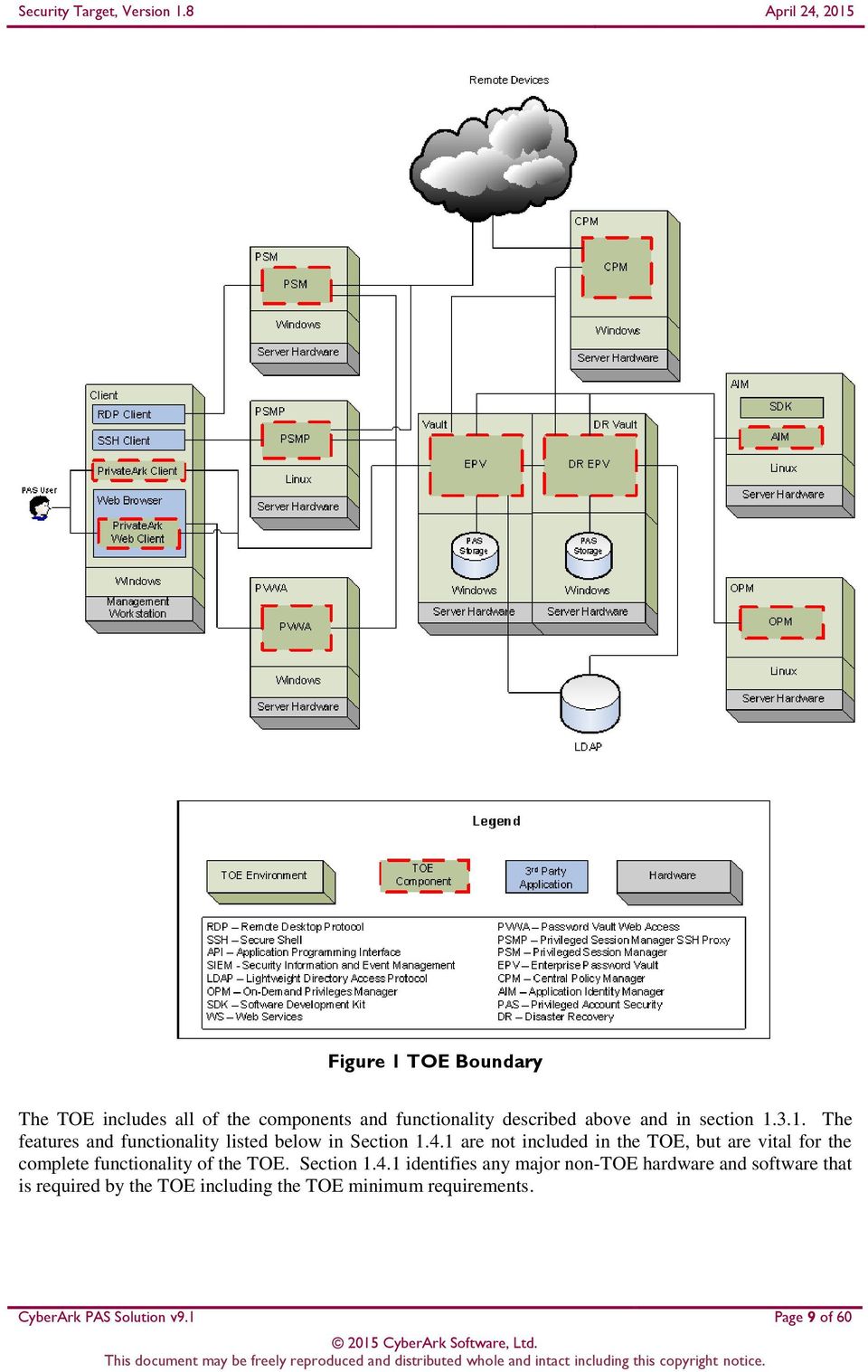
8 1.4 TOE Overview The TOE Overview summarizes the usage and major security features of the TOE. The TOE Overview provides a context for the TOE evaluation by identifying the TOE type, describing the product, and defining the specific evaluated configuration. The TOE is software-based identity management solution for managing privileged accounts in the enterprise. The PAS Solution v9.1 is comprised of multiple standalone software and interfaces modules which enable organizations to secure, provision, control, and monitor all activities associated with enterprise systems and applications. The software components of which the TOE is comprised of are: Enterprise Password Vault PrivateArk Client Privileged Session Manager Privileged Session Manager SSH Proxy Central Policy Manager On-Demand Privileges Manager Application Identity Manager Password Vault Web Access Each component of the TOE and its functionality is described in Section 1.3 (Product Overview) above. TOE components and the TOE boundary are represented in Figure 1 below. CyberArk PAS Solution v9.1 Page 8 of 60

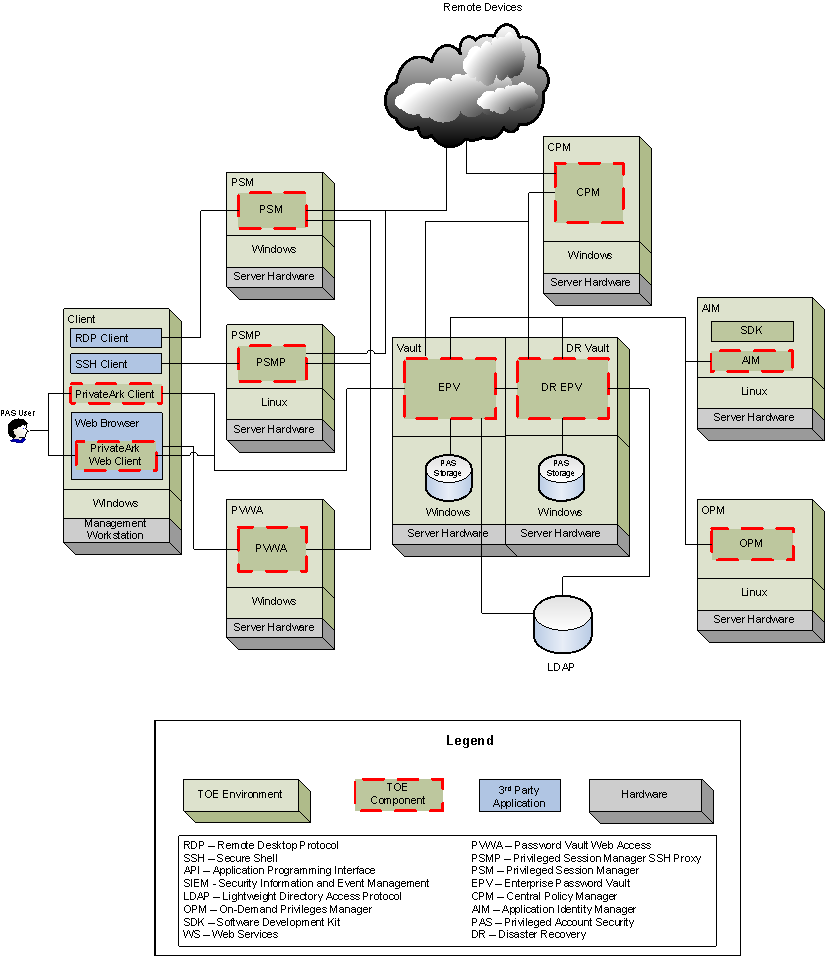
9 Figure 1 TOE Boundary The TOE includes all of the components and functionality described above and in section The features and functionality listed below in Section are not included in the TOE, but are vital for the complete functionality of the TOE. Section identifies any major non-toe hardware and software that is required by the TOE including the TOE minimum requirements. CyberArk PAS Solution v9.1 Page 9 of 60
10 1.4.1 TOE Environment The Enterprise Password Vault is installed on a hardened 16 version of Microsoft Windows Server. Access to and from the Windows server is available to only components of the Privileged Account Security Solution via a proprietary access protocol. Local storage for the password vault is provided by the Windows Server host device hardware. EPV contains its own LDAP client and can access a local LDAP server, which is used for TOE user authentication. Access to the PrivateArk Web Client as well as access to the Password Vault Web Access requires the TOE user to have access to the Internet and a compatible web browser. Compatible web browsers that can be used to access these components are listed in Table 2 below. Access to the PrivateArk Web Client and PVWA also requires that they be installed on a machine with access to the network. A TOE user can access the PSM through a remote desktop client such as Windows Remote Desktop Connection. The client must implement the RDP protocol. Access to the PSMP can be obtained by a TOE user either directly accessing the Linux Shell system or through a third-party Windows Shell application, such as Putty. All other components of the TOE must be installed onto hardware devices running either a Windows or Red Hat Enterprise Linux Operating System (OS). All TOE components require access to the same network in which the EPV was installed order to interact with it. Remote devices wishing to use the PSM, PSMP, or CPM also require access to the network through a secure VPN 17 session. It is assumed that there will be no untrusted users or software on the TOE Server components. Access to the TOE environment OS s must be limited to authorized users and secured with an authentication method. In addition, the TOE Server components are intended to be deployed in a physically secured cabinet, room, or data center with the appropriate level of physical access control and physical protection (e.g. badge access, fire control, locks, alarms, etc.). Table 2 defines the minimum system requirements and supported platforms for installing and accessing the PAS Solution v9.1. Table 2 TOE Minimum Requirements Requirement TOE Hardware Requirements (for all TOE components): Quad Core Processor (Intel) 8 GB 18 RAM 19 2x 80 GB SATA 20 /SAS 21 hot-swappable drives RAID 22 Controller 1Gb 23 Network Adapter 16 Protected by a firewall which only allows remote communications from CyberArk applications via their proprietary communications protocol. 17 VPN Virtual Private Network 18 GB Gigabyte 19 RAM Random Access Memory 20 SATA Serial Advanced Technology Attachment 21 SAS Serially Attached SCSI (Small Computer System Interface) 22 RAID Redundant Array of Independent Disks 23 Gb Gigabit CyberArk PAS Solution v9.1 Page 10 of 60

11 Requirement TOE Operating System Requirements: Windows 2012 R2 - Hardened o EPV Windows 2012 R2 (64-bit) o PSM o PVWA o CPM Red Had Enterprise Linux (RHEL) 5.3 (64-bit) o AIM o OPM o PSMP Operating System (PrivateArk Client): Windows 7 Enterprise SP1 (32 or 64-bit) LDAP Directory: MS 24 Active Directory Browser: Microsoft Internet Explorer 10.0 Prerequisites:.NET Framework 3.5 SP1 Microsoft IIS or later RDP ActiveX Client 5.2 or higher Java Runtime Environment (JRE) 1.4 or higher Adobe Flash Player 10.0 or higher Remote Desktop Services (RDS) Session Host In the evaluated configuration, the EPV, PSM, PVWA, and CPM components are installed on Windows Server 2012 R2. The AIM, OPM, and PSMP components are installed on Red Hat Enterprise Linux 5.3. The PrivateArk Client is installed on Windows 7 Enterprise. The web browser used to access the PVWA is Internet Explorer The authentication server used is Windows 2012 R2 Active Directory Domain Services. 1.5 TOE Description This section primarily addresses the physical and logical components of the TOE included in the evaluation Physical Scope Figure 1 in Section 1.4 illustrates the physical scope and the physical boundary of the overall solution and ties together all of the components of the TOE and the constituents of the TOE Environment. The TOE is a software-only Privileged Account Security solution that runs on both Windows and Linux operating Systems. The Windows and Linux Operating Systems can be installed on any server hardware that meets the hardware criteria listed in Table 2 above. The EPV must be installed on its own, separate Windows server device. Each of the other TOE components are standalone software components and may be in installed onto the same sever appliance or separate server appliances. The servers must have access to the same network on which the EPV is installed. The TOE Boundary includes all the CyberArk developed parts of the Privileged Account Security Solution v9.1 product. Any third-party source code or software that PAS Solution v9.1 has modified is considered 24 MS Microsoft Services 25 IIS Internet Information Services CyberArk PAS Solution v9.1 Page 11 of 60

12 to be TOE Software. The TOE Boundary specifically does not include any of the third party software that the TOE relies upon as described in Section The TOE Boundary also does not include the third-party LDAP server, which stores authentication data for the TOE Guidance Documentation The following guides are required reading and part of the TOE: Privileged Account Security Installation Guide Privileged Account Security End User Guide Privileged Account Security Implementation Guide Privileged Account Security Reference Guide Privileged Account Security System Requirements Privileged Account Security Release Notes Application Identity Management Implementation Guide Logical Scope The logical boundary of the TOE will be broken down into the following security classes which are further described in sections 6 and 7 of this ST. The logical scope also provides the description of the security features of the TOE. The security functional requirements implemented by the TOE are usefully grouped under the following Security Function Classes: Security Audit Cryptographic Support User Data Protection Identification and Authentication Security Management Protection of the TSF 26 Resource Utilization TOE Access Trusted Path/Channel Security Audit The Security Audit function provides the TOE with the functionality of generating audit records. Typical audit records that can be accessed by a user with the correct authorizations include Privileged Account Inventory, Safe Lists, User Lists, and User Activities. As TOE users access, manage, and configure the TOE, their activities are tracked. When an Auditor user (TOE user with the View audit authorization) generates an Activity Log, it will be saved locally. The Auditor will see the various activities performed by TOE users in an organized list. Once an Activity Log has been generated, the results can be filtered with general filters, filters by target system, activities, and history of the activity. Only users with the correct authorizations and permission are capable of accessing the contents of the safe. Unauthorized access, deletion, and modification of the records is not possible Cryptographic Support The TOE implements FIPS Approved cryptographic algorithms to support cryptographic activities such as encryption, decryption, and hashing. The cryptographic module within the TOE generates a unique AES bit key for each individual safe located in the EPV. Additionally, each account and file located within each safe is protected by a unique AES 256-bit key. AES, RSA, and HMAC 28 are all used by the TOE when performing a TLS or SSH session with a remote machine. All AES, RSA, and HMAC keys are generated with an SP DRBG 29, or in some cases, ANSI 30 X TSF TOE Security Functionality 27 AES Advanced Encryption Standard 28 HMAC (keyed-) Hash Message Authentication Code 29 DRBG Deterministic Random Bit Generator CyberArk PAS Solution v9.1 Page 12 of 60

13 Each of the cryptographic algorithms supported by the TOE have been tested and certified by the CAVP 31. Each algorithm has been awarded a certificate number. The TOE performs FIPS Approved methods for encryption, decryption, hashing, random number generation, and key transport. The TOE is responsible for destroying all ephemeral keying material generated within the TOE boundary User Data Protection The TOE enforces two access control policies which limit access to the safes located on the EPV (Vault Access Control Policy) and further limit access to the accounts and files stored within the safes (Safe Access Control Policy). Access to the vault and safes are enforced by user account authorizations and permissions. Once granted access to the EPV, the users with the correct authorizations can manage the vault and the safes within the vault. This includes the creation of safes and the management of file types allowed within each safe. In order for a user to access the contents within a safe, they must be added as a safe member by a safe member with the Manage Safe Members permission. Each safe member is given safe permissions which allow them to read, write, and remove accounts and files located within the safe Identification and Authentication TOE users must provide the correct username and password associated an external LDAP account. The TOE must successfully identify users prior to allowing any actions on their behalf. The TOE identifies the user by passing the username and password combination to the LDAP server for validation Security Management Management of the TOE can be defined as granular. Each TOE user that is granted access to the TOE is provided with a profile which defines the user s access rights, management rights, and action rights within the TOE. When first creating a user in the vault and when providing them access to a safe, the TOE enforces restrictive default values by not providing the user with any authorizations or permissions. Security roles can also be defined for a TOE user based on a collection of vault authorizations and safe permissions given to the user Protection of the TSF The TOE employs a multi-layered encryption scheme in order to protect the credentials stored within the EPV. The three layers of encryption employed by the EPV are the vault layer, safe layer, and account/file layer. All accounts, files, safes, and even the vault itself are encrypted with unique encryption keys. The PAS Solution v9.1 components all communicate with one another through CyberArk s patented communications protocol, which employs AES-256 for confidentiality and HMAC SHA-1 for integrity. The TOE provides seamless switching between the main EPV and a back-up (Disaster Recovery) Vault if a failure to the main EPV occurs Resource Utilization The TOE provides seamless switching between the main EPV and a back-up (Disaster Recovery) Vault if a failure to the main EPV occurs. Types of failures include physical and logical destruction of the EPV (or its host server) or loss of network connectivity. This transparent failover ensures that regular access to the TOE and its functions is maintained TOE Access TOE users attempting to access the TOE through the PVWA or PrivateArk client will encounter a display banner prior to being able to log into the TOE. The banner provides access to an advisory warning 30 ANSI American National Standards Institute 31 CAVP Cryptographic Algorithm Validation Program. CyberArk PAS Solution v9.1 Page 13 of 60

14 message regarding the unauthorized use of the TOE. Access to the TOE will be limited to users that provide the correct username and password combination. Restrictions can be placed on a TOE user which will deny them access to the TOE. Users must actively interact with the TOE in order to avoid session termination. If the user has not interacted with the TOE for 10 minutes via the PVWA, or for an administrator-defined inactivity period (default of 30 minutes) via the PrivateArk Client, the session will terminate and the user will be logged out of the TOE Product Physical/Logical Features and Functionality not included in the TOE Features/Functionality that are not part of the evaluated configuration of the TOE are: Supported Windows Operating Systems other than those listed in Table 2 CyberArk Events Notification Manager AIM Provider for Windows AIM SDK 32 Web Services (WS) API PACLI CyberArk Remote Control Multiple PSM Implementations Multiple CPM Implementations Mobile PVWA Local user authentication NT/Windows Authentication RADIUS Authentication RSA SecurID Authentication (in PVWA) PKI Authentication (Personal Certificate) Oracle SSO 33 (in PVWA) High Availability mode 32 SDK Software Development Kit 33 SSO Single Sign-On CyberArk PAS Solution v9.1 Page 14 of 60

15 2 Conformance Claims Table 3 provides the identification for any CC, Protection Profile (PP), and EAL package conformance claims. Rationale is provided for any extensions or augmentations to the conformance claims. Rationale for CC and PP conformance claims can be found in Section 8.1. Common Criteria (CC) Identification and Conformance PP Identification Evaluation Assurance Level Table 3 CC and PP Conformance Common Criteria for Information Technology Security Evaluation, Version 3.1, Revision 4, September 2012; CC Part 2 extended; CC Part 3 conformant; PP claim (none); Parts 2 and 3 Interpretations of the CEM as of 2014/05/02 were reviewed, and no interpretations apply to the claims made in this ST. None EAL2+ Augmented with Flaw Remediation ALC_FLR.2 CyberArk PAS Solution v9.1 Page 15 of 60

16 3 Security Problem This section describes the security aspects of the environment in which the TOE will be used and the manner in which the TOE is expected to be employed. It provides the statement of the TOE security environment, which identifies and explains all: Known and presumed threats countered by either the TOE or by the security environment Organizational security policies with which the TOE must comply Assumptions about the secure usage of the TOE, including physical, personnel and connectivity aspects 3.1 Threats to Security This section identifies the threats to the IT 34 assets against which protection is required by the TOE or by the security environment. The threat agents are divided into four categories: Attackers who are not TOE users: They have public knowledge of how the TOE operates and are assumed to possess a low skill level, limited resources to alter TOE configuration settings or parameters and no physical access to the TOE. TOE users: They have extensive knowledge of how the TOE operates and are assumed to possess a high skill level, moderate resources to alter TOE configuration settings or parameters and physical access to the TOE. (TOE users are, however, assumed not to be willfully hostile to the TOE.) TOE failure: The threat of the TOE failing in its operations or exhausting its resources which leads to a failure of TOE operations. External IT Entities: External IT entities that are being used by malicious attackers to adversely affect the security of the TOE. Both are assumed to have a low level of motivation. The IT assets requiring protection are the TSF 35 and user data saved on or transitioning through the TOE and the hosts on the protected network. Removal, diminution and mitigation of the threats are through the objectives identified in Section 4 Security Objectives. The threats listed in Table 4 are applicable. Table 4 Threats Name T.ADMIN_ERROR T.AUDIT_COMPROMISE T.DATA_COMPROMISE T.MASQUERADE T.UNAUTHORIZED _ACCESS Description An administrator may incorrectly configure the TOE resulting in ineffective security mechanisms. A malicious user or process may view audit records, cause audit records to be lost or modified, or prevent future records from being recorded, thus masking a user s actions. An unauthorized user may read, modify, delay, or destroy security critical TOE data stored on the TOE or being transmitted between physically separated parts of the TOE. A malicious user, process, or external IT entity may masquerade as an authorized entity to gain unauthorized access to data or TOE resources. A user may gain unauthorized access (view, modify, delete) to user 34 IT Information Technology 35 TSF TOE Security Functionality CyberArk PAS Solution v9.1 Page 16 of 60

17 Name T.UNIDENTIFIED _ACTIONS T.DISASTER Description data. The administrator may fail to notice potential security violations, thus preventing the administrator from taking action against a possible security violation. Operation or access to the TOE may suddenly fail, rendering the TOE useless 3.2 Organizational Security Policies An Organizational Security Policy (OSP) is a set of security rules, procedures, or guidelines imposed by an organization on the operational environment of the TOE. There are no OSPs defined for this ST. 3.3 Assumptions This section describes the security aspects of the intended environment for the evaluated TOE. The operational environment must be managed in accordance with assurance requirement documentation for delivery, operation, and user guidance. Table 5 lists the specific conditions that are required to ensure the security of the TOE and are assumed to exist in an environment where this TOE is employed. Table 5 Assumptions Name A.PHYSICAL A.PROTECT A.TIMESTAMP A.TRUSTED_ADMIN A.HARDEN A.ACCESS A.INSTALL A.INTERNAL_SERVICES Description Physical security, commensurate with the value of the TOE and the data it contains, is assumed to be provided by the environment. The TOE software will be protected from unauthorized modification. The IT environment provides the TOE with the necessary reliable timestamps. TOE Administrators are non-hostile and are trusted to follow and apply all administrator guidance. The EPV component of the TOE will be installed on a hardened instance of Windows Access to the TOE will be provided by a reliable network connection TOE components will be installed onto a compatible Operating System All LDAP and remote systems that the TOE communicates with should be located on the same internal network as the TOE. Users on this network are assumed to be non-hostile. CyberArk PAS Solution v9.1 Page 17 of 60

18 4 Security Objectives Security objectives are concise, abstract statements of the intended solution to the problem defined by the security problem definition (see Section 3). The set of security objectives for a TOE form a high-level solution to the security problem. This high-level solution is divided into two part-wise solutions: the security objectives for the TOE, and the security objectives for the TOE s operational environment. This section identifies the security objectives for the TOE and its supporting environment. 4.1 Security Objectives for the TOE The specific security objectives for the TOE are listed in Table 6. Table 6 Security Objectives for the TOE Name O.ACCESS O.AUDIT O.AUDIT_REVIEW O.AUDIT_STORAGE O.CRYPTO O.USER_AUTHEN O.PROTECT_COMM O.BANNER O.TOE_ADMIN O.ROBUST_ACCESS O.FAIL_SECURE O.VAULT O.PERMISSIONS Description The TOE will ensure that only authorized users may gain access to it and the resources that it controls. The TOE will provide the capability to detect security relevant events and record them to the audit trail. The TOE will provide the capability for only authorized users to view audit information. The TOE will provide a secure method of storing local audit records. The TOE will provide FIPS Approved cryptographic algorithms and procedures to TOE users during operation of the TOE. The TOE will uniquely identify and authenticate users prior to allowing access to TOE functions and data. The TOE will provide protected communication channels for parts of the distributed TOE. The TOE will present an access banner to TOE users prior to accessing the TOE that defines acceptable use of the TOE The TOE will provide mechanisms to ensure that only authorized administrators are able to configure the TOE security functions attributes. The TOE will implement mechanisms that can deny or suspend session establishment The TOE will provide a method to continue secure operations during a catastrophic TOE failure The TOE will provide mechanisms to ensure that stored credentials are not stored in plaintext and are protected from unauthorized access The TOE will provide a method to separate and restrict the abilities of individual TOE users CyberArk PAS Solution v9.1 Page 18 of 60

19 4.2 Security Objectives for the Operational Environment IT Security Objectives The IT security objectives listed in Table 7 are to be satisfied by the environment: Table 7 IT Security Objectives Name OE.PROTECT OE.TIME OE.HARDENED OE.NETWORK OE.OS OE.TRUSTED_ADMIN OE.INTERNAL_SERVICES Description The TOE environment must protect itself and the TOE from external interference or tampering. The TOE environment must provide reliable timestamps to the TOE. The TOE environment must provide a hardened version of Windows for the installation of EPV. The TOE environment must provide a consistent network connection to the TOE. The TOE environment must provide a compatible Windows or Linux Operating System version for the installation of TOE components. Trusted TOE Administrators must follow and apply all administrator and configuration guidance. LDAP servers and remote systems accessed by the TOE are located on the same internal network as the TOE. Users on this network are non-hostile Non-IT Security Objectives The non-it environment security objectives listed in Table 8 are to be satisfied without imposing technical requirements on the TOE. That is, they will not require the implementation of functions in the TOE hardware and/or software. Thus, they will be satisfied largely through application of procedural or administrative measures. Table 8 Non-IT Security Objectives Name NOE.PHYSICAL Description The TOE environment must provide physical security commensurate with the value of the TOE and the data it contains. CyberArk PAS Solution v9.1 Page 19 of 60

20 5 Extended Components This section defines the extended SFRs and extended SARs met by the TOE. These requirements are presented following the conventions identified in Section Extended TOE Security Functional Components This section specifies the extended SFRs for the TOE Class FPT: Protection of the TSF This class contains families of functional requirements that relate to the integrity and management of the mechanisms that constitute the TSF and to the integrity of TSF data FPT_APW_EXT Protection of Stored Credentials Family Behavior The requirements of this family ensure that the TSF will protect credential data from disclosure. This family is not modeled after any families in Common Criteria Part 2. There is only one component in this family, FPT_APW_EXT.1. This component requires the TOE to store credentials in non-plaintext form and to prevent the reading of plaintext credentials. Component Leveling FPT_APW_EXT: Protection of Stored Credentials 1 FPT_APW_EXT.1 Extended: This SFR describes the behavior of the TOE when it must store credentials either credentials for administrative users or credentials for enterprise users. An explicit requirement was required as there is no equivalent requirement in the Common Criteria. This SFR is defined in the Standard Protection Profile for Enterprise Security Management Identity and Credential Management. The SFR was further modified from the Protection Profile to reflect the functionality of the TOE. Management: FPT_APW_EXT.1 a) There are no management activities foreseen. Audit: FPT_APW_EXT.1 a) There are no audit activities foreseen. FPT_APW_EXT.1 Protection of Stored Credentials Hierarchical to: No other components. Dependencies: No other components. FPT_APW_EXT.1.1 The TSF shall store credentials in non-plaintext form FPT_APW_EXT.1.2 The TSF shall prevent the reading of plaintext credentials from unauthorized users. CyberArk PAS Solution v9.1 Page 20 of 60
21 5.2 Extended TOE Security Assurance Components There are no extended TOE Security Assurance Components. CyberArk PAS Solution v9.1 Page 21 of 60
22 6 Security Requirements This section defines the SFRs and SARs met by the TOE. These requirements are presented following the conventions identified in Section Conventions There are several font variations used within this ST. Selected presentation choices are discussed here to aid the Security Target reader. The CC allows for assignment, refinement, selection and iteration operations to be performed on security functional requirements. All of these operations are used within this ST. These operations are performed as described in Part 2 of the CC, and are shown as follows: Completed assignment statements are identified using [italicized text within brackets]. Completed selection statements are identified using [underlined text within brackets]. In keeping with these conventions, in the event an assignment is within a selection, it will be depicted as italicized, underlined text. Refinements are identified using bold text. Any text removed is stricken (Example: TSF Data) and should be considered as a refinement. Extended Functional and Assurance Requirements are identified using _EXT at the end of the short name. Iterations are identified by appending a number in parentheses following the component title. For example, FDP_ACC.1(1) Audit Data Generation would be the first iteration and FDP_ACC.1(2) Audit Data Generation would be the second iteration. 6.2 Security Functional Requirements This section specifies the SFRs for the TOE. This section organizes the SFRs by CC class. Table 9 identifies all SFRs implemented by the TOE and indicates the ST operations performed on each requirement. Table 9 TOE Security Functional Requirements Name Description S A R I FAU_GEN.1 Audit data generation FAU_GEN.2 User Identity Association FAU_SAR.1 Audit review FAU_SAR.2 Restricted audit review FAU_SAR.3 Selectable Audit Review FAU_STG.1 Protected Audit Storage FCS_CKM.1 Cryptographic key generation FCS_CKM.4 Cryptographic key destruction FCS_COP.1 Cryptographic operation FDP_ACC.1(1) Subset access control (Vault) FDP_ACC.1(2) Subset Access Control (Safe) FDP_ACF.1(1) Security attribute based access control (Vault) CyberArk PAS Solution v9.1 Page 22 of 60
23 Name Description S A R I FDP_ACF.1(2) Security attribute based access control (Safe) FIA_UAU.2 User authentication before any action FIA_UID.2 User identification before any action FMT_MOF.1(1) Management of security function behavior (Vault) FMT_MOF.1(2) Management of security function behavior (Safe) FMT_MSA.1(1) Management of security attributes (Vault) FMT_MSA.1(2) Management of security attributes (Safe) FMT_MSA.3(1) Static attribute initialization (Vault) FMT_MSA.3(2) Static attribute initialization (Safe) FMT_SMF.1 Specification of management functions FMT_SMR.1 Security roles FPT_APW_EXT.1 Protection of Stored Credential FPT_FLS.1 Failure with preservation of secure state FPT_ITT.1 Basic Internal TSF Data Transfer Protection FRU_FLT.1 Degraded Fault Tolerance FTA_SSL.3 TSF-Initiated Termination FTA_TAB.1 Default TOE Access Banner FTA_TSE.1 TOE Sessions Establishment Note: S=Selection; A=Assignment; R=Refinement; I=Iteration CyberArk PAS Solution v9.1 Page 23 of 60
24 6.2.1 Class FAU: Security Audit FAU_GEN.1 Audit Data Generation Hierarchical to: No other components. Dependencies: FPT_STM.1 Reliable time stamps FAU_GEN.1.1 The TSF shall be able to generate an audit record of the following auditable events: a) Start-up and shutdown of the audit functions; b) All auditable events, for the [not specified] level of audit; and c) [Privileged account access, approval workflow, privileged account management, privileged account auto-detection, safe management, member management, user login, user/group/location management, Vault system administration, reports management, file access, file management]. FAU_GEN.1.2 The TSF shall record within each audit record at least the following information: a) Date and time of the event, type of event, subject identity (if applicable), and the outcome (success or failure) of the event; and b) For each audit event type, based on the auditable event definitions of the functional components included in the PP/ST, [safe, target system, reason, alert]. Application Note: The TSF is comprised of several components that are registered as Windows services and therefore the start-up and shutdown events are captured in the Windows Event Log. FAU_GEN.2 User identity association Hierarchical to: No other components. Dependencies: FAU_GEN.1 Audit data generation FIA_UID.1 Timing of identification FAU_GEN.2.1 For audit events resulting from actions of identified users, the TSF shall be able to associate each auditable event with the identity of the user that caused the event. FAU_SAR.1 Audit review Hierarchical to: No other components. Dependencies: FAU_GEN.1 Audit data generation FAU_SAR.1.1 The TSF shall provide [users with the View audit safe authorization] with the capability to read [operational reports and audit/compliance reports] from the audit records. FAU_SAR.1.2 The TSF shall provide the audit records in a manner suitable for the user to interpret the information. FAU_SAR.2 Restricted audit review Hierarchical to: No other components. Dependencies: FAU_SAR.1 Audit review FAU_SAR.2.1 The TSF shall prohibit all users read access to the audit records, except those users that have been granted explicit read-access. FAU_SAR.3 Selectable audit review Hierarchical to: No other components. Dependencies: FAU_SAR.1 Audit review FAU_SAR.3.1 CyberArk PAS Solution v9.1 Page 24 of 60
25 The TSF shall provide the ability to apply [filters] of audit data based on [general filters, target systems, activities, and history]. FAU_STG.1 Protected Audit Storage Hierarchical to: No other components. Dependencies: FAU_GEN.1 Audit data generation FAU_STG1.1 The TSF shall protect the stored audit records in the audit trail from unauthorized deletion. FAU_STG1.2 The TSF shall be able to [prevent] unauthorized modifications to the stored audit records in the audit trail. CyberArk PAS Solution v9.1 Page 25 of 60
26 6.2.3 Class FCS: Cryptographic Support FCS_CKM.1 Cryptographic key generation Hierarchical to: No other components. Dependencies: FCS_COP.1 Cryptographic operation FCS_CKM.4 Cryptographic key destruction FCS_CKM.1.1 The TSF shall generate cryptographic keys in accordance with a specified cryptographic key generation algorithm [Hash DRBG, HMAC DRBG, CTR DRBG] and specified cryptographic key sizes [256-bit (AES), 2048-bit (RSA), 160-bit (SHA-1), and 128-bit (HMAC)] that meet the following: [SP ]. FCS_CKM.4 Cryptographic key destruction Hierarchical to: No other components. Dependencies: FCS_CKM.1 Cryptographic key generation FCS_CKM.4.1 The TSF shall destroy cryptographic keys in accordance with a specified cryptographic key destruction method [zeroization] that meets the following: [FIPS zeroization requirements]. FCS_COP.1 Cryptographic operation Hierarchical to: No other components. Dependencies: FCS_CKM.1 Cryptographic key generation FCS_CKM.4 Cryptographic key destruction FCS_COP.1.1 The TSF shall perform [the operations listed in Table 10 below] in accordance with a specified cryptographic algorithm [algorithms listed in Table 10 below] and cryptographic key sizes [key sizes listed in Table 10 below] that meet the following: [standards listed in Table 10 below] Table 10 Cryptographic Algorithms Cryptographic Operation Symmetric encryption/decryption Asymmetric encryption/decryption Cryptographic Operation Key/Digest Size Standard AES-CBC 256-bit FIPS PUB , 1884, 2116, 2234, 2342, 2394, 2484, 2824, 2929 RSA 2048-bit 2048-bit PKCS 36 #1 v , 960, 1086, 1145, 1205, 1273, 1477, 1535 Certificate Number 36 PKCS Public Key Cryptography Standards CyberArk PAS Solution v9.1 Page 26 of 60
27 Cryptographic Operation Cryptographic Operation Key/Digest Size Standard Hashing SHA bit FIPS PUB , 1655, 1840, 1923, 2019, 2056, 2102, 2368, 2465 Message authentication HMAC SHA bit FIPS PUB , 1126, 1288, 1363, 1451, 1485, 1526, 1768, 1856 Random number generation Hash DRBG, HMAC DRBG, CTR DRBG (AES) ANSI X9.31 (AES) N/A NIST SP , 229, 264, 292, 316, 342, 485, bit, 192-bit, 256-bit ANSI X Certificate Number CyberArk PAS Solution v9.1 Page 27 of 60
28 6.2.4 Class FDP: User Data Protection FDP_ACC.1(1) Subset access control (Vault) Hierarchical to: No other components. Dependencies: FDP_ACF.1 Security attribute based access control FDP_ACC.1(1).1 The TSF shall enforce the [Vault Access Control Policy] on [ Subjects: users accessing EPV Objects: safes Operations: view, create]. FDP_ACC.1(2) Subset access control (Safe) Hierarchical to: No other components. Dependencies: FDP_ACF.1 Security attribute based access control FDP_ACC.1(2).1 The TSF shall enforce the [Safe Access Control Policy] on [ Subjects: users accessing an EPV-hosted safe (safe members) Objects: accounts/passwords, files Operations: read, write, and remove]. FDP_ACF.1(1) Security attribute based access control (Vault) Hierarchical to: No other components. Dependencies: FDP_ACC.1 Subset access control FMT_MSA.3(1) Static attribute initialization (Vault) FDP_ACF.1(1).1 The TSF shall enforce the [Vault Access Control Policy] to objects based on the following: [ Subject attributes (users) o User ID o Password o Access type o Authorization o Location o Access time o Vault user account expiration date Object attributes (safes) o Name o File types]. FDP_ACF.1(1).2 The TSF shall enforce the following rules to determine if an operation among controlled subjects and controlled objects is allowed: [ Access to view the safes can be limited to users based on o The IP 37 address (location) which they are accessing the vault from o The time of day that they are accessing the vault from o The expiration date of the account Users with the Add safes authorization can view and create safes from the vault Users with the Manage Server File Categories can view the file types allowed within a safe FDP_ACF.1(1).3 The TSF shall explicitly authorize access of subjects to objects based on the following additional rules: [ 37 IP Internet Protocol CyberArk PAS Solution v9.1 Page 28 of 60
29 Users that supply the correct UserID and password combination and have the correct vault authorizations can view safes in the vault Users with the following access types can view safes in the vault o EPVUser o PVWA o PSM o PSMUser o PSMPServer o CPM o ENE 38 o AIMAccount o AppProvider o OPMProvider o OPMUser o PIMProvider o POCAdmin]. FDP_ACF.1(1).4 The TSF shall explicitly deny access of subjects to objects based on the [ IP address (location) on which they are attempting to access the vault time of day on which they are attempting to access the vault the expiration date of the account when attempting to access the vault]. FDP_ACF.1(2) Security attribute based access control (Safe) Hierarchical to: No other components. Dependencies: FDP_ACC.1 Subset access control FMT_MSA.3(2) Static attribute initialization (Safe) FDP_ACF.1(2).1 The TSF shall enforce the [Safe Access Control Policy] to objects based on the following: [ Subject attributes (safe members) o User ID o Permissions Object attributes (accounts/passwords and files) o account name o value/data o access rules]. FDP_ACF.1(2).2 The TSF shall enforce the following rules to determine if an operation among controlled subjects and controlled objects is allowed: [Users with the permissions listed in the Permissions column of Table 11 can act upon the accounts and their values as stated in the Object Operations (Account Name) and Object Operations (Value/Data) columns in Table 11]. Permission Table 11 Safe Access Control Permissions Object Operations (Account name) Use Accounts Read None Retrieve Accounts Read Read List Accounts Read None Add accounts Read, write, remove None Update password value Read Read, write Object Operations (Value/Data) 38 ENE Event Notification Engine CyberArk PAS Solution v9.1 Page 29 of 60
30 Permission Object Operations (Account name) Update password properties Read None Initiate CPM password management operations Read Object Operations (Value/Data) Read, write Specify next password value Read Read, write Rename Accounts Read, write None Delete Accounts Read, remove None Unlock Accounts Read, write None Manage Safe Read, write, remove None Manage Safe Members Read None Backup Safe Read None Move accounts/folders Read None FDP_ACF.1(2).3 The TSF shall explicitly authorized access of subjects to objects based on the following additional rules: [users must supply the correct UserID and password in order to access the contents of the safe]. FDP_ACF.1(2).4 The TSF shall explicitly deny access of subjects to objects based on the [the UserID and explicit access rules for each account/password given to that UserID]. CyberArk PAS Solution v9.1 Page 30 of 60
31 6.2.5 Class FIA: Identification and Authentication FIA_UAU.2 User authentication before any action Hierarchical to: FIA_UAU.1 Timing of authentication Dependencies: FIA_UID.1 Timing of identification FIA_UAU.2.1 The TSF shall require each user to be successfully authenticated before allowing any other TSFmediated actions on behalf of that user. FIA_UID.2 User identification before any action Hierarchical to: FIA_UID.1 Timing of identification Dependencies: No dependencies FIA_UID.2.1 The TSF shall require each user to be successfully identified before allowing any other TSFmediated actions on behalf of that user. CyberArk PAS Solution v9.1 Page 31 of 60
32 6.2.6 Class FMT: Security Management FMT_MOF.1(1) Management of security function behaviors (Vault) Hierarchical to: No other components. Dependencies: FMT_SMR.1 Security Roles FMT_SMF.1 Specification of Management Functions FMT_MOF.1(1).1 The TSF shall restrict the ability to [determine the behavior of, disable, enable, modify the behavior of] the functions [listed under the Security Functions Behavior Permissions column of Table 12] to [the authorizations listed under the Authorizations column of Table 12]. Table 12 Management of Vault Security Function Behavior by Role Authorizations Add Safes Audit Users Add/Update Users Reset Users Passwords Activate Users Add Network Areas Manage Mapping Directory Manage Server File Categories Backup All Safes Restore All Safes Add safes to the vault Security Function Behavior Permissions Track user activities in the vault Add and update users, manage network areas, manage locations Reset a user s password Activate or deactivate trusted network areas for users Add, update, and remove network areas that specify where the vault can be accessed Add, update, and remove directory maps that manage users transparently Add, update, and remove file categories Run backup procedures Run restore procedures FMT_MOF.1(2) Management of security function behaviors (Safe) Hierarchical to: No other components. Dependencies: FMT_SMR.1 Security Roles FMT_SMF.1 Specification of Management Functions FMT_MOF.1(2).1 The TSF shall restrict the ability to [determine the behavior of, disable, enable, modify the behavior of] the functions [listed under the Security Functions Behavior Permissions column of Table 13] to [the permissions listed under the Permissions column of Table 13]. Table 13 Management of Safe Security Function Behavior by Role Permissions Use Accounts Retrieve Accounts List Accounts Security Function Behavior Permissions Access and use the accounts saved within a safe Access and use the accounts saved within a safe; View the plaintext version of a password associated with the account; Save files to the safe; Open files located in the safe View the accounts and files located on the safe; Cannot access the account or file CyberArk PAS Solution v9.1 Page 32 of 60
33 Permissions Add Accounts Update Password Value Update Properties Password Initiate CPM Password Management Operations Specify Next Password Value Rename Accounts Delete Accounts Unlock Accounts Manage Safe Manage Safe Members Backup Safe View Audit Log View Safe Members Authorize Request Password Access Safe without Confirmation Create Folders Delete Folders Move accounts/folders Security Function Behavior Permissions Add accounts and associated passwords to the safe; Update account properties Change the password associated with an account; Undelete an account; Save files to the safe; Update account properties (does not include password) Initiate password management operations through the CPM includes changing, verifying, and reconciling passwords Specify the next password to be used when the CPM changes the password value Rename existing accounts in the safe Remove existing accounts in the safe Unlock existing accounts and files in the safe Update, recover, and remove a safe from the vault Add, remove, and update members of the safe; Manage account permissions Create a backup of a safe and its contents View account and user activity in the safe; Does not have permissions to view or use accounts View members of the safe and their permissions Give confirmation to a user requesting access to the safe; View the accounts and files located on the safe; Access a safe without being a member of the safe and no need to request permission Create folders on the safe Delete folders on the safe Move accounts and folders in the safe FMT_MSA.1(1) Management of security attributes (Vault) Hierarchical to: No other components. Dependencies: FDP_ACC.1 Subset access control FMT_SMF.1 Specification of management functions FMT_SMR.1 Security roles FMT_MSA.1(1).1 The TSF shall enforce the [Vault Access Control Policy] to restrict the ability to [selection: query, modify, delete, create] the security attributes [security attribute listed in the Attributes column of Table 14] to [the users with the authorizations listed in the Authorizations column of Table 14]. CyberArk PAS Solution v9.1 Page 33 of 60
34 Table 14 Management of Vault Security Attributes Operation Attributes Authorizations Query UserID Audit Users Access type Add/Update Users Authorization Location Access time Account expiration date Modify Password Audit Users Account expiration date Reset Users Passwords Activate Users Modify Access type Add/Update Users Authorization Access time Account expiration date Modify Location Add Network Areas Modify Safe file type Manager Server File Categories Delete UserID Add/Update Users Create Safe name Add Safes FMT_MSA.1(2) Management of security attributes (Safe) Hierarchical to: No other components. Dependencies: FDP_ACC.1 Subset access control FMT_SMF.1 Specification of management functions FMT_SMR.1 Security roles FMT_MSA.1(2).1 The TSF shall enforce the [Safe Access Control Policy] to restrict the ability to [selection: query, modify, delete, create] the security attributes [security attribute listed in the Attributes column of Table 15] to [the users with the permissions listed in the Permissions column of Table 15]. CyberArk PAS Solution v9.1 Page 34 of 60
35 Table 15 Management of Safe Security Attributes Operation Attributes Permissions Query User ID Manage Safe Members User Permissions View Safe Members Query Account name Use Accounts Retrieve Accounts List Accounts Add Accounts Update Password Value Update Password Properties Initiate CPM Password Management Operations Rename Accounts Delete Accounts Unlock Accounts Move Accounts/Folders Query Value/Data Retrieve Accounts Update Password Value Initiate CPM Password Management Operations Query/Modify Permissions Manage Safe Members Access rules Modify Account name Rename Accounts Modify Value/Data Update Password Value Initiate CPM Password Management Operations Delete Account name Delete Accounts Value/Data Manage Safe Delete User ID Manage Safe Members Create User ID Manage Safe Members Create Account name Add Accounts Create Value/Data Add Accounts Specify Next Password Value Create Access rules Manage Safe Members CyberArk PAS Solution v9.1 Page 35 of 60
36 FMT_MSA.3(1) Static attribute initialization (Vault) Hierarchical to: No other components. Dependencies: FMT_MSA.1(1) Management of security attributes (Vault) FMT_SMR.1 Security roles FMT_MSA.3(1).1 The TSF shall enforce the [Vault Access Control Policy] to provide [restrictive] default values for security attributes that are used to enforce the SFP 39. FMT_MSA.3(1).2 The TSF shall allow users with the [Add Safe authorization] to specify alternative initial values to override the default values when an object or information is created. FMT_MSA.3(2) Static attribute initialization (Safe) Hierarchical to: No other components. Dependencies: FMT_MSA.1(2) Management of security attributes (Safe) FMT_SMR.1 Security roles FMT_MSA.3(2).1 The TSF shall enforce the [Safe Access Control Policy] to provide [restrictive] default values for security attributes that are used to enforce the SFP. FMT_MSA.3(2).2 The TSF shall allow users with the [Manage Safe permission] to specify alternative initial values to override the default values when an object or information is created. FMT_SMF.1 Specification of Management Functions Hierarchical to: No other components. Dependencies: No Dependencies FMT_SMF.1.1 The TSF shall be capable of performing the following management functions: [User management, authentication management, access control management, audit log management, vault management, configuration management, safe management, account management, file management]. FMT_SMR.1 Security roles Hierarchical to: No other components. Dependencies: FIA_UID.1 Timing of identification FMT_SMR.1.1 The TSF shall maintain the roles [custom roles with administrator-defined permissions]. FMT_SMR.1.2 The TSF shall be able to associate users with roles. 39 SFP Security Functional Policy CyberArk PAS Solution v9.1 Page 36 of 60
37 6.2.7 Class FPT: Protection of the TSF FPT_APW_EXT.1 Protection of Stored Credentials Hierarchical to: No other components. Dependencies: No other components. FPT_APW_EXT.1.1 The TSF shall store credentials in non-plaintext form FPT_APW_EXT.1.2 The TSF shall prevent the reading of plaintext credentials from unauthorized users. FPT_FLS.1 Failure with preservation of secure state Hierarchical to: No other components. Dependencies: No other components. FPT_FLS.1.1 The TSF shall preserve a secure state when the following types of failures occur: [ Destruction of the vault (physical or logical) Loss in network connectivity]. FPT_ITT.1 Basic Internal TSF Data Transfer Protection Hierarchical to: No other components. Dependencies: No other components. FPT_ITT.1.1 The TSF shall protect TSF data from [disclosure, modification] when it is transmitted between separate parts of the TOE. CyberArk PAS Solution v9.1 Page 37 of 60
38 6.2.8 Class FRU: Resource Utilization FRU_FLT.1 Degraded Fault Tolerance Hierarchical to: No other components. Dependencies: FPT_FLS.1 Failure with preservation of secure state FPT_FLT.1.1 The TSF shall ensure the operation of [access to the EPV, its safes, and the accounts and files within the safes] when the following failures occur: [ Destruction of the vault (physical or logical) Loss in network connectivity]. CyberArk PAS Solution v9.1 Page 38 of 60
39 6.2.9 Class FTA: TOE Access FTA_SSL.3 TSF-Initiated Termination Hierarchical to: No other components. Dependencies: No other components. FTA_SSL.3.1 The TSF shall terminate an interactive session after: For the PrivateArk Client: [a default period of 30 minutes of inactivity or an administrator-defined period of inactivity]; For the PVWA Interface: [a non-configurable period of 10 minutes of inactivity]. FTA_TAB.1 Default TOE Access Banners Hierarchical to: No other components. Dependencies: No other components. FTA_TAB.1.1 Before establishing a user session, the TSF shall display an advisory warning message regarding unauthorized use of the TOE. FTA_TSE.1 TOE Session Establishment Hierarchical to: No other components. Dependencies: No other components. FTA_TSE.1.1 The TSF shall be able to deny session establishment based on [ Incorrect User ID Incorrect Password Attempting to access the TOE through an interface while having the incorrect access type Location (IP Address) of attempted session establishment Account expiration date] CyberArk PAS Solution v9.1 Page 39 of 60
40 6.3 Security Assurance Requirements This section defines the assurance requirements for the TOE. Assurance requirements listed in Table 16 are taken from the CC Part 3 and are EAL2 augmented with ALC_FLR.2. Table 16 EAL2 Assurance Requirements Class ASE: Security Target evaluation Class ALC : Life Cycle Support Class ADV: Development Assurance Requirements ASE_CCL.1 Conformance claims ASE_ECD.1 Extended components definition ASE_INT.1 ST introduction ASE_OBJ.2 Security objectives ASE_REQ.2 Derived security requirements ASE_SPD.1 Security problem definition ASE_TSS.1 TOE summary specification ALC_CMC.2 Use of a CM system ALC_CMS.2 Parts of the TOE CM Coverage ALC_DEL.1 Delivery procedures ALC_FLR.2 Flaw reporting procedures ADV_ARC.1 Security architecture description ADV_FSP.2 Security-enforcing functional specification Class AGD: Guidance documents Class ATE: Tests Class AVA: Vulnerability assessment ADV_TDS.1 Basic design AGD_OPE.1 Operational user guidance AGD_PRE.1 Preparative procedures ATE_COV.1 Evidence of coverage ATE_FUN.1 Functional testing ATE_IND.2 Independent testing sample AVA_VAN.2 Vulnerability analysis CyberArk PAS Solution v9.1 Page 40 of 60
41 7 TOE Summary Specification This section presents information to detail how the TOE meets the functional requirements described in previous sections of this ST. [If ASE_TSS.2 is found to apply to the evaluation, provide a description of how TOE protects itself against interference and logical tampering, and bypass.] 7.1 TOE Security Functions Each of the security requirements and the associated descriptions correspond to the security functions. Hence, each function is described by how it specifically satisfies each of its related requirements. This serves to both describe the security functions and rationalize that the security functions satisfy the necessary requirements. Table 17 lists all SFRs claimed within this Security Target. Table 17 Mapping of TOE Security Functions to Security Functional Requirements TOE Security Functionality SFR ID Description Security Audit FAU_GEN.1 Audit data generation FAU_GEN.2 FAU_SAR.1 FAU_SAR.2 FAU_SAR.3 FAU_STG.1 User Identity Association Audit review Restricted audit review Selectable Audit Review Protected Audit Storage Cryptographic Support FCS_CKM.1 Cryptographic key generation FCS_CKM.4 FCS_COP.1 Cryptographic key destruction Cryptographic operation User Data Protection FDP_ACC.1(1) Subset access control (Vault) FDP_ACC.1(2) FDP_ACF.1(1) FDP_ACF.1(2) Subset Access Control (Safe) Security attribute based access control (Vault) Security attribute based access control (Safe) Identification and Authentication FIA_UAU.2 User authentication before any action FIA_UID.2 User identification before any action Security Management FMT_MOF.1(1) Management of security function behavior (Vault) FMT_MOF.1(2) FMT_MSA.1(1) FMT_MSA.1(2) Management of security function behavior (Safe) Management of security attributes (Vault) Management of security attributes CyberArk PAS Solution v9.1 Page 41 of 60
42 TOE Security Functionality SFR ID Description (Safe) FMT_MSA.3(1) Static attribute initialization (Vault) FMT_MSA.3(2) Static attribute initialization (Safe) FMT_SMF.1 Specification of management functions FMT_SMR.1 Security roles Protection of the TSF FPT_APW_EXT.1 Protection of Stored Credential FPT_FLS.1 Failure with preservation of secure state FPT_ITT.1 Basic Internal TSF Data Transfer Protection Resource Utilization FRU_FLT.1 Degraded Fault Tolerance TOE Access FTA_SSL.3 TSF-Initiated Termination FTA_TAB.1 FTA_TSE.1 Default TOE Access Banner TOE Sessions Establishment Security Audit The Security Audit function provides the TOE with the functionality of generating audit records. Typical audit records that can be accessed by a user with the correct authorizations include Privileged Account Inventory, Safe Lists, User Lists, and User Activities. As TOE users access, manage, and configure the TOE, their activities are tracked. When an Auditor user (TOE user with the View audit authorization) generates an Activity Log, the Auditor will see the various activities performed by TOE users in an organized list. The audit list contains the columns and information listed in Table 18. Table 18 Audit Record Contents Time Field Content The time the activity was performed User Action Safe Target (The date and time are displayed in the time zone of the EPV) The full name of the user who performed the activity The activity performed by the user The safe where the privileged account is stored The privileged account that was used in the activity Target Platform The unique ID of the platform that was allocated to the privileged account used in the activity. Target System The remote system where the privileged account was used. CyberArk PAS Solution v9.1 Page 42 of 60
43 Field Content Target Account The name of the target account where the privileged account was used. New Target Reason Alert Request ID Client ID The new location/name of an account on which the activity was performed and extra details about the activity that was performed. The reason given by the user for performing the activity An indication that this activity prompted an alert The unique ID of the request that was created in order to retrieve the privileged account used in the activity The unique ID of the client used in the activity Furthermore, once an Activity Log has been generated, the results can be filtered with general filters, filters by target system, activities, and history of the activity. Each item listed in Table 18 above can be individually filtered. A filter can be placed on each individual action taken by the TOE user. Those actions include: privileged account access, approval workflow, privileged account management, privileged account auto-detection, safe management, member management, user login, user/group/location management, vault system administration, reports management, file access, and file management When an audit record is requested, it will be generated by the TOE and stored on the local host server within a reports safe dedicated for audit records. Only users with the correct authorizations and permission are capable of accessing the contents of the safe. The records safe and its contents are secured by the EPV by individual encryption keys. Each individual file is encrypted with its own, unique encryption key. Then the records safe is encrypted with its own, unique encryption key. This will prevent any unauthorized access, deletion, or modification to the records. The start-up and shut down events of the TOE are provided with the support of the TOE environment. Each TOE component is registered as an OS service. Upon start-up and shutdown, events are stored in the OS event logs. These logs are viewed by authorized administrators using the appropriate tools. TOE Security Functional Requirements Satisfied: FAU_GEN.1, FAU_GEN.2, FAU_SAR.1, FAU_SAR.2, FAU_SAR.3, FAU_STG Cryptographic Support The TOE implements FIPS Approved cryptographic algorithms to support cryptographic functionality such as encryption, decryption, and hashing. The cryptographic module within the TOE generates a unique AES 256-bit key for each individual safe located in the EPV. Additionally each account and file located within each safe is protected by a unique AES 256-bit key. AES, RSA, and HMAC are all CyberArk PAS Solution v9.1 Page 43 of 60
44 used by the TOE when performing a TLS or SSH session with a remote machine. All AES, RSA, and HMAC keys are generated either with an SP DRBG, or with the ANSI X9.31 RNG 40. Each of the cryptographic algorithms supported by the TOE have been tested and certified by the CAVP 41. Each algorithm has been awarded a certificate number. Table 10 above lists each algorithm in use by the TOE and their associated algorithm certificate. The TOE is responsible for destroying all ephemeral keying material generated within the TOE boundary. The TOE uses FIPS Approved zeroization methods in order to destroy all keys and other critical parameters generated by the TOE at the appropriate time. TOE Security Functional Requirements Satisfied: FCS_CKM.1, FCS_CKM.4, FCS_COP User Data Protection The TOE provides the User Data Protection security function to manage user access and interaction with safes and accounts stored on the EPV. The TOE enforces two access control policies which limit access to the safes located on the EPV (Vault Access Control Policy) and further limit access to the accounts and files stored within the safes (Safe Access Control Policy). Access to the vault and safes are enforced by user account authorizations and permissions. An operator attempting to access the EPV or Safes with the incorrect authorizations and permissions will be denied access. Operators can access the safe through one of the many TOE component interfaces including: PrivateArk Client and Web Client, PVWA, PSM, PSMP, CPM, AIM, and OPM. Access to the EPV through these interfaces requires the correct access type associated with each TOE user. Once granted access to the EPV, the users with the correct authorizations can manage the vault and the safes within the vault. This includes the creation of safes and the management of file types allowed within each safe. TOE users can be denied access to the vault if they are attempting to access the vault from an interface in which they do not have the correct access type for. Additionally, vault access can be limited to TOE user based on the time of day, location of access, or account expiration date. In order for a user to access the contents within a safe, they must be added as a safe member by a safe member with the Manage Safe Members permission. Each safe member is given safe permissions which allow them to read, write, and remove accounts and files located within the safe. Some safe members will be allowed to view detailed account information while others may only be able to run an audit report on the safe. Users can be denied access to specific accounts and files located within a safe based on the access rules given to an account or file. TOE Security Functional Requirements Satisfied: FDP_ACC.1(1), FPD_ACC.1(2), FDP_ACF.1(1), FDP_ACF.1(2) Identification and Authentication TOE users must provide the correct username and password associated with an external LDAP account. The TOE must successfully identify and authenticate a user prior to allowing any actions on their behalf. The TOE identifies and authenticates the user by passing the username and password combination to the LDAP server for validation. TOE Security Functional Requirements Satisfied: FIA_UAU.2, FIA_UID.2 40 RNG Random Number Generator 41 CAVP Cryptographic Algorithm Validation Program. CyberArk PAS Solution v9.1 Page 44 of 60
45 7.1.5 Security Management Management of the TOE can be defined as granular. Each TOE user that is granted access to the TOE is provided with a profile, which defines the user s access rights, management rights, and action rights within the TOE. Within the EPV, a list of authorizations provided to each user defines the actions that they can take within the vault. Further, within each safe, a safe member is granted a list of permissions which controls how they can interact with the accounts and files within the safe. When first creating a user in the vault and when providing them access to a safe, the TOE enforces restrictive default values by not providing the user with any authorizations or permissions. Authorizations are added by the TOE user creating the new user within the EPV and permissions are given to the new user when adding them as a safe member to one or many safes. Due to the granular control of TOE user authorizations and permissions, the TOE does not inherently define security roles. The TOE defines restrictive default values for the Vault Access Control Policy and Safe Access Control Policy. Only users explicitly granted permissions have access to safes and account/password files. TOE Security Functional Requirements Satisfied: FMT_MOF.1(1), FMT_MOF.1(2), FMT_MSA.1(1), FMT_MSA.1(2), FMT_MSA.3(1), FMT_MSA.3(2), FMT_SMF.1, FMT_SMR Protection of the TSF The TOE employs a multi-layered encryption scheme in order to protect the credentials stored within the EPV. The three layers of encryption employed by the EPV are the vault layer, safe layer, and account/file layer. All accounts, files, safes, and even the vault itself are encrypted with unique encryption keys. Each account and file stored within a safe is encrypted with its own file encryption key. Each safe is encrypted with its own safe key. Then the vault itself is encrypted with a vault key. Each key is stored within the vault in its own safe, providing further protection of the encryption keys. Access to the plaintext version of the credentials stored within a vault is limited to the authorized users of the safe with the Retrieve Accounts safe privilege. The TOE provides a trusted internal channel for all components of the TOE. The TOE utilizes a patented communications protocol developed by CyberArk, which employs AES-256 for confidentiality and HMAC SHA-1 for integrity. The TOE components all communicate with one another through a variety of ports which ensures that all of their communication is secure and logically separate. The TOE provides seamless switching between the main EPV and a back-up (Disaster Recovery) Vault if a failure to the main EPV occurs. Types of failures include physical and logical destruction of the EPV (or its host server) or loss of network connectivity. This transparent failover preserves a secure state of the TOE. TOE Security Functional Requirements Satisfied: FPT_APW_EXT.1, FPT_FLS.1, FPT_ITT Resource Utilization The TOE provides seamless switching between the main EPV and a back-up (Disaster Recovery) Vault if a failure to the main EPV occurs. Types of failures include physical and logical destruction of the EPV (or its host server) or loss of network connectivity. This transparent failover ensures that regular access to the TOE and its functions is maintained. TOE Security Functional Requirements Satisfied: FRU_FLT.1. CyberArk PAS Solution v9.1 Page 45 of 60
46 7.1.8 TOE Access TOE users attempting to access the TOE through the PVWA or PrivateArk client will encounter a display banner prior to being able to log into the TOE. The banner provides access to an advisory warning message regarding the unauthorized use of the TOE. Access to the TOE will be limited to users that provide the correct username and password combination. Restrictions can be placed on a TOE user, which will deny them access to the TOE. The location from which a TOE user is attempting to access the TOE can be used to limit access to the TOE. Administrators can also place an account expiration date onto a user account. Once the account has expired, the user will not be allowed to access the TOE. Lastly, if the user does not have the correct access type to access the TOE from a given interface, they will be denied access to the TOE. Users must actively interact with the TOE in order to avoid session termination. If the user account has not interacted with the TOE for 10 minutes via the PVWA, or for an administrator-defined inactivity period (default of 30 minutes) via the PrivateArk Client, the session will terminate and the user will be logged out of the TOE. The user must proceed with the login process in order to regain access to the TOE. TOE Security Functional Requirements Satisfied: FTA_SSL.3. FTA_TAB.1, FTA_TSE.1 CyberArk PAS Solution v9.1 Page 46 of 60
47 8 Rationale 8.1 Conformance Claims Rationale This Security Target conforms to Part 2 extended and Part 3 conformant of the Common Criteria Standard for Information Technology Security Evaluations, Version 3.1 Revision 3. This ST does not conform to a PP. 8.2 Security Objectives Rationale This section provides a rationale for the existence of each threat, policy statement, and assumption that compose the Security Target. Sections and demonstrate the mappings between the threats, policies, and assumptions to the security objectives are complete. The following discussion provides detailed evidence of coverage for each threat, policy, and assumption Security Objectives Rationale Relating to Threats Table 19 maps all threats to all objectives. Table 19 Threats: Objectives Mapping Threats Objectives Rationale T.ADMIN_ERROR An administrator may incorrectly configure the TOE resulting in ineffective security mechanisms. T.AUDIT_COMPROMISE A malicious user or process may view audit records, cause audit records to be lost or modified, or prevent future records from being recorded, thus masking a user s actions. T.DATA_COMPROMISE An unauthorized user may read, modify, delay, or destroy security critical TOE data stored on the TOE or being transmitted between physically separated parts of the TOE. OE.TRUSTED_ADMIN Trusted TOE Administrators must follow and apply all administrator and configuration guidance. O.AUDIT The TOE will provide the capability to detect security relevant events and record them to the audit trail. O.AUDIT_STORAGE The TOE will provide a secure method of storing local audit records. O.CRYPTO The TOE will provide FIPS Approved cryptographic algorithms and procedures to TOE users during operation of the TOE. O.PROTECT_COMM The TOE will provide protected communication channels for parts of the distributed TOE. O.TOE_ADMIN The TOE will provide mechanisms to ensure that only authorized OE.TRUSTED_ADMIN counters this threat by ensuring that administrators follow all administrative guidance. O.AUDIT counters this threat by ensuring that unauthorized attempts to access the TOE are recorded. O.AUDIT_STORAGE counters this threat by ensuring that only authorized users are allowed to access stored audit records, and that audit records are encrypted within local storage. O.CRYPTO counters this threat by providing encryption services available to authorized users and/or user applications. O.PROTECT_COMM counters this threat by providing protected communication channels for parts of the distributed TOE. O.TOE_ADMIN counters this threat by ensuring that only trusted administrators are able to CyberArk PAS Solution v9.1 Page 47 of 60
48 Threats Objectives Rationale T.MASQUERADE A malicious user, process, or external IT entity may masquerade as an authorized entity to gain unauthorized access to data or TOE resources. T.UNAUTHORIZED _ACCESS A user may gain unauthorized access (view, modify, delete) to user data. T.UNIDENTIFIED _ACTIONS The administrator may fail to notice potential security violations, thus preventing the administrator from taking action against a possible security violation. T.DISASTER Operation or access to the TOE may suddenly fail, rendering the TOE useless administrators are able to configure the TOE security functions attributes. O.VAULT The TOE will provide mechanisms to ensure that stored credentials are not stored in plaintext and are protected from unauthorized access O.USER_AUTHEN The TOE will uniquely identify and authenticate users prior to allowing access to TOE functions and data. O.BANNER The TOE will present an access banner to TOE users prior to accessing the TOE that defines acceptable use of the TOE O.ACCESS The TOE will ensure that only authorized users may gain access to it and the resources that it controls. O.ROBUST_ACCESS The TOE will implement mechanisms that can deny or suspend session establishment O.PERMISSIONS The TOE will provide a method to separate and restrict the abilities of individual TOE users O.AUDIT_REVIEW The TOE will provide the capability for only authorized users to view audit information. O.FAIL_SECURE The TOE will provide a method to continue secure operations during a catastrophic TOE failure change the security functions and attributes stored on the TOE. O.VAULT counters this threat by encrypting all stored credentials. O.USER_AUTHEN counters this threat by ensuring that the TOE is able to identify and authenticate users prior to allowing access to TOE administrative functions and data. O.BANNER counters this threat by providing a warning message to users about unauthorized use of the TOE prior to logging in. O.ACCESS counters this threat by ensuring that users gain only authorized access to it and to resources that it controls. O.ROBUST_ACCESS counters this threat by ensuring only authorized users are allowed to connect to the TOE. O.ROBUST_ACCESS counters this threat by automatically closing inactive sessions. O.PERMISSIONS counters this threat by assigning users different permissions which relate to the data which they are allowed to access. O.AUDIT_REVIEW counters this threat by providing the capability for only authorized administrators to view audit information. O.FAIL_SECURE counters this threat by providing a seamless transition to a working version of the TOE. CyberArk PAS Solution v9.1 Page 48 of 60
49 Every Threat is mapped to one or more Objectives in the table above. demonstrates that the defined security objectives counter all defined threats. This complete mapping Security Objectives Rationale Relating to Assumptions Table 20 maps all assumptions to environmental objectives. Table 20 Assumptions: Objectives Mapping Assumptions Objectives Rationale A.PHYSICAL Physical security, commensurate with the value of the TOE and the data it contains, is assumed to be provided by the environment. A.PROTECT The TOE software will be protected from unauthorized modification. A.TIMESTAMP The IT environment provides the TOE with the necessary reliable timestamps. A.TRUSTED_ADMIN TOE Administrators are nonhostile and are trusted to follow and apply all administrator guidance. A.HARDEN The EPV component of the TOE will be installed on a hardened instance of Windows A.ACCESS Access to the TOE will be provided by a reliable network connection A.INSTALL TOE components will be installed onto a compatible Operating System A.INTERNAL_SERVICES All LDAP and remote systems that the TOE communicates with should be located on the same NOE.PHYSICAL The TOE environment must provide physical security commensurate with the value of the TOE and the data it contains. OE.PROTECT The TOE environment must protect itself and the TOE from external interference or tampering. OE.TIME The TOE environment must provide reliable timestamps to the TOE. OE.TRUSTED_ADMIN Trusted TOE Administrators must follow and apply all administrator and configuration guidance. OE.HARDENED The TOE environment must provide a hardened version of Windows for the installation of EPV. OE.NETWORK The TOE environment must provide a consistent network connection to the TOE. OE.OS The TOE environment must provide a compatible Windows or Linux Operating System version for the installation of TOE components. OE.INTERNAL_SERVICES LDAP servers and remote systems accessed by the TOE are located on the same internal NOE.PHYSICAL satisfies the assumption by ensuring that the TOE environment provides physical security commensurate with the value of the TOE and the data it contains. OE.PROTECT satisfies the assumption by performing integrity checks to ensure external interference or tampering has not occurred. OE.TIME satisfies the assumption by providing reliable timestamps provided by the TOE environment hardware clock. OE.TRUSTED_ADMIN satisfies the assumption by ensuring that only trusted administrators follow and apply all administrator guidance. OE.HARDENED satisfies the assumption by ensuring a hardened version of Windows is provided for the installation of the EPV. OE.NETWORK satisfies the assumption by ensuring a consistent network connection to the TOE will always be provided. OE.OS satisfies the assumption by ensuring that a compatible Window or Linux Operating System will be provided for the installation of TOE components. OE.INTERNAL_SERVICES satisfies this assumption by ensuring that LDAP and remote systems accessed by the TOE are CyberArk PAS Solution v9.1 Page 49 of 60
50 Assumptions Objectives Rationale internal network as the TOE. Users on this network are assumed to be non-hostile. network as the TOE. Users on this network are non-hostile. located within the same internal network as the TOE. Users on this network are non-hostile. Every assumption is mapped to one or more Objectives in the table above. This complete mapping demonstrates that the defined security objectives uphold all defined assumptions. 8.3 Rationale for Extended Security Functional Requirements Two extended SFRs were created to support the advanced functionality of the PAS Solution. FPT_APW was created to specifically address the non-plaintext storage of user credentials on the TOE. The CC Part 2 FPT SFRs do not cover the non-plaintext storage of user credentials. In this case, all user credentials are being stored on the TOE in encrypted form. As a result, the FPT SFRs do not apply. The purpose of this extended requirement is to describe the secure, encrypted storage of user credentials on the TOE. This requirement exhibits functionality that can be easily documented in the ADV assurance evidence and thus does not require any additional Assurance Documentation. 8.4 Rationale for Extended TOE Security Assurance Requirements There are no Extended SARs defined for this ST. 8.5 Security Requirements Rationale The following discussion provides detailed evidence of coverage for each security objective Rationale for Security Functional Requirements of the TOE Objectives Table 21 maps all objects to SFRs. Objective O.ACCESS The TOE will ensure that only authorized users may gain access to it and the resources that it controls. Table 21 Objectives: SFRs Mapping Requirements Addressing the Objective FDP_ACC.1(1) Subset access control (Vault) Rationale The requirement meets the objective by enforcing the Vault Access Control Policy on all subjects and all named objects and all operations among them. The policy specifies the access rules between all subjects and all named objects controlled by the TOE. While authorized users are CyberArk PAS Solution v9.1 Page 50 of 60
51 Objective O.AUDIT The TOE will provide the capability to detect security relevant events and record them to the audit trail. Requirements Addressing the Objective FDP_ACC.1(2) Subset Access Control (Safe) FDP_ACF.1(1) Security attribute based access control (Vault) FDP_ACF.1(2) Security attribute based access control (Safe) FAU_GEN.1 Audit data generation FAU_GEN.2 User Identity Association Rationale trusted to some extent, this requirement ensures only authorized access is allowed to named objects. The requirement meets the objective by enforcing the Safe Access Control Policy on all subjects and all named objects and all operations among them. The policy specifies the access rules between all subjects and all named objects controlled by the TOE. While authorized users are trusted to some extent, this requirement ensures only authorized access is allowed to named objects. The requirement meets the objective by specifying the Vault Access Control Policy rules that will be enforced by the TSF and determines if an operation among subjects and named objects is allowed. Furthermore, it specifies the rules to explicitly authorize or deny access to a named object based upon security attributes. The requirement meets the objective by specifying the Safe Access Control Policy rules that will be enforced by the TSF and determines if an operation among subjects and named objects is allowed. Furthermore, it specifies the rules to explicitly authorize or deny access to a named object based upon security attributes. The requirement meets this objective by ensuring that the TOE maintains a record of defined events, including relevant details about the event. The requirement meets the objective by ensuring that the TOE associates each auditable event with the identity of the user that caused the event. O.AUDIT_REVIEW FAU_SAR.2 The requirement meets the CyberArk PAS Solution v9.1 Page 51 of 60
52 Objective The TOE will provide the capability for only authorized users to view audit information. O.AUDIT_STORAGE The TOE will provide a secure method of storing local audit records. O.CRYPTO The TOE will provide FIPS Approved cryptographic algorithms and procedures to TOE users during operation of the TOE. O.USER_AUTHEN The TOE will uniquely identify and authenticate users prior to allowing access to TOE functions and data. O.PROTECT_COMM The TOE will provide protected communication channels for parts of the distributed TOE. Requirements Addressing the Objective Restricted audit review FAU_SAR.1 Audit review FAU_SAR.3 Selectable Audit Review FAU_STG.1 Protected Audit Storage FCS_CKM.1 Cryptographic key generation FCS_CKM.4 Cryptographic key destruction FCS_COP.1 Cryptographic operation FIA_UAU.2 User authentication before any action FIA_UID.2 User identification before any action FPT_ITT.1 Basic Internal TSF Data Transfer Protection Rationale objective by ensuring that only authorized users are able to review logs. The requirement meets the objective by ensuring that the TOE provides the ability to review logs. The requirement meets the objective by ensuring the TOE provides an organized method to review audit records The requirement meets the objective by ensuring that only authorized users are allowed to access stored audit records, and by encrypting stored audit records. The requirement meets the objective by ensuring that the TOE can generate FIPS-Approved cryptographic keys for use during cryptographic operations. The requirement meets the objective by ensuring that the TOE destroys cryptographic keys when no longer in use using FIPS- Approved methods The requirement meets the objective by ensuring that the TOE provides FIPS-Approved confidentiality and integrity services for the TOE. The requirement meets the objective by ensuring that every user is authenticated before the TOE performs any TSF-mediated actions on behalf of that user. The requirement meets the objective by ensuring that every user is identified before the TOE performs any TSF-mediated actions on behalf of that user. The requirement meets the objective by protecting data being transferred between TOE components from disclosure and CyberArk PAS Solution v9.1 Page 52 of 60
53 Objective O.BANNER The TOE will present an access banner to TOE users prior to accessing the TOE that defines acceptable use of the TOE O.TOE_ADMIN The TOE will provide mechanisms to ensure that only authorized administrators are able to configure the TOE security functions attributes. O.ROBUST_ACCESS The TOE will implement mechanisms that can deny or suspend session establishment Requirements Addressing the Objective FTA_TAB.1 Default TOE Access Banner FMT_MSA.1(1) Management of security attributes (Vault) FMT_MSA.1(2) Management of security attributes (Safe) FMT_MSA.3(1) Static attribute initialisation (Vault) FMT_MSA.3(2) Static attribute initialisation (Safe) FMT_SMF.1 Specification of management functions FMT_SMR.1 Security roles FTA_SSL.3 TSF-Initiated Termination Rationale modification The requirement meets this objective by presenting an access banner to all TOE users prior to being able to login to the TOE The requirement meets the objective by ensuring that only administrators with the ability to manage security attributes for the vault may do so.. The requirement meets the objective by ensuring that only administrators with the ability to manage security attributes for the safe may do so. The requirement meets the objective by ensuring that the TOE provides restrictive default values for security attributes, and specifies alternative initial values to override the default values when an object or information is created. The requirement meets the objective by ensuring that the TOE provides restrictive default values for security attributes, and specifies alternative initial values to override the default values when an object or information is created. The requirement meets the objective by ensuring that the TOE includes administrative functions to facilitate the management of the TSF. The requirement meets the objective by ensuring that the TOE associates users with roles to provide access to TSF management functions and data. The requirement meets the objective by suspending currently active sessions that have been inactive for a configurable amount of time CyberArk PAS Solution v9.1 Page 53 of 60
54 Objective O.FAIL_SECURE The TOE will provide a method to continue secure operations during a catastrophic TOE failure O.VAULT The TOE will provide mechanisms to ensure that stored credentials are not stored in plaintext and are protected from unauthorized access O.PERMISSIONS The TOE will provide a method to separate and restrict the abilities of individual TOE users Requirements Addressing the Objective FTA_TSE.1 TOE Sessions Establishment FPT_FLS.1 Failure with preservation of secure state FRU_FLT.1 Degraded Fault Tolerance FPT_APW_EXT.1 Protection of Stored Credential FMT_MOF.1(1) Management of security function behavior (Vault) FMT_MOF.1(2) Management of security function behavior (Safe) FMT_SMR.1 Security roles Rationale The requirement meets the objective by denying users access to the TOE based on user attributes The requirement meets the objective by providing seamless failover over when a failure of the TOE occurs by preserving a secure state. The requirement meets the objective by providing seamless failover over when a failure of the TOE occurs by preserving an operational state. The requirement meets the objective by ensuring all credentials stored on the TOE are encrypted. The requirement restricts unauthorized uses from viewing the plaintext credentials. The requirement meets the objective by providing granular authorizations, which can be assigned to each user of the vault. A user can have none or all of the authorizations. The requirement meets the objective by providing granular permissions, which can be assigned to each member of a safe. A member can have none or all of the permissions. The requirement meets the objective by associating the accumulated permissions of a TOE user to a defined role which provides access to different TSF management functions and data Security Assurance Requirements Rationale EAL2 was chosen to provide a low to moderate level of assurance that is consistent with good commercial practices. As such, minimal additional tasks are placed upon the vendor assuming the vendor follows reasonable software engineering practices and can provide support to the evaluation for design and testing efforts. The chosen assurance level is appropriate with the threats defined for the environment. While the System may monitor a hostile environment, it is expected to be in a non-hostile position and embedded in or protected by other products designed to address threats that correspond with the intended environment. CyberArk PAS Solution v9.1 Page 54 of 60
55 At EAL2, the System will have incurred a search for obvious flaws to support its introduction into the nonhostile environment. The augmentation of ALC_FLR.1 was chosen to give greater assurance of the developer s on-going flaw remediation processes Dependency Rationale This ST does satisfy all the requirement dependencies of the Common Criteria. Table 22 lists each requirement to which the TOE claims conformance with a dependency and indicates whether the dependent requirement was included. As Table 22 indicates, all dependencies have been met, or rationale has been provided as to why a particular dependency cannot be met. Table 22 Functional Requirements Dependencies SFR ID Dependencies Dependency Met Rationale FAU_GEN.1 FPT_STM.1 FPT_STM.1 is not included because time stamps are provided by the environment. An environmental objective states that the TOE will receive reliable timestamps. FAU_GEN.2 FAU_GEN.1 FIA_UID.1 Although FIA_UID.1 is not included, FIA_UID.2, which is hierarchical to FIA_UID.1 is included. This satisfies this dependency. FAU_SAR.1 FAU_GEN.1 FAU_SAR.2 FAU_SAR.1 FAU_SAR.3 FAU_SAR.1 FAU_STG.1 FAU_GEN.1 FCS_CKM.1 FCS_CKM.4 FCS_COP.1 FCS_CKM.4 FCS_CKM.1 FCS_COP.1 FCS_CKM.1 FCS_CKM.4 FDP_ACC.1(1) FDP_ACF.1(1) FDP_ACC.1(2) FDP_ACF.1(2) FDP_ACF.1(1) FDP_ACC.1(1) FMT_MSA.3(1) FDP_ACF.1(2) FDP_ACC.1(2) FMT_MSA.3(2) CyberArk PAS Solution v9.1 Page 55 of 60
56 SFR ID Dependencies Dependency Met Rationale FIA_UAU.2 FIA_UID.1 Although FIA_UID.1 is not included, FIA_UID.2, which is hierarchical to FIA_UID.1 is included. This satisfies this dependency. FIA_UID.2 No dependencies FMT_MOF.1(1) FMT_SMF.1 FMT_SMR.1 FMT_MOF.1(2) FMT_SMR.1 FMT_SMF.1 FMT_MSA.1(1) FDP_ACC.1(1) FMT_SMF.1 FMT_SMR.1 FMT_MSA.1(2) FDP_ACC.1(2) FMT_SMF.1 FMT_SMR.1 FMT_MSA.3(1) FMT_MSA.1(1) FMT_SMR.1 FMT_MSA.3(2) FMT_MSA.1(2) FMT_SMR.1 FMT_SMF.1 No dependencies FMT_SMR.1 FIA_UID.1 Although FIA_UID.1 is not included, FIA_UID.2, which is hierarchical to FIA_UID.1 is included. This satisfies this dependency. FPT_APW_EXT.1 No dependencies FPT_FLS.1 No dependencies FPT_ITT.1 No dependencies FRU_FLT.1 FPT_FLS.1 FTA_SSL.3 No dependencies FTA_TAB.1 No dependencies FTA_TSE.1 No dependencies CyberArk PAS Solution v9.1 Page 56 of 60
57 9 Acronyms 9.1 Acronyms Table 23 lists the acronyms used throughout this document. Table 23 Acronyms Acronym AES AIM ANSI API CAVP CC CLI CM CPM DR DRBG EAL ENE EPV FIPS FTP GB GUI HMAC HTTPS IIS IP IT JRE LAN LDAP MS NIST Definition Advanced Encryption Standard Application Identity Manager American National Standards Institute Application Programming Interface Cryptographic Algorithm Validation Program Common Criteria Command Line Interface Configuration Management Central Policy Manager Disaster Recovery Deterministic Random Bit Generator Evaluation Assurance Level Event Notification Engine Enterprise Password Vault Federal Information Processing Standards File Transfer Protocol Gigabyte Graphical User Interface (keyed-) Hash Message Authentication Code Secure Hyper-Text Transfer Protocol Internet Information Services Internet Protocol Information Technology Java Runtime Environment Local Area Network Lightweight Directory Access Protocol Microsoft Services National Institute of Standards and Technology CyberArk PAS Solution v9.1 Page 57 of 60
58 Acronym OPM OS OSP PACLI PAS PKCS PKI PP PSM PSMP PVWA RADIUS RAID RAM RDP RDS RHEL RNG RSA SAR SAS SATA SCSI SDK SFP SFR SHA SSH SSL SSO ST TCP TLS Definition On-demand Privileges Manager Operating System Organizational Security Policy PrivateArk Vault CLI Privileged Account Security Public Key Cryptography Standard Public Key Infrastructure Protection Profile Privileged Security Manager Privileged Security Manager SSH Proxy Password Vault Web Access Remote Authentication Dial In User Server Redundant Array of Independent Disks Random Access Memory Remote Desktop Protocol Remote Desktop Service Red Hat Enterprise Linux Random Number Generator Rivest, Shamir, Adleman Security Assurance Requirement Serially Attached SCSI Serial Advanced Technology Attachment Small Computer System Interface Software Development Kit Security Functional Policy Security Functional Requirement Secure Hash Algorithm Secure Shell Secure Sockets Layer Single Sign-On Security Target Transmission Control Protocol Transmission Layer Security CyberArk PAS Solution v9.1 Page 58 of 60
59 Acronym TOE TSF TSS UDP USB VPN WAN WS Definition Target of Evaluation TOE Security Functionality TOE Security Specification User Datagram Protocol Universal Serial Bus Virtual Private Network Wide Area Network Web Services CyberArk PAS Solution v9.1 Page 59 of 60
60 Prepared by: Corsec Security, Inc Park Center Road Suite 460 Herndon, VA United States of America Phone: +1 (703)
Enterasys Networks, Inc. Netsight/Network Access Control v3.2.2. Security Target
 Enterasys Networks, Inc. Netsight/Network Access Control v3.2.2 Security Target Evaluation Assurance Level: EAL2+ Document Version: 0.7 Prepared for: Prepared by: Enterasys Networks, Inc. Corsec Security,
EMC Corporation Data Domain Operating System Version 5.2.1.0. Security Target. Evaluation Assurance Level (EAL): EAL2+ Document Version: 0.
 EMC Corporation Data Domain Operating System Version 5.2.1.0 Security Target Evaluation Assurance Level (EAL): EAL2+ Document Version: 0.11 Prepared for: Prepared by: EMC Corporation 176 South Street Hopkinton,
SenSage, Inc. SenSage 4.6.2. Security Target. Evaluation Assurance Level: EAL2+ Document Version: 1.2
 SenSage, Inc. SenSage 4.6.2 Security Target Evaluation Assurance Level: EAL2+ Document Version: 1.2 Prepared for: Prepared by: SenSage, Inc. 55 Hawthorne Street San Francisco, CA 94105 United States of
Citrix Systems, Inc. NetScaler Platinum Edition Load Balancer Version 9.1 Security Target
 Citrix Systems, Inc. NetScaler Platinum Edition Load Balancer Version 9.1 Security Target Evaluation Assurance Level: EAL2 augmented with ALC_FLR.2 Document Version: 1 Prepared for: Prepared by: Citrix
SECURITY TARGET FOR FORTIANALYZER V4.0 MR3 CENTRALIZED REPORTING
 SECURITY TARGET FOR FORTIANALYZER V4.0 MR3 CENTRALIZED REPORTING Document No. 1735-005-D0001 Version: 1.0, 3 June 2014 Prepared for: Fortinet, Incorporated 326 Moodie Drive Ottawa, Ontario Canada, K2H
Marimba Client and Server Management from BMC Software Release 6.0.3
 Marimba Client and Server Management from BMC Software Release 6.0.3 Version 2.3.0 4 June, 2007 Prepared by: BMC Software, Inc. 2101 City West Blvd. Houston, Texas 77042 TABLE OF CONTENTS 1. Introduction...
RSA, The Security Division of EMC RSA Access Manager v6.1. Security Target
 RSA, The Security Division of EMC RSA Access Manager v6.1 Security Target Evaluation Assurance Level: EAL3+ Augmented with ALC_FLR.2 Document Version: 0.8 Prepared for: Prepared by: RSA, The Security Division
RSA, The Security Division of EMC envision platform v4.0 SP 1. Security Target
 RSA, The Security Division of EMC envision platform v4.0 SP 1 Security Target Evaluation Assurance Level: 3+ Document Version: 0.8 Prepared for: Prepared by: RSA, The Security Division of EMC 174 Middlesex
RSA, The Security Division of EMC RSA Data Loss Prevention Suite v6.5. Security Target
 RSA, The Security Division of EMC RSA Data Loss Prevention Suite v6.5 Security Target Evaluation Assurance Level: EAL2 Augmented with ALC_FLR.1 Document Version: 0.7 Prepared for: Prepared by: RSA, The
HP StoreOnce Backup System Generation 3 Version 3.6.6 Security Target
 HP StoreOnce Backup System Generation 3 Version 3.6.6 Security Target Version 1.0 February 12, 2014 Prepared for: Hewlett-Packard Long Down Avenue Stoke Gifford Bristol BS34 8QZ UK Prepared By: Leidos
EMC Documentum. EMC Documentum Content Server TM V5.3. and EMC Documentum Administrator TM V5.3. Security Target V2.0
 EMC Documentum EMC Documentum Content Server TM V5.3 and EMC Documentum Administrator TM V5.3 Security Target V2.0 December 8, 2005 ST prepared by Suite 5200, 4925 Jones Branch Drive McLean, VA 22102-3305
Security Target. NetIQ Access Manager 4.0. Document Version 1.13. August 7, 2014. Security Target: NetIQ Access Manager 4.0
 Security Target NetIQ Access Manager 4.0 Document Version 1.13 August 7, 2014 Document Version 1.13 NetIQ Page 1 of 36 Prepared For: Prepared By: NetIQ, Inc. 1233 West Loop South Suite 810 Houston, TX
AppGate Security Server, Version 8.0.4. Security Target. Document Version: 2.9 Date: 2008-04-10
 AppGate Security Server, Version 8.0.4 Security Target Document Version: 2.9 Date: 2008-04-10 Contents 1 INTRODUCTION...6 1.1 ST Identification...6 1.2 ST Overview...6 1.3 CC Conformance Claim...6 1.4
McAfee Web Gateway Version 7.0.1.1 EAL 2 + ALC_FLR.2 Security Target
 McAfee Web Gateway Version 7.0.1.1 EAL 2 + ALC_FLR.2 Security Target Release Date: September 2010 Document ID: Version: Draft J Prepared By: Primasec Ltd. Prepared For: McAfee Inc. 3965 Freedom Circle
McAfee Web Gateway Version 7.2.0.1 EAL 2 + ALC_FLR.2 Security Target
 McAfee Web Gateway Version 7.2.0.1 EAL 2 + ALC_FLR.2 Release Date: 5 October 2012 Version: 1.0 Prepared By: Primasec Ltd. Prepared For: McAfee Inc. 3965 Freedom Circle Santa Clara, CA 95054 Document Introduction
SECURITY TARGET FOR CENTRIFY SUITE VERSION 2013.2
 SECURITY TARGET FOR CENTRIFY SUITE VERSION 2013.2 Document No. 1769-000-D0007 Version: v0.89, 12 September 2013 Prepared for: Centrify Corporation 785 N. Mary Avenue, Suite 200 Sunnyvale, California USA,
Check Point Endpoint Security Full Disk Encryption Security Target
 Check Point Endpoint Security Full Disk Encryption Security Target ST Version 2.4 June 22, 2009 Prepared for: 5 Ha Solelim St. Tel Aviv, Israel 67897 Prepared by: Metatron Ltd. 66 Yosef St., Modiin, Israel
Xceedium GateKeeper Version 5.2.1 Security Target
 ceedium GateKeeper Version 521 Security Target February 3, 2011 Prepared for: ceedium, Inc 30 Montgomery Street Jersey City, NJ 07302 Prepared By: Science Applications International Corporation Common
Mobile Billing System Security Target
 Mobile Billing System Security Target Common Criteria: EAL1 Version 1.2 25 MAY 11 Document management Document identification Document ID Document title Product version IDV_EAL1_ASE IDOTTV Mobile Billing
Security Target. McAfee Enterprise Mobility Management 9.7. Document Version 0.9. July 5, 2012
 Security Target McAfee Enterprise Mobility Management 9.7 Document Version 0.9 July 5, 2012 Document Version 0.9 McAfee Page 1 of 39 Prepared For: Prepared By: McAfee, Inc. 2821 Mission College Blvd. Santa
Blue Coat Systems, Inc. ProxySG v5.3.1.9 running on SG510, SG810, and SG8100. Security Target
 Blue Coat Systems, Inc. ProxySG v5.3.1.9 running on SG510, SG810, and SG8100 Security Target Evaluation Assurance Level: EAL 2+ Document Version: 0.7 Prepared for: Prepared by: Blue Coat Systems, Inc.
Security Target. Symantec TM Network Access Control Version 12.1.2. Document Version 0.12. February 14, 2013
 Security Target Symantec TM Network Access Control Version 12.1.2 Document Version 0.12 February 14, 2013 Document Version 0.12 Symantec Page 1 of 39 Prepared For: Prepared By: Symantec Corporation 350
GuardianEdge Data Protection Framework 9.0.1 with GuardianEdge Hard Disk Encryption 9.0.1 and GuardianEdge Removable Storage Encryption 3.0.
 GuardianEdge Data Protection Framework 9.0.1 with GuardianEdge Hard Disk Encryption 9.0.1 and GuardianEdge Removable Storage Encryption 3.0.1 Security Target Version 2.01 Common Criteria EAL4 augmented
Certification Report
 Certification Report HP Network Automation Ultimate Edition 10.10 Issued by: Communications Security Establishment Certification Body Canadian Common Criteria Evaluation and Certification Scheme Government
U.S. Government Protection Profile for Application-level Firewall In Basic Robustness Environments
 U.S. Government Protection Profile for Application-level Firewall In Basic Robustness Environments Information Assurance Directorate Version 1.1 July 25, 2007 Forward This Protection Profile US Government
Security Target: Symantec Endpoint Protection Version 11.0
 Security Target: Symantec Endpoint Protection Version 11.0 ST Version 1.6 June 2, 2008 Document Version 1.6 Symantec Corporation Page 1 of 68 Prepared For: Prepared By: Symantec Corporation 20330 Stevens
Cisco 800, 1900, 2900, 3900 Series Integrated Service Routers (ISR) Security Target
 Cisco 800, 1900, 2900, 3900 Series Integrated Service Routers (ISR) Security Target Revision 1.0 August 2011 1 Table of Contents 1 SECURITY TARGET INTRODUCTION... 6 1.1 ST and TOE Reference... 6 1.2 Acronyms
Extended Package for Mobile Device Management Agents
 Extended Package for Mobile Device Management Agents 31 December 2014 Version 2.0 REVISION HISTORY Version Date Description 1.0 21 October 2013 Initial Release 1.1 7 February 2014 Typographical changes
Security Target. McAfee Data Loss Prevention Endpoint 9.4 and epolicy Orchestrator 5.1.3. Document Version 1.0
 Security Target McAfee Data Loss Prevention Endpoint 9.4 and epolicy Orchestrator 5.1.3 Document Version 1.0 November 24, 2015 Prepared For: Prepared By: Intel Corporation. 2821 Mission College Blvd. Santa
SolarWinds Log and Event Manager Software Security Target
 SolarWinds Log and Event Manager Software Security Target Version 1.5 August 25, 2014 SolarWinds Worldwide, LLC 3711 South MoPac Expressway Building Two Austin, Texas 78746 Copyright 2013 SolarWinds Worldwide,
Security Target. McAfee Enterprise Mobility Management 12.0. Document Version 1.16
 Security Target McAfee Enterprise Mobility Management 12.0 Document Version 1.16 September 17, 2014 Prepared For: Prepared By: McAfee, Inc. 2821 Mission College Blvd. Santa Clara, CA 95054 Primasec Ltd
Security Target. Securonix Security Intelligence Platform 4.0. Document Version 1.12. January 9, 2015
 Security Target Securonix Security Intelligence Platform 4.0 Document Version 1.12 January 9, 2015 Document Version 1.12 Copyright Securonix Page 1 of 41 Prepared For: Prepared By: Securonix 5777 W. Century
Security Target. ST Version 1.1. August 26, 2014
 Security Target Juniper Networks M, T, MX and PTX Routers and EX9200 Switches running Junos OS 13.3R1.8 and Juniper QFX and EX Switches Running Junos OS 13.2X50-D19 and Junos OS 13.2X51-D20 ST Version
How To Protect Your Computer From Being Hacked
 Senforce Endpoint Security Suite Version 3.1.175 Security Target Version 1.0 06/19/07 Prepared for: Senforce Technologies, Inc. 147 W Election Rd Ste 110 Draper UT 84020 Prepared By: Science Applications
Security Target. McAfee Host Intrusion Prevention 8 and epolicy Orchestrator 4.5. Document Version 1.1. September 9, 2011
 Security Target McAfee Host Intrusion Prevention 8 and epolicy Orchestrator 4.5 Document Version 1.1 September 9, 2011 Document Version 1.1 McAfee Page 1 of 61 Prepared For: Prepared By: McAfee, Inc. 2821
Microsoft Forefront UAG 2010 Common Criteria Evaluation Security Target Microsoft Forefront Unified Access Gateway Team
 Microsoft Forefront UAG 2010 Common Criteria Evaluation Security Target Microsoft Forefront Unified Access Gateway Team Author: Microsoft Corp. Version: 1.0 Last Saved: 2011-03-10 File Name: MS_UAG_ST_1.0.docx
Protection Profile for Portable Storage Media (PSMPP) Common Criteria Protection Profile BSI-CC-PP-0081-2012 Version 1.0
 Protection Profile for Portable Storage Media (PSMPP) Common Criteria Protection Profile BSI-CC-PP-0081-2012 Version 1.0 German Federal Office for Information Security PO Box 20 03 63 D-53133 Bonn Tel.:
McAfee Endpoint Encryption 7.0 for PC with McAfee epolicy Orchestrator 4.6 Common Criteria EAL2+ Security Target
 McAfee, Inc. 2821 Mission College Blvd. Santa Clara, CA 95054 888.847.8766 www.mcafee.com McAfee Endpoint Encryption 7.0 for PC with McAfee epolicy Orchestrator 4.6 Common Criteria EAL2+ Security Target
IBM Security Access Manager for Enterprise Single Sign-On Version 8.2 with IMS Server Interim Fix 4 and AccessAgent Fix Pack 22 Security Target
 IBM Security Access Manager for Enterprise Single Sign-On Version 8.2 with IMS Server Interim Fix 4 and AccessAgent Fix Pack 22 Security Target Version: Status: Last Update: 1.19 Released 2014-03-05 Trademarks
Common Criteria Security Target For NetScaler Platinum Edition Load Balancer Version 10.0
 Common Criteria Security Target For NetScaler Platinum Edition Load Balancer Version 10.0 Version 1-1 5 July 2013 2013 Citrix Systems, Inc. All rights reserved. Summary of Amendments Version 1-1 5 July
McAfee Application Control v5.0, Change Control v5.0, and Integrity Monitor v5.0 with McAfee Agent v4.5 and epolicy Orchestrator v4.
 McAfee Application Control v5.0, Change Control v5.0, and Integrity Monitor v5.0 with McAfee Security Target Evaluation Assurance Level: EAL3+ Document Version: 0.6 Prepared for: Prepared by: McAfee, Inc.
CA CA, Inc. Identity Manager 12.5 Identity Manager r12.1 Security Target
 CA CA, Inc. Identity Manager 12.5 Identity Manager r12.1 Security Target Version 2.0 June Version 21, 2010 0.6 December 29, 2008 Prepared for: Prepared CA for: 100 Staples CA, Inc. Drive Framingham, 100
BMC ProactiveNet Performance Management 9.5. Security Target
 BMC ProactiveNet Performance Management 9.5 Security Target Version 0.4 18 July 2014 Copyright 2014 BMC Software, Inc. All rights reserved. BMC, BMC Software, and the BMC Software logo are the exclusive
Teradata Database Version 2 Release 6.1.0 (V2R6.1.0) Security Target
 Teradata Database Version 2 Release 6.1.0 (V2R6.1.0) Security Target Version 2.0 February 2007 TRP Number: 541-0006458 NCR, Teradata and BYNET are registered trademarks of NCR Corporation. Microsoft, Windows,
collaborative Protection Profile for Network Devices
 collaborative Protection Profile for Network Devices Version 0.1 05-Sep-2014 Acknowledgements This collaborative Protection Profile (cpp) was developed by the Network international Technical Community
Certification Report
 Certification Report HP Universal CMDB and Universal Discovery v10.21 Issued by: Communications Security Establishment Certification Body Canadian Common Criteria Evaluation and Certification Scheme Government
JMCS Northern Light Video Conferencing System Security Target
 JMCS Northern Light Video Conferencing System Security Target Common Criteria: EAL2 Version 1.2 22 FEB 12 Document management Document identification Document ID Document title Product version NLVC_ST_EAL2
Cisco Email Security Appliance. Security Target. Version 1.0. October 2014
 Cisco Email Security Appliance Security Target Version 1.0 October 2014 Americas Headquarters: Cisco Systems, Inc., 170 West Tasman Drive, San Jose, CA 95134-1706 USA 2014 Cisco Systems, Inc. All rights
Protection Profile for Server Virtualization
 Protection Profile for Server Virtualization 29 October 2014 Version 1.0 i 0 Preface 0.1 Objectives of Document This document presents the Common Criteria (CC) Protection Profile (PP) to express the fundamental
How To Understand The Toe
 Rapid7 Nexpose Vulnerability Management and Penetration Testing System V.5.1 Security Target Version 1.7 May 11, 2012 Prepared for: Rapid7 LLC 545 Boylston Street, Suite 400 Boston, MA 02116 Prepared By:
U.S. Government Protection Profile for Database Management Systems
 U.S. Government Protection Profile for Database Management Systems Information Assurance Directorate Version 1.3 December 24, 2010 Protection Profile Title: 1 U.S. Government Protection Profile for Database
How To Evaluate A Security Target Of Evaluation (Toe)
 Security Target McAfee Enterprise Security Manager with Event Receiver, Enterprise Log Manager, Advanced Correlation Engine, Application Data Monitor and Database Event Monitor 9.1 Document Version 1.1
EMC Corporation EMC Avamar v6.1. Security Target. Evaluation Assurance Level (EAL): EAL2+ Document Version: 1.0
 EMC Corporation EMC Avamar v6.1 Security Target Evaluation Assurance Level (EAL): EAL2+ Document Version: 1.0 Prepared for: Prepared by: EMC Corporation 176 South Street Hopkinton, MA 01748 United States
LogRhythm Integrated Solution. Security Target
 LogRhythm Integrated Solution Security Target Version 1.1 March 30, 2012 Prepared for: LogRhythm, Inc. 4780 Pearl East Circle Boulder, CO 80301 Prepared By: Science Applications International Corporation
Samsung SDS Co., LTD Samsung SDS CellWe EMM (MDMPP11) Security Target
 Samsung SDS Co., LTD Samsung SDS CellWe EMM (MDMPP11) Security Target Version 0.6 2015/05/08 Prepared for: Samsung SDS 123, Olympic-ro 35-gil, Songpa-gu, Seoul, Korea 138-240 Prepared By: www.gossamersec.com
Symantec Corporation Symantec Enterprise Vault Cryptographic Module Software Version: 1.0.0.2
 Symantec Corporation Symantec Enterprise Vault Cryptographic Module Software Version: 1.0.0.2 FIPS 140 2 Non Proprietary Security Policy FIPS Security Level: 1 Document Version: 1.1 Prepared for: Prepared
Security Target: Symantec Mail Security 8300 Series Appliances Version 5.0
 Security Target: Symantec Mail Security 8300 Series Appliances Version 5.0 ST Version 1.6 August 20, 2007 Document Version 1.6 Symantec Corporation Page 1 of 55 Prepared For: Prepared By: Symantec Corporation
Natek Network Access Control (NAC)
 Natek Network Access Control (NAC) V 5.4.2 Security Target Release Date: 28.08.2014 Version 1.13 AUTHOR: NATEK BİLİŞİM BİLGİSAYAR EĞİTİM DANIŞMANLIK YAZILIM TİCARET SANAYİ ANONİM ŞİRKETİ 1 Revision History
Firewall Protection Profile
 samhällsskydd och beredskap 1 (38) ROS-ISÄK Ronny Janse 010-2404426 [email protected] Firewall Protection Profile samhällsskydd och beredskap 2 (38) Innehållsförteckning 1. Introduction... 4 1.1 PP reference...
Common Criteria Security Target For XenApp 6.0 for Windows Server 2008 R2 Platinum Edition
 Common Criteria Security Target For XenApp 6.0 for Windows Server 2008 R2 Platinum Edition Version 1-0 7 February 2011 2011 Citrix Systems, Inc. All rights reserved. Summary of Amendments Version 1-0 7
Protection Profile for Full Disk Encryption
 Protection Profile for Full Disk Encryption Mitigating the Risk of a Lost or Stolen Hard Disk Information Assurance Directorate 01 December 2011 Version 1.0 Table of Contents 1 Introduction to the PP...
National Information Assurance Partnership. Common Criteria Evaluation and Validation Scheme Validation Report
 National Information Assurance Partnership Common Criteria Evaluation and Validation Scheme Validation Report TM HP Network Node Management Advanced Edition Software V7.51 with patch PHSS_35278 Report
Security Target: IBM Internet Security Systems GX Series Security Appliances Version 4.1 and SiteProtector Version 2.0 Service Pack 8.
 Security Target IBM Internet Security Systems GX Series Security Appliances Version 4.1 and Document Version 0.6 February 27, 2012 Document Version 0.6 IBM Internet Security Systems Page 1 of 55 Prepared
Security Target. McAfee VirusScan Enterprise 8.8 and epolicy Orchestrator 4.5. Document Version 1.3. October 12, 2011
 Security Target McAfee VirusScan Enterprise 8.8 and epolicy Orchestrator 4.5 Document Version 1.3 October 12, 2011 Document Version 1.3 McAfee Page 1 of 69 Prepared For: Prepared By: McAfee, Inc. 2821
Trustwave Secure Web Gateway Security Target
 Trustwave Secure Web Gateway Security Target Version 1.5 September 18, 2013 Trustwave 70 West Madison Street Suite 1050 Chicago, IL 60602 Prepared By: Common Criteria Consulting LLC 15804 Laughlin Lane
EPASSPORT WITH BASIC ACCESS CONTROL AND ACTIVE AUTHENTICATION
 COMMON CRITERIA PROTECTION PROFILE EPASSPORT WITH BASIC ACCESS CONTROL AND ACTIVE AUTHENTICATION Draft Version 1.0 TURKISH STANDARDS INSTITUTION TABLE OF CONTENTS Common Criteria Protection Profile...
EXTOL epassport Suite v2.5 Security Target v2.0. ECSB/MyCC/JL/002 Common Criteria EAL1 Certification
 Doc Ref RD/JL/069 Replaces: N/A EXTOL epassport Suite v2.5 ECSB/MyCC/JL/002 Common Criteria EAL1 Certification Extol Corporation (M) Sdn Bhd (121135-U) (643683-U) Extol Group www.extolcorp.com Unit G1,
Microsoft Windows Common Criteria Evaluation
 Microsoft Windows Common Criteria Evaluation Microsoft Windows 8 Microsoft Windows Server 2012 Full Disk Encryption Security Target Document Information Version Number 1.0 Updated On April 3, 2014 Microsoft
BMC Remedy Action Request System 6.3 Security Target
 BMC Remedy Action Request System 6.3 Security Target Version 4.5 March 28, 2007 Part number: 60658 Prepared by: BMC Software, Inc. 1030 W. Maude Avenue Sunnyvale, CA 94085 Copyright 2004-2007 BMC Software,
Check Point Endpoint Security Media Encryption Security Target
 Check Point Endpoint Security Media Encryption Security Target Version 1.0 June 23, 2010 Prepared for: 5 Ha Solelim St. Tel Aviv, Israel 67897 Prepared By: Science Applications International Corporation
Security Target for Cisco Remote Access VPN
 Security Target for Cisco Remote Access VPN Reference: ST 16 May 2007 Version 1.17 CISCO Systems Inc. 170 West Tasman Drive San Jose CA 95124-1706 USA Copyright: 2007 Cisco Systems, Inc. Table of Contents
Top Layer Networks. Security Target V2.3
 Top Layer Networks IDS Balancer TM Version 2.2 Appliance (IDSB3531-CCV1.0, IDSB3532-CCV1.0, IDSB4508-CCV1.0) Security Target V2.3 August 31, 2004 AppBalancing, AppSafe, DCFD, Flow Mirror, SecureWatch,
Dell Networking Switches Security Target. Version 1.0 January 22, 2015
 Version 1.0 January 22, 2015 Revision History Date Version Author Description 06/16/2014 0.1 Cygnacom Solutions First Draft 08/01/2014 0.2 Cygnacom Solutions Vendor review & OS v9.6 updates 08/31/2014
Secure Network Communications FIPS 140 2 Non Proprietary Security Policy
 Secure Network Communications FIPS 140 2 Non Proprietary Security Policy 21 June 2010 Table of Contents Introduction Module Specification Ports and Interfaces Approved Algorithms Test Environment Roles
Cisco Catalyst Switches (3560-X and 3750-X) Security Target
 Cisco Catalyst Switches (3560- and 3750-) Security Target Revision 1.0 6 June 2012 1 Table of Contents 1 SECURITY TARGET INTRODUCTION... 6 1.1 ST and TOE Reference... 6 1.2 Acronyms and Abbreviations...
Certification Report
 Certification Report McAfee Network Security Platform v7.1 (M-series sensors) Issued by: Communications Security Establishment Canada Certification Body Canadian Common Criteria Evaluation and Certification
Windows Mobile 6.5 Security Target
 EAL4 augmented with ALC_FLR.1 Version 1.0 January 2010 The information contained in this document represents the current view of Microsoft Corporation on the issues discussed as of the date of publication.
EAL4+ Security Target
 EAL4+ Security Target Common Criteria: EAL4 augmented with ALC_FLR.3 Version 1.0 21-DEC-10 Document management Document identification Document ID Document title Release authority E14_EAL4_ASE Microsoft
Protection Profile for Mobile Device Management
 31 December 2014 Version 2.0 REVISION HISTORY Version Date Description 1.0 21 October 2013 Initial Release 1.1 7 February 2014 Typographical changes and clarifications to front-matter 2.0 31 December 2014
Low Assurance Security Target for a Cisco VoIP Telephony System
 Low Assurance Security Target for a Cisco VoIP Telephony System Security Target Version 1.6 March 14, 2005 Document Control Preparation Action Name Date Prepared by: Rob Hunter of TNO-ITSEF BV on behalf
FIPS 140-2 Non- Proprietary Security Policy. McAfee SIEM Cryptographic Module, Version 1.0
 FIPS 40-2 Non- Proprietary Security Policy McAfee SIEM Cryptographic Module, Version.0 Document Version.4 December 2, 203 Document Version.4 McAfee Page of 6 Prepared For: Prepared By: McAfee, Inc. 282
DataPower XS40 XML Security Gateway and DataPower XI50 Integration Appliance Version 3.6. Security Target Version 0.75
 DataPower S40 ML Security Gateway and DataPower I50 Integration Appliance Version 3.6 Security Target Version 0.75 10/09/2008 Prepared for: IBM SOA Appliance Group One Rogers St Cambridge, MA 02142 Prepared
Security Target. McAfee Database Security 4.4.3. Document Version 1.4. June 18, 2013. Security Target: McAfee Database Security 4.4.
 Security Target McAfee Database Security 4.4.3 Document Version 1.4 June 18, 2013 Document Version 1.4 McAfee Page 1 of 66 Prepared For: Prepared By: McAfee, Inc. 2821 Mission College Blvd. Santa Clara,
IBM WebSphere Message Broker Security Target
 IBM WebSphere Message Broker Security Target Version 2.1.2 2007-08-22 Document History Version Date Summary Author 1.0 2006-10-23 Final EAL3 ST plus changes by IBM. SAIC / IBM 1.1 2006-12-11 Fixed inconsistencies.
Trustwave DbProtect Version 6.4.3 Security Target
 Trustwave DbProtect Version 6.4.3 Security Target Version 1.8 July 21, 2015 Trustwave 70 West Madison Street Suite 1050 Chicago, IL 60602 Prepared By: Common Criteria Consulting LLC 15804 Laughlin Lane
Wyse Technology Inc. Wyse Device Manager Enterprise Edition Version 4.7.2 Security Target
 Wyse Technology Inc. Wyse Device Manager Enterprise Edition Version 4.7.2 Security Target Version 1.8 April 18, 2011 Wyse Technology Inc. 3471 N. First Street San Jose, CA 95134 DOCUMENT INTRODUCTION Prepared
IBM Internet Security Systems GX6116 Security Appliance Version 2.2 and SiteProtector Version 2.0 Service Pack 7.0 with Reporting Module
 Security Target IBM Internet Security Systems GX6116 Security Appliance Version 2.2 and SiteProtector Version 2.0 Service Pack 7.0 with Reporting Module Document Version 2.0 July 6, 2011 Document Version
Microsoft Windows Common Criteria Evaluation
 Microsoft Windows Common Criteria Evaluation Microsoft Windows 8 Microsoft Windows RT Microsoft Windows Server 2012 IPsec VPN Client Security Target Document Information Version Number 1.0 Updated On January
COMMON CRITERIA PROTECTION PROFILE. for SECURE COMMUNICATION MODULE FOR WATER TRACKING SYSTEM (SCM-WTS PP)
 COMMON CRITERIA PROTECTION PROFILE for SECURE COMMUNICATION MODULE FOR WATER TRACKING SYSTEM (SCM-WTS PP) Revision No 1.1 Revision Date 11.07.2014 Document Code File Name SCM-WTS PROTECTION PROFILE Prepared