
Hitachi Backup and Recovery Software, Powered by CommVault
|
|
|
- Claude Jefferson
- 10 years ago
- Views:
Transcription
1 Enterprise Storage Hitachi Backup and Recovery Software, Powered by CommVault Unified, Scalable Data Protection for Distributed, Heterogeneous Environments Application Brief April 2005

2 Executive Summary By tightly integrating backup and recovery processing with the needs of missioncritical applications, a software product now offered by Hitachi Data Systems is able to match data protection services with how business users view and understand their data. Hitachi Backup and Recovery software, powered by CommVault, leverages a powerful platform architecture designed from scratch to provide comprehensive, integrated data protection and data management of heterogeneous storage infrastructures. By linking the cost to store, protect, access, and archive information to the cost of associated storage resources needed to deliver the data, the CommVault platform allows administrators to manage data based on its value to the organization. This perspective fits well with other Application Optimized Storage solutions from Hitachi Data Systems and supports a more thorough understanding of IT data protection and management polices and their impact on business.
3 Contents Introduction... 1 Hitachi Backup and Recovery Software, Powered by CommVault... 2 CommServe StorageManager...3 Client Agents...3 MediaAgent...4 Intelligent Data Agents (ida)... 6 Media Management... 7 Drive and Library Management...7 Disk-to-disk Backup...7 Media-group Migration...8 Data Aging...8 Auto-discovery Features...8 Intelligent Dynamic Drive Sharing (idds)...8 Microsoft RSM Support...9 The Advanced Feature Pack (AFP)... 9 Data Encryption...9 VaultTracker...10 CommCell Migration...10 GridStor...10 Data Verification...11 Data Movement...11 DataPipe...11 Multiplexing...11 Serverless Data Manager (SDM)...12 Snapshot-assisted Backup...12 Image-level Backup...13 Indexing...13 Logical Data Management...13 Job Scheduler...13 Storage Policies...14 Auxiliary Copy...14 Synthetic Full Copies...14
4 Ease of Use...15 Web-accessible, Single Management Console...15 Push and Silent Installation, and the CommCell Update Service...15 Event Viewer and Job Controller...15 Reporting and the CommCell Explorer...15 Command Line Script Generator...16 Reliability...16 CommServe ExpressRecovery...16 Clustered System Support...16 Restart, Operational Windows, and Job Priority...16 NAS Backup and Restore with NDMP...17 Backup and Recovery Software: An Application-centric Approach...18

5 Hitachi Backup and Recovery Software, Powered by CommVault Unified, Scalable Data Protection for Distributed, Heterogeneous Environments Introduction Hitachi Backup and Recovery software, powered by CommVault, leverages a powerful platform architecture designed from scratch to provide comprehensive, integrated data protection and data management of heterogeneous storage infrastructures. By linking the cost to store, protect, access, and archive information to the cost of associated storage resources needed to deliver the data, CommVault s QiNetix platform allows administrators to manage data based on its value to the organization. This perspective fits well with other Application Optimized Storage solutions from Hitachi Data Systems and supports a more thorough understanding of IT data protection and management polices and their impact on business. The goals of Application Optimized Storage solutions are to reduce costs, boost performance and availability, and increase functionality of the storage infrastructure. These goals are achieved using existing storage technologies that focus on application-centric data delivery, content-specific application service-level needs, comprehensive data management, and support for a solid multitier heterogeneous networked storage infrastructure. Part of the Hitachi Data Protection Suite, which is powered by CommVault, Backup and Recovery software fits well within the scope of Application Optimized Storage solutions. It provides applicationcentric awareness to meet the demanding needs of business users and content-specific functionality to integrate seamlessly with Microsoft Windows and UNIX file systems, Microsoft SharePoint Portal server, Microsoft Exchange server, Oracle databases, SQL databases, Network Appliance filers, SNAP-enabled disk storage, Lotus Notes servers, and more. By tightly integrating backup and recovery processing with the needs of mission-critical applications, the product is able to match data protection services with how business users view and understand their data. A key component of the Backup and Recovery software s application-centric approach is a focus on business resumption, not just data backup. By focusing on restore, the software approaches data protection from the perspective of application needs rather than physical storage requirements. Backup and Recovery software gives administrators a logical view of application data protection. When a recovery is necessary, administrators need only know what kind of application the data is from, not where the data is physically stored. The software provides extensive policy-based management to aid in applying a consistent set of data protection standards throughout the organization. 1
6 Hitachi Backup and Recovery Software, Powered by CommVault Backup and Recovery software is a proven solution to protect and increase data access. The product simplifies data protection in complex storage networks by offering a single, unified view, based on either a logical application or physical system perspective. Backup and Recovery software provides a new view and a new way of managing critical data, taking traditional backup and recovery to new industry standards for ease of use, configuration, reliability, scalability, and flexible deployment. The Backup and Recovery software user interface logically maps client data objects to storage resources tape libraries, optical storage, and RAID. Storage policies logical profiles created by the administrator specify attributes for retention, storage usage, and organization of the backup data streams. Policies ease administration and can be assigned to virtually any information set, such as file system data or application records. Once a policy has been established it can be used with other data sets. Using storage policies, administrators are able to protect and recover application information without necessarily knowing where the data is physically stored. Backup and Recovery software is a specialized implementation of the CommVault Common Technology Engine (CTE), as shown in Figure 1. The CTE provides storage management intelligence that enables the product to transparently adapt to any storage model local area network (LAN), direct attached storage (DAS), network attached storage (NAS) or storage area network (SAN) leaving administrators free to focus on protecting vital application data. Figure 1. The Common Technology Engine Architecture CTE Library Disk Library Media Agent Data Index Data Mover Device Control CommServe GUI Services Metadata Control Functions Media Agent Data Index Data Mover Device Control Library Disk Library Galaxy Backup & Recovery Data Migrator Data Archiver Quick Recover Galaxy Backup & Recovery Data Migrator Data Archiver Quick Recover The CTE provides storage management intelligence that enables the product to transparently adapt to any storage model. 2

7 The CTE gives Backup and Recovery software the unique ability to transform quality of service (QoS) directives into actionable data protection policies. With a common database and data model that can be used standalone or shared by multiple products, the CTE provides the backbone for the CommVault QiNetix architecture and supports interaction between backup and restore, data migration, and quick recovery solutions. The common platform allows these previously independent data and storage management products to freely communicate, permitting levels of synchronous automation not previously possible. The CTE consists of three interdependent software components: the CommServe StorageManager, client agents, and MediaAgents, as shown in Figure 2. CommServe StorageManager The CommServe StorageManager module provides the command and control center for the CommCell the collection of products and agents supported by this instance of the CTE. Hosted on a standalone server in the CommCell, or on any system already housing client agents or the MediaAgent, the StorageManager processes activity requests throughout the CommCell. StorageManager hosts the central CTE database, and gives administrators access to event and job management information, the logical and physical management tree, logging information, and CommCell restart capabilities. Administrators access StorageManager from a Web-based, browser interface or from a Microsoft Management Console (MMC), allowing management control of the CommCell from anywhere on the network. Client Agents Client agent software modules are specific to the operation and type of data being managed, and each product using the CTE as a backbone will install different client agents. Data movement tasks are performed by idataagents (ida) for backup, Serverless Data Manager (SDM) for serverless backup, DataMigrator Agents (DMA) for data migration, and QR Agents (QRA) for Quick Recovery. Data management tasks use the Storage Resource Agent (SRA) and the Device Management Connections (DMC). Depending on the activities being performed and the applications being protected, a single system may have multiple client agents installed. Backup and Recovery software provides specialized ida software for managing Microsoft Windows and UNIX file systems, Microsoft SharePoint Portal server, Microsoft Exchange server, Oracle databases, SQL databases, Network Appliance filers, SNAP enabled disk storage systems, Lotus Notes servers, and more. Each managed data type on a client system requires an ida. However, a single agent module can protect multiple instances of the same application on one server. For clustered systems and storage area network (SAN) configurations, where there are many virtual servers, or nodes, each virtual server requires a collection of agents reflecting the data types being protected. For example, if a client system hosts both Microsoft Exchange and Windows file system data, and requires backup, data migration, and quick recovery coverage, a Windows ida, an Exchange ida, an Exchange DMA, and a QRA must each be installed. Client agent modules provide administrators with significant flexibility when configuring data protection policies in the StorageManager. Associating multiple agents with a single policy, for example all Oracle database agents, allows consistent data protection strategy to be applied across the enterprise. 3
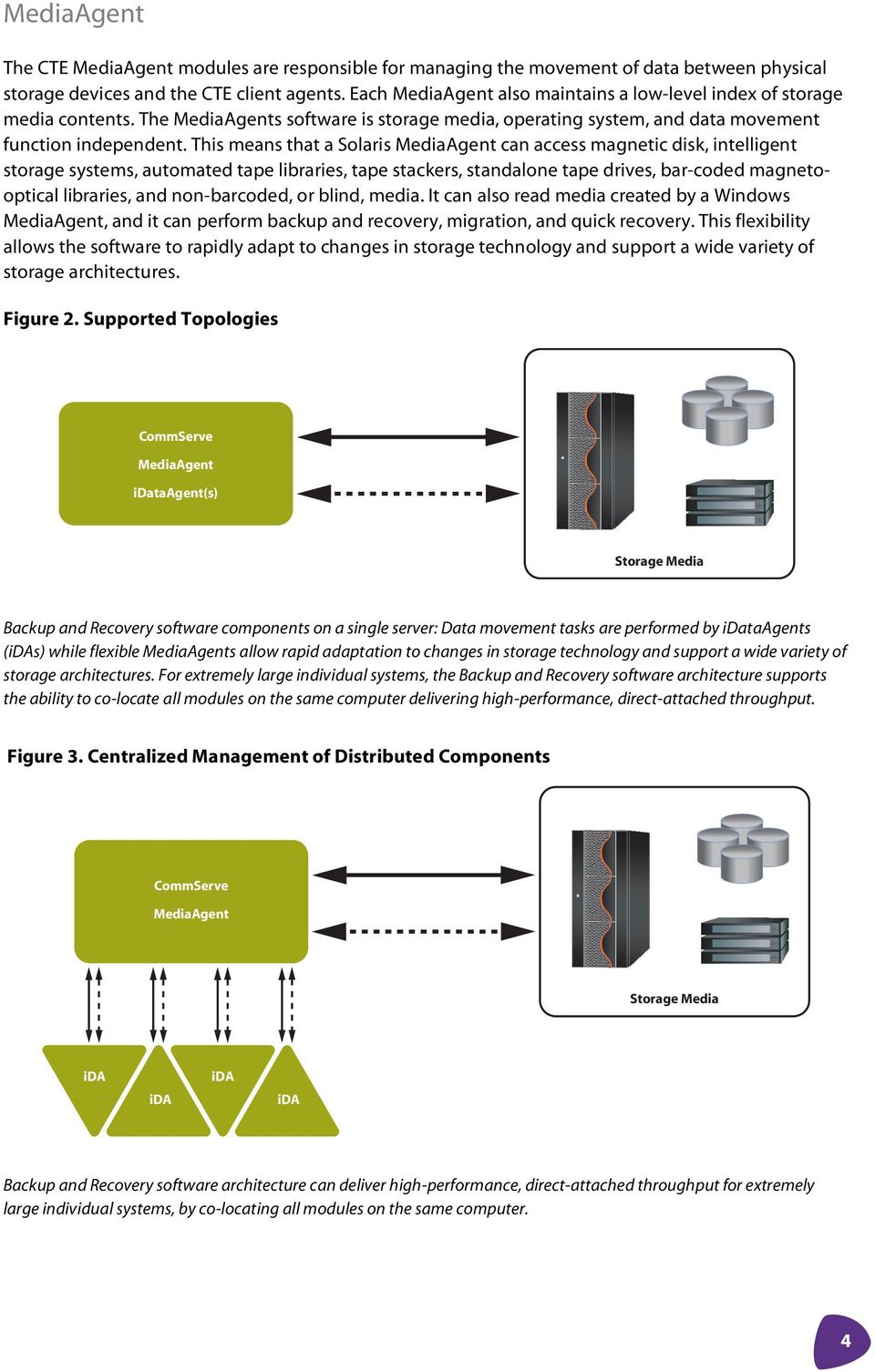
8 MediaAgent The CTE MediaAgent modules are responsible for managing the movement of data between physical storage devices and the CTE client agents. Each MediaAgent also maintains a low-level index of storage media contents. The MediaAgents software is storage media, operating system, and data movement function independent. This means that a Solaris MediaAgent can access magnetic disk, intelligent storage systems, automated tape libraries, tape stackers, standalone tape drives, bar-coded magnetooptical libraries, and non-barcoded, or blind, media. It can also read media created by a Windows MediaAgent, and it can perform backup and recovery, migration, and quick recovery. This flexibility allows the software to rapidly adapt to changes in storage technology and support a wide variety of storage architectures. Figure 2. Supported Topologies CommServe MediaAgent idataagent(s) Storage Media Backup and Recovery software components on a single server: Data movement tasks are performed by idataagents (idas) while flexible MediaAgents allow rapid adaptation to changes in storage technology and support a wide variety of storage architectures. For extremely large individual systems, the Backup and Recovery software architecture supports the ability to co-locate all modules on the same computer delivering high-performance, direct-attached throughput. Figure 3. Centralized Management of Distributed Components CommServe MediaAgent Storage Media ida ida ida ida Backup and Recovery software architecture can deliver high-performance, direct-attached throughput for extremely large individual systems, by co-locating all modules on the same computer. 4
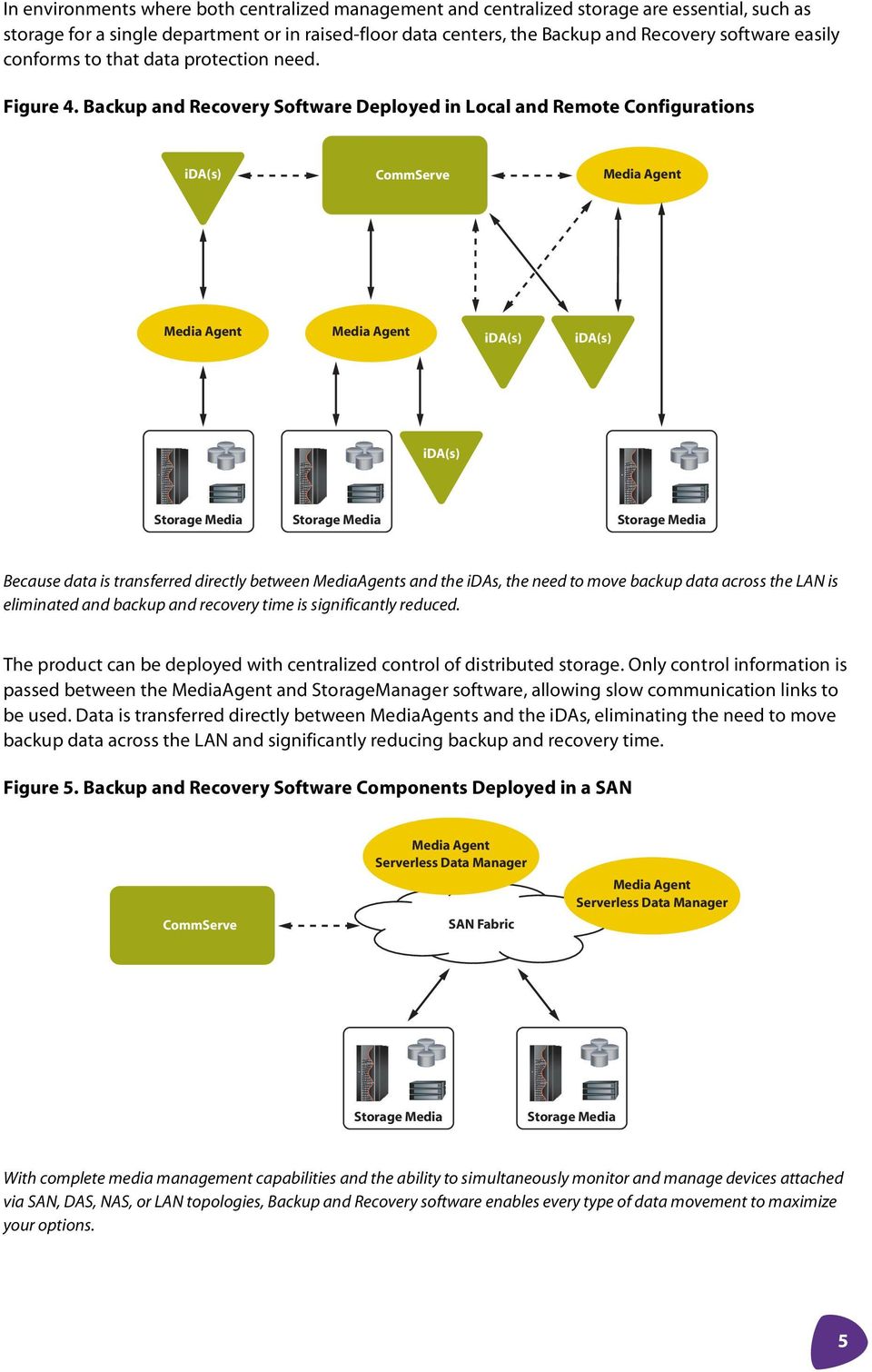
9 In environments where both centralized management and centralized storage are essential, such as storage for a single department or in raised-floor data centers, the Backup and Recovery software easily conforms to that data protection need. Figure 4. Backup and Recovery Software Deployed in Local and Remote Configurations ida(s) CommServe Media Agent Media Agent Media Agent ida(s) ida(s) ida(s) Storage Media Storage Media Storage Media Because data is transferred directly between MediaAgents and the idas, the need to move backup data across the LAN is eliminated and backup and recovery time is significantly reduced. The product can be deployed with centralized control of distributed storage. Only control information is passed between the MediaAgent and StorageManager software, allowing slow communication links to be used. Data is transferred directly between MediaAgents and the idas, eliminating the need to move backup data across the LAN and significantly reducing backup and recovery time. Figure 5. Backup and Recovery Software Components Deployed in a SAN CommServe Media Agent Serverless Data Manager SAN Fabric Media Agent Serverless Data Manager Storage Media Storage Media With complete media management capabilities and the ability to simultaneously monitor and manage devices attached via SAN, DAS, NAS, or LAN topologies, Backup and Recovery software enables every type of data movement to maximize your options. 5
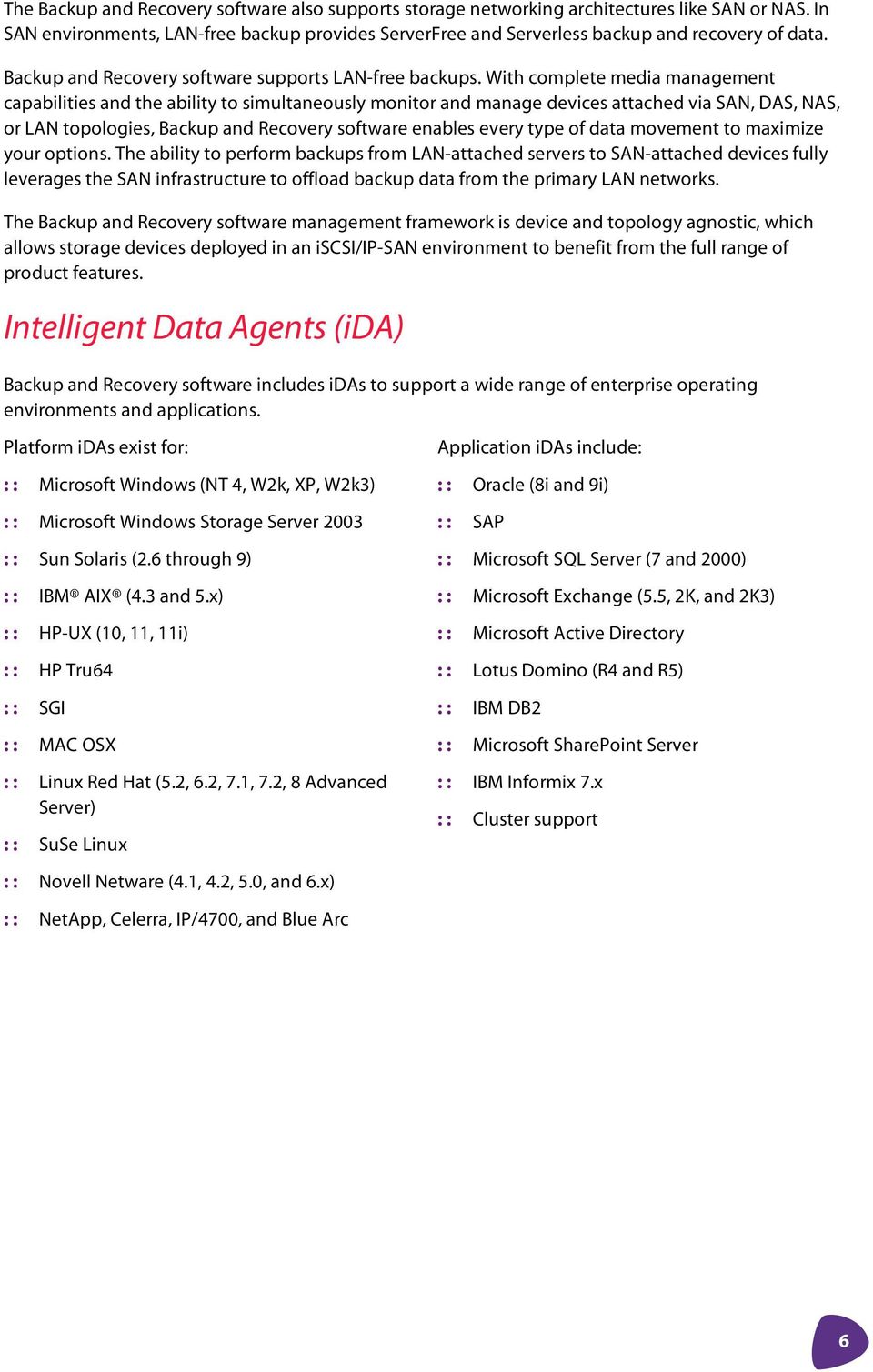
10 The Backup and Recovery software also supports storage networking architectures like SAN or NAS. In SAN environments, LAN-free backup provides ServerFree and Serverless backup and recovery of data. Backup and Recovery software supports LAN-free backups. With complete media management capabilities and the ability to simultaneously monitor and manage devices attached via SAN, DAS, NAS, or LAN topologies, Backup and Recovery software enables every type of data movement to maximize your options. The ability to perform backups from LAN-attached servers to SAN-attached devices fully leverages the SAN infrastructure to offload backup data from the primary LAN networks. The Backup and Recovery software management framework is device and topology agnostic, which allows storage devices deployed in an iscsi/ip-san environment to benefit from the full range of product features. Intelligent Data Agents (ida) Backup and Recovery software includes idas to support a wide range of enterprise operating environments and applications. Platform idas exist for: : : Microsoft Windows (NT 4, W2k, XP, W2k3) : : Microsoft Windows Storage Server 2003 : : Sun Solaris (2.6 through 9) : : IBM AIX (4.3 and 5.x) : : HP-UX (10, 11, 11i) : : HP Tru64 : : SGI : : MAC OSX : : Linux Red Hat (5.2, 6.2, 7.1, 7.2, 8 Advanced Server) : : SuSe Linux : : Novell Netware (4.1, 4.2, 5.0, and 6.x) Application idas include: : : Oracle (8i and 9i) : : SAP : : Microsoft SQL Server (7 and 2000) : : Microsoft Exchange (5.5, 2K, and 2K3) : : Microsoft Active Directory : : Lotus Domino (R4 and R5) : : IBM DB2 : : Microsoft SharePoint Server : : IBM Informix 7.x : : Cluster support : : NetApp, Celerra, IP/4700, and Blue Arc 6
11 Media Management Drive and Library Management Backup and Recovery software contains extensive capabilities to simplify the management of backup media resources. Backup data is written to a broad range of storage devices, including traditional tape and optical media, automated libraries for tape and optical media, and magnetic disk drives. Backing up data to disk is functionally equivalent to traditional tape-based methods, and the software extends the storage management features and functions of traditional tape to disk. All major tape-, optical-, and disk-based storage media devices are supported as backup targets, and Backup and Recovery software performs all drive and library allocation and management. Storage policies allow administrators to perform one-time initial configuration of storage devices and then automatically leverage device in subsequent policies. This significantly reduces the time and effort spent managing and monitoring backups and backup media. Disk-to-disk Backup As disk prices continue to fall, lower-cost disk-based backup solutions offer another option in the storage hierarchy. New disk-to-disk (D2D) and disk-to-disk-to-tape (D2D2T) backup categories offer faster data access than tape at lower cost than primary disk storage. Although tape-based backups are still essential for long-term storage, disaster recovery, and offsite archival, disk-based backups offer a number of advantages. When restoring data, the random access methods of a disk drive provide a significant speed boost over the sequential access methods of a tape drive. A disk drive allows individual files to be located and restored very quickly, eliminating the need to search sequentially through a tape to locate information during a restore. Disk drives further improve restore performance by eliminating tape mount delays. And, because disk drives are able to support concurrent access by multiple clients they can remove tape drive contention issues when running multiple backups or restores simultaneously. Disk-based backup and recovery processing also eliminates tape-handling failures, whether from human error or due to tape-library problems. Backup and Recovery software leverages the random access nature of disk-based storage devices and takes advantage of native file systems and the two-part indexing scheme, to provide better performance than competing products that process disk sequentially, as if it were a tape. Optimized disk-based backup is especially important in scenarios where data delivery speeds cannot be guaranteed: for example, when backing up over a slow WAN link, when backing up many small files, or when using slow proprietary application programming interface (API) to feed data. Disk-based backup accommodates slow or intermittent traffic without the stop-go-position problem, known as shoe shining, that tape drives suffer from. Backup and Recovery software integrates disk as a key layer in any data protection strategy. Storage policies incorporate disk for faster backup and restore and for near-term needs. Based on data retention and auxiliary copy needs, backup data on disk can be migrated to local or remote tape or disk later for vaulting, disaster recovery, or legal retention, freeing local disk storage for new backups. 7

12 Media-group Migration Backup and Recovery software supports the migration of data between MediaAgents in the same CommCell, allowing data from UNIX or Windows optical, tape, or magnetic libraries to be freely interchanged. This is useful when a MediaAgent needs to be freed for data movement between libraries in different departments, to perform workload balancing when one drive pool undergoes an increased amount of activity, or if a library suffers a failure and the associated media must be accessed to perform a backup or recovery. Data Aging The data-aging process determines how many copies of a backup are kept based on a data retention indicator in each storage policy. The retention period indicates either a number of days or a specific number of full backup copies. Once the retention period is exceeded the data-aging routine deletes the old backup copies and reclaims the space. An extended retention feature allows for fine-tuning of the data-aging process. Administrators can manually target a specific backup copy for longer retention or automate the process, for example specifying that the backup every Tuesday, or the third backup in a cycle, is to be retained for an extended time. This is useful when a specific copy of data needs to be kept around, for example, for audit purposes. Auto-discovery Features The Backup and Recovery software uses auto-discovery to locate all available storage devices. Discovered devices are made available to administrators during storage policy setup. This gives the administrator a clear picture of the environment and reduces the potential for configuration errors. Intelligent Dynamic Drive Sharing (idds) Figure 6. Library Sharing with CommVault Galaxy Media Agent Media Agent Media Agent Fibre iscsi Switch idds improves backup performance and maximizes use of available tape drives and storage resources. 8
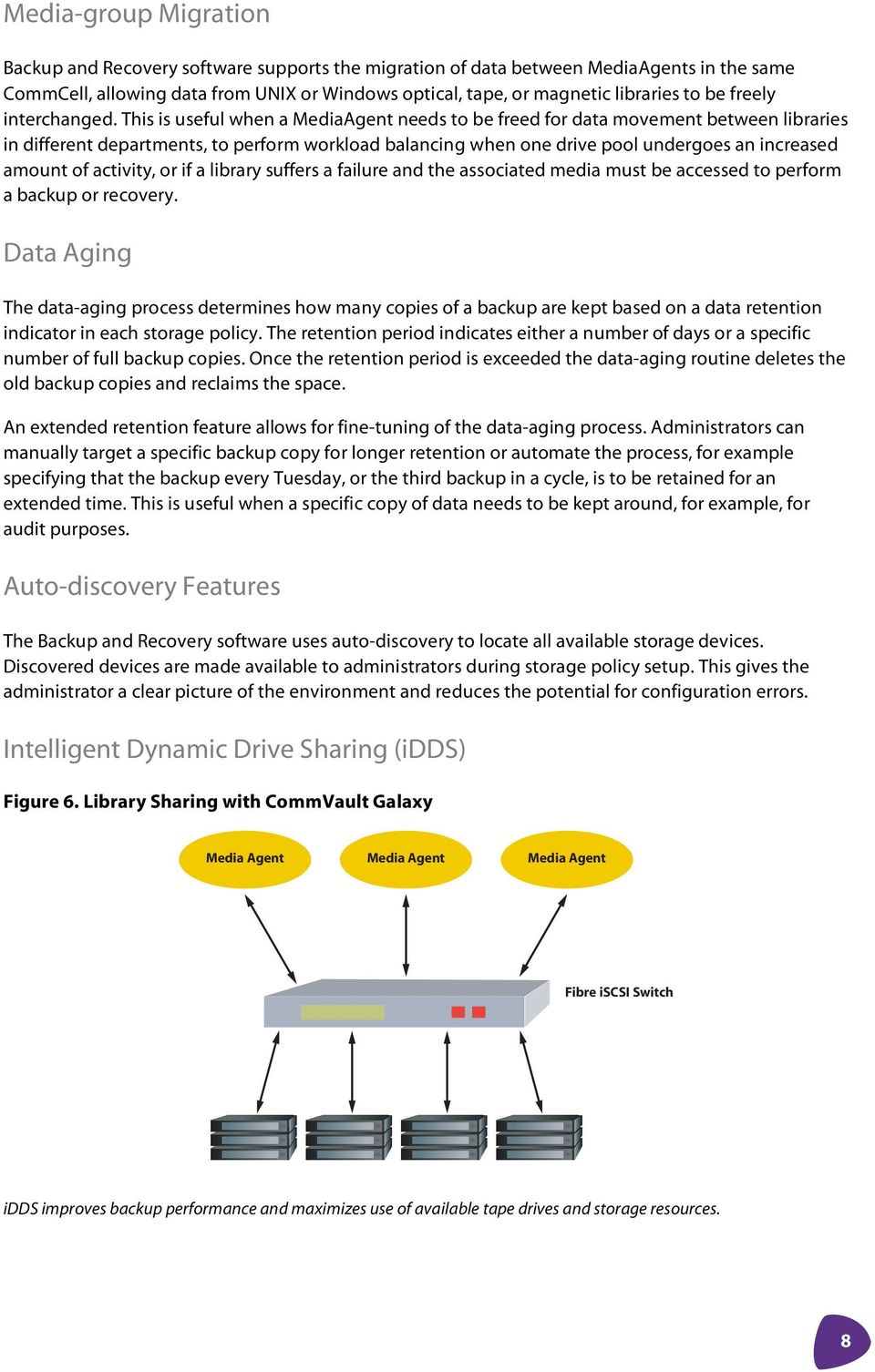
13 Intelligent Dynamic Drive Sharing (idds) allows policy-based sharing of tape-library resources across multiple backup systems, improving backup performance and maximizing the use of available tape drives and storage resources. By improving efficiency and speed, idds can help to provide a faster return on investment for networked storage resources. Unlike more elementary SCSI reserve and release strategies, idds uses a software layer to provide significantly enhanced reliability and manageability of complex networked storage environments. Backup and Recovery software idds improves resource usage to complete jobs faster and with fewer errors. Drives in a drive pool can be dynamically re-allocated one-by-one to different jobs, instead of as an entire pool. The software also controls the reservation and allocation of tape-drive resources, eliminating the need to constantly ping the SAN infrastructure. And with superior error handling, Backup and Recovery eliminates the need to reset the SAN infrastructure in the case of a failure. The Backup and Recovery software uses the concept of drive pools, a group of drives in a logical class. A drive pool can be a single drive out of a ten drives in a library, or all ten drives, or any number in between. A single physical drive may be part of multiple logical drive pools. The drive pools are used by storage policies to determine what resources each backup job can access. By definition, any client data set that shares the same storage policies will share the same drive pool. Magnetic disk volumes can also be shared in the same manner as tape drives. With the additional ability of multiple read and write heads on disk volumes, multiple backup and restore jobs can be simultaneously streamed to magnetic disk volumes. In addition to the idds embedded drive allocation resource manager, Backup and Recovery software optionally allows SCSI reserve and release, using SCSI-3 protocol persistent reservations. This counters disadvantages in reserve and release processing in earlier versions of SCSI. Rather than resetting the target SCSI device when a host takes a hit, potentially requiring the SAN to be rebooted, SCSI-3 allows another host on the SAN that is part of the nexus to clear up the reservations using a unique reservation key. In addition, unlike prior versions of SCSI, SCSI-3 resets do not cause the reservations to be lost. Microsoft RSM Support Backup and Recovery software can be configured to use Microsoft Windows Removable Storage Manager (RSM) services, to share storage devices libraries, drives and media changers among multiple applications. Microsoft RSM can configure both tape and optical libraries, with or without barcode readers. This ability to take advantage of existing media-management capabilities provided by Microsoft allows customers to fully leverage the technology and expertise of multiple vendors from within Backup and Recovery software. The Advanced Feature Pack (AFP) The Backup and Recovery software Advanced Feature Pack (AFP) includes unique tools available as separately licensable features. The AFP tools provide data encryption, offsite vaulted media tracking, client migration, MediaAgent failover and load balancing, and data verification. Data Encryption The AFP Data Encryption tool allows data to be encrypted, over the wire and on the storage media, using a variety of code key encryption methods. The first method encrypts data only as it travels over the network. Once at the destination the data stream is decrypted and stored on the chosen media. The 9

14 second encryption method encrypts the data transported over the network and stores the encrypted information on media. The encryption key is stored in the CommServe StorageManager and is used when performing advanced Backup and Recovery software functionality, such as auxiliary copy or synthetic full backups. The data remains encrypted even after running advanced processing. The final encryption method goes one step further and encrypts the encryption key with a user-defined pass-phrase before it is stored in the CommServe StorageManager. Although this method provides significantly enhanced security, most automatic copy processes, such as auxiliary copy, are not permitted unless the pass-phrase is entered at the time of execution. Two exceptions are provided to preserve advanced Backup and Recovery functionality. Firstly, a file with an encrypted key can be exported and used to restore data on the originating computer and only on that computer without being prompted for the pass-phrase. And, secondly, an exception can be explicitly stated to permit synthetic full backup processing to proceed without requiring the pass-phrase. VaultTracker VaultTracker is a CTE extension for managing and tracking the movement of media to and from an offsite storage facility. VaultTracker tracking policies define the data to be moved, the movement schedule, and the destination for the data. Unlike competing offsite tracking products, Backup and Recovery software manages data, not the removable media. This allows VaultTracker to support advanced offsite media management concepts, such as virtual mail slots and multiple tape containers. VaultTracker supports library-to-location, location-to-location, location-to-library, and library-to-library media movement. CommCell Migration The AFP CommCell Migration tool allows clients and associated data to be migrated from one CommCell to another. Migration supports permanent movement of clients for example, during consolidation, merger, or relocation of a client and temporary migrations, when moving or relocating equipment. The migration process transfers client configuration details, ida configurations, and data backup information, such as job history, media location, and storage policy information. Once completed, the client can be added to existing storage policies defined in the new CommCell. GridStor Although the Backup and Recovery software idds feature improves resource usage and provides a measure of redundancy, it cannot eliminate backup and recovery failures caused by hardware, networks, or the storage media itself. GridStor addresses these problems, providing failover, load balancing, pooling, and provisioning support to improve Backup and Recovery software s access and use of nearline and offline storage. GridStor operates across operating system environments and storage media type. So, for example, a Windows file system backup job can failover from a Windows MediaAgent to a Solaris MediaAgent, and the failover is completely transparent to restore processing. Gridstor provides alternate paths to enable access to specific storage, even if the MediaAgent that wrote the data is unavailable. During backups, the original or substitute nearline or offline resource may be used. The priority for selecting resources is configured by the user. Once done, the hierarchy of resource use is automatic and transparent. Gridstor optimizes resource use and enables load balancing, redirecting jobs to access underutilized storage resources. 10
15 Data Verification When data is backed up to a storage device there is no way to make sure that the data is truly restorable, short of immediately performing a restore. Since restoring every backup to ensure its validity is unfeasible, other means of verification are necessary. Tape devices have built-in cyclical redundancy checks (CRC) to ensure that data is written correctly. However, this does not ensure that the data written is restorable. The Backup and Recovery software AFP Data Verification tool verifies that backups can be restored. The Data Verification tool can be configured to run after all backups, all full backups, or backups occurring on or after a certain date. Using the Data Verification tool provides peace of mind, with the knowledge that, in the event of a disaster, data is truly restorable. Data Movement DataPipe The Backup and Recovery software DataPipe technology is designed to move data as fast as the source client can provide it, the data transport layer can pass it, and the backup media device can write it. The same process is used for writing backups to direct-attached SCSI devices as is used for network TCP/IP connections. With patented double buffering and shared memory transfer, DataPipe technology provides high-performance data movement with extremely low overhead. In performance testing over TCP/IP networks, the software has produced data transfer rates close to the theoretical limits of the network minus protocol overhead. The technical construction of the DataPipe technology allows it to work equally well transferring data between identical media such as from tape to tape and disparate media such as from disk to tape or from optical to tape. Backup and Recovery software storage policies allow the administrator to specify the amount of network bandwidth a backup consumes. The feature allows backup bandwidth use to be fine-tuned to appropriate levels. Multiplexing Storage policies support selective configuration of multiplexing to simultaneously stream multiple backup jobs to the same tape drive. Multiplexing is an effective means of keeping a tape drive operating efficiently when data is being transferred over slow networks. By interleaving the backups from multiple jobs, the tape drive receives sufficient input to write a continuous stream of data to tape (see Figure 7). Streaming optimizes tape-drive performance and efficiency and reduces the wear and tear created by excessive stop-start processing of a slow input stream. 11
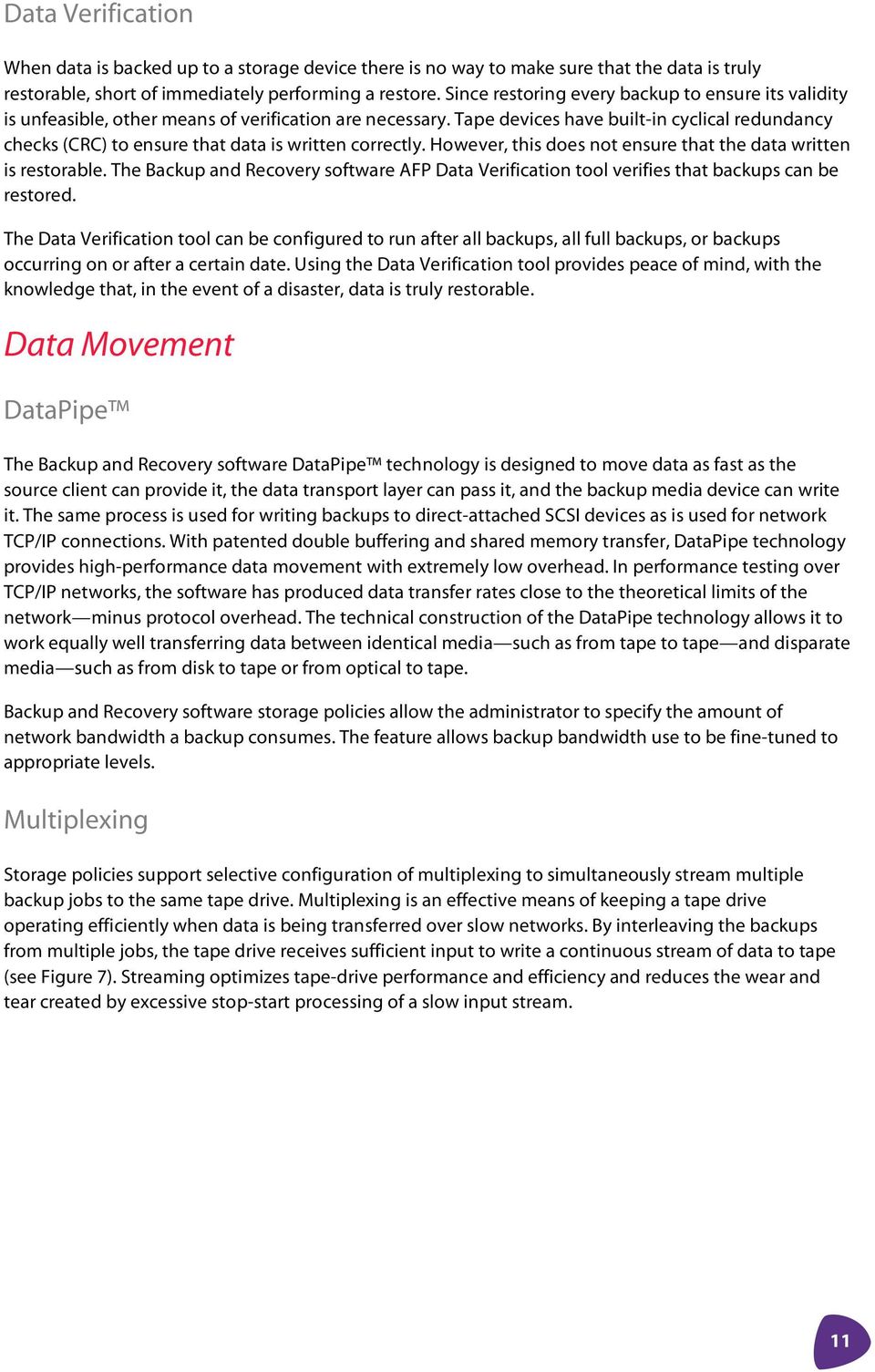
16 Figure 7. Multiplexing Dataflow Subclient A Media Agent Backup 1 Media Data Writer Backup 2 Subclient B Multiplexing is an effective means of keeping a tape drive operating efficiently when data is being transferred over slow networks. Although high-bandwidth networks and disk-to-disk backup have reduced the need for multiplexing, the technology is still viable due to continuous improvements in tape-drive write speed. However, latency associated with restoring data from a multiplexed tape has always been a problem. The cost of demultiplexing the data on tape in order to restore a specific backup often results in slow restores. Backup and Recovery software s advanced indexing capabilities eliminate the restore penalty of multiplexed backups, allowing the fast restore of individual files or entire volumes and directories. With index information providing the exact location of each block of a file on the backup data stream, Backup and Recovery software is able to restore a file after a single, one-directional pass through the tape, without rewinding. The ability to efficiently demultiplex backup data streams on-the-fly allows auxiliary copy and synthetic full backup functionality to be used with multiplexed tape. Serverless Data Manager (SDM) The Backup and Recovery software serverless data manager (SDM) module allows backup jobs to take advantage of serverless data movement capabilities of SAN storage routers. Using the SCSI extended copy command set, a point-in-time image of application data, generated using supported third-party storage system snapshot functionality, is transferred directly to a backup storage device, bypassing the application server. This frees CPU cycles on the application server. Snapshot-assisted Backup Snapshot-assisted backup functionality automates the otherwise manual task of protecting application data using a third-party storage system snapshot feature as a source of the backup. Backup and Recovery software s built-in awareness of Solaris, AIX, Windows, Exchange, SQL, and Oracle applications enables the process of quiescing the application, performing the snapshot, restarting the application, backing up the snapshot, and then deleting or re-syncing the snapshot volume to be fully automated and scheduled. Hitachi ShadowImage In-System Replication software and Hitachi TrueCopy Remote Replication software are fully supported by snapshot-assisted backup. The Backup and Recovery software backs up snap volumes (SVOL) directly to tape, eliminating the performance overhead of an online backup on the application server. Data-path mapping between a production server and the backup host is handled transparently by the ida software. 12
17 Backup and Recovery software supports moving data to a target backup device from the snapshot volume using either the Serverless DataManager (SDM) module or a backup server hosting a MediaAgent. If a MediaAgent is used, the snapshot volume must be mounted to the backup server. After backing up the data the snapshot is either deleted or resynchronized. The Backup and Recovery software snapshot-assisted backup feature also supports CommVault Software Snapshot (CSS), EMC TimeFinder and SnapView, HP EVM and EVA, and Microsoft VSS. Image-level Backup Image-level Backup uses snapshot technology to create a near instantaneous image of the data being backed up, with little impact to the application. Although the image-level ida performs a block-based volume-level backup, reducing the backup window by an order of magnitude, Backup and Recovery software is able to offer file- and folder-level restore granularity due to the advanced indexing capabilities of the product. Backup and Recovery software also supports block-level incremental backups, to capture changed data blocks and subsequently update the primary backup copy. Imagelevel technology is especially useful when backing up large file systems with millions of files, when backing up environments with low tolerance for backup disruption and less demand for fast restores, and in situations where full volume restore is more likely than individual file restores. Indexing The Backup and Recovery software uses a two-part synchronized indexing scheme, consisting of a centralized metadatabase catalog, residing within the CommServe StorageManager, and an index co-located with the MediaAgent software. This approach provides efficient scalability to accommodate data growth, support redeployment of storage resources, and increase reliability of the entire system. A permanent copy of the index is stored on the backup media. The Backup and Recovery software also maintains an active copy of the index on the client computer disk, where the MediaAgent is installed. As new data is written to media, new indices are created. Configurable parameters let administrators set the size of the disk cache and duration of the local index. If the index exceeds the pre-configured capacity, older indices are overwritten using a least recently used algorithm. Index data efficiently gathers information regarding the location of files for recovery processing, and enables rapid browsing of backed up data. Requests for information found in the indices are satisfied from the cached copy of the index. If the index is no longer on disk, the permanent index on the backup media is accessed. Logical Data Management Job Scheduler Backup and Recovery software supports the flexible scheduling of all product operational functions, including: backup jobs, comprising express-recovery backup, auxiliary-copy, and synthetic full-backup jobs, as well as restores, administrative jobs, data aging processes, reports, media exports, VaultTracker jobs, and data verification jobs. The highly customizable scheduler can accommodate a wide variety of scheduling recurrences, and scheduling policies allow templates to be created and applied across a group of objects, such as subclients. 13
18 Each job has a date and time and allows for the specification of the time zone to use for the time specified. This last feature is important in the case of remote administration, where the administrator could be scheduling jobs using the Backup and Recovery software console via the Internet and might not be in the same time zone or even the same country. The comprehensive nature of the scheduler and its extensive policy capabilities enable the creation of a set of sophisticated, lights-out procedures, significantly reducing management complexity and expense. Storage Policies Storage policies are a fundamental element of the Backup and Recovery software s logical view of storage resources. Policies define all key operational parameters, including where data is stored, how long it is retained, the number of copies to create, the location of the copies, the retention of the copies, and when to make the additional copies. Data is assigned to a storage policy and then managed according to the specified guidelines. Moving data between policies is simple. It does not require hardware reconfiguration, re-cabling, or re-networking to accomplish a change in the way the data in managed. This reduces the cost and complexity of setting up and maintaining the data protection infrastructure. Backup and Recovery software provides default storage policies for each media library, standalone tape drive, and magnetic disk drive. Default policies ensure all visible data is protected from the moment the product is installed. As subsequent storage policies are defined and data is reassigned it is removed from the default policy. Auxiliary Copy Backup and Recovery software auxiliary copy feature creates one, or more, secondary copies of the primary backup data, independent of the original copy. Secondary copies can be of different media type. For example, if the primary copy is made to a magnetic disk library, local to the application, auxiliary copies can be made to a local tape in a tape library and to a remote tape in an offsite disaster recovery site. Multiple auxiliary copy types are supported, including: full auxiliary copy, which duplicates an entire tape set (full and all incremental backups); selective auxiliary copy, which duplicates only the most recent full backup; and, job-based auxiliary copy, which allows for specific jobs within a storage policy to be designated for auxiliary copy, independent of the remaining jobs in the storage policy. Auxiliary copies enable hierarchical storage management (HSM) processes to be implemented. Each storage policy contains information about the number of auxiliary copies to make and their retention periods. If multiple auxiliary copies are initially made, each with different retention periods, the data on more expensive media can be expired as it ages, freeing up the space for other copies of data to be stored. This eliminates the need to manually migrate data from one storage device to another, and provides for long-term retention of data while optimizing storage space and costs. Synthetic Full Copies The synthetic full-backup process creates a new full-backup image by combining the last full-backup image and the latest incremental backups. This method of creating a new full-backup image dramatically reduces the I/O load on the client machine, as only incremental backups are needed after the initial full backup is executed. Synthetic full backups also provide a way to create a new full image of the client machine using an offline process, and improve full server restores. 14

19 Ease of Use Web-accessible, Single Management Console Backup and Recovery software provides a single, Web-accessible console for managing data protection for Windows, UNIX, Netware, and Linux systems. This eliminates administrator frustration at having to navigate many different interfaces, and reduces staff training costs. The browser-based GUI allows administrators to log into the CommServe from any network-attached machine. Flexible security permissions can restrict user access to only pertinent functions, allowing a single unified interface to be deployed with common policies for applications on Windows, UNIX, Netware, and Linux. Push and Silent Installation, and the CommCell Update Service The Backup and Recovery software supports push installation allowing installs and upgrades to be accomplished without user intervention, and with minimal or no impact to receiving systems. Push installation allows appliances and headless devices at remote sites to be effectively managed from a central location. In addition, the product offers silent installs through the use of answer files for remote and network push installation. The Backup and Recovery software includes a CommCell Update Service that automatically checks a support FTP site for patches and updates to the software. Any new patches are automatically downloaded to a cache directory on the CommServe platform, and administrators are notified that updates are ready to be applied. When the administrator is ready to apply the new patches, the CommCell Update Service automatically updates the CommServe, Media Agents, and idas and logs the activity in the Event Viewer. Event Viewer and Job Controller The Backup and Recovery software Event Viewer and Job Controller provide administrators with realtime management and monitoring of the data protection environment. The Job Controller s single window interface allows all data protection jobs to be managed. Job run information is updated in real time and control functions can be issued to stop, pause, restart, or kill running jobs. The Event Viewer allows administrators to monitor all events and data protection activity. Customizable user preferences allow event messages to be subset to ease viewing, and a search tool supports querying by time period, event severity, or job identifier. The Job Controller and Event Viewer allow multiple windows to be open simultaneously, and event reports can be generated with user-modified names. Reporting and the CommCell Explorer Backup and Recovery software offers a sophisticated suite of reports allowing administrators to assess, plan, and monitor activities across the installation. Reports include: backup history, data aging history, auxiliary copy history, job history, library and drive, media in library, restore history, and storage policy. The CommCell Explorer tool allows custom reports to be generated and enables report data to be exported for processing by third-party tools, such as Crystal reports. 15
20 Command Line Script Generator The Backup and Recovery software supports the scripting of backups, auxiliary copies, ExpressRecovery backup, and data aging processes. A utility is provided to capture user-interface actions as a commandline-executable script. Administrators do not need to know a scripting language or API syntax to capture the scripted actions. Once the script is recorded it can be executed to mimic actions at the console. This is useful for pre- and post-processing activities, where the end of a process needs to trigger another activity. Scripting allows these actions to be performed unattended, for example, at a disaster recovery site. Reliability CommServe ExpressRecovery The ExpressRecovery utility backs up the Backup and Recovery software CommServe StorageManager meta-database and corresponding Windows Registry data. In the event of a failure the meta-database and registry can be restored, either locally or at a disaster recovery site, using the CommServe Recovery Tool. Like regular data backups, the ExpressRecovery utility leverages the CTE, and supports scheduling and event and job administration tools. Any media accessible to the CommServe server can host the ExpressRecovery backup data. Clustered System Support All modules in the Backup and Recovery software solution CommServe StorageManager, MediaAgent, and idas leverage the same failover protection afforded to virtual servers within the clustering environment. If an active node fails, every Backup and Recovery software module is able to function from the node that has not failed via automatic failover to the active node. Regardless of the hosting node, the software is able to perform both backup and recovery operations for virtual servers as long as it has access to the network and the network names and IP addresses of the virtual servers. Backup and Recovery software is designed to treat clustering as a truly virtual environment, and it easily adapts to Microsoft Cluster Server (MSCS), Sun Clusters, HP ServiceGuard, and Oracle FailSafe, among others. Multiple instances of Backup and Recovery software can be installed and run in multiple virtual nodes. This allows administrators to load balance clustered backup activities, as well as set up failover scenarios using different MediaAgents, Storage Policies, and storage resources. Restart, Operational Windows, and Job Priority Backup jobs can be interrupted because a network, disk, tape, or server fails during execution, or because the job runs longer than it is intended and must be cancelled. Backup and Recovery software allows certain jobs to be automatically resumed when they are interrupted. And for jobs that cannot be resumed such as database backups the software can automatically restart the job from the beginning after a failure. 16
21 Backup jobs that support being resumed after an interruption include: Windows, UNIX, and Linux file system backups, Exchange mailbox backup, Lotus Notes and Domino document backups, image and ProxyHost backups, and auxiliary copy, selective auxiliary copy, and synthetic full backup jobs. In addition, for Network Appliance storage systems using Data ONTAP release 6.4 or greater, Backup and Recovery software supports resuming both NDMP backups and auxiliary copies of NDMP backups. Figure 8. Operational Window Setting Administrators can define a specific time during which a backup or copy job cannot execute using the operational window feature. Backup and Recovery software provides an operational window feature that allows administrators to define a specific time during which a backup or copy job cannot execute. This feature helps prevent unexpectedly time-consuming jobs from disrupting business operations. If a job is submitted outside of its permitted operational window, it is held in a pending state until the window opens again. Jobs started in the operational window that do not complete are suspended and resumed if possible during the next operational window. If the job cannot be resumed from point of failure, Backup and Recovery software finishes or cancels the job depending on administrator settings. Job priorities determine which jobs are run, and in what order. By default, restores are given highest priority and operational jobs, such as auxiliary copy, are given lowest priority. Priorities ensure that critical jobs get access to the resources they need to ensure they are completed within the operational window. Each job is assigned a priority number, and the combination of client computer and job priority determines execution order. Priorities are defined by the administrator and are configured and changed from the main console. Dynamic job prioritization allows the administrator to change the priority of an executing, initiated, or scheduled job, on the fly. This flexibility allows the administrator to take immediate action on a job-by-job basis without affecting the job schedules and priority settings previously defined for normal operations. NAS Backup and Restore with NDMP Backup and Recovery software provides data protection for multiterabyte NAS filers using NDMP (Network Data Management Protocol) to control the backup and recovery process. Direct-attached backup, three-way backup, and library sharing between filers is supported. 17
22 NDMP features include: Direct Access Recovery (DAR) to speed individual file and directory restores; restartable NDMP backups and auxiliary copies of Network Appliance Filers running Data ONTAP 6.4 or greater; recovery of NDMP backups to a Windows system instead of a filer; library sharing between many filers and server-based storage for optimum use and faster ROI on automated tape libraries; remote NDMP tape server, allowing a Windows MediaAgent to write an NDMP backup to direct attached tape, eliminating the need for locally attached devices on every filer; high-performance local backup of NAS filers to remove backup traffic from the LAN; three-way backup of filers, to eliminate the need for a locally attached tape drive on every filer; single file, volume, or directory recovery to the same or alternative filer, including wild-card search capabilities; and, a single unified user interface to manage server-based and NAS storage with all-inclusive storage policies. Backup and Recovery software supports filer backups to devices located on the SAN, such as the Network Appliance TapeSAN initiative, and the backup of filers as a network share, allowing devices like the Network Appliance NearStore to function as backup consolidation device for all types of backups, not just filer backups. Backup and Recovery Software: An Application-centric Approach Backup and Recovery software approaches data protection from an application perspective. How the data is protected is a direct function of how the users may need to restore the data in the event of data loss. This stance allows customers to adopt a data-centric approach to data protection rather than one that is based on limitations of the available storage or backup application. As part of this approach, Backup and Recovery software from Hitachi Data Systems employs idas for both operating-system platforms and mission-critical applications. Focusing on the application allows Backup and Recovery software to create agents that use specific application APIs, enable levels of data granularity, and offer each data type a unique management strategy that is key to meeting data protection needs. Performing complete database, application, and file system backups is critical for disaster recovery, but in most cases, data loss is not catastrophic, but rather individual. The administrator needs to only recover a specific portion of data, not an entire database. Backup and Recovery software has agents for both full database backups and granular backups for applications that can expose the data at a more granular level. 18
23 Hitachi Data Systems Corporation Corporate Headquarters 750 Central Expressway Santa Clara, California U.S.A. Phone: [email protected] Asia Pacific and Americas 750 Central Expressway Santa Clara, California U.S.A. Phone: [email protected] Europe Headquarters Sefton Park Stoke Poges Buckinghamshire SL2 4HD United Kingdom Phone: + 44 (0) [email protected] Hitachi Data Systems is registered with the U.S. Patent and Trademark Office as a trademark and service mark of Hitachi, Ltd. The Hitachi Data Systems logotype is a trademark and service mark of Hitachi, Ltd. Application Optimized Storage, ShadowImage, and TrueCopy are trademarks of Hitachi Data Systems Corporation. CommVault, CommVault Galaxy, QiNetix, and VaultTracker, DataPipe, GridStor, idataagents, and DataMigrator are trademarks and in some jurisdictions may be registered trademarks of CommVault Systems, Inc. All other company names are, or may be, trademarks or service marks of their respective owners. Notice: This document is for informational purposes only, and does not set forth any warranty, express or implied, concerning any equipment or service offered or to be offered by Hitachi Data Systems. This document describes some capabilities that are conditioned on a maintenance contract with Hitachi Data Systems being in effect, and that may be configuration-dependent, and features that may not be currently available. Contact your local Hitachi Data Systems sales office for information on feature and product availability. Hitachi Data Systems sells and licenses its products subject to certain terms and conditions, including limited warranties. To see a copy of these terms and conditions prior to purchase or license, please go to or call your local sales representative to obtain a printed copy. If you purchase or license the product, you are deemed to have accepted these terms and conditions. 2005, Hitachi Data Systems Corporation. All Rights Reserved. WHP April 2005
A CommVault White Paper: Quick Recovery
 A CommVault White Paper: Quick Recovery Increased Application Availability for Multi-Platform SAN Environments CommVault Corporate Headquarters 2 Crescent Place Oceanport, New Jersey 07757-0900 USA Telephone:
A CommVault White Paper: CommVault Galaxy Backup & Recovery
 A CommVault White Paper: CommVault Galaxy Backup & Recovery Abstract The CommVault Galaxy Backup and Recovery product offers a powerful set of data and storage management tools to assist in the protection,
Name Description Included in
 1 s and s Table s and s Table Agents s Backup Exec agents and options enhance and extend platform and feature support for Backup Exec environments. Whether you need to protect critical Microsoft applications
OPTIONS / AGENTS DESCRIPTION BENEFITS
 All Backup Exec 12 Agents and Options Backup Exec 12 Agents and Option enhance and extend platform and feature support for Backup Exec Environments. Whether you need to protect critical Microsoft applications
VERITAS NetBackup 6.0 Enterprise Server INNOVATIVE DATA PROTECTION DATASHEET. Product Highlights
 VERITAS NetBackup 6.0 Enterprise Server INNOVATIVE DATA PROTECTION As the recognized leader for enterprise-class backup and recovery, VERITAS NetBackup Enterprise Server software is designed to help provide
IBM Tivoli Storage Manager
 Help maintain business continuity through efficient and effective storage management IBM Tivoli Storage Manager Highlights Increase business continuity by shortening backup and recovery times and maximizing
VERITAS Backup Exec 10 for Windows Servers AGENTS & OPTIONS MEDIA SERVER OPTIONS KEY BENEFITS AGENT AND OPTION GROUPS
 DATASHEET VERITAS Backup Exec 10 for Windows Servers AGENTS & OPTIONS VERITAS Backup Exec for Windows Servers is the Gold Standard in Windows data protection providing comprehensive, cost effective, certified
Quick Start - Virtual Server idataagent (Microsoft/Hyper-V)
 Page 1 of 31 Quick Start - Virtual Server idataagent (Microsoft/Hyper-V) TABLE OF CONTENTS OVERVIEW Introduction Key Features Complete Virtual Machine Protection Granular Recovery of Virtual Machine Data
Enhanced Protection and Manageability of Virtual Servers Scalable Options for VMware Server and ESX Server
 PARTNER SOLUTION BRIEF Enhanced Protection and Manageability of Virtual Servers Scalable Options for VMware Server and ESX Server Companies relying on the benefits of virtualized environments to reduce
Symantec Backup Exec 2014 Agents and Options
 Symantec Backup Exec 2014 Agents and Options Data Sheet: Data Protection Overview enhance and extend Backup Exec features, capabilities, and platform support. Whether you need to protect VMware vsphere,
Backup Exec 15 Agents and Options
 DATA PROTECTION Backup Exec 15 Agents and Options Enhance and extend Backup Exec features, capabilities, and platform support Overview enhance and extend Backup Exec features, capabilities, and platform
Optimized data protection through one console for physical and virtual systems, including VMware and Hyper-V virtual systems
 Symantec Backup Exec 12.5 for Windows Small Business Server Premium and Standard Editions Comprehensive data protection and system recovery for Microsoft Windows Small Business Server Overview Symantec
Protecting enterprise servers with StoreOnce and CommVault Simpana
 Technical white paper Protecting enterprise servers with StoreOnce and CommVault Simpana HP StoreOnce Backup systems Table of contents Introduction 2 Technology overview 2 HP StoreOnce Backup systems key
Achieving High Availability & Rapid Disaster Recovery in a Microsoft Exchange IP SAN April 2006
 Achieving High Availability & Rapid Disaster Recovery in a Microsoft Exchange IP SAN April 2006 All trademark names are the property of their respective companies. This publication contains opinions of
Symantec NetBackup 7 Clients and Agents
 Complete protection for your information-driven enterprise Overview Symantec NetBackup provides a simple yet comprehensive selection of innovative clients and agents to optimize the performance and efficiency
Veritas NetBackup 6.0 Server Now from Symantec
 Veritas NetBackup 6.0 Server Now from Symantec Innovative data protection As the recognized leader for enterprise-class backup and recovery, Veritas NetBackup Server software is designed to help provide
Data Sheet: Data Protection Veritas NetBackup 6.5 NetBackup Enterprise Server- Next Generation Data Protection
 NetBackup Enterprise Server- Next Generation Data Protection Overview As an established market leader in enterprise backup and recovery, Veritas NetBackup provides unparalleled data protection for enterprise
Using HP StoreOnce Backup Systems for NDMP backups with Symantec NetBackup
 Technical white paper Using HP StoreOnce Backup Systems for NDMP backups with Symantec NetBackup Table of contents Executive summary... 2 Introduction... 2 What is NDMP?... 2 Technology overview... 3 HP
Redefining Backup for VMware Environment. Copyright 2009 EMC Corporation. All rights reserved.
 Redefining Backup for VMware Environment 1 Agenda VMware infrastructure backup and recovery challenges Introduction to EMC Avamar Avamar solutions for VMware infrastructure Key takeaways Copyright 2009
Archive 8.0 for File Systems and NAS Optimize Storage Resources, Reduce Risk and Improve Operational Efficiencies
 BACKUP & RECOVERY ARCHIVE REPLICATION RESOURCE MANAGEMENT SEARCH Key Benefits Optimize capacity in primary storage with tiered storage architecture, providing cost and resource benefits Retain transparent
Using Live Sync to Support Disaster Recovery
 Using Live Sync to Support Disaster Recovery SIMPANA VIRTUAL SERVER AGENT FOR VMWARE Live Sync uses backup data to create and maintain a warm disaster recovery site. With backup and replication from a
IBM Tivoli Storage Manager Version 7.1.4. Introduction to Data Protection Solutions IBM
 IBM Tivoli Storage Manager Version 7.1.4 Introduction to Data Protection Solutions IBM IBM Tivoli Storage Manager Version 7.1.4 Introduction to Data Protection Solutions IBM Note: Before you use this
Features - Microsoft Data Protection Manager
 Page 1 of 63 Features - Microsoft Data Protection Manager TABLE OF CONTENTS OVERVIEW SYSTEM REQUIREMENTS - MICROSOFT DATA PROTECTION MANAGER INSTALLATION Install the Microsoft Data Protection Manager BACKUP
EMC Backup and Recovery for Microsoft SQL Server 2008 Enabled by EMC Celerra Unified Storage
 EMC Backup and Recovery for Microsoft SQL Server 2008 Enabled by EMC Celerra Unified Storage Applied Technology Abstract This white paper describes various backup and recovery solutions available for SQL
IBM TSM DISASTER RECOVERY BEST PRACTICES WITH EMC DATA DOMAIN DEDUPLICATION STORAGE
 White Paper IBM TSM DISASTER RECOVERY BEST PRACTICES WITH EMC DATA DOMAIN DEDUPLICATION STORAGE Abstract This white paper focuses on recovery of an IBM Tivoli Storage Manager (TSM) server and explores
Administration GUIDE. Exchange Database idataagent. Published On: 11/19/2013 V10 Service Pack 4A Page 1 of 233
 Administration GUIDE Exchange Database idataagent Published On: 11/19/2013 V10 Service Pack 4A Page 1 of 233 User Guide - Exchange Database idataagent Table of Contents Overview Introduction Key Features
StoreWay. Calypso. Backup & Recovery. www.bull.com
 StoreWay Calypso Backup & Recovery www.bull.com StoreWay Calypso Simplified, Enterprise-class Protection for File Systems, Applications and Database Managing data is usually about managing costs: the cost
Solutions from Symantec
 Solutions from Symantec System Recovery Server Edition IT s Personal System Recovery 8.0 is the gold standard in complete Windows system recovery with the ability to restore systems in minutes, not hours
Administration GUIDE. SharePoint Server idataagent. Published On: 11/19/2013 V10 Service Pack 4A Page 1 of 201
 Administration GUIDE SharePoint Server idataagent Published On: 11/19/2013 V10 Service Pack 4A Page 1 of 201 Getting Started - SharePoint Server idataagent Overview Deployment Configuration Decision Table
Data Sheet: Backup & Recovery Symantec Backup Exec 12.5 for Windows Servers The gold standard in Windows data protection
 The gold standard in Windows data protection Overview Symantec Backup Exec 12.5 delivers market-leading backup and recovery protection from server to desktop, providing complete data protection for the
<Insert Picture Here> Oracle Secure Backup 10.3 Secure Your Data, Protect Your Budget
 Oracle Secure Backup 10.3 Secure Your Data, Protect Your Budget Program Agenda Oracle Secure Backup Overview What s New in Oracle Secure Backup 10.3 Ease of Management Data Protection:
Quick Start - NetApp File Archiver
 Quick Start - NetApp File Archiver TABLE OF CONTENTS OVERVIEW SYSTEM REQUIREMENTS GETTING STARTED Upgrade Configuration Archive Recover Page 1 of 14 Overview - NetApp File Archiver Agent TABLE OF CONTENTS
WHITE PAPER THE BENEFITS OF CONTINUOUS DATA PROTECTION. SYMANTEC Backup Exec 10d Continuous Protection Server
 WHITE PAPER THE BENEFITS OF CONTINUOUS DATA PROTECTION SYMANTEC Backup Exec 10d Continuous Protection Server 1 TABLE OF CONTENTS EXECUTIVE SUMMARY...3 Current Situation...3 The New Opportunity...3 The
Archive Data Retention & Compliance. Solutions Integrated Storage Appliances. Management Optimized Storage & Migration
 Solutions Integrated Storage Appliances Management Optimized Storage & Migration Archive Data Retention & Compliance Services Global Installation & Support SECURING THE FUTURE OF YOUR DATA w w w.q sta
VMware vsphere Data Protection 5.8 TECHNICAL OVERVIEW REVISED AUGUST 2014
 VMware vsphere Data Protection 5.8 TECHNICAL OVERVIEW REVISED AUGUST 2014 Table of Contents Introduction.... 3 Features and Benefits of vsphere Data Protection... 3 Additional Features and Benefits of
External Data Connector (EMC Networker)
 Page 1 of 26 External Data Connector (EMC Networker) TABLE OF CONTENTS OVERVIEW SYSTEM REQUIREMENTS INSTALLATION (WINDOWS) INSTALLATION (UNIX) GETTING STARTED Perform a Discovery Perform a Migration ADVANCED
Symantec Backup Exec 12.5 for Windows Servers Word Descriptions
 Exec 12.5 for Word Descriptions Product headline: Backup Exec 12.5 for is the gold standard in Windows data protection. 25 Word Description Exec 12.5 for Exec 12.5 for Windows Servers is the gold standard
How To Use A Microsoft Microsoft Database Server With Idataagent And Restore On A Microsable 2.5 (Windows) And Microsourge (Windows 2) On A Pcode (Windows 3) On An Uniden 2
 Page 1 of 175 User Guide - SQL Server idataagent TABLE OF CONTENTS OVERVIEW Introduction Key Features Add-On Components Terminology NEW FEATURES SYSTEM REQUIREMENTS SUPPORTED FEATURES GETTING STARTED SQL
Protecting Microsoft SQL Server with an Integrated Dell / CommVault Solution. Database Solutions Engineering
 Protecting Microsoft SQL Server with an Integrated Dell / CommVault Solution Database Solutions Engineering By Subhashini Prem and Leena Kushwaha Dell Product Group March 2009 THIS WHITE PAPER IS FOR INFORMATIONAL
NetVault Backup, NDMP and Network Attached Storage
 NetVault, NDMP and Network Attached Storage Simplicity and power for NAS Written by Adrian Moir, Dell Scott Hetrick, Dell Abstract This technical brief explains how Network Data Management Protocol (NDMP)
Symantec NetBackup OpenStorage Solutions Guide for Disk
 Symantec NetBackup OpenStorage Solutions Guide for Disk UNIX, Windows, Linux Release 7.6 Symantec NetBackup OpenStorage Solutions Guide for Disk The software described in this book is furnished under a
VMware vsphere Data Protection 6.0
 VMware vsphere Data Protection 6.0 TECHNICAL OVERVIEW REVISED FEBRUARY 2015 Table of Contents Introduction.... 3 Architectural Overview... 4 Deployment and Configuration.... 5 Backup.... 6 Application
TABLE OF CONTENTS GETTING STARTED ADVANCED. User Guide - SQL Server idataagent. Page 1 of 175 OVERVIEW NEW FEATURES SYSTEM REQUIREMENTS
 Page 1 of 175 User Guide - SQL Server idataagent TABLE OF CONTENTS OVERVIEW Introduction Key Features Add-On Components Terminology NEW FEATURES SYSTEM REQUIREMENTS SUPPORTED FEATURES GETTING STARTED SQL
How To Install The Exchange Idataagent On A Windows 7.5.1 (Windows 7) (Windows 8) (Powerpoint) (For Windows 7) And Windows 7 (Windows) (Netware) (Operations) (X
 Page 1 of 208 User Guide - Exchange Database idataagent TABLE OF CONTENTS OVERVIEW Introduction Key Features Add-On Components Customized Features for Your Exchange Version Terminology SYSTEM REQUIREMENTS
EMC AVAMAR. Deduplication backup software and system. Copyright 2012 EMC Corporation. All rights reserved.
 EMC AVAMAR Deduplication backup software and system 1 IT Pressures 2009 2020 0.8 zettabytes 35.2 zettabytes DATA DELUGE BUDGET DILEMMA Transformation INFRASTRUCTURE SHIFT COMPLIANCE and DISCOVERY 2 EMC
CA ARCserve Family r15
 CA ARCserve Family r15 Rami Nasser EMEA Principal Consultant, Technical Sales [email protected] The ARCserve Family More than Backup The only solution that: Gives customers control over their changing
NetVault Daten- Backup und Restore Lösungen
 NetVault Daten- Backup und Restore Lösungen page 1 / 8 NetVault data backup and restore solutions Every successful company knows how important it is to business-critical data with programs for data backup
IBM Tivoli Storage Manager 6
 Leverage next-generation data storage and recovery management capabilities IBM Tivoli Storage Manager 6 IBM Tivoli Storage Manager is the core component of an enterprise-wide data protection and recovery
CA ARCserve Backup Agents and Options
 PRODUCT SUMMARY: CA ARCSERVE BACKUP R12.5 AGENTS AND OPTIONS CA ARCserve Backup r12.5 Agents and Options خدةش شدزذ ءشءء خءحزدءز ذ باةب سسءج -ءجزدط سز ءءد ١٢.٥ ز ذصث ء ظ ضز س زء ء زصدس ز اءزدشس جصءز طدذ
VERITAS NetBackup 6.0 Database and Application Protection
 VERITAS NetBackup 6.0 Database and Application Protection INNOVATIVE DATA PROTECTION When it comes to database and application recovery, VERITAS Software has a clear goal in mind simplify the complexity
Enterprise Backup and Restore technology and solutions
 Enterprise Backup and Restore technology and solutions LESSON VII Veselin Petrunov Backup and Restore team / Deep Technical Support HP Bulgaria Global Delivery Hub Global Operations Center November, 2013
Features - NAS NDMP Client
 Page 1 of 78 Features - NAS NDMP Client TABLE OF CONTENTS OVERVIEW SYSTEM REQUIREMENTS - NAS NDMP IDATAAGENT INSTALLATION Install the MediaAgent - Windows Install the MediaAgent - Windows -Clustered Environment
Daymark DPS Enterprise - Agentless Cloud Backup and Recovery Software
 Daymark DPS Enterprise - Agentless Cloud Backup and Recovery Software Your company s single most valuable asset may be its data. Customer data, product data, financial data, employee data this is the lifeblood
Symantec Backup Exec 11d for Windows Servers New Encryption Capabilities
 WHITE PAPER: ENTERPRISE SECURITY Symantec Backup Exec 11d for Windows Servers New Encryption Capabilities White Paper: Enterprise Security Symantec Backup Exec 11d for Windows Servers Contents Executive
SharePoint Archive Rules Options
 Key Capabilities u Control data growth Address common capacity management problems such as database growth. Reduce the time required to make backup copies by archiving old documents out of the primary
Dell PowerVault DL Backup to Disk Appliance Powered by CommVault. Centralized data management for remote and branch office (Robo) environments
 Dell PowerVault DL Backup to Disk Appliance Powered by CommVault Centralized data management for remote and branch office (Robo) environments Contents Executive summary Return on investment of centralizing
A CommVault Business Value & Technology White Paper. Snapshot Management & Source-side Deduplication are Vital to Modern Data Protection
 A CommVault Business Value & Technology White Paper Snapshot Management & Source-side Deduplication are Vital to Modern Data Protection Contents Executive Summary 3 New Approaches Needed to Tackle Data
CommVault Simpana Archive 8.0 Integration Guide
 CommVault Simpana Archive 8.0 Integration Guide Data Domain, Inc. 2421 Mission College Boulevard, Santa Clara, CA 95054 866-WE-DDUPE; 408-980-4800 Version 1.0, Revision B September 2, 2009 Copyright 2009
BlueArc unified network storage systems 7th TF-Storage Meeting. Scale Bigger, Store Smarter, Accelerate Everything
 BlueArc unified network storage systems 7th TF-Storage Meeting Scale Bigger, Store Smarter, Accelerate Everything BlueArc s Heritage Private Company, founded in 1998 Headquarters in San Jose, CA Highest
W H I T E P A P E R. Optimized Backup and Recovery for VMware Infrastructure with EMC Avamar
 W H I T E P A P E R Optimized Backup and Recovery for VMware Infrastructure with EMC Avamar Contents Introduction...1 VMware Infrastructure Overview...1 VMware Consolidated Backup...2 EMC Avamar Overview...3
Veritas Cluster Server from Symantec
 Delivers high availability and disaster recovery for your critical applications Data Sheet: High Availability Overview protects your most important applications from planned and unplanned downtime. Cluster
Symantec Backup Exec 12 for Windows Servers
 The gold standard in Windows data protection Overview Symantec Backup Exec 12 delivers efficient, easy-tomanage backup and recovery protection from server to desktop, providing optimized data protection
Access to easy-to-use tools that reduce management time with Arcserve Backup
 Access to easy-to-use tools that reduce management time with Arcserve Backup In business, evolution is constant. Staff grows. New offices spring up. New applications are being implemented, and typically,
How To Use An Npm On A Network Device
 WHITE PAPER: CA ARCserve Backup Network Data Management Protocol (NDMP) Network Attached Storage (NAS) Option: Integrated Protection for Heterogeneous NAS Environments CA ARCserve Backup: Protecting heterogeneous
Vodacom Managed Hosted Backups
 Vodacom Managed Hosted Backups Robust Data Protection for your Business Critical Data Enterprise class Backup and Recovery and Data Management on Diverse Platforms Vodacom s Managed Hosted Backup offers
VERITAS NetBackup BusinesServer
 VERITAS NetBackup BusinesServer A Scalable Backup Solution for UNIX or Heterogeneous Workgroups V E R I T A S W H I T E P A P E R Table of Contents Overview...................................................................................1
WHITE PAPER: customize. Best Practice for NDMP Backup Veritas NetBackup. Paul Cummings. January 2009. Confidence in a connected world.
 WHITE PAPER: customize DATA PROTECTION Confidence in a connected world. Best Practice for NDMP Backup Veritas NetBackup Paul Cummings January 2009 Best Practice for NDMP Backup Veritas NetBackup Contents
VMware vsphere Data Protection 6.1
 VMware vsphere Data Protection 6.1 Technical Overview Revised August 10, 2015 Contents Introduction... 3 Architecture... 3 Deployment and Configuration... 5 Backup... 6 Application Backup... 6 Backup Data
Administration Guide - Documentum idataagent (DB2)
 Page 1 of 65 Administration Guide - Documentum idataagent (DB2) TABLE OF CONTENTS OVERVIEW Introduction Key Features Supported Environments Full Range of Backup and Recovery Options Scheduling Efficient
Veritas NetBackup 6.0 Database and Application Protection
 Veritas NetBackup 6.0 Database and Application Protection Innovative data protection When it comes to database and application recovery, Symantec has a clear goal in mind simplify the complexity of database
Veritas Storage Foundation High Availability for Windows by Symantec
 Veritas Storage Foundation High Availability for Windows by Symantec Simple-to-use solution for high availability and disaster recovery of businesscritical Windows applications Data Sheet: High Availability
Features - NAS NDMP Client
 Page 1 of 86 Features - NAS NDMP Client Table of Contents Overview System Requirements - NAS NDMP idataagent Installation Install the MediaAgent - Windows Install the MediaAgent - Windows -Clustered Environment
NETWORK ATTACHED STORAGE DIFFERENT FROM TRADITIONAL FILE SERVERS & IMPLEMENTATION OF WINDOWS BASED NAS
 INTERNATIONAL International Journal of Computer JOURNAL Engineering OF COMPUTER and Technology (IJCET), ENGINEERING ISSN 0976-6367(Print), ISSN 0976 & 6375(Online) TECHNOLOGY Volume 4, Issue (IJCET) 3,
Disaster Recovery Strategies: Business Continuity through Remote Backup Replication
 W H I T E P A P E R S O L U T I O N : D I S A S T E R R E C O V E R Y T E C H N O L O G Y : R E M O T E R E P L I C A T I O N Disaster Recovery Strategies: Business Continuity through Remote Backup Replication
User Guide - Exchange Public Folder idataagent
 Page 1 of 191 User Guide - Exchange Public Folder idataagent TABLE OF CONTENTS OVERVIEW Introduction Key Features Add-On Components Terminology SYSTEM REQUIREMENTS - EXCHANGE PUBLIC FOLDER IDATAAGENT DEPLOYMENT
Solution brief: Modernized data protection with Veeam and HP Storage
 Solution brief: Modernized data protection with Veeam and HP Storage Modern Data Protection Built for Virtualization November, 2013 Contents Executive summary....3 Key points...3 Virtual machine data protection
Symantec Backup Exec 2014 Icon List
 Symantec Backup Exec 2014 Icon List Alerts Image Description Alert needs attention Alerts Alert needs attention Alert needs attention Alert needs attention Error Error Error Error Informational alert Informational
VERITAS Backup Exec 9.0 for Windows Servers
 WHITE PAPER Data Protection Solutions for Network Attached Storage VERITAS Backup Exec 9.0 for Windows Servers VERSION INCLUDES TABLE OF CONTENTS STYLES 1 TABLE OF CONTENTS Background...3 Why Use a NAS
CommVault Simpana 8.0 Application Introduction
 CommVault Simpana 8.0 Application Introduction EMC Data Domain, Inc. 2421 Mission College Boulevard, Santa Clara, CA 95054 866-WE-DDUPE; 408-980-4800 Version 1.0, Revision B December 14, 2011 Copyright
Near-Instant Oracle Cloning with Syncsort AdvancedClient Technologies White Paper
 Near-Instant Oracle Cloning with Syncsort AdvancedClient Technologies White Paper bex30102507wpor Near-Instant Oracle Cloning with Syncsort AdvancedClient Technologies Introduction Are you a database administrator
Every organization has critical data that it can t live without. When a disaster strikes, how long can your business survive without access to its
 DISASTER RECOVERY STRATEGIES: BUSINESS CONTINUITY THROUGH REMOTE BACKUP REPLICATION Every organization has critical data that it can t live without. When a disaster strikes, how long can your business
How To Manage Your Email On A Microsoft Powerbook 2.5 (For Microsoft) On A Macbook 2 (For A Mac) On An Iphone Or Ipad (For An Ipad) On Your Pc Or Macbook
 Page 1 of 285 User Guide - Exchange Mailbox idataagent TABLE OF CONTENTS OVERVIEW Introduction Key Features Add-On Components Terminology SYSTEM REQUIREMENTS - EXCHANGE MAILBOX IDATAAGENT DEPLOYMENT -
Information Lifecycle Management
 Information Lifecycle Management Using StoneFly Backup Advantage All trademark names are the property of their respective companies. This publication contains opinions of StoneFly, Inc. which are subject
CommVault Simpana Remote and Branch Office Protection
 BACKUP & RECOVERY ARCHIVE REPLICATION RESOURCE MANAGEMENT SEARCH Key Benefits Consolidate data over thin WAN connections and expedite local recovery with multiple backup and recovery options. Save time
Using HP StoreOnce Backup systems for Oracle database backups
 Technical white paper Using HP StoreOnce Backup systems for Oracle database backups Table of contents Introduction 2 Technology overview 2 HP StoreOnce Backup systems key features and benefits 2 HP StoreOnce
TABLE OF CONTENTS. Quick Start Guide - SQL Server idataagent. Page 1 of 53 OVERVIEW NEW FEATURES SYSTEM REQUIREMENTS SUPPORTED FEATURES
 Page 1 of 53 Quick Start Guide - SQL Server idataagent TABLE OF CONTENTS OVERVIEW NEW FEATURES SYSTEM REQUIREMENTS SUPPORTED FEATURES GETTING STARTED - SQL SERVER DEPLOYMENT GETTING STARTED - SQL SERVER
TABLE OF CONTENTS. Quick Start - Windows File System idataagent. Page 1 of 44 OVERVIEW SYSTEM REQUIREMENTS DEPLOYMENT
 Page 1 of 44 Quick Start - Windows File System idataagent TABLE OF CONTENTS OVERVIEW Introduction Key Features Simplified Data Management Point-In-Time Recovery System State SnapProtect Backup Office Communications
STRATEGIC PLANNING ASSUMPTION(S)
 STRATEGIC PLANNING ASSUMPTION(S) By 2016, one-third of organizations will change backup vendors due to frustration over cost, complexity and/or capability. By 2014, 80% of the industry will choose disk-based
Mayur Dewaikar Sr. Product Manager Information Management Group Symantec Corporation
 Next Generation Data Protection with Symantec NetBackup 7 Mayur Dewaikar Sr. Product Manager Information Management Group Symantec Corporation White Paper: Next Generation Data Protection with NetBackup
Quantum DXi6500 Family of Network-Attached Disk Backup Appliances with Deduplication
 PRODUCT BRIEF Quantum DXi6500 Family of Network-Attached Disk Backup Appliances with Deduplication NOTICE This Product Brief contains proprietary information protected by copyright. Information in this
IBM Tivoli Storage Manager
 IBM Storage Manager Leverage next-generation data storage and unified recovery management capabilities Highlights Help simplify the protection and management of your data, even as it continues to grow
Quick Start - NetApp File Archiver
 Page 1 of 19 Quick Start - NetApp File Archiver TABLE OF CONTENTS OVERVIEW Introduction Key Features Terminology SYSTEM REQUIREMENTS DEPLOYMENT Installation Method 1: Interactive Install Method 2: Install
Continuous Data Protection. PowerVault DL Backup to Disk Appliance
 Continuous Data Protection PowerVault DL Backup to Disk Appliance Continuous Data Protection Current Situation The PowerVault DL Backup to Disk Appliance Powered by Symantec Backup Exec offers the industry
Protect Microsoft Exchange databases, achieve long-term data retention
 Technical white paper Protect Microsoft Exchange databases, achieve long-term data retention HP StoreOnce Backup systems, HP StoreOnce Catalyst, and Symantec NetBackup OpenStorage Table of contents Introduction...
Turbo Charge Your Data Protection Strategy
 Turbo Charge Your Data Protection Strategy Data protection for the hybrid cloud 1 WAVES OF CHANGE! Data GROWTH User EXPECTATIONS Do It YOURSELF Can t Keep Up Reliability and Visibility New Choices and