
WHITE PAPER: TECHNICAL
|
|
|
- August Willis
- 10 years ago
- Views:
Transcription
1 WHITE PAPER: TECHNICAL Veritas Storage Foundation Oracle HA Value Proposition and Planning, Installation, Implementation and Operational Considerations February, 2008 Symantec Technical Network White Paper

2 Content Scope... 3 Introduction... 4 SFORA-HA Components... 5 SFORA-HA Benefits... 6 Standardization... 6 Availability... 8 Scalability... 8 Performance... 9 Manageability SFORA-HA vs. Oracle only Stack Planning What is known about the application and its environment? Which SF-ORA HA features to use? Oracle Planning Storage Layout Planning Pre-Requisites SFORA-HA Pre-Requisites Oracle Pre-requisites Installation Considerations SFORA-HA Installation Considerations Oracle Installation Considerations Implementation/Operational Considerations SFORA-HA Oracle Minimizing Unplanned Downtime Minimizing Planned Downtime Performance Monitoring and Tuning If and when should migration from single instance to Oracle RAC take place? Conclusion
3 Scope The scope of this document is to focus on Veritas Storage Foundation for Oracle High Availability (SFORA- HA) solution which adds significant value in Oracle Relational Database Management System (RDBMS) environments, and makes Oracle more manageable. As such, much of the discussion throughout this document will be Oracle-centric, highlighting the synergy and interplay of SFORA-HA and Oracle. The focus will be on the SFORA-HA 5.0 release, Oracle 10g, and when showing specific examples or referencing documentation, the Solaris OS. The reader should always keep in mind that SFORA-HA robustly supports other releases of Oracle and multiple OS platforms. The intent of this document is to provide perspectives regarding use of the Oracle database in Enterprise and mission critical environments and how SFORA-HA adds considerable value. This document will not go into great detail of the core Storage Foundation offering Veritas Volume Manager (VxVM) which includes Dynamic Multi-Pathing (DMP) or Veritas File System (VxFS). However, they will be mentioned often within the context of the full SFORA-HA solution. Additionally, Veritas Storage Foundation Manager (SFM) will not be discussed in this paper, but we will point out here that it is a separately installable component (and free!) and strongly recommended to complement the full SFORA- HA stack. This paper is focused on Oracle single instance rather than Oracle RAC (RAC). Symantec offers a product called SFRAC which is a superset of the SFORA-HA product discussed here. Please note that the last section of this paper does discuss considerations surrounding migration from Oracle single instance to Oracle RAC. Additionally, the scope of this paper does not include Disaster Recovery (DR), although we will point out here that Symantec has additional products to address DR such as Veritas Volume Replicator (VVR) and Global Cluster Option (GCO- an additional component of Veritas Cluster Server). There will be no discussion of the capabilities of the Storage Foundation product with regards to operating in virtual environments. We do point out that is another viable environment for our entire stack. Finally, to keep scope manageable within this paper, we will not be covering, in the pre-requisites and install sections, applying of Maintenance Packs after the base SFORA-HA software is installed. 3

4 Introduction There is no debate that Oracle RDBMS dominates today s market space in open systems environments. The many thousands of Oracle RDBMS Environments are characterized by: Enterprise customers Mission critical applications High uptime requirements often 24 x 7 web based apps. High performance requirements Complex work load patterns Increasing work load over time Increasing database size over time Being able to react quickly to the increasing pace of change Doing more with less resources and budget Thus, there is a real need for software products that can enhance the Oracle value proposition by addressing the challenges enumerated above. Such products have to be, just as Oracle is, hardware agnostic able to run across a spectrum of servers, operating systems, HBAs, SAN switches, storage arrays, etc. With the introduction of Oracle 10g several years ago, Oracle has been touting, most notably because of their Automatic Storage Management (ASM) feature, that they can provide a complete solution on the RDBMS server. However, there are additional aspects to consider when deploying Oracle in mission critical environments. The successful implementation and operation of applications running on top of Oracle RDBMS require the talents of more that the DBA. Other functional groups involved are System Administrators, Storage Administrators, Network Administrators, Applications specialists, etc. And of utmost importance is cooperation between these multiple functional groups. Products that facilitate and enhance this needed cooperation are of great value. The purpose of this paper is to describe how one such product, Veritas Storage Foundation for Oracle High Availability (SFORA-HA), adds significant value in Oracle RDBMS environments, and makes Oracle more manageable. This paper will also discuss planning, implementation, and operational considerations when using the SFORA-HA stack. 4

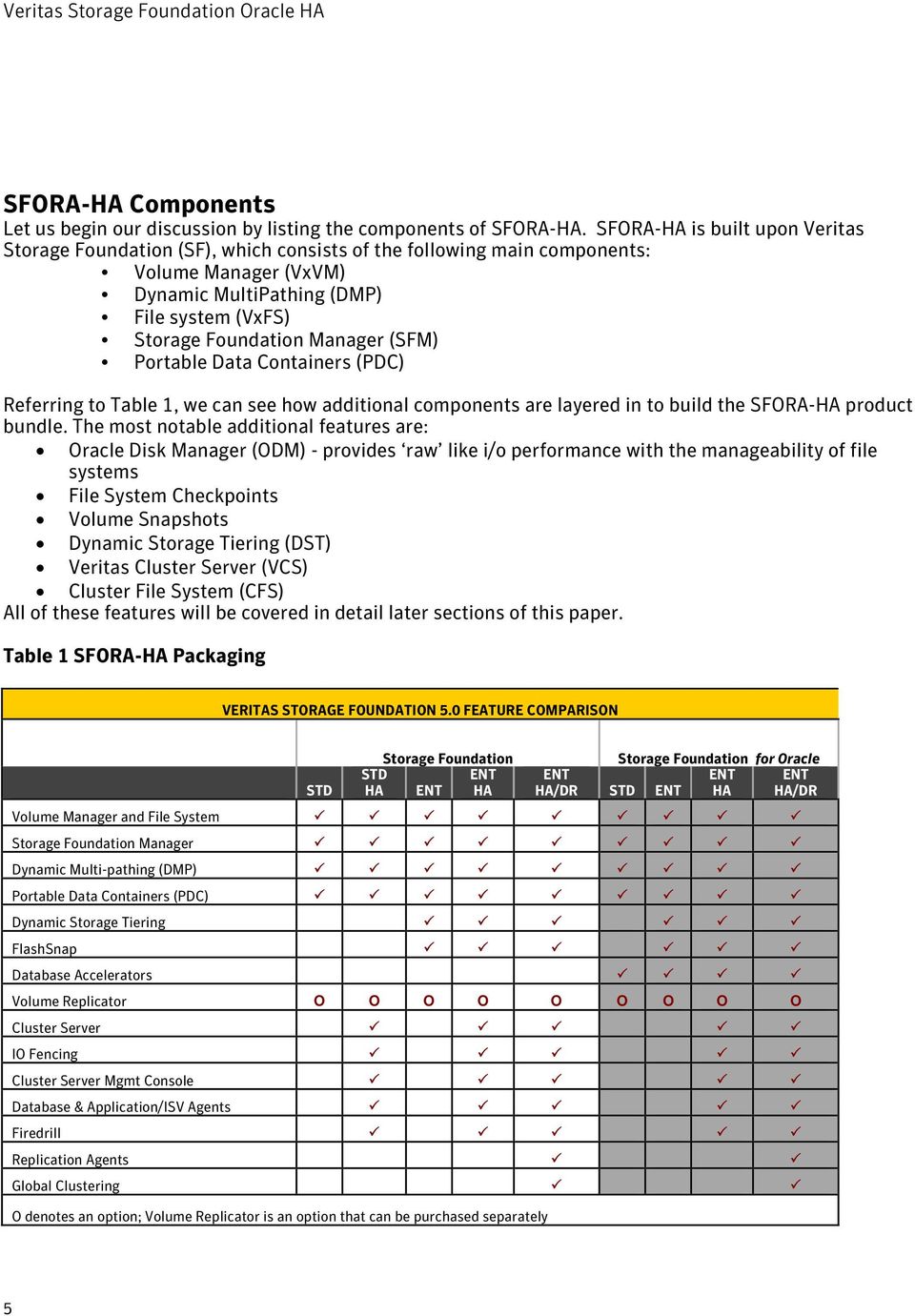
5 SFORA-HA Components Let us begin our discussion by listing the components of SFORA-HA. SFORA-HA is built upon Veritas Storage Foundation (SF), which consists of the following main components: Volume Manager (VxVM) Dynamic MultiPathing (DMP) File system (VxFS) Storage Foundation Manager (SFM) Portable Data Containers (PDC) Referring to Table 1, we can see how additional components are layered in to build the SFORA-HA product bundle. The most notable additional features are: Oracle Disk Manager (ODM) - provides raw like i/o performance with the manageability of file systems File System Checkpoints Volume Snapshots Dynamic Storage Tiering (DST) Veritas Cluster Server (VCS) Cluster File System (CFS) All of these features will be covered in detail later sections of this paper. Table 1 SFORA-HA Packaging VERITAS STORAGE FOUNDATION 5.0 FEATURE COMPARISON STD Storage Foundation STD ENT HA ENT HA Storage Foundation for Oracle ENT ENT ENT HA/DR STD ENT HA HA/DR Volume Manager and File System Storage Foundation Manager Dynamic Multi-pathing (DMP) Portable Data Containers (PDC) Dynamic Storage Tiering FlashSnap Database Accelerators Volume Replicator O O O O O O O O O Cluster Server IO Fencing Cluster Server Mgmt Console Database & Application/ISV Agents Firedrill Replication Agents Global Clustering O denotes an option; Volume Replicator is an option that can be purchased separately 5
6 The result of this product bundle is a mature, flexible, complete, and robust infrastructure software set with all the feature/functionality shown in Figure 1. Figure 1: Features and Functionality of Veritas Storage Foundation for Oracle HA SFORA-HA Benefits Let s now discuss the SFORA-HA benefits that are realized in Oracle RDBMS environments. We will examine 5 main topics: 1. Standardization 2. Availability 3. Scalability 4. Performance 5. Manageability Standardization The typical enterprise customer using Oracle RDBMS has a very heterogeneous IT infrastructure with multiple: Databases (not just Oracle, but also likely to have UDB, SQL-Server, or Sybase, etc.) Server platforms (e.g. Solaris, HP-UX, AIX, Linux, Windows, etc.) Storage arrays (e.g. EMC, Hitachi, IBM, etc.) Applications (in-house and 3 rd party such as SAP, Oracle Apps, Siebel, Peoplesoft, Amdocs, etc.) Multiple application tiers (web, application, DB, etc.) 6

7 Layer on to this the fact that there are multiple versions of the software and/or hardware for each of these components, and one can readily appreciate the complexity and challenges of managing such an environment. Thus, an IT infrastructure product, such as Veritas Storage Foundation, that cannot only enhance the operation of Oracle RDBMS, but also add value and reduce complexity across the entire IT enterprise has to have great appeal. Standardization, via Storage Foundation as a data center wide strategy, makes sense for many reasons: Avoid hardware vendor lock-in (e.g. servers and storage). When hardware vendors can avoid competition by persuading a customer that its combination of hardware and software is the only acceptable solution, many times higher prices follow. Uplifts of % or more are frequently achieved. Reduce the number of tools needed to manage the infrastructure. Storage Foundation Manager (SFM) is a great example as it provides a single pane-of-glass into the Storage Foundation-enabled data center and includes over 250 guided operations to enable repeatable processes. The rich set of out of the box Veritas Cluster Server (VCS) agents allows for incorporating high availability across the multi-tiered application environments as well as standardization of clustering infrastructure. VCS includes the ability, via its remote group agent to establish Service Group dependencies across multiple clusters for the multi-tier architecture (DB, APP, WEB layers) of today s mission critical applications. DMP s wide support of servers, HBAs, and storage arrays enables the enterprise to have a single hardware independent host to storage multi-pathing solution. Save money many SF customers have realized significant return on investment (ROI) 5-15% of aggregate storage and server costs. This is not surprising as storage management costs may be three to four times the costs of hardware procurement. Furthermore, tangible savings can be realized because of not being locked into a single storage vendor s platform. Thus, SF features such as storage array migration, Database Management System (DBMS) snapshots, and Dynamic Storage Tiering allow for moving data to less expensive storage as business requirements change. And features such as Portable Data Containers (PDC) make migration to less expensive servers very viable. Lowers training requirements Makes expertise more broadly available as new challenges arise in the data center 7
8 Availability There are many availability challenges with Oracle RDBMS, on which the most critical applications within enterprise IT environments depend being up. Considerations such as these come immediately to mind: Avoiding Single Point of Failure (SPOF) Software, Server, HBA, Storage Striving towards 24 x 7 Minimizing planned downtime Can upgrades, migrations, etc. be done non-disruptively? Minimizing unplanned downtime Does a SW or HW failure make the application go down? Enabling non-disruptive on-line backups Providing Local Failover Adding storage online Operational simplification and consistency of application control (starting, stopping, etc.) To ensure that these applications stay online and highly available, infrastructure surrounding and interoperating with the Oracle RDBMS must be in place with features such as: HBA multi-pathing adding/breaking mirrors on-line, which can, for example, enable non-disruptive storage array migrations growing/shrinking storage volumes dynamically snapshoting/cloning of database for backup, reporting, test/dev, etc. providing quick server failover in the event that a server loses any critical software or hardware component providing rolling upgrades via patching standby server, forcing failover to it, and then patching 1 st server Furthermore, the critical code that must provide this set of capabilities, to be truly robust, needs to run in the operating system kernel space, not user space. The SF-ORA product is extremely well suited to meet these set of challenges. Scalability Scalability is defined as a desirable property of a system to either handle growing amounts of work in a graceful manner, or to be readily enlarged. For example, it can refer to the capability of a system to increase total throughput under an increased load when resources (typically hardware) are added. A system whose performance improves after adding hardware, proportionally to the capacity added, is said to be a scalable system. Typical scalability challenges that arise in the Oracle RDMS world, where the goal is to maintain consistent performance response times, are: the load for an application increases 50% a new application comes on line a need to merge the operations of a newly acquired company 8
9 the size of the DB is growing 10% every month distributed databases are being consolidated to fewer servers Features and capabilities of SF-ORA that support these scalability challenges are: Ability to dynamically add new storage Ability to dynamically migrate data from one storage array to another in a heterogeneous environment using VxVM mirroring. Ability to do hardware/software upgrades of servers in a cluster with minimal outages Ability to do server migrations with minimal outages using Portable Data Containers (PDC) Ability to do online defragmentation of file system Ability to do dynamic storage tiering (e.g. move less accessed data from tier 1 storage to tier 2 storage) Ability to create snapshots of databases online for reporting, backup, etc. The above enumerated set of capabilities of SF-ORA provide a robust and full-featured IT infrastructure that allows for the agility needed in dealing with today s dynamic and unpredictable real-world Oracle RDBMS environments. Performance Gaining and maintaining acceptable application performance is a perpetual challenge, with typically a very dynamic and changing environment in terms of workload and transaction mix. Specific performance challenges arise such as: Being able to quickly diagnose performance issues to root cause and implement corrective actions, typically in enterprise storage (EMC, Hitachi, IBM, HP) where the following questions need to answered: Is there an I/O issue? Is it intra-server or inter-server? Is it a database issue? Is it an application issue? Is it repeatable/predictable or aberrational? Being able to dynamically re-balance/reorganize the DB Being able to pro-actively manage performance Being able to prevent response times from degrading with increasing work load. (closely tied to scalability) Being able to do online backups without performance degradation Being able to prevent Decision Support users from affecting OLTP performance To effectively deal with performance, in addition to a having a good set of performance monitoring tools, one needs infrastructure with a full set of features that can be applied dynamically and in a very granular fashion, as well as globally, depending on the specific problem being addressed. Being able to discretionarily use striping and mirroring for any or all volumes are good examples of granular controls. Also, being able to use ODM (Oracle Disk Manager) in a discretionary way is important here. These features contribute greatly to enabling very granular control of the underlying Oracle database objects (tables, indexes, redo logs, archive logs, etc.). In addition to enhancing availability, the HBA multi-pathing capability also contributes to performance by load balancing I/O across all available paths. 9

10 A valuable capability in dealing with the hard to know and ever changing access patterns of the critical oracle tables, indexes, etc. is that of being able to do de-fragmentation while online. Depending on the specifics of the environment, one might invoke this functionality on a scheduled basis, and or on-demand as circumstances dictate. Because today s enterprise class storage arrays (e.g. EMC, Hitachi, IBM, HP, ) are configured with ever increasing capacity (number of disks and individual disk capacity), more often than not, storage arrays and individual disks are shared across multiple servers running multiple applications. Thus, not only does one have to deal with intra-server I/O contention, but with inter-server I/O contention as well. Thus, having the ability to do deep mapping through all the layers from Oracle object to partition on the individual spindle inside the storage array is a very valuable capability to facilitate diagnosing both intraserver and inter-server i/o performance issues. As mentioned in the Availability section, critical code that must provide this set of capabilities, to be truly robust, needs to run in kernel space, not user space. The benefit of this shows up most dramatically when servers get extremely heavily loaded that s when kernel space processes will clearly differentiate from user space processes. The SF-ORA product is extremely well-suited to meet these set of performance challenges with the functionality/features described above. Manageability Manageability challenges are many in enterprise Oracle RDBMS environments. The list includes: Do more with less resources and budget Minimize number of tools needed to manage entire IT infra-structure Reduce complexity in an ever-growing environment File management Granular or coarse? Ability to manage all files, not just Oracle Ability to dynamically enable/disable host level mirroring with storage array mirroring Storage management Ability to flexibly stripe (vary stripe size as well as number of members in stripe set) or not stripe Online storage growth (auto extend) Online backups Dynamic Storage Tiering OS migrations Storage array migrations SF-ORA provides a complete solution for heterogeneous online storage management that is equal to the task for the most complex Oracle environments, providing a standard set of integrated tools to centrally manage explosive data growth, maximize storage hardware investments, provide data protection, and adapt to unpredictable and changing business requirements. Because SF-ORA is an enterprise solution, not a point solution, it enables IT organizations to manage their storage infrastructure in a consistent manner. With advanced features such as centralized storage management (SFM), online configuration and administration, Dynamic Storage Tiering, Dynamic Multi-pathing, data migration, and local and remote replication, SF-ORA enables organizations to reduce operational costs and capital expenditures across the data center. 10

11 SFORA-HA vs. Oracle only Stack As discussed in the previous sections, SFORA-HA is a complete enterprise solution for heterogeneous online storage management. As shown in Table 2 below, SFORA-HA adds great value in Oracle environments. Table 2 - Summary of SFORA-HA vs Oracle Functionality Feature Oracle SF-ORA HA Standardization Support beyond Oracle RDBMS N Y Support beyond Oracle RDBMS tier N Y Availability ASM is not SPOF N Y Multi-pathing N Y Local Failover Y (CRS weak support) Y (VCS strong support) Critical code runs in kernel space N Y Online Array Migrations Y- Difficult Y - Easy Minimally disruptive Server Migrations N Y Scalability Granular control of DB objects N Y Multi-pathing N Y Performance Granular control of DB objects N Y Multi-pathing for HBA load balancing N Y Awareness/visibility of physical disk N Y Critical code runs in kernel space N Y Manageability Manage entire infra-structure N Y File management granular/full-featured N Y Host level striping non-mandatory N Y 11

12 Planning What is known about the application and its environment? Perhaps the most important consideration for successful implementations of SF-ORA HA is that the multiple cross-functional groups have good working relationship that foster effective communications. The key groups in this case would be Applications Architects, DBA, System Administrator, and Storage Administrator. As the subsequent discussion will show, in order to provision optimal storage for the Oracle RDBMS, tight cooperation between these three groups is essential. This is a persistent requirement to assure successful on-going operations after implementation. The value of doing comprehensive planning BEFORE installation of SF-ORA HA/Oracle RDBMS cannot be overstated. Of course, the more that is known up-front about the application being deployed, the more fruitful and on-target the planning effort will be. The amount and quality of discovery information will vary widely depending on such factors as: Ability to install in Dev/Test/QA before Production? If not, this would be a very undesirable situation! The rest of this discussion assumes that there will be Dev/Test/QA environments in addition to Production. New or existing application? Amount of time allotted for Dev/Test/QA Level of testing efforts and how closely they represent production workloads performance monitoring tools available Is application in-house written, or 3 rd party provided, and if 3 rd party provided, how much customization is being done? Are there implementation/planning/best practice documents provided by the vendors? (e.g. oracle, server vendor, application vendor, etc.) So, let s ask the question: What is known about the application and its environment? The following list is not exhaustive, but these questions should be relevant no matter the specific details of the Oracle server environment. This is not a comprehensive list but should be used to help spur generation of additional relevant discovery questions. Useful drill down questions would include: General questions: How closely do the Test/QA environments resemble production infrastructure? Are there tools to generate load in Test/Dev/QA environments, and to what extent can full load of the production environment be replicated? Will there be rogue activity and/or can it be prevented? It is not an infrequent occurrence where unexpected/unauthorized activation production databases occur that significantly affect performance e.g. DBA doing maintenance tasks, or running very resource consumptive queries against system tables, or discovering that test servers have active sessions on the Production database. Are applications other than Oracle sharing the server? If so, this will make for a more challenging implementation and on-going operation of the Oracle DB. Are there extreme stress points known? An example could be, for a very high transaction OLTP application, having to write at such a high rate to the redo log file that one may have to consider running Oracle lgwr process with realtime priority. 12

13 Database-related questions: Will multiple Oracle database instances be running on the same server? If so, care must be taken to isolate resources and ascertain that the total resources available are adequate. Are the most heavily accessed database objects known? More often than not, DB i/o activity exhibits the 80/20 rule - 80% of the activity involving just 20% of the objects. Sometime the skew is even more extreme than that e.g. 90/10. If these database objects can be identified, then obviously they will become candidates for the best disk real estate and care should be taken to separate them from one another on disk. DB Read vs. Write activity? This will influence the decision to use or not use ODM, which will be discussed in more detail in the Which SFORA-HA features to use? section of this paper. How will Binary Large Object (BLOB) data storage be managed? Will there be any data partitioning? MB/sec of i/o? This certainly has direct bearing on number of HBAs that will be needed. With Oracle cost based optimizer in play, how intrusive will it be keeping statistics up-to-date? What performance monitoring tools are available? If none are in use, this will be a serious handicap in being able to do thorough planning. Are database sessions done via connection pooling (e.g. via a JDBC tier) or directly by application client or a combination of both? If the former, connections tend to be persistent and the total number relatively low. If the latter, connections can tend to be of short duration and the total number relatively high. This can have significant influence on memory requirements and Oracle SGA fragmentation. Application-related questions: Any application tuning opportunities? This kind of information would be available, most likely, only if an Oracle performance monitoring tool is being used proactively (e.g. Precise I3 Indepth for Oracle or the suite of tools that Oracle provides (ADDM/AWR/ASH, etc.) Lack of indices, inefficient indices? If this kind of application detail is known, there is the opportunity to do tuning of the application. For in-house applications, there should be no constraints on acting on this information. For 3 rd party applications, there may or may not be limitations on what changes can be made, but there still would be value in knowing where the inefficiencies are and dealing with them accordingly. Running SQL statement too many times? There could be opportunity to modify the application to execute statement much less frequently. Using literals instead of bind variables? There could be opportunity to modify the application to use bind variables instead of literals. Running batch jobs during peak load when they could run during off-peak hours? If so, reschedule to off-peak times. Does application request data from the DB intelligently? For example, is a report that is interested in just the last week s worth of data pulling in the entire last year s data set? Does the application include files external to the Oracle RDBMS? If so, are they heavily accessed? If lightly accessed they could be candidates for Dynamic Storage Tiering (DST). Is application OLTP, Decision Support/Data Warehouse, or both? Is workload repeatable/predictable or anomalous/aberrational? OLTP applications tend to be more predictable/repeatable than Decision Support/Data Warehouse. Does any part of the application require real-time performance? If so, then it is imperative that its resources be isolated from other applications, other servers, etc. An example of this would be a time and attendance system where employees clock in and clock out in very small time intervals where response time has to be optimal. Do end users of the application have access to tools that allow them to build queries that could potentially cause query from hell kind of scenarios? If so, can safeguards be implemented to prevent 13
14 this? One would expect that this is more likely to happen in Decision Support/Data Warehouse environments where power users have access to OLAP tools that allow them to build such queries. But it is certainly not unheard of for this to happen in OLTP environments, where for example, the end user is able to populate a form with very minimal information which results in creating a query that may have no filtering at all. Storage related questions: What are the storage capacity requirements? Will Storage be SAN, NAS, DAS, JBOD or a combination? Does storage support SCSI-3 Persistent Reservation? Does the storage employ intelligent software (e.g. EMC Symmetrix Optimizer)? Is more than one class of storage available (e.g. RAID-10 and RAID-5, 146GB disks and 300GB disks, EMC DMX and EMC CLARiiON, etc Are PROD and TEST/DEV/QA servers sharing resources (e.g storage array)? If they are, recognize that it will be difficult, if not impossible, to get repeatable performance results when testing. Additionally, production performance can vary and suffer when load testing is going on. Are multiple PROD servers sharing resources? If so, then there is the concern that if multiple applications are sharing busy database objects on the same spindles, they will impact each others performance, and probably, in unpredictable ways. How long does it take to provision new storage, HBAs, CPUs, memory, etc.? This can greatly influence how much growth capacity needs to be provided up-front. What is the number of Oracle sessions and number of Oracle files? This is important information to have when initially sizing Oracle System Global Area (SGA). 14
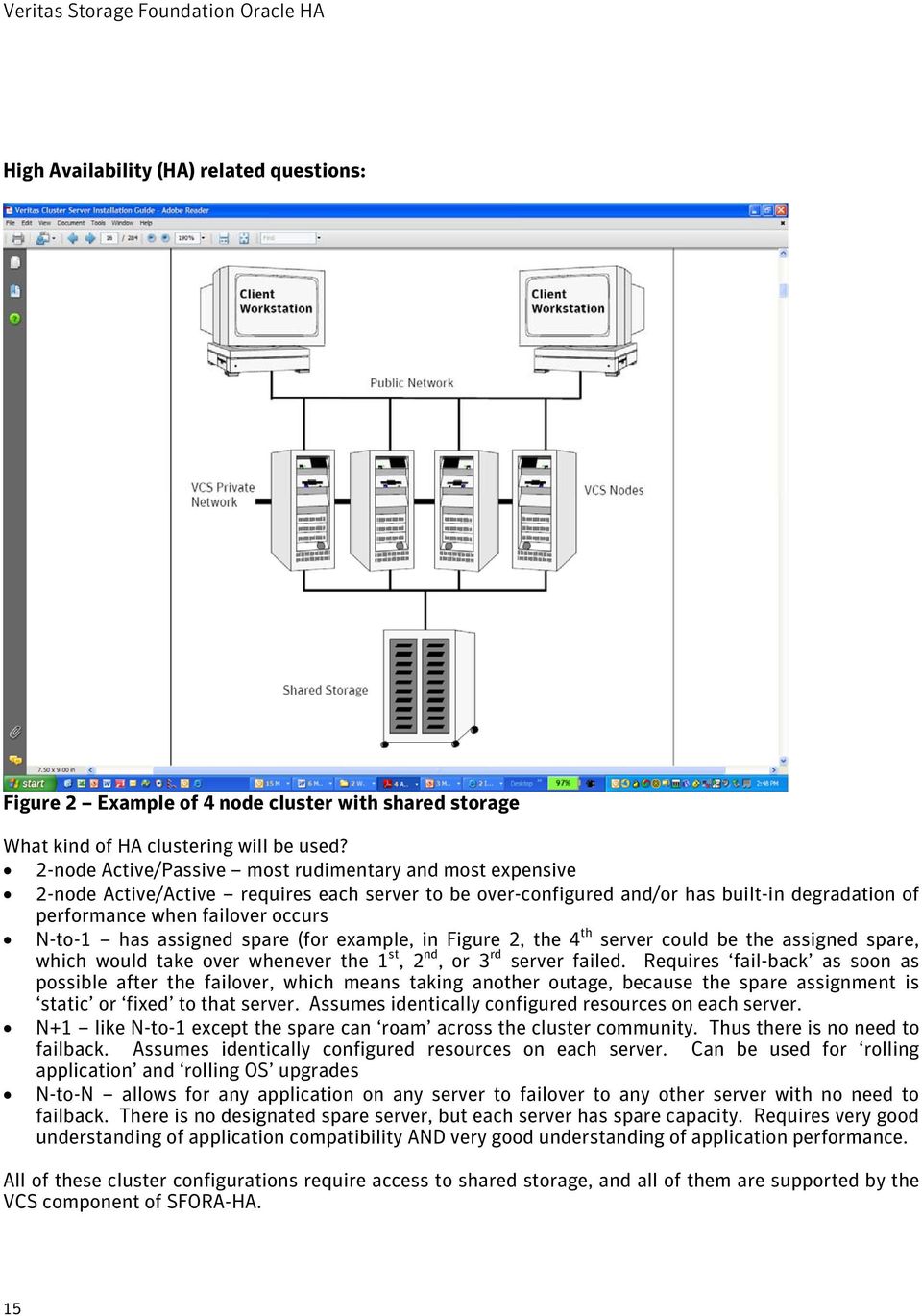
15 High Availability (HA) related questions: Figure 2 Example of 4 node cluster with shared storage What kind of HA clustering will be used? 2-node Active/Passive most rudimentary and most expensive 2-node Active/Active requires each server to be over-configured and/or has built-in degradation of performance when failover occurs N-to-1 has assigned spare (for example, in Figure 2, the 4 th server could be the assigned spare, which would take over whenever the 1 st, 2 nd, or 3 rd server failed. Requires fail-back as soon as possible after the failover, which means taking another outage, because the spare assignment is static or fixed to that server. Assumes identically configured resources on each server. N+1 like N-to-1 except the spare can roam across the cluster community. Thus there is no need to failback. Assumes identically configured resources on each server. Can be used for rolling application and rolling OS upgrades N-to-N allows for any application on any server to failover to any other server with no need to failback. There is no designated spare server, but each server has spare capacity. Requires very good understanding of application compatibility AND very good understanding of application performance. All of these cluster configurations require access to shared storage, and all of them are supported by the VCS component of SFORA-HA. 15
16 Does storage support SCSI-3 Persistent Reservation (PR)? If yes, SFORA-HA s robust i/o fencing can be implemented. In a server cluster environment, best practices dictate that if this feature is available it should be taken advantage of.. In this scenario, maintaining data integrity is as important as the high availability provided by clustering servers. With shared storage in place - meaning that more than one server has access to the same data - it is extremely important that the servers never change the data in an uncoordinated manner. To safeguard against this requires i/o fencing, architected around SCSI-3 Persistent Reservation, which prevents split brain scenarios where multiple servers touch data in an uncoordinated way. Implementation of i/o fencing is done using coordinator disks where servers race to gain majority of control whenever the cluster heartbeat goes away. The winner(s) take control of the data disks and fence them off from the loser(s), thus guaranteeing data integrity. This algorithm works regardless of whether the cause of the lost heartbeat is because of a server going down, a server getting hung, or a network link going down. Will CVM/CFS be used? The most obvious value add of the Cluster Volume Manager/Cluster File System (CVM/CFS) component of SFORA-HA is that it can provide for faster server failover. This is because it avoids the need to import disks groups and volumes and mount file systems. Other benefits of having a clustered file system include: Fewer copies of data (non-oracle) Ability to mount space optimized snapshots to servers other than the source server Having necessary infrastructure in place to migrate to Oracle RAC at a later time It should be pointed out that CVM/CFS does add some complexity to the storage management infrastructure. To maintain data integrity of shared files across multiple servers, the i/o fencing feature of SFORA-HA feature is required, and thus mandates that the storage be SCSI-3 PR capable. This adds some steps to installing the SFORA-HA stack as CVM/CFS needs to be laid down and coordinator disks created. The advisability of going with CVM/CFS will depend on the comfort level of IT staff in dealing with these aspects, the importance of faster failover, and the degree of likelihood that the environment will move to Oracle RAC in the foreseeable future. Even if CVM/CFS is not used, the best practice is to still employ i/o fencing so that the highest level of data integrity for the cluster can be provided. I/O corruption can occur in many different ways, even when CVM/CFS is not in play. Bottom line, because HA environments are architected with shared storage (2 or more servers having access to the same disk[s]), the potential for data corruption (accidental or intentional) always exists. With i/o fencing enabled on top of SCSI-3 PGR, this scenario can be avoided. For detailed information on Veritas Cluster Server, please refer to the Veritas Cluster Server Installation Guide 5.0 available at For detailed information on Veritas Cluster File System, please refer to the Veritas Cluster File System Installation Guide 5.0 available at 16

17 Which SF-ORA HA features to use? This section discusses considerations regarding use of the advanced features of SF-ORA HA. We will be looking at Oracle Disk Manager (ODM), Database Snapshots, File System Checkpoints, Dynamic Storage Tiering, and Portable Data Containers (PDC) ODM ODM (Oracle Disk Manager) is an API developed by Oracle circa 1999 initially available with Oracle 9i. At that time, the Storage Foundation product was architected to include its own ODM library to take advantage of this Oracle i/o interface when using the SF stack (volume manager and file system). The value-add of ODM, to state it succinctly, is Raw-like performance with the manageability of File System. The capabilities of ODM that make this possible are: I/O calls are optimized according to types within a database redo logs, archive logs, temporary tables, undo, tables, and indexes Parallel updates to database files increase throughput Asynchronous I/O is built-in Eliminates moving data through file system buffers Lets Oracle handle locking for data integrity which avoids OS single-writer lock contention (related to OS context-switch overhead). Reduces file-system handles by utilizing sharable File Identifiers (1 per Oracle file vs 1 per Oracle file per session when file-system handle are used) Reduces system calls and context switches Reduces CPU utilization Efficient file creation and disk allocation Thus, traditional UNIX file system overhead is eliminated. ODM provides the most performance benefit in heavy Oracle DB write environments (rough rule of thumb of 20% or greater write activity). Most applications will benefit from ODM, Keep in mind that even if the overall write activity is less than 20%, there is still a high probability that there will be periods of time where write activity will exceed 20% because Oracle DB write activity over time can be bursty. For heavy read environments, because there is no File System level caching or read-ahead with ODM, consider increasing the Oracle SGA parameters DB_BLOCK_BUFFERS, DB_CACHE_SIZE, and DB_FILE_MULTIBLOCK_READ_COUNT which can help performance especially in very high # of Oracle concurrent sessions environments. This compensates for the fact that there is no File System level read-ahead with ODM. And there may be cases where you will choose not to use ODM, just the standard File System which is often referenced as Buffered File System (BFS). In these cases, which would be heavy read and much more likely to be Decision Support/Data Warehouse vs. OLTP, consider: Hosting Oracle redo logs on file system mounted with Direct IO (DIO) (convosync=direct) to improve logging performance File System read-ahead tuning may be required If OLTP (issues mostly single-block random reads) can reduce read_nstream parameter When File System resides on concatenated volumes, can increase read_pref_io from default of 64K to maximum size supported by SCSI driver (1MB on Solaris, 256KB on AIX, ) For read intensive workloads such as Data Warehouses, tune max_seqio_extent_size which can substantially improve read sequential I/O performance. Set it to 10GB/block_size or the largest file in the file system to be created divided by file system block size If multiple oracle instances on a single server 17

18 Can set small Oracle SGAs for individual instances File System cache can serve as global cache for all Oracle Instances Avoids issue of long Oracle instance start-up times associated with OS taking long time to allocate contiguous physical memory for SGA To summarize the ODM discussion, in most cases it will improve performance, in a few cases not. The good news is that it is very easy to enable/disable and requires no data file conversion. For detailed information on ODM, please refer to Veritas Storage Foundation for Oracle Administrator s Guide 5.0 available at Snapshots The snapshot capability of SFORA-HA is known as Oracle Database FlashSnap. This feature, which leverages the ability of Volume Manager to dynamically create/break mirrors, provides the ability to clone Oracle databases by capturing of an online image of an actively changing database. A few high level points are: Database snapshots can be used on the same host as the production database, or on a secondary host that shares the same storage Does not requires root privileges to use; DBA privileges are sufficient. Uses VxVM mirroring capabilities Typical use cases are: Database Backup and Restore Decision-Support Analysis and Reporting Application Development and Testing Logical Error Recovery Snapshots can be online, instant, or offline Online requires the database to be put in hot backup mode and the resulting snapshot is both re-startable and recoverable (subsequent redo logs can be applied). If your purpose is to use the snapshot for backup or to recover the database after logical errors have occurred choose online. Instant does not require putting the database in hot backup mode and the resulting snapshot is re-startable, but not recoverable. If you intend to use the snapshot for decision-support analysis, reporting, development, or testing, choose 'instant. The above listed use cases often lead to the decision to use this feature. A common phenomenon today is that of the shrinking batch/report window. With the ubiquitous internet world of today, most applications have to be up 7 x 24 and are finding little or not time during the 24 hour cycle where activity lightens to the point that the batch/reporting load can be executed without noticeable performance consequences for the OLTP environment. Oracle Database FlashSnap can solve this problem, with the flexibility to present the cloned instance on either the source production server, or, and probably more likely, bring it up on a second server. Of course, FlashSnap requires additional storage for the cloned database, and, when using a second server, shared storage would have to be available to both servers. However, the cloned database storage can be different (less expensive) from the source database (e.g. source could be EMC DMX and the clone could be CLARiiON). The value-add of being able to use a FlashSnap image for backup/restore and to provide DB copies for Test and Dev environments are further reasons why this feature should be strongly considered. For detailed information on Oracle FlashSnap, please refer to Veritas Storage Foundation for Oracle Administrator s Guide 5.0 available at 18
19 Checkpoints The Storage Checkpoint feature can provide for the efficient backup and recovery of Oracle databases. Checkpoints can be mounted, allowing regular file system operations to be performed. The Checkpoint feature is similar to the snapshot volume manager mechanism (FlashSnap). A Checkpoint creates an exact image of a database instantly and provides a consistent image of the database from the point in time the Checkpoint was created. Veritas NetBackup, which will be discussed briefly in the Planning/Oracle/ Backup/Restore tools/methodology section later in this paper, also makes use of Checkpoints to provide a very efficient Oracle backup mechanism. A direct application of the Checkpoint facility is Storage Rollback. Because each Checkpoint is a consistent, point-in-time image of a file system, Rollback is the restore facility for these on-disk backups. Rollback rolls back changed blocks contained in a Checkpoint into the primary file system for restoring the database faster. Storage Checkpoints can provide for online recovery from logical corruption. One can think of it as a first line of defense before having to invoke server failover in the Oracle HA environment. The additional space requirements for Storage Checkpoints can be very modest as only changed blocks need to be tracked. Thus, the less write-intensive the DB activity is and the more focused the write activity is (e.g. hitting a relatively small set of blocks many times vs. a large set of blocks less frequently), the less space will be required. A rule of thumb is about 10% of the size of the DB being checkpointed. Performance impact for OLTP environments, when Checkpoints are in use, can range from as low as 5% when Rollback is not being used to 10% to 20% when Rollback is being used. The performance impact for Decision Support/Data Warehouse is typically less than for OLTP. There is a strong synergy between Checkpoints and FlashSnap that could work in this fashion: Via FlashSnap, take snapshot to build clone. Perform a Checkpoint on the clone. From that single Checkpoint one can then create multiple clones. The multiple checkpoints can then be made available for Test, Dev, QA etc., of course, with the restriction that all the clones would be on the same server. Since the FlashSnap instance can be brought up on other than the server where the source DB instance resides, this allows for quite a bit of flexibility. For detailed information on Checkpoints, please refer to Veritas Storage Foundation for Oracle Administrator s Guide 5.0 available at 19
20 Database Dynamic Storage Tiering (DBDST) DBDST is a wrapper around the Storage Foundation Dynamic Storage Tiering capability that enables DBAs, instead of System Administrators, to directly use this feature. The key capability of Storage Foundation that DBDST leverages is the ability to create multi-volume file systems. Thus, underneath a single file system, one volume could reside on one class of storage, a second volume on another class of storage, a third volume on yet another class of storage and so on. Obviously, the first consideration as to whether or not to use this feature is whether or not, there is more than one class of storage available for the application being deployed (e.g. RAID-10 and RAID-5, 146GB disks and 300GB disks, EMC DMX and EMC CLARiiON, etc.). If so, using DST feature can be considered. If not, the answer will be no. If there is more than one class of storage available, then one should closely consider the application s needs and suitability for this capability. Figure 3 DBDST Ready File system Figure 3 shows an example of using DBDST where 2 major advantages are depicted: Being able to use a single name space (single file system) to repose all entities of a database Transparently mapping the busiest data base objects to the highest tiered storage, and the least busy to the lowest tier For this particular example, policies would be in place to automatically handle on-going growth of the file system e.g. when /2007 directories get added to the /index and /data directories, the respective /2006 directories would move to lower tiered storage. And we should point out, that even if tiered storage is not available, there is a use case of DBDST known as Load Balanced File System (LBFS) that does not require different classes of underlying storage. It provides benefits of striping without the administration complexity. File extents are evenly distributed and when volumes are added/removed, extents get redistributed evenly across the now current set of volumes. For detailed information on DBDST, please refer to Veritas Storage Foundation for Oracle Administrator s Guide 5.0 available at 20

21 PDC Portable Data Containers (PDC), built upon the Cross-Platform Data Sharing (CDS) technology of Storage Foundation, can synergize with the Oracle Transportable TableSpaces (TTS) capability to reduce the time and resources required to move data between unlike platforms because it eliminates the copy step. CDS technology creates portable data containers (PDCs), building blocks for virtual volumes that make it possible to transport the volumes between unlike platforms. When combined with the Oracle data mobility feature of TTS, portable data containers greatly reduce the time required to move databases between unlike platforms (Solaris, HP-UX, AIX, Linux), either permanently or periodically for off-host processing. Use cases for PDC would be for server migration/consolidation involving changing of OS, and for providing subsets of a database to other servers/applications where the source and target OS are different. Keep in mind, that as long as the underlying disks are created as CDS disks, the basic foundation is in place to utilize PDC further down the road. There does not have to be an immediate use or need of PDC. For more detailed information on PDC and TTS please refer to the Faster, Safer Oracle Data Migration white paper available at pdf Oracle Planning This section discusses considerations concerning the Oracle RDBMS redo log mirroring and use of Large Objects (LOBs). Is Oracle redo log mirroring being used? Oracle RDBMS provides the capability for redo logs to be mirrored by Oracle, to add another layer of protection on top of the storage mirroring that is being used (RAID-10 or RAID-5 most commonly). This protects for situations where software corruption could occur in one set of logs and is detected in time before corrupting the 2 nd set of logs. This feature is typically employed in enterprise Oracle environments. If it is in play, this will double the storage requirements for redo log files, and because redo log write performance is critical to overall performance of the database, will make it more challenging in insuring physical storage isolation for all redo log activity. This will be discussed in further detail in the Storage Layout Planning section. And, if multiple DB instances are going to be running on the same server, this will add additional complexity and concern. Large Object data type? If the Large Object data type (LOB) is being used to support the application, it is important to know if the LOB data is being stored in the Oracle database or as external files. The likelihood is strong that it will be as external files. This will obviously have implications for overall storage management and for Backup/Restore tasks. If storage requirements for LOB data are substantial, this could very well be an area where the Dynamic Tiered Storage capability would be appropriate to use. 21
22 Backup/Restore tools/methodology This is a broad topic that will not be covered in any detail in this paper. As mentioned above it is important to note whether or not there are files external to the DB. If RMAN is being used for backup, it will not be able to back up these files. RMAN is an Oracle backup solution, but not a complete backup solution. Note this excerpt from Oracle Database Backup and Recovery Reference Manual10g Release 2 (10.2 : ======================================================= Note: RMAN can only back up datafiles, controlfiles, SPFILEs, archived redo log files, as well as backups of these files created by RMAN. Although the database depends on other types of files for operation, such as network configuration files, password files, and the contents of the Oracle home, these files cannot be backed up with RMAN. Likewise, some features of Oracle, such as external tables or the BFILE datatype, store data in files other than those listed above. RMAN cannot back up those files. You must use some non-rman backup solution for any files not in the preceding list. Thus, just as one needs a comprehensive solution for storage infrastructure (SFORA-HA), one also needs a comprehensive solution for backup/restore in enterprise Oracle environments. The Veritas NetBackup (NBU) platform from Symantec is one such a solution. Not only does it interface with Oracle s RMAN, but also is integrated with the SFORA features of FlashSnap and Checkpoints. Thus, NBU provides: Backup/Restore Oracle Backup/Restore everything else in your environment including o network configuration files o password files o Oracle home o external tables o BFILE o And, of course, all non-oracle files Storage Layout Planning The primary considerations when doing storage layout for Oracle DB (logical to physical database design) are: Database Object separation make sure the redo logs, busy tables and indexes do not share physical storage. Ability to take corrective action quickly and non-disruptively as the environment changes to ensure that the object separation is maintained. These changes may be internally caused within the immediate application environment or externally caused because of resource sharing between multiple servers/applications (e.g. enterprise storage arrays). In recent years, with the great technological strides with enterprise class storage, it has become much more challenging to intelligently provision storage, as compared to back in the days when the predominant storage paradigm was JBOD. The main reasons for this challenge are: 22
23 A single enterprise storage array provides storage for many servers and applications. As SAN connectivity and single disk capacities continue to increase, the many will continue go grow to even more Enterprise storage arrays are getting smarter, having been able for quite a few years now, to do their own striping and virtual LUNs, in addition to data protection (RAID-10, RAID-5, etc.), the details of which are totally hidden from the servers to which they are providing storage. For example, as shown in Figure 4, the server is presented with a 34GB LUN by an EMC DMX storage array. The server has no idea, that under the covers inside the storage array, the real physical storage is 8 8.5GB partitions on parts of 8 different 146GB physical disks that is configured as RAID-10 (mirrored and then striped) with a stripe of 960KB. To add to the challenge and generate consternation, Oracle touts their SAME (Stripe and Mirror Everything) approach as the single satisfactory solution for dealing with Oracle DB storage layout. Storage vendors are often heard saying you don t have to worry about any of this because the cache in the storage array will take care of everything. For example, EMC recently introduced 2 new Quality of Service features - Dynamic Cache Partitioning and Symmetrix Priority Controls. EMC recognizes that some data is so heavily accessed that it needs more than its fair share of cache and i/o priority on the disk spindle that it shares with other servers/applications. This is in contradiction to Oracle s view of the world where users simply Stripe And Mirror Everything (SAME) and never have to worry about tuning i/o. Figure 4 OS LUN vs. Real Physical Disk Nevertheless, because of the widespread sharing of disk resources across multiple servers, and the additional layers of abstraction between the storage array and the servers, one must be very vigilant in configuring storage layout for Oracle RDBMS environments. The deep storage mapping capability of SFORA-HA can help here, but still, this should raise a red flag for the need of the DBA, System Administrator, and Storage Administrator to communicate early and often on this task. Storage Layout Considerations: LVM and/or Storage array striping? Striping of Oracle files is done to improve performance with the intent of balancing i/o load over all available storage devices available to the instance. So, in general, one would want to see striping in play. So the question is: Do I use VM striping or Storage array striping or both? The theoretical advantage of using both VM striping and Storage array striping (also known as double striping or plaid striping) is that you get more disks in play. You certainly will get more LUNs in 23
24 play (Host LUNs and Storage Array LUNs). The big question is Do all of these LUNs ultimately map to separate physical spindles in the storage array? Consider a scenario where you are doing 4-way VM striping on the server to EMC Symmetrix meta-volumes in the storage array, which are also 4-way striped. A sanity check question would be Am I mapping ultimately to 16 different physical spindles (4 x 4)? For simplicity, we do not need to consider that if this is RAID-10 storage (mirrored) there are actually 8 different disk partitions being touched inside the storage array (see Figure 4 above) as we can trust that the EMC array will take care of balancing between the mirrors. Now also consider, that with disk drive capacity getting ever larger (common configurations today are 146GB and 300GB drives), that the server might not even have been presented with 16 different disk drives. The multiple meta-volumes that are being appropriated to provide the 4-way VM striping might be sharing the same disks. Finally, consider if there is any substantial performance benefit for 16-way striping as compared to 4-way striping, which is what would be in play if just VM striping or just Storage array striping was being used. The DBA, System Administrator, and Storage Administrator need to be communicating the end-to-end i/o requirements and working through these several layers of abstraction. The net-net of this discussion is that you probably want to avoid doing VM striping AND storage array striping. If storage array striping is already in play, use it. If not, use VM striping. Empirical data suggest that if you are going to use VM striping, that 4-member striping with a 128KB stripe width generally serves well. For RAID-5 storage array mirroring, the same principle pretty much applies as was discussed above for RAID-1, since storage array striping is always in play with RAID-5. The key point continues to be that if you are going to use VM striping with storage array striping, then you need to be sure that VM striping is not stepping on storage array striping. In other words, every LUN involved in the stripe set, be it VM or storage array, needs to map to a separate physical disk. And even if you are sure, the value of combining VM and storage array striping vs. using just one or the other separately may be very marginal. One other comment regarding combining VM striping with storage array striping that is relevant in Decision Support/Data Warehouse environments where large sequential reads are likely to occur there is a good chance that the prefetch or read-ahead algorithms of the storage array will be broken when this striping combination is in play. Tiered storage? Generally, if the decision has been made to use tiered storage, that pre-supposes pretty detailed knowledge about the applications i/o requirements as they map to specific database objects. The obvious goal would be to place the busiest database objects plus redo logs on tier 1 storage, the less busy on tier 2, the least busy on tier 3, etc. However, since there is the ability to dynamically move storage from tier to tier, based on policies such as i/o traffic, one does not have to get it perfect out of the gate. Once up and running with DST implemented, statistics being captured persistently will determine what data movement between tiers has to take place. Keep in mind that there must be available surplus storage in the different tiers, in order for them to be able to grow as required. RAID-10, RAID-5, etc.? As the performance characteristics of enterprise storage arrays continue to improve, the decision whether to choose RAID-10 (mirrored and then striped) storage over RAID-5 (parity bit to maintain) has become more difficult. Just a few years ago, the sage advice was that RAID-10 should be used for heavily loaded databases, especially if the write activity was high. Today it is not unheard of to deploy the complete Oracle RDBMS on RAID-5. Some rules of thumb here are: o For best performance use RAID-10 24
25 o o If hot objects (tables and indexes) are known, use RAID-10 for them as well as for redo logs. Keep in mind that the outer-most partition of a disk delivers 40% better i/o than the inner most portion of a disk. RAID-5 may be suitable for the rest of the DB. If write activity is high (greater than 20%), consider RAID-10. Storage array being shared among multiple servers/applications? inter-server contention Because storage arrays keep getting bigger and bigger in term of number of disks and individual capacity of each disk, they generally are shared across many servers, usually via SAN vs. DAS. Individual disks (most common deployed sizes today are 146GB and 300GB) are partitioned in multiple LUNs (e.g. 146GB drive might be carved into 15 9GB partitions and configured into RAID- 10 or RAID-5 and/or meta-volumes to be presented to the host server(s). More often then not, the multiple partitions on a singe disk are not all assigned to a single server, but shared out over multiple servers. So, not only are the servers sharing FC bandwidth, the bus, back-end disk channel bandwidth, storage array cache, but individual disks as well. This adds to the challenge of providing acceptable i/o performance for all applications. Multiple logical devices on same physical disk inter-server contention? Because physical disks are being shared by multiple servers and multiple applications, the potential exists for inter-server i/o contention. That is to say, that even if Application A on Server A has had its performance well-characterized and is running in a repeatable/predictable mode with no changes, Application B on Server B could experience an increase in workload that would adversely affect the performance of Application A by putting additional i/o load on the disk(s) that these applications share. To avoid this situation, one approach would be to not share disks between multiple servers/multiple applications. The serious downside of this is that each individual server would have much fewer disks to distribute the workload over. Today, the reality is, that more often than not, in large storage array environments, individual disks are shared. To effectively deal with this inter-server contention issue, care has to be taken to isolate busy disk partitions from each other they need to map to separate disks. This is no easy task and once again highlights the importance of Application Architects, DBAs, System Administrators, and Storage Administrators working well as a team. This also underscores the importance of having a strong suite of application performance management tools. Also, because of the dynamic nature of the production application mix, an agile storage management toolset, such as SFORA-HA, must be in place to easily and quickly implement changes as needed. Multiple busy logical devices on same physical disk intra-sever contention? One also has to be concerned about multiple busy partitions on a disk, even when being driven by a single server/single application (intra-server contention). Recognize that it is also a problem if multiple busy database objects are within a single partition. If one does a good job of separating busy database objects from one another, as mentioned earlier as very important, this will pretty much address this issue. 25
26 Separate redo logs from busy database objects and from archive logs As mentioned multiple times already in this paper, redo logs need to be assigned to disks where there is no other high i/o activity. It s also been noted that the Oracle redo log mirroring capability is very often in play. Figure 5 depicts a scenario where redo log mirroring is being used with 2 redo log mirror sets and with archive log mode enabled, and brings home the point that 4 separate physical disks are needed. This ensures that archive log reading will not interfere with redo log writing on the active redo log disks. Current layout of redo logs /u08/oradata/pfprdfc/pfprdfc.log1b.rdo /u07/oradata/pfprdfc/pfprdfc.log1a.rdo /u08/oradata/pfprdfc/pfprdfc.log2b.rdo /u07/oradata/pfprdfc/pfprdfc.log2a.rdo /u13/oradata/pfprdfc/pfprdfc.log3b.rdo /u13/oradata/pfprdfc/pfprdfc.log3a.rdo /u13/oradata/pfprdfc/pfprdfc.log4b.rdo /u13/oradata/pfprdfc/pfprdfc.log4a.rdo /u13/oradata/pfprdfc/pfprdfc.log5b.rdo /u13/oradata/pfprdfc/pfprdfc.log5a.rdo /u13/oradata/pfprdfc/pfprdfc.log7b.rdo /u13/oradata/pfprdfc/pfprdfc.log7a.rdo Desired layout of redo logs /uf1/oradata/pfprdfc/pfprdfc.log1b.rdo /uf2/oradata/pfprdfc/pfprdfc.log1a.rdo /uf3/oradata/pfprdfc/pfprdfc.log2b.rdo /uf4/oradata/pfprdfc/pfprdfc.log2a.rdo /uf1/oradata/pfprdfc/pfprdfc.log3b.rdo /uf2/oradata/pfprdfc/pfprdfc.log3a.rdo /uf3/oradata/pfprdfc/pfprdfc.log4b.rdo /uf4/oradata/pfprdfc/pfprdfc.log4a.rdo /uf1/oradata/pfprdfc/pfprdfc.log5b.rdo /uf2/oradata/pfprdfc/pfprdfc.log5a.rdo /uf3/oradata/pfprdfc/pfprdfc.log7b.rdo /uf4/oradata/pfprdfc/pfprdfc.log7a.rdo Note that the desired layout is to alternate the redo logs among 4 different file systems as shown above. By doing this both active redo logs will be writing to different file systems, and the archiver process will be reading from a different file system for the 'just switched from' redo log, be it from set A or set B. Of course, it is assumed that these 4 different file systems will reside on physically separate disks as well. It is further assumed that there are no other busy files residing on any of these disks. The archive log files reside on file system /u11, so they do not co-reside with the redo logs which reside on /u07, /u08, and /u13. Rollback Segment files reside on /u09 so no further I/O conficts exists if these map to separate disk(s). Figure 5: Redo log layout when Oracle Redo Log Mirroring is in play It is recognized that even the most exhaustive thorough planning does not guarantee that adjustments will not have to be made after implementation. The above discussion implicitly highlights how important it is to have detailed knowledge about the application being deployed. In any case, it is a virtual certainty that changes will have to be made. It is recognized that operation of a complex entity such as an Oracle DB environment will continually lead to iterative steps on an on-going basis as the workload shifts, etc. However, the better the up-front planning, the less likely it will be that there will be great surprises, and the differences encountered can be dealt with gracefully, versus having to accommodate for total surprises. 26
27 Pre-Requisites SFORA-HA Pre-Requisites To ensure that installation of SF-ORA HA goes smoothly, close attention should be paid to making sure all pre-requisites are in place. Check Release Notes The first order of business is to check the Veritas Storage Foundation Release Notes are available at Review this document to determine OS patches, Storage Foundation patches, fixed issues, known issues, etc. Check Hardware Compatibility List Next, check the Veritas Storage Foundation and High Availability Compatibility List which is available at to ascertain that the target installation environment is fully certified. This document includes a list of list of certified servers, disk arrays, host bus adapters, and switches. Check Hardware TechNote Check the Veritas Storage Foundation and High Availability Solutions by Symantec Hardware TechNote which is available at This document provides storage array support information for devices supported with Veritas Storage Foundation and High Availability Solutions 5.0 products. Provision Storage Before the installation of SFORA-HA and Oracle begins, it s expected that the necessary storage for the SFORA-HA software and Oracle Database, etc. has already been provisioned to the servers. Of course, much planning will have had to already taken place before the storage is provisioned (See Planning/Storage Layout discussion earlier in this document). The SFORA-HA software will be installed on an already locally mounted OS provided file system - /opt for each server in the cluster. The Oracle software may reside on local file systems of each server of the cluster OS provided or VxFS, or on a shared file system CFS. The Oracle Database will reside on VxFS or CFS file system(s) that will be created after installation of SFORA-HA. Thus, raw devices (LUNs) must be available for this purpose. Configure Network It is also expected that a private network has been configured with at least two switches, to avoid a Single Point of Failure (SPOF) that encompasses the servers that will become the VCS cluster. This private network is needed to provide the heartbeat of VCS, enable updates of CFS metadata, etc. 27
28 Download software Licensed customers can download SFORA-HA software from Evaluation SFORA-HA software can be downloaded from Evaluation software can be downloaded from the Storage Foundation tab listed under the storage management. File(s) can be downloaded by on your specific server platform. Note that software description at the top of the screen shows Veritas Storage Foundation and High Availability (HA) Solutions. These download files are packaged to include SFORA, VCS, and CFS (all the components you need for SFORA-HA). Some files are broken our into multiple files due to download size. Obtain license keys: Licensed customers can obtain keys at 60 day Product evaluation keys can be obtained by contacting your sales representative or channel partner. The license key supplied at installation time will determine what products get installed via the installer. For example, if licensed for SF-ORA and VCS (SFORA-HA), then both SFORA and VCS will get installed during the progression through the installer. Discovery Information The following Discovery Information needs to be known prior to install: Server names Server platform and model Operating system version IP addresses Virtual IP addresses Storage array platform and Model Number of free disk devices and disk capacity o Local o SAN Attached Which multipathing to be used Version of Oracle If installing VCS Cluster Manager (Web Console), NIC and Virtual IP address that will be used Software and Hardware Requirements Disk space required for SF-ORA HA software = 2GB SSH or RSH is required between servers of cluster If installing Veritas Enterprise Administrator (VEA) on Windows, will need a Windows server with minimum of 300MHz Pentium with 256MB memory Ensure that the /opt directory exists and has write permissions for root The following three installation guides will serve as invaluable reference documents through the SFORA- HA pre-requisite and install steps: Veritas Storage Foundation Installation Guide Solaris 5.0 available athttp://seer.entsupport.symantec.com/docs/ htm 28
29 Veritas Cluster Server Installation Guide 5.0 available at Veritas Cluster File System Installation Guide 5.0 available at Oracle Pre-requisites Oracle Database Installation Guide 10g Release 2 (10.2) for Solaris Operating System (SPARC 64-Bit) details the pre-installation/installation steps for Oracle 10g. It is available at Check Release Notes The latest Oracle 10g release notes can be obtained from Download software Oracle 10g software can be downloaded from Software and Hardware Requirements 400 MB of disk space in the /tmp directory Between 1.5 GB and 3.5 GB of disk space for the Oracle software, depending on the installation type Create the Oracle Inventory Group if it does not already exist. For Solaris and as root: o /usr/sbin/groupadd oinstall Create the OSDBA Group if it does not already exist. For Solaris and as root: o /usr/sbin/groupadd dba Create the Oracle Software Owner User making its primary group oinstall and its secondary group dba. For Solaris and as root: o o /usr/sbin/useradd -g oinstall -G dba oracle Make sure that the user name and UID is the same on all nodes in the cluster to avoid permissions issues. Configure kernel parameters per Oracle Database Installation Guide 10g Release 2 (10.2) for Solaris Operating System (SPARC 64-Bit) available at Create the following directories: o Oracle Base o Oracle Inventory o Oracle Home Refer to Oracle Database Installation Guide 10g Release 2 (10.2) for Solaris Operating System (SPARC 64-Bit) for further details. 29
30 Installation Considerations As installing SFORA-HA and Oracle will require close cooperation and teamwork among the DBA and System Administrator at the minimum, and may also require interactions with the Storage administrator and Network Administrator, it is imperative to synchronize schedules and availability of these staff members during the installation effort. SFORA-HA Installation Considerations Storage Foundation for Oracle Enterprise HA includes: Veritas File System Veritas Volume Manager (includes DMP) Veritas Cluster Server Veritas Extension for Oracle Disk Manager option (ODM) Veritas Storage Checkpoint option Veritas Storage Mapping option To begin installation, launch installer and select i for installer to advance to 2 nd screen as shown here in Figure 6. Select Veritas Storage Foundation for Oracle, which will progress through installing SFORA and VCS, if the license key is enabled for both. Figure 6 Installation of SFHA for Oracle 30
31 If CFS is going to be part of the solution as well (and the license key is enabled for this feature), launch installer a 2 nd time to install Veritas Storage Foundation Cluster File System as shown in Figure 7. Figure 7 Installation of Veritas Storage Foundation Cluster File System Oracle Installation Considerations Oracle Database Installation Guide 10g Release 2 (10.2) for Solaris Operating System (SPARC 64-Bit) details the installation steps for Oracle 10g. It is available at When you install Oracle 10g, you can choose between 2 methods: Interactive Installation Methods When you use the interactive method to install Oracle Database, Oracle Universal Installer displays a series of screens that enable you to specify all of the required information to install the Oracle Database software and optionally create a database. The system where you want to install the software requires having X Window system software installed. Automated Installation Methods Using Response Files By creating a response file and specifying this file when you start Oracle Universal Installer, you can automate some or all of the Oracle Database installation. These automated installation methods are useful if you need to perform multiple installations on similarly configured systems or if the system where you want to install the software does not have X Window system software installed. For a server cluster, there is the choice of whether Oracle will be installed on shared or local storage. The obvious benefit of using shared storage is that there is only one copy of the binaries to manage and storage savings are realized. On the other hand, with local storage, each system retains access to application binaries in the event of SAN issues, plus there is the potential to do rolling upgrades when using local storage. Thus, the recommendation would be to use local storage when installing Oracle. Regarding the Oracle listener.ora file, make sure that the virtual IP/hostname is placed in this file and not the fixed IP address. 31
32 Implementation/Operational Considerations This section is not intended to be exhaustive discussion on the subject of Implementation/Operational Considerations, but will discuss some of the topics of relevance and interest in an SFORA-HA environment. SFORA-HA Figure 8 - Connection between objects in VxVM 32
33 Volume Manager Figure 8 shows the relationship between the various objects when using VxVM or CVM. At a high level, the following steps are taken to make the VxVM or CVM volumes available to the O/S: Create Disk Groups o If using i/o fencing, create a separate disk group for the coordinator disks. o If using vxassist or VEA, sub-disks and plexes are created automatically. Create Volumes Configure DMP Please refer to the Veritas Volume Manager Administrator s Guide Solaris 5.0 available at for further details. File System At a high level, the following steps are taken to make the VxFS or CFS file systems available to the O/S and ready for use by Oracle: Create File Systems Enable ODM o For file systems that will contain Oracle DB files, mount the FS with the qio option Please refer to the Veritas File System Administrator's Guide Solaris 5.0 available at for further details. Oracle Enabling and Verifying ODM If ODM is going to be used for Oracle 10g, enable and verify it for use per the following: Check the VRTSdbed license: # vxlicrep grep 'Storage Foundation for Oracle Check that the VRTSodm package is installed: # pkginfo VRTSodm Check that libodm.so is present: # ls -l /usr/lib/sparcv9/libodm.so which will return: lrwxrwxrwx 1 root root 34 Mar /usr/lib/sparcv9/libodm.so -> /opt/vrtsodm/lib/sparcv9/libodm.so Use the cd, mv, and ln commands as follows to link the odm library: # cd $ORACLE_HOME/lib # mv libodm10.so $ORACLE_HOME/lib/libodm10.so.old # ln -s /usr/lib/sparcv9/libodm.so libodm10.so 33
34 Check that $ORACLE_HOME/lib/libodm10.so is linked to # /usr/lib/sparc9/libodm.so. # ls -l $ORACLE_HOME/lib/libodm10.so which will return: lrwxrwxrwx 1 oracle oinstall 15 May 2 13:45 /oracle/orahome/lib/libodm10.so /usr/lib/sparcv9/libodm.so When Oracle Disk Manager is enabled the message: Oracle instance running with ODM: Veritas #.# ODM Library, Version #.# is sent to the alert log which typically resides at $ORACLE_BASE/admin/<SID>/bdump/alert_<SID>.log After the instance is running, check that it is using the ODM: # cat /dev/odm/stats >/dev/null # echo $? A value of 0 indicates that the file exists Note, that the scope of ODM is at the oracle install level of granularity. OEM plugin There is now available an optional and free Oracle Enterprise Manager (OEM) plugin for Storage Foundation and High Availability (SFHA) downloadable from for version 10.2 of Oracle. It is recommended that you take advantage of this new functionality. This plug-in provides the following management features: Monitor Veritas Cluster Server Raise alerts and violations based on resource state Map database objects on Symantec Storage stack 34
35 Figure 9 shows the tablespace report with mapping of the tablespace names to SF-based file system mount points, mount properties, and volume usage. Figure 9 OEM plug-in: Tablespace report Figure 10 OEM plug-in: Datafile report Figure 10 shows the datafile report. This report maps datafiles and their tablespace to SF volumes and file systems with detailed property information including the LUNs being used by the volume containing the datafile. There are similar reports for control files, redo log files, and temp datafiles. Keeping statistics up-to-date for cost-based optimizer The Oracle 10g cost-based optimizer is a sophisticated and powerful component of the RDBMS. In order for it to be most effective, it must rely on up-to-date statistics pertaining to the database objects (e.g. tables, indexes, etc.) that are accessed during database activity via selects, inserts, updates, deletes, etc. 35
36 Statistics must be regularly gathered on database objects as those database objects are modified over time. In order to determine whether or not a given database object needs new database statistics, Oracle provides a table monitoring facility. This monitoring is enabled by default when STATISTICS_LEVEL is set to TYPICAL or ALL. Monitoring tracks the approximate number of INSERTs, UPDATEs, and DELETEs for that table, as well as whether the table has been truncated, since the last time statistics were gathered If gathering statistics manually, one needs to determine how to gather statistics, as well as when and how often to gather new statistics. For an application in which tables are being incrementally modified, new statistics need to be gathered every week or every month. The frequency of collection intervals should balance the task of providing accurate statistics for the optimizer against the processing overhead incurred by the statistics collection process. Please refer to Chapter 14 Managing Optimizer Statistics of Oracle Database Performance Tuning Guide 10g Release 2 (10.2) available at for a detailed discussion on this topic. Minimizing Unplanned Downtime Unplanned downtime can occur for many reasons such as: Application Failure Database Failure HBA Failure Storage Failure Server Failure Network Failure Within the scope of local failures (e.g. there is a single component failure within the site, not the entire site failing), with SFORA-HA installed, the environment will be very resilient to any of the above failures, assuming that the infrastructure is architected with no SPOF for hardware. Minimizing Planned Downtime In a perfect world, there would not have to be planned downtime. In today s real world, there continue to be events that will cause planned downtime if one does not have a robust and full-featured storage infrastructure such as SFORA-HA. Such events are: defragmentation of file system growing storage dynamically shrinking storage dynamically storage array migrations snapshotting/cloning of DB for backup, reporting, test/dev, etc. providing rolling upgrades So let s discuss each of these topics listed above: Online Defragmentation VxFS/CFS provides for online defragmentation. Free resources are initially aligned and allocated to files in an order that provides optimal performance. On an active file system, the original order of free resources is lost over time as files are created, removed, and resized. The file system is spread farther along the disk, leaving unused gaps or fragments between areas that are in use. This process is known as fragmentation and leads to degraded performance because the file 36
37 system has fewer options when assigning a free extent to a file (a group of contiguous data blocks). The fsadm utility of VxFS/CFS defragments a mounted file system by performing the following actions: Removing unused space from directories Making all small files contiguous Consolidating free blocks for file system use This utility can be run on demand as well as be scheduled as a regularly run cron job. Furthermore, it can be run just in report mode. For example, if examining the /oradata file system: fsadm -F vxfs -D -E /oradata would simply provide a report on directory and extent fragmentation for the /oradata file system. The commands to have the defragmentation take place are: fsadm -F vxfs -e -E -s /oradata fsadm -F vxfs -s -d -D /oradata For further details regarding this file system online defragmentation capability, please refer to the Veritas File System Administrator's Guide Solaris 5.0 available at Dynamically growing Oracle Database Space A very common reality of the Oracle world is the tendency for databases to grow in size which means they are continually requiring a larger storage footprint. The causes of this are many. Two that are very ubiquitous are: The business function being met by the application using the Oracle Database is growing more customers, more transactions, more functionality within the application, mergers and acquisitions, etc. The need to meet ever more stringent governmental compliance requirement e.g. may have to keep up to 7 years of data online, and have additional audit tables, etc. Thus, the importance of being able to grow the database online and non-disruptively is extremely important. In the SFORA-HA environment, this is a very straightforward process involving essentially two steps, assuming of course that the storage (raw devices or LUNs) have already been provisioned to the servers: Grow the Volume vxassist [-g diskgroup] growto volumelength Grow the File System fsadm [-b newsize] [-r raw_device] mount_point Dynamically Reclaiming Oracle Database Space Not only does the need arise, often unpredictably, to have to grow space for the Oracle database, but opportunities present themselves for shrinking the storage footprint of an Oracle database for various reasons such as: A tablespace was oversized at database creation time because of lack of knowledge of how big the database objects residing in it would actually become A database table has permanently shrunk in size because the nature and/or needs of the application has changed over time A database index has been determined to no longer be useful and has been dropped Beginning with Oracle 10g, it is now possible to shrink the underlying file of the tablespace where the database objects reside online, thus causing no downtime. For the following example, we will 37
38 assume that there is just one database object in the tablespace. The steps for doing this space reclamation are: Identify the tablespace of the database object where allocated space is greater than needed. This will typically be known by those familiar with the application. The following query can be run to determine the number of blocks being used by an object in this example a table named TEST1: SQL> select count (distinct dbms_rowid.rowid_block_number(rowid)) "used blocks" from TEST1; USED_BLOCKS 22 Compare the USED_BLOCKS (Oracle block size is typically 8K) to the total blocks allocated to the tablespace. Or, you can compare to the High Water Mark (HWM) for the database object s usage. To view the high water mark, run: SQL> analyze table test1 compute statistics; Then, querying dba_tables for 'Blocks' and 'Empty_blocks' should give the high water mark. where Blocks -- > Number blocks that has been formatted to receive data Empty_blocks ---> Among the allocated blocks, the blocks that were never used SQL> select blocks,empty_blocks from dba_tables where table_name='test1'; BLOCKS EMPTY_BLOCKS In this example, the HWM is 28 blocks, the currently used blocks is 22, and 972 blocks have never been used. This is probably an example where a tablespace was oversized at creation time. Next step is to free up the unused segments in the table/tablespace. SQL> ALTER TABLE TEST1 SHRINK SPACE; See for detailed discussion of this step. Now we are ready to shrink the file on which the tablespace resides: Assume table TEST1 resides on file TEST1.dbf and we will resize to 100 blocks (8MB) SQL> alter database datafile TEST1.dbf resize 8M; With the file shrunk, there is now more free space in the file system available for global reuse. If the nature of this reduction in size reduces the requirements for the file system size as well, then the file system can be shrunk via the SF command: fsadm [-b newsize] [-r raw_device] mount_point If appropriate, propagate the space savings to the volume by shrinking it: vxassist [-g diskgroup] shrinkto volumelength 38
39 Storage array migrations The reasons for storage array migrations, resulting in them occurring fairly frequently in large Oracle environments: o Moving to latest-greatest array o Switching array vendors o Application needs better storage o Application can use lower performing storage o Storage array is coming off lease o Storage array is going to be repurposed o Need more space than is available in current array o Application requires total reorg o Dealing with mergers and acquisitions o Server consolidation Thus, the need to be able to deal with array migrations is very real. With the SFORA-HA stack, storage array migrations can be done on-line with minimal performance impact via leverage the mirroring feature of VxVM/CVM. The basic ability to add and drop mirrors on-line is the enabling technology to provide this important functionality. This is in stark contrast to the Oracle ASM capabilities, where ASM mirroring is locked in at time of disk group creation. With ASM, one either specifies external redundancy (assumes storage arrray mirroring), or normal/high redundancy (ASM mirroring) initially and it cannot be changed after that. This greatly limits the ease and flexibility of doing storage array migrations as compared to SFORA-HA. Below are the high-level steps to do an array migration: 1. Add new array to SAN 2. Zone for the server to see the new LUNs 3. Rescan to discover new devices vxdiskconfig (Solaris only) or via devfsadm 4. Add the LUNs from the new array to the disk group 5. Mirror the volumes to the new array Optionally, one can monitor progress of populating the new mirror 6. Remove the plexes on the old array 7. Remove the LUNs of the old array from the disk group Note: This method does not require downtime Figure 11 Doing Migrations with SF commands 39
40 Figure 11 illustrates an array migration at the high level. Below is a list of the essential SF commands that are employed: vxdiskadm to add the disks into the existing diskgroup (menu driven command) vxdisk list to verify that new disk has been added DEVICE TYPE DISK GROUP STATUS c2t0d0s2 auto:cdsdisk x501 x5 online c2t1d0s2 auto:cdsdisk x503 x5 online c2t2d0s2 auto:cdsdisk x504 x5 online c2t3d0s2 auto:cdsdisk x502 x5 online c2t10d0s2 auto:cdsdisk x505 x5 online Add mirror (LUNs of new array) to disk group: /usr/sbin/vxassist -b -g x5 mirror x5_8liter alloc="x505" -b causes command to run in background -g x5 specifies the disk group name mirror x5_8liter specifies the volume name for the mirror alloc= x505 specifies the new mirror vxtask list to view status: TASKID PTID TYPE/STATE PCT PROGRESS 162 ATCOPY/R 00.02% 0/ /10240 PLXATT x5_8liter x5_8liter-02 x5 New plex x5_8liter-02 being added Drop plex of old array: /usr/sbin/vxplex -g x5 -o rm dis x5_8liter-01 where x5_8liter-01 is plex name of mirror in old array Remove disk of disk group vxdg x5 rmdisk x505 As we discussed in the Scope section, this paper does not cover Veritas Storage Foundation Manager (SFM) in any depth. However, it is worthwhile to note that the workflow intelligence needed to perform storage array migrations is one of the guided operations available in SFM. This simplifies the task further than what is shown above. Creating clone of database online Being able to non-disruptively create a clone of a production database on-line is hugely valuable. Uses of the clone database can be for backup/restore, reporting, test, Dev, QA, etc. With the Database Flashsnap feature of SFORA-HA, DBAs can create a consistent copy clone of a database without root privileges. To create a snapshot image of a database execute the following steps: Create a snapshot mirror of a volume or volume set. Use the dbed_vmchecksnap command to create a snapplan template and check the volume configuration to ensure that it is valid for creating volume snapshots of the database. The snapplan contains detailed database and volume configuration information that is needed for snapshot creation and resynchronization. You can modify the snapplan template with a text editor. 40
41 The dbed_vmchecksnap command can also be used to: List all snapplans associated with a specific ORACLE_SID (dbed_vmchecksnap -o list). Remove the snapplan from the repository (dbed_vmchecksnap -o remove -f SNAPPLAN). Copy a snapplan from the repository to your local directory (dbed_vmchecksnap -o copy -f SNAPPLAN). Use the dbed_vmsnap command to create snapshot volumes for the database. On the secondary host, use the dbed_vmclonedb command to create a clone database using the disk group deported from the primary host. The dbed_vmclonedb command imports the disk group that was deported from the primary host, recovers the snapshot volumes, mounts the file systems, recovers the database, and brings the database online. If the secondary host is different, the database name can be same. You can use the -o recoverdb option to let dbed_vmclonedb perform an automatic database recovery, or you can use the -o mountdb option to perform your own point-in-time recovery and bring up the database manually. For a point-in-time recovery, the snapshot mode must be online. You can also create a clone on the primary host. Your snapplan settings specify whether a clone should be created on the primary or secondary host. You can now use the clone database to perform database backup and other off-host processing work. The clone database can be used to reverse resynchronize the original volume from the data in the snapshot, or can be discarded by rejoining the snapshot volumes with the original volumes (that is, by resynchronizing the snapshot volumes) for future use. For detailed information on Flashsnap, please refer to Veritas Storage Foundation for Oracle Administrator s Guide 5.0 available at Providing rolling upgrades Because the VCS component of SFORA-HA is included in the server and storage infrastructure, rolling upgrades can be facilitated. So assuming a 2 node active/passive cluster, the approach here is to first patch the standby server, forcing failover to it, and to then patch the1 st server. The assumption here is that the 2 servers are identically configured in terms of hardware and software. An example of this could be upgrading the Oracle RDBMS from to where Oracle has been installed locally on each of the 2 servers. The outage will be minimal as only one failover needs to take place. 41
42 Performance Monitoring and Tuning VxVM/VxFS Tuning VxVM Tuning considerations VxVM kernel parameters vol_maxio = size of largest stripe voliomem_maxpool_sz = default voliomem_chunk_size = default vol_maxioctl = vol_maxkiocount = 8192 vol_maxparallelio = default vol_maxspecialio = default VxFS Tuning considerations - Tune the file systems that contain Oracle files as follows. read_pref_io = stripe unit size write_pref_io = stripe unit size read_nstream = # of stripe columns write_nstream = # of stripe columns max_direct_iosz = discovered_direct iosz = less than (should be keep a power of 2) VxVM is queried when a file system is created to automatically align the file system to the volume geometry. VxFS is capable of performing I/Os containing multiple blocks. For example, if the database block size is 32k and your file system block size is 8k, VxFS can put four 8k blocks together to perform one 32k database I/O operation. While the file system is mounted, any I/O parameters can be changed using the vxtunefs command. Oracle parameters DB_FILE_MULTIBLOCK_READ_COUNT is a multiple of (read_pref_io*read_nstream)/db_block_size DB_FILE_MULTIBLOCK_READ_COUNT should not exceed the value of max_direct_iosz/db_block_size DB_FILE_DIRECT_IO_COUNT parameter specifies the number of blocks used for I/O operations during backup, restore, or direct path reads and writes The I/O buffer size is DB_FILE_DIRECT_IO_COUNT * DB_BLOCK_SIZE I/O buffer size cannot exceed max_io_size for platform Refer to Veritas Volume Manager Administrator s Guide Solaris 5.0 available at Chapter 16 - Performance monitoring and tuning and Veritas File System Administrator's Guide Solaris 5.0 available at Chapter 2 - VxFS performance: creating, mounting, and tuning File Systems for detailed information on this topic. 42
43 Need for comprehensive application performance management tool Even with the storage infrastructure and Oracle database well-tuned, achieving and maintaining acceptable application performance can be a difficult and daunting task because of the complexity of the application (e.g. web tier/app tier/db tier/storage tier/network, ), the ever changing dynamics of the environment, the potential for human error, etc. Many times it is not even possible to effectively operate in a reactive mode, let alone be able to operate pro-actively in dealing with managing performance. Thus, there is great value in have an application performance management tool that has the following characteristics: o Runs 7x24 non-intrusively so that it is suitable, for PROD, QA, Test, and DEV o Maintains on-going history of performance metrics that allows for capacity planning, differentiating repeatable behavior from aberrational behavior, identifying rogue behavior, being able to verify that tuning efforts have had a positive impact, and being able to identify unused database objects o Is able to link from Oracle SQL statements to database objects to database files to file system to volume to server LUN to storage LUN to physical spindle o Is able to link from Oracle SQL statement to user, or stored procedure, or program or server, etc. o Is able to categorize in oracle time by cpu, memory wait, redo log wait, i/o, buffer waits, etc. and differentiate between idle events and wait events With a tool such as this, one is able to do root cause diagnosis of performance issues much more quickly and with much less effort than without. A real world example of the value of such a tool is discussed here. A large telco needed to scale up its application running on an Oracle DB but found that in going from 1 web server that could support 70 sessions, to 3 web servers, that the choke point was just 105 sessions, nowhere near the expected approximately 200 sessions needed. Because the customer had an application performance management tool with the capabilities as described above, root cause analysis was swift and fruitful. It was immediately identified that just 3 SQL statements were causing the vast majority of workload in the Oracle Database, as we can see by looking at Figure 12. Further analysis using this tool showed that these 3 statements were passing literal values, not bind variables, which was the reason that internal lock wait was the primary in oracle resource being consumed. Because, only 3 statements of the application (out of thousands) had to be modified within the application to use bind variables instead of literals, it was an easy sell to the application developers to take this corrective action. Once the corrective action was taken, the application scaled to 200 servers with the 3 web servers, and the scalability problem was solved. Moral of the story even with perfect infrastructure, if one does not have visibility and understanding of the application, serious performance problems can occur. 43
44 Figure 12 Statement profile shows three significant statements, all very heavy with Internal lock wait. If and when should migration from single instance to Oracle RAC take place? Oracle RAC has been gaining wider and wider adoption over the last several years. Even though the SFORA-HA solution very effectively keeps planned and unplanned downtime extremely low, there may come a point where even that minimal amount of disruption is deemed unacceptable to your business. At that point, you will seriously consider RAC. When you do, there are a few up-front questions to consider, such as: What is the true cost of downtime? Is it enough to justify adding the complexity and expense of RAC to your infrastructure to get what might be very marginal availability gains as compared to what SFORA-HA provides? How hard is it to do planned outages, and can you implement RAC in such a way to reduce or eliminate them? If server consolidation is in your plans, will going to RAC make that easier? What is the RAC skill set of your staff? How well architected for RAC are your applications? RAC certainly has the potential to provide availability and scalability: Availability is quickly realized Gains in both planned and unplanned application downtime can be achieved. 44
45 Scalability requires some effort and planning Application needs to be architected for RAC Requires detailed understanding of the application s performance Regarding, scalability, an Oracle RAC basic fact regarding getting data is: For Single instance Oracle: Look for data block in SGA If not found, then get it from disk RAC makes for longer code path: Look for data block in local SGA If not found in local SGA, then, via cache fusion, check SGA of other node(s) and if found, transfer via cache fusion data block to local SGA If not found in the SGA of other instance(s), then get it from disk So, the basic fact that there must be inter-node communication via cache fusion in a RAC environment makes it very important that application architecture considerations are examined before going to RAC: Oracle DB tier considerations: Assign transactions with similar data access characteristics to specific nodes, by partitioning users and applications. Create data objects with parameters that enable more efficient access when globally shared. Avoid sequences as hotspots by creating node-specific staggered sequence ranges. Reduce the number of rows-per-block (RPB) in order to reduce page contention. Use as few indexes as possible to reduce intra-node pinging of index blocks. Pre-allocate space by turning on dynamic space management. Use reverse-key indexes to reduce index-page hotspots. This has the undesirable sideeffect of eliminating the ability to use index-scans. Design indexes such that the clustering factor is as close to the number of used blocks as is possible. Application tier considerations: If JDBC thin client, will connection pooling work transparently? (will lose context of inflight xaction) If JDBC thick client and/or OCI clients, can use TAF and preserve context of in-flight xaction Planning to use FCF (can be used with thick or thin JDBC clients, OCI, and/or ODP.NET )? 45
46 Figure 13 To RAC or not to RAC? Figure 13 shows that as you add rac nodes, cost, of course, scales predictably, but the actual amount of incremental scalability realized will vary greatly depending on how well architected the application is for RAC. 46
47 Example of what happens when application is not architected for RAC Figure 14 Oracle RAC Case Study: 3 Nodes vs. 1 Node Figure 14 shows a real world worst case scenario involving RAC. This was a situation where the customer was running single instance Oracle for a large Amdocs (telco customer care and billing) application environment where performance had degraded to an unacceptable level. Without doing root cause performance analysis, the customer decided to move to a 3 node RAC environment, expecting the additional resources to solve the performance problem. Performance actually became much worse. At this point, the customer, realizing they were in deep trouble, installed an application performance monitoring tool (Symantec I3 Indepth for Oracle, in this case) to diagnose to root cause. As Figure 14 shows, the tool diagnosed that a particular frequently running insert statement, that needed to run about 60,000 times per minute, was taking 15 seconds for each single row insert! Further analysis showed that the root cause of this poor performance was the fact that all 3 nodes were contending for the same data blocks (lack of application partitioning), causing RAC cache fusion traffic to go through the roof. The solution was to back off from 3 active nodes to just one, which resulted in driving the time to execute this single row insert statement down from 15 seconds to about 0.1 seconds, better than a 100 fold improvement. This, not surprisingly, moved the application to an acceptable performance level. In hindsight, better design planning and careful testing could have avoided or at least have alleviated the gravity of this conversion to Oracle RAC. The moral of the story is that applications not designed for RAC may have severe difficulty in exhibiting scalability. To summarize this section s discussion, if and when you go to RAC, do it with your eyes wide open. And the good news is that the investment you have already made in SFORA-HA is reusable. You can just migrate to Veritas Storage Foundation for Oracle RAC (SFRAC) product, which is a superset of SFORA-HA. SFRAC adds in CFS (if it s not already being used), and tight integration with Oracle Clusterware (CRS). This integration adds value in dealing with prevention of split brain via i/o fencing and by making the interconnect highly available without having to depend on hardware specific implementations. 47
48 Conclusion In today s mission critical application environments, Oracle is the pre-dominant database. But, no single vendor, including Oracle, can provide the complete software infrastructure solution. SFORA-HA protects and insulates Oracle from having to deal with such mundane, but important issues as hardware compatibility with many server providers, HBA providers, storage array providers, switch providers, etc. For an enterprise to maximize its potential in realizing standardization, availability, scalability, performance, and manageability benefits across its entire IT infrastructure (much more than just Oracle), they have to deploy a mature and full-featured enterprise solution, such as that from which SFORA-HA descends. Additionally, application knowledge is key. If you do not have the storage infrastructure and performance monitoring tools in place that provide for application stability and understanding, the task of providing on-going acceptable application performance will be very daunting and full of surprises. The importance of on-going cooperation, teamwork, and communication between all stake holders involved in the success of these business critical applications running on Oracle RDBMS, can not be overemphasized. The stake holders include, at the minimum, application architects, DBAs, system administrators, storage administrators, and network administrators. To state the obvious, change is guaranteed. Thus what is needed is agile, versatile, and comprehensive storage management infrastructure, such as SFORA-HA. If and when an enterprise decides to go to Oracle RAC, its investment in SFORA-HA is protected, and the enterprise can turn on a dime to move to the next paradigm. 48
49 About Symantec Symantec is a global leader in infrastructure software, enabling businesses and consumers to have confidence in a connected world. The company helps customers protect their infrastructure, information, and interactions by delivering software and services that address risks to security, availability, compliance, and performance. Headquartered in Cupertino, Calif., Symantec has operations in 40 countries. More information is available at For specific country offices and contact numbers, please visit our Web site. For product information in the U.S., call toll-free 1 (800) Symantec Corporation World Headquarters Stevens Creek Boulevard Cupertino, CA USA +1 (408) (800) Copyright 2008 Symantec Corporation. All rights reserved. Symantec and the Symantec logo are trademarks or registered trademarks of Symantec Corporation or its affiliates in the U.S. and other countries. Other names may be trademarks of their respective owners. 03/08
Veritas Cluster Server from Symantec
 Delivers high availability and disaster recovery for your critical applications Data Sheet: High Availability Overview protects your most important applications from planned and unplanned downtime. Cluster
Ultimate Guide to Oracle Storage
 Ultimate Guide to Oracle Storage Presented by George Trujillo [email protected] George Trujillo Twenty two years IT experience with 19 years Oracle experience. Advanced database solutions such
VERITAS and HP A LONG-TERM COMMITMENT
 VERITAS and HP A LONG-TERM COMMITMENT Hewlett-Packard holds the respect and trust of enterprises worldwide that depend on HP servers, storage, printers, and other equipment to run their businesses. HP
Database Storage Management with Veritas Storage Foundation by Symantec Manageability, availability, and superior performance for databases
 Database Storage Management with Veritas Storage Foundation by Symantec Manageability, availability, and superior performance for databases Solution Brief: Database Storage Management Database Storage
Consulting Services for Veritas Storage Foundation
 Reducing the complexity of enterprise storage management The continued explosive growth in corporate data, combined with the proliferation of disparate storage management tools and technologies, has created
VERITAS Storage Foundation 4.3 for Windows
 DATASHEET VERITAS Storage Foundation 4.3 for Windows Advanced Volume Management Technology for Windows In distributed client/server environments, users demand that databases, mission-critical applications
Veritas Storage Foundation High Availability for Windows by Symantec
 Veritas Storage Foundation High Availability for Windows by Symantec Simple-to-use solution for high availability and disaster recovery of businesscritical Windows applications Data Sheet: High Availability
Symantec Storage Foundation High Availability for Windows
 Symantec Storage Foundation High Availability for Windows Storage management, high availability and disaster recovery for physical and virtual Windows applications Data Sheet: High Availability Overview
An Oracle White Paper November 2010. Oracle Real Application Clusters One Node: The Always On Single-Instance Database
 An Oracle White Paper November 2010 Oracle Real Application Clusters One Node: The Always On Single-Instance Database Executive Summary... 1 Oracle Real Application Clusters One Node Overview... 1 Always
VERITAS Business Solutions. for DB2
 VERITAS Business Solutions for DB2 V E R I T A S W H I T E P A P E R Table of Contents............................................................. 1 VERITAS Database Edition for DB2............................................................
Veritas InfoScale 7.0 Storage and Availability Management for Oracle Databases - Linux
 Veritas InfoScale 7.0 Storage and Availability Management for Oracle Databases - Linux July 2015 Veritas InfoScale Storage and Availability Management for Oracle Databases The software described in this
End-to-End Availability for Microsoft SQL Server
 WHITE PAPER VERITAS Storage Foundation HA for Windows End-to-End Availability for Microsoft SQL Server January 2005 1 Table of Contents Executive Summary... 1 Overview... 1 The VERITAS Solution for SQL
Veritas Cluster Server by Symantec
 Veritas Cluster Server by Symantec Reduce application downtime Veritas Cluster Server is the industry s leading clustering solution for reducing both planned and unplanned downtime. By monitoring the status
Overview of I/O Performance and RAID in an RDBMS Environment. By: Edward Whalen Performance Tuning Corporation
 Overview of I/O Performance and RAID in an RDBMS Environment By: Edward Whalen Performance Tuning Corporation Abstract This paper covers the fundamentals of I/O topics and an overview of RAID levels commonly
Best Practices for Managing Storage in the Most Challenging Environments
 Best Practices for Managing Storage in the Most Challenging Environments Sanjay Srivastava Senior Product Manager, Symantec The Typical Virtualization Adoption Path Today, 20-25% of server workloads are
High Availability for Databases Protecting DB2 Databases with Veritas Cluster Server
 WHITE PAPER: P customize T E C H N I C A L Confidence in a connected world. High Availability for Databases Protecting DB2 Databases with Veritas Cluster Server Eric Hennessey, Director Technical Product
Symantec Cluster Server powered by Veritas
 Delivers high availability and disaster recovery for your critical applications Data Sheet: High Availability Overview protects your most important applications from planned and unplanned downtime. Cluster
recovery at a fraction of the cost of Oracle RAC
 Concurrent data access and fast failover for unstructured data and Oracle databases recovery at a fraction of the cost of Oracle RAC Improve application performance and scalability - Get parallel processing
Veritas InfoScale Availability
 Veritas InfoScale Availability Delivers high availability and disaster recovery for your critical applications Overview protects your most important applications from planned and unplanned downtime. InfoScale
WHITE PAPER PPAPER. Symantec Backup Exec Quick Recovery & Off-Host Backup Solutions. for Microsoft Exchange Server 2003 & Microsoft SQL Server
 WHITE PAPER PPAPER Symantec Backup Exec Quick Recovery & Off-Host Backup Solutions Symantec Backup Exec Quick Recovery & Off-Host Backup Solutions for Microsoft Exchange Server 2003 & Microsoft SQL Server
Application Brief: Using Titan for MS SQL
 Application Brief: Using Titan for MS Abstract Businesses rely heavily on databases for day-today transactions and for business decision systems. In today s information age, databases form the critical
TOP FIVE REASONS WHY CUSTOMERS USE EMC AND VMWARE TO VIRTUALIZE ORACLE ENVIRONMENTS
 TOP FIVE REASONS WHY CUSTOMERS USE EMC AND VMWARE TO VIRTUALIZE ORACLE ENVIRONMENTS Leverage EMC and VMware To Improve The Return On Your Oracle Investment ESSENTIALS Better Performance At Lower Cost Run
WHITE PAPER: ENTERPRISE SECURITY. Symantec Backup Exec Quick Recovery and Off-Host Backup Solutions
 WHITE PAPER: ENTERPRISE SECURITY Symantec Backup Exec Quick Recovery and Off-Host Backup Solutions for Microsoft Exchange Server 2003 and Microsoft SQL Server White Paper: Enterprise Security Symantec
Symantec NetBackup 7 Clients and Agents
 Complete protection for your information-driven enterprise Overview Symantec NetBackup provides a simple yet comprehensive selection of innovative clients and agents to optimize the performance and efficiency
High Availability Solutions for the MariaDB and MySQL Database
 High Availability Solutions for the MariaDB and MySQL Database 1 Introduction This paper introduces recommendations and some of the solutions used to create an availability or high availability environment
An Oracle White Paper January 2013. A Technical Overview of New Features for Automatic Storage Management in Oracle Database 12c
 An Oracle White Paper January 2013 A Technical Overview of New Features for Automatic Storage Management in Oracle Database 12c TABLE OF CONTENTS Introduction 2 ASM Overview 2 Total Storage Management
Data Sheet: Disaster Recovery Veritas Volume Replicator by Symantec Data replication for disaster recovery
 Data replication for disaster recovery Overview Veritas Volume Replicator provides organizations with a world-class foundation for continuous data replication, enabling rapid and reliable recovery of critical
June 2009. Blade.org 2009 ALL RIGHTS RESERVED
 Contributions for this vendor neutral technology paper have been provided by Blade.org members including NetApp, BLADE Network Technologies, and Double-Take Software. June 2009 Blade.org 2009 ALL RIGHTS
VMware Virtual Machine File System: Technical Overview and Best Practices
 VMware Virtual Machine File System: Technical Overview and Best Practices A VMware Technical White Paper Version 1.0. VMware Virtual Machine File System: Technical Overview and Best Practices Paper Number:
High Availability Databases based on Oracle 10g RAC on Linux
 High Availability Databases based on Oracle 10g RAC on Linux WLCG Tier2 Tutorials, CERN, June 2006 Luca Canali, CERN IT Outline Goals Architecture of an HA DB Service Deployment at the CERN Physics Database
The Revival of Direct Attached Storage for Oracle Databases
 The Revival of Direct Attached Storage for Oracle Databases Revival of DAS in the IT Infrastructure Introduction Why is it that the industry needed SANs to get more than a few hundred disks attached to
VERITAS Database Edition 2.1.2 for Oracle on HP-UX 11i. Performance Report
 VERITAS Database Edition 2.1.2 for Oracle on HP-UX 11i Performance Report V E R I T A S W H I T E P A P E R Table of Contents Introduction.................................................................................1
EMC Symmetrix V-Max with Veritas Storage Foundation
 EMC Symmetrix V-Max with Veritas Storage Foundation Applied Technology Abstract This white paper details the benefits of deploying EMC Symmetrix V-Max Virtual Provisioning and Veritas Storage Foundation
VERITAS Storage Foundation 4.0
 VERITAS Storage Foundation 4.0 Release Notes Solaris Disclaimer The information contained in this publication is subject to change without notice. VERITAS Software Corporation makes no warranty of any
Scale and Availability Considerations for Cluster File Systems. David Noy, Symantec Corporation
 Scale and Availability Considerations for Cluster File Systems David Noy, Symantec Corporation SNIA Legal Notice The material contained in this tutorial is copyrighted by the SNIA unless otherwise noted.
Configuring and Tuning Oracle Storage with VERITAS Database Edition for Oracle
 Configuring and Tuning Oracle Storage with VERITAS Database Edition for Oracle Best Practices for Optimizing Performance and Availability for Oracle Databases on Solaris V E R I T A S W H I T E P A P E
ORACLE DATABASE 10G ENTERPRISE EDITION
 ORACLE DATABASE 10G ENTERPRISE EDITION OVERVIEW Oracle Database 10g Enterprise Edition is ideal for enterprises that ENTERPRISE EDITION For enterprises of any size For databases up to 8 Exabytes in size.
Scalable NAS for Oracle: Gateway to the (NFS) future
 Scalable NAS for Oracle: Gateway to the (NFS) future Dr. Draško Tomić ESS technical consultant, HP EEM 2006 Hewlett-Packard Development Company, L.P. The information contained herein is subject to change
BUSINESS CONTINUITY AND DISASTER RECOVERY FOR ORACLE 11g
 BUSINESS CONTINUITY AND DISASTER RECOVERY FOR ORACLE 11g ENABLED BY EMC VMAX 10K AND EMC RECOVERPOINT Technical Presentation EMC Solutions Group 1 Agenda Business case Symmetrix VMAX 10K overview RecoverPoint
Direct NFS - Design considerations for next-gen NAS appliances optimized for database workloads Akshay Shah Gurmeet Goindi Oracle
 Direct NFS - Design considerations for next-gen NAS appliances optimized for database workloads Akshay Shah Gurmeet Goindi Oracle Agenda Introduction Database Architecture Direct NFS Client NFS Server
Hitachi Path Management & Load Balancing with Hitachi Dynamic Link Manager and Global Link Availability Manager
 Hitachi Data System s WebTech Series Hitachi Path Management & Load Balancing with Hitachi Dynamic Link Manager and Global Link Availability Manager The HDS WebTech Series Dynamic Load Balancing Who should
High Availability Implementation for JD Edwards EnterpriseOne
 High Availability Implementation for JD Edwards EnterpriseOne Ken Yeh, Manager, ERP Systems/JDE Enersource Colin Dawes, Director of Technology Services, Syntax Presentation Abstract Enersource Corporation
Alternative Backup Methods For HP-UX Environments Today and Tomorrow
 Alternative Backup Methods For HP-UX Environments Today and Tomorrow Rob O Brien Product Marketing Manager VERITAS Software [email protected] September, 2002 Agenda VERITAS Software Overview Storage
ORACLE DATABASE HIGH AVAILABILITY STRATEGY, ARCHITECTURE AND SOLUTIONS
 ORACLE DATABASE HIGH AVAILABILITY STRATEGY, ARCHITECTURE AND SOLUTIONS DOAG Nuremberg - 17/09/2013 Kirill Loifman Oracle Certified Professional DBA www: dadbm.com Twitter: @loifmkir ELEMENTS OF HIGH AVAILABILITY
<Insert Picture Here> Oracle Cloud Storage. Morana Kobal Butković Principal Sales Consultant Oracle Hrvatska
 Oracle Cloud Storage Morana Kobal Butković Principal Sales Consultant Oracle Hrvatska Oracle Cloud Storage Automatic Storage Management (ASM) Oracle Cloud File System ASM Dynamic
Hard Partitioning and Virtualization with Oracle Virtual Machine. An approach toward cost saving with Oracle Database licenses
 Hard Partitioning and Virtualization with Oracle Virtual Machine An approach toward cost saving with Oracle Database licenses JANUARY 2013 Contents Introduction... 2 Hard Partitioning Concepts... 2 Oracle
Realizing the True Potential of Software-Defined Storage
 Realizing the True Potential of Software-Defined Storage Who should read this paper Technology leaders, architects, and application owners who are looking at transforming their organization s storage infrastructure
Instant-On Enterprise
 Instant-On Enterprise Winning with NonStop SQL 2011Hewlett-Packard Dev elopment Company,, L.P. The inf ormation contained herein is subject to change without notice LIBERATE Your infrastructure with HP
High Availability and Disaster Recovery for Exchange Servers Through a Mailbox Replication Approach
 High Availability and Disaster Recovery for Exchange Servers Through a Mailbox Replication Approach Introduction Email is becoming ubiquitous and has become the standard tool for communication in many
Veritas Replicator from Symantec
 Data replication across multi-vendor storage for cost effective disaster recovery Data Sheet: Disaster Recovery Overviewview provides organizations with a comprehensive solution for heterogeneous data
High Availability Infrastructure for Cloud Computing
 High Availability Infrastructure for Cloud Computing Oracle Technology Network Architect Day Reston, VA, May 16, 2012 Kai Yu Oracle Solutions Engineering Lab Enterprise Solutions Engineering, Dell Inc.
Cloud Based Application Architectures using Smart Computing
 Cloud Based Application Architectures using Smart Computing How to Use this Guide Joyent Smart Technology represents a sophisticated evolution in cloud computing infrastructure. Most cloud computing products
Comprehending the Tradeoffs between Deploying Oracle Database on RAID 5 and RAID 10 Storage Configurations. Database Solutions Engineering
 Comprehending the Tradeoffs between Deploying Oracle Database on RAID 5 and RAID 10 Storage Configurations A Dell Technical White Paper Database Solutions Engineering By Sudhansu Sekhar and Raghunatha
EMC DATA PROTECTION FOR SAP HANA
 White Paper EMC DATA PROTECTION FOR SAP HANA Persistence, Disaster Tolerance, Disaster Recovery, and Efficient Backup for a Data Center Ready SAP HANA EMC Solutions Group Abstract This white paper explains
INCREASING EFFICIENCY WITH EASY AND COMPREHENSIVE STORAGE MANAGEMENT
 INCREASING EFFICIENCY WITH EASY AND COMPREHENSIVE STORAGE MANAGEMENT UNPRECEDENTED OBSERVABILITY, COST-SAVING PERFORMANCE ACCELERATION, AND SUPERIOR DATA PROTECTION KEY FEATURES Unprecedented observability
VERITAS NetBackup 6.0 Database and Application Protection
 VERITAS NetBackup 6.0 Database and Application Protection INNOVATIVE DATA PROTECTION When it comes to database and application recovery, VERITAS Software has a clear goal in mind simplify the complexity
Veritas Storage Foundation 4.3 for Windows by Symantec
 Veritas Storage Foundation 4.3 for Windows by Symantec Advanced online volume management technology for Windows Veritas Storage Foundation for Windows brings advanced volume management technology to Windows
Module 14: Scalability and High Availability
 Module 14: Scalability and High Availability Overview Key high availability features available in Oracle and SQL Server Key scalability features available in Oracle and SQL Server High Availability High
Symantec NetBackup Snapshots, Continuous Data Protection, and Replication
 Symantec NetBackup Snapshots, Continuous Data Protection, and Replication Technical Brief: Symantec NetBackup Symantec NetBackup Snapshots, Continuous Data Protection, and Replication Contents Overview...............................................................................................
The Benefits of Virtualizing
 T E C H N I C A L B R I E F The Benefits of Virtualizing Aciduisismodo Microsoft SQL Dolore Server Eolore in Dionseq Hitachi Storage Uatummy Environments Odolorem Vel Leveraging Microsoft Hyper-V By Heidi
Oracle Database Solutions on VMware High Availability. Business Continuance of SAP Solutions on Vmware vsphere
 Business Continuance of SAP Solutions on Vmware vsphere This product is protected by U.S. and international copyright and intellectual property laws. This product is covered by one or more patents listed
The Modern Virtualized Data Center
 WHITEPAPER The Modern Virtualized Data Center Data center resources have traditionally been underutilized while drawing enormous amounts of power and taking up valuable floorspace. Virtualization has been
High Availability Database Solutions. for PostgreSQL & Postgres Plus
 High Availability Database Solutions for PostgreSQL & Postgres Plus An EnterpriseDB White Paper for DBAs, Application Developers and Enterprise Architects November, 2008 High Availability Database Solutions
Virtualization, Business Continuation Plan & Disaster Recovery for EMS -By Ramanj Pamidi San Diego Gas & Electric
 Virtualization, Business Continuation Plan & Disaster Recovery for EMS -By Ramanj Pamidi San Diego Gas & Electric 2001 San Diego Gas and Electric. All copyright and trademark rights reserved. Importance
Veritas NetBackup 6.0 Database and Application Protection
 Veritas NetBackup 6.0 Database and Application Protection Innovative data protection When it comes to database and application recovery, Symantec has a clear goal in mind simplify the complexity of database
Server and Storage Virtualization with IP Storage. David Dale, NetApp
 Server and Storage Virtualization with IP Storage David Dale, NetApp SNIA Legal Notice The material contained in this tutorial is copyrighted by the SNIA. Member companies and individuals may use this
Backing up a Large Oracle Database with EMC NetWorker and EMC Business Continuity Solutions
 Backing up a Large Oracle Database with EMC NetWorker and EMC Business Continuity Solutions EMC Proven Professional Knowledge Sharing June, 2007 Maciej Mianowski Regional Software Specialist EMC Corporation
OVERVIEW. CEP Cluster Server is Ideal For: First-time users who want to make applications highly available
 Phone: (603)883-7979 [email protected] Cepoint Cluster Server CEP Cluster Server turnkey system. ENTERPRISE HIGH AVAILABILITY, High performance and very reliable Super Computing Solution for heterogeneous
ORACLE CORE DBA ONLINE TRAINING
 ORACLE CORE DBA ONLINE TRAINING ORACLE CORE DBA THIS ORACLE DBA TRAINING COURSE IS DESIGNED TO PROVIDE ORACLE PROFESSIONALS WITH AN IN-DEPTH UNDERSTANDING OF THE DBA FEATURES OF ORACLE, SPECIFIC ORACLE
DISASTER RECOVERY STRATEGIES FOR ORACLE ON EMC STORAGE CUSTOMERS Oracle Data Guard and EMC RecoverPoint Comparison
 DISASTER RECOVERY STRATEGIES FOR ORACLE ON EMC STORAGE CUSTOMERS Oracle Data Guard and EMC RecoverPoint Comparison Document Control Change Record 3 Date Author Version Change Reference 15-Aug-2007 Ravi
Cisco Active Network Abstraction Gateway High Availability Solution
 . Cisco Active Network Abstraction Gateway High Availability Solution White Paper This white paper describes the Cisco Active Network Abstraction (ANA) Gateway High Availability solution developed and
Microsoft SQL Server 2005 on Windows Server 2003
 EMC Backup and Recovery for SAP Microsoft SQL Server 2005 on Windows Server 2003 Enabled by EMC CLARiiON CX3, EMC Disk Library, EMC Replication Manager, EMC NetWorker, and Symantec Veritas NetBackup Reference
SQL Server 2014 New Features/In- Memory Store. Juergen Thomas Microsoft Corporation
 SQL Server 2014 New Features/In- Memory Store Juergen Thomas Microsoft Corporation AGENDA 1. SQL Server 2014 what and when 2. SQL Server 2014 In-Memory 3. SQL Server 2014 in IaaS scenarios 2 SQL Server
Veritas Storage Foundation and High Availability Solutions HA and Disaster Recovery Solutions Guide for Enterprise Vault
 Veritas Storage Foundation and High Availability Solutions HA and Disaster Recovery Solutions Guide for Enterprise Vault Windows Server 2003 Windows Server 2008 5.1 Service Pack 2 Veritas Storage Foundation
EMC Backup and Recovery for Microsoft SQL Server 2008 Enabled by EMC Celerra Unified Storage
 EMC Backup and Recovery for Microsoft SQL Server 2008 Enabled by EMC Celerra Unified Storage Applied Technology Abstract This white paper describes various backup and recovery solutions available for SQL
Eliminate SQL Server Downtime Even for maintenance
 Eliminate SQL Server Downtime Even for maintenance Eliminate Outages Enable Continuous Availability of Data (zero downtime) Enable Geographic Disaster Recovery - NO crash recovery 2009 xkoto, Inc. All
How To Make An Org Database Available On Linux
 by Andrey Kvasyuk, Senior Consultant July 7, 2005 Introduction For years, the IT community has debated the merits of operating systems such as UNIX, Linux and Windows with religious fervor. However, for
An Oracle White Paper July 2011. Oracle Primavera Contract Management, Business Intelligence Publisher Edition-Sizing Guide
 Oracle Primavera Contract Management, Business Intelligence Publisher Edition-Sizing Guide An Oracle White Paper July 2011 1 Disclaimer The following is intended to outline our general product direction.
EMC VFCACHE ACCELERATES ORACLE
 White Paper EMC VFCACHE ACCELERATES ORACLE VFCache extends Flash to the server FAST Suite automates storage placement in the array VNX protects data EMC Solutions Group Abstract This white paper describes
Data Protection with IBM TotalStorage NAS and NSI Double- Take Data Replication Software
 Data Protection with IBM TotalStorage NAS and NSI Double- Take Data Replication September 2002 IBM Storage Products Division Raleigh, NC http://www.storage.ibm.com Table of contents Introduction... 3 Key
Symantec Storage Foundation for Windows
 Advanced online storage management Data Sheet: Storage Management Overview Symantec TM Storage Foundation for Windows brings advanced online storage management to Microsoft Windows Server physical and
Oracle Databases on VMware High Availability
 This product is protected by U.S. and international copyright and intellectual property laws. This product is covered by one or more patents listed at http://www.vmware.com/download/patents.html. VMware
What s New with VMware Virtual Infrastructure
 What s New with VMware Virtual Infrastructure Virtualization: Industry-Standard Way of Computing Early Adoption Mainstreaming Standardization Test & Development Server Consolidation Infrastructure Management
Emerging Technologies Shaping the Future of Data Warehouses & Business Intelligence
 Emerging Technologies Shaping the Future of Data Warehouses & Business Intelligence Appliances and DW Architectures John O Brien President and Executive Architect Zukeran Technologies 1 TDWI 1 Agenda What
A Unique Approach to SQL Server Consolidation and High Availability with Sanbolic AppCluster
 A Unique Approach to SQL Server Consolidation and High Availability with Sanbolic AppCluster Andrew Melmed VP, Enterprise Architecture Sanbolic, Inc. Introduction In a multi-billion dollar industry, Microsoft
Veritas Storage Foundation Tuning Guide
 Veritas Storage Foundation Tuning Guide AIX, Linux, and Solaris 5.1 Service Pack 1 Veritas Storage Foundation Tuning Guide The software described in this book is furnished under a license agreement and
WHITE PAPER: HIGH CUSTOMIZE AVAILABILITY AND DISASTER RECOVERY
 WHITE PAPER: HIGH CUSTOMIZE AVAILABILITY AND DISASTER RECOVERY Confidence in a connected world. Protecting Business-Critical Applications in a VMware Infrastructure 3 Environment Using Veritas Cluster
EMC MIGRATION OF AN ORACLE DATA WAREHOUSE
 EMC MIGRATION OF AN ORACLE DATA WAREHOUSE EMC Symmetrix VMAX, Virtual Improve storage space utilization Simplify storage management with Virtual Provisioning Designed for enterprise customers EMC Solutions
High Availability with Windows Server 2012 Release Candidate
 High Availability with Windows Server 2012 Release Candidate Windows Server 2012 Release Candidate (RC) delivers innovative new capabilities that enable you to build dynamic storage and availability solutions
Microsoft SharePoint 2010 on VMware Availability and Recovery Options. Microsoft SharePoint 2010 on VMware Availability and Recovery Options
 This product is protected by U.S. and international copyright and intellectual property laws. This product is covered by one or more patents listed at http://www.vmware.com/download/patents.html. VMware
Tivoli Flashcopy Manager Update and Demonstration
 Tivoli Flashcopy Manager Update and Demonstration Dave Canan IBM March 2 nd, 2011 Session:9092 Topics Tivoli Flashcopy Manager Functionality Flashcopy Manager Backup and Restore Configuration Details Flashcopy
Whitepaper Continuous Availability Suite: Neverfail Solution Architecture
 Continuous Availability Suite: Neverfail s Continuous Availability Suite is at the core of every Neverfail solution. It provides a comprehensive software solution for High Availability (HA) and Disaster
SQL Server Storage Best Practice Discussion Dell EqualLogic
 SQL Server Storage Best Practice Discussion Dell EqualLogic What s keeping you up at night? Managing the demands of a SQL environment Risk Cost Data loss Application unavailability Data growth SQL Server
How VERITAS Storage Foundation TM for Windows Compliments Microsoft Windows Server 2003
 White Paper VERITAS Storage Foundation TM 4.1 for Windows How VERITAS Storage Foundation TM for Windows Compliments Microsoft Windows Server 2003 9/14/2004 1 Introduction...3 Storage Technologies In Windows
DATASHEET. Proactive Management and Quick Recovery for Exchange Storage
 VERITAS Edition for Microsoft Exchange 2000 Proactive Management and Quick Recovery for Exchange Storage The VERITAS Enterprise Administrator GUI enables centralized, cross-platform storage management.
How VERITAS Storage Foundation TM for Windows Compliments Microsoft Windows Server 2003
 White Paper VERITAS Storage Foundation TM 4.2 for Windows How VERITAS Storage Foundation TM for Windows Compliments Microsoft Windows Server 2003 12/3/2004 1 Introduction...3 Storage Technologies In Windows
<Insert Picture Here> Oracle Database Directions Fred Louis Principal Sales Consultant Ohio Valley Region
 Oracle Database Directions Fred Louis Principal Sales Consultant Ohio Valley Region 1977 Oracle Database 30 Years of Sustained Innovation Database Vault Transparent Data Encryption