
Change Management. ABSTRACT
|
|
|
- Madison Wheeler
- 10 years ago
- Views:
Transcription
1 Change Management James Tam, Saul Greenberg, and Frank Maurer Department of Computer Science University of Calgary Calgary, Alberta phone: ABSTRACT In this paper, we analyze the problems of keeping up with diagrammatic changes being made within a collaborative software design tool. With these graphical tools, one software engineer may specify possible software architectures e.g., through a UML editor. A second software engineer may then modify the diagram. The problem is how the original engineer can track what changes had been made. Most systems provide little or no support for this, and we believe that relying on the engineer s memory is inadequate. We propose a several graphical representations that can illustrate to an author what has changed. Issues in graphical representation of changes include how actual changes can be portrayed, as well as ways to filter the view to ensure the designers only see relevant changes at an appropriate level of detail. Keywords: Change Management, information filtering, graphical representations, graphical software design tools. 1. INTRODUCTION Teams involved in collaborative software design and engineering often follow a divide and conquer approach. They try to split the project into manageable tasks, where a single person can work on a task. The challenge is in bringing the deliverables together into a cohesive and testable whole. However, there are also times when team members must work on the same task and task artifacts: documents, software, UML diagrams, functional specifications, and so on. One person may work on the artifact for a while, and then pass it on to the next person (perhaps to continue the work or to revise it as required). Iterative development can then occur between these two people in a back and forth manner, or it could even include other team members. The problem is how team members can recognize and / or track changes made in a document by other members. At the crudest level, this could simply be a case where one person analyzes a changed artifact, perhaps relying on memory to recognize changes. Errors and inaccuracies are, of course, likely. Slightly better is the case where people communicate over the document, where one tells the other (perhaps orally or by notes within the document) what has been done. Of course, this requires a great deal of additional work, and it is easy for one person to neglect to tell another about some crucial change. What is needed is a more formal way to support how people recognize changes within artifacts. We thus define change management as a process that helps one person recognize and track changes made by one or more others. Our particular interest is in how change management can be applied within a diagramming tool, such as a UML editor. We are especially concerned with how changes within these tools can be tracked, how the relevancy of changes can be determined, and how changes can be displayed to another person in an effective and efficient manner. We set the scene by first describing previous work on change management in both human computer interaction and in software engineering. We then discuss the difficulties of doing change management in a graphical diagramming tool, especially when many changes require some notion of filtering to reduce complexity. Finally we will present and discuss our early work in how to represent changes within a graphical editor. 2. PREVIOUS RESEARCH 2.1 Software Engineering research in change management Within the field of Software Engineering, researchers have stated that the goal of change management is to be able to predict how a software project will be affected by the changes that are made to the project [1]. This is somewhat different from our view of change management: while we are concerned with what changes have been made, this other view considers the effect of changes. Still there is work related to our own definition of change management. In particular, almost all programming environments contain some kind of version control system. One example is the CVS (Concurrent Version System) available in Unix, and Microsoft Visual SourceSafe available as part of the Microsoft Visual Development Suite. Both allow programmers to check in and check out versions of programs and other documents as they are being developed, and allow comments to be added to them (such as a textual note describing what has changed). They also allow differencing of versions, where differences in text sequences are shown. Dellen [2] developed a different type of change management framework that would automatically notify the interested members of a team when particular changes occurred. It used an eventdriven notification system: as a change occurred in a piece of software, an event would be raised. If developers within the project had registered their interest in that particular type of event,
2 then they would be notified of the change. Similar to this, programmers hooked the Elvin notification server [3] into CVS, where notifications of how files were checked into and out of the repository appeared on a one line tickertape. As with Dellen s system, programmers could subscribe to those items they were interested in. While these strategies are interesting, all are somewhat difficult to apply to the graphical nature of diagramming systems. Programmers may find it difficult to articulate a graphical change: in real life, we often gesture around the drawing to do this. This makes the current notification and comment annotation components of systems somewhat unwieldy. The version differencing tools only work on sequential text: they are not able to show differences within a graphical drawing, such as would be found in a graphical design editor for the Unified Modeling Language (UML). Unlike these other systems, which are centered on sequential text, Rational Rose (by Rational Software Corporation) contains a change management facility that works in a UML diagramming tool. It works by translating the diagram into a hierarchical text description and by highlighting changed items within this text. Unfortunately, this representation of the UML diagram and its changes are no longer in graphical form: thus programmers must view it in a different (and perhaps more difficult to understand) representation. As well, an approach such as this would not be able to handle free form annotations and marks that can be added to the UML view, as can be done in the Argo open source UML editor [4]. 2.2 HCI research in change management As with software engineering, most of the previous research has focused on text based work environments. Perhaps the best example is Neuwirth et. al. s Flexible Diff-ing text differencing system [5] which was developed by Neuwirth, Chandhok, Kaufer, Erion, Morris, Miller. What makes it special is that it allows viewers to contrast changes at various levels of detail. Thus changes can be viewed at a high level (e.g., where have changes been made) as well as in progressive detail (e.g., exactly what changes have been made). Hill and Hollan [6] proposed one graphical approach related to change management called edit-wear and read-wear. They would track what parts of a document had been either read or edited, and would then use graphical "wear" indicators to indicate how much had been changed and in what places. The more often that a portion of text was changed, the more vivid the wear indicator [6]. While there was a brief discussion of how some of these ideas might be applied to a graphical based environment, such as applying wear indicators to user interfaces, the main focus of the research was conducted in text systems. 3. CHANGE MANAGEMENT ON COLLABORATIVE GRAPHICAL DOCUMENTS Our particular interest is how change management can be supported in a collaborative process that uses predominantly graphical rather than textual documents. While we are interested in how change can be tracked within all 2-dimensional graphical drawing and diagramming applications, we will concentrate for now on how software engineers collaboratively develop UML diagrams. Our approach is to somehow track and visualize changes within a diagram so that engineers can answer questions such as: Have any changes occurred since I last visited this document? How many changes have occurred? Where have these changes happened? How have particular parts of the diagram changed? Who did these changes? Why did they perform these changes? These questions were derived from similar questions raised by Gutwin [7], who was studying how people would track what others were doing when working together in real time over a visual work surface. Gutwin was interested in what he called Workspace Awareness. While related, our own work will focus on awareness of changes in an asynchronous visual work surface designed for software development rather than a real-time type of system. In the following section, we raise two issues that we believe must be addressed by any graphical change management system: information filtering and the techniques used to represent changes visually. 4. INFORMATION FILTERING We expect some graphical documents to change little between versions, and some to change quite a bit. We expect cases where changes pervade the entire document, and others where they are quite localized. The problem is that in all these different cases, the viewer of the document must somehow make sense of what has changed. Showing all changes at all levels of detail may be confusing when many changes are present, and people will have to do much work in order to determine which of the many changes are relevant. One solution is to apply information filtering techniques to change management. This involves having the system somehow screen all changes that have occurred, and showing only the important changes to designers. Particular changes may be shown at a higher level of abstraction i.e., the abstraction could indicate that an object has changed, without detailing all the changes within it. Without filtering, designers may become bombarded with volumes of changes that they may or may not always be interested in. 4.1 Filtering: Too much vs. not enough An important issue that is immediately raised is determining which changes should be shown to designers and which ones should be hidden. If too many changes are filtered then there is a risk that important information may be lost. If too few changes are filtered then the person may be overloaded with irrelevant information. There are two approaches for determining the relevancy of a change to a designer. The first way is to try to automate this process and having a program determine what is relevant for an

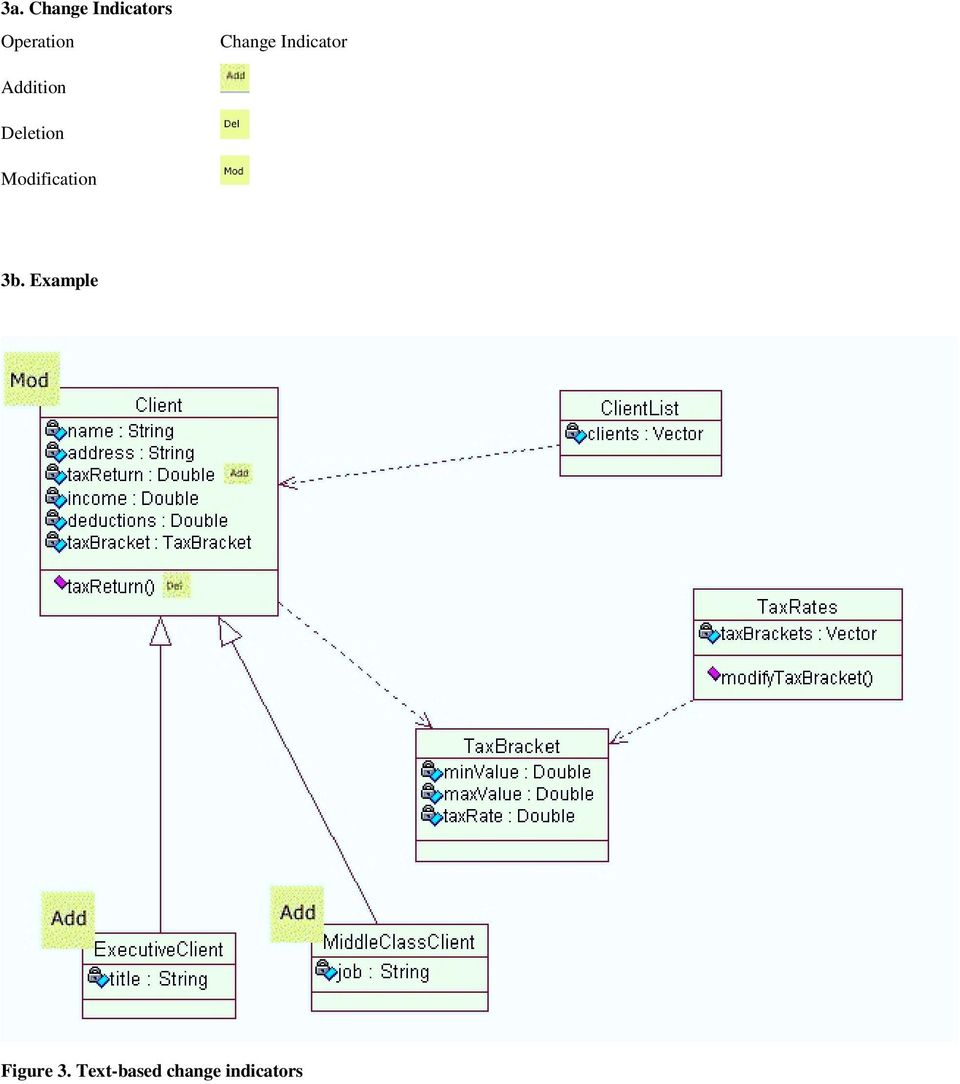
3 individual. The second way is to allow people to decide the issue for themselves. As previously mentioned, there was already some research conducted using the first approach by Dellen [2]. Her approach was tailored for situations where programmers were working on different but inter-related parts of a system, which differs from our situation where people are working on the same part of the system (or diagram). In the second approach, the people would set their own criteria for determining relevancy. Only the changes that have meet these criteria would be displayed. For instance, a person may only be interested in seeing changes that occurred during a certain period of time, or seeing changes that were caused by a certain person. The problem, of course, is in giving people appropriate ways to determine relevancy within the tool. 5. GRAPHICAL REPRESENTATIONS Assuming that a diagramming tool knew what changes are relevant to show to its user, it still must decide how to show these changes to the person. A key issue is the visual representation used. Any indicator of change must be noticeable enough so that it is easily interpreted and not overlooked, while remaining unobtrusive so that it does not interfere with the real work of software design. The first step to finding good representations is to determine the classes of changes that can be made to a diagram. Because we are still in the early stages of our work, we have explored only three primitive change operations that people can apply to a UML diagram: the addition, deletion, and modification of objects. There are, of course, many possible ways to represent these operations to a viewer. We are beginning our work with simple change indicators: icons attached to objects that indicate their changed state. Because there are many types of icons, we have developed and are testing the effectiveness of three different sets of change indicators. 1. Rudimentary graphical indicators use simple symbols to represent changes for addition, for deletion, and for modifications. 2. Change icons often seen in today s systems, with for addition (the blank document often represents new, for deletion, and for modification. class has been modified by having a method deleted and a data field added to it. 6. FUTURE WORK We are currently running a study to evaluate the effectiveness of iconic change indicators in general, as well as how particular change indicators perform. We are implementing and testing these simple change management ideas by modifying an existing UML editor. Of course, iconic change indicators are just scratching the surface of how to represent changes, and we expect to develop other much more radical methods for representing change as well as for filtering changes. References [1] Bohner, S. and Arnold, R. An Introduction To Software Change Impact Analysis. Software Change Impact Analysis. IEEE Computer Society Press, Los Alamitos, CA [2] Dellen, B. Change Impact Analysis Support For Software Development Processes. A Ph.D. Thesis from the University of Kaiserslautern [3] Parsowith, S., Fitzpatrick, G., Kaplan, S. and Segall, B. (1998) Tickertape: Notification and Communication in a Single Line. In Proceedings 3rd Asia Pacific Computer Human Interaction (APCHI98), Japan, IEEE Computer Society, pp [4] Robbins S. An open source UML editor (v 0.5.2) from the University of California, Irving. Irving, California Available online at [5] Neuwirth, C., Chandhok, R., Kaufer, D., Erion, P., Morris, J. and Miller, D. (1992). Flexible Diff-ing In A Collaborative Writing System. Proceedings of the ACM 92 (Toronto ON, 1992) ACM Press, [6] Hill, W. and Hollan, J.. Edit Wear And Read Wear. Proceedings of CHI 92 (Monterey CA, 1992) ACM Press, [7] Gutwin, C. Workspace Awareness In Real-Time Distributed GroupWare. A Ph.D. Thesis from the University of Calgary, Text-based icons: for addition, for deletion, and for modification. In the following three illustrations, these representations will be shown in a sample software project specified as a UML class diagram. The changes added to the sample shows the situation where two classes have been added to the UML diagram, and one
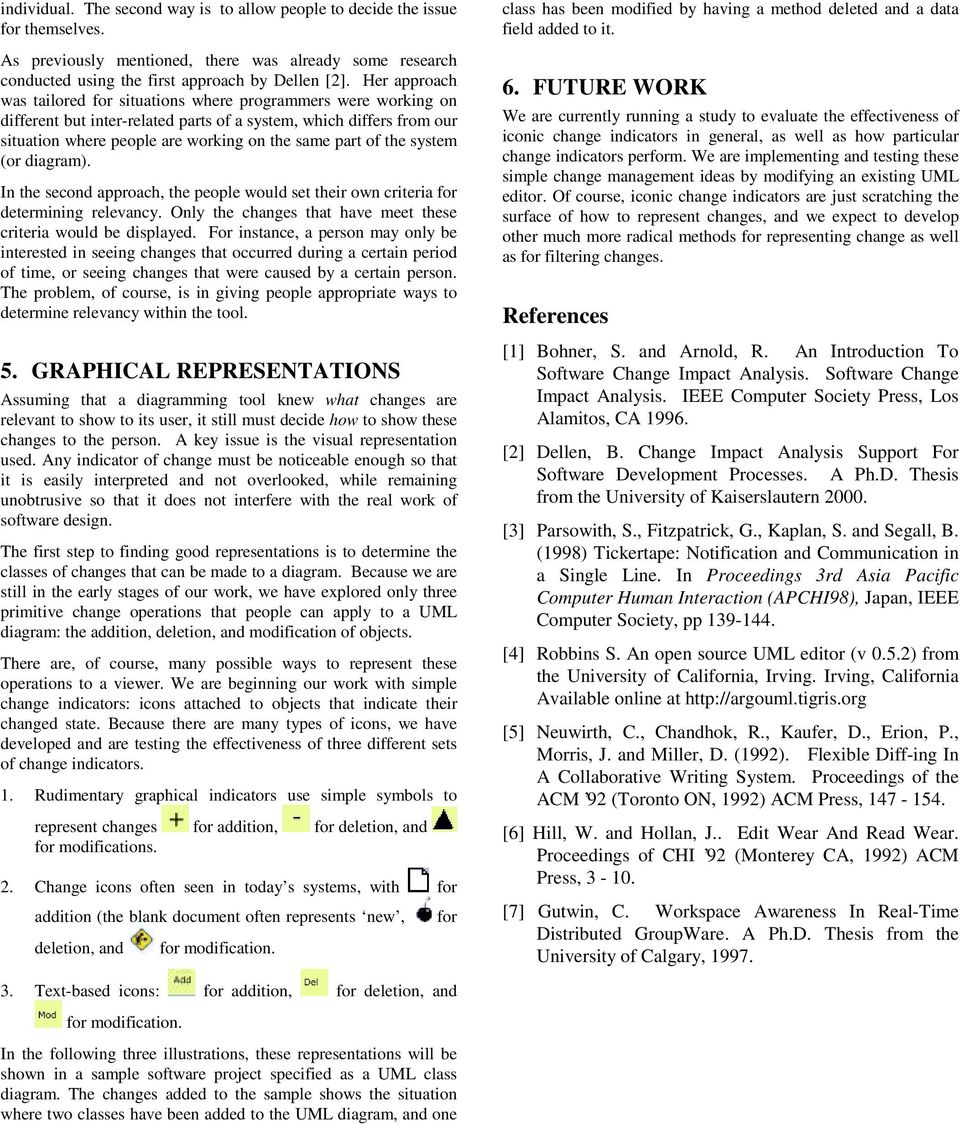
4 1a. Change Indicators Operation Change Indicator Used Addition Deletion Modification 1b. Example Figure 1. Rudimentary Graphical Indicators
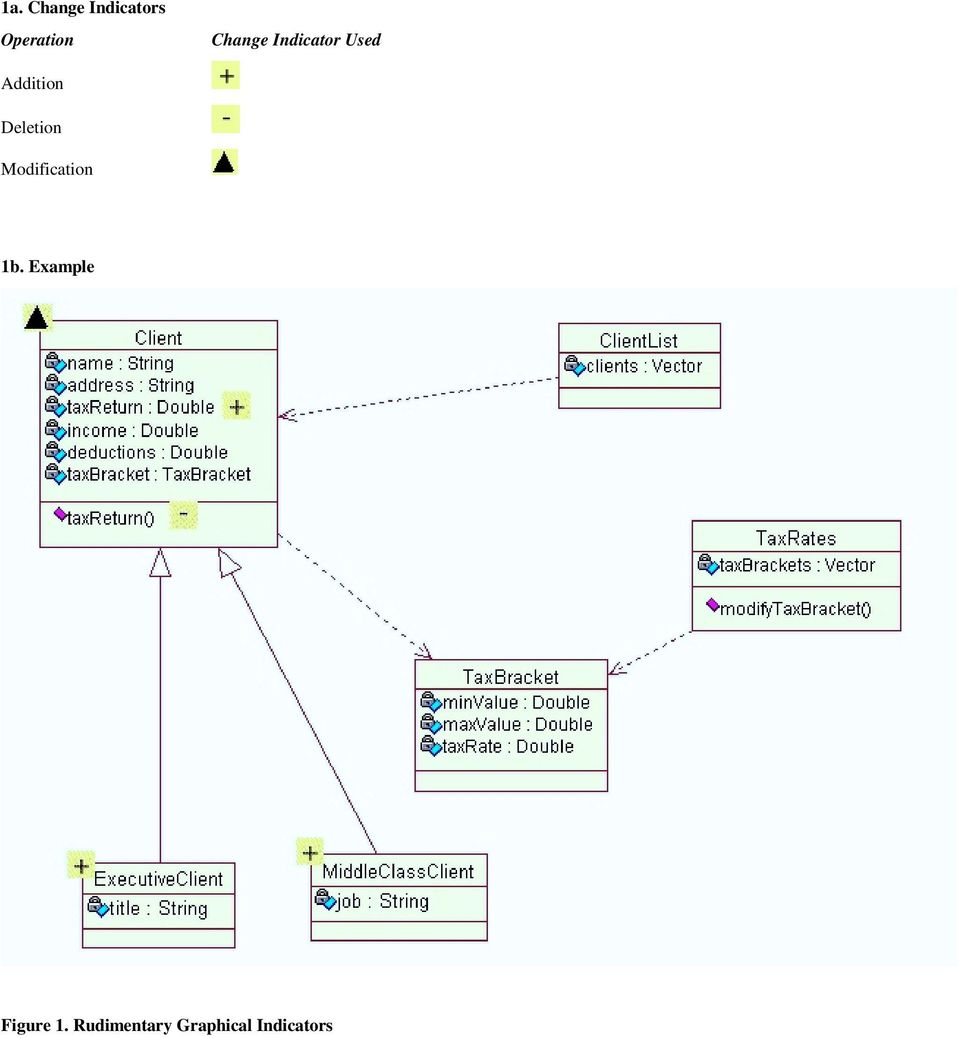
5 2a. Change Indicators Operation Addition Change Indicator Used Deletion Modification 2b. Example Figure 2. Common software based icons as change indicators

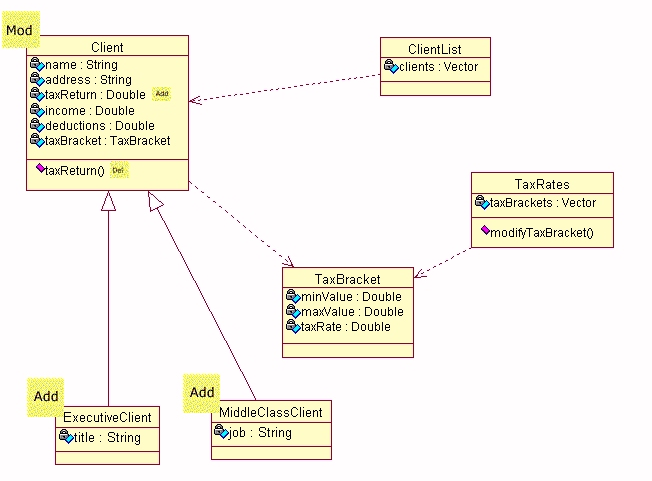
6 3a. Change Indicators Operation Change Indicator Addition Deletion Modification 3b. Example Figure 3. Text-based change indicators
A Review of an MVC Framework based Software Development
 , pp. 213-220 http://dx.doi.org/10.14257/ijseia.2014.8.10.19 A Review of an MVC Framework based Software Development Ronnie D. Caytiles and Sunguk Lee * Department of Multimedia Engineering, Hannam University
JRefleX: Towards Supporting Small Student Software Teams
 JRefleX: Towards Supporting Small Student Software Teams Kenny Wong, Warren Blanchet, Ying Liu, Curtis Schofield, Eleni Stroulia, Zhenchang Xing Department of Computing Science University of Alberta {kenw,blanchet,yingl,schofiel,stroulia,xing}@cs.ualberta.ca
Integrating Databases, Objects and the World-Wide Web for Collaboration in Architectural Design
 Integrating Databases, Objects and the World-Wide Web for Collaboration in Architectural Design Wassim Jabi, Assistant Professor Department of Architecture University at Buffalo, State University of New
Support for Group Awareness in Real-time Desktop Conferences
 Support for Group Awareness in Real-time Desktop Conferences Carl Gutwin Saul Greenberg March 1995 Department of Computer Science University of Calgary, Calgary, Alberta, Canada T2N 1N4 Phone. +1 403 220
CHAPTER 11 REQUIREMENTS
 Lecture Software Engineering CHAPTER 11 REQUIREMENTS Lecture Software Engineering Topics Determining What the Client Needs Overview of the Requirements Workflow Understanding the Domain The Business Model
Tool Support for Software Variability Management and Product Derivation in Software Product Lines
 Tool Support for Software Variability Management and Product Derivation in Software s Hassan Gomaa 1, Michael E. Shin 2 1 Dept. of Information and Software Engineering, George Mason University, Fairfax,
Cut Costs and Improve Agility by Simplifying and Automating Common System Administration Tasks
 SAP Brief Objectives Cut Costs and Improve Agility by Simplifying and Automating Common System Administration Tasks Simplify management of SAP software landscapes Simplify management of SAP software landscapes
Intelligent Analysis of User Interactions in a Collaborative Software Engineering Context
 Intelligent Analysis of User Interactions in a Collaborative Software Engineering Context Alejandro Corbellini 1,2, Silvia Schiaffino 1,2, Daniela Godoy 1,2 1 ISISTAN Research Institute, UNICEN University,
Intellect Platform - The Workflow Engine Basic HelpDesk Troubleticket System - A102
 Intellect Platform - The Workflow Engine Basic HelpDesk Troubleticket System - A102 Interneer, Inc. Updated on 2/22/2012 Created by Erika Keresztyen Fahey 2 Workflow - A102 - Basic HelpDesk Ticketing System
The Business Process Model
 The Business Process Model by Sparx Systems All material Sparx Systems 2007 Sparx Systems 2007 Page: 1 Table of Contents INTRODUCTION...3 BUSINESS PROCESS MODELING NOTATION (BPMN)...4 FLOW ELEMENTS...4
ONTOLOGY FOR MOBILE PHONE OPERATING SYSTEMS
 ONTOLOGY FOR MOBILE PHONE OPERATING SYSTEMS Hasni Neji and Ridha Bouallegue Innov COM Lab, Higher School of Communications of Tunis, Sup Com University of Carthage, Tunis, Tunisia. Email: [email protected];
Configuration & Build Management
 Object-Oriented Software Engineering Using UML, Patterns, and Java Configuration & Build Management Outline of the Lecture Purpose of Software Configuration Management (SCM) Some Terminology Software Configuration
Release Notes. Asset Control and Contract Management Solution 6.1. March 30, 2005
 Release Notes Asset Control and Contract Management Solution 6.1 March 30, 2005 Contents SECTION 1 OVERVIEW...4 1.1 Document Purpose... 4 1.2 Background... 4 1.3 Documentation... 4 SECTION 2 UPGRADING
Understanding and Supporting Intersubjective Meaning Making in Socio-Technical Systems: A Cognitive Psychology Perspective
 Understanding and Supporting Intersubjective Meaning Making in Socio-Technical Systems: A Cognitive Psychology Perspective Sebastian Dennerlein Institute for Psychology, University of Graz, Universitätsplatz
10.1 Determining What the Client Needs. Determining What the Client Needs (contd) Determining What the Client Needs (contd)
 Slide 10..1 CHAPTER 10 Slide 10..2 Object-Oriented and Classical Software Engineering REQUIREMENTS Seventh Edition, WCB/McGraw-Hill, 2007 Stephen R. Schach [email protected] Overview Slide 10..3
Development models. 1 Introduction. 2 Analyzing development models. R. Kuiper and E.J. Luit
 Development models R. Kuiper and E.J. Luit 1 Introduction We reconsider the classical development models: the Waterfall Model [Bo76], the V-Model [Ro86], the Spiral Model [Bo88], together with the further
Windchill Service Information Manager 10.1. Curriculum Guide
 Windchill Service Information Manager 10.1 Curriculum Guide Live Classroom Curriculum Guide Building Information Structures with Windchill Service Information Manager 10.1 Building Publication Structures
Industrial IT Ó Melody Composer
 Overview Industrial IT Ó Melody Composer Features and Benefits Support of concurrent engineering for Control Systems Operation on Windows NT and Windows 2000 Multiple client/server architecture Off-Line
Requirements-Based Testing: Encourage Collaboration Through Traceability
 White Paper Requirements-Based Testing: Encourage Collaboration Through Traceability Executive Summary It is a well-documented fact that incomplete, poorly written or poorly communicated requirements are
Sentaurus Workbench Comprehensive Framework Environment
 Data Sheet Comprehensive Framework Environment Overview is a complete graphical environment for creating, managing, executing, and analyzing TCAD simulations. Its intuitive graphical user interface allows
Requirements Definition and Management Processes
 Software Engineering G22.2440-001 Session 1 Sub-Topic 1 Requirements Definition & Management Processes and Tools Dr. Jean-Claude Franchitti New York University Computer Science Department Courant Institute
Understanding the IEC61131-3 Programming Languages
 profile Drive & Control Technical Article Understanding the IEC61131-3 Programming Languages It was about 120 years ago when Mark Twain used the phrase more than one way to skin a cat. In the world of
INTERNET-BASED COLLABORATIVE PROGRAMMING TECHNIQUES AND ENVIRONMENTS
 INTERNET-BASED COLLABORATIVE PROGRAMMING TECHNIQUES AND ENVIRONMENTS By Haifeng Shen A DISSERTATION SUBMITTED IN FULFILLMENT OF THE REQUIREMENTS OF THE DEGREE OF DOCTOR OF PHILOSOPHY AT THE SCHOOL OF COMPUTING
Sistemi ICT per il Business Networking
 Corso di Laurea Specialistica Ingegneria Gestionale Sistemi ICT per il Business Networking Software Development Processes Docente: Vito Morreale ([email protected]) 17 October 2006 1 The essence of
Systems Engineering with RUP: Process Adoption in the Aerospace/ Defense Industry
 March 2004 Rational Systems Engineering with RUP: Process Adoption in the Aerospace/ Defense Industry Why companies do it, how they do it, and what they get for their effort By Dave Brown, Karla Ducharme,
Requirements Management with Enterprise Architect
 An Introduction to Requirements Management with Enterprise Architect By Sparx Systems All material Sparx Systems 2010 version 1.3 www.sparxsystems.com Sparx Systems 2010 Page 1 Trademarks Object Management
CMTRAC. Application Overview APPLICATION DATASHEET
 Application Overview CMTRAC APPLICATION DATASHEET CMtrac is an innovative web-based tool for controlling and tracking change processes. This tool provides businesses with a simple mechanism to define and
PATROL From a Database Administrator s Perspective
 PATROL From a Database Administrator s Perspective September 28, 2001 Author: Cindy Bean Senior Software Consultant BMC Software, Inc. 3/4/02 2 Table of Contents Introduction 5 Database Administrator Tasks
Linear Motion and Assembly Technologies Pneumatics Service. Understanding the IEC61131-3 Programming Languages
 Electric Drives and Controls Hydraulics Linear Motion and Assembly Technologies Pneumatics Service profile Drive & Control Understanding the IEC61131-3 Programming Languages It was about 120 years ago
Applying Cognitive Patterns to Support
 Applying Cognitive Patterns to Support Software Tool Development By Hanna Farah Thesis Presented to the Faculty of Graduate and Postdoctoral Studies in partial fulfillment of the requirements for the degree
IndustrialIT System 800xA AC 870P/Melody Engineering
 IndustrialIT System 800xA AC 870P/Melody Engineering Overview Features and Benefits Scalable System Architecture: The system architecture can range from a single station to complex client/server architecture.
Automating Requirements Management 1
 Automating Requirements Management 1 Karl E. Wiegers Process Impact www.processimpact.com It s no secret that poorly understood user requirements and uncontrolled scope creep lead to many software project
TRADITIONAL VS MODERN SOFTWARE ENGINEERING MODELS: A REVIEW
 Year 2014, Vol. 1, issue 1, pp. 49-56 Available online at: http://journal.iecuniversity.com TRADITIONAL VS MODERN SOFTWARE ENGINEERING MODELS: A REVIEW Singh RANDEEP a*, Rathee AMIT b a* Department of
Curriculum Vitae. Zhenchang Xing
 Curriculum Vitae Zhenchang Xing Computing Science Department University of Alberta, Edmonton, Alberta T6G 2E8 Phone: (780) 433 0808 E-mail: [email protected] http://www.cs.ualberta.ca/~xing EDUCATION
IBM Rational ClearCase, Version 8.0
 IBM Rational ClearCase, Version 8.0 Improve software and systems delivery with automated software configuration management solutions Highlights Improve software delivery and software development life cycle
Xcode Source Management Guide. (Legacy)
 Xcode Source Management Guide (Legacy) Contents Introduction 5 Organization of This Document 5 See Also 6 Source Management Overview 7 Source Control Essentials 7 Snapshots 8 Managing Source in Xcode 8
Software Quality Assurance Plan
 Software Quality Assurance Plan Online Book Store Version 1.0 Vamsi Krishna Mummaneni CIS 895 MSE Project KSU Major Professor Dr.Torben Amtoft 1 Table of Contents 1. Purpose 3 2. Reference Documents 3
EVALUATION. WA1844 WebSphere Process Server 7.0 Programming Using WebSphere Integration COPY. Developer
 WA1844 WebSphere Process Server 7.0 Programming Using WebSphere Integration Developer Web Age Solutions Inc. USA: 1-877-517-6540 Canada: 1-866-206-4644 Web: http://www.webagesolutions.com Chapter 6 - Introduction
2. Analysis, Design and Implementation
 2. Subject/Topic/Focus: Software Production Process Summary: Software Crisis Software as a Product: From Individual Programs to Complete Application Systems Software Development: Goals, Tasks, Actors,
Program Understanding in Software Engineering
 Taming the complexity: The need for program understanding in software engineering Raghvinder S. Sangwan, Ph.D. Pennsylvania State University, Great Valley School of Graduate Professional Studies Robert
Software Engineering. Session 3 Main Theme Requirements Definition & Management Processes and Tools Dr. Jean-Claude Franchitti
 Software Engineering Session 3 Main Theme Requirements Definition & Management Processes and Tools Dr. Jean-Claude Franchitti New York University Computer Science Department Courant Institute of Mathematical
TOOLS FOR SOFTWARE ENGINEERS
 IMPACT: International Journal of Research in Engineering & Technology (IMPACT: IJRET) ISSN(E): 2321-8843; ISSN(P): 2347-4599 Vol. 3, Issue 10, Oct 2015, 75-86 Impact Journals TOOLS FOR SOFTWARE ENGINEERS
WhatsUp Gold v11 Features Overview
 WhatsUp Gold v11 Features Overview This guide provides an overview of the core functionality of WhatsUp Gold v11, and introduces interesting features and processes that help users maximize productivity
ProGUM-Web: Tool Support for Model-Based Development of Web Applications
 ProGUM-Web: Tool Support for Model-Based Development of Web Applications Marc Lohmann 1, Stefan Sauer 1, and Tim Schattkowsky 2 1 University of Paderborn, Computer Science, D 33095 Paderborn, Germany {mlohmann,sauer}@upb.de
ISSUES OF STRUCTURED VS. OBJECT-ORIENTED METHODOLOGY OF SYSTEMS ANALYSIS AND DESIGN
 ISSUES OF STRUCTURED VS. OBJECT-ORIENTED METHODOLOGY OF SYSTEMS ANALYSIS AND DESIGN Mohammad A. Rob, University of Houston-Clear Lake, [email protected] ABSTRACT In recent years, there has been a surge of
Cisco Unified Communications Self Care Portal User Guide, Release 10.5(1)
 Cisco Unified Communications Self Care Portal User Guide, Release 10.5(1) Unified Communications Self Care Portal 2 Unified Communications Self Care Settings 2 Phones 4 Additional Settings 12 Revised:
Software Engineering
 1 Software Engineering Lecture 2: Software Life Cycles Stefan Hallerstede Århus School of Engineering 25 August 2011 2 Contents Naive Software Development Code & Fix Towards A Software Process Software
Rational Team Concert. Guido Salvaneschi Dipartimento di Elettronica e Informazione Politecnico di Milano [email protected].
 Rational Team Concert Guido Salvaneschi Dipartimento di Elettronica e Informazione Politecnico di Milano [email protected] Project Areas The project area is the system's representation of a software
Classical Software Life Cycle Models
 Classical Software Life Cycle Models SWEN 301 Trimester 1, 2015 Lecturer: Dr Hui Ma Engineering and Computer Science Lecture slides make use of material provided on the textbook's companion website Motivation
How To Develop A Telelogic Harmony/Esw Project
 White paper October 2008 The Telelogic Harmony/ESW process for realtime and embedded development. Bruce Powel Douglass, IBM Page 2 Contents 3 Overview 4 Telelogic Harmony/ESW core principles 6 Harmony/ESW
To introduce software process models To describe three generic process models and when they may be used
 Software Processes Objectives To introduce software process models To describe three generic process models and when they may be used To describe outline process models for requirements engineering, software
Jos Warmer, Independent [email protected] www.openmodeling.nl
 Domain Specific Languages for Business Users Jos Warmer, Independent [email protected] www.openmodeling.nl Sheet 2 Background Experience Business DSLs Insurance Product Modeling (structure) Pattern
EMF Compare. EMF Compare. Summary : Table des mises à jour Version Date Auteur(s) Mises à jour v1.0 06/10/11 Laurent Goubet Initial Version
 EMF Compare Summary : Table des mises à jour Version Date Auteur(s) Mises à jour v1.0 06/10/11 Laurent Goubet Initial Version Réf : compare_scalability.odt Page 1/7 Sommaire 1 - Scope...3 2 - Model Structure...4
Design of Visual Repository, Constraint and Process Modeling Tool based on Eclipse Plug-ins
 Design of Visual Repository, Constraint and Process Modeling Tool based on Eclipse Plug-ins Rushiraj Heshi Department of Computer Science and Engineering Walchand College of Engineering, Sangli Smriti
The Document Review Process: Automation of your document review and approval. A White Paper. BP Logix, Inc.
 The Document Review Process: Automation of your document review and approval A White Paper BP Logix, Inc. The Document Review Process A document encompasses many forms technical documentation, product
Revel8or: Model Driven Capacity Planning Tool Suite
 Revel8or: Model Driven Capacity Planning Tool Suite Liming Zhu 1,2, Yan Liu 1,2, Ngoc Bao Bui 1,2,Ian Gorton 3 1 Empirical Software Engineering Program, National ICT Australia Ltd. 2 School of Computer
Reference Process Models User's Guide for Oracle Application Integration Architecture Foundation Pack 11g Release 1 (11.1.1.9.0)
 [1]Oracle Fusion Middleware Reference Process Models User's Guide for Oracle Application Integration Architecture Foundation Pack 11g Release 1 (11.1.1.9.0) E17368-09 December 2014 Describes the modeling
When User Experience Met Agile: A Case Study
 When User Experience Met Agile: A Case Study Michael Budwig User Experience Manager PayPal 2211 North 1 st Street, San Jose, California 95131 USA [email protected] Soojin Jeong Manager, User Interface
SourceForge Enterprise Edition 4.4 SP1 User Guide
 SourceForge Enterprise Edition 4.4 SP1 User Guide SourceForge Enterprise Edition 4.4, Service Pack 1 Part Number: 98-0063 Last Revision: January 2008 Copyright 2008 CollabNet, Inc. All rights reserved.
Software Visualization Tools for Component Reuse
 Software Visualization Tools for Component Reuse Craig Anslow Stuart Marshall James Noble Robert Biddle 1 School of Mathematics, Statistics and Computer Science, Victoria University of Wellington, New
Software Engineering. Software Processes. Based on Software Engineering, 7 th Edition by Ian Sommerville
 Software Engineering Software Processes Based on Software Engineering, 7 th Edition by Ian Sommerville Objectives To introduce software process models To describe three generic process models and when
Component visualization methods for large legacy software in C/C++
 Annales Mathematicae et Informaticae 44 (2015) pp. 23 33 http://ami.ektf.hu Component visualization methods for large legacy software in C/C++ Máté Cserép a, Dániel Krupp b a Eötvös Loránd University [email protected]
The value of modeling
 The value of modeling Level: Introductory Gary Cernosek, Marketing Manager, IBM Rational Eric Naiburg, Group Market Manager Desktop Products, IBM Rational 15 Nov 2004 from The Rational Edge: This article
UML TUTORIALS THE USE CASE MODEL
 UML TUTORIALS THE USE CASE MODEL www.sparxsystems.com.au Sparx Systems 2004 Page 1/5 describes the proposed functionality of the new system. A Use Case represents a discrete unit of interaction between
The Role of Computers in Synchronous Collaborative Design
 The Role of Computers in Synchronous Collaborative Design Wassim M. Jabi, The University of Michigan Theodore W. Hall, Chinese University of Hong Kong Abstract In this paper we discuss the role of computers
What is a life cycle model?
 What is a life cycle model? Framework under which a software product is going to be developed. Defines the phases that the product under development will go through. Identifies activities involved in each
Rational DOORS Next Generation. Quick Start Tutorial
 Rational DOORS Next Generation Quick Start Tutorial 1 Contents 1. Introduction... 2 2. Terminology... 3 3. Project Area Preparation... 3 3.1 Creating the project area... 3 4 Browsing Artifacts and Modules...
CoVitesse: A Groupware Interface for Collaborative Navigation on the WWW
 CoVitesse: A Groupware Interface for Collaborative Navigation on the WWW Yann Laurillau Laurence Nigay CLIPS-IMAG Laboratory, University of Grenoble Domaine Universitaire, BP 53, 38041 Grenoble Cedex 9,
Balancing the Outsourcing Equation
 Whitepaper Balancing the Outsourcing Equation A Blueprint on how to obtain the benefits of outsourcing without the risks. 2013 Blueprint Software Systems Inc. All rights reserved Executive Summary This
Enriched Links: A Framework For Improving Web Navigation Using Pop-Up Views
 Enriched Links: A Framework For Improving Web Navigation Using Pop-Up Views Gary Geisler Interaction Design Laboratory School of Information and Library Science University of North Carolina at Chapel Hill
WebSphere Business Monitor
 WebSphere Business Monitor Dashboards 2010 IBM Corporation This presentation should provide an overview of the dashboard widgets for use with WebSphere Business Monitor. WBPM_Monitor_Dashboards.ppt Page
A UML Introduction Tutorial
 A UML Introduction Tutorial 1/27/08 9:55 PM A UML Introduction Tutorial In this tutorial you will learn about the fundamentals of object oriented modelling, the Unified Modelling Language and the software
COMP5426 Parallel and Distributed Computing. Distributed Systems: Client/Server and Clusters
 COMP5426 Parallel and Distributed Computing Distributed Systems: Client/Server and Clusters Client/Server Computing Client Client machines are generally single-user workstations providing a user-friendly
REVIEW ON THE EFFECTIVENESS OF AGILE UNIFIED PROCESS IN SOFTWARE DEVELOPMENT WITH VAGUE SYSTEM REQUIREMENTS
 REVIEW ON THE EFFECTIVENESS OF AGILE UNIFIED PROCESS IN SOFTWARE DEVELOPMENT WITH VAGUE SYSTEM REQUIREMENTS Lisana Universitas Surabaya (UBAYA), Raya Kalirungkut, Surabaya, Indonesia E-Mail: [email protected]
Process Modeling using BPMN 2.0
 Process Modeling using BPMN 2.0 This chapter provides a brief overview of Business Process Modeling Notation (BPMN) concepts with particular emphasis on the BPMN 2.0 additions. In addition, it describes
Using MS-SQL Server with Visual DataFlex March, 2009
 Using MS-SQL Server with Visual DataFlex March, 2009 All rights reserved. Target Audience It is assumed that the reader of this white paper has general knowledge of the Visual DataFlex development environment.
Increasing Development Knowledge with EPFC
 The Eclipse Process Framework Composer Increasing Development Knowledge with EPFC Are all your developers on the same page? Are they all using the best practices and the same best practices for agile,
HP Systinet. Software Version: 10.01 Windows and Linux Operating Systems. Concepts Guide
 HP Systinet Software Version: 10.01 Windows and Linux Operating Systems Concepts Guide Document Release Date: June 2015 Software Release Date: June 2015 Legal Notices Warranty The only warranties for HP
Designing a Home Alarm using the UML. And implementing it using C++ and VxWorks
 Designing a Home Alarm using the UML And implementing it using C++ and VxWorks M.W.Richardson I-Logix UK Ltd. [email protected] This article describes how a simple home alarm can be designed using the UML
The Unified Software Development Process
 The Unified Software Development Process Technieche Universal Darmstadt FACHBEREICH IN-FORMAHK BLIOTHEK Ivar Jacobson Grady Booch James Rumbaugh Rational Software Corporation tnventar-nsr.: Sachgebiete:
Graphical Environment Tool for Development versus Non Graphical Development Tool
 Section 4 Computing, Communications Engineering and Signal Processing & Interactive Intelligent Systems Graphical Environment Tool for Development versus Non Graphical Development Tool Abstract S.Daniel
SAS in clinical trials A relook at project management,
 SAS in clinical trials A relook at project management, tools and software engineering Sameera Nandigama - Statistical Programmer PhUSE 2014 AD07 2014 inventiv Health. All rights reserved. Introduction
Call Center and Clearing System. ID Technologies Inc
 Call Center and Clearing System ID Technologies Inc Features Enterprise level ticket generation, clearing and tracking system GIS based integrated graphical information. Multi-format map integration Real