
Service Handbook AIR CONDITIONERS
|
|
|
- Sophie O’Connor’
- 10 years ago
- Views:
Transcription
1 AIR CONDITIONERS Models PUHY-(E)P200, P250, (E)P300, P350, (E)P400, (E)P450YHM-A PUHY-(E)P500, (E)P550, (E)P600, (E)P650YSHM-A PUHY-(E)P700, (E)P750, (E)P800, (E)P850, (E)P900YSHM-A PUHY-P950, P1000, P1050, P1100, P1150, P1200, P1250YSHM-A Service Handbook
2 Safety Precautions Before installing the, thoroughly read the following safety precautions. Observe these safety precautions for your safety. WARNING This symbol is intended to alert the user to the presence of important instructions that must be followed to avoid the risk of serious injury or death. CAUTION This symbol is intended to alert the user to the presence of important instructions that must be followed to avoid the risk of serious injury or damage to the. After reading this manual, give it to the user to retain for future reference. Keep this manual for easy reference. When the is moved or repaired, give this manual to those who provide these services. When the user changes, make sure that the new user receives this manual. WARNING Ask your dealer or a qualified technician to install the. Improper installation by the user may result in water leakage, electric shock, smoke, and/or fire. Properly install the on a surface that can withstand the weight of the. Unit installed on an unstable surface may fall and cause injury. Only use specified cables. Securely connect each cable so that the terminals do not carry the weight of the cable. Improperly connected or fixed cables may produce heat and start a fire. Take appropriate safety measures against strong winds and earthquakes to prevent the from falling. If the is not installed properly, the may fall and cause serious injury to the person or damage to the. Do not make any modifications or alterations to the. Consult your dealer for repair. Improper repair may result in water leakage, electric shock, smoke, and/or fire. In the event of a refrigerant leak, thoroughly ventilate the room. If refrigerant gas leaks and comes in contact with an open flame, poisonous gases will be produced. When installing the All-Fresh type s, take it into consideration that the outside air may be discharged directly into the room when the thermo is turned off. Direct exposure to outdoor air may have an adverse effect on health. It may also result in food spoilage. Properly install the according to the instructions in the installation manual. Improper installation may result in water leakage, electric shock, smoke, and/or fire. Have all electrical work performed by an authorized electrician according to the local regulations and instructions in this manual, and a dedicated circuit must be used. Insufficient capacity of the power supply circuit or improper installation may result in malfunctions of the, electric shock, smoke, and/or fire. Do not touch the heat exchanger fins. The fins are sharp and dangerous. i

3 WARNING Securely attach the terminal block cover (panel) to the. If the terminal block cover (panel) is not installed properly, dust and/or water may infiltrate and pose a risk of electric shock, smoke, and/or fire. Only use the type of refrigerant that is indicated on the when installing or reinstalling the. Infiltration of any other type of refrigerant or air into the may adversely affect the refrigerant cycle and may cause the pipes to burst or explode. When installing the in a small room, exercise caution and take measures against leaked refrigerant reaching the limiting concentration. Consult your dealer with any questions regarding limiting concentrations and for precautionary measures before installing the. Leaked refrigerant gas exceeding the limiting concentration causes oxygen deficiency. Consult your dealer or a specialist when moving or reinstalling the. Improper installation may result in water leakage, electric shock, and/or fire. After completing the service work, check for a gas leak. If leaked refrigerant is exposed to a heat source, such as a fan heater, stove, or electric grill, poisonous gases may be produced. Do not try to defeat the safety features of the. Forced operation of the pressure switch or the temperature switch by defeating the safety features of these devices, or the use of accessories other than the ones that are recommended by MITSUBISHI may result in smoke, fire, and/or explosion. Only use accessories recommended by MITSUBISHI. Ask a qualified technician to install the. Improper installation by the user may result in water leakage, electric shock, smoke, and/or fire. Control box houses high-voltage parts. When opening or closing the front panel of the control box, do not let it come into contact with any of the internal components. Before inspecting the inside of the control box, turn off the power, keep the off for at least 10 minutes, and confirm that the voltage between FT-P and FT-N on INV Board has dropped to DC20V or less. (It takes about 10 minutes to discharge electricity after the power supply is turned off.) ii

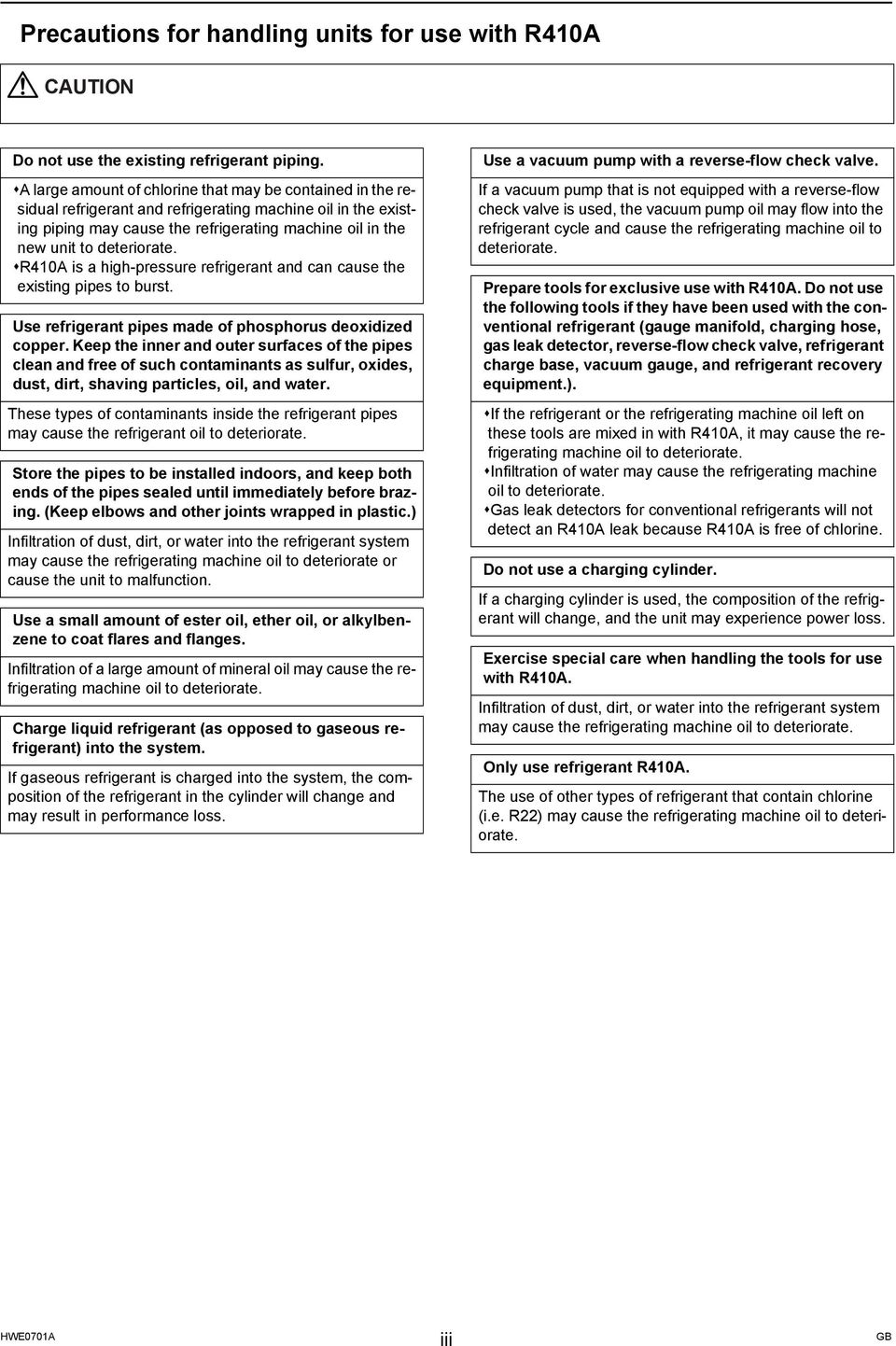
4 Precautions for handling s for use with R410A CAUTION Do not use the existing refrigerant piping. A large amount of chlorine that may be contained in the residual refrigerant and refrigerating machine oil in the existing piping may cause the refrigerating machine oil in the new to deteriorate. R410A is a high-pressure refrigerant and can cause the existing pipes to burst. Use refrigerant pipes made of phosphorus deoxidized copper. Keep the inner and outer surfaces of the pipes clean and free of such contaminants as sulfur, oxides, dust, dirt, shaving particles, oil, and water. These types of contaminants inside the refrigerant pipes may cause the refrigerant oil to deteriorate. Store the pipes to be installed indoors, and keep both ends of the pipes sealed until immediately before brazing. (Keep elbows and other joints wrapped in plastic.) Infiltration of dust, dirt, or water into the refrigerant system may cause the refrigerating machine oil to deteriorate or cause the to malfunction. Use a small amount of ester oil, ether oil, or alkylbenzene to coat flares and flanges. Infiltration of a large amount of mineral oil may cause the refrigerating machine oil to deteriorate. Charge liquid refrigerant (as opposed to gaseous refrigerant) into the system. If gaseous refrigerant is charged into the system, the composition of the refrigerant in the cylinder will change and may result in performance loss. Use a vacuum pump with a reverse-flow check valve. If a vacuum pump that is not equipped with a reverse-flow check valve is used, the vacuum pump oil may flow into the refrigerant cycle and cause the refrigerating machine oil to deteriorate. Prepare tools for exclusive use with R410A. Do not use the following tools if they have been used with the conventional refrigerant (gauge manifold, charging hose, gas leak detector, reverse-flow check valve, refrigerant charge base, vacuum gauge, and refrigerant recovery equipment.). If the refrigerant or the refrigerating machine oil left on these tools are mixed in with R410A, it may cause the refrigerating machine oil to deteriorate. Infiltration of water may cause the refrigerating machine oil to deteriorate. Gas leak detectors for conventional refrigerants will not detect an R410A leak because R410A is free of chlorine. Do not use a charging cylinder. If a charging cylinder is used, the composition of the refrigerant will change, and the may experience power loss. Exercise special care when handling the tools for use with R410A. Infiltration of dust, dirt, or water into the refrigerant system may cause the refrigerating machine oil to deteriorate. Only use refrigerant R410A. The use of other types of refrigerant that contain chlorine (i.e. R22) may cause the refrigerating machine oil to deteriorate. iii
5 Before installing the WARNING Do not install the where a gas leak may occur. If gaseous refrigerant leaks and piles up around the, it may be ignited. Do not use the to keep food items, animals, plants, artifacts, or for other special purposes. The is not designed to preserve food products. Do not use the in an unusual environment. Do not install the where a large amount of oil or steam is present or where acidic or alkaline solutions or chemical sprays are used frequently. Doing so may lead to a remarkable drop in performance, electric shock, malfunctions, smoke, and/or fire. The presence of organic solvents or corrosive gas (i.e. ammonia, sulfur compounds, and acid) may cause gas leakage or water leakage. When installing the in a hospital, take appropriate measures to reduce noise interference. High-frequency medical equipment may interfere with the normal operation of the air conditioner or vice versa. Do not install the on or over things that cannot get wet. When the humidity level exceeds 80% or if the drainage system is clogged, the indoor may drip water. Drain water is also discharged from the outdoor. Install a centralized drainage system if necessary. iv

6 Before installing the (moving and reinstalling the ) and performing electrical work CAUTION Properly ground the. Do not connect the grounding wire to a gas pipe, water pipe, lightning rod, or grounding wire from a telephone pole. Improper grounding may result in electric shock, smoke, fire, and/or malfunction due to noise interference. Do not put tension on the power supply wires. If tension is put on the wires, they may break and result in excessive heat, smoke, and/or fire. Install an earth leakage breaker to avoid the risk of electric shock. Failure to install an earth leakage breaker may result in electric shock, smoke, and/or fire. Use the kind of power supply wires that are specified in the installation manual. The use of wrong kind of power supply wires may result in current leak, electric shock, and/or fire. Use breakers and fuses (current breaker, remote switch <switch + Type-B fuse>, moulded case circuit breaker) with the proper current capacity. The use of wrong capacity fuses, steel wires, or copper wires may result in malfunctions, smoke, and/or fire. Periodically check the installation base for damage. If the is left on a damaged platform, it may fall and cause injury. Properly install the drain pipes according to the instructions in the installation manual. Keep them insulated to avoid dew condensation. Improper plumbing work may result in water leakage and damage to the furnishings. Exercise caution when transporting products. Products weighing more than 20 kg should not be carried alone. Do not carry the product by the PP bands that are used on some products. Do not touch the heat exchanger fins. They are sharp and dangerous. When lifting the with a crane, secure all four corners to prevent the from falling. Properly dispose of the packing materials. Nails and wood pieces in the package may pose a risk of injury. Plastic bags may pose a risk of choking hazard to children. Tear plastic bags into pieces before disposing of them. Do not spray water on the air conditioner or immerse the air conditioner in water. Otherwise, electric shock and/or fire may result. When handling s, always wear protective gloves to protect your hands from metal parts and high-temperature parts. v

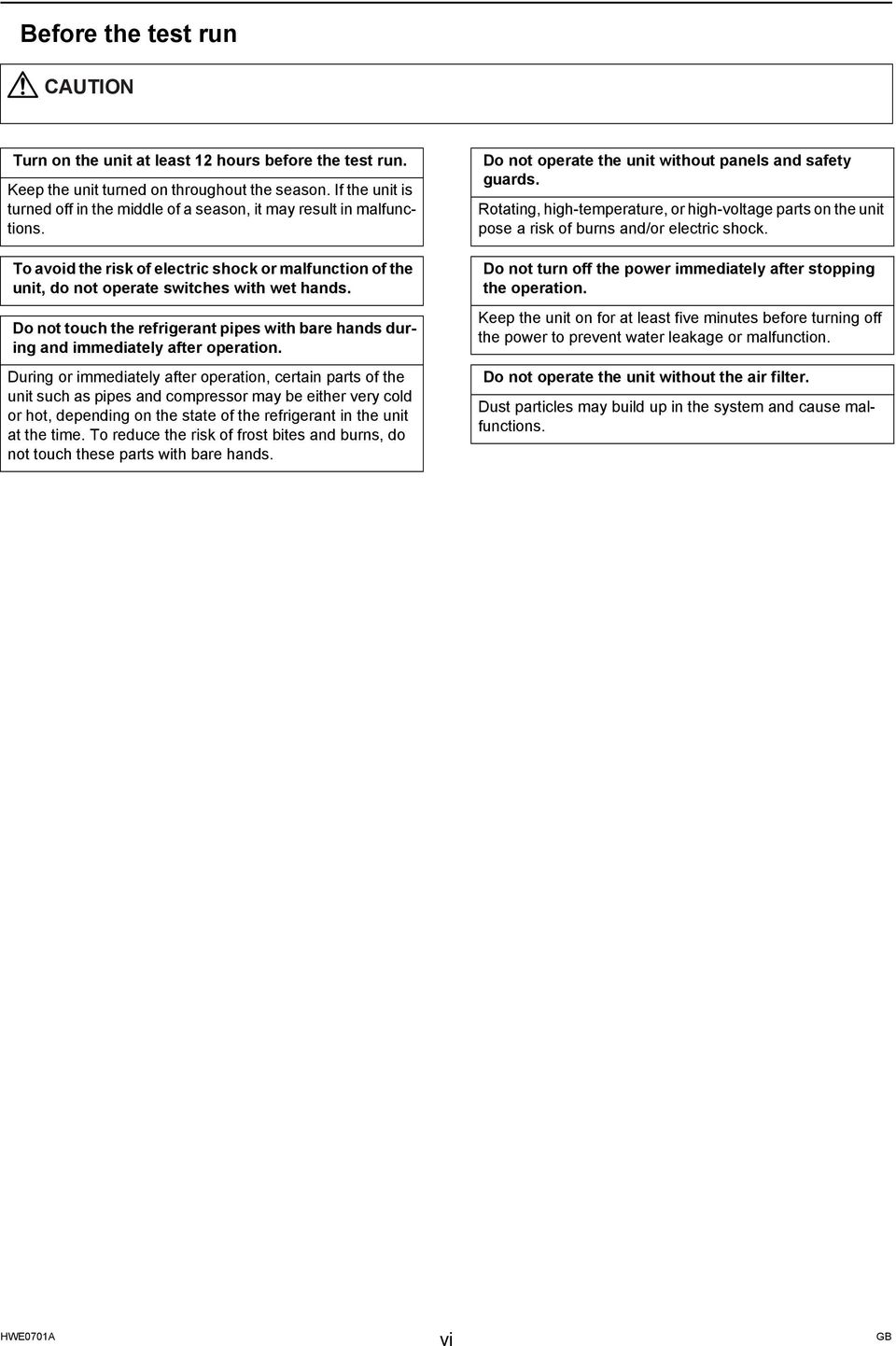
7 Before the test run CAUTION Turn on the at least 12 hours before the test run. Keep the turned on throughout the season. If the is turned off in the middle of a season, it may result in malfunctions. To avoid the risk of electric shock or malfunction of the, do not operate switches with wet hands. Do not touch the refrigerant pipes with bare hands during and immediately after operation. During or immediately after operation, certain parts of the such as pipes and compressor may be either very cold or hot, depending on the state of the refrigerant in the at the time. To reduce the risk of frost bites and burns, do not touch these parts with bare hands. Do not operate the without panels and safety guards. Rotating, high-temperature, or high-voltage parts on the pose a risk of burns and/or electric shock. Do not turn off the power immediately after stopping the operation. Keep the on for at least five minutes before turning off the power to prevent water leakage or malfunction. Do not operate the without the air filter. Dust particles may build up in the system and cause malfunctions. vi
8 CONTENTS I Read Before Servicing [1] Read Before Servicing... 3 [2] Necessary Tools and Materials... 4 [3] Piping Materials... 5 [4] Storage of Piping... 7 [5] Pipe Processing... 7 [6] Brazing... 8 [7] Air Tightness Test... 9 [8] Vacuum Drying (Evacuation)...10 [9] Refrigerant Charging [10] Remedies to be taken in case of a Refrigerant Leak [11] Characteristics of the Conventional and the New Refrigerants [12] Notes on Refrigerating Machine Oil II Restrictions [1] System configuration [2] Types and Maximum allowable Length of Cables [3] Switch Settings and Address Settings [4] Sample System Connection [5] An Example of a System to which an MA Remote Controller is connected [6] An Example of a System to which an M-NET Remote Controller is connected [7] An Example of a System to which both MA Remote Controller and M-NET Remote Controller are connected [8] Restrictions on Pipe Length III Outdoor Unit Components [1] Outdoor Unit Components and Refrigerant Circuit [2] Control Box of the Outdoor Unit [3] Outdoor Unit Circuit Board IV Remote Controller [1] Functions and Specifications of MA and ME Remote Controllers [2] Group Settings and Interlock Settings via the ME Remote Controller [3] Interlock Settings via the MA Remote Controller [4] Using the built-in Temperature Sensor on the Remote Controller V Electrical Wiring Diagram [1] Electrical Wiring Diagram of the Outdoor Unit [2] Electrical Wiring Diagram of Transmission Booster VI Refrigerant Circuit [1] Refrigerant Circuit Diagram [2] Principal Parts and Functions VII Control [1] Functions and Factory Settings of the Dipswitches [2] Controlling the Outdoor Unit [3] Operation Flow Chart VIII Test Run Mode [1] Items to be checked before a Test Run [2] Test Run Method [3] Operating Characteristic and Refrigerant Amount [4] Adjusting the Refrigerant Amount [5] Refrigerant Amount Adjust Mode [6] The following symptoms are normal [7] Standard Operation Data (Reference Data) IX Troubleshooting [1] Error Code Lists [2] Responding to Error Display on the Remote Controller [3] Investigation of Transmission Wave Shape/Noise [4] Troubleshooting Principal Parts [5] Refrigerant Leak [6] Compressor Replacement Instructions [7] Troubleshooting Using the Outdoor Unit LED Error Display X LED Monitor Display on the Outdoor Unit Board [1] How to Read the LED on the Service Monitor
![.. 11 [11] Characteristics of the Conventional and the New Refrigerants... 12 [12] Notes on Refrigerating Machine Oil... 13 II Restrictions [1] System configuration.](/docs-images/42/4779236/images/page_8.jpg ".. 17 [2] Types and Maximum allowable Length of Cables... 19 [3] Switch Settings and Address Settings... 20 [4] Sample System Connection.")
9

10 I Read Before Servicing [1] Read Before Servicing...3 [2] Necessary Tools and Materials...4 [3] Piping Materials...5 [4] Storage of Piping...7 [5] Pipe Processing...7 [6] Brazing...8 [7] Air Tightness Test...9 [8] Vacuum Drying (Evacuation)...10 [9] Refrigerant Charging...11 [10] Remedies to be taken in case of a Refrigerant Leak...11 [11] Characteristics of the Conventional and the New Refrigerants...12 [12] Notes on Refrigerating Machine Oil
![..9 [8] Vacuum Drying (Evacuation)...10 [9] Refrigerant Charging.](/docs-images/42/4779236/images/page_10.jpg "..11 [10] Remedies to be taken in case of a Refrigerant Leak.")
11 - 2 -

12 [ I Read Before Servicing ] I Read Before Servicing [1] Read Before Servicing 1. Check the type of refrigerant used in the system to be serviced. Refrigerant Type Multi air conditioner for building application CITY MULTI YHM-A series R410A 2. Check the symptoms exhibited by the to be serviced. Refer to this service handbook for symptoms relating to the refrigerant cycle. 3. Thoroughly read the safety precautions at the beginning of this manual. 4. Preparing necessary tools: Prepare a set of tools to be used exclusively with each type of refrigerant. Refer to "Necessary Tools and Materials" for information on the use of tools.(page 4) 5. Verification of the connecting pipes: Verify the type of refrigerant used for the to be moved or replaced. Use refrigerant pipes made of phosphorus deoxidized copper. Keep the inner and outer surfaces of the pipes clean and free of such contaminants as sulfur, oxides, dust, dirt, shaving particles, oil, and water. These types of contaminants inside the refrigerant pipes may cause the refrigerant oil to deteriorate. 6. If there is a leak of gaseous refrigerant and the remaining refrigerant is exposed to an open flame, a poisonous gas hydrofluoric acid may form. Keep workplace well ventilated. CAUTION Install new pipes immediately after removing old ones to keep moisture out of the refrigerant circuit. The use of refrigerant that contains chloride, such as R22, will cause the refrigerating machine oil to deteriorate

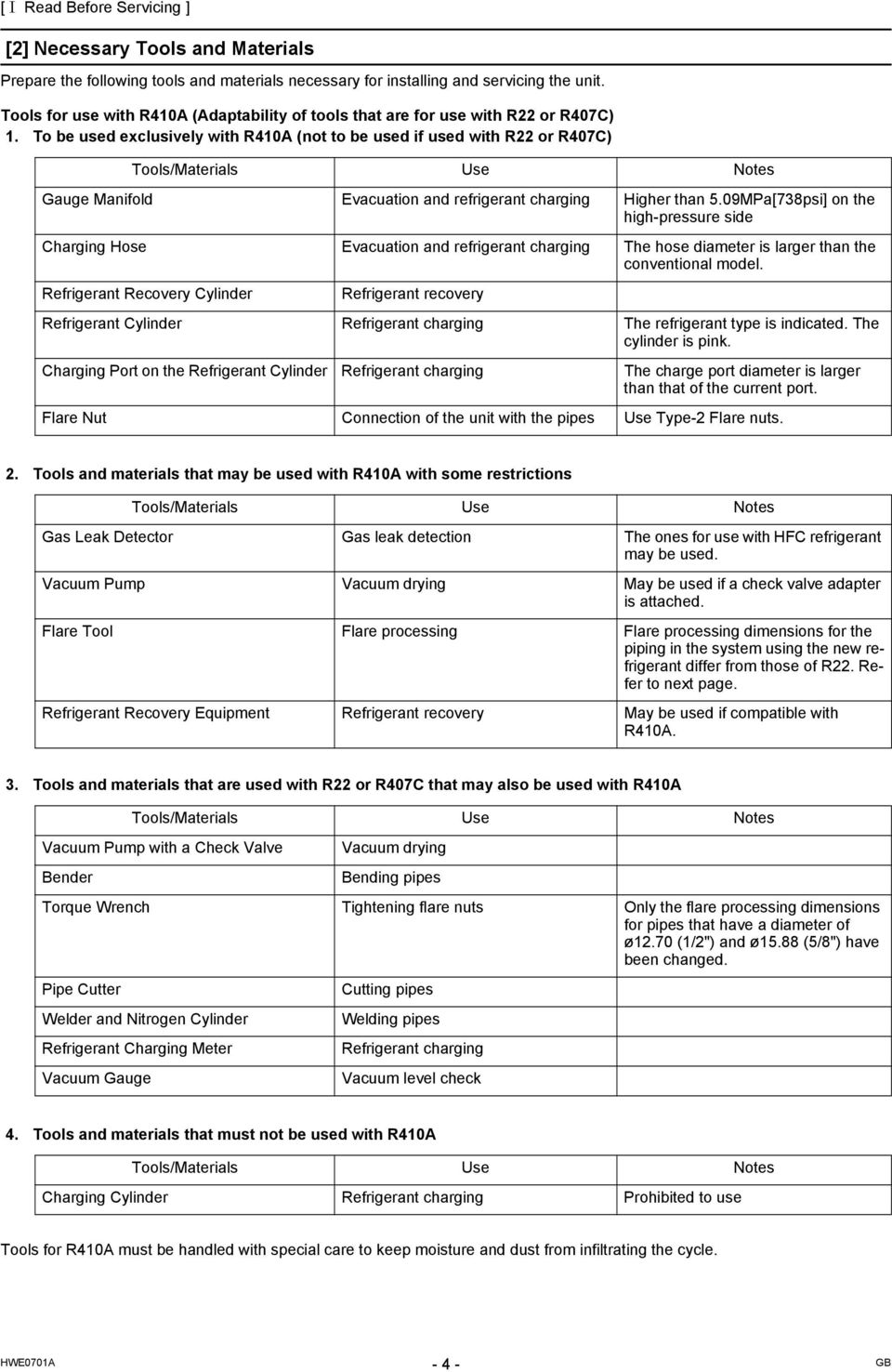
13 [ I Read Before Servicing ] [2] Necessary Tools and Materials Prepare the following tools and materials necessary for installing and servicing the. Tools for use with R410A (Adaptability of tools that are for use with R22 or R407C) 1. To be used exclusively with R410A (not to be used if used with R22 or R407C) Tools/Materials Use Notes Gauge Manifold Evacuation and refrigerant charging Higher than 5.09MPa[738psi] on the high-pressure side Charging Hose Evacuation and refrigerant charging The hose diameter is larger than the conventional model. Refrigerant Recovery Cylinder Refrigerant recovery Refrigerant Cylinder Refrigerant charging The refrigerant type is indicated. The cylinder is pink. Charging Port on the Refrigerant Cylinder Refrigerant charging The charge port diameter is larger than that of the current port. Flare Nut Connection of the with the pipes Use Type-2 Flare nuts. 2. Tools and materials that may be used with R410A with some restrictions Tools/Materials Use Notes Gas Leak Detector Gas leak detection The ones for use with HFC refrigerant may be used. Vacuum Pump Vacuum drying May be used if a check valve adapter is attached. Flare Tool Flare processing Flare processing dimensions for the piping in the system using the new refrigerant differ from those of R22. Refer to next page. Refrigerant Recovery Equipment Refrigerant recovery May be used if compatible with R410A. 3. Tools and materials that are used with R22 or R407C that may also be used with R410A Tools/Materials Use Notes Vacuum Pump with a Check Valve Bender Vacuum drying Bending pipes Torque Wrench Tightening flare nuts Only the flare processing dimensions for pipes that have a diameter of ø12.70 (1/2") and ø15.88 (5/8") have been changed. Pipe Cutter Welder and Nitrogen Cylinder Refrigerant Charging Meter Vacuum Gauge Cutting pipes Welding pipes Refrigerant charging Vacuum level check 4. Tools and materials that must not be used with R410A Tools/Materials Use Notes Charging Cylinder Refrigerant charging Prohibited to use Tools for R410A must be handled with special care to keep moisture and dust from infiltrating the cycle
14 [ I Read Before Servicing ] [3] Piping Materials Do not use the existing piping! 1. Copper pipe materials O-material (Annealed) 1/2H-material (Drawn) Soft copper pipes (annealed copper pipes). They can easily be bent with hands. Hard copper pipes (straight pipes). They are stronger than the O-material (Annealed) at the same radial thickness. The distinction between O-materials (Annealed) and 1/2H-materials (Drawn) is made based on the strength of the pipes themselves. O-materials (Annealed) can easily be bent with hands. 1/2H-materials (Drawn) are considerably stronger than O-material (Annealed) at the same thickness. 2. Types of copper pipes Maximum working pressure Refrigerant type 3.45 MPa [500psi] R22, R407C etc MPa [624psi] R410A etc. 3. Piping materials/radial thickness Use refrigerant pipes made of phosphorus deoxidized copper. The operation pressure of the s that use R410A is higher than that of the s that use R22. Use pipes that have at least the radial thickness specified in the chart below. (Pipes with a radial thickness of 0.7 mm or less may not be used.) Pipe size (mm[in]) Radial thickness (mm) Type ø6.35 [1/4"] 0.8t ø9.52 [3/8"] 0.8t ø12.7 [1/2"] 0.8t ø15.88 [5/8"] 1.0t ø19.05 [3/4"] 1.0t ø22.2 [7/8"] 1.0t ø25.4 [1"] 1.0t ø28.58 [1-1/8"] 1.0t ø31.75 [1-1/4"] 1.1t ø34.93 [1-3/8"] 1.1t ø41.28 [1-5/8"] 1.2t O-material (Annealed) 1/2H-material, H-material (Drawn) The pipes in the system that uses the refrigerant currently on the market are made with O-material (Annealed), even if the pipe diameter is less than ø19.05 (3/4"). For a system that uses R410A, use pipes that are made with 1/2H-material (Drawn) unless the pipe diameter is at least ø19.05 (3/4") and the radial thickness is at least 1.2t. The figures in the radial thickness column are based on the Japanese standards and provided only as a reference. Use pipes that meet the local standards

15 [ I Read Before Servicing ] 4. Thickness and refrigerant type indicated on the piping materials Ask the pipe manufacturer for the symbols indicated on the piping material for new refrigerant. 5. Flare processing (O-material (Annealed) and OL-material only) The flare processing dimensions for the pipes that are used in the R410A system are larger than those in the R22 system. Flare processing dimensions (mm[in]) A dimension (mm) Pipe size (mm[in]) R410A R22, R407C ø6.35 [1/4"] ø9.52 [3/8"] ø12.7 [1/2"] ø15.88 [5/8"] ø19.05 [3/4"] Dimension A If a clutch-type flare tool is used to flare the pipes in the system using R410A, the length of the pipes must be between 1.0 and 1.5 mm. For margin adjustment, a copper pipe gauge is necessary. 6. Flare nut The flare nut type has been changed to increase the strength. The size of some of the flare nuts have also been changed. Flare nut dimensions (mm[in]) B dimension (mm) Pipe size (mm[in]) R410A R22, R407C ø6.35 [1/4"] ø9.52 [3/8"] ø12.7 [1/2"] ø15.88 [5/8"] ø19.05 [3/4"] Dimension B The figures in the radial thickness column are based on the Japanese standards and provided only as a reference. Use pipes that meet the local standards
![Flare processing dimensions (mm[in]) A dimension (mm) Pipe size (mm[in]) R410A R22, R407C ø6.35 [1/4"] 9.1 9.0 ø9.52 [3/8"] 13.2 13.0 ø12.7 [1/2"] 16.6 16.2 ø15.88 [5/8"] 19.7 19.4 ø19.05 [3/4"] 24.](/docs-images/42/4779236/images/page_15.jpg "0 23.3 Dimension A If a clutch-type flare tool is used to flare the pipes in the system using R410A, the length of the pipes must be between 1.0 and 1.5 mm.")
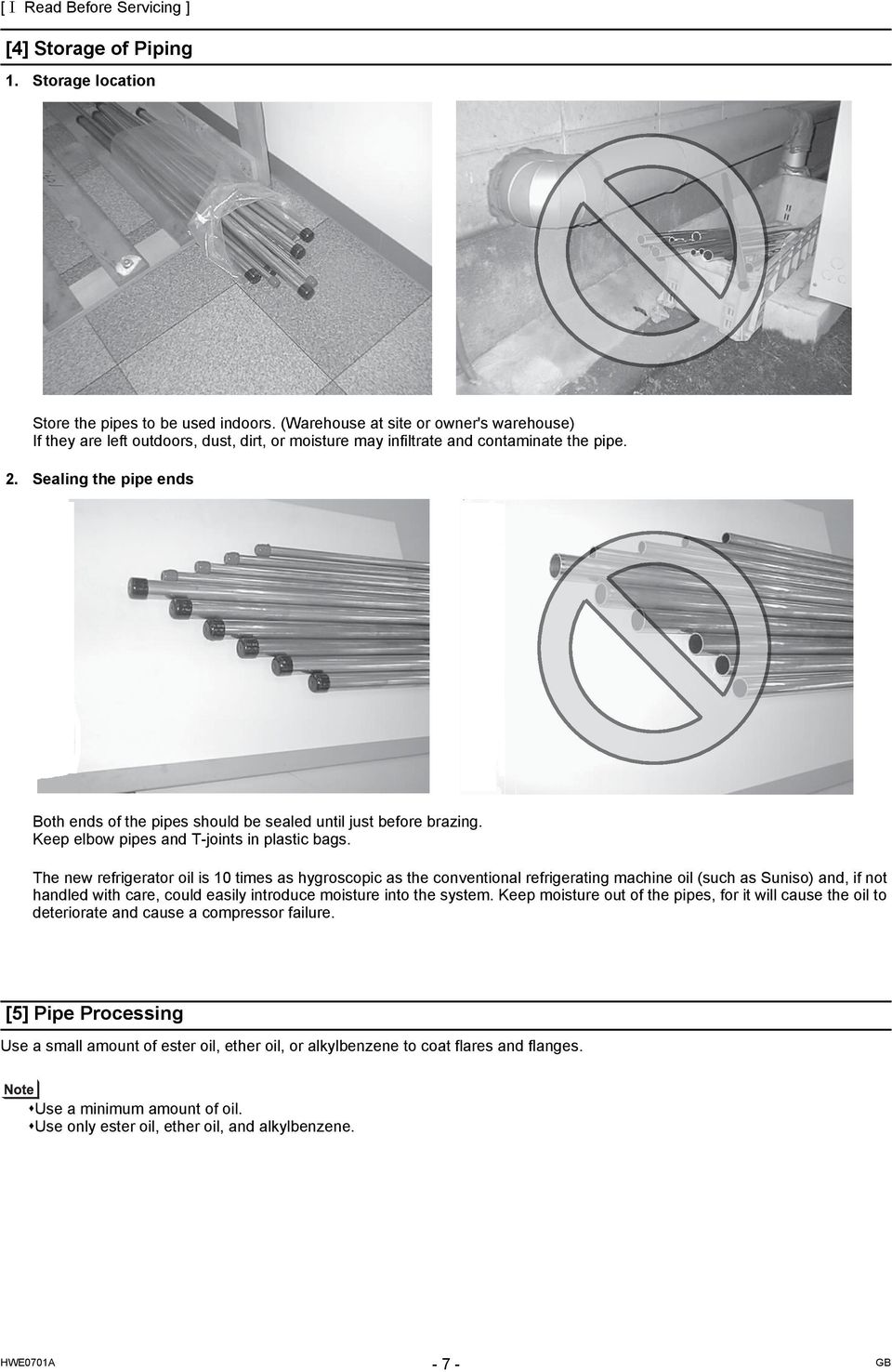
16 [ I Read Before Servicing ] [4] Storage of Piping 1. Storage location Store the pipes to be used indoors. (Warehouse at site or owner's warehouse) If they are left outdoors, dust, dirt, or moisture may infiltrate and contaminate the pipe. 2. Sealing the pipe ends Both ends of the pipes should be sealed until just before brazing. Keep elbow pipes and T-joints in plastic bags. The new refrigerator oil is 10 times as hygroscopic as the conventional refrigerating machine oil (such as Suniso) and, if not handled with care, could easily introduce moisture into the system. Keep moisture out of the pipes, for it will cause the oil to deteriorate and cause a compressor failure. [5] Pipe Processing Use a small amount of ester oil, ether oil, or alkylbenzene to coat flares and flanges. Use a minimum amount of oil. Use only ester oil, ether oil, and alkylbenzene. -7-
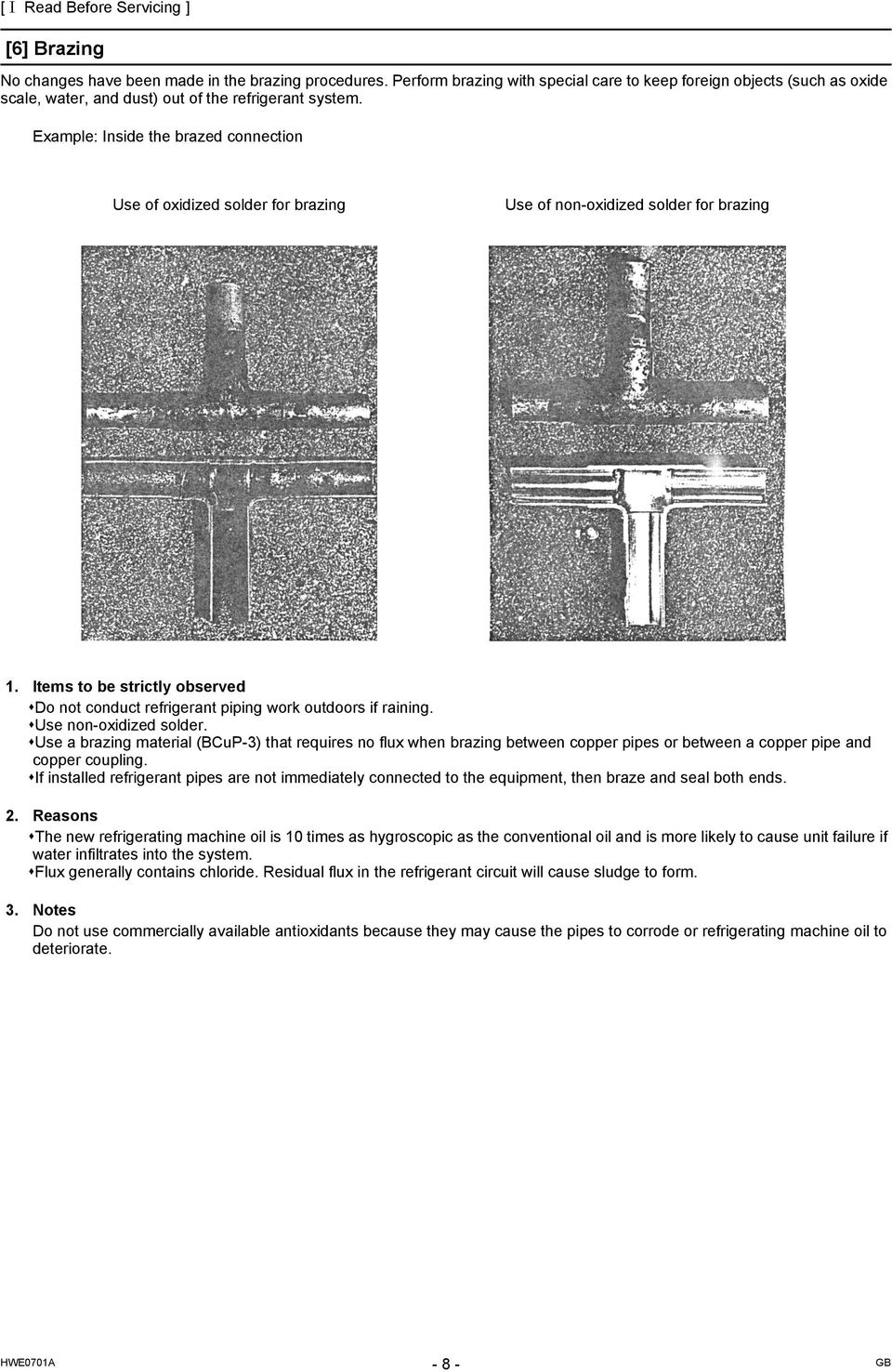
17 [ I Read Before Servicing ] [6] Brazing No changes have been made in the brazing procedures. Perform brazing with special care to keep foreign objects (such as oxide scale, water, and dust) out of the refrigerant system. Example: Inside the brazed connection Use of oxidized solder for brazing Use of non-oxidized solder for brazing 1. Items to be strictly observed Do not conduct refrigerant piping work outdoors if raining. Use non-oxidized solder. Use a brazing material (BCuP-3) that requires no flux when brazing between copper pipes or between a copper pipe and copper coupling. If installed refrigerant pipes are not immediately connected to the equipment, then braze and seal both ends. 2. Reasons The new refrigerating machine oil is 10 times as hygroscopic as the conventional oil and is more likely to cause failure if water infiltrates into the system. Flux generally contains chloride. Residual flux in the refrigerant circuit will cause sludge to form. 3. Notes Do not use commercially available antioxidants because they may cause the pipes to corrode or refrigerating machine oil to deteriorate
18 [ I Read Before Servicing ] [7] Air Tightness Test No changes have been made in the detection method. Note that a refrigerant leak detector for R22 will not detect an R410A leak. Halide torch R22 leakage detector 1. Items to be strictly observed Pressurize the equipment with nitrogen up to the design pressure (4.15MPa[601psi]), and then judge the equipment's air tightness, taking temperature variations into account. When using refrigerant instead of a leak detector to find the location of a leak, use R410A. Refrigerant R410A must be charged in its liquid state (vs. gaseous state). 2. Reasons Oxygen, if used for an air tightness test, poses a risk of explosion. (Only use nitrogen to check air tightness.) Refrigerant R410A must be charged in its liquid state. If gaseous refrigerant in the cylinder is drawn out first, the composition of the remaining refrigerant in the cylinder will change and become unsuitable for use. 3. Notes Procure a leak detector that is specifically designed to detect an HFC leak. A leak detector for R22 will not detect an HFC(R410A) leak
![15MPa[601psi]), and then judge the equipment's air tightness, taking temperature variations into account. When using refrigerant instead of a leak detector to find the location of a leak, use R410A.](/docs-images/42/4779236/images/page_18.jpg "Refrigerant R410A must be charged in its liquid state (vs. gaseous state). 2. Reasons Oxygen, if used for an air tightness test, poses a risk of explosion. (Only use nitrogen to check air tightness.")
19 [ I Read Before Servicing ] [8] Vacuum Drying (Evacuation) (Photo1) 15010H (Photo2) Recommended vacuum gauge: ROBINAIR Thermistor Vacuum Gauge 1. Vacuum pump with a reverse-flow check valve (Photo1) To prevent the vacuum pump oil from flowing into the refrigerant circuit during power OFF or power failure, use a vacuum pump with a reverse-flow check valve. A reverse-flow check valve may also be added to the vacuum pump currently in use. 2. Standard of vacuum degree (Photo 2) Use a vacuum pump that attains 0.5Torr(65Pa) or lower degree of vacuum after 5 minutes of operation, and connect it directly to the vacuum gauge. Use a pump well-maintained with an appropriate lubricant. A poorly maintained vacuum pump may not be able to attain the desired degree of vacuum. 3. Required precision of vacuum gauge Use a vacuum gauge that registers a vacuum degree of 5Torr(650Pa) and measures at intervals of 1Torr(130Pa). (A recommended vacuum gauge is shown in Photo2.) Do not use a commonly used gauge manifold because it cannot register a vacuum degree of 5Torr(650Pa). 4. Evacuation time After the degree of vacuum has reached 5Torr(650Pa), evacuate for an additional 1 hour. (A thorough vacuum drying removes moisture in the pipes.) Verify that the vacuum degree has not risen by more than 1Torr(130Pa) 1hour after evacuation. A rise by less than 1Torr(130Pa) is acceptable. If the vacuum is lost by more than 1Torr(130Pa), conduct evacuation, following the instructions in section 6. Special vacuum drying. 5. Procedures for stopping vacuum pump To prevent the reverse flow of vacuum pump oil, open the relief valve on the vacuum pump side, or draw in air by loosening the charge hose, and then stop the operation. The same procedures should be followed when stopping a vacuum pump with a reverse-flow check valve. 6. Special vacuum drying When 5Torr(650Pa) or lower degree of vacuum cannot be attained after 3 hours of evacuation, it is likely that water has penetrated the system or that there is a leak. If water infiltrates the system, break the vacuum with nitrogen. Pressurize the system with nitrogen gas to 0.5kgf/cm 2 G(0.05MPa) and evacuate again. Repeat this cycle of pressurizing and evacuation either until the degree of vacuum below 5Torr(650Pa) is attained or until the pressure stops rising. Only use nitrogen gas for vacuum breaking. (The use of oxygen may result in an explosion.)

20 [ I Read Before Servicing ] [9] Refrigerant Charging Cylinder with a siphon Cylinder without a siphon Cylinder Cylinder Cylinder color R410A is pink. Refrigerant charging in the liquid state Valve Valve liquid liquid 1. Reasons R410A is a pseudo-azeotropic HFC blend (boiling point R32=-52 C[-62 F], R125=-49 C[-52 F]) and can almost be handled the same way as a single refrigerant, such as R22. To be safe, however, draw out the refrigerant from the cylinder in the liquid phase. If the refrigerant in the gaseous phase is drawn out, the composition of the remaining refrigerant will change and become unsuitable for use. 2. Notes When using a cylinder with a siphon, refrigerant is charged in the liquid state without the need for turning it upside down. Check the type of the cylinder on the label before use. [10] Remedies to be taken in case of a Refrigerant Leak If the refrigerant leaks out, it may be replenished. The entire refrigerant does not need to be replaced. (Charge refrigerant in the liquid state.) Refer to "IX [5] Refrigerant Leak".(page 241)
![Reasons R410A is a pseudo-azeotropic HFC blend (boiling point R32=-52 C[-62 F], R125=-49 C[-52 F]) and can almost be handled the same way as a single refrigerant, such as R22.](/docs-images/42/4779236/images/page_20.jpg "To be safe, however, draw out the refrigerant from the cylinder in the liquid phase.")
21 [ I Read Before Servicing ] [11] Characteristics of the Conventional and the New Refrigerants 1. Chemical property As with R22, the new refrigerant (R410A) is low in toxicity and chemically stable nonflammable refrigerant. However, because the specific gravity of vapor refrigerant is greater than that of air, leaked refrigerant in a closed room will accumulate at the bottom of the room and may cause hypoxia. If exposed to an open flame, refrigerant will generate poisonous gases. Do not perform installation or service work in a confined area. *1 When CFC11 is used as a reference *2 When CO 2 is used as a reference New Refrigerant (HFC type) Conventional Refrigerant (HCFC type) R410A R407C R22 R32/R125 R32/R125/R134a R22 Composition (wt%) (50/50) (23/25/52) (100) Type of Refrigerant Pseudo-azeotropic Refrigerant Non-azeotropic Refrigerant Single Refrigerant Chloride Not included Not included Included Safety Class A1/A1 A1/A1 A1 Molecular Weight Boiling Point ( C/ F) -51.4/ / /-41.4 Steam Pressure 1.557/ / /136 (25 C,MPa/77 F,psi) (gauge) Saturated Steam Density (25 C,kg/m 3 /77 F,psi) Flammability Nonflammable Nonflammable Nonflammable Ozone Depletion Coefficient (ODP) * Global Warming Coefficient (GWP) * Refrigerant Charging Method Replenishment of Refrigerant after a Refrigerant Leak Refrigerant charging in the liquid state Refrigerant charging in the liquid state Refrigerant charging in the gaseous state Available Available Available 2. Refrigerant composition R410A is a pseudo-azeotropic HFC blend and can almost be handled the same way as a single refrigerant, such as R22. To be safe, however, draw out the refrigerant from the cylinder in the liquid phase. If the refrigerant in the gaseous phase is drawn out, the composition of the remaining refrigerant will change and become unsuitable for use. If the refrigerant leaks out, it may be replenished. The entire refrigerant does not need to be replaced. 3. Pressure characteristics The pressure in the system using R410A is 1.6 times as great as that in the system using R22. Temperature ( C/ F) Pressure (gauge) R410A R407C R22 MPa/psi MPa/psi MPa/psi -20/ / / /20 0/ / / /58 20/ / / /117 40/ / / /209 60/ / / /338 65/ / / /
22 [ I Read Before Servicing ] [12] Notes on Refrigerating Machine Oil 1. Refrigerating machine oil in the HFC refrigerant system HFC type refrigerants use a refrigerating machine oil different from that used in the R22 system. Note that the ester oil used in the system has properties that are different from commercially available ester oil. Refrigerant R22 R407C R410A Refrigerating machine oil Mineral oil Ester oil Ester oil 2. Effects of contaminants *1 Refrigerating machine oil used in the HFC system must be handled with special care to keep contaminants out. The table below shows the effect of contaminants in the refrigerating machine oil on the refrigeration cycle. 3. The effects of contaminants in the refrigerating machine oil on the refrigeration cycle. Cause Symptoms Effects on the refrigerant cycle Water infiltration Air infiltration Infiltration of contaminants Dust, dirt Mineral oil etc. Hydrolysis Oxidization Frozen expansion valve and capillary tubes Sludge formation and adhesion Acid generation Oxidization Oil degradation Adhesion to expansion valve and capillary tubes Infiltration of contaminants into the compressor Sludge formation and adhesion Oil degradation Clogged expansion valve and capillary tubes Poor cooling performance Compressor overheat Motor insulation failure Burnt motor Coppering of the orbiting scroll Lock Burn-in on the orbiting scroll Clogged expansion valve, capillary tubes, and drier Poor cooling performance Compressor overheat Burn-in on the orbiting scroll Clogged expansion valve and capillary tubes Poor cooling performance Compressor overheat Burn-in on the orbiting scroll *1. Contaminants is defined as moisture, air, processing oil, dust/dirt, wrong types of refrigerant, and refrigerating machine oil
23 - 14 -
24 II Restrictions [1] System configuration...17 [2] Types and Maximum allowable Length of Cables...19 [3] Switch Settings and Address Settings...20 [4] Sample System Connection...27 [5] An Example of a System to which an MA Remote Controller is connected...28 [6] An Example of a System to which an M-NET Remote Controller is connected...38 [7] An Example of a System to which both MA Remote Controller and M-NET Remote Controller are connected...40 [8] Restrictions on Pipe Length
25 - 16 -
26 [ II Restrictions ] II Restrictions [1] System configuration 1. Table of compatible indoor s The table below summarizes the types of indoor s that are compatible with different types of outdoor s. (1) Standard combinations Outdoor s Composing s Maximum total capacity of connectable indoor s Maximum number of connectable indoor s Types of connectable indoor s P15 - P200 models R410A series indoor s P15 - P400 models R410A series indoor s P15 - P500 models R410A series indoor s ) "Maximum total capacity of connectable indoor s" refers to the sum of the numeric values in the indoor model names. 2) If the total capacity of the indoor s that are connected to a given outdoor exceeds the capacity of the outdoor, the indoor s will not be able to perform at the rated capacity when they are operated simultaneously. Select a combination of s so that the total capacity of the connected indoor s is at or below the capacity of the outdoor whenever possible
27 [ II Restrictions ] (2) High COP combinations Outdoor s Composing s Maximum total capacity of connectable indoor s Maximum number of connectable indoor s Types of connectable indoor s P15 - P200 models R410A series indoor s P15 - P500 models R410A series indoor s ) "Maximum total capacity of connectable indoor s" refers to the sum of the numeric values in the indoor model names. 2) If the total capacity of the indoor s that are connected to a given outdoor exceeds the capacity of the outdoor, the indoor s will not be able to perform at the rated capacity when they are operated simultaneously. Select a combination of s so that the total capacity of the connected indoor s is at or below the capacity of the outdoor whenever possible
28 [ II Restrictions ] [2] Types and Maximum allowable Length of Cables 1. Wiring work (1) Notes 1) Have all electrical work performed by an authorized electrician according to the local regulations and instructions in this manual. 2) Install external transmission cables at least 5cm [1-31/32"] away from the power supply cable to avoid noise interference. (Do not put the control cable and power supply cable in the same conduit tube.) 3) Provide grounding for the outdoor as required. 4) Run the cable from the electric box of the indoor or outdoor in such way that the box is accessible for servicing. 5) Do not connect power supply wiring to the terminal block for transmission line. Doing so will damage the electronic components on the terminal block. 6) Use 2-core shielded cables as transmission cables. Use a separate 2-core control cable for each refrigerant system. Do not use a single multiple-core cable to connect indoor s that belong to different refrigerant systems. The use of a multiple-core cable may result in signal transmission errors and malfunctions. Outdoor Outdoor Indoor Indoor TB TB 3 7 TB 3 TB 7 TB 3 TB 7 TB TB 3 7 TB 3 TB 7 TB 3 TB 7 2-core shielded cable multiple-core cable Remote Controller Remote Controller TB TB 3 7 TB 3 TB 7 TB 3 TB 7 TB TB 3 7 TB 3 TB 7 TB 3 TB 7 2-core shielded cable TB3: Terminal block for indoor-outdoor transmission line TB7: Terminal block for centralized control (2) Control wiring Different types of control wiring are used for different systems. Refer to section "[5] An Example of a System to which an MA Remote Controller is connected - [7] An Example of a System to which both MA Remote Controller and M-NET Remote Controller are connected" before performing wiring work. Types and maximum allowable length of cables Control lines are categorized into 2 types: transmission line and remote controller line. Use the appropriate type of cables and observe the maximum allowable length specified for a given system. If a given system has a long transmission line or if a noise source is located near the, place the away from the noise source to reduce noise interference. 1) M-NET transmission line Cable type Facility type Type Number of cores Cable size Maximum transmission line distance between the outdoor and the farthest indoor Maximum transmission line distance for centralized control and Indoor/ outdoor transmission line (Maximum line distance via outdoor ) All facility types Shielded cable CVVS, CPEVS, MVVS 2-core cable Larger than 1.25mm 2 [AWG16] 200 m [656ft] max. 500 m [1640ft] max. *The maximum overall line length from the power supply on the transmission lines for centralized control to each outdoor or to the system controller is 200m [656ft] max
29 [ II Restrictions ] 2) Remote controller wiring MA remote controller *1 M-NET remote controller *2 Type CVV CVV Cable type Number of cores Cable size Maximum overall line length 2-core cable 0.3 to 1.25mm 2 *3 [AWG22 to 16] (0.75 to 1.25mm 2 ) *4 [AWG18 to 16] 200 m [656ft] max. 2-core cable 0.3 to 1.25mm 2 *3 [AWG22 to 16] (0.75 to 1.25mm 2 ) [AWG18 to 16] *4 The section of the cable that exceeds 10m [32ft] must be included in the maximum indoor-outdoor transmission line distance. *1 MA remote controller refers to MA remote controller (PAR-20MAA, PAR-21MAA), MA simple remote controller, and wireless remote controller. *2 M-NET remote controller refers to ME remote controller and ME simple remote controller. *3 The use of cables that are smaller than 0.75mm 2 (AWG18) is recommended for easy handling. *4 When connected to the terminal block on the Simple remote controller, use cables that meet the cable size specifications shown in the parenthesis. [3] Switch Settings and Address Settings 1. Switch setting Refer to section "[5] An Example of a System to which an MA Remote Controller is connected - [7] An Example of a System to which both MA Remote Controller and M-NET Remote Controller are connected" before performing wiring work. Set the switches while the power is turned off. If the switch settings are changed while the is being powered, those changes will not take effect, and the will not function properly. Units on which to set the switches Symbol Units to which the power must be shut off CITY MULTI indoor Main/sub IC Outdoor s *3 and Indoor s LOSSNAY, OA processing *1 LC Outdoor s *3 and LOSSNAY Air handling kit IC Outdoor s *3 or field supplied air handling M-NET remote controller Main/sub remote controller RC Outdoor s *3 MA remote controller Main/sub remote MA Indoor s controller CITY MULTI outdoor *2 OC,OS1,OS2 Outdoor s *3 *1. Applicable when LOSSNAY s are connected to the indoor-outdoor transmission line. *2. The outdoor s in the same refrigerant circuit are automatically designated as OC, OS1, and OS2 in the order of capacity from large to small (if two or more s have the same capacity, in the order of address from small to large). *3. Turn off the power to all the outdoor s in the same refrigerant circuit
30 [ II Restrictions ] 2. M-NET Address settings (1) Address settings table The need for address settings and the range of address setting depend on the configuration of the system. CITY MULTI indoor M-NET adapter Unit or controller M-NET control interface Free Plan adapter LOSSNAY, OA processing Air handling kit M-NET remote controller Address setting range Setting method Factory setting Main/sub 00, Assign the smallest address to the main indoor in the to 50 *1 group, and assign sequential address numbers to the rest of the indoor s in the same group. *4 Main remote controller Sub remote controller 00, Assign an arbitrary but unique address to each of 01 to 50 *1 these s after assigning an address to all indoor s. 101 to 150 Add 100 to the smallest address of all the indoor s in the same group. 151 to 200 *2 Add 150 to the smallest address of all the indoor s in the same group. MA remote controller No address settings required. (The main/sub setting must be made if 2 remote controllers are connected to the system.) CITY MULTI outdoor 00, Assign sequential addresses to the outdoor s in the 51 to 100 *1,*3 same refrigerant circuit. The outdoor s in the same refrigerant circuit are automatically designated as OC and OS. *5 System controller Group remote controller System remote controller ON/OFF remote controller Schedule timer (compatible with M-NET) Central controller G(B)-50A 201 to 250 Assign an address that equals the sum of the smallest group number of the group to be controlled and , 201 to 250 Assign an arbitrary but unique address within the range listed on the left to each. Assign an address that equals the sum of the smallest group number of the group to be controlled and 200. Assign an arbitrary but unique address within the range listed on the left to each. Assign an arbitrary but unique address within the range listed on the left to each. The address must be set to "000" to control the K-control. LM adapter 201 to 250 Assign an arbitrary but unique address within the range listed on the left to each. *1. Address setting is not required for a City Multi system that consists of a single refrigerant circuit (with some exceptions). *2. To set the M-NET remote controller address to "200", set the rotary switches to "00". *3. To set the outdoor address to "100," set the rotary switches to "50." *4. Some indoor s have 2 or 3 controller boards that require address settings. No. 2 controller board address must be equal to the sum of the No. 1 controller board address and 1, and the No.3 controller board address must equal to the No. 1 controller address and 2. *5. The outdoor s in the same refrigerant circuit are automatically designated as OC, OS1, and OS2 in the order of capacity from large to small (if two or more s have the same capacity, in the order of address from small to large) Main
31 [ II Restrictions ] (2) Power supply switch connector connection on the outdoor (Factory setting: The male power supply switch connector is connected to CN41.) System configuration System with one outdoor System with multiple outdoor s Connection to the system controller Power supply for transmission lines Group operation of s in a system with multiple outdoor s _ Leave CN41 as it is (Factory setting) Not connected _ Not grouped With connection to the indoor system With connection to the centralized control system Not required Not required *1 (Powered from the outdoor ) Required * 1 Grouped Grouped/not grouped Grouped/not grouped Grouped/not grouped Power supply switch connector connection Disconnect the male connector from the female power supply switch connector (CN41) and connect it to the female power supply switch connector (CN40) on only one of the outdoor s. *2 *Connect the S (shielded) terminal on the terminal block (TB7) on the outdoor whose CN41 was replaced with CN40 to the ground terminal ( ) on the electric box. Leave CN41 as it is (Factory setting) *1 The need for a power supply for transmission lines depends on the system configuration. *2 The replacement of the power jumper connector from CN41 to CN40 must be performed on only one outdoor in the system. (3) Settings for the centralized control switch for the outdoor (Factory setting: SW2-1 are set to OFF.) System configuration Centralized control switch settings * 1 Connection to the system controller Not connected Leave it to OFF. (Factory setting) Connection to the system controller Connected * 2 ON *1 Set SW2-1 on all outdoor s in the same refrigerant circuit to the same setting. *2 When only the LM adapter is connected, leave SW2-1 to OFF (as it is). (4) Selecting the position of temperature detection for the indoor (Factory setting: SW1-1 set to "OFF".) To stop the fan during heating Thermo-OFF (SW1-7 and 1-8 on the indoor s to be set to ON), use the built-in thermistor on the remote controller or an optional thermistor. 1) To use the built-in sensor on the remote controller, set the SW1-1 to ON. Some models of remote controllers are not equipped with a built-in temperature sensor. Use the built-in temperature sensor on the indoor instead. When using the built-in sensor on the remote controller, install the remote controller where room temperature can be detected. (Note) Factory setting for SW1-1 on the indoor of the All-Fresh Models is ON. 2) When an optional temperature sensor is used, set SW1-1 to OFF, and set SW3-8 to ON. When using an optional temperature sensor, install it where room temperature can be detected. (5) Various start-stop controls (Indoor settings) Each indoor (or group of indoor s) can be controlled individually by setting SW 1-9 and Function Power ON/OFF by the plug *1,*2,*3 Automatic restoration after power failure Operation of the indoor when the operation is resumed after the was stopped Indoor will go into operation regardless of its operation status before power off (power failure). (In approx. 5 minutes) Indoor will go into operation if it was in operation when the power was turned off (or cut off due to power failure). (In approx. 5 minutes) Indoor will remain stopped regardless of its operation status before power off (power failure). Setting (SW1)*4 * OFF ON OFF ON OFF ON *1. Do not cut off power to the outdoor. Cutting off the power supply to the outdoor will cut off the power supply to the crankcase heater and may cause the compressor to malfunction when the is put back into operation. *2. Not applicable to s with a built-in drain pump or humidifier. *3. Models with a built-in drain pump cannot be turned on/off by the plug individually. All the s in the same refrigerant circuits will be turned on or off by the plug. *4. Requires that the dipswitch settings for all the s in the group be made. *5. To control the external input to and output from the air conditioners with the PLC software for general equipment via the G(B)-50A, set SW1-9 and SW1-10 to ON. With these settings made, the power start-stop function becomes disabled. To use the auto recovery function after power failure while these settings are made, set SW1-5 to ON
32 [ II Restrictions ] (6) Miscellaneous settings Cooling-only setting for the indoor : Cooling only model (Factory setting: SW3-1 "OFF.") When using indoor as a cooling-only, set SW3-1 to ON. (7) Various types of control using input-output signal connector on the outdoor (various connection options) Type Usage Function Input Output Prohibiting cooling/heating operation (thermo OFF) by an external input to the outdoor. *It can be used as the DEMAND control device for each system. Performs a low level noise operation of the outdoor by an external input to the outdoor. * It can be used as the silent operation device for each refrigerant system. Forces the outdoor to perform a fan operation by receiving signals from the snow sensor. *5 Cooling/heating operation can be changed by an external input to the outdoor. How to extract signals from the outdoor *It can be used as an operation status display device. *It can be used for an interlock operation with external devices. *1. For detailed drawing, refer to "Example of wiring connection". *2. For details, refer to 1) through 4) shown below. *4. By setting Dip SW5-5, the Low-noise mode can be switched between the Capacity priority mode and the Low-noise priority mode. When SW5-5 is set to ON: The Low-noise mode always remains effective. When SW5-5 is set to OFF: The Low-noise mode is cancelled when certain outside temperature or pressure criteria are met, and the goes into normal operation (capacity priority mode). *5. When multiple outdoor s exist in one refrigerant circuit system, settings on every outdoor (signal input) are required. CAUTION 1) Wiring should be covered by insulation tube with supplementary insulation. 2) Use relays or switches with IEC or equivalent standard. 3) The electric strength between accessible parts and control circuit should have 2750V or more. Terminal to be used *1 DEMAND (level) CN3D *2 Low-noise mode (level) *3*4 Snow sensor signal input (level) Option Adapter for external input (PAC- SC36NA-E) *3. Low-noise mode is valid when Dip SW4-4 on the outdoor is set to OFF. When DIP SW4-4 is set to ON, 4 levels of on-demand are possible, using different configurations of low-noise mode input and DEMAND input settings.when 2 or more outdoor s exist in one refrigerant circuit system, 8 levels of on-demand are possible. When 3 outdoor s exist in one refrigerant circuitsystem, 12 levels of on-demand are possible. TH7 < 30 C [86 F] and 63HS1 < 32kg/cm 2 Low-noise mode is effective Auto-changeover Operation status of the compressor Error status CN3S CN3N CN51 Capacity priority mode becomes effective Cooling Heating Cooling Heating TH7 > 3 C [37 F] and 63LS > 4.6kg/cm 2 TH7 > 35 C [95 F] or 63HS1 > 35kg/cm 2 TH7 < 0 C [32 F] or 63LS < 3.9kg/cm 2 Adapter for external output (PAC- SC37SA-E)
33 [ II Restrictions ] Example of wiring connection CN51 Distant control board source Lamp power L1 L2 Relay circuit Adapter 1 X Y X Y Outdoor control board CN51 Preparations in the field Maximum cable length is 10m L1 : Outdoor error display lamp L2 : Compressor operation lamp (compressor running state) X, Y : Relay (coil =<0.9W : DC12V) 1. Optional part : PAC-SC37SA-E or field supply. CN3S Relay circuit X Adapter Outdoor control board CN3S Preparations in the field Maximum cable length is 10m X : Relay Contact rating voltage >= DC15V Contact rating current >= 0.1A Minimum applicable load =< 1mA at DC Snow sensor : The outdoor fan runs when X is closed in stop mode or thermostat mode. 2. Optional part : PAC-SC36NA-E or field supply. CN3N 2 Relay circuit Adapter 2 Outdoor control board X Y Preparations in the field Maximum cable length is 10m CN3N Y OFF ON OFF X Normal ON Cooling Heating X : Cooling / Heating Y : Validity / Invalidity of X X,Y : Relay Contact rating voltage >= DC15V Contact rating current >= 0.1A Minimum applicable load =< 1mA at DC 2. Optional part : PAC-SC36NA-E or field supply. CN3D Relay circuit Adapter 2 Outdoor control board Relay circuit Adapter 2 Outdoor control board X Y CN3D X CN3D Preparations in the field Maximum cable length is 10m X : Low-noise mode Y : Compressor ON/OFF X,Y : Relay Contact rating voltage >= DC15V Contact rating current >= 0.1A Minimum appicable load =< 1mA at DC 2. Optional part : PAC-SC36NA-E or field supply. Preparations in the field Maximum cable length is 10m X : Low-noise mode X : Relay Contact rating voltage >= DC15V Contact rating current >= 0.1A Minimum applicable load =< 1mA at DC 2. Optional part : PAC-SC36NA-E or field supply. Low-noise mode : The noise level is reduced by controlling the maximum fan frequency and maximum compressor frequency
34 [ II Restrictions ] 1) SW4-4: OFF (Compressor ON/OFF, Low-noise mode) CN3D 1-3P Compressor ON/OFF *1 Open Short-circuit Compressor ON Compressor OFF CN3D 1-2P Low-noise mode *2 Open Short-circuit OFF ON *1. When SW4-4 on the outdoor in one refrigerant circuit system is set to ON, this function cannot be used. *2. This function and the 4 levels or 8 levels on-demand function can be used together. Input the order to CN3D 1-2P on the outdoor whose SW4-4 is set to OFF. 2) When SW4-4 on one outdoor in one refrigerant circuit system is set to ON (4 levels of on-demand) (*3) CN3D 1-2P CN3D 1-3P Open Short-circuit Open 100% (No DEMAND) 75% Short-circuit 0% (Compressor OFF) 50% *3. Input the order to CN3D on the outdoor whose SW4-4 is set to ON. Note the following steps to be taken when using the STEP DEMAND (Example) When switching from 100% to 50% Demand control (Wrong) 100% 0% 50% steps (Correct) 100% 75% 50% If the step listed as the wrong example above is taken, thermo may go off. The percentage of the demand listed in the table above is an approximate value based on the compressor volume and does not necessarily correspond with the capacity. When this function is enabled, the night mode cannot be enabled. (*3, *4) 3) When SW4-4 on the two outdoor s in one refrigerant circuit system is set to ON (8 levels of on-demand) 8 levels of on-demand No.2 CN3D 1-2P Open Short-circuit No.1 CN3D 1-2P 1-3P Open Short-circuit Open Short-circuit Open Open 100% 50% 88% 75% Short-circuit 50% 0% 38% 25% Short-circuit Open 88% 38% 75% 63% Short-circuit 75% 25% 63% 50% *3. Input the order to CN3D on the outdoor whose SW4-4 is set to ON. *4. CN3D of No. 1, 2, 3 can be selected arbitrary with the outdoor whose SW4-4 is set to ON
35 [ II Restrictions ] 4) When SW4-4 on the all outdoor s in one refrigerant circuit system is set to ON (12 levels of on-demand) (*4) 12 levels of on-de- MAND No.1 CN3D 12 levels of on-de- MAND No.1 CN3D No.2 CN3D 1-2P Open 1-3P Open Short-circuit No.3 CN3D 1-2P Open Short-circuit Open Short-circuit Open Open Open Open Open 100% 67% 92% 84% 67% 34% 59% 50% Shortcircuit Shortcircuit 67% 34% 59% 50% 34% 0% 25% 17% Short-circuit Open 92% 59% 84% 75% 59% 25% 50% 42% Shortcircuit 84% 50% 75% 67% 50% 17% 42% 34% No.2 CN3D 1-2P Short-circuit 1-3P Open Short-circuit No.3 CN3D 1-2P Open Short-circuit Open Short-circuit Open Open Open Open Open 92% 59% 84% 75% 84% 50% 75% 67% 59% 25% 50% 42% 50% 17% 42% 34% Short-circuit Open 84% 50% 75% 67% 75% 42% 67% 59% Shortcircuit Shortcircuit Shortcircuit 1-2P 1-3P Open Shortcircuit Shortcircuit Shortcircuit 1-2P 1-3P Open Shortcircuit Shortcircuit Shortcircuit 75% 42% 67% 59% 67% 34% 59% 50% *3. Input the order to CN3D on the outdoor whose SW4-4 is set to ON. *4. CN3D of No. 1, 2, 3 can be selected arbitrary with the outdoor whose SW4-4 is set to ON
36 [ II Restrictions ] [4] Sample System Connection Examples of typical system connection are shown on pages [5] to [7]. Refer to the Installation Manual that came with each device or controller for details. (1) An example of a system to which an MA remote controller is connected System configuration Connection to the system controller Address start up for indoor and outdoor s Notes 1. System with one outdoor NO Automatic address setup 2. System with one outdoor NO Manual address setup Connection of multiple LOSS- NAY s 3. Grouping of s in a system with multiple outdoor s NO Manual address setup 4. System with one outdoor With connection to transmission line for centralized control Manual address setup 5. System with one outdoor With connection to indoor-outdoor transmission line Manual address setup (2) An example of a system to which an M-NET remote controller is connected System configuration Connection to the system controller Address start up for indoor and outdoor s Notes 1. System with one outdoor With connection to transmission line for centralized control Manual address setup (3) An example of a system to which both MA remote controller and M-NET remote controller are connected System configuration Connection to the system controller Address start up for indoor and outdoor s Notes 1. System with one outdoor With connection to transmission line for centralized control Manual address setup
37 [ II Restrictions ] [5] An Example of a System to which an MA Remote Controller is connected 1. System with one outdoor (automatic address setup for both indoor and outdoor s) (1) Sample control wiring Leave the male connector on CN41 as it is. SW2-1 OFF OS2 L1 Leave the male connector on CN41 as it is. SW2-1 OFF OS1 Leave the male connector on CN41 as it is. SW2-1 OFF OC L2 Group IC L3 Group IC L4 Interlock operation with the ventilation LC TB3 TB7 TB3 TB7 TB3 TB7 M1 M2 M1 M2 S M1 M2 M1 M2 S M1 M2 M1 M2 S TB5 M1 M2 S 00 TB TB5 M1 M2 S 00 TB TB5 M1 M2 S 00 m1 A B A B A B MA RC MA L11 Group L12 Group L13 IC 00 IC 00 IC 00 TB5 TB15 TB5 TB15 TB5 M1 M2 S 1 2 M1 M2 S 1 2 M1 M2 S TB m5 m4 m2 A B A B A B A B MA MA MA MA m3 (2) Cautions 1) M-NET remote controller and MA remote controller cannot both be connected to the same group of indoor s. 2) No more than 2 MA remote controllers can be connected to a group of indoor s. 3) A transmission booster is required in a system to which more than 32 indoor s (26 s if one or more indoor s of the 200 model or above is connected) are connected. 4) Automatic address setup is not available if start-stop input (CN32, CN51, CN41) is used for a group operation of indoor s. Refer to "[5] 2. Manual address setup for both indoor and outdoor s".(page 30) 5) To connect more than 2 LOSSNAY s to indoor s in the same system, refer to the next section "[5] 2. An example of a system with one outdoor to which 2 or more LOSSNAY s are connected".(page 30) (3) Maximum allowable length 1) Indoor/outdoor transmission line Maximum distance (1.25mm 2 [AWG16] or larger) L1 +L2+L3+L4 200m[656ft] L1 +L2+L11+L12+L13 200m[656ft] 2) Transmission line for centralized control No connection is required. 3) MA remote controller wiring Maximum overall line length (0.3 to 1.25mm 2 [AWG22 to 16]) m1 200m [656ft] m2+m3 200m [656ft] m4+m5 200m [656ft]
38 [ II Restrictions ] (4) Wiring method 1) Indoor/outdoor transmission line Daisy-chain terminals M1 and M2 on the terminal block for indoor-outdoor transmission line (TB3) on the outdoor s (OC, OS1, OS2) (Note 1), and terminals M1 and M2 on the terminal block for indoor-outdoor transmission line (TB5) on each indoor (IC). (Non-polarized two-wire) Only use shielded cables. The outdoor s in the same refrigerant circuit are automatically designated as OC, OS1, and OS2 in the order of capacity from large to small (if two or more s have the same capacity, in the order of address from small to large). Shielded cable connection Daisy-chain the ground terminal ( ) on the outdoor s (OC, OS1, OS2), and the S terminal on the terminal block (TB5) on the indoor (IC) with the shield wire of the shielded cable. 2) Transmission line for centralized control No connection is required. 3) MA remote controller wiring Connect terminals 1 and 2 on the terminal block for MA remote controller line (TB15) on the indoor (IC) to the terminal block on the MA remote controller (MA). (Nonpolarized two-wire) When 2 remote controllers are connected to the system When 2 remote controllers are connected to the system, connect terminals 1 and 2 of the terminal block (TB15) on the indoor (IC) to the terminal block on the two MA remote controllers. Set one of the MA remote controllers to sub. (Refer to (5) Address setting method MA remote controller function selection or the installation manual for the MA remote controller for the setting method.) Group operation of indoor s To perform a group operation of indoor s (IC), daisychain terminals 1 and 2 on the terminal block (TB15) on all indoor s (IC) in the same group, and then connect terminals 1 and 2 on the terminal block (TB15) on the indoor on one end to the terminal block on the MA remote controller. (Non-polarized two-wire) When performing a group operation of indoor s that have different functions, "Automatic indoor/outdoor address setup" is not available. 4) LOSSNAY connection Connect terminals M1 and M2 on the terminal block (TB5) on the indoor (IC) to the appropriate terminals on the terminal block (TB5) on LOSSNAY (LC). (Non-polarized two-wire) Interlock operation setting with all the indoor s in the same system will automatically be made. (It is required that the Lossnay be turned on before the outdoor.) Refer to "[5] 2. Manual address setup for both indoor and outdoor s" in the following cases: performing an interlock operation of part of the indoor s in the system with a LOSSNAY, using LOSSNAY alone without interlocking it with any s, performing an interlock operation of more than 16 indoor s with a LOSSNAY, or connecting two or more LOSSNAY s to indoor s in the same system. 5) Switch setting No address settings required. Procedures Unit or controller Address setting range 1 Indoor Main IC No settings required. Sub IC 2 LOSSNAY LC No settings required. 3 MA remote controller Main remote controller Sub remote controller MA MA 4 Outdoor (Note) OC OS1 OS2 No settings required. Sub remote controller No settings required. Setting method Notes - To perform a group operation of indoor s that have different functions, refer to [5] 2.(page 30) Factory setting Main Settings to be made according to the remote controller function selection - 00 The outdoor s in the same refrigerant circuit are automatically designated as OC, OS1, and OS
39 [ II Restrictions ] 2. An example of a system with one outdoor to which 2 or more LOSSNAY s are connected (manual address setup for both indoor and outdoor s) (1) Sample control wiring Leave the male connector on CN41 as it is. SW2-1 OFF OS2 L1 Leave the male connector on CN41 as it is. SW2-1 OFF OS1 Leave the male connector on CN41 as it is. SW2-1 OFF OC TB3 M1 M2 TB7 M1 M2 S TB3 M1 M2 TB7 M1 M2 S TB3 M1 M2 TB7 M1 M2 S L2 Group IC 01 L3 Group TB5 TB15 TB5 TB15 TB5 M1 M2 S 1 2 M1 M2 S 1 2 M1 M2 S IC 02 L4 Interlock operation with the ventilation LC 05 A B A B MA MA L11 Group L12 L13 IC IC LC TB5 TB15 M1 M2 S 1 2 TB5 M1 M2 S TB TB5 M1 M2 S A B MA (2) Cautions 1) M-NET remote controller and MA remote controller cannot both be connected to the same group of indoor s. 2) No more than 2 MA remote controllers can be connected to a group of indoor s. 3) A transmission booster is required in a system to which more than 32 indoor s (26 s if one or more indoor s of the 200 model or above is connected) are connected. (3) Maximum allowable length 1) Indoor/outdoor transmission line Same as [5] 1. 2) Transmission line for centralized control No connection is required. 3) MA remote controller wiring Same as [5]
40 [ II Restrictions ] (4) Wiring method 1) Indoor/outdoor transmission line Same as [5] 1. Shielded cable connection Same as [5] 1. 2) Transmission line for centralized control No connection is required. 3) MA remote controller wiring Same as [5] 1. When 2 remote controllers are connected to the system Same as [5] 1. Group operation of indoor s Same as [5] 1. (5) Address setting method 4) LOSSNAY connection Connect terminals M1 and M2 on the terminal block (TB5) on the indoor (IC) to the appropriate terminals on the terminal block (TB5) on LOSSNAY (LC). (Non-polarized two-wire) Interlock setting between the indoor s and LOSS- NAY s must be entered on the remote controller. (Refer to "4 [3] Entering the Interlock Settings into the MA Remote Controller" or the installation manual for the MA remote controller for the setting method.) 5) Switch setting Address setting is required as follows. Procedures Unit or controller 1 Indoor Main Sub Address setting range Setting method IC 01 to 50 Assign the smallest address to the main in the group. Assign sequential numbers starting with the address of the main in the same group +1. (Main address +1, main address +2, main address +3, etc.) 2 LOSSNAY LC 01 to 50 Assign an arbitrary but unique address to each of these s after assigning an address to all indoor s. 3 MA remote controller Main remote controller MA Sub MA remote controller 4 Outdoor OC OS1 OS2 No settings required. Sub remote controller Notes To perform a group operation of indoor s that have different functions, designate the indoor in the group with the greatest number of functions as the main. None of these addresses may overlap any of the indoor addresses. Factory setting - Main Settings to be made according to the remote controller function selection 51 to 100 Assign sequential address to the outdoor s in the same refrigerant circuit. The outdoor s are automatically designated as OC, OS1, and OS2.(Note) To set the address to 100, set the rotary switches to The outdoor s in the same refrigerant circuit are automatically designated as OC, OS1, and OS
41 [ II Restrictions ] 3. Group operation of s in a system with multiple outdoor s (1) Sample control wiring L11 L12 Interlock operation with the ventilation Leave the male connector on CN41 as it is. SW2-1 OFF OS2 53 Leave the male connector on CN41 as it is. SW2-1 OFF OS1 52 OC TB3 TB3 TB3 M1 M2 M1 M2 M1 M2 CN41 CN40 Replace SW2-1 OFF 51 Group IC 01 Group IC 03 Group TB5 TB15 TB5 TB15 TB5 TB15 TB5 M1 M2 S 1 2 M1 M2 S 1 2 M1 M2 S 1 2 M1 M2 S IC 06 LC 07 m2 TB7 TB7 TB7 M1 M2 S M1 M2 S M1 M2 S Not connect Not connect Connect A B A B A B MA MA MA L31 m3 L21 L22 Leave the male connector on CN41 as it is. SW2-1 OFF OS2 56 Leave the male connector on CN41 as it is. SW2-1 OFF OS1 55 Leave the male connector on CN41 as it is. SW2-1 OFF OC 54 TB3 TB3 TB3 M1 M2 M1 M2 M1 M2 IC 02 TB5 TB15 M1 M2 S 1 2 Group IC 04 IC 05 TB5 M1 M2 S TB TB5 M1 M2 S TB TB7 TB7 TB7 M1 M2 S M1 M2 S M1 M2 S Not connect Not connect Not connect A B MA (2) Cautions 1) M-NET remote controller and MA remote controller cannot both be connected to the same group of indoor s. 2) No more than 2 MA remote controllers can be connected to a group of indoor s. 3) Do not connect the terminal blocks (TB5) on the indoor s that are connected to different outdoor s with each other. 4) Replacement of male power jumper connector (CN41) must be performed only on one of the outdoor s. 5) Provide grounding to S terminal on the terminal block for transmission line for centralized control (TB7) on only one of the outdoor s. 6) A transmission booster is required in a system to which more than 32 indoor s (26 s if one or more indoor s of the 200 model or above is connected) are connected. (3) Maximum allowable length 1) Indoor/outdoor transmission line Maximum distance (1.25mm 2 [AWG16] or larger) L11+L12 200m [656ft] L21+L22 200m [656ft] 2) Transmission line for centralized control Maximum line distance via outdoor (1.25mm 2 [AWG16] or larger) L12+L31+L22 500m [1640ft] L11+L31+L21 500m [1640ft] 3) MA remote controller wiring Same as [5]
42 [ II Restrictions ] (4) Wiring method 1) Indoor/outdoor transmission line Same as [5] 1. Only use shielded cables. Shielded cable connection Same as [5] 1. 2) Transmission line for centralized control Daisy-chain terminals M1 and M2 on the terminal block for transmission line for centralized control (TB7) on the outdoor s (OC) in different refrigerant circuits and on the OC, OS1, and OS2 in the same refrigerant circuit If a power supply is not connected to the transmission line for centralized control, replace the power jumper connector on the control board from CN41 to CN40 on only one of the outdoor s. The outdoor s in the same refrigerant circuit are automatically designated as OC, OS1, and OS2 in the order of capacity from large to small (if two or more s have the same capacity, in the order of address from small to large). Only use shielded cables. Shielded cable connection Daisy-chain the S terminal on the terminal block (TB7) on the outdoor s (OC, OS1, OS2) with the shield wire of the shielded cable. Short-circuit the earth terminal ( ) and the S terminal on the terminal block (TB7) on the outdoor whose power jumper connector is mated with CN40. 3) MA remote controller wiring Same as [5] 1. When 2 remote controllers are connected to the system Same as [5] 1. Group operation of indoor s Same as [5] 2. 4) LOSSNAY connection Same as [5] 2. 5) Switch setting Address setting is required as follows. (5) Address setting method Procedures 1 Indoor Unit or controller Address setting range Setting method Main IC 01 to 50 Assign the smallest address to the main in the group. Sub Assign sequential numbers starting with the address of the main in the same group +1. (Main address +1, main address +2, main address +3, etc.) 2 LOSSNAY LC 01 to 50 Assign an arbitrary but unique address to each of these s after assigning an address to all indoor s. 3 MA remote controller Main remote controller Sub remote controller MA MA 4 Outdoor OC OS1 OS2 No settings required. Sub remote controller Notes To perform a group operation of indoor s that have different functions, designate the indoor in the group with the greatest number of functions as the main. None of these addresses may overlap any of the indoor addresses. Factory setting Main Settings to be made according to the remote controller function selection 51 to 100 Assign sequential address to the outdoor s in the same refrigerant circuit. The outdoor s are automatically designated as OC, OS1, and OS2. (Note) To set the address to 100, set the rotary switches to The outdoor s in the same refrigerant circuit are automatically designated as OC, OS1, and OS
43 [ II Restrictions ] 4. A system in which a system controller is connected to the transmission line for centralized control and which is powered from an outdoor (1) Sample control wiring Leave the male connector on CN41 as it is. SW2-1 OFF ON OS2 53 L11 Leave the male connector on CN41 as it is. SW2-1 OFF ON OS TB3 TB3 TB3 M1 M2 M1 M2 M1 M2 CN41 CN40 Replace SW2-1 OFF ON Group Group Group OC IC IC 01 L12 02 Interlock operation with the ventilation TB5 TB15 TB5 TB15 TB5 TB15 TB5 M1 M2 S 1 2 M1 M2 S 1 2 M1 M2 S 1 2 M1 M2 S IC 03 LC 07 L31 TB7 TB7 TB7 M1 M2 S M1 M2 S M1 M2 S Leave the male connector on CN41 as it is. SW2-1 OFF ON OS2 56 Not connect L21 Leave the male connector on CN41 as it is. SW2-1 OFF ON OS1 55 Not connect Leave the male connector on CN41 as it is. SW2-1 OFF ON OC 54 TB3 TB3 TB3 M1 M2 M1 M2 M1 M2 TB7 TB7 TB7 M1 M2 S M1 M2 S M1 M2 S Not connect Not connect Not connect Connect Group IC 04 A B MA TB5 TB15 M1 M2 S 1 2 A B m2 m1 L22 TB5 M1 M2 S IC 05 TB A B MA Group TB5 M1 M2 S IC 06 TB A B A B MA LC 08 TB5 M1 M2 S L32 MA m3 MA Note1 Note1 When only the LM adapter is connected, leave SW2-1 to OFF (as it is). Note2 LM adapters require the power supply capacity of single-phase AC 208/230V. System controller A B S (2) Cautions 1) M-NET remote controller and MA remote controller cannot both be connected to the same group of indoor s. 2) No more than 2 MA remote controllers can be connected to a group of indoor s. 3) Do not connect the terminal blocks (TB5) on the indoor s that are connected to different outdoor s with each other. 4) Replacement of male power jumper connector (CN41) must be performed only on one of the outdoor s. 5) Short-circuit the shield terminal (S terminal) and the earth terminal ( ) on the terminal block for transmission line for centralized control (TB7) on the outdoor whose power jumper connector is mated with CN40. 6) A transmission booster is required in a system to which more than 32 indoor s (26 s if one or more indoor s of the 200 model or above is connected) are connected. 7) When a power supply is connected to the transmission line for centralized control, leave the power jumper connector on CN41 as it is (factory setting). (3) Maximum allowable length 1) Indoor/outdoor transmission line Same as [5] 3. 2) Transmission line for centralized control Maximum line distance via outdoor (1.25mm 2 [AWG16] or larger) L32+L31+L12(L11) 500m [1640ft] L32+L22(L21) 500m [1640ft] L12(L11)+L31+L22(L21) 500m[1640ft] 3) MA remote controller wiring Same as [5]
44 [ II Restrictions ] (4) Wiring method 1) Indoor/outdoor transmission line Same as [5] 1. Only use shielded cables. Shielded cable connection Same as [5] 1. 2) Transmission line for centralized control Daisy-chain terminals A and B on the system controller, terminals M1 and M2 on the terminal block for transmission line for centralized control (TB7) on the outdoor s (OC) in different refrigerant circuits and on the outdoor s (OC, OS1, and OS2) in the same refrigerant circuit. If a power supply is not connected to the transmission line for centralized control, replace the power jumper connector on the control board from CN41 to CN40 on only one of the outdoor s. If a system controller is connected, set the central control switch (SW2-1) on the control board of all outdoor s to "ON." The outdoor s in the same refrigerant circuit are automatically designated as OC, OS1, and OS2 in the order of capacity from large to small (if two or more s have the same capacity, in the order of address from small to large). Only use shielded cables. (5) Address setting method Shielded cable connection Daisy-chain the S terminal on the terminal block (TB7) on the outdoor s (OC, OS1, OS2) with the shield wire of the shielded cable. Short-circuit the earth terminal ( ) and the S terminal on the terminal block (TB7) on the outdoor whose power jumper connector is mated with CN40. 3) MA remote controller wiring Same as [5] 1. When 2 remote controllers are connected to the system Same as [5] 1. Group operation of indoor s Same as [5] 1. 4) LOSSNAY connection Connect terminals M1 and M2 on the terminal block (TB5) on the indoor (IC) to the appropriate terminals on the terminal block for indoor-outdoor transmission line (TB5) on LOSSNAY (LC). (Non-polarized 2-core cable) Indoor s must be interlocked with the LOSSNAY using the system controller. (Refer to the operation manual for the system controller for the setting method.) Interlock setting from the remote controller is required if the ON/OFF remote controller alone or the LM adapter alone is connected. 5) Switch setting Address setting is required as follows. Procedures Unit or controller Address setting range Setting method 1 Indoor Main IC 01 to 50 Assign the smallest address to the main in the group. Sub Assign sequential numbers starting with the address of the main in the same group +1. (Main address +1, main address +2, main address +3, etc.) 2 LOSSNAY LC 01 to 50 Assign an arbitrary but unique address to each of these s after assigning an address to all indoor s. 3 MA remote controller Main remote controller Sub remote controller MA MA 4 Outdoor OC OS1 OS2 No settings required. Sub remote controller Settings to be made according to the remote controller function selection 51 to 100 Assign sequential address to the outdoor s in the same refrigerant circuit. The outdoor s are automatically designated as OC, OS1, and OS2.(Note) Notes To perform a group operation of indoor s that have different functions, designate the indoor in the group with the greatest number of functions as the main. None of these addresses may overlap any of the indoor addresses. - Enter the same indoor group settings on the system controller as the ones that were entered on the MA remote controller. To set the address to 100, set the rotary switches to 50. Factory setting Main 00 The outdoor s in the same refrigerant circuit are automatically designated as OC, OS1, and OS
45 [ II Restrictions ] 5. An example of a system in which a system controller is connected to the indoor-outdoor transmission line (except LM adapter) (1) Sample control wiring L11 L12 Interlock operation with the ventilation Leave the male connector on CN41 as it is. SW2-1 OFF ON OS2 53 Leave the male connector on CN41 as it is. SW2-1 OFF ON OS1 52 TB3 TB3 TB3 M1 M2 M1 M2 M1 M2 CN41 CN40 Replace SW2-1 OFF ON Group Group Group OC IC IC TB5 TB15 TB5 TB15 TB5 TB15 TB5 M1 M2 S 1 2 M1 M2 S 1 2 M1 M2 S 1 2 M1 M2 S IC 03 LC 07 L31 TB7 M1 M2 S TB7 M1 M2 S TB7 M1 M2 S Not connect Not connect Leave the male connector on CN41 as it is. SW2-1 OFF ON OS2 56 L21 Leave the male connector on CN41 as it is. SW2-1 OFF ON OS1 55 Leave the male connector on CN41 as it is. SW2-1 OFF ON OC 54 TB3 TB3 TB3 M1 M2 M1 M2 M1 M2 TB7 M1 M2 S TB7 M1 M2 S TB7 M1 M2 S Not connect Not connect Connect A B MA Group IC 04 TB5 TB15 M1 M2 S 1 2 L25 m2 m1 L22 TB5 M1 M2 S IC 05 TB A B MA Group TB5 M1 M2 S IC 06 TB A B MA LC 08 TB5 M1 M2 S Not connect A B A B MA m3 MA Note1 System controller A B S Note1 LM adapters cannot be connected to the indoor-outdoor transmission line. (2) Cautions 1) M-NET remote controller and MA remote controller cannot both be connected to the same group of indoor s. 2) No more than 2 MA remote controllers can be connected to a group of indoor s. 3) Do not connect the terminal blocks (TB5) on the indoor s that are connected to different outdoor s with each other. 4) Replacement of male power jumper connector (CN41) must be performed only on one of the outdoor s. 5) Provide grounding to S terminal on the terminal block for transmission line for centralized control (TB7) on only one of the outdoor s. 6) A maximum of 3 system controllers can be connected to the indoor-outdoor transmission line, with the exception that only one G(B)-50A may be connected. 7) When the total number of indoor s exceeds 26, it may not be possible to connect a system controller on the indoor-outdoor transmission line. 8) In a system to which more than 18 indoor s including one or more indoor s of 200 model or above are connected, there may be cases in which the system controller cannot be connected to the indoor-outdoor transmission line. (3) Maximum allowable length 1) Indoor/outdoor transmission line Maximum distance (1.25mm 2 [AWG16] or larger) L11+L12 200m [656ft] L21+L22 200m [656ft] L25 200m [656ft] 2) Transmission line for centralized control Maximum line distance via outdoor (1.25mm 2 [AWG16] or larger) L25+L31+L12(L11) 500m [1640ft] L12(L11)+L31+L22(L21) 500m [1640ft] 3) MA remote controller wiring Same as [5]
46 [ II Restrictions ] (4) Wiring method 1) Indoor/outdoor transmission line Daisy-chain terminals M1 and M2 on the terminal block for indoor-outdoor transmission line (TB3) on the outdoor s (OC, OS1, OS2) (Note 1), terminals M1 and M2 on the terminal block for indoor-outdoor transmission line (TB5) on each indoor (IC), and the S terminal on the system controller. (Non-polarized two-wire) Only use shielded cables. The outdoor s in the same refrigerant circuit are automatically designated as OC, OS1, and OS2 in the order of capacity from large to small (if two or more s have the same capacity, in the order of address from small to large). Shielded cable connection Daisy-chain the ground terminal ( ) on the outdoor s (OC, OS1, OS2), the S terminal on the terminal block (TB5) on the indoor (IC), and the S terminal on the system controller with the shield wire of the shielded cable. 2) Transmission line for centralized control Daisy-chain terminals M1 and M2 on the terminal block for transmission line for centralized control (TB7) on the outdoor s (OC) in different refrigerant circuits and on the OC, OS1, and OS2 in the same refrigerant circuit. If a power supply is not connected to the transmission line for centralized control, replace the power jumper connector on the control board from CN41 to CN40 on only one of the outdoor s. (5) Address setting method Set the central control switch (SW2-1) on the control board of all outdoor s to "ON." Only use shielded cables. Shielded cable connection Daisy-chain the S terminal on the terminal block (TB7) on the outdoor s (OC, OS1, OS2) with the shield wire of the shielded cable. Short-circuit the earth terminal ( ) and the S terminal on the terminal block (TB7) on the outdoor whose power jumper connector is mated with CN40. 3) MA remote controller wiring Same as [5] 1. When 2 remote controllers are connected to the system Same as [5] 1. Group operation of indoor s Same as [5] 1. 4) LOSSNAY connection Connect terminals M1 and M2 on the terminal block (TB5) on the indoor s (IC) to the appropriate terminals on the terminal block for indoor-outdoor transmission line (TB5) on LOSSNAY (LC). (Non-polarized twowire) Indoor s must be interlocked with the LOSSNAY using the system controller. (Refer to the operation manual for the system controller for the setting method.) Interlock setting from the remote controller is required if the ON/OFF remote controller alone is connected. 5) Switch setting Address setting is required as follows. Procedures 1 Indoor Unit or controller Address setting range Setting method Main IC 01 to 50 Assign the smallest address to the main in the group. Sub Assign sequential numbers starting with the address of the main in the same group +1. (Main address +1, main address +2, main address +3, etc.) 2 LOSSNAY LC 01 to 50 Assign an arbitrary but unique address to each of these s after assigning an address to all indoor s. 3 MA remote controller Main remote controller Sub remote controller MA MA 4 Outdoor OC OS1 OS2 No settings required. Sub remote controller Settings to be made according to the remote controller function selection 51 to 100 Assign sequential address to the outdoor s in the same refrigerant circuit. The outdoor s are automatically designated as OC, OS1, and OS2. (Note) Notes To perform a group operation of indoor s that have different functions, designate the indoor in the group with the greatest number of functions as the main. None of these addresses may overlap any of the indoor addresses. - Enter the same indoor group settings on the system controller as the ones that were entered on the MA remote controller. To set the address to 100, set the rotary switches to 50. Factory setting Main 00 The outdoor s in the same refrigerant circuit are automatically designated as OC, OS1, and OS
47 [ II Restrictions ] [6] An Example of a System to which an M-NET Remote Controller is connected (1) Sample control wiring L11 L12 Interlock operation with the ventilation Leave the male connector on CN41 as it is. SW2-1 OFF ON OS2 53 Leave the male connector on CN41 as it is. SW2-1 OFF ON OS TB3 TB3 TB3 M1 M2 M1 M2 M1 M2 CN41 CN40 Replace SW2-1 OFF ON Group OC IC 01 Group IC 02 Group TB5 TB15 TB5 TB15 TB5 TB15 TB5 M1 M2 S 1 2 M1 M2 S 1 2 M1 M2 S 1 2 M1 M2 S IC 03 LC 07 TB7 TB7 TB7 M1 M2 S M1 M2 S M1 M2 S Not connect Not connect Connect A B m1 A B A B 101 RC 102 RC 103 RC L21 L22 L31 Leave the male connector on CN41 as it is. SW2-1 OFF ON OS2 56 Leave the male connector on CN41 as it is. SW2-1 OFF ON OS1 55 Leave the male connector on CN41 as it is. SW2-1 OFF ON OC 54 Group IC 04 IC 05 Group IC 06 LC 08 TB3 TB3 TB3 M1 M2 M1 M2 M1 M2 TB5 TB15 M1 M2 S 1 2 TB5 M1 M2 S TB TB5 M1 M2 S TB TB5 M1 M2 S TB7 M1 M2 S TB7 M1 M2 S TB7 M1 M2 S Not connect Not connect Not connect m3 A B A m2 B A B L RC 104 RC 106 RC A B S Note1 System controller Note1 When only the LM adapter is connected, leave SW2-1 to OFF (as it is). Note2 LM adapters require the power supply capacity of single-phase AC 208/230V. (2) Cautions 1) M-NET remote controller and MA remote controller cannot both be connected to the same group of indoor s. 2) No more than 3 M-NET remote controllers can be connected to a group of indoor s. 3) Do not connect the terminal blocks (TB5) on the indoor s that are connected to different outdoor s with each other. 4) Replace the power jumper connector of the control board from CN41 to CN40 on only one of the outdoor s. 5) Provide an electrical path to ground for the S terminal on the terminal block for centralized control on only one of the outdoor s. 6) A transmission booster must be connected to a system in which the total number of connected indoor s exceeds 20. 7) A transmission booster is required in a system to which more than 16 indoor including one or more indoor s of the 200 model or above are connected. 8) When a power supply is connected to the transmission line for centralized control, leave the power jumper connector on CN41 as it is (factory setting). (3) Maximum allowable length 1) Indoor/outdoor transmission line Same as [5] 3. 2) Transmission line for centralized control Same as [5] 4. 3) M-NET remote controller wiring Maximum overall line length (0.3 to 1.25mm 2 [AWG22 to 16]) m1 10m [32ft] m2+m3 10m [32ft] If the standard-supplied cable must be extended, use a cable with a diameter of 1.25mm 2 [AWG16]. The section of the cable that exceeds 10m [32ft] must be included in the maximum indoor-outdoor transmission line distance described in (1). When connected to the terminal block on the Simple remote controller, use cables that meet the following cable size specifications: mm 2 [AWG18-14]
48 [ II Restrictions ] (4) Wiring method 1) Indoor/outdoor transmission line Same as [5] 3. Shielded cable connection Same as [5] 1. 2) Transmission line for centralized control Same as [5] 4. Shielded cable connection Same as [5] 4. 3) M-NET remote controller wiring M-NET remote controller is connectable anywhere on the indoor-outdoor transmission line. When 2 remote controllers are connected to the system Refer to the section on Switch Setting. Performing a group operation (including the group operation of s in different refrigerant circuits). Refer to the section on Switch Setting. 4) LOSSNAY connection Same as [5] 4. 5) Switch setting Address setting is required as follows. (5) Address setting method Procedures 1 Indoor Unit or controller Address setting range Setting method Main IC 01 to 50 Assign the smallest address to the main in the group. Sub Assign sequential numbers starting with the address of the main in the same group +1. (Main address +1, main address +2, main address +3, etc.) 2 LOSSNAY LC 01 to 50 Assign an arbitrary but unique address to each of these s after assigning an address to all indoor s. 3 M-NET remote controller Main remote controller Sub remote controller 4 Outdoor OC OS1 OS2 RC 101 to 150 Add 100 to the main address in the group RC 151 to 200 Add 150 to the main address in the group 51 to 100 Assign sequential address to the outdoor s in the same refrigerant circuit. The outdoor s are automatically designated as OC, OS1, and OS2. (Note) Notes To perform a group operation of indoor s that have different functions, designate the indoor in the group with the greatest number of functions as the main. None of these addresses may overlap any of the indoor addresses. It is not necessary to set the 100s digit. To set the address to 200, set the rotary switches to 00. To set the address to 100, set the rotary switches to 50. Factory setting The outdoor s in the same refrigerant circuit are automatically designated as OC, OS1, and OS
49 [ II Restrictions ] [7] An Example of a System to which both MA Remote Controller and M-NET Remote Controller are connected (1) Sample control wiring L11 L12 Leave the male connector on CN41 as it is. SW2-1 OFF ON OS2 53 Leave the male connector on CN41 as it is. SW2-1 OFF ON OS1 52 TB3 TB3 TB3 M1 M2 M1 M2 M1 M2 CN41 CN40 Replace SW2-1 OFF ON Group Group OC 51 IC 01 TB5 M1 M2 S TB IC 02 TB5 M1 M2 S TB IC 06 TB5 M1 M2 S TB TB7 M1 M2 S TB7 M1 M2 S TB7 M1 M2 S Not Not connect connect Connect A B MA A B 106 RC L21 L22 L31 Leave the male connector on CN41 as it is. SW2-1 OFF ON OS2 Leave the male connector on CN41 as it is. SW2-1 OFF ON OS1 Leave the male connector on CN41 as it is. SW2-1 OFF ON OC Group IC Group IC IC TB3 TB3 TB3 M1 M2 M1 M2 M1 M2 03 TB5 M1 M2 S TB TB5 M1 M2 S TB TB5 M1 M2 S TB TB7 M1 M2 S TB7 M1 M2 S TB7 M1 M2 S Not Not connect connect Not connect A B MA A B 104 RC L32 Note1 Note1 When only the LM adapter is connected, leave SW2-1 to OFF (as it is). Note2 LM adapters require the power supply capacity of single-phase AC 208/230V. System controller A B S (2) Cautions 1) Be sure to connect a system controller. 2) M-NET remote controller and MA remote controller cannot both be connected to the same group of indoor s. 3) Assign to the indoor s connected to the MA remote controller addresses that are smaller than those of the indoor s that are connected to the M-NET remote controller. 4) No more than 2 M-NET remote controllers can be connected to a group of indoor s. 5) No more than 2 MA remote controllers can be connected to a group of indoor s. 6) Do not connect the terminal blocks (TB5) on the indoor s that are connected to different outdoor s with each other. 7) Replace the power jumper connector of the control board from CN41 to CN40 on only one of the outdoor s. 8) Provide an electrical path to ground for the S terminal on the terminal block for centralized control on only one of the outdoor s. 9) A transmission booster must be connected to a system in which the total number of connected indoor s exceeds ) A transmission booster is required in a system to which more than 16 indoor including one or more indoor s of the 200 model or above are connected. 11) When a power supply is connected to the transmission line for centralized control, leave the power jumper connector on CN41 as it is (factory setting). (3) Maximum allowable length 1) Indoor/outdoor transmission line Same as [5] 3. 2) Transmission line for centralized control Same as [5] 4. 3) MA remote controller wiring Same as [5] 1. 4) M-NET remote controller wiring Same as [5]
50 [ II Restrictions ] (4) Wiring method 1) Indoor/outdoor transmission line Same as [5] 3. Shielded cable connection Same as [5] 1. 2) Transmission line for centralized control Same as [5] 4. Shielded cable connection Same as [5] 4. 3) MA remote controller wiring Same as [5] 1. When 2 remote controllers are connected to the system (5) Address setting method Same as [5] 1. Group operation of indoor s Same as [5] 1. 4) M-NET remote controller wiring Same as [5] 1. When 2 remote controllers are connected to the system Same as [5] 1. Group operation of indoor s Same as [5] 1. 5) LOSSNAY connection Same as [5] 4. 6) Switch setting Address setting is required as follows. Procedures Unit or controller 1 Operation with the MA remote controller Indoor MA remote controller 2 Operation with the M-NET remote controller Indoor M- NET remote controller Address setting range Setting method Main IC 01 to 50 Assign the smallest address to the main in the group. Sub Assign sequential numbers starting with the address of the main in the same group +1. (Main address +1, main address +2, main address +3, etc.) Main remote controller Sub remote controller MA MA No settings required. Sub remote controller Settings to be made according to the remote controller function selection Main IC 01 to 50 Assign the smallest address to the main in the group. Sub Main remote controller Sub remote controller RC RC 101 to to 200 Notes Assign an address smaller than that of the indoor that is connected to the M-NET remote controller. Enter the same indoor group settings on the system controller as the ones that were entered on the MA remote controller. To perform a group operation of indoor s that have different functions, designate the indoor in the group with the greatest number of functions as the main. Factory setting 00 - Main Assign sequential numbers starting with the address of the main in the same group +1. (Main address +1, main address +2, main address +3, etc.) Add 100 to the main address in the group. Add 150 to the main address in the group. 3 LOSSNAY LC 01 to 50 Assign an arbitrary but unique address to each of these s after assigning an address to all indoor s. 4 Outdoor OC OS1 OS2 51 to 100 Assign sequential address to the outdoor s in the same refrigerantcircuit. The outdoor s are automatically designated as OC, OS1, and OS2.(Note) Enter the indoor group settings on the system controller (MELANS). Assign an address larger than those of the indoor s that are connected to the MA remote controller. To perform a group operation of indoor s that have different functions, designate the indoor in the group with the greatest number of functions as the main. It is not necessary to set the 100s digit. To set the address to 200, set the rotary switches to 00. None of these addresses may overlap any of the indoor addresses. To set the address to 100, set the rotary switches to The outdoor s in the same refrigerant circuit are automatically designated as OC, OS1, and OS
51 [ II Restrictions ] [8] Restrictions on Pipe Length (1) End branching P200 - P450 models Outdoor A (Outdoor above indoor ) (Outdoor below indoor ) H H ' First branch (Branch joint) B Branch joint a C b D L c Branch header cap d e f Indoor Indoor Indoor h 1 Indoor 2 Indoor 3 Indoor Operation Pipe sections Length Total pipe length A+B+C+D +a+b+c+d+e+f Height difference Total pipe length (L) from the outdoor to the farthest indoor Total pipe length from the first branch to the farthest indoor ( ) Between indoor and outdoor s Outdoor above indoor Outdoor below indoor A+B+C+c or A+D+f B+C+c or D+f H H' Unit: m [ft] Allowable length of pipes 1000 [3280] or less 165 [541] or less (Equivalent length 190 [623] or less) 40 [131] or less 50 [164] or less 40 [131] or less Between indoor s h 15 [49] or less
52 [ II Restrictions ] P500 - P1250 models Note1 Install the pipe that connects the branch pipe and the outdoor s in the way that it has a downward inclination toward the branch pipe. Provide a trap on the pipe (gas pipe only) within 2 m from the joint pipe if the total length of the pipe that connects the joint pipe and the outdoor exceeds 2 m. h2 A B D Downward inclination To indoor 2m [6ft] Trap (gas pipe only) To indoor Joint pipe H Operation Pipe sections Unit: m [ft] Allowable length of pipes Length Between outdoor s A+B+C+D 10 [32] or less Height difference h1 C Second gas refrigerant distributor Second liquid refrigerant distributor First liquid refrigerant distributor First gas refrigerant distributor First branch Total pipe length a Indoor Indoor Indoor Indoor e Upward inclination (Note) E F G I Indoor Indoor Indoor Indoor Total pipe length (L) from the outdoor to the farthest indoor Total pipe length from the first branch to the farthest indoor ( ) b J K M f L c g d A+B+C+D+E+F+G+I+J +K+M+a+b+c+d+e+f+g +i A(B)+C+E+J+K+M+i G+I+J+i 1000 [3280] or less 165 [541] or less (Equivalent length 190 [623] or less) 40 [131] or less Between indoor and outdoor s H 50 [164] or less (40 [131] or below if outdoor is below indoor ) Between indoor s h1 15 [49] or less Between outdoor s h2 0.1[0.3] or less i To indoor E 2m [6ft] Max. To indoor Joint pipe To downstream s Note : "Total sum of downstream model numbers" in the table is the sum of the model numbers of the s after point E in the figure
53 [ II Restrictions ] 1. Refrigerant pipe size (1) Diameter of the refrigerant pipe between the outdoor and the first branch (outdoor pipe size) Outdoor set name (total capacity) Liquid pipe size (mm) [inch] Gas pipe size (mm) [inch] 200 model ø9.52 [3/8"] ø19.05 [3/4"] 250 model ø9.52 [3/8"] *1 ø22.2 [7/8"] 300 model ø9.52 [3/8"] *2 ø22.2 [7/8"] 350 model ø12.7 [1/2"] ø28.58 [1-1/8"] 400 model ø12.7 [1/2"] ø28.58 [1-1/8"] 450 model ø15.88 [5/8"] ø28.58 [1-1/8"] 500 model ø15.88 [5/8"] ø28.58 [1-1/8"] 550 model ø15.88 [5/8"] ø28.58 [1-1/8"] 600 model ø15.88 [5/8"] ø28.58 [1-1/8"] 650 model ø15.88 [5/8"] ø28.58 [1-1/8"] model ø19.05 [3/4"] ø34.93 [1-3/8"] model ø19.05 [3/4"] ø41.28 [1-5/8"] *1. Use ø12.7 [1/2"] pipes if the piping length exceeds 90 m [295 ft]. *2. Use ø12.7 [1/2"] pipes if the piping length exceeds 40 m [131 ft]. (2) Size of the refrigerant pipe between the first branch and the indoor (indoor pipe size) model Pipe diameter (mm) [inch] models Liquid pipe ø6.35 [1/4"] Gas pipe ø12.7 [1/2"] models Liquid pipe ø9.52 [3/8"] Gas pipe ø15.88 [5/8"] 200 model Liquid pipe ø9.52 [3/8"] Gas pipe ø19.05 [3/4"] 250 model Liquid pipe ø9.52 [3/8"] Gas pipe ø22.2 [7/8"] 400 model Liquid pipe ø12.7 [1/2"] Gas pipe ø28.58 [1-1/8"] 500 model Liquid pipe ø15.88 [5/8"] Gas pipe ø28.58 [1-1/8"] (3) Size of the refrigerant pipe between the branches for connection to indoor s Total capacity of the downstream s Liquid pipe size (mm) [inch] Gas pipe size (mm) [inch] ø9.52 [3/8"] ø15.88 [5/8"] P141 - P200 ø9.52 [3/8"] ø19.05 [3/4"] P201 - P300 ø9.52 [3/8"] ø22.2 [7/8"] P301 - P400 ø12.7 [1/2"] ø28.58 [1-1/8"] P401 - P650 ø15.88 [5/8"] ø28.58 [1-1/8"] P651 - P800 ø19.05 [3/4"] ø34.93 [1-3/8"] P801 - ø19.05 [3/4"] ø41.28 [1-5/8"]
54 [ II Restrictions ] (4) Size of the refrigerant pipe between the first distributor and the second distributor Liquid pipe size (mm) [inch] Gas pipe size (mm) [inch] ø19.05 [3/4"] ø34.93 [1-3/8"] (5) Size of the refrigerant pipe between the first distributor or the second distributor and outdoor s Liquid pipe size (mm) [inch] Gas pipe size (mm) [inch] 250 model ø9.52 [3/8"] ø22.2 [7/8"] 300 model ø12.7 [1/2"] 350 model ø28.58 [1-1/8"] 400 model ø15.88 [5/8"] 450 model * Only applicable to the 500 model and below
55 - 46 -
56 III Outdoor Unit Components [1] Outdoor Unit Components and Refrigerant Circuit...49 [2] Control Box of the Outdoor Unit...51 [3] Outdoor Unit Circuit Board
57 - 48 -
58 [ III Outdoor Unit Components ] III Outdoor Unit Components [1] Outdoor Unit Components and Refrigerant Circuit 1. PUHY-P200, P250, P300, P350, P400, P450YHM-A, PUHY-EP200, EP300YHM-A (1) Front view of a outdoor Fan guard Fan Control Box Heat exchanger Front panel Fin guard
59 [ III Outdoor Unit Components ] 2. PUHY-P200, P250, P300YHM-A, PUHY-EP200YHM-A (1) Refrigerant circuit 4-way valve(21s4b) 4-way valve(21s4a) High pressure check joint Low pressure check joint Subcool coil Linear Expansion Valve(LEV1) Check valve Low pressure sensor(63ls) High pressure sensor(63hs1) High-pressure switch(63h1) Accumulator Compressor cover Solenoid valve(sv5b) Compressor Linear Expansion Valve(LEV2a,2b) Solenoid valve (SV1a) Solenoid valve (SV9) Oil separator Liquid side valve Gas side valve 3. PUHY-P350, P400, P450YHM-A, PUHY-EP300YHM-A (1) Refrigerant circuit 4-way valve(21s4c) 4-way valve(21s4b) 4-way valve(21s4a) Low pressure sensor(63ls) Check valve High pressure sensor(63hs1) High-pressure switch(63h1) Solenoid valve(sv5c) Accumulator Linear Expansion Valve(LEV1) Compressor cover Solenoid valve(sv5b) Compressor Linear Expansion Valve(LEV2a,2b) Liquid side valve Gas side valve Oil separator Subcool coil Solenoid valve (SV1a) Solenoid valve (SV9) High pressure check joint Low pressure check joint
60 [ III Outdoor Unit Components ] [2] Control Box of the Outdoor Unit <HIGH VOLTAGE WARNING> Control box houses high-voltage parts. When opening or closing the front panel of the control box, do not let it come into contact with any of the internal components. Before inspecting the inside of the control box, turn off the power, keep the off for at least 10 minutes, and confirm that the voltage between FT-P and FT-N on INV Board has dropped to DC20V or less. (It takes about 10 minutes to discharge electricity after the power supply is turned off.) Capacitor(C100) Electromagnetic relay(72c) Rush current protection resistor (R1,R5) Note.2 Fan board Control board DC reactor (DCL) Noise filter M-NET board Terminal block for power supply L1,L2,L3,N, TB1 Note.1 INV board Terminal block for transmission line (TB3, TB7) 1) Exercise caution not to damage the bottom and the front panel of the control box. Damage to these parts affect the waterproof and dust proof properties of the control box and may result in damage to its internal components. 2) Faston terminals have a locking function. Make sure the cable heads are securely locked in place. Press the tab on the terminals to remove them
61 [ III Outdoor Unit Components ] [3] Outdoor Unit Circuit Board 1. Outdoor control board (1) PUHY-(E)P200, P250, (E)P300, P350, P400, P450YHM-A CNDC Bus voltage input P N CN2 Serial communication signal input GND INV board Output 17VDC CN801 Pressure switch connection CN332 Output 18VDC GND Fan board CN4 GND Serial communication signal output CNAC2 L1 N LEV driving output CN51 Output 12VDC Compressor ON/OFF output Error output LED1 Service LED SWU1,2 Address switch SW1-5 Dip switch Actuator driving output CN72 72C driving output Sensor input LED3 Lit when powered LED2 Lit during normal CPU operation LED3 Lit when powered CNAC L1 N F01 Fuse 250V AC 3.15A External signal input (contact input) CN41 Power supply for CN40 centralized control OFF Power supply for centralized control ON CN102 Power supply input for centralized control system (30VDC) Indoor/outdoor transmission line input/output (30VDC) CNVCC2 Output 12VDC Output 5VDC GND CNIT Output 12VDC GND Output 5VDC Power supply detection input Power supply ON/OFF signal output CNS2 Transmission line input/output for centralized control system (30VDC)
62 [ III Outdoor Unit Components ] 2. M-NET board CN04 Bus voltage input P N CNS2 Transmission line input/output for CN102 centralized control system Power supply output for centralized control system Indoor/outdoor transmission line input/output Grounding CNIT Input 12VDC GND Input 5VDC Power supply detection output Power supply ON/OFF signal input LED1 Power supply for indoor transmission line Grounding Grounding TB3 Indoor/outdoor transmission block Ground terminal for transmission line TB7 Terminal block for transmission line for centralized control TP1,2 Check pins for indoor/outdoor transmission line
63 [ III Outdoor Unit Components ] 3. INV board SC-P2 Bus voltage Input(P) SC-P1 Rectifier diode output (P) CN6 Open: No-load operation setting LED1 Short-circuited: Normal setting Lit: Inverter in normal operation Blink: Inverter error CN5V RSH1 GND Overcurrent detection Output 5VDC resistor CN4 GND(INV Board) Serial communication signal output Bus voltage check terminal (P) Note IT (Rear) CN1 Bus voltage output N P Bus voltage check terminal (N) Note 1 CN2 Serial communication signal output GND Input 17VDC CNTYP Inverter board type SC-V Inverter output(v) SC-L1 Input(L1) SC-L2 Input(L2) SC-W Inverter output(w) SC-U Inverter output(u) SC-L3 Input(L3) CT12 Current sensor(u) CT22 Current sensor(w) CT3 Current sensor(l3) C30 C37 Smoothing capacitor 1) Before inspecting the inside of the control box, turn off the power, keep the off for at least 10 minutes, and confirm that the voltage between FT-P and FT-N on INV Board has dropped to DC20V or less. (It takes about 10 minutes to discharge electricity after the power supply is turned off.)
64 [ III Outdoor Unit Components ] 4. Fan board CN18V LED3 CN4 Input 18VDC Lit during normal GND GND CPU operation Serial communication signal output CN5 GND Control board Serial communication signal output CNVDC Bus voltage input N P CNINV Inverter output W V U CN21 Serial communication signal output GND INV board Input 17VDC CN22 GND INV board Input 5VDC Serial communication signal input GND INV board Output 17VDC THBOX Thermistor (Control box internal temperature detection) LED1 Inverter in normal operation LED2 Inverter error R630,R631 Overcurrent detection resistor DIP IPM Rear
65 [ III Outdoor Unit Components ] 5. Noise Filter CN4 Output (Rectified L2-N current) P N CN2 Surge absorber circuit Surge absorber circuit Short circuit Short circuit CN5 Output (Rectified L2-N current) P N Grounding F1,F2,F3,F4 Fuse 250VAC 6.3A Grounding CN3 Output L1 N CN1A Input N L1 CN1B Input L3 L2 TB21 TB22 TB23 TB24 Input/output L1 Input/output L2 Input/output L3 Input N
66 IV Remote Controller [1] Functions and Specifications of MA and ME Remote Controllers...59 [2] Group Settings and Interlock Settings via the ME Remote Controller...60 [3] Interlock Settings via the MA Remote Controller...64 [4] Using the built-in Temperature Sensor on the Remote Controller
67 - 58 -
68 [ IV Remote Controller ] IV Remote Controller [1] Functions and Specifications of MA and ME Remote Controllers There are two types of remote controllers: M-NET (ME) remote controller, which is connected on the indoor-outdoor transmission line, and MA remote controller, which is connected to each indoor. 1. Comparison of functions and specifications between MA and ME remote controllers Functions/specifications MA remote controller *1*2 Remote controller address settings Not required Required Indoor/outdoor address settings Wiring method Remote controller connection Interlock with the ventilation Changes to be made upon grouping change Not required (required only by a system with one outdoor ) *4 Non-polarized 2-core cable To perform a group operation, daisychain the indoor s using non-polarized 2-core cables. Connectable to any indoor in the group Each indoor can individually be interlocked with a ventilation. (Set up via remote controller in the group.) MA remote controller wiring between indoor s requires rewiring. M-NET (ME) remote controller *2*3 Required *1. MA remote controller refers to MA remote controller (PAR-20MAA, PAR-21MAA), MA simple remote controller, and wireless remote controller. *2. Either the MA remote controller or the M-NET remote controller can be connected when a group operation of s in a system with multiple outdoor s is conducted or when a system controller is connected. *3. M-NET remote controller refers to ME remote controller and ME simple remote controller. Non-polarized 2-core cable Connectable anywhere on the indoor-outdoor transmission line Each indoor can individually be interlocked with a ventilation. (Set up via remote controller.) Either the indoor address and remote controller address must both be changed, or the registration information must be changed via MELANS. *4. Depending on the system configuration, some systems with one outdoor may require address settings. 2. Remote controller selection criteria MA remote controller and M-NET remote controller have different functions and characteristics. Choose the one that better suits the requirements of a given system. Use the following criteria as a reference. MA remote controller *1*2 M-NET (ME) remote controller *1*2 There is little likelihood of system expansion and grouping changes. Grouping (floor plan) has been set at the time of installation. There is a likelihood of centralized installation of remote controllers, system expansion, and grouping changes. Grouping (floor plan) has not been set at the time of installation. To connect the remote controller directly to the OA processing. *1. M-NET remote controller and MA remote controller cannot both be connected to the same group of indoor s. *2. A system controller must be connected to a system to which both MA remote controller and M-NET remote controller are connected. <System with MA remote controller> <System with M-NET remote controllers> Outdoor M-NET transmission line (indoor/outdoor transmission line) Outdoor M-NET transmission line (indoor/outdoor transmission line) group group group group MA remote controller Indoor M-NET remote controller Indoor
69 STAND BY DEFROST CLOCK [ IV Remote Controller ] [2] Group Settings and Interlock Settings via the ME Remote Controller 1. Group settings/interlock settings Make the following settings to perform a group operation of s that are connected to different outdoor s or to manually set up the indoor/outdoor address. (A) Group settings...registration of the indoor s to be controlled with the remote controller, and search and deletion of registered information. (B) Interlock settings...registration of LOSSNAY s to be interlocked with the indoor s, and search and deletion of registered information [Operation Procedures] (1) Address settings CENTRALLY CONTROLLED 1Hr. DAILY ON OFF C Register the indoor to be controlled with the remote controller. AUTO OFF REMAINDER FILTER CHECK MODE TEST RUN 1 Bring up either the blinking display of HO by turning on the or the C NOT AVAILABLE LIMIT TEMP. normal display by pressing the ON/OFF button. TEMP. ON/OFF The display window must look like one of the two figures below to proceed to the C CLOCK ON OFF next step. G E PAR-F27MEA TIMER SET FILTER CHECK TEST? F A D [Blinking display of HO ] [Normal display] H B (A) Group Settings 2 Bring up the Group Setting window. -Press and hold buttons A [FILTER] and B [ ] simultaneously for 2 seconds to bring up the display as shown below. (B) Interlock Settings 6 Bring up the Interlock Setting window. -Press button G [ ] to bring up the following display. Press again to go back to the Group Setting window as shown under step 2. Both the indoor address and interlocked address will be displayed together. <Deletion error> Indoor address display window 3 Select the address. - Select the address of the indoor to be registered by pressing button C [TEMP. ( ) or ( )] to advance or go back through the addresses. 4 Register the indoor whose address appears on the display. - Press button D [TEST] to register the indoor address whose address appears on the display. - If registration is successfully completed, type will appear on the display as shown in the figure below. - If the selected address does not have a corresponding indoor, an error message will appear on the display. Check the address, and try again. <Successful completion of registration> Unit type (Indoor in this case) Indoor Interlocked address address display window display window To search for an address, go to section (2) Address Search. 7 Bring up the address of the indoor and the address of the LOSSNAY to be interlocked on the display. - Select the address of the indoor to be registered by pressing button C [TEMP. ( ) or ( )] to advance or go back through the addresses. - Select the address of the LOSSNAY to be interlocked by pressing button H [TIMER SET ( ) or ( )] to advance or go back through the interlocked addresses. 8 Make the settings to interlock LOSSNAY s with indoor s. - Press button D [TEST] while both the indoor address and the address of the LOSSNAY s to be interlocked are displayed to enter the interlock setting. - Interlock setting can also be made by bringing up the LOSSNAY address in the indoor address display window and the indoor address in the interlocked address display window. 5 blinks to indicate a registration error. (Indicates that selected address does not have a corresponding.) To register the addresses for multiple indoor s, repeat steps and above. 3 4 (Displayed alternately) If registration is successfully completed, the two displays as shown on the left will appear alternately. If the registration fails, will blink on the display. (Indicates that the selected address does not have a corresponding.) To next page. To search for an address, go to section (2) Address Search. NOTE : Interlock all the indoor s in the group with the LOSSNAY s; otherwise, the LOSSNAY s will not operate
70 [ IV Remote Controller ] 9 Repeat steps 7 and 8 in the previous page to interlock all the indoor s in a group with the LOSSNAY. (C) To return to the normal display When all the group settings and interlock settings are made, take the following step to go back to the normal display. 10 Press and hold buttons A [FILTER] and B [ ] simultaneously for 2 seconds to go back to the window as shown in step 1. To go back to the normal display, follow step 10. To search for an address, go to section (2) Address Search. (2) Address search To search for the address of indoor s that have been entered into the remote controller, follow steps 1 and 2. (A) To search group settings 11 Bring up the Group Setting window. - Each pressing of button E [ ] will bring up the address of a registered indoor and its type on the display. <Entry found> (B) Interlock setting search After performing step 6, proceed as follows: 12 Bring up the address of the indoor to be searched on the display. - Select the address of the indoor to be searched by pressing button H [TIMER SET ( ) or ( )] to advance or go back through the interlocked addresses. <No entries found> Unit type (Indoor in this case) LOSSNAY can be searched in the same manner by bringing up the LOSSNAY address in the Interlocked address display window. - When only one address is registered, the same address will remain on the display regardless of how many times the button is pressed. - When the address of multiple s are registered (i.e. 011, 012, 013 ), they will be displayed one at a time in an ascending order with each pressing of button E [ ]. 13 Bring up on the display the address of the LOSSNAY that was interlocked with the indoor in step With each pressing of button E [ ], the address of the LOSSNAY and indoor that is interlocked with it will be displayed alternately. Address of an interlocked LOSSNAY (Displayed alternately) To delete an address, go to section (3) Address Deletion. 14 Bring up the address of another registered on the display. - After completing step 13, a subsequent pressing of button E [ ] will bring up the address of another registered. (The display method is the same as the one in step 13.) To go back to the normal display, follow step 10. Address of another interlocked (Displayed alternately) To delete an address, go to section (3) Address Deletion. (3) Address deletion The addresses of the indoor s that have been entered into the remote controller can be deleted by deleting the group settings. The interlock settings between s can be deleted by deleting the interlock settings. Follow the steps in section (2) Address Search to find the address to be deleted and perform deletion with the address being displayed in the display window. To delete an address, the address must first be bought up on the display. 15 Delete the registered indoor address or the interlock setting between s. - Press button F? [CLOCK ON OFF] twice while either the indoor address or the address of the interlocked is displayed on the display to delete the interlock setting
71 [ IV Remote Controller ] (A) To delete group settings (B) To delete interlock settings <Successful completion of deletion> will be displayed in the room temperature display window. - If a transmission error occurs, the selected setting will not be deleted, and the display will appear as shown below. In this case, repeat the steps above. <Deletion error> (Displayed alternately) If deletion is successfully completed, - - will appear in the type display window. If the deletion fails, will appear in the type display window. In this case, repeat the steps above. will be displayed in the room temperature display window. To go back to the normal display, follow step. 10 (4) Making (A) Group settings and (B) Interlock settings of a group from any arbitrary remote controller (A) Group settings and (B) Interlock settings of a group can be made from any arbitrary remote controller. Refer to (B) Interlock Settings under section 1 Group Settings/Interlock Settings for operation procedures. Set the address as shown below. (A) To make group settings Interlocked address display window...remote controller address Indoor address display window...the address of the indoor to be controlled with the remote controller (B) To make interlock settings Interlocked address display window...lossnay address Indoor address display window...the address of the indoor to be interlocked with the LOSSNAY 2. Remote controller function selection via the ME remote controller In the remote controller function selection mode, the settings for four types of functions can be made or changed as necessary. 1) Skip-Auto-Mode setting The automatic operation mode that is supported by some simultaneous cooling/heating type s can be made unselectable via the ME remote controller. 2) Operation mode display selection mode (Display or non-display of COOL/HEAT during automatic operation mode) When the automatic operation mode is selected, the indoor will automatically perform a cooling or heating operation based on the room temperature. In this case, or will appear on the remote controller display. This setting can be changed so that only will appear on the display. 3) Room temperature display selection mode (Display or non-display of room temperature) Although the suction temperature is normally displayed on the remote controller, the setting can be changed so that it will not appear on the remote controller. 4) Narrowed preset temperature range mode The default temperature ranges are 19 C to 30 C in the cooling/dry mode and 17 C to 28 C in the heating mode and 19 C to 28 C in the auto mode. By changing these ranges (raising the lower limit for the cooling/dry mode and lowering the upper limit for the heating mode), energy can be saved. NOTE When making the temperature range setting on the simultaneous cooling/heating type s that supports the automatic operation mode to save on energy consumption, enable the Skip-Auto-Mode setting to make the automatic operation mode unselectable. If the automatic operation mode is selected, the energy-saving function may not work properly. When connected to the air conditioning s that do not support the automatic operation mode, the setting for the Skip-Auto-Mode, restricted preset temperature range mode (AUTO), and operation mode display selection mode are invalid. If an attempt is made to change the preset temperature range, LIMIT TEMP. appears on the display. Normal display [Function selection mode sequence on the remote controller] 1 1 Remote controller function selection mode Skip-Auto-Mode setting *2 2 3 Temperature range setting mode (AUTO) [Normal display] 3 2 TEMP. ON/OFF 2 3 *1 *1 1 : Press and hold the [CHECK] and [ ] buttons simultaneously CLOCK ON OFF FILTER 5 Operation mode display selection mode (Display or non-display of the automatic mode) 2 3 *2 for two seconds. CHECK TEST 2 : [SET TEMP. ( ) ] button PAR-F27MEA TIMER SET Restricted preset temperature range mode (Cooling) : [SET TEMP. ( ) ] button Restricted preset temperature range mode (Heating) *1 : Skip-Auto-Mode is enabled Room temperature display selection mode *2 : Skip-Auto-Mode is disabled
72 [ IV Remote Controller ] [Operation Procedures] 1. Press the [ON/OFF] button on the remote controller to bring the to a stop. The display will appear as shown in the previous page (Normal display). 2. Press buttons 1 [CHECK] and [ ] simultaneously for 2 seconds to go into the Skip-Auto-Mode setting. under the remote controller function selection mode. Press button 2 [SET TEMP. ( )] or 3 [SET TEMP. ( )] to go into the other four modes under the remote controller function selection mode. Skip-Auto-Mode setting (Making the automatic operation mode unselectable) This setting is valid only when the controller is connected to the simultaneous cooling/heating type air conditioning s that support the automatic operation mode. blinks and either ON or OFF lights up on the controller. Pressing the 4 [TIMER SET ( ) or ( )] button switches between ON and OFF. [TIMER SET ( ) (( ))] button When set to ON, the automatic operation mode is available for selection in the function selection mode. When set to OFF, the automatic operation mode is not available for selection in the function selection mode, and an automatic operation cannot be performed. (The automatic operation mode is skipped in the function selection mode sequence.) Operation mode display selection mode (Changing the type of display that appears during the automatic mode operation) When connected to the air conditioning s that do not support the automatic operation mode, the setting for this mode is invalid. will blink, and either ON or OFF will light up. Press button 4 [TIMER SET ( ) or ( )] in this state to switch between ON and OFF. When it is set to ON, When it is set to OFF, only [TIMER SET ( ) (( ))] button will appear on the display during automatic operation mode. will appear on the display during automatic operation mode. Restricted preset temperature range mode (The range of preset temperature can be changed.) 1) Temperature range setting for the cooling/dry mode will light up in the display window, and the temperature range for the cooling/dry mode will appear on the display. [Lower limit temperature]: Appears in the preset temperature display window [Upper limit temperature: Appears in the time display window Switch between the Lower and Upper limit temperature setting by pressing the 5 [CLOCK-ON-OFF] button. The selected temperature setting blinks. [The left figure shows the display that appears when the current temperature range setting is between 19 C and 30 C in the Cool/Dry mode, and the lower limit temperature is selected to be set.] [Settable range for the lower limit temperature] : 19 C [Settable range for the upper limit temperature] : 30 C [TIMER SET ( ) (( ))] button Press button 4 [TIMER SET ( ) or ( )] to set the lower limit temperature to the desired temperature. 30 C (Settable up to the upper limit temperature that is shown on the display) 19 C (Settable up to the lower limit temperature that is shown on the display) 2) Temperature range setting for heating and the settable temperature range for heating appear on the display. As with the Cool/Dry mode, use the 5 [CLOCK-ON-OFF] button and the 4 [TIMER SET ( ) or ( )] to set the temperature range. [Settable range for the lower limit temperature] : 17 C 28 C (Settable up to the upper limit temperature that is shown on the display) [Settable range for the upper limit temperature] : 28 C 17 C (Settable up to the lower limit temperature that is shown on the display) 3) Temperature range setting for the automatic mode When connected to the air conditioning s that do not support the automatic operation mode, the setting for this mode is invalid. and the temperature range for the automatic operation mode appear on the display. As with the Cool/Dry mode, use the 5 [CLOCK-ON-OFF] button and the 4 [TIMER SET ( ) or ( )] to set the temperature range. [Settable range for the lower limit temperature] : 19 C 28 C (Settable up to the upper limit temperature that is shown on the display) [Settable range for the upper limit temperature] : 28 C 19 C (Settable up to the lower limit temperature that is shown on the display) Room temperature display selection mode (Switching between the display or non-display of room temperature on the controller) 88 C blinks and either ON or OFF lights up on the controller. Pressing the 4 [TIMER SET ( ) or ( )] button switches between ON and OFF. C C [TIMER SET ( ) (( ))] button When set to ON, room temperature always appears on the display during operation. When set to OFF, room temperature does not appear on the display during operation
73 [ IV Remote Controller ] [3] Interlock Settings via the MA Remote Controller 1. LOSSNAY interlock setting (Make this setting only when necessary.) Make this setting only when necessary. Perform this operation to enter the interlock setting between the LOSSNAY and the indoor s to which the remote controller is connected, or to search and delete registered information. In the following example, the address of the indoor is 05 and the address of the LOSSNAY is 30. [Operation Procedures] 1 Press the [ON/OFF] button on the remote controller to bring the to a stop. The display window on the remote controller must look like the figure below to proceed to step 2. 2 Press and hold the [FILTER] and [ ] buttons simultaneously for two seconds to perform a search for the LOSSNAY that is interlocked with the indoor to which the remote controller is connected. 3 Search result - The indoor address and the interlocked LOSSNAY address will appear alternately. <Indoor address and indoor > - Without interlocked LOSSNAY settings <LOSSNAY address and LOSSNAY> 4 If no settings are necessary, exit the window by pressing and holding the [FILTER] and [ ] buttons simultaneously for 2 seconds. Go to step 1. Registration Procedures to make the interlock settings with LOSSNAY s, or go to step 2. Search Procedures to search for a particular LOSSNAY. Go to step 3. Deletion Procedures to delete any LOSSNAY settings. < 1. Registration Procedures > 5 To interlock an indoor with a LOSSNAY, press the [ TEMP. ( ) or ( )] button on the remote controller that is connected to the indoor, and select its address (01 to 50). 6 Press the [ CLOCK ( ) or ( )] button to select the address of the LOSSNAY to be interlocked (01 to 50). 7 Indoor address LOSSNAY address Press the [TEST] button to register the address of the selected indoor and the interlocked LOSSNAY. - Registration completed The registered indoor address and IC, and the interlocked LOSSNAY address and LC will appear alternately. - Registration error If the registration fails, the indoor address and the LOSSNAY address will be displayed alternately. Registration cannot be completed: The selected address does not have a corresponding indoor or a LOSSNAY. Registration cannot be completed: Another LOSSNAY has already been interlocked with the selected indoor
74 [ IV Remote Controller ] < 2. Search Procedures > 8 To search for the LOSSNAY that is interlocked with a particular indoor, enter the address of the indoor into the remote controller that is connected to it. <Indoor address> 9 Press the [ MENU] button to search for the address of the LOSSNAY that is interlocked with the selected indoor. - Search completed (With a LOSSNAY connection) The indoor address and IC, and the interlocked LOSSNAY address and LC will appear alternately. - Search completed (No interlocked settings with a LOSSNAY exist.) - The selected address does not have a corresponding indoor. < 3. Deletion Procedures > Take the following steps to delete the interlock setting between a LOSSNAY and the interlocked indoor from the remote controller that is connected to the indoor. 10 Find the address of the LOSSNAY to be deleted (See section 2. Search Procedures. ), and bring up the result of the search for both the indoor and LOSSNAY on the display. 11 Press the [ ON/OFF] button twice to delete the address of the LOSSNAY that is interlocked with the selected indoor. - Registration completed The indoor address and, and the interlocked LOSSNAY address and will appear alternately. -Deletion error If the deletion fails [4] Using the built-in Temperature Sensor on the Remote Controller 1. Selecting the position of temperature detection (Factory setting: SW1-1 on the controller board on the indoor is set to OFF.) To use the built-in sensor on the remote controller, set the SW1-1 on the controller board on the indoor to ON. Some models of remote controllers are not equipped with a built-in temperature sensor. Use the built-in temperature sensor on the indoor instead. When using the built-in sensor on the remote controller, install the remote controller where room temperature can be detected
75 - 66 -
76 V Electrical Wiring Diagram [1] Electrical Wiring Diagram of the Outdoor Unit...69 [2] Electrical Wiring Diagram of Transmission Booster
77 - 68 -
78 [ V Electrical Wiring Diagram ] V Electrical Wiring Diagram [1] Electrical Wiring Diagram of the Outdoor Unit 1. Electrical wiring diagram of the outdoor (1) PUHY-(E)P200, P250, (E)P300, P350, P400, P450 models Fan motor (Heat exchanger) U V M 3 W CN2 CN4 blue R4 D1 CN5 red 3 R5 F1,F2,F3 AC250V 6.3A T DSA Z4 U F3 F2 C17 Noise Filter R6 U Z5 Diode Bridge Z1 Z2 Z3 U U U R3 R2 F1 C3 C2 C1 C10 C9 C8 C7 C4 C5 C6 F4 AC250V 6.3A T red white black R1 CN1A CN1B L1 L2 TB21 L3 TB22 N TB23 TB24 CN3 green TB1 L1 L2 L3 N Power Source 3N 50/60Hz 380/400/415V L1 L2 L3 N <Symbol explanation> Symbol Explanation 21S4a,b,c 4-way valve 63H1 63HS1 Discharge pressure 63LS sensor Low pressure 72C Magnetic relay(inverter main circuit) CT12,22,3 CH11 Current sensor(ac) Crankcase heater(for heating the compressor) DCL DC reactor LEV1 Linear LEV2a,b SV1a SV5b,c Pressure switch Pressure expansion valve Solenoid valve High pressure protection for the outdoor HIC bypass,controls refrigerant flow in HIC circuit Pressure control,refrigerant flow rate control For opening/closing the bypass circuit under the O/S Outdoor heat exchanger capacity control Symbol SV9 TB1 TB3 TB7 TH2 TH3 TH4 TH5 TH6 TH7 THBOX THHS Z24,25 FAN Board CNVDC CNINV F01 DC700V 4A T C630 C631 R630 IPM R CN5 CN18V blue CN4 red LED3:CPU in operation CN22 red THBOX LED1:Normal operation LED2:Error CN21 blue C100 DCL R1 R5 *5 black red SC-P2 red 72C black SC-P CN6 CN5V yellow CN4 1 2 CN1 C30 C32 C34 C36 R30 R32 R34 P N *6 FT-P FT-N red white C31 C33 C35 C37 R31 R33 R35 IT SC-L1 LED1 Normal operation(lit) /Error(blink) THHS SC-U SC-L2 C1 RSH1 SC-V CN2 CNTYP black SC-W black CT3 SC-L3 CT12 CT22 INV Board red white black red white black V U W MS 3 Motor (Compressor) Solenoid valve Terminal block Explanation For opening/closing the bypass circuit Power supply Indoor/Outdoor transmission cable Central control transmission cable Thermistor Subcool bypass outlet temperature Pipe temperature Discharge pipe temperature ACC inlet pipe temperature Subcooled liquid refrigerant temperature OA temperature Control box internal temperature IT temperature Function setting connector P 63H1 72C 21S4b SV1a CNAC2 black 1 CN501 CNDC pink 12 CPU power supply circuit 2 CN72 ZNR01 1 red U X01 CN502 X02 CNT01 Power failure detection circuit CN801 yellow CNT02 CN332 blue CN2 Control Board LED1 CN4 CNLVC red CNLVA CNLVB red *7 21S4c CH11 21S4a SV5c SV9 1 CN503 blue CN504 green SV5b CN506 CN507 red CN508 black X03 X04 X05 X06 X07 X08 X09 X10 12V SWU2 SWU1 10's digit CN51 *3 1's digit Unit address setting OFF ON 1 10 SW5 OFF ON 1 10 SW4 Compressor ON/OFF output Error detection output LED3:Lit when powered OFF ON 1 10 SW3 Function setting OFF ON 1 10 SW2 OFF ON 1 10 SW1 LED1 Display setting CNTYP2 black CNTYP5 green CNTYP4 green CN213 red CN CN CNAC red F01 AC250V 3.15A T LED2:CPU in operation yellow CN3K blue CN3N red CN3S CN3D CN102 CN CN TB7 Power selecting connector ON OFF yellow CNS2 red CNIT 1234 CN202 red CN CN215 black CN *3 *1.Single-dotted lines indicate wiring not supplied with the. *2.Dot-dash lines indicate the control box boundaries. *3.Refer to the Data book for connecting input/output signal connectors. *4.Daisy-chain terminals (TB3) on the outdoor s in the same refrigerant system together. *5.Faston terminals have a locking function.make sure the terminals are securely locked in place after insertion.press the tab on the terminals to removed them. *6.Control box houses high-voltage parts. Before inspecting the inside of the control box,turn off the power,keep the off for at least 10 minutes, and confirm that the voltage between FT-P and FT-N on INV Board has dropped to DC20V or less. *7.Difference of appliance Model name P200/P250/P300 EP200 P350/P400/P450 EP300 Appliance *7 do not exist *7 exist 1 3 CN04 red M-NET power supply circuit M-NET Board CN102 CNS2 CNIT yellow red LED1:Power supply to Indoor/Outdoor transmission line TB3 TB7 M1 M2 M1 M2 S TP1 TP2 *4 Indoor/Outdoor transmission cable Central control transmission cable Z25 Z24 M LEV1 M LEV2a M LEV2b TH6 TH7 TH3 TH5 63LS 63HS1 TH2 TH L t t t t t t t t
79 [ V Electrical Wiring Diagram ] [2] Electrical Wiring Diagram of Transmission Booster Terminal block for power supply (TB1) 250V 5A L Red Red Red 100V/200VAC White Red Red Red Varistor u White White White White White 1 2 Noise filter 3 E 4 Black Green/Yellow Black Green DSA Grounding Choke coil Red Red Blue White CN2 Stabilized power supply Black Black CN1 Red White Red Blue CN CN3 CN4 Electronic control board CN1 2 1 White Red Black Red White Red Black Red S B A S B A Terminal block 2 for transmission line (TB3) Expanded (indoor ) side Terminal block 1 for transmission line (TB2) Expanded (outdoor ) side
80 VI Refrigerant Circuit [1] Refrigerant Circuit Diagram...73 [2] Principal Parts and Functions
81 - 72 -
82 [ VI Refrigerant Circuit ] VI Refrigerant Circuit [1] Refrigerant Circuit Diagram 1. Outdoor (1) PUHY-P200, P250, P300 models, EP200 models 21S4b 21S4a ST1 BV1 TH7 CJ1 CV1 63H1 63HS1 63LS CJ2 O/S ST3 SV1a CP1 TH5 TH4 ACC COMP SV9 CP2 ST7 ST6 TH2 SV5b ST2 BV2 TH3 SCC(HIC Circuit) LEV1 TH6 LEV2a LEV2b (2) PUHY-P350, P400, P450 models, EP300 models 21S4c 21S4b TH7 21S4a ST1 BV1 CJ1 CV1 O/S 63H1 63HS1 ST3 SV1a CP1 63LS TH5 CJ2 TH4 ACC COMP ST7 ST6 SV9 CP2 TH2 SV5c SV5b TH3 ST2 BV2 SCC(HIC Circuit) LEV1 TH6 LEV2a LEV2b
83 [ VI Refrigerant Circuit ] [2] Principal Parts and Functions 1. Outdoor Part name Compressor High pressure sensor Symbols (functions) MC1 (Comp1) 63HS1 Notes Usage Specifications Check method Adjusts the amount of circulating refrigerant by adjusting the operating frequency based on the operating pressure data 1) Detects high pressure 2) Regulates frequency and provides high-pressure protection models Low-pressure shell scroll compressor Wirewound resistance 20 C[68 F] : 0.981ohm models Low-pressure shell scroll compressor Wirewound resistance 20 C[68 F] : 0.583ohm Connector 63HS1 123 Pressure 0~4.15 MPa [601psi] Vout 0.5~3.5V 0.071V/0.098 MPa [14psi] Pressure [MPa] =1.38 x Vout [V]-0.69 Pressure [psi] =(1.38 x Vout [V] ) x GND (Black) Vout (White) Vcc (DC5V) (Red) Low pressure sensor 63LS 1) Detects low pressure 2) Provides low-pressure protection 63LS 123 Connector Pressure 0~1.7 MPa [247psi] Vout 0.5~3.5V 0.173V/0.098 MPa [14psi] Pressure [MPa] =0.566 x Vout [V] Pressure [psi] =(0.566 x Vout [V] ) x GND (Black) Vout (White) Vcc (DC5V) (Red) Pressure switch 63H1 1) Detects high pressure 2) Provides high-pressure protection 4.15MPa[601psi] OFF setting
84 [ VI Refrigerant Circuit ] Part name Thermistor Symbols (functions) TH4 (Discharge) TH2 TH3 (Pipe temperature) TH7 (Outdoor temperature) TH5 TH6 THHS Inverter heat sink temperature THBOX Control box internal temperature detection Notes Usage Specifications Check method 1) Detects discharge air temperature 2) Provides high-pressure protection 0 C[32 F] :698kohm 10 C[50 F] :413kohm 20 C[68 F] :250kohm 30 C[86 F] :160kohm 40 C[104 F] :104kohm 50 C[122 F] : 70kohm 60 C[140 F] : 48kohm 70 C[158 F] : 34kohm 80 C[176 F] : 24kohm 90 C[194 F] :17.5kohm 100 C[212 F] :13.0kohm 110 C[230 F] : 9.8kohm LEV 1 is controlled based on the TH2, TH3, and TH6 values. 1) Controls frequency 2) Controls defrosting during heating operation 3) Detects subcool at the heat exchanger outlet and controls LEV1 based on HPS data and TH3 data 1) Detects outdoor air temperature 2) Controls fan operation LEV2a and LEV2b are controlled based on the 63LS and TH5 values. Controls LEV1 based on TH2, TH3, and TH6 data. Controls inverter cooling fan based on THHS temperature Degrees Celsius R 120 = 7.465k R 25/120 = 4057 R t = 7.465exp t Degrees Celsius R 0 = 15k R 0/80 = 3460 R t = 15exp C[32 F] :15kohm 10 C[50 F] :9.7kohm 20 C[68 F] :6.4kohm 25 C[77 F] :5.3kohm 30 C[86 F] :4.3kohm 40 C[104 F] :3.1kohm Degrees Celsius R 50 = 17k R 25/120 = 4016 R t = 17exp C[32 F] :161kohm 10 C[50 F] :97kohm 20 C[68 F] :60kohm 25 C[77 F] :48kohm 30 C[86 F] :39kohm 40 C[104 F] :25kohm t t Resistance check Resistance check
85 [ VI Refrigerant Circuit ] Part name Solenoid valve Linear expansion valve SV1a Discharge-suction bypass SV5b Heat exchanger capacity control SV5c P350 - P450 EP300 models only 1) High/low pressure bypass at start-up and stopping, and capacity control during lowload operation 2) High-pressure-rise prevention Controls outdoor heat exchanger capacity AC V Open while being powered/ closed while not being powered SV9 High-pressure-rise prevention Open while being powered/ closed while not being powered LEV1 (SC control) LEV2a LEV2b (Refrigerant flow adjustment) Adjusts the amount of bypass flow from the liquid pipe on the outdoor during cooling Adjusts refrigerant flow during heating Heater CH11 Heats the refrigerant in the compressor 4-way valve Symbols (functions) 21S4a 21S4b 21S4c P350 - P450 EP300 models only Notes Usage Specifications Check method Changeover between heating and cooling 1) Changeover between heating and cooling 2) Controls outdoor heat exchanger capacity DC12V Opening of a valve driven by a stepping motor pulses (direct driven type) DC12V Opening of a valve driven by a stepping motor 1400 pulses Cord heater AC230V P200 - P250 models 1511 ohm 35W P300 - P450 models 1176 ohm 45W AC V Dead: cooling cycle Live: heating cycle AC V Dead: cooling cycle Outdoor heat exchanger capacity at 100% Live: heating cycle Outdoor heat exchanger capacity at 50% or heating cycle Continuity check with a tester Same as indoor LEV The resistance value differs from that of the indoor LEV. (Refer to the section "LEV Troubleshooti ng."(page 226 )) Same as indoor LEV Resistance check Continuity check with a tester
86 [ VI Refrigerant Circuit ] 2. Indoor Unit Part Name Linear expansion valve Symbol (functions) LEV Notes Usage Specification Check method 1) Adjusts superheat at the indoor heat exchanger outlet during cooling 2) Adjusts subcool at the heat exchanger outlet of the indoor during cooling DC12V Opening of stepping motor driving valve 0-(1400) pulses Refer to the section "Continuity Test with a Tester". Continuity between white, red, and orange. Continuity between yellow, brown, and blue. White Red Orange Yellow Brown Blue Thermistor TH1 (Suction air temperature) TH2 (Pipe temperature) TH3 (Gas pipe temperature) Indoor control (Thermo) 1) Indoor control (Frost prevention, Hot adjust) 2) LEV control during heating operation (subcool detection). LEV control during cooling operation (superheat detection) R0=15k R0/80=3460 Rt = exp{3460( - )} 273+t C [32 F]:15kohm 10 C [50 F] :9.7kohm 20 C [68 F]:6.4kohm 25 C [77 F] :5.3kohm 30 C [86 F] :4.3kohm 40 C [104 F] :3.1kohm Resistance check TH4 Outdoor air temperature) Indoor control (Thermo) Temperature sensor (Indoor air temperature) Indoor control (Thermo)
87 - 78 -
88 VII Control [1] Functions and Factory Settings of the Dipswitches...81 [2] Controlling the Outdoor Unit...87 [3] Operation Flow Chart
89 - 80 -
90 [ VII Control ] VII Control [1] Functions and Factory Settings of the Dipswitches 1. Outdoor (1) Control board Switch Function Function according to switch setting Switch setting timing Units that require switch setting Note.2 OFF ON OFF ON OC OS SWU 1-2 Unit address setting Set to 00 or with the dial switch Before power on C C SW For self-diagnosis/ operation monitoring Refer to the LED monitor display on the outdoor board. Anytime after power on C C 1 Centralized control switch Without connection to the centralized controller With connection to the centralized controller Before power on B B 2 Deletion of connection information Normal control Deletion Before power on A - 3 Deletion of error history SW (OC) Storage of IC/ OC error history (OS) Storage of OS error history (OC) Deletion of IC/ OC error history (OS) Deletion of OS error history Anytime after power on (When switched from OFF to ON) C C SW2 4 Pump down mode Normal control Pump down mode After being energized and while the compressor is stopped A Forced defrost (Note 3) Normal control Forced defrost starts 10 minutes after compressor startup Anytime after power on (When switched from OFF to ON) A A 8 Defrost timer setting (Note 3) 50 minutes 90 minutes Anytime after power on (When switched from OFF to ON) B B ) Unless otherwise specified, leave the switch to OFF where indicated by "-," which may be set to OFF for a reason. 2) A: Only the switch on either the OC or OS needs to be set for the setting to be effective on both s. B: The switches on both the OC and OS need to be set to the same setting for the setting to be effective. C: The setting is effective for the on which the setting is made. 3) Refer to "VII [2] Controlling the Outdoor Unit" for details.(page 87)
91 [ VII Control ] Switch Function Function according to switch setting Switch setting timing Units that require switch setting Note.2 OFF ON OFF ON OC OS SW3 SW Test run mode: enabled/disabled Test run mode: ON/ OFF Defrost start temperature Defrost end temperature SW3-2 disabled SW3-2 enabled Anytime after power on Stops all ICs P200 - P300 EP C [14 F] P350 - P450 EP300-8 C [18 F] P200 - P300 EP C [50 F] P350 - P450 EP300 7 C [45 F] Sends a test-run signal to all IC -5 C [23 F] After power on and when SW3-1 is on. Anytime after power on P200 - P300 EP C [59 F] Anytime after power on P350 - P450 EP C [54 F] (except during defrost operation) A - A Model setting 10 Model setting Outdoor standard static pressure High static pressure 60Pa Outdoor high static pressure High static pressure 30Pa Before being energized Before being energized Refrigerant amount adjustment Low-noise mode/ step demand switching Normal operation mode Low-noise mode (Note 3) Refrigerant amount adjust mode Step demand mode Anytime after being energized (except during initial startup mode. Automatically cancelled 60 minutes after compressor startup) Before being energized B B C C B B C C A Cumulative compressor operation pressor operation Cumulative com- C C Cumulative compressor operation (when the is turned Anytime after power on 6 time data is retained. time data is deleted. time data deletion on) C C 1) Unless otherwise specified, leave the switch to OFF where indicated by "-," which may be set to OFF for a reason. 2) A: Only the switch on either the OC or OS needs to be set for the setting to be effective on both s. B: The switches on both the OC and OS need to be set to the same setting for the setting to be effective. C: The setting is effective for the on which the setting is made. 3) The noise level is reduced by controlling the compressor frequency and outdoor fan rotation speed. Setting of CN3D is required.(page 25)
92 [ VII Control ] Switch Function Function according to switch setting Switch setting timing Units that require switch setting Note.2 OFF ON OFF ON OC OS SW Model selection See the table below (Note 4) Before being energized Low-noise mode selection Capacity priority mode (Note 3) Low-noise mode Before being energized C C A Model selection See the table below (Note 4) Before being energized B B ) Unless otherwise specified, leave the switch to OFF where indicated by "-," which may be set to OFF for a reason. 2) A: Only the switch on either the OC or OS needs to be set for the setting to be effective on both s. B: The switches on both the OC and OS need to be set to the same setting for the setting to be effective. C: The setting is effective for the on which the setting is made. 3) When set to the capacity priority mode and if the following conditions are met, the Low-noise mode will terminate, and the will go back into the normal operation mode. Cooling: Outside temperature is high or high pressure is high. Heating: Outside temperature is low or low pressure is low.(page 23) 4) The table below summarizes the factory settings for dipswitches SW5-1 through SW5-4, and SW5-7. The factory setting for all other dipswitches is OFF. SW model OFF ON OFF OFF ON (E)P200YHM model ON ON OFF OFF ON P250YHM model OFF OFF ON OFF ON (E)P300YHM model OFF ON ON OFF ON P350YHM model ON ON ON OFF ON P400YHM model OFF OFF OFF ON ON P450YHM model (2) INV board Functions are switched with the following connector. Connector Function Function according to connector Setting timing Enabled Disabled Enabled Disabled CN6 shortcircuit connector Enabling/disabling the following error detection functions; ACCT sensor failure (5301 Detail No. 115) ACCT sensor circuit failure (5301 Detail No.117) IPM open/acct erroneous wiring (5301 Detail No. 119) Detection of ACCT erroneous wiring (5301 Detail No.120) Error detection enabled Error detection disable (No load operation is possible.) Anytime after power on CN6 short-circuit connector is mated with the mating connector. Leave the short-circuit connector on the mating connector during normal operation to enable error detection and protect the equipment from damage
93 [ VII Control ] 2. Function of the switch (Indoor ) (1) Dipswitches 1) SW1,3 Switch SW SW Function Room temperature detection position Clogged filter detection Filter check reminder time setting Function according to switch setting OFF ON Built-in sensor on the remote controller Available Outside air intake Remote display option Humidifier control Disabled Fan output During heating operation Enabled Thermo-ON signal Always on while in the heating mode Fan speed setting for Heating Thermo-OFF Very Low Low Forced heating operation at OA temp of 5 C or below Fan speed setting for Heating Thermo-OFF Self-recovery after power failure Power source start-stop Unit model selection Louver Vane Vane swing function - Vane angle limit setting for cooling operation Initial vane position Automatic LEV value conversion function Heating 4 C [7.2 F] up SHm setting SCm setting Indoor inlet Not available 100h Not available According to the SW1-7 setting Disabled Disabled Heat pump Not available Not available Not available Enabled Not available Enabled 2500h Available Preset speed Enabled Enabled Cooling only Available Available Available - - Downblow B,C 2 C [3.6 F] 10 C [18 F] Horizontal Disabled Available Disabled 5 C [9 F] 15 C [27 F] Switch setting timing OFF ON While the is stopped (Remote controller OFF) Notes Set to ON (built-in sensor on the remote controller) on All Fresh (PEFY-VMH-F) model s Always set to OFF on PKFY-AM model s Applicable to All Fresh model s (PEFY-VMH-F) only Applicable to All Fresh model s (PEFY-VMH-F) only Always set to OFF on PKFY-VAM model s Always set to Downblow B or C on PKFY-VAM model s PLFY-VLMD model only Set to OFF on floor-standing (PFFY) type s The setting depends on the model and type. The setting depends on the model and type. Note 1. Settings in the shaded areas are factory settings.(refer to the table below for the factory setting of the switches whose factory settings are not indicated by the shaded cells.) Note 2. If both SW1-7 and SW1-8 are set to ON, the fan remains stopped during heating Thermo-OFF. To prevent incorrect temperature detection due to a build-up of warm air around the indoor, use the built-in temperature sensor on the remote controller (SW1-1) instead of the one on the indoor inlet thermistor. Note 3. By setting SW3-1, SW1-7, and SW1-8 to a certain configuration, the fan can be set to remain stopped during cooling Thermo-OFF. See the table below for details. Switch setting Fan speed during Thermo-OFF SW3-1 SW1-7 SW1-8 Heating Cooling OFF Very Low OFF OFF ON Low Preset speed OFF Preset speed ON ON Stop OFF OFF Preset speed ON ON OFF Stop ON ON Stop Stop Cooling-only/heat pump Heat pump Cooling-only Heat pump 2) SW2 Model Capacity (model) code SW2 setting P ON OFF P ON OFF P ON OFF P ON OFF P ON OFF P ON OFF P ON OFF P ON OFF P ON OFF P ON OFF P ON OFF P ON OFF P ON OFF Note. The setting timing for SW2 is before power is turned on
94 [ VII Control ] (2) Address switch Actual indoor address setting varies in different systems. Refer to the installation manual for the outdoor for details on how to make the address setting. Each address is set with a combination of the settings for the 10's digit and 1's digit. (Example) When setting the address to "3", set the 1's digit to 3, and the 10's digit to 0. When setting the address to "25", set the 1's digit to 5, and the 10's digit to Function of the switch <Remote controller> (1) MA remote controller (PAR-20MAA) The SW is located at the bottom of the remote controller under the cover. Operate the switches to perform the remote controller main/sub setting or other function settings. Normally, do not change the settings of switches other than the SW1 (main/ sub switching switch). (All the switches are set to "ON" at factory setting.) ON Switching switch Remote controller Switch Function ON OFF Operation by switch settings Switch setting timing 1 Remote controller main/sub setting Main Sub When two remote controllers are connected to one group, set either of the remote controllers to "Sub". Before power on 2 At power on of the remote controller Normal startup Timer mode startup When the program timer (only few stock products are available) is connected, set to "Timer mode startup" to resume the operation with timer mode after power is restored. Before power on 3 Cooling/heating display set by automatic setting Displayed Not displayed When the automatic mode is set and the "Cooling"/"Heating" display is not necessary, set to "Not displayed". Before power on 4 Suction temperature display (discharge temperature display) Displayed Not displayed When the suction temperature (discharge temperature) display is not necessary, set to "Not displayed". Before power on The MA remote controller (PAR-21MAA) does not have the switches listed above. Refer to the installation manual for the function setting
95 [ VII Control ] (2) ME remote controller (PAR-F27MEA) Set the address of the remote controller with the rotary switch. Rotary switch 's digit 1's digit (left) (right) Remote controller Address setting range Example: In case of address 108 Setting method Main remote controller Add 100 to the smallest address of all the indoor s in the same group. Sub remote controller Add 150 to the smallest address of all the indoor s in the same group. Setting of rotary switch Address No * with the 100's digit automatically being set to 1 * *1. At factory shipment, the rotary switch is set to 01. *2. The address range that can be set with the ME remote controller is between 101 and 200. When the dials are set to a number between 01 and 99, the 100's digit is automatically set to [1]. When the dials are set to 00, the 100's digit is automatically set to [2]. To set addresses, use a precision slotted screw driver [2.0 mm [0.08 in] (w)], and do not apply than 19.6N. The use of any other tool or applying too much load may damage the switch
96 [ VII Control ] [2] Controlling the Outdoor Unit -1- Outline of Control Method The outdoor s are designated as OC, OS1 and OS2 in the order of capacity from large to small (if two or more s have the same capacity, in the order of address from small to large). The setting of outdoor can be verified by using the self-diagnosis switch (SW1). ON SW1 Display The is designated as the OC: oc appears on the display. The is designated as OS1: os-1 appears on the display The is designated as OS2: os-2 appears on the display. The OC determines the operation mode and the control mode, and it also communicates with the indoor s. The OS exercises autonomous distributed control (over defrost, error detection, and actuator control etc.) according to the operation/control mode signals that are sent from the OC. -2- Startup sequence rotation At the initial startup, outdoor s start up in the order of "OC, OS1 and OS2." After two or more hours of operation, the startup sequence changes to "OS1, OS2 and OC" or "OS2, OC and OS1". Startup sequence rotation is performed while all the indoor s are stopped. (Even after two hours of operation, startup sequence rotation is not performed while the compressor is in operation.) Refer to [-12-Control at Initial Start-up] for the initial startup. Performing startup sequence rotation does not change the basic operation of OC and OS. Only startup sequence is changed. Startup sequence of the outdoor s can be checked with the self-diagnosis switch (SW1) on the OC. ON SW Display OC OS1 OS2: oc and the OC address appear alternately on the display. OS1 OS2 OC: os-1 and the OS1 address appear alternately on the display. OS2 OC OS1: os-2 and the OS2 address appear alternately on the display. -3- Initial Control When the power is turned on, the initial processing of the microcomputer is given top priority. During the initial processing, control processing of the operation signal is suspended. (The control processing is resumed after the initial processing is completed. Initial processing involves data processing in the microcomputer and initial setting of each of the LEV opening. This process will take up to 5 minutes.) During the initial processing, the LED monitor on the outdoor 's control board displays S/W version -> refrigerant type -> heat pump -> cooling only and capacity -> and communication address in turn every second. -4- Control at Start-up The upper limit of frequency during the first 3 minutes of the operation is 50 Hz. When the power is turned on, normal operation will start after the initial start-up mode (to be described later) has been completed (with a restriction on the frequency)
97 [ VII Control ] -5- Bypass Control Bypass solenoid valves (SV1a), which bypass the high- and low- pressure sides, perform the following functions. (1) Bypass solenoid valve (SV1a) (ON = Open), (SV9) (ON = Open) Operation When starting-up the compressor of each outdoor After the restoration of thermo or 3 minutes after restart During cooling or heating operation with the compressor stopped After the operation has stopped During defrost operation While the compressor is operating at the minimum frequency and when the low pressure (63LS) drops (3 or more minutes after compressor startup) When high pressure (63HS1) rises ON SV1a ON for 4 minutes. ON for 4 minutes. OFF Always ON. Exception: OFF when 63HS1-63LS is 0.2 MPa [29 psi] or less ON for 3 minutes. Exception: OFF when 63HS1-63LS is 0.2 MPa [29 psi] or less ON When low pressure (63LS) drops below 0.23 MPa [33 psi]. When 63HS1 exceeds 3.62 MPa [525 psi] When low pressure (63LS) exceeds 0.38 MPa [55 psi]. When 63HS1 is or below 3.43 MPa [497 psi] and 30 seconds have passed Operation When high pressure (63HS1) rises during the heating operation When startup or resuming operation after a defrost cycle Others ON When 63HS1 exceeds 3.50MPa [507psi] SV9 ON for 5 minutes and goes OFF Always OFF OFF When 63HS1 is or below 2.70Mpa [391psi]
98 [ VII Control ] -6- Compressor Frequency Control Depending on the capacity required, the frequency of the compressor is controlled to keep constant evaporation temperature (0 C [32 F] = 0.71 MPa [103 psi]) during cooling operation, and condensing temperature (49 C [120 F] = 2.88 MPa [418 psi]) during heating operation. The table below summarizes the operating frequency ranges of the inverter compressor during normal operation. The OS in the multiple-outdoor- system operates at the actual compressor frequency value that is calculated by the OS based on the preliminary compressor frequency value that the OC determines. Model Frequency/cooling (Hz) Frequency/heating (Hz) Max Min Max Min 200 model model model model model model The maximum frequency during heating operation is affected by the outdoor air temperature to a certain extent. (1) Pressure limit The upper limit of high pressure (63HS1) is preset, and when it exceeds the upper limit, the frequency is decreased every 15 seconds. The actuation pressure is when the high-pressure reading on 63HS1 is 3.58MPa[519psi]. (2) Discharge temperature limit Discharge temperature (TH4) of the compressor in operation is monitored, and when it exceeds the upper limit, the frequency is decreased every minute. Operating temperature is 115 C [239 F]. (3) Periodic frequency control Frequency control other than the ones performed at start-up, upon status change, and for protection is called periodic frequency control (convergent control) and is performed in the following manner. Periodic control cycle Periodic control is performed after the following time has passed 30 seconds after either compressor start-up or the completion of defrost operation 30 seconds after frequency control based on discharge temperature or pressure limit The amount of frequency change The amount of frequency change is controlled to approximate the target value based on the evaporation temperature (Te) and condensing temperature (Tc)
99 [ VII Control ] -7- Defrost Operation Control (1) Starting the defrost operation The defrost cycle starts when the pipe temperature (TH3), in the following table, or below has continuously been detected for 3 minutes after the integrated compressor operation time of 50 minutes have passed. If 10 minutes have passed since compressor start-up or since the completion of defrost operation, forced defrost operation will start by turning on the forced defrost switch (DIP SW2-7). Even if the defrost prohibit timer is set to 90 minutes, the actual defrost prohibit time for the next operation will be 50 minutes if defrosting took 12 minutes. In the multiple-outdoor- system, all of the outdoor s that are in operation go into the defrost mode simultaneously. The (s) that is stopped at the time defrost operation starts remains stopped. TH3 Model SW3-3 OFF SW3-3 ON 200 model - 10 C [14 F] - 5 C [23 F] 250 model - 10 C [14 F] - 5 C [23 F] 300 model - 10 C [14 F] - 5 C [23 F] 350 model - 8 C [18 F] - 5 C [23 F] 400 model - 8 C [18 F] - 5 C [23 F] 450 model - 8 C [18 F] - 5 C [23 F] (2) Defrost operation Compressor frequency Model Compressor frequency 200 model 60 Hz 250 model 65 Hz 300 model 65 Hz 350 model 103 Hz 400 model 103 Hz 450 model 103 Hz Outdoor fan SV1a SV5b, SV5c 21S4a 21S4b, 21S4c SV9 LEV1 LEV2a LEV2b Stopped ON ON OFF OFF OFF 480 pulses 1400 pulses 1400 pulses
100 [ VII Control ] (3) Stopping the defrost operation The defrost cycle ends when 12 minutes have passed since the beginning of the cycle, or when the pipe temperature (TH3), in the following table, or above has been continuously detected for 4 minutes. Defrost operation will not stop its operation for 2 minutes once started unless the piping temperature exceeds 25 C [77 F] within 2 minutes, in which case the operation will stop. In the multiple-outdoor- system, defrosting is stopped on all s at the same time. Model SW3-3 OFF TH3 SW3-3 ON 200 model 10 C [50 F] 15 C [59 F] 250 model 10 C [50 F] 15 C [59 F] 300 model 10 C [50 F] 15 C [59 F] 350 model 7 C [45 F] 12 C [54 F] 400 model 7 C [45 F] 12 C [54 F] 450 mode; 7 C [45 F] 12 C [54 F] (4) Problems during defrost operation If a problem is detected during defrost operation, the operation will be stopped, and the defrost prohibition time based on the integrated compressor operation time will be set to 20 minutes. (5) Change in the number of operating indoor s during defrost operation Even when there is a change in the number of operating indoor s during defrost operation, the operation will continue, and an adjustment will be made after the completion of the defrost operation. Defrost operation will be continued, even if the indoor s stop or under the Thermo-OFF conditions until it has run its course. -8- Refrigerant Recovery Control Recovery of refrigerant is performed during heating operation to prevent the refrigerant from accumulating inside the while it is stopped ( in fan mode), or inside the indoor that is in cooling mode or in heating mode with thermo off. It is also performed during cooling operation to prevent an excessive amount of refrigerant from accumulating in the outdoor heat exchanger. It is also performed during cooling operation to prevent an excessive amount of refrigerant from accumulating in the outdoor heat exchanger. (1) During heating operation Starting refrigerant recovery mode The refrigerant recovery mode in heating starts when all of the following three conditions are met: 15 minutes have passed since the completion of previous refrigerant recovery. TH4 > 115 C [239 F] Frequencies below 50 Hz Refrigerant recovery 1) Refrigerant is recovered with the LEV on the applicable indoor ( under stopping mode, fan mode, cooling, heating with thermo off) being opened for 30 seconds. Opening of LEV during refrigerant recovery Opening of indoor LEV: 400 pulses Initial opening of LEV Start 30 seconds Finish 2) Periodic capacity control of the outdoor s and periodic LEV control of the indoor s will be suspended during refrigerant recovery operation; they will be performed after the recovery has been completed
101 [ VII Control ] (2) During cooling operation Starting refrigerant recovery mode The refrigerant recovery mode starts when all the following conditions are met: 30 minutes have passed since the completion of previous refrigerant recovery. When the keeps running for 3 minutes in a row or more with high discharge temperature TH4 > 105 C [221 F] or 63HS1 > 3.43 MPa [497 psi] (35 kg/cm 2 G) and SC0 > 10 C [18 F] Refrigerant recovery The opening of LEV1 is increased and periodic control begins again. -9- Capacity Control of Outdoor Fan and Heat Exchanger (1) Control method Depending on the capacity required, the rotation speed of the outdoor fan is controlled by the inverter, targeting a constant evaporation temperature of (0 C [32 F]= 0.71 MPa [103 psi]) during cooling operation and constant condensing temperature of (49 C [120 F]= 2.88 MPa [418 psi]) during heating operation. The OS in the multiple-outdoor- system operates at the actual outdoor fan control value that is calculated by the OS based on the preliminary outdoor fan control value that the OC determines. (2) Control Outdoor fan stops while the compressor is stopped (except in the presence of input from snow sensor). The fan operates at full speed for 5 seconds after start-up.(only when TH7<0 C [32 F]) The outdoor fan stops during defrost operation Subcool Coil Control (Linear Expansion Valve <LEV1>) The OC, OS1, and OS2 controls the subcool coil individually. The LEV is controlled every 30 seconds to maintain constant the subcool at the outdoor heat exchanger outlet that is calculated from the values of high pressure (63HS1) and liquid piping temperature (TH3), or the superheat that is calculated from the values of low pressure (63LS) and the bypass outlet temperature (TH2) of the subcool coil. LEV opening is controlled based on the values of the inlet (TH6) and the outlet (TH3) temperatures of the subcool coil, high pressure (63HS1), and discharge temperature (TH4). In a single-outdoor- system, the LEV is closed (0) in the heating mode, while the compressor is stopped, and during cooling Thermo-OFF. In a multiple-outdoor- system, the LEV closes (0) during heating operation, while the compressor is stopped, or during cooling Thermo-OFF. The LEV opens to a specified position when 15 minutes have passed after Thermo-OFF. (65 pulses) The valve remains open at the preset position. (480 pulses) -11- Refrigerant flow control (Linear expansion valve <LEV2a, LEV2b>) Refrigerant flow is controlled by each in the combined models during heating. Refrigerant flow control is performed by the OC, OS1, and OS2 individually. The valve opens to a specified angle during cooling (Opening: 1400 pulses) Valve opening is controlled based on the values of high pressure (63HS1), discharge temperature (TH4), low pressure( 63LS), and piping temperature (TH5). The valve moves to the predetermined position while the is stopped. The valve remains open at the preset position. (1400 pulses) -12- Control at Initial Start-up When started up for the first time before 12 hours have elapsed after power on, the goes into the initial startup mode. At the completion of the initial operation mode on the OC, OS1, and OS2, they will go into the normal control mode. 1. Flowchart of initial operation (1) (E)P200, P250, (E)P300, P350, P400, P450 models Initial startup mode starts. 50 F 60Hz Completed in the integrated operation time of 35 minutes. or F < 50Hz Completed in the integrated operation time of 90 minutes. Initial startup mode complete
102 [ VII Control ] (2) P500, P550, P600, P650, P700, P750, P800, P850, P900 EP400, EP450, EP500, EP550, EP600, EP650 models Initial startup mode starts. The compressor on the OC starts up. F 60Hz *1 Qj:Total capacity (models) code Refer to the " Control - 2. Function of the switch (Indoor ) - (1) Dipswitches- 2) SW2" (page 84) for the capacity code. The total operating load of the indoor after 5 minutes of operation is P250 or above. (*1 Qj 50) No Yes The compressor on the OC remains in operation, and the compressor on the OS starts up. 50 F 60Hz (both OC and OS) Completed in the integrated operation time of 35 minutes. or F < 50Hz (both OC and OS) Completed in the integrated operation time of 90 minutes. *2 *3 The compressor on the OC starts up. 50 F 60Hz (OC) Completed in the integrated operation time of 35 minutes. or F < 50Hz (OC) Completed in the integrated operation time of 90 minutes. Both the OC and OS stop. The startup sequence of the OC and OS is rotated. The compressor on the OS starts up. 50 F 60Hz (OS) Completed in the integrated operation time of 35 minutes. or F < 50Hz (OS) Completed in the integrated operation time of 90 minutes. Initial startup mode complete *2 The air conditioning load is too small for both the OC and the OS to simultaneously stay in operation. *3 The air conditioning load is high enough for both OC and OS to simultaneously stay in operation
103 [ VII Control ] (3) P950, P1000, P1050, P1100, P1150, P1200, P1250, EP700, EP750, EP800, EP850, EP900 models Initial startup mode starts. The compressor on the OC starts up. F 60Hz The total operating load of the indoor after 5 minutes of operation is P250 or above. ( *1 Qj 50) *1 Qj:Total capacity (models) code Refer to the " Control - 2. Function of the switch (Indoor ) - (1) Dipswitches- 2) SW2" (page 84) for the capacity code. No Yes The total operating load of the indoor after 5 minutes of operation is between P250 and P1000. (50 < *1 Qj< 200) Yes No The compressor on the OS remains in operation, and the compressors on the OS1 and OS2 start up. 50 F 60Hz (OC, OS1, and OS2) Completed in the integrated operation time of 35 minutes. or F < 50Hz (OC, OS1, and OS2) Completed in the integrated operation time of 90 minutes. *2 The compressor on the OC remains in operation, and the compressor on the OS1 starts up. *3 50 F 60Hz (both OC and OS1) Completed in the integrated operation time of 35 minutes. or F < 50Hz (both OC and OS1) Completed in the integrated operation time of 90 minutes. The compressor on the OC starts up. 50 F 60Hz (OC) Completed in the integrated operation time of 35 minutes. or F < 50Hz (OC) Completed in the integrated operation time of 90 minutes. *2 The air conditioning load is too small for the OC, OS1, and OS2 to simultaneously stay in operation. *4 The OC, OS1, and OS2 stop. The startup sequence of the OC, OS1, and OS2 is rotated. (The startup sequence of the OC, OS1 and OS2 is changed.) The OC, OS1, and OS2 stop. The startup sequence of the OC, OS1, and OS2 is rotated. (The startup sequence of the OC, OS1 and OS2 is changed.) *3 The air conditioning load is too small for both OC and OS1, or OS1 and OS2 to simultaneously stay in operation. *4 The air conditioning load is high enough for OC, OS1 and OS2 to simultaneously stay in operation. *5 The air conditioning load is high enough for both OC and OS1, or OS1 and OS2 to simultaneously stay in operation. The compressor on the OS1 remains in operation, and the compressor on the OS2 starts up. 50 F 60Hz (both OS1 and OS2) Completed in the integrated operation time of 35 minutes. or F < 50Hz (both OS1 and OS2) Completed in the integrated operation time of 90 minutes. *5 The compressor on the OS1 starts up. 50 F 60Hz (OS1) Completed in the integrated operation time of 35 minutes. or F < 50Hz (OS1) Completed in the integrated operation time of 90 minutes. The OC, OS1, and OS2 stop. The startup sequence of the OC, OS1, and OS2 is rotated. (The startup sequence of the OC, OS1 and OS2 is changed.) The compressor on the OS2 starts up. 50 F 60Hz (OS2) Completed in the integrated operation time of 35 minutes. or F < 50Hz (OS2) Completed in the integrated operation time of 90 minutes. Initial startup mode complete
104 [ VII Control ] -13- Emergency Operation Mode 1. Problems with the outdoor Emergency operation mode is a temporary operation mode in which the outdoor that is not in trouble operates when one of the outdoor s in the P500 through P900/EP400 through EP650 models is in trouble or when one or two of the outdoor s in the P950 through P1250/EP700 througt EP900 models are in trouble. This mode can be started by performing an error reset via the remote controller. (1) Starting the emergency operation 1) When an error occurs, the error source and the error code will be displayed on the display on the remote controller. 2) The error is reset using the remote controller. 3) If an error code appears that permits an emergency operation in step 1) above, (See the table below.), the retry operation starts. 4) If the same error is detected during the retry operation (step 3 above), an emergency operation can be started by resetting the error via the remote controller. Error codes that permit an emergency operation (Applicable to both OC and OS) Trouble source Compressor Fan motor Inverter Thermistor Power TH2 TH3 TH4 TH5 TH6 TH7 Error codes that permit an emergency operation , , Error code description Serial communication error Bus voltage drop Heatsink overheat protection Overload protection Overcurrent relay trip Heatsink temperature sensor failure (THHS) Current sensor/circuit failure Subcool heat exchanger bypass outlet temperature sensor failure Pipe temperature sensor failure Discharge temperature sensor failure Accumulator inlet temperature sensor failure Subcool heat exchanger liquid outlet sensor failure Outside air temperature sensor failure Open phase Power supply sync signal abnormality Emergency operation pattern (2 outdoor s) OC OS Emergency operation Cooling Heating Maximum total capacity of indoor s (Note 1) OC failure pattern Trouble Normal Permitted Permitted OS failure pattern Normal Trouble Permitted Permitted 60% Emergency operation pattern (3 outdoor s) OC OS1 OS2 Emergency operation Cooling Heating OC failure pattern OS1 failure pattern OS2 failure pattern OC, OS1 failure pattern OC, OS2 failure pattern OS1, OS2 failure pattern Trouble Normal Normal Trouble Trouble Normal Normal Normal Trouble Normal Normal Trouble Trouble Normal Normal Trouble Trouble Trouble Permitted Permitted Permitted Permitted Permitted Permitted Permitted Permitted Permitted Permitted Permitted Permitted Maximum total capacity 60% 40% of indoor s (Note 1) (Note 1) If an attempt is made to put into operation a group of indoor s whose total capacity exceeds the maximum allowable capacity, some of the indoor s will go into the same condition as Thermo-OFF
105 [ VII Control ] (2) Ending the emergency operation 1) End conditions When one of the following conditions is met, emergency operation stops, and the makes an error stop. When the integrated operation time of compressor in cooling mode has reached four hours. When the integrated operation time of compressor in heating mode has reached two hours. When an error is detected that does not permit the to perform an emergency operation. 2) Control at or after the completion of emergency operation At or after the completion of emergency operation, the compressor stops, and the error code reappears on the remote controller. If another error reset is performed at the completion of an emergency mode, the repeats the procedures in section (1) above. To stop the emergency mode and perform a current-carrying operation after correcting the error, perform a power reset. 2. Communication circuit failure or when some of the outdoor s are turned off This is a temporary operation mode in which the outdoor that is not in trouble operates when communication circuit failure occurs or when some of the outdoor s are turned off. (1) Starting the emergency operation (When the OC is in trouble) 1) When an error occurs, the error source and the error code appear on the display on the remote controller. 2) Reset the error via the remote controller to start an emergency operation. Precautions before servicing the When the OC is in trouble, the OS temporarily takes over the OC's function and performs an emergency operation. When this happens, the indoor connection information are changed. In a system that has a billing function, a message indicating that the billing system information has an error may appear on the TG-2000A. Even if this message appears, do not change (or set) the refrigerant system information on the TG-2000A. After the completion of an emergency operation, the correct connection information will be restored. (2) Starting the emergency operation (When the OS is in trouble) 1) A communication error occurs. -> An emergency operation starts in approximately six minutes. Error codes that permit an emergency operation (Applicable to both OC and OS) Trouble source Circuit board failure or the power to the outdoor s is off Error codes that permit an emergency operation Error code description No acknowledgement error No response error
106 [ VII Control ] Emergency operation pattern (2 outdoor s) OC OS Emergency operation Cooling Heating Maximum total capacity of indoor s (Note 1) OC failure pattern OS failure pattern Trouble Normal Normal Trouble Permitted Permitted Permitted Permitted Capacity that matches the total capacity of the operable outdoor s Emergency operation pattern (3 outdoor s) OC OS1 OS2 Emergency operation Cooling Heating Maximum total capacity of indoor s (Note 1) (3) Ending the emergency operation When communication is restored, the emergency mode is cancelled, and the s go into the normal operation mode Operation Mode (1) Indoor operation mode The operation mode can be selected from the following 5 modes using the remote controller. 1 Cooling mode 2 Heating mode 3 Dry mode 4 Fan mode 5 Stopping mode OC failure pattern OS1 failure pattern OS2 failure pattern OC, OS1 failure pattern OC, OS2 failure pattern Trouble Normal Normal Trouble Trouble Normal Normal Normal Trouble Normal Normal Trouble Trouble Normal Normal Trouble Trouble Trouble Permitted Permitted Permitted Permitted Permitted Permitted Permitted Permitted Permitted Permitted Permitted Permitted Capacity that matches the total capacity of the operable outdoor s OS1, OS2 failure pattern (Note 1) If an attempt is made to put into operation a group of indoor s whose total capacity exceeds the maximum allowable capacity, some of the indoor s will go into the same condition as Thermo-OFF. (2) Outdoor operation mode 1 Cooling mode All indoor s in operation are in cooling mode. 2 Heating mode All indoor s in operation are in heating mode. 3 Stopping mode All indoor s are in fan mode or stopping mode. When the outdoor is performing a cooling operation, the operation mode of the connected indoor s that are not in the cooling mode (Stopped, Fan, Thermo-OFF) cannot be changed to heating from the remote controller. If this attempt is mode, "Heating" will flash on the remote controller. The opposite is true when the outdoor is performing a heating operation. (The first selection has the priority.)
107 [ VII Control ] -15- DEMAND Control Cooling/heating operation can be prohibited (Thermo-OFF) by an external input to the indoor s. When DIP SW4-4 is set to ON, the 4-step DEMAND control is enabled. Eight-step demand control is possible in the system with two outdoor s. Twelve-step demand control is possible in the system with three outdoor s. Refer to Chapter 2 -[3]- 2. -(7) "Various types of control using input-output signal connector on the outdoor (various connection options)" for details.(page 23)
108 [ VII Control ] [3] Operation Flow Chart 1. Mode determination flowchart (1) Indoor (cooling, heating, dry, fan mode) Start Normal operation Breaker turned on NO Error Unit in the stopped state YES 1 From outdoor Operation SW turned on YES NO 1. Protection function self-holding cancelled. *Note 1 2. Indoor LEV fully closed. Remote controller display lit off Error mode *Note 2 NO YES Auxiliary heater ON YES Error stop Operation mode 1. Auxiliary heater OFF 2. Low fan speed for 1 minute YES 3-minute drain pump ON NO FAN stop Drain pump ON NO Error display Self-holding of protection function Error command to outdoor Indoor LEV fully closed. *Note 1 Cooling mode Cooling display Heating display Dry display *Note 3 *Note 3 *Note 3 YES YES YES Prohibition Prohibition Prohibition Refer to 2-(1) Cooling operation. Heating mode Dry mode Fan mode NO NO NO Refer to 2-(2) Heating operation. Refer to 2-(3) for dry operation. Fan display Fan operations Prohibition "Blinking display on the remote controller" Operation command to outdoor (to [2]) *Note 1. Indoor LEV fully closed : Opening 41. *Note 2. The system may go into the error mode on either the indoor or the outdoor side. If some of the indoor s are experiencing a problem (except water leakage), only those indoor s that are experiencing the problems will stop. If the outdoor is experiencing a problem, all connected indoor s will stop. *Note 3. The operation will be prohibited when the set cooling/heating mode is different from that of the outdoor
109 [ VII Control ] (2) Outdoor (cooling and heating modes) Start Breaker turned on NO Normal operation Error Unit in the stopped state "HO" / "PLEASE WAIT" blinks on the remote controller NO NO 1. Protection function self-holding cancelled. 2. LEV1 fully closed. Operation command YES Indoor s *Note 1 registered to the remote controller YES 2 From indoor YES Operation mode Cooling / Heating Error mode *Note 2 YES 1. 72C OFF 2. Inverter output 0Hz 3. Fan stop 4. All solenoid valves OFF NO 72C ON Operation mode *Note 3 Error stop Error display on the outdoor LED Self-holding of protection function Refer to Cooling/Dry Operation 2-(1) and 2-(3) Refer to heating Operation 2-(2). Error command to indoor Operation command to indoor To [1]. *Note 1. For about 3 minutes after power on, search for the indoor address, for the remote controller address, and for the group information will start. During this, "HO" / "PLEASE WAIT" blinks on the display of the remote controller. When the indoor to be controlled by the remote controller is missing, "HO" / "PLEASE WAIT" keeps blinking on the display of the remote controller even after 3 or more minutes after power on. *Note 2. The system may go into the error mode on either the indoor or the outdoor side. The outdoor stops only when all of the connected indoor s are experiencing problems. The operation of even a single indoor will keep the outdoor running. The error will be indicated on the LED display. *Note 3. The outdoor operates according to the operation mode commanded by the indoor. However, when the outdoor is running a cooling operation, come of the operating indoor s will stop, or the operation of these indoor s will be prohibited even when the indoor mode is switched from fan mode to heating mode. This also applies when the outdoor is running a heating operation
110 [ VII Control ] 2. Operations in each mode (1) Cooling operation Cooling operation 4-way valve OFF Normal operation During test run mode Unit in the stopped state Indoor fan operation *Note 1 Test run mode ON YES NO NO Thermostat ON YES YES 3-minute restart prevention NO 1. Inverter output 0Hz 2. Indoor LEV, LEV1 LEV2a, LEV2b rated opening 3. All solenoid valves OFF 4. Outdoor fan stop 5. 72C OFF 1. Inverter frequency control 2. Indoor LEV, LEV1 control LEV2a, LEV2b fully opened 3. Solenoid valve control 4. Outdoor fan control 5. 72C control *Note 1. The indoor fan operates at the set notch under cooling mode regardless of the ON/OFF state of the thermostat
111 [ VII Control ] (2) Heating operation Normal operation Heating operation Defrost operation *Note 1,2 YES Defrost operation Unit in the stopped state During test run mode NO 4-way valve ON 4-way valve OFF 1. Indoor fan operation at Very Low speed 2. Inverter output 0Hz 3. Indoor LEV, LEV1 Fully closed LEV2a, LEV2b rated opening 4. All solenoid valves OFF 5. Outdoor fan stop 6. 72C OFF NO YES Test run mode ON NO Thermostat ON 3-minute restart prevention YES NO YES 1. Indoor/outdoor fan control 2. Inverter frequency control 3. Indoor LEV, LEV1,LEV2a, LEV2b control 4. Solenoid valve control 5. 72C control 1. Indoor fan stops 2. Inverter defrost frequency control 3. Indoor LEV fully closed. 4. Solenoid valve control 5. Outdoor fan stop 6. LEV1 control 7. LEV2a, LEV2b fully opened C control Stopping the defrost operation YES Stopping the defrost operation Return to heating operation *Note 1,2 NO 1) When outdoor starts defrosting, it transmits defrost operations command to indoor, and the indoor start defrosting operations. Similarly when defrosting operation stops, indoor returns to heating operation after receiving defrost end command of outdoor. 2) Defrost end condition: 12 or more minutes must pass after defrost operation or outdoor piping temperature. Refer to "-7-. Defrost operation control" of [2] Controlling the Outdoor Unit (page 90) for the temperature
112 [ VII Control ] (3) Dry operation Dry operation 4-way valve OFF Normal operation Thermostat ON Unit in the stopped state Test run mode ON NO YES *Note 2 Thermostat ON NO Suction temperature 18 C[64 F] 1. Indoor fan stop 2. Inverter output 0Hz 3. Indoor LEV, LEV1 fully closed. LEV2a, LEV2b rated opening. 4. Solenoid valve OFF 5. Outdoor fan stop 6. 72C OFF YES *Note 1 1. Outdoor (compressor) intermittent operation 2. Indoor fan intermittent operations (Synchronized with the compressor: low speed, OFF operations) [1] or [2] *Note 1.When the indoor inlet temperature exceeds 18 C [64 F], the outdoor (compressor) and the indoor fan start the intermittent operation simultaneously. When the indoor inlet temperature becomes 18 C [64 F],or less, the fan always runs (at low speed). The outdoor, the indoor, and the solenoid valve operate in the same way as they do in the cooling operation when the compressor is turned on. *Note 2.Thermostat is always kept on during test run mode, and indoor and outdoor intermittent operation (ON) time is a little longer than that of normal operation
113
114 VIII Test Run Mode [1] Items to be checked before a Test Run [2] Test Run Method [3] Operating Characteristic and Refrigerant Amount [4] Adjusting the Refrigerant Amount [5] Refrigerant Amount Adjust Mode [6] The following symptoms are normal [7] Standard Operation Data (Reference Data)
115
116 [ VIII Test Run Mode ] VIII Test Run Mode [1] Items to be checked before a Test Run (1) Check for refrigerant leak and loose cables and connectors. (2) Measure the insulation resistance between the power supply terminal block and the ground with a 500V megger and make sure it reads at least 1.0Mohm. Do not operate the if the insulation resistance is below 1.0Mohm. Do not apply megger voltage to the terminal block for transmission line. Doing so will damage the controller board. The insulation resistance between the power supply terminal block and the ground could go down to close to 1Mohm immediately after installation or when the power is kept off for an extended period of time because of the accumulation of refrigerant in the compressor. If insulation resistance reads at least 1Mohm, by turning on the main power and powering the crankcase heater for at least 12 hours, the refrigerant in the compressor will evaporate and the insulation resistance will go up. Do not measure the insulation resistance of the terminal block for transmission line for the remote controller. (3) Check that the valve on the gas pipe and liquid pipe are fully open. Securely tighten the cap. (4) Check the phase sequence and the voltage of the power supply. (5) [When a transmission booster is connected] Turn on the transmission booster before turning on the outdoor s. If the outdoor s are turned on first, the connection information for the refrigerant circuit may not be properly recognized. In case the outdoor s are turned on before the transmission booster is turned on, perform a power reset on the outdoor s after turning on the power booster. (6) Turn on the main power to the at least 12 hours before test run to power the crankcase heater. Insufficient powering time may result in compressor damage. (7) When a power supply is connected to the transmission line for centralized control, perform a test run with the power supply being energized. Leave the power jumper connector on CN41 as it is (factory setting)
117 [ VIII Test Run Mode ] [2] Test Run Method The figure shows an MA remote controller (PAR-21MAA). Set Temperature buttons Down Up ON/OFF button Fan Speed button Operation Mode button FC TEMP. TIME SUN MON TUE WED THU FRI SAT TIMER Hr ON AFTER AFTER OFF ERROR CODE FUNCTION FC FILTER WEEKLY SIMPLE ONLY1Hr. AUTO OFF ON/OFF Test Run button MENU ON/OFF FILTER Louver button ( Operation button) BACK PAR-21MAA MONITOR/SET CLOCK DAY OPERATION CHECK TEST CLEAR Vertical Air Direction button To preceding operation number. Ventilation button ( Operation button) To next operation number. Turn on the main power. Press the Test button twice. Press the Operation Mode button. Operation procedures "PLEASE WAIT" appears on the LCD for up to five minutes. Leave the power on for 12 hours. (Energize the crankcase heater.) Operation mode display "TEST RUN" and OPERATION MODE are displayed alternately. Make sure that the air is blowing out. Switch to cooling (or heating) operation by pressing the Operation Mode button. Make sure that cold (or warm) air blows out. Press the Fan Speed button. Make sure that the fan speed changes with each pressing of the button. Change the air flow direction by pressing the Vertical Air Direction button or the Louver button. Make sure that the air flow direction changes with each pressing of the button. Confirm the operation of outdoor fan. Confirm the operation of all interlocked equipment, such as ventilation equipment. Cancel the test run by pressing the ON/OFF button. Stop Note 1: Refer to the following pages if an error code appears on the remote controller or when the malfunctions. 2: The OFF timer will automatically stop the test run after 2 hours. 3: The remaining time for the test run will be displayed in the time display during test run. 4: The temperature of the liquid pipe on the indoor will be displayed in the room temperature display window on the remote controller during test run. 5: On some models, "NOT AVAILABLE" may appear on the display when the Vane Control button is pressed. This is normal. 6: If an external input is connected, perform a test run using the external input signal
118 [ VIII Test Run Mode ] [3] Operating Characteristic and Refrigerant Amount It is important to have a clear understanding of the characteristics of refrigerant and the operating characteristics of air conditioners before attempting to adjust the refrigerant amount in a given system. 1. Operating characteristic and refrigerant amount The following table shows items of particular importance. 1) During cooling operation, the amount of refrigerant in the accumulator is the smallest when all indoor s are in operation. 2) During heating operation, the amount of refrigerant in the accumulator is the largest when all indoor s are in operation. 3) General tendency of discharge temperature Discharge temperature tends to rise when the system is short on refrigerant. Changing the amount of refrigerant in the system while there is refrigerant in the accumulator has little effect on the discharge temperature. The higher the pressure, the more likely it is for the discharge temperature to rise. The lower the pressure, the more likely it is for the discharge temperature to rise. 4) When the amount of refrigerant in the system is adequate, the compressor shell temperature is 10 to 60 C [18 to 108 F] higher than the low pressure saturation temperature (Te). -> If the temperature difference between the compressor shell temperature and low pressure saturation temperature (Te) is smaller than 5 C [9 F], an overcharging of refrigerant is suspected. [4] Adjusting the Refrigerant Amount 1. Symptoms Overcharging or undercharging of refrigerant can cause the following symptoms: Before attempting to adjust the amount of refrigerant in the system, thoroughly check the operating conditions of the system. Then, adjust the refrigerant amount by running the in the refrigerant amount adjust mode. The system comes to an abnormal stop, displaying 1500 (overcharged refrigerant) on the controller. The operating frequency does not reach the set frequency, and there is a problem with performance. Overcharged refrigerant Insufficient refrigerant amount The system comes to an abnormal stop, displaying 1102 (abnormal discharge temperature) on the controller. 2. Amount of refrigerant (1) To be checked during operation Operate all indoor s in either cooling-only or heating-only mode, and check such items as discharge temperature, subcooling, low pressure, suction temperature, and shell bottom temperature to estimate the amount of refrigerant in the system. Symptoms Discharge temperature is high. (Normal discharge temperature is below 95 C [203 F].) Low pressure is unusually low. Suction superheat is large. (Normal suction superheat is less than 20 C [36 F].) Compressor shell bottom temperature is high. (The difference between the compressor shell bottom temperature and low pressure saturation temperature (Te) is greater than 60 C [108 F].) Discharge superheat is small. (Normal discharge superheat is greater than 10 C [18 F].) Compressor shell bottom temperature is low. (The difference between the compressor shell bottom temperature and low pressure saturation temperature (Te) is less than 5 C [9 F].) Conclusion Slightly undercharged refrigerant Slightly overcharged refrigerant
119 [ VIII Test Run Mode ] 3. Amount of refrigerant to be added The amount of refrigerant that is shown in the table below is factory-charged to the outdoor s. The amount necessary for extended pipe (field piping) is not included and must be added on site. Outdoor model P200 P250 P300 P350 P400 P450 Amount of pre-charged refrigerant in the outdoor (kg) Amount of pre-charged refrigerant in the outdoor [lbs-oz] Outdoor model EP200 EP300 Amount of pre-charged refrigerant in the outdoor (kg) Amount of pre-charged refrigerant in the outdoor [lbs-oz] (1) Calculation formula The amount of refrigerant to be added depends on the size and the length of field piping. ( in m[ft]) Amount of added refrigerant (kg) = (0.29x L 1 ) + (0.2 x L 2 ) + (0.12 x L 3 ) + (0.06 x L 4 ) + (0.024 x L 5 ) +α Amount of added refrigerant (oz) = (3.12x L 1 ' ) +(2.15 x L 2 ' ) + (1.29 x L 3 ' ) + (0.65 x L 4 ' ) + (0.26 x L 5 ' ) + α' L 1 : Length of ø19.05 [3/4"] liquid pipe (m) L 2 : Length of ø15.88 [5/8"] liquid pipe (m) L 3 : Length of ø12.7 [1/2"] liquid pipe (m) L 4 : Length of ø9.52 [3/8"] liquid pipe (m) L 5 : Length of ø6.35 [1/4"] liquid pipe (m) α, α' : Refer to the table below. L 1 ' : Length of ø19.05 [3/4"] liquid pipe [ft] L 2 ' : Length of ø15.88 [5/8"] liquid pipe [ft] L 3 ' : Length of ø12.7 [1/2"] liquid pipe [ft] L 4 ' : Length of ø9.52 [3/8"] liquid pipe [ft] L 5 ' : Length of ø6.35 [1/4"] liquid pipe[ft] Total capacity of connected indoor s α(kg) α'(oz) Round up the calculation result to the nearest 0.1kg. (Example: 18.04kg to 18.1kg) Round up the calculation result in increments of 4oz (0.1kg) or round it up to the nearest 1oz. (Example: oz to 179oz)
120 [ VIII Test Run Mode ] (2) Example: PUHY-P500YSHM-A 9.52 (3 m) 9.52 (1 m) 9.52 (10 m) Liquid separator (30 m) (10 m) 9.52 (10 m) 9.52 (20 m) 9.52 (10 m) 9.52 (10 m) 6.35 (10 m) 250 model 125 model 80 model 63 model 20 model [3/8"] [9 ft] [3/8"] [3 ft] [3/8"][32 ft] Liquid separator [3/4"][98 ft] [3/4"] [32 ft] 250 model [3/8"] [32 ft] 125 model [3/8"] [65 ft] 80 model [3/8"] [32 ft] 63 model [3/8"] [32 ft] 20 model [1/4"] [32 ft] (3) Sample calculation All the pipes in the figure are liquid pipes : 30 m + 10 m = 40 m 9.52 : 3 m + 1m + 10 m + 10 m + 20 m + 10 m + 10 m = 64 m 6.35 : 10 m According to the above formula Amount of refrigerant to be charged (kg) = (0.2 X 40) + (0.06 X 64) + (0.024 X 10) = 17.08kg The calculation result would be 17.08, and it is rounded up to the nearest 0.1. The final result will be as follows: Amount of refrigerant to be charged = 17.1kg All the pipes in the figure are liquid pipes. [3/4"] : [98 ft] + [32 ft] = [130 ft] [3/8"] : [9 ft] + [3 ft] + [32 ft] + [32 ft] + [65 ft] + [32 ft] + [32 ft] = [205 ft] [1/4"] : [32 ft] According to the above formula Amount of refrigerant to be charged (oz) = (2.15 X 130) + (0.65 X 205) + (0.26 X 32) = oz The calculation result would be oz, and it is rounded up to the nearest 1 oz. The final result will be as follows: Amount of refrigerant to be charged = 599 oz CAUTION Charge liquid refrigerant (as opposed to gaseous refrigerant) into the system. If gaseous refrigerant is charged into the system, the composition of the refrigerant in the cylinder will change and may result in performance loss
121 [ VIII Test Run Mode ] [5] Refrigerant Amount Adjust Mode 1. Procedures Follow the procedures below to add or extract refrigerant as necessary depending on the operation mode. When the function switch (SW4-3) on the main board on the outdoor (OC only) is turned to ON, the goes into the refrigerant amount adjust mode, and the following sequence is followed. SW4-3 on the OS is invalid, and the will not go into the refrigerant amount adjust mode. Operation When the is in the refrigerant amount adjust mode, the LEV on the indoor does not open as fully as it normally does during cooling operation to secure subcooling. 1) Adjust the refrigerant amount based on the values of TH4, TH3, TH6, and Tc, following the flowchart below. Check the TH4, TH3, TH6, and Tc values on the OC, OS1, and OS2 by following the flowchart. The TH4, TH3, TH6, and Tc values can be displayed by setting the self-diagnosis switch (SW1) on the main board on the OC, OS1, and OS2. 2) There may be cases when the refrigerant amount may seem adequate for a short while after starting the in the refrigerant amount adjust mode but turn out to be inadequate later on (when the refrigerant system stabilizes). When the amount of refrigerant is truly adequate. TH3-TH6 on the indoor is 5 C [9 F] or above and SH on the indoor is between 5 and 15 C [9 and 27 F]. The refrigerant amount may seem adequate at the moment, but may turn out to be inadequate later on. TH3-TH6 on the indoor is 5 C [9 F] or less and SH on the indoor is 5 C [9 F] or less. Wait until the TH3-TH6 reaches 5 C [9 F] or above and the SH of the indoor is between 5 and 15 C [9 and 27 F] to determine that the refrigerant amount is adequate. 3) High pressure must be at least 2.0MPa[290psi] to enable a proper adjustment of refrigerant amount to be made. 4) Refrigerant amount adjust mode automatically ends 90 minutes after beginning. When this happens, by turning off the SW4-3 and turning them back on, the will go back into the refrigerant amount adjust mode. Self-diagnosis swithes on TH4 Self-diagnosis swithes on TH ON ON Self-diagnosis swithes on TH ON Self-diagnosis swithes on Tc ON
122 [ VIII Test Run Mode ] Start Turn on SW4-3 on the OC. Put all indoor s in the test run mode and run the s in cooling mode. YES NO *Refer to the previous page for *Notes 1-4 in the chart. Has the initial start-up mode been completed? YES NO Has it been at least 30 minutes since start up? YES Is the TH4 value of the OC, OS1, OS2 at or below 100 C [212 F]? Note 1 YES NO NO Gradually add refrigerant from the service port on the lowpressure side. Keep the running for 5 minutes after adjusting the refrigerant amount to determine its adequacy. Note 2 Gradually add refrigerant from the service port on the low pressure side. NO Keep the running for 5 minutes after adjusting the refrigerant amount to determine its adequacy. Note 2 Has the operating frequency of the compressor on the OC, OS1, and OS2 become stable? Note 3 YES Does 8 C [14.4 F] Tc-TH3 12 C [21.6 F] hold true? (Use the largest Tc - TH3 value of the OC, OS1, and OS2.) Note 1 YES Does Tc-TH6 20 C [36 F] hold true? (Check this item on the whose Tc TH3 value was used in the step above.) Note 1 YES NO NO Does the following hold true? Tc-TH3 8 C [14.4 F] Keep the running for 5 minutes after adjusting the refrigerant amount and check(tc-th3) Note 2 YES NO Gradually add refrigerant from the service port on the low pressure side. NO Is the TH4 value of the OC, OS1, OS2 at or below 95 C [203 F] YES Gradually add refrigerant from the service port on the low pressure side. Gradually draw out refrigerant from the service port on the low pressure side. Adjustment complete Turn off SW4-3 on the OC. Note 4 CAUTION Do not release the extracted refrigerant into the air. CAUTION Charge liquid refrigerant (as opposed to gaseous refrigerant) into the system. If gaseous refrigerant is charged into the system, the composition of the refrigerant in the cylinder will change and may result in performance loss
123 [ VIII Test Run Mode ] [6] The following symptoms are normal. Symptoms The indoor does not start after starting cooling (heating) operation. The auto vane adjusts its position by itself. The fan stops during heating operation. The fan keeps running after the has stopped. The fan speed does not reach the set speed when operation switch is turned on. When the main power is turned on, the display shown on the right appears on the indoor remote controller for 5 minutes. The drain pump keeps running after the has stopped. The drain pump is running while the is stopped. Indoor and BC controller make noise during cooling/ heating changeover. Sound of the refrigerant flow is heard from the indoor immediately after starting operation. Warm air sometimes comes out of the indoor s that are not in the heating mode. Remote controller display "Cooling (heating)" icon blinks on the display. Normal display Defrost Unlit STAND BY "HO" or "PLEASE WAIT" icons blink on the display. Unlit Normal display Normal display Normal display Cause The cannot perform a heating (cooling) operation when other indoor s are performing a cooling (heating) operation. After an hour of cooling operation with the auto vane in the vertical position, the vane may automatically move into the horizontal position. Louver blades will automatically move into the horizontal position while the is in the defrost mode, pre-heating stand-by mode, or when the thermostat triggers off. The fan remains stopped during defrost operation. When the auxiliary heater is turned on, the fan operates for one minute after stopping to dissipate heat. The fan operates at extra low speed for 5 minutes after it is turned on or until the pipe temperature reaches 35 C[95 F], then it operates at low speed for 2 minutes, and finally it operates at the set speed. (Pre-heating stand-by) The system is starting up. Wait until the blinking display of "HO" or "PLEASE WAIT" go off. The drain pump stays in operation for three minutes after the in the cooling mode is stopped. When drain water is detected, the drain pump goes into operation even while the is stopped. This noise is made when the refrigerant circuit is reversed and is normal. This is caused by the transient instability of the refrigerant flow and is normal. This is due to the fact that the LEVs on some of the indoor s are kept slightly open to prevent the refrigerant in the indoor s that are not operating in the heating mode from liquefying and accumulating in the compressor. It is part of a normal operation
124 [ VIII Test Run Mode ] [7] Standard Operation Data (Reference Data) 1. Single (1) Cooling operation Operating conditions Outdoor LEV opening Pressure Temp. of each section Ambient temperature Indoor Piping Operation PUHY-P200YHM-A Outdoor model PUHY-P250YHM-A Indoor 27 C/19 C [81 F/66 F] 27 C/19 C [81 F/66 F] DB/WB Outdoor 35 C/ - [95 F/ - ] 35 C/ - [95 F/ - ] No. of connected s 2 2 Unit No. of s in operation 2 2 Model - 100/ /125 Main pipe 5 [16-3/8 ] 5 [16-3/8 ] Branch pipe m [ft] 10 [32-3/4 ] 10 [32-3/4 ] Total pipe length 25 [82] 25 [82] Fan speed - Hi Hi Amount of refrigerant kg [lbs-oz] 11 [24] 11 [24] Electric current A Voltage V Compressor frequency Hz Indoor 325/ /387 SC (LEV1) Pulse LEV2 - - High pressure (after O/S)/low pressure (before accumulator) Outdoor Indoor Discharge (TH4) MPa [psi] 2.77/0.74 [402/107] 3.11/0.86 [451/125] 89 [192] 85 [185] Heat exchanger outlet (TH3) 44 [111] 44 [111] Accumulator inlet 7 [45] 7 [45] Accumulator outlet 7 [45] 7 [45] SCC outlet (TH6) C [ F] 22 [72] 24 [75] Compressor inlet 19 [66] 19 [66] Compressor shell bottom 47 [117] 38 [100] LEV inlet 19 [66] 19 [66] Heat exchanger outlet 6 [43] 6 [43]
125 [ VIII Test Run Mode ] Operating conditions Outdoor LEV opening Pressure Temp. of each section Ambient temperature Indoor Piping Operation PUHY-P300YHM-A Outdoor model PUHY-P350YHM-A Indoor 27 C/19 C [81 F/66 F] 27 C/19 C [81 F/66 F] DB/WB Outdoor 35 C/ - [95 F/ - ] 35 C/ - [95 F/ - ] No. of connected s 3 3 Unit No. of s in operation 3 3 Model - 100/100/ /125/125 Main pipe 5 [16-3/8 ] 5 [16-3/8 ] Branch pipe m [ft] 10 [32-3/4 ] 10 [32-3/4 ] Total pipe length 35 [114-13/16 ] 35 [114-13/16 ] Fan speed - Hi Hi Amount of refrigerant kg [lbs-oz] 15 [33] 15 [33] Electric current A Voltage V Compressor frequency Hz Indoor 325/325/ /387/387 SC (LEV1) Pulse LEV2 - - High pressure (after O/S)/low pressure (before accumulator) Outdoor Indoor Discharge (TH4) MPa [psi] 2.95/0.84 [428/122] 2.86/0.76 [415/110] 84 [183] 90 [194] Heat exchanger outlet (TH3) 44 [111] 43 [109] Accumulator inlet 7 [45] 7 [45] Accumulator outlet 7 [45] 7 [45] SCC outlet (TH6) C [ F] 22 [72] 22 [72] Compressor inlet 19 [66] 19 [66] Compressor shell bottom 42 [108] 42 [108] LEV inlet 19 [66] 19 [66] Heat exchanger outlet 6 [43] 6 [43]
126 [ VIII Test Run Mode ] Operating conditions Outdoor LEV opening Pressure Temp. of each section Ambient temperature Indoor Piping Operation PUHY-P400YHM-A Outdoor model PUHY-P450YHM-A Indoor 27 C/19 C [81 F/66 F] 27 C/19 C [81 F/66 F] DB/WB Outdoor 35 C/ - [95 F/ - ] 35 C/ - [95 F/ - ] No. of connected s 4 4 Unit No. of s in operation 4 4 Model - 100/100/100/ /100/125/125 Main pipe 5 [16-3/8 ] 5 [16-3/8 ] Branch pipe m [ft] 10 [32-3/4 ] 10 [32-3/4 ] Total pipe length 45 [147-5/8] 45 [147-5/8] Fan speed - Hi Hi Amount of refrigerant kg [lbs-oz] 19 [42] 19 [42] Electric current A Voltage V Compressor frequency Hz Indoor 325/325/325/ /325/387/387 SC (LEV1) Pulse LEV2 - - High pressure (after O/S)/low pressure (before accumulator) Outdoor Indoor Discharge (TH4) MPa [psi] 3.05/0.84 [442/122] 3.07/0.79 [445/115] 82 [180] 85 [185] Heat exchanger outlet (TH3) 45 [113] 48 [118] Accumulator inlet 7 [45] 7 [45] Accumulator outlet 7 [45] 7 [45] SCC outlet (TH6) C [ F] 25 [77] 28 [82] Compressor inlet 19 [66] 19 [66] Compressor shell bottom 38 [100] 40 [104] LEV inlet 17 [63] 17 [63] Heat exchanger outlet 4 [39] 4 [39]
127 [ VIII Test Run Mode ] (2) Heating operation Operating conditions Outdoor LEV opening Pressure Temp. of each section Ambient temperature Indoor Piping Operation PUHY-P200YHM-A Outdoor model PUHY-P250YHM-A Indoor 20 C/ - [68 F/ - ] 20 C/ - [68 F/ - ] DB/WB Outdoor 7 C/6 C [45 F/43 F] 7 C/6 C [45 F/43 F] No. of connected s 2 2 Unit No. of s in operation 2 2 Model - 100/ /125 Main pipe 5 [16-3/8 ] 5 [16-3/8 ] Branch pipe m [ft] 10 [32-3/4 ] 10 [32-3/4 ] Total pipe length 25 [82] 25 [82] Fan speed - Hi Hi Amount of refrigerant kg [lbs-oz] 11 [24] 11 [24] Electric current A Voltage V Compressor frequency Hz Indoor 332/ /406 SC (LEV1) Pulse 0 0 LEV2 - - High pressure (after O/S)/low pressure (before accumulator) Outdoor Indoor Discharge (TH4) MPa [psi] 2.81/0.66 [408/96] 2.85/0.61 [413/88] 82 [180] 82 [180] Heat exchanger outlet (TH3) -2 [28] -2 [28] Accumulator inlet -2 [28] -2 [28] Accumulator outlet -2 [28] -2 [28] Compressor inlet C [ F] -2 [28] -2 [28] Compressor shell bottom 40 [104] 40 [104] LEV inlet 37 [99] 38 [100] Heat exchanger outlet 80 [176] 80 [176]
128 [ VIII Test Run Mode ] Operating conditions Outdoor LEV opening Pressure Temp. of each section Ambient temperature Indoor Piping Operation PUHY-P300YHM-A Outdoor model PUHY-P350YHM-A Indoor 20 C/ - [68 F/ - ] 20 C/ - [68 F/ - ] DB/WB Outdoor 7 C/6 C [45 F/43 F] 7 C/6 C [45 F/43 F] No. of connected s 3 3 Unit No. of s in operation 3 3 Model - 100/100/ /125/125 Main pipe 5 [16-3/8 ] 5 [16-3/8 ] Branch pipe m [ft] 10 [32-3/4 ] 10 [32-3/4 ] Total pipe length 35 [114-13/16 ] 35 [114-13/16 ] Fan speed - Hi Hi Amount of refrigerant kg [lbs-oz] 15 [33] 15 [33] Electric current A Voltage V Compressor frequency Hz Indoor 332/332/ /406/406 SC (LEV1) Pulse 0 0 LEV2 - - High pressure (after O/S)/low pressure (before accumulator) Outdoor Indoor Discharge (TH4) MPa [psi] 2.78/0.61 [403/88] 2.81/0.57 [408/83] 82 [180] 82 [180] Heat exchanger outlet (TH3) -3 [27] -3 [27] Accumulator inlet -3 [27] -3 [27] Accumulator outlet -3 [27] -3 [27] Compressor inlet C [ F] -3 [27] -3 [27] Compressor shell bottom 40 [104] 40 [104] LEV inlet 39 [102] 39 [102] Heat exchanger outlet 80 [176] 80 [176]
129 [ VIII Test Run Mode ] Operating conditions Outdoor LEV opening Pressure Temp. of each section Ambient temperature Indoor Piping Operation PUHY-P400YHM-A Outdoor model PUHY-P450YHM-A Indoor 20 C/ - [68 F/ - ] 20 C/ - [68 F/ - ] DB/WB Outdoor 7 C/6 C [45 F/43 F] 7 C/6 C [45 F/43 F] No. of connected s 4 4 Unit No. of s in operation 4 4 Model - 100/100/100/ /100/125/125 Main pipe 5 [16-3/8 ] 5 [16-3/8 ] Branch pipe m [ft] 10 [32-3/4 ] 10 [32-3/4 ] Total pipe length 45 [147-5/8] 45 [147-5/8] Fan speed - Hi Hi Amount of refrigerant kg [lbs-oz] 19 [42] 19 [42] Electric current A Voltage V Compressor frequency Hz Indoor 332/332/332/ /332/406/406 SC (LEV1) Pulse 0 0 LEV2 - - High pressure (after O/S)/low pressure (before accumulator) Outdoor Indoor Discharge (TH4) MPa [psi] 2.74/0.61 [397/88] 2.81/0.61 [408/88] 89 [192] 89 [192] Heat exchanger outlet (TH3) -3 [27] -3 [27] Accumulator inlet -3 [27] -3 [27] Accumulator outlet -3 [27] -3 [27] Compressor inlet C [ F] -3 [27] -3 [27] Compressor shell bottom 40 [104] 40 [104] LEV inlet 37 [99] 37 [99] Heat exchanger outlet 80 [176] 80 [176]
130 [ VIII Test Run Mode ] combination (1) Cooling operation Outdoor model Operating conditions Outdoor LEV opening Pressure Temp. of each section Ambient temperature Indoor Piping Operation PUHY-P250YHM-A PUHY-P500YSHM-A Indoor 27 C/19 C [81 F/66 F] DB/WB Outdoor 35 C/ - [95 F/ - ] No. of connected s 4 Unit No. of s in operation 4 Model - 125/125/125/125 Main pipe 5 [16-3/8] Branch pipe m [ft] 10 [32-3/4] Total pipe length 45 [147-5/8] Fan speed - Hi Amount of refrigerant kg [lbs-oz] 22 [49] Electric current A 26.4 Voltage V 400 PUHY-P250YHM-A Compressor frequency Hz Indoor 387/387/387/387 SC (LEV1) Pulse LEV High pressure (after O/S)/low pressure (before accumulator) Outdoor Indoor Discharge (TH4) MPa [psi] 3.11/0.86 [451/125] 3.11/0.86 [451/125] 85 [185] 85 [185] Heat exchanger outlet (TH3) 47 [117] 47 [117] Accumulator inlet 7 [45] 7 [45] Accumulator outlet 7 [45] 7 [45] SCC outlet (TH6) C [ F] 27 [81] 27 [81] Compressor inlet 19 [66] 19 [66] Compressor shell bottom 38 [100] 38 [100] LEV inlet 19 [66] Heat exchanger outlet 6 [43]
131 [ VIII Test Run Mode ] Outdoor model Operating conditions Outdoor LEV opening Pressure Temp. of each section Ambient temperature Indoor Piping Operation PUHY-P250YHM-A PUHY-P550YSHM-A Indoor 27 C/19 C [81 F/66 F] DB/WB Outdoor 35 C/ - [95 F/ - ] No. of connected s 6 Unit No. of s in operation 6 Model - 20/100/100/100/125/125 Main pipe 5 [16-3/8] Branch pipe m [ft] 10 [32-3/4] Total pipe length 65 [213-1/4] Fan speed - Hi Amount of refrigerant kg [lbs-oz] 25 [55] Electric current A 29.4 Voltage V 400 PUHY-P300YHM-A Compressor frequency Hz Indoor 222/325/325/325/387/387 SC (LEV1) Pulse LEV High pressure (after O/S)/low pressure (before accumulator) Outdoor Indoor Discharge (TH4) MPa [psi] 3.10/0.78 [450/113] 3.10/0.74 [450/107] 91 [196] 89 [192] Heat exchanger outlet (TH3) 47 [117] 47 [117] Accumulator inlet 7 [45] 7 [45] Accumulator outlet 7 [45] 7 [45] SCC outlet (TH6) C [ F] 27 [81] 27 [81] Compressor inlet 19 [66] 19 [66] Compressor shell bottom 42 [108] 42 [108] LEV inlet 19 [66] Heat exchanger outlet 6 [43]
132 [ VIII Test Run Mode ] Outdoor model Operating conditions Outdoor LEV opening Pressure Temp. of each section Ambient temperature Indoor Piping Operation PUHY-P250YHM-A PUHY-P600YSHM-A Indoor 27 C/19 C [81 F/66 F] DB/WB Outdoor 35 C/ - [95 F/ - ] No. of connected s 6 Unit No. of s in operation 6 Model - 50/100/100/100/125/125 Main pipe 5 [16-3/8 ] Branch pipe m [ft] 10 [32-3/4 ] Total pipe length 65 [213-1/4] Fan speed - Hi Amount of refrigerant kg [lbs-oz] 25 [55] Electric current A 30.0 Voltage V 400 PUHY-P350YHM-A Compressor frequency Hz Indoor 362/325/325/325/387/387 SC (LEV1) Pulse LEV High pressure (after O/S)/low pressure (before accumulator) Outdoor Indoor Discharge (TH4) MPa [psi] 3.10/0.74 [450/107] 3.10/0.78 [450/113] 91 [196] 91 [196] Heat exchanger outlet (TH3) 47 [117] 47 [117] Accumulator inlet 7 [45] 7 [45] Accumulator outlet 7 [45] 7 [45] SCC outlet (TH6) C [ F] 27 [81] 27 [81] Compressor inlet 19 [66] 19 [66] Compressor shell bottom 42 [108] 42 [108] LEV inlet 19 [66] Heat exchanger outlet 6 [43]
133 [ VIII Test Run Mode ] Outdoor model Operating conditions Outdoor LEV opening Pressure Temp. of each section Ambient temperature Indoor Piping Operation PUHY-P300YHM-A PUHY-P650YSHM-A Indoor 27 C/19 C [81 F/66 F] DB/WB Outdoor 35 C/ - [95 F/ - ] No. of connected s 6 Unit No. of s in operation 6 Model - 100/100/100/100/125/125 Main pipe 5 [16-3/8 ] Branch pipe m [ft] 10 [32-3/4 ] Total pipe length 65 [213-1/4] Fan speed - Hi Amount of refrigerant kg [lbs-oz] 29 [64] Electric current A 33.3 Voltage V 400 PUHY-P350YHM-A Compressor frequency Hz Indoor 325/325/325/325/387/387 SC (LEV1) Pulse LEV High pressure (after O/S)/low pressure (before accumulator) Outdoor Indoor Discharge (TH4) MPa [psi] 2.86/0.69 [415/100] 2.86/0.69 [415/100] 90 [194] 90 [194] Heat exchanger outlet (TH3) 43 [109] 43 [109] Accumulator inlet 7 [45] 7 [45] Accumulator outlet 7 [45] 7 [45] SCC outlet (TH6) C [ F] 24 [75] 24 [75] Compressor inlet 19 [66] 19 [66] Compressor shell bottom 48 [118] 48 [118] LEV inlet 19 [66] Heat exchanger outlet 6 [43]
134 [ VIII Test Run Mode ] Outdoor model Operating conditions Outdoor LEV opening Pressure Temp. of each section Ambient temperature Indoor Piping Operation PUHY-P350YHM-A PUHY-P700YSHM-A Indoor 27 C/19 C [81 F/66 F] DB/WB Outdoor 35 C/ - [95 F/ - ] No. of connected s 6 Unit No. of s in operation 6 Model - 100/100/125/125/125/125 Main pipe 5 [16-3/8] Branch pipe m [ft] 10 [32-3/4 ] Total pipe length 65 [213-1/4] Fan speed - Hi Amount of refrigerant kg [lbs-oz] 31 [68] Electric current A 36.0 Voltage V 400 PUHY-P350YHM-A Compressor frequency Hz Indoor 325/325/387/387/387/387 SC (LEV1) Pulse LEV High pressure (after O/S)/low pressure (before accumulator) Outdoor Indoor Discharge (TH4) MPa [psi] 2.86/0.69 [415/100] 2.86/0.69 [415/100] 90 [194] 90 [194] Heat exchanger outlet (TH3) 43 [109] 43 [109] Accumulator inlet 7 [45] 7 [45] Accumulator outlet 7 [45] 7 [45] SCC outlet (TH6) C [ F] 24 [75] 24 [75] Compressor inlet 19 [66] 19 [66] Compressor shell bottom 48 [118] 48 [118] LEV inlet 19 [66] Heat exchanger outlet 6 [43]
135 [ VIII Test Run Mode ] Outdoor model Operating conditions Outdoor LEV opening Pressure Temp. of each section Ambient temperature Indoor Piping Operation PUHY-P350YHM-A PUHY-P750YSHM-A Indoor 27 C/19 C [81 F/66 F] DB/WB Outdoor 35 C/ - [95 F/ - ] No. of connected s 6 Unit No. of s in operation 6 Model - 125/125/125/125/125/125 Main pipe 5 [16-3/8 ] Branch pipe m [ft] 10 [32-3/4 ] Total pipe length 65 [213-1/4] Fan speed - Hi Amount of refrigerant kg [lbs-oz] 34 [75] Electric current A 40.2 Voltage V 400 PUHY-P400YHM-A Compressor frequency Hz Indoor 387/387/387/387/387/387 SC (LEV1) Pulse LEV High pressure (after O/S)/low pressure (before accumulator) Outdoor Indoor Discharge (TH4) MPa [psi] 2.95/0.81 [428/117] 2.86/0.76 [415/110] 96 [204] 95 [202] Heat exchanger outlet (TH3) 47 [117] 46 [114] Accumulator inlet 7 [45] 7 [45] Accumulator outlet 7 [45] 7 [45] SCC outlet (TH6) C [ F] 25 [77] 24 [75] Compressor inlet 19 [67] 19 [67] Compressor shell bottom 56 [132] 47 [117] LEV inlet 17 [63] Heat exchanger outlet 4 [39]
136 [ VIII Test Run Mode ] Outdoor model Operating conditions Outdoor LEV opening Pressure Temp. of each section Ambient temperature Indoor Piping Operation PUHY-P350YHM-A PUHY-P800YSHM-A Indoor 27 C/19 C [81 F/66 F] DB/WB Outdoor 35 C/ - [95 F/ - ] No. of connected s 6 Unit No. of s in operation 6 Model - 125/125/125/140/140/140 Main pipe 5 [16-3/8 ] Branch pipe m [ft] 10 [32-3/4 ] Total pipe length 65 [213-1/4] Fan speed - Hi Amount of refrigerant kg [lbs-oz] 34 [75] Electric current A 44.4 Voltage V 400 PUHY-P450YHM-A Compressor frequency Hz Indoor 387/387/387/310/310/310 SC (LEV1) Pulse LEV High pressure (after O/S)/low pressure (before accumulator) Outdoor Indoor Discharge (TH4) MPa [psi] 2.95/0.81 [428/117] 2.86/0.76 [415/110] 96 [204] 95 [202] Heat exchanger outlet (TH3) 47 [117] 46 [114] Accumulator inlet 7 [45] 7 [45] Accumulator outlet 7 [45] 7 [45] SCC outlet (TH6) C [ F] 25 [77] 24 [75] Compressor inlet 19 [67] 19 [67] Compressor shell bottom 56 [132] 47 [117] LEV inlet 17 [63] Heat exchanger outlet 4 [39]
137 [ VIII Test Run Mode ] Outdoor model Operating conditions Outdoor LEV opening Pressure Temp. of each section Ambient temperature Indoor Piping Operation PUHY-P400YHM-A PUHY-P850YSHM-A Indoor 27 C/19 C [81 F/66 F] DB/WB Outdoor 35 C/ - [95 F/ - ] No. of connected s 6 Unit No. of s in operation 6 Model - 140/140/140/140/140/140 Main pipe 5 [16-3/8 ] Branch pipe m [ft] 10 [32-3/4 ] Total pipe length 65 [213-1/4] Fan speed - Hi Amount of refrigerant kg [lbs-oz] 37 [82] Electric current A 48.4 Voltage V 400 PUHY-P450YHM-A Compressor frequency Hz Indoor 395/395/395/395/395/395 SC (LEV1) Pulse LEV High pressure (after O/S)/low pressure (before accumulator) Outdoor Indoor Discharge (TH4) MPa [psi] 3.12/0.83 [453/120] 3.12/0.83 [453/120] 98 [208] 98 [208] Heat exchanger outlet (TH3) 47 [117] 47 [117] Accumulator inlet 7 [45] 7 [45] Accumulator outlet 7 [45] 7 [45] SCC outlet (TH6) C [ F] 26 [79] 26 [79] Compressor inlet 20 [68] 20 [68] Compressor shell bottom 47 [117] 47 [117] LEV inlet 17 [63] Heat exchanger outlet 4 [39]
138 [ VIII Test Run Mode ] Outdoor model Operating conditions Outdoor LEV opening Pressure Temp. of each section Ambient temperature Indoor Piping Operation PUHY-P450YHM-A PUHY-P900YSHM-A Indoor 27 C/19 C [81 F/66 F] DB/WB Outdoor 35 C/ - [95 F/ - ] No. of connected s 7 Unit No. of s in operation 7 Model - 100/100/100/125/125/125/125 Main pipe 5 [16-3/8 ] Branch pipe m [ft] 10 [32-3/4 ] Total pipe length 75 [246-1/16] Fan speed - Hi Amount of refrigerant kg [lbs-oz] 39 [86] Electric current A 53.4 Voltage V 400 PUHY-P450YHM-A Compressor frequency Hz Indoor 325/325/325/387/387/387/387 SC (LEV1) Pulse LEV High pressure (after O/S)/low pressure (before accumulator) Outdoor Indoor Discharge (TH4) MPa [psi] 3.12/0.83 [453/120] 3.12/0.83 [453/120] 98 [208] 98 [208] Heat exchanger outlet (TH3) 47 [117] 47 [117] Accumulator inlet 7 [45] 7 [45] Accumulator outlet 7 [45] 7 [45] SCC outlet (TH6) C [ F] 26 [79] 26 [79] Compressor inlet 20 [68] 20 [68] Compressor shell bottom 47 [117] 47 [117] LEV inlet 17 [ 63 ] Heat exchanger outlet 4 [ 39 ]
139 [ VIII Test Run Mode ] (2) Heating operation Outdoor model Operating conditions Outdoor LEV opening Pressure Temp. of each section Ambient temperature Indoor Piping Operation Indoor Outdoor DB/WB PUHY-P250YHM-A PUHY-P500YSHM-A 20 C/ - [68 F/ - ] 7 C/ 6 C [45 F/43 F] No. of connected s 4 Unit No. of s in operation 4 Model - 125/125/125/125 Main pipe 5 [16-3/8 ] Branch pipe m [ft] 10 [32-3/4 ] Total pipe length 45 [147-5/8] Fan speed - Hi Amount of refrigerant kg [lbs-oz] 22 [49] Electric current A 26.3 Voltage V 400 PUHY-P250YHM-A Compressor frequency Hz Indoor 406/406/406/406 SC (LEV1) Pulse 0 LEV High pressure (after O/S)/low pressure (before accumulator) Outdoor Indoor Discharge (TH4) MPa [psi] 2.81/0.66 [408/99] 2.81/0.66 [408/99] 82 [180] 82 [180] Heat exchanger outlet (TH3) -2 [28] -2 [28] Accumulator inlet -2 [28] -2 [28] Accumulator outlet -2 [28] -2 [28] Compressor inlet C [ F] -2 [28] -2 [28] Compressor shell bottom 40 [104] 40 [104] LEV inlet 37 [99] Heat exchanger outlet 80 [176]
140 [ VIII Test Run Mode ] Outdoor model Operating conditions Outdoor LEV opening Pressure Temp. of each section Ambient temperature Indoor Piping Operation Indoor Outdoor DB/WB PUHY-P250YHM-A PUHY-P550YSHM-A 20 C/ - [68 F/ - ] 7 C/ 6 C [45 F/43 F] No. of connected s 6 Unit No. of s in operation 6 Model - 20/100/100/100/125/125 Main pipe 5 [16-3/8 ] Branch pipe m [ft] 10 [32-3/4 ] Total pipe length 65 [213-1/4] Fan speed - Hi Amount of refrigerant kg [lbs-oz] 25 [55] Electric current A 28.9 Voltage V 400 PUHY-P300YHM-A Compressor frequency Hz Indoor 229/332/332/332/406/406 SC (LEV1) Pulse 0 LEV High pressure (after O/S)/low pressure (before accumulator) Outdoor Indoor Discharge (TH4) MPa [psi] 2.61/0.61 [379/88] 2.68/0.57 [389/83] 82 [180] 83 [181] Heat exchanger outlet (TH3) -2 [28] -2 [28] Accumulator inlet -2 [28] -2 [28] Accumulator outlet -2 [28] -2 [28] Compressor inlet C [ F] -2 [28] -2 [28] Compressor shell bottom 30 [86] 34 [93] LEV inlet 35 [95] Heat exchanger outlet 80 [176]
141 [ VIII Test Run Mode ] Outdoor model Operating conditions Outdoor LEV opening Pressure Temp. of each section Ambient temperature Indoor Piping Operation Indoor Outdoor DB/WB PUHY-P250YHM-A PUHY-P600YSHM-A 20 C/ - [68 F/ - ] 7 C/6 C [45 F/43 F] No. of connected s 6 Unit No. of s in operation 6 Model - 50/100/100/100/125/125 Main pipe 5 [16-3/8 ] Branch pipe m [ft] 10 [32-3/4 ] Total pipe length 65 [213-1/4] Fan speed - Hi Amount of refrigerant kg [lbs-oz] 25 [55] Electric current A 31.9 Voltage V 400 PUHY-P350YHM-A Compressor frequency Hz Indoor 373/332/332/332/406/406 SC (LEV1) Pulse 0 LEV High pressure (after O/S)/low pressure (before accumulator) Outdoor Indoor Discharge (TH4) MPa [psi] 2.61/0.61 [379/88] 2.76/0.57 [400/83] 82 [180] 86 [187] Heat exchanger outlet (TH3) -2 [28] -2 [28] Accumulator inlet -2 [28] -2 [28] Accumulator outlet -2 [28] -2 [28] Compressor inlet C [ F] -2 [28] -2 [28] Compressor shell bottom 30 [86] 34 [93] LEV inlet 35 [95] Heat exchanger outlet 80 [176]
142 [ VIII Test Run Mode ] Outdoor model Operating conditions Outdoor LEV opening Pressure Temp. of each section Ambient temperature Indoor Piping Operation Indoor Outdoor DB/WB PUHY-P300YHM-A PUHY-P650YSHM-A 20 C/ - [68 F/ - ] 7 C/6 C [45 F/43 F] No. of connected s 6 Unit No. of s in operation 6 Model - 100/100/100/100/125/125 Main pipe 5 [16-3/8 ] Branch pipe m [ft] 10 [32-3/4 ] Total pipe length 65 [213-1/4] Fan speed - Hi Amount of refrigerant kg [lbs-oz] 29 [64] Electric current A 35.1 Voltage V 400 PUHY-P350YHM-A Compressor frequency Hz Indoor 350/350/340/340/330/330 SC (LEV1) Pulse 0 LEV High pressure (after O/S)/low pressure (before accumulator) Outdoor Indoor Discharge (TH4) MPa [psi] 2.59/0.57 [376/83] 2.59/0.57 [376/83] 82 [180] 82 [180] Heat exchanger outlet (TH3) -2 [28] -2 [28] Accumulator inlet -2 [28] -2 [28] Accumulator outlet -2 [28] -2 [28] Compressor inlet C [ F] -2 [28] -2 [28] Compressor shell bottom 22 [72] 22 [72] LEV inlet 35 [95] Heat exchanger outlet 80 [176]
143 [ VIII Test Run Mode ] Outdoor model Operating conditions Outdoor LEV opening Pressure Temp. of each section Ambient temperature Indoor Piping Operation Indoor Outdoor DB/WB PUHY-P350YHM-A PUHY-P700YSHM-A 20 C/ - [68 F/ - ] 7 C/6 C [45 F/43 F] No. of connected s 6 Unit No. of s in operation 6 Model - 100/100/125/125/125/125 Main pipe 5 [16-3/8] Branch pipe m [ft] 10 [32-3/4] Total pipe length 65 [213-1/4] Fan speed - Hi Amount of refrigerant kg [lbs-oz] 31 [ 68] Electric current A 38.0 Voltage V 400 PUHY-P350YHM-A Compressor frequency Hz Indoor 332/332/406/406/406/406 SC (LEV1) Pulse 0 LEV High pressure (after O/S)/low pressure (before accumulator) Outdoor Indoor Discharge (TH4) MPa [psi] 2.59/0.57 [376/83] 2.59/0.57 [376/83] 82 [180] 82 [180] Heat exchanger outlet (TH3) -2 [28] -2 [28] Accumulator inlet -2 [28] -2 [28] Accumulator outlet -2 [28] -2 [28] Compressor inlet C [ F] -2 [28] -2 [28] Compressor shell bottom 22 [72] 22 [72] LEV inlet 35 [95] Heat exchanger outlet 80 [176]
144 [ VIII Test Run Mode ] Outdoor model Operating conditions Outdoor LEV opening Pressure Temp. of each section Ambient temperature Indoor Piping Operation Indoor Outdoor DB/WB PUHY-P350YHM-A PUHY-P750YSHM-A 20 C/ - [68 F/ - ] 7 C/6 C [45 F/43 F] No. of connected s 6 Unit No. of s in operation 6 Model - 125/125/125/125/125/125 Main pipe 5 [16-3/8] Branch pipe m [ft] 10 [32-3/4] Total pipe length 65 [213-1/4] Fan speed - Hi Amount of refrigerant kg [lbs-oz] 34 [75] Electric current A 40.8 Voltage V 400 PUHY-P400YHM-A Compressor frequency Hz Indoor 332/332/406/406/406/406 SC (LEV1) Pulse 0 LEV High pressure (after O/S)/low pressure (before accumulator) Outdoor Indoor Discharge (TH4) MPa [psi] 2.90/0.62 [421/90] 2.91/0.60 [422/87] 82 [180] 89 [192] Heat exchanger outlet (TH3) -3 [26] -4 [25] Accumulator inlet -3 [26] -4 [25] Accumulator outlet -3 [26] -4 [25] Compressor inlet C [ F] -3 [26] -4 [25] Compressor shell bottom 30 [85] 40 [104] LEV inlet 39 [102] Heat exchanger outlet 80 [176]
145 [ VIII Test Run Mode ] Outdoor model Operating conditions Outdoor LEV opening Pressure Temp. of each section Ambient temperature Indoor Piping Operation Indoor Outdoor DB/WB PUHY-P350YHM-A PUHY-P800YSHM-A 20 C/ - [68 F/ - ] 7 C/6 C [45 F/43 F] No. of connected s 6 Unit No. of s in operation 6 Model - 125/125/125/140/140/140 Main pipe 5 [16-3/8] Branch pipe m [ft] 10 [32-3/4] Total pipe length 65 [213-1/4] Fan speed - Hi Amount of refrigerant kg [lbs-oz] 34 [75] Electric current A 41.2 Voltage V 400 PUHY-P450YHM-A Compressor frequency Hz Indoor 406/406/406/414/414/414 SC (LEV1) Pulse 0 LEV High pressure (after O/S)/low pressure (before accumulator) Outdoor Indoor Discharge (TH4) MPa [psi] 2.90/0.62 [421/90] 2.91/0.60 [422/87] 82 [180] 89 [192] Heat exchanger outlet (TH3) -3 [26] -4 [25] Accumulator inlet -3 [26] -4 [25] Accumulator outlet -3 [26] -4 [25] Compressor inlet C [ F] -3 [26] -4 [25] Compressor shell bottom 30 [85] 40 [104] LEV inlet 39 [102] Heat exchanger outlet 80 [176]
146 [ VIII Test Run Mode ] Outdoor model Operating conditions Outdoor LEV opening Pressure Temp. of each section Ambient temperature Indoor Piping Operation Indoor Outdoor DB/WB PUHY-P400YHM-A PUHY-P850YSHM-A 20 C/ - [68 F/ - ] 7 C/6 C [45 F/43 F] No. of connected s 6 Unit No. of s in operation 6 Model - 140/140/140/140/140/140 Main pipe 5 [16-3/8 ] Branch pipe m [ft] 10 [32-3/4 ] Total pipe length 65 [213-1/4] Fan speed - Hi Amount of refrigerant kg [lbs-oz] 37 [82] Electric current A 45.5 Voltage V 400 PUHY-P450YHM-A Compressor frequency Hz Indoor 414/414/414/414/414/414 SC (LEV1) Pulse 0 LEV High pressure (after O/S)/low pressure (before accumulator) Outdoor Indoor Discharge (TH4) MPa [psi] 2.91/0.60 [422/87] 2.91/0.60 [422/87] 89 [192] 89 [192] Heat exchanger outlet (TH3) -4 [25] -4 [25] Accumulator inlet -4 [25] -4 [25] Accumulator outlet -4 [25] -4 [25] Compressor inlet C [ F] -4 [25] -4 [25] Compressor shell bottom 40 [104] 40 [104 ] LEV inlet 39 [102] Heat exchanger outlet 80 [176]
147 [ VIII Test Run Mode ] Outdoor model Operating conditions Outdoor LEV opening Pressure Temp. of each section Ambient temperature Indoor Piping Operation Indoor Outdoor DB/WB PUHY-P450YHM-A PUHY-P900YSHM-A 20 C/ - [68 F/ - ] 7 C/6 C [45 F/43 F] No. of connected s 7 Unit No. of s in operation 7 Model - 100/100/100/125/125/125/125 Main pipe 5 [16-3/8 ] Branch pipe m [ft] 10 [32-3/4 ] Total pipe length 75 [246-1/16] Fan speed - Hi Amount of refrigerant kg [lbs-oz] 39 [86] Electric current A 48.5 Voltage V 400 PUHY-P450YHM-A Compressor frequency Hz Indoor 332/332/332/406/406/406/406 SC (LEV1) Pulse 0 LEV High pressure (after O/S)/low pressure (before accumulator) Outdoor Indoor Discharge (TH4) MPa [psi] 2.91/0.60 [422/87] 2.91/0.60 [422/87] 89 [192] 89 [192] Heat exchanger outlet (TH3) -4 [25 ] -4 [25] Accumulator inlet -4 [25 ] -4 [25] Accumulator outlet -4 [25 ] -4 [25] Compressor inlet C [ F] -4 [25 ] -4 [25] Compressor shell bottom 40 [104 ] 40 [104] LEV inlet 39 [102] Heat exchanger outlet 80 [176]
148 [ VIII Test Run Mode ] combination (1) Cooling operation Outdoor model Operating conditions Outdoor LEV opening Pressure Temp. of each section Ambient temperature Indoor Piping Operation PUHY-P950YSHM-A PUHY-P250YHM-A PUHY-P300YHM-A PUHY-P400YHM-A Indoor 27 C/19 C [81 F/66 F] DB/WB Outdoor 35 C/ - [95 F/ - ] No. of connected s 8 Unit No. of s in operation 8 Model - 250/200/200/125/100/32/32/25 Main pipe 5 [16-3/8 ] Branch pipe m [ft] 10 [32-3/4 ] Total pipe length 85 [278-13/16] Fan speed - Hi Amount of refrigerant kg [lbs-oz] 42 [ 93 ] Electric current A 49.2 Voltage V 400 Compressor frequency Hz Indoor 388/324/324/387/325/261/261/222 SC (LEV1) Pulse LEV High pressure (after O/S)/low pressure (before accumulator) Outdoor Indoor Discharge (TH4) MPa [psi] 3.06/ / /0.76 [444/115] [428/117] [415/110] 89 [ 193 ] 96 [ 204 ] 95 [ 202 ] Heat exchanger outlet (TH3) 49 [ 119 ] 47 [ 117 ] 46 [ 114 ] Accumulator inlet 7 [ 45] 7 [ 45 ] 7 [ 45 ] Accumulator outlet 7 [ 45 ] 7 [ 45 ] 7 [ 45 ] SCC outlet (TH6) C [ F] 27 [ 80 ] 25 [ 77 ] 24 [ 75 ] Compressor inlet 19 [ 67 ] 19 [ 67 ] 19 [ 67 ] Compressor shell bottom 47 [ 117 ] 56 [ 132 ] 47 [ 117 ] LEV inlet 19 [ 65 ] Heat exchanger outlet 6 [ 42 ]
149 [ VIII Test Run Mode ] Outdoor model Operating conditions Outdoor LEV opening Pressure Temp. of each section Ambient temperature Indoor Piping Operation PUHY-P1000YSHM-A PUHY-P300YHM-A PUHY-P300YHM-A PUHY-P400YHM-A Indoor 27 C/19 C [81 F/66 F] DB/WB Outdoor 35 C/ - [95 F/ - ] No. of connected s 8 Unit No. of s in operation 8 Model - 250/250/200/125/63/63/32/25 Main pipe 5 [16-3/8 ] Branch pipe m [ft] 10 [32-3/4 ] Total pipe length 85 [278-13/16] Fan speed - Hi Amount of refrigerant kg [lbs-oz] 45 [ 99 ] Electric current A 52.0 Voltage V 400 Compressor frequency Hz Indoor 388/388/324/387/441/441/261/222 SC (LEV1) Pulse LEV High pressure (after O/S)/low pressure (before accumulator) Outdoor Indoor Discharge (TH4) MPa [psi] 2.95/ / /0.76 [428/117] [428/117] [415/110] 96 [ 204 ] 96 [ 204 ] 95 [ 202 ] Heat exchanger outlet (TH3) 47 [ 117 ] 47 [ 117 ] 46 [ 114 ] Accumulator inlet 7 [ 45 ] 7 [ 45 ] 7 [ 45 ] Accumulator outlet 7 [ 45 ] 7 [ 45 ] 7 [ 45 ] SCC outlet (TH6) C [ F] 25 [ 77 ] 25 [ 77 ] 24 [ 75 ] Compressor inlet 19 [ 67 ] 19 [ 67 ] 19 [ 67 ] Compressor shell bottom 56 [ 132 ] 56 [ 132 ] 47 [ 117 ] LEV inlet 19 [ 67 ] Heat exchanger outlet 6 [ 43 ]
150 [ VIII Test Run Mode ] Outdoor model Operating conditions Outdoor LEV opening Pressure Temp. of each section Ambient temperature Indoor Piping Operation PUHY-P1050YSHM-A PUHY-P300YHM-A PUHY-P350YHM-A PUHY-P400YHM-A Indoor 27 C/19 C [81 F/66 F] DB/WB Outdoor 35 C/ - [95 F/ - ] No. of connected s 8 Unit No. of s in operation 8 Model - 250/250/200/125/100/71/32/25 Main pipe 5 [16-3/8 ] Branch pipe m [ft] 10 [32-3/4 ] Total pipe length 85 [278-13/16] Fan speed - Hi Amount of refrigerant kg [lbs-oz] 45 [ 99 ] Electric current A 54.3 Voltage V 400 Compressor frequency Hz Indoor 388/388/324/387/325/253/261/222 SC (LEV1) Pulse LEV High pressure (after O/S)/low pressure (before accumulator) Outdoor Indoor Discharge (TH4) MPa [psi] 2.95/ / /0.76 [428/117] [428/117] [415/110] 96 [ 204 ] 96 [ 204 ] 95 [ 202 ] Heat exchanger outlet (TH3) 47 [ 117 ] 47 [ 117 ] 46 [ 114 ] Accumulator inlet 7 [ 45 ] 7 [ 45 ] 7 [ 45 ] Accumulator outlet 7 [ 45 ] 7 [ 45 ] 7 [ 45 ] SCC outlet (TH6) C [ F] 25 [ 77 ] 25 [ 77 ] 24 [ 75 ] Compressor inlet 19 [ 67 ] 19 [ 67 ] 19 [ 67 ] Compressor shell bottom 56 [ 132 ] 56 [ 132 ] 47 [ 117 ] LEV inlet 19 [ 67 ] Heat exchanger outlet 6 [ 43 ]
151 [ VIII Test Run Mode ] Outdoor model Operating conditions Outdoor LEV opening Pressure Temp. of each section Ambient temperature Indoor Piping Operation PUHY-P1100YSHM-A PUHY-P350YHM-A PUHY-P350YHM-A PUHY-P400YHM-A Indoor 27 C/19 C [81 F/66 F] DB/WB Outdoor 35 C/ - [95 F/ - ] No. of connected s 8 Unit No. of s in operation 8 Model - 250/250/200/200/100/50/32/25 Main pipe 5 [16-3/8 ] Branch pipe m [ft] 10 [32-3/4 ] Total pipe length 85 [278-13/16] Fan speed - Hi Amount of refrigerant kg [lbs-oz] 47 [ 104 ] Electric current A 57.4 Voltage V 400 Compressor frequency Hz Indoor 388/388/324/324/325/362/261/222 SC (LEV1) Pulse LEV High pressure (after O/S)/low pressure (before accumulator) Outdoor Indoor Discharge (TH4) MPa [psi] 2.95/ / /0.76 [428/117] [428/117] [415/110] 96 [ 204 ] 96 [ 204 ] 95 [ 202 ] Heat exchanger outlet (TH3) 47 [ 117 ] 47 [ 117 ] 46 [ 114 ] Accumulator inlet 7 [ 45 ] 7 [ 45 ] 7 [ 45 ] Accumulator outlet 7 [ 45 ] 7 [ 45 ] 7 [ 45 ] SCC outlet (TH6) C [ F] 25 [ 77 ] 25 [ 77 ] 24 [ 75 ] Compressor inlet 19 [ 67 ] 19 [ 67 ] 19 [ 67 ] Compressor shell bottom 56 [ 132 ] 56 [ 132 ] 47 [ 117 ] LEV inlet 19 [ 67 ] Heat exchanger outlet 6 [ 43 ]
152 [ VIII Test Run Mode ] Outdoor model Operating conditions Outdoor LEV opening Pressure Temp. of each section Ambient temperature Indoor Piping Operation PUHY-P1150YSHM-A PUHY-P350YHM-A PUHY-P350YHM-A PUHY-P450YHM-A Indoor 27 C/19 C [81 F/66 F] DB/WB Outdoor 35 C/ - [95 F/ - ] No. of connected s 8 Unit No. of s in operation 8 Model - 250/250/200/200/100/50/32/25 Main pipe 5 [16-3/8 ] Branch pipe m [ft] 10 [32-3/4 ] Total pipe length 85 [278-13/16] Fan speed - Hi Amount of refrigerant kg [lbs-oz] 47 [ 104 ] Electric current A 63.1 Voltage V 400 Compressor frequency Hz Indoor 388/388/324/324/325/362/261/222 SC (LEV1) Pulse LEV High pressure (after O/S)/low pressure (before accumulator) Outdoor Indoor Discharge (TH4) MPa [psi] 2.95/ / /0.76 [428/117] [428/117] [415/110] 96 [ 204 ] 96 [ 204 ] 95 [ 202 ] Heat exchanger outlet (TH3) 47 [ 117 ] 47 [ 117 ] 46 [ 114 ] Accumulator inlet 7 [ 45 ] 7 [ 45 ] 7 [ 45 ] Accumulator outlet 7 [ 45 ] 7 [ 45 ] 7 [ 45 ] SCC outlet (TH6) C [ F] 25 [ 77 ] 25 [ 77 ] 24 [ 75 ] Compressor inlet 19 [ 67 ] 19 [ 67 ] 19 [ 67 ] Compressor shell bottom 56 [ 132 ] 56 [ 132 ] 47 [ 117 ] LEV inlet 19 [ 67 ] Heat exchanger outlet 6 [ 43 ]
153 [ VIII Test Run Mode ] Outdoor model Operating conditions Outdoor LEV opening Pressure Temp. of each section Ambient temperature Indoor Piping Operation PUHY-P1200YSHM-A PUHY-P350YHM-A PUHY-P400YHM-A PUHY-P450YHM-A Indoor 27 C/19 C [81 F/66 F] DB/WB Outdoor 35 C/ - [95 F/ - ] No. of connected s 8 Unit No. of s in operation 8 Model - 250/250/250/250/100/50/32/32 Main pipe 5 [16-3/8 ] Branch pipe m [ft] 10 [32-3/4 ] Total pipe length 85 [278-13/16] Fan speed - Hi Amount of refrigerant kg [lbs-oz] 49 [ 108 ] Electric current A 66.8 Voltage V 400 Compressor frequency Hz Indoor 388/388/388/388/325/362/261/261 SC (LEV1) Pulse LEV High pressure (after O/S)/low pressure (before accumulator) Outdoor Indoor Discharge (TH4) MPa [psi] 2.95/ / /0.76 [428/117] [415/110] [415/110] 96 [ 204 ] 95 [ 202 ] 95 [ 202 ] Heat exchanger outlet (TH3) 47 [ 117 ] 46 [ 114 ] 46 [ 114 ] Accumulator inlet 7 [ 45 ] 7 [ 45 ] 7 [ 45 ] Accumulator outlet 7 [ 45 ] 7 [ 45 ] 7 [ 45 ] SCC outlet (TH6) C [ F] 25 [ 77 ] 24 [ 75 ] 24 [ 75 ] Compressor inlet 19 [ 67 ] 19 [ 67 ] 19 [ 67 ] Compressor shell bottom 56 [ 132 ] 47 [ 117 ] 47 [ 117 ] LEV inlet 17 [ 63 ] Heat exchanger outlet 4 [ 40 ]
154 [ VIII Test Run Mode ] Outdoor model Operating conditions Outdoor LEV opening Pressure Temp. of each section Ambient temperature Indoor Piping Operation PUHY-P1250YSHM-A PUHY-P350YHM-A PUHY-P450YHM-A PUHY-P450YHM-A Indoor 27 C/19 C [81 F/66 F] DB/WB Outdoor 35 C/ - [95 F/ - ] No. of connected s 8 Unit No. of s in operation 8 Model - 250/250/250/250/100/100/25/25 Main pipe 5 [16-3/8 ] Branch pipe m [ft] 10 [32-3/4 ] Total pipe length 85 [278-13/16] Fan speed - Hi Amount of refrigerant kg [lbs-oz] 50 [ 110 ] Electric current A 72.1 Voltage V 400 Compressor frequency Hz Indoor 388/388/388/388/325/325/222/222 SC (LEV1) Pulse LEV High pressure (after O/S)/low pressure (before accumulator) Outdoor Indoor Discharge (TH4) MPa [psi] 2.95/ / /0.76 [428/117] [415/110] [415/110] 96 [ 204 ] 95 [ 202 ] 95 [ 202 ] Heat exchanger outlet (TH3) 47 [ 117 ] 46 [ 114 ] 46 [ 114 ] Accumulator inlet 7 [ 45 ] 7 [ 45 ] 7 [ 45 ] Accumulator outlet 7 [ 45 ] 7 [ 45 ] 7 [ 45 ] SCC outlet (TH6) C [ F] 25 [ 77 ] 24 [ 75 ] 24 [ 75 ] Compressor inlet 19 [ 67 ] 19 [ 67 ] 19 [ 67 ] Compressor shell bottom 56 [ 132 ] 47 [ 117 ] 47 [ 117 ] LEV inlet 17 [ 63 ] Heat exchanger outlet 4 [ 40 ]
155 [ VIII Test Run Mode ] (2) Heating operation Outdoor model Operating conditions Outdoor LEV opening Pressure Temp. of each section Ambient temperature Indoor Piping Operation Indoor Outdoor DB/WB PUHY-P950YSHM-A PUHY-P250YHM-A PUHY-P300YHM-A PUHY-P400YHM-A 20 C/ - [68 F/ - ] 7 C/6 C [45 F/43 F] No. of connected s 8 Unit No. of s in operation 8 Model - 250/200/200/125/100/32/32/25 Main pipe 5 [16-3/8 ] Branch pipe m [ft] 10 [32-3/4 ] Total pipe length 85 [278-13/16] Fan speed - Hi Amount of refrigerant kg [lbs-oz] 42 [ 93 ] Electric current A 48.1 Voltage V 400 Compressor frequency Hz Indoor 400/332/332/406/332/254/254/229 SC (LEV1) Pulse 0 LEV High pressure (after O/S)/low pressure (before accumulator) Outdoor Indoor Discharge (TH4) MPa [psi] 2.95/ / /0.60 [428/90] [421/90] [422/87] 81 [ 178 ] 82 [ 180 ] 89 [ 192 ] Heat exchanger outlet (TH3) -3 [ 26 ] -3 [ 26 ] -4 [ 25 ] Accumulator inlet -3 [ 26 ] -3 [ 26 ] -4 [ 25 ] Accumulator outlet -3 [ 26 ] -3 [ 26 ] -4 [ 25 ] Compressor inlet C [ F] -3 [ 26 ] -3 [ 26 ] -4 [ 25 ] Compressor shell bottom 30 [ 86 ] 30 [ 85 ] 40 [ 104 ] LEV inlet 39 [ 102 ] Heat exchanger outlet 80 [ 176 ]
156 [ VIII Test Run Mode ] Outdoor model Operating conditions Outdoor LEV opening Pressure Temp. of each section Ambient temperature Indoor Piping Operation Indoor Outdoor DB/WB PUHY-P1000YSHM-A PUHY-P300YHM-A PUHY-P300YHM-A PUHY-P400YHM-A 20 C/ - [68 F/ - ] 7 C/6 C [45 F/43 F] No. of connected s 8 Unit No. of s in operation 8 Model - 250/250/200/125/63/63/32/25 Main pipe 5 [16-3/8 ] Branch pipe m [ft] 10 [32-3/4 ] Total pipe length 85 [278-13/16] Fan speed - Hi Amount of refrigerant kg [lbs-oz] 45 [ 99 ] Electric current A 53.1 Voltage V 400 Compressor frequency Hz Indoor 400/400/332/406/455/455/254/229 SC (LEV1) Pulse 0 LEV High pressure (after O/S)/low pressure (before accumulator) Outdoor Indoor Discharge (TH4) MPa [psi] 2.90/ / /0.60 [421/90] [421/90] [422/87] 82 [ 180 ] 82 [ 180 ] 89 [ 192 ] Heat exchanger outlet (TH3) -3 [ 26 ] -3 [ 26 ] -4 [ 25 ] Accumulator inlet -3 [ 26 ] -3 [ 26 ] -4 [ 25 ] Accumulator outlet -3 [ 26 ] -3 [ 26 ] -4 [ 25 ] Compressor inlet C [ F] -3 [ 26 ] -3 [ 26 ] -4 [ 25 ] Compressor shell bottom 30 [ 85 ] 30 [ 85 ] 40 [ 104 ] LEV inlet 39 [ 102 ] Heat exchanger outlet 80 [ 176 ]
157 [ VIII Test Run Mode ] Outdoor model Operating conditions Outdoor LEV opening Pressure Temp. of each section Ambient temperature Indoor Piping Operation Indoor Outdoor DB/WB PUHY-P1050YSHM-A PUHY-P300YHM-A PUHY-P350YHM-A PUHY-P400YHM-A 20 C/ - [68 F/ - ] 7 C/6 C [45 F/43 F] No. of connected s 8 Unit No. of s in operation 8 Model - 250/250/200/125/100/71/32/25 Main pipe 5 [16-3/8 ] Branch pipe m [ft] 10 [32-3/4 ] Total pipe length 85 [278-13/16] Fan speed - Hi Amount of refrigerant kg [lbs-oz] 45 [ 99 ] Electric current A 56.1 Voltage V 400 Compressor frequency Hz Indoor 400/400/332/406/332/259/254/229 SC (LEV1) Pulse 0 LEV High pressure (after O/S)/low pressure (before accumulator) Outdoor Indoor Discharge (TH4) MPa [psi] 2.90/ / /0.60 [421/90] [421/90] [422/87] 82 [ 180 ] 82 [ 180 ] 89 [ 192 ] Heat exchanger outlet (TH3) -3 [ 26 ] -3 [ 26 ] -4 [ 25 ] Accumulator inlet -3 [ 26 ] -3 [ 26 ] -4 [ 25 ] Accumulator outlet -3 [ 26 ] -3 [ 26 ] -4 [ 25 ] Compressor inlet C [ F] -3 [ 26 ] -3 [ 26 ] -4 [ 25 ] Compressor shell bottom 30 [ 85 ] 30 [ 85 ] 40 [ 104 ] LEV inlet 39 [ 102 ] Heat exchanger outlet 80 [ 176 ]
158 [ VIII Test Run Mode ] Outdoor model Operating conditions Outdoor LEV opening Pressure Temp. of each section Ambient temperature Indoor Piping Operation Indoor Outdoor DB/WB PUHY-P1100YSHM-A PUHY-P350YHM-A PUHY-P350YHM-A PUHY-P400YHM-A 20 C/ - [68 F/ - ] 7 C/6 C [45 F/43 F] No. of connected s 8 Unit No. of s in operation 8 Model - 250/250/200/200/100/50/32/25 Main pipe 5 [16-3/8 ] Branch pipe m [ft] 10 [32-3/4 ] Total pipe length 85 [278-13/16] Fan speed - Hi Amount of refrigerant kg [lbs-oz] 47 [104 ] Electric current A 59.2 Voltage V 400 Compressor frequency Hz Indoor 400/400/332/332/332/373/254/229 SC (LEV1) Pulse 0 LEV High pressure (after O/S)/low pressure (before accumulator) Outdoor Indoor Discharge (TH4) MPa [psi] 2.90/ / /0.60 [421/90] [421/90] [422/87] 82 [ 180 ] 82 [ 180 ] 89 [ 192 ] Heat exchanger outlet (TH3) -3 [ 26 ] -3 [ 26 ] -4 [ 25 ] Accumulator inlet -3 [ 26 ] -3 [ 26 ] -4 [ 25 ] Accumulator outlet -3 [ 26 ] -3 [ 26 ] -4 [ 25 ] Compressor inlet C [ F] -3 [ 26 ] -3 [ 26 ] -4 [ 25 ] Compressor shell bottom 30 [ 85 ] 30 [ 85 ] 40 [ 104 ] LEV inlet 39 [ 102 ] Heat exchanger outlet 80 [ 176 ]
159 [ VIII Test Run Mode ] Outdoor model Operating conditions Outdoor LEV opening Pressure Temp. of each section Ambient temperature Indoor Piping Operation Indoor Outdoor DB/WB PUHY-P1150YSHM-A PUHY-P350YHM-A PUHY-P350YHM-A PUHY-P450YHM-A 20 C/ - [68 F/ - ] 7 C/6 C [45 F/43 F] No. of connected s 8 Unit No. of s in operation 8 Model - 250/250/200/200/100/50/32/25 Main pipe 5 [16-3/8 ] Branch pipe m [ft] 10 [32-3/4 ] Total pipe length 85 [278-13/16] Fan speed - Hi Amount of refrigerant kg [lbs-oz] 47 [104 ] Electric current A 62.6 Voltage V 400 Compressor frequency Hz Indoor 400/400/332/332/332/373/254/229 SC (LEV1) Pulse 0 LEV High pressure (after O/S)/low pressure (before accumulator) Outdoor Indoor Discharge (TH4) MPa [psi] 2.90/ / /0.60 [421/90] [421/90] [422/87] 82 [ 180 ] 82 [ 180 ] 89 [ 192 ] Heat exchanger outlet (TH3) -3 [ 26 ] -3 [ 26 ] -4 [ 25 ] Accumulator inlet -3 [ 26 ] -3 [ 26 ] -4 [ 25 ] Accumulator outlet -3 [ 26 ] -3 [ 26 ] -4 [ 25 ] Compressor inlet C [ F] -3 [ 26 ] -3 [ 26 ] -4 [ 25 ] Compressor shell bottom 30 [ 85 ] 30 [ 85 ] 40 [ 104 ] LEV inlet 39 [ 102 ] Heat exchanger outlet 80 [ 176 ]
160 [ VIII Test Run Mode ] Outdoor model Operating conditions Outdoor LEV opening Pressure Temp. of each section Ambient temperature Indoor Piping Operation Indoor Outdoor DB/WB PUHY-P1200YSHM-A PUHY-P350YHM-A PUHY-P400YHM-A PUHY-P450YHM-A 20 C/ - [68 F/ - ] 7 C/6 C [45 F/43 F] No. of connected s 8 Unit No. of s in operation 8 Model - 250/250/250/250/100/50/32/32 Main pipe 5 [16-3/8 ] Branch pipe m [ft] 10 [32-3/4 ] Total pipe length 85 [278-13/16] Fan speed - Hi Amount of refrigerant kg [lbs-oz] 49 [ 108 ] Electric current A 64.3 Voltage V 400 Compressor frequency Hz Indoor 400/400/400/400/332/373/254/254 SC (LEV1) Pulse 0 LEV High pressure (after O/S)/low pressure (before accumulator) Outdoor Indoor Discharge (TH4) MPa [psi] 0.90/ / /0.60 [421/90] [422/87] [422/87] 82 [ 180 ] 89 [ 192 ] 89 [ 192 ] Heat exchanger outlet (TH3) -3 [ 26 ] -4 [ 25 ] -4 [ 25 ] Accumulator inlet -3 [ 26 ] -4 [ 25 ] -4 [ 25 ] Accumulator outlet -3 [ 26 ] -4 [ 25 ] -4 [ 25 ] Compressor inlet C [ F] -3 [ 26 ] -4 [ 25 ] -4 [ 25 ] Compressor shell bottom 30 [ 85 ] 40 [ 104 ] 40 [ 104 ] LEV inlet 39 [ 102 ] Heat exchanger outlet 80 [ 176 ]
161 [ VIII Test Run Mode ] Outdoor model Operating conditions Outdoor LEV opening Pressure Temp. of each section Ambient temperature Indoor Piping Operation Indoor Outdoor DB/WB PUHY-P1250YSHM-A PUHY-P350YHM-A PUHY-P450YHM-A PUHY-P450YHM-A 20 C/ - [68 F/ - ] 7 C/6 C [45 F/43 F] No. of connected s 8 Unit No. of s in operation 8 Model - 250/250/250/250/100/100/25/25 Main pipe 5 [16-3/8 ] Branch pipe m [ft] 10 [32-3/4 ] Total pipe length 85 [278-13/16] Fan speed - Hi Amount of refrigerant kg [lbs-oz] 50 [ 110 ] Electric current A 67.4 Voltage V 400 Compressor frequency Hz Indoor 400/400/400/400/332/332/229/229 SC (LEV1) Pulse 0 LEV High pressure (after O/S)/low pressure (before accumulator) Outdoor Indoor Discharge (TH4) MPa [psi] 2.90/ / /0.60 [ 421/90 ] [ 422/87 ] [ 422/87 ] 82 [ 180 ] 89 [ 192 ] 89 [ 192 ] Heat exchanger outlet (TH3) -3 [ 26 ] -4 [ 25 ] -4 [ 25 ] Accumulator inlet -3 [ 26 ] -4 [ 25 ] -4 [ 25 ] Accumulator outlet -3 [ 26 ] -4 [ 25 ] -4 [ 25 ] Compressor inlet C [ F] -3 [ 26 ] -4 [ 25 ] -4 [ 25 ] Compressor shell bottom 30 [ 85 ] 40 [ 104 ] 40 [ 104 ] LEV inlet 39 [ 102 ] Heat exchanger outlet 80 [ 176 ]
162 IX Troubleshooting [1] Error Code Lists [2] Responding to Error Display on the Remote Controller [3] Investigation of Transmission Wave Shape/Noise [4] Troubleshooting Principal Parts [5] Refrigerant Leak [6] Compressor Replacement Instructions [7] Troubleshooting Using the Outdoor Unit LED Error Display
163
164 [ IX Troubleshooting ] IX Troubleshooting [1] Error Code Lists Searched Error Code Preliminary error code Error (preliminary) detail code Error code definition Outdoor Indoor LOSSNAY Remote controller Notes (Note) Serial communication error Test run O Discharge temperature fault O Low pressure fault O High pressure fault O Refrigerant overcharge O Preliminary suction pressure fault O Drain sensor submergence O Drain pump fault O Drain sensor (Thd) fault O O Water leakage O Water supply cutoff O Open phase O Transmission power supply fault O Power supply signal sync error O RPM error/motor error O O (Note) (Note) [108] Abnormal bus voltage drop O [109] Abnormal bus voltage rise O [111] Logic error O [131] Low bus voltage at startup O Heatsink overheat protection O Overload protection O (Note) (Note) [101] IPM error O [104] Short-circuited IPM/Ground fault O [105] Overcurrent error due to short-circuited motor O [106] Instantaneous overcurrent O [107] Overcurrent O Heatsink overheat protection at startup O Temperature sensor fault Return air temperature (TH21) OA processing inlet temperature (TH4) O O O
165 [ IX Troubleshooting ] Searched Error Code Preliminary error code Error (preliminary) detail code Error code definition Outdoor Indoor LOSSNAY Remote controller Notes Indoor pipe temperature (TH22) O Temperature sensor fault Temperature sensor fault Temperature sensor fault Temperature sensor fault Temperature sensor fault Temperature sensor fault Temperature sensor fault OA processing pipe temperature (TH2) HIC bypass circuit outlet temperature (TH2) Indoor gas-side pipe temperature (TH23) OA processing gasside pipe temperature (TH3) Pipe temperature at heatexchanger outlet (TH3) OA processing intake air temperature (TH1) Outside temperature (TH24) Outdoor discharge temperature (TH4) Accumulator inlet temperature (TH5) HIC circuit outlet temperature (TH6) Outside temperature (TH7) Heatsink temperature (THHS) High-pressure sensor fault (63HS1) O [115] ACCT sensor fault O [117] ACCT sensor circuit fault O [119] Open-circuited IPM/Loose ACCT connector O [120] Faulty ACCT wiring O Loose float switch connector O Remote controller board fault (nonvolatile memory error) O Remote controller board fault (clock IC error) O Address overlap O O O O Polarity setting error O Transmission processor hardware error O O O O Transmission line bus busy error O O O O Communication error between device and transmission processors O O O O No ACK error O O O O O O O O O O O O O O O O Detectable only by the All- Fresh type indoor s
166 [ IX Troubleshooting ] Searched Error Code Preliminary error code Error (preliminary) detail code Error code definition Outdoor Indoor LOSSNAY Remote controller Notes No response error O O O O MA controller signal reception error (No signal reception) MA remote controller signal transmission error (Synchronization error) MA remote controller signal transmission error (Hardware error) MA controller signal reception error (Start bit detection error) Total capacity error O Capacity code setting error O O O Wrong number of connected s O Address setting error O Attribute setting error O Connection information signal transmission/reception error O Remote controller sensor fault O O Function setting error O Model setting error O Incompatible combination O O O O O O O O O The last digit in the check error codes in the 4000's and 5000's and two-digit detail codes indicate if the codes apply to compressor inverter on fan inverter. Example Code 4225 (detail code 108): Bus voltage drop in the fan inverter system Code 4230 : Heatsink overheat protection in the compressor inverter system The last digit Inverter system 0 or 1 Compressor inverter system 5 Fan inverter system
167 [ IX Troubleshooting ] [2] Responding to Error Display on the Remote Controller 1. Error Code 0403 Serial communication error 2. Error definition and error detection method Serial communication error between the control board and the INV board on the compressor, and between the control board and the Fan board Detail code 01: Between the control board and the INV board Detail code 05: Between the control board and the Fan board 3. Cause, check method and remedy (1) Faulty wiring Check the following wiring connections. 1) Between Control board and Fan board Control board FAN board CN2 CN21 CN4 CN5 CN332 CN18V 2) Between Fan board and INV board FAN board CN22 INV board CN2 CN5V CN4 CN4 (2) INV board failure, Fan board failure and Control board failure Replace the INV board or the Fan board or control board when the power turns on automatically, even if the power source is reset. Refer to section "Inverter" under part [4] "Trouble shooting principal parts" for error codes related to the inverter.(page 232)
168 [ IX Troubleshooting ] 1. Error Code 1102 Discharge temperature fault 2. Error definition and error detection method 1) If the discharge temperature of 120 C [248 F] or more is detected during the above operation (the first detection), the outdoor stops once, turns to anti-restart mode for 3 minutes, and restarts after 3 minutes automatically. 2) If the discharge temperature of 120 C [248 F] or more is detected again (the second detection) within 30 minutes after the second stop of the outdoor described above, the mode will be changed to 3 - minute restart mode, then the outdoor will restart in 3 minutes. 3) If the discharge temperature of 120 C [248 F] or more is detected (the third detection) within 30 minutes after the stop of the outdoor described above (regardless of the first or the second stop), the outdoor will make an error stop, and the error code "1102" will be displayed. 4) If the discharge temperature of 120 C [248 F] or more is detected more than 30 minutes after the previous stop of the outdoor, the detection is regarded as the first detection, and the operation described in step 1 above will start. 5) For 30 minutes after the stop (the first stop or the second stop) of the outdoor, preliminary errors will be displayed on the LED display. 3. Cause, check method and remedy Cause Check method and remedy (1) Gas leak, gas shortage Refer to the page on refrigerant amount evaluation.(page 109) (2) Overload operation Check operating conditions and operation status of indoor/ outdoor s. (3) LEV failure on the indoor Perform a cooling or heating operation to check the operation. (4) Outdoor LEV1 actuation failure Cooling: Indoor LEV Outdoor LEV2a, b actuation failure LEV1 LEV2a,b Heating: Indoor LEV LEV2a,b Refer to the section on troubleshooting the LEV.(page 226) (5) Closed refrigerant service valve Confirm that the refrigerant service valve is fully open. (6) Outdoor fan (including fan parts) failure, motor failure, or fan controller malfunction Rise in discharge temp. by low pressure drawing for (3) - (6). (7) Gas leak between low and high pressures (4-way valve failure, Compressor failure, Solenoid valve (SV1a) failure) (8) Thermistor failure (TH4) (9) Input circuit failure on the controller board thermistor Check the fan on the outdoor. Refer to the section on troubleshooting the outdoor fan.(page 225) Perform a cooling or heating operation and check the operation. Check the thermistor resistor.(page 179) Check the inlet air temperature on the LED monitor
169 [ IX Troubleshooting ] 1. Error Code 1301 Low pressure fault 2. Error definition and error detection method When starting the compressor from Stop Mode for the first time if low pressure reads 0.098MPa [14psi] immediately before start-up, the operation immediately stops. 3. Cause, check method and remedy Cause Check method and remedy (1) Inner pressure drop due to a leakage. Refer to the section on troubleshooting the low pressure (2) Low pressure sensor failure sensor.(page 223) (3) Short-circuited pressure sensor cable due to torn outer rubber (4) A pin on the male connector is missing. (5) Disconnected wire (6) Failure of the low pressure input circuit on the controller board
170 [ IX Troubleshooting ] 1. Error Code 1302 High pressure fault 1 (Outdoor ) 2. Error definition and error detection method 1) If the pressure of 3.78MPa [548psi] or higher is detected by the pressure sensor during operation (the first detection), the outdoor stops once, turns to antirestart mode for 3 minutes, and restarts after 3 minutes automatically. 2) If the pressure of 3.78MPa [548psi] or higher is detected by the pressure sensor again (the second detection) within 30 minutes after the first stop of the outdoor, the outdoor stops once, turns to anti-restart mode for 3 minutes, and restarts after 3 minutes automatically. 3) If the pressure of 3.87MPa [561psi] or higher is detected by the pressure sensor (the third detection) within 30 minutes of the second stop of the outdoor, the outdoor will make an error stop, and the error code "1302" will be displayed. 4) If the pressure of 3.78MPa [548psi] or higher is detected more than 30 minutes after the stop of the outdoor, the detection is regarded as the first detection, and the operation described in step 1 above will start. 5) For 30 minutes after the stop of the outdoor, preliminary errors will be displayed on the LED display. 6) The outdoor makes an error stop immediately when not only the pressure sensor but also the pressure switch detects ,-0.15 MPa [601 +0,-22 psi] 3. Cause, check method and remedy Cause (1) Indoor LEV2a, b actuation failure -> Cooling Indoor LEV actuation failure -> Heating Check method and remedy Perform a cooling or heating operation to check the operation. Cooling: Indoor LEV2a, b Heating: Indoor LEV Refer to the section on troubleshooting the LEV.(page 226) (2) Closed refrigerant service valve Confirm that the refrigerant service valve is fully open. (3) Short cycle on the indoor side Check the indoor s for problems and correct them, if (4) Clogged filter on the indoor any. (5) Reduced air flow due to dirty fan on the indoor fan (6) Dirty heat exchanger of the indoor (7) Indoor fan (including fan parts) failure or motor failure Rise in high pressure caused by lowered condensing capacity in heating operation for (2) - (7). (8) Short cycle on the outdoor Check the outdoor s for problems and correct them, if (9) Dirty heat exchanger of the outdoor any. (10) Outdoor fan (including fan parts) failure, motor failure, or fan controller malfunction Rise in discharge temp. by low pressure drawing for (8) - (10). (11) Solenoid valve (SV1a) malfunction (The by-pass valve (SV1a) can not control rise in high pressure). Check the fan on the outdoor. Refer to the section on troubleshooting the outdoor fan.(page 225) Refer to the section on troubleshooting the solenoid valve.(page 224) (12) Thermistor failure (TH3, TH7) Check the thermistor resistor.(page 179) (13) Pressure sensor failure Refer to the page on the troubleshooting of the high pressure sensor. (page 222) (14) Failure of the thermistor input circuit and pressure sensor input circuit on the controller board Check the temperature and the pressure of the sensor with LED monitor. (15) Thermistor mounting problem (TH3, TH7) Check the temperature and the pressure of the sensor (16) Disconnected male connector on the pressure with LED monitor. switch (63H1) or disconnected wire
171 [ IX Troubleshooting ] 1. Error Code 1302 High pressure fault 2 (Outdoor ) 2. Error definition and error detection method If the pressure of 0.098MPa [14psi] or lower is registered on the pressure sensor immediately before start-up, it will trigger an abnormal stop, and error code "1302" will be displayed. 3. Cause, check method and remedy Cause Check method and remedy (1) Inner pressure drop due to a leakage. Refer to the page on the troubleshooting of the high (2) Pressure sensor failure pressure sensor.(page 222) (3) Shorted-circuited pressure sensor cable due to torn outer rubber (4) A pin on the male connector on the pressure sensor is missing or contact failure (5) Disconnected pressure sensor cable (6) Failure of the pressure sensor input circuit on the controller board 1. Error Code 1500 Refrigerant overcharge 2. Error definition and error detection method An error can be detected by the discharge temperature superheat. 1) If the formula "TdSH 10 C [18 F]" is satisfied during operation (first detection), the outdoor stops, goes into the 3-minute restart mode, and starts up in three minutes. 2) If the formula "TdSH 10 C [18 F]" is satisfied again within 30 minutes of the first stoppage of the outdoor (second detection), the comes to an abnormal stop, and the error code "1500" appears. 3) If the formula "TdSH 10 C [18 F]" is satisfied 30 minutes or more after the first stoppage of the outdoor, the same sequence as Item "1 above (first detection) is followed. 4) For 30 minutes after the stop of the outdoor, preliminary errors will be displayed on the LED display. 3. Cause, check method and remedy Cause Check method and remedy (1) Overcharged refrigerant Refer to the page on refrigerant amount evaluation.(page 109) (2) Thermistor input circuit failure on the control board Check the temperature and pressure readings on the sensor that are displayed on the LED monitor. (3) Faulty mounting of thermistor (TH4) Check the temperature and pressure readings on the thermistor that are displayed on the LED monitor. (4) Outdoor LEV2a, b actuation failure -> Heating Refer to the section on troubleshooting the LEV. (page 226)
172 [ IX Troubleshooting ] 1. Error Code 2500 Drain sensor submergence (Models with a drain sensor) 2. Error definition and error detection method 1) If an immersion of the drain sensor in the water is detected while the is in any mode other than the Cool/Dry mode and when the drain pump goes from OFF to ON, this condition is considered preliminary water leakage. While this error is being detected, humidifier output cannot be turned on.(applicable to the s manufactured in or after October 2006) 2) If the immersion of the sensor in the water is detected four consecutive times at an hour interval, this is considered water leakage, and "2500" appears on the monitor. 3) Detection of water leakage is also performed while the is stopped. 4) Preliminary water leakage is cancelled when the following conditions are met: One hour after the preliminary water leakage was detected, it is not detected that the drain pump goes from OFF to ON. The operation mode is changed to Cool/Dry. The liquid pipe temperature minus the inlet temperature is -10 C [-18 F] or less. 3. Cause, check method and remedy Cause (1) Drain water drainage problem Clogged drain pump Clogged drain piping Backflow of drain water from other s Check method and remedy Check for proper drainage. (2) Adhesion of water drops to the drain sensor 1) Check for proper lead wire installation. Trickling of water along the lead wire Rippling of drain water caused by filter clogging 2) Check for clogged filter. (3) Failure of the relay circuit for the solenoid valve Replace the relay. (4) Indoor control board failure Drain sensor circuit failure If the above item checks out OK, replace the indoor control board
173 [ IX Troubleshooting ] 1. Error Code 2500 Drain sensor submergence (Models with a float switch) 2. Error definition and error detection method 1) If an immersion of the float switch in the water is detected while the is in any mode other than the Cool/Dry mode and when the drain pump goes from OFF to ON, this condition is considered preliminary water leakage. While this error is being detected, humidifier output cannot be turned on. 2) If the drain pump turns on within one hour after preliminary water leakage is detected and the above-mentioned condition is detected two consecutive times, water leakage error water leakage is detected, and "2500" appears on the monitor. 3) Detection of water leakage is also performed while the is stopped. 4) Preliminary water leakage is cancelled when the following conditions are met: One hour after the preliminary water leakage was detected, it is not detected that the drain pump goes from OFF to ON. The operation mode is changed to Cool/Dry. The liquid pipe temperature minus the inlet temperature is - 10 C [ -18 F] or less. 3. Cause, check method and remedy Cause (1) Drain water drainage problem Clogged drain pump Clogged drain piping Backflow of drain water from other s (2) Stuck float switch Check for slime in the moving parts of the float switch. Check method and remedy Check for proper drainage. Check for normal operation of the float switch. (3) Float switch failure Check the resistance with the float switch turned on and turned off. <Reference> Drain pump operation triggered by a submergence of the liquid level sensor (except during the Cooing/Dry mode) 6 minutes 6 minutes Drain pump output ON OFF Float switch input ON OFF 15 seconds 15 seconds 15 seconds 15 seconds 15 seconds Submergence of the sensor Sensor in the air Preliminary water leakage Within 1-hour period Submergence of the sensor Sensor in the air Within 1-hour period Submergence of the sensor Water leakage
174 [ IX Troubleshooting ] 1. Error Code 2502 Drain pump fault (Models with a drain sensor) 2. Error definition and error detection method 1) Make the drain sensor thermistor self-heat. If the temperature rise is small, it is interpreted that the sensor is immersed in water. This condition is considered to be a preliminary error, and the goes into the 3-minute restart delay mode. 2) If another episode of the above condition is detected during the preliminary error, this is considered a drain pump error, and "2502" appears on the monitor. 3) This error is always detected while the drain pump is in operation. 4) The following criteria are met when the criteria for the forced stoppage of outdoor (system stoppage) are met. "Liquid pipe temperature - inlet temperature -10 C [ -18 F] " has been detected for 30 minutes. The immersion of drain sensor is detected 10 consecutive times. The conditions that are listed under items 1) through 3) above are always met before the criteria for the forced stoppage of the outdoor. 5) The indoor that detected the conditions that are listed in item 4) above brings the outdoor in the same refrigerant circuit to an error stop (compressor operation prohibited), and the outdoor brings all the indoor s in the same refrigerant circuit that are in any mode other than Fan or Stop to an error stop. "2502" appears on the monitor of the s that came to an error stop. 6) Forced stoppage of the outdoor Detection timing: The error is detected whether the is in operation or stopped. 7) Ending criteria for the forced stoppage of outdoor Power reset the indoor that was identified as the error source and the outdoor that is connected to the same refrigerant circuit. Forced stoppage of the outdoor cannot be cancelled by stopping the via the remote controller. (Note) Items 1) - 3) and 4) - 7) are detected independently from each other. The address and attribute that appear on the remote controller are those of the indoor (or OA processing ) that caused the error. 3. Cause, check method and remedy Cause Check method and remedy (1) Drain pump failure Check for proper functioning of the drain pump. (2) Drain water drainage problem Clogged drain pump Clogged drain piping (3) Adhesion of water drops to the drain sensor Trickling of water along the lead wire Rippling of drain water caused by filter clogging (4) Indoor control board failure Drain pump drive circuit failure Drain heater output circuit failure (5) Items (1) through (4) above and an indoor electronic valve closure failure (leaky valve) occurred simultaneously. Check for proper drainage. 1) Check for proper lead wire installation. 2) Check for clogged filter. If the above item checks out OK, replace the indoor control board. Check the solenoid valves on the indoor for leaks
175 [ IX Troubleshooting ] 1. Error Code 2502 Drain pump fault (Models with a float switch) 2. Error definition and error detection method 1) The immersion of sensor tip in water is detected by the ON/OFF signal from the float switch. Submergence of the sensor When it is detected that the float switch has been ON for 15 seconds, it is interpreted that the sensor tip is immersed in water. Sensor in the air When it is detected that the float switch has been OFF for 15 seconds, it is interpreted that the sensor tip is not immersed in water. 2) If it is detected that the float switch has been ON for 3 minutes after the immersion of the sensor tip was detected, this is considered a drain pump failure, and "2502" appears on the monitor. The total time it takes for this error to be detected is 3 minutes and 15 seconds, including the time it takes for the first immersion of the sensor tip to be detected. 3) Detection of drain pump failure is performed while the is stopped. 4) The following criteria are met when the criteria for the forced stoppage of outdoor (system stoppage) are met. "Liquid pipe temperature - inlet temperature - 10 C [ -18 F] " has been detected for 30 minutes. It is detected by the float switch that the sensor tip has been immersed in water for 15 minutes or more. The conditions that are listed under items 1) through 3) above are always met before the criteria for the forced stoppage of the outdoor. 5) The indoor that detected the conditions that are listed in item 4) above brings the outdoor in the same refrigerant circuit to an error stop (compressor operation prohibited), and the outdoor brings all the indoor s in the same refrigerant circuit that are in any mode other than Fan or Stop to an error stop. 6) Forced stoppage of the outdoor Detection timing: The error is detected whether the is in operation or stopped. This error is detected whether the is in operation or stopped. 7) Ending criteria for the forced stoppage of outdoor Power reset the indoor that was identified as the error source and the outdoor that is connected to the same refrigerant circuit. Forced stoppage of the outdoor cannot be cancelled by stopping the via the remote controller. (Note) Items 1) - 3) and 4) - 7) are detected independently from each other. The address and attribute that appear on the remote controller are those of the indoor (or OA processing ) that caused the error. 3. Cause, check method and remedy Cause Check method and remedy (1) Drain pump failure Check for proper functioning of the drain pump mechanism (2) Drain water drainage problem Clogged drain pump Clogged drain piping Check for proper drainage. (3) Stuck float switch Check for normal operation of the float switch. Check for slime in the moving parts of the float switch. (4) Float switch failure Check the resistance with the float switch turned on and turned off. (5) Indoor control board failure Drain pump drive circuit failure Float switch input circuit failure (6) Items (1) through (5) above and an indoor electronic valve closure failure (leaky valve) occurred simultaneously. Replace indoor control board. Check the solenoid valves on the indoor for leaks
176 [ IX Troubleshooting ] 1. Error Code 2503 Drain sensor (Thd) fault 2. Error definition and error detection method If the open or short circuit of the thermistor has been detected for 30 seconds, this condition is considered to be a preliminary error, and the goes into the 3-minute restart delay mode. If another episode of the above condition is detected during the preliminary error, this is considered a drain sensor error.(if the short or open circuit of the thermistor is no longer detected, normal operation will be restored in 3 minutes.) This error is detected when one of the following conditions are met. During Cool/Dry operation Liquid pipe temperature minus inlet temperature is equal to or smaller than - 10 C [ -18 F] (except during the defrost cycle) When the liquid temperature thermistor or suction temperature thermistor or short or open circuited. Drain pump is in operation. One hour has elapsed since the drain sensor went off. Short: 90 C [194 F] or above Open: - 20 C [-4 F] or below 3. Cause, check method and remedy Cause Check method and remedy (1) Faulty connector (CN31) insertion. 1) Check for connector connection failure. Reinsert the connector, restart the operation, and check for proper operation. (2) Broken or semi-broken thermistor wire 2) Check for a broken thermistor wire. (3) Thermistor failure 3) Check the resistance of the thermistor. 0 C[32 F]:6.0k 10 C[50 F]:3.9k 20 C[68 F]:2.6k 30 C[86 F]:1.8k 40 C[104 F]:1.3k (4) Indoor control board (error detection circuit) failure 4) Replace the indoor control board if the problem recurs when the is operated with the No.-1 and No.-2 pins on the drain sensor connector (CN31) being short-circuited. If the above item checks out OK, there are no problems with the drain sensor. Turn off the power and turn it back on
177 [ IX Troubleshooting ] 1. Error Code 2600 Water leakage 2. Cause, check method and remedy Check that water does not leak from the pipes in such as the humidifier. 1. Error Code 2601 Water supply cutoff 2. Cause, check method and remedy Cause Check method and remedy (1) The water tank of the humidifier is empty. Check the amount of supply water. Check for the solenoid valve and for the connection. (2) The solenoid valve for humidification is OFF. Check the connector. (3) Disconnected float switch Check the connecting part. (4) Poor operation of float switch Check for the float switch. (5) Frozen water tank Turn off the power source of the water tank to defrost, and turn it on again
178 [ IX Troubleshooting ] 1. Error Code 4102 Open phase 2. Error definition and error detection method An open phase of the power supply (L1 phase, N phase) was detected at power on. The L3 phase current is outside of the specified range. The open phase of the power supply may not always be detected if a power voltage from another circuit is applied. 3. Cause, check method and remedy Cause (1) Power supply problem Open phase voltage of the power supply Power supply voltage drop (2) Noise filter problem Coil problem Circuit board failure Check method and remedy Check the input voltage to the power supply terminal block TB1. Check the coil connections. Check for coil burnout. Confirm that the voltage at the CN3 connector is 198 V or above. (3) Wiring failure Confirm that the voltage at the control board connector CNAC is 198 V or above. If the voltage is below 198V, check the wiring connection between the noise filter board CN3, noise filter board CN2 and control board CNAC. Confirm that the wiring between noise filter TB23 and INV board SC-L3 is put through CT3. (4) Blown fuse Check for a blown fuse (F01) on the control board. ->If a blown fuse is found, check for a short-circuiting or earth fault of the actuator. (5) CT3 failure Replace the inverter if this problem is detected after the compressor has gone into operation. (6) Control board failure Replace the control board if none of the above is causing the problem
179 [ IX Troubleshooting ] 1. Error Code 4106 <Transmission power supply fault error detail FF (Outdoor )> 2. Error definition and error detection method Transmission power output failure 3. Cause 1) Wiring failure 2) Transmission power supply cannot output voltage because overcurrent was detected. 3) Voltage cannot be output due to transmission power supply problem. 4) Transmission voltage detection circuit failure 4. Check method and remedy Check the items in IX-7-(2) on all outdoor s in the same refrigerant circuit.(page 240) <Transmission power supply fault other than error detail code FF (Outdoor )> 2. Error definition and error detection method Transmission power reception failure 3. Cause One of the outdoor s stopped supplying power, but no other outdoor s start supplying power. 4. Check method and remedy Check the items in IX-7-(2) on all outdoor s in the same refrigerant circuit.(page 240)
180 [ IX Troubleshooting ] 1. Error Code 4115 Power supply signal sync error 2. Error definition and error detection method The frequency cannot be determined when the power is switched on. 3. Cause, check method and remedy Cause Check method and remedy (1) Power supply error Check the voltage of the power supply terminal block (TB1). (2) Noise filter problem Coil problem Circuit board failure Check the coil connections. Check for coil burnout. Confirm that the voltage at the CN3 connector is 198 V or above. (3) Faulty wiring Check fuse F01 on the control board. (4) Wiring failure Between noise filter CN3 and noise filter CN2 and control board CNAC Confirm that the voltage at the control board connector CNAC is 198 V or above. (5) Control board failure If none of the items described above is applicable, and if the trouble reappears even after the power is switched on again, replace the control board. 1. Error Code 4116 RPM error/motor error 2. Error definition and error detection method LOSSNAY The motor keep running even if the power is OFF. The thermal overload relay is ON. (Only for the three-phase model) Indoor If detected less than 180rpm or more than 2000rpm, the indoor will restart and keep running for 3 minutes.if detected again, the display will appear. 3. Cause, check method and remedy Cause (1) Board failure Replace the board. Check method and remedy (2) Motor malfunction Check for the motor and the solenoid switch. (3) Solenoid switch malfunction
181 [ IX Troubleshooting ] 1. Error Code Abnormal bus voltage drop (Detail code 108) 2. Error definition and error detection method If Vdc 289V or less is detected during Inverter operation. (S/W detection) 3. Cause, check method and remedy (1) Power supply environment Check whether the makes an instantaneous stop when the detection result is abnormal or a power failure occurs. Check whether the power voltage (Between L1 and L2, L2 and L3, and L1 and L3) is 342V or less across all phases. (2) Voltage drop detected 4220 Check the voltage between the FT-P and FT-N terminals on the INV board while the inverter is stopped and if it is 420 V or above, check the following items. 1) Confirm on the LED monitor that the bus voltage is above 289V. Replace the INV board if it is below 289 V. 2) Check the voltage at CN72 on the control board. ->Go to (3). 3) Check the noise filter coil connections and for coil burnout. 4) Check the wiring connections between the following sections Between the noise filter board and INV board. Between the INV board and DCL. Replace 72C if no problems are found. 5) Check the IT module resistance on the INV board (Refer to the Trouble shooting for IT module). Check the voltage between the FT-P and FT-N terminals on the INV board while the inverter is stopped and if it is less than 420 V, check the following items. 1) Check the coil connections and for coil burnout on the noise filter. 2) Check the wiring between the noise filter board and INV board. 3) Check the connection to SCP1 and SC-P2 on the INV board. 4) Check the in-rush current resistor value. 5) Check the 72C resistance value. 6) Check the DCL resistance value. Replace the INV board if no problems are found Check the voltage at CNVDC on the Fan board while the inverter is stopped and if it is 420 V or above, check the following items. 1) Check the voltage at CN72 on the control board. ->Go to 3). 2) Check the noise filter coil connections and for coil burnout. 3) Check the wiring connections between the following sections Between the INV board and the Fan board. 4) Check contents 4220 Replace the Fan board if no problems are found. Check the voltage at CNVDC on the Fan board while the inverter is stopped and if it is less than 420 V, check the following items. 1) Check the state of the wiring connections between the INV board and the Fan board. 2) Check contents 4220 Replace the Fan board if no problems are found. (3) Control board failure Confirm that DC12V is applied to the connector CN72 on the control board while the inverter is operating. If not, replace the control board. Refer to section "Inverter" under part [4] "Trouble shooting principal parts" for error codes related to the inverter.(page 232)
182 [ IX Troubleshooting ] 1. Error Code Abnormal bus voltage rise (Detail code 109) 2. Error definition and error detection method If Vdc 830V is detected during inverter operation. 3. Cause, check method and remedy (1) Different voltage connection Check the power supply voltage on the power supply terminal block (TB1). (2) INV board failure If the problem recurs, replace the INV board. In the case of 4220: INV board In the case of 4225: Fan board Refer to section "Inverter" under part [4] "Trouble shooting principal parts" for error codes related to the inverter.(page 232) 1. Error Code Logic error (Detail code 111) 2. Error definition and error detection method H/W error If only the H/W error logic circuit operates, and no identifiable error is detected. 3. Cause, Check method and remedy In the case of 4220 (1) External noise In the case of 4225 Cause Check method and remedy (2) INV board failure Refer to 9 [4] (2) [1]. (1) External noise Cause Check method and remedy (2) Fan board failure Refer to 9 [4] (2) [6]. Refer to section "Inverter" under part [4] "Trouble shooting principal parts" for error codes related to the inverter.(page 232)
183 [ IX Troubleshooting ] 1. Error Code Low bus voltage at startup (Detail code 131) 2. Error definition and error detection method When Vdc 160 V is detected just before the inverter operation. 3. Cause, check method and remedy (1) Inverter main circuit failure Same as detail code 108 of 4220 error Refer to section "Inverter" under part [4] "Trouble shooting principal parts" for error codes related to the inverter.(page 232) 1. Error Code 4230 Heatsink overheat protection 2. Error definition and error detection method When the heat sink temperature (THHS) remains at or above 100 C [212 F] is detected. 3. Cause, check method and remedy Cause (1) Fan board failure Refer to 9 [4] (2) [6].(page 235) Check method and remedy (2) Outdoor fan failure Check the outdoor fan operation. If any problem is found with the fan operation, check the fan motor. ->Refer to 9 [4] (2) [5].(page 235) (3) Air passage blockage Check that the heat sink cooling air passage is not blocked (4) THHS failure 1) Check for proper installation of the INV board IT. (Check for proper installation of the IT heatsink.) 2) Check the THHS sensor reading on the LED monitor. ->If an abnormal value appears, replace the INV board. Refer to section "Inverter" under part [4] "Trouble shooting principal parts" for error codes related to the inverter.(page 232)
184 [ IX Troubleshooting ] 1. Error Code 4240 Overload protection 2. Error definition and error detection method If the output current of "(Iac) >Imax (Arms)" or "THHS > 95 C [203 F] " is continuously detected for 10 minutes or more during inverter operation. Model Imax(Arms) P200, P P300 - P Cause, check method and remedy Cause Check method and remedy (1) Air passage blockage Check that the heat sink cooling air passage is not blocked (2) Power supply environment Power supply voltage is 342 V or above. (3) Inverter failure Refer to 9 [4] (page 232) (4) Compressor failure Check that the compressor has not overheated during operation. -> Check the refrigerant circuit (oil return section). Refer to 9 [4] (2)[2].(page 234) Refer to section "Inverter" under part [4] "Trouble shooting principal parts" for error codes related to the inverter.(page 232) 1. Error Code IPM error (Detail code 101) 2. Error definition and error detection method In the case of 4250 Overcurrent is detected by the overcurrent detection resistor (RSH) on the INV board. In the case of 4255 IPM error signal is detected. 3. Cause, check method and remedy In the case of 4250 In the case of 4255 Cause Check method and remedy (1) Inverter output related Refer to 9 [4] (2) [1] - [4].(page 234) Cause Check the IT module resistance value of the INV board, if no problems are found. (Refer to the Trouble shooting for IT module) Check method and remedy (1) Fan motor abnormality Refer to 9 [4] (2) [5].(page 235) (2) Fan board failure Refer to 9 [4] (2) [6].(page 235) Refer to section "Inverter" under part [4] "Trouble shooting principal parts" for error codes related to the inverter.(page 232)
185 [ IX Troubleshooting ] 1. Error Code 4250 Instantaneous overcurrent (Detail code 106) Overcurrent (Detail code 107) 2. Error definition and error detection method P200 and P250 models Overcurrent 94 Apeak or 22 Arms and above is detected by the current sensor. P300 models and above Overcurrent 94 Apeak or 35 Arms and above is detected by the current sensor. 3. Cause, check method and remedy Cause Check method and remedy (1) Inverter output related Refer to 9 [4] (2) [1] - [4].(page 234) Check the IT module resistance value of the INV board, if no problems are found. (Refer to the Trouble shooting for IT module) Refer to section "Inverter" under part [4] "Trouble shooting principal parts" for error codes related to the inverter.(page 232) 1. Error Code Short-circuited IPM/Ground fault (Detail code 104) 2. Error definition and error detection method When IPM/IT short damage or grounding on the load side is detected just before starting the inverter. 3. Cause, check method and remedy In the case of 4250 In the case of 4255 Cause Check method and remedy (1) Grounding fault compressor Refer to 9 [4] (2) [2].(page 234) (2) Inverter output related Refer to 9 [4] (2) [1]- [4].(page 234) Cause Check method and remedy (1) Grounding fault of fan motor Refer to 9 [4] (2) [5].(page 235) (2) Fan board failure Refer to 9 [4] (2) [6].(page 235) Refer to section "Inverter" under part [4] "Trouble shooting principal parts" for error codes related to the inverter.(page 232)
186 [ IX Troubleshooting ] 1. Error Code Overcurrent error due to short-circuited motor (Detail code 105) 2. Error definition and error detection method When a short is detected on the load side just before starting the inverter operation. 3. Cause, Check method and remedy In the case of 4250 In the case of 4255 Cause Check method and remedy (1) Short - circuited compressor Refer to 9 [4] (2) [2].(page 234) (2) Output wiring Check for a short circuit. Cause Check method and remedy (1) Short - circuited fan motor Refer to 9 [4] (2) [5].(page 235) (2) Output wiring Check for a short circuit. Refer to section "Inverter" under part [4] "Trouble shooting principal parts" for error codes related to the inverter.(page 232) 1. Error Code 4260 Heatsink overheat protection at startup 2. Error definition and error detection method The heatsink temperature (THHS) remains at or above 100 C [212 F] for 10 minutes or more at inverter startup. 3. Cause, check method and remedy Same as 4230 error
187 [ IX Troubleshooting ] 1. Error Code 5101 Return air temperature sensor (TH21) fault (Indoor ) Return air temperature sensor (TH4) fault (OA processing ) 5102 Pipe temperature sensor (TH22) fault (Indoor ) Pipe temperature sensor (TH2) fault (OA processing ) 5103 Gas-side pipe temperature sensor (TH23) fault (Indoor ) Gas-side pipe temperature sensor (TH3) fault (OA processing ) 5104 Intake air temperature sensor (TH1) fault (OA processing ) Intake air temperature sensor (TH24) fault (All-fresh (100% outdoor air) type indoor ) 2. Error definition and error detection method If a short or an open is detected during thermostat ON, the outdoor turns to anti-restart mode for 3 minutes. When the error is not restored after 3 minutes (if restored, the outdoor runs normally), the outdoor makes an error stop. Short: detectable at 90 C [194 F] or higher Open: detectable at -40 C [-40 F] or lower Sensor error at gas-side cannot be detected under the following conditions. During heating operation During cooling operation for 3 minutes after the compressor turns on. 3. Cause, check method and remedy Cause Check method and remedy (1) Thermistor failure Check the thermistor resistor. (2) Connector contact failure 0 C [32 F]: 15 kohm 10 C [50 F]: 9.7 kohm (3) Disconnected wire or partial disconnected 20 C [68 F] : 6.4 kohm thermistor wire 30 C [86 F] : 4.3 kohm 40 C [104 F] : 3.1 kohm (4) Unattached thermistor or contact failure (5) Indoor board (detection circuit) failure Check the connector contact. When no fault is found, the indoor board is a failure
188 [ IX Troubleshooting ] 1. Error Code 5102 HIC bypass circuit outlet temperature sensor (TH2) fault (Outdoor ) 5103 Heat exchanger outlet temperature sensor (TH3) fault (Outdoor ) 5104 Discharge temperature sensor (TH4) fault (Outdoor ) 5105 Accumulator inlet temperature sensor (TH5) fault (Outdoor ) 5106 HIC circuit outlet temperature sensor (TH6) fault (Outdoor ) 5107 Outside temperature sensor (TH7) fault (Outdoor ) 2. Error definition and error detection method When a short (high temperature intake) or an open (low temperature intake) of the thermistor is detected (the first detection), the outdoor stops, turns to anti-restart mode for 3 minutes, and restarts when the detected temperature of the thermistor. When a short or an open is detected again (the second detection) after the first restart of the outdoor, the outdoor stops, turns to anti-restart mode for 3 minutes, and restarts in 3 minutes when the detected temperature is within the normal range. When a short or an open is detected again (the third detection) after the previous restart of the outdoor, the outdoor makes an error stop. When a short or an open of the thermistor is detected just before the restart of the outdoor, the outdoor makes an error stop, and the error code "5102", "5103", 5104", "5105", "5106"or "5107" will appear. During 3-minute antirestart mode, preliminary errors will be displayed on the LED display. A short or an open described above is not detected for 10 minutes after the compressor start, during defrost mode, or for 3 minutes after defrost mode. 3. Cause, check method and remedy <Reference> Cause Check method and remedy (1) Thermistor failure Check thermistor resistance. (2) Pinched lead wire Check for pinched lead wire. (3) Torn wire coating Check for wire coating. (4) A pin on the male connector is missing or Check connector. contact failure (5) Disconnected wire Check for wire. (6) Thermistor input circuit failure on the control board Check the intake temperature of the sensor with the LED monitor. When the temperature is far different from the actual temperature, replace the control board. TH2 TH3 TH4 TH5 TH6 TH7 Short detection 70 C [158 F ] and above (0.4 k ) Open detection -40 C [ -40 F ] and below (130 k ) 110 C [230 F ] and above (0.4 k ) -40 C [ -40 F ] and below (130 k ) 240 C [464 F ] and above (0.57 k ) 0 C [ 32 F ] and below (698 k ) 70 C [158 F ] and above (0.4 k ) -40 C [ -40 F ] and below (130 k ) 70 C [158 F ] and above (1.14 k ) -40 C [ -40 F ] and below (130 k ) 110 C [230 F ] and above (0.4 k ) -40 C [ -40 F ] and below (130 k )
189 [ IX Troubleshooting ] 1. Error Code 5110 Heat sink temperature sensor (THHS) fault (Detail code 01) 2. Error definition and error detection method When a short or an open of THHS is detected just before or during the inverter operation. 3. Cause, check method and remedy Cause Check method and remedy (1) INV board failure If the problem recurs when the is put into operation, replace the INV board. Refer to section "Inverter" under part [4] "Trouble shooting principal parts" for error codes related to the inverter.(page 232) 1. Error Code 5201 High-pressure sensor fault (63HS1) 2. Error definition and error detection method If the high pressure sensor detects 0.098MPa [14psi] or less during the operation, the outdoor stops once, turns to antirestart mode for 3 minutes, and restarts after 3 minutes when the detected high pressure sensor is 0.098MPa [14psi] or more. If the high pressure sensor detects 0.098MPa [14psi] or less just before the restart, the outdoor makes an error stop, and the error code "5201" will appear. During 3-minute antirestart mode, preliminary errors will be displayed on the LED display. A error is not detected for 3 minutes after the compressor start, during defrost operation, or 3 minutes after defrost operation. 3. Cause, check method and remedy Cause Check method and remedy (1) High pressure sensor failure Refer to the page on the troubleshooting of the high pressure sensor. (9 [4] -1-(page 222)) (2) Pressure drop due to refrigerant leak (3) Torn wire coating (4) A pin on the male connector is missing or contact failure (5) Disconnected wire (6) High pressure sensor input circuit failure on the control board
190 [ IX Troubleshooting ] 1. Error Code 5301 ACCT sensor fault (Detail code 115) 2. Error definition and error detection method When the formula "output current < 1.5 Arms" remains satisfied for 10 seconds while the inverter is in operation. 3. Cause, check method and remedy Cause Check method and remedy (1) Inverter open output phase Check the output wiring connections. (2) Compressor failure Refer to 9 [4]-6-(2)[2].(page 234) (3) INV board failure Refer to 9 [4]-6-(2)[1], [3], [4].(page 234) Refer to section - 6 -"Inverter" under part [4] "Trouble shootiong principal parts" for error codes related to the inverter.(page 232) 1. Error Code 5301 ACCT sensor circuit fault (Detail code 117) 2. Error definition and error detection method When an error value is detected with the ACCT detection circuit just before the inverter starts 3. Cause, check method and remedy Cause Check method and remedy (1) INV board failure Refer to 9 [4]-6-(2) [1], [3], [4].(page 234) (2) Compressor failure Refer to 9 [4]-6-(2) [2].(page 234) Refer to section - 6 -"Inverter" under part [4] "Trouble shootiong principal parts" for error codes related to the inverter.(page 232)
191 [ IX Troubleshooting ] 1. Error Code 5301 Open-circuited IPM/Loose ACCT connector (Detail code 119) 2. Error definition and error detection method Presence of enough current cannot be detected during the self-diagnostic operation immediately before inverter startup. 3. Cause, check method and remedy Cause Check method and remedy (1) Inverter output wiring problem Check output wiring connections. Confirm that the U- and W-phase output cables are put through CT12 and CT22 on the INV board respectively. (2) Inverter failure Refer to 9 [4]-6-(2) [3], [4].(page 235) (3) Compressor failure Refer to 9 [4]-6-(2) [2].(page 234) Refer to section - 6 -"Inverter" under part [4] "Trouble shootiong principal parts" for error codes related to the inverter.(page 232) 1. Error Code 5301 Faulty ACCT wiring (Detail code 120) 2. Error definition and error detection method Presence of target current cannot be detected during the self-diagnostic operation immediately before startup. (Detection of improperly mounted ACCT sensor) 3. Cause, check method and remedy Cause Check method and remedy (1) Inverter output wiring problem Check output wiring connections. Confirm that the U- and W-phase output cables are put through CT12 and CT22 on the INV board respectively. (2) Inverter failure Refer to 9 [4]-6-(2) [3], [4].(page 235) (3) Compressor failure Refer to 9 [4]-6-(2) [2].(page 234) Refer to section "Inverter" under part [4] "Trouble shooting principal parts" for error codes related to the inverter.(page 232)
192 [ IX Troubleshooting ] 1. Error Code 5701 Loose float switch connector 2. Error definition and error detection method Detection of the disconnected float switch (open-phase condition) during operation 3. Cause, check method and remedy (1) CN4F disconnection or contact failure Check for disconnection of the connector (CN4F) on the indoor control board. 1. Error Code 6201 Remote controller board fault (nonvolatile memory error) 2. Error definition and error detection method This error is detected when the data cannot be read out from the built-in nonvolatile memory on the remote controller. 3. Cause, check method and remedy (1) Remote controller failure Replace the remote controller. 1. Error Code 6202 Remote controller board fault (clock IC error) 2. Error definition and error detection method This error is detected when the built-in clock on the remote controller is not properly functioning. 3. Cause, check method and remedy (1) Remote controller failure Replace the remote controller
193 [ IX Troubleshooting ] 1. Error Code 6600 Address overlap 2. Error definition and error detection method An error in which signals from more than one indoor s with the same address are received The address and attribute that appear on the remote controller indicate the controller that detected the error. 3. Cause, check method and remedy Cause Two or more of the following have the same address: Outdoor s, indoor s, LOSSNAY s, controllers such as M-NET remote controllers. <Example> 6600 "01" appears on the remote controller Unit #01 detected the error. Two or more s in the system have 01 as their address. Check method and remedy Find the that has the same address as that of the error source. Once the is found, correct the address. Then, turn off the outdoor s, indoor s, and LOSS- NAY s, keep them all turned off for at least five minutes, and turn them back on. 1. Error Code 6601 Polarity setting error 2. Error definition and error detection method The error detected when transmission processor cannot distinguish the polarities of the M-NET transmission line. 3. Cause, check method and remedy Cause (1) No voltage is applied to the M-NET transmission line that G(B)-50A is connected to. (2) M-NET transmission line to which G(B)-50A is connected is short-circuited. Check method and remedy Check if power is supplied to the M-NET transmission line of the G(B)-50A, and correct any problem found
194 [ IX Troubleshooting ] 1. Error Code 6602 Transmission processor hardware error 2. Error definition and error detection method Although "0" was surely transmitted by the transmission processor, "1" is displayed on the transmission line. The address/attribute appeared on the display on the remote controller indicates the controller where an error occurred. 3. Cause 1) When the wiring work of or the polarity of either the indoor or outdoor transmission line is performed or is changed while the power is on, the transmitted data will collide, the wave shape will be changed, and an error will be detected. 2) Grounding fault of the transmission line 3) When grouping the indoor s that are connected to different outdoor s, the male power supply connectors on the multiple outdoor s are connected to the female power supply switch connector (CN40). 4) When the power supply for transmission lines is used in the system connected with MELANS, the male power supply connector is connected to the female power supply switch connector (CN40) on the outdoor. 5) Controller failure of the source of the error 6) When the transmission data is changed due to the noise on the transmission line 7) Voltage is not applied on the transmission line for centralized control (in case of grouped indoor s connected to different outdoor s or in case of the system connected with MELANS) 4. Check method and remedy Is the transmission line work performed while the power is on? NO Check the power source of the indoor. YES Turn off the power source of outdoor/indoor s, and turn them on again. 198 / 264V? NO Faulty power source work YES Check the transmission line work is performed and the shielded wire is treated properly. Grounding fault or does the shielded wire contact with the transmission line? NO System? YES Improper transmission line work Single-outdoor- system Multiple-outdoor- system System with the power supply for transmission lines Confirm that the power supply connector on the outdoor is not plugged into CN40. Confirm that the power supply connector on the outdoor is not plugged into CN40. YES Is the male power supply connector connected to the female power supply switch connector (CN40) on only one of the outdoor? NO Tightly reconnect the male power supply connector to the female power supply switch connector (CN40). NO Is the male power supply connector connected to the female power supply switch connector (CN40)? YES Disconnect the male power supply on CN40 and connect it to CN41 Investigation into the transmission line noise *For the investigation method, follow <Investigation method of transmission wave shape/noise> Noise exist? NO Controller failure of the source of the error YES Investigation into the cause of the noise Correct the error
195 [ IX Troubleshooting ] 1. Error Code 6603 Transmission line bus busy error 2. Error definition and error detection method Generated error when the command cannot be transmitted for 4-10 minutes in a row due to bus-busy Generated error when the command cannot be transmitted to the transmission line for 4-10 minutes in a row due to noise The address/attribute appeared on the display on the remote controller indicates the controller where an error occurred. 3. Cause, check method and remedy Cause (1) The transmission processor cannot be transmitted as the short-wavelength voltage like noise exists consecutively on the transmission line. (2) Error source controller failure Check method and remedy No noise indicates that the error source controller is a failure. If noise exists, investigate the noise. -> No noise indicates that the error source controller is a failure. -> If noise exists, investigate the noise. 1. Error Code 6606 Communication error between device and transmission processors 2. Error definition and error detection method Communication error between the main microcomputer on the indoor board and the microcomputer for transmission The address/attribute appeared on the display on the remote controller indicates the controller where an error occurred. 3. Cause, check method and remedy Cause (1) Data is not properly transmitted due to accidental erroneous operation of the controller of the error source. (2) Error source controller failure Check method and remedy Turn off the power source of the outdoor and the indoor s.(when the power source is turned off separately, the microcomputer will not be reset, and the error will not be corrected.) -> If the same error occurs, the error source controller is a failure
196 [ IX Troubleshooting ] 1. Error Code 6607 No ACK error 2. Error definition and error detection method The error is detected when no acknowledgement (ACK signal) is received after the transmission. (eg. When the data is transmitted six times in a row with 30 seconds interval, the error is detected on the transmission side.) The address/attribute appeared on the display on the remote controller indicates the controller which did not provide the response (ACK). 3. System configuration (1) System with one outdoor Error source address Outdoor (OC) Error display Detection method Cause Check method and remedy M-NET remote controller (RC) MA remote controller (MA) No acknowledgement (ACK) at IC transmission to OC (1) Contact failure of transmission line of OC or IC (2) Decrease of transmission line voltage/signal by exceeding acceptable range of transmission wiring. Farthest:200 m [656ft] or less Remote controller wiring: 10m [32ft] or less Turn off the power source of the outdoor, and turn it on again. If the error is accidental, it will run normally. If not, check the causes (1) - (4). (3) Erroneous sizing of transmission line (Not within the range below). Wire diameter: 1.25mm 2 [AWG16] or more (4) Indoor control board failure Indoor (IC) M-NET remote controller (RC) MA remote controller (MA) No acknowledgement (ACK) at RC transmission to IC (1) When IC address is changed or modified during operation. (2) Faulty or disconnected IC transmission wiring (3) Disconnected IC connector (CN2M) Turn off the outdoor/indoor s for 5 or more minutes, and turn them on again. If the error is accidental, they will run normally. If not, check the causes (1) - (5). (4) Indoor controller failure (5) M-NET remote controller failure LOSSNAY (LC) M-NET remote controller (RC) MA remote controller (MA) No acknowledgement (ACK) at IC transmission to LC (1) The power source of LOSSNAY has been shut off. (2) When the address of LOSSNAY is changed in the middle of the operation Turn off the power source of LOSSNAY and turn it on again. If the error is accidental, it will run normally. If not, check the causes (1) - (5). (3) Faulty or disconnected transmission wiring of LOSSNAY (4) Disconnected connector (CN1) on LOSSNAY (5) Controller failure of LOSSNAY M-NET remote controller (RC) M-NET remote controller (RC) MA remote controller (MA) No acknowledgement (ACK) at IC transmission to RC (1) Faulty transmission wiring at IC side. (2) Faulty wiring of the transmission line for M-NET remote controller (3) When the address of M-NET remote controller is changed in the middle of the operation Turn off the power source of the outdoor for 5 minutes or more, and turn it on again. If the error is accidental, it will run normally. If not, check the causes (1) - (4). (4) M-NET remote controller failure
197 [ IX Troubleshooting ] 1. Error Code 6607 No ACK error 2. Error definition and error detection method The error is detected when no acknowledgement (ACK signal) is received after the transmission. (eg. When the data is transmitted six times in a row with 30 seconds interval, the error is detected on the transmission side.) The address/attribute appeared on the display on the remote controller indicates the controller which did not provide the response (ACK). 3. System configuration (2) Grouping of s in a system with multiple outdoor s Error source address Outdoor (OC) Error display Detection method Cause Check method and remedy M-NET remote controller (RC) MA remote controller (MA) No acknowledgement (ACK) at IC transmission to OC Same cause as that for system with one outdoor Same remedy as that for system with one outdoor Indoor (IC) M-NET remote controller (RC) MA remote controller (MA) No acknowledgement (ACK) at RC transmission to IC (1) Same causes as (1) - (5) for system with one outdoor 1) Turn off the power sources of the outdoor and indoor s for 5 or more minutes, and turn them on again. If the error is accidental, the will run normally.if not, check the cause 2). (2) Disconnection or short circuit of the transmission line for the outdoor on the terminal block for centralized control line connection (TB7) 2) Check the causes of (1) - (5). If the cause is found, correct it. If no cause is found, check 3). (3) When multiple outdoor s are connected and the power source of one of the outdoor s has been shut off. 3) Check the LED displays for troubleshooting on other remote controllers whether an error occurs. (4) The male power supply connector of the outdoor is not connected to the female power supply switch connector (CN40). (5) The male power supply connectors on 2 or more outdoor s are connected to the female power supply switch connector (CN40) for centralized control. If an error is found, -> If an error is found, check the check code definition, and correct the error. If no error is found, -> Indoor board failure If an error occurs, after the runs normally once, the following causes may be considered. Total capacity error (7100) Capacity code error (7101) Error in the number of connected s (7102) Address setting error (7105)
198 [ IX Troubleshooting ] 1. Error Code 6607 No ACK error 2. Error definition and error detection method The error is detected when no acknowledgement (ACK signal) is received after the transmission. (eg. When the data is transmitted six times in a row with 30 seconds interval, the error is detected on the transmission side.) The address/attribute appeared on the display on the remote controller indicates the controller which did not provide the response (ACK). 3. System configuration (2) Grouping of s in a system with multiple outdoor s Error source address LOSS- NAY (LC) Error display Detection method Cause Check method and remedy M-NET remote controller (RC) MA remote controller (MA) No acknowledgement (ACK) at IC transmission to LC (1) Factors (1) through (5) in the "Factors in system with one outdoor " (When performing an interlocked operation of the LOSSNAY and the indoor s that are connected to different outdoor s.) (2) Disconnection or short circuit of the transmission line for the outdoor on the terminal block for centralized control line connection (TB7) 1) Turn off the power source of LOSSNAY for 5 or more minutes, and turn it on again. If the error is accidental, it will run normally.if not, check the cause 2). 2) Check the causes of (1) - (5). If the cause is found, correct it. If no cause is found, check 3). (3) When multiple outdoor s are connected and the power source of one of the outdoor s has been shut off. 3) Same cause as that for indoor described in 3) (4) The male power supply connector of the outdoor is not connected to the female power supply switch connector (CN40). (5) The male power supply connectors on 2 or more outdoor s are connected to the female power supply switch connector (CN40) for centralized control. If an error occurs, after the runs normally once, the following causes may be considered. Total capacity error (7100) Capacity code error (7101) Error in the number of connected s (7102) Address setting error (7105)
199 [ IX Troubleshooting ] 1. Error Code 6607 No ACK error 2. Error definition and error detection method The error is detected when no acknowledgement (ACK signal) is received after the transmission. (eg. When the data is transmitted six times in a row with 30 seconds interval, the error is detected on the transmission side.) The address/attribute appeared on the display on the remote controller indicates the controller which did not provide the response (ACK). 3. System configuration (2) Grouping of s in a system with multiple outdoor s Error source address M-NET remote controller (RC) Error display Detection method Cause Check method and remedy M-NET remote controller (RC) MA remote controller (MA) No acknowledgement (ACK) at IC transmission to RC (1) Same causes as (1) - (4) for system with one outdoor 1) Turn off the power source of LOSSNAY for 5 or more minutes, and turn it on again. If the error is accidental, it will run normally.if not, check the cause 2). (2) Disconnection or short circuit of the transmission line for the outdoor on the terminal block for centralized control line connection (TB7) 2) Check the causes of (1) - (5). If the cause is found, correct it. If no cause is found, check 3). (3) When multiple outdoor s are connected and the power source of one of the outdoor s has been shut off. 3) Same cause as that for indoor described in 3) (4) The male power supply connector of the outdoor is not connected to the female power supply switch connector (CN40). (5) The male power supply connectors on 2 or more outdoor s are connected to the female power supply switch connector (CN40) for centralized control. If the problem recurs after normal operation is restored, the problem is caused by one of the following factors: Total capacity error (7100) Capacity code setting error (7101) Error in the number of connected s (7102) Address setting error (7105)
200 [ IX Troubleshooting ] 1. Error Code 6607 No ACK error 2. Error definition and error detection method The error is detected when no acknowledgement (ACK signal) is received after the transmission. (eg. When the data is transmitted six times in a row with 30 seconds interval, the error is detected on the transmission side.) The address/attribute appeared on the display on the remote controller indicates the controller which did not provide the response (ACK). 3. System configuration (3) System connected to the system controllers (MELANS) Error source address Error display Detection method Cause Check method and remedy Outdoor (OC) M-NET remote controller (RC) System controller (SC) MA remote controller (MA) No acknowledgement (ACK) at IC transmission to OC Same cause as that for system with one outdoor Same remedy as that for system with one outdoor Indoor (IC) M-NET remote controller (RC) MA remote controller (MA) No acknowledgement (ACK) at RC transmission to IC Same as grouping of s in a system with multiple outdoor s Same remedy as that for grouping of s in a system with multiple outdoor s System controller (SC) No acknowledgement (ACK) at SC transmission to IC 1. Error occurrence on some IC Same remedy as that for system with one outdoor (1) Same cause as that for system with one outdoor 2. Error occurrence on all IC in the system with one outdoor 1) Check the LED display for troubleshooting on the outdoor. (1) Total capacity error (7100) If an error is found, (2) Capacity code error (7101) check the check code definition, and correct (3) Error in the number of connected s the error. (7102) If no error is found, check 2). (4) Address setting error (7105) (5) Disconnection or short circuit of the transmission line for the outdoor on the terminal block for centralized control line connection (TB7) 2) Check (5) - (7) on the left. (6) Turn off the power source of the outdoor (7) Malfunction of electrical system for the outdoor 3. Error occurrence on all IC Check voltage of the (1) Same causes as (1) - (7) described in 2. transmission line for centralized control. (2) The male power supply connectors on 2 20V or more: Check (1) or more outdoor s are connected to and (2) on the left. the female power supply switch connector Less than 20V: Check (CN40) for the transmission line for centralized (3) on the left. control. (3) Disconnection or shutdown of the power source of the power supply for transmission line (4) System controller (MELANS) malfunction
201 [ IX Troubleshooting ] 1. Error Code 6607 No ACK error 2. Error definition and error detection method The error is detected when no acknowledgement (ACK signal) is received after the transmission. (eg. When the data is transmitted six times in a row with 30 seconds interval, the error is detected on the transmission side.) The address/attribute appeared on the display on the remote controller indicates the controller which did not provide the response (ACK). 3. System configuration (3) System connected to the system controllers (MELANS) Error source address Error display Detection method Cause Check method and remedy M-NET remote controller (RC) M-NET remote controller (RC) System controller (SC) MA remote controller (MA) No acknowledgement (ACK) at IC transmission to RC Same as grouping of s in a system with multiple outdoor s Same remedy as that for grouping of s in a system with multiple outdoor s System controller (SC) No acknowledgement (ACK) at MELANS transmission to RC 1. Error occurrence on some IC Same remedy as that for (1) Same cause as that for system system with one outdoor with one outdoor 2. Error occurrence on all IC in the system with one outdoor 1) Check the LED display for troubleshooting on the outdoor. (1) An error is found by the outdoor. Total capacity error (7100) Capacity code error (7101) Error in the number of connected s (7102) Address setting error (7105) If an error is found, check the check code definition, and correct the error. If no error is found, check the cause 2). (2) Disconnection or short circuit of the transmission line for the outdoor on the terminal block for centralized control line connection (TB7) 2) Check (2) - (4) on the left. (3) Turn off the power source of the outdoor (4) Malfunction of electrical system for the outdoor 3. Error occurrence on all IC Check (1) - (4) on the left. (1) Same causes as (1) - (4) described in 2. (2) When the power supply for transmission lines is used and the male power supply connector is connected to the female power supply switch connector (CN40) for the transmission line for centralized control (3) Disconnection or shutdown of the power source of the power supply for transmission line (4) System controller (MELANS) malfunction
202 [ IX Troubleshooting ] 1. Error Code 6607 No ACK error 2. Error definition and error detection method The error is detected when no acknowledgement (ACK signal) is received after the transmission. (eg. When the data is transmitted six times in a row with 30 seconds interval, the error is detected on the transmission side.) The address/attribute appeared on the display on the remote controller indicates the controller which did not provide the response (ACK). 3. System configuration (3) System connected to the system controllers (MELANS) Error source address System controller (SC) Error display Detection method Cause Check method and remedy M-NET remote controller (RC) MA remote controller (MA) No acknowledgement (ACK) at IC transmission to SC 1. Error display on some displays on M-NET remote controllers (1) Faulty wiring of the transmission line for M-NET remote controller (2) Disconnection or contact failure of the transmission connector for M- NET remote controller Check (1) - (3) on the left. (3) M-NET remote controller failure 2. Error occurrence on all IC in the system with one outdoor 1) Check the LED display for troubleshooting on the outdoor. (1) An error is found by the outdoor. Total capacity error (7100) Capacity code error (7101) Error in the number of connected s (7102) Address setting error (7105) If an error is found, check the check code definition, and correct the error. If no error is found, check the cause 2) (2) Disconnection or short circuit of the transmission line for the outdoor on the terminal block for centralized control line connection (TB7) 2) Check (2) - (4) on the left. (3) Turn off the power source of the outdoor (4) Malfunction of electrical system for the outdoor 3. Error display on all displays on M- NET remote controllers (1) Same causes as (1) - (4) described in 2. Check (1) - (4) on the left (2) When the power supply for transmission lines is used and the male power supply connector is connected to the female power supply switch connector (CN40) for the transmission line for centralized control (3) Disconnection or shutdown of the power source of the power supply for transmission line (4) System controller (MELANS) malfunction
203 [ IX Troubleshooting ] 1. Error Code 6607 No ACK error 2. Error definition and error detection method The error is detected when no acknowledgement (ACK signal) is received after the transmission. (eg. When the data is transmitted six times in a row with 30 seconds interval, the error is detected on the transmission side.) The address/attribute appeared on the display on the remote controller indicates the controller which did not provide the response (ACK). 3. System configuration (4) Errors that are not limited to a particular system Error source address Error display Detection method Cause Check method and remedy Address which should not be existed - - (1) Although the address of M- NET remote controller has been changed after the group is set using M-NET remote controller, the indoor is keeping the memory of the previous address. The same symptom will appear for the registration with SC. (2) Although the address of LOSSNAY has been changed after the interlock registration of LOSSNAY is made using M- NET remote controller, the indoor is keeping the memory of the previous address. Delete unnecessary information of non-existing address which some indoor s have. Use either of the following two methods for deletion. 1) Address deletion by M-NET remote controller Delete unnecessary address information using the manual setting function of M-NET remote controller. Refer to this service handbook "4. [2]. Group settings and interlock settings via the ME remote controller 1. (3) Address deletion". 2) Deletion of connection information of the outdoor by the deleting switch Note that this switch deletes all the group information set via M-NET remote controller and all the interlock information of LOSSNAY and the indoor. Turn off the power source of the outdoor, and wait for 5 minutes. Turn on the dip switch (SW2-2) on the outdoor control board. Turn on the power source of the outdoor, and wait for 5 minutes. Turn off the power source of the outdoor, and wait for 5 minutes. Turn off the dip switch (SW2-2) on the outdoor control board. Turn on the power source of the outdoor
204 [ IX Troubleshooting ] 1. Error Code 6608 No response error 2. Error definition and error detection method When no response command is returned although acknowledgement (ACK) is received after transmission, an error is detected. When the data is transmitted 10 times in a row with 3 seconds interval, an error is detected on the transmission side. The address/attribute appeared on the display on the remote controller indicates the controller where an error occurred. 3. Cause 1) The transmission line work is performed while the power is on, the transmitted data will collide, and the wave shape will be changed. 2) The transmission is sent and received repeatedly due to noise. 3) Decrease of transmission line voltage/signal by exceeding acceptable range of transmission wiring. Farthest:200m [656ft] or less Remote controller wiring:12m [39ft] or less 4) The transmission line voltage/signal is decreased due to erroneous sizing of transmission line. Wire diameter: 1.25mm 2 [AWG16] or more 4. Check method and remedy 1) When an error occurs during commissioning, turn off the power sources for the outdoor, indoor, and LOSSNAY for 5 or more minutes, and then turn them on again. When they return to normal operation, the cause of the error is the transmission line work performed with the power on. If an error occurs again, check the cause 2). 2) Check 3) and 4) above. If the cause is found, correct it. If no cause is found, check 3). 3) Check transmission wave shape/ noise on trans-mission line by followingix [3] Investigation of Transmission Wave Shape/ Noise(page 219). Noise is the most possible cause of the error "6608"
205 [ IX Troubleshooting ] 1. Error Code 6831 MA controller signal reception error (No signal reception) 2. Error definition and error detection method Communication between the MA remote controller and the indoor is not done properly. No proper data has been received for 3 minutes. 3. Cause 1) Contact failure of the remote controller lines of MA remote controller or the indoor. 2) All the remote controllers are set to SUB. 3) Failure to meet wiring regulations Wire length Wire size Number of remote controllers Number of indoor s 4) The remote controller is removed after the installation without turning the power source off. 5) Noise interference on the remote controller transmission lines 6) Faulty circuit that is on the indoor board and performs transmission/ reception of the signal from the remote controller 7) Problems with the circuit on the remote controller that sends or receives the signals from the remote controller 4. Check method and remedy 1) Check for disconnected or loose transmission lines for the indoor s or MA remote controllers. 2) Confirm that the power is supplied to the main power source and the remote controller line. 3) Confirm that MA remote controller's capacity limit is not exceeded. 4) Check the sub/main setting of the MA remote controllers.one of them must be set to MAIN. 5) Diagnose the remote controller (described in the remote controller installation manual). [OK]: no problems with the remote controller (check the wiring regulations) [NO]: Replace the MA remote controller. [6832, 6833, ERC]: Due to noise interference <Go to 6)> 6) Check wave shape/noise on MA remote controller line by following "IX [3] Investigation of Transmission Wave Shape/ Noise".(page 219) 7) When no problems are found with items 1) through 6), replace the indoor board or the MA remote controller. The following status can be confirmed on LED1 and 2 on the indoor board. If LED1 is lit, the main power source of the indoor is turned on. If LED2 is lit, the MA remote controller line is being powered
206 [ IX Troubleshooting ] 1. Error Code 6832 MA remote controller signal transmission error (Synchronization error) 2. Error definition and error detection method MA remote controller and the indoor is not done properly. Failure to detect opening in the transmission path and unable to send signals Indoor : 3 minutes Remote controller : 6 seconds 3. Cause 1) Contact failure of the remote controller lines of MA remote controller or the indoor 2) 2 or more remote controllers are set to MAIN 3) Overlapped indoor address 4) Noise interference on the remote controller lines 5) Failure to meet wiring regulations Wire length Wire size Number of remote controllers Number of indoor s 6) Problems with the circuit on the remote controller that sends or receives the signals from the remote controller 4. Check method and remedy 1) Check for disconnected or loose transmission lines for the indoor s or MA remote controllers. 2) Confirm that the power is supplied to the main power source and the remote controller line. 3) Confirm that MA remote controller's capacity limit is not exceeded. 4) Check the sub/main setting of the MA remote controllers.one of them must be set to MAIN. 5) Diagnose the remote controller (described in the remote controller installation manual). [OK]: no problems with the remote controller (check the wiring regulations) [NO]: Replace the MA remote controller. [6832, 6833, ERC]: Due to noise interference <Go to 6)> 6) Check wave shape/noise on MA remote controller line by following "IX [3] Investigation of Transmission Wave Shape/ Noise".(page 219) 7) When no problems are found with items 1) through 6), replace the indoor board or the MA remote controller. The following status can be confirmed on LED1 and 2 on the indoor board. If LED1 is lit, the main power source of the indoor is turned on. If LED2 is lit, the MA remote controller line is being powered
207 [ IX Troubleshooting ] 1. Error Code 6833 MA remote controller signal transmission error (Hardware error) 2. Error definition and error detection method Communication between the MA remote controller and the indoor is not done properly. An error occurs when the transmitted data and the received data differ for 30 times in a row. 3. Cause 1) Contact failure of the remote controller lines of MA remote controller or the indoor 2) 2 or more remote controllers are set to MAIN 3) Overlapped indoor address 4) Noise interference on the remote controller lines 5) Failure to meet wiring regulations Wire length Wire size Number of remote controllers Number of indoor s 6) Problems with the circuit on the remote controller that sends or receives the signals from the remote controller 4. Check method and remedy 1) Check for disconnected or loose transmission lines for the indoor s or MA remote controllers. 2) Confirm that the power is supplied to the main power source and the remote controller line. 3) Confirm that MA remote controller's capacity limit is not exceeded. 4) Check the sub/main setting of the MA remote controllers.one of them must be set to MAIN. 5) Diagnose the remote controller (described in the remote controller installation manual). [OK]: no problems with the remote controller (check the wiring regulations) [NO]: Replace the MA remote controller. [6832, 6833, ERC]: Due to noise interference <Go to 6)> 6) Check wave shape/noise on MA remote controller line by following "IX [3] Investigation of Transmission Wave Shape/ Noise".(page 219) 7) When no problems are found with items 1) through 6), replace the indoor board or the MA remote controller. The following status can be confirmed on LED1 and 2 on the indoor board. If LED1 is lit, the main power source of the indoor is turned on. If LED2 is lit, the MA remote controller line is being powered
208 [ IX Troubleshooting ] 1. Error Code 6834 MA controller signal reception error (Start bit detection error) 2. Error definition and error detection method Communication between the MA remote controller and the indoor is not done properly. No proper data has been received for 2 minutes. 3. Cause 1) Contact failure of the remote controller lines of MA remote controller or the indoor. 2) All the remote controllers are set to SUB. 3) Failure to meet wiring regulations Wire length Wire size Number of remote controllers Number of indoor s 4) The remote controller is removed after the installation without turning the power source off. 5) Noise interference on the remote controller transmission lines 6) Faulty circuit that is on the indoor board and performs transmission/ reception of the signal from the remote controller 7) Problems with the circuit on the remote controller that sends or receives the signals from the remote controller 4. Check method and remedy 1) Check for disconnected or loose transmission lines for the indoor s or MA remote controllers. 2) Confirm that the power is supplied to the main power source and the remote controller line. 3) Confirm that MA remote controller's capacity limit is not exceeded. 4) Check the sub/main setting of the MA remote controllers.one of them must be set to MAIN. 5) Diagnose the remote controller (described in the remote controller installation manual). [OK]: no problems with the remote controller (check the wiring regulations) [NO]: Replace the MA remote controller. [6832, 6833, ERC]: Due to noise interference <Go to 6)> 6) Check wave shape/noise on MA remote controller line by following "IX [3] Investigation of Transmission Wave Shape/ Noise".(page 219) 7) When no problems are found with items 1) through 6), replace the indoor board or the MA remote controller. The following status can be confirmed on LED1 and 2 on the indoor board. If LED1 is lit, the main power source of the indoor is turned on If LED2 is lit, the MA remote controller line is being powered
209 [ IX Troubleshooting ] 1. Error Code 7100 Total capacity error 2. Error definition and error detection method The model total of indoor s in the system with one outdoor exceeds limitations. 3. Error source, cause, check method and remedy, Error source Cause Check method and remedy Outdoor (1) The model total of indoor s in the system with one outdoor exceeds the following table. 1) Check the model total (capacity code total) of indoor s connected. Model 200 model 250 model 300 model 350 model 400 model 450 model 500 model 550 model 600 model 650 model 700 model 750 model 800 model 850 model 900 model 950 model 1000 model 1050 model 1100 model 1150 model 1200 model 1250 model Capacity Total ) Check the model name (capacity code) of the connected indoor set by the switch (SW2 on indoor board). When the model name set by the switch is different from that of the connected, turn off the power source of the outdoor and the indoor s, and change the setting of the model name (capacity code). (2) The model selection switches (SW ) on the outdoor are set incorrectly. Model SW5 200 model 250 model OFF ON ON ON OFF OFF OFF OFF 300 model OFF OFF ON OFF 350 model 400 model OFF ON ON ON ON ON OFF OFF 450 model OFF OFF OFF ON (3) The outdoor and the auxiliary (OS) that is connected to the same system are not properly connected Check the setting for the model selection switch on the outdoor (Dipswitches SW on the outdoor control board). Confirm that the TB3 on the OC and OS are properly connected
210 [ IX Troubleshooting ] 1. Error Code 7101 Capacity code setting error 2. Error definition and error detection method Connection of incompatible (wrong capacity code) indoor or outdoor 3. Error source, cause, check method and remedy Error source Cause Check method and remedy Outdoor Indoor (1) The model name (capacity code) set by the switch (SW2) is wrong. *The capacity of the indoor can be confirmed by the self-diagnosis function (SW1 operation) of the outdoor. 1) Check the model name (capacity code) of the indoor which has the error source address set by the switch (SW2 on indoor board). When the model name set by the switch is different from that of the connected, turn off the power source of the outdoor and the indoor s, and change the setting of the capacity code. Outdoor (2) The model selection switches (SW ) on the outdoor are set incorrectly. Check the setting for the model selection switch on the outdoor (Dipswitches SW on the outdoor control board). Model 200 model 250 model 300 model 350 model 400 model 450 model SW OFF ON ON ON OFF OFF OFF OFF OFF OFF ON OFF OFF ON ON ON ON ON OFF OFF OFF OFF OFF ON
211 [ IX Troubleshooting ] 1. Error Code 7102 Wrong number of connected s 2. Error definition and error detection method The number of connected indoor s is "0" or exceeds the allowable value. 3. Error source, cause, check method and remedy Error source Cause Check method and remedy Outdoor (1) Number of indoor s connected to the outdoor terminal block (TB3) for indoor/ outdoor transmission lines exceeds limitations described below. Number of s Total number of indoor s Total number of LOSSNAY s (During auto address start-up only) Restriction on the number of s 17 : 200 model 21 : 250 models 26 : 300 models 30 : 350 models 34 : 400 models 39 : 450 models 43 : 500 models 47 : 550 models 50 : models 0 or 1 1) Check whether the number of s connected to the outdoor terminal block (TB3) for indoor/ outdoor transmission lines does not exceed the limitation. (See (1) and (2) on the left.) Total number of outdoor s 1 : P200 - P450, EP200, EP300 models 2 : P500 - P900, EP400 - EP650 models 3 : P950 - P1250, EP700 - EP900 models (2) Disconnected transmission line of the outdoor 2) Check (2) - (3) on the left. (3) Short-circuited transmission line When (2) and (3) apply, the following display will appear. M-NET remote controller Nothing appears on the remote controller because it is not powered. MA remote controller "HO" or "PLEASE WAIT" blinks. (4) The model selection switch (SW5-7) on the outdoor is set to OFF. (Normally set to ON) (5) Outdoor address setting error The outdoor s in the same refrigerant circuit do not have sequential address numbers. 3) Check whether the transmission line for the terminal block for centralized control (TB7) is not connected to the terminal block for the indoor/outdoor transmission line (TB3). 4) Check the setting for the model selection switch on the outdoor (Dipswitches SW5-7 on the outdoor control board)
212 [ IX Troubleshooting ] 1. Error Code 7105 Address setting error 2. Error definition and error detection method Erroneous setting of OC address 3. Cause, check method and remedy Error source Cause Check method and remedy Outdoor Erroneous setting of OC address The address of outdoor is not being set to Check that the address of OC is set to Reset the address if it stays out of the range, while shutting the power source off. 1. Error Code 7106 Attribute setting error 2. Error definition and error detection method Error source Cause Check method and remedy - A remote controller for use with indoor s, such as the MA remote controller, is connected to the OA processing whose attribute is FU. To operate the OA processing directly via a remote controller for use with indoor s, such as the MA remote controller, set the DIP SW 3-1 on the OA processing to ON. Operation Method SW3-1 Interlocked operation with the indoor OFF Direct operation via the MA remote controller ON
213 [ IX Troubleshooting ] 1. Error Code 7110 Connection information signal transmission/reception error 2. Error definition and error detection method The given indoor is inoperable because it is not properly connected to the outdoor in the same system. 3. Error source, cause, check method and remedy Error source Cause Check method and remedy Outdoor (1) Power to the transmission booster is cut off. 1) Confirm that the power to the transmission booster is not cut off by the booster being connected to the switch on the indoor. (The will not function properly unless the transmission booster is turned on.) (2) Power resetting of the transmission booster and outdoor. ->Reset the power to the outdoor. (3) Wiring failure between OC and OS 2) Confirm that the TB3 on the OC and OS are properly connected. (4) Broken wire between OC and OS. 3) Check the model selection switch on the outdoor (Dipswitch SW5-7 on the control (5) The model selection switch (SW5-7) on the board.). outdoor is set to OFF. (Normally set to ON) 1. Error Code 7111 Remote controller sensor fault 2. Error definition and error detection method This error occurs when the temperature data is not sent although the remote controller sensor is specified. 3. Error source, cause, check method and remedy Error source Cause Check method and remedy Indoor OA processing The remote controller without the temperature sensor (the wireless remote controller or the M-NET compact remote controller (mounted type)) is used and the remote controller sensor for the indoor is specified. (SW1-1 is ON.) Replace the remote controller with the one with built-in temperature sensor
214 [ IX Troubleshooting ] 1. Error Code 7113 Function setting error 2. Error source, cause, check method and remedy Error source Cause Check method and remedy Outdoor (1) Wiring failure 1) Control board connector Check the CNTYP2,4,5 connector connection. INV board connector Check the CNTYP connector connection(p300 - P450 models only) (2) Disconnected connector, short circuit, contact failure (3) Incompatibility between the control board and INV board (Replacement of the circuit board with the wrong one) 2) Check the compatibility of the circuit board, and replace it with a correct one if necessary. 3) Check the model selection switch on the outdoor (Dipswitch SW5-7 on the control board.). 1. Error Code 7117 Model setting error 2. Error source, cause, check method and remedy Error source Cause Check method and remedy Outdoor (1) Wiring failure 1) Control board connector (2) Disconnected connector, short circuit, contact failure Check the CNTYP2,4,5 connector connection. INV board connection Check the CNTYP connector connection (P300 - P450 models only) 1. Error Code 7130 Incompatible combination 2. Error definition and error detection method The check code will appear when the indoor s with different refrigerant systems are connected. 3. Error source, cause, check method and remedy Error source Cause Check method and remedy Outdoor The connected indoor is for use with R22 or R407C. Incorrect type of indoor s are connected. The M-NET connection adapter is connected to the indoor system in a system in which the Slim Model (A control) of s are connected to the M-NET. Check the connected indoor model. Check whether the connecting adapter for M-NET is not connected to the indoor. (Connect the connecting adapter for M-NET to the outdoor.)
215 [ IX Troubleshooting ] -1- Troubleshooting according to the remote controller malfunction or the external input error In the case of MA remote controller 1. Phenomena Even if the operation button on the remote controller is pressed, the display remains unlit and the does not start running.(power indicator does not appear on the screen.) 2. Cause 1) The power is not supplied to the indoor. The main power of the indoor is not on. The connector on the indoor board has come off. The fuse on the indoor board has melted. Transformer failure and disconnected wire of the indoor. 2) Incorrect wiring for the MA remote controller Disconnected wire for the MA remote controller or disconnected line to the terminal block. Short-circuited MA remote controller wiring Incorrect wiring of the MA remote controller cables Incorrect connection of the MA remote wiring to the terminal block for transmission line (TB5) on the indoor Wiring mixup between the MA remote controller cable and 200 VAC power supply cable Reversed connection of the wire for the MA remote controller and the M-NET transmission line on the indoor 3) The number of the MA remote controllers that are connected to an indoor exceeds the allowable range (2 s). 4) The length or the diameter of the wire for the MA remote controller are out of specification. 5) Short circuit of the wire for the remote display output of the outdoor or reversed polarity connection of the relay. 6) The indoor board failure 7) MA remote controller failure 3. Check method and remedy 1) Measure voltages of the MA remote controller terminal (among 1 to 3). If the voltage is between DC 9 and 12V, the remote controller is a failure. If no voltage is applied, check the causes 1) and 3) and if the cause is found, correct it. If no cause is found, refer to 2). 2) Remove the wire for the remote controller from the terminal block (TB13) on the MA remote controller for the indoor, and check voltage among 1 to 3. If the voltage is between DC 9 and 12 V, check the causes 2) and 4) and if the cause is found, correct it. If no voltage is applied, check the cause 1) and if the cause is found, correct it. If no cause is found, check the wire for the remote display output (relay polarity). If no further cause is found, replace the indoor board
216 [ IX Troubleshooting ] In the case of MA remote controller 1. Phenomena When the remote controller operation SW is turned on, the operation status briefly appears on the display, then it goes off, and the display lights out immediately, and the stops. 2. Cause 1) The power for the M-NET transmission line is not supplied from the outdoor. 2) Short circuit of the transmission line. 3) Incorrect wiring of the M-NETtransmission line on the outdoor. Disconnected wire for the MA remote controller or disconnected line to the terminal block. The indoor transmission line is connected incorrectly to the transmission terminal block for centralized controller (TB7). The male power supply connectors on the multiple outdoor s are connected to the female power supply switch connector (CN40). In the system to which the power supply for transmission lines is connected, the male power supply connector is connected to the female power supply switch connector (CN40) on the outdoor. 4) Disconnected M-NET transmission line on the indoor side. 5) Disconnected wire between the terminal block for M-NET line (TB5) of the indoor and the indoor board (CN2M) or disconnected connector. 3. Check method and remedy 1) When 2) and 3) above apply, check code 7102 will be displayed on the self-diagnosis LED. Same symptom for all s in a system with one outdoor? NO YES Check the self-diagnosis LED Is the error code 7102 displayed? NO YES Check for 2 and 3. Check 4. NO Measure voltages of the terminal block for transmission line (TB5) on the indoor V? YES Check 5. Check 1). Refer to [4] (2) "Outdoor transmission power source circuit failure judgment" for the check method.(page 240) Correct the error. YES Error found? NO Indoor board or MA remote controller failure Correct the error
217 [ IX Troubleshooting ] In the case of MA remote controller 1. Phenomena "HO" or "PLEASE WAIT" display on the remote controller does not disappear, and no operation is performed even if the button is pressed. ("HO" or "PLEASE WAIT" display will normally turn off 5 minutes later after the power on.) 2. Cause 1) The power for the M-NET transmission line is not supplied from the outdoor. 2) Short-circuited transmission line 3) Incorrect wiring of the M-NET transmission line on the outdoor. Disconnected wire for the MA remote controller or disconnected line to the terminal block. The indoor transmission line is connected incorrectly to the transmission terminal block for centralized controller (TB7). The male power supply connectors on the multiple outdoor s are connected to the female power supply switch connector (CN40). In the system to which the power supply for transmission lines is connected, the male power supply connector is connected to the female power supply switch connector (CN40) on the outdoor 4) Disconnected M-NET transmission line on the indoor. 5) Disconnected wire between the terminal block for M-NET line (TB5) of the indoor and the indoor board (CN2M) or disconnected connector. 6) Incorrect wiring for the MA remote controller Short-circuited wire for the MA remote controller Disconnected wire for the MA remote controller (No.2) and disconnected line to the terminal block. Reversed daisy-chain connection between groups Incorrect wiring for the MA remote controller to the terminal block for transmission line connection (TB5) on the indoor The M-NET transmission line is connected incorrectly to the terminal block (TB13) for the MA remote controller. 7) The sub/main setting of the MA remote controller is set to sub. 8) 2 or more main MA remote controllers are connected. 9) Indoor board failure (MA remote controller communication circuit) 10) Remote controller failure 11) Outdoor failure (Refer to 9 [7] Troubleshooting Using the Outdoor Unit LED Error Display.)(page 245) 3. Check method and remedy 1) When 2) and 3) above apply, check code 7102 will be displayed on the self-diagnosis LED. Same symptom for all s in a system with one outdoor? NO YES Check the self-diagnosis LED Measure voltages of the terminal block for transmission line (TB5) on the indoor. Is the error code 7102 displayed? NO YES Check 2 and 3. Check 4. NO 17-30V? YES Check for 5 and 6. Error found? NO Check (1). YES Replace the M-NET remote controller with the MA remote controller Correct the error. YES Error found? NO Indoor board or MA remote controller failure Refer to [4] (2) "Outdoor transmission power source circuit failure judgment" for the check method.(page 240) Correct the error
218 When all wires used for grouping are disconnected, is at least one of the LED2 on the grouped indoor s lit? [ IX Troubleshooting ] Flow chart Even if the operation button on the remote controller is pressed, the indoor and the outdoor s do not start running. After turning the power on, check whether "HO"/ "PLEASE WAIT" is displayed on the remote controller. Blinking? YES NO Is " " displayed on the remote controller? NO Running group operation with the MA remote controller? NO YES YES YES Check the indoor on which LED2 is lit. Is LED2 on the indoor control board blinking? NO All the indoor power failure? NO YES Power on When the is operated with the remote controller, will "ON" appear on the display? NO Error display? NO Is "Centralized" displayed? NO YES YES YES Refer to the self-diagnosis list for the displayed error code. Is the operation by MELANS forbidden or the input from external control equipment allowed (SWC=ON)? YES Thermo is OFF? NO Error display? NO DEMAND by MELANS? NO YES YES YES Normal "HO"/"PLEASE WAIT" keeps blinking on the MA remote controller. To 4.(1) 3 Refer to the self-diagnosis list for the displayed error code. Normal Keep displaying for 5 or more minutes. Turns off within approximately 5 minutes. After the main power on, start the MA remote controller. "HO" display will appear. Is operation possible? NO If operated afterwards, error 6602 or 6607 occurs. NO Is only the power source of the indoor turn turned on again? NO YES Normal "Centralized" is displayed. YES Refer to the error code list. YES NO YES Replace the MA remote controller. NO Does an error occur when the power is reset? YES Normal (Operate the with external control equipment) External thermo input setting? (SW3-3=ON) NO YES Normal (Is the thermo OFF signal input?) To 4.(1) 2 No.1 Refrigerant circuit check Although No.1 refrigerant circuit is normal, No.2 or No.3 refrigerant circuit remain stopped. NO After more than 20 seconds since turning the power on, is LED2 check of the indoor control board still displayed? NO YES Is there an indoor on which LED2 is turned off? NO Does the work properly when the wire for the MA remote controller is daisy-chained again? NO Check whether the screw on the wire is not loose. YES YES To 4.(1) 1 Running group operation with the MA remote controller? *After correcting the error, daisy-chain the wire for the MA remote controller again. NO Does the MA remote controller work properly when it is connected to the specified indoor? NO Replace the MA remote controller. YES Does an error occur when the power is reset? NO Keep the operation. YES YES Replace the indoor control board where an error occurs. NO Keep the operation. Replace the remote controller or the indoor control board. Is the grouped with the equipment package indoor? Replace the remote controller or the indoor control board. NO YES No fault with the equipment package indoor? NO Check that no error occurs in other indoor s. When no error occurs Is the compulsory thermo OFF (SWA) switch set to "2" or "3"? NO YES Set the SWA to "1". Replace the indoor control board. YES Check the equipment package indoor. Check for the M-NET transmission line. Is LED1 on the indoor control board lit? NO All the indoor power failure? NO To 4.(1) 1 YES YES Does the indoor make an instantaneous stop? NO Replace the indoor control board. Power on YES Check the power supply. Blinking? (Turns on momentarily approximately every 20 seconds) NO Check the voltage between the MA remote controller terminals (A and B). 9-13VDC if the voltage is applied and 0V if no voltage is applied. NO To 4.(1) 1-2) YES YES Does the number of the MA remote controllers that are connected to an indoor exceed the allowable range (2 s)? NO Is LED1 on the indoor control board lit? (Blinks for 2 or 3 seconds approximately every 20 seconds) NO Replace the indoor control board. YES YES Connect 2 remote controllers or less. Short circuit of the remote controller? NO Does an error occur when the power is reset? NO Keep the operation. YES Check for the wire for the remote controller. Replace the indoor control board. YES Replace the remote controller or the indoor control board. Check the voltage between the MA remote controller terminal blocks (TB15) (A and B). 9-13VDC if the voltage is applied and 0V if no voltage is applied. NO YES Power supply voltage AC188~253V? YES Disconnected wire for the remote controller? Disconnected wire to the terminal block? Disconnected relay connector? NO YES NO Check the power supply. Check the wire for the remote controller. Replace the indoor control board. Are the length or the diameter of the wire for MA remote controller out of specification? YES NO Use the wire that meets the specification. Replace the wire for the MA remote controller. YES To 4.(1) 2 Check the malfunctioning refrigerant circuit
219 [ IX Troubleshooting ] In case of M-NET remote controller 1. Phenomena Even if the operation button on the remote controller is pressed, the display remains unlit and the does not start running. (Power indicator does not appear on the screen.) 2. Cause 1) The power for the M-NET transmission line is not supplied from the indoor. 2) Short circuit of the transmission line. 3) Incorrect wiring of the M-NET transmission line on the outdoor. Disconnected wire for the MA remote controller or disconnected line to the terminal block. The indoor transmission line is connected incorrectly to the transmission terminal block for centralized controller (TB7). 4) Disconnected transmission line on the remote controller. 5) Remote controller failure 6) Outdoor failure (Refer to 9 [7] Troubleshooting Using the Outdoor Unit LED Error Display.)(page 245) 3. Check method and remedy 1) Check voltage of the transmission terminal block for of the M-NET remote controller. If voltage between is 17V and 30V -> M-NET remote controller failure When voltage is 17V or less -> Refer to [4] (2) "Outdoor transmission power source circuit failure judgment".(page 240) 2) When 2) and 3) above apply, check code 7102 will be displayed on the self-diagnosis LED
220 [ IX Troubleshooting ] In case of M-NET remote controller 1. Phenomena When the remote controller operation SW is turned on, a temporary operation display is indicated, and the display lights out immediately. 2. Cause (1) The power is not supplied to the indoor. The main power of the indoor (AC220V) is not on. The connector on the indoor board has come off. The fuse on the indoor board has melted. Transformer failure and disconnected wire of the indoor The indoor board failure (2) The outdoor control board failure As the indoor does not interact with the outdoor, the outdoor model cannot be recognized. 3. Check method and remedy Check LED1 on the indoor control board. Is it lit? When it is lit When it is off or cannot be checked Check voltage of the power supply terminal on the indoor. AC220V? YES Check the fuse on the circuit board. NO Check the main power of the power supply wire Turn on the power again. Melted? NO Check the connection of the connector. YES Check 200V circuit for short circuit and ground fault Check for the change of LED display by operating dip switch SW1 for self-diagnosis. Disconnected? NO Check the resistance value of the transformer Within specification? YES Check self-diagnosis function of outdoor Changed? YES YES *1 *1 NO NO Check self-diagnosis function of outdoor after the power on. Changed? YES Accidental error Connector contact failure Check the cause of the disconnected transformer. Ground fault on the circuit board Ground fault of the sensor and the LEV NO Indoor control board failure Outdoor board failure *1. Refer to the parts catalog transformer check. Correct the error
221 [ IX Troubleshooting ] In case of M-NET remote controller 1. Phenomena "HO" display on the remote controller does not disappear, and no operation is performed even if the button is pressed. 2. Cause (1) Without using MELANS 1) Outdoor address is set to "00" 2) A wrong address is set. The address of the indoor that is connected to the remote controller is incorrect. (It should equal the M-NET remote controller address plus 100.) A wrong address is set to the M-NET remote controller. (100 must be added to the address of the indoor.) 3) Faulty wiring of the terminal block for transmission line (TB5) of the indoor in the same group with the remote controller. 4) The centralized control switch (SW2-1) on the outdoor is set to ON. 5) Disconnection or faulty wiring of indoor transmission line. 6) Disconnection between the terminal block for M-NET line connection (TB5) of the indoor and the male connector (CN2M) 7) The male power supply connectors on 2 or more outdoor s are connected to the female power supply switch connector (CN40) for the transmission line for centralized control. 8) Outdoor control board failure 9) Outdoor control board failure 10) Remote controller failure (2) Interlocking control with MELANS 1) No group registration is made using MELANS. (The indoor and the M-NET remote controller are not grouped.) 2) Disconnected transmission line for centralized control (TB7) of the outdoor 3) The male power supply connector is connected to CN40 on more than one outdoor, or the connector is connected to CN40 on the outdoor in the system to which a power supply for transmission line is connected. (3) Using MELANS 1) When MELANS is used, "HO" display on the remote controller will disappear when the indoor and the local remote controller (M-NET remote controller) are grouped. If "HO" does not disappear after the registration, check the causes (2) 1) - 3). 3. Check method and remedy Without using MELANS Are all the s in the system experiencing the same problem? NO YES Check the address of the outdoor ? YES Check the centralized centralized switch (SW2-1) on the outdoor. ON? NO *1 Indoor control board failure NO YES A wrong address is set to the outdoor. Wrong switch setting Change it from ON to OFF. A wrong address is set to the M-NET remote controller. A wrong address is set to the indoor. Wrong wiring of the M-NET transmission line of the indoor Disconnected connector (CN2M) NO NO NO YES Check the address of the M-NET remote controller on which "HO" is displayed. Indoor + 100? YES Check the address of the indoor to be coupled. M-NET remote controller - 100? YES Measure voltages of the terminal block for M-NET transmission line on the indoor V? YES Check connection between indoor M-NET transmission terminal block (TB5) and the male connector (CN2M) Disconnected? NO Indoor board or remote controller failure Correct the error. *1. When the indoor address is set to 1-50, the address will be forcibly set to
222 [ IX Troubleshooting ] In case of M-NET remote controller 1. Phenomena "88" appears on the remote controller when the address is registered or confirmed. 2. Cause, check method and remedy Cause An error occurs when the address is registered or confirmed. (common) Check method and remedy 1. A wrong address is set to the to be coupled. (1) Confirm the address of to be coupled. 2. The transmission line of the to be coupled is disconnected (2) Check the connection of transmission line. or is not connected. 3. Circuit board failure of the to be coupled (3) Check voltage of the terminal block for transmission line of the to be coupled. 1) Normal if voltage is between DC17 and 30V. 4. Improper transmission line work 2) Check (5) in case other than 1). Generates at interlocking registration between LOSS- NAY and the indoor 5. The power of LOSSNAY is OFF. (5) Check for the main power of LOSSNAY. Generates at confirmation of controllers used in the system in which the indoor s connected to different outdoor s are grouped 6. The power of the outdoor to be confirmed has been cut off. 7. Transmission line is disconnected from the terminal block for central control system connection (TB7) on the outdoor. 8. When the indoor s connected to different outdoor s are grouped without MELANS, the male power supply connector is not connected to the female power supply switch connector (CN40) for the transmission line for centralized control. 9. The male power supply connectors on 2 or more outdoor s are connected to the female power supply switch connector (CN40) for the transmission line for centralized control. 10. In the system to which MELANS is connected, the male power supply connector is connected to the female power supply switch connector (CN40) for the transmission line for centralized control. 11. Short circuit of the transmission line for centralized control (6) Check the power supply of the outdoor which is coupled with the to be confirmed. (7) Check that the transmission line for centralized control (TB7) of the outdoor is not disconnected. (8) Check voltage of the transmission line for centralized control. 1) Normal when voltage is between 10V and 30V 2) Check 8-11 described on the left in case other than 1)
223 [ IX Troubleshooting ] Both for MA remote controller and M-NET remote controller 1. Phenomena Although cooling operation starts with the normal remote controller display, the capacity is not enough 2. Cause, check method and remedy Cause 1. Compressor frequency does not rise sufficiently. Faulty detection of pressure sensor. Protection works and compressor frequency does not rise due to high discharge temperature Protection works and compressor frequency does not rise due to high pressure Pressure drops excessively. Check method and remedy (1) Check pressure difference between the detected pressure by the pressure sensor and the actual pressure with self-diagnosis LED. -> If the accurate pressure is not detected, check the pressure sensor. (Refer to the page on Troubleshooting of Pressure Sensor). Note: Lower inlet pressure by the low pressure sensor than the actual pressure causes insufficient capacity. SW1 setting High pressure sensor Low pressure sensor SW ON SW ON (2) Check temperature difference between the evaporating temperature (Te) and the target evaporating temperature (Tem) with self-diagnosis LED. Note: Higher Te than Tem causes insufficient capacity. SW1 setting Evaporating temperature Te SW ON Target evaporating temperature Tem SW ON Note: Protection works and compressor frequency does not rise even at higher Te than Tem due to high discharge temperature and high pressure. At high discharge temperature: Refer to 1102.(page 159) At high pressure: Refer to 1302.(page 161) 2. Indoor LEV malfunction Refer to the page of LEV troubleshooting ([4] -5- Insufficient refrigerant flows due to LEV malfunction (not enough opening) or protection works and compressor frequency does not rise due to pressure drop. Refrigerant leak from LEV on the stopping causes refrigerant shortage on the running. ).(page 226) 3. RPM error of the outdoor FAN Refer to the page on troubleshooting of the outdoor fan. Motor failure or board failure, or airflow rate decrease due to clogging of the heat exchanger Refer to 1302.(page 161) Refer to 5106.(page 179) The fan is not properly controlled as the outdoor temperature cannot be precisely detected by the temperature sensor. The fan is not properly controlled as the pressure cannot be precisely detected by the pressure sensor
224 [ IX Troubleshooting ] Cause 4. Long piping length The cooling capacity varies greatly depending on the pressure loss. (When the pressure loss is large, the cooling capacity drops.) 5. Piping size is not proper (thin) 6. Insufficient refrigerant amount Protection works and compressor frequency does not rise due to high discharge temperature. Check method and remedy Check the piping length to determine if it is contributing to performance loss. Piping pressure loss can be estimated from the temperature difference between the indoor heat exchanger outlet temperature and the saturation temperature (Te) of 63LS. ->Correct the piping. Refer to 1-1. (Compressor frequency does not rise sufficiently.)refer to the page on refrigerant amount adjustment 7. Clogging by foreign object Check the temperature difference between in front of and behind the place where the foreign object is clogging the pipe (upstream side and downstream side). When the temperature drops significantly, the foreign object may clog the pipe. -> Remove the foreign object inside the pipe. 8. The indoor inlet temperature is excessively. (Less than 15 C [59 F] WB) 9. Compressor failure The amount of circulating refrigerant decreases due to refrigerant leak in the compressor. 10. LEV1 malfunction Sufficient liquid refrigerant is not be supplied to the indoor as sufficient sub cool cannot be secured due to LEV1 malfunction. 11. TH3, TH6 and 63HS1 sensor failure or faulty wiring LEV1 is not controlled normally. 12. LEV2 actuation failure A drop in the low pressure that is caused either by a blockage of liquid pipe or by a pressure loss and the resultant slowing of refrigerant flow causes a tendency for the discharge temperature to rise. Check the inlet air temperature and for short cycling. Change the environment where the indoor is used. Check the discharge temperature to determine if the refrigerant leaks, as it rises if there is a leak. Refer to the page of LEV troubleshooting ( [4] -5- ).(page 226) It most likely happens when there is little difference or no difference between TH3 and TH6. Check the thermistor. Check wiring. Refer to the page on troubleshooting the LEV ([4] - 5 -).(page 226)
225 [ IX Troubleshooting ] 1. Phenomena Although heating operation starts with the normal remote controller display, the capacity is not enough. 2. Cause, check method and remedy Cause 1. Compressor frequency does not rise sufficiently. Faulty detection of pressure sensor. Protection works and compressor frequency does not rise due to high discharge temperature Protection works and compressor frequency does not rise due to high pressure. Check method and remedy (1) Check pressure difference between the detected pressure by the pressure sensor and the actual pressure with self-diagnosis LED. -> If the accurate pressure is not detected, check the pressure sensor.(refer to the page on Troubleshooting of Pressure Sensor) Note: Higher inlet pressure by the high pressure sensor than the actual pressure causes insufficient capacity. SW1 setting High pressure sensor Low pressure sensor SW ON SW ON (2) Check the difference between the condensing temperature (Tc) and the target condensing temperature (Tcm) with self-diagnosis LED. Note: Higher Tc than Tcm causes insufficient capacity. SW1 setting Condensing temperature Tc SW ON Target condensing temperature Tcm SW ON Note: Protection works and compressor frequency does not rise even at lower Tc than Tcm due to high discharge temperature and high pressure. At high discharge temperature: Refer to 1102.(page 159) At high pressure: Refer to 1302.(page 161)
226 [ IX Troubleshooting ] Cause 2. Indoor LEV malfunction Insufficient refrigerant flows due to LEV malfunction (not enough opening). 3. Temperature reading error on the indoor piping temperature sensor If the temperature reading on the sensor is higher than the actual temperature, it makes the subcool seem smaller than it is, and the LEV opening decreases too much. Check method and remedy Refer to the page of LEV troubleshooting ( [4] -5- ).(page 226) Check the thermistor. 4 RPM error of the outdoor FAN Refer to the page on outdoor fan ([4] -4- Motor failure or board failure, or airflow rate decrease, pressure drop due to clogging of the heat exchanger leading to high discharge temperature The fan is not properly controlled as the temperature cannot be precisely detected with the piping sensor. ).(page 225) 5. Insulation failure of the refrigerant piping 6. Long piping length Excessively long piping on the high pressure side causes pressure loss leading to increase in the high pressure. 7. Piping size is not proper (thin) Confirm that the characteristic of capacity drop due to piping length. -> Change the pipe 8. Clogging by foreign object Check the temperature difference between the upstream and the downstream of the pipe section that is blocked. Since blockage in the extended section is difficult to locate, operate the in the cooling cycle, and follow the same procedures that are used to locate the blockage of pipe during cooling operation. ->Remove the blockage in the pipe. 9. The indoor inlet temperature is excessively high.(exceeding 28 C [82 F]) 10. Insufficient refrigerant amount Protection works and compressor frequency does not rise due to low discharge temperature Refrigerant recovery operation is likely to start. Check the inlet air temperature and for short cycling. Change the environment where the indoor is used. Refer to 2-1. (Compressor frequency does not rise sufficiently.)(page 214) Refer to the page on refrigerant amount adjustment.(page 109) 11. Compressor failure (same as in case of cooling) Check the discharge temperature. 12. LEV2 actuation failure A drop in the low pressure that is caused either by a blockage of liquid pipe or by a pressure loss and the resultant slowing of refrigerant flow causes a tendency for the discharge temperature to rise. Refer to the page on troubleshooting the LEV ([4] - 5-).(page 226)
227 [ IX Troubleshooting ] 1. Phenomena Outdoor stops at times during operation. 2. Cause, check method and remedy Cause The first stop is not considered as an error, as the turns to anti-restart mode for 3 minutes as a preliminary error. Check method and remedy (1) Check the mode operated in the past by displaying preliminary error history on LED display with SW1. Error mode (2) Reoperate the to find the mode that stops the 1) Abnormal high pressure by displaying preliminary error history on LED display with SW1. 2) Abnormal discharge air temperature Refer to the reference page for each error mode. 3) Heatsink thermistor failure *Display the indoor piping temperature table with 4) Thermistor failure SW1 to check whether the freeze proof operation runs properly, and check the temperature. 5) Pressure sensor failure 6) Over-current break 7) Refrigerant overcharge Note1: Note2: Frost prevention tripping only under cooling mode may be considered in addition to the above. (Freeze protection is detected by one or all indoor s.) Even the second stop is not considered as an error when some specified errors occur. (eg. The third stop is considered as an error when the thermistor error occurs.)
228 [ IX Troubleshooting ] [3] Investigation of Transmission Wave Shape/Noise 1. M-NET transmission Control is performed by exchanging signals between the outdoor and the indoor (M-NET remote controller) through M-NET transmission. Noise interference on the transmission line will interrupt the normal transmission, leading to erroneous operation. (1) Symptoms caused by noise interference on the transmission line Cause Erroneous operation Error code Error code definition Noise interference on the transmission line Signal is transformed and will be misjudged as the signal of another address. Transmission wave pattern is transformed due to the noise creating a new signal Transmission wave pattern is transformed due to the noise, and will not be received normally leading to no acknowledgement (ACK). Transmission cannot be performed due to the fine noise. Transmission is successful; however, the acknowledgement (ACK) or the response cannot be received normally due to the noise Address overlap 6602 Transmission processor hardware error 6607 No ACK error 6603 Transmission line bus busy error No ACK error No response error (2) Wave shape check VHL No fine noise allowed VBN [With transmission] Logic "0" Logic "1" No fine noise allowed Wave shape check Check the wave pattern of the transmission line with an oscilloscope. The following conditions must be met. 1) Small wave pattern (noise) must not exist on the transmission signal. (Minute noise (approximately 1V) can be generated by DC-DC converter or the inverter operation; however, such noise is not a problem when the shield of the transmission line is grounded.) 2) The sectional voltage level of transmission signal should be as follows. Logic [Without transmission] Voltage level of the transmission line 0 V HL = 2.5V or higher 1 V BN = 1.3V or below
229 [ IX Troubleshooting ] (3) Check method and remedy 1) Measures against noise Check the followings when noise exists on the wave or the errors described in (1) occur. Check that the wiring work is performed according to wiring specifications. Check that the grounding work is performed according to grounding specifications. Error code definition 1. The transmission line and the power line are not wired too closely. 2. The transmission line is not bundled with that for another systems. 3. The specified wire is used for the transmission line. 4. When the transmission line is daisy-chained on the indoor terminals, are the shields daisychained on the terminals, too? 5. Is the shield of the indooroutdoor transmission cable grounded to the earth terminal on the outdoor? 6. Check the treatment method of the shield of the transmission line (for centralized control). Remedy Isolate the transmission line from the power line (5cm [1-31/32"] or more). Do not insert them in the same conduit. The transmission line must be isolated from another transmission line. When they are bundled, erroneous operation may be caused. Use the specified transmission line. Type: Shielded wire CVVS/CPEVS/MVVS (For M-NET remote controller) Diameter: 1.25mm 2 [AWG16] or more (Remote controller wire: mm 2 [AWG22-16]) The transmission is two-wire daisy-chained. The shielded wire must be also daisy-chained. When the shielded cable is not daisy-chained, the noise cannot be reduced enough. Connect the shield of the indoor-outdoor transmission cable to the earth terminal ( ) on the outdoor. If no grounding is provided, the noise on the transmission line cannot escape leading to change of the transmission signal. The transmission cable for centralized control is less subject to noise interference if it is grounded to the outdoor whose power jumper cable was moved from CN41 to CN40 or to the power supply. The environment against noise varies depending on the distance of the transmission lines, the number of the connected s, the type of the controllers to be connected, or the environment of the installation site. Therefore, the transmission line work for centralized control must be performed as follows. 1. When no grounding is provided: Ground the shield of the transmission cable by connecting to the outdoor whose power jumper connector was moved from CN41 to CN40 or to the power supply. 2. When an error occurs even though one point grounding is provided: Ground the shield on all outdoor s. 2) Check the followings when the error "6607" occurs, or "HO" appears on the display on the remote controller. Error code definition 7. The farthest distance of transmission line is 200m [656ft] or longer. Remedy Check that the farthest distance from the outdoor to the indoor and to the remote controller is within 200m [656ft]. 8. The types of transmission lines are different. Use the specified transmission line. Type: Shielded wire CVVS/CPEVS/MVVS (For M-NET remote controller) Diameter: 1.25mm 2 [AWG16] or more (Remote controller wire: mm 2 [AWG22-16]) 9. Outdoor circuit board failure Replace the outdoor control board or the power supply board for the transmission line. 10. Indoor circuit board failure or remote controller failure 11. The MA remote controller is connected to the M- NET transmission line. Replace the indoor circuit board or the remote controller. Connect the MA remote controller to the terminal block for MA remote controller (TB15)
230 [ IX Troubleshooting ] 2. MA remote controller transmission The communication between the MA remote controller and the indoor is performed with current tone burst. (1) Symptoms caused by noise interference on the transmission line If noise is generated on the transmission line, and the communication between the MA remote controller and the indoor is interrupted for 3 minutes in a row, MA transmission error (6831) will occur. (2) Confirmation of transmission specifications and wave pattern A B MA remote controller TB Indoor A, B : No polarity Across terminal No. 1-2 : Power supply (9V to 12VDC) Transmission waveform (Across terminal No.1-2) DC9~12V Logic 1 Logic 0 Logic 1 Logic 1 12msec 12msec 12msec 12msec Satisfies the formula 12 msec/bit 5% Voltage among terminals must be between DC9 and 12 V
231 [ IX Troubleshooting ] [4] Troubleshooting Principal Parts -1- High-Pressure Sensor (63HS1) 1. Compare the pressure that is detected by the high pressure sensor, and the high-pressure gauge pressure to check for failure. By configuring the digital display setting switch (SW1) as shown in the figure below, the pressure as measured by the highpressure sensor appears on the LED1 on the control board. SW ON (1) While the sensor is stopped, compare the gauge pressure and the pressure displayed on self-diagnosis LED1. 1) When the gauge pressure is between 0 and 0.098MPa [14psi], internal pressure is caused due to gas leak. 2) When the pressure displayed on self-diagnosis LED1 is between 0 and 0.098MPa [14psi], the connector may be defective or be disconnected. Check the connector and go to (4). 3) When the pressure displayed on self-diagnosis LED1 exceeds 4.15MPa [601psi], go to (3). 4) If other than 1), 2) or 3), compare the pressures while the sensor is running. Go to (2). (2) Compare the gauge pressure and the pressure displayed on self-diagnosis LED1 while the sensor is running. (Compare them by MPa [psi].) 1) When the difference between both pressures is within 0.098MPa [14psi], both the high pressure sensor and the control board are normal. 2) When the difference between both pressures exceeds 0.098MPa [14psi], the high pressure sensor has a problem. (performance deterioration) 3) When the pressure displayed on self-diagnosis LED1 does not change, the high pressure sensor has a problem. (3) Remove the high pressure sensor from the control board to check the pressure on the self-diagnosis LED1. 1) When the pressure displayed on self-diagnosis LED1 is between 0 and 0.098MPa [14psi], the high pressure sensor has a problem. 2) When the pressure displayed on self-diagnosis LED1 is approximately 4.15MPa [601psi], the control board has a problem. (4) Remove the high pressure sensor from the control board, and short-circuit between the No.2 and 3 connectors (63HS1) to check the pressure with self-diagnosis LED1. 1) When the pressure displayed on the self-diagnosis LED1 exceeds 4.15MPa [601psi], the high pressure sensor has a problem. 2) If other than 1), the control board has a problem. 2. High-pressure sensor configuration The high pressure sensor consists of the circuit shown in the figure below. If DC 5V is applied between the red and the black wires, voltage corresponding to the pressure between the white and the black wires will be output, and the value of this voltage will be converted by the microcomputer. The output voltage is 0.071V per 0.098MPa [14psi]. The pressure sensor on the body side is designed to connect to the connector. The connector pin number on the body side is different from that on the control board side. Body side Control board side Vcc Pin 1 Pin 3 Vout Pin 2 Pin 2 GND Pin 3 Pin [653] Connector 63HS Pressure 0 ~ 4.15 MPa [601psi] Vout 0.5 ~ 3.5 V V / MPa [14 psi] GND (Black) Vout (White) Vcc (DC 5 V)(Red) Pressure (MPa [psi]) 4.0 [580] 3.5 [508] 3.0 [435] 2.5 [363] 2.0 [290] 1.5 [218] 1.0 [145] 0.5 [73] Output voltage (V)
232 [ IX Troubleshooting ] -2- Low-Pressure Sensor (63LS) 1. Compare the pressure that is detected by the low pressure sensor, and the low pressure gauge pressure to check for failure. By configuring the digital display setting switch (SW1) as shown in the figure below, the pressure as measured by the lowpressure sensor appears on the LED1 on the control board. SW ON (1) While the sensor is stopped, compare the gauge pressure and the pressure displayed on self-diagnosis LED1. 1) When the gauge pressure is between 0 and 0.098MPa [14psi], internal pressure is caused due to gas leak. 2) When the pressure displayed on self-diagnosis LED1 is between 0 and 0.098MPa [14psi], the connector may be defective or be disconnected. Check the connector and go to (4). 3) When the pressure displayed on self-diagnosis LED1 exceeds 1.7MPa [247psi], go to (3). 4) If other than 1), 2) or 3), compare the pressures while the sensor is running. Go to (2). (2) Compare the gauge pressure and the pressure displayed on self-diagnosis LED1 while the sensor is running.(compare them by MPa [psi].) 1) When the difference between both pressures is within 0.03MPa [4psi], both the low pressure sensor and the control board are normal. 2) When the difference between both pressures exceeds 0.03MPa [4psi], the low pressure sensor has a problem. (performance deterioration) 3) When the pressure displayed on the self-diagnosis LED1 does not change, the low pressure sensor has a problem. (3) Remove the low pressure sensor from the control board to check the pressure with the self-diagnosis LED1 display. 1) When the pressure displayed on the self-diagnosis LED1 is between 0 and 0.098MPa [14psi], the low pressure sensor has a problem. 2) When the pressure displayed on self-diagnosis LED1 is approximately 1.7MPa [247psi], the control board has a problem. When the outdoor temperature is 30 C [86 F] or less, the control board has a problem. When the outdoor temperature exceeds 30 C [86 F], go to (5). (4) Remove the low pressure sensor from the control board, and short-circuit between the No.2 and 3 connectors (63LS:CN202) to check the pressure with the self-diagnosis LED1. 1) When the pressure displayed on the self-diagnosis LED1 exceeds 1.7MPa [247psi], the low pressure sensor has a problem. 2) If other than 1), the control board has a problem. (5) Remove the high pressure sensor (63HS1) from the control board, and insert it into the connector for the low pressure sensor (63LS) to check the pressure with the self-diagnosis LED1. 1) When the pressure displayed on the self-diagnosis LED1 exceeds 1.7MPa [247psi], the control board has a problem. 2) If other than 1), the control board has a problem. 2. Low-pressure sensor configuration The low pressure sensor consists of the circuit shown in the figure below. If DC5V is applied between the red and the black wires, voltage corresponding to the pressure between the white and the black wires will be output, and the value of this voltage will be converted by the microcomputer. The output voltage is 0.173V per 0.098MPa [14psi]. The pressure sensor on the body side is designed to connect to the connector. The connector pin number on the body side is different from that on the control board side. Body side Control board side Vcc Pin 1 Pin 3 Vout Pin 2 Pin 2 GND Pin 3 Pin [261] Connector 63LS Pressure 0 ~ 1.7 MPa [247psi] Vout 0.5 ~ 3.5 V V / MPa [14 psi] GND (Black) Vout (White) Vcc (DC 5 V)(Red) Pressure (MPa [psi]) 1.6 [232] 1.4 [203] 1.2 [174] 1.0 [145] 0.8 [116] 0.6 [87] 0.4 [58] 0.2 [29] Output voltage (V)
233 [ IX Troubleshooting ] -3- Solenoid Valve Check whether the output signal from the control board and the operation of the solenoid valve match. Setting the self-diagnosis switch (SW1) as shown in the figure below causes the ON signal of each relay to be output to the LED's. Each LED shows whether the relays for the following parts are ON or OFF. LEDs light up when relays are ON. The circuits on some parts are closed when the relays are ON. Refer to the following instructions. SW1 Display LD1 LD2 LD3 LD4 LD5 LD6 LD7 LD8 Upper 21S4a CH11 SV1a SW ON Lower 21S4b SV5b Upper SV5c 21S4c SV9 SW ON Lower When a valve malfunctions, check if the wrong solenoid valve coil is not attached the lead wire of the coil is not disconnected, the connector on the board is not inserted wrongly, or the wire for the connector is not disconnected. (1) In case of 21S4a (4-way switching valve) About this 4-way valve When not powered: Conducts electricity between the oil separator outlet and heat exchanger, and between the gas ball valve (BV1) and the accumulator to complete the circuit for the cooling cycle. When powered: The electricity runs between the oil separator and the gas ball valve, and between the heat exchanger and the accumulator. This circulation is for heating. Check the LED display and the intake and the discharge temperature for the 4-way valve to check whether the valve has no faults and the electricity runs between where and where.do not touch the pipe when checking the temperature, as the pipe on the oil separator side will be hot. Do not give an impact from outside, as the outer hull will be deformed leading to the malfunction of the inner valve. (2) In case of 21S4b (4-way switching valve), 21S4c (4-way switching valve) (only for P350-P450, EP300 models) About this 4-way valve When not powered: Conducts electricity between the oil separator outlet and the heat exchaner1 (the top heat exchanger) and opens and closes the heat exchanger circuit for the heating and cooling cycles. When powered: The electricity runs between the heat exchanger and the accumulator, and the valve opens or closes the heat exchanger circuit when cooling or heating. Whether the valve has no fault can be checked by checking the LED display and the switching sound; however, it may be difficult to check by the sound, as the switching coincides with 21S4b or 21S4c. In this case, check the intake and the discharge temperature for the 4-way valve to check that the electricity runs between where and where. Do not touch the valve when checking the temperature, as it will be hot. Do not give an impact from outside, as the outer hull will be deformed leading to the malfunction of the inner valve
234 [ IX Troubleshooting ] (3) In case of SV1a (Bypass valve) This solenoid valve opens when powered (Relay ON). 1) At compressor start-up, the SV1a turns on for 4 minutes, and the operation can be checked by the self-diagnosis LED display and the closing sound. 2) To check whether the valve is open or closed, check the change of the SV1a downstream piping temperature while the valve is being powered.even when the valve is closed, high-temperature refrigerant flows inside the capillary next to the valve. (Therefore, temperature of the downstream piping will not be low with the valve closed.) (4) In the case of SV5b (Solenoid valve), SV5c (Solenoid valve) (only for P400-P450, EP300 models) This solenoid valve is a switching valve that opens when energized. Proper operation of this valve can be checked on the LED and by the switching sound. During the cooling mode, SV5b and 21S4b, SV5c and 21S4c, are switched simultaneously, which may make it difficult to check for proper operation of the SV5b or SV5c by listening for the switching sound. If this is the case, the temperature before and after SV5b or SV5c can be used to determine if the refrigerant is the pipe. (5) In the case of SV9 (Solenoid valve) This solenoid valve is a switching valve that opens when energized. Proper operation of this valve can be checked on the LED display and by the switching sound. Do not give an impact from outside, as the outer hull will be deformed leading to the malfunction of the inner valve. -4- Outdoor Unit Fan To check the revolution of the fan, check the inverter output state on the self-diagnosis LED, as the inverter on the outdoor fan controls the revolutions of the fan. When starting the fan, the fan runs at full speed for 5 seconds. When setting the DIP SW1 as shown in the figure below, the inverter output [%] will appear. 100% indicates the full speed and 0% indicates the stopping. SW ON As the revolution of the fan changes under control, at the interphase or when the indoor operation capacity is low, the revolution of the fan may change. If the fan does not move or it vibrates, Fan board problem or fan motor problem is suspected. Refer to (2) [5] "Check the fan motor ground fault or the winding."(page 235) and (2) [6] "Check the Fan board failure."(page 235)
235 [ IX Troubleshooting ] -5- LEV LEV operation LEV (Indoor : Linear expansion valve), LEV2a, and LEV2b (Outdoor : Linear expansion valve) are stepping-motor-driven valves that operate by receiving the pulse signals from the indoor and outdoor control boards. (1) Indoor LEV and Outdoor LEV (LEV2a, LEV2b) The valve opening changes according to the number of pulses. 1) Indoor and outdoor control boards and the LEV (Indoor : Linear expansion valve) Outdoor control board Intermediate connector DC12V LEV 2 Brown 6 4 Blue 5 Red 5 Drive circuit 1 White M Red Orange Brown Yellow Blue Orange Yellow White Note. The connector numbers on the intermediate connector and the connector on the control board differ. Check the color of the lead wire to judge the number. 2) Pulse signal output and valve operation Output Output state (phase) number ON OFF OFF ON 2 ON ON OFF OFF 3 OFF ON ON OFF 4 OFF OFF ON ON Output pulses change in the following orders when the Valve is closed; Valve is open; *1. When the LEV opening angle does not change, all the output phases will be off. *2. When the output is open phase or remains ON, the motor cannot run smoothly, and rattles and vibrates. 3) LEV valve closing and opening operation D C *When the power is turned on, the valve closing signal of 2200 pulses will be output from the indoor board to LEV to fix the valve position. It must be fixed at point A. Valve opening (refrigerant flow rate) A E Valve closed Valve open Fully open: 1400 pulses When the valve operates smoothly, no sound from LEV or no vibration occurs, however, when the pulses change from E to A in the chart or the valve is locked, a big sound occurs. *Whether a sound is generated or not can be determined by holding a screwdriver against it, then placing your ear against the handle. B Pulses pulses
236 [ IX Troubleshooting ] (2) Outdoor LEV (LEV1) The valve opening changes according to the number of pulses. 1) Connections between the outdoor control board and LEV1 (outdoor expansion valve) Outdoor control board DC 12V LEV 6 Red 6 1 M Brown Blue Orange Yellow Drive circuit 1 White 1 1 2) Pulse signal output and valve operation Output (phase) number Output state ON OFF OFF OFF OFF OFF ON ON 2 ON ON ON OFF OFF OFF OFF OFF 3 OFF OFF ON ON ON OFF OFF OFF 4 OFF OFF OFF OFF ON ON ON OFF Output pulses change in the following orders when the Valve is open; Valve is closed; *1. When the LEV opening angle does not change, all the output phases will be off. *2. When the output is open phase or remains ON, the motor cannot run smoothly, and rattles and vibrates. 3) LEV valve closing and opening operation Valve opening (refrigerant flow rate) Valve closed A Valve open Pulses B *When the power is turned on, the valve closing signal of 520 pulses will be output from the indoor board to LEV to fix the valve position. It must be fixed at point A. (Pulse signal is output for approximately 17 seconds.) When the valve operates smoothly, there is no sound from the LEV and no vibration occurs, but when the valve is locked, noise is generated. *Whether a sound is generated or not can be determined by holding a screwdriver against it, then placing your ear against the handle. *If liquid refrigerant flows inside the LEV, the sound may become smaller. Fully open: 480 pulses
237 [ IX Troubleshooting ] (3) Judgment methods and possible failure mode The specifications of the outdoor (outdoor LEV) and the indoor (indoor LEV) differ.therefore, remedies for each failure may vary. Check the remedy specified for the appropriate LEV as indicated in the right column. Malfunction mode Microcomputer driver circuit failure Judgment method Remedy Target LEV Disconnect the control board connector and connect the check LED as shown in the figure below. 1 k LED When the drive circuit has a problem, replace the control board. Indoor Outdoor resistance : 0.25W 1k LED : DC15V 20mA or more When the main power is turned on, the indoor circuit board outputs pulse signals to the indoor LEV for 10 seconds, and the outdoor circuit board outputs pulse signals to the outdoor LEV for 17 seconds. If any of the LED remains lit or unlit, the drive circuit is faulty. LEV mechanism is locked If the LEV is locked, the drive motor runs idle, and makes a small clicking sound. When the valve makes a closing and opening sound, the valve has a problem. Replace the LEV. Indoor Outdoor Disconnected or short-circuited LEV motor coil Measure resistance between the coils (red - white, red -orange, brown - yellow, brown - blue) using a tester. They are normal if resistance is 150ohm 10%. Replace the LEV coils. Indoor Outdoor (LEV2a, LEV2b) Measure resistance between the coils (red - white, red -orange, brown - yellow, brown - blue) using a tester. They are normal if resistance is 46ohm 3%. Replace the LEV coils. Outdoor (LEV1) Incomple sealing (leak from the valve) When checking the refrigerant leak from the indoor LEV, run the target indoor in the fan mode, and the other indoor s in the cooling mode. Then, check the liquid temperature (TH22) with the self-diagnosis LED. When the is running in the fan mode, the LEV is fully closed, and the temperature detected by the thermistor is not low. If there is a leak, however, the temperature will be low. If the temperature is extremely low compared with the inlet temperature displayed on the remote controller, the LEV is not properly sealed, however, if there is a little leak, it is not necessary to replace the LEV when there are no effects to other parts. If there is a large amount of leakage, replace the LEV. Indoor Thermistor (liquid piping temperature detection) Linear Expansion Valve Faulty wire connections in the connector or faulty contact 1. Check for loose pins on the connector and check the colors of the lead wires visually 2. Disconnect the control board's connector and conduct a continuity check using a tester. Check the continuity at the points where an error occurs. Indoor Outdoor
238 [ IX Troubleshooting ] (4) Outdoor LEV (LEV1) coil removal procedure 1) LEV component As shown in the figure, the outdoor LEV is made in such a way that the coils and the body can be separated. Coils Stopper Body Lead wire 2) Removing the coils Fasten the body tightly at the bottom (Part A in the figure) so that the body will not move, then pull out the coils toward the top.if the coils are pulled out without the body gripped, undue force will be applied and the pipe will be bent. Part A 3) Installing the coils Fix the body tightly at the bottom (Part A in the figure) so that the body will not move, then insert the coils from the top, and insert the coil stopper securely in the pipe on the body. Hold the body when pulling out the coils to prevent so that the pipe will not be bent. If the coils are pushed without the body gripped, undue force will be applied and the pipe will be bent. Hold the body when pulling out the coils to prevent so that the pipe will not be bent. Part A
239 [ IX Troubleshooting ] (5) Outdoor LEV (LEV2a,2b) coil removal procedure Motor Driver Bellows Refrigerant Circuit Locknut Valve assembling Valve body side Orifice Notes on the procedure 1) Do not put undue pressure on the motor. 2) Do not use motors if dropped. 3) Do not remove the cap until immediately before the procedure. 4) Do not wipe off any molybdenum. 5) Do not remove the packing. 6) Do not apply any other than specified liquid such as screw lock agent, grease and etc. Motor Molybdenum Packing Cap
240 [ IX Troubleshooting ] Replacement procedure 1) Stop the air conditioner. After checking that the air conditioner is stopped, turn off the power of the outdoor. 2) Prepare two spanners. Hold the valve body with one spanner and loosen the locknut with another one. Turning the locknut counter-clockwise from motor side view can loosen it. Two spanners must be used. Do not hold the motor with one hand and loosen the locknut with only one spanner. 3) Turning the locknut several times. The locknut will come off and then the motor can be removed. 4) Prepare a motor replacement. Use only factory settings, which the head part of the driver does not come out.use of other than factory settings may result in malfunction and failure of valve flow rate control. 5) Keep dust, contaminants, and water out of the space between the motor and the valve body during replacement. (The space is the mechanical section of the valve.) Do not damage the junction with tools. After removing the motor, blow N 2 gas or etc. into bellows in order to blow off water from inside. 6) Remove the cap of the motor replacement. Joint the axis of the motor and the one of the valve body with the locknut to stick precisely. Apply screw lock agent to whole part of the screw. Do not introduce screw lock agent into the motor. Use new motors if problems are found on the motor during the replacement. 7) After rotating the locknut 2~3 times by hands, hold the valve body with the spanner, and tighten the locknut with the specified torque with a torque wrench. Apply the tightening torque of 15N m (150kgf cm) (administration value 15 1 N m (150 10kgf cm)). Note that undue tightening may cause breaking a flare nut. 8) When tightening the locknut, hold the motor with hands so that undue rotary torque and load can not be applied. 9) The differences of relative position after assembling the motor and the valve body do not affect the valve control and the switching function. Do not relocate the motor and the valve body after tightening the locknut. Even the relative position is different from before and after assembling. Difference in rotational direction is acceptable. The motor may not be fixed with clamp because of the changing of the motor configuration. However, the fixing is not necessary due to the pipe fixing. 10) Connect the connector. Do not pull hard on the lead wire. Make sure that the connector is securely inserted into the specified position, and check that the connector does not come off easily. 11) Turn on the indoor, and operate the air conditioner. Check that no problems are found
241 [ IX Troubleshooting ] -6- Inverter Replace only the compressor if only the compressor is found to be defective. Replace only the fan motor if only the fan motor is found to be defective. Replace the defective components if the inverter is found to be defective. If both the compressor and the inverter are found to be defective, replace the defective component(s) of both devices. (1) Inverter-related problems: Troubleshooting and remedies 1) The INV board has a large-capacity electrolytic capacitor, in which residual voltage remains even after the main power is turned off, posing a risk of electric shock. Before inspecting the inside of the control box, turn off the power, keep the off for at least 10 minutes, and confirm that the voltage between FT-P and FT-N on INV Board has dropped to DC20V or less. (It takes about 10 minutes to discharge electricity after the power supply is turn off.) 2) The IPM on the inverter becomes damaged if there are loose screws are connectors. If a problem occurs after replacing some of the parts, mixed up wiring is often the cause of the problem. Check for proper connection of the wiring, screws, connectors, and Faston terminals. 3) To avoid damage to the circuit board, do not connect or disconnect the inverter-related connectors with the main power turned on. 4) Faston terminals have a locking function. Make sure the terminals are securely locked in place after insertion. Press the tab on the terminals to remove them. 5) When the IPM or IT is replaced, apply a thin layer of heat radiation grease that is supplied evenly to these parts. Wipe off any grease that may get on the wiring terminal to avoid terminal contact failure. 6) Faulty wiring to the compressor damages the compressor. Connect the wiring in the correct phase sequence
242 [ IX Troubleshooting ] Error display/failure condition [1] Inverter related errors 4250, 4255, 4220, 4225, 4230, 4240,4260, 5301, 0403 Measure/inspection item Check the details of the inverter error in the error log at 10.[1] Table of LED codes. Take appropriate measures to the error code and the error details in accordance with 9. [2] Self-diagnosis on the basis of Error Display on Remote Controller and Remedy for Error. [2] Main power breaker trip Refer to "(3) Trouble treatment when the main power breaker is tripped".(page 236) [3] Main power earth leakage breaker trip Refer to "(4) Trouble treatment when the main power earth leakage breaker is tripped".(page 236) [4] Only the compressor does not operate. Check the inverter frequency on the LED monitor and proceed to (2) - [4] if the compressor is in operation.(page 235) [5] The compressor vibrates violently at all times or makes an abnormal sound. See (2)-[4].(page 235) [6] Only the fan motor does not operate. Check the inverter frequency on the LED monitor and proceed to (2)- [6] if the fan motor is in operation.(page 235) [7] The fan motor shakes violently at all times or makes an abnormal sound. Check the inverter frequency on the LED monitor and proceed to (2)- [6] if the fan motor is in operation.(page 235) [8] Noise is picked up by the peripheral device <1> Check that power supply wiring of the peripheral device does not run close to the power supply wiring of the outdoor. <2> Check if the inverter output wiring is not running parallel to the power supply wiring and the transmission lines. <3> Check that the shielded wire is used as the transmission line when it is required, and check that the grounding work is performed properly on the shielded wire. <4> Meg failure for electrical system other than the inverter <5> Attach a ferrite core to the inverter output wiring. (Contact the factory for details of the service part settings.) <6> Provide separate power supply to the air conditioner and other electric appliances. <7> If the error occurred suddenly, a ground fault of the inverter output can be considered. See (2)-[4].(page 235) *Contact the factory for cases other than those listed above. [9] Sudden malfunction (as a result of external noise.) <1> Check that the grounding work is performed properly. <2>Check that the shielded wire is used as the transmission line when it is required, and check that the grounding work is performed properly on the shielded wire. <3>Check that neither the transmission line nor the external connection wiring does not run close to another power supply system or does not run through the same conduit pipe. * Contact the factory for cases other than those listed above
243 [ IX Troubleshooting ] (2) Inverter output related troubles Items to be checked Phenomena Remedy [1] Check the INV board error detection circuit. (1) Disconnect the inverter output wire from the terminals of the INV board (SC-U, SC-V, SC-W). 1) Overcurrent error (4250 Detail code No. 101, 104, 105, 106, and 107) Replace the INV board. (2) Put the outdoor into operation. 2) Logic error (4220 Detail code No. 111) Replace the INV board. 3) ACCT sensor circuit failure (5301 Detail code No.117) Replace the INV board. 4) IPM open (5301 Detail code No.119) Normal [2] Check for compressor ground fault or coil error. Disconnect the compressor wiring, and check the compressor Meg, and coil resistance. 1) Compressor Meg failure Error if less than 1 Mohm. 2) Compressor coil resistance failure Coil resistance value of 1 ohm (20 C [68 F]): - P250 model Coil resistance value of 0.6 ohm (20 C [68 F]): P300 - P450 models Check that there is no liquid refrigerant in the compressor. If there is none, replace the compressor. Replace the compressor
244 [ IX Troubleshooting ] Items to be checked Phenomena Remedy [3] Check whether the inverter is damaged. (No load) [4] Check whether the inverter is damaged. (During compressor operation) [5] Check the fan motor ground fault or the winding. [6] Check the FAN board failure. (1) Disconnect the inverter output wire from the terminals of the INV board (SC-U, SC-V, SC-W). (2) Disconnect the short-circuit connector from CN6 on the INV board. (3) Put the outdoor into operation. Check the inverter output voltage after the inverter output frequency has stabilized. Put the outdoor into operation. Check the inverter output voltage after the inverter output frequency has stabilized. Remove the wire for the outdoor fan motor, and check the fan motor megger and the winding resistance. (1) Check the fan output wiring. (2) Check the connector CN- VDC connection. (3) Check the FAN board failure. 1) Inverter-related problems are detected. 2) Inverter voltage is not output at the terminals (SC-U, SC-V, and SC-W) 3) There is an voltage imbalance between the wires. Greater than 5% imbalance or 5V 4) There is no voltage imbalance between the wires. 1) There is an voltage imbalance between the wires. Greater than 5% imbalance or 5V 1) Fan motor megger failure Failure when the megger is 1Mohm or less. 2) Fan motor disconnection Standard: The winding resistance is approximately several ohm. (It varies depending on the temperature, or while the inner thermo is operating, it will be ohm) Connector contact failure Board side (CNINV) Fan motor side Cnnector contact failure 1) The voltage imbalance among each motor wiring during operation (The voltage imbalance is greater than the larger of the values represented by 5% or 5 V.) 2) The same error occurs even after the operation is restarted. Connect the short-circuit connector to CN6, and go to section [1]. Replace the INV board. Replace the INV board. Normal *Reconnect the short-circuit connector to CN6 after checking the voltage. Replace the INV board. Replace the fan motor. Connect the connector. Connect the connector. Replace the FAN board
245 [ IX Troubleshooting ] (3) Trouble treatment when the main power breaker is tripped Items to be checked Phenomena Remedy [1] Check the breaker capacity. Use of a non-specified breaker Replace it with a specified breaker. [2] Perform Meg check between the terminals on the power terminal block TB1. [3] Turn on the power again and check again. [4] Turn on the outdoor and check that it operates normally. Zero to several ohm, or Meg failure 1) Main power breaker trip 2) No remote control display 1) Operates normally without tripping the main breaker. 2) Main power breaker trip Check each part and wiring. *Refer to (5) "Simple checking Procedures for individual components of main inverter circuit".(page 237) IT module Rush current protection resistor Electromagnetic relay DC reactor a) The wiring may have been short-circuited. Search for the wire that short-circuited, and repair it. b) If item a) above is not the cause of the problem, refer to (2)-[1]-[6]. (4) Trouble treatment when the main power earth leakage breaker is tripped Items to be checked Phenomena Remedy [1] Check the earth leakage breaker capacity and the sensitivity current. [2] Check the resistance at the power supply terminal block with a megger. [3] Disconnect the compressor wirings and check the resistance of the compressor with a megger. [4] Disconnect the fan motor wirings and check the resistance of the fan motor with a megger. Use of a non-specified earth leakage breaker Failure resistance value Failure compressor if the insulating resistance value is not in specified range. Failure when the insulating resistance value is 1 Mohm or less. Failure fan motor if the insulating resistance value is not in specified range. Failure when the insulating resistance value is 1 Mohm or less. Replace with a regulation earth leakage breaker. Check each part and wiring. *Refer to (5) "Simple checking Procedures for individual components of main inverter circuit".(page 237) IT module Rush current protection resistor Electromagnetic relay DC reactor Check that there is no liquid refrigerant in the compressor. If there is none, replace the compressor. Replace the fan motor. The insulation resistance could go down to close to 1Mohm after installation or when the power is kept off for an extended period of time because of the accumulation of refrigerant in the compressor. If the earth leakage breaker is triggered, please use the following procedure to take care of this. Disconnect the wires from the compressor's terminal block. If the resistance is less than 1 Mohm, switch on the power for the outdoor with the wires still disconnected. Leave the power on for at least 12 hours. Check that the resistance has recovered to 1 Mohm or greater. Earth leakage current measurement method For easy on-site measurement of the earth leakage current, enable the filter with a measurement instrument that has filter functions as below, clamp all the power supply wires, and measure. Recommended measurement instrument: CLAMP ON LEAK HiTESTER 3283 made by HIOKI E.E. CORPORATION When measuring one device alone, measure near the device's power supply terminal block
246 [ IX Troubleshooting ] (5) Simple checking procedure for individual components of main inverter circuit Before inspecting the inside of the control box, turn off the power, keep the off for at least 10 minutes, and confirm that the voltage between FT-P and FT-N on INV Board has dropped to DC20V or less. Part name Judgment method IT module See "Troubleshooting for IT Module ". ( 9 [4] (6) )(page 237) Rush current protection resistor R1, R5 Electromagnetic relay 72C Measure the resistance between terminals R1 and R5: 220 ohm 10% This electromagnetic relay is rated at DC12V and is driven by a coil. Check the resistance between terminals Installation direction Upper Check point Checking criteria( W) Coil Between Terminals 5 and 6 Between Terminals 1 and 2 Contact Between Terminals 3 and 4 Not to be short-circuited (Center value 75 ohm) DC reactor DCL Measure the resistance between terminals: 1ohm or lower (almost 0 ohm) Measure the resistance between terminals and the chassis: (6) Troubleshooting for IT Module Measure the resistances between each pair of terminals on the IT with a tester, and use the results for troubleshooting. The terminals on the INV board are used for the measurement. 1) Notes on measurement Check the polarity before measuring. (On the tester, black normally indicates plus.) Check that the resistance is not open ( ohm) or not shorted (to 0 ohm). The values are for reference, and the margin of errors is allowed. The result that is more than double or half of the result that is measured at the same measurement point is not allowed. Disconnect all the wiring connected the INV board, and make the measurement. 2) Tester restriction Use the tester whose internal electrical power source is 1.5V or greater Use the dry-battery-powered tester. (The accurate diode-specific resistance cannot be measured with the button-battery-powered card tester, as the applied voltage is low.) Use a low-range tester if possible. A more accurate resistance can be measured
247 [ IX Troubleshooting ] Judgment value (reference) Black ( + ) SC-P1 FT-N SC-L1 SC-L2 SC-L3 SC-P ohm ohm ohm FT-N - - Red (-) SC-L ohm SC-L ohm SC-L ohm Black ( + ) SC-P2 FT-N SC-L1 SC-L2 SC-L3 SC-P ohm ohm ohm FT-N - - Red (-) SC-L ohm SC-L ohm SC-L ohm INV board external diagram SC-P2 SC-P1 FT-N SC-V SC-L1 SC-L2 SC-W SC-L3 SC-U
248 [ IX Troubleshooting ] -7- Control Circuit (1) Control power source function block Power source system (AC 380 / 415 V) Control system (DC 5 ~ 30 V) TB1 AC 380/ 415V Terminal block for power source Noise filter Noise filter Fuse Fuse INV board Rectifier 72C 17V Power supply DCL Smoothing capacitor Inverter Inverter drive circuit Compressor Surge protection Rectifier 5 V Power supply Microcomputer Solenoid valve 4-way valve CH11 72C, LEV Control board Fuse Relay, LEV Drive circuit 12V Power supply Microcomputer 5 V Power supply Inverter reset circuit 18 V Power supply DC / DC converter 63H1 Fan board Fuse 5 V Power supply Inverter Inverter drive circuit Microcomputer Heat exchanger fan Outdoor M-NET board TB7 Terminal block for transmission line for centralized control (DC 24 ~ 30 V) TB3 Indoor/outdoor transmission block (DC 24 ~ 30 V) CN40 Detection circuit for the power supply to the transmission line Relay drive circuit Relay DC / DC converter 30 V Power supply M-NET transmission line (Non-polar 2 wire) AC Power source AC 220 / 240 V To next (Indoor ) TB2 Terminal block for power source TB15 Terminal block for MA remote TB5 controller Terminal block for transmission line connection DC 17 ~ 30 V Indoor MA remote controller wiring (Non-polar 2 wire) A, B DC 17 ~ 30 V M-NET remote controller A, B DC 9 ~ 12 V MA remote controller * MA remote controllers and M-NET remote controllers cannot be used together. (Both the M-NET and MA remote controller can be connected to a system with a system controller.)
249 [ IX Troubleshooting ] (2) Troubleshooting transmission power circuit of outdoor Check the voltage at the indoor/outdoor transmission terminal block (TB3) of outdoor. DC 24 ~ 30 V NO Check the voltage at TB3 after removing transmission line from TB3. YES Check whether the transmission line is disconnected, check for contact failure, and repair the problem. DC 24 ~ 30 V NO Check whether the male connector is connected to the female power supply connector (CN40). YES Check if the indoor/outdoor transmission line is not short-circuited, and repair the problem. NO Connected YES Check voltage of terminal block for centralized control (TB7). DC24 ~ 30V NO Check voltage of TB7 by removing transmission line from TB7. DC24 ~ 30V NO Check the voltage between No.1 and No.2 pins of the CNS2 on the control board. YES NO YES Check the wiring between the control board and power supply board for the transmission line (CN102 and CNIT), and check for proper connection of connectors. Is there a wiring error or a connector disconnection? YES Fix the wiring and connector disconnection. Check for shorted transmission line or power feed collision for centralized control. DC24 ~ 30V NO Check the voltage between No.1 and No.2 pins of the CN102 on the power supply board for the transmission line. DC24 ~ 30V NO YES YES Replace the control board. Check the wiring between the control board and power supply board for the transmission line (CN102 and CNIT), and check for proper connection of connectors. Is there a connector disconnection? YES Fix the connector disconnection. NO Check the voltage between No.5 and No.2 pins of the CNIT on the control board. Check the voltage between No.1 and No.3 pins of the noise filter CN4. NO Is the voltage measurement between 4.5 and 5.2 VDC? YES Replace the M-NET board DC279 ~ 374V NO Check the voltage between No.1 and No.3 pins of the noise filter CN5. DC279 ~ 374V NO Check the noise filter F4 fuse. YES YES Replace the control board. Replace the M-NET board F4 blown NO Check the voltages among TB22 and TB24 on the noise filter. YES Disconnect the noise filters CN4 and CN5, and then replace F4, then turn the power on. F4 blown NO YES Replace the noise filter. Connect the noise filter CN4, and then turn the power on. F4 blown NO YES Replace the control board. AC198 ~ 264V NO Check the voltage between L2 and N at the power supply terminal block TB1. YES Replace the M-NET board Replace the noise filter. AC198 ~ 264V NO YES Replace the noise filter. Check and fix any power supply wiring and main power supply problems found. Turn on the power again
250 [ IX Troubleshooting ] [5] Refrigerant Leak 1. Leak spot: In the case of extension pipe for indoor (Cooling season) 1) Mount a pressure gauge on the service check joint (CJ2) on the low-pressure side. 2) Stop all the indoor s, and close the liquid service valve (BV2) inside the outdoor while the compressor is being stopped. 3) Stop all the indoor s; turn on SW2-4 on the outdoor control board while the compressor is being stopped.(pump down mode will start, and all the indoor s will run in cooling test run mode.) 4) In the pump down mode (SW2-4 is ON), all the indoor s will automatically stop when the low pressure (63LS) reaches 0.383MPa [55psi] or less or 15 minutes have passed after the pump mode started. Stop all the indoor s and compressors when the pressure indicated by the pressure gauge, which is on the check joint (CJ2) for low-pressure service, reaches 0.383MPa [55psi] or 20 minutes pass after the pump down operation is started. 5) Close the gas service valve (BV1) inside the outdoor. 6) Collect the refrigerant that remains in the extended pipe for the indoor. Do not discharge refrigerant into the atmosphere when it is collected. 7) Repair the leak. 8) After repairing the leak, vacuum the extension pipe and the indoor. 9) To adjust refrigerant amount, open the service valves (BV1 and BV2) inside the outdoor and turn off SW Leak spot: In the case of outdoor (Cooling season) (1) Run all the indoor s in the cooling test run mode. 1) To run the indoor in test run mode, turn SW3-2 from ON to OFF when SW3-1 on the outdoor control board is ON. 2) Change the setting of the remote controller for all the indoor s to the cooling mode. 3) Check that all the indoor s are performing a cooling operation. (2) Check the values of Tc and TH6. (To display the values on the LED screen, use the self-diagnosis switch (SW1) on the outdoor control board.) 1) When Tc-TH6 is 10 C [18 F] or more : See the next item (3). 2) When Tc-TH6 is less than 10 C [18 F] : After the compressor stops, collect the refrigerant inside the system, repair the leak, perform evacuation, and recharge new refrigerant. (Leak spot: 4. In the case of outdoor, handle in the same way as heating season.) Tc self-diagnosis switch TH3 self-diagnosis switch SW ON SW ON (3) Stop all the indoor s, and stop the compressor. 1) To stop all the indoor s and the compressors, turn SW3-2 from ON to OFF when SW3-1 on the outdoor control board is ON. 2) Check that all the indoor s are being stopped. (4) Close the service valves (BV1 and BV2). (5) To prevent the liquid seal, extract small amount of refrigerant from the check joint of the liquid service valve (BV2), as the liquid seal may cause a malfunction of the. (6) Collect the refrigerant that remains inside the outdoor.do not discharge refrigerant into air into the atmosphere when it is collected. (7) Repair the leak. (8) After repairing the leak, replace the dryer with the new one, and perform evacuation inside the outdoor. (9) To adjust refrigerant amount, open the service valves (BV1 and BV2) inside the outdoor. When the power to the outdoor/indoor must be turned off to repair the leak after closing the service valves specified in the item 4, turn the power off in approximately one hour after the outdoor/indoor s stop. 1) When 30 minutes have passed after the item 4 above, the indoor lev turns from fully closed to slightly open to prevent the refrigerant seal. LEV2a and LEV2b open when the outdoor remains stopped for 15 minutes to allow for the collection of refrigerant in the outdoor heat exchanger and to enable the evacuation of the outdoor heat exchanger. If the power is turned of in less than 5 minutes, LEV2a and LEV2b may close, trapping high-pressure refrigerant in the outdoor heat exchanger and creating a highly dangerous situation. 2) Therefore, if the power source is turned off within 30 minutes, the lev remains fully closed and the refrigerant remains sealed. When only the power for the indoor is turned off, the indoor LEV turns from faintly open to fully closed
251 [ IX Troubleshooting ] 3. Leak spot: In the case of extension pipe for indoor (Heating season) (1) Run all the indoor s in heating test run mode. 1) To run the indoor in test run mode, turn SW3-2 from ON to OFF when SW3-1 on the outdoor control board is ON. 2) Change the setting of the remote controller for all the indoor s to the heating mode. 3) Check that all the indoor s are performing a heating operation. (2) Stop all the indoor s, and stop the compressor. 1) To stop all the indoor s and the compressors, turn SW3-2 from ON to OFF when SW3-1 on the outdoor control board is ON. 2) Check that all the indoor s are stopped. (3) Close the service valves (BV1 and BV2). (4) Collect the refrigerant that remains inside the indoor. Do not discharge refrigerant into air into the atmosphere when it is collected. (5) Repair the leak. (6) After repairing the leak, perform evacuation of the extension pipe for the indoor, and open the service valves (BV1 and BV2) to adjust refrigerant. 4. Leak spot: In the case of outdoor (Heating season) 1) Collect the refrigerant in the entire system (outdoor, extended pipe and indoor ).Do not discharge refrigerant into the atmosphere when it is collected. 2) Repair the leak. 3) After repairing the leak, replace the dryer with the new one, and perform evacuation of the entire system, and calculate the standard amount of refrigerant to be added (for outdoor, extended pipe and indoor ), and charge the refrigerant. Refer to "8 [4] 3. "(page 110) If the indoor or outdoor s need to be turned off for repairing leaks during Step 1) above, turn off the power approximately 1 hour after the s came to a stop. If the power is turned off in less than 15 minutes, LEV2a and LEV2b may close, trapping high-pressure refrigerant in the outdoor heat exchanger and creating a highly dangerous situation
252 [ IX Troubleshooting ] [6] Compressor Replacement Instructions [Compressor replacement procedures] Follow the procedures below (Steps 1 through 6) to remove the compressor components and replace the compressor. Reassemble them in the reverse order after replacing the compressor. Service panel Control box Compressor cover (front) 1. Remove both the top and bottom service panels (front panels). 2. Remove the control box and the compressor cover (front). Electric wiring Frame 3. Remove the wires that are secured to the frame, and remove the frame
253 [ IX Troubleshooting ] Compressor covers (right and left) (The inside of the compressor cover is lined with sound insulation material.) Compressor cover (top) Belt heater 4. Remove the compressor cover (top). 5. Remove the compressor wires, compressor covers (right and left), and belt heater. Protection for the sealing material Suction piping Protection for the compressor cover 6. Place protective materials on the insulation lining of the compressor cover and on the sealing material on the compressor suction pipe to protect them from the torch flame, debraze the pipe, and replace the compressor
254 [ IX Troubleshooting ] [7] Troubleshooting Using the Outdoor Unit LED Error Display If the LED error display appear as follows while all the SW1 switches are set to OFF, check the items under the applicable item numbers below. 1. Error code appears on the LED display. Refer to 9. [2] Responding to Error Display on the Remote Controller. 2. LED is blank. Take the following troubleshooting steps. (1) If the voltage between pins 1 and 3 of CNDC on the control board is outside the range between 220 VDC and 380 VDC, refer to 9 [4] -7- (2) Troubleshooting transmission power circuit of outdoor. (2) If the LED error display becomes lit when the power is turned on with all the connectors on the control board except CNDE disconnected, there is a problem with the wiring to those connectors or with the connectors themselves. (3) If nothing appears on the display under item (2) above AND the voltage between pins 1 and 3 of CNDC is within the range between 220 VDC and 380 VDC, control board failure is suspected. 3. Only the software version appears on the LED display. (1) Only the software version appears while the transmission cables to TB3 and TB7 are disconnected. 1) Wiring failure between the control board and the transmission line power supply board.(cn1t, CNS2, CN102) 2) If item 1) checks out OK, the transmission line power supply board failure is suspected. 3) If items 1) and 2) check out OK, control board failure is suspected. (2) If the LED display appears as noted in "10. [1] 2. LED display at Initial setting"(page 249) while the transmission cables to TB3 and TB7 are disconnected, failure with the transmission cable or the connected equipment is suspected
255
256 X LED Monitor Display on the Outdoor Unit Board [1] How to Read the LED on the Service Monitor
257
258 [ X LED Monitor Display on the Outdoor Unit Board ] X LED Monitor Display on the Outdoor Unit Board [1] How to Read the LED on the Service Monitor 1. How to read the LED By setting the DIP SW 1-1 through 1-10 (Switch number 10 is represented by 0), the operating condition of the can be monitored on the service monitor. (Refer to the table on the following pages for DIP SW settings.) The service monitor uses 4-digit 7-segment LED to display numerical values and other types of information. 7SEG LED SW ON 9 10 SW1-10 is represented as 0 in the table. Pressure and temperature are examples of numerical values, and operating conditions and the on-off status of solenoid valve are examples of flag display. 1) Display of numerical values Example: When the pressure data sensor reads 18.8kg/cm 2 (Item No. 58) The of pressure is in kg/cm 2 Use the following conversion formula to convert the displayed value into a value in SI. Value in SI (MPa) = Displayed value (kg/cm 2 ) x ) Flag display Example: When 21S4a, 21S4b, SV1a are ON. (Item No. 3) Upper Lower LD1 LD2 LD3 LD4 LD5 LD6 LD7 LD8 Example: 3-minutes restart mode (Item No. 14) LD1 LD2 LD3 LD4 LD5 LD6 LD7 LD8 2. LED display at initial setting From power on until the completion of initial settings, the following information will be displayed on the monitor screen. (Displays No. 1 through No. 4 in order repeatedly.) No Item Display Remarks Software version 1 [0103] : Version 1.03 Refrigerant type 2 [ 410] : R410A 3 4 Model and capacity Communication address [H-20] : Cooling/Heating 20 HP For the first few minutes after power on, the capacity of each outdoor is displayed. Thereafter, the combined capacity is displayed. [ 51] : Address 51 After the initial settings have been completed, the information on these items can be checked by making the switch setting that corresponds to No. 517 in the LED display table. Only item No. 1 "Software Version" appears on the display if there is a wiring failure between the control board and the transmission line power supply board or if the circuit board has failed
259 [ X LED Monitor Display on the Outdoor Unit Board ] 3. Time data storage function The outdoor has a simple clock function that enables the to calculate the current time with an internal timer by receiving the time set by the system controller, such as G(B)-50A. If an error (including a preliminary error) occurs, the error history data and the error detection time are stored into the service memory. The error detection time stored in the service memory and the current time can be seen on the service LED. 1) Use the time displayed on the service LED as a reference. 2) The date and the time are set to "00" by default. If a system controller that sets the time, such as G(B)-50A is not connected, the elapsed time and days since the first power on will be displayed. If the time set on a system controller is received, the count will start from the set date and the time. 3) The time is not updated while the power of the indoor is turned off. When the power is turned off and then on again, the count will resume from the time before the power was turned off. Thus, the time that differs the actual time will be displayed. (This also applies when a power failure occurs.) The system controller, such as G(B)-50A, adjusts the time once a day. When the system controller is connected, the time will be automatically updated to the correct current time after the time set by the system controller is received. (The data stored into the memory before the set time is received will not be updated.) (1) Reading the time data: 1) Time display Example: 12 past 9 * Disappears if the time data is deviated due to a power failure, or if a system controller that sets the time is not connected. 2) Date display When the main controller that can set the time is connected Example: May 10, 2003 Alternate display Alternate display of year and month, and date * Appears between the year and the month, and nothing appears when the date is displayed. When the main controller that can set the time is not connected Example: 52 days after power was turned on Alternate display Day count * Appears between the year and the month, and nothing appears when the date is displayed
260 [ X LED monitor display on the outdoor board ] XLED monitor display the outdoor board monitor display Current data No. Unit SW1 Display Item (A, B) *1 Remarks LD1 LD2 LD3 LD4 LD5 LD6 LD7 LD8 OC OS Relay output display 1 Lighting Check (error) display 1 OC/OS error Comp in operation 72C OC CPU in operation A A 0000 to 9999 (Address and error codes highlighted) B B Check (error) display 2 OC/OS error 0000 to 9999 (Address and error codes highlighted) A A Display of the latest preliminary error If no preliminary errors are detected, "----" appears on the display Check (error) display 3 (Including IC and BC) 0000 to 9999 (Address and error codes highlighted) B If no errors are detected, "----" appears on the display Relay output display 2 Top 21S4a CH11 SV1a Bottom 21S4b SV5b A A Relay output display 3 Top SV5c 21S4c SV9 Power supply for indoor transmission line A A Bottom Special control Emergency operation Retry operation Communication error between the OC and OS Communication error 3-minute restart delay mode B Communication demand capacity 0000 to 9999 B If not demanded controlled, "----" [ % ] appears on the display Contact point demand capacity 0000 to 9999 B If not demanded controlled, "----" [ % ] appears on the display. *1 A: The condition of either OC or OS is displayed individually. B: The condition of the entire refrigerant system is displayed
261 [ X LED monitor display on the outdoor board ] Current data No. Unit SW1 Display Item (A, B) *1 Remarks LD1 LD2 LD3 LD4 LD5 LD6 LD7 LD8 OC OS External signal (Open input contact point) Low-noise mode (Capacity priority ) Snow sensor Contact point demand Coolingheating changeover (Cooling) Coolingheating changeover (Heating) A A External signal (Open input contact point) Low-noise mode (Quiet priority) A A Outdoor operation status 3-minutes restart mode Compressor in operation Preliminary error Error 3-minutes restart after instantaneous power failure Preliminary low pressure error A A OC/OS identification OC/OS-1/OS-2 A A Indoor check Top Unit No. 1 Unit No. 2 Unit No. 3 Unit No. 4 Unit No. 5 Unit No. 6 Unit No. 7 Unit No. 8 B The lamp that corresponds to the that Bottom Unit No. 9 Unit No. 10 Unit No. 11 Unit No. 12 Unit No. 13 Unit No. 14 Unit No. 15 Unit No. 16 came to an abnormal stop Top Unit No. 17 Unit No. 18 Unit No. 19 Unit No. 20 Unit No. 21 Unit No. 22 Unit No. 23 Unit No. 24 Bottom Unit No. 25 Unit No. 26 Unit No. 27 Unit No. 28 Unit No. 29 Unit No. 30 Unit No. 31 Unit No. 32 Top Unit No. 33 Unit No. 34 Unit No. 35 Unit No. 36 Unit No. 37 Unit No. 38 Unit No. 39 Unit No. 40 Bottom Unit No. 41 Unit No. 42 Unit No.43 Unit No. 44 Unit No. 45 Unit No. 46 Unit No47 Unit No. 48 Top Unit No. 49 Unit No. 50 Bottom lights. The lamp goes off when the error is reset. Each that comes to an abnormal will be given a sequential number in ascending order starting with Indoor Operation mode Top Unit No. 1 Unit No. 2 Unit No. 3 Unit No. 4 Unit No. 5 Unit No. 6 Unit No. 7 Unit No. 8 B Lit during cooling Lit during heating Bottom Unit No. 9 Unit No. 10 Unit No. 11 Unit No. 12 Unit No. 13 Unit No. 14 Unit No. 15 Unit No. 16 Unlit while the is Top Unit No. 17 Unit No. 18 Unit No. 19 Unit No. 20 Unit No. 21 Unit No. 22 Unit No. 23 Unit No. 24 Bottom Unit No. 25 Unit No. 26 Unit No. 27 Unit No. 28 Unit No. 29 Unit No. 30 Unit No. 31 Unit No. 32 stopped or in the fan mode Top Unit No. 33 Unit No. 34 Unit No. 35 Unit No. 36 Unit No. 37 Unit No. 38 Unit No. 39 Unit No. 40 Bottom Unit No. 41 Unit No. 42 Unit No.43 Unit No. 44 Unit No. 45 Unit No. 46 Unit No47 Unit No Top Unit No. 49 Unit No. 50 Bottom *1 A: The condition of either OC or OS is displayed individually. B: The condition of the entire refrigerant system is displayed
262 [ X LED monitor display on the outdoor board ] Current data No. Unit SW1 Display Item (A, B) *1 Remarks LD1 LD2 LD3 LD4 LD5 LD6 LD7 LD8 OC OS Indoor thermostat Top Unit No. 1 Unit No. 2 Unit No. 3 Unit No. 4 Unit No. 5 Unit No. 6 Unit No. 7 Unit No. 8 B Lit when thermostat is on Unlit when thermostat is Bottom Unit No. 9 Unit No. 10 Unit No. 11 Unit No. 12 Unit No. 13 Unit No. 14 Unit No. 15 Unit No. 16 off Top Unit No. 17 Unit No. 18 Unit No. 19 Unit No. 20 Unit No. 21 Unit No. 22 Unit No. 23 Unit No. 24 Bottom Unit No. 25 Unit No. 26 Unit No. 27 Unit No. 28 Unit No. 29 Unit No. 30 Unit No. 31 Unit No Top Unit No. 33 Unit No. 34 Unit No. 35 Unit No. 36 Unit No. 37 Unit No. 38 Unit No. 39 Unit No. 40 Bottom Unit No. 41 Unit No. 42 Unit No.43 Unit No. 44 Unit No. 45 Unit No. 46 Unit No47 Unit No Top Unit No. 49 Unit No. 50 Bottom Outdoor Operation mode Permissible stop Standby Cooling Heating B Outdoor control mode Stop Thermo OFF Abnormal stop Scheduled control Initial start up Defrost Oil balance Low frequency oil recovery A A Refrigerant recovery A A *1 A: The condition of either OC or OS is displayed individually. B: The condition of the entire refrigerant system is displayed
263 [ X LED monitor display on the outdoor board ] Current data No. Unit SW1 Display Item (A, B) *1 Remarks LD1 LD2 LD3 LD4 LD5 LD6 LD7 LD8 OC OS TH to A A The is [ C] TH to A A TH to A A TH to A A TH to A A TH to A A THHS to A A The is [ C] THBOX to A A High-pressure sensor data to A A The is [kgf/cm 2 ] Low-pressure sensor data to A A *1 A: The condition of either OC or OS is displayed individually. B: The condition of the entire refrigerant system is displayed
264 [ X LED monitor display on the outdoor board ] Current data No. Unit SW1 Display Item (A, B) *1 Remarks LD1 LD2 LD3 LD4 LD5 LD6 LD7 LD8 OC OS Qj 0000 to 9999 B B Qjc 0000 to 9999 B B Qjh 0000 to 9999 B B Target Tc to B The is [ C] Target Te to B Tc to A A Te to A A Total frequencies (OC+OS) 0000 to 9999 B Control data [ Hz ] Total frequency of each 0000 to 9999 A A COMP frequency 0000 to 9999 A A COMP operating frequency 0000 to 9999 A A The is [rps] Output frequency of the inverter depends on the type of compressor and equals the integer multiples (x1, x2 etc.) of the operating frequency of the compressor All AK (OC+OS) 0000 to 9999 B *1 A: The condition of either OC or OS is displayed individually. B: The condition of the entire refrigerant system is displayed
265 [ X LED monitor display on the outdoor board ] Current data No. Unit SW1 Display Item (A, B) *1 Remarks LD1 LD2 LD3 LD4 LD5 LD6 LD7 LD8 OC OS AK 0000 to 9999 A A FAN 0000 to 9999 A A Fan output [ % ] Fan inverter output frequency 0000 to 9999 A A Twice the actual output frequency LEV1 0 to 480 A A Outdoor LEV opening (Fully open: 480) LEV2 60 to 1400 A A Outdoor LEV opening (Fully open: 1400) COMP bus voltage 00.0 to A A The is [ V ] Number of times the went into the mode to remedy wet vapor suction 0000 to 9999 B *1 A: The condition of either OC or OS is displayed individually. B: The condition of the entire refrigerant system is displayed
266 [ X LED monitor display on the outdoor board ] Current data No. Unit SW1 Display Item (A, B) *1 Remarks LD1 LD2 LD3 LD4 LD5 LD6 LD7 LD8 OC OS COMP Operation time Upper 4 digits 0000 to 9999 A A The is [ h ] COMP Operation time Lower 4 digits 0000 to 9999 A A Integrated cleaning time (minute) 0000 to 9999 B Backup mode Abnormal pressure rise High-pressure drop Low-pressure drop Abnormal Td rise A A Stays lit for 90 seconds after the completion of backup control COMP number of startstop events Upper 4 digits 0000 to 9999 A A Count-up at start-up The is [Time] COMP number of startstop events Lower 4 digits 0000 to 9999 A A Integrated operation time of compressor (for rotation purpose) 0000 to 9999 B The is [ h ] *1 A: The condition of either OC or OS is displayed individually. B: The condition of the entire refrigerant system is displayed
267 [ X LED monitor display on the outdoor board ] Current data No. Unit SW1 Display Item (A, B) *1 Remarks LD1 LD2 LD3 LD4 LD5 LD6 LD7 LD8 OC OS *1 A: The condition of either OC or OS is displayed individually. B: The condition of the entire refrigerant system is displayed
268 [ X LED monitor display on the outdoor board ] Current data No. Unit SW1 Display Item (A, B) *1 Remarks LD1 LD2 LD3 LD4 LD5 LD6 LD7 LD8 OC OS *1 A: The condition of either OC or OS is displayed individually. B: The condition of the entire refrigerant system is displayed
269 [ X LED monitor display on the outdoor board ] Current data No. Unit SW1 Display Item (A, B) *1 Remarks LD1 LD2 LD3 LD4 LD5 LD6 LD7 LD8 OC OS Error history 1 Error details of inverter 0000 to 9999 Error details of inverter ( ) B A B A Address and error codes highlighted If no errors are detected, Error history to 9999 B B "---- " appears on the display Error details of inverter Error details of inverter ( ) A A Preliminary error information Error history to 9999 B B of the OS does not appear on the OC Error details of inverter Error details of inverter ( ) A A Neither preliminary error Error history to 9999 B B information of the OC nor error information of the IC Error details of inverter Error details of inverter ( ) A A appears on the OS Error history to 9999 B B Error details of inverter Error details of inverter ( ) A A Error history to 9999 B B Error details of inverter Error details of inverter ( ) A A Error history to 9999 B B Error details of inverter Error details of inverter ( ) A A Error history to 9999 B B Error details of inverter Error details of inverter ( ) A A Error history to 9999 B B Error details of inverter Error details of inverter ( ) A A Error history to 9999 B B Error details of inverter Error details of inverter ( ) A A Error history of inverter (At the time of last data backup before error) 0000 to 9999 B B Error details of inverter Error details of inverter ( ) A A *1 A: The condition of either OC or OS is displayed individually. B: The condition of the entire refrigerant system is displayed
270 [ X LED monitor display on the outdoor board ] Error history No. Unit SW1 Display Item (A, B) *1 Remarks LD1 LD2 LD3 LD4 LD5 LD6 LD7 LD8 OC OS Outdoor operation status 3-minutes restart mode Compressor in operation Preliminary error Error 3-minutes restart after instantaneous power failure Preliminary low pressure error A A OC/OS identification OC/OS-1/OS-2 A A Outdoor Operation mode Permissible stop Standby Cooling Heating B Outdoor control mode Stop Thermo OFF Abnormal stop Scheduled control Initial start up Defrost Oil balance Low frequency oil recovery A A Refrigerant recovery A A Relay output display 1 Lighting Comp in operation 72C OC Always lit A A Relay output display 2 Lighting Top 21S4a CH11 SV1a Bottom 21S4b SV5b A A Relay output display 3 Lighting Top Lit while power to the indoor s is being supplied A A Bottom SV5c 21S4c SV *1 A: The condition of either OC or OS is displayed individually. B: The condition of the entire refrigerant system is displayed
271 [ X LED monitor display on the outdoor board ] Error history No. Unit SW1 Display Item (A, B) *1 Remarks LD1 LD2 LD3 LD4 LD5 LD6 LD7 LD8 OC OS TH to A A The is [ C] TH to A A TH to A A TH to A A TH to A A TH to A A THHS to A A The is [ C] THBOX to A A High-pressure sensor data to A A The is [kgf/cm 2 ] Low-pressure sensor data to A A *1 A: The condition of either OC or OS is displayed individually. B: The condition of the entire refrigerant system is displayed
272 [ X LED monitor display on the outdoor board ] Error history No. Unit SW1 Display Item (A, B) *1 Remarks LD1 LD2 LD3 LD4 LD5 LD6 LD7 LD8 OC OS Qj 0000 to 9999 B B Qjc 0000 to 9999 B B Qjh 0000 to 9999 B B Target Tc to B The is [ C] Target Te to B Tc to A A The is [ C] Te to A A Total frequencies (OC+OS) 0000 to 9999 B Control data [ Hz ] Total frequency of each 0000 to 9999 A A COMP frequency 0000 to 9999 A A COMP operating frequency 0000 to 9999 A A The is [rps] All AK (OC+OS) 0000 to 9999 B AK 0000 to 9999 A A FAN 0000 to 9999 A A Fan inverter output [ % ] Fan inverter output frequency 0000 to 9999 A A Twice the actual output frequency *1 A: The condition of either OC or OS is displayed individually. B: The condition of the entire refrigerant system is displayed
273 [ X LED monitor display on the outdoor board ] Error history No. Unit SW1 Display Item (A, B) *1 Remarks LD1 LD2 LD3 LD4 LD5 LD6 LD7 LD8 OC OS LEV1 0 to 480 A A Outdoor LEV opening (Fully open: 480) LEV2 60 to 1400 A A Outdoor LEV opening (Fully open: 1400) COMP bus voltage 00.0 to A A The is [ V ] COMP Operation time Upper 4 digits 0000 to 9999 A A The is [ h ] COMP Operation time Lower 4 digits 0000 to 9999 A A *1 A: The condition of either OC or OS is displayed individually. B: The condition of the entire refrigerant system is displayed
274 [ X LED monitor display on the outdoor board ] Error history No. Unit SW1 Display Item (A, B) *1 Remarks LD1 LD2 LD3 LD4 LD5 LD6 LD7 LD8 OC OS COMP number of startstop events Upper 4 digits 0000 to 9999 A A Count-up at start-up The is [Time] COMP number of startstop events Lower 4 digits 0000 to 9999 A A Integrated operation time of compressor (for rotation purpose) 0000 to 9999 B The is [ h ] *1 A: The condition of either OC or OS is displayed individually. B: The condition of the entire refrigerant system is displayed
275 [ X LED monitor display on the outdoor board ] Current data No. Unit SW1 Display Item (A, B) *1 Remarks LD1 LD2 LD3 LD4 LD5 LD6 LD7 LD8 OC OS Power supply OC/OS-1/OS-2 <-> Address B Start-up OC/OS-1/OS-2 <-> Address B *1 A: The condition of either OC or OS is displayed individually. B: The condition of the entire refrigerant system is displayed
276 [ X LED monitor display on the outdoor board ] Current data No. Unit SW1 Display Item (A, B) *1 Remarks LD1 LD2 LD3 LD4 LD5 LD6 LD7 LD8 OC OS *1 A: The condition of either OC or OS is displayed individually. B: The condition of the entire refrigerant system is displayed
277 [ X LED monitor display on the outdoor board ] Data on indoor system No. Unit SW1 Display Item (A, B) *1 Remarks LD1 LD2 LD3 LD4 LD5 LD6 LD7 LD8 OC OS IC1 Address/capacity code 0000 to to 9999 B Displayed alternately every 5 seconds IC2 Address/capacity code 0000 to to IC3 Address/capacity code 0000 to to IC4 Address/capacity code 0000 to to IC5 Address/capacity code 0000 to to IC6 Address/capacity code 0000 to to IC7 Address/capacity code 0000 to to IC8 Address/capacity code 0000 to to IC9 Address/capacity code 0000 to to IC10 Address/capacity code 0000 to to IC11 Address/capacity code 0000 to to IC12 Address/capacity code 0000 to to IC13 Address/capacity code 0000 to to IC14 Address/capacity code 0000 to to IC15 Address/capacity code 0000 to to IC16 Address/capacity code 0000 to to IC17 Address/capacity code 0000 to to 9999 *1 A: The condition of either OC or OS is displayed individually. B: The condition of the entire refrigerant system is displayed
278 [ X LED monitor display on the outdoor board ] Data on indoor system No. Unit SW1 Display Item (A, B) *1 Remarks LD1 LD2 LD3 LD4 LD5 LD6 LD7 LD8 OC OS IC18 Address/capacity code 0000 to to 9999 B Displayed alternately every 5 seconds IC19 Address/capacity code 0000 to to IC20 Address/capacity code 0000 to to IC21 Address/capacity code 0000 to to IC22 Address/capacity code 0000 to to IC23 Address/capacity code 0000 to to IC24 Address/capacity code 0000 to to IC25 Address/capacity code 0000 to to IC26 Address/capacity code 0000 to to IC27 Address/capacity code 0000 to to IC28 Address/capacity code 0000 to to IC29 Address/capacity code 0000 to to IC30 Address/capacity code 0000 to to IC31 Address/capacity code 0000 to to IC32 Address/capacity code 0000 to to IC33 Address/capacity code 0000 to to IC34 Address/capacity code 0000 to to IC35 Address/capacity code 0000 to to IC36 Address/capacity code 0000 to to IC37 Address/capacity code 0000 to to IC38 Address/capacity code 0000 to to IC39 Address/capacity code 0000 to to IC40 Address/capacity code 0000 to to IC41 Address/capacity code 0000 to to IC42 Address/capacity code 0000 to to IC43 Address/capacity code 0000 to to IC44 Address/capacity code 0000 to to IC45 Address/capacity code 0000 to to 9999 *1 A: The condition of either OC or OS is displayed individually. B: The condition of the entire refrigerant system is displayed
279 [ X LED monitor display on the outdoor board ] Data on indoor system No. Unit SW1 Display Item (A, B) *1 Remarks LD1 LD2 LD3 LD4 LD5 LD6 LD7 LD8 OC OS IC46 Address/capacity code 0000 to to 9999 B Displayed alternately every 5 seconds IC47 Address/capacity code 0000 to to IC48 Address/capacity code 0000 to to IC49 Address/capacity code 0000 to to IC50 Address/capacity code 0000 to to IC1 Suction temperature to B The is [ C] IC2 Suction temperature to IC3 Suction temperature to IC4 Suction temperature to *1 A: The condition of either OC or OS is displayed individually. B: The condition of the entire refrigerant system is displayed
280 [ X LED monitor display on the outdoor board ] Data on indoor system No. Unit SW1 Display Item (A, B) *1 Remarks LD1 LD2 LD3 LD4 LD5 LD6 LD7 LD8 OC OS IC5 Suction temperature to B The is [ C] IC6 Suction temperature to IC7 Suction temperature to IC8 Suction temperature to IC9 Suction temperature to IC10 Suction temperature to IC11 Suction temperature to IC12 Suction temperature to IC13 Suction temperature to IC14 Suction temperature to IC15 Suction temperature to IC16 Suction temperature to IC17 Suction temperature to IC18 Suction temperature to IC19 Suction temperature to IC20 Suction temperature to IC21 Suction temperature to IC22 Suction temperature to IC23 Suction temperature to IC24 Suction temperature to IC25 Suction temperature to IC26 Suction temperature to IC27 Suction temperature to IC28 Suction temperature to *1 A: The condition of either OC or OS is displayed individually. B: The condition of the entire refrigerant system is displayed
281 [ X LED monitor display on the outdoor board ] Data on indoor system No. Unit SW1 Display Item (A, B) *1 Remarks LD1 LD2 LD3 LD4 LD5 LD6 LD7 LD8 OC OS IC29 Suction temperature to B The is [ C] IC30 Suction temperature to IC31 Suction temperature to IC32 Suction temperature to IC33 Suction temperature to IC34 Suction temperature to IC35 Suction temperature to IC36 Suction temperature to IC37 Suction temperature to IC38 Suction temperature to IC39 Suction temperature to IC40 Suction temperature to IC41 Suction temperature to IC42 Suction temperature to IC43 Suction temperature to IC44 Suction temperature to IC45 Suction temperature to IC46 Suction temperature to IC47 Suction temperature to IC48 Suction temperature to IC49Suction temperature to IC50 Suction temperature to IC1 Liquid pipe temperature to B The is [ C] IC2 Liquid pipe temperature to IC3 Liquid pipe temperature to IC4 Liquid pipe temperature to IC5 Liquid pipe temperature to IC6 Liquid pipe temperature to *1 A: The condition of either OC or OS is displayed individually. B: The condition of the entire refrigerant system is displayed
282 [ X LED monitor display on the outdoor board ] Data on indoor system No. Unit SW1 Display Item (A, B) *1 Remarks LD1 LD2 LD3 LD4 LD5 LD6 LD7 LD8 OC OS IC7 Liquid pipe temperature to B The is [ C] IC8 Liquid pipe temperature to IC9 Liquid pipe temperature to IC10 Liquid pipe temperature to IC11 Liquid pipe temperature to IC12 Liquid pipe temperature to IC13 Liquid pipe temperature to IC14 Liquid pipe temperature to IC15 Liquid pipe temperature to IC16 Liquid pipe temperature to IC17 Liquid pipe temperature to IC18 Liquid pipe temperature to IC19 Liquid pipe temperature to IC20 Liquid pipe temperature to IC21 Liquid pipe temperature to IC22 Liquid pipe temperature to IC23 Liquid pipe temperature to IC24 Liquid pipe temperature to IC25 Liquid pipe temperature to IC26 Liquid pipe temperature to IC27 Liquid pipe temperature to IC28 Liquid pipe temperature to IC29 Liquid pipe temperature to IC30 Liquid pipe temperature to IC31 Liquid pipe temperature to IC32 Liquid pipe temperature to IC33 Liquid pipe temperature to IC34 Liquid pipe temperature to *1 A: The condition of either OC or OS is displayed individually. B: The condition of the entire refrigerant system is displayed
283 [ X LED monitor display on the outdoor board ] Data on indoor system No. Unit SW1 Display Item (A, B) *1 Remarks LD1 LD2 LD3 LD4 LD5 LD6 LD7 LD8 OC OS IC35 Liquid pipe temperature to B The is [ C] IC36 Liquid pipe temperature to IC37 Liquid pipe temperature to IC38 Liquid pipe temperature to IC39 Liquid pipe temperature to IC40 Liquid pipe temperature to IC41 Liquid pipe temperature to IC42 Liquid pipe temperature to IC43 Liquid pipe temperature to IC44 Liquid pipe temperature to IC45 Liquid pipe temperature to IC46 Liquid pipe temperature to IC47 Liquid pipe temperature to IC48 Liquid pipe temperature to IC49 Liquid pipe temperature to IC50 Liquid pipe temperature to *1 A: The condition of either OC or OS is displayed individually. B: The condition of the entire refrigerant system is displayed
284 [ X LED monitor display on the outdoor board ] Setting data No. Unit SW1 Display Item (A, B) *1 Remarks LD1 LD2 LD3 LD4 LD5 LD6 LD7 LD8 OC OS Self-address Alternate display of self address and model A A IC/FU address Count-up display of number of connected s B RC address Count-up display of number of connected s B BC/BS/TU address Count-up display of number of connected s OS address Count-up display of number of connected s B Version/Capacity S/W version -> Refrigerant type -> Model and capacity -> Communication address A A OC address OC address display B *1 A: The condition of either OC or OS is displayed individually. B: The condition of the entire refrigerant system is displayed
285 [ X LED monitor display on the outdoor board ] Data on indoor system No. Unit SW1 Display Item (A, B) *1 Remarks LD1 LD2 LD3 LD4 LD5 LD6 LD7 LD8 OC OS IC1 Gas pipe temperature to B The is [ C] IC2 Gas pipe temperature to IC3 Gas pipe temperature to IC4 Gas pipe temperature to IC5 Gas pipe temperature to IC6 Gas pipe temperature to IC7 Gas pipe temperature to IC8 Gas pipe temperature to IC9 Gas pipe temperature to IC10 Gas pipe temperature to IC11 Gas pipe temperature to IC12 Gas pipe temperature to IC13 Gas pipe temperature to IC14 Gas pipe temperature to IC15 Gas pipe temperature to IC16 Gas pipe temperature to IC17 Gas pipe temperature to IC18 Gas pipe temperature to IC19 Gas pipe temperature to IC20 Gas pipe temperature to IC21 Gas pipe temperature to IC22 Gas pipe temperature to IC23 Gas pipe temperature to IC24 Gas pipe temperature to IC25 Gas pipe temperature to IC26 Gas pipe temperature to IC27 Gas pipe temperature to *1 A: The condition of either OC or OS is displayed individually. B: The condition of the entire refrigerant system is displayed
286 [ X LED monitor display on the outdoor board ] Data on indoor system No. Unit SW1 Display Item (A, B) *1 Remarks LD1 LD2 LD3 LD4 LD5 LD6 LD7 LD8 OC OS IC28Gas pipe temperature to B The is [ C] IC29 Gas pipe temperature to IC30 Gas pipe temperature to IC31 Gas pipe temperature to IC32 Gas pipe temperature to IC33 Gas pipe temperature to IC34 Gas pipe temperature to IC35 Gas pipe temperature to IC36 Gas pipe temperature to IC37 Gas pipe temperature to IC38 Gas pipe temperature to IC39 Gas pipe temperature to IC40 Gas pipe temperature to IC41 Gas pipe temperature to IC42 Gas pipe temperature to IC43 Gas pipe temperature to IC44 Gas pipe temperature to IC45 Gas pipe temperature to IC46 Gas pipe temperature to IC47 Gas pipe temperature to IC48 Gas pipe temperature to IC49 Gas pipe temperature to IC50 Gas pipe temperature to *1 A: The condition of either OC or OS is displayed individually. B: The condition of the entire refrigerant system is displayed
287 [ X LED monitor display on the outdoor board ] Data on indoor system No. Unit SW1 Display Item (A, B) *1 Remarks LD1 LD2 LD3 LD4 LD5 LD6 LD7 LD8 OC OS IC1SH to B The is [ C ] IC2SH to IC3SH to IC4SH to IC5SH to IC6SH to IC7SH to IC8SH to IC9SH to IC10SH to IC11SH to IC12SH to IC13SH to IC14SH to IC15SH to IC16SH to IC17SH to IC18SH to IC19SH to IC20SH to IC21SH to IC22SH to IC23SH to IC24SH to IC25SH to IC26SH to IC27SH to *1 A: The condition of either OC or OS is displayed individually. B: The condition of the entire refrigerant system is displayed
288 [ X LED monitor display on the outdoor board ] Data on indoor system No. Unit SW1 Display Item (A, B) *1 Remarks LD1 LD2 LD3 LD4 LD5 LD6 LD7 LD8 OC OS IC28SH to B The is [ C ] IC29SH to IC30SH to IC31SH to IC32SH to IC33SH to IC34SH to IC35SH to IC36SH to IC37SH to IC38SH to IC39SH to IC40SH to IC41SH to IC42SH to IC43SH to IC44SH to IC45SH to IC46SH to IC47SH to IC48SH to IC49SH to IC50SH to *1 A: The condition of either OC or OS is displayed individually. B: The condition of the entire refrigerant system is displayed
289 [ X LED monitor display on the outdoor board ] Data on indoor system No. Unit SW1 Display Item (A, B) *1 Remarks LD1 LD2 LD3 LD4 LD5 LD6 LD7 LD8 OC OS IC1SC to B The is [ C ] IC2SC to IC3SC to IC4SC to IC5SC to IC6SC to IC7SC to IC8SC to IC9SC to IC10SC to IC11SC to IC12SC to IC13SC to IC14SC to IC15SC to IC16SC to IC17SC to IC18SC to IC19SC to IC20SC to IC21SC to IC22SC to IC23SC to IC24SC to IC25SC to IC26SC to IC27SC to *1 A: The condition of either OC or OS is displayed individually. B: The condition of the entire refrigerant system is displayed
290 [ X LED monitor display on the outdoor board ] Data on indoor system No. Unit SW1 Display Item (A, B) *1 Remarks LD1 LD2 LD3 LD4 LD5 LD6 LD7 LD8 OC OS IC28SC to B The is [ C ] IC29SC to IC30SC to IC31SC to IC32SC to IC33SC to IC34SC to IC35SC to IC36SC to IC37SC to IC38SC to IC39SC to IC40SC to IC41SC to IC42SC to IC43SC to IC44SC to IC45SC to IC46SC to IC47SC to IC48SC to IC49SC to IC50SC to *1 A: The condition of either OC or OS is displayed individually. B: The condition of the entire refrigerant system is displayed
291 [ X LED monitor display on the outdoor board ] Setting data No. Unit SW1 Display Item (A, B) * 1 Remarks LD1 LD2 LD3 LD4 LD5 LD6 LD7 LD8 OC OS INV board S/W version 0.00 to A A Fan board S/W version 0.00 to A A *1 A: The condition of either OC or OS is displayed individually. B: The condition of the entire refrigerant system is displayed
292 [ X LED monitor display on the outdoor board ] Setting data No. Unit SW1 Display Item (A, B) * 1 Remarks LD1 LD2 LD3 LD4 LD5 LD6 LD7 LD8 OC OS Current time 00:00 to 23:59 A A Hour: minute Current time to 99.12/1 to 31 Year and month, and date alternate display Time of error detection 1 00:00 to 23:59 Hour: minute Time of error detection to 99.12/1 to 31 Year and month, and date alternate display Time of error detection 2 00:00 to 23:59 Hour: minute Time of error detection to 99.12/1 to 31 Year and month, and date alternate display Time of error detection 3 00:00 to 23:59 Hour: minute Time of error detection to 99.12/1 to 31 Year and month, and date alternate display Time of error detection 4 00:00 to 23:59 Hour: minute Time of error detection to 99.12/1 to 31 Year and month, and date alternate display Time of error detection 5 00:00 to 23:59 Hour: minute Time of error detection to 99.12/1 to 31 Year and month, and date alternate display Time of error detection 6 00:00 to 23:59 Hour: minute Time of error detection to 99.12/1 to 31 Year and month, and date alternate display *1 A: The condition of either OC or OS is displayed individually. B: The condition of the entire refrigerant system is displayed
293 [ X LED monitor display on the outdoor board ] Setting data No. Unit SW1 Display Item (A, B) * 1 Remarks LD1 LD2 LD3 LD4 LD5 LD6 LD7 LD8 OC OS Time of error detection 7 00:00 to 23:59 A A Hour: minute Time of error detection to 99.12/1 to 31 Year and month, and date alternate display Time of error detection 8 00:00 to 23:59 Hour: minute Time of error detection to 99.12/1 to 31 Year and month, and date alternate display Time of error detection 9 00:00 to 23:59 Hour: minute Time of error detection to 99.12/1 to 31 Year and month, and date alternate display Time of error detection 10 00:00 to 23:59 Hour: minute Time of error detection to 99.12/1 to 31 Year and month, and date alternate display Time of last data backup before error 00:00 to 23:59 Hour: minute Time of last data backup before error to 99.12/1 to 31 Year and month, and date alternate display *1 A: The condition of either OC or OS is displayed individually. B: The condition of the entire refrigerant system is displayed
294 [ X LED monitor display on the outdoor board ] Data on indoor system No. Unit SW1 Display Item (A, B) * 1 Remarks LD1 LD2 LD3 LD4 LD5 LD6 LD7 LD8 OC OS IC1 LEV opening 0000 to 9999 B Fully open: IC2 LEV opening 0000 to IC3 LEV opening 0000 to IC4 LEV opening 0000 to IC5 LEV opening 0000 to IC6 LEV opening 0000 to IC7 LEV opening 0000 to IC8 LEV opening 0000 to IC9 LEV opening 0000 to IC10 LEV opening 0000 to IC11 LEV opening 0000 to IC12 LEV opening 0000 to IC13 LEV opening 0000 to IC14 LEV opening 0000 to IC15 LEV opening 0000 to IC16 LEV opening 0000 to IC17 LEV opening 0000 to IC18 LEV opening 0000 to IC19 LEV opening 0000 to IC20 LEV opening 0000 to IC21 LEV opening 0000 to IC22 LEV opening 0000 to IC23 LEV opening 0000 to IC24 LEV opening 0000 to IC25 LEV opening 0000 to IC26 LEV opening 0000 to IC27 LEV opening 0000 to 9999 *1 A: The condition of either OC or OS is displayed individually. B: The condition of the entire refrigerant system is displayed
295 [ X LED monitor display on the outdoor board ] Data on indoor system No. Unit SW1 Display Item (A, B) * 1 Remarks LD1 LD2 LD3 LD4 LD5 LD6 LD7 LD8 OC OS IC28 LEV opening 0000 to 9999 B Fully open: IC29 LEV opening 0000 to IC30 LEV opening 0000 to IC31 LEV opening 0000 to IC32 LEV opening 0000 to IC33 LEV opening 0000 to IC34 LEV opening 0000 to IC35 LEV opening 0000 to IC36 LEV opening 0000 to IC37 LEV opening 0000 to IC38 LEV opening 0000 to IC39 LEV opening 0000 to IC40 LEV opening 0000 to IC41 LEV opening 0000 to IC42 LEV opening 0000 to IC43 LEV opening 0000 to IC44 LEV opening 0000 to IC45 LEV opening 0000 to IC46 LEV opening 0000 to IC47 LEV opening 0000 to IC48 LEV opening 0000 to IC49 LEV opening 0000 to IC50 LEV opening 0000 to IC1 Operation mode B IC2 Operation mode IC3Operation mode 0000 : Stop 0001 : Ventilation 0002 : Cooling 0003 : Heating 0004 : Dry IC4 Operation mode IC5 Operation mode *1 A: The condition of either OC or OS is displayed individually. B: The condition of the entire refrigerant system is displayed
296 [ X LED monitor display on the outdoor board ] Data on indoor system No. Unit SW1 Display Item (A, B) * 1 Remarks LD1 LD2 LD3 LD4 LD5 LD6 LD7 LD8 OC OS IC6 Operation mode B IC7 Operation mode IC8 Operation mode IC9 Operation mode IC10 Operation mode IC11 Operation mode IC12 Operation mode IC13 Operation mode IC14 Operation mode IC15 Operation mode IC16 Operation mode IC17 Operation mode IC18 Operation mode IC19 Operation mode IC20 Operation mode 0000 : Stop 0001 : Ventilation 0002 : Cooling 0003 : Heating 0004 : Dry IC21 Operation mode IC22 Operation mode IC23 Operation mode IC24 Operation mode IC25 Operation mode IC26 Operation mode IC27 Operation mode IC28 Operation mode IC29 Operation mode IC30 Operation mode IC31 Operation mode IC32 Operation mode IC33 Operation mode *1 A: The condition of either OC or OS is displayed individually. B: The condition of the entire refrigerant system is displayed
297 [ X LED monitor display on the outdoor board ] Data on indoor system No. Unit SW1 Display Item (A, B) * 1 Remarks LD1 LD2 LD3 LD4 LD5 LD6 LD7 LD8 OC OS IC34 Operation mode B IC35 Operation mode IC36 Operation mode IC37 Operation mode IC38 Operation mode IC39 Operation mode IC40 Operation mode IC41 Operation mode IC42 Operation mode 0000 : Stop 0001 : Ventilation 0002 : Cooling 0003 : Heating 0004 : Dry IC43 Operation mode IC44 Operation mode IC45 Operation mode IC46 Operation mode IC47 Operation mode IC48 Operation mode IC49 Operation mode IC50 Operation mode IC1 filter 0000 to 9999 B Hours since last maintenance [ h ] IC2 filter 0000 to IC3 filter 0000 to IC4 filter 0000 to IC5 filter 0000 to IC6 filter 0000 to IC7 filter 0000 to IC8 filter 0000 to IC9 filter 0000 to IC10 filter 0000 to IC11 filter 0000 to 9999 *1 A: The condition of either OC or OS is displayed individually. B: The condition of the entire refrigerant system is displayed
298 [ X LED monitor display on the outdoor board ] Data on indoor system No. Unit SW1 Display Item (A, B) * 1 Remarks LD1 LD2 LD3 LD4 LD5 LD6 LD7 LD8 OC OS IC12 filter 0000 to 9999 B Hours since last maintenance [ h ] IC13 filter 0000 to IC14 filter 0000 to IC15 filter 0000 to IC16 filter 0000 to IC17 filter 0000 to IC18 filter 0000 to IC19 filter 0000 to IC20 filter 0000 to IC21 filter 0000 to IC22 filter 0000 to IC23 filter 0000 to IC24 filter 0000 to IC25 filter 0000 to IC26 filter 0000 to IC27 filter 0000 to IC28 filter 0000 to IC29 filter 0000 to IC30 filter 0000 to IC31 filter 0000 to IC32 filter 0000 to IC33 filter 0000 to IC34 filter 0000 to IC35 filter 0000 to IC36 filter 0000 to IC37 filter 0000 to IC38 filter 0000 to IC39 filter 0000 to 9999 *1 A: The condition of either OC or OS is displayed individually. B: The condition of the entire refrigerant system is displayed
299 [ X LED monitor display on the outdoor board ] Data on indoor system No. Unit SW1 Display Item (A, B) * 1 Remarks LD1 LD2 LD3 LD4 LD5 LD6 LD7 LD8 OC OS IC40 filter 0000 to 9999 B Hours since last maintenance [ h ] IC41 filter 0000 to IC42 filter 0000 to IC43 filter 0000 to IC44 filter 0000 to IC45 filter 0000 to IC46 filter 0000 to IC47 filter 0000 to IC48 filter 0000 to IC49 filter 0000 to IC50 filter 0000 to 9999 *1 A: The condition of either OC or OS is displayed individually. B: The condition of the entire refrigerant system is displayed
300 [ X LED monitor display on the outdoor board ] Other types of data No. Unit SW1 Display Item (A, B) *1 Remarks LD1 LD2 LD3 LD4 LD5 LD6 LD7 LD8 OC OS U-phase current effective value to A A The is [ A ] W-phase current effective value to A A Power factor phase angle to A A The is [ deg ] Control board Reset counter 0 to 254 A A The is [ time ] INV board Reset counter 0 to 254 A A Fan board Reset counter 0 to 254 A A The is [ time ] *1 A: The condition of either OC or OS is displayed individually. B: The condition of the entire refrigerant system is displayed
301 [ X LED monitor display on the outdoor board ] Other types of data No. Unit SW1 Display Item (A, B) *1 Remarks LD1 LD2 LD3 LD4 LD5 LD6 LD7 LD8 OC OS *1 A: The condition of either OC or OS is displayed individually. B: The condition of the entire refrigerant system is displayed
302 Service Handbook PUHY-(E)P200, P250, (E)P300, P350, (E)P400, (E)P450YHM-A PUHY-(E)P500, (E)P550, (E)P600, (E)P650YSHM-A PUHY-(E)P700, (E)P750, (E)P800, (E)P850, (E)P900YSHM-A PUHY-P950, P1000, P1050, P1100, P1150, P1200, P1250YSHM-A Issued in Dec Printed in Japan New publication effective Dec Specifications subject to change without notice.
Models PURY-P72, P96, P120, P144T(Y)JMU-A PURY-P168, P192, P216, P240, P264, P288T(Y)SJMU-A
 Models PURY-P7, P96, P0, PT(Y)JMU-A PURY-P68, P9, P6, P0, P6, P88T(Y)SJMU-A Safety Precautions Before installing the unit, thoroughly read the following safety precautions. Observe these safety precautions
3 Components of the Unit... 22 [1] Appearance of the Components and Refrigerant Circuit... 22 [2] Control Box... 24 [3] Circuit Board...
![3 Components of the Unit... 22 [1] Appearance of the Components and Refrigerant Circuit... 22 [2] Control Box... 24 [3] Circuit Board...](/thumbs/40/21123387.jpg "3 Components of the Unit... 22 [1] Appearance of the Components and Refrigerant Circuit... 22 [2] Control Box... 24 [3] Circuit Board...") Contents 1 Read Before Servicing... 7 [1] Items to Be Checked... 7 [2] Necessary Tools and Materials... 8 [3] Piping Materials... 9 [4] Storage of Piping... 11 [5] Piping Processing... 11 [6] Brazing...
Contents 1 Read Before Servicing... 7 [1] Items to Be Checked... 7 [2] Necessary Tools and Materials... 8 [3] Piping Materials... 9 [4] Storage of Piping... 11 [5] Piping Processing... 11 [6] Brazing...
AIR-CONDITIONER SPLIT TYPE
 FILE NO. A08-016 SERVICE MANUAL AIR-CONDITIONER SPLIT TYPE RAS-M10PKVP-E, RAS-M13PKVP-E, RAS-M16PKVP-E, RAS-M18PKVP-E / RAS-M10PKVP-ND, RAS-M13PKVP-ND, RAS-M16PKVP-ND, RAS-M18PKVP-ND / RAS-3M26GAV-E1,
INSTALLATION INSTRUCTIONS Fan Coil Replacement Coil Kit EBX & EBXX
 Fan Coil Replacement Coil Kit EBX & EBXX These instructions must be read and understood completely before attempting installation. These instructions covers the installation of replacement coil kit into
Split-type Air-Conditioner INSTALLATION MANUAL CONTENTS FOR INSTALLER MXZ-3A30NA MXZ-4A36NA ATTENTION. English. Français. Español
 Split-type Air-Conditioner MXZ-3A30NA MXZ-4A36NA INSTALLATION MANUAL Refer to the installation manual of each indoor unit for indoor unit installation. English Français Español ATTENTION This manual mentions
Air Conditioner Water Heater - A Product of HotSpot Energy LLC
 Air Conditioner Water Heater - A Product of HotSpot Energy LLC PLEASE READ THIS BEFORE YOU INSTALL THE UNIT 1. This air conditioner must be installed and/or repaired by a qualified technician. If you perform
Operating Instructions Split System Air Conditioner
 Operating Instructions Split System Air Conditioner Model No. Indoor Unit Type Indoor Unit Type Nominal Capacity 26 36 F2 Low Silhouette Ducted S-26PF2U6 S-36PF2U6 Connectable outdoor unit lineup This
Power supply unit Model: PAC-SC50KUA
 Building Air Conditioning Control System Power supply unit Model: PAC-SC50KUA Installation Manual Contents 1. Safety precautions... 1 2. Product feature... 2 1. Specification... 2 2. Appearance... 2 3.
SWIMMING POOL HEAT PUMP
 SWIMMING POOL HEAT PUMP Installation & User Manual Model HP40B HP50B HP65B Hayward Pool Products Canada, Inc. T: 1-888-238-7665 www.haywardpool.ca CONTENT I. Application 4 II. Features 4 III. Technical
TECHNICAL DATA & SERVICE MANUAL SPLIT SYSTEM AIR CONDITIONER INDOOR UNIT: AW52AL AW64AL AW52AL 387030095 AW64AL 0.8180.463.0 07/05
 TECHNICAL DATA & SERVICE MANUAL INDOOR UNIT: AW52AL AW64AL SPLIT SYSTEM AIR CONDITIONER Model No. Product Code No. AW52AL 387030095 AW64AL 387030096 0.8180.463.0 07/05 IMPORTANT! Please read before installation
SERVICE MANUAL. Room Air Conditioner Multi Split Wall-Mounted Type Indoor. FSAI-Pro-91AE2 FSAI-Pro-121AE2 FSAIF-Pro-181AE2
 SERVICE MANUAL Room Air Conditioner Multi Split Wall-Mounted Type Indoor FSAI-Pro-91AE2 FSAI-Pro-121AE2 FSAIF-Pro-181AE2 NOTE: Before servicing the unit, please read this at first. Always contact with
Heating, Ventilation, Air Conditioning and Refrigeration (HVACR)
 Heating, Ventilation, Air Conditioning and Refrigeration (HVACR) I. Demonstrate safety skills in typical HVACR work situations to NATE Core Installer Knowledge Areas for Technician Excellence for Safety
USER S MANUAL. Duct Type Series. Free Joint Multi Air Conditioner (Cooling and Heating) FUEA Series E S F I P D G DB98-29565A(1) ENGLISH ESPAÑOL
 USER S MANUAL Duct Type Series MH MH FEEA Series FUEA Series ENGLISH ESPAÑOL PORTUGUÊS E HNIKA DEUTSCH ITALIANO FRANÇAIS Free Joint Multi Air Conditioner (Cooling and Heating) E S F I P D G DB98-29565A(1)
AIR CONDITIONER INSTALLATION MANUAL
 INSTALLATION MANUAL AIR CONDITIONER Please read this installation manual completely before installing the product. Installation work must be performed in accordance with the national wiring standards by
SYSTEM Inverter Air Conditioners
 OPERATION MANUAL SYSTEM Inverter Air Conditioners MODEL Ceiling Suspended type FXHQ12MVJU FXHQ24MVJU FXHQ36MVJU Read these instructions carefully before installation. Keep this manual in a handy place
CARING FOR YOUR WATER HEATER
 http://waterheatertimer.org/troubleshoot-rheem-tankless-water-heater.html Water Heater Inspections CARING FOR YOUR WATER HEATER Venting System (Direct Vent Only) The venting system should be inspected
Ductless Split Air Conditioner
 Ductless Split Air Conditioner Installation Manual Indoor HSU09VHG(DB)-W HSU12VHG(DB)-W HSU18VHH(DB)-W HSU24VHG(DB)-W Outdoor HSU09VHG(DB)-G HSU12VHG(DB)-G HSU18VHH(DB)-G HSU24VHG(DB)-G Table of Contents
OPTIONAL SLENDER REMOTE CONTROL
 DAIKIN ROOM AIR CONDITIONER Operation Manual OPTIONAL SLENDER REMOTE CONTROL BRC944A2B READ BEFORE OPERATION Safety Precautions...2 Names of Functions of Parts...4 Preparation before Operation...5 OPERATION
BM ADAPTER Model: BAC-HD150
 Air-conditioner Control System BM ADAPTER Model: BAC-HD150 Installation Manual Contents Page Safety Precautions... 2 1. Specifications... 4 1-1. Product Specifications... 4 1-2. External dimensions...
FT-100 Fire Training Fog Machine User Manual English
 FT-100 Fire Training Fog Machine User Manual English 2015 Antari Lighting and Effects Ltd. User Manual - English Safety Information Please read the following safety information carefully before operating
DUCT TYPE AIR CONDITIONER
 OPERATING MANUAL OPERATING MANUAL BEDIENUNGSANLEITUNG MODE D EMPLOI MANUAL DE FUNCIONAMIENTO MANUALE DI ISTRUZIONI ΕΓΧΕΙΡΙ ΙΟ ΛΕΙΤΟΥΡΓΙΑΣ MANUAL DE INSTRUÇÕES AIR CONDITIONER DUCT TYPE English Deutsch
English DAIKIN ROOM AIR CONDITIONER INSTALLATION MANUAL. Français. R410A Split Series. Español MODELS FTXS15LVJU FTXS18LVJU FTXS24LVJU
 English DAIKIN ROOM AIR CONDITIONER INSTALLATION MANUAL R410A Split Series Español Français MODELS FTXS15LVJU FTXS18LVJU FTXS24LVJU Safety Precautions Read these Safety Precautions carefully to ensure
COMPRESSOR REPLACEMENT PROCEDURE
 R-22 and R-410A COMPRESSOR REPLACEMENT PROCEDURE Bard Manufacturing Company, Inc. Bryan, Ohio 43506 Since 1914...Moving ahead just as planned Manual No.: 2100-003F Supersedes 2100-003E File: Volume I,
USER S MANUAL HSC-24A
 AIRREX AIR CONDITIONER USER S MANUAL HSC-24A Thank you for purchasing an AIRREX AIR CONDITIONER. BEFORE operation please read this user s manual carefully. Keep this manual readily available. It is ESSENTIAL
Installation manual. Branch kit 1:3 RBC-TRP100E AIR CONDITIONER (SPLIT TYPE) Model name: Installation manual. Air conditioner (Split type) 1 English
 AIR CONDITIONER (SPLIT TYPE) Installation manual Branch kit 1:3 Model name: RBC-TRP100E Installation manual Air conditioner (Split type) 1 English Manuel d installation Climatiseur (Type split) 24 Français
14. Troubleshooting Guide
 14. Guide 14.1 Refrigeration Cycle System In order to diagnose malfunctions, ensure the air conditioner is free from electrical problems before inspecting the refrigeration cycle. Such problems include
Portable Air Conditioner
 Portable Air Conditioner Owner's Manual Model:3 in 1 12,000 Btu/h Series 3 Please read this owner s manual carefully before operation and retain it for future reference. CONTENTS 1. SUMMARY...1 2. PORTABLE
Multi System. 16 SEER, Inverter System. 9,000 to 18,000 BTU/Hr. Single Split
 Multi System 16 SEER, Inverter System 9,000 to 18,000 BTU/Hr Single Split 4MXW8-A 4TXM6-A March2013 42 Warnings and Cautions Warnings and Cautions. Notice that warnings and cautions appear at appropriate
RAV-SM564UT-E RAV-SM804UT-E RAV-SM1104UT-E RAV-SM1404UT-E RAV-SM1604UT-E
 AIR CONDITIONER (SPLIT TYPE) Owner s Manual Indoor Unit Model name: For commercial use 4-way Cassette Type RAV-SM564UT-E RAV-SM804UT-E RAV-SM1104UT-E RAV-SM1404UT-E RAV-SM1604UT-E Owner s Manual English
Installation Instructions for Alarm Module Kit A043F059
 Instruction Sheet 07-2013 Installation Instructions for Alarm Module Kit A043F059 1 Introduction The information contained within is based on information available at the time of going to print. In line
ECOCIAT. Domestic hot water heat recovery unit
 Heat recovery unit Domestic hot water High energy efficiency with R410A Compact and quiet Scroll compressors Brazed-plate heat exchangers Heating Heat recovery ENVIRONMENTALLY HFC R410A PROTECTION DE FRIENDLY
3620 W 11th Streetб Houston, TX 77008 Telephone: 713-635-6291 Email: [email protected] Website: www.kellogg-american.com
 Unpackaging & Handling Be sure to carefully inspect the unit before accepting the shipment. If any damage has occurred document it with the trucking company immediately. Contact your Kellogg Distributor
Service manual. Website: www.andico.com.au CAUTION - BEFORE SERVICING THE UNIT, READ THE SAFETY - PRECAUTIONS IN THIS MANUAL.
 Website: www.andico.com.au Service manual CAUTION - BEFORE SERVICING THE UNIT, READ THE SAFETY - PRECAUTIONS IN THIS MANUAL. - ONLY FOR AUTHORISED SERVICE PERSONNEL. MODELS: MPK1-09CR-QB8 MPK1-12ER-QB6
Si10-417_C. Pocket Manual. Service Diagnosis SPLIT & MULTI
 Pocket Manual Service Diagnosis SPLIT & MULTI Service Diagnosis SPLIT & MULTI 1. Troubleshooting with LED...5 1.1 Indoor Unit... 5 1.2 Outdoor Unit... 10 2. Troubleshooting by Symptoms...11 2.1 Air conditioner
10 tips for getting more reliability from your air-conditioning system [reliability]
![10 tips for getting more reliability from your air-conditioning system [reliability]](/thumbs/27/11786104.jpg "10 tips for getting more reliability from your air-conditioning system [reliability]") 10 tips for getting more reliability from your air-conditioning system [reliability] A guide for installers, specifiers, contractors and architects February 2010 10 tips for getting more reliability from
10 tips for getting more reliability from your air-conditioning system [reliability] A guide for installers, specifiers, contractors and architects February 2010 10 tips for getting more reliability from
USER S MANUAL FH052EAV1 FH070EAV1. System Air Conditioner (Cooling and Heating) ENGLISH ESPAÑOL FRANÇAIS ITALIANO PORTUGUÊS DEUTSCH E HNIKA
 USER S MANUAL FH052EAV1 FH070EAV1 E HNIKA PORTUGUÊS ENGLISH ESPAÑOL ITALIANO DEUTSCH FRANÇAIS System Air Conditioner (Cooling and Heating) E S F I P D G DB98-29263A(1) Safety Precautions Register your
AIR CONDITIONER Duct Type OPERATING MANUAL
 AIR CONDITIONER Duct Type OPERATING MANUAL KEEP THIS MANUAL FOR FUTURE REFERENCE P/N9374379460 CONTENTS SAFETY PRECAUTIONS... 1 FEATURES AND FUNCTIONS... 3 NAME OF PARTS... 4 PREPARATORY OPERATION... 5
Dehumidifier Users manual. For Models: DH45S DH65S
 Dehumidifier Users manual For Models: DH45S DH65S 950-0062-revD Jan. 9 2007 FORWARD The appearance of the units that you purchase might be slightly different from the ones described in the Manual, but
CAUTION OPC-LM1-IL. Option Card for Encoder of Line Driver Output. Instruction Manual
 Instruction Manual OPC-LM1-IL Option Card for Encoder of Line Driver Output CAUTION Deliver this instruction manual without fail to those who actually operate the equipment. Read this operation manual
Split Type Room Air Conditioner. KSWM units
 OWNER S MANUAL Split Type Room Air Conditioner KSWM units Please read the operating instructions and safety precautions carefully and thoroughly before installing and operating your room air conditioner.
SL280UHV SERIES GAS FURNACE WARNING
 2010 Lennox Industries Inc. Dallas, Texas, USA 506677 01 11/2010 Supersedes 506409 01 SL280UHV SERIES GAS FURNACE Litho U.S.A. FIRE OR EXPLOSION HAZARD. Failure to follow safety warnings exactly could
Oil and Coolant Circulating Heating System. Model - OCSM
 Oil and Coolant Circulating Heating System Model - OCSM Installation & Operation Manual 216280-000 REV 2 Identifying Your System The HOTSTART heating system is designed to heat fluids for use in marine
Federal Wage System Job Grading Standards for Air Conditioning Equipment Operating, 5415. Table of Contents
 Federal Wage System Job Grading Standards for Air Conditioning Equipment Operating, 5415 Table of Contents WORK COVERED... 2 WORK NOT COVERED...2 TITLES... 2 GRADE LEVELS... 2 HELPER AND INTERMEDIATE JOBS...
Owner s Manual AIR CONDITIONER (SPLIT TYPE) Indoor Unit RAV-SM564UT-E RAV-SM804UT-E RAV-SM1104UT-E RAV-SM1404UT-E. Model name:
 AIR CONDITIONER (SPLIT TYPE) Indoor Unit Not accessible to the general public Model name: 4-way Air Discharge Cassette Type RAV-SM564UT-E RAV-SM804UT-E RAV-SM1104UT-E RAV-SM1404UT-E Air conditioner (Split
Refrigerant Changeover Guidelines R-22 to R-407C. Leading the Industry with Environmentally Responsible Refrigerant Solutions
 Refrigerant Changeover Guidelines R-22 to R-407C Leading the Industry with Environmentally Responsible Refrigerant Solutions Copeland does not CFC advocate the wholesale changeover of HCFC HCFC refrigerants
NewAir AC-10100E / AC-10100H Portable Air Conditioner Owner s Manual PLEASE READ AND SAVE THESE INSTRUCTIONS
 NewAir AC-10100E / AC-10100H Portable Air Conditioner Owner s Manual PLEASE READ AND SAVE THESE INSTRUCTIONS ELECTRICAL SAFETY This appliance is for indoor use only. Always turn off the unit and unplug
Tankless Water Heater
 Tankless Water Heater USER S INFORMATION MANUAL Models WGRTNG199 / WGRTLP199 WGRTCNG199 / WGRTCLP199 NOTICE: Westinghouse reserves the right to make product changes or updates without notice and will not
Use and Care Manual. Model CPA12KH AIR CONDITIONER
 Use and Care Manual Model CPA12KH AIR CONDITIONER Introduction Thank you for choosing this air conditioner to provide you and your family with all of the "Home Comfort" requirements for your home, cottage
Reverse Cycle Inverter Split System Air Conditioner
 Reverse Cycle Inverter Split System Air Conditioner Model Number TAC-09CHSA/JAI5 INSTALLATION MANUAL Contents 03 Warranty Details 04 Welcome 05 General Safety Instructions 06 Product Overview 07 Selecting
SPLIT WALL MOUNTED TYPE AIR CONDITIONERS OWNER'S MANUAL
 SPLIT WALL MOUNTED TYPE AIR CONDITIONERS OWNER'S MANUAL Thank you for choosing our Air Conditioner. Please read this OWNER'S MANUAL carefully prior to use and keep it for further reference. CONTENTS Contents
NewAir AC-10000E, AC-10000H Portable Air Conditioner Owner s Manual PLEASE READ AND SAVE THESE INSTRUCTIONS
 NewAir AC-10000E, AC-10000H Portable Air Conditioner Owner s Manual PLEASE READ AND SAVE THESE INSTRUCTIONS BEFORE USE GENERAL SAFETY INSTRUCTIONS: ALWAYS OPERATE THE UNIT IN AN UPRIGHT POSITION AND PLACE
USER S, MAINTENANCE and SERVICE INFORMATION MANUAL
 CONTENTS SAFETY INFORMATION................ 2 FOR YOUR SAFETY....................... 2 SYSTEM OPERATION.................. 2 THERMOSTATS........................... 2 INTERMITTENT IGNITION DEVICE...........
Installation Instructions
 CNPVU CNRVU Uncased Coils Upflow - Downflow Heating - Cooling Installation Instructions NOTE: Read the entire instruction manual before starting the installation. TABLE OF CONTENTS PAGE SAFETY CONSIDERATIONS...
DIGITAL SCROLL CENTRAL AIR CONDITIONER (OUTDOOR UNIT)
 E-II-YDS-100-140-0907 ENGLISH INSTALLATION MANUAL DIGITAL SCROLL CENTRAL AIR CONDITIONER (OUTDOOR UNIT) YDS System, R410A, R407C & R22 / YDMH-C (B/A) 100&140 For correct installation, read this manual
ROOM AIR CONDITIONER INSTALLATION MANUAL
 ROOM AIR CONDITIONER INSTALLATION MANUAL ( Split Type) Please read this installation manual completely before installing the product When the power cord is damaged, replacement work shall be performed
SYLLABUS For BASIC TRADE COURSE (360 Hours) On REFRIGERATION AND AIR CONDITIONING
 SYLLABUS For BASIC TRADE COURSE (360 Hours) On REFRIGERATION AND AIR CONDITIONING INDEX 1. Introduction 3 2. Objectives 3 3. Employment Opportunity 4 4. Course Structure 4 5. Entry Qualification 4 6. List
AIR CONDITIONER OUTDOOR UNIT
 AIR CONDITIONER OUTDOOR UNIT INSTALLATION MANUAL For authorized personnel only. MANUEL D'INSTALLATION Pour le personnel agréé uniquement. English Français MANUAL DE INSTALACIÓN Solo para personal autorizado.
SERVICE GUIDELINES HCFC R22 TO HFC REFRIGERANT BLENDS
 SERVICE GUIDELINES HCFC R22 TO HFC REFRIGERANT BLENDS 2009 Tecumseh Products Company. All rights reserved. Page 1 of 8 Refrigerant R22 is widely used for residential and commercial air conditioning, as
USER INSTRUCTIONS FOR 10 LITRE PORTABLE DEHUMIDIFIER MODEL NO. DHMD102
 USER INSTRUCTIONS FOR 10 LITRE PORTABLE DEHUMIDIFIER MODEL NO. DHMD102 THANK YOU FOR CHOOSING YOUR NEW DEHUMIDIFIER. BEFORE USING THE UNIT READ THESE INSTRUCTIONS FULLY AND RETAIN THEM FOR FUTURE REFERENCE
9ASNA-A1-1202 SERVICE MANUAL SENVILLE AIRCONDITIONER DC INVERTER SPLIT WALL-MOUNTED TYPE
 9ASNA-A1-1202 SERVICE MANUAL SENVILLE AIRCONDITIONER DC INVERTER SPLIT WALL-MOUNTED TYPE CONTENTS 1. Precaution... 1 1.1 Safety Precaution... 1 1.2 Warning... 1 2. Function... 6 3. Dimension... 9 3.1 Indoor
National Competency Based Skill Training Refrigeration and Air-conditioning Mechanic Logbook
 National Competency Based Skill Training Refrigeration and Air-conditioning Mechanic Logbook Trainee:... Training Provider:... Year:... Trainee Contact no:... Competency Based Skill Training Logbook Introduction
Flushing and Cleaning the A/C System
 Flushing and Cleaning the A/C System Once an AC system has been contaminated or has suffered a failure, the most important part of the AC service to restore the cooling performance to the system = FLUSHING
ON-VEHICLE INSPECTION
 Sight Glass I11244 ONVEHICLE INSPECTION 1. INSPECT REFRIGERANT VOLUME Observe the sight glass on the liquid tube. AC3 AC22F05 Test conditions: Running engine at 1,500 rpm Blower speed control switch: HI
SYLLABUS FOR SIX MONTHS - FULL TIME CERTIFICATE COURSE IN REFRIGERATION AND AIR-CONDITIONING. Effective From :- UNDER DEVELOPMENT.
 SYLLABUS FOR SIX MONTHS - FULL TIME CERTIFICATE COURSE IN REFRIGERATION AND AIR-CONDITIONING Effective From :- UNDER DEVELOPMENT Prepared by: Curriculum development cell Institute of Research Development
Central Air Conditioner
 Central Air Conditioner USER S INFORMATION MANUAL FOR THE OPERATION AND MAINTENANCE OF YOUR NEW RESIDENTIAL AIR CONDITIONER NOTE TO INSTALLER: THIS MANUAL MUST BE LEFT WITH THE EQUIPMENT USER. WELCOME
AIR CONDITIONER OUTDOOR UNIT
 AIR CONDITIONER OUTDOOR UNIT INSTALLATION MANUAL For authorized personnel only. MANUEL D'INSTALLATION Pour le personnel agréé uniquement. English Français MANUAL DE INSTALACIÓN Solo para personal autorizado.
Floor Type Air-Conditioner INSTALLATION MANUAL CONTENTS FOR INSTALLER MFZ-KA25VA MFZ-KA35VA MFZ-KA50VA. English
 Floor Type Air-Conditioner MFZ-KA25VA MFZ-KA35VA MFZ-KA50VA INSTALLATION MANUAL This manual only describes the installation of indoor unit. When installing the outdoor unit, refer to the installation manual
HP switch LP switch Discharge thermo Comp. Surface thermo
 1 Specifications Zubadan Model Name PUHZ-SHW80VHA PUHZ-SHW11VHA PUHZ-SHW11YHA Power supply (phase, cycle, voltage) 1φ, V, Hz 1φ, V, Hz 3φ, 0V, Hz Max. current A 9.5 35.0 13.0 Breaker size A 3 16 Outer
Portable Air Conditioner. OWNER S MANUAL Read these instructions before use. Model: MM14CHCSCS
 Portable Air Conditioner OWNER S MANUAL Read these instructions before use Model: MM14CHCSCS Voltage rating: 120V~60Hz Power rating : 1400W(Cooling) Power rating : 1350W(Heating) Customer Support : 1-800-474-21477
IMPORTANT SAFETY NOTICE
 IMPORTANT SAFETY NOTICE To: Our Valued Customers User safety is a major focus in the design of our products. Following the precautions outlined in this manual will minimize your risk of injury. ITT Goulds
Test Code: 8297 / Version 1
 Blueprint HVAC Maintenance Technology PA Test Code: 8297 / Version 1 Copyright 2014. All Rights Reserved. General Assessment Information HVAC Maintenance Technology PA Blueprint Contents General Assessment
SWIMMING POOL HEAT PUMP Owners Manual
 SWIMMING POOL HEAT PUMP Owners Manual This manual refers to the 17.0kw and 21.0kw models only. The heat pump unit is sold with a 1 year warranty. In addition there is a 2 year parts warranty on the compressor
Air Conditioner Water Heater Model ACWH18
 Air Conditioner Water Heater Model ACWH18 Installation Guide IMPORTANT! READ THIS FIRST! Commissioning of this unit must be done by a licensed HVAC technician. Commissioning includes making the electrical
SERVICE MANUAL OUTDOOR UNIT. No. OBH590 REVISED EDITION-B. Models HFC
 SPLIT-TYPE AIR CONDITIONERS Revision B: MUZ-EF25/35/42/50VE - E2 and MUZ-EF25/35VEH - E2 have been added. Please void OBH590 REVISED EDITION-A. OUTDOOR UNIT SERVICE MANUAL HFC utilized R410A. OBH590 REVISED
Refrigerant Charging Unit ICOGD. 020AH1000 Operating Manual. FR.8.2.4-09 İ-COLD 12.03.2014 Rev. 00
 E Refrigerant Charging Unit ICOGD 020AH1000 Operating Manual FR.8.2.4-09 İ-COLD 12.03.2014 Rev. 00 Contents Technical Specifications... 20 Safety... 21 A/C System... 22 Components... 23 Control Panel...
COMPRESSOR REPLACEMENT PROCEDURE
 COMPRESSOR REPLACEMENT PROCEDURE Bard Manufacturing Company Bryan, Ohio 43506 Since 1914...Moving ahead just as planned Manual No.: 2100-003E Supersedes 2100-003D File: Volume I, Tab 1 Date: 06-25-02 Copyright
Portable Air Conditioner. OWNER S MANUAL Read these instructions before use. Model: MM14CCS. Voltage rating: 115V~60Hz Power rating : 1400W
 Portable Air Conditioner OWNER S MANUAL Read these instructions before use Model: MM14CCS Customer Support : 1-800-474-2147 Voltage rating: 115V~60Hz Power rating : 1400W For product inquiries or support
LG Floor Standing Type Air Conditioner INSTALLATION MANUAL
 website http://www.lgservice.com e-mail http://www.lgeservice.com/techsup.html LG Floor Standing Type Air Conditioner INSTALLATION MANUAL LG IMPORTANT Please read this installation manual completely before
TIG INVERTER INSTRUCTION MANUAL
 TIG INVERTER INSTRUCTION MANUAL Contents Warning General Description Block Diagram Main Parameters Circuit Diagram Installation and Operation Caution Maintenance Spare Parts List Troubleshooting 3 4 4
CDS TROUBLESHOOTING SECTION I. VACUUM. 1.0. Weak vacuum at wand. Gauge reads normal (10hg to 14hg)
 CDS TROUBLESHOOTING SECTION I. VACUUM 1.0. Weak vacuum at wand. Gauge reads normal (10hg to 14hg) 1.1. Clogged hoses or wand tube. Disconnect hoses and carefully check for an obstruction. 1.2. Excessive
01-3 6820-11 6820-11 AIR CONDITIONER GENERAL 1. SPECIFICATIONS AIR CONDITIONER REXTON 2010.01
 682011 013 GENERAL 1. SPECIFICATIONS 682011 014 682011 2. REPAIR INSTRUCTIONS 1) Precautions for Working with R134a R12 refrigerant and R134a refrigerant are not compatible. These refrigerants must never
Heat Pump Water Heater IOM Manual
 Heat Pump Water Heater IOM Manual Installation Operation & Maintenance This manual is intended as an aid to qualified service personnel for proper installation, operation and maintenance of the heat pump
FOR THE FOLLOWING MODELS: EE-8075W EE-8075O EE-8075R EE-8075BK
 FIREPLACE HEATER FOR THE FOLLOWING MODELS: EE-8075W EE-8075O EE-8075R EE-8075BK If you have any questions about the operation of your fireplace heater, please contact Crane Customer Care. Toll Free: 888-599-0992
REFRIGERANT 410A. Refrigeration Service Engineers Society 1666 Rand Road Des Plaines, Illinois 60016. Information compiled by Frank Prah, CMS
 Refrigeration Service Engineers Society 1666 Rand Road Des Plaines, Illinois 60016 REFRIGERANT 410A Information compiled by Frank Prah, CMS INTRODUCTION Recently a new refrigerant, R-410A, has been formulated
Installation manual MMU-AP0071MH2UL MMU-AP0091MH2UL MMU-AP0121MH2UL MMU-AP0151MH2UL MMU-AP0181MH2UL AIR CONDITIONER (MULTI TYPE) Indoor Unit
 AIR CONDITIONER (MULTI TYPE) Installation manual Indoor Unit Model name: Compact 4-way Cassette type MMU-AP0071MH2UL MMU-AP0091MH2UL MMU-AP0121MH2UL MMU-AP0151MH2UL MMU-AP0181MH2UL Installation manual
SPECIFICATION TECHNICAL AIR-CONDITIONING UNITS SINGLE AND SPLIT (DUCTED) (AIR COOLED PACKAGED UNIT)
 SPECIFICATION TECHNICAL AIR-CONDITIONING UNITS SINGLE AND SPLIT (DUCTED) (AIR COOLED PACKAGED UNIT) MAINTENANCE TYPE: STATUTORY 1.0 SCOPE OF SERVICES The Contractor shall provide maintenance Services for
Portable Air Conditioner. OWNER S MANUAL Read these instructions before use. Model: MN12CES / MN10CESWW
 Portable Air Conditioner OWNER S MANUAL Read these instructions before use 8 Model: MN12CES / MN10CESWW Voltage rating: 120V~60Hz Power rating : 1100W (MN12CES) Power rating : 900W (MN10CESWW) Customer
WALL MOUNTED SPLIT TYPE AIR CONDITIONER
 WALL MOUNTED SPLIT TYPE AIR CONDITIONER MANUAL 8 OM-G12-ACSON CONTENTS - Operating Guide page 1 - G12 Remote Controller Indication page 2 - Indicator Lights page 4 - Installation of Aroma page 5 - Auto
Industrial Process Pump Safety Manual IMPORTANT SAFETY NOTICE
 Industrial Process Pump Safety Manual IMPORTANT SAFETY NOTICE To: Our Valued Customers User safety is a major focus in the design of our products. Following the precautions outlined in this manual will
orlando OWNER S MANUAL
 orlando OWNER S MANUAL 2 Assembling & operating manual Orlando 30 mbar - PORTABLE GAS BARBECUE 1. 2. 3. Improper installation, adjustment, alteration, service or maintenance can injury or property damage.
Important Safeguards
 Table of Contents Important Safeguards...2 Product Layout...3 Preparing for Use...4 Air-conditioning without installation...4 Air-conditioning with installation...5 Control Panel...6 Operating from the
CU-2E15LBE CU-2E18LBE CU-3E18LBE CU-4E23LBE
 Order No. PHAAM1003090C3 Outdoor Unit CU-2E15LBE CU-2E18LBE CU-3E18LBE CU-4E23LBE Air Conditioner Please file and use this manual together with the service manual for Model No. CS-E7LKEW CU-E7LKE CS-E7LKEW
1. BEFORE INSTALLATION
 ENGLISH SPLIT-TYPE AIR CONDITIONERS INSTALLATION MANUAL JG79A191H03 MSZ-GE06/09/12/15/18NA MSY-GE09/12/15/18NA When installing multi units, refer to the installation manual of the multi unit for outdoor
PBX Series Quick Fit Connector Bimetallic Steam Traps
 6262100/6 IM-P626-01 ST Issue 6 PBX Series Quick Fit Connector Bimetallic Steam Traps Installation and Maintenance Instructions 1. Safety information 2. General product information 3. Installation 4. Commissioning
Installation and safety instructions for AC/DC built-in devices
 The device type and date of manufacture (week/year) can be found on the device rating plate. In the event of any queries about the device, please quote all the details given on the rating plate. For further
AIR-CONDITIONER SERVICE MANUAL SPLIT TYPE R410A RAV-SM566KRT-E, RAV-SM806KRT-E RAV-SM566KRT-TR, RAV-SM806KRT-TR INDOOR UNIT.
 FILE. SVM-2004 SERVICE MANUAL AIR-CONDITIONER INDOOR UNIT SPLIT TYPE High Wall Type RAV-SM566KRT-E, RAV-SM806KRT-E RAV-SM566KRT-TR, RAV-SM806KRT-TR R40A FILE. SVM-2004 Adoption of New Refrigerant This
Congratulations! Thank you!
 TM-47 ORDERCODE D1370 Congratulations! You have bought a great, innovative product from DAP Audio. The DAP Audio Microphone range brings excitement to any venue. Whether you want simple plug-&-play action
OPERATION MANUAL. Total Heat Exchanger HRV (Heat Reclaim Ventilation) (Ceiling mounted duct type)
 OPERATION MANUAL (Ceiling mounted duct type) VAM50FB VAM500FB VAM650FB VAM800FB VAM000FB VAM500FB VAM000FB 8 7 6 9 5 7 5 0 6 8 6 9 0 5 5 7 7 6 7 A A B B 5 6 5 6 7 VAM50F VAM800F VAM500F VAM500F VAM000F
A discussion of condensate removal systems for clarifier and thickener drives for water and wastewater facilities.
 A discussion of condensate removal systems for clarifier and thickener drives for water and wastewater facilities. Richard L. Dornfeld, BSME, P.E. Staff Engineer September 25, 2014 Moisture can be a problem
Refrigerant Changeover Guidelines R-22 to R-407C. Leading the Industry with Environmentally Responsible Refrigerant Solutions
 Refrigerant Changeover Guidelines R-22 to R-407C Leading the Industry with Environmentally Responsible Refrigerant Solutions Emerson Climate CFC Technologies, Inc. does not advocate the HCFC wholesale