
Dell EqualLogic Best Practices Series
|
|
|
- Kathryn Sims
- 10 years ago
- Views:
Transcription
1 Dell EqualLogic Best Practices Series Scaling and Best Practices for Implementing VMware vsphere Based Virtual Workload Environments with the Dell EqualLogic FS7500 A Dell Technical Whitepaper Storage Infrastructure and Solutions Engineering Dell Product Group July 2012

2 THIS WHITE PAPER IS FOR INFORMATIONAL PURPOSES ONLY, AND MAY CONTAIN TYPOGRAPHICAL ERRORS AND TECHNICAL INACCURACIES. THE CONTENT IS PROVIDED AS IS, WITHOUT EXPRESS OR IMPLIED WARRANTIES OF ANY KIND Dell Inc. All rights reserved. Reproduction of this material in any manner whatsoever without the express written permission of Dell Inc. is strictly forbidden. For more information, contact Dell. Dell, the DELL logo, and the DELL badge, PowerConnect, EqualLogic, PowerEdge and PowerVault are trademarks of Dell Inc. Adobe, Acrobat, Flash, Reader, and Shockwave are either registered trademarks or trademarks of Adobe Systems Incorporated in the United States and/or other countries. Broadcom is a registered trademark of Broadcom Corporation. Intel is a registered trademark of Intel Corporation in the U.S. and other countries. Login Consultants is a trademark or registered trademark of Login Consultants in the Netherlands and/or other countries. VMware, Virtual SMP, vmotion, vcenter, and vsphere are registered trademarks or trademarks of VMWare, Inc. in the United States or other countries. Microsoft, Windows, Windows Server, and Active Directory are either trademarks or registered trademarks of Microsoft Corporation in the United States and/or other countries.

3 Table of contents 1 Introduction Audience Terms Overview of Dell EqualLogic FS7500 Unified Storage solution EqualLogic FS7500 in virtualized environment Architecture and Setup NFS network and host configuration Test configuration Test workloads NFS network load balancing and redundancy NAS volumes and ESX datastores Number of datastores Number of host NICs connected NAS service IP addresses used to connect to the datastore Number of ESXi hosts VMware specific recommendations Virtual infrastructure operations Scalability of FS Test workload Workload modeling and application components I/O profile mapping for representative applications Workload criteria Test configuration FS7500 controllers and EqualLogic PS Series arrays Host and Hypervisor Test simulations and results Test results Best practices Storage EqualLogic FS7500 recommendations EqualLogic PS Series recommendations Host and hypervisor... 40
4 5.3 Network SAN design LAN design Appendix A Solution hardware components Appendix B Switch configuration... 43

5 Acknowledgements This whitepaper was produced by the PG Storage Infrastructure and Solutions team based on testing conducted between August 2011 and February 2012 at the Dell Labs facility in Austin, Texas. The team that created this whitepaper: Mugdha Dabeer, Arun Rajan, and Margaret Boeneke We would like to thank the following Dell team members for providing significant support during development and review: Ananda Sankaran, Chhandomay Mandal, and Mark Welker Feedback We encourage readers of this publication to provide feedback on the quality and usefulness of this information. You can submit feedback to us by sending an to Revisions Date Status May 2012 Initial publication. July 2012 Updates to section 3.

6 Executive summary Use of Network File System (NFS) based datastores for a VMware virtual environment is becoming increasingly popular due to the ease of implementation and management capabilities available with Network Attached Storage (NAS) solutions. Some of the challenges system administrators face while optimizing NAS based solutions for VMware includes the lack of native multipathing options within the hypervisor like those available for SAN based storage. This paper provides best practices and performance optimization recommendations for the Dell EqualLogic FS7500 Unified NAS storage solution in virtualized environments based on VMware vsphere. It also shows how EqualLogic FS7500 scales with the addition of storage resources for a specific virtual workload use-case scenario. Based on our tests, the best practices that we suggest for the EqualLogic FS7500 in a VMware based virtualized environment to load balance across multiple network paths and improve network utilization are: Increase the number of NIC uplinks associated with the host vswitch connected to the NAS network to improve network and storage throughput Use the IP Hash-based load balancing policy for the ESXi host vswitch uplinks along with the source and destination IP hashing policy on the corresponding switch port LAG connected to the NAS network Use the maximum number of NAS service virtual IP addresses to improve network and storage throughput to fit with the IP Hash-based load balancing policy on the ESXi host vswitch Increasing the number of ESXi hosts in a deployment improves network utilization and offers read throughput optimization Storage scalability studies with FS7500 using a sample virtual workload offered the following results: Doubling block storage resources for the NAS reserve (EqualLogic PS Series arrays) offered more than twice the amount of scaling for our workload Doubling both EqualLogic PS Series arrays and the FS7500 NAS appliance yielded three times the amount of scaling for our workload BP1024 Scaling and Best Practices for Virtual Workload Environments with the FS7500 1

7 1 Introduction Today datacenter administrators in businesses of all sizes are facing an efficiency challenge. Due to the rapid growth of collaboration and e-business applications along with regulatory compliance requirements, server and storage needs are continually growing while IT budgets are either stagnant or shrinking. To address the server side efficiency issues, virtualization solutions such as those from VMware, Microsoft, and Citrix, where resources of a single physical server are shared across multiple virtual machines, deliver high asset utilization and eliminate the problems that result from having to maintain and manage large number of underutilized physical servers. Similarly, the problem of underutilization of storage resources associated with Direct Attached Storage (DAS) is dramatically reduced with networked storage. This is particularly important for a virtual environment because the only way to take full advantage of server virtualization is with consolidated storage pools. For example, the ability to move live virtual machines is only enabled with shared storage devices. Hypervisors, such as those from VMware and Citrix, support both networked storage options storage area network (SAN) and network attached storage (NAS). Over time, many datacenters may end up with multiple islands of SAN and NAS with separate vendor-specific storage management consoles that are not easy to use. Once assigned to virtualization engines (such as VMware) the ability to easily grow the namespace capacity and performance in NAS is beneficial. Also NAS offers lower cost-perport. When using NAS in a virtualized environment, some tuning can be performed for optimal operation. The goal of this paper is to establish: Best practices for configuring the supporting network and storage infrastructure when deploying the Dell EqualLogic FS7500 Unified Storage Solution in a virtualized environment based on VMware Scalability characteristics of the storage solution when supporting a virtualized environment hosting a mix of enterprise applications Best practices and characteristics of the storage solution when supporting different virtual infrastructure operational scenarios 1.1 Audience This paper directly benefits solution architects, storage network engineers, system administrators, and IT managers who need to understand how to design, properly size, and deploy FS7500 for use in their virtualized environments. It provides proof to purchasing decision makers that FS7500 and underlying FluidFS can keep up with the I/O demands and routine virtual infrastructure operations in a virtualized environment. In addition, it provides scaling guidelines. 1.2 Terms EqualLogic PS Series Group and Member The foundation of the EqualLogic storage solution is the PS Series group, which includes one or more PS Series arrays (group members) connected to an IP network and managed as a single system. EqualLogic Storage Pool BP1024 Scaling and Best Practices for Virtual Workload Environments with the FS7500 2
8 EqualLogic Volume NAS Service NAS Reserve NAS Volumes NAS File System By default, a group provides a single pool of storage. If there are multiple members, group space can be divide into different storage pools and then members assigned to each. Pools help organize storage according to application usage and provide a way to allocate resources, from a single-system management view. Volumes are created to access storage space in a pool and are mounted on host operating systems as physical drives. Volume size and attributes can be modified on-demand. A NAS service provides support for NAS file system in a PS Series group. UNIX and Windows clients view a NAS service as one virtual file server, hosting multiple CIFS shares and NFS exports. A NAS service requires at least one EqualLogic FS7500 hardware configuration. The EqualLogic FS7500 includes the following components : - Two FS7500 Controller (NAS Controller) units with pre-installed file serving software - One FS7500 Backup Power Supply System (BPS) unit When a NAS service is configured, a portion of a single storage pool s space is allocated to the NAS reserve. As part of the service configuration, the NAS reserve is configured with Dell Fluid File System (FluidFS), which is a high-performance, highly-scalable file system. The NAS reserve is used to store the following: - Internal operation data. Each node pair requires 250 GB of space - NAS client data The NAS reserve consists of NAS volumes in the storage pool selected for the NAS reserve. The number of NAS volumes depends on the NAS reserve size. To provision NAS storage, multiple NAS file systems are created in a NAS service. In a file system, multiple CIFS shares and NFS exports can be created. Access to shares and exports is through NAS service IP address. NAS Service IP address Clients connect to file systems through a single or multiple NAS service IP address (virtual IP address), providing a single-system view of the NAS storage environment. BP1024 Scaling and Best Practices for Virtual Workload Environments with the FS7500 3

9 2 Overview of Dell EqualLogic FS7500 Unified Storage solution The FS7500 is a high performance unified storage solution that integrates with new and existing EqualLogic PS Series storage arrays and enables customers to easily configure and manage iscsi, CIFS, and NFS access in a single flexible storage pool using the EqualLogic Group Manager. The unique scale-out architecture of the solution lets customers expand storage capacity and/or system performance as needs change over time. For more information about the FS7500, see the Dell publication, Scalability & Deployment Best Practices for the Dell EqualLogic FS7500 NAS System as a File Share Solution at EqualLogic FS7500 in virtualized environment Using a NAS based NFS datastore for a VMware virtual environment provides ease of implementation and management benefits. The VMware hypervisor handles datastore provisioning and mapping in much the same way that users connect to folders on a shared NAS file server. No specialized training is required for this option, and it reduces administrative overhead. NAS-based datastores in a VMware environment provide most of the basic functionality of block-based storage volumes. The highly-scalable FS7500 can easily handle a growing virtualized environment without costly forklift upgrades or unnecessary downtime. The FS7500 ensures that whichever storage protocol you choose, CIFS or NFS, your performance will scale linearly as you add additional capacity. Advantages such as ease of use of NAS, lower cost per port, increased scalability of NAS storage devices, have resulted in wider adoption of NAS storage in the virtualized data center. 2.2 Architecture and Setup The EqualLogic FS7500 is a unified storage solution that supports both block based iscsi SAN and file based NAS. The VMware environment can choose to deploy file or block or a combination of both for storage access. Figure 1 shows a high-level architecture of a VMware virtualized environment with unified storage. Storage connectivity details are abstracted in the figure. BP1024 Scaling and Best Practices for Virtual Workload Environments with the FS7500 4

10 Figure 1 Typical high level architecture of virtualized environment with unified storage In SAN environments, also referred to as block based storage, VMware ESXi hosts use VMFS formatted block volumes for datastores. Typically ESXi servers will connect to the storage via a SAN which will be Ethernet based for iscsi. The iscsi I/O traffic would use the Multipath I/O (MPIO) stack on VMware and a storage vendor specific plug-in can be implemented with VMware pluggable storage architecture (PSA) to customize the MPIO functionality for particular storage architecture. EqualLogic Multipathing Extension Module (MEM) is the EqualLogic aware specific plugin for VMware environment deploying PS Series arrays. With block based SAN storage additional VMware features such as block zeroing, full copy, and hardware assisted locking are enabled via VAAI (vstorage APIs for Array Integration). More information about VAAI is available at vmware.com: BP1024 Scaling and Best Practices for Virtual Workload Environments with the FS7500 5

11 Dell EqualLogic PS Series arrays support these VAAI operations, and more information is available in this technical report - Another option for storing data in virtualized environment is NAS storage, also referred to as file based storage. In NAS environments, VMware ESXi servers will mount NFS exports as datastores via a LAN network. The EqualLogic FS7500 NAS appliance provides NFS based file systems suitable for hosting VMware ESXi datastores. The highly-scalable FS7500 supports a growing virtualized environment without costly fork-lift upgrades or unnecessary downtime. Additional ESXi host servers can be seamlessly configured with NAS storage access by simply mounting the NFS exports over the network. On the backend, the FS7500 appliance hosts the NAS file systems on a NAS reserve which uses the block volumes served by PS Series arrays for storing file system data. Additional appliance or PS Series arrays can be added for scaling capacity and performance when future needs arise. BP1024 Scaling and Best Practices for Virtual Workload Environments with the FS7500 6

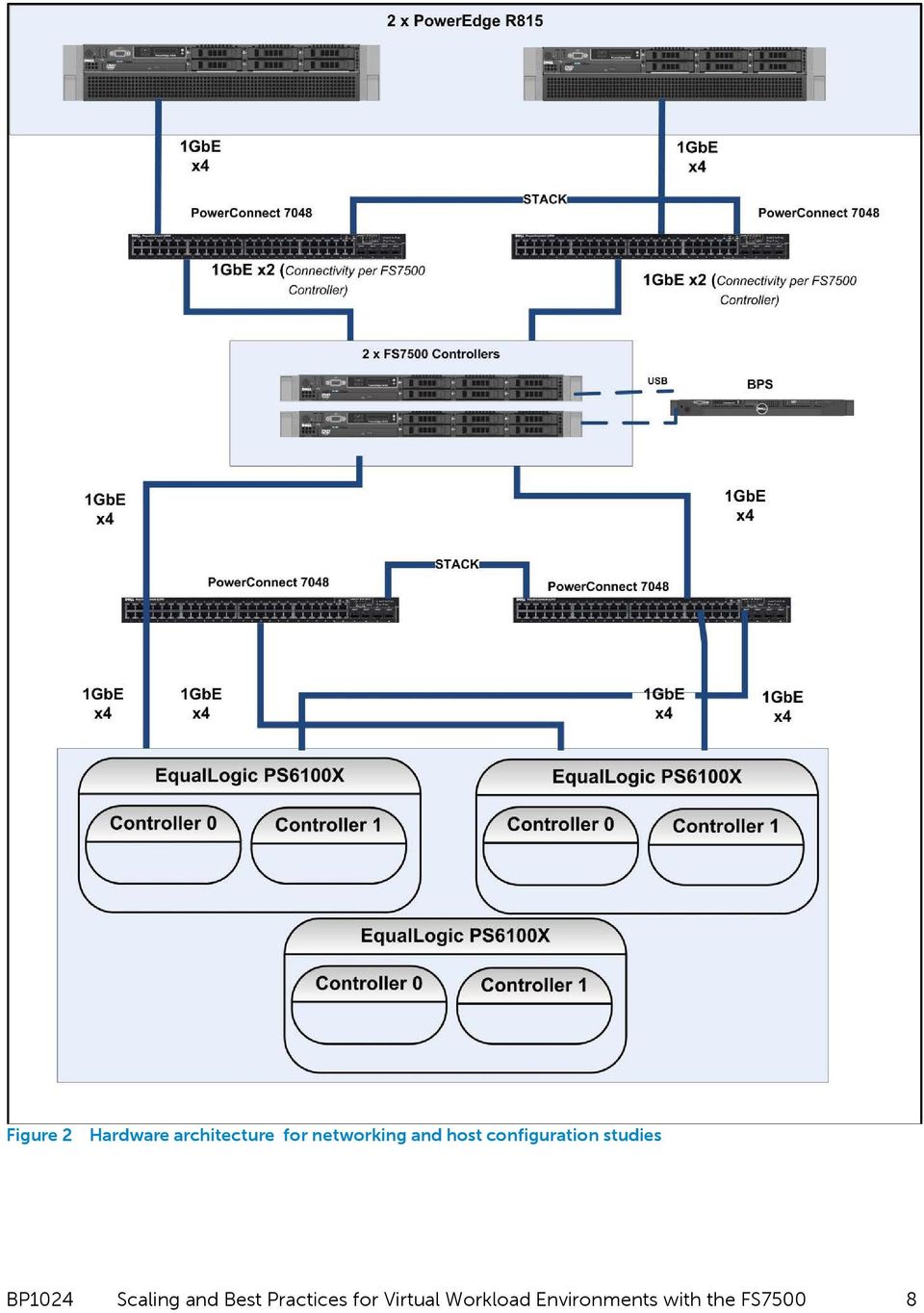
12 3 NFS network and host configuration To develop the best practices for networking and ESX host configuration with the FS7500, we created a test configuration to simulate the I/O patterns of different application workloads. We ran three tests to ensure that the configuration was optimized to handle sequential write, sequential read, and random read/write workloads. The next sections cover the test results and best practices including the configuration for the tests. 3.1 Test configuration To determine the networking best practices for the FS7500 in a virtualized environment, we needed to generate a workload that would simulate the I/O patterns of enterprise application workloads running in a virtualized environment. We chose Iometer ( which is an open source I/O workload generator and can run on NTFS formatted disks. The following describe the overall test configuration: We used three EqualLogic PS6100X arrays configured in a single EqualLogic storage pool. Each array had 24 x 300 GB 10K RPM drives configured in RAID 10. The arrays were connected to two PowerConnect 7048 switches in a redundant configuration for high availability. The switches were stacked using the supported stacking modules and cables. Two FS7500 controllers were used in this configuration. Each FS7500 controller was connected to the PC7048 switches with SAN and internal NICs. All the connections were split across the stack. Two Dell PowerEdge R815s were installed with VMware vsphere ESXi 5.0 and configured with one virtual machine on each. The FS7500 also had a stacked pair of 7048 switches on the front-end. The FS7500 front-end connections and ESXi host to switch connections were split across the stack. Depending on the type of test, one or two hosts with one virtual machine (VM) each were used. Iometer was installed on virtual machines. Figure 2 shows the overall hardware architecture for these tests. BP1024 Scaling and Best Practices for Virtual Workload Environments with the FS7500 7

13 Figure 2 Hardware architecture for networking and host configuration studies BP1024 Scaling and Best Practices for Virtual Workload Environments with the FS7500 8
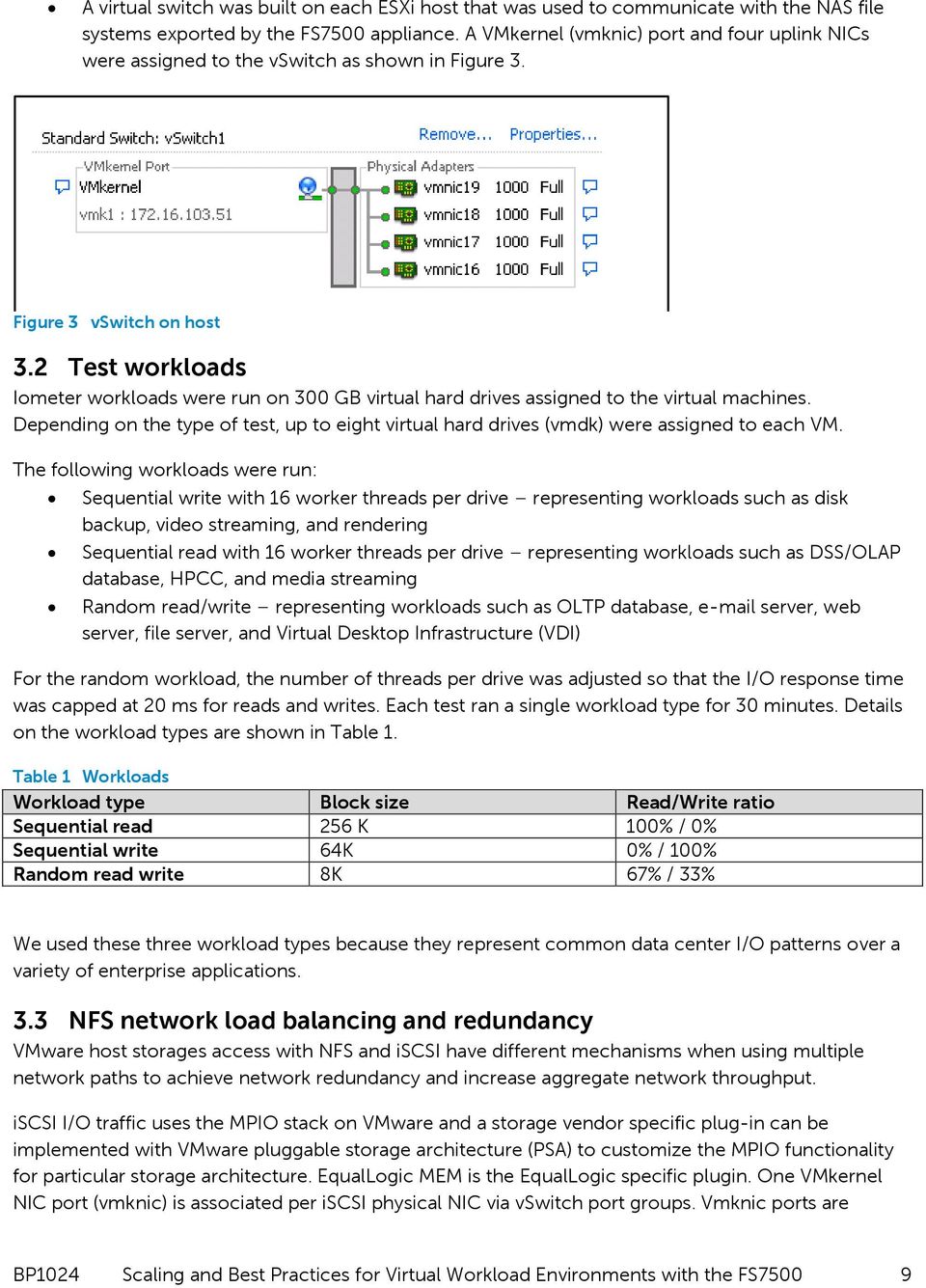
14 A virtual switch was built on each ESXi host that was used to communicate with the NAS file systems exported by the FS7500 appliance. A VMkernel (vmknic) port and four uplink NICs were assigned to the vswitch as shown in Figure 3. Figure 3 vswitch on host 3.2 Test workloads Iometer workloads were run on 300 GB virtual hard drives assigned to the virtual machines. Depending on the type of test, up to eight virtual hard drives (vmdk) were assigned to each VM. The following workloads were run: Sequential write with 16 worker threads per drive representing workloads such as disk backup, video streaming, and rendering Sequential read with 16 worker threads per drive representing workloads such as DSS/OLAP database, HPCC, and media streaming Random read/write representing workloads such as OLTP database, server, web server, file server, and Virtual Desktop Infrastructure (VDI) For the random workload, the number of threads per drive was adjusted so that the I/O response time was capped at 20 ms for reads and writes. Each test ran a single workload type for 30 minutes. Details on the workload types are shown in Table 1. Table 1 Workloads Workload type Block size Read/Write ratio Sequential read 256 K 100% / 0% Sequential write 64K 0% / 100% Random read write 8K 67% / 33% We used these three workload types because they represent common data center I/O patterns over a variety of enterprise applications. 3.3 NFS network load balancing and redundancy VMware host storages access with NFS and iscsi have different mechanisms when using multiple network paths to achieve network redundancy and increase aggregate network throughput. iscsi I/O traffic uses the MPIO stack on VMware and a storage vendor specific plug-in can be implemented with VMware pluggable storage architecture (PSA) to customize the MPIO functionality for particular storage architecture. EqualLogic MEM is the EqualLogic specific plugin. One VMkernel NIC port (vmknic) is associated per iscsi physical NIC via vswitch port groups. Vmknic ports are BP1024 Scaling and Best Practices for Virtual Workload Environments with the FS7500 9
15 associated with the iscsi software initiator and are load balanced using iscsi MPIO stack within the host. For more information on configuring iscsi MPIO on VMware with EqualLogic storage, please refer to the following technical reports: Configuring and Installing the EqualLogic Multipathing Extension Module for VMware vsphere 4.1 and PS Series SANs - Configuring and Installing the EqualLogic Multipathing Extension Module for VMware vsphere 5 and PS Series SANs - Configuring iscsi Connectivity with VMware vsphere 5 and Dell EqualLogic PS Series Storage - Configuring VMware vsphere Software iscsi with Dell EqualLogic PS Series Storage - VMware ESX does not include native support for NFS I/O load balancing. An NFS export is mounted on the ESX host via a VMkernel NIC port (vmknic). To enable this, a vmknic port configured with an IP address on the NAS client subnet is assigned to a vswitch. Physical NICs on the host which are attached to the NAS client network are mapped to this vswitch as uplinks. All NFS traffic passes through this single vmknic from the hypervisor. ESXi vswitches are designed such that, even if we create multiple vmknic ports (on same or multiple vswitches), by default the first created vmknic port on the NAS subnet is used for all traffic on that subnet. This traffic on the vmknic port in turn gets mapped to a single uplink (physical NIC) configured on the vswitch if a port based or MAC based load balancing policy is used on the vswitch (See Figure 4 below). BP1024 Scaling and Best Practices for Virtual Workload Environments with the FS
16 Figure 4 vswitch with MAC Based or Port based load balancing Using MAC or port-based vswitch load balancing schemes does not provide the increased bandwidth or redundancy that can be achieved by using multiple physical NIC uplinks from the ESX host for NFS traffic. In order to balance the load on the physical uplink NICs on vswitch using the single vmknic port, we have to rely on the IP hash-based load balancing policy available on the vswitch. If multiple target IP addresses available on NAS are used, then traffic from the single vmknic port can be load balanced across multiple uplinks using this load balancing policy (See Figure 5 below). The physical switch that the physical uplink ports are connected to needs to be configured with a similar load balancing policy using static link aggregation group (LAG). This policy can effectively load balance NFS traffic from the ESXi host to the NFS server across multiple uplinks. BP1024 Scaling and Best Practices for Virtual Workload Environments with the FS

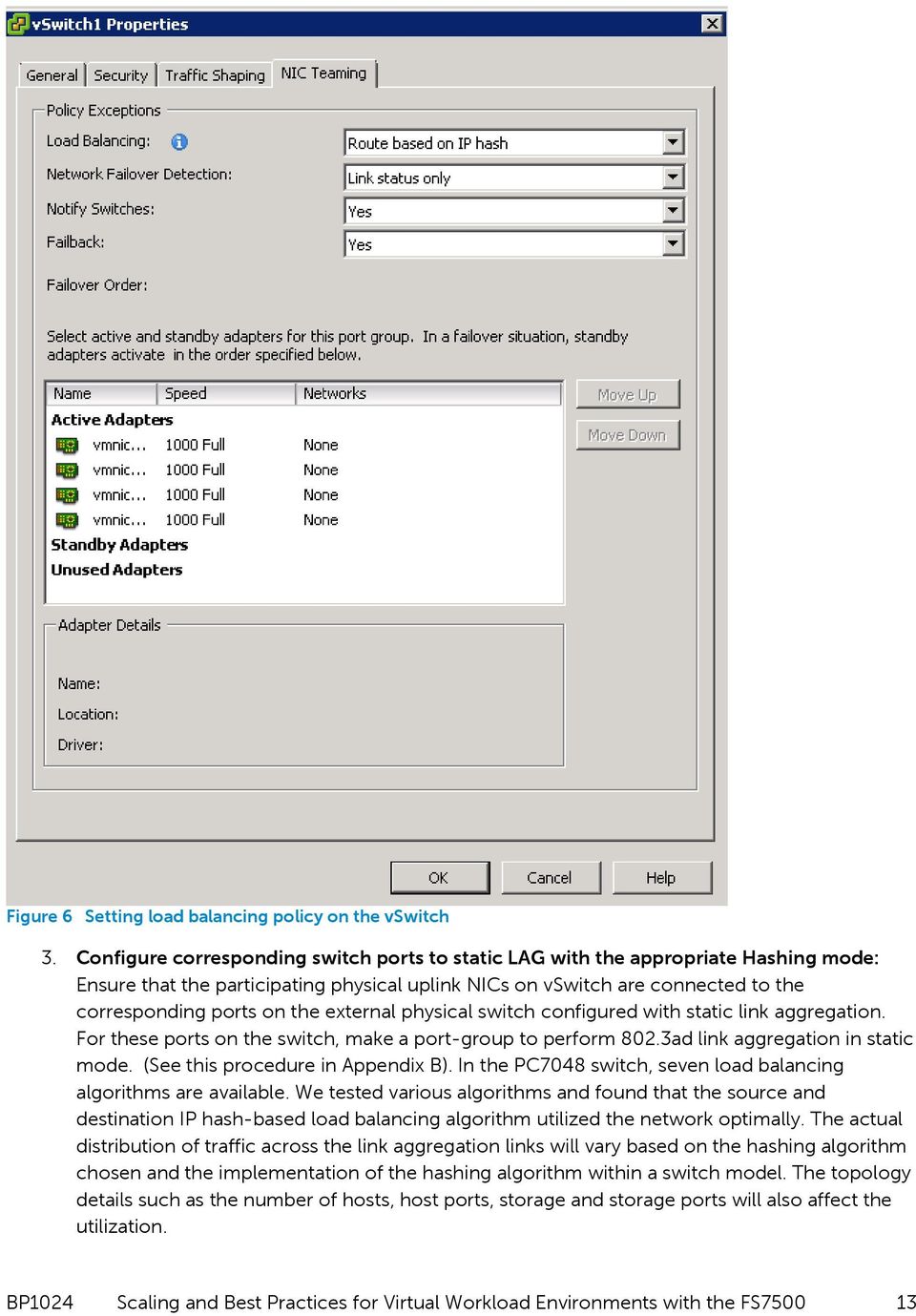
17 Figure 5 vswitch with IP Hashing load balancing To configure the ESXi host vswitch for IP hash-based load balancing policy, use the following steps: 1. Configure ESXi vswitch and vmknic port: Build a virtual switch on each ESXi host to communicate with the NAS client network. Assign a vmknic port and two or more physical uplink NICs to it. 2. Configure ESXi vswitch to use Static Link Aggregation (to use the IP Hash-based load balancing policy): The vswitch has three load balancing options: route based on the originating virtual port ID, Route based on IP hash, and Route based on source MAC hash. With route based on the originating virtual port ID, the throughput cannot exceed bandwidth of one NIC because the vmknic port of the virtual switch is bound to one specific physical NIC. Adding more vmknic ports does not help because for a given subnet the ESX host always chooses the first vmknic port it can find to transfer data. Similarly, in the case of MAC-based load balancing, the vmknic port s MAC address is associated with one physical NIC. Therefore only one physical NIC bandwidth gets used. We recommend that the vswitch uses the load balancing method Route based on IP hash as shown in Figure 6. BP1024 Scaling and Best Practices for Virtual Workload Environments with the FS

18 Figure 6 Setting load balancing policy on the vswitch 3. Configure corresponding switch ports to static LAG with the appropriate Hashing mode: Ensure that the participating physical uplink NICs on vswitch are connected to the corresponding ports on the external physical switch configured with static link aggregation. For these ports on the switch, make a port-group to perform 802.3ad link aggregation in static mode. (See this procedure in Appendix B). In the PC7048 switch, seven load balancing algorithms are available. We tested various algorithms and found that the source and destination IP hash-based load balancing algorithm utilized the network optimally. The actual distribution of traffic across the link aggregation links will vary based on the hashing algorithm chosen and the implementation of the hashing algorithm within a switch model. The topology details such as the number of hosts, host ports, storage and storage ports will also affect the utilization. BP1024 Scaling and Best Practices for Virtual Workload Environments with the FS
19 4. Configure NFS target to have multiple IP addresses: On the EqualLogic FS7500, configure the NAS service with multiple NAS service IP addresses (see Figure 7). In our configuration, we created eight NAS service IP addresses (maximum available with one FS7500). Load balancing techniques on the physical switch and the ESXi host are based on IP hashing. Therefore, more IPs are used in communication and more host, target NICs, and intermediate switch ports are used, which increases the overall throughput. Figure 7 NAS service virtual IP addresses 5. Mount NFS exports across multiple NAS IP addresses and distribute the load over multiple IP addresses: Use the multiple NAS service IP addresses in ESXi host to map the same NFS export or multiple exports to same backend NAS volume as multiple datastores as shown in Figure 8. Create alias paths to the same datastore by using different IP addresses. By using multiple target IP addresses, we are forcing the use of more NICs on the host side and storage side, which increases the utilization of available network bandwidth. The host side NIC load balancing is handled by the virtual switch per IP address hashing. BP1024 Scaling and Best Practices for Virtual Workload Environments with the FS

20 Figure 8 Multiple datastore mounts to same NFS export via multiple NAS services IP addresses We conducted sequential write I/O studies using Iometer from a single VM running on a single ESXi host. The vswitch was studied with the three different load balancing policies. A vmknic was configured for mounting NFS exports as ESX datastores. For all of the load balancing algorithms, we mounted the same NFS export from the FS7500 using four different NAS service IP addresses as four different datastores. In all three cases we configured the vswitch with 4 x 1GbE uplink NICs (vmnics). The ports on the switch connected to these NICs were set to static LAG mode with source and destination IP hashing algorithm. The write throughput measured by Iometer was monitored and analyzed. The following figure shows the write throughput as measured from Iometer with different load balancing techniques: BP1024 Scaling and Best Practices for Virtual Workload Environments with the FS

21 Write throughput (MBps) Maximum available bandwidth from one ESX host (4 x 1GbE) utilized Port based load balancing MAC based load balancing IP Hash based load balancing Figure 9 Write throughput with different load balancing techniques Since port-based and MAC-based load balancing maps traffic to a single NIC uplink, the measured throughput was close to the line rate of one NIC. With IP hash-based load balancing and using multiple target IP addresses, the NFS traffic was load balanced across all four NIC uplinks and we obtained throughput close to line rate of all four NICs. 3.4 NAS File Systems and ESX datastores In addition to the networking and host configuration listed in section 3.1, a system administrator has to make various choices like the number of NAS volumes and ESX datastores to be configured and the number of host side NICs used to communicate with NAS. The following subsections discuss the impacts of some of these variables Number of datastores Increasing the number of NAS file systems (NAS virtual containers) on the FS7500 does not significantly affect the network throughput performance (read and write throughput in MBps). A NAS file system is a virtual entity and does not affect performance throughput. Performance is primarily affected by the number of FS7500 appliances and the NAS reserve disk configuration. NAS file systems virtually span the available NAS reserve space, which can be increased or decreased based on dynamic needs. Similarly, additional FS7500 appliances can be added to an existing appliance and all NAS file systems would be automatically load-balanced across the available appliances. Administrators can choose to deploy multiple NAS file systems for ease of management (file quotas) and segregating data protection tasks such as snapshot or backup for classes of data. These NAS file systems are mounted as datastores on the ESX host via NFS exports. In this test we varied the number of NAS file systems and kept the number of NAS service virtual IP addresses and number of host NICs to access the datastores constant. BP1024 Scaling and Best Practices for Virtual Workload Environments with the FS
22 Figure 10 Single or multiple NAS file systems (FS) mapped to datastores We ran sequential read/write tests on the two configurations. In the first configuration, the NAS reserve on the FS7500 had one NAS file system with one NFS export. We mounted the NFS export on the ESXi host server as eight datastores. We used a separate NAS service virtual IP address for each of the eight mounts. The host vswitch was configured with 4 x 1GbE uplinks. In our second configuration we created eight NAS file systems on the NAS reserve of FS7500. The file system was configured with one NFS export per NAS file system. We mounted the NFS exports on the ESXi host server as eight datastores. We used a separate NAS service virtual IP address for each of the eight mounts. The host vswitch was configured with 4 x 1GbE uplinks. The throughout measured in both configurations is shown in Figure 11. BP1024 Scaling and Best Practices for Virtual Workload Environments with the FS
23 Throughput (MBps) Number of NAS file systems Read Write Figure 11 Throughput with single and multiple NAS file systems We did not find a significant difference in throughput behavior in either case as seen in Figure 11. We achieved close to line rate throughput in both cases. From a performance optimization standpoint, it does not make a difference to deploy a single or multiple NAS file systems within the FS7500. However, to enable ease of management for applications and infrastructure, we do recommend use of multiple NAS file systems as required. This will not significantly impact the overall throughput performance Number of host NICs connected Increasing the number of physical uplink NICs associated with the host vswitch improves network throughput performance in terms I/O. This holds true only if multiple target NAS service IP addresses are used to access the datastore and the IP hashing load balancing policy is used on the vswitch. IP hashing algorithm on the ESXi host vswitch uses a different NIC to transfer data for each unique target NAS service IP address. Therefore, adding NICs improves throughput by enabling more physical NICs to be utilized on the host. We conducted a series of tests with different number of NIC uplinks to the vswitch. The number of uplinks was varied to up to eight. We simulated sequential read and write I/O from a VM using Iometer. The vswitch load balancing was set as IP hash-based load balancing. We used a single NFS export from the FS7500 mounted as eight different datastores using up to eight different NAS service IP addresses. We used the corresponding number of NAS service IP addresses to mount new datastores as the number of NIC uplinks were varied on the vswitch. BP1024 Scaling and Best Practices for Virtual Workload Environments with the FS
24 Throughput MB/sec Number of NICs used Figure 12 Increase in write throughput with increase in number of NICs and Virtual IP addresses With more NICs, we saw an increase in throughput measured. We tested configurations from one NIC up to eight NICs on the ESX host. In the figure above, the addition of more than four NICs does not improve performance significantly since the backend disk configuration was saturated, so the throughput is shown for only up to four NICs. Generally the throughput obtained scaled with the number of physical NICs as long as sufficient backend disk resources are provided NAS service IP addresses used to connect to the datastore Using the maximum number of NAS service virtual IP addresses enables better network throughput from the FS7500 to fit with the IP based load balancing policy on the ESXi host vswitch. The FS7500 can be accessed using multiple virtual NAS service IP addresses. These can be assigned through group manager. Eight and 16 virtual IP addresses are available with use of one (two controllers) and two (four controllers) FS7500s respectively. BP1024 Scaling and Best Practices for Virtual Workload Environments with the FS
25 Figure 13 FS7500 NAS Service IP settings On the ESXi host, use alias connections to the same NFS export and mount multiple datastores each using different NAS service virtual IP addresses to the same export. In this configuration, multiple virtual IP addresses load balanced to separate NICs on the storage side and on the host side are utilized. On the host side, vswitch load balancing will spread traffic across multiple host NICs. On the storage side, the FS7500 load balancing mechanism will spread traffic across multiple FS7500 frontend NICs. This has the effect of increasing the network throughput for both read and write I/O provided the virtual machine workload is evenly spread across these datastores. The figure below illustrates mounting the same NFS export as sixteen datastores using sixteen NAS service virtual IP addresses. Figure 14 Connections for multiple datastores to same NFS export BP1024 Scaling and Best Practices for Virtual Workload Environments with the FS
26 The following figure shows logical connections (NFS mounts) between the ESXi hosts and the NFS exports on the FS7500. BP1024 Scaling and Best Practices for Virtual Workload Environments with the FS
27 Figure 15 Utilization of multiple IPs and datastores to same NFS file system It must be noted that the workload on ESXi hosts should be reasonably uniform over all the datastores to get optimal throughput and utilization of all host side and storage side NICs. This is because we distributed datastore mounts across different target virtual IP addresses which are mapped to different host NICs and target NICs based on load balancing schemes on the host, target, and network. For tests and results, refer to section When using additional Virtual IP address on the FS7500 to connect to a new datastore, we saw an increase in throughput measured Number of ESXi hosts Better utilization of FS7500 client network can be realized if we increase the number of ESXi hosts accessing the file storage, especially in the case of read I/O workloads from hosts. This is due to the lack of native multipathing options for NFS in ESX. Multiple ESX hosts maximize throughput utilization when they get load balanced across the FS7500 appliance NICs. As seen earlier, one host can have only one vmknic port resulting in only one source IP address per host for the FS7500 target controller. As we add hosts, more host IP addresses are available as destinations ports for the FS7500 target controller during read I/O scenarios resulting in utilization of all or more FS7500 client NIC ports. This increases the overall effective network throughput during read I/O scenarios. This is shown in Figure 16. For write I/O, the ESXi host vswitch load balancing policy improves the network throughput by spreading data across multiple host NICs to the FS7500 target controller as described in earlier sections. BP1024 Scaling and Best Practices for Virtual Workload Environments with the FS
28 Figure 16 Read I/O throughput improvement with multiple hosts We simulated sequential read I/O from VMs using Iometer. In the first and second test, we used one and two hosts to connect to FS7500 respectively. Each host was configured with a vswitch with four uplink NICs. We used a single NFS export from the FS7500 mounted as eight different datastores using eight different NAS service IP addresses. In the first case, all datastores were mounted on single host. In the second case, four datastores were mounted per host. In both the tests, the vswitch load balancing was set as IP hash-based load balancing. BP1024 Scaling and Best Practices for Virtual Workload Environments with the FS
29 Read Throughput (MBps) Number of hosts Figure 17 Increase in read throughput with increase in number of hosts When the number of hosts increased, we saw an increase in aggregate read throughput measured. The figure above shows that doubling the hosts almost doubled (194%) the read throughput. The FS7500 can deliver the optimal levels of read and write throughput based on appliance and disk configuration. Multiple ESX hosts are required to maximize the throughput offered by FS VMware specific recommendations VMware provides Best practices recommendations to optimize performance for NFS datastores. These Best practices are available in the following document: In our tests we did not see much of a network throughput improvement by implementing these recommendations. However, this may be because we did not exceed 16 datastores which might not be enough datastores to show improvement in performance from the parameter tuning recommended in the above document. We conducted sequential read and write I/O tests from a single ESXi host connecting to 16 data stores mounted to the same NFS export via eight NAS service IP addresses. The ESXi vswitch was configured with four NIC uplinks with an IP hash-based load balancing policy. In both tests, the throughput rate observed was approximately the same. The following figures show performance with the recommendations implemented and without the recommendations implemented (default values). BP1024 Scaling and Best Practices for Virtual Workload Environments with the FS
30 500 Write throughput (MBps) for 16 datastores recommendations implemented recommendations not implemented 250 Read throughput (MBps) for 16 datastores recommendations implemented recommendations not implemented Figure 18 Read and write throughput with and without implementing VMware specific recommendations 3.5 Virtual infrastructure operations In addition to regular application workloads running in the virtualized environment, there are also maintenance and support operations like virtual machine cloning and storage vmotion involved in a typical virtualized environment. We recommend that these operations should be done with data stores mounted over multiple NAS service virtual IP addresses. This will help to improve the network throughput performance and duration of operations. The following graph shows the time saved by doing these operations on NFS mounts over multiple IPs. We had two datastores configured on a single ESXi host. We ran cloning tests with datastores mounted over one, four, and eight NAS IP addresses. The number of NIC uplinks on the vswitch was set at four for all the tests. When a single virtual machine is cloned, it takes 60 minutes. Theoretically if BP1024 Scaling and Best Practices for Virtual Workload Environments with the FS
31 four machines are cloned, it is expected to take four times as long which is 240 minutes. However, by doing it over multiple IP addresses 38% of the time was saved. Similarly, for cloning eight machines, 31% of the expected time was saved. This is because of the additional throughput achieved by load balancing NFS traffic over multiple physical NICs when multiple NAS service IP addresses are in use Time in Minutes expected time actual time Number of machines cloned Figure 19 Time saved during cloning operation by using multiple NAS service IP addresses and physical NICs BP1024 Scaling and Best Practices for Virtual Workload Environments with the FS
32 4 Scalability of FS7500 A series of tests were conducted to study the scalability of the FS7500 solution with NFS exports hosted as ESXi datastores. The network and host configuration were based on the findings described in section Test workload Workload modeling and application components A datacenter typically consolidates several diverse workloads onto a virtualization platform a collection of physical servers accessing shared storage and network resources. These diverse workloads may include OLTP databases, servers, collaboration (SharePoint), webservers, OLAP data warehouses, and other similar applications. For our test purposes, we chose to model a medium scale e-commerce business running a mix of applications in a virtualized environment. Commonly used applications and the percentage of virtual machines (VMs) that host these applications in a medium scale e-commerce business can be represented as a mix in table below: Table 2 Typical medium scale e-commerce environment Application Approximate percentage of VMs Windows Servers (for running Active Directory, Domain 5% Controllers etc.) Mail servers like Microsoft Exchange Server 5% OLTP DB servers like Microsoft SQL Server 20% Microsoft SharePoint Servers 5% Web servers like Microsoft IIS 40% Middleware servers like J2EE App servers 20% Web 2.0/Social Media applications like Olio 5% We used this workload mix to represent a medium scale e-commerce business in our scalability studies for FS I/O profile mapping for representative applications Iometer running on different VMs simulating that I/O pattern of applications described above generated the required mix of I/O. A set of 20 VMs was the basic building block used for the workload. 20 VMs help to maintain the workload ratio mix described in table above. Scaling of total workload can be achieved by scaling the number of blocks comprising the 20 VMs. The following table shows the number of VMs running each workload, the transaction mix, and the resource allocation for the VMs in the 20 VM building blocks. The planned or target IOPS values and data set sizes for each application type were based on typical values representative of applications in a medium scale e-commerce business environment. BP1024 Scaling and Best Practices for Virtual Workload Environments with the FS
33 Table 3 Planned workload components Application # of VM s Planned IOPS per VM Iometer I/O profile Typical VM resource allocation Windows Servers (for running Active Directory, Domain Controllers etc.) K 70/30 read/ write; 100% random I/O 50 GB OS, 4 vcpu and 4 GB RAM; 200 GB data volume Mail servers like Microsoft Exchange Server OLTP DB servers like SQL Server Microsoft SharePoint Servers Web servers like Microsoft IIS Middleware servers like J2EE App servers Web 2.0/Social Media applications like Olio for mail database data, 200 for Log data for Database data, 300 for Log data 32k; 50/50 read/write; 100% Random I/O for Database data, 8K, 100% write sequential I/O for Log data 8K; 100% Random I/O, 70% Reads, 30% writes for Database data, 8K, 100% write, sequential I/O for Log data K 70/30 read/write; 100% random I/O % read random I/O, block size (50% servers 8K and 50% servers 32K) K 70/30 read/ write; 100% random I/O % read random I/O, block size 8K 50 GB OS, 4 vcpu and 8 GB RAM; 1240 GB for Database data as 4 x 310 GB volumes; 120 GB for Log data as 4 x 30 GB volumes 50 GB OS, 4 vcpu and 8 GB RAM; 500 GB Database data as 4 x 125 GB volumes; 50 GB for one log volume 50 GB OS, 4 vcpu and 4 GB RAM, 300 GB data volume 50 GB OS, 2 vcpu and 4 GB RAM, 300 GB data volume 50 GB OS, 4 vcpu and 8 GB RAM, 300 GB volume 50 GB OS, 2 vcpu and 4 GB RAM, 300 GB data volume The actual vcpu and memory allocation for the tests were half of the planned vcpu and memory allocations due to limited hardware resources on the test servers. This did not impact the tests since Iometer is not CPU or memory intensive Workload criteria For all application I/O workloads, I/O response time criteria for the random I/O operations were set at less than 20 ms as measured from Iometer. The I/O latency tolerance with random I/O applications such as OLTP databases, servers, and web servers is typically under 20ms. Also, TCP retransmission criteria on the storage iscsi network were set as less than 0.5%. The same TCP criteria were used to test vmotion, Storage vmotion, cloning, and booting operations. BP1024 Scaling and Best Practices for Virtual Workload Environments with the FS
34 4.2 Test configuration FS7500 controllers and EqualLogic PS Series arrays For the baseline test, three EqualLogic PS6100X arrays and one FS7500 system (two controllers) were used. The NAS reserve was divided into three NAS file systems; the first one to store the virtual hard drives (VMDKs) and OS, the second one to store the simulated application database data, and the third one to store the simulated application log file data. This was done to isolate the VM operating system data, application data, and application logs due to the differing needs of performance and data protection options for each of them. On the ESX host, one NAS service IP address was used to access the OS datastore, six IP addresses were used to access the data datastore, and one IP address was used to access the log datastore. Figure 20 below illustrates these connections. Each ESXi host was configured with four NICs as uplinks for the vswitch used for NFS access. For the baseline test, the capacity of OS, log data, and data File systems was 18TB, 1TB, and 2TB respectively. For the other two tests (with 6 PS6100 arrays), the capacity of OS, Log data, and data File systems was 36TB, 2TB, and 4TB respectively. BP1024 Scaling and Best Practices for Virtual Workload Environments with the FS
35 Figure 20 Host to FS7500 connections for one FS7500 system In the next configuration, one FS7500 system (2 x controllers) and six PS6100X arrays were used. The number of datastores and IP address access policy was the same. Only the capacity of each datastore was expanded. The intent was to study the scalability of the solution when the PS Series arrays were doubled. In the third configuration, two FS7500 systems (4 x controllers) and six PS6100X arrays were used. Three datastores were used to host the OS, data, and Log data. Out of 16 NAS service IP addresses available, one was used for log, one for VMDKs and OS, and remaining 14 IP addresses were used for data. Figure 21 below illustrates these connections. BP1024 Scaling and Best Practices for Virtual Workload Environments with the FS
36 Figure 21 Host to FS7500 connections for 2 x FS7500 systems A logical view of the three scaling test configurations described above is illustrated in figure below. The FS7500 systems and the PS6100X arrays in each of the configurations are illustrated. BP1024 Scaling and Best Practices for Virtual Workload Environments with the FS
37 Figure 22 Three scaling test configurations BP1024 Scaling and Best Practices for Virtual Workload Environments with the FS
38 4.2.2 Host and Hypervisor Two PowerEdge R815s were used as ESXi hosts. Both of the hosts access the three datastores using the eight VIP addresses for the first and second configuration and 16 VIP addresses for third configuration. For the first configuration, one block consisting of 20 VMs was equally divided over these two hosts such that the I/O load on each host was equal. For the second and third configuration, two (40 VMs) and three (60 VMs) blocks respectively were divided between the two hosts. A block of VMs is described in section earlier. Figure 23 shows the overall logical components used in the test configuration. Perfmon Figure 23 Logical test configuration Figure 24 shows the physical connections between the host servers and storage components in the setup, and two additional servers were used to monitor and manage the setup. A Dell PowerEdge R710 server was used to host the VMware vcenter management station. The same R710 server also hosted EqualLogic SAN HeadQuarters (SANHQ) and EqualLogic Group Manager UI. The same server was also used to gather the performance statistics on the ESXi hosts using esxtop utility via SSH. A Dell PowerEdge 1950 server ran a custom script to monitor the TCP retransmission statistics from the switches on the iscsi network. The 1950 server also ran a script to gather performance statistics via Windows perfmon utility on all the virtual machines. The physical connectivity of the ESXi hosts to the FS7500 systems and the physical connectivity of the FS7500 systems to PS Series arrays is illustrated in figure below. BP1024 Scaling and Best Practices for Virtual Workload Environments with the FS
39 Figure 24 Physical Network Connectivity BP1024 Scaling and Best Practices for Virtual Workload Environments with the FS
40 The physical connectivity details illustrated in Figure 24 are explained below: Six PS6100X series arrays (three PS Series arrays for first test and six PS Series arrays for the second and third tests) were used for scaling of FS7500. The arrays were connected in redundant fashion to two Dell PowerConnect 7048 stacked switches. Jumbo frames with MTU size 9216 and flow control was enabled on the two stacked PowerConnect 7048 switches that were used to connect the SAN network Back-end of four FS7500 controllers (two controllers for the first and second test and four for the third) were connected in redundant fashion to the two stacked PC7048 SAN switches. The NICs on the FS7500 controllers for both SAN and internal networks were connected to the switches. The FS7500 front-end client network NICs were connected in redundant fashion to two stacked LAN switches comprising PowerConnect Four NIC ports on each host were connected to the stacked LAN switches in redundant fashion. For the corresponding ports on the switch, static LAG was turned ON and the load balancing algorithm for them was set to source and destination IP hashing. Jumbo frame were set both on the ESXi host vswitch (MTU size 9000) and on the switch ports (MTU size 9216). The same ports that were connected to the LAN switch were used to build a vswitch on the host. The load balancing algorithm on this vswitch was set to load balancing based on IP hash A vmknic port on the vswitch was used to connect to the NFS exports from the FS7500 systems 4.3 Test simulations and results The workload and VM block defined in previously was implemented for testing. Iometer ran on each VM and was used to generate the I/O workload. The results were recorded after the tests were run for eight hours ensuring the systems were in a stable state. Test 1: For the first test, 20 VMs were built across two ESXi hosts. Workloads defined in Table 3 were run on each VM to achieve the ideal targeted I/O mix. For this workload mix, the response time was higher than 20ms. In order to cap the response time to 20 ms, the load on all VMs was proportionally reduced so that one block would saturate the One FS7500-three array configuration. The revised achieved I/O mix is given in Table 4. The table lists the planned IOPS per VM and then lists the actual IOPs per VM. BP1024 Scaling and Best Practices for Virtual Workload Environments with the FS
41 Table 4 I/O mix for FS7500 scaling studies Application # of VMs Planned IOPS per Actual IOPS per VM Per block VM Test 1 Test 2A (2 blocks) Test 2B (2.33 blocks) Test 3 (3 blocks) Windows Servers (for running Active Directory, Domain Controllers etc.) 1 30 *20 *20 *24 *20 Mail servers like Microsoft Exchange Server OLTP DB servers like Microsoft SQL Server Microsoft SharePoint Servers Web servers like Microsoft IIS Middleware servers like J2EE App servers Web 2.0/Social Media applications like Olio for Database data, 200 for Log data for Database data, 300 for Log data 335 for Database data, 135 for Log data 800 for Database data, 200 for Log data 335 for Database data, 135 for Log data 800 for Database data, 200 for Log data 390 for Database data, 160 for Log data 930 for Database data, 230 for Log data *20 *20 *24 * for Database data, 135 for Log data 800 for Database data, 200 for Log data Total IOPS % variation when actually running the workload *In the case of small workloads like Middleware servers, Iometer was unable to generate very few IOPS with the basic minimal settings, so we combined workloads of two Middleware servers on one VM and the other VM remained running without a workload Test 2: For the second test, two blocks of VMs were built across the two ESXi hosts. The final I/O mix from test 1 in Table 4 was run scaled as two blocks of VMs. The configuration could easily handle this workload and the response time was ms. The achieved I/O mix for this test is listed in Table 4 in the column labeled Test 2A. BP1024 Scaling and Best Practices for Virtual Workload Environments with the FS
42 The load on all the VMs was proportionally increased to increase the response time for the One FS7500-six array configuration to 20 ms. The I/O mix achieved for this configuration is listed in Table 4 per single block in the column labeled Test 2B. Test 3: For the third test, three blocks of VMs were used to saturate the Two FS7500 six array configuration. Response time was below 20ms. The final achieved I/O mix for this configuration is given in Table 4 per single block as Test Test results PS Series array scalability Test 1 included 3 x PS Series arrays and Test 2A/2B included 6 x PS Series arrays. Test 1 ran with 1 block of VMs and test 2A with 2 block of VMs. Test 2B ran with about 2.33 blocks. The following graphs show the response time and IOPS for Test 1 with one block, Test 2A with two blocks, and Test 2B with 2.33 blocks. I/O Response Time (ms) x FS x PS6100X (1 VM Blocks) 1 x FS x PS6100X (2 VM Blocks) 1 X FS x PS6100X (2.33 VM Blocks) Figure 25 I/O Response time with scaling PS Series arrays BP1024 Scaling and Best Practices for Virtual Workload Environments with the FS
43 IOPS x FS x 1 x FS x PS6100X (1 VM Blocks) PS6100X (2 VM Blocks) Figure 26 IOPS with scaling PS Series arrays 1 X FS x PS6100X (2.33 VM Blocks) On the One FS six array configuration with two VM blocks, response time was well below 20 ms while IOPS doubled in value compared to the One FS7500-three array configuration. There was headroom to increase the I/O workload based on our 20ms response time criteria. We increased IOPS on all VMs proportionally to saturate this configuration. We found that 2.33 VM blocks saturate this configuration. Our testing illustrated that doubling the number of PS Series arrays provided a greater than doubling of the workload that could be handled by the arrays. This is primarily due to the additional disk and PS controller resources added for the block volumes hosting the NAS reserve. Since the majority of I/O in the simulated workload is read I/O, the increase in workload capabilities can be attributed to the increase in backed disk volumes. FS7500 and PS Series array scalability The following graph shows response time and IOPS for Test 1 with one block and Test 3 with three blocks of VMs. Test 1 included One FS7500 and three PS6100X arrays. Test 3 included Two FS7500 and six PS6100X arrays. BP1024 Scaling and Best Practices for Virtual Workload Environments with the FS
44 I/O Response Time (ms) Figure 27 I/O Response time with scaling FS7500 and PS Series arrays IOPS x FS x PS6100X (1 VM Blocks) 1 x FS x PS6100X (1 VM Blocks) Figure 28 IOPS with scaling FS7500 and PS Series arrays 2 x FS x PS6100X (2 VM Blocks) 2 x FS x PS6100X (3 VM Blocks) Doubling both the number of arrays and the number of FS7500 NAS appliances yielded approximately three times the amount of I/O scaling for our workload. This is primarily due to the additional processing resources from both the additional NAS controllers and additional PS Series array resources for hosting NAS reserve disk volumes. BP1024 Scaling and Best Practices for Virtual Workload Environments with the FS
45 5 Best practices This section provides the best practices for the design and deployment of VMware vsphere virtualized infrastructure on EqualLogic FS Storage EqualLogic FS7500 recommendations Configure the maximum number of NAS service virtual IP addresses on the EqualLogic FS7500 so that the load can be distributed across all FS7500 client network NICs and controller resources to improve I/O performance and throughput. Configure multiple NAS file systems within the NAS reserve to segregate application data for ease of maintenance and data recovery isolation. For higher file I/O throughput, scale the FS7500 systems along with PS Series arrays. In environments with very high file I/O needs, use two FS7500 systems. Make sure the backend PS Series arrays support the necessary I/O EqualLogic PS Series recommendations Dedicate a separate storage pool for file system NAS reserve in environments with heavy file I/O needs. Typically virtualized server infrastructure environments incur heavy I/O. Choose the appropriate RAID type for the PS Series arrays hosting the NAS reserve based on capacity and workload performance requirements: o For user loads with a large amount of write data operations: RAID 10 offers the best performance at lower capacity levels. o For user loads with a high amount of read data operations: RAID6 offers good performance at high capacity levels and also sustains double drive failures. For workloads with large I/O such as in virtualized environments, ensure end-to-end bandwidth availability between the host systems and FS7500 systems. Also enable end-to-end jumbo frames on the client network to assist with improved throughput. Ensure that there are a sufficient number of PS Series arrays deployed for the NAS reserve to provide sufficient disk bandwidth, network bandwidth, and processing resources. 5.2 Host and hypervisor Configure a dedicated vswitch on the ESXi host for NFS access via the FS7500 client network. Use the IP hash-based load balancing policy on the vswitch connected to the FS7500 client network to get optimal distribution of NFS traffic across NIC uplinks. Associate more NICs as uplinks with the vswitch to improve throughput. Ideally this number should be the same as the number of NAS service IP addresses configured on the FS7500. Establish multiple NFS mounts to the same NFS export/nas file system through different virtual NAS service IP addresses to distribute the load across all available NIC uplinks on the vswitch when using the IP hash-based load balancing policy. Ensure that the application load is evenly distributed across the multiple NFS mounts to the same export to achieve even traffic distribution on the host NICs. BP1024 Scaling and Best Practices for Virtual Workload Environments with the FS
46 5.3 Network You should use separate network infrastructure (network switches) for the client network (LAN) and the FS7500 SAN + Internal Communication network SAN design Redundant inter-connected switches or switching fabrics are recommended for the SAN network infrastructure to ensure high-availability. Switch inter-connects (stack or LAG) should be properly sized with to provide the required bandwidth for the PS Series arrays. Flow control should be enabled on the switch ports connecting to the FS7500 and the arrays. Enable jumbo frames (MTU 9216) on the switch ports connecting to the FS7500 and the arrays. The FS7500 internal network NIC ports and storage NIC ports should be connected so that any single component failure in the SAN will not disable access to any storage array volumes or peer FS7500 controllers. The FS7500 internal NICs and SAN NICs should be on the same layer 2 network and not separated by VLANs. For all FS7500 controllers, ensure that their corresponding NIC ports are connected on the same switch. For example, the first internal NIC of each FS7500 controller should connect to the same switch ( switch1 ) in the network. The second internal NIC for each FS7500 controller should connect to the same switch, but it can be a different switch from the first internal NIC (both of these NICs can connect to switch1 or switch2 ). Disable spanning tree on switch ports connecting to end devices like FS7500 ports and storage ports. Portfast should be enabled for these ports. Note: General recommendations for EqualLogic PS Series array network configuration and performance is provided in the following documents: PS Series Array Network Performance Guidelines: EqualLogic Configuration Guide: LAN design Redundant inter-connected switches or switching fabrics are recommended for the LAN network infrastructure to ensure high-availability. o Switch inter-connects (stack or LAG) should be properly sized to provide the required bandwidth for the PS Series arrays. o Configure the ports on the switches that are connected to the host with static LAG and choose the source and destination based IP hashing algorithm for load balancing traffic across the LAG. The FS7500 client network NIC ports should be connected in a way such that any single component failure in the LAN switches will not disable access to the file system. Enable flow control on the switches connecting to the FS7500 client network NIC ports. Enable jumbo frames (MTU 9216) on the switch ports connecting to the FS7500 client network NIC ports to assist with large file I/O requests. If enabled, ensure jumbo frames are enabled across the network end-to-end from the file client to the FS7500 system. BP1024 Scaling and Best Practices for Virtual Workload Environments with the FS
47 Appendix A Solution hardware components Solution configuration - Hardware components: Description ESXi hosts 2 x Dell PowerEdge R815 Servers: o ESXi 5.0 o BIOS Version: o 4 x AMD Opteron(tm) Processors 6174, 2200 MHz. 12 cores o 96 GB RAM o 6 internal disk drives o NIC Broadcom quad-port 1 Gb, Firmware: BC ESXi 5.0 was installed on Hosts Windows Server 2008 R2 EE (64 Bit) VMs Virtual Machines Management server Windows Server2008 R2 EE (64 Bit) 1 Dell PowerEdge R710 server: o Windows Server2008 R2 EE (64 Bit) 1 Dell PowerEdge1950 server: o Windows Server 2008 R2 EE (64 Bit) Network 4 x Dell PowerConnect 7048 switch Firmware: switches stacked together for NAS frontend. Similarly, two switches stacked together for NAS backend Storage 6 x Dell EqualLogic PS6100X: o 24 x 900GB 10K SAS o Quad port dual controllers o Firmware: (R189834) (H2) 2 x FS7500 o Firmware: v Performance Monitoring SAN HeadQuarters ESXtop and vcenter Performance monitoring Iometer output Performance monitoring on EqualLogic arrays. Performance monitoring and capture at the ESXi host. Workload monitoring on each VM BP1024 Scaling and Best Practices for Virtual Workload Environments with the FS
48 Appendix B Switch configuration Use this script to turn on source and destination IP hashing on the switch: ********************************************************************************** enable configure interface port-channel 1 no shut mtu 9216 exit interface range gigabit 1/0/1-2 ESXi host** ** ports used to communicate with channel-group 1 mode ON ** default hashing is based on source and destination IP hash** mtu 9216 exit copy running-config startup-config exit BP1024 Scaling and Best Practices for Virtual Workload Environments with the FS
49 Additional resources Referenced or recommended Dell publications: Dell EqualLogic PS Series Network Performance Guidelines: Dell EqualLogic PS Series Arrays: Advanced Storage Features in VMware vsphere: Configuring and Installing the EqualLogic Multipathing Extension Module for VMware vsphere 4.1 and PS Series SANs - Configuring and Installing the EqualLogic Multipathing Extension Module for VMware vsphere 5 and PS Series SANs - Configuring iscsi Connectivity with VMware vsphere 5 and Dell EqualLogic PS Series Storage - Configuring VMware vsphere Software iscsi with Dell EqualLogic PS Series Storage - EqualLogic Configuration Guide: For General FS7500 best practices: Scalability & Deployment Best Practices for the Dell EqualLogic FS7500 NAS System as a File Additional publications: vstorage APIs for Array Integration FAQ: Iometer downloads: Best Practices for Running VMware vsphere on Network Attached Storage: For EqualLogic best practices white papers, reference architectures, and sizing guidelines for enterprise applications and SANs, refer to Storage Infrastructure and Solutions Team Publications at: BP1024 Scaling and Best Practices for Virtual Workload Environments with the FS
50 THIS WHITE PAPER IS FOR INFORMATIONAL PURPOSES ONLY, AND MAY CONTAIN TYPOGRAPHICAL ERRORS AND TECHNICAL INACCURACIES. THE CONTENT IS PROVIDED AS IS, WITHOUT EXPRESS OR IMPLIED WARRANTIES OF ANY KIND. BP1024 Scaling and Best Practices for Virtual Workload Environments with the FS
Sizing and Best Practices for Deploying Microsoft Exchange Server 2010 on VMware vsphere and Dell EqualLogic Storage
 Dell EqualLogic Best Practices Series Sizing and Best Practices for Deploying Microsoft Exchange Server 2010 on VMware vsphere and Dell EqualLogic Storage A Dell Technical Whitepaper Ananda Sankaran Storage
Sizing and Best Practices for Deploying Citrix XenDesktop on VMware vsphere with Dell EqualLogic Storage A Dell Technical Whitepaper
 Dell EqualLogic Best Practices Series Sizing and Best Practices for Deploying Citrix XenDesktop on VMware vsphere with Dell EqualLogic Storage A Dell Technical Whitepaper Storage Infrastructure and Solutions
Reference Architecture for a Virtualized SharePoint 2010 Document Management Solution A Dell Technical White Paper
 Dell EqualLogic Best Practices Series Reference Architecture for a Virtualized SharePoint 2010 Document Management Solution A Dell Technical White Paper Storage Infrastructure and Solutions Engineering
Dell Compellent Storage Center SAN & VMware View 1,000 Desktop Reference Architecture. Dell Compellent Product Specialist Team
 Dell Compellent Storage Center SAN & VMware View 1,000 Desktop Reference Architecture Dell Compellent Product Specialist Team THIS WHITE PAPER IS FOR INFORMATIONAL PURPOSES ONLY, AND MAY CONTAIN TYPOGRAPHICAL
Dell EqualLogic Best Practices Series. Dell EqualLogic PS Series Reference Architecture for Cisco Catalyst 3750X Two-Switch SAN Reference
 Dell EqualLogic Best Practices Series Dell EqualLogic PS Series Reference Architecture for Cisco Catalyst 3750X Two-Switch SAN Reference Storage Infrastructure and Solutions Engineering Dell Product Group
Sizing and Best Practices for Deploying Microsoft Exchange Server 2010 on VMware vsphere and Dell EqualLogic Storage
 Dell EqualLogic Best Practices Series Sizing and Best Practices for Deploying Microsoft Exchange Server 2010 on VMware vsphere and Dell EqualLogic Storage A Dell Technical Whitepaper Ananda Sankaran Storage
Desktop Virtualization with VMware Horizon View 5.2 on Dell EqualLogic PS6210XS Hybrid Storage Array
 Desktop Virtualization with VMware Horizon View 5.2 on Dell EqualLogic PS6210XS Hybrid Storage Array A Dell Storage Reference Architecture Enterprise Storage Solutions Cloud Client Computing December 2013
Dell EqualLogic Best Practices Series
 Dell EqualLogic Best Practices Series Sizing and Best Practices for Deploying Oracle 11g Release 2 Based Decision Support Systems with Dell EqualLogic 10GbE iscsi SAN A Dell Technical Whitepaper Storage
VMware vsphere 5.1 Advanced Administration
 Course ID VMW200 VMware vsphere 5.1 Advanced Administration Course Description This powerful 5-day 10hr/day class is an intensive introduction to VMware vsphere 5.0 including VMware ESX 5.0 and vcenter.
Pivot3 Reference Architecture for VMware View Version 1.03
 Pivot3 Reference Architecture for VMware View Version 1.03 January 2012 Table of Contents Test and Document History... 2 Test Goals... 3 Reference Architecture Design... 4 Design Overview... 4 The Pivot3
Increasing Storage Performance, Reducing Cost and Simplifying Management for VDI Deployments
 Increasing Storage Performance, Reducing Cost and Simplifying Management for VDI Deployments Table of Contents Introduction.......................................3 Benefits of VDI.....................................4
Sizing and Best Practices for Deploying VMware View 4.5 on VMware vsphere 4.1 with Dell EqualLogic Storage
 Dell EqualLogic Best Practices Series Sizing and Best Practices for Deploying VMware View 4.5 on VMware vsphere 4.1 with Dell EqualLogic Storage A Dell Technical Whitepaper Ananda Sankaran, Chhandomay
Reference Architecture for Dell VIS Self-Service Creator and VMware vsphere 4
 Reference Architecture for Dell VIS Self-Service Creator and VMware vsphere 4 Solutions for Large Environments Virtualization Solutions Engineering Ryan Weldon and Tom Harrington THIS WHITE PAPER IS FOR
VMware vsphere-6.0 Administration Training
 VMware vsphere-6.0 Administration Training Course Course Duration : 20 Days Class Duration : 3 hours per day (Including LAB Practical) Classroom Fee = 20,000 INR Online / Fast-Track Fee = 25,000 INR Fast
Best Practices for Monitoring Databases on VMware. Dean Richards Senior DBA, Confio Software
 Best Practices for Monitoring Databases on VMware Dean Richards Senior DBA, Confio Software 1 Who Am I? 20+ Years in Oracle & SQL Server DBA and Developer Worked for Oracle Consulting Specialize in Performance
Microsoft SQL Server 2012 on Cisco UCS with iscsi-based Storage Access in VMware ESX Virtualization Environment: Performance Study
 White Paper Microsoft SQL Server 2012 on Cisco UCS with iscsi-based Storage Access in VMware ESX Virtualization Environment: Performance Study 2012 Cisco and/or its affiliates. All rights reserved. This
VIDEO SURVEILLANCE WITH SURVEILLUS VMS AND EMC ISILON STORAGE ARRAYS
 VIDEO SURVEILLANCE WITH SURVEILLUS VMS AND EMC ISILON STORAGE ARRAYS Successfully configure all solution components Use VMS at the required bandwidth for NAS storage Meet the bandwidth demands of a 2,200
VMware vsphere 4.1 with ESXi and vcenter
 VMware vsphere 4.1 with ESXi and vcenter This powerful 5-day class is an intense introduction to virtualization using VMware s vsphere 4.1 including VMware ESX 4.1 and vcenter. Assuming no prior virtualization
WHITE PAPER 1 WWW.FUSIONIO.COM
 1 WWW.FUSIONIO.COM WHITE PAPER WHITE PAPER Executive Summary Fusion iovdi is the first desktop- aware solution to virtual desktop infrastructure. Its software- defined approach uniquely combines the economics
VMware vsphere 5.0 Boot Camp
 VMware vsphere 5.0 Boot Camp This powerful 5-day 10hr/day class is an intensive introduction to VMware vsphere 5.0 including VMware ESX 5.0 and vcenter. Assuming no prior virtualization experience, this
VMware Virtual SAN Backup Using VMware vsphere Data Protection Advanced SEPTEMBER 2014
 VMware SAN Backup Using VMware vsphere Data Protection Advanced SEPTEMBER 2014 VMware SAN Backup Using VMware vsphere Table of Contents Introduction.... 3 vsphere Architectural Overview... 4 SAN Backup
DELL. Dell Microsoft Windows Server 2008 Hyper-V TM Reference Architecture VIRTUALIZATION SOLUTIONS ENGINEERING
 DELL Dell Microsoft Windows Server 2008 Hyper-V TM Reference Architecture VIRTUALIZATION SOLUTIONS ENGINEERING September 2008 1 THIS WHITE PAPER IS FOR INFORMATIONAL PURPOSES ONLY, AND MAY CONTAIN TYPOGRAPHICAL
Best Practices for Deploying SSDs in a Microsoft SQL Server 2008 OLTP Environment with Dell EqualLogic PS-Series Arrays
 Best Practices for Deploying SSDs in a Microsoft SQL Server 2008 OLTP Environment with Dell EqualLogic PS-Series Arrays Database Solutions Engineering By Murali Krishnan.K Dell Product Group October 2009
Storage Protocol Comparison White Paper TECHNICAL MARKETING DOCUMENTATION
 Storage Protocol Comparison White Paper TECHNICAL MARKETING DOCUMENTATION v 1.0/Updated APRIl 2012 Table of Contents Introduction.... 3 Storage Protocol Comparison Table....4 Conclusion...10 About the
Dell PowerEdge Blades Outperform Cisco UCS in East-West Network Performance
 Dell PowerEdge Blades Outperform Cisco UCS in East-West Network Performance This white paper compares the performance of blade-to-blade network traffic between two enterprise blade solutions: the Dell
Business-Ready Configurations for VMware vsphere 4 with PowerEdge R810 Servers and EqualLogic PS6010 Storage Arrays Utilizing iscsi Boot Technology
 Business-Ready Configurations for VMware vsphere 4 with PowerEdge R810 Servers and EqualLogic PS6010 Storage Arrays Utilizing iscsi Boot Technology A Solution Guide Vishvesh Sahasrabudhe Dell Virtualization
VMWARE VSPHERE 5.0 WITH ESXI AND VCENTER
 VMWARE VSPHERE 5.0 WITH ESXI AND VCENTER CORPORATE COLLEGE SEMINAR SERIES Date: April 15-19 Presented by: Lone Star Corporate College Format: Location: Classroom instruction 8 a.m.-5 p.m. (five-day session)
ADVANCED NETWORK CONFIGURATION GUIDE
 White Paper ADVANCED NETWORK CONFIGURATION GUIDE CONTENTS Introduction 1 Terminology 1 VLAN configuration 2 NIC Bonding configuration 3 Jumbo frame configuration 4 Other I/O high availability options 4
Dell PowerVault MD32xx Deployment Guide for VMware ESX4.1 Server
 Dell PowerVault MD32xx Deployment Guide for VMware ESX4.1 Server A Dell Technical White Paper PowerVault MD32xx Storage Array www.dell.com/md32xx THIS WHITE PAPER IS FOR INFORMATIONAL PURPOSES ONLY, AND
DIABLO TECHNOLOGIES MEMORY CHANNEL STORAGE AND VMWARE VIRTUAL SAN : VDI ACCELERATION
 DIABLO TECHNOLOGIES MEMORY CHANNEL STORAGE AND VMWARE VIRTUAL SAN : VDI ACCELERATION A DIABLO WHITE PAPER AUGUST 2014 Ricky Trigalo Director of Business Development Virtualization, Diablo Technologies
IOmark- VDI. HP HP ConvergedSystem 242- HC StoreVirtual Test Report: VDI- HC- 150427- b Test Report Date: 27, April 2015. www.iomark.
 IOmark- VDI HP HP ConvergedSystem 242- HC StoreVirtual Test Report: VDI- HC- 150427- b Test Copyright 2010-2014 Evaluator Group, Inc. All rights reserved. IOmark- VDI, IOmark- VM, VDI- IOmark, and IOmark
Best Practices when implementing VMware vsphere in a Dell EqualLogic PS Series SAN Environment
 Technical Report Best Practices when implementing VMware vsphere in a Dell EqualLogic PS Series SAN Environment Abstract This Technical Report covers Dell recommended best practices when configuring a
VMware Certified Professional 5 Data Center Virtualization (VCP5-DCV) Exam
 Exam : VCP5-DCV Title : VMware Certified Professional 5 Data Center Virtualization (VCP5-DCV) Exam Version : DEMO 1 / 9 1.Click the Exhibit button. An administrator has deployed a new virtual machine on
IOmark- VDI. Nimbus Data Gemini Test Report: VDI- 130906- a Test Report Date: 6, September 2013. www.iomark.org
 IOmark- VDI Nimbus Data Gemini Test Report: VDI- 130906- a Test Copyright 2010-2013 Evaluator Group, Inc. All rights reserved. IOmark- VDI, IOmark- VDI, VDI- IOmark, and IOmark are trademarks of Evaluator
DVS Enterprise. Reference Architecture. VMware Horizon View Reference
 DVS Enterprise Reference Architecture VMware Horizon View Reference THIS DOCUMENT IS FOR INFORMATIONAL PURPOSES ONLY, AND MAY CONTAIN TYPOGRAPHICAL ERRORS AND TECHNICAL INACCURACIES. THE CONTENT IS PROVIDED
Microsoft Exchange, Lync, and SharePoint Server 2010 on Dell Active System 800v
 Microsoft Exchange, Lync, and SharePoint Server 2010 on Dell Active System 800v A Design and Implementation Guide with a sample implementation for 5,000 users Global Solutions Engineering This document
Dell Desktop Virtualization Solutions Stack with Teradici APEX 2800 server offload card
 Dell Desktop Virtualization Solutions Stack with Teradici APEX 2800 server offload card Performance Validation A joint Teradici / Dell white paper Contents 1. Executive overview...2 2. Introduction...3
Performance characterization report for Microsoft Hyper-V R2 on HP StorageWorks P4500 SAN storage
 Performance characterization report for Microsoft Hyper-V R2 on HP StorageWorks P4500 SAN storage Technical white paper Table of contents Executive summary... 2 Introduction... 2 Test methodology... 3
High Performance Tier Implementation Guideline
 High Performance Tier Implementation Guideline A Dell Technical White Paper PowerVault MD32 and MD32i Storage Arrays THIS WHITE PAPER IS FOR INFORMATIONAL PURPOSES ONLY, AND MAY CONTAIN TYPOGRAPHICAL ERRORS
Deep Dive on SimpliVity s OmniStack A Technical Whitepaper
 Deep Dive on SimpliVity s OmniStack A Technical Whitepaper By Hans De Leenheer and Stephen Foskett August 2013 1 Introduction This paper is an in-depth look at OmniStack, the technology that powers SimpliVity
Dell EqualLogic Multipathing Extension Module
 Dell EqualLogic Multipathing Extension Module Installation and User Guide Version 1.1 For vsphere Version 5.0 Copyright 2011 Dell Inc. All rights reserved. EqualLogic is a registered trademark of Dell
Balancing CPU, Storage
 TechTarget Data Center Media E-Guide Server Virtualization: Balancing CPU, Storage and Networking Demands Virtualization initiatives often become a balancing act for data center administrators, who are
Using VMware VMotion with Oracle Database and EMC CLARiiON Storage Systems
 Using VMware VMotion with Oracle Database and EMC CLARiiON Storage Systems Applied Technology Abstract By migrating VMware virtual machines from one physical environment to another, VMware VMotion can
NDMP Backup of Dell EqualLogic FS Series NAS using CommVault Simpana
 NDMP Backup of Dell EqualLogic FS Series NAS using CommVault Simpana A Dell EqualLogic Reference Architecture Dell Storage Engineering June 2013 Revisions Date January 2013 June 2013 Description Initial
VMware vsphere Design. 2nd Edition
 Brochure More information from http://www.researchandmarkets.com/reports/2330623/ VMware vsphere Design. 2nd Edition Description: Achieve the performance, scalability, and ROI your business needs What
Virtual SAN Design and Deployment Guide
 Virtual SAN Design and Deployment Guide TECHNICAL MARKETING DOCUMENTATION VERSION 1.3 - November 2014 Copyright 2014 DataCore Software All Rights Reserved Table of Contents INTRODUCTION... 3 1.1 DataCore
Expert Reference Series of White Papers. VMware vsphere Distributed Switches
 Expert Reference Series of White Papers VMware vsphere Distributed Switches [email protected] www.globalknowledge.net VMware vsphere Distributed Switches Rebecca Fitzhugh, VCAP-DCA, VCAP-DCD, VCAP-CIA,
Best Practices for Running VMware vsphere on Network-Attached Storage (NAS) TECHNICAL MARKETING DOCUMENTATION V 2.0/JANUARY 2013
 Best Practices for Running VMware vsphere on Network-Attached Storage (NAS) TECHNICAL MARKETING DOCUMENTATION V 2.0/JANUARY 2013 Table of Contents Introduction.... 4 Background.... 4 NFS Datastore Provisioning
Dell Virtual Remote Desktop Reference Architecture. Technical White Paper Version 1.0
 Dell Virtual Remote Desktop Reference Architecture Technical White Paper Version 1.0 July 2010 THIS WHITE PAPER IS FOR INFORMATIONAL PURPOSES ONLY, AND MAY CONTAIN TYPOGRAPHICAL ERRORS AND TECHNICAL INACCURACIES.
VMware vsphere: Install, Configure, Manage [V5.0]
![VMware vsphere: Install, Configure, Manage [V5.0]](/thumbs/18/878042.jpg "VMware vsphere: Install, Configure, Manage [V5.0]") VMware vsphere: Install, Configure, Manage [V5.0] Gain hands-on experience using VMware ESXi 5.0 and vcenter Server 5.0. In this hands-on, VMware -authorized course based on ESXi 5.0 and vcenter Server
VMware vsphere: Install, Configure, Manage [V5.0] Gain hands-on experience using VMware ESXi 5.0 and vcenter Server 5.0. In this hands-on, VMware -authorized course based on ESXi 5.0 and vcenter Server
Khóa học dành cho các kỹ sư hệ thống, quản trị hệ thống, kỹ sư vận hành cho các hệ thống ảo hóa ESXi, ESX và vcenter Server
 1. Mục tiêu khóa học. Khóa học sẽ tập trung vào việc cài đặt, cấu hình và quản trị VMware vsphere 5.1. Khóa học xây dựng trên nền VMware ESXi 5.1 và VMware vcenter Server 5.1. 2. Đối tượng. Khóa học dành
White Paper. Recording Server Virtualization
 White Paper Recording Server Virtualization Prepared by: Mike Sherwood, Senior Solutions Engineer Milestone Systems 23 March 2011 Table of Contents Introduction... 3 Target audience and white paper purpose...
Directions for VMware Ready Testing for Application Software
 Directions for VMware Ready Testing for Application Software Introduction To be awarded the VMware ready logo for your product requires a modest amount of engineering work, assuming that the pre-requisites
Virtual Desktop Infrastructure (VDI) made Easy
 Virtual Desktop Infrastructure (VDI) made Easy HOW-TO Preface: Desktop virtualization can increase the effectiveness of information technology (IT) teams by simplifying how they configure and deploy endpoint
VirtualclientTechnology 2011 July
 WHAT S NEW IN VSPHERE VirtualclientTechnology 2011 July Agenda vsphere Platform Recap vsphere 5 Overview Infrastructure Services Compute, Storage, Network Applications Services Availability, Security,
vsphere Networking vsphere 6.0 ESXi 6.0 vcenter Server 6.0 EN-001391-01
 vsphere 6.0 ESXi 6.0 vcenter Server 6.0 This document supports the version of each product listed and supports all subsequent versions until the document is replaced by a new edition. To check for more
vsphere Networking vsphere 5.5 ESXi 5.5 vcenter Server 5.5 EN-001074-02
 vsphere 5.5 ESXi 5.5 vcenter Server 5.5 This document supports the version of each product listed and supports all subsequent versions until the document is replaced by a new edition. To check for more
Using VMWare VAAI for storage integration with Infortrend EonStor DS G7i
 Using VMWare VAAI for storage integration with Infortrend EonStor DS G7i Application Note Abstract: This document describes how VMware s vsphere Storage APIs (VAAI) can be integrated and used for accelerating
VMware View 5 and Tintri VMstore T540
 TECHNICAL WHITE PAPER VMware View 5 and Tintri VMstore T540 Reference Architecture Testing Results (Version 1.1) Testing performed at VMware labs in fall of 2012 by Tristan Todd, EUC Reference Architect,
A virtual SAN for distributed multi-site environments
 Data sheet A virtual SAN for distributed multi-site environments What is StorMagic SvSAN? StorMagic SvSAN is a software storage solution that enables enterprises to eliminate downtime of business critical
A PRINCIPLED TECHNOLOGIES TEST REPORT VIRTUAL MACHINE MIGRATION COMPARISON: VMWARE VSPHERE VS. MICROSOFT HYPER-V OCTOBER 2011
 VIRTUAL MACHINE MIGRATION COMPARISON: VMWARE VSPHERE VS. MICROSOFT HYPER-V Businesses using a virtualized infrastructure have many reasons to move active virtual machines (VMs) from one physical server
PassTest. Bessere Qualität, bessere Dienstleistungen!
 PassTest Bessere Qualität, bessere Dienstleistungen! Q&A Exam : VCP510 Title : VMware Certified Professional on VSphere 5 Version : Demo 1 / 7 1.Which VMware solution uses the security of a vsphere implementation
WHITE PAPER Optimizing Virtual Platform Disk Performance
 WHITE PAPER Optimizing Virtual Platform Disk Performance Think Faster. Visit us at Condusiv.com Optimizing Virtual Platform Disk Performance 1 The intensified demand for IT network efficiency and lower
VMware vsphere Reference Architecture for Small Medium Business
 VMware vsphere Reference Architecture for Small Medium Business Dell Virtualization Business Ready Configuration b Dell Virtualization Solutions Engineering www.dell.com/virtualization/businessready Feedback:
Where IT perceptions are reality. Test Report. OCe14000 Performance. Featuring Emulex OCe14102 Network Adapters Emulex XE100 Offload Engine
 Where IT perceptions are reality Test Report OCe14000 Performance Featuring Emulex OCe14102 Network Adapters Emulex XE100 Offload Engine Document # TEST2014001 v9, October 2014 Copyright 2014 IT Brand
Nutanix Tech Note. Configuration Best Practices for Nutanix Storage with VMware vsphere
 Nutanix Tech Note Configuration Best Practices for Nutanix Storage with VMware vsphere Nutanix Virtual Computing Platform is engineered from the ground up to provide enterprise-grade availability for critical
Preparation Guide. How to prepare your environment for an OnApp Cloud v3.0 (beta) deployment.
 Preparation Guide v3.0 BETA How to prepare your environment for an OnApp Cloud v3.0 (beta) deployment. Document version 1.0 Document release date 25 th September 2012 document revisions 1 Contents 1. Overview...
VMware for Bosch VMS. en Software Manual
 VMware for Bosch VMS en Software Manual VMware for Bosch VMS Table of Contents en 3 Table of contents 1 Introduction 4 1.1 Restrictions 4 2 Overview 5 3 Installing and configuring ESXi server 6 3.1 Installing
Evaluation of Enterprise Data Protection using SEP Software
 Test Validation Test Validation - SEP sesam Enterprise Backup Software Evaluation of Enterprise Data Protection using SEP Software Author:... Enabling you to make the best technology decisions Backup &
E-SPIN's Virtualization Management, System Administration Technical Training with VMware vsphere Enterprise (7 Day)
 Class Schedule E-SPIN's Virtualization Management, System Administration Technical Training with VMware vsphere Enterprise (7 Day) Date: Specific Pre-Agreed Upon Date Time: 9.00am - 5.00pm Venue: Pre-Agreed
High Performance SQL Server with Storage Center 6.4 All Flash Array
 High Performance SQL Server with Storage Center 6.4 All Flash Array Dell Storage November 2013 A Dell Compellent Technical White Paper Revisions Date November 2013 Description Initial release THIS WHITE
VMware vsphere: Fast Track [V5.0]
![VMware vsphere: Fast Track [V5.0]](/thumbs/27/9809814.jpg "VMware vsphere: Fast Track [V5.0]") VMware vsphere: Fast Track [V5.0] Experience the ultimate in vsphere 5 skills-building and VCP exam-preparation training. In this intensive, extended-hours course, you will focus on installing, configuring,
VMware vsphere: Fast Track [V5.0] Experience the ultimate in vsphere 5 skills-building and VCP exam-preparation training. In this intensive, extended-hours course, you will focus on installing, configuring,
Microsoft SMB File Sharing Best Practices Guide
 Technical White Paper Microsoft SMB File Sharing Best Practices Guide Tintri VMstore, Microsoft SMB 3.0 Protocol, and VMware 6.x Author: Neil Glick Version 1.0 06/15/2016 @tintri www.tintri.com Contents
What s New in VMware vsphere 4.1 Storage. VMware vsphere 4.1
 What s New in VMware vsphere 4.1 Storage VMware vsphere 4.1 W H I T E P A P E R Introduction VMware vsphere 4.1 brings many new capabilities to further extend the benefits of vsphere 4.0. These new features
VMware Best Practice and Integration Guide
 VMware Best Practice and Integration Guide Dot Hill Systems Introduction 1 INTRODUCTION Today s Data Centers are embracing Server Virtualization as a means to optimize hardware resources, energy resources,
Vmware VSphere 6.0 Private Cloud Administration
 To register or for more information call our office (208) 898-9036 or email [email protected] Vmware VSphere 6.0 Private Cloud Administration Class Duration 5 Days Introduction This fast paced,
JOB ORIENTED VMWARE TRAINING INSTITUTE IN CHENNAI
 JOB ORIENTED VMWARE TRAINING INSTITUTE IN CHENNAI Job oriented VMWARE training is offered by Peridot Systems in Chennai. Training in our institute gives you strong foundation on cloud computing by incrementing
VMware Virtual Machine File System: Technical Overview and Best Practices
 VMware Virtual Machine File System: Technical Overview and Best Practices A VMware Technical White Paper Version 1.0. VMware Virtual Machine File System: Technical Overview and Best Practices Paper Number:
VDI Without Compromise with SimpliVity OmniStack and Citrix XenDesktop
 VDI Without Compromise with SimpliVity OmniStack and Citrix XenDesktop Page 1 of 11 Introduction Virtual Desktop Infrastructure (VDI) provides customers with a more consistent end-user experience and excellent
DELL. Virtual Desktop Infrastructure Study END-TO-END COMPUTING. Dell Enterprise Solutions Engineering
 DELL Virtual Desktop Infrastructure Study END-TO-END COMPUTING Dell Enterprise Solutions Engineering 1 THIS WHITE PAPER IS FOR INFORMATIONAL PURPOSES ONLY, AND MAY CONTAIN TYPOGRAPHICAL ERRORS AND TECHNICAL
Dell Virtualization Solution for Microsoft SQL Server 2012 using PowerEdge R820
 Dell Virtualization Solution for Microsoft SQL Server 2012 using PowerEdge R820 This white paper discusses the SQL server workload consolidation capabilities of Dell PowerEdge R820 using Virtualization.
Dell High Availability Solutions Guide for Microsoft Hyper-V
 Dell High Availability Solutions Guide for Microsoft Hyper-V www.dell.com support.dell.com Notes and Cautions NOTE: A NOTE indicates important information that helps you make better use of your computer.
Configuration Maximums
 Topic Configuration s VMware vsphere 5.1 When you select and configure your virtual and physical equipment, you must stay at or below the maximums supported by vsphere 5.1. The limits presented in the
Building the Virtual Information Infrastructure
 Technology Concepts and Business Considerations Abstract A virtual information infrastructure allows organizations to make the most of their data center environment by sharing computing, network, and storage
Bosch Video Management System High availability with VMware
 Bosch Video Management System High availability with VMware en Technical Note Bosch Video Management System Table of contents en 3 Table of contents 1 Introduction 4 1.1 Restrictions 4 2 Overview 5 3
EMC Backup and Recovery for Microsoft Exchange 2007 SP2
 EMC Backup and Recovery for Microsoft Exchange 2007 SP2 Enabled by EMC Celerra and Microsoft Windows 2008 Copyright 2010 EMC Corporation. All rights reserved. Published February, 2010 EMC believes the
Study Guide. Professional vsphere 4. VCP VMware Certified. (ExamVCP4IO) Robert Schmidt. IVIC GratAf Hill
 VCP VMware Certified Professional vsphere 4 Study Guide (ExamVCP4IO) Robert Schmidt McGraw-Hill is an independent entity from VMware Inc. and is not affiliated with VMware Inc. in any manner.this study/training
FlashSoft Software from SanDisk : Accelerating Virtual Infrastructures
 Technology Insight Paper FlashSoft Software from SanDisk : Accelerating Virtual Infrastructures By Leah Schoeb January 16, 2013 FlashSoft Software from SanDisk: Accelerating Virtual Infrastructures 1 FlashSoft
Enterprise Storage Solution for Hyper-V Private Cloud and VDI Deployments using Sanbolic s Melio Cloud Software Suite April 2011
 Enterprise Storage Solution for Hyper-V Private Cloud and VDI Deployments using Sanbolic s Melio Cloud Software Suite April 2011 Executive Summary Large enterprise Hyper-V deployments with a large number
Dell EqualLogic Best Practices Series. Enhancing SQL Server Protection using Dell EqualLogic Smart Copy Snapshots A Dell Technical Whitepaper
 Dell EqualLogic Best Practices Series Enhancing SQL Server Protection using Dell EqualLogic Smart Copy Snapshots A Dell Technical Whitepaper Storage Infrastructure and Solutions Engineering Dell Product
Dell Desktop Virtualization Solutions Simplified. All-in-one VDI appliance creates a new level of simplicity for desktop virtualization
 Dell Desktop Virtualization Solutions Simplified All-in-one VDI appliance creates a new level of simplicity for desktop virtualization Executive summary Desktop virtualization is a proven method for delivering
MIGRATING LEGACY PHYSICAL SERVERS TO VMWARE VSPHERE VIRTUAL MACHINES ON DELL POWEREDGE M610 BLADE SERVERS FEATURING THE INTEL XEON PROCESSOR 5500
 MIGRATING LEGACY PHYSICAL SERVERS TO VMWARE VSPHERE VIRTUAL MACHINES ON DELL POWEREDGE M610 BLADE SERVERS FEATURING THE INTEL XEON PROCESSOR 5500 SERIES Table of contents... 1 Table of contents... 2 Introduction...
MaxDeploy Ready. Hyper- Converged Virtualization Solution. With SanDisk Fusion iomemory products
 MaxDeploy Ready Hyper- Converged Virtualization Solution With SanDisk Fusion iomemory products MaxDeploy Ready products are configured and tested for support with Maxta software- defined storage and with
vsphere Networking ESXi 5.0 vcenter Server 5.0 EN-000599-01
 ESXi 5.0 vcenter Server 5.0 This document supports the version of each product listed and supports all subsequent versions until the document is replaced by a new edition. To check for more recent editions
Monitoring Databases on VMware
 Monitoring Databases on VMware Ensure Optimum Performance with the Correct Metrics By Dean Richards, Manager, Sales Engineering Confio Software 4772 Walnut Street, Suite 100 Boulder, CO 80301 www.confio.com
Dell EqualLogic Configuration Guide
 Dell EqualLogic Configuration Guide Dell Storage Engineering Configure unified block and file storage solutions based on EqualLogic PS Series arrays and the FS Series Family of NAS Appliances. Recommendations
Nimble Storage for VMware View VDI
 BEST PRACTICES GUIDE Nimble Storage for VMware View VDI N I M B L E B E S T P R A C T I C E S G U I D E : N I M B L E S T O R A G E F O R V M W A R E V I E W V D I 1 Overview Virtualization is an important
TGL VMware Presentation. Guangzhou Macau Hong Kong Shanghai Beijing
 TGL VMware Presentation Guangzhou Macau Hong Kong Shanghai Beijing The Path To IT As A Service Existing Apps Future Apps Private Cloud Lots of Hardware and Plumbing Today IT TODAY Internal Cloud Federation
Sanbolic s SAN Storage Enhancing Software Portfolio
 Software to Simplify and Share SAN Storage Sanbolic s SAN Storage Enhancing Software Portfolio Overview of Product Suites www.sanbolic.com Version 2.0 Page 2 of 10 Contents About Sanbolic... 3 Sanbolic