
Internet Banking for Business
|
|
|
- Kristopher Rogers
- 10 years ago
- Views:
Transcription
1 INTERNET BANKING FOR BUSINESS Information you need to know about importing transaction files into Internet Banking for Business For more info bnz.co.nz
2 Internet Banking for Business. This guide provides an overview of requirements for importing transaction files into Internet Banking for Business (IB4B), and will assist you if you are responsible for: implementing an interface between your accounting system and IB4B importing or correcting transaction files The File Format sections detail the requirements for each field of a file, so will be a handy reference if you have files that need to be corrected before they can be imported successfully into IB4B. If you have any questions please contact the Internet Banking for Business Support Team on: (New Zealand Toll Free) or (International Direct Dial) or [email protected] Contents PAGE 3 Glossary of Terms 4 Direct Credits Overview 5 Direct Credits File Format 9 Payroll Overview 10 Payroll File Format 14 Direct Debits Overview 15 Direct Debits File Format 19 International payment Overview 20 International payment file formats 21 File payment details 25 General information

3 Glossary of Terms This table describes some of the terms used throughout this document Term A Description Alphanumeric this field can include any of the following. Letters: a - z and A - Z Numbers: 0-9 and special characters: - &/#?:_.space N Numeric this field can only contain numbers 0 9. From To Transaction This is the party sending the funds (payer) This is the party receiving the funds (payee) Each individual item within the file 3

4 Direct Credits Overview The Direct Credit import file facility allows you to transfer data from your organisation s accounting system directly into IB4B for processing. Direct credit files can be used to pay: > Any New Zealand domestic bank account > Any New Zealand issued Visa, MasterCard or American Express credit card. Direct credit files can pay from: > Any BNZ domestic bank account > Any BNZ issued Visa, MasterCard or American Express credit card. Key Requirements Direct credit files must adhere to the following standards to be successfully imported by Internet Banking for Business: > The files are comma delimited ASCII file > Each file must contain a Header record, one or more Transaction records and a Control record > Each record must terminate with a carriage return line feed character (CRLF) > Embedded spaces are permitted within each field but not trailing spaces > As each field is separated by commas, commas are not permitted within a field. > The file extension must be either.afi or.txt > A maximum of 99,998 transactions are permitted in each file. > The following characters are permitted in the filename: a - z, A - Z, 0-9, space - &,#_. > Transaction amounts must be greater than zero. 4

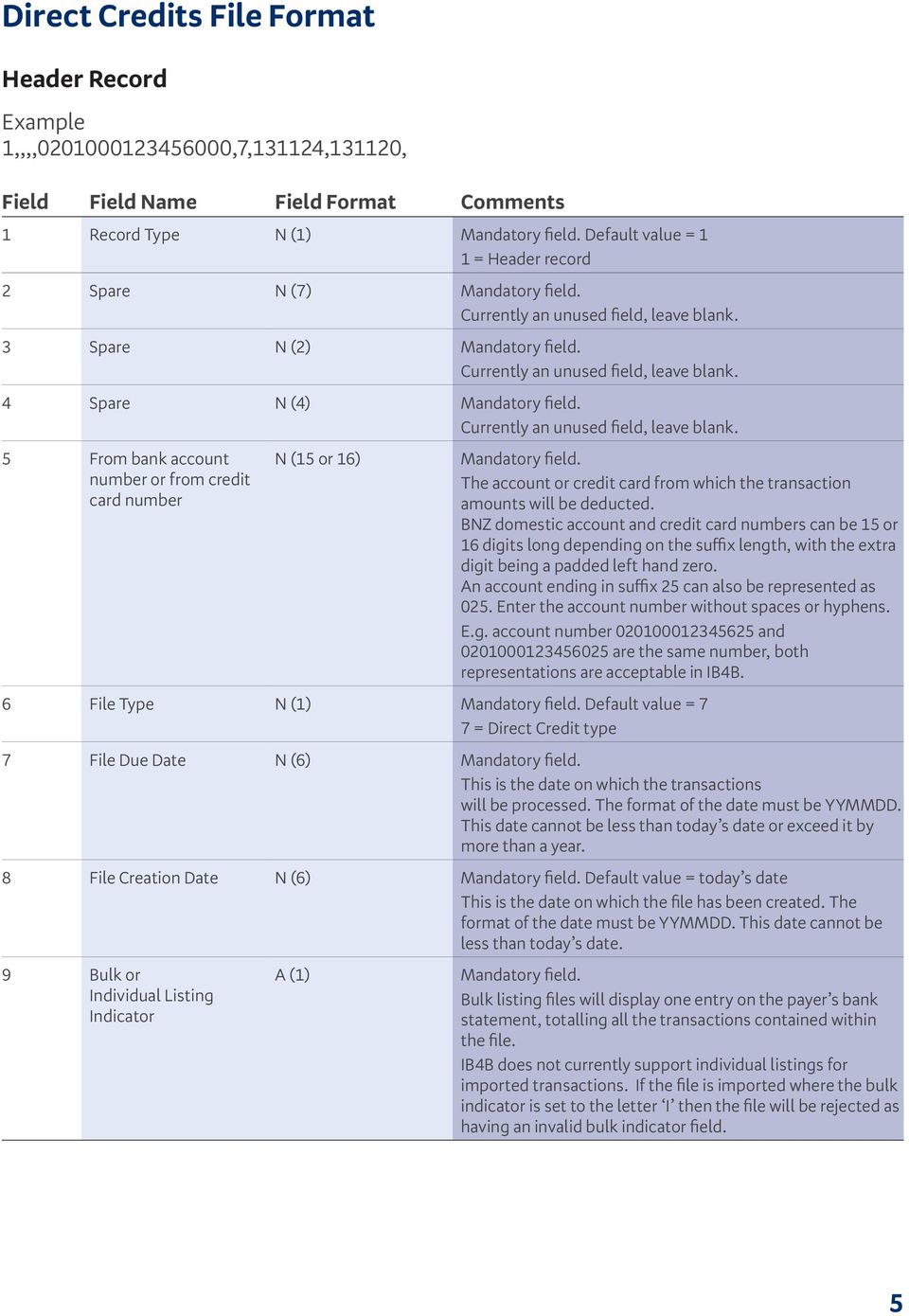
5 Direct Credits File Format Header Record Example 1,,,, ,7,131124,131120, Field Field Name Field Format Comments 1 Record Type N (1) Default value = 1 1 = Header record 2 Spare N (7) Currently an unused field, leave blank. 3 Spare N (2) Currently an unused field, leave blank. 4 Spare N (4) Currently an unused field, leave blank. 5 From bank account number or from credit card number N (15 or 16) The account or credit card from which the transaction amounts will be deducted. BNZ domestic account and credit card numbers can be 15 or 16 digits long depending on the suffix length, with the extra digit being a padded left hand zero. An account ending in suffix 25 can also be represented as 025. Enter the account number without spaces or hyphens. E.g. account number and are the same number, both representations are acceptable in IB4B. 6 File Type N (1) Default value = 7 7 = Direct Credit type 7 File Due Date N (6) This is the date on which the transactions will be processed. The format of the date must be YYMMDD. This date cannot be less than today s date or exceed it by more than a year. 8 File Creation Date N (6) Default value = today s date This is the date on which the file has been created. The format of the date must be YYMMDD. This date cannot be less than today s date. 9 Bulk or Individual Listing Indicator A (1) Bulk listing files will display one entry on the payer s bank statement, totalling all the transactions contained within the file. IB4B does not currently support individual listings for imported transactions. If the file is imported where the bulk indicator is set to the letter I then the file will be rejected as having an invalid bulk indicator field. 5
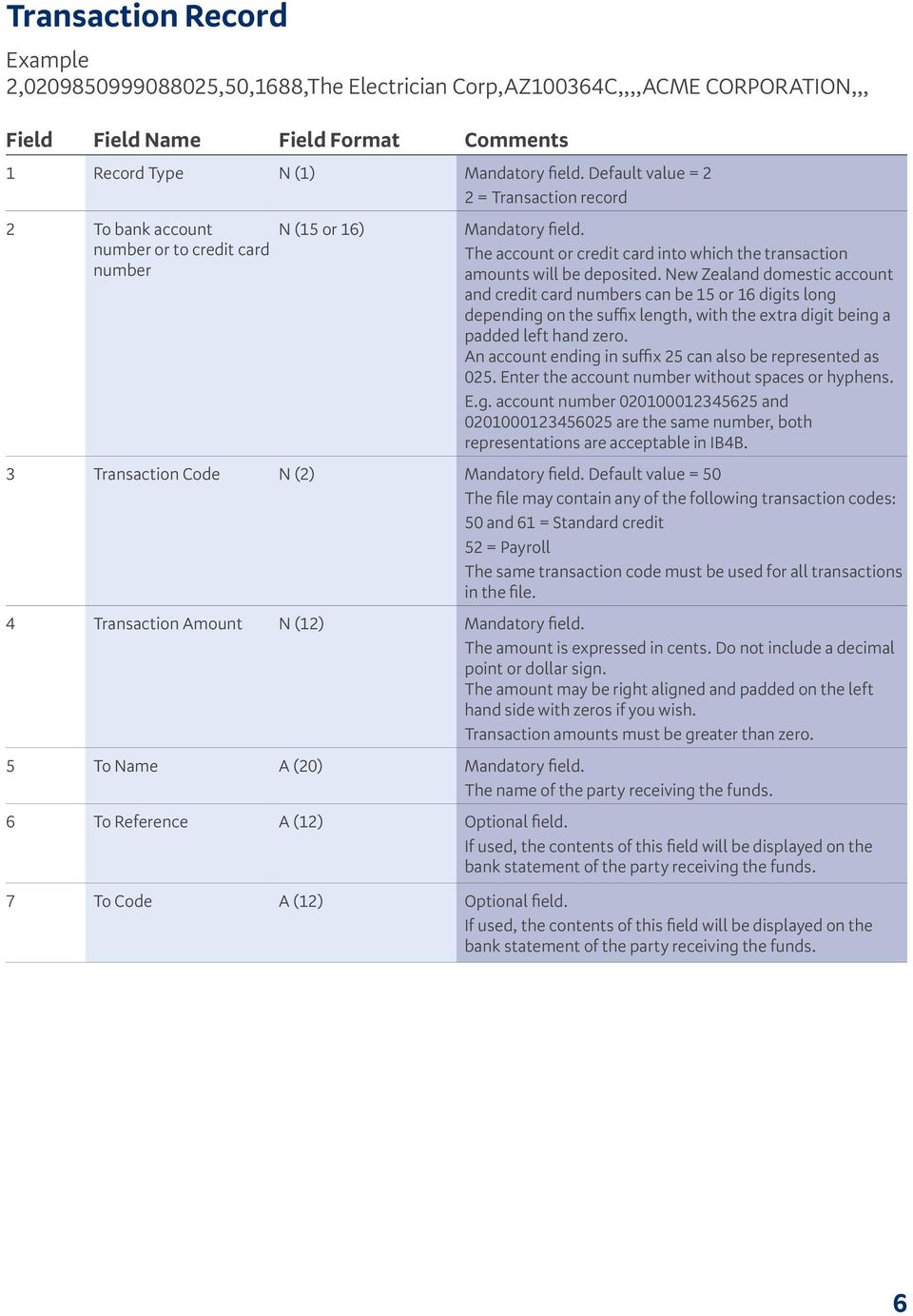
6 Transaction Record Example 2, ,50,1688,The Electrician Corp,AZ100364C,,,,ACME CORPORATION,,, Field Field Name Field Format Comments 1 Record Type N (1) Default value = 2 2 = Transaction record 2 To bank account number or to credit card number N (15 or 16) The account or credit card into which the transaction amounts will be deposited. New Zealand domestic account and credit card numbers can be 15 or 16 digits long depending on the suffix length, with the extra digit being a padded left hand zero. An account ending in suffix 25 can also be represented as 025. Enter the account number without spaces or hyphens. E.g. account number and are the same number, both representations are acceptable in IB4B. 3 Transaction Code N (2) Default value = 50 The file may contain any of the following transaction codes: 50 and 61 = Standard credit 52 = Payroll The same transaction code must be used for all transactions in the file. 4 Transaction Amount N (12) The amount is expressed in cents. Do not include a decimal point or dollar sign. The amount may be right aligned and padded on the left hand side with zeros if you wish. Transaction amounts must be greater than zero. 5 To Name A (20) The name of the party receiving the funds. 6 To Reference A (12) Optional field. bank statement of the party receiving the funds. 7 To Code A (12) Optional field. bank statement of the party receiving the funds. 6
7 Field Field Name Field Format Comments 8 To Alpha Reference A (12) Spare field. Currently an unused field, leave blank. 9 To Particulars A (12) Optional field. bank statement of the party receiving the funds. 10 From Name A (20) Your company s name. This will be displayed on the bank statement of the party receiving the funds. This file can contain different From Names for each transaction. 11 From Code A (12) Optional field. bank statement of the party sending the funds. The From code must be the same in each transaction. 12 From Reference A (12) Optional field. bank statement of the party sending the funds. The From reference must be the same in each transaction. 13 From Particulars A (12) Optional field. bank statement of the party sending the funds. The From particulars must be the same in each transaction. 7

8 Control Record Example 3,14198,152, Field Field Name Field Format Comments 1 Record Type N (1) Default value = 3 3 = Control record 2 Transaction Amount Total 3 Transaction Record Count N (12) N (6) The sum of all the transaction amounts within the file. The amount is expressed in cents. Do not include a decimal point or a dollar sign. The amount may be right aligned and padded on the left hand side with zeros if you wish. The sum of all the transactions within the file. The count may be right aligned and padded on the left hand side with zeros if you wish. 4 Hash Total N (11) The hash total is made up of the sum of those digits in positions 3 to 13 inclusive of the account or credit card number from each transaction. The first two and last two or three digits of each account number or credit card number are ignored. It is eleven characters in length. If the number is larger than eleven digits, drop the most significant numbers i.e. those on the left. If the number is less than eleven digits then zero fill to eleven, the zeroes being left aligned. For example:

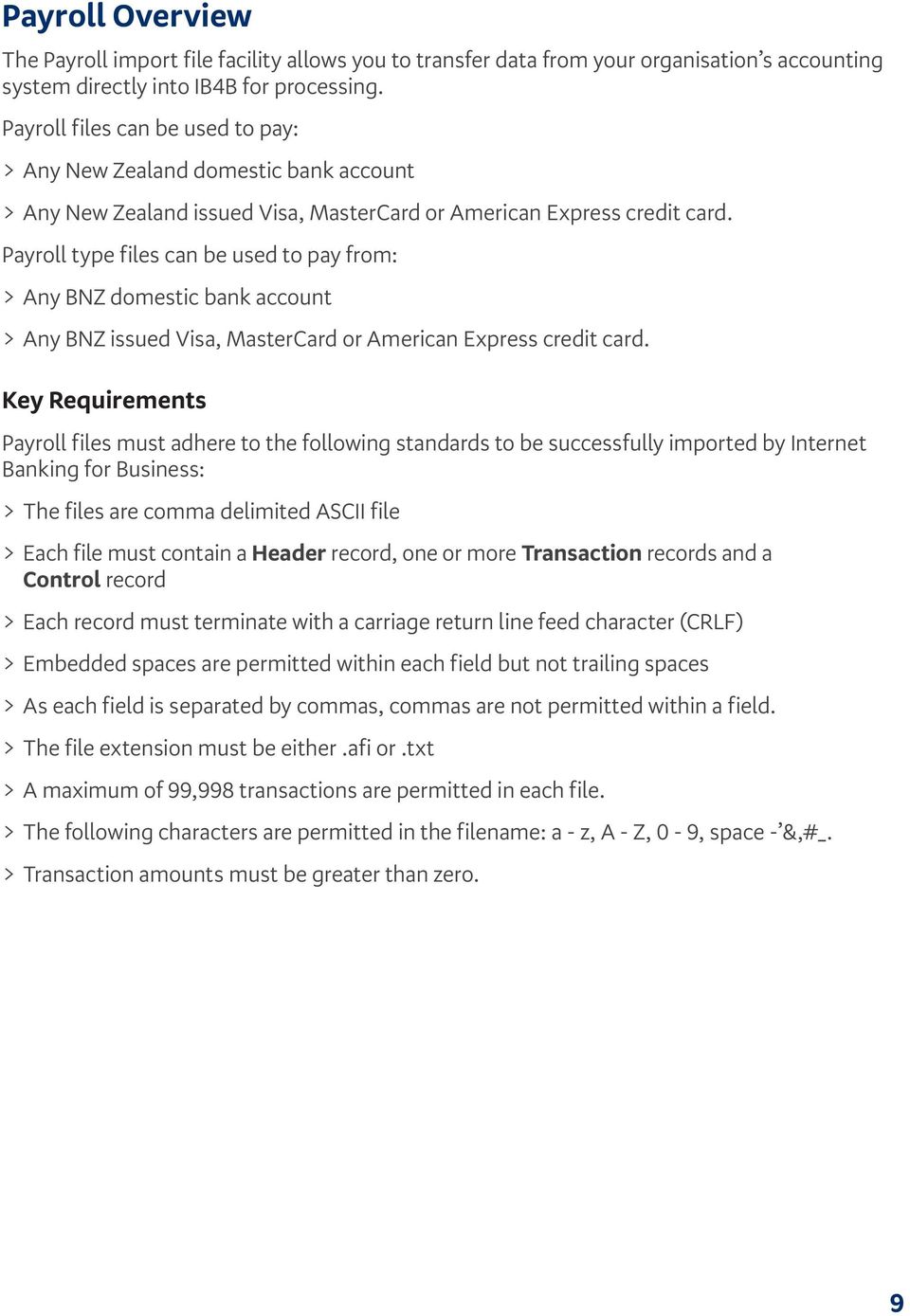
9 Payroll Overview The Payroll import file facility allows you to transfer data from your organisation s accounting system directly into IB4B for processing. Payroll files can be used to pay: > Any New Zealand domestic bank account > Any New Zealand issued Visa, MasterCard or American Express credit card. Payroll type files can be used to pay from: > Any BNZ domestic bank account > Any BNZ issued Visa, MasterCard or American Express credit card. Key Requirements Payroll files must adhere to the following standards to be successfully imported by Internet Banking for Business: > The files are comma delimited ASCII file > Each file must contain a Header record, one or more Transaction records and a Control record > Each record must terminate with a carriage return line feed character (CRLF) > Embedded spaces are permitted within each field but not trailing spaces > As each field is separated by commas, commas are not permitted within a field. > The file extension must be either.afi or.txt > A maximum of 99,998 transactions are permitted in each file. > The following characters are permitted in the filename: a - z, A - Z, 0-9, space - &,#_. > Transaction amounts must be greater than zero. 9
10 Payroll File Format Header Record Example 1,,,, ,7,131124,131120, Field Field Name Field Format Comments 1 Record Type N (1) Default value = 1 1 = Header record 2 Spare N (7) Currently an unused field, leave blank. 3 Spare N (2) Currently an unused field, leave blank. 4 Spare N (4) Currently an unused field, leave blank. 5 From bank account number or from credit card number N (15 or 16) The account or credit card from which the transaction amounts will be deducted. BNZ domestic account and credit card numbers can be 15 or 16 digits long depending on the suffix length, with the extra digit being a padded left hand zero. An account ending in suffix 25 can also be represented as 025. Enter the account number without spaces or hyphens. E.g. account number and are the same number, both representations are acceptable in IB4B. 6 File Type N (1) Default value = 7 7 = Direct Credit type Payroll is a subset of the Direct Credit payment type 7 File Due Date N (6) This is the date on which the transactions will be processed. The format of the date must be YYMMDD. This date cannot be less than today s date or exceed it by more than a year. 8 File Creation Date N (6) Default value = today s date This is the date on which the file has been created. The format of the date must be YYMMDD. This date cannot be less than today s date. 9 Bulk or Individual Listing Indicator A (1) Bulk listing files will display one entry on the payer s bank statement, totalling all the transactions contained within the file. IB4B does not currently support individual listings for imported transactions. If the file is imported where the bulk indicator is set to the letter I then the file will be rejected as having an invalid bulk indicator field. 10

11 Transaction Record Example 2, ,50,1688,John Smith,AZ100364C,,,,ACME CORPORATION,,, Field Field Name Field Format Comments 1 Record Type N (1) Default value = 2 2 = Transaction record 2 To bank account number or to credit card number N (15 or 16) The account or credit card into which the transaction amounts will be deposited. New Zealand domestic account and credit card numbers can be 15 or 16 digits long depending on the suffix length, with the extra digit being a padded left hand zero. An account ending in suffix 25 can also be represented as 025. Enter the account number without spaces or hyphens. E.g. account number and are the same number, both representations are acceptable in IB4B. 3 Transaction Code N (2) Default value = 50 The file may contain any of the following transaction codes: 50 and 61 = Standard credit 52 = Payroll The same transaction code must be used for all transactions in the file. 4 Transaction Amount N (12) The amount is expressed in cents. Do not include a decimal point or dollar sign. The amount may be right aligned and padded on the left hand side with zeros if you wish. Transaction amounts must be greater than zero. 5 To Name A (20) The name of the party receiving the funds. 6 To Reference A (12) Optional field. bank statement of the party receiving the funds. 7 To Code A (12) Optional field. bank statement of the party receiving the funds. 11
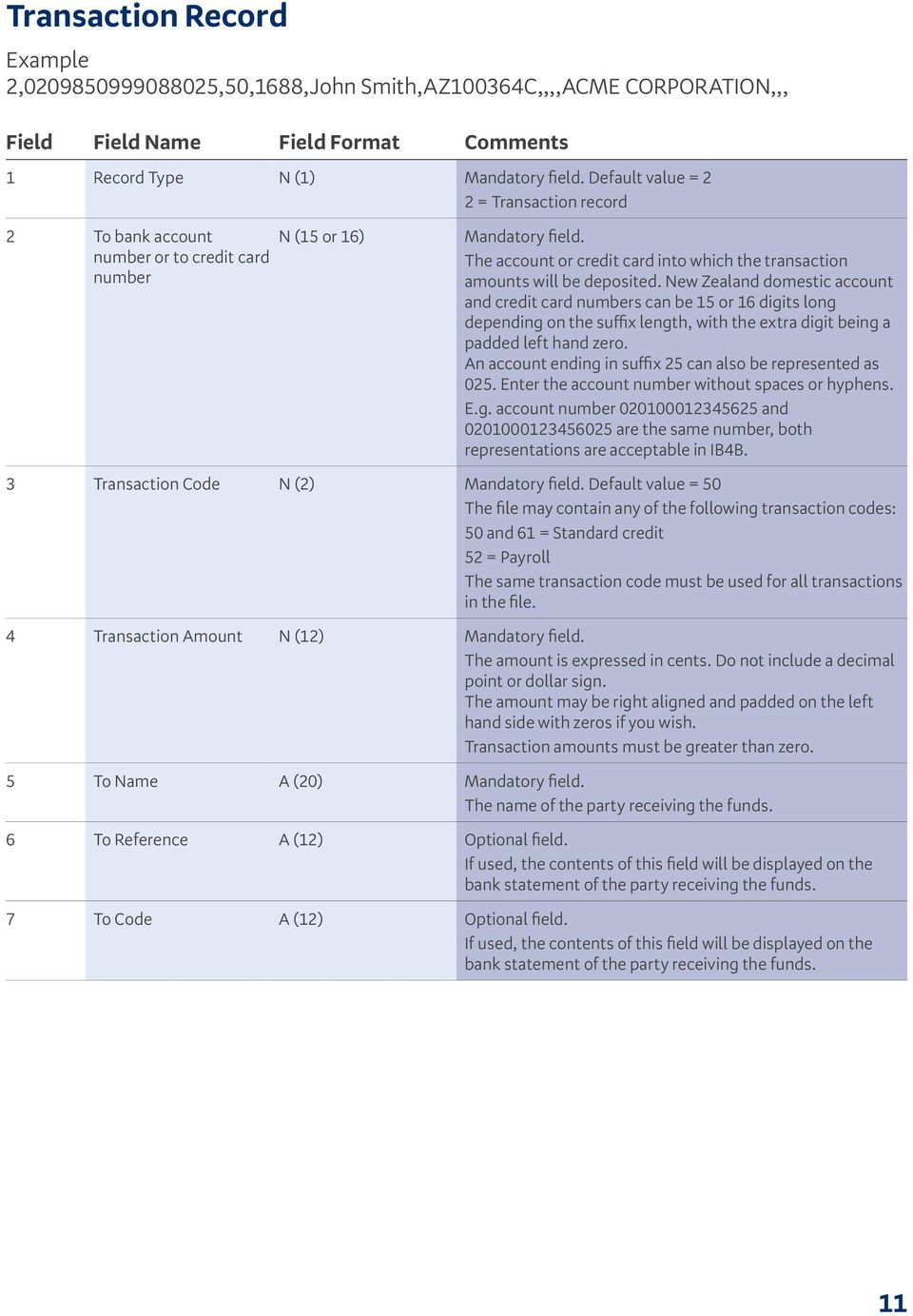
12 Field Field Name Field Format Comments 8 To Alpha Reference A (12) Spare field. Currently an unused field, leave blank. 9 To Particulars A (12) Optional field. bank statement of the party receiving the funds. 10 From Name A (20) Your company s name. This will be displayed on the bank statement of the party receiving the funds. This file can contain different From Names for each transaction. 11 From Code A (12) Optional field. bank statement of the party sending the funds. The From code must be the same in each transaction. 12 From Reference A (12) Optional field. bank statement of the party sending the funds. The From reference must be the same in each transaction. 13 From Particulars A (12) Optional field. If used, he contents of this field will be displayed on the bank statement of the party sending the funds. The From particulars must be the same in each transaction. 12

13 Control Record Example 3,14198,152, Field Field Name Field Format Comments 1 Record Type N (1) Default value = 3 3 = Control record 2 Transaction Amount Total 3 Transaction Record Count N (12) N (6) The sum of all the transaction amounts within the file. The amount is expressed in cents. Do not include a decimal point or a dollar sign. The amount may be right aligned and padded on the left hand side with zeros if you wish. The sum of all the transactions within the file. The count may be right aligned and padded on the left hand side with zeros if you wish. 4 Hash Total N (11) The hash total is made up of the sum of those digits in positions 3 to 13 inclusive of the account or credit card number from each transaction. The first two and last two or three digits of each account number or credit card number are ignored. It is eleven characters in length. If the number is larger than eleven digits, drop the most significant numbers i.e. those on the left. If the number is less than eleven digits then zero fill to eleven, the zeroes being left aligned. For example:

14 Direct Debits Overview The Direct Debit import file facility allows you to transfer data from your organisation s accounting system directly into IB4B for processing. Direct Debit files can be used to credit: > A nominated BNZ domestic bank account Direct Debit files can receive funds from: > Any New Zealand domestic bank account Key Requirements Direct debit files must adhere to the following standards to be successfully imported by Internet Banking for Business: > The files are comma delimited ASCII file > Each file must contain a Header record, one or more Transaction records and a Control record > Each record must terminate with a carriage return line feed character (CRLF) > Embedded spaces are permitted within each field but not trailing spaces > As each field is separated by commas, commas are not permitted within a field. > The file extension must be either.afi or.txt > A maximum of 99,998 transactions are permitted in each file. > The following characters are permitted in the filename: a - z, A - Z, 0-9, space - &,#_. > Transaction amounts must be greater than zero. 14

15 Direct Debit File Format Header Record Example 1, ,,, ,6,131124,131120, Field Field Name Field Format Comments 1 Record Type N (1) Default value = 1 1 = Header record 2 Direct Debit Authority Number N (7) As assigned to you by BNZ. 3 Spare N (2) Currently an unused field, leave blank. 4 Spare N (4) Currently an unused field, leave blank. 5 To bank account number N (15 or 16) The account into which the transaction amounts will be deposited. New Zealand domestic account numbers can be 15 or 16 digits long, depending on the suffix length, with the extra digit being a padded left hand zero. An account ending in suffix 25 can also be represented as 025. Enter the account number without spaces or hyphens. E.g. account number and are the same number, both representations are acceptable in IB4B. 6 File Type N (1) Default value = 6 6 = Direct Debit type 7 File Due Date N (6) This is the date on which the transactions will be processed. The format of the date must be YYMMDD. This date cannot be less than today s date or exceed it by more than a year. 8 File Creation Date N (6) Default value = today s date This is the date on which the file has been created. The format of the date must be YYMMDD. This date cannot be less than today s date. 9 Bulk or Individual Listing Indicator A (1) Bulk listing files will display one entry on the payer s bank statement, totalling all the transactions contained within the file. IB4B does not currently support individual listings for imported transactions. If the file is imported where the bulk indicator is set to the letter I then the file will be rejected as having an invalid bulk indicator field. 15

16 Transaction Record Example 2, ,00,1688,The Electrician Corp,AZ100364C,,,,ACME CORPORATION,,, Field Field Name Field Format Comments 1 Record Type N (1) Default value = 2 2 = Transaction record 2 From bank account number N (15 or 16) The account from which the transaction amounts will be deducted. New Zealand domestic account numbers can be 15 or 16 digits long, depending on the suffix length, with the extra digit being a padded left hand zero. An account ending in suffix 25 can also be represented as 025. Enter the account number without spaces or hyphens. E.g. account number and are the same number, both representations are acceptable in IB4B. 3 Transaction Code N (2) Default value = = Direct Debit The same transaction code must be used for all transactions in the file. 4 Transaction Amount N (12) The amount is expressed in cents. Do not include a decimal point or dollar sign. The amount may be right aligned and padded on the left hand side with zeros if you wish. Transaction amounts must be greater than zero. 5 From Name N (20) The name of the party sending the funds. 6 From Reference A (12) Optional field. bank statement of the party sending the funds. 7 From Code A (20) Optional field. bank statement of the party sending the funds. 16
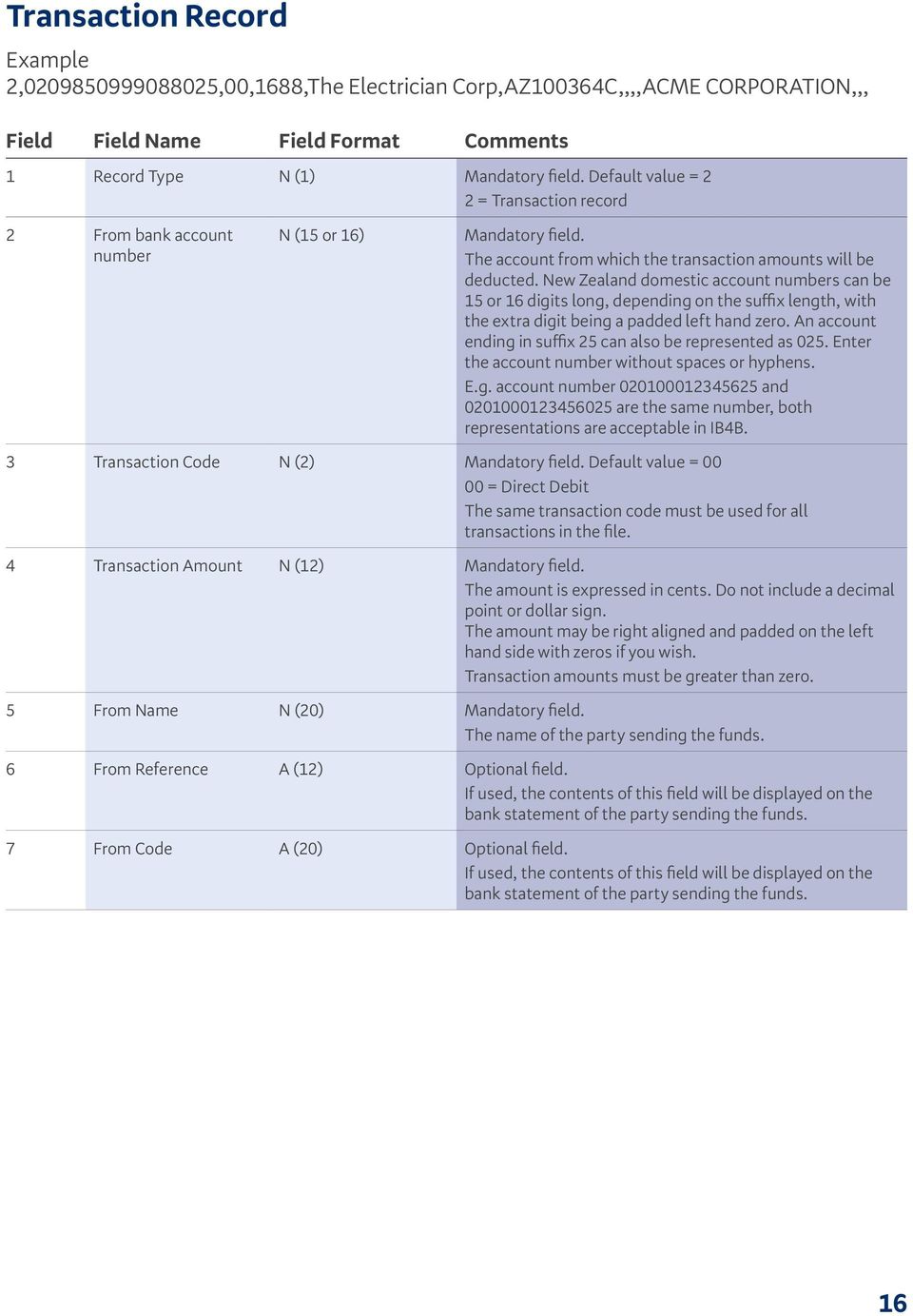
17 Field Field Name Field Format Comments 8 From Alpha Reference A (12) Spare field. Currently an unused field, leave blank. 9 From Particulars A (12) Optional field. bank statement of the party sending the funds. Note, in the case of a direct debit dishonour, the contents of this field will be overwritten with the dishonour reason. 10 To Name A (20) Your company s name. This will be displayed on the bank statement of the party sending the funds. This file can contain different To Names for each transaction. 11 To Code A (12) Optional field. bank statement of the party receiving the funds. The To code must be the same in each transaction. 12 To Reference A (12) Optional field. bank statement of the party receiving the funds. The To reference must be the same in each transaction. 13 To Particulars A (12) Optional field. bank statement of the party receiving the funds. The To Particulars must be the same in each transaction. 17

18 Control Record Example 3,14198,152, Field Field Name Field Format Comments 1 Record Type N (1) Default value = 3 3 = Control record 2 Transaction Amount Total 3 Transaction Record Count N (12) N (6) The sum of all the transaction amounts within the file. The amount is expressed in cents. Do not include a decimal point or a dollar sign. The amount may be right aligned and padded on the left hand side with zeros if you wish. The sum of all the transactions within the file. The count may be right aligned and padded on the left hand side with zeros if you wish. 4 Hash Total N (11) The hash total is made up of the sum of those digits in positions 3 to 13 inclusive of the account number from each transaction. The first two and last two or three digits of each account number are ignored. It is eleven characters in length. If the number is larger than eleven digits, drop the most significant numbers i.e. those on the left. If the number is less than eleven digits, then zero fill to eleven, the zeros being left aligned. For example: NOTE - use example shown for DC and Payroll 18

19 International Payments Overview The International Payments import file facility allows you to transfer data using a CSV or from your organisation s accounting system directly into IB4B for processing. International Payment files can pay from any BNZ domestic bank account and any BNZ foreign currency bank account by Telegraphic Transfer or International Cheque. If the file structure is invalid then the entire file will be rejected. If any line(s) in the file fail validation you must correct the error(s) and re-upload the entire file. Key Requirements International Payments files must adhere to the following standards to be successfully imported by Internet Banking for Business: > The files are comma delimited ASCII file > Each file can contain an optional row with heading labels and must contain a header record and one or more transaction records > As each field is separated by commas, commas are not permitted within a field > The file extension must be either.csv,.txt or.dat > A maximum of 1,000 transactions are permitted in each file > Only the following characters are permitted in the filename: a - z A - Z 0 9 space / -? : ( ). + any other characters will be removed from your file and will be replaced with a space > Transaction amounts must be greater than zero. It is recommended that data in numeric fields is enclosed in inverted commas (i.e. ). This table describes some of the terms used throughout this section Term A Description Alphanumeric this field can include any of the following. Letters: a - z and A - Z Numbers: 0-9 and special characters: space / -? : ( ). + N Numeric this field can only contain numbers 0 9 From Beneficiary Payment This is the party sending the funds (payer) This is the party receiving the funds (payee) Each individual item within the file 19
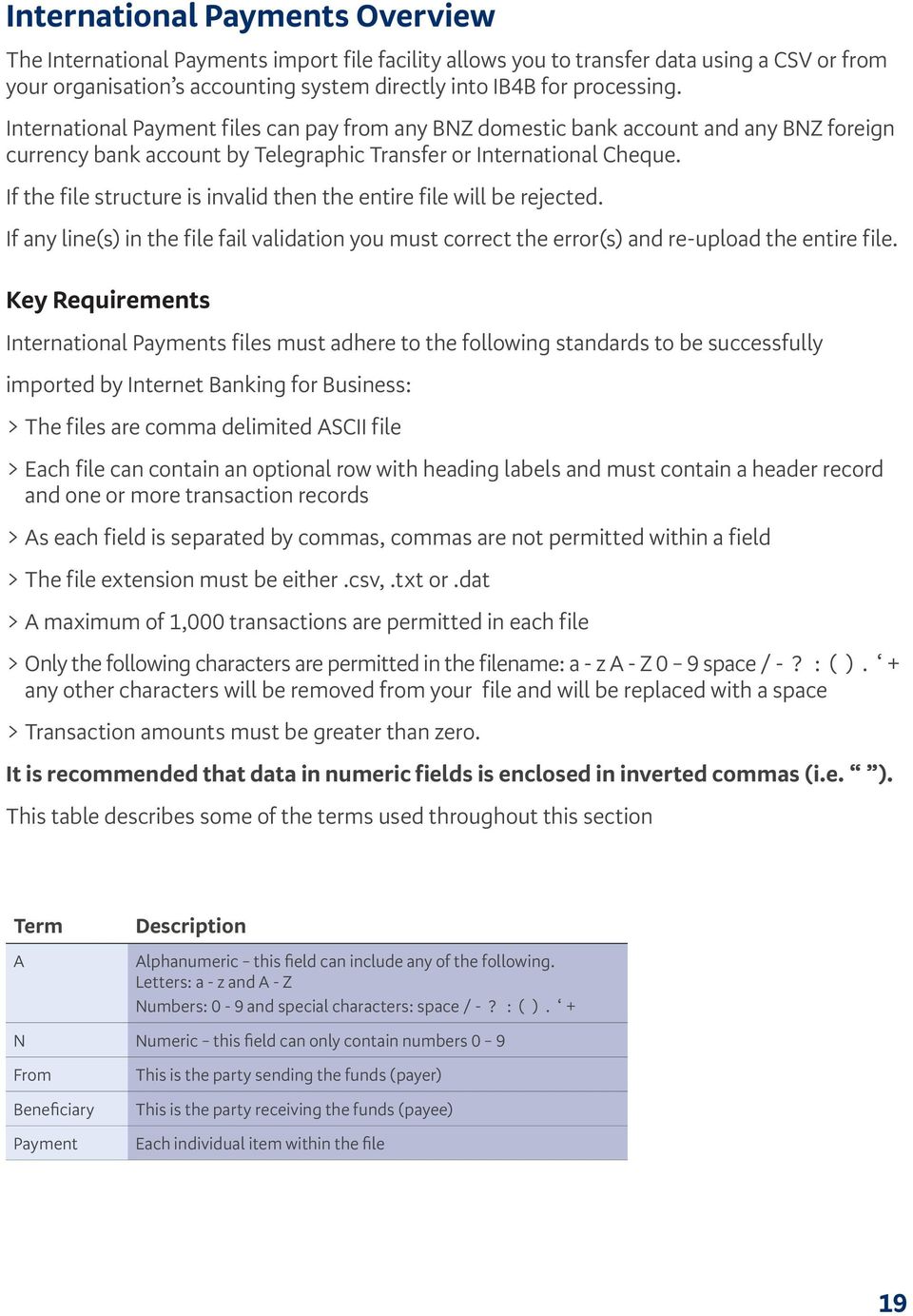
20 International Payments File Format Heading Row (optional) One record per file (optional) If present, Field 1 must contain Record Type Example Record Type, Payment Date, Payment Currency, Payment Amount, Exchange Rate Type, Exchange Rate Reference... File Record (mandatory) One FH record per file Example FH, 27/03/2010,FILEREF123,1,,,,,,,,,,,,,,,,,,,,,,,,,,,,,,,,,,,,,,,,,,,,,,,,,,, Column Field Field Name Format Mandatory Comments A 1. Record Type A(2) Yes FH = File Header. Record Type must never be enclosed in inverted commas B 2. Date of File Upload A(10) No Must be the date the file is uploaded. The format must be: DD/MM/YYYY C 3. File Reference A(12) No Your unique file reference D 4. File Payment Count N(4) No The total number of payments in the file. There is a maximum of 1000 payments per file. 20

21 File Payment Details Use one record for each TT payment or International Cheque Column Field Field Name Format Mandatory for Intl Intl Payment Cheque Comments A 1. Record Type B 2. Payment Date C 3. Payment Currency D 4. Payment Amount E 5. Exchange Rate Type A(2) Yes Yes PT = Telegraphic Transfer PQ = International Cheque Record Type must never be enclosed in inverted commas. A(10) No No Optional field Date a Payment is to be processed. Payments from a Foreign Currency Account can be future dated up to 1 year in the future. Format: DD/MM/YYYY Leave Payment Date blank for payments from an NZD domestic account. A(3) Yes Yes Currency of the payment - eg USD Refer to Table 1 in the Appendices for a list of valid currencies. N(15) Yes Yes Amount of the payment in the payment currency. To specify the Payment Amount in NZD equivalent, prefix the amount with NZD. Decimal place dependent on currency and must be in the correct position. Eg USD $100 can be formatted as: or 100 Refer to the currency list in Table 1 at the end of this document for further details. A(3) No No The type of exchange rate to be used (where applicable). Only one rate type per payment can be specified. FEC = Forward Exchange Contract DLR = Dealer Rate Reference Leave blank if BNZ to convert using the current market rate at time of processing or payment is not being converted. F 6. Exchange Rate Reference A(13) Mandatory field when using Forward Exchange Contract or Dealer Rate Reference. Reference number of the FEC or Deal. Only one rate reference per payment can be specified. Leave blank if payment is not being converted or if BNZ is to convert using the current market rate at time of processing. 21
22 Column Field Field Name Format Mandatory for Intl Intl Payment Cheque Comments G 7. Deal Amount N(15) Mandatory field when using Forward Exchange Contract or Dealer Rate Reference. Amount of the FEC/Deal to be used against the payment in the same currency as the payment currency. To specify the FEC/Deal Amount in NZD equivalent, prefix the FEC/Deal amount with NZD. Decimal place dependent on currency and must be in the correct position. If the total Deal amount is less than the specified debit/payment amount then a current market rate will be used for the balance of the payment. Leave blank if payment is not being converted or if BNZ to convert using the current market rate at time of processing. H 8. Beneficiary Name A(35) Yes Yes The name of the party receiving the funds. (For names longer than 35 characters, continue the name in Beneficiary Address Line 1). I 9. Spare No No Spare field J 10. Beneficiary Address Line 1 K 11. Beneficiary Address Line 2 L 12. Beneficiary Address Line 3 M 13. Beneficiary Country Code A(35) Yes Yes Address Line 1 of the beneficiary of the payment. Must be a valid street address. (Not P O Box or Private Bag). A(35) Yes Yes Address Line 2 of the beneficiary of the payment. A(32) No No Address Line 3 of the beneficiary of the payment. A(2) Yes Yes Country code of the beneficiary of the payment. Refer to ISO ui/#search for a list of valid country codes. N 14. Beneficiary Phone Number A(15) N/A Phone number of the beneficiary is mandatory for payments to South Africa. Otherwise not required. It is recommended that data in this field is enclosed in inverted commas. O 15. Beneficiary Contact Name A(33) N/A Contact name of the beneficiary is mandatory for payments to South Africa. Otherwise not required. P 16. Spare No No Spare field Q 17. Spare No No Spare field 22
23 Column Field Field Name R 18. Beneficiary Account Number/ IBAN S 19. Beneficiary Bank Clearing Code T 20. Beneficiary Bank BIC Swift Code U 21. Beneficiary Bank Name V 22. Beneficiary Bank Branch W 23. Beneficiary Bank Address Line 1 X 24. Beneficiary Bank Address Line 2 Y 25. Beneficiary Bank Country Code Z 26. Postal Index Number (PIN Code) Format Mandatory for Intl Intl Payment Cheque Comments A(34) Yes N/A Account Number or IBAN where funds are to be deposited. It is recommended that data in this field is enclosed in inverted commas. Refer to Table 3 at the end of this document beneficiary bank country rules. A(15) A(11) A(35) A(35) A(35) N/A N/A N/A N/A N/A Clearing code of the beneficiary s bank. Also known as the routing code or sort code. If clearing code is mandatory for the beneficiary bank country code then it must be entered. Refer to Table 2 at the end of this document for a list of valid Clearing Code formats. Refer to Table 3 at the end of this document beneficiary bank country rules. BIC Swift code of the beneficiary s bank (8 or 11 characters). Refer to Table 3 at the end of this document beneficiary bank country rules. Name of the beneficiary s bank is mandatory if BIC Swift code has not been specified. Otherwise optional. Branch name is mandatory if BIC Swift code has not been specified. Otherwise optional. Address Line 1 is mandatory if BIC Swift code has not been specified. Otherwise optional. A(32) No N/A Address Line 2 of the beneficiary s bank. A(2) N(6) N/A N/A Country code of the beneficiary s bank can t be NZ if the payment currency is NZD. Refer to ISO ui/#search for a list of valid country codes. Mandatory if Beneficiary Bank country code is India and a BIC Swift code has not been specified. 23
24 Column Field Field Name AA 27. Information for Beneficiary AB 28. Correspondent Bank Fee Indicator AC 29. Beneficiary Format A(140) Mandatory for Intl Intl Payment Cheque N/A Comments Details entered by customer to be sent to the beneficiary. A payment reason is mandatory for payments to Sri Lanka, South Africa, Thailand or India e.g payment of invoice No 123. A(1) Yes N/A Indicator to specify who will pay the correspondent bank fee. B = beneficiary will pay the fee O = BNZ customer will pay the fee A(50) No N/A If an notification is required, insert the address here. Only one address is allowed. AD 30. Spare No No Spare field AE 31. From Statement A(12) No No From Statement Details For New Zealand domestic bank accounts it will be included in the statement Particulars field. For Foreign Currency Accounts it will be included in the statement Narrative 2 field. Can only contain alpha and numeric characters. No special characters allowed. AF 32. Spare No No Spare field AG 33. From Account Type AH 34. From Account Number A(1) Yes Yes Account type of the account to be debited. Must be a valid BNZ domestic (account-type = C) or Foreign Currency Account (account-type = F). A(16) Yes Yes NZ domestic account format: 02bbbbaaaaaaasss bbbb = branch number aaaaaaa = account base number sss = account suffix AI 35. Currency of From Account Foreign Currency Account (FCA) account format: aaaaaassss aaaaaa = account base number ssss = suffix It is recommended that data in this field is enclosed in inverted commas. A(3) Yes Yes Currency of the From account e.g. NZD or USD. The from account must be the same currency as the payment currency or NZD Refer to Table 1 at the end of this document for a list of currencies that are valid and supported by BNZ. 24
25 Column Field Field Name AJ 36. Fee Account Type AK 37. Fee Account Number Format Mandatory for Intl Intl Payment Cheque Comments A(1) No No Account type for the fee account to be debited. Must be a valid BNZ domestic (account-type = C ) or Foreign Currency Account (account-type = F ). If left blank, the fee will be debited from the from account in field 34. A(16) No No NZ domestic account format: 02bbbbaaaaaaasss bbbb = branch number aaaaaaa = account base number sss = account suffix AL 38. Currency of Fee Account Foreign Currency Account (FCA) account format: aaaaaassss aaaaaa = account base number ssss = suffix It is recommended that data in this field is enclosed in inverted commas. A(3) No No Currency of the fee account e.g. NZD or USD. The currency of the debit account must be the same currency as the payment currency or NZD. AM 39. Spare No No Spare field AN 40. Spare No No Spare field AO 41. Spare No No Spare field AP 42. Spare No No Spare field AQ 43. Spare No No Spare field AR 44. Spare No No Spare field AS 45. Underlying Client Name A(35) N/A If you are sending a payment on behalf of someone else, enter the name of the customer that you are paying on behalf of. 25
26 Column Field Field Name AT 46. Client Address Line 1 AU 47. Client Address Line 2 AV 48. Client Address Country Code Format A(35) A(35) A(2) Mandatory for Intl Intl Payment Cheque N/A N/A Comments AW 49. Spare Spare field AX 50. Spare Spare field AY 51. Spare Spare field AZ 52. Spare Spare field BA 53. Spare Spare field BB 54. Spare Spare field BC 55. Spare Spare field N/A If you are sending a payment on behalf of someone else, enter the address of the customer that you are paying on behalf of. Must be a valid street address. (Not P O Box or Private Bag). Refer to ISO for a list of valid country codes. 26
27 General Information Table 1: Currency List Currency Code Currency Description Decimal Places AED UAE DIRAHM 3 AUD AUSTRALIAN DOLLAR 2 BHD BAHRAINI DINAR 3 CAD CANADIAN DOLLAR 2 CHF SWISS FRANC 2 DKK DANISH KRONE 2 EUR EURO 2 FJD FIJIAN DOLLAR 2 GBP BRITISH POUND STERLING 2 HKD HONG KONG DOLLAR 2 INR INDIAN RUPEE 2 JPY JAPANESE YEN 0 KWD KUWAITI DINAR 3 NOK NORWEGIAN KRONE 2 NZD NEW ZEALAND DOLLAR 2 MXN MEXICAN PESO 2 PGK PNG KINA 2 PHP PHILIPPINE PESO 2 PKR PAKISTANI RUPEE 2 SBD SOLOMON ISLANDS DOLLAR 2 SEK SWEDISH KRONA 2 SGD SINGAPORE DOLLAR 2 THB THAI BAHT 2 TOP TONGAN PA ANGA 2 USD UNITED STATES DOLLAR 2 VUV VANUATU VATU 0 WST SAMOAN TALA 2 XPF FRENCH PACIFIC FRANC 0 ZAR SOUTH AFRICAN RAND 2 27
28 Table 2: National Clearing Codes Certain countries require payments to include the National Clearing Code of the beneficiary bank. The clearing code includes the bank and branch number. Country Clearing Code Prefix Clearing Code Description Example Australia AU BSB NO AU Canada CC TRANSIT NO CC South Africa ZA SORT CODE NO ZA USA FW FEDWIRE/ABA NO FW United Kingdom SC SORT CODE SC Table 3: Rules for IBANs, Clearing Codes and BIC Codes for Beneficiary Bank Countries Country IBAN Clearing Code BIC Swift Code Australia, Canada and USA Not Applicable Use account numbers rather than IBANs Mandatory AU = BSB No. (eg AU123456) CA= Transit No. (eg CC ) US = Fedwire/ABA No (eg FW ) Not Applicable Do not supply a BIC for these countries United Kingdom Optional Either an account number or an IBAN can be supplied Mandatory GB = Sort Code (eg SC123456) Not Applicable Do not supply a BIC for this country South Africa Not Applicable Use account numbers and not IBANs Optional ZA = Sort Code No (eg ZA123456) Optional Please provide a BIC if known. If not known then the Bank Name and Address Details must be supplied IBAN Optional Countries Optional Either an account number or an IBAN can be supplied Not Applicable Do not supply a Clearing Code for these countries Optional If an IBAN is not provided, please provide a BIC if known. If not known then Bank Name and Address Details must be supplied IBAN Mandatory Countries Mandatory An IBAN must be supplied Not Applicable Do not supply a Clearing Code for these countries Optional (4989) Call us on Visit bnz.co.nz us at [email protected] 28
1.1. Overview... 5 1.2. Direct credits... 6 1.3. Direct debits... 9 1.4. Nab direct credits... 12
 1.1. Overview... 5 1.2. Direct credits... 6 1.3. Direct debits... 9 1.4. Nab direct credits... 12 2.1. Overview... 16 2.2. Credit card transaction... 17 2.3. Credit card response... 20 3.1. Overview...
Western Union Payments Frequently Asked Questions
 Edith Cowan University Western Union Payments Frequently Asked Questions International student payments We are here to help Edith Cowan University and Western Union Business Solutions, have come together
YOU MUST SUBMIT THIS CLAIM FORM BEFORE THE BAR DATE OR YOU WILL NOT BE ENTITLED TO RECEIVE A DIVIDEND UNDER THE SCHEME.
 CLAIM FORM IN THE MATTER OF Independent Insurance Company Limited (In Provisional Liquidation) (the Company ) AND IN THE MATTER OF The Companies Act 2006 Before completing and signing this Claim Form,
PayPal Foreign Currency Acceptance Training Guide
 1 PayPal Foreign Currency Acceptance Training Guide Table of Contents PayPal Overview... 2 What is Different from Prior PayPal Payments... 2 How to Create a PayPal Account... 3 Foreign Currency Payments
Business Banking Fees and Limits
 Business Banking Fees and Limits Effective June 2015 a What s Inside Here. 1 Our fees 2 Transaction account, savings accounts and investments 9 International accounts and services 12 Business lending 16
PLEASE READ THIS DOCUMENT CAREFULLY
 Multi Currency Savings : Pre-Account Opening Risk Explanation Form and Product Fact Sheet マルチカレンシー 普 通 預 金 契 約 締 結 前 交 付 書 面 兼 商 品 説 明 書 ( 兼 外 貨 預 金 等 書 面 ) (This is a Document to be delivered prior to
1. Debit the account specified by the Customer for the amount agreed to for the purchase of the foreign currency;
 Foreign Exchange FX Direct - User Guide RULES OF OPERATION The FX Direct Service is provided by Royal Bank of Canada (the Bank). A) When Does a Foreign Exchange Deal Exist? A valid and binding transaction
Foreign Currency Account. Easily manage foreign currencies
 Foreign Currency Account Easily manage foreign currencies Contents 2 What s a foreign currency account? 2 Why open an ASB Foreign Currency Account? 3 Managing your account 3 What are the fees? 4 Interest
Sending Payments to Royal Bank of Canada (Channel Islands) Limited
 Sending Payments to Royal Bank of Canada (Channel Islands) Limited Effective date: August 19, 2013 Money can be transferred to your account with Royal Bank of Canada (Channel Islands) Limited ( the Bank
PayPal Integration. PayPal can now be easily integrated via EBS s single interface online platform.
 Expand your online business with PayPal and EBS PayPal Integration PayPal can now be easily integrated via EBS s single interface online platform. By adding PayPal via the EBS platform, you gain access
Bendigo Foreign Exchange Contracts. Product Disclosure Statement.
 Product Disclosure Statement Bendigo Foreign Exchange Contracts. Product Disclosure Statement. 27 October 2014 1 About this document This Product Disclosure Statement (PDS) is an important document. It
First 10 transactions Transactions 11 to 50 Transactions 51 and above
 This is our standard Tariff of charges for your accounts held at the UK Branch of Silicon Valley Bank. It sets out the prices that we charge you for our most frequently used account services in the UK.
Payment cut-off times
 Wealth and Investment Management International Banking Payment cut-off times Barclays Bank PLC International Banking Payment cut-off times These payment cut-off times relate to payments submitted electronically
Banking with SEAWire
 Banking with SEAWire Overview The SEAwire program enables officers working under a Seagoing Employment Agreement (SEA) to have their paychecks automatically deposited into their home country bank accounts.
Isabel 6 Guide Group #1. How to encode SEPA and Non-SEPA transactions from an ING Belgium (BBRUBEBB) account?
 Isabel 6 Guide Group #1 How to encode SEPA and Non-SEPA transactions from an ING Belgium (BBRUBEBB) account? Version 2.1 06-11-2013 Purpose This document describes how to use the Isabel 6 Payment Wizard
Recurring Payments Profile Report. Version 1.1
 Recurring Payments Profile Report Version 1.1 Last updated: September 2015 Revision History Revision history for PayPal Recurring Payments Profile Report Specification. TABLE P.1 Revision History Date
Corporate Online. S.A.P. Multicash format for Accounts. A guide for Corporate Online users
 Corporate Online S.A.P. Multicash format for Accounts A guide for Corporate Online users About this Guide About Corporate Online Westpac Corporate Online is an internet-based electronic platform, providing
International currency exchange > FAQs
 International currency exchange services What is international currency exchange? International currency exchange is a fast, secure currency conversion payment service offered by Computershare. Through
ANZ TRANSACTIVE FILE FORMATS WEB ONLY 07.2013. Page 1 of 118
 ANZ TRANSACTIVE FILE FORMATS WEB ONLY 07.2013 Page 1 of 118 ANZ Transactive and ANZ Transactive - Mobile are provided by Australia and New Zealand Banking Group Limited (ACN 005 357 522). References to
Fees n Limits. Personal Banking fees and limits. It s Ours. Effective 11 June 2015
 Fees n Limits. Personal Banking fees and limits Effective 11 June 2015 It s Ours. a What s Inside Here. Everyday, savings and investment accounts Overdraft facility Credit cards International accounts
Fees n Limits. Personal Banking fees and limits. It s Ours. Effective 1 April 2016
 Fees n Limits. Personal Banking fees and limits Effective 1 April 2016 It s Ours. a What s Inside Here. Everyday, savings and investment accounts Overdraft facility Credit cards International accounts
Rates and Charges. Effective from 6 October 2014
 Rates and Charges Effective from 6 October 2014 For full details of when and how interest is payable, please refer to your Account Specific Terms and Conditions. Previous interest rates For previous interest
Citi London Funds Transfer Cut-off Times and Routing Information
 Citi London Funds Transfer Cut-off Times and Routing Information Standard Payment Processing Cut-off Times Customer Settlement Instructions Citi London (1/5) Standard Payment Processing Cut Off Times The
Correspondent Banks (effective 28.01.14)
 Correspondent Banks (effective 28.01.14) When arranging to credit funds to accounts maintained with ABN AMRO (Guernsey) Limited please transfer them to the appropriate currency correspondent bank account
Rates and Charges. Effective from 1 January 2016
 Rates and Charges Effective from 1 January 2016 For full details of when and how interest is payable, please refer to your Account Specific Terms and Conditions. Previous interest rates For previous interest
Bankline internet banking import file layout user guide
 Bankline internet banking import file layout user guide Bankline internet banking import file layout user guide 2 Contents 1. Introduction to Bankline import...3 1.1 What is Bankline import?...3 1.2 How
Tracking an Affiliate Program or campaign
 Tracking an Affiliate Program or campaign Introduction How affilinet s tracking works 1. A publisher places an affilinet link/creative on their website; this directs users to an advertiser s website. 2.
If brokers wish Xchanging to group delinked transactions the LPAN(s) must be marked Grouped or Please Group.
 PREMIUM SUBMISSIONS 1. General These instructions apply to all premium submissions (excluding proportional treaty accounts) to Xchanging. All premium entries submitted, including FDOs, must be accompanied
Fees n Limits. Personal Banking fees and limits. It s Ours. Effective March 2015
 Fees n Limits. Personal Banking s and limits Effective March 2015 It s Ours. ab What s Inside Here. Everyday accounts, savings accounts and investments Credit cards Home loans International accounts and
 Additional information >>> HERE
 e-brc Bank Realisation Certificate Message Exchange with Banks Version: 1.2.4
 e-brc Bank Realisation Certificate Message Exchange with Banks Version: 1.2.4 Directorate General of Foreign Trade Ministry of Commerce & Industry Government of India Prepared by National Informatics Centre
Official Journal C 425
 Official Journal C 425 of the European Union Volume 57 English edition Information and Notices 27 November 2014 Contents II Information INFORMATION FROM EUROPEAN UNION INSTITUTIONS, BODIES, OFFICES AND
SecurePay Batch File Specification & Upload Procedure
 SecurePay Batch File Specification & Upload Procedure Document Control Description SecurePay Batch File Specification & Upload Procedure Creation Date 18/08/2009 Created By SecurePay Version 1.6 Date updated
global currency card travel card save that could you money overseas smarts Proudly supported by Westpac
 global currency card a travel card save that could you money overseas smarts Proudly supported by Westpac Think local, shop global Introducing the Global Currency Card. It s the re-loadable prepaid Visa
Timeframes for Payment Processing for local Rabobank business clients. Euro Payments, Euro Direct Debits and World Payments. Share in each other
 Timeframes for Payment Processing for local Rabobank business clients November 2015 Euro Payments, Euro Direct Debits and World Payments Share in each other Contents 1 Introduction 3 2 Euro Payments 4
Business Online Transaction Import & Export (Download) File Formats REFERENCE DOCUMENT
 Business Online Transaction Import & Export (Download) File Formats REFERENCE DOCUMENT Table of Contents Introduction... 3 Import (Payments)... 3 Export/Download... 3 Import Formats... 4 Deskbank Import
1992 ISDA FX and Currency Option Definitions
 1992 ISDA FX and Currency Option Definitions ISDA INTERNATIONAL SWAPS AND DERIVATIVES ASSOCIATION, INC. Copyright 1992 by INTERNATIONAL SWAPS AND DERIVATIVES ASSOCIATION, INC., 1270 Avenue of the Americas,
Foreign Currency Accounts
 Foreign Currency Accounts Westpac Savings & Investments If you re planning to go overseas, doing business with overseas companies,or simply wanting to invest in another currency, a foreign currency account
Corporate Online. Import format for Payment Processing Service files
 Corporate Online Import format for Payment Processing Service files Payment Processing Service file specification About Corporate Online Westpac Corporate Online is an internet-based electronic platform,
BOSLIL SETTLEMENT INSTRUCTIONS FOR COMMERCIAL PAYMENTS IN:
 BOSLIL SETTLEMENT INSTRUCTIONS FOR COMMERCIAL PAYMENTS IN: WIRING INSTRUCTIONS FOR UNITED STATES DOLLARS (USD) FUNDS: IBAN: BANK OF ST LUCIA INTERNATIONAL LIMITED WILLIE VOLNEY DRIVE MASSADE, A/C#11623583
Chapter 1.2. Currencies Come in Pairs
 Chapter 1.2 Currencies Come in Pairs 0 GETTING STARTED You know the advantages of trading forex, and you are excited to start trading. Now you need to learn what this market is all about. How does it work?
Payment Express Ecommerce PX Pay Interface
 Payment Express Ecommerce PX Pay Interface 1 2 CONTENTS OVERVIEW... 3 BASIC COMMUNICATION... 5 PREPARATION... 8 TRANSACTION REQUEST... 9 GenerateRequest XML Document... 9 Request XML Document... 10 TRANSACTION
Premium reporting A standard for coverholders. User Guide. 28 th October 2010
 Premium reporting A standard for coverholders User Guide 28 th October 2010 Introduction The purpose of this document 3 3 Why have coverholder premium reporting standards? 3 What does this mean for me
Account and service fees for your Business and Agribusiness.
 Account and service fees for your Business and Agribusiness. 1 September 2015 Account fees Account fees Account fees are subject to change at any time. Where applicable, account fees are in addition to
Merchant Setup and Administration Guide
 Merchant Setup and Administration Guide Last updated: September, 2012 PayPal Merchant Setup and Administration Guide Document Number: 10064.en_US-201209 2012 PayPal, Inc. All rights reserved. PayPal is
Accounts and payment services VP Bank Ltd, valid from 1 October 2015
 Accounts and payment services VP Bank Ltd, valid from 1 October 2015 VP Bank Ltd is a bank domiciled in Liechtenstein and is subject to the Financial Market Authority (FMA) Liechtenstein, Landstrasse 109,
VP Bank Accounts and Payment Services Vaduz, January 2014
 VP Bank Accounts and Payment Services Vaduz, January 2014 Contents 3 Accounts 3 Savings accounts 3 Retirement provision accounts 4 Transaction accounts 6 Detailed information on VP Bank Accounts 7 Payment
Schedule of International Transaction Charges. This document contains important information. Please read carefully and retain for future reference.
 Schedule of International Transaction s This document contains important information. Please read carefully and retain for future reference. June 2014 Contents Bureau de Change page 2 Card Transactions
Account and service fees for your Business and Agribusiness.
 Account and service fees for your Business and Agribusiness. January 2016 Account fees Account fees Account fees are subject to change at any time. Where applicable, account fees are in addition to all.
Wire Service User Guide
 Contents 3 Getting Started with ATB s Wire Service 3 Wire Systems and Routing Instructions 3 Bank Look-up Tool 3 Cut-off Times 4 Security and Controls 4 Enhanced Security 4 Anti-Money Laundering (AML)
How to make a payment
 How to make a payment Payments to can be made by Telegraphic Transfer, or Cheque (for loan or deposit accounts) or Direct Debit or Standing Instruction (loan accounts only). Please be aware that payments
Trading forex is buying one currency while at the same time selling a different currency.
 F O R E I G N E X C H A N G E B A S I C S T E R M S U S E D I N F O R E X T R A D I N G The foreign exchange market is global, and it is conducted over-the-counter (OTC) through the use of electronic trading
An Easy Guide to Bank Services and Charges
 We aim to provide transparent and easy to understand charges for all our products and services. This guide is designed specifically for our personal banking customers and covers our most commonly used
Contents. Introduction To Volopa. Bank To Bank. The Volopa Lifestyle Card. Lifestyle Card In Use. How Your Money Is Managed. Manage Your Money Online
 VOLOPA SOLUTIONS Contents Introduction To Volopa Bank To Bank The Volopa Lifestyle Card Lifestyle Card In Use How Your Money Is Managed Manage Your Money Online Branded Cards & Partnership About Volopa
International payments Tariff for corporate customers effective from 1 January 2015
 International payments Tariff for corporate customers effective from 1 January 2015 About the customer tariff This tariff is applicable to international payment services provided via branches by Nordea
Payment Express Hosted PX Pay 2.0 Integration Guide. Version 2.0
 Payment Express Hosted PX Pay 2.0 Integration Guide Version 2.0 COPYRIGHT Copyright 2015, Payment Express 98 Anzac Avenue PO Box 8400 Auckland, 1150 New Zealand www.paymentexpress.com All rights are reserved.
Payment Acceptance Strategies in a Global Ecommerce Environment
 A division of Pivotal Payments Payment Acceptance Strategies in a Global Ecommerce Environment Presented by: Patrick Huynh, Senior Vice President, Client Solutions Introduction About GlobalOne GlobalOne
CURRENCY INDICES FTSE PUBLICATIONS. FTSE Cürex FX Index Series.
 CURRENCY INDICES FTSE PUBLICATIONS FTSE Cürex FX Index Series. BEIJING BOSTON DUBAI HONG KONG LONDON MILAN MUMBAI NEW YORK PARIS SAN FRANCISCO SHANGHAI SYDNEY TOKYO FTSE FTSE Group ( FTSE ) is a world-leader
Extra service for your customers: payments in their own currency. Dynamic Currency Conversion for transactions via your payment terminal or website
 PaySquare whitepaper Dynamic Currency Conversion for transactions via your payment terminal or website Extra service for your customers: payments in their own currency 1 Content Introduction: No need to
ereg Event Info Manual Payment Settings
 ereg Event Info Manual Payment Settings Fees & Payments Tab: The fees & payment tab consists of three different pages; Standard fees, Discount Codes, and Payment Settings. Below is a detailed explanation
Online Banking Record Descriptions
 Record s [email protected] Page 1 of 65 Contents Introduction... 3 Sydbank format... 3 Format descriptions... 5 of fixed-length records... 5 of variable-length records... 6 Payment start... 7 IB000000000000...
An easy guide to bank services and charges. As of 03 October 2015. Issued by The Hongkong and Shanghai Banking Corporation Limited
 An easy guide to bank services and charges As of 03 October 2015 We aim to provide transparent and easy to understand charges for all our products and services. This guide is designed specifically for
Corporate Online. Import & Export - File Formats
 Corporate Online Import & Export - File Formats CONTENTS INTRODUCTION Page 3 1. IMPORT AND EXPORT OVERVIEW Page 4 1.1 DOCUMENT WIDE ABBREVIATIONS Page 4 1.2 DATA FORMAT NOTATION Page 4 2. EXPORTING FROM
Recent trends in foreign exchange turnover
 Recent trends in foreign exchange turnover Nick Smyth, Financial Stability Department 1 We examine recent trends in the global foreign exchange market using the 24 BIS triennial foreign exchange turnover
Personal account, service and facility fees.
 Personal account, service and facility fees. This brochure contains certain key information required by the Credit Contracts and Consumer Finance Act 2003. 6 June 2015 Account fees. Account fees are charged
Chapter 1.2. Currencies Come in Pairs
 Chapter 1.2 Currencies Come in Pairs 0 GETTING STARTED You know the advantages of trading forex, and you are excited to start trading. Now you need to learn what this market is all about. How does it work?
Clearing Firm ID No. Asset Account ID No.
 CLEARING MEMBER SETTLEMENT AND CUSTODY LISTING AND DEBIT AUTHORIZATION Clearing Firm ID No. Asset Account ID No. NOTE: CLEARING MEMBER FIRM MUST CONTACT ITS DESIGNATED S AND EXECUTE ALL DEBIT AUTHORITY
Dual Currency Investment. Product Sheet
 Dual Investment Product Sheet 2 Dual Investment Product Sheet This Product Sheet must be read in conjunction with the Dual s and Conditions and the Dual Investment Mandate which contains a Product Checklist
 More information >>> HERE
 Retail Banking and Wealth Management Bank Tariffs 2016 GENERAL SERVICES - ALL ACCOUNTS TIME DEPOSITS. Cheque/draft deposits US dollar local clearing
 Retail Banking and Wealth Management Bank Tariffs 2016 GENERAL SERVICES - ALL ACCOUNTS Cheque/draft deposits Singapore dollar local clearing US dollar local clearing Coin exchange/withdrawal/deposit Bulk
TIAA-CREF ANNUITY PAYMENTS
 1 Available for wire transfer and checks. All others are available for wire transfer only. If you need to transfer a currency not listed, please call us at 877 518-9162. 2 Due to governmental action, issuing
PAYMENT TRANSACTION. Your payment transaction information
 PAYMENT TRANSACTION Your payment transaction information Contents Payment transaction information 1 Outbound domestic payments 2 Inbound domestic payments 3 International payments 4 Outbound international
INTERPRETATION NOTE: NO. 63 (Issue 2) DATE: 12 August 2015
 INTERPRETATION NOTE: NO. 63 (Issue 2) DATE: 12 August 2015 ACT : INCOME TAX ACT NO. 58 OF 1962 SECTION : SECTIONS 1(1), 6quat(4) and (4A), 6quin(4), 9A, 9D(6), 25D, 35A(5), 47J, 49H, 50H, 51H AND 64N(4)
Payment Transaction.
 Payment Transaction. Payment transaction information. Payment instructions will be processed on the same business day if we receive them before the relevant cut-off time on that day. Any payment instructions
Dynamic Currency Conversion Staff Training Manual
 DCC Tools DCC Point of Sale Display Best Rate Guarantee Programme Information DCC Resources For further information or reading please refer to the following Elavon web pages: On the benefits and Best Rate
Currency classifications
 0136PE_Chapter_03 1/5/03 10:52 am Page 25 3 Currency classifications Francesca Taylor, Taylor Associates Introduction Broad classification of currencies Indications of currency classifications Major currencies
Creating international money transfers
 Creating international money transfers About this guide This guide takes you through the process of creating international money transfers (IMT) through CommBiz. Important information If you are making
AN INTRODUCTION TO THE FOREIGN EXCHANGE MARKET
 DUKASCOPY BANK SA AN INTRODUCTION TO THE FOREIGN EXCHANGE MARKET DUKASCOPY BANK EDUCATIONAL GUIDE AN INTRODUCTION TO THE FOREIGN EXCHANGE MARKET www.dukascopy.com CONTENTS INTRODUCTION TO FOREX CURRENCY
Bank of Scotland Private Banking Currency Account. Interest and Fees
 Bank of Scotland Private Banking Currency Account Interest and Fees 2 Contents 1. Payments in and out of your account Page 3 2. Payment cut-off times Page 4 3. Currency Account fees Page 4 4. Interest
SMS Banking: Convenience on the move!
 SMS Banking: Convenience on the move! User Guide Customers can perform SMS banking transactions by sending the following keyword to 90300 for Oman mobile users & 99224015 for Nawras users. Please save
Digibilly Cloud Pay 1.00.C. Installation Guide
 Digibilly Cloud Pay 1.00.C Installation Guide LEGAL NOTICES The information in this document is copyrighted 2014 by Digibilly and is protected under US and International Law. It may not be reprinted, copied,
Hal E-Bank Foreign payments (Format of export/import files)
 Hal E-Bank Foreign payments (Format of export/import files) Hal E-Bank Foreign payments: format of export/import files Version: 17.x.x.20 Author: HALCOM d.d., Ljubljana Editor: HALCOM a.d., Beograd, July
1. Version Control... 1. 2. Introduction... 1. 3. Prerequisites... 1. 4. Payment Submission Workflow... 1. 5. Return Parameter for CallbackURL...
 Penthouse, Unit 12 th Floor, API For PaySec Merchants Configuration: Automated Clearing House (ACH) Version: 1.0.1 Status: Published Contents 1. Version Control... 1 2. Introduction... 1 3. Prerequisites...
API For Chopstickpay Merchants Configuration: Server-to-server Version: 3.4 Status: Published
 API For Chopstickpay Merchants Configuration: Server-to-server Version: 3.4 Status: Published Contents 1. Version Control... 1 2. Introduction... 2 3. Prerequisites... 2 4. Payment Submission Workflow...
MATHEMATICAL EXCURSIONS Math and the Tourist
 MATHEMATICAL EXCURSIONS Math and the Tourist When you travel to a foreign country, besides different languages and customs, you may encounter a different currency, system of weights and measures, and temperature
Payments via Unitel & Corporate Netbank Request for Transfer Customer tariff effective from 1 September 2016
 Payments via Unitel & Corporate Netbank for Transfer Customer tariff effective from 1 September 2016 Contents About the... 3 Charges... 3 and local... 3 Intercompany transfers... 3 Cancellations... 3 Disclosure
Commercial Bank Tariffs 2015
 Commercial Bank Tariffs 2015 Effective from 1 January 2015 Issued by The Hongkong and Shanghai Banking Corporation Limited, which is incorporated in the Hong Kong SAR with limited liability. Content 1.
Understanding the Effects Of Currency Exchange Rates
 Understanding the Effects Of Currency Exchange Rates Lesson 5 OVERVIEW: The value of money is determined when people are willing to accept it in exchange for goods and services. Previous to using money,