
QLIKVIEW SCALABILITY OVERVIEW
|
|
|
- Jeffery Barber
- 10 years ago
- Views:
Transcription
1 QLIKVIEW SCALABILITY OVERVIEW QlikView Technology White Paper Series April

2 Table of Contents Introduction 3 The 4 Dimensions of QlikView Scalability 4 Size of Data 4 Number of Users 11 Number of Applications 15 Application Design 20 Why Architecture Matters to Scalability 23 The QlikView Scalability Center & Best Practices 25 Conclusion 37 Page 2

3 Introduction As the needs increase to deploy a system to larger numbers of users, containing larger volumes of data and larger numbers of applications, often in different geographies, scalability becomes increasingly important. QlikView s performance scales uniformly with data and users. QlikView scales uniformly as more data is added to the application and more users access the application. Terabytes of data have been addressed in QlikView and many thousands of concurrent users have been shown to repeatedly access deployments without interruption of service. When planning a QlikView deployment for either the first time or an expansion to an existing deployment, a key question always arises: what machines do I buy and when? The answer to this question can be very simple or quite complex depending on a range of considerations, chief among them are: The size and nature of source data. The number of concurrent users. The way that data and applications are organized in a QlikView deployment. GUI design and overall application design. These 4 general areas Size of Data Number of Users Number of Applications Application Design are the driving dimensions through which we will discuss QlikView s ability to scale. We will discuss the challenges associated with each dimension, the approach QlikView recommends and some reallife examples from our customer community. This paper outlines the technical capabilities, realworld examples and the tradeoffs associated with understanding the predictable and proportional response of a QlikView deployment to the challenges associated with scalability. We will define scalability as the ability to retain performance levels when adding additional data, users, and applications and when changing the applications designs. This paper will examine scalability from an enduser s perspective (i.e. enduser performance) rather than a serverside data reload perspective. We will also take a look at Scalability Center results that examine whether QlikView scales predictably under typical usage scenarios and will examine QlikView s response to common deployment scalability factors. It is recommended to review the QlikView Architecture and System Resource Usage Technical Brief in order to get a fundamental understanding of the various QlikView components and how they utilize various hardware resources such as RAM and CPU. Page 3

4 The Four Dimensions of QlikView Scalability SIZE OF DATA: It s a well known fact that the data volumes organizations are generating are increasing at a rapid pace. This is no different in Business Intelligence (BI). Even as volumes increase, there is an increased demand on BI systems to continue to provide end users with a high performing and predictable experience. For traditional querybased solutions, this has resulted in a push for faster and more expensive database query acceleration technology, with mixed results. For new technology solutions that use an inmemory solution like QlikView, it s particularly important to understand the system s reliance on Random Access Memory (RAM) resources. THE QLIKVIEW APPROACH: Fundamentally, it s important to note that QlikView s performance scales uniformly with data loads. As more data is added to a QlikView application, then a corresponding addition of a combination of RAM and CPU capacity allows enduser performance to be maintained in a predictable fashion. QlikView relies heavily on RAM due to its inmemory architecture. Please refer to the QlikView Architecture and System Resource Usage Tech Brief which takes a close look at the role that RAM plays in a QlikView deployment. Let s take a look at the importance of considering adding both RAM and CPU capacity in order to maintain enduser performance when data sizes increase. As an inmemory based technology, as more data is added to an application it s pretty obvious why more RAM capacity will be needed in order to maintain performance levels. Even though QlikView will utilize the operating system s virtual memory capability (i.e. using the hard drive to act as RAM), the performance degradation associated with this option may result in an unacceptable user experience. QlikView takes advantage of the fact that RAM costs are continuously being driven lower, so adding more RAM capacity owing to an increase in data volumes requires a relatively small capital outlay. QlikView also employs a sophisticated data compression algorithm (as outlined in the QlikView Architecture and System Resource Usage Tech Brief) to allow for an extremely efficient usage of available RAM resources for data analysis. Compression ratios can range from 20% to 90%, depending on the nature of the data being compressed. It may be less obvious why CPU capacity must be considered when scaling up data. As stated in the QlikView Architecture and System Resource Usage Tech Brief, CPU cycles are used whenever a user interacts with a QlikView application. For example, whenever a chart is recalculated or whenever a new aggregation is requested, CPU cycles are consumed. For any given application, the amount of time needed to respond to an enduser request is a function of the CPU s ability to process the request, perform a recalculation on the data and redraw the UI. Therefore, as more data is added to an application and in cases where a new aggregation Page 4

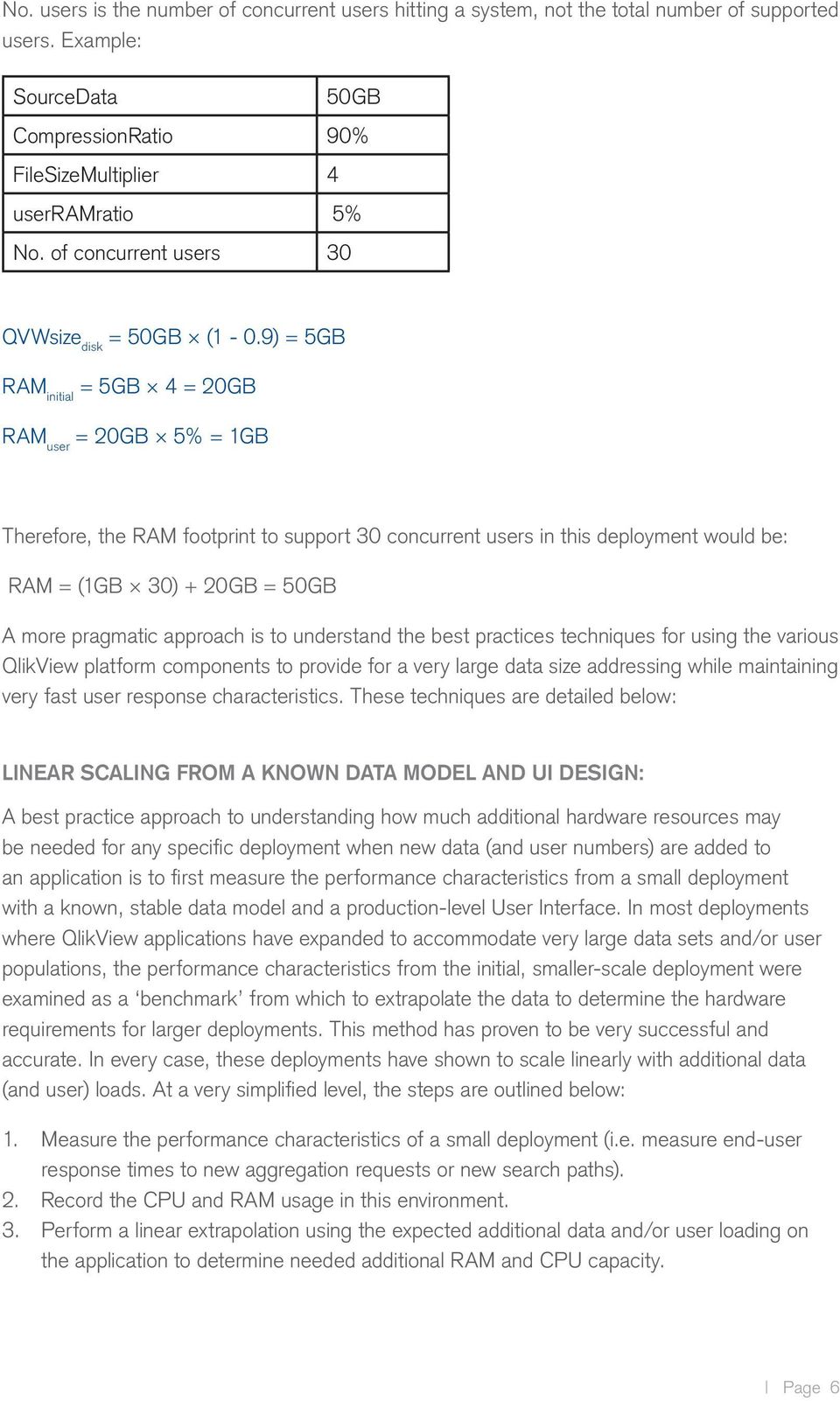
5 needs to be performed, the CPU will be required to perform recalculations over larger slices of data, resulting in more required CPU cycles. Figure 1 below highlights that as more data is added to an application, a uniform increase in both CPU and RAM capacity will ensure that performance levels are maintained to an acceptable level. End User Performance scales uniformly with CPU capacity and number of users End User Performance scales uniformly with RAM and number of users P P CPU #users RAM #users Figure 1 As will be seen from the section on application design, understanding the performance characteristics of any general QlikView application does not follow a simple formulaic approach, and as such one cannot simply state the upper limit for the amount of data that QlikView can handle. However, experience of many deployments has allowed us to provide a rough calculation of the RAM needed for a given source data size and expected usage numbers. Please note that this calculation should be treated as a generalized, averaged estimation for the purpose of illustration. RAM = (RAM user No. users) + RAM initial Where RAM initial = QVWsize disk FileSizeMultiplier; this is the initial RAM footprint for any application RAM user = RAM initial userramratio; this is the RAM each incremental user consumes QVWsize disk = SourceData (1 CompressionRatio); this is the size, on disk, of a QlikView file Assumptions: userramratio: range between 1% 10% FileSizeMultiplier: range between 2 10 CompressionRatio: range between 20% 90% Page 5

6 No. users is the number of concurrent users hitting a system, not the total number of supported users. Example: SourceData 50GB CompressionRatio 90% FileSizeMultiplier 4 userramratio 5% No. of concurrent users 30 QVWsize disk = 50GB (1 0.9) = 5GB RAM initial = 5GB 4 = 20GB RAM user = 20GB 5% = 1GB Therefore, the RAM footprint to support 30 concurrent users in this deployment would be: RAM = (1GB 30) + 20GB = 50GB A more pragmatic approach is to understand the best practices techniques for using the various QlikView platform components to provide for a very large data size addressing while maintaining very fast user response characteristics. These techniques are detailed below: LINEAR SCALING FROM A KNOWN DATA MODEL AND UI DESIGN: A best practice approach to understanding how much additional hardware resources may be needed for any specific deployment when new data (and user numbers) are added to an application is to first measure the performance characteristics from a small deployment with a known, stable data model and a productionlevel User Interface. In most deployments where QlikView applications have expanded to accommodate very large data sets and/or user populations, the performance characteristics from the initial, smallerscale deployment were examined as a benchmark from which to extrapolate the data to determine the hardware requirements for larger deployments. This method has proven to be very successful and accurate. In every case, these deployments have shown to scale linearly with additional data (and user) loads. At a very simplified level, the steps are outlined below: 1. Measure the performance characteristics of a small deployment (i.e. measure enduser response times to new aggregation requests or new search paths). 2. Record the CPU and RAM usage in this environment. 3. Perform a linear extrapolation using the expected additional data and/or user loading on the application to determine needed additional RAM and CPU capacity. Page 6

7 INTELLIGENT DISTRIBUTION OF DATA: HORIZONTAL SCALING: When it comes to handling expanding volumes of data, a best practices approach to breaking up and distributing data is preferable to trying to utilize a single QlikView application to store and analyze all data. Take the example of worldwide sales data: for a small company it might make sense to use just one QlikView application to analyze and present data from every country it does business in. However, for larger organizations this approach is impractical due to larger data volumes and larger number of users. In these environments the QlikView Publisher product is used to take a source application (e.g. worldwide sales) and break it up into smaller applications (e.g. countryspecific applications) which contain smaller data footprints. These reduced applications are then accessed using clients via a QlikView Server. Horizontal scaling refers to adding more server resources, either virtually or physically, to a deployment. QlikView Server deployments scale horizontally in a straightforward manner by adding new server machines and implementing a clustering and load balancing strategy. In the scenario depicted below in figure 2, one might have a single QlikView Server dedicated to each department, and each containing the relevant business applications pertinent to all groups within that department. Using a horizontal scaling strategy in this way, enduser performance can be maintained or improved while scaling up to very large data needed for analysis. Ajax QlikView Access Point QVS: Finance QVS: Operations Fin_ops.qvw 300MM rows Fin_AP.qvw 30MM rows OPS_sales.qvw 50MM rows OPS_mktg.qvw 120MM rows OPS_Spend.qvw 100MM rows OPS_Inventory.qvw 80MM rows Front End Back End QlikView Developer CompanyData.qvw 680MM rows QlikView Publisher Figure 2 Page 7

8 In addition, QlikView deployments support the notion of a multistaged data architecture approach. This approach, when coupled with a horizontal scaling strategy is an effective means by which to scale up to many billions of rows of data, and beyond, while maintaining acceptable end user performance characteristics. Figure 3 shows an example of a staged data architecture in QlikView. When combined, the total data being addressed by QlikView in this scenario might run into many billions of rows of data, however by employing a staged approach to handling the data, and coupling it with a horizontal scaling approach, reliable enduser performance can be maintained. Source Layer Databases and other data sources Data Warehouse DATABASE ERP Extract Layer Qlikview applications that extract and (optionally) denormalize source tables into Qlikview QVD files. QVD Generator QVD Generator QVD Generator QVD Generator QVD Layer QVD Files QlikView data file layer. QVDs can be onetoone match with source tables or denormalized views of several source tables. QVD Files QVD Files QVD Files QVD Files Presentation Layer Production applications built from QVDs in the layer above. No direct database queries are needed in these applications and reuse of common QVDs is promoted. Some understanding of data is still required to optimize application performance. Dashboard Analysis App Dashboard Analysis App Figure 3 SCALING UP : VERTICAL SCALING: Vertical scaling refers to the approach whereby more hardware resources (i.e. CPU and RAM) are added to the same machine to accommodate an increase in data and users. Vertical scaling is a relatively more straightforward task than horizontal scaling (this document is not intended as a discussion of the merits of both), however QlikView deployments can take advantage of a vertical scaling of RAM and CPU capacity in a single machine to accommodate larger volumes of data. Again, this is a linear and predictable relationship: as more data is Page 8

9 added to an application, end user performance is maintained by the linear addition of RAM and CPU capacity to the machine. INTELLIGENT LOADING OF DATA: INCREMENTAL RELOADS: An effective strategy for dealing with increasing volumes of data is to employ incremental reloads. While this topic is more pertinent for a discussion on data modeling strategies rather than enduser scalability, it s worth mentioning here briefly as it highlights an important characteristic of actual deployed QlikView applications. Incremental loads are when QlikView will only load from source data the newest data or latest transactions. These can be performed as part of the regularly scheduled reload process and are used as part of a multistaged data environment that utilizes QVD files. The benefit of using incremental reloads is that data can be added to any given application far more quickly, limiting the amount of time needed for data refresh, thus providing end users with much quicker access to the latest data. Incremental data loading 250MB 200MB 500MB T = 0 T = 1 T = 2 All data loaded (500MB) All data loaded: 200MB All data loaded: 250MB Data Analyzed: 500MB Data Analyzed: 700MB Data Analyzed: 950MB Figure 4 TECHNICAL CASE STUDY: LARGE APPAREL RETAILER, 70GB OF DATA: When a large apparel retailer in the US Midwest needed a high performing, scalable business discovery platform, they selected QlikView. As a multichannel retailer involved in both designing and selling men s and women s apparel, this company serves markets in multiple countries around the world, generating revenues in the many billions of dollars. Like many similar organizations, this company was challenged with their existing traditional business intelligence tools, growing frustrated with the lack of flexibility and the slow timetoresponse from the business user s requests for new reports and fresh analysis. The company chose QlikView to empower over 200 concurrent business users in inventory planning and forecasting to gain access to the over 500 million rows of data that simplifies their decisionmaking process. Page 9

10 Using a multitiered approach to their deployment architecture, QlikView Publisher resides within a secure back end and is responsible for taking 15 source qvw files to perform nightly reloads of data, total size of 70GB, from a variety of source databases including DB/2, Microsoft Excel and Oracle. Average nightly reload time is 4 hours. This is the beginning of the staged data environment, where 5 qvd files of sizes varying 250MB to 60GB are created as intermediate data file stores. These files include data broken down by functional area and act as secure binary repositories from which the end user documents within the presentation layer extract data. The presentation layer is where the QlikView Servers reside. In this deployment, 4 QVS s were deployed in a clustered environment on 4 machines, 3 with 64 CPU cores and 256GB of RAM, and one with 32 CPU cores and 128GB of RAM, each running Windows Server This company also engineered the capability to interface the mainframe scheduler into the QlikView Publisher so that in effect the mainframe scheduler triggered QlikView tasks based on file availability on the mainframe. 64 Core, 256GB RAM; Win Core, 256GB RAM; Win Core, 128GB RAM; Win Core, 128GB RAM; Win 2003 Presentation Layer Analysis Analysis Analysis Analysis Analysis Analysis Analysis Analysis Dashboard Dashboard Report Dashboard Dashboard Report Dashboard Dashboard Report Dashboard Dashboard Report Intermediate data file store (QVD Layer) 5 QVD s Total 70GB 250MB 5GB 3GB 1.75GB 60GB Source and Extract Layer 15 QVW s Total 70GB QlikView Publisher 4 hours, nightly Figure 5 Page 10

11 Number of Users As companies grow, the demands on all IT infrastructure assets increase as a result of more people needing access to IT applications and resources. QlikView applications are no different. Not only have we seen increased user demand on deployed applications because of company growth, we ve also seen significant demand increases as adoption of a QlikView solution takes hold within an organization. IT departments are tasked with understanding the scaling characteristics of their applications and need to know that their vendors solutions will respond predictably and proportionally to increases in hardware resources to accommodate the new demand. THE QLIKVIEW APPROACH: Fundamentally, it s important to note that QlikView s performance scales uniformly with user loads. As has been seen with all deployments, as new users are added to an existing system, the performance impact is predicable and proportional and can be addressed by the addition of more resources such as CPU capacity and RAM. As was stated in the preceding section on data scaling, it s important to understand the impact that adding both CPU capacity and RAM will have in order to maintain optimal enduser performance as more concurrent users stress the system. Again, QlikView utilizes an inmemory data store in which all data that is analyzed in any given QlikView session will reside. As noted in the QlikView Architecture and System Resource Usage Tech Brief and in the RAM calculator in the Size of Data section in this paper, when the first end user opens a QlikView document, the amount of RAM needed is usually between 2x 10x the size of the application on disk. This is to accommodate overhead such as indexes, data associations and so on. The addition of concurrent users causes more RAM to be allocated. Even though core aggregations are shared across all users by means of a central cache, each individual user requires his/her own session state, which requires additional RAM to be allocated. As was seen in the QlikView Architecture and System Resource Usage Tech Brief and in the RAM calculator in the Size of Data section in this paper, a general rule of thumb can be used for estimating the peruser additional overhead associated with new concurrent users (i.e. add 110% of RAM above that used by the first user). For example: A 1GB.qvw document uses around 4GB in RAM for the first user (based on a multiplier factor of 4). User number two may increase this by around 10% as their calculations get cached, resulting in a required RAM footprint of 4.4GB. User number 3 requires a further 10%, increasing the footprint to 4.8GB, and so on. Page 11

12 As is discussed in the QlikView Architecture and System Resource Usage Tech Brief and also in the later section on Application Design in this paper, it s important to note that the density of the data and the data model structure, along with the UI design contribute significantly in the determination of the overall RAM footprint In summary, a properly designed QlikView application will not take up more than 1% to 10% of the RAM usage for each additional user after the first. CPU capacity needs to also be considered when expecting an increase is concurrent user loading. As stated previously in the QlikView Architecture and System Resource Usage Tech Brief, CPU cycles are used whenever a user makes a request in the application for a new aggregation, new drilldown path, redraw of the UI based on a new chart interaction and so on. As a result, CPU capacity needs to be added when more concurrent users are expected. As will be seen in the section covering the Scalability Center results, enduser performance can be maintained with the addition of processing capacity (and a corresponding increase in RAM). Figure 6 below highlights that as more concurrent users are requesting access to an application, a uniform increase in both CPU and RAM capacity will ensure that performance levels are maintained to an acceptable level. End User Performance scales uniformly with CPU capacity and number of users End User Performance scales uniformly with RAM and number of users P P CPU #users RAM #users Figure 6 As an increasing number of users make requests to an application with a finite number of cores or CPU s available, performance degradation naturally occurs. This is most commonly offset by adding more processing capacity by scaling horizontally using a clustering and load balancing technique. Page 12

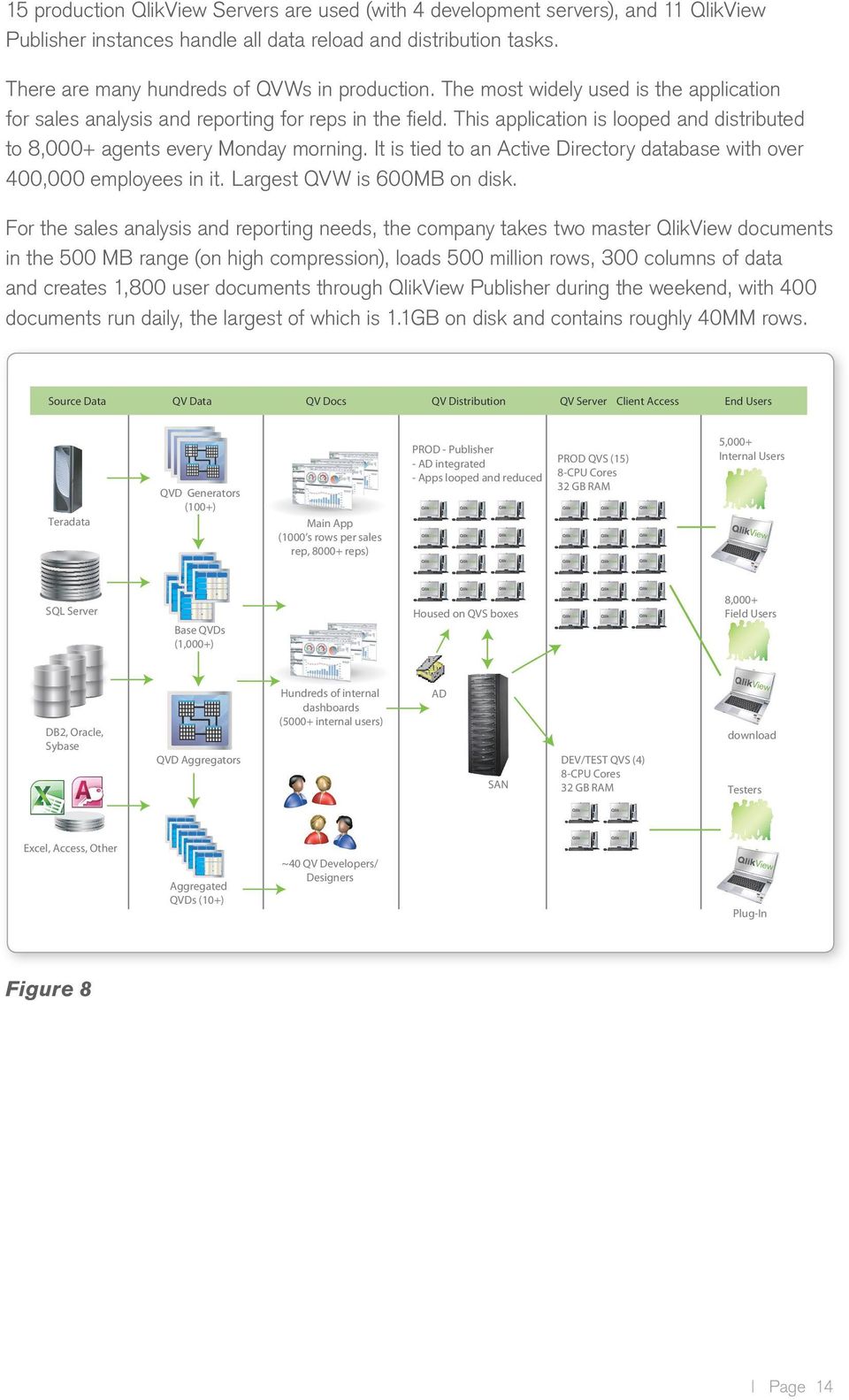
13 CLUSTERING AND LOAD BALANCING: Clustering refers to the ability to link multiple servers together within a single entity called a cluster. Load Balancing refers to the ability to distribute and share resources (e.g. processor capacity and memory) across the cluster in an even and defined way. Clustering and load balancing are effective techniques for scaling up the number of users who need to use a QlikView application without a corresponding reduction in enduser performance. A QVS cluster (which uses QlikView AccessPoint as the load balancer) will automatically apportion a new user request to a server that has a lower current resource demand (i.e. lower processor usage or memory usage) so that the user s experience can be maximized. It is achieved by simply adding servers into a QVS cluster. It also ensures very high availability for users as automatic failover is another component of a clustered QlikView Server environment. Figure 7 below shows an example of a typical QVS clustered environment. Qlikview Server (64bit) Qlikview Publisher Server 1 nightly jobs SAN or shared disk Qlikview Server (64bit) QlikView Access Point Qlikview Publisher Server 2 hourly jobs Shared QVW s Ajax pages Source document Qlikview Server (64bit) Internet browser or plugin client Figure 7 TECHNICAL CASE STUDY: LARGE MIDWESTERN MANUFACTURING COMPANY: MORE THAN 8000 USERS: When a major manufacturing company in the US Midwest needed a high performing, scalable business intelligence platform, they selected QlikView. With billions of dollars in worldwide sales, thousands of innovative products used in dozens of diverse markets, in multiple countries around the world, and with thousands of employees, this company was challenged with their current business intelligence tools, inflexible Six Sigma project demands and a need to provide product margin analyses. With an increased need to show responsiveness to business demands, the organization deployed QlikView to more than 8,000 users across many functions. Drawing data from Teradata, SQL Server, DB2 and Sybase, the company now uses QlikView for sales analysis, supply chain analysis, IT analysis, and Six Sigma analysis. Page 13

14 15 production QlikView Servers are used (with 4 development servers), and 11 QlikView Publisher instances handle all data reload and distribution tasks. There are many hundreds of QVWs in production. The most widely used is the application for sales analysis and reporting for reps in the field. This application is looped and distributed to 8,000+ agents every Monday morning. It is tied to an Active Directory database with over 400,000 employees in it. Largest QVW is 600MB on disk. For the sales analysis and reporting needs, the company takes two master QlikView documents in the 500 MB range (on high compression), loads 500 million rows, 300 columns of data and creates 1,800 user documents through QlikView Publisher during the weekend, with 400 documents run daily, the largest of which is 1.1GB on disk and contains roughly 40MM rows. Source Data QV Data QV Docs QV Distribution QV Server Client Access End Users Teradata QVD Generators (100+) Main App (1000 s rows per sales rep, reps) PROD Publisher AD integrated Apps looped and reduced PROD QVS (15) 8CPU Cores 32 GB RAM 5,000+ Internal Users SQL Server Base QVDs (1,000+) Housed on QVS boxes 8,000+ Field Users DB2, Oracle, Sybase QVD Aggregators Hundreds of internal dashboards (5000+ internal users) AD SAN DEV/TEST QVS (4) 8CPU Cores 32 GB RAM download Testers Excel, Access, Other Aggregated QVDs (10+) ~40 QV Developers/ Designers PlugIn Figure 8 Page 14
15 Number of Applications In many cases, QlikView deployments start out small in nature, typically in one department and containing one application, but quickly grow quite large as companies see the rapid return on investment of QlikView s approach to BI. Other departments start creating their own applications and soon there can be hundreds of applications spanning multiple departments in multiple geographies. Additionally, even within single departments, as adoption rates increase, a more diverse set of people need access to the data, necessitating the need for more varied applications. This puts increasing demands on IT in a variety of dimensions, some of the most critical being how to handle data load demands (from source databases), data management, user management, and so on. THE QLIKVIEW APPROACH: It s important to understand the definition of an application used for this section. In general, an application is a QlikView file that either a) is used by an end user to analyze, visualize and present data known as a.qvw file or b) is used as a headless (i.e. UIless) optimized application containing data known as a.qvd file. In both cases, an application contains data extracted from original data sources such as a database or flat file. As companies grow out their footprint of QlikView applications, it s important for those responsible for the deployments to employ a multitiered data and application architecture approach. Let s take a look at an example: User Base Executives 18 Business analysis 37 Sales 70 Operations 425 Total Users 550 QlikView Server Single QVS server 8 CPU cores 64 GB RAM Expectations Executives only need high level metrics Executives need fast response times BA s need most details and data Sales and Operations are mostly high level and reporting needs Tabs Included in the scope of the Solution Introduction How To Dashboard Profitability Customer Products Market Basket What If Order Detail Region Analysis Shipping Zones Product Max Campaigns Change Analysis Order Trends Cust Reports Order Reports Shipping Reports QlikView Data model (row counts shown on each table) Sales Rep 59 Billing Address 18,372 SalesPersonID Sales Rep Name Calendar 913 BillToAddressID Manager Number OrderDate AddressLine1 Year Orders 609,232,600 AddressLine2 Month SalesPersonID BillToAddressID Customer 12,309 OrderDate Product 186 CustomerID Customer ProductID CustomerID ProductID Class Basket_CustomerID CustomerName AccountNumber OnlineOrderFlag PurchaseOrderNumber SalesOrderID Color DaysToManufacture SalesOrderNumber Figure 9 Page 15

16 The scenario outlined above is for examining a company s sales data. The organization has various demands in terms of requiring access to the data, in various degrees of granularity and specificity. Below is a graphic depicting the deployment: Orders Dashboard Total RAM Used: 108 GB 0 Number of Concurrent Users 80 Concurrent Users 80 Main QVD Order_Details Total Rows 609,040,000 Product Prod_ID Prod_Type Prod_Name Prod_Group Calendar Date Year Month Day Order Details OrderDtl_Key Order_ID Order_Type Order_Date Order_Status Customer Customer_ID Customer_Name Customer_Addr Customer_Type Store Location Loc_ID Store_Type Store_State Store_Mgr 0 Number of Rows 600,000,000 Figure 10 In this deployment, the company has a total user base of 550 individuals, spread out across both business functions and role. The data contains over 600 million orders records as well as customer, store, product, sales rep and date data. The company wants to provide executives, sales and operations with an aggregated dashboard view of the data, but also wants to provide business analysts with more granular access to the data for detailed analysis. SCENARIO 1: ONE SINGLE APPLICATION COVERING ALL USE CASES: This scenario includes a single QlikView document called Orders Dashboard, which contains all subject matter in the data model across all 609 million rows of data. This would be a very large document and would provide the worst performance of the scenarios presented here. The advantage of this approach is that it is easy to develop, however this would be the hardest to performance tune to meet the executives needs and also drill down to the transaor ctional details that the business analysts sometimes need. Since the footprint of this application would be large, less capacity for concurrent users would be supported than some of the subsequent scenarios. Page 16

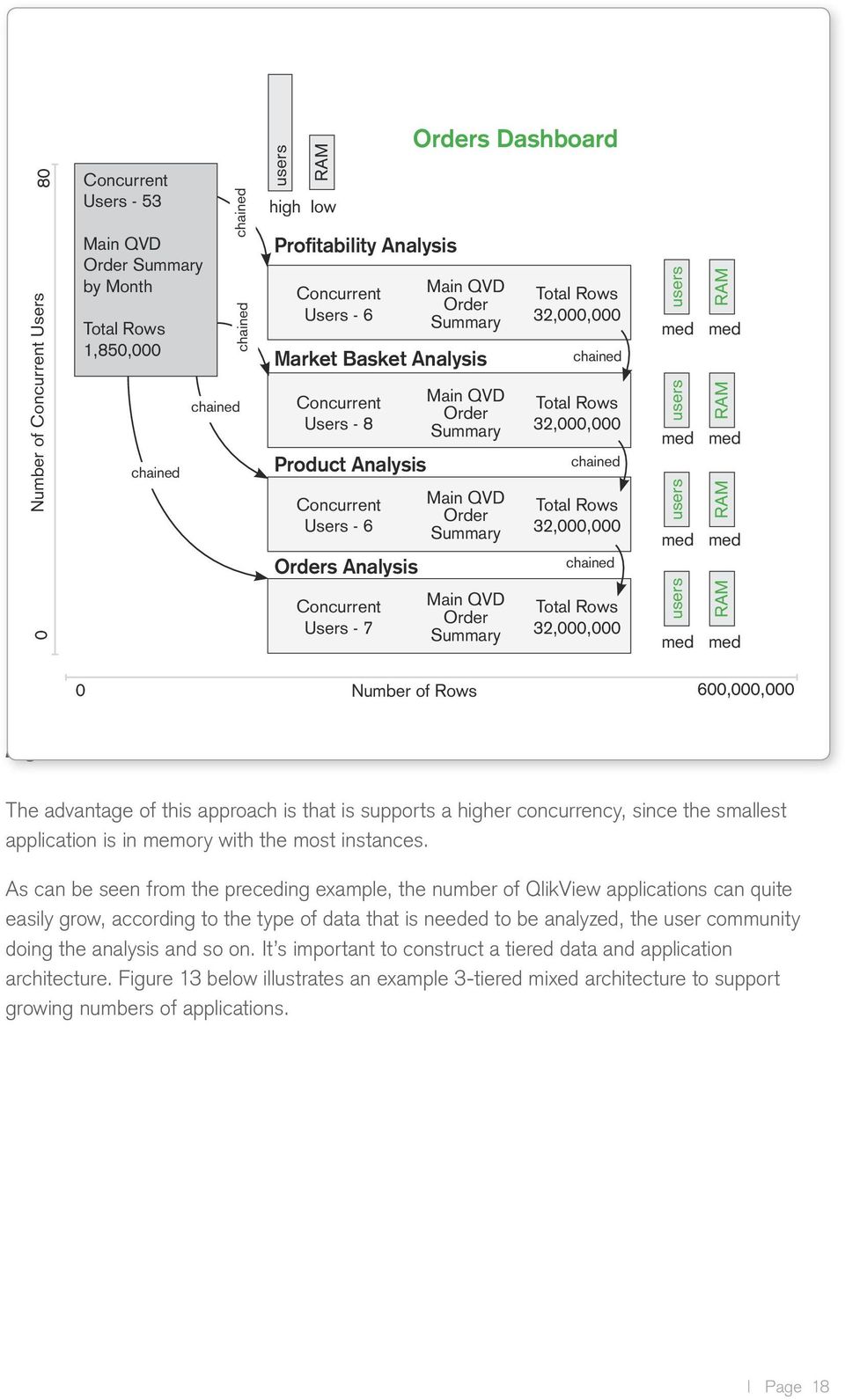
17 0 Number of Concurrent Users 80 Concurrent Users 53 Main QVD OrderSumm Total Rows 1,850,000 Concurrent Users 24 Main QVD Orders Total Rows 46,000,000 Orders Dashboard Orders Dashboard Product Prod_ID Prod_Type Prod_Name Prod_Group Calendar Date Year Month Day Total RAM Used: 108 GB Orders Analysis Concurrent Main QVD Total Rows Users 3 Orders_Details 609,040,000 Order Details OrderDtl_Key Order_ID Order_Type Order_Date Order_Status Customer Customer_ID Customer_Name Customer_Addr Customer_Type Store Location Loc_ID Store_Type Store_State Store_Mgr Orders Dashboard Product Prod_ID Prod_Type Prod_Name Prod_Group Calendar Date Year Month Day Total RAM Used: 25 GB Order Details OrderDtl_Key Order_ID Order_Type Order_Date Order_Status Total RAM Used: 108 GB Customer Customer_ID Customer_Name Customer_Addr Customer_Type Store Location Loc_ID Store_Type Store_State Store_Mgr Orders Dashboard Product Prod_ID Prod_Type Prod_Name Prod_Group Calendar Date Year Month Day Order Details OrderDtl_Key Order_ID Order_Type Order_Date Order_Status Total RAM Used: 108 GB Customer Customer_ID Customer_Name Customer_Addr Customer_Type Store Location Loc_ID Store_Type Store_State Store_Mgr Orders Detail 0 Number of Rows 600,000,000 Figure 11 SCENARIO 2: 3 APPLICATIONS SEGMENTED BY DETAIL: This scenario, seen in Figure 11, includes three.qlikview documents called Orders Dashboard (1.8 million rows), Orders Analysis (46 million rows) and Orders Detail (609 million rows). The data model for these QlikView documents would be almost identical, though the granularity of the data would differ drastically. Notice the concurrency volume of users goes down as users drill from the dashboard to the analysis app and then again down to the details app. This is a normal distribution pattern for segmented documents. The advantage of this approach is that this supports a higher concurrency, since the smallest app is in memory with the most instances. It also has a high performance since the smallest application is the fastest. SCENARIO 3: 5 APPLICATIONS SEGMENTED BY SUBJECT: This scenario includes five QlikView documents. The first one is the dashboard (5 million rows), and the next four are subject oriented analysis applications, each having 50 million rows. The data model for the analysis applications would be very similar, but aggregated by different dimensions from the base data model. Aggregation of the four analysis applications could take place from a detailed set of QVDs, or the QVDs could be preaggregated and supplied to these analysis applications. Page 17

18 0 Number of Concurrent Users 80 Concurrent Users 53 Main QVD Order Summary by Month Total Rows 1,850,000 chained chained chained chained users RAM high low Profitability Analysis Concurrent Users 6 Main QVD Order Summary Market Basket Analysis Concurrent Users 8 Product Analysis Concurrent Users 6 Orders Analysis Concurrent Users 7 Orders Dashboard Main QVD Order Summary Main QVD Order Summary Main QVD Order Summary Total Rows 32,000,000 chained Total Rows 32,000,000 chained Total Rows 32,000,000 chained Total Rows 32,000,000 users RAM med med users RAM med med users RAM med med users RAM med med 0 Number of Rows 600,000,000 Figure 12 The advantage of this approach is that is supports a higher concurrency, since the smallest application is in memory with the most instances. As can be seen from the preceding example, the number of QlikView applications can quite easily grow, according to the type of data that is needed to be analyzed, the user community doing the analysis and so on. It s important to construct a tiered data and application architecture. Figure 13 below illustrates an example 3tiered mixed architecture to support growing numbers of applications. Page 18
19 Description: This architecture includes the use of QVD files as a 2nd data stage, from which a QlikMart stage is built. This allows the presentation layer application to be basic binary loads from the QlikMart layer. When to use: Use this architecture when a short batch window is desired (QVD layer is fast) and you want to shield presentation app developers from having to build data models in a QlikView application. This architecture also promotes reuse at the QVD layer and the QlikMart layer, as layers can serve many different presentation applications. This helps support codevelopment of QlikView between IT and business teams. Presentation Layer QlikMart Layer QVD Layer Extract Layer Source Layer Databases and other data sources. QlikView applications that extract and (optionally) denormalize source tables into QlikView QVD files. QVD files QlikView data file layer. QVDs can be onetoone match with source tables or denormalized views of several source tables. A QlikMart is a QlikView application that simply holds a data model that can be binary loaded as a the base data model for enduser application. Examples might be a Finance QlikMart, a Sales QlikMart, and an Inventory QlikMart. Production applications. Built from QlikMart applications where possible. Minimal (if any) scripting. Can optionally retrieve from QVD layer as well as QlikMart layer. QVD Generator App Dashboard QVD Generator App Analysis QVD Generator App Dashboard Analysis QVD Generator App QVD Files QVD Files QVD Files QVW Model QVW Model QVW Model Report Figure 13 TECHNICAL CASE STUDY: SANDVIK: 50 MILLION ROWS, MORE THAN 100 DATA SOURCES, AND 3,000 USERS. Sandvik, a leading tooling, materials technology, mining, and construction company, has more than 3,000 QlikView users across a large number of business functions including sales, pricing, purchasing, HR, and service. The company was first up and running quickly with an application to analyze customer profitability using data sourced from multiple systems. Sandvik now has more than 400 QlikView applications, the largest of which contains more than 50 million rows drawn from data sources that comprise terabytes of data. QlikView utilizes data from DB2, SAP BW, iseries, Microsoft SQL Server, Oracle, text files, and a mainframe more than 100 sources in all. Page 19

20 QlikView Application Design As in many other aspects of life, bad design can lead to problems (or even failure) in production environments. For QlikView applications, this is no different. Of significant importance, from the point of view of scalability, is the design of the presentation layer (i.e. the UI). As with many similar applications, QlikView is responsive to how the UI is designed (e.g. what objects are used, how they are used and what the expected interaction model is) and consideration must be made for UI design best practices when looking at the challenge of providing a predictable user experience. THE QLIKVIEW APPROACH: While this paper is not an exhaustive study on UI design best practices, it s worth noting some factors associated with causing an application to perform inefficiently. It s important to emphasize the challenges associated with providing a blanket scalability formula for all QlikView deployments because application design is such an important component in any system s performance as it is required to scale. An application must be designed for its purpose. Application design covers a wide range of decisions and performance will depend on data model, expressions, unique values, number of objects, number of records, number of variables etc. Therefore it is important to consider performance at as early a stage as possible when starting up a new project. When considering larger implementation design characteristics, it s important to take into account (and monitor) the performance of the application (or applications) early in the implementation process. In practice, it has been observed that two different application designs that might provide the end user the same value using the same drill path might differ in the demand for processing capacity when say, a pivot table is used rather than a statistics box, or when section access is used to employ security rather than serverside loop and reduce. Because of these differences, it s important to create a benchmark application (with expected user interface design and general expected user interaction models) and measure the enduser response characteristics. From this benchmark, the expected hardware requirements to accommodate more users, data and/or applications can be extrapolated quite easily. Even though QlikView scales uniformly by adding hardware, poor application design might lead to suboptimal demands for hardware. By being thorough in the application design one can reduce the initial demand significantly and get much more performance for the hardware footprint. Some examples of design factors that should be considered when optimizing an application for performance: Avoid using too many listboxes on any given tab. Do not overuse Table boxes and Pivot tables. Avoid repeated use of large expressions within a visualization. Page 20

21 Avoid use of macros. Avoid overuse of variables for UI expressions. Each variable needs to know which one is calculated first. It is best practice to move some of them into the script as fixed values at the time of reloads. Avoid using many text objects with complex calculations: use a chart to display the similar metrics (e.g. mini chart). Avoid using the function date(now), rather use today() if today s date is needed. Now() will recalculate every second of the day. Avoid using too many distinct text values in a field, which will increase the size of the file, thus slowing performance. For example: Separate phone numbers with area code into separate fields (i.e. use (212) and ( ) rather than ( )). Divide addresses into separate fields, not combined together. Do not hold nonnecessary fields in memory if not used or not needed in the future. Avoid select * but pick the fields that are needed. If a table contains large amount of records, give a calculation condition to narrow down the selection before viewing it, if possible. (See section on Size of Data scaling): If it is not necessary to distribute an entire application, perform a loop and distribute using QlikView Publisher (e.g. per region or department) so that each application is smaller. IMPACT OF UI DESIGN DECISIONS ON RAM USAGE: Characteristics of User interface Objects Created Salesperson Total Sales Cost Margin Margin % Tina $900 $600 $300 33% Tom $600 $200 $400 66% Teresa $1000 $500 $500 50% Figure 14 Depending on the definition of an object the amount of RAM required to draw the object can vary drastically. For example the chart above displaying the dimension Salesperson would take a tiny amount of RAM to draw assuming that there were only three salespeople. However, if the application designer were to change the dimension to product, say, and there were 13 million different product SKUs listed in the database, then drawing that object could take a significant amount of RAM. Even nonaggregated data takes up RAM to display. For example a listbox with 50 million records in it would be expensive to draw. This is especially true of tableboxes and other detail level Page 21
22 objects. For example if the following five fields are used in a tablebox Salesperson (3 distinct occurrences), Region (3 distinct occurrences), Customer (200 distinct occurrences), Date (3652 distinct occurrences) and Order ID (50 million distinct occurrences) then you have created a structure that will require 250 million cells to be stored in memory (the # of records in the most granular field 50 million times the number of columns 5). This object will be quite expensive to display. Best practices would dictate to not use this object or to conditionally suppress it until selections are made to limit the number of records to return. NUMBER OF USER INTERFACE OBJECTS VIEWED When a QlikView application is opened, all visible (i.e. not suppressed, hidden, or minimized) charts and objects are calculated and drawn, taking up a corresponding amount of RAM. The more sheet objects visible, the more RAM used to display them all and the more CPU required to calculate them. Even objects that have never been visible and never shown take up some RAM simply by virtue of being defined in a QlikView document. For example all the objects on a hidden sheet will still take up some RAM. This is a smaller subset of the amount of RAM that would be needed if the object was to be drawn but some RAM is still used in documents. CACHED AGGREGATIONS Once an object has been viewed the aggregates are cached in case they are needed again. This will improve performance for chart calculation time at the cost of RAM to cache this information. The caching of data is also done by selection state so that the representation of the same chart with different sets of selections is cached as different selections are made within the document. Unlike the RAM used to draw user interface objects, RAM used to store cached aggregations can be shared between users so multiple users viewing the same charts in the same selection state can take advantage of the same cache. Page 22
23 Why Architecture Matters to Scalability As has been discussed throughout this paper, much of the conversation about QlikView scalability centers around understanding and employing a best practices approach to architecture design and deployment. For example, it s important for IT professionals to have a good understanding of the approach that QlikView recommends to handle large data (i.e. using staged data environments, breaking up documents into smaller, more manageable and meaningful pieces, employing a multiserver environment and so on). The realworld examples below illustrate the reasons why being proactive in the upfront architecture design can result in a much better performing deployment and better enduser experience. SCENARIO 1: A deployment has 800 million rows of data and a total user audience of 500 users. With a maximum concurrency of around 10%, this gives 50 maximum concurrent users at any given time. Initially (in Option 1), only 1 QlikView application was created to meet the needs of the organization and some performance tests were conducted. Option #1 800 M rows 4 GB file size 16 GB footprint 1.6 GB per user avg. resp. time ~ 5sec Avg. Resp. Time Avg. Sessions per Day Avg. Selections per Session Total Wait Time per Day #QVS needed CPU Cores RAM ~ 5 sec hours Figure 15 When aggregated, Option 1 contains a total wait time per day of 5.6 hours for 50 concurrent users, with an average response time of about 5 seconds. End user performance was deemed to be unacceptable, given the amount of RAM available in the system. A second option (Option 2) was created, providing access to the same data, however making available Option to #2 interested users a second smaller, aggregatedlevel application. (The organization recognized that not all of its users needed lowlevel detail information) The results 60 M rows are show in Fig 16 below..5 GB file size 800 M rows 2 GB footprint 4 GB file size It s clear that by employing.2 GB a very per user simple approach to architecting the 16 QlikView GB footprint deployment (2 documents instead of avg. 1; providing resp. time the <1 appropriate sec 1.6 GB per user level of data detail to the appropriate avg. resp. time ~ 5sec people) that enduser performance can be improved (~300% in this case) and less hardware is needed, even though the solution and data access being offered is the same. Avg. Resp. Time Avg. Sessions per Day Avg. Selections per Session Total Wait Time per Day #QVS needed CPU Cores Page 23 RAM App 1 <1 sec hours
24 hours Option #2 60 M rows.5 GB file size 2 GB footprint.2 GB per user avg. resp. time <1 sec 800 M rows 4 GB file size 16 GB footprint 1.6 GB per user avg. resp. time ~ 5sec Avg. Resp. Time Avg. Sessions per Day Avg. Selections per Session Total Wait Time per Day #QVS needed CPU Cores RAM App 1 <1 sec hours App 2 ~ 5 sec hours 1.7 hours Figure 16 SCENARIO 2: Two companies have deployed QlikView, both of whom are addressing the same volume of data (~800M rows) and have the same hardware configuration (16 cores and 64GB RAM). Both also have similar overhead capacity when it comes to IT administration resources available to manage the deployment. However, by adopting a proactive and thoughtful approach to the QlikView deployment architecture, one company can service nearly 5 times the user capacity when compared to the other company. QVS/Publisher 64GB RAM ~ 800 Million Rows of Data 16Cores QVS/Publisher 64GB RAM 16Cores ~ 800 Million Rows of Data 3 Dashboards 12 Dashboards 250 Users 1200 Users.5 Admins 1 Developer.5 Designers.75 Admins 1 Developer 1.5 Designers Midwest Mfg Client limited architecture reactive struggling to fund scaling Southeast Hospital architecture driven proactive Figure 17 Both examples illustrate the effectiveness of conducting a proactive approach to architecture design when implementing a large QlikView deployment, and the payoff that can be gained in terms of enduser performance, hardware requirements and overall effectiveness of the QlikView deployment. Page 24
25 The QlikTech Scalability Center & Best Practices QlikTech has a Scalability Center, which is dedicated to working on topics related to performance and scalability. The main focus is on handling larger amounts of concurrent users and applications covering larger data volumes. As part of the Scalability Center s offering there is a service for simulating realistic load scenarios of customerspecific applications deployed in the lab hosted by the Scalability Center. The benefit of this type of service is threefold. Firstly, performance measurements for a broader scope of applications can be verified and the risk for forming conclusions based on customized and well performing applications is reduced. Secondly, there is a transparency on how QlikView documents are designed and utilized which in some cases can be transmitted directly to R&D as an input for product improvements. Thirdly, by offering customer sessions in the Center, customers can of course be provided with useful information on how their applications scale at larger deployments. METHODOLOGY: In the scalability center the server performance testing tool, JMeter, is used to script a user scenario and create a data load scenario. To replicate a realistic load mirroring real life scenarios, customer scenarios must be analyzed thoroughly. However, there are some assumptions and guiding principles that are used to create a replication of a real life scenario: Busy hour often occurs when a QlikView application has been updated with fresh data Tests should be performed from a perspective when the QVS has been restarted and has an empty cache A typical user scenario can be simulated by predefining what objects that are likely to be used for drill down and what sheets that are likely to be of interest for a typical user. Tests will have a pattern in what type of actions/clicks an average user is assumed to perform Each individual user is likely to have interest in different selections within any object Test script will randomize any selection within a certain object (e.g. if a user is assumed to click in a Country object, users are assumed to be interested in different countries) A typical user will have a think time between clicks Tests will implement think times between clicks. These think times typically varies dependent on what type of application and what type of users that are simulated An average user can be assumed to perform a predefined number of clicks. If the amount of concurrent active users should persist over a certain period of time new sessions must be initiated When a simulated user performs its last action, this will trigger creation of a new session for a new user With the methodology for creating a script as defined above, test executions and investigations from different perspectives are performed to make conclusions on how a certain QlikView Page 25
26 application performs under certain circumstances. It is important to understand that the results from any investigation on how QlikView performs is somewhat dependent on what the application design looks like and what user behavior has been assumed. Some objects may require a lot of processing to be calculated while others may not. How the user scenario (i.e. which objects that are triggered and how often) is implemented will therefore have an impact on the results. Each Virtual User (VU) generates a certain amount of clicks during its session. If there are short think times between clicks there will be a large amount of simulated clicks per time unit even with a small amount of concurrent VUs and vice versa. Therefore it is important to set realistic values on the following variables when performing customer benchmarking sessions: Concurrent Virtual Users Think time between requests Amount and type of clicks per user session PRESENTATION OF SOME RESULTS OF INVESTIGATIONS FROM THE SCALABILITY CENTER: Any performance result/measurement has a significant dependency on which particular application has been subject for the test session. It is therefore important to look for trends and not at any particular value when interpreting the results. Application design is one important part when it comes to improvements in performance. Another, common solution that at some point it is necessary is to upgrade the hardware. As discussed previously in this paper, there are several possible situations that might lead to an increased demand on hardware. When considering this, it is important to realize what a hardware upgrade is expected to deliver in terms of performance improvements. Let us distinguish between the following prerequisites: An increased demand on number of concurrent users. Demand on improved response times. An increased amount of data. Scaling with hardware can be done horizontally or vertically. Horizontal scaling means adding new servers in a cluster or via a load balancer. Vertical scaling means adding hardware to an existing machine. Which is the better alternative depends on the circumstances. The first thing to secure is that there is enough RAM available to handle a certain application with the desired number of concurrent sessions. As can be inferred from before, if a single application does not fit into RAM it does not matter how many small machines that are added to the server cluster. When it has been secured that there is enough RAM for a certain application one can start to scale horizontally or vertically to increase the capacity of number of concurrent sessions. In this section some investigations on how QlikView scales from different perspectives will be presented. Apart from good application design one must also ensure that QlikView Server has the preconditions needed for delivering the great performance it is capable of. Server configuration is an example of such a precondition. The following section presents some best practices regarding server settings in larger deployments. Page 26
27 SERVER CONFIGURATION: Extensive testing has been performed to verify how some of the more important server settings should be tuned for the hardware on which the QlikView Server runs. On average it has been concluded that the BIOS settings presented in Table 1 should be used for best performance. QlikView is not NUMA (NonUniform Memory Access) aware and therefore NUMA should be disabled for best performance. Enabling Node Interleave disables NUMA. Variable Setting How to configure Hyper threading Disable System BIOS setting Node Interleave Enable Advanced BIOS setting Hardware prefetch Disable Advanced BIOS setting Table 1: Recommended BIOS configuration for optimal performance of QVS Other settings that should be tuned for best performance are any settings related to power management as energy saving schemes will adversely affect performance. Power and energy settings should be set to high performance. It is recommended to turn off performance logging in production servers, if not needed. Performance logging can be turned off from the Enterprise Management Console. In the following sections discussing the results of the Scalability Center, the QlikView application that has been used for benchmarking is a retail application. Information about the application is seen in Table 2. Data model Number of records Application size on disc Star 68 M 438 MB 1 GB Application size in memory Table 2: Statistics about the application used within this test session. Application size in memory measurements have been performed in idle state (i.e. prior to any load has been generated) RESULT 1: CONCURRENT USERS SHOWING THAT QVS IS CAPABLE OF HANDLING MANY USERS: As was discussed earlier, the theoretical number of concurrent users that a QlikView server can handle is dependent on the amount of CPU capacity available and how much memory a certain session corresponds to for a certain application. Typical values seen in the Scalability Center ranges from 1 to 10% of the application size in memory when caching is excluded. When handling a lot of concurrent users one can expect a high utilization of CPU capacity. When there is not enough processing capacity available response times will grow as requests are getting queued, waiting for service. Page 27
28 To demonstrate that QlikView is capable of handling many concurrent users when there is sufficient processing capacity and RAM available some tests have been run against a 12 core machine with 96 GB of RAM. In Figure 18 it is seen how the number of active sessions increase over time as new VUs are added. When 1400 concurrent VUs have been reached the sessions persist just continuing to generate requests. In Figure 19 where the average response time for a selection has been plotted, it is seen how the response times can be seen as quite stable throughout the test session. Peaks for response times correlates with the average CPU (Figure 20), as expected. When all VUs have been initiated, a load of about 350 selections per minute is generated, see Figure 21. CPU reaches about 65% utilization on average during the busiest period for the server. Altogether this indicates that the investigated scenario for this application will run in a stable manner at the 12 core machine which has been used for this test session. Sessions Accumulated # sessions Minutes Figure 18: Green line shows the amount of accumulated sessions (i.e. concurrent VUs that are running) as new sessions are initiated. Page 28
29 Avg response time ms Minutes Figure 19: Average response time per click (rendering not included). % 85% CPU QVS 80% 75% 70% 65% 60% 55% 50% 45% 40% 35% 30% 25% 20% 15% 10% 5% 0% Minutes Figure 20: CPU loading during the test session, measured with performance Page 29
30 Number of Selections (Actions) per minute Minutes Figure 21: Number of selections per minute plotted over time. RESULT 2: SCALING OVER CORES SHOWING HOW QLIKVIEW SCALES UNIFORMLY WITH THE ADDITION OF PROCESSING CORES: QlikView aims to utilize all available capacity for processing when there is something to calculate. When there are several concurrent requests for processing they will have to share the available CPU capacity, meaning that the response times will degrade. To maintain performance when there is an increased demand for processing or an increased amount of data, more capacity will be needed. To demonstrate how QlikView performance scales by adding processing capacity, tests have been performed during idle state and during higher loads. Tests have been performed to validate how performance scales with the available amount of processing capacity on a Server. Tests are performed by single user idle state measurements to see how single selections scales over cores and by simulating many concurrent users generating load against the QlikView server to see how less demanding operations scales over cores. By enabling a different amount of cores during tests, it can be investigated how QlikView benefits by adding processing capacity. The environment used for load tests have been dedicated for this purpose, and external factors (e.g. network variations) can be assumed to be negligible. Environmental setup during the benchmarking session has been a load client located at a separate machine communicating with the IIS web server running the same dedicated hardware as a single QlikView Server (QVS). The server used throughout this test session has 2 CPUs with 6 cores each, running at 3.33 GHz. Page 30
31 IDLE STATE TESTS: During idle state testing, single selections have been performed manually against a rich QlikView application. Selections that have been performed correspond to heavy calculations and measurements have been performed for noncached selections. Monitoring of server performance was mainly performed by collecting task manager statistics. The affinity configurations used in these tests were 6 and 12 cores. LOAD TESTS SIMULATING MANY CONCURRENT USERS: The same test script has been used throughout the test session. Selections/clicks simulated by each virtual user are described in Table 3. The script simulates 100 concurrent users with a think time between clicks of 4 seconds. The amount of processing capacity at the server has been tuned by changing the affinity for the number of cores in the QlikView Enterprise Management Console. The affinity configurations used in this investigation were 3, 6, 9 and 12 cores. Step Description 1 Open document, new session created Loop start Each session will loop its selections from this point 5 times. After 5 iterations a new virtual user will be initiated starting over at Step 1. 2 Change to sheet 1 3 Random selection from List box year 4 Random selection from List box month 5 Random selection from Multi box upc 6 Zoom random area in chart 1 Loop end When the steps above have been performed the session will start over from step 2. Table 3: Implemented scenario for each virtual user RESULTS: What has been observed is that as QVS scales with more cores then user response times will decrease in a very highly proportional manner with the addition of more cores. Page 31
32 LOAD TESTS SIMULATING MANY CONCURRENT USERS: A test script has been run against the same server configured with different amounts of available cores. The script simulates 100 concurrent users that perform a click every 4th second. In Figure 22 the average response times for server requests have been plotted for the different configurations. A server request is defined as something requiring action from the QVS (with requests for static content excluded). It is seen how the response times decrease as the amount of available processing increases. Also the CPU utilization from the available cores is seen to decrease in Figure 23. Page 32
33 ms Average response time server reqs # cores Figure 22: Average response time for server requests. 100% 90% 80% 70% 60% 50% 40% 30% 20% 10% 0% Average CPU # cores Figure 23: Average CPU utilization for the different scenarios have been plotted where 100% corresponds to available amount of processing within configured amount of cores. Page 33
34 The decrease in CPU utilization is not as significant as might be expected only considering the increased amount of processing capacity available to the application. However, this is caused by the implementation/design of the script. If a VU has a faster response time, the think time will still be 4 seconds. This means that VUs with shorter response times will generate more requests during the same period of time. Figure 24 plots the throughput as number of simulated clicks per minute for the 100 VUs. # clicks/minute Throughput # cores Figure 24: Number of clicks per minute that have been simulated for the different test executions. It is seen how performance for the tested application with the simulated user scenario scales proportionally by adding more processing capacity. When dimensioning the hardware for a number of applications assumed to be utilized by a certain amount of users it is important to make sure that there is enough processing capacity for acceptable response times. It is a good thing that 100% CPU is utilized over short periods of time as this means that we will have shorter response time and better userperceived experience. But one must make sure that the CPU utilization does not saturate on average, as this means that requests for processing are getting queued up, resulting in longer response times. RESULT 3: PERFORMANCE AS A FUNCTION OF AMOUNT OF RECORDS: TECHNICAL INFORMATION REGARDING THE TESTS: The QlikView application used for benchmarking, populated with various amount of data, is a typical retail applications. The original document hosts data from 100 stores. The data model of the application is a star shape. The sizes for the variants of applications used within this investigation correlates with the amount of stores that has been included in an application, see Table 2. The Number of records variable corresponds to the amount of transactions that is included in the source data. Page 34
35 Application Number of records (M) Application size on disc 10 stores MB 1 GB 30 stores MB 2.5 GB 50 stores GB 4 GB 70 stores GB 4.7 GB 90 stores GB 6.4 GB Application size in memory Table 4: Mapping of number of records to the different applications used within this test session. Application size in memory measurements have been performed in idle state (i.e. prior to any load has been generated) The environment used during benchmarking was dedicated for this purpose, and any external factors can be assumed to be negligible. Further detail about the test environment is described in the table below. Environmental Attribute Value QVS Version 9 SR7 RAM Cores GB Web browser Version Firefox Table 5: Environment used during test session IDLE STATE ANALYSIS: This section examines how the demand for CPU and RAM depends on the number of records. The applications described in Table 2 have been used for reference measurements. The amount of required CPU seconds to fulfill the calculations for a certain object will be dependent of what type of calculations that are requested and how many records a certain calculation involves. When an object requires calculations of something that involves all records in a data table the amount of required CPU seconds will increase as the amount of records increases. This is all logical that it takes more effors to sum up 100 values than doing the same for 10. To visualize this some benchmarking tests has been performed. By simply monitoring the amount of CPU seconds that has been spent on calculations for some different selections, it is seen how this scales proportional in Figure 25. All measurements have been performed for noncached selections. The slope of the curve for the different type of selections in the example is not the same however. The reason for this is that a certain selection involves different calculations. Below follows a brief description of what calculations the example selections corresponds to Sales by Period; Open a sheet that mainly triggers one object with three sum expressions over as many records as there are transactions (i.e. Number of records in Table 2) Page 35
36 Sales by Item; Open a sheet that mainly triggers one object with six calculations of a diverse complexity, all over as many records as there are transactions (i.e. Number of records in Table 2) Year Selection; Selection at sheet Sales by Item, triggering the same six calculations as triggered when opening the Sales by Item sheet The Year selection corresponds to selecting slightly more than 1/3 of the original amount of data. When comparing the ratio for the elapsed CPU seconds for the Sales by Item selection and the Year selection this relates proportionally to the amount of selected data (i.e. slightly more than 1/3 CPU seconds needed). This shows that QlikView scales proportionally in its demand for CPU in relation to amount of data. CPU seconds 400 CPU Seconds Million records Sales by period Sales by item Year 2008 Figure 25: CPU seconds as a function of records Page 36
37 Conclusion QlikView scales uniformly and predictably and has a proven track record This paper has outlined how the approach employed by QlikView has been proven to provide consistent and predicable enduser performance when faced with the need to scale up the volume of data needed for analysis or the amount of users required to access the system. QlikView s product components and architecture allow for horizontal and vertical scaling and are utilized when the demands on the system increase. QlikView scales uniformly, allowing IT professionals to effectively capacity plan for future expected system usage in order to maintain enduser performance at the expected high levels. QlikView deployments have been consistently proven to be able to handle many thousands of concurrent users and extremely large quantities of data so that enduser performance is high. For IT professionals, system administration follows standard approaches such as clustering, performance monitoring and horizontal and vertical scaling. Page 37
QLIKVIEW ARCHITECTURE AND SYSTEM RESOURCE USAGE
 QLIKVIEW ARCHITECTURE AND SYSTEM RESOURCE USAGE QlikView Technical Brief April 2011 www.qlikview.com Introduction This technical brief covers an overview of the QlikView product components and architecture
QlikView Business Discovery Platform. Algol Consulting Srl
 QlikView Business Discovery Platform Algol Consulting Srl Business Discovery Applications Application vs. Platform Application Designed to help people perform an activity Platform Provides infrastructure
QLIKVIEW SERVER MEMORY MANAGEMENT AND CPU UTILIZATION
 QLIKVIEW SERVER MEMORY MANAGEMENT AND CPU UTILIZATION QlikView Scalability Center Technical Brief Series September 2012 qlikview.com Introduction This technical brief provides a discussion at a fundamental
Tableau Server Scalability Explained
 Tableau Server Scalability Explained Author: Neelesh Kamkolkar Tableau Software July 2013 p2 Executive Summary In March 2013, we ran scalability tests to understand the scalability of Tableau 8.0. We wanted
QlikView 11.2 SR5 DIRECT DISCOVERY
 QlikView 11.2 SR5 DIRECT DISCOVERY FAQ and What s New Published: November, 2012 Version: 5.0 Last Updated: December, 2013 www.qlikview.com 1 What s New in Direct Discovery 11.2 SR5? Direct discovery in
Tableau Server 7.0 scalability
 Tableau Server 7.0 scalability February 2012 p2 Executive summary In January 2012, we performed scalability tests on Tableau Server to help our customers plan for large deployments. We tested three different
QLIKVIEW GOVERNANCE DASHBOARD 1.0
 QLIKVIEW GOVERNANCE DASHBOARD 1.0 A QlikView Technical Brief April 2013 qlikview.com Table of Contents About the QlikView Governance Dashboard 3 What s New Since Beta 2? 4 Summary Sheet 4 File Details
Vendor briefing Business Intelligence and Analytics Platforms Gartner 15 capabilities
 Vendor briefing Business Intelligence and Analytics Platforms Gartner 15 capabilities April, 2013 gaddsoftware.com Table of content 1. Introduction... 3 2. Vendor briefings questions and answers... 3 2.1.
WHAT S NEW IN QLIKVIEW 11
 WHAT S NEW IN QLIKVIEW 11 QlikView 11 takes Business Discovery to a whole new level by enabling users to more easily share information with coworkers, supporting larger enterprise deployments through enhanced
QLIKVIEW ARCHITECTURAL OVERVIEW
 QLIKVIEW ARCHITECTURAL OVERVIEW A Technology White Paper Published: September, 2011 Originally published: October, 2010 qlikview.com Table of Contents Making Sense of the Platform 3 Most BI Software Is
Understanding the Value of In-Memory in the IT Landscape
 February 2012 Understing the Value of In-Memory in Sponsored by QlikView Contents The Many Faces of In-Memory 1 The Meaning of In-Memory 2 The Data Analysis Value Chain Your Goals 3 Mapping Vendors to
Top Ten Qlik Performance Tips
 Top Ten Qlik Performance Tips Rob Wunderlich Panalytics, Inc 1 About Me Rob Wunderlich Qlikview Consultant and Trainer Using Qlikview since 2006 Author of Document Analyzer and other tools Founder of QlikView
Safe Harbor Statement
 Safe Harbor Statement "Safe Harbor" Statement: Statements in this presentation relating to Oracle's future plans, expectations, beliefs, intentions and prospects are "forward-looking statements" and are
System Requirements Table of contents
 Table of contents 1 Introduction... 2 2 Knoa Agent... 2 2.1 System Requirements...2 2.2 Environment Requirements...4 3 Knoa Server Architecture...4 3.1 Knoa Server Components... 4 3.2 Server Hardware Setup...5
Qlik Sense Enabling the New Enterprise
 Technical Brief Qlik Sense Enabling the New Enterprise Generations of Business Intelligence The evolution of the BI market can be described as a series of disruptions. Each change occurred when a technology
GOVERNANCE OVERVIEW. A QlikView Technology White Paper. qlikview.com. December 2011
 GOVERNANCE OVERVIEW A QlikView Technology White Paper December 2011 qlikview.com Table of Contents Overview 3 Application Governance 4 Development 4 Usage 9 Security 12 Data Governance 13 QVD layer 13
SAP HANA PLATFORM Top Ten Questions for Choosing In-Memory Databases. Start Here
 PLATFORM Top Ten Questions for Choosing In-Memory Databases Start Here PLATFORM Top Ten Questions for Choosing In-Memory Databases. Are my applications accelerated without manual intervention and tuning?.
Performance and Scalability Overview
 Performance and Scalability Overview This guide provides an overview of some of the performance and scalability capabilities of the Pentaho Business Analytics Platform. Contents Pentaho Scalability and
QLIKVIEW GOVERNANCE DASHBOARD FAQ
 QLIKVIEW GOVERNANCE DASHBOARD FAQ What is the QlikView Governance Dashboard?.... 2 What is the value of the QlikView Governance Dashboard?.... 2 Who should use the QlikView Governance Dashboard?.... 2
An Oracle White Paper July 2011. Oracle Primavera Contract Management, Business Intelligence Publisher Edition-Sizing Guide
 Oracle Primavera Contract Management, Business Intelligence Publisher Edition-Sizing Guide An Oracle White Paper July 2011 1 Disclaimer The following is intended to outline our general product direction.
IAF Business Intelligence Solutions Make the Most of Your Business Intelligence. White Paper November 2002
 IAF Business Intelligence Solutions Make the Most of Your Business Intelligence White Paper INTRODUCTION In recent years, the amount of data in companies has increased dramatically as enterprise resource
QLIKVIEW DEPLOYMENT FOR BIG DATA ANALYTICS AT KING.COM
 QLIKVIEW DEPLOYMENT FOR BIG DATA ANALYTICS AT KING.COM QlikView Technical Case Study Series Big Data June 2012 qlikview.com Introduction This QlikView technical case study focuses on the QlikView deployment
White Paper: Deploying QlikView
 White Paper: Deploying QlikView White Paper: Deploying QlikView From Personal Edition to Enterprise Deployment V1.0 CFG QlikTech May 2010 www.qlikview.com White Paper: Deploying QlikView Contents: Introduction
SAP HANA In-Memory Database Sizing Guideline
 SAP HANA In-Memory Database Sizing Guideline Version 1.4 August 2013 2 DISCLAIMER Sizing recommendations apply for certified hardware only. Please contact hardware vendor for suitable hardware configuration.
Qlik s Associative Model
 White Paper Qlik s Associative Model See the Whole Story that Lives Within Your Data August, 2015 qlik.com Table of Contents Introduction 3 Qlik s associative model 3 Query-based visualization tools only
Scalability and Performance Report - Analyzer 2007
 - Analyzer 2007 Executive Summary Strategy Companion s Analyzer 2007 is enterprise Business Intelligence (BI) software that is designed and engineered to scale to the requirements of large global deployments.
Data Warehouse and Business Intelligence Testing: Challenges, Best Practices & the Solution
 Warehouse and Business Intelligence : Challenges, Best Practices & the Solution Prepared by datagaps http://www.datagaps.com http://www.youtube.com/datagaps http://www.twitter.com/datagaps Contact [email protected]
SQL Server Business Intelligence on HP ProLiant DL785 Server
 SQL Server Business Intelligence on HP ProLiant DL785 Server By Ajay Goyal www.scalabilityexperts.com Mike Fitzner Hewlett Packard www.hp.com Recommendations presented in this document should be thoroughly
QLIKVIEW DATA FLOWS TECHNICAL BRIEF
 QLIKVIEW DATA FLOWS TECHNICAL BRIEF A QlikView Technical Brief September 2013 qlikview.com Table of Contents Introduction 3 Overview 3 Data Sourcing 5 Loading and Modeling Data 6 Provisioning Data 9 Using
Qlik Sense Enterprise
 Data Sheet Qlik Sense Enterprise See the whole story that lives within your data Qlik Sense is a next-generation visual analytics platform that empowers everyone to see the whole story that lives within
SAP HANA SAP s In-Memory Database. Dr. Martin Kittel, SAP HANA Development January 16, 2013
 SAP HANA SAP s In-Memory Database Dr. Martin Kittel, SAP HANA Development January 16, 2013 Disclaimer This presentation outlines our general product direction and should not be relied on in making a purchase
Enterprise Performance Tuning: Best Practices with SQL Server 2008 Analysis Services. By Ajay Goyal Consultant Scalability Experts, Inc.
 Enterprise Performance Tuning: Best Practices with SQL Server 2008 Analysis Services By Ajay Goyal Consultant Scalability Experts, Inc. June 2009 Recommendations presented in this document should be thoroughly
Informatica Data Director Performance
 Informatica Data Director Performance 2011 Informatica Abstract A variety of performance and stress tests are run on the Informatica Data Director to ensure performance and scalability for a wide variety
BW-EML SAP Standard Application Benchmark
 BW-EML SAP Standard Application Benchmark Heiko Gerwens and Tobias Kutning (&) SAP SE, Walldorf, Germany [email protected] Abstract. The focus of this presentation is on the latest addition to the
How To Test On The Dsms Application
 Performance Test Summary Report Skills Development Management System December 2014 Performance Test report submitted to National Skill Development Corporation Version Date Name Summary of Changes 1.0 22/12/2014
Together we can build something great
 Together we can build something great Financial Reports, Ad Hoc Reporting and BI Tools Joanna Broszeit and Dawn Stenbol Education Track Boston Room Monday, May 2nd 2:40 pm Reporting Options with NAV ERP
Unleash your intuition
 Introducing Qlik Sense Unleash your intuition Qlik Sense is a next-generation self-service data visualization application that empowers everyone to easily create a range of flexible, interactive visualizations
ORACLE BUSINESS INTELLIGENCE, ORACLE DATABASE, AND EXADATA INTEGRATION
 ORACLE BUSINESS INTELLIGENCE, ORACLE DATABASE, AND EXADATA INTEGRATION EXECUTIVE SUMMARY Oracle business intelligence solutions are complete, open, and integrated. Key components of Oracle business intelligence
Resource Sizing: Spotfire for AWS
 Resource Sizing: for AWS With TIBCO for AWS, you can have the best in analytics software available at your fingertips in just a few clicks. On a single Amazon Machine Image (AMI), you get a multi-user
Drivers to support the growing business data demand for Performance Management solutions and BI Analytics
 Drivers to support the growing business data demand for Performance Management solutions and BI Analytics some facts about Jedox Facts about Jedox AG 2002: Founded in Freiburg, Germany Today: 2002 4 Offices
The IBM Cognos Platform
 The IBM Cognos Platform Deliver complete, consistent, timely information to all your users, with cost-effective scale Highlights Reach all your information reliably and quickly Deliver a complete, consistent
QLIKVIEW IN THE ENTERPRISE
 QLIKVIEW IN THE ENTERPRISE IT Overview The QlikView Business Discovery platform is a natural fit within an organization s Information Architecture, allowing IT and BI groups to serve the ever-growing analytical
WHY IT ORGANIZATIONS CAN T LIVE WITHOUT QLIKVIEW
 WHY IT ORGANIZATIONS CAN T LIVE WITHOUT QLIKVIEW A QlikView White Paper November 2012 qlikview.com Table of Contents Unlocking The Value Within Your Data Warehouse 3 Champions to the Business Again: Controlled
The QlikView Business Discovery platform
 The Business Discovery platform With, organizations can rapidly deploy fast, flexible Business Discovery apps that provide information workers with dynamic views of the information they need to make decisions.
Fast and Easy Delivery of Data Mining Insights to Reporting Systems
 Fast and Easy Delivery of Data Mining Insights to Reporting Systems Ruben Pulido, Christoph Sieb [email protected], [email protected] Abstract: During the last decade data mining and predictive
Whitepaper. Innovations in Business Intelligence Database Technology. www.sisense.com
 Whitepaper Innovations in Business Intelligence Database Technology The State of Database Technology in 2015 Database technology has seen rapid developments in the past two decades. Online Analytical Processing
Test Run Analysis Interpretation (AI) Made Easy with OpenLoad
 Test Run Analysis Interpretation (AI) Made Easy with OpenLoad OpenDemand Systems, Inc. Abstract / Executive Summary As Web applications and services become more complex, it becomes increasingly difficult
Symantec Endpoint Protection 11.0 Architecture, Sizing, and Performance Recommendations
 Symantec Endpoint Protection 11.0 Architecture, Sizing, and Performance Recommendations Technical Product Management Team Endpoint Security Copyright 2007 All Rights Reserved Revision 6 Introduction This
0408 - Avoid Paying The Virtualization Tax: Deploying Virtualized BI 4.0 The Right Way. Ashish C. Morzaria, SAP
 0408 - Avoid Paying The Virtualization Tax: Deploying Virtualized BI 4.0 The Right Way Ashish C. Morzaria, SAP LEARNING POINTS Understanding the Virtualization Tax : What is it, how it affects you How
SQL Server 2012 Performance White Paper
 Published: April 2012 Applies to: SQL Server 2012 Copyright The information contained in this document represents the current view of Microsoft Corporation on the issues discussed as of the date of publication.
2009 Oracle Corporation 1
 The following is intended to outline our general product direction. It is intended for information purposes only, and may not be incorporated into any contract. It is not a commitment to deliver any material,
Scalability and BMC Remedy Action Request System TECHNICAL WHITE PAPER
 Scalability and BMC Remedy Action Request System TECHNICAL WHITE PAPER Table of contents INTRODUCTION...1 BMC REMEDY AR SYSTEM ARCHITECTURE...2 BMC REMEDY AR SYSTEM TIER DEFINITIONS...2 > Client Tier...
Augmented Search for Web Applications. New frontier in big log data analysis and application intelligence
 Augmented Search for Web Applications New frontier in big log data analysis and application intelligence Business white paper May 2015 Web applications are the most common business applications today.
http://support.oracle.com/
 Oracle Primavera Contract Management 14.0 Sizing Guide October 2012 Legal Notices Oracle Primavera Oracle Primavera Contract Management 14.0 Sizing Guide Copyright 1997, 2012, Oracle and/or its affiliates.
Load Testing Analysis Services Gerhard Brückl
 Load Testing Analysis Services Gerhard Brückl About Me Gerhard Brückl Working with Microsoft BI since 2006 Mainly focused on Analytics and Reporting Analysis Services / Reporting Services Power BI / O365
Contents Introduction... 5 Deployment Considerations... 9 Deployment Architectures... 11
 Oracle Primavera Contract Management 14.1 Sizing Guide July 2014 Contents Introduction... 5 Contract Management Database Server... 5 Requirements of the Contract Management Web and Application Servers...
IBM Cognos 8 Business Intelligence Analysis Discover the factors driving business performance
 Data Sheet IBM Cognos 8 Business Intelligence Analysis Discover the factors driving business performance Overview Multidimensional analysis is a powerful means of extracting maximum value from your corporate
THE QLIKVIEW BUSINESS DISCOVERY PLATFORM
 THE QLIKVIEW BUSINESS DISCOVERY PLATFORM With, organizations can rapidly deploy fast, flexible Business Discovery apps that provide information workers with dynamic views of the information they need to
Crystal Reports Server 2008
 Revision Date: July 2009 Crystal Reports Server 2008 Sizing Guide Overview Crystal Reports Server system sizing involves the process of determining how many resources are required to support a given workload.
BI4Dynamics provides rich business intelligence capabilities to companies of all sizes and industries. From the first day on you can analyse your
 BI4Dynamics provides rich business intelligence capabilities to companies of all sizes and industries. From the first day on you can analyse your data quickly, accurately and make informed decisions. Spending
THE QLIKVIEW PRODUCT FAMILY
 THE QLIKVIEW PRODUCT FAMILY is the world s first associative, in-memory Business Discovery platform. It enables business users to assemble data from multiple sources, explore it, make discoveries, and
Dell One Identity Manager Scalability and Performance
 Dell One Identity Manager Scalability and Performance Scale up and out to ensure simple, effective governance for users. Abstract For years, organizations have had to be able to support user communities
Cloud Based Application Architectures using Smart Computing
 Cloud Based Application Architectures using Smart Computing How to Use this Guide Joyent Smart Technology represents a sophisticated evolution in cloud computing infrastructure. Most cloud computing products
Technical White Paper: Clustering QlikView Servers
 Technical White Paper: Clustering QlikView Servers Technical White Paper: Clustering QlikView Servers Clustering QlikView Servers for Resilience and Horizontal Scalability v1.3 QlikView 9 SR3 or above,
Key Attributes for Analytics in an IBM i environment
 Key Attributes for Analytics in an IBM i environment Companies worldwide invest millions of dollars in operational applications to improve the way they conduct business. While these systems provide significant
SAP HANA. SAP HANA Performance Efficient Speed and Scale-Out for Real-Time Business Intelligence
 SAP HANA SAP HANA Performance Efficient Speed and Scale-Out for Real-Time Business Intelligence SAP HANA Performance Table of Contents 3 Introduction 4 The Test Environment Database Schema Test Data System
QLIKVIEW INTEGRATION TION WITH AMAZON REDSHIFT John Park Partner Engineering
 QLIKVIEW INTEGRATION TION WITH AMAZON REDSHIFT John Park Partner Engineering June 2014 Page 1 Contents Introduction... 3 About Amazon Web Services (AWS)... 3 About Amazon Redshift... 3 QlikView on AWS...
POLAR IT SERVICES. Business Intelligence Project Methodology
 POLAR IT SERVICES Business Intelligence Project Methodology Table of Contents 1. Overview... 2 2. Visualize... 3 3. Planning and Architecture... 4 3.1 Define Requirements... 4 3.1.1 Define Attributes...
Azure Scalability Prescriptive Architecture using the Enzo Multitenant Framework
 Azure Scalability Prescriptive Architecture using the Enzo Multitenant Framework Many corporations and Independent Software Vendors considering cloud computing adoption face a similar challenge: how should
CHAPTER 5: BUSINESS ANALYTICS
 Chapter 5: Business Analytics CHAPTER 5: BUSINESS ANALYTICS Objectives The objectives are: Describe Business Analytics. Explain the terminology associated with Business Analytics. Describe the data warehouse
I. General Database Server Performance Information. Knowledge Base Article. Database Server Performance Best Practices Guide
 Knowledge Base Article Database Server Performance Best Practices Guide Article ID: NA-0500-0025 Publish Date: 23 Mar 2015 Article Status: Article Type: Required Action: Approved General Product Technical
Application Performance Testing Basics
 Application Performance Testing Basics ABSTRACT Todays the web is playing a critical role in all the business domains such as entertainment, finance, healthcare etc. It is much important to ensure hassle-free
Mobile Application Performance
 Mobile Application Performance Tips & Tricks to Significantly Boost App Performance Ray Bennett Director, Microstrategy - Mobile Service Line 11km/s (7mps) Escape Velocity Performance Definition What is
DELL s Oracle Database Advisor
 DELL s Oracle Database Advisor Underlying Methodology A Dell Technical White Paper Database Solutions Engineering By Roger Lopez Phani MV Dell Product Group January 2010 THIS WHITE PAPER IS FOR INFORMATIONAL
How To Use Noetix
 Using Oracle BI with Oracle E-Business Suite How to Meet Enterprise-wide Reporting Needs with OBI EE Using Oracle BI with Oracle E-Business Suite 2008-2010 Noetix Corporation Copying of this document is
The QlikView deployment framework
 Technical Brief The QlikView deployment framework January, 2014 Table of Contents Introduction 2 Who is this document for? 2 The QlikView deployment framework 3 A sample QDF setup 4 What s included in
InfiniteGraph: The Distributed Graph Database
 A Performance and Distributed Performance Benchmark of InfiniteGraph and a Leading Open Source Graph Database Using Synthetic Data Objectivity, Inc. 640 West California Ave. Suite 240 Sunnyvale, CA 94086
Licensing and Pricing guidelines QlikView 11
 Licensing and Pricing guidelines QlikView 11 Licensing and Pricing guidelines - QlikView 11 This document is prepared to support Sales to understand policies and restriction regard QlikView Product. For
ILMT Central Team. Performance tuning. IBM License Metric Tool 9.0 Questions & Answers. 2014 IBM Corporation
 ILMT Central Team Performance tuning IBM License Metric Tool 9.0 Questions & Answers ILMT Central Team Contact details [email protected] https://ibm.biz/ilmt_forum https://ibm.biz/ilmt_wiki https://ibm.biz/ilmt_youtube
TIBCO Live Datamart: Push-Based Real-Time Analytics
 TIBCO Live Datamart: Push-Based Real-Time Analytics ABSTRACT TIBCO Live Datamart is a new approach to real-time analytics and data warehousing for environments where large volumes of data require a management
The Power of Predictive Analytics
 The Power of Predictive Analytics Derive real-time insights with accuracy and ease SOLUTION OVERVIEW www.sybase.com KXEN S INFINITEINSIGHT AND SYBASE IQ FEATURES & BENEFITS AT A GLANCE Ensure greater accuracy
Exploring the Synergistic Relationships Between BPC, BW and HANA
 September 9 11, 2013 Anaheim, California Exploring the Synergistic Relationships Between, BW and HANA Sheldon Edelstein SAP Database and Solution Management Learning Points SAP Business Planning and Consolidation
SAP BW Columnstore Optimized Flat Cube on Microsoft SQL Server
 SAP BW Columnstore Optimized Flat Cube on Microsoft SQL Server Applies to: SAP Business Warehouse 7.4 and higher running on Microsoft SQL Server 2014 and higher Summary The Columnstore Optimized Flat Cube
Upgrading to Microsoft SQL Server 2008 R2 from Microsoft SQL Server 2008, SQL Server 2005, and SQL Server 2000
 Upgrading to Microsoft SQL Server 2008 R2 from Microsoft SQL Server 2008, SQL Server 2005, and SQL Server 2000 Your Data, Any Place, Any Time Executive Summary: More than ever, organizations rely on data
How To Test For Performance And Scalability On A Server With A Multi-Core Computer (For A Large Server)
 Scalability Results Select the right hardware configuration for your organization to optimize performance Table of Contents Introduction... 1 Scalability... 2 Definition... 2 CPU and Memory Usage... 2
SAP HANA SPS 09 - What s New? Administration & Monitoring
 SAP HANA SPS 09 - What s New? Administration & Monitoring (Delta from SPS08 to SPS09) SAP HANA Product Management November, 2014 2014 SAP AG or an SAP affiliate company. All rights reserved. 1 Content
QLIKVIEW SERVER LINEAR SCALING
 QLIKVIEW SERVER LINEAR SCALING QlikView Scalability Center Technical Brief Series June 212 qlikview.com Introduction This technical brief presents an investigation about how QlikView Server scales in performance
CHAPTER 4: BUSINESS ANALYTICS
 Chapter 4: Business Analytics CHAPTER 4: BUSINESS ANALYTICS Objectives Introduction The objectives are: Describe Business Analytics Explain the terminology associated with Business Analytics Describe the
Project management (Dashboard and Metrics) with QlikView
 Paper AD06 Project management (Dashboard and Metrics) with QlikView Pirault Stéphane, Keyrus Biopharma, Levallois Perret, France Delépine Guillaume, Keyrus Biopharma, Levallois Perret, France ABSTRACT
SQL Server Consolidation Using Cisco Unified Computing System and Microsoft Hyper-V
 SQL Server Consolidation Using Cisco Unified Computing System and Microsoft Hyper-V White Paper July 2011 Contents Executive Summary... 3 Introduction... 3 Audience and Scope... 4 Today s Challenges...
News and trends in Data Warehouse Automation, Big Data and BI. Johan Hendrickx & Dirk Vermeiren
 News and trends in Data Warehouse Automation, Big Data and BI Johan Hendrickx & Dirk Vermeiren Extreme Agility from Source to Analysis DWH Appliances & DWH Automation Typical Architecture 3 What Business
ORACLE SERVICE CLOUD GUIDE: HOW TO IMPROVE REPORTING PERFORMANCE
 ORACLE SERVICE CLOUD GUIDE: HOW TO IMPROVE REPORTING PERFORMANCE Best Practices to Scale Oracle Service Cloud Analytics for High Performance ORACLE WHITE PAPER MARCH 2015 Table of Contents Target Audience
Tuning Tableau Server for High Performance
 Tuning Tableau Server for High Performance I wanna go fast PRESENT ED BY Francois Ajenstat Alan Doerhoefer Daniel Meyer Agenda What are the things that can impact performance? Tips and tricks to improve
NS DISCOVER 4.0 ADMINISTRATOR S GUIDE. July, 2015. Version 4.0
 NS DISCOVER 4.0 ADMINISTRATOR S GUIDE July, 2015 Version 4.0 TABLE OF CONTENTS 1 General Information... 4 1.1 Objective... 4 1.2 New 4.0 Features Improvements... 4 1.3 Migrating from 3.x to 4.x... 5 2
AppSense Environment Manager. Enterprise Design Guide
 Enterprise Design Guide Contents Introduction... 3 Document Purpose... 3 Basic Architecture... 3 Common Components and Terminology... 4 Best Practices... 5 Scalability Designs... 6 Management Server Scalability...
Introduction to Oracle Business Intelligence Standard Edition One. Mike Donohue Senior Manager, Product Management Oracle Business Intelligence
 Introduction to Oracle Business Intelligence Standard Edition One Mike Donohue Senior Manager, Product Management Oracle Business Intelligence The following is intended to outline our general product direction.
Graph Database Proof of Concept Report
 Objectivity, Inc. Graph Database Proof of Concept Report Managing The Internet of Things Table of Contents Executive Summary 3 Background 3 Proof of Concept 4 Dataset 4 Process 4 Query Catalog 4 Environment