
Hybrid for SharePoint Server Search Reference Architecture
|
|
|
- Marian Barton
- 9 years ago
- Views:
Transcription
1 Hybrid for SharePoint Server 2013 Search Reference Architecture

2 2014 Microsoft Corporation. All rights reserved. This document is provided as-is. Information and views expressed in this document, including URL and other Internet Web site references, may change without notice. You bear the risk of using it. This document does not provide you with any legal rights to any intellectual property in any Microsoft product. You may copy and use this document for your internal, reference purposes. You may modify this document for your internal, reference purposes. Hybrid for SharePoint Server 2013 Search Reference Architecture October 2014 Page 2

3 Contents About this white paper... 4 Who this white paper is for... 4 Introduction... 4 Architecture, authentication, and functionality overview... 5 Hybrid computing overview... 5 Why hybrid SharePoint?... 6 Introduction to hybrid search... 7 Overview of result sources and query rules... 8 SharePoint query rules overview... 8 Configure a SharePoint hybrid environment... 9 Display hybrid search results in SharePoint Server 2013 on-premises... 9 Step 1: Create a result source that defines how to get search results from SharePoint Online Step 2: Create a query rule to turn on hybrid search results in SharePoint Server Step 3: Try a search from the SharePoint Server 2013 Search Center Display hybrid search results in SharePoint Online Step 1: Create a result source that defines how to get search results from your SharePoint Server 2013 deployment Step 2: Create a query rule to turn on hybrid search results in SharePoint Online Step 3: Test your configuration for displaying search results from SharePoint Server 2013 in SharePoint Online Step 4: Try a search from the SharePoint Online Search Center Additional information Glossary Hybrid for SharePoint Server 2013 Search Reference Architecture October 2014 Page 3

4 About this white paper This white paper details how Microsoft SharePoint 2013 and Office 365 Hybrid Search can be configured to support both inbound and outbound topologies. It also demonstrates that setting up both enables Search to function bidirectionally. Who this white paper is for This white paper is intended for system administrators who need detailed guidelines for setting up a Search service application in a hybrid SharePoint Server 2013 and Office 365 online environment. To ensure a smooth setup process, this white paper includes configuration steps, commands, and links to additional reference material. Introduction SharePoint 2013 and Office 365 Hybrid Search enable users to quickly find content across specified on-premises and cloud environments. The Search capability in SharePoint can be configured to aggregate and display results for a seamless user experience that requires no knowledge of where content is stored. In a SharePoint environment, Search is a service application that needs to be set up with parameters specific to each implementation. To deploy and configure a Search service application, you must perform the following main tasks: 1. Create accounts. Certain domain user accounts are required specifically for a Search service application. 2. Create a Search service application. A Search service application provides enterprise search features and functionality. 3. Configure the Search service application. Basic configuration of a Search service application includes configuring a default content access account, an contact, and content sources. 4. Configure the Search service application topology. You can deploy search components on different servers in the farm. You can also specify which instance of Microsoft SQL Server is used to host your search-related databases. Hybrid for SharePoint Server 2013 Search Reference Architecture October 2014 Page 4

5 Architecture, authentication, and functionality overview SharePoint implementations frequently span locally deployed and hosted servers to meet the business requirements of internal users, partners, and customers. Microsoft provides tools to simplify and streamline your SharePoint implementation, and the modular nature of SharePoint architecture enables you to maintain a secure leastprivileges execution permission policy. This paper explores the processes required to set up a Search service application in a hybrid SharePoint Server 2013 and Office 365 online environment. However, you first need to set up your SharePoint environment. To set up your SharePoint environment, you will need to complete the following high-level steps: 1. Configure identity management. 2. Configure directory synchronization with single sign-on. 3. Configure a reverse proxy device. 4. Configure the hybrid infrastructure. 5. Configure server-to-server authentication. The Hybrid for SharePoint Server 2013: Security Reference Architecture white paper provides detailed guidance on how to complete these steps. After their completion, you will be ready to configure SharePoint 2013 and Office 365 Hybrid Search, based on the detailed guidance provided in this white paper. Hybrid computing overview Today s organizations face significant challenges, including driving IT efficiency and business value in the face of increased pressure to comply with regulations. The goal of any hybridization or the combining of two related but dissimilar entities is to gain leverage from the strengths of both parts, while minimizing the components weaknesses. Hybrid for SharePoint Server 2013 Search Reference Architecture October 2014 Page 5


6 Hybrid computing is based on a computing model that allows organizations to use a combination of traditional and cloud computing environments to achieve a higher degree of flexibility, rather than forcing a choice between either an on-premises or cloud model. Why hybrid SharePoint? Organizations can use Microsoft SharePoint Online and SharePoint on-premises to achieve a hybrid computing model. With hybrid SharePoint, these organizations can start to realize the benefits associated with the use of cloud computing coupled with the flexibility to customize the environment and govern data as tightly as in an on-premises system while delivering a consistent experience to users. Figure 1 shows some of the most immediate benefits, including: Maintain consistency across clouds with familiar tools and resources. Extend your data center with a consistent management toolset and familiar development and identity solutions. Provide enterprise-grade performance and security in the data center and in the cloud. Meet changing business needs with greater flexibility. Deliver capacity on demand. Figure 1: Benefits of a hybrid SharePoint environment Hybrid for SharePoint Server 2013 Search Reference Architecture October 2014 Page 6

7 Introduction to hybrid search A SharePoint hybrid environment consists of an on-premises deployment of SharePoint Server 2013 and a cloud deployment of SharePoint Online, which is an instance of Office 365. The SharePoint Server 2013 search index and the SharePoint Online search index typically contain different content. The SharePoint Server 2013 search index can contain crawled content from local SharePoint Server sites, file shares, and other sources. The SharePoint Online search index can contain crawled content only from SharePoint Online sites. Hybrid search enables users to get and view search results from both indexes at the same time by performing a single search. In this topology, your on-premises SharePoint Server 2013 farm can consume content and resources from your Office 365 tenant. For example, search can be configured to allow federated users to see both local and remote search results in a SharePoint Server 2013 search portal, while only allowing for local results in the SharePoint Online search portal. To set up a hybrid search solution, you perform either or both of the following configurations. If you want to configure both solutions, you can do either one first, followed by the other. Display hybrid search results in SharePoint Server 2013 on-premises: Configure a SharePoint hybrid environment so that user searches from the SharePoint Server 2013 Enterprise Search Center display results from both the SharePoint Online and SharePoint Server 2013 search indexes. Display hybrid search results in SharePoint Online: Configure a SharePoint hybrid environment so that user searches from the SharePoint Online Enterprise Search Center display results from both the SharePoint Server 2013 and SharePoint Online search indexes. Hybrid for SharePoint Server 2013 Search Reference Architecture October 2014 Page 7

8 Overview of result sources and query rules A result source in SharePoint Server 2013 is used to specify a provider to get search results from and, optionally, to narrow a search to a subset of those results. When a user issues a query, the search system associates the query with a result source to provide search results. The result source is a definition that specifies each of the following: Search provider or source URL to get search results from (for example, Local index). Protocol to use to get search results (for example, the OpenSearch protocol). Query transform, which can narrow results from the given search provider or URL to a specified subset (for example, a subset that has a particular content type). A result source can also specify other settings, such as an authentication method to use when requesting results from a provider. SharePoint query rules overview Query Rules, a search customization feature that allows you to read, transform, and act on a user-entered search term, is an incredibly powerful tool that enables the manipulation of search results when a search is executed. Query rules encompass three components: Result sources Conditions Actions The Query Rules tool in SharePoint 2013 Search adds a great deal of extensibility to search. The ability to add numerous types of conditions and actions that can pull data from multiple sources into one search experience is a big step forward from SharePoint 2010 Search. Combining query rules with different result types and display templates makes it easier for administrators to customize the look and feel of SharePoint 2013 Search. Hybrid for SharePoint Server 2013 Search Reference Architecture October 2014 Page 8

9 Configure a SharePoint hybrid environment A SharePoint hybrid environment enables user searches from the SharePoint Server 2013 Search Center to display results from both the SharePoint Server 2013 and SharePoint Online search indexes. This section describes how to configure a SharePoint hybrid environment so that searches from the SharePoint Server 2013 Enterprise Search Center display hybrid results that is, results from both search indexes. This configuration is called outbound hybrid search because it requires an outbound hybrid authentication topology. For more information, see Plan a one-way outbound hybrid topology. The search results from SharePoint Online will appear with the search results from SharePoint Server 2013, but in a separate group called a result block. You can configure the block of results from SharePoint Online to be shown above all the results from SharePoint Server 2013, or to be ranked by relevance compared to the SharePoint Server 2013 results. Display hybrid search results in SharePoint Server 2013 on-premises This section shows you how to display hybrid search results in the Enterprise Search Center of your SharePoint Server 2013 deployment. To successfully display hybrid search results, you will need to complete the following steps: Step 1: Create a result source that defines how to get search results from SharePoint Online Step 2: Create a query rule to turn on hybrid search results in SharePoint Server 2013 Step 3: Try a search from the SharePoint Server 2013 Search Center Hybrid for SharePoint Server 2013 Search Reference Architecture October 2014 Page 9

10 Step 1: Create a result source that defines how to get search results from SharePoint Online In this step, you will create a result source in the SharePoint Server 2013 deployment. This result source is a definition that specifies SharePoint Online as a provider to get search results from. This definition specifies each of the following: SharePoint Online URL to get search results from. Protocol for getting those results. Method for authenticating against SharePoint Online. Result sources can be created at the Search service application level, site collection level, or site level. In the procedure in this section, you create the result source at the Search service application level. This will make the result source available to any query rule that is created at the same level, as well as to any query rule that is created for a site collection or site that is in a web application that consumes the Search service application. For more information about result sources, see the following resources: Understanding result sources for search in SharePoint Server 2013 Configure result sources for search in SharePoint Server 2013 To create a result source 1. Verify that the user account that you use to perform this procedure is an administrator for the Search service application that you want to configure. 2. In your SharePoint Server 2013 deployment, in Central Administration, in the Application Management section, click Manage service applications. 3. Click the Search service application to which you want to add a result source. 4. On the Search Administration page for the Search service application, in the Quick Launch, click Result Sources. 5. On the Manage Result Sources page, click New Result Source. 6. On the Add Result Source page, do the following: a. In the General Information section, in the Name text box, type a name for the new result source. For example, type Get results from SharePoint Online. Hybrid for SharePoint Server 2013 Search Reference Architecture October 2014 Page 10

11 b. (Optional) In the General Information section, in the Description text box, type a description of the new result source. This description will appear as a tooltip when the pointer rests on the result source on certain configuration pages. c. In the Protocol section, click Remote SharePoint. d. In the Remote Service URL section, type the address of the root site collection in SharePoint Online that you want to get search results from, such as e. In the Type section, click SharePoint Search Results. Hybrid for SharePoint Server 2013 Search Reference Architecture October 2014 Page 11

12 f. In the Query Transform section, do one of the following: i. Keep the default query transform. The default transform is {searchterms}, which is a query variable that stands for the query that the user typed, as it was changed by the most recent query transform. ii. Type a different query transform in the text box, or click Launch Query Builder if you want to use Query Builder to help you configure a query transform. Note: You can use the query transform to narrow the search results to a specified subset for example, a subset that is from a particular SharePoint site collection or site. However, if you are not familiar with query transforms in SharePoint 2013, we recommend that you keep the default query transform here. For more information, see the following resources: Plan to transform queries and order results in SharePoint 2013 and Query variables in SharePoint Server g. In the Credentials Information section, click Default Authentication. h. To save the new result source, click OK. Hybrid for SharePoint Server 2013 Search Reference Architecture October 2014 Page 12

13 Step 2: Create a query rule to turn on hybrid search results in SharePoint Server 2013 In this step, you will create a query rule in your SharePoint Server 2013 deployment. This query rule uses the result source that you created previously in Step 1 of this section. When the query rule fires, it causes search results from the SharePoint Online search index to be displayed in a result block on a search results page in your SharePoint Server 2013 deployment. The results from the SharePoint Online search index are displayed along with results from the SharePoint Server 2013 search index. Like result sources, query rules can be created at the Search service application level, site collection level, or site level. In the procedure in this section, you create the query rule at the Search service application level. Because you create the rule at this level, the rule can apply to queries that users submit in sites or site collections that consume the Search service application. For more information about query rules, see the following resources: Plan to transform queries and order results in SharePoint 2013 Manage query rules in SharePoint Server 2013 To create the query rule 1. Verify that the user account that you use to perform this procedure is an administrator for the Search service application that you want to configure. 2. In the SharePoint Server 2013 deployment, in Central Administration, in the Application Management section, click Manage service applications. 3. Click the Search service application in which you created a result source in the previous procedure in this section (Step 1: Create a result source that defines how to get search results from SharePoint Online). 4. On the Search_service_application_name: Search Administration page, in the Quick Launch, click Query rules. Hybrid for SharePoint Server 2013 Search Reference Architecture October 2014 Page 13

14 5. On the Search_service_application_name: Manage Query Rules page, do the following: a. Under the text For what context do you want to configure rules?, in the Select a Result Source list, select a result source for which you want this query rule to be applicable. For testing, we recommend that you select Local SharePoint Results. If you do so, the query rule will be applicable when a user performs a query in the Everything search vertical in the Enterprise Search Center because that vertical uses the Local SharePoint Results result source by default. After you select a result source from the drop-down list, all existing query rules that apply to that result source appear on the page. Note: On the Search_service_application_name: Add Query Rule page, in the Context section, you will be able to add or remove result sources for which you want the rule to be applicable. b. (Optional) In the For what context do you want to configure rules? section, in the User Segments list, select a user segment for which you want this query rule to be applicable. User segments are based on terms that describe users in the term store of a Managed Metadata service application. Note: On the Add Query Rule page, in the Context section, you will be able to add or remove user segments for which you want the rule to be applicable. c. (Optional) In the For what context do you want to configure rules? section, in the Topic Categories list, select a topic category for which you want this query rule to be applicable. Topic categories are based on Hybrid for SharePoint Server 2013 Search Reference Architecture October 2014 Page 14

15 terms for categories in the term store of a Managed Metadata service application. Note: On the Add Query Rule page, in the Context section, you will be able to add or remove categories for which you want the rule to be applicable. d. Click New Query Rule. 6. On the Search_service_application_name: Add Query Rule page, do the following: a. In the General Information section, in the Rule Name text box, type a name for the new query rule. For example, type Show results from SharePoint Online. b. If the Context section is collapsed, click the arrow next to Context to expand it. c. In the Context section, do the following: i. Under Query is performed on these sources, do one of the following: If you want this query rule to be applicable for queries that users submit against any result source, click All sources. Hybrid for SharePoint Server 2013 Search Reference Architecture October 2014 Page 15

16 To add other result sources for which you want the query rule to be applicable, click One of these sources, and then optionally click Add Source. Note: The result source that you selected on the Search_service_application_name: Add Query Rule page (for example, Local SharePoint Results see Step 5a of this procedure) will be shown in the One of these sources section. When you click One of these sources, this query rule will be applicable only when a user submits a query against one of the result sources in this list. Therefore, make sure that the result source appears for which you want this query rule to be applicable for example, Local SharePoint Results. ii. (Optional) In the Query is performed from these categories section, specify the topic categories (based on terms for topic categories in the term store of a Managed Metadata Service application) to perform the query from. iii. (Optional) In the Query is performed by these user segments section, specify user segments (based on terms that describe users in the term store of a Managed Metadata Service application) to which you want the query rule to apply. d. In the Query Conditions section, specify conditions to control when the rule will fire, or click Remove Condition if you want the rule to fire for any query text. For testing, we recommend that you click Remove Condition so that the rule will fire for any query text. Hybrid for SharePoint Server 2013 Search Reference Architecture October 2014 Page 16

17 e. In the Actions section, under Result Blocks, click Add Result Block. f. In the Add Result Block dialog box, do the following: i. (Optional) In the Block Title section, in the Title text box, change the title to the text that you want to display above the result block on the search results page. For example, type Results for "{subjectterms}" from SharePoint Online. ii. In the Query section, in the Configure Query text box, do one of the following: Keep the default query, which is {subjectterms}. Hybrid for SharePoint Server 2013 Search Reference Architecture October 2014 Page 17

18 Note: If you are not familiar with transforming queries in SharePoint 2013, we recommend that you keep the default query here, namely {subjectterms}. For more information, see the following resources: Plan to transform queries and order results in SharePoint 2013 and Query variables in SharePoint Server Type a different query in the text box, or click Launch Query Builder if you want to use Query Builder to help you configure a query. iii. In the Query section, in the Search this Source list, click the name of the result source that you created in the previous procedure in this section (Step 1: Create a result source that defines how to get search results from SharePoint Online) for example, Get results from SharePoint Online. iv. In the Query section, in the Items drop-down list, select the number of search results from SharePoint Online that you want to show in this result block on the search results page. For example, select 3 to display three results from SharePoint Online in this result block. v. If the Settings section is collapsed, click the arrow next to Settings to expand it. vi. In the Settings section, do the following: If you want to display a Show More link at the bottom of the result block, select More link goes to the following URL, and type the URL for the link to a page that displays more results from the SharePoint Online search index. For example, to specify the main search results page as the page that displays more results, typically you can type a URL of the following form (followed by?k={subjectterms} to signify the user s search query): /results.aspx?k={subjectterms} When end users click Show More, they will see more results for the result block. Hybrid for SharePoint Server 2013 Search Reference Architecture October 2014 Page 18

19 To place the block of results from SharePoint Online relative to the results from SharePoint Server 2013, do one of the following: o o To display the result block at or near the top of the first page of search results, click This block is always shown above core results. Note: In this case, core results are the results from the SharePoint Server 2013 search index. This option is useful for testing, or when most of the relevant content is located in the remote search index in the hybrid environment. If you select this option for more than one result block, you can configure the order in which the result blocks are displayed by ranking the associated query rules. To display the result block such that it is ranked by relevance compared to the core results (in which case the result block might not appear on the first page of search results), click This block is ranked within core results (may not show). Note: This is the default setting and is typically the more appropriate choice in a production environment. As with individual results, the rank of the result block might be different when users perform the same query later. For example, if users click search results in the result block, the result block will be ranked higher in the search results over time. Otherwise, the result block will be ranked lower over time. (Optional) In the Group Display Template URL text box, specify a different URL for the group display template. (Optional) In the Item Display Template text box, specify an item display template. vii. Skip the Routing section. viii. Click OK to add the result block. Hybrid for SharePoint Server 2013 Search Reference Architecture October 2014 Page 19

20 g. On the Add Query Rule page, if the Publishing section is collapsed, click the arrow next to Publishing to expand it. h. On the Add Query Rule page, in the Publishing section, do the following: i. Select Is Active. When a query rule is active, it fires whenever the query conditions are met. ii. (Optional) Specify a Start Date, End Date, Review Date, and Contact. The start date and end date specify when the query rule will be active. If you specify a start date without an end date, the rule will always be active after the start date. If you specify an end date without a start date, the rule will always be active until the end date. If you do not specify a start date or an end date, the rule will always be active. i. Click Save. After a few moments, when federated users submit queries from the SharePoint Server 2013 Search Center against a result source that you specified in Step 6c of this procedure, they will see results from both search indexes, as shown in Figure 2. In this figure, a block of three search results from SharePoint Online appears above the search results from SharePoint Server Hybrid for SharePoint Server 2013 Search Reference Architecture October 2014 Page 20

21 Figure 2: Displaying search results from both search indexes Note: A federated user is a user whose on-premises Active Directory Domain Services (AD DS) domain account is synchronized between SharePoint Server 2013 and SharePoint Online, and who accesses resources in both environments by authenticating with the federation identity provider, such as Active Directory Federation Services (AD FS) 2.0. Hybrid for SharePoint Server 2013 Search Reference Architecture October 2014 Page 21
22 Step 3: Try a search from the SharePoint Server 2013 Search Center In this step, you will validate your configuration for displaying search results from both SharePoint Server 2013 and SharePoint Online in the SharePoint Server 2013 Search Center. You will log on to SharePoint Server 2013 as a federated user and try some searches from the Enterprise Search Center. Note: If you are using single sign-on (SSO) authentication, it is important to test hybrid Search functionality by using federated user accounts. Native Office 365 user accounts and Active Directory Domain Services (AD DS) accounts that are not federated are not recognized by both directory services. Therefore, they cannot authenticate using SSO and cannot be granted permissions to resources in both deployments. For more information, see Accounts needed for hybrid configuration and testing. To try a search from the SharePoint Server 2013 Search Center 1. Log on to your SharePoint Server 2013 deployment as a federated user who has been activated in SharePoint Online and who has permissions to view the root site collection in SharePoint Online. 2. Go to the Enterprise Search Center in the SharePoint Server 2013 deployment. 3. In the Enterprise Search Center, do the following: a. Click a search vertical that uses a result source that you specified in Step 6c of the second procedure in this section (Step 2: Create a query rule to turn on hybrid search results in SharePoint Server 2013). Make sure that the test query yields search results from the SharePoint Server 2013 search index and the SharePoint Online search index. b. In the search box, type a test query, such as the name of your company. c. Click the search icon, or press Enter. On the search results page, you should see results from the SharePoint Server 2013 search index and a result block of results from the SharePoint Online search index. Hybrid for SharePoint Server 2013 Search Reference Architecture October 2014 Page 22
23 4. If you do not see results from both search indexes, confirm the following: The search system in SharePoint Server 2013 has crawled the local content. For information about how to view the crawl log, see Crawl log in View search diagnostics in SharePoint Server You have configured the hybrid SharePoint environment as described in the following articles, and in the following order: Configure a hybrid topology for SharePoint Server 2013 Configure identity management for a hybrid topology in SharePoint Server 2013 You have configured Search features and functionality as described in this section. 5. Correct any errors or omissions, and then try a search again. If you still do not see search results from both search indexes, check the SharePoint Unified Logging Service (ULS) logs, also called the SharePoint trace logs. For more information, see Overview of Unified Logging System (ULS) Logging. Display hybrid search results in SharePoint Online This section shows you how to configure a SharePoint hybrid environment so that user searches from the SharePoint Online Search Center display hybrid results from both the SharePoint Online and SharePoint Server 2013 search indexes. This configuration is called inbound hybrid search because it requires an inbound hybrid authentication topology. (For more information, see Plan a one-way inbound hybrid topology.) The search results from SharePoint Server 2013 will appear with the search results from SharePoint Server 2013, but in a separate group called a result block. You can configure the block of results from SharePoint Server 2013 to be shown above all the results from SharePoint Online, or to be ranked by relevance compared to the SharePoint Online results. To display hybrid search results in the SharePoint Online Search Center, in SharePoint Online you perform the following procedures, which are described in detail in the following articles: Hybrid for SharePoint Server 2013 Search Reference Architecture October 2014 Page 23
24 Step 1: Create a result source that defines how to get search results from the SharePoint Server 2013 deployment Step 2: Create a query rule to turn on hybrid search results in SharePoint Online Step 3: Test your configuration for displaying search results from SharePoint Server 2013 in SharePoint Online Step 4: Try a search from the SharePoint Online Search Center Note: SharePoint supports the accessibility features of common browsers to help you administer deployments and access sites. For more information, see Accessibility for SharePoint Before you begin: The hybrid Search configuration that you perform in this section is a SharePoint hybrid solution, and as such you perform it in the final phase of the SharePoint hybrid configuration process. Therefore, this section assumes that you have satisfied the prerequisites that are described in Prerequisites for inbound hybrid search in Plan hybrid search for SharePoint Server Step 1: Create a result source that defines how to get search results from your SharePoint Server 2013 deployment In this step, you will create a result source in SharePoint Online. This result source is a definition that specifies SharePoint Server 2013 as a provider to get search results from. This definition specifies each of the following: The protocol for getting search results from the SharePoint Server 2013 deployment. The URL of the reverse proxy device. The reverse proxy device forwards search queries from SharePoint Online to your SharePoint Server 2013 deployment. The ID of the target application that stores the Secure Store SSL certificate. Result sources can be created at the SharePoint Admin Center level, site collection level, or site level. In the procedure in this section, you create the result source at the SharePoint Admin Center level. This makes the result source available to any query rule that is created at the same level, as well as to any query rule that is created for a site collection or site. Hybrid for SharePoint Server 2013 Search Reference Architecture October 2014 Page 24
25 About the Secure Store Service The Secure Store Service is a claims-aware authorization service that includes an encrypted database for storing credentials. The Secure Store Service is an authorization service that runs on an application server. The Secure Store Service provides a database that is used to store credentials. These credentials usually consist of a user identity and password, but can also contain other fields that you define. For example, SharePoint Server 2013 can use the Secure Store database to store and retrieve credentials for access to external data sources. The Secure Store Service provides support for storing multiple sets of credentials for multiple back-end systems. Usage scenarios for Secure Store include the following: Excel Services can use Secure Store to provide access to external data sources in published workbooks. This can be used as a substitute to passing a user s credentials to the data source, a process which often requires configuring Kerberos delegation. Excel Services requires Secure Store if you want to configure an unattended service account for data authentication. Visio Services can use Secure Store to provide access to external data sources in published data-connected diagrams. This can be used as a substitute to passing a user s credentials to the data source, a process which often requires configuring Kerberos delegation. Visio Services requires Secure Store if you want to configure an unattended service account for data authentication. PerformancePoint Services can use Secure Store to provide access to external data sources. PerformancePoint Services requires Secure Store if you want to configure an unattended service account for data authentication. Power Pivot requires Secure Store for scheduled refresh of PowerPivot workbooks. Microsoft Business Connectivity Services can use Secure Store to map the user s credentials to a set of credentials for an external system. You can either map each user s credentials to a unique account on the external system or you can map a set of authenticated users to a single group account. Business Connectivity Services can also use Secure Store to store certificates for accessing an on-premises data source from SharePoint Online. SharePoint runtime can use Secure Store to store credentials necessary to communicate with Azure services, if any of the user apps require SharePoint runtime to provision and use Azure Services. Hybrid for SharePoint Server 2013 Search Reference Architecture October 2014 Page 25
26 Secure Store Service preparation When you prepare to deploy the Secure Store Service, be aware of the following important guidelines: Before you generate a new encryption key, back up the Secure Store database. You should also back up the Secure Store database after it is initially created, and again each time credentials are re-encrypted. When a new key is generated, the credentials can be re-encrypted with the new key. If the key refresh fails, or the passphrase is forgotten, the credentials will not be useable. Back up the encryption key after initially setting up Secure Store, and back up the key again each time it is regenerated. Do not store the backup media for the encryption key in the same location as the backup media for the Secure Store database. If a user obtains a copy of both the database and the key, the credentials stored in the database could be compromised. Because Secure Store is used to store sensitive information, for better security we recommend that you consider the following guidelines: Run the Secure Store Service in a separate application pool that is not used for any other service. Run the Secure Store Service on a separate application server that is not used for any other service. Create the Secure Store database on a separate application server running SQL Server. Do not use the same SQL Server installation that contains content databases. Target applications A target application is a collection of information that maps a user or users to a set of encrypted credentials stored in the Secure Store database. Target applications contain the following information that you define: Whether this is an individual or group mapping. What fields to store in the Secure Store database. (The default is Windows User Name and Windows Password, but additional field types can be selected, depending on the application.) Users with permissions to administer the target application. The individual or group to whom you are mapping the credentials. Hybrid for SharePoint Server 2013 Search Reference Architecture October 2014 Page 26
27 Each target application has a unique application ID that you define that is used to reference the target application from external applications such as Excel Services or SharePoint Designer. Secure Store credential mappings The Secure Store Service supports individual mappings and group mappings. In a group mapping, every user who is a member of a specific domain group is mapped to the same set of credentials. In an individual mapping, each individual user is mapped to a unique set of credentials. Individual mappings are useful if you need logging information about individual user access to shared resources. For group mappings, a security layer maps credentials for multiple domain users against a single set of credentials that are stored in the Secure Store database. Group mappings are easier to maintain than individual mappings, and can provide improved performance. Secure Store Service and claims authentication The Secure Store Service is a claims-aware service. It can accept security tokens and decrypt them to get the application ID, and then perform a lookup. When a SharePoint Server 2013 Security Token Service (STS) issues a security token in response to an authentication request, the Secure Store Service decrypts the token and reads the application ID value. The Secure Store Service uses the application ID to retrieve credentials from the Secure Store database. The credentials are then used to authorize access to resources. For more information about result sources, see the following resources: Understanding result sources Manage result sources To create a result source 1. Verify that the user account that you use to perform this procedure is a global administrator for the Office 365 subscription that you want to configure. 2. In the SharePoint Online Admin Center, in the Quick Launch, click Search. 3. On the Search Administration page, click Manage Result Sources. 4. Click New Result Source. Hybrid for SharePoint Server 2013 Search Reference Architecture October 2014 Page 27
28 5. On the page where you can create a new result source, do the following: a. In the General Information section, in the Name text box, type a name for the new result source. For example, type Get results from SharePoint Server Hybrid for SharePoint Server 2013 Search Reference Architecture October 2014 Page 28
29 b. (Optional) In the General Information section, in the Description text box, type a description of the new result source. This description will appear as a tooltip when the pointer rests on the result source on certain configuration pages. c. In the Protocol section, select Remote SharePoint. d. In the Remote Service URL section, type the address of the external endpoint of the reverse proxy device, such as The reverse proxy device routes queries that are submitted in SharePoint Online to the SharePoint Server 2013 deployment. For more information, see Configure a reverse proxy device for SharePoint Server 2013 hybrid. The external endpoint of the reverse proxy device is its Internet-facing endpoint. The address of that external endpoint is called the external URL. About the role of a reverse proxy in a SharePoint Server 2013 hybrid deployment SharePoint Server 2013 and SharePoint Online can be configured in a hybrid configuration to securely combine search results and external data from Microsoft Business Connectivity Services (BCS) and Duet Enterprise. Reverse proxy devices play a role in the secure configuration of a hybrid SharePoint Server 2013 deployment when inbound traffic from SharePoint Online needs to be relayed to your on-premises SharePoint Server 2013 farm. For example, if a federated user uses a SharePoint Online search portal that is configured to return hybrid search results, a reverse proxy device intercepts and preauthenticates the request for onpremises SharePoint Server 2013 content and then relays it to SharePoint Server The reverse proxy device in a hybrid topology provides a secure endpoint for inbound traffic using SSL encryption and client certificate authentication. Hybrid for SharePoint Server 2013 Search Reference Architecture October 2014 Page 29
30 e. In the Type section, click SharePoint Search Results. f. In the Query Transform section, do one of the following: i. Keep the default query transform. The default transform is {searchterms}, which is a query variable that stands for the query that the user typed, as it was changed by the most recent query transform. ii. Type a different query transform in the text box, or click Launch Query Builder if you want to use Query Builder to help you configure a query transform. Note: You can use the query transform to narrow the search results to a specified subset for example, a subset that is from a particular SharePoint site collection or site. However, if you are not familiar with query transforms in SharePoint Server 2013 or SharePoint Online, we recommend that you keep the default query transform here. For more information, see Plan to transform queries and order results in SharePoint 2013 and Query variables in SharePoint Server Hybrid for SharePoint Server 2013 Search Reference Architecture October 2014 Page 30
31 g. If you are connecting to your organization s intranet through a reverse proxy, in the Credentials Information section, do the following: i. Click SSO Id. ii. In the Reverse proxy certificate (Secure Store Id) text box, type the name of the target application for example, SecureChannelTargetApp. This stores the Windows certificate that will be used to authenticate to the reverse proxy device. h. To save the new result source, click OK. Step 2: Create a query rule to turn on hybrid search results in SharePoint Online In this step, you will create a query rule in SharePoint Online that uses the result source that you created previously in Step 1 of this section. When the query rule fires, it causes search results from content in the SharePoint Server 2013 search index to be displayed in a result block on a search results page in SharePoint Online. Query rules can be created at the SharePoint Admin Center level, site collection level, or site level. In the procedure in this section, you create a query rule at the SharePoint Admin Center level, which will apply to any queries that users submit in this instance of SharePoint Online. For more information about query rules, see the following resources: Plan to transform queries and order results in SharePoint 2013 Manage query rules in SharePoint Server 2013 To create a query rule 1. Verify that the user account that you use to perform this procedure is a global administrator for the Office 365 subscription that you want to configure. 2. In the SharePoint Online Admin Center, in the Quick Launch, click Search. 3. On the Search Administration page, click Manage Query Rules. This will take you to the Manage Query Rules page. Hybrid for SharePoint Server 2013 Search Reference Architecture October 2014 Page 31
32 4. On the Manage Query Rules page, do the following: a. Under the text For what context do you want to configure rules?, in the Select a Result Source list, select a result source for which you want this query rule to be applicable. Note: For testing, we recommend that you select the Local SharePoint Results result source here. If you do so, the query rule will be applicable when a user performs a query in the Everything search vertical in the Enterprise Search Center because that vertical uses the Local SharePoint Results result source by default. After you select a result source from the drop-down list, all existing query rules that apply to that result source appear on the page. On the Add Query Rule page, in the Context section, you will be able to add or remove result sources for which you want the rule to be applicable. b. (Optional) Under the text For what context do you want to configure rules?, in the User Segments list, click a user segment for which you want this query rule to be applicable. User segments are based on terms that describe users in the term store of a Managed Metadata Service application. On the Add Query Rule page, in the Context section, you will be able to add or remove user segments for which you want the rule to be applicable. c. (Optional) Under the text For what context do you want to configure rules?, in the Topic Categories list, select a topic category for which you want this query rule to be applicable. Topic categories are based on terms for categories in the term store of a Managed Metadata Service application. On the Add Query Rule page, in the Context section, you will be able to add or remove categories for which you want the rule to be applicable. Hybrid for SharePoint Server 2013 Search Reference Architecture October 2014 Page 32
33 d. Click New Query Rule. This will take you to the Add Query Rule page. 5. On the Add Query Rule page, do the following: a. In the General Information section, in the Rule Name text box, type a name for the new query rule. For example, type Show results from SharePoint Server b. If the Context section is collapsed, click the arrow next to Context to expand it. c. In the Context section, do the following: i. Under Query is performed on these sources, do one of the following: If you want this query rule to be applicable for queries that users submit against any result source, click All sources. Select One of these sources, and then optionally click Add Source to add other result sources for which you want the query rule to be applicable. Hybrid for SharePoint Server 2013 Search Reference Architecture October 2014 Page 33
34 Note: The result source that you selected on the Add Query Rule page (for example, Local SharePoint Results see Step 4a of this procedure) will be shown under One of these sources. When you select One of these sources, this query rule will be applicable only when a user submits a query against one of the result sources in this list. Therefore, make sure that the result source appears for which you want this query rule to be applicable for example, Local SharePoint Results. ii. (Optional) Under Query is performed from these categories, specify the topic categories (based on terms for topic categories in the term store of a Managed Metadata Service application) to perform the query from. iii. (Optional) Under Query is performed by these user segments, specify user segments (based on terms that describe users in the term store of a Managed Metadata Service application) to which you want the query rule to apply. d. In the Query Conditions section, specify conditions to control when the rule will fire, or click Remove Condition if you want the rule to fire for any query text. For testing, we recommend that you click Remove Condition so that the rule will fire for any query text. e. In the Actions section, under Result Blocks, click Add Result Block. Hybrid for SharePoint Server 2013 Search Reference Architecture October 2014 Page 34
35 f. In the Add Result Block dialog box, do the following: i. (Optional) In the Block Title section, in the Title text box, change the title to the text that you want to display above the result block, such as Results for "{subjectterms}" from SharePoint Server ii. In the Query section, do the following: In the Configure Query text box, do one of the following: o Keep the default query, which is {subjectterms}. Hybrid for SharePoint Server 2013 Search Reference Architecture October 2014 Page 35
36 Note: If you are not familiar with transforming queries in SharePoint 2013, we recommend that you keep the default query here, namely {subjectterms}. For more information, see the following resources: Plan to transform queries and order results in SharePoint 2013 and Query variables in SharePoint Server o Type a different query in the text box, or click Launch Query Builder if you want to use Query Builder to help you configure a query. In the Search this Source list, select the name of the result source that you created in the previous procedure in this section (Step 1: Create a result source that defines how to get search results from the SharePoint Server 2013 deployment) for example, Get results from SharePoint Server In the Items drop-down list, select the number of search results from SharePoint Server 2013 that you want to show in this result block on the search results page. For example, select 3 to display three results from SharePoint Server 2013 in this result block. iii. If the Settings section is collapsed, click the arrow next to Settings to expand it. iv. In the Settings section, do the following: If you want to display a Show More link at the bottom of the result block, click More link goes to the following URL, and type the URL for the link to a page that displays more results from the SharePoint Server 2013 search index. For example, to specify the main search results page as the page that displays more results, type a URL of the following form (followed by?k={subjectterms} to signify the user s search query): ter_name/pages/results.aspx?k={subjectterms} Hybrid for SharePoint Server 2013 Search Reference Architecture October 2014 Page 36
37 When end users click Show More, they will see more results for the result block. For the placement of the block of results from SharePoint Server 2013 relative to the results from SharePoint Online, do one of the following: o o To display the result block at or near the top of the first page of search results, click This block is always shown above core results. In this case, core results are the results from the SharePoint Online search index. This option is useful for testing, or when most of the relevant content is located in the remote search index in the hybrid environment. If you select this option for more than one result block, you can configure the order in which the result blocks are displayed by ranking the associated query rules. To display the result block such that it is ranked by relevance compared to the core results, in which case the result block might not appear on the first page of search results, click This block is ranked within core results (may not show). This is the default setting and is typically the more appropriate choice in a production environment. As with individual results, the rank of the result block might be different when users perform the same query later. For example, if users click search results in the result block, the result block will be ranked higher in the search results over time. Otherwise, the result block will be ranked lower over time. (Optional) In the Group Display Template URL text box, specify a different URL for the group display template. (Optional) In the Item Display Template text box, specify an item display template. v. Skip the Routing section. vi. To add the result block, click OK. Hybrid for SharePoint Server 2013 Search Reference Architecture October 2014 Page 37
38 vii. On the Add Query Rule page, if the Publishing section is collapsed, click the arrow next to Publishing to expand it. viii. On the Add Query Rule page, in the Publishing section, do the following: Select Is Active. When a query rule is active, it fires whenever the query conditions are met. (Optional) Specify a Start Date, an End Date, a Review Date, and a Contact. The start date and end date specify when the query rule will be active. If you specify a start date without an end date, the rule will always be active after the start date. If you specify an end date without a start date, the rule will always be active until the end date. If you do not specify a start date or an end date, the rule will always be active. ix. Click Save. After a few moments, when federated users submit queries from the SharePoint Online Search Center against a result source that you specified in Step 5c of this procedure, they will see results from both search indexes, as shown in Figure 3. In this figure, a block of two search results from SharePoint Server 2013 appears above the search results from SharePoint Online. Hybrid for SharePoint Server 2013 Search Reference Architecture October 2014 Page 38
39 Figure 3: Displaying search results from both search indexes Note: A federated user is a user whose on-premises Active Directory Domain Services (AD DS) domain account is synchronized between SharePoint Server 2013 and SharePoint Online, and who accesses resources in both environments by authenticating with the federation identity provider, such as Active Directory Federation Services (AD FS) 2.0. Hybrid for SharePoint Server 2013 Search Reference Architecture October 2014 Page 39
40 Step 3: Test your configuration for displaying search results from SharePoint Server 2013 in SharePoint Online In this step, you will validate your configuration for viewing search results from your SharePoint Server 2013 deployment in SharePoint Online. Note: If you are using single sign-on (SSO) authentication, it is important to test the hybrid Search functionality by using federated user accounts. Native Office 365 user accounts and AD accounts that are not federated are not recognized by both directory services. Therefore, they cannot authenticate using SSO and cannot be granted permissions to resources in both environments. For more information, see Accounts needed for hybrid configuration and testing. To test your configuration 1. Verify that the user account that you use to perform this procedure is a federated user who has been activated in SharePoint Online, and who has permissions to view the root site collection there. 2. On the SharePoint Admin Center page, click search. 3. On the search administration page, click Manage Query Rules. 4. On the page for managing query rules, do the following: a. In the Select a Result Source list, click the result source that you selected in Step 4a of the second procedure in this section (Step 2: Create a query rule to turn on hybrid search results in SharePoint Online) for example, Local SharePoint Results. A list of query rules that are applicable to that result source appears. b. In the list of query rules, click the query rule that you created according to Step 2 in this section (Step 2: Create a query rule to turn on hybrid search results in SharePoint Online) for example, Show results from SharePoint Server On the page for editing the query rule, in the Actions section, in the Result Blocks subsection, next to the name of the query rule that will show results from the SharePoint Server 2013 search index (for example, Show results from SharePoint Server 2013), click Edit. Hybrid for SharePoint Server 2013 Search Reference Architecture October 2014 Page 40
41 6. In the Edit Result Block dialog box, in the Query section, click Launch Query Builder. 7. In the Build Your Query dialog box, on the BASICS tab, do the following: a. In the Select a query section, select the result source that you created according to Step 1 in this section (Step 1: Create a result source that defines how to get search results from the SharePoint Server 2013 deployment) for example, Get results from SharePoint Server b. In the Query text section, delete the default text, which is {subjectterms}, and then type a test query (such as the name of your company) that should yield search results from the SharePoint Server 2013 search index. 8. Click Test query. In the Search Result Preview pane, if your search configuration is valid and there are relevant results in SharePoint Server 2013, the SharePoint Online search system will display search results from SharePoint Server If there are problems with your configuration, the search system can display troubleshooting information. 9. Click OK. Step 4: Try a search from the SharePoint Online Search Center In this step, you will validate your configuration for displaying search results from both SharePoint Server 2013 and SharePoint Online in the SharePoint Online Search Center. You will log on to SharePoint Online as a federated user and try some searches from the Enterprise Search Center. To try a search from the SharePoint Online Search Center 1. Log on to SharePoint Online as a federated user who has been activated in SharePoint Online, and who has permissions to view the root site collection there. 2. Go to the Enterprise Search Center in SharePoint Online. Typically, the Enterprise Search Center in SharePoint Online is at /search for example, Hybrid for SharePoint Server 2013 Search Reference Architecture October 2014 Page 41
42 3. In the Enterprise Search Center, do the following: a. In the search box, type a test query, such as the name of your company. Make sure that the test query should yield search results from the SharePoint Server 2013 search index and the SharePoint Online search index. b. Click the search icon, or press Enter. c. Click a search vertical that uses a result source that you specified in Step 5c of the second procedure in this section (Step 2: Create a query rule to turn on hybrid search results in SharePoint Online), such as Local SharePoint Results. That is, click a search vertical that you specified (on the Add Query Rule page, in the Context section, under Query) is performed on these sources. On the search results page, you should see results from the SharePoint Online search index and a result block from the SharePoint Server 2013 search index. Note: To view the target of a search result that is from content in the SharePoint Server 2013 farm, a user must have at least Read permission for the root site collection in the primary web application. (In a SharePoint hybrid environment, the primary web application is in the SharePoint Server 2013 farm and is used to receive all connections from Office 365. For more information about the primary web application, see Plan a one-way inbound hybrid topology.) 4. If you do not see results from both search indexes on the search results page, confirm the following: The search system in SharePoint Server 2013 has crawled the local content. You have configured the hybrid SharePoint environment as described in the following three articles, and in the following order: Either Configure a one-way inbound hybrid topology (to be able to display hybrid search results in SharePoint Online only) or Configure a two-way hybrid topology (to be able to display hybrid search results in both SharePoint Server 2013 and SharePoint Online) Configure a reverse proxy device for SharePoint Server 2013 hybrid Configure identity management for a hybrid topology in SharePoint Server 2013 Hybrid for SharePoint Server 2013 Search Reference Architecture October 2014 Page 42
43 5. Correct any errors or omissions, and then try a search again. If you still do not see search results from both search indexes, verify the following: Check the SharePoint Unified Logging Service (ULS) logs, also called the SharePoint trace logs. For more information, see Overview of Unified Logging System (ULS) Logging. You have configured Search features and functionality as described in this section. Additional information Because SharePoint 2013 runs as a website in Microsoft Internet Information Services (IIS), administrators and users depend on the accessibility features that browsers provide. SharePoint 2013 supports the accessibility features of supported browsers. For more information, see the following resources: Plan browser support Accessibility for SharePoint 2013 Accessibility features in SharePoint 2013 Products Keyboard shortcuts Touch These links to articles and guides relate directly to SharePoint configuration and migration: How to: Create a basic provider-hosted app for SharePoint Tips and FAQ: OAuth and remote apps for SharePoint App permissions in SharePoint 2013 Hybrid for SharePoint Server 2013 Search Reference Architecture October 2014 Page 43
44 Glossary Term Access control entry (ACE) Access control list (ACL) Access URL Active Directory Federation Services (ADFS or AD FS) Activity feed Activity flow Activity model After event Definition An entry in either a securable object's discretionary access control list (DACL) or an object's system access control list (SACL). In a DACL, the entry grants or denies permissions to a user or group. In a SACL, the entry specifies which security events to audit for a particular user or group or controls the Windows Integrity Level for the object. In systems based on Microsoft Windows, a list of access control entries (ACEs) that apply to an entire object, a set of the object's properties, or an individual property of an object, and that define the access granted to one or more security principals. The internal URL that is used by a crawler to identify and access an item. A software component that simplifies access to systems and applications using a claims-based access (CBA) authorization mechanism to maintain application security. Active Directory Federation Services (ADFS or AD FS) supports web single sign-on (SSO) technologies that help IT organizations collaborate across organizational boundaries. In a Microsoft SharePoint Server 2013 hybrid environment, ADFS can be implemented to provide SSO, enabling users to authenticate to Microsoft SharePoint Online without having to reenter their credentials. For more information, see the article Active Directory Federation Services. A feed that provides information, notifications, and updates based on people, documents, and tags that users are following. A running instance of a workflow that consists of a sequence of action instances and/or activity model instances. Action instances and activity model instances can be sequenced in any order to create a single activity flow. A predefined sequence of actions. An asynchronous event whose handler runs only after the action that raised the event is complete. Hybrid for SharePoint Server 2013 Search Reference Architecture October 2014 Page 44
45 Term Alert subscription Alternate account App catalog App custom action App for SharePoint App part App web Application directory Application session Definition A request to receive an Internet message automatically when user-defined criteria are met. Such messages are generated automatically when items such as documents, webpages, list items, sites, or other resources on a server are changed. An additional user account that is in a different domain, but within the same forest as the primary account. A Microsoft SharePoint document library that administrators can use to distribute apps for Office and SharePoint to their end users. A type of custom action that is added to a host site by an app for SharePoint and that links to more functionality that is contained by the app. A cloud-enabled app that integrates rich, scenario-focused content and services into a Microsoft SharePoint environment. A component of an app for SharePoint that can be embedded on a site page to expose the functionality of the app. A sub-website to which the Microsoft SharePoint components of an app are deployed when the app is installed on a host website. The directory on an index server or a query server where all files are stored for the purpose of creating a full-text index catalog or performing queries on a full-text index catalog. The period of time when an application is running. When an application starts, the session starts. When an application quits, the session ends. Hybrid for SharePoint Server 2013 Search Reference Architecture October 2014 Page 45
46 Term Audience Audience identifier Audience rule Authoritative page Authority level Authority page Autohost Definition Groups of users determined by their memberships in Microsoft Exchange distribution lists (DL) or SharePoint groups, or by rules configured by a portal administrator. For example, you can set up new employees, executives, salespeople, or people from a specified city as audiences. You can base the audience rules on information in the user profile, on membership in an Active Directory service security group or an Exchange distribution list, or on the organization's reporting structure (if this information is kept in Active Directory). Audiences enable organizations to target content to users based on their job or task, as defined by their membership in a SharePoint group or distribution list, by the organizational reporting structure, or by the public properties in their user profiles. A Globally Unique Identifier (GUID) or string that is used to uniquely identify an audience. A set of logical conditions that determine whether a user profile can be a member of an audience. A webpage that a site collection administrator has designated as more relevant than other webpages. This is typically the URL of the home page for the intranet of an organization. The higher the authority level assigned to a page, the higher the page appears in search results. Also referred to as an authority page. A floating-point number that designates that a specific webpage is more relevant than other webpages. Allowed values are 0, 1, or 2. Zero (0) signifies the most valuable authoritative page level. A webpage that a site collection administrator has designated as more relevant than other webpages. This is typically the URL of the home page for the intranet of an organization. The higher the authority level assigned to a page, the higher the page appears in search results. Also referred to as an authoritative page. To deploy the components of an app on appropriate hosts and establish app isolation automatically. Hybrid for SharePoint Server 2013 Search Reference Architecture October 2014 Page 46
47 Term Available site template Azure Access Control Service (ACS) Azure Active Directory Backward signing Base view identifier Definition An XML-based collection of predefined or user-defined settings that are stored as a site definition configuration or a site template, and can be used when creating a site. Microsoft Azure Active Directory Access Control (also known as Access Control Service or ACS) is a cloud-based service that provides an easy way of authenticating and authorizing users to gain access to web applications and services without having to maintain authentication and authorization code in the application or service. Instead of implementing an authentication system with user accounts that are specific to your application, you can let ACS orchestrate user authentication and much of the authorization. For more information, see the article Access Control Service 2.0. Microsoft Azure Active Directory is the trust broker for both the onpremises SharePoint Server 2013 farm and SharePoint Online. Azure Active Directory is used in a SharePoint hybrid environment as a trusted token issuer and is used during the user authentication process to sign security tokens on behalf of the on-premises Security Token Service (STS). Azure Active Directory also provides account directory services for SharePoint Online. A condition of a handwritten signature, in an image or.ink file, that specifies the direction of the characters in the signature, right-to-left or left-to-right. An integer that uniquely identifies a view definition for a list. Basic page Before event Blank site A Web Parts page that contains only one Web Part zone and, by default, a Content Editor Web Part. A synchronous event whose handler runs completely before the action that raised the event starts. A site that was created by using the "Blank" site template. Hybrid for SharePoint Server 2013 Search Reference Architecture October 2014 Page 47
48 Term Bridging URL Business Connectivity Services (BCS) Definition In one-way inbound and two-way topologies, the internal URL of the onpremises Microsoft SharePoint Server 2013 web application to which the reverse proxy device forwards inbound requests from SharePoint Online. A feature that enables users to interact with back-end line-of-business data from within the Microsoft Office suite and SharePoint. Business Connectivity Services (BCS) solution deployment A Business Connectivity Services (BCS) server to client solution deployment that is based on ClickOnce technology. Central Administration site Chrome control Cloud A special Microsoft SharePoint site where an administrator can manage all sites and servers in a farm that is running SharePoint products and technologies. The chrome control in Microsoft SharePoint 2013 enables you to use the header styling of a specific SharePoint site in your app without needing to register a server library or use a specific technology or tool. To use this functionality, you must register a SharePoint JavaScript library through a standard <script> tag. You can provide a placeholder by using an HTML div element and further customize the control by using the available options. The control inherits its appearance from the specified SharePoint website. For more information, see A suite of services, web applications, and/or remote storage hosted by a third-party provider. In a Microsoft SharePoint Server 2013 hybrid environment, the term cloud refers to services hosted by Microsoft (such as Office 365, SharePoint Online, and Azure). Hybrid for SharePoint Server 2013 Search Reference Architecture October 2014 Page 48
49 Term Collaborative Application Markup Language (CAML) Definition An XML-based language that is used to describe various elements, such as queries and views, in sites that are based on Microsoft SharePoint products and technologies. Content migration package A package of XML-formatted files that is used to migrate content among site collections, sites, and lists. Content placeholder Content type group Content type identifier A region within a page layout that is populated dynamically with the value of the publishing page field to which it is bound. A named category of content types that is used to organize content types of a similar purpose. A unique identifier that is assigned to a content type. Content type order The sequence in which content types are displayed. Content type resource folder Content type schema A folder that stores the resource files that are associated with a content type. An XML definition that describes the contents of a content type. Content type specific view Context site Context type Contextual search scope A view that is associated with a particular content type that is associated with a folder. A site that corresponds to the context of the current request. A Globally Unique Identifier (GUID) that is used as a classification for an event receiver. A system-defined restriction that can optionally be added to a query to restrict the query results to items that are from a specific site or list. Hybrid for SharePoint Server 2013 Search Reference Architecture October 2014 Page 49
50 Term Crawl log Crawl queue Crawled property Cross-domain library Custom action Data View Web Part Definition A set of properties that provides information about the results of crawling a display URL. The information includes whether the crawl was successful, the content source to which the display URL belongs, and the level, message, time, and identifier for any errors that occur. A data structure that stores the list of items to crawl next. A type of metadata that can be discovered during a crawl and applied to one or more items. It can be mapped to a managed property. A JavaScript library available in apps for SharePoint to allow cross-domain client-level communication. A dropdown menu item or ribbon component that is added to a site page. A Web Part that is used to display items in a list. Declarative workflow association A code-free binding of a declarative workflow to a specific list or content type using XAML. Default list view Default mobile list view Default search scope Default user store The view of a list that is defined by the owner of the list to appear when users browse to the list without specifying a view. The view of a list that is defined by the owner of the list to appear when users browse to the list from a mobile device without specifying a view. The search scope that is assigned automatically to a search scope display group. A user store supplied as a starting point for expanding group membership when a user store is not already specified in FAST Search Authorization. Hybrid for SharePoint Server 2013 Search Reference Architecture October 2014 Page 50
51 Term Deployment system object Descendant content type Definition An object that is created as part of a site or site collection. Examples of deployment system objects are root folders, catalogs, default pages, and galleries that are created during site or site collection creation. A deployment system object is not part of a template. Any content type that inherits from another content type. Dynamic rank Excluded item External URL Extracted definition Extracted term Extranet user Farm Administrators group Farm solution A component of the rank that depends on how well query text matches an indexed item. An item that is excluded from a crawl by the administrator of the host site or the search administrator of the crawler. In one-way inbound and two-way topologies, the URL that resolves to the public IP address on the reverse proxy that is configured to accept connections from Microsoft SharePoint Online. This URL is specified in the SharePoint Online tenant as the location of the on-premises SharePoint Server 2013 farm. The definition that is obtained by an index server during a crawl, to identify if any sentences in the item match the pattern for defining a term. A term that an extracted definition applies to. An on-premises domain user who accesses secure resources from an unsecured network (such as the Internet) and authenticates using an Active Directory Federation Services (ADFS) proxy server or other identity provider that is accessible from the Internet. A group of users that has permission to manage all of the servers in a server farm. Members of the Farm Administrators group can perform command-line operations and all of the administrative tasks in Central Administration for the server or server farm. A custom solution that can be deployed to a farm by a farm administrator. A farm solution has full access to system resources and other sites in the farm. Hybrid for SharePoint Server 2013 Search Reference Architecture October 2014 Page 51
52 Term Feature definition Feature identifier Feature property Feature scope Federated location Federated location definition Definition An XML fragment that defines a feature and its attributes. A Globally Unique Identifier (GUID) that identifies a feature. A property that is associated with an active feature at a particular scope. The scope at which a feature can be activated. A source that returns a set of search results for a given search query. The source can be a search service in the local server farm or another server farm, or another search engine that is compliant with the OpenSearch protocol. The configuration settings that describe how to issue a query for a given federated location and display the search results. Federated user A user whose on-premises Active Directory domain account is synchronized with the Microsoft Office 365 directory service. Because Active Directory credentials are associated with a trusted account object in each directory service, a federated user can authenticate with and access authorized resources in both Active Directory and Office 365. The Microsoft SharePoint Server 2013 hybrid authentication model requires that user claims from either directory service are trusted by the other. Therefore, only federated users can enjoy the benefits of a hybrid solution. In addition, federated user accounts in a SharePoint Server 2013 hybrid environment must be configured with a User Principal Name (UPN) that is identical to the public DNS domain namespace used to register the corporate domain in the Office 365 tenant. There are two identity management strategies that can be implemented to support this authentication model: 1) A federation service such as Active Directory Federation Services (AD FS) 2.0 is configured to intercept the user s authentication request and provide an authentication token to Office 365; 2) The Azure Active Directory Sync tool (minimum version ) is configured to use the Password Sync feature to synchronize user account password hashes with Office 365. Hybrid for SharePoint Server 2013 Search Reference Architecture October 2014 Page 52
53 Term Field internal name First-stage Recycle Bin FSA manager FSA worker Full-text index component Generic list Group Approval document identifier High-confidence property High-confidence result High-trust app Definition A string that uniquely identifies a field in a content type or a Microsoft SharePoint list. A container for items that are deleted. Items in this container are visible to users with the appropriate permissions and to site collection administrators. The Windows service that provides administration functionality for FAST Search Authorization. The Windows service that generates user search security filters in FAST Search Authorization. A set of files that contain all index keys that are extracted from a set of items. A list whose base type is Generic List. A string that uniquely identifies a document that is subject to the policies defined for a Group Approval workflow. The string is generated and assigned automatically to a document by a protocol server. A managed property from the metadata index that the administrator identifies as a good indicator of a highly relevant item. It is used to produce a high-confidence result. A search result that is considered to be highly relevant because of a precise match between a high-confidence property value and the tokens in the query text. An app that uses the server-to-server (S2S) protocol, where the app is responsible for creating the user portion of the access token, and therefore is trusted to assert any user identity. Hybrid for SharePoint Server 2013 Search Reference Architecture October 2014 Page 53
54 Term Definition Host header A header in HTTP and HTTPS messages (see RFC 2616, section 4) containing the URL to which the message was sent. In Microsoft Internet Information Services (IIS), you can add URLs to the Host Name field of a website s bindings, and IIS will match the host header of inbound HTTP messages to the values in this field. If the values cannot be matched, IIS will reject the message. Host name Host web Inbound Item identifier Keyword consumer Keyword synonym Language autodetection List folder List form A host name is the unique name that identifies a server or device on a network. A host name can be expressed as either a non-distinguished name, such as host, or as a fully qualified domain name (FQDN) that comprises the name of the host, a period, and the domain name, such as host.corp.contoso.com or host.contoso.com. A Microsoft SharePoint site to which an app is installed. The direction of either authentication requests or network traffic, assuming the on-premises Microsoft SharePoint Server 2013 deployment as the point of reference. An inbound authentication topology enables SharePoint Online to make authenticated connections to the on-premises SharePoint Server 2013 farm. Connections to SharePoint Server 2013 that originate from SharePoint Online are referred to as inbound connections. An integer that uniquely identifies an item in a Microsoft SharePoint list. A site collection that uses a particular set of keywords, synonyms, and Best Bets. An alternate phrasing of a particular keyword. When a user types a keyword synonym, search returns the same Best Bet result as the keyword. A process that automatically determines the language code identifier (LCID) for text in a document. A folder that is contained within a Microsoft SharePoint list. A list folder can contain documents or list items, and it retains the characteristics of other items in the list, such as a customizable schema. A page that allows users to create, view, or edit an item in a list. Hybrid for SharePoint Server 2013 Search Reference Architecture October 2014 Page 54
55 Term List Form Web Part Definition A Web Part that is used to display, edit, or view an item in a list. List identifier List item attachment List item identifier A Globally Unique Identifier (GUID) that is used to identify a list in a site collection. A file contained within a list item that is stored in a folder in the list with the segment Attachments. An integer that uniquely identifies an item in a Microsoft SharePoint list. List server template A value that identifies the template that is used for a list. List template List template identifier An XML-based definition of list settings, including fields, views, and (optionally) list items. List templates are stored in.stp files in the content database. A Globally Unique Identifier (GUID) that is used to identify a list template. List View page List View Web Part Log level Managed keyword Member group A Web Part Page that displays a view of a list. A reusable component that generates HTML-based views of items in a Microsoft SharePoint list. The amount of information that is stored in a log file for a transaction. Log levels can be represented by numbers or by words from the most to the least verbose. A word or phrase that is added to a Microsoft SharePoint item, either as a value in the Managed Keyword column or as a social tag. A group of users that is specific to the User Profile service. A member group represents a list of members of a group, such as the members of a distribution list (DL), the members of a security group, or the members of a Microsoft SharePoint site. Hybrid for SharePoint Server 2013 Search Reference Architecture October 2014 Page 55
56 Term Member group source Membership group record identifier Definition A qualified domain name, such as domain.corp.microsoft.com, that identifies the source of a member group. A unique identifier for a member group record. Metadata index Metadata schema Moderated object Moderation status A data structure on a back-end database server that stores properties that are associated with each item and attributes of those properties. A schema that is used to manage information about an item. An object for which a moderator reviews and either approves or rejects additions or changes to that object. New objects and changes to existing objects can be seen by other users only after they have been approved by the moderator. A content approval status of an item in a list. Multi-value property A property that can contain multiple values of the same variant type. Navigation structure New form Office SharePoint Server Search service A hierarchical organization of links between related content, such as lists within a site. A form that allows for the creation of a list item. The farm-wide service that either responds to query requests from frontend web servers or crawl items. Office Store Open item permission An Internet site that provides a collection of products and services developed by Microsoft partners for Microsoft Office users. An authorization that allows a user to retrieve an entire file. Hybrid for SharePoint Server 2013 Search Reference Architecture October 2014 Page 56
57 Term Open web permission Operator account Organization identifier Definition A requisite permission during the import or export of a Microsoft SharePoint site. The account of the user who is managing the import process for a deployment package. An integer that uniquely identifies an organization. Orphaned object Outbound Paged view Parent farm Parent list Password Sync A content database object that lacks a requisite relationship to a corresponding object. The direction of either authentication or network traffic, and it assumes the on-premises environment as the point of reference. An outbound authentication topology enables the on-premises Microsoft SharePoint Server 2013 farm to make authenticated connections to SharePoint Online. Connections to SharePoint Online that originate from SharePoint Server 2013 are referred to as outbound connections. A view that supports one or more visual pages. A paged view is used to break up large sets of data into smaller sets for increased performance and manageability. A farm that crawls content from another farm and also responds to query requests from that farm. A list that contains a list item or list folder. An authentication process that synchronizes and enables password coordination across multiple computers and systems so that a user has to remember only a single password. Password Sync is also a feature of the Azure Active Directory Sync tool that synchronizes user passwords from an on-premises Active Directory to Azure Active Directory. This feature enables users to log on to their Azure Active Directory services (such as Microsoft Office 365, Intune, and Dynamics CRM Online) using the same passwords as they use to log on to their on-premises network. It is important to note that this feature does not provide a single sign-on (SSO) solution because there is no token sharing or exchange in the Password Sync based process. Hybrid for SharePoint Server 2013 Search Reference Architecture October 2014 Page 57
58 Term PerformancePoint Data Connections Library Definition A Microsoft SharePoint document library that contains PerformancePoint data sources. Personal site Portal content Primary web application Principal aliasing Privacy level Provisioned Public filter Publish to server A type of Microsoft SharePoint site that is used by an individual user for personal productivity. The site appears to the user as My Site. The main search catalog, which contains content sources and settings that are related to a crawl. All Microsoft SharePoint hybrid topologies require one web application in the on-premises SharePoint Server 2013 farm as part of the communication channel between the on-premises farm and Office 365 referred to as the primary web application. In a hybrid environment that s configured for an inbound authentication topology, the primary web application is a web application in the SharePoint Server 2013 farm that s configured for inbound connections. This web application is used to receive all inbound connections and to configure services and connection objects for the hybrid features deployed in the environment. The process of mapping a user or a group in one user store to a user or a group in another user store for the purpose of returning all documents that the user or group has rights to view, regardless of which user store the user or group is authenticated to. A setting that specifies the category of users who are allowed to view the personal information of other users, such as user profile properties, colleagues, or memberships. A condition of an object that was created and deployed successfully. The search security filter in FAST Search Authorization that finds documents that all users have access to. A process that facilitates saving a document or portions of a document to a web server. Hybrid for SharePoint Server 2013 Search Reference Architecture October 2014 Page 58
59 Term Published version Publishing level Publishing page Query independent rank Query table Ranking parameter Reverse proxy device Role identifier Role type Root document Scheduled Definition The version of a list item that is approved and can be seen by all users. The user interface (UI) version number for a published version is incremented to the next positive major version number and the minor version is zero. An integer that is assigned to a document to indicate the publishing status of that version of the document. A document that binds to a page layout to generate an HTML page for display to a reader. Publishing pages have specific fields that contain the content that is displayed in an HTML page. A system to rank items that uses features that do not vary with different queries. A two-dimensional table that presents data from an external data source. A value that is used to influence the algorithm that determines the rank of an item. A computer, router, or network service that relays and sometimes preauthenticates inbound connection requests from external networks, such as the Internet, to an internal server. In a hybrid Microsoft SharePoint Server 2013 environment, a reverse proxy device is configured to authenticate and relay connections from SharePoint Online to SharePoint Server For more information, see Configure a reverse proxy device for SharePoint Server 2013 hybrid. An integer that uniquely identifies a role definition within a site. A predefined role definition. A document in the root folder of a site. A status that is applied to a list item or document that specifies a time when the item or document will be published or unpublished. Hybrid for SharePoint Server 2013 Search Reference Architecture October 2014 Page 59
60 Term Schema version Search application Search catalog Search database Search index Search query log Search scope consumer Definition An integer value that represents the version number of the schema for a deployment package. A unique group of search settings that is associated, one-to-one, with a shared service provider. All of the crawl data that is associated with a given search application. A search catalog provides information that is used to generate query results. A database that stores search-related information, including stored procedures and tables that are used for crawler data, document metadata, and administration information. A set of files and associated metadata representing the content crawled by the Microsoft SharePoint Server 2013 search crawl component. The contents of the search index determines what people will find when they look for information by entering search queries. In a SharePoint Server 2013 hybrid environment configured with a search solution, the local search index is passed to the requesting search service when a federated user enters a search query. The requesting search service then applies query rules, filtering, and security trimming before returning the appropriate results to the user. For more information, see the article Overview of search in SharePoint Server A record of information about user searches, such as search terms and time of access. A site collection that uses a particular search scope display group. Search scope display group Search scope index An ordered set of search scopes, defined by an administrator or programmatically, and used for returning groups of search scopes. Search scope display groups are saved for each search scope consumer and search scopes can be in multiple search scope display groups. A specialized component of a full-text index catalog that is built on the values of scoped properties for optimized queries. Hybrid for SharePoint Server 2013 Search Reference Architecture October 2014 Page 60
61 Term Search scope rule Search service account Definition An attribute that specifies which items are included in a given search scope. A user account under which the search service runs. Search shared application object Second-stage Recycle Bin Secure Channel certificate Server-to-server protocol An instance of a shared application for search that holds search-specific settings. A container for items that have been deleted from a first-stage Recycle Bin. Items in a second-stage Recycle Bin are visible only to site collection administrators. In a Microsoft SharePoint Server 2013 hybrid environment, the Secure Channel certificate is a wildcard or SAN SSL certificate that is bound to both the reverse proxy external endpoint and the Secure Store target app in the SharePoint Online tenant. For more information, see the article Plan a two-way hybrid topology. Note: Secure Channel is not a class of certificate; the term is used here to differentiate this particular certificate from other SSL certificates used in the environment. An authentication protocol between two servers or services. Shared Documents library A document library that is included by default in the Team Site template. Shared view A view of a list or Web Part Page that every user who has the appropriate permissions can see. Hybrid for SharePoint Server 2013 Search Reference Architecture October 2014 Page 61
62 Term SharePoint hybrid SharePoint Search SQL syntax Definition With Microsoft SharePoint Server 2013 hybrid, productivity services in SharePoint Online can be securely integrated with on-premises SharePoint Server 2013 to provide unified functionality and access to data. For enterprises that want to gradually move their existing onpremises Office SharePoint Server services to the cloud, SharePoint Server 2013 hybrid provides a staged migration path by extending high-impact SharePoint Server 2013 workloads to SharePoint Online. A SharePoint Server 2013 hybrid environment enables identity management and trusted communications between SharePoint Online and SharePoint Server When you have established this trust framework, you can configure solutions that provide integrated functionality between services and features, such as SharePoint Search, Microsoft Business Connectivity Services, and Duet Enterprise Online for Microsoft SharePoint and SAP. The rules that govern the construction of an enterprise search SQL query. Single sign-on token Site collection administrator A token that contains the encrypted identity of a single sign-on (SSO) user in the form of a security identifier string and a nonce. A user who has administrative permissions for a site collection. Site collection flag Site collection identifier Site collection quota Site column A 4-byte unsigned integer bit mask that specifies the properties that are global to a site collection. One or more values can be set for this bit mask. A Globally Unique Identifier (GUID) that identifies a site collection. In stored procedures, the identifier is In databases, the identifier is typically SiteId/tp_SiteId. An option for a site collection that allows administrators to set levels for maximum storage allowed, maximum number of users allowed, and warnings that are associated with the maximum levels. A field that can be associated with a content type or list within a site or site collection. Hybrid for SharePoint Server 2013 Search Reference Architecture October 2014 Page 62
63 Term Site content type Site definition Site definition configuration Site definition version Site flag Site identifier Site membership Site property Site solution Site template Start address Definition A named and uniquely identifiable collection of settings and fields that store metadata for lists within individual sites. A family of site definition configurations. Each site definition specifies a name and contains a list of the site definition configurations. An XML-based definition of lists, features, modules, and other data that collectively define a type of Microsoft SharePoint site. Site definition configurations are stored in the ONET.xml file. A zero-based integer that indicates the version number of the site definition. Every time a site definition is updated, it is suggested that the version number be increased. A 4-byte unsigned integer bit mask that specifies properties that are unique to a site. A Globally Unique Identifier (GUID) that is used to identify a site in a Microsoft SharePoint site collection. The status of being a member of a site and having a defined set of user rights for accessing or managing content on that site. A name/value pair of strings that serves as metadata for a site, such as the title or default language. A deployable, reusable package that contains a set of features, site definitions, and assemblies that apply to sites, and that can be enabled or disabled individually. An XML-based definition of site settings, including formatting, lists, views, and elements such as text, graphics, page layout, and styles. Site templates are stored in.stp files in the content database. A URL that identifies a point at which to start a crawl. Administrators specify start addresses when they create or edit a content source. Hybrid for SharePoint Server 2013 Search Reference Architecture October 2014 Page 63
64 Term Static rank Trusted authentication Trusted subsystem UI culture User display name Definition The component of a rank that does not depend on the search query. It represents the perceived importance of an item and may be related to the origin of the item and relationships between the item and other items or business rules that are defined in the search application. A mechanism whereby a user account or a process account can be used to perform operations on behalf of the current user. A method of communication in which two-way trust is established between two server components. Each server component communicates with the other component by using an account that is authorized to perform privileged actions such as retrieving files and settings. The language that is used to display strings and other graphical elements in a user interface. A user profile property that can contain the preferred name of a user. User Principal Name (UPN) User profile change entry log In Active Directory, a User Principal Name (UPN) is the name of a user account in the format <username>@<domain name>, where <domain name> is either the primary or an alternate UPN suffix. In a Microsoft SharePoint Server 2013 hybrid environment, the UPN suffix of all federated user accounts must be identical to the public DNS domain namespace used to register the corporate domain in the Office 365 tenant. In the case of one-way inbound and two-way hybrid topologies, it must also be identical to the namespace of the external URL associated with the reverse proxy endpoint. A repository that logs all of the changes that take place in a user profile. User profile change event An event that occurs when a property of any user profile is changed. User profile import The process of importing records from a directory service to the user profile store. Hybrid for SharePoint Server 2013 Search Reference Architecture October 2014 Page 64
65 Term User profile record identifier Definition An integer that uniquely identifies a user profile record. User profile store User search security filter User store Visible scope Visitors group Web application identifier A database that stores information about each user profile. The user search security filter that specifies group and user permissions for a specific FAST Search user. FAST Search Authorization (FSA) filters out inappropriate search results by intersecting the user s query with the user's search security filter, and checking each document s access control list to determine if the user has permission to view that document. The user search security filter is FSA's primary means of enforcing documentlevel security ("security trimming"), which helps to ensure that search results display only documents that the user has permissions to read. A logical grouping of users, groups, and content permissions for a thirdparty security or content system that is accessed by FAST Search Authorization. A search scope that is displayed to site collection administrators and users. A default group of users on a Microsoft SharePoint site. By default, the Visitors group is assigned the Read permission level. A Globally Unique Identifier (GUID) that identifies a web application. Web control Web discussion comment A server-side component that encapsulates user interface and related functionality. An individual comment that is added within a Web discussion. Web identifier Web Part cache A Globally Unique Identifier (GUID) that is used to identify a site in a Microsoft SharePoint site collection. A hash table of key/value pairs that is used to cache and locate internal information for Web Parts. Hybrid for SharePoint Server 2013 Search Reference Architecture October 2014 Page 65
66 Term Web Part chrome state Web Part connection Web Part identifier Definition The condition of a Web Part and the Web Part chrome surrounding it. Possible values are zero (0) for normal state or one (1) for minimized state. An element in a Web Parts page that defines a provider-consumer data relationship between two Web Parts. When a Web Parts page is rendered, data provided by one Web Part can affect how and what is rendered by the other Web Part. A Globally Unique Identifier (GUID) that identifies a Web Part. Web Part property Web Part type identifier A configurable characteristic of a Web Part that determines the behavior of the Web Part. A unique 16-byte value that is assigned to each Web Part type. Web Part zone identifier A string that identifies a Web Part zone on a Web Parts page. Web Part zone index Web proxy Web service method Work item process An integer that specifies the relative position of a Web Part in a Web Part zone. Web Parts are positioned from the smallest to the largest zone index. If two or more Web Parts have the same zone index, they are positioned adjacent to each other in an undefined order. A method exposed in a client object model to issue requests from Microsoft SharePoint to a remote service that developers can use in apps for SharePoint. A procedure that is exposed to Web service clients as an operation that can be called on the Web service. A process that runs a work item. Work item type identifier A Globally Unique Identifier (GUID) that is used to identify a work item type. Hybrid for SharePoint Server 2013 Search Reference Architecture October 2014 Page 66
67 Term Workflow association Definition An association of a workflow template to a specific list or content type. Workflow configuration file Workflow history item Workflow history list An implementation-specific file that is a part of a workflow. The workflow configuration file contains information that is necessary to create a workflow template from the specified workflow markup and rules files, and to associate it to a specific list. A list item that stores information about the current status of, and past actions for, a document or item that is associated with a workflow. A list that stores the history of actions or tasks for a business process. Workflow identifier A Globally Unique Identifier (GUID) that is used to identify a workflow. Workflow markup file Workflow task Workflow task list Zero-based index A file that contains markup to specify the functional behavior of a workflow. An action or task in a sequence that is related to a built-in or user-defined business process. A list that stores the sequence of actions or tasks for a business process. An index in which the first item has an index of zero. Hybrid for SharePoint Server 2013 Search Reference Architecture October 2014 Page 67
SharePoint 2013 Business Connectivity Services Hybrid Overview
 SharePoint 2013 Business Connectivity Services Hybrid Overview Christopher J Fox Microsoft Corporation November 2012 Applies to: SharePoint 2013, SharePoint Online Summary: A hybrid SharePoint environment
Get started with cloud hybrid search for SharePoint
 Get started with cloud hybrid search for SharePoint This document supports a preliminary release of the cloud hybrid search feature for SharePoint 2013 with August 2015 PU and for SharePoint 2016 Preview,
SharePoint 2010 Interview Questions-Architect
 Basic Intro SharePoint Architecture Questions 1) What are Web Applications in SharePoint? An IIS Web site created and used by SharePoint 2010. Saying an IIS virtual server is also an acceptable answer.
Coveo Platform 7.0. Microsoft SharePoint Connector Guide
 Coveo Platform 7.0 Microsoft SharePoint Connector Guide Notice The content in this document represents the current view of Coveo as of the date of publication. Because Coveo continually responds to changing
Introduction to Mobile Access Gateway Installation
 Introduction to Mobile Access Gateway Installation This document describes the installation process for the Mobile Access Gateway (MAG), which is an enterprise integration component that provides a secure
Introduction to Search in SharePoint 2013. Hands-On Lab. Lab Manual
 2013 Introduction to Search in SharePoint 2013 Hands-On Lab Lab Manual This document is provided as-is. Information and views expressed in this document, including URL and other Internet Web site references,
Cloud-Accelerated Hybrid Scenarios with SharePoint and Office 365
 Cloud-Accelerated Hybrid Scenarios with SharePoint and Office 365 Contents Contents 1 About this guide 3 Overview 9 Authentication and authorization 10 Getting started with identity integration 26 Getting
SharePoint 2013 Logical Architecture
 SharePoint 2013 Logical Architecture This document is provided "as-is". Information and views expressed in this document, including URL and other Internet Web site references, may change without notice.
Microsoft Business Intelligence 2012 Single Server Install Guide
 Microsoft Business Intelligence 2012 Single Server Install Guide Howard Morgenstern Business Intelligence Expert Microsoft Canada 1 Table of Contents Microsoft Business Intelligence 2012 Single Server
Configuring Single Sign-On from the VMware Identity Manager Service to Office 365
 Configuring Single Sign-On from the VMware Identity Manager Service to Office 365 VMware Identity Manager JULY 2015 V1 Table of Contents Overview... 2 Passive and Active Authentication Profiles... 2 Adding
10231B: Designing a Microsoft SharePoint 2010 Infrastructure
 10231B: Designing a Microsoft SharePoint 2010 Infrastructure Course Number: 10231B Course Length: 5 Days Course Overview This 5 day course teaches IT Professionals to design and deploy Microsoft SharePoint
360 Online authentication
 360 Online authentication Version October 2015 This document will help you set up a trust for authentication of 360 Online users between Azure Access Control Service and either Office 365 or Active Directory
Centrify Cloud Connector Deployment Guide
 C E N T R I F Y D E P L O Y M E N T G U I D E Centrify Cloud Connector Deployment Guide Abstract Centrify provides mobile device management and single sign-on services that you can trust and count on as
Windows Azure Pack Installation and Initial Configuration
 Windows Azure Pack Installation and Initial Configuration Windows Server 2012 R2 Hands-on lab In this lab, you will learn how to install and configure the components of the Windows Azure Pack. To complete
Designing a Microsoft SharePoint 2010 Infrastructure
 Designing a Microsoft SharePoint 2010 Infrastructure Course Details Course Code: Duration: Notes: 10231B 5 days This course syllabus should be used to determine whether the course is appropriate for the
Windows Server Update Services 3.0 SP2 Step By Step Guide
 Windows Server Update Services 3.0 SP2 Step By Step Guide Microsoft Corporation Author: Anita Taylor Editor: Theresa Haynie Abstract This guide provides detailed instructions for installing Windows Server
Introduction to the EIS Guide
 Introduction to the EIS Guide The AirWatch Enterprise Integration Service (EIS) provides organizations the ability to securely integrate with back-end enterprise systems from either the AirWatch SaaS environment
Web Sites, Virtual Machines, Service Management Portal and Service Management API Beta Installation Guide
 Web Sites, Virtual Machines, Service Management Portal and Service Management API Beta Installation Guide Contents Introduction... 2 Environment Topology... 2 Virtual Machines / System Requirements...
Setup Guide: Server-side synchronization for CRM Online and Exchange Server
 Setup Guide: Server-side synchronization for CRM Online and Exchange Server Version 8.0 Microsoft Dynamics CRM 2016 Authors: Elad Ben Yosef, Sumanta Batabyal This document is provided "as-is". Information
MicrosoftDynam ics GP 2015. TenantServices Installation and Adm inistration Guide
 MicrosoftDynam ics GP 2015 TenantServices Installation and Adm inistration Guide Copyright Copyright 2014 Microsoft Corporation. All rights reserved. Limitation of liability This document is provided as-is.
Course: 10174B: Configuring and Administering Microsoft SharePoint 2010
 Course: 10174B: Configuring and Administering Microsoft SharePoint 2010 Description: This five-day instructor-led course teaches students how to install, configure, and administer Microsoft SharePoint
Advanced Solutions of Microsoft SharePoint Server 2013 Course 20332A; 5 Days, Instructor-led
 Lincoln Land Community College Capital City Training Center 130 West Mason Springfield, IL 62702 217-782-7436 www.llcc.edu/cctc Advanced Solutions of Microsoft SharePoint Server 2013 Course 20332A; 5 Days,
SHAREPOINT HYBRID AND IMPLICATIONS OF 2016
 SHAREPOINT HYBRID AND IMPLICATIONS OF 2016 Dan Charlton Senior Consultant MCSE, MCSA, MCP COMPANY OVERVIEW TOTAL SOLUTIONS OVERVIEW SharePoint Consulting & Development Organization Design Development Administration
"Charting the Course...... to Your Success!" MOC 10174 B Configuring and Administering Microsoft SharePoint 2010. Course Summary
 Description Course Summary This five-day instructor-led course teaches students how to install, configure, and administer Microsoft SharePoint and also how to manage and monitor sites and users by using
Implementing Microsoft Azure Infrastructure Solutions 20533B; 5 Days, Instructor-led
 Implementing Microsoft Azure Infrastructure Solutions 20533B; 5 Days, Instructor-led Course Description This course is aimed at experienced IT Professionals who currently administer their on-premises infrastructure.
Test Lab Guide: Creating a Windows Azure AD and Windows Server AD Environment using Azure AD Sync
 Test Lab Guide: Creating a Windows Azure AD and Windows Server AD Environment using Azure AD Sync Microsoft Corporation Published: December 2014 Author: Mark Grimes Acknowledgements Special thanks to the
Course 20533B: Implementing Microsoft Azure Infrastructure Solutions
 Course 20533B: Implementing Microsoft Azure Infrastructure Solutions Sales 406/256-5700 Support 406/252-4959 Fax 406/256-0201 Evergreen Center North 1501 14 th St West, Suite 201 Billings, MT 59102 Course
Microsoft Dynamics GP Release
 Microsoft Dynamics GP Release Workflow Installation and Upgrade Guide February 17, 2011 Copyright Copyright 2011 Microsoft. All rights reserved. Limitation of liability This document is provided as-is.
Microsoft Corporation. Project Server 2010 Installation Guide
 Microsoft Corporation Project Server 2010 Installation Guide Office Asia Team 11/4/2010 Table of Contents 1. Prepare the Server... 2 1.1 Install KB979917 on Windows Server... 2 1.2 Creating users and groups
ICONICS Using the Azure Cloud Connector
 Description: Guide to use the Azure Cloud Connector General Requirement: Valid account for Azure, including Cloud Service, SQL Azure and Azure Storage. Introduction Cloud Connector is a FrameWorX Server
Microsoft 20533 - Implementing Microsoft Azure Infrastructure Solutions
 1800 ULEARN (853 276) www.ddls.com.au Microsoft 20533 - Implementing Microsoft Azure Infrastructure Solutions Length 5 days Price $4389.00 (inc GST) Version C Overview This course is intended for IT professionals
Deploy Remote Desktop Gateway on the AWS Cloud
 Deploy Remote Desktop Gateway on the AWS Cloud Mike Pfeiffer April 2014 Last updated: May 2015 (revisions) Table of Contents Abstract... 3 Before You Get Started... 3 Three Ways to Use this Guide... 4
Microsoft 70-331. Version: Demo 15.0
 Microsoft 70-331 Core Solutions of Microsoft SharePoint Server 2013 Version: Demo 15.0 Topic 1, Scenario 1 Background You are employed as a SharePoint administrator at ABC.com. ABC.com has a single Active
Citrix NetScaler and Microsoft SharePoint 2013 Hybrid Deployment Guide
 Citrix NetScaler and Microsoft SharePoint 2013 Hybrid Deployment Guide 2013 Deployment Guide Table of Contents Overview 3 SharePoint Hybrid Deployment Overview 3 Workflow 4 Step by Step Configuration on
AVG Business SSO Connecting to Active Directory
 AVG Business SSO Connecting to Active Directory Contents AVG Business SSO Connecting to Active Directory... 1 Selecting an identity repository and using Active Directory... 3 Installing Business SSO cloud
Tenrox. Single Sign-On (SSO) Setup Guide. January, 2012. 2012 Tenrox. All rights reserved.
 Tenrox Single Sign-On (SSO) Setup Guide January, 2012 2012 Tenrox. All rights reserved. About this Guide This guide provides a high-level technical overview of the Tenrox Single Sign-On (SSO) architecture,
White paper Contents
 Three Ways to Integrate Active Directory with Your SaaS Applications Okta Inc. 301 Brannan Street San Francisco, CA 94107 [email protected] 1-888-722-7871 Contents 1 User Management Challenges of Software
DEMYSTIFYING THE SHAREPOINT HYBRID ENVIRONMENT. Dan Charlton Senior Consultant MCSE, MCSA, MCP
 DEMYSTIFYING THE SHAREPOINT HYBRID ENVIRONMENT Dan Charlton Senior Consultant MCSE, MCSA, MCP COMPANY OVERVIEW TOTAL SOLUTIONS OVERVIEW SharePoint Consulting & Development Organization Design Development
http://docs.trendmicro.com/en-us/home.aspx
 Trend Micro Incorporated reserves the right to make changes to this document and to the product described herein without notice. Before installing and using the product, please review the readme files,
Special thanks to the following people for reviewing and providing invaluable feedback for this document: Joe Davies, Bill Mathers, Andreas Kjellman
 Test Lab Guide: Creating a Microsoft Azure Active Directory and Windows Server Active Directory Environment using Microsoft Azure Active Directory Sync Services Microsoft Corporation Published: December
Managing Your Microsoft Windows Server Fleet with AWS Directory Service. May 2015
 Managing Your Microsoft Windows Server Fleet with AWS Directory Service May 2015 2015, Amazon Web Services, Inc. or its affiliates. All rights reserved. Notices This document is provided for informational
Implementing Microsoft Azure Infrastructure Solutions
 20533B - Version: 1 02 July 2016 Implementing Microsoft Azure Infrastructure Solutions Implementing Microsoft Azure Infrastructure Solutions 20533B - Version: 1 5 days Course Description: This course is
HOTPin Integration Guide: Microsoft Office 365 with Active Directory Federated Services
 HOTPin Integration Guide: Microsoft Office 365 with Active Directory Federated Services Disclaimer Disclaimer of Warranties and Limitation of Liabilities All information contained in this document is provided
HarePoint Workflow Extensions for Office 365. Quick Start Guide
 HarePoint Workflow Extensions for Office 365 Quick Start Guide Product version 0.91 November 09, 2015 ( This Page Intentionally Left Blank ) HarePoint.Com Table of Contents 2 Table of Contents Table of
Implementing Microsoft Azure Infrastructure Solutions
 Course Code: M20533 Vendor: Microsoft Course Overview Duration: 5 RRP: 2,025 Implementing Microsoft Azure Infrastructure Solutions Overview This course is aimed at experienced IT Professionals who currently
Course 20533: Implementing Microsoft Azure Infrastructure Solutions
 Course 20533: Implementing Microsoft Azure Infrastructure Solutions Overview About this course This course is aimed at experienced IT Professionals who currently administer their on-premises infrastructure.
SharePoint 2010 Intranet Case Study. Presented by Peter Carson President, Envision IT
 SharePoint 2010 Intranet Case Study Presented by Peter Carson President, Envision IT Peter Carson President, Envision IT Virtual Technical Specialist, Microsoft Canada Computer Engineering, UW [email protected]
VMware Identity Manager Administration
 VMware Identity Manager Administration VMware Identity Manager 2.4 This document supports the version of each product listed and supports all subsequent versions until the document is replaced by a new
Setting Up Resources in VMware Identity Manager
 Setting Up Resources in VMware Identity Manager VMware Identity Manager 2.4 This document supports the version of each product listed and supports all subsequent versions until the document is replaced
Planning, Implementing and Managing a Microsoft SharePoint 2003 Infrastructure
 Planning, Implementing and Managing a Microsoft SharePoint 2003 Infrastructure Course 8036 - Three days - Instructor-led - Hands on Introduction This instructor-led course provides students with the knowledge
Managing Office 365 Identities and Services 20346C; 5 Days, Instructor-led
 Managing Office 365 Identities and Services 20346C; 5 Days, Instructor-led Course Description This is a 5-day Instructor Led Training (ILT) course that targets the needs of IT professionals who take part
Microsoft SharePoint Architectural Models
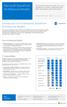 Microsoft SharePoint This topic is 1 of 5 in a series Introduction to Fundamental SharePoint This series is intended to raise awareness of the different fundamental architectural models through which SharePoint
Course 20346: Managing Office 365 Identities and Services
 Course 20346: Managing Office 365 Identities and Services Overview About this course This is a 5-day Instructor Led Training (ILT) course that targets the needs of IT professionals who take part in evaluating,
Working with Structured Data in Microsoft Office SharePoint Server 2007 (Part1): Configuring Single Sign On Service and Database
 Working with Structured Data in Microsoft Office SharePoint Server 2007 (Part1): Configuring Single Sign On Service and Database Applies to: Microsoft Office SharePoint Server 2007 Explore different options
Setup Guide for AD FS 3.0 on the Apprenda Platform
 Setup Guide for AD FS 3.0 on the Apprenda Platform Last Updated for Apprenda 6.0.3 The Apprenda Platform leverages Active Directory Federation Services (AD FS) to support identity federation. AD FS and
Business Portal for Microsoft Dynamics GP 2010. Field Service Suite
 Business Portal for Microsoft Dynamics GP 2010 Field Service Suite Copyright Copyright 2010 Microsoft. All rights reserved. Limitation of liability This document is provided as-is. Information and views
Administering the Web Server (IIS) Role of Windows Server
 Course 10972B: Administering the Web Server (IIS) Role of Windows Server Page 1 of 7 Administering the Web Server (IIS) Role of Windows Server Course 10972B: 4 days; Instructor-Led Introduction This course
Managing Office 365 Identities and Services
 Course 20346B: Managing Office 365 Identities and Services Page 1 of 7 Managing Office 365 Identities and Services Course 20346B: 4 days; Instructor-Led Introduction This is a 4-day Instructor Led Training
Administering the Web Server (IIS) Role of Windows Server 10972B; 5 Days
 Lincoln Land Community College Capital City Training Center 130 West Mason Springfield, IL 62702 217-782-7436 www.llcc.edu/cctc Administering the Web Server (IIS) Role of Windows Server 10972B; 5 Days
F-Secure Messaging Security Gateway. Deployment Guide
 F-Secure Messaging Security Gateway Deployment Guide TOC F-Secure Messaging Security Gateway Contents Chapter 1: Deploying F-Secure Messaging Security Gateway...3 1.1 The typical product deployment model...4
Flowing Identity in the Microsoft BI Stack using Claims-based Authentication
 Flowing Identity in the Microsoft BI Stack using Claims-based Authentication If you are adopting Active Directory Federation Services () as a method of user authentication for and desire to implement role
Exchange Server Hybrid Deployment for Exchange Online Dedicated
 Dedicated and ITAR-support Plans Hybrid Deployment for Exchange Online Dedicated Applies to: Office 365 Dedicated - Legacy 2013 Platform Release Topic Last Modified: 31-Jan-2013 Topic Last Modified: 31-Jan-2013
BlackBerry Enterprise Service 10. Version: 10.2. Configuration Guide
 BlackBerry Enterprise Service 10 Version: 10.2 Configuration Guide Published: 2015-02-27 SWD-20150227164548686 Contents 1 Introduction...7 About this guide...8 What is BlackBerry Enterprise Service 10?...9
Introduction to Directory Services
 Introduction to Directory Services Overview This document explains how AirWatch integrates with your organization's existing directory service such as Active Directory, Lotus Domino and Novell e-directory
LAB 1: Installing Active Directory Federation Services
 LAB 1: Installing Active Directory Federation Services Contents Lab: Installing and Configuring Active Directory Federation Services... 2 Exercise 1: installing and configuring Active Directory Federation
IT Exam Training online / Bootcamp
 DumpCollection IT Exam Training online / Bootcamp http://www.dumpcollection.com PDF and Testing Engine, study and practice Exam : 70-534 Title : Architecting Microsoft Azure Solutions Vendor : Microsoft
Using RD Gateway with Azure Multifactor Authentication
 Using RD Gateway with Azure Multifactor Authentication We have a client that uses RD Gateway to allow users to access their RDS deployment from outside their corporate network. They have about 1000+ users.
Microsoft SharePoint 2010 Administration
 Microsoft SharePoint 2010 Administration Real-World Skills for MCITP Certification and Beyond Tom Carpenter James Pyles WILEY Wiley Publishing, Inc. Contents Introduction xxiii Chapter 1 Planning the Logical
Protecting Juniper SA using Certificate-Based Authentication. Quick Start Guide
 Protecting Juniper SA using Certificate-Based Authentication Copyright 2013 SafeNet, Inc. All rights reserved. All attempts have been made to make the information in this document complete and accurate.
MICROSOFT 70-346 EXAM QUESTIONS & ANSWERS
 MICROSOFT 70-346 EXAM QUESTIONS & ANSWERS Number: 70-346 Passing Score: 800 Time Limit: 120 min File Version: 58.5 http://www.gratisexam.com/ MICROSOFT 70-346 EXAM QUESTIONS & ANSWERS Exam Name:Managing
Configure Microsoft Dynamics AX Connector for Mobile Applications
 Microsoft Dynamics AX 2012 Configure Microsoft Dynamics AX Connector for Mobile Applications White Paper April 2013 www.microsoft.com/dynamics/ax Send suggestions and comments about this document to [email protected].
"Charting the Course... Implementing Citrix NetScaler 11 for App and Desktop Solutions CNS-207 Course Summary
 Course Summary Description The objective of this course is to provide the foundational concepts and teach the skills necessary to implement, configure, secure and monitor a Citrix NetScaler system with
Managing Office 365 Identities and Services
 Course 20346B: Managing Office 365 Identities and Services Course Details Course Outline Module 1: Preparing for Office 365 This module reviews the features of Office 365 and identifies recent improvements
AVG Business Secure Sign On Active Directory Quick Start Guide
 AVG Business Secure Sign On Active Directory Quick Start Guide The steps below will allow for download and registration of the AVG Business SSO Cloud Connector to integrate SaaS application access and
http://www.trendmicro.com/download
 Trend Micro Incorporated reserves the right to make changes to this document and to the products described herein without notice. Before installing and using the software, please review the readme files,
Microsoft Enterprise Search for IT Professionals Course 10802A; 3 Days, Instructor-led
 Microsoft Enterprise Search for IT Professionals Course 10802A; 3 Days, Instructor-led Course Description This three day course prepares IT Professionals to administer enterprise search solutions using
KEMP LoadMaster. Enabling Hybrid Cloud Solutions in Microsoft Azure
 KEMP LoadMaster Enabling Hybrid Cloud Solutions in Microsoft Azure Introduction An increasing number of organizations are moving from traditional on-premises datacenter architecture to a public cloud platform
SSC2016: SharePoint 2016 Administrator s Survival Camp
 SHAREPOINT 2016 FOR IT PROFESSIONALS 5 DAYS SSC2016: SharePoint 2016 Administrator s Survival Camp AUDIENCE FORMAT COURSE DESCRIPTION STUDENT PREREQUISITES Administrators Instructor-led training with hands-on
Integrating VMware Horizon Workspace and VMware Horizon View TECHNICAL WHITE PAPER
 Integrating VMware Horizon Workspace and VMware Horizon View TECHNICAL WHITE PAPER Table of Contents Introduction.... 3 Requirements.... 3 Horizon Workspace Components.... 3 SAML 2.0 Standard.... 3 Authentication
Kerberos planning, and then we're going to take a deep dive look at how we actually configure Kerberos for the relational database engine.
 Configuring and Securing Complex BI Applications in a SharePoint 2010 Environment with SQL Server 2012 Tom Wisnowski - Architect, Microsoft Consulting Service Hello. Welcome to Configuring and Securing
PI Cloud Connect Overview
 PI Cloud Connect Overview Version 1.0.8 Content Product Overview... 3 Sharing data with other corporations... 3 Sharing data within your company... 4 Architecture Overview... 5 PI Cloud Connect and PI
CA CloudMinder. Getting Started with SSO 1.5
 CA CloudMinder Getting Started with SSO 1.5 This Documentation, which includes embedded help systems and electronically distributed materials, (hereinafter referred to as the Documentation ) is for your
Metalogix Replicator. Quick Start Guide. Publication Date: May 14, 2015
 Metalogix Replicator Quick Start Guide Publication Date: May 14, 2015 Copyright Metalogix International GmbH, 2002-2015. All Rights Reserved. This software is protected by copyright law and international
Configuring and Administering Microsoft SharePoint 2010
 Course 10174 : Configuring and Administering Microsoft SharePoint 2010 Page 1 of 7 Configuring and Administering Microsoft SharePoint 2010 Course 10174: 4 days; Instructor-Led Introduction This four-day
Protected Trust Directory Sync Guide
 Protected Trust Directory Sync Guide Protected Trust Directory Sync Guide 2 Overview Protected Trust Directory Sync enables your organization to synchronize the users and distribution lists in Active Directory
Deployment Guide. AX Series for Microsoft Lync Server 2010
 Deployment Guide AX Series for Microsoft Lync Server 2010 TABLE OF CONTENTS Introduction... 3 Deployment Guide Overview... 5 Deployment Prerequisites and Assumptions... 7 AX Deployment for Lync Server
10972B: Administering the Web Server (IIS) Role of Windows Server
 10972B: Administering the Web Server (IIS) Role of Windows Server Course Details Course Code: Duration: Notes: 10972B 5 days This course syllabus should be used to determine whether the course is appropriate
Enabling and Managing Office 365
 Course 20347A: Enabling and Managing Office 365 Page 1 of 7 Enabling and Managing Office 365 Course 20347A: 4 days; Instructor-Led Introduction This is a 4-day instructor-led training (ILT) course that
Step-By-Step Guide to Deploying Lync Server 2010 Enterprise Edition
 Step-By-Step Guide to Deploying Lync Server 2010 Enterprise Edition The installation of Lync Server 2010 is a fairly task-intensive process. In this article, I will walk you through each of the tasks,
Deploy the client as an Azure RemoteApp program
 Microsoft Dynamics AX 2012 R3 Deploy the client as an Azure RemoteApp program Microsoft Azure RemoteApp helps you provide secure, remote access to applications from many different user devices. This white
Installing and Configuring vcloud Connector
 Installing and Configuring vcloud Connector vcloud Connector 2.0.0 This document supports the version of each product listed and supports all subsequent versions until the document is replaced by a new
Introduction to Google Apps for Business Integration
 Introduction to Google Apps for Business Integration Overview Providing employees with mobile email access can introduce a number of security concerns not addressed by most standard email security infrastructures.
OneLogin Integration User Guide
 OneLogin Integration User Guide Table of Contents OneLogin Account Setup... 2 Create Account with OneLogin... 2 Setup Application with OneLogin... 2 Setup Required in OneLogin: SSO and AD Connector...
Flexible Identity Federation
 Flexible Identity Federation Quick start guide version 1.0.1 Publication history Date Description Revision 2015.09.23 initial release 1.0.0 2015.12.11 minor updates 1.0.1 Copyright Orange Business Services
SHAREPOINT 2013 IN INFRASTRUCTURE AS A SERVICE
 SHAREPOINT 2013 IN INFRASTRUCTURE AS A SERVICE Contents Introduction... 3 Step 1 Create Azure Components... 5 Step 1.1 Virtual Network... 5 Step 1.1.1 Virtual Network Details... 6 Step 1.1.2 DNS Servers
Configuring and Administering Microsoft SharePoint 2013 Curso Personalizado en
 Configuring and Administering Microsoft SharePoint 2013 Course: Corrientes 861 Piso 5 S2000CTH Rosario Argentina TEL: +54 (341) 426 4844 [email protected] Configuring and Administering Microsoft SharePoint
Identity Implementation Guide
 Identity Implementation Guide Version 37.0, Summer 16 @salesforcedocs Last updated: May 26, 2016 Copyright 2000 2016 salesforce.com, inc. All rights reserved. Salesforce is a registered trademark of salesforce.com,
www.novell.com/documentation Server Installation ZENworks Mobile Management 2.7.x August 2013
 www.novell.com/documentation Server Installation ZENworks Mobile Management 2.7.x August 2013 Legal Notices Novell, Inc., makes no representations or warranties with respect to the contents or use of this