
PNOZmulti error messages. Configurable Control System PNOZmulti. Error list EN 01
|
|
|
- Simon Gaines
- 9 years ago
- Views:
Transcription

1 PNOZmulti error messages Configurable Control System PNOZmulti Error list
2 Preface This document is the original document. All rights to this documentation are reserved by Pilz GmbH & Co. KG. Copies may be made for internal purposes. Suggestions and comments for improving this documentation will be gratefully received. Pilz, PIT, PMI, PNOZ, Primo, PSEN, PSS, PVIS, SafetyBUS p, SafetyEYE, SafetyNET p, the spirit of safety are registered and protected trademarks of Pilz GmbH & Co. KG in some countries. SD means Secure Digital

3 Content Section 1 Introduction Displaying the error message on the display Evaluate error message Evaluate error parameters Example 7 Section 2 Error Messages 9 Section 3 Table for evaluating the error parameters Module I Module II Decentralised modules Inputs and outputs 268 3

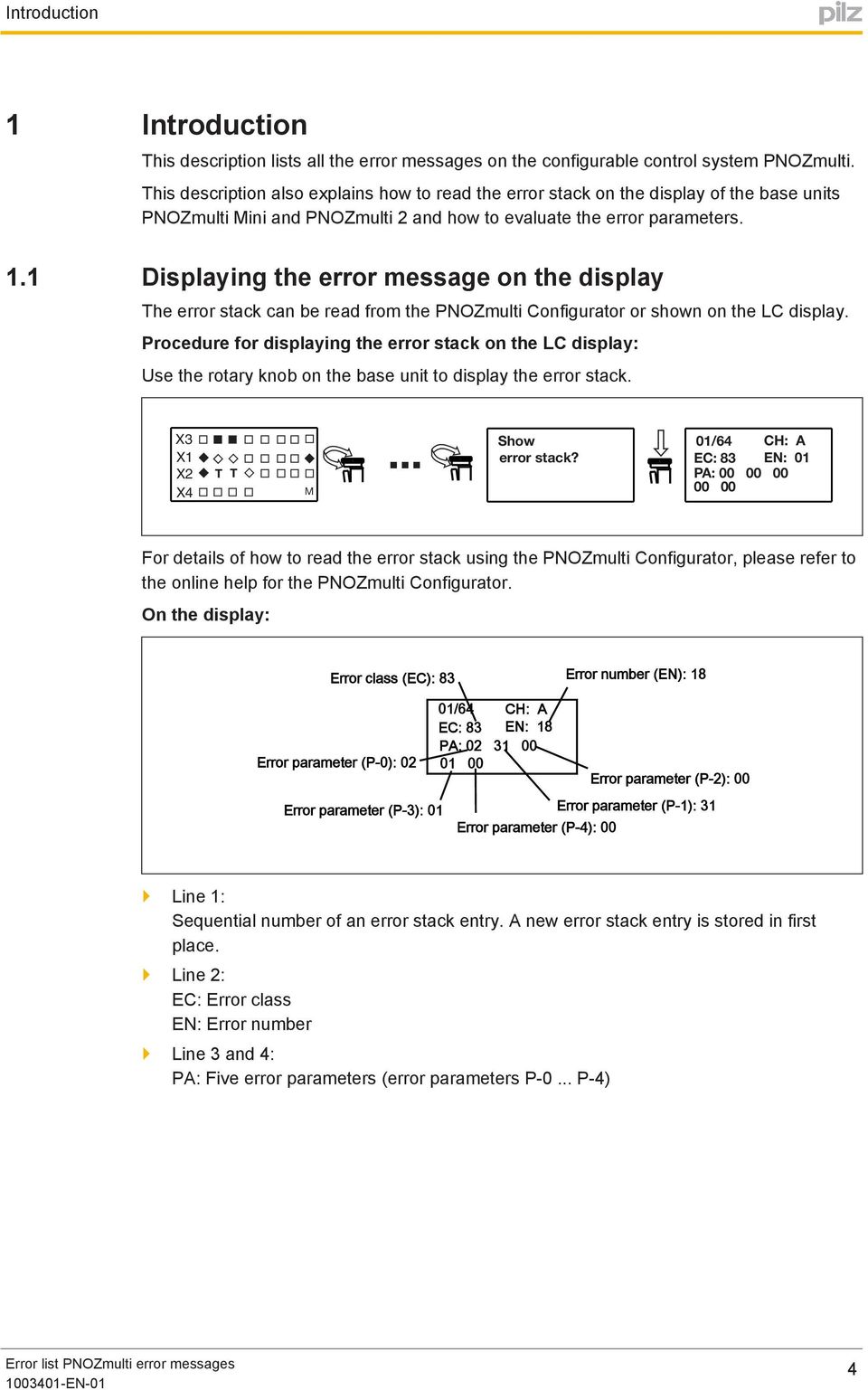
4 Introduction 1 Introduction This description lists all the error messages on the configurable control system PNOZmulti. This description also explains how to read the error stack on the display of the base units PNOZmulti Mini and PNOZmulti 2 and how to evaluate the error parameters. 1.1 Displaying the error message on the display The error stack can be read from the PNOZmulti Configurator or shown on the LC display. Procedure for displaying the error stack on the LC display: Use the rotary knob on the base unit to display the error stack. X3 X1 X2 X4 T T M... Show error stack? 01/64 CH: A EC: 83 EN: 01 PA: For details of how to read the error stack using the PNOZmulti Configurator, please refer to the online help for the PNOZmulti Configurator. On the display: Error class (EC): 83 Error number (EN): 18 Error parameter (P-0): 02 Error parameter (P-3): 01 01/64 CH: A EC: 83 EN: 18 PA: Error parameter (P-4): 00 Error parameter (P-2): 00 Error parameter (P-1): 31 } Line 1: Sequential number of an error stack entry. A new error stack entry is stored in first place. } Line 2: EC: Error class EN: Error number } Line 3 and 4: PA: Five error parameters (error parameters P 0... P 4) 4

5 Introduction INFORMATION It depends on the error whether or not error parameters are displayed. The way in which the error parameters should be interpreted also depends on the error. The error parameters for each error are stated in the chapter entitled Error messages. The error parameters can be evaluated using the tables in the chapter entitled Tables for evaluating the error parameters (see also the section entitled Evaluate error parameters, in this chapter). 1.2 Evaluate error message To evaluate the data on the display, proceed as follows: } Search under "Error messages" for the error class (EC) } Search the table for the required error number (EN). The error message and, if applicable, the error parameters and remedy are displayed in the table Evaluate error parameters There are error messages and remedies that contain one or more error parameters (P 0... P 4). Any position within the error message that contains an error parameter is identified with a number, e.g. <1>, <2>... For each error parameter, the content of the respective error parameter and the way in which it is to be interpreted (as I/O no., module no....) is displayed under the error message under. The data can be read via the number shown on the display (P0... P4), with the help of the tables in Chapter 3. Error parameters can have the following content: } Module no. The error parameter contains the number of a module. The module number can be used to read the corresponding base unit or expansion module in the table Module I [ 267] or Module II [ 267] Example: On the display (P 1) = 01 Text parameter under the error message: 1: Module no. <P 0> (see table "Module I") > "1st expansion module to the right of the base unit" } Module no. decentr. The error parameter contains the number of a decentralised module. The module number can be used to read the corresponding decentralised module in the table Decentralised modules [ 268]. 5
6 Introduction Example: On the display (P 2) = 01 Text parameter under the error message: 1: Module no. decentr <P 2> (see table "Decentralised modules") > "2nd decentralised module on the 1st link module to the left of the base unit" } I/O no. The error parameter contains the number of an input or output. The I/O number can be used to read the corresponding input or output in the table "Inputs and outputs". Example: On the display (P 2) = 01 Text parameter under the error message: 1: I/O no. <P 2> (see table "Inputs and outputs") > " Input I1 of base unit" } Absolute value, decimal or hexadecimal The error parameter contains an absolute value (. The error parameter can be replaced directly by the number on the display. Example: On the display (P 2) = 01 Text parameter under the error message: > "1" 1: <P 2> absolute value, decimal } Element in the user program The error parameter contains the number of an element in the user program. The element number can be read in the user program in the PNOZmulti Configurator. On the display (P 2) = 01 Text parameter under the error message: 1: Element <P 2> in the user program > 1st element in the user program 6

7 Introduction Example On the display: Error class (EC): 83 Error number (EN): 18 Error parameter (P-0): 02 Error parameter (P-3): 01 01/64 CH: A EC: 83 EN: 18 PA: Error parameter (P-4): 00 Error parameter (P-2): 00 Error parameter (P-1): 31 Error no. Look for the following in the chapter entitled "Error messages": } Error class (EC) 83 } Error number (EN) 18 (EN) Error message Remedy 18 Error caused by the feedback loop for the actuator on output <1> (terminal: O<2> Location: <4> Text parameter 1: I/O no. <P 1> (see table "Inputs and outputs") 2: <P 3> absolute value, decimal 3: Element <P 0> in the user program 4: Module no. <P 2> (see table "Module I") Ensure that the actuator on output <1> (terminal: O<2>) is operating correctly. Ensure that the feedback loop on element <3> is configured correctly. Ensure that the feedback loop is wired correctly.... Evaluate the error parameters: } 1: I/O no. <P 1> (see table "Inputs and outputs") No. on display for P 1: 31 Evaluation: I/O no. 31 in table "Inputs and outputs" <1>: Output O1 of base unit } 2: <P 3> absolute value, decimal No. on display for P 3: 01: Content: Absolute value, decimal Evaluation: Value is adopted directly <2>: 1 } 3: Element <P 0> in the user program No. on display for P 0: 02 Evaluation: Must be evaluated in the assignment list in the PNOZmulti Configurator <3>: Element 2 in the user program 7
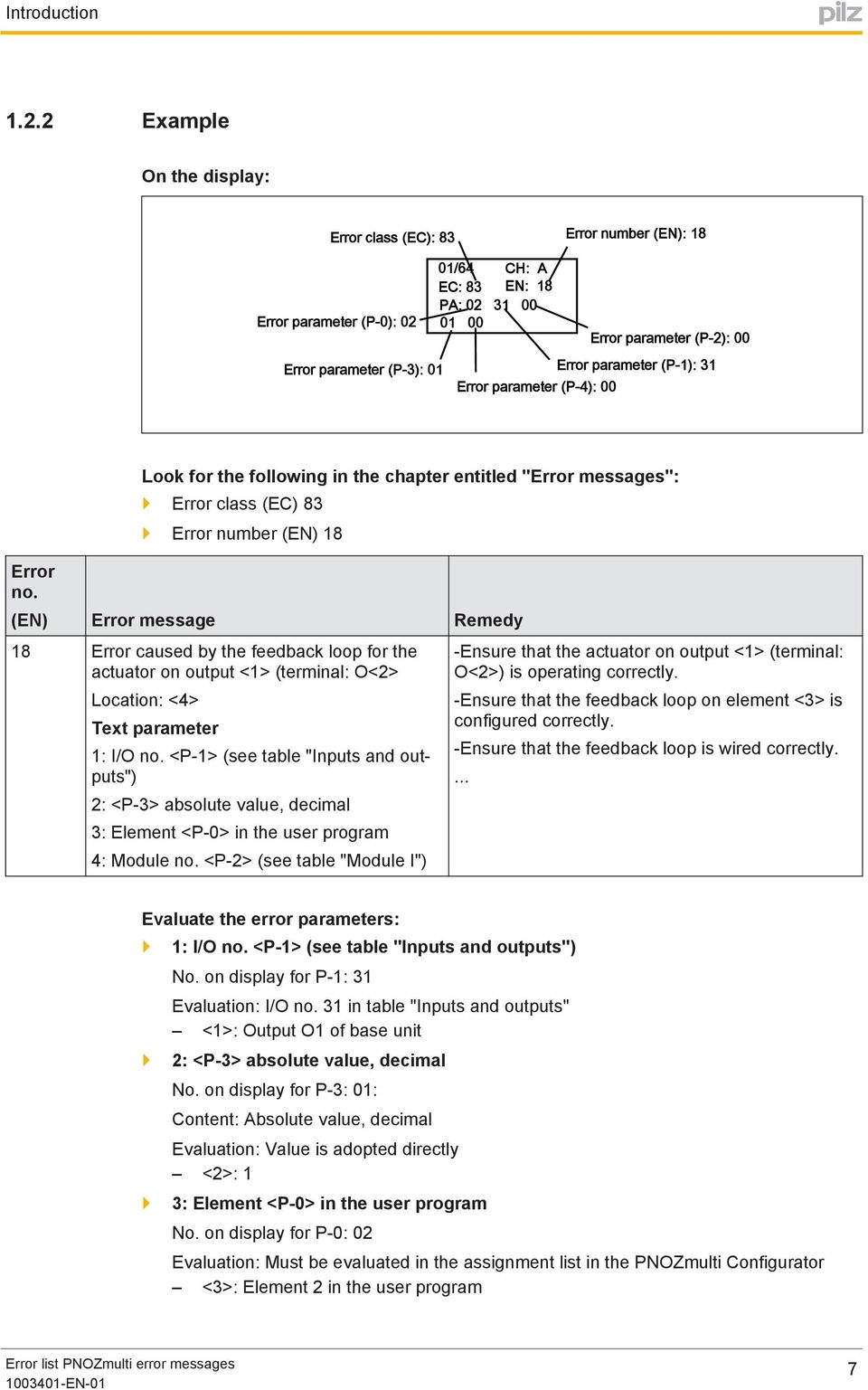
8 Introduction } 4: Module no. <P 2> (see table "Module I") No. on display: 00: Content: Module number Evaluation: Module no. 00 in table "Module I" <4>: "Base unit" Error no. Evaluated error message: (EN) Error message Remedy 18 Error caused by the feedback loop for the actuator on output Output O1 of base unit> (terminal: O1 Location: Base unit Ensure that the actuator on output Output O1 (terminal: O1) is operating correctly. Ensure that the feedback loop on element Element 2 in the user program is configured correctly. Ensure that the feedback loop is wired correctly.... 8

9 2 Error Messages "Error class"

10 "Error class" Restart was performed. For information only, no remedy required. 02 General reset was performed. 03 PNOZmulti was stopped by the PNOZmulti Configurator. 04 PNOZmulti has accepted the configuration with check sum <1><2>. Location <3> 1: <P-0> absolute value, hexadecimal 2: <P-1> absolute value, hexadecimal 3: Module No. 00 (s. table "Modules I") 05 Error stack was deleted. 06 General reset was performed. 07 General reset was performed. 08 Error stack was deleted. 09 General reset was performed. For information only, no remedy required. For information only, no remedy required. For information only, no remedy required. For information only, no remedy required. For information only, no remedy required. For information only, no remedy required. For information only, no remedy required. For information only, no remedy required. 10

11 "Error class" The expansion module installed on position <2> does not correspond to the configuration. 2: <P-0> absolute value, decimal 03 Expansion module is missing. 04 Terminator is missing. 05 Too many expansion modules are installed to the right of the base unit. 06 Expansion modules are available, although the base unit does not support expansion modules. Install the expansion module with equipment ID "<1>" on position <2>. Ensure that the configuration downloaded to the PNOZmulti is the one that was intended for this unit. Check hardware registry. Install the configured expansion module. Ensure that the configuration downloaded to the PNOZmulti is the one that was intended for this unit. Check hardware registry. Ensure that there is a terminator to the right of the last expansion module. Ensure that a maximum of 8 expansion modules are installed. Adapt the actual hardware registry to the configuration. Ensure that the configuration downloaded to the PNOZmulti is the one that was intended for this unit. Check hardware registry. Ensure that the correct type of base unit is installed. Remove expansion modules. 07 The version of expansion module <2> is not supported by base unit <1>. 2: Module No. <P-0> (s. table "Modules I") 08 Terminator is missing. 09 Error on the expansion module "<1>" to the right of the base unit. Ensure that you install the expansion module version that is entered in the configuration. Ensure that you install the base unit version that is entered in the configuration. Ensure that there is a terminator to the right of the last expansion module. 11
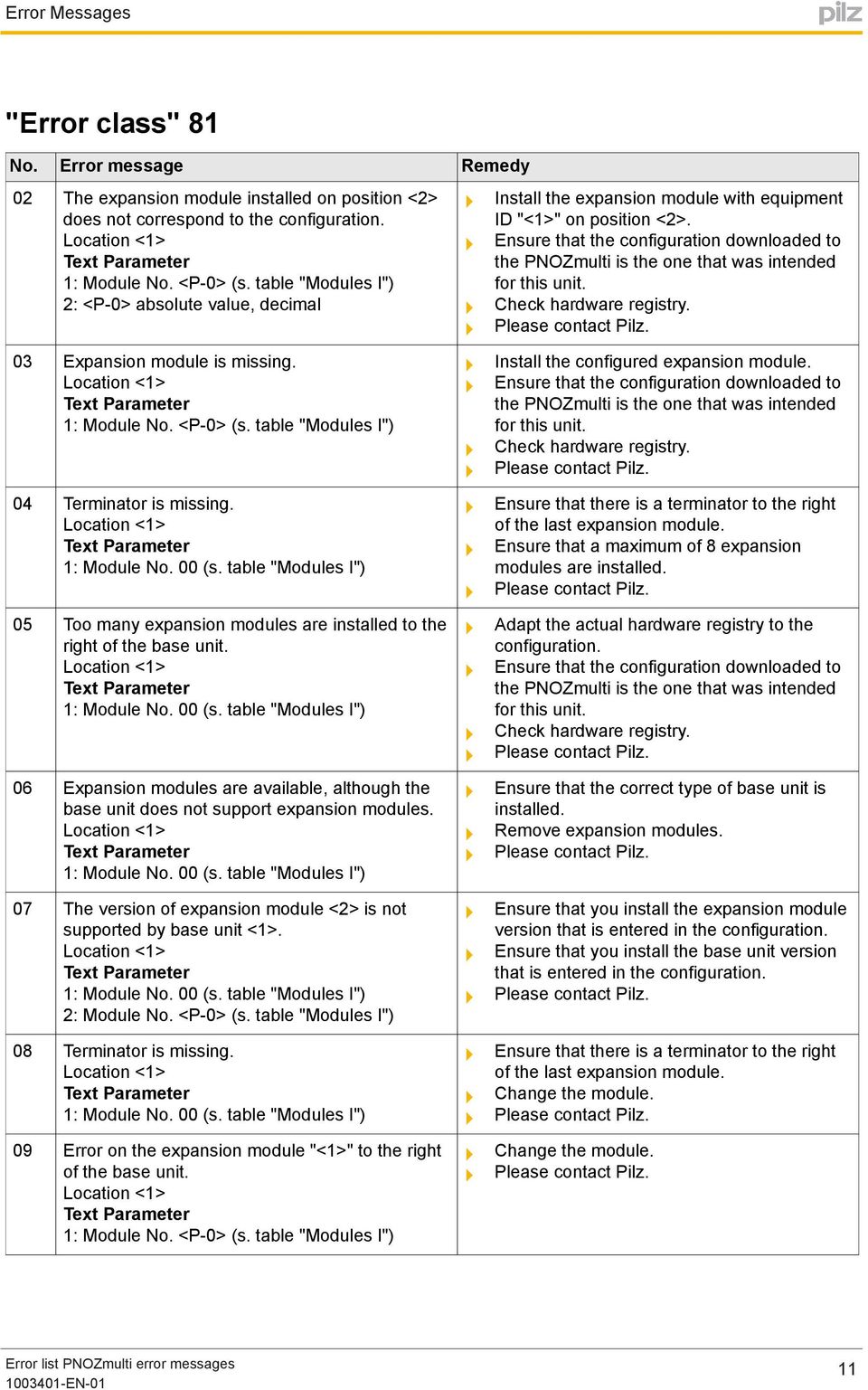
12 "Error class" 81 0A A communication module is installed, although it is not configured in the registered hardware. Adapt the actual hardware registry to the configuration. Check supply voltage 0B The communication module does not correspond to the configuration. Adapt the actual hardware registry to the configuration. Check supply voltage 0C In the registered hardware a communication module is configured which is not installed. Adapt the actual hardware registry to the configuration. Check supply voltage Check the type and version of the communication module. 0F Error on the expansion module "<1>" to the right of the base unit. 10 Error on the expansion module "<1>" to the right of the base unit. 11 An expansion module has been installed, although it is not configured in the registered hardware. 12 Terminator is missing. 13 Expansion module is missing. Adapt the actual hardware registry to the configuration. Check hardware registry. Ensure that there is a terminator to the right of the last expansion module. Install the configured expansion module. Ensure that the configuration downloaded to the PNOZmulti is the one that was intended for this unit. Check hardware registry. 12

13 "Error class" An expansion module has been installed, although it is not configured in the registered hardware. Adapt the actual hardware registry to the configuration. Check hardware registry. 15 The communication module has not been installed in the designated position. Check the position of the communication module. 13

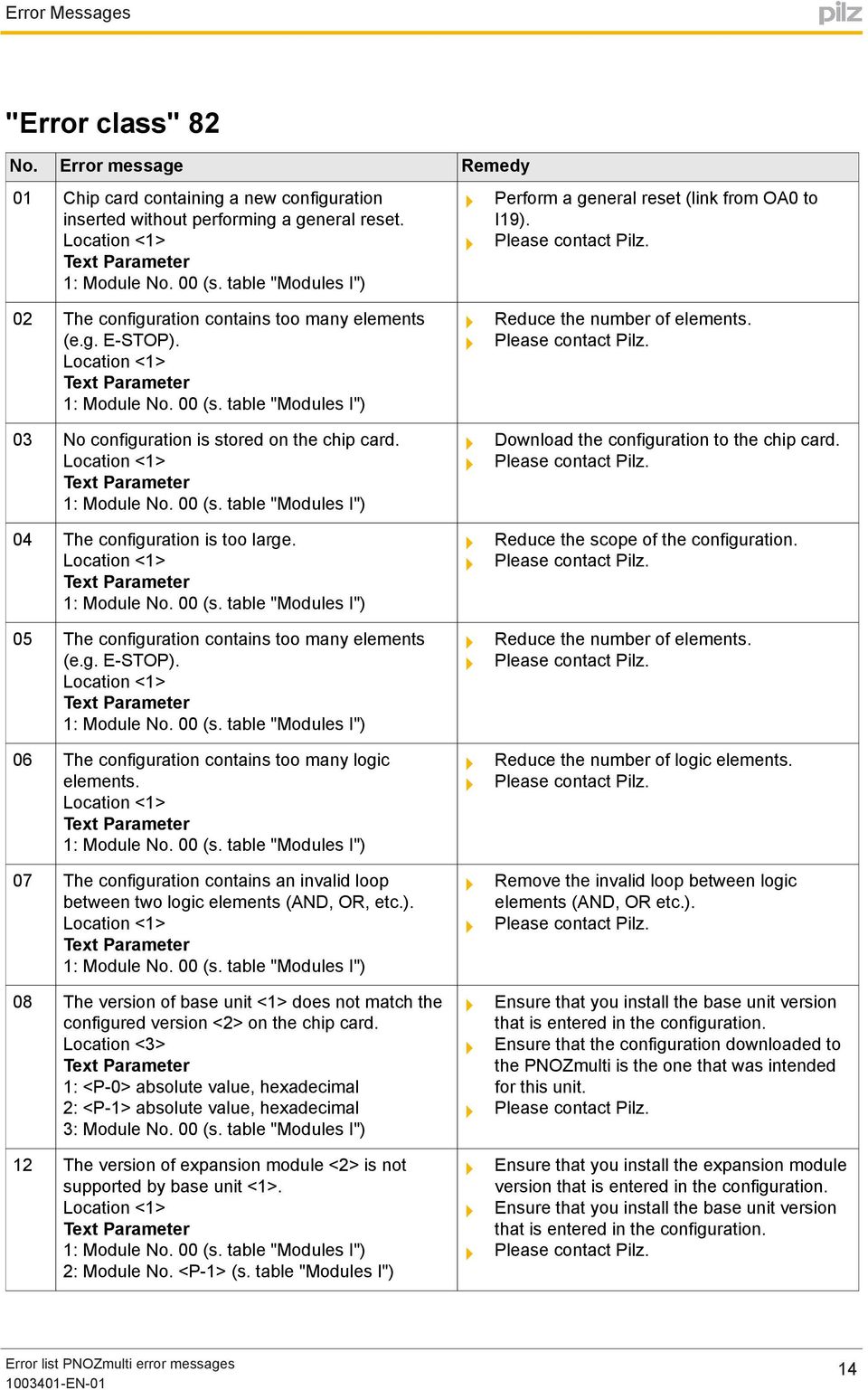
14 "Error class" Chip card containing a new configuration inserted without performing a general reset. Perform a general reset (link from OA0 to I19). 02 The configuration contains too many elements (e.g. E-STOP). 03 No configuration is stored on the chip card. 04 The configuration is too large. 05 The configuration contains too many elements (e.g. E-STOP). 06 The configuration contains too many logic elements. 07 The configuration contains an invalid loop between two logic elements (AND, OR, etc.). 08 The version of base unit <1> does not match the configured version <2> on the chip card. Location <3> 1: <P-0> absolute value, hexadecimal 2: <P-1> absolute value, hexadecimal 3: Module No. 00 (s. table "Modules I") 12 The version of expansion module <2> is not supported by base unit <1>. 2: Module No. <P-1> (s. table "Modules I") Reduce the number of elements. Download the configuration to the chip card. Reduce the scope of the configuration. Reduce the number of elements. Reduce the number of logic elements. Remove the invalid loop between logic elements (AND, OR etc.). Ensure that you install the base unit version that is entered in the configuration. Ensure that the configuration downloaded to the PNOZmulti is the one that was intended for this unit. Ensure that you install the expansion module version that is entered in the configuration. Ensure that you install the base unit version that is entered in the configuration. 14
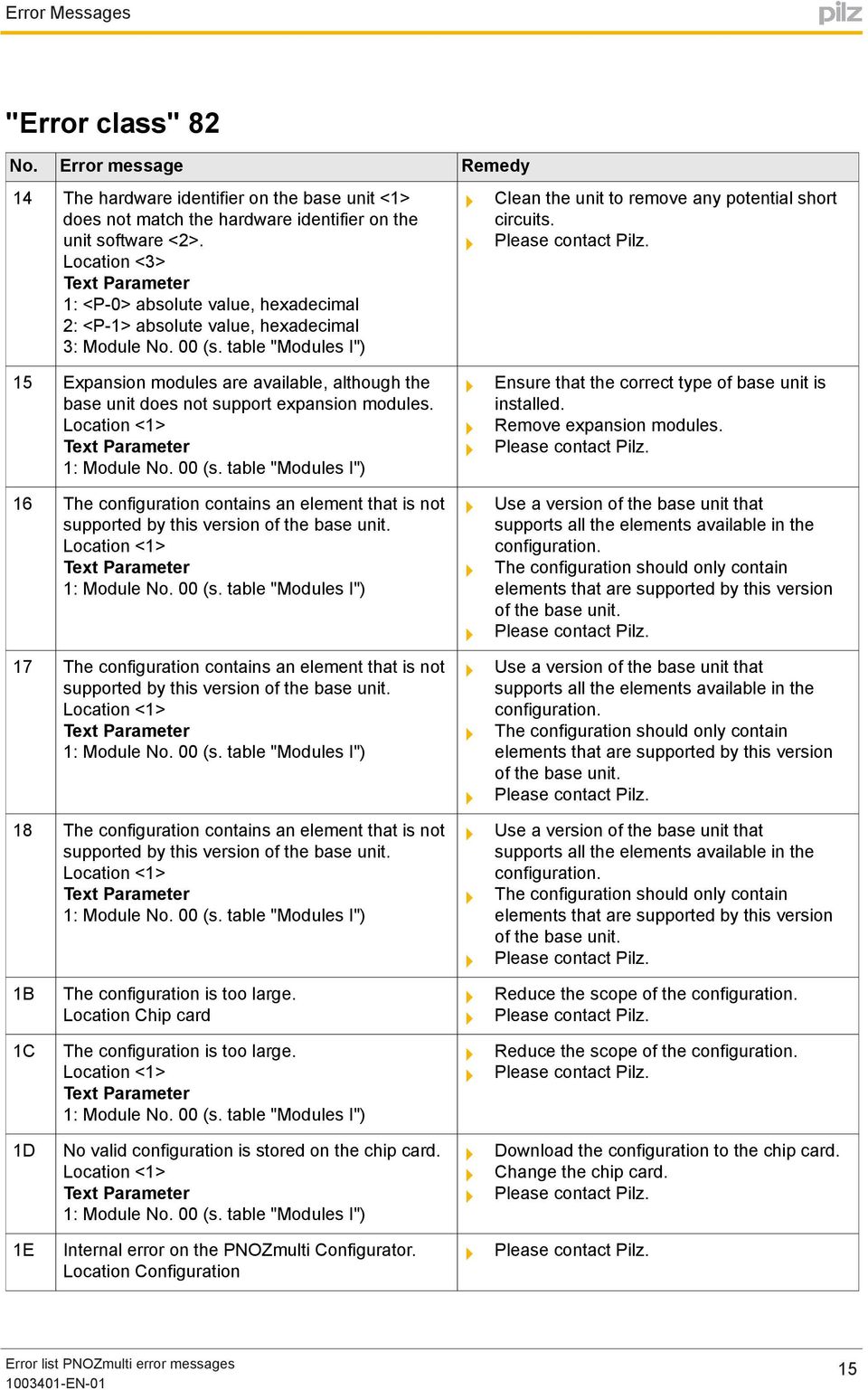
15 "Error class" The hardware identifier on the base unit <1> does not match the hardware identifier on the unit software <2>. Location <3> 1: <P-0> absolute value, hexadecimal 2: <P-1> absolute value, hexadecimal 3: Module No. 00 (s. table "Modules I") Clean the unit to remove any potential short circuits. 15 Expansion modules are available, although the base unit does not support expansion modules. 16 The configuration contains an element that is not supported by this version of the base unit. 17 The configuration contains an element that is not supported by this version of the base unit. 18 The configuration contains an element that is not supported by this version of the base unit. 1B 1C The configuration is too large. Location Chip card The configuration is too large. Ensure that the correct type of base unit is installed. Remove expansion modules. Use a version of the base unit that supports all the elements available in the configuration. The configuration should only contain elements that are supported by this version of the base unit. Use a version of the base unit that supports all the elements available in the configuration. The configuration should only contain elements that are supported by this version of the base unit. Use a version of the base unit that supports all the elements available in the configuration. The configuration should only contain elements that are supported by this version of the base unit. Reduce the scope of the configuration. Reduce the scope of the configuration. 1D No valid configuration is stored on the chip card. Download the configuration to the chip card. Change the chip card. 1E 15
16 "Error class" 82 1F The installed base unit does not correspond to the configuration. 20 Expansion modules are available, although the base unit does not support expansion modules. Install the configured base unit. Ensure that the configuration downloaded to the PNOZmulti is the one that was intended for this unit. Ensure that the correct type of base unit is installed. Remove expansion modules The configuration is too large Too many expansion modules are installed to the right of the base unit. 2A Reduce the scope of the configuration. Adapt the actual hardware registry to the configuration. Ensure that the configuration downloaded to the PNOZmulti is the one that was intended for this unit. Check hardware registry. 2B 2C 16

17 "Error class" 82 2D 2E 2F The base unit version does not match the configured version The configuration includes an integrated link interface that is not supported by this base unit. 37 Cannot establish a connection between the PNOZmulti systems Ensure that you install the base unit version that is entered in the configuration. Ensure that the configuration downloaded to the PNOZmulti is the one that was intended for this unit. Install the configured base unit. Ensure that the configuration downloaded to the PNOZmulti is the one that was intended for this unit. Ensure that the same transmission rate is configured for the expansion module "<1>" and the expansion module of the opposite side. 3A 3B 3C 17

18 "Error class" 82 3D 3E 3F The configuration contains an element that is not supported by this version of the base unit. The configuration contains an element that is not supported by this version of the base unit. The configuration contains an element that is not supported by this version of the base unit. 40 Use a version of the base unit that supports all the elements available in the configuration. The configuration should only contain elements that are supported by this version of the base unit. Use a version of the base unit that supports all the elements available in the configuration. The configuration should only contain elements that are supported by this version of the base unit. Use a version of the base unit that supports all the elements available in the configuration. The configuration should only contain elements that are supported by this version of the base unit The installed base unit does not correspond to the configuration. 45 The configuration is invalid. 46 Fieldbus modules are available, although the base unit does not support fieldbus modules. Install the configured base unit. Ensure that the configuration downloaded to the PNOZmulti is the one that was intended for this unit. Download configuration to the PNOZmulti again. Ensure that the correct type of base unit is installed. Remove expansion modules. 18

19 "Error class" Expansion modules are available, although the base unit does not support expansion modules. Ensure that the correct type of base unit is installed. Remove expansion modules. 19

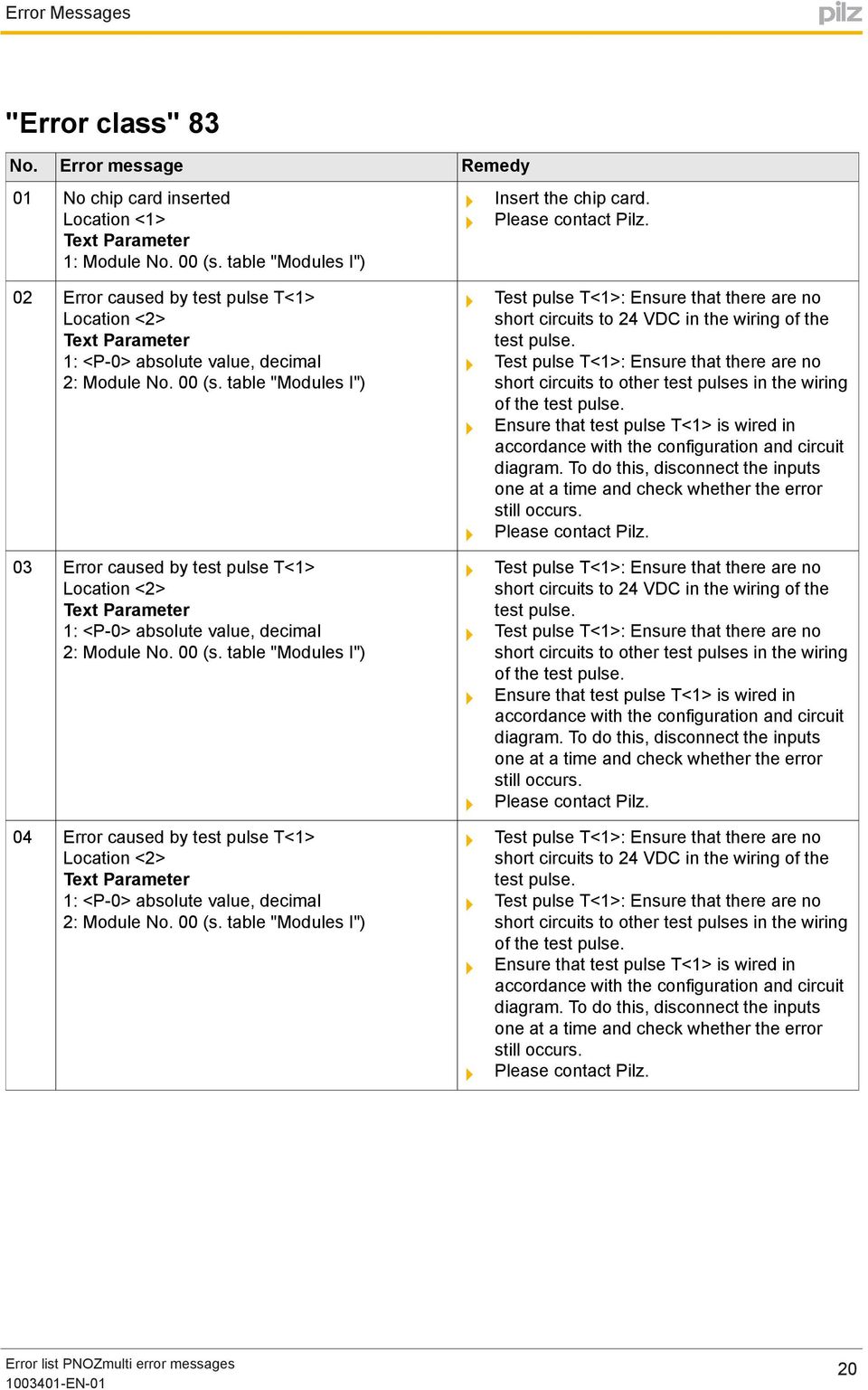
20 "Error class" No chip card inserted Insert the chip card. 02 Error caused by test pulse T<1> Location <2> 1: <P-0> absolute value, decimal 2: Module No. 00 (s. table "Modules I") 03 Error caused by test pulse T<1> Location <2> 1: <P-0> absolute value, decimal 2: Module No. 00 (s. table "Modules I") 04 Error caused by test pulse T<1> Location <2> 1: <P-0> absolute value, decimal 2: Module No. 00 (s. table "Modules I") Test pulse T<1>: Ensure that there are no short circuits to 24 VDC in the wiring of the test pulse. Test pulse T<1>: Ensure that there are no short circuits to other test pulses in the wiring of the test pulse. Ensure that test pulse T<1> is wired in To do this, disconnect the inputs one at a time and check whether the error still occurs. Test pulse T<1>: Ensure that there are no short circuits to 24 VDC in the wiring of the test pulse. Test pulse T<1>: Ensure that there are no short circuits to other test pulses in the wiring of the test pulse. Ensure that test pulse T<1> is wired in To do this, disconnect the inputs one at a time and check whether the error still occurs. Test pulse T<1>: Ensure that there are no short circuits to 24 VDC in the wiring of the test pulse. Test pulse T<1>: Ensure that there are no short circuits to other test pulses in the wiring of the test pulse. Ensure that test pulse T<1> is wired in To do this, disconnect the inputs one at a time and check whether the error still occurs. 20
21 "Error class" 83 0A Function element was or is partially operated (actual status: I/p. 1 = <1>; I/p. 2 = <2>; I/p. 3 = <3>; I/p. 4 = <4>) Location <5> 1: <P-1> absolute value, decimal 2: <P-2> absolute value, decimal 3: <P-3> absolute value, decimal 4: <P-4> absolute value, decimal 5: Element <P-0> in the user program Ensure that the contacts on the input element operate correctly. Ensure that the contacts are wired correctly. Ensure that the input element is wired in 0B Function element was or is partially operated (actual status: I/p. 1 = <1>; I/p. 2 = <2>; I/p. 3 = <3>) Location <4> 1: <P-1> absolute value, decimal 2: <P-2> absolute value, decimal 3: <P-3> absolute value, decimal 4: Element <P-0> in the user program Ensure that the contacts on the input element operate correctly. Ensure that the contacts are wired correctly. Ensure that the input element is wired in 0C Function element was or is partially operated (actual status: I/p. 1 = <1>; I/p. 2 = <2>; I/p. 3 = <3>) Location <4> 1: <P-1> absolute value, decimal 2: <P-2> absolute value, decimal 3: <P-3> absolute value, decimal 4: Element <P-0> in the user program Ensure that the contacts on the input element operate correctly. Ensure that the contacts are wired correctly. Ensure that the input element is wired in 0D Function element was or is partially operated (actual status: I/p. 1 = <1>; I/p. 2 = <2>; I/p. 3 = <3>) Location <4> 1: <P-1> absolute value, decimal 2: <P-2> absolute value, decimal 3: <P-3> absolute value, decimal 4: Element <P-0> in the user program Ensure that the contacts on the input element operate correctly. Ensure that the contacts are wired correctly. Ensure that the input element is wired in 0E Function element was or is partially operated (actual status: I/p. 1 = <1>; I/p. 2 = <2>) Location <3> 1: <P-1> absolute value, decimal 2: <P-2> absolute value, decimal 3: Element <P-0> in the user program Ensure that the contacts on the input element operate correctly. Ensure that the contacts are wired correctly. Ensure that the input element is wired in 21
22 "Error class" 83 0F Function element was or is partially operated (actual status: I/p. 1 = <1>; I/p. 2 = <2>) Location <3> 1: <P-1> absolute value, decimal 2: <P-2> absolute value, decimal 3: Element <P-0> in the user program 10 Function element was or is partially operated (actual status: I/p. 1 = <1>; I/p. 2 = <2>) Location <3> 1: <P-1> absolute value, decimal 2: <P-2> absolute value, decimal 3: Element <P-0> in the user program 11 Function element was or is partially operated (actual status: I/p. 1 = <1>; I/p. 2 = <2>) Location <3> 1: <P-1> absolute value, decimal 2: <P-2> absolute value, decimal 3: Element <P-0> in the user program 12 Function element was or is partially operated (actual status: I/p. 1 = <1>; I/p. 2 = <2>) Location <3> 1: <P-1> absolute value, decimal 2: <P-2> absolute value, decimal 3: Element <P-0> in the user program 13 Function element was or is partially operated (actual status: I/p. 1 = <1>; I/p. 2 = <2>) Location <3> 1: <P-1> absolute value, decimal 2: <P-2> absolute value, decimal 3: Element <P-0> in the user program 14 Function element was or is partially operated (actual status: I/p. 1 = <1>; I/p. 2 = <2>; I/p. 3 = <3>) Location <4> 1: <P-1> absolute value, decimal 2: <P-2> absolute value, decimal 3: <P-3> absolute value, decimal 4: Element <P-0> in the user program Ensure that the contacts on the input element operate correctly. Ensure that the contacts are wired correctly. Ensure that the input element is wired in Ensure that the contacts on the input element operate correctly. Ensure that the contacts are wired correctly. Ensure that the input element is wired in Ensure that the contacts on the input element operate correctly. Ensure that the contacts are wired correctly. Ensure that the input element is wired in Ensure that the contacts on the input element operate correctly. Ensure that the contacts are wired correctly. Ensure that the input element is wired in Ensure that the contacts on the input element operate correctly. Ensure that the contacts are wired correctly. Ensure that the input element is wired in Ensure that the contacts on the input element operate correctly. Ensure that the contacts are wired correctly. Ensure that the input element is wired in 22
23 "Error class" Function element was or is partially operated (actual status: I/p. 1 = <1>; I/p. 2 = <2>; I/p. 3 = <3>) Location <4> 1: <P-1> absolute value, decimal 2: <P-2> absolute value, decimal 3: <P-3> absolute value, decimal 4: Element <P-0> in the user program Ensure that the contacts on the input element operate correctly. Ensure that the contacts are wired correctly. Ensure that the input element is wired in 16 Function element was or is partially operated (actual status: I/p. 1 = <1>; I/p. 2 = <2>; I/p. 3 = <3>) Location <4> 1: <P-1> absolute value, decimal 2: <P-2> absolute value, decimal 3: <P-3> absolute value, decimal 4: Element <P-0> in the user program 18 Error caused by the feedback loop for the actuator on output "<1>" (terminal: O<2>) Location <3> 1: I/O no. <P-1> (s. table "Inputs and outputs") 2: <P-3> absolute value, decimal 3: Module No. <P-2> (s. table "Modules I") 19 Error caused by the feedback loop for the actuator on output "<1>" (terminal: O<2>) Location <3> 1: I/O no. <P-1> (s. table "Inputs and outputs") 2: <P-3> absolute value, decimal 3: Module No. <P-2> (s. table "Modules I") Ensure that the contacts on the input element operate correctly. Ensure that the contacts are wired correctly. Ensure that the input element is wired in Ensure that the actuator on output "<1>" (terminal: O<2>) is operating correctly. Ensure that the feedback loop is configured correctly. Ensure that the feedback loop is wired correctly. Ensure that the feedback loop is wired in Ensure that the feedback loop configuration takes into account the actual reaction time of the actuator. Ensure that the actuator on output "<1>" (terminal: O<2>) is operating correctly. Ensure that the feedback loop is configured correctly. Ensure that the feedback loop is wired correctly. Ensure that the feedback loop is wired in Ensure that the feedback loop configuration takes into account the actual reaction time of the actuator. 23
24 "Error class" 83 1A 1B 1C 1F Error caused by output "<1>" (terminal: O<2>) Location <3> 1: I/O no. <P-0> (s. table "Inputs and outputs") 2: <P-2> absolute value, decimal 3: Module No. <P-1> (s. table "Modules I") Error caused by the feedback loop for the actuator on output "<1>" (terminal: O<2>) Location <3> 1: I/O no. <P-1> (s. table "Inputs and outputs") 2: <P-3> absolute value, decimal 3: Module No. <P-2> (s. table "Modules I") Error caused by the feedback loop for the actuator on output "<1>" (terminal: O<2>) Location <3> 1: I/O no. <P-1> (s. table "Inputs and outputs") 2: <P-3> absolute value, decimal 3: Module No. <P-2> (s. table "Modules I") Error caused by test pulse T<1> Location <2> 1: <P-0> absolute value, decimal 2: Module No. 00 (s. table "Modules I") Output "<1>" (terminal: O<2>): Ensure there are no short circuits to 0 V or 24 VDC in the wiring of the output. Ensure an interruption-free supply of 24 VDC at the "0 V" and "24 V" terminals. Ensure that the actuator on output "<1>" (terminal: O<2>) is operating correctly. Ensure that the feedback loop is configured correctly. Ensure that the feedback loop is wired correctly. Ensure that the feedback loop is wired in Ensure that the feedback loop configuration takes into account the actual reaction time of the actuator. Ensure that the actuator on output "<1>" (terminal: O<2>) is operating correctly. Ensure that the feedback loop is configured correctly. Ensure that the feedback loop is wired correctly. Ensure that the feedback loop is wired in Ensure that the feedback loop configuration takes into account the actual reaction time of the actuator. Test pulse T<1>: Ensure that there are no short circuits to 24 VDC in the wiring of the test pulse. Test pulse T<1>: Ensure that there are no short circuits to other test pulses in the wiring of the test pulse. Ensure that test pulse T<1> is wired in To do this, disconnect the inputs one at a time and check whether the error still occurs. 24
25 "Error class" Error caused by test pulse T<1> Location <2> 1: <P-0> absolute value, decimal 2: Module No. 00 (s. table "Modules I") 21 Error caused by output "<1>" (terminal: O<2>) Location <3> 1: I/O no. <P-0> (s. table "Inputs and outputs") 2: <P-2> absolute value, decimal 3: Module No. <P-1> (s. table "Modules I") 22 Error caused by output "<1>" (terminal: O0) Location <2> 1: I/O no. <P-0> (s. table "Inputs and outputs") 2: Module No. <P-1> (s. table "Modules I") 23 Error caused by output "<1>" (terminal: O1) Location <2> 1: I/O no. <P-0> (s. table "Inputs and outputs") 2: Module No. <P-1> (s. table "Modules I") 24 Error caused by output "<1>" (terminal: O2) Location <2> 1: I/O no. <P-0> (s. table "Inputs and outputs") 2: Module No. <P-1> (s. table "Modules I") 25 Error caused by output "<1>" (terminal: O3) Location <2> 1: I/O no. <P-0> (s. table "Inputs and outputs") 2: Module No. <P-1> (s. table "Modules I") Test pulse T<1>: Ensure that there are no short circuits to 24 VDC in the wiring of the test pulse. Test pulse T<1>: Ensure that there are no short circuits to other test pulses in the wiring of the test pulse. Ensure that test pulse T<1> is wired in To do this, disconnect the inputs one at a time and check whether the error still occurs. Output "<1>" (terminal: O<2>): Ensure there are no short circuits to 0 V or 24 VDC in the wiring of the output. Ensure an interruption-free supply of 24 VDC at the "0 V" and "24 V" terminals. Output "<1>" (terminal: O0): Ensure that there are no short circuits to 0 V or 24 VDC in the wiring of the output. Ensure an interruption-free supply of 24 VDC at the "0 V" and "24 V" terminals. Output "<1>" (terminal: O1): Ensure that there are no short circuits to 0 V or 24 VDC in the wiring of the output. Ensure an interruption-free supply of 24 VDC at the "0 V" and "24 V" terminals. Output "<1>" (terminal: O2): Ensure that there are no short circuits to 0 V or 24 VDC in the wiring of the output. Ensure an interruption-free supply of 24 VDC at the "0 V" and "24 V" terminals. Output "<1>" (terminal: O3): Ensure that there are no short circuits to 0 V or 24 VDC in the wiring of the output. Ensure an interruption-free supply of 24 VDC at the "0 V" and "24 V" terminals. 25
26 "Error class" There is a 1 signal at two inputs on the operating mode selector switch "<5>". Location <5> 1: <P-0> absolute value, decimal 2: <P-1> absolute value, decimal 3: <P-2> absolute value, decimal 4: <P-3> absolute value, decimal 5: Element <P-4> in the user program 27 There is a 1 signal at two inputs on the operating mode selector switch "<5>". Location <5> 1: <P-0> absolute value, decimal 2: <P-1> absolute value, decimal 3: <P-2> absolute value, decimal 4: <P-3> absolute value, decimal 5: Element <P-4> in the user program 28 There is a 1 signal at two inputs on the operating mode selector switch "<5>". Location <5> 1: <P-0> absolute value, decimal 2: <P-1> absolute value, decimal 3: <P-2> absolute value, decimal 4: <P-3> absolute value, decimal 5: Element <P-4> in the user program 29 There is a 1 signal at two inputs on the operating mode selector switch "<5>". Location <5> 1: <P-0> absolute value, decimal 2: <P-1> absolute value, decimal 3: <P-2> absolute value, decimal 4: <P-3> absolute value, decimal 5: Element <P-4> in the user program Input i<1> on slot <2>: Ensure that there are no short circuits to 24 VDC in the input wiring. Input i<3> on slot <4>: Ensure that there are no short circuits to 24 VDC in the input wiring. Ensure that the operating mode selector switch "<5>" is wired in accordance with the configuration and circuit Input i<1> on slot <2>: Ensure that there are no short circuits to 24 VDC in the input wiring. Input i<3> on slot <4>: Ensure that there are no short circuits to 24 VDC in the input wiring. Ensure that the operating mode selector switch "<5>" is wired in accordance with the configuration and circuit Input i<1> on slot <2>: Ensure that there are no short circuits to 24 VDC in the input wiring. Input i<3> on slot <4>: Ensure that there are no short circuits to 24 VDC in the input wiring. Ensure that the operating mode selector switch "<5>" is wired in accordance with the configuration and circuit Input i<1> on slot <2>: Ensure that there are no short circuits to 24 VDC in the input wiring. Input i<3> on slot <4>: Ensure that there are no short circuits to 24 VDC in the input wiring. Ensure that the operating mode selector switch "<5>" is wired in accordance with the configuration and circuit 26
27 "Error class" No input on operating mode selector switch "<1>" has a 1 signal. 1: Element <P-0> in the user program 34 Error caused by output "<1>" (terminal: O<2>) Location <3> 1: I/O no. <P-0> (s. table "Inputs and outputs") 2: <P-2> absolute value, decimal 3: Module No. <P-1> (s. table "Modules I") Operating mode selector switch "<1>": Ensure that there are no short circuits to 0 V in the wiring of the inputs. Operating mode selector switch "<1>": Ensure that there are no open circuits in the wiring of the inputs. Ensure that the operating mode selector switch "<1>" is wired in accordance with the configuration and circuit Output "<1>" (terminal: O<2>): Ensure there are no short circuits to 0 V or 24 VDC in the wiring of the output. 35 No input on operating mode selector switch "<1>" has a 1 signal. 1: Element <P-0> in the user program 36 No input on operating mode selector switch "<1>" has a 1 signal. 1: Element <P-0> in the user program 37 No input on operating mode selector switch "<1>" has a 1 signal. 1: Element <P-0> in the user program Operating mode selector switch "<1>": Ensure that there are no short circuits to 0 V in the wiring of the inputs. Operating mode selector switch "<1>": Ensure that there are no open circuits in the wiring of the inputs. Ensure that the operating mode selector switch "<1>" is wired in accordance with the configuration and circuit Operating mode selector switch "<1>": Ensure that there are no short circuits to 0 V in the wiring of the inputs. Operating mode selector switch "<1>": Ensure that there are no open circuits in the wiring of the inputs. Ensure that the operating mode selector switch "<1>" is wired in accordance with the configuration and circuit Operating mode selector switch "<1>": Ensure that there are no short circuits to 0 V in the wiring of the inputs. Operating mode selector switch "<1>": Ensure that there are no open circuits in the wiring of the inputs. Ensure that the operating mode selector switch "<1>" is wired in accordance with the configuration and circuit 27
28 "Error class" No valid configuration is stored on the chip card. Download the configuration to the chip card. Change the chip card. 39 No valid configuration is stored on the chip card. Download the configuration to the chip card. Change the chip card. 3A Terminator is missing. Ensure that there is a terminator to the right of the last expansion module. Change the terminator. 3B Terminator is missing. Ensure that there is a terminator to the right of the last expansion module. Change the terminator. 3C Terminator is missing. Ensure that there is a terminator to the right of the last expansion module. Change the terminator. 3D Terminator is missing. Ensure that there is a terminator to the right of the last expansion module. Change the terminator. 3E Error caused by chip card. Change the chip card. 3F Error caused by output "<1>" (terminal: O1) Location <2> 1: I/O no. <P-0> (s. table "Inputs and outputs") 2: Module No. <P-1> (s. table "Modules I") 40 Error caused by output "<1>" (terminal: O2) Location <2> 1: I/O no. <P-0> (s. table "Inputs and outputs") 2: Module No. <P-1> (s. table "Modules I") Output "<1>" (terminal: O1): Ensure that there are no short circuits to 0 V or 24 VDC in the wiring of the output. Ensure an interruption-free supply of 24 VDC at the "0 V" and "24 V" terminals. Output "<1>" (terminal: O2): Ensure that there are no short circuits to 0 V or 24 VDC in the wiring of the output. Ensure an interruption-free supply of 24 VDC at the "0 V" and "24 V" terminals. 28
29 "Error class" Error caused by output "<1>" (terminal: O3) Location <2> 1: I/O no. <P-0> (s. table "Inputs and outputs") 2: Module No. <P-1> (s. table "Modules I") 42 Error caused by output "<1>" (terminal: O0) Location <2> 1: I/O no. <P-0> (s. table "Inputs and outputs") 2: Module No. <P-1> (s. table "Modules I") 43 Error caused by module. 44 Error caused by module. 45 Error caused by chip card. 46 Error caused by module. 47 Error caused by chip card. Output "<1>" (terminal: O3): Ensure that there are no short circuits to 0 V or 24 VDC in the wiring of the output. Ensure an interruption-free supply of 24 VDC at the "0 V" and "24 V" terminals. Output "<1>" (terminal: O0): Ensure that there are no short circuits to 0 V or 24 VDC in the wiring of the output. Ensure an interruption-free supply of 24 VDC at the "0 V" and "24 V" terminals. Ensure an interruption-free supply of 24 VDC at the "0 V" and "24 V" terminals. Ensure that there are no short circuits to 0 V or 24 VDC in the wiring of the supply voltage. Ensure an interruption-free supply of 24 VDC at the "0 V" and "24 V" terminals. Ensure that there are no short circuits to 0 V or 24 VDC in the wiring of the supply voltage. Insert the chip card. Change the chip card. Ensure an interruption-free supply of 24 VDC at the "0 V" and "24 V" terminals. Ensure that there are no short circuits to 0 V or 24 VDC in the wiring of the supply voltage. Change the chip card. 48 Error caused by chip card. Change the chip card. 29
30 "Error class" Error caused by chip card. Change the chip card. 4A Error caused by chip card. Change the chip card. 4B Error caused by chip card. Change the chip card. 4C 4D 4E 4F There is a 1 signal at more than one input on the operating mode selector switch "<1>". 1: Element <P-0> in the user program 2: Error caused by the feedback loop for the actuator on output "<1>" (terminal: O<2>) Location <3> 1: I/O no. <P-1> (s. table "Inputs and outputs") 2: <P-3> absolute value, decimal 3: Module No. <P-2> (s. table "Modules I") Terminator is missing. Terminator is missing. 50 Terminator is missing. Operating mode selector switch "<1>": Ensure that there are no short circuits to 24 VDC in the wiring of the inputs. Ensure that the operating mode selector switch "<1>" is wired in accordance with the configuration and circuit Ensure that the actuator on output "<1>" (terminal: O<2>) is operating correctly. Ensure that the feedback loop is configured correctly. Ensure that the feedback loop is wired correctly. Ensure that the feedback loop is wired in Ensure that the feedback loop configuration takes into account the actual reaction time of the actuator. Ensure that there is a terminator to the right of the last expansion module. Change the terminator. Ensure that there is a terminator to the right of the last expansion module. Change the terminator. Ensure that there is a terminator to the right of the last expansion module. Change the terminator. 30
31 "Error class" Terminator is missing. 52 Terminator is missing. 53 Error caused by output "<1>" (terminal: O<2>) Location <3> 1: I/O no. <P-0> (s. table "Inputs and outputs") 2: <P-2> absolute value, decimal 3: Module No. <P-1> (s. table "Modules I") 54 Error caused by module. 55 Error caused by module. 56 Error caused by the feedback loop for the actuator on output "<1>" (terminal: O<2>) Location <3> 1: I/O no. <P-1> (s. table "Inputs and outputs") 2: <P-3> absolute value, decimal 3: Module No. <P-2> (s. table "Modules I") 57 No chip card inserted Ensure that there is a terminator to the right of the last expansion module. Change the terminator. Ensure that there is a terminator to the right of the last expansion module. Change the terminator. Output "<1>" (terminal: O<2>): Ensure there are no short circuits to 0 V or 24 VDC in the wiring of the output. Ensure an interruption-free supply of 24 VDC at the "0 V" and "24 V" terminals. Ensure an interruption-free supply of 24 VDC at the "0 V" and "24 V" terminals. Ensure that there are no short circuits to 0 V or 24 VDC in the wiring of the supply voltage. Ensure an interruption-free supply of 24 VDC at the "0 V" and "24 V" terminals. Ensure that there are no short circuits to 0 V or 24 VDC in the wiring of the supply voltage. Ensure that the actuator on output "<1>" (terminal: O<2>) is operating correctly. Ensure that the feedback loop is configured correctly. Ensure that the feedback loop is wired correctly. Ensure that the feedback loop is wired in Ensure that the feedback loop configuration takes into account the actual reaction time of the actuator. Insert the chip card. 31
32 "Error class" Error caused by cascading input. 59 Error caused by cascading input. 5A 5B 5C 5D Error caused by cascading input. Error caused by cascading output. Error caused by cascading output. Ensure that the cascading input is wired in Then reset. Ensure that there are no short circuits to 24 VDC or any other cascade cable in the wiring of the cascading input. Then reset. Change the cascaded base units one by one. Ensure that the cascading input is wired in Then reset. Change the cascaded base units one by one. Ensure that the cascading input is wired in Then reset. Change the cascaded base units one by one. Ensure that the cascading output is wired in Then reset. Ensure that there are no short circuits to 24 VDC or any other cascade cable in the wiring of the cascading output. Then reset. Change the cascaded base units one by one. Ensure that the cascading output is wired in Then reset. Ensure that there are no short circuits to 24 VDC or any other cascade cable in the wiring of the cascading output. Then reset. Change the cascaded base units one by one. 5E Error caused by cascading input. Ensure that the cascading input is wired in Then reset. Change the cascaded base units one by one. 32
33 "Error class" 83 5F No input on operating mode selector switch "<1>" has a 1 signal. 1: Element <P-0> in the user program 60 No input on operating mode selector switch "<1>" has a 1 signal. 1: Element <P-0> in the user program 61 No input on operating mode selector switch "<1>" has a 1 signal. 1: Element <P-0> in the user program 62 No input on operating mode selector switch "<1>" has a 1 signal. 1: Element <P-0> in the user program Operating mode selector switch "<1>": Ensure that there are no short circuits to 0 V in the wiring of the inputs. Operating mode selector switch "<1>": Ensure that there are no open circuits in the wiring of the inputs. Ensure that the operating mode selector switch "<1>" is wired in accordance with the configuration and circuit Operating mode selector switch "<1>": Ensure that there are no short circuits to 0 V in the wiring of the inputs. Operating mode selector switch "<1>": Ensure that there are no open circuits in the wiring of the inputs. Ensure that the operating mode selector switch "<1>" is wired in accordance with the configuration and circuit Operating mode selector switch "<1>": Ensure that there are no short circuits to 0 V in the wiring of the inputs. Operating mode selector switch "<1>": Ensure that there are no open circuits in the wiring of the inputs. Ensure that the operating mode selector switch "<1>" is wired in accordance with the configuration and circuit Operating mode selector switch "<1>": Ensure that there are no short circuits to 0 V in the wiring of the inputs. Operating mode selector switch "<1>": Ensure that there are no open circuits in the wiring of the inputs. Ensure that the operating mode selector switch "<1>" is wired in accordance with the configuration and circuit 33
34 "Error class" No input on operating mode selector switch "<1>" has a 1 signal. 1: Element <P-0> in the user program 64 No input on operating mode selector switch "<1>" has a 1 signal. 1: Element <P-0> in the user program 65 No input on operating mode selector switch "<1>" has a 1 signal. 1: Element <P-0> in the user program 66 There is a 1 signal at two inputs on the operating mode selector switch "<5>". Location <5> 1: <P-0> absolute value, decimal 2: <P-1> absolute value, decimal 3: <P-2> absolute value, decimal 4: <P-3> absolute value, decimal 5: Element <P-4> in the user program Operating mode selector switch "<1>": Ensure that there are no short circuits to 0 V in the wiring of the inputs. Operating mode selector switch "<1>": Ensure that there are no open circuits in the wiring of the inputs. Ensure that the operating mode selector switch "<1>" is wired in accordance with the configuration and circuit Operating mode selector switch "<1>": Ensure that there are no short circuits to 0 V in the wiring of the inputs. Operating mode selector switch "<1>": Ensure that there are no open circuits in the wiring of the inputs. Ensure that the operating mode selector switch "<1>" is wired in accordance with the configuration and circuit Operating mode selector switch "<1>": Ensure that there are no short circuits to 0 V in the wiring of the inputs. Operating mode selector switch "<1>": Ensure that there are no open circuits in the wiring of the inputs. Ensure that the operating mode selector switch "<1>" is wired in accordance with the configuration and circuit Input i<1> on slot <2>: Ensure that there are no short circuits to 24 VDC in the input wiring. Input i<3> on slot <4>: Ensure that there are no short circuits to 24 VDC in the input wiring. Ensure that the operating mode selector switch "<5>" is wired in accordance with the configuration and circuit 34
35 "Error class" There is a 1 signal at two inputs on the operating mode selector switch "<5>". Location <5> 1: <P-0> absolute value, decimal 2: <P-1> absolute value, decimal 3: <P-2> absolute value, decimal 4: <P-3> absolute value, decimal 5: Element <P-4> in the user program 68 There is a 1 signal at two inputs on the operating mode selector switch "<5>". Location <5> 1: <P-0> absolute value, decimal 2: <P-1> absolute value, decimal 3: <P-2> absolute value, decimal 4: <P-3> absolute value, decimal 5: Element <P-4> in the user program 75 Error caused by output "<1>" (terminal: O<2>) Location <3> 1: I/O no. <P-0> (s. table "Inputs and outputs") 2: <P-2> absolute value, decimal 3: Module No. <P-1> (s. table "Modules I") 77 Error caused by output "<1>" (terminal: O<2>) Location <3> 1: I/O no. <P-0> (s. table "Inputs and outputs") 2: <P-2> absolute value, decimal 3: Module No. <P-1> (s. table "Modules I") 78 Error caused by output "<1>" (terminal: O<2>) Location <3> 1: I/O no. <P-0> (s. table "Inputs and outputs") 2: <P-2> absolute value, decimal 3: Module No. <P-1> (s. table "Modules I") 79 Error caused by output "<1>" (terminal: O<2>) Location <3> 1: I/O no. <P-0> (s. table "Inputs and outputs") 2: <P-2> absolute value, decimal 3: Module No. <P-1> (s. table "Modules I") Input i<1> on slot <2>: Ensure that there are no short circuits to 24 VDC in the input wiring. Input i<3> on slot <4>: Ensure that there are no short circuits to 24 VDC in the input wiring. Ensure that the operating mode selector switch "<5>" is wired in accordance with the configuration and circuit Input i<1> on slot <2>: Ensure that there are no short circuits to 24 VDC in the input wiring. Input i<3> on slot <4>: Ensure that there are no short circuits to 24 VDC in the input wiring. Ensure that the operating mode selector switch "<5>" is wired in accordance with the configuration and circuit Output "<1>" (terminal: O<2>): Ensure there are no short circuits to 0 V or 24 VDC in the wiring of the output. Ensure an interruption-free supply of 24 VDC at the "0 V" and "24 V" terminals. Output "<1>" (terminal: O<2>): Ensure there are no short circuits to 0 V or 24 VDC in the wiring of the output. Ensure an interruption-free supply of 24 VDC at the "0 V" and "24 V" terminals. Output "<1>" (terminal: O<2>): Ensure there are no short circuits to 0 V or 24 VDC in the wiring of the output. Ensure an interruption-free supply of 24 VDC at the "0 V" and "24 V" terminals. Output "<1>" (terminal: O<2>): Ensure there are no short circuits to 0 V or 24 VDC in the wiring of the output. Ensure an interruption-free supply of 24 VDC at the "0 V" and "24 V" terminals. 35
36 "Error class" 83 7A 7B 7C 7D 7E 7F Error caused by output "<1>" (terminal: O<2>) Location <3> 1: I/O no. <P-0> (s. table "Inputs and outputs") 2: <P-2> absolute value, decimal 3: Module No. <P-1> (s. table "Modules I") Error caused by output "<1>" (terminal: O<2>) Location <3> 1: I/O no. <P-0> (s. table "Inputs and outputs") 2: <P-2> absolute value, decimal 3: Module No. <P-1> (s. table "Modules I") Error caused by output "<1>" (terminal: O<2>) Location <3> 1: I/O no. <P-0> (s. table "Inputs and outputs") 2: <P-2> absolute value, decimal 3: Module No. <P-1> (s. table "Modules I") Error caused by output "<1>" (terminal: O<2>) Location <3> 1: I/O no. <P-0> (s. table "Inputs and outputs") 2: <P-2> absolute value, decimal 3: Module No. <P-1> (s. table "Modules I") Error caused by output "<1>" (terminal: O<2>) Location <3> 1: I/O no. <P-0> (s. table "Inputs and outputs") 2: <P-2> absolute value, decimal 3: Module No. <P-1> (s. table "Modules I") Error caused by output "<1>" (terminal: O<2>) Location <3> 1: I/O no. <P-0> (s. table "Inputs and outputs") 2: <P-2> absolute value, decimal 3: Module No. <P-1> (s. table "Modules I") Output "<1>" (terminal: O<2>): Ensure there are no short circuits to 0 V or 24 VDC in the wiring of the output. Ensure an interruption-free supply of 24 VDC at the "0 V" and "24 V" terminals. Output "<1>" (terminal: O<2>): Ensure there are no short circuits to 0 V or 24 VDC in the wiring of the output. Ensure an interruption-free supply of 24 VDC at the "0 V" and "24 V" terminals. Output "<1>" (terminal: O<2>): Ensure there are no short circuits to 0 V or 24 VDC in the wiring of the output. Ensure an interruption-free supply of 24 VDC at the "0 V" and "24 V" terminals. Output "<1>" (terminal: O<2>): Ensure there are no short circuits to 0 V or 24 VDC in the wiring of the output. Ensure an interruption-free supply of 24 VDC at the "0 V" and "24 V" terminals. Output "<1>" (terminal: O<2>): Ensure there are no short circuits to 0 V or 24 VDC in the wiring of the output. Ensure an interruption-free supply of 24 VDC at the "0 V" and "24 V" terminals. Output "<1>" (terminal: O<2>): Ensure there are no short circuits to 0 V or 24 VDC in the wiring of the output. Ensure an interruption-free supply of 24 VDC at the "0 V" and "24 V" terminals. Output "<1>" (terminal: O<2>): Ensure there is no open circuit in the wiring of the output. 36
37 "Error class" Error caused by output "<1>" (terminal: O<2>) Location <3> 1: I/O no. <P-0> (s. table "Inputs and outputs") 2: <P-2> absolute value, decimal 3: Module No. <P-1> (s. table "Modules I") 81 Error caused by output "<1>" (terminal: O<2>) Location <3> 1: I/O no. <P-0> (s. table "Inputs and outputs") 2: <P-2> absolute value, decimal 3: Module No. <P-1> (s. table "Modules I") 82 Error caused by output "<1>" (terminal: O<2>) Location <3> 1: I/O no. <P-0> (s. table "Inputs and outputs") 2: <P-2> absolute value, decimal 3: Module No. <P-1> (s. table "Modules I") 83 Error caused by output "<1>" (terminal: O<2>) Location <3> 1: I/O no. <P-0> (s. table "Inputs and outputs") 2: <P-2> absolute value, decimal 3: Module No. <P-1> (s. table "Modules I") 84 Error caused by output "<1>" (terminal: O<2>) Location <3> 1: I/O no. <P-0> (s. table "Inputs and outputs") 2: <P-2> absolute value, decimal 3: Module No. <P-1> (s. table "Modules I") 85 Error caused by output "<1>" (terminal: O<2>) Location <3> 1: I/O no. <P-0> (s. table "Inputs and outputs") 2: <P-2> absolute value, decimal 3: Module No. <P-1> (s. table "Modules I") Output "<1>" (terminal: O<2>): Ensure there are no short circuits to 0 V or 24 VDC in the wiring of the output. Ensure an interruption-free supply of 24 VDC at the "0 V" and "24 V" terminals. Output "<1>" (terminal: O<2>): Ensure there is no open circuit in the wiring of the output. Output "<1>" (terminal: O<2>): Ensure there are no short circuits to 0 V or 24 VDC in the wiring of the output. Ensure an interruption-free supply of 24 VDC at the "0 V" and "24 V" terminals. Output "<1>" (terminal: O<2>): Ensure there is no open circuit in the wiring of the output. Output "<1>" (terminal: O<2>): Ensure there are no short circuits to 0 V or 24 VDC in the wiring of the output. Ensure an interruption-free supply of 24 VDC at the "0 V" and "24 V" terminals. Output "<1>" (terminal: O<2>): Ensure there is no open circuit in the wiring of the output. Output "<1>" (terminal: O<2>): Ensure there are no short circuits to 0 V or 24 VDC in the wiring of the output. Ensure an interruption-free supply of 24 VDC at the "0 V" and "24 V" terminals. Output "<1>" (terminal: O<2>): Ensure there are no short circuits to 0 V or 24 VDC in the wiring of the output. Ensure an interruption-free supply of 24 VDC at the "0 V" and "24 V" terminals. Output "<1>" (terminal: O<2>): Ensure there are no short circuits to 0 V or 24 VDC in the wiring of the output. Ensure an interruption-free supply of 24 VDC at the "0 V" and "24 V" terminals. 37
38 "Error class" Error caused by output "<1>" (terminal: O<2>) Location <3> 1: I/O no. <P-0> (s. table "Inputs and outputs") 2: <P-2> absolute value, decimal 3: Module No. <P-1> (s. table "Modules I") 87 Error caused by output "<1>" (terminal: O<2>) Location <3> 1: I/O no. <P-0> (s. table "Inputs and outputs") 2: <P-2> absolute value, decimal 3: Module No. <P-1> (s. table "Modules I") 88 Error caused by output "<1>" (terminal: O<2>) Location <3> 1: I/O no. <P-0> (s. table "Inputs and outputs") 2: <P-2> absolute value, decimal 3: Module No. <P-1> (s. table "Modules I") 89 Error caused by output "<1>" (terminal: O<2>) Location <3> 1: I/O no. <P-0> (s. table "Inputs and outputs") 2: <P-2> absolute value, decimal 3: Module No. <P-1> (s. table "Modules I") 8A 8B Error caused by output "<1>" (terminal: O<2>) Location <3> 1: I/O no. <P-0> (s. table "Inputs and outputs") 2: <P-2> absolute value, decimal 3: Module No. <P-1> (s. table "Modules I") Error caused by output "<1>" (terminal: O<2>) Location <3> 1: I/O no. <P-0> (s. table "Inputs and outputs") 2: <P-2> absolute value, decimal 3: Module No. <P-1> (s. table "Modules I") Output "<1>" (terminal: O<2>): Ensure there are no short circuits to 0 V or 24 VDC in the wiring of the output. Ensure an interruption-free supply of 24 VDC at the "0 V" and "24 V" terminals. Output "<1>" (terminal: O<2>): Ensure there are no short circuits to 0 V or 24 VDC in the wiring of the output. Ensure an interruption-free supply of 24 VDC at the "0 V" and "24 V" terminals. Output "<1>" (terminal: O<2>): Ensure there are no short circuits to 0 V or 24 VDC in the wiring of the output. Ensure an interruption-free supply of 24 VDC at the "0 V" and "24 V" terminals. Output "<1>" (terminal: O<2>): Ensure there are no short circuits to 0 V or 24 VDC in the wiring of the output. Ensure an interruption-free supply of 24 VDC at the "0 V" and "24 V" terminals. Output "<1>" (terminal: O<2>): Ensure there are no short circuits to 0 V or 24 VDC in the wiring of the output. Ensure an interruption-free supply of 24 VDC at the "0 V" and "24 V" terminals. Output "<1>" (terminal: O<2>): Ensure there are no short circuits to 0 V or 24 VDC in the wiring of the output. Ensure an interruption-free supply of 24 VDC at the "0 V" and "24 V" terminals. 38
39 "Error class" 83 8C 8D 8E Error caused by output "<1>" (terminal: O<2>) Location <3> 1: I/O no. <P-0> (s. table "Inputs and outputs") 2: <P-2> absolute value, decimal 3: Module No. <P-1> (s. table "Modules I") Error caused by output "<1>" (terminal: O<2>) Location <3> 1: I/O no. <P-0> (s. table "Inputs and outputs") 2: <P-2> absolute value, decimal 3: Module No. <P-1> (s. table "Modules I") Error caused by output "<1>" (terminal: O<2>) Location <3> 1: I/O no. <P-0> (s. table "Inputs and outputs") 2: <P-2> absolute value, decimal 3: Module No. <P-1> (s. table "Modules I") 92 Error caused by output "<1>" (terminal: O<2>) Location <3> 1: I/O no. <P-0> (s. table "Inputs and outputs") 2: <P-2> absolute value, decimal 3: Module No. <P-1> (s. table "Modules I") 93 Error caused by output "<1>" (terminal: O<2>) Location <3> 1: I/O no. <P-0> (s. table "Inputs and outputs") 2: <P-2> absolute value, decimal 3: Module No. <P-1> (s. table "Modules I") 96 Information for the Pilz service department: Output "<1>" (terminal: O<2>): Ensure there are no short circuits to 0 V or 24 VDC in the wiring of the output. Ensure an interruption-free supply of 24 VDC at the "0 V" and "24 V" terminals. Output "<1>" (terminal: O<2>): Ensure there are no short circuits to 0 V or 24 VDC in the wiring of the output. Ensure an interruption-free supply of 24 VDC at the "0 V" and "24 V" terminals. Output "<1>" (terminal: O<2>): Ensure there are no short circuits to 0 V or 24 VDC in the wiring of the output. Ensure an interruption-free supply of 24 VDC at the "0 V" and "24 V" terminals. Output "<1>" (terminal: O<2>): Ensure there are no short circuits to 0 V or 24 VDC in the wiring of the output. Ensure an interruption-free supply of 24 VDC at the "0 V" and "24 V" terminals. Output "<1>" (terminal: O<2>): Ensure there is no open circuit in the wiring of the output. Output "<1>" (terminal: O<2>): Ensure there are no short circuits to 0 V or 24 VDC in the wiring of the output. Ensure an interruption-free supply of 24 VDC at the "0 V" and "24 V" terminals. Output "<1>" (terminal: O<2>): Ensure there is no open circuit in the wiring of the output. For information only, no remedy required. 97 Information for the Pilz service department: For information only, no remedy required. 39
40 "Error class" 83 A0 A1 A2 A3 A4 The input signals from safety mat "<1>" are faulty. 1: Element <P-0> in the user program The input signals from safety mat "<1>" are faulty. 1: Element <P-0> in the user program The input signals from safety mat "<1>" are faulty. 1: Element <P-0> in the user program The input signals from safety mat "<1>" are faulty. 1: Element <P-0> in the user program The input signals from safety mat "<1>" are faulty. 1: Element <P-0> in the user program Safety mat "<1>": Ensure that there are no short circuits to 0 V in the wiring of the inputs. Safety mat "<1>": Ensure that there are no open circuits in the wiring of the inputs. Ensure that safety mat "<1>" is wired in Safety mat "<1>": Ensure that there are no short circuits to 0 V or 24 VDC in the wiring of the inputs. Safety mat "<1>": Ensure that there are no open circuits in the wiring of the inputs. Ensure that safety mat "<1>" is wired in Safety mat "<1>": Ensure that there are no short circuits to 0 V or 24 VDC in the wiring of the inputs. Safety mat "<1>": Ensure that there are no open circuits in the wiring of the inputs. Ensure that safety mat "<1>" is wired in Safety mat "<1>": Ensure that there are no short circuits to 0 V or 24 VDC in the wiring of the inputs. Safety mat "<1>": Ensure that there are no open circuits in the wiring of the inputs. Ensure that safety mat "<1>" is wired in Safety mat "<1>": Ensure that there are no short circuits to 0 V or 24 VDC in the wiring of the inputs. Safety mat "<1>": Ensure that there are no open circuits in the wiring of the inputs. Ensure that safety mat "<1>" is wired in 40
41 "Error class" 83 A5 A6 A7 A8 A9 The input signals from safety mat "<1>" are faulty. 1: Element <P-0> in the user program The input signals from safety mat "<1>" are faulty. 1: Element <P-0> in the user program The input signals from safety mat "<1>" are faulty. 1: Element <P-0> in the user program The input signals from safety mat "<1>" are faulty. 1: Element <P-0> in the user program The input signals from safety mat "<1>" are faulty. 1: Element <P-0> in the user program Safety mat "<1>": Ensure that there are no short circuits to 0 V in the wiring of the inputs. Safety mat "<1>": Ensure that there are no open circuits in the wiring of the inputs. Ensure that safety mat "<1>" is wired in Safety mat "<1>": Ensure that there are no short circuits to 0 V or 24 VDC in the wiring of the inputs. Safety mat "<1>": Ensure that there are no open circuits in the wiring of the inputs. Ensure that safety mat "<1>" is wired in Safety mat "<1>": Ensure that there are no short circuits to 0 V or 24 VDC in the wiring of the inputs. Safety mat "<1>": Ensure that there are no open circuits in the wiring of the inputs. Ensure that safety mat "<1>" is wired in Safety mat "<1>": Ensure that there are no short circuits to 0 V or 24 VDC in the wiring of the inputs. Safety mat "<1>": Ensure that there are no open circuits in the wiring of the inputs. Ensure that safety mat "<1>" is wired in Safety mat "<1>": Ensure that there are no short circuits to 0 V or 24 VDC in the wiring of the inputs. Safety mat "<1>": Ensure that there are no open circuits in the wiring of the inputs. Ensure that safety mat "<1>" is wired in 41
42 "Error class" 83 AA AB AC AD B0 The input signals from safety mat "<1>" are faulty. 1: Element <P-0> in the user program The input signals from safety mat "<1>" are faulty. 1: Element <P-0> in the user program The input signals from safety mat "<1>" are faulty. 1: Element <P-0> in the user program The input signals from safety mat "<1>" are faulty. 1: Element <P-0> in the user program Safety mat "<1>": Ensure that there are no short circuits to 0 V or 24 VDC in the wiring of the inputs. Safety mat "<1>": Ensure that there are no open circuits in the wiring of the inputs. Ensure that safety mat "<1>" is wired in Safety mat "<1>": Ensure that there are no short circuits to 0 V or 24 VDC in the wiring of the inputs. Safety mat "<1>": Ensure that there are no open circuits in the wiring of the inputs. Ensure that safety mat "<1>" is wired in Safety mat "<1>": Ensure that there are no short circuits to 0 V or 24 VDC in the wiring of the inputs. Safety mat "<1>": Ensure that there are no open circuits in the wiring of the inputs. Ensure that safety mat "<1>" is wired in Safety mat "<1>": Ensure that there are no short circuits to 0 V or 24 VDC in the wiring of the inputs. Safety mat "<1>": Ensure that there are no open circuits in the wiring of the inputs. Ensure that safety mat "<1>" is wired in B1 B2 42
43 "Error class" 83 B3 B4 Error caused by test pulse T<1> Location <2> 1: <P-0> absolute value, decimal 2: Module No. 00 (s. table "Modules I") No valid configuration is stored on the chip card. Test pulse T<1>: Ensure that there are no short circuits to 24 VDC in the wiring of the test pulse. Test pulse T<1>: Ensure that there are no short circuits to other test pulses in the wiring of the test pulse. Ensure that test pulse T<1> is wired in To do this, disconnect the inputs one at a time and check whether the error still occurs. Download the configuration to the chip card. Change the chip card. B5 Information for the Pilz service department: For information only, no remedy required. B6 Information for the Pilz service department: For information only, no remedy required. B7 Information for the Pilz service department: For information only, no remedy required. B8 Information for the Pilz service department: For information only, no remedy required. B9 Error caused by chip card. Insert the chip card. Change the chip card. BA Error caused by test pulse T<1> Location <2> 1: <P-0> absolute value, decimal 2: Module No. 00 (s. table "Modules I") Test pulse T<1>: Ensure that there are no short circuits to 24 VDC in the wiring of the test pulse. Test pulse T<1>: Ensure that there are no short circuits to other test pulses in the wiring of the test pulse. Ensure that test pulse T<1> is wired in To do this, disconnect the inputs one at a time and check whether the error still occurs. 43
44 "Error class" 83 BB BC BD Error caused by test pulse T<1> Location <2> 1: <P-0> absolute value, decimal 2: Module No. 00 (s. table "Modules I") The input signals from safety mat "<1>" are faulty. 1: Element <P-0> in the user program Test pulse T<1>: Ensure that there are no short circuits to 24 VDC in the wiring of the test pulse. Test pulse T<1>: Ensure that there are no short circuits to other test pulses in the wiring of the test pulse. Ensure that test pulse T<1> is wired in To do this, disconnect the inputs one at a time and check whether the error still occurs. Safety mat "<1>": Ensure that there are no short circuits to 0 V in the wiring of the inputs. Safety mat "<1>": Ensure that there are no open circuits in the wiring of the inputs. Ensure that safety mat "<1>" is wired in BE BF Function element was or is partially operated (actual status: I/p. 1 = <1>; I/p. 2 = <2>) Location <3> 1: <P-1> absolute value, decimal 2: <P-2> absolute value, decimal 3: Element <P-0> in the user program Ensure that the contacts on the input element operate correctly. Ensure that the contacts are wired correctly. Ensure that the input element is wired in C0 Function element was or is partially operated (actual status: I/p. 1 = <1>; I/p. 2 = <2>) Location <3> 1: <P-1> absolute value, decimal 2: <P-2> absolute value, decimal 3: Element <P-0> in the user program Ensure that the contacts on the input element operate correctly. Ensure that the contacts are wired correctly. Ensure that the input element is wired in 44
45 "Error class" 83 C1 C2 C3 C4 C5 Function element was or is partially operated (actual status: I/p. 1 = <1>; I/p. 2 = <2>) Location <3> 1: <P-1> absolute value, decimal 2: <P-2> absolute value, decimal 3: Element <P-0> in the user program Function element was or is partially operated (actual status: I/p. 1 = <1>; I/p. 2 = <2>) Location <3> 1: <P-1> absolute value, decimal 2: <P-2> absolute value, decimal 3: Element <P-0> in the user program Function element was or is partially operated (actual status: I/p. 1 = <1>; I/p. 2 = <2>) Location <3> 1: <P-1> absolute value, decimal 2: <P-2> absolute value, decimal 3: Element <P-0> in the user program Function element was or is partially operated (actual status: I/p. 1 = <1>; I/p. 2 = <2>) Location <3> 1: <P-1> absolute value, decimal 2: <P-2> absolute value, decimal 3: Element <P-0> in the user program Function element was or is partially operated (actual status: I/p. 1 = <1>; I/p. 2 = <2>; I/p. 3 = <3>; I/p. 4 = <4>) Location <5> 1: <P-1> absolute value, decimal 2: <P-2> absolute value, decimal 3: <P-3> absolute value, decimal 4: <P-4> absolute value, decimal 5: Element <P-0> in the user program Ensure that the contacts on the input element operate correctly. Ensure that the contacts are wired correctly. Ensure that the input element is wired in Ensure that the contacts on the input element operate correctly. Ensure that the contacts are wired correctly. Ensure that the input element is wired in Ensure that the contacts on the input element operate correctly. Ensure that the contacts are wired correctly. Ensure that the input element is wired in Ensure that the contacts on the input element operate correctly. Ensure that the contacts are wired correctly. Ensure that the input element is wired in Ensure that the contacts on the input element operate correctly. Ensure that the contacts are wired correctly. Ensure that the input element is wired in C6 Function element was or is partially operated (actual status: I/p. 1 = <1>; I/p. 2 = <2>; I/p. 3 = <3>; I/p. 4 = <4>) Location <5> 1: <P-1> absolute value, decimal 2: <P-2> absolute value, decimal 3: <P-3> absolute value, decimal 4: <P-4> absolute value, decimal 5: Element <P-0> in the user program Ensure that the contacts on the input element operate correctly. Ensure that the contacts are wired correctly. Ensure that the input element is wired in 45
46 "Error class" 83 C7 Function element was or is partially operated (actual status: I/p. 1 = <1>; I/p. 2 = <2>; I/p. 3 = <3>; I/p. 4 = <4>) Location <5> 1: <P-1> absolute value, decimal 2: <P-2> absolute value, decimal 3: <P-3> absolute value, decimal 4: <P-4> absolute value, decimal 5: Element <P-0> in the user program Ensure that the contacts on the input element operate correctly. Ensure that the contacts are wired correctly. Ensure that the input element is wired in C8 Function element was or is partially operated (actual status: I/p. 1 = <1>; I/p. 2 = <2>; I/p. 3 = <3>) Location <4> 1: <P-1> absolute value, decimal 2: <P-2> absolute value, decimal 3: <P-3> absolute value, decimal 4: Element <P-0> in the user program Ensure that the contacts on the input element operate correctly. Ensure that the contacts are wired correctly. Ensure that the input element is wired in C9 Function element was or is partially operated (actual status: I/p. 1 = <1>; I/p. 2 = <2>; I/p. 3 = <3>) Location <4> 1: <P-1> absolute value, decimal 2: <P-2> absolute value, decimal 3: <P-3> absolute value, decimal 4: Element <P-0> in the user program Ensure that the contacts on the input element operate correctly. Ensure that the contacts are wired correctly. Ensure that the input element is wired in CA Function element was or is partially operated (actual status: I/p. 1 = <1>; I/p. 2 = <2>; I/p. 3 = <3>) Location <4> 1: <P-1> absolute value, decimal 2: <P-2> absolute value, decimal 3: <P-3> absolute value, decimal 4: Element <P-0> in the user program Ensure that the contacts on the input element operate correctly. Ensure that the contacts are wired correctly. Ensure that the input element is wired in CB The input signals from safety mat "<1>" are faulty. 1: Element <P-0> in the user program Safety mat "<1>": Ensure that there are no short circuits to 0 V in the wiring of the inputs. Safety mat "<1>": Ensure that there are no open circuits in the wiring of the inputs. Ensure that safety mat "<1>" is wired in 46
47 "Error class" 83 CC CD CE CF The input signals from safety mat "<1>" are faulty. 1: Element <P-0> in the user program The input signals from safety mat "<1>" are faulty. 1: Element <P-0> in the user program The input signals from safety mat "<1>" are faulty. 1: Element <P-0> in the user program The input signals from safety mat "<1>" are faulty. 1: Element <P-0> in the user program Safety mat "<1>": Ensure that there are no short circuits to 0 V or 24 VDC in the wiring of the inputs. Safety mat "<1>": Ensure that there are no open circuits in the wiring of the inputs. Ensure that safety mat "<1>" is wired in Safety mat "<1>": Ensure that there are no short circuits to 0 V or 24 VDC in the wiring of the inputs. Safety mat "<1>": Ensure that there are no open circuits in the wiring of the inputs. Ensure that safety mat "<1>" is wired in Safety mat "<1>": Ensure that there are no short circuits to 0 V or 24 VDC in the wiring of the inputs. Safety mat "<1>": Ensure that there are no open circuits in the wiring of the inputs. Ensure that safety mat "<1>" is wired in Safety mat "<1>": Ensure that there are no short circuits to 0 V or 24 VDC in the wiring of the inputs. Safety mat "<1>": Ensure that there are no open circuits in the wiring of the inputs. Ensure that safety mat "<1>" is wired in 47
48 "Error class" 83 D0 D1 D2 D3 The input signals from safety mat "<1>" are faulty. 1: Element <P-0> in the user program The input signals from safety mat "<1>" are faulty. 1: Element <P-0> in the user program The input signals from safety mat "<1>" are faulty. 1: Element <P-0> in the user program Shutdown due to error in step <1> of the burner cycle Location <2> 1: <P-0> absolute value, decimal 2: Module No. 00 (s. table "Modules I") Safety mat "<1>": Ensure that there are no short circuits to 0 V or 24 VDC in the wiring of the inputs. Safety mat "<1>": Ensure that there are no open circuits in the wiring of the inputs. Ensure that safety mat "<1>" is wired in Safety mat "<1>": Ensure that there are no short circuits to 0 V or 24 VDC in the wiring of the inputs. Safety mat "<1>": Ensure that there are no open circuits in the wiring of the inputs. Ensure that safety mat "<1>" is wired in Safety mat "<1>": Ensure that there are no short circuits to 0 V or 24 VDC in the wiring of the inputs. Safety mat "<1>": Ensure that there are no open circuits in the wiring of the inputs. Ensure that safety mat "<1>" is wired in Ensure that the inputs are wired correctly. Ensure that the encoders operate correctly. D4 Safety chain 1 broken in step <1> Location <2> 1: <P-0> absolute value, decimal 2: Module No. 00 (s. table "Modules I") D5 Safety chain 2 broken in step <1> Location <2> 1: <P-0> absolute value, decimal 2: Module No. 00 (s. table "Modules I") Ensure that the inputs are wired correctly. Ensure that the encoders operate correctly. Ensure that the inputs are wired correctly. Ensure that the encoders operate correctly. 48
49 "Error class" 83 D6 Ignition and operation safety chain broken in step <1> Location <2> 1: <P-0> absolute value, decimal 2: Module No. 00 (s. table "Modules I") Ensure that the inputs are wired correctly. Ensure that the encoders operate correctly. D7 Air pressure error in step <1> Location <2> 1: <P-0> absolute value, decimal 2: Module No. 00 (s. table "Modules I") D8 Flame error, main flame in step <1> Location <2> 1: <P-0> absolute value, decimal 2: Module No. 00 (s. table "Modules I") D9 Ensure that the inputs are wired correctly. Ensure that the air pressure monitoring device operates correctly. Ensure that the combustion air supply operates correctly. Ensure that the inputs are wired correctly. Ensure that the air pressure monitoring device operates correctly. Ensure that the combustion air supply operates correctly. Ensure that the fuel supply operates correctly. Ensure that the flame monitoring device operates correctly. DA Error in step <1> "Compound controller to prepurge position" Location <2> 1: <P-0> absolute value, decimal 2: Module No. 00 (s. table "Modules I") Ensure that the inputs are wired correctly. Ensure that the compound controller operates correctly. DB Error in step <1> "Compound controller to ignition position" Location <2> 1: <P-0> absolute value, decimal 2: Module No. 00 (s. table "Modules I") Ensure that the inputs are wired correctly. Ensure that the compound controller operates correctly. DC Tightness control error in step <1> Location <2> 1: <P-0> absolute value, decimal 2: Module No. 00 (s. table "Modules I") Ensure that the inputs are wired correctly. Ensure that the air pressure monitoring device operates correctly. Ensure that the safety valves operate correctly. 49
50 "Error class" 83 DD DE DF Output "<1>" with advanced fault detection has been shut down incorrectly (feedback loop is not closed). Location <3> 1: I/O no. <P-1> (s. table "Inputs and outputs") 2: <P-3> absolute value, decimal 3: Module No. <P-2> (s. table "Modules I") Output "<1>" with advanced fault detection has been shut down incorrectly (feedback loop is not closed). Location <3> 1: I/O no. <P-1> (s. table "Inputs and outputs") 2: <P-3> absolute value, decimal 3: Module No. <P-2> (s. table "Modules I") The feedback loop has closed while the actuator was switched on. Location <3> 1: I/O no. <P-1> (s. table "Inputs and outputs") 2: <P-3> absolute value, decimal 3: Module No. <P-2> (s. table "Modules I") Ensure that the actuator on output "<1>" (terminal: O<2>) is operating correctly. Ensure that the feedback loop is configured correctly. Ensure that the feedback loop is wired correctly. Ensure that the feedback loop is wired in Ensure that the feedback loop configuration takes into account the actual reaction time of the actuator. Ensure that the actuator reaction time is taken into account during power-up monitoring Ton. Ensure that the actuator on output "<1>" (terminal: O<2>) is operating correctly. Ensure that the feedback loop is configured correctly. Ensure that the feedback loop is wired correctly. Ensure that the feedback loop is wired in Ensure that the feedback loop configuration takes into account the actual reaction time of the actuator. Ensure that the filter time of the feedback loop input and the actuator reaction time are taken into account during switch-off monitoring Toff. Ensure that the actuator on output "<1>" (terminal: O<2>) is operating correctly. Ensure that the feedback loop is configured correctly. Ensure that the feedback loop is wired correctly. Ensure that the feedback loop is wired in 50
51 "Error class" 83 E0 E1 E2 E3 The output with advanced fault detection has been shut down incorrectly (feedback loop is not closed). Location <3> 1: I/O no. <P-1> (s. table "Inputs and outputs") 2: <P-3> absolute value, decimal 3: Module No. <P-2> (s. table "Modules I") The output with advanced fault detection has been shut down incorrectly (feedback loop is not closed). Location <3> 1: I/O no. <P-1> (s. table "Inputs and outputs") 2: <P-3> absolute value, decimal 3: Module No. <P-2> (s. table "Modules I") The feedback loop has closed while the actuator was switched on. Location <3> 1: I/O no. <P-1> (s. table "Inputs and outputs") 2: <P-3> absolute value, decimal 3: Module No. <P-2> (s. table "Modules I") Error due to base unit Ensure that the actuator on output "<1>" (terminal: O<2>) is operating correctly. Ensure that the feedback loop is configured correctly. Ensure that the feedback loop is wired correctly. Ensure that the feedback loop is wired in Ensure that the feedback loop configuration takes into account the actual reaction time of the actuator. Ensure that the actuator reaction time is taken into account during power-up monitoring Ton. Ensure that the actuator on output "<1>" (terminal: O<2>) is operating correctly. Ensure that the feedback loop is configured correctly. Ensure that the feedback loop is wired correctly. Ensure that the feedback loop is wired in Ensure that the feedback loop configuration takes into account the actual reaction time of the actuator. Ensure that the filter time of the feedback loop input and the actuator reaction time are taken into account during switch-off monitoring Toff. Ensure that the actuator on output "<1>" (terminal: O<2>) is operating correctly. Ensure that the feedback loop is configured correctly. Ensure that the feedback loop is wired correctly. Ensure that the feedback loop is wired in Ensure an interruption-free supply of 24 VDC at the "A1" and "A2" terminals. Ensure that there are no short circuits to 0 V or 24 VDC in the wiring of the supply voltage. 51
52 "Error class" 83 E4 Function element was or is partially operated (actual status: I/p. 1 = <1>; I/p. 2 = <2>; I/p. 3 = <3>; I/p. 4 = <4>) Location <5> 1: <P-1> absolute value, decimal 2: <P-2> absolute value, decimal 3: <P-3> absolute value, decimal 4: <P-4> absolute value, decimal 5: Element <P-0> in the user program Ensure that the contacts on the input element operate correctly. Ensure that the contacts are wired correctly. Ensure that the input element is wired in E5 E6 E7 No input on operating mode selector switch "<1>" has a 1 signal. 1: Element <P-0> in the user program There is a 1 signal at two inputs on the operating mode selector switch "<5>". Location <5> 1: <P-0> absolute value, decimal 2: <P-1> absolute value, decimal 3: <P-2> absolute value, decimal 4: <P-3> absolute value, decimal 5: Element <P-4> in the user program No input on operating mode selector switch "<1>" has a 1 signal. 1: Element <P-0> in the user program Operating mode selector switch "<1>": Ensure that there are no short circuits to 0 V in the wiring of the inputs. Operating mode selector switch "<1>": Ensure that there are no open circuits in the wiring of the inputs. Ensure that the operating mode selector switch "<1>" is wired in accordance with the configuration and circuit Input i<1> on slot <2>: Ensure that there are no short circuits to 24 VDC in the input wiring. Input i<3> on slot <4>: Ensure that there are no short circuits to 24 VDC in the input wiring. Ensure that the operating mode selector switch "<5>" is wired in accordance with the configuration and circuit Operating mode selector switch "<1>": Ensure that there are no short circuits to 0 V in the wiring of the inputs. Operating mode selector switch "<1>": Ensure that there are no open circuits in the wiring of the inputs. Ensure that the operating mode selector switch "<1>" is wired in accordance with the configuration and circuit 52
53 "Error class" 83 E8 E9 EA EB There is a 1 signal at two inputs on the operating mode selector switch "<5>". Location <5> 1: <P-0> absolute value, decimal 2: <P-1> absolute value, decimal 3: <P-2> absolute value, decimal 4: <P-3> absolute value, decimal 5: Element <P-4> in the user program No input on operating mode selector switch "<1>" has a 1 signal. 1: Element <P-0> in the user program There is a 1 signal at two inputs on the operating mode selector switch "<5>". Location <5> 1: <P-0> absolute value, decimal 2: <P-1> absolute value, decimal 3: <P-2> absolute value, decimal 4: <P-3> absolute value, decimal 5: Element <P-4> in the user program No input on operating mode selector switch "<1>" has a 1 signal. 1: Element <P-0> in the user program Input i<1> on slot <2>: Ensure that there are no short circuits to 24 VDC in the input wiring. Input i<3> on slot <4>: Ensure that there are no short circuits to 24 VDC in the input wiring. Ensure that the operating mode selector switch "<5>" is wired in accordance with the configuration and circuit Operating mode selector switch "<1>": Ensure that there are no short circuits to 0 V in the wiring of the inputs. Operating mode selector switch "<1>": Ensure that there are no open circuits in the wiring of the inputs. Ensure that the operating mode selector switch "<1>" is wired in accordance with the configuration and circuit Input i<1> on slot <2>: Ensure that there are no short circuits to 24 VDC in the input wiring. Input i<3> on slot <4>: Ensure that there are no short circuits to 24 VDC in the input wiring. Ensure that the operating mode selector switch "<5>" is wired in accordance with the configuration and circuit Operating mode selector switch "<1>": Ensure that there are no short circuits to 0 V in the wiring of the inputs. Operating mode selector switch "<1>": Ensure that there are no open circuits in the wiring of the inputs. Ensure that the operating mode selector switch "<1>" is wired in accordance with the configuration and circuit 53
54 "Error class" 83 EC ED EF F0 There is a 1 signal at two inputs on the operating mode selector switch "<5>". Location <5> 1: <P-0> absolute value, decimal 2: <P-1> absolute value, decimal 3: <P-2> absolute value, decimal 4: <P-3> absolute value, decimal 5: Element <P-4> in the user program No input on operating mode selector switch "<1>" has a 1 signal. 1: Element <P-0> in the user program There is a 1 signal at two inputs on the operating mode selector switch "<5>". Location <5> 1: <P-0> absolute value, decimal 2: <P-1> absolute value, decimal 3: <P-2> absolute value, decimal 4: <P-3> absolute value, decimal 5: Element <P-4> in the user program No input on operating mode selector switch "<1>" has a 1 signal. 1: Element <P-0> in the user program Input i<1> on slot <2>: Ensure that there are no short circuits to 24 VDC in the input wiring. Input i<3> on slot <4>: Ensure that there are no short circuits to 24 VDC in the input wiring. Ensure that the operating mode selector switch "<5>" is wired in accordance with the configuration and circuit Operating mode selector switch "<1>": Ensure that there are no short circuits to 0 V in the wiring of the inputs. Operating mode selector switch "<1>": Ensure that there are no open circuits in the wiring of the inputs. Ensure that the operating mode selector switch "<1>" is wired in accordance with the configuration and circuit Input i<1> on slot <2>: Ensure that there are no short circuits to 24 VDC in the input wiring. Input i<3> on slot <4>: Ensure that there are no short circuits to 24 VDC in the input wiring. Ensure that the operating mode selector switch "<5>" is wired in accordance with the configuration and circuit Operating mode selector switch "<1>": Ensure that there are no short circuits to 0 V in the wiring of the inputs. Operating mode selector switch "<1>": Ensure that there are no open circuits in the wiring of the inputs. Ensure that the operating mode selector switch "<1>" is wired in accordance with the configuration and circuit 54
55 "Error class" 83 F1 F2 F3 F4 F5 There is a 1 signal at two inputs on the operating mode selector switch "<5>". Location <5> 1: <P-0> absolute value, decimal 2: <P-1> absolute value, decimal 3: <P-2> absolute value, decimal 4: <P-3> absolute value, decimal 5: Element <P-4> in the user program No input on operating mode selector switch "<1>" has a 1 signal. 1: Element <P-0> in the user program There is a 1 signal at two inputs on the operating mode selector switch "<5>". Location <5> 1: <P-0> absolute value, decimal 2: <P-1> absolute value, decimal 3: <P-2> absolute value, decimal 4: <P-3> absolute value, decimal 5: Element <P-4> in the user program The inputs that are transmitted via the integrated interface were set to zero. Location Input The supply voltage at the base unit is too low. Input i<1> on slot <2>: Ensure that there are no short circuits to 24 VDC in the input wiring. Input i<3> on slot <4>: Ensure that there are no short circuits to 24 VDC in the input wiring. Ensure that the operating mode selector switch "<5>" is wired in accordance with the configuration and circuit Operating mode selector switch "<1>": Ensure that there are no short circuits to 0 V in the wiring of the inputs. Operating mode selector switch "<1>": Ensure that there are no open circuits in the wiring of the inputs. Ensure that the operating mode selector switch "<1>" is wired in accordance with the configuration and circuit Input i<1> on slot <2>: Ensure that there are no short circuits to 24 VDC in the input wiring. Input i<3> on slot <4>: Ensure that there are no short circuits to 24 VDC in the input wiring. Ensure that the operating mode selector switch "<5>" is wired in accordance with the configuration and circuit Update inputs within the configured monitoring time Increase monitoring time. Check supply voltage F6 The supply voltage at the base unit is too high. Check supply voltage 55
56 "Error class" 83 F7 F8 F9 FA Error when switching on the output "<1>" with expanded error detection (feedback loop no closed). Location <3> 1: I/O no. <P-1> (s. table "Inputs and outputs") 2: <P-3> absolute value, decimal 3: Module No. <P-0> (s. table "Modules I") Cannot establish a connection between the PNOZmulti systems. Error caused by the feedback loop for the actuator on output "<1>" (slot:<3>, terminal: O<2>) Location <4> 1: I/O no. <P-1> (s. table "Inputs and outputs") 2: <P-3> absolute value, decimal 3: <P-2> absolute value, decimal 4: Module No. <P-2> (s. table "Modules I") Error caused by the feedback loop for the actuator on output "<1>" (slot:<3>, terminal: O<2>) Location <4> 1: I/O no. <P-1> (s. table "Inputs and outputs") 2: <P-3> absolute value, decimal 3: <P-2> absolute value, decimal 4: Module No. <P-2> (s. table "Modules I") Ensure that the actuator on output "<1>" (terminal: O<2>) is operating correctly. Ensure that the feedback loop is configured correctly. Ensure that the feedback loop is wired correctly. Ensure that the feedback loop is wired in Ensure that there is a connection cable between the two PNOZmulti systems. Ensure that the connection cable meets the specifications of the PNOZ ml1p operating instructions (e.g. pin assignment). Ensure that the EMC influences on the connection cable are minimised. Ensure that the actuator on output "<1>" (terminal: O<2>) is operating correctly. Ensure that the feedback loop is configured correctly. Ensure that the feedback loop is wired correctly. Ensure that the feedback loop is wired in Ensure that the feedback loop configuration takes into account the actual reaction time of the actuator. Ensure that the actuator on output "<1>" (terminal: O<2>) is operating correctly. Ensure that the feedback loop is configured correctly. Ensure that the feedback loop is wired correctly. Ensure that the feedback loop is wired in Ensure that the feedback loop configuration takes into account the actual reaction time of the actuator. 56
57 "Error class" 83 FB FC FD Error caused by the feedback loop for the actuator on output "<1>" (slot:<3>, terminal: O<2>) Location <4> 1: I/O no. <P-1> (s. table "Inputs and outputs") 2: <P-3> absolute value, decimal 3: <P-2> absolute value, decimal 4: Module No. <P-2> (s. table "Modules I") Error caused by the feedback loop for the actuator on output "<1>" (slot:<3>, terminal: O<2>) Location <4> 1: I/O no. <P-1> (s. table "Inputs and outputs") 2: <P-3> absolute value, decimal 3: <P-2> absolute value, decimal 4: Module No. <P-2> (s. table "Modules I") Error caused by the feedback loop for the actuator on output "<1>" (slot:<3>, terminal: O<2>) Location <4> 1: I/O no. <P-1> (s. table "Inputs and outputs") 2: <P-3> absolute value, decimal 3: <P-2> absolute value, decimal 4: Module No. <P-2> (s. table "Modules I") Ensure that the actuator on output "<1>" (terminal: O<2>) is operating correctly. Ensure that the feedback loop is configured correctly. Ensure that the feedback loop is wired correctly. Ensure that the feedback loop is wired in Ensure that the feedback loop configuration takes into account the actual reaction time of the actuator. Ensure that the actuator on output "<1>" (terminal: O<2>) is operating correctly. Ensure that the feedback loop is configured correctly. Ensure that the feedback loop is wired correctly. Ensure that the feedback loop is wired in Ensure that the feedback loop configuration takes into account the actual reaction time of the actuator. Ensure that the actuator on output "<1>" (terminal: O<2>) is operating correctly. Ensure that the feedback loop is configured correctly. Ensure that the feedback loop is wired correctly. Ensure that the feedback loop is wired in Ensure that the feedback loop configuration takes into account the actual reaction time of the actuator. 57
58 "Error class" 83 FE FF Error caused by the feedback loop for the actuator on output "<1>" (slot:<3>, terminal: O<2>) Location <4> 1: I/O no. <P-1> (s. table "Inputs and outputs") 2: <P-3> absolute value, decimal 3: <P-2> absolute value, decimal 4: Module No. <P-2> (s. table "Modules I") Ensure that the actuator on output "<1>" (terminal: O<2>) is operating correctly. Ensure that the feedback loop is configured correctly. Ensure that the feedback loop is wired correctly. Ensure that the feedback loop is wired in Ensure that the feedback loop configuration takes into account the actual reaction time of the actuator. 58
59 "Error class" Internal module error The expansion module version does not match the configured version. 09 0A Error caused by encoder on axis <1> Location <2> 1: <P-1> absolute value, decimal 2: Module No. <P-0> (s. table "Modules I") 3: Ensure that you install the expansion module version that is entered in the configuration. Ensure that the configuration downloaded to the PNOZmulti is the one that was intended for this unit. If possible, increase the standstill frequency of axis <1> in the configuration. Ensure that the encoder on axis <1> is wired correctly. 0B The maximum frequency of the speed monitor has been exceeded at axis <1>. Location <2> 1: <P-1> absolute value, decimal 2: Module No. <P-0> (s. table "Modules I") 3: Ensure that the maximum frequency is not exceeded on axis <1>. Design the encoder wiring and screening so that EMC influences are minimised. 0C A hysteresis has been configured, although the speed monitor version does not support this. 2: <P-1> absolute value, decimal Speed monitor "<1>", axis <2>: On the "Axis data" tab, enter 0 % in the "Hysteresis" field. Use a version of the speed monitor that supports hysteresis. 59
60 "Error class" 84 0D 0E 0F The incremental encoder is signalling standstill and the proximity switch is signalling movement. Location <2> 1: <P-1> absolute value, decimal 2: Module No. <P-0> (s. table "Modules I") Create a mechanical connection between incremental encoder and axis <1>. Ensure that the incremental encoder is wired correctly. 12 The incremental encoder is signalling movement and the proximity switch is signalling standstill. Location <2> 1: <P-1> absolute value, decimal 2: Module No. <P-0> (s. table "Modules I") 13 The expansion module version does not match the configured version. 14 Ensure that the switching distance of the proximity switch is correct. Ensure that the proximity switches operate correctly. Ensure that the proximity switch is wired correctly. Ensure that the proximity switch is wired in Ensure that supply voltage is applied to the proximity switch. Dampen position controller of axis <1>. Ensure that you install the expansion module version that is entered in the configuration. Ensure that the configuration downloaded to the PNOZmulti is the one that was intended for this unit. 40 Error driving the speed monitor on axis <2>. 2: <P-1> absolute value, decimal 3: <P-2> absolute value, decimal 4: <P-3> absolute value, decimal 5: Speed monitor "<1>", axis <2>: Ensure that inputs <3> and <4> do not have a 1 signal simultaneously. Ensure that the inputs used to select the speed are wired correctly. 60
61 "Error class" Error driving the speed monitor. 1: <P-0> absolute value, decimal 2: <P-1> absolute value, decimal 42 Ensure that inputs <1> and <2> on the speed monitor do not have a 1 signal simultaneously. Ensure that the inputs used to select the speed are wired correctly. 43 The expansion module version does not match the configured version. 44 The expansion module version does not match the configured version. 45 Error driving the speed monitor. Location <3> 1: <P-2> absolute value, decimal 2: <P-3> absolute value, decimal 3: Module No. <P-0> (s. table "Modules I") 46 Error driving the speed monitor. 1: <P-0> absolute value, decimal 2: <P-1> absolute value, decimal Ensure that you install the expansion module version that is entered in the configuration. Ensure that the configuration downloaded to the PNOZmulti is the one that was intended for this unit. Ensure that you install the expansion module version that is entered in the configuration. Ensure that the configuration downloaded to the PNOZmulti is the one that was intended for this unit. Ensure that inputs <1> and <2> on the speed monitor do not have a 1 signal simultaneously. Ensure that the inputs used to select the speed are wired correctly. Ensure that inputs <1> and <2> on the speed monitor do not have a 1 signal simultaneously. Ensure that the inputs used to select the speed are wired correctly. 61
62 "Error class" Communication with the fieldbus is interrupted. For information only, no remedy required. 80 The version of fieldbus module is not supported by base unit <1>. 81 The version of fieldbus module is not supported by base unit <1>. 82 A fieldbus module is installed, although it is not configured in the registered hardware. 83 The version of fieldbus module is not supported by base unit <1>. 84 The fieldbus connection has been restored. 85 The fieldbus connection has been restored. 86 The version of fieldbus module is not supported by base unit <1>. 87 The version of the diagnostic configuration is not supported by the base unit. Ensure that you install the fieldbus module version that is entered in the configuration. Ensure that you install the base unit version that is entered in the configuration. Ensure that you install the fieldbus module version that is entered in the configuration. Ensure that you install the base unit version that is entered in the configuration. Remove the fieldbus module. Ensure that the configuration downloaded to the PNOZmulti is the one that was intended for this unit. Check hardware registry. Ensure that you install the fieldbus module version that is entered in the configuration. Ensure that you install the base unit version that is entered in the configuration. For information only, no remedy required. For information only, no remedy required. Ensure that you install the fieldbus module version that is entered in the configuration. Ensure that you install the base unit version that is entered in the configuration. Create a version of the diagnostic configuration that is supported by the base unit. 62
63 "Error class" The PROFINET module's device name is invalid. 89 The PROFINET module's device name can be defined by the IO Controller. Enter a device name for the PROFINET module that complies with the specifications (see operating manual for the PROFINET module). For information only, no remedy required. 8A The fieldbus module is missing. Location Fieldbus module Install the configured fieldbus module. Ensure that the links to the fieldbus module are available. Ensure that the configuration downloaded to the PNOZmulti is the one that was intended for this unit. Check hardware registry. 8B The fieldbus module is missing. Location Fieldbus module Install the configured fieldbus module. Ensure that the links to the fieldbus module are available. Ensure that the configuration downloaded to the PNOZmulti is the one that was intended for this unit. Check hardware registry. 8C 8D The fieldbus module is missing. Location Fieldbus module Install the configured fieldbus module. Ensure that the links to the fieldbus module are available. Ensure that the configuration downloaded to the PNOZmulti is the one that was intended for this unit. Check hardware registry. 8E Communication with the fieldbus is interrupted. For information only, no remedy required. 8F The base unit does not support this version of the fieldbus module. Ensure that you install the fieldbus module version that is entered in the configuration. Ensure that you install the base unit version that is entered in the configuration. 63
64 "Error class" Communication between the base unit and expansion module has been interrupted. 02 Communication between the base unit and expansion module has been interrupted. 03 Communication between the base unit and expansion module has been interrupted. 04 Communication between the base unit and expansion module has been interrupted. 05 Communication between the base unit and expansion module has been interrupted. 06 Communication between the base unit and expansion module has been interrupted. Ensure that there are jumpers between all the expansion modules on the left-hand side of the base unit. Ensure an interruption-free supply of 24 VDC at the "0 V" and "24 V" terminals. Ensure that there are jumpers between all the expansion modules on the left-hand side of the base unit. Ensure an interruption-free supply of 24 VDC at the "0 V" and "24 V" terminals. Ensure that there are jumpers between all the expansion modules on the left-hand side of the base unit. Ensure an interruption-free supply of 24 VDC at the "0 V" and "24 V" terminals. Ensure that there are jumpers between all the expansion modules on the left-hand side of the base unit. Ensure an interruption-free supply of 24 VDC at the "0 V" and "24 V" terminals. Ensure that there are jumpers between all the expansion modules on the left-hand side of the base unit. Ensure an interruption-free supply of 24 VDC at the "0 V" and "24 V" terminals. Ensure that there are jumpers between all the expansion modules on the left-hand side of the base unit. Ensure an interruption-free supply of 24 VDC at the "0 V" and "24 V" terminals. 64
65 "Error class" Communication between the base unit and expansion module has been interrupted. 08 Cannot establish a connection between the PNOZmulti systems. 09 Cannot establish a connection between the PNOZmulti systems. 0A 0B 0C Cannot establish a connection between the PNOZmulti systems. Cannot establish a connection between the PNOZmulti systems. Cannot establish a connection between the PNOZmulti systems. Ensure that there are jumpers between all the expansion modules on the left-hand side of the base unit. Ensure an interruption-free supply of 24 VDC at the "0 V" and "24 V" terminals. Ensure that there is a connection cable between the two PNOZmulti systems. Ensure that the connection cable meets the specifications of the PNOZ ml1p operating instructions (e.g. pin assignment). Ensure that the EMC influences on the connection cable are minimised. Ensure that there is a connection cable between the two PNOZmulti systems. Ensure that the connection cable meets the specifications of the PNOZ ml1p operating instructions (e.g. pin assignment). Ensure that the EMC influences on the connection cable are minimised. Ensure that the same transmission rate is configured for the expansion module "<1>" and the expansion module of the opposite side. Ensure that the same transmission rate is configured for the expansion module "<1>" and the expansion module of the opposite side. Ensure that the same transmission rate is configured for the expansion module "<1>" and the expansion module of the opposite side. 65
66 "Error class" The value at input I<1> has exceeded the range limit R<2>. Location <3> 1: <P-1> absolute value, decimal 2: <P-2> absolute value, decimal 3: Module No. <P-0> (s. table "Modules I") For information only, no remedy required. 02 The value at input I<1> has fallen below the range limit R<2>. Location <3> 1: <P-1> absolute value, decimal 2: <P-2> absolute value, decimal 3: Module No. <P-0> (s. table "Modules I") 03 Input I<1> is defective. Location <2> 1: <P-1> absolute value, decimal 2: Module No. <P-0> (s. table "Modules I") 04 Tolerance between input I0 and I1 has been exceeded. 05 The inputs are configured for SIL3 applications, although this version of the analogue input module does not support this. 06 Voltage inputs have been configured, although this version of the analogue input module does not support this. 07 The current at input I<1> is above the permitted signal range. Location <2> 1: <P-1> absolute value, decimal 2: Module No. <P-0> (s. table "Modules I") For information only, no remedy required. Ensure that the encoders operate correctly. Ensure that the encoders are wired correctly. Enter a larger tolerance value in the configuration. Analogue input module "<1>": Configure the inputs for SIL2 applications. Use a version of the analogue input module that supports SIL 3 applications. Use a version of the analogue input module that supports voltage inputs. Ensure that the current at input I<1> is within the permitted signal range ( ma). 66
67 "Error class" The voltage at input I<1> is above the permitted signal range. Location <2> 1: <P-1> absolute value, decimal 2: Module No. <P-0> (s. table "Modules I") Ensure that the voltage at input I<1> is within the permitted signal range ( VDC). 09 The current at input I<1> has reverse polarity. Location <2> 1: <P-1> absolute value, decimal 2: Module No. <P-0> (s. table "Modules I") Ensure that input I<1> is wired correctly. Ensure that the current at input I<1> is within the permitted signal range ( ma). 0A The value at input I0 has exceeded the range limit R<1>. Location <2> 1: <P-1> absolute value, decimal 2: Module No. <P-0> (s. table "Modules I") For information only, no remedy required. 0B The value at input I0 has fallen below the range limit R<1>. Location <2> 1: <P-1> absolute value, decimal 2: Module No. <P-0> (s. table "Modules I") For information only, no remedy required. 0C The current at input I<1> is above the permitted signal range. Location <2> 1: <P-1> absolute value, decimal 2: Module No. <P-0> (s. table "Modules I") Ensure that the current at input I<1> is within the permitted signal range ( ma). 0D The voltage at input I<1> is above the permitted signal range. Location <2> 1: <P-1> absolute value, decimal 2: Module No. <P-0> (s. table "Modules I") Ensure that the voltage at input I<1> is within the permitted signal range ( VDC). 0E The voltage at input I<1> is below the permitted signal range. Location <2> 1: <P-1> absolute value, decimal 2: Module No. <P-0> (s. table "Modules I") Ensure that the voltage at input I<1> is within the permitted signal range ( VDC). 0F The voltage at input I<1> is below the permitted signal range. Location <2> 1: <P-1> absolute value, decimal 2: Module No. <P-0> (s. table "Modules I") Ensure that the voltage at input I<1> is within the permitted signal range ( VDC). 67
68 "Error class" The current at input I<1> is below the permitted signal range. Location <2> 1: <P-1> absolute value, decimal 2: Module No. <P-0> (s. table "Modules I") Ensure that the current at input I<1> is within the permitted signal range ( ma). 11 The current at input I<1> is below the permitted signal range. Location <2> 1: <P-1> absolute value, decimal 2: Module No. <P-0> (s. table "Modules I") Voltage inputs have been configured, although this version of the analogue input module does not support this. 98 Ensure that the current at input I<1> is within the permitted signal range ( ma). Use a version of the analogue input module that supports voltage inputs. 68
69 "Error class" The supply voltage at the link module is too low. Check supply voltage 02 There are more subscribers connected to the link module than there are configured. 03 Unknown subscriber at the module "<1>". Location <2> 2: Module No. 00 (s. table "Modules I") 04 No connection to the decentralised module. 1: Exp. I/O no. <P-1> (s. table "Exp. inputs and outputs") 05 The supply voltage at the link module is too high. 06 The decentralised supply voltage at the decentralised module is too low. 1: Exp. I/O no. <P-1> (s. table "Exp. inputs and outputs") 07 The supply voltage at the decentralised module is too low. 1: Exp. I/O no. <P-1> (s. table "Exp. inputs and outputs") 08 One or several outputs at the decentralised module are short-circuited. 1: Exp. I/O no. <P-1> (s. table "Exp. inputs and outputs") Adapt the actual hardware registry to the configuration. Ensure that the configuration downloaded to the PNOZmulti is the one that was intended for this unit. Check hardware registry. Adapt the actual hardware registry to the configuration. Ensure that the configuration downloaded to the PNOZmulti is the one that was intended for this unit. Check hardware registry. Ensure that the cabling is error-free. Check supply voltage Check supply voltage at the link module. Check cable cross section and cable run. Reduce load. Check supply voltage at the link module. Check cable cross section and cable run. Reduce load. Ensure that the wiring is error-free. Check load. 69
70 "Error class" The temperature at the decentralised module is too high. 1: Exp. I/O no. <P-1> (s. table "Exp. inputs and outputs") Reduce load. Reduce ambient temperature. 0A External voltage is applied to one subscriber of the link module. Ensure that the wiring is error-free. 0B Error caused by test pulse input <1> at the decentralised module. Location <2> 1: <P-2> absolute value, decimal 2: Exp. I/O no. <P-1> (s. table "Exp. inputs and outputs") Test pulse T<1>: Ensure that there are no short circuits to 24 VDC in the wiring of the test pulse. Test pulse T<1>: Ensure that there are no short circuits to other test pulses in the wiring of the test pulse. Ensure that test pulse T<1> is wired in To do this, disconnect the inputs one at a time and check whether the error still occurs. 0C The connection to the decentralised modules is disrupted at the link modules. Ensure that the cabling is error-free. Rectify source of interference 0D The load on the connection module is too high. Ensure that the cabling is error-free. Check load. 10 The installed module does not correspond the configured decentralised module. 1: Exp. I/O no. <P-1> (s. table "Exp. inputs and outputs") 81 Install module "<1>" Ensure that the configuration downloaded to the PNOZmulti is the one that was intended for this unit. Check hardware registry
71 "Error class" A 8B 8C 8D 71
72 "Error class" 8A 01 The base unit version does not match the configured version. 81 Could not obtain the IP address automatically. 82 The IP address of the unit is already use in the network Ensure that you install the base unit version that is entered in the configuration. Ensure that the configuration downloaded to the PNOZmulti is the one that was intended for this unit. Make sure that the DHCP Server is active. Deactivate the option: "Obtain IP address automatically" Check Ethernet configuration. 83 The inputs that are transmitted via the Ethernet interface/modbus were set to zero. Location Input Update inputs within the configured monitoring time Increase monitoring time. 72
73 "Error class" Communication between the base unit and expansion module has been interrupted. 02 Communication between the base unit and expansion module has been interrupted. 03 The expansion module on position -<1> does not match the configuration. Location <2> 1: <P-0> absolute value, decimal 2: Module No. 00 (s. table "Modules I") 04 Communication between the base unit and expansion module has been interrupted. 05 Communication between the base unit and expansion module has been interrupted. Ensure that there are jumpers between all the expansion modules on the left-hand side of the base unit. Ensure an interruption-free supply of 24 VDC at the "0 V" and "24 V" terminals. Ensure that there are jumpers between all the expansion modules on the left-hand side of the base unit. Ensure an interruption-free supply of 24 VDC at the "0 V" and "24 V" terminals. Ensure that the expansion module installed on position -<1> is the module that is entered in the configuration. Ensure that the configuration downloaded to the PNOZmulti is the one that was intended for this unit. Position -<1>: Ensure an interruption-free supply of 24 VDC at the "0 V" and "24 V" terminals. Ensure that there are jumpers between all the expansion modules on the left-hand side of the base unit. Ensure an interruption-free supply of 24 VDC at the "0 V" and "24 V" terminals. Ensure that there are jumpers between all the expansion modules on the left-hand side of the base unit. Ensure an interruption-free supply of 24 VDC at the "0 V" and "24 V" terminals. 73
74 "Error class" Communication between the base unit and expansion module has been interrupted. 07 The expansion module on position -<1> does not match the configuration. Location <2> 1: <P-0> absolute value, decimal 2: Module No. 00 (s. table "Modules I") 08 Communication between the base unit and expansion module has been interrupted. 09 <1> expansion modules are installed to the left of the base unit, although <2> are configured. Location <3> 1: <P-1> absolute value, decimal 2: <P-0> absolute value, decimal 3: Module No. 00 (s. table "Modules I") 0A 0B <1> expansion modules are installed to the left of the base unit, although <2> are configured. Location <3> 1: <P-1> absolute value, decimal 2: <P-0> absolute value, decimal 3: Module No. 00 (s. table "Modules I") Too many expansion modules are installed to the left of the base unit. Ensure that there are jumpers between all the expansion modules on the left-hand side of the base unit. Ensure an interruption-free supply of 24 VDC at the "0 V" and "24 V" terminals. Ensure that the expansion module installed on position -<1> is the module that is entered in the configuration. Ensure that the configuration downloaded to the PNOZmulti is the one that was intended for this unit. Position -<1>: Ensure an interruption-free supply of 24 VDC at the "0 V" and "24 V" terminals. Ensure that there are jumpers between all the expansion modules on the left-hand side of the base unit. Ensure an interruption-free supply of 24 VDC at the "0 V" and "24 V" terminals. Adapt the actual hardware registry to the configuration. Ensure that the configuration downloaded to the PNOZmulti is the one that was intended for this unit. Check hardware registry. Adapt the actual hardware registry to the configuration. Ensure that the configuration downloaded to the PNOZmulti is the one that was intended for this unit. Check hardware registry. Adapt the actual hardware registry to the configuration. Ensure that the configuration downloaded to the PNOZmulti is the one that was intended for this unit. Check hardware registry. 74
75 "Error class" 90 0C 0D 0E 0F Communication between the base unit and expansion module has been interrupted. Communication between the base unit and expansion module has been interrupted. Communication between the base unit and expansion module has been interrupted. Communication between the base unit and expansion module has been interrupted. 10 Communication between the base unit and expansion module has been interrupted. 11 Communication between the base unit and expansion module has been interrupted. Ensure that there are jumpers between all the expansion modules on the left-hand side of the base unit. Ensure an interruption-free supply of 24 VDC at the "0 V" and "24 V" terminals. Ensure that there are jumpers between all the expansion modules on the left-hand side of the base unit. Ensure an interruption-free supply of 24 VDC at the "0 V" and "24 V" terminals. Ensure that there are jumpers between all the expansion modules on the left-hand side of the base unit. Ensure an interruption-free supply of 24 VDC at the "0 V" and "24 V" terminals. Ensure that there are jumpers between all the expansion modules on the left-hand side of the base unit. Ensure an interruption-free supply of 24 VDC at the "0 V" and "24 V" terminals. Ensure that there are jumpers between all the expansion modules on the left-hand side of the base unit. Ensure an interruption-free supply of 24 VDC at the "0 V" and "24 V" terminals. Ensure that there are jumpers between all the expansion modules on the left-hand side of the base unit. Ensure an interruption-free supply of 24 VDC at the "0 V" and "24 V" terminals. 75
76 "Error class" Communication between the base unit and expansion module has been interrupted. 13 Communication between the base unit and expansion module has been interrupted. 14 The expansion module on position -<1> does not match the configuration. Location <2> 1: <P-0> absolute value, decimal 2: Module No. 00 (s. table "Modules I") 15 <1> expansion modules are installed to the left of the base unit, although <2> are configured. Location <3> 1: <P-1> absolute value, decimal 2: <P-0> absolute value, decimal 3: Module No. 00 (s. table "Modules I") 16 Information for the Pilz service department: Ensure that there are jumpers between all the expansion modules on the left-hand side of the base unit. Ensure an interruption-free supply of 24 VDC at the "0 V" and "24 V" terminals. Ensure that there are jumpers between all the expansion modules on the left-hand side of the base unit. Ensure an interruption-free supply of 24 VDC at the "0 V" and "24 V" terminals. Ensure that the expansion module installed on position -<1> is the module that is entered in the configuration. Ensure that the configuration downloaded to the PNOZmulti is the one that was intended for this unit. Position -<1>: Ensure an interruption-free supply of 24 VDC at the "0 V" and "24 V" terminals. Adapt the actual hardware registry to the configuration. Ensure that the configuration downloaded to the PNOZmulti is the one that was intended for this unit. Check hardware registry. For information only, no remedy required. 17 Communication between the base unit and expansion module has been interrupted. Ensure that there are jumpers between all the expansion modules on the left-hand side of the base unit. Ensure an interruption-free supply of 24 VDC at the "0 V" and "24 V" terminals. 76
77 "Error class" Communication between the base unit and expansion module has been interrupted. 19 <1> expansion modules are installed to the left of the base unit, although <2> are configured. Location <3> 1: <P-1> absolute value, decimal 2: <P-0> absolute value, decimal 3: Module No. 00 (s. table "Modules I") 1A 1B 1C 1D <1> expansion modules are installed to the left of the base unit, although <2> are configured. Location <3> 1: <P-1> absolute value, decimal 2: <P-0> absolute value, decimal 3: Module No. 00 (s. table "Modules I") Communication between the base unit and expansion module has been interrupted. <1> expansion modules are installed to the left of the base unit, although <2> are configured. Location <3> 1: <P-1> absolute value, decimal 2: <P-0> absolute value, decimal 3: Module No. 00 (s. table "Modules I") <1> expansion modules are installed to the left of the base unit, although <2> are configured. Location <3> 1: <P-1> absolute value, decimal 2: <P-0> absolute value, decimal 3: Module No. 00 (s. table "Modules I") Ensure that there are jumpers between all the expansion modules on the left-hand side of the base unit. Ensure an interruption-free supply of 24 VDC at the "0 V" and "24 V" terminals. Adapt the actual hardware registry to the configuration. Ensure that the configuration downloaded to the PNOZmulti is the one that was intended for this unit. Check hardware registry. Adapt the actual hardware registry to the configuration. Ensure that the configuration downloaded to the PNOZmulti is the one that was intended for this unit. Check hardware registry. Ensure that there are jumpers between all the expansion modules on the left-hand side of the base unit. Ensure an interruption-free supply of 24 VDC at the "0 V" and "24 V" terminals. Adapt the actual hardware registry to the configuration. Ensure that the configuration downloaded to the PNOZmulti is the one that was intended for this unit. Check hardware registry. Adapt the actual hardware registry to the configuration. Ensure that the configuration downloaded to the PNOZmulti is the one that was intended for this unit. Check hardware registry. 77
78 "Error class" 90 1E 1F Communication between the base unit and expansion module has been interrupted. Communication between the base unit and expansion module has been interrupted. 20 <1> expansion modules are installed to the left of the base unit, although <2> are configured. Location <3> 1: <P-1> absolute value, decimal 2: <P-0> absolute value, decimal 3: Module No. 00 (s. table "Modules I") Ensure that there are jumpers between all the expansion modules on the left-hand side of the base unit. Ensure an interruption-free supply of 24 VDC at the "0 V" and "24 V" terminals. Ensure that there are jumpers between all the expansion modules on the left-hand side of the base unit. Ensure an interruption-free supply of 24 VDC at the "0 V" and "24 V" terminals. Adapt the actual hardware registry to the configuration. Ensure that the configuration downloaded to the PNOZmulti is the one that was intended for this unit. Check hardware registry. 78
79 "Error class" Error caused by the feedback loop for the actuator on output <1> of module <2>. Location <2> 1: <P-2> absolute value, decimal 2: Module no. <P-1> (s. table "Modules II") 02 Error caused by the feedback loop for the actuator on output <1> of module <2>. Location <2> 1: <P-2> absolute value, decimal 2: Module no. <P-1> (s. table "Modules II") 03 Error caused by the feedback loop for the actuator on output <1> of module <2>. Location <2> 1: <P-2> absolute value, decimal 2: Module no. <P-1> (s. table "Modules II") Ensure that the actuator on output <1> of module <2> is operating correctly. Ensure that the feedback loop is configured correctly. Ensure that the feedback loop is wired correctly. Ensure that the feedback loop is wired in Ensure that the feedback loop configuration takes into account the actual reaction time of the actuator. Ensure that the actuator on output <1> of module <2> is operating correctly. Ensure that the feedback loop is configured correctly. Ensure that the feedback loop is wired correctly. Ensure that the feedback loop is wired in Ensure that the feedback loop configuration takes into account the actual reaction time of the actuator. Ensure that the actuator on output <1> of module <2> is operating correctly. Ensure that the feedback loop is configured correctly. Ensure that the feedback loop is wired correctly. Ensure that the feedback loop is wired in Ensure that the feedback loop configuration takes into account the actual reaction time of the actuator. 79
80 "Error class" Error caused by the feedback loop for the actuator on output <1> of module <2>. Location <2> 1: <P-2> absolute value, decimal 2: Module no. <P-1> (s. table "Modules II") 05 Error caused by the feedback loop for the actuator on output <1> of module <2>. Location <2> 1: <P-2> absolute value, decimal 2: Module no. <P-1> (s. table "Modules II") 06 Error caused by the feedback loop for the actuator on output <1> of module <2>. Location <2> 1: <P-2> absolute value, decimal 2: Module no. <P-1> (s. table "Modules II") 07 Function element was or is partially operated (affected inputs: 1st i/p. = <1>; 2nd i/p. = <2>) Location <3> 1: I/O no. <P-1> (s. table "Inputs and outputs") 2: I/O no. <P-2> (s. table "Inputs and outputs") 3: Element <P-0> in the user program Ensure that the actuator on output <1> of module <2> is operating correctly. Ensure that the feedback loop is configured correctly. Ensure that the feedback loop is wired correctly. Ensure that the feedback loop is wired in Ensure that the feedback loop configuration takes into account the actual reaction time of the actuator. Ensure that the actuator on output <1> of module <2> is operating correctly. Ensure that the feedback loop is configured correctly. Ensure that the feedback loop is wired correctly. Ensure that the feedback loop is wired in Ensure that the feedback loop configuration takes into account the actual reaction time of the actuator. Ensure that the actuator on output <1> of module <2> is operating correctly. Ensure that the feedback loop is configured correctly. Ensure that the feedback loop is wired correctly. Ensure that the feedback loop is wired in Ensure that the feedback loop configuration takes into account the actual reaction time of the actuator. Ensure that the contacts on the input element operate correctly. Ensure that the contacts are wired correctly. Ensure that the input element is wired in 80
81 "Error class" Function element was or is partially operated (affected inputs: 1st i/p. = <1>; 2nd i/p. = <2>) Location <3> 1: I/O no. <P-1> (s. table "Inputs and outputs") 2: I/O no. <P-2> (s. table "Inputs and outputs") 3: Element <P-0> in the user program 09 Function element was or is partially operated (affected inputs: 1st i/p. = <1>; 2nd i/p. = <2>) Location <3> 1: I/O no. <P-1> (s. table "Inputs and outputs") 2: I/O no. <P-2> (s. table "Inputs and outputs") 3: Element <P-0> in the user program 0A 0B 0C 0D Function element was or is partially operated (affected inputs: 1st i/p. = <1>; 2nd i/p. = <2>) Location <3> 1: I/O no. <P-1> (s. table "Inputs and outputs") 2: I/O no. <P-2> (s. table "Inputs and outputs") 3: Element <P-0> in the user program Function element was or is partially operated (affected inputs: 1st i/p. = <1>; 2nd i/p. = <2>) Location <3> 1: I/O no. <P-1> (s. table "Inputs and outputs") 2: I/O no. <P-2> (s. table "Inputs and outputs") 3: Element <P-0> in the user program Function element was or is partially operated (affected inputs: 1st i/p. = <1>; 2nd i/p. = <2>) Location <3> 1: I/O no. <P-1> (s. table "Inputs and outputs") 2: I/O no. <P-2> (s. table "Inputs and outputs") 3: Element <P-0> in the user program Function element was or is partially operated (affected inputs: 1st i/p. = <1>; 2nd i/p. = <2>; 3rd i/p. = <3>) Location <4> 1: I/O no. <P-1> (s. table "Inputs and outputs") 2: I/O no. <P-2> (s. table "Inputs and outputs") 3: I/O no. <P-3> (s. table "Inputs and outputs") 4: Element <P-0> in the user program Ensure that the contacts on the input element operate correctly. Ensure that the contacts are wired correctly. Ensure that the input element is wired in Ensure that the contacts on the input element operate correctly. Ensure that the contacts are wired correctly. Ensure that the input element is wired in Ensure that the contacts on the input element operate correctly. Ensure that the contacts are wired correctly. Ensure that the input element is wired in Ensure that the contacts on the input element operate correctly. Ensure that the contacts are wired correctly. Ensure that the input element is wired in Ensure that the contacts on the input element operate correctly. Ensure that the contacts are wired correctly. Ensure that the input element is wired in Ensure that the contacts on the input element operate correctly. Ensure that the contacts are wired correctly. Ensure that the input element is wired in 81
82 "Error class" 93 0E Function element was or is partially operated (affected inputs: 1st i/p. = <1>; 2nd i/p. = <2>; 3rd i/p. = <3>) Location <4> 1: I/O no. <P-1> (s. table "Inputs and outputs") 2: I/O no. <P-2> (s. table "Inputs and outputs") 3: I/O no. <P-3> (s. table "Inputs and outputs") 4: Element <P-0> in the user program Ensure that the contacts on the input element operate correctly. Ensure that the contacts are wired correctly. Ensure that the input element is wired in 0F Function element was or is partially operated (affected inputs: 1st i/p. = <1>; 2nd i/p. = <2>; 3rd i/p. = <3>) Location <4> 1: I/O no. <P-1> (s. table "Inputs and outputs") 2: I/O no. <P-2> (s. table "Inputs and outputs") 3: I/O no. <P-3> (s. table "Inputs and outputs") 4: Element <P-0> in the user program Ensure that the contacts on the input element operate correctly. Ensure that the contacts are wired correctly. Ensure that the input element is wired in 10 Function element was or is partially operated (affected inputs: 1st i/p. = <1>; 2nd i/p. = <2>; 3rd i/p. = <3>) Location <4> 1: I/O no. <P-1> (s. table "Inputs and outputs") 2: I/O no. <P-2> (s. table "Inputs and outputs") 3: I/O no. <P-3> (s. table "Inputs and outputs") 4: Element <P-0> in the user program 11 Function element was or is partially operated (affected inputs: 1st i/p. = <1>; 2nd i/p. = <2>; 3rd i/p. = <3>) Location <4> 1: I/O no. <P-1> (s. table "Inputs and outputs") 2: I/O no. <P-2> (s. table "Inputs and outputs") 3: I/O no. <P-3> (s. table "Inputs and outputs") 4: Element <P-0> in the user program 12 Function element was or is partially operated (affected inputs: 1st i/p. = <1>; 2nd i/p. = <2>; 3rd i/p. = <3>) Location <4> 1: I/O no. <P-1> (s. table "Inputs and outputs") 2: I/O no. <P-2> (s. table "Inputs and outputs") 3: I/O no. <P-3> (s. table "Inputs and outputs") 4: Element <P-0> in the user program Ensure that the contacts on the input element operate correctly. Ensure that the contacts are wired correctly. Ensure that the input element is wired in Ensure that the contacts on the input element operate correctly. Ensure that the contacts are wired correctly. Ensure that the input element is wired in Ensure that the contacts on the input element operate correctly. Ensure that the contacts are wired correctly. Ensure that the input element is wired in 82
83 "Error class" Function element was or is partially operated (affected inputs: 1st i/p. = <1>; 2nd i/p. = <2>; 3rd i/p. = <3>; 4th i/p. = <4>) Location <5> 1: I/O no. <P-1> (s. table "Inputs and outputs") 2: I/O no. <P-2> (s. table "Inputs and outputs") 3: I/O no. <P-3> (s. table "Inputs and outputs") 4: I/O no. <P-4> (s. table "Inputs and outputs") 5: Element <P-0> in the user program Ensure that the contacts on the input element operate correctly. Ensure that the contacts are wired correctly. Ensure that the input element is wired in 14 The input signals from safety mat "<1>" are faulty (affected inputs: 1st i/p. = <2>; 2nd i/p. = <3>). 1: Element <P-0> in the user program 2: I/O no. <P-1> (s. table "Inputs and outputs") 3: I/O no. <P-2> (s. table "Inputs and outputs") 15 The input signals from safety mat "<1>" are faulty (affected inputs: 1st i/p. = <2>; 2nd i/p. = <3>). 1: Element <P-0> in the user program 2: I/O no. <P-1> (s. table "Inputs and outputs") 3: I/O no. <P-2> (s. table "Inputs and outputs") 16 The input signals from safety mat "<1>" are faulty (affected inputs: 1st i/p. = <2>; 2nd i/p. = <3>). 1: Element <P-0> in the user program 2: I/O no. <P-1> (s. table "Inputs and outputs") 3: I/O no. <P-2> (s. table "Inputs and outputs") 17 The input signals from safety mat "<1>" are faulty (affected inputs: 1st i/p. = <2>; 2nd i/p. = <3>). 1: Element <P-0> in the user program 2: I/O no. <P-1> (s. table "Inputs and outputs") 3: I/O no. <P-2> (s. table "Inputs and outputs") Safety mat "<1>": Ensure that there are no short circuits to 0 V in the wiring of the inputs. Safety mat "<1>": Ensure that there are no open circuits in the wiring of the inputs. Ensure that safety mat "<1>" is wired in Safety mat "<1>": Ensure that there are no short circuits to 0 V in the wiring of the inputs. Safety mat "<1>": Ensure that there are no open circuits in the wiring of the inputs. Ensure that safety mat "<1>" is wired in Safety mat "<1>": Ensure that there are no short circuits to 0 V in the wiring of the inputs. Safety mat "<1>": Ensure that there are no open circuits in the wiring of the inputs. Ensure that safety mat "<1>" is wired in Safety mat "<1>": Ensure that there are no short circuits to 0 V in the wiring of the inputs. Safety mat "<1>": Ensure that there are no open circuits in the wiring of the inputs. Ensure that safety mat "<1>" is wired in 83
84 "Error class" The input signals from safety mat "<1>" are faulty (affected inputs: 1st i/p. = <2>; 2nd i/p. = <3>). 1: Element <P-0> in the user program 2: I/O no. <P-1> (s. table "Inputs and outputs") 3: I/O no. <P-2> (s. table "Inputs and outputs") 19 The input signals from safety mat "<1>" are faulty (affected inputs: 1st i/p. = <2>; 2nd i/p. = <3>). 1: Element <P-0> in the user program 2: I/O no. <P-1> (s. table "Inputs and outputs") 3: I/O no. <P-2> (s. table "Inputs and outputs") 1A 1B 1C 1D The input signals from safety mat "<1>" are faulty (affected inputs: 1st i/p. = <2>; 2nd i/p. = <3>). 1: Element <P-0> in the user program 2: I/O no. <P-1> (s. table "Inputs and outputs") 3: I/O no. <P-2> (s. table "Inputs and outputs") The input signals from safety mat "<1>" are faulty (affected inputs: 1st i/p. = <2>; 2nd i/p. = <3>). 1: Element <P-0> in the user program 2: I/O no. <P-1> (s. table "Inputs and outputs") 3: I/O no. <P-2> (s. table "Inputs and outputs") The input signals from safety mat "<1>" are faulty (affected inputs: 1st i/p. = <2>; 2nd i/p. = <3>). 1: Element <P-0> in the user program 2: I/O no. <P-1> (s. table "Inputs and outputs") 3: I/O no. <P-2> (s. table "Inputs and outputs") The input signals from safety mat "<1>" are faulty (affected inputs: 1st i/p. = <2>; 2nd i/p. = <3>). 1: Element <P-0> in the user program 2: I/O no. <P-1> (s. table "Inputs and outputs") 3: I/O no. <P-2> (s. table "Inputs and outputs") Safety mat "<1>": Ensure that there are no short circuits to 0 V in the wiring of the inputs. Safety mat "<1>": Ensure that there are no open circuits in the wiring of the inputs. Ensure that safety mat "<1>" is wired in Safety mat "<1>": Ensure that there are no short circuits to 0 V in the wiring of the inputs. Safety mat "<1>": Ensure that there are no open circuits in the wiring of the inputs. Ensure that safety mat "<1>" is wired in Safety mat "<1>": Ensure that there are no short circuits to 0 V in the wiring of the inputs. Safety mat "<1>": Ensure that there are no open circuits in the wiring of the inputs. Ensure that safety mat "<1>" is wired in Safety mat "<1>": Ensure that there are no short circuits to 0 V in the wiring of the inputs. Safety mat "<1>": Ensure that there are no open circuits in the wiring of the inputs. Ensure that safety mat "<1>" is wired in Safety mat "<1>": Ensure that there are no short circuits to 0 V in the wiring of the inputs. Safety mat "<1>": Ensure that there are no open circuits in the wiring of the inputs. Ensure that safety mat "<1>" is wired in Safety mat "<1>": Ensure that there are no short circuits to 0 V in the wiring of the inputs. Safety mat "<1>": Ensure that there are no open circuits in the wiring of the inputs. Ensure that safety mat "<1>" is wired in 84
85 "Error class" 93 1E 1F The input signals from safety mat "<1>" are faulty (affected inputs: 1st i/p. = <2>; 2nd i/p. = <3>). 1: Element <P-0> in the user program 2: I/O no. <P-1> (s. table "Inputs and outputs") 3: I/O no. <P-2> (s. table "Inputs and outputs") The input signals from safety mat "<1>" are faulty (affected inputs: 1st i/p. = <2>; 2nd i/p. = <3>). 1: Element <P-0> in the user program 2: I/O no. <P-1> (s. table "Inputs and outputs") 3: I/O no. <P-2> (s. table "Inputs and outputs") 20 The input signals from safety mat "<1>" are faulty (affected inputs: 1st i/p. = <2>; 2nd i/p. = <3>). 1: Element <P-0> in the user program 2: I/O no. <P-1> (s. table "Inputs and outputs") 3: I/O no. <P-2> (s. table "Inputs and outputs") 21 The input signals from safety mat "<1>" are faulty (affected inputs: 1st i/p. = <2>; 2nd i/p. = <3>). 1: Element <P-0> in the user program 2: I/O no. <P-1> (s. table "Inputs and outputs") 3: I/O no. <P-2> (s. table "Inputs and outputs") 22 Function element was or is partially operated. 1: Element <P-0> in the user program 23 Function element was or is partially operated. 1: Element <P-0> in the user program Safety mat "<1>": Ensure that there are no short circuits to 0 V in the wiring of the inputs. Safety mat "<1>": Ensure that there are no open circuits in the wiring of the inputs. Ensure that safety mat "<1>" is wired in Safety mat "<1>": Ensure that there are no short circuits to 0 V in the wiring of the inputs. Safety mat "<1>": Ensure that there are no open circuits in the wiring of the inputs. Ensure that safety mat "<1>" is wired in Safety mat "<1>": Ensure that there are no short circuits to 0 V in the wiring of the inputs. Safety mat "<1>": Ensure that there are no open circuits in the wiring of the inputs. Ensure that safety mat "<1>" is wired in Safety mat "<1>": Ensure that there are no short circuits to 0 V in the wiring of the inputs. Safety mat "<1>": Ensure that there are no open circuits in the wiring of the inputs. Ensure that safety mat "<1>" is wired in Ensure that the contacts on the input element operate correctly. Ensure that the contacts are wired correctly. Ensure that the input element is wired in Ensure that the contacts on the input element operate correctly. Ensure that the contacts are wired correctly. Ensure that the input element is wired in 85
86 "Error class" Function element was or is partially operated. 1: Element <P-0> in the user program 25 Function element was or is partially operated. 1: Element <P-0> in the user program 26 Function element was or is partially operated. 1: Element <P-0> in the user program 27 Function element was or is partially operated. 1: Element <P-0> in the user program 28 Function element was or is partially operated. 1: Element <P-0> in the user program 29 Function element was or is partially operated. 1: Element <P-0> in the user program Ensure that the contacts on the input element operate correctly. Ensure that the contacts are wired correctly. Ensure that the input element is wired in Ensure that the contacts on the input element operate correctly. Ensure that the contacts are wired correctly. Ensure that the input element is wired in Ensure that the contacts on the input element operate correctly. Ensure that the contacts are wired correctly. Ensure that the input element is wired in Ensure that the contacts on the input element operate correctly. Ensure that the contacts are wired correctly. Ensure that the input element is wired in Ensure that the contacts on the input element operate correctly. Ensure that the contacts are wired correctly. Ensure that the input element is wired in Ensure that the contacts on the input element operate correctly. Ensure that the contacts are wired correctly. Ensure that the input element is wired in 86
87 "Error class" 93 2A 2B 2C 2D 2E 2F Function element was or is partially operated. 1: Element <P-0> in the user program Error caused by test pulse T<1> Location <2> 1: <P-0> absolute value, decimal 2: Module No. 00 (s. table "Modules I") Function element was or is partially operated. 1: Element <P-0> in the user program Function element was or is partially operated. 1: Element <P-0> in the user program Function element was or is partially operated. 1: Element <P-0> in the user program Function element was or is partially operated. 1: Element <P-0> in the user program Ensure that the contacts on the input element operate correctly. Ensure that the contacts are wired correctly. Ensure that the input element is wired in Test pulse T<1>: Ensure that there are no short circuits to 24 VDC in the wiring of the test pulse. Test pulse T<1>: Ensure that there are no short circuits to other test pulses in the wiring of the test pulse. Ensure that test pulse T<1> is wired in To do this, disconnect the inputs one at a time and check whether the error still occurs. Ensure that the contacts on the input element operate correctly. Ensure that the contacts are wired correctly. Ensure that the input element is wired in Ensure that the contacts on the input element operate correctly. Ensure that the contacts are wired correctly. Ensure that the input element is wired in Ensure that the contacts on the input element operate correctly. Ensure that the contacts are wired correctly. Ensure that the input element is wired in Ensure that the contacts on the input element operate correctly. Ensure that the contacts are wired correctly. Ensure that the input element is wired in 87
88 "Error class" The input signals from safety mat "<1>" are faulty (affected inputs: 1st i/p. = <2>; 2nd i/p. = <3>). 1: Element <P-0> in the user program 2: I/O no. <P-1> (s. table "Inputs and outputs") 3: I/O no. <P-2> (s. table "Inputs and outputs") 31 The input signals from safety mat "<1>" are faulty (affected inputs: 1st i/p. = <2>; 2nd i/p. = <3>). 1: Element <P-0> in the user program 2: I/O no. <P-1> (s. table "Inputs and outputs") 3: I/O no. <P-2> (s. table "Inputs and outputs") 32 Function element was or is partially operated. 1: Element <P-0> in the user program 33 Function element was or is partially operated. 1: Element <P-0> in the user program 34 Function element was or is partially operated. 1: Element <P-0> in the user program 35 Function element was or is partially operated. 1: Element <P-0> in the user program Safety mat "<1>": Ensure that there are no short circuits to 0 V in the wiring of the inputs. Safety mat "<1>": Ensure that there are no open circuits in the wiring of the inputs. Ensure that safety mat "<1>" is wired in Safety mat "<1>": Ensure that there are no short circuits to 0 V in the wiring of the inputs. Safety mat "<1>": Ensure that there are no open circuits in the wiring of the inputs. Ensure that safety mat "<1>" is wired in Ensure that the contacts on the input element operate correctly. Ensure that the contacts are wired correctly. Ensure that the input element is wired in Ensure that the contacts on the input element operate correctly. Ensure that the contacts are wired correctly. Ensure that the input element is wired in Ensure that the contacts on the input element operate correctly. Ensure that the contacts are wired correctly. Ensure that the input element is wired in Ensure that the contacts on the input element operate correctly. Ensure that the contacts are wired correctly. Ensure that the input element is wired in 88
89 "Error class" Function element was or is partially operated. 1: Element <P-0> in the user program 37 Function element was or is partially operated. 1: Element <P-0> in the user program 38 Function element was or is partially operated. 1: Element <P-0> in the user program 39 Function element was or is partially operated (affected inputs: 1st i/p. =i<1> module <2> ; 2nd i/p. =i<3> on module <4>) Location <5> 1: <P-2> absolute value, decimal 2: Module no. <P-1> (s. table "Modules II") 3: <P-4> absolute value, decimal 4: Module no. <P-3> (s. table "Modules II") 5: Element <P-0> in the user program Ensure that the contacts on the input element operate correctly. Ensure that the contacts are wired correctly. Ensure that the input element is wired in Ensure that the contacts on the input element operate correctly. Ensure that the contacts are wired correctly. Ensure that the input element is wired in Ensure that the contacts on the input element operate correctly. Ensure that the contacts are wired correctly. Ensure that the input element is wired in Ensure that the contacts on the input element operate correctly. Ensure that the contacts are wired correctly. Ensure that the input element is wired in 3A Function element was or is partially operated (affected inputs: 1st i/p. =i<1> module <2> ; 2nd i/p. =i<3> on module <4>) Location <5> 1: <P-2> absolute value, decimal 2: Module no. <P-1> (s. table "Modules II") 3: <P-4> absolute value, decimal 4: Module no. <P-3> (s. table "Modules II") 5: Element <P-0> in the user program Ensure that the contacts on the input element operate correctly. Ensure that the contacts are wired correctly. Ensure that the input element is wired in 89
90 "Error class" 93 3B Function element was or is partially operated (affected inputs: 1st i/p. =i<1> module <2> ; 2nd i/p. =i<3> on module <4>) Location <5> 1: <P-2> absolute value, decimal 2: Module no. <P-1> (s. table "Modules II") 3: <P-4> absolute value, decimal 4: Module no. <P-3> (s. table "Modules II") 5: Element <P-0> in the user program Ensure that the contacts on the input element operate correctly. Ensure that the contacts are wired correctly. Ensure that the input element is wired in 3C Function element was or is partially operated (affected inputs: 1st i/p. =i<1> module <2> ; 2nd i/p. =i<3> on module <4>) Location <5> 1: <P-2> absolute value, decimal 2: Module no. <P-1> (s. table "Modules II") 3: <P-4> absolute value, decimal 4: Module no. <P-3> (s. table "Modules II") 5: Element <P-0> in the user program Ensure that the contacts on the input element operate correctly. Ensure that the contacts are wired correctly. Ensure that the input element is wired in 3D Function element was or is partially operated (affected inputs: 1st i/p. =i<1> module <2> ; 2nd i/p. =i<3> on module <4>) Location <5> 1: <P-2> absolute value, decimal 2: Module no. <P-1> (s. table "Modules II") 3: <P-4> absolute value, decimal 4: Module no. <P-3> (s. table "Modules II") 5: Element <P-0> in the user program Ensure that the contacts on the input element operate correctly. Ensure that the contacts are wired correctly. Ensure that the input element is wired in 3E Function element was or is partially operated (affected inputs: 1st i/p. =i<1> module <2> ; 2nd i/p. =i<3> on module <4>) Location <5> 1: <P-2> absolute value, decimal 2: Module no. <P-1> (s. table "Modules II") 3: <P-4> absolute value, decimal 4: Module no. <P-3> (s. table "Modules II") 5: Element <P-0> in the user program Ensure that the contacts on the input element operate correctly. Ensure that the contacts are wired correctly. Ensure that the input element is wired in 90
91 "Error class" 93 3F Function element was or is partially operated (potential inputs: 1st i/p. =i<1> module <2> ; 2nd i/p. =i<3> on module <4> or further inputs on element <5>) Location <5> 1: <P-2> absolute value, decimal 2: Module no. <P-1> (s. table "Modules II") 3: <P-4> absolute value, decimal 4: Module no. <P-3> (s. table "Modules II") 5: Element <P-0> in the user program Ensure that the contacts on the input element operate correctly. Ensure that the contacts are wired correctly. Ensure that the input element is wired in 40 Function element was or is partially operated (potential inputs: 1st i/p. =i<1> module <2> ; 2nd i/p. =i<3> on module <4> or further inputs on element <5>) Location <5> 1: <P-2> absolute value, decimal 2: Module no. <P-1> (s. table "Modules II") 3: <P-4> absolute value, decimal 4: Module no. <P-3> (s. table "Modules II") 5: Element <P-0> in the user program 41 Function element was or is partially operated (potential inputs: 1st i/p. =i<1> module <2> ; 2nd i/p. =i<3> on module <4> or further inputs on element <5>) Location <5> 1: <P-2> absolute value, decimal 2: Module no. <P-1> (s. table "Modules II") 3: <P-4> absolute value, decimal 4: Module no. <P-3> (s. table "Modules II") 5: Element <P-0> in the user program 42 Function element was or is partially operated (potential inputs: 1st i/p. =i<1> module <2> ; 2nd i/p. =i<3> on module <4> or further inputs on element <5>) Location <5> 1: <P-2> absolute value, decimal 2: Module no. <P-1> (s. table "Modules II") 3: <P-4> absolute value, decimal 4: Module no. <P-3> (s. table "Modules II") 5: Element <P-0> in the user program Ensure that the contacts on the input element operate correctly. Ensure that the contacts are wired correctly. Ensure that the input element is wired in Ensure that the contacts on the input element operate correctly. Ensure that the contacts are wired correctly. Ensure that the input element is wired in Ensure that the contacts on the input element operate correctly. Ensure that the contacts are wired correctly. Ensure that the input element is wired in 91
92 "Error class" Function element was or is partially operated (potential inputs: 1st i/p. =i<1> module <2> ; 2nd i/p. =i<3> on module <4> or further inputs on element <5>) Location <5> 1: <P-2> absolute value, decimal 2: Module no. <P-1> (s. table "Modules II") 3: <P-4> absolute value, decimal 4: Module no. <P-3> (s. table "Modules II") 5: Element <P-0> in the user program Ensure that the contacts on the input element operate correctly. Ensure that the contacts are wired correctly. Ensure that the input element is wired in 44 Function element was or is partially operated (potential inputs: 1st i/p. =i<1> module <2> ; 2nd i/p. =i<3> on module <4> or further inputs on element <5>) Location <5> 1: <P-2> absolute value, decimal 2: Module no. <P-1> (s. table "Modules II") 3: <P-4> absolute value, decimal 4: Module no. <P-3> (s. table "Modules II") 5: Element <P-0> in the user program 45 Function element was or is partially operated (potential inputs: 1st i/p. =i<1> module <2> ; 2nd i/p. =i<3> on module <4> or further inputs on element <5>) Location <5> 1: <P-2> absolute value, decimal 2: Module no. <P-1> (s. table "Modules II") 3: <P-4> absolute value, decimal 4: Module no. <P-3> (s. table "Modules II") 5: Element <P-0> in the user program 46 The output with advanced fault detection has been shut down incorrectly (feedback loop is not closed). 1: Element <P-0> in the user program Ensure that the contacts on the input element operate correctly. Ensure that the contacts are wired correctly. Ensure that the input element is wired in Ensure that the contacts on the input element operate correctly. Ensure that the contacts are wired correctly. Ensure that the input element is wired in Ensure that the feedback loop is wired in Ensure that the feedback loop is configured correctly. Ensure that the feedback loop is wired correctly. Ensure that the feedback loop configuration takes into account the actual reaction time of the actuator. Ensure that the actuator reaction time is taken into account during power-up monitoring Ton. 92
93 "Error class" The output with advanced fault detection has been shut down incorrectly (feedback loop is not closed). 48 The feedback loop has closed while the actuator was switched on. 1: Element <P-0> in the user program 49 Error caused by the feedback loop for the actuator on output <1> of module <2>. Location <2> 1: <P-2> absolute value, decimal 2: Module no. <P-1> (s. table "Modules II") 4A Error caused by the feedback loop for the actuator on output <1> of module <2>. Location <2> 1: <P-2> absolute value, decimal 2: Module no. <P-1> (s. table "Modules II") Ensure that the filter time of the feedback loop input and the actuator reaction time are taken into account during switch-off monitoring Toff. Ensure that the feedback loop is configured correctly. Ensure that the feedback loop is wired correctly. Ensure that the feedback loop is wired in Ensure that the feedback loop configuration takes into account the actual reaction time of the actuator. Ensure that the feedback loop is wired in Ensure that the feedback loop is configured correctly. Ensure that the feedback loop is wired correctly. Ensure that the actuator on output <1> of module <2> is operating correctly. Ensure that the feedback loop is configured correctly. Ensure that the feedback loop is wired correctly. Ensure that the feedback loop is wired in Ensure that the feedback loop configuration takes into account the actual reaction time of the actuator. Ensure that the actuator on output <1> of module <2> is operating correctly. Ensure that the feedback loop is configured correctly. Ensure that the feedback loop is wired correctly. Ensure that the feedback loop is wired in Ensure that the feedback loop configuration takes into account the actual reaction time of the actuator. 93
94 "Error class" 93 4B 4C 4D 4E 4F Error caused by the feedback loop for the actuator on output <1> of module <2>. Location <2> 1: <P-2> absolute value, decimal 2: Module no. <P-1> (s. table "Modules II") Function element was or is partially operated. 1: Element <P-0> in the user program Function element was or is partially operated. 1: Element <P-0> in the user program Function element was or is partially operated. 1: Element <P-0> in the user program Function element was or is partially operated. 1: Element <P-0> in the user program 50 Function element was or is partially operated. 1: Element <P-0> in the user program Ensure that the actuator on output <1> of module <2> is operating correctly. Ensure that the feedback loop is configured correctly. Ensure that the feedback loop is wired correctly. Ensure that the feedback loop is wired in Ensure that the feedback loop configuration takes into account the actual reaction time of the actuator. Ensure that the contacts on the input element operate correctly. Ensure that the contacts are wired correctly. Ensure that the input element is wired in Ensure that the contacts on the input element operate correctly. Ensure that the contacts are wired correctly. Ensure that the input element is wired in Ensure that the contacts on the input element operate correctly. Ensure that the contacts are wired correctly. Ensure that the input element is wired in Ensure that the contacts on the input element operate correctly. Ensure that the contacts are wired correctly. Ensure that the input element is wired in Ensure that the contacts on the input element operate correctly. Ensure that the contacts are wired correctly. Ensure that the input element is wired in 94
95 "Error class" Function element was or is partially operated. 1: Element <P-0> in the user program 52 Function element was or is partially operated. 1: Element <P-0> in the user program 53 Function element was or is partially operated. 1: Element <P-0> in the user program 54 Function element was or is partially operated. 1: Element <P-0> in the user program 55 Function element was or is partially operated. 1: Element <P-0> in the user program 56 Function element was or is partially operated. 1: Element <P-0> in the user program Ensure that the contacts on the input element operate correctly. Ensure that the contacts are wired correctly. Ensure that the input element is wired in Ensure that the contacts on the input element operate correctly. Ensure that the contacts are wired correctly. Ensure that the input element is wired in Ensure that the contacts on the input element operate correctly. Ensure that the contacts are wired correctly. Ensure that the input element is wired in Ensure that the contacts on the input element operate correctly. Ensure that the contacts are wired correctly. Ensure that the input element is wired in Ensure that the contacts on the input element operate correctly. Ensure that the contacts are wired correctly. Ensure that the input element is wired in Ensure that the contacts on the input element operate correctly. Ensure that the contacts are wired correctly. Ensure that the input element is wired in 95
96 "Error class" Function element was or is partially operated. 1: Element <P-0> in the user program 58 Function element was or is partially operated. 1: Element <P-0> in the user program Ensure that the contacts on the input element operate correctly. Ensure that the contacts are wired correctly. Ensure that the input element is wired in Ensure that the contacts on the input element operate correctly. Ensure that the contacts are wired correctly. Ensure that the input element is wired in 96
97 "Error class" Communication between the base unit and expansion module has been interrupted. 02 Communication between the base unit and expansion module has been interrupted. 03 Communication between the base unit and expansion module has been interrupted. 04 Communication between the base unit and expansion module has been interrupted. 05 <1> expansion modules are installed to the right of the base unit, although <2> are configured. Location <3> 1: <P-1> absolute value, decimal 2: <P-0> absolute value, decimal 3: Module No. 00 (s. table "Modules I") 06 The expansion module on position -<1> does not match the configuration. Location <2> 1: <P-0> absolute value, decimal 2: Module No. 00 (s. table "Modules I") Ensure that there are jumpers between all the expansion modules on the right-hand side of the base unit. Ensure an interruption-free supply of 24 VDC at the "0 V" and "24 V" terminals. Ensure that there are jumpers between all the expansion modules on the right-hand side of the base unit. Ensure an interruption-free supply of 24 VDC at the "0 V" and "24 V" terminals. Ensure that there are jumpers between all the expansion modules on the right-hand side of the base unit. Ensure an interruption-free supply of 24 VDC at the "0 V" and "24 V" terminals. Ensure that there are jumpers between all the expansion modules on the right-hand side of the base unit. Ensure an interruption-free supply of 24 VDC at the "0 V" and "24 V" terminals. Adapt the actual hardware registry to the configuration. Ensure that the configuration downloaded to the PNOZmulti is the one that was intended for this unit. Check hardware registry. Ensure that the expansion module installed on position -<1> is the module that is entered in the configuration. Ensure that the configuration downloaded to the PNOZmulti is the one that was intended for this unit. Position -<1>: Ensure an interruption-free supply of 24 VDC at the "0 V" and "24 V" terminals. 97
98 "Error class" Communication between the base unit and expansion module has been interrupted. 0A The supply voltage on the expansion module is outside the valid range. Ensure that there are jumpers between all the expansion modules on the right-hand side of the base unit. Ensure an interruption-free supply of 24 VDC at the "0 V" and "24 V" terminals. Check supply voltage 0D The supply voltage on the expansion module is outside the valid range. Check supply voltage 98
99 "Error class" Error caused by output "<1>" on expansion module <2>. Location <3> 1: I/O no. <P-1> (s. table "Inputs and outputs") 2: Module no. <P-1> (s. table "Modules II") 3: Module no. <P-0> (s. table "Modules II") Output "<1>" on expansion module <2>. Ensure that there are no short circuits to 0 V or 24 VDC in the output wiring. 02 Error caused by output "<1>" on expansion module <2>. Location <3> 1: I/O no. <P-1> (s. table "Inputs and outputs") 2: Module no. <P-1> (s. table "Modules II") 3: Module no. <P-0> (s. table "Modules II") 03 Error caused by output "<1>" on expansion module <2>. Location <3> 1: I/O no. <P-1> (s. table "Inputs and outputs") 2: Module no. <P-1> (s. table "Modules II") 3: Module no. <P-0> (s. table "Modules II") Output "<1>" on expansion module <2>. Ensure that there are no short circuits to 0 V or 24 VDC in the output wiring. Output "<1>" on expansion module <2>. Ensure that there are no short circuits to 0 V or 24 VDC in the output wiring Output defective or no supply voltage to the semiconductor outputs Check the supply voltage of the semiconductor outputs. 07 Error caused by output "<1>" on expansion module <2>. Location <3> 1: I/O no. <P-1> (s. table "Inputs and outputs") 2: Module no. <P-1> (s. table "Modules II") 3: Module no. <P-0> (s. table "Modules II") 08 Error caused by output "<1>" on expansion module <2>. Location <3> 1: I/O no. <P-1> (s. table "Inputs and outputs") 2: Module no. <P-1> (s. table "Modules II") 3: Module no. <P-0> (s. table "Modules II") Output "<1>" on expansion module <2>. Ensure that there are no short circuits to 0 V or 24 VDC in the output wiring. Output "<1>" on expansion module <2>. Ensure that there are no short circuits to 0 V or 24 VDC in the output wiring. 99
100 "Error class" Error caused by output "<1>" on expansion module <2>. Location <3> 1: I/O no. <P-1> (s. table "Inputs and outputs") 2: Module no. <P-1> (s. table "Modules II") 3: Module no. <P-0> (s. table "Modules II") Output "<1>" on expansion module <2>. Ensure that there are no short circuits to 0 V or 24 VDC in the output wiring. 0A Error caused by output "<1>" on expansion module <2>. Location <3> 1: I/O no. <P-1> (s. table "Inputs and outputs") 2: Module no. <P-1> (s. table "Modules II") 3: Module no. <P-0> (s. table "Modules II") Output "<1>" on expansion module <2>. Ensure that there are no short circuits to 0 V or 24 VDC in the output wiring. 0B The temperature on the expansion module is outside the valid range. Reduce ambient temperature. 0C The temperature on the expansion module is outside the valid range. Reduce ambient temperature. 0D The temperature on the expansion module is outside the valid range. Reduce ambient temperature. 0E The temperature on the expansion module is outside the valid range. Reduce ambient temperature. 0F 10 The version of expansion module <2> is not supported by base unit <1>. Location <3> 2: Module No. <P-0> (s. table "Modules I") 3: Module no. <P-0> (s. table "Modules II") Ensure that you install the expansion module version that is entered in the configuration. Ensure that you install the base unit version that is entered in the configuration. 100
101 "Error class" The temperature on the expansion module is outside the valid range. Reduce ambient temperature. 12 The supply voltage on the expansion module is outside the valid range. 13 The supply voltage on the expansion module is outside the valid range. 14 The configuration activates functions of the expansion module <1> that are not supported by the base unit 0Y10. Check supply voltage Check supply voltage Ensure that you install the version of the modules that is entered in the configuration. Use a version of the base unit that supports all the elements available in the configuration. 101
102 "Error class" The signals at Tracks A and /A or B and /B were not feasible during start-up. 04 The configured maximum frequency AB has been exceeded 05 The difference in the frequency from Track A and Track B was too high for too long The difference in the frequency from track AB and track Z was too high for too long. 0A 0B The signals for the direction of movement were not feasible. Ensure that the sensors operate correctly. Ensure that the sensors are wired correctly. Check supply voltage Ensure that the correct sensor type is selected in the configuration. Ensure that the configured maximum frequency AB is not exceeded during normal operation. Ensure that the connected sensor matches the configuration. Ensure that a frequency difference between Track A and B only occurs during positive/ negative acceleration. Ensure that the proximity switches operate correctly. Ensure that a frequency difference between track AB and Z only occurs during positive/ negative acceleration. Ensure that the sensors operate correctly. Ensure that the sensors operate correctly. Ensure that the sensors are wired correctly. Remove interference from the sensor environment. Ensure that the correct sensor type is selected in the configuration. 102
103 "Error class" 97 0C 0D The configured maximum frequency at track Z has been exceeded. Ensure that the configured maximum frequency at track Z is not exceeded during normal operation. Ensure that the connected sensor matches the configuration. 0E 0F 10 The signals for the direction of movement were not feasible. 11 Index signal at Track Z came at the wrong position. Ensure that the sensors operate correctly. Ensure that the sensors are wired correctly. Remove interference from the sensor environment. Ensure that the correct sensor type is selected in the configuration. Ensure that the sensors operate correctly. Ensure that the sensors are wired correctly. Ensure that the correct sensor type is selected in the configuration. 103
104 "Error class" The configuration at device <1> has not been adopted in full. 02 The configuration at device <1> has not been adopted in full. 03 Program format or program version at device <1> is not supported. Perform a general reset (link from OA0 to I19). Download configuration to the PNOZmulti again. Perform a general reset (link from OA0 to I19). Download configuration to the PNOZmulti again. Ensure that you install the expansion module version that is entered in the configuration. 04 Program format or program version at device <1> is not supported. 05 Program format or program version at device <1> is not supported Program format or program version at device <1> is not supported. 09 Program format or program version at device <1> is not supported. Ensure that you install the expansion module version that is entered in the configuration. Ensure that you install the expansion module version that is entered in the configuration. Ensure that you install the expansion module version that is entered in the configuration. Ensure that you install the expansion module version that is entered in the configuration. 0A Program format or program version at device <1> is not supported. Ensure that you install the expansion module version that is entered in the configuration. 104
105 "Error class" 98 0B 0C 0D 0E 0F The configuration at device <1> has not been adopted in full. 18 The configuration at device <1> has not been adopted in full. 19 The configuration at device <1> has not been adopted in full. 1A Perform a general reset (link from OA0 to I19). Download configuration to the PNOZmulti again. Perform a general reset (link from OA0 to I19). Download configuration to the PNOZmulti again. Perform a general reset (link from OA0 to I19). Download configuration to the PNOZmulti again. 105
106 "Error class" 98 1B 1C 1D 1E 1F 20 Program format or program version at device <1> is not supported. 21 Program format or program version at device <1> is not supported Ensure that you install the expansion module version that is entered in the configuration. Ensure that you install the expansion module version that is entered in the configuration. 106
107 "Error class"
108 "Error class" 9A 01 A "1" signal is always present at Track A or /A. 02 A "0" signal is always present at Track A or /A. 03 A "1" signal is always present at Track B or /B. 04 A "0" signal is always present at Track B or /B. 05 The signal at track A has a DC offset. 06 The signal at Track /A has a DC offset. 07 The signal at Track B has a DC offset. 08 The signal at Track /B has a DC offset. Ensure that the sensors operate correctly. Ensure that there are no short circuits in the sensor wiring. Ensure that the correct sensor type is selected in the configuration. Ensure that the sensors operate correctly. Ensure that there are no short circuits in the sensor wiring. Ensure that the correct sensor type is selected in the configuration. Ensure that the sensors operate correctly. Ensure that there are no short circuits in the sensor wiring. Ensure that the correct sensor type is selected in the configuration. Ensure that the sensors operate correctly. Ensure that there are no short circuits in the sensor wiring. Ensure that the correct sensor type is selected in the configuration. Ensure that the sensors operate correctly. Ensure that the sensors are wired correctly. Ensure that the correct sensor type is selected in the configuration. Ensure that the sensors operate correctly. Ensure that the sensors are wired correctly. Ensure that the correct sensor type is selected in the configuration. Ensure that the sensors operate correctly. Ensure that the sensors are wired correctly. Ensure that the correct sensor type is selected in the configuration. Ensure that the sensors operate correctly. Ensure that the sensors are wired correctly. Ensure that the correct sensor type is selected in the configuration. 108
109 "Error class" 9A 09 The signal at Tracks A and B was not feasible during operation. 0A 0B 0C 0F The signals at Tracks A and /A or B and /B were not feasible. The index signal at Track Z is missing. Index signal at Track Z came at the wrong position. Signal present at inverted track, although this is not permitted for the configured sensor type. Ensure that the sensors operate correctly. Ensure that the sensors are wired correctly. Check supply voltage Ensure that the correct sensor type is selected in the configuration. Ensure that the sensors operate correctly. Ensure that the sensors are wired correctly. Remove interference from the sensor environment. Ensure that the correct sensor type is selected in the configuration. Ensure that the sensors operate correctly. Ensure that the sensors are wired correctly. Ensure that the correct sensor type is selected in the configuration. Ensure that the sensors operate correctly. Ensure that the sensors are wired correctly. Ensure that the correct sensor type is selected in the configuration. Ensure that the sensors are wired correctly. Ensure that the correct sensor type is selected in the configuration. 10 Both proximity switches are inactive at the same time, although this is not permitted. 11 Both proximity switches are inactive at the same time, although this is not permitted. Install the proximity switch in a way that only one proximity switch is active at any time. Ensure that the proximity switches operate correctly. Check supply voltage Ensure that proximity switches are wired correctly. Ensure that the correct sensor type is selected in the configuration. Install the proximity switch in a way that only one proximity switch is active at any time. Ensure that the proximity switches operate correctly. Check supply voltage Ensure that proximity switches are wired correctly. Ensure that the correct sensor type is selected in the configuration. 109
110 "Error class" 9A 12 Both proximity switches are inactive at the same time, although this is not permitted. 13 Both proximity switches are inactive at the same time, although this is not permitted. 14 Signal present at Track /A, although this is not permitted for the configured sensor type. Install the proximity switch in a way that only one proximity switch is active at any time. Ensure that the proximity switches operate correctly. Check supply voltage Ensure that proximity switches are wired correctly. Ensure that the correct sensor type is selected in the configuration. Install the proximity switch in a way that only one proximity switch is active at any time. Ensure that the proximity switches operate correctly. Check supply voltage Ensure that proximity switches are wired correctly. Ensure that the correct sensor type is selected in the configuration. Ensure that the sensors are wired correctly. Ensure that the correct sensor type is selected in the configuration. 15 Signal present at Track /B, although this is not permitted for the configured sensor type. 16 Signal at Track A is outside the valid value ranges for "0" signal and "1" signal. 17 Signal at Track B is outside the valid value ranges for "0" signal and "1" signal. 18 Signal at Track S is outside the valid value range. Ensure that the sensors are wired correctly. Ensure that the correct sensor type is selected in the configuration. Ensure that the sensors are wired correctly. Ensure that the correct sensor type is selected in the configuration. Ensure that the sensors are wired correctly. Ensure that the correct sensor type is selected in the configuration. Check supply voltage Ensure that the sensors are wired correctly. Ensure that the values configured for Umin and Umax on Track S suit the application. Ensure that the sensors operate correctly. 110
111 "Error class" 9A 1A 1B 1C 1D A "1" signal is always present at Track Z or /Z. A "0" signal is always present at Track Z or /Z. The signals at Tracks A and /A or B and /B were not feasible during start-up. The signals at Tracks A and /A or B and /B were not feasible during start-up. Ensure that the sensors operate correctly. Ensure that there are no short circuits in the sensor wiring. Ensure that the correct sensor type is selected in the configuration. Ensure that the sensors operate correctly. Ensure that there are no short circuits in the sensor wiring. Ensure that the correct sensor type is selected in the configuration. Ensure that the sensors operate correctly. Ensure that the sensors are wired correctly. Check supply voltage Ensure that the correct sensor type is selected in the configuration. Ensure that the sensors operate correctly. Ensure that the sensors are wired correctly. Check supply voltage Ensure that the correct sensor type is selected in the configuration. 111
112 "Error class" AB
113 "Error class" B A 0B 113
114 "Error class" B0 0C 0D 0E 0F
115 "Error class" B A 1B 1C 1D 1E 1F
116 "Error class" B A 2B 2C 116
117 "Error class" B0 2D 2E 2F
118 "Error class" B A 3B 3C 118
119 "Error class" B C 0D 0E 0F 119
120 "Error class" B
121 "Error class" B B 0C 0D 0E 0F
122 "Error class" B A 1B 1C 1D 1E 1F
123 "Error class" B2 2A 2C 2E 2F A 3B 3C 3D 3E 3F
124 "Error class" B Information for the Pilz service department: 48 Information for the Pilz service department: 49 Information for the Pilz service department: For information only, no remedy required. For information only, no remedy required. For information only, no remedy required. 4B 4D 4E 4F
125 "Error class" B A 5B 5C 5D 5E 5F C 6D 6E 125
126 "Error class" B2 6F Information for the Pilz service department: For information only, no remedy required. 70 Information for the Pilz service department: For information only, no remedy required. 7A 7B 7C 7D 7E 7F
127 "Error class" B A 8B 8C 8D 8E 8F
128 "Error class" B2 99 9A 9B 9C 9D 9E 9F Information for the Pilz service department: For information only, no remedy required. A0 Information for the Pilz service department: For information only, no remedy required. A1 A2 A3 A4 A5 A6 A7 A8 AB AC AF 128
129 "Error class" B2 B0 B1 B2 B3 B4 B5 B6 B7 B8 B9 BA BB BC BD BE BF C0 129
130 "Error class" B2 C1 C2 C3 C4 C5 C6 C7 C8 C9 CA CB 130
131 "Error class" B2 CC CD CE CF D0 D1 D2 D3 D4 D5 D6 131
132 "Error class" B2 D7 D8 D9 DA DB DC DD DE DF E0 E1 E2 E3 E4 E5 E6 E7 132
133 "Error class" B2 E8 E9 EA EB EC ED EE EF F0 F1 F2 F3 F4 133
134 "Error class" B2 F5 F6 F7 F8 F9 FA FB FC FD FE FF 134
135 "Error class" B3 02 Information for the Pilz service department: For information only, no remedy required. 04 Information for the Pilz service department: 07 Information for the Pilz service department: 08 Information for the Pilz service department: 09 Error caused by chip card. For information only, no remedy required. For information only, no remedy required. For information only, no remedy required. Change the chip card. 0F Error caused by chip card. Change the chip card. 10 Error caused by chip card. 11 Error caused by chip card. 12 Information for the Pilz service department: 13 Information for the Pilz service department: Change the chip card. Change the chip card. For information only, no remedy required. For information only, no remedy required. 135
136 "Error class" B A 0B 136
137 "Error class" B4 0C 0D 0E 0F 10 Terminator is missing. 11 Terminator is missing. 12 Terminator is missing. 1B Ensure that there is a terminator to the right of the last expansion module. Change the terminator. Change the expansion modules one by one until the error has been rectified. Ensure that there is a terminator to the right of the last expansion module. Change the terminator. Change the expansion modules one by one until the error has been rectified. Ensure that there is a terminator to the right of the last expansion module. Change the terminator. Change the expansion modules one by one until the error has been rectified. 1C 137
138 "Error class" B4 1D 1E 1F The configuration contains too many elements (e.g. E-STOP) Reduce the number of elements. 138
139 "Error class" B A 2B 2C 2E 2F 30 Information for the Pilz service department: Communication between the base unit and expansion module has been interrupted. For information only, no remedy required. Ensure that there are jumpers between all the expansion modules on the left-hand side of the base unit. Ensure an interruption-free supply of 24 VDC at the "0 V" and "24 V" terminals. 139
140 "Error class" B A 3B 3C Communication between the base unit and expansion module has been interrupted. Ensure that there are jumpers between all the expansion modules on the right-hand side of the base unit. Ensure an interruption-free supply of 24 VDC at the "0 V" and "24 V" terminals. 140
141 "Error class" B4 3D 3E 3F
142 "Error class" B A 0B 0C 0D 0E 0F
143 "Error class" B A 1B 1C 1D 1E 1F
144 "Error class" B A A Error when detecting shorts between contacts. Ensure that the max. cable length on the test pulse output is not exceeded. Ensure that the max. load on the test pulse output is not exceeded. 3B 3C 3D 144
145 "Error class" B5 3E 3F A 4B 4C 4D 4E 4F
146 "Error class" B A 5B Communication between the base unit and expansion module has been interrupted. Ensure that there are jumpers between all the expansion modules on the left-hand side of the base unit. Ensure an interruption-free supply of 24 VDC at the "0 V" and "24 V" terminals. 5C 5D 5E 146
147 "Error class" B5 5F
148 "Error class" B5 6A 6B 6C 6D 6E 6F
149 "Error class" B A 8B 8C 149
150 "Error class" B A 0B 150
151 "Error class" B6 0C 0D 0E 0F
152 "Error class" B A 1B 1C 1D 1E 1F The configuration is invalid. 22 The configuration is invalid. 23 Download configuration to the PNOZmulti again. Download configuration to the PNOZmulti again. 152
153 "Error class" B The configuration is invalid. 26 The configuration is invalid. 27 The configuration is invalid. Download configuration to the PNOZmulti again. Download configuration to the PNOZmulti again. Download configuration to the PNOZmulti again. 153
154 "Error class" B A 0B 0D 0E 0F
155 "Error class" B A 1B 1C 1D 1E 1F
156 "Error class" B7 2A 2B 2C 2D 2E 2F A 3B 3C 156
157 "Error class" B7 3D 3E A 4B The configuration is invalid. Perform a general reset (link from OA0 to I19). Download the configuration to the chip card. 4C 4D 4E 4F 157
158 "Error class" B A 5B 5C 5D 5E 5F
159 "Error class" B A 6B The configuration is invalid. Download configuration to the PNOZmulti again. 6C The configuration is invalid. Download configuration to the PNOZmulti again. 6E The configuration is invalid. Download configuration to the PNOZmulti again. 6F The configuration is invalid. Download configuration to the PNOZmulti again. 70 The configuration is invalid. 71 The configuration is invalid. 72 The configuration is invalid. Download configuration to the PNOZmulti again. Download configuration to the PNOZmulti again. Download configuration to the PNOZmulti again. 159
160 "Error class" B7 73 The configuration is invalid. Download configuration to the PNOZmulti again. 74 The configuration is invalid. 75 The configuration is invalid. 77 The configuration is invalid. 78 The configuration is invalid. 79 The base unit version does not match the configured version. 7A The configuration is invalid. Download configuration to the PNOZmulti again. Download configuration to the PNOZmulti again. Download configuration to the PNOZmulti again. Download configuration to the PNOZmulti again. Ensure that you install the base unit version that is entered in the configuration. Ensure that the configuration downloaded to the PNOZmulti is the one that was intended for this unit. Download configuration to the PNOZmulti again. 7B The configuration is invalid. Download configuration to the PNOZmulti again. 7C The configuration is invalid. Download configuration to the PNOZmulti again. 7D The configuration is invalid. Download configuration to the PNOZmulti again. 160
161 "Error class" B7 7E The configuration is invalid. Download configuration to the PNOZmulti again. 7F The configuration is invalid. Download configuration to the PNOZmulti again. 80 The configuration is invalid. 81 The configuration is invalid. 82 The configuration is invalid. 83 The configuration is invalid. 84 The configuration is invalid. 85 The configuration is invalid. 86 The configuration is invalid. 87 The configuration is invalid. 88 Download configuration to the PNOZmulti again. Download configuration to the PNOZmulti again. Download configuration to the PNOZmulti again. Download configuration to the PNOZmulti again. Download configuration to the PNOZmulti again. Download configuration to the PNOZmulti again. Download configuration to the PNOZmulti again. Download configuration to the PNOZmulti again. 161
162 "Error class" B7 89 The configuration is invalid. 8A The configuration is invalid. Perform a general reset (link from OA0 to I19). Download the configuration to the chip card. Download configuration to the PNOZmulti again. 8B The configuration is invalid. Download configuration to the PNOZmulti again. 8C The configuration is invalid. Download configuration to the PNOZmulti again. 8D The configuration is invalid. Download configuration to the PNOZmulti again. 8E The configuration is invalid. Download configuration to the PNOZmulti again. 8F The configuration is invalid. Download configuration to the PNOZmulti again. 90 The configuration is invalid Perform a general reset (link from OA0 to I19). Download the configuration to the chip card. 162
163 "Error class" B A 9B 9C 9D 9E 9F A0 A1 A2 A3 A4 A5 A6 A7 A8 163
164 "Error class" B7 A9 AA AB AC AD AE AF B0 B1 B2 B3 B4 B5 B6 B7 B8 B9 BA BB 164
165 "Error class" B7 BC BD BE BF C0 C1 C2 D0 D1 D2 D3 D4 D5 D6 D7 D8 D9 DA 165
166 "Error class" B7 DB DC DD DE DF E0 E1 E2 E3 E4 E5 E6 E7 E8 E9 EA EB EC 166
167 "Error class" B7 ED EE EF F0 F1 F2 F3 F4 F5 F6 F7 F8 F9 FA FB FC FD FE FF 167
168 "Error class" B8 01 Internal module error A 0B Information for the Pilz service department: For information only, no remedy required. 0C 0D 0E 0F Information for the Pilz service department: For information only, no remedy required. 168
169 "Error class" B8 12 The configuration is invalid. 13 The configuration is invalid. 14 Perform a general reset (link from OA0 to I19). Download the configuration to the chip card. Perform a general reset (link from OA0 to I19). Download the configuration to the chip card The configuration contains too many elements (e.g. E-STOP). 19 Reduce the number of elements. 1A 1B 1C 1D 1E 1F
170 "Error class" B Information for the Pilz service department: 29 Information for the Pilz service department: For information only, no remedy required. For information only, no remedy required. 2A 2B 2C The configuration is invalid. Perform a general reset (link from OA0 to I19). Download the configuration to the chip card. 2D 2E The configuration is invalid. Perform a general reset (link from OA0 to I19). Download the configuration to the chip card. 2F Program transfer error Perform a general reset (link from OA0 to I19). 30 Program transfer error 31 Perform a general reset (link from OA0 to I19). 170
171 "Error class" B A 3B 3C 171
172 "Error class" B8 3D 3E 3F The configuration at device <1> has not been adopted in full. Perform a general reset (link from OA0 to I19). Download configuration to the PNOZmulti again. 172
173 "Error class" B9 01 Internal module error. 1: Module No. <P-1> (s. table "Modules I") 02 Internal module error. 1: Module No. <P-1> (s. table "Modules I") A 0B 173
174 "Error class" B9 0C 0D 0E 0F Internal module error. 1: Module No. <P-1> (s. table "Modules I") Internal module error
175 "Error class" B Internal module error. 1: Module No. <P-1> (s. table "Modules I") 1A Internal module error. 1B Internal module error. 1C Internal module error. 1D Internal module error. 1E Internal module error. 1: Module No. <P-1> (s. table "Modules I") 1F Internal module error. 1: Module No. <P-1> (s. table "Modules I") 20 Internal module error. 1: Module No. <P-1> (s. table "Modules I") 21 Internal module error. 1: Module No. <P-1> (s. table "Modules I") 24 Internal module error. 175
176 "Error class" B9 25 Internal module error. 26 Internal module error. 27 Internal module error. 28 Internal module error. 29 2A 2B 2C Internal module error. 2D Internal module error. 2E Internal module error. 2F Internal module error. 176
177 "Error class" B9 30 Internal module error. 1: Module No. <P-1> (s. table "Modules I") Internal module error. 37 Internal module error. 38 Internal module error. 39 Internal module error. 3A Internal module error. 177
178 "Error class" B9 3B Internal module error. 3C Internal module error. 3D Internal module error. 1: Module No. <P-1> (s. table "Modules I") 3E 3F 40 1: Module No. <P-1> (s. table "Modules I") 41 1: Module No. <P-1> (s. table "Modules I") 42 1: Module No. <P-1> (s. table "Modules I") 43 1: Module No. <P-1> (s. table "Modules I") 44 1: Module No. <P-1> (s. table "Modules I")
179 "Error class" B Load current supply is incorrect 49 Error caused by output "<1>" (terminal: O<2>) Location <3> 1: I/O no. <P-0> (s. table "Inputs and outputs") 2: <P-2> absolute value, decimal 3: Module No. <P-1> (s. table "Modules I") Ensure that the load current supply is correct. Output "<1>" (terminal: O<2>): Ensure there are no short circuits to 0 V or 24 VDC in the wiring of the output. 4A 4B Load current supply is incorrect Ensure that the load current supply is correct. 4C 4D 4E Load current supply is incorrect Ensure that the load current supply is correct. 4F 179
180 "Error class" B Internal module error Cannot read the error stack in the base unit <1>. Ensure that the chip card is inserted correctly. Change the chip card. 180
181 "Error class" BA A 0B 0C 0D 0E 0F
182 "Error class" BA A 1B 1C 1D 1E 1F 20 Information for the Pilz service department: Internal fieldbus module error. 23 Internal fieldbus module error. 24 Internal fieldbus module error. For information only, no remedy required. 182
183 "Error class" BA 25 Internal fieldbus module error. 26 Internal fieldbus module error. 27 Internal fieldbus module error. 28 Internal fieldbus module error. 29 Internal fieldbus module error. 2A 2B 40 Internal fieldbus module error. 41 Internal fieldbus module error. 80 The fieldbus module is missing. Location Fieldbus module Install the configured fieldbus module. Ensure that the links to the fieldbus module are available. Ensure that the configuration downloaded to the PNOZmulti is the one that was intended for this unit. Check hardware registry. 183
184 "Error class" BA A 8B 8C Internal fieldbus module error. 8D Internal fieldbus module error. 8E 8F
185 "Error class" BA Internal fieldbus module error. 185
186 "Error class" BB A 0B 186
187 "Error class" BB 0C 0D 0E 0F
188 "Error class" BB A 1B 1C 1D 1E 1F
189 "Error class" BB A 2B 2C 189
190 "Error class" BB 2D 2E 2F
191 "Error class" BB A 3B 3C 3D 3E 3F
192 "Error class" BB A 4B 4C 4D 192
193 "Error class" BB 4E 4F
194 "Error class" BB 59 5A 5B 5C 5D 5E 5F
195 "Error class" BB Communication between the base unit and expansion module has been interrupted. 68 Communication between the base unit and expansion module has been interrupted. 69 Ensure that there are jumpers between all the expansion modules on the left-hand side of the base unit. Ensure an interruption-free supply of 24 VDC at the "0 V" and "24 V" terminals. Ensure that there are jumpers between all the expansion modules on the left-hand side of the base unit. Ensure an interruption-free supply of 24 VDC at the "0 V" and "24 V" terminals. 6A 6B 6C 195
196 "Error class" BB 6D 6E 6F 70 Communication between the base unit and expansion module has been interrupted Communication between the base unit and expansion module has been interrupted Ensure that there are jumpers between all the expansion modules on the left-hand side of the base unit. Ensure an interruption-free supply of 24 VDC at the "0 V" and "24 V" terminals. Ensure that there are jumpers between all the expansion modules on the left-hand side of the base unit. Ensure an interruption-free supply of 24 VDC at the "0 V" and "24 V" terminals. 196
197 "Error class" BB A 7B 7C 7D 7E 7F 197
198 "Error class" BC 01 Internal module error. 02 Internal module error. 03 Internal module error Internal module error. 07 Internal module error. 08 Internal module error. 09 Internal module error. 0A Expansion module was stopped via the base unit. For information only, no remedy required. 0B Internal module error. 198
199 "Error class" BC 0C Internal module error. 0D Internal module error. 0E Internal module error. 0F Internal module error Internal module error. 12 The expansion module is being disturbed by EMC influences 13 Internal module error Internal module error. Design the encoder wiring and screening so that EMC influences are minimised. 199
200 "Error class" BC 17 Internal module error. 18 Internal module error. 19 1A 1B 1C Error caused by encoder on axis <1> Location <2> 1: <P-1> absolute value, decimal 2: Module No. <P-0> (s. table "Modules I") 3: If possible, increase the standstill frequency of axis <1> in the configuration. Ensure that the encoder on axis <1> is wired correctly. 1D Internal module error. 1E Internal module error. 1F
201 "Error class" BC 21 3F 40 Internal module error. 41 Internal module error. 42 Internal module error. 43 Internal module error. 44 Internal module error. 46 Internal module error. 47 Internal module error. 48 Internal module error. 49 Internal module error. 201
202 "Error class" BC 4A Internal module error. 4B Internal module error. 4C Internal module error. 4D Internal module error. 4E Internal module error. 4F Internal module error. 50 Internal module error. 51 Internal module error. 52 Internal module error. 53 Internal module error. 54 Internal module error. 202
203 "Error class" BC 55 Internal module error Internal module error. 58 Internal module error. 59 Internal module error. 5A Internal module error. 5B Internal module error. 5C Internal module error. 5D Internal module error. 5E 5F
204 "Error class" BC 61 Internal module error. 204
205 "Error class" BD A 0B 205
206 "Error class" BD 0C 0D 0E 0F
207 "Error class" BD A 1B 1C 1D Error caused by module. Ensure an interruption-free supply of 24 VDC at the "0 V" and "24 V" terminals. Ensure that there are no short circuits to 0 V or 24 VDC in the wiring of the supply voltage. 1E Error caused by module. Ensure an interruption-free supply of 24 VDC at the "0 V" and "24 V" terminals. Ensure that there are no short circuits to 0 V or 24 VDC in the wiring of the supply voltage. 1F
208 "Error class" BD Error caused by module Ensure an interruption-free supply of 24 VDC at the "0 V" and "24 V" terminals. Ensure that there are no short circuits to 0 V or 24 VDC in the wiring of the supply voltage. 2A 208
209 "Error class" BD 2B 2C 2D 2E 2F
210 "Error class" BD A 3B 3C 3D 3E 3F
211 "Error class" BD A 4B 4C 211
212 "Error class" BD 4D 4E 4F
213 "Error class" BD A 5B 5C 5D 5E 5F
214 "Error class" BD A 6B 6C 6D 214
215 "Error class" BD 6E 6F
216 "Error class" BD 79 7A 7B 7C 7D 7E 7F
217 "Error class" BD A 8B 8C 8D 8E 217
218 "Error class" BD 8F
219 "Error class" BD 9A 9B 9C 9D 9E 9F A0 A1 A2 A3 A4 219
220 "Error class" BD A5 A6 A7 A8 A9 AA AB 220
221 "Error class" BE A 0B 0C 0D 0E 221
222 "Error class" BE 0F
223 "Error class" BE 1A 1B 1C 1D 1E 1F
224 "Error class" BE A 2B 2C 2D 2E 2F 224
225 "Error class" BE A 3B 225
226 "Error class" BE 3C 3D 3E 3F
227 "Error class" BE A 4B 4C 4D 4E 4F
228 "Error class" BE A 5B 5C 5D 228
229 "Error class" BE 5E 5F The connection to the decentralised modules is disrupted at the link modules. 66 The connection to the decentralised modules is disrupted at the link modules. 67 The connection to the decentralised modules is disrupted at the link modules. Ensure that the cabling is error-free. Rectify source of interference Ensure that the cabling is error-free. Rectify source of interference Ensure that the cabling is error-free. Rectify source of interference 229
230 "Error class" BE 68 Internal error of the decentralised module. 230
231 "Error class" BF 01 Internal error of the decentralised module. 02 Internal error of the decentralised module. 03 Internal error of the decentralised module. 04 Internal error of the decentralised module Information for the Pilz service department: For information only, no remedy required. 0A Internal error of the decentralised module Internal error of the decentralised module. 231
232 "Error class" BF A 3B 3C 81 8A 232
233 "Error class" C0 02 Communication between the base unit and expansion module has been interrupted. 03 Communication between the base unit and expansion module has been interrupted. 04 Communication between the base unit and expansion module has been interrupted. 05 Ensure that there are jumpers between all the expansion modules on the left-hand side of the base unit. Ensure an interruption-free supply of 24 VDC at the "0 V" and "24 V" terminals. Ensure that there are jumpers between all the expansion modules on the left-hand side of the base unit. Ensure an interruption-free supply of 24 VDC at the "0 V" and "24 V" terminals. Ensure that there are jumpers between all the expansion modules on the left-hand side of the base unit. Ensure an interruption-free supply of 24 VDC at the "0 V" and "24 V" terminals. 06 Communication between the base unit and expansion module has been interrupted. 07 Communication between the base unit and expansion module has been interrupted. Ensure that there are jumpers between all the expansion modules on the left-hand side of the base unit. Ensure an interruption-free supply of 24 VDC at the "0 V" and "24 V" terminals. Ensure that there are jumpers between all the expansion modules on the left-hand side of the base unit. Ensure an interruption-free supply of 24 VDC at the "0 V" and "24 V" terminals. 233
234 "Error class" C0 09 Communication between the base unit and expansion module has been interrupted. 0C 0D 0E 0F The expansion module on position -<1> does not match the configuration. Location <2> 1: <P-0> absolute value, decimal 2: Module No. 00 (s. table "Modules I") The expansion module on position -<1> does not match the configuration. Location <2> 1: <P-0> absolute value, decimal 2: Module No. 00 (s. table "Modules I") The expansion module on position -<1> does not match the configuration. Location <2> 1: <P-0> absolute value, decimal 2: Module No. 00 (s. table "Modules I") Ensure that there are jumpers between all the expansion modules on the left-hand side of the base unit. Ensure an interruption-free supply of 24 VDC at the "0 V" and "24 V" terminals. Ensure that the expansion module installed on position -<1> is the module that is entered in the configuration. Ensure that the configuration downloaded to the PNOZmulti is the one that was intended for this unit. Position -<1>: Ensure an interruption-free supply of 24 VDC at the "0 V" and "24 V" terminals. Ensure that the expansion module installed on position -<1> is the module that is entered in the configuration. Ensure that the configuration downloaded to the PNOZmulti is the one that was intended for this unit. Position -<1>: Ensure an interruption-free supply of 24 VDC at the "0 V" and "24 V" terminals. Ensure that the expansion module installed on position -<1> is the module that is entered in the configuration. Ensure that the configuration downloaded to the PNOZmulti is the one that was intended for this unit. Position -<1>: Ensure an interruption-free supply of 24 VDC at the "0 V" and "24 V" terminals
235 "Error class" C0 11 Communication between the base unit and expansion module has been interrupted. 12 Ensure that there are jumpers between all the expansion modules on the left-hand side of the base unit. Ensure an interruption-free supply of 24 VDC at the "0 V" and "24 V" terminals Communication between the base unit and expansion module has been interrupted Communication between the base unit and expansion module has been interrupted. 19 Ensure that there are jumpers between all the expansion modules on the left-hand side of the base unit. Ensure an interruption-free supply of 24 VDC at the "0 V" and "24 V" terminals. Ensure that there are jumpers between all the expansion modules on the left-hand side of the base unit. Ensure an interruption-free supply of 24 VDC at the "0 V" and "24 V" terminals. 1A Internal module error. 235
236 "Error class" C0 1B 1C Communication between the base unit and expansion module has been interrupted. Ensure that there are jumpers between all the expansion modules on the left-hand side of the base unit. Ensure an interruption-free supply of 24 VDC at the "0 V" and "24 V" terminals. 1D Internal module error. 1E Internal module error. 1F Internal module error. 20 Information for the Pilz service department: 21 Communication between the base unit and expansion module has been interrupted. 22 For information only, no remedy required. Ensure that there are jumpers between all the expansion modules on the left-hand side of the base unit. Ensure an interruption-free supply of 24 VDC at the "0 V" and "24 V" terminals. 236
237 "Error class" C1 01 Internal module error. 02 Internal module error. 03 Internal module error. 04 Internal module error. 05 Internal module error. 06 Internal module error. 07 Internal module error. 08 Internal module error. 09 Internal module error. 0A Communication between the base unit and expansion module has been interrupted. Ensure that there are jumpers between all the expansion modules on the left-hand side of the base unit. Ensure an interruption-free supply of 24 VDC at the "0 V" and "24 V" terminals. 237
238 "Error class" C1 0B 0C 0D Communication between the base unit and expansion module has been interrupted. Communication between the base unit and expansion module has been interrupted. Communication between the base unit and expansion module has been interrupted. Ensure that there are jumpers between all the expansion modules on the left-hand side of the base unit. Ensure an interruption-free supply of 24 VDC at the "0 V" and "24 V" terminals. Ensure that there are jumpers between all the expansion modules on the left-hand side of the base unit. Ensure an interruption-free supply of 24 VDC at the "0 V" and "24 V" terminals. Ensure that there are jumpers between all the expansion modules on the left-hand side of the base unit. Ensure an interruption-free supply of 24 VDC at the "0 V" and "24 V" terminals. 238
239 "Error class" C The Ethernet connection has been restarted after a fault Reduce the number of connections. Reduce ETH traffic. 239
240 "Error class" C2 8A Information for the Pilz service department: For information only, no remedy required. 240
241 "Error class" C A 0B 0C 0D 0E 0F The configuration is invalid. Download configuration to the PNOZmulti again. 241
242 "Error class" C3 13 The configuration is invalid. Download configuration to the PNOZmulti again. 14 The configuration is invalid. 15 The configuration is invalid. 16 The configuration is invalid. 17 The configuration is invalid Download configuration to the PNOZmulti again. Download configuration to the PNOZmulti again. Download configuration to the PNOZmulti again. Download configuration to the PNOZmulti again. 1A 1B 1C 1D 1E 1F
243 "Error class" C A 2B 2C 2D The configuration is too large. Reduce the scope of the configuration. 243
244 "Error class" C The configuration is invalid Download configuration to the PNOZmulti again. 0A Communication between the base unit and expansion module has been interrupted. Ensure that there are jumpers between all the expansion modules on the right-hand side of the base unit. Ensure an interruption-free supply of 24 VDC at the "0 V" and "24 V" terminals. 244
245 "Error class" C4 0B 0C Communication between the base unit and expansion module has been interrupted. Ensure that there are jumpers between all the expansion modules on the right-hand side of the base unit. Ensure an interruption-free supply of 24 VDC at the "0 V" and "24 V" terminals. 0D 0E 0F Communication between the base unit and expansion module has been interrupted. Communication between the base unit and expansion module has been interrupted. Communication between the base unit and expansion module has been interrupted. 10 Communication between the base unit and expansion module has been interrupted. Ensure that there are jumpers between all the expansion modules on the right-hand side of the base unit. Ensure an interruption-free supply of 24 VDC at the "0 V" and "24 V" terminals. Ensure that there are jumpers between all the expansion modules on the right-hand side of the base unit. Ensure an interruption-free supply of 24 VDC at the "0 V" and "24 V" terminals. Ensure that there are jumpers between all the expansion modules on the right-hand side of the base unit. Ensure an interruption-free supply of 24 VDC at the "0 V" and "24 V" terminals. Ensure that there are jumpers between all the expansion modules on the right-hand side of the base unit. Ensure an interruption-free supply of 24 VDC at the "0 V" and "24 V" terminals. 245
246 "Error class" C4 11 Communication between the base unit and expansion module has been interrupted. 12 Communication between the base unit and expansion module has been interrupted. 13 Communication between the base unit and expansion module has been interrupted. 14 The installed base unit does not correspond to the configuration. 15 Communication between the base unit and expansion module has been interrupted. 16 The configuration is invalid. Ensure that there are jumpers between all the expansion modules on the right-hand side of the base unit. Ensure an interruption-free supply of 24 VDC at the "0 V" and "24 V" terminals. Ensure that there are jumpers between all the expansion modules on the right-hand side of the base unit. Ensure an interruption-free supply of 24 VDC at the "0 V" and "24 V" terminals. Ensure that there are jumpers between all the expansion modules on the right-hand side of the base unit. Ensure an interruption-free supply of 24 VDC at the "0 V" and "24 V" terminals. Install the configured base unit. Ensure that the configuration downloaded to the PNOZmulti is the one that was intended for this unit. Ensure that there are jumpers between all the expansion modules on the right-hand side of the base unit. Ensure an interruption-free supply of 24 VDC at the "0 V" and "24 V" terminals. Download configuration to the PNOZmulti again. 246
247 "Error class" C4 17 Communication between the base unit and expansion module has been interrupted. 18 Ensure that there are jumpers between all the expansion modules on the right-hand side of the base unit. Ensure an interruption-free supply of 24 VDC at the "0 V" and "24 V" terminals. 19 Communication between the base unit and expansion module has been interrupted. 1A 1B Communication between the base unit and expansion module has been interrupted. Ensure that there are jumpers between all the expansion modules on the right-hand side of the base unit. Ensure an interruption-free supply of 24 VDC at the "0 V" and "24 V" terminals. Ensure that there are jumpers between all the expansion modules on the right-hand side of the base unit. Ensure an interruption-free supply of 24 VDC at the "0 V" and "24 V" terminals. 1C 1D 1E 247
248 "Error class" C4 1F Communication between the base unit and expansion module has been interrupted. 22 Communication between the base unit and expansion module has been interrupted. 23 Communication between the base unit and expansion module has been interrupted. 24 Ensure that there are jumpers between all the expansion modules on the right-hand side of the base unit. Ensure an interruption-free supply of 24 VDC at the "0 V" and "24 V" terminals. Ensure that there are jumpers between all the expansion modules on the right-hand side of the base unit. Ensure an interruption-free supply of 24 VDC at the "0 V" and "24 V" terminals. Ensure that there are jumpers between all the expansion modules on the right-hand side of the base unit. Ensure an interruption-free supply of 24 VDC at the "0 V" and "24 V" terminals. 248
249 "Error class" C Input I<1> is defective. Location <2> 1: <P-1> absolute value, decimal 2: Module no. <P-0> (s. table "Modules II") B 0C 249
250 "Error class" C5 0D Error caused by module. 10 Ensure an interruption-free supply of 24 VDC at the "0 V" and "24 V" terminals. Ensure that there are no short circuits to 0 V or 24 VDC in the wiring of the supply voltage
251 "Error class" C5 1A 1B 1C 1D 1E 1F Error caused by module Ensure an interruption-free supply of 24 VDC at the "0 V" and "24 V" terminals. Ensure that there are no short circuits to 0 V or 24 VDC in the wiring of the supply voltage. 251
252 "Error class" C A 2B 2C Input I<1> is defective. Location <2> 1: <P-1> absolute value, decimal 2: Module no. <P-0> (s. table "Modules II") 2D 2E 2F 252
253 "Error class" C A 253
254 "Error class" C5 3B 3C 3D 3E 3F
255 "Error class" C A 4B 4C 4D 4E 4F
256 "Error class" C A 5B 256
257 "Error class" C5 5C 5D 5E 5F
258 "Error class" C A The supply voltage on the expansion module is outside the valid range. Check supply voltage 6B The supply voltage on the expansion module is outside the valid range. Check supply voltage 6C The supply voltage on the expansion module is outside the valid range. Check supply voltage 6D The supply voltage on the expansion module is outside the valid range. Check supply voltage 6E The supply voltage on the expansion module is outside the valid range. Check supply voltage 6F 258
259 "Error class" C The configuration at device <1> has not been adopted in full Perform a general reset (link from OA0 to I19). Download configuration to the PNOZmulti again. 0A 0B 0C 259
260 "Error class" C7 0D 0E 0F 10 The configuration at device <1> has not been adopted in full Perform a general reset (link from OA0 to I19). Download configuration to the PNOZmulti again. 260
261 "Error class" C A 1B 1C Information for the Pilz service department: For information only, no remedy required. 1D 1F 261
262 "Error class" C A 0B 262
263 "Error class" C8 0C 0D 0E 0F Error in communication between the base unit and expansion module <1>. Ensure that there are jumpers between all the expansion modules on the right-hand side of the base unit. 263
264 "Error class" C A 1B 1C 1D 1E 1F
265 "Error class" C Error in communication between the base unit and expansion module <1>. 04 Error in communication between the base unit and expansion module <1>. 05 Error in communication between the base unit and expansion module <1>. 06 Error in communication between the base unit and expansion module <1>. 07 Error in communication between the base unit and expansion module <1> Ensure that there are jumpers between all the expansion modules on the right-hand side of the base unit. Ensure that there are jumpers between all the expansion modules on the right-hand side of the base unit. Ensure that there are jumpers between all the expansion modules on the right-hand side of the base unit. Ensure that there are jumpers between all the expansion modules on the right-hand side of the base unit. Ensure that there are jumpers between all the expansion modules on the right-hand side of the base unit. 0A Error in communication between the base unit and expansion module <1>. Ensure that there are jumpers between all the expansion modules on the right-hand side of the base unit. 265
266 "Error class" FE 01 Information for the Pilz service department: For information only, no remedy required. 02 Information for the Pilz service department: For information only, no remedy required. 266
267 Table for evaluating the error parameters 3 Table for evaluating the error parameters 3.1 Module I Module no. Module 00 Base unit 01 1st expansion module to the right of the base unit 02 2nd expansion module to the right of the base unit 03 3rd expansion module to the right of the base unit 04 4th expansion module to the right of the base unit 05 5th expansion module to the right of the base unit 06 6th expansion module to the right of the base unit 07 7th expansion module to the right of the base unit 08 8th expansion module to the right of the base unit 09 Fieldbus module 0A 1st expansion module to the left of the base unit 0B 2nd expansion module to the left of the base unit 0C 3rd expansion module to the left of the base unit 0D 4th expansion module to the left of the base unit 0E 5th expansion module to the left of the base unit 0F 6th expansion module to the left of the base unit F1 Integrated interface to connect 2 base units 3.2 Module II Module no. Module 01 1st expansion module to the left of the base unit 02 2nd expansion module to the left of the base unit 03 3rd expansion module to the left of the base unit 04 4th expansion module to the left of the base unit 05 5th expansion module to the left of the base unit 06 6th expansion module to the left of the base unit 20 1st expansion module to the right of the base unit 21 2nd expansion module to the right of the base unit 22 3rd expansion module to the right of the base unit 23 4th expansion module to the right of the base unit 24 5th expansion module to the right of the base unit 25 6th expansion module to the right of the base unit 26 7th expansion module to the right of the base unit 267
268 Table for evaluating the error parameters Module no. Module 27 8th expansion module to the right of the base unit E0 Fieldbus module F0 Base unit F1 Integrated interface to connect 2 base units F2 Safe Ethernet connection 3.3 Decentralised modules Module no. Module 00 1st decentralised module on the 1st link module to the left of the base unit 01 2nd decentralised module on the 1st link module to the left of the base unit 02 3rd decentralised module on the 1st link module to the left of the base unit 03 4th decentralised module on the 1st link module to the left of the base unit 10 1st decentralised module on the 2nd link module to the left of the base unit 11 2nd decentralised module on the 2nd link module to the left of the base unit 12 3rd decentralised module on the 2nd link module to the left of the base unit 13 4th decentralised module on the 2nd link module to the left of the base unit 20 1st decentralised module on the 3rd link module to the left of the base unit 21 2nd decentralised module on the 3rd link module to the left of the base unit 22 3rd decentralised module on the 3rd link module to the left of the base unit 23 4th decentralised module on the 3rd link module to the left of the base unit 30 1st decentralised module on the 4th link module to the left of the base unit 31 2nd decentralised module on the 4th link module to the left of the base unit 32 3rd decentralised module on the 4th link module to the left of the base unit 33 4th decentralised module on the 4th link module to the left of the base unit 3.4 Inputs and outputs I/O no. Input/output 00 Input I0 of base unit 01 Input I1 of base unit 02 Input I2 of base unit 03 Input I3 of base unit 04 Input I4 of base unit 05 Input I5 of base unit 06 Input I6 of base unit 07 Input I7 of base unit
269 Table for evaluating the error parameters I/O no. Input/output 23 Input I19 of base unit 30 Output O0 of base unit 31 Output O1 of base unit 32 Output O2 of base unit 33 Output O3 of base unit 40 Output O4 of base unit 41 Output O5 of base unit 50 Input/output I/O 0 of the 1st expansion module to the right of the base unit 51 Input/output I/O 1 of the 1st expansion module to the right of the base unit 52 Input/output I/O 2 of the 1st expansion module to the right of the base unit Input/output I/O 0 of the 2nd expansion module to the right of the base unit 61 Input/output I/O 1 of the 2nd expansion module to the right of the base unit Input/output I/O 0 of the 3rd expansion module to the right of the base unit 72 Input/output I/O 1 of the 3rd expansion module to the right of the base unit
270 Front cover Support Technical support is available from Pilz round the clock. Americas Australia Brazil Canada Europe PILZ ( ) Austria Mexico Belgium, Luxembourg USA (toll-free) PILZUSA ( ) France Asia Germany China Ireland Japan Italy South Korea Pilz develops environmentally-friendly products using ecological materials and energy-saving technologies. products and environmentally-friendly solutions. Scandinavia Spain Switzerland The Netherlands Turkey United Kingdom You can reach our international hotline on: [email protected] Partner of: The Best of German En gineering 100XXXX-DE-0X , Printed in Germany, Pilz GmbH Printed & Co. KG, in Germany 2014 Pilz GmbH & Co. KG, 2011 CMSE, InduraNET p, PAS4000, PAScal, PASconfig, Pilz, PIT, PLID, PMCprimo, PMCprotego, PMCtendo, PMD, PMI, PNOZ, Primo, PSEN, PSS, PVIS, SafetyBUS p, SafetyEYE, SafetyNET p, the spirit of safety are registered and protected trademarks of Pilz GmbH & Co. KG in some countries. We would point out that product features may vary from the details stated in this document, depending on the status at the time of publication and the scope of the equipment. We accept no responsibility for the validity, accuracy and entirety of the text and graphics presented in this information. Please contact our Technical Support if you have any questions. Pilz GmbH & Co. KG Felix-Wankel-Straße Ostfildern, Germany Tel.: Fax: [email protected]
PNOZmulti Configurator V8.1.1
 General 1000 PNOZmulti 1.1 1100 General 1- ][Allgemein Configurator V8.1.1 This document contains important information, which must be noted. This document also contains details of the changes made in
PNOZ s3. Safety relays. Operating Manual-21395-EN-10
 Safety relays Operating Manual- Preface This document is the original document. All rights to this documentation are reserved by Pilz GmbH & Co. KG. Copies may be made for internal purposes. Suggestions
PNOZ s5. Safety relays. Operating Manual-21397-EN-09
 Safety relays Operating Manual- Preface This document is the original document. All rights to this documentation are reserved by Pilz GmbH & Co. KG. Copies may be made for internal purposes. Suggestions
Programmable Safety Systems PSS-Range
 Programmable Safety Systems PSS-Range PSS WIN-PRO Service Version: Getting Started Item No. 21 015-04 All rights to this documentation are reserved by Pilz GmbH & Co. KG. Copies may be made for internal
ABB Drives. User s Manual. Pulse Encoder Interface Module RTAC-01
 ABB Drives User s Manual Pulse Encoder Interface Module RTAC-0 Pulse Encoder Interface Module RTAC-0 User s Manual 3AFE 64486853 REV A EN EFFECTIVE:.5.00 00 ABB Oy. All Rights Reserved. Safety instructions
AC 800M. EtherNet/IP DeviceNet Linking Device LD 800DN. Power and productivity for a better world TM SP1134
 AC 800M EtherNet/IP DeviceNet Linking Device LD 800DN SP1134 Power and productivity for a better world TM AC 800M EtherNet/IP DeviceNet Linking Device LD 800DN NOTICE This document contains information
Machine Safety Design: Safety Relays Versus a Single Safety Controller
 Machine Safety Design: Safety Relays Versus a Single Safety Controller Technical and Commercial Considerations A White Paper presented by: Mike Garrick Product Marketing Lead Specialist INTERFACE Relays
OPERATION MANUAL VALVE CHECKER G040-123
 OPERATION MANUAL VALVE CHECKER AUSTRALIA PTY. LTD. L:\DWG_NO\DOCUMENT\MANUALS\Word File\A OPERATION MANUAL CN 20.4.99 VALVE CHECKER 1 of 20 CONTENTS Chapter Title Page 1. Description 3 2. Specification
Documentation for. KL2602 and KL2622. Two-channel Relay Output Terminals for 230 V AC / 30 V DC. Version: 1.4 Date: 2013-03-20
 Documentation for KL2602 and KL2622 Two-channel Relay Output Terminals for 230 V AC / 30 V DC Version: 1.4 Date: 2013-03-20 Table of contents Table of contents 1 Foreword 1 1.1 Notes on the documentation
1 Application Description... 3. 1.1 Objective... 3 1.2 Goals... 3
 Contents Moxa Technical Support Team [email protected] 1 Application Description... 3 1.1 Objective... 3 1.2 Goals... 3 2 System Topology... 3 3 Hardware and Software Requirements... 4 4 Configuration...
X8 Option 2 - Technology
 moog AC DC AC 4 to 450 A 4 to 210 A Compact MSD Servo Drive TTL in out Specification X8 Option 2 - Technology TTL Encoder Simulation / TTL Master Encoder moog Specification Option 2 - Technology TTL encoder
Data sheet GIOD.1 Input/output module with CAN bus. ERP no.: 5204183. www.guentner.de. Data sheet GIOD.1 V_3.0
 Data sheet GIOD.1 Input/output module with CAN bus ERP no.: 5204183 www.guentner.de Page 2 / 10 Contents 1 GIOD.1... 3 1.1 Functional description...3 1.2 Connections... 5 1.3 Electrical properties of...
Guidelines for Using an Ethernet Printer. - Mac OS X - Rev. 1.0
 Guidelines for Using an Ethernet Printer - Mac OS X - Rev. 1.0 Guidelines for Using an Ethernet Printer on Mac OS X The printer s IP address must be set in advance to use a printer that supports LAN. If
4 non-safe digital I/O channels 2 IO-Link Master V1.1 slots. Figure 1. Figure 2. Type code. TBPN-L1-FDIO1-2IOL Ident no. 6814053.
 PROFINET slave Integrated Ethernet switch 100 Mbps supported 2 x M12, 4-pin, D-coded, Ethernet fieldbus connection Glass-fiber reinforced housing Shock and vibration tested Potted module electronics Protection
Install the DeviceNet Module using the following procedure:
 Installation INSTALLATION INSTRUCTIONS: MCD DEVICENET MODULE Order Code: 175G9002 1. Installation Install the DeviceNet Module using the following procedure: 1. Remove control power and mains supply from
PNOZsigma - Base units
 PNOZsigma - Base units Register Login Sensors Control and Communication Electronic monitoring relays Safety Relays PNOZ X PNOZsigma PNOZelog PNOZmulti PNOZpower Configurable control systems Programmable
DMX2PWM 9 Channel Dimmer Setup Manual
 DMX2PWM 9 Channel Dimmer Setup Manual www.ecue.de DMX2PWM 9ch Dimmer - Setup Manual e:cue control GmbH An OSRAM Company Rev. 1.3_01/2010 DMX2PWM 9ch Dimmer - Setup Manual Table of Contents 1. Device Overview....................................4
TRILOGI 5.3 PLC Ladder Diagram Programmer and Simulator. A tutorial prepared for IE 575 by Dr. T.C. Chang. Use On-Line Help
 TRILOGI 5.3 PLC Ladder Diagram Programmer and Simulator A tutorial prepared for IE 575 by Dr. T.C. Chang 1 Use On-Line Help Use on-line help for program editing and TBasic function definitions. 2 Open
Switch Actuator, 8-fold, 10 A, MDRC AT/S 8.10.1, GH Q631 0075 R0111
 , GH Q631 0075 R0111 The 8-fold switch actuator is a DIN rail mounted device for insertion in the distribution board. It is connected to the EIB via a bus terminal. In the event of bus voltage failure,
Training Document for Comprehensive Automation Solutions Totally Integrated Automation (T I A) MODUL E04
 Training Document for Comprehensive Automation Solutions Totally Integrated Automation (T I A) MODUL PROFINET with IO Controller CPU 315F-2 PN/DP and IO Device ET 200S T I A Training Document Page 1 of
2011, The McGraw-Hill Companies, Inc. Chapter 3
 Chapter 3 3.1 Decimal System The radix or base of a number system determines the total number of different symbols or digits used by that system. The decimal system has a base of 10 with the digits 0 through
Allen-Bradley/Rockwell
 MANUFACTURER DATA SHEET High Speed Counter Manufacturer: Allen-radley/Rockwell Model Number: 1746-HSCE See www.geomartin.com for additional PDF datasheets Martin Part Number: E-014901-03 VendorPartNumber:
PUSH BUTTON START INSTALLATION MANUAL
 PUSH BUTTON START INSTALLATION MANUAL ALTHOUGH THIS PRODUCT HAS BEEN THOROUGHLY TESTED KPIERSON TECHNOLOGIES ASSUMES NO RESPONSIBILITY FOR ANY DAMAGE THAT MAY RESULT BY THE INSTALLATION OF THIS PRODUCT.
How many high-speed counters (HSCs) are provided by the SIMATIC S7-1200 PLC? SIMATIC S7-1200. FAQ March 2010. Service & Support. Answers for industry.
 How many high-speed counters (HSCs) are provided by the SIMATIC S7-1200 PLC? SIMATIC S7-1200 FAQ March 2010 Service & Support Answers for industry. Question This entry is from the Service&Support portal
Application Unit, MDRC AB/S 1.1, GH Q631 0030 R0111
 , GH Q631 0030 R0111 SK 0010 B 98 The application unit is a DIN rail mounted device for insertion in the distribution board. The connection to the EIB is established via a bus connecting terminal at the
Service & Support. Higher-level safe switch-off of the power supply of functionally nonsafe standard modules? Wiring Examples.
 Higher-level safe switch-off of the power supply of functionally nonsafe standard modules? Wiring Examples FAQ October 2009 Service & Support Answers for industry. Question This entry is from the Service&Support
Process modules Digital input PMI for 24 V DC inputs for 120 V AC inputs
 E031026 000823 Process modules Digital input PMI for inputs for 120 V AC inputs PMI Input E4, E5, GND L- PMI 120 V AC Input E4, E5, Common C E6, E7, GND L- E6, E7, Common C LEDs for the inputs operation
ABB i-bus KNX Switch Actuators SA/S Product Information
 ABB i-bus KNX Switch Actuators SA/S Product Information ABB Stotz-Kontakt GmbH Your Partner with Know-How for Future-Oriented Electrical Installation Hugo Stotz, the company founder of ABB Stotz-Kontakt,
ABB i-bus EIB Logic Module LM/S 1.1
 Product Manual ABB i-bus EIB Logic Module LM/S 1.1 Intelligent Installation System Contents page 1 General... 3 1.1 About this manual... 3 1.2 Product and functional overview... 3 2 Device technology...
ABB i-bus KNX Switch Actuators SA/S Product Information
 ABB i-bus KNX Switch Actuators SA/S Product Information ABB Stotz-Kontakt GmbH Your Partner with Know-How for Future-Oriented Electrical Installation Hugo Stotz, the company founder of ABB Stotz-Kontakt,
B/S/H/ Error codes and service programmes PH
 1 ERROR CODES AND APPLIANCE MESSAGES... 3 1.1 Complete overview of all error codes (in order)... 3 Automatic switch-off... 3 Display is dark and any individual LEDs are lit... 3 E 005... 3 E 011... 3 E
Using the WAGO 750-340 PROFINET Coupler as Remote I/O with a Siemens S7 PLC
 Using the WAGO 750-340 PROFINET Coupler as Remote I/O with a Siemens S7 PLC, English Version 1.0.0 2 General Copyright 2007 by WAGO Kontakttechnik GmbH & Co. KG All rights reserved. WAGO Kontakttechnik
Training Document for Comprehensive Automation Solutions Totally Integrated Automation (T I A) MODULE A5 Programming the CPU 314C-2DP
 Training Document for Comprehensive Automation Solutions Totally Integrated Automation (T I A) MODULE T I A Training Document Page 1 of 25 Module This document has been written by Siemens AG for training
IFEA Industriell kommunikasjon. AS-i Training
 IFEA Industriell kommunikasjon 1 Agenda AS-i safety basics Safety Output ASIMON 3G2 Current Devices Troubleshooting Safety 2 3 4 AS-i Safety at Work 5 Safety at work - Headlines Integration of all binary
Fiber Optic Selector Guide for Analog & Digital Data Links, Contact Closures & Multiplexers
 Fiber Optic Selector Guide for Analog & Digital Data Links, Contact Closures & Multiplexers Analog Data Links Multi-Channel Contact Closures Multiplexers Digital Data Links - Contact Closures Power Supply
A+ Guide to Managing and Maintaining Your PC, 7e. Chapter 1 Introducing Hardware
 A+ Guide to Managing and Maintaining Your PC, 7e Chapter 1 Introducing Hardware Objectives Learn that a computer requires both hardware and software to work Learn about the many different hardware components
DeviceNet Bus Software Help for Programming an Allen Bradley Control System
 FBP FieldBusPlug V7 DeviceNet Bus Software Help for Programming an Allen Bradley Control System DeviceNet Software Help for Programming an Allen Bradley Control System Contents Page General Purpose...
MINI MCR-SL-R-UI(-SP)
 Resistance/potiposition transducer INTERFACE Data Sheet 0807_en_05 Description PHOENIX CONTACT - 0/008 Features The slim MINI MCR-SL-R-UI... potiposition transducer has a width of only 6. mm and converts
instabus KNX / EIB System System E F G H
 Product name: Uninterruptible power supply (USV) 640 ma Design: REG (rail-mounted device) Article-no.: 1079 00 ETS search path: Gira Giersiepen / system components / power supply / power supply 640mA DRA
Cisco - Configure the 1721 Router for VLANs Using a Switch Module (WIC-4ESW)
 Page 1 of 20 Configure the 1721 Router for VLANs Using a Switch Module (WIC-4ESW) Document ID: 50036 Contents Introduction Prerequisites Requirements Components Used Network Diagram The Role of Switched
Allen-Bradley/Rockwell
 MANUFACTURER DATA SHEET Analog I/O Module Manufacturer: Allen-Bradley/Rockwell Model Number: 1746-NI4 See www.geomartin.com for additional PDF datasheets Martin Part Number: E-014624-18 VendorPartNumber:
How To Control A Power Supply With A Mini Transmitter And Switch (Power Supply)
 transmitter (2 wire) / switch for continuous or On/Off Control Indication, monitoring, transmitting and continuous or On/Off control in one device Output signal 4...20 ma, 2-wire for continuous control
PCS0100en 02.2008. Persy Control Services B.V. Netherlands
 P-Bus Gateway PBGW2.128 Universal gateway between the P-bus protocol and open standard protocols. The variety of available electrical interfaces on the gateway offers a wide range of possibilities for
Creating the program. TIA Portal. SIMATIC Creating the program. Loading the block library. Deleting program block Main [OB1] Copying program blocks
![Creating the program. TIA Portal. SIMATIC Creating the program. Loading the block library. Deleting program block Main [OB1] Copying program blocks](/thumbs/37/17675850.jpg "Creating the program. TIA Portal. SIMATIC Creating the program. Loading the block library. Deleting program block Main [OB1] Copying program blocks") Loading the block library 1 Deleting program block Main [OB1] 2 TIA Portal SIMATIC Getting Started Copying program blocks 3 Cyclic interrupt OB 4 Copying tag tables 5 Compiling a project 6 Load project
Loading the block library 1 Deleting program block Main [OB1] 2 TIA Portal SIMATIC Getting Started Copying program blocks 3 Cyclic interrupt OB 4 Copying tag tables 5 Compiling a project 6 Load project
Power Supply and Indicator Unit Type 5024-1. Fig. 1 Type 5024-1. Mounting and Operating Instructions EB 9539 EN
 Power Supply and Indicator Unit Type 5024-1 Fig. 1 Type 5024-1 Mounting and Operating Instructions EB 9539 EN Edition October 2003 Application 1 Application The Type 5024-1 Power Supply and Indicator Unit
How to connect your D200 using Bluetooth. How to connect your D200 using GPRS (SIM Card)
 D200 En User Guide Content 3 Introduction 3 Scope 3 Related Documentation 4 Internet Connectivity 4 Using D200 with Mobile Phone 5 Using D200 with wireless (Wi-Fi) router 6 Using D200 with GPRS (requires
DVPPF02-H2. PROFIBUS DP Slave Communication Module Application Manual
 DVPPF02-H2 PROFIBUS DP Slave Communication Module Application Manual Warning Please read this instruction carefully before use and follow this instruction to operate the device in order to prevent damages
VIVA 4G LTE Mini Router. Quick Start Guide
 VIVA 4G LTE Mini Router Quick Start Guide Thank you for choosing the VIVA 4G LTE Mini Router (hereinafter referred to as the E57) The supported functions and actual appearance are subject to the product
How To Program A Microcontroller Board (Eb064) With A Psp Microcontroller (B064-74) With An Ios 2.5V (Power) And A Ppt (Power Control) (Power Supply) (
 dspic / PIC24 Multiprogrammer datasheet EB064-00 00-1 Contents 1. About this document... 2 2. General information... 3 3. Board layout... 4 4. Testing this product... 5 5. Circuit description... 6 Appendix
Features, Benefits, and Operation
 Features, Benefits, and Operation 2014 Decibel Eleven Contents Introduction... 2 Features... 2 Rear Panel... 3 Connections... 3 Power... 3 MIDI... 3 Pedal Loops... 4 Example Connection Diagrams... 5,6
RS - SPM. Serial parallel translator module
 ReSatron GmbH Boisheimer Str. 162 D-41751 Viersen Telefon (+49) 02162-45 06 80 Telefax (+49) 02162-45 03 04 email: [email protected] RS - SPM Serial parallel translator module RSSPM000215SPM-021 - Subject
CONFIGURABLE SAFETY RELAYS
 MSI-s/R, MSI-sx/Rx Configurable MSI provide important functions for the efficient flow of automated production processes Special features Combined guarding types by connecting up to 4 AOPDs Additional
Portal Software GSM-PRO Run LED displays module activity Com LED displays activity on the GSM network GSM-PRO
 GSM-PRO GSM-PRO perfect for communication CONTA-CLIP s GSM-PRO module offers a remote control and maintenance solution which allows you to monitor and control decentralized facilities. The GSM-PRO module
2011, The McGraw-Hill Companies, Inc. Chapter 5
 Chapter 5 5.1 Processor Memory Organization The memory structure for a PLC processor consists of several areas, some of these having specific roles. With rack-based memory structures addresses are derived
Units PSENmag. PSEN 2.2p-20 2.2. Unit features. Function description
 Unit features The actuator PSEN,-0 belongs to the safety switch reed contacts ( N/C, N/O) Assured operating distance: 8 mm Assured release distance: 6 mm Round design Works magnetically Switching voltage
DATASHEET. ADAM Arduino Display Adaptor Module. Arduino Compatible Shield P/N: 4Display-Shield-FT843 For the 4D Systems 4DLCD-FT843 Display
 DATASHEET ADAM Arduino Display Adaptor Module Arduino Compatible Shield P/N: 4Display-Shield-FT843 For the 4D Systems 4DLCD-FT843 Display Document Date: 8 th January 2014 Document Revision: 1.0 Uncontrolled
ProCod. User Manual. Programming software for TWK - Encoders Series CRF and DAF CRF 11069 DE 08 / 10
 Programming software for TWK - Encoders Series CRF and DAF CRF 11069 DE 08 / 10 User Manual ProCod TWK-ELEKTRONIK GmbH D-40041 Düsseldorf PB. 10 50 63 T. 02 11/96117-0 F. 02 11/96117-99 e-mail: [email protected]
MIDECO 64-outputs MIDI note decoder USER MANUAL. Roman Sowa 2012
 MIDECO 64-outputs MIDI note decoder USER MANUAL Roman Sowa 2012 www.midi-hardware.com 1.Overview Thank you for choosing MIDECO as your new MIDI-to-digital converter. This short manual will guide you through
Procidia Control Solutions Dedicated Backup in a Single Variable Control Loop
 APPLICATION DATA AD353-109 Rev 3 April 2012 Procidia Control Solutions Dedicated Backup in a Single Variable Control Loop In critical control applications, a dedicated backup controller can provide increased
Siemens AG 2010. Fieldbus solutions with the SIMATIC PCS 7 distributed control system. Brochure April 2010 SIMATIC PCS 7. Answers for industry.
 Fieldbus solutions with the SIMATIC PCS 7 distributed control system Brochure April 2010 SIMATIC PCS 7 Answers for industry. Fieldbus solutions with SIMATIC PCS 7 OS multi-clients Engineering station Maintenance/
SIMATIC NET. CP 243-2 AS-Interface Master B C. Preface Contents. Technical Description and Installation Instructions Interface to the User Program
 Preface Contents SIMATIC NET CP 243-2 AS-Interface Master Manual Technical Description and Installation Instructions Interface to the User Program 2 in the S7-200 CPU Access to the Data of the AS-i Slaves
MINIMAT-EC-Servo Screwdriver Spindles
 Screwdriving technology Automation Air motors Air tools Screwdriver Spindles electric MINIMAT-EC-Servo Screwdriver Spindles Maximum Flexibility and process Control Straight Spindle Form - Torque range
Programmable set for Ethernet Modbus/TCP in IP67 TI-BL67-PG-EN-2
 Type code Ident no. 1545065 Number of channels 2 Dimensions (W x L x H) 108 x 145 x 77.5 mm CoDeSys-programmable acc. to IEC 61131-3 Cable max. 50 m between interface and read/write head 10/100 Mbps Male
FMT600BT Transmitter
 Technaxx FMT600BT Transmitter User Manual Transfer of music and calls directly from your Bluetooth device to your car radio This device complies with the requirements of the standards referred to the Directive
STEPPER MOTOR SPEED AND POSITION CONTROL
 STEPPER MOTOR SPEED AND POSITION CONTROL Group 8: Subash Anigandla Hemanth Rachakonda Bala Subramanyam Yannam Sri Divya Krovvidi Instructor: Dr. Jens - Peter Kaps ECE 511 Microprocessors Fall Semester
PROCESS AUTOMATION PLANNING AND INTEGRATION INFORMATION LB8106* Integration in Siemens SIMATIC PCS 7
 PROCESS AUTOMATION PLANNING AND INTEGRATION INFORMATION LB8106* Integration in Siemens SIMATIC PCS 7 With regard to the supply of products, the current issue of the following document is applicable: The
Modular I/O System Analog and Digital Interface Modules
 OPERATING INSTRUCTIONS Modular I/O System Analog and Digital Interface Modules Installation Operation Maintenance Document Information Document ID Title: Operating Instructions Modular I/O System Part
Technical Manual. FAN COIL CONTROLLER COOLING or HEATING ANALOG or PWM Art. 119914 631001A
 COOLING or HEATING ANALOG or PWM Art. 119914 631001A TOTAL AUTOMATION GENERAL TRADING CO. LLC SUITE NO.506, LE SOLARIUM OFFICE TOWER, SILICON OASIS, DUBAI. UAE. Tel. +971 4 392 6860, Fax. +971 4 392 6850
Logic Pro 9. TDM Guide
 Logic Pro 9 TDM Guide Copyright 2009 Apple Inc. All rights reserved. Your rights to the software are governed by the accompanying software license agreement. The owner or authorized user of a valid copy
Mediatrix Gateways and ISDN Clock Synchronization June 22, 2011
 Technical Bulletin 660 Mediatrix Gateways and ISDN Clock Synchronization June 22, 2011 Proprietary 2011 Media5 Corporation Technical Bulletin 660 Introduction The following Technical Bulletin describes
How to setup a serial Bluetooth adapter Master Guide
 How to setup a serial Bluetooth adapter Master Guide Nordfield.com Our serial Bluetooth adapters part UCBT232B and UCBT232EXA can be setup and paired using a Bluetooth management software called BlueSoleil
siemens.com/mobility Trainguard LEU S21 Central trackside equipment component
 siemens.com/mobility Central trackside equipment component cross-border safety with ETCS Level 1 Ensuring mobility is one of the big challenges in our society. To ensure our mobility in future, we need
DeviceNet Configurator User Guide
 DeviceNet Configurator User Guide Doc. No. MAN-1070B Copyright 2000 Control Technology Corporation All Rights Reserved. Printed in USA The information in this document is subject to change without notice.
MCR-VDC-UI-B-DC. Voltage Transducer for DC Voltages. INTERFACE Data Sheet 100260_en_01. 1 Description
 Voltage Transducer for DC Voltages TERFACE Data Sheet 000_en_0 PHOENIX CONTACT - /00 Description The MCR voltage transducer measures DC voltages in several signal ranges from 0... ±0 V DC to 0... ±0 V
AS-i 3.0 Gateways, PROFIsafe via PROFIBUS or PROFINET
 safe via BUS or NET AS-i 3.0 Gateways, safe via NET or BUS safe and Safe Link in one device up to 450 devices 2 / 1 Master, NET / BUS Slave AS-i Safety input slaves report via safe AS-i Safety output slaves
x10* CP290 HOME CONTROL INTERFACE PROGRAMMING GUIDE FOR ADVANCED PROGRAMMERS
 x10* CP290 HOME CONTROL INTERFACE PROGRAMMING GUIDE FOR ADVANCED PROGRAMMERS 1 TABLE OF CONTENTS 3. Introduction. 6. Programming. 7. RS-232 connections. a. Byte format. 9. Download Base Housecode. IO.
AS-i 3.0 PROFIBUS Gateways with integrated Safety Monitor
 AS-i 3.0 Gateways AS-i 3.0 Gateways 2 / 1 AS-i Master, Slave 1 AS-i Safety Monitor for 2 s Operation using a single Monitor! Monitor processes safety slaves on two s Coupling between the two networks superfluous
User s Manual for Fingerprint Door Control Software
 User s Manual for Fingerprint Door Control Software Foreword The naissance of F7 indicated that fingerprint reader enters into professional door control domain. That s why we developed this software to
Data Sheet. Adaptive Design ltd. Arduino Dual L6470 Stepper Motor Shield V1.0. 20 th November 2012. L6470 Stepper Motor Shield
 Arduino Dual L6470 Stepper Motor Shield Data Sheet Adaptive Design ltd V1.0 20 th November 2012 Adaptive Design ltd. Page 1 General Description The Arduino stepper motor shield is based on L6470 microstepping
Device Support in PowerLogic ION Enterprise 5.6 Service Pack 2
 70072-0189-00 TECHNICAL 08/2008 Device Support in PowerLogic ION Enterprise 5.6 Service Pack 2 This document outlines support in ION Enterprise 5.6 Service Pack 2 for PowerLogic CM3000 series/cm4000 series,
IX Support Tool Setting Manual
 IX System IP network-compatible intercom IX Support Tool Setting Manual Software version 2.0.0.0 or later Before configuring and using the system, read Setting Manual and Operation Manual (PDF) carefully.
Safety Precautions WARNINGS
 Safety Precautions This guide contains a variety of safety markings related to the safe and correct operation of the USB Data Transfer Cable. Be sure to read this guide and any related manuals carefully
PUSH CV. Vi säljer och konsulterar Ledbelysning. Utebelysning Innebelysning Led-strip RGB Drivdon. SÄLJKONTOR Torstensviksvägen 6 439 62 Frillesås
 PUSH CV Vi säljer och konsulterar Ledbelysning Utebelysning Innebelysning Led-strip RGB Drivdon HUVUDKONTOR Kungegårdsgatan 7 441 57 Alingsås SÄLJKONTOR Torstensviksvägen 6 439 62 Frillesås 0322-30 30
S a f e G u i d a n c e. Single Lamp Control and Monitoring
 Single Lamp Control and Monitoring S a f e G u i d a n c e Separation brings Benefits Traditionally designed power supplies for airfield lighting systems require separate series circuits when switching.
DeviceNet Motor Control
 Quick-Start Guide for the DN65 DeviceNet I/O Module using Rockwell RSNetWorx version 2.22 or later This Quick-Start Guide provides instructions for configuring a Cutler-Hammer Freedom full voltage, non-reversing
SIMATIC S7-300. Getting Started for First Time Users. Order No.: 6ZB5310-0NC02-0BA0 04/2007 A5E01094750-01
 SIMATIC S7-300 Getting Started for First Time Users Order No.: 6ZB5310-0NC02-0BA0 04/2007 A5E01094750-01 Safety Guidelines This manual contains notices you have to observe in order to ensure your personal
MediaQ M310. Quick Start HUAWEI TECHNOLOGIES CO., LTD.
 MediaQ M310 Quick Start HUAWEI TECHNOLOGIES CO., LTD. 1 Welcome Thank you for choosing HUAWEI MediaQ M310. With your MediaQ, you can: > Integrate your home media and access a variety of applications. >
Road Vehicles - Diagnostic Systems
 SSF 14230 Road Vehicles - Diagnostic Systems Keyword Protocol 2000 - Part 1 - Physical Layer Swedish Implementation Standard Document: SSF 14230-1 Status: Issue 3 Date: October 22, 1997 This document is
SIMATIC. ET 200S distributed I/O 2AO I ST analog electronic module (6ES7135-4GB01-0AB0) Preface. Properties 1. Parameters 2.
 SIMATIC ET 200S distributed I/O SIMATIC ET 200S distributed I/O 2AO I ST analog electronic module (6ES7135-4GB01-0AB0) Manual Preface Properties 1 Parameters 2 Diagnostics 3 Analog value representation
Combi switchbox with integrated 3/2 way pilot valve
 H Combi switchbox with integrated 3/2 way pilot valve Construction The GEMÜ combi switchbox with integrated 3/2 way pilot valve for pneumatically operated quarter turn actuators has a micro-processor controlled
L5354 ControlNet Communications Interface
 L5354 ControlNet Communications Interface Technical Manual HA470733 Issue 2 Copyright SSD Drives Inc 2005 All rights strictly reserved. No part of this document may be stored in a retrieval system, or
IDDERO HOME SERVER. Quick start guide. www.iddero.com 150302-02
 IDDERO HOME SERVER Quick start guide www.iddero.com 150302-02 TABLE OF CONTENTS 1 INTRODUCTION... 3 2 IDDERO CONFIGURATION SOFTWARE... 3 2.1 Installation and First Steps...3 3 IDDERO HOME SERVER CONFIGURATION...
Programming A PLC. Standard Instructions
 Programming A PLC STEP 7-Micro/WIN32 is the program software used with the S7-2 PLC to create the PLC operating program. STEP 7 consists of a number of instructions that must be arranged in a logical order
Factory Automation SIMATIC LOGO!..0BA6. Colin Limbert. Factory Automation Department. Product Manager LOGO! and S7-200
 SIMATIC LOGO!..0BA6 Colin Limbert Department Product Manager LOGO! and S7-200 LOGO!..0BA6 Innovated hardware Overview Innovated inputs LOGO! TD text display 3 new plug-in cards LOGO!..0BA6 Overview LOGO!..0BA6
Modicon M340 Firmware
 Modicon M340 Firmware Update procedure 04/2009 eng Edition V2.0 www.schneider-electric.com EIO0000000057.01 Purpose Subject of this Document This document explains how to update Modicon M340 PLC firmware
HARDWARE MANUAL. Ixx24-A 1/20. Val Controls A/S Limfjordsvej 3 DK-6715 Esbjerg N Tel. +45 7547 0600 [email protected] www.valcontrols.
 HARDWARE MANUAL Ixx24-A 1/20 Table of contents 1 General... 3 1.1 Safety instructions... 3 1.2 Environment... 3 1.3 Mounting and dimension... 3 2 Communication... 4 2.1 Control loop AI0 and Transmitter
UIM2901-5A MACH3 breakout board
 User Manual UIM2901-5A MACH3 Breakout Board UIM2901-5A MACH3 Breakout Board UIM2901-5A MACH3 breakout board Features General DB25 interface between PC and user device Fully buffered opto-isolated I/O (Input
CMC-PD01 PROFIBUS DP Slave Communication Card Operation Manual
 CMC-PD01 PROFIBUS DP Slave Communication Card Operation Manual CMC-0205820-01 Table of Content 1 Introduction to CMC-PD01... 2 1.1 Product Introduction... 2 1.2 Features... 2 2 Product Profile and Outline...
Introduction to the Actuator Sensor-Interface
 Introduction to the Actuator Sensor-Interface Andy Verwer Automation Systems Centre, Manchester Metropolitan University Outline of Presentation Introduction to the Actuator-Sensor Interface,. Characteristics