
DriveCam Installation
|
|
|
- Griselda Richard
- 9 years ago
- Views:
Transcription
1 DriveCam Installation DriveCam VER Mounting Guidelines This document provides detailed instructions for mounting the DriveCam DC3/DC3P Video Event Recorder (VER) in a variety of vehicle types and mounting positions, including use of the Standard Mounting Bracket, Extended Mounting Bracket and RAM-Mount Bracket. Use this document as a supplement to all DC3/DC3P Installation Guides The VER must be mounted in a location that provides an unobstructed view of the interior and exterior (front) of the vehicle. Ideally, the interior-facing lens should capture a view from the outside shoulder of the driver to the outside shoulder of a front seat passenger. The exterior-facing lens should capture a clear view of everything in front of the vehicle, beginning as close to the front of the vehicle as possible without cutting off the horizon. Important Considerations Vehicle Type: Passenger car, light or heavy truck, bus or coach, dump truck or mixer, tractor trailer, etc. Each of these vehicle types typically requires different considerations when selecting a mounting location. Some brackets are better suited for specific vehicle types. Lens Obstructions: Sun visors, windshield wipers, window tint, circulation fans, mirrors, etc. Be aware of any object that could potentially block the interior or exterior lens and mount the VER in a location clear of all obstructions. The Driver s View of the Road: The VER cannot be mounted in an area that blocks the driver s view of the road. Adherence to Applicable Laws & Regulations: Some jurisdictions (including California, New Jersey and Florida) have adopted laws that prohibit or restrict the mounting of objects on a vehicle s windshield. If you plan to operate your vehicle in such jurisdictions and no federal exemptions apply, Lytx recommends the use of the Extended Mounting Bracket and/or the RAM-Mount Bracket. See page 3 for federal exemptions and approved mounting locations on the vehicle windshield and refer to the DriveCam Mounting Regulations for detailed information. See page 7 for links to all DriveCam Installation Guides. Contact the DriveCam Program Implementation Planning team ([email protected]) for additional assistance or if federal or state restrictions impact the mounting of VERs in your vehicles. Available Brackets Standard Mounting Bracket: Allows you to attach the VER to the vehicle windshield. The bracket is attached with high- strength tape. This is the most commonly used bracket and typically provides the best solution. See pages 2-3. Extended Mounting Bracket: Allows you to attach the VER to the vehicle bulkhead or ceiling. The bracket is attached with screws. This is typically used in large commercial vehicles with bulkheads above the windshield. See page 4. RAM-Mount Bracket: Allows you to attach the VER to a wide variety of surfaces and positions. This bracket is attached with high-strength tape, epoxy or screws. See pages 5-6.

2 Additional Options Articulating Interior Lens: The VER s interior-facing lens can be adjusted to focus on different areas within the vehicle. Though not always necessary, it allows you to adjust the lens to capture the best internal view. See page 7. Mounting the Standard Bracket behind the Rear View Mirror The Standard Mounting Bracket allows you to attach the VER directly to the vehicle windshield. The bracket can be rotated to fit slanted windshields (e.g. cars) or vertical windshields (e.g. buses). It is attached with high-strength tape that cannot be easily removed. This placement positions the VER in the most optimal location for the program and is the recommended standard, unless the vehicle will be operated in jurisdictions where such mounting is prohibited. The following recommendations apply to vehicles with standard rear view mirrors Vehicles with Standard Rear View Mirrors (sedans, small to mid-sized trucks) should mount the VER so that the interior- facing lens peeks out from under the rear view mirror unless the location is not allowed in your jurisdiction. These smaller vehicle types may or may not be impacted by the regulatory restrictions described on the previous page. COMMON MISTAKE: The rear view mirror can potentially block the interior-facing lens. To avoid this, make sure to adjust or move the mirror down to its lowest position before selecting a mounting location. Keep in mind that the mirror typically pivots on two points one on the windshield and one on the back of the mirror. 1. Loosen the Torx screws so the VER can rotate in the bracket. 2. Adjust or move the mirror down to its lowest position. Most rear view mirrors can be adjusted up or down. Before selecting the mounting location, adjust the mirror all the way down so that it cannot cover the lens after mounting. 3. Position the assembly behind the mirror, about one inch to the passenger side of the post. This will allow easy access to the Torx screw and power connection. This mounting option is described in greater detail in the DC3/DC3P Installation Guides

3 Windshield Mounting Options (Restrictions & Recommendations) Some states have adopted laws that restrict locations where objects can be attached to the vehicle windshield. The figures below provide recommendations for mounting the VER on the vehicle windshield that work within the guidelines set forth by the Federal Motor Carrier Safety Administration (FMCSA). The Two-Inch Bracket Allowance is a federal exemption for DriveCam Video Event Recorders. Refer to the DriveCam Mounting Regulations for detailed information. FMCSA Two-Inch Bracket Allowance: Allows the bracket to be mounted anywhere above the path of the windshield wiper blades or within (but not lower than) two inches of the upper edge of the area swept by the windshield wipers, provided that the VER is located outside the driver s sight lines to the road and highway signs and signals. Larger commercial motor vehicles should mount the VER near the center of the windshield on the passenger s side, with the bottom of the bracket placed in the allowed locations as described above.

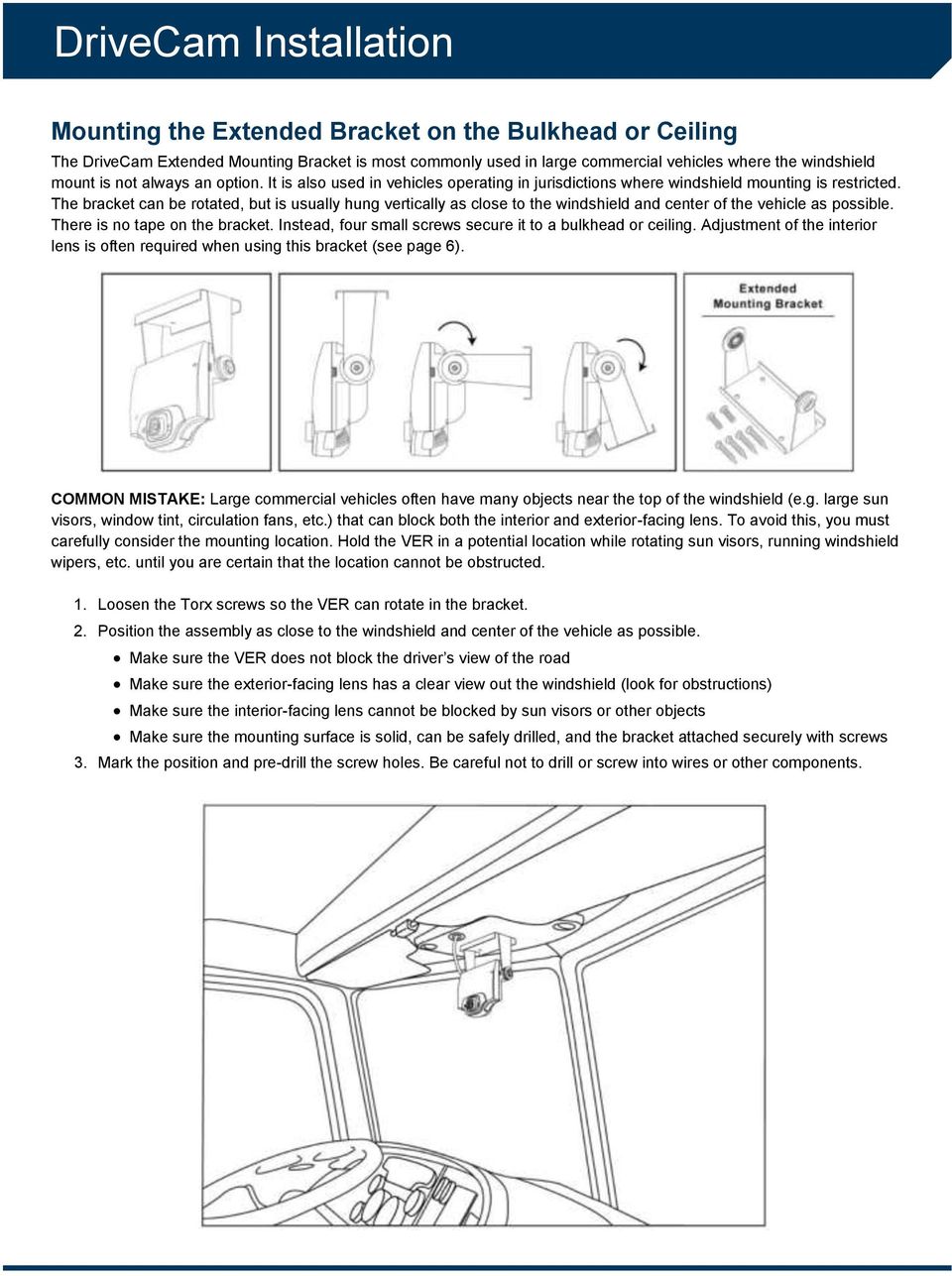
4 Mounting the Extended Bracket on the Bulkhead or Ceiling The DriveCam Extended Mounting Bracket is most commonly used in large commercial vehicles where the windshield mount is not always an option. It is also used in vehicles operating in jurisdictions where windshield mounting is restricted. The bracket can be rotated, but is usually hung vertically as close to the windshield and center of the vehicle as possible. There is no tape on the bracket. Instead, four small screws secure it to a bulkhead or ceiling. Adjustment of the interior lens is often required when using this bracket (see page 6). COMMON MISTAKE: Large commercial vehicles often have many objects near the top of the windshield (e.g. large sun visors, window tint, circulation fans, etc.) that can block both the interior and exterior-facing lens. To avoid this, you must carefully consider the mounting location. Hold the VER in a potential location while rotating sun visors, running windshield wipers, etc. until you are certain that the location cannot be obstructed. 1. Loosen the Torx screws so the VER can rotate in the bracket. 2. Position the assembly as close to the windshield and center of the vehicle as possible. Make sure the VER does not block the driver s view of the road Make sure the exterior-facing lens has a clear view out the windshield (look for obstructions) Make sure the interior-facing lens cannot be blocked by sun visors or other objects Make sure the mounting surface is solid, can be safely drilled, and the bracket attached securely with screws 3. Mark the position and pre-drill the screw holes. Be careful not to drill or screw into wires or other components.
5 Using the RAM-Mount Bracket The RAM-mount bracket is ball and socket mounting system that can be mounted practically anywhere in the vehicle. It can be attached to the windshield, hung vertically from the bulkhead or ceiling, positioned upright on the dashboard or angled from a side pillar. By loosening the two Torx screws on the bracket, it can pivot and rotate to practically any angle. It can be attached to the vehicle windshield or other flat, smooth surface with high-strength tape (provided) or epoxy (not provided) or attached to any other surface with screws (not provided). This bracket provides the widest variety of mounting locations. Center Dashboard Advantages: Considerations: Minimal or no impact on the driver s view of the road in large vehicles. Can be attached to the dashboard with adhesive tape in most vehicles; no need to drill or screw into the dashboard. May impact the driver s view of the road in smaller vehicles (sedans, small trucks, etc.). May impact the driver s use of the manual trigger buttons on the bottom of the VER; a Remote Pushbutton may be installed to give the driver easier access to manually triggered events. Roof or Bulkhead Advantages: Considerations: Minimal or no impact on the driver s view of the road. Easy access to the manual trigger buttons. Screws into the roof/ceiling or bulkhead may be required. May not be practical in vehicles with fabric headliners; the roof/ceiling or bulkhead type will determine if screws or adhesive is required. Corner Mounting This includes the lower right or left windshield placement Advantages: Considerations: On left side mount, the internal view of the driver is not severely impacted. Lower right and left windshield corners have exceptions for mounting in the state of CA. Some of the right side views (both interior and exterior) are impacted by this placement. Right side mounts put the manual trigger buttons out of reach of the driver and may require a Remote Pushbutton. The side mount option has different impacts depending on what side of the on which the VER is mounted.

6 Bracket Specifications & Installation 1. Use the Torx wrench (provided) to loosen both Torx adjustment screws on the side of the bracket until the balls can pivot freely in the sockets and the two halves of the casing can be rotated. 2. Screw the bracket s VER attachment screw into either the left or right side of the VER. 3. Position the assembly (bracket and VER) in various locations within the vehicle to determine the ideal placement. Keep in mind where and how the base of the bracket will be attached (tape, epoxy or screws). 4. When you ve found the best location, mark the position of the base with a pen or pencil. 5. Remove the bracket base by loosening the Torx screw enough that the ball can be pulled from the lower socket. 6. Attach the base securely to the vehicle: Attachment with High-Strength Tape (provided) or High-Strength Epoxy (not provided): High-strength tape works well on glass or other smooth, flat surfaces. However, it may not adhere firmly to vinyl, plastic or curved surfaces. In these cases, you may want to use a high-strength epoxy (quick-set) or screws to attach the bracket to the surface. Be aware that this will damage the surface where the bracket is mounted. a. IMPORTANT: Clean the bottom of the bracket base with an alcohol wipe to remove any residue. b. Peel the backing from one side of the double-sided tape. c. Press the tape firmly to the bottom of the bracket s base. d. Peel the backing from the other side of the tape. e. Press the bracket s base firmly onto the position marked in step 4. Attachment with Screws (not provided): a. Hold the bracket s base on the position marked in step 4. b. Line up the screw holes so that at least three screws can hold firmly into the mounting surface. c. Mark the screw holes with a pen or pencil then pre-drill the holes. d. Screw the base firmly onto the mounting surface. 7. Reconnect the bracket to the base from step Pivot and/or rotate the bracket so that the VER is in the ideal position. 9. Hold the assembly while you tighten both Torx screws on the bracket. Make sure the assembly is secured firmly and cannot be moved.

7 Additional Information DriveCam Program Technical Support is available 24 hours / 7 days at (866) For international assistance please call (858) Or, questions to [email protected] Technical Support Information is also available online at DriveCam Installation Guides are available online at DriveCam Parts Ordering is available online at Removing a Bracket from the Vehicle Windshield Use the following procedures to remove a mounting bracket that has been attached with high-strength tape. You ll need the Torx wrench that was shipped with your first order to remove the VER from the bracket and a 3M Tape Removal Tool (or a thin putty knife) to remove the bracket from the windshield or panel. These items can be ordered from Lytx. CAUTION: Do not try to pull or pry the bracket off the windshield. It will destroy the bracket and may break the windshield. Removing the VER from the Mounting Bracket: 1. Remove the left Torx screw completely. 2. GENTLY pull down on the left side of the unit (try not to trigger the unit) and unplug the power cable. 3. Remove the right Torx screw completely then remove the VER from the bracket. Removing the Mounting Bracket from the Windshield: 1. Use the 3M Tape Removal Tool or a broad, very thin putty knife. 2. Apply a small amount of lubricant (e.g. WD-40) to both sides of the blade. 3. Slide the blade between the bracket and the window and gently rock the blade back and forth while pushing forward until the bracket is completely removed. Adjusting the Interior-Facing Lens The interior-facing lens on the DC3/DC3P VER can be rotated up to 15 degrees in all directions. This allows you to point the lens to focus on different areas of the vehicle interior. This is not typically required when the VER is mounted on the windshield, near the center, at about eye level. In this position, the VERs wide-angle lens will usually capture the optimum internal view. However, if the VER is mounted off to one side or up higher than eye level, the interior lens may need to be re-adjusted. 1. Use the small end of the Torx wrench to loosen the interior lens adjustment screw. 2. Adjust the interior lens to the desired angle. 3. Tighten the interior lens adjustment screw securely so that the lens cannot be moved. San Diego, California, USA +1 (858) At Lytx (formerly DriveCam, Inc.), we harness the power of data to change human behavior and help good companies become even better. Our flagship product, DriveCam powered by Lytx, is a leading solution for driver safety in the industries we serve, and our RAIR Compliance Services helps DOT-regulated fleets comply with safety regulations, complementing the DriveCam program. Our solutions protect drivers from more than 950 commercial and government fleet clients worldwide who drive more than 20 billion miles annually. Our clients realize significant ROI by lowering operating and insurance costs, while achieving greater efficiency and compliance. Most of all, we strive to help save lives on our roads and in our communities, every day. Lytx is privately held and headquartered in San Diego. For more information, visit Lytx; DriveCam powered by Lytx; Lytx Engine; Lytx Insights; Sense, Predict, Prevent; Delivering Insights. Driving Results; and RAIR are trademarks of Lytx, Inc. DriveCam and DriveCam Online are registered trademarks of Lytx, Inc. 0214_ Lytx, Inc. All rights reserved.

Installation of Rear View Camera in a 1995 Roadtrek 190 Popular
 Installation Instructions: 1995 Roadtrek Rear View Camera Page 1 Installation of Rear View Camera in a 1995 Roadtrek 190 Popular Introduction. In the fall of 2010 we investigated rear view cameras for
BODY-12, Door Handle - Removal, Installation, and Adjustment
 Introduction BODY-12, Door Handle - Removal, Installation, and Adjustment There are many different procedures floating around describing how to replace the door handles on a 944 and every one of them will
INSTALL/REMOVAL INSTRUCTIONS: WINDOW REGULATOR
 REMOVAL/INSTALL OF WINDOW REGULATOR (741-306) Honda Accord 2003 07 General Tech Tips: Use painter s tape rather than duct tape to secure window. It will not damage paint or leave sticky residue. A plastic
FRONT WINDSHIELD SEAL INSTALLATION
 FRONT WINDSHIELD SEAL INSTALLATION Tech Article From Newsletter 16.1-1st Quarter of 2010 Replacing your Front Windshield Seal ISN T AS HARD AS YOU MAY THINK! Recently, we retooled our front window seal
Post Mount Light Installation*
 Post Mount Light Installation* *For the general installation of most Post Mount Spotlights, many vehicles may need slight modifications to these instructions. You will need the following tools: High torque
TOYOTA Tundra 2007 - BACK-UP CAMERA SYSTEM Preparation
 Preparation Part Number(s): PT233-34070, PT923-35070-11, PT923-35070-43 NOTE: Part number of this accessory may not be the same as part number shown. Back Up Monitor Kit Contents PT923-35070-11 / PT923-35070-43
INSTALL/REMOVAL INSTRUCTIONS: WINDOW LIFT MOTOR
 REMOVAL/INSTALL OF WINDOW LIFT MOTOR (742-273) Ford Expedition 1997 2002, Lincoln Navigator 1998 2002, Ford F-150 Super Crew Cab 2001 General Tech Tips: Use painter s tape rather than duct tape to secure
Front Panel Board Cable Replacement Instructions
 apple Mac Pro Front Panel Board Cable Replacement Instructions First Steps 1 Shut down computer. Note: Follow these instructions carefully. Failure to do so could damage your equipment and void its warranty.
5 Mechanisms and accessories
 5 Mechanisms and accessories 51A SIDE OPENING ELEMENT MECHANISMS 52A NON-SIDE OPENING ELEMENT MECHANISMS 54A WINDOWS 55A EXTERIOR PROTECTION 56A EXTERIOR EQUIPMENT 57A INTERIOR EQUIPMENT X79 NOVEMBER 2009
TABLE OF CONTENTS. I. TROUBLESHOOTING... 2 - Section 1.01: Common Problems/Solutions... 2
 BAL Accu-Slide System I. Table of Contents TABLE OF CONTENTS I. TROUBLESHOOTING... 2 - Section 1.01: Common Problems/Solutions... 2 II. GETTING STARTED... 5 - Section 2.01: Tools You Will Need... 5 - Section
STEADYfast Stabilizer Installation Notes Fifth Wheel and Travel Trailers 11/23/13
 STEADYfast Stabilizer Installation Notes Fifth Wheel and Travel Trailers 11/23/13 (See Supplemental Instructions for trailers with heavy duty round footplates and/or Power Leveling Systems) PHONE SUPPORT
Wall Mount Installation and Use
 Wall Mount Installation and Use 1. Introduction The Wall Mount works the same way for all Touchfire cases - the one or two row magnet strip on the back of the case is magnetically attracted to the Wall
Networkfleet 3500 Product Line Installation Guide
 Networkfleet 3500 Product Line Installation Guide Light/Medium Duty (L3500) Heavy Duty (H3500) Universal (U3500) www.networkcar.com/fleet Customer Care: (866) 227-7323 [email protected] Table
INSTALLATION INSTRUCTIONS
 Rear Vision System Tailgate Handle Camera Mirror Display 2004-2014 Ford F-150 and 2008-2015 Ford Super Duty (Kit part numbers 9002-9521) Kit Contents: Mirror Tailgate Handle with camera and harness Interior
OWNER S MANUAL Table Tennis Table Patent Pending
 OWNER S MANUAL Table Tennis Table Patent Pending Be sure to write your model number and serial number here for future reference. You can find these numbers printed on the bottom of the table. MODEL # T8179
Volkswagen Jetta, Golf, GTI 1999, 2000 Brake System 46 Brakes - Mechanical Components (Page GR-46)
 46 Brakes - Mechanical Components (Page GR-46) Front brakes Brake pads, removing and installing Brake pads, removing and installing FN 3 brake caliper, servicing FS III brake caliper, servicing Rear wheel
Written By: Walter Galan
 ipad 2 GSM Front Panel Replacement Replace the front panel in your ipad 2 GSM. Written By: Walter Galan INTRODUCTION Note: this is a complete guide for replacing a plain front panel. If you have a Front
Convertible Top Hydraulic Cylinder Removal Manual for W124 E-Class Convertibles 1993-1995 Models 300CE (1993) and E320 (1994-1995)
 Convertible Top Hydraulic Cylinder Removal Manual for W124 E-Class Convertibles 1993-1995 Models 300CE (1993) and E320 (1994-1995) Written by Samit Ghosh with picture material from vexed of benzworld.org
SEQUEL ASSEMBLY INSTRUCTIONS. 6003 Compact Desk [email protected]
 BIUSA.COM [email protected] Component List Sequel is engineered for easy assembly. Carefully follow this procedure to prevent any damage. A - 4mm Hex Wrench B - 1/4-20 x 12 mm Flat Head Machine
Power Window/Power Lock Installation. To begin with you will need all the parts listed below:
 Power Window/Power Lock Installation To begin with you will need all the parts listed below: From Donor Fiero: Fiero power window regulators Power window motors (Generic GM type part) -motors are riveted
FRONT BUMPER INSTALLATION INSTRUCTIONS 2007-2011 DODGE / MERCEDES SPRINTER
 Aluminess Products Inc 9402 Wheatlands Ct. #A Santee, CA 92071 619-449-9930 FRONT BUMPER INSTALLATION INSTRUCTIONS 2007-2011 DODGE / MERCEDES SPRINTER Please read before beginning Stainless steel hardware
Installation instructions, accessories - Handsfree for cellular phone, system B, entry level
 XC90 Section Group Weight(Kg/Pounds) Year Month 3 39 0.5/1.1 2006 07 XC90 2003, XC90 2004 IMG-249663 Page 1 of 18 Required tools A0000162 A0000163 IMG-239664 M0000232 IMG-253123 IMG-252223 Page 2 of 18
Installing the Video Input and TV Tuner Cards in a Compact Computer or a Dual PCI-Slot Tower Computer
 Installing the Video Input and TV Tuner Cards in a Compact Computer or a Dual PCI-Slot Tower Computer This booklet describes how to install the video input and TV tuner cards in a compact Macintosh computer
UPGRADING AND SERVICING GUIDE
 UPGRADING AND SERVICING GUIDE HPTouchSmart 610 PC Computer features may vary by model. Removing and Replacing a CD/DVD Drive...2 Removing the CD/DVD Drive... 2 Installing a New CD/DVD Drive... 5 Removing
VW Jetta, Golf, New Beetle 1.9L TDi Unichip PnP Installation Instructions
 VW Jetta, Golf, New Beetle 1.9L TDi Unichip PnP Installation Instructions and Warranty Information Tools Required 10mm combination wrench, 13mm Socket (Jetta/Golf only), 3/8-inch or ¼-Inch drive ratchet,
Basic Spring Motor Roller Shades
 Comprehensive Roller Shade Installation Guide Basic Spring Motor Roller Shades ATTENTION!!! READ CAREFULLY! This shade has a reliable long-lasting Spring Motor. The Spring Motor must have proper tension
Rating when used as a weight carrying hitch without spring bars:
 BOLT-TOGETHER WEIGHT DISTRIBUTING HITCH SYSTEM Rating when used as a weight distributing hitch with spring bars: Part Number 48051 4805 48053 48054 Max Tongue Weight 550 Ibs. 750 Ibs. 1000 Ibs. 1400 lbs.
CETAC Z-Drive Assembly
 CETAC Z-Drive Assembly Replacement Guide Manual Part Number 610144 Rev 1, 2012 CETAC Technologies, Printed in USA Overview This guide describes the necessary steps to replace the Z-drive assembly on your
Service Guide. Gateway M275
 Service Guide Gateway M275 Contents Replacing Gateway M275 Components.................................... 1 Identifying the convertible tablet PC model...................................... 2 Identifying
Arctic Leash Instruction Manual Alaskan Products Company LLC.
 Retractable Cord Reel for Engine Block Heaters Arctic Leash Instruction Manual Alaskan Products Company LLC. INSTALLATION INSTRUCTIONS This instruction manual is a reference guide for installing and operating
INSTALL/REMOVAL INSTRUCTIONS: WINDOW REGULATOR
 REMOVAL/INSTALL OF WINDOW REGULATOR (741-644) Cadillac Escalade, Chevrolet Suburban, Chevrolet Tahoe, GMC Yukon, Chevrolet Silverado, GMC Sierra 2000 05 General Tech Tips: Use painter s tape rather than
Installation Instructions Avalanche XUV Cap IMPORTANT! IMPORTANT!
 Installation Instructions Avalanche XUV Cap IMPORTANT! Read all instructions carefully before commencing any work. Always wear safety equipment. Some installation steps will require two or more installers.
GENUINE PARTS INSTALLATION INSTRUCTIONS
 GENUINE PARTS INSTALLATION INSTRUCTIONS 1. DESCRIPTION: Auto-Dimming Mirror Kit with Compass and HomeLink 2. APPLICATION: Titan 3. PART NUMBER: 999L1 WS000 4. KIT CONTENTS: Item Qty Description Service
Windshield Wiper System
 Windshield Wiper System Page 1 / 17 92-1 Windshield Wiper System General information Caution! When disconnecting and reconnecting battery terminals, observe all applicable Notes and torque specifications,
Written By: Walter Galan
 ipad 2 GSM Rear Camera Replacement Replace the rear camera in your ipad 2 GSM. Written By: Walter Galan INTRODUCTION Use this guide to replace a broken rear camera. TOOLS: ifixit Opening Picks set of 6
GENUINE PARTS INSTALLATION INSTRUCTIONS
 GENUINE PARTS INSTALLATION INSTRUCTIONS DESCRIPTION: Illuminated Kick Plate APPLICATION: Rogue (2011) PART NUMBER: 999G6 GX010 KIT CONTENTS: Item A B C G H QTY 1 1 1 D 1 E 1 F 3 15 6 Description Kick Plate,
Changing the C6 Front DRL/Turn signal bulb DIY.
 Changing the C6 Front DRL/Turn signal bulb DIY. The Corvette C6 DRL/Turn signal bulb will eventually need to be changed. With the DRL bulbs on most of the time the bulb gets hot and over several hundred
QWALL 4 ACRYLIC SHOWER WALL INSTALLATION INSTRUCTIONS
 QWALL 4 ACRYLIC SHOWER WALL INSTALLATION INSTRUCTIONS IMPORTANT DreamLine TM reserves the right to alter, modify or redesign products at any time without prior notice. For the latest up-to-date technical
GPS AutoSteer System Installation Manual
 GPS AutoSteer System Installation Manual Supported Vehicles John Deere Sprayers 4720 4630 4730 4830 AutoTrac Ready PN: 602-0227-01-A LEGAL DISCLAIMER Note: Read and follow ALL instructions in this manual
Written By: Walter Galan
 ipad 2 GSM LCD Replacement Replace the LCD in your ipad 2 GSM. Written By: Walter Galan INTRODUCTION Use this guide to replace a broken LCD. TOOLS: iopener (1) Phillips #00 Screwdriver (1) Plastic Opening
Heavy Glass Frameless Shower Door With Return Panel
 202 Anderson Ave., elvue, KS 66407 Phone: 800-669-9867 Fax: 800-393-6699 www.onyxcollection.com Heavy Glass Frameless Shower Door With Return Panel Full Showers with Return ench Seat with Return FRLSDRPL-0116
Windshield Wiper System
 Volkswagen Golf 5 - Windshield Wiper System Volkswagen Technical Site: http://volkswagen.msk.ru http://vwts.info Page 1 / 15 92-1 Windshield Wiper System General information The windshield wiper system
CorkSport Mazda 3 LED Light Kit 2014+ Mazda 3
 CorkSport Mazda 3 LED Light Kit 2014+ Mazda 3 Thank you for purchasing the CorkSport 2014 Mazda 3 LED Light Kit. CorkSport's LED light kit replaces bulbs for the rear dome light, vanity visor lights, front
KEYPAD LOCK RETROFIT KIT
 KEYPAD LOCK RETROFIT KIT INSTRUCTIONS FOR ASSEMBLY IMPORTANT READ & SAVE THESE INSTRUCTIONS Tools Required for Assembly 5/32 hex (Allen) wrench #2 Phillips screwdriver Isopropyl alcohol or alcohol wipes
C5 Sound Deadening & Insulation Kit Interior Removal & Installation Instructions
 C5 Sound Deadening & Insulation Kit Interior Removal & Installation Instructions Ok, let's start with taking the radio bezel dash area off first. Here is what the OEM radio looks like... First you flip
Processor Cage Fans, Front and Rear Replacement Instructions
 apple Mac Pro Processor Cage Fans, Front and Rear Replacement Instructions First Steps 1 Shut down computer. Note: Follow these instructions carefully. Failure to do so could damage your equipment and
Panel Track Installation Guide
 Panel Track Installation Guide We make it easy! BTG 493361 EN_0510 Before starting Your new Blinds To Go panel track is custom made to your specifications from the finest materials available. To ensure
Installation Instructions
 Installation Instructions Page 1 of 16 January 2008 Equipment Parts, Trailer Hitch Ver 3.0 Accessory Development SUBJECT TRAILER HITCH KIT (US Only) - P/N 71 60 0 413 359 MODEL X5 (E70): Select Vehicle
INSTALLATION INSTRUCTIONS for Bifold Doors (JII103)
 Thank you for selecting JELD-WEN products. Attached are JELD-WEN s recommended installation instructions for premium composite, hollow and solid core molded Bifold Doors. Bifolds are designed for fast
5800 Temperature Sensor Cable Assembly
 5800 Temperature Sensor Cable Assembly Removal and Replacement Instruction Sheet #60-4702-070 Revision D, January 14, 2013 Overview The 5800 has two refrigeration temperature sensors, one attached to the
INSTALLATION INSTRUCTIONS
 INSTALLATION INSTRUCTIONS Accessory Application Publications No. AII23628 2003 PILOT Issue Date MAY 2002 PARTS LIST Security System Kit (sold separately): P/N 08E51-S84-100 2 Remote controls Attachment
Balance Shoe and Balance Replacement
 and Replacement for E-Series Double-Hung and Single-Hung Windows Thank you for choosing Andersen. For questions call 1-888-888-7020. For more information and/or guides visit www.eaglewindow.com Please
Andersen Electric Window Opener for Andersen Awning and Roof Windows
 W A Electric Window Opener Electric Window Opener for Awning and Roof Windows Congratulations! You have just purchased one of the many fine products. For ease of installation and continued enjoyment of
DETACHABLE WINDSHIELD AND DOCKING HARDWARE KIT
 -J00 REV. 00-- DETACHABLE WINDSHIELD AND DOCKING HARDWARE KIT GENERAL Kit Number -A, 0-, -, 0-, -, - 0, -0 Models These kits fit and later FXST, FXSTB, FXSTC, and and later FXDWG Harley-Davidson model
UPLIFT Height Adjustable Standing Desk (T-Frame) DIRECTIONS FOR ASSEMBLY AND USE - - ALSO - - Watch our assembly video
 UPLIFT Height Adjustable Standing Desk (T-Frame) DIRECTIONS FOR ASSEMBLY AND USE - - ALSO - - Watch our assembly video http://bit.ly/9ywwh! CAUTION MAKE SURE NO OBSTACLES ARE IN THE DESK S PATH AND ALL
Written By: Walter Galan
 Installing iphone 4S Display Assembly Written By: Walter Galan TOOLS: Phillips 00 Screwdriver (1) Plastic Opening Tools (1) PARTS: iphone 4S Display Assembly (1) iphone 4 and 4S Screen Protector (1) Small
430 Power/Electronics Replacement
 Replacing the main board WARNING Before proceeding, turn off the main power switch and unplug the power cord. Caution Make sure you are properly grounded with an ESD strap before continuing. The main printed
SB-C-CTS/10TW3 SKU# 94552 2008 & Up Cadillac CTS/CTS-V
 INSTALLATION GUIDE for the SB-C-CTS/10TW3 SKU# 94552 2008 & Up Cadillac CTS/CTS-V If you choose to perform the installation yourself, it is absolutely vital that the Stealthbox be properly mounted to the
Written By: Sam Lionheart
 iphone 5s Battery Replacement Replace the battery in your iphone 5s. Written By: Sam Lionheart INTRODUCTION Use this guide to bring life back to your iphone 5s with a new battery. Removing the battery
Installation Instructions
 Installation Instructions For Use with PXPV230, PXPV265, PXPD230, and PXPD265 models Attention! - Please read these instructions completely before attempting installation. Always unplug the power supply
Retrofit Instructions Installing a Sport Heated Steering Wheel - Leather, Multifunction BMW X5, E53, 2001 2006
 Retrofit Instructions Installing a Sport Heated Steering Wheel - Leather, Multifunction BMW X5, E53, 2001 2006 Disclaimer: This set of instructions is simply a guide on how I installed my own heated steering
UB1 AIR CONDITIONING UNIT INSTALLATION INSTRUCTIONS
 UB1 AIR CONDITIONING UNIT INSTALLATION INSTRUCTIONS INSTALLATION INSTRUCTIONS: Carefully read these instructions before installing your new air-conditioner. AUSTRALIAN AUTOMOTIVE AIR AL00500054E 1 Table
Replacing Faceplate Ribbon Cable on Kenwood KDC-715S (these instructions MAY apply to similar Kenwood motorized faceplate units.)
 Replacing Faceplate Ribbon Cable on Kenwood KDC-715S (these instructions MAY apply to similar Kenwood motorized faceplate units.) Warning: I am not an electronics expert but have done my share of electrical
INSTALLATION INSTRUCTIONS
 INSTALLATION INSTRUCTIONS Accessory Application Publications No. ACCORD All 30209 2-AND 4-DOOR SYSTEM (VP, LX, SE) Issue Date AUG 2005 PARTS LIST Security System Attachment: P/N 08E55-SDA-100A Unit panel
Build Your Own Solar Car Teach build learn renewable Energy! Page 1 of 1
 Solar Car Teach build learn renewable Energy! Page 1 of 1 Background Not only is the sun a source of heat and light, it s a source of electricity too! Solar cells, also called photovoltaic cells, are used
INSTALLATION INSTRUCTIONS
 INSTALLATION INSTRUCTIONS Accessory Application Publications No. XM RADIO SYSTEM 2003 ACCORD 4 DOOR AII 24378 Issue Date MARCH 2003 The XM Radio will not fit in a vehicle equipped with a rear entertainment
FL ADJUSTABLE RIDER BACKREST MOUNTING HARDWARE KIT
 -J070 REV. 0-0-0 FL ADJUSTABLE RIDER BACKREST MOUNTING HARDWARE KIT GENERAL Kit Number 9-09A Models For model fitment information, see the P&A Retail Catalog or the Parts and Accessories section of www.harley-davidson.com
CP2 Buried Cable Pedestal Initial & Rehab Installation Instructions
 Printing 3 March 2008 CP2 Buried Cable Pedestal Initial & Rehab Installation Instructions This instruction is intended for CP2 cable pedestal installations and replacements. The following tools will be
Elo Touch Solutions Wall-mounting Kit for the 5501L IDS Touchmonitors
 Installation Manual Elo Touch Solutions Wall-mounting Kit for the 5501L IDS Touchmonitors SW602206 Rev B Table of Contents Chapter 1: Safety Warning... 3 Chapter 2: Kit Contents... 4 Included in Kit...
www.odometergears.com Ford Ranger and Mazda Pickup Odometer Worm Gear Replacement
 www.odometergears.com Ford Ranger and Mazda Pickup Odometer Worm Gear Replacement http://www.therangerstation.com/magazine/fall2008/odometer_worm_gear.htm ****************************************************************************************************
INSTALL/REMOVAL INSTRUCTIONS: WINDOW REGULATOR
 REMOVAL/INSTALL OF WINDOW REGULATOR (748-547) Chrysler 300 2005 10, Dodge Magnum 2005 08, Dodge Charger 2006 09 General Tech Tips: Use painter s tape rather than duct tape to secure window. It will not
Step 1. Item 6. Item 1
 Voltage Regulators QD3/T350 Motor Replacement Kit Kit Number 57A63675100B Service Information S225-50-35 Contents General..................................... 1 Parts Supplied...............................
Express5800/120Ed. Rack Mount Kit Installation Procedures PN: 455-01607-001
 Express5800/120Ed Rack Mount Kit Installation Procedures PN: 455-01607-001 Proprietary Notice and Liability Disclaimer The information disclosed in this document, including all designs and related materials,
Wireless Alarm System. Panic Button. User s Manual. Choice ALERT. Control all sensors, accessories and remote transmitters from one location
 Wireless Alarm System Panic Button User s Manual Choice ALERT Control all sensors, accessories and remote transmitters from one location Table of Contents Important Safeguards 4 Introduction 5 Activating
Roll-Up Door Maintenance Guide
 R Roll-Up Door Maintenance Guide Cable Replacement on Two Spring Type Balancer Page 1 Panel Replacement - Removable Roller Cover Type Bottom Panel Page 1 Panel Replacement - Removable Roller Cover Type
4.3-inch Back-Up Camera
 TM 4.-inch Back-Up Camera Model No.: PKC0BU4 Owner s Manual and Warranty Information Read these instructions completely before using this product. Retain this Owner s Manual for future reference. INTRODUCTION
HP Laser Jet 4200/4240/4250/4300/4350 Swing Plate
 HP Laser Jet 4200/4240/4250/4300/4350 Swing Plate 1 Swing Plate Assembly-RM1-0043 1 Swing Plate Kit-5851-2766 (RM1-0043 plus RM1-1091 gear) CAUTION: Fuser may be hot. Turn off printer, unplug it and allow
Compaq Presario Desktop Products. Upgrading and Servicing Guide
 Compaq Presario Desktop Products Upgrading and Servicing Guide The information in this document is subject to change without notice. Hewlett-Packard Company makes no warranty of any kind with regard to
Table of Contents. www.hunterfan.com. What to Expect with. Preparation. Tools Needed. Wiring. Hanging the Fan. Blades. Motor Housing.
 www.hunterfan.com Table of Contents What to Expect with Your Installation 30 inches Hanging the Fan Wiring 8 Maintenance, Operation & Cleaning Light Kit 13??? 14 1 9 Troubleshooting 11 5 Blades Motor Housing
RECON Ford 5-Piece LED Cab Roof Light Installation
 RECON Ford 5-Piece LED Cab Roof Light Installation PART # s: 264143AM (amber lens), 264143BK (smoked lens), & 264143CL (clear lens) Email: [email protected] Website: http://www.reconaccessories.com
POLEMOUNT FIELD FIX ASSEMBLY INSTRUCTIONS
 POLEMOUNT FIELD FIX ASSEMBLY INSTRUCTIONS Polemount Field Fix Support If you have any questions or incur any problems installing or using the new Polemount, please use Miovision s Support System by emailing
WARNING! REQUIRED TOOLS & SUPPLIES: HIGH VOLTAGE
 INSTRUCTIONS Product: GEM Electric Motorcars Models: All Subject: Instructions for installing Stereo Accessory Estimated Completion Time:.75 Hours Parts: See Page # 7 REQUIRED TOOLS & SUPPLIES: (1) 3/8
Replacement Instructions. Warning: During this procedure, keep small parts away from children.
 apple ibook G4 Memory Card Replacement Instructions Follow the instructions in this sheet carefully. Failure to follow these instructions could damage your equipment and void its warranty. Note: Written
DIY CABINET REFACING INSTALLATION GUIDE
 DIY CABINET REFACING INSTALLATION GUIDE CABINET REFACING INSTALLATION Are you ready to reface your outdated cabinets? This guide will show you how to install your new Facelifters Cabinet Refacing Products
ReadyLift (Part# 66-5075) Strut Extension, Installation Instructions Toyota Tundra New Body Style 2WD & 4WD
 SAFETY WARNING: recommends this system be installed by a professional technician. In addition to these instructions, professional knowledge of disassembly/ reassembly procedures and post installation checks
MODEL T10023 ACCESSORY KIT #1 FOR T10010/T10097 WET GRINDER
 MODEL T0023 ACCESSORY KIT # FOR T000/T0097 WET GRINDER INSTRUCTION SHEET Introduction The Model T0023 Accessory Kit # for the Model T000/T0097 Wet Grinder includes fixtures for sharpening small knives,
SCHWINTEK IN-WALL SLIDEOUT TROUBLESHOOTING AND COMPONENT REPLACEMENT
 Troubleshooting Error Codes During operation when an error occurs, the board will use the LEDs to indicate where the problem exists. For motor specific faults, the green LED will blink once for Motor 1,
CHECK WITH LOCAL CODE AUTHORITIES ABOUT INSTALLATION REQUIREMENTS FOR THIS PRODUCT INSTALLATION INSTRUCTIONS
 R A-DEC INC. 2601 CRESTVIEW DRIVE POST OFFICE BOX 111 NEWBERG, OREGON 97132 USA TELEPHONE (503)-538-9471 DESIGNATED E.U. REPRESENTATIVE: A-DEC DENTAL U.K., LTD. AUSTIN HOUSE 11 LIBERTY WAY ATTLEBOROUGH
Beadboard Wall Bookcase
 Beadboard Wall Bookcase Note: The maximum load for each shelf is 30lbs.This hanging system is meant for drywall/wood stud mounting only. If walls are concrete, brick or plaster, please consult your local
Installation instruction do88 Intercooler for Volvo S40 / V50 / C30
 Installation instruction do88 Intercooler for Volvo S40 / V50 / C30 This instruction shows how to replace the OEM intercooler with our performance intercooler. 2. 3. 1. 4. 5. Part number: ICM-170 6. At
Installing Shutters using Fasteners
 Installing Shutters using Fasteners Electric drill, ¼" drill bit, 3 8" drill bit, hammer, and shutter fasteners. (¼" carbide drill bit is required for stucco, hardboard, fiber cement, brick or masonry.)
TeamPoS 2000 Installation Instructions Upgrade to M Motherboard
 TeamPoS 2000 Installation Instructions Upgrade to M Motherboard Fujitsu Transaction Solutions Inc. endeavors to ensure that the information in this document is correct and fairly stated but does not accept
Front brakes (FN- 3), servicing
 j a t Front brakes (FN- 3), servicing 46-1 Front brakes, servicing Note: Install complete repair kit. After replacing brake pads and before moving vehicle, depress brake pedal several times firmly to properly
CONFER ABOVE GROUND CURVE STEP / ABOVE GROUND CURVE STEP SYSTEM ASSEMBLY AND INSTALLATION MANUAL
 SAVE THESE INSTRUCTIONS DEALER/INSTALLER: GIVE TO HOMEOWNER CONFER ABOVE GROUND CURVE STEP / ABOVE GROUND CURVE STEP SYSTEM ASSEMBLY AND INSTALLATION MANUAL Model CCX-AG Note: 40 lbs. of sand required!
IN00419 (rev A) Aqua 6 Glide Quadrant and Off-set Quadrant Enclosure
 IN00419 (rev A) Aqua 6 Glide Quadrant and Off-set Quadrant Enclosure Instruction suitable for both Quadrant & Off-set Quadrant variations. Instruction suitable for both Right and Left Hand fixing variations
INSTALLATION INSTRUCTIONS
 INSTALLATION INSTRUCTIONS Accessory Application Publications No. All 24393 ACCORD (DX, LX) SYSTEM 2-AND 4-DOOR Issue Date AUG 2002 PARTS LIST Security System Attachment (LX): P/N 08E55-SDA-100A Unit panel
Mercedes W208 (CLK 99 03) Case Cover Lock/Rear Bow Lock Replacement and Hydraulic Fluid Flush
 Mercedes W208 (CLK 99 03) Case Cover Lock/Rear Bow Lock Replacement and Hydraulic Fluid Flush Because a convertible is only cool if the top goes down. Version 1.0 August 9, 2012 by joetwa Table of Contents
2002 2005 Mini Cooper S Grille Install Instructions
 2002 2005 Mini Cooper S Grille Install Instructions Lower Front Grille BEFORE AFTER Package Contents 1 perforated grille (Stiletto, RAZR, or Monster) 6 Zip Tie Mounting Pads 1 is for the temp. sensor 5