
Oracle Rdb A Comparison of SQL Dialects for Oracle and Oracle Rdb
|
|
|
- Ashlynn Hawkins
- 9 years ago
- Views:
Transcription
1 Oracle Rdb A Comparison of SQL Dialects for Oracle and Oracle Rdb Release: 1.0 Part No. A

2 Oracle Rdb A Comparison of SQL Dialects for Oracle and Oracle Rdb Part No. A Release 1.0 Copyright 1997 Oracle Corporation. All rights reserved. This software contains proprietary information of Oracle Corporation; it is provided under a license agreement containing restrictions on use and disclosure and is also protected by copyright law. Reverse engineering of the software is prohibited. The information contained in this document is subject to change without notice. If you find any problems in the documentation, please report them to us in writing. Oracle Corporation does not warrant that this document is error free. Restricted Rights Legend Programs delivered subject to the DOD FAR Supplement are commercial computer software and use, duplication and disclosure of the programs shall be subject to the licensing restrictions set forth in the applicable Oracle license agreement. Otherwise, programs delivered subject to the Federal Acquisition Regulations are restricted computer software and use, duplication and disclosure of the programs shall be subject to the restrictions in FAR , Rights in Data-General, including Alternate III (June 1987). Oracle Corporation, 500 Oracle Parkway, Redwood City, CA The programs are not intended for use in any nuclear, aviation, mass transit, medical, or other inherently dangerous applications. It shall be the licensee s responsibility to take all appropriate fail-safe, back up, redundancy and other measures to ensure the safe use of such applications if the programs are used for such purposes, and Oracle disclaims liability for any damages caused by such use of the programs. Oracle, SQL*Net, and SQL*Plus are registered trademarks of Oracle Corporation, Redwood City, California., Oracle Call Interface, Oracle Rdb, Oracle RMU, Server, DBAPack, Developer/2000, PL/SQL, Pro*C, and are trademarks of Oracle Corporation, Redwood City, California. All other company or product names are used for identification purposes only and may be trademarks of their respective owners.
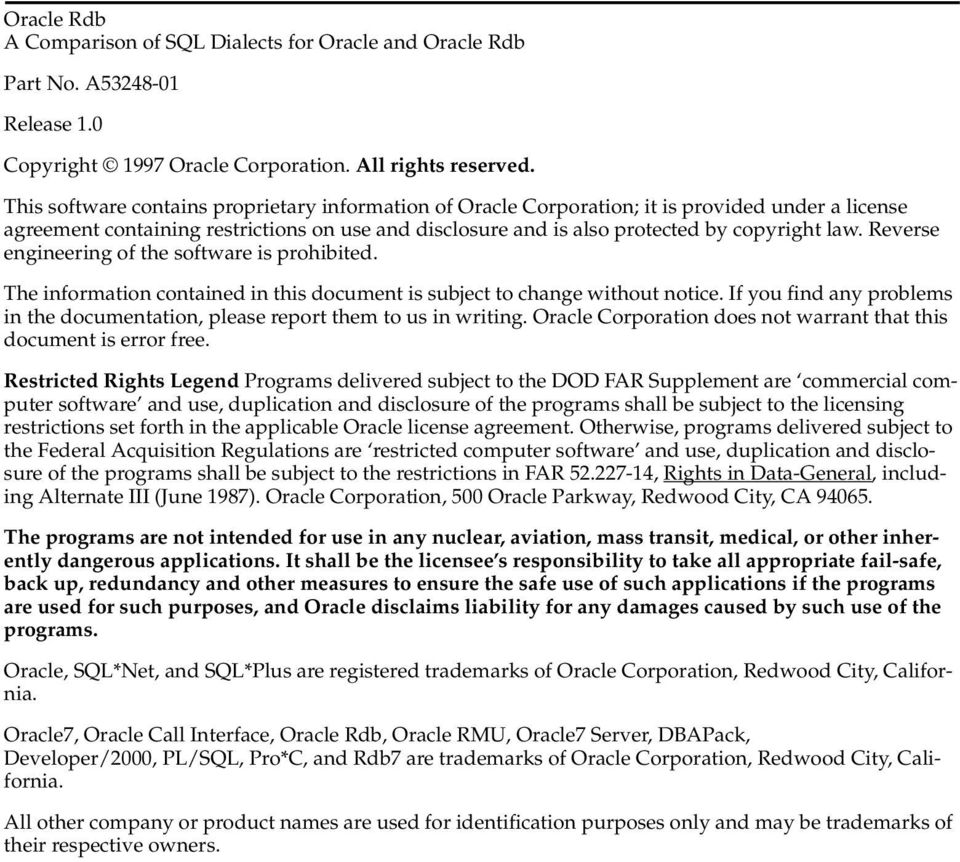
3 Contents Send Us Your Comments... vii Preface... ix 1 Data Model 1.1 Schemas Tables Constraints Domains Sequences Synonyms Triggers Views Database Link Nonschema Objects Distributed Data Namespaces Data Types Character Data Types Numeric Data Types Date-Time Data Types Bit String Data Types Long Data Types Other Data Types Multinational Character Sets Data Operations 2.1 Operators Concatenation iii
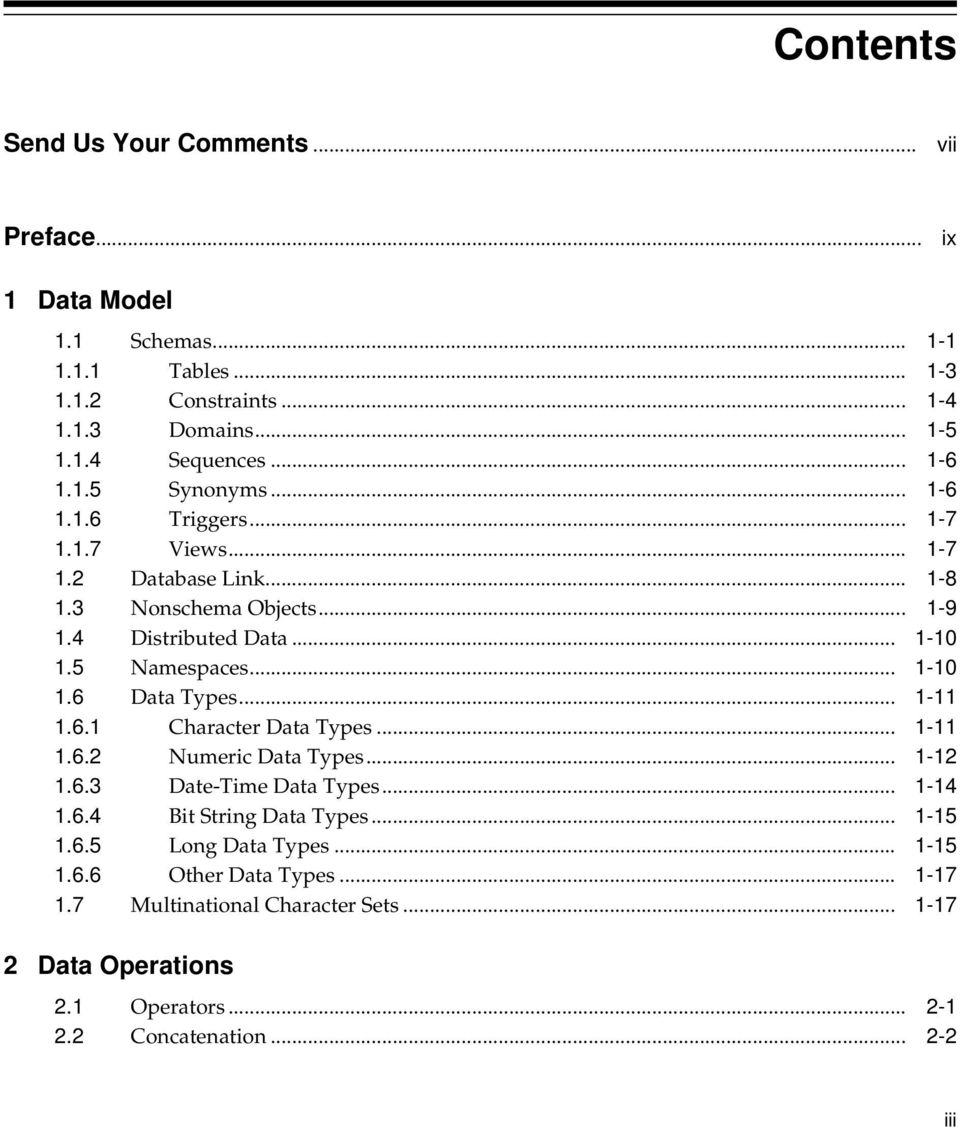
4 2.3 Conversions Lexical Issues 3.1 SQL Names Qualified Names Qualified Table Names Qualified Column Names Comment Indicators Not equals Operators Outer Join (+) Reserved Words and Keywords Query Specifications 4.1 Pseudocolumns Row Addresses (ROWID and DBKEY) Number of Rows Returned (ROWNUM) Values of Sequences (NEXTVAL and CURRVAL) Recursive Unions (LEVEL) Functions DECODE Function CASE Expression Predicates Select Expression SELECT List Derived Tables Scope of Table Names ORDER BY Clause GROUP BY Clause Data Manipulation 5.1 Database Attachments Subqueries (UPDATE, DELETE and INSERT) UPDATE Statement Set Single or Multiple Columns (SET Clause) iv
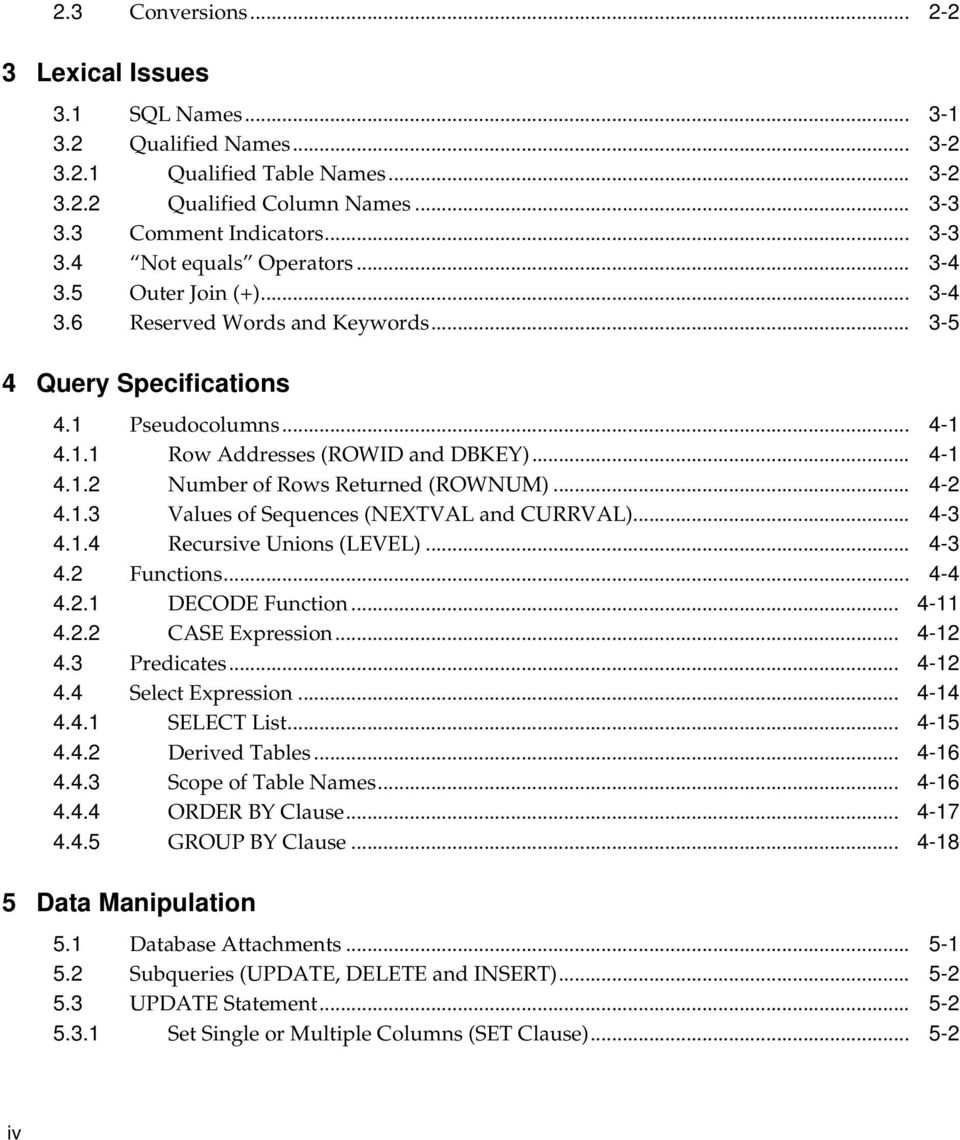
5 5.3.2 Mix Values and Subqueries (UPDATE and INSERT Statements) Bulk Updates on a Column with a UNIQUE Constraint Correlated Subqueries DELETE [FROM] Table Data Definition Statements 6.1 Data Definition Language and Transactions Data Type Usage (CREATE TABLE, CREATE DOMAIN, Declare Variable) Data Type Synonyms Data Type Defaults Table Creation (CREATE TABLE... AS SELECT) Table Alterations (ALTER TABLE) Constraints Referential Delete (ON DELETE CASCADE) Unique Indexes (UNIQUE or PRIMARY KEY) Constraint Exceptions (EXCEPTIONS INTO) Disabled and Enabled Constraints (DISABLE, ENABLE) Deferred Constraints CREATE OR REPLACE Clause for Compiled Objects CREATE VIEW Statement Add Comments to Describe Metadata or Data Definitions (COMMENT ON) Delete Definitions (DROP... CASCADE) Object Recompilation (ALTER FUNCTION, ALTER TRIGGER, ALTER VIEW, ALTER PROCEDURE) Rename Database Objects (RENAME) A Reserved Words Index v
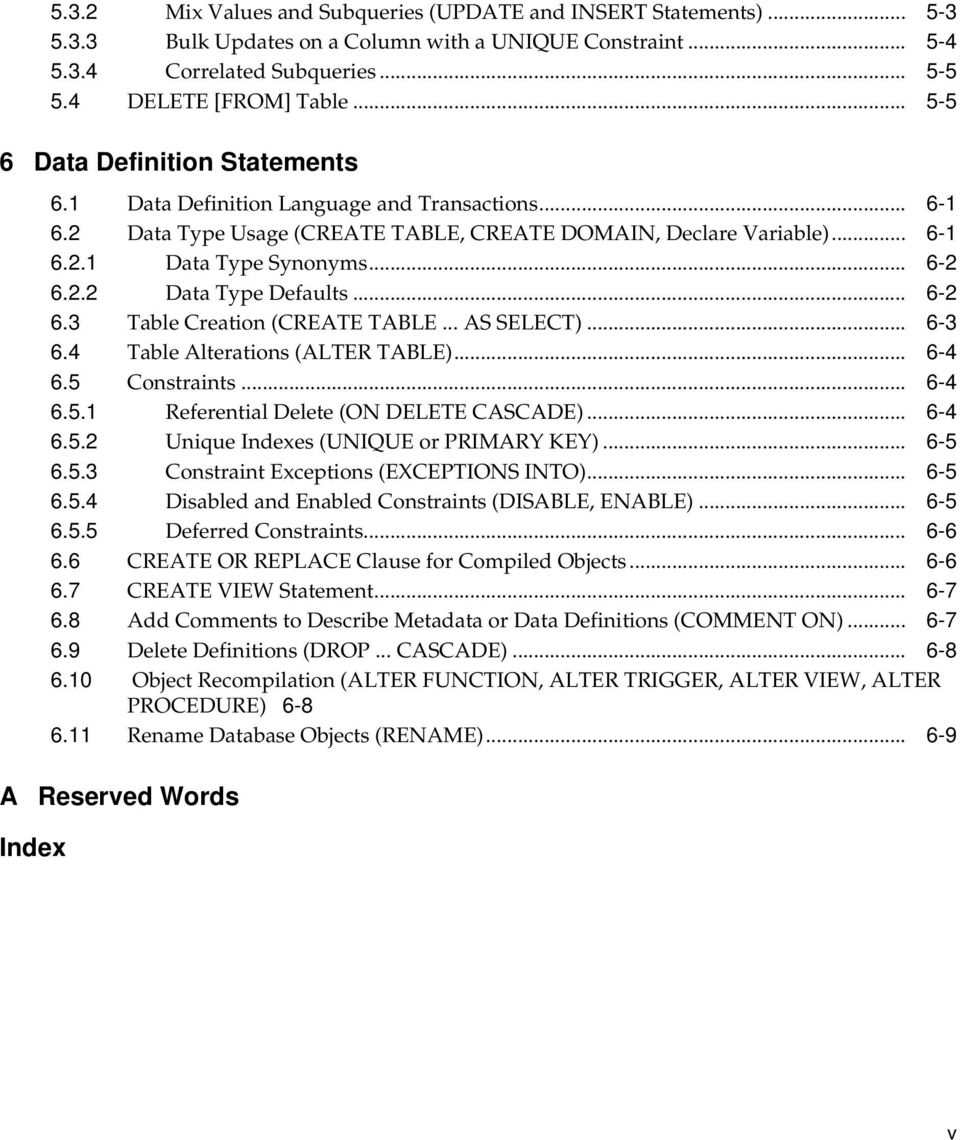
6 Tables 1 1 and SQL Character Data Types and Numeric Data Types and SQL Date-Time Data Types and SQL Bit String Data Types and SQL Long Data Types Other and Data Types Functions Supported by and Data Type Defaults for and SQL A 1 Comparison of Reserved Words and Semantics... A-1 vi

7 Send Us Your Comments Oracle Rdb, A Comparison of SQL Dialects for Oracle and Oracle Rdb, Release 1.0 Part No. A Oracle Corporation welcomes your comments and suggestions on the quality and usefulness of this publication. Your input is an important part of the information used for revision. You can send comments to us in the following ways electronic mail - [email protected] FAX Attn: Oracle Rdb Documentation postal service Oracle Corporation Oracle Rdb Documentation One Oracle Drive Nashua, NH USA. Please provide the following information: Name: Title Company: Department: Electronic Mail Address: Postal Address: Phone Number: Book Title: Version Number: vii

8 If you like, you can use the following questionnaire to give us feedback. Edit the online release notes file, extract a copy of this questionnaire, and send it to us. Did you find any errors? Is the information clearly presented? Do you need more information? If so, where? Are the examples correct? Do you need more examples? What features did you like most about this manual? If you find any errors or have any other suggestions for improvement, please indicate the chapter, section, and page number (if available). viii

9 Preface Purpose of This Manual This manual compares the SQL dialects of and, and describes the known differences between them. The principal purpose of this manual is to help users of the SQL*Net for Rdb software understand differences in the and SQL dialects. In general, SQL*Net for Rdb recognizes most SQL statements and translates them transparently. However, in some cases, SQL*Net for Rdb cannot exactly interpret some SQL statements. This manual identifies where differences in the SQL dialects might occur, and the discussions in this manual provide additional information to help you achieve the desired functions. The topics in this manual are restricted to the logical schema and operations performed on the physical data. This manual does not describe: Physical storage, physical representation, or optimization issues Compiler, precompiler, and interactive SQL features PL/SQL Data dictionary features Features common to and ix

10 Intended Audience This manual is intended primarily for experienced SQL programmers who need to access data in an database using SQL*Net for Rdb. The topics in this manual can also be helpful to the following: programmers writing applications to access data on databases programmers using client tools (such as Developer/2000 or PL/SQL) to access data on databases Programmers developing applications to run in both environments To use this manual most effectively, you need to be familiar with database management concepts and terminology, SQL statements, or SQL statements. The and SQL dialects both comply with the ANSI/ISO SQL Entry- Level Standard, commonly referred to as SQL92. SQL has one fixed dialect. The dialect for SQL is Oracle Level1. Structure This manual contains six chapters, an appendix, and an index: Chapter 1 Chapter 2 Chapter 3 Chapter 4 Chapter 5 Chapter 6 Appendix A Compares data models for and. Compares data operations for and. Compares lexical operations for and. Compares query specifications for and. Compares data manipulation for and. Compares data definition statements for and. Provides a comparison of reserved words and semantics for the and SQL dialects. Organization Each chapter and the appendix identify common elements and differences in SQL semantics between the and environments. To make it easier for you to pick out information relevant to you, each section is divided into the following discussions: x
11 Describes characteristics and functions that are common to both the and SQL dialects. In general, because both and support the SQL92 standard, these basic features will not be described except to the extent of differences in interpretation. These features are described in both and documentation, as well as in the ANSI/ISO SQL standard. Describes characteristics specific to SQL. Describes characteristics specific to SQL. Related Documents Wherever possible, when a topic is specific to one SQL dialect, the discussion will provide additional information to help you achieve the same or similar function from the other SQL dialect. The following list provides the names of documents to which you can refer for supplemental information: For information about the product and using the SQL statements, refer to the following documentation: Oracle Release Notes Oracle SQL Reference Manual For information about the SQL commands and functions: Server SQL Language Reference Manual PL/SQL User s Guide and Reference SQL*Plus User s Guide and Reference For information about using the Oracle Call Interface (OCI) to build Oracle Developer/2000 applications that access data in databases, refer to the Programmer s Guide to the Oracle Call Interface. For more information about using the SQL*Net for Rdb software to develop transparent connections between SQL*Net clients and Oracle Rdb databases, refer to the Oracle Rdb Guide to SQL*Net for Rdb. For information about building Oracle Developer/2000 applications that access data in databases, refer to: The supplemental documentation addendum of the Oracle Developer/2000 Forms Advanced Techniques Manual xi

12 The Oracle Developer/2000 Installation and User s Guide (Release 1.3) For more information regarding the SQL standard, refer to ANSI X , ISO 9075:1992. Conventions In this manual, OpenVMS refers to both the OpenVMS Alpha and the Open- VMS VAX operating systems. refers to Oracle Rdb Release 7.0 for OpenVMS refers to Oracle Release 7.0 (and higher) software. The Oracle Rdb SQL server is referred to as SQL. The SQL server is referred to as SQL. Oracle Developer/2000 is referred to as Developer/2000. Oracle PL/SQL is referred to as PL/SQL. The SQL standard, ANSI X , ISO 9075:1992, is referred to as either the ANSI/ISO SQL standard or SQL92. The SQL standard, ANSI X , ISO 9074:1989, is referred to as SQL89. The next proposed SQL standard, which is still under development, is referred to as SQL3. In examples, an implied carriage return occurs at the end of each line, unless otherwise noted. You must press the Return key at the end of a line of input. The following conventions are also used in this manual: Convention... Meaning Vertical ellipsis points in an example mean that information not directly related to the example has been omitted.... Horizontal ellipsis points in statements or commands mean that parts of the statement or command not directly related to the example have been omitted. boldface text Boldface type in text indicates a term defined in the text. xii

13 italic text Italic text emphasizes important information, information supplied by the user, titles of manuals, and variables. Variables include information that varies in system messages (Internal error number), in command lines (/PRODUCER=name), and in command parameters in text (where device-name is the current disk name). [ ] Brackets enclose optional clauses from which you can choose one or none. $ The dollar sign represents the DIGITAL Command Language prompt for OpenVMS systems and the Bourne shell prompt for Digital UNIX systems. [nn] nn, enclosed in brackets, indicates an optional product version number for a file name in a multiversion environment. If you omit the version number, you are using the standard version environment. xiii
![current disk name). [ ] Brackets enclose optional clauses from which you can choose one or none.](/docs-images/44/20853799/images/page_13.jpg "$ The dollar sign represents the DIGITAL Command Language prompt for OpenVMS systems and the Bourne shell prompt for Digital UNIX systems.")
14 xiv

15 1 Data Model 1.1 Schemas This chapter identifies common elements and differences for SQL data models. The following objects serve similar functions in both and SQL schemas: Tables, including: Columns Constraints Indexes Pseudocolumns Views Stored modules, containing stored routines External routines In addition, the following objects in Oracle Procedural Option or Distributed Option have counterparts in : Database triggers Data Model 1-1
16 Schemas Standalone procedures and stored functions Note: Even though procedures, triggers, and functions have counterparts in, uses these objects in a PL/SQL procedure, which is considerably different from SQL. The contents of procedural objects must be written separately for and. SQL*Net for Rdb does not support multischema databases. All databases are multischema databases in which each user has ownership of a schema that is named with the user s user name. Therefore, with SQL, you can create a schema with only the user name or the user ID. However, even though each schema is individually owned and named for a user, SQL allows users to access objects in other users' schemas by means of synonyms or explicit reference. The following are objects in SQL schemas: Sequences Synonyms Database links The following objects are available with the Procedural Option or Distributed Option: Packages Snapshots Snapshot logs In contrast to databases, you can create a multischema database with SQL, which allows many schemas per user whose names are not restricted. However, SQL is usually used in single-schema mode. The following objects are specific to SQL schemas: Domains Collating sequences 1-2 A Comparison of SQL Dialects for Oracle and Oracle Rdb

17 Schemas Tables, including computed columns Temporary tables Outlines The following objects are specific to Distributed Option for Rdb: Transfers Schedules Tables In general, tables are similar in both the and SQL dialects. The use of the CREATE AS SELECT statement is specific to. When using the CREATE AS SELECT statement, you can populate an table at the time it is created. This is similar to the combination of a CREATE TABLE table-name statement and an INSERT INTO table-name SELECT... FROM statement. The CREATE AS SELECT statement is executed as an atomic unit. Therefore, if the insertion of data fails, the table is not created. The following objects are specific to SQL: Computed columns SQL supports read-only columns that contain derived data, specified by the COMPUTED BY clause. The COMPUTED BY clause can contain subqueries referring to other tables in the same database. Temporary tables SQL supports both local and global temporary tables, as defined in the ANSI/ISO SQL standard. In particular, the data held in these tables is specific to the session and the table may have been created in such a way that committing a transaction deletes its data. Data Model 1-3
18 Schemas Constraints The following constraints are comparable in both the and SQL dialects: CHECK FOREIGN KEY NOT NULL PRIMARY KEY UNIQUE NULL (default behavior) The following are SQL constraints: FOREIGN KEY... CASCADE SQL supports deleting the referencing rows when the referenced row is deleted, as in FOREIGN KEY foreign-key REFERENCES other-table (pk) ON DELETE CASCADE. NULL SQL allows you to explicitly specify the NULL keyword when creating a table. For example, CREATE TABLE... column-name data-type NULL. This is not a constraint, but merely denies the NULL attribute, so that the column can contain null values. This is the default behavior for both and databases. If your goal is to have common code, avoid using the NULL keyword. SQL does not support creating constraints with the DEFERRABLE or DEFERRED attributes. In SQL, constraints cannot contain subqueries. All constraints are IMMEDIATELY DEFERRED. However, SQL does allow altering a table to disable its constraints. The following are SQL constraints: 1-4 A Comparison of SQL Dialects for Oracle and Oracle Rdb

19 Schemas CHECK (referring outside the table) A CHECK constraint can contain a subquery referring to other tables (or the same table). CHECK (nondeterministic) SQL allows constraints to reference system functions that return different results, such as USER and CURRENT_TIME. Constraints are verified only for rows that have been altered. Otherwise, such tables might not succeed in storing any data. This behavior is different from the ANSI/ISO SQL standard. DEFERRABLE, DEFERRED SQL supports creating constraints with DERERRABLE, NOT DEFERRA- BLE, or DEFERRED attributes. UNIQUE A UNIQUE table constraint created prior to Oracle Rdb Release 7.0 allows a maximum of one instance of a NULL value. This behavior is different from the ANSI/ISO SQL standard. The behavior of constraints created in Oracle Rdb Release 7.0 and higher, has been changed to comply with the ANSI/ISO SQL standard. NULL With SQL, you cannot explicitly specify the NULL keyword as you can with SQL. However, the default behavior is the same as with SQL. If your goal is to have common code, avoid using the NULL keyword when using SQL Domains None. SQL does not support domains. SQL supports domain definitions according to the specifications in the ANSI/ISO SQL standard. Data Model 1-5

20 Schemas Sequences Synonyms None. The CREATE SEQUENCE statement is specific to databases. A sequence is a database object from which you can generate integers, typically for primary key values. SQL does not support sequences. None. The Synonyms object and usage is specific to databases. SQL allows public and private synonyms to be defined for schema objects that are either local to a schema or shared by all users. Such an object can be a: Table or view Sequence Stored routine Snapshot Synonym Synonyms provide a convenient way to use an object in a different schema. The object does not have to exist until the synonym is used. SQL does not support synonyms, however, creating a view usually meets the same needs. 1-6 A Comparison of SQL Dialects for Oracle and Oracle Rdb

21 Schemas Triggers The triggers supported by SQL and SQL are similar. Only the triggered action itself differs. SQL allows a more general PL/SQL block. SQL requires the procedural option in order to define triggers. In addition, you can enable and disable SQL triggers. In SQL, the allowed triggered actions include INSERT, UPDATE, DELETE, and ERROR Views Views are similar in both the and SQL dialects. The following items are specific to SQL views: SQL allows you to create a view with a FORCE option (CREATE FORCE statement). That is, even if the underlying tables do not exist, creates the view and marks it as invalid. The view definition is checked and compiled the next time it is referenced. A view in SQL that selects the ROWID of one of its underlying tables must rename the column either by naming all its columns or by assigning a correlation name to the column in the select list. A view in SQL that selects the ROWNUM of one of its underlying tables must rename the column either by naming all its columns or by assigning a correlation name to the column in the select list. SQL may allow some joined expressions to be updated. For example, expressions that can be updated might include those that have a unique index on a join column. (See the SQL documentation for more information.) Data Model 1-7
22 Database Link The following items are specific to SQL views: A view in SQL can use either the ROWID or DBKEY of its underlying tables, with no restrictions. A view in SQL does not permit selecting or using ROWNUM in a view definition. For example: CREATE VIEW vr AS SELECT * FROM t1 WHERE ROWNUM < 2 SQL-F-NOTROWNUM ROWNUM is not available in this context. The LIMIT TO clause is similar in function to ROWNUM and can appear in a view definition. SQL does not allow updating of a joined expression. Even with the dialect set to SQL92, SQL does not check ANSI update rules. For instance, you can update a view that: Uses a SELECT DISTINCT clause CREATE VIEW vd AS SELECT DISTINCT x,y FROM tab; 1.2 Database Link An UPDATE vd statement updates an arbitrarily selected set of rows of tab chosen to represent the values of the pair (x, y). Selects the same column more than once: None. CREATE VIEW vm (a, b, c) AS SELECT x, y, x FROM tab; UPDATE vm SET a = 1, b = 2, c = 3) The UPDATE vm statement performs the first update, setting column x to 1, and later writes over that setting x to 3. This behavior is consistent with that of the SQL dialect. With SQL, you can use a database link as an object in your local database to access data in other Oracle or non-oracle databases. For example: 1-8 A Comparison of SQL Dialects for Oracle and Oracle Rdb
23 Nonschema Objects CREATE PUBLIC DATABASE LINK personnel_west CONNECT TO smith IDENTIFIED BY xxyyzz USING... ; SELECT * FROM employees UNION SELECT * FROM employees@personnel_west The CREATE DATABASE LINK statement provides read-only access to foreign data. To gain read/write access, use Oracle Distributed Option. While SQL does not have a database link object, you can create a database alias. SQL statements cannot access data from more than one database within the same statement. However, Distributed Option for Rdb provides SQL with capabilities that are similar to the SQL database link. The Distributed Option for Rdb product imports all metadata into one virtual database using the CREATE LINK statement. However, SQL*Net for Rdb does not support Distributed Option for Rdb. 1.3 Nonschema Objects None. The following list shows SQL objects in the database that are not contained in schemas: Profiles SQL supports the definition of profile objects that limit database resources. Roles The roles object defines a set of privileges that can be granted, as a whole, to users or to other roles. This is an SQL3 feature supported by SQL. Users A created user may be assigned a profile. SQL does not support nonschema objects. However, using interactive SQL, you can limit the resources used by queries with the SET QUERY statement. Data Model 1-9
24 Distributed Data 1.4 Distributed Data 1.5 Namespaces None. The capabilities (but not the implementation) of the Snapshot object and the Snapshot Log database object correspond to that of the Transfers object and the Schedules object that are available with the Replication Option for Rdb software. Distributed data cannot be managed by SQL*Net for Rdb. SQL (with Oracle Distributed Option): Keeps a snapshot copy of the data in a table in an SQL Snapshot database object and logs changes to the original table data in a Snapshot Log database object. Both the Snapshot and Snapshot Log database objects are specific to databases. The definition of the Snapshot includes the procedures needed to refresh the data. SQL (with Replication Option for Rdb): Transfer definitions specify which tables and views are to be replicated into which database and details on the method of transfer. Schedule definitions determine how often to replicate the data as specified in a transfer definition. See the Replication Option for Rdb documentation for more information. None A Comparison of SQL Dialects for Oracle and Oracle Rdb
25 Data Types The namespace of tables and views is shared with sequences, private synonyms, standalone procedures and functions, packages, and snapshots. 1.6 Data Types The namespace of tables and views is not shared with any other objects, although stored procedures and functions share a namespace with external procedures and functions. The following sections compare character, numeric, date-time, bit string, and long data types for the and SQL dialects. See Section 6.2 for more information on data type usage Character Data Types Table 1 1 shows the comparison between and character data types. Table 1 1 and SQL Character Data Types Description/Key CHAR (s) 0 < s <= 2000 See Note 1 that follows. VARCHAR2 (s) 0 < s <= 2000 See Note 3 that follows. VARCHAR (s) 0 < s <= 2000 See Note 4 that follows. Fixed-length character string n = number characters c = number bytes per character s = total number byte = n*c Varying-length character string. CHAR (n) 0 < s < See Notes 1 and 2 that follow. VARCHAR (n) 0 < s <= See Notes 1 and 2 that follow. Notes: 1. and SQL support several different character sets, including some multi-octet character sets. In SQL, the length given in the data type is the number of bytes needed to store the data. In SQL, the length given in the data type is the number of characters. The length of a character string, in number of characters, is Data Model 1-11
26 Data Types Numeric Data Types returned by the LENGTH function for SQL or the CHARACTER_LENGTH function for SQL. The number of bytes is returned by the LENGTHB function for SQL or the OCTET_LENGTH function for SQL. 2. These maximum lengths can be used for character parameters. But they cannot be realized for columns in a table because the maximum size of a stored row is 65,272 bytes, which includes the size of all included columns as well as some overhead. 3. When an element of type VARCHAR2 is compared with a character string, no extra blanks are added, but any original trailing blanks are preserved. SQL, following the ANSI/ISO SQL standard, ignores trailing blanks. Therefore, string and string are the same to SQL but different to SQL. This affects not only the direct comparisons (=, <, and >), but also the results of MAX, MIN, GROUP BY, ORDER BY, SELECT DISTINCT, UNION (DIS- TINCT), UNIQUE constraints, and equijoins. 4. The SQL data type, VARCHAR (s), is currently synonymous with the SQL data type VARCHAR (n). 5. SQL treats a zero-length string as the null value, behavior that is different from the ANSI/ISO SQL standard. SQL emulates this behavior in its Oracle Level1 dialect. Table 1 2 shows the comparison between and SQL numeric data types. Table 1 2 and Numeric Data Types Description/Key NUMBER (p,s) 1 <= p <= 38 decimal precision -84 <= s <= 127 Fixed-point, signed numbers: Decimal precision p = number of significant digits Scale s = number of digits to the right of decimal point Note: integers are a special case where s = 0. NUMERIC (p,s) DECIMAL (p,s) 1 <= p <= <= s <= 127 See Note 2 that follows A Comparison of SQL Dialects for Oracle and Oracle Rdb
27 Data Types Table 1 2 FLOAT (p) 0 <= p <= 126 NUMBER decimal precision 38 See Note 3 that follows. Notes: and Numeric Data Types Description/Key Fixed-point, signed numbers: Binary precision p, scale s Floating point, precision p 0 <= s <= 127 TINYINT (s) *binary* precision <= val <= 127 SMALLINT (s) *binary* precision <= val <= INTEGER (s) *binary* precision 32 2 **31 <= val <= 2**31-1 BIGINT (s) *binary* precision 64 2**63 <= val <= 2**63-1 FLOAT (p) 1 <= p <= 53 REAL 32-bit float, binary precision 24 DOUBLE PRECISION 64-bit float, binary precision SQL supports a negative scale. SQL does not support negative scale. 2. SQL converts DECIMAL and NUMERIC data types to SMALLINT, INTE- GER, BIGINT, or FLOAT data types according to whether p <= 4, 4 < p <= 9, 0 < p <= 18, or 18 < p. However, the data is constrained to have a value with decimal precision <= p. An informational message may be displayed about the change in format. If the number is converted to FLOAT, some precision may be lost and no informational message will be displayed. DECIMAL represents packed decimal; NUMERIC represents signed numeric. 3. SQL maps the ANSI/ISO SQL standard data type INTEGER to NUM- BER, which has decimal precision 38. However, if more significant digits are Data Model 1-13
28 Data Types Date-Time Data Types specified, no error is reported and accuracy may be lost. The actual precision retained is platform dependent. For example: Oracle_SQL> CREATE TABLE ti (x INTEGER); Oracle_SQL> INSERT INTO ti (x) VALUES ( ); /* 46 digits */ Oracle_SQL> SELECT * FROM ti; X E+45 Oracle_SQL> SELECT * FROM ti WHERE x > ; /* lower the last digit, expect 1 row back */ no rows selected Oracle_SQL> SELECT * FROM ti WHERE x = ; /* precision has been truncated to 40 */ X E The format in which a fixed-point number is presented, by SQL, to the user may appear to have lost precision. To fit the number into the assigned column width, if it has too many digits, SQL will represent it in floatingpoint notation, rounded to however many digits will fit within the assigned column width. The original precision is preserved. Table 1 3 shows the comparison between and SQL date-time data types. Table 1 3 and SQL Date-Time Data Types Description/Key DATE format is controlled by date-format Full date and time ( supports from year to fraction of second.) Date (year to day) Time, hour to fraction of second f = precision of fractional part Interval, year-month or day-time f = precision of fractional part DATE (See Note 1 that follows.) DATE VMS DATE ANSI TIMESTAMP (f) 0 <= f <= 2 TIME (f) 0 <= f <= 2 INTERVAL (f) f is valid only if seconds are included 1-14 A Comparison of SQL Dialects for Oracle and Oracle Rdb
29 Data Types Notes: Bit String Data Types 1. DATE, in SQL, will be ANSI or VMS according to the DEFAULT DATE FORMAT. The format used for data stored in a table is set by the DEFAULT DATE FORMAT value when the table was created. For the Oracle Level1 dialect, the default date format is DATE VMS. For the ANSI/ISO SQL standard, the default date format is DATE ANSI. The CAST operator can convert dates from one format to the other. 2. Valid dates in SQL range from 1 Jan 4712 BC to 31 Dec 4712 AD. Valid dates in SQL range from 1 Jan 1859 to 31 Dec Table 1 4 shows the comparison between and SQL bit string data types. Table Long Data Types and SQL Bit String Data Types Description/Key RAW (n) 1 <= n <= 255 Table 1 5 shows the comparison between and SQL long data types. Table 1 5 Variable-length bit string and SQL Long Data Types Description/Key LONG Maximum length of 2 gigabytes LONG RAW Maximum length of 2 gigabytes Variable-length character string Variable-length bit string No equivalent. Use VARCHAR (n). LIST OF BYTE VARYING (n) n = segment size 1 <= n <= No maximum size for data Notes: 1. The LIST OF BYTE VARYING data type (also known as segmented strings) stores the data in a list of segments. Such data cannot be manipulated by the Data Model 1-15
30 Data Types usual INSERT, SELECT, and UPDATE... SET statements, but is maintained by using list cursors. SQL*Net for Rdb allows inserts. 2. SQL permits, at most, one LONG or one LONG RAW column in an underlying table. 3. The value of a LONG column can be manipulated with the usual SELECT, INSERT, and UPDATE statements. 4. Both and SQL have many restrictions on LONG and segmented string data: The only valid predicate is IS [NOT] NULL. They cannot be indexed. The only constraint on them is NOT NULL. They cannot be passed to SQL functions. Stored functions cannot return them as a value. They cannot be compared, either explicitly or implicitly, using the ORDER BY, GROUP BY, or SELECT DISTINCT clauses. They cannot occur in expressions, except in a CASE expression for SQL. In addition, SQL has the following restrictions: 1 Literals cannot be inserted into a column defined with the LIST OF BYTE VARYING data type. A column defined with the LIST OF BYTE VARYING data type cannot be updated except with the NULL value, for example, UPDATE TABLE SET column-name = NULL. Segmented string data cannot be passed as parameters to stored or external routines. SQL has the following additional restriction: If an SQL statement refers to a LONG column, then these columns must be in the same database as all updated and locked tables. 1 SQL*Net for Rdb allows selecting columns defined with the LIST OF BYTE VARYING data type and allows inserting data using a parameter marker into columns defined with the LIST OF BYTE VARYING data type (features that are typically only available with list cursor syntax) A Comparison of SQL Dialects for Oracle and Oracle Rdb
31 Multinational Character Sets Other Data Types Table 1 6 shows the comparison between other miscellaneous and SQL data types. Table 1 6 Other and Data Types Description/Key MLSLABEL Binary format of a security label (used by Trusted Oracle) ROWID Key to a row in a database No equivalent external data type. Can use CHAR (n). Note: 1. SQL supports the DBKEY keyword for data selected in views and cursors. The value of DBKEY can be represented by CHAR (8*n), where n is the number of underlying tables from which the data is selected. 1.7 Multinational Character Sets None. When you create a database, you set (either implicitly or explicitly) the character set for all character data to be held in the database. This value cannot be changed. You can independently set the character set for all identifiers, column values, and for literals. The data types NCHAR and NCHAR VARYING refer to character data in the character set appropriate for the object (name, column, or literal). You can also specify a different character set by using the CHARACTER SET IS character-setname clause Data Model 1-17
32 Multinational Character Sets 1-18 A Comparison of SQL Dialects for Oracle and Oracle Rdb
33 2 Data Operations 2.1 Operators The following sections describe and SQL arithmetic and set operators. and SQL support the UNION and UNION ALL operators. The following list shows the order of precedence for arithmetic operations: 1. Unary +, - 2. *, / 3. Binary +, -, (concatenation) 4. <, <=, =, >=, >, <>,!=, ^=, = 5. NOT 6. AND 7. OR The order of operators is the same for both the and SQL dialects. When operators are at the same level, the precedence is from left to right. The SQL operators include INTERSECT and MINUS. These operators are all the same precedence and are evaluated from left to right. Note the following information about set operators: The MINUS operator is equivalent to the EXCEPT operator in the ANSI/ISO SQL standard. Data Operations 2-1
34 Concatenation SQL support for outer joins is different from the language in the ANSI/ ISO SQL standard. 2.2 Concatenation 2.3 Conversions Note the following information about set operators: The SQL set operators include JOIN (LEFT, RIGHT, FULL, INNER). SQL does not support the EXCEPT (MINUS) or INTERSECT set operators. Null values are treated as zero-length strings by the SQL dialect and by the SQL Oracle Level1 dialect. This behavior is different from the ANSI/ISO SQL standard. SQL allows you to concatenate numbers with numbers or with text, implicitly converting them to character data type first. SQL requires that you perform these functions explicitly using the CAST operator. Both and SQL convert data automatically between certain data types when storing and retrieving data from the database. SQL also performs automatic conversions when executing arithmetic expressions. 2-2 A Comparison of SQL Dialects for Oracle and Oracle Rdb
35 Conversions SQL does not automatically convert arithmetic expressions. You must use the CAST operator. However, the Oracle Level1 dialect automatically converts numbers to INTERVAL DAY when performing arithmetic operations with dates. Data Operations 2-3
36 Conversions 2-4 A Comparison of SQL Dialects for Oracle and Oracle Rdb
37 3 Lexical Issues 3.1 SQL Names This chapter compares and SQL statements with regard to lexical issues. The following sections provide general information about naming. None. SQL names follow these rules: Object names can include up to 30 characters. Database names are limited to 8 characters. Database links can have names with up to 128 characters. If the name is not enclosed in double quotation marks ( ): The name is case insensitive. The at sign (@) character splits the name into an object name and a link. The name must start with an alphabetic character. You can use the following non-alphanumeric characters only within a name: underscore (_) dollar sign ($) pound sign (#) Lexical Issues 3-1
38 Qualified Names SQL names follow these rules: Object names can include up to 31 characters. Database names must be valid file names as defined by the operating system. An alias name (corresponding to a link) is case sensitive on the Digital UNIX platform. 3.2 Qualified Names Qualified Table Names If the name is not enclosed in double quotation marks ( ): The name is case insensitive. The at sign (@) character splits the name into an object name and an alias name if there is a matching alias. The name must start with an alphabetic character. You can use the following non-alphanumeric characters only within a name along with symbols found in the Multinational Character Set: underscore (_) dollar sign ($) percent sign (%) backslash (\) The following sections describe how table names and column names are qualified by the and SQL dialects. Both and SQL support the handle construct to refer to a table in a database with an alias or a database handle. Spaces are allowed around the at sign (@) character. Spaces are not allowed around the at sign (@) character, so that the combination is treated as one identifier. 3-2 A Comparison of SQL Dialects for Oracle and Oracle Rdb
39 Comment Indicators For SQL, the form sets as a correlation name for the table Qualified Column Names None. If a column name uses the qualification, SQL reports an error. databases are multischema. However, qualifying a column name with the schema, if its table (in the FROM clause) has not been qualified, produces the following error: SELECT table.t1.x FROM t1; SELECT table.t1.x FROM t1 * ERROR at line 1: ORA-00904: invalid column name If a column name uses the qualification, SQL interprets it as a correlation name and an indicator parameter. If there are no spaces around the at sign (@) character, then SQL treats the whole column-name@handle as one name. 3.3 Comment Indicators The following list shows the forms of comment demarcations supported by the and SQL dialects: - - /*... */ Comment indicators allowed are listed in the subheading of this section. Lexical Issues 3-3
40 Not equals Operators supports the exclamation point (! ) as a comment indicator for the SQL interactive interface as well as those listed in the subheading of this section. 3.4 Not equals Operators 3.5 Outer Join (+) The following list shows the not equals operators supported by the and SQL dialects: <>!= ^= SQL also supports the following not equals operator: -= The not equals operators are listed under the subheading. Both and SQL support implicit joins. An example of achieving this is by listing more than one table in the FROM clause. The following items pertain to the outer join (+) option for : An outer join returns all rows that satisfy the join condition and those rows from one table for which no rows from the other satisfy the join condition. A table cannot have an outer join to more than one table in the same SELECT statement. For example: SELECT * FROM employees e, departments d WHERE e.dept_id = d.dept_id (+); /* left outer join */ 3-4 A Comparison of SQL Dialects for Oracle and Oracle Rdb
41 Reserved Words and Keywords SELECT * FROM employees e, departments d WHERE e.dept_id (+) = d.dept_id; /* right outer join */ SQL uses the syntax column-name(+) = expression to achieve an outer join, which differs from the ANSI/ISO SQL standard. In the expression, the plus sign indicates that if no match is found, a row of null values is used as a match. The following items pertain to the outer join option for : SQL supports full outer join, left outer join, and right outer join in compliance with the ANSI/ISO SQL standard outer join syntax. SQL also supports cross joins and natural joins in compliance with the ANSI/ISO SQL standard join syntax. In SQL, a full outer join must contain an equality comparison in the join condition. 3.6 Reserved Words and Keywords In SQL, you can disable or enable keyword checking as defined by the ANSI/ ISO SQL standard. If keyword checking is enabled, you cannot directly create or reference an object whose name is the same as a reserved word unless you use quotation marks ( ) around the object name or qualify the object name. (SQL*Net for Rdb automatically sets ANSI quoting.) For example: SELECT CAST FROM TYPE; ^ %SQL-F-LOOK_FOR syntax error, looking for (, found FROM instead SET ANSI QUOTING ON; SELECT CAST FROM TYPE; 0 rows returned. Appendix A contains a comprehensive table of reserved words and keywords. To enable keyword checking in SQL, use the SET KEYWORD RULES statement. For more information regarding the SET KEYWORD RULES statement, see the Oracle SQL Reference Manual. Lexical Issues 3-5
42 Reserved Words and Keywords When using SQL, you get a different set of reserved words from those in SQL. One major difference is that SQL allows you to use reserved words that are built-in functions to name an object. For example, you can use DECODE as an object name without the required quotation marks or qualification that SQL does. The following is a list of built-in function reserved words for : AVG CAST CHAR_LENGTH CHARACTER_LENGTH COALESCE CONCAT CONVERT COUNT DECODE EXTRACT LOWER MAX MIN NULLIF NVL OCTET_LENGTH POSITION SUBSTRING SUM TRANSLATE TRIM UPPER You can create an object using SQL using these built-in function reserved words. You are allowed to insert data into these objects or update these objects, however, you receive an informational message from SQL. You cannot, however, reference an object whose name is a built-in function reserved word unless you use ANSI quoting or qualify the object name. The previous list of reserved words, which can sometimes be used for creating objects, but not for referencing them, is referred to as partially reserved for SQL. 3-6 A Comparison of SQL Dialects for Oracle and Oracle Rdb
43 4 Query Specifications 4.1 Pseudocolumns This chapter compares and SQL pseudocolumns, built-in functions, functional operators, predicates, and select statements. The following sections provide information about specific aspects of pseudocolumns Row Addresses (ROWID and DBKEY) The SQL ROWID keyword is similar in format and function to the DBKEY and ROWID keywords for SQL. Each keyword returns a unique way of identifying a specific row of a table. Application programs can query the row identification pseudocolumn using the ROWID keyword to obtain a unique way of referring to a specific row. The ROWID keyword returns a value that is stored in a pseudocolumn of each underlying table that uniquely identifies each row. With SQL, the value of ROWID remains constant until the database is reorganized. The same value returned by the ROWID keyword may appear in different tables of a cluster. SQL does not support the ROWID keyword for queries whose rows are not a subset of rows in an underlying table. Thus, a view whose query contains SELECT DISTINCT clauses, GROUP BY clauses, or aggregate functions, or is selected from more than one table, will not have a ROWID pseudocolumn. Query Specifications 4-1
44 Pseudocolumns Application programs can query the database key or row identification pseudocolumn using the DBKEY or ROWID keywords to obtain a unique way of referring to a specific row. The ROWID keyword is a synonym to the DBKEY keyword. The ROWID and DBKEY keywords can refer to tables or views, but not to derived tables. SQL supports concatenating database key or row identification pseudocolumns for views whose query specifications select rows from joined tables. Their values may not persist between sessions, or even between transactions, depending on how the user attached to the database (DBKEY SCOPE IS [ATTACH TRANSAC- TION]) Number of Rows Returned (ROWNUM) The ROWNUM keyword is used to restrict the number of rows returned in a query. Consider the following information for the SQL ROWNUM keyword: You can use the ROWNUM keyword in a SELECT list. You can use the ROWNUM keyword in a subquery, rename the resulting pseudocolumn of values, and manipulate the pseudocolumn like any other column in the rest of the query. The ROWNUM keyword does not work with the ORDER BY clause. The ROWNUM keyword is applied first to limit the rows, then this random set is ordered. Consider the following information for the SQL ROWNUM keyword: You can use the ROWNUM keyword only in a WHERE clause. The ROWNUM keyword works with the ORDER BY clause; that is, the resulting rows in the pseudocolumn are ordered before the number is limited. The ROWNUM keyword is similar to the LIMIT TO n ROWS clause. 4-2 A Comparison of SQL Dialects for Oracle and Oracle Rdb
45 Pseudocolumns Values of Sequences (NEXTVAL and CURRVAL) None. With SQL, you can use the NEXTVAL and CURRVAL keywords when referring to values of sequences. The NEXTVAL keyword increments the sequence and returns the next value of the pseudocolumn. The CURRVAL keyword returns the current value of the sequence of the pseudocolumn. You can use the NEXTVAL and CURRVAL keywords only in the VALUES clause of an INSERT statement or in the SET clause of an UPDATE statement. Different users can use the same sequence simultaneously and each user receives different values for NEXTVAL. The NEXTVAL and CURRVAL keywords are reserved for use in a future version of the Oracle Rdb database product Recursive Unions (LEVEL) None. The LEVEL keyword is specific to SQL and returns values in a built-in pseudocolumn that is used in recursive unions. SQL does not support the LEVEL keyword. Query Specifications 4-3
46 Functions 4.2 Functions Table 4 1 contains a list of functions supported by the and SQL dialects. The asterisk ( * ) indicates that the function is installed with SYS$LIBRARY:SQL_FUNCTION[nn].SQL with Oracle. The plus sign ( + ) indicates that the function is installed with SQL*Net for Rdb. Table 4 1 Functions Supported by and Function Name Comments ABS Yes Yes * SQL returns the DOUBLE PRECISION data type. The SQL CASE expression can achieve the same results as the ABS function. ACOS Yes No ADD_MONTHS Yes Yes * SQL returns the DATE VMS data type. ASCII Yes Yes * SQL returns the INTEGER data type. ASIN Yes No ATAN Yes No ATAN2 Yes No ATAN2 (x,y) = ATAN (x/y). AVG Yes Yes CAST No Yes CEIL Yes Yes * Ceil (n) returns the smallest integer >= n. SQL returns the DOUBLE PRECISION data type. CHARACTER_LENGTH No Yes CHARACTER_LENGTH is similar to the SQL LENGTH function. CHARTOROWID Yes No CHR Yes Yes * Converts the ASCII representation to the character. SQL returns the VAR- CHAR(2000) data type. COALESCE No Yes Similar to the NVL function. CONCAT Yes Yes Returns char1 concatenated with char2. CONVERT Yes Yes COS Yes Yes * SQL returns the DOUBLE PRECISION data type. 4-4 A Comparison of SQL Dialects for Oracle and Oracle Rdb
47 Functions Table 4 1 Functions Supported by and (Cont.) Function Name Comments COSH Yes Yes * SQL returns the DOUBLE PRECISION data type. COUNT Yes Yes CURRENT_DATE No Yes CURRENT_TIME No Yes CURRENT_TIMESTAMP No Yes CURRENT_USER No Yes DECODE Yes Yes See Section for more information. DUMP Yes No EXP Yes Yes * e raised to the nth power (e**n). SQL returns the DOUBLE PRECISION data type. EXTRACT No Yes FLOOR Yes Yes * Largest integer <= n. SQL returns the DOUBLE PRECISION data type. GLB Yes No GREATEST Yes Yes SQL only supports two arguments and returns the DOUBLE PRECISION data type. GREATEST_LB Yes No HEXTORAW Yes Yes * SQL returns the VARCHAR(2000) data type. INITCAP Yes Yes * INITCAP (text) converts the first letter of each word to uppercase. SQL returns the VARCHAR(2000) data type. Query Specifications 4-5
48 Functions Table 4 1 Functions Supported by and (Cont.) Function Name Comments INSTR Yes Yes * In SQL, the INSTR character function (char-value, char-string [,n [,m]]) returns the position of the m th occurrence of charstring in char-value after the n th character. The default values of m and n are 1. Note the following: If char-value or char-string is NULL, the result is NULL. If char-string does not appear, the result is 0. If n < 0, the search is backwards from the end of char-value. INSTR is similar to the SQL POSI- TION character function. SQL returns the INTEGER data type. INSTRB Yes Yes * SQL returns the INTEGER data type. LAST_DAY Yes Yes * SQL returns the DATE VMS data type. LEAST Yes Yes SQL only supports two arguments and returns the DOUBLE PRECISION data type. LEAST_UB Yes No LENGTH Yes Yes * LENGTH is similar to the SQL CHARACTER_LENGTH function. SQL returns the INTEGER data type. LENGTHB Yes Yes * LENGTHB is similar to the SQL OCTET_LENGTH function. SQL returns the INTEGER data type. LN Yes Yes * Natural log (base e). SQL returns the DOUBLE PRECISION data type. LOG Yes Yes * LOG (x,y) = LOG (y) (base x). SQL returns the DOUBLE PRECISION data type. LOWER Yes Yes Returns char with all letters lowercase. LOWER is similar to the SQL NLS_LOWER function. 4-6 A Comparison of SQL Dialects for Oracle and Oracle Rdb
49 Functions Table 4 1 Functions Supported by and (Cont.) Function Name Comments LPAD Yes Yes * LPAD (txt1, n [,txt2]) left pads txt1 with txt2 to length n. SQL returns the VAR- CHAR(2000) data type. LTRIM Yes Yes * LTRIM (txt1 [,set]) removes characters in set from left of txt1. SQL returns the VAR- CHAR(2000) data type. LTRIM is similar to the SQL TRIM (LEADING...) function. LUB Yes No MAX Yes Yes MIN Yes Yes MOD Yes Yes * MOD (x,y) = (x - (FLOOR (ABS (x/y)) * ABS (y))) SIGN (x). SQL returns the DOU- BLE PRECISION data type. MONTHS_BETWEEN Yes Yes * SQL returns the DOUBLE PRECISION data type. NEW_TIME Yes Yes * SQL returns the DATE VMS data type. NEXT_DAY Yes Yes * SQL returns the DATE VMS data type. NLS_INITCAP Yes No NLS_INITCAP (txt1 [, nlsparams ]) national language set. NLS_LOWER Yes No Returns char with all letters in lowercase. NLS_LOWER is similar to the SQL LOWER function. NLS_SORT Yes Yes * NLS_UPPER Yes No Returns char with all letters in uppercase. NLS_UPPER is similar to the SQL UPPER function. NULLIF No Yes Can be simulated with the DECODE function. NVL Yes Yes NVL is similar to the SQL COALESCE expression. OCTET_LENGTH No Yes OCTET_LENGTH is similar to the SQL LENGTHB function. POSITION No Yes POSITION is similar to the SQL INSTR character function. Query Specifications 4-7
50 Functions Table 4 1 Functions Supported by and (Cont.) Function Name Comments POWER Yes Yes * POWER (x,y) = x**y. SQL returns the DOUBLE PRECISION data type. RAWTOHEX Yes Yes * SQL returns the VARCHAR(2000) data type. REPLACE Yes Yes * REPLACE (txt, search, [replacement] def = ). SQL returns the VAR- CHAR(2000) data type. ROUND Yes Yes * ROUND (n [,m] default 0) = n rounded to scale m. SQL returns the DOUBLE PRECISION data type. ROWIDTOCHAR Yes No RPAD Yes Yes * Returns char1, right-padded to length n with char2. SQL returns the VAR- CHAR(2000) data type. RTRIM Yes Yes * Returns char, with all the rightmost characters that appear in set removed. SQL returns the VARCHAR(2000) data type. RTRIM is similar to the SQL TRIM (TRAILING...) function. SESSION_USER No Yes SIGN Yes Yes * SIGN (x) = -1, 0, or 1. SQL returns the DOUBLE PRECISION data type. The SQL CASE expression can achieve the same results as the SIGN function. SIN Yes Yes * SQL returns the DOUBLE PRECISION data type. SINH Yes Yes * SQL returns the DOUBLE PRECISION data type. SOUNDEX Yes No Returns a character string containing the phonetic representation of char. SQRT Yes Yes * SQL returns the DOUBLE PRECISION data type. STDDEV Yes No 4-8 A Comparison of SQL Dialects for Oracle and Oracle Rdb
51 Functions Table 4 1 Functions Supported by and (Cont.) Function Name Comments SUBSTR Yes Yes * SUBSTR (txt, m [,n]) returns the substring of the source txt, as follows: If m >= 1, the substring starts at position m where the first character is at position 1. If m = 0, -0, or 1, the substring starts as position 1. If m < 0, the substring starts at the character m before the end of txt so it equals SUBSTRING (txt FROM LENGTH (txt) - ABS (m) [FOR n]). The SQL SUBSTRING function is similar to the SQL SUBSTR character string function. SQL returns the VAR- CHAR(2000) data type. SUBSTRB Yes Yes * SUBSTRB (txt, m [,n]) same but m and n in bytes not characters. SQL returns the VARCHAR(2000) data type. SUBSTRING No Yes SUBSTRING (txt FROM m [FOR n]) returns a substring of the source txt, starting at position m, where the first character in txt is at position 1. If m <= 0, the substring starts counting from before the beginning of the txt until it reaches the beginning of txt, at position 1. The SQL SUBSTR function is similar to the SQL SUBSTRING function. SUM Yes Yes SQL does not issue an informational message when you select SUM (x) as is done with SQL. SYSDATE Yes Yes SYSDATE is similar to the SQL CURRENT_TIMESTAMP function. On distributed systems, the SQL SYS- DATE function returns the local date and time. SYSTEM_USER No Yes Query Specifications 4-9
52 Functions Table 4 1 Functions Supported by and (Cont.) Function Name Comments TAN Yes Yes * SQL returns the DOUBLE PRECISION data type. TANH Yes Yes * SQL returns the DOUBLE PRECISION data type. TO_CHAR Yes Yes + SQL returns the VARCHAR(2000) data type. TO_DATE Yes Yes + SQL returns the DATE VMS data type. TO_LABEL Yes No TO_MULTI_BYTE Yes No TO_NUMBER Yes Yes + SQL returns the DOUBLE PRECISION data type. TO_SINGLE_BYTE Yes No TRANSLATE Yes Yes For SQL, TRANSLATE (txt, fromset, toset) replaces each char by the corresponding char in toset or blank. For SQL, TRANSLATE (char USING translation-name) translates a character value expression from one character set to another compatible character set. TRIM No Yes TRIM (LEADING...) is similar to the SQL LTRIM function. TRIM (TRAILING...) is similar to the SQL RTRIM function. TRUNC Yes Yes * ROUND (n [,m] default 0) = n truncated to scale m. SQL returns the DOUBLE PRECISION data type. UID Yes No UPPER Yes Yes Returns char with all letters in uppercase. UPPER is similar to the SQL NLS_UPPER function A Comparison of SQL Dialects for Oracle and Oracle Rdb
53 Functions Table DECODE Function Functions Supported by and (Cont.) Function Name Comments USER Yes Yes USER is similar for both and SQL, with the following differences in data types: The SQL data type is VARCHAR2(30). The SQL data type is VARCHAR(31). USERENV Yes Yes + USERENV (session option) returns the VARCHAR2 data type. SQL returns the VARCHAR(2000) data type. VARIANCE Yes No VSIZE Yes No * The asterisk indicates that the function is installed with SYS$LIBRARY:SQL_FUNCTIONS[nn].SQL with Oracle. + The plus sign indicates that the function is installed with SQL*Net for Rdb. Both and SQL support the DECODE operator, which translates source into the translate-expression corresponding to the first matching match-expression. It is similar in function to the SQL CASE operator. None of the arguments can contain subqueries. The arguments may, however, include the ROWID and ROWNUM keywords. In SQL, an expression evaluating to NULL will match another expression evaluating to NULL. The arguments may contain subqueries. The arguments may include the ROWID keyword, however, may not include the ROWNUM keyword. Query Specifications 4-11
54 Predicates Note: If source evaluates to NULL, then the DECODE operator will match a match-expression, which is the literal NULL, but not an expression that evaluates to NULL, thus: Rdb_SQL> SELECT * FROM t1; X Y 1 one NULL two Rdb_SQL> SELECT DECODE (x, null, same, other ) FROM t1; other same 2 rows selected Rdb_SQL> SELECT DECODE (null, x, same, other ) FROM t1; other other 2 rows selected CASE Expression 4.3 Predicates None. SQL does not support the CASE expression. The CASE expression is considered a generalization of the SQL DECODE function. Both and SQL support the ANY, ALL, EXISTS, IN, IS NULL, and SOME predicates A Comparison of SQL Dialects for Oracle and Oracle Rdb
55 Predicates The LIKE predicate is supported by and SQL, with the following differences: LIKE with numeric comparison SQL allows you to use the LIKE predicate with numeric data. SQL requires explicit casting of numeric data to a character data type. LIKE with a select subquery SQL allows a variable or column name, but does not allow a subquery. SQL allows the pattern to be any expression of character data type. Case sensitivity SQL matches the case when making a comparison. To override this, so that the column or variable x containing the value abcd is LIKE Ab%, translate both terms to uppercase as in UPPER (x) LIKE AB%. SQL by default matches the case. To override the case, use the IGNORE CASE clause. Although and SQL differ in how they compare varying-length character fields, they both recognize trailing blanks in VARCHAR fields when evaluating the LIKE predicate. Comparisons between rows are supported by SQL. For example: SELECT * FROM employees WHERE (last_name, first_name, middle_initial) IN (SELECT last_name, first_name, middle_initial FROM stock_options... ); SQL follows the ANSI/ISO SQL standard. The following predicates are also supported by SQL: CONTAINING SINGLE STARTING WITH Query Specifications 4-13
56 Select Expression 4.4 Select Expression SQL allows comparisons between single elements only. Both and SQL support the UNION and UNION ALL set operators in query expressions to combine the rows returned by two SELECT statements. Consider the following information for the SQL select expression: Recursive unions are supported by SQL. SQL supports a CONNECT BY clause in the SELECT statement that specifies a hierarchical relationship between parent rows and child rows. This is a subset of the SQL3 recursive union capability using completely different syntax. SQL supports the MINUS set operator and the ANSI/ISO SQL standard INTERSECT set operator. The MINUS set operator is equivalent to the ANSI/ISO SQL standard EXCEPT set operator. SQL does not support the LIMIT TO clause. However, you can achieve similar results with the ROWNUM keyword (see Section 4.1.2). For example:... WHERE ROWNUM 10 SQL does not support the OPTIMIZE FOR clause. However, you can achieve similar results using the /*+... +*/ syntax. See the documentation for more information. SQL has a maximum size that can be returned by a component of a UNION, MINUS, or EXCEPT, which is determined by the value of the initialization parameter DB_BLOCK_SIZE. Consider the following information for the SQL select expression: LIMIT TO and ROWNUM keywords SQL limits the number of rows returned by a select expression to be at most the number that you specify in a LIMIT TO clause. For example: SELECT last_name FROM employees ORDER BY salary LIMIT TO 10 ROWS; 4-14 A Comparison of SQL Dialects for Oracle and Oracle Rdb
57 Select Expression See Section for additional information. OPTIMIZE FOR clause SQL allows you to indicate the preferred optimizer strategy. For example: SELECT last_name FROM employees WHERE... OPTIMIZE FOR FAST FIRST; does not support recursive unions. does not support the MINUS and INTERSECT set operators SELECT List In a SELECT list, both and SQL permit the asterisk (*) to be qualified. For example: SELECT t1.* FROM t1, t2 WHERE t1.x = t2.x;. Only SQL allows you to use the following syntax that is an extension to the ANSI/ISO SQL standard: SELECT 1 FROM t1, t1, t1 You cannot select anything other than a literal from such a multijoin without providing correlation names. SQL supports, as obsolete syntax, the SELECT... UNIQUE statement where UNIQUE is a synonym for DISTINCT. In a select list, SQL allows you to list explicit columns and expand the statement. For example: SELECT ROWID, * FROM t1; SQL supports subqueries as members of a select list. Query Specifications 4-15
58 Select Expression Derived Tables Scope of Table Names Both and SQL support using derived tables and renaming columns, however, the syntax is slightly different. For renaming columns and setting derived tables, SQL uses the following syntax: (SELECT x [[AS] external-col-name] FROM t...) [correlation-name] Thus, in SQL, the columns are renamed (for reference outside the query specification) in the select list, with an optional AS keyword. The keyword AS cannot be given before the correlation-name of the derived table. Also, the correlation-name is optional unless a reference to a column needs to be qualified. SQL supports the ANSI/ISO SQL standard syntax when renaming columns and setting derived tables, as shown in the following example: (SELECT x [[AS] renamed-column] FROM t...) [AS] correlation-name [(renamed-column-list)] Thus, in SQL, the columns can be renamed inside the list, or outside with the correlation-name for the derived table. Any renamed-column-list will supersede any renamed-column given in the select list. SQL requires that a correlation-name be given for the derived table. According to the ANSI/ISO SQL standard, the scope of a table name (or of its correlation name if one is provided) specified in the FROM clause of a query includes the SELECT list and the entire WHERE clause, but excludes any derived tables in the same FROM clause. Consider the following example: 4-16 A Comparison of SQL Dialects for Oracle and Oracle Rdb
59 Select Expression ORDER BY Clause SELECT select-list FROM t1, (SELECT select-list2 FROM t2 WHERE t2.x = t1.y) tmp WHERE...; The reference inside the derived table tmp to t1.y is invalid. SQL returns an error in the example cited in the subheading of this section. SQL allows the syntax cited in the example in the subheading of this section when the table is specified before the reference in the derived table. If the order is reversed, SQL returns an error. For example: SELECT select-list FROM (SELECT select-list2 FROM t2 WHERE t2.x = t1.y)) tmp t1 WHERE...; In both and SQL, the sort items in an ORDER BY clause can be column names or integer literals, denoting the ordinal position of the item in the select list on which to sort. Also supports ordering by an expression. For example: SELECT to_char (hiredate, YY ) FROM emp GROUP BY to_char (hiredate, YY ) ORDER BY to_char (hiredate, YY ); SQL does not support ORDER BY in subqueries and views. SQL does not allow ordering by an expression. To work around this, you can give the calculated expression a correlation name, which entails putting it in the select list. For example: Query Specifications 4-17
60 Select Expression GROUP BY Clause SELECT to_char (hiredate, YY ) AS year FROM emp GROUP BY year ORDER BY year; Or, so as not to have to select the expression, calculate it in a derived table. For example: SELECT x FROM (SELECT x, NVL (y, n, y) AS n FROM t1) AS calc ORDER BY n; SQL supports ORDER BY in subqueries and views. Both and SQL support the GROUP BY clause. The GROUP BY and HAVING clauses can appear in any order in a query. For example: SELECT to_char (hiredate, YY ) FROM emp HAVING year > 90 GROUP BY to_char (hiredate, YY ) ORDER BY to_char (hiredate, YY ); The GROUP BY clause must appear before the HAVING clause in a query. For example: SELECT to_char (hiredate, YY ) AS year FROM emp GROUP BY year HAVING year > 90 ORDER BY year; 4-18 A Comparison of SQL Dialects for Oracle and Oracle Rdb
61 5 Data Manipulation This chapter compares the and SQL statements for database manipulation, including database attachments and data updates, deletes, and inserts. 5.1 Database Attachments None. SQL allows access to tables in other databases through database links. For example:... FROM SQL allows a single statement to refer to more than one database attachment only in a cross-database INSERT statement. For example: INSERT INTO db1.table1(col1) SELECT col2 FROM db2.table2; The cross-database INSERT statement is not supported in either a stored routine or in a multistatement procedure. Data Manipulation 5-1
62 Subqueries (UPDATE, DELETE and INSERT) 5.2 Subqueries (UPDATE, DELETE and INSERT) Although the syntax for the SQL usage of the UPDATE, DELETE, and INSERT statements is similar to the SQL usage, SQL allows you to supply a subquery while SQL allows you to specify only a table name. For the following statements, SQL allows you to supply a subquery, a table name, or a view name: DELETE [FROM] subquery or table-name or view-name INSERT INTO subquery or table-name or view-name UPDATE subquery or table-name or view-name The subquery or view must be updatable. This is an extension to the ANSI/ISO SQL standard. For the following statements, SQL requires that you supply a table or view name: DELETE [FROM] table-name or view-name INSERT INTO table-name or view-name UPDATE table-name or view-name 5.3 UPDATE Statement The following subsections compare specific aspects of the UPDATE statement for the and SQL dialects Set Single or Multiple Columns (SET Clause) Both and SQL support the SET clause. 5-2 A Comparison of SQL Dialects for Oracle and Oracle Rdb
63 UPDATE Statement SQL allows multiple columns to be set in a single SET clause assignment to the result of a subquery. For example: UPDATE employees SET (salary, bonus) = SELECT (value1, value2) FROM t1... WHERE... SQL supports only one column per SET clause Mix Values and Subqueries (UPDATE and INSERT Statements) Both and SQL support mixing values and subqueries. SQL allows you to either insert or update the results of a subquery directly, or list the values separately. However, you cannot list values and subqueries in the same clause. For example, notice the error messages returned if you try to mix listing values and subqueries in the same UPDATE or INSERT statement: UPDATE t1 SET (x, y) = (13, (SELECT c2 FROM t2 WHERE c1 = eins )); ERROR at line 2: ORA-01767: UPDATE... SET expression must be a subquery INSERT INTO t2 (c2, c1) VALUES (13, (SELECT y FROM t1 WHERE x = 13)); INSERT INTO t2 (c2, c1) VALUES (13, (SELECT y FROM t1 WHERE x = 13)) * ERROR at line 1: ORA-00936: missing expression To perform this UPDATE or INSERT, put the constant value into the subquery. For example: INSERT INTO t2 (c2, c1) SELECT 13, y FROM t1 WHERE x = 13; SQL does not allow you to update the same column more than once in the same UPDATE statement. Data Manipulation 5-3
64 UPDATE Statement SQL allows you to list both values and subqueries in INSERT statements. For example, SQL supports the following INSERT statement: INSERT INTO t2 (c2, c1) VALUES (13, (SELECT y FROM t1 WHERE x = 13)); 1 row inserted SQL allows you to update the same column more than once in the same UPDATE statements Bulk Updates on a Column with a UNIQUE Constraint Bulk updates are handled similarly by both the and the SQL UPDATE statements. SQL handles bulk updates on a UNIQUE column without problem. SQL has a limitation when the column to be updated has a UNIQUE constraint. If the intermediate results (when some but not all the rows have been updated) are not unique: SQL fails if the dialect has not been set to Oracle Level1 before attaching to the database. (The Oracle Level1 dialect is the default for SQL*Net for Rdb.) SQL fails if there is a UNIQUE INDEX on the column in question. You may be able to work around this by creating a view, ordering the column in reverse order, and updating the view. For example: SELECT * FROM t1; X Y 1 eins 2 zwei UPDATE t1 SET x = x + 1; %RDB-E-NO_DUP, index field value already exists duplicate values not allowed to t1 CREATE VIEW vt1 AS SELECT * FROM t1 ORDER BY x DESC; UPDATE vt1 SET x = x + 1; 2 rows updated SELECT * FROM t1; X Y 2 eins 3 zwei 5-4 A Comparison of SQL Dialects for Oracle and Oracle Rdb
65 DELETE [FROM] Table 2 rows selected DROP VIEW vt1; Correlated Subqueries Although the UPDATE statement syntax is similar for both and SQL, correlated subqueries are handled in a slightly different way as described in the following subheadings. If the replacement value has a subquery correlated to the table being updated, then SQL evaluates the subquery once for each row. For example: UPDATE t1 SET x = (SELECT t2.x1 from t2 where t2.x = t1.y), y = (SELECT t2.y1 from t2 where t2.y = t1.x); SQL follows the ANSI/ISO SQL standard, which specifies that all subqueries should be evaluated ahead of time. 5.4 DELETE [FROM] Table and SQL both support the basic DELETE feature and syntax. The keyword FROM is optional in an SQL DELETE statement. This is an extension to the ANSI/ISO SQL standard. SQL requires the FROM keyword. Data Manipulation 5-5
66 DELETE [FROM] Table 5-6 A Comparison of SQL Dialects for Oracle and Oracle Rdb
67 6 Data Definition Statements This chapter compares and SQL statements used for data definition. 6.1 Data Definition Language and Transactions When you use SQL*Net for Rdb, it performs an implicit COMMIT statement before and after executing a DDL statement. This is the same action taken by SQL. In SQL, a data definition language (DDL) statement cannot be rolled back. This is because SQL implicitly commits data before and after executing a DDL statement. In SQL, a DDL statement does not perform an implicit COMMIT statement. Consequently, SQL allows you to roll back a DDL statement. 6.2 Data Type Usage (CREATE TABLE, CREATE DOMAIN, Declare Variable) The following sections describe data type synonyms and defaults for and SQL as used when creating and altering columns of a table, creating domains (in SQL), or declaring variables or parameters. Data Definition Statements 6-1
68 Data Type Usage (CREATE TABLE, CREATE DOMAIN, Declare Variable) Data Type Synonyms None. The following list describes data type synonyms and equivalents for SQL: CHARACTER and CHAR are synonyms. CHAR VARYING, CHARACTER VARYING, and CHARVAR2 are synonyms. NUMERIC (p), DECIMAL (p), and DEC (p) are synonyms and are equivalent to NUMBER (p, 0). INTEGER, INT, and SMALLINT are synonyms and are equivalent to NUMBER (38). DOUBLE PRECISION and FLOAT are equivalent to FLOAT (126). REAL is equivalent to FLOAT (63). LONG and LONG VARCHAR are synonyms. The following list describes data type synonyms and equivalents for SQL: CHARACTER and CHAR are synonyms. NCHAR, NATIONAL CHAR, and NATIONAL CHARACTER are synonyms. NCHAR VARYING, NATIONAL CHAR VARYING, and NATIONAL CHAR- ACTER VARYING are synonyms. INTEGER and INT are synonyms Data Type Defaults LONG VARCHAR is equivalent to VARCHAR (16383). Table 6 1 describes data type defaults for and SQL. Table 6 1 Data Type Defaults for and SQL Data Type Default Default CHAR (n) Default value for n = 1 Default value for n = A Comparison of SQL Dialects for Oracle and Oracle Rdb
69 Table Creation (CREATE TABLE... AS SELECT) Table 6 1 Data Type Defaults for and SQL (Cont.) Data Type Default Default VARCHAR (n) VARCHAR2(n) Numeric data type, scale s, precision p No default value Default for s = 0 Default for p = Table Creation (CREATE TABLE... AS SELECT) No default value Default for s = 0 Default for p = 5 FLOAT (p) Default value for p = 126 Default value for p = 53 DATE Default date format is set by initialization parameter NLS_DATE_FORMAT or DATE VMS or DATE ANSI format is set by the value of DEFAULT DATE FORMAT NLS_TERRITORY INTERVAL (f) Does not apply Default value for f = 2 TIMESTAMP (f) Does not apply Default value for f = 2 TIME (f) Does not apply Default value for f = 0 LIST OF BYTE VARYING (n) Does not apply Default value for n = 1 If n is specified as 0, SQL interprets this as 512. Both and SQL support the CREATE TABLE statement as defined by the ANSI/ISO SQL standard. SQL supports an optional AS subquery to specify the rows that should be inserted into the table upon its creation. For example, the following SQL statement includes the AS subquery: CREATE TABLE sales (badge CHAR (5), quota DECIMAL (9) AS (SELECT badge, NULL FROM employees WHERE job = Sales ); This statement is performed as an atomic unit. Therefore, if the transaction is unable to insert the rows returned by the AS subquery, the table is not created. SQL supports creating a table and inserting data as two separate statements. Data Definition Statements 6-3
70 Table Alterations (ALTER TABLE) 6.4 Table Alterations (ALTER TABLE) Both SQL and SQL allow alterations to a table (for example, adding a column or changing a column data type). SQL ALTER TABLE statement allows you to disable or enable a constraint or all triggers. SQL does not allow you to delete a column from a table. 6.5 Constraints SQL supports adding computed columns, which can refer to other tables. For example: ALTER TABLE t1 (ADD COLUMN c COMPUTED BY (SELECT MAX (y) FROM t2 WHERE x = a)); The following sections provide information regarding constraints Referential Delete (ON DELETE CASCADE) None. The referential delete capability is unique to SQL. SQL allows you to specify the ON DELETE CASCADE clause when defining a referential constraint. This complies with the ANSI/ISO SQL standard. The referential delete capability is not supported by SQL. 6-4 A Comparison of SQL Dialects for Oracle and Oracle Rdb
71 Constraints Unique Indexes (UNIQUE or PRIMARY KEY) Both and SQL support UNIQUE and PRIMARY KEY indexes. SQL implicitly creates an index to enforce a UNIQUE or PRIMARY KEY constraint whose parameters can be set inside the CREATE TABLE statement. SQL does not create a unique index without an explicit CREATE INDEX statement Constraint Exceptions (EXCEPTIONS INTO) None. The SQL EXCEPTIONS INTO table-name clause (used in the CREATE TABLE or ALTER TABLE statements) specifies a table into which information about table rows that do not meet a defined constraint will be stored. The constraint exceptions function is not supported by SQL Disabled and Enabled Constraints (DISABLE, ENABLE) None. SQL allows individual constraints to be enabled and disabled. Each constraint can, optionally, be disabled when the table is created. Another option is to alter the table to enable or disable constraints. For example: Data Definition Statements 6-5
72 CREATE OR REPLACE Clause for Compiled Objects Deferred Constraints ALTER TABLE employees DISABLE PRIMARY KEY; ALTER TABLE employees ENABLE CONSTRAINT check_dependents; To disable a constraint, delete and redefine it. None. In SQL, all constraints can be deferred in that they can be disabled and enabled again at commit time. SQL allows constraints to be defined as deferrable or not deferrable. A constraint can be DEFERRED or IMMEDIATE as part of a SET TRANSACTION or DECLARE TRANSACTION statement. You can also specify the SET ALL CON- STRAINTS IMMEDIATE or SET ALL CONSTRAINTS DEFERRED statement. Also see the SET TRANSACTION... EVALUATING clause in the Oracle SQL Reference Manual. 6.6 CREATE OR REPLACE Clause for Compiled Objects None. SQL supports creating or re-creating compiled objects, which may or may not exist, using the CREATE OR REPLACE clause. The compiled objects can be a function, package, package body, procedure, trigger, or view. If the object does not exist, it is created. If the object does exist, it is replaced. There is no need to revoke and grant privileges again on the object. In SQL, you must first delete the object, if it exists, then define it again. 6-6 A Comparison of SQL Dialects for Oracle and Oracle Rdb
73 Add Comments to Describe Metadata or Data Definitions (COMMENT ON) 6.7 CREATE VIEW Statement Both and SQL support the ANSI/ISO SQL standard CREATE VIEW statement. SQL also supports the following: CREATE OR REPLACE VIEW See Section 6.6 for more information. FORCE or NOFORCE FORCE allows you to create a view whose underlying tables have not yet been created. NOFORCE requires the underlying tables exist and be accessible to the user. NOFORCE is the default. READ ONLY Specifies that the view cannot be used for updates. SQL supports the ANSI/ISO SQL standard implementation of the CREATE VIEW statement. 6.8 Add Comments to Describe Metadata or Data Definitions (COM- MENT ON) Both and SQL support storing comments about a table or column definition in the database. SQL also supports comments on views and snapshots. Consider the following for the Oracle COMMENT ON statement: Data Definition Statements 6-7
74 Delete Definitions (DROP... CASCADE) SQL supports a COMMENT ON statement to create a comment for catalogs, schemas, tables, domains, indexes, and columns. Comments for collating sequences, stored modules, outlines, and stored routines are part of their definitions and cannot be changed. You cannot supply a comment for a view definition. 6.9 Delete Definitions (DROP... CASCADE) The DROP statement is similar in both and SQL if the object being deleted (dropped) has no other objects on which it depends. SQL does not support the ANSI/ISO SQL standard semantics of the DROP statement and does not support the CASCADE and RESTRICT keywords. Instead, when you delete an object, (DROP_O) such as a table, SQL marks the dependent objects (such as views that refer to it) as invalid. Subsequently, if you later try to reference a dependent object DEP_O, the system attempts to recompile it as described in the following table: If... Then... DROP_O has been re-created The recompile operation might be successful. DROP_O has not been re-created The user is notified that DEP_O is invalid. SQL supports the CASCADE and RESTRICT keywords in compliance with the ANSI/ISO SQL standard. To delete an object on which other objects depend, you must specify DROP... CASCADE. In this case, the dependent object is also, implicitly, deleted or marked as invalid in CASCADE mode Object Recompilation (ALTER FUNCTION, ALTER TRIGGER, ALTER VIEW, ALTER PROCEDURE) None. 6-8 A Comparison of SQL Dialects for Oracle and Oracle Rdb
75 Rename Database Objects (RENAME) SQL supports the ALTER FUNCTION, ALTER PROCEDURE, ALTER TRIGGER, and ALTER VIEW statements to recompile invalid functions, procedures, triggers, and views, respectively. These objects become invalid, for instance, when an underlying table is deleted. SQL does not support the capabilities described for SQL in this section Rename Database Objects (RENAME) None. SQL allows a table, view, sequence, or private synonym to be renamed. For example: RENAME employees TO local_employees; The RENAME statement is considered to be a DDL statement. Thus, the data is implicitly committed immediately before and after executing a DDL statement. (See Section 6.1.) SQL does not support renaming database objects. Data Definition Statements 6-9
76 Rename Database Objects (RENAME) 6-10 A Comparison of SQL Dialects for Oracle and Oracle Rdb
77 A Reserved Words The following table lists the known reserved words as defined by the ANSI/ISO SQL standard. The second column of the table lists the specific ANSI standard in which the word has been reserved. The last three columns of the table show the differences in semantics between the Oracle Rdb Oracle Level1 dialect, the dialect, and the Oracle Rdb Oracle Level2 dialect (when implemented) when keyword checking is disabled. For example, ADD was reserved in the SQL92 ANSI standard; it is a keyword for the Oracle Rdb Oracle Level1 dialect, a reserved word for the dialect, and will be a reserved word for the Oracle Rdb Oracle Level2 dialect. Table A 1 Comparison of Reserved Words and Semantics Reserved Word ANSI/ISO SQL Standard Oracle Rdb Oracle Level1 Dialect Oracle Rdb Oracle Level2 1 Dialect ABSOLUTE SQL92 Keyword Keyword ACCESS Reserved ACTION SQL92 Keyword Keyword ADD SQL92 Keyword Reserved Reserved ADMIN SQL92 Keyword Keyword Keyword AFTER SQL3 Keyword Keyword Keyword ALIAS SQL3 Keyword Keyword ALL SQL89 Partially Reserved Reserved Reserved ALLOCATE SQL92 Keyword Keyword Keyword ALTER SQL92 Keyword Reserved Reserved Reserved Words A-1
78 Table A 1 Reserved Word Comparison of Reserved Words and Semantics (Cont.) ANSI/ISO SQL Standard Oracle Rdb Oracle Level1 Dialect Oracle Rdb Oracle Level2 1 Dialect AND SQL89 Keyword Reserved Reserved ANY SQL89 Keyword Reserved Reserved ARE SQL92 Keyword Keyword AS SQL89 Partially Reserved Reserved Reserved ASC SQL89 Keyword Reserved Reserved ASSERTION SQL92 Keyword Keyword AT SQL92 Keyword PL/SQL Keyword AUDIT Reserved Reserved AUTHORIZATION SQL89 Keyword Keyword Keyword AVG SQL89 Partially Reserved PL/SQL Keyword BEFORE SQL3 Keyword Keyword Keyword BEGIN SQL89 Keyword Keyword Keyword BETWEEN SQL89 Keyword Reserved Reserved BIT SQL92 Keyword Keyword BIT_LENGTH SQL92 Keyword Keyword BOOLEAN SQL3 Keyword PL/SQL Keyword BOTH SQL92 Keyword Keyword BREADTH SQL3 Keyword Keyword BY SQL89 Keyword Reserved Reserved CASCADE SQL92 Keyword Keyword Keyword CASCADED SQL92 Keyword Keyword CASE SQL92 Partially Reserved Reserved CAST SQL92 Partially Reserved Keyword CATALOG SQL92 Keyword Keyword CHAR_LENGTH SQL92 Partially Reserved Keyword CHAR SQL89 Keyword Reserved Reserved CHARACTER_LENGTH SQL92 Partially Reserved Keyword CHARACTER SQL89 Keyword Keyword Keyword A-2 A Comparison of SQL Dialects for Oracle and Oracle Rdb
79 Table A 1 Reserved Word Comparison of Reserved Words and Semantics (Cont.) ANSI/ISO SQL Standard Oracle Rdb Oracle Level1 Dialect Oracle Rdb Oracle Level2 1 Dialect CHECK SQL89 Keyword Reserved Reserved CLASS SQL3 Keyword Keyword CLOSE SQL89 Keyword Keyword CLUSTER Reserved Reserved COALESCE SQL92 Partially Reserved Keyword COBOL SQL89 Keyword Keyword Keyword COLLATE SQL92 Keyword Keyword COLLATION SQL92 Keyword Keyword COLUMN SQL92 Keyword Reserved Reserved COMMENT Reserved Reserved COMMIT SQL89 Keyword PL/SQL Keyword COMPLETION SQL3 Keyword Keyword COMPRESS Reserved Reserved COMPUTED Partially Reserved Reserved CONCAT Partially Reserved Keyword CONNECT SQL92 Keyword Reserved Reserved CONNECTION SQL92 Keyword Keyword CONSTRAINT SQL92 Keyword Keyword Keyword CONSTRAINTS SQL92 Keyword Keyword Keyword CONSTRUCTOR SQL3 Keyword Keyword CONTINUE SQL89 Keyword Keyword Keyword CONVERT SQL92 Partially Reserved Keyword CORRESPONDING SQL92 Keyword Keyword COUNT SQL89 Partially Reserved Keyword Keyword CREATE SQL89 Keyword Reserved Reserved CROSS SQL92 Keyword Keyword CURRENT_DATE SQL92 Partially Reserved Reserved CURRENT_TIME SQL92 Partially Reserved Reserved Reserved Words A-3
80 Table A 1 Reserved Word Comparison of Reserved Words and Semantics (Cont.) ANSI/ISO SQL Standard Oracle Rdb Oracle Level1 Dialect Oracle Rdb Oracle Level2 1 Dialect CURRENT_TIMESTAMP SQL92 Partially Reserved Reserved CURRENT_USER SQL92 Partially Reserved Reserved CURRENT SQL89 Partially Reserved Reserved Reserved CURSOR SQL89 Keyword PL/SQL Keyword CYCLE SQL3 Keyword Keyword Keyword DATA SQL3 Keyword Keyword DATE SQL92 Partially Reserved Reserved Reserved DAY SQL92 Keyword Keyword DBHIGH Reserved DBKEY Partially Reserved Reserved DBLOW Reserved DBMAC Reserved DEALLOCATE SQL92 Keyword Keyword DEC SQL89 Keyword Keyword Keyword DECIMAL SQL89 Keyword Reserved Reserved DECLARE SQL89 Keyword PL/SQL Keyword DECODE Partially Reserved DEFAULT SQL89 Keyword Reserved Reserved DEFERRABLE SQL92 Keyword Keyword DEFERRED SQL92 Keyword Keyword DELETE SQL89 Keyword Reserved Reserved DEPTH SQL3 Keyword Keyword DEREF SQL3 Keyword Keyword DESC SQL89 Keyword Reserved Reserved DESCRIBE SQL92 Keyword Keyword DESCRIPTOR SQL92 Keyword Keyword DESTROY SQL3 Keyword Keyword DESTRUCTOR SQL3 Keyword Keyword A-4 A Comparison of SQL Dialects for Oracle and Oracle Rdb
81 Table A 1 Reserved Word Comparison of Reserved Words and Semantics (Cont.) ANSI/ISO SQL Standard Oracle Rdb Oracle Level1 Dialect Oracle Rdb Oracle Level2 1 Dialect DIAGNOSTICS SQL92 Keyword Keyword DICTIONARY SQL3 Keyword Keyword DISCONNECT SQL92 Keyword Keyword DISTINCT SQL89 Partially Reserved Reserved Reserved DO SQL3 Keyword PL/SQL Keyword DOMAIN SQL92 Keyword Keyword DOUBLE SQL89 Keyword Keyword Keyword DROP SQL92 Keyword Reserved Reserved EACH SQL3 Keyword Keyword Keyword ELEMENT SQL3 Keyword Keyword ELSE SQL92 Keyword Reserved Reserved ELSEIF SQL3 Keyword PL/SQL Keyword END-EXEC SQL92 Keyword Keyword END SQL89 Keyword PL/SQL Keyword EQUALS SQL3 Keyword Keyword ESCAPE SQL89 Keyword Keyword Keyword EXCEPT SQL92 Keyword Keyword Keyword EXCEPTION SQL92 Keyword PL/SQL Keyword EXCEPTIONS Keyword EXCLUSIVE Reserved Reserved EXEC SQL89 Keyword Keyword Keyword EXECUTE SQL92 Keyword Keyword Keyword EXISTS SQL89 Keyword Reserved Reserved EXTERNAL SQL92 Keyword Keyword EXTERNALLY Keyword EXTRACT SQL92 Partially Reserved Keyword FALSE SQL92 Keyword PL/SQL Keyword FETCH SQL89 Keyword PL/SQL Keyword Reserved Words A-5
82 Table A 1 Reserved Word Comparison of Reserved Words and Semantics (Cont.) ANSI/ISO SQL Standard Oracle Rdb Oracle Level1 Dialect Oracle Rdb Oracle Level2 1 Dialect FILE Reserved Reserved FIRST SQL92 Keyword Keyword FLOAT SQL89 Keyword Reserved Reserved FOR SQL89 Keyword Reserved Reserved FOREIGN SQL89 Keyword Keyword Keyword FORTRAN SQL89 Keyword Keyword Keyword FOUND SQL89 Keyword Keyword Keyword FROM SQL89 Partially Reserved Reserved Reserved FULL SQL92 Keyword Keyword FUNCTION SQL3 Keyword PL/SQL Keyword GENERAL SQL3 Keyword Keyword GET SQL92 Keyword Keyword GLOBAL SQL92 Keyword Keyword GO SQL89 Keyword Keyword Keyword GOTO SQL89 Keyword Keyword GRANT SQL89 Keyword Reserved Reserved GROUP SQL89 Keyword Reserved Reserved HAVING SQL89 Keyword Reserved Reserved HOUR SQL92 Keyword Keyword IDENTIFIED Reserved Reserved IDENTITY SQL92 Keyword Keyword IF SQL3 Keyword PL/SQL Keyword IGNORE SQL3 Keyword Keyword IMMEDIATE SQL92 Keyword Reserved Reserved IN SQL89 Keyword Reserved Reserved INCREMENT Reserved Reserved INDEX Reserved Reserved INDICATOR SQL89 Partially Reserved Keyword Reserved A-6 A Comparison of SQL Dialects for Oracle and Oracle Rdb
83 Table A 1 Reserved Word Comparison of Reserved Words and Semantics (Cont.) ANSI/ISO SQL Standard Oracle Rdb Oracle Level1 Dialect Oracle Rdb Oracle Level2 1 Dialect INITIAL Reserved Reserved INITIALLY SQL92 Keyword Keyword INNER SQL92 Keyword Keyword INOUT SQL3 Keyword Keyword INPUT SQL92 Keyword Keyword INSENSITIVE SQL92 Keyword Keyword INSERT SQL89 Keyword Reserved Reserved INSTEAD SQL3 Keyword Keyword INT SQL89 Keyword Keyword Keyword INTEGER SQL89 Keyword Reserved Reserved INTERSECT SQL92 Keyword Reserved Reserved INTERVAL SQL92 Partially Reserved Keyword INTO SQL89 Keyword Reserved Reserved IS SQL89 Keyword Reserved Reserved ISOLATION SQL92 Keyword Keyword JOIN SQL92 Keyword Keyword KEY SQL89 Keyword Keyword Keyword LABEL Reserved LANGUAGE SQL89 Keyword Keyword Keyword LAST SQL92 Keyword Keyword LEADING SQL92 Keyword Keyword LEAVE SQL3 Keyword Keyword LEFT SQL92 Keyword Keyword LESS SQL3 Keyword Keyword LEVEL SQL92 Keyword Reserved Reserved LIKE SQL89 Keyword Reserved Reserved LIMIT SQL3 Keyword Keyword LOCAL SQL92 Keyword Keyword Reserved Words A-7
84 Table A 1 Reserved Word Comparison of Reserved Words and Semantics (Cont.) ANSI/ISO SQL Standard Oracle Rdb Oracle Level1 Dialect Oracle Rdb Oracle Level2 1 Dialect LOCK Reserved Reserved LONG Reserved Reserved LOOP SQL3 Keyword PL/SQL Keyword LOWER SQL92 Partially Reserved Keyword MATCH SQL92 Keyword Keyword MAX SQL89 Partially Reserved PL/SQL Keyword MAXEXTENTS Reserved Reserved MIN SQL89 Partially Reserved PL/SQL Keyword MINUS Reserved Reserved MINUTE SQL92 Keyword Keyword MLSLABEL Reserved MLS_LABEL_FORMAT Reserved MODE Reserved Reserved MODIFY SQL3 Keyword Reserved Reserved MODULE SQL89 Partially Reserved Keyword Reserved MONTH SQL92 Keyword Keyword MOVE SQL3 Keyword Keyword MULTISET SQL3 Keyword Keyword NAMES SQL92 Keyword Keyword NATIONAL SQL92 Keyword Keyword NATURAL SQL92 Keyword Keyword NCHAR SQL92 Keyword Keyword NEW_TABLE SQL3 Keyword Keyword NEXT SQL92 Keyword Keyword Keyword NO SQL92 Keyword Keyword NOAUDIT Reserved Reserved NOCOMPRESS Reserved Reserved NONE SQL3 Keyword Keyword Keyword A-8 A Comparison of SQL Dialects for Oracle and Oracle Rdb
85 Table A 1 Reserved Word Comparison of Reserved Words and Semantics (Cont.) ANSI/ISO SQL Standard Oracle Rdb Oracle Level1 Dialect Oracle Rdb Oracle Level2 1 Dialect NOT SQL89 Partially Reserved Reserved Reserved NOWAIT Reserved Reserved NULL SQL89 Partially Reserved Reserved Reserved NULLIF SQL92 Partially Reserved Keyword NUMBER Reserved Reserved NUMERIC SQL89 Keyword Keyword Keyword NVL Partially Reserved OCTET_LENGTH SQL92 Partially Reserved Keyword OF SQL89 Keyword Reserved Reserved OFF SQL3 Keyword Keyword Keyword OFFLINE Reserved Reserved OID SQL3 Keyword Keyword OLD SQL3 Keyword Keyword Keyword OLD_TABLE SQL3 Keyword Keyword ON SQL89 Keyword Reserved Reserved ONLINE Reserved Reserved ONLY SQL92 Keyword Keyword Keyword OPEN SQL89 Keyword PL/SQL Keyword OPERATION SQL3 Keyword Keyword OPERATORS SQL3 Keyword Keyword OPTION SQL89 Keyword Reserved Reserved OR SQL89 Keyword Reserved Reserved ORDER SQL89 Keyword Reserved Reserved OTHERS SQL3 Keyword PL/SQL Keyword OUT SQL3 Keyword PL/SQL Keyword OUTER SQL92 Keyword Keyword OUTPUT SQL92 Keyword Keyword OVERLAPS SQL92 Keyword Keyword Reserved Words A-9
86 Table A 1 Reserved Word Comparison of Reserved Words and Semantics (Cont.) ANSI/ISO SQL Standard Oracle Rdb Oracle Level1 Dialect Oracle Rdb Oracle Level2 1 Dialect PAD SQL92 Keyword Keyword PARAMETER SQL3 Keyword Keyword PARTIAL SQL92 Keyword Keyword PASCAL SQL89 Keyword Keyword Keyword PCTFREE Reserved Reserved PENDANT SQL3 Keyword Keyword PLI SQL89 Keyword Keyword POSITION SQL92 Partially Reserved Keyword PRECISION SQL89 Keyword Keyword Keyword PREORDER SQL3 Keyword Keyword PREPARE SQL92 Keyword Keyword PRESERVE SQL92 Keyword Keyword PRIMARY SQL89 Keyword Keyword Keyword PRIOR SQL92 Keyword Reserved Reserved PRIVATE SQL3 Keyword PL/SQL Keyword PRIVILEGES SQL89 Keyword Reserved Reserved PROCEDURE SQL89 Keyword PL/SQL Keyword PROTECTED SQL3 Keyword Keyword PUBLIC SQL89 Keyword Reserved Reserved RAW Reserved Reserved READ SQL92 Keyword Keyword Keyword READUP Reserved REAL SQL89 Keyword PL/SQL Keyword RECURSIVE SQL3 Keyword Keyword REF SQL3 Keyword PL/SQL Keyword REFERENCES SQL89 Keyword Keyword Keyword REFERENCING SQL3 Keyword Keyword Keyword RELATIVE SQL92 Keyword Keyword A-10 A Comparison of SQL Dialects for Oracle and Oracle Rdb
87 Table A 1 Reserved Word Comparison of Reserved Words and Semantics (Cont.) ANSI/ISO SQL Standard Oracle Rdb Oracle Level1 Dialect Oracle Rdb Oracle Level2 1 Dialect RENAME Reserved Reserved REPRESENTATION SQL3 Keyword Keyword RESIGNAL SQL3 Keyword Keyword RESOURCE Reserved Reserved RESTRICT SQL92 Keyword Keyword RETURN SQL3 Keyword PL/SQL Keyword RETURNS SQL3 Keyword Keyword REVOKE SQL92 Keyword Reserved Reserved RIGHT SQL92 Keyword Keyword ROLE SQL3 Keyword Keyword Keyword ROLLBACK SQL89 Keyword PL/SQL Keyword ROUTINE SQL3 Keyword Keyword ROW SQL3 Keyword Reserved Reserved ROWID Partially Reserved Reserved Reserved ROWNUM Partially Reserved Reserved Reserved ROWS Reserved Reserved SAVEPOINT SQL3 Keyword PL/SQL Keyword SCHEMA SQL89 Keyword PL/SQL Keyword SCROLL SQL92 Keyword Keyword SEARCH SQL3 Keyword Keyword SECOND SQL92 Keyword Keyword SECTION SQL89 Keyword Keyword Keyword SELECT SQL89 Keyword Reserved Reserved SENSITIVE SQL3 Keyword Keyword SEQUENCE SQL3 Keyword Keyword Keyword SESSION SQL92 Keyword Reserved Reserved SESSION_USER SQL92 Partially Reserved PL/SQL Reserved SET SQL89 Keyword Reserved Reserved Reserved Words A-11
88 Table A 1 Reserved Word Comparison of Reserved Words and Semantics (Cont.) ANSI/ISO SQL Standard Oracle Rdb Oracle Level1 Dialect Oracle Rdb Oracle Level2 1 Dialect SHARE Reserved Reserved SIGNAL SQL3 Keyword Keyword SIMILAR SQL3 Keyword Keyword SIZE SQL92 Keyword Reserved Reserved SMALLINT SQL89 Keyword Reserved Reserved SOME SQL89 Keyword Keyword Keyword SPACE SQL92 Keyword PL/SQL Keyword SPECIFIC SQL3 Keyword Keyword SQL SQL89 Keyword PL/SQL Keyword SQLCODE SQL89 Keyword PL/SQL Keyword SQLERROR SQL89 Keyword Keyword Keyword SQLEXCEPTION SQL3 Keyword Keyword SQLSTATE SQL92 Keyword Keyword SQLWARNING SQL3 Keyword Keyword START Reserved Reserved STRUCTURE SQL3 Keyword Keyword SUBSTRING SQL92 Partially Reserved Keyword SUCCESSFUL Reserved Reserved SUM SQL89 Partially Reserved Keyword Keyword SYNONYM Reserved Reserved SYSDATE Partially Reserved Reserved Reserved SYSTEM_USER SQL92 Partially Reserved Reserved TABLE SQL89 Keyword Reserved Reserved TEMPLATE SQL3 Keyword Keyword TEMPORARY SQL92 Keyword Keyword Keyword TEST SQL3 Keyword Keyword THAN SQL3 Keyword Keyword THEN SQL92 Keyword Reserved Reserved A-12 A Comparison of SQL Dialects for Oracle and Oracle Rdb
89 Table A 1 Reserved Word Comparison of Reserved Words and Semantics (Cont.) ANSI/ISO SQL Standard Oracle Rdb Oracle Level1 Dialect Oracle Rdb Oracle Level2 1 Dialect THERE SQL3 Keyword Keyword TIME SQ92 Partially Reserved Keyword Keyword TIMESTAMP SQL92 Partially Reserved Keyword TIMEZONE_HOUR SQL92 Keyword Keyword TIMEZONE_MINUTE SQL92 Keyword Keyword TO SQL89 Keyword Reserved Reserved TRAILING SQL92 Keyword Keyword TRANSACTION SQL92 Keyword Keyword Keyword TRANSLATE SQL92 Partially Reserved Keyword TRANSLATION SQL92 Keyword Keyword TRIGGER SQL3 Keyword Reserved Reserved TRIM SQL92 Partially Reserved Keyword TRUE SQL92 Keyword PL/SQL Keyword TUPLE SQL3 Keyword Keyword TYPE SQL3 Keyword PL/SQL Keyword UID Reserved Reserved UNDER SQL3 Keyword Keyword UNION SQL89 Keyword Reserved Reserved UNIQUE SQL89 Keyword Reserved Reserved UNKNOWN SQL92 Keyword Keyword UPDATE SQL89 Keyword Reserved Reserved UPPER SQL92 Partially Reserved Keyword USAGE SQL92 Keyword Keyword USER SQL89 Partially Reserved Reserved Reserved USING SQL92 Keyword Keyword Keyword VALIDATE Reserved Reserved VALUE SQL92 Partially Reserved Keyword Reserved VALUES SQL89 Keyword Reserved Reserved Reserved Words A-13
90 Table A 1 Reserved Word VARCHAR SQL92 Keyword Reserved Reserved VARCHAR2 Reserved Reserved VARIABLE SQL3 Keyword Keyword VARIANT SQL3 Keyword Keyword VIRTUAL SQL3 Keyword Keyword VARYING SQL92 Keyword Keyword VIEW SQL89 Keyword Reserved Reserved VISIBLE SQL3 Keyword Keyword WAIT SQL3 Keyword Keyword WHEN SQL92 Keyword PL/SQL Keyword WHENEVER SQL89 Keyword Reserved Reserved WHERE SQL89 Keyword Reserved Reserved WHILE SQL3 Keyword Keyword WITH SQL89 Keyword Reserved Reserved WITHOUT SQL3 Keyword Keyword WORK SQL89 Keyword PL/SQL Keyword WRITE SQL92 Keyword PL/SQL Keyword WRITEDOWN Reserved WRITEUP Reserved YEAR SQL92 Keyword Keyword ZONE SQL92 Keyword Keyword 1 Comparison of Reserved Words and Semantics (Cont.) ANSI/ISO SQL Standard To be supported in a future version of Oracle Rdb. Oracle Rdb Oracle Level1 Dialect Oracle Rdb Oracle Level2 1 Dialect A-14 A Comparison of SQL Dialects for Oracle and Oracle Rdb
91 Index Symbols (+) outer join, 3-4 A alias names, 3-2 ALL predicate, 4-12 ALTER FUNCTION statement, 6-8 ALTER PROCEDURE statement, 6-8 ALTER TABLE statement, 6-4 ALTER TRIGGER statement, 6-8 ALTER VIEW statement, 6-8 ANY predicate, 4-12 arithmetic operator, 2-1 B bit string data types, 1-15 C CASCADE keyword, 6-8 CASE expression, 4-12 CAST operator concatenation, 2-2 conversions, 2-3 CHAR data type, 1-11 character data types, 1-11 CHECK, 1-5 CHECK constraints, 1-4 check constraints nondeterministic, 1-4, 1-5 referencing, 1-4 column names qualified, 3-3 columns computed, 1-3 renaming, 4-16 comment indicators, 3-3 COMMENT ON statement, 6-7 COMMIT statement, 6-1 compiled objects CREATE clause, 6-6 REPLACE clause, 6-6 computed columns, 1-3 concatenation CAST operator, 2-2 constraints, 1-4, 6-4 check, 1-4 nondeterministic, 1-4, 1-5 referencing, 1-4 deferrable, 1-4, 1-5, 6-6 deferred, 1-4, 1-5 disabled DISABLE clause, 6-5 enabled ENABLE clause, 6-5 exceptions EXCEPTIONS INTO clause, 6-5 foreign key cascade, 1-4 immediately deferred, 1-4 not deferrable, 1-5 not null, 1-4 primary key, 1-4 referential delete ON DELETE CASCADE clause, 6-4 Index-1
92 unique, 1-4, 1-5 unique indexes PRIMARY KEY keyword, 6-5 UNIQUE keyword, 6-5 CONTAINING predicate, 4-13 conversions arithmetic expressions, 2-2 CAST operator, 2-3 dates, 2-3 CREATE AS SELECT statement, 1-3 CREATE DATABASE LINK statement, 1-9 CREATE DOMAIN statement, 6-1 CREATE FORCE statement, 1-7 CREATE SEQUENCE statement, 1-6 CREATE TABLE statement, 6-1, 6-3 CREATE VIEW statement, 6-7 created users, 1-9 CURRVAL keyword, 4-3 D data types, 1-11 bit string RAW, 1-15 character CHAR, 1-11 VARCHAR, 1-11 VARCHAR2, 1-11 date-time DATE, 1-14 defaults, 6-2 long LONG, 1-15 LONG RAW, 1-15 miscellaneous MLSLABEL, 1-17 ROWID, 1-17 numeric FLOAT, 1-12 NUMBER, 1-12 synonyms, 6-2 usage, 6-1 database attachments, 5-1 links, 1-8, 1-9, 5-1 multischema, 1-2 single-schema, 1-2 database link, 1-8 CREATE DATABASE LINK statement, 1-9 database link names, 3-1 database names, 3-1 DATE data type, 1-14 date-time data types, 1-14 DBKEY keyword, 4-1 Declare Variable statement, 6-1 DECODE function, 4-11 DEFERRABLE constraints, 1-4 DEFERRED constraints, 1-4 DELETE statement, 5-2, 5-5 derived tables, 4-16 dialects Oracle Level1, A-1 Oracle Level2, A-1 Oracle Rdb, A-1, A-1 distributed data, 1-10 schedule object, 1-10 Snapshot database object, 1-10 Snapshot Log database object, 1-10 transfer object, 1-10 domains, 1-5 DROP statement, 6-8 CASCADE keyword, 6-8 RESTRICT keyword, 6-8 E EXCEPT operator, 4-14 EXCEPTIONS INTO clause, 6-5 EXISTS predicate, 4-12 F FLOAT data type, 1-12 FOREIGN KEY constraints cascade, 1-4 functions, 4-4 to 4-11 Index-2
93 G global temporary tables, 1-3 GROUP BY clause, 4-18 I IMMEDIATELY DEFERRED constraints, 1-4 IN predicate, 4-12 INSERT statement, 5-2 values and subqueries, 5-3 INTERSECT operator, 4-14 IS NULL predicate, 4-12 J JOIN operator FULL, 2-2 INNER, 2-2 LEFT, 2-2 RIGHT, 2-2 K keywords, 3-5 SET KEYWORD RULES statement, 3-5 See also reserved words L LEVEL keyword, 4-3 LIKE predicate, 4-12, 4-13 LIMIT TO keyword, 4-14 local temporary tables, 1-3 LONG data type, 1-15 long data types, 1-15 LONG RAW data type, 1-15 M MINUS operator, 2-1, 4-14 MLSLABEL data type, 1-17 Multinational Character Sets, 1-17 multischema databases, 1-2 N namespace, 1-10 of tables, 1-11 of views, 1-11 NEXTVAL keyword, 4-3 nonschema objects, 1-9 profiles, 1-9 roles, 1-9 SET QUERY statement, 1-9 users, 1-9 NOT DEFERRABLE constraints, 1-5 not equals operator, 3-4 NOT NULL constraints, 1-4 NULL constraints, 1-4 NUMBER data type, 1-12 numeric data types, 1-12 O object names, 3-1 object recompilation ALTER FUNCTION statement, 6-8 ALTER PROCEDURE statement, 6-8 ALTER TRIGGER statement, 6-8 ALTER VIEW statement, 6-8 ON DELETE CASCADE clause, 6-4 operators, 2-1 arithmetic, 2-1 CAST, 2-2 concatenation, 2-2 EXCEPT, 2-1 INTERSECT, 2-1 JOIN FULL, 2-2 INNER, 2-2 LEFT, 2-2 RIGHT, 2-2 MINUS, 2-1, 4-14 not equals, 3-4 set, 2-1 UNION, 2-1 UNION ALL, 2-1 OPTIMIZE keyword, 4-14 Oracle dialect, A-1 Index-3
94 Oracle Level1 dialect, A-1 Oracle Level2 dialect, A-1 Oracle Rdb dialect Oracle Level1, A-1 Oracle Level2, A-1 ORDER BY clause, 4-17 outer join (+), 3-4 P populating tables, 1-3 predicates, 4-12 ALL, 4-12 ANY, 4-12 CONTAINING, 4-13 EXISTS, 4-12 IN, 4-12 IS NULL, 4-12 LIKE, 4-12, 4-13 SINGLE, 4-13 SOME, 4-12 STARTING WITH, 4-13 preface Send Us Your Comments, vii PRIMARY KEY constraints, 1-4 profiles, 1-9 pseudocolumns, 4-1 recursive unions LEVEL keyword, 4-3 row addresses DBKEY keyword, 4-1 ROWID keyword, 4-1 rows returned ROWNUM keyword, 4-2 sequences CURRVAL keyword, 4-3 NEXTVAL keyword, 4-3 Q qualified names column names, 3-3 table names, 3-2 quoted names, 3-1 R RAW data type, 1-15 recursive unions LEVEL keyword, 4-3 RENAME statement, 6-9 renaming database objects columns, 4-16 RENAME statement, 6-9 sequences, 6-9 synonyms, 6-9 tables, 6-9 views, 6-9 reserved words, 3-5, A-1 to A-14 built-in functions, 3-6 qualified, 3-5 quoted, 3-5 RESTRICT keyword, 6-8 roles, 1-9 row addresses DBKEY keyword, 4-1 ROWID keyword, 4-1 ROWID data type, 1-17 ROWID keyword, 4-1 ROWNUM keyword, 4-2, 4-14 rows returned ROWNUM keyword, 4-2 S schedule object, 1-10 schemas, 1-1 Distributed Option for Rdb, 1-3 multischema databases, 1-2 single-schema databases, 1-2 scope of table names, 4-16 select expression, 4-14 derived tables, 4-16 GROUP BY clause, 4-18 keywords LIMIT TO, 4-14 OPTIMIZE, 4-14 ROWNUM, 4-14 ORDER BY clause, 4-17 recursive unions, 4-14, 4-15 Index-4
95 renaming columns, 4-16 scope of table names, 4-16 SELECT list DISTINCT keyword, 4-15 UNIQUE keyword, 4-15 set operators EXCEPT, 4-14 INTERSECT, 4-14 MINUS, 4-14 UNION, 4-14 UNION ALL, 4-14 SELECT list, 4-15 Send Us Your Comments boilerplate, vii sequences, 1-6 CREATE SEQUENCE statement, 1-6 CURRVAL keyword, 4-3 NEXTVAL keyword, 4-3 renaming, 6-9 SET KEYWORD RULES statement, 3-5 set operators, 2-1 SET QUERY statement, 1-9 SINGLE predicate, 4-13 single-schema databases, 1-2 Snapshot database object, 1-10 Snapshot Log database object, 1-10 snapshots COMMENT ON statement, 6-7 SOME predicate, 4-12 SQL names, 3-1 alias, 3-1, 3-2 database, 3-1 database link, 3-1 objects, 3-1 quoted, 3-1 STARTING WITH predicate, 4-13 subqueries DELETE statement, 5-2 INSERT statement, 5-2 UPDATE statement, 5-2 synonyms, 1-6 renaming, 6-9 See also views T table names scope of, 4-16 tables, 1-3 altering, 6-4 COMMENT ON statement, 6-7 CREATE AS SELECT statement, 1-3 creating, 6-3 derived, 4-16 names qualified, 3-2 namespace, 1-11 populating, 1-3 renaming, 6-9 temporary global, 1-3 local, 1-3 with computed columns, 1-3 temporary tables global, 1-3 local, 1-3 transfer object, 1-10 transfers specific to Distributed Option for Rdb, 1-2 triggers, 1-7 U UNION ALL operator, 4-14 UNION operator, 4-14 UNIQUE constraints, 1-4, 1-5 UPDATE statement, 5-2 bulk updates column with UNIQUE constraint, 5-4 correlated subqueries, 5-5 multiple columns, 5-2 SET clause, 5-2 single column, 5-2 values and subqueries, 5-3 V VARCHAR data type, 1-11 VARCHAR2 data type, 1-11 views, 1-7 Index-5
96 COMMENT ON statement, 6-7 CREATE FORCE statement, 1-7 CREATE VIEW statement, 6-7 namespace, 1-11 renaming, 6-9 See also DBKEY keyword Index-6
Programming with SQL
 Unit 43: Programming with SQL Learning Outcomes A candidate following a programme of learning leading to this unit will be able to: Create queries to retrieve information from relational databases using
Guide to SQL Programming: SQL:1999 and Oracle Rdb V7.1
 Guide to SQL Programming: SQL:1999 and Oracle Rdb V7.1 A feature of Oracle Rdb By Ian Smith Oracle Rdb Relational Technology Group Oracle Corporation 1 Oracle Rdb Journal SQL:1999 and Oracle Rdb V7.1 The
Oracle Database 12c: Introduction to SQL Ed 1.1
 Oracle University Contact Us: 1.800.529.0165 Oracle Database 12c: Introduction to SQL Ed 1.1 Duration: 5 Days What you will learn This Oracle Database: Introduction to SQL training helps you write subqueries,
Oracle Database: SQL and PL/SQL Fundamentals
 Oracle University Contact Us: +966 12 739 894 Oracle Database: SQL and PL/SQL Fundamentals Duration: 5 Days What you will learn This Oracle Database: SQL and PL/SQL Fundamentals training is designed to
Oracle SQL. Course Summary. Duration. Objectives
 Oracle SQL Course Summary Identify the major structural components of the Oracle Database 11g Create reports of aggregated data Write SELECT statements that include queries Retrieve row and column data
Oracle Database: SQL and PL/SQL Fundamentals
 Oracle University Contact Us: 1.800.529.0165 Oracle Database: SQL and PL/SQL Fundamentals Duration: 5 Days What you will learn This course is designed to deliver the fundamentals of SQL and PL/SQL along
Netezza SQL Class Outline
 Netezza SQL Class Outline CoffingDW education has been customized for every customer for the past 20 years. Our classes can be taught either on site or remotely via the internet. Education Contact: John
Oracle Database: SQL and PL/SQL Fundamentals NEW
 Oracle University Contact Us: + 38516306373 Oracle Database: SQL and PL/SQL Fundamentals NEW Duration: 5 Days What you will learn This Oracle Database: SQL and PL/SQL Fundamentals training delivers the
Duration Vendor Audience 5 Days Oracle End Users, Developers, Technical Consultants and Support Staff
 D80198GC10 Oracle Database 12c SQL and Fundamentals Summary Duration Vendor Audience 5 Days Oracle End Users, Developers, Technical Consultants and Support Staff Level Professional Delivery Method Instructor-led
Guide to the Superbase. ODBC Driver. By Superbase Developers plc
 Guide to the Superbase ODBC Driver By Superbase Developers plc This manual was produced using Doc-To-Help, by WexTech Systems, Inc. WexTech Systems, Inc. 310 Madison Avenue, Suite 905 New York, NY 10017
Instant SQL Programming
 Instant SQL Programming Joe Celko Wrox Press Ltd. INSTANT Table of Contents Introduction 1 What Can SQL Do for Me? 2 Who Should Use This Book? 2 How To Use This Book 3 What You Should Know 3 Conventions
Oracle Database: Introduction to SQL
 Oracle University Contact Us: 1.800.529.0165 Oracle Database: Introduction to SQL Duration: 5 Days What you will learn This Oracle Database: Introduction to SQL training teaches you how to write subqueries,
Oracle Database: Introduction to SQL
 Oracle University Contact Us: +381 11 2016811 Oracle Database: Introduction to SQL Duration: 5 Days What you will learn Understanding the basic concepts of relational databases ensure refined code by developers.
3.GETTING STARTED WITH ORACLE8i
 Oracle For Beginners Page : 1 3.GETTING STARTED WITH ORACLE8i Creating a table Datatypes Displaying table definition using DESCRIBE Inserting rows into a table Selecting rows from a table Editing SQL buffer
How To Create A Table In Sql 2.5.2.2 (Ahem)
 Database Systems Unit 5 Database Implementation: SQL Data Definition Language Learning Goals In this unit you will learn how to transfer a logical data model into a physical database, how to extend or
Database Programming with PL/SQL: Learning Objectives
 Database Programming with PL/SQL: Learning Objectives This course covers PL/SQL, a procedural language extension to SQL. Through an innovative project-based approach, students learn procedural logic constructs
Oracle Database: Introduction to SQL
 Oracle University Contact Us: 1.800.529.0165 Oracle Database: Introduction to SQL Duration: 5 Days What you will learn View a newer version of this course This Oracle Database: Introduction to SQL training
Oracle Database: SQL and PL/SQL Fundamentals NEW
 Oracle University Contact Us: 001-855-844-3881 & 001-800-514-06-97 Oracle Database: SQL and PL/SQL Fundamentals NEW Duration: 5 Days What you will learn This Oracle Database: SQL and PL/SQL Fundamentals
SQL - QUICK GUIDE. Allows users to access data in relational database management systems.
 http://www.tutorialspoint.com/sql/sql-quick-guide.htm SQL - QUICK GUIDE Copyright tutorialspoint.com What is SQL? SQL is Structured Query Language, which is a computer language for storing, manipulating
Retrieving Data Using the SQL SELECT Statement. Copyright 2006, Oracle. All rights reserved.
 Retrieving Data Using the SQL SELECT Statement Objectives After completing this lesson, you should be able to do the following: List the capabilities of SQL SELECT statements Execute a basic SELECT statement
Oracle Database 11g SQL
 AO3 - Version: 2 19 June 2016 Oracle Database 11g SQL Oracle Database 11g SQL AO3 - Version: 2 3 days Course Description: This course provides the essential SQL skills that allow developers to write queries
IT2305 Database Systems I (Compulsory)
 Database Systems I (Compulsory) INTRODUCTION This is one of the 4 modules designed for Semester 2 of Bachelor of Information Technology Degree program. CREDITS: 04 LEARNING OUTCOMES On completion of this
Chapter 5 More SQL: Complex Queries, Triggers, Views, and Schema Modification
 Chapter 5 More SQL: Complex Queries, Triggers, Views, and Schema Modification Copyright 2011 Pearson Education, Inc. Publishing as Pearson Addison-Wesley Chapter 5 Outline More Complex SQL Retrieval Queries
SQL Server. 2012 for developers. murach's TRAINING & REFERENCE. Bryan Syverson. Mike Murach & Associates, Inc. Joel Murach
 TRAINING & REFERENCE murach's SQL Server 2012 for developers Bryan Syverson Joel Murach Mike Murach & Associates, Inc. 4340 N. Knoll Ave. Fresno, CA 93722 www.murach.com [email protected] Expanded
Name: Class: Date: 9. The compiler ignores all comments they are there strictly for the convenience of anyone reading the program.
 Name: Class: Date: Exam #1 - Prep True/False Indicate whether the statement is true or false. 1. Programming is the process of writing a computer program in a language that the computer can respond to
IT2304: Database Systems 1 (DBS 1)
 : Database Systems 1 (DBS 1) (Compulsory) 1. OUTLINE OF SYLLABUS Topic Minimum number of hours Introduction to DBMS 07 Relational Data Model 03 Data manipulation using Relational Algebra 06 Data manipulation
Oracle 10g PL/SQL Training
 Oracle 10g PL/SQL Training Course Number: ORCL PS01 Length: 3 Day(s) Certification Exam This course will help you prepare for the following exams: 1Z0 042 1Z0 043 Course Overview PL/SQL is Oracle's Procedural
Oracle Database 10g: Introduction to SQL
 Oracle University Contact Us: 1.800.529.0165 Oracle Database 10g: Introduction to SQL Duration: 5 Days What you will learn This course offers students an introduction to Oracle Database 10g database technology.
Firebird. Embedded SQL Guide for RM/Cobol
 Firebird Embedded SQL Guide for RM/Cobol Embedded SQL Guide for RM/Cobol 3 Table of Contents 1. Program Structure...6 1.1. General...6 1.2. Reading this Guide...6 1.3. Definition of Terms...6 1.4. Declaring
PL / SQL Basics. Chapter 3
 PL / SQL Basics Chapter 3 PL / SQL Basics PL / SQL block Lexical units Variable declarations PL / SQL types Expressions and operators PL / SQL control structures PL / SQL style guide 2 PL / SQL Block Basic
SQL Server An Overview
 SQL Server An Overview SQL Server Microsoft SQL Server is designed to work effectively in a number of environments: As a two-tier or multi-tier client/server database system As a desktop database system
Guide to Performance and Tuning: Query Performance and Sampled Selectivity
 Guide to Performance and Tuning: Query Performance and Sampled Selectivity A feature of Oracle Rdb By Claude Proteau Oracle Rdb Relational Technology Group Oracle Corporation 1 Oracle Rdb Journal Sampled
Choosing a Data Model for Your Database
 In This Chapter This chapter describes several issues that a database administrator (DBA) must understand to effectively plan for a database. It discusses the following topics: Choosing a data model for
Porting from Oracle to PostgreSQL
 by Paulo Merson February/2002 Porting from Oracle to If you are starting to use or you will migrate from Oracle database server, I hope this document helps. If you have Java applications and use JDBC,
Oracle Enterprise Manager
 Oracle Enterprise Manager Getting Started with Oracle Change Management Pack Release 9.2.0 March 2002 Part No. A96679-01 Oracle Enterprise Manager Getting Started with Oracle Change Management Pack, Release
KB_SQL SQL Reference Guide Version 4
 KB_SQL SQL Reference Guide Version 4 1995, 1999 by KB Systems, Inc. All rights reserved. KB Systems, Inc., Herndon, Virginia, USA. Printed in the United States of America. No part of this manual may be
Information Systems SQL. Nikolaj Popov
 Information Systems SQL Nikolaj Popov Research Institute for Symbolic Computation Johannes Kepler University of Linz, Austria [email protected] Outline SQL Table Creation Populating and Modifying
MOC 20461C: Querying Microsoft SQL Server. Course Overview
 MOC 20461C: Querying Microsoft SQL Server Course Overview This course provides students with the knowledge and skills to query Microsoft SQL Server. Students will learn about T-SQL querying, SQL Server
2874CD1EssentialSQL.qxd 6/25/01 3:06 PM Page 1 Essential SQL Copyright 2001 SYBEX, Inc., Alameda, CA www.sybex.com
 Essential SQL 2 Essential SQL This bonus chapter is provided with Mastering Delphi 6. It is a basic introduction to SQL to accompany Chapter 14, Client/Server Programming. RDBMS packages are generally
ERserver. DB2 Universal Database for iseries SQL Programming with Host Languages. iseries. Version 5
 ERserver iseries DB2 Universal Database for iseries SQL Programming with Host Languages Version 5 ERserver iseries DB2 Universal Database for iseries SQL Programming with Host Languages Version 5 Copyright
Oracle CRM Foundation
 Oracle CRM Foundation Implementation Guide Release 11i November 2000 Part No. A86122-02 Oracle CRM Foundation Implementation Guide, Release 11i Part No. A86122-02 Copyright 1996, 2000, Oracle Corporation.
www.gr8ambitionz.com
 Data Base Management Systems (DBMS) Study Material (Objective Type questions with Answers) Shared by Akhil Arora Powered by www. your A to Z competitive exam guide Database Objective type questions Q.1
Using SQL Server Management Studio
 Using SQL Server Management Studio Microsoft SQL Server Management Studio 2005 is a graphical tool for database designer or programmer. With SQL Server Management Studio 2005 you can: Create databases
Managing Objects with Data Dictionary Views. Copyright 2006, Oracle. All rights reserved.
 Managing Objects with Data Dictionary Views Objectives After completing this lesson, you should be able to do the following: Use the data dictionary views to research data on your objects Query various
Introduction to Microsoft Jet SQL
 Introduction to Microsoft Jet SQL Microsoft Jet SQL is a relational database language based on the SQL 1989 standard of the American Standards Institute (ANSI). Microsoft Jet SQL contains two kinds of
Financial Data Access with SQL, Excel & VBA
 Computational Finance and Risk Management Financial Data Access with SQL, Excel & VBA Guy Yollin Instructor, Applied Mathematics University of Washington Guy Yollin (Copyright 2012) Data Access with SQL,
CHAPTER 2 DATABASE MANAGEMENT SYSTEM AND SECURITY
 CHAPTER 2 DATABASE MANAGEMENT SYSTEM AND SECURITY 2.1 Introduction In this chapter, I am going to introduce Database Management Systems (DBMS) and the Structured Query Language (SQL), its syntax and usage.
Oracle CRM Foundation
 Oracle CRM Foundation Concepts and Procedures Release 11i November 2000 Part No. A86099-02 Oracle CRM Foundation Concepts and Procedures, Release 11i Part No. A86099-02 Copyright 1996, 2000, Oracle Corporation.
Oracle Migration Workbench
 Oracle Migration Workbench Reference Guide for SQL Server and Sybase Adaptive Server Migrations Release 9.2.0 for Microsoft Windows 98/2000/NT and Microsoft Windows XP September 2002 Part Number: B10254-01
BCA. Database Management System
 BCA IV Sem Database Management System Multiple choice questions 1. A Database Management System (DBMS) is A. Collection of interrelated data B. Collection of programs to access data C. Collection of data
Introduction to the Oracle DBMS
 Introduction to the Oracle DBMS Kristian Torp Department of Computer Science Aalborg University www.cs.aau.dk/ torp [email protected] December 2, 2011 daisy.aau.dk Kristian Torp (Aalborg University) Introduction
A Comparison of Database Query Languages: SQL, SPARQL, CQL, DMX
 ISSN: 2393-8528 Contents lists available at www.ijicse.in International Journal of Innovative Computer Science & Engineering Volume 3 Issue 2; March-April-2016; Page No. 09-13 A Comparison of Database
COMP 5138 Relational Database Management Systems. Week 5 : Basic SQL. Today s Agenda. Overview. Basic SQL Queries. Joins Queries
 COMP 5138 Relational Database Management Systems Week 5 : Basic COMP5138 "Relational Database Managment Systems" J. Davis 2006 5-1 Today s Agenda Overview Basic Queries Joins Queries Aggregate Functions
DATABASE DESIGN & PROGRAMMING WITH SQL COURSE CODE: 5324
 DATABASE DESIGN & PROGRAMMING WITH SQL COURSE CODE: 5324 COURSE DESCRIPTION: This curriculum is geared to meet the learning needs of a variety of students, from those interested in gaining broad exposure
Introduction This document s purpose is to define Microsoft SQL server database design standards.
 Introduction This document s purpose is to define Microsoft SQL server database design standards. The database being developed or changed should be depicted in an ERD (Entity Relationship Diagram). The
Language Reference Guide
 Language Reference Guide InterBase XE April, 2011 Copyright 1994-2011 Embarcadero Technologies, Inc. Embarcadero Technologies, Inc. 100 California Street, 12th Floor San Francisco, CA 94111 U.S.A. All
Database Query 1: SQL Basics
 Database Query 1: SQL Basics CIS 3730 Designing and Managing Data J.G. Zheng Fall 2010 1 Overview Using Structured Query Language (SQL) to get the data you want from relational databases Learning basic
4 Logical Design : RDM Schema Definition with SQL / DDL
 4 Logical Design : RDM Schema Definition with SQL / DDL 4.1 SQL history and standards 4.2 SQL/DDL first steps 4.2.1 Basis Schema Definition using SQL / DDL 4.2.2 SQL Data types, domains, user defined types
Recognizing PL/SQL Lexical Units. Copyright 2007, Oracle. All rights reserved.
 What Will I Learn? In this lesson, you will learn to: List and define the different types of lexical units available in PL/SQL Describe identifiers and identify valid and invalid identifiers in PL/SQL
Advanced Tutorials. The Dark Side of the Transparent Moon
 The Dark Side of the Transparent Moon -- Tips, Tricks and Traps of Handling ORACLE Data Using SAS Xinyu Ji, Fallon Clinic, Worcester, MA ABSTRACT The paper discusses tips, tricks and traps of handling
Physical Design. Meeting the needs of the users is the gold standard against which we measure our success in creating a database.
 Physical Design Physical Database Design (Defined): Process of producing a description of the implementation of the database on secondary storage; it describes the base relations, file organizations, and
Database Administration with MySQL
 Database Administration with MySQL Suitable For: Database administrators and system administrators who need to manage MySQL based services. Prerequisites: Practical knowledge of SQL Some knowledge of relational
SQL Server Database Coding Standards and Guidelines
 SQL Server Database Coding Standards and Guidelines http://www.sqlauthority.com Naming Tables: Stored Procs: Triggers: Indexes: Primary Keys: Foreign Keys: Defaults: Columns: General Rules: Rules: Pascal
5. CHANGING STRUCTURE AND DATA
 Oracle For Beginners Page : 1 5. CHANGING STRUCTURE AND DATA Altering the structure of a table Dropping a table Manipulating data Transaction Locking Read Consistency Summary Exercises Altering the structure
Chapter 6: Physical Database Design and Performance. Database Development Process. Physical Design Process. Physical Database Design
 Chapter 6: Physical Database Design and Performance Modern Database Management 6 th Edition Jeffrey A. Hoffer, Mary B. Prescott, Fred R. McFadden Robert C. Nickerson ISYS 464 Spring 2003 Topic 23 Database
MS ACCESS DATABASE DATA TYPES
 MS ACCESS DATABASE DATA TYPES Data Type Use For Size Text Memo Number Text or combinations of text and numbers, such as addresses. Also numbers that do not require calculations, such as phone numbers,
1 Changes in this release
 Oracle SQL Developer Oracle TimesTen In-Memory Database Support Release Notes Release 4.0 E39883-01 June 2013 This document provides late-breaking information as well as information that is not yet part
Mini User's Guide for SQL*Plus T. J. Teorey
 Mini User's Guide for SQL*Plus T. J. Teorey Table of Contents Oracle/logging-in 1 Nested subqueries 5 SQL create table/naming rules 2 Complex functions 6 Update commands 3 Save a query/perm table 6 Select
A Brief Introduction to MySQL
 A Brief Introduction to MySQL by Derek Schuurman Introduction to Databases A database is a structured collection of logically related data. One common type of database is the relational database, a term
SQL Performance Hero and OMG Method vs the Anti-patterns. Jeff Jacobs Jeffrey Jacobs & Associates [email protected]
 SQL Performance Hero and OMG Method vs the Anti-patterns Jeff Jacobs Jeffrey Jacobs & Associates [email protected] Survey Says DBAs Developers Architects Heavily non-oracle development shop Concerned
DBMS / Business Intelligence, SQL Server
 DBMS / Business Intelligence, SQL Server Orsys, with 30 years of experience, is providing high quality, independant State of the Art seminars and hands-on courses corresponding to the needs of IT professionals.
Bachelors of Computer Application Programming Principle & Algorithm (BCA-S102T)
 Unit- I Introduction to c Language: C is a general-purpose computer programming language developed between 1969 and 1973 by Dennis Ritchie at the Bell Telephone Laboratories for use with the Unix operating
Relational Databases
 Relational Databases Jan Chomicki University at Buffalo Jan Chomicki () Relational databases 1 / 18 Relational data model Domain domain: predefined set of atomic values: integers, strings,... every attribute
Changes for Release 3.0 from Release 2.1.1
 Oracle SQL Developer Oracle TimesTen In-Memory Database Support Release Notes Release 3.0 E18439-03 February 2011 This document provides late-breaking information as well as information that is not yet
Data Tool Platform SQL Development Tools
 Data Tool Platform SQL Development Tools ekapner Contents Setting SQL Development Preferences...5 Execution Plan View Options Preferences...5 General Preferences...5 Label Decorations Preferences...6
ORACLE USER PRODUCTIVITY KIT USAGE TRACKING ADMINISTRATION & REPORTING RELEASE 3.6 PART NO. E17087-01
 ORACLE USER PRODUCTIVITY KIT USAGE TRACKING ADMINISTRATION & REPORTING RELEASE 3.6 PART NO. E17087-01 FEBRUARY 2010 COPYRIGHT Copyright 1998, 2009, Oracle and/or its affiliates. All rights reserved. Part
ODBC Client Driver Help. 2015 Kepware, Inc.
 2015 Kepware, Inc. 2 Table of Contents Table of Contents 2 4 Overview 4 External Dependencies 4 Driver Setup 5 Data Source Settings 5 Data Source Setup 6 Data Source Access Methods 13 Fixed Table 14 Table
Database 10g Edition: All possible 10g features, either bundled or available at additional cost.
 Concepts Oracle Corporation offers a wide variety of products. The Oracle Database 10g, the product this exam focuses on, is the centerpiece of the Oracle product set. The "g" in "10g" stands for the Grid
FileMaker 13. SQL Reference
 FileMaker 13 SQL Reference 2013 FileMaker, Inc. All Rights Reserved. FileMaker, Inc. 5201 Patrick Henry Drive Santa Clara, California 95054 FileMaker and Bento are trademarks of FileMaker, Inc. registered
news from Tom Bacon about Monday's lecture
 ECRIC news from Tom Bacon about Monday's lecture I won't be at the lecture on Monday due to the work swamp. The plan is still to try and get into the data centre in two weeks time and do the next migration,
ORACLE GOLDENGATE BIG DATA ADAPTER FOR HIVE
 ORACLE GOLDENGATE BIG DATA ADAPTER FOR HIVE Version 1.0 Oracle Corporation i Table of Contents TABLE OF CONTENTS... 2 1. INTRODUCTION... 3 1.1. FUNCTIONALITY... 3 1.2. SUPPORTED OPERATIONS... 4 1.3. UNSUPPORTED
CHAPTER 1 Overview of SAS/ACCESS Interface to Relational Databases
 3 CHAPTER 1 Overview of SAS/ACCESS Interface to Relational Databases About This Document 3 Methods for Accessing Relational Database Data 4 Selecting a SAS/ACCESS Method 4 Methods for Accessing DBMS Tables
Apache Cassandra Query Language (CQL)
 REFERENCE GUIDE - P.1 ALTER KEYSPACE ALTER TABLE ALTER TYPE ALTER USER ALTER ( KEYSPACE SCHEMA ) keyspace_name WITH REPLICATION = map ( WITH DURABLE_WRITES = ( true false )) AND ( DURABLE_WRITES = ( true
Relational Database: Additional Operations on Relations; SQL
 Relational Database: Additional Operations on Relations; SQL Greg Plaxton Theory in Programming Practice, Fall 2005 Department of Computer Science University of Texas at Austin Overview The course packet
Discovering SQL. Wiley Publishing, Inc. A HANDS-ON GUIDE FOR BEGINNERS. Alex Kriegel WILEY
 Discovering SQL A HANDS-ON GUIDE FOR BEGINNERS Alex Kriegel WILEY Wiley Publishing, Inc. INTRODUCTION xxv CHAPTER 1: DROWNING IN DATA, DYING OF THIRST FOR KNOWLEDGE 1 Data Deluge and Informational Overload
Microsoft Access 3: Understanding and Creating Queries
 Microsoft Access 3: Understanding and Creating Queries In Access Level 2, we learned how to perform basic data retrievals by using Search & Replace functions and Sort & Filter functions. For more complex
Conventional Files versus the Database. Files versus Database. Pros and Cons of Conventional Files. Pros and Cons of Databases. Fields (continued)
 Conventional Files versus the Database Files versus Database File a collection of similar records. Files are unrelated to each other except in the code of an application program. Data storage is built
Access Queries (Office 2003)
 Access Queries (Office 2003) Technical Support Services Office of Information Technology, West Virginia University OIT Help Desk 293-4444 x 1 oit.wvu.edu/support/training/classmat/db/ Instructor: Kathy
Oracle Business Intelligence Server Administration Guide. Version 10.1.3.2 December 2006
 Oracle Business Intelligence Server Administration Guide Version 10.1.3.2 December 2006 Part Number: B31770-01 Copyright 2006, Oracle. All rights reserved. The Programs (which include both the software
MySQL Command Syntax
 Get It Done With MySQL 5&6, Chapter 6. Copyright Peter Brawley and Arthur Fuller 2015. All rights reserved. TOC Previous Next MySQL Command Syntax Structured Query Language MySQL and SQL MySQL Identifiers
An Oracle White Paper June 2013. Migrating Applications and Databases with Oracle Database 12c
 An Oracle White Paper June 2013 Migrating Applications and Databases with Oracle Database 12c Disclaimer The following is intended to outline our general product direction. It is intended for information
More on SQL. Juliana Freire. Some slides adapted from J. Ullman, L. Delcambre, R. Ramakrishnan, G. Lindstrom and Silberschatz, Korth and Sudarshan
 More on SQL Some slides adapted from J. Ullman, L. Delcambre, R. Ramakrishnan, G. Lindstrom and Silberschatz, Korth and Sudarshan SELECT A1, A2,, Am FROM R1, R2,, Rn WHERE C1, C2,, Ck Interpreting a Query
B.1 Database Design and Definition
 Appendix B Database Design B.1 Database Design and Definition Throughout the SQL chapter we connected to and queried the IMDB database. This database was set up by IMDB and available for us to use. But
Topics Advanced PL/SQL, Integration with PROIV SuperLayer and use within Glovia
 Topics Advanced PL/SQL, Integration with PROIV SuperLayer and use within Glovia 1. SQL Review Single Row Functions Character Functions Date Functions Numeric Function Conversion Functions General Functions
PL/SQL Programming. Oracle Database 12c. Oracle Press ORACLG. Michael McLaughlin. Mc Graw Hill Education
 ORACLG Oracle Press Oracle Database 12c PL/SQL Programming Michael McLaughlin Mc Graw Hill Education New York Chicago San Francisco Athens London Madrid Mexico City Milan New Delhi Singapore Sydney Toronto
Advance DBMS. Structured Query Language (SQL)
 Structured Query Language (SQL) Introduction Commercial database systems use more user friendly language to specify the queries. SQL is the most influential commercially marketed product language. Other
Section of DBMS Selection & Evaluation Questionnaire
 Section of DBMS Selection & Evaluation Questionnaire Whitemarsh Information Systems Corporation 2008 Althea Lane Bowie, Maryland 20716 Tele: 301-249-1142 Email: [email protected] Web: www.wiscorp.com
Schema Evolution in SQL-99 and Commercial (Object-)Relational DBMS
 Schema Evolution in SQL-99 and Commercial (Object-)Relational DBMS Can Türker Swiss Federal Institute of Technology (ETH) Zurich Institute of Information Systems, ETH Zentrum CH 8092 Zurich, Switzerland