
SPARC Enterprise M8000/M9000 Servers Product Notes
|
|
|
- Gerard Noah Riley
- 10 years ago
- Views:
Transcription
1 SPARC Enterprise M8000/M9000 Servers Product Notes For XCP version 1040 Manual Code C120-E325-05EN Part No June 2007, Revision A
2 Copyright 2007 Sun Microsystems, Inc., 4150 Network Circle, Santa Clara, California 95054, U.S.A. and FUJITSU LIMITED, 1 1, Kamikodanaka 4 chome, Nakahara ku, Kawasaki shi, Kanagawa ken , Japan. All rights reserved. Sun Microsystems, Inc. and Fujitsu Limited each own or control intellectual property rights relating to products and technology described in this document, and such products, technology and this document are protected by copyright laws, patents and other intellectual property laws and international treaties. The intellectual property rights of Sun Microsystems, Inc. and Fujitsu Limited in such products, technology and this document include, without limitation, one or more of the United States patents listed at and one or more additional patents or patent applications in the United States or other countries. This document and the product and technology to which it pertains are distributed under licenses restricting their use, copying, distribution, and decompilation. No part of such product or technology, or of this document, may be reproduced in any form by any means without prior written authorization of Fujitsu Limited and Sun Microsystems, Inc., and their applicable licensors, if any. The furnishing of this document to you does not give you any rights or licenses, express or implied, with respect to the product or technology to which it pertains, and this document does not contain or represent any commitment of any kind on the part of Fujitsu Limited or Sun Microsystems, Inc., or any affiliate of either of them. This document and the product and technology described in this document may incorporate third party intellectual property copyrighted by and/or licensed from suppliers to Fujitsu Limited and/or Sun Microsystems, Inc., including software and font technology. Per the terms of the GPL or LGPL, a copy of the source code governed by the GPL or LGPL, as applicable, is available upon request by the End User. Please contact Fujitsu Limited or Sun Microsystems, Inc. This distribution may include materials developed by third parties. Parts of the product may be derived from Berkeley BSD systems, licensed from the University of California. UNIX is a registered trademark in the U.S. and in other countries, exclusively licensed through X/Open Company, Ltd. Sun, Sun Microsystems, the Sun logo, Java, Netra, Solaris, Sun Ray, Answerbook2, docs.sun.com, OpenBoot, and Sun Fire are trademarks or registered trademarks of Sun Microsystems, Inc. in the U.S. and other countries. Fujitsu and the Fujitsu logo are registered trademarks of Fujitsu Limited. All SPARC trademarks are used under license and are registered trademarks of SPARC International, Inc. in the U.S. and other countries. Products bearing SPARC trademarks are based upon architecture developed by Sun Microsystems, Inc. SPARC64 is a trademark of SPARC International, Inc., used under license by Fujitsu Microelectronics, Inc. and Fujitsu Limited. The OPEN LOOK and Sun Graphical User Interface was developed by Sun Microsystems, Inc. for its users and licensees. Sun acknowledges the pioneering efforts of Xerox in researching and developing the concept of visual or graphical user interfaces for the computer industry. Sun holds a non exclusive license from Xerox to the Xerox Graphical User Interface, which license also covers Sun s licensees who implement OPEN LOOK GUIs and otherwise comply with Sun s written license agreements. United States Government Rights Commercial use. U.S. Government users are subject to the standard government user license agreements of Sun Microsystems, Inc. and Fujitsu Limited and the applicable provisions of the FAR and its supplements. Disclaimer: The only warranties granted by Fujitsu Limited, Sun Microsystems, Inc. or any affiliate of either of them in connection with this document or any product or technology described herein are those expressly set forth in the license agreement pursuant to which the product or technology is provided. EXCEPT AS EXPRESSLY SET FORTH IN SUCH AGREEMENT, FUJITSU LIMITED, SUN MICROSYSTEMS, INC. AND THEIR AFFILIATES MAKE NO REPRESENTATIONS OR WARRANTIES OF ANY KIND (EXPRESS OR IMPLIED) REGARDING SUCH PRODUCT OR TECHNOLOGY OR THIS DOCUMENT, WHICH ARE ALL PROVIDED AS IS, AND ALL EXPRESS OR IMPLIED CONDITIONS, REPRESENTATIONS AND WARRANTIES, INCLUDING WITHOUT LIMITATION ANY IMPLIED WARRANTY OF MERCHANTABILITY, FITNESS FOR A PARTICULAR PURPOSE OR NON INFRINGEMENT, ARE DISCLAIMED, EXCEPT TO THE EXTENT THAT SUCH DISCLAIMERS ARE HELD TO BE LEGALLY INVALID. Unless otherwise expressly set forth in such agreement, to the extent allowed by applicable law, in no event shall Fujitsu Limited, Sun Microsystems, Inc. or any of their affiliates have any liability to any third party under any legal theory for any loss of revenues or profits, loss of use or data, or business interruptions, or for any indirect, special, incidental or consequential damages, even if advised of the possibility of such damages. DOCUMENTATION IS PROVIDED AS IS AND ALL EXPRESS OR IMPLIED CONDITIONS, REPRESENTATIONS AND WARRANTIES, INCLUDING ANY IMPLIED WARRANTY OF MERCHANTABILITY, FITNESS FOR A PARTICULAR PURPOSE OR NON INFRINGEMENT, ARE DISCLAIMED, EXCEPT TO THE EXTENT THAT SUCH DISCLAIMERS ARE HELD TO BE LEGALLY INVALID. Please Recycle
3 Copyright 2007 Sun Microsystems, Inc., 4150 Network Circle, Santa Clara, California 95054, U.S.A. et FUJITSU LIMITED, 1 1, Kamikodanaka 4 chome, Nakahara ku, Kawasaki shi, Kanagawa ken , Japon. Tous droits réservés. Entrée et revue tecnical fournies par Fujitsu Limited sur des parties de ce matériel. Sun Microsystems, Inc. et Fujitsu Limited détiennent et contrôlent toutes deux des droits de propriété intellectuelle relatifs aux produits et technologies décrits dans ce document. De même, ces produits, technologies et ce document sont protégés par des lois sur le copyright, des brevets, d autres lois sur la propriété intellectuelle et des traités internationaux. Les droits de propriété intellectuelle de Sun Microsystems, Inc. et Fujitsu Limited concernant ces produits, ces technologies et ce document comprennent, sans que cette liste soit exhaustive, un ou plusieurs des brevets déposés aux États Unis et indiqués à l adresse de même qu un ou plusieurs brevets ou applications brevetées supplémentaires aux États Unis et dans d autres pays. Ce document, le produit et les technologies afférents sont exclusivement distribués avec des licences qui en restreignent l utilisation, la copie, la distribution et la décompilation. Aucune partie de ce produit, de ces technologies ou de ce document ne peut être reproduite sous quelque forme que ce soit, par quelque moyen que ce soit, sans l autorisation écrite préalable de Fujitsu Limited et de Sun Microsystems, Inc., et de leurs éventuels bailleurs de licence. Ce document, bien qu il vous ait été fourni, ne vous confère aucun droit et aucune licence, expresses ou tacites, concernant le produit ou la technologie auxquels il se rapporte. Par ailleurs, il ne contient ni ne représente aucun engagement, de quelque type que ce soit, de la part de Fujitsu Limited ou de Sun Microsystems, Inc., ou des sociétés affiliées. Ce document, et le produit et les technologies qu il décrit, peuvent inclure des droits de propriété intellectuelle de parties tierces protégés par copyright et/ou cédés sous licence par des fournisseurs à Fujitsu Limited et/ou Sun Microsystems, Inc., y compris des logiciels et des technologies relatives aux polices de caractères. Par limites du GPL ou du LGPL, une copie du code source régi par le GPL ou LGPL, comme applicable, est sur demande vers la fin utilsateur disponible; veuillez contacter Fujitsu Limted ou Sun Microsystems, Inc. Cette distribution peut comprendre des composants développés par des tierces parties. Des parties de ce produit pourront être dérivées des systèmes Berkeley BSD licenciés par l Université de Californie. UNIX est une marque déposée aux Etats Unis et dans d autres pays et licenciée exclusivement par X/Open Company, Ltd. Sun, Sun Microsystems, le logo Sun, Java, Netra, Solaris, Sun Ray, Answerbook2, docs.sun.com, OpenBoot, et Sun Fire sont des marques de fabrique ou des marques déposées de Sun Microsystems, Inc. aux Etats Unis et dans d autres pays. Fujitsu et le logo Fujitsu sont des marques déposées de Fujitsu Limited. Toutes les marques SPARC sont utilisées sous licence et sont des marques de fabrique ou des marques déposées de SPARC International, Inc. aux Etats Unis et dans d autres pays. Les produits portant les marques SPARC sont basés sur une architecture développée par Sun Microsystems, Inc. SPARC64 est une marques déposée de SPARC International, Inc., utilisée sous le permis par Fujitsu Microelectronics, Inc. et Fujitsu Limited. L interface d utilisation graphique OPEN LOOK et Sun a été développée par Sun Microsystems, Inc. pour ses utilisateurs et licenciés. Sun reconnaît les efforts de pionniers de Xerox pour la recherche et le développement du concept des interfaces d utilisation visuelle ou graphique pour l industrie de l informatique. Sun détient une license non exclusive de Xerox sur l interface d utilisation graphique Xerox, cette licence couvrant également les licenciés de Sun qui mettent en place l interface d utilisation graphique OPEN LOOK et qui, en outre, se conforment aux licences écrites de Sun. Droits du gouvernement américain logiciel commercial. Les utilisateurs du gouvernement américain sont soumis aux contrats de licence standard de Sun Microsystems, Inc. et de Fujitsu Limited ainsi qu aux clauses applicables stipulées dans le FAR et ses suppléments. Avis de non responsabilité: les seules garanties octroyées par Fujitsu Limited, Sun Microsystems, Inc. ou toute société affiliée de l une ou l autre entité en rapport avec ce document ou tout produit ou toute technologie décrit(e) dans les présentes correspondent aux garanties expressément stipulées dans le contrat de licence régissant le produit ou la technologie fourni(e). SAUF MENTION CONTRAIRE EXPRESSÉMENT STIPULÉE DANS CE CONTRAT, FUJITSU LIMITED, SUN MICROSYSTEMS, INC. ET LES SOCIÉTÉS AFFILIÉES REJETTENT TOUTE REPRÉSENTATION OU TOUTE GARANTIE, QUELLE QU EN SOIT LA NATURE (EXPRESSE OU IMPLICITE) CONCERNANT CE PRODUIT, CETTE TECHNOLOGIE OU CE DOCUMENT, LESQUELS SONT FOURNIS EN L ÉTAT. EN OUTRE, TOUTES LES CONDITIONS, REPRÉSENTATIONS ET GARANTIES EXPRESSES OU TACITES, Y COMPRIS NOTAMMENT TOUTE GARANTIE IMPLICITE RELATIVE À LA QUALITÉ MARCHANDE, À L APTITUDE À UNE UTILISATION PARTICULIÈRE OU À L ABSENCE DE CONTREFAÇON, SONT EXCLUES, DANS LA MESURE AUTORISÉE PAR LA LOI APPLICABLE. Sauf mention contraire expressément stipulée dans ce contrat, dans la mesure autorisée par la loi applicable, en aucun cas Fujitsu Limited, Sun Microsystems, Inc. ou l une de leurs filiales ne sauraient être tenues responsables envers une quelconque partie tierce, sous quelque théorie juridique que ce soit, de tout manque à gagner ou de perte de profit, de problèmes d utilisation ou de perte de données, ou d interruptions d activités, ou de tout dommage indirect, spécial, secondaire ou consécutif, même si ces entités ont été préalablement informées d une telle éventualité. LA DOCUMENTATION EST FOURNIE EN L ETAT ET TOUTES AUTRES CONDITIONS, DECLARATIONS ET GARANTIES EXPRESSES OU TACITES SONT FORMELLEMENT EXCLUES, DANS LA MESURE AUTORISEE PAR LA LOI APPLICABLE, Y COMPRIS NOTAMMENT TOUTE GARANTIE IMPLICITE RELATIVE A LA QUALITE MARCHANDE, A L APTITUDE A UNE UTILISATION PARTICULIERE OU A L ABSENCE DE CONTREFACON.

4

5 Contents Preface vii Technical Support vii Software Resources vii Accessing Documentation viii Fujitsu Welcomes Your Comments Revision History ix ix SPARC Enterprise M8000/M9000 Servers Product Notes 1 Supported Versions of Firmware and Software 1 Patch Information 2 Known Issues 3 General Functionality Issues and Limitations 3 Notes for Dual extended System Control Facility (XSCF) Unit 4 Hardware Installation and Service Issues 5 Specific Issues and Workarounds 5 Hardware Documentation Updates 6 Updates of the SPARC Enterprise M8000/M9000 Servers Service Manual 9 Power On/Off Procedures of the Server with Expansion Cabinet 9 Other Updates 10 Software Issues 11 v

6 XCP Issues and Workarounds 11 Solaris Issues and Workarounds 12 Identifying Permanent Memory in a Target Board 19 Software Documentation Updates 20 vi SPARC Enterprise M8000/M9000 Servers Product Notes for XCP Version 1040 June 2007

7 Preface These product notes contain late breaking information about the SPARC Enterprise M8000/M9000 server hardware, software, or documentation that became known after the documentation set was published. For the changes since previous version, see Revision History on page ix. Technical Support If you have technical questions or issues that are not addressed in the SPARC Enterprise M8000/M9000 servers documentation, contact a sales representative or a certified service engineer. Software Resources The Solaris Operating System and Sun Java Enterprise System software are preinstalled on your SPARC Enterprise M8000/M9000 servers. Contact a sales representative or a certified service engineer for software resources for your SPARC Enterprise M8000/M9000 servers. vii
8 Note For latest patch information go to: Global Site s/patch info/ Japanese Site others/unix/index.html North American Site Installation information and README files are included in the patch download. Accessing Documentation Instructions for installing, administering, and using your SPARC Enterprise M8000/M9000 servers are provided in the SPARC Enterprise M8000/M9000 servers documentation set. The documentation set is available for download from the following website: Global Site Japanese Site North American Site Note Information in these product notes supersedes the information in the SPARC Enterprise M8000/M9000 servers documentation set. Solaris documentation is available at: viii SPARC Enterprise M8000/M9000 Servers Product Notes for XCP Version 1040 June 2007
9 Fujitsu Welcomes Your Comments If you have any comments or requests regarding this manual, or if you find any unclear statements in the manual, please state your points specifically, and forward it to a sales representative or a certified service engineer. Please include the title and part number of your document with your feedback. Revision History Edition Revised Section Details 05 Hardware Documentation Updates Addition of description in Hardware Documentation Updates Solaris Issues and Workarounds Modification of workaround for CR ID Preface ix
10 x SPARC Enterprise M8000/M9000 Servers Product Notes for XCP Version 1040 June 2007

11 SPARC Enterprise M8000/M9000 Servers Product Notes These product notes contain late breaking information about the SPARC Enterprise M8000/M9000 server hardware, software, or documentation that became known after the documentation set was published. Supported Versions of Firmware and Software Patch Information Known Issues Notes for Dual extended System Control Facility (XSCF) Unit Hardware Installation and Service Issues Hardware Documentation Updates Software Issues Software Documentation Updates Supported Versions of Firmware and Software The following firmware and software versions are supported in this release: XSCF Control Package (XCP) 1040 or later 1
12 Note When the XCP version preinstalled in your server is under XCP 1040, you must upgrade to XSCF Control Package(XCP) 1040 or later. Use the web browser interface, also known as the browser user interface (BUI), to import XCP firmware and then execute the flashupdate command to upgrade the XCP firmware with the XSCF Shell. Caution CR ID # : Improper handling of large page in kernel memory may cause random panics. Implement the workaround for CR ID # or check for the availability of a patch and install it immediately. The first version of the Solaris Operating System (OS) to support these servers is the Solaris 10 11/06 OS. Patch Information This section lists mandatory patches for the SPARC Enterprise M8000/M9000 servers (Install before ) or later or later or later or later or later Note See Software Resources on page vii for information on how to find the latest patches. Installation information and README files are included in the patch download. 2 SPARC Enterprise M8000/M9000 Servers Product Notes for XCP Version 1040 June 2007
13 Known Issues This section describes known issues in this release. General Functionality Issues and Limitations Dynamic Reconfiguration (DR) is not recommended in cases below, due to the following restrictions on the DR addboard, deleteboard, and moveboard commands. Please contact your Sales representative or Technical Support for additional information and software support. The target board (SB/XSB) with permanent memory. See Identifying Permanent Memory in a Target Board on page 19. The target board (SB/XSB) with optional I/O cards because of some restrictions on specific cards. Caution Use of DR in an unsupported configuration might result in a domain panic or might hang the system. Domains using the ZFS file system can not use Reconfiguration. PCI Hot plug feature is not available for this release. Please contact your sales representative or technical support for additional information and software support. The maximum number of IOUA (Base I/O Card) cards per domain is limited to six cards. On the SPARC Enterprise M8000 and M9000 servers, the dual extended System Control Facility (XSCF) unit (Service Processor) is not supported. Do not use the internal CD RW/DVD RW drive unit and the TAPE drive unit at the same time. Do not use the cfgadm(1m) command to add or remove a CD RW/DVD RW drive unit and (or) TAPE drive unit in a domain. Use the cfgdevice(8) to attach a CD RW/DVD RW drive unit and (or) TAPE drive unit to a domain prior to starting the Solaris on the domain. The XSCF web browser interface, also known as the browser user interface (BUI), has limited availability in this release. It can be used for importing the XSCF firmware and supports the snapshot Full log set collection function. Use the command line interface (CLI) instead on the Service Processor and the domains for other activities. Capacity on Demand (COD) is not supported. Power off all domains before upgrading the XCP firmware. SPARC Enterprise M8000/M9000 Servers Product Notes 3

14 Notes for Dual extended System Control Facility (XSCF) Unit Because the dual extended System Control Facility (XSCF) unit is a functionality which will be supported in the future, you will find several points which are different from what is written in the documentations of SPARC Enterprise M8000 and M9000 servers. READY LEDs on the XSCF unit#1 for base cabinet (XSCFU_B#1) and the XSCF unit#1 for expansion cabinet (XSCFU_C#1) will keep blinking. You cannot sign on to XSCFU_B#1 via serial cable nor LAN. The XSCF command showhardconf(8) shows as follows: XSCFU_B#1 Status:Normal,Offline; Ver:0000h; Serial:; + FRU Part Number:; XSCFU_C#1 Status:Normal,Offline; Ver:0000h; Serial:; + FRU Part Number:; The XSCF command switchscf(8) always fails with displaying the following message: XSCF cannot be switched because the other XSCF is not available. The XSCF command applynetwork(8) will display the following message, which can be safely ignored: The other XSCF could not apply the network settings The XSCF command showhostname(8), setssh(8), settelnet(8), setntp(8) and sethttps(8) will display the following message, which can be safely ignored: Cannot communicate with the other XSCF. Check the other XSCFʹs state. Donʹt connect LAN cable to XSCFU_B#1. To connect the expansion cabinet on the SPARC Enterprise M9000 server, connect XSCFU_B#1 and XSCFU_C#1 by using the data cable (Note). Note Data cable is the cable connected to each connector which connects the XSCF unit for base cabinet and the XSCF unit for expansion cabinet. The Remote Cabinet Interface (RCI) functionality for the XSCFU_B#1 is not supported. Do not connect and do not set the RCI device to the XSCFU_B#1. 4 SPARC Enterprise M8000/M9000 Servers Product Notes for XCP Version 1040 June 2007
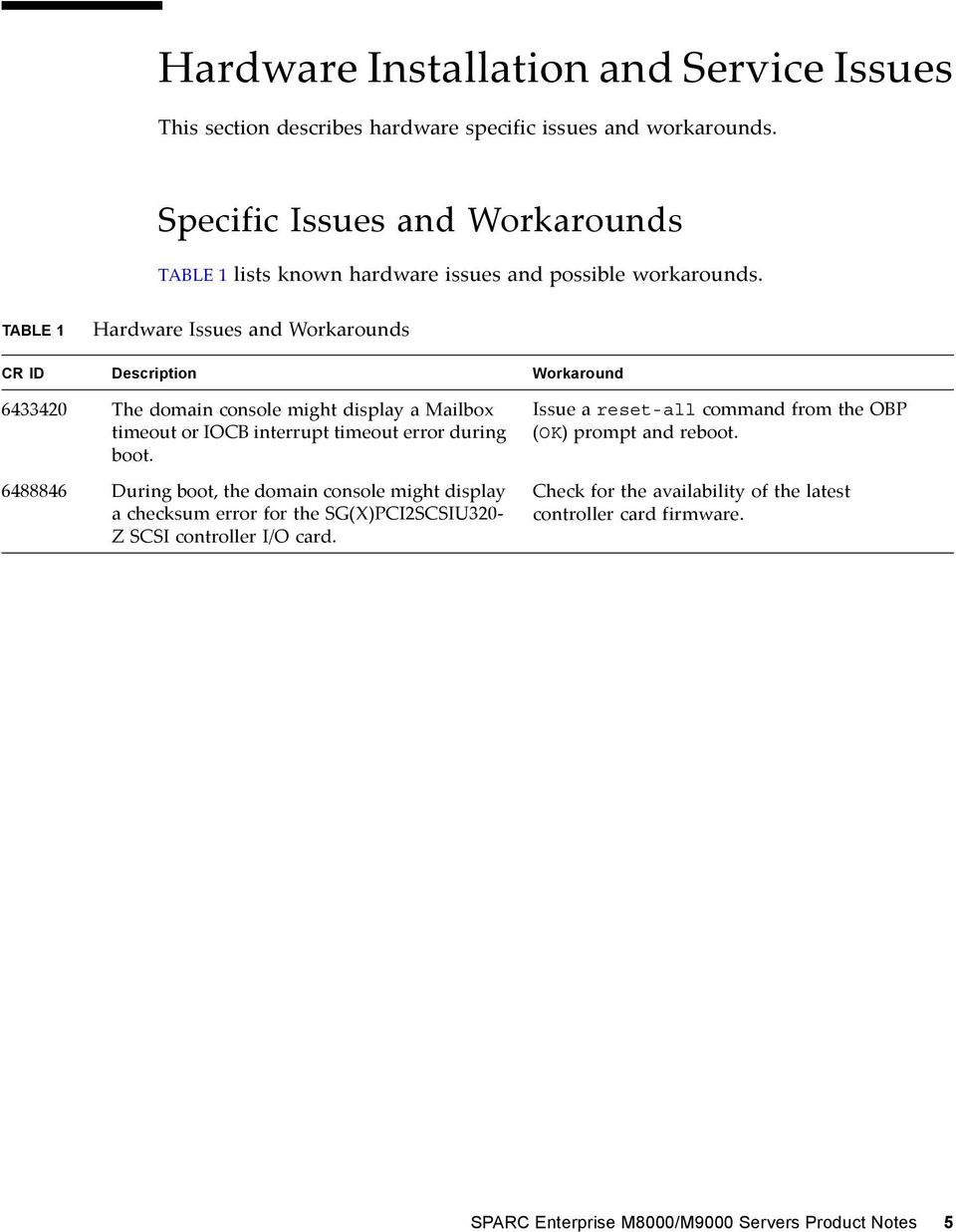
15 Hardware Installation and Service Issues This section describes hardware specific issues and workarounds. Specific Issues and Workarounds TABLE 1 lists known hardware issues and possible workarounds. TABLE 1 Hardware Issues and Workarounds CR ID Description Workaround The domain console might display a Mailbox timeout or IOCB interrupt timeout error during boot During boot, the domain console might display a checksum error for the SG(X)PCI2SCSIU320 Z SCSI controller I/O card. Issue a reset-all command from the OBP (OK) prompt and reboot. Check for the availability of the latest controller card firmware. SPARC Enterprise M8000/M9000 Servers Product Notes 5
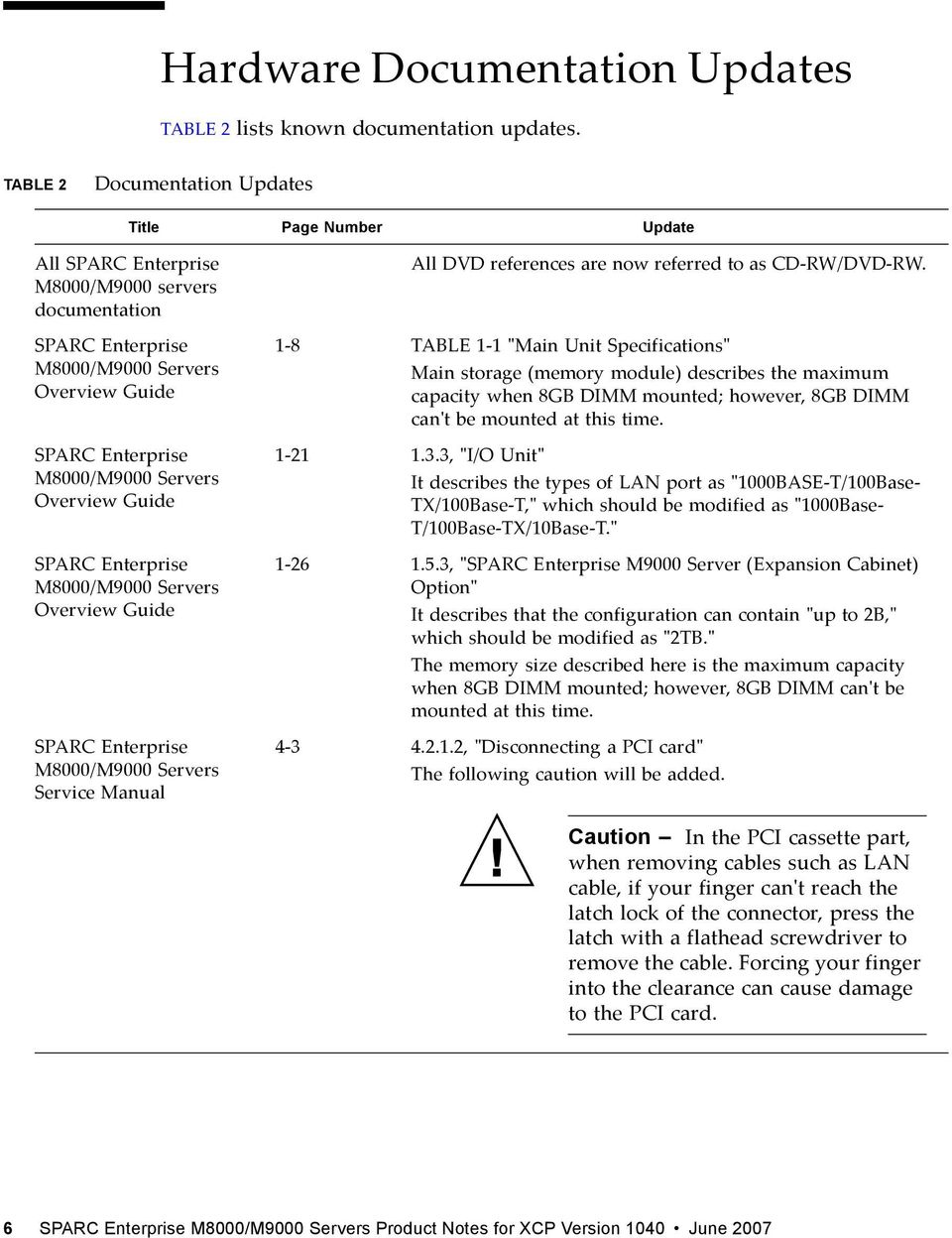
16 Hardware Documentation Updates TABLE 2 lists known documentation updates. TABLE 2 Documentation Updates Title Page Number Update All SPARC Enterprise M8000/M9000 servers documentation SPARC Enterprise M8000/M9000 Servers Overview Guide SPARC Enterprise M8000/M9000 Servers Overview Guide SPARC Enterprise M8000/M9000 Servers Overview Guide SPARC Enterprise M8000/M9000 Servers Service Manual All DVD references are now referred to as CD RW/DVD RW. 1 8 TABLE 1 1 ʺMain Unit Specificationsʺ Main storage (memory module) describes the maximum capacity when 8GB DIMM mounted; however, 8GB DIMM canʹt be mounted at this time , ʺI/O Unitʺ It describes the types of LAN port as ʺ1000BASE T/100Base TX/100Base T,ʺ which should be modified as ʺ1000Base T/100Base TX/10Base T.ʺ , ʺSPARC Enterprise M9000 Server (Expansion Cabinet) Optionʺ It describes that the configuration can contain ʺup to 2B,ʺ which should be modified as ʺ2TB.ʺ The memory size described here is the maximum capacity when 8GB DIMM mounted; however, 8GB DIMM canʹt be mounted at this time , ʺDisconnecting a PCI cardʺ The following caution will be added. Caution In the PCI cassette part, when removing cables such as LAN cable, if your finger canʹt reach the latch lock of the connector, press the latch with a flathead screwdriver to remove the cable. Forcing your finger into the clearance can cause damage to the PCI card. 6 SPARC Enterprise M8000/M9000 Servers Product Notes for XCP Version 1040 June 2007
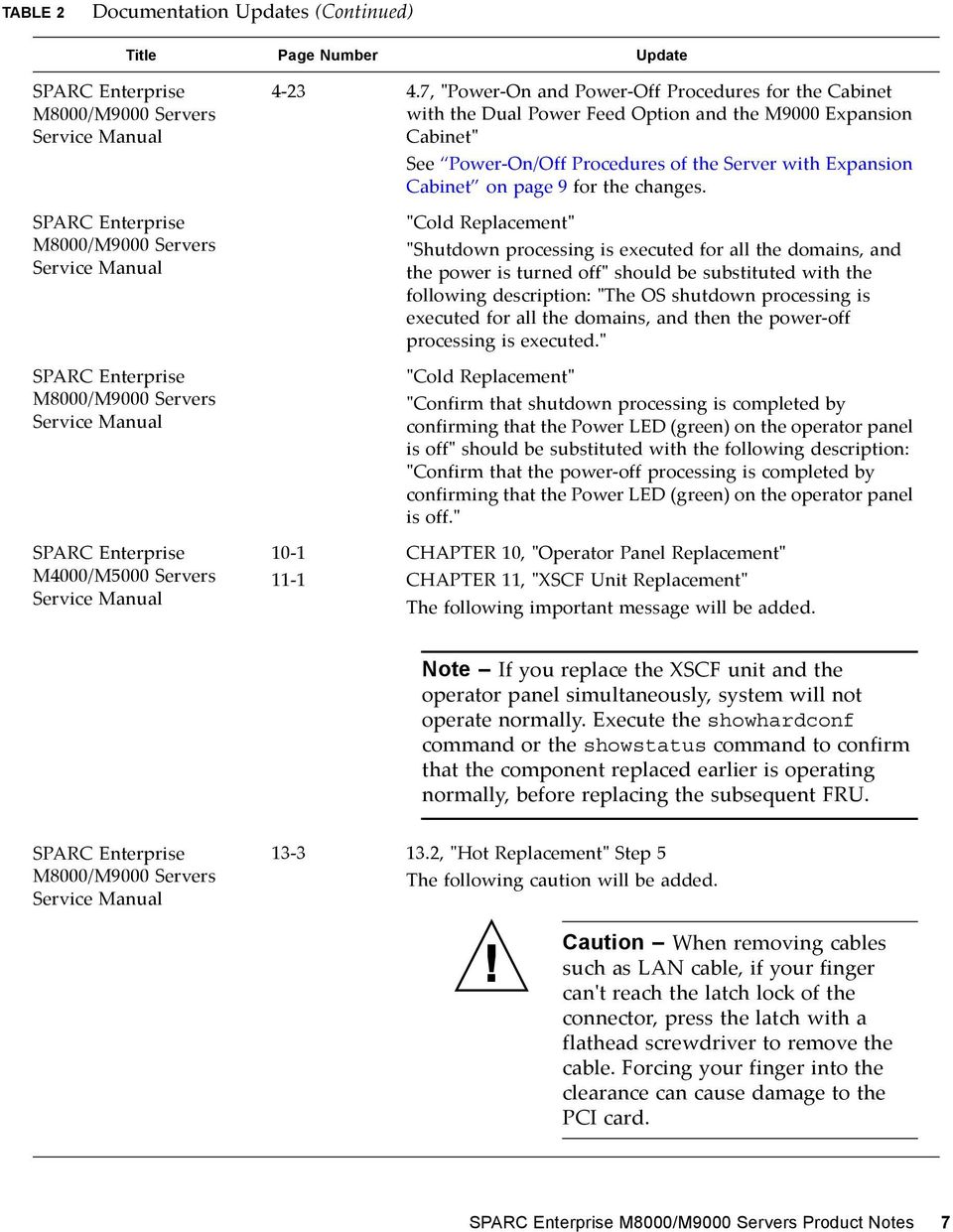
17 TABLE 2 Documentation Updates (Continued) Title Page Number Update SPARC Enterprise M8000/M9000 Servers Service Manual SPARC Enterprise M8000/M9000 Servers Service Manual SPARC Enterprise M8000/M9000 Servers Service Manual , ʺPower On and Power Off Procedures for the Cabinet with the Dual Power Feed Option and the M9000 Expansion Cabinetʺ See Power On/Off Procedures of the Server with Expansion Cabinet on page 9 for the changes. ʺCold Replacementʺ ʺShutdown processing is executed for all the domains, and the power is turned offʺ should be substituted with the following description: ʺThe OS shutdown processing is executed for all the domains, and then the power off processing is executed.ʺ ʺCold Replacementʺ ʺConfirm that shutdown processing is completed by confirming that the Power LED (green) on the operator panel is offʺ should be substituted with the following description: ʺConfirm that the power off processing is completed by confirming that the Power LED (green) on the operator panel is off.ʺ SPARC Enterprise M4000/M5000 Servers Service Manual CHAPTER 10, ʺOperator Panel Replacementʺ CHAPTER 11, ʺXSCF Unit Replacementʺ The following important message will be added. Note If you replace the XSCF unit and the operator panel simultaneously, system will not operate normally. Execute the showhardconf command or the showstatus command to confirm that the component replaced earlier is operating normally, before replacing the subsequent FRU. SPARC Enterprise M8000/M9000 Servers Service Manual , ʺHot Replacementʺ Step 5 The following caution will be added. Caution When removing cables such as LAN cable, if your finger canʹt reach the latch lock of the connector, press the latch with a flathead screwdriver to remove the cable. Forcing your finger into the clearance can cause damage to the PCI card. SPARC Enterprise M8000/M9000 Servers Product Notes 7
18 TABLE 2 Documentation Updates (Continued) Title Page Number Update SPARC Enterprise M8000/M9000 Servers Service Manual , ʺCold Replacementʺ Step 7 The following caution will be added. Caution When removing cables such as LAN cable, if your finger canʹt reach the latch lock of the connector, press the latch with a flathead screwdriver to remove the cable. Forcing your finger into the clearance can cause damage to the PCI card. 8 SPARC Enterprise M8000/M9000 Servers Product Notes for XCP Version 1040 June 2007

19 Updates of the SPARC Enterprise M8000/M9000 Servers Service Manual The following information supersedes the information in the SPARC Enterprise M8000/M9000 Servers Service Manual. Power On/Off Procedures of the Server with Expansion Cabinet On the server with expansion cabinet, when you turn on or turn off the mainline switch, do not fail to follow the order described below. Power On: 1. Turn on all the mainline switches of the expansion cabinet. In case that the power cabinet connected for the dual power feed option, also turn on all the mainline switches of the power cabinet. 2. Turn on all the mainline switches of the base cabinet. In case that the power cabinet connected for the dual power feed option, also turn on all the mainline switches of the power cabinet. Power Off: 1. Turn off all the mainline switches of the base cabinet. In case that the power cabinet connected for the dual power feed option, also turn off all the mainline switches of the power cabinet. 2. Turn off all the mainline switches of the expansion cabinet. In case that the power cabinet connected for the dual power feed option, also turn off all the mainline switches of the power cabinet. SPARC Enterprise M8000/M9000 Servers Product Notes 9

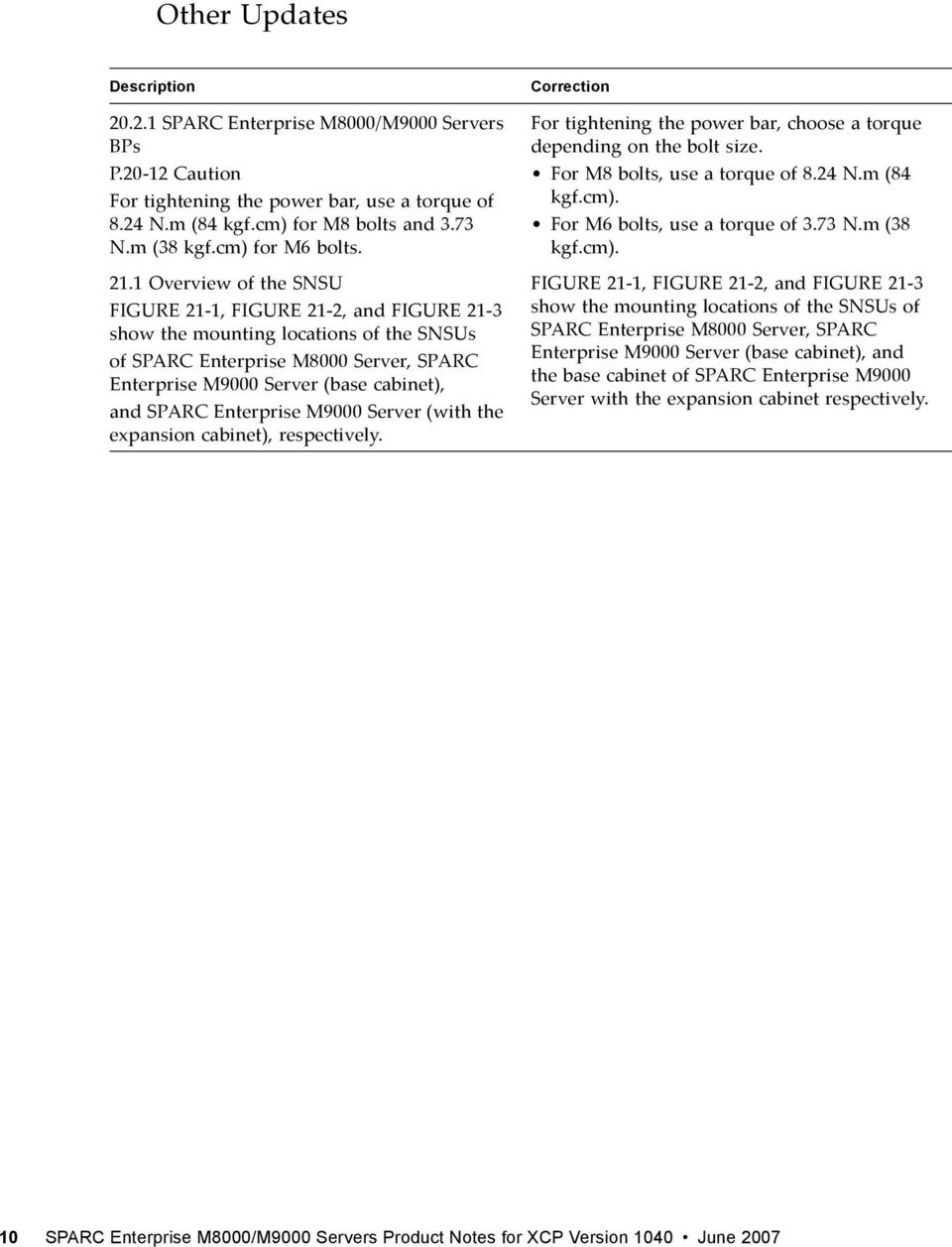
20 Other Updates Description SPARC Enterprise M8000/M9000 Servers BPs P Caution For tightening the power bar, use a torque of 8.24 N.m (84 kgf.cm) for M8 bolts and 3.73 N.m (38 kgf.cm) for M6 bolts Overview of the SNSU FIGURE 21 1, FIGURE 21 2, and FIGURE 21 3 show the mounting locations of the SNSUs of SPARC Enterprise M8000 Server, SPARC Enterprise M9000 Server (base cabinet), and SPARC Enterprise M9000 Server (with the expansion cabinet), respectively. Correction For tightening the power bar, choose a torque depending on the bolt size. For M8 bolts, use a torque of 8.24 N.m (84 kgf.cm). For M6 bolts, use a torque of 3.73 N.m (38 kgf.cm). FIGURE 21 1, FIGURE 21 2, and FIGURE 21 3 show the mounting locations of the SNSUs of SPARC Enterprise M8000 Server, SPARC Enterprise M9000 Server (base cabinet), and the base cabinet of SPARC Enterprise M9000 Server with the expansion cabinet respectively. 10 SPARC Enterprise M8000/M9000 Servers Product Notes for XCP Version 1040 June 2007
21 Software Issues This section describes software specific issues and workarounds. XCP Issues and Workarounds TABLE 3 lists known XCP issues and possible workarounds. TABLE 3 XCP Issues and Workarounds ID Description Workaround RTIF RTIF RTIF RTIF RTIF RTIF RTIF All domains must be powered off before upgrading the XCP firmware. If you log in to the XSCF while it is still booting, you may get a bash$ prompt instead of the XSCF> prompt, and be unable to perform most operations. While XSCF is running, error message of ʺOOM killʺ might be displayed to XSCF console, and process may go down and/or watchdog timeout may occur and XSCF may reboot. The showdomainstatus -a command shows domain status as Powered Off, but the showboards -a command shows the domain is testing. Some commands that update configuration data take a relatively long time to execute. The fault (memory.block.ue) is encountered and reported periodically. Attempting to move a COD board using the moveboard(8) command may fail. Power off domains before using the flashupdate command to upgrade XCP firmware. Log out of the bash$ prompt and wait for the XSCF to finish booting. Check that XSCF is started. If not started, use the rebootxscf(8) command to restart XSCF, or stop all the domains and then execute the system power off/on (AC OFF/ON). Use the showboards command to check the status of system power. The showdomainstatus command takes a longer time to show the correct status. Do not cancel set* commands. They appear to hang, but eventually complete in about 30 seconds. An uncorrectable error exists in a DIMM and the DIMM should be replaced. Use the deleteboard and addboard commands instead of the moveboard command. SPARC Enterprise M8000/M9000 Servers Product Notes 11
22 TABLE 3 XCP Issues and Workarounds (Continued) ID Description Workaround RTIF RTIF RTIF The XSCF firmware monitors itself and if it detects any anomolies, it will force a reboot. Using the rebootxscf command may result in a process down error, and possibly an FMA event with MSG ID SCF 8005 NE. showaudit all shows a long list of defaults in the policy section after the database is cleared. Allow the XSCF Unit to finish rebooting. It will return to normal operation within approximately 5 minutes. Ignore this event. Update the database with the following: setaudit -a opl=enable setaudit -a opl=default Solaris Issues and Workarounds TABLE 4 lists known issues and possible workarounds. TABLE 4 Specific Issues and Workarounds Concerning Solaris CR ID Description Workaround A SPARC Enterprise M9000 with a single domain and 11 or more fully populated system boards may hang under heavy stress System performance can degrade using a single NIC card with more than 5,000 connections The domain console may display this message: ipsec_check_inbound_policy: Policy Failure for the incoming packet (not secure) The system may hang if there is an I/O error in the system. Do not exceed 170 CPU threads. Limit the number of CPU threads to one per CPU core by using the Solaris psradm command to disable the excess CPU threads. For example, disable all odd numbered CPU threads. Use multiple NIC cards to split network connections. This message can be safely ignored. None available at this time. 12 SPARC Enterprise M8000/M9000 Servers Product Notes for XCP Version 1040 June 2007
23 TABLE 4 Specific Issues and Workarounds Concerning Solaris (Continued) CR ID Description Workaround The Solaris cfgadm(1m) command does not unconfigure a DVD drive from a domain on a SPARC Enterprise M8000/M9000 server The DAT72 internal tape drive on SPARC Enterprise M8000/M9000 may time out during tape operations. Disable the Volume Management Daemon (vold) before unconfiguring a DVD drive with the cfgadm(1m) command. To disable vold, stop the daemon by issuing the command /etc/init.d/volmgt stop. After the device has been removed or inserted, restart the daemon by issuing the command /etc/init.d/volmgt start. Add the following definition to /kernel/drv/st.conf: tape-config-list = "SEAGATE DAT DAT72-000", "SEAGATE_DAT DAT72-000", "SEAGATE_DAT DAT72-000"; SEAGATE_DAT DAT72-000= 1,0x34,0,0x9639,4,0x00,0x8c,0x8c, 0x8c,3; Performing a hot plug operation with the PCI E slot too quickly interrupts a PCI leaf reset and fails, creating a cfgadm(1m): Component system is busy error If you create a Solaris install image or boot image on a non SPARC Enterprise Mx000 sun4u server and use it on a SPARC Enterprise Mx000 sun4u server, the console s TTY flags will not be set correctly. This may cause the console to hang Installing the Solaris from the network using certain PCI Express cards may cause a panic On the SPARC Enterprise M8000/M9000 servers, On board Gigabit Ethernet NVRAM corruption could occur due to a race condition. The window of opportunity for this race condition is very small. Pause a few seconds between the issue of each cfgadm -c command. Telnet into the SPARC Enterprise Mx000 server to reset the console s TTY flags as follows: # sttydefs -r console # sttydefs -a console -i "9600 hupcl opost onlcr crtscts" -f "9600" If you are using a Sun PCI E Dual Gigabit Ethernet Adapter MMF card or a Sun PCI E Dual Gigabit Ethernet Adapter UTP card, do not install the Solaris using either of these cards. Instead, use other network devices, such as the onboard Gigabit Ethernet or another network device. None available at this time. SPARC Enterprise M8000/M9000 Servers Product Notes 13
24 TABLE 4 Specific Issues and Workarounds Concerning Solaris (Continued) CR ID Description Workaround The ʺcpumem diagnosisʺ module may fail to load after uncorrectable error(ue) panic. Systems will function correctly but events normally automatically diagnosed by FMA using this module will require manual diagnosis. Example: SUNW-MSG-ID: FMD K, TYPE: Defect, VER: 1, SEVERITY: Minor EVENT-TIME: Thu Feb 15 15:46:57 JST 2007 PLATFORM: SUNW,SPARC-Enterprise, CSN: BE , HOSTNAME: col2-ffem7-d0 If problem occurred, implement the following workaround: 1. Remove the following file. # rm /var/fm/fmd/ckpt/cpumemdiagnosis/cpumem-diagnosis 2. Restart fmd service. # svcadm restart fmd To avoid this problem in advance, add ʺrm f /var/fm/fmd/ckpt/cpumemdiagnosis/cpumem diagnosisʺ in /lib/svc/method/svc dumpadm file as below. # # We haven't run savecore on a dump device yet # savedev=none rm -f /var/fm/fmd/ckpt/cpumemdiagnosis/cpumem-diagnosis # Using the DR deleteboard command while psradm operations are running on a domain might cause a system panic CPU isnʹt offlined and unexpected message is displayed on console when many correctable error(ce) occurs. Example: SUNW-MSG-ID: FMD , TYPE: Defect, VER: 1, SEVERITY: Minor EVENT-TIME: Fri Feb 2 18:31:07 JST 2007 PLATFORM: SPARC-Enterprise, CSN: BE , HOSTNAME: FF There is no workaround. Check for the availability of a patch for this defect. Check CPU status on XSCF. 14 SPARC Enterprise M8000/M9000 Servers Product Notes for XCP Version 1040 June 2007
25 TABLE 4 Specific Issues and Workarounds Concerning Solaris (Continued) CR ID Description Workaround Unexpected error messages may be displayed on console on booting after CPU UE panic. Example: SUNW-MSG-ID: FMD , TYPE: Defect, VER: 1, SEVERITY: Minor EVENT-TIME: Tue Jan 9 20:45:08 JST 2007 PLATFORM: SUNW,SPARC-Enterprise, CSN: , HOSTNAME: P2-DC1-16-d Notification message for inserted or removed card by PCI hotplug may not output Correctable error on the system PCIe bus controller generates an invalid fault Many correctable errors (CE) may occur, and despite these are the correctable errors, domain may panic The domain may panic when an additional PCI X card is installed or a PCI X card is replaced by using PCI hot plug s10s_u3 wanboot failes The server returned 416: Requested Range Not Satisfiable On a large single domain configuration, the system may incorrectly report very high load average at times When Dual Channel Ultra320 SCSI Card (SE0X7SC2F,SE0X7SC2X) is mounted, correctable errors(ce) occur and system may panic Unexpected error messages may be displayed on console after changing the system configuration. Example: WARNING: Translation error source /LSB0/B0/0, PA 3c , target /LSB0/B0/ If you see unexpected messages, check system status on XSCF. None available at this time. Create a file /etc/fm/fmd/fmd.conf containing the following lines; setprop client.buflim 40m setprop client.memlim 40m Set the following to /etc/system and then reboot the domain: set pcie:pcie_aer_ce_mask = 0x2001 Do not insert a different type of PCI X card on the same PCI slot card by using PCI hotplug. None available at this time. There is no workaround. Check for the availability of a patch for this defect. To mask these errors with Dual Channel Ultra320 SCSI Card (SE0X7SC2F,SE0X7SC2X), add the following entry to the /etc/system file and then reboot the system: set pcie:pcie_aer_ce_mask = 0x31c1 This message can be safely ignored. SPARC Enterprise M8000/M9000 Servers Product Notes 15
26 TABLE 4 Specific Issues and Workarounds Concerning Solaris (Continued) CR ID Description Workaround Replumb Failed error appears when dr@0:sb1::memory fails. Once the DR operation is complete, it can be plumbed up manually. Example steps/procedure to re plumb the interface manually: # ifconfig interface plumb xxx.xxx.xxx.xxx netmask + broadcast + up # ifconfig interface group group name # ifconfig interface addif xxx.xxx.xxx.xxx -failover deprecated up This workaround assumes that the /etc/hostname.interface file is correctly configured for the IPMP group and does not need any modification. The IP addresses used in the example above should match what was previously used and what matches the /etc/hostname.<interface> file Large amounts of I/O on swap devices can cause the system to appear hung by over welling the I/O system. The amount of I/O required can be generated through a number of ways, eg memory shortage, heavy use of /tmp etc Domain may cause a panic when deleteboard for kernel board by using Dynamic Reconfiguration (DR) Domains using the ZFS filesystem cannot use DR After the CPU hardware error occurred, the fmdump(1m) command on the domain may display an incorrect faulty component The cfgadm command fails while moving the DVD/DAT drive between two domains Warning messages occur while trying to configure more than four X4447A Z or X1027A Z1 cards into one I/O Boat DR addboard command can hang. Once problem is observed, further DR operations are blocked. Recovery requires reboot of the domain. Set the following to /etc/system and then reboot the domain: set maxfastscan=0x2000 To mask this error, add the following entry to the /etc/system file. set drmach:fmem_timeout = 30 There is no workaround. Check system status on XSCF. There is no workaround. To reconfigure DVD/Tape drive, execute reboot -r from > the domain exhibiting the problem. No workaround available at this time. There is no workaround. Check availability of a patch for this bug. 16 SPARC Enterprise M8000/M9000 Servers Product Notes for XCP Version 1040 June 2007
27 TABLE 4 Specific Issues and Workarounds Concerning Solaris (Continued) CR ID Description Workaround Ap_Id format may not be shown correctly by cfgadm(1m) Some of the PCI slots in the External I/O Expansion Unit PCI slots are not displayed during a normal boot operation The error message network initialization failed appears repeatedly after a boot net installation System hangs when executing parallel hotplug operation with SP DR in suspend phase volfs or dscp service may fail when domain is booted. svc:/platform/sun4u/dscp:default: Method "/lib/svc/method/svc-dscp start" failed with exit status 95. svc:/system/filesystem/volfs:default: Method or service exit timed out. Killing contract 59. None available at this time. Use one of the following operations to display all of the PCI slots. boot -r (at open boot prompt) devfsadm -C (at Solaris prompt) cfgadm (twice at Solaris prompt) No workaround available at this time. Ignore the messages. No workaround available at this time. Restart the service if the failure is observed. To avoid the problem, issue the following commands. # svccfg -s dscp setprop start/timeout_seconds=count: 300 # svccfg -s volfs setprop start/timeout_seconds=count: 300 # svcadm refresh dscp # svcadm refresh volfs Domain may panic. Add the following line to /etc/system and reboot the domain. set heaplp_use_stlb= PCI hot plug to PCI slot #0, #1 or External IO Expansion Unit may fail on XSB added by DR. There is no workaround. Use DR instead of PCI hot plug if need to add or remove PCI card on the XSB. SPARC Enterprise M8000/M9000 Servers Product Notes 17
28 TABLE 4 Specific Issues and Workarounds Concerning Solaris (Continued) CR ID Description Workaround showlogs(8) and showstatus(8) command on XSCF might report wrong I/O component due to wrong diagnosis by Solaris Fault management Architecture when faults in I/O devices occur. To avoid this problem, issue the following commands on the domain. # cd /usr/platform/sunw,sparc- Enterprise/lib/fm/topo/plugins # mv ioboard.so ioboard.so.orig # svcadm restart fmd If the following messages are displayed on the domain, contact a sales representative or a certified service engineer. Example: SUNW MSG ID: SUNOS L, TYPE: Defect, VER: 1, SEVERITY: Minor EVENT TIME: Sun May 6 18:22:24 PDT 2007 PLATFORM: SUNW,SPARC Enterprise, CSN: BE , HOSTNAME: sparc Bluetooth partner is hung during security tests execution Sun PCIe Quad port Gigabit Ethernet Adapter UTP card(x4447a Z) might panic during a reboot Memory leak in PCIe module if driver attach fails If the following message displayed on the OS console, memory degradation or XSB deconfiguration may occur in the subsequent reboot. Example: mc opl: WARNING: mc opl rewrite timeout on /LSB0/B0 Restart application server There is no workaround. Check for the availability of a patch for this defect. There is no workaround. Check for the availability of a patch for this defect. Add the following to /etc/system and then reboot the domain: set mc-opl: mc_max_rewrite_loop = SPARC Enterprise M8000/M9000 Servers Product Notes for XCP Version 1040 June 2007
29 Identifying Permanent Memory in a Target Board Dynamic reconfiguration is not recommended for production use if the target board (SB/XSB) has permanent memory (kernel memory). 1. Log in to XSCF. 2. Execute the following command: XSCF> showdevices -d domain_id The following example shows a display of the showdevices -d command where 0 is the domain_id. XSCF> showdevices -d 0... Memory: board perm base domain target deleted remaining DID XSB mem MB mem MB address mem MB XSB mem MB mem MB x x000003c x The entry for column 4 perm mem MB indicates the presence of permanent memory if the value is non zero. The example shows permanent memory on 00 2, with 1674 MB. If the board includes permanent memory, when you execute the deleteboard command or the moveboard command, the following notice appears: System may be temporarily suspended, proceed? [y n]: 3. If a board includes permanent memory, enter n to cancel the DR command. System may be temporarily suspended, proceed? [y n]:n disconnect SB5 DR operation canceled by operator. XSCF> SPARC Enterprise M8000/M9000 Servers Product Notes 19
30 Software Documentation Updates This section contains late breaking software information that became known after the documentation set was published and corrections in the SPARC Enterprise M8000/M9000 Servers Software documentation. TABLE 5 lists known documentation updates. TABLE 5 Documentation Updates Title Page Number Update All SPARC Enterprise M8000/M9000 servers documentation SPARC Enterprise M4000/M5000/M8000/M9 000 Servers XSCF User s Guide All DVD references are now referred to as CD RW/DVD RW. D 5 Frequently Asked Questions (FAQ) in ʺTroubleshooting XSCF and FAQʺ The option for OS dump is not ʺrequestʺ but ʺpanicʺ. Correction: 1. First, execute the reset(8) command with the panic option from the XSCF Shell. SPARC Enterprise M4000/M5000/M8000/M9 000 Servers XSCF Reference Manual ioxadm(8) command The required privileges for the ioxadm(8) command are as follows: Required Privileges Commands platop env, list platadm env, list, locator, poweroff, poweron fieldend env, list, locator, poweroff, poweron, reset, setled The corrections here, if not otherwise specified, also apply to the man pages which XSCF provides. And they supersede the information on the man pages. 20 SPARC Enterprise M8000/M9000 Servers Product Notes for XCP Version 1040 June 2007
31 TABLE 5 Documentation Updates (Continued) Title Page Number Update SPARC Enterprise M4000/M5000/M8000/M9 000 Servers XSCF Reference Manual SPARC Enterprise M4000/M5000/M8000/M9 000 Servers XSCF Reference Manual SPARC Enterprise M4000/M5000/M8000/M9 000 Servers Administration Guide showldap(8) manpage showlookup(8) manpage showcodusage (8) manpage show rep ort(8) manpage setaudit(8) manpage showaudit(8) manpage The man pages for showldap, showlookup, showcodusage, and show report do not state that these commands are available with the fieldeng privilege. The setaudit and showaudit man pages are incorrect with respect to audit class information. The following are the audit classes and their values: ACS_SYSTEM 1 ACS_WRITE 2 ACS_READ 4 ACS_LOGIN 8 ACS_AUDIT 16 ACS_DOMAIN 32 ACS_USER 64 ACS_PLATFORM 128 ACS_MODES 256 Hotplugging of the IOU onboard device card (IOUA) is not supported at this time. SPARC Enterprise M8000/M9000 Servers Product Notes 21
32 22 SPARC Enterprise M8000/M9000 Servers Product Notes for XCP Version 1040 June 2007
Sun Management Center 3.6 Version 5 Add-On Software Release Notes
 Sun Management Center 3.6 Version 5 Add-On Software Release Notes For Sun Fire, Sun Blade, Netra, and Sun Ultra Systems Sun Microsystems, Inc. www.sun.com Part No. 819-7977-10 October 2006, Revision A
Sun TM SNMP Management Agent Release Notes, Version 1.6
 Sun TM SNMP Management Agent Release Notes, Version 1.6 Sun Microsystems, Inc. www.sun.com Part No. 820-5966-12 December 2008, Revision A Submit comments about this document by clicking the Feedback[+]
Sun SNMP Management Agent Release Notes, Version 1.5.5
 Sun SNMP Management Agent Release Notes, Version 1.5.5 Sun Microsystems, Inc. www.sun.com Part No. 820-0174-15 June 2008, Revision A Submit comments about this document at: http://www.sun.com/hwdocs/feedback
Sun Management Center 3.6 Version 4 Add-On Software Release Notes
 Sun Management Center 3.6 Version 4 Add-On Software Release Notes For Sun Fire, Sun Blade, Netra, and Sun Ultra Systems Sun Microsystems, Inc. www.sun.com Part No. 819-4989-10 July 2006, Revision A Submit
Sun StorEdge A5000 Installation Guide
 Sun StorEdge A5000 Installation Guide for Windows NT Server 4.0 Sun Microsystems, Inc. 901 San Antonio Road Palo Alto, CA 94303-4900 USA 650 960-1300 Fax 650 969-9131 Part No. 805-7273-11 October 1998,
Solaris 9 9/05 Installation Roadmap
 Solaris 9 9/05 Installation Roadmap This document is a guide to the DVD-ROM, CD-ROMs, and documents involved in installing the Solaris 9 9/05 software. Unless otherwise specified, this document refers
N1 Grid Service Provisioning System 5.0 User s Guide for the Linux Plug-In
 N1 Grid Service Provisioning System 5.0 User s Guide for the Linux Plug-In Sun Microsystems, Inc. 4150 Network Circle Santa Clara, CA 95054 U.S.A. Part No: 819 0735 December 2004 Copyright 2004 Sun Microsystems,
Sun Management Center Change Manager 1.0.1 Release Notes
 Sun Management Center Change Manager 1.0.1 Release Notes Sun Microsystems, Inc. 4150 Network Circle Santa Clara, CA 95054 U.S.A. Part No: 817 0891 10 May 2003 Copyright 2003 Sun Microsystems, Inc. 4150
Sun StorEdge Availability Suite Software Point-in-Time Copy Software Maximizing Backup Performance
 Sun StorEdge Availability Suite Software Point-in-Time Copy Software Maximizing Backup Performance A Best Practice Sun Microsystems, Inc. 4150 Network Circle Santa Clara, CA 95054 U.S.A. 650-960-1300 Part
Sun StorEdge RAID Manager 6.2.21 Release Notes
 Sun StorEdge RAID Manager 6.2.21 Release Notes formicrosoftwindowsnt Sun Microsystems, Inc. 901 San Antonio Road Palo Alto, CA 94303-4900 USA 650 960-1300 Fax 650 969-9131 Part No. 805-6890-11 November
Sun Enterprise Optional Power Sequencer Installation Guide
 Sun Enterprise Optional Power Sequencer Installation Guide For the Sun Enterprise 6500/5500 System Cabinet and the Sun Enterprise 68-inch Expansion Cabinet Sun Microsystems, Inc. 901 San Antonio Road Palo
Solaris 10 Documentation README
 Solaris 10 Documentation README Sun Microsystems, Inc. 4150 Network Circle Santa Clara, CA 95054 U.S.A. Part No: 817 0550 10 January 2005 Copyright 2005 Sun Microsystems, Inc. 4150 Network Circle, Santa
How To Manage System Resources With Capacity On Demand (Cod) On An Octorum Server
 SPARC Enterprise M4000/M5000/M8000/M9000 Servers Capacity on Demand (COD) User s Guide Part No.: E21467-01 February 2011 Copyright 2007, 2011, Oracle and/or its affiliates. All rights reserved. FUJITSU
Sun Fire 6800/4810/4800/3800 Systems Firmware 5.13.3 Release Notes
 Sun Fire 6800/4810/4800/3800 Systems Firmware 5.13.3 Release Notes Sun Microsystems, Inc. 4150 Network Circle Santa Clara, CA 95054 U.S.A. 650-960-1300 Part No. 816-7909-10(v2) October 2002, Revision A
Sun StorEdge Enterprise Backup Software 7.2
 Sun StorEdge Enterprise Backup Software 7.2 Update Guide Sun Microsystems, Inc. www.sun.com Part No. 819-4089-10 September 2005, Revision A Submit comments about this document at: http://www.sun.com/hwdocs/feedback
Sun Fire B10n Content Load Balancing Blade Product Notes
 Sun Fire B10n Content Load Balancing Blade Product Notes Sun Microsystems, Inc. 4150 Network Circle Santa Clara, CA 95054 U.S.A. 650-960-1300 Part No. 817-0628-10 June 2003, Revision A Submit comments
Sun Cluster 2.2 7/00 Data Services Update: Apache Web Server
 Sun Cluster 2.2 7/00 Data Services Update: Apache Web Server Sun Microsystems, Inc. 901 San Antonio Road Palo Alto, CA 94303-4900 U.S.A. 650-960-1300 Part No. 806-6121 July 2000, Revision A Copyright 2000
RAID Controller PCI Card for the Sun Fire V60x and V65x Servers Release Notes
 RAID Controller PCI Card for the Sun Fire V60x and V65x Servers Release Notes CAUTION: Read this document before installing the RAID Controller PCI Card. Failure to use the correct firmware version with
SunFDDI 6.0 on the Sun Enterprise 10000 Server
 SunFDDI 6.0 on the Sun Enterprise 10000 Server Sun Microsystems, Inc. 901 San Antonio Road Palo Alto, CA 94303-4900 USA 650 960-1300 Fax 650 969-9131 Part No.: 806-3610-11 November 1999, Revision A Send
Sun StorEdge Network FC Switch-8 and Switch-16 Release Notes
 Sun StorEdge Network FC Switch-8 and Switch-16 Release Notes Sun StorEdge SAN 3.0 Release Sun Microsystems, Inc. 901 San Antonio Road Palo Alto, CA 94303-4900 U.S.A. 650-960-1300 Part No. 816-0842-12 February
Upgrading the Solaris PC NetLink Software
 Upgrading the Solaris PC NetLink Software By Don DeVitt - Enterprise Engineering Sun BluePrints OnLine - January 2000 http://www.sun.com/blueprints Sun Microsystems, Inc. 901 San Antonio Road Palo Alto,
Optimizing Solaris Resources Through Load Balancing
 Optimizing Solaris Resources Through Load Balancing By Tom Bialaski - Enterprise Engineering Sun BluePrints Online - June 1999 http://www.sun.com/blueprints Sun Microsystems, Inc. 901 San Antonio Road
Sun StorEdge N8400 Filer Release Notes
 Sun StorEdge N8400 Filer Release Notes Sun Microsystems, Inc. 901 San Antonio Road Palo Alto, CA 94303 U.S.A. 650-960-1300 Part No. 806-6888-10 February 2001, Revision A Send comments about this document
Sun Enterprise 420R Server Product Notes
 Sun Enterprise 420R Server Product Notes Sun Microsystems, Inc. 901 San Antonio Road Palo Alto, CA 94303-4900 USA 650 960-1300 Fax 650 969-9131 Part No. 806-1082-12 May 2001, Revision A Send comments about
Service Level Definitions and Interactions
 Service Level Definitions and Interactions By Adrian Cockcroft - Enterprise Engineering Sun BluePrints OnLine - April 1999 http://www.sun.com/blueprints Sun Microsystems, Inc. 901 San Antonio Road Palo
SCSI Sense Key Error Guide
 SCSI Sense Key Error Guide Sun Microsystems, Inc. www.sun.com Part No. 817-5918-10 February 2004, Revision A Submit comments about this document at: http://www.sun.com/hwdocs/feedback Copyright 2004 Sun
Sun Ultra TM. 5 and Ultra 10 Product Notes. Sun Microsystems, Inc. 901 San Antonio Road Palo Alto, CA 94303-4900 U.S.A.
 Sun Ultra TM 5 and Ultra 10 Product Notes Sun Microsystems, Inc. 901 San Antonio Road Palo Alto, CA 94303-4900 U.S.A. 650-960-1300 Part No. 806-6750-11 November 2000, Revision A Send comments about this
Brocade SilkWorm 4100 FC Switch Release Notes
 Brocade SilkWorm 4100 FC Switch Release Notes For Installation in Sun Storage Area Networks, 4.4.0b Firmware Sun Microsystems, Inc. www.sun.com Part No. 819-1672-10 April 2005, Revision A Submit comments
Sun Fire V480 Server Product Notes
 Sun Fire V480 Server Product Notes Sun Microsystems, Inc. 4150 Network Circle Santa Clara, CA 95054 U.S.A. 650-960-1300 Part No. 816-0905-14 September 2002, Revision A Send comments about this document
Sun Management Center 3.5 Update 1b Release Notes
 Sun Management Center 3.5 Update 1b Release Notes Sun Microsystems, Inc. 4150 Network Circle Santa Clara, CA 95054 U.S.A. Part No: 819 3054 10 June 2005 Copyright 2005 Sun Microsystems, Inc. 4150 Network
Sun Fire 6800/4810/4800/3800 Systems Software Release Notes
 Sun Fire 6800/4810/4800/3800 Systems Software Release Notes Sun Microsystems, Inc. 901 San Antonio Road Palo Alto, CA 94303-4900 USA 650 960-1300 Fax 650 969-9131 Part No.: 816-2553-10 (v2) October 2001,
Solaris 9 Installation Roadmap
 Solaris 9 Installation Roadmap This document is a guide to the DVD, CDs and documents involved in installing the Solaris 9 software. Unless otherwise specified, this document refers to both DVDs and CDs
Sun Grid Engine 5.2.3 Release Notes
 Sun Grid Engine 5.2.3 Release Notes Sun Microsystems, Inc. 901 San Antonio Road Palo Alto, CA 94303-4900 U.S.A. 650-960-1300 Part No. 816-2082-10 July 2001 For more information, go to http://www.sun.com/gridware
Netra Data Plane Software Suite 2.0 Update 2 Release Notes
 Netra Data Plane Software Suite 2.0 Update 2 Release Notes Sun Microsystems, Inc. www.sun.com Part No. 820-5213-11 July 2008, Revision A Submit comments about this document at: http://www.sun.com/hwdocs/feedback
Sun StorEdge SAN Foundation Release Notes
 Sun StorEdge SAN Foundation Release Notes Version 4.1 Sun Microsystems, Inc. 4150 Network Circle Santa Clara, CA 95054 U.S.A. 650-960-1300 Part No. 817-0071-10 October 2002, Revision 01 Send comments about
Scrubbing Disks Using the Solaris Operating Environment Format Program
 Scrubbing Disks Using the Solaris Operating Environment Format Program By Rob Snevely - Enterprise Technology Center Sun BluePrints OnLine - June 2000 http://www.sun.com/blueprints Sun Microsystems, Inc.
Sun SPARC Enterprise M4000/M5000 Servers Site Planning Guide
 Sun SPARC Enterprise M4000/M5000 Servers Site Planning Guide Sun Microsystems, Inc. www.sun.com Part No. 819-2205-10 April 2007, Revision A Submit comments about this document at: http://www.sun.com/hwdocs/feedback
Sun StorEdge T3 Dual Storage Array - Part 1
 Sun StorEdge T3 Dual Storage Array - Part 1 Installation, Planning, and Design By Mark Garner - Enterprise Engineering Sun BluePrints OnLine - February 2001 http://www.sun.com/blueprints Sun Microsystems,
Sun N1 Service Provisioning System User s Guide for Linux Plug-In 2.0
 Sun N1 Service Provisioning System User s Guide for Linux Plug-In 2.0 Sun Microsystems, Inc. 4150 Network Circle Santa Clara, CA 95054 U.S.A. Part No: 819 4885 10 April 2006 Copyright 2006 Sun Microsystems,
Sun Fire V20z Server Release Notes
 Sun Fire V20z Server Release Notes Sun Microsystems, Inc. 4150 Network Circle Santa Clara, CA 95054 U.S.A. 650-960-1300 Part No. 817-5252-10 March, 2004 Revison A Submit comments about this document at:
Solaris Bandwidth Manager
 Solaris Bandwidth Manager By Evert Hoogendoorn - Enterprise Engineering Sun BluePrints Online - June 1999 http://www.sun.com/blueprints Sun Microsystems, Inc. 901 San Antonio Road Palo Alto, CA 94303 USA
Sun Fire 6800/4810/4800/ 3800 Systems Product Notes
 Sun Fire 6800/4810/4800/ 3800 Systems Product Notes Sun Microsystems, Inc. 901 San Antonio Road Palo Alto, CA 94303-4900 USA 650 960-1300 Fax 650 969-9131 Part No.: 806-7217-10 March 2001, Revision A Send
Service Level Agreement in the Data Center
 Service Level Agreement in the Data Center By Edward Wustenhoff Sun Professional Services Sun BluePrints OnLine - April 2002 http://www.sun.com/blueprints Sun Microsystems, Inc. 4150 Network Circle Santa
SPARC Enterprise T5140 and T5240 Servers. StorageTek SAS RAID Eight-Port Internal HBA Installation Guide
 SPARC Enterprise T5140 and T5240 Servers StorageTek SAS RAID Eight-Port Internal HBA Installation Guide Part No. 820-4754-12 Manual Code: C120-E521-03XA August 2010 Copyright 2008, 2010, Oracle and/or
LAN-Free Backups Using the Sun StorEdge Instant Image 3.0 Software
 LAN-Free Backups Using the Sun StorEdge Instant Image 3.0 Software Art Licht, Sun Microsystems, Inc. Sun BluePrints OnLine June 2002 http://www.sun.com/blueprints Sun Microsystems, Inc. 4150 Network Circle
Comparing JavaServer Pages Technology and Microsoft Active Server Pages
 Comparing JavaServer Pages Technology and Microsoft Active Server Pages An Analysis of Functionality Sun Microsystems, Inc. 901 San Antonio Road Palo Alto, CA 94303 1 (800) 786.7638 1.512.434.1511 Copyright
Managing NFS Workloads
 Managing NFS Workloads By Richard McDougall, Adrian Cockcroft and Evert Hoogendoorn - Enterprise Engineering Sun BluePrints OnLine - April 1999 http://www.sun.com/blueprints Sun Microsystems, Inc. 901
Sun Ray, Smart Cards, and Citrix
 Sun Ray, Smart Cards, and Citrix Enabling Sun Ray Smart Card Pass-through to Citrix Sun Microsystems, Inc. 4150 Network Circle Santa Clara, CA 95054 U.S.A. 650-960-1300 May 2004, Version 1.0 Copyright
JumpStart : NIS and sysidcfg
 JumpStart : NIS and sysidcfg By Rob Snevely - Enterprise Technology Center Sun BluePrints OnLine - October 1999 http://www.sun.com/blueprints Sun Microsystems, Inc. 901 San Antonio Road Palo Alto, CA 94303
Sun StorEdge network FC switch-8 and switch-16 Release Notes
 Sun StorEdge network FC switch-8 and switch-16 Release Notes Sun Microsystems, Inc. 901 San Antonio Road Palo Alto, CA 94303-4900 U.S.A. 650-960-1300 Part No. 806-6924-14 February 2001, Revision A Send
Power Savings in the UltraSPARC T1 Processor
 Power Savings in the UltraSPARC T1 Processor David Greenhill, Distinguished Engineer Jerome Alabado, Staff Engineer Sun Microsystems Inc. December 2005 Sun Microsystems, Inc. 4150 Network Circle Santa
Getting StartedWith Sun Java System Application Server 9.1 Update 2
 Getting StartedWith Sun Java System Application Server 9.1 Update 2 Student Guide Sun Microsystems, Inc. 4150 Network Circle Santa Clara, CA 95054 U.S.A. August 2008 Copyright 2008 Sun Microsystems, Inc.
Reducing the Backup Window With Sun StorEdge Instant Image Software
 Reducing the Backup Window With Sun StorEdge Instant Image Software Selim Daoud, Sun Professional Services, Switzerland Sun BluePrints OnLine July 2002 http://www.sun.com/blueprints Sun Microsystems, Inc.
Fujitsu M10/SPARC M10 Systems
 Fujitsu M10/SPARC M10 Systems Important Legal and Safety Information Manual Code: C120-E675-04XA May 2014, Revision A Copyright 2007, 2014, Fujitsu Limited. All rights reserved. Oracle and/or its affiliates
Sun GlassFish Enterprise Manager SNMP Monitoring 1.0 Installation and Quick Start Guide
 Sun GlassFish Enterprise Manager SNMP Monitoring 1.0 Installation and Quick Start Guide Sun Microsystems, Inc. 4150 Network Circle Santa Clara, CA 95054 U.S.A. Part No: 820 7189 January 2009 Copyright
Start Here. Installation and Documentation Reference. Sun StorEdgeTM 6120 Array
 Start Here Installation and Documentation Reference Sun StorEdgeTM 6120 Array 1 Access the Online Documentation These documents and other related documents are available online at http://www.sun.com/documentation
Sun Blade 1500 Workstation Product Notes
 Sun Blade 1500 Workstation Product Notes (Silver) Silver Sun Microsystems, Inc. www.sun.com Part No. 817-5131-13 April 2005, Revision A Submit comments about this document at: http://www.sun.com/hwdocs/feedback
Brocade 5300 Switch Hardware Release Notes
 Brocade 5300 Switch Hardware Release tes For Installation in a Sun Storage Area Network Sun Microsystems, Inc. www.sun.com Part. 820-4925-10 May 2008, Revision A Submit comments about this document at:
Exploring the iplanet Directory Server NIS Extensions
 Exploring the iplanet Directory Server NIS Extensions By Tom Bialaski - Enterprise Engineering Sun BluePrints OnLine - August 2000 http://www.sun.com/blueprints Sun Microsystems, Inc. 901 San Antonio Road
Java Dynamic Management Architecture for Intelligent Networks
 Java Dynamic Management Architecture for Intelligent Networks Sun Microsystems, Inc. 901 San Antonio Road Palo Alto, CA 94303 1 (800) 786.7638 +1.512.434.1511 Copyright 1998 Sun Microsystems, Inc., 901
SPARC Enterprise M3000/M4000/M5000/M8000/M9000 Servers. Administration Guide
 SPARC Enterprise M3000/M4000/M5000/M8000/M9000 Servers Administration Guide Part No.: E21618-02 Manual Code: C120-E331-13EN June 2012 Copyright 2007, 2012, Oracle and/or its affiliates. All rights reserved.
Disaster Recovery Requirements Analysis
 Disaster Recovery Requirements Analysis By Stan Stringfellow - Special to Sun BluePrints OnLine Sun BluePrints OnLine - July 2000 http://www.sun.com/blueprints Sun Microsystems, Inc. 901 San Antonio Road
Important Note on New Product Names
 Important Note on New Product Names As part of Sun s new developer product strategy, we have changed the names of our development tools from Sun WorkShop to Forte Developer products. The products, as you
Netra X4200 M2 Server Site Planning Guide
 Netra X4200 M2 Server Site Planning Guide Sun Microsystems, Inc. www.sun.com Part No. 820-0069-12 May 2008, Revision A Submit comments about this document at: http://www.sun.com/hwdocs/feedback Copyright
Manual Code C120-E460-03EN Part No. 875-4196-12 July 2009, Revision A. SPARC Enterprise TM T5120 and T5220 Servers Overview Guide
 Manual Code C120-E460-03EN Part No. 875-4196-12 July 2009, Revision A SPARC Enterprise TM T5120 and T5220 Servers Overview Guide Copyright 2009 Sun Microsystems, Inc., 4150 Network Circle, Santa Clara,
Sun Cobalt Control Station. Using the LCD Console
 Sun Cobalt Control Station Using the LCD Console Copyright 1997-2001 Sun Microsystems, Inc., 901 San Antonio Road, Palo Alto, California 94303-4900 U.S.A. All rights reserved. Sun Microsystems, Inc. has
Brocade 300 Switch Hardware Release Notes
 300 Switch Hardware Release Notes For Installation in a Sun Storage Area Network Sun Microsystems, Inc. www.sun.com Part No. 820-4923-11 November 2008, Revision A Submit comments about this document at:
Sun Ray Server Software 3 Release Notes
 Sun Ray Server Software 3 Release Notes for the Linux Operating System Sun Microsystems, Inc. 4150 Network Circle Santa Clara, CA 95054 U.S.A. 650-960-1300 Copyright 2004, Sun Microsystems Part No. 817-6813-10
Manual Code C120-E494-03EN Part No. 875-4324-12 July 2009, Revision A. SPARC Enterprise TM T5140 and T5240 Servers Overview Guide
 Manual Code C120-E494-03EN Part No. 875-4324-12 July 2009, Revision A SPARC Enterprise TM T5140 and T5240 Servers Overview Guide Copyright Copyright 2009 Sun Microsystems, Inc., 4150 Network Circle, Santa
Solaris Resource Manager
 Solaris Resource Manager By Richard McDougall - Enterprise Engineering Sun BluePrints OnLine - April 1999 http://www.sun.com/blueprints Sun Microsystems, Inc. 901 San Antonio Road Palo Alto, CA 94303 USA
Sun Blade 100 and Sun Blade 150 Workstations
 Sun Blade 100 and Sun Blade 150 Workstations Differences Sun Microsystems, Inc. 4150 Network Circle Santa Clara, CA 95054 U.S.A. 650-960-1300 Part No. 990-1211-10 June 2002, Revision 01 Send comments about
Veritas Storage Foundation 5.0 Software for SPARC
 Veritas Storage Foundation 5.0 Software for SPARC Release Note Supplement Sun Microsystems, Inc. www.sun.com Part No. 819-7074-10 July 2006 Submit comments about this document at: http://www.sun.com/hwdocs/feedback
Developing a Security Policy
 Developing a Security Policy By Joel Weise - SunPS SM Global Security Practice and Charles R. Martin - SunPS Java Centers Sun BluePrints OnLine - December 2001 http://www.sun.com/blueprints Sun Microsystems,
Manual Code C120-E497-04EN Part No. 875-4322-13 July 2009, Revision A. SPARC Enterprise TM T5140 and T5240 Servers Service Manual
 Manual Code C120-E497-04EN Part No. 875-4322-13 July 2009, Revision A SPARC Enterprise TM T5140 and T5240 Servers Service Manual Copyright 2009 Sun Microsystems, Inc., 4150 Network Circle, Santa Clara,
Automating Centralized File Integrity Checks in the Solaris 10 Operating System
 Automating Centralized File Integrity Checks in the Solaris 10 Operating System Glenn Brunette, Client Solutions Sun BluePrints OnLine March 2005 A Sun BluePrints Cookbook http://www.sun.com/blueprints
Sun GlassFish Enterprise Manager Performance Monitor 1.0 Getting Started Guide
 Sun GlassFish Enterprise Manager Performance Monitor 1.0 Getting Started Guide Sun Microsystems, Inc. 4150 Network Circle Santa Clara, CA 95054 U.S.A. Part No: 820 7194 10 January 2009 Copyright 2009 Sun
N1 Grid Engine 6 Release Notes
 N1 Grid Engine 6 Release Notes Sun Microsystems, Inc. 4150 Network Circle Santa Clara, CA 95054 U.S.A. Part No: 817 5678 10 June 2004 Copyright 2004 Sun Microsystems, Inc. 4150 Network Circle, Santa Clara,
HelloWorld SOAP Sample:
 HelloWorld SOAP Sample: Accessing Stateless Session Enterprise JavaBeans Technology Sun Microsystems, Inc. 901 San Antonio Road Palo Alto, CA 94303 U.S.A. 650-960-1300 Copyright 2002 Sun Microsystems,
Distributed Application Management using Jini Connection Technology
 Distributed Application Management using Jini Connection Technology The Jini Technology Enabled Applications Manager provides a framework, utilizing Jini and JavaSpaces technologies, for selecting and
Sun Fire 6800/4810/4800/3800 Systems Platform Administration Manual
 Sun Fire 6800/4810/4800/3800 Systems Platform Administration Manual Firmware Release 5.15.0 Sun Microsystems, Inc. 4150 Network Circle Santa Clara, CA 95054 U.S.A. 650-960-1300 Part No. 817-0999-10 April
Rapid Recovery Techniques: Exploring the Solaris Software Registry
 Rapid Recovery Techniques: Exploring the Solaris Software Registry By Richard Elling - Enterprise Engineering Sun BluePrints OnLine - October 1999 http://www.sun.com/blueprints Sun Microsystems, Inc. 901
How To Start A Glassfish V3 Application Server Quick Start 7.2.2 (Windows) On A Microsoft Server (Windows 7)
 GlassFish v3 Application Server Quick Start Guide Sun Microsystems, Inc. 450 Network Circle Santa Clara, CA 95054 U.S.A. Part No: 80 4836 0 April 008 Copyright 008 Sun Microsystems, Inc. 450 Network Circle,
Sun Remote System Control (RSC) Installation Guide
 Sun Remote System Control (RSC) Installation Guide Sun Microsystems, Inc. 901 San Antonio Road Palo Alto,CA 94303-4900 U.S.A. 650-960-1300 Part No. 806-3987-10 February 2000, Revision A Send comments about
Using Linux mdadm Multipathing with Sun StorEdge Systems
 Using Linux mdadm Multipathing with Sun StorEdge Systems Sun Microsystems, Inc. www.sun.com Part No. 819-2452-10 April 2005, Revision A Submit comments about this document at: http://www.sun.com/hwdocs/feedback
Sun Java System Connector for Microsoft Outlook 7.2 Installation Guide
 Sun Java System Connector for Microsoft Outlook 7.2 Installation Guide Sun Microsystems, Inc. 4150 Network Circle Santa Clara, CA 95054 U.S.A. Part No: 819 4409 10 March 2007 Copyright 2007 Sun Microsystems,
Sun StorEdge RAID Manager 6.22 User s Guide
 Sun StorEdge RAID Manager 6.22 User s Guide Sun Microsystems, Inc. 901 San Antonio Road Palo Alto, CA 94303-4900 USA 650 960-1300 Fax 650 969-9131 Part No. 806-0478-10 September 1999, Revision A Send comments
The UltraSPARC T1 Processor - High Bandwidth For Throughput Computing
 The UltraSPARC T1 Processor - High Bandwidth For Throughput Computing William Bryg, Distinguished Engineer Jerome Alabado, Staff Engineer Sun Microsystems, Inc. December 2005 Sun Microsystems, Inc. 4150
Java Management Extensions SNMP Manager API
 Java Management Extensions SNMP Manager API Sun Microsystems, Inc. 901 San Antonio Road Palo Alto, CA 94303 U.S.A. 650-960-1300 August 1999, Draft 2.0 Copyright 1999 Sun Microsystems, Inc., 901 San Antonio
Service Level Management in the Data Center
 Service Level Management in the Data Center By Edward Wustenhoff Sun Professional Sun BluePrints OnLine - March 2002 http://www.sun.com/blueprints Sun Microsystems, Inc. 4150 Network Circle Santa Clara,
Sun Ray Connector for Windows OS, Version 2.1 Release Notes
 Sun Ray Connector for Windows OS, Version 2.1 Release Notes Sun Microsystems, Inc. www.sun.com Part No.820-3777-12 October 2008, Revision A Submit comments about this document at: http://www.sun.com/hwdocs/feedback
ProjectWebSynergy Milestone 4 Release Notes
 ProjectWebSynergy Milestone 4 Release Notes Beta Sun Microsystems, Inc. 4150 Network Circle Santa Clara, CA 95054 U.S.A. Part No: 820 6876 Copyright 2008 Sun Microsystems, Inc. 4150 Network Circle, Santa
Rapid Recovery Techniques: Auditing Custom Software Configuration
 Rapid Recovery Techniques: Auditing Custom Software Configuration By Richard Elling - Enterprise Engineering Sun BluePrints OnLine - February 2000 http://www.sun.com/blueprints Sun Microsystems, Inc. 901
A Strategy for Managing Performance
 A Strategy for Managing Performance John Brady, Sun Professional Services Sun BluePrints OnLine December 2002 http://www.sun.com/blueprints Sun Microsystems, Inc. 4150 Network Circle Santa Clara, CA 95045
Sun 450 MHz UltraSPARC -II Module Upgrade
 Sun 450 MHz UltraSPARC -II Module Upgrade Sun Microsystems, Inc. 901 San Antonio Road Palo Alto, CA 94303-4900 USA 650 960-1300 Fax 650 969-9131 Part No.: 806-1055-11 Revision A, October 1999 Send comments
Sun Fire V480 Server Setup and Rackmounting Guide
 Sun Fire V480 Server Setup and Rackmounting Guide Sun Microsystems, Inc. 901 San Antonio Road Palo Alto, CA 94303-4900 U.S.A. 650-960-1300 Part No. 816-0902-10 February 2002, Revision A Send comments about
Installation and Configuration
 Installation and Configuration Sun Ray Connector forvmwareview Manager 1.1 Sun Microsystems, Inc. 4150 Network Circle Santa Clara, CA 95054 U.S.A. Part No: 820 7454 March 2009 Copyright 2009 Sun Microsystems,
Sun Fire T2000 Server Service Manual
 Sun Fire T2000 Server Service Manual Sun Microsystems, Inc. www.sun.com Part No. 819-2548-14 July 2007, Revision A Submit comments about this document at: http://www.sun.com/hwdocs/feedback Copyright 2007
How To Write A Release Note For Sun Open Telecommunications Platform 1.1.1
 Sun OpenTelecommunications Platform 1.1 Release Notes Sun Microsystems, Inc. 4150 Network Circle Santa Clara, CA 95054 U.S.A. Part No: 820 1135 May 2007 Copyright 2007 Sun Microsystems, Inc. 4150 Network