
AGES 8+ A QUICKER GAME
|
|
|
- Prudence Fields
- 10 years ago
- Views:
Transcription
1 AGES 8+ A QUICKER GAME c The Fast-Dealing Property Trading Game c BRAND 3. As soon as a second player goes bankrupt, the game ends. The banker uses the banking unit to add together: Money left on their bank card Owned sites, utilities and transports at the price printed on the board Any mortgaged property at half the price printed on the board Houses, valued at purchase price Hotels, valued at the purchase price including the value of three houses The richest player wins the game! If you re familiar with MONOPOLY and want to play a speedy game: 1. To start, the banker shuffles the Title Deed cards and deals two to each player. Players immediately pay the banker the price for the properties they receive. Play then continues as normal. 2. You only need to build up three houses (instead of four) on each site of a color group before buying a hotel. When selling hotels, the value is half its purchase price. SPEEDY MONOPOLY Alternatively, agree on a definite time to finish the game. Whoever is the richest player at this time wins! Hasbro Games, Consumer Affairs Dept., P.O. Box 200, Pawtucket, RI Tel: (toll free). The HASBRO, PARKER BROTHERS and MONOPOLY names and logos, as well as the distinctive design of the gameboard, the four corner squares, the MR. MONOPOLY name and character, and each of the distinctive elements of the board and playing pieces are trademarks of Hasbro for its property trading game and game equipment. AIM OF THE GAME To be the only player left in the game after everyone else has gone bankrupt. CONTENTS Gameboard, Electronic Banking Unit, Title Deed Cards, Chance and Community Chest Cards, 6 Bank Cards, 2 Dice, 6 Tokens, 32 houses and 12 hotels. 1935, 2011 Hasbro. All Rights Reserved. TM and denote US Trademarks. Hasbro Inc., Pawtucket, RI USA. HASBRO CANADA, LONGUEUIL, QC, CANADA J4G 1G B monopoly.com 2-6 PLAYERS I MonoEB_r6.indd PLAYERS 7/25/11 3:11 PM

2 THE GAME Pick up a Community Chest card. See page 10. Mortgage a property. See page 9/10. Pay rent on other players properties. See page 8. Banking unit and cards. See pages 5 to 7. INDEX HERE S HOW TO PLAY THE BANKER...4 PLAYING...4 BANKING UNIT...5 Pick up a Chance card. See page I MonoEB_r6.indd 2-3 THE FINER POINTS BUYING PROPERTY...8 AUCTIONS...8 PAYING RENT Build on your properties. See page 9. Put your token here to start. Collect A2M as you pass GO. See page 6/11. Go to jail. See page UTILITIES...8 RAILROADS...9 BUILDING HOUSES...9 BUILDING HOTELS...9 RUNNING OUT OF BUILDINGS...9 RUNNING OUT OF MONEY...9 SELLING PROPERTY...9 MORTGAGES...10 BANKRUPTCY...10 CHANCE AND COMMUNITY CHEST...10 FREE PARKING...10 PASSING GO TWICE IN ONE TURN...11 JAIL...11 BATTERY INFORMATION...11 A QUICKER GAME...12 SPEEDY MONOPOLY /25/11 3:11 PM

3 1935, 2011 HASBRO. HERE S HOW TO PLAY! THE BANKER Choose one player to be the banker. If there are more than five players, the banker may choose to take on this role only. The banker is in charge of: TITLE DEED PENNSYLVANIA AVENUE RENT A280K With 1 House With 2 Houses A4.5M With 3 Houses A10M With 4 Houses A12M With HOTEL A14M Mortgage Value A1.6M Houses cost A2M each Hotels, A2M each plus 4 houses If a player owns all the sites of any color group, the rent is doubled on unimproved sites in that group. The banking unit Title Deed cards Houses and Hotels Auctions PLAYING 1. Roll both dice, the highest roller starts. Play continues clockwise. 2. On your turn, roll the dice and move that number of squares clockwise around the board. Two or more movers may rest on the same space at the same time. According to the space you land on, you can: Buy the property for the asking price (if it isn t owned by another player). See page 8. Get the banker to auction the property (if you don t want to buy the property for the asking price). See page 8. Pay rent (if the property is owned by another player). See page 8. Pay taxes Draw a Chance or Community Chest card. See page 10. Go to jail. See page Once you own a color group, build houses or hotels on those sites If you run out of money, mortgage or sell property to pay off your creditors. If you cannot raise enough money to pay rent, tax or a bill, you are declared bankrupt and are out of the game. 5. No player may borrow money from, or lend money to, another player. However, a player may choose to accept any of your property instead of money that is owed to them. 6. If you roll a double, take your turn as normal and roll again. Roll three doubles in one turn and you go to jail! 7. Continue until only one player is left in the game. This player is the winner! M K c. BANKING UNIT THE BANKING UNIT CAN ONLY FIT 5 NUMBERS ON ITS SCREEN SO, FOR EXAMPLE, IT SHOWS 100,000 AS 100K AND 1,000,000 AS 1M. BECAUSE OF THIS YOU NEED TO INPUT FIGURES EXACTLY AS SHOWN ON THE TITLE DEED, CHANCE AND COMMUNITY CHEST CARDS. QUICK GUIDE: See the next page for more details. Million Passing GO: When you pass or land on GO, put your card into the unit and press this button. A2M will be automatically added to your balance! Thousand Cancel/clear: If you make a mistake, press this button once while your card s still in the unit, then key in the correct amount. To start a new game, remove all cards from the unit and press and hold this button until you hear a beep. All the balances will be reset to the starting sum of A15M. Decimal point/volume adjustor: To adjust the volume, remove all cards from the unit, then press and hold the decimal point button. This takes you to volume options. Release the button when the unit is at the volume you want. Pay another player Receive money Pay the bank Batteries To insert and remove batteries, see page 11. Starting Press any key or insert a card. Each player s starting balance is A15M. When a card is entered into the unit, the card number will be shown, followed by that player s current balance I MonoEB_r6.indd 4-5 7/25/11 3:11 PM
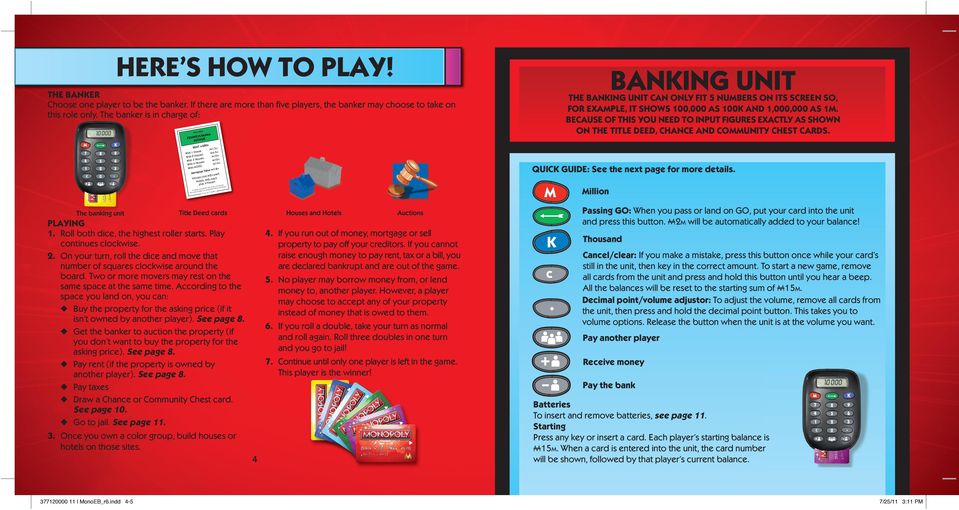
4 RECEIVING MONEY To receive money from the bank: The bank pays you money if you sell houses or hotels, mortgage a property or pass GO (see below). Some Chance and Community cards also earn you money from the bank. To receive money from the bank, the banker inserts your card. Your current balance will be displayed. The banker must then enter the amount the bank owes you (e.g. A50K), and then press. The money goes into your account and the banker removes your card. To receive money for passing GO When you pass or land on GO, the banker inserts your card and presses. A2M goes into your account automatically and the banker removes your card. To receive money from one other player Another player pays you money in rent (if they land on your property) or if you are selling properties to them (as part of a trade or if you re bankrupt). To receive money from one other player, the banker inserts their card, types in the amount they owe and presses. The money goes out of their account and the banker removes their card. The banker then inserts your card and presses. The money goes into your account and the banker removes your card. To receive money from multiple players If more than one player owes you money (e.g. for your birthday), the banker inserts the first paying player s card, keys in the amount owed (e.g. A1M) and then presses. The banker then removes the card and inserts the second paying player s card, keys in the amount owed and presses. The banker does this until all paying player s cards have been swiped. After the banker removes the last paying player s card, they insert your card and press. The payments go in one at a time until all the money has gone into your account. Your card can then be removed. To pay money to the bank: You pay the bank to buy properties, houses and hotels, pay taxes, repay mortgages and to get out of jail. Some Chance and Community Chest cards also make you pay money to the bank. To pay money to the bank, the banker inserts your card, enters the amount you owe (e.g. A2M), and presses. The money comes out of your account and the banker removes your card. To pay money to one other player: You pay another player money in rent (if you land on their property) or if you are buying properties from them (in a trade of if they have gone bankrupt). To pay money to another player, the banker inserts your card, keys in the amount you owe and presses. The banker then removes your card, inserts the card of the player you are paying and presses. The money goes into their account. Finishing The unit goes to sleep automatically after a period of inactivity. Insert any card and press any key to start it up again. All the balances will still be stored in the unit. This means you can take a break from playing and continue later, with your money exactly where you left it! When you ve finished playing, remove all cards and leave the unit to go to sleep. Starting a new game To start a new game, remove all cards from the unit, press and hold C until the unit beeps. All the balances will be reset to the starting sum of A15M. PAYING MONEY Banker s Tips 1. Always follow the arrows on the cards when inserting them into the unit. 2. If the unit does not beep when you insert a card, check it s inserted the right way up. 3. If you enter the wrong amount, press C and enter the correct amount. You can only correct a mistake if the card is still in the unit. 4. The maximum amount that can be entered at one time is A20M, the minimum amount is A10K I MonoEB_r6.indd 6-7 7/25/11 3:11 PM

5 BUYING PROPERTY There are three types of property: PENNSYLVANIA AVENUE A3.2M A2M SHORT LINE THE FINER POINTS ELECTRIC COMPANY 1. Sites 2. Railroads 3. Utilities If you land on an unowned property, you have the first choice to buy it. If you decide to buy, pay the banker the price stated on that space. You will receive that property s Title Deed card. Keep it faceup in front of you. If you decide not to buy, it is up for grabs! See Auctions, below. Owning a property entitles you to collect rent from any players who land on that space. Once you own all the sites in one color group (a monopoly) you can build houses and hotels on sites in that group and collect more rent! AUCTIONS If you decide not to buy a property after landing on it, the banker must immediately auction it to the highest bidder, starting at any price another player is willing to pay. Even though you declined the option of buying at the original price, you may join in the bidding too. PAYING RENT If your roll ends on a site that is owned by another player, you must pay rent (unless the site is mortgaged). The player who owns the site must ask you for rent before the next player rolls the dice. The amount payable is shown on the Title Deed card and varies according to the number of buildings on the site. If you own a whole color group, the rent is doubled on any undeveloped site of that group (a site without houses or hotels). If properties in a color group are mortgaged, you can still collect double rent for the sites without a mortgage. UTILITIES Utilities are bought and auctioned in the same way as properties. ELECTRIC COMPANY A WATER WORKS If you land on an owned utility, pay rent to the owner according to the dice you rolled to get there. If the owner has one utility, the rent will be four times your dice roll, multiplied by 10,000. RAILROADS Railroads are bought and auctioned in the same way as properties. If the owner has both utilities, you must RUNNING OUT OF BUILDINGS pay ten times the amount of your dice roll, If the banker has no houses left, you must wait for multiplied by 10,000. other players to return theirs before you can buy any. 8 9 SHORT LINE A2M If you land on an owned railroad, pay the amount shown on the Title Deed card to the owner, depending on the number of other railroads that player owns. BUILDING HOUSES Once you own all sites of a color group, you can buy houses to put on any of those spaces. The price of a house is shown on the Title Deed card. You can buy houses (or hotels) on your turn or in between other players turns but you must build evenly: you cannot build a second house on a site until you have built a house on every site in that group. You may buy as many buildings as you wish, as long as you can afford them! Houses may not be built if any site of the same color group is mortgaged. Place your houses and hotels on the board on the property you re building on. BUILDING HOTELS To buy a hotel, you must first have four houses on each site of a complete color group. Swap the four houses for a hotel and pay the banker the hotel price shown on the Title Deed card. Only one hotel may be built on any one site. If a limited number of houses or hotels are left and two or more players wish to buy more than the banker has, the banker auctions them off individually to the highest bidder. RUNNING OUT OF MONEY If you are low on funds, you can raise more money by: Selling buildings Mortgaging property Selling property, utilities or transports to another player for any agreed sum (even if the property is mortgaged). SELLING PROPERTY You may sell undeveloped sites, railroads and utilities to another player for a price you both agree on. You cannot sell a site if there are any buildings on any of the sites in that color group. You must first sell all the buildings on those sites to the banker. Houses and hotels are sold to the banker at half their original purchase price (shown on the Title Deed card). You can sell on your turn or in between other players turns. Selling houses You must sell houses evenly, in the same way as they were bought. Selling hotels The banker will pay you half the price of the hotel plus half the price of the four houses that were swapped to buy the hotel. Hotels can also be broken back down into houses to raise money. To do this, sell a hotel for half its cost and receive four houses in exchange I MonoEB_r6.indd 8-9 7/25/11 3:11 PM

6 80K RENT A2 House A4.5M With 1 Houses A10M With 2 es us Ho A12M With 3 es us Ho A14M With 4 L TE With HO.6M A1 e Value Mortgag M each cost A2 ch Houses A2M ea s, tel Ho uses plus 4 ho PENNSY LVAN AVENUE IA MORTG FOR B AGED 1.6M Card mu st be if proper turned this side ty is mo rtgaged up. Owing another player The player who made you bankrupt receives any money left on your bank card, your Title Deed cards and any Get out of jail free cards you own. CHANCE AND COMMUNITY CHEST When you land on one of these spaces, take the top card from the relevant pile. Follow the instructions on the card before returning the card, facedown, to the bottom of the deck. If you pick a Get out of jail free card, you can keep it until you wish to use it or sell it to another player for an amount you both agree on. r group, p. of any colo grou all the sites ed sites in that er owns prov If a play bled on unim is dou HASBRO. the rent, Repaying a mortgage You must pay the original mortgage amount plus 10% interest (rounded up to the nearest 10,000). Turn the Title Deed card faceup. You can now collect rent on it again. Selling mortgaged property You can sell mortgaged property to other players at any agreed price. The buyer can then either immediately repay the mortgage or pay 10% interest (rounded up to the nearest 10,000) but retain the mortgage. The mortgage can be repaid as normal later in the game. When all sites in a color group are mortgage-free, the owner may start buying back houses and hotels at full price. FREE P PARKING x2 BATTERIES REQUIRED 1.5v AAA or R03 size NOT INCLUDED CAUTION: 1. As with all small batteries, the batteries used with this product should be kept away from small children who still put things in their mouths. If they are swallowed, promptly see a doctor and have the doctor phone (202) collect. If you reside outside the United States, have the doctor call your local poison control center. 2. Always follow the instructions carefully. Use only batteries specified and be sure to insert item correctly by matching the + and polarity markings. 3. Do not mix old batteries and new batteries or standard (carbon-zinc) with alkaline batteries. 4. Remove exhausted or dead batteries from the product. 5. Remove batteries if product is not to be played with for a long time. 6. Do not short-circuit the supply terminals. 7. Should this product cause, or be affected by, local electrical interference, move it away from other electrical equipment. Reset (by removing and re-inserting batteries) if necessary. 8. RECHARGEABLE BATTERIES: Do not mix these with any other types of batteries. Always remove from the product before recharging. Recharge batteries under adult supervision. DO NOT RECHARGE OTHER TYPES OF BATTERIES. Getting out of jail You can get out of jail by: Paying a A500K fine and continuing on your next turn. Using a Get out of jail free card. Rolling a double. If you haven t rolled a double after three turns, pay the banker A500K before moving IN according to your third dice roll. Just visiting jail If you are not sent to jail but land on the jail space, you are Just visiting and incur no penalty. JAIL Alkaline batteries recommended. Phillips/cross head screwdriver (not included) needed to insert batteries. Please retain this information for future reference. Batteries should be replaced by an adult. GO TO JAIL Going to jail You will be sent to jail if: JAIL You land on the Go to jail space. You pick a Chance or Community Chest card which tells you to Go directly to jail. You roll a double three times in a row on your turn. Your turn ends when you are sent to jail. Move onto the jail space and do not collect A2M, regardless of where you were on the board. While in jail you can collect rent on properties provided they are not mortgaged. T I MonoEB_r6.indd FREE PARKING This is a free resting place. You do not win or lose money by landing here. You can still collect 10 rent, build on sites you own, etc. IMPORTANT: BATTERY INFORMATION M S JU BANKRUPTCY If you owe more money than you can raise from your assets, you are declared bankrupt and are out of the game. If a card tells you to move to another space, move there in the direction of the arrow. If you pass GO on the way, collect A2M. You do not pass GO if a card sends you to jail, or sends you back. PASSING GO TWICE IN ONE TURN You can collect A2M twice in one turn. For example, if you land on a Chance or COLLECT Community Chest space $2 SALARY AS YOU PASS immediately after passing GO and picking a card that tells you to Advance to GO. The banker will need to remove and reinsert your bank card into the banking unit before pressing T for the second time. G D TITLE DEE LVANIA PENNSY AVENUE Owing the banker Return your Title Deed cards to the banker who will individually auction off each property to the highest bidder. VI SI TIN MORTGAGES Mortgaging property First sell any buildings, then turn the site s Title Deed card facedown and collect your mortgage amount shown on the back of the card. You keep all mortgaged property and no other player can pay off your mortgage to secure the property. You cannot collect rent on mortgaged property, although you can collect it for other properties in that color group, as long as they are not mortgaged. 11 FCC Statement Note: This equipment has been tested and found to comply with the limits for a Class B digital device, pursuant to Part 15 of the FCC Rules. These limits are designed to provide reasonable protection against harmful interference in a residential installation. This equipment generates, uses, and can radiate radio frequency energy, and, if not installed and used in accordance with the instructions, may cause harmful interference to radio communications. However, there is no guarantee that interference will not occur in a particular installation. If this equipment does cause harmful interference to radio or television reception, which can be determined by turning the equipment off and on, the user is encouraged to try to correct the interference by one or more of the following measures: Reorient or relocate the receiving antenna. Increase the separation between the equipment and receiver. Consult the dealer or an experienced radio/tv technician for help. CAUTION: Changes or modifications not expressly approved by the party responsible for compliance could void the user s authority to operate the equipment. This Class B digital apparatus complies with Canadian ICES-003. Cet appareil numérique de la classe B est conforme à la norme NMB-003 du Canada. 7/25/11 3:12 PM

What s New? THE DICE & HOW TO MOVE On your turn, roll all THREE dice: the two white dice plus the new SPEED DIE.
 ? What s New?? In Monopoly : The Mega Edition? MONEY Each player begins with $2500, including a crisp new $1000 bill, in addition to the standard five each $1 s, $5 s, $10 s, six each $20 s, and two each
BRMKIMC EDITION -. AG ES 8+ -: 2-6 Players . - 6. 8...~ --. - '.. - ,. -,. ,,+?,,$ -:-., : y&,.,?,ir,'igq .-4
 BRMKIMC EDITION -. AG ES 8+ -: 2-6 Players.-4 --. - '.. -. - 6. 8...~ \.,. -,.,,+?,,$ -:-., : y&,.,?,ir,'igq Pay rent on other players' properties. See page 9. -4 - --A-.- Building Houses....... 10 Running
C The Fast-Dealing Property Trading Game C
 ? AGES 16+ s ars on e half the at the value in. C The Fast-Dealing Property Trading Game C OPOLY me last each t in the the king CONTENTS Game board, 6 Collectible tokens, 28 Title Deed cards, 16 CheeSY
BRAND EDITION. For 2 to 6 Players AGES 8+
 BRAND For 2 to 6 Players AGES 8+ EDITION Come take a swim around Bikini Bottom. As you travel, buy and sell properties, build pineapples and open Krusty Krabs. You can even collect money from your friends
C Fast-Dealing Property Trading Game C
 ? AGES 8+ C Fast-Dealing Property Trading Game C Y Original MONOPOLY Game Rules plus Special Rules for this Edition. CONTENTS Game board, 6 Custom pewter tokens, 28 Title Deed cards, 16 Reel Estate Tycoon
alkaline fisher-price.com
 Y6965 BMD91 Please keep this instruction sheet for future reference, as it contains important information. Requires three AA (LR6) alkaline batteries (not included) for operation. Adult assembly is required.
Bounce & Spin ZebraTM
 K0317 Bounce & Spin ZebraTM Please keep this instruction sheet for future reference, as it contains important information. Requires three AAA (LR03) alkaline batteries (not included). Adult assembly is
Wireless Internet Keyboard and Laser Mouse
 Wireless Internet Keyboard and Laser Mouse User s Manual Model KB1045LSR FCC STATEMENT KB1045LSR This device complies with part 15 of FCC Rules. Operation is subject to the following two conditions: (1)
Wireless Travel Mouse with 5-Buttons User Manual
 Wireless Travel Mouse with 5-Buttons User Manual Product Features 1. Radio frequency 27MHz wireless transmission 2. Use of 256 ID codes to prevent interference between several wireless mice being used
GAME GUIDE. Stack your tower to the top to win! CONTENTS AGES
 AGES 8 The HASBRO, HASBRO GAMING, NERF, TRANSFORMERS and MONOPOLY names and logos are trademarks of Hasbro. The distinctive design of the gameboard, the four corner squares, the MR. MONOPOLY name and character
User s Manual. 2010 VTECH Printed in China 91-002395-025-000
 User s Manual 2010 VTECH Printed in China 91-002395-025-000 INTRODUCTION When Skipper overhears King Julien insulting the penguins, a contest is proposed. Who is more popular, the penguins or the lemurs?
D UTILISATION. Catch-Me-Kitty. 2011 VTech Printed in China 91-002585-003 美
 MANUEL User's Manual D UTILISATION Catch-Me-Kitty TM 2011 VTech Printed in China 91-002585-003 美 Dear Parent, Ever notice the look on your baby s face when they learn something new through their own discovery?
www.fisher-price.com
 M9523 Please keep this instruction sheet for future reference, as it contains important information. Requires three LR44 button cell alkaline batteries (included) for bear toy operation. Adult assembly
User s Manual. 2014 VTech Printed in China 91-009683-001 US
 User s Manual TM Fire Command Rescue Center 2014 VTech Printed in China 91-009683-001 US INTRODUCTION Thank you for purchasing the VTech Go! Go! Smart Wheels Fire Command Rescue Center playset learning
A QUICKER GAME SPEEDY MONOPOLY AGES 8+
 A QUICKER GAME AGES 8+ BRAND If you re familiar with MONOPOLY and want to play a quicker game: 1. To start, the banker shuffles the Title Deed cards and deals two to each player. Players immediately pay
User s Manual. Kidiminiz. 2012 VTech Printed in China 91-002544-031 US
 User s Manual Kidiminiz 2012 VTech Printed in China 91-002544-031 US Dear Parent, At VTech, we know how important the first day of school is for your child. To help prepare preschoolers for this important
56-K61A-15000. Plantronics Calisto Headset with Bluetooth USB Adapter. User Guide
 56-K61A-15000 Plantronics Calisto Headset with Bluetooth USB Adapter User Guide Table of Contents Package Contents... 1 Product Features... 2 Wearing Your Headset... 3 Powering... 4 Charging... 5 Indicator
SmartDock for Xperia ion User guide
 SmartDock for Xperia ion User guide Contents Introduction...3 SmartDock overview...3 Charging SmartDock...3 Getting started...5 LiveWare manager...5 Upgrading LiveWare manager...5 Selecting a launch application...5
Learning Time Cuckoo Clock TM
 Learning Time Cuckoo Clock TM INTRODUCTION Thank you for purchasing the VTech Learning Time Cuckoo Clock TM! The Learning Time Cuckoo Clock TM introduces time telling and ageappropriate curriculum in
In-Site Motion Webcam
 In-Site Motion Webcam User s Manual Model IC825C FCC STATEMENT IC825C This device complies with part 15 of FCC Rules. Operation is subject to the following two conditions: (1) this device may not cause
56-A11A-10511. Plantronics Calisto Headset with Bluetooth USB Adapter. User Guide
 56-A11A-10511 Plantronics Calisto Headset with Bluetooth USB Adapter User Guide Table of Contents Package Contents... 1 Product Features... 2 Wearing Your Headset... 3 Powering... 4 Charging... 5 Indicator
AGES 8+ b e g g i n ʼ f o r t h e b e a t USER S GUIDE
 AGES 8+ b e g g i n ʼ f o r t h e b e a t USER S GUIDE Thank you for purchasing I-DOG. Be sure to read and follow all instructions carefully before using this product. Feed this robotic pooch your music
Energy Smart Electric Water Heater Controller
 Installation, Operation and Troubleshooting Instructions Energy Smart Electric Water Heater Controller Table of Contents Installation and Setup, 2 Operation, 5 Troubleshooting, 7 Regulatory Notices, 11
Plantronics Calisto Headset with Bluetooth USB Adapter User Guide 56-K61A-23010
 56-K61A-23010 Plantronics Calisto Headset with Bluetooth USB Adapter User Guide Contents Package Contents... 1 Product Features... 2 Wearing Your Headset... 3 Powering Your Headset and USB Bluetooth Adapter...
Wireless Optical Mouse
 Wireless Optical Mouse User s Manual Model PD950P FCC STATEMENT PD950P This device complies with part 15 of FCC Rules. Operation is subject to the following two conditions: (1) this device may not cause
User s Manual BROK THE BRACHIOSAURUS. 2012 VTech Printed in China 91-002777-007 US
 User s Manual TM TM BROK THE BRACHIOSAURUS 2012 VTech Printed in China 91-002777-007 US Hi Friend, You re about to embark on a dino-mite adventure with me, Brok the Brachiosaurus! Just so you know, I ve
PORTABLE ALARM CLOCK. Dual Alarm. FM Radio. Wake-up Sounds. USB Phone Charger G-1CR
 G-BUZZ PORTABLE ALARM CLOCK Dual Alarm FM Radio Wake-up Sounds USB Phone Charger G-1CR Welcome Alarm clocks can be boring. Get ready to shake things up with your new G-BUZZ. Slap the snooze for more ZZZ
User guide. Miracast Wireless Display IM10
 User guide Miracast Wireless Display IM10 Contents Miracast Wireless Display User guide...3 Setting up the Miracast Wireless Display...4 Hardware overview...4 Turning on and connecting the Miracast Wireless
HDMI or Component Standalone Capture Device 1080p
 HDMI or Component Standalone Capture Device 1080p USB2HDCAPS *actual product may vary from photos DE: Bedienungsanleitung - de.startech.com FR: Guide de l'utilisateur - fr.startech.com ES: Guía del usuario
Traintastic Laptop User s Manual
 Traintastic Laptop User s Manual Ludorum plc 2010 Chuggington TM is a trademark of Ludorum plc. 2010 VTech Printed in China 91-002464-006-000 美 INTRODUCTION Thank you for purchasing the VTech Chuggington
User guide. Stereo Bluetooth Headset SBH70
 User guide Stereo Bluetooth Headset SBH70 Contents Introduction...3 Function overview...3 Hardware overview...3 Basics...5 Charging the battery...5 Battery and power management...5 Turning the headset
Regulatory Compliance Statement
 Regulatory Compliance Statement 0560 EU Declaration of Conformity The declaration of conformity may be consulted at www.kobo.com/userguides SAR Limits The exposure standard for wireless devices employs
Targus Bluetooth Keyboard for Tablets
 1 BLUETOOTH KEYBOARD for Tablets 410-2153-001B / AKB33US 1 YEAR LIMITED WARRANTY: We pride ourselves on the quality of our products. For complete warranty details and a list of our worldwide offices, please
Wireless Mouse USER GUIDE. for Mac. www.targus.com/us/formac ONE YEAR LIMITED WARRANTY N2953
 AMW43US / 410-1514-001C N2953 www.targus.com/us/formac 2008 Manufactured or imported by Targus Group International, Inc. (for U.S. sales: 1211 North Miller Street, Anaheim, CA 92806 USA, for Australia
Super Sounds Soccer. www.fisher-price.com. Model B8507
 Model B8507 www.fisher-price.com Please keep this instruction sheet for future reference, as it contains important information. Adult assembly is required. Tool needed for assembly: Phillips Screwdriver
Wireless Optical Travel Mouse
 Wireless Optical Travel Mouse User s Manual PLEASE READ THESE INSTRUCTIONS CAREFULLY BEFORE INSTALLING THIS DEVICE. Table of Contents FCC Statement Page 3 Introduction.. Page 6 Package Contents.. Page
User guide. Stereo Bluetooth Headset SBH50
 User guide Stereo Bluetooth Headset SBH50 Contents Stereo Bluetooth Headset User guide...3 Introduction...4 Function overview...4 Hardware overview...4 Status icon overview...5 Basics...6 Charging the
MoCA Adapter MC1001 v2 Installation Guide
 Technical Support Thank you for selecting NETGEAR products. After installing your device, locate the serial number on the label of your product and use it to register your product at www.netgear.com/register.
User guide. Stereo Bluetooth Headset SBH80
 User guide Stereo Bluetooth Headset SBH80 Contents Introduction...3 Function overview...3 Hardware overview...3 Basics...5 Charging the battery...5 Battery status...5 Turning the headset on and off...5
A QUICKER GAME SPEEDY MONOPOLY AGES 8+ monopoly.com
 A QUIKER GAME AGES 8+ BRAND If you re familiar with MONOPOLY and want to play a speedy game: 1. To start, the banker shuffles the Title Deed cards and deals two to each player. Players immediately pay
USB 3.0 to M.2 NGFF SSD Enclosure with UASP
 USB 3.0 to M.2 NGFF SSD Enclosure with UASP SM2NGFFMBU33 *actual product may vary from photos DE: Bedienungsanleitung - de.startech.com FR: Guide de l'utilisateur - fr.startech.com ES: Guía del usuario
Radiometrics Guide to FCC & Canada Compliance. for Unintentional Radiators
 Radiometrics Guide to FCC & Canada Compliance for Unintentional Radiators Since 1934, the FCC has had the authority to regulate the electromagnetic emissions from electronic devices. Since October 1, 1983,
GAIN LEVEL VOICE OUTPUT INPUT DISTORTION. true bypass USER S MANUAL
 GAIN LEVEL VOICE BASS TREBLE OUTPUT INPUT DISTORTION true bypass USER S MANUAL Important Safety Instructions 1 Read these instructions. 2 Keep these instructions. 3 Heed all warnings. 4 Follow all instructions.
ON YOUR TURN: ROLLING AND MOVING
 E8 IF CV Monopoly.pdf // O YOU : LG MOVG I M J. I I W O PY O GE OU. W WH? oll the dice. If you roll doubles, move the amount shown. If you don t roll doubles and it is your fir or second try to get out
How To Use A Doxie Scanner
 paperless for everyone yes momma, i got a doxie! Alison, was that the door?... okay, don t make a mess... Hi, I m Doxie! Doxie Overview Power & USB Ports SD Card Slot (on back) Power Button Paper Slot
Getting started with Coin
 Getting started with Coin Setting Up Coin For App version 1.5+, follow these steps to start using Coin. Coin Device Sync VISA 4783 01/15 Sync Coin Add your cards to the Coin app Open the app and add your
Wireless Alarm System. Alarm Siren. User s Manual. Choice ALERT. Control all Sensors & accessories from one location
 45136 Wireless Alarm System Alarm Siren User s Manual Low Batt On Armed ON/OFF LEARN Choice ALERT Control all Sensors & accessories from one location Table of Contents Important Safeguards 4 Introduction
Alarm Clock USER GUIDE
 Alarm Clock USER GUIDE Jazwares, Inc. 2010 1 CONTENTS Please read the instructions along with the alarm clock carefully before you use it, so that you can operate it conveniently. WELCOME, Safety Tips
IN24 IN26. User s Guide
 IN4 IN6 User s Guide Please read the safety instructions booklet before setting up the projector. Unpack the box Here s what s included: Projector Remote CD-ROM Product Registration and Reference Guide
User s Manual. Bluetooth Calculator Keypad. Page
 User s Manual Bluetooth Calculator Keypad Page Regulatory Compliance This device complies with Part 15 of the FCC Rules. Operation is subject to the following two conditions: (1) This device may not cause
Wireless Alarm System. Window/Door Sensor. User s Manual. Choice ALERT. Control all Sensors & accessories from one location
 45131 Wireless Alarm System Window/Door Sensor User s Manual Choice ALERT Control all Sensors & accessories from one location Table of Contents Important Safeguards 4 Introduction 5 Installation 6 Assigning
user guide Help is just a click or phone call away
 Help is just a click or phone call away If you need help finding your ideal comfort or troubleshooting, please visit us at sleepnumber.com/chat to chat with a live representative 7 a.m. 11 p.m. (Central
Pull & Learn Car Carrier
 User s Manual Pull & Learn Car Carrier 2008 VTech Printed in China 91-002289-009 049701 IM 009.indd 1 7/18/08 9:19:27 AM Dear Parent, Ever notice the look on your baby s face when they learn something
musical auto mirror day & night light Control Panel Features Mirror Features Front View Mirror Features Rear View B C Remote Receiver C
 Control Panel Features A Power, Low/High Volume Switch Note: The dual-mode night light and music can only be activated by pressing the buttons on the remote. A Mirror Features Front View B Dual-Mode Night
HLWLAN 802.11b/g/n Transceiver Kit
 092524 RevB HLWLAN 802.11b/g/n Transceiver Kit Wireless Communications for OmniLogic Owner s Manual Contents Introduction...1 Installation...2 Configuration...6 Operation...8 Troubleshooting...9 HLWLAN
Soothing Songs Bear TM
 User s Manual Soothing Songs Bear TM 2013 VTech Printed in China 91-002725-000 Dear Parent, Ever notice the look on your baby s face when they learn something new through their own discovery? These self-accomplished
VGA to HDMI video converter with scaler
 VGA to HDMI video converter with scaler VGA2HDPRO2 *actual product may vary from photos DE: Bedienungsanleitung - de.startech.com FR: Guide de l'utilisateur - fr.startech.com ES: Guía del usuario - es.startech.com
Combined Business Loan
 Combined Business Loan Terms and Conditions This document sets out your loan or facility s terms and conditions In this document we ve explained the terms and conditions applying to your ANZ Business Loan
Docking station for two laptops
 Docking station for two laptops USB3DDOCKFT DE: Bedienungsanleitung - de.startech.com FR: Guide de l'utilisateur - fr.startech.com ES: Guía del usuario - es.startech.com IT: Guida per l'uso - it.startech.com
2013 VTech Printed in China 91-009656-000 US
 Rechargeable Power Pack User s Manual 2013 VTech Printed in China 91-009656-000 US INTRODUCTION The Rechargeable Power Pack makes it easier than ever to keep the InnoTab 3 or InnoTab 3S charged and ready
How to Play. It s a Random, Rapid-Fire Card Shoot-Out!
 How to Play Ages 7 and Up 2 to 10 Players Game It s a Random, Rapid-Fire Card Shoot-Out! CONTENTS 112 cards as follows: 18 Blue cards - 1 to 9 18 Green cards - 1 to 9 18 Red cards - 1 to 9 18 Yellow cards
Home Loan. This document sets out your loan s terms and conditions. Some key information about your loan. Terms and Conditions
 Home Loan Terms and Conditions This document sets out your loan s terms and conditions In this document we ve explained the terms and conditions applying to your ANZ Home Loan. It includes key information
AGE 1 12+ 3-6 3-6 P PLAYER ERS
 A C QU I RE ACQUIRE Rule Book AGE 1 1 + 6 PLAY PLAYERS ERS Need strategy tips? Having trouble finding players? Visit www.avalonhill.com for strategy tips and opportunities to play the game of Acquire online
USER GUIDE. BLUETOOTH HEADSET system
 USER GUIDE Plantronics VOYAGER 510-USB BLUETOOTH HEADSET system 0 0 0 TABLE OF CONTENTS PACKAGE CONTENTS Package Contents 3 Features 4 Charging 5 Powering 6 Pairing 7 Installing PerSono Suite Software
GSM-EXT Cable Assembly Installation Guide
 GSM-EXT Cable Assembly Installation Guide For Documentation and Online Support: http://www.security.honeywell.com/hsc/resources/mywebtech General Information The GSM-EXT cable assembly is used to connect
ST815 Illumination Sensor with LCD
 ST815 Illumination Sensor with LCD The Illumination Sensor with LCD (refer to as Illumination Sensor hereafter) is a Z-Wave TM enabled device which is fully compatible with any Z-Wave TM enabled network.
PEARL Portable Reading Camera
 PEARL Portable Reading Camera Quick Start Guide Freedom Scientific, Inc. 440528-001 Rev. D Freedom Scientific, Inc., 11800 31 st Court North, St. Petersburg, Florida 33716-1805, USA www.freedomscientific.com
Last update: August 20, 2008 Word count: 21,073
 Last update: August 20, 2008 Word count: 21,073 Copyright Information Real Money 2003, by W. David Albrecht, is a financial accounting and investment simulation game for use in accounting classes. The
USB 3.0 SATA/IDE 2.5 Hard Drive Enclosure
 USB 3.0 SATA/IDE 2.5 Hard Drive Enclosure UNI251BMU33 *actual product may vary from photos DE: Bedienungsanleitung - de.startech.com FR: Guide de l'utilisateur - fr.startech.com ES: Guía del usuario -
USER GUIDE. Compatible with most Bluetooth phones & Bluetooth enabled computers (Windows or Macintosh )
 USER GUIDE Compatible with most Bluetooth phones & Bluetooth enabled computers (Windows or Macintosh ) TABLE OF CONTENTS 4 Package Contents 5 Safety Instructions/ Glossary 6 Charging the Headset 7 Battery
INSTALLATION GUIDE ConnectLine TV Adapter Getting started
 INSTALLATION GUIDE ConnectLine TV Adapter Getting started PURPOSE OF THIS GUIDE READ THIS FIRST Before your hearing instruments can receive sound from the TV, the adapter must be connected to the TV and
Alarm Clock USER GUIDE
 Alarm Clock USER GUIDE Jazwares, Inc. 2012 CONTENTS Please read the instructions along with the Alarm Clock carefully before you use it, so that you can operate it conveniently. WELCOME & Warnings Page
M.2 NGFF SSD to 2.5in SATA Adapter
 M.2 NGFF SSD to 2.5in SATA Adapter SAT2M2NGFF25 *actual product may vary from photos DE: Bedienungsanleitung - de.startech.com FR: Guide de l'utilisateur - fr.startech.com ES: Guía del usuario - es.startech.com
PolyTune USER S MANUAL
 PolyTune USER S MANUAL Important Safety Instructions 1 Read these instructions. 2 Keep these instructions. 3 Heed all warnings. 4 Follow all instructions. 5 Do not use this apparatus near water. 6 Clean
User Manual CABLE TESTER CT100. Professional 6-in-1 Cable Tester
 User Manual CABLE TESTER CT100 Professional 6-in-1 Cable Tester 2 CABLE TESTER CT100 User Manual 1. Introduction Congratulations! With the CT100, you have purchased an indispensable tool that enables you
Wireless Alarm System. Panic Button. User s Manual. Choice ALERT. Control all sensors, accessories and remote transmitters from one location
 Wireless Alarm System Panic Button User s Manual Choice ALERT Control all sensors, accessories and remote transmitters from one location Table of Contents Important Safeguards 4 Introduction 5 Activating
BPM Series. Metered Rack Mount PDUs. Quick Start Guide. Models Covered:
 WTI Part No.: 13963 Rev.: PM Series Metered Rack Mount PDUs Models Covered: PM-8HS20-1 PM-16VS30-1 PM-24VS30-1 PM-24VS30-D PM-8HS20-2 PM-16VS30-2 PM-24VS30-2 PM-24VS30-Y PM-16VS20-1 PM-24VS20-1 PM-24VS20-D
Owner s Manual. Not suitable for mobile applications. Important Safety Instructions 2. Quick Installation 3. Basic Operation 4. Storage & Service 7
 Register online today for a chance to win a FREE Tripp Lite product! www.tripplite.com/warranty Owner s Manual Internet Office & BC Personal UPS Systems Not suitable for mobile applications. Important
ON-KEY KARAOKE TV STAR USER MANUAL
 ON-KEY KARAOKE TV STAR USER MANUAL FCC STATEMENT This equipment has been tested and found to comply with the limits for a Class B digital device, pursuant to Part 15 of the FCC Rules. These limits are
466-1936 Rev E October 2004 ZZZ*(6HFXULW\FRP. Part No: 60-883-95R. CareGard. User Guide
 ) *(6HFXULW\ 466-1936 Rev E October 2004 ZZZ*(6HFXULW\FRP Part No: 60-883-95R CareGard User Guide FCC Notices FCC Part 15 Information to the User Changes or modifications not expressly approved by GE Security
YOUR GUIDE TO. A checklist for buying a
 YOUR GUIDE TO A checklist for buying a house or apartment in NSW. Do I really need a solicitor to make an offer on a house? The answer is that buying a home is often the biggest financial decision we ll
InnoMedia ESBC 9380-4B. Quick Install Guide. www.innomedia.com 1
 InnoMedia ESBC 9380-4B Quick Install Guide www.innomedia.com 1 Table of Contents Introduction 2 Package Contents 2 CAUTION 2 Installation 3 Wall-Mounting Instructions 5 Troubleshooting 6 Appendix A. LED
4 Port PCI Express Gigabit Ethernet PoE PSE Network Card
 4 Port PCI Express Gigabit Ethernet PoE PSE Network Card ST4000PEXPSE *actual product may vary from photos DE: Bedienungsanleitung - de.startech.com FR: Guide de l'utilisateur - fr.startech.com ES: Guía
Wireless Alarm System. Wireless Keypad. User s Manual. Choice ALERT. Control all sensors, accessories and remote transmitters from one location
 Wireless Alarm System Wireless Keypad User s Manual 1 2 3 4 Choice ALERT Control all sensors, accessories and remote transmitters from one location Table of Contents Important Safeguards 4 Introduction
Mini Speaker. Printed in China Part No. 480-919-P Version D. CWA BT300 Product Information Guide
 Mini Speaker Printed in China Part No. 480-919-P Version D CWA BT300 Product Information Guide IMPORTANT To get the full capability of your new Cobra Airwave Mini, please read this manual. It's more than
Wireless Keyboard and Optical Mouse Bundle
 Wireless Keyboard and Optical Mouse Bundle Enjoy the freedom of wireless optical precision User Manual F8E832-BNDL TABLE OF CONTENTS Introduction....................................1 Compatible Equipment............................2
RADIO CONTROLLED DIGITAL CLOCK MODELS 88905 / 88906
 RADIO CONTROLLED DIGITAL CLOCK MODELS 88905 / 88906 QUICK SETUP GUIDE IMPORTANT! INSTALL BATTERIES IN THE OUTDOOR TRANSMITTER BEFORE INSTALLING BATTERIES IN THE RADIO-CONTROLLED CLOCK. ALKALINE BATTERIES
Gateway Port Replicator User Guide
 Gateway Port Replicator User Guide Using the Port Replicator Identifying features Connecting and disconnecting the port replicator 1 Using the Port Replicator Top Power button Component Icon Description
Optical Wireless Mouse. User s Manual
 Optical Wireless Mouse Model : OM4000W User s Manual 110935-109154 Rev. 061101 User s Record: To provide quality customer service and technical support, it is suggested that you keep the following information
Dual Ports Serial PC Card User Manual
 Dual Ports Serial PC Card User Manual FCC COMPLIANCE STATEMENTS This equipment has been tested and found to comply with the limits for a Class B digital device, pursuant to Part 15 of the FCC Rules. These