
Oracle Field Service Cloud User Types. Release 15.8
|
|
|
- Esmond Elliott
- 10 years ago
- Views:
Transcription
1 Oracle Field Service Cloud User Types Release 15.8
2 Copyright 2015 Oracle and/or its affiliates. All rights reserved. Part Number E This software and related documentation are provided under a license agreement containing restrictions on use and disclosure and are protected by intellectual property laws. Except as expressly permitted in your license agreement or allowed by law, you may not use, copy, reproduce, translate, broadcast, modify, license, transmit, distribute, exhibit, perform, publish, or display any part, in any form, or by any means. Reverse engineering, disassembly, or decompilation of this software, unless required by law for interoperability, is prohibited. The information contained herein is subject to change without notice and is not warranted to be error-free. If you find any errors, please report them to us in writing. If this is software or related documentation that is delivered to the U.S. Government or anyone licensing it on behalf of the U.S. Government, the following notice is applicable: U.S. GOVERNMENT END USERS: Oracle programs, including any operating system, integrated software, any programs installed on the hardware, and/or documentation, delivered to U.S. Government end users are commercial computer software pursuant to the applicable Federal Acquisition Regulation and agency-specific supplemental regulations. As such, use, duplication, disclosure, modification, and adaptation of the programs, including any operating system, integrated software, any programs installed on the hardware, and/or documentation, shall be subject to license terms and license restrictions applicable to the programs. No other rights are granted to the U.S. Government. This software or hardware is developed for general use in a variety of information management applications. It is not developed or intended for use in any inherently dangerous applications, including applications that may create a risk of personal injury. If you use this software or hardware in dangerous applications, then you shall be responsible to take all appropriate fail-safe, backup, redundancy, and other measures to ensure its safe use. Oracle Corporation and its affiliates disclaim any liability for any damages caused by use of this software or hardware in dangerous applications. Oracle and Java are registered trademarks of Oracle and/or its affiliates. Other names may be trademarks of their respective owners. Intel and Intel Xeon are trademarks or registered trademarks of Intel Corporation. All SPARC trademarks are used under license and are trademarks or registered trademarks of SPARC International, Inc. AMD, Opteron, the AMD logo, and the AMD Opteron logo are trademarks or registered trademarks of Advanced Micro Devices. UNIX is a registered trademark of The Open Group. This software or hardware and documentation may provide access to or information on content, products, and services from third parties. Oracle Corporation and its affiliates are not responsible for and expressly disclaim all warranties of any kind with respect to third-party content, products, and services. Oracle Corporation and its affiliates will not be responsible for any loss, costs, or damages incurred due to your access to or use of third-party content, products, or services. Documentation Accessibility For information about Oracle's commitment to accessibility, visit the Oracle Accessibility Program website at Access to Oracle Support Oracle customers have access to electronic support through My Oracle Support. For information, visit or visit if you are hearing impaired.
3 Table of Content 1 Document Purpose and Scope Glossary Introduction User Types at a Glance Fewer Screens, Fewer Settings, Fewer Errors Where Did Everything Go? Security Profiles and Permissions Display Profiles API Profiles User Types Management Access to User Types Management User Type Creation User Type Deletion User Type Settings General Screen Configuration API Access Restrictions and Filters Filter Configuration for User Types Own User Type Management User Types Export and Import User Types Export User Types Import User Management GUI Changes 'Display' Screen Change 'Profiles' Screen Removal 'Permissions' Screen Removal 'API Configuration' Screen Removal 'User' Screen Redesign 'Users' Screen Change 'Filters' Screen and Window Change 'Login Policies' Screen Change Message Blocking Conditions Reports Dashboard Changes 'User Options' Context in Mobility Migration from Previous Versions How to Prepare for Migration...58

4 User Types Document Purpose and Scope 1 Document Purpose and Scope This document is intended as a description of User Types a new feature of Oracle Field Service Cloud to be used by administrators managing the system users. It is assumed that the reader is familiar with the Oracle Field Service Cloud functionalities and operating principles. 2 Glossary The glossary below contains the basic terms used in this document. Term Activity API Bucket Company Context Field GUI Inventory Manage Mobility Property Resource Resource Tree Route User Explanation Any time-consuming work performed by a resource Application Programming Interface a particular set of rules and specifications that software programs follow to communicate and interact with each other Entity appearing on the resource tree which can contain resources of a defined type and be assigned activities 1) Legal entity, using Oracle Field Service Cloud 2) Entity that represents a Client in Oracle Field Service Cloud; company is created by TOA Technologies during the process of implementation OFSC or API screen showing all available properties and action links Property present in the system by default Graphical User Interface, allows to use software by manipulating images rather than by issuing text commands Equipment that can be installed or deinstalled during an activity Oracle Field Service Core Manage Cloud Service (former Manage Application). Serves as the command center for field operations and the central hub for viewing real-time information about resources and their activities across the entire field organization Oracle Field Service Mobility Cloud Service (former Mobility Application). A webbased application for mobile resources to execute and manage work-related activities and ongoing communications Field and field value assigned to an entity in Oracle Field Service Cloud (to user, resource, activity or inventory). There are fields and custom properties Element in the resource tree representing a defined company asset Hierarchy of company resources, showing parent-child relationships List of activities assigned to a resource for a specific date, or a list of non-scheduled activities assigned to a resource 1) Person using Oracle Field Service Cloud 2) Entity used for authentication and authorization, allowing people or external software to access Oracle Field Service Cloud Page 4 of 59 Confidential Oracle
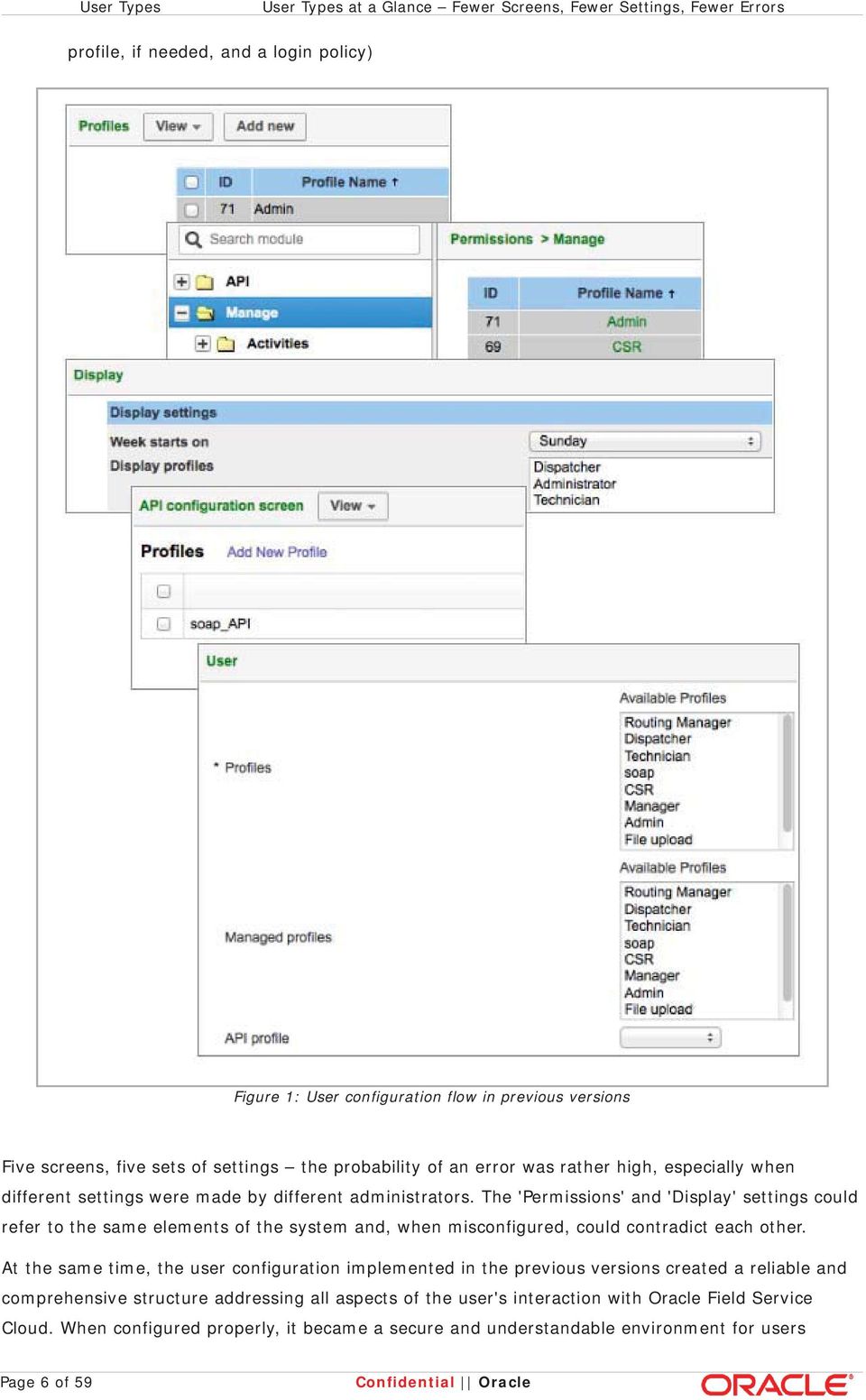
5 Introduction User Types 3 Introduction ETAdirect has had a user management system ensuring, on one hand, consistent security and, on the other hand, flexibility of access corresponding to different functions performed by different users. Each user was assigned one or several security profiles controlling the actions available to the user and a display profile controlling the areas visible to the user and the level of such visibility. This system has proved to be solid and reliable, however, its configuration required great care and attention, as it was important to set up security profiles and display profiles so that they did not contradict each other. Now, Oracle Field Service Cloud has introduced the User Types functionality which is based on a totally new approach to user management. Generally, user types represent the business roles adopted in the company. The concept of User Types is intuitively clear as it suggests that each user in the company falls under a certain user type. Each user is assigned exactly one user type corresponding to the user's functions and defining the user's access to the system. Users of the same type have the same level of access, the same permissions and restrictions and the same set of screens and/or fields visible to them. User types combine the display profile and security profile settings, thus, making the user configuration easier and reducing the risk of errors. User types also include certain settings previously configured on the 'User' screen. In other words, the 'User Types' functionality has most of the user settings in one place giving the administrator a complete picture of how the user type corresponding to a particular business role should be configured. Thus, the concepts of display profile, security profile and API profile have become obsolete as their purpose is now achieved by user types. At the same time, the basic principles of user configuration remain unchanged the method of the user's login to Oracle Field Service Cloud is defined by the login policy, the user's ability to use certain functions is controlled by permissions, the user's access to screens and properties is set in screen configuration. User configuration has become more logical, streamlined and intuitive while keeping to the high standards of security inherent to Oracle Field Service Cloud. 4 User Types at a Glance Fewer Screens, Fewer Settings, Fewer Errors User types have become a quantum leap in user management by gathering all user configuration in one place. Previously, user configuration consisted of the following steps: configuration of security profiles (creation of a set of profiles corresponding to the business roles in the company) configuration of permissions for each security profile (setting the levels of access to various parts of the system) configuration of display profiles (creation of another set of profiles defining how the system is visible to certain groups of users according to their business roles) configuration of API profiles (creation of yet another set of profiles defining access to various APIs used in the system) user creation (including assignment of one or more security profiles, a display profile, an API Confidential Oracle Page 5 of 59
6 User Types User Types at a Glance Fewer Screens, Fewer Settings, Fewer Errors profile, if needed, and a login policy) Figure 1: User configuration flow in previous versions Five screens, five sets of settings the probability of an error was rather high, especially when different settings were made by different administrators. The 'Permissions' and 'Display' settings could refer to the same elements of the system and, when misconfigured, could contradict each other. At the same time, the user configuration implemented in the previous versions created a reliable and comprehensive structure addressing all aspects of the user's interaction with Oracle Field Service Cloud. When configured properly, it became a secure and understandable environment for users Page 6 of 59 Confidential Oracle
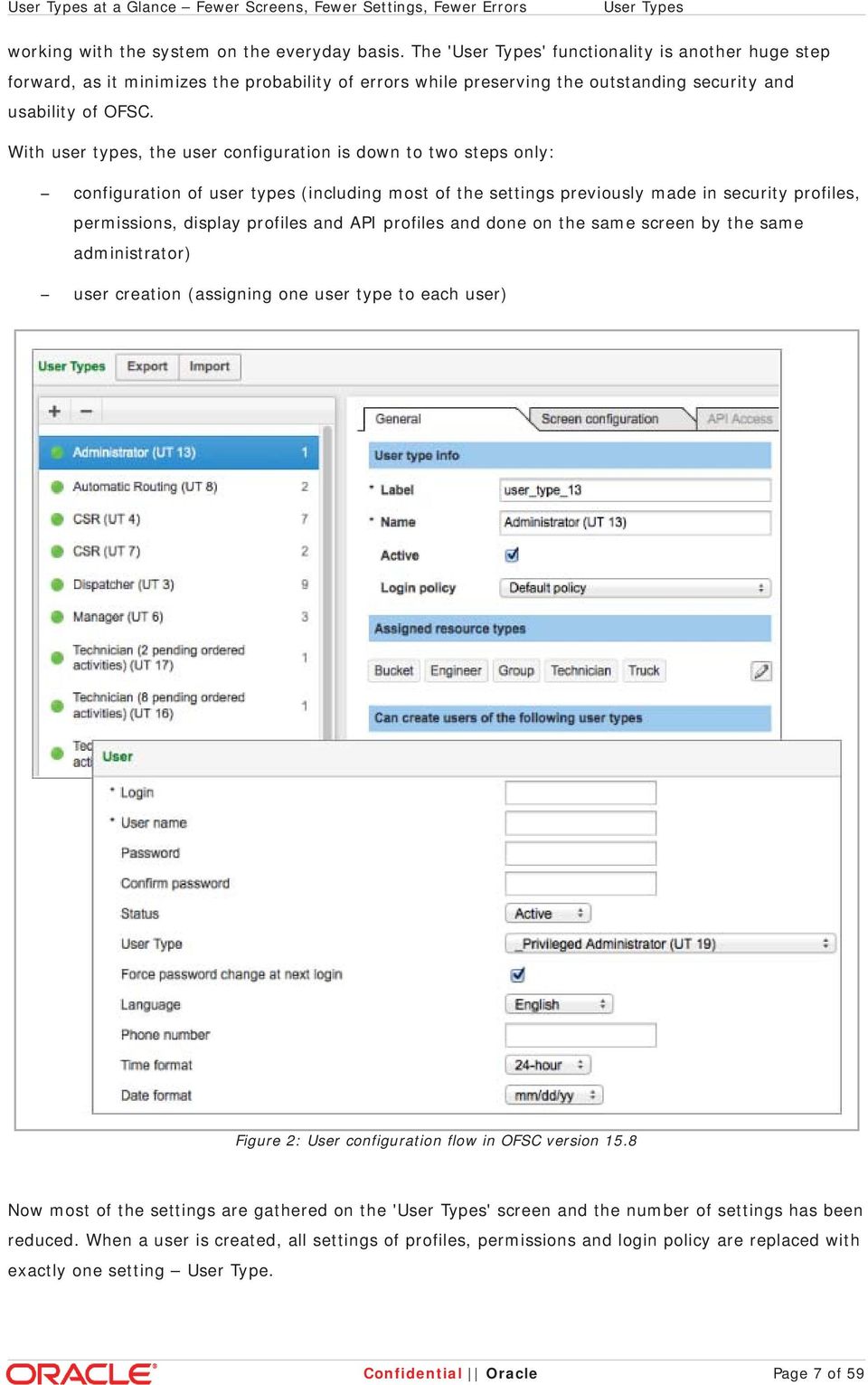
7 User Types at a Glance Fewer Screens, Fewer Settings, Fewer Errors User Types working with the system on the everyday basis. The 'User Types' functionality is another huge step forward, as it minimizes the probability of errors while preserving the outstanding security and usability of OFSC. With user types, the user configuration is down to two steps only: configuration of user types (including most of the settings previously made in security profiles, permissions, display profiles and API profiles and done on the same screen by the same administrator) user creation (assigning one user type to each user) Figure 2: User configuration flow in OFSC version 15.8 Now most of the settings are gathered on the 'User Types' screen and the number of settings has been reduced. When a user is created, all settings of profiles, permissions and login policy are replaced with exactly one setting User Type. Confidential Oracle Page 7 of 59
8 User Types Where Did Everything Go? 4.1 Where Did Everything Go? If the previous user management system can be seen as a wallet full of ID cards from which the user had to select the right one to open a door they were standing in front of, a user type is rather a universal card opening all doors. However, the system is still there, but it is now managed from a single center point, the user type. Most of the usual settings can be found within the scope of user types configuration if you know where to look Security Profiles and Permissions The concept of permissions as it existed in ETAdirect has been greatly modified. Now the approach towards the users' access to various screens, actions and functions of the system is much more straightforward and intuitively understandable. Previously, users' access to screens, actions and functions of ETAdirect was controlled by permissions. In other words, the administrator setting a certain permission could make a particular screen visible to a user and hide it from another user. On the other hand, setting another permission made certain action links visible to a user, therefore, such user could perform the related actions. Finally, the permissions also controlled certain ETAdirect functions which were not otherwise represented as GUI elements. For example, the user's ability to use the Parts Catalog functionality was also controlled by a special permission. Parts Catalog allows the user to search for particular spare parts in the catalog using the standard OFSC search function. With the introduction of user types, the permissions controlling screen access have been implemented as access to menu items. The idea behind is that when a user has access to a certain screen or window, they also have access to fields and actions on that screen or window. For example, if a user has access to the 'Routing' screen, they will be able to use the actions on the 'Routing' screen, make settings and view data. A separate 'Routing' permission is no longer needed. The permissions controlling the users' ability to perform certain actions and view certain data have been implemented as visibilities of the corresponding tabs or action links. For example, to allow a user type to set required inventory for an activity, the administrator has to set the visibility of the 'Required Inventory' tab to Read-write. If the visibility is set to Read-only, the 'Required Inventory' tab is visible to users of the current type, but no changes can be made. If no visibility is set, the tab is hidden altogether. Some elements used to be controlled by two-level permissions (Show Hidden) which are now implemented as visibilities with only one option, Read-only or Read-write. If an element has to be hidden for a certain user type, no visibility is to be set. When the visibility is set, the element is available together with its content. Other elements were controlled by three-level permissions (Read-write Read-only Hidden). Now such access is defined by visibilities with two options, Read-write and Read-only. If an element has to be hidden for a certain user type, no visibility is to be set. Note: some screens with complex system of settings have visibilities both for the entire screen and for individual properties and actions. This way, the screen can have the Read-write visibility with some properties shown as Read-only. Page 8 of 59 Confidential Oracle

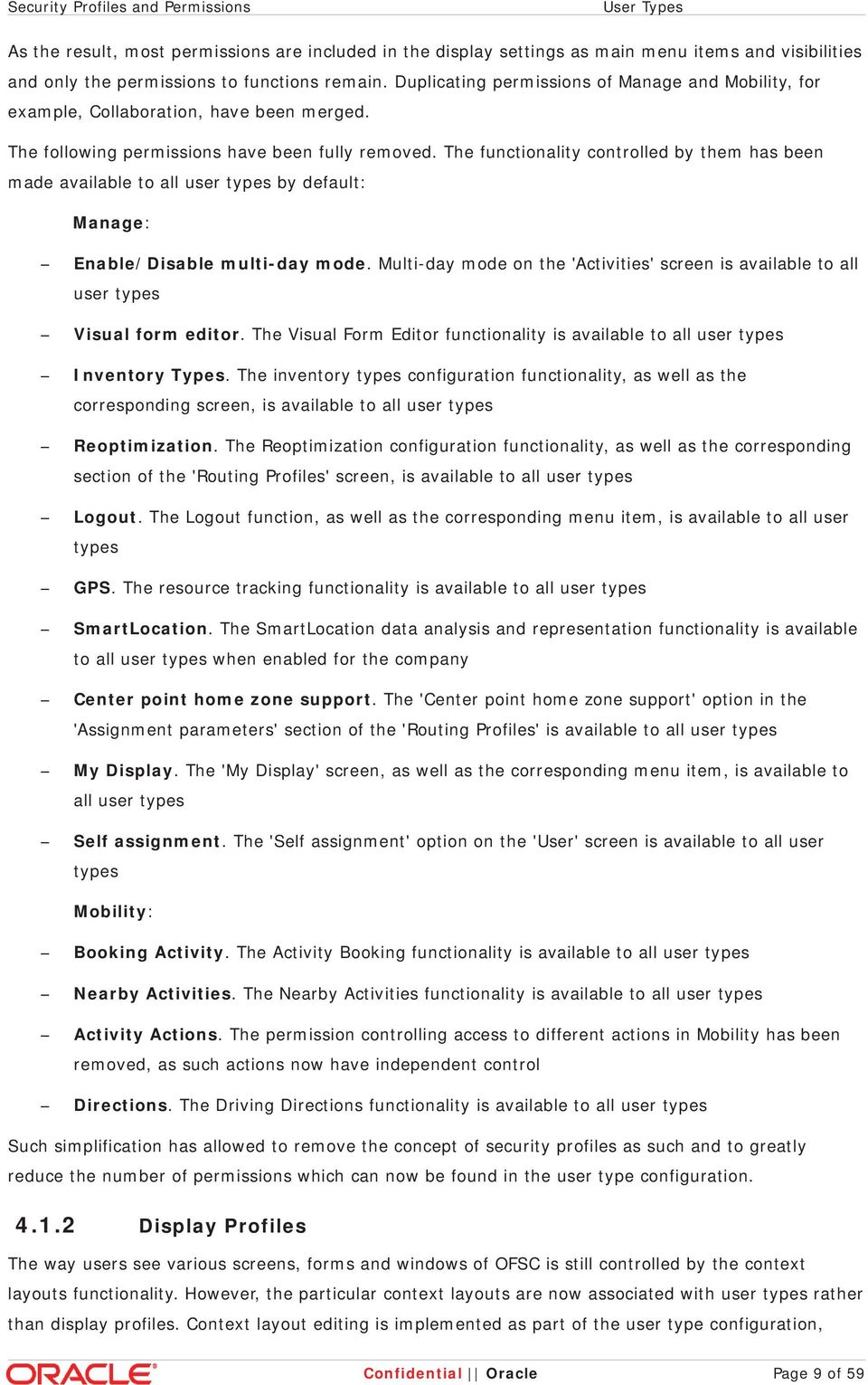
9 Security Profiles and Permissions User Types As the result, most permissions are included in the display settings as main menu items and visibilities and only the permissions to functions remain. Duplicating permissions of Manage and Mobility, for example, Collaboration, have been merged. The following permissions have been fully removed. The functionality controlled by them has been made available to all user types by default: Manage: Enable/Disable multi-day mode. Multi-day mode on the 'Activities' screen is available to all user types Visual form editor. The Visual Form Editor functionality is available to all user types Inventory Types. The inventory types configuration functionality, as well as the corresponding screen, is available to all user types Reoptimization. The Reoptimization configuration functionality, as well as the corresponding section of the 'Routing Profiles' screen, is available to all user types Logout. The Logout function, as well as the corresponding menu item, is available to all user types GPS. The resource tracking functionality is available to all user types SmartLocation. The SmartLocation data analysis and representation functionality is available to all user types when enabled for the company Center point home zone support. The 'Center point home zone support' option in the 'Assignment parameters' section of the 'Routing Profiles' is available to all user types My Display. The 'My Display' screen, as well as the corresponding menu item, is available to all user types Self assignment. The 'Self assignment' option on the 'User' screen is available to all user types Mobility: Booking Activity. The Activity Booking functionality is available to all user types Nearby Activities. The Nearby Activities functionality is available to all user types Activity Actions. The permission controlling access to different actions in Mobility has been removed, as such actions now have independent control Directions. The Driving Directions functionality is available to all user types Such simplification has allowed to remove the concept of security profiles as such and to greatly reduce the number of permissions which can now be found in the user type configuration Display Profiles The way users see various screens, forms and windows of OFSC is still controlled by the context layouts functionality. However, the particular context layouts are now associated with user types rather than display profiles. Context layout editing is implemented as part of the user type configuration, Confidential Oracle Page 9 of 59
10 User Types Display Profiles therefore, display profiles have become obsolete API Profiles The API access settings defining the users' ability to use APIs have become part of the user type configuration, therefore, there is no need in API profiles any longer. 5 User Types Management The administrator managing users in the company can create user types according to the existing business roles, modify the configuration of certain user types whenever the situation requires such modifications, delete user types which are no longer needed. Note: changes made to a user type affect all users to which such user type is assigned. 5.1 Access to User Types Management The 'User Types' functionality has been implemented as a dedicated screen accessible through a special 'User Types' menu item. To access the 'User Types' screen and manage user types, the user has to have the 'User Types' menu item available. This is done through the 'Screen configuration' tab of the corresponding user type. Initially, the system administrator creating user types and assigning them to users can allow certain user types to manage user types as well. Figure 3: 'User Types' screen The 'User Types' screen consists of the user types list and the user type settings corresponding to a Page 10 of 59 Confidential Oracle

11 Access to User Types Management User Types certain user type. The list contains all user types existing in the system. The list is sorted alphabetically by user type name, with inactive user types placed at the bottom of the list, also in the alphabetical order. The settings are shown for the user type currently selected in the list. The number to the right of the user type name in the list corresponds to the number of users to which the selected user type has been assigned. A user type not yet assigned to any users will have '0' as the number of users. For the detailed description of settings and options which can be found on the 'User Types' screen please refer to the sections below. 5.2 User Type Creation To create a new user type, the administrator has to click the '+' icon at the top of the user types list. Figure 4: Creating new user types Clicking the '+' icon opens the 'Add User Type' window. Figure 5: 'Add User Type' window The 'Add User Type' window requires defining the user type label (a unique string identifier of the user type) and the user type name (a human-friendly name describing the user type in the context of the specific company). These two fields are mandatory, and if the window is submitted without filling-in a name or a label, it is rejected with the 'Mandatory field is empty' error message. Confidential Oracle Page 11 of 59

12 User Types User Type Creation A new user type can be created empty, that is, with most of the options disabled. In this case, all user type settings have to be defined manually. Another option is copying the user type settings from another user type. In this case the new user type will have all settings of the original user type, and the adjustments will be less extensive. To copy the user type settings from another user type the administrator has to select one of the existing user types from the 'As copy of' drop-down list. As soon as a user type is selected, the 'Share screen configuration' option becomes active. Figure 6: Creating user type as copy of another user type When the administrator chooses to create a new user type by copying one of the existing user types, the system warns them that copying may be a lengthy process. When a user type to be copied is selected, the 'User Type screen configuration will be copied. This may take some time' message is displayed. If the 'Share screen configuration' option is selected, the newly-created user type will use the screen configuration of the original one. No new screen configuration will be created. If the shared screen configuration is modified, the modifications will apply to both user types. If the 'Share screen configuration' option is not selected, the screen configuration for the new user type will be copied from the original one. In this case, two independent screen configurations are created. Any modifications of either screen configuration affect only the user type to which it relates. Please see the Screen Configuration section for more details. 5.3 User Type Deletion A user type which has not yet been assigned to any users or unassigned from all users can be deleted by clicking the ' ' icon at the top of the user types list. The user type to be deleted has to be selected from the list. Page 12 of 59 Confidential Oracle

13 User Type Deletion User Types Figure 7: Deleting user types The administrator has to confirm the user type deletion in the 'Confirm' window stating '1 user type will be deleted. Are you sure?' By clicking 'OK' the administrator confirms the user type deletion, by clicking 'Cancel' the administrator aborts the user type deletion. Figure 8: User type deletion confirmation If the selected user type has been assigned to any users, either active or inactive (the number of users is other than '0'), the system responds with the 'The selected user type has assigned users and cannot be deleted' notification. Figure 9: User type deletion notification Confidential Oracle Page 13 of 59

14 User Types User Type Settings 5.4 User Type Settings A new user type has to be configured according to its business role. Similarly, alterations of a business role may require modifications of the corresponding user type settings. Changes to a user type assigned to Manage users apply shortly after they are saved on the 'User Types' screen. Changes to a user type assigned to Mobility users apply after the next synchronization. The user type settings fall under 4 categories 'General', 'Screen configuration', 'API Access', 'Restrictions & Filters' implemented as 4 tabs with the same names. Please refer to the sections below for the detailed description of each category General The 'General' section contains the basic user type settings. The 'General' settings define the user type options in respect of resource types and other users as well as the user type access to the system and to its functions. Figure 10: General user type settings Page 14 of 59 Confidential Oracle
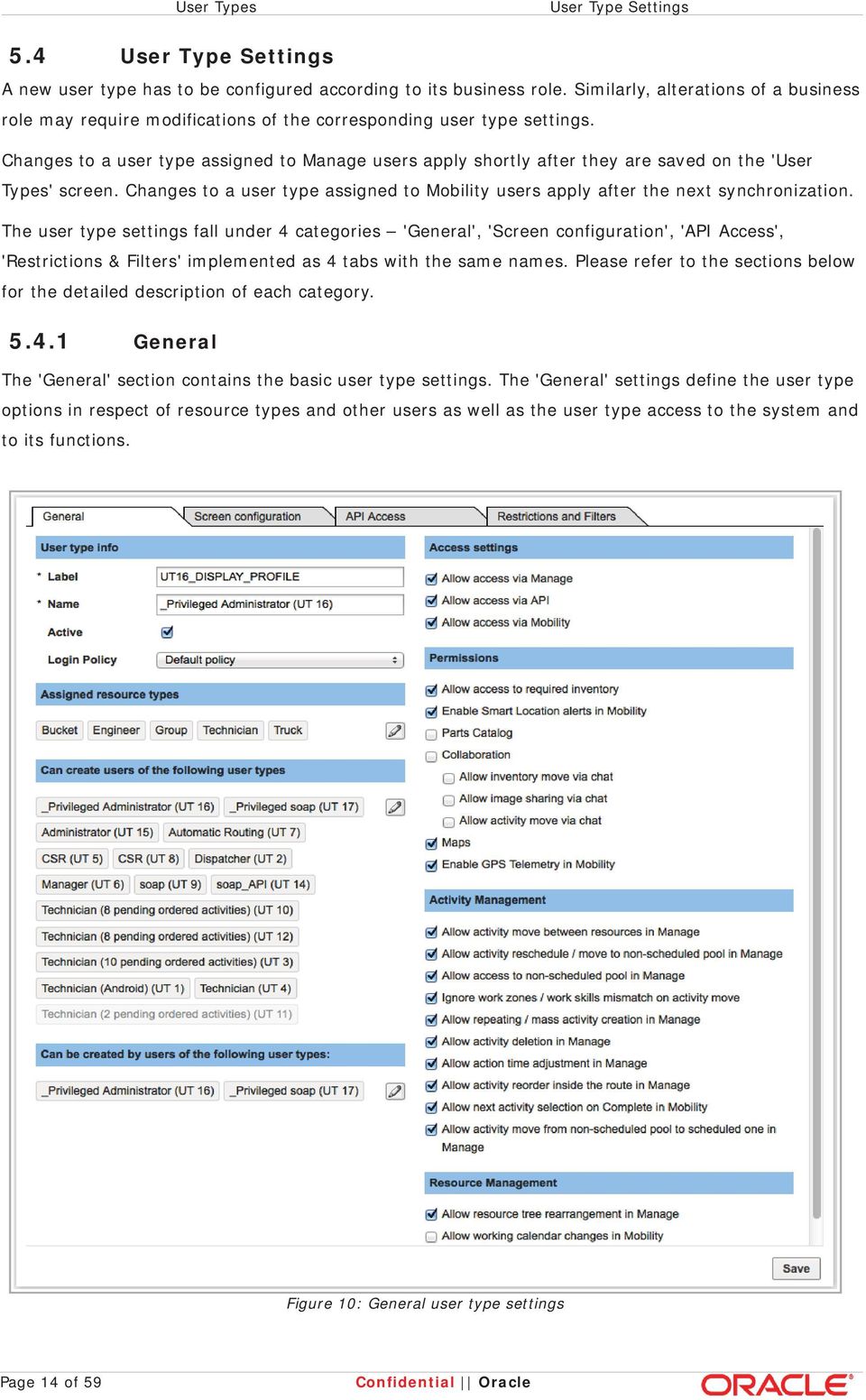
15 General User Types The 'General' tab includes the following settings: User type info (the basic user type data identifying the user type in the system): Label (a unique string identifier of the user type). The label is defined during the user type creation but can be modified as part of the 'General' settings Name (a human-friendly name describing the user type in the context of the specific company). The name is defined during the user type creation but can be modified as part of the 'General' settings Active (the checkbox defining the user type status). Active user types can be assigned to new or existing users while inactive cannot. All other functions, such as logging in, are available to both active and inactive user types. All new user types are created as active by default Login policy (the login policy assigned to the current user type). The login policy defines the method of the users' authentication to Oracle Field Service Cloud. The login policy is selected from the list of all login policies existing in the system. If a certain login policy is assigned to a user type, all users of such type will use this policy to login Assigned resource types (the resource types with which users of the current type can be associated). When a new user is created, the mandatory 'Resources' field will allow only the resources of types specified as the 'Assigned resource types' for the corresponding user type to be selected. The assigned resource types are selected from the list opening in the 'Apply resource types' window on clicking the 'Edit' button. The search field at the top of the window allows filtering the list by typing the search string. Figure 11: 'Apply resource types' window Confidential Oracle Page 15 of 59

16 User Types General Note: when any users are associated with a resource of a type selected as one of the 'Assigned resource types', such resource type cannot be unassigned from the user type. To unassign a resource type, the user has to be associated with a resource of a different type. Can create users of the following user types (the ability of user of the current type to create other users). Only the user types selected in this section will appear in the 'User Type' list on the 'User' screen. Inactive user types are shown in gray font and do not appear in the 'User Type' list on the 'User' screen Note: the 'User Type' parameter is mandatory in the user creation. Therefore, if no user type has been selected in this section, the users of the current type will be unable to create other users, even if other options affecting user creation have been enabled Can be created by users of the following user types (the user types allowed to create users of the current type). Inactive user types are shown in gray font Both settings are made by selecting the appropriate user types from the list opening in the 'Select user types' window on clicking the 'Edit' button. The search field at the top of the window allows filtering the list by typing the search string. Figure 12: 'Select user types' window All user types selected from the 'Can create users of the following user types' list will automatically have the current user type in their 'Can be created by users of the following user types' list, and vice versa. For example, if user type 'Manager' can create users of user type 'Dispatcher', user type 'Dispatcher' will have 'Manager' in its 'Can be created by users of the following types' list. Page 16 of 59 Confidential Oracle

17 General User Types Figure 13: 'User management' settings correlation Access settings (the ability of the user of the current type to access OFSC via different interfaces). The section contains three options: Allow access via Manage (with this option enabled, users of the current type will be able to use the OFSC functionality via Manage) 'Manage' permission in the previous versions Allow access via API (with this option enabled, users of the current type will be able to use the OFSC functionality via APIs) 'API' permission in the previous versions. Note: this option influences the 'API access' tab. When access via API is allowed, the 'API access' tab is active. When access via API is not allowed, the 'API access' tab is inactive Allow access via Mobility (with this option enabled, users of the current type will be able to use the OFSC functionality via Mobility) 'Mobility' permission in the previous versions Note: access via Manage and Mobility requires screen configuration settings, therefore, these options influence the 'Screen configuration' tab. One or both options need to be enabled for the 'Screen configuration' tab to be active. When neither of them is enabled, the 'Screen configuration' tab is inactive Permissions (the ability of the user of the current type to access different functions of OFCS). Permissions may be individual (controlling access to a single function) or group (controlling access to a functionality with several individual functions), such as 'Collaboration'. Group permissions are organized as a tree with the main permission at the top and child permissions Confidential Oracle Page 17 of 59

18 User Types General at lower levels. If a group permission is checked or unchecked, its child permissions are automatically checked or unchecked, too. If a child permission is checked, the related group permission is automatically checked, too. However, if a child permission is unchecked, its group permission remains checked. The 'Permission' section contains the following options: Allow access to required inventory (with this option enabled, the Mobility user is able to access the 'Required inventory' functionality and perform all related actions) 'Required Inventory' permission for the Mobility Application in the previous versions. Note: the 'Required Inventory' permission for Manage is implemented as visibility for the 'Required Inventory' tab in the 'Add activity/activity details' context Collaboration (with this option enabled, the user is able to access OFSC Collaboration and perform the related actions) 'SmartCollaboration' permission for the Manage Application and 'SmartCollaboration for Mobile App' permission for the Mobility Application in the previous versions. The 'Collaboration' option has three sub-options: Allow inventory move via chat (this option allows the user, in addition to chat functions, to transfer inventory via chat) 'Move inventory via chat' permission in the previous versions, both for the Manage and Mobility Applications Allow image sharing via chat (this option allows the user, in addition to chat functions, to share images via chat) 'Share images via chat' permission for the Mobility Application in the previous versions Allow activity move via chat (this option allows the user, in addition to chat functions, to transfer activities via chat) 'Move activity via chat' permission in the previous versions, both for the Manage and Mobility Applications Enable Smart Location alerts in Mobility (with this option enabled, the user can receive alerts on their mobile device whenever any compliance issues have occurred and have been identified by the SmartLocation module) 'SmartLocation alerts' permission for the Mobility Application in the previous versions Parts Catalog (with this option enabled, the user can search for particular spare parts in the catalog using the standard OFSC search function) 'Parts Catalog' permission in the previous versions, both for the Manage and Mobility Applications Maps (with this option enabled, the user can access the Map View on the 'Activities', 'Quota' and 'Resource Work Zones' screens) 'Map' permission, 'Quota' 'Map' permission, 'Resource Work Zones Map' permission for the Manage Application in the previous versions. The 'Maps' permission combines three permissions in the previous versions and controls access to all maps in the system Enable GPS Telemetry in Mobility (with this option enabled, the user's geopositioning information can be collected directly from the user's device) 'GPS Page 18 of 59 Confidential Oracle

19 General User Types Telemetry' permission for the Mobility Application in the previous versions Activity Management (the ability of the user of the current type to perform certain activity actions). This section contains the permissions for activity-related functions. The following options are available: Allow activity move between resources in Manage (with this option enabled, the user can move an activity from one resource to another) 'Allow move between resources' permission for the Manage Application in the previous versions Allow activity reschedule / move to non-scheduled pool in Manage (with this option enabled, the user can move an activity to a different date or make it nonscheduled) 'Allow reschedule / move to non-scheduled pool' permission for the Manage Application in the previous versions Allow access to non-scheduled pool in Manage (with this option enabled, the user can access the pool of non-scheduled activities and perform actions to them) 'Nonscheduled support' permission for the Manage Application in the previous versions Ignore work zones / work skills mismatch on activity move (with this option enabled, the user can move activities to resources with work zones and/or work skills not matching those of the activity) 'Ignore workzones / workskills mismatch on move' permission for the Manage Application and 'Ignore rules mismatch on Move activity' permission for the Mobility Application in the previous versions Allow repeating / mass activity creation in Manage (with this option enabled, the user can create mass and repeating activities) 'Repeating / Mass activity' permission for the Manage Application in the previous versions Allow activity deletion in Manage (with this option enabled, the user can delete an activity together with canceling it. Otherwise, a canceled activity remains in the system) 'Delete activity' permission for the Manage Application in the previous versions Allow action time adjustment in Manage (with this option enabled, the user can manually adjust the time of activity actions in Manage. Otherwise, the action time is logged as the current time) 'Set action time' permission for the Manage Application in the previous versions Allow activity reorder inside the route in Manage (with this option enabled, the user can change the position of an activity in the route) 'Allow reorder inside the route' permission for the Manage Application in the previous versions Allow next activity selection on Complete in Mobility (with this option enabled, the user completing an activity in Mobility can select the next activity to start. Otherwise, only the next activity in the route can be started) 'Switch Next Activity on Complete' permission for the Mobility Application in the previous versions Allow activity move from non-scheduled pool to scheduled one in Manage (with this option enabled, the user can make a non-scheduled activity scheduled) Confidential Oracle Page 19 of 59

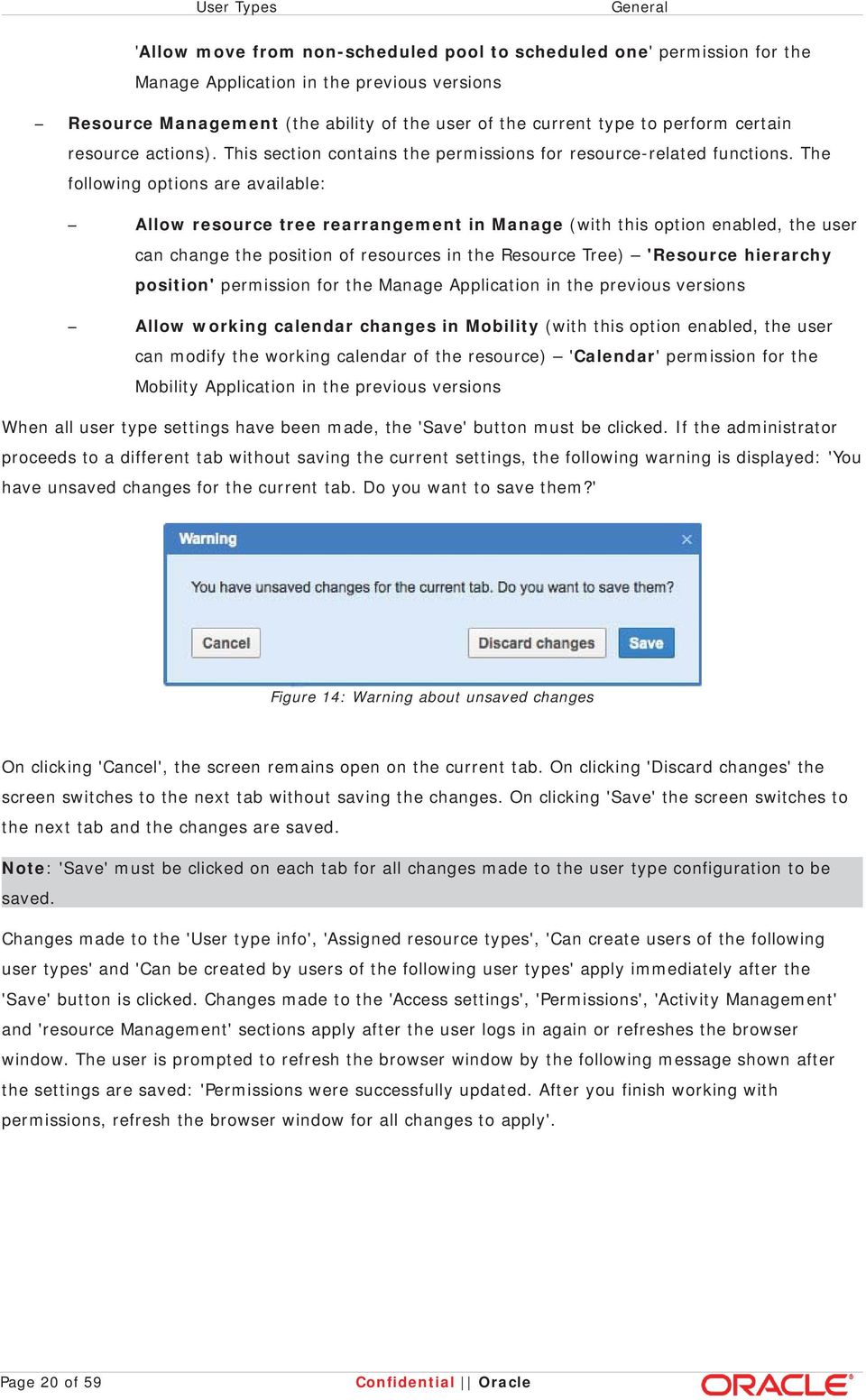
20 User Types General 'Allow move from non-scheduled pool to scheduled one' permission for the Manage Application in the previous versions Resource Management (the ability of the user of the current type to perform certain resource actions). This section contains the permissions for resource-related functions. The following options are available: Allow resource tree rearrangement in Manage (with this option enabled, the user can change the position of resources in the Resource Tree) 'Resource hierarchy position' permission for the Manage Application in the previous versions Allow working calendar changes in Mobility (with this option enabled, the user can modify the working calendar of the resource) 'Calendar' permission for the Mobility Application in the previous versions When all user type settings have been made, the 'Save' button must be clicked. If the administrator proceeds to a different tab without saving the current settings, the following warning is displayed: 'You have unsaved changes for the current tab. Do you want to save them?' Figure 14: Warning about unsaved changes On clicking 'Cancel', the screen remains open on the current tab. On clicking 'Discard changes' the screen switches to the next tab without saving the changes. On clicking 'Save' the screen switches to the next tab and the changes are saved. Note: 'Save' must be clicked on each tab for all changes made to the user type configuration to be saved. Changes made to the 'User type info', 'Assigned resource types', 'Can create users of the following user types' and 'Can be created by users of the following user types' apply immediately after the 'Save' button is clicked. Changes made to the 'Access settings', 'Permissions', 'Activity Management' and 'resource Management' sections apply after the user logs in again or refreshes the browser window. The user is prompted to refresh the browser window by the following message shown after the settings are saved: 'Permissions were successfully updated. After you finish working with permissions, refresh the browser window for all changes to apply'. Page 20 of 59 Confidential Oracle
21 General User Types Figure 15: Window refresh message Screen Configuration Screen configuration has taken over the functions previously performed by the display profiles. It defines the screens, windows, popups and other elements visible to a certain user type and supports the context layout editor where the content, arrangement and visibilities of each context are set. The 'Screen configuration' tab contains the list of all contexts available in OFSC. All contexts are split into 3 sections corresponding to their location in the system: Manage (the contexts used in Manage) Mobility (the contexts used in Mobility) Collaboration and Identifiers (the contexts used in Collaboration and the entity identifier contexts) The list is organized hierarchically and shows relations between different contexts. All context names are links leading to the context layout editor screen. Confidential Oracle Page 21 of 59
22 User Types Screen Configuration Figure 16: Screen configuration The 'Screen configuration' tab is active when the 'Allow access via Manage' and/or 'Allow access via Mobility' options are enabled for the user type. The same settings also influence the availability of the screen configuration sections. If the 'Allow access via Manage' option is disabled for the user type, the 'Manage' section will be collapsed and inactive. The same is true for the 'Allow access via Mobility' option. Figure 17: Access via Manage enabled and access via Mobility disabled Page 22 of 59 Confidential Oracle
23 Screen Configuration User Types Figure 18: Active 'Manage' section and inactive 'Mobility' section Note: any screen configuration settings made in the 'Manage' or 'Mobility' section will be kept if the 'Allow access via Manage' or 'Allow access via Mobility' option is afterwards disabled for the user type. If access is allowed again, the same screen configuration settings apply again for the user type. Links to new (not edited) or empty contexts are shown in red, while links to edited contexts are shown in blue. If all elements have been removed from a context, its link changes color from blue to red to indicate that the context is now empty. If the user type has been created without copying the settings of another user type, all contexts will be shown in red. Confidential Oracle Page 23 of 59
24 User Types Screen Configuration Figure 19: User type with empty contexts The hierarchy of contexts starts from the 'Main menu items' context defining the main menu items available or unavailable for the current user type. The configuration of the 'Main menu items' context defines the menu bar elements visible or hidden for a particular user type. Each menu bar element opens a certain screen and, therefore, provides access to its functionality. If a certain screen has been made available for a user type, all users of such type will have access to the entire functionality implemented on that screen. Similarly, if a screen has been made unavailable for a user type, all users of such type will not be able to use the functionality implemented on that screen. IMPORTANT! With the introduction of user types, the Main Menu configuration has largely absorbed the 'Permissions' functionality as it existed in ETAdirect. Now, instead of granting a number of separate permissions for various elements and actions on a screen, the administrator can grant or deny access to the entire screen, including all elements of such screen. Note: most of the main menu items previously included in the 'Company Settings' have been gathered on a special screen, 'Company Configuration', which has a separate context layout and is also one of the Main Menu items. Visibilities can be set to grant or deny access to the entire 'Company Configuration' screen (as visibility of the corresponding Main Menu item) or to each individual item (as visibilities on the 'Company Configuration' context layout). The 'Main menu items' context layout now includes visibility settings for each item. A Main Menu item added to the context does not become immediately visible. It has to be defined as Read-only or Readwrite to appear in the Main Menu. When a Main Menu item is defined as Read-only for a user type, users of such type can open the corresponding screen and view its content but cannot modify any Page 24 of 59 Confidential Oracle
25 Screen Configuration User Types settings. When an item has been defined as Read-write, changes are possible. Configuration requires no separate settings for each action or modification on the screen. For example, the configuration of the 'Message Scenarios' in the previous versions consisted of the following steps: adding the 'Message Scenarios' item to the 'Main menu items' context layout defining the permission for the 'Message Scenarios' functionality on the 'Permissions' screen. This permission allowed the user to open the 'Message Scenarios' screen defining the 'Scenarios Steps' permission. This permission allowed the user to view the scenario steps defining the permissions to add, edit and/or delete message scenarios defining the permissions to add, edit and/or delete scenario steps Figure 20: Message Scenarios permissions in previous versions Now the same configuration consists of only two steps: adding the 'Message Scenarios' item to the 'Main menu items' context layout defining the Read-write or Read-only visibility for the 'Message Scenarios' item With the Read-write visibility the user is able to view and edit all elements of a message scenario. With the Read-only visibility they can only view them. Confidential Oracle Page 25 of 59
26 User Types Screen Configuration Figure 21: 'Message Scenarios' screen in Read-only mode To allow the user to create message scenarios, add, modify and delete their steps the administrator only needs to change the visibility of the 'Message Scenarios' menu item to Read-write. The links to contexts are connected with arrows showing the relation between the contexts. Hovering the mouse over an arrow highlights it in red for better visibility. Figure 22: Highlighted arrow showing relation between contexts Page 26 of 59 Confidential Oracle
27 Screen Configuration User Types The example in the figure above shows that the 'Suspend activity' context is accessible from the 'Visible hint columns for activities'. Also, the arrow shows the sequence of context layouts configuration for the correct performance. The activity hint contains the 'Suspend' link leading to the 'Suspend activity' window. Therefore, the 'Visible hint columns for activities' context layout must be configured before 'Suspend activity'. If only the 'Suspend activity' context layout has been configured while the 'Visible hint columns for activities' context has been left empty, the user will not be able to access the 'Suspend activity' window and use its functionality. Clicking any link opens the 'Context layout structure' screen where the fields and actions of the context as well as their visibilities can be defined for the user type. Figure 23: 'Context layout structure' screen For Mobility contexts of the 'form' type the link leads to the Visual Form Editor screen allowing to edit context layouts in an easier and more transparent manner. Confidential Oracle Page 27 of 59
28 User Types Screen Configuration Figure 24: 'Visual Form Editor' screen A context layout can be copied to another user type if such other user type is to use the same or slightly modified layout of the same screen or window. For this purpose the 'Context layout structure' screen has the 'Copy to' button which opens the list of all user types in the system. Figure 25: Context layout copying for other user types If the screen configuration of the current user type is shared with one or more other user types, such user types will be preselected in the 'Copy to' list. If the user type selected in the list shares its screen configuration with other user types, such user types will be automatically selected as well. Page 28 of 59 Confidential Oracle
29 Screen Configuration User Types The current context layout will be applied to the selected user types. In this case it replaces the previous context layout settings, if any. When a context layout is copied for another user type, only the current context is copied while the rest of the screen configuration remains unchanged. When a context layout is copied, two separate identical context layouts are created. Each layout can be edited independently causing no changes in the other one. However, if the destination screen configuration is shared with other user types, the current context layout will be copied to all user types sharing the same screen configuration. Context layout copying is confirmed with the 'Layout has been successfully copied' message. Note: for any changes to the context layout structure to be applied, the 'Recalculate structure' button has to be clicked, otherwise previous context layouts remain. Closing the 'Context layout structure' screen returns the user to the 'User types' screen. The 'Mobility' section shows the contexts used in Mobility and their relations. Figure 26: Mobility contexts The 'Collaboration and Identifiers' section contains the contexts falling under two groups: 'Identifiers' including the identifier contexts for activity, inventory and service request, and 'Collaboration' including all contexts related to the Collaboration module. Figure 27: Collaboration and Identifiers Confidential Oracle Page 29 of 59
30 User Types Screen Configuration If the user type has been created as a copy of another user type with the screen configuration shared, the 'Screen configuration' tab shows the following message: 'Screen configuration shared with: {User type}'. Figure 28: User type copied from another user type with screen configuration shared Figure 29: Shared screen configuration When the screen configuration is shared with another user type, the same set of settings is used for both user types, and both user types refer to them simultaneously. A shared screen configuration means that all context layouts and their visibilities are similar for all user types sharing them. If the screen configuration is modified for one of the user types, the same changes will immediately apply to all other user types sharing it. The 'Change' action link allows selecting a different source of the screen configuration for the current user type. In this case the current user type is dissociated from the shared screen configuration. Page 30 of 59 Confidential Oracle
31 Screen Configuration User Types Three options are available: Use Screen configuration of {User Type} the screen configuration is shared with one or more user types. Only one set of configuration settings exists, and any changes of the screen configuration of one of the user types causes similar changes of the screen configuration of other user types. In this case sharing is inherited, that is, if the user type selected for sharing already shares its screen configuration with other user types, the same screen configuration will be used for all of them. The note underneath advises the user about the user types sharing the same screen configuration Figure 30: Sharing screen configuration Create Screen configuration as copy of {User Type} the screen configuration is copied from another user type. In this case two independent sets of settings are created, and any changes apply only to the user type for which they are made. The note underneath advises the user about the user type whose screen configuration will be copied Figure 31: Copying screen configuration Create empty Screen configuration the current screen configuration is cleared. Only the settings of the current user type are cleared. If the screen configuration had been shared with or copied from another user type previously, it is disconnected and a new independent screen configuration is created. The note underneath advises the user that only the screen Confidential Oracle Page 31 of 59
32 User Types Screen Configuration configuration of the current user type will be cleared Figure 32: Creating empty screen configuration If a user type has an independent screen configuration, it can be replaced with another by sharing or copying the screen configuration of another user type. All user types with screen configurations not related to those of other user types have the 'Copy/share screen configuration' link. Figure 33: 'Copy/share configuration' link This link leads to the same screen configuration options as are offered for changing the current screen configuration (see above). However, as the current screen configuration is not used elsewhere in the system, selecting any option will remove it permanently. The note warns the administrator that the current configuration will be lost. Page 32 of 59 Confidential Oracle
33 Screen Configuration User Types Figure 34: Warning about current screen configuration modification API Access The 'API Access' section contains the settings of the 'API Configuration' screen of the previous versions. These settings define the access to certain APIs, to certain methods within such APIs and to certain fields which can be set by such API methods, if applicable. The 'API Access' tab is active when the 'Allow access via API' option is enabled for the user type. Figure 35: API Access Note: any API settings made for a user type will be kept if the 'Allow access via API' option is afterwards disabled. If access is allowed again, the same API settings apply again for the user type. The 'API Access' settings are organized as a list of all APIs used in OFSC. By selecting the checkbox next to an API name the administrator makes the corresponding API available to the current user type. Clicking a line containing the name of an API opens the API settings section where the administrator can select the API methods and fields available to the current user type. Confidential Oracle Page 33 of 59
34 User Types API Access Figure 36: Available methods and fields selection Clicking the 'Modify' link opens the 'API layout structure' screen where the administrator can select the fields which the users of the current type will be able to set or update using the API. This screen functions as a context layout structure screen where the fields and their visibilities are set. If the API is not selected as available for the user type, the method and field selection is disabled. Figure 37: API not available for user type Some APIs are either available or unavailable in their entirety. When such an API has been allowed to a user type, all methods included in the API become available to the users of that type. Such APIs (External Trigger API, GPS API, History API, Inbound Interface API, SmartLocation API) show the following message instead of the methods list: 'This API does not support individual method configuration. By selecting this API all methods will become available.' Figure 38: Methods configuration message Page 34 of 59 Confidential Oracle
35 API Access User Types One of the APIs, the Inbound Interface API, offers no method selection but has the possibility of selecting the available fields. Figure 39: Inbound Interface API configuration Note: any settings of particular methods and/or fields made during the configuration of access to a certain API will not be removed if the access to the entire API is afterwards disabled for the user type by unchecking the corresponding checkbox. If access is allowed again, all API settings apply again for the user type Restrictions and Filters The 'Restrictions and Filters' tab sets the restrictions on activities and fields visible to the users of the current type. Figure 40: Restrictions and Filters In the previous versions these settings were included in the display profiles settings. Confidential Oracle Page 35 of 59
36 User Types Restrictions and Filters Figure 41: Visibility restrictions for display profile in previous versions The 'Field restrictions' section defines whether all activities and/or certain activity fields are to be hidden from users of the current user type. The 'Hide all activities' option determines if the users will or will not be able to access any activities in the system after a certain time. With enabling the 'Hide all activities' option the administrator also has to set the time after which the activities are to be hidden. Two options are available 'starting tomorrow' and 'starting day after tomorrow'. Figure 42: Hiding all activities for user type When 'starting tomorrow' is selected, all users of the current type will only be able to access the today's activities. When 'starting day after tomorrow' is selected, all users of the current type will only be able to access the today's and tomorrow's activities. No activities beyond the selected time will be visible to these users. The 'Hide activity fields' option determines if the users will or will not be able to access certain activity fields after a certain time. The fields to be hidden are defined in the 'Field restrictions' context accessible by clicking the 'activity fields' link. With enabling the 'Hide activity fields' option the administrator also has to set the time after which the activity fields are to be hidden. Two options are available 'starting tomorrow' and 'starting day after tomorrow'. Page 36 of 59 Confidential Oracle
37 Restrictions and Filters User Types Figure 43: Hiding activity fields for user type When 'starting tomorrow' is selected, all users of the current type will only be able to access the selected fields of the today's activities. When 'starting day after tomorrow' is selected, all users of the current type will only be able to access the selected fields of the today's and tomorrow's activities. The restricted activity fields beyond the selected time will not be visible to these users. The 'Filters restricting visible activities' define whether the users of the current type will be able to view the entire routes or only some activities. Setting the visibility restrictions requires proper configuration of the applicable filters Filter Configuration for User Types Filters are configured in the special 'Filters' window. To be used as a restriction on visible activities, the filter has to be defined as applicable for 'activity'. At the same time, the 'Restriction on visible activities' option has to be selected. The note appearing at the bottom of the dialog window prompts the administrator to 'Go to User Types screen to apply the current filter as visibility restriction filter for user type'. Figure 44: Settings of filter restricting visible activities The filters created with the settings shown in the figure above appear in the list of 'Available filters' in Confidential Oracle Page 37 of 59
38 User Types Filter Configuration for User Types the 'Restrictions & Filters' tab of the user type configuration. Figure 45: Filters restricting visible activities When a filter has been set for a user type, all users of such type will see only the activities defined in the filter settings according to the conditions set in the filter configuration. The 'User Types' section of the filter configuration is irrelevant to setting restrictions on visible activities. When only the 'Restriction on visible activities' option is selected, the 'User Types' section is inactive. However, it is used in configuring the filter to be used on List/Time/Map/Daily screens. As soon as the 'List/Time/Map/Daily' option is selected, the 'User Types' section becomes active. The note in the 'User Types' section suggests that 'The List/Time/Map/Daily Filter will be applied for selected user types'. Figure 46: Settings of filter to be used on List/Time/Map/Daily screens Page 38 of 59 Confidential Oracle
39 Filter Configuration for User Types User Types When a filter is defined as a filter for 'List/Time/Map/Daily' for a user type, this filter will appear in the 'View' window on the 'Activities' and 'Daily' screens for users of such type. The list will include only the filters configured as described above. Figure 47: 'List/Time/Map/Daily' filters Note: if the same filter is defined both as applicable for 'List/Time/Map/Daily' and as a 'Restriction on visible activities', it actually works for two different groups of user types. The 'List/Time/Map/Daily' filtering will be available for the user types selected in the same filter configuration window. However, the 'Restriction on visible activities' will be set for the user types for which this filter is selected in the 'Restrictions & Filters' settings. 5.5 Own User Type Management The user can change their user type. The 'My Display' context layout can be configured so that it contains the 'User Type' field with the Read-write visibility. In this case the user is able to change their user type. However, the available options include only the user types defined in the 'Can create users of the following user types' field of the current user type. At the same time, own user type must be among the user types selected in the 'Can create users of the following user types' field, otherwise the 'User Type' field appears as Read-only, even when its visibility has been defined as Read-write. Confidential Oracle Page 39 of 59
40 User Types Own User Type Management Figure 48: Editable 'User Type' field Note: extreme care must be taken when changing own user type. The new user type might have different visibility and access settings which may make reverting to the previous user type impossible. 5.6 User Types Export and Import The user types configuration can be exported into an xml file for storage, backup or use in external systems. Alternatively, a user type configuration stored in an xml file can be imported into OFSC to create a new system of user types or replace the existing one. User types export and import are performed by clicking 'Export' or 'Import', respectively. Figure 49: User types export and import User Types Export User types are exported together with all their settings, such as associated resource types, user types from which users can create or be created by the exported user type, permissions, context layouts, filters, etc. All items are exported under their labels. Page 40 of 59 Confidential Oracle
41 User Types Export User Types Clicking export opens the 'Export user types' window offering to select the user types to be exported. Figure 50: 'Export user types' window If all user types existing in the system are to be exported, the 'Select all' action has to be chosen. The 'Clear all' action deselects any previously selected user types. The search field at the top of the window allows filtering the list by typing the search string. Clicking 'Export' creates an xml file containing the data of the selected user types. If no user types have been selected, the 'Nothing to export' error message is displayed. Figure 51: 'Nothing to export' error message Confidential Oracle Page 41 of 59
42 User Types User Types Import User Types Import If necessary, the system of user types can be imported from an xml file. An imported system replaces the existing user types system, if any. Clicking 'Import' opens the 'Import user types' window where the xml file containing the user types data can be selected. Figure 52: Selection of file for import Only xml files are processed by the import functionality. If a file of any other type is selected, import is rejected with the 'Import file type must be XML' error message. Figure 53: Incorrect file selection When no file has been selected, the 'File is not chosen' error message is displayed. Figure 54: No file selected If a valid file has been selected, it is validated before import. Validation checks all entities assigned to each imported user type (resource types, permissions, context layout items, etc.). If all entities are valid, such user type is determined as 'Successfully imported'. If one or more entities are not valid, such user type is determined as 'Imported with warnings'. Only valid entities will be imported. If a user type is missing some critical data, it is determined as 'Not imported'. These validation results are shown in the dialog window. Page 42 of 59 Confidential Oracle
43 User Types Import User Types Figure 55: Import validation results The 'User type validation details' leads to the validation log containing the details of all successfully imported user types, user types imported with warnings and not imported user types. Clicking 'Import' starts the actual import process. The 'Import' column shows the import progress. A number in the 'Import' column means that the number of imported item is different from the number of validated items. A green checkmark means that the number of validated and imported items is the same. The 'User type import details' opens the import log containing the final import details. Figure 56: Import results window 6 User Management The User Type concept has been introduced with maximal preservation of the users system existing in the previous versions. Nothing has changed for a user in terms of logging in, opening screens and performing actions within the scope of the user's allowed access. However, administrators responsible for creating and managing other users will notice that the procedures have become more intuitive, transparent and streamlined. The previous sections describe the new 'User Types' screen and the various settings it contains. This section will describe how these settings affect the actual process of users management and what should be remembered when configuring user types and individual users. To enable a user type to create and manage other users, the following settings must be made: 'General' tab: 'Can create users of the following user types' must include all user types to create users from Confidential Oracle Page 43 of 59
44 User Types User Management 'Access settings' the 'Allow access via Manage' option must be enabled 'Screen configuration' tab: the 'Main menu items' context must include the 'Users' screen with the Read-write visibility the 'Company Configuration' context must include the 'User Types' screens with the Read-write visibility With these settings the user logging in under this user type will be able to open the 'Users' screen and manage users. A user having access to the 'Users' screen can see the list of all users existing in the system. However, the user can modify only the users of types defined under 'Can create users of the following user types'. Users of other types have no action links and cannot be included in group actions (no checkboxes are available for them). Figure 57: Users available for modification by current user type The choice of group actions is different from that in the previous versions. The 'Set login policy' and 'Set display profile' group actions have become obsolete, as these settings have been included in the user type settings. Instead, the group actions now include 'Set user type' which changes the user type of all selected users to another. Figure 58: Group actions in previous versions Page 44 of 59 Confidential Oracle
45 User Management User Types Figure 59: Group actions including 'Set user type' If no user types have been defined in the 'Can create users of the following user types' section, the user can see the users list but cannot modify any user settings. The 'Add new' button is hidden, so no new users can be added, either. Each user is shown together with their user type. Active user types are shown in black, inactive in gray. Figure 60: Active and inactive user types in the 'Users' grid A user is always related to one or more resources. The choice of resources for creating a new user is affected, on one hand, by the 'Assigned resource types' setting in the 'User Type' configuration, and, on the other hand, by the 'Users can be created at the level of this resource' feature of the resource type. Confidential Oracle Page 45 of 59
46 User Types User Management Figure 61: 'Assigned resource type' settings (top) and error message for incorrect resource type in 'User' settings (bottom) In the Figure above, 'Technician' has been set as the assigned resource type. When a resource of another type (Bucket) has been selected for the user, the system responds with an error message 'Selected resource type doesn't correspond to any of the Assigned Resource types'. The 'Resources' field will not accept a resource of an incorrect type. When a new user is being created, the 'User Type' field contains the list of user types defined in the 'Can create users of the following user types' field of the current user type. 7 GUI Changes As User Types combine several functionalities which existed in the previous versions of ETAdirect, their implementation allowed removing redundant screens and reducing the number of settings on the existing ones. At the same time, a number of the existing screens have been changed to Page 46 of 59 Confidential Oracle
47 GUI Changes User Types accommodate the 'User Types' functionality. 7.1 'Display' Screen Change The 'Display profiles' section has been removed from the 'Display' screen, as the display settings have been included in the 'User Types' settings. Figure 62: 'Display' screen with 'Display profiles' section (previous versions) Figure 63: 'Display' screen with 'Display profiles' section removed (version 15.8) Consequently, the 'Context layout list' screen where the layouts of various screens, forms and windows could be configured has also been removed. The list of contexts is now included in the scope of user types configuration from where the administrator can proceed to the context layout editor. The 'History display profile' field has been replaced with 'History user type', as display profiles no longer exist with the implementation of user types. Now history refers to the same user type for entity identifiers. Confidential Oracle Page 47 of 59
48 User Types 'Display' Screen Change Figure 64: 'History display profile' field (previous versions) Figure 65: 'History user type' field 7.2 'Profiles' Screen Removal The 'Profiles' screen where security profiles were configured has been removed. Now all settings related to security profiles have been included in the user type settings. 7.3 'Permissions' Screen Removal Most permissions are included in the display settings as main menu items in the user type configuration. Only the permissions to functions remain and are also configurable for each user type. The 'Permissions' screen has been removed. 7.4 'API Configuration' Screen Removal The 'API Configuration' screen where the API profiles and their access to APIs and their methods were Page 48 of 59 Confidential Oracle
49 'API Configuration' Screen Removal User Types configured has been removed. Now all API configuration settings are included in the user type configuration. 7.5 'User' Screen Redesign The 'User' screen has been redesigned. The 'Profiles', 'Managed profiles', 'API profile', 'Display profile', 'Login policy' fields have been removed and the new 'User type' field has been added. The 'User Type' field includes the settings previously made in the obsolete fields. Figure 66: 'User' screen in previous versions with sections to be removed Confidential Oracle Page 49 of 59
50 User Types 'User' Screen Redesign Figure 67: 'User' screen in version 15.5 with 'User Type' field Similar changes have been made to the 'New resource info' screen in the 'Add user for new resource' section. If a new resource is created together with a new user, a User Type is selected immediately, while no profile settings are required anymore. Page 50 of 59 Confidential Oracle
51 'User' Screen Redesign User Types Figure 68: 'Add user for new resource' data including new 'User Type' field With this change, user configuration now requires fewer settings and has become more intuitive. 7.6 'Users' Screen Change The 'Users' grid now has an additional column, 'User type', showing the user type to which a particular user belongs. Figure 69: 'User type' column in 'Users' grid 7.7 'Filters' Screen and Window Change The filters configured in the 'Filters' screen now apply to user types rather than security profiles. Therefore, the filters configuration window now has the 'User Types' field which has replaced the 'Permissions' field where the security profiles were to be selected. Confidential Oracle Page 51 of 59
52 User Types 'Filters' Screen and Window Change Figure 70: Filter configuration in version 15.8 Consequently, the 'Filters' grid now has the 'User Types' column which has replaced the 'Permissions' column of the previous versions. Figure 71: 'User Types' column in 'Filters' grid 7.8 'Login Policies' Screen Change The 'Login Policies' grid now has an additional column, 'User Type Num', showing the number of user types to which the login policy has been assigned. The 'User Num' column continues to show the number of users logging in with the help of a particular login policy, as in the previous versions. Figure 72: 'User Type Num' column in 'Login Policies' grid Page 52 of 59 Confidential Oracle
53 Message Blocking Conditions User Types 7.9 Message Blocking Conditions With the introduction of user types the message scenario configuration has been changed accordingly. Now the 'Security profile' blocking condition has been replaced with 'User type'. Figure 73: 'User type' as message blocking condition 7.10 Reports The 'Number of active users' and 'Inactive users' reports have been changed to support user types. Now they show the number of active and inactive users, respectively, on the basis of user types instead of security profiles, as in the previous versions. Figure 74: 'Inactive users' report based on user types Confidential Oracle Page 53 of 59
54 User Types Reports Figure 75: 'Number of active users' report based on user types 7.11 Dashboard Changes In OFSC the 'Dashboard' screen is used to display various data in graphic form. Each user can choose which charts to display on the 'Dashboard' screen by selecting them from the available charts. In the previous versions the charts available for display on the Dashboard were defined per security profile as permissions. The user could view only the reports defined for their security profile. With the introduction of user types the approach to Dashboard reports visibility has been changed to support user types. For that purpose, a new context, 'Dashboard', has been implemented. The layout of this context allows selecting the Dashboard reports which the users of the current type will be able to view on the 'Dashboard' screen. Figure 76: Dashboard context layout Page 54 of 59 Confidential Oracle
55 Dashboard Changes User Types The reports defined in the context layout appear in the Dashboard configuration bar. To display a report, the user has to drag the report icon to the main area. Figure 77: Dashboard configuration bar 7.12 'User Options' Context in Mobility Before the introduction of user types, the items of the 'Options' screen were controlled by permissions. The administrator could assign different access levels to different options for certain security profiles. This way, the users with the same security profile had a certain set of options which they could modify or view. Confidential Oracle Page 55 of 59
56 User Types 'User Options' Context in Mobility Figure 78: User option permissions With the introduction of user types and removal of permissions, the functionality of controlling the access to user options has been implemented as a new context, 'User Options'. It can be found in the list of Mobility contexts. Figure 79: 'User options' context The 'User options' context layout is edited via the Visual Form Editor Page 56 of 59 Confidential Oracle
57 'User Options' Context in Mobility User Types Figure 80: 'User options' context layout editing By setting the visibilities of the fields and actions, the administrator controls the users' ability to modify the 'User options'. 8 Migration from Previous Versions Oracle Field Service Cloud has developed a mechanism of transition from the concept of profiles and permissions used in the previous versions to the concept of user types. When a company upgrades to OFSC version 15.8, all users should be able to continue working with the system as before. Their access to OFSC is preserved, however, it is now controlled by user types. In the previous versions users' access and authority within the system was defined by a complex combination of profiles and permissions: Security Profile Display Profile API Profile Managed Profiles Login Policy The administrator had to configure all these components to create a comprehensive structure of the user's access to the system. When the existing companies upgrade to OFSC 15.8, their system of users is preserved, however, the users receive user types according to their configuration. Confidential Oracle Page 57 of 59
58 User Types Migration from Previous Versions All users are analyzed to determine all existing unique combinations of their security profiles, display profiles, API profiles, managed profiles and login policies. Such combinations become user types which are then assigned to the users. The algorithm of migration to user types is as follows: all API profiles are analyzed to identify duplicates. Any duplicate API profiles are combined users are analyzed to gather them into groups with the same permissions according to their security profiles the resulting quantity of users are analyzed to find unique combinations of security profiles, display profiles, API profiles, managed profiles and login policies which become user types user types are named according to the display profile names. If two or more user types are generated from the same display profile, their names are created as [Display profile]1, [Display profile]2, etc. Profiles transform to user types according to the following rules: most permissions become visibilities of Main Menu items, only permissions to functions, such as Collaboration or Parts Catalog, remain. The security profiles are analyzed to identify all functional permissions open for the user. If a user had several security profiles, their functional permissions are combined, that is, if one security profile had the permission to use Parts Catalog and the other had the permission to use Collaboration, the resulting user type will have permissions to both all security profiles having access to the configuration of any of the following: security profiles, display profiles, API profiles or login policies transform into user types with automatic access to the 'User Types' screen, that is, to the possibility of configuring user types. Therefore, all such profiles are merged into one user type with access to the 'User Types' screen if two users have the same display profile but different security profiles with different permissions, both users will end up with enabled permissions. For example, if the 'Quota' screen was available to both users according to their shared display profile, but the 'Quota' permission was enabled for one user and disabled for the other, both users will have permission for 'Quota' in their user types. The reason behind is that the user types proceed from display profiles and then check the permissions in security profiles. The customer will be notified of such cases, if any, after migration 8.1 How to Prepare for Migration Oracle Field Service Cloud ensures smooth transition to the 'User Types' concept for all its customers. However, if a company has had a complex system of security profiles, display profiles, API profiles and login policies, this may result in a large number of user types, some of which may differ only slightly. The estimations show that, on the average, three or four user types are created per one display profile. To reduce the number of user types created after migration, some simple steps need to be taken: Checking the list of Login Policies and deleting the unused ones Page 58 of 59 Confidential Oracle
59 How to Prepare for Migration User Types Comparing the settings of security profiles for each user and reducing the number of their combinations, if possible Comparing the lists of managed security profiles for each user and reducing the number of their combinations, if possible After migration, the number of user types can still be reduced. The settings of each user type have to be compared to locate those which are only slightly different and can be possibly combined. If a user type has assigned users, they have to be associated with another user type. This can be easily done by using the group action on the 'Users' screen. Figure 81: Group action setting user type When all users with similar settings have been assigned a different user type, the user type with no users can be deleted. Confidential Oracle Page 59 of 59
Oracle Field Service Cloud SmartCollaboration Administration Panel. Release 4.5
 Oracle Field Service Cloud SmartCollaboration Administration Panel Release 4.5 Copyright 2015 Oracle and/or its affiliates. All rights reserved. Part Number E62377-02. This software and related documentation
Oracle Cloud E66330-01
 Oracle Cloud Known Issues for Oracle Data Visualization Cloud Service E66330-01 November 2015 Describes information about known software issues and their workarounds for this release of Oracle Data Visualization
Oracle Enterprise Manager
 Oracle Enterprise Manager System Monitoring Plug-in Installation Guide for Microsoft Active Directory Release 12.1.0.1.0 E28548-04 February 2014 Microsoft Active Directory, which is included with Microsoft
Introduction to Virtual Datacenter
 Oracle Enterprise Manager Ops Center Configuring a Virtual Datacenter 12c Release 1 (12.1.1.0.0) E27347-01 June 2012 This guide provides an end-to-end example for how to use Oracle Enterprise Manager Ops
Oracle Cloud E37404-05
 Oracle Cloud Known Issues for Oracle Business Intelligence Cloud Service E37404-05 November 2015 Describes information about known software issues and their workarounds for this release of Oracle Business
Oracle Utilities Work and Asset Management
 Oracle Utilities Work and Asset Management User Guide Release 2.1.0 E61870-01 May 2015 Oracle Utilities Work and Asset Management User Guide Release 2.1.0 E61870-01 May 2015 Documentation build: 4.30.2015
Oracle Enterprise Manager
 Oracle Enterprise Manager System Monitoring Plug-in Installation Guide for Microsoft Internet Information Services Release 12.1.0.2.0 E28547-05 February 2014 This document provides a brief description
ORACLE USER PRODUCTIVITY KIT USAGE TRACKING ADMINISTRATION & REPORTING RELEASE 3.6 PART NO. E17087-01
 ORACLE USER PRODUCTIVITY KIT USAGE TRACKING ADMINISTRATION & REPORTING RELEASE 3.6 PART NO. E17087-01 FEBRUARY 2010 COPYRIGHT Copyright 1998, 2009, Oracle and/or its affiliates. All rights reserved. Part
Oracle Enterprise Manager Ops Center. Introduction. Tuning Monitoring Rules and Policies 12c Release 1 (12.1.1.0.0)
 Oracle Enterprise Manager Ops Center Tuning Monitoring Rules and Policies 12c Release 1 (12.1.1.0.0) E27340-01 August 2012 This guide provides an end-to-end example for how to use Oracle Enterprise Manager
Oracle Taleo Enterprise Scheduling Center Configuration Guide
 Oracle Taleo Enterprise Scheduling Center Configuration Guide Feature Pack 15A Part Number: E64232-01 June 19, 2015 Scheduling Center Configuration Guide Part Number: E64232-01 Copyright 2015, Oracle and/or
Reviewing Employee History
 COPYRIGHT & TRADEMARKS Copyright 1998, 2009, Oracle and/or its affiliates. All rights reserved. Oracle is a registered trademark of Oracle Corporation and/or its affiliates. Other names may be trademarks
Oracle Virtual Desktop Client for ipad. User Guide for Version 1.0
 Oracle Virtual Desktop Client for ipad User Guide for Version 1.0 Oracle Virtual Desktop Client for ipad: User Guide for Version 1.0 Published June 2011 Abstract Part Number: E23350-01 This manual describes
Review Employee Leave Balances
 COPYRIGHT & TRADEMARKS Copyright 1998, 2009, Oracle and/or its affiliates. All rights reserved. Oracle is a registered trademark of Oracle Corporation and/or its affiliates. Other names may be trademarks
Oracle Retail MICROS Stores2 Functional Document Tax Free - Manual Receipt Number Assignment Release 1.35. September 2015
 Oracle Retail MICROS Stores2 Functional Document Tax Free - Manual Receipt Number Assignment Release 1.35 September 2015 Oracle Retail MICROS Stores2 Functional Document Tax Free - Manual Receipt Number
Oracle Sales Cloud Reporting and Analytics Overview. Release 13.2 Part Number E51666-02 January 2014
 Oracle Sales Cloud Reporting and Analytics Overview Release 13.2 Part Number E51666-02 January 2014 Copyright 2005, 2014 Oracle and/or its affiliates. All rights reserved. This software and related documentation
Oracle Retail MICROS Stores2 Functional Document Sales - Reasons Release 1.34. September 2015
 Oracle Retail MICROS Stores2 Functional Document Sales - Reasons Release 1.34 September 2015 Oracle Retail MICROS Stores2 Functional Document, Sales - Reasons, Release 1.34 Copyright 2015, Oracle and/or
Version 15.5. Using Oracle Commerce Cloud Service Agent Console
 Version 15.5 Using Oracle Commerce Cloud Service Agent Console Using Oracle Commerce Cloud Service Agent Console Product version: 15.5 Release date: 10-28-15 Document identifier: UsingCCAgent1511110401
Customer Order Portal Created on 9/24/2009 12:45 PM
 Created on 9/24/2009 12:45 PM COPYRIGHT & TRADEMARKS Copyright 1998, 2009, Oracle and/or its affiliates. All rights reserved. Oracle is a registered trademark of Oracle Corporation and/or its affiliates.
NetFlow Collection and Processing Cartridge Pack User Guide Release 6.0
 [1]Oracle Communications Offline Mediation Controller NetFlow Collection and Processing Cartridge Pack User Guide Release 6.0 E39478-01 June 2015 Oracle Communications Offline Mediation Controller NetFlow
Oracle CRM On Demand Connected Mobile Sales Administration Guide. Version 1.0.3 March 2012
 Oracle CRM On Demand Connected Mobile Sales Administration Guide March 2012 Copyright 2005, 2012 Oracle and/or its affiliates. All rights reserved. This software and related documentation are provided
Oracle Communications Connector for Microsoft Outlook
 Oracle Communications Connector for Microsoft Outlook Release Notes Release 9.0 E63672-01 September 2015 This document provides release notes for Oracle Communications Connector for Microsoft Outlook,
Viewing Paycheck Information Online - LSUSH Off Campus
 Viewing Paycheck Information Online - LSUSH Off Version Date: March 2013 COPYRIGHT & TRADEMARKS Copyright 1998, 2011, Oracle and/or its affiliates. All rights reserved. Oracle is a registered trademark
Oracle Virtual Desktop Client. Release Notes for Release 3.2
 Oracle Virtual Desktop Client Release s for Release 3.2 E36350-03 January 2013 Oracle Virtual Desktop Client: Release s for Release 3.2 Copyright 2013, Oracle and/or its affiliates. All rights reserved.
Oracle Retail MICROS Stores2 Functional Document General - License Control Release 1.37.1. September 2015
 Oracle Retail MICROS Stores2 Functional Document General - License Control Release 1.37.1 September 2015 Oracle Retail MICROS Stores2 Functional Document General - License Control, Release 1.37.1 Copyright
Oracle Fusion Middleware
 Oracle Fusion Middleware Getting Started with Oracle Business Intelligence Publisher 11g Release 1 (11.1.1) E28374-02 September 2013 Welcome to Getting Started with Oracle Business Intelligence Publisher.
Oracle Virtual Desktop Client for Android. Release Notes for Release 1.2
 Oracle Virtual Desktop Client for Android Release Notes for Release 1.2 E35974-01 February 2013 Oracle Virtual Desktop Client for Android: Release Notes for Release 1.2 Copyright 2013, Oracle and/or its
Oracle FLEXCUBE Direct Banking Release 12.0.1.0.0 Help Desk User Manual. Part No. E52306-01
 Oracle FLEXCUBE Direct Banking Release 12.0.1.0.0 Help Desk User Manual Part No. E52306-01 Help Desk User Manual Table of Contents 1. Transaction Host Integration Matrix... 3 2. Introduction... 4 3. Advance
Hardware and Software Requirements
 Oracle Retail Allocation Release Notes Release 14.1 E58971-01 December 2014 This document highlights the major changes for Release 14.1 of Oracle Retail Allocation. Overview A retailer's most important
Oracle Banking Digital Experience
 Oracle Banking Digital Experience Merchant Payments User Manual Release 16.1.0.0.0 Part No. E71761-01 March 2016 Merchant Payments User Manual March 2016 Oracle Financial Services Software Limited Oracle
New Features in Instantis EnterpriseTrack 15.1
 New Features in Instantis EnterpriseTrack 15.1 COPYRIGHT & TRADEMARKS Copyright 2015, Oracle and/or its affiliates. All rights reserved. Oracle is a registered trademark of Oracle Corporation and/or its
Integrating Oracle Sales Cloud, Release 9 with JD Edwards EnterpriseOne release 9.1 Implementation Guide
 December 2014 Integrating Oracle Sales Cloud, Release 9 with JD Edwards EnterpriseOne release 9.1 Implementation Guide Doc version 1.0 Copyright 2005, 2014 Oracle and/or its affiliates. All rights reserved.
Viewing Paycheck Information Online - LSU Health New Orleans - On Campus
 Viewing Paycheck Information Online - LSU Health New Orleans - On Campus Version Date: March 2013 COPYRIGHT & TRADEMARKS Copyright 1998, 2011, Oracle and/or its affiliates. All rights reserved. Oracle
Functional Enhancements
 Oracle Retail Brand Compliance Management Cloud Service Release Notes Release 1.10 E64138-01 November 2015 Note: The rebranding for the latest version of this documentation set is in development as part
Oracle Fusion Middleware. 1 Oracle Identity Management Templates
 Oracle Fusion Middleware Domain Reference for Oracle Identity and Access Management 11g Release 2 (11.1.2) E35961-01 July 2012 This chapter describes the WebLogic domain and extension templates that are
Siebel Application Deployment Manager Guide. Siebel Innovation Pack 2013 Version 8.1/8.2 September 2013
 Siebel Application Deployment Manager Guide Siebel Innovation Pack 2013 Version 8.1/8.2 September 2013 Copyright 2005, 2013 Oracle and/or its affiliates. All rights reserved. This software and related
New Features in Primavera Contract Management 14.1
 New Features in Primavera Contract Management 14.1 July 2014 COPYRIGHT & TRADEMARKS Copyright 2014 Oracle and/or its affiliates. All rights reserved. Oracle is a registered trademark of Oracle Corporation
JD Edwards EnterpriseOne Tools. 1 Understanding JD Edwards EnterpriseOne Business Intelligence Integration. 1.1 Oracle Business Intelligence
 JD Edwards EnterpriseOne Tools Embedded Business Intelligence for JD Edwards EnterpriseOne Release 8.98 Update 4 E21426-02 March 2011 This document provides instructions for using Form Design Aid to create
Oracle Banking Digital Experience
 Oracle Banking Digital Experience Dashboard Widgets Personal Finance Management User Manual Release 15.1.0.0.0 Part No. E66313-01 October 2015 Dashboard Widgets Personal Finance Management User Manual
Oracle Cloud E54561-04
 Oracle Cloud Known Issues for Trial and Paid Subscriptions Release 15.3 E54561-04 August 2015 Documentation for Oracle Cloud administrators that lists the known issues related to subscription of Oracle
Approve or Reject Purchase Requistions, Contracts, and Purchase Orders
 Contracts, and Purchase Orders COPYRIGHT & TRADEMARKS Copyright 1998, 2009, Oracle and/or its affiliates. All rights reserved. Oracle is a registered trademark of Oracle Corporation and/or its affiliates.
Oracle Banking Digital Experience
 Oracle Banking Digital Experience Dashboard Widgets Loans User Manual Release 15.1.0.0.0 Part No. E66313-01 October 2015 Dashboard Widgets Loans User Manual October 2015 Oracle Financial Services Software
Oracle Virtual Desktop Client. Release Notes for Version 3.0
 Oracle Virtual Desktop Client Release s for Version 3.0 Oracle Virtual Desktop Client: Release s for Version 3.0 Published August 2011 Abstract Part Number: E23537-01 This manual provides information about
Oracle Beehive. Using iphone or ipad with Oracle Beehive Release 2 (2.0.1.6)
 Oracle Beehive Using iphone or ipad with Oracle Beehive Release 2 (2.0.1.6) November 2011 Document updated November 4, 2011 This page contains instructions on how to access Oracle Beehive from your iphone
Oracle Human Capital Management Cloud Securing Oracle HCM Cloud. Release 10
 Oracle Human Capital Management Cloud Release 10 Oracle Human Capital Management Cloud Part Number E61339-03 Copyright 2011-2015, Oracle and/or its affiliates. All rights reserved. Authors: Suzanne Kinkead,
New Features in Primavera P6 EPPM 16.1
 New Features in Primavera P6 EPPM 16.1 COPYRIGHT & TRADEMARKS Copyright 2016, Oracle and/or its affiliates. All rights reserved. Oracle is a registered trademark of Oracle Corporation and/or its affiliates.
Oracle Enterprise Manager
 Oracle Enterprise Manager System Monitoring Plug-in Installation Guide for Apache Tomcat Release 12.1.0.1.0 E28545-04 February 2014 This document provides installation instructions and configuration information
Oracle Agile Product Lifecycle Management for Process
 Oracle Agile Product Lifecycle Management for Process Document Reference Library User Guide Release 6.1.0.1 E27854-01 March 2012 Oracle Agile Product Lifecycle Management for Process Document Reference
COPYRIGHT & TRADEMARKS
 COPYRIGHT & TRADEMARKS Copyright 1998, 2009, Oracle and/or its affiliates. All rights reserved. Oracle is a registered trademark of Oracle Corporation and/or its affiliates. Other names may be trademarks
Ticketing. User Guide
 Ticketing Version 10.1.2 User Guide Oracle ATG One Main Street Cambridge, MA 02142 USA ATG Ticketing User Guide Product version: 10.1.2 Release date: 12-17-12 Document identifier: TicketingGuide1404301402
Oracle Fusion Transactional Business Intelligence 11.1.1.8.0
 Oracle Fusion Transactional Business Intelligence 11.1.1.8.0 Payroll Payroll Run Results Real Time Subject Area November 2014 Contents Payroll Payroll Run Results Real Time... 3 Description... 3 This subject
Oracle Audit Vault Administrator s Guide Oracle Audit Vault Auditor s Guide Oracle Enterprise Manager Cloud Control Administrator s Guide
 Oracle Enterprise Manager System Monitoring Plug-in Installation Guide for Oracle Audit Vault Release 12.1 (12.1.0.2.0) E26595-02 September 2012 Oracle Audit Vault is used to transparently collect and
Siebel Correspondence, Proposals, and Presentations Guide. Siebel Innovation Pack 2013 Version 8.1/8.2 September 2013
 Siebel Correspondence, Proposals, and Presentations Guide Siebel Innovation Pack 2013 Version 8.1/8.2 September 2013 Copyright 2005, 2013 Oracle and/or its affiliates. All rights reserved. This software
Crystal Access Guide HCM 9.1 All Sites
 Crystal Access Guide HCM 9.1 Version Date: April 2013 COPYRIGHT & TRADEMARKS Copyright 1998, 2011, Oracle and/or its affiliates. All rights reserved. Oracle is a registered trademark of Oracle Corporation
Revenue/Expenses Balance by Fund
 COPYRIGHT & TRADEMARKS Copyright 1998, 2009, Oracle and/or its affiliates. All rights reserved. Oracle is a registered trademark of Oracle Corporation and/or its affiliates. Other names may be trademarks
IBM WebSphere Portal Reference Guide Release 9.2
 [1]JD Edwards EnterpriseOne IBM WebSphere Portal Reference Guide Release 9.2 E53620-03 March 2016 Describes how to use this guide to supplement the use of the IBM WebSphere Portal with Oracle JD Edwards
Human Resources 9.1 Basic Navigation Guide
 Human Resources 9.1 Version Date: July 2012 COPYRIGHT & TRADEMARKS Copyright 1998, 2011, Oracle and/or its affiliates. All rights reserved. Oracle is a registered trademark of Oracle Corporation and/or
Oracle. Human Capital Management Cloud Using Workforce Reputation Management. Release 11. This guide also applies to on-premise implementations
 Oracle Human Capital Management Cloud Using Workforce Reputation Management Release 11 This guide also applies to on-premise implementations Oracle Human Capital Management Cloud Part Number E67266-01
1 Changes in this release
 Oracle SQL Developer Oracle TimesTen In-Memory Database Support Release Notes Release 4.0 E39883-01 June 2013 This document provides late-breaking information as well as information that is not yet part
NEW FEATURES ORACLE ESSBASE STUDIO
 ORACLE ESSBASE STUDIO RELEASE 11.1.1 NEW FEATURES CONTENTS IN BRIEF Introducing Essbase Studio... 2 From Integration Services to Essbase Studio... 2 Essbase Studio Features... 4 Installation and Configuration...
Primavera Unifier Real Estate Management. User, Configuration, and Administration Guides
 Primavera Unifier Real Estate Management User, Configuration, and Administration Guides Version 9.10 November 2012 Copyright Copyright 1998, 2012, Oracle and/or its affiliates. All rights reserved. Oracle
Pre-Installation Instructions
 Agile Product Lifecycle Management PLM Mobile Release Notes Release 2.0 E49504-02 October 2014 These Release Notes provide technical information about Oracle Product Lifecycle Management (PLM) Mobile 2.0.
How To Customize An Orgsync App On Anorus Mobile Security Suite On A Microsoft Ipad Oracle 2.5 (Ios) On A Pc Orca 2.2 (Iphone) On An Android Orca2 (Ip
 Oracle Fusion Middleware Customization and Branding Guide for Oracle Mobile Security Suite Release 3.0 E51967-01 February 2014 Oracle Mobile Security Suite enhances employee productivity by allowing secure
Vendor Performance Summary Report
 COPYRIGHT & TRADEMARKS Copyright 1998, 2009, Oracle and/or its affiliates. All rights reserved. Oracle is a registered trademark of Oracle Corporation and/or its affiliates. Other names may be trademarks
Agile Product Lifecycle Management for Process
 Document Reference Library User Guide Release 6.0.0.3.0 Part No. E18528-01 September 2010 Copyrights and Trademarks Agile Product Lifecycle Management for Process, Release 6.0.0.3.0 E18528-01 Copyright
Oracle Enterprise Manager. Introduction to the Oracle Virtual Networking Plug-in. Requirements. Supported Versions
 Oracle Enterprise Manager System Monitoring Plug-in Installation Guide for Oracle Virtual Networking Release 12.1.0.2.0 E40873-02 October 2013 This document describes how to install and use the System
Introduction. Document Conventions. Administration. In This Section
 MS Project Integration Guide March 2014 Contents Introduction... 5 Document Conventions... 5 Administration... 5 MS Project Template... 6 MS Project Template Usage... 6 Project Metadata... 6 Project WBS/Assignments...
Oracle Cloud. Creating a Business Intelligence Cloud Extract 11.1.1.10.1 E59934 01
 Oracle Cloud Creating a Business Intelligence Cloud Extract 11.1.1.10.1 E59934 01 June 2015 Oracle Cloud Creating a Business Intelligence Cloud Extract, 11.1.1.10.1 E59934 01 Copyright 2014, 2015, Oracle
Oracle Retail MICROS Stores2 Functional Document Customers - Online Centralized Customer Management Release 1.34.1. September 2015
 Oracle Retail MICROS Stores2 Functional Document Customers - Online Centralized Customer Management Release 1.34.1 September 2015 Oracle Retail MICROS Stores2 Functional Document, Customers - Online Centralized
Oracle Workforce Scheduling
 Oracle Workforce Scheduling User Guide for Corporate Profile Release 5.0.3 for Windows Part No. E12668-01 July 2008 Oracle Workforce Scheduling Integration Functional Guide, Release 5.0.3 for Windows
Oracle Transactional Business Intelligence Enterprise for Human Capital Management Cloud Service 11.1.1.10
 Oracle Transactional Business Intelligence Enterprise for Human Capital Management Cloud Service 11.1.1.10 Human Resources Workforce Learning Enrollment and Completion July 2015 Contents Human Resources
Oracle VM. Paravirtual Drivers Installation Guide for Microsoft Windows for Release 3.1.1. E27311-02 May 2012
 Paravirtual Drivers Installation Guide for Microsoft Windows for Release 3.1.1 E27311-02 May 2012 Copyright 2011, 2012, Oracle and/or its affiliates. All rights reserved. Oracle and Java are registered
Oracle Communications Network Charging and Control. Release: 4.4
 Oracle Communications Network Charging and Control SMS Email Interface Release: 4.4 June 2011 Copyright Copyright 2011, Oracle and/or its affiliates. All rights reserved. This software and related documentation
Oracle Global Human Resources Cloud Using Reputation Management
 Oracle Global Human Resources Cloud Using Reputation Management Release 9 This guide also applies to on-premise implementations Oracle Global Human Resources Cloud Part Number E55735-01 Copyright 2011-2014,
Configuring Internet Explorer Oracle FLEXCUBE Universal Banking Release 12.0.3.0.0 [April] [2014]
![Configuring Internet Explorer Oracle FLEXCUBE Universal Banking Release 12.0.3.0.0 [April] [2014]](/thumbs/39/20046043.jpg "Configuring Internet Explorer Oracle FLEXCUBE Universal Banking Release 12.0.3.0.0 [April] [2014]") Configuring Internet Explorer Oracle FLEXCUBE Universal Banking Release 12.0.3.0.0 [April] [2014] Table of Contents 1. CONFIGURING INTERNET EXPLORER... 1-1 1.1 CONFIGURING INTERNET OPTIONS... 1-1 1.2 CREATING
Configuring Internet Explorer Oracle FLEXCUBE Universal Banking Release 12.0.3.0.0 [April] [2014] Table of Contents 1. CONFIGURING INTERNET EXPLORER... 1-1 1.1 CONFIGURING INTERNET OPTIONS... 1-1 1.2 CREATING
Oracle WebCenter Sites. Backup and Recovery Guide 11g Release 1 (11.1.1)
 Oracle WebCenter Sites Backup and Recovery Guide 11g Release 1 (11.1.1) April 2012 Oracle WebCenter Sites Backup and Recovery Guide, 11g Release 1 (11.1.1) Copyright 2012 Oracle and/or its affiliates.
PeopleSoft Enterprise Campus Solutions 9.0 Enrollment Web Services
 PeopleSoft Enterprise Campus Solutions 9.0 Enrollment Web Services DEVELOPER'S GUIDE July 2011 ORACLE PROPRIETARY AND C ONFIDENTIAL P AGE 1 OF 26 Enrollment Web Services Developer s Guide for PeopleSoft
StorageTek Library Attach for Window Servers
 StorageTek Library Attach for Window Servers Release Notes Version 1.4.3 Part Number: 316138001 May 2010, Revision AA Submit comments about this document by clicking the Feedback [+] link at: http://docs.sun.com
Oracle Field Service Cloud Administration User Guide. Release 15.8
 Oracle Field Service Cloud Administration User Guide Release 15.8 Copyright 2015 Oracle and/or its affiliates. All rights reserved. Part Number E65793-02. This software and related documentation are provided
JD Edwards World. Database Audit Manager Release A9.3 E21957-02
 JD Edwards World Database Audit Manager Release A9.3 E21957-02 April 2013 JD Edwards World Database Audit Manager, Release A9.3 E21957-02 Copyright 2013, Oracle and/or its affiliates. All rights reserved.
PeopleSoft Candidate Gateway 9.1 PeopleBook
 PeopleSoft Candidate Gateway 9.1 PeopleBook March 2012 PeopleSoft Candidate Gateway 9.1 PeopleBook SKU hcm91fp2hert-b0312 Copyright 1988, 2012, Oracle and/or its affiliates. All rights reserved. Trademark
Note : It may be possible to run Test or Development instances on 32-bit systems with less memory.
 Oracle Enterprise Data Quality Customer Data Services Pack Installation Guide Release 11g R1 (11.1.1.7) E40736-01 October 2013 1 Installation This guide explains how to install Oracle Enterprise Data Quality
Human Resources Intermediate Query 9.1
 Human Resources Intermediate Query 9.1 Version Date: July 2012 COPYRIGHT & TRADEMARKS Copyright 1998, 2011, Oracle and/or its affiliates. All rights reserved. Oracle is a registered trademark of Oracle
Oracle Transactional Business Intelligence Enterprise for Human Capital Management Cloud Service 11.1.1.10
 Oracle Transactional Business Intelligence Enterprise for Human Capital Management Cloud Service 11.1.1.10 Human Resources Talent Profile Subject Area July 2015 Contents Human Resources Talent Profile
Copyright http://support.oracle.com/
 Primavera Portfolio Management 9.0 Security Guide July 2012 Copyright Oracle Primavera Primavera Portfolio Management 9.0 Security Guide Copyright 1997, 2012, Oracle and/or its affiliates. All rights reserved.
Siebel Installation Guide for Microsoft Windows. Siebel Innovation Pack 2013 Version 8.1/8.2, Rev. A April 2014
 Siebel Installation Guide for Microsoft Windows Siebel Innovation Pack 2013 Version 8.1/8.2, Rev. A April 2014 Copyright 2005, 2014 Oracle and/or its affiliates. All rights reserved. This software and
Contents Legal Notices... 2 Preface... 5 Introduction... 7 Installation Instructions... 8
 Unifier File Transfer Utility Instructions Release 9.13.0.0 August 2013 Legal Notices Oracle Primavera Unifier File Transfer Utility Instructions Copyright 1998, 2013, Oracle and/or its affiliates. All
MSS110 Approval for Expenses Training Guide
 Training Guide COPYRIGHT & TRADEMARKS Copyright 1998, 2009, 2010 Oracle, IBM and Grant MacEwan University and/or its affiliates. All rights reserved. Oracle is a registered trademark of Oracle Corporation
Oracle Taleo Enterprise Onboarding (Transitions) User Guide
 Oracle Taleo Enterprise Onboarding (Transitions) User Guide Feature Pack 15A Part Number: E64229-01 June 26, 2015 Onboarding (Transitions) User Guide Part Number: E64229-01 Copyright 2015, Oracle and/or
Oracle Enterprise Manager
 Oracle Enterprise Manager System Monitoring Plug-in Installation Guide for EMC Symmetrix DMX System Release 12.1.0.2.0 E27543-03 February 2014 This document provides installation and configuration instructions
Oracle Retail MICROS Retail-J. Inventory Management: Stock Adjustments Release 13.0
 Oracle Retail MICROS Retail-J Inventory Management: Stock Adjustments Release 13.0 June 2015 Oracle Retail Inventory Management: Stock Adjustments, 13.0 Copyright 2015, Oracle and/or its affiliates. All
Oracle Banking Current Accounts and Savings Accounts
 Oracle Banking Current Accounts and Savings Accounts Functional Overview Release 2.2.0.0.0 E51323-01 December 2013 Oracle Banking Current Accounts and Savings Accounts Functional Overview, Release 2.2.0.0.0
About Contract Management
 Contract Management System Architecture Data Sheet June 2015 About Contract Management Oracle Primavera Contract Management is a multi-user, multi-project Web-based application that manages all aspects
Siebel Social Media Guide. Siebel Innovation Pack 2013 Version 8.1/8.2 September 2013
 Siebel Social Media Guide Siebel Innovation Pack 2013 Version 8.1/8.2 September 2013 Copyright 2005, 2013 Oracle and/or its affiliates. All rights reserved. This software and related documentation are
P R O V I S I O N I N G O R A C L E H Y P E R I O N F I N A N C I A L M A N A G E M E N T
 O R A C L E H Y P E R I O N F I N A N C I A L M A N A G E M E N T, F U S I O N E D I T I O N R E L E A S E 1 1. 1. 1.x P R O V I S I O N I N G O R A C L E H Y P E R I O N F I N A N C I A L M A N A G E
MySQL Installer Guide
 MySQL Installer Guide Abstract This document describes MySQL Installer, an application that simplifies the installation and updating process for a wide range of MySQL products, including MySQL Notifier,
Oracle Hospitality Payment Gateway Services Release Notes Release 6.0.2 Part Number: E70291-01. January 2016
 Oracle Hospitality Payment Gateway Services Release Notes Release 6.0.2 Part Number: E70291-01 January 2016 Copyright 2006, 2016, Oracle and/or its affiliates. All rights reserved. This software and related
Siebel Installation Guide for UNIX. Siebel Innovation Pack 2013 Version 8.1/8.2, Rev. A April 2014
 Siebel Installation Guide for UNIX Siebel Innovation Pack 2013 Version 8.1/8.2, Rev. A April 2014 Copyright 2005, 2014 Oracle and/or its affiliates. All rights reserved. This software and related documentation
Oracle Retail Customer Engagement Cloud Service (Relate) Release Notes Release 11.4. March 2015
 Oracle Retail Customer Engagement Cloud Service (Relate) Release Notes Release 11.4 March 2015 Oracle Retail Customer Engagement Cloud Service (Relate), Release Notes, Release 11.4 Copyright 2015, Oracle
New Features in Primavera P6 Professional 15.1
 New Features in Primavera P6 Professional 15.1 COPYRIGHT & TRADEMARKS Copyright 2015, Oracle and/or its affiliates. All rights reserved. Oracle is a registered trademark of Oracle Corporation and/or its
Siebel Business Process Framework: Workflow Guide. Siebel Innovation Pack 2013 Version 8.1/8.2 September 2013
 Siebel Business Process Framework: Workflow Guide Siebel Innovation Pack 2013 Version 8.1/8.2 September 2013 Copyright 2005, 2013 Oracle and/or its affiliates. All rights reserved. This software and related