
How To Scan A Document
|
|
|
- Timothy Poole
- 5 years ago
- Views:
Transcription
1 Guidelines For Scanning University Records Scanning, or digital imaging, is an increasingly popular strategy for dealing with records. Scanning can be a useful tool for managing your records and enhancing workflow, but is not always a good idea. Anyone thinking of scanning their records needs to keep a number of issues in mind. The key distinction to make when considering scanning is between access and preservation. Scanning is not inexpensive, and it is not a good strategy for long-term preservation of records. It is almost never a good idea unless it is used to create better access to the records. What is scanning? Scanning, also referred to as digital imaging, is a process whereby a document is converted from print to a computer-readable format. You can think of the digitized version as a photocopy that can be viewed on your computer. Digital images produced by scanning are equivalent to the photographs one produces with digital cameras: they can be transmitted, displayed, and printed, but as images they are not text searchable. In order to make searchable electronic text, one must either transcribe records by typing or perform optical character recognition (OCR) processes upon digital images following scanning. Why would I scan records? Scanning's great strength is as a means of providing access to records. When records need to be accessed frequently, or from remote locations, or simultaneously by multiple users, scanning can be a cost effective means of distributing and rendering information. However, if full-text searching is required, the cost will go up considerably, due both to the OCR process itself and increased quality-checking. Scanning records to save on storage costs is not likely to be cost-effective. Always do a full cost analysis before attempting this. An analysis is also needed before scanning records that need to be retained for a long period of time, or which are to be retained permanently. The greatest issue with managing all electronic information is technological obsolescence. This means that the technology used to read scanned records is advancing at a great rate, and the systems needed to read your records may become obsolete long before your need for the records has ended. In this case you will need to plan - and budget - for periodic migrations of the records to newer systems. The digital images will also need to be reformatted as the software used to create and read the digital images becomes obsolete. Additionally, for records with permanent retention periods, the original paper documents may need to be maintained as well as the digital images. What is the scanning process? The following is a quick overview of the scanning process: Document arrangement: Prior to scanning, determine the units of organization for the digital copies. Will they mimic the arrangement of the original prints, or will they, for example, be separated from one source item into multiple documents? Scanning is not always a one (source)-to-one (digital copy) process.

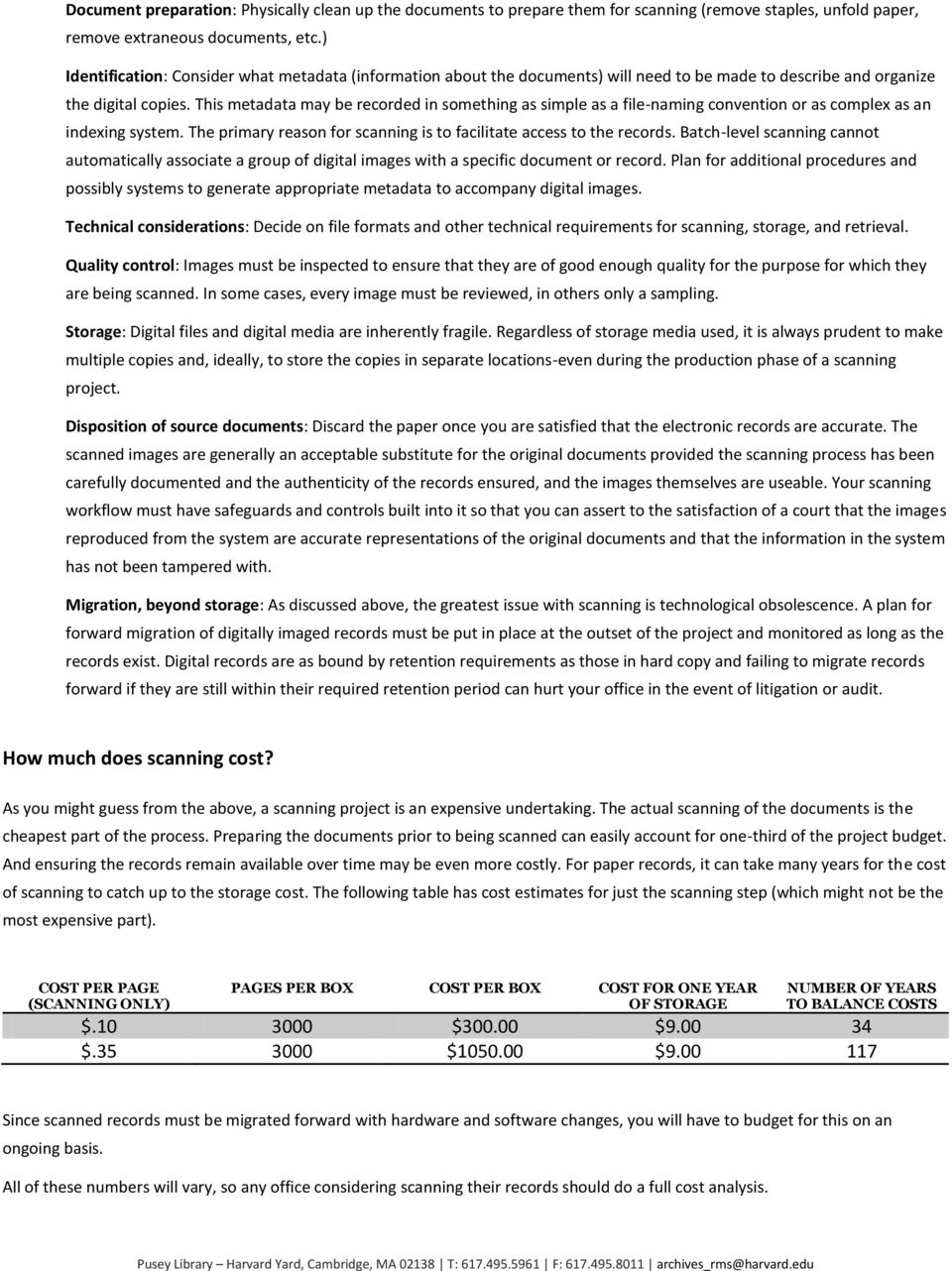
2 Document preparation: Physically clean up the documents to prepare them for scanning (remove staples, unfold paper, remove extraneous documents, etc.) Identification: Consider what metadata (information about the documents) will need to be made to describe and organize the digital copies. This metadata may be recorded in something as simple as a file-naming convention or as complex as an indexing system. The primary reason for scanning is to facilitate access to the records. Batch-level scanning cannot automatically associate a group of digital images with a specific document or record. Plan for additional procedures and possibly systems to generate appropriate metadata to accompany digital images. Technical considerations: Decide on file formats and other technical requirements for scanning, storage, and retrieval. Quality control: Images must be inspected to ensure that they are of good enough quality for the purpose for which they are being scanned. In some cases, every image must be reviewed, in others only a sampling. Storage: Digital files and digital media are inherently fragile. Regardless of storage media used, it is always prudent to make multiple copies and, ideally, to store the copies in separate locations-even during the production phase of a scanning project. Disposition of source documents: Discard the paper once you are satisfied that the electronic records are accurate. The scanned images are generally an acceptable substitute for the original documents provided the scanning process has been carefully documented and the authenticity of the records ensured, and the images themselves are useable. Your scanning workflow must have safeguards and controls built into it so that you can assert to the satisfaction of a court that the images reproduced from the system are accurate representations of the original documents and that the information in the system has not been tampered with. Migration, beyond storage: As discussed above, the greatest issue with scanning is technological obsolescence. A plan for forward migration of digitally imaged records must be put in place at the outset of the project and monitored as long as the records exist. Digital records are as bound by retention requirements as those in hard copy and failing to migrate records forward if they are still within their required retention period can hurt your office in the event of litigation or audit. How much does scanning cost? As you might guess from the above, a scanning project is an expensive undertaking. The actual scanning of the documents is the cheapest part of the process. Preparing the documents prior to being scanned can easily account for one-third of the project budget. And ensuring the records remain available over time may be even more costly. For paper records, it can take many years for the cost of scanning to catch up to the storage cost. The following table has cost estimates for just the scanning step (which might not be the most expensive part). COST PER PAGE (SCANNING ONLY) PAGES PER BOX COST PER BOX COST FOR ONE YEAR OF STORAGE NUMBER OF YEARS TO BALANCE COSTS $ $ $ $ $ $ Since scanned records must be migrated forward with hardware and software changes, you will have to budget for this on an ongoing basis. All of these numbers will vary, so any office considering scanning their records should do a full cost analysis.
3 What are the storage format and media issues? Both "master" and "use" images should be created under some circumstances. The master image will be of the highest quality and only used for creating new use images. Keep a master copy if any of the following are true: o The use images will be in a format not suitable for long-term preservation. o Different formats of use images need to be created (e.g., a GIF image for each page for on-screen display, and a PDF version for printing). Creating copies from a higher quality image will produce the best copies. o The printed original is being destroyed or is difficult to access. Software and hardware obsolescence - Some aspect of the formatting (most likely operating system or file type) or hardware (most likely disk type) will require migration within 5 years or so. Migration will add to the cost so should be factored into cost estimates. Certain media storage formats, like magnetic tape and removable disks (e.g. DVD) make it difficult to apply retention periods since the whole disk or tape has to be disposed of at once, even if individual records have different retention periods. Make backup copies o For removable disks, make at least 2 copies of each disk and keep them in separate, secure, locations. Removable disks, either magnetic or optical, can, and do, go bad with no notice, so keeping one copy is foolhardy, especially considering the expense of scanning. o Server-based records should be regularly backed up. Even then, though, a long-term backup is advisable since damage early in the storage period would produce many future damaged backups. o Check originals and backups regularly so that errors are discovered quickly. There's no easy answer for deciding when to migrate the records but it is simple: do it while you still can. A good rule of thumb is to review stored electronic records whenever the office changes its regular software. Storing long-term records only on removable disks (like CDs or DVDs) is generally not a good idea. Storing at least one copy online (e.g., a file server or web server) is recommended. o Long-term records will periodically need to be migrated to new formats and media. Migrating files kept on several removable disks is a tedious process. o Multiple copies of each disk must be created since removable disks can become unusable in a short period of time. Technical specifications for the master image will depend on the project, but here are some common specifications: o TIFF (Tagged Image File Format) is a broadly adopted file format standard applicable to black-and-white (1-bit), grayscale (8-bit), and color (24-bit) digital images. for color images, 24-bit RGB without compression for non-color images containing illustrations, 8-bit grayscale without compression for non-color images containing only text and/or line art, 1-bit with ITU-6 (aka "Group 4") lossless compression o Capture at a high-enough dpi (dots per inch) level to render the image clearly but not higher than necessary since that will increase the cost of storage. o For further information, contact Records Management Services. What are the security considerations? For records that may be subject to audit or legal action, the process of preparing, scanning, and storing the records must be laid out firmly with proper security precautions applied. Process is everything in making electronic records hold up in court. Security precautions should include: personnel access restrictions proper metadata
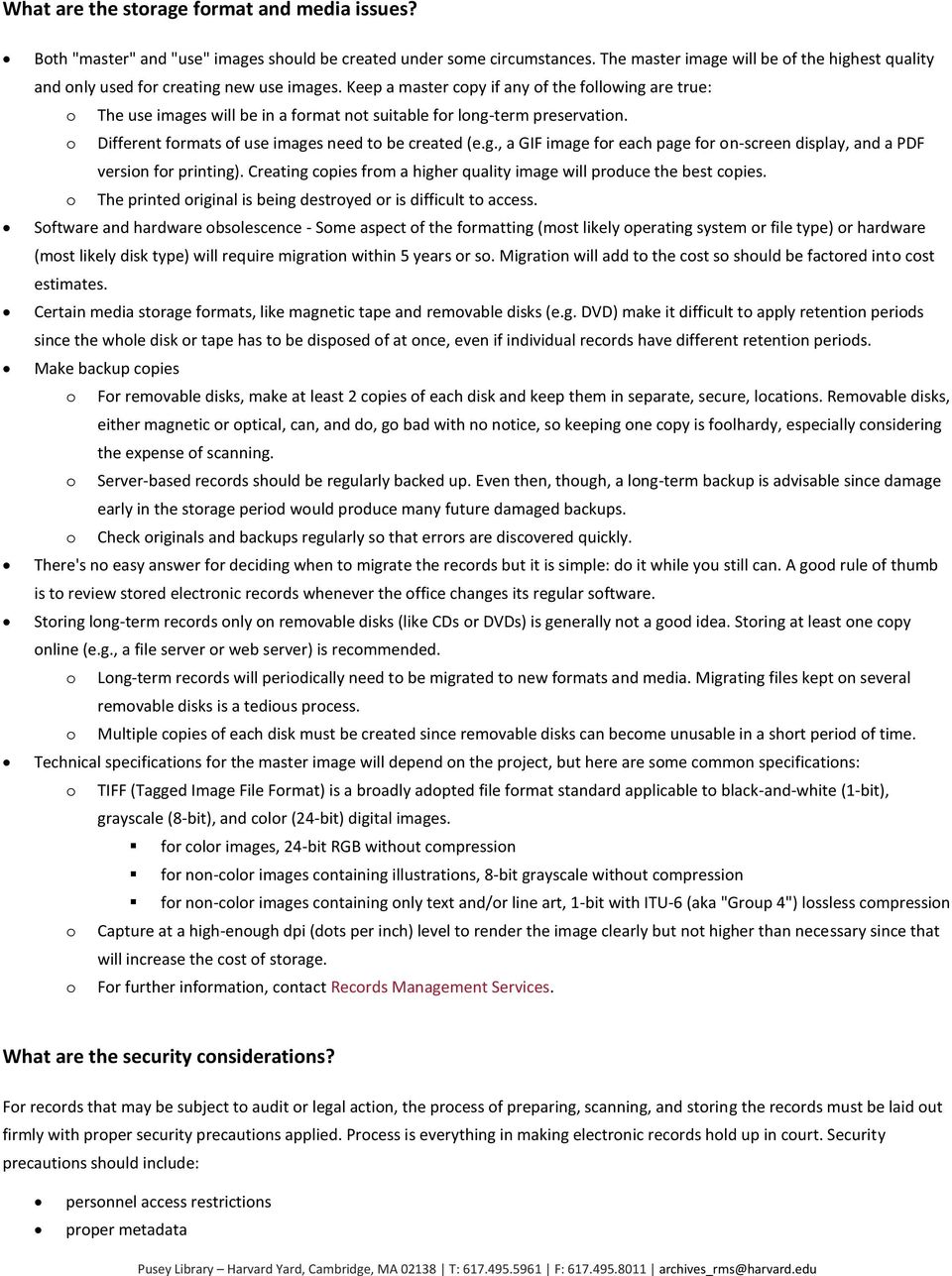
4 good scanning procedures quality control making sure that the images can't be tampered with after scanning. Consult ANSI/AIIM TR Legal Acceptance of Records Produced by Information Technology Systems for information on the procedures necessary for creating and maintaining legally acceptable imaged records. The drive within a scanner may retain copies of your images after the job is done. These drives should be wiped clean when the process is complete. For certain types of information, permission from your CIO for a scanning project may be required. For further information on security, check the Harvard Enterprise Security, especially the section on working with vendors.

5 REVISED 7/9/2012

In addition, a decision should be made about the date range of the documents to be scanned. There are a number of options:
 Version 2.0 December 2014 Scanning Records Management Factsheet 06 Introduction Scanning paper documents provides many benefits, such as improved access to information and reduced storage costs (either
How To Use A Court Record Electronically In Idaho
 Idaho Judicial Branch Scanning and Imaging Guidelines DRAFT - October 25, 2013 A. Introduction Many of Idaho s courts have considered or implemented the use of digital imaging systems to scan court documents
STATE OF NEBRASKA STATE RECORDS ADMINISTRATOR DURABLE MEDIUM WRITTEN BEST PRACTICES & PROCEDURES (ELECTRONIC RECORDS GUIDELINES) OCTOBER 2009
 STATE OF NEBRASKA STATE RECORDS ADMINISTRATOR DURABLE MEDIUM WRITTEN BEST PRACTICES & PROCEDURES (ELECTRONIC RECORDS GUIDELINES) OCTOBER 2009 Following is a voluntary guideline issued by the State Records
Scanning and Tossing. Requirements for Scanning and the Destruction of Paper Based Records
 Scanning and Tossing Requirements for Scanning and the Destruction of Paper Based Records Overview I want to go paperless! Can I scan and toss? What are the rules and requirements about imaging? What are
Document Scanning Essentials
 Document Scanning Essentials www.archives.nysed.gov Objectives Learn about current imaging practices How to prepare for an imaging project How to incorporate RM principles into your project Provide strategies
Document Management Solutions Are you drowning in paper or can't find the information you are looking for fast and accurately?
 Document Management Solutions Are you drowning in paper or can't find the information you are looking for fast and accurately? do you have a collection of archived documents - government, accounting, mortgage,
DIGITIZATION S GUIDE. Go for quality and document your process!
 DIGITIZATION S GUIDE Go for quality and document your process! DIGITIZATION: GO FOR QUALITY AND DOCUMENT YOUR PROCESS! (Source: La numérisation des documents administratifs Méthodes et recommandations
Union County. Electronic Records and Document Imaging Policy
 Union County Electronic Records and Document Imaging Policy Adopted by the Union County Board of Commissioners December 2, 2013 1 Table of Contents 1. Purpose... 3 2. Responsible Parties... 3 3. Availability
Cyber Security: Guidelines for Backing Up Information. A Non-Technical Guide
 Cyber Security: Guidelines for Backing Up Information A Non-Technical Guide Essential for Executives, Business Managers Administrative & Operations Managers This appendix is a supplement to the Cyber Security:
Version 1.0 MCGILL UNIVERSITY SCANNING STANDARDS FOR ADMINISTRATIVE RECORDS. Summary
 Version 1.0 MCGILL UNIVERSITY SCANNING STANDARDS FOR ADMINISTRATIVE RECORDS Summary... 1 Introduction... 2 McGill Record-Keeping: Obligations and Technical Issues... 3 Scope & Procedures... 4 Standards...
POLICY AND GUIDELINES FOR THE MANAGEMENT OF ELECTRONIC RECORDS INCLUDING ELECTRONIC MAIL (E-MAIL) SYSTEMS
 POLICY AND GUIDELINES FOR THE MANAGEMENT OF ELECTRONIC RECORDS INCLUDING ELECTRONIC MAIL (E-MAIL) SYSTEMS 1. Purpose Establish and clarify a records management policy for municipal officers with respect
College Archives Digital Preservation Policy. Created: October 2007 Last Updated: December 2012
 College Archives Digital Preservation Policy Created: October 2007 Last Updated: December 2012 Introduction The Columbia College Chicago Archives Digital Preservation Policy establishes a framework to
New York State Archives Digital Imaging Guidelines (2014) 1
 New York State Archives Digital Imaging Guidelines 2014 Table of Contents General Guidelines 1. Purpose 2. Use of These Guidelines When Working with a Vendor 3. Digital Imaging Defined 4. Scope 5. State
Local Government Cyber Security:
 Local Government Cyber Security: Guidelines for Backing Up Information A Non-Technical Guide Essential for Elected Officials Administrative Officials Business Managers Multi-State Information Sharing and
Library of Virginia DIGITAL IMAGING GUIDELINES September 2008
 Library of Virginia DIGITAL IMAGING GUIDELINES September 2008 Scope This guideline is applicable to all state agencies, public institutions of higher education and local government entities. This guideline
DELAWARE PUBLIC ARCHIVES POLICY STATEMENT AND GUIDELINES MODEL GUIDELINES FOR ELECTRONIC RECORDS
 DELAWARE PUBLIC ARCHIVES POLICY STATEMENT AND GUIDELINES MODEL GUIDELINES FOR ELECTRONIC RECORDS STATEMENT OF PURPOSE The Delaware Public Archives (DPA) has issued "Model Guidelines for Electronic Records"
Blocal government bulletin b
 Electronic Records Standards and Procedures Blocal government bulletin b july 1998 Comments or complaints regarding the programs and services of the Texas State Library and Archives Commission may be addressed
Scanning Guidelines. Records Management
 Records Management Scanning Guidelines for compliance with Code of practice for legal admissibility and evidential weight of information stored electronically (Reference document BSI document: BS10008)
Chapter 434-662 WAC PRESERVATION OF ELECTRONIC PUBLIC RECORDS
 Chapter 434-662 WAC PRESERVATION OF ELECTRONIC PUBLIC RECORDS WAC 434-662-010 Purpose. Pursuant to the provisions of chapters 40.14 and 42.56 RCW, and RCW 43.105.250, the rules contained in this chapter
Document Management/Scanning White Paper
 Document Management/Scanning White Paper Justification for document scanning services may involve many factors; some are easy to quantify in monetary terms and others that can only be quantified through
Best practices for producing high quality PDF files
 University of Michigan Deep Blue deepblue.lib.umich.edu 2006-05-05 Best practices for producing high quality PDF files Formats Group, Deep Blue http://hdl.handle.net/2027.42/58005 Best practices for producing
Corporate Records Scanning Strategy
 Corporate Records Scanning Strategy For the unitary authority of Northumberland County Council DRAFT Prepared by: Records Management Service, Northumberland County Council, Woodhorn, QEII Country Park,
Larry Patterson, City Manager
 Administrative Policy 2-13 August 20, 2008 DATA MIGRATION POLICY PURPOSE To preserve electronic data as required by Oregon Public Records and Archiving statutes. (ORS 192.050) APPLICABILITY This policy
E-Content Service Group Virtual Meeting. Digital Preservation: How to Get Started
 E-Content Service Group Virtual Meeting Digital Preservation: How to Get Started Slide 2 of 17 Agenda Committee Members E-Content Purpose Presentation by Greg Zick Questions Discussion for May Meeting
Best Practices Page 1
 BEST PRACTICES FOR ELECTRONIC DISCOVERY IN CRIMINAL CASES Western District of Washington Adopted March 21, 2013 These best practices reflect recommendations adopted in February 2012 by the Department of
Smithsonian Institution Archives Guidance Update SIA. ELECTRONIC RECORDS Recommendations for Preservation Formats. November 2004 SIA_EREC_04_03
 SIA Smithsonian Institution Archives Guidance Update November 2004 ELECTRONIC RECORDS Recommendations for s SIA_EREC_04_03 Highlights Highlights of SIA_EREC_04_03, an update on electronic record preservation
APPLICATION FOR LOUISIANA STATE ARCHIVES IMAGING EXCEPTION TO LA. R.S. 44:39 SSARC 790
 APPLICATION FOR LOUISIANA STATE ARCHIVES IMAGING EXCEPTION TO LA. R.S. 44:39 SSARC 790 Mailing: PO Box 94125, Baton Rouge, LA 70804-9125 Location: 3851 Essen Lane, Baton Rouge, LA 70809-2137 BEFORE completing
Management Update: Important Issues About Digital Data Preservation
 InSide Gartner (IGG) D. Logan, K. Weilerstein, A. Weintraub August 08, 2001 Management Update: Important Issues About Digital Data Preservation Long-term preservation of digital data is becoming an issue
Introduction to WIPOScan Software
 Introduction to WIPOScan Software An overview of available WIPO technical assistance on digitization, such as WIPOScan and detailed modules for digitizing all kinds of industrial property data Gregory
Demographics QUESTIONS COMMENTS
 DOI SURVEY Name: Bureau: Department: Location: Telephone: Email: Date of Interview: Defining Requirements for an Electronic Records Management Solution A series of fact finding questions will be presented
Corporate Scanning Guidelines
 Corporate Scanning Guidelines 1. Introduction 2. When to scan 3. How to scan 4. Management issues 5. Admissibility 6. Summary Version Notes Author Date 0 Rough Draft RM 01/12/06 0.1 First discussion draft
Electronic Document Management System Specification Checklist
 Electronic Document Management System Specification Checklist Your existing computer systems, number of users, applications and processes greatly influence the selection of a suitable electronic document
The State Records Act and Electronic Records. Kris Stenson Electronic Records Archivist Illinois State Archives
 The State Records Act and Electronic Records Kris Stenson Electronic Records Archivist Illinois State Archives Outline The State Records Act & Records Management Introduction to E-records Dealing with
A. Scan to PDF Instructions
 Revised 08/17/11 Scan to PDF Instructions (Epson scanner example) Scan to PDF Adobe Acrobat 9.0 A. Scan to PDF Instructions Refer to the user manual for your scanner. These instructions are for an Epson
PRESS RELEASE. AIIM, Philadelphia, May 15 th 2006 Embargo until, May 15 th 2006, at 5:40 p.m
 PRESS RELEASE AIIM, Philadelphia, May 15 th 2006 Embargo until, May 15 th 2006, at 5:40 p.m I.R.I.S. and Kodak announce IRISPdf Server for Kodak Capture Software, a new version of IRISPdf Server redesigned
1. Redistributions of documents, or parts of documents, must retain the SWGIT cover page containing the disclaimer.
 Disclaimer: As a condition to the use of this document and the information contained herein, the SWGIT requests notification by e-mail before or contemporaneously to the introduction of this document,
Presentation Topics. What is a record? Hawaii State Archives Presentation December 14, 2010 ABC S OF RECORDS MANAGEMENT ACHIEVING BASIC CONTROL
 ABC S OF RECORDS MANAGEMENT ACHIEVING BASIC CONTROL Presented by: Adam Jansen [email protected] December 2010 Presentation Topics What is a Record What is Records Management Your Responsibilities Conducting
Standard. Record-keeping Requirements for Digitization. April 2009
 Standard April 2009 Record-keeping Requirements for Digitization Approved by: Bridget Sisk Approval date: April 2011 Contact: Tony Newton ([email protected]) Review date: Standard Record-Keeping Requirements
Administrative Office of the Courts
 Page 1 Administrative Office of the Courts GLENN A. GRANT, J.A.D. Acting Administrative Director of the Courts www.njcourts.com phone: 609-984-0275 fax: 609-984-6968 To: From: Hon. Carmen Messano Assignment
Public Works and Services. Guidelines for Scanning Projects
 Public Works and Services Guidelines for Scanning Projects Records Management Section August 11, 2010 0 Table of Contents Introduction... 3 Purpose... 3 What is Scanning?... 3 Advantages of Scanning...
Samsung SmarThru Workflow 2 Digitize your print environment with secure, cost effective document workflow
 Samsung SmarThru Workflow 2 Digitize your print environment with secure, cost effective document workflow Integrate almost any paper or electronic document into a secure digital workflow. Save costs and
Institute for Advanced Study Shelby White and Leon Levy Archives Center
 Institute for Advanced Study Shelby White and Leon Levy Archives Center Managing Electronic Records - Recommendations for Institute Staff File Management: Guidelines & Policies Which files are considered
State of Michigan Document Imaging Guidelines
 State of Michigan Document Imaging Guidelines Responsibility of Source Document Owners to Monitor the Work With limited human resources, the time it takes to maintain, process, and store records is becoming
Remote Deposit Terms of Use and Procedures
 Remote Deposit Terms of Use and Procedures Use of American National Bank Fox Cities (Bank) Remote Deposit service is subject to the following Terms of Use and Procedures. Bank reserves the right to update
SOUTHWEST VIRGINIA COMMUNITY COLLEGE RECORDS MANAGEMENT PROGRAM. Revised January 15, 2014
 SOUTHWEST VIRGINIA COMMUNITY COLLEGE RECORDS MANAGEMENT PROGRAM Revised January 15, 2014 Page 1 Introduction In compliance with the Code of Virginia, Section 42.1085, Southwest Virginia Community College
How To Manage Records And Information Management In Alberta
 8. RECORDS AND INFORMATION MANAGEMENT Overview This chapter is intended to help public bodies understand how good records and information management practices assist in the effective administration of
Electronic Record Management Guidelines for Arkansas State Government. Developed by the Arkansas Records Retention Workgroup
 Electronic Record Management Guidelines for Arkansas State Government Developed by the Arkansas Records Retention Workgroup October 2005 This page is blank to allow for correct pagination for duplex printing.
Document Management Glossary
 Document Management Glossary CVS - Concurrent Versions System and is a process of sharing, saving and recovering version information for people using code. Document - Information stored in files on a pc
E-mail Management: A Guide For Harvard Administrators
 E-mail Management: A Guide For Harvard Administrators E-mail is information transmitted or exchanged between a sender and a recipient by way of a system of connected computers. Although e-mail is considered
Document Management Solutions
 TM SCAN SOLUTIONS Efficient, Flexible, Powerful, Cost-Effective Document Management Solutions Introduction About Pearl Scan Pearl Scan Solutions Ltd is one of the leading providers of document management
File Formats for Electronic Document Review Why PDF Trumps TIFF
 APPLIED DISCOVERY WHITE PAPER File Formats for Electronic Document Review Why PDF Trumps TIFF APPLIED DISCOVERY WHITE PAPER What is the difference between PDF and TIFF, and why should lawyers care? The
The legal admissibility of information stored on electronic document management systems
 Softology Ltd. The legal admissibility of information stored on electronic document management systems July 2014 SOFTOLOGY LIMITED www.softology.co.uk Specialist Expertise in Document Management and Workflow
OFFICE ADMINISTRATION Section 1, Records Management Chapter 1, Filing Systems
 OFFICE ADMINISTRATION Section 1, Records Management Chapter 1, Filing Systems The basic premise for establishing filing systems within an organization is the ability to retrieve records. Appropriate storage
Records Management Policy
 Records Management Policy Responsible Officer Chief Operating Officer Approved by Vice-Chancellor Approved and commenced April, 2014 Review by April, 2017 Relevant Legislation, Ordinance, Rule and/or Governance
TERRITORY RECORDS OFFICE BUSINESS SYSTEMS AND DIGITAL RECORDKEEPING FUNCTIONALITY ASSESSMENT TOOL
 TERRITORY RECORDS OFFICE BUSINESS SYSTEMS AND DIGITAL RECORDKEEPING FUNCTIONALITY ASSESSMENT TOOL INTRODUCTION WHAT IS A RECORD? AS ISO 15489-2002 Records Management defines a record as information created,
ELECTRONIC RECORDS MANAGEMENT
 ELECTRONIC RECORDS MANAGEMENT S E S S IO N 5 O F 7 O N R E C O R D S M AN AG E M E N T This training does not constitute a legal opinion or legal advice on the part of the Library, Archives and Public
CHAPTER 13 ELECTRONIC DOCUMENT MANAGEMENT SYSTEM (EDMS) REQUIREMENTS
 CHAPTER 13 ELECTRONIC DOCUMENT MANAGEMENT SYSTEM (EDMS) REQUIREMENTS PURPOSE: The purpose of this procedure is to establish requirements for electronic records scanned/imported into the Department s Electronic
Tibiscus University, Timişoara
 PDF/A standard for long term archiving Ramona Vasilescu Tibiscus University, Timişoara ABSTRACT. PDF/A is defined by ISO 19005-1 as a file format based on PDF format. The standard provides a mechanism
IAPE STANDARDS SECTION 16 DIGITAL EVIDENCE
 IAPE STANDARDS SECTION 16 DIGITAL EVIDENCE IAPE STANDARD SECTION 16.1 DIGITAL EVIDENCE Standard: Digital evidence is a critical element of modern criminal investigation that should be maintained in strict
Brown County Information Technology Aberdeen, SD. Request for Proposals For Document Management Solution. Proposals Deadline: Submit proposals to:
 Brown County Information Technology Aberdeen, SD Request for Proposals For Document Management Solution Proposals Deadline: 9:10am, January 12, 2016 Submit proposals to: Brown County Auditor 25 Market
Introduction to Enterprise Content Management (ECM) Priscilla Emery - Principal, Information Management IQ Business Group October 29, 2014
 Introduction to Enterprise Content Management (ECM) Priscilla Emery - Principal, Information Management IQ Business Group October 29, 2014 Agenda What is ECM? Component technologies Component practices
A Selection of Questions from the. Stewardship of Digital Assets Workshop Questionnaire
 A Selection of Questions from the Stewardship of Digital Assets Workshop Questionnaire SECTION A: Institution Information What year did your institution begin creating digital resources? What year did
Electronic documents questionnaire
 Electronic documents questionnaire (Civil Procedure Rules Practice Direction 31B) WARNING: Unless the court makes some other order, the answers given in this document may only be used for the purposes
ADOBE ACROBAT X PRO SCAN AND OPTICAL CHARACTER RECOGNITION (OCR)
 ADOBE ACROBAT X PRO SCAN AND OPTICAL CHARACTER RECOGNITION (OCR) Last Edited: 2012-07-12 1 Scan a Paper Document to PDF... 3 Configure Presets for Scan... 4 Set up Optimization Options... 11 Edit Settings...
Measures Regarding Litigation Holds and Preservation of Electronically Stored Information (ESI)
 University of California, Merced Measures Regarding Litigation Holds and Preservation of Electronically Stored Information (ESI) Responsible Officials: Executive Vice Chancellor and Provost Vice Chancellor
Version5 +AutoCapture & Workflow
 Version5 +AutoCapture & Workflow What is document management? Information on paper. Over the past century the traditional office has changed dramatically. New technologies such as telecommunications, computers,
ELECTRONIC DOCUMENT IMAGING
 AIIM: Association for Information and Image Management. Trade association and professional society for the micrographics, optical disk and electronic image management markets. Algorithm: Prescribed set
Optimizing Adobe PDF files for display on mobile devices
 whitepaper TABLE OF CONTENTS 1 Introduction 1 Part I. Optimizing existing PDF files 5 Part II. Creating optimized PDF files Introduction This document provides guidelines for creating Adobe PDF files optimized
Guidelines for the submission of invoices
 Guidelines for the submission of invoices For CGI Vendors (North America Only) Contents 1. Introduction... 1 2. Scope... 1 3. Invoice Scanning and Submission Guidelines... 1 4 Frequently asked questions
Trusted Systems / Electronic Records
 Trusted Systems / Electronic Records Diane R. Gladwell, MMC President Gladwell Governmental Services, Inc., (909) 337-3516 [email protected] www.gladwellgov.org E-Records, if Record Copy Must be kept
UNIVERSITY OF MANITOBA PROCEDURE
 UNIVERSITY OF MANITOBA PROCEDURE Procedure: Parent Policy: Effective Date: June 23, 2015 Revised Date: Review Date: June 23, 2025 Approving Body: Authority: Responsible Executive Officer: Delegate: Contact:
Arizona State Library, Archives and Public Records
 Arizona State Library, Archives and Public Records RECORDS MANAGEMENT DIVISION 1919 West Jefferson Phoenix, Arizona 85009 (602) 542-3741 Managing Public Records Sent and Received Via Electronic Mail These
Guide to advanced ediscovery solutions
 RCLS Services & Technology Guide to advanced ediscovery solutions Océ Business Services Records, Compliance and Legal Solutions Products and Services Océ Business Services has earned the reputation as
An Introduction to Transparent Records Management
 Records Management Focus White Paper An Introduction to Transparent Records Management Learn More Inside: Meet the needs of both records managers and general users. Easily manage multiple departments information
Going Paperless The Utah Experience. Mike Pecorelli Project Manager Utah DEQ
 Going Paperless The Utah Experience Mike Pecorelli Project Manager Utah DEQ Topic Overview Three Key Topics Interactive Map GIS Tool Electronic Document Management System Database Interactive Map
Introduction A BUYER S GUIDE TO DOCUMENT MANAGEMENT
 1 Introduction There are few initiatives that can deliver more productivity and security to a business than implementing an Electronic Document Management System (also known as an Electronic Content Management
Preparing Illustrations for Publication
 UNIVERSITY OF NEVADA PRESS Preparing Illustrations for Publication The following instructions are intended to guide you through the process of assembling and submitting the art program for your book. Any