
Eligible Professional Meaningful Use Attestation Manual
|
|
|
- Matilda Jefferson
- 10 years ago
- Views:
Transcription
1 Eligible Professional Meaningful Use Attestation Manual April 1, 2013 (Revised)

2 Table of Contents 1 Introduction Background Eligibility Out-of-State Providers Establishing Patient Volume Patient Encounters Methodology Payment Methodology Payments Provider Registration Provider Attestation Process and Validation Incentive Payments Program Integrity Administrative Appeals Getting Started Sign-in Screen Home Screen Registration Data Screen Provider Eligibility Details Screen Eligibility Details Service Locations Meaningful Use Questionnaire Screen Requirements for Meaningful Use Measures Meaningful Use Measure Menu Screen Meaningful Use Core Measure 1 Screen Meaningful Use Core Measure 2 Screen Meaningful Use Core Measure 3 Screen Meaningful Use Core Measure 4 Screen Meaningful Use Core Measure 5 Screen Meaningful Use Core Measure 6 Screen Meaningful Use Core Measure 7 Screen Meaningful Use Core Measure 8 Screen First Alternate Measure Screen Second Alternate Measure Screen Meaningful Use Core Measure 9 Screen Meaningful Use Core Measure 10 Screen Meaningful Use Core Measure 11 Screen Meaningful Use Core Measure 12 Screen Meaningful Use Core Measure 13 Screen Page i
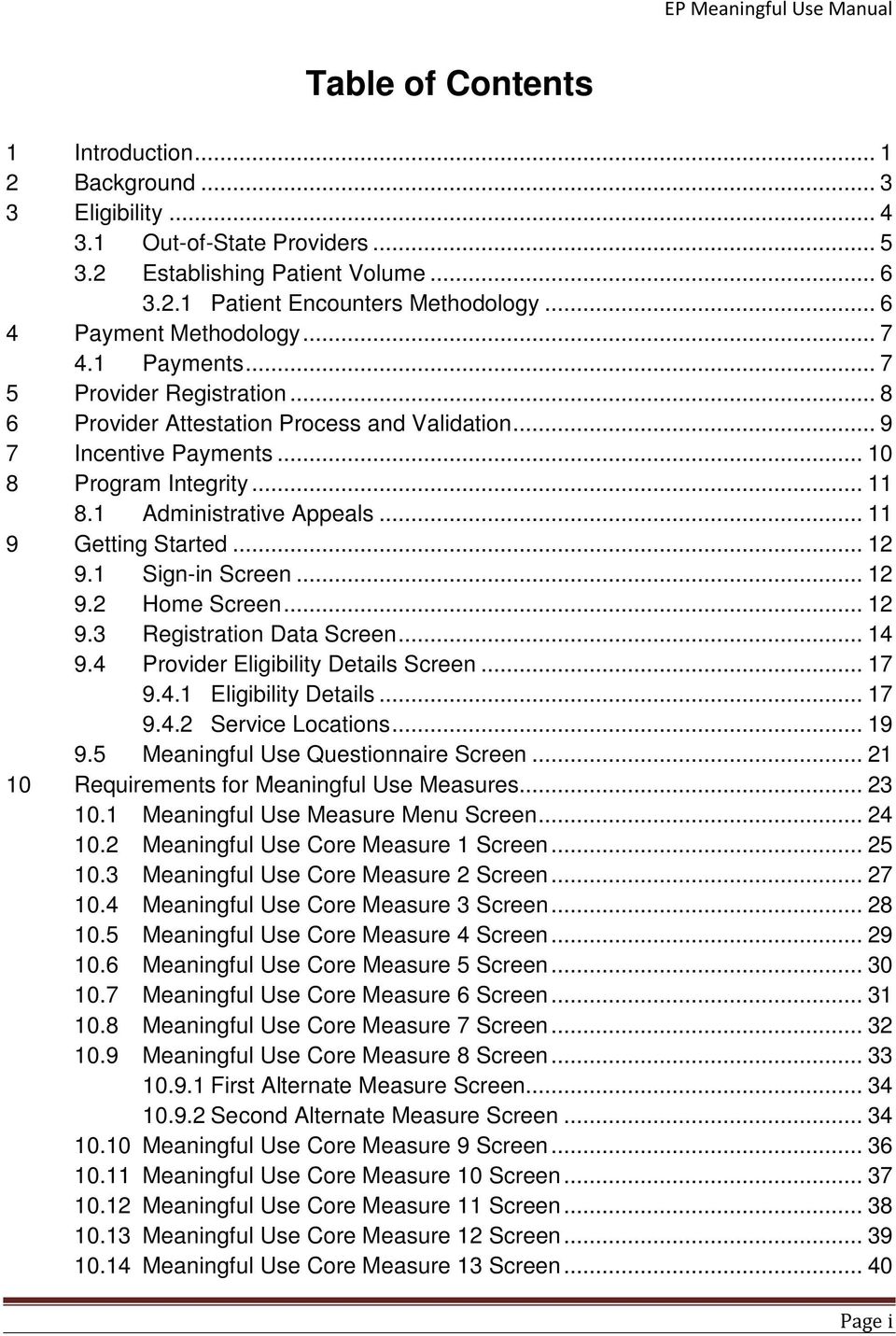
3 10.15 Meaningful Use Menu Measure Selection Screen Meaningful Use Menu Measure 1 Screen (Public Health) Meaningful Use Menu Measure 2 Screen (Public Health) Meaningful Use Menu Measure 3 Screen Meaningful Use Menu Measure 4 Screen Meaningful Use Menu Measure 5 Screen Meaningful Use Menu Measure 6 Screen Meaningful Use Menu Measure 7 Screen Meaningful Use Menu Measure 8 Screen Meaningful Use Menu Measure 9 Screen Meaningful Use Menu Measure 10Screen Core Clinical Quality Measure 1 Screen Core Clinical Quality Measure 2 Screen Core Clinical Quality Measure 3 Screen Alternate Core Clinical Quality Measures Selection Screen Alternate Core Clinical Quality Measure 1 Screen Alternate Core Clinical Quality Measure 2 Screen Alternate Core Clinical Quality Measure 3 Screen Additional Clinical Quality Measures Selection Screen Additional Clinical Quality Measure 1 Screen Additional Clinical Quality Measure 2 Screen Additional Clinical Quality Measure 3 Screen Additional Clinical Quality Measure 4 Screen Additional Clinical Quality Measure 5 Screen Additional Clinical Quality Measure 6 Screen Additional Clinical Quality Measure 7 Screen Additional Clinical Quality Measure 8 Screen Additional Clinical Quality Measure 9 Screen Additional Clinical Quality Measure 10 Screen Additional Clinical Quality Measure 11 Screen Additional Clinical Quality Measure 12 Screen Additional Clinical Quality Measure 13 Screen Additional Clinical Quality Measure 14 Screen Additional Clinical Quality Measure 15 Screen Additional Clinical Quality Measure 16 Screen Additional Clinical Quality Measure 17 Screen Additional Clinical Quality Measure 18 Screen Additional Clinical Quality Measure 19 Screen Additional Clinical Quality Measure 20 Screen Additional Clinical Quality Measure 21 Screen Page ii
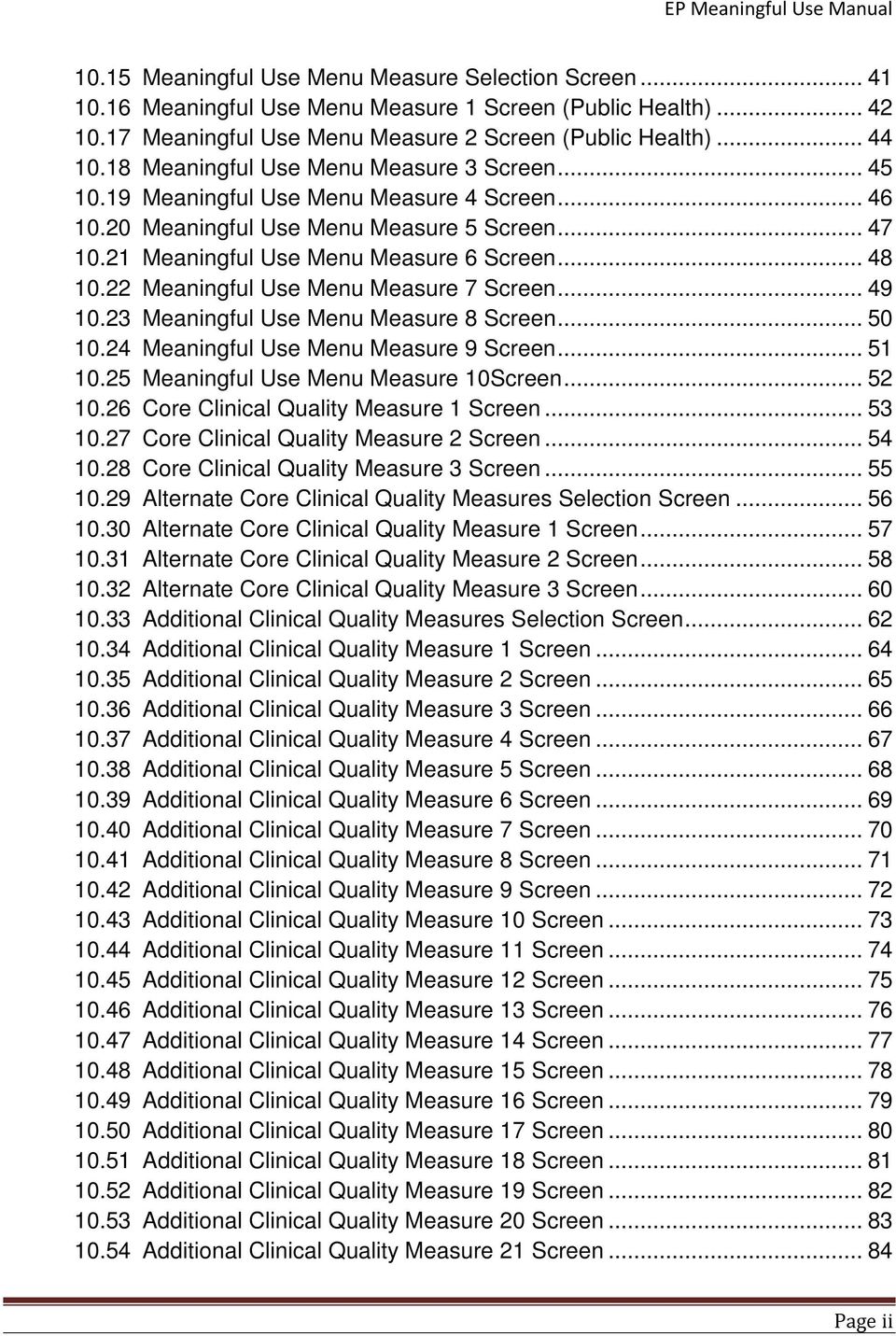
4 10.55 Additional Clinical Quality Measure 22 Screen Additional Clinical Quality Measure 23 Screen Additional Clinical Quality Measure 24 Screen Additional Clinical Quality Measure 25 Screen Additional Clinical Quality Measure 26 Screen Additional Clinical Quality Measure 27 Screen Additional Clinical Quality Measure 28 Screen Additional Clinical Quality Measure 29 Screen Additional Clinical Quality Measure 30 Screen Additional Clinical Quality Measure 31 Screen Additional Clinical Quality Measure 32 Screen Additional Clinical Quality Measure 33 Screen Additional Clinical Quality Measure 34 Screen Additional Clinical Quality Measure 35 Screen Additional Clinical Quality Measure 36 Screen Additional Clinical Quality Measure 37 Screen Additional Clinical Quality Measure 38 Screen Meaningful Use Summary Selection Screen Meaningful Use Core Measures Summary Screen Meaningful Use Menu Measures Summary Screen Summary of Clinical Quality Measures Screen Measure Editing Prior to Attestation Incentive Payment Calculation Screen Documentation Upload Screen Attestation Statements Screen Accepted Attestation Screen Unaccepted Attestation Screen Core Meaningful Use Measure Summary Post Attestation Menu Meaningful Use Measure Summary Post Attestation Clinical Quality Measures Summary Post Attestation View All Payments Screen Issues/Concerns Screen Audit and Appeals Attestation Appeals Screen Appeals Screen Provider Audit Appeal Audit Appeal Details Screen Appeal Setup Tab Audit Appeal details Screen Findings Tab Audit Appeal Details Screen Appeal Document Upload Audit Appeal Details Screen Appeal Outcome Tab Page iii

5 Record of Changes Changed Description Updated by Update Date Release Section 9.4 Meaningful Use Questionnaire EHR Team 3/26/ screen updated to allow multiple addresses to be entered for locations with CEHRT for a provider s attestation 9.2 Added a home page EHR Team 5/22/ Updated the CMS/NLR screen EHR Team 5/22/ , 10.32, Updated certain CQMS to have EHR Team 5/2/ , 10.37, 10.46, 10.55, 10.63, 10.69, 10.70, tool tips 1-11 Edits for formatting and EHR Team 4/1/ grammar 1 Introduction Reformatted EHR Team 4/1/ Edits and additions to contact information and links 3 Eligibility Reformatted EHR Team 4/1/ Additional Requirements for EP updated to include TXXI-CHIP 3 Qualifying Providers table EHR Team 4/1/ updated 3.2 Establishing Patient Volume EHR Team 4/1/ amended to include TXXI-CHIP EPs amended to include TXXI EHR Team 4/1/ Definition of an EP DMS EHR Team 4/1/ Encounter amended to include TXXI Definition of a needy patient EHR Team 4/1/ encounter amended. Removed TXXI encounters 6.1 Reformatted EP Attestation EHR Team 4/1/ process 8.1 Included Audits in Administrative EHR Team 4/1/ Appeals 9.2 Updated language and included EHR Team 4/1/ Stage of MU grid 9.4 Patient Volume updated to EHR Team 4/1/ Page i

6 include new screens Verbiage updated to include EHR Team 4/1/ CMS new time frame and Medicaid patient encounter language. Fuller description for questions 8 and 9 for clarification Service location screen shot and EHR Team 4/1/ information added 9.5 New screen without service EHR Team 4/1/ location updated text to delete service location info 10 Core Measure language update EHR Team 4/1/ to state 13 Core MU measures 10.2 Alternate Measure added screen EHR Team 4/1/ shot included and text added 10.5 Screen added to include EHR Team 4/1/ alternate exclusion for CPOE 10.9 Alternate measure screens EHR Team 4/1/ added updated screen to include exclusions New Screen added EHR Team 4/1/ New Screen added EHR Team 4/1/ Update verbiage to replace EHR Team 4/1/ missing screen. Removed MU measure core 11 as well as removed CQM reporting screen for measure Revisions in screen shots and EHR Team 4/1/ verbiage Screens updated and text EHR Team 4/1/ included to detail screen content Additional CQMs detailed with EHR Team 4/1/ content of screen 11 Audit and Appeals Process EHR Team 4/1/ Audit Details Setup EHR Team 4/1/ Audit Findings screen EHR Team 4/1/ Audit Document Upload Added EHR Team 4/1/ Audit Outcome tab EHR Team 4/1/ Attestation Appeals screen Added EHR Team 4/1/ Page ii

7 1 INTRODUCTION The Kentucky Medicaid EHR Incentive Program provides incentive payments to eligible professionals as they adopt, implement, upgrade or demonstrate meaningful use of certified EHR technology. The purpose of this document is to provide instructions for eligible profession to register for and complete attestation for the Kentucky Medicaid EHR Incentive Program using the KYSLR system. Resources: 42 CFR Parts 412, 413, 422 et al. Medicare and Medicaid Programs; Electronic Health Record Incentive Program Final Rule located at Kentucky State Medicaid HIT Plan (SMHP) Version 1.0 located at Kentucky Medicaid EHR Application Portal located at Medicare and Medicaid Electronic Health records (EHR) Incentive Program located at Office of the National Coordinator for Health Information Technology located at home /1204 Regional Extension Centers (RECs) have been designated to provide technical assistance to Kentucky EPs. The RECs that provide a full range of assistance related to EHR selection and training are listed below: Northern/Northeastern Kentucky Tri-State REC Website: Phone: Option 3 or 4 [email protected] Northeast Kentucky Northeast Kentucky Regional Information Organization (NeKY RHIO) Website: Phone: or [email protected] Rest of Kentucky Kentucky REC Website: Phone: 888-KY-REC-EHR or [email protected] Page 1

8 If you would like more information on the measures required for Meaningful Use please see the site below: Revisions Original 12/17/2011 Revised 3/26/2012 Revised 4/1/2013 Page 2

9 2 BACKGROUND The Centers for Medicare & Medicaid Services (CMS) has implemented, through provisions of the American Recovery and Reinvestment Act of 2009 (ARRA), incentive payments to eligible professionals (EP) and eligible hospitals (EH), including critical access hospitals (CAHs), participating in Medicare and Medicaid programs that are meaningful users of certified Electronic Health Records (EHR) technology. The incentive payments are not a reimbursement, but are intended to encourage EPs and EHs to adopt, implement, or upgrade certified EHR technology and use it in a meaningful manner. Use of certified EHR systems is required to qualify for incentive payments. The Office of the National Coordinator for Health Information Technology (ONC) has issued rules defining certified EHR systems and has identified entities that may certify systems. More information about this process is available at Goals for the national program include: 1) enhance care coordination and patient safety; 2) reduce paperwork and improve efficiencies; 3) facilitate electronic information sharing across providers, payers, and state lines and 4) enable data sharing using state Health Information Exchange (HIE) and the National Health Information Network (NHIN). Achieving these goals will improve health outcomes, facilitate access, simplify care and reduce costs of health care nationwide. The Kentucky Department for Medicaid Services (DMS) works closely with federal and state partners to ensure the Kentucky Medicaid EHR Incentive Program fits into the overall strategic plan for the Kentucky Health Information Exchange (KHIE), thereby advancing national and Kentucky goals for HIE. Both EPs and EHs are required to begin by registering at the national level with the Medicare and Medicaid registration and attestation system (also referred to as the NLR). CMS official Web site for the Medicare and Medicaid EHR Incentive Programs can be found at The site provides general and detailed information on the programs, including tabs to guide users on the path to payment, eligibility, meaningful use, certified EHR technology, and frequently asked questions. Page 3

10 3 ELIGIBILITY While EPs can begin the program in Calendar Year (CY) 2011, they must begin the program no later than CY The first tier of provider eligibility for the Kentucky Medicaid EHR Incentive Program is based on provider type and specialty. If the provider type and specialty for the submitting provider in the KY MMIS provider data store does not correspond to the provider types and specialties approved for participation in the Kentucky Medicaid EHR Incentive Program, the provider will receive an error message with a disqualification statement. At this time, CHFS DMS has determined that the following providers are potentially eligible to enroll in the Kentucky Medicaid EHR Incentive Program: Physicians = Any provider who has a Provider Type 64 and Specialty other than 345 (Pediatrics) Physician Assistants (practicing in a FQHC [Provider Type 31 and Specialty 80] or RHC [Provider Type 35] led by a Physician Assistant) = Any provider with a Provider Type 95 and Specialty other than 959 (PA Group). A FQHC or RHC is considered to be PA led in the following instances: o The PA is the primary provider in a clinic (e.g., part time physician and full time PA in the clinic) o The PA is the clinical or medical director at a clinical site of the practice o The PA is the owner of the RHC Pediatricians = Any provider with a Provider Type 64 and Specialty 345 Nurse Practitioners = Any provider with a Provider Type 78 and not Specialty 095 (CNM) or 789 (Nurse Practitioner Group) CNMs = Any provider with a Provider Type 78 and Specialty 095 Dentists = Any provider with a Provider Type 60 (Individual) Optometrists = Any provider with a Provider Type 77 Additional Requirements for the EP To qualify for an EHR incentive payment for each year the EP seeks the incentive payment, the EP must not be hospital-based and must: 1. Meet one of the following patient volume criteria: a. Have a minimum of 30 percent patient volume attributable to individuals receiving TXIX and/or TXXI-CHIP (but not separate CHIPs) Medicaid funded services; or b. Have a minimum 20 percent patient volume attributable to individuals receiving TXIX and/or TXXI-CHIP (but not separate CHIPs) Medicaid funded services, and be a pediatrician; or Page 4

11 c. Practice predominantly in a FQHC or RHC and have a minimum 30 percent patient volume attributable to needy individuals. 2. Have no sanctions and/or exclusions. An individual EP may choose to receive the incentive directly or assign it to a Medicaid contracted clinic or group to which the provider is associated. The tax identification number (TIN) of the individual or entity receiving the incentive payment is required when registering with the National Level Registry (NLR) and must match a TIN linked to the individual provider in DMS s system. If there is no contract on file with KY Medicaid, the system will not be available to a provider for attestation until a contract has been approved by DMS. Note also that some provider types who are eligible for the Medicare program, such as podiatrists and chiropractors, are not currently eligible for the Kentucky Medicaid EHR Incentive Program. The following Table is a summary of qualifying provider types and minimum patient encounter volumes. Qualifying Providers by Type and Patient Volume Program Entity Percent Patient Volume over Minimum 90-days Physicians 30% Or the Pediatricians 20% Dentists 30% Optometrist 30% Physician Assistants 30% when practicing at an FQHC/RHC led by a physician assistant Nurse Practitioner 30% 3.1 Out-of-State Providers Medicaid EP practices predominantly in an FQHC or RHC -30% needy individual patient volume threshold The Kentucky Medicaid EHR Incentive Program welcomes out-of-state providers to participate in this program as long as they have at least one physical location in Kentucky. Kentucky must be the only state they are requesting an incentive payment from during that participation year. For audit purposes, out-of-state providers must make available any and all records, claims data, and other data pertinent to an audit by either the Kentucky DMS program or CMS. Records must be maintained as applicable by law in the state of practice or Kentucky, whichever is deemed longer. Page 5

12 3.2 Establishing Patient Volume An eligible provider must annually meet patient volume requirements to participate in Kentucky s Medicaid EHR Incentive Program as established through the state s CMS approved State Medicaid Health IT Plan (SMHP). The patient funding source identifies who can be counted in the patient volume: Title XIX (TXIX) Medicaid and Title XXI (TXXI) CHIP (but not separate CHIPs). All EPs should calculate patient volume based on TXIX - Medicaid and/or TXXI-CHIP and out-of-state Medicaid patients Patient Encounters Methodology EPs to calculate TXIX-Medicaid and/or TXXI-CHIP patient volume, an EP must divide: o The total TXIX and/or TXXI-CHIP Medicaid or out-of-state Medicaid patient encounters in any representative, continuous 90-day period in the preceding calendar year; by o The total patient encounters in the same 90-day period. EPs Practicing Predominantly in an FQHC/RHC to calculate needy individual patient volume, an EP must divide: o The total needy individual patient encounters in any representative, continuous 90-day period in the preceding calendar year; by o The total patient encounters in the same 90-day period. Definition of an Eligible Professional DMS Encounter For purposes of calculating EP patient volume, a DMS encounter is defined as services rendered on any one day to an individual where TXIX DMS or TXXI-CHIP (but not separate CHIPs) or another State s Medicaid program paid for: Part or all of the service; or Part or all of their premiums, co-payments and/or cost-sharing. Definition of a Needy Individual Encounter For purposes of calculating patient volume for an EP practicing predominantly in an FQHC/RHC, a needy individual encounter is defined as services rendered on any one day to an individual where medical services were: Furnished by the provider as uncompensated care; or Furnished at either no cost or reduced cost based on a sliding scale determined by the individual s ability to pay. Group Practices Clinics or group practices will be permitted to calculate patient volume at the group practice/clinic level, but only in accordance with all of the following limitations: Page 6

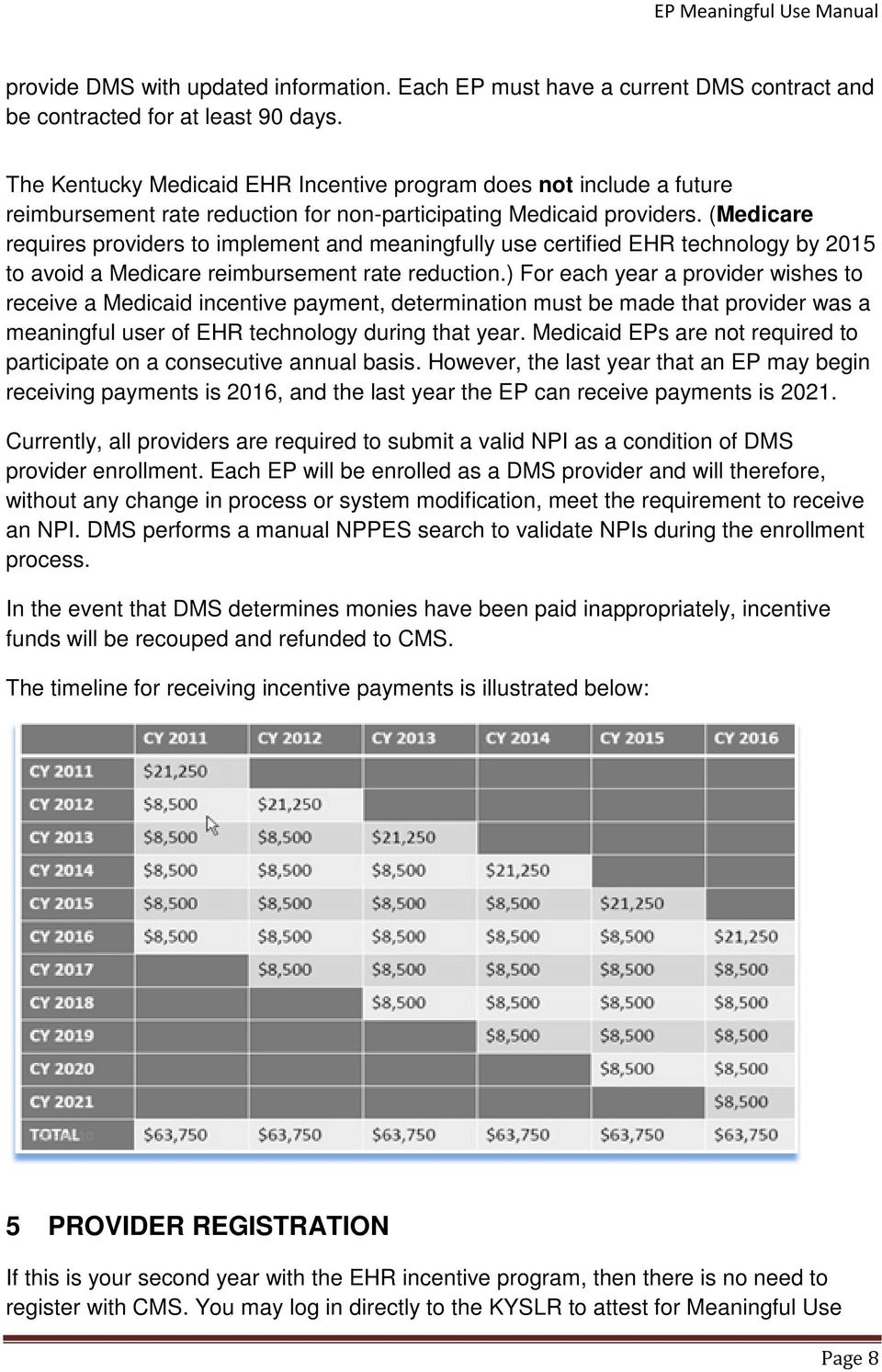
13 The clinic or group practice s patient volume is appropriate as a patient volume methodology calculation for the EP. There is an auditable data source to support the clinic s or group practice s patient volume determination. All EPs in the group practice or clinic must use the same methodology for the payment year. The clinic or group practice uses the entire practice or clinic s patient volume and does not limit patient volume in any way; and if an EP works inside and outside of the clinic or practice, then the patient volume calculation includes only those encounters associated with the clinic or group practice, and not the EP s outside encounters. 4 PAYMENT METHODOLOGY The maximum incentive payment an EP could receive from Kentucky Medicaid equals $63,750, over a period of six years, or $42,500 for pediatricians with a percent DMS patient volume as shown below. Provider EP EP-Pediatrician Patient Volume 30 Percent Percent Year 1 $21,250 $14,167 Year 2 8,500 5,667 Year 3 8,500 5,667 Year 4 8, Year 5 8,500 5,667 Year 6 8,500 5,665 Total Incentive Payment $63,750 $42,500 Since pediatricians are qualified to participate in the Kentucky Medicaid EHR incentive program as physicians, and therefore classified as EPs, they may qualify to receive the full incentive if the pediatrician can demonstrate that they meet the minimum 30 percent Medicaid patient volume requirements. 4.1 Payments EP payments will be made in alignment with the calendar year and an EP must begin receiving incentive payments no later than CY EPs will assign the incentive payments to a tax ID (TIN) in the CMS EHR Registration and Attestation National Level Repository (NLR). The TIN must be associated in the Kentucky MMIS system with either the EP him/herself or a group or clinic with whom the EP is affiliated. EPs who assign payment to himself or herself (and not a group or clinic) will be required to Page 7
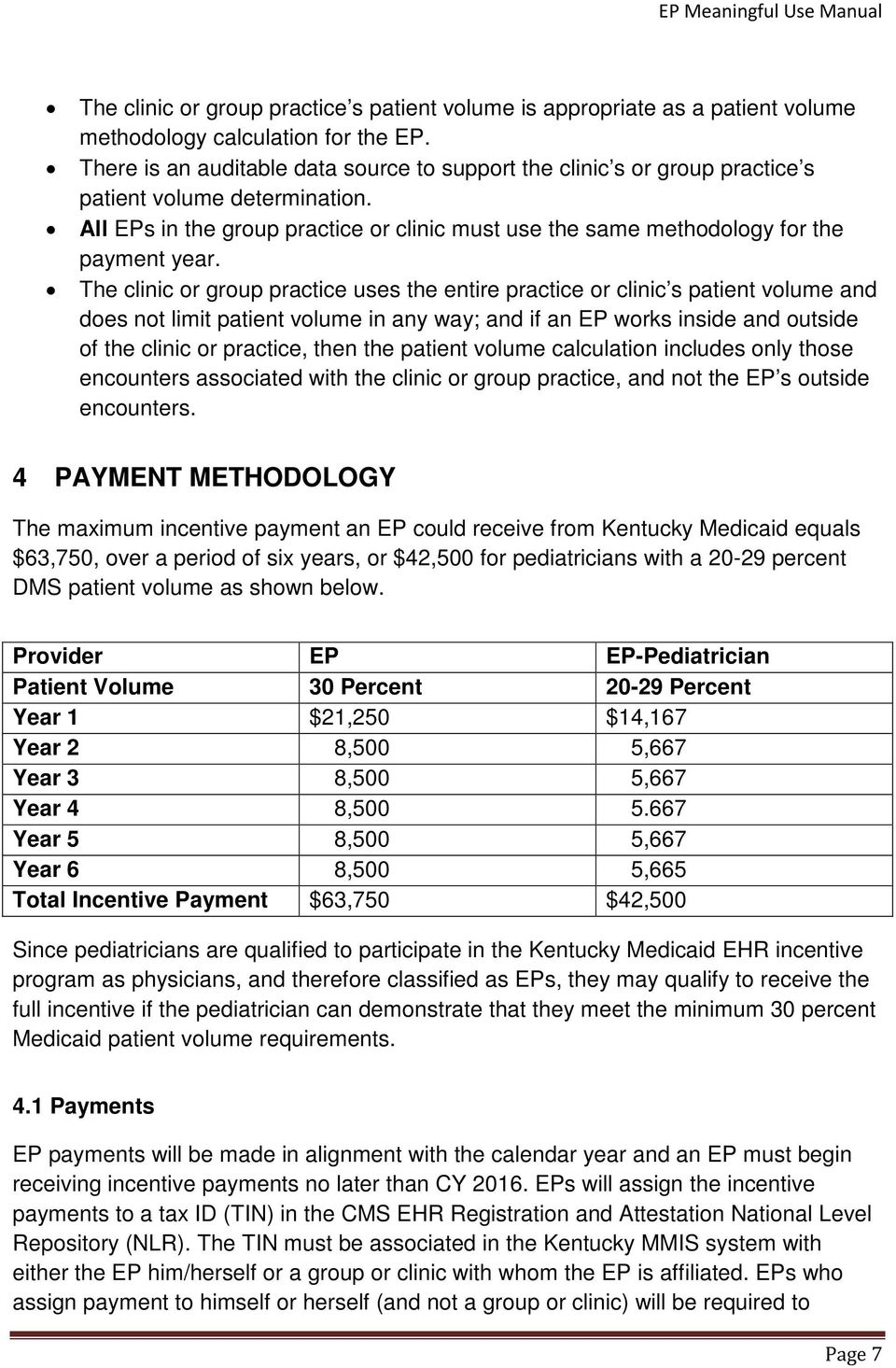
14 provide DMS with updated information. Each EP must have a current DMS contract and be contracted for at least 90 days. The Kentucky Medicaid EHR Incentive program does not include a future reimbursement rate reduction for non-participating Medicaid providers. (Medicare requires providers to implement and meaningfully use certified EHR technology by 2015 to avoid a Medicare reimbursement rate reduction.) For each year a provider wishes to receive a Medicaid incentive payment, determination must be made that provider was a meaningful user of EHR technology during that year. Medicaid EPs are not required to participate on a consecutive annual basis. However, the last year that an EP may begin receiving payments is 2016, and the last year the EP can receive payments is Currently, all providers are required to submit a valid NPI as a condition of DMS provider enrollment. Each EP will be enrolled as a DMS provider and will therefore, without any change in process or system modification, meet the requirement to receive an NPI. DMS performs a manual NPPES search to validate NPIs during the enrollment process. In the event that DMS determines monies have been paid inappropriately, incentive funds will be recouped and refunded to CMS. The timeline for receiving incentive payments is illustrated below: 5 PROVIDER REGISTRATION If this is your second year with the EHR incentive program, then there is no need to register with CMS. You may log in directly to the KYSLR to attest for Meaningful Use Page 8
15 using the link If this is your first year with the EHR Incentive program, then EPs are required to begin by registering at the national level with the Medicare and Medicaid registration and attestation system (also referred to as the NLR). CMS official Web site for the Medicare and Medicaid EHR Incentive Programs can be found at Providers must enter their name, NPI, business address, phone number, taxpayer ID number (TIN) of the entity receiving the payment. EPs may choose to receive the incentive payment themselves or assign payment to a clinic or group to which they belong. EPs must choose to participate in either the Medicare or Medicaid s incentive program (a provider may switch from one to the other once during the incentive program prior to 2015). If Medicaid is selected, the provider must choose only one state (EPs may switch states annually). Providers must revisit the NLR to make any changes to their information and/or choices, such as changing the program from which they want to apply for their incentive payment. After the initial registration, the provider does not need to return to the NLR before seeking annual payments unless information needs to be updated. The NLR will assign the provider a CMS Registration Number and electronically notify DMS of a provider s choice to access Kentucky s Medicaid EHR Incentive Program for payment. The CMS Registration Number is required to complete the attestation in the KYSLR system. On receipt of NLR Registration transactions from CMS, two basic validations take place at the state level: 1) validate the NPI in the transaction is on file in the MMIS system, and 2) validate the provider is a provider with the Kentucky DMS. If either of these conditions is not met, a message will be automatically sent back to the CMS NLR indicating the provider is not eligible. Providers may check back at the NLR level to determine if the registration has been accepted. Once payment is disbursed to the provider based on the specified TIN, the NLR will be notified by DMS that a payment has been made. 6 PROVIDER ATTESTATION PROCESS AND VALIDATION DMS uses the secure KYSLR system to house the attestation system. The link is only visible to providers whose type in the MMIS matches an EHR incentive eligible provider category. If an eligible provider registers at the NLR and does not receive the link to the attestation system within two business days, assistance will be available by contacting the DMS Provider Enrollment Call Center Operations at: (502) Page 9
16 The following is a brief description of the information that a provider must report or attest to during the process: 1. After registering for the incentive program with the CMS EHR Registration and Attestation National Level Repository (NLR) (at the EP will be asked to provide their NPI and CMS-assigned Registration Identifier. 2. The EP will then be asked to view the information displayed with the prepopulated data received from the NLR (if the provider entry does not match, an error message with instructions is returned). 3. EPs will then enter two categories of data to complete the Eligibility Provider Details screen including: 1) patient volume characteristics, and 2) EHR details. The EP will be asked to attest to: Assigning the incentive payment to a specific TIN (only asked if applicable); provider and TIN to which the payment was assigned at the NLR will be displayed; Not working as a hospital based professional (this will be verified by DMS through claims analysis); Not applying for an incentive payment from another state or Medicare; Not applying for an incentive payment under another DMS ID; and Adoption, implementation, upgrade or meaningful use of certified EHR technology. 4. The EP will be asked to sign electronically the amendment. o The provider enters the provider or the agent or staff member s initials and the providers NPI on the Attestation Screen (there is a place for an agent or staff member of the provider to so identify). o The person filling out the form should enter his or her name. Note: For providers that are ready to demonstrate Meaningful Use in year 1, the provider will attest to this fact. 7 INCENTIVE PAYMENTS Upon completion of the attestation process, including submission of the electronic attestation, receipt of required documentation and validation by DMS, an incentive payment can be approved. Providers will be notified of approval for payment by to the address submitted with registration. Please be sure that the provided is current. Page 10

17 8 PROGRAM INTEGRITY DMS conducts regular reviews of attestations and incentive payments. These reviews will be selected as part of the current audit selection process, including risk assessment, receipt of a complaint or incorporation into reviews selected for other objectives. Providers should be sure to keep their supporting documentation. 8.1 Administrative Audits/Appeals You may appeal the determination made by the Kentucky Department for Medicaid Services on your incentive payment application. Please send a Formal Letter of Appeal to the address below, within 30 days of the determination date of notification. The formal written notification must include a detailed explanation of why the EP deems a wrong determination made by the Kentucky Medicaid EHR Incentive Program. Any supporting documentation to the appeal should be included with the Letter of Appeal. Division of Program Integrity Department for Medicaid Services 275 E. Main Street, 6E-A Frankfort, KY Page 11
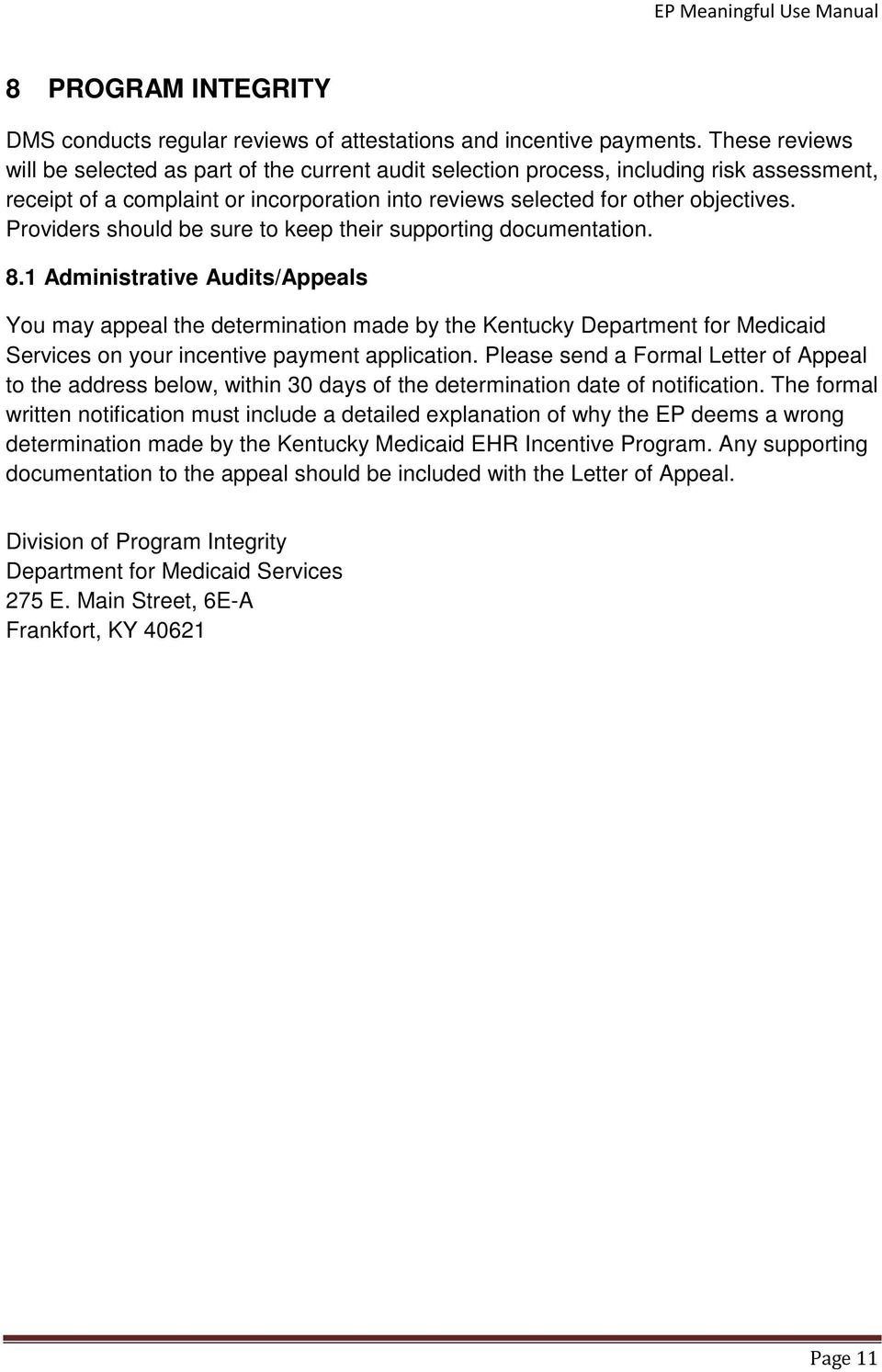
18 9 GETTING STARTED Eligible providers are required to provide details including patient volume characteristics, EHR details, upload requested documentation and electronically sign the attestation (more details follow in this manual). After registering with the National Level Registry (NLR) at the provider should receive an with the registration information including a summary of the registration information. The information includes the NPI and registration ID. Please keep this information for login to the Kentucky EHR login and in case of potential future edits for the NLR. Please allow 48 hours after registration to log into the KYSLR. The provider begins the Kentucky Medicaid EHR Incentive Program registration process by accessing the KYSLR system at (sign-in screen shown below). 9.1 Sign-in Screen In the sign-in screen, the provider enters the NPI and CMS-assigned Registration Identifier that was returned by the NLR. If the data submitted by the provider matches the data received from the NLR, the CMS/NLR Provider Demographics Screen will display with the pre-populated data received from the NLR. If the provider entry does not match, an error message with instructions will be returned. 9.2 Home Screen The Home screen provides the EP with information about their current KY Attestation as well as provides navigation for the EP to view a previous attestation or begin/modify a new attestation for their next EHR Incentive payment. Page 12
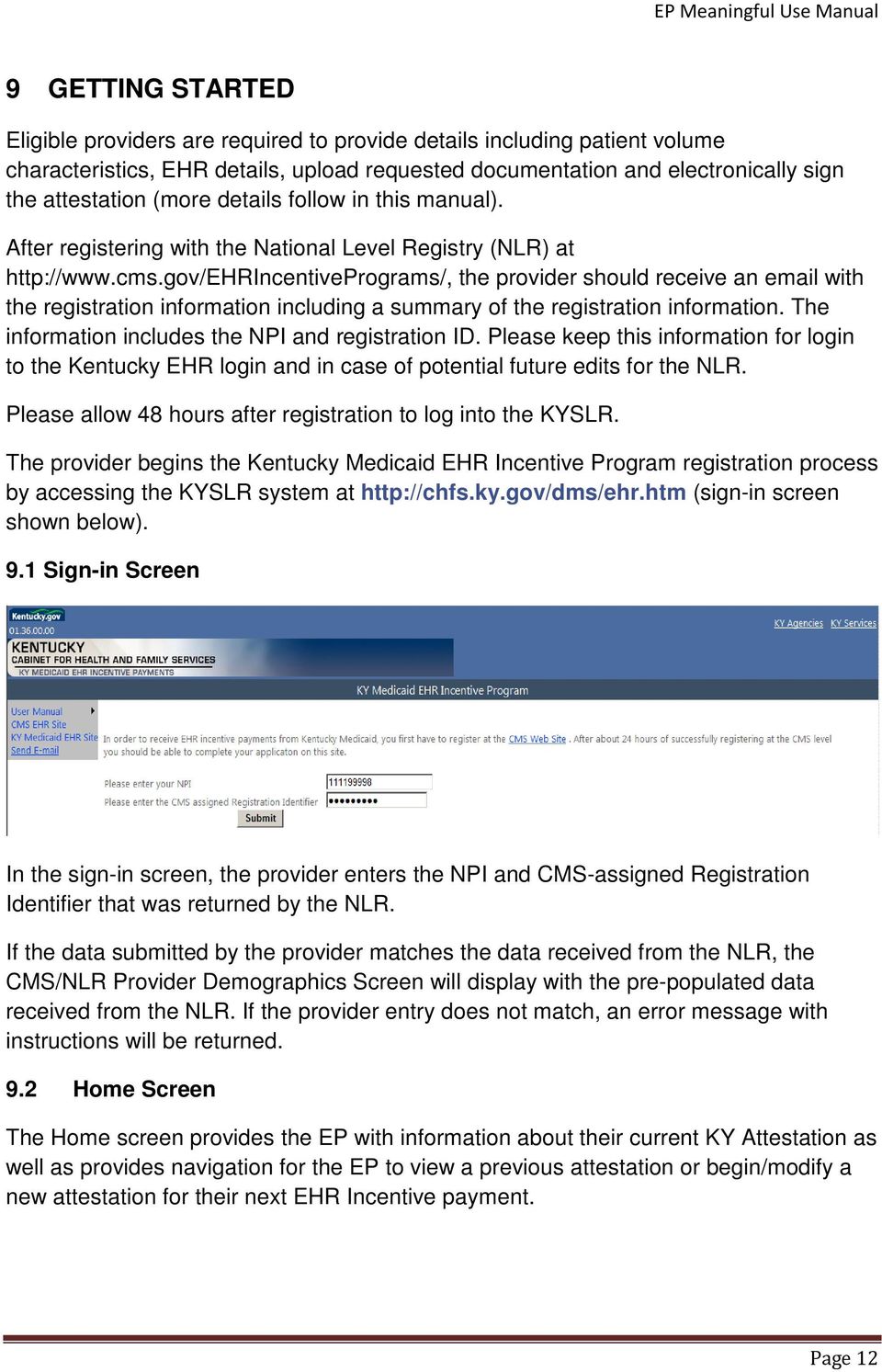
19 There are six sections to the Home page listed below: 1. Messages and Announcements The first section on the page displays messages or announcements for the provider. 2. Issues/Concerns The second section on the page provides a link for the provider to submit a new issue or view a response to an issue. 3. Provider Information The third section of the home page provides a high-level status for the provider including the current payment year and the current status for the payment year. 4. Stage of Meaningful Use Grid - The fourth section of the home page supplies the stage of Meaningful Use that the provider will need to attest to according to the program year. 5. Provider Status Flow The fifth section of the home page displays a diagram showing the provider s current year s attestation. If the provider has been found not eligible for any reason, specific reasons for that finding shown in this section. 6. Provider Attestations The sixth section of the home page lists the provider s attestations by payment year and provides the navigation actions available for each year. These options may include: Page 13

20 View for a previously paid attestation; View Attestation for a completed attestation; or Begin/Modify for a new or not yet completed attestation. 9.3 Registration Data Screen Along with the pre-populated data from the CMS Registration Module, additional fields can be updated by the provider. The data provided by the CMS Registration Module is view only. If any of this data is incorrect, then the data must be updated by logging in to the CMS Registration Module, making the updates and re-submission of the registration. Please allow 24 hours for the changes to be reflected in the screen above. The fields that are from the CMS registration are listed below: Applicant National Provider Index (NPI) This is the eligible provider s individual NPI. The NPI registered at CMS should be the same individual NPI that is enrolled in KY Medicaid. Applicant TIN This Tax Identification Number was listed in the CMS registration. This TIN should be the same TIN that is listed for the provider under KY Medicaid. Page 14
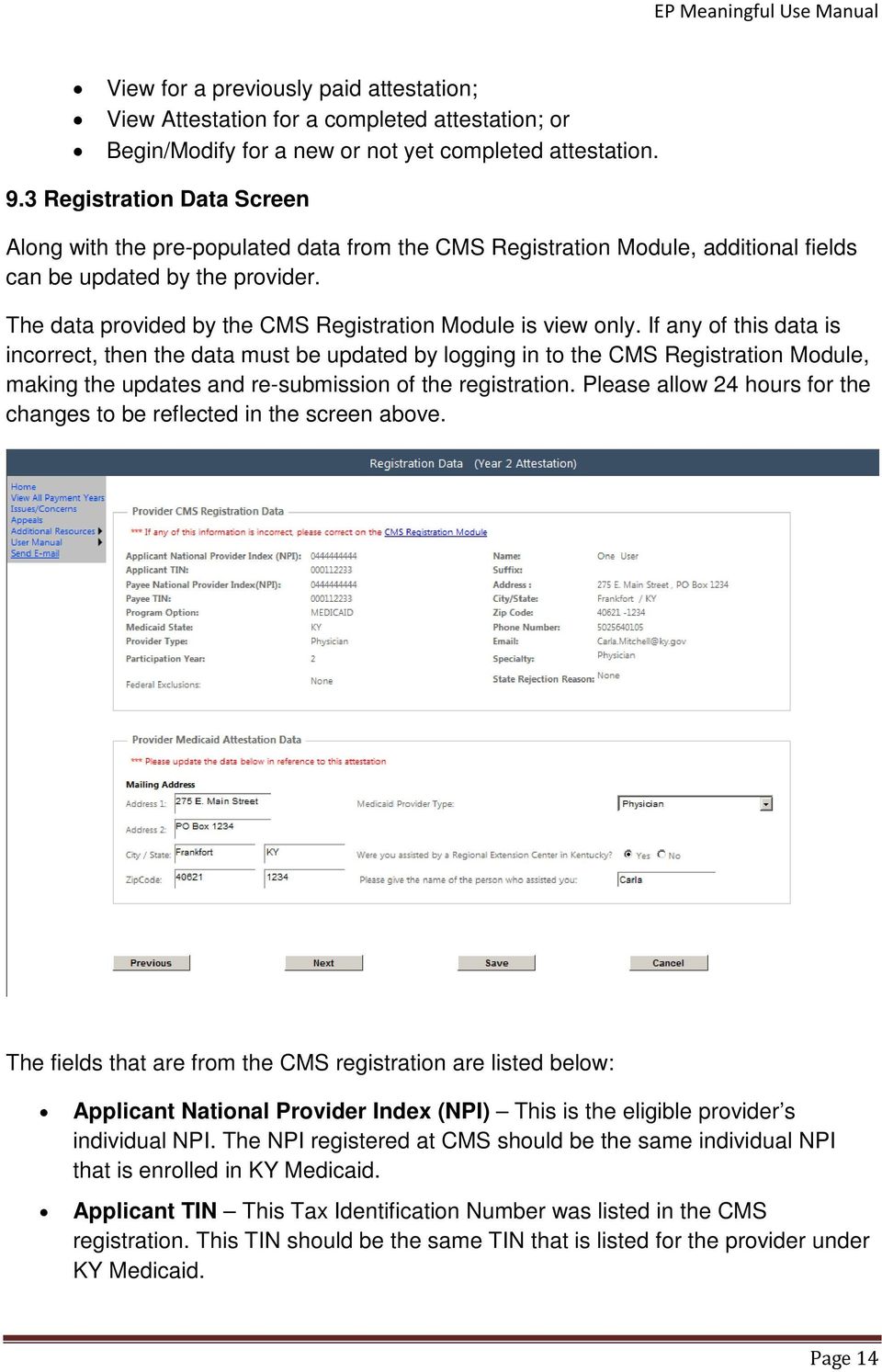
21 Payee National Provider Index (NPI) This is the eligible provider s payee NPI given during the CMS registration. The Payee NPI given during registration should be enrolled in KY Medicaid and a payee NPI that KY Medicaid has listed as a payee with whom the individual provider is a member. Payee TIN The tax identification number associated with the payee NPI. This was the tax id given during registration that will have the tax liability of the incentive payment. The Payee TIN should match the FEIN or SSN listed for the payee NPI within KY Medicaid. Program Option This program option was selected by the provider during their registration. It will be Medicaid if you are attesting with a State Agency and not Medicare. Medicaid State This is the State that was selected during the provider s registration. Provider Type This is the provider type that was given during the registration at CMS. This type will be validated with your type of license. Participation year This is the provider s participation year with the EHR Incentive Program Federal Exclusion This will list any federal exclusion found on the provider if any during registration with CMS. Name The Provider s name listed on the CMS Registration Address 1 The provider s street address listed on the CMS registration Address 2 The provider s street address listed on the CMS registration City/State The provider s city/state listed on the CMS registration Zip Code The provider s zip code listed on the CMS registration Phone Number The provider s phone number given on the CMS registration. This number is used for contact by EHR staff reviewing the attestations. The provider s given during the CMS registration. This address is used for system-generated s on updates for the provider s attestation and communication from the EHR review staff. Note: It is very important that this address be accurate and up-to-date. Specialty The provider s specialty listed in the CMS registration. State Rejection Reason This lists the state rejection reason if any are found. This will only list federal codes for rejection, for a more detailed state specific rejection see the home page. The data listed under the section Provider Medicaid Attestation Data is updatable by Page 15
22 the provider during attestation. Once the attestation is submitted by the provider, the data will become view only. These data fields are described below: Medicaid ID - This field only displays if you have multiple Kentucky Medicaid Provider Numbers that are linked to the Payee NPI listed in your CMS registration. If so, you will need to select one of your Kentucky Medicaid Numbers. This Medicaid Number will be used for your incentive payments. Medicaid Provider Type -Please select the Medicaid type of Provider from the list provided. This type should match the type of provider listed under your KY Medicaid enrollment and your type of license. Mailing Address - The mailing address can be updated if the provider would like to give an alternate address from the one listed from CMS for correspondence. Indicating a new address in these fields will change the Payee address for the Provider s EHR incentive payment. Were you assisted by a Regional Extension Center in Kentucky - Response to this question is required. If the response is yes, then please type the name of the person who assisted you during the attestation process. Page 16
23 9.4 Provider Eligibility Details Screen EPs must enter two categories of information to complete the Eligibility Provider Details screen including patient volume characteristics and EHR details. Providers will see the following data on the screen Eligibility Details Eligibility details section allows the user to view or enter information depending on the source of the information and the status of the attestation. Information in the section includes patient volume and information about EHR use. Page 17
24 Patient Volume 1. To enter patient volume, complete the following steps: Please indicate if your patient volume was calculated at a clinic or practice level for all eligible professionals: Yes or No. Please note if you are submitting at the clinic or practice levels all eligible professionals from the clinic or practice must also submit their volume at the clinic or practice level for the same program year. 2. If yes, please enter the NPI of the clinic or group. 3. Select the program year you wish to attest. This should be either the current year or it can be the prior year if the current date is on or before March Select the time frame used for patient volume calculation. Select from the dropdown menu as either the Prior Calendar Year or Preceding 12 Months of the date of attestation. 5. Select the starting date of the 90-day period to calculate Medicaid encounter volume percentage. Enter as mm/dd/yy. This date should be a 90-day period in the year prior to the program year selected. 6. Enter Medicaid patient encounters during this period. 7. Enter Total patient encounters during this period. Page 18
25 8. If applicable, enter the Total number of Medicaid patients on your Medicaid MCO roster/panel with whom you did not have an encounter in this 90 day period but you did have an encounter in the last 24 months: Enter the total number of Medicaid patients on your Medicaid MCO roster/panel that you DID NOT have an encounter with in the 90 day patient volume calculation but you DID encounter in the last 24 months. (If not applicable, enter a 0.) 9. If applicable, enter the Total number of patients on your roster/panel from any Plan with whom you did not have an encounter in this 90-day period but you did have an encounter in the last 24 months: This is usually, but not always the same number as the answer entered for the previous calculation. If you are receiving payment for any plans other than Medicaid MCOs, they should be included here. This is not intended to include the numbers of private health insurance plans. (If not applicable, enter a 0.) 10. Medicaid patient volume percentage is calculated based on the volume numbers entered and is displayed as a percentage with two decimals points. Volume thresholds are calculated using the EP s total number of Medicaid member encounters for the 90-day period as the numerator and all patient encounters for the same EP over the same 90-day period as the denominator. EHR Details For the EHR details, continue entering information for eligibility: 11. Enter the CMS EHR Certification ID of your EHR 12. Indicate the status of EHR. The choices are: o (A) Adopt - Acquire, purchase, or secure access to certified EHR technology. o (I) Implement - Install or commence utilization of certified EHR technology capable of meeting meaningful use requirements. o (U) Upgrade - Expand the available functionality of certified EHR technology capable of meeting meaningful use requirements at the practice site, including staffing, maintenance, and training, or upgrade from existing EHR technology to certified EHR technology per the ONC EHR certification criteria. o Meaningful User currently meaningfully using certified EHR technology and are prepared to attest to Meaningful Use and Clinical Quality Measures Service Locations In the Service location section, enter information about the service locations equipped with a certified EHR. Page 19
26 Practice/Locations equipped with CEHRT can qualify for meaningful use in the following ways: 1. CEHRT is permanently installed at the practice location. 2. The CEHRT can be brought to the practice/location on a portable computing device. 3. The CEHRT can be accessed remotely using computing devices at the practice/location. To complete this section, perform the following steps: 1. Indicate if you have multiple locations. (Yes or No) If no, the total number of locations and locations with EHR technology will automatically populate with a 1. Enter service location address by clicking on the Enter Service Location Address button. A new will displays and allows the user to enter a service location address as shown below. Enter an address for all required fields. After entering the address, click on the Add button. Page 20
27 2. If yes to multiple locations, enter the total number of locations. 3. If yes to multiple locations, enter the number of locations with a certified EHR. 4. Edits or add additional Service location using the edit and add functions. To add scroll over using the scroll panel. 9.5 Meaningful Use Questionnaire Screen After entering the provider eligibility details, EPs who have selected Meaningful Use will be directed to the Meaningful Use Questionnaire screen. Page 21
28 The following fields are required to continue with the attestation: Enter EHR Reporting Period Start Date o This is the starting date for the period of time you are reporting your Meaningful Use Measure data. Enter EHR Reporting Period End Date o This is the end date for the period of time you are reporting your Meaningful Use Measure data. For the first year of reporting Meaningful Use EPs are required to report on a continuous 90-day period within the program year being attested. For the second year of reporting Meaningful Use, an entire year (365 days) of reporting will be required. Depending on the program year selected, the EHR Reporting period start date must be a continuous 90-day period within the same year from Jan 1st of current year through Dec 31st of current year and 90 days prior to today's date. Enter the percentage of unique patients who have structured data recorded in your certified EHR technology as of the reporting period above o This should be the percentage of all the patients you have seen in service location(s) with Certified EHR Technology who have data recorded in your EHR. This can be calculated by dividing the number of patients with structured data in your Certified EHR by the total number of patients seen at service location(s) with Certified EHR Technology. Multiply by 100 to obtain the percentage. The amount of patients with structured data stored in your EHR should be at least 80%. Page 22
29 10 REQUIREMENTS FOR MEANINGFUL USE MEASURES Meaningful use requirements include core, menu and clinical quality measures. To complete the MU questionnaire, provider must complete the following. 13 out of 13 Core Meaningful Use measures must be met according to the CMS threshold. Exception If CMS allows exclusion to a measure and the EP attests to the exclusion then that measure is still considered completed. 5 out of 10 Menu Measures must be met according to the CMS threshold (including exclusions) and at least 1 of the 5 Menu Measures must be from the Public Health List. Exception - If an EP meets the criteria for and can claim exclusion for any of the public health menu measures, the EP must still select one public health menu measure and attest that the EP qualifies for the exclusion. **This exclusion will count toward the 5 required menu measures. In Kentucky, the Immunization Registry, Syndromic Surveillance, Cancer Registry and Reportable Labs are available through KHIE. EP must select the remaining 4 that relate to his/her practice. If exclusion applies to one of the measures selected, the EP has to attest that the other measures did not relate to his practice or they also would have been exclusions. EP must attest to 6 and up to 9 Clinical Quality Measures 3 Core Clinical Quality Measures and/or up to 3 Alternative CQMs (Alternative Measures required for any Core measures with a denominator of zero), and 3 Additional CQMs that relate to their practice (the EP must select 3 of the 38 Additional CQMs provided). o No patients in the measure population; It is acceptable to report zero in the denominator, even for 1 or more measures, as long as that is the value displayed & calculated by the certified EHR. The EP attests to this fact. o The automated reporting of the clinical quality measures will be accomplished using certified EHR technology interoperable with the system designated by the State to receive the data. o If the EP reports zero in the denominator for any of the 3 chosen as Additional CQMs they must attest that all remaining measures not chosen would also be zero. For additional information on Meaningful Use Measures, please see the following CMS Web site below: Page 23
30 Measure Screen Tip: If the page seems to be cutting off words on the measure then do the following: While holding down the Ctrl key press the - key until you can see the entire screen Meaningful Use Measure Menu Screen The menu screen will only allow the user to select a group of measures as they are available. For example, once the Meaningful Use Core Measures are completed, the Meaningful Use Menu Measures will be active to select. Navigation: Meaningful Use Core Measures Link Takes the EP to the first screen of the Meaningful Use Core Measures, active link. Meaningful Use Menu Measures Link - Takes the EP to the first screen of the Meaningful Use Menu Measures, only active after the MU Core Measures are completed. Core Clinical Quality Measures Link Takes the EP to the first screen of the Core Clinical Quality Measures, only active after the MU Menu Measures are completed. Alternate Core Clinical Quality Measures - Takes the EP to the first screen of the Alternative Core Clinical Quality Measures, only active after the Core Clinical Quality Measures are completed and at least one of the entries for the denominator is zero. Additional Clinical Quality Measures - Takes the EP to the first screen of the Additional Clinical Quality Measures, only active after the Core Clinical Quality Measures are completed and no entries for the denominators are zero or after the Page 24
31 Alternate Core Clinical Quality Measures are completed if at least one of the entries for the Core CQM for the denominator was zero. Previous Takes the EP to the Registration Data screen. Next Takes the EP to the first Core Meaningful Use Measure screen. Important Note: The sequence and questionnaire numbers may vary depending on the providers selected measures. The following sections may not exactly match those selected by the provider Meaningful Use Core Measure 1 Screen Medication List and Medication Orders Please select from one of measures: More than 30% of all unique patients with at least one medication in their medication list seen by the EP have at least one medication order entered using CPOE. More than 30% of medication orders created by the EP during the EHR reporting period are recorded using CPOE. All fields must be completed unless the exclusion was responded to with Yes. In that case, no other field is required and the EP should be allowed to save and continue to the next measure. If the exclusion is not selected, the following details other requirements of this screen: The Numerator and Denominator must be a whole number. The Numerator should be less than or equal to the Denominator. If not excluded, the EP must meet the >30% threshold, N/D > 30%. Page 25
32 If an EP responds Yes to the exclusion, then they have met the measure threshold. Please note that selecting Previous prior to saving will result in the data on the current screen not being saved. If the user clicks on Next, data entered on the screen will also be saved. Page 26
33 10.3 Meaningful Use Core Measure 2 Screen Drug-Drug and Drug - Allergy Interaction Questionnaire 2 is for the implementation of drug-drug interaction check. The provider is prompted with the question, Have you enabled the functionality for drug-drug interaction checks for the entire EHR reporting period? Please select Yes or No to continue to the next screen. Please note that selecting Previous before saving will result in the data on the current screen not being saved. If the user clicks on Next will also save data entered on the screen. Page 27
34 10.4 Meaningful Use Core Measure 3 Screen Maintain Up-to-date Problem List of Current and Active Diagnoses All fields must be completed before the EP is allowed to save and continue to the next measure. The following details other requirements of this screen: The Numerator and Denominator are required and must be a whole number. The Numerator should be less than or equal to the Denominator. The EP must meet the >80% threshold, N/D > 80%. The EP must enter an answer on the last question on the page, if the count is unknown then type unknown as the answer. Please note that selecting Previous prior to saving will result in the data on the current screen not being saved. If the user clicks on Next, data entered on the screen will also be saved. Page 28
35 10.5 Meaningful Use Core Measure 4 Screen Generate and Transmit Permissible Prescriptions Electronically All fields must be completed unless the exclusion was responded to with Yes. In that case, no other field is required and the EP should be allowed to save and continue to the next measure. The following details other requirements of this screen: The Numerator and Denominator must be a whole number. The Numerator should be less than or equal to the Denominator. If not excluded, the EP must meet the >40% threshold, N/D > 40%. If an EP responds Yes to the exclusion then they have met the measure threshold. The EP must enter an answer on the last question on the page, if the count is unknown then type unknown as the answer. Please note that selecting Previous before saving will result in the data on the current Page 29
36 screen not being saved. If the user clicks on Next data entered on the screen will also be saved Meaningful Use Core Measure 5 Screen Maintain Active Medication List All fields must be completed before the EP is allowed to save and continue to the next measure. The following details other requirements of this screen: The Numerator and Denominator are required and must be a whole number. The Numerator should be less than or equal to the Denominator. The EP must meet the >80% threshold, N/D > 80%. The EP must enter an answer the on last question on the page, if the count is unknown then type unknown as the answer. Please note that selecting Previous before saving will result in the data on the current screen not being saved. If the user clicks on Next, data entered on the screen will also be saved. Page 30
37 10.7 Meaningful Use Core Measure 6 Screen Maintain Active Medication Allergy List All fields must be completed before the EP is allowed to save and continue to the next measure. The following details other requirements of this screen: The Numerator and Denominator are required and must be a whole number. The Numerator should be less than or equal to the Denominator. The EP must meet the >80% threshold, N/D > 80%. The EP must enter an answer the on last question on the page, if the count is unknown then type unknown as the answer. Please note that selecting Previous before saving will result in the data on the current screen not being saved. If the user clicks on Next, data entered on the screen will also be saved. Page 31
38 10.8 Meaningful Use Core Measure 7 Screen Record Demographics All fields must be completed before the EP is allowed to save and continue to the next measure. The following details other requirements of this screen: The Numerator and Denominator are required and must be a whole number. The Numerator should be less than or equal to the Denominator. The EP must meet the >50% threshold, N/D > 50%. The EP must enter an answer the on last question on the page, if the count is unknown then type unknown as the answer. Please note that selecting Previous prior to saving will result in the data on the current screen not being saved. If the user clicks on Next, data entered on the screen will also be saved. Page 32
39 10.9 Meaningful Use Core Measure 8 Screen Height Weight and Blood Pressure Please select one of the following two measures: More than 50% of all unique patients age 2 and over seen by the EP, height, weight and blood pressure are recorded as structure data. This selection contains 2 exclusions. More than 50% of all unique patients seen by the EP during the EHR reporting period have blood pressure (for patients age 3 and over only) and height and weight for all ages. This selection contains 4 exclusions. Page 33
40 First Alternate Measure screen Depending on your selection, all fields must be completed unless an exclusion was responded to with Yes, in that case no other field is required and the EP should be allowed to save and continue to the next measure. The following details other requirements of this screen: The Numerator and Denominator are required and must be a whole number. The Numerator should be less than or equal to the Denominator. The EP must meet the >50% threshold, N/D > 50%. Please note that selecting Previous prior to saving will result in the data on the current screen not being saved. If the user clicks on Next, data entered on the screen will also be saved Second Alternate Measure Screen Depending on your selection, all fields must be completed unless an exclusion was responded to with Yes, in that case no other field is required and the EP should be allowed to save and continue to the next measure. Page 34
41 The following details other requirements of this screen: The Numerator and Denominator are required and must be a whole number. The Numerator should be less than or equal to the Denominator. The EP must meet the >50% threshold, N/D > 50%. Please note that selecting Previous prior to saving will result in the data on the current screen not being saved. If the user clicks on Next, data entered on the screen will also be saved. Page 35
42 10.10 Meaningful Use Core Measure 9 Screen Recording Smoking Status All fields must be completed unless the exclusion was responded to with Yes. In that case, no other field is required and the EP should be allowed to save and continue to the next measure. The following details other requirements of this screen: The Numerator and Denominator are required and must be a whole number. The Numerator should be less than or equal to the Denominator. The EP must meet the >50% threshold, N/D > 50%. Please note that selecting Previous prior to saving will result in the data on the current screen not being saved. If the user clicks on Next, data entered on the screen will also be saved. Page 36
43 10.11 Meaningful Use Core Measure 10 Screen Clinical Decision Support All fields must be completed before the EP will be allowed to save and continue to the next measure. The following details other requirements of this screen: The EP must answer yes or no to the first question on the page. The EP must enter the core clinical decision support rule that was implemented. If the response is unknown, then type unknown as the answer. Please note that selecting Previous prior to saving will result in the data on the current screen not being saved. If the user clicks on Next, data entered on the screen will also be saved.. Page 37
44 10.12 Meaningful Use Core Measure 11 Screen Patient Provided with a Copy of Health Information All fields must be completed unless the exclusion was responded to with Yes. In that case, no other field is required and the EP should be allowed to save and continue to the next measure. The following details other requirements of this screen: The Numerator and Denominator are required and must be a whole number. The Numerator should be less than or equal to the Denominator. The EP must meet the >50% threshold, N/D > 50%. Please note that selecting Previous prior to saving will result in the data on the current screen not being saved. If the user clicks on Next, data entered on the screen will also be saved. Page 38
45 10.13 Meaningful Use Core Measure 12 Screen Clinical Summaries for Patient All fields must be completed unless the exclusion was responded to with Yes. In that case, no other field is required and the EP should be allowed to save and continue to the next measure. The following details other requirements of this screen: The Numerator and Denominator are required and must be a whole number. The Numerator should be less than or equal to the Denominator. The EP must meet the >50% threshold, N/D > 50%. Please note that selecting Previous prior to saving will result in the data on the current screen not being saved. If the user clicks on Next, data entered on the screen will also be saved. Page 39
46 10.14 Meaningful Use Core Measure 13 Screen Protect Electronic Health Information All fields must be completed before the EP will be allowed to save and continue to the next measure. The following details other requirements of this screen: A response must be submitted. Please note that selecting Previous prior to saving will result in the data on the current screen not being saved. If the user clicks on Next will also save data entered on the screen. Page 40
47 10.15 Meaningful Use Menu Measures Selection Screen A total of 5 Menu Measures must be selected for the EP to continue to the next screen. At least one of these measures must be from the Public Health Measure list. The EP must chose a measure that they would meet unless an exclusion can be claimed for both measures. In Kentucky, the Immunization Registry, Syndromic Surveillance, Cancer Registry and Reportable Labs are available through KHIE. Page 41
48 Navigation: Logout Button Returns the EP to the login page. Previous button Will not save the data selected and return the EP to the MU Core Measure 15 screen. Next button Will save the data to the database if no errors are present. This data will be updatable until the attestation has been completed by the EP. The EP will be directed to the first MU Menu Measure screen they selected after all errors are resolved Meaningful Use Menu Measure 1 Screen (Public Health) Immunization Registry Option All fields must be completed unless the exclusion was responded to with Yes, in that case no other field is required and the EP should be allowed to save and continue to the next measure. The following details other requirements of this screen: Exclusion response is required. Page 42
49 Response of yes or no is required if exclusion 1 and 2 has not been marked as yes. The EP must enter answers the last two questions on the page, if response is yes. Selecting that the test failed or failure to send a follow-up submission will not prevent a provider from meeting Meaningful Use. Please note that selecting Previous prior to saving will result in the data on the current screen not being saved. If the user clicks on Next, data entered on the screen will also be saved. Page 43
50 10.17 Meaningful Use Menu Measure 2 Screen (Public Health) Syndromic Surveillance Option All fields must be completed unless the exclusion was responded to with Yes. In that case, no other field is required and the EP should be allowed to save and continue to the next measure. The following details other requirements of this screen: Exclusion response required. Response of yes or no required if exclusion 1 and 2 has not been marked as yes. The EP must enter answer the last two questions on the page, if response is yes. Selecting that the test failed or failure to send a follow-up submission will not prevent a provider from meeting Meaningful Use. Please note that selecting Previous prior to saving will result in the data on the current screen not being saved. If the user clicks on Next, data entered on the screen will also be saved. Page 44
51 10.18 Meaningful Use Menu Measure 3 Screen Implement Drug Formulary Checks All fields must be completed unless the exclusion was responded to with Yes. In that case, no other field is required and the EP should be allowed to save and continue to the next measure. The following details other requirements of this screen: Exclusion Response is required. Response to last question is required. Please note that selecting Previous prior to saving will result in the data on the current screen not being saved. If the user clicks on Next, data entered on the screen is also saved. Page 45
52 10.19 Meaningful Use Menu Measure 4 Screen Incorporate Clinical Lab-Test Results into EHR as Structured Data All fields must be completed unless the exclusion was responded to with Yes. In that case, no other field is required and the EP should be allowed to save and continue to the next measure. The following details other requirements of this screen: The numerator and denominator should be a whole number. The numerator should be less than or equal to the denominator. If not excluded, the EP must meet the >40% threshold, N/D > 40%. If an EP responds Yes to the exclusion then they have met the measure threshold. Please note that selecting Previous prior to saving will result in the data on the current screen not being saved. If the user clicks on Next, data entered on the screen will also be saved. Page 46
53 10.20 Meaningful Use Menu Measure 5 Screen Generate Lists of Patients by Specific Conditions All fields must be completed unless the exclusion was responded to with Yes. In that case, no other field is required and the EP should be allowed to save and continue to the next measure. The following details other requirements of this screen: Patient record response is required. Yes or No response is required. Response to last question is required. Please note that selecting Previous prior to saving will result in the data on the current screen not being saved. If the user clicks on Next, data entered on the screen will also be saved. Page 47
54 10.21 Meaningful Use Menu Measure 6 Screen Send Patients Reminders for Preventative/Follow-up Care All fields must be completed unless the exclusion was responded to with Yes. In that case, no other field is required and the EP should be allowed to save and continue to the next measure. The following details other requirements of this screen: The numerator and denominator should be a whole number. The numerator should be less than or equal to the denominator. If not excluded, the EP must meet the >20% threshold, N/D > 20%. If an EP responds Yes to the exclusion then they have met the measure threshold. Please note that selecting Previous prior to saving will result in the data on the current screen not being saved. If the user clicks on Next, the data entered on the screen will also be saved. Page 48
55 10.22 Meaningful Use Menu Measure 7 Screen Provide Patients with Timely Electronic access to their Health Information All fields must be completed unless the exclusion was responded to with Yes. In that case, no other field is required and the EP should be allowed to save and continue to the next measure. The following details other requirements of this screen: The numerator and denominator should be a whole number. The numerator should be less than or equal to the denominator. If not excluded, the EP must meet the >10% threshold, N/D > 10%. If an EP responds Yes to the exclusion then they have met the measure threshold. EP must answer last question. An EP does not have to have a patient portal to meet Meaningful Use. Please note that selecting Previous prior to saving will result in the data on the current screen not being saved. If the user clicks on Next, data entered on the screen will also be saved. Page 49
56 10.23 Meaningful Use Menu Measure 8 Screen Use CEHRT to Identify Patient Specific Resources and Provide to Patient All fields must be completed before the EP will be allowed to save and continue to the next measure. The following details other requirements of this screen: The numerator and denominator should be a whole number. The numerator should be less than or equal to the denominator. The EP must meet the 10% threshold, N/D >10 %. Please note that selecting Previous prior to saving will result in the data on the current screen not being saved. If the user clicks on Next, data entered on the screen will also be saved. Page 50
57 10.24 Meaningful Use Menu Measure 9 Screen Receiving Provider should perform Medication Reconciliation All fields must be completed unless the exclusion was responded to with Yes. In that case, no other field is required and the EP should be allowed to save and continue to the next measure. The following details other requirements of this screen: The numerator and denominator should be a whole number. The numerator should be less than or equal to the denominator. If not excluded, the EP must meet the >40% threshold, N/D > 40%. If an EP responds Yes to the exclusion then they have met the measure threshold. Please note that selecting Previous prior to saving will result in the data on the current screen not being saved. If the user clicks on Next, data entered on the screen will also be saved. Page 51
58 10.25 Meaningful Use Menu Measure 10 Screen Providing Summary of Care for each Transition or Referral All fields must be completed unless the exclusion was responded to with Yes. In that case no other field is required and the EP should be allowed to save and continue to the next measure. The following details other requirements of this screen: The numerator and denominator should be a whole number. The numerator should be less than or equal to the denominator. If not excluded, the EP must meet the >50% threshold, N/D > 50%. If an EP responds Yes to exclusion 1 or 2 then they have met the measure threshold. Please note that selecting Previous prior to saving will result in the data on the current screen not being saved. If the user clicks on Next, data entered on the screen will also be saved. Page 52
59 10.26 Core Clinical Quality Measure 1 Screen Hypertension Blood Pressure Measurement All fields must be entered to continue to the next measure screen. The responses entered must be reported from your certified EHR reporting for the EHR reporting period even if the report states zero. The following details other requirements of this screen: Please enter a numerator, 0 is acceptable if that was reported by the EHR technology. Numerator must be a whole number Please enter a denominator, 0 is acceptable if there is no measure population. Denominator must be a whole number. The numerator should be less than or equal to the denominator. Please note that selecting Previous prior to saving will result in the data on the current screen not being saved. If the user clicks on Next, data entered on the screen will also be saved. Page 53
60 10.27 Core Clinical Quality Measure 2 Screen Preventive Care and Screening Pair All fields must be entered to continue to the next measure screen. The responses entered must be reported from your certified EHR reporting for the EHR reporting period even if the report states zero. The following details other requirements of this screen: Please enter a numerator, 0 is acceptable if that was reported by the EHR technology. Numerator must be a whole number. Please enter a denominator, 0 is acceptable if there is no measure population. Denominator must be a whole number. The numerator should be less than or equal to the denominator. Please note that selecting Previous prior to saving will result in the data on the current screen not being saved. If the user clicks on Next, data entered on the screen will also be saved. Page 54
61 10.28 Core Clinical Quality Measure 3 Screen Adult Weight Screening and Follow-up All fields must be entered to continue to the next measure screen. The responses entered must be reported from your certified EHR reporting for the EHR reporting period even if the report states zero. The following details other requirements of this screen: Please enter a numerator, 0 is acceptable if that was reported by the EHR technology. Numerator must be a whole number. Please enter a denominator, 0 is acceptable if there is no measure population Denominator must be a whole number. The numerator should be less than or equal to the denominator. Exclusion must be greater than or equal to 0. Exclusion must be a whole number. Fields with multiple definitions for population criteria or numerators have tool tips associated to assist the provider in attesting their numbers correctly. The tool tips can be viewed by holding the mouse over the name of the field. The following tool tips are associated with this screen: Field Tool Tip Population 1 Ages < = 65 Population 2 Ages Please note that selecting Previous prior to saving will result in the data on the current Page 55
62 screen not being saved. If the user clicks on Next, data entered on the screen will also be saved Alternate Core Clinical Quality Measures Selection Screen If an EP indicates a zero in the denominator for one or more Core Clinical Quality Measures, then they must choose an Alternate Clinical Quality Measure to equal the amount of Core Clinical Quality Measures that had a zero in the denominator. Special Navigation - This menu only appears after the Core Clinical Quality Measures if 1 or more of the entries for the Denominator of the CCQMs are zero. If none of the Denominators are zero for the Core Clinical Quality Measures then go to Menu for Additional Clinical Core Measures Navigation: Logout Button Returns the EP to the login page. Previous button Will not save the data selected and return the EP to the MU Menu Measure last entered by the EP. Next button Will save the data selected. This data will be updatable until the attestation has been completed by the EP. The EP will be directed to the first Alternate Clinical Quality Measure screen they selected. Page 56
63 Save Saves the data selected by the EP. Cancel Removes selection made by the EP Alternative Core Clinical Quality Measure 1 Screen Weight Assessment and Counseling for Children and Adolescents All fields must be entered to continue to the next measure screen. The responses entered must be reported from your certified EHR reporting for the EHR reporting period even if the report states zero. The following details other requirements of this screen: Please enter a denominator; 0 is acceptable if there is no measure population. Denominator must be a whole number. The numerator should be less than or equal to the denominator. Please enter a numerator; 0 is acceptable if that was reported by the EHR technology. Numerator must be a whole number. Fields with multiple definitions for population criteria or numerators have tool tips associated to assist the provider in attesting their numbers correctly. The tool tips can be viewed by holding the mouse over the name of the field. The following tool tips are associated with this screen: Page 57
64 Field Tool Tip Population 1 Ages 2-16 Population 2 Ages 2-10 Population 3 Ages Numerator 1 BMI percentile Numerator 2 Counseling for nutrition Numerator 3 Counseling for physical activity Please note that selecting Previous prior to saving will result in the data on the current screen not being saved. If the user clicks on Next, data entered on the screen will also be saved Alternative Core Clinical Quality Measure 2 Screen Preventive Care and Screening: Influenza Immunization for Patients >= 50 Years Old All fields must be entered to continue to the next measure screen. The responses entered must be reported from your certified EHR reporting for the EHR reporting period even if the report states zero. The following details other requirements of this screen: Please enter a numerator; 0 is acceptable if that was reported by the EHR technology. Numerator must be a whole number. Please enter a denominator; 0 is acceptable if there is no measure population. The numerator should be less than or equal to the denominator. Exclusion must be greater than or equal to 0. Page 58
65 Please note that selecting Previous prior to saving will result in the data on the current screen not being saved. If the user clicks on Next, data entered on the screen will also be saved. Page 59
66 10.32 Alternative Core Clinical Quality Measure 3 Screen Childhood Immunization Status All fields must be entered to continue to the next measure screen. The responses entered must be reported from your certified EHR reporting for the EHR reporting period even if the report states zero. The following details other requirements of this screen: Please enter a numerator; 0 is acceptable if that was reported by the EHR technology. Numerator must be a whole number. Please enter a denominator; 0 is acceptable if there is no measure population. The numerator should be less than or equal to the denominator. Exclusion must be greater than or equal to 0. Fields with multiple definitions for population criteria or numerators have tool tips associated to assist the provider in attesting their numbers correctly. The tool tips can be viewed by holding the mouse over the name of the field. The following tool tips are associated with this screen: Page 60
67 Field Numerator 1 Numerator 2 Numerator 3 Numerator 4 Numerator 5 Numerator 6 Numerator 7 Numerator 8 Numerator 9 Numerator 10 Numerator 11 Numerator 12 Tool Tip 4 or more counts DTaP vaccine 3 or more counts IPV 1 or more counts MMR 2 or more counts HiB 3 or more counts of hepatitis B vaccine 1 or more counts VZV 4 or more counts pneumococcal vaccine 2 or more counts of hepatitis A vaccine 2 or more counts rotavirus vaccine 2 or more counts of influenza vaccine 4 or more counts of DTaP vaccine, 3 or more counts IPV, 1 or more counts MMR, 1 or more counts VZV, and 3 or more counts hepatitis B vaccine 4 or more counts of DTaP vaccine, 3 or more counts IPV,1 or more counts MMR, 1 or more counts VZV, 3 or more counts hepatitis B vaccine and 4 or more counts pneumococcal vaccine Please note that selecting Previous prior to saving will result in the data on the current screen not being saved. If the user clicks on Next, data entered on the screen will also be saved. Page 61
68 10.33 Additional Clinical Quality Measures Selection Screen A total of 3 Additional Clinical Quality Measures must be selected by the EP. Page 62
69 Navigation: Logout Button Returns the EP to the login page Previous Take the EP to the previous measure entered Save & Next Takes the EP to the first Additional Clinical Quality Measure selected Page 63
70 10.34 Additional Clinical Quality Measure 1 Screen Diabetes: Hemoglobin A1c Poor Control All fields must be entered to continue to the next measure screen. The responses entered must be reported from your certified EHR reporting for the EHR reporting period even if the report states zero. NOTE: The Questionnaire numbers and screens sequence may not be the same as shown in this User Manual. The number and sequence should be based on the Clinical Quality Measures chosen on the Measure screen. The following details other requirements of this screen: Please enter a numerator; 0 is acceptable if that was reported by the EHR technology. Numerator must be a whole number. Please enter a denominator; 0 is acceptable if there is no measure population. The numerator should be less than or equal to the denominator. Exclusion must be greater than or equal to 0. Please note that selecting Previous prior to saving will result in the data on the current screen not being saved. If the user clicks on Next, data entered on the screen will also be saved. Page 64
71 10.35 Additional Clinical Quality Measure 2 Screen Diabetes Low Density Lipoprotein (LDL) Management and Control All fields must be entered to continue to the next measure screen. The responses entered must be reported from your certified EHR reporting for the EHR reporting period even if the report states zero. The following details other requirements of this screen: Please enter a numerator; 0 is acceptable if that was reported by the EHR technology. Numerator must be a whole number. Please enter a denominator; 0 is acceptable if there is no measure population. The numerator should be less than or equal to the denominator. Exclusion must be greater than or equal to 0. Please note that selecting Previous prior to saving will result in the data on the current screen not being saved. If the user clicks on Next, data entered on the screen will also be saved. Fields with multiple definitions for population criteria or numerators have tool tips associated to assist the provider in attesting their numbers correctly. The tool tips can be viewed by holding the mouse over the name of the field. The following tool tips are associated with this screen: Field Numerator 1 Numerator 2 Tool Tip LDL Test LDL test with a value < 100 mg/dl Page 65
72 10.36 Additional Clinical Quality Measure 3 Screen Diabetes: Blood Pressure Management All fields must be entered to continue to the next measure screen. The responses entered must be reported from your certified EHR reporting for the EHR reporting period even if the report states zero. The following details other requirements of this screen: Please enter a numerator; 0 is acceptable if that was reported by the EHR technology. Numerator must be a whole number. Please enter a denominator; 0 is acceptable if there is no measure population. The numerator should be less than or equal to the denominator. Exclusion must be greater than or equal to 0. Please note that selecting Previous prior to saving will result in the data on the current screen not being saved. If the user clicks on Next, data entered on the screen will also be saved. Page 66
73 10.37 Additional Clinical Quality Measure 4 Screen Heart Failure (HF): Angiotensin- Converting Enzyme (ACE) Inhibitor or Angiotensin Receptor Blocker (ARB) Therapy for Left Ventricular Systolic Dysfunction (LVSD) All fields must be entered to continue to the next measure screen. The responses entered must be reported from your certified EHR reporting for the EHR reporting period even if the report states zero. The following details other requirements of this screen: Please enter a numerator; 0 is acceptable if that was reported by the EHR technology. Numerator must be a whole number. Please enter a denominator; 0 is acceptable if there is no measure population. The numerator should be less than or equal to the denominator. Exclusion must be greater than or equal to 0. Please note that selecting Previous prior to saving will result in the data on the current screen not being saved. If the user clicks on Next, data entered on the screen will also be saved. Page 67
74 10.38 Additional Clinical Quality Measure 5 Screen Coronary Artery Disease (CAD): Drug Therapy for Lowering LDL-Cholesterol All fields must be entered to continue to the next measure screen. The responses entered must be reported from your certified EHR reporting for the EHR reporting period even if the report states zero. The following details other requirements of this screen: Please enter a numerator; 0 is acceptable if that was reported by the EHR technology. Numerator must be a whole number. Please enter a denominator; 0 is acceptable if there is no measure population. The numerator should be less than or equal to the denominator. Exclusion must be greater than or equal to 0. Please note that selecting Previous prior to saving will result in the data on the current screen not being saved. If the user clicks on Next, data entered on the screen will also be saved. Page 68
75 10.39 Additional Clinical Quality Measure 6 Screen Pneumonia Vaccination Status for Older Adults All fields must be entered to continue to the next measure screen. The responses entered must be reported from your certified EHR reporting for the EHR reporting period even if the report states zero. The following details other requirements of this screen: Please enter a numerator; 0 is acceptable if that was reported by the EHR technology. Numerator must be a whole number. Please enter a denominator; 0 is acceptable if there is no measure population. The numerator should be less than or equal to the denominator. Please note that selecting Previous prior to saving will result in the data on the current screen not being saved. If the user clicks on Next data entered on the screen will also be saved. Page 69
76 10.40 Additional Clinical Quality Measure 7 Screen Breast Cancer Screening All fields must be entered to continue to the next measure screen. The responses entered must be reported from your certified EHR reporting for the EHR reporting period even if the report states zero. The following details other requirements of this screen: Please enter a numerator; 0 is acceptable if that was reported by the EHR technology. Numerator must be a whole number. Please enter a denominator; 0 is acceptable if there is no measure population. The numerator should be less than or equal to the denominator. Please note that selecting Previous prior to saving will result in the data on the current screen not being saved. If the user clicks on Next, data entered on the screen will also be saved. Page 70
77 10.41 Additional Clinical Quality Measure 8 Screen Colorectal Cancer Screening All fields must be entered to continue to the next measure screen. The responses entered must be reported from your certified EHR reporting for the EHR reporting period even if the report states zero. The following details other requirements of this screen: Please enter a numerator; 0 is acceptable if that was reported by the EHR technology. Numerator must be a whole number. Please enter a denominator; 0 is acceptable if there is no measure population. The numerator should be less than or equal to the denominator. Exclusion must be greater than or equal to 0. Please note that selecting Previous prior to saving will result in the data on the current screen not being saved. If the user clicks on Next, data entered on the screen will also be saved. Page 71
78 10.42 Additional Clinical Quality Measure 9 Screen Coronary Artery Disease (CAD): Oral Antiplatelet Therapy Prescribed for Patients with CAD All fields must be entered to continue to the next measure screen. The responses entered must be reported from your certified EHR reporting for the EHR reporting period even if the report states zero. The following details other requirements of this screen: Please enter a numerator; 0 is acceptable if that was reported by the EHR technology. Numerator must be a whole number. Please enter a denominator; 0 is acceptable if there is no measure population. The numerator should be less than or equal to the denominator. Exclusion must be greater than or equal to 0. Please note that selecting Previous prior to saving will result in the data on the current screen not being saved. If the user clicks on Next, data entered on the screen will also be saved. Page 72
79 10.43 Additional Clinical Quality Measure 10 Screen Heart Failure (HF): Beta-Blocker Therapy for Left Ventricular Systolic Dysfunction (LVSD) All fields must be entered to continue to the next measure screen. The responses entered must be reported from your certified EHR reporting for the EHR reporting period even if the report states zero. The following details other requirements of this screen: Please enter a numerator; 0 is acceptable if that was reported by the EHR technology. Numerator must be a whole number. Please enter a denominator; 0 is acceptable if there is no measure population. The numerator should be less than or equal to the denominator. Exclusion must be greater than or equal to 0. Please note that selecting Previous prior to saving will result in the data on the current screen not being saved. If the user clicks on Next, data entered on the screen will also be saved. Page 73
80 10.44 Additional Clinical Quality Measure 11 Screen Anti-depressant medication management: (a) Effective Acute Phase Treatment, (b) Effective Continuation Phase Treatment All fields must be entered to continue to the next measure screen. The responses entered must be reported from your certified EHR reporting for the EHR reporting period even if the report states zero. The following details other requirements of this screen: Please enter a numerator; 0 is acceptable if that was reported by the EHR technology. Numerator must be a whole number. Please enter a denominator; 0 is acceptable if there is no measure population. The numerator should be less than or equal to the denominator. Fields with multiple definitions for population criteria or numerators have tool tips associated to assist the provider in attesting their numbers correctly. The tool tips can be viewed by holding the mouse over the name of the field. The following tool tips are associated with this screen: Field Tool Tip Numerator 1 Patients who were dispensed antidepressant medication 84 days or longer after being diagnosed with a new episode of major depression Numerator 2 Patients who were dispensed antidepressant medication 180 days or longer after being diagnosed with a new episode of major depression Please note that selecting Previous prior to saving will result in the data on the current Page 74
81 screen not being saved. If the user clicks on Next, data entered on the screen will also be saved Additional Clinical Quality Measure 12 Screen Primary Open Angle Glaucoma (POAG): Optic Nerve Evaluation All fields must be entered to continue to the next measure screen. The responses entered must be reported from your certified EHR reporting for the EHR reporting period even if the report states zero. The following details other requirements of this screen: Please enter a numerator; 0 is acceptable if that was reported by the EHR technology. Numerator must be a whole number. Please enter a denominator; 0 is acceptable if there is no measure population. The numerator should be less than or equal to the denominator. Exclusion must be greater than or equal to 0. Please note that selecting Previous prior to saving will result in the data on the current screen not being saved. If the user clicks on Next, data entered on the screen will also be saved. Page 75
82 10.46 Additional Clinical Quality Measure 13 Screen Diabetic Retinopathy: Documentation of Presence or Absence of Macular Edema and Level of Severity of Retinopathy All fields must be entered to continue to the next measure screen. The responses entered must be reported from your certified EHR reporting for the EHR reporting period even if the report states zero. The following details other requirements of this screen: Please enter a numerator; 0 is acceptable if that was reported by the EHR technology. Numerator must be a whole number. Please enter a denominator; 0 is acceptable if there is no measure population. The numerator should be less than or equal to the denominator. Exclusion must be greater than or equal to 0. Please note that selecting Previous prior to saving will result in the data on the current screen not being saved. If the user clicks on Next, data entered on the screen will also be saved. Page 76
83 10.47 Additional Clinical Quality Measure 14 Screen Diabetic Retinopathy: Communication with the Physician Managing Ongoing Diabetes Care All fields must be entered to continue to the next measure screen. The responses entered must be reported from your certified EHR reporting for the EHR reporting period even if the report states zero. The following details other requirements of this screen: Please enter a numerator; 0 is acceptable if that was reported by the EHR technology. Numerator must be a whole number. Please enter a denominator; 0 is acceptable if there is no measure population. The numerator should be less than or equal to the denominator. Exclusion must be greater than or equal to 0. Please note that selecting Previous prior to saving will result in the data on the current screen not being saved. If the user clicks on Next, data entered on the screen will also be saved. Page 77
84 10.48 Additional Clinical Quality Measure 15 Screen Asthma Pharmacologic Therapy All fields must be entered to continue to the next measure screen. The responses entered must be reported from your certified EHR reporting for the EHR reporting period even if the report states zero. The following details other requirements of this screen: Please enter a numerator; 0 is acceptable if that was reported by the EHR technology. Numerator must be a whole number. Please enter a denominator; 0 is acceptable if there is no measure population The numerator should be less than or equal to the denominator. Exclusion must be greater than or equal to 0. Please note that selecting Previous prior to saving will result in the data on the current screen not being saved. If the user clicks on Next, data entered on the screen will also be saved. Page 78
85 10.49 Additional Clinical Quality Measure 16 Screen Appropriate Testing for Children with Pharyngitis All fields must be entered to continue to the next measure screen. The responses entered must be reported from your certified EHR reporting for the EHR reporting period even if the report states zero. The following details other requirements of this screen: Please enter a numerator; 0 is acceptable if that was reported by the EHR technology. Numerator must be a whole number. Please enter a denominator; 0 is acceptable if there is no measure population. The numerator should be less than or equal to the denominator. Please note that selecting Previous prior to saving will result in the data on the current screen not being saved. If the user clicks on Next, data entered on the screen will also be saved. Page 79
86 10.50 Additional Clinical Quality Measure 17 Screen Oncology Breast Cancer: Hormonal Therapy for Stage IC-IIIC Estrogen Receptor/Progesterone Receptor (ER/PR) Positive Breast Cancer All fields must be entered to continue to the next measure screen. The responses entered must be reported from your certified EHR reporting for the EHR reporting period even if the report states zero. The following details other requirements of this screen: Please enter a numerator; 0 is acceptable if that was reported by the EHR technology. Numerator must be a whole number. Please enter a denominator; 0 is acceptable if there is no measure population. The numerator should be less than or equal to the denominator. Exclusion must be greater than or equal to 0. Please note that selecting Previous prior to saving will result in the data on the current screen not being saved. If the user clicks on Next, data entered on the screen will also be saved. Page 80
87 10.51 Additional Clinical Quality Measure 18 Screen Oncology Colon Cancer: Chemotherapy for Stage III Colon Cancer Patients All fields must be entered to continue to the next measure screen. The responses entered must be reported from your certified EHR reporting for the EHR reporting period even if the report states zero. The following details other requirements of this screen: Please enter a numerator; 0 is acceptable if that was reported by the EHR technology. Numerator must be a whole number. Please enter a denominator; 0 is acceptable if there is no measure population. The numerator should be less than or equal to the denominator. Exclusion must be greater than or equal to 0. Please note that selecting Previous prior to saving will result in the data on the current screen not being saved. If the user clicks on Next, data entered on the screen will also be saved. Page 81
88 10.52 Additional Clinical Quality Measure 19 Screen Prostate Cancer: Avoidance of Overuse of Bone Scan for Staging Low Risk Prostate Cancer Patients All fields must be entered to continue to the next measure screen. The responses entered must be reported from your certified EHR reporting for the EHR reporting period even if the report states zero. The following details other requirements of this screen: Please enter a numerator; 0 is acceptable if that was reported by the EHR technology. Numerator must be a whole number. Please enter a denominator; 0 is acceptable if there is no measure population. The numerator should be less than or equal to the denominator. Exclusion must be greater than or equal to 0. Please note that selecting Previous prior to saving will result in the data on the current screen not being saved. If the user clicks on Next, data entered on the screen will also be saved. Page 82
89 10.53 Additional Clinical Quality Measure 20 Screen Smoking and Tobacco Use Cessation, Medical assistance All fields must be entered to continue to the next measure screen. The responses entered must be reported from your certified EHR reporting for the EHR reporting period even if the report states zero. The following details other requirements of this screen: Please enter a numerator; 0 is acceptable if that was reported by the EHR technology. Numerator must be a whole number. Please enter a denominator; 0 is acceptable if there is no measure population. The numerator should be less than or equal to the denominator Fields with multiple definitions for population criteria or numerators have tool tips associated to assist the provider in attesting their numbers correctly. The tool tips can be viewed by holding the mouse over the name of the field. The following tool tips are associated with this screen: Field Tool Tip Numerator 1 Patient is a tobacco user <=1 year before or simultaneously to the measurement period Numerator 2 Encounter with patient for tobacco use cessation counseling <=1 year before or simultaneously to the measurement period or communicated to patient about tobacco use cessation counseling <=1 year before or simultaneously to the measurement end date Page 83
90 Please note that selecting Previous prior to saving will result in the data on the current screen not being saved. If the user clicks on Next, data entered on the screen will also be saved Additional Clinical Quality Measure 21 Screen Diabetes: Eye Exam All fields must be entered to continue to the next measure screen. The responses entered must be reported from your certified EHR reporting for the EHR reporting period even if the report states zero. The following details other requirements of this screen: Please enter a numerator; 0 is acceptable if that was reported by the EHR technology. Numerator must be a whole number. Please enter a denominator; 0 is acceptable if there is no measure population. The numerator should be less than or equal to the denominator. Exclusion must be greater than or equal to 0. Please note that selecting Previous prior to saving will result in the data on the current screen not being saved. If the user clicks on Next, data entered on the screen will also be saved. Page 84
91 10.55 Additional Clinical Quality Measure 22 Screen Diabetes: Urine Screening All fields must be entered to continue to the next measure screen. The responses entered must be reported from your certified EHR reporting for the EHR reporting period even if the report states zero. The following details other requirements of this screen: Please enter a numerator; 0 is acceptable if that was reported by the EHR technology. Numerator must be a whole number. Please enter a denominator; 0 is acceptable if there is no measure population. The numerator should be less than or equal to the denominator. Exclusion must be greater than or equal to 0. Please note that selecting Previous prior to saving will result in the data on the current screen not being saved. If the user clicks on Next, data entered on the screen will also be saved. Page 85
92 10.56 Additional Clinical Quality Measure 23 Screen Diabetes: Foot Exam All fields must be entered to continue to the next measure screen. The responses entered must be reported from your certified EHR reporting for the EHR reporting period even if the report states zero. The following details other requirements of this screen: Please enter a numerator; 0 is acceptable if that was reported by the EHR technology. Numerator must be a whole number. Please enter a denominator; 0 is acceptable if there is no measure population. The numerator should be less than or equal to the denominator. Exclusion must be greater than or equal to 0. Please note that selecting Previous prior to saving will result in the data on the current screen not being saved. If the user clicks on Next, data entered on the screen will also be saved. Page 86
93 10.57 Additional Clinical Quality Measure 24 Screen Coronary Artery Disease (CAD): Drug Therapy for Lowering LDL-Cholesterol All fields must be entered to continue to the next measure screen. The responses entered must be reported from your certified EHR reporting for the EHR reporting period even if the report states zero. The following details other requirements of this screen: Please enter a numerator; 0 is acceptable if that was reported by the EHR technology. Numerator must be a whole number. Please enter a denominator; 0 is acceptable if there is no measure population. The numerator should be less than or equal to the denominator. Exclusion must be greater than or equal to 0. Please note that selecting Previous prior to saving will result in the data on the current screen not being saved. If the user clicks on Next, data entered on the screen will also be saved. Page 87
94 10.58 Additional Clinical Quality Measure 25 Screen Heart Failure (HF): Warfarin Therapy Patients with Atrial Fibrillation All fields must be entered to continue to the next measure screen. The responses entered must be reported from your certified EHR reporting for the EHR reporting period even if the report states zero. The following details other requirements of this screen: Please enter a numerator; 0 is acceptable if that was reported by the EHR technology. Numerator must be a whole number. Please enter a denominator; 0 is acceptable if there is no measure population. The numerator should be less than or equal to the denominator. Exclusion must be greater than or equal to 0. Please note that selecting Previous prior to saving will result in the data on the current screen not being saved. If the user clicks on Next, data entered on the screen will also be saved. Page 88
95 10.59 Additional Clinical Quality Measure 26 Screen Ischemic Vascular Disease (IVD): Blood Pressure Management All fields must be entered to continue to the next measure screen. The responses entered must be reported from your certified EHR reporting for the EHR reporting period even if the report states zero. The following details other requirements of this screen: Please enter a numerator; 0 is acceptable if that was reported by the EHR technology. Numerator must be a whole number. Please enter a denominator; 0 is acceptable if there is no measure population. The numerator should be less than or equal to the denominator. Please note that selecting Previous prior to saving will result in the data on the current screen not being saved. If the user clicks on Next, data entered on the screen will also be saved. Page 89
96 10.60 Additional Clinical Quality Measure 27 Screen Ischemic Vascular Disease (IVD): Use of Aspirin or Another Antithrombotic All fields must be entered to continue to the next measure screen. The responses entered must be reported from your certified EHR reporting for the EHR reporting period even if the report states zero. The following details other requirements of this screen: Please enter a numerator; 0 is acceptable if that was reported by the EHR technology. Numerator must be a whole number. Please enter a denominator; 0 is acceptable if there is no measure population. The numerator should be less than or equal to the denominator. Please note that selecting Previous prior to saving will result in the data on the current screen not being saved. If the user clicks on Next, data entered on the screen will also be saved. Page 90
97 10.61 Additional Clinical Quality Measure 28 Screen Initiation and Engagement of Alcohol and Other Drug Dependence Treatment: (a) Initiation, (b) Engagement All fields must be entered to continue to the next measure screen. The responses entered must be reported from your certified EHR reporting for the EHR reporting period even if the report states zero. The following details other requirements of this screen: Please enter a numerator; 0 is acceptable if that was reported by the EHR technology. Numerator must be a whole number. Please enter a denominator; 0 is acceptable if there is no measure population. The numerator should be less than or equal to the denominator. Fields with multiple definitions for population criteria or numerators have tool tips associated to assist the provider in attesting their numbers correctly. The tool tips can be viewed by holding the mouse over the name of the field. The following tool tips are associated with this screen: Page 91
98 Field Tool Tip Population 1 Ages Population 2 Patients who will reach age 18 years or greater during the reporting period Population 3 Patients who will reach age 13 years or greater during the reporting period Numerator 1 Patients with a new episode of alcohol and other drug (AOD) dependence who initiate treatment through an inpatient AOD admission, outpatient visit, intensive outpatient encounter or partial hospitalization within 14 days of the diagnosis Numerator 2 Patients with a new episode of alcohol and other drug (AOD) dependence who initiate treatment through an inpatient AOD admission, outpatient visit, intensive outpatient encounter or partial hospitalization within 14 days of the diagnosis and who initiated treatment and who had two or more additional services with an AOD diagnosis within 30 days of the initiation visit. Please note that selecting Previous prior to saving will result in the data on the current screen not being saved. If the user clicks on Next, data entered on the screen will also be saved. Page 92
99 10.62 Additional Clinical Quality Measure 29 Screen Asthma Assessment All fields must be entered to continue to the next measure screen. The responses entered must be reported from your certified EHR reporting for the EHR reporting period even if the report states zero. The following details other requirements of this screen: Please enter a numerator; 0 is acceptable if that was reported by the EHR technology. Numerator must be a whole number. Please enter a denominator; 0 is acceptable if there is no measure population. The numerator should be less than or equal to the denominator. Please note that selecting Previous prior to saving will result in the data on the current screen not being saved. If the user clicks on Next, data entered on the screen will also be saved. Page 93
100 10.63 Additional Clinical Quality Measure 30 Screen Prenatal Care: Screening for Human Immunodeficiency Virus (HIV) All fields must be entered to continue to the next measure screen. The responses entered must be reported from your certified EHR reporting for the EHR reporting period even if the report states zero. The following details other requirements of this screen: Please enter a numerator; 0 is acceptable if that was reported by the EHR technology. Numerator must be a whole number. Please enter a denominator; 0 is acceptable if there is no measure population. The numerator should be less than or equal to the denominator. Exclusion must be greater than or equal to 0. Please note that selecting Previous prior to saving will result in the data on the current screen not being saved. If the user clicks on Next, data entered on the screen will also be saved. Page 94
101 10.64 Additional Clinical Quality Measure 31 Screen Prenatal Care: Anti-D Immune Globulin All fields must be entered to continue to the next measure screen. The responses entered must be reported from your certified EHR reporting for the EHR reporting period even if the report states zero. The following details other requirements of this screen: Please enter a numerator; 0 is acceptable if that was reported by the EHR technology. Numerator must be a whole number. Please enter a denominator; 0 is acceptable if there is no measure population. The numerator should be less than or equal to the denominator. Exclusion must be greater than or equal to 0. Please note that selecting Previous prior to saving will result in the data on the current screen not being saved. If the user clicks on Next, data entered on the screen will also be saved. Page 95
102 10.65 Additional Clinical Quality Measure 32 Screen Controlling High Blood Pressure All fields must be entered to continue to the next measure screen. The responses entered must be reported from your certified EHR reporting for the EHR reporting period even if the report states zero. The following details other requirements of this screen: Please enter a numerator; 0 is acceptable if that was reported by the EHR technology. Numerator must be a whole number. Please enter a denominator; 0 is acceptable if there is no measure population. The numerator should be less than or equal to the denominator. Please note that selecting Previous prior to saving will result in the data on the current screen not being saved. If the user clicks on Next, data entered on the screen will also be saved. Page 96
103 10.66 Additional Clinical Quality Measure 33 Screen Cervical Cancer Screening All fields must be entered to continue to the next measure screen. The responses entered must be reported from your certified EHR reporting for the EHR reporting period even if the report states zero. The following details other requirements of this screen: Please enter a numerator; 0 is acceptable if that was reported by the EHR technology. Numerator must be a whole number. Please enter a denominator; 0 is acceptable if there is no measure population. The numerator should be less than or equal to the denominator. Please note that selecting Previous prior to saving will result in the data on the current screen not being saved. If the user clicks on Next, data entered on the screen will also be saved. Page 97
104 10.67 Additional Clinical Quality Measure 34 Screen Chlamydia Screening for Women All fields must be entered to continue to the next measure screen. The responses entered must be reported from your certified EHR reporting for the EHR reporting period even if the report states zero. The following details other requirements of this screen: Please enter a numerator; 0 is acceptable if that was reported by the EHR technology. Numerator must be a whole number. Please enter a denominator; 0 is acceptable if there is no measure population. The numerator should be less than or equal to the denominator. Exclusion must be greater than or equal to 0. Fields with multiple definitions for population criteria or numerators have tool tips associated to assist the provider in attesting their numbers correctly. The tool tips can be viewed by holding the mouse over the name of the field. The following tool tips are associated with this screen: Field Tool Tip Population 1 Ages Population 2 Ages Population 3 Ages Page 98
105 Please note that selecting Previous prior to saving will result in the data on the current screen not being saved. If the user clicks on Next, data entered on the screen will also be saved Additional Clinical Quality Measure 35 Screen Use of Appropriate Medications for Asthma All fields must be entered to continue to the next measure screen. The responses entered must be reported from your certified EHR reporting for the EHR reporting period even if the report states zero. The following details other requirements of this screen: Please enter a numerator; 0 is acceptable if that was reported by the EHR technology. Numerator must be a whole number. Please enter a denominator; 0 is acceptable if there is no measure population. The numerator should be less than or equal to the denominator. Exclusion must be greater than or equal to 0. Fields with multiple definitions for population criteria or numerators have tool tips associated to assist the provider in attesting their numbers correctly. The tool tips can be viewed by holding the mouse over the name of the field. The following tool tips are associated with this screen: Page 99
106 Field Tool Tip Population 1 Ages 5 11 Population 2 Ages Population 3 Ages 5 50 Please note that selecting Previous prior to saving will result in the data on the current screen not being saved. If the user clicks on Next, data entered on the screen will also be saved Additional Clinical Quality Measure 36 Screen Low Back Pain: Use of Imaging Studies All fields must be entered to continue to the next measure screen. The responses entered must be reported from your certified EHR reporting for the EHR reporting period even if the report states zero. The following details other requirements of this screen: Please enter a numerator; 0 is acceptable if that was reported by the EHR technology. Numerator must be a whole number. Please enter a denominator; 0 is acceptable if there is no measure population. The numerator should be less than or equal to the denominator. Please note that selecting Previous prior to saving will result in the data on the current screen not being saved. If the user clicks on Next, data entered on the screen will also be saved. Page 100
107 10.70 Additional Clinical Quality Measure 37 Screen Ischemic Vascular Disease (IVD): Complete Lipid Panel and LDL Control All fields must be entered to continue to the next measure screen. The responses entered must be reported from your certified EHR reporting for the EHR reporting period even if the report states zero. The following details other requirements of this screen: Please enter a numerator; 0 is acceptable if that was reported by the EHR technology. Numerator must be a whole number. Please enter a denominator; 0 is acceptable if there is no measure population. The numerator should be less than or equal to the denominator. Fields with multiple definitions for population criteria or numerators have tool tips associated to assist the provider in attesting their numbers correctly. The tool tips can be viewed by holding the mouse over the name of the field. The following tool tips are associated with this screen: Field Numerator 1 Numerator 2 Tool Tip LDL test and/or HDL, total cholesterol and triglycerides tests performed LDL-C<100 mg/dl and/or triglycerides value < 400 mg/dl, total cholesterol value, HDL value, triglyceride value/5 < 100 mg/dl Page 101
108 Please note that selecting Previous prior to saving will result in the data on the current screen not being saved. If the user clicks on Next, data entered on the screen will also be saved Additional Clinical Quality Measure 38 Screen Diabetes: Hemoglobin A1c Control (<8.0%) All fields must be entered to continue to the next measure screen. The responses entered must be reported from your certified EHR reporting for the EHR reporting period even if the report states zero. The following details other requirements of this screen: Please enter a numerator; 0 is acceptable if that was reported by the EHR technology. Numerator must be a whole number. Please enter a denominator; 0 is acceptable if there is no measure population. The numerator should be less than or equal to the denominator. Exclusion must be greater than or equal to 0. Please note that selecting Previous prior to saving will result in the data on the current screen not being saved. If the user clicks on Next, data entered on the screen will also be saved. Page 102
109 10.72 Meaningful Use Summary of Measure Screen Meaningful Use Core Measures Summary Takes the EP to a summary screen of their entries for the Core MU measures. This screen will allow them to edit any entry they have made prior to continuing with their attestation. Meaningful Use Menu Measures Summary Takes the EP to a summary screen of their entries for the Menu MU measures. This screen will allow them to edit any entry they have made prior to continuing with their attestation. Clinical Quality Measures Summary Takes the EP to a summary screen of their entries for the Clinical Quality measures. This screen will allow them to edit any entry they have made prior to continuing with their attestation. Navigation: Logout Button Returns the EP to the login page Meaningful Use Core Measures Link Takes the EP to the summary screen for Meaningful Use Core Measures Meaningful Use Menu Measures Link - Takes the EP to the summary for Meaningful Use Menu Measures Core Clinical Quality Measures Link Takes the EP to the Summary of all Clinical Quality Measures Previous Takes the EP to the Additional Clinical Quality Measures Screen. Next Takes the EP to the Incentive Payment Calculations screen. Page 103
110 10.73 Meaningful Use Core Measures Summary Screen This screen lists the Objective, Measure and Data entered by the EP for each Core Meaningful Use Measure. The EP may click on Edit on a measure row to return to that Measure and update their entry. Navigation: Logout Button Returns the EP to the login page Page 104
111 Previous Takes the EP to the Summary of Measures screen Next Takes the EP to the Incentive Payment Calculations screen Meaningful Use Menu Measures Screen This screen lists the Objective, Measure and Data entered by the EP for each Menu Meaningful Use Measure. The EP may click on Edit on a measure row to return to that Measure and update their entry. Navigation: Logout Button Returns the EP to the login page Return to Menu Takes the EP to the Summary of Meaningful Use Menu Measure screen Summary of Clinical Quality Measures (CQM) Screen This screen lists the Objective, Measure and Data entered by the EP for each Menu Meaningful Use Measure. The EP may click on Edit on a measure row to return to that Measure and update their entry. Page 105
112 The second panel displays Alternative Core CQMs and also allows the user to edit. Page 106
113 Note: If alternative measures are selected, Additional CQMs are list in the third panel. If no alternative measures are selected, the Additional CQMs are listed in the second panel. Page 107
114 Navigation: Logout Button Returns the EP to the login page Return to Menu Take the EP to the Attestation Summary Menu screen Measure Editing prior to Attestation The EP may update any field on the measure that they have previously entered. The field editing for the measure will still apply upon the EP clicking save. Navigation Logout Button Returns the EP to the login page Save Button Saves the data once all applicable edits are resolved. Return to Summary Button Takes the EP back to the Measure Summary selection page. Page 108
115 10.77 Incentive Payment Calculation Screen The screen lists the estimated payment for the EP for the current attestation. Logout Button Returns the EP to the login page Previous - Return the EP to the Summary of Measures screen Next Takes the EP to the Document Upload screen Page 109
116 10.78 Documentation Upload Screen Documentation is required to support attestation review and verification. This page will allow the EP to attach documentation with their current year attestation. Clicking on the browse button will allow the EP to search and select the documents they would like to attach. Clicking on the upload button will attach and save the document relating to the current attestation payment year. Only PDFs that are below 100MB can be uploaded. Please Note: Documentation loaded with the attestation does not alleviate the provider from being requested to produce additional documentation that may be requested during a pre-payment or post payment audit. All documentation supporting the information attested by the Provider or Facility should be kept for 6 years. If you cannot attach a PDF, then use the Send link on the left side of the screen to contact the EHR staff for assistance. Please provide proof of certified technology being attested for your practice or facility. This can be a contract, invoice, purchase order, etc. If you are attesting to Meaningful Use Measures, please provide documentation on your testing with other entities as well as documentation supporting your Public Health Measure response. Patient Volume documentation is not required but if you are using Medicaid patients from multiple states you could be requested to provide additional documentation. Page 110
117 10.79 Attestation Statement Screen The EP must check all checkboxes and enter their initials and NPI in order to submit their attestation. After initials and NPI are entered, click on the Submit to complete your attestation Accepted Attestation Screen The EP can view their measure summaries for all measure entries. The attestation will be sent for internal review and final approval for payment. Page 111
118 10.81 Unaccepted Attestation Screen If your attestation is not accepted, you can review the summary of measures and look for the indication of which measure(s) were not accepted using the Unaccepted Attestation Screen. To view the summary, select the link for one of the three measures. The EP will be allowed to re-attest once the EP is able to meet the measure requirements. Page 112
119 10.82 Core Meaningful Use Measure Summary Post Attestation The summary of measures for the Core MU Measures contains columns for the following information: Object Gives the object of the measure. Measure Gives the detail measure information. Data Entered Displays the percentage calculation or exclusion. Accepted/Rejected Indicates if the measure was accepted or rejected. This data is read only. Page 113
120 10.83 Menu Meaningful Use Measure Summary Post Attestation The summary of measures for the Core MU Measures contains columns for the following information: Object Gives the object of the measure. Measure Gives the detail measure information. Data Entered Displays the percentage calculation or exclusion. Accepted/Rejected Indicates if the measure was accepted or rejected. This data is read only. Page 114
121 10.84 Clinical Quality Measures Summary Post Attestation The summary of measures for the Clinical Quality Measures contains columns for the following information: Title Gives the title of the measure Description Gives the detail measure information Status Indicates if the measure was accepted or rejected This data is read only. Page 115
122 10.85 View All Payments Screen The payments screen allows the user to view previous payments including the payment year, amount, date and type. To access the screen, click on the Payment link in the menu on the left side of the screen. This screen is a read only screen that displays any payments or adjustments made to the EP by payment year Issues / Concerns Screen The EP may also view and submit issues or concerns by selecting the Issues/Concerns link in the menu on the left side of the screen. The screen: 1) Displays previous issues and concerns. 2) Allows the user to view previous issues and concerns 3) Allows user to view responses to issues and concerns. 4) Allows user to submit additional issues or concerns. To submit Issue/Concerns, select an issue category from the dropdown list and enter the details of their issue or concern. The issue or concern will be will be saved and submitted the EHR staff upon clicking the submit button. Page 116
123 11 AUDIT AND APPEALS This section of the User manual includes information about features that are available to the provide from the Appeals link in the menu on the left side of the screen. Upon selecting the Appeals Link from the menu on the left, the user will be given a dropdown menu to select from. Clicking on the Attestation Appeal option will direct the EP to a screen that will detail the process of submitting a formal letter of appeal. Clicking on the Audit Appeals Process will direct the EP to a screen that will show an audit grid displaying the status of any audits Attestation Appeals Screen The Appeals screen informs the EP of how to initiate an appeal and provides contact information for the appeal. Page 117
124 11.2 Appeals Screen Provider Audit Appeal If there are any audits, the user may view audit information by selecting the audit using the Select link in the row for the audit grid Audit Appeal Details Screen Appeal Setup Tab If the EP would like to appeal the audit, the select Audit Appeal option from the dropdown. Select the audit to be appealed using the select button. After the provider selects the audit, screen is displayed providing a summary of the audit including case number, name, and other identifying information. The screen also displays information about the audit including status, view appeals, review findings, any appeals document that have been uploaded and view the outcome of an appeal. Page 118
125 Navigation: Logout Button Returns the EP to the login page Previous Takes the EP to the Appeals Screen Save Saves the data and displays the information on the screen above the text box. Save and Next - Save the data and displays the information on the screen above the text box and displays the Findings tab. To create an appeal, the user will: 1) Select the date appeal is to be filed 2) Select the type of Appeal from the drop down list. 3) Select the type of appeal from the dropdown list. 4) Enter any notes related to the appeal as text in the text box. (Maximum of 8,000 characters). Page 119
126 After the user completes the appeal set-up, the user may save the appeals using the Save or Save & Next buttons Audit Appeal Details Screen Findings Tab The findings tab provides information about any finding related to the appeal. If there are finding, information will be displayed in the appeals finding grid including start date, end date, notes, and provider comments if any. If the audits indicated that provider action was required, then the box in the grid will have a check. The provider may submit comments related to an appeal finding. First select the finding if more than one by clicking on the select button for the desired finding. Enter comments in the text box labeled Provider Comments. After completing the comment click save or save and next. If the user clicks save, the comment will be displayed in the Provider comment grid. Page 120
127 Navigation: Logout Button Returns the EP to the login page Previous Takes the EP to the Appeals Screen Save Saves the data and displays the information on the screen above the text box. Save and Next - Saves the data and displays the information on the screen above the text box and displays the Appeal Document Upload tab Audit Appeal Details Screen Appeal Document Upload This screen is where the EP will upload any documentation related to their audit appeal. User will select the Browse and then select the document for upload From the dropdown menu the user will select the document type Upon selection of the Upload button your Appeal information will be submitted and the document information will display in the Document Upload grid. Note: Documents for upload are limited to PDF format and files size not to exceed 100 MB. Navigation: Logout Button Returns the EP to the login page Previous Take the EP to the Appeals Screen Upload Saves the document and displays the information on the document upload grid. Next Displays the Appeal Outcome tab. Page 121
128 Audit Appeal Details Screen Appeal Outcome Tab This tab will show the outcome of your appeal and include information or comments relating to your audit. Page 122
Medicaid EHR Incentive Program
 Medicaid EHR Incentive Program Adopt, Implement, Upgrade Attestation Manual (Formerly Provider User Manual) January 13, 2016 (Revised) Table of Contents 1 Introduction... 3 2 Background... 4 3 Eligibility...
Medicaid EHR Incentive Program
 Medicaid EHR Incentive Program Adopt, Implement, Upgrade Attestation Manual (Formerly Provider User Manual) March 17, 2015 (Revised) Table of Contents 1 Introduction... 3 2 Background... 4 3 Eligibility...
MEDICAID ELECTRONIC HEALTH RECORD INCENTIVE PROGAM. Requirements
 MEDICAID ELECTRONIC HEALTH RECORD INCENTIVE PROGAM Requirements Original: May 2, 2011 Updated: September 11, 2014 Table of Contents Introduction... 3 Resources:... 3 Background... 3 Eligibility... 4 Additional
Medicaid EHR Incentive Program Provider User Manual. February 2014 Version 3.1
 Medicaid EHR Incentive Program Provider User Manual February 2014 Version 3.1 Table of Contents Table of Contents... i Introduction... 1 Revisions... 2 Background... 3 Eligibility... 4 Additional Requirements
HP Provider Enrollment EHR Unit. Indiana Electronic Health Records Incentive Program
 HP Provider Enrollment EHR Unit I N D I A N A H E A L T H C O V E R A G E P R O G R A M S Indiana Electronic Health Records Incentive Program P O L I C I E S A N D P R O C E D U R E S A S O F N O V E M
Alaska Department of Health and Social Services Medicaid Electronic Health Record (EHR) Incentive Program
 Alaska Department of Health and Social Services Medicaid Electronic Health Record (EHR) Incentive Program Frequently Asked Questions Version 1.0, March 2016 Disclaimer: The Alaska Department of Health
Provider Incentive Payment Program (PIPP) User Manual Full Version
 State of Iowa Iowa Medicaid Enterprise Health Information Technology and EHR Incentive Payment Program Provider Incentive Payment Program (PIPP) User Manual Full Version Version No. 1.1 Presented by: Policy
State of Hawai`i Department of Human Services Med-QUEST Division. Hawai`i Medicaid EHR Incentive Program. Provider Manual
 State of Hawai`i Department of Human Services Med-QUEST Division Hawai`i Medicaid EHR Incentive Program Provider Manual Document Approval and History Version Revision Date Comments 1.0 Original Document
Eligible Professionals User Guide for the Georgia Medicaid EHR Incentive Program
 Introduction Eligible Professionals User Guide for the Georgia Medicaid EHR Incentive Program Version 1.0 September 5, 2011 1 Introduction Table of Contents Introduction... 3 How to apply for the Georgia
S.C. Medicaid EHR Incentive Program 2012 SC Health Information Exchange & Health Information Technology Summit
 S.C. Medicaid EHR Incentive Program 2012 SC Health Information Exchange & Health Information Technology Summit Susan Hartnett, SCDHHS Division of HIT March 9, 2012 1 Medicare and Medicaid EHR Incentive
North Carolina Medicaid Electronic Health Record Incentive Program
 North Carolina Medicaid Electronic Health Record Incentive Program Eligible Professional Stage 1 (2014) Meaningful Use Attestation Guide NC MIPS 2.0 Issue Number 1.8 November 19, 2014 The North Carolina
Eligible Professional s Checklist 2015 Modified Stage 2 Meaningful Use
 This checklist provides a look into Ohio s Medicaid Provider Incentive Program (MPIP) system for eligible professionals and may be used as a guide to help eligible professionals gather information that
Frequently Asked Questions (FAQs)
 Registration and Enrollment... 2 Provider Registration- First Year Applicants... 2 Provider Registration- Returning Applicants... 2 Provider Eligibility... 3 Eligibility Eligible Professionals... 3 Eligibility
EHR Medicaid Incentive Payment Program Toolkit February 1, 2016
 EHR Medicaid Incentive Payment Program Toolkit February 1, 2016 EHR Incentive Payment Program Toolkit V7.1 Page 1 Table of Contents 1 INTRODUCTION... 3 1.1 RESOURCES... 3 2 BACKGROUND... 4 3 ELIGIBILITY...
ARIZONA MEDICAID EHR INCENTIVE PROGRAM
 ARIZONA MEDICAID EHR INCENTIVE PROGRAM Reference Guide for Proposed Draft as of April 7, 2011 Subject to CMS Approval REVISION HISTORY Version Number Date Reviewer Comments 1.0 04.07.2011 EHR Workgroup
An Overview of Meaningful Use: FAQs
 An Overview of Meaningful Use: FAQs On Feb. 17, 2009, President Obama signed the American Recovery and Reinvestment Act of 2009 (ARRA) into law. This new law includes provisions (known as the HITECH Act)
West Virginia Provider Incentive Program Eligible Provider EHR Incentive Program Application Manual
 West Virginia Provider Incentive Program Eligible Provider EHR Incentive Program Application Manual Date of Publication: 08.19.11 Document Version: 1.1 DRAFT Page 1 Privacy Rules The Health Insurance Portability
Maryland Electronic Health Records (EHR) Incentive Program Registration and Attestation System. Provider User Guide. Version 2
 Maryland Electronic Health Records (EHR) Incentive Program Registration and Attestation System Provider User Guide Version 2 December 2012 Table of Contents Table of Figures... 3 Introduction... 4 Getting
Nebraska Medicaid. Record (EHR) Incentive Program
 Nebraska Medicaid Electronic Health Record (EHR) Incentive Program Sarah Briggs Administrator, Medicaid IT Initiatives Division of Medicaid & Long Term Care Topics Overview of the Program Legislation Medicare/Medicaid
Maryland Electronic Health Records (EHR) Incentive Program Registration and Attestation System. Provider User Guide. Version 3
 Maryland Electronic Health Records (EHR) Incentive Program Registration and Attestation System Provider User Guide Version 3 January 2014 Table of Contents Table of Figures... 3 Introduction... 4 Getting
KANSAS MEDICAID EHR INCENTIVE PROGRAM ELIGIBLE PROFESSIONAL PROVIDER MANUAL
 KANSAS MEDICAID EHR INCENTIVE PROGRAM ELIGIBLE PROFESSIONAL PROVIDER MANUAL UPDATED: NOVEMBER 2015 1 TABLE OF CONTENTS Useful Acronym List and Glossary... 4 Part I: Kansas Medicaid Electronic Health Record
Wisconsin Medicaid Electronic Health Record Incentive Program for Eligible Professionals
 P- Wisconsin Medicaid Electronic Health Record Incentive Program for Eligible Professionals June 15,2015 User Guide i Table of Contents 1 Introduction... 1 2 Before You Begin... 2 2.1 Register
Texas Medicaid EHR Incentive Program: Dentists
 Texas Medicaid EHR Incentive Program: Dentists Julia Alejandre / Medicaid HIT Team July 27, 2012 The Program in a Nutshell Incentives of up to $63,750 are available for the adoption and meaningful use
EHR Meaningful Use Incentives for School-Based Health Clinics
 EHR Meaningful Use Incentives for School-Based Health Clinics Denise Holmes Institute for Health Care Studies Michigan State University September 27, 2011 Background The Health Information Technology for
Alaska Medicaid Program
 Alaska Medicaid Program ALASKA ELECTRONIC HEALTH RECORDS Incentive Program Updated April 2014 Provider Manual 1 Background... 4 2 How Do I use this manual?... 6 3 How do I get help?... 7 4 Eligible provider
8.300.22.1 ISSUING AGENCY: New Mexico Human Services Department (HSD). [8.300.22.1 NMAC - N, 8-1-11]
![8.300.22.1 ISSUING AGENCY: New Mexico Human Services Department (HSD). [8.300.22.1 NMAC - N, 8-1-11]](/thumbs/26/8880226.jpg "8.300.22.1 ISSUING AGENCY: New Mexico Human Services Department (HSD). [8.300.22.1 NMAC - N, 8-1-11]") TITLE 8 SOCIAL SERVICES CHAPTER 300 MEDICAID GENERAL INFORMATION PART 22 ELECTRONIC HEALTH RECORDS INCENTIVE PROGRAM 8.300.22.1 ISSUING AGENCY: New Mexico Human Services Department (HSD). [8.300.22.1 NMAC
TITLE 8 SOCIAL SERVICES CHAPTER 300 MEDICAID GENERAL INFORMATION PART 22 ELECTRONIC HEALTH RECORDS INCENTIVE PROGRAM 8.300.22.1 ISSUING AGENCY: New Mexico Human Services Department (HSD). [8.300.22.1 NMAC
Minnesota EHR Incentive Program (MEIP) Frequently Asked Questions (FAQ)
 Frequently Asked Questions (FAQ) Released November 26, 2013 General Program Questions General Meaningful Use Questions (New as of NOV 2013) EP Questions EP Meaningful Use Questions (New as of NOV 2013)
S.C. Medicaid EHR Incentive Program: Incentives for Eligible Hospitals. August 28, 2012
 S.C. Medicaid EHR Incentive Program: Incentives for Eligible Hospitals August 28, 2012 1 Medicare and Medicaid EHR Incentive Programs The American Recovery and Reinvestment Act of 2009 (ARRA) provides
FAQs for AMDA Members on the Medicare and Medicaid Electronic Health Record Incentive Programs, Including Medicare Payment Adjustments
 FAQs for AMDA Members on the Medicare and Medicaid Electronic Health Record Incentive Programs, Including Medicare Payment Adjustments Long Term Post-Acute Care Providers I am a physician or nurse practitioner
Adopting an EHR & Meaningful Use
 Adopting an EHR & Meaningful Use Learn how to qualify for the EHR Incentive Program The materials in this presentation, or prepared as part of this presentation, are provided for informational purposes
Medicaid Electronic Health Record (EHR) Incentive Program
 State Level Registration for Eligible Professionals (EP) 2014 - All Program Years Medicaid Electronic Health Record (EHR) Incentive Program February 2014 (Version 3.2) 1 Table of Contents First Year Providers...
Virginia Medicaid EHR Incentive Program Overview
 Virginia Medicaid EHR Incentive Program Overview Virginia HIT Regional Extension Center Pamela Delo, BSN, RN, CPHIMS Program Operations Manager Anna Adam Outreach Manager About Virginia HIT (VHIT) Regional
Medicaid EHR Incentive Frequently Asked Questions
 Medicaid EHR Incentive Frequently Asked Questions All external hyperlinks are provided for your information and for the benefit of the general public. The Rhode Island Department of Human Services does
Registration and Attestation
 Registration and Attestation Presented by: Deb Anderson, HTS Consultant and Sarah Leake, HTS Consultant HTS, a division of Mountain Pacific Quality Health Foundation 1 About Health Technology Services
Frequently Asked Questions: Electronic Health Records (EHR) Incentive Payment Program
 1. Where did the Electronic Health Records (EHR) Incentive Program originate? The American Recovery and Reinvestment Act (ARRA) was signed into law on February 17, 2009, and established a framework of
NY Medicaid EHR Incentive Program. Eligible Professionals Program Eligibility and AIU Webinar www.emedny.org/meipass
 Eligible Professionals Program Eligibility and AIU Webinar www.emedny.org/meipass May 2015 2 Program Eligibility and AIU Overview of EHR Eligibility and Medicaid Patient Volume Adopt / Implement / Upgrade
North Carolina Medicaid Electronic Health Record Incentive Program
 North Carolina Medicaid Electronic Health Record Incentive Program Eligible Professional Adopt, Implement, Upgrade Attestation Guide Year 1 Only NC-MIPS 2.0 Issue 1.12 February 24, 2014 The North Carolina
PENNSYLVANIA MEDICAL ASSISTANCE EHR INCENTIVE PROGRAM ELIGIBLE PROFESSIONAL PROVIDER MANUAL
 HIT Initiative PENNSYLVANIA MEDICAL ASSISTANCE EHR INCENTIVE PROGRAM ELIGIBLE PROFESSIONAL PROVIDER MANUAL UPDATED: JULY 2, 2012 1 HIT Initiative Table of Contents Table of Contents... 2 Part I: Pennsylvania
Medicaid Electronic Health Records (EHR) Incentive Program FAQ
 Program Basics 1. What is the Texas Medicaid EHR Incentive Program? As part of the American Recovery and Reinvestment Act of 2009, federal incentive payments will be available to doctors and hospitals
FAQ s Eligible Professionals (EP) Colorado Medicaid EHR Incentive Program Program Year 2013
 GENERAL: GEN-1 How do I prove that I have adopted, implemented or upgraded (AIU) a system? To prove AIU of a system, documentation of the EHR system must be attached during the attestation process. The
Medicare and Medicaid Programs; EHR Incentive Programs
 Medicare and Medicaid Programs; EHR Incentive Programs Background The American Recovery and Reinvestment Act of 2009 establishes incentive payments under the Medicare and Medicaid programs for certain
STATE MEDICAID ELECTRONIC HEALTH RECORD INCENTIVE PROGRAM STAGE 1 AND 2 ATTESTATION REFERENCE GUIDE WITH FLEXIBILITY
 STATE MEDICAID ELECTRONIC HEALTH RECORD INCENTIVE PROGRAM STAGE 1 AND 2 ATTESTATION REFERENCE GUIDE WITH FLEXIBILITY ELIGIBLE PROFESSIONALS AHCCCS 801 East Jefferson Street Phoenix, Arizona 85034 (602)417-4000
CMS FINALIZES REQUIREMENTS FOR THE MEDICAID ELECTRONIC HEALTH RECORDS (EHR) INCENTIVE PROGRAM
 CMS FINALIZES REQUIREMENTS FOR THE MEDICAID ELECTRONIC HEALTH RECORDS (EHR) INCENTIVE PROGRAM For Immediate Release: Friday, July 16, 2010 Contact: CMS Office of Public Affairs 202-690-6145 The Centers
Completing Your MPIP Attestation: Supporting Documentation
 Overview This tip sheet provides examples of the types of supporting documentation that may be requested during a pre-payment review in order to verify an eligible professional's (EP) or eligible hospital's
Washington State Medicaid EHR Incentive Program (emipp)
 Washington State Medicaid EHR Incentive Program (emipp) Eligible Professional (EP) Training Guide for Meaningful Use July 15, 2013 Table of Contents 1 Purpose and Scope 2 1.1 Purpose.. 2 1.2 Scope... 2
Stage 2 Final Rule Overview: Updates to Stage 1 and New Stage 2 Requirements
 Stage 2 Final Rule Overview: Updates to Stage 1 and New Stage 2 Requirements The Centers for Medicare and Medicaid Services (CMS) issued the Stage 2 Final Rule on September 4, 2012. The Stage 2 Final Rule
PENNSYLVANIA MEDICAL ASSISTANCE EHR INCENTIVE PROGRAM ELIGIBLE HOSPITAL PROVIDER MANUAL
 Eligible Hospital Provider Manual v.3.1 PENNSYLVANIA MEDICAL ASSISTANCE EHR INCENTIVE PROGRAM ELIGIBLE HOSPITAL PROVIDER MANUAL UPDATED: OCTOBER 19, 2015 1 Eligible Hospital Provider Manual v.3.1 Contents
Regulations Overview
 Meaningful Use - Stage 2 Regulations Overview Brought to you by Presented by: Travis Broome, MPH, MBA September 18, 2012 Objectives Specific regulatory changes and requirements based on the CMS Stage 2
Frequently Asked Questions
 The list of questions is ordered and organized by topic (overview, eligibility, patient volume, registration, certified EHR technology, meaningful use, clinical quality measures, stage 2 meaningful use
West Virginia Electronic Health Records (EHR) Provider Incentive Program (PIP) For Eligible Hospitals Attestation Guide
 West Virginia Electronic Health Record Provider Incentive Program - Hospital West Virginia Electronic Health Records (EHR) Provider Incentive Program (PIP) For Eligible Hospitals Attestation Guide Date
To start the pre-approval process, providers must fill out a short online survey, available at: https://www.surveymonkey.com/s/hrszft2.
 Maryland Medicaid EHR Incentive Program Attestation Form for Eligible Providers to Meet Program Requirements Under the Certified Electronic Health Record (CEHRT) Flexibility Rule for Program Year 2014
Frequently Asked Questions
 Frequently Asked Questions Florida Medicaid Electronic Health Record Incentive Program March 9, 2015 Version 4.2 For additional assistance please contact the Florida EHR Incentive Payment Program Call
410-165-0000 Basis and Purpose... 1 410-165-0020 Definitions... 2 410-165-0040 Application... 9 410-165-0060 Eligibility... 11
 Medicaid Electronic Health Record Incentive Program Administrative Rulebook Office of Health Information Technology Table of Contents Chapter 410, Division 165 Effective October 24, 2013 410-165-0000 Basis
Technical Assistance 1. Question: What if the question I ask is not listed in CPCA s FAQ?
 Frequently Asked Questions: Final Rule Stage 1, Meaningful Use Incentives August 16, 2011 Technical Assistance 1. Question: What if the question I ask is not listed in CPCA s FAQ? Answer: CMS has a very
Washington State Medicaid EHR Incentive Program (emipp)
 Washington State Medicaid EHR Incentive Program (emipp) NOTE: The decision by CMS to upload the 2015 Proposed Rule will alter these instructions but are valid at this time. Eligible Hospital (EH) Training
BEGINNER MEDICAID EHR INCENTIVE PROGRAM FOR ELIGIBLE PROFESSIONALS. » An Introduction to: Last Updated: April 2014
 01 BEGINNER» An Introduction to: MEDICAID EHR INCENTIVE PROGRAM FOR ELIGIBLE PROFESSIONALS Last Updated: April 2014 Table of contents How to use this guide... 2 1. Program basics... 5 What is the Medicaid
Meaningful Use: FAQs for Providers
 Meaningful Use: FAQs for Providers On Feb. 17, 2009, President Obama signed the American Recovery and Reinvestment Act of 2009 (ARRA) into law. This law includes provisions (known as the HITECH Act) designed
Meaningful Use Qualification Plan
 Meaningful Use Qualification Plan Overview Certified EHR technology used in a meaningful way is one piece of a broader Health Information Technology infrastructure intended to reform the health care system
KANSAS MEDICAID EHR INCENTIVE PROGRAM ELIGIBLE HOSPITAL PROVIDER MANUAL
 KANSAS MEDICAID EHR INCENTIVE PROGRAM ELIGIBLE HOSPITAL PROVIDER MANUAL UPDATED: NOVEMBER 2015 1 TABLE OF CONTENTS Useful Acronym List and Glossary... 4 Part I: Kansas Medicaid Electronic Health Record
State Level Registration for Medicaid EHR Incentive Program. - Professionals -
 State Level Registration for Medicaid EHR Incentive Program - Professionals - Version 1.2 5/24/11 Page 1 of 19 Providers must register with the CMS registration and attestation system at the federal level
North Carolina Medicaid Electronic Health Record Incentive Program
 North Carolina Medicaid Electronic Health Record Incentive Program Eligible Professional Adopt, Implement, Upgrade Attestation Guide NC-MIPS 2.0 Issue 1.03 August 18, 2012 The North Carolina Medicaid Program
Illinois Medicaid EHR Incentive Program for EPs
 The Chicago HIT Regional Extension Center Bringing Chicago together through health IT The Illinois HIT Regional Extension Center Your bridge to health IT < INSERT PICTURE > Illinois Medicaid EHR Incentive
Summary of Health Information Technology Incentives and Resources
 Summary of Health Information Technology Incentives and Resources February 2011 This is a publication of the Technical Assistance and Services Center (TASC), a program of the National Rural Health Resource
FREQUENTLY ASKED QUESTIONS ON THE FINAL DEFINITION FOR MEANINGFUL USE OF EHRS IT Strategy Council, Advisory Board Company, Released August 19, 2010.
 ELIGIBILITY What are the eligibility requirements for an EP to qualify for Medicare incentives? In order to qualify for the Medicare EHR incentive program, an EP must meet the following criteria: The EP