
Guidance on Multi-factor Authentication
|
|
|
- Julia Brittney Morrison
- 10 years ago
- Views:
Transcription
1 Guidance on Multi-factor Authentication June 2006 Guidance on Multi-factor Authentication

2

3 Guidance on Multi-factor Authentication State Services Commission June 2006 Version 1.0 ISBN Crown copyright 2006

4

5 Acknowledgements The State Services Commission gratefully acknowledges the contribution of time and expertise from all those involved in developing this Guidance. Copyright This Guidance is subject to Crown copyright. The material may be used, copied and re-distributed free of charge in any format or media, provided that the source and copyright status is acknowledged (i.e. this material was produced by the State Services Commission Crown copyright 2006). Accessing advice on this Guidance Advice on this Guidance can be obtained from: e-gif Operations State Services Commission Postal: PO Box 329, WELLINGTON Phone: Fax: Web:
6 Executive Summary This Guidance on Multi-factor Authentication examines the issues with the use of multi-factor authentication keys. It does not prescribe the use of any particular authentication key, as it has been developed as an information resource to supplement the Authentication Keys Strengths Standard [1], one of the New Zealand E-government Interoperability Framework (NZ e-gif) authentication standards [2]. This Guidance is intended for anyone looking for further information on selecting multi-factor authentication keys, especially those with responsibility for information technology systems and their security. Authentication consists of two processes: evidence of identity ongoing confirmation of identity, for example using a username and password to logon. This Guidance focuses on the second process above. Authentication keys are called multi-factor when they use more than one of the factors of authentication: something you know, have or are where are in this context means a physical or behavioural characteristic of a person. The most common example of a single-factor authentication key is a password something you know. Sometimes passwords, by themselves, do not provide sufficient confidence in the identity of transacting parties, and stronger forms of authentication, usually involving multi-factor authentication keys, are required. Multi-factor authentication can improve security. However, this usually comes with an increase in cost and system complexity. For these reasons, the authentication key must be selected based on the risks to be addressed. Authentication key requirements are set out in the NZ e-gif authentication standards. This Guidance assists with the selection of an authentication key by discussing the various merits of the following authentication keys: passwords hardware tokens software tokens one-time passwords biometrics. These authentication keys represent the major ones used today and are the ones identified in the NZ e-gif Authentication Key Strengths Standard [1]. Passwords are common single-factor authentication keys and are included here for comparison. 4
![Zealand E-government Interoperability Framework (NZ e-gif) authentication standards [2].](/docs-images/45/8418598/images/page_6.jpg "This Guidance is intended for anyone looking for further information on selecting multi-factor authentication keys, especially those with responsibility for information technology systems and their")
7 Selection of an appropriate authentication key is only one aspect of securing online services. Agencies will also need to use other measures (briefly referred to in Section 3.2). In particular, agencies must comply with the manual Security in the Government Sector [3] and the New Zealand Government Information Technology Security Manual NZSIT 400 [4]. A brief summary of each of the authentication keys discussed in this Guidance is included below. This Guidance assumes that one-time passwords, software tokens and hardware tokens are used in conjunction with a password or biometric, to deliver multi-factor authentication. This is normally (but not always) the case with these authentication keys. Passwords The use of passwords for authentication is widely established; both implementers and customers accept them, with the various issues being well documented and understood. However, password systems are susceptible to many attacks and attacks against passwords are generally serious as they usually recover the password. Additional protections for the communication channel can be used to protect the password, but this still does not prevent all attacks. Many security experts now regard passwords, by themselves, as insufficient for online authentication for anything other than low risk services. The NZ e-gif authentication standards take this approach. Hardware tokens This Guidance regards hardware tokens as being specialised hardware devices that protect secrets (normally cryptographic keys) and perform cryptographic operations. The cryptographic operations support authentication of both parties and the protection of the communication channel used for the authentication exchange. Drawbacks of hardware tokens, compared to other authentication keys, include: increased cost, implementation and deployment complexity reduced ease of use for customers. 5

8 Software tokens Software tokens are essentially software implementations of hardware tokens and so share many of the advantages of hardware tokens. As with hardware tokens, software tokens support authentication of both parties and protection of the communication channel used for the authentication exchange. The major issues with software tokens are: the potential for them to be copied they may be copied without the owner s knowledge. This results from the lack of a physical container protecting the secrets. The main advantage, compared to hardware tokens, is the lower cost. One-time passwords One-time password systems rely on a series of passwords generated using special algorithms. Each password of the series is called a one-time password as it is distinct from the others generated and can only be used once. A wide variety of one-time password systems exist that provide varying protection against attacks. Common advantages for one-time passwords systems are: they are easy for customers to use they have relatively low implementation costs and complexity, when compared to software and hardware tokens. Some of the attacks used against traditional passwords are mitigated with onetime passwords. For example, with discovery attacks (attacks that recover passwords such as phishing attacks): any (one-time) password obtained may be used only once with some systems, the (one-time) password obtained can be used only within a very limited time frame. Authentication of the verifier is not usually supported, which can be exploited in attacks. The exposure to copying attacks (where the one-time password device itself is copied) depends on the actual solution used. Biometrics Biometrics are well suited to local access control (as with passports in border control) but not as well suited to remote authentication. One of the main reasons is that biometric data is personal data and significant privacy issues arise with the collection, storage and use of such information. With remote authentication, this means special care must be taken to protect transmitted biometric data. 6

9 Table of Contents Acknowledgements... 3 Copyright... 3 Accessing advice on this Guidance... 3 Executive Summary... 4 Passwords... 5 Hardware tokens... 5 Software tokens... 6 One-time passwords... 6 Biometrics... 6 Introduction... 8 Purpose... 8 Audience... 8 Relationship to the authentication standards... 8 Document structure... 8 Background... 9 The Factors of Authentication Multi-factor authentication and security: a first look Authentication Attacks and Countermeasures Authentication attacks Countermeasures Detailed Discussion of Authentication Keys Passwords Hardware tokens Software tokens One-time passwords Biometrics Remarks Multi-factor Authentication Solution Selection Issues Government Use of Multi-factor Authentication The Government Logon Service Trends Glossary Referenced documents Latest revisions Review of Guidance Appendix A. Technical Protection References... 46
10 Introduction Purpose This Guidance on Multi-factor Authentication examines the issues surrounding the use of multi-factor authentication keys by government agencies. It does not prescribe the use of any particular authentication key. Requirements for authentication keys can be found in the New Zealand E-government Interoperability Framework (NZ e-gif) [2] authentication standards, which are discussed further below. Audience This Guidance has been written for those whose responsibilities include the development and management of Information Technology (IT) systems, especially relating to the delivery of secured online services. This includes agency IT custodians such as chief information officers, chief technology officers, and IT managers and administrators. Technical analysts, systems architects and developers and IT security mangers and administrators, should also read this Guidance, in particular the references for more detailed information included in Appendix A. Relationship to the authentication standards The NZ e-gif authentication standards provide detailed guidance for agencies to follow when designing their authentication systems. These standards are introduced in the Guide to Authentication Standards for Online Services [5]. In particular, the Authentication Key Strengths Standard [1] requires a two-factor authentication key to be used for services in the Moderate or High service risk categories. This Guidance does not give recommendations. It has been developed as an information resource to supplement the Authentication Key Strengths Standard. Document structure Background material is covered next in this section. The following section discusses the three factors of authentication (one of the major ways of categorising authentication methods) and introduces multi-factor authentication. The authentication attacks considered in this Guidance are then discussed, with other countermeasures briefly touched on. The main section then looks at each of the authentication keys (listed below) outlining their advantages and disadvantages and the attacks they counter. This is followed with a list of some issues that should be considered when selecting a multi-factor authentication key. Brief details on the use of multi-factor authentication keys by governments for the delivery of online services is covered next before the Government Logon Service that is 8
![Requirements for authentication keys can be found in the New Zealand E-government Interoperability Framework (NZ e-gif) [2] authentication standards, which are discussed further below.](/docs-images/45/8418598/images/page_10.jpg "Audience This Guidance has been written for those whose responsibilities include the development and management of Information Technology (IT) systems, especially relating to the delivery of secured")
11 being developed by the New Zealand Government s Authentication Programme is introduced. The final section looks at trends affecting the use of multi-factor authentication. Most terms and acronyms are included in the Glossary. Background To meet the Networked State Services Development Goal [6], agencies will need to provide online services that have higher levels of risk. This will require the use of higher strength authentication keys. Authentication is the process of establishing, to the required level of confidence, the identity of one or more parties to a transaction. This consists of two processes: evidence of identity ongoing confirmation of identity, for example using a username and password to logon. The NZ e-gif authentication standards cover both of these processes. This Guidance focuses on the second process above. In particular, this Guidance is interested in the case where someone makes an identity claim and provides some evidence to support this claim, by using their authentication key to provide some level of assurance that they are who they are who they say they are. 9
![Background To meet the Networked State Services Development Goal [6], agencies will need to provide online services that have higher levels of risk.](/docs-images/45/8418598/images/page_11.jpg "This will require the use of higher strength authentication keys.")
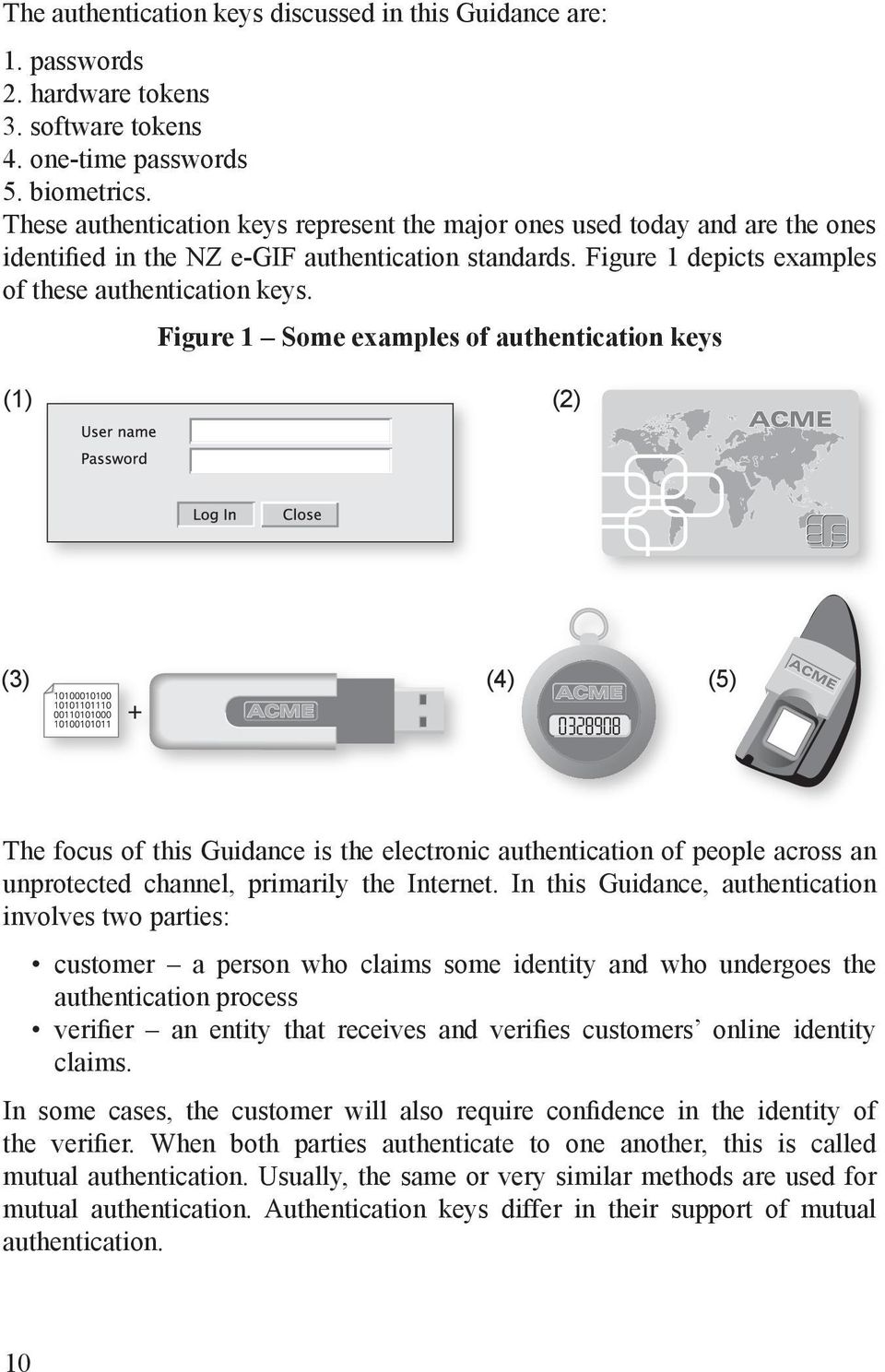
12 The authentication keys discussed in this Guidance are: 1. passwords 2. hardware tokens 3. software tokens 4. one-time passwords 5. biometrics. These authentication keys represent the major ones used today and are the ones identified in the NZ e-gif authentication standards. Figure 1 depicts examples of these authentication keys. Figure 1 Some examples of authentication keys (1) (2) (3) (4) (5) The focus of this Guidance is the electronic authentication of people across an unprotected channel, primarily the Internet. In this Guidance, authentication involves two parties: customer a person who claims some identity and who undergoes the authentication process verifier an entity that receives and verifies customers online identity claims. In some cases, the customer will also require confidence in the identity of the verifier. When both parties authenticate to one another, this is called mutual authentication. Usually, the same or very similar methods are used for mutual authentication. Authentication keys differ in their support of mutual authentication. 10
13 An authentication exchange is the exchange of information required for the authentication process. The online authentication exchange occurs between the customer and the verifier over an unprotected communication channel, such as the Internet. Such a setting is depicted in Figure 2. Figure 2 The authentication exchange setting Verifier Communication channel Custommer In many situations protections for the communication channel are also used. An example of this is the TLS protocol is often used to protect services delivered online using web browsers. Although this Guidance will refer to such protections, it does not include an analysis of the various protocols. 11

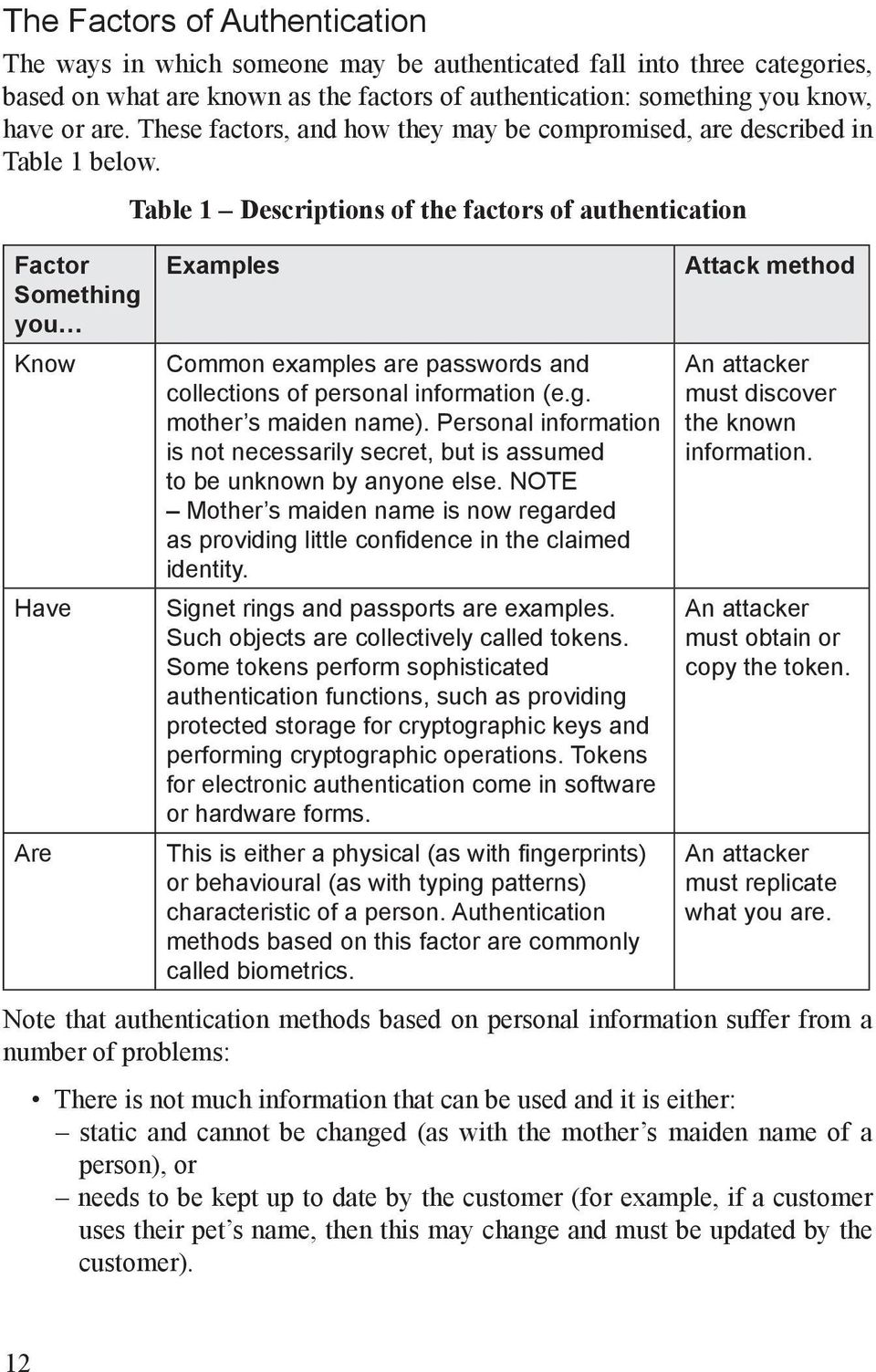
14 The Factors of Authentication The ways in which someone may be authenticated fall into three categories, based on what are known as the factors of authentication: something you know, have or are. These factors, and how they may be compromised, are described in Table 1 below. Factor Something you Know Have Are Table 1 Descriptions of the factors of authentication Examples Common examples are passwords and collections of personal information (e.g. mother s maiden name). Personal information is not necessarily secret, but is assumed to be unknown by anyone else. NOTE Mother s maiden name is now regarded as providing little confidence in the claimed identity. Signet rings and passports are examples. Such objects are collectively called tokens. Some tokens perform sophisticated authentication functions, such as providing protected storage for cryptographic keys and performing cryptographic operations. Tokens for electronic authentication come in software or hardware forms. This is either a physical (as with fingerprints) or behavioural (as with typing patterns) characteristic of a person. Authentication methods based on this factor are commonly called biometrics. Attack method An attacker must discover the known information. An attacker must obtain or copy the token. An attacker must replicate what you are. Note that authentication methods based on personal information suffer from a number of problems: There is not much information that can be used and it is either: static and cannot be changed (as with the mother s maiden name of a person), or needs to be kept up to date by the customer (for example, if a customer uses their pet s name, then this may change and must be updated by the customer). 12
15 The value of such information for authentication is degraded as more organisations collect it. The information can often be easily discovered by an attacker through research or observation. Note also that agencies that collect, use and disclose personal information must ensure that what they do complies with the Privacy Act 1993 [7]. This Guidance does not consider authentication keys based on collections of personal information further. Multi-factor authentication and security: a first look Multi-factor authentication is defined as the combined use of more than one of the factors of authentication from Table 1. As there are three factors of authentication, there are three possibilities: Single-factor authentication This uses only one of the three factors of authentication. An example is a password (something you know). Two-factor authentication This uses two of the three factors of authentication. Accessing your account through an ATM is based on two factors of authentication: the PIN (something you know) and the ATM card (something you have). Three-factor authentication This uses all three of the factors of authentication. For example, to access a secure site you might need to pass a guard who checks your face against a stored image (something you are), swipe an access card (something you have), and enter a four-digit code (something you know). Multi-factor authentication is either two-factor or three-factor. Note that using two types of the same factor is not multi-factor authentication. For example, a password and personal information are both what you know, so using them together would still be single-factor authentication. The strength of authentication keys can vary even within a factor category. Mother s maiden name, a four-digit code and a random eight-character alphanumeric password are all examples of authentication keys based on what you know, but they each provide different protection against discovery attacks. Consequently, the security of the authentication process is affected by the actual solution used. However, it is generally held that multi-factor authentication improves security. In general, for the examples above: To use the password, you need to find out the password. To use the ATM card, you need to find out the PIN and steal or copy the ATM card. 13

16 To get into the secure building, you need to steal or copy an access card, find out the access code and have the guard accept your face against one of those on their system. So the amount of work for an attacker generally increases with the number of factors of authentication used. However, it could be the case that the security of a three-factor authentication method is comparable to, or even worse than, a single-factor method. With the secure site example, maybe the guard can be bribed, new access cards are easy to obtain, and the initial access code is always four zeros. Nevertheless, there is certainly more scope for improving security with multi-factor authentication as compared to single-factor authentication it comes down to ensuring that the potential strength for an implementation is actually achieved. Another issue is that the factors of authentication relied upon can change. This is the case when someone writes down his or her password. The password changes from being something you know to something you have. In this case it may be easier to find than to guess the password. This problem typically occurs with systems that force people to use randomly generated passwords. Random passwords are hard to remember, so people tend to write them down and keep them near their computer for convenience. A password might be found by searching the area around a computer, whereas security for the system probably assumes an attacker has to guess a random password. So when the factors relied upon change, the vulnerabilities of the system (and hence the potential attacks against it) do too. As discussed above, actual implementations will vary in the protection they provide. Other weaknesses, not related to the authentication process, also need to be addressed. These weaknesses may arise out of such things as poor design, lack of security culture, or simple human error. Consider the secure site example: if there is a back door (for example, a fire escape exit) that can be used for entry, the attacker may be able to bypass all authentication checks. In this case it would not matter that you had a diligent guard, a well-controlled access card system and good access code practices. In fact, the authentication system will amount to worse than nothing if there are other ways in, because of the false sense of security it gives. 14
17 Authentication Attacks and Countermeasures This section introduces the authentication attacks considered within this Guidance and briefly discusses other countermeasures. Authentication attacks Table 2 below lists generic attacks against authentication keys and the authentication exchange. Attacks against the initial enrolment process, management of authentication keys, etc., are not considered in this Guidance. The list of attacks in Table 2 is not limited to the authentication key, as some authentication keys can also be used for protecting the communication channel. It is important to note that Table 2 is not intended to be complete, but does cover the major attacks the authentication keys considered here can counter. Readers may prefer to just briefly review the listed attacks now and refer back to Table 2 as required. The listed attacks are not distinct, for example shoulder surfing attacks are a type of social engineering attack. Table 2 Authentication attacks Attack Customer fraud attacks Eavesdropper attacks Insider attacks Key logger attacks Description Where the customer deliberately compromises his or her authentication key or computing environment to enable them to deny subsequent authentication events. Where an attacker obtains information from an authentication exchange and recovers data, such as authentication key values, which then may be used to authenticate. Where verifiers or systems managers deliberately compromise the authentication system or steal authentication keys or related data. Malicious code or hardware attacks that capture keystrokes of a customer with the intention of obtaining any password typed in by the customer or other manually entered authentication key data. Screen logger attacks are variants that capture keystrokes along with display information to circumvent screen-based security protections. 15

18 Attack Malicious code attacks Man-in-the-middle attacks Password discovery attacks Phishing attacks Replay attacks Session hijacking attacks Shoulder-surfing attacks Social engineering attacks Verifier impersonation attacks Description Attacks that are generally aimed at the customer s computing environment. They vary in their sophistication from simple key loggers to advanced Trojan programs that can gain control of the customer s computer. Malicious code attacks may also be aimed at verifier systems. Where an attacker inserts himself between the customer and the verifier in an authentication exchange. The attacker attempts to authenticate by posing as the customer to the verifier and the verifier to the customer. This covers a variety of attacks, such as brute force, common password and dictionary attacks, which aim to determine a password. The attacker may try to guess a specific customer s password, try a few commonly used passwords (such as Pa$$word ) against all customers, or use a pre-composed list of passwords to match against the password file (if they can recover it), in their attempt to discover a legitimate password. Social engineering attacks that use forged web pages, s, or other electronic communications to convince the customer to reveal their password or other sensitive information to the attacker. Where the attacker records the data of a successful authentication and replays this information to attempt to falsely authenticate to the verifier. Where the attacker takes over (hijacks) a session following successful authentication. Social engineering attacks specific to password systems where the attacker covertly observes the password when the customer enters it. Attacks that are aimed at obtaining authentication keys or data by fooling the customer into using an insecure authentication protocol, or into loading malicious code onto the customer s computer. Attacks may also be aimed at the verification process, for example by trying to trick help desk staff into accepting a false story. Where the attacker impersonates the verifier to the customer to obtain authentication keys or data, which then may be used to authenticate falsely to the verifier. 16

19 Countermeasures It is possible to implement a range of countermeasures to the authentication attacks described above. While the choice of authentication key is important, the use of an authentication key alone is not sufficient. Other measures, both technical and non-technical, need to be in place: Some relate to managing the authentication key including policies and procedures for distribution, lifecycle and storage protection, etc. Others are completely separate of authentication key considerations such as anomaly detection, customer education, enrolment procedures, etc. Such countermeasures are important, but are not discussed in detail in this Guidance. Government agencies are required to comply with Security in the Government Sector [3]. Annex A of that manual refers to the minimum standards for Internet security. Further standards and references include [4, 8-14]. Agencies should also refer to the NZ e-gif authentication standards [2] for further requirements. General issues relating to the selection of multi-factor authentication keys are covered later in this Guidance. How countermeasures relate to the authentication key can depend on the authentication key used. For example, the cryptographic keys of software and hardware tokens can be used to support additional protections, whereas passwords do not offer such support. 17
20 Detailed Discussion of Authentication Keys This section looks at the advantages and disadvantages of each of the authentication keys listed earlier and considers the attacks that specific authentication keys help to counter. Note that hardware tokens, software tokens and one-time passwords are usually used in conjunction with a password and/or a biometric and this is assumed to be the case in this Guidance. Such combinations result in at least two-factor authentication. Authentication keys, including ones not specifically covered by this Guidance, are discussed in [1, 4, 15-21]. Passwords Description A password is a secret that is shared by the verifier and the customer. It is usual for the verifier to keep the passwords protected on their system by storing them in encrypted or hashed form and in this form they may still be used in the authentication process. So the verifier usually only has encoded copies of the passwords. Passwords are normally made up from the characters available on a standard keyboard. Other options exist, such as visual passwords, but these are not widely used. Advantages 1. Password based online authentication is easy to deploy, as special software does not need to be installed on the customer s computer. 2. Password systems are familiar to customers, systems administrators and managers. The security and management issues are well understood. 3. Passwords can (and should) be encrypted or hashed when stored on the verifier s system. There is no need for them to ever reside on the verifier s system in the clear (not encrypted or hashed). Disadvantages 1. People have difficulty recalling strong passwords and often forget them, adding to management overheads. 2. People will use the same or similar passwords across different systems without regard for the risks involved: the systems may use different levels of protection for the passwords. 3. People write down their passwords and leave the written copy in places that are accessible to others. 4. People use passwords that are easy to remember, which often means they are also easy to guess (and so are weak passwords). 18

21 5. People share their passwords. The sharing of a password does not stop the password owners from continuing to use their password. Those with whom the password is shared have access until the password is changed. 6. An attacker may obtain a customer s password without the customer being alerted. It is possible to implement customer self-audit functions (where the customer checks recent activity against their account) but the customer will not necessarily use these. Attacks mitigated The reality is that passwords alone do not mitigate any of the attacks listed in Table 2. Provided customers follow good password practices, password discovery, phishing, and shoulder surfing attacks can be mitigated. However, anecdotal evidence shows that a significant proportion of customers will not follow good password practices. Using communication channel protections can mitigate eavesdropper, replay and session hijacking attacks. Attacks not mitigated Some of the possible attacks are listed below. It is important to note that most attacks result in the attacker obtaining a copy of the password, a severe breach of the authentication system. 1. Customer fraud The occurrence of such attacks is difficult to determine, but invariably occurs to some degree. Most banks currently refund customers for disputed Internet banking transactions claims, some of which may be fraudulent. 2. Insider attacks The verifier or systems managers who have access to the password file may conduct such attacks. Even when the passwords are stored in encrypted or hashed form, passwords may still be recovered by conducting a dictionary attack on these files. 3. Keyboard logging attacks In the form of malicious code attacks, these have been used in New Zealand (see the section on trends). Hardware based key loggers have been used elsewhere, but are less common. 4. Man-in-the-middle attacks These attacks require the attacker to intercept the authentication exchange. The use of communication channel protection increases the difficulty of conducting man-in-the-middle attacks. 5. Social engineering attacks Examples of these attacks against passwords include shoulder-surfing and phishing attacks. Phishing attacks have become popular (see the section on trends) and such attacks can be mounted remotely and automated. Shoulder-surfing attacks have been adapted to take advantage of modern technology; these attacks are now being conducted via the use of hidden video devices. 19
22 6. Verifier impersonation attacks Attacks are possible even when standard communication channel protections are used (for example, with TLS, manually entering the URL and checking for the padlock does not entirely prevent such attacks). Verifier impersonation has been used in a number of phishing attacks. Summary Passwords have high customer and verifier acceptance, and such authentication systems are well understood. The problems with passwords result from them: being based on a shared secret to use multiple verifiers you need to have a different one for each verifier relying on the customer s memory and adherence to good password practices if the password is use infrequently it may be forgotten and people do not generally follow good password practices. Attacks usually work by obtaining the password. This is a severe breach of security as the attacker is then able to operate as the customer until the breach is discovered. Hardware tokens Description In this Guidance, hardware tokens are viewed as being specialised hardware devices (with integrated chips) that protect cryptographic keys and perform cryptographic operations within this protected boundary. Here, it is assumed that the use of the hardware token requires the entry of a password or biometric so that the hardware token provides at least two-factor authentication. NOTE Hardware one-time password devices exist and share some of the properties of hardware tokens, see below. There are many different hardware tokens, but the most important differences arise from the security functions supported and the protections provided for the cryptographic keys and operations. These protections are referred to as tamper resistance. Protections may include: chip design that aims to thwart internal analysis the use of glues that are stronger than the chip, so the chip breaks first when anyone tries to separate is from its casing measures to prevent password experimentation features to clear the memory or self-destruct if internal analysis attacks are detected. 20
23 The cryptographic functions of hardware tokens support strong mutual authentication between the customer and the verifier. Hardware tokens can be used for one-way authentication, but the analysis below assumes that mutual authentication is used; otherwise verifier impersonation and man-in-the-middle attacks are not mitigated. Advantages 1. Hardware tokens are physical objects, so a customer should notice if it is stolen. 2. As the hardware device is used in conjunction with a password and/or biometric, the authentication solution is at least two-factor and possession of the device alone is not enough to authenticate. 3. Some hardware tokens support the on-token generation of cryptographic keys and, if public key cryptography is used, such secrets can remain within the protected boundary of the token at all times. NOTE It is important that sound generation methods are used, as cryptographic keys must not be predictable. 4. Hardware tokens are comparatively well understood in terms of their tamper resistance. This is due to active research in this area over the last years, which has led to design improvements. Ongoing analysis will lead to further improvements. This research provides confidence that developments in hardware token security are staying ahead of developments in attacks, at least in terms of tamper resistance. Similar research is occuring for hardware token APIs. 5. Most hardware tokens come with warranties covering consumers against malfunction. 6. Some tokens require a special reader. Although this adds to costs it does improve security. This is because the password or biometric can be entered through the reader, bypassing the customer s computer, where it is exposed to key logger attacks. Disadvantages 1. Hardware tokens require special software to be installed on the customer s computer. 2. Some hardware tokens require special external hardware readers (the advantages of these are already discussed above), which increases the overall cost. This is being addressed as some computers now come with inbuilt readers and other form factors, such as USB tokens, that do not require special readers are becoming more widely available. 21
24 22 3. Verifiers will need to install specialised software and/or hardware. 4. Management for cryptographic keys, readers, tokens and associated passwords or biometrics must be implemented. These tasks complex tasks, but are critical for security. 5. Research shows that people sometimes have difficulty using the functions of hardware tokens. Customer training would be required. 6. If the hardware token is lost or misplaced by the customer, or it is broken, then the customer is unable to authenticate until it can be replaced. 7. The token can be shared. This is easier when it is used with a password. Unlike the case for single-factor passwords, the legitimate owner must also give up their ability to authenticate, which can act as a deterrent to sharing. 8. Some hardware tokens have internal batteries, which limits their lifetime. NOTE Such hardware tokens may come with additional protections based on the internal battery. Attacks mitigated As with passwords, using communication channel protections can mitigate eavesdropper, replay and session hijacking attacks. However, unlike passwords, the functions of the hardware token can be employed in these protections. It is possible to mitigate almost all of the listed attacks using the hardware token functions, except those noted directly below. Although it would still be possible to mount a customer fraud attack, tamper-resistant hardware tokens are designed to defend against attacks where it is assumed that the attacker has control of the token. Customer fraud attacks are therefore less likely to succeed with hardware tokens than with the other authentication keys. Attacks not mitigated 1. Malicious code attacks These attacks come in many forms. Hardware tokens are susceptible to malicious code attacks that can prompt the token for an authentication request. Even when the hardware token is protected with a password or biometric, the attackers code can either gather this data on entry or wait until the customer activates their token. To defend against the second attack, some hardware tokens require activation with a password of biometric at each use. However, such measures have poor customer acceptance. Although no authentication key provides complete protection against malicious code attacks, it is important to note that hardware tokens still provide good protection for the cryptographic keys: generally it is not feasible for them to be recovered by an attacker effectively this means while in theory it is possible to extract the cryptographic keys, this would require significant knowledge, equipment and/or time resources.
25 2. Insider attacks Authorised insiders abusing their privileges may be able to obtain stored cryptographic keys. Additional protections need to be in place to prevent such attacks. NOTE Cryptographic keys generated and stored solely on the hardware token and not susceptible to this type of attack. 3. Specific cryptosystem or token attacks Attacks against cryptosystems and tokens are occasionally discovered. Public attacks have so far come from the research community and have been addressed before any major security issues arise. Summary Hardware tokens are generally considered to support stronger security, but this comes with an increase in cost. Nevertheless, systems requiring a high level of security will invariably be based on hardware tokens, as the reduction of risks in this case justifies the costs. Software tokens Description Software tokens are essentially software implementations of hardware tokens: pieces of software that protect cryptographic keys and perform cryptographic operations. Most vendors of hardware tokens also provide software versions. The major advantage is the lower cost. Again, it is assumed that the functions supporting mutual authentication are used and the software token is protected with a password and/or biometric so that it supports at least two-factor authentication. Advantages 1. Software tokens are portable in the limited sense that they may be copied onto other platforms provided those platforms have had the necessary supporting software installed. 2. Distribution can be simpler when compared with hardware tokens, but still needs to be adequately controlled and administered to ensure security is not degraded. For example, software tokens could be encrypted and ed. Then the system needs to support the recovery of the software token by the intended recipient. Disadvantages 1. As with hardware tokens, some training would be required for customers to correctly use and protect the software token. 2. Software would need to be installed on the customer s computer. 23
26 3. Software tokens are more easily copied than hardware tokens. If an attacker can obtain a copy of the customer s activation data (password and/or biometric), then the attacker may fraudulently authenticate. The customer may not even be alerted to the loss of their authentication key. Another option for the attacker is to wait until the software token is activated and copy the cryptographic keys while in use. The attacker may even be able to extract the activation data from the software token s files or use these to conduct a brute force attack on a copied token. 4. The owner can share a copy of their software token and activation data (again easier with passwords) without losing their ability to authenticate. The supporting software also needs to be available to those who take a copy. 5. Verifiers will need to install special software and/or hardware, and implement management controls for the cryptographic keys and software tokens. Attacks In terms of attacks, software tokens are very similar in their capabilities to hardware tokens. The distinctions arise from the fact that a software token may be copied and/or the cryptographic keys gained without alerting the customer to the loss. Software tokens offer significantly lower capabilities in terms of protection for the cryptographic keys. A much wider variety of software attacks can be remotely launched and automated, whereas attacks on hardware tokens usually require gaining physical control of the token. As software tokens are more susceptible to copying attacks, customer claims of compromise hold more weight; making customer fraud attacks more viable than with hardware tokens. Summary The main advantage of software tokens is the ability to obtain similar functionality to hardware tokens at a lower cost. Management and distribution overheads can be reduced. However, distribution procedures still need to be carefully managed to avoid degrading security. The trade-off for lower costs is the copying attacks that become viable. The environment in which the software token will be used is therefore critical to accessing the risks. For example, using a software token in a controlled hardened computing environment does not pose the same sort of risk as using one in a cybercafé. 24
27 One-time passwords Description One-time password systems generate a series of passwords using special algorithms. Each password of the series is called a one-time password, as it can only be used a single time and it is distinct from the other passwords (or at least distinct with very high probability over a given cycle). There are many different one-time password systems available. The comments concerning hardware tokens above also apply to hardware one-time password devices, except those relating to communication channel protections. Tamper resistance varies across products and this market is still maturing in its use of tamper resistance features. Many one-time password methods are based on a static base secret that is shared between the customer and the verifier. The series of one-time passwords is then generated using this base secret, a nonce (a value that is different with each authentication, preventing replay attacks) and a one-way function. These onetime password systems come as two basic variants, depending on whether the nonce is based on: a time value This requires the device to contain a clock and therefore a battery to run the clock. A window exists for which the one-time password can be used (from 30 seconds to a few minutes). Re-synchronisation procedures are employed to handle clock drift. a counter The counter is incremented at each use. Solutions also exist that use a combination of these two variants. Other systems are based on a collection of passwords shared between the customer and verifier that are generated and distributed by the verifier. In this case the collection itself is the base secret. Others use challenge/response with a shared or known function. The function may be simply a printed table or a more sophisticated system based on a one-way function. There is a range of one-time password systems available and the above is only a brief introduction. Advantages 1. One-time password systems can be easy to deploy and may not require any special software to be installed on the customer s computer. NOTE Some use one-time passwords generated on a hardware device that is communicated directly to the computer, say through a USB port. This option requires software to be installed. 2. One-time password systems are generally acceptable to customers, due to their similarity to password systems. 25
28 3. One-time password clock-based devices and challenge/response systems can be used across multiple systems (whereas counter-based solutions cannot without complicated re-synchronisation). It is necessary that these are trusted systems, as each has the capability to impersonate the customer to the others. In practice, clock-based systems may also require time synchronisation to work effectively. 4. With hardware one-time password devices and printed lists, the customer is likely to notice the loss if they are stolen. Disadvantages 1. The verifier will need special software and/or hardware. Protected storage and management of the base secrets is required. 2. A disadvantage with clock-based one-time passwords used across multiple systems is that there is a window of exposure: when a one-time password is used it can be used with any of the other systems if an attacker obtains it. Shorter windows reduce the scope of such attacks. Also, these attacks may be countered by protecting the communication channel. 3. Most hardware one-time password devices do not provide the same level of tamper resistance, and thus protection for the base secret, as hardware tokens do. This may change in the future as the hardware one-time password device market matures. 4. Systems based on shared printed tables, sometimes called bingo cards, have the same problems as written-down passwords: they may be copied or discovered and used without the customer s knowledge. Loss of the authentication key itself is a much more severe breach of security than the loss of any single one-time password. NOTE Shared tables exist that conceal the numbers under a coating, called scratchy cards, with the customer removing the coating to reveal each onetime password. These cards defend against copying attacks. They may still be stolen and used, although the customer would be expected to notice the loss of their card. 5. With authentication key sharing, the extent of the problem here would relate to how easy it is to copy. If copying is easy, then the customer can share their authentication key without losing the ability to authenticate. If copying is not feasible, then this may deter customers from sharing their authentication key, as they must also give up their ability to authenticate. 26
29 Attack mitigated One-time passwords in general mitigate replay, eavesdropper, key logger and shoulder-surfing attacks, because once a one-time password is used it cannot be used again. One-time passwords used across multiple systems cannot completely mitigate against these attacks without further protection measures being in place. Using communication channel protections mitigates session hijacking attacks. Attacks not mitigated Other attacks are not mitigated by one-time passwords themselves. Systems should employ further protections for the communication channel. The scope of customer fraud attacks would depend on the actual product (primarily this relates to the easy of copying and tamper resistance features). An important distinction with passwords is that a phishing attack only gains a single one-time password, which greatly decreases the scope of these attacks when compared to passwords. Summary One-time passwords systems are relatively simple to use and deploy. There is a wide variety of systems available that range from bingo cards through to hardware devices that compute the one-time passwords. There is therefore a wide range in their strength against attacks. All one-time password systems need to be used in conjunction with communication channel protections. As mutual authentication is not supported, verifier impersonation attacks are possible. This means there is some exposure to the phishing attacks, although the potential for success with such attacks is far more limited than with password systems. The exposure to coping attacks depends on the product. Biometrics Description Biometrics rely on physical or behavioural characteristics of a person. The fingerprints, hand geometry, retina pattern, iris pattern, face, voice pattern, written signature dynamics and keyboard typing patterns of a person are just some of the examples. An initial record, called a template, is taken from a person. To authenticate, a biometric reading is taken and matched against their template. Readings and templates are discrete subsets of a person s original biometric, with the reading being a smaller subset of the template. It is not practical to reverse the process from a reading or template to the original biometric (although it may be possible to construct a copy good enough to fool the authentication system). 27
30 As readings will not always be identical (due to environmental or other factors), the matching function must include a tolerance for discrepancies. Usability and security are balanced in any biometric system by adjusting this tolerance, namely by adjusting what are known as the false acceptance rate and the false rejection rate. Advantages 1. Biometric technologies are sometimes favourably compared with other authentication keys because it is not possible to forget them and they cannot be easily lent. NOTE The metaphor the body is the password is often used by vendors. However, this is confusing, as passwords and biometrics are based on different factors and have somewhat different properties. 2. Some biometrics are very stable; they do not change a great deal over the lifetime of the individual. Disadvantages 1. Unlike other authentication keys, biometrics are not based on secrets. Attacks to replicate some biometrics for individuals exist and are relatively low cost [22]. More expensive systems include additional protections against attacks, such as liveness checks that aim to determine if the reading is from a living person. 2. Matching the biometric reading to the record can fail if the biometric is damaged or if the biometric changes. Biometrics vary in their stability and systems can use adaptation. Higher tolerances in the biometric system lead to lower assurance that the customer is who he or she claims to be (as the probability of false acceptance increases). 3. Biometric authentication using an unprotected communication channel is insecure. So, further protections must be in place to secure the communication channel. 4. Loss of biometric data (even from a reading) is a severe breach: not only does it have the same problem as for passwords (the attacker obtains the data and can authenticate at will, while the customer may not be aware of this loss) but, unlike a password, it is impractical to change the original biometric. As the biometric is personal information, the loss of even a subset may breach the customer s privacy. 5. Verifiers need to store the biometric templates and must use the original template to enable authentication. Therefore the biometric templates cannot be stored using a hash function. The templates can be stored encrypted, as then the record can be recovered for authentication. The storage and control 28
31 of biometric templates by those other than the customer raises concerns about privacy and function creep. Again, any attacks against biometrics are more severe than attacks against other authentication keys, because the loss of even part of someone s biometric data breaches their privacy and it is not practical to change a person s biometric. 6. A biometric stays largely the same over time. Indeed it is impractical to change them. For passwords and cryptographic keys, it is common security practice to change them within set timeframes in order to limit their vulnerability to discovery. Discovery with biometrics is quite different from secrets like passwords or cryptographic keys. However, the strength of cryptographic protections used to exchange biometric recordings needs to take into account the fact that they are (subsets of) personal information that is largely static. Attack mitigated Biometrics do counter keystroke logging, password discovery and shouldersurfing attacks. By themselves, biometrics do not mitigate any of the other attacks listed in Table 2 and so additional protections need to be in place. For example, it is important to protect the communication channel. Attacks not mitigated As with passwords, the result of a successful attack is generally severe: the attacker obtains a copy of the customer s biometric, a biometric reading, or the biometric template. Any may be used to fraudulently authenticate, potentially without the customer being alerted. An additional problem is that the biometric cannot be replaced in the same way that other authentication keys can. Biometrics share many of the problems of personal information discussed following Table 1. Biometric information is: restricted in scope usually static (original cannot be changed) degraded for authentication purposes as more organisations collect it not secret and therefore vulnerable to being copied. Summary Biometrics have traditionally been used for local access control (for example, the photographs in passports). Their use is well established in such situations and the issues are understood. They are not well suited to remote authentication and need to be used in conjunction with other protections to ensure biometric data is not captured. This would include cryptographic authentication of the verifier (to 29
32 avoid phishing of the biometric), requiring the customer to have at least a software token. This in part supersedes the use of a biometric-based authentication system for remote authentication. Even when communication channel protections are used, biometrics are still susceptible to attacks that copy the biometric. Such attacks are likely to become more popular if biometrics are more widely used. Because biometrics are personal data, they have many of the problems relating to authentication methods that rely on personal information. Privacy is an issue with regard to the storage, use and transfer of biometric data. The Biometrics Institute in Australia has a draft Privacy Code [23] that is currently being reviewed by the (Australian) Office of the Privacy Commissioner prior to final publication. The draft has already been issued for public comment. The Department of Internal Affairs is developing a similar document for New Zealand government agencies. This document is intended for release by late Further references and information for biometrics can be found in [24]. Remarks In general, authentication keys cannot be cleanly delineated into the factor categories. For example: Passwords can be used in the standard way, stored in a protected software module on a computer (usually protected using a master password), or stored on a hardware device. In the later two cases, the password is no longer something the customer knows, but something they have. A one-time password can be generated by a customer using a known base secret. In this case, the authentication key is something the customer knows rather than has. For simplicity, the above section has not considered these and other variants. References relating protections for hardware tokens, software tokens and onetime password devices are included separately in Appendix A. 30
33 Multi-factor Authentication Solution Selection Issues There are many issues to consider once a decision is made to use multi-factor authentication. The authentication key must also comply with the NZ e-gif authentication standards [2], but many solutions may be available that satisfy these requirements. The selection of the actual authentication key also needs to be based on a risk assessment for the particular service and also the business requirements. Agencies should use the Australian and New Zealand risk management standard AS/NZ 4360:2004 [8] along with the associated handbooks AS/NZS HB 436:2004 [9] and SAA/SNZ HB 231:2004 [10]. A consideration of privacy risks can benefit from a privacy impact assessment. In this case agencies should refer to the Privacy Impact Assessment Handbook [25]. For an example of business drivers, see the section on trends, which discusses the Land Information New Zealand Landonline service. Others issues to consider include those listed in Table 3. Further information can be found in [15,16,18, 20, 21]. Table 3 Solution selection issues Issue Customer education Customer resources Other (customer-related) Points to consider Do customers have the necessary skills? Are training resources available? Ongoing education and awareness programmes must be in place. Do customers have the necessary basic hardware and software? Will extra special software need to be installed on customers computers or does the system rely on the customers having a special hardware? Will the system need to support multiple authentication keys to cover all customers? Is it assumed that customers computing environments may be hostile, or that common computer protections will be in place How difficult will it be to achieve customer acceptance? What are the options for promoting acceptance? Is portability a requirement? 31
34 Issue Staff resources Systems operation System costs Business operation Deployment timeframes Points to consider What are the staffing requirements for the development and ongoing operation of the system? Will staff need additional training? Does the system need to integrate with existing systems? What would migration of the existing system involve? What reliability metrics need to be met? Can the system scale if necessary? Is interoperability with other systems a requirement? If so, what is required? What mix of proprietary and non-proprietary technology will be used? Systems issues are often complex but priorities should relate to the vision an organisation has for its system. What are the costs to deploy and run the system? This should include the development and ongoing operational cost. Costs will also be incurred to comply with Security in the Government Sector [4] and other acts, regulations and standards. Can the functions of the authentication key be leveraged for the business processes? This may be a driver for selecting one authentication key above others (an example is the Landonline system discussed below). Are there timeframe restrictions for deploying the system? New solutions can take longer to deploy. 32
35 Government Use of Multi-factor Authentication Globally, governments are moving towards offering their services online. Some governments are already employing multi-factor authentication methods to support their online services. Others are aiming to do so in the near future. The following examples are not intended to be comprehensive, but illustrate that uptake of multi-factor authentication in the government sector is occurring. General information has been sourced from [26] and [27]. The New Zealand Government Logon Service is discussed in the next section. Austrian Government Austria uses the Citizen Card, which is any device (smartcard, mobile phone, USB token, etc.) that is capable of creating secure digital signatures and can provide secure storage of personal data. Some functions and data are PIN protected against unauthorised use and/or access. The Austrian system is more technology-neutral than other initiatives: it relies on common functionality rather than a common form factor. Danish Government The Danish Government is currently in the process of issuing free software tokens (used in conjunction with passwords) to all citizens to promote the uptake of their online services. These are viewed as being secure enough at this stage for most public sector and private sector transactions. There are currently no plans to introduce hardware tokens. Estonian Government The government of Estonia began distributing ID cards (personalised smartcards) to its citizens in January The cards contain the individual s name, address details, demographic information, as well as two PIN protected digital certificates and related cryptographic keys. A special distinction of this initiative is that Estonians can use their ID cards for accessing government services online and e-commerce applications, with both authentication and digital signatures being supported (by the separate certificates). The authentication certificate contains the individual s address. The ID cards are mandatory for citizens and permanent residents over the age of 15. Italian Government The Italian Government system uses their National Services Card and Electronic ID card, both of which are smartcards, for citizen authentication with online government services. The Electronic ID card is a hybrid smartcard that also contains PIN protected personal data including the holder s blood group and fingerprint scans. The plan is to replace all paper ID documents with these cards. Korean Government The Korean Government is planning to have banks support one-time password systems for Internet banking. The project is being led by the Ministry of Information and Communication. Use of the one-time password system will not be mandatory but will allow citizens 33
36 higher transactions amounts than the current one-time password system, which is based on cards that only store passwords. It is not clear whether the cards are re-used or if the card is replaced after the passwords have been used [28]. Malaysian Government Malaysian Government issues citizens over 12 years of age with a MyKad or Government Multipurpose Card [29]. This is a tamper-resistant smartcard that performs public key cryptographic operations (including those relating to online authentication), supported by on-card digital certificates and a government Public Key Infrastructure. The MyKad is used for immigration at Malaysian borders, as a driving licence, to access government services online, for making online purchases, as an e-purse, and as an ATM card with participating banks. United Kingdom (UK) Government The UK Government uses a centralised registration and authentication system called The Government Gateway to support secure authenticated e-government transactions over the Internet. Authentication of customers (individuals, organisations, or agents) is based on either a password or digital signatures (software tokens with password protection), depending on the type of transaction. There are plans to have the UK e-id card support a digital signature function in the future. Refer to [30] which discusses the UK and also the Dutch systems. So governments are moving to provide two-factor authentication, which supports the provision of their services online. Sometimes this is bundled with other functions. This is the often the case with smartcard-based solutions the smartcard is also used as an identification card, travel document and e-commerce card. Providing support for a number of functions has motivated the uptake of online service by citizens in these countries. Other nations have not reported such strong uptake but in some cases are limited in what they can offer by concerns about privacy. Where privacy is not an issue, the main barrier to uptake seems to be cost, usability and functionality. Some countries are addressing this with subsidies for their citizens, or even providing free two-factor authentication keys. Note that the examples given here are only intended to demonstrate that a number of governments are using a range of two-factor authentication keys for the provision of government services online. Their inclusion is not intended as an endorsement of their appropriateness for the New Zealand Government. 34
37 The Government Logon Service The Government Logon Service (GLS) is being developed as part of the New Zealand All-of-government Authentication Programme. The Programme will standardise online authentication for New Zealand government services. The GLS will provide a common logon service for people using government services over the Internet. The GLS will allow customers to logon to different agency services using the same authentication key, or with multiple keys, in a secure and private manner. Different types of authentication keys will be used depending on the level of identity-related risk. The Evidence of Identity Standard defines four service risk categories: No or Negligible, Low, Moderate and High [31]. These relate to the potential for harm if an error is made in attributing identity. The minimum authentication keys required for each service risk category are given in Table 4 below. Table 4 - Minimum authentication keys required for service risk categories Service risk category Nil or negligible Low Moderate High Minimum authentication key requirements No requirement. Agencies are able to select their own authentication solution. If a password is used, this should be different from the password required for services in the Low service risk category. Requires a one-factor authentication key in the form of a password conforming to the Password Standard [32]. Requires a two-factor authentication key that is at least one of the following: a one-time password system combined with a password a one-time password device requiring per-session local activation (with a password or biometric*) a software token requiring per-session local activation (with a password or biometric*). Requires a two-factor authentication key that is at least a hardware token requiring per-session local activation (with a password or biometric*). * Currently, authentication solutions that incorporate the exchange of biometric data between a customer and verifier have been excluded. Review of biometric authentication is continuing and their future use will be considered. 35
38 The GLS will support authentication keys for the Low, Moderate and High service risk categories. The GLS currently supports password authentication, and support for a two-factor key is being developed. The advantages are that the customer will be able to use a single password, single software token, etc., to use online services with agencies that use the GLS. The GLS provides service customers with greater convenience in logon management since the GLS username and password (or other authentication key) can be re-used by the customer across different agencies. The design of the GLS protects the privacy of customers by not collecting any identity-related customer information. The Identity Verification Service (IVS) is also being developed by the Programme. The IVS will allow service customers to establish their identity details, using the Evidence of Identity Standard, and to record them in the form of an electronic Identity Verification Credential (IVC). They can release the IVC to agencies to confirm their identity when transacting electronically with the government. The IVS is currently in the design phase. Figure 3 depicts the various communications. More information on the GLS can be found in [33]. Figure 3 - The GLS and IVS Service users GLS Internet Agencies IVS 36
39 Trends The Internet is a very convenient channel for exchanging information and conducting business. It is also a very convenient place for criminal activities. Internet-based criminal activity is certain to increase. Government law enforcement agencies and Non-Government Organisations involved in incidence response have noted that organized crime is harnessing the potential of the Internet for illegal activities including scams, fraud, ID theft and extortion [13, 34]. These reports indicate that the nature of hacking itself has changed from being a harmless game to a business. The losses from online fraud are currently smaller than off-line fraud, but the occurrence of online fraud is increasing at a rapid rate. Therefore, thought must be given to expand existing countermeasures and migration plans made for current systems. Currently, phishing and key logger attacks are popular for obtaining passwords and have been used in New Zealand [35-38]. Organisations whose business requires improved security to counter these increased threats are largely either at the stage of replacing passwords with some form of two-factor authentication or are planning to do so in the near future. In New Zealand, ASB Bank and the associated Bank Direct launched their Netcode system at the end of The Netcode system is based on a password and a one-time password that expires after a few minutes (an eight-digit code). The one-time password is sent to the customer s cellphone in an SMS message. The Netcode system has been analysed by Thompson [39]. ASB Bank, Bankdirect, HSBC and Rabobank also offer one-time password devices to support twofactor authentication of online banking customers [38, 40]. In the USA, banking regulators will require banks to strengthen their online banking security by yearend 2006, including two-factor authentication for high-value transactions or transfers of monies to secondary parties [19]. This is also likely to happen in the near future in the UK [41]. Land Information New Zealand (LINZ) uses two-factor authentication with its Landonline service [42]. Landonline customers obtain a unique personal digital certificate and key pair from an authorised Certificate Authority. This is used with software on their computer to perform the following functions: authentication to the Landonline system, which also requires a password securing the communication channel with the Landonline system digitally signing documents for example, a solicitor can digitally sign the necessary papers required for the transfer of land titles. 37
40 Use of the digital certificate for signing is protected by a passphrase (this is a type of password and is distinct from the password used to authenticate to the Landonline system). The first two functions above are examples of the authentication key functions discussed in this Guidance whereas the third is an extra service supported by this technology, albeit one that is critical to the Landonline service. 38
41 Glossary Term Activation data Application Programming Interface (API) Authentication Authentication key Automatic Teller Machine (ATM) Definition Normally a password or biometric that is used to authenticate to a hardware or software token or a hardware device before they may be used. Software tokens (in particular any related cryptographic keys or secrets) are normally protected under a key generated using the activation data. Generic code sets used for implementing higherlevel software applications. Process of establishing, to the required level of confidence, the identity of one or more parties to a transaction. Consists of identity management (establishing who you are) and logon management (confirming who you are). In particular, for this Standard authentication is used in the commonly understood sense of a customer logging onto a service with their username and authentication key. This is consistent with the logon management aspect of the general authentication definition above. Method used by an individual to authenticate his or her identity over the Internet. Examples of authentication keys include passwords, one-time passwords, software tokens, hardware tokens, and biometrics. Authentication keys are also referred to as keys. These machines accept ATM cards. ATM cards are moving from magnetic strip cards to smartcards, commonly called chipcards. 39
42 Term Challenge/response Cryptographic hash Cryptographic keys Cryptographic operations Form factor Government Logon Service (GLS) Identity (ID) Definition An authentication protocol where the verifier sends the customer a challenge (usually a random value or a nonce) that the customer combines with a shared secret (often by hashing the challenge and secret together) to generate a response that is sent to the verifier. The verifier knows the shared secret and can independently compute the response and compare it with the response generated by the customer. If the two are the same, the customer is considered to have successfully authenticated. When the shared secret is a cryptographic key, such protocols are generally secure against eavesdroppers. When the shared secret is a password, an eavesdropper does not directly intercept the password itself, but may be able to find the password with an off-line password guessing attack. A function that maps a bit string of arbitrary length to a fixed length pseudo-random bit string. Approved hash functions satisfy the following properties: 1. (One-way) It is computationally infeasible to find any input that maps to any prespecified output, and 2. (Collision resistant) It is computationally infeasible to find any two distinct inputs that map to the same output. Protected values (in terms of their confidentiality and integrity) that are used in cryptographic operations. Special algorithms and protocols that may be used in the authentication process. Relates to the physical dimensions and technical properties (such as the communications interface) of a hardware device. An all-of-government shared service that provides ongoing re-confirmation of online identity to participating agencies to the desired level of confidence. May be simply an identifier for an authentication key. 40
43 Term Identity Verification Credential (IVC) Identity Verification Service (IVS) Mutual authentication Nonce One-way function Online service Personal Identification Number (PIN) Public keys, private keys, asymmetric key pairs and public key cryptosystems Public Key Infrastructure Definition A unique electronic record maintained by the IVS of a person s verified identity data. An all-of-government shared service that provides individuals with the option to verify their identity authoritatively, online, and in real-time with participating agencies to a passport-level of confidence. Where both entities authenticate to each other (the authentications are normally based on the same or closely similar methods). A value used in security protocols that is never repeated with the same key. For example, challenges used in challenge-response authentication protocols generally must not be repeated until authentication keys are changed, or there is a possibility of a replay attack. Using a nonce as a challenge is a different requirement from a random challenge, because a nonce is not necessarily unpredictable. A function for which it is computationally infeasible to find any input that maps to any pre-specified output. Service that an agency offers through an interactive online delivery channel. A password made for numeric characters only. Commonly four digits are used, as with ATM cards. Public keys and private keys occur as pairs called asymmetric key pairs. The public key is (usually) the public part and the private key is the secret part of an asymmetric key pair. Public key cryptosystems can be used to encrypt, digitally sign or protect the integrity of data. Covers the management, architecture, business processes, technical procedures and protocols relating to the well-organized use of public key cryptosystems (mostly concerning the public keys of asymmetric key pairs). 41
44 Term Smartcard Service risk category Symmetric keys and symmetric cryptosystems Transport Layer Security (TLS) Uniform Resource Locator (URL) Universal Serial Bus (USB) Username Definition A credit card like form factor with an Integrated Circuit chip. Smartcards may be just memory cards but this Guidance considers smartcards that contain specialised cryptographic processors. Smartcards come in both contact and contactless forms. The contactless cards contain a small antenna for communicating with the reader. Each service risk category is defined based on the identity-related risk of a service and are detailed in the Evidence of Identity Standard. Symmetric keys are cryptographic keys that are used with symmetric cryptosystems to perform both the cryptographic operation and its inverse, for example to encrypt and decrypt. Symmetric cryptosystems can also provide data integrity: they can be used to create message authentication codes for data and to verify those codes. Like the Secure Sockets Layer (SSL) protocol, which it supersedes, TLS provides a cryptographically protected channel for web browser exchanges. TLS is defined by the Internet Engineering Task Force. TLS is similar to the older SSL protocol and is effectively SSL version 3.1. A standardised address format for locating resources on the world wide web. A multi-purpose computer software and/ or hardware interface for interfacing with communication, storage, and peripheral devices. Construction of alphanumeric characters that is used to identify a customer within the authentication system (the username is used to identify the customer, or rather their authentication key, to the verifier as part of the authentication process). 42
45 Referenced documents [1] State Services Commission Authentication key strengths standard. Version [2] State Services Commission New Zealand e-government interoperability framework (NZ e-gif). Version [3] Department of the Prime Minister and Cabinet Security in the government sector. [4] Government Communications Security Bureau. October New Zealand security of information technology manual NZSIT 400. Version [5] State Services Commission Guide to authentication standards for online services. Version [6] State Services Commission Development goals for the state services. [7] Privacy Act [8] AS/NZS 4360:2004. Risk management (Australian/ New Zealand Standard). [9] SAA/SNZ HB 436:2004. Risk management guidelines Companion to AS/NZS 4360:2004 (Australian/New Zealand handbook). [10] SAA/SNZ HB 231:2004. Information security risk management guidelines (Australian/New Zealand handbook). [11] AS/SNZ ISO/IEC 17799:2006. Information technology security techniques code of practice for information security management. [12] AS/SNZ ISO/IEC 27001:2006. Information technology security techniques information security management systems requirements. [13] State Services Commission. 24th November Trust and security on the internet keeping the Internet safe for e-government in New Zealand. www. e.govt.nz [14] Emigh, Aaron. 3rd October Online identity theft: Phishing technology, chokepoints and countermeasures. (Accessed 17 th May 2006) [15] Allan, Ant. 12th May Authentication tokens: Overview. Gartner Research Report DPRO [16] APEC Telecommunications and Information Working Group Electronic authentication: Issues relating to its selection and use. 43
46 [17] Burr, William. Dodson, Donna D. Polk, W. Timothy. April NIST special publication NIST electronic authentication guideline. Version [18] Henderson, Marie. February Smart cards and PC cards. Defence Science and Technology Organisation Technical Report DSTO-TR www. dsto.defence.gov.au [19] Federal Financial Institutions Examination Council. October 12 th FFIEC guidance authentication in an internet banking environment (FIL ). [20] Grand, Joe. 19 th September Authentication tokens: Balancing the security risks with business requirements. (Accessed 17 th May 2006) [21] Smith, Richard Authentication: From passwords to public keys. Addison-Wesley. [22] Matsumoto, Tsutomu. 2 nd -3 rd October Gummy finger and paper iris: an update. Presentation at the 2004 Workshop on Information Security Research, Fukuoka Japan. www-kairo.csce.kyushu-u.ac.jp/wisr2004/presentation12.pdf (Accessed 17 th May 2006). [23] Biometrics Institute. 30 th November Biometrics institute privacy code. (Accessed 17 th May 2006). [24] Roberts, Chris. Biometrics. November Unpublished research. (Personal communication received 16 th November 2005.) [25] Office of the Privacy Commissioner. Privacy impact assessment handbook. [26] IDABC egovernment Observatory. egovernment factsheets. europa. eu.int/idabc/ (Accessed 17 th May 2006.) [27] CardTechnology. 1 st June Going global with national ID. (Accessed 17 th May 2006.) [28] Downing, Jim. 20th September One-time password (OTP). (Accessed 17 th May 2006.) [29] Government Technology International. 29 th April MyKad: The Malaysian Government multipurpose card. international/ (Accessed 17 th May 2006.) [30] Lips, M. Taylor, J. Organ, J. 9 th September Electronic government: Towards new forms of authentication, citizenship and governance. (Accessed 17 th May 2006.) [31] Department of Internal Affairs Evidence of identity standard. Version [32] State Services Commission Password standard. Version
47 [33] State Services Commission Authentication for e-government: Government Logon Service design overview. [34] AusCERT, Australian Federal Police, Australian High Tech Crime Centre, New South Wales Police, Northern Territory Police, Queensland Police, South Australia Police, Tasmania Police, Victoria Police, Western Australia Police Australian computer crime and security survey. au/crimesurvey [35] Ilett, Dan. 6 th September Fighting back against the phishers. software.silicon.com (Accessed 17 th May 2006.) [36] Greenwood, Darren. 1 st April Phishing for security. (Accessed 17 th May 2006.) [37] New Zealand Herald. 7 th March Internet banking under scrutiny after hacker accesses accounts. (Accessed 17th May 2006.) [38] Sonti, Chalpat. 16 th May Robbed by the spy in her PC. co.nz (Accessed 17 th May 2006.) [39] Thompson, Kerry. 18 th September A security review of the ASB bank netcode authentication system. (Accessed 17 th May 2006.) [40] Schwarz, Reuben. 31 st October ASB device ups online security. (Accessed 17 th May 2006.) [41] Robertson, Struan. 19 th October UK law will demand better authentication for online banking. (Accessed 17 th May 2006.) [42] Land Information New Zealand. Landonline service. Latest revisions This Guidance is to be reviewed from time to time, so that it keeps up to date with changes in the sector. Users should ensure they access the latest revisions of this Guidance. These can be found at Users should also access the latest revisions of the documents included in the list of referenced documents. Review of Guidance Suggestions for improvement of this Guidance are welcomed. They should be sent to the Manager, e-gif Operations, State Services Commission, PO Box 329, Wellington. Alternatively, suggestions can be sent by to e-gif@ssc. govt.nz 45
48 Appendix A. Technical Protection References The following references may be useful in determining and evaluating the protection and/or tamper resistance features of hardware tokens, software tokens and one-time password devices. Ant Allan, Authentication Tokens: Overview, Gartner Research. DPRO ( Contains tables of: 46 relevant authentication algorithms and protocols from the ISO/IEC standards, ANSI standards, FIPS publications, IETF standards and ITU-T standards hardware token standards: ISO/IEC Identification Cards standards, RSA Lab s PKCS Cryptographic Tokens and PC/SC specifications vendors authentication tokens. ISO/IEC JTC 1/SC 27 and TC 68/SC 2* ISO/IEC series. Information Technology - Security Techniques - Evaluation Criteria for IT Security: Part 1: Introduction and General Model (ISO/IEC :2005) Part 2: Security and Functional Requirements (ISO/IEC :2005) Part 3: Security Assurance Requirements (ISO/IEC :2005).ISO/IEC series. Information Technology Security Techniques A Framework for IT Security Assurance: Part 1: Overview and Framework (ISO/IEC TR :2005) Part 2: Assurance Methods (ISO/IEC TR :2005) Part 3: WD TR ISO/IEC 18045:2005. Information technology - Security Techniques - Methodology for IT Security Evaluation. ISO/IEC FDIS Information Technology - Security Techniques - Security Requirements for Cryptographic Modules. (This standard has been derived from NIST Federal Information Processing Standard PUB 140-2) ISO/IEC 21827:2002. Information Technology - Systems Security Engineering - Capability Maturity Model. ISO/IEC NP Information Technology - Biometric Template Protection. ISO/IEC NP Information Technology - Security Techniques Requirements for Cryptographic Modules.
49 ISO/IEC NP Biometric Authentication Context. ISO series. Banking - Secure Cryptographic Devices (retail): Part 1: Concepts, Requirements and Evaluation Methods (ISO :1998 / ISO/CD ) Part 2: Security Compliance Checklists for Devices used in Financial Transactions (ISO :2005). ISO series. Financial Services - Biometrics: Part 1: Security Framework (ISO/DIS ) Part 2: Cryptographic Techniques (ISO/CD ). *The full list of ISO/IEC standards for JTC 1/SC 27 and TC 68/SC 2 should be reviewed for new publications. Common Criteria Protection Profiles. Common Criteria ( Protection Profile Secure Signature Creation Device Type 1, Type 2, and Type 3. April Public Key Infrastructure and Key Management Infrastructure Token (Medium Robustness) PP. March Smart Card IC Platform PP. July Smart Card IC with Multi-Application Secure Platform. January Smart Card Integrated Circuit with Embedded Software. July Smart Card User Group Smart Card Protection Profile. October U.S. Government Biometric Verification Mode Protection Profile for Medium Robustness Environments. November Communications Electronics Security Group ( Biometric Device Protection Profile (BDPP). UK Government Biometrics Working Group. Draft Issue September Best Practices in Testing and Reporting Performance of Biometric Devices, Version 1.0, 12 January
50 Other Security Requirements for Cryptographic Modules. Federal Information Processing Standards PUB May (Note ISO/IEC 19790:2006 is derived from this standard) Information Technology Security Evaluation Criteria (ITSEC), Harmonized Criteria of France Germany the Netherlands the United Kingdom, Version 1.1, January Department of Defense, Department of Defense Trusted Computer Eyetem Evaluation Criteria, DOD STD, December
51
52 Guidance on Multi-factor Authentication June 2006 Guidance on Multi-factor Authentication
Two-Factor Authentication and Swivel
 Two-Factor Authentication and Swivel Abstract This document looks at why the username and password are no longer sufficient for authentication and how the Swivel Secure authentication platform can provide
Contents. Identity Assurance (Scott Rea Dartmouth College) IdM Workshop, Brisbane Australia, August 19, 2008
 Identity Assurance (Scott Rea Dartmouth College) IdM Workshop, Brisbane Australia, August 19, 2008 Contents Authentication and Identity Assurance The Identity Assurance continuum Plain Password Authentication
Multi-factor authentication
 CYBER SECURITY OPERATIONS CENTRE (UPDATED) 201 (U) LEGAL NOTICE: THIS PUBLICATION HAS BEEN PRODUCED BY THE DEFENCE SIGNALS DIRECTORATE (DSD), ALSO KNOWN AS THE AUSTRALIAN SIGNALS DIRECTORATE (ASD). ALL
CSC 474 -- Network Security. User Authentication Basics. Authentication and Identity. What is identity? Authentication: verify a user s identity
 CSC 474 -- Network Security Topic 6.2 User Authentication CSC 474 Dr. Peng Ning 1 User Authentication Basics CSC 474 Dr. Peng Ning 2 Authentication and Identity What is identity? which characteristics
How Secure is your Authentication Technology?
 How Secure is your Authentication Technology? Compare the merits and vulnerabilities of 1.5 Factor Authentication technologies available on the market today White Paper Introduction A key feature of any
IDRBT Working Paper No. 11 Authentication factors for Internet banking
 IDRBT Working Paper No. 11 Authentication factors for Internet banking M V N K Prasad and S Ganesh Kumar ABSTRACT The all pervasive and continued growth being provided by technology coupled with the increased
Protecting Online Customers from Man-inthe-Browser and Man-in-the-Middle Attacks
 Protecting Online Customers from Man-inthe-Browser and Man-in-the-Middle Attacks Whitepaper W H I T E P A P E R OVERVIEW Arcot s unmatched authentication expertise and unique technology give organizations
Alternative authentication what does it really provide?
 Alternative authentication what does it really provide? Steve Pannifer Consult Hyperion Tweed House 12 The Mount Guildford GU2 4HN UK [email protected] Abstract In recent years many new technologies
Strong Authentication for Secure VPN Access
 Strong Authentication for Secure VPN Access Solving the Challenge of Simple and Secure Remote Access W H I T E P A P E R EXECUTIVE SUMMARY In today s competitive and efficiency-driven climate, organizations
XYPRO Technology Brief: Stronger User Security with Device-centric Authentication
 Ken Scudder Senior Director Business Development & Strategic Alliances XYPRO Technology Talbot A. Harty CEO DeviceAuthority XYPRO Technology Brief: Stronger User Security with Device-centric Authentication
Remote Access Securing Your Employees Out of the Office
 Remote Access Securing Your Employees Out of the Office HSTE-NB0011-RV 1.0 Hypersecu Information Systems, Inc. #200-6191 Westminster Hwy Richmond BC V7C 4V4 Canada 1 (855) 497-3700 www.hypersecu.com Introduction
The Feasibility and Application of using a Zero-knowledge Protocol Authentication Systems
 The Feasibility and Application of using a Zero-knowledge Protocol Authentication Systems Becky Cutler [email protected] Mentor: Professor Chris Gregg Abstract Modern day authentication systems
Guide to Evaluating Multi-Factor Authentication Solutions
 Guide to Evaluating Multi-Factor Authentication Solutions PhoneFactor, Inc. 7301 West 129th Street Overland Park, KS 66213 1-877-No-Token / 1-877-668-6536 www.phonefactor.com Guide to Evaluating Multi-Factor
Smart Card- An Alternative to Password Authentication By Ahmad Ismadi Yazid B. Sukaimi
 Smart Card- An Alternative to Password Authentication By Ahmad Ismadi Yazid B. Sukaimi Purpose This paper is intended to describe the benefits of smart card implementation and it combination with Public
User Identification and Authentication Concepts
 Chapter 1 User Identification and Authentication Concepts The modern world needs people with a complex identity who are intellectually autonomous and prepared to cope with uncertainty; who are able to
A Security Survey of Strong Authentication Technologies
 A Security Survey of Strong Authentication Technologies WHITEPAPER Contents Introduction... 1 Authentication Methods... 2 Classes of Attacks on Authentication Mechanisms... 5 Security Analysis of Authentication
Multi-Factor Authentication Protecting Applications and Critical Data against Unauthorized Access
 Multi-Factor Authentication Protecting Applications and Critical Data against Unauthorized Access CONTENTS What is Authentication? Implementing Multi-Factor Authentication Token and Smart Card Technologies
Advanced Authentication
 White Paper Advanced Authentication Introduction In this paper: Introduction 1 User Authentication 2 Device Authentication 3 Message Authentication 4 Advanced Authentication 5 Advanced Authentication is
KEYSTROKE DYNAMIC BIOMETRIC AUTHENTICATION FOR WEB PORTALS
 KEYSTROKE DYNAMIC BIOMETRIC AUTHENTICATION FOR WEB PORTALS Plurilock Security Solutions Inc. www.plurilock.com [email protected] 2 H IGHLIGHTS: PluriPass is Plurilock static keystroke dynamic biometric
Authentication Tokens
 State Capitol P.O. Box 2062 Albany, NY 12220-0062 www.its.ny.gov New York State Information Technology Standard IT Standard: Authentication Tokens No: NYS-S14-006 Updated: 05/15/2015 Issued By: NYS ITS
ADVANCE AUTHENTICATION TECHNIQUES
 ADVANCE AUTHENTICATION TECHNIQUES Introduction 1. Computer systems and the information they store and process are valuable resources which need to be protected. With the current trend toward networking,
SENSE Security overview 2014
 SENSE Security overview 2014 Abstract... 3 Overview... 4 Installation... 6 Device Control... 7 Enrolment Process... 8 Authentication... 9 Network Protection... 12 Local Storage... 13 Conclusion... 15 2
User Authentication Guidance for IT Systems
 Information Technology Security Guideline User Authentication Guidance for IT Systems ITSG-31 March 2009 March 2009 This page intentionally left blank March 2009 Foreword The User Authentication Guidance
ARCHIVED PUBLICATION
 ARCHIVED PUBLICATION The attached publication, NIST Special Publication 800-63 Version 1.0.2 (dated April 2006), has been superseded and is provided here only for historical purposes. For the most current
How CA Arcot Solutions Protect Against Internet Threats
 TECHNOLOGY BRIEF How CA Arcot Solutions Protect Against Internet Threats How CA Arcot Solutions Protect Against Internet Threats we can table of contents executive summary 3 SECTION 1: CA ArcotID Security
Understanding and Integrating KODAK Picture Authentication Cameras
 Understanding and Integrating KODAK Picture Authentication Cameras Introduction Anyone familiar with imaging software such as ADOBE PHOTOSHOP can appreciate how easy it is manipulate digital still images.
PASSWORD MANAGEMENT. February 2008. The Government of the Hong Kong Special Administrative Region
 PASSWORD MANAGEMENT February 2008 The Government of the Hong Kong Special Administrative Region The contents of this document remain the property of, and may not be reproduced in whole or in part without
EVALUATION GUIDE. Evaluating a Self-Service Password Reset Tool. Usability. The password reality
 EVALUATION GUIDE Evaluating a Self-Service Password Reset Tool This guide presents the criteria to consider when evaluating a self-service password reset solution and can be referenced for a new implementation
Enhancing Organizational Security Through the Use of Virtual Smart Cards
 Enhancing Organizational Security Through the Use of Virtual Smart Cards Today s organizations, both large and small, are faced with the challenging task of securing a seemingly borderless domain of company
White Paper: Multi-Factor Authentication Platform
 White Paper: Multi-Factor Authentication Platform Version: 1.4 Updated: 29/10/13 Contents: About zero knowledge proof authentication protocols: 3 About Pairing-Based Cryptography (PBC) 4 Putting it all
Authentication Types. Password-based Authentication. Off-Line Password Guessing
 Authentication Types Chapter 2: Security Techniques Background Secret Key Cryptography Public Key Cryptography Hash Functions Authentication Chapter 3: Security on Network and Transport Layer Chapter 4:
Authentication. Computer Security. Authentication of People. High Quality Key. process of reliably verifying identity verification techniques
 Computer Security process of reliably verifying identity verification techniques what you know (eg., passwords, crypto key) what you have (eg., keycards, embedded crypto) what you are (eg., biometric information)
OPENID AUTHENTICATION SECURITY
 OPENID AUTHENTICATION SECURITY Erik Lagercrantz and Patrik Sternudd Uppsala, May 17 2009 1 ABSTRACT This documents gives an introduction to OpenID, which is a system for centralised online authentication.
Chapter 1: Introduction
 Chapter 1 Introduction 1 Chapter 1: Introduction 1.1 Inspiration Cloud Computing Inspired by the cloud computing characteristics like pay per use, rapid elasticity, scalable, on demand self service, secure
2.4: Authentication Authentication types Authentication schemes: RSA, Lamport s Hash Mutual Authentication Session Keys Trusted Intermediaries
 Chapter 2: Security Techniques Background Secret Key Cryptography Public Key Cryptography Hash Functions Authentication Chapter 3: Security on Network and Transport Layer Chapter 4: Security on the Application
Is Drupal secure? A high-level perspective on web vulnerabilities, Drupal s solutions, and how to maintain site security
 Is Drupal secure? A high-level perspective on web vulnerabilities, Drupal s solutions, and how to maintain site security Presented 2009-05-29 by David Strauss Thinking Securely Security is a process, not
Enterprise effectiveness of digital certificates: Are they ready for prime-time?
 Enterprise effectiveness of digital certificates: Are they ready for prime-time? by Jim Peterson As published in (IN)SECURE Magazine issue 22 (September 2009). www.insecuremag.com www.insecuremag.com 1
International Journal of Software and Web Sciences (IJSWS) www.iasir.net
 International Association of Scientific Innovation and Research (IASIR) (An Association Unifying the Sciences, Engineering, and Applied Research) ISSN (Print): 2279-0063 ISSN (Online): 2279-0071 International
RF-Enabled Applications and Technology: Comparing and Contrasting RFID and RF-Enabled Smart Cards
 RF-Enabled Applications and Technology: Comparing and Contrasting RFID and RF-Enabled Smart Cards January 2007 Developed by: Smart Card Alliance Identity Council RF-Enabled Applications and Technology:
Securing Cloud Applications with Two-Factor Authentication
 Institute of Parallel and Distributed Systems University of Stuttgart Universitätsstraße 38 D 70569 Stuttgart Master Thesis Nr. 3452 Securing Cloud Applications with Two-Factor Authentication Umair Ashraf
Security+ Guide to Network Security Fundamentals, Fourth Edition. Chapter 10 Authentication and Account Management
 Security+ Guide to Network Security Fundamentals, Fourth Edition Chapter 10 Authentication and Account Management Objectives Describe the three types of authentication credentials Explain what single sign-on
Two-Factor Authentication Basics for Linux. Pat Barron ([email protected]) Western PA Linux Users Group
 Two-Factor Authentication Basics for Linux Pat Barron ([email protected]) Western PA Linux Users Group Some Basic Security Terminology Two of the most common things we discuss related to security are Authentication
Client Server Registration Protocol
 Client Server Registration Protocol The Client-Server protocol involves these following steps: 1. Login 2. Discovery phase User (Alice or Bob) has K s Server (S) has hash[pw A ].The passwords hashes are
Multi-Factor Authentication
 Enhancing network security through the authentication process Multi-Factor Authentication Passwords, Smart Cards, and Biometrics INTRODUCTION Corporations today are investing more time and resources on
Two-Factor Authentication Making Sense of all the Options
 Two-Factor Authentication Making Sense of all the Options The electronic age we live in is under attack by information outlaws who love profiting from the good record of others. Now more than ever, organizations
INTRODUCTION TO PENETRATION TESTING
 82-02-67 DATA SECURITY MANAGEMENT INTRODUCTION TO PENETRATION TESTING Stephen Fried INSIDE What is Penetration Testing? Terminology; Why Test? Types of Penetration Testing; What Allows Penetration Testing
Designing federated identity management architectures for addressing the recent attacks against online financial transactions.
 Designing federated identity management architectures for addressing the recent attacks against online financial transactions. Dr. Christos K. Dimitriadis Security Officer INTRALOT S.A. Scope and Agenda
White Paper. Options for Two Factor Authentication. Authors: Andrew Kemshall Phil Underwood. Date: July 2007
 White Paper Options for Two Factor Authentication Authors: Andrew Kemshall Phil Underwood Date: July 2007 Page 1 Table of Contents 1. Problems with passwords 2 2. Issues with Certificates (without Smartcards)
WHITE PAPER Usher Mobile Identity Platform
 WHITE PAPER Usher Mobile Identity Platform Security Architecture For more information, visit Usher.com [email protected] Toll Free (US ONLY): 1 888.656.4464 Direct Dial: 703.848.8710 Table of contents Introduction
Frequently Asked Questions (FAQ)
 Your personal information and account security is important to us. This product employs a Secure Sign On process that includes layers of protection at time of product log in to mitigate risk, and thwart
WHITE PAPER AUGUST 2014. Preventing Security Breaches by Eliminating the Need to Transmit and Store Passwords
 WHITE PAPER AUGUST 2014 Preventing Security Breaches by Eliminating the Need to Transmit and Store Passwords 2 WHITE PAPER: PREVENTING SECURITY BREACHES Table of Contents on t Become the Next Headline
WHITE PAPER. Smart Card Authentication for J2EE Applications Using Vintela SSO for Java (VSJ)
 WHITE PAPER Smart Card Authentication for J2EE Applications Using Vintela SSO for Java (VSJ) SEPTEMBER 2004 Overview Password-based authentication is weak and smart cards offer a way to address this weakness,
Enhancing Web Application Security
 Enhancing Web Application Security Using Another Authentication Factor Karen Lu and Asad Ali Gemalto, Inc. Technology & Innovations Austin, TX, USA Overview Introduction Current Statet Smart Cards Two-Factor
Application-Specific Biometric Templates
 Application-Specific Biometric s Michael Braithwaite, Ulf Cahn von Seelen, James Cambier, John Daugman, Randy Glass, Russ Moore, Ian Scott, Iridian Technologies Inc. Introduction Biometric technologies
Where every interaction matters.
 Where every interaction matters. Peer 1 Vigilant Web Application Firewall Powered by Alert Logic The Open Web Application Security Project (OWASP) Top Ten Web Security Risks and Countermeasures White Paper
Two Factor Zero Knowledge Proof Authentication System
 Two Factor Zero Knowledge Proof Authentication System Quan Nguyen Mikhail Rudoy Arjun Srinivasan 6.857 Spring 2014 Project Abstract It is often necessary to log onto a website or other system from an untrusted
Securing corporate assets with two factor authentication
 WHITEPAPER Securing corporate assets with two factor authentication Published July 2012 Contents Introduction Why static passwords are insufficient Introducing two-factor authentication Form Factors for
Online Banking Customer Awareness and Education Program
 Online Banking Customer Awareness and Education Program Electronic Fund Transfers: Your Rights and Responsibilities (Regulation E Disclosure) Indicated below are types of Electronic Fund Transfers we are
An Enhanced Countermeasure Technique for Deceptive Phishing Attack
 An Enhanced Countermeasure Technique for Deceptive Phishing Attack K. Selvan 1, Dr. M. Vanitha 2 Research Scholar and Assistant Professor, Department of Computer Science, JJ College of Arts and Science
Research Article. Research of network payment system based on multi-factor authentication
 Available online www.jocpr.com Journal of Chemical and Pharmaceutical Research, 2014, 6(7):437-441 Research Article ISSN : 0975-7384 CODEN(USA) : JCPRC5 Research of network payment system based on multi-factor
INFORMATION TECHNOLOGY SECURITY STANDARDS
 INFORMATION TECHNOLOGY SECURITY STANDARDS Version 2.0 December 2013 Table of Contents 1 OVERVIEW 3 2 SCOPE 4 3 STRUCTURE 5 4 ASSET MANAGEMENT 6 5 HUMAN RESOURCES SECURITY 7 6 PHYSICAL AND ENVIRONMENTAL
White Paper Preventing Man in the Middle Phishing Attacks with Multi-Factor Authentication
 White Paper Preventing Man in the Middle Phishing Attacks with Multi-Factor Authentication Page 1 of 8 Introduction As businesses and consumers grow increasingly reliant on the Internet for conducting
HIPAA Security. 4 Security Standards: Technical Safeguards. Security Topics
 HIPAA Security S E R I E S Security Topics 1. Security 101 for Covered Entities 2. Security Standards - Administrative Safeguards 3. Security Standards - Physical Safeguards 4. Security Standards - Technical
3D PASSWORD. Snehal Kognule Dept. of Comp. Sc., Padmabhushan Vasantdada Patil Pratishthan s College of Engineering, Mumbai University, India
 3D PASSWORD Tejal Kognule Yugandhara Thumbre Snehal Kognule ABSTRACT 3D passwords which are more customizable and very interesting way of authentication. Now the passwords are based on the fact of Human
True Identity solution
 Identify yourself securely. True Identity solution True Identity authentication and authorization for groundbreaking security across multiple applications including all online transactions Biogy Inc. Copyright
CPA SECURITY CHARACTERISTIC ENTERPRISE MANAGEMENT OF DATA AT REST ENCRYPTION
 UNCLASSIFIED 24426399 CPA SECURITY CHARACTERISTIC ENTERPRISE MANAGEMENT OF DATA AT REST ENCRYPTION Version 1.0 Crown Copyright 2013 All Rights Reserved UNCLASSIFIED Page 1 UNCLASSIFIED Enterprise Management
Building Secure Multi-Factor Authentication
 Building Secure Multi-Factor Authentication Three best practices for engineering and product leaders Okta Inc. I 301 Brannan Street, Suite 300 I San Francisco CA, 94107 [email protected] I 1-888-722-7871 Introduction
Modern two-factor authentication: Easy. Affordable. Secure.
 Modern two-factor authentication: Easy. Affordable. Secure. www.duosecurity.com Your systems and users are under attack like never before The last few years have seen an unprecedented number of attacks
Achieving Universal Secure Identity Verification with Convenience and Personal Privacy A PRIVARIS BUSINESS WHITE PAPER
 with Convenience and Personal Privacy version 0.2 Aug.18, 2007 WHITE PAPER CONTENT Introduction... 3 Identity verification and multi-factor authentication..... 4 Market adoption... 4 Making biometrics
French Justice Portal. Authentication methods and technologies. Page n 1
 French Justice Portal Authentication methods and technologies n 1 Agenda Definitions Authentication methods Risks and threats Comparison Summary Conclusion Appendixes n 2 Identification and authentication
Exam Papers Encryption Project PGP Universal Server Trial Progress Report
 Exam Papers Encryption Project PGP Universal Server Trial Progress Report Introduction Using encryption for secure file storage and transfer presents a number of challenges. While the use of strong, well
Payment Fraud and Risk Management
 Payment Fraud and Risk Management Act Today! 1. Help protect your computer against viruses and spyware by using anti-virus and anti-spyware software and automatic updates. Scan your computer regularly
Supplement to Authentication in an Internet Banking Environment
 Federal Financial Institutions Examination Council 3501 Fairfax Drive Room B7081a Arlington, VA 22226-3550 (703) 516-5588 FAX (703) 562-6446 http://www.ffiec.gov Purpose Supplement to Authentication in
GOALS (2) The goal of this training module is to increase your awareness of HSPD-12 and the corresponding technical standard FIPS 201.
 PERSONAL IDENTITY VERIFICATION (PIV) OVERVIEW INTRODUCTION (1) Welcome to the Homeland Security Presidential Directive 12 (HSPD-12) Personal Identity Verification (PIV) Overview module, designed to familiarize
Overview Most of the documentation out there on the transition from SHA-1 certificates to SHA-2 certificates will tell you three things:
 SHA-1 Versus SHA-2 Overview Most of the documentation out there on the transition from SHA-1 certificates to SHA-2 certificates will tell you three things: - Breaking SHA-1 is not yet practical but will
FINAL DoIT 11.03.2015 - v.4 PAYMENT CARD INDUSTRY DATA SECURITY STANDARDS APPLICATION DEVELOPMENT AND MAINTENANCE PROCEDURES
 Purpose: The Department of Information Technology (DoIT) is committed to developing secure applications. DoIT s System Development Methodology (SDM) and Application Development requirements ensure that
Opinion and recommendations on challenges raised by biometric developments
 Opinion and recommendations on challenges raised by biometric developments Position paper for the Science and Technology Committee (House of Commons) Participation to the inquiry on Current and future
White Paper 2 Factor + 2 Way Authentication to Criminal Justice Information Services. Table of Contents. 1. Two Factor and CJIS
 White Paper 2 Factor + 2 Way Authentication to Criminal Justice Information Services Over the past decade, the demands on government agencies to share information across the federal, state and local levels
Flexible Identity. Tokenless authenticators guide. Multi-Factor Authentication. version 1.0
 Flexible Identity Multi-Factor Authentication Tokenless authenticators guide version 1.0 Publication History Date Description Revision 2014.02.07 initial release 1.0 Copyright Orange Business Services
USB Portable Storage Device: Security Problem Definition Summary
 USB Portable Storage Device: Security Problem Definition Summary Introduction The USB Portable Storage Device (hereafter referred to as the device or the TOE ) is a portable storage device that provides
E-Book Security Assessment: NuvoMedia Rocket ebook TM
 E-Book Security Assessment: NuvoMedia Rocket ebook TM July 1999 Prepared For: The Association of American Publishers Prepared By: Global Integrity Corporation 4180 La Jolla Village Drive, Suite 450 La
October 2014 Issue No: 2.0. Good Practice Guide No. 44 Authentication and Credentials for use with HMG Online Services
 October 2014 Issue No: 2.0 Good Practice Guide No. 44 Authentication and Credentials for use with HMG Online Services Good Practice Guide No. 44 Authentication and Credentials for use with HMG Online Services
IDENTITY MANAGEMENT. February 2008. The Government of the Hong Kong Special Administrative Region
 IDENTITY MANAGEMENT February 2008 The Government of the Hong Kong Special Administrative Region The contents of this document remain the property of, and may not be reproduced in whole or in part without
Skoot Secure File Transfer
 Page 1 Skoot Secure File Transfer Sharing information has become fundamental to organizational success. And as the value of that information whether expressed as mission critical or in monetary terms increases,
Biometrics and Cyber Security
 Biometrics and Cyber Security Key Considerations in Protecting Critical Infrastructure Now and In The Future Conor White, Chief Technology Officer, Daon Copyright Daon, 2009 1 Why is Cyber Security Important
Layered security in authentication. An effective defense against Phishing and Pharming
 1 Layered security in authentication. An effective defense against Phishing and Pharming The most widely used authentication method is the username and password. The advantages in usability for users offered
A Feasible and Cost Effective Two-Factor Authentication for Online Transactions
 A Feasible and Cost Effective Two-Factor Authentication for Online Transactions Jing-Chiou Liou Deaprtment of Computer Science Kean University 1000 Morris Ave. Union, NJ 07083, USA [email protected] Sujith
Online security. Defeating cybercriminals. Protecting online banking clients in a rapidly evolving online environment. The threat.
 Defeating cybercriminals Protecting online banking clients in a rapidly evolving online environment The threat As the pace of technological change accelerates, so does the resourcefulness and ingenuity
Security+ Guide to Network Security Fundamentals, Third Edition Chapter 8 Authentication
 Security+ Guide to Network Security Fundamentals, Third Edition Chapter 8 Authentication Objectives Define authentication Describe the different types of authentication credentials List and explain the
Part I. Universität Klagenfurt - IWAS Multimedia Kommunikation (VK) M. Euchner; Mai 2001. Siemens AG 2001, ICN M NT
 Part I Contents Part I Introduction to Information Security Definition of Crypto Cryptographic Objectives Security Threats and Attacks The process Security Security Services Cryptography Cryptography (code
Advanced Authentication Methods: Software vs. Hardware
 Advanced Authentication Methods: Software vs. Hardware agility made possible The Importance of Authenticationn In the world of technology, the importance of authentication cannot be overstated mainly because