
MLC 226 IP. Easy-to use, enhanced remote control panel for simplified A / V system control. MediaLink. Universal projector control
|
|
|
- Lester Lucas
- 10 years ago
- Views:
Transcription
1 MediaLink MEDIALINK Controller with ip link Easy-to use, enhanced remote control panel for simplified A / V system control Universal projector control Integrated IP Link provides: - Proactive maintenance - Event scheduling - Remote technical support - Theft alerts Six room control relays Configurable backlit buttons Inactivity timer for display shut-off Front panel security lockout Volume control with five level-status LEDs Versatile mounting options

2 Introduction MediaLink is a family of economical easy-to-install and easy-to-use products that work together to connect, control and switch A/V presentation equipment in small classrooms and conference rooms. All MediaLink Controllers, MediaLink Switchers, and accessories are designed to simplify installation and operation of presentation systems. The complexity often associated with A/V integration is replaced with standardized and simple one-touch functionality that provides a complete system solution. Centralized Room Control s MediaLink Controllers simplify system management and monitoring by centralizing all of the control elements of an A/V system. MediaLink Controllers are compatible with a variety of projectors and displays and eliminate the learning curve often associated with operating complicated control systems. These selfcontained controllers consolidate functionality and control of all connected A/V and room devices into one, easy-to-use system. There are no complicated remotes to lose or worry about, no batteries to wear out, and no confusing menus to memorize. In facilities where brands and types of projectors, DVD players, and VCRs may vary from room to room, controlling the A/V system with a MediaLink Controller is always the same no matter where it is installed, enabling a user to walk in and begin a presentation without uncertainty or delay. MediaLink System Configuring Configuring the MediaLink System is simple and intuitive using s free software. There s no need for intricate programming, special codes, scripts, or proprietary languages. MediaLink configuration is as easy as navigating through a graphical user interface and making the appropriate selections to suit the needs of the application. IP Link Remote Monitoring and Control IP Link technology is a key feature of two MediaLink Controller models, the MLC 104 IP Plus and. s Free GlobalViewer Web-based application, enables you to remotely control and monitor MediaLink Controllers, attached projectors, and other connected A/V devices from any computer on your network. It can be used to simplify and automate resource management and technical support tasks, such as turning displays on and off, reporting lamp hours, and sending theft alerts. Altogether, IP Link and GlobalViewer provide a cost-effective means of centralizing A/V system management and monitoring, thus enabling a higher level of A/V system support that reduces demands on personnel.

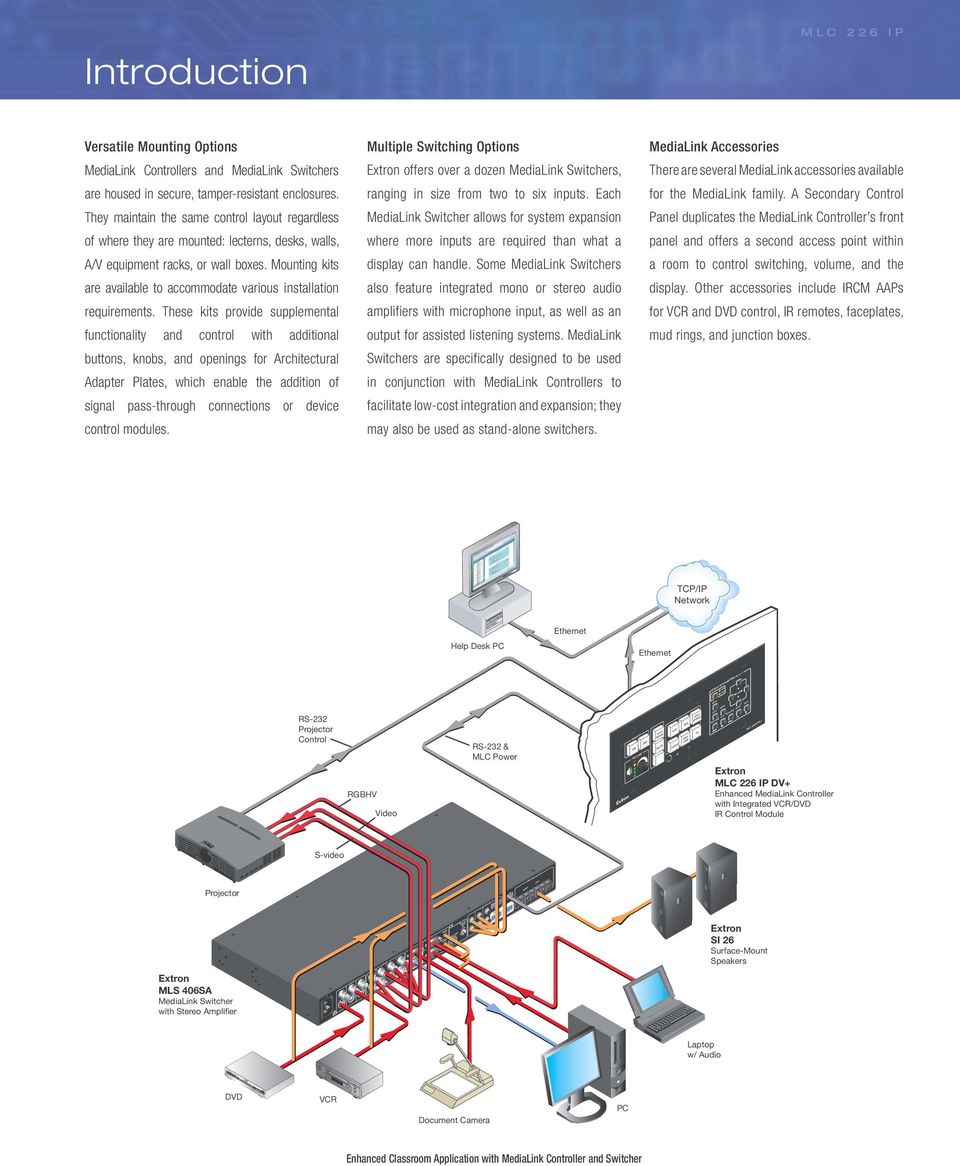
3 C Y R G B 4 header_main Introduction Versatile Mounting Options MediaLink Controllers and MediaLink Switchers are housed in secure, tamper-resistant enclosures. They maintain the same control layout regardless of where they are mounted: lecterns, desks, walls, A/V equipment racks, or wall boxes. Mounting kits are available to accommodate various installation requirements. These kits provide supplemental functionality and control with additional buttons, knobs, and openings for Architectural Adapter Plates, which enable the addition of signal pass-through connections or device control modules. Multiple Switching Options offers over a dozen MediaLink Switchers, ranging in size from two to six inputs. Each MediaLink Switcher allows for system expansion where more inputs are required than what a display can handle. Some MediaLink Switchers also feature integrated mono or stereo audio amplifiers with microphone input, as well as an output for assisted listening systems. MediaLink Switchers are specifically designed to be used in conjunction with MediaLink Controllers to facilitate low-cost integration and expansion; they may also be used as stand-alone switchers. MediaLink Accessories There are several MediaLink accessories available for the MediaLink family. A Secondary Control Panel duplicates the MediaLink Controller s front panel and offers a second access point within a room to control switching, volume, and the display. Other accessories include IRCM AAPs for VCR and DVD control, IR remotes, faceplates, mud rings, and junction boxes. TCP/IP Network Help Desk PC Ethernet Ethernet DVD & VCR CONTROL DVD VCR TUNER Tx RS-232 Projector Control RGBHV Video RS-232 & MLC Power DISPLAY ON OFF VOLUME AUTO IMAGE MUTE LAPTOP AUX VCR DVD VIDEO DOC PC CAM MENU TITLE PREV/REW ENTER PLAY NEXT/FWD PAUSE STOP DV+ DV+ Enhanced MediaLink Controller with Integrated VCR/DVD IR Control Module S-video Projector AUDIO INPUTS LINEOUT AMPLIFIED OUTPUT RIGHT LEFT MLS 406SA MediaLink Switcher with Stereo Amplifier INPUTS OUTPUTS VIDEO H V MONITOR OUT INPUTS AUDIO AUDIO LINE LEVEL MONO AUX/MIX ADJUST -42dB TO +24dB SI 26 Surface-Mount Speakers Laptop w/ Audio DVD VCR Document Camera PC Enhanced Classroom Application with MediaLink Controller and Switcher
4 MLC 226 Ip The MediaLink Controller is an enhanced control panel for controlling A/V equipment in any classroom or conference room. It standardizes the control interface for all systems, making display systems simple to use. Standardization also makes setup and maintenance easier to support. IP Link Ethernet Control The is equipped with s IP Link, an IP integration technology specifi cally engineered to meet the needs of professional A/V environments from small K-12 classrooms to large universities and businesses. The is fully supported by our Free GlobalViewer Webbased A/V resource management application and GlobalViewer Enterprise server-based A/V resource management software. Universal Projector Control The is equipped with a dedicated port for communicating with virtually any projector or display via IR or bidirectional RS-232. Hundreds of device drivers are available for download at no charge from our Web site at Configurable, Backlit Buttons With the, presenters with little or no training can walk into any multimedia classroom and operate the A/V system. The backlit buttons on all MediaLink Controllers are configurable to control input switching, power, and volume. Because the buttons illuminate, they are simple to see and operate in low-light environments. In addition, the backlit buttons can be custom-labeled. A sheet of preprinted text and icon-based labels is included with each MediaLink Controller to facilitate quick and trouble-free identification. Macro Capability The backlit source selection and room control buttons of the MediaLink Controllers can be configured to execute multiple actions through serial RS-232 and IR control ports. For instance, the touch of a single button can trigger commands to turn on a projector, select the projector s computer video input, and select a source input on a MediaLink Switcher. Room Control External devices such as lighting, screens, projector lifts, or other products can be controlled via internal relays found on the. The relays can be activated through the front panel, SCP 226 Secondary Control Panel, optional IR 402 infrared handheld infrared remote, serial RS-232, or free software. Inactivity Timer All MediaLink Controllers feature an adjustable timer that automatically shuts down the projector or display to conserve energy and projector lamp life. The timer is triggered when front panel operations remain dormant, and is based on an adjustable, user-defined period of up to 12 hours in 30-minute increments. Front Panel Security Lockout Every MediaLink Controller features Front Panel Security Lockout. When the lockout mode is engaged, the front panel of the MediaLink Controller becomes inoperable. No functions of the controller or IR remote can be activated, although it is still accessible via IR, serial RS-232, or IP Link. This feature safeguards the system from unauthorized access. Control Modules There is a wide selection of Control Modules available for customized remote control of external devices such as VCRs, DVD players, and audio tape decks, as well as screens, lighting, and basic audio adjustments. Integrating DVD and VCR Control Modules into a MediaLink system eliminates the clutter and confusion that comes with multiple handheld remote controls. Versatile Mounting Options Several mounting options are available for the. Additional mounting kits are available for local input expansion, adding transport controls, or to accommodate installation in a lectern, external wall box, equipment rack, or desk. shown with IRCM-DV+ DVD/VCR Control Module Control Modules eliminate the need for multiple remotes. Classroom Computer Lab Lecture Hall Free GlobalViewer works in conjunction with the to support and control A/V systems in a single building or across an entire campus.

5 MLC 226 Ip Room Control For controlling screens, lights, and other devices Faceplate Options Black, White, and RAL9010 White models are standard options. Brushed aluminum fi nish mounting kits are also available. Display ON/OFF Discrete, backlit buttons simplify system operations and eliminate the need for an external display remote Front Panel Security Lockout Four digit PIN prevents unauthorized system use Source Selection Select from any of the A/V devices connected to the switcher Volume Control Five level status LEDs provide visual representation of the display s or switcher s volume setting Backlit Buttons Illuminated buttons are easy to custom-label for identifi cation and are helpful for presenters in low-light environments Variety of Mounting Options Available Can be mounted virtually anywhere such as a lectern, A/V equipment rack, or on a wall Front Panel Inactivity Timer for Display Shut-Off Adjustable timer controls automatic shutdown to conserve energy, prevent plasma burn-in, or extend projector lamp life IR Learning and Control Allows for wireless control and customized control of source devices such as VCRs and DVD players Configuration Port Allows for confi guration of the via the front panel IP Intercom The RJ-45 IP Intercom port allows for simple connectivity to an IPI 101 AAP or IPI 104 AAP intercom station Easy to Configure Simple, one-time setup with easy-to-use, confi guration software Display Control Allows for bidirectional serial RS-232 display control Optional IR Control Modules Optional Control Modules enable operation and customized control of source devices such as VCRs or DVD players Back Panel IP Link Enables remote monitoring, control, and asset management Relays Six relays are available for control of room devices such as lighting, screen settings, and drapes IR/Serial Ports Three ports are available for IR or one-way serial control of external devices Switcher Control Provides control of an optional MediaLink Switcher via bidirectional serial RS-232

6 MediaLink Controller Models MediaLink Controllers are available in several different form factors: in a standard three-gang faceplate, with AAP openings, or a lectern faceplate. Each can be used to directly control a single projector in a simple presentation environment or in tandem with a MediaLink Switcher to expand the capabilities of an A/V system. Altogether, the Series is optimized for superior integration, easy control, and high performance. Enhanced MLC - MediaLink Controller with IP Link Unique Features Three-gang faceplate DV+ Enhanced MLC - MediaLink Controller with IP Link and Integrated DVD and VCR IR Control Unique Features Five-gang faceplate Dual-function DVD and VCR IR control AAP Enhanced MLC - MediaLink Controller with IP Link and AAP Opening Unique Features Five-gang faceplate Opening for up to four single space AAP - Architectural Adapter Plates AAPs sold separately

7 MediaLink Controller Models L Enhanced MLC - MediaLink Controller with IP Link and Lectern Faceplate Unique Features Low profile, 3.2" (8.1 cm) tall faceplate fits into a compact space on a lectern or desk Mounts in a rack or wall using an UCM RAAP Universal Controller Mounting Kit MLM 226 3GWP Three-Gang Wall Mounting Kit for the Unique Features Replacement faceplates to match room décor Available in Black & White, or Brushed Aluminum Secondary Control Panels Optional Secondary Control Panels provide a second access point within a room to control switching, projector, and audio volume by duplicating the front panel buttons of the MediaLink Controllers. Secondary Control Panel models are available in black, white, or RAL9010 white. SCP 226 Secondary Control Panel for Unique FeatureS Three-gang faceplate SCP 226 AAP Secondary Control Panel with AAP Opening for Unique FeatureS Five-gang faceplate Opening for up to four single space AAP - Architectural Adapter Plates AAPs sold separately SCP 226 L Secondary Control Panel with Lectern Faceplate for Unique FeatureS Low profile, 3.2" (8.1 cm) tall faceplate fits into a compact space on a lectern or desk Mounts in a rack or wall using an UCM RAAP Universal Controller Mounting Kit

8 IP Intercom The IP Intercom System is an easy-touse two-way intercom designed specifically to meet the needs of the education market. Using a school s existing local area network, the IP Intercom System makes it easy to deploy live help desk support for every classroom. IP Intercom stations and IP Intercom HelpDesk software do not require any upgrades to network protocols and are designed to work with any healthy network. It is easy to deploy IP Intercom in classrooms along with the MediaLink Controller using an IPI 100 Series IP Intercom station and IP Intercom HelpDesk software installed on a central office or help desk PC. The software can be used both to configure and manage IP Intercom system operations remotely. Why Use an IP Intercom System? New and emerging IT and presentation technologies enable instructors to help their students comprehend complex concepts and engage them in the learning process. A lack of sufficient tech support resources often creates obstacles to the use of advanced presentation technology. has developed some practical solutions to address this problem. Adding IP Intercom to an A/V system makes it easy to provide two-way, half-duplex voice communications between classrooms and the central office or instructional technology help desk. This allows instructors to quickly request assistance and describe the problem they are having. Using s GlobalViewer Web-based remote asset management software and IP Link enabled MediaLink Controllers, the help desk operator can check the status of A/V devices in the room, identify the problem, and even provide remote system control to rectify the issue. s IP Intercom provides effective internal communications and a much higher level of technical support, while saving valuable time, money, and resources. Uses an Existing Network Drop Only one IP address and network drop are needed for each A/V system because the IPI Intercom stations use the same network drop as the MLC 226 IP. By using the existing network drop, there is no additional expense for installing a second network cable and the number of switch ports is reduced, often resulting in a substantial cost savings. Simple Hardware Installation and Connectivity The IPI 100 Series IP Intercom Stations work together with the MediaLink Controller for operation. For installation flexibility, IPI 100 Series stations can be mounted in an AAP or in a separate AAP mounting frame and positioned anywhere in the classroom, up to 100 feet (30 meters) away from the MediaLink Controller. Once installed, the intercom station connects to the via an RJ-45 Intercom port located on the rear panel of the controller. This port provides power, control, and audio transport between the two products. Easy Set-up and Configuration The free IP Intercom HelpDesk software makes it easy to set up, manage, and monitor an IP Intercom system. This software lets you quickly configure system options and does not require any programming knowledge. Paging Capability The IP Intercom HelpDesk software also includes a convenient paging capability, allowing the help desk operator to page a single room or a group of rooms simultaneously. A line level audio output is provided for mixing into a local sound system in each room. Activity Call Logging Using the intuitive IP Intercom HelpDesk software, intercom calls and pages can be logged, and date/time-stamped on the help desk computer. Activity logs can be accessed and archived for record keeping and tracking purposes. Classroom #2 Classroom #3 IPI 201 AAP Stand-alone IP Intercom Station MLC 104 IP Plus AAP IPI 204 Stand-alone IP Intercom Station Help Desk PC with IP Intercom HelpDesk Software LAN Classroom #4 IPI 101 AAP IP Intercom Station Classroom #1 AAP IPI 101 AAP IP Intercom Station Mounted in an AAP 102 Classroom #5 IPI 104 AAP IP Intercom Station AAP

9 Ip Intercom Security The IP Intercom System enhances security operations by allowing audio monitoring for each room. Help desk operators or other authorized personnel can use the IP Intercom s audio monitoring capability to listen to the activity in the room, especially after hours, helping them determine if security personnel should be dispatched to investigate. Audio monitoring can be disabled, if necessary, to comply with local regulations and policies. With IP Intercom HelpDesk software you can: Communicate with a single room to provide technical support Identify IP Intercoms by location and IP address Create calling groups for broadcast messages Page a single room or group of rooms simultaneously Store and transmit pre-recorded voice announcements to one or more rooms Monitor audio in room for security Control access to the help desk with administrator and user passwords View detailed information from multiple intercom stations at the same time IP Intercom HelpDesk Software AAP with IPI 101 AAP Front Panel AAP with IPI 101 AAP Back Panel IPI 101 AAP One-Button IP Intercom Station for Use With Provides two-way, half-duplex voice communication over an IP network For use with IP Intercom-enabled MediaLink Controllers One backlit, confi gurable Push To Talk button for communicating with one recipient Integrated speaker and microphone Three-position switch to adjust speaker levels LED indicator shows when microphone is on Section 508 Compliant Available in black or white version IPI 104 AAP Four-Button IP Intercom Station for Use With Provides two-way, half-duplex voice communication over an IP network For use with IP Intercom-enabled MediaLink Controllers Four backlit, confi gurable Push To Talk buttons for communicating with four different recipients Integrated speaker and microphone Three-position switch to adjust speaker levels LED indicator shows when microphone is on Section 508 Compliant Available in black or white version

10 Graphical User Interface Logo Graphics Insert your full color school or department logo here Source Selection Buttons Buttons can be custom-labeled with user defined text Display Power On/Off Control your display power, plus up to two additional functions Custom Color Scheme Pick from a selection of colors to coordinate with school colors Audio Control Simple push button control of audio volume and mute functions Room Name The classroom description is automatically displayed from GlobalViewer configuration setup One of Two free templates that can be downloaded from the Web site Online Help Displays online reference screens that show how to use the presentation system and controller functions Graphical User Interface Option Technology enhanced classrooms provide instructors with new tools to teach and interact within the presentation environment. Many instructors prefer the flexibility of not only controlling the environment via an in-room controller mounted on a wall or lectern, but also from a control page on a computer monitor or wireless device. Now, you can economically deliver a graphically rich control environment in each and every room, along with the powerful management capability of a network-enabled MediaLink Controller. s graphical user interfaces, or GUIs, are functional, intuitive, and easy to use. The integrated IP Link Web server in the controller makes adding a high quality customized user interface easy and enables control from any networked PC or laptop using either a mouse or touch-monitor in the room. Your AV/IT facility support team will still be able to provide remote interactive support for all users from within the free GlobalViewer management environment. offers two ways to create a custom GUI for your installation. You can create your own using our free templates or let software developers do the work for you with our economical GUI Customization Service. Download Free Templates and Do It Yourself Our free user interface software development kit includes modifiable templates that can be downloaded from the Web site at The kit includes Adobe Photoshop template files and code samples that you can use to create and deploy your own custom GUI. A detailed getting started guide is also included with instructions on modifying the template files and code, how basic communication is handled by the system, and loading and testing the base templates. GUI Customization Service: Does The Work For You Ordering a custom GUI for your organization is as easy as contacting an Customer Support Representative and describing what you need. For a small fee, will take care of all the details. Our software development team will create a mockup of your customized GUI. When you are completely satisfied with the design mockup, software programmers will develop your custom GUI according to your exact specifications. The files will be fully tested using the same model of controller used in your A/V system. When the testing is done, an Application Engineer will send you your GUI files and work with you to install the GUI on your system.

11 PWR ON: ON OFF DISPLAY ON OFF AUTO IMAGE VOLUME MUTE VCR LAPTOP DVD AUX VIDEO PC DVD & VCR CONTROL Tx DV+ Free Global Confi gurator Software MedIaLInK ProdUCtS are SIMPLe and easy to ConFIgUre no PrograMMIng KnoWLedge IS required s free Global Configurator puts all of the most commonly used system monitoring and control options at your fingertips. One of the costliest aspects of building an A/V resource management system, in terms of human resources and time, is programming. A/V system programming can be a complex task that requires the skills of an experienced programmer. s configuration approach offers tremendous benefits over traditional system programming methods, particularly for those who have medium-to-large installations to connect, monitor, and maintain. Configuring MediaLink products is as simple as selecting choices from intuitive, drop-down menus instead of writing, compiling, and debugging complicated computer source code. Should system changes, such as a new VCR or DVD player, need to be made in the future, an experienced programmer is not required. Nearly Anyone Can Configure A System Non-programmers can use our free Global Confi gurator software to build a complete A/V asset management and monitoring system, freeing up programmers for other projects. System Changes Take Less Time Confi guration means that initial system setup time is reduced, and there s no need to delay making changes because you are waiting for a hard-to-fi nd programming resource. Projector Manufacturers Manual DV+ PC Projector VCR's Remote offers hundreds of drivers from many major projector and display manufacturers -provided software allows for customized projector control IR Learning for VCR and DVD control Free Projector Drivers creates and administers a wide selection of commonly used projector control drivers. These IR and serial RS-232 drivers allow MediaLink Controllers to communicate with a display device. They enable control of basic projector functions such as power, input selection, and volume adjustment. Go to the Web site at to download drivers for the latest and most popular projectors. Custom Serial RS-232 Control In environments where customizable projector control is needed, integrators can easily enter in their own RS-232 commands. RS-232 commands can be assigned to any button using the provided confi guration software. The MediaLink Controllers will work with virtually any projector. IR Learning Serial RS-232 is the preferred method of control; however, many ultra portable projectors can only support IR control. Various MediaLink Controller models can learn IR commands from virtually any IR controllable device. IR learning can also be used in conjunction with optional IRCM Control Modules that control source devices such as VCRs, DVD players, and audio tape decks.

12 Free GlobalViewer Software Free GlobalViewer, a Web-based A/V resource management application for the MediaLink Controller, is a powerful, flexible way to manage, monitor, and control these and other IP Link products and the devices connected to them over a standard TCP/IP network. Together, GlobalViewer and MediaLink Controllers with IP Link are ideal for use by schools and universities, corporate offices, government facilities, and even multi-building presentation environments. The is equipped with s IP Link, an IP integration technology specifically engineered to meet the needs of A/V presentation environments. Free GlobalViewer is designed to work with MediaLink and other products that include IP Link technology. It facilitates key asset management functions and is scalable from small to large scale systems. Free GlobalViewer requires no per-seat charges or license fees. Control Screen Remotely control basic functions such as power, volume, and input selection Monitor Screen Remotely monitor power and projector lamp hours Schedule Screen Conveniently schedule projector shutdown or alerts for lamp replacement, fi lter cleaning, and other maintenance Sort Options View devices by location or device type Web-Based Runs in a standard Microsoft Internet Explorer Web browser Location Tree View Organize devices on eight user-confi gurable levels, e.g., Building/Floor/Room Custom Button Text Button label text can be changed to suit system requirements Key FeatUreS Available for free from Global Configurator can be downloaded from the Web site free of charge. There are no per seat charges and no licensing fees. No programming skills required Menu-driven wizards guide users through the entire process of organizing system resources, building a network configuration, and uploading configuration files to the system. Integrated IP Link device management capabilities Provides full management and control of IP Link devices within Global Configurator, including setting IP properties, passwords, mail server settings, etc. GlobalViewer host hierarchy for multiple levels of administration Allows the creation of hierarchal tree views, in which each administrator can access only a subset of an organization s IP Link devices, while the global administrator can access all devices. Device configuration copy and paste Enables replication of an existing IP Link device configuration to one or more similar IP Link devices. Makes it easy to duplicate schedule and monitor settings to multiple devices. Printable wiring diagrams Gives a user the ability to print a detailed wiring diagram of each configured IP Link device and its connected sources in Microsoft Word Format.

13 Free GlobalViewer Software Remote Technical Support Technicians can troubleshoot systems remotely because Free GlobalViewer provides real-time status of connected devices. Information such as connection status, power state, or current input selection is displayed in a central location. For many connected devices, technicians can toggle power On/Off, switch sources, control volume and more, without leaving their office. Many common problems can be resolved without a trip to where the equipment is located. Key Benefits: Remote device control and access to device status enables remote troubleshooting Users receive a quicker response and faster problem resolution Centralized technical support enables better response with fewer support staff Proactive Maintenance Free GlobalViewer can store information about connected devices such as serial numbers, owner identification, maintenance history, usage data, and installed firmware versions. This centralized data can be used to reduce costs and guide future purchasing decisions. For instance, a projector can be polled routinely to track lamp usage and total life time. When lamp usage reaches a predetermined number of hours, the IP Link enabled device can send a notification via . Key Benefits: Maintenance and usage data can be used to guide purchasing decisions Service times can be proactively scheduled for optimum use of resources Improved equipment maintenance results in increased system uptime Event Scheduling Free GlobalViewer uses the real-time clock and calendar in IP Link-enabled devices to maximum value. User-defined tasks are easy to configure and schedule with Free GlobalViewer and don t require high-level programming skills. For instance, an administrator may want to turn off all projectors every Friday at close of business. The administrator can schedule the system to turn off all projectors at a specified time, and raise all projection screens that were left down. Key Benefits: Presentation rooms can be automatically prepared for use prior to the scheduled start time of classes or meetings Devices can be powered off automatically, reducing lamp and power usage Devices can be confi gured to respond on schedule or to predefi ned trigger events Theft Alerts IP Link enabled devices like the are always on and routinely poll their attached devices for status information. If any serially controlled device such as a projector or document camera is physically disconnected from the network, the monitoring its status will know immediately. In such an event, Free GlobalViewer can be configured to send an message notifying security personnel of the possible theft. For immediate response, s can be sent to multiple addresses, including cell phones and wireless PDAs. Key Benefits: Monitoring is automatic; 24 hours a day, 7 days a week alerts can be sent to multiple addresses simultaneously Reduction in losses from theft and vandalism saves money globalviewer enterprise GlobalViewer Enterprise server-based software is the next step up for managing larger A/V installations. It provides an easy upgrade path for existing users of Free GlobalViewer using configuration wizards, not programming. Compatible with most Web browsers, GlobalViewer Enterprise provides enhanced help desk functionality as well as: Enterprise-Wide Scheduling and Monitoring With GlobalViewer Enterprise, it s a snap to configure global schedules and conditional monitors that are based on location and/or device type. Step-by-step menus simplify the creation of a broad range of scheduled events and conditional monitors. Data Logging and Reporting Capabilities GlobalViewer Enterprise includes a SQL-based data repository for logging device and room data. Data is gathered 24/7 and time-stamped for use in preparing valuable management reports covering network connections, device usage, and A/V equipment inventory. Multiple User Roles and Permissions Controlling access for multiple users is made simple through the creation of customized user roles. Third-Party Scheduling System Integration GlobalViewer Enterprise supports seamless integration with Microsoft Outlook via Microsoft Exchange Server or several of the other popular campus scheduling applications, allowing instant access to room availability and the power to schedule meetings, enhance room usage reports, and even override scheduled display shut-offs automatically.

14 INPUTS Y C R OUTPUTS G VIDEO B INPUTS COM 70V XFMR DIRECT Application Diagram MediaLink System with Six-Input Switcher and Low-Profile Ceiling Speakers SI 3CT LP Full-Range Ceiling Speakers - 1 Pair SI 3CT LP Full-Range Ceiling Speakers - 1 Pair Option PCM 240 Projector Drop Ceiling Mount Option PMP Projector Mount Pole Option S-video Video Projector RS-232 Projector Control UPB 25 Universal Projector Mounting Bracket Option RGBHV Screen Control TCP/IP Network AAP MLS 406MA MediaLink Switcher DV+ MediaLink Controller with Integrated VCR/DVD IR Control Module VCR/DVD IR Control H V MONITOR OUT WPB 108 Composite Video & Audio Wallplate VIDEO WPB 108 AUDIO AUDIO AUX/MIX ADJUST - 42dB LINE LEVEL MONO TO + 24dB AUDIO INPUTS L R LINEOUT PREAMP RS-232 MLC/IR AMPLIFIED OUTPUT 20 WATTS MONO 4/8 ohm 100V CLASS 2 WIRING IR VCR IR DVD IR Emitters (2) 70V Amp Out From MLC 226 Controller High Resolution Document Camera Podium PC AUDIO COMPUTER WPB 103 RS-232 Switcher Control WPB 103 VGA & Audio Wallplate IR to VCR & DVD Audio Laptop w/ Audio

15 VOLUME IMAGE MUTE LAPTOP AUX VIDEO DVD VCR ENTER TV/VCR Tx Application Diagram MediaLink System with Six-Input Switcher and Wall-Mounted Speakers PCM 240 Projector Drop Ceiling Mount Option SI 26 8 ohm Surface Mount Speakers (2) PMP Projector Mount Pole Option UPB 25 Universal Projector Mounting Bracket Option Video Projector Screen Control S-video RGBHV RS-232 Projector Control DISPLAY ON OFF AUTO TCP/IP Network VCR DVD DVD & VCR CONTROL TITLE MENU PC DV+ MediaLink Controller with Integrated VCR/DVD IR Control Module PREV/REW PLAY NEXT/FWD PAUSE STOP AAP MLS 506SA MediaLink Switcher 8 ohm Amp Out WPB 108 Composite Video & Audio Wallplate VIDEO WPB 108 VCR IR IR DVD IR Emitters (2) High Resolution Document Camera From MLC 226 Controller Podium PC WPB 103 VGA & Audio Wallplate RS-232 Switcher Control IR to VCR & DVD Laptop w/ Audio Audio

16 Specifications IP Intercom Connection type (IPIMLC)...RJ-45 jack for CAT 5, CAT 5e, or CAT 6 cable Audio Frequency response...20 Hz to 3.3 khz, ±1 db Audio processing Audio format...pcm, µ-law companded Audio output Number/signal type...1 mono (for use with an optional IP Intercom) Line level output dbv (316 mvrms), unbalanced (via 3.5 mm captive screw connector, 2 pole) Communication Transport bandwidth for IPI control and audio, half duplex...80 kbps (0.08% of 100Base-T) Ethernet protocol...tcp/ip (control), UDP (audio) Control host ports Serial host port...2 bidirectional RS-232: 1 rear panel 9-pin female D connector (shared with digital input), 1 front panel 2.5 mm mini stereo jack Baud rate and protocol , 8 data bits, 1 stop bit, no parity Serial control pin configurations...9-pin female D connector: 2 = TX, 3 = RX, 5 = GND Mini stereo jack: tip = TX, ring = RX, sleeve = GND Ethernet host port...1 RJ-45 female Ethernet data rate (for network communication)...10/100base-t, half/full duplex with autodetect Ethernet protocol...arp, DHCP, ICMP (ping), TCP/IP, Telnet, HTTP, SMTP Ethernet default settings...link speed and duplex level = autodetected IP address = Subnet mask = Default gateway = DHCP = off Web server...up to 200 simultaneous sessions 7.25 MB nonvolatile user memory Secondary control panel (SCP)...(1) 3.5 mm 5-pole direct insertion captive screw connector (shared with control module and IR Link port) IR remote control...ir 402 (optional) Front panel: 30' maximum, 40 degrees off axis Rear panel: 38 khz, hardwired, modulated Program control...'s configuration program for Windows 's Simple Instruction Set (SIS ) Microsoft Internet Explorer, Telnet IR learning frequencies...30 khz to 62 khz IR learning distance...2" (5.1 cm) to 12" (30.5 cm) from the front panel Control relay Number/type...6 momentary or latching (configurable via software) Contact rating...24 V, 1 A Control serial ports Display control port...(1) 3.5 mm direct insertion captive screw connector, 3 pole, programmable for bidirectional RS-232 control (±5 V) or TTL level (0 to 5 V) infrared control up to 1 MHz Switcher control port...(1) 3.5 mm direct insertion captive screw connector, 3 pole, for bidirectional RS-232 control (±5 V) Baud rate and protocol (RS-232) to 300 baud (9600 baud = default); 8 (default) or 7 data bits; 1(default) or 2 stop bits; no parity (default), or even or odd parity Control IR/serial ports IR/serial control ports...(3) 3.5 mm direct insertion captive screw connectors, 2 pole Programmable: unidirectional RS-232 (±5 V) control, or TTL level (0 to 5 V) infrared control up to 1 MHz Baud rate and protocol to 300 baud (9600 baud = default) ; 8 (default) or 7 data bits; 1(default) or 2 stop bits; no parity (default), or even or odd parity Digital I/O control Number/type...1 digital input/output (configurable), 1 digital input Digital inputs Input voltage range VDC Input impedance...28k ohms Programmable pullup...2k ohms to +5 VDC Threshold low to high...>2.8 VDC Threshold high to low...<2.0vdc Digital output ma sink from 24 VDC, maximum General External power supply VAC to 240 VAC, 50/60 Hz, external; to 12 VDC, 1 A, regulated Power input requirements DV VDC, A (includes and IRCM-DV+) All other models...12 VDC, A (0.515 A with 1 IRCM-DV+ connected) NOTE: An MLC 226 Series controller must be powered by its own power supply. It cannot be powered by an MLS switcher. Temperature/humidity...Storage: -40 to +158 F (-40 to +70 C) / 10% to 90%, noncondensing Operating: +32 to +122 F (0 to +50 C) / 10% to 90%, noncondensing Rack mount DV+...No, but wall- and furniture-mountable All other models...yes, with optional rack mounting kits, and also wall- and furniture-mountable with optional mounting kits Enclosure dimensions MLC 226 faceplate...4.5" H x 6.4" W x 0.1" D (11.4 cm H x 16.3 cm W x 0.3 cm D) (3 gang) MLC 226 AAP, DV+ faceplates...4.5" H x 10.0" W x 0.1" D (11.4 cm H x 25.4 cm W x 0.3 cm D) (5 gang) MLC 226 L faceplate " H x 6.5" W x 0.1" D (8.0 cm H x 16.5 cm W x 0.3 cm D) Device DV " H x 5.3" W x 2.0" D (7.0 cm H x 13.5 cm W x 5.9 cm D) and 2.7" H x 2.6" W x 0.9" D (6.9 cm H x 6.6 cm W x 2.3 cm D) (Depth excludes knob and buttons. Fits some 5 gang boxes. Allow at least 2.1" (5.3 cm) depth in the wall or furniture.) All other models " H x 5.3" W x 2.0" D (7.0 cm H x 13.5 cm W x 5.9 cm D) (Depth excludes knob and buttons. Fits some 3 gang boxes) Product weight DV lbs (1.0 kg) All other models lbs (0.9 kg) Shipping weight...6 lbs (3 kg) Vibration...ISTA 1A in carton (International Safe Transit Association) Regulatory compliance Safety... CE, C-tick, CUL, UL EMI/EMC...CE, C-tick, FCC Class A, VCCI, ICES Accessibility...Complies with the appropriate requirements of Section 508 of the Rehabilitation Act (29U.S.C.794d). MTBF... 30,000 hours Warranty...3 years parts and labor NOTE: All nominal levels are at ±10%. Model Version Description Part Number Controller w/three-gang Faceplate X AAP Controller w/aap Opening X DV+ Controller w/integrated DVD & VCR Control L Controller w/lectern Faceplate X Included Accessories / DV+ / AAP / L 12V/1Amp power supply Button label text Button label icon Specifications are subject to change without notice. USA - West Headquarters Inside USA / Canada Only FAX USA - East Inside USA / Canada Only FAX Europe Inside Europe Only FAX 2009 Electronics. All rights reserved. All trademarks mentioned are the property of their respective owners. Middle East FAX Asia Inside Asia Only FAX Japan FAX China Inside China Only FAX REV. B

IP Intercom System. Classroom intercom system for two-way voice communications, help desk support, and security/status monitoring.
 MediaLink IP Intercom System Two-way voice communications over an IP network Integrated microphone, speaker, and call buttons Flexible paging capabilities Classroom intercom system for two-way voice communications,
IP Intercom System www.extron.com
 MediaLink IP Intercom System Two-way voice communications over an IP network Integrated microphone, speaker, and call buttons Flexible paging capabilities Classroom intercom system for two-way voice communications,
How To Control A Projector With A Microlink Controller
 MediaLink basic mlc - Medialink Controller Economical control for classroom A / V systems Universal display control Discrete ON and OFF display power controls Configurable buttons Backlit, easy-to-label
Free GlobalViewer FREE WEB-BASED A/V RESOURCE MANAGEMENT AND REMOTE CONTROL APPLICATION IP LINK. n Created and uploaded using Global Configurator
 IP LINK Free GlobalViewer FREE WEB-BASED A/V RESOURCE MANAGEMENT AND REMOTE CONTROL APPLICATION n Created and uploaded using Global Configurator n Remotely monitor and control TouchLink, MediaLink, and
MLC 226 IP. Easy-to use, enhanced remote control panel for simplified A / V system control MEDIALINK CONTROLLER WITH IP LINK.
 MediaLink MLC 226 IP MEDIALINK CONTOLLE WITH IP LINK Easy-to use, enhanced remote control panel for simplified A / V system control Universal projector control Integrated IP Link provides: - Proactive
IP Intercom Best Installation Practices. Abstract... 1. Overview: Designed for Simplicity...2. IP Intercom Hardware Stations...2
 IP Intercom Best Installation Practices Table of Contents Abstract... 1 Overview: Designed for Simplicity...2 IP Intercom Hardware Stations...2 IP Intercom HelpDesk Software...3 System Requirements...5
GlobalViewer Enterprise
 IP Link GlobalViewer Enterprise SERVER-BASED RESOURCE MANAGEMENT SOFTWARE Manage Any Size Installation From 5 to 5,000+ Rooms Around the World No programming knowledge required Enterprise-wide room control,
GlobalViewer Enterprise
 IP LINK GlobalViewer Enterprise SERVER-BASED RESOURCE MANAGEMENT SOFTWARE Manage Any Size Installation From 5 to 15,000+ Rooms Around the World No programming knowledge required Enterprise-wide room control,
Powerful Control Without Programming
 TouchLink configurable TouchPanel control systems Powerful Control Without Programming Configurable touchpanel control systems that are quick and easy to deploy and support Three TouchLink Panel models
TECH NOTES. Minimum MLC 226 IP MediaLink Controller Firmware required Applies to
 Application Name: IP Intercom HelpDesk Software Current Version: 2.4.3 The following notes provide the revision history and a list of known software issues in the current release. For more information
IPI 204, and IPI 204 AAP, MLC 226 IP series TECH NOTES
 Application Name: IP Intercom HelpDesk Software Current Version: 2.3 The following notes provide the revision history and a list of known software issues in the current release. For more information please
One Room One Cable Architectural Specification
 One Room One Cable Architectural Specification ORC-1: One Room One Cable Kit: The ORC-1 One Room One Cable Kit shall consist of one (1) DXW-2 Wall Plate switcher, one (1) DXE-CAT-RX3-A HDBaseT Receiver
JNIOR. Overview. Get Connected. Get Results. JNIOR Model 310. JNIOR Model 312. JNIOR Model 314. JNIOR Model 410
 The INTEG is an Ethernet I/O (digital, analog) device that monitors and controls a small set of process signals. functions as both basic I/O for integration with another application or system AND as a
B R O W N U N I V E R S I T Y
 B R O W N U N I V E R S I T Y Barus & Holley Auditorium Audiovisual System Reference Manual Submitted by: HB Communications Inc. 60 Dodge Ave. North Haven, Connecticut 06473-0689 (203) 234-9246 (800) 922-2776
Kramer Electronics, Ltd. Site-CTRL and Web Access Online User Guide (Documentation Revision 2)
 Kramer Electronics, Ltd. Site-CTRL and Web Access Online User Guide (Documentation Revision 2) Software Version 1.9. 2902 To check that you have the latest version, go to the DOWNLOADS section of our Web
Setting Up the Cisco Unified IP Phone
 CHAPTER 3 This chapter includes the following topics, which help you install the Cisco Unified IP Phone on an IP telephony network: Before You Begin, page 3-1 Understanding the Cisco Unified IP Phone 7962G
HydraPort 12 Module Connection Ports HPX-1200SL, Brushed Aluminum (FG560-03-SL) HPX-1200BL, Black Anodized (FG560-03-BL)
 DATA SHEET HydraPort 12 Module Connection Ports HPX-1200SL, Brushed Aluminum (FG560-03-SL) HPX-1200BL, Black Anodized (FG560-03-BL) Overview With space for up to 12 modules, the HPX-1200 allows you to
IP-Based Communications Solutions
 IP-Based Communications Solutions IP-Based Communications Solutions Effective Communications Facility-Wide and Campus-Wide Leverage your network and lower your system costs Scalable, cost-effective and
Network Projector Operation Guide
 Network Projector Operation Guide Table of contents Preparation...3 Connecting the projector with your computer...3 Wired connection... 3 Wireless connection (for selective models)... 4 QPresenter...7
Networking and Technology Tool Guide
 Networking and Technology Tool Guide For more information on Epson s environmental programs, go to eco.epson.com Epson America, Inc. Epson Canada, Ltd. www.epson.com 3840 Kilroy Airport Way, Long Beach,
8-Port HDMI Switch USER MANUAL VS0801H
 8-Port HDMI Switch USER MANUAL VS0801H FCC Information This equipment has been tested and found to comply with the limits for a Class B digital device, pursuant to Part 15 of the FCC Rules. These limits
ShareLink 200 Setup Guide
 ShareLink 00 Setup Guide This guide provides instructions for installing and connecting the Extron ShareLink 00. The ShareLink USB 00 Wireless Collaboration Gateway allows anyone to present content from
Deliver instant switching in four different modes for data center, control room, pooling, and similar applications.
 ServSwitch DKM and ServSwitch DKM FX KVM Matrix Switches Deliver instant switching in four different modes for data center, control room, pooling, and similar applications. BLACK BOX and DKM FX Features
ENET-710. ENET-710 - Ethernet Module ENET-710 JAN / 06 FOUNDATION
 ENET-710 ENET-710 - Ethernet Module JAN / 06 ENET-710 FOUNDATION E N E T 7 1 0 ME smar www.smar.com Specifications and information are subject to change without notice. Up-to-date address information is
SMART Board 685ix interactive whiteboard system Model 685ix
 Specifications SMART Board 685ix interactive whiteboard system Model 685ix Physical specifications SMART Board 685ix interactive whiteboard 77 1/2" W 49 1/2" H 5 1/8" D Size (196.9 cm 125.7 cm 13 cm) Active
How To Build A Large Room For A Conference
 Polycom Solutions Architecture Typical Applications for Vortex Products with Other Installed A/V Equipment Application Note Polycom Installed Voice Business April 2005 Polycom Solutions Architecture This
Multi-Profile CMOS Infrared Network Camera
 Multi-Profile CMOS Infrared Network Camera Quick Start Guide About multi-profile Multi-profile stands for simultaneously video stream. The Network Camera and Video Server can generate MPEG4 and MJPEG streaming
Unpacking the Product. Rack Installation. Then, use the screws provided with the equipment rack to mount the firewall in the rack.
 About This Guide This guide contains step-by-step instructions for setting up the D-Link DFL-260E/860E Firewall. Please note that the model you have purchased may appear slightly different from those shown
TCP/IP MODULE CA-ETHR-A INSTALLATION MANUAL
 TCP/IP MODULE CA-ETHR-A INSTALLATION MANUAL w w w. c d v g r o u p. c o m CA-ETHR-A: TCP/IP Module Installation Manual Page Table of Contents Introduction...5 Hardware Components... 6 Technical Specifications...
Technical Specifications
 Technical Specifications Polycom Open Telepresence Experience OTX 300 VIDEO & AUDIO TECHNOLOGY Solution Includes: Polycom HDX video codecs supporting 1080p at 30fps or 720p at 60fps Polycom Digital Ceiling
Network Management Card. User Manual
 User Manual 1 Contents Contents 2 Chapter 1 Overview 3 1.1 NMC package contents 4 1.2 NMC CD Resources 4 1.3 Features 4 1.4 NMC Applications 5 Chapter 2 NMC parameters setting via serial COM port 6 2.1
MANUAL PC1000R [email protected]
 MANUAL PC1000R [email protected] Features The APart PC1000R is a professional multisource CD/USB/SD card music player, equipped with balanced and unbalanced analog outputs, coaxial and optical digital
dedicated KVM switch and rackmount screen technology User Manual IP-S101 Combo KVM Extender Designed and manufactured by Austin Hughes
 dedicated KVM switch and rackmount screen technology User Manual IP-S101 Combo KVM Extender Designed and manufactured by Austin Hughes 751 Legal Information First English printing, October 2002 Information
www.vicon-security.com
 Data/Spec Sheet 16-Channel Hybrid Digital Video Recorder Configured with ViconNet Video Management Software (VMS) Scalable from one to hundreds of recorders Support for HD video and Megapixel cameras Real-time
IN1606. Complete Video and Audio Switching and Processing for Professional Environments SIX INPUT HDCP-COMPLIANT SCALING PRESENTATION SWITCHER
 SCALERS AND SIGNAL PROCESSORS IN606 SIX INPUT HDCP-COMPLIANT SCALING PRESENTATION SWITCHER Complete Video and Switching and Processing for Professional Environments Integrates HDMI, HDTV, RGB, and video
Delivers instant switching in four different modes for data center, control room, pooling and similar applications.
 ServSwitch DKM & ServSwitch DKM FX Delivers instant switching in four different modes for data center, control room, pooling and similar applications.» Scalable DVI KVM Matrix Switch supports up to 288
SIP Proxy Server. Administrator Installation and Configuration Guide. V2.31b. 09SIPXM.SY2.31b.EN3
 SIP Proxy Server Administrator Installation and Configuration Guide V2.31b 09SIPXM.SY2.31b.EN3 DSG, DSG logo, InterPBX, InterServer, Blaze Series, VG5000, VG7000, IP590, IP580, IP500, IP510, InterConsole,
1 Serial RS232 to Ethernet Adapter Installation Guide
 Installation Guide 10/100 Mbps LED (amber color ) Link/Activity LED (green color ) 1. Introduction Thank you for purchasing this 1-port RS232 to Ethernet Adapter (hereinafter referred to as Adapter ).
BIT COMMANDER. Serial RS232 / RS485 to Ethernet Converter
 BIT COMMANDER Serial RS232 / RS485 to Ethernet Converter (Part US2000A) Copyrights U.S. Converters 1 Contents Overview and Features... 3 Functions..5 TCP Server Mode... 5 Httpd Client Mode.5 TCP Auto mode....6
ENGINEERING SPECIFICATIONS SENSAPHONE IMS-4000
 ENGINEERING SPECIFICATIONS SENSAPHONE IMS-4000 I. General A. Summary The monitoring system shall be an expandable, self-contained microprocessor-controlled IMS-4000 Host unit (hereafter referred to as
AC-115 Compact Networked Single Door Controller. Installation and User Manual
 AC-115 Compact Networked Single Controller Installation and User Manual December 2007 Table of Contents Table of Contents 1. Introduction...5 1.1 Key Features... 6 1.2 Technical Specifications... 7 2.
Honeywell Internet Connection Module
 Honeywell Internet Connection Module Setup Guide Version 1.0 - Page 1 of 18 - ICM Setup Guide Technical Support Setup - Guide Table of Contents Introduction... 3 Network Setup and Configuration... 4 Setting
GlobalViewer Enterprise
 CONTROL SYSTEM SOFTWARE GlobalViewer Enterprise SERVER-BASED AV RESOURCE MANAGEMENT SOFTWARE Manage Thousands of AV Systems from Your Help Desk or Mobile Device No programming knowledge required Enterprise-wide
T3 Mux M13 Multiplexer
 T3 Mux M13 Multiplexer User Manual [Type the abstract of the document here. The abstract is typically a short summary of the contents of the document. Type the abstract of the document here. The abstract
Link Link sys E3000 sys RE1000
 User Guide High Performance Extender Wireless-N Router Linksys Linksys RE1000 E3000Wireless-N Table of Contents Contents Chapter 1: Product Overview 1 Front 1 Top 1 Bottom 1 Back 2 Chapter 2: Advanced
DATA/SPEC SHEET VIRTUAL MATRIX DISPLAY CONTROLLER VERSION 8
 DATA/SPEC SHEET VIRTUAL MATRIX DISPLAY CONTROLLER VERSION 8 V920 - PRODUCT DESCRIPTION Virtual Matrix Display Controller The Virtual Matrix Display Controller (VMDC) is a selfcontained, matrix control
HDMI Matrix Switch USER MANUAL VM0404H
 HDMI Matrix Switch USER MANUAL VM0404H FCC Information This equipment has been tested and found to comply with the limits for a Class B digital device, pursuant to Part 15 of the FCC Rules. These limits
PCS300 Universal IP Reporting Module V1.0
 PCS300 Universal IP Reporting Module V1.0 Reference and Installation Manual Patents: One or more of the following US patents may apply: 7046142, 6215399, 6111256, 6104319, 5920259, 5886632, 5721542, 5287111,
Acano solution. Acano Solution Installation Guide. Acano. January 2014 76-1002-03-B
 Acano solution Acano Solution Installation Guide Acano January 2014 76-1002-03-B Contents Contents 1 Introduction... 3 1.1 Before You Start... 3 1.1.1 Safety information... 3 1.1.2 You will need the following
AXIS 262+ Network Video Recorder
 31433/EN/R4/0803 Complete Network Video Recording Solution Complete Network Video Recording Solution Picture this: A simple and reliable, plug-and-play video surveillance system for hotels, shops, banks,
H.264 Internet Video Server
 Key Features Video / Audio H.264 / MPEG-4 and M-JPEG video compression simultaneously Simultaneous multi-stream support Up to 30/25 (NTSC/PAL) fps for all profiles 3DNR (3D Noise Reduction) to improve
SMART Board 8070i-SMP and 8070i
 SMART Board 8070i-SMP and 8070i Interactive flat panel Installation guide Product registration If you register your SMART product, we ll notify you of new features and software upgrades. Register online
Cisco Model EPC2100 EuroDOCSIS 2.0 Cable Modem
 Cisco Model EPC2100 EuroDOCSIS 2.0 Cable Modem The Cisco Model EPC2100 EuroDOCSIS 2.0 Cable Modem provides EuroDOCSIS broadband network operators with a cost-effective solution for delivering standardsbased,
Media Technology Services Classroom Equipment Guide
 Media Technology Services Classroom Equipment Guide 412 268-8855 www.cmu.edu/computing/mediatech [email protected] JULY 2010 Large Classroom Media Technology Our Services Media Technology Services (MediaTech),
Classroom Setup... 2 PC... 2 Document Camera... 3 DVD... 4 Auxiliary... 5. Lecture Capture Setup... 6 Pause and Resume... 6 Considerations...
 Classroom Setup... 2 PC... 2 Document Camera... 3 DVD... 4 Auxiliary... 5 Lecture Capture Setup... 6 Pause and Resume... 6 Considerations... 6 Video Conferencing Setup... 7 Camera Control... 8 Preview
Wireless PTZ Cloud Camera TV-IP851WC (v1.0r)
 (v1.0r) TRENDnet s Wireless PTZ Cloud Camera, model, takes the work out of viewing video over the internet. Previously to view video remotely, users needed to perform many complicated and time consuming
NETWORK ENABLED EQUIPMENT MONITOR
 NETWORK ENABLED EQUIPMENT MONITOR Remotely Monitor Sensors over the Internet Connect Sensors to the Web to Remotely Monitor Equipment, Processes or Other Applications A Complete, Easy to Deploy, Stand-Alone
SecureLinx Spider Duo Quick Start Guide
 SecureLinx Spider Duo Quick Start Guide SecureLinx Spider Duo Quick Start Guide SecureLinx Spider Duo QUICK START GUIDE CONTENTS Overview... 2 What s In The Box... 3 Installation and Network Settings...
Challenging Communication Boundaries. Dispatch Solutions for VoIP Networks
 Challenging Communication Boundaries Dispatch Solutions for VoIP Networks >>> Dispatch Solutions for VoIP Networks THE POWER OF VOIP & SIP TECHNOLOGIES Voice over IP (VoIP) technology is expanding the
ModBus Server - KNX. Gateway for integration of KNX equipment into Modbus (RTU and TCP) control systems.
 IntesisBox ModBus Server - KNX Gateway for integration of KNX equipment into Modbus (RTU and TCP) control systems. Integrate KNX based lighting control into your SCADA, BMS, PLC "talking" Modbus. Master
USER MANUAL. 914 Power Amplifier MODEL: P/N: 2900-300280 Rev 1
 KRAMER ELECTRONICS LTD. USER MANUAL MODEL: 914 Power Amplifier P/N: 2900-300280 Rev 1 Contents 1 Introduction 1 2 Getting Started 2 2.1 Achieving the Best Performance 2 3 Overview 3 3.1 Energy Star 3
Setting Up the Cisco Unified IP Phones
 CHAPTER 3 This chapter includes the following topics, which help you install the Cisco Unified IP Phones on an IP telephony network: Before You Begin, page 3-1 Understanding the Cisco Unified IP Phone
Ultra Thin Client TC-401 TC-402. Users s Guide
 Ultra Thin Client TC-401 TC-402 Users s Guide CONTENT 1. OVERVIEW... 3 1.1 HARDWARE SPECIFICATION... 3 1.2 SOFTWARE OVERVIEW... 4 1.3 HARDWARE OVERVIEW...5 1.4 NETWORK CONNECTION... 7 2. INSTALLING THE
Ethernet. Customer Provided Equipment Configuring the Ethernet port.
 Installing the RDSP-3000A-NIST Master Clock. Ethernet Connect the RJ-45 connector to a TCP/IP network. Equipment The following equipment comes with the clock system: RDSP-3000A-NIST Master Clock Module.
Media Technology Services Classroom Equipment Guide
 Media Technology Services Classroom Equipment Guide 412 268-8855 www.cmu.edu/computing/mediatech [email protected] JULY 2010 Small Classroom Media Technology Our Services Media Technology Services (MediaTech),
Quick Installation Guide 24-port PoE switch with 2 copper Gigabit ports and 2 Gigabit SFP ports (af Version 15.4W)
 Quick Installation Guide 24-port PoE switch with 2 copper Gigabit ports and 2 Gigabit SFP ports (af Version 15.4W) Table of Contents Introduction.. Power Over Ethernet (PoE) & Features.... Unpacking and
User Manual PT-E-HIP
 User Manual PT-E-HIP PT-E-HIP User Manual Contents PT-E-HIP-TX Transmitter 1. Introduction 2. How It Connects 3. Features 4. Transmitter Unit Panel Layout PT-E-HIP-RX Receiver 5. Transmitter Unit Panel
Comparison SMART Board Interactive Whiteboard Systems. Models SB600i2, SB600i3 and SB685ix
 PLEASE THINK BEFORE YOU PRINT Comparison SMART Board Whiteboard Systems Models SB600i2, SB600i3 and SB685ix A SMART Board interactive whiteboard system comprises an interactive whiteboard, a wall-mounted
SMART Board interactive whiteboard system
 PLEASE THINK BEFORE YOU PRINT Specifications SMART Board interactive whiteboard system Model 680i3 Physical specifications SMART Board 680 interactive whiteboard Size 65 1/4" W 49 1/2" H 5 1/8" D (165.7
Smarthome SELECT Bluetooth Wireless Stereo Audio Receiver and Amplifier INTRODUCTION
 Smarthome SELECT Bluetooth Wireless Stereo Audio Receiver and Amplifier INTRODUCTION The Smarthome SELECT Bluetooth Wireless Stereo Audio Receiver and Amplifier is a multi-functional compact device. It
ACU-1000 Manual Addendum Replacement of CPM-2 with CPM-4
 ACU-1000 Manual Addendum Replacement of CPM-2 with CPM-4 1 PURPOSE:... 1 2 CPM-4/CPM-2 COMPATIBILITY... 2 2.1 NETWORK CABLES... 2 2.2 FACTORY DEFAULT SETTINGS... 2 2.3 CHANGING THE RS-232 SERIAL PORT BAUD
Cisco Unified IP Conference Phone 8831 Installation
 Cisco Unified IP Conference Phone 8831 Installation Cisco Unified IP Conference Phone 8831 Installation Overview, page 1 Before You Begin, page 1 Cisco Unified IP Conference Phone 8831 Components, page
SL1100 Installation Instructions. This Installation Packet is Organized into Five Chapters:
 Thank you for choosing NEC SL1100 Distributors! This Installation Packet is Organized into Five Chapters: BLUE: Hardware Installation Overview (Block Wiring, Music On-Hold, Paging, Door Box & Relays) GREEN:
Wireless Router Setup Manual
 Wireless Router Setup Manual NETGEAR, Inc. 4500 Great America Parkway Santa Clara, CA 95054 USA 208-10082-02 2006-04 2006 by NETGEAR, Inc. All rights reserved. Trademarks NETGEAR is a trademark of Netgear,
43 Full HD Direct-lit LED Commercial Display
 43 Full HD Direct-lit LED Commercial Display CDE4302 The ViewSonic CDE4302 is a 43 Full HD direct-lit LED commercial display, offering the combination of costefficiency and ease of installation for corporate,
EVlink Electric Vehicle Charging Solutions Powering the Future of Sustainable Mobility
 EVlink Electric Vehicle Charging Solutions Powering the Future of Sustainable Mobility Catalog 2800CT1001 2014 Class 2800 CONTENTS Description............................................ Page 2 Outdoor
remote monitoring system Compass RMS remote monitoring system
 remote monitoring system Compass RMS remote monitoring system Compass RMS Compass RMS Remote Monitoring System Compass RMS is the latest in remote monitoring technology from Meyer Sound. Comprised of RMServer
DVI DA2 and DVI DA 4 User Guide
 DVI DA2 and DVI DA 4 User Guide This guide describes the installation and operation of the Extron DVI DA2 and DVI DA4 Distribution Amplifiers. Unless stated otherwise, distribution amplifier or the unit
Office of Integrated Security Systems Longwood University Camera System Standards
 Office of Integrated Security Systems Longwood University Camera System Standards 1 GENERAL A. All equipment and materials used shall be standard components that are regularly manufactured and used in
Executive Summary. Technical Description
 Executive Summary The Cellwatch system is built using modules. The majority of the system is constructed with Data Collection Modules (DCMs). The DCMs are optically linked to Control Units (CUs) that in
RC8061 Pan and Tilt Camera Installation Guide
 RC8061 Pan and Tilt Camera Installation Guide P/N: 956YM801GJ Document Version: 1.07 Copyright 2011 All Rights Reserved. All trademarks and trade names are the properties of their respective owners. i
Installation Guide. AXIS 2191 Audio Module Sight, Speech and Sound over IP!
 Installation Guide AXIS 2191 Audio Module Sight, Speech and Sound over IP! AXIS 2191 Installation Guide Page 1 of 7 The AXIS 2191 Audio Module The AXIS 2191 Audio Module is an add-on device that provides
5-port / 8-port 10/100BaseTX Industrial Ethernet Switch User Manual
 5-port / 8-port 10/100BaseTX Industrial Ethernet Switch User Manual Content Overview... 1 Introduction... 1 Features... 3 Packing List... 4 Safety Precaution... 4 Hardware Description... 5 Front Panel...
4 Port VGA Video Audio Switch with RS232 control
 4 Port VGA Video Audio Switch with RS232 control VS410RVGAA *actual product may vary from photos DE: Bedienungsanleitung - de.startech.com FR: Guide de l'utilisateur - fr.startech.com ES: Guía del usuario
Title page. IP Phone 1140E. User Guide. Business Communications Manager
 Title page Business Communications Manager IP Phone 1140E User Guide Revision history Revision history November 2005 Preliminary 0.22. This document is up-issued to support Nortel Business Communications
Emerson Smart Firewall
 DeltaV TM Distributed Control System Product Data Sheet Emerson Smart Firewall The Emerson Smart Firewall protects the DeltaV system with an easy to use perimeter defense solution. Purpose built for easy
Delivers instant switching in four different modes for data centre, control room, pooling and similar applications.
 ServSwitch DKM & ServSwitch DKM FX Delivers instant switching in four different modes for data centre, control room, pooling and similar applications.» Scalable DVI KVM Matrix Switch supports up to 288
Videoconference Room Guide
 Videoconference Room Guide Technical Support Should you encounter technical problems please contact Help Desk 250-852-6800 Videoconference classrooms are equipped with two cameras and a ceiling mount LCD
EV-1000 Series DVR. Quick Operation Guide. Version 1.0.0
 EV-1000 Series DVR Quick Operation Guide Version 1.0.0 Thank you for purchasing our product. If there is any question or request, please do not hesitate to contact dealer. This manual is applicable to
Cisco Unified IP Phone 7960G
 Data Sheet Cisco Unified IP phones provide unmatched levels of integrated business capabilities and converged communications features beyond today s conventional voice systems, surpassing competitive offerings.
How To Use A Telecenter Class System In A Classroom
 A Teacher s Best Tool is Their Voice Be Heard with Sound Reinforcement System Enriched audio technology will excite students and keep them interested in learning more. Make the Best Teaching Tool Even
QuickSpecs. HP Compaq t5525 Thin Client. Overview
 Overview 1. 10/100 RJ-45 6. PS/2 Connector 2. Security lock 7. DC Power Input 3. Parallel Connector 8. Video Connector 4. USB Connectors 9. Serial Connector 5. Audio connector (mic in/line out) DA - 12265
SMART Board interactive whiteboard system Model 680iv
 Specifications SMART Board interactive whiteboard system Model 680iv Physical specifications SMART Board 680 interactive whiteboard Size 65 1/4" W 49 1/2" H 5 1/8" D (165.7 cm 125.7 cm 13 cm) Active screen
2100 POS System. 2100 User Guide
 2100 POS System 2100 User Guide Thank you for selecting UTC RETAIL s innovative Model 2100 Point of Sale solution! This guide is designed to acquaint you with the features and functionality of the 2100
HP 310x IP Phone Series Overview. Models HP 3101SP Basic Speaker Phone HP 3102 Business Phone HP 3105 Attendant Console
 Overview Models HP 3101SP Basic Speaker Phone HP 3102 Business Phone HP 3105 Attendant Console JE221A JE223A JE228A Key features NBX, VCX, SIP-based support 10/100 Ethernet connectivity/802.3af PoE support
CentreWare Internet Services Setup and User Guide. Version 2.0
 CentreWare Internet Services Setup and User Guide Version 2.0 Xerox Corporation Copyright 1999 by Xerox Corporation. All rights reserved. XEROX, The Document Company, the digital X logo, CentreWare, and
Power Commander Power Distribution Units from Wiremold/Legrand offer
 Power Commander Power Distribution Units Rack Power Distribution Solutions for IT/Network Environments Power Commander Power Distribution Units from Wiremold/Legrand offer comprehensive power distribution
BridgeWay Fixed Base Radio Telecom VoIP Gateway
 BridgeWay Fixed Base Radio Telecom VoIP Gateway PRODUCT OVERVIEW The BridgeWay Fixed Base system provides SIP and H.323 voice over IP (VoIP) communications interoperability between mobile radio, SATCOM,
Auditorium Audiovisual System User s Guide
 Auditorium Audiovisual System User s Guide Page Page Contents Introduction...4 Facilities 7 Auditorium floor plan...8 Stage floor boxes and wall plates...9 Other floor boxes and wall plates...10 System