
Analysis of the trade-off between performance and energy consumption of existing load balancing algorithms
|
|
|
- Imogene Newton
- 10 years ago
- Views:
Transcription
1 Analysis of the trade-off between performance and energy consumption of existing load balancing algorithms Grosser Beleg von / by Syed Kewaan Ejaz angefertigt unter der Leitung von / supervised by Prof. Dr. rer. nat. habil. Dr. h. c. Alexander Schill betreut von / advised by Dr.-Ing. Waltenegus Dargie Technische Universität Dresden Department of Computer Science Chair for Computer Networks Dresden, 1. November 2011

2

3 Non-plagiarism Statement Hereby I confirm that I independently prepared the thesis and that I have documented all sources used. Dresden, 1. November

4 4

5 Acknowledgements First, I would like to thank Dr.-Ing. Waltenegus Dargie. He is an outstanding advisor! Dr. Dargie has been dedicated, supportive and understanding since the very first meeting. I felt during my thesis that I was not working for my advisor but rather with my advisor. I am very thankful to Prof. Schill for introducing me to this project and giving me the motivation to work on my thesis. I am very thankful to my family especially my parents for their continued emotional support which has often proven to be the deciding factor for my successes. Last but not the least, I would like to thank my fiancée Sadia whose love, encouragement and belief made everything possible. 5

6 6

7 Abstract The energy consumption of information and communication infrastructures (networks, application servers, data storages, cooling systems, etc.) has become significantly high. This has been in part a result of an ever increasing demand for a variety of and a large amount of multimedia data over the internet, but in part also, due to over provisioning of computing resources to deliver high quality service over the Internet. This thesis attempts to investigate the relationship between performance and energy consumption by investigating proposed or existing load-balancing algorithms. 7

8

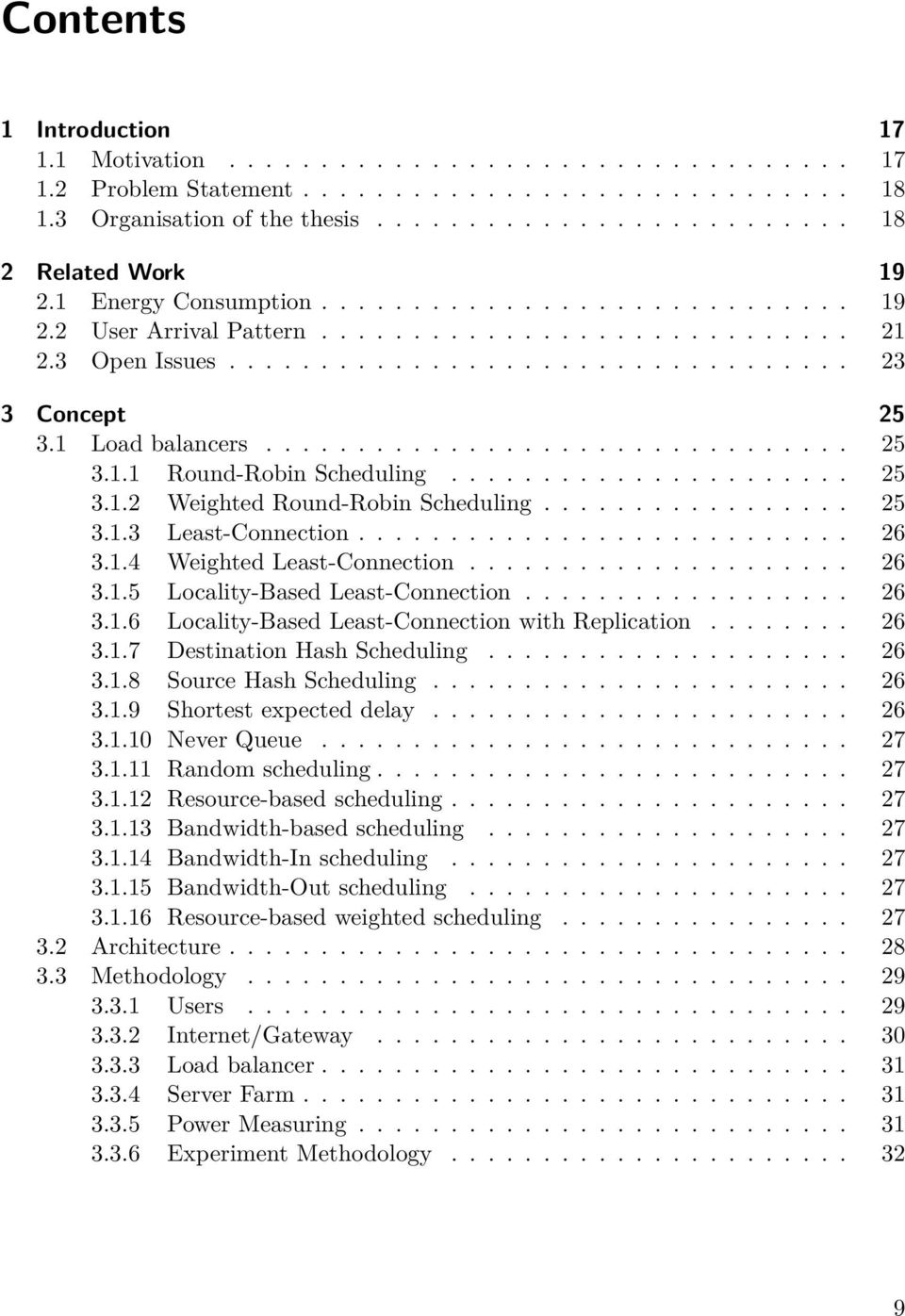
9 Contents 1 Introduction Motivation Problem Statement Organisation of the thesis Related Work Energy Consumption User Arrival Pattern Open Issues Concept Load balancers Round-Robin Scheduling Weighted Round-Robin Scheduling Least-Connection Weighted Least-Connection Locality-Based Least-Connection Locality-Based Least-Connection with Replication Destination Hash Scheduling Source Hash Scheduling Shortest expected delay Never Queue Random scheduling Resource-based scheduling Bandwidth-based scheduling Bandwidth-In scheduling Bandwidth-Out scheduling Resource-based weighted scheduling Architecture Methodology Users Internet/Gateway Load balancer Server Farm Power Measuring Experiment Methodology
10 Contents 4 Implementation Prototype User Requests Load Balancer Server Farm Internet/Gateway Measurement Round-Robin Scheduling Random Scheduling Least-Connection Scheduling Bandwidth-based Scheduling Resource-based Scheduling Bandwidth Congestion Round-Robin Scheduling Random Scheduling Least-Connection Scheduling Bandwidth-based Scheduling Resource-based Scheduling Single Server Evaluation Round-Robin Scheduling Bandwidth Congestion Random Scheduling Bandwidth Congestion Least-Connection Scheduling Bandwidth Congestion Bandwidth-based Scheduling Bandwidth Congestion Resource-based Scheduling Bandwidth Congestion Single Server Conclusion and Future Work 87 10

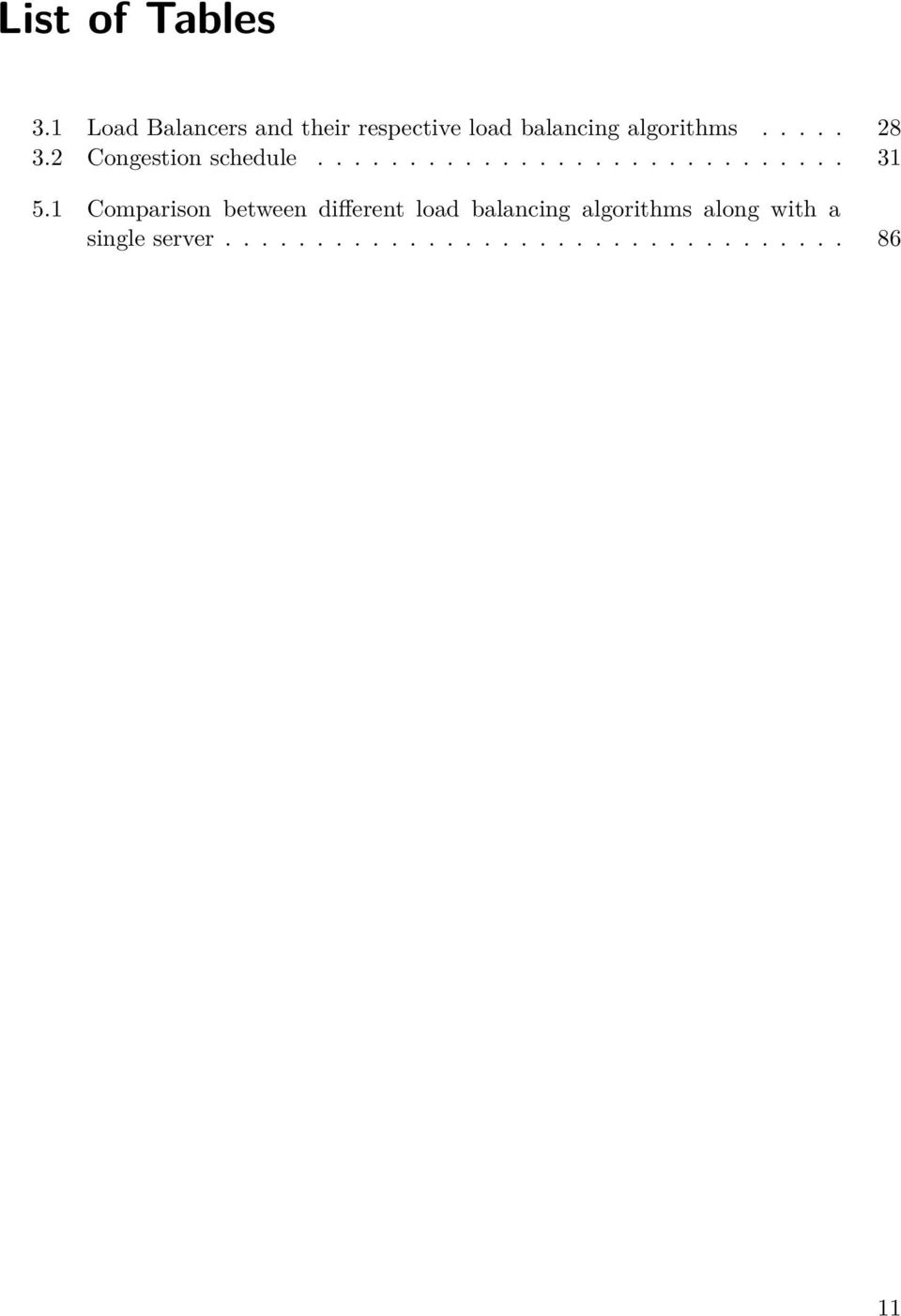
11 List of Tables 3.1 Load Balancers and their respective load balancing algorithms Congestion schedule Comparison between different load balancing algorithms along with a single server
12

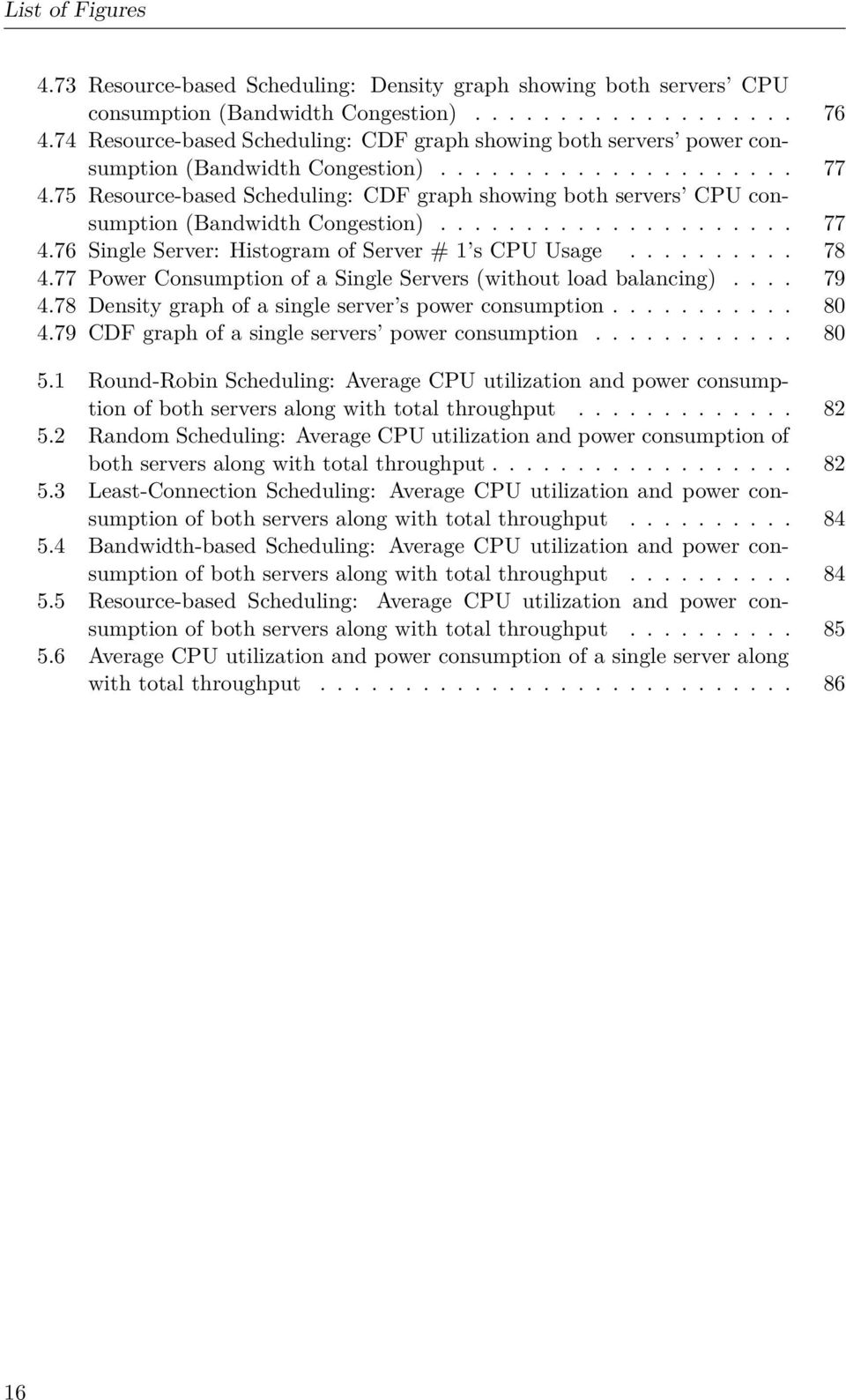
13 List of Figures 3.1 Architecture of a load balancer User request arrival pattern Pseudo code for generating user requests Pseudo code for generating user requests Flow chart generating user requests Our experiment scenario User request arrival behaviour for all scheduling algorithms Round-Robin Scheduling: Histogram of Server # 1 s CPU Usage Round-Robin Scheduling: Histogram of Server # 2 s CPU Usage Round-Robin Scheduling: Power Consumption of both Servers Round-Robin Scheduling: Density graph showing both servers power consumption Round-Robin Scheduling: Density graph showing both servers CPU consumption Round-Robin Scheduling: CDF graph showing both servers power consumption Round-Robin Scheduling: CDF graph showing both servers CPU consumption Random Scheduling: Histogram of Server # 1 s CPU Usage Random Scheduling: Histogram of Server # 2 s CPU Usage Random Scheduling: Power Consumption of both Servers Random Scheduling: Density graph showing both servers power consumption Random Scheduling: Density graph showing both servers CPU consumption Random Scheduling: CDF graph showing both servers power consumption Random Scheduling: CDF graph showing both servers CPU consumption Least-Connection Scheduling: Histogram of Server # 1 s CPU Usage Least-Connection Scheduling: Histogram of Server # 2 s CPU Usage Least-Connection Scheduling: Power Consumption of both Servers Least-Connection Scheduling: Density graph showing both servers power consumption Least-Connection Scheduling: Density graph showing both servers CPU consumption Least-Connection Scheduling: CDF graph showing both servers power consumption

14 List of Figures 4.26 Least-Connection Scheduling: CDF graph showing both servers CPU consumption Bandwidth-based Scheduling: Histogram of Server # 1 s CPU Usage Bandwidth-based Scheduling: Histogram of Server # 2 s CPU Usage Bandwidth-based Scheduling: Power Consumption of both Servers Bandwidth-based Scheduling: Density graph showing both servers power consumption Bandwidth-based Scheduling: Density graph showing both servers CPU consumption Bandwidth-based Scheduling: CDF graph showing both servers power consumption Bandwidth-based Scheduling: CDF graph showing both servers CPU consumption Resource-based Scheduling: Histogram of Server # 1 s CPU Usage Resource-based Scheduling: Histogram of Server # 2 s CPU Usage Resource-based Scheduling: Power Consumption of both Servers Resource-based Scheduling: Density graph showing both servers power consumption Resource-based Scheduling: Density graph showing both servers CPU consumption Resource-based Scheduling: CDF graph showing both servers power consumption Resource-based Scheduling: CDF graph showing both servers CPU consumption Round-Robin Scheduling: Histogram of Server # 1 s CPU Usage (Bandwidth Congestion) Round-Robin Scheduling: Histogram of Server # 2 s CPU Usage (Bandwidth Congestion) Round-Robin Scheduling: Power Consumption of both Servers (Bandwidth Congestion) Round-Robin Scheduling: Density graph showing both servers power consumption (Bandwidth Congestion) Round-Robin Scheduling: Density graph showing both servers CPU consumption (Bandwidth Congestion) Round-Robin Scheduling: CDF graph showing both servers power consumption (Bandwidth Congestion) Round-Robin Scheduling: CDF graph showing both servers CPU consumption (Bandwidth Congestion) Random Scheduling: Histogram of Server # 1 s CPU Usage (Bandwidth Congestion) Random Scheduling: Histogram of Server # 2 s CPU Usage (Bandwidth Congestion) Random Scheduling: Power Consumption of both servers (Bandwidth Congestion)

15 List of Figures 4.51 Random Scheduling: Density graph showing both servers power consumption (Bandwidth Congestion) Random Scheduling: Density graph showing both servers CPU consumption (Bandwidth Congestion) Random Scheduling: CDF graph showing both servers power consumption (Bandwidth Congestion) Random Scheduling: CDF graph showing both servers CPU consumption (Bandwidth Congestion) Least-Connection Scheduling: Histogram of Server # 1 s CPU Usage (Bandwidth Congestion) Least-Connection Scheduling: Histogram of Server # 2 s CPU Usage (Bandwidth Congestion) Least-Connection Scheduling: Power Consumption of both Servers (Bandwidth Congestion) Least-Connection Scheduling: Density graph showing both servers power consumption (Bandwidth Congestion) Least-Connection Scheduling: Density graph showing both servers CPU consumption (Bandwidth Congestion) Least-Connection Scheduling: CDF graph showing both servers power consumption (Bandwidth Congestion) Least-Connection Scheduling: CDF graph showing both servers CPU consumption (Bandwidth Congestion) Bandwidth-based Scheduling: Histogram of Server # 1 s CPU Usage (Bandwidth Congestion) Bandwidth-based Scheduling: Histogram of Server # 2 s CPU Usage (Bandwidth Congestion) Bandwidth-based Scheduling: Power Consumption of both Servers (Bandwidth Congestion) Bandwidth-based Scheduling: Density graph showing both servers power consumption (Bandwidth Congestion) Bandwidth-based Scheduling: Density graph showing both servers CPU consumption (Bandwidth Congestion) Bandwidth-based Scheduling: CDF graph showing both servers power consumption (Bandwidth Congestion) Bandwidth-based Scheduling: CDF graph showing both servers CPU consumption (Bandwidth Congestion) Resource-based Scheduling: Histogram of Server # 1 s CPU Usage (Bandwidth Congestion) Resource-based Scheduling: Histogram of Server # 2 s CPU Usage (Bandwidth Congestion) Resource-based Scheduling: Power Consumption of both Servers (Bandwidth Congestion) Resource-based Scheduling: Density graph showing both servers power consumption (Bandwidth Congestion)

16 List of Figures 4.73 Resource-based Scheduling: Density graph showing both servers CPU consumption (Bandwidth Congestion) Resource-based Scheduling: CDF graph showing both servers power consumption (Bandwidth Congestion) Resource-based Scheduling: CDF graph showing both servers CPU consumption (Bandwidth Congestion) Single Server: Histogram of Server # 1 s CPU Usage Power Consumption of a Single Servers (without load balancing) Density graph of a single server s power consumption CDF graph of a single servers power consumption Round-Robin Scheduling: Average CPU utilization and power consumption of both servers along with total throughput Random Scheduling: Average CPU utilization and power consumption of both servers along with total throughput Least-Connection Scheduling: Average CPU utilization and power consumption of both servers along with total throughput Bandwidth-based Scheduling: Average CPU utilization and power consumption of both servers along with total throughput Resource-based Scheduling: Average CPU utilization and power consumption of both servers along with total throughput Average CPU utilization and power consumption of a single server along with total throughput
17 1 Introduction This thesis attempts to investigate the relationship between performance and energy consumption. A cluster can consists from a small number of servers to a thousand servers. By investigating the existing load balancing algorithms, we will see whether the performance has an impact on the energy consumption of a cluster or not. In the following sections, the motivation for the thesis is presented along with the problem statement. 1.1 Motivation A recent article [1] published by the TIME magazine states that the world is getting less-energy efficient. The energy consumption of the information and communication structure is becoming relatively high each day as new servers are added in the cluster to accommodate the ever increasing number of internet users. It is not clear whether the present cluster of servers can handle the present number of internet users. If a suitable number of servers are not provisioned or deployed in a cluster, then the cluster ends up being over-utilized which in turn increases the power consumption of the cluster. However, if more servers are provisioned than required, the cluster ends up under-utilizing the servers and consuming more power due to the servers being idle. To handle the incoming user s requests, there are load balancers in the network infrastructure which distribute the internet user s requests among the servers based on some algorithm. But do these algorithm utilize the servers in a cluster in an energy efficient manner such that both the power consumption and the throughput can be justified? The motivation for this thesis is to answer this question. It would be unreasonable to forward all the client s requests to just one server as that server might crash due to being over-loaded. To deal with client s requests, a loadbalancer is deployed in a cluster environment which distributes the client s requests among the servers based on some criteria (which will be discussed later on). Careful provisioning of such clusters not only requires planning the expected traffic and the suitable bandwidth to handle such a traffic but also requires to think about the power or energy consumption of these servers. Power is not an abundance resource nowadays. In third world countries, power is becoming expensive every day and people are forced to make decision to save power which also affects the way they are operating their business to give satisfactory services to the clients. Building a data centre is not a trivial task. A lot of planning is needed when deploying a data center because every city has a power house station which supplies energy to a 17

18 1 Introduction certain area or to the whole city. If a data center is deployed in an area within or near the city, it must be made sure that the power consumption of the data center does not go over the limit than the power house can supply. And since new servers are added or removed, it must be made sure that the energy consumption still stays in a certain limit on the whole. Otherwise, it can become a very big issue for the data center or the power-house itself. And since, data centres consists upto more than fifteen thousand computers, it also means that cooling conditions are required for the servers which doubles the cost of the energy consumption. 1.2 Problem Statement Suppose, a website like YouTube [26] which is streaming videos to the users. For this website, a data centre is deployed consisting upto fifteen thousand or more computers providing quality video streaming to the internet users and we would like to know that how much is the power consumption on daily basis. Is the power consumption cost justified with respect to the services offered to the clients in terms of throughput? This is the question which will be investigated in this thesis. The existing load-balancing algorithms which are used for distributing requests among the servers will be discussed later on. We will see that whether the servers are over-utilized or under-utilized when it comes to these load-balancing algorithms. We will also investigate that whether these algorithms are fair in forwarding requests to the servers and what is the trade-off when it comes to using a certain load balancing algorithm. The user arrival pattern from the perspective of websites, providing video streaming services to the clients, will also be studied so that a realistic scenario can be simulated to judge the trade-off between the power consumption and the throughput. 1.3 Organisation of the thesis In the next chapter, the related work will be presented to reflect the various work that has been done so far both from the energy perspective s and the user request arrival pattern. Chapter 3 describes the architecture and methodology of our experiment. Chapter 4 describes the Implementation and evaluation of the results. Finally, we conclude the thesis in Chapter 6 with a brief summary along with future work. 18

19 2 Related Work This chapter presents the various work that has been done so far by the scientific community dealing with this subject matter. This thesis is divided into two parts. The first part deals with the energy consumption and the second part deals with the user arrival pattern. To set-up a scenario which closely echoes the real-world YouTube scenario, studying the user arrival pattern was a crucial task. Hence the related work is divided into the following sections; Energy Consumption and User arrival pattern. 2.1 Energy Consumption Brown and Reams talk about Energy-Efficient Computing[29] and stress about the importance of saving energy. They present the EPA (Environment Protection Agency) report in their paper which highlights some of the following important points; 61 billion kwh (kilowatt hours) was consumed by servers and data centres alone in IT equipment which is necessary to run the data center alone consumed a considerable amount of energy. We are observing the addition of data centres on an exponential level. They also mention in their work that Big companies like Microsoft,eBay,Google,Yahoo and Amazon need more energy to sustain their data centres which seems to be growing, and the companies are going for an environment friendly solutions to lessen the cost of their energy consumption. Environment friendly solutions like constructing data centres in certain states of the US where the temperature is not humid or constructing data center near the Columbia River in Washington. By taking advantage of the lower temperature along with the availability of running water for cooling and hydroelectric power generated by the nearby Grand Cooley DAM[21],they can considerably reduce the power consumption level. However, these are the external factors which we can use to reduce the cost of energy. What about the internal factors? Brown and Reams also mention about the PC s hardware not being able to utilize energy efficiently. Normally,systems are configured to achieve maximum performance but not fully designed to be energy efficient as well. We can solve this problem both on a hardware level and software level. If the CPU observes that there is no work being done at the moment, it can slow down the speed of the power supply fan who also uses a considerable amount of energy in normal circumstances as compared to the other components of the PC hardware. 19

20 2 Related Work On a software level, if a task whose deadline is of little importance, then the task can be executed by using low power. Using high frequency of the CPU will solve the task more quickly and hence will consume more power but using less frequency will result the task being completed a bit late as compared to the previous scenario but in the latter case, power is saved. This technique is also known as Dynamic Voltage Scaling. Browns and Reams introduce the Power Model. If it is known that where and when the power will be consumed, the power can be utilized efficiently by dynamic voltage scaling. However, this requires a careful and near perfect prediction to construct such a power model. Making a wrong prediction can result in the system being under-utilized or over-utilized. The paper by Fan et al.[30] attempts to investigate the energy consumption of Google s data center by first giving the breakdown of power consumption of a PC s equipment on an individual level. Although they did not mention that which operating system was running in their infrastructure as choosing the right operating system can drastically reduce the power consumption on the whole. We found out during our own testing that choosing different operating system can have an impact on the energy consumption. During our initial testing, we were using Ubuntu Desktop version [10] which was consuming 100 watts and when we shifted to Ubuntu Server Edition [11], the energy consumption dropped to 50 watts! The same study [30] suggests that dynamic voltage scaling reduced their energy consumption by 23% which gives us more reason to implement dynamic voltage scaling in a distributed system s environment. As mentioned above, choosing the right operating system can have an impact on the energy consumption. Although there is no specific study which compares the power consumption between different operating system but the book[35] suggests that some functions of power-saving will not be available when using legacy drivers under windows. One study [32] shows that the consumers are slowly realizing the importance of linux over windows and are migrating their deployments from windows to linux. Initially, linux was not seen as a user-friendly operating system due to non-availability of GUI (Graphical User Interface) but nowadays, linux comes with a GUI. The study also shows that linux offers compatibility with existing hardware and a lot of awareness has been created for the linux operating system. There are a lot of tutorials and manuals available on the internet[18][17] today that it has become a non-trivial task to operate a linux operating system. Linux also supports dynamic frequency scaling (also known as CPU throttling) in which the CPU can be configured to operate in a different frequency to conserve power or to control the amount of heat that is generated by the CPU.Along with adjusting different frequency of the CPU, there are different modes[9] to operate a CPU. Majority of the Intel processors[12] are compatible with linux adjusting their frequency[23]. A project by the linux community was started to reduce the overall power consumption of the operating system. After kernel , the linux operating system went "tickless"[14]. Before this project, the linux kernel used a periodic timer for each CPU. When the CPU was idle, the timer did many things like process accounting, scheduler load balancing, etc. With the introduction of "tickless idle", the linux kernel has eliminated this timer when the CPU is idle. This approach allows the CPU to stay in power saving states when it is idle thus reducing the overall power consumption. 20

21 2.2 User Arrival Pattern Another study extends[33] the "tickless idle" by introducing an eco-friendly daemon which uses dynamic voltage and scaling to reduce the power consumption and strictly maintaining performance. However, we need to predict the future workload to adjust the frequency of the CPU accordingly. If the window size for historical information is too short, we end up making a hasty prediction. If the window size is too large, then we have to wait for a while to get the required window size data to make an accurate prediction. Finding the right parameters to sample the workload to estimate the future workload is a challenge. Although it is quite possible to estimate the future workload if the server was serving a single application but what if the server was providing different services? Each service will have a different latency requirement which can become a daunting task especially if the server was serving both web pages and video streaming as both applications have different latency and delay requirements. 2.2 User Arrival Pattern In order to simulate a YouTube-like scenario, we have to know the following; What is the inter-request arrival rate? Do the user requests follow the Zipf s law[27]? Do the user requests follow a specific pattern on the whole? The paper [31] gives a brief insight into the website,youtube. They briefly explain that around 25 million requests are generated between the YouTube website and the users.they also explain that that the user requests follow a general pattern where traffic has begun to increase after 9:00 am. This can be characterized from the point of view where people in office are using YouTube but not as much when they go home and relax. This also explains that there is a significant traffic increase after office hours. After 9:00 pm, the traffic begins to decrease as people are preparing to go to sleep. Although, the above cannot be said on a global level as different countries are in different time zones. This also means that YouTube might never see a significant traffic decrease after 9:00 pm (which is an assumption of course) but on a national level, it can be assumed that the users follow this pattern. We decided to simulate this pattern in our experiment phase. The paper [31] also shows that from a Global perspective, majority of the users follow the Zipf s law which means that majority of the videos will be viewed by users which are ranked highest. On a YouTube website, five stars represent the highest rank and one star,or no star, represents the lowest. Videos with a higher rank have as much chance than the lowest to be viewed by a user. In the same paper, they show that the videos with a higher rank mostly have a duration of 2 to 5 minutes whereas videos with a duration of more than 5 minutes have lower rank. They also analyse that over 52.3% of the videos fall in the "most viewed" or popular category and these videos have the duration between 3 and 5 minutes. We decided to simulate this fact while setting up our YouTube-like server. It has also been observed in this paper that the average rating of 80% videos is 3 or higher. From this, it can be concluded that over 80% of videos are more likely to be viewed by users since they are following the Zipf s law. We decided to also simulate this fact in our scenario. 21
22 2 Related Work Bit rate is also an important factor when it comes to viewing videos. Videos with a higher resolution demand high bit rates and videos with a lower resolution demand low bit rates. The paper[31] found out that very few videos are encoded at a bit rate higher than 1 Mbps or lower than 10 Kbps. They use the methodology by looking at the content-length: header and using the YouTube API to determine the bit rate of the videos. We did the same while setting up our server by recording the bit rate of the videos to simulate it in our scenario. A second study[28] which also deals with characterizing user behaviour was conducted at the Lulea University of Technology, Sweden. They set-up a server which hosts 139 audio/video files that consists of classroom lectures and seminars. They also conclude that the median inter-arrival rate between different request is around 400 seconds, which according to us, is too much from YouTube s perspective.nonetheless, this study also noted the behaviour of users as less videos are being accessed during weekends or Christmas holidays. This study[34] also deals with analysing user request patterns and inter-arrival rate. This study was conducted to characterize Home and office user s behaviour. One observation made in this study is that the inter-arrival time is between seconds for residential users and seconds for office users. But this inter-arrival time is linked with user requests on the whole (i.e.http,pop3,dns etc), not to a specific request like viewing a video from a YouTube website. Also, the same study observes user traffic increasing slowly after 9:00 am and reaching the maximum value after office hours. This gives us more reason to accept this observation as a fact that the user requests follow this pattern most of the time. Another study attempts to characterize user request pattern by studying the Videoon-Demand (VOD)[36] which allows users to view audio or video content on demand using IPTV technology[13]. This study analyses the VOD system deployed by China Telecom. However, 94.23% of the videos which were present on this system are of 50 minutes or more. Only 37.44% of the videos were of 5 minutes duration. Again, this seems too much for us while comparing it to our YouTube scenario. This study also suggests that users follow a possion distribution model but they decided to modify the poisson distribution which correctly predicts their own system s behaviour. Also, they decided to leave out the user arrival pattern between 6 p.m and 9 p.m. as the system is under heavy load during this duration (our previous observation). Otherwise, they state that 0 to 5 users arrive per second. But the same cannot be said for our scenario which is simulating the YouTube scenario as the VOD system in this paper is deployed with 94.23% videos of 50 minutes duration. The paper[37] attempts to investigate that which load balancing algorithm performs better as compared to the others and they tested three algorithms which were the roundrobin policy,random policy and the shortest queue policy. The shortest queue scheduling forwards the next request to the server with the least number of requests in a queue. This scheduling can be considered as least-connection scheduling. According to their testing in a centralized approach, the shortest-queue policy performs better as it serves more requests than the other policies. They also used the poisson distribution while sending user requests to the servers. Our work can be considered as an extension to their work where not only we will be testing the load balancing algorithms but also will 22
23 2.3 Open Issues be testing that which load balancing algorithm is more energy efficient as compared to the others. 2.3 Open Issues It can be seen that power is becoming a critical factor while deploying a data center but most of the algorithms which exist nowadays are designed to give optimal throughput but few are designed to be energy efficient. Same goes for the load balancing algorithms. Most of the load balancing algorithms are designed to serve maximum requests in a small interval of time but none are designed to be energy efficient on a cluster-level. We will investigate that which load balancing algorithms (described in the next chapter) is more energy efficient from our perspective. And also, is there a trade-off when it comes to choosing the "best" algorithm in terms of performance and throughput. And more importantly, can we do better? 23
24
25 3 Concept In this chapter, we will look at the various load balancers and their respective algorithms. We will also have a look at a typical architecture of load balancers and will describe that how do we intend to model that architecture in our experiment. 3.1 Load balancers There are load balancers for different operating systems and each load balancer offers a set of load balancing algorithms. We decided to go for linux-based load balancers since we intended to use linux operating systems in our scenario. The most popular,by a simple web search, came out to be Red Hat s linux virtual server[19]. After initial testing, it was decided not to use this load-balancer as it was proving to be resource intensive which also implies more energy consumption. Second option was the Ubuntu linux virtual server. Despite having a man page, this load balancer does not have a proper HOW-TO documentation which allows a normal user to configure the loadbalancer easily which is why we decided to go for the third option. The third option is the commercial version of the load balancer called BalanceNG[7]. This load balancer is compatible with linux and is extremely easy to configure and use. Also, this loadbalancer provided more relevant load-balancing algorithms for our homogeneous cluster environment as compared to other load-balancing algorithms which are relevant for heterogeneous environment. Let us discuss those algorithms in detail; Round-Robin Scheduling In this type of scheduling [4], the request are distributed among servers in a circular order. Suppose a network consists of three servers and if the first request arrives, then the first request will be forwarded to the first server. The second request will be given to the second server and the third request to the third server. The fourth request will be given to the first server again and so on. This algorithm distributes the request among server nicely but does not take the priority into account when forwarding the request. Suppose one server is already busy with 100% CPU usage and if the next request is forwarded to it, then the requesting user will have to suffer because the server is already busy. All servers are treated as equal without taking the capacity or load into account Weighted Round-Robin Scheduling This scheduling [24] works almost like round-robin scheduling where it distributes request sequentially in a cluster but gives more jobs to the server with greater capacity 25
26 3 Concept indicated by a certain weight. This is an ideal algorithm for heterogeneous environments. Let s take our previous example in which a network consists of three servers. Suppose that the second server has more capacity than the other servers. After the first request, the second and third request will be given to the second server because this server has a certain weight added to it Least-Connection In this type of scheduling [24], the server with the least number of sessions or connections will be given the next request. The load-balancer keeps track that which server is serving how many connections and forwards the requests accordingly Weighted Least-Connection This scheduling [24] works almost like the least-connection scheduling but distributes more requests to the server with lower number of sessions Locality-Based Least-Connection This type scheduling [25] is used for destination IP load balancing. The next request is forwarded to the destination IP address if the destination server is alive and not overloaded. If the server is overloaded and then there is a server which is under-utilized, then that server is added to this IP address Locality-Based Least-Connection with Replication This type of scheduling [25] works almost like the locality-based least-connection scheduling but with a minor difference. The load balancer maintains mapping from users to servers. If the load balancers observes that the set of servers has not been modified for a very long time (due to number of request), then it removes the overloaded server from the set to avoid the need for replication of the overloaded server Destination Hash Scheduling In this type of scheduling [25], the next request is forwarded to the server by the load balancer by looking up the destination IP in a static hash table Source Hash Scheduling In this type of scheduling [25], the next request is forwarded to the server by the load balancer by looking up the source IP in a static hash table Shortest expected delay In this type of scheduling [22], the next request is forwarded to the server with the shortest expected delay. The expected delay is (Ci + 1)/ Ui where C is the active number of connections and U is the fixed service rate of the ith server. 26
27 3.1 Load balancers Never Queue In this type of scheduling [20], the next request is sent to the idle server first. If no server is idle, then the shortest expected delay scheduling method is adopted by this scheduler Random scheduling In this type of scheduling [4], the request are forwarded to servers on random basis Resource-based scheduling In this type of scheduling [5], the load balancer decides to forward the next request based on the health information it has received from the servers. This allows us to perform "least resource" scheduling which is based on the CPU load Bandwidth-based scheduling In this type of scheduling [5], the load-balancer forwards the next request to the server who is utilizing the smallest bandwidth as compared to others. For example, if one server is consuming 5 Mbps and the second server is consuming 2 Mbps, then the next request will be forwarded to the second server Bandwidth-In scheduling In this type of scheduling [6], the load-balancer forwards the next request to the server who is utilizing the smallest input bandwidth. This scheduler is best for those servers who are dedicated to receive data from the users,i.e. users uploading videos on the server Bandwidth-Out scheduling In this type of scheduling [6],the load balancer forwards the next request to the server who is utilizing the smallest output bandwidth. This scheduler is best for those servers who are dedicated to streaming videos or sending data to the users Resource-based weighted scheduling In this type of scheduling [6], the load balancer works exactly like the resource-based scheduling method but with a minor difference. The difference is that internally a weight is calculated per server (within the cluster) and the next request is forwarded based on a weighted random algorithm. As the BalanceNG load balancer was more closely suited to our tasks, we decided to use the BalanceNG load balancer. Table 2.1 shows us a short comparison between the load balancers we have mentioned and the load balancing algorithms they support. 27
28 3 Concept Algorithms Red Hat s LVS Ubuntu s LVS BalanceNG Round-Robin Scheduling Yes Yes Yes Weighted Round-Robin Scheduling Yes Yes No Least-Connection Scheduling Yes Yes Yes Weighted Least-Connection Scheduling Yes No No Locality-Based Least-Connection Scheduling Yes Yes No Locality-Based Least-Connection with Replication Yes Yes No Scheduling Destination Hash Scheduling Yes Yes No Source Hash Scheduling Yes Yes Yes Shortest expected delay Scheduling No Yes No Never Queue Scheduling No Yes No Random scheduling Scheduling No No Yes Resource-based Scheduling No No Yes Bandwidth-based Scheduling No No Yes Bandwidth-In Scheduling No No Yes Bandwidth-Out Scheduling No No Yes Resource-based weighted Scheduling No No Yes Table 3.1: Load Balancers and their respective load balancing algorithms 3.2 Architecture A typical architecture of a load balancer is shown in the figure 3.1. Whenever a request is generated from the user(s), that request is intercepted by the load balancer because typically, the IP of the web server is a Virtual IP. This Virtual IP is shared among the servers which reside in the server farm. Normally, the content of the website is replicated among the servers in the server farm to provide redundancy so that the content can still be served to the user if one server fails. Replication among servers is another topic which we won t cover in our thesis. In one scenario, the load-balancer does all the work. If a user has requested a video from the website wwww.example.com, then not only the request will be forwarded to the server but the content will be served to the user through the load balancer. When the load balancer will forward the request to the server, then the server will communicate to the user through the load balancer. In other words, user is streaming the video through the load balancer from the server. In this case, the load balancer can become a single point of failure because if the load balancer crashes then the website won t be able to serve any more request. Also, not only we have a single point of failure but the energy consumption will be twice as both the server and the load balancer are serving the user s request.in the second scenario, the load balancer only forwards the request to the 28
29 3.3 Methodology appropriate server and then, that server communicates with the user directly without involving the load balancer any further. For our set up, we will be using the second scenario where the load balancer forwards the request from the user to the server based on the specified load balancing algorithm. Figure 3.1: Architecture of a load balancer 3.3 Methodology To simulate the above mentioned architecture, we used the following methodology; Users In order to generate users requests, we developed a program in C++[8]. We analysed the user s behaviour in the related work section and we modelled the user s behaviour in our program. We decided to simulate a maximum number of 100 users. Figure 3.2 shows our approach where we observe the number of users beginning to rise after 9:00 am. The maximum number of users are observed after office hours. We will explain in detail the program which we used to simulate the user requests. 29
![3 Concept Figure 3.2: User request arrival pattern 3.3.2 Internet/Gateway In order to simulate the internet, we used the Apposite technologies [3] Network Simulator called Linktropy 7500 PRO [15].](/docs-images/20/623520/images/30-0.png "This simulator consists of two end-points namely LAN A and LAN B.")
30 3 Concept Figure 3.2: User request arrival pattern Internet/Gateway In order to simulate the internet, we used the Apposite technologies [3] Network Simulator called Linktropy 7500 PRO [15]. This simulator consists of two end-points namely LAN A and LAN B. Each end-point can be simulated based on the following factors; Bandwidth Delay and Jitter Packet Loss Congestion For our thesis, we also studied the impact of congestion on the load balancer and the server farm as well. We wanted to observe that whether there is any difference in the energy consumption, throughput or CPU usage of our server farm when it comes to congestion. We decided to simulate congestion as shown in table 3.2 where we assumed that there will be low congestion during the office hours but as the time passes by, the 100 users which we are simulating begin to experience bandwidth congestion. This can happen due to some other traffic generated by the servers for the users(http,ftp etc.) in the server farm. By the use of the network simulator, we could easily schedule congestion as shown in the table. This network simulator can also be configured as a router which is why we decided to simulate both the internet and the gateway on this network simulator. 30
31 3.3 Methodology Time 09:00 am - 12:00 pm 20% 12:00 pm - 02:00 pm 30% 02:00 pm - 05:00 pm 35% 05:00 pm - 06:00 pm 40% 06:00 pm - 08:00 pm 50% 08:00 pm - 09:00 pm 55% Congestion Table 3.2: Congestion schedule Load balancer As mentioned above, it was decided to deploy the BalanceNG load balancer on the Ubuntu platform. The virtual IP was configured on the load balancer and within the server farm (described below). Also,the network topology will be explained briefly in the next chapter Server Farm Two servers were deployed with CPU AMD Athlon 1 GHz dual core processor within the server farm. Each server was running the Ubuntu Server Edition[11]. Additionally, Apache[2] was installed on both servers to handle user s HTTP requests. More than hundred files were stored on the servers and both servers consisted of identical files. Both servers were configured to send keep-alive packets which contained information relevant for the load balancer. These keep alive packets would help the load balancer to make a decision regarding forwarding the next request to the appropriate server Power Measuring For measuring power, two types of power-measuring devices were deployed. One server was connected to the Yokogawa WT210 Digital Power Meter and the second server was connected to the Voltcraft Energy Logger
32 3 Concept Experiment Methodology The experiments ran for 12 hours (approx.) and the power-measurement data was collected after every experiment. We conducted our experiments with the following load balancing algorithms; Round-Robin Algorithm Random Algorithm Least-Connection Algorithm Bandwidth-based Algorithm Resource-based Algorithm In the next chapter, we will describe the implementation details regarding generating user requests, configuring the network simulator and taking the power measurements. 32
33 4 Implementation In this chapter, we will further explain that how the user requests were simulated during the experiment and what were the results corresponding to each load balancing algorithm. 4.1 Prototype User Requests To generate user requests, a program in C++ was developed. Second task was to correctly code the user behaviour as it has been observed in the previous chapter (chapter 2) where the number of users begin to rise after 9:00 am. Figure 3.2 shows that the number of users between 9:00 am and 10:00 pm is roughly below 40 users. So the program would generate the number of users ranging from 1 to 36 as shown in the figure 4.1. Figure 4.1: Pseudo code for generating user requests In order to let the program run without any interruption, the target date and time would be set according to a 12 hour schedule. The program would first check that whether the current date and time has reached the target date and time. If not, it would generate the user request using the linux wget[16] utility which was incorporated in the program. The wget utility downloads the file from the specified URL,i.e. HTTP,FTP or HTTPS. We can also limit the bandwidth while downloading the file. For example, if we wanted to make sure that while downloading the file from the server, the bandwidth should not exceed more than 500 KB. This can be easily down by using the wget s limit-rate option as shown in the figure 4.2. Since a YouTube-like website is being simulated where users are streaming videos at a specified bit rate, we wanted to simulate this as much as close to reality. When a user 33
34 4 Implementation Figure 4.2: Pseudo code for generating user requests is streaming a video, the content is also downloaded in the user s cache. We decided to simulate this by downloading the video from our server using the wget utility. After the program downloads the video, it would discard the downloaded video should the next user decide to download the same video so that the previous downloaded video won t be served from the cache to the new user. Second objective was to simulate the streaming video at the recommended bit rate. Since 100+ video files were stored on the servers, the URLs of those video files were stored in an array of our program. Each index in this array stored the URL of the video files with a certain rate limit so that the video will be streamed/downloaded at the specified bit rate rather than going over the top. Suppose, the user is downloading a video from the server and this video requires a bit rate of 500 KB. By using the wget utility s limit-rate option, it would be ensured that the downloading/streaming of the video won t go more than 500KB even if there is more bandwidth available to the user. After a certain number of user requests have been generated, the program would wait for all the downloads to finish. When they have finished, it would check whether it is suppose to generate users with the same limit (9:00 am to 10:00 am) or increase the range of generating random user requests. For example, user request(s) ranging from 1 to 36 would be generated from 9:00 am to 10:00 am. If the current time is 10:00 am or later, we would increase the range from 1 to 40 and so on for the later hours. The flow chart of our program is shown in figure 4.3. At first sight, this approach seems feasible for us but it is not for all load balancing algorithms. This approach would work fine for the round-robin algorithm but not for the random scheduling, least-session,least bandwidth or least-resource. Let us define an example using the least-session scheduling. In this scheduling, the next request is forwarded to the server who is serving the least number of user requests. Now Suppose, if our program has generated 30 user requests and those requests are distributed among the servers via the load balancer, the program would wait for the user requests to finish so that it may generate an another set of requests. This shows that when the next set of requests is generated, there are no connections to the server for the load balancer to decide that where it should route the next request. Due to this very reason, we decided to split our program into two instances. Both instances would be generating users independent from each other while keeping the semantic of our logic intact. For the load balancer, it will check that which server has the least number of connections (as either server will be busy due to the second instance) and will forward the request(s) to the server having the least number of connections. During our experiment, we checked that the maximum number of users (in our case,100 users) did not reach our maximum limit. 34
35 4.1 Prototype Figure 4.3: Flow chart generating user requests 35
36 4 Implementation Figure 4.4: Our experiment scenario Load Balancer As it has been mentioned before, the BalanceNG load balancer was deployed on the server with the same hardware specifications. The load balancer was installed with the Ubuntu server edition. This server was connected to a simple switch where each port could support 10/100 Mbps. The virtual IP was configured on the server as well as in the server farm (explained in the next sub-section) Server Farm We deployed two servers in the server farm and both servers were running Ubuntu server edition. Additionally, Apache was installed on both servers and files were also replicated on both servers. In other words, both of these servers were identical. Both of these servers were connected to the above mentioned switch Internet/Gateway We configured the network simulator by first checking the YouTube response from our university campus by pinging the website which was between 6.5 ms and 7.5 ms approximately. We configured this response in our network simulator. Second task was to 36
37 4.2 Measurement configure the bandwidth to which we configured by giving both end-points (users and the servers) 1 Gbps. For the network congestion experiment, a series of network congestion schedule was configured as per the table 3.2. The network simulator would lessen the bandwidth as per the configured schedule in order to simulate the background traffic. Our intended scenario can be shown in the figure Measurement Round-Robin Scheduling :30:31 10:46:15 12:06:13 13:34:35 15:16:36 17:29:41 20:12:25 Figure 4.5: User request arrival behaviour for all scheduling algorithms 37
38 4 Implementation Histogram of CPU Frequency usr Figure 4.6: Round-Robin Scheduling: Histogram of Server # 1 s CPU Usage Histogram of CPU Frequency usr Figure 4.7: Round-Robin Scheduling: Histogram of Server # 2 s CPU Usage 38
39 4.2 Measurement Round Robin Scheduling Server # 1 Raw Data Average Fluctuation median value Time Round Robin Scheduling Server # 2 Raw Data Average Fluctuation median value Time Figure 4.8: Round-Robin Scheduling: Power Consumption of both Servers Watt Watt 39
40 4 Implementation Comparison b/w two servers' Power Consumption Density Server 1 Server Watts Figure 4.9: Round-Robin Scheduling: Density graph showing both servers power consumption Comparison b/w two servers' CPU usage Density Server 1 Server CPU Usage Figure 4.10: Round-Robin Scheduling: Density graph showing both servers CPU consumption 40
41 4.2 Measurement Comparison b/w two servers' Power usage Cumulative Percent Server 1 Server Watt Figure 4.11: Round-Robin Scheduling: CDF graph showing both servers power consumption Comparison b/w two servers' CPU usage Cumulative Percent Server 1 Server CPU Usage Figure 4.12: Round-Robin Scheduling: CDF graph showing both servers CPU consumption 41
42 4 Implementation Random Scheduling Histogram of CPU Frequency usr Figure 4.13: Random Scheduling: Histogram of Server # 1 s CPU Usage Histogram of CPU Frequency usr Figure 4.14: Random Scheduling: Histogram of Server # 2 s CPU Usage 42
43 4.2 Measurement Random Scheduling Server # 1 Raw Data Average Fluctuation median value Time Random Scheduling Server # 2 Raw Data Average Fluctuation median value Time Figure 4.15: Random Scheduling: Power Consumption of both Servers Watt Watt 43
44 4 Implementation Comparison b/w two servers' Power Consumption Density Server 1 Server Watts Figure 4.16: Random Scheduling: Density graph showing both servers power consumption Comparison b/w two servers' CPU usage Density Server 1 Server CPU Usage Figure 4.17: Random Scheduling: Density graph showing both servers CPU consumption 44
45 4.2 Measurement Comparison b/w two servers' Power usage Cumulative Percent Server 1 Server Watt Figure 4.18: Random Scheduling: CDF graph showing both servers power consumption Comparison b/w two servers' CPU usage Cumulative Percent Server 1 Server CPU Usage Figure 4.19: Random Scheduling: CDF graph showing both servers CPU consumption 45
46 4 Implementation Least-Connection Scheduling Histogram of CPU Frequency usr Figure 4.20: Least-Connection Scheduling: Histogram of Server # 1 s CPU Usage Histogram of CPU Frequency usr Figure 4.21: Least-Connection Scheduling: Histogram of Server # 2 s CPU Usage 46
47 4.2 Measurement Least Session Scheduling Server # 1 Raw Data Average Fluctuation median value Time Least Session Scheduling Server # 2 Raw Data Average Fluctuation median value Time Figure 4.22: Least-Connection Scheduling: Power Consumption of both Servers Watt Watt 47
48 4 Implementation Comparison b/w two servers' Power Consumption Server 1 Server 2 Density Watts Figure 4.23: Least-Connection Scheduling: Density graph showing both servers power consumption Comparison b/w two servers' CPU usage Density Server 1 Server CPU Usage Figure 4.24: Least-Connection Scheduling: Density graph showing both servers CPU consumption 48
49 4.2 Measurement Comparison b/w two servers' Power usage Cumulative Percent Server 1 Server Watt Figure 4.25: Least-Connection Scheduling: CDF graph showing both servers power consumption Comparison b/w two servers' CPU usage Cumulative Percent Server 1 Server CPU Usage Figure 4.26: Least-Connection Scheduling: CDF graph showing both servers CPU consumption 49
50 4 Implementation Bandwidth-based Scheduling Histogram of CPU Frequency usr Figure 4.27: Bandwidth-based Scheduling: Histogram of Server # 1 s CPU Usage Histogram of CPU Frequency usr Figure 4.28: Bandwidth-based Scheduling: Histogram of Server # 2 s CPU Usage 50
51 4.2 Measurement Least Bandwidth Scheduling Server # 1 Raw Data Average Fluctuation median value Time Least Bandwidth Scheduling Server # 2 Raw Data Average Fluctuation median value Time Figure 4.29: Bandwidth-based Scheduling: Power Consumption of both Servers Watt Watt 51
52 4 Implementation Comparison b/w two servers' Power Consumption Server 1 Server 2 Density Watts Figure 4.30: Bandwidth-based Scheduling: Density graph showing both servers power consumption Comparison b/w two servers' CPU usage Server 1 Server 2 Density CPU Usage Figure 4.31: Bandwidth-based Scheduling: Density graph showing both servers CPU consumption 52
53 4.2 Measurement Comparison b/w two servers' Power usage Cumulative Percent Server 1 Server Watt Figure 4.32: Bandwidth-based Scheduling: CDF graph showing both servers power consumption Comparison b/w two servers' CPU usage Cumulative Percent Server 1 Server CPU Usage Figure 4.33: Bandwidth-based Scheduling: CDF graph showing both servers CPU consumption 53
54 4 Implementation Resource-based Scheduling Histogram of CPU Frequency usr Figure 4.34: Resource-based Scheduling: Histogram of Server # 1 s CPU Usage Histogram of CPU Frequency usr Figure 4.35: Resource-based Scheduling: Histogram of Server # 2 s CPU Usage 54
55 4.2 Measurement Least Resource Scheduling Server # 1 Raw Data Average Fluctuation median value Time Least Resource Scheduling Server # 2 Raw Data Average Fluctuation median value Time Figure 4.36: Resource-based Scheduling: Power Consumption of both Servers Watt Watt 55
56 4 Implementation Comparison b/w two servers' Power Consumption Density Server 1 Server Watts Figure 4.37: Resource-based Scheduling: Density graph showing both servers power consumption Comparison b/w two servers' CPU usage Density Server 1 Server CPU Usage Figure 4.38: Resource-based Scheduling: Density graph showing both servers CPU consumption 56
57 4.2 Measurement Comparison b/w two servers' Power usage Cumulative Percent Server 1 Server Watt Figure 4.39: Resource-based Scheduling: CDF graph showing both servers power consumption Comparison b/w two servers' CPU usage Cumulative Percent Server 1 Server CPU Usage Figure 4.40: Resource-based Scheduling: CDF graph showing both servers CPU consumption 57
58 4 Implementation Bandwidth Congestion In this section, we will show the results of various load-balancing algorithms when they were faced with bandwidth congestion as per the schedule shown in table Round-Robin Scheduling Histogram of CPU Frequency usr Figure 4.41: Round-Robin Scheduling: Histogram of Server # 1 s CPU Usage (Bandwidth Congestion) Histogram of CPU Frequency usr Figure 4.42: Round-Robin Scheduling: Histogram of Server # 2 s CPU Usage (Bandwidth Congestion) 58
59 4.2 Measurement Round Robin Scheduling Server # 1 Raw Data Average Fluctuation median value Time Round Robin Scheduling Server # 2 Raw Data Average Fluctuation median value Time Figure 4.43: Round-Robin Scheduling: Power Consumption of both Servers (Bandwidth Congestion) Watt Watt 59
60 4 Implementation Comparison b/w two servers' Power Consumption Server 1 Server 2 Density Watts Figure 4.44: Round-Robin Scheduling: Density graph showing both servers power consumption (Bandwidth Congestion) Comparison b/w two servers' CPU usage Server 1 Server 2 Density CPU Usage Figure 4.45: Round-Robin Scheduling: Density graph showing both servers CPU consumption (Bandwidth Congestion) 60
61 4.2 Measurement Comparison b/w two servers' Power usage Cumulative Percent Server 1 Server Watt Figure 4.46: Round-Robin Scheduling: CDF graph showing both servers power consumption (Bandwidth Congestion) Comparison b/w two servers' CPU usage Cumulative Percent Server 1 Server CPU Usage Figure 4.47: Round-Robin Scheduling: CDF graph showing both servers CPU consumption (Bandwidth Congestion) 61
62 4 Implementation Random Scheduling Histogram of CPU Frequency usr Figure 4.48: Random Scheduling: Histogram of Server # 1 s CPU Usage (Bandwidth Congestion) Histogram of CPU Frequency usr Figure 4.49: Random Scheduling: Histogram of Server # 2 s CPU Usage (Bandwidth Congestion) 62
63 4.2 Measurement Random Scheduling Server # 1 Raw Data Average Fluctuation median value Time Random Scheduling Server # 2 Raw Data Average Fluctuation median value Time Figure 4.50: Random Scheduling: Power Consumption of both servers (Bandwidth Congestion) Watt Watt 63
64 4 Implementation Comparison b/w two servers' Power Consumption Density Server 1 Server Watts Figure 4.51: Random Scheduling: Density graph showing both servers power consumption (Bandwidth Congestion) Comparison b/w two servers' CPU usage Server 1 Server 2 Density CPU Usage Figure 4.52: Random Scheduling: Density graph showing both servers CPU consumption (Bandwidth Congestion) 64
65 4.2 Measurement Comparison b/w two servers' Power usage Cumulative Percent Server 1 Server Watt Figure 4.53: Random Scheduling: CDF graph showing both servers power consumption (Bandwidth Congestion) Comparison b/w two servers' CPU usage Cumulative Percent Server 1 Server CPU Usage Figure 4.54: Random Scheduling: CDF graph showing both servers CPU consumption (Bandwidth Congestion) 65
66 4 Implementation Least-Connection Scheduling Histogram of CPU Frequency usr Figure 4.55: Least-Connection Scheduling: Histogram of Server # 1 s CPU Usage (Bandwidth Congestion) Histogram of CPU Frequency usr Figure 4.56: Least-Connection Scheduling: Histogram of Server # 2 s CPU Usage (Bandwidth Congestion) 66
67 4.2 Measurement Least Session Scheduling Server # 1 Raw Data Average Fluctuation median value Watt Time Least Session Scheduling Server # 2 Raw Data Average Fluctuation median value Watt Time Figure 4.57: Least-Connection Scheduling: Power Consumption of both Servers (Bandwidth Congestion) 67
68 4 Implementation Comparison b/w two servers' Power Consumption Server 1 Server 2 Density Watts Figure 4.58: Least-Connection Scheduling: Density graph showing both servers power consumption (Bandwidth Congestion) Comparison b/w two servers' CPU usage Density Server 1 Server CPU Usage Figure 4.59: Least-Connection Scheduling: Density graph showing both servers CPU consumption (Bandwidth Congestion) 68
69 4.2 Measurement Comparison b/w two servers' Power usage Cumulative Percent Server 1 Server Watt Figure 4.60: Least-Connection Scheduling: CDF graph showing both servers power consumption (Bandwidth Congestion) Comparison b/w two servers' CPU usage Cumulative Percent Server 1 Server CPU Usage Figure 4.61: Least-Connection Scheduling: CDF graph showing both servers CPU consumption (Bandwidth Congestion) 69
70 4 Implementation Bandwidth-based Scheduling Histogram of CPU Frequency usr Figure 4.62: Bandwidth-based Scheduling: Histogram of Server # 1 s CPU Usage (Bandwidth Congestion) Histogram of CPU Frequency usr Figure 4.63: Bandwidth-based Scheduling: Histogram of Server # 2 s CPU Usage (Bandwidth Congestion) 70
71 4.2 Measurement Least Bandwidth Scheduling Server # 1 Raw Data Average Fluctuation median value Watt Time Least Bandwidth Scheduling Server # 2 Raw Data Average Fluctuation median value Watt Time Figure 4.64: Bandwidth-based Scheduling: Power Consumption of both Servers (Bandwidth Congestion) 71
72 4 Implementation Comparison b/w two servers' Power Consumption Density Server 1 Server Watts Figure 4.65: Bandwidth-based Scheduling: Density graph showing both servers power consumption (Bandwidth Congestion) Comparison b/w two servers' CPU usage Server 1 Server 2 Density CPU Usage Figure 4.66: Bandwidth-based Scheduling: Density graph showing both servers CPU consumption (Bandwidth Congestion) 72
73 4.2 Measurement Comparison b/w two servers' Power usage Cumulative Percent Server 1 Server Watt Figure 4.67: Bandwidth-based Scheduling: CDF graph showing both servers power consumption (Bandwidth Congestion) Comparison b/w two servers' CPU usage Cumulative Percent Server 1 Server CPU Usage Figure 4.68: Bandwidth-based Scheduling: CDF graph showing both servers CPU consumption (Bandwidth Congestion) 73
74 4 Implementation Resource-based Scheduling Histogram of CPU Frequency usr Figure 4.69: Resource-based Scheduling: Histogram of Server # 1 s CPU Usage (Bandwidth Congestion) Histogram of CPU Frequency usr Figure 4.70: Resource-based Scheduling: Histogram of Server # 2 s CPU Usage (Bandwidth Congestion) 74
75 4.2 Measurement Least Resource Scheduling Server # 1 Raw Data Average Fluctuation median value 60 Watt Time Least Resource Scheduling Server # 2 Raw Data Average Fluctuation median value Watt Time Figure 4.71: Resource-based Scheduling: Power Consumption of both Servers (Bandwidth Congestion) 75
76 4 Implementation Comparison b/w two servers' Power Consumption Server 1 Server 2 Density Watts Figure 4.72: Resource-based Scheduling: Density graph showing both servers power consumption (Bandwidth Congestion) Comparison b/w two servers' CPU usage Density Server 1 Server CPU Usage Figure 4.73: Resource-based Scheduling: Density graph showing both servers CPU consumption (Bandwidth Congestion) 76
77 4.2 Measurement Comparison b/w two servers' Power usage Cumulative Percent Server 1 Server Watt Figure 4.74: Resource-based Scheduling: CDF graph showing both servers power consumption (Bandwidth Congestion) Comparison b/w two servers' CPU usage Cumulative Percent Server 1 Server CPU Usage Figure 4.75: Resource-based Scheduling: CDF graph showing both servers CPU consumption (Bandwidth Congestion) 77
78 4 Implementation Single Server Histogram of CPU Frequency usr Figure 4.76: Single Server: Histogram of Server # 1 s CPU Usage 78
79 4.2 Measurement Server # 1 Power Consumption Raw Data Average Fluctuation median value Time Figure 4.77: Power Consumption of a Single Servers (without load balancing) Watt 79
80 4 Implementation Single Server Power Consumption Density Server Watts Figure 4.78: Density graph of a single server s power consumption Single Server Power Consumption Cumulative Percent Server Watt Figure 4.79: CDF graph of a single servers power consumption 80
81 5 Evaluation 5.1 Round-Robin Scheduling As we mentioned before that we were working on a dual-core systems due to which the work on the system was easily divided. We also observed that the first CPU would handle the user related tasks and the second CPU would handle the system related task. So, the overall percentage is achieved by adding the percentages of both CPUs and dividing it by the number of CPUs. As we can see from figure 4.6, server # 1 s CPU usage stayed mostly between 25% and 35%. Whereas in figure 4.7, server# 2 s CPU usage stayed between 23% and 30% with a low frequency. From figure 4.8, we can easily see that there was a lot of fluctuation in terms of power consumption. From figure 4.9, we can see that server# 1 consumed more power as compared to server# 2 as the CPU usage of server# 1 was high as compared to server # 2.Nevertheless, this gives us an interesting picture that both server were not properly utilized judging by their power and CPU consumption Bandwidth Congestion As shown in figure 4.49, the overall behaviour of round-robin is the same in terms of bandwidth congestion w.r.t density. However, we do see that one of the server consuming more power than the other and both servers consumed more power as compared to it s normal behaviour when it is not faced with bandwidth congestion. 5.2 Random Scheduling In random scheduling, requests are forwarded in a random manner. If we look at the CPU usage of both servers in a random scheduling method, the results are not very much different from the round-robin scheduling method. Furthermore, we still see a lot of fluctuation in the power consumption of both servers. We should also note from 4.16, that both servers reached a maximum of 62 watts and 67 watts approximately whereas the round-robin method reached a maximum of 65 and 68 watts respectively. But by looking the density graphs of both severs from figure 4.17, it is not that much different from the round-robin s density graph (figure 4.9) which is very surprising for us due to its random nature Bandwidth Congestion As shown in figure 4.57, the random scheduling method ended up distributing the requests nicely. It is very much different from it s normal behaviour. In case of normal 81
82 5 Evaluation Throughput (GB) Power Consumption (Watts) CPU Usage (%) Figure 5.1: Round-Robin Scheduling: Average CPU utilization and power consumption of both servers along with total throughput Throughput (GB) Power Consumption (Watts) CPU Usage (%) Figure 5.2: Random Scheduling: Average CPU utilization and power consumption of both servers along with total throughput 82
83 5.3 Least-Connection Scheduling behaviour, we saw that both server power consumption was very much different from each other. But in case of bandwidth congestion, the power consumption of both servers appears "almost" to be the same. This was very surprising for us given that not only we have bandwidth congestion but also the requests are forwarded on random manner! 5.3 Least-Connection Scheduling In least-connection scheduling, requests are forwarded to the server serving the least amount of clients. Judging by looking at the figure 4.22 and 4.23, the CPU usage is not very much different from the previous reviewed scheduling methods. Figure 4.24 shows that both servers reached a maximum of 65 watts in terms of power consumption. But the density graph still shows that one server remained under-utilized when it came to power consumption Bandwidth Congestion As shown in Figure 4.65, the least-connection scheduling behaves different when it comes to bandwidth congestion. Here we also observe that the power consumption of both servers is almost the same but still server # 2 consumes more power as compared to server # 1 within 51 and 54 watts. 5.4 Bandwidth-based Scheduling In bandwidth-based scheduling, requests are forwarded to the server serving the least amount of clients in terms of bandwidth. By looking at the histogram of both servers in figure 4.30 and 4.31, we don t see that much difference from the other scheduling methods. But we do see more fluctuations in the power consumptions of both servers as compared to other scheduling methods as shown in figure Furthermore, one server reached a maximum of 70 watts! The density graph of both servers in terms of power and CPU show a considerable increase as shown in figure 4.33 and Bandwidth Congestion As shown in Figure 4.73, the bandwidth-based scheduling also behaves in a manner similar to least-connection scheduling. Server # 1 consumes more energy as compared to server # 1 but with a minor difference. 83
84 5 Evaluation Throughput (GB) Power Consumption (Watts) CPU Usage (%) Figure 5.3: Least-Connection Scheduling: Average CPU utilization and power consumption of both servers along with total throughput Throughput (GB) Power Consumption (Watts) CPU Usage (%) Figure 5.4: Bandwidth-based Scheduling: Average CPU utilization and power consumption of both servers along with total throughput 84
85 5.5 Resource-based Scheduling 5.5 Resource-based Scheduling In least-resource scheduling, requests are forwarded to the server consuming the least amount of CPU in terms of percentage. From figure 4.38 and 4.39, the CPU usage of both servers seem almost the same with some minor differences. But we see more fluctuations in the power consumptions of both servers as compared to other scheduling methods. Interestingly, if we look at the figure 4.44 which shows us the cumulative distribution frequency of both servers CPU, we can see that the CPU utilization of both servers is almost the same with a minor difference. This is also what we concluded from the histograms of both servers. This scheduling method succeeded in terms of utilizing the CPUs of both servers effectively but in terms of power, more or less Bandwidth Congestion As shown in Figure 4.81, we observe that the power consumption of both servers is almost the same as noted in the previous scheduling methods but not as close as the random scheduling method. Throughput (GB) Power Consumption (Watts) CPU Usage (%) Figure 5.5: Resource-based Scheduling: Average CPU utilization and power consumption of both servers along with total throughput 85
86 5 Evaluation 5.6 Single Server In the single server scenario, we tested that how much throughput we can gain without any load balancer. Surprisingly, the single server outmatched the other load balancing algorithms. Table 5.1 shows us the comparison between all the load balancing algorithm s respective (total) throughout,average CPU utilization of both servers and the average power consumptions of both servers. Throughput (GB) Power Consumption (Watts) CPU Usage (%) Figure 5.6: Average CPU utilization and power consumption of a single server along with total throughput Scheduling Power (Watts) CPU (%) Throughput (GB) Round-Robin Random Least-Session Resource-based Bandwidth-based Single Server Table 5.1: Comparison between different load balancing algorithms along with a single server 86
87 6 Conclusion and Future Work From the previous chapter, it has been observed that there is not much difference between the throughputs of the different load balancing algorithms. However, if we go into the detail as shown in table 5.1, the least-session scheduling method gives more throughput as compared to the other scheduling methods. It should be mentioned that the least-session scheduling also came out as a better load balancing algorithm in the paper[37]. However, if we compare the different load balancing algorithms s performance with the single server performance, it is quite clear that the services offered by the servers were not properly consolidated. Plus, there is not really much difference between the power consumptions of different load balancing algorithms. This is also gives us a hint for our future work where can we reduce the power consumption of the server if one server is not doing anything productive as compared to the other servers. Furthermore, there is not really much difference in the power consumption and the CPU usage of the single server and the different scheduling method s servers. My thesis gives an idea of an energy-efficient cluster level load balancing where servers are in hibernation state consuming less energy. If the server (who is serving client requests) reaches a certain threshold, one of he servers can come out of hibernation mode and gracefully takes the load from the existing server using the least session load balancing algorithm. Another study[33] showed us that power consumption can be reduced by using dynamic voltage scaling and also maintaining performance. But does that work for a server providing different services to different clients? As each service like HTTP, video streaming or voice chatting have different latency requirements. Can we introduce dynamic voltage scaling without compromising the performance and keeping the power consumption at an energy-efficient level in such a scenario? These observations gives an the idea to extend the existing load balancing method to an energyefficient load balancing environment from where not not only an optimal performance can be gained but also the energy consumption can utilized effectively. 87
88
89 Bibliography [1] Amid Paeans to Energy Efficiency, the World Is Getting Less Efficient. amid-paeans-to-energy-efficiency-the-world-is-getting-less-efficient/. 17 [2] Apache [3] Apposite Technologies [4] BalanceNG Documentation. BalanceNG-V3-Manual.pdf. Page , 27 [5] BalanceNG Documentation. BalanceNG-V3-Manual.pdf. Page [6] BalanceNG Documentation. BalanceNG-V3-Manual.pdf. Page [7] BalaneNG [8] C [9] CPU frequency and voltage scaling code in the Linux(TM) kernel. mjmwired.net/kernel/documentation/cpu-freq/governors.txt. 20 [10] Desktop ubuntu [11] Desktop ubuntu. 20, 31 [12] How to make use of dynamic frequency scaling. wiki/how_to_make_use_of_dynamic_frequency_scaling. 20 [13] Iptv [14] Less watts [15] Linktropy 7500 Pro [16] Linux / Unix Command: wget. blcmdl1_wget.htm. 33 [17] Linux Man Pages
90 Bibliography [18] Linux Tutorial [19] Linux virtual server (lvs) for red hat enterprise linux edition 5. http: //docs.redhat.com/docs/en-us/red_hat_enterprise_linux/5/html/ Virtual_Server_Administration/index.html. 25 [20] Never Queue Scheduling. Queue_Scheduling. 27 [21] New York Times. Hiding in Plain Sight,Google seeks more Power. nytimes.com/2006/06/14/technology/14search.html?pagewanted=all. 19 [22] Shortest Expected Delay Scheduling. wiki/shortest_expected_delay_scheduling. 26 [23] The LessWatts.org Open Source Project. documentation/. 20 [24] Virtual Server Administration - Linux Virtual Server (LVS) for Red Hat Enterprise Linux. Linux/5/pdf/Virtual_Server_Administration/Red_Hat_Enterprise_ Linux-5-Virtual_Server_Administration-en-US.pdf. Page 5. 25, 26 [25] Virtual Server Administration - Linux Virtual Server (LVS) for Red Hat Enterprise Linux. Linux/5/pdf/Virtual_Server_Administration/Red_Hat_Enterprise_ Linux-5-Virtual_Server_Administration-en-US.pdf. Page [26] YouTube [27] Zipf s law. s_law. 21 [28] Soam Acharya, Brian Smith, and Peter Parnes. Characterizing User Access To Videos On The World Wide Web. Technical report. 22 [29] David J. Brown and Charles Reams. Toward Energy-Efficient Computing. Technical report, acmqueue, [30] Xiaobo Fan, Wolf-Dietrich Weber, and Luiz Andrà Barroso. Power provisioning for a warehouse-sized computer. In Proceedings of the ACM International Symposium on Computer Architecture, San Diego, CA, [31] Phillipa Gill, Martin Arlitt, Zongpeng Li, and Anirban Mahanti. YouTube Traffic Characterization: A View From the Edge. Technical report. 21, 22 [32] Al Gillen, Brett Waldman, and Elaina Stergiades. The role of linux servers and commercial workloads. April [33] S. Huang and W. Feng. Energy-Efficient Cluster Computing via Accurate Workload Characterization. Technical report. 21, 87 90
91 Bibliography [34] Humberto T. Marques Nt., Leonardo C. D. Rocha, and Pedro H. C. Guerra. Characterizing Broadband User Behavior. Technical report. 22 [35] Mark. E. ussinovich, David A. Solomon Ionescu, and Alex. Windows internals : including windows server 2008 and windows vista. Microsoft Press, 5 edition, [36] Hongliang Yu, Dongdong Zheng, Ben Y. Zhao, and Weimin Zheng. Understanding User Behavior in Large-Scale Video-on-Demand Systems. Technical report. 22 [37] Zhongju Zhang and Weiguo Fan. Web server load balancing: A queueing analysis. In European Journal of Operational Research. Stochastics and Statistics, , 87 91
OpenFlow Based Load Balancing
 OpenFlow Based Load Balancing Hardeep Uppal and Dane Brandon University of Washington CSE561: Networking Project Report Abstract: In today s high-traffic internet, it is often desirable to have multiple
APPENDIX 1 USER LEVEL IMPLEMENTATION OF PPATPAN IN LINUX SYSTEM
 152 APPENDIX 1 USER LEVEL IMPLEMENTATION OF PPATPAN IN LINUX SYSTEM A1.1 INTRODUCTION PPATPAN is implemented in a test bed with five Linux system arranged in a multihop topology. The system is implemented
Quality of Service versus Fairness. Inelastic Applications. QoS Analogy: Surface Mail. How to Provide QoS?
 18-345: Introduction to Telecommunication Networks Lectures 20: Quality of Service Peter Steenkiste Spring 2015 www.cs.cmu.edu/~prs/nets-ece Overview What is QoS? Queuing discipline and scheduling Traffic
VIA CONNECT PRO Deployment Guide
 VIA CONNECT PRO Deployment Guide www.true-collaboration.com Infinite Ways to Collaborate CONTENTS Introduction... 3 User Experience... 3 Pre-Deployment Planning... 3 Connectivity... 3 Network Addressing...
Energy Constrained Resource Scheduling for Cloud Environment
 Energy Constrained Resource Scheduling for Cloud Environment 1 R.Selvi, 2 S.Russia, 3 V.K.Anitha 1 2 nd Year M.E.(Software Engineering), 2 Assistant Professor Department of IT KSR Institute for Engineering
Establishing How Many VoIP Calls a Wireless LAN Can Support Without Performance Degradation
 Establishing How Many VoIP Calls a Wireless LAN Can Support Without Performance Degradation ABSTRACT Ángel Cuevas Rumín Universidad Carlos III de Madrid Department of Telematic Engineering Ph.D Student
Smart Queue Scheduling for QoS Spring 2001 Final Report
 ENSC 833-3: NETWORK PROTOCOLS AND PERFORMANCE CMPT 885-3: SPECIAL TOPICS: HIGH-PERFORMANCE NETWORKS Smart Queue Scheduling for QoS Spring 2001 Final Report By Haijing Fang([email protected]) & Liu Tang([email protected])
MEASURING WORKLOAD PERFORMANCE IS THE INFRASTRUCTURE A PROBLEM?
 MEASURING WORKLOAD PERFORMANCE IS THE INFRASTRUCTURE A PROBLEM? Ashutosh Shinde Performance Architect [email protected] Validating if the workload generated by the load generating tools is applied
Consolidating Multiple Network Appliances
 October 2010 Consolidating Multiple s Space and power are major concerns for enterprises and carriers. There is therefore focus on consolidating the number of physical servers in data centers. Application
OKTOBER 2010 CONSOLIDATING MULTIPLE NETWORK APPLIANCES
 OKTOBER 2010 CONSOLIDATING MULTIPLE NETWORK APPLIANCES It is possible to consolidate multiple network appliances into a single server using intelligent flow distribution, data sharing and virtualization
Understanding Slow Start
 Chapter 1 Load Balancing 57 Understanding Slow Start When you configure a NetScaler to use a metric-based LB method such as Least Connections, Least Response Time, Least Bandwidth, Least Packets, or Custom
Home Networking Evaluating Internet Connection Choices for a Small Home PC Network
 Laboratory 2 Home Networking Evaluating Internet Connection Choices for a Small Home PC Network Objetive This lab teaches the basics of using OPNET IT Guru. OPNET IT Guru s user-friendly interface with
EWeb: Highly Scalable Client Transparent Fault Tolerant System for Cloud based Web Applications
 ECE6102 Dependable Distribute Systems, Fall2010 EWeb: Highly Scalable Client Transparent Fault Tolerant System for Cloud based Web Applications Deepal Jayasinghe, Hyojun Kim, Mohammad M. Hossain, Ali Payani
ZEN LOAD BALANCER EE v3.04 DATASHEET The Load Balancing made easy
 ZEN LOAD BALANCER EE v3.04 DATASHEET The Load Balancing made easy OVERVIEW The global communication and the continuous growth of services provided through the Internet or local infrastructure require to
VIA COLLAGE Deployment Guide
 VIA COLLAGE Deployment Guide www.true-collaboration.com Infinite Ways to Collaborate CONTENTS Introduction... 3 User Experience... 3 Pre-Deployment Planning... 3 Connectivity... 3 Network Addressing...
CloudAnalyst: A CloudSim-based Tool for Modelling and Analysis of Large Scale Cloud Computing Environments
 433-659 DISTRIBUTED COMPUTING PROJECT, CSSE DEPT., UNIVERSITY OF MELBOURNE CloudAnalyst: A CloudSim-based Tool for Modelling and Analysis of Large Scale Cloud Computing Environments MEDC Project Report
Web Load Stress Testing
 Web Load Stress Testing Overview A Web load stress test is a diagnostic tool that helps predict how a website will respond to various traffic levels. This test can answer critical questions such as: How
ZEN LOAD BALANCER EE v3.02 DATASHEET The Load Balancing made easy
 ZEN LOAD BALANCER EE v3.02 DATASHEET The Load Balancing made easy OVERVIEW The global communication and the continuous growth of services provided through the Internet or local infrastructure require to
Technical Investigation of Computational Resource Interdependencies
 Technical Investigation of Computational Resource Interdependencies By Lars-Eric Windhab Table of Contents 1. Introduction and Motivation... 2 2. Problem to be solved... 2 3. Discussion of design choices...
Lab 1: Evaluating Internet Connection Choices for a Small Home PC Network
 Lab 1: Evaluating Internet Connection Choices for a Small Home PC Network Objective This lab teaches the basics of using OPNET IT Guru. We investigate application performance and capacity planning, by
Muse Server Sizing. 18 June 2012. Document Version 0.0.1.9 Muse 2.7.0.0
 Muse Server Sizing 18 June 2012 Document Version 0.0.1.9 Muse 2.7.0.0 Notice No part of this publication may be reproduced stored in a retrieval system, or transmitted, in any form or by any means, without
Cisco Application Networking for Citrix Presentation Server
 Cisco Application Networking for Citrix Presentation Server Faster Site Navigation, Less Bandwidth and Server Processing, and Greater Availability for Global Deployments What You Will Learn To address
Scheduling. Scheduling. Scheduling levels. Decision to switch the running process can take place under the following circumstances:
 Scheduling Scheduling Scheduling levels Long-term scheduling. Selects which jobs shall be allowed to enter the system. Only used in batch systems. Medium-term scheduling. Performs swapin-swapout operations
Performance Analysis of IPv4 v/s IPv6 in Virtual Environment Using UBUNTU
 Performance Analysis of IPv4 v/s IPv6 in Virtual Environment Using UBUNTU Savita Shiwani Computer Science,Gyan Vihar University, Rajasthan, India G.N. Purohit AIM & ACT, Banasthali University, Banasthali,
Real-Time Scheduling 1 / 39
 Real-Time Scheduling 1 / 39 Multiple Real-Time Processes A runs every 30 msec; each time it needs 10 msec of CPU time B runs 25 times/sec for 15 msec C runs 20 times/sec for 5 msec For our equation, A
Real-Time Analysis of CDN in an Academic Institute: A Simulation Study
 Journal of Algorithms & Computational Technology Vol. 6 No. 3 483 Real-Time Analysis of CDN in an Academic Institute: A Simulation Study N. Ramachandran * and P. Sivaprakasam + *Indian Institute of Management
Cisco Application Networking for BEA WebLogic
 Cisco Application Networking for BEA WebLogic Faster Downloads and Site Navigation, Less Bandwidth and Server Processing, and Greater Availability for Global Deployments What You Will Learn To address
Windows Server Performance Monitoring
 Spot server problems before they are noticed The system s really slow today! How often have you heard that? Finding the solution isn t so easy. The obvious questions to ask are why is it running slowly
Building a Highly Available and Scalable Web Farm
 Page 1 of 10 MSDN Home > MSDN Library > Deployment Rate this page: 10 users 4.9 out of 5 Building a Highly Available and Scalable Web Farm Duwamish Online Paul Johns and Aaron Ching Microsoft Developer
Network Simulation Traffic, Paths and Impairment
 Network Simulation Traffic, Paths and Impairment Summary Network simulation software and hardware appliances can emulate networks and network hardware. Wide Area Network (WAN) emulation, by simulating
LCMON Network Traffic Analysis
 LCMON Network Traffic Analysis Adam Black Centre for Advanced Internet Architectures, Technical Report 79A Swinburne University of Technology Melbourne, Australia [email protected] Abstract The Swinburne
International Journal of Computer Science Trends and Technology (IJCST) Volume 2 Issue 4, July-Aug 2014
 RESEARCH ARTICLE An Efficient Service Broker Policy for Cloud Computing Environment Kunal Kishor 1, Vivek Thapar 2 Research Scholar 1, Assistant Professor 2 Department of Computer Science and Engineering,
Internet Services. Amcom. Support & Troubleshooting Guide
 Amcom Internet Services This Support and Troubleshooting Guide provides information about your internet service; including setting specifications, testing instructions and common service issues. For further
Latency on a Switched Ethernet Network
 Application Note 8 Latency on a Switched Ethernet Network Introduction: This document serves to explain the sources of latency on a switched Ethernet network and describe how to calculate cumulative latency
Intel Ethernet Switch Load Balancing System Design Using Advanced Features in Intel Ethernet Switch Family
 Intel Ethernet Switch Load Balancing System Design Using Advanced Features in Intel Ethernet Switch Family White Paper June, 2008 Legal INFORMATION IN THIS DOCUMENT IS PROVIDED IN CONNECTION WITH INTEL
Analysis of IP Network for different Quality of Service
 2009 International Symposium on Computing, Communication, and Control (ISCCC 2009) Proc.of CSIT vol.1 (2011) (2011) IACSIT Press, Singapore Analysis of IP Network for different Quality of Service Ajith
1.1. Abstract. 1.2. VPN Overview
 1.1. Abstract Traditionally organizations have designed their VPN networks using layer 2 WANs that provide emulated leased lines. In the last years a great variety of VPN technologies has appeared, making
CS514: Intermediate Course in Computer Systems
 : Intermediate Course in Computer Systems Lecture 7: Sept. 19, 2003 Load Balancing Options Sources Lots of graphics and product description courtesy F5 website (www.f5.com) I believe F5 is market leader
D1.2 Network Load Balancing
 D1. Network Load Balancing Ronald van der Pol, Freek Dijkstra, Igor Idziejczak, and Mark Meijerink SARA Computing and Networking Services, Science Park 11, 9 XG Amsterdam, The Netherlands June [email protected],[email protected],
Performance Comparison of Server Load Distribution with FTP and HTTP
 Performance Comparison of Server Load Distribution with FTP and HTTP Yogesh Chauhan Assistant Professor HCTM Technical Campus, Kaithal Shilpa Chauhan Research Scholar University Institute of Engg & Tech,
diversifeye Application Note
 diversifeye Application Note Test Performance of IGMP based Multicast Services with emulated IPTV STBs Shenick Network Systems Test Performance of IGMP based Multicast Services with emulated IPTV STBs
Quantifying the Performance Degradation of IPv6 for TCP in Windows and Linux Networking
 Quantifying the Performance Degradation of IPv6 for TCP in Windows and Linux Networking Burjiz Soorty School of Computing and Mathematical Sciences Auckland University of Technology Auckland, New Zealand
4. H.323 Components. VOIP, Version 1.6e T.O.P. BusinessInteractive GmbH Page 1 of 19
 4. H.323 Components VOIP, Version 1.6e T.O.P. BusinessInteractive GmbH Page 1 of 19 4.1 H.323 Terminals (1/2)...3 4.1 H.323 Terminals (2/2)...4 4.1.1 The software IP phone (1/2)...5 4.1.1 The software
TRUFFLE Broadband Bonding Network Appliance. A Frequently Asked Question on. Link Bonding vs. Load Balancing
 TRUFFLE Broadband Bonding Network Appliance A Frequently Asked Question on Link Bonding vs. Load Balancing 5703 Oberlin Dr Suite 208 San Diego, CA 92121 P:888.842.1231 F: 858.452.1035 [email protected]
Internet Content Distribution
 Internet Content Distribution Chapter 2: Server-Side Techniques (TUD Student Use Only) Chapter Outline Server-side techniques for content distribution Goals Mirrors Server farms Surrogates DNS load balancing
Availability Digest. www.availabilitydigest.com. Redundant Load Balancing for High Availability July 2013
 the Availability Digest Redundant Load Balancing for High Availability July 2013 A large data center can comprise hundreds or thousands of servers. These servers must not only be interconnected, but they
How To Monitor And Test An Ethernet Network On A Computer Or Network Card
 3. MONITORING AND TESTING THE ETHERNET NETWORK 3.1 Introduction The following parameters are covered by the Ethernet performance metrics: Latency (delay) the amount of time required for a frame to travel
Developing Higher Density Solutions with Dialogic Host Media Processing Software
 Telecom Dialogic HMP Media Server Developing Higher Density Solutions with Dialogic Host Media Processing Software A Strategy for Load Balancing and Fault Handling Developing Higher Density Solutions with
Cisco Application Networking for IBM WebSphere
 Cisco Application Networking for IBM WebSphere Faster Downloads and Site Navigation, Less Bandwidth and Server Processing, and Greater Availability for Global Deployments What You Will Learn To address
Benchmarking the Performance of XenDesktop Virtual DeskTop Infrastructure (VDI) Platform
 Benchmarking the Performance of XenDesktop Virtual DeskTop Infrastructure (VDI) Platform Shie-Yuan Wang Department of Computer Science National Chiao Tung University, Taiwan Email: [email protected]
Performance Evaluation of Linux Bridge
 Performance Evaluation of Linux Bridge James T. Yu School of Computer Science, Telecommunications, and Information System (CTI) DePaul University ABSTRACT This paper studies a unique network feature, Ethernet
Delivering Quality in Software Performance and Scalability Testing
 Delivering Quality in Software Performance and Scalability Testing Abstract Khun Ban, Robert Scott, Kingsum Chow, and Huijun Yan Software and Services Group, Intel Corporation {khun.ban, robert.l.scott,
Infor Web UI Sizing and Deployment for a Thin Client Solution
 Infor Web UI Sizing and Deployment for a Thin Client Solution Copyright 2012 Infor Important Notices The material contained in this publication (including any supplementary information) constitutes and
1. Comments on reviews a. Need to avoid just summarizing web page asks you for:
 1. Comments on reviews a. Need to avoid just summarizing web page asks you for: i. A one or two sentence summary of the paper ii. A description of the problem they were trying to solve iii. A summary of
A Middleware Strategy to Survive Compute Peak Loads in Cloud
 A Middleware Strategy to Survive Compute Peak Loads in Cloud Sasko Ristov Ss. Cyril and Methodius University Faculty of Information Sciences and Computer Engineering Skopje, Macedonia Email: [email protected]
Disfer. Sink - Sensor Connectivity and Sensor Android Application. Protocol implementation: Charilaos Stais (stais AT aueb.gr)
 Disfer Sink - Sensor Connectivity and Sensor Android Application Protocol implementation: Charilaos Stais (stais AT aueb.gr) Android development: Dimitri Balerinas (dimi.balerinas AT gmail.com) Supervised
Understanding the Performance of an X550 11-User Environment
 Understanding the Performance of an X550 11-User Environment Overview NComputing's desktop virtualization technology enables significantly lower computing costs by letting multiple users share a single
QoS Parameters. Quality of Service in the Internet. Traffic Shaping: Congestion Control. Keeping the QoS
 Quality of Service in the Internet Problem today: IP is packet switched, therefore no guarantees on a transmission is given (throughput, transmission delay, ): the Internet transmits data Best Effort But:
SiteCelerate white paper
 SiteCelerate white paper Arahe Solutions SITECELERATE OVERVIEW As enterprises increases their investment in Web applications, Portal and websites and as usage of these applications increase, performance
MikroTik RouterOS Workshop Load Balancing Best Practice. Warsaw MUM Europe 2012
 MikroTik RouterOS Workshop Load Balancing Best Practice Warsaw MUM Europe 2012 MikroTik 2012 About Me Jānis Meģis, MikroTik Jānis (Tehnical, Trainer, NOT Sales) Support & Training Engineer for almost 8
Web Application Hosting Cloud Architecture
 Web Application Hosting Cloud Architecture Executive Overview This paper describes vendor neutral best practices for hosting web applications using cloud computing. The architectural elements described
Business Case for the Brocade Carrier Ethernet IP Solution in a Metro Network
 Business Case for the Brocade Carrier Ethernet IP Solution in a Metro Network Executive Summary The dramatic rise of multimedia applications in residential, mobile, and business networks is continuing
Tableau Server 7.0 scalability
 Tableau Server 7.0 scalability February 2012 p2 Executive summary In January 2012, we performed scalability tests on Tableau Server to help our customers plan for large deployments. We tested three different
EXPERIMENTAL STUDY FOR QUALITY OF SERVICE IN VOICE OVER IP
 Scientific Bulletin of the Electrical Engineering Faculty Year 11 No. 2 (16) ISSN 1843-6188 EXPERIMENTAL STUDY FOR QUALITY OF SERVICE IN VOICE OVER IP Emil DIACONU 1, Gabriel PREDUŞCĂ 2, Denisa CÎRCIUMĂRESCU
TRUFFLE Broadband Bonding Network Appliance BBNA6401. A Frequently Asked Question on. Link Bonding vs. Load Balancing
 TRUFFLE Broadband Bonding Network Appliance BBNA6401 A Frequently Asked Question on Link Bonding vs. Load Balancing LBRvsBBNAFeb15_08b 1 Question: What's the difference between a Truffle Broadband Bonding
Windows Server 2008 R2 Hyper-V Live Migration
 Windows Server 2008 R2 Hyper-V Live Migration Table of Contents Overview of Windows Server 2008 R2 Hyper-V Features... 3 Dynamic VM storage... 3 Enhanced Processor Support... 3 Enhanced Networking Support...
CHAPTER 4 PERFORMANCE ANALYSIS OF CDN IN ACADEMICS
 CHAPTER 4 PERFORMANCE ANALYSIS OF CDN IN ACADEMICS The web content providers sharing the content over the Internet during the past did not bother about the users, especially in terms of response time,
Quality of Service Analysis of Video Conferencing over WiFi and Ethernet Networks
 ENSC 427: Communication Network Quality of Service Analysis of Video Conferencing over WiFi and Ethernet Networks Simon Fraser University - Spring 2012 Claire Liu Alan Fang Linda Zhao Team 3 csl12 at sfu.ca
Region 10 Videoconference Network (R10VN)
 Region 10 Videoconference Network (R10VN) Network Considerations & Guidelines 1 What Causes A Poor Video Call? There are several factors that can affect a videoconference call. The two biggest culprits
Optimizing TCP Forwarding
 Optimizing TCP Forwarding Vsevolod V. Panteleenko and Vincent W. Freeh TR-2-3 Department of Computer Science and Engineering University of Notre Dame Notre Dame, IN 46556 {vvp, vin}@cse.nd.edu Abstract
Firewall Security: Policies, Testing and Performance Evaluation
 Firewall Security: Policies, Testing and Performance Evaluation Michael R. Lyu and Lorrien K. Y. Lau Department of Computer Science and Engineering The Chinese University of Hong Kong, Shatin, HK [email protected],
The Feasibility of Supporting Large-Scale Live Streaming Applications with Dynamic Application End-Points
 The Feasibility of Supporting Large-Scale Live Streaming Applications with Dynamic Application End-Points Kay Sripanidkulchai, Aditya Ganjam, Bruce Maggs, and Hui Zhang Instructor: Fabian Bustamante Presented
CSE 237A Final Project Final Report
 CSE 237A Final Project Final Report Multi-way video conferencing system over 802.11 wireless network Motivation Yanhua Mao and Shan Yan The latest technology trends in personal mobile computing are towards
Clavister SSP Security Service Platform firewall VPN termination intrusion prevention anti-virus content filtering traffic shaping authentication
 Feature Brief Policy-Based Server Load Balancing March 2007 Clavister SSP Security Service Platform firewall VPN termination intrusion prevention anti-virus content filtering traffic shaping authentication
IP videoconferencing solution with ProCurve switches and Tandberg terminals
 An HP ProCurve Networking Application Note IP videoconferencing solution with ProCurve switches and Tandberg terminals Contents 1. Introduction... 3 2. Architecture... 3 3. Videoconferencing traffic and
(Refer Slide Time: 4:45)
 Digital Voice and Picture Communication Prof. S. Sengupta Department of Electronics and Communication Engineering Indian Institute of Technology, Kharagpur Lecture - 38 ISDN Video Conferencing Today we
Evaluation Report: Supporting Microsoft Exchange on the Lenovo S3200 Hybrid Array
 Evaluation Report: Supporting Microsoft Exchange on the Lenovo S3200 Hybrid Array Evaluation report prepared under contract with Lenovo Executive Summary Love it or hate it, businesses rely on email. It
Bandwidth-based load-balancing with failover. The easy way. We need more bandwidth.
 Bandwidth-based load-balancing with failover. The easy way. We need more bandwidth. Presenter information Tomas Kirnak Network design Security, wireless Servers, Virtualization Mikrotik Certified Trainer
NComputing L-Series LAN Deployment
 NComputing L-Series LAN Deployment Best Practices for Local Area Network Infrastructure Scope: NComputing s L-Series terminals connect to a host computer through an Ethernet interface and IP protocol.
Avaya ExpertNet Lite Assessment Tool
 IP Telephony Contact Centers Mobility Services WHITE PAPER Avaya ExpertNet Lite Assessment Tool April 2005 avaya.com Table of Contents Overview... 1 Network Impact... 2 Network Paths... 2 Path Generation...
Hosted Voice. Best Practice Recommendations for VoIP Deployments
 Hosted Voice Best Practice Recommendations for VoIP Deployments Thank you for choosing EarthLink! EarthLinks best in class Hosted Voice phone service allows you to deploy phones anywhere with a Broadband
Yealink VCS Network Deployment Solution
 Yealink VCS Network Deployment Solution Feb. 2015 V10.15 Yealink Network Deployment Solution Table of Contents Table of Contents... iii Network Requirements Overview... 1 Bandwidth Requirements... 1 Bandwidth
Performance of Cisco IPS 4500 and 4300 Series Sensors
 White Paper Performance of Cisco IPS 4500 and 4300 Series Sensors White Paper September 2012 2012 Cisco and/or its affiliates. All rights reserved. This document is Cisco Public Information. Page 1 of
Fireware XTM Traffic Management
 WatchGuard Certified Training Fireware XTM Traffic Management Fireware XTM and WatchGuard System Manager v11.4 Disclaimer Information in this guide is subject to change without notice. Companies, names,
LAB 1: Evaluating Internet Connection Choices for a Small Home PC Network
 LAB 1: Evaluating Internet Connection Choices for a Small Home PC Network This lab has been originally designed as supplemental material for Prof. Panko s textbook Business Data Networks and Telecommunications.
WAN Traffic Management with PowerLink Pro100
 Whitepaper WAN Traffic Management with PowerLink Pro100 Overview In today s Internet marketplace, optimizing online presence is crucial for business success. Wan/ISP link failover and traffic management
A JAVA TCP SERVER LOAD BALANCER: ANALYSIS AND COMPARISON OF ITS LOAD BALANCING ALGORITHMS
 SENRA Academic Publishers, Burnaby, British Columbia Vol. 3, No. 1, pp. 691-700, 2009 ISSN: 1715-9997 A JAVA TCP SERVER LOAD BALANCER: ANALYSIS AND COMPARISON OF ITS LOAD BALANCING ALGORITHMS 1 *Majdi
STANDPOINT FOR QUALITY-OF-SERVICE MEASUREMENT
 STANDPOINT FOR QUALITY-OF-SERVICE MEASUREMENT 1. TIMING ACCURACY The accurate multi-point measurements require accurate synchronization of clocks of the measurement devices. If for example time stamps
Gigabyte Management Console User s Guide (For ASPEED AST 2400 Chipset)
 Gigabyte Management Console User s Guide (For ASPEED AST 2400 Chipset) Version: 1.4 Table of Contents Using Your Gigabyte Management Console... 3 Gigabyte Management Console Key Features and Functions...
Dynamic Adaptive Feedback of Load Balancing Strategy
 Journal of Information & Computational Science 8: 10 (2011) 1901 1908 Available at http://www.joics.com Dynamic Adaptive Feedback of Load Balancing Strategy Hongbin Wang a,b, Zhiyi Fang a,, Shuang Cui
The Importance of Software License Server Monitoring
 The Importance of Software License Server Monitoring NetworkComputer How Shorter Running Jobs Can Help In Optimizing Your Resource Utilization White Paper Introduction Semiconductor companies typically
Web Application s Performance Testing
 Web Application s Performance Testing B. Election Reddy (07305054) Guided by N. L. Sarda April 13, 2008 1 Contents 1 Introduction 4 2 Objectives 4 3 Performance Indicators 5 4 Types of Performance Testing
A Simulation Study of Effect of MPLS on Latency over a Wide Area Network (WAN)
 A Simulation Study of Effect of MPLS on Latency over a Wide Area Network (WAN) Adeyinka A. Adewale, Samuel N. John, and Charles Ndujiuba 1 Department of Electrical and Information Engineering, Covenant
Investigation and Comparison of MPLS QoS Solution and Differentiated Services QoS Solutions
 Investigation and Comparison of MPLS QoS Solution and Differentiated Services QoS Solutions Steve Gennaoui, Jianhua Yin, Samuel Swinton, and * Vasil Hnatyshin Department of Computer Science Rowan University
Networking Topology For Your System
 This chapter describes the different networking topologies supported for this product, including the advantages and disadvantages of each. Select the one that best meets your needs and your network deployment.
Recommendations for Performance Benchmarking
 Recommendations for Performance Benchmarking Shikhar Puri Abstract Performance benchmarking of applications is increasingly becoming essential before deployment. This paper covers recommendations and best
First Midterm for ECE374 02/25/15 Solution!!
 1 First Midterm for ECE374 02/25/15 Solution!! Instructions: Put your name and student number on each sheet of paper! The exam is closed book. You have 90 minutes to complete the exam. Be a smart exam
HOSTED VOICE Bring Your Own Bandwidth & Remote Worker. Install and Best Practices Guide
 HOSTED VOICE Bring Your Own Bandwidth & Remote Worker Install and Best Practices Guide 2 Thank you for choosing EarthLink! EarthLinks' best in class Hosted Voice phone service allows you to deploy phones
Understanding Latency in IP Telephony
 Understanding Latency in IP Telephony By Alan Percy, Senior Sales Engineer Brooktrout Technology, Inc. 410 First Avenue Needham, MA 02494 Phone: (781) 449-4100 Fax: (781) 449-9009 Internet: www.brooktrout.com