
Teradata Connector for Hadoop Tutorial
|
|
|
- Eleanore Miller
- 10 years ago
- Views:
Transcription
1 Teradata Connector for Hadoop Tutorial Version: 1.0 April 2013 Page 1 Teradata Connector for Hadoop Tutorial v1.0 Copyright 2013 Teradata All rights reserved

2 Table of Contents 1 Introduction Overview Audience Architecture Features Supported Hadoop Data Objects Supported File Formats Supported Methods for Loading Data into Teradata Supported Methods for Extracting Data from Teradata Controlling the Degree of Parallelism Installing Connector Prerequisites Software Download Installation System Configuration <HADOOP_INSTALL>/conf/mapred-site.xml Make changes on all Hadoop data and client des, and then restart Hadoop MapReduce Using Connector Recommended System Configuration /proc/sys/net/core/somaxconn (optional) /proc/sys/net/ipv4/tcp_max_syn_backlog (optional) Common s for both Export and Import Export s Hadoop related export parameters Teradata related export parameters Miscellaneous Export parameters Import s Hadoop related import parameters Teradata related import parameters Miscellaneous Import parameters Use Case Examples Environment Variables Use Case: Import from Teradata Table to HDFS File Setup: Create a Teradata table and insert data Run: TeradataImportTool command Use Case: Export from HDFS File to Teradata Table Setup: Create a Teradata table Setup: Create a HDFS file Run: TeradataExportTool command Use Case: Import from Teradata table to Hive Table Setup: Create a Teradata table and insert data Setup: Create a Hive table Run: TeradataImportTool command Run: TeradataImportTool command Use Case: Import from Teradata table to Hive Table (Table t exist) Page 2 Teradata Connector for Hadoop Tutorial v1.0 Copyright 2013 Teradata All rights reserved

3 4.5.1 Setup: Create a Teradata table and insert data Run: TeradataImportTool command Use Case: Export from Hive Table to Teradata Table Setup: Create a Teradata table Setup: Create a Hive table and load data Run: TeradataExportTool command Use Case: Import from Teradata PPI table to Hive Partitioned Table Setup: Create a Teradata PPI table and insert data Setup: Create a Hive Partitioned Table Run: TeradataImportTool command Use Case: Export from Hive Partitioned Table to Teradata PPI table Setup: Create a Teradata PPI table Setup: Create a Hive Partitioned Table and load data Run: TeradataExportTool command Use Case: Import from Teradata Table to HCatalog Table Setup: Create a Teradata table and insert data Setup: Create a Hive Table Run: TeradataImportTool command Use Case: Export from HCatalog Table to Teradata Table Setup: Create a Teradata table Setup: Create a Hive Table and load data Run: TeradataExportTool command Storage Space Requirements Storage Space for Loading Data into Teradata Storage Space for Extracting Data from Teradata Performance Tuning How to choose a nummappers Value for Data Export How to choose a nummappers Value for Data Import How to Select Export Methods for Loading Data into Teradata How to Select Import Methods for Extracting Data from Teradata Troubleshooting Troubleshooting Requirements Troubleshooting Overview Functional: Understand Exceptions Functional: Data Issues Performance: Back of the Envelope Guide Console Output Structure Troubleshooting Examples Database doesn t exist Internal fast load server socket time out Incorrect parameter name or missing parameter value in command line Hive partition column can t appear in the hive table schema Hadoop map task time out when running export or import job String will be truncated if its length exceeds the Teradata String length (VARCHAR or CHAR) when running export job Scaling number of Timestamp data type should be specified correctly in JDBC URL in internal.fastload method Page 3 Teradata Connector for Hadoop Tutorial v1.0 Copyright 2013 Teradata All rights reserved

4 7.7.8 Existing Error table error received when exporting to Teradata in internal.fastload method No more room in database error received when exporting to Teradata No more spool space error received when exporting to Teradata Separator is wrong or absent Date / Time / Timestamp format related errors FAQ How about the Connector s Fault Tolerance & Failover Behaviors? Import methods Export methods How to use User Customized Text Format s? How to use Unicode character as the separator? Why is the actual number of mappers less than the value of -nummappers? Why don t decimal values in Hadoop exactly match the value in Teradata? When should charset be specified in JDBC URL? How to configure the dependent jar files of TDCH? How to configure capacity scheduler to prevent task skew? Page 4 Teradata Connector for Hadoop Tutorial v1.0 Copyright 2013 Teradata All rights reserved

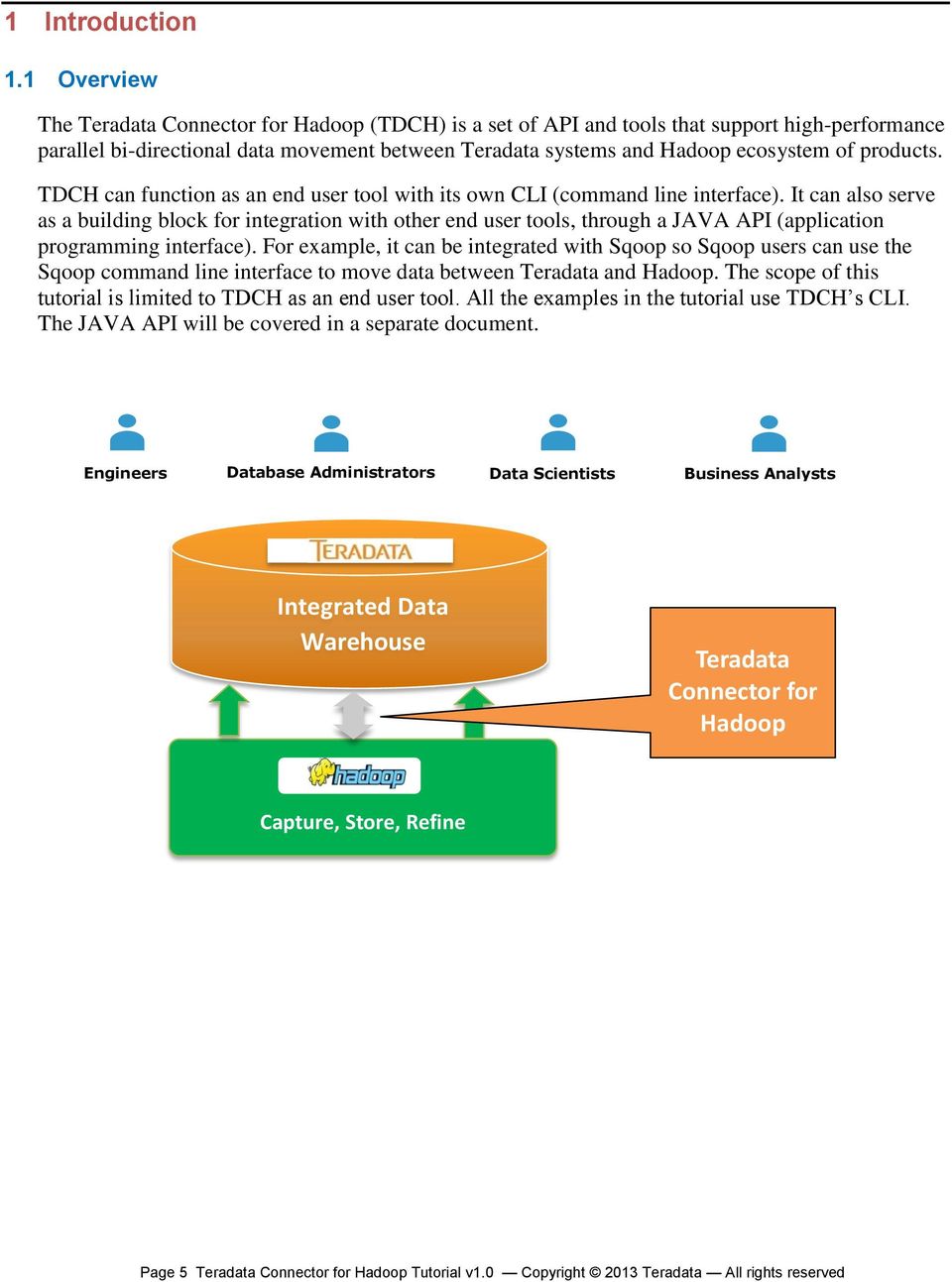
5 1 Introduction 1.1 Overview The Teradata Connector for Hadoop (TDCH) is a set of API and tools that support high-performance parallel bi-directional data movement between Teradata systems and Hadoop ecosystem of products. TDCH can function as an end user tool with its own CLI (command line interface). It can also serve as a building block for integration with other end user tools, through a JAVA API (application programming interface). For example, it can be integrated with Sqoop so Sqoop users can use the Sqoop command line interface to move data between Teradata and Hadoop. The scope of this tutorial is limited to TDCH as an end user tool. All the examples in the tutorial use TDCH s CLI. The JAVA API will be covered in a separate document. Engineers Database Administrators Data Scientists Business Analysts Integrated Data Warehouse Teradata Connector for Hadoop Capture, Store, Refine Page 5 Teradata Connector for Hadoop Tutorial v1.0 Copyright 2013 Teradata All rights reserved

6 1.2 Audience TDCH is designed and implemented for the Hadoop user audience. Users in this audience are familiar with HDFS (Hadoop Distributed File System) and MapReduce. They are also familiar with the widely used tools in the Hadoop ecosystem, such as Hive and Sqoop. They are comfortable with the command line style of interfaces many of these tools support. They may have only limited kwledge about the Teradata database system. Teradata ETL Tools BI Tools Hadoop Teradata Tools Sqoop HCat Pig Hive Teradata SQL MapReduce Text Sequence RC Teradata DB HDFS Page 6 Teradata Connector for Hadoop Tutorial v1.0 Copyright 2013 Teradata All rights reserved

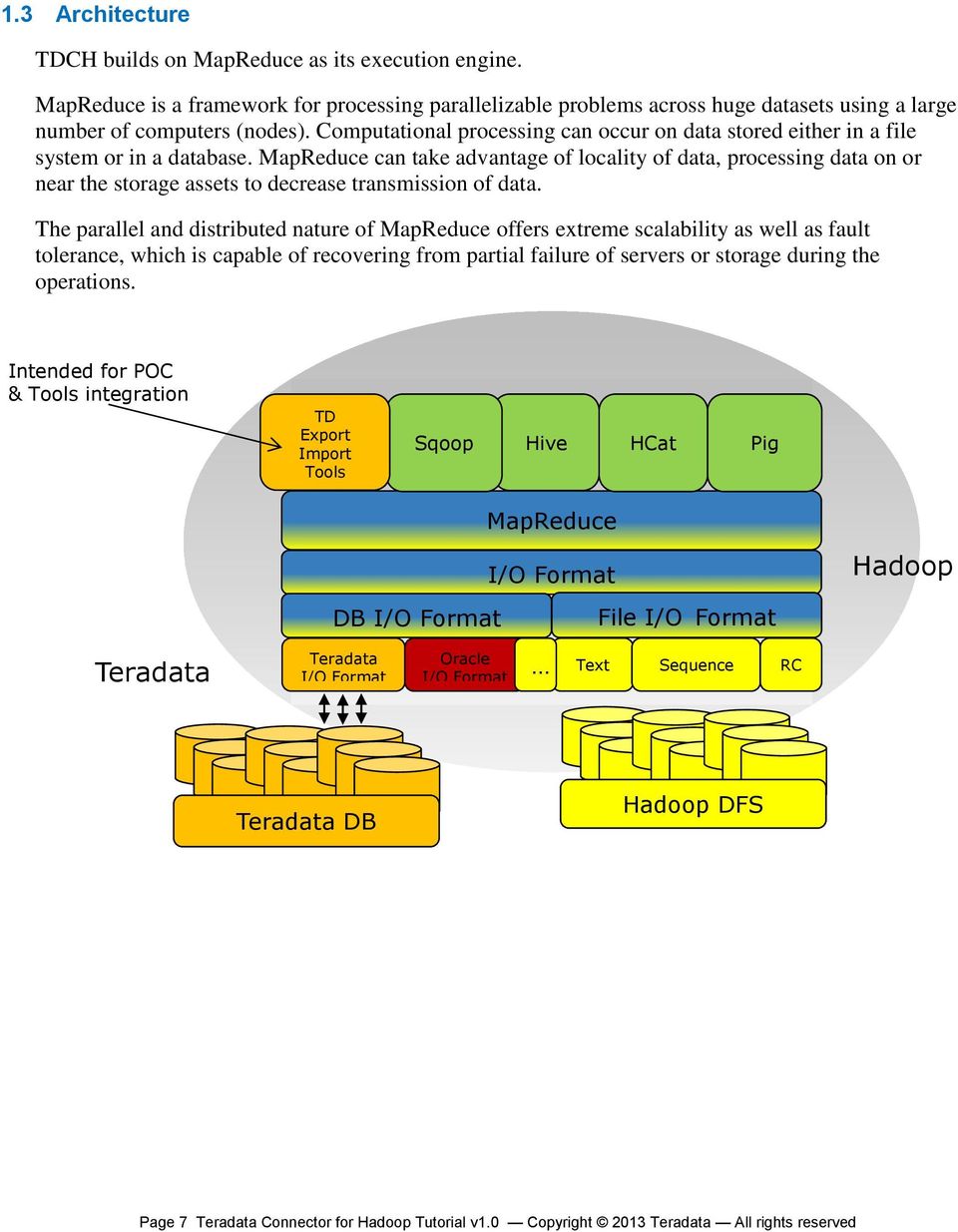
7 1.3 Architecture TDCH builds on MapReduce as its execution engine. MapReduce is a framework for processing parallelizable problems across huge datasets using a large number of computers (des). Computational processing can occur on data stored either in a file system or in a database. MapReduce can take advantage of locality of data, processing data on or near the storage assets to decrease transmission of data. The parallel and distributed nature of MapReduce offers extreme scalability as well as fault tolerance, which is capable of recovering from partial failure of servers or storage during the operations. Intended for POC & Tools integration TD Export Import Tools Sqoop Hive HCat Pig MapReduce I/O Format DB I/O Format File I/O Format Hadoop Teradata Teradata I/O Format Oracle I/O Format Text Sequence RC Teradata DB Hadoop DFS Page 7 Teradata Connector for Hadoop Tutorial v1.0 Copyright 2013 Teradata All rights reserved
8 1.4 Features Supported Hadoop Data Objects TDCH supports loading data into and extracting data from various types of Hadoop data objects, including HDFS files HDFS is a distributed, scalable file system designed to run on commodity hardware. HDFS is designed to reliably store very large files across machines in a large cluster. It stores each file as a sequence of blocks; all blocks in a file except the last block are the same size. Hive tables Hive is a data warehouse infrastructure built on top of Hadoop for providing data summarization, query, and analysis. It defines a simple SQL-like query language, called QL, which enables users familiar with SQL to query the data. Hive executes queries via MapReduce. Hive tables registered via HCatalog HCatalog is a table and storage management service for data created using Apache Hadoop. HCatalog s table abstraction presents users with a relational view of data in HDFS and ensures that users need t worry about where or in what format their data is stored. For Hive tables, TDCH supports loading data into a single partition in a Hive partitioned table. It also supports extracting data from a single partition in Hive partitioned table Supported File Formats TDCH supports loading data into and extracting data from Hadoop file objects of various different formats: TextFile TextFile is structured as a sequence of lines of text, and each line consists of multiple fields. Lines and fields are delimited by separator. TextFile is easier for humans to read. SequenceFile SequenceFile is a flat file consisting of binary key/value pairs. It is extensively used in MapReduce as input/output formats. RCFile RCFile (Record Columnar File) is a data placement structure designed for MapReduce-based data warehouse systems, such as Hive. RCFile applies the concept of first horizontally-partition, then vertically-partition. It combines the advantages of both row-store and column-store. RCFile guarantees that data in the same row are located in the same de, and can exploit a column-wise data compression and skip unnecessary column reads. Page 8 Teradata Connector for Hadoop Tutorial v1.0 Copyright 2013 Teradata All rights reserved
9 1.4.3 Supported Methods for Loading Data into Teradata A Teradata Connector Export Job makes use of multiple mappers to load data into a Teradata table. We currently support the following 3 methods of execution: batch.insert If batch.insert is specified as the execution method, each mapper starts a session to insert rows into the stage table via JDBC batch execution. multiple.fastload If multiple.fastload is specified as the execution method, each mapper starts a fastload job to load rows into the stage table via JDBC fastload. internal.fastload If internal.fastload is specified as the execution method, each mapper has its own session but all mappers are participating in one fastload job. All sessions are coordinated via an internal protocol Supported Methods for Extracting Data from Teradata A Teradata Connector Import Job makes use of multiple mappers to extract data from a Teradata table. We currently support the following 3 methods of execution: split.by.value If split.by.value is specified as the execution method, each mapper starts a session to retrieve data in a given value range from a source table in Teradata. split.by.hash If split.by.hash is specified as the execution method, each mapper starts a session to retrieve data in a given hash value range, from a source table in Teradata. split.by.partition If split.by.partition is specified as the execution method, each mapper starts a session to retrieve a subset of partitions from a source table in Teradata, if the source table is already a partitioned table. If the source table is t a partitioned table, a partitioned stage table will be created with a partition key the same as the distribution key Controlling the Degree of Parallelism TDCH is capable of moving massive amount of data between two extremely scalable systems Teradata database and Hadoop cluster. Therefore, it is very important to be able to control the degree of parallelism while doing such a data movement. TDCH achieves this by controlling the number of mappers used in a MapReduce job. The number of mappers can be configured via a parameter called nummappers. How to set this parameter appropriately to optimize the performance of data movement will be discussed in the Performance Tuning section. Page 9 Teradata Connector for Hadoop Tutorial v1.0 Copyright 2013 Teradata All rights reserved

10 2 Installing Connector 2.1 Prerequisites Teradata Database 13.0 Hadoop Hive (optional) HCatalog (optional) The prerequisite versions listed above have been extensively tested with this version of Teradata Connector for Hadoop. We recommend using these versions of the prerequisites even though later versions may also work if there are interface changes. 2.2 Software Download Currently, the website for downloading the latest software release of the Teradata Connector for Hadoop (Command Line Edition, Sqoop Integration Edition, and Teradata Studio Edition) is under development. It will be available soon on Developer Exchange (DevX). Various Hadoop distributions such as Hortonworks and Cloudera will distribute the TDCH that is integrated with Sqoop through their website and repackage it as the Hortonworks Connector for Teradata and Cloudera Connector for Teradata, respectively. 2.3 Installation TDCH is installed with tar.gz package, which has 3 simple steps: Step 1: Extract tar.gz package tar xvzf teradata-hadoop-connector-all-<version>.tar.gz Step 2: Copy teradata-hadoop-connector-all-<version>.jar into <HADOOP_INSTALL>/lib/, remove any previous version if exists. Page 10 Teradata Connector for Hadoop Tutorial v1.0 Copyright 2013 Teradata All rights reserved
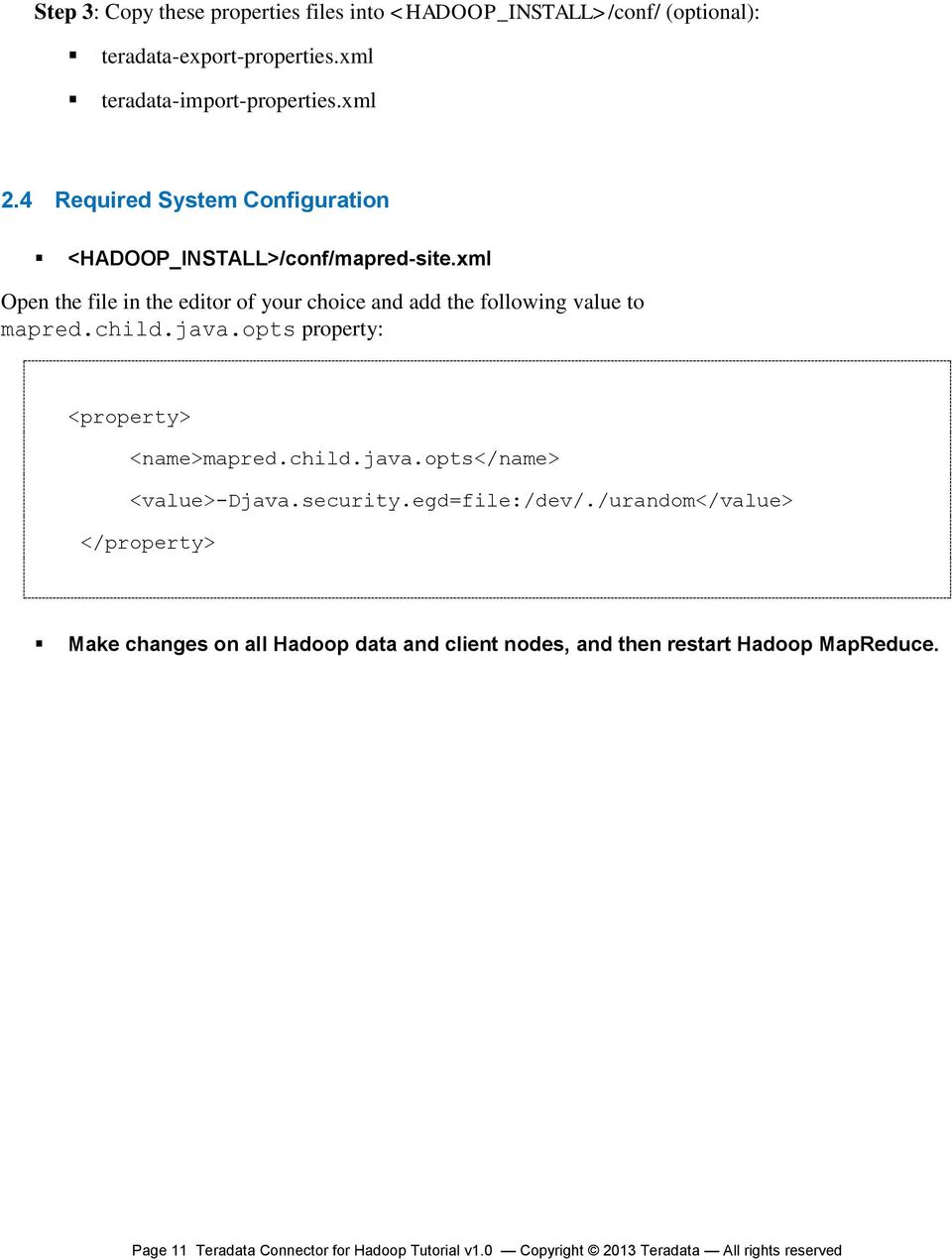
11 Step 3: Copy these properties files into <HADOOP_INSTALL>/conf/ (optional): teradata-export-properties.xml teradata-import-properties.xml 2.4 System Configuration <HADOOP_INSTALL>/conf/mapred-site.xml Open the file in the editor of your choice and add the following value to mapred.child.java.opts property: <property> <name>mapred.child.java.opts</name> <value>-djava.security.egd=file:/dev/./urandom</value> </property> Make changes on all Hadoop data and client des, and then restart Hadoop MapReduce. Page 11 Teradata Connector for Hadoop Tutorial v1.0 Copyright 2013 Teradata All rights reserved
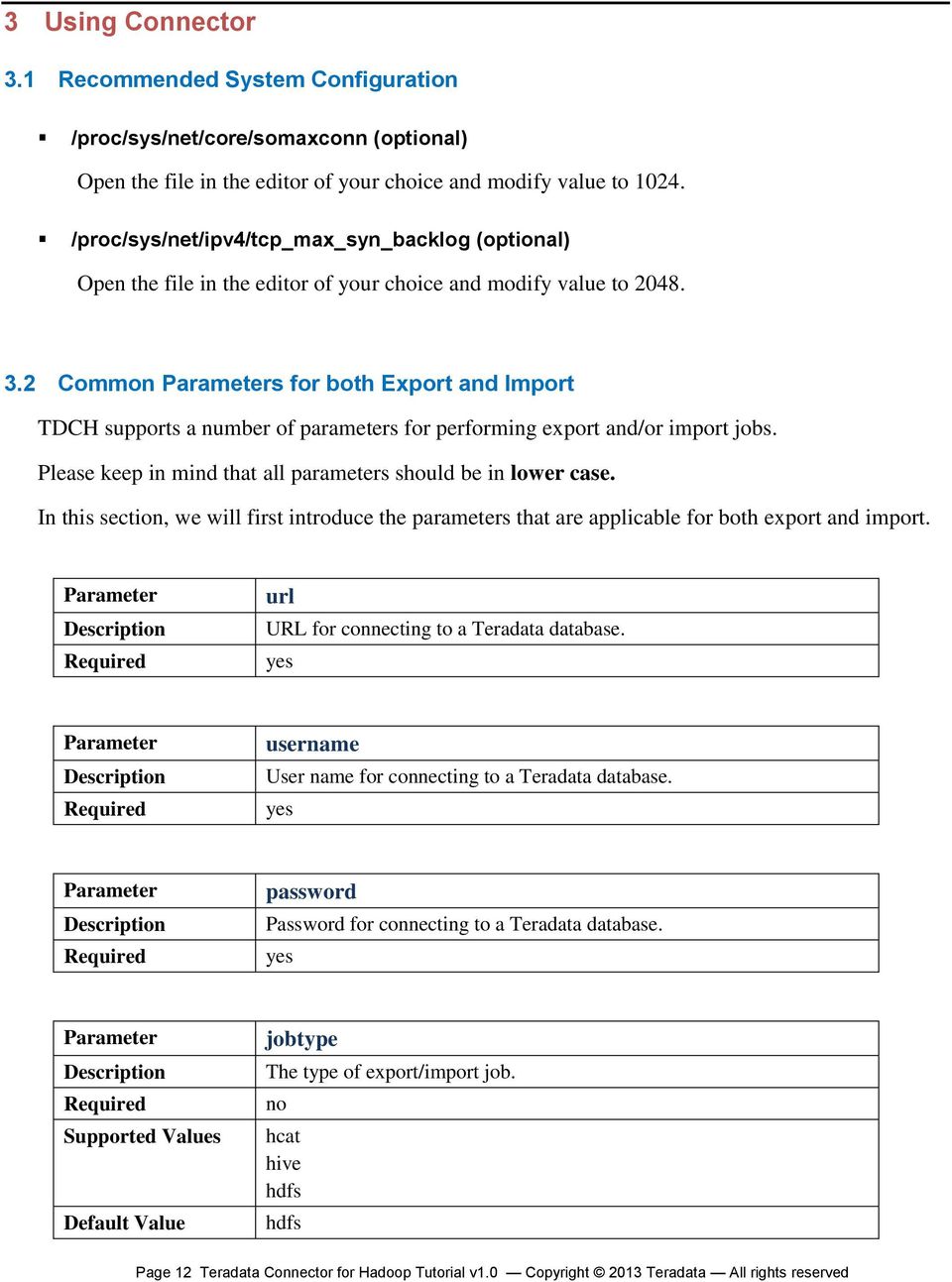
12 3 Using Connector 3.1 Recommended System Configuration /proc/sys/net/core/somaxconn (optional) Open the file in the editor of your choice and modify value to /proc/sys/net/ipv4/tcp_max_syn_backlog (optional) Open the file in the editor of your choice and modify value to Common s for both Export and Import TDCH supports a number of parameters for performing export and/or import jobs. Please keep in mind that all parameters should be in lower case. In this section, we will first introduce the parameters that are applicable for both export and import. url URL for connecting to a Teradata database. yes username User name for connecting to a Teradata database. yes password Password for connecting to a Teradata database. yes jobtype The type of export/import job. hcat hive hdfs hdfs Page 12 Teradata Connector for Hadoop Tutorial v1.0 Copyright 2013 Teradata All rights reserved
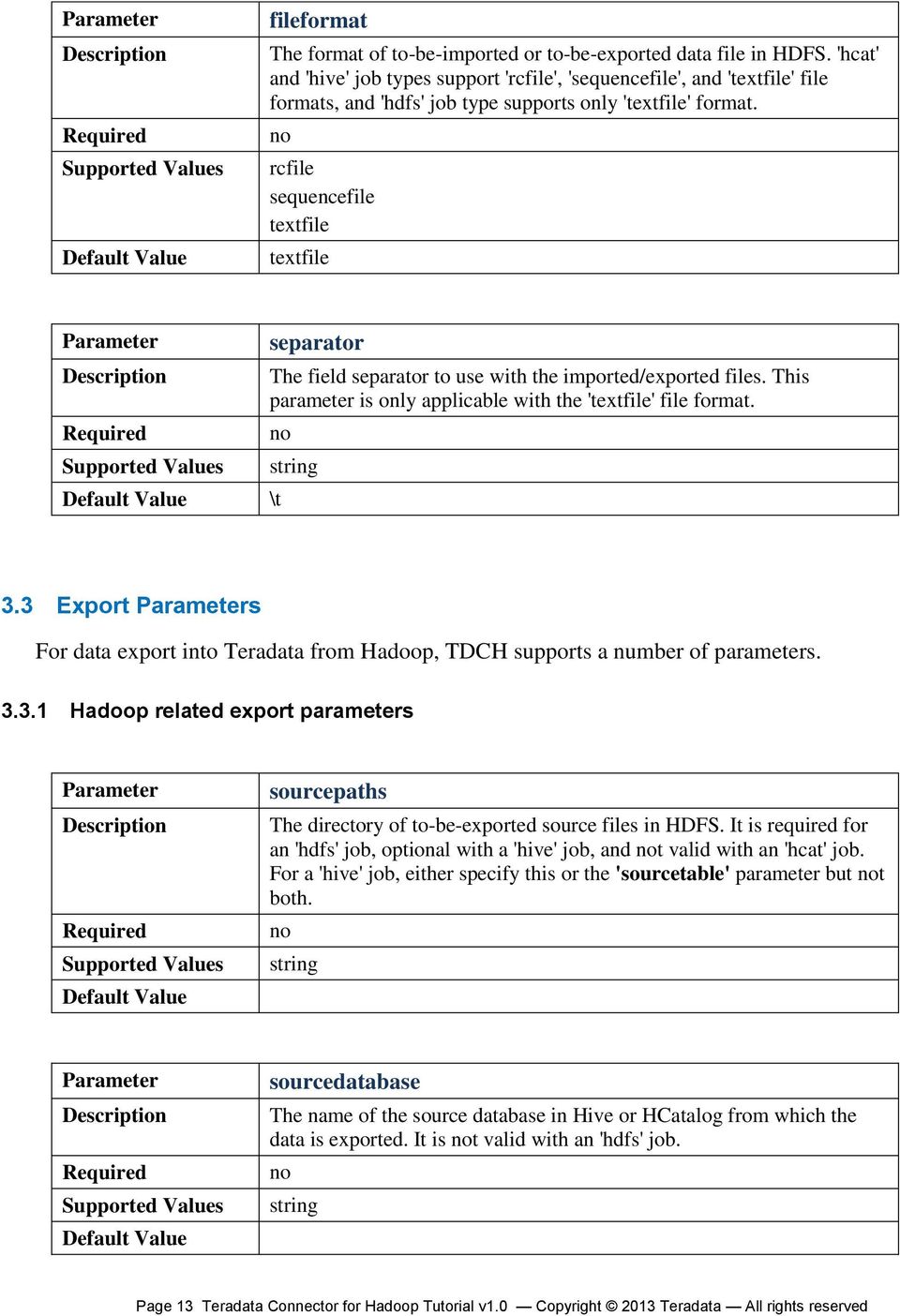
13 fileformat The format of to-be-imported or to-be-exported data file in HDFS. 'hcat' and 'hive' job types support 'rcfile', 'sequencefile', and 'textfile' file formats, and 'hdfs' job type supports only 'textfile' format. rcfile sequencefile textfile textfile separator The field separator to use with the imported/exported files. This parameter is only applicable with the 'textfile' file format. \t string 3.3 Export s For data export into Teradata from Hadoop, TDCH supports a number of parameters Hadoop related export parameters sourcepaths The directory of to-be-exported source files in HDFS. It is required for an 'hdfs' job, optional with a 'hive' job, and t valid with an 'hcat' job. For a 'hive' job, either specify this or the 'sourcetable' parameter but t both. string sourcedatabase The name of the source database in Hive or HCatalog from which the data is exported. It is t valid with an 'hdfs' job. string Page 13 Teradata Connector for Hadoop Tutorial v1.0 Copyright 2013 Teradata All rights reserved
14 sourcetable The name of the source table in Hive or HCatalog from which the data is exported. It is required for an 'hcat' job, optional with a 'hive' job, and t valid with an 'hdfs' job. For a 'hive' job, either specify this or the 'sourcepaths' parameter but t both. string sourcetableschema The full column schema of the source table in Hive or HCatalog, t including the partition schema if the table has any, in comma-separated format. When using data mapping feature with an 'hdfs' job operating on a text file, use this parameter to describe the file content schema. string sourcepartitionschema The full partition schema of the source table in Hive, in commaseparated format. It is valid with a 'hive' job only. When this parameter is used, the 'sourcetableschema' parameter must also be specified. string sourcefieldnames The names of fields to export from the source HDFS files, or from the source Hive and HCatalog tables, in comma separated format. The order of the source field names need to match the order of the target field names for schema mapping. This parameter must be provided when the 'targetfieldnames' parameter is specified. string hiveconfigurationfile The path to the Hive configuration file in the HDFS. It is required for a 'hive' or 'hcat' job launched through remote execution or on data des. Page 14 Teradata Connector for Hadoop Tutorial v1.0 Copyright 2013 Teradata All rights reserved

15 string enclosedby A character, when specified, will be extracted from each field s text on both end (first and last character) if it exists on both end. This parameter is only supported with an 'hdfs' job. character " (double quotes) escapedby A character, when specified, is used to un-escape all instances of the enclosed-by and the escaped-by characters in the field's text. This parameter is only supported with an 'hdfs' job. character \ (back slash) nullstring A string, when specified, is used to replace all instances whereby the field s value matches identically to the string content (case sensitive) to null. When the job type is hdfs, this parameter is only applied on fields with data type related to string (VARCHAR, CHAR, LONGVARCHAR, and CLOB). When the job type is 'hive' or 'hcat', this field is applied to all fields. string nullnstring A string, when specified, is used to replace all instances whereby the field s value matches identically to the string content (case sensitive) to null. When the job type is hdfs, this parameter is only applied on fields with data type related to string (VARCHAR, CHAR, LONGVARCHAR, and CLOB). This parameter is t supported with 'hive' or 'hcat' jobs. string Page 15 Teradata Connector for Hadoop Tutorial v1.0 Copyright 2013 Teradata All rights reserved

16 3.3.2 Teradata related export parameters targettable The name of target table in Teradata system. yes string targetfieldnames The names of fields to export to the target table in Teradata system, in comma separated format. The order of the target field names must match the order of the source field names for schema mapping. This parameter must be provided when the 'sourcefieldnames' parameter is specified. string 0 targetfieldcount The number of fields to export to the target table in Teradata system. Either specify this or the 'targetfieldnames' parameter but t both. integer stagedatabase The database with which Teradata Connector for Hadoop uses to create staging tables. the name of a database in Teradata system the current logon database in JDBC connection stagetablename The name in Teradata system with which Teradata Connector for Hadoop uses to create staging table, if staging is required. Its length cant exceed 20 characters. It should be used when the target Teradata table has name exceeding 20 characters. string less than 20 characters Page 16 Teradata Connector for Hadoop Tutorial v1.0 Copyright 2013 Teradata All rights reserved

17 3.3.3 Miscellaneous Export parameters method The method Teradata Connector for Hadoop uses to export data to Teradata system. batch.insert multiple.fastload internal.fastload batch.insert 2 nummappers The maximum number of output mapper tasks. If the value is zero, then the number of mappers will be same as the number of file blocks in HDFS. Use either this parameter or 'numreducers', but t both. an integer greater than or equal to zero 0 numreducers The maximum number of output reducer tasks if export is done in reduce phase. Use either this or the 'nummappers', but t both. an integer greater than or equal to zero fastloadsockethost The job client host name or IP address that fastload tasks communicate with to synchronize its states. This parameter is valid with 'internal.fastload' method only. If this parameter is t specified, Teradata Connector for Hadoop will automatically lookup for the de that the job is launched on, the configuration values of the 'dfs.datade.dns.interface' parameter or the 'mapred.tasktracker.dns.interface' parameter if these are configured. Otherwise, Connector will select the IP address of the de's first network interface. resolvable host name or IP address Page 17 Teradata Connector for Hadoop Tutorial v1.0 Copyright 2013 Teradata All rights reserved

18 fastloadsocketport The host port that fastload tasks will communicate with to synchronize its states. This parameter is valid with the 'internal.fastload' method only. If this parameter is t specified, Teradata Connector for Hadoop will automatically select an available port starting from integer fastloadsockettimeout The timeout value for the server socket that listens to the fastload tasks connection. The unit is millisecond. If this parameter is t specified, Teradata Connector for Hadoop will use the default value of integer One can specify such export parameters as command line arguments via the command line interface. For example: hadoop com.teradata.hadoop.tool.teradataexporttool -url jdbc:teradata://dbserver/database=testdb -username dbc -password dbc -classname com.teradata.jdbc.teradriver -fileformat textfile -jobtype hdfs method internal.fastload -sourcepaths /user/hduser/export_sample -nummapper 20 -targettable export_data The above commands illustrate that the job type is 'hdfs', and all data fields from /user/hduser/export_sample in Hadoop are exported to an export_data table in Teradata system using the internal.fastload method. The storage format of the files is textfile. Page 18 Teradata Connector for Hadoop Tutorial v1.0 Copyright 2013 Teradata All rights reserved

19 3.4 Import s For data import into Hadoop from Teradata, TDCH supports a number of parameters Hadoop related import parameters targetpaths The directory with which to place the imported data. It is required for a 'hdfs' job, optional for a 'hive' job, and t valid for a 'hcat' job. For a 'hive' job, either specify this or the 'targettable' parameter but t both. string The value of property 'mapred.output.dir' targetdatabase The name of the target database in Hive or HCatalog. It is optional with a 'hive' or 'hcat' job and t valid with an 'hdfs' job. string default targettable The name of the target table in Hive or HCatalog. It is required with a 'hcat' job, optional with a 'hive' job, and t valid with a 'hdfs' job. For a 'hive' job, specify either this parameter or the 'targetpaths' parameter but t both. string targettableschema The column schema of the target table, including the partition schema, in comma-separated format. string Page 19 Teradata Connector for Hadoop Tutorial v1.0 Copyright 2013 Teradata All rights reserved

20 targetpartitionschema The partition schema of the target table in Hive or HCatalog, in commaseparated format. This parameter is applicable with 'hive' job only, and 'targettableschema' must be specified with it. string targetfieldnames The names of fields to write to the target file in HDFS, or to the target Hive or HCatalog table, in comma separated format. The order of the target field names must match exactly the order of the source field names for schema mapping. This parameter must be provided when the 'sourcefieldnames' parameter is specified. string hiveconfigurationfile The path to the Hive configuration file in the HDFS. It is required for a 'hive' or 'hcat' job launched through remote execution or on data des. string enclosedby A character, when specified, is used to enclose each field's text on both end. This parameter is only supported with an 'hdfs' job. character " (double quotes) escapedby A character, when specified, is used to escape all instances of the enclosed-by and the escaped-by characters in the field's text. This parameter is only supported with an 'hdfs' job. character \ (back slash) Page 20 Teradata Connector for Hadoop Tutorial v1.0 Copyright 2013 Teradata All rights reserved

21 nullstring A string, when specified, is used to replace all instances with which the field s value is null and the fields data. When the job type is hdfs, this parameter is only applied on fields with data type related to string (VARCHAR, CHAR, LONGVARCHAR, and CLOB). When the job type is 'hive' or 'hcat' and the target table does t yet exist, this field is applied to all fields. string nullnstring A string, when specified, is used to replace all instances with which the field s value is null and the fields data and on Fields with data type unrelated to string (VARCHAR, CHAR, LONGVARCHAR, and CLOB). This parameter is t supported with 'hive' or 'hcat' jobs. string Teradata related import parameters sourcequery The SQL query to select data from Teradata database, either specify this or the 'sourcetable' parameter but t both. The select SQL query Teradata database supported sourcetable The name of the source table in Teradata system from which the data is imported. Either specify this or the 'sourcequery' parameter but t both. string sourcefieldnames Page 21 Teradata Connector for Hadoop Tutorial v1.0 Copyright 2013 Teradata All rights reserved
22 The names of columns to import from the source table in Teradata system, in comma separated format. The order of the source field names must match exactly the order of the target field names for schema mapping. This parameter must be present when the targetfieldnames' parameter is specified. If t specified, then all columns from the source table will be retrieved. string batchsize The number of rows each time Teradata Connector for Hadoop will fetch from Teradata system, up to 1MB buffer size limit. However, when the batch.insert method is used, the batchsize should t be greater than 13683, which is a limitation of Teradata database. an integer greater than 0 (less than or equal to when using the batch.insert method) splitbycolumn The name of a table column to be used for splitting import tasks. It is optional with 'split.by.hash' and 'split.by.value' methods, and t valid with 'split.by.partition' method. If this parameter is t specified, the first column of the table s primary key or primary index will be used. a valid table column name forcestage If set to true, then staging is used even if source table is a PPI table. It is valid with 'split.by.partition' method only. true false false stagedatabase The database in Teradata system with which Teradata Connector for Hadoop uses to create staging table. Page 22 Teradata Connector for Hadoop Tutorial v1.0 Copyright 2013 Teradata All rights reserved
23 The name of a database in Teradata system The current logon database in JDBC connection stagetablename The name in Teradata system with which Teradata Connector for Hadoop uses to create staging table, if staging is required. Its length cant exceed 20 characters. It should be used when the source Teradata table has name exceeding 20 characters. string Miscellaneous Import parameters method The method Teradata Connector for Hadoop uses to import data from Teradata system. split.by.hash split.by.partition split.by.value split.by.hash nummappers The number of mappers for the import job. It is also the number of splits Teradata Connector for Hadoop will attempt to create. an integer greater than 0 2 Page 23 Teradata Connector for Hadoop Tutorial v1.0 Copyright 2013 Teradata All rights reserved
24 One can specify such import parameters as command line arguments via our command line interface. For example: hadoop com.teradata.hadoop.tool.teradataimporttool -url jdbc:teradata://dbserver/database=testdb -username dbc -password dbc -classname com.teradata.jdbc.teradriver -fileformat textfile -jobtype hdfs -method split.by.hash -targetpaths /user/hduser/import_sample -nummapper 20 -sourcetable testable The above commands illustrate that the job type is 'hdfs' and all columns of a 'testtable' table from Teradata system are imported to the path of /user/hduser/import_sample in Hadoop using the 'split.by.hash'. The storage format of the files is 'textfile'. The number of mappers for the import job is 20. Page 24 Teradata Connector for Hadoop Tutorial v1.0 Copyright 2013 Teradata All rights reserved
25 4 Use Case Examples 4.1 Environment Variables Execute the following on the Hadoop cluster client de; adapt the library names and their paths to the actual installed libraries on the cluster. export HADOOP_HOME=/usr/lib/hadoop export HIVE_HOME=/usr/lib/hive export HCAT_HOME=/usr/lib/hcatalog export LIB_JARS=$HCAT_HOME/share/hcatalog/hcatalog jar,$HIVE_HOME/lib/hive-metastore jar,$HIVE_HOME/lib/libthrift jar,$HIVE_HOME/lib/hive-exec jar,$HIVE_HOME/lib/libfb jar,$HIVE_HOME/lib/jdo2-api-2.3-ec.jar,$HIVE_HOME/lib/slf4j-api jar,$HIVE_HOME/lib/hive-cli jar,$HIVE_HOME/lib/hive-builtins jar export HADOOP_CLASSPATH=$HCAT_HOME/share/hcatalog/hcatalog jar :$HIVE_HOME/lib/hive-metastore jar :$HIVE_HOME/lib/libthrift jar:$HIVE_HOME/lib/hive-exec jar :$HIVE_HOME/lib/libfb jar:$HIVE_HOME/lib/jdo2-api-2.3-ec.jar :$HIVE_HOME/conf:$HADOOP_HOME/conf :$HIVE_HOME/lib/slf4j-api jar:$HIVE_HOME/lib/antlr-runtime jar :$HIVE_HOME/lib/datanucleus-core jar :$HIVE_HOME/lib/datanucleus-rdbms jar :$HIVE_HOME/lib/datanucleus-connectionpool jar :$HIVE_HOME/lib/mysql-connector-java bin.jar :$HIVE_HOME/lib/commons-dbcp-1.4.jar :$HIVE_HOME/lib/commons-pool jar :$HIVE_HOME/lib/hive-cli jar :$HIVE_HOME/lib/hive-builtins jar Page 25 Teradata Connector for Hadoop Tutorial v1.0 Copyright 2013 Teradata All rights reserved
26 4.2 Use Case: Import from Teradata Table to HDFS File Setup: Create a Teradata table and insert data Execute the following in a Teradata SQL client (e.g. BTEQ).LOGON testsystem/testuser DATABASE testdb; CREATE MULTISET TABLE example1_td ( c1 INT, c2 VARCHAR(100) ); INSERT INTO example1_td VALUES (1,'foo'); Run: TeradataImportTool command Execute the following on the client de command line hadoop com.teradata.hadoop.tool.teradataimporttool -libjars $LIB_JARS -url jdbc:teradata://testsystem/database=testdb -username testuser -password testpassword -jobtype hdfs -sourcetable example1_td -nummappers 1 -separator ',' -targetpaths /user/mapred/ex1_hdfs -method split.by.hash -splitbycolumn c1 Set job type as hdfs Set source Teradata table name Set separator, e.g. comma Set target paths (t exist yet) The import job uses the split.by.hash mehod The column used to make data split Page 26 Teradata Connector for Hadoop Tutorial v1.0 Copyright 2013 Teradata All rights reserved
27 4.3 Use Case: Export from HDFS File to Teradata Table Setup: Create a Teradata table Execute the following in a Teradata SQL client (e.g. BTEQ).LOGON testsystem/testuser DATABASE testdb; CREATE MULTISET TABLE example2_td ( c1 INT,c2 VARCHAR(100) );.LOGOFF Setup: Create a HDFS file Execute the following on the console command line echo "2,acme" > /tmp/example2_hdfs_data hadoop fs -mkdir /user/mapred/example2_hdfs hadoop fs -put /tmp/example2_hdfs_data /user/mapred/example2_hdfs/01 rm /tmp/example2_hdfs_data Page 27 Teradata Connector for Hadoop Tutorial v1.0 Copyright 2013 Teradata All rights reserved
28 4.3.3 Run: TeradataExportTool command Execute the following on the client de command line hadoop com.teradata.hadoop.tool.teradataexporttool -libjars $LIB_JARS -url jdbc:teradata://testsystem/database=testdb -username testuser -password testpassword -jobtype hdfs -sourcepaths /user/mapred/example2_hdfs -nummappers 1 -separator ',' -targettable example2_td -forcestage true -stagedatabase testdb -stagetablename export_hdfs_stage -method internal.fastload -fastloadsockethost fastloadsocketport 8988 Set job type as hdfs Set source HDFS path Set separator, e.g. comma Set target Teradata table name Force to create stage table Database to create stage table Name of the stage table Use internal.fastload method Set the socket host and port for internal fastload Page 28 Teradata Connector for Hadoop Tutorial v1.0 Copyright 2013 Teradata All rights reserved
29 4.4 Use Case: Import from Teradata table to Hive Table Setup: Create a Teradata table and insert data Execute the following in a Teradata SQL client (e.g. BTEQ).LOGON testsystem/testuser DATABASE testdb; CREATE MULTISET TABLE example3_td ( c1 INT,c2 VARCHAR(100) ); INSERT INTO example3_td VALUES (3,'bar');.LOGOFF Setup: Create a Hive table Execute the following on the Hive command line CREATE TABLE example3_hive ( h1 INT, h2 STRING ) STORED AS RCFILE; Page 29 Teradata Connector for Hadoop Tutorial v1.0 Copyright 2013 Teradata All rights reserved
30 4.4.3 Run: TeradataImportTool command Execute the following on the client de command line hadoop com.teradata.hadoop.tool.teradataimporttool -libjars $LIB_JARS -url jdbc:teradata://testsystem/database=testdb -username testuser -password testpassword -jobtype hive -fileformat rcfile -sourcetable example3_td -nummappers 1 -targettable example3_hive Set job type as hive Set file format as rcfile Set source TD table name Set target Hive table name Run: TeradataImportTool command Execute the following on the client de command line, which uses the SQL query to select data from Teradata database hadoop com.teradata.hadoop.tool.teradataimporttool -libjars $LIB_JARS -url jdbc:teradata://testsystem/database=testdb -username testuser -password testpassword -jobtype hive -fileformat rcfile -sourcequery "select * from example3_td" -nummappers 1 -targettable example3_hive Set job type as hive Set file format as rcfile Use a SQL query to get source data Set target TD table name Page 30 Teradata Connector for Hadoop Tutorial v1.0 Copyright 2013 Teradata All rights reserved
31 4.5 Use Case: Import from Teradata table to Hive Table (Table t exist) Setup: Create a Teradata table and insert data Execute the following in a Teradata SQL client (e.g. BTEQ).LOGON testsystem/testuser DATABASE testdb; CREATE MULTISET TABLE example4_td ( c1 INT,c2 FLOAT,c3 VARCHAR(100) ); INSERT INTO example4_td VALUES (3,2.35,'bar');.LOGOFF Run: TeradataImportTool command Execute the following on the client de command line. A new hive partitioned table (named example4_hive in database of default ) with the specified table schema and partition schema will be created in the specified database at the end of import. hadoop com.teradata.hadoop.tool.teradataimporttool -libjars $LIB_JARS -url jdbc:teradata://testsystem/database=testdb -username testuser -password testpassword -jobtype hive -fileformat rcfile -sourcetable example4_td -sourcefieldnames "c1,c2,c3" -nummappers 1 Set job type as hive Set file format as rcfile Set source TD table name The Hive database name to create table -targetdatabase default Page 31 Teradata Connector for Hadoop Tutorial v1.0 Copyright 2013 Teradata All rights reserved
32 -targettable example4_hive -targettableschema "h1 int,h2 float" -targetpartitionschema "h3 string" -targetfieldnames "h1,h2,h3 " Set target Hive table name The schema for target Hive table The partition schema for target Hive tabletable All columns in target Hive table 4.6 Use Case: Export from Hive Table to Teradata Table Setup: Create a Teradata table Execute the following in a Teradata SQL client (e.g. BTEQ).LOGON testsystem/testuser DATABASE testdb; CREATE MULTISET TABLE example5_td ( c1 INT, c2 VARCHAR(100) );.LOGOFF Setup: Create a Hive table and load data Execute the following on the Hive command line CREATE TABLE example5_hive ( h1 INT, h2 STRING ) row format delimited fields terminated by ',' stored as textfile; Execute the following on the console command line echo "4,acme">/tmp/example5_hive_data Page 32 Teradata Connector for Hadoop Tutorial v1.0 Copyright 2013 Teradata All rights reserved
33 hive -e "LOAD DATA LOCAL INPATH '/tmp/example5_hive_data' INTO TABLE example5_hive;" rm /tmp/example5_hive_data Run: TeradataExportTool command Execute the following on the client de command line hadoop com.teradata.hadoop.tool.teradataexporttool -libjars $LIB_JARS -url jdbc:teradata://testsystem/database=testdb -username testuser -password testpassword -jobtype hive -fileformat textfile -sourcetable example5_hive -nummappers 1 -targettable example5_td Set job type as hive Set file format as textfile Set source Hive table name Set target TD table name 4.7 Use Case: Import from Teradata PPI table to Hive Partitioned Table Setup: Create a Teradata PPI table and insert data Execute the following in a Teradata SQL client (e.g. BTEQ).LOGON testsystem/testuser DATABASE testdb; CREATE MULTISET TABLE example6_td ( c1 INT, c2 DATE ) PRIMARY INDEX (c1) PARTITION BY RANGE_N(c2 BETWEEN DATE ' ' AND DATE ' ' EACH INTERVAL '1' MONTH); Page 33 Teradata Connector for Hadoop Tutorial v1.0 Copyright 2013 Teradata All rights reserved
34 INSERT INTO example6_td VALUES (5,DATE ' ');.LOGOFF Setup: Create a Hive Partitioned Table Execute the following on the Hive command line CREATE TABLE example6_hive ( h1 INT ) PARTITIONED BY (h2 STRING) STORED AS RCFILE; Run: TeradataImportTool command Execute the following on the client de command line hadoop com.teradata.hadoop.tool.teradataimporttool -libjars $LIB_JARS -url jdbc:teradata://testsystem/database=testdb -username testuser -password testpassword -jobtype hive -fileformat rcfile -sourcetable example6_td -sourcefieldnames "c1,c2" -nummappers 1 -targettable example6_hive -targetfieldnames "h1,h2" Specify both source and target field names so TeradataImportTool kws how to map Teradata column Hive partition columns. Page 34 Teradata Connector for Hadoop Tutorial v1.0 Copyright 2013 Teradata All rights reserved
35 4.8 Use Case: Export from Hive Partitioned Table to Teradata PPI table Setup: Create a Teradata PPI table Execute the following in a Teradata SQL client (e.g. BTEQ).LOGON testsystem/testuser DATABASE testdb; CREATE MULTISET TABLE example7_td ( c1 INT, c2 DATE ) PRIMARY INDEX (c1) PARTITION BY RANGE_N(c2 BETWEEN DATE ' ' AND DATE ' ' EACH INTERVAL '1' MONTH);.LOGOFF Setup: Create a Hive Partitioned Table and load data Execute the following on the command line echo "6, " > /tmp/example7_hive_data Execute the following on the Hive command line CREATE TABLE example7_tmp (h1 INT, h2 STRING) ROW FORMAT DELIMITED FIELDS TERMINATED BY ',' STORED AS TEXTFILE; CREATE TABLE example7_hive ( h1 INT ) PARTITIONED BY (h2 STRING) STORED AS RCFILE; Page 35 Teradata Connector for Hadoop Tutorial v1.0 Copyright 2013 Teradata All rights reserved

36 LOAD DATA LOCAL INPATH '/tmp/example7_hive_data' INTO TABLE example7_tmp INSERT INTO TABLE example7_hive PARTITION (h2=' ') SELECT h1 FROM example7_tmp; DROP TABLE example7_tmp; Run: TeradataExportTool command Execute the following on the client de command line hadoop com.teradata.hadoop.tool.teradataexporttool -libjars $LIB_JARS -url jdbc:teradata://testsystem/database=testdb -username testuser -password testpassword -jobtype hive -fileformat rcfile -sourcetable example7_hive -sourcefieldnames "h1,h2" -nummappers 1 -targettable example7_td -targetfieldnames "c1,c2" Specify both source and target field names so TeradataExportTool kws how to map Hive partition column to Teradata column. 4.9 Use Case: Import from Teradata Table to HCatalog Table Setup: Create a Teradata table and insert data Execute the following in a Teradata SQL client (e.g. BTEQ).LOGON testsystem/testuser DATABASE testdb; CREATE MULTISET TABLE example8_td ( c1 INT, c2 VARCHAR(100) Page 36 Teradata Connector for Hadoop Tutorial v1.0 Copyright 2013 Teradata All rights reserved
37 ); INSERT INTO example8_td VALUES (7,'bar');.LOGOFF Setup: Create a Hive Table Execute the following on the Hive command line CREATE TABLE example8_hive ( h1 INT, h2 STRING ) STORED AS RCFILE; Run: TeradataImportTool command Execute the following on the client de command line hadoop com.teradata.hadoop.tool.teradataimporttool -libjars $LIB_JARS -url jdbc:teradata://testsystem/database=testdb -username testuser -password testpassword -jobtype hcat Set job type as hcat -sourcetable example8_td -nummappers 1 -targettable example8_hive Page 37 Teradata Connector for Hadoop Tutorial v1.0 Copyright 2013 Teradata All rights reserved
38 4.10 Use Case: Export from HCatalog Table to Teradata Table Setup: Create a Teradata table Execute the following in a Teradata SQL client (e.g. BTEQ).LOGON testsystem/testuser DATABASE testdb; CREATE MULTISET TABLE example9_td ( c1 INT, c2 VARCHAR(100) );.LOGOFF Setup: Create a Hive Table and load data Execute the following on the Hive command line CREATE TABLE example9_hive ( h1 INT, h2 STRING ) ROW FORMAT DELIMITED FIELDS TERMINA TED BY ',' STORED AS TEXTFILE; Execute the following on the console command line echo "8,acme">/tmp/example9_hive_data hive -e "LOAD DATA LOCAL INPATH '/tmp/example9_hive_data' INTO TABLE example9_hive;" rm /tmp/example9_hive_data Run: TeradataExportTool command Execute the following on the client de command line Page 38 Teradata Connector for Hadoop Tutorial v1.0 Copyright 2013 Teradata All rights reserved
39 hadoop com.teradata.hadoop.tool.teradataexporttool -libjars $LIB_JARS -url jdbc:teradata://testsystem/database=testdb -username testuser -password testpassword -jobtype hcat Set job type as hcat -sourcetable example9_hive -nummappers 1 -targettable example9_td Page 39 Teradata Connector for Hadoop Tutorial v1.0 Copyright 2013 Teradata All rights reserved
40 5 Storage Space Requirements 5.1 Storage Space for Loading Data into Teradata This section describes the storage space requirement for the three export methods to load data into Teradata tables: batch.insert This execution method creates a NOPI stage table unless the target table is already a NOPI table. Data is loaded into the stage table first before an INSERT-SELECT is executed to move the data into the target table. Please make sure there is a sufficient amount of permanent space, rmally the same size as the source data, allocated to accommodate data in the stage table. Please te this is in addition to the storage space required for the target table and the spool space required for the INSERT-SELECT execution. multiple.fastload The export job creates a NOPI stage table, regardless what the target table type is. Data is loaded into the stage table first before an INSERT-SELECT is executed to move the data into the target table. Please make sure there is a sufficient amount of permanent space, rmally the same size as the source data, allocated to accommodate data in the stage table. Please te this is in addition to the storage space required for the target table and the spool space required for the INSERT-SELECT execution. internal.fastload The export job creates a NOPI stage table unless the target table is an empty NOPI or PI table. Data is loaded into the stage table first before an INSERT-SELECT is executed to move the data into the target table. Please make sure there is a sufficient amount of permanent space, rmally the same size as the source data, allocated to accommodate data in the stage table. Please te this is in addition to the storage space required for the target table and the spool space required for the INSERT-SELECT execution. Page 40 Teradata Connector for Hadoop Tutorial v1.0 Copyright 2013 Teradata All rights reserved
41 5.2 Storage Space for Extracting Data from Teradata This section describes the storage space requirement for the three import methods to extract data from Teradata tables: split.by.value Each mapper starts a session to retrieve data in a given value range via a SELECT SQL statement. Please make sure there is a sufficient amount of spool space required for processing the SELECT statement. split.by.hash Each mapper starts a session to retrieve data in a given hash value range via a SELECT SQL statement. Please make sure there is a sufficient amount of spool space required for processing the SELECT statement. split.by.partition Source table t partitioned: Execute an INSERT-SELECT to move data from the source table into a partitioned stage table. Then each mapper starts a session to retrieve a partition from the stage table via a SELECT SQL statement. Please make sure there is a sufficient amount of permanent space, the same size as the source data, allocated to accommodate data in the stage table. Please te this is in addition to the spool space required for the INSERT-SELECT execution and for processing the SELECT statement. Source table already partitioned: No stage table is required. Each mapper starts a session to retrieve a partition from the source table via a SELECT SQL statement. Please make sure there is a sufficient amount of spool space required for processing the SELECT statement. Page 41 Teradata Connector for Hadoop Tutorial v1.0 Copyright 2013 Teradata All rights reserved
42 6 Performance Tuning 6.1 How to choose a nummappers Value for Data Export batch.insert As mentioned previously, each mapper starts a session to insert rows into a NOPI stage table. For loading a small amount of data, one can use the number of data blocks as the number of mappers. For a large amount of data, one can use a number that is smaller than the number of concurrent sessions allowed in a system. multiple.fastload As mentioned previously, each mapper starts a fastload job to load rows into a separate stage table via JDBC fastload. Each fastload job consumes a utility slot. There is a limit on the number of utility slots in the system, which is typically in the range of 15 to 30. One should use a number that is smaller than the number of utility slots in a system. internal.fastload As mentioned previously, each mapper has its own session but all mappers are participating in one fastload job. The number of sessions in this case cant exceed the number of AMPs in a system. Therefore, one should set nummappers to be less than or equal to the number of AMPs in a system. Page 42 Teradata Connector for Hadoop Tutorial v1.0 Copyright 2013 Teradata All rights reserved
43 6.2 How to choose a nummappers Value for Data Import split.by.value As mentioned previously, each session is rmally an all-amp operation in this case. One should rmally set the nummappers value to 20-30, as there is a limit on the number of all-amp operations running concurrently in a system. split.by.hash As mentioned previously, each session is rmally an all-amp operation in this case. One should rmally set the nummappers value to 20-30, as there is a limit on the number of all-amp operations running concurrently in a system. split.by.partition Source table t partitioned: As mentioned previously, each session is a one-amp operation. Therefore, one may use a large number of mappers as it is t subject to the maximum number of all-amp operations in the system. Source table already partitioned: As mentioned previously, each session is rmally an all-amp operation in this case. One should rmally set the nummappers value to 20-30, as there is a limit on the number of all- AMP operations running concurrently in a system. Page 43 Teradata Connector for Hadoop Tutorial v1.0 Copyright 2013 Teradata All rights reserved
44 6.3 How to Select Export Methods for Loading Data into Teradata This section provides suggestions on how to choose from the three export methods for loading data into Teradata tables: batch.insert One should use this export method for loading a small amount of data. One could also use this method for loading a large amount of data in situations where multiple.fastload and internal.fastload methods are t appropriate. multiple.fastload One can use this export method for loading a large amount of data into a small Teradata system (i.e., a system with a small number of des and AMPs), especially in a situation where internal.fastload is t appropriate. Please te, as discussed previously, one could use only a small number of mappers with this export method. internal.fastload One should use this export method for loading a large amount of data into a large Teradata system (i.e., a system with a large number of des and AMPs), especially from a large Hadoop cluster. Please te, as discussed previously, one can use a large number of mappers with this export method for better throughput, but t more than the number of AMPs in the Teradata system. Page 44 Teradata Connector for Hadoop Tutorial v1.0 Copyright 2013 Teradata All rights reserved
45 6.4 How to Select Import Methods for Extracting Data from Teradata TDCH currently supports the following 3 methods for extracting data from Teradata tables: split.by.value One should use this import method for extracting data from a n-partitioned PI table, where the PI column(s) has a small number of distinct values. Please te, as discussed previously, one can use only a small number of mappers with this import method. split.by.hash One should use this import method for extracting data from a n-partitioned table in situations where split.by.value and split.by.partition are t appropriate. Please te, as discussed previously, one can use only a small number of mappers with this import method. split.by.partition Source table t partitioned: One should use this import method for extracting a large amount of data from a large Teradata system (i.e., a system with a large number of des and AMPs), especially to a large Hadoop cluster. Source table already partitioned: One should use this import method for extracting data from a partitioned table, especially a large amount of data from a large Teradata system. Please te, as discussed previously, one can use only a small number of mappers with this import method. This method is extremely efficient when the partitioning column(s) of the source table are also the PI column(s) of that table, where a large number of mappers can be used. Page 45 Teradata Connector for Hadoop Tutorial v1.0 Copyright 2013 Teradata All rights reserved
46 7 Troubleshooting 7.1 Troubleshooting Requirements In order to conduct a troubleshooting process, one must have the following ready: Command - TeradataIm(Ex)portTool, Sqoop Console Output Teradata Table DDL Hive Table DDL (if Hive or Hcatalog table is involved) In addition, one should have kwledge of the following to bring the troubleshooting to next level: Each mapper s output on all Hadoop des sample data (a few rows/lines) Hadoop cluster configuration (under /etc/hadoop/conf) o slaves o mapred-site.xml o hdfs-site.xml o scheduler (e.g. capacityscheduler.xml, fairscheduler.xml, etc.) Page 46 Teradata Connector for Hadoop Tutorial v1.0 Copyright 2013 Teradata All rights reserved
47 7.2 Troubleshooting Overview The chart below provides an overview of our suggested troubleshooting process: Customer Scenario (understand command parameters) Import Export Issue Type Functional (look for exceptions) Performance (go through checklist) Check for issues with each job stage Setup (user error, database configuration, hadoop configuration, database staging) Run (code exception, data quality, data type handling) Cleanup (database configuration, database staging cleanup) Problem Area JDBC Database Hadoop Connector Data Page 47 Teradata Connector for Hadoop Tutorial v1.0 Copyright 2013 Teradata All rights reserved
48 7.3 Functional: Understand Exceptions Look in the console output for The very last error code o 10000: runtime (look for database error code, or JDBC error code, or backtrace) o Others: pre-defined (checked) errors by TDCH The very first instance of exception messages Examples: com.teradata.hadoop.exception.teradatahadoopsqlexception: com.teradata.jdbc.jdbc_4.util.jdbcexception: [Teradata Database] [TeraJDBC ] [Error 5628] [SQLState HY000] Column h3 t found in mydb.import_hive_table. (omitted) 13/04/03 09:52:48 INFO tool.teradataimporttool: job completed with exit code com.teradata.hadoop.exception.teradatahadoopschemaexception: Field data type is invalid at com.teradata.hadoop.utils.teradataschemautils.lookupdatatypebytypename(te radataschemautils.java:1469) (omitted) 13/04/03 09:50:02 INFO tool.teradataimporttool: job completed with exit code Page 48 Teradata Connector for Hadoop Tutorial v1.0 Copyright 2013 Teradata All rights reserved
49 7.4 Functional: Data Issues This category of issues occurs at runtime (most often with the internal.fastload method), and usually it s t obvious what the root cause is. Our suggestion is that you can check the following: Does the schema match the data? Is the separator correct? Does the table DDL have time or timestamp columns? o Check if tna/tsna setting has been specified to JDBC URL Does the table DDL have Unicode columns? o Check if CHARSET setting has been specified to JDBC URL Does the table DDL have decimal columns o Before release 1.0.6, this may cause issues Check Fastload error tables to see what s inside 7.5 Performance: Back of the Envelope Guide We are all aware that throughput is faster than the total I/O or network transfer capacities of the least powerful component in the overall solution. So our methodology is to understand max for the configuration and work it backwards. Max theoretical throughput <= MIN ( (Ttd-io), (Ttd-transfer), (Thadoop-io), (Thadoop-transfer), Tnetwork-transfer ) Therefore we should: Watch out for de-level CPU saturation (including core saturation), because CPU = work can be done. If all-de saturated with either Hadoop or Teradata, consider expanding system footprint and/or lowering concurrency If one-de much busier than other des with either Hadoop or Teradata, try to balance the workload skew If both Hadoop and Teradata are mostly idle, look for obvious user mistakes or configuration issues, and if possible, increase concurrency. Page 49 Teradata Connector for Hadoop Tutorial v1.0 Copyright 2013 Teradata All rights reserved
50 And here is the checklist we could go through in case of slow performance: User Settings Teradata JDBC URL o Connecting to MPP system name? (and t single-de) o Connecting through correct (fast) network interface? /etc/hosts ifconfig Using best-performance methods? Using most optimal number of mappers? (small number of mapper sessions can significantly impact performance) Is batch size too small? (increase to 80000) Database Is database CPU or IO saturated? o iostat, mpstat, sar, top Is there any TDWM setting limiting # of concurrent sessions or user s query priority? o tdwmcmd -a DBSControl settings o AWT tasks: maxawttask, maxloadtask, maxloadawt o Compression settings Is database almost out of room? Is there high skew to some AMPs (skew on PI column or split-by column) Network Are Hadoop network interfaces saturated? o Could be high replication factor combined with slow network between des Are Teradata network interfaces saturated? o Could be slow network between systems Page 50 Teradata Connector for Hadoop Tutorial v1.0 Copyright 2013 Teradata All rights reserved
51 Hadoop Are hadoop data des CPU or IO saturated? o iostat, mpstat, sar, top o Could be hadoop configuration too small for the job s size Are there settings limiting # of concurrent mappers? o mapred-site.xml o scheduler configuration Are mapper tasks skewed to a few des? o use ps grep java on multiple des to see if tasks have skew o In capacity-scheduler.xml, set maxtasksperheartbeat to force even distribution Page 51 Teradata Connector for Hadoop Tutorial v1.0 Copyright 2013 Teradata All rights reserved
52 7.6 Console Output Structure 13/03/29 11:27:11 INFO tool.teradataimporttool: TeradataImportTool starts at /03/29 11:27:16 INFO mapreduce.teradatainputprocessor: job setup starts at /03/29 11:27:23 INFO mapreduce.teradatainputprocessor: database product is Teradata 13/03/29 11:27:23 INFO mapreduce.teradatainputprocessor: database version is /03/29 11:27:23 INFO mapreduce.teradatainputprocessor: jdbc driver version is /03/29 11:27:23 INFO mapreduce.teradatainputprocessor: input method is split.by.hash 13/03/29 11:27:23 INFO mapreduce.teradatainputprocessor: input split column is page_name 13/03/29 11:27:23 INFO mapreduce.teradatainputprocessor: input query is select "page_name", "page_hour", "page_view" from "npv_m" where page_language like '%9sz6n6%' or page_name is t null 13/03/29 11:27:23 INFO mapreduce.teradatainputprocessor: input database name is 13/03/29 11:27:23 INFO mapreduce.teradatainputprocessor: input table name is npv_m 13/03/29 11:27:23 INFO mapreduce.teradatainputprocessor: input conditions are page_language like '%9sz6n6%' or page_name is t null 13/03/29 11:27:23 INFO mapreduce.teradatainputprocessor: input field names are [page_name, page_hour, page_view] 13/03/29 11:27:23 INFO mapreduce.teradatainputprocessor: input batch size is /03/29 11:27:23 INFO mapreduce.teradatainputprocessor: input number of mappers are 6 13/03/29 11:27:23 INFO mapreduce.teradatainputprocessor: job setup ends at /03/29 11:27:23 INFO mapreduce.teradatainputprocessor: job setup time is 6s 13/03/29 11:27:28 INFO mapred.jobclient: Running job: job_ _ /03/29 11:27:29 INFO mapred.jobclient: map 0% reduce 0% 13/03/29 11:27:54 INFO mapred.jobclient: map 100% reduce 0% 13/03/29 11:27:59 INFO mapred.jobclient: Job complete: job_ _0253 Verify parameter settings 13/03/29 11:27:59 INFO mapred.jobclient: Counters: 19 13/03/29 11:27:59 INFO mapred.jobclient: Job Counters Successful completion of Setup, Run, and Cleanup stages will have a corresponding log entry 13/03/29 11:27:59 INFO mapred.jobclient: Map output records=4 13/03/29 11:27:59 INFO mapred.jobclient: SPLIT_RAW_BYTES= /03/29 11:27:59 INFO mapreduce.teradatainputprocessor: job cleanup starts at /03/29 11:28:01 INFO mapreduce.teradatainputprocessor: job cleanup ends at /03/29 11:28:01 INFO mapreduce.teradatainputprocessor: job cleanup time is 1s 13/03/29 11:28:01 INFO tool.teradataimporttool: TeradataImportTool ends at /03/29 11:28:01 INFO tool.teradataimporttool: TeradataImportTool time is 50s 13/03/29 11:28:01 INFO tool.teradataimporttool: job completed with exit code 0 Page 52 Teradata Connector for Hadoop Tutorial v1.0 Copyright 2013 Teradata All rights reserved Total Elapsed Time & Exit Code
53 7.7 Troubleshooting Examples Database doesn t exist The error message on top of the error stack trace indicates that the testdb database does t exist: com.teradata.hadoop.exception.teradatahadoopexception: com.teradata.jdbc.jdbc_4.util.jdbcexception: [Teradata Database] [TeraJDBC ] [Error 3802] [SQLState 42S02] Database testdb' does t exist. at com.teradata.jdbc.jdbc_4.util.errorfactory.makedatabasesqlexception(error Factory.java:307) at com.teradata.jdbc.jdbc_4.statemachine.receiveinitsubstate.action(receivei nitsubstate.java:102) at com.teradata.jdbc.jdbc_4.statemachine.statementreceivestate.substatemachi ne(statementreceivestate.java:302) at com.teradata.jdbc.jdbc_4.statemachine.statementreceivestate.action(statem entreceivestate.java:183) at com.teradata.jdbc.jdbc_4.statemachine.statementcontroller.runbody(stateme ntcontroller.java:121) at com.teradata.jdbc.jdbc_4.statemachine.statementcontroller.run(statementco ntroller.java:112) at com.teradata.jdbc.jdbc_4.tdsession.executesessionrequest(tdsession.java:6 24) at com.teradata.jdbc.jdbc_4.tdsession.<init>(tdsession.java:288) at com.teradata.jdbc.jdk6.jdk6_sql_connection.<init>(jdk6_sql_connection.jav a:30) at com.teradata.jdbc.jdk6.jdk6connectionfactory.constructconnection(jdk6conn ectionfactory.java:22) at com.teradata.jdbc.jdbc.connectionfactory.createconnection(connectionfacto ry.java:130) at com.teradata.jdbc.jdbc.connectionfactory.createconnection(connectionfacto ry.java:120) at com.teradata.jdbc.teradriver.doconnect(teradriver.java:228) at com.teradata.jdbc.teradriver.connect(teradriver.java:154) at java.sql.drivermanager.getconnection(drivermanager.java:582) at java.sql.drivermanager.getconnection(drivermanager.java:185) at com.teradata.hadoop.db.teradataconnection.connect(teradataconnection.java :274) (omitted) Page 53 Teradata Connector for Hadoop Tutorial v1.0 Copyright 2013 Teradata All rights reserved
54 7.7.2 Internal fast load server socket time out When running export job using the "internal.fastload" method, the following error may occur: Internal fast load socket server time out This error occurs because the number of available map tasks currently is less than the number of map tasks specified in the command line by parameter of "-nummappers". This error can occur in the following conditions: (1) There are some other map/reduce jobs running concurrently in the Hadoop cluster, so there are t eugh resources to allocate specified map tasks for the export job. (2) The maximum number of map tasks is smaller than existing map tasks added expected map tasks of the export jobs in the Hadoop cluster. When the above error occurs, please try to increase the maximum number of map tasks of the Hadoop cluster, or decrease the number of map tasks for the export job Incorrect parameter name or missing parameter value in command line All the parameter names specified in the command line should be in lower case. When the parameters names are t correct or the necessary parameter value is missing, the following error will occur: Export (Import) tool parameters is invalid When this error occurs, please double check the input parameters and their values Hive partition column can t appear in the hive table schema When running import job with 'hive' job type, the columns defined in the target partition schema cant appear in the target table schema. Otherwise, the following exception will be thrown: Target table schema should t contain partition schema In this case, please check the provided schemas for Hive table and Hive partition. Page 54 Teradata Connector for Hadoop Tutorial v1.0 Copyright 2013 Teradata All rights reserved
55 7.7.5 Hadoop map task time out when running export or import job Data distribution skew will result in map tasks having different running time. The running time of some map tasks which process more data will be longer than the value of "mapred.task.timeout". It will cause the exception of map task timeout. In order to avoid this exception, the value of property "mapred.task.timeout" needs to be configured big eugh when data distribution is skew String will be truncated if its length exceeds the Teradata String length (VARCHAR or CHAR) when running export job. When running an export job, if the length of the source string exceeds the maximum length of Teradata s String type (CHAR or VARCHAR), the source string will be truncated. It will result in data inconsistency. To prevent that from happening, please carefully set the data schema for source data and target data Scaling number of Timestamp data type should be specified correctly in JDBC URL in internal.fastload method When loading data into Teradata using the internal.fastload method, the following error may occur: com.teradata.hadoop.exception.teradatahadoopexception: java.io.eofexception at java.io.datainputstream.readunsignedshort(datainputstream.java:323) at java.io.datainputstream.readutf(datainputstream.java:572) at java.io.datainputstream.readutf(datainputstream.java:547) at com.teradata.hadoop.mapreduce.teradatainternalfastloadoutputprocessor.beginl oading(teradatainternalfastloadoutputprocessor.java:889) at com.teradata.hadoop.mapreduce.teradatainternalfastloadoutputprocessor.run (TeradataInternalFastloadOutputProcessor.java:173) at com.teradata.hadoop.job.teradataexportjob.runjob(teradataexportjob.java:7 5) at com.teradata.hadoop.tool.teradatajobrunner.runexportjob(teradatajobrunner.java:192) at com.teradata.hadoop.tool.teradataexporttool.run(teradataexporttool.java:3 9) at org.apache.hadoop.util.toolrunner.run(toolrunner.java:65) at org.apache.hadoop.util.toolrunner.run(toolrunner.java:79) at com.teradata.hadoop.tool.teradataexporttool.main(teradataexporttool.java: 395) at sun.reflect.nativemethodaccessorimpl.invoke0(native Method) Page 55 Teradata Connector for Hadoop Tutorial v1.0 Copyright 2013 Teradata All rights reserved
56 Usually the error is caused by setting the wrong tsna value in the JDBC URL. In Teradata DDL, the default length of timestamp is 6, which is also the maximum allowed value, but user can specify a lower value. When tsna is set to The same as the specified length of timestamp in the Teradata table: problem; tsna is t set: problem, it will use the specified length as in the Teradata table less than the specified length: an error table will be created in Teradata, but exception will be shown Greater than the specified length: the quoted error message will be received Existing Error table error received when exporting to Teradata in internal.fastload method If the following error occurs when exporting to Teradata using the internal.fastload method: com.teradata.hadoop.exception.teradatahadoopexception: com.teradata.jdbc.jdbc_4.util.jdbcexception: [Teradata Database] [TeraJDBC ] [Error 2634] [SQLState HY000] Existing ERROR table(s) or Incorrect use of export_hdfs_fun1_ in Fast Load operation. This is caused by the existence of the Error table. If an export task is interrupted or aborted while running, an error table will be generated and stay in Teradata database. Now when you try to run ather export job, the above error will take place. In this case, simply rerun the export job is OK, as the existed Error table has been deleted automatically by TDCH when the exception is thrown. Page 56 Teradata Connector for Hadoop Tutorial v1.0 Copyright 2013 Teradata All rights reserved
57 7.7.9 No more room in database error received when exporting to Teradata If the following error occurs when exporting to Teradata: com.teradata.hadoop.exception.teradatahadoopsqlexception: com.teradata.jdbc.jdbc_4.util.jdbcexception: [Teradata Database] [TeraJDBC ] [Error 2644] [SQLState HY000] No more room in database testdb. at com.teradata.jdbc.jdbc_4.util.errorfactory.makedatabasesqlexception(error Factory.java:307) at com.teradata.jdbc.jdbc_4.statemachine.receiveinitsubstate.action(receivei nitsubstate.java:102) at com.teradata.jdbc.jdbc_4.statemachine.statementreceivestate.substatemachi ne(statementreceivestate.java:298) at com.teradata.jdbc.jdbc_4.statemachine.statementreceivestate.action(statem entreceivestate.java:179) at com.teradata.jdbc.jdbc_4.statemachine.statementcontroller.runbody(stateme ntcontroller.java:120) at com.teradata.jdbc.jdbc_4.statemachine.statementcontroller.run(statementco ntroller.java:111) at com.teradata.jdbc.jdbc_4.tdstatement.executestatement(tdstatement.java:37 2) at com.teradata.jdbc.jdbc_4.tdstatement.executestatement(tdstatement.java:31 4) at com.teradata.jdbc.jdbc_4.tdstatement.dononprepexecute(tdstatement.java:27 7) at com.teradata.jdbc.jdbc_4.tdstatement.execute(tdstatement.java:1087) at com.teradata.hadoop.db.teradataconnection.executeddl(teradataconnection.j ava:364) at com.teradata.hadoop.mapreduce.teradatamultiplefastloadoutputprocessor.get RecordWriter(TeradataMultipleFastloadOutputProcessor.java:315) This is caused by the perm space of the database in Teradata being set too low. Please reset it to a higher value to resolve it No more spool space error received when exporting to Teradata If the following error occurs when exporting to Teradata: java.io.ioexception: com.teradata.jdbc.jdbc_4.util.jdbcexception: [Teradata Database] [TeraJDBC ] [Error 2646] [SQLState HY000] No more spool space in example_db. This is caused by the spool space of the database in Teradata being set too low. Please reset it to a higher value to resolve it. Page 57 Teradata Connector for Hadoop Tutorial v1.0 Copyright 2013 Teradata All rights reserved
58 Separator is wrong or absent If the -separator parameter is t set or is wrong, you may run into the following error: java.lang.numberformatexception: For input string: "12,23.45,101,complex1" at sun.misc.floatingdecimal.readjavaformatstring(floatingdecimal.java:1222) at java.lang.double.valueof(double.java:475) at com.teradata.hadoop.datatype.teradatadatatype$10.transform(teradatadataty pe.java:194) at com.teradata.hadoop.data.teradatahdfstextfiledataconverter.convert(terada tahdfstextfiledataconverter.java:194) at com.teradata.hadoop.data.teradatahdfstextfiledataconverter.convert(terada tahdfstextfiledataconverter.java:167) at com.teradata.hadoop.mapreduce.teradatatextfileexportmapper.map(teradatate xtfileexportmapper.java:32) at com.teradata.hadoop.mapreduce.teradatatextfileexportmapper.map(teradatate xtfileexportmapper.java:12) at org.apache.hadoop.mapreduce.mapper.run(mapper.java:144) at org.apache.hadoop.mapred.maptask.runnewmapper(maptask.java:764) at org.apache.hadoop.mapred.maptask.run(maptask.java:370) at org.apache.hadoop.mapred.child$4.run(child.java:255) at java.security.accesscontroller.doprivileged(native Method) at javax.security.auth.subject.doas(subject.java:396) at org.apache.hadoop.security.usergroupinformation.doas(usergroupinformation.java:1121) at org.apache.hadoop.mapred.child.main(child.java:249) Please make sure the separator parameter s name and value is specified correctly Date / Time / Timestamp format related errors If you run into one of the following errors: java.lang.illegalargumentexception at java.sql.date.valueof(date.java:138) java.lang.illegalargumentexception at java.sql.time.valueof(time.java:89) java.lang.illegalargumentexception: Timestamp format must be yyyy-mmdd hh:mm:ss[.fffffffff] Page 58 Teradata Connector for Hadoop Tutorial v1.0 Copyright 2013 Teradata All rights reserved
59 It is caused by incorrect date / time / timestamp formats: 1) When exporting data with time, date or timestamp type from HDFS text files to Teradata: a) Value of date type in text files should follow the format of yyyy-mm-dd b) Value of time type in text files should follow the format of hh:mm:ss c) Value of timestamp type in text files should follow the format of yyyy-mm-dd hh:mm:ss[.f...], length of na should be less than 9. 2) When importing data with time, date or timestamp type from Teradata to HDFS text file: a) Value of date type in text files should follow the format of yyyy-mm-dd b) Value of time type in text files should follow the format of hh:mm:ss c) Value of timestamp in text files should follow the format of yyyy-mm-dd hh:mm:ss.fffffffff, length of na is 9. 3) When exporting data from Hive text files to Teradata: a) Value of timestamp type in Hive text files should follow the format of yyyy-mm-dd hh:mm:ss.fffffffff (na is optional, maximum length is 9) 4) When importing data from Teradata to Hive text files: a) Value of timestamp type in Hive text files should follow the format of yyyy-mm-dd hh:mm:ss.fffffffff (na is optional, maximum length is 9) Page 59 Teradata Connector for Hadoop Tutorial v1.0 Copyright 2013 Teradata All rights reserved
60 8 FAQ 8.1 How about the Connector s Fault Tolerance & Failover Behaviors? TDCH supports the following fault tolerance behavior with Hadoop task failover for each import and export methods: Import methods split.by.hash method supports failover with map tasks. Hadoop will re-execute the failed tasks and job will continue to run successfully. split.by.value method supports failover with map tasks. Hadoop will re-execute the failed tasks and job will continue to run successfully. split.by.partition method supports failover with map tasks. Hadoop will re-execute the failed tasks and job will continue to run successfully Export methods batch.insert method does t support failover with map or reduce tasks. If a task is failed by the Hadoop TaskTracker, the job will exit with an exception code. It is the user's responsibility to manually delete any rows already loaded to the target or the stage table by that point. multiple.fastload method supports failover with map or reduce tasks. Hadoop will re-execute the failed tasks and job will continue to run successfully. When a mapper or reducer task fails and a new task attempt is made with the multiple.fastload method, TeradataOutputFormat will examine the context's task attempt ID and attempt to cleanup stage table all data loaded by all previous attempts with the same task ID. internal.fastload method does t support failover with map or reduce tasks. If a task is failed by the Hadoop TaskTracker, the job will exit with an exception code. It is the user's responsibility to manually drop the stage table and the Fastload error tables associated with the job. 8.2 How to use User Customized Text Format s? TDCH provides two parameters, enclosedby and escapeby, for dealing with data containing separator characters and quote characters in the textfile of hdfs. The default values for enclosedby is (double quote) and for escapeby is \ (backward slash). If the file format is t textfile or when the job type is t hdfs, these two parameters do t take effect. When neither parameter is specified, TDCH does t enclose or escape any characters in the data during import or scan for enclose-by or escape-by characters during export. If either or both parameters are provided, then TDCH will process enclose-by and escape-by values as appropriate. Page 60 Teradata Connector for Hadoop Tutorial v1.0 Copyright 2013 Teradata All rights reserved
61 8.3 How to use Unicode character as the separator? Using shell to invoke TDCH: When user set a Unicode character as the separator, user should input like, -separator \uxxxx or separator \\uxxxx where xxxx is the Unicode of this character. Shell will automatically remove double quotes and the first back slash. Using other methods to invoke TDCH: TDCH accepts a Unicode character as separator with format \uxxxx, user should make sure the separator value passed to TDCH has correct format. 8.4 Why is the actual number of mappers less than the value of -nummappers? When you specify the number of mappers using the nummappers parameter, but in the execution, you find that the actual number of mappers is less than your specified value. This behavior is due to the fact that we use the getsplits() method of CombineFileInputFormat class of Hadoop to decide partitioned splits number. As a result, the number of mappers for running the job equals to splits number. This explains why the number of mappers is less than or equal to the value specified. 8.5 Why don t decimal values in Hadoop exactly match the value in Teradata? When exporting data to Teradata, if the precision of decimal type is more than that of the target Teradata column type, the decimal value will be rounded when stored in Teradata. On the other hand, if the precision of decimal type is less than the definition of the column in the Teradata table, 0 s will be appended to the scaling. 8.6 When should charset be specified in JDBC URL? If the column of the Teradata table is defined as Unicode (UTF-8), then you should specify the same character set in the JDBC URL. Otherwise, it will result in wrong encoding of transmitted data, and there will be exception thrown. Also if you want to display Unicode data on Shell or other clients correctly, don t forget to configure your client to display as UTF-8 as well. Page 61 Teradata Connector for Hadoop Tutorial v1.0 Copyright 2013 Teradata All rights reserved
62 8.7 How to configure the dependent jar files of TDCH? TDCH library depends on some jar files, especially for the job types of hive and hcat. When running it via Hadoop command line, the environment variable HADOOP_CLASSPATH need to be modified to contain these jar files and the parameter of -libjars also need to be specified for these jar files. The dependent jar files are as following: slf4j-api-version.jar, libthrift-version.ja, libfb303-version.jar, jdo2-api-version.jar, hive-metastoreversion.jar, hive-exec-version.jar, hive-cli-version.jar, hive-builtins-version.jar, datanucleus-rdbmsversion.jar, datanucleus-core-version.jar, commons-pool-version.jar, commons-dbcp-version.jar, antlr-runtime-version.jar, datanucleus-connectionpool-version.jar, hcatalog-version.jar (just used by hcat job), mysql-connector-java-version-bin.jar (if Hive metadata is stored in MySQL database) 8.8 How to configure capacity scheduler to prevent task skew? We can use capacity scheduler configuration to prevent task skew. Here are steps you should follow: 1. Make sure scheduler you are using is capacity scheduler(check mapred-site.xml and check scheduler) 2. Configure capacity-scheduler.xml(usually in the same location with mapredsite.xml,$hadoop_home/conf): Add this property: mapred.capacity-scheduler.maximum-tasks-per-heartbeat Give a reasonable value of this property, such as 4 for a 28-mapper job. 3. Copy this xml file to each de in Hadoop cluster then restart Hadoop. Page 62 Teradata Connector for Hadoop Tutorial v1.0 Copyright 2013 Teradata All rights reserved
Microsoft SQL Server Connector for Apache Hadoop Version 1.0. User Guide
 Microsoft SQL Server Connector for Apache Hadoop Version 1.0 User Guide October 3, 2011 Contents Legal Notice... 3 Introduction... 4 What is SQL Server-Hadoop Connector?... 4 What is Sqoop?... 4 Supported
Integrating VoltDB with Hadoop
 The NewSQL database you ll never outgrow Integrating with Hadoop Hadoop is an open source framework for managing and manipulating massive volumes of data. is an database for handling high velocity data.
Cloudera Certified Developer for Apache Hadoop
 Cloudera CCD-333 Cloudera Certified Developer for Apache Hadoop Version: 5.6 QUESTION NO: 1 Cloudera CCD-333 Exam What is a SequenceFile? A. A SequenceFile contains a binary encoding of an arbitrary number
Constructing a Data Lake: Hadoop and Oracle Database United!
 Constructing a Data Lake: Hadoop and Oracle Database United! Sharon Sophia Stephen Big Data PreSales Consultant February 21, 2015 Safe Harbor The following is intended to outline our general product direction.
Implement Hadoop jobs to extract business value from large and varied data sets
 Hadoop Development for Big Data Solutions: Hands-On You Will Learn How To: Implement Hadoop jobs to extract business value from large and varied data sets Write, customize and deploy MapReduce jobs to
Architecting the Future of Big Data
 Hive ODBC Driver User Guide Revised: July 22, 2014 2012-2014 Hortonworks Inc. All Rights Reserved. Parts of this Program and Documentation include proprietary software and content that is copyrighted and
Programming Hadoop 5-day, instructor-led BD-106. MapReduce Overview. Hadoop Overview
 Programming Hadoop 5-day, instructor-led BD-106 MapReduce Overview The Client Server Processing Pattern Distributed Computing Challenges MapReduce Defined Google's MapReduce The Map Phase of MapReduce
MySQL and Hadoop: Big Data Integration. Shubhangi Garg & Neha Kumari MySQL Engineering
 MySQL and Hadoop: Big Data Integration Shubhangi Garg & Neha Kumari MySQL Engineering 1Copyright 2013, Oracle and/or its affiliates. All rights reserved. Agenda Design rationale Implementation Installation
How to Install and Configure EBF15328 for MapR 4.0.1 or 4.0.2 with MapReduce v1
 How to Install and Configure EBF15328 for MapR 4.0.1 or 4.0.2 with MapReduce v1 1993-2015 Informatica Corporation. No part of this document may be reproduced or transmitted in any form, by any means (electronic,
Using MySQL for Big Data Advantage Integrate for Insight Sastry Vedantam [email protected]
 Using MySQL for Big Data Advantage Integrate for Insight Sastry Vedantam [email protected] Agenda The rise of Big Data & Hadoop MySQL in the Big Data Lifecycle MySQL Solutions for Big Data Q&A
Hadoop 只 支 援 用 Java 開 發 嘛? Is Hadoop only support Java? 總 不 能 全 部 都 重 新 設 計 吧? 如 何 與 舊 系 統 相 容? Can Hadoop work with existing software?
 Hadoop 只 支 援 用 Java 開 發 嘛? Is Hadoop only support Java? 總 不 能 全 部 都 重 新 設 計 吧? 如 何 與 舊 系 統 相 容? Can Hadoop work with existing software? 可 以 跟 資 料 庫 結 合 嘛? Can Hadoop work with Databases? 開 發 者 們 有 聽 到
COSC 6397 Big Data Analytics. 2 nd homework assignment Pig and Hive. Edgar Gabriel Spring 2015
 COSC 6397 Big Data Analytics 2 nd homework assignment Pig and Hive Edgar Gabriel Spring 2015 2 nd Homework Rules Each student should deliver Source code (.java files) Documentation (.pdf,.doc,.tex or.txt
Hadoop: A Framework for Data- Intensive Distributed Computing. CS561-Spring 2012 WPI, Mohamed Y. Eltabakh
 1 Hadoop: A Framework for Data- Intensive Distributed Computing CS561-Spring 2012 WPI, Mohamed Y. Eltabakh 2 What is Hadoop? Hadoop is a software framework for distributed processing of large datasets
OLH: Oracle Loader for Hadoop OSCH: Oracle SQL Connector for Hadoop Distributed File System (HDFS)
 Use Data from a Hadoop Cluster with Oracle Database Hands-On Lab Lab Structure Acronyms: OLH: Oracle Loader for Hadoop OSCH: Oracle SQL Connector for Hadoop Distributed File System (HDFS) All files are
Teradata Utilities Class Outline
 Teradata Utilities Class Outline CoffingDW education has been customized for every customer for the past 20 years. Our classes can be taught either on site or remotely via the internet. Education Contact:
Data processing goes big
 Test report: Integration Big Data Edition Data processing goes big Dr. Götz Güttich Integration is a powerful set of tools to access, transform, move and synchronize data. With more than 450 connectors,
Architecting the Future of Big Data
 Hive ODBC Driver User Guide Revised: July 22, 2013 2012-2013 Hortonworks Inc. All Rights Reserved. Parts of this Program and Documentation include proprietary software and content that is copyrighted and
RCFile: A Fast and Space-efficient Data Placement Structure in MapReduce-based Warehouse Systems CLOUD COMPUTING GROUP - LITAO DENG
 1 RCFile: A Fast and Space-efficient Data Placement Structure in MapReduce-based Warehouse Systems CLOUD COMPUTING GROUP - LITAO DENG Background 2 Hive is a data warehouse system for Hadoop that facilitates
Apache Sqoop. A Data Transfer Tool for Hadoop
 Apache Sqoop A Data Transfer Tool for Hadoop Arvind Prabhakar, Cloudera Inc. Sept 21, 2011 What is Sqoop? Allows easy import and export of data from structured data stores: o Relational Database o Enterprise
Unlocking Hadoop for Your Rela4onal DB. Kathleen Ting @kate_ting Technical Account Manager, Cloudera Sqoop PMC Member BigData.
 Unlocking Hadoop for Your Rela4onal DB Kathleen Ting @kate_ting Technical Account Manager, Cloudera Sqoop PMC Member BigData.be April 4, 2014 Who Am I? Started 3 yr ago as 1 st Cloudera Support Eng Now
MarkLogic Server. MarkLogic Connector for Hadoop Developer s Guide. MarkLogic 8 February, 2015
 MarkLogic Connector for Hadoop Developer s Guide 1 MarkLogic 8 February, 2015 Last Revised: 8.0-3, June, 2015 Copyright 2015 MarkLogic Corporation. All rights reserved. Table of Contents Table of Contents
ITG Software Engineering
 Introduction to Apache Hadoop Course ID: Page 1 Last Updated 12/15/2014 Introduction to Apache Hadoop Course Overview: This 5 day course introduces the student to the Hadoop architecture, file system,
Creating a universe on Hive with Hortonworks HDP 2.0
 Creating a universe on Hive with Hortonworks HDP 2.0 Learn how to create an SAP BusinessObjects Universe on top of Apache Hive 2 using the Hortonworks HDP 2.0 distribution Author(s): Company: Ajay Singh
International Journal of Advancements in Research & Technology, Volume 3, Issue 2, February-2014 10 ISSN 2278-7763
 International Journal of Advancements in Research & Technology, Volume 3, Issue 2, February-2014 10 A Discussion on Testing Hadoop Applications Sevuga Perumal Chidambaram ABSTRACT The purpose of analysing
Hadoop Ecosystem Overview. CMSC 491 Hadoop-Based Distributed Computing Spring 2015 Adam Shook
 Hadoop Ecosystem Overview CMSC 491 Hadoop-Based Distributed Computing Spring 2015 Adam Shook Agenda Introduce Hadoop projects to prepare you for your group work Intimate detail will be provided in future
Hadoop Job Oriented Training Agenda
 1 Hadoop Job Oriented Training Agenda Kapil CK [email protected] Module 1 M o d u l e 1 Understanding Hadoop This module covers an overview of big data, Hadoop, and the Hortonworks Data Platform. 1.1 Module
Move Data from Oracle to Hadoop and Gain New Business Insights
 Move Data from Oracle to Hadoop and Gain New Business Insights Written by Lenka Vanek, senior director of engineering, Dell Software Abstract Today, the majority of data for transaction processing resides
docs.hortonworks.com
 docs.hortonworks.com Hortonworks Data Platform: Configuring Kafka for Kerberos Over Ambari Copyright 2012-2015 Hortonworks, Inc. Some rights reserved. The Hortonworks Data Platform, powered by Apache Hadoop,
Introduction to Big data. Why Big data? Case Studies. Introduction to Hadoop. Understanding Features of Hadoop. Hadoop Architecture.
 Big Data Hadoop Administration and Developer Course This course is designed to understand and implement the concepts of Big data and Hadoop. This will cover right from setting up Hadoop environment in
Prepared By : Manoj Kumar Joshi & Vikas Sawhney
 Prepared By : Manoj Kumar Joshi & Vikas Sawhney General Agenda Introduction to Hadoop Architecture Acknowledgement Thanks to all the authors who left their selfexplanatory images on the internet. Thanks
Introduction to Hadoop HDFS and Ecosystems. Slides credits: Cloudera Academic Partners Program & Prof. De Liu, MSBA 6330 Harvesting Big Data
 Introduction to Hadoop HDFS and Ecosystems ANSHUL MITTAL Slides credits: Cloudera Academic Partners Program & Prof. De Liu, MSBA 6330 Harvesting Big Data Topics The goal of this presentation is to give
TIBCO ActiveMatrix BusinessWorks Plug-in for Big Data User s Guide
 TIBCO ActiveMatrix BusinessWorks Plug-in for Big Data User s Guide Software Release 1.0 November 2013 Two-Second Advantage Important Information SOME TIBCO SOFTWARE EMBEDS OR BUNDLES OTHER TIBCO SOFTWARE.
Spring,2015. Apache Hive BY NATIA MAMAIASHVILI, LASHA AMASHUKELI & ALEKO CHAKHVASHVILI SUPERVAIZOR: PROF. NODAR MOMTSELIDZE
 Spring,2015 Apache Hive BY NATIA MAMAIASHVILI, LASHA AMASHUKELI & ALEKO CHAKHVASHVILI SUPERVAIZOR: PROF. NODAR MOMTSELIDZE Contents: Briefly About Big Data Management What is hive? Hive Architecture Working
Infomatics. Big-Data and Hadoop Developer Training with Oracle WDP
 Big-Data and Hadoop Developer Training with Oracle WDP What is this course about? Big Data is a collection of large and complex data sets that cannot be processed using regular database management tools
BIG DATA HANDS-ON WORKSHOP Data Manipulation with Hive and Pig
 BIG DATA HANDS-ON WORKSHOP Data Manipulation with Hive and Pig Contents Acknowledgements... 1 Introduction to Hive and Pig... 2 Setup... 2 Exercise 1 Load Avro data into HDFS... 2 Exercise 2 Define an
Best Practices for Hadoop Data Analysis with Tableau
 Best Practices for Hadoop Data Analysis with Tableau September 2013 2013 Hortonworks Inc. http:// Tableau 6.1.4 introduced the ability to visualize large, complex data stored in Apache Hadoop with Hortonworks
Leveraging SAP HANA & Hortonworks Data Platform to analyze Wikipedia Page Hit Data
 Leveraging SAP HANA & Hortonworks Data Platform to analyze Wikipedia Page Hit Data 1 Introduction SAP HANA is the leading OLTP and OLAP platform delivering instant access and critical business insight
Architecting the Future of Big Data
 Hive ODBC Driver User Guide Revised: October 1, 2012 2012 Hortonworks Inc. All Rights Reserved. Parts of this Program and Documentation include proprietary software and content that is copyrighted and
BIG DATA HADOOP TRAINING
 BIG DATA HADOOP TRAINING DURATION 40hrs AVAILABLE BATCHES WEEKDAYS (7.00AM TO 8.30AM) & WEEKENDS (10AM TO 1PM) MODE OF TRAINING AVAILABLE ONLINE INSTRUCTOR LED CLASSROOM TRAINING (MARATHAHALLI, BANGALORE)
Agenda. ! Strengths of PostgreSQL. ! Strengths of Hadoop. ! Hadoop Community. ! Use Cases
 Postgres & Hadoop Agenda! Strengths of PostgreSQL! Strengths of Hadoop! Hadoop Community! Use Cases Best of Both World Postgres Hadoop World s most advanced open source database solution Enterprise class
An Oracle White Paper June 2012. High Performance Connectors for Load and Access of Data from Hadoop to Oracle Database
 An Oracle White Paper June 2012 High Performance Connectors for Load and Access of Data from Hadoop to Oracle Database Executive Overview... 1 Introduction... 1 Oracle Loader for Hadoop... 2 Oracle Direct
Big Data: Using ArcGIS with Apache Hadoop. Erik Hoel and Mike Park
 Big Data: Using ArcGIS with Apache Hadoop Erik Hoel and Mike Park Outline Overview of Hadoop Adding GIS capabilities to Hadoop Integrating Hadoop with ArcGIS Apache Hadoop What is Hadoop? Hadoop is a scalable
Internals of Hadoop Application Framework and Distributed File System
 International Journal of Scientific and Research Publications, Volume 5, Issue 7, July 2015 1 Internals of Hadoop Application Framework and Distributed File System Saminath.V, Sangeetha.M.S Abstract- Hadoop
Big Data Too Big To Ignore
 Big Data Too Big To Ignore Geert! Big Data Consultant and Manager! Currently finishing a 3 rd Big Data project! IBM & Cloudera Certified! IBM & Microsoft Big Data Partner 2 Agenda! Defining Big Data! Introduction
HADOOP ADMINISTATION AND DEVELOPMENT TRAINING CURRICULUM
 HADOOP ADMINISTATION AND DEVELOPMENT TRAINING CURRICULUM 1. Introduction 1.1 Big Data Introduction What is Big Data Data Analytics Bigdata Challenges Technologies supported by big data 1.2 Hadoop Introduction
Big Data With Hadoop
 With Saurabh Singh [email protected] The Ohio State University February 11, 2016 Overview 1 2 3 Requirements Ecosystem Resilient Distributed Datasets (RDDs) Example Code vs Mapreduce 4 5 Source: [Tutorials
American International Journal of Research in Science, Technology, Engineering & Mathematics
 American International Journal of Research in Science, Technology, Engineering & Mathematics Available online at http://www.iasir.net ISSN (Print): 2328-3491, ISSN (Online): 2328-3580, ISSN (CD-ROM): 2328-3629
CASE STUDY OF HIVE USING HADOOP 1
 CASE STUDY OF HIVE USING HADOOP 1 Sai Prasad Potharaju, 2 Shanmuk Srinivas A, 3 Ravi Kumar Tirandasu 1,2,3 SRES COE,Department of er Engineering, Kopargaon,Maharashtra, India 1 [email protected]
Using distributed technologies to analyze Big Data
 Using distributed technologies to analyze Big Data Abhijit Sharma Innovation Lab BMC Software 1 Data Explosion in Data Center Performance / Time Series Data Incoming data rates ~Millions of data points/
Integrate Master Data with Big Data using Oracle Table Access for Hadoop
 Integrate Master Data with Big Data using Oracle Table Access for Hadoop Kuassi Mensah Oracle Corporation Redwood Shores, CA, USA Keywords: Hadoop, BigData, Hive SQL, Spark SQL, HCatalog, StorageHandler
Hadoop and Map-Reduce. Swati Gore
 Hadoop and Map-Reduce Swati Gore Contents Why Hadoop? Hadoop Overview Hadoop Architecture Working Description Fault Tolerance Limitations Why Map-Reduce not MPI Distributed sort Why Hadoop? Existing Data
Facebook s Petabyte Scale Data Warehouse using Hive and Hadoop
 Facebook s Petabyte Scale Data Warehouse using Hive and Hadoop Why Another Data Warehousing System? Data, data and more data 200GB per day in March 2008 12+TB(compressed) raw data per day today Trends
Cloudera Manager Training: Hands-On Exercises
 201408 Cloudera Manager Training: Hands-On Exercises General Notes... 2 In- Class Preparation: Accessing Your Cluster... 3 Self- Study Preparation: Creating Your Cluster... 4 Hands- On Exercise: Working
Big Data Course Highlights
 Big Data Course Highlights The Big Data course will start with the basics of Linux which are required to get started with Big Data and then slowly progress from some of the basics of Hadoop/Big Data (like
COURSE CONTENT Big Data and Hadoop Training
 COURSE CONTENT Big Data and Hadoop Training 1. Meet Hadoop Data! Data Storage and Analysis Comparison with Other Systems RDBMS Grid Computing Volunteer Computing A Brief History of Hadoop Apache Hadoop
Installation Guide for Websphere ND 7.0.0.21
 Informatica MDM Multidomain Edition for Oracle (Version 9.5.1) Installation Guide for Websphere ND 7.0.0.21 Page 1 Table of Contents Preface... 3 Introduction... 4 Before You Begin... 4 Installation Overview...
Big Data on Microsoft Platform
 Big Data on Microsoft Platform Prepared by GJ Srinivas Corporate TEG - Microsoft Page 1 Contents 1. What is Big Data?...3 2. Characteristics of Big Data...3 3. Enter Hadoop...3 4. Microsoft Big Data Solutions...4
Teradata s Big Data Technology Strategy & Roadmap
 Teradata s Big Data Technology Strategy & Roadmap Artur Borycki, Director International Solutions Marketing 18 March 2014 Agenda > Introduction and level-set > Enabling the Logical Data Warehouse > Any
Introduction to NoSQL Databases and MapReduce. Tore Risch Information Technology Uppsala University 2014-05-12
 Introduction to NoSQL Databases and MapReduce Tore Risch Information Technology Uppsala University 2014-05-12 What is a NoSQL Database? 1. A key/value store Basic index manager, no complete query language
Cloudera Backup and Disaster Recovery
 Cloudera Backup and Disaster Recovery Important Note: Cloudera Manager 4 and CDH 4 have reached End of Maintenance (EOM) on August 9, 2015. Cloudera will not support or provide patches for any of the Cloudera
Xiaoming Gao Hui Li Thilina Gunarathne
 Xiaoming Gao Hui Li Thilina Gunarathne Outline HBase and Bigtable Storage HBase Use Cases HBase vs RDBMS Hands-on: Load CSV file to Hbase table with MapReduce Motivation Lots of Semi structured data Horizontal
Cloudera Backup and Disaster Recovery
 Cloudera Backup and Disaster Recovery Important Notice (c) 2010-2013 Cloudera, Inc. All rights reserved. Cloudera, the Cloudera logo, Cloudera Impala, and any other product or service names or slogans
In-memory data pipeline and warehouse at scale using Spark, Spark SQL, Tachyon and Parquet
 In-memory data pipeline and warehouse at scale using Spark, Spark SQL, Tachyon and Parquet Ema Iancuta [email protected] Radu Chilom [email protected] Buzzwords Berlin - 2015 Big data analytics / machine
Cloudera ODBC Driver for Apache Hive Version 2.5.16
 Cloudera ODBC Driver for Apache Hive Version 2.5.16 Important Notice 2010-2015 Cloudera, Inc. All rights reserved. Cloudera, the Cloudera logo, Cloudera Impala, Impala, and any other product or service
Workshop on Hadoop with Big Data
 Workshop on Hadoop with Big Data Hadoop? Apache Hadoop is an open source framework for distributed storage and processing of large sets of data on commodity hardware. Hadoop enables businesses to quickly
Hadoop and Hive Development at Facebook. Dhruba Borthakur Zheng Shao {dhruba, zshao}@facebook.com Presented at Hadoop World, New York October 2, 2009
 Hadoop and Hive Development at Facebook Dhruba Borthakur Zheng Shao {dhruba, zshao}@facebook.com Presented at Hadoop World, New York October 2, 2009 Hadoop @ Facebook Who generates this data? Lots of data
INTRODUCTION TO APACHE HADOOP MATTHIAS BRÄGER CERN GS-ASE
 INTRODUCTION TO APACHE HADOOP MATTHIAS BRÄGER CERN GS-ASE AGENDA Introduction to Big Data Introduction to Hadoop HDFS file system Map/Reduce framework Hadoop utilities Summary BIG DATA FACTS In what timeframe
Qsoft Inc www.qsoft-inc.com
 Big Data & Hadoop Qsoft Inc www.qsoft-inc.com Course Topics 1 2 3 4 5 6 Week 1: Introduction to Big Data, Hadoop Architecture and HDFS Week 2: Setting up Hadoop Cluster Week 3: MapReduce Part 1 Week 4:
Near Real Time Indexing Kafka Message to Apache Blur using Spark Streaming. by Dibyendu Bhattacharya
 Near Real Time Indexing Kafka Message to Apache Blur using Spark Streaming by Dibyendu Bhattacharya Pearson : What We Do? We are building a scalable, reliable cloud-based learning platform providing services
ORACLE GOLDENGATE BIG DATA ADAPTER FOR HIVE
 ORACLE GOLDENGATE BIG DATA ADAPTER FOR HIVE Version 1.0 Oracle Corporation i Table of Contents TABLE OF CONTENTS... 2 1. INTRODUCTION... 3 1.1. FUNCTIONALITY... 3 1.2. SUPPORTED OPERATIONS... 4 1.3. UNSUPPORTED
Hadoop Integration Guide
 HP Vertica Analytic Database Software Version: 7.1.x Document Release Date: 12/9/2015 Legal Notices Warranty The only warranties for HP products and services are set forth in the express warranty statements
Data Domain Profiling and Data Masking for Hadoop
 Data Domain Profiling and Data Masking for Hadoop 1993-2015 Informatica LLC. No part of this document may be reproduced or transmitted in any form, by any means (electronic, photocopying, recording or
Apache Hadoop: The Pla/orm for Big Data. Amr Awadallah CTO, Founder, Cloudera, Inc. [email protected], twicer: @awadallah
 Apache Hadoop: The Pla/orm for Big Data Amr Awadallah CTO, Founder, Cloudera, Inc. [email protected], twicer: @awadallah 1 The Problems with Current Data Systems BI Reports + Interac7ve Apps RDBMS (aggregated
CERULIUM TERADATA COURSE CATALOG
 CERULIUM TERADATA COURSE CATALOG Cerulium Corporation has provided quality Teradata education and consulting expertise for over seven years. We offer customized solutions to maximize your warehouse. Prepared
How To Handle Big Data With A Data Scientist
 III Big Data Technologies Today, new technologies make it possible to realize value from Big Data. Big data technologies can replace highly customized, expensive legacy systems with a standard solution
A Brief Introduction to MySQL
 A Brief Introduction to MySQL by Derek Schuurman Introduction to Databases A database is a structured collection of logically related data. One common type of database is the relational database, a term
ODBC Client Driver Help. 2015 Kepware, Inc.
 2015 Kepware, Inc. 2 Table of Contents Table of Contents 2 4 Overview 4 External Dependencies 4 Driver Setup 5 Data Source Settings 5 Data Source Setup 6 Data Source Access Methods 13 Fixed Table 14 Table
Peers Techno log ies Pv t. L td. HADOOP
 Page 1 Peers Techno log ies Pv t. L td. Course Brochure Overview Hadoop is a Open Source from Apache, which provides reliable storage and faster process by using the Hadoop distibution file system and
Planning the Installation and Installing SQL Server
 Chapter 2 Planning the Installation and Installing SQL Server In This Chapter c SQL Server Editions c Planning Phase c Installing SQL Server 22 Microsoft SQL Server 2012: A Beginner s Guide This chapter
Tutorial: Big Data Algorithms and Applications Under Hadoop KUNPENG ZHANG SIDDHARTHA BHATTACHARYYA
 Tutorial: Big Data Algorithms and Applications Under Hadoop KUNPENG ZHANG SIDDHARTHA BHATTACHARYYA http://kzhang6.people.uic.edu/tutorial/amcis2014.html August 7, 2014 Schedule I. Introduction to big data
BIG DATA What it is and how to use?
 BIG DATA What it is and how to use? Lauri Ilison, PhD Data Scientist 21.11.2014 Big Data definition? There is no clear definition for BIG DATA BIG DATA is more of a concept than precise term 1 21.11.14
Hadoop Submitted in partial fulfillment of the requirement for the award of degree of Bachelor of Technology in Computer Science
 A Seminar report On Hadoop Submitted in partial fulfillment of the requirement for the award of degree of Bachelor of Technology in Computer Science SUBMITTED TO: www.studymafia.org SUBMITTED BY: www.studymafia.org
Apache Hadoop. Alexandru Costan
 1 Apache Hadoop Alexandru Costan Big Data Landscape No one-size-fits-all solution: SQL, NoSQL, MapReduce, No standard, except Hadoop 2 Outline What is Hadoop? Who uses it? Architecture HDFS MapReduce Open
Alternatives to HIVE SQL in Hadoop File Structure
 Alternatives to HIVE SQL in Hadoop File Structure Ms. Arpana Chaturvedi, Ms. Poonam Verma ABSTRACT Trends face ups and lows.in the present scenario the social networking sites have been in the vogue. The
Map Reduce & Hadoop Recommended Text:
 Big Data Map Reduce & Hadoop Recommended Text:! Large datasets are becoming more common The New York Stock Exchange generates about one terabyte of new trade data per day. Facebook hosts approximately
<Insert Picture Here> Big Data
 Big Data Kevin Kalmbach Principal Sales Consultant, Public Sector Engineered Systems Program Agenda What is Big Data and why it is important? What is your Big
HDFS. Hadoop Distributed File System
 HDFS Kevin Swingler Hadoop Distributed File System File system designed to store VERY large files Streaming data access Running across clusters of commodity hardware Resilient to node failure 1 Large files
Creating Connection with Hive
 Creating Connection with Hive Intellicus Enterprise Reporting and BI Platform Intellicus Technologies [email protected] www.intellicus.com Creating Connection with Hive Copyright 2010 Intellicus Technologies
CitusDB Architecture for Real-Time Big Data
 CitusDB Architecture for Real-Time Big Data CitusDB Highlights Empowers real-time Big Data using PostgreSQL Scales out PostgreSQL to support up to hundreds of terabytes of data Fast parallel processing
NIST/ITL CSD Biometric Conformance Test Software on Apache Hadoop. September 2014. National Institute of Standards and Technology (NIST)
 NIST/ITL CSD Biometric Conformance Test Software on Apache Hadoop September 2014 Dylan Yaga NIST/ITL CSD Lead Software Designer Fernando Podio NIST/ITL CSD Project Manager National Institute of Standards
Informatica Data Replication 9.1.1 FAQs
 Informatica Data Replication 9.1.1 FAQs 2012 Informatica Corporation. No part of this document may be reproduced or transmitted in any form, by any means (electronic, photocopying, recording or otherwise)
Data Warehousing and Analytics Infrastructure at Facebook. Ashish Thusoo & Dhruba Borthakur athusoo,[email protected]
 Data Warehousing and Analytics Infrastructure at Facebook Ashish Thusoo & Dhruba Borthakur athusoo,[email protected] Overview Challenges in a Fast Growing & Dynamic Environment Data Flow Architecture,
A Performance Analysis of Distributed Indexing using Terrier
 A Performance Analysis of Distributed Indexing using Terrier Amaury Couste Jakub Kozłowski William Martin Indexing Indexing Used by search
Open source software framework designed for storage and processing of large scale data on clusters of commodity hardware
 Open source software framework designed for storage and processing of large scale data on clusters of commodity hardware Created by Doug Cutting and Mike Carafella in 2005. Cutting named the program after
The Inside Scoop on Hadoop
 The Inside Scoop on Hadoop Orion Gebremedhin National Solutions Director BI & Big Data, Neudesic LLC. VTSP Microsoft Corp. [email protected] [email protected] @OrionGM The Inside Scoop
Big Business, Big Data, Industrialized Workload
 Big Business, Big Data, Industrialized Workload Big Data Big Data 4 Billion 600TB London - NYC 1 Billion by 2020 100 Million Giga Bytes Copyright 3/20/2014 BMC Software, Inc 2 Copyright 3/20/2014 BMC Software,
Enhanced Connector Applications SupportPac VP01 for IBM WebSphere Business Events 3.0.0
 Enhanced Connector Applications SupportPac VP01 for IBM WebSphere Business Events 3.0.0 Third edition (May 2012). Copyright International Business Machines Corporation 2012. US Government Users Restricted
A Brief Outline on Bigdata Hadoop
 A Brief Outline on Bigdata Hadoop Twinkle Gupta 1, Shruti Dixit 2 RGPV, Department of Computer Science and Engineering, Acropolis Institute of Technology and Research, Indore, India Abstract- Bigdata is