
EMC VSPEX PRIVATE CLOUD:
|
|
|
- Beverly Sherman
- 10 years ago
- Views:
Transcription
1 EMC VSPEX PRIVATE CLOUD: VMware vsphere 5.5 and EMC ScaleIO EMC VSPEX Abstract This document describes the EMC VSPEX Proven Infrastructure solution for private cloud deployments with VMware vsphere 5.5 and EMC ScaleIO technology. June 2015
2 Copyright 2015 EMC Corporation. All rights reserved. Published in the USA. Published June 2015 EMC believes the information in this publication is accurate as of its publication date. The information is subject to change without notice. The information in this publication is provided as is. EMC Corporation makes no representations or warranties of any kind with respect to the information in this publication, and specifically disclaims implied warranties of merchantability or fitness for a particular purpose. Use, copying, and distribution of any EMC software described in this publication requires an applicable software license. EMC 2, EMC, and the EMC logo are registered trademarks or trademarks of EMC Corporation in the United States and other countries. All other trademarks used herein are the property of their respective owners. For the most up-to-date listing of EMC product names, see EMC Corporation Trademarks on EMC.com. EMC VSPEX Private Cloud: VMware vsphere 5.5 and EMC ScaleIO Proven Infrastructure Guide Part Number H EMC VSPEX Private Cloud: VMware vsphere 5.5 and EMC ScaleIO

3 Contents Contents Chapter 1 Executive Summary 8 Introduction... 9 Target audience Document purpose Business needs Chapter 2 Solution Architecture Overview 12 Overview Solution architecture High-level architecture Logical architecture Key components Virtualization layer Overview Configuration guidelines High availability and failover Compute layer Overview Configuration guidelines High-availability and failover Network layer Overview Configuration guidelines High availability and failover Storage layer Overview Configuration guidelines High-availability and failover Security layer Overview Chapter 3 Sizing the Solution 32 Overview Reference workload Scalability EMC VSPEX Private Cloud: VMware vsphere 5.5 and EMC ScaleIO 3

4 Contents VSPEX building blocks Building blocks approach Validated building blocks Customize the building block Configuration guidelines Introduction to the Customer configuration worksheet Use the Customer configuration worksheet Calculating the building block requirement Fine-tune hardware resources Summary Chapter 4 VSPEX Solution Implementation 44 Overview Network implementation Prepare network switches Configure infrastructure network Configure VLANs Complete network cabling Installing and configuring the VMware vsphere hosts Installing and configuring Microsoft SQL Server databases Overview Deploying VMware vcenter Server Overview Preparing and configuring the storage Prepare ScaleIO environment Register the ScaleIO plug-in Upload the OVA template Accessing the plug-in Install SDC on ESXi Deploy ScaleIO Create volumes Create datastores Install GUI Provisioning a virtual machine Create a virtual machine in vcenter Perform partition alignment and assign file allocation unit size Create a template virtual machine Deploy virtual machines from the template virtual machine Summary EMC VSPEX Private Cloud: VMware vsphere 5.5 and EMC ScaleIO

5 Contents Chapter 5 Verifying the Solution 66 Overview Post-install checklist Deploying and testing a single virtual server Verifying the redundancy of the solution components Chapter 6 System Monitoring 69 Overview Key areas to monitor Performance baseline Servers Networking ScaleIO layer Appendix A Reference Documentation 73 EMC documentation Other documentation VMware documentation Appendix B Customer Configuration Worksheet 75 Customer configuration worksheet Figures Figure 1. VSPEX Proven Infrastructures... 9 Figure 2. Architecture of the validated solution Figure 3. Logical architecture for the solution Figure 4. Virtual machine memory settings Figure 5. High availability at the virtualization layer Figure 6. Redundant power supplies Figure 7. Required networks for ScaleIO Figure 8. Network layer high availability Figure 9. Protection domains Figure 10. ScaleIO active GUI Figure 11. ScaleIO enterprise features Figure 12. VMware virtual disk types Figure 13. Automatic rebalancing when disks are added Figure 14. Automatic rebalancing when disks are removed Figure 15. Determine the maximum number of virtual machines that a building block configuration can support Figure 16. Required resource from the reference virtual machine pool EMC VSPEX Private Cloud: VMware vsphere 5.5 and EMC ScaleIO 5
6 Contents Figure 17. EMC ScaleIO plug-in in vsphere Web Client Figure 18. Select hosts to install SDC on ESXi Figure 19. Deploy ScaleIO Figure 20. Add ESX hosts to cluster Figure 21. Select management components Figure 22. Create a new Storage Pool in the ScaleIO system (optional) Figure 23. Add SDS Figure 24. Assign ESXi host devices to ScaleIO SDS components Figure 25. Select devices for SDS Figure 26. Add SDC Figure 27. Configure ScaleIO Gateway Figure 28. Select OVA template Figure 29. Configure networks Figure 30. Create new data network Figure 31. Create volume Figure 32. Create volume Tables Table 1. Solution architecture configuration Table 2. Recommended 10 Gb switched Ethernet network layer Table 3. VSPEX Private Cloud workload Table 4. Building block node configuration Table 5. Table 6. Maximum number of virtual machines per node in three-node cluster environment, limited by disk capacity Maximum number of virtual machines per node, limited by disk performance Table 7. Redefined building block node configuration example Table 8. Node sizing example Table 9. Customer configuration worksheet example Table 10. Reference virtual machine resources Table 11. Example worksheet row Table 12. Node scaling example Table 13. Server resource component totals Table 14. Deployment process overview Table 15. Tasks for switch and network configuration Table 16. Tasks for server installation Table 17. Tasks for SQL Server database setup Table 18. Tasks for vcenter configuration Table 19. Set up and configure a ScaleIO environment EMC VSPEX Private Cloud: VMware vsphere 5.5 and EMC ScaleIO

7 Contents Table 20. Tasks for testing the installation Table 21. Common server information Table 22. ESXi server information Table 23. ScaleIO information Table 24. Network infrastructure information Table 25. VLAN information Table 26. Service accounts EMC VSPEX Private Cloud: VMware vsphere 5.5 and EMC ScaleIO 7
8 Chapter 1 Executive Summary This chapter presents the following topics: Introduction... 9 Target audience Document purpose Business needs EMC VSPEX Private Cloud: VMware vsphere 5.5 and EMC ScaleIO

9 Chapter 1: Executive Summary Introduction EMC VSPEX Proven Infrastructures are optimized for virtualizing business-critical applications. VSPEX provides modular solutions built with technologies that enable faster deployment, more simplicity, wider choice, greater efficiency, and lower risk. Figure 1 shows the modular, virtualized infrastructures validated by EMC and delivered by EMC VSPEX partners. Partners can choose the virtualization, server, and network technologies that best fit a customer s environment, while the server s local disks with elastic EMC ScaleIO software provide the storage. Figure 1. VSPEX Proven Infrastructures This document is a comprehensive guide to the technical aspects of VSPEX Private Cloud for VMware vsphere with EMC ScaleIO solution. Server capacity is provided in generic terms for required minimums of CPU, memory, and network interfaces; the customer is free to select the server and networking hardware that meets or exceeds the stated minimums. EMC VSPEX Private Cloud: VMware vsphere 5.5 and EMC ScaleIO 9

10 Chapter 1: Executive Summary Target audience Document purpose Business needs Readers of this document must have the necessary training and background to install and configure VMware vsphere 5.5, ScaleIO, and associated infrastructure as required by this implementation. External references are provided where applicable, and readers should be familiar with these documents. Readers should also be familiar with the infrastructure and database security policies of the customer installation. Individuals selling and sizing a VMware Private Cloud infrastructure should focus on the first five chapters of this guide. After purchase, implementers of the solution should focus on the configuration guidelines in Chapter 4, the solution validation in Chapter 5, and the appropriate references and appendices in Chapter 6. This document includes an initial introduction to the VSPEX architecture, an explanation of how to modify the architecture for specific implementations, and instructions on how to effectively deploy and monitor the system. The VSPEX Private Cloud architecture provides customers with a modern system capable of hosting many virtual machines at a consistent performance level. This solution runs on the vsphere virtualization layer. ScaleIO software runs on top of vsphere hypervisor. The compute and network components, which are defined by the VSPEX partners, are designed to be redundant and sufficiently powerful to handle the processing and data needs of the virtual machine environment. The solution described in this document is based on the capacity of the cluster server and on a defined reference workload. Because not every virtual machine has the same requirements, this document contains methods and guidance to adjust your system to be cost-effective when deployed. A private cloud architecture is a complex system offering. This guide facilitates setup by providing prerequisite software and hardware material lists, step-by-step sizing guidance and worksheets, and verified deployment steps. After the last component is installed, validation tests and monitoring instructions ensure that your system is running properly. VSPEX solutions are built with proven technologies to create complete virtualization solutions that allow you to make an informed decision in the hypervisor, server, and networking layers. 10 EMC VSPEX Private Cloud: VMware vsphere 5.5 and EMC ScaleIO
11 Chapter 1: Executive Summary Business applications are moving into consolidated compute, network, and storage environments. This solution reduces the complexity of configuring every component of a traditional deployment model, and simplifies integration management while maintaining the application design and implementation options. It also provides unified administration while enabling adequate control and monitoring of process separation. The business benefits for the architectures include: An end-to-end virtualization solution to effectively use the capabilities of the unified infrastructure components Efficient virtualization of virtual machines for varied customer use cases A reliable, flexible, and scalable reference design EMC VSPEX Private Cloud: VMware vsphere 5.5 and EMC ScaleIO 11

12 Chapter 2: Solution Architecture Overview Chapter 2 Solution Architecture Overview This chapter presents the following topics: Overview Solution architecture Key components Virtualization layer Compute layer Network layer Storage layer Security layer EMC VSPEX Private Cloud: VMware vsphere 5.5 and EMC ScaleIO
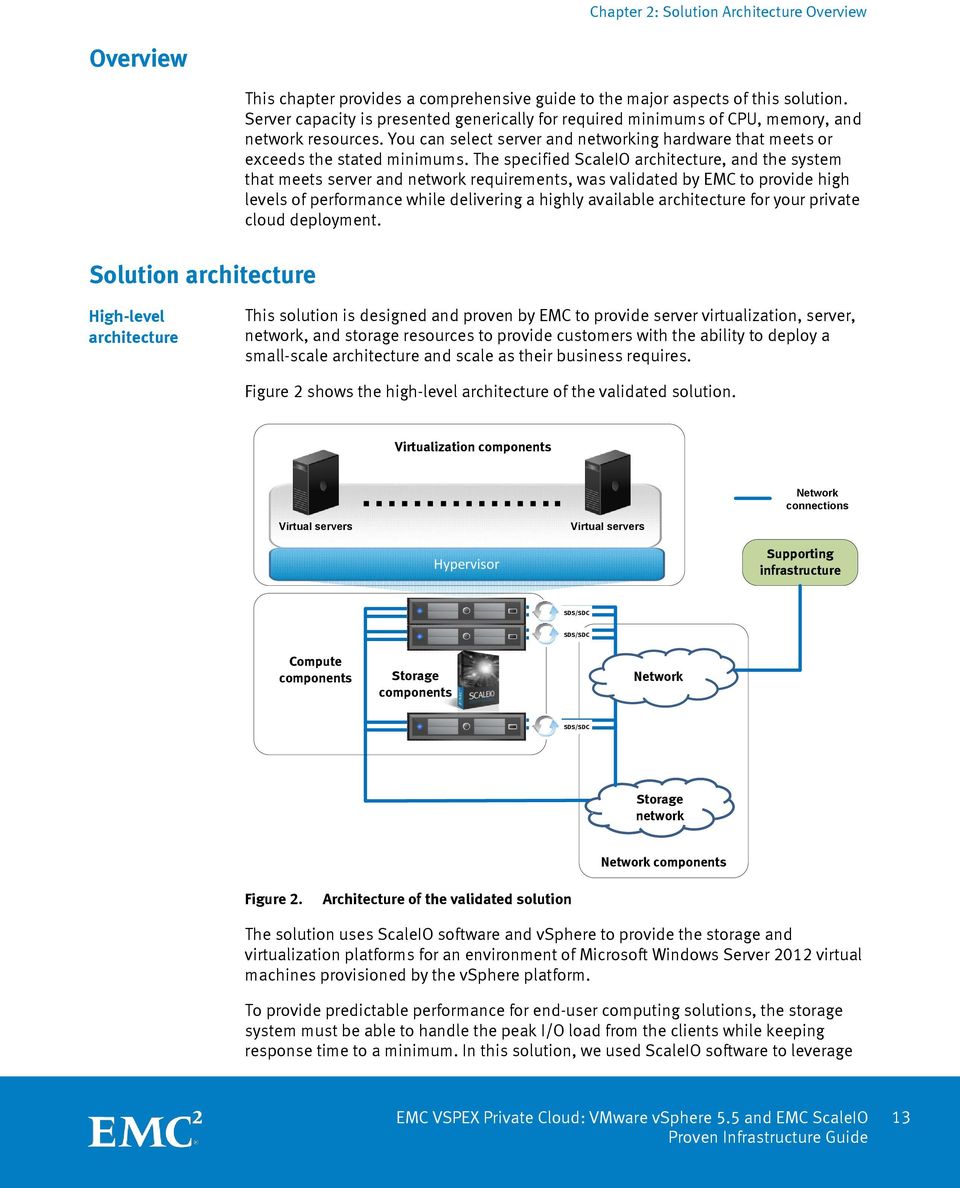
13 Chapter 2: Solution Architecture Overview Overview Solution architecture This chapter provides a comprehensive guide to the major aspects of this solution. Server capacity is presented generically for required minimums of CPU, memory, and network resources. You can select server and networking hardware that meets or exceeds the stated minimums. The specified ScaleIO architecture, and the system that meets server and network requirements, was validated by EMC to provide high levels of performance while delivering a highly available architecture for your private cloud deployment. High-level architecture This solution is designed and proven by EMC to provide server virtualization, server, network, and storage resources to provide customers with the ability to deploy a small-scale architecture and scale as their business requires. Figure 2 shows the high-level architecture of the validated solution. Virtual servers Virtualization components. Hypervisor Virtual servers Network connections Supporting infrastructure SDS/SDC SDS/SDC Compute components Storage components Network SDS/SDC Storage network Network components Figure 2. Architecture of the validated solution The solution uses ScaleIO software and vsphere to provide the storage and virtualization platforms for an environment of Microsoft Windows Server 2012 virtual machines provisioned by the vsphere platform. To provide predictable performance for end-user computing solutions, the storage system must be able to handle the peak I/O load from the clients while keeping response time to a minimum. In this solution, we used ScaleIO software to leverage EMC VSPEX Private Cloud: VMware vsphere 5.5 and EMC ScaleIO 13

14 Chapter 2: Solution Architecture Overview the servers local disks to build the storage system with high performance and scalability. Logical architecture Figure 3 shows the logical architecture of this solution.. Virtual server 1 Virtual server n Vmware ESXi virtual servers vcenter Server DNS Server EMC ScaleIO Network SQL Server VMware ESXi cluster Active Directory Server Storage network Shared infrastructure 10 GbE IP Network Figure 3. Logical architecture for the solution Table 1 summarizes the configuration of the various components of the solution architecture. The Key components section provides detailed overviews of the key technologies. Table 1. Solution architecture configuration Component VMware vsphere 5.5 VMware vcenter Server 5.5 EMC ScaleIO Microsoft SQL Server Active Directory server Solution configuration This solution uses VMware vsphere to provide a common virtualization layer to host the server environment. We configured high availability in the virtualization layer with vsphere features such as VMware High Availability (HA) clusters and VMware vmotion. In the solution, all vsphere hosts and their virtual machines are managed through a vcenter Server Appliance. ScaleIO software provides a storage layer to host and store virtual machines. VMware vcenter Server requires a database service to store configuration and monitoring details. This solution uses a Microsoft SQL Server 2012 database. Active Directory services are required for the various solution components to function properly. We used the Microsoft Active Directory Service running on a Windows Server 2012 R2 server for this purpose. 14 EMC VSPEX Private Cloud: VMware vsphere 5.5 and EMC ScaleIO

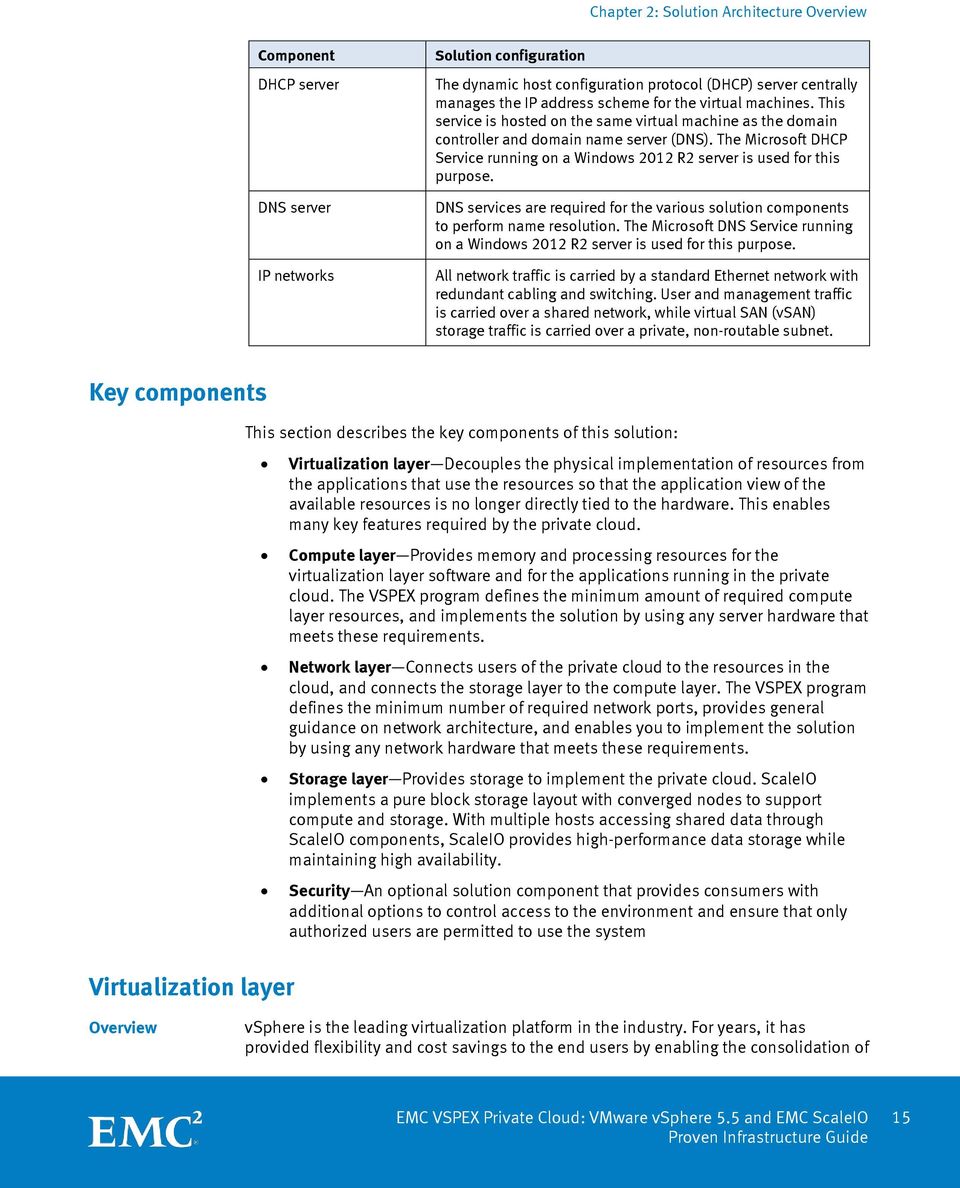
15 Chapter 2: Solution Architecture Overview Component DHCP server DNS server IP networks Solution configuration The dynamic host configuration protocol (DHCP) server centrally manages the IP address scheme for the virtual machines. This service is hosted on the same virtual machine as the domain controller and domain name server (DNS). The Microsoft DHCP Service running on a Windows 2012 R2 server is used for this purpose. DNS services are required for the various solution components to perform name resolution. The Microsoft DNS Service running on a Windows 2012 R2 server is used for this purpose. All network traffic is carried by a standard Ethernet network with redundant cabling and switching. User and management traffic is carried over a shared network, while virtual SAN (vsan) storage traffic is carried over a private, non-routable subnet. Key components Virtualization layer This section describes the key components of this solution: Virtualization layer Decouples the physical implementation of resources from the applications that use the resources so that the application view of the available resources is no longer directly tied to the hardware. This enables many key features required by the private cloud. Compute layer Provides memory and processing resources for the virtualization layer software and for the applications running in the private cloud. The VSPEX program defines the minimum amount of required compute layer resources, and implements the solution by using any server hardware that meets these requirements. Network layer Connects users of the private cloud to the resources in the cloud, and connects the storage layer to the compute layer. The VSPEX program defines the minimum number of required network ports, provides general guidance on network architecture, and enables you to implement the solution by using any network hardware that meets these requirements. Storage layer Provides storage to implement the private cloud. ScaleIO implements a pure block storage layout with converged nodes to support compute and storage. With multiple hosts accessing shared data through ScaleIO components, ScaleIO provides high-performance data storage while maintaining high availability. Security An optional solution component that provides consumers with additional options to control access to the environment and ensure that only authorized users are permitted to use the system Overview vsphere is the leading virtualization platform in the industry. For years, it has provided flexibility and cost savings to the end users by enabling the consolidation of EMC VSPEX Private Cloud: VMware vsphere 5.5 and EMC ScaleIO 15
16 Chapter 2: Solution Architecture Overview large, inefficient server farms into nimble, reliable cloud infrastructures. The core vsphere components are the vsphere hypervisor and the vcenter Server for system management. The VMware hypervisor runs on a dedicated server and allows multiple operating systems to run on the system at one time as virtual machines. These hypervisor systems can be connected to operate in a clustered configuration. These clustered configurations are then managed as a larger resource pool through vcenter, and allow for dynamic allocation of CPU, memory, and storage across the cluster. Features such as VMware vmotion, which allows a virtual machine to move between different servers with no disruption to the operating system, and Distributed Resource Scheduler (DRS), which performs vmotion automatically to balance the load, make vsphere a solid business choice. With vsphere 5.5, a VMware-virtualized environment can host virtual machines with up to 64 virtual CPUs and 1 TB of virtual random access memory (RAM). Configuration guidelines Memory is a critical component of any virtual system, and the mapping between physical memory present in a server and virtual memory presented to a guest virtual machine is a major component of the design of the target service. This section outlines some of the relevant considerations. Virtual machine memory management vsphere has a number of advanced features that help optimize performance and overall use of resources. This section describes the key features for memory management and considerations for using them with your solution. Memory over-commitment Memory over-commitment occurs when more memory is allocated to virtual machines than is physically present in a vsphere host. Using sophisticated techniques such as ballooning and transparent page sharing, vsphere is able to handle memory over-commitment without any performance degradation. However, if more memory is being actively used than is present on the server, vsphere might resort to swapping portions of a virtual machine's memory. Note: EMC VSPEX Private Cloud solutions do not account for memory overcommitment in sizing examples because the performance risks associated with that configuration will depend heavily on the customer environment. Transparent page sharing Virtual machines running similar operating systems and applications typically have identical sets of memory content. Page sharing allows the hypervisor to reclaim the redundant copies and return them to the host s free memory pool for reuse. However, VMware recommends disabling this option for security reason. Memory compression vsphere uses memory compression to store pages that would otherwise be swapped out to disk through host swapping, in a compression cache located in the main memory. 16 EMC VSPEX Private Cloud: VMware vsphere 5.5 and EMC ScaleIO
17 Chapter 2: Solution Architecture Overview Memory ballooning Memory ballooning relieves host resource exhaustion by allocating free pages from the virtual machine to the host for reuse, with little to no impact on the application s performance. Hypervisor swapping Hypervisor swapping causes the host to force arbitrary virtual machine pages out to disk. For more information, refer to Understanding Memory Resource Management in VMware vsphere 5.5. Memory configuration guidelines Proper sizing and configuration of the solution requires care. This section provides guidelines for allocating memory to virtual machines. vsphere memory overhead There is some memory space overhead associated with virtualizing memory resources. This overhead has two components: System overhead for the VMkernel Additional overhead for each virtual machine The overhead for the VMkernel is fixed, whereas the amount of additional memory for each virtual machine depends on the number of virtual CPUs (vcpus) and the amount of memory configured for the guest OS. Virtual machine memory settings Figure 4 shows the memory setting s parameters in a virtual machine, including: Configured memory Physical memory allocated to the virtual machine at the time of creation. Reserved memory Memory that is guaranteed to the virtual machine. Touched memory Memory that is active or in use by the virtual machine. Swappable Memory that can be de-allocated from the virtual machine if the host is under memory pressure from other virtual machines using ballooning, compression, or swapping. EMC VSPEX Private Cloud: VMware vsphere 5.5 and EMC ScaleIO 17

18 Chapter 2: Solution Architecture Overview Figure 4. Virtual machine memory settings EMC recommends that you follow these best practices for virtual machine memory settings: Do not disable the default memory reclamation techniques. These lightweight processes provide flexibility with minimal impact to workloads. Intelligently size memory allocation for virtual machines. Over-allocation wastes resources, while under-allocation causes performance impacts that can affect other virtual machines sharing resources. Overcommitting can lead to resource exhaustion if the hypervisor cannot procure memory resources. In severe cases, when hypervisor swapping occurs, virtual machine performance might be adversely affected. Having performance baselines of your virtual machine workloads assists in this process. Allocating memory to virtual machines Many factors determine the proper sizing for virtual machine memory in VSPEX architectures. With the number of application services and use cases available, determining a suitable configuration for an environment requires creating a baseline configuration, testing the configuration, and making adjustments for optimal results. High availability and failover Configure high availability in the virtualization layer, and enable the hypervisor to automatically restart failed virtual machines. Figure 5 illustrates the hypervisor layer responding to a failure in the compute layer. VMware vsphere cluster VMHA configured Host failure VMware vsphere cluster VMHA configured Figure 5. High availability at the virtualization layer 18 EMC VSPEX Private Cloud: VMware vsphere 5.5 and EMC ScaleIO

19 Compute layer Chapter 2: Solution Architecture Overview By implementing high availability at the virtualization layer, even with a hardware failure, the infrastructure will attempt to keep as many services running as possible. Overview The choice of a server platform for an EMC VSPEX infrastructure is not only based on the technical requirements of the environment, but also on how well the platform is supported. Other important factors include the customer s relationship with the server provider and the performance and management of the platform. For this reason, EMC VSPEX solutions are designed to run on a wide variety of server platforms. Rather than presenting a specific number of servers with a specific set of requirements, VSPEX documents present the minimum requirements needed for the number of processor cores and the amount of RAM. ScaleIO components are designed to work with a minimum of three server nodes. The physical server node, running vsphere, can host other workloads beyond the ScaleIO virtual machine. In this VSPEX document, we use at least three compute nodes to implement the solution. Configuration guidelines When designing and ordering the compute/server layer of this VSPEX solution, several factors may impact the final purchase. From a virtualization perspective, if a system workload is well understood, features such as memory ballooning and transparent page sharing can reduce the aggregate memory requirement. If the virtual machine pool does not have a high level of peak or concurrent usage, reduce the number of vcpus. Conversely, if the applications being deployed are highly computational in nature, increase the number of CPUs and memory purchased. Use the following best practices in the compute layer: Use several identical, or at least compatible, servers. VSPEX implements hypervisor level high-availability technologies that may require similar instruction sets on the underlying physical hardware. By implementing VSPEX on identical server units, you can minimize compatibility problems in this area. If you implement high availability at the hypervisor layer, the largest virtual machine you can create is constrained by the smallest physical server in the environment. Note: To enable high availability for the compute layer, each customer needs one additional server to ensure that the system has enough capacity to maintain business operations when a server fails. Implement the high availability features in the virtualization layer, and ensure that the compute layer has sufficient resources to accommodate at least single server failures. This enables the implementation of minimal-downtime upgrades, and tolerance for single unit failures. Within the boundaries of these recommendations and best practices, the compute layer for VSPEX can be flexible to meet your specific needs. Ensure that there are sufficient processor cores and RAM per core to meet the needs of the target environment. EMC VSPEX Private Cloud: VMware vsphere 5.5 and EMC ScaleIO 19


20 Chapter 2: Solution Architecture Overview High-availability and failover While the choice of servers to implement in the compute layer is flexible, we recommend using enterprise-class servers designed for the datacenter. This type of server has redundant power supplies, as shown in Figure 6. Connect these servers to separate power distribution units (PDUs) following your server vendor s best practices. Figure 6. Redundant power supplies To configure high availability in the virtualization layer, configure the compute layer with enough resources to meet the needs of the environment, even with a server failure, as demonstrated in Figure 5. Network layer Overview Configuration guidelines The infrastructure network requires redundant network links for each vsphere host. This configuration provides both redundancy and additional network bandwidth. This is a required configuration regardless of whether the network infrastructure for the solution already exists, or if you are deploying it with other components of the solution. This section provides guidelines for setting up a redundant, highly available network configuration. The guidelines consider virtual LANs (VLANs), the link aggregation control protocol (LACP) ESXi server, and the ScaleIO layer. ScaleIO network ScaleIO creates a Redundant Array of Independent Nodes (RAIN) topology between the server nodes. In practice, this means that the system distributes data so that the loss of a single node will not impact data availability. This, in turn, requires that the ScaleIO nodes send data to other nodes to maintain consistency. A high-speed, lowlatency IP network is required for this to work correctly. We recommend a 10 GbE IP network designed for high availability, as shown in Table 2. We 1 created the test 1 In this guide, we refers to the EMC Solutions engineering team that validated the solution. 20 EMC VSPEX Private Cloud: VMware vsphere 5.5 and EMC ScaleIO

21 Chapter 2: Solution Architecture Overview environment with redundant 10 Gb Ethernet networks. During testing, at small scale points, the network was not heavily used. Table 2. Recommended 10 Gb switched Ethernet network layer Nodes 10 Gb switched Ethernet 1 Gb switched Ethernet 3 Recommended Possible Not recommended VLANs Isolate network traffic so that the traffic between hosts and storage, hosts and clients, and management traffic all move over isolated networks. In some cases, physical isolation may be required for regulatory or policy compliance reasons, but in many cases, logical isolation with VLANs is sufficient. We recommend separating the network for security and increased efficiency. There are two types of networks: A management network, used to connect and manage the ScaleIO virtual machines, is normally connected to the client management network. Because this network has less I/O traffic, we recommend a 1 GB network. A data network is internal, enabling communication between the ScaleIO components, and is generally a 10 GB network. In this solution, we used one VLAN for client access and one VLAN for management. Figure 7 depicts the VLANs and the network connectivity requirements for a ScaleIO environment. EMC VSPEX Private Cloud: VMware vsphere 5.5 and EMC ScaleIO 21
22 L1 L2 L1 L2 MGMT 0 MGMT 1 MGMT 0 MGMT 1 CONSOLE CONSOLE `STAT `STAT SLOT2 SLOT3 Chapter 2: Solution Architecture Overview Client access network Servers... SLOT2 SLOT3 Cisco Nexus 5020 PS1 PS2 Cisco Nexus 5020 PS1 PS v-6A 50~60Hz v-6A 50~60Hz Storage network Management Management network Network Figure 7. Required networks for ScaleIO You can use the client access network to communicate with the ScaleIO infrastructure. The network provides communication between each ScaleIO node. Administrators use the management network as a dedicated way to access the management connections on the ScaleIO software component, network switches, and hosts. Note: Some best practices need additional network isolation for cluster traffic, virtualization layer communication, and other features. Implement these additional networks if necessary. High availability and failover Each vsphere host has multiple connections to user and Ethernet networks to guard against link failures, as shown in Figure 8. Spread these connections across multiple Ethernet switches to guard against component failure in the network. Server connects to multiple switches Network Switches connect to each other Figure 8. Network layer high availability 22 EMC VSPEX Private Cloud: VMware vsphere 5.5 and EMC ScaleIO
23 Chapter 2: Solution Architecture Overview Storage layer Overview ScaleIO is a software-only solution that uses hosts existing local disks and LAN to realize a vsan that has all the benefits of external storage but at a fraction of the cost and the complexity. ScaleIO turns local internal storage into shared block storage that is comparable to or better than the more expensive external shared block storage. The lightweight ScaleIO software components are installed in the application hosts and inter-communicate using a standard LAN to handle the application I/O requests sent to ScaleIO block volumes. An extremely efficient decentralized block I/O flow, combined with a distributed, sliced volume layout, results in a massively parallel I/O system that can scale to hundreds and thousands of nodes. ScaleIO is designed and implemented with enterprise-grade resilience as an essential attribute. Furthermore, the software features efficient distributed auto-healing processes that overcome media and node failures without requiring administrator involvement. Dynamic and elastic, ScaleIO enables administrators to add or remove nodes and capacity on the fly. The software immediately responds to the changes, rebalancing the storage distribution and achieving a layout that optimally suits the new configuration. Architecture Software components The ScaleIO Data Client (SDC) is a lightweight device driver situated in each host whose applications or file system requires access to the ScaleIO vsan block devices. The SDC exposes block devices representing the ScaleIO volumes that are currently mapped to that host. The ScaleIO Data Server (SDS) is a lightweight software component within each host that contributes local storage to the central ScaleIO vsan. Convergence of storage and compute The ScaleIO software components, which have a negligible impact on the applications running in the hosts, are carefully designed and implemented to consume the minimum computing resources required for operation. ScaleIO converges the storage and application layers. The hosts that run applications can also be used to realize shared storage, yielding a wall-to-wall, single layer of hosts. Because the same hosts run applications and provide storage for the vsan, an SDC and SDS are typically both installed in each of the participating hosts. Pure block storage implementation ScaleIO implements a pure block storage layout. Its entire architecture and data path are optimized for block storage access needs. For example, when an application submits a read I/O request to its SDC, the SDC instantly deduces which SDS is responsible for the specified volume address and then interacts directly with the relevant SDS. The SDS reads the data (by issuing a single read I/O request to its local storage or by just fetching the data from the cache in a cache-hit scenario), and returns the result to the SDC. The SDC provides the read data to the application. This flow is simple, consuming as few resources as necessary. The data moves over the network exactly once, and a single I/O request is sent to the SDS storage. The EMC VSPEX Private Cloud: VMware vsphere 5.5 and EMC ScaleIO 23
24 Chapter 2: Solution Architecture Overview write I/O flow is similarly simple and efficient. Unlike some block storage systems that run on top of a file system or object storage that runs on top of a local file system, ScaleIO offers optimal I/O efficiency. Massively parallel, scale-out I/O architecture ScaleIO can scale to a large number of nodes, thus breaking the traditional scalability barrier of block storage. Because the SDCs propagate the I/O requests directly to the pertinent SDSs, there is no central point through which the requests move and thus a potential bottleneck is avoided. This decentralized data flow is crucial to the linearly scalable performance of ScaleIO. Therefore, a large ScaleIO configuration results in a massively parallel system. The more servers or disks the system has, the greater the number of parallel channels that will be available for I/O traffic and the higher the aggregated I/O bandwidth and IOPS will be. Mix-and-match nodes The vast majority of traditional scale-out systems are based on a symmetric brick architecture. Unfortunately, datacenters cannot be standardized on exactly the same bricks for a prolonged period, because hardware configurations and capabilities change over time. Therefore, such symmetric scale-out architectures are bound to run in small islands. ScaleIO was designed from the ground up to support a mix of new and old nodes with dissimilar configurations. Hardware agnostic ScaleIO is platform agnostic and works with existing underlying hardware resources. Besides its compatibility with various types of disks, networks, and hosts, it can take advantage of the write buffer of existing local RAID controller cards and can also run in servers that do not have a local RAID controller card. For the local storage of an SDS, you can use internal disks, directly-attached external disks, virtual disks exposed by an internal RAID controller, partitions within such disks, and more. Partitions can be useful to combine system boot partitions with ScaleIO capacity on the same raw disks. If the system already has a large, mostly unused partition, ScaleIO does not require repartitioning of the disk, as the SDS can actually use a file within that partition as its storage space. Volume mapping and volume sharing The volumes that ScaleIO exposes to the application clients can be mapped to one or more clients running in different hosts. Mapping can be changed dynamically if necessary. In other words, ScaleIO volumes can be used by applications that expect shared-everything block access and by applications that expect shared-nothing or shared-nothing-with-failover access. Clustered, striped volume layout A ScaleIO volume is a block device that is exposed to one or more hosts. It is the equivalent of a logical unit in the SCSI world. ScaleIO breaks each volume into a large number of data chunks, which are scattered across the SDS cluster s nodes and disks in a fully balanced manner. This layout practically eliminates hot spots across the cluster and allows for the scaling of the overall I/O performance of the system through the addition of nodes or disks. Furthermore, this layout enables a single application that is accessing a single volume to use the full IOPS of all the cluster s 24 EMC VSPEX Private Cloud: VMware vsphere 5.5 and EMC ScaleIO
25 Chapter 2: Solution Architecture Overview disks. This flexible, dynamic allocation of shared performance resources is one of the major advantages of converged scale-out storage. Software-only but as resilient as a hardware array Traditional storage systems typically combine system software with commodity hardware which is comparable to application servers hardware to provide enterprise-grade resilience. With its contemporary architecture, ScaleIO provides similar enterprise-grade, no-compromise resilience by running the storage software directly on the application servers. Designed for extensive fault tolerance and high availability, ScaleIO handles all types of failures, including failures of media, connectivity, and nodes, software interruptions, and more. No single point of failure can interrupt the ScaleIO I/O service. In many cases, ScaleIO can overcome multiple points of failure as well. Managing clusters of nodes Many storage cluster designs use tightly coupled techniques that might be adequate for a small number of nodes but begin to break when the cluster is larger than a few dozen nodes. The loosely coupled clustering management schemes of ScaleIO provide exceptionally reliable yet lightweight failure and failover handling in both small and large clusters. Most clustering environments assume exclusive ownership of the cluster nodes and might even physically fence or shut down malfunctioning nodes. ScaleIO uses application hosts. The ScaleIO clustering algorithms are designed to work efficiently and reliably without interfering with the applications with which ScaleIO coexists. ScaleIO will never disconnect or invoke Intelligent Platform Management Interface shutdowns of malfunctioning nodes, because they might still be running healthy applications. Protection domains As shown in Figure 9, a large ScaleIO storage pool can be divided into multiple protection domains, each of which contains a set of SDSs. ScaleIO volumes are assigned to specific protection domains. Protection domains are useful for mitigating the risk of a dual point of failure in a two-copy scheme or a triple point of failure in a three-copy scheme. Figure 9. Protection domains EMC VSPEX Private Cloud: VMware vsphere 5.5 and EMC ScaleIO 25
26 Chapter 2: Solution Architecture Overview For example, if two SDSs that are in different protection domains fail simultaneously, no data will become unavailable. Just as incumbent storage systems can overcome a large number of simultaneous disk failures as long as they do not occur within the same shelf, ScaleIO can overcome a large number of simultaneous disk or node failures as long as they do not occur within the same protection domain. Management and monitoring ScaleIO provides several tools to manage and monitor the system, including a command line interface (CLI), an active GUI, and representational state transfer (REST) management application program interface (API) commands. The CLI enables administrators to have direct platform access to perform backend configuration actions and obtain monitoring information. The active GUI, shown in Figure 10, provides system dashboards for capacity, throughput, bandwidth statistics, access to system alerts, and the ability to provision backend devices. The REST management API allows users to execute the same management and monitoring commands available with the CLI using a nextgeneration, cloud-based interface. Figure 10. ScaleIO active GUI Interoperability ScaleIO is integrated with vsphere and OpenStack to provide customers with greater flexibility in deploying ScaleIO with existing environments. The vsphere plug-in facilitates the provisioning of a ScaleIO system in ESX and runs from within the vsphere web interface. Additionally, ScaleIO software can be packaged with EMC ViPR for management and orchestration functions and with EMC ViPR SRM for additional monitoring and reporting capabilities The OpenStack integration ( Cinder support) allows customers to use commodity hardware with ScaleIO, providing a software-defined block volume solution in an OpenStack environment. 26 EMC VSPEX Private Cloud: VMware vsphere 5.5 and EMC ScaleIO

27 Chapter 2: Solution Architecture Overview Additionally, ScaleIO software can be packaged with EMC ViPR to provide block data services for commodity and EMC ECS hardware platforms. Enterprise Features Whether you are a service provider delivering hosted infrastructure as a service or a business whose IT department delivers infrastructure as a service to functional units within your organization, ScaleIO offers a set of features that give you complete control over performance, capacity, and data location. For both private cloud data centers and service providers, these features enhance system control and manageability, ensuring that quality of service is met. With ScaleIO, you can limit the amount of performance IOPS or bandwidth that selected customers can consume. The limiter allows you to impose and regulate resource distribution to prevent application hogging scenarios. You can apply data masking to provide added security for sensitive customer data. ScaleIO offers instantaneous, writable snapshots for data backups. For improved read performance, dynamic random-access memory (DRAM) caching enables you to improve read access by using SDS server RAM. Fault sets a group of SDSs that are likely to go down together can be defined to ensure data mirroring occurs outside the group, improving business continuity. You can create volumes with thin provisioning, providing on-demand storage as well as faster setup and startup times. Finally, tight integrations with other EMC products are available. You can use ScaleIO in conjunction with EMC XtremCache for flash cache auto tiering to further accelerate application performance. Figure 11 shows the ScaleIO enterprise features. Figure 11. ScaleIO enterprise features EMC VSPEX Private Cloud: VMware vsphere 5.5 and EMC ScaleIO 27
28 Chapter 2: Solution Architecture Overview ScaleIO 1.32 ScaleIO 1.32 includes the following new features and functionality: Release of the ScaleIO Free and Frictionless download, a free download of ScaleIO for non-production environments with no time / function / capacity limits Support for VMware ESX 6.0 (VMware certified) Support for SUSE Linux Enterprise Server (SLES) 12 Support for IBM Spectrum Scale (General Parallel File System (GPFS) ) over ScaleIO for Linux environments (Red Hat Enterprise Linux (RHEL) / SLES) Additional flexibility during the configuration process Enhanced background scanning / remediation of data Configuration guidelines This section provides guidelines for setting up the storage layer of the solution to provide high availability and the expected level of performance. vsphere 5.5 allows more than one method of storage when hosting virtual machines. The tested solution uses block protocols, and the ScaleIO layer described in this section uses all current best practices. A customer or architect with the necessary training and background can make modifications based on their understanding of the system usage and load if required. However, the building blocks described in this document ensure acceptable performance. Chapter 5 lists specific recommendations for customization. VMware vsphere storage virtualization for VSPEX vsphere provides host-level storage virtualization, virtualizes the physical storage, and presents the virtualized storage to the virtual machines. A virtual machine stores its operating system and all the other files related to the virtual machine activities in a virtual disk. The virtual disk itself consists of one or more files. VMware uses a virtual SCSI controller to present virtual disks to a guest operating system running inside the virtual machines. Virtual disks, as shown in Figure 12, reside on a datastore. Depending on the protocol used, a datastore can be a VMware Virtual Machine File System (VMFS) datastore. Another option, raw device mapping (RDM), allows the virtual infrastructure to connect a physical device directly to a virtual machine. In our ScaleIO solution, we use VMFS datastore or RDM as the device to provide disk capacity. 28 EMC VSPEX Private Cloud: VMware vsphere 5.5 and EMC ScaleIO
29 Chapter 2: Solution Architecture Overview Disk for VMFS VMFS VMDK Disk for RDM RDM ScaleIO volume ScaleIO Hypervisor Virtual machine Figure 12. VMware virtual disk types VMFS VMFS is a cluster file system that provides storage virtualization optimized for virtual machines. Deploy over any SCSI-based local or network storage. Raw Device Mapping (RDM) VMware also provides RDM, which allows a virtual machine to directly access a volume on the physical storage. Note: We recommend using RDM mapping in the vsphere environment. The device is created on ScaleIO virtual machines that point to the physical disk on the vsphere server. High-availability and failover Redundancy scheme and rebuild process ScaleIO uses a mirroring scheme to protect data against disk and node failures. The ScaleIO architecture supports a distributed two-copy redundancy scheme. When an SDS node or SDS disk fails, applications can continue to access ScaleIO volumes; their data is still available through the remaining mirrors. ScaleIO immediately starts a seamless rebuild process whose goal is to create another mirror for the data chunks that were lost in the failure. In the rebuild process, those data chunks are copied to free areas across the SDS cluster, so it is not necessary to add any capacity to the system. All the surviving SDS cluster nodes together carry out the rebuild process by using the aggregated disk and network bandwidth of the cluster. As a result, the process is dramatically faster resulting in a shorter exposure time and less application-performance degradation. On the completion of the rebuild, all the data is fully mirrored and healthy again. If a failed node rejoins the cluster before the rebuild process has been completed, ScaleIO dynamically uses the rejoined node s data to further minimize the exposure time and the use of resources. This capability is particularly important for overcoming short outages efficiently. Elasticity and rebalancing Unlike many other systems, a ScaleIO cluster is extremely elastic. Administrators can add and remove capacity and nodes on the fly during I/O operations. When a cluster is expanded with new capacity (as for example when new SDSs or new disks are added to existing SDSs), ScaleIO immediately responds to the event and rebalances the storage by seamlessly migrating data chunks from the existing SDSs to the new SDSs or disks. Such a migration does not affect the applications, which continue to access the data stored in the migrating chunks. As shown in Figure 13, by EMC VSPEX Private Cloud: VMware vsphere 5.5 and EMC ScaleIO 29
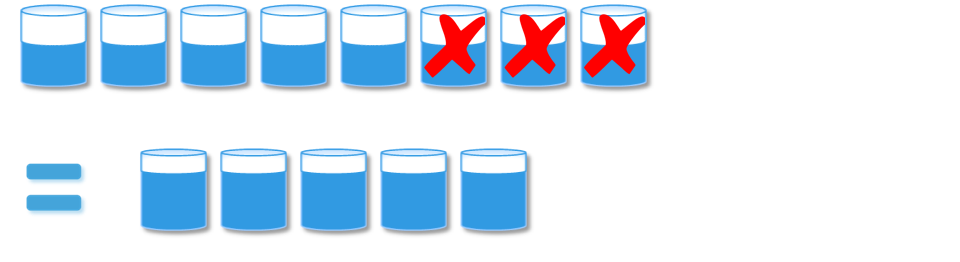
30 Chapter 2: Solution Architecture Overview the end of the rebalancing process all the ScaleIO volumes have been spread across all the SDSs and disks, including the newly added ones, in an optimally balanced manner. Thus, adding SDSs or disks not only increases the available capacity, but also increases the performance of the applications as they access their volumes. Figure 13. Automatic rebalancing when disks are added When an administrator decreases capacity (for example, by removing SDSs or removing disks from SDSs), ScaleIO performs a seamless migration that rebalances the data across the remaining SDSs and disks in the cluster, as shown in Figure 14. Security layer Figure 14. Automatic rebalancing when disks are removed Note that in all types of rebalancing, ScaleIO migrates the least amount of data possible. Furthermore, ScaleIO is flexible enough to accept new requests to add or remove capacity while still rebalancing previous capacity additions and removals. Overview The ability to secure data and ensure the identity of devices and users is critical in today s enterprise IT environment. This is particularly true for regulated sectors such as healthcare, finance, and government. VSPEX solutions can offer many different hardened computing platforms, most commonly by implementing a public-key infrastructure (PKI). The VSPEX solutions can be engineered with a PKI solution designed to meet the security criteria of your organization. The solution can be implemented with a modular process, where layers of security can be added as needed. The general process implements a PKI infrastructure by replacing generic self-certified certificates with trusted certificates from a third-party certificate authority. Services that support PKI can then be enabled using the trusted certificates to ensure a high degree of authentication and encryption where supported. Depending on the scope of PKI services needed, it can be necessary to implement a PKI service dedicated to those needs. There are many third party tools that offer PKI 30 EMC VSPEX Private Cloud: VMware vsphere 5.5 and EMC ScaleIO
31 Chapter 2: Solution Architecture Overview services. End-to-end solutions from RSA can be deployed within a VSPEX environment. For additional information, visit the RSA website. EMC VSPEX Private Cloud: VMware vsphere 5.5 and EMC ScaleIO 31
32 Chapter 3: Sizing the Solution Chapter 3 Sizing the Solution This chapter presents the following topics: Overview Reference workload Scalability VSPEX building blocks Configuration guidelines EMC VSPEX Private Cloud: VMware vsphere 5.5 and EMC ScaleIO
33 Chapter 3: Sizing the Solution Overview Reference workload This chapter provides definitions of the reference workload used to size and implement the VSPEX architectures. Sizing the environment includes designing the nodes that will be used for the ScaleIO environment and specifying the number of those nodes. This section provides findings from the EMC Solutions group on how variations in node size and number impact the maximum number of supported servers. The virtual machines used in this section correspond to the VSPEX definitions of those workloads. When you move an existing server to a virtual infrastructure, you can gain efficiency by right-sizing the virtual hardware resources assigned to that system. Each VSPEX Proven Infrastructure balances the storage, network, and compute resources needed for a set number of virtual machines, as validated by EMC. In practice, each virtual machine has its own requirements that rarely fit a predefined idea of a virtual machine. In any discussion about virtual infrastructures, you need to first define a reference workload. Not all servers perform the same tasks, and it is impractical to build a reference that considers every possible combination of workload characteristics. To simplify sizing the solution, this section presents a representative customer reference workload. By comparing the actual customer usage to this reference workload, you can determine how to size the solution. VSPEX Private Cloud solutions define a reference virtual machine (RVM) workload, which represents a common point of comparison. This workload is described in Table 3. Table 3. VSPEX Private Cloud workload Parameter Virtual machine OS Value Windows Server 2012 R2 Virtual CPUs 1 Virtual CPUs per physical core (maximum) 4 Memory per virtual machine 2 GB IOPS per virtual machine 25 I/O Pattern Fully random skew = 0.5 I/O read percentage 67% Virtual machine storage capacity 100 GB This specification for a virtual machine is not intended to represent any specific application. Rather, it represents a single common point of reference against which other virtual machines can be measured. EMC VSPEX Private Cloud: VMware vsphere 5.5 and EMC ScaleIO 33
34 Chapter 3: Sizing the Solution Scalability ScaleIO is designed to scale from three to a large number of nodes. Unlike most traditional storage systems, as the number of servers grow, so does capacity, throughputs, and IOPS. The scalability of performance is linear for the growth of the deployment. Whenever additional storage and compute resources (such as servers and drives) are needed, you can add them modularly. Storage and compute resources grow together so that the balance between them is maintained. VSPEX building blocks Building blocks approach Sizing the system to meet the virtual server application requirement is a complicated process. When applications generate I/O, server components, such as server CPU, server DRAM cache, and disks, will serve that I/O. Customers must consider various factors when planning and scaling their storage system to balance capacity, performance, and cost for their applications. VSPEX uses a building block approach to reduce complexity. A building block is one specific server node that can support a certain number of virtual servers in the VSPEX architecture. Each building block combines several local disk spindles to contribute a shared ScaleIO volume that supports the needs of the private cloud environment. Both SDS and SDC are installed on each building block node to contribute the server local disk to a ScaleIO storage pool and then expose ScaleIO shared block volumes to run the virtual machines. Validated building blocks The configuration of a reference building block includes the physical CPU core number, memory size, and disk spindle number for a server. Table 4 shows one specific validated node that provides a flexible solution for VSPEX sizing. Table 4. Building block node configuration Node parameter Target value Notes CPU 6 cores The Customize the building block section provides more information on how to create building block configurations. Memory 64 GB According to VSPEX configuration guidelines, this configuration can support up to a maximum of 30 virtual machines. Disks 6 x 600 GB 10 k RPM SAS Disk capacity, rather than performance, limits the configuration for a VSPEX Private Cloud. This configuration contains six SAS disks per node. The validated solution modeled these drives at 600 GB each. For the private cloud workload definition, we were limited more by drive capacity than by drive IOPS. With this configuration, up to 12 virtual machines can be supported by one building block. 34 EMC VSPEX Private Cloud: VMware vsphere 5.5 and EMC ScaleIO
35 Chapter 3: Sizing the Solution Customize the building block Reference building blocks are a starting point to plan a virtual infrastructure. In this section, we will discuss customizing building block nodes to meet specific customer needs. The node configuration shown in Table 6 defines the CPU, memory, and disk configuration for one server. However, ScaleIO is infrastructure-agnostic and can run on any server. This solution also provides more options for the building block node configuration. You can redefine a building block with different configurations, but after the building block configuration is redefined, the virtual machine number that the building block can support is also changed. To calculate the virtual machine that the new building block can support, we must consider the following components: CPU capability For VSPEX systems, we recommend a maximum of 4 vcpus for each physical core in a virtual machine environment. For example, a server node with 16 physical cores can support up to 64 virtual machines. Memory capability When sizing the memory for a server node, the ScaleIO virtual machine and hypervisor must be considered. We tested a ScaleIO virtual machine that consumes 3 GB of RAM, and reserves 2 GB RAM for the hypervisor. We do not recommend using memory overcommit in this environment. Note: ScaleIO 1.3 introduces a new RAM cache feature by using the SDS server RAM. By default, the RAM size of the ScaleIO virtual machine is set to 3 GB and 128 MB of the RAM uses the SDS server RAM cache. Add the RAM size to the 3 GB of the ScaleIO virtual machine if more RAM cache is used. Disk capacity ScaleIO uses a RAIN topology to ensure data availability. In general, the capacity available is a function of the capacity per node (formatted capacity) and the number of nodes available. Assuming N nodes and C TB of capacity per server, the storage available, S, is: (N 1) C S = 2 This formula accounts for two copies of data and the ability to survive a single node failure. The values in Table 5 assume sufficient CPU and memory resources for each node. EMC VSPEX Private Cloud: VMware vsphere 5.5 and EMC ScaleIO 35
36 Chapter 3: Sizing the Solution Table 5. Maximum number of virtual machines per node in three-node cluster environment, limited by disk capacity Disk capacity (GB) Disks per node IOPS The primary method for adding IOPS capability to a node without considering cache technologies is to increase the number of disk units or increase the speed of those units. Table 6 shows the number of virtual machines supported with 4, 6, 8, or 10 SAS drives per node, limited by disk performance. Table 6. Maximum number of virtual machines per node, limited by disk performance 10 K SAS drives Number of virtual machines Note: The values in Table 6 assume that the CPU and memory resource of each node are sufficient. Determine the maximum number of virtual machines on the building block node With the entire configuration defined for the building block node, we calculate the number of virtual machines that each component can support to find out the number of virtual machines that the building block node can support. For example, consider the redefined building block configuration in Table 7. Table 7. Redefined building block node configuration example Physical CPU cores Memory (GB) 10 K SAS drive capacity * 1500 GB As a result, the calculations in Table 8 are applied, giving a new supported virtual machine count for this node. 36 EMC VSPEX Private Cloud: VMware vsphere 5.5 and EMC ScaleIO
37 Chapter 3: Sizing the Solution Table 8. Node sizing example Physical attribute VMs supported Calculation CPU cores: cores * 4 VMs per core = 64 VMs RAM: 128 GB 61 (128 GB total RAM 2GB (Hypervisor Reserved) 3GB (ScaleIO VM)) / 2 = 61.5 Storage capacity: 1500 GB Storage performance: 50 See Table See Table 6. The final number that this building block node can support is 24 virtual machines, which is the minimum number for the CPU, memory, and disks according to the calculation results. Figure 15 shows how to determine the maximum number of virtual machines that a customer redefined building block configuration can support. 50 virtual machines support CPU 64 virtual machines supported by CPU RAM 61 virtual machines supported by memory IOPS 50 virtual machines supported by disk IOPS Capacity 50 virtual machines supported by disk Capacity Figure 15. Determine the maximum number of virtual machines that a building block configuration can support Configuration guidelines Introduction to the Customer configuration worksheet Use the Customer configuration worksheet To choose the appropriate reference architecture for a customer environment, determine the resource requirements of the environment and then translate these requirements to an equivalent number of reference virtual machines that have the characteristics defined in Table 4. This section describes how to use the worksheet to simplify the sizing calculations and additional factors you should take into consideration when deciding which architecture to deploy. The Customer configuration worksheet helps you to assess the customer environment and calculate the sizing requirements of the environment. Table 9 shows a completed worksheet for a sample customer environment. Appendix B provides a blank worksheet that you can print and use to help size the solution. EMC VSPEX Private Cloud: VMware vsphere 5.5 and EMC ScaleIO 37
38 Chapter 3: Sizing the Solution Table 9. Customer configuration worksheet example Server resources Storage resources Application CPU (virtual CPUs) Memory (GB) IOPS Capacity (GB) Reference virtual machines Example 1: Custom-built application Example 2: Point-of-sale system Example 3: Web server Resource requirements Equivalent reference virtual machines Resource requirements Equivalent reference virtual machines Resource requirements Equivalent reference virtual machines NA NA NA Total equivalent reference virtual machines 14 To complete the worksheet: 1. Identify the application planned for migration into the VSPEX private cloud environment. 2. For each application, determine the compute resource requirements for vcpus, memory (GB), storage performance (IOPS), and storage capacity. 3. For each resource type, determine the equivalent reference virtual machines requirements that is, the number of reference virtual machines required to meet the specified resource requirements. 4. Determine the total number of reference virtual machines needed from the resource pool for the customer environment. Determine the resource requirements Consider the following when you determine resource requirements: CPU The reference virtual machine outlined in Table 3 assumes that most virtual machine applications are optimized for a single CPU. If one application requires a virtual machine with multiple vcpus, modify the proposed virtual machine count to account for the additional resources. 38 EMC VSPEX Private Cloud: VMware vsphere 5.5 and EMC ScaleIO
39 Chapter 3: Sizing the Solution Memory Memory plays a key role in ensuring application functionality and performance. Each group of virtual machines will have different targets for the available memory that is considered acceptable. As with the CPU calculation, if one application requires additional memory resources, adjust the number of planned virtual machines to accommodate the additional resource requirements. For example, if there are 30 virtual machines, but each one needs 4 GB of memory instead of the 2 GB that the reference virtual machine provides, plan for 60 reference virtual machines. IOPS The storage performance requirements for virtual machines are usually the least understood aspect of performance. The reference virtual machine uses a workload generated by an industry-recognized tool to run a wide variety of office productivity applications that should be representative of the majority of virtual machine implementations. Storage capacity The storage capacity requirement for a virtual machine can vary widely depending on the type of provisioning, the types of applications in use, and specific customer policies. Determine the equivalent reference virtual machines With all of the resources defined, determine the number of equivalent reference virtual machines by using the relationships listed in Table 10. Round all values to the closest whole number. Table 10. Reference virtual machine resources Resource Value for reference virtual machine Relationship between requirements and equivalent reference virtual machines CPU 1 Equivalent reference virtual machines = Resource requirements Memory 2 Equivalent reference virtual machines = Resource requirements/2 IOPS 25 Equivalent reference virtual machines = Resource requirements/25 Capacity 100 Equivalent reference virtual machines = Resource requirements/100 For instance, Example 2 in Table 9 requires 4 CPUs, 16 GB of memory, 200 IOPS, and 200 GB of storage. This translates to four reference virtual machines for CPU, eight reference virtual machines for memory, eight reference virtual machines for IOPS, and two reference virtual machines for capacity, as shown in Table 11. EMC VSPEX Private Cloud: VMware vsphere 5.5 and EMC ScaleIO 39
40 Chapter 3: Sizing the Solution Table 11. Example worksheet row Application CPU (virtual CPUs) Memory (GB) IOPS Capacity (GB) Equivalent reference virtual machines Example application Resource requirements Equivalent reference virtual machines N/A Use the highest value in the row to complete the Equivalent reference virtual machines column. As shown in Figure 16, the example requires eight reference virtual machines (RVMs). CPU 4 vcpu 4 RVMs RAM IOPS 16 GB RAM 8 RVMs 200 IOPS 8 RVMs Capacity 200 GB 2 RVMs 8 RVMs required Figure 16. Required resource from the reference virtual machine pool The number of reference virtual machines required for each application type equals the maximum number required for an individual resource. For example, the number of equivalent reference virtual machines for the application in 0 is eight, as this number will meet all of the resource requirements for IOPS, vcpu, and memory. Determining the total number of reference virtual machines After the worksheet is completed for each application, the total number of reference virtual machines required in the resource pool is the sum of the total reference virtual machines for all application types. In the example in Table 9, there are a total of 14 reference virtual machines. Calculating the building block requirement The VSPEX ScaleIO private cloud building block defines specific server node sizes. For example, a node defined in Table 4 supports 12 reference virtual machines. The total reference virtual machines value from the completed worksheet indicates which reference architecture would be adequate for the customer s requirements. For example, as shown Table 4, if the customer requires 50 virtual machines of capability, six building blocks (5+1, reserve 1 building block for high availability) provide sufficient resources for current needs and room for growth. 40 EMC VSPEX Private Cloud: VMware vsphere 5.5 and EMC ScaleIO
41 Chapter 3: Sizing the Solution Table 12 shows the example of scaling for the baseline building block node configurations (as defined in Table 4) and redefined building block node configurations (as defined in Table 7). Table 12. Node scaling example Node number Maximum number of virtual desktops on baseline building block Maximum number of virtual desktops on redefined building block Fine-tune hardware resources In most cases, the Customer configuration worksheet recommends a reference architecture that is adequate for the customer s needs. In other cases, you might want to further customize the hardware resources. A complete description of the system architecture is beyond the scope of this guide. Storage resources In some applications, there is a need to separate some storage workloads from other workloads. The node configuration for the reference architectures places all of the virtual machines in a single resource pool. To achieve workload separation, deploy additional disk drives for each group that needs workload isolation and add them to a dedicated pool. Do not reduce the number of disks in the node to support isolation or to reduce the capability of the pool without additional guidance beyond this guide. We designed the node configuration for the solution to balance many different factors, including high availability, performance, and data protection. Changing the components of the node can have significant and unpredictable impacts on other areas of the system. Server resources For the server resources in this solution, it is possible to customize the hardware resources more effectively. To do this, first summarize the resource requirements for the server components, as shown in Table 13. In the Server resource component totals line at the bottom of the worksheet, add up the server resource requirements from the applications in the table. Note: When customizing resources in this way, confirm that storage sizing is still appropriate. The Storage component totals line at the bottom of Table 13 shows the required amount of storage. EMC VSPEX Private Cloud: VMware vsphere 5.5 and EMC ScaleIO 41
42 Chapter 3: Sizing the Solution Table 13. Server resource component totals Server resources Storage resources Application CPU (Virtual CPUs) Memory (GB) IOPS Capacity (GB) Reference Virtual Machines Example 1: Custombuilt application Example 2: Point-ofsale System Example 3: Web Server Example 4: Decision support database Resource requirements Equivalent reference virtual machines Resource requirements Equivalent reference virtual machines Resource requirements Equivalent reference virtual machines Resource requirements Equivalent reference virtual machines Total equivalent reference virtual machines 66 Server resource component totals Note: Calculate the sum of the resource requirements row for each application, and not the equivalent reference virtual machines, to calculate the server and storage component totals. In this example, the target architecture requires 17 virtual CPUs and 155 GB of memory. If four virtual machines per physical processor core are used, and memory over-provisioning is not necessary, the architecture requires five physical processor cores and 155 GB of memory. With these numbers, the solution can be effectively implemented with fewer server and storage resources. Note: Consider high-availability requirements when customizing the resource pool hardware. 42 EMC VSPEX Private Cloud: VMware vsphere 5.5 and EMC ScaleIO
43 Chapter 3: Sizing the Solution Summary The requirements stated in the solution are what EMC considers the minimum set of resources to handle the workloads based on the stated definition of a reference virtual server. In any customer implementation, the load of a system varies over time as users interact with the system. If the customer virtual servers differ significantly from the reference definition and vary in the same resource group, you may need to add more of that resource to the system. EMC VSPEX Private Cloud: VMware vsphere 5.5 and EMC ScaleIO 43
44 Chapter 4: VSPEX Solution Implementation Chapter 4 VSPEX Solution Implementation This chapter presents the following topics: Overview Network implementation Installing and configuring the VMware vsphere hosts Installing and configuring Microsoft SQL Server databases Deploying VMware vcenter Server Preparing and configuring the storage Provisioning a virtual machine EMC VSPEX Private Cloud: VMware vsphere 5.5 and EMC ScaleIO
45 Chapter 4: VSPEX Solution Implementation Overview This chapter presents the required steps to deploy and configure the various aspects of the VSPEX solution using the ScaleIO software bundle, which includes both the physical and logical components. The deployment process consists of the stages listed in Table 14. After deployment, integrate the VSPEX infrastructure with the existing customer network and server infrastructure. Table 14 lists the main stages in the solution deployment process. The table also includes references to the sections of this guide that describe the relevant procedures. Table 14. Deployment process overview Stage Description Reference 1 Configure the switches and networks, and then connect to the customer network. 2 Configure virtual machine datastores. 3 Install and configure the servers. Network implementation vsphere Virtual Machine Administration Installing and configuring the VMware vsphere hosts 4 Set up Microsoft SQL Server (used by VMware vcenter). 5 Install and configure vcenter Server and virtual machine networking. 6 Configure the ScaleIO environment Installing and configuring Microsoft SQL Server database Deploying VMware vcenter Server Preparing and configuring the storage Network implementation This section lists the network infrastructure requirements needed to support this architecture. Table 15 provides a summary of the tasks for network configuration and references for further information. Table 15. Tasks for switch and network configuration Task Description Reference Configure infrastructure network Configure the installation and configuration of the hosts and servers required to support the architecture. Installing and configuring the VMware vsphere hosts Installing and configuring the VMware vsphere hosts EMC VSPEX Private Cloud: VMware vsphere 5.5 and EMC ScaleIO 45
46 Chapter 4: VSPEX Solution Implementation Task Description Reference Configure VLANs Complete network cabling Configure private and public VLANs as required. 1. Connect the network interconnect ports. 2. Connect the ESXi server ports. Refer to the switch configuration guide for your vendor. Prepare network switches Configure infrastructure network Configure VLANs For validated levels of performance and high availability, this solution requires the switching capacity listed in the Customer configuration worksheet. There is no need to use new hardware if existing infrastructure meets the requirements. The infrastructure network requires redundant network links for each vsphere host, switch interconnect ports, and switch uplink ports. This configuration provides both redundancy and additional network bandwidth. Ensure that there are adequate network switch ports for ESXi hosts. EMC recommends that you configure the vsphere hosts with a minimum of three VLANs: Client access network Virtual machine networking (these are customer-facing networks, which can be separated if needed) Storage network ScaleIO data networking (private network) Management network vsphere management and VMware vmotion (private network) Complete network cabling Ensure that all servers, switch interconnects, and switch uplink ports have redundant connections and are plugged into separate switching infrastructures. Ensure that there is a complete connection to the existing customer network. Note: When the new equipment is connected to the existing customer network, ensure that unexpected interactions do not cause service issues on the customer network. Installing and configuring the VMware vsphere hosts This section provides the requirements for the installation and configuration of the vsphere hosts and infrastructure servers required to support the architecture. Table 16 describes the tasks that must be completed. Table 16. Tasks for server installation Task Description Reference Install vsphere Install the vsphere hypervisor on the physical servers that are deployed for the solution. vsphere Installation and Setup Guide 46 EMC VSPEX Private Cloud: VMware vsphere 5.5 and EMC ScaleIO
47 Chapter 4: VSPEX Solution Implementation Task Description Reference Configure vsphere networking Configure vsphere networking including network interface card (NIC) trunking, VMware VMkernel ports, and virtual machine port groups and jumbo frames. vsphere Networking Installing and configuring Microsoft SQL Server databases Overview Table 17 describes how to set up and configure a Microsoft SQL Server database for the solution and how to install and configure SQL Server on a virtual machine with the databases required by VMware vcenter. Table 17. Tasks for SQL Server database setup Task Description Reference Create a virtual machine for SQL Server Install Microsoft Windows on the virtual machine Install SQL Server Configure database for VMware vcenter Configure database for VMware Update Manager Create a virtual machine to host SQL Server. Verify that the virtual server meets the hardware and software requirements. Install Microsoft Windows Server 2012 R2 on the virtual machine created to host SQL Server. Install SQL Server on the virtual machine designated for that purpose. Create the database required for the vcenter server on the appropriate datastore. Create the database required for Update Manager on the appropriate datastore Deploying VMware vcenter Server Deploying VMware vcenter Server Deploying VMware vcenter Server Overview This section provides information on how to configure the VMware vcenter by completing the tasks in Table 18. EMC VSPEX Private Cloud: VMware vsphere 5.5 and EMC ScaleIO 47
48 Chapter 4: VSPEX Solution Implementation Table 18. Tasks for vcenter configuration Task Description Reference Create the vcenter host virtual machine Install vcenter guest operating system Update the virtual machine Create vcenter Open Data Base Connectivity (ODBC) connections Install vcenter Server Install vcenter Update Manager Create a virtual datacenter Apply vsphere license keys Add vsphere hosts Configure vsphere clustering Install the vcenter Update Manager plugin Create a virtual machine in vcenter Perform partition alignment, and assign file allocation unit size Create a virtual machine to be used for VMware vcenter Server. Install Windows Server 2012 Standard Edition on the vcenter host virtual machine. Install VMware Tools, enable hardware acceleration, and allow remote console access. Create the 64-bit vcenter and 32-bit vcenter Update Manager ODBC connections. Install vcenter Server software. Install vcenter Update Manager software. Create a virtual datacenter. Type the vsphere license keys in the vcenter licensing menu. Connect vcenter to vsphere hosts. Create a vsphere cluster and move the vsphere hosts into it. Install the vcenter Update Manager plug-in on the administration console. Create a virtual machine using vcenter. Using diskpart.exe to perform partition alignment, assign drive letters and the file allocation unit size of the virtual machine s disk drive. vsphere Virtual Machine Administration Installing Windows Server 2012 vsphere Virtual Machine Administration vsphere Installation and Setup Installing and Administering VMware vsphere Update Manager vsphere Installation and Setup Installing and Administering VMware vsphere Update Manager vcenter Server and Host Management vsphere Installation and Setup vcenter Server and Host Management vsphere Resource Management Installing and Administering VMware vsphere Update Manager vsphere Virtual Machine Administration 48 EMC VSPEX Private Cloud: VMware vsphere 5.5 and EMC ScaleIO
49 Chapter 4: VSPEX Solution Implementation Task Description Reference Create a template virtual machine Deploy virtual machines from the template virtual machine 1. Create a template virtual machine from the existing virtual machine. 2. Create a customization specification. Deploy the virtual machines from the template virtual machine. vsphere Virtual Machine Administration vsphere Virtual Machine Administration Preparing and configuring the storage Table 19 describes how to set up and configure a ScaleIO environment in VMware vsphere. Table 19. Set up and configure a ScaleIO environment Task Description Reference Preparing the ScaleIO environment Registering the ScaleIO plug-in Uploading the OVA template Accessing the plug-in Installing SDC on ESXi Deploying ScaleIO Creating volumes Creating datastores Installing the GUI Configure each ESX host as required. Register the ScaleIO plug-in to the vsphere Web Client. Upload the OVA template to the ESX host. Use the vsphere Web Client to access the ScaleIO plug-in. Install SDC directly on the ESXi server from the vsphere Web Client. Deploy the ScaleIO system from the vsphere Web Client. Create volumes with required capacity from the ScaleIO system and map the volumes to the ESXi hosts. Scan the ScaleIO LUN from ESXi hosts and create datastores. Install the ScaleIO GUI to manage the system. vsphere Networking ScaleIO User Guide vsphere Storage Guide ScaleIO User Guide EMC VSPEX Private Cloud: VMware vsphere 5.5 and EMC ScaleIO 49
50 Chapter 4: VSPEX Solution Implementation Prepare ScaleIO environment You can deploy ScaleIO components in two ways in the VMware environment: The ScaleIO components Meta Data Manager (MDM), ScaleIO Data Server (SDS), and ScaleIO Data Client (SDC) as well as an iscsi target are installed on dedicated ScaleIO virtual machines (SVM). The SDS adds the ESXi physical devices to the ScaleIO to be used for storage, thus enabling the creation of volumes. Using iscsi targets, the volumes are exposed to the ESXi, via an iscsi adapter. ScaleIO volumes must be mapped both to the SDC and to iscsi initiators. This ensures that only authorized ESXi hosts can see the targets. Enabling multipathing, either automatically or manually, enhances reliability. The ScaleIO vsphere VMware deployment wizard enables you to complete these activities in a simple, efficient manner for all machines in a vcenter. The MDM and SDS ScaleIO components are installed on a dedicated SVM. The SDC is installed directly on the ESXi server, eliminating the need for iscsi. This is the recommended method of deployment. This option can be implemented on ESXi version 5.5 or higher. Note: Installing the SDC on the ESXi host requires a restart of the ESXi server. Register the ScaleIO plug-in Before starting to deploy ScaleIO, ensure that the following prerequisites are satisfied: The management network and virtual machine port group on all of the ESX hosts that are part of the ScaleIO system are configured. Devices that are to be added to SDS are free of partitions. One datastore is created from one of the local devices for all the ESXs. This datastore is needed when deploying SVMs. The ScaleIO plug-in is registered on the vcenter Server so that users can use the vsphere Web Client to install and manage a ScaleIO system. The plug-in is provided as a ZIP file that can be downloaded by the vsphere web client servers in your environment. You can download the ZIP file directly from If the web servers do not have Internet access, you can download the ZIP file from a file server. Follow these steps: 1. Upload the ZIP file to an HTTP or an HTTPS server. a. On the computer where the vsphere Web Client is installed, locate the webclient.properties file. Windows 2003: %ALLUSERPROFILE%Application Data\VMware\vSphere Web Client Windows 2008: %ALLUSERSPROFILE%\VMware\vSphere Web Client Windows 2012: C:\ProgramData\VMware\vSphere Web Client 50 EMC VSPEX Private Cloud: VMware vsphere 5.5 and EMC ScaleIO
51 Linux: /var/lib/vmware/vsphere-client b. Add the following line to the file: allowhttp=true c. Restart the VMware vsphere Web Client service. Chapter 4: VSPEX Solution Implementation 2. Using PowerCLI for VMware and set to Run as administrator, run Set- ExecutionPolicy RemoteSigned. 3. Close PowerCLI, reopen it, and select Run as administrator. 4. Extract the following file: EMC-ScaleIO-vSphere-plugin-installer XXX.X.zip 5. Use cd to locate the proper directory, run the ScaleIOPluginSetup XXX.X.ps1 script in interactive mode, and enter the required information. a. Enter the vcenter name or IP address, user name, and password. b. Choose Option 1 to register the ScaleIO plug-in. c. Choose Standard for Select Registration Mode. Note: You can use the Advanced option from Select Registration Mode to install the plug-in using a ScaleIO Gateway from a previous installation or using your own web service. In either case, you must place this version s plugin.zip file (EMC-ScaleIO-vSphere-web-plugin-1.32.XXX.X.zip) in your resources folder before running the installation. If you are using a previous ScaleIO Gateway version, the resource folder is ScaleIO Gateway installation folder\webapps\root\resources. 6. Log out and log back in to the vsphere web client to load the ScaleIO plug-in. Upload the OVA template ScaleIO uses a PowerShell script to upload the OVA template to the vcenter Server: 1. Save ScaleIOVM_1.32.xxx.0.ova on the local computer. 2. Run PowerCLI and navigate to the location of the extracted file, EMC-ScaleIOvSphere-web-plugin-package-1.32.XXX.X.zip. 3. Run the ScaleIOPluginSetup-1.32.XXX.X.ps1 script: a. Enter the vcenter name or IP address, user name, and password. b. Choose Option 3 to create the SVM template. The CLI wizard requires the following additional parameters: datacenter name path to the OVA template datastore names EMC VSPEX Private Cloud: VMware vsphere 5.5 and EMC ScaleIO 51

52 Chapter 4: VSPEX Solution Implementation For faster deployment in large-scale environments, you can upload the OVA template to as many as eight datastores. Enter the datastore names, and leave the next line blank. The following example shows how to enter two datastores: datastores[0]: datastore1 datastores[1]: datastore2 datastores[2]: The upload procedure can take several minutes. When it is complete, the following message appears: Your new EMC ScaleIO Templates are ready to use Accessing the plug-in After you register the ScaleIO plug-in on the vcenter Server, the EMC ScaleIO icon appears in the vsphere Web Client home tab, as shown in Figure 17. Click the icon to view the EMC ScaleIO screen. Figure 17. EMC ScaleIO plug-in in vsphere Web Client Install SDC on ESXi ScaleIO 1.32 provides the option to install SDC directly to the ESXi server. This option is available for ESXi version 5.5 and above. To install SDC on the ESXi host: 1. From the EMC ScaleIO screen, under Basic tasks, click Install SDC on ESX. 2. Select the ESX (ESXi) hosts to be installed on SDC. 3. Enter the root password, as shown in Figure EMC VSPEX Private Cloud: VMware vsphere 5.5 and EMC ScaleIO
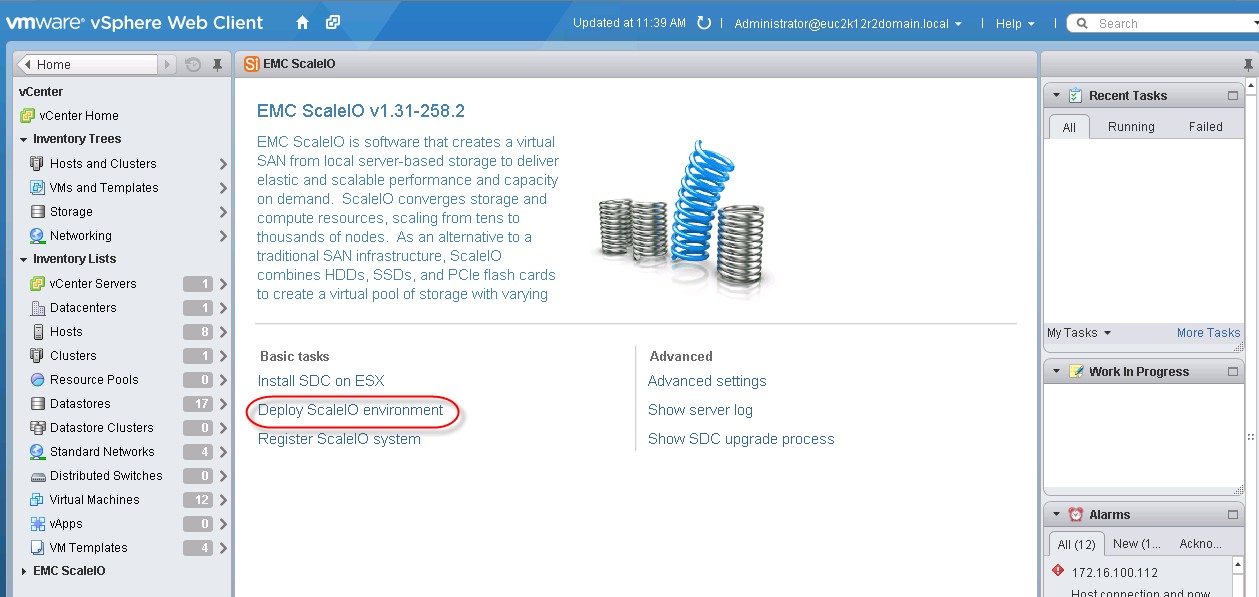
53 Chapter 4: VSPEX Solution Implementation Figure 18. Select hosts to install SDC on ESXi 4. Click Install. The installation status appears in the dialog. 5. Click Finished. 6. Restart each ESXi host. Deploy ScaleIO ScaleIO provides the wizard to deploy ScaleIO via vsphere web client: 1. From the EMC ScaleIO screen, click Deploy ScaleIO environment, as shown in Figure 19. Figure 19. Deploy ScaleIO 2. Review and approve the license terms. Click Next. EMC VSPEX Private Cloud: VMware vsphere 5.5 and EMC ScaleIO 53
54 Chapter 4: VSPEX Solution Implementation Note: The deployment wizard assumes that you are using the provided ScaleIO OVA template to create the ScaleIO virtual machines. 3. In the Select Installation screen, select Create a new ScaleIO system. Click Next. 4. In the Create New System screen, enter the following information, and then click Next: a. System Name A unique name for this system. b. Admin Password A password for the ScaleIO admin user. The password must meet the following criteria: i. Between 6 and 31 characters ii. Includes at least three of the following groups: [a-z], [A-Z], [0-9], special characters (!@#$...) iii. No white spaces 5. In the Add ESX Hosts to Cluster screen, select the vcenter on which to deploy the ScaleIO system. Select the ESX hosts to add to the ScaleIO system and then click Next, as shown in Figure 20. Figure 20. Add ESX hosts to cluster Note: To configure ScaleIO, you must select a minimum of three ESX hosts. 6. In the Select management Components screen, match the ScaleIO management components to ESX hosts, and then click Next, as shown in Figure EMC VSPEX Private Cloud: VMware vsphere 5.5 and EMC ScaleIO
55 Chapter 4: VSPEX Solution Implementation Figure 21. Select management components 7. In the Configure call home screen, select Configure Call Home, enter the settings, and select a minimum severity level for call home events. 8. Enter the details to configure the DNS servers. Click Next. 9. In the Configure Protection Domains screen, enter the Protection Domain (PD) name and RAM read cache size per SDS. Click Add to create a PD. 10. Click Next. A default Storage Pool (SP) is automatically created under the PD in the Configure Storage Pools screen, as shown in Figure 22. You can use this default SP or create a new SP by clicking Add. Figure 22. Create a new Storage Pool in the ScaleIO system (optional) EMC VSPEX Private Cloud: VMware vsphere 5.5 and EMC ScaleIO 55

56 Chapter 4: VSPEX Solution Implementation 11. Click Next. The Create Fault Sets screen appears. Optionally, you can create the fault sets first and then click Next. 12. In the Add SDSs screen, as shown in Figure 23, select one of the following values for each ESXi host/svm and then click Next: a. If the SVM is an SDS, select a PD (required) and fault set (optional). b. If the SDS has flash devices, select Optimize for Flash to optimize ScaleIO efficiency for the flash devices. Figure 23. Add SDS 13. Under Assign ESX host devices to ScaleIO SDS components: a. Click Select devices and select storage devices to add a single SDS. b. Click Replicate selection and select devices for other SDSs by replicating the selections made in the Select devices screen. This is useful if the ESXi hosts have identical attached devices. c. Under the Information tab, shown in Figure 24, select an ESXi host under the cluster and click Select devices. 56 EMC VSPEX Private Cloud: VMware vsphere 5.5 and EMC ScaleIO
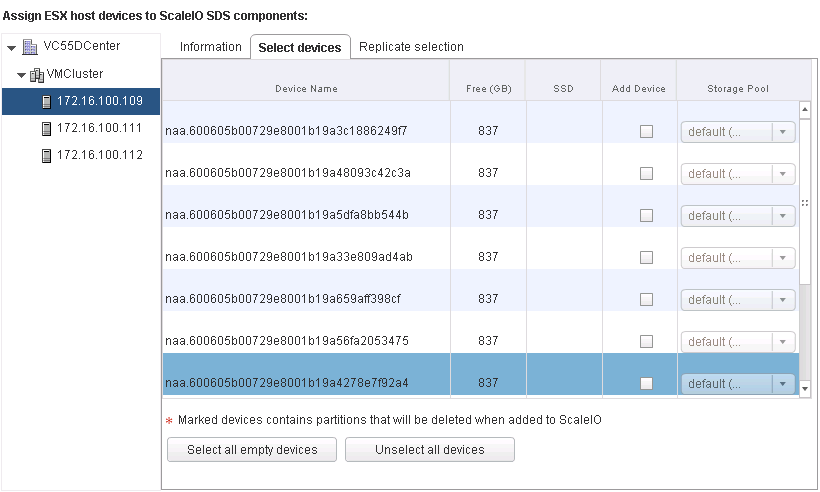
57 Chapter 4: VSPEX Solution Implementation Figure 24. Assign ESXi host devices to ScaleIO SDS components 14. Select Add Device and choose a storage pool, as shown in Figure 25. Figure 25. Select devices for SDS Refer to the sizing chapter of the Design Guide to calculate the number of disks for each ESXi host to add to the ScaleIO system. In almost all cases, RDM is the preferred method to add physical devices. Use the Virtual Machine Disk (VMDK) method only in the following instances: If the physical device does not support RDM If the device already has a datastore and is not being fully utilized. The excess capacity that is not being used will be added as the ScaleIO device EMC VSPEX Private Cloud: VMware vsphere 5.5 and EMC ScaleIO 57

58 Chapter 4: VSPEX Solution Implementation Note: In this case, one device contains a datastore from which to deploy the SVM. Use VMDK for this device only and use RDM for all the other devices. 15. Repeat step 16 and step 17 to add devices for each ESXi host. Click Next. 16. In the Add SDCs screen, shown in Figure 26, select one of the following values for each ESXi host/svm, and then click Next: a. If installing SDC to the SVM, set the SDC mode to SVM. If installing SDC directly to the ESX server, set the SDC mode to ESX and specify the ESXi server root password. b. Choose whether to enable or disable the LUN comparison for ESXi hosts. Note: Consult your environment administrator before selecting this setting. Figure 26. Add SDC 17. In the Configure ScaleIO Gateway screen, shown in Figure 27, set the following values, and then click Next: ESXi host for the ScaleIO gateway virtual machine Admin password for the gateway Lightweight Installation Agent (LIA) password 58 EMC VSPEX Private Cloud: VMware vsphere 5.5 and EMC ScaleIO
59 Chapter 4: VSPEX Solution Implementation Figure 27. Configure ScaleIO Gateway 18. In the Select OVA Template screen, shown in Figure 28, complete the following steps, and then click Next: a. Select the template to use to create the SVMs; EMC ScaleIO SVM Template is the default template. If you uploaded a template to multiple datastores, select them all for faster deployment. b. Enter a new password for all SVMs that you will create. Figure 28. Select OVA template 19. In the Configure Network screen, shown in Figure 29, choose either a single network or separate networks for management and data transfer. EMC VSPEX Private Cloud: VMware vsphere 5.5 and EMC ScaleIO 59
60 Chapter 4: VSPEX Solution Implementation Figure 29. Configure networks Note: The selected network must have communication with all of the system nodes. In some cases, while the wizard does verify that the network names match, this does not guarantee communication as the VLAN IDs may have been manually altered. EMC recommends using separate networks for security and increased efficiency. We used two data networks in this solution for high availability. The management network, which is used to connect and manage the SVMs, is normally connected to the client management network, a 1 GbE network. The data network is internal, enabling communication between the ScaleIO components, and is generally a 10 GbE network. 20. Select a management network label and then configure the data network by clicking Create new network, as shown in Figure EMC VSPEX Private Cloud: VMware vsphere 5.5 and EMC ScaleIO
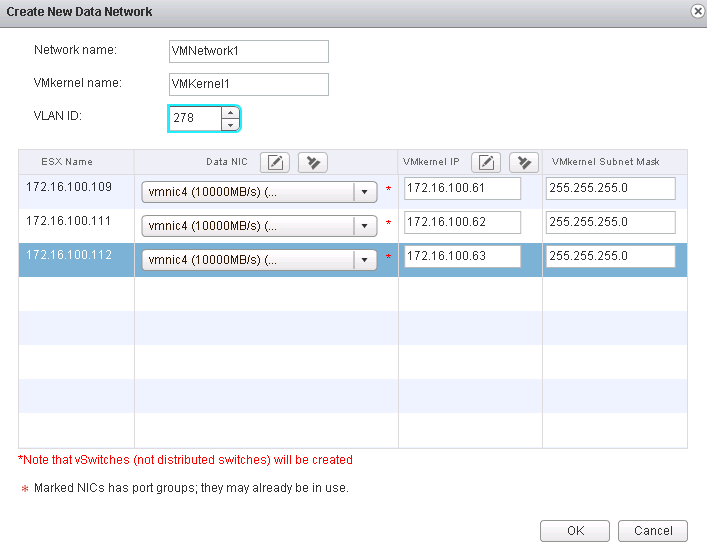
61 Chapter 4: VSPEX Solution Implementation Figure 30. Create new data network 21. In the Create New Data Network screen, enter the following information: Network name Type the name of the VMware network. VMkernel name Type the name of the VMkernel. VLAN ID Type the network ID. For each listed ESXi host, select a Data NIC, a VMkernel IP, and a VMkernel Subnet Mask. 22. Click OK. The data network is created. The wizard automatically configures the following information for the data network: vswitch VMkernel port Virtual Machine Port Group iscsi software adapter VMkernel Port Binding 23. Repeat step 28 and step 29 to configure the second data network. Click Next. Note: For best results, use the plug-in to create the data networks, as in the preceding steps, rather than creating them manually. 24. In the Configure SVM network screen, enter the IP address, subnet mask, and default gateway for each SVM. You have the option to select the datastore to EMC VSPEX Private Cloud: VMware vsphere 5.5 and EMC ScaleIO 61
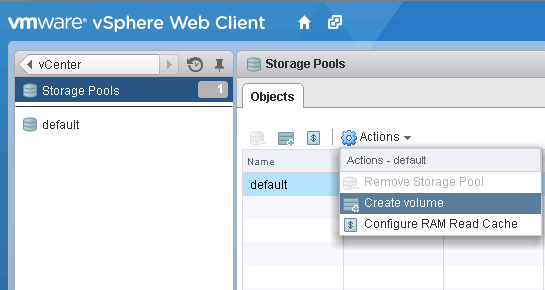
62 Chapter 4: VSPEX Solution Implementation host the SVM or set to automatic for the system to choose a datastore. Click Next. Note: Because you are configuring two data networks, you need three IP addresses for each SVM: one for management and the other two for data transfer. You must separate these networks into three different subnets. 25. In the Review Summary screen, review the configuration and click Finish to begin deployment. 26. Click Refresh in the browser to view the deployment progress on the ScaleIO screen. During the deployment process you can view progress, stop the deployment, and view logs. 27. Click Finish when the deployment is complete. Create volumes This section describes how to use the plug-in to create volumes in the VMware environment. You can map volumes to SDCs in the same step. Volumes are created from devices in a storage pool. 1. From the Storage Pools screen, click Actions > Create volume, as shown in Figure 31. Figure 31. Create volume 2. In the Create Volume dialog box, shown in Figure 32, type values for the following fields: Volume name Type a name for the new volume. Number of volumes to create Type the number of volumes to be created. Volume size (GB) Type the size of the volume. Note: Use the maximum capacity of the storage pool when the volume is used for provisioning the full-cloned virtual desktops. Volume provisioning Select Thick. Use RAM Read Cache Accept the default setting. 62 EMC VSPEX Private Cloud: VMware vsphere 5.5 and EMC ScaleIO
63 Obfuscation Accept the default setting. Chapter 4: VSPEX Solution Implementation Figure 32. Create volume 3. Map the volume to the SDCs: a. Select Map volume to SDCs/ESXi hosts. b. In the Select SDCs/ESXI hosts area, select the clusters or SDCs to which this volume should be mapped. c. Select Manually configure LUN identifier and specify the LUN identify number to manually configure the LUN identifier. d. Type the identifier ID. e. Click OK. f. Type the password for the ScaleIO admin user. 4. Repeat this procedure to create the required number of volumes. EMC VSPEX Private Cloud: VMware vsphere 5.5 and EMC ScaleIO 63
64 Chapter 4: VSPEX Solution Implementation Create datastores Rescan the iscsi Software Adapter to discover the ScaleIO LUNs on the appropriate ESXi hosts. Create datastores for these LUNs. The vsphere Storage Guide provides instructions on how to create the VMware datastores on the ESXi host. Install GUI This section describes how to install the ScaleIO GUI. You can install the GUI on a Windows or Linux workstation. To install the GUI, type the following commands for the operating system that you use: Provisioning a virtual machine For Windows: EMC-ScaleIO-gui xxx.msi For RHEL: rpm -U scaleio-gui xxx.noarch.rpm For Debian: sudo dpkg -i scaleio-gui xxx.deb Create a virtual machine in vcenter Perform partition alignment and assign file allocation unit size Create a template virtual machine Deploy virtual machines from the template virtual machine Create a virtual machine in vcenter to use as a virtual machine template: 1. Install the virtual machine. 2. Install the software. 3. Change the Windows and application settings. Refer to vsphere Virtual Machine Administration on the VMware website to create a virtual machine. Perform disk partition alignment on virtual machines for operating systems that are older than Windows Server Align the disk drive with an offset of 1,024 KB, and format the disk drive with a file allocation unit (cluster) size of 8 KB. Refer to the article Disk Partition Alignment Best Practices for SQL Server to perform partition alignment, assign drive letters, and assign the file allocation unit size using diskpart.exe. Convert a virtual machine into a template. Create a customization specification when creating the template. Refer to vsphere Virtual Machine Administration to create the template and specification. Refer to vsphere Virtual Machine Administration to deploy the virtual machines with the virtual machine template and the customization specification. 64 EMC VSPEX Private Cloud: VMware vsphere 5.5 and EMC ScaleIO
65 Chapter 4: VSPEX Solution Implementation Summary After these steps are completed, the VSPEX solution is fully functional. EMC VSPEX Private Cloud: VMware vsphere 5.5 and EMC ScaleIO 65
66 Chapter 5: Verifying the Solution Chapter 5 Verifying the Solution This chapter presents the following topics: Overview Post-install checklist Deploying and testing a single virtual server Verifying the redundancy of the solution components EMC VSPEX Private Cloud: VMware vsphere 5.5 and EMC ScaleIO
67 Chapter 5: Verifying the Solution Overview This chapter provides a list of items to review and tasks to perform after configuring the solution. The goal of this chapter is to verify the configuration and functionality of specific aspects of the solution, and ensure to that the configuration meets core availability requirements. To test the installation, complete the tasks listed in Table 20. Table 20. Tasks for testing the installation Task Description Reference Post-install checklist Deploy and test a single virtual server Verify redundancy of the solution components Verify that sufficient virtual ports exist on each vsphere host virtual switch. Verify that each vsphere host has access to the required ScaleIO datastores and VLANs. Verify that the vmotion interfaces are configured correctly on all vsphere hosts. Deploy a single virtual machine using the vsphere interface. Verify the data protection of the ScaleIO system. Restart one ScaleIO node, and ensure that shared volume access is maintained. Disable each of the redundant network switches in turn and verify that the vsphere host virtual machine is intact. On a vsphere host that contains at least one virtual machine, enable maintenance mode and verify that the virtual machine can successfully migrate to an alternate host. vsphere Networking vsphere Storage Guide vsphere Networking vcenter Server and Host Management vsphere Virtual Machine Management Verifying the redundancy of the solution components Refer to the vendor documentation. vcenter Server and Host Management EMC VSPEX Private Cloud: VMware vsphere 5.5 and EMC ScaleIO 67
68 Chapter 5: Verifying the Solution Post-install checklist The following configuration items are critical to the functionality of the solution. On each vsphere server, verify the following before deploying the solution to production: The vswitch that hosts the client VLANs is configured with sufficient ports to accommodate the maximum number of virtual machines that it may host. All required virtual machine port groups are configured, and each server has access to the required VMware datastores. An interface is configured correctly for vmotion using the information in the vsphere Networking Guide. Deploying and testing a single virtual server Deploy a virtual machine to verify that the solution functions as expected. Verify that the virtual machine is joined to the applicable domain, has access to the expected networks, and that it is possible to log in to it. Verifying the redundancy of the solution components To ensure that the various components of the solution maintain availability requirements, test the following scenarios related to maintenance or hardware failures: Power off one ScaleIO node and ensure that the data access of ScaleIO LUNs is maintained and the data rebuild process is running properly. Disable each of the redundant switches in turn and verify that the vsphere host virtual machine remains intact. On a vsphere host that contains at least one virtual machine, enable maintenance mode and verify that the virtual machine can successfully migrate to an alternate host. 68 EMC VSPEX Private Cloud: VMware vsphere 5.5 and EMC ScaleIO
69 Chapter 6: System Monitoring Chapter 6 System Monitoring This chapter presents the following topics: Overview Key areas to monitor EMC VSPEX Private Cloud: VMware vsphere 5.5 and EMC ScaleIO 69
70 Chapter 6: System Monitoring Overview Key areas to monitor System monitoring of a VSPEX environment is no different from monitoring any core IT system; it is a relevant and essential component of administration. The monitoring levels involved in a highly virtualized infrastructure, such as a VSPEX environment, are somewhat more complex than in a purely physical infrastructure, as the interaction and interrelationships between various components can be subtle and nuanced. However, those experienced in administering virtualized environments should be familiar with the key concepts and focus areas. The key differentiators are monitoring at scale and the ability to monitor end-to-end systems and workflows. Several business needs require proactive, consistent monitoring of the environment: Stable, predictable performance Sizing and capacity needs Availability and accessibility Elasticity: the dynamic addition, subtraction, and modification of workloads Data protection If self-service provisioning is enabled in the environment, the ability to monitor the system is more critical because clients can generate virtual machines and workloads dynamically. This can adversely affect the entire system. This chapter provides the basic knowledge necessary to monitor the key components of a VSPEX Proven Infrastructure environment. Additional resources are included at the end of this chapter. VSPEX Proven Infrastructures provide end-to-end solutions and require system monitoring of two discrete, but highly interrelated areas: Servers, both virtual machines and clusters Networking This chapter focuses primarily on monitoring key components of the ScaleIO infrastructure, but briefly describes other components. Performance baseline When a workload is added to a VSPEX deployment, server and networking resources are consumed. As more workloads are added, modified, or removed, resource availability and, more importantly, capabilities change, which impacts all other workloads running on the platform. Customers should fully understand their workload characteristics on all key components prior to deploying them on a VSPEX platform; this is a requirement to correctly size resource utilization against the defined reference virtual machine. Deploy the first workload, and then measure the end-to-end resource consumption along with platform performance. This removes the guesswork from sizing activities and ensures initial assumptions were valid. As more workloads are deployed, re- 70 EMC VSPEX Private Cloud: VMware vsphere 5.5 and EMC ScaleIO
71 Chapter 6: System Monitoring evaluate resource consumption and performance levels to determine cumulative load and the impact on existing virtual machines and their application workloads. Adjust resource allocation accordingly to ensure that any oversubscription is not negatively impacting overall system performance. Run these assessments consistently to ensure the platform as a whole, and the virtual machines themselves, operate as expected. The following components comprise the critical areas that affect overall system performance: Servers Networking ScaleIO layer Servers The key server resources to monitor include: Processors Memory Local Disk Networking Monitor these resources from both a physical host level (the hypervisor host level) and from a virtual level (from within the guest virtual machine). Depending on your operating system, there are tools available to monitor and capture this data. For example, if your VSPEX deployment uses ESXi servers as the hypervisor, you can use the exstop utility to monitor and log these metrics. Windows Server 2012 guests can use the Perfmon utility. Follow your vendor s guidance to determine performance thresholds for specific deployment scenarios, which can vary greatly depending upon the application. Detailed information about these tools is available from: Keep in mind that each VSPEX Proven Infrastructure provides a guaranteed level of performance based on the number of reference virtual machines deployed and their defined workload. Networking Ensure that there is adequate bandwidth for networking communications. This includes monitoring network loads at the server and virtual machine level. From the server and virtual machine level, the monitoring tools mentioned previously provide sufficient metrics to analyze flows into and out of the servers and guests. Key items to track include aggregate throughput or bandwidth, latencies, and IOPS size. Capture additional data from network card or host bus adapter (HBA) utilities. EMC VSPEX Private Cloud: VMware vsphere 5.5 and EMC ScaleIO 71
72 Chapter 6: System Monitoring ScaleIO layer Monitoring the ScaleIO layer of a VSPEX implementation is crucial to maintaining the overall health and performance of the system. The ScaleIO GUI enables you to review the overall status of the system, and also drill down to the component level and monitor these components. The various screens display different views and data that are beneficial to the storage administrator. The ScaleIO GUI provides an easy, yet powerful interface to gain insight into how the underlying ScaleIO components are operating. There are several key areas to focus on, including: Dashboard screen Protection domain screen Protection domain servers screen Storage pool screen The EMC ScaleIO User Guide provides more instructions for monitoring the ScaleIO layer. 72 EMC VSPEX Private Cloud: VMware vsphere 5.5 and EMC ScaleIO
73 Appendix A: Reference Documentation Appendix A Reference Documentation This appendix presents the following topics: EMC documentation Other documentation EMC VSPEX Private Cloud: VMware vsphere 5.5 and EMC ScaleIO 73
74 Appendix A: Reference Documentation EMC documentation Other documentation The following documents, available on support.emc.com, provide additional and relevant information. If you do not have access to a document, contact your EMC representative. EMC Host Connectivity Guide for VMware ESX Server EMC ScaleIO User Guide VMware documentation The following documents, located on the VMware website, provide additional and relevant information: vsphere Networking vsphere Storage Guide vsphere Virtual Machine Administration vsphere Virtual Machine Management vsphere Installation and Setup vcenter Server and Host Management vsphere Resource Management Interpreting esxtop Statistics Preparing vcenter Server Databases Understanding Memory Resource Management in VMware vsphere 5.0 For documentation on Microsoft products, refer to the following Microsoft resources: Microsoft Developer Network Microsoft TechNet 74 EMC VSPEX Private Cloud: VMware vsphere 5.5 and EMC ScaleIO
75 Appendix B: Customer Configuration Worksheet Appendix B Customer Configuration Worksheet This appendix presents the following topic: Customer configuration worksheet EMC VSPEX Private Cloud: VMware vsphere 5.5 and EMC ScaleIO 75
76 Appendix B: Customer Configuration Worksheet Customer configuration worksheet Before you start the configuration, gather some customer-specific network and host configuration information. The following tables provide essential information for assembling the required network and provide host address, numbering, and naming information. This worksheet can also be used as a leave behind document for future reference. To confirm the customer information, cross-reference with the relevant array configuration worksheet: VNX Block Configuration Worksheet or VNX Installation Assistant for File/Unified Worksheet. Table 21. Common server information Server Name Purpose Primary IP Domain Controller DNS Primary DNS Secondary DHCP NTP SMTP SNMP vcenter Console SQL Server Table 22. ESXi server information Server Name Purpose Primary IP Private net (storage) addresses VMkernel IP vsphere Host 1 vsphere Host 2 Table 23. ScaleIO information Field Array name Value Admin account Management IP Storage pool name 76 EMC VSPEX Private Cloud: VMware vsphere 5.5 and EMC ScaleIO
77 Appendix B: Customer Configuration Worksheet Field Datastore name Value Table 24. Network infrastructure information Name Purpose IP Subnet mask Ethernet switch 1 Default gateway Ethernet switch 2 Table 25. VLAN information Name Network purpose VLAN ID Allowed subnets Client access network Storage network Management network Table 26. Service accounts Account administrator@vsp here.local Root Root Purpose Windows Server administrator vsphere SSO administrator vsphere root Array root Array administrator VMware vcenter administrator VMware Horizon View administrator SQL Server administrator Password (optional, secure appropriately) EMC VSPEX Private Cloud: VMware vsphere 5.5 and EMC ScaleIO 77
EMC VSPEX PRIVATE CLOUD:
 EMC VSPEX PRIVATE CLOUD: EMC VSPEX Abstract This document describes the EMC VSPEX Proven Infrastructure solution for private cloud deployments with technology. June 2015 Copyright 2015 EMC Corporation.
EMC VSPEX PRIVATE CLOUD
 EMC VSPEX PRIVATE CLOUD EMC VSPEX Abstract This document describes the EMC VSPEX Proven Infrastructure solution for private cloud deployments with technology. November 2014 Copyright 2014 EMC Corporation.
EMC SCALEIO OPERATION OVERVIEW
 EMC SCALEIO OPERATION OVERVIEW Ensuring Non-disruptive Operation and Upgrade ABSTRACT This white paper reviews the challenges organizations face as they deal with the growing need for always-on levels
Using EonStor FC-host Storage Systems in VMware Infrastructure 3 and vsphere 4
 Using EonStor FC-host Storage Systems in VMware Infrastructure 3 and vsphere 4 Application Note Abstract This application note explains the configure details of using Infortrend FC-host storage systems
VMware Virtual SAN Backup Using VMware vsphere Data Protection Advanced SEPTEMBER 2014
 VMware SAN Backup Using VMware vsphere Data Protection Advanced SEPTEMBER 2014 VMware SAN Backup Using VMware vsphere Table of Contents Introduction.... 3 vsphere Architectural Overview... 4 SAN Backup
VIDEO SURVEILLANCE WITH SURVEILLUS VMS AND EMC ISILON STORAGE ARRAYS
 VIDEO SURVEILLANCE WITH SURVEILLUS VMS AND EMC ISILON STORAGE ARRAYS Successfully configure all solution components Use VMS at the required bandwidth for NAS storage Meet the bandwidth demands of a 2,200
EMC VSPEX END-USER COMPUTING
 IMPLEMENTATION GUIDE EMC VSPEX END-USER COMPUTING VMware Horizon 6.0 with View and VMware vsphere for up to 2,000 Virtual Desktops Enabled by EMC VNX and EMC Data Protection EMC VSPEX Abstract This describes
EMC Virtual Infrastructure for SAP Enabled by EMC Symmetrix with Auto-provisioning Groups, Symmetrix Management Console, and VMware vcenter Converter
 EMC Virtual Infrastructure for SAP Enabled by EMC Symmetrix with Auto-provisioning Groups, VMware vcenter Converter A Detailed Review EMC Information Infrastructure Solutions Abstract This white paper
Brocade Solution for EMC VSPEX Server Virtualization
 Reference Architecture Brocade Solution Blueprint Brocade Solution for EMC VSPEX Server Virtualization Microsoft Hyper-V for 50 & 100 Virtual Machines Enabled by Microsoft Hyper-V, Brocade ICX series switch,
Veritas Storage Foundation High Availability for Windows by Symantec
 Veritas Storage Foundation High Availability for Windows by Symantec Simple-to-use solution for high availability and disaster recovery of businesscritical Windows applications Data Sheet: High Availability
RED HAT ENTERPRISE VIRTUALIZATION FOR SERVERS: COMPETITIVE FEATURES
 RED HAT ENTERPRISE VIRTUALIZATION FOR SERVERS: COMPETITIVE FEATURES RED HAT ENTERPRISE VIRTUALIZATION FOR SERVERS Server virtualization offers tremendous benefits for enterprise IT organizations server
Using VMware VMotion with Oracle Database and EMC CLARiiON Storage Systems
 Using VMware VMotion with Oracle Database and EMC CLARiiON Storage Systems Applied Technology Abstract By migrating VMware virtual machines from one physical environment to another, VMware VMotion can
REDEFINE SIMPLICITY TOP REASONS: EMC VSPEX BLUE FOR VIRTUALIZED ENVIRONMENTS
 REDEFINE SIMPLICITY AGILE. SCALABLE. TRUSTED. TOP REASONS: EMC VSPEX BLUE FOR VIRTUALIZED ENVIRONMENTS Redefine Simplicity: Agile, Scalable and Trusted. Mid-market and Enterprise customers as well as Managed
EMC VSPEX PRIVATE CLOUD
 EMC VSPEX PRIVATE CLOUD VMware vsphere 5.5 for up to 125 Virtual Machines Enabled by Microsoft Windows Server 2012 R2, EMC VNXe3200, and EMC Powered Backup EMC VSPEX Abstract This document describes the
FOR SERVERS 2.2: FEATURE matrix
 RED hat ENTERPRISE VIRTUALIZATION FOR SERVERS 2.2: FEATURE matrix Red hat enterprise virtualization for servers Server virtualization offers tremendous benefits for enterprise IT organizations server consolidation,
Virtual SAN Design and Deployment Guide
 Virtual SAN Design and Deployment Guide TECHNICAL MARKETING DOCUMENTATION VERSION 1.3 - November 2014 Copyright 2014 DataCore Software All Rights Reserved Table of Contents INTRODUCTION... 3 1.1 DataCore
Nutanix Tech Note. Configuration Best Practices for Nutanix Storage with VMware vsphere
 Nutanix Tech Note Configuration Best Practices for Nutanix Storage with VMware vsphere Nutanix Virtual Computing Platform is engineered from the ground up to provide enterprise-grade availability for critical
Khóa học dành cho các kỹ sư hệ thống, quản trị hệ thống, kỹ sư vận hành cho các hệ thống ảo hóa ESXi, ESX và vcenter Server
 1. Mục tiêu khóa học. Khóa học sẽ tập trung vào việc cài đặt, cấu hình và quản trị VMware vsphere 5.1. Khóa học xây dựng trên nền VMware ESXi 5.1 và VMware vcenter Server 5.1. 2. Đối tượng. Khóa học dành
Answering the Requirements of Flash-Based SSDs in the Virtualized Data Center
 White Paper Answering the Requirements of Flash-Based SSDs in the Virtualized Data Center Provide accelerated data access and an immediate performance boost of businesscritical applications with caching
VMware vsphere: Install, Configure, Manage [V5.0]
![VMware vsphere: Install, Configure, Manage [V5.0]](/thumbs/18/878042.jpg "VMware vsphere: Install, Configure, Manage [V5.0]") VMware vsphere: Install, Configure, Manage [V5.0] Gain hands-on experience using VMware ESXi 5.0 and vcenter Server 5.0. In this hands-on, VMware -authorized course based on ESXi 5.0 and vcenter Server
VMware vsphere: Install, Configure, Manage [V5.0] Gain hands-on experience using VMware ESXi 5.0 and vcenter Server 5.0. In this hands-on, VMware -authorized course based on ESXi 5.0 and vcenter Server
Technology Insight Series
 Evaluating Storage Technologies for Virtual Server Environments Russ Fellows June, 2010 Technology Insight Series Evaluator Group Copyright 2010 Evaluator Group, Inc. All rights reserved Executive Summary
VMware vsphere-6.0 Administration Training
 VMware vsphere-6.0 Administration Training Course Course Duration : 20 Days Class Duration : 3 hours per day (Including LAB Practical) Classroom Fee = 20,000 INR Online / Fast-Track Fee = 25,000 INR Fast
Improving IT Operational Efficiency with a VMware vsphere Private Cloud on Lenovo Servers and Lenovo Storage SAN S3200
 Improving IT Operational Efficiency with a VMware vsphere Private Cloud on Lenovo Servers and Lenovo Storage SAN S3200 Most organizations routinely utilize a server virtualization infrastructure to benefit
VMware vsphere 5.1 Advanced Administration
 Course ID VMW200 VMware vsphere 5.1 Advanced Administration Course Description This powerful 5-day 10hr/day class is an intensive introduction to VMware vsphere 5.0 including VMware ESX 5.0 and vcenter.
VMware Virtual SAN Design and Sizing Guide TECHNICAL MARKETING DOCUMENTATION V 1.0/MARCH 2014
 VMware Virtual SAN Design and Sizing Guide TECHNICAL MARKETING DOCUMENTATION V 1.0/MARCH 2014 Table of Contents Introduction... 3 1.1 VMware Virtual SAN...3 1.2 Virtual SAN Datastore Characteristics and
DIABLO TECHNOLOGIES MEMORY CHANNEL STORAGE AND VMWARE VIRTUAL SAN : VDI ACCELERATION
 DIABLO TECHNOLOGIES MEMORY CHANNEL STORAGE AND VMWARE VIRTUAL SAN : VDI ACCELERATION A DIABLO WHITE PAPER AUGUST 2014 Ricky Trigalo Director of Business Development Virtualization, Diablo Technologies
EMC Integrated Infrastructure for VMware
 EMC Integrated Infrastructure for VMware Enabled by Celerra Reference Architecture EMC Global Solutions Centers EMC Corporation Corporate Headquarters Hopkinton MA 01748-9103 1.508.435.1000 www.emc.com
High-Availability Fault Tolerant Computing for Remote and Branch Offices HA/FT solutions for Cisco UCS E-Series servers and VMware vsphere
 Table of Contents UCS E-Series Availability and Fault Tolerance... 3 Solid hardware... 3 Consistent management... 3 VMware vsphere HA and FT... 3 Storage High Availability and Fault Tolerance... 4 Quick-start
Using VMWare VAAI for storage integration with Infortrend EonStor DS G7i
 Using VMWare VAAI for storage integration with Infortrend EonStor DS G7i Application Note Abstract: This document describes how VMware s vsphere Storage APIs (VAAI) can be integrated and used for accelerating
Microsoft Exchange, Lync, and SharePoint Server 2010 on Dell Active System 800v
 Microsoft Exchange, Lync, and SharePoint Server 2010 on Dell Active System 800v A Design and Implementation Guide with a sample implementation for 5,000 users Global Solutions Engineering This document
EMC XTREMIO EXECUTIVE OVERVIEW
 EMC XTREMIO EXECUTIVE OVERVIEW COMPANY BACKGROUND XtremIO develops enterprise data storage systems based completely on random access media such as flash solid-state drives (SSDs). By leveraging the underlying
Microsoft SMB File Sharing Best Practices Guide
 Technical White Paper Microsoft SMB File Sharing Best Practices Guide Tintri VMstore, Microsoft SMB 3.0 Protocol, and VMware 6.x Author: Neil Glick Version 1.0 06/15/2016 @tintri www.tintri.com Contents
Best Practices for Monitoring Databases on VMware. Dean Richards Senior DBA, Confio Software
 Best Practices for Monitoring Databases on VMware Dean Richards Senior DBA, Confio Software 1 Who Am I? 20+ Years in Oracle & SQL Server DBA and Developer Worked for Oracle Consulting Specialize in Performance
VMware vsphere 4.1 with ESXi and vcenter
 VMware vsphere 4.1 with ESXi and vcenter This powerful 5-day class is an intense introduction to virtualization using VMware s vsphere 4.1 including VMware ESX 4.1 and vcenter. Assuming no prior virtualization
VMware vsphere 5.0 Boot Camp
 VMware vsphere 5.0 Boot Camp This powerful 5-day 10hr/day class is an intensive introduction to VMware vsphere 5.0 including VMware ESX 5.0 and vcenter. Assuming no prior virtualization experience, this
PROSPHERE: DEPLOYMENT IN A VITUALIZED ENVIRONMENT
 White Paper PROSPHERE: DEPLOYMENT IN A VITUALIZED ENVIRONMENT Abstract This white paper examines the deployment considerations for ProSphere, the next generation of Storage Resource Management (SRM) from
Integration of Microsoft Hyper-V and Coraid Ethernet SAN Storage. White Paper
 Integration of Microsoft Hyper-V and Coraid Ethernet SAN Storage White Paper June 2011 2011 Coraid, Inc. Coraid, Inc. The trademarks, logos, and service marks (collectively "Trademarks") appearing on the
Setup for Failover Clustering and Microsoft Cluster Service
 Setup for Failover Clustering and Microsoft Cluster Service ESX 4.0 ESXi 4.0 vcenter Server 4.0 This document supports the version of each product listed and supports all subsequent versions until the
Mit Soft- & Hardware zum Erfolg. Giuseppe Paletta
 Mit Soft- & Hardware zum Erfolg IT-Transformation VCE Converged and Hyperconverged Infrastructure VCE VxRack EMC VSPEX Blue IT-Transformation IT has changed dramatically in last past years The requirements
VBLOCK SOLUTION FOR SAP: SAP APPLICATION AND DATABASE PERFORMANCE IN PHYSICAL AND VIRTUAL ENVIRONMENTS
 Vblock Solution for SAP: SAP Application and Database Performance in Physical and Virtual Environments Table of Contents www.vce.com V VBLOCK SOLUTION FOR SAP: SAP APPLICATION AND DATABASE PERFORMANCE
VMware vsphere: Fast Track [V5.0]
![VMware vsphere: Fast Track [V5.0]](/thumbs/27/9809814.jpg "VMware vsphere: Fast Track [V5.0]") VMware vsphere: Fast Track [V5.0] Experience the ultimate in vsphere 5 skills-building and VCP exam-preparation training. In this intensive, extended-hours course, you will focus on installing, configuring,
VMware vsphere: Fast Track [V5.0] Experience the ultimate in vsphere 5 skills-building and VCP exam-preparation training. In this intensive, extended-hours course, you will focus on installing, configuring,
EMC Integrated Infrastructure for VMware
 EMC Integrated Infrastructure for VMware Enabled by EMC Celerra NS-120 Reference Architecture EMC Global Solutions Centers EMC Corporation Corporate Headquarters Hopkinton MA 01748-9103 1.508.435.1000
VirtualclientTechnology 2011 July
 WHAT S NEW IN VSPHERE VirtualclientTechnology 2011 July Agenda vsphere Platform Recap vsphere 5 Overview Infrastructure Services Compute, Storage, Network Applications Services Availability, Security,
Server Virtualization with VMWare
 Server Virtualization with VMware Information Technology Server Virtualization with VMWare A look at server virtualization, what it is and why it should be considered. By Alex Dewar, Head of IT & IM Solutions,
Best Practices Guide: Network Convergence with Emulex LP21000 CNA & VMware ESX Server
 Best Practices Guide: Network Convergence with Emulex LP21000 CNA & VMware ESX Server How to deploy Converged Networking with VMware ESX Server 3.5 Using Emulex FCoE Technology Table of Contents Introduction...
SAN Conceptual and Design Basics
 TECHNICAL NOTE VMware Infrastructure 3 SAN Conceptual and Design Basics VMware ESX Server can be used in conjunction with a SAN (storage area network), a specialized high speed network that connects computer
Technical Paper. Leveraging VMware Software to Provide Failover Protection for the Platform for SAS Business Analytics April 2011
 Technical Paper Leveraging VMware Software to Provide Failover Protection for the Platform for SAS Business Analytics April 2011 Table of Contents About this Document... 3 Introduction... 4 What is Failover?...
SECURE, ENTERPRISE FILE SYNC AND SHARE WITH EMC SYNCPLICITY UTILIZING EMC ISILON, EMC ATMOS, AND EMC VNX
 White Paper SECURE, ENTERPRISE FILE SYNC AND SHARE WITH EMC SYNCPLICITY UTILIZING EMC ISILON, EMC ATMOS, AND EMC VNX Abstract This white paper explains the benefits to the extended enterprise of the on-
Nimble Storage for VMware View VDI
 BEST PRACTICES GUIDE Nimble Storage for VMware View VDI N I M B L E B E S T P R A C T I C E S G U I D E : N I M B L E S T O R A G E F O R V M W A R E V I E W V D I 1 Overview Virtualization is an important
www.vce.com SAP Landscape Virtualization Management Version 2.0 on VCE Vblock System 700 series
 www.vce.com SAP Landscape Virtualization Management Version 2.0 on VCE Vblock System 700 series Version 1.1 December 2014 THE INFORMATION IN THIS PUBLICATION IS PROVIDED "AS IS." VCE MAKES NO REPRESENTATIONS
Evaluation of Enterprise Data Protection using SEP Software
 Test Validation Test Validation - SEP sesam Enterprise Backup Software Evaluation of Enterprise Data Protection using SEP Software Author:... Enabling you to make the best technology decisions Backup &
VBLOCK SOLUTION FOR SAP APPLICATION HIGH AVAILABILITY
 Vblock Solution for SAP Application High Availability Table of Contents www.vce.com VBLOCK SOLUTION FOR SAP APPLICATION HIGH AVAILABILITY Version 2.0 February 2013 1 Copyright 2013 VCE Company, LLC. All
MICROSOFT HYPER-V SCALABILITY WITH EMC SYMMETRIX VMAX
 White Paper MICROSOFT HYPER-V SCALABILITY WITH EMC SYMMETRIX VMAX Abstract This white paper highlights EMC s Hyper-V scalability test in which one of the largest Hyper-V environments in the world was created.
Ubuntu OpenStack on VMware vsphere: A reference architecture for deploying OpenStack while limiting changes to existing infrastructure
 TECHNICAL WHITE PAPER Ubuntu OpenStack on VMware vsphere: A reference architecture for deploying OpenStack while limiting changes to existing infrastructure A collaboration between Canonical and VMware
Whitepaper. NexentaConnect for VMware Virtual SAN. Full Featured File services for Virtual SAN
 Whitepaper NexentaConnect for VMware Virtual SAN Full Featured File services for Virtual SAN Table of Contents Introduction... 1 Next Generation Storage and Compute... 1 VMware Virtual SAN... 2 Highlights
Technical Paper. Moving SAS Applications from a Physical to a Virtual VMware Environment
 Technical Paper Moving SAS Applications from a Physical to a Virtual VMware Environment Release Information Content Version: April 2015. Trademarks and Patents SAS Institute Inc., SAS Campus Drive, Cary,
VMware vsphere 4.1. Pricing, Packaging and Licensing Overview. E f f e c t i v e A u g u s t 1, 2 0 1 0 W H I T E P A P E R
 VMware vsphere 4.1 Pricing, Packaging and Licensing Overview E f f e c t i v e A u g u s t 1, 2 0 1 0 W H I T E P A P E R Table of Contents Executive Summary...................................................
Red Hat enterprise virtualization 3.0 feature comparison
 Red Hat enterprise virtualization 3.0 feature comparison at a glance Red Hat Enterprise is the first fully open source, enterprise ready virtualization platform Compare the functionality of RHEV to VMware
EMC Unified Storage for Microsoft SQL Server 2008
 EMC Unified Storage for Microsoft SQL Server 2008 Enabled by EMC CLARiiON and EMC FAST Cache Reference Copyright 2010 EMC Corporation. All rights reserved. Published October, 2010 EMC believes the information
EMC SYNCPLICITY FILE SYNC AND SHARE SOLUTION
 EMC SYNCPLICITY FILE SYNC AND SHARE SOLUTION Automated file synchronization Flexible, cloud-based administration Secure, on-premises storage EMC Solutions January 2015 Copyright 2014 EMC Corporation. All
A virtual SAN for distributed multi-site environments
 Data sheet A virtual SAN for distributed multi-site environments What is StorMagic SvSAN? StorMagic SvSAN is a software storage solution that enables enterprises to eliminate downtime of business critical
EMC XTREMIO AND MICROSOFT EXCHANGE DATABASES
 EMC XTREMIO AND MICROSOFT EXCHANGE DATABASES Preliminary findings: Efficiency of various production samples Market overview and adoption of all-flash arrays Techniques for estimating efficiency EMC Solutions
EMC Virtual Infrastructure for Microsoft SQL Server
 Microsoft SQL Server Enabled by EMC Celerra and Microsoft Hyper-V Copyright 2010 EMC Corporation. All rights reserved. Published February, 2010 EMC believes the information in this publication is accurate
Building the Virtual Information Infrastructure
 Technology Concepts and Business Considerations Abstract A virtual information infrastructure allows organizations to make the most of their data center environment by sharing computing, network, and storage
White Paper. SAP NetWeaver Landscape Virtualization Management on VCE Vblock System 300 Family
 White Paper SAP NetWeaver Landscape Virtualization Management on VCE Vblock System 300 Family Table of Contents 2 Introduction 3 A Best-of-Breed Integrated Operations Architecture 3 SAP NetWeaver Landscape
Why Choose VMware vsphere for Desktop Virtualization? WHITE PAPER
 Why Choose VMware vsphere for Desktop Virtualization? WHITE PAPER Table of Contents Thin, Legacy-Free, Purpose-Built Hypervisor.... 3 More Secure with Smaller Footprint.... 4 Less Downtime Caused by Patches...
EMC PERFORMANCE OPTIMIZATION FOR MICROSOFT FAST SEARCH SERVER 2010 FOR SHAREPOINT
 Reference Architecture EMC PERFORMANCE OPTIMIZATION FOR MICROSOFT FAST SEARCH SERVER 2010 FOR SHAREPOINT Optimize scalability and performance of FAST Search Server 2010 for SharePoint Validate virtualization
Monitoring Databases on VMware
 Monitoring Databases on VMware Ensure Optimum Performance with the Correct Metrics By Dean Richards, Manager, Sales Engineering Confio Software 4772 Walnut Street, Suite 100 Boulder, CO 80301 www.confio.com
RSA Authentication Manager 8.1 Setup and Configuration Guide. Revision 2
 RSA Authentication Manager 8.1 Setup and Configuration Guide Revision 2 Contact Information Go to the RSA corporate website for regional Customer Support telephone and fax numbers: www.emc.com/domains/rsa/index.htm
WHITE PAPER 1 WWW.FUSIONIO.COM
 1 WWW.FUSIONIO.COM WHITE PAPER WHITE PAPER Executive Summary Fusion iovdi is the first desktop- aware solution to virtual desktop infrastructure. Its software- defined approach uniquely combines the economics
Maxta Storage Platform Enterprise Storage Re-defined
 Maxta Storage Platform Enterprise Storage Re-defined WHITE PAPER Software-Defined Data Center The Software-Defined Data Center (SDDC) is a unified data center platform that delivers converged computing,
Citrix XenApp Server Deployment on VMware ESX at a Large Multi-National Insurance Company
 Citrix XenApp Server Deployment on VMware ESX at a Large Multi-National Insurance Company June 2010 TECHNICAL CASE STUDY Table of Contents Executive Summary...1 Customer Overview...1 Business Challenges...1
EMC ViPR Controller. User Interface Virtual Data Center Configuration Guide. Version 2.4 302-002-416 REV 01
 EMC ViPR Controller Version 2.4 User Interface Virtual Data Center Configuration Guide 302-002-416 REV 01 Copyright 2014-2015 EMC Corporation. All rights reserved. Published in USA. Published November,
MICROSOFT CLOUD REFERENCE ARCHITECTURE: FOUNDATION
 Reference Architecture Guide MICROSOFT CLOUD REFERENCE ARCHITECTURE: FOUNDATION EMC VNX, EMC VMAX, EMC ViPR, and EMC VPLEX Microsoft Windows Hyper-V, Microsoft Windows Azure Pack, and Microsoft System
Using SUSE Cloud to Orchestrate Multiple Hypervisors and Storage at ADP
 Using SUSE Cloud to Orchestrate Multiple Hypervisors and Storage at ADP Agenda ADP Cloud Vision and Requirements Introduction to SUSE Cloud Overview Whats New VMWare intergration HyperV intergration ADP
Introduction to VMware EVO: RAIL. White Paper
 Introduction to VMware EVO: RAIL White Paper Table of Contents Introducing VMware EVO: RAIL.... 3 Hardware.................................................................... 4 Appliance...............................................................
OPTIMIZING SERVER VIRTUALIZATION
 OPTIMIZING SERVER VIRTUALIZATION HP MULTI-PORT SERVER ADAPTERS BASED ON INTEL ETHERNET TECHNOLOGY As enterprise-class server infrastructures adopt virtualization to improve total cost of ownership (TCO)
Cloud Optimize Your IT
 Cloud Optimize Your IT Windows Server 2012 The information contained in this presentation relates to a pre-release product which may be substantially modified before it is commercially released. This pre-release
EMC Backup and Recovery for Microsoft SQL Server 2008 Enabled by EMC Celerra Unified Storage
 EMC Backup and Recovery for Microsoft SQL Server 2008 Enabled by EMC Celerra Unified Storage Applied Technology Abstract This white paper describes various backup and recovery solutions available for SQL
Dell PowerVault MD32xx Deployment Guide for VMware ESX4.1 Server
 Dell PowerVault MD32xx Deployment Guide for VMware ESX4.1 Server A Dell Technical White Paper PowerVault MD32xx Storage Array www.dell.com/md32xx THIS WHITE PAPER IS FOR INFORMATIONAL PURPOSES ONLY, AND
Veritas Cluster Server from Symantec
 Delivers high availability and disaster recovery for your critical applications Data Sheet: High Availability Overview protects your most important applications from planned and unplanned downtime. Cluster
VMware Virtual Machine File System: Technical Overview and Best Practices
 VMware Virtual Machine File System: Technical Overview and Best Practices A VMware Technical White Paper Version 1.0. VMware Virtual Machine File System: Technical Overview and Best Practices Paper Number:
MS Exchange Server Acceleration
 White Paper MS Exchange Server Acceleration Using virtualization to dramatically maximize user experience for Microsoft Exchange Server Allon Cohen, PhD Scott Harlin OCZ Storage Solutions, Inc. A Toshiba
EMC Data Domain Management Center
 EMC Data Domain Management Center Version 1.1 Initial Configuration Guide 302-000-071 REV 04 Copyright 2012-2015 EMC Corporation. All rights reserved. Published in USA. Published June, 2015 EMC believes
Directions for VMware Ready Testing for Application Software
 Directions for VMware Ready Testing for Application Software Introduction To be awarded the VMware ready logo for your product requires a modest amount of engineering work, assuming that the pre-requisites
EMC Business Continuity for VMware View Enabled by EMC SRDF/S and VMware vcenter Site Recovery Manager
 EMC Business Continuity for VMware View Enabled by EMC SRDF/S and VMware vcenter Site Recovery Manager A Detailed Review Abstract This white paper demonstrates that business continuity can be enhanced
Cost-Effective Storage Solutions for VMware View 4.5 Enabled by EMC Unified Storage
 Cost-Effective Storage Solutions for VMware View 4.5 Enabled by EMC Unified Storage EMC Information Infrastructure Solutions Abstract Virtual desktop infrastructures introduce a new way for IT organizations
VMware vsphere: [V5.5] Admin Training
![VMware vsphere: [V5.5] Admin Training](/thumbs/27/9809789.jpg "VMware vsphere: [V5.5] Admin Training") VMware vsphere: [V5.5] Admin Training (Online Remote Live TRAINING) Summary Length Timings : Formats: Lab, Live Online : 5 Weeks, : Sat, Sun 10.00am PST, Wed 6pm PST Overview: This intensive, extended-hours
VMware vsphere: [V5.5] Admin Training (Online Remote Live TRAINING) Summary Length Timings : Formats: Lab, Live Online : 5 Weeks, : Sat, Sun 10.00am PST, Wed 6pm PST Overview: This intensive, extended-hours
Frequently Asked Questions: EMC UnityVSA
 Frequently Asked Questions: EMC UnityVSA 302-002-570 REV 01 Version 4.0 Overview... 3 What is UnityVSA?... 3 What are the specifications for UnityVSA?... 3 How do UnityVSA specifications compare to the
EMC Celerra Unified Storage Platforms
 EMC Solutions for Microsoft SQL Server EMC Celerra Unified Storage Platforms EMC NAS Product Validation Corporate Headquarters Hopkinton, MA 01748-9103 1-508-435-1000 www.emc.com Copyright 2008, 2009 EMC
Deploying F5 BIG-IP Virtual Editions in a Hyper-Converged Infrastructure
 Deploying F5 BIG-IP Virtual Editions in a Hyper-Converged Infrastructure Justin Venezia Senior Solution Architect Paul Pindell Senior Solution Architect Contents The Challenge 3 What is a hyper-converged
EMC VSPEX PRIVATE CLOUD
 Proven Infrastructure Guide EMC VSPEX PRIVATE CLOUD VMware vsphere 5.5 for up to 1,000 Virtual Machines Enabled by Microsoft Windows Server 2012 R2, EMC VNX Series, and EMC Powered Backup EMC VSPEX Abstract
Backup & Recovery for VMware Environments with Avamar 6.0
 White Paper Backup & Recovery for VMware Environments with Avamar 6.0 A Detailed Review Abstract With the ever increasing pace of virtual environments deployed in the enterprise cloud, the requirements
Configuration Maximums
 Topic Configuration s VMware vsphere 5.1 When you select and configure your virtual and physical equipment, you must stay at or below the maximums supported by vsphere 5.1. The limits presented in the
Solution Overview 4 Layers...2. Layer 1: VMware Infrastructure 3...2. Components of the VMware infrastructure...2
 Contents Overview...1 Key Implementation Challenges...1 Providing a Solution through Virtualization...1 Benefits of Running SQL Server with VMware Infrastructure...1 Solution Overview 4 Layers...2 Layer
High Availability with Windows Server 2012 Release Candidate
 High Availability with Windows Server 2012 Release Candidate Windows Server 2012 Release Candidate (RC) delivers innovative new capabilities that enable you to build dynamic storage and availability solutions
PassTest. Bessere Qualität, bessere Dienstleistungen!
 PassTest Bessere Qualität, bessere Dienstleistungen! Q&A Exam : VCP510 Title : VMware Certified Professional on VSphere 5 Version : Demo 1 / 7 1.Which VMware solution uses the security of a vsphere implementation
IBM TSM DISASTER RECOVERY BEST PRACTICES WITH EMC DATA DOMAIN DEDUPLICATION STORAGE
 White Paper IBM TSM DISASTER RECOVERY BEST PRACTICES WITH EMC DATA DOMAIN DEDUPLICATION STORAGE Abstract This white paper focuses on recovery of an IBM Tivoli Storage Manager (TSM) server and explores
How To Get A Storage And Data Protection Solution For Virtualization
 Smart Storage and Modern Data Protection Built for Virtualization Dot Hill Storage Arrays and Veeam Backup & Replication Software offer the winning combination. Veeam and Dot Hill Solutions Introduction
Implementing disaster recovery solutions with IBM Storwize V7000 and VMware Site Recovery Manager
 Implementing disaster recovery solutions with IBM Storwize V7000 and VMware Site Recovery Manager A step-by-step guide IBM Systems and Technology Group ISV Enablement January 2011 Table of contents Abstract...