
Microsoft Dynamics CRM 2011 Performance Counters
|
|
|
- Lauren Taylor
- 10 years ago
- Views:
Transcription
1 Microsoft Dynamics CRM 2011 Performance Counters Microsoft Corporation Published August 2011 Abstract Windows Server 2008 R2 includes a tool named Windows Performance Monitor. You can configure Windows Performance Monitor to obtain and display performance data as system components run on a Microsoft Dynamics CRM Performance objects provide sets of counters that generate data about how various components perform as they run in a Microsoft Dynamics CRM environment. For example, the Processor object collects metrics that show how one or more microprocessors are performing on a particular server. This document lists the performance counters provided in Microsoft Dynamics CRM 2011.
2 This document is provided "as-is". Information and views expressed in this document, including URL and other Internet Web site references, may change without notice. You bear the risk of using it. Some examples depicted herein are provided for illustration only and are fictitious. No real association or connection is intended or should be inferred. This document does not provide you with any legal rights to any intellectual property in any Microsoft product. You may copy and use this document for your internal, reference purposes Microsoft Corporation. All rights reserved. Microsoft, Active Directory, Excel, Hyper-V, Internet Explorer, Microsoft Dynamics, Microsoft Dynamics logo, MSDN, Outlook, Notepad, SharePoint, Silverlight, Visual C++, Windows, Windows Azure, Windows Live, Windows PowerShell, Windows Server, and Windows Vista are trademarks of the Microsoft group of companies. All other trademarks are property of their respective owners.

3 Contents Select the Microsoft Dynamics CRM performance counters to monitor... 4 Microsoft Dynamics CRM Client counters... 4 Microsoft Dynamics CRM Server counters... 6 Microsoft Dynamics CRM Authentication counters... 8 Microsoft Dynamics CRM OutlookSync counters Microsoft Dynamics CRM Discovery counters Microsoft Dynamics CRM LocatorService counters Microsoft Dynamics CRM Platform counters Microsoft Dynamics CRM Service counters Microsoft Dynamics CRM Sandbox Client counters Microsoft Dynamics CRM Sandbox Host counters Microsoft Dynamics CRM Async Service counters Microsoft Dynamics CRM Router counters... 45

4 Select the Microsoft Dynamics CRM performance counters to monitor Windows Server 2008 R2 includes a tool named Windows Performance Monitor. You can configure Windows Performance Monitor to obtain and display performance data as system components run on a Microsoft Dynamics CRM 2011 Performance objects provide sets of counters that generate data about how various components perform as they run in a Microsoft Dynamics CRM environment. For example, the Processor object collects metrics that show how one or more microprocessors are performing on a particular server. Many performance objects are built into the operating system, and more are installed with software applications and services. For example, the performance objects installed with Microsoft SQL Server and Microsoft Exchange Server can help you monitor the performance of components that are relevant to your system. To select the Microsoft Dynamics CRM 2011 counters that you want to monitor 1. Start Performance Monitor. Click Start, in the Search box type perfmon.msc, and then press ENTER. 2. In the list of found programs, click perfmon.exe. 3. In the navigation pane of the Performance Monitor window, click Performance Monitor. 4. Click the + (plus sign) toolbar icon to open the Add Counters dialog box. 5. In the list of available performance objects, locate the objects described in the following tables. For example, select CRM Server to see the list of available counters for the Microsoft Dynamics CRM Server application. 6. Highlight the names of the counters that you want to monitor, click Add, and then click OK. The selected counters are added to the list of active counters in the Performance Monitor window, and the data that they generate is shown in the dynamic graph. Important For more information about how to use the performance monitoring tool, see the Help that is included with your operating system. Microsoft Dynamics CRM Client counters The counters provided by the CRM Client performance object are described in the following table. These counters are available after installing Microsoft Dynamics CRM for Microsoft Office Outlook. 4

5 Time Spent In Organization Service Requests Time Spent In Internal Organization Service Requests Time Spent In Organization Service Metadata Requests Total Organization Service Requests Successful Organization Service Requests Failed Organization Service Requests Total Organization Service Metadata Requests Successful Organization Service Metadata Requests Failed Organization Service Metadata Requests Total Internal Organization Service Requests Total time spent by the Microsoft Dynamics CRM web services processing requests. This includes both successful and unsuccessful requests. Total time spent by the Microsoft Dynamics CRM web services processing requests from Microsoft Dynamics CRM components. This includes both successful and unsuccessful requests. Total time spent by the Microsoft Dynamics CRM web services processing metadata requests. This includes both successful and unsuccessful requests. Total number of requests received by the Microsoft Dynamics CRM Organization web service. This includes both successful and unsuccessful requests. Total number of requests received by the Microsoft Dynamics CRM Organization web service that have completed successfully. Total number of requests to the Microsoft Dynamics CRM web services that failed because of a time-out or other SOAP failure. Total number of metadata requests received by the Microsoft Dynamics CRM Organization web service. This includes both successful and unsuccessful requests. Total number of metadata requests received by the Microsoft Dynamics CRM Organization web service that have completed successfully. Total number of metadata requests received by the Microsoft Dynamics CRM Organization web service that failed because of a time-out or other SOAP failure. Total number of requests received by Microsoft Dynamics CRM InProc calls that are made by applications that use the methods described in 5

6 Successful Internal Organization Service Requests Failed Internal Organization Service Requests Script Error Reports s Tagged Tagging Cost Items Synched To Outlook the Microsoft Dynamics CRM SDK. This includes both successful and unsuccessful requests. Total number of requests received by Microsoft Dynamics CRM InProc calls that are made by applications that use the methods described in the Microsoft Dynamics CRM SDK. This includes both successful and unsuccessful requests. Total number of failed web service requests to Microsoft Dynamics CRM InProc calls that are made by applications that use the methods described in the Microsoft Dynamics CRM SDK. Number of script error reports received. Number of s tagged. Number of s tagged / Total Processing Time. Number of s synchronized to Microsoft Office Outlook. Synching To Outlook Cost Number of s synchronized to Outlook / Total Processing Time. Items Synched To Offline Offline Synching Cost Number of items synchronized to offline clients. Number of items synchronized to offline clients / Total Processing Time. Microsoft Dynamics CRM Server counters The counters provided by the CRM Server performance object are described in the following table. Counter Name #Organizations The number of organizations that are currently active. 6

7 Failed Internal Organization Service Requests Failed Organization Service Metadata Requests Failed Organization Service Requests Failed Report Render Requests Script Error Reports Successful Internal Organization Service Requests Successful Organization Service Metadata Requests Successful Organization Service Requests Time Spent In Internal Organization Service The total number of failed web service requests to Microsoft Dynamics CRM InProc calls that are made by applications that use the methods described in the Microsoft Dynamics CRM SDK. The total number of metadata requests received by the Microsoft Dynamics CRM Organization Web service that failed because of a time-out or other SOAP failure. The total number of requests to the Microsoft Dynamics CRM Web services that failed because of a time-out or other SOAP failure. The number of requests to render Microsoft SQL Server Reporting Services reports that failed because of a time-out or error. The total number of error reports generated by the web client and Microsoft Dynamics CRM for Outlook. This counter is reset weekly to zero.this counter is an indicator of high script error frequency. If a large number of error reports are received in a short time, the s team should investigate to determine which pages are producing errors.we recommend that you set a monitoring alert to notify you if there are more than 500 error reports in a 10-minute period. Total number of successfully completed web service requests to Microsoft Dynamics CRM InProc calls that are made by applications that use the methods described in the Microsoft Dynamics CRM SDK. Total number of metadata requests received by the Microsoft Dynamics CRM Organization Web service that have completed successfully. Total number of requests received by the Microsoft Dynamics CRM Organization Web service that have completed successfully. Total time spent by the Microsoft 7

8 Requests Time Spent In Organization Service Metadata Requests Time Spent In Organization Service Requests Total Internal Organization Service Requests Total Organization Service Metadata Requests Total Organization Service Requests Total Report Render Requests Dynamics CRM Web services processing requests from CRM components. This includes both successful and unsuccessful requests. Total time spent by the Microsoft Dynamics CRM Web services processing metadata requests. This includes both successful and unsuccessful requests. Total time spent by the Microsoft Dynamics CRM Web services processing requests. This includes both successful and unsuccessful requests. Total number of requests received by Microsoft Dynamics CRM InProc calls that are made by applications that use the methods described in the Microsoft Dynamics CRM SDK. This includes both successful and unsuccessful requests. Total number of metadata requests received by the Microsoft Dynamics CRM Organization Web service. This includes both successful and unsuccessful requests. Total number of requests received by the Microsoft Dynamics CRM Organization Web service. This includes both successful and unsuccessful requests. The total number of requests to render Microsoft SQL Server Reporting Services reports. Microsoft Dynamics CRM Authentication counters The counters provided by the CRM Authentication performance object are described in the following table. 8

9 ClaimsAuthentication AttemptsInTheLastMinute The total number of authentication requests processed per minute using claims. This counter measures the entire deployment including all organizations. ClaimsAuthentication FailuresInTheLastMinute ConfigDBWindows AuthenticationAttemptsIn TheLastMinute ConfigDBWindows AuthenticationFailuresIn TheLastMinute CrmPostAuthentication AttemptsInTheLastMinute The total number of failed authentication requests processed per minute using claims. This counter measures the whole deployment including all organizations. The total number of authentication requests that are processed per minute by using the MSCRM_CONFIG database. This counter includes successful and unsuccessful authentication attempts for a particular organization. This counter is useful to show the authentication engine throughput of requests that use the MSCRM_CONFIG database and are not requests for access to a specific organization. Together with the Processor and Memory counters, this counter can indicate whether the Microsoft Dynamics CRM server is overloaded with authentication requests and may require load balancing. The number of unsuccessful authentication requests per minute that are processed by using Active Directory authentication credentials. This counter measures the entire Microsoft Dynamics CRM deployment including all organizations. A high count may indicate that the system is possibly under a Denial of Service attack, or there is some problem with the Authentication service configuration. The total number of authentication requests per minute that are processed by using Active Directory authentication credentials. This counter includes successful and unsuccessful authentication attempts, and measures the entire Microsoft Dynamics CRM deployment 9

10 CrmPostAuthentication FailuresInTheLastMinute PassportAuthentication AttemptsInTheLastMinute PassportAuthentication FailuresInTheLastMinute including all organizations. This counter is useful to show the authentication engine throughput of requests for access to a specific organization in an Internet-facing deployment of Microsoft Dynamics CRM. Together with the Processor and Memory counters, this counter can indicate whether the Microsoft Dynamics CRM server is overloaded with authentication requests and may require load balancing. The number of unsuccessful authentication requests per minute that are processed by using Microsoft Dynamics CRM authentication credentials. This counter measures the entire deployment including all organizations. A high count may indicate that the system is possibly under a Denial of Service attack, or there is some problem with the Authentication service configuration. The total number of authentication requests per minute that are processed by using Windows Live ID authentication credentials. This counter includes successful and unsuccessful authentication attempts, and measures the entire Microsoft Dynamics CRM deployment including all organizations. This counter applies to Microsoft Dynamics CRM Online only. This counter is useful to show the authentication engine throughput of requests that use Windows Live ID authentication credentials and are not requests for access to a specific organization. Together with the Processor and Memory counters, this counter can indicate whether the Microsoft Dynamics CRM server is overloaded with authentication requests and may require load balancing. The number of failed authentication requests per minute that are processed by using Windows Live ID authentication credentials. This counter measures the entire Microsoft 10

11 WindowsAuthentication AttemptsInTheLastMinute WindowsAuthentication FailuresInTheLastMinute Dynamics CRM deployment including all organizations. This counter applies to Microsoft Dynamics CRM Online only. A high count may indicate that the system is possibly under a Denial of Service attack, or there is some problem with the Authentication service configuration. The total number of authentication requests that are processed per minute. This counter includes successful and unsuccessful authentication attempts, and measures the entire Microsoft Dynamics CRM deployment including all organizations. This counter is useful to show the authentication engine throughput of requests that use Active Directory authentication credentials and are requests for access to a specific organization. Together with the Processor and Memory counters, this counter can indicate whether the Microsoft Dynamics CRM server is overloaded with authentication requests and may require load balancing. The number of unsuccessful authentication requests per minute. There are several possible causes for authentication failure. For example, the user may have been authenticated successfully by Active Directory but Microsoft Dynamics CRM authentication failed to communicate with the Kerberos servers, or a token expired, or the user's credentials are incorrect. This counter measures the entire Microsoft Dynamics CRM deployment including all organizations. A high count may indicate that the system is possibly under a Denial of Service attack, or there is some problem with the Authentication service configuration. We recommend that you set a monitoring alert to notify you if this value exceeds

12 Microsoft Dynamics CRM OutlookSync counters The counters provided by the CRM OutlookSync performance object are described in the following table. Counter Name Current MAPI Sync Requests Current Offline Sync Requests Current Outlook Sync Requests Total ABP Sync Requests Total Offline Sync Requests Total Outlook Sync Requests Total Succeeded Offline Sync Requests The number of MAPI sync requests currently executing. The number of offline sync requests currently executing. The number of Microsoft Office Outlook sync requests currently executing. The total number of Address Book Provider (ABP) synchronization requests made from Microsoft Dynamics CRM for Outlook to a Microsoft Dynamics CRM Server. This counter is useful to indicate the client load on the Asynchronous Processing Service. A high count indicates a high client load on that service. The total number of offline synchronization requests made from Microsoft Dynamics CRM for Outlook to a Microsoft Dynamics CRM Server. This counter is useful to indicate the client load on the Asynchronous Processing service. A high count indicates a high client load on the service. The total number of ABP Sync Requests and the Offline Sync Requests. This counter is useful to indicate the client load on the Asynchronous Processing Service. A high count indicates a high client load on that service. The number of successful offline 12

13 synchronization requests made from Microsoft Dynamics CRM for Outlook to a Microsoft Dynamics CRM Server. A count that is much lower than the total number of offline synchronization requests may indicate a problem with clients that try to synchronize with the server. Microsoft Dynamics CRM Discovery counters The counters provided by the CRM Discovery performance object are described in the following table. Counter Name Failed Discovery Service Requests Successful Discovery Service Requests Total Discovery Service Requests The number of requests to the Microsoft Dynamics CRM Discovery service that are unsuccessful for any reason. For example, a request may fail because the requesting party is not recognized as a user in the organization. A high count may indicate that the system is possibly under a Denial of Service attack, or there is some problem with the Discovery service configuration. The number of requests to the Microsoft Dynamics CRM Discovery service that completed successfully. The total number of requests received by the Microsoft Dynamics CRM Discovery service. This includes successful and unsuccessful requests. This counter can be used to track traffic patterns for Discovery service capacity planning. 13

14 Microsoft Dynamics CRM LocatorService counters The counters provided by the CRM LocatorService performance object are described in the following table. Counter Name LocatorServiceFailed CacheFlushRequests LocatorServiceTotal CacheFlushRequests The number of LocatorService cache flush requests that were unsuccessful for any reason. For example, a request may fail because it was for an invalid cache entry, or the cache may not flush because of an incorrect cache state. A high count may indicate a problem with the LocatorService cache, or a problem with the connection to CONFIG_DB. For information about the cause, review the event log for errors. The total number of successful LocatorService cache flush requests that have been received. A high count may indicate that the caching algorithm is not optimized, or that the data is changing too frequently. Microsoft Dynamics CRM Platform counters The counters provided by the CRM Platform performance object are described in the following table. Counter Name Assign Cascade Collect execution time Assign Cascade Execute execution time Assign Cascade Total execution time Average time of import request Assign Cascade Collect execution time Assign Cascade Execute execution time Assign Cascade Total execution time The average time that is required to process 14

15 Delete Cascade Collect entities count Delete Cascade Collect execution time Delete Cascade Execute execution time Delete Cascade Total execution time Number of import requests per hour Number of publish requests per hour Share Cascade Collect execution time Share Cascade Execute execution time Share Cascade Total execution time Unshare Cascade Collect execution time Unshare Cascade Execute execution time Microsoft Dynamics CRM data import requests. Import requests are resource-intensive SQL s. If the average time is too high and the number of concurrent imports is high, some organizations may have to be moved to a different Also, you may want to consider processing import jobs during a maintenance window to reduce the performance effect on users. Delete Cascade number of entities collected Delete Cascade Collect execution time Delete Cascade Execute execution time Delete Cascade Total execution time The number of import requests that have been submitted by organizations in the deployment in the past hour. This counter is useful to indicate how many import requests are being processed concurrently. The number of requests that have been submitted by by organizations in the deployment in the past hour. This counter is useful to indicate how many publish requests are being processed concurrently. Share Cascade Collect execution time Share Cascade Execute execution time Share Cascade Total execution time Unshare Cascade Collect execution time Unshare Cascade Execute execution 15

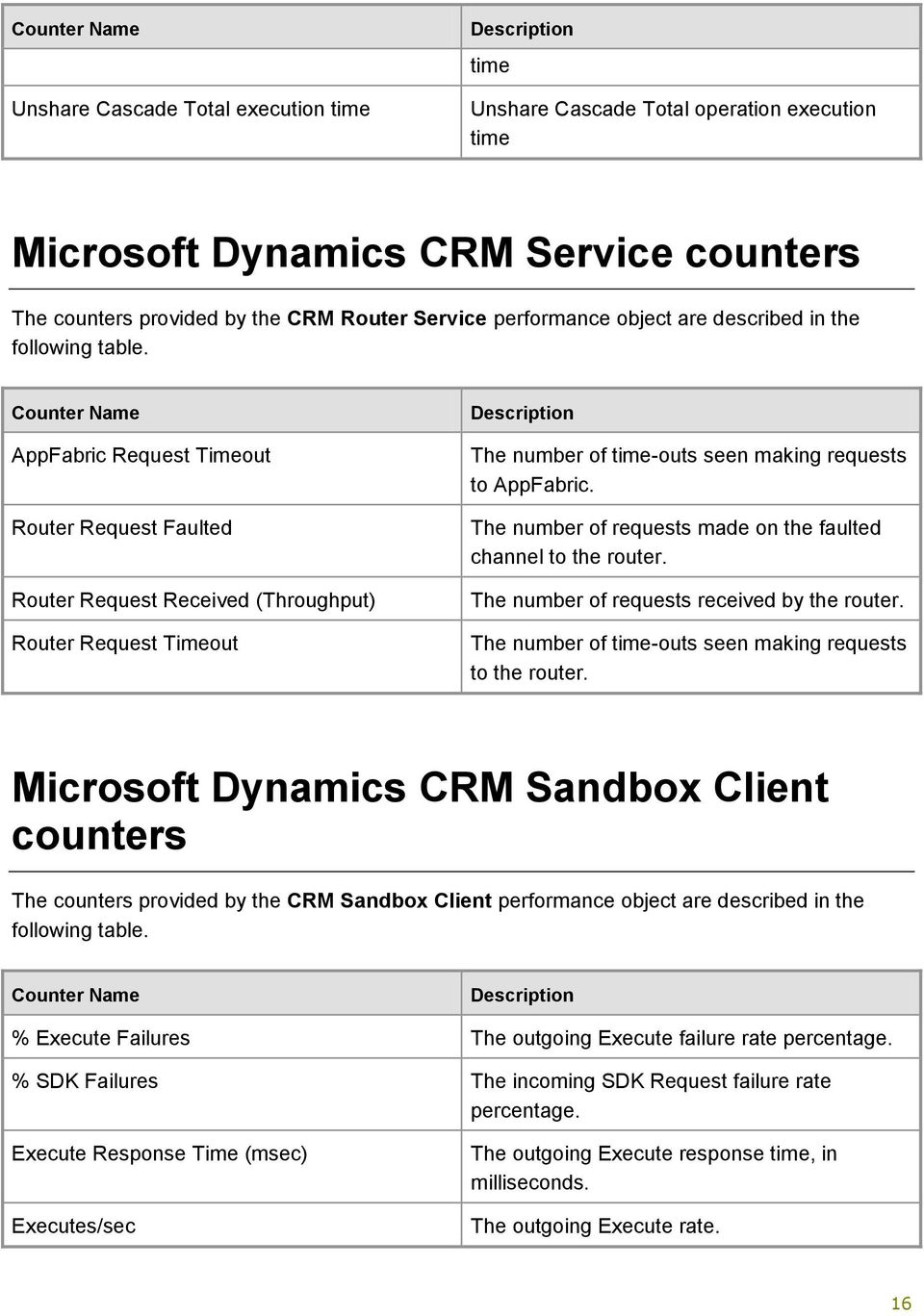
16 Unshare Cascade Total execution time time Unshare Cascade Total execution time Microsoft Dynamics CRM Service counters The counters provided by the CRM Router Service performance object are described in the following table. Counter Name AppFabric Request Timeout Router Request Faulted Router Request Received () Router Request Timeout The number of time-outs seen making requests to AppFabric. The number of requests made on the faulted channel to the router. The number of requests received by the router. The number of time-outs seen making requests to the router. Microsoft Dynamics CRM Sandbox Client counters The counters provided by the CRM Sandbox Client performance object are described in the following table. Counter Name % Execute Failures The outgoing Execute failure rate percentage. % SDK Failures The incoming SDK Request failure rate percentage. Execute Response Time (msec) Executes/sec The outgoing Execute response time, in milliseconds. The outgoing Execute rate. 16
17 SDK Requests/sec SDK Response Time (msec) The incoming SDK Request rate. The incoming SDK Request response time, in milliseconds. Microsoft Dynamics CRM Sandbox Host counters The counters provided by the CRM Sandbox Host performance object are described in the following table. Counter Name % Assembly Cache Hits The assembly cache hit rate percentage. % Assembly Cache Usage The percentage of the total assembly cache disk space that is in use. % CPU `Usage The total CPU percentage used by all Sandbox Worker processes. % Execute Failures The incoming Execute failure rate percentage. % SDK Failures The outgoing SDK Request failure rate percentage. % Worker Processes Crashed The percentage of Sandbox Worker processes that have crashed. % Worker Processes Terminated The percentage of Sandbox Worker processes that have been terminated, due to excessive resource usage or no response. Active Assemblies Active Organizations Active Plugins Assembly Cache Assemblies Assembly Cache Disk Space (KB) The number of plug-in assemblies currently in use. The number of organizations that currently have a Sandbox Worker process active. The number of plug-ins currently in use. The total number of plug-in assemblies in the assembly cache. The total disk space used by all plug-in 17

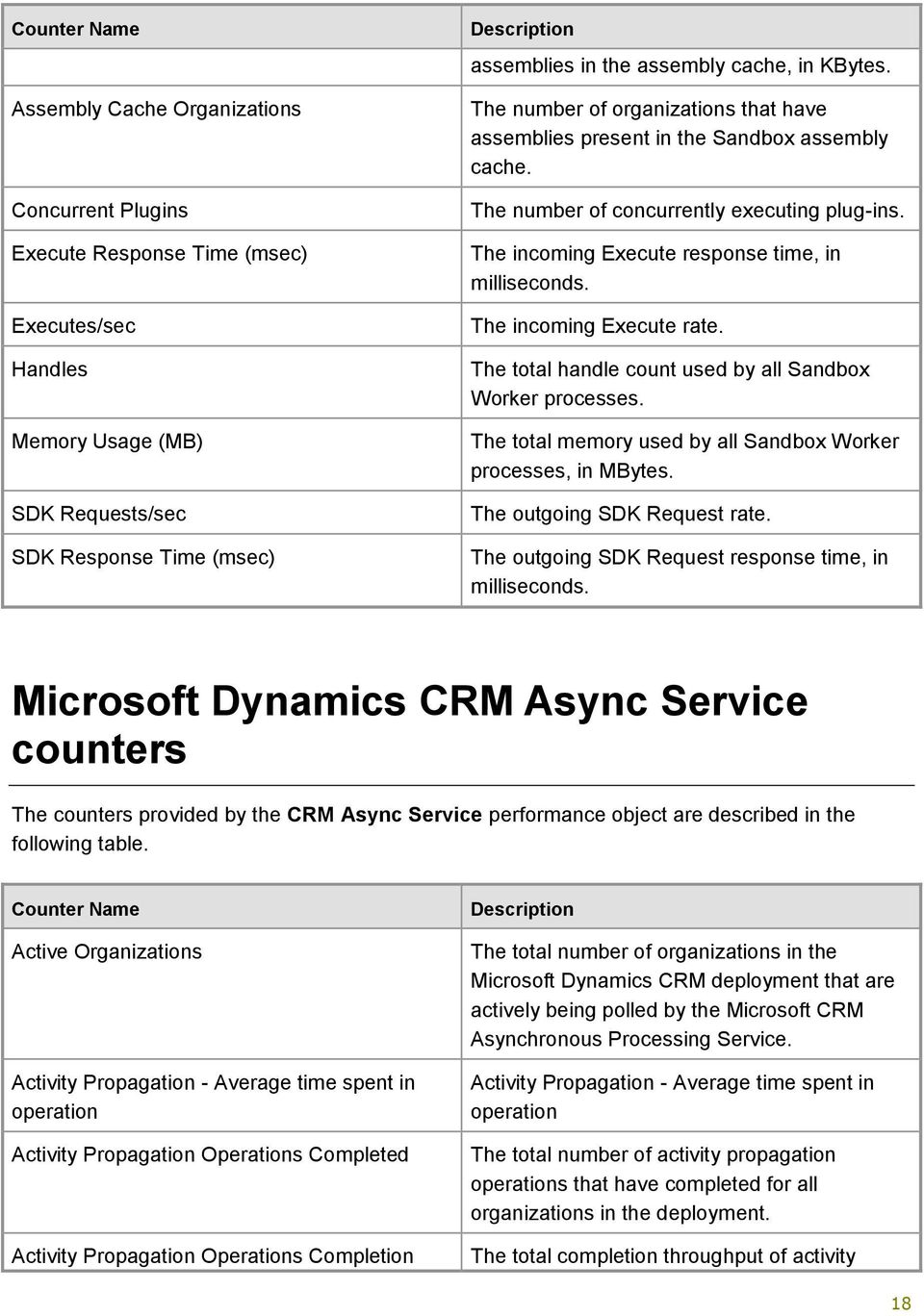
18 Assembly Cache Organizations Concurrent Plugins Execute Response Time (msec) Executes/sec Handles Memory Usage (MB) SDK Requests/sec SDK Response Time (msec) assemblies in the assembly cache, in KBytes. The number of organizations that have assemblies present in the Sandbox assembly cache. The number of concurrently executing plug-ins. The incoming Execute response time, in milliseconds. The incoming Execute rate. The total handle count used by all Sandbox Worker processes. The total memory used by all Sandbox Worker processes, in MBytes. The outgoing SDK Request rate. The outgoing SDK Request response time, in milliseconds. Microsoft Dynamics CRM Async Service counters The counters provided by the CRM Async Service performance object are described in the following table. Counter Name Active Organizations Activity Propagation - Average time spent in Activity Propagation Operations Completed Activity Propagation Operations Completion The total number of organizations in the Microsoft Dynamics CRM deployment that are actively being polled by the Microsoft CRM Asynchronous Processing Service. Activity Propagation - Average time spent in The total number of activity propagation s that have completed for all organizations in the The total completion throughput of activity 18
19 Activity Propagation Operations Executing Activity Propagation Operations Failed Activity Propagation Operations Failed with Activity Propagation Operations Outstanding AuditPartitionCreation - Average time spent in AuditPartitionCreation Operations Completed AuditPartitionCreation Operations Completion AuditPartitionCreation Operations Executing AuditPartitionCreation Operations Failed AuditPartitionCreation Operations Failed With AuditPartitionCreation Operations Outstanding Bulk Detect Duplicate Rate () propagation s for all organizations in the The current number of activity propagation s being processed by asynchronous handlers for all organizations in the The total number of activity propagation s that failed for all organizations in the The total number of activity propagation s that failed and then tried again to execute for all organizations in the The current number of activity propagation s that are outstanding; this includes in-memory queued items for all organizations in the AuditPartitionCreation - Average time spent in The total number of AuditPartitionCreation s completed. The completion throughput of AuditPartitionCreation s. The current number of AuditPartitionCreation s being processed by asynchronous handlers. The total number of AuditPartitionCreation s that failed. The total number of AuditPartitionCreation s that failed and then tried again to execute. The current number of AuditPartitionCreation s that are outstanding, including inmemory queued items. The number of records processed for duplicate detection per second. 19

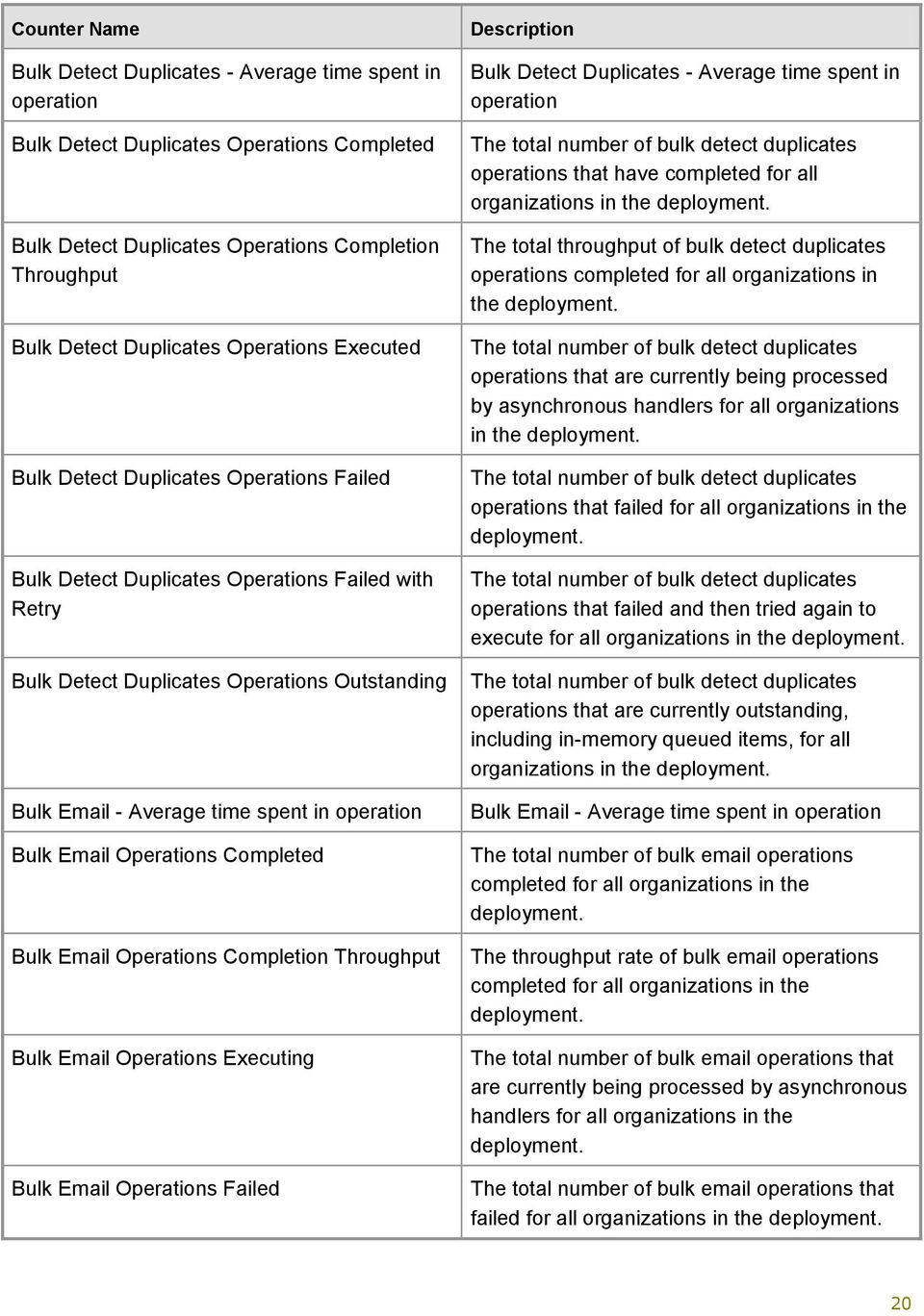
20 Bulk Detect Duplicates - Average time spent in Bulk Detect Duplicates Operations Completed Bulk Detect Duplicates Operations Completion Bulk Detect Duplicates Operations Executed Bulk Detect Duplicates Operations Failed Bulk Detect Duplicates Operations Failed with Bulk Detect Duplicates Operations Outstanding Bulk - Average time spent in Bulk Operations Completed Bulk Operations Completion Bulk Operations Executing Bulk Operations Failed Bulk Detect Duplicates - Average time spent in The total number of bulk detect duplicates s that have completed for all organizations in the The total throughput of bulk detect duplicates s completed for all organizations in the The total number of bulk detect duplicates s that are currently being processed by asynchronous handlers for all organizations in the The total number of bulk detect duplicates s that failed for all organizations in the The total number of bulk detect duplicates s that failed and then tried again to execute for all organizations in the The total number of bulk detect duplicates s that are currently outstanding, including in-memory queued items, for all organizations in the Bulk - Average time spent in The total number of bulk s completed for all organizations in the The throughput rate of bulk s completed for all organizations in the The total number of bulk s that are currently being processed by asynchronous handlers for all organizations in the The total number of bulk s that failed for all organizations in the 20
21 Bulk Operations Failed with Bulk Operations Outstanding BulkDelete - Average time spent in BulkDelete Operations Completed BulkDelete Operations Completion BulkDelete Operations Executing BulkDelete Operations Failed BulkDelete Operations Failed With BulkDelete Operations Outstanding BulkDeleteChild - Average time spent in BulkDeleteChild Operations Completed BulkDeleteChild Operations Completion BulkDeleteChild Operations Executing BulkDeleteChild Operations Failed BulkDeleteChild Operations Failed With The total number of bulk s that failed and then tried again to execute for all organizations in the The total number of bulk s that are outstanding; this includes in-memory queued items for all organizations in the BulkDelete - Average time spent in The total number of BulkDelete s completed. Completion throughput of BulkDelete s. The current number of BulkDelete s being processed by asynchronous handlers. The total number of BulkDelete s that failed. The total number of BulkDelete s that failed when retried. The current number of BulkDelete s outstanding, including in-memory queued items. BulkDeleteChild - Average time spent in The total number of BulkDeleteChild s completed. The completion throughput of BulkDeleteChild s. The current number of BulkDeleteChild s being processed by asynchronous handlers. The total number of BulkDeleteChild s that failed. The total number of BulkDeleteChild s that failed with and then tried again to execute. 21
22 BulkDeleteChild Operations Outstanding CalculateOrgMaxStorageSize - Average time spent in CalculateOrgMaxStorageSize Operations Completed CalculateOrgMaxStorageSize Operations Completion CalculateOrgMaxStorageSize Operations Executing CalculateOrgMaxStorageSize Operations Failed CalculateOrgMaxStorageSize Operations Failed With CalculateOrgMaxStorageSize Operations Outstanding CalculateOrgStorageSize - Average time spent in CalculateOrgStorageSize Operations Completed CalculateOrgStorageSize Operations Completion The current number of BulkDeleteChild s outstanding, including in-memory queued items. CalculateOrgMaxStorageSize - Average time spent in The total number of CalculateOrgMaxStorageSize s completed. The completion throughput of CalculateOrgMaxStorageSize s. The current number of CalculateOrgMaxStorageSize s being processed by asynchronous handlers. The total number of CalculateOrgMaxStorageSize s that failed. The total number of CalculateOrgMaxStorageSize s that failed and then tried again to execute. The current number of CalculateOrgMaxStorageSize s outstanding, including in-memory queued items. CalculateOrgStorageSize - Average time spent in The total number of CalculateOrgStorageSize s completed. The completion throughput of CalculateOrgStorageSize s. CalculateOrgStorageSize Operations Executing The current number of CalculateOrgStorageSize s being processed by asynchronous handlers. CalculateOrgStorageSize Operations Failed CalculateOrgStorageSize Operations Failed The total number of CalculateOrgStorageSize s that failed. The total number of CalculateOrgStorageSize 22
23 With CalculateOrgStorageSize Operations Outstanding Capacity Per Organization Capacity Per Organization CheckForLanguagePackUpdates - Average time spent in CheckForLanguagePackUpdates Operations Completed CheckForLanguagePackUpdates Operations Completion CheckForLanguagePackUpdates Operations Executing CheckForLanguagePackUpdates Operations Failed CheckForLanguagePackUpdates Operations Failed With CheckForLanguagePackUpdates Operations Outstanding CleanupInactiveWorkflowAssemblies - Average time spent in CleanupInactiveWorkflowAssemblies s that failed and then tried again to execute. The current number of CalculateOrgStorageSize s outstanding, including in-memory queued items. The current number of CalculateOrgStorageSize s outstanding, including in-memory queued items. The number of asynchronous s to be removed from the processing queue that are currently allocated to an organization. CheckForLanguagePackUpdates - Average time spent in The total number of CheckForLanguagePackUpdates s completed. The completion throughput of CheckForLanguagePackUpdates s. The current number of CheckForLanguagePackUpdates s being processed by asynchronous handlers. The total number of CheckForLanguagePackUpdates s that failed. The total number of CheckForLanguagePackUpdates s that failed and then tried again to execute. The current number of CheckForLanguagePackUpdates s outstanding, including in-memory queued items. CleanupInactiveWorkflowAssemblies - Average time spent in The total number of 23
24 Operations Completed CleanupInactiveWorkflowAssemblies Operations Completion CleanupInactiveWorkflowAssemblies Operations Executing CleanupInactiveWorkflowAssemblies Operations Failed CleanupInactiveWorkflowAssemblies Operations Failed With CleanupInactiveWorkflowAssemblies Operations Outstanding Collect Sqm Data - Average time spent in Collect Sqm Data Operations Completed Collect Sqm Data Operations Completion Collect Sqm Data Operations Executing Collect Sqm Data Operations Failed CleanupInactiveWorkflowAssemblies s that completed. Completion throughput of CleanupInactiveWorkflowAssemblies s The current number of CleanupInactiveWorkflowAssemblies s being processed by asynchronous handlers. The total number of CleanupInactiveWorkflowAssemblies s failed The total number of CleanupInactiveWorkflowAssemblies s that failed and then tried again to execute. The current number of CleanupInactiveWorkflowAssemblies s outstanding, including in-memory queued items. Collect Sqm Data - Average time spent in The total number of Software Quality Metrics (SQM) data collection s completed for all organizations in the deployment SQM data collection s that are part of the Microsoft Customer Experience Improvement Program. The throughput rate of the SQM data collection s completed for all organizations in the The total number of SQM data collection s that are currently being processed by asynchronous handlers for all organizations in the The total number of SQM data collection s that failed for all organizations in the 24
25 Collect Sqm Data Operations Failed with Collect Sqm Data Operations Outstanding CollectOrgDBStats - Average time spent in CollectOrgDBStats Operations Completed CollectOrgDBStats Operations Completion CollectOrgDBStats Operations Executing CollectOrgDBStats Operations Failed CollectOrgDBStats Operations Failed With CollectOrgDBStats Operations Outstanding CollectOrgSizeStats - Average time spent in CollectOrgSizeStats Operations Completed CollectOrgSizeStats Operations Completion CollectOrgSizeStats Operations Executing CollectOrgSizeStats Operations Failed CollectOrgSizeStats Operations Failed With CollectOrgSizeStats Operations Outstanding CollectOrgStats - Average time spent in CollectOrgStats Operations Completed The total number of SQM data collection s that failed and then tried again to execute for all organizations in the The total number of SQM data collection s currently outstanding; this includes in-memory queued items for all organizations in the CollectOrgDBStats - Average time spent in CollectOrgDBStats Operations Completed CollectOrgDBStats Operations Completion CollectOrgDBStats Operations Executing CollectOrgDBStats Operations Failed CollectOrgDBStats Operations Failed With CollectOrgDBStats Operations Outstanding CollectOrgSizeStats - Average time spent in CollectOrgSizeStats Operations Completed CollectOrgSizeStats Operations Completion CollectOrgSizeStats Operations Executing CollectOrgSizeStats Operations Failed CollectOrgSizeStats Operations Failed With CollectOrgSizeStats Operations Outstanding CollectOrgStats - Average time spent in The total number of CollectOrgStats s completed 25
26 CollectOrgStats Operations Completion CollectOrgStats Operations Executing CollectOrgStats Operations Failed CollectOrgStats Operations Failed With CollectOrgStats Operations Outstanding DatabaseLogBackup - Average time spent in DatabaseLogBackup Operations Completed DatabaseLogBackup Operations Completion DatabaseLogBackup Operations Executing DatabaseLogBackup Operations Failed DatabaseLogBackup Operations Failed With DatabaseLogBackup Operations Outstanding DatabaseTuning - Average time spent in DatabaseTuning Operations Completed DatabaseTuning Operations Completion Completion throughput of CollectOrgStats s The current number of CollectOrgStats s being processed by asynchronous handlers. The total number of CollectOrgStats s that failed. The total number of CollectOrgStats s that failed and then tried again to execute. The current number of CollectOrgStats s outstanding, including in-memory queued items. DatabaseLogBackup - Average time spent in The total number of DatabaseLogBackup s that completed. Completion throughput of DatabaseLogBackup s The current number of DatabaseLogBackup s being processed by asynchronous handlers. The total number of DatabaseLogBackup s that failed. The total number of DatabaseLogBackup s that failed and then tried again to execute. The current number of DatabaseLogBackup s outstanding, including in-memory queued items. DatabaseTuning - Average time spent in The total number of DatabaseTuning s completed Completion throughput of DatabaseTuning 26
27 DatabaseTuning Operations Executing DatabaseTuning Operations Failed DatabaseTuning Operations Failed With DatabaseTuning Operations Outstanding DeletionService - Average time spent in DeletionService Operations Completed DeletionService Operations Completion DeletionService Operations Executing DeletionService Operations Failed DeletionService Operations Failed With DeletionService Operations Outstanding Event - Average time spent in Event Operations Completed Event Operations Completion s The current number of DatabaseTuning s being processed by asynchronous handlers. The total number of DatabaseTuning s that failed. The total number of DatabaseTuning s that failed and then tried again to execute. The current number of DatabaseTuning s outstanding, including in-memory queued items. DeletionService - Average time spent in The total number of DeletionService s completed. The completion throughput of DeletionService s. The current number of DeletionService s being processed by asynchronous handlers. The total number of DeletionService s that failed. The total number of DeletionService s that failed and then tried again to execute. The current number of DeletionService s outstanding, including in-memory queued items. Event - Average time spent in The total number of event s completed for all organizations in the The throughput rate of event s completed for all organizations in the 27
28 Event Operations Executing Event Operations Failed Event Operations Failed with Event Operations Outstanding FullTextCatalogIndex - Average time spent in FullTextCatalogIndex Operations Completed FullTextCatalogIndex Operations Completion FullTextCatalogIndex Operations Executing FullTextCatalogIndex Operations Failed FullTextCatalogIndex Operations Failed With FullTextCatalogIndex Operations Outstanding GoalRollup - Average time spent in GoalRollup Operations Completed GoalRollup Operations Completion The total number of event s that are currently being processed by asynchronous handlers for all organizations in the The total number of event s that failed for all organizations in the The total number of event s that failed and then tried again to execute for all organizations in the The total number of event s currently outstanding; this includes in-memory queued items for all organizations in the FullTextCatalogIndex - Average time spent in The total number of FullTextCatalogIndex s completed. Completion throughput of FullTextCatalogIndex s The current number of FullTextCatalogIndex s being processed by asynchronous handlers. The total number of FullTextCatalogIndex s that failed. The total number of FullTextCatalogIndex s that failed and then tried again to execute. The current number of FullTextCatalogIndex s outstanding, including in-memory queued items. GoalRollup - Average time spent in The total number of GoalRollup s completed. The completion throughput of GoalRollup s. 28
29 GoalRollup Operations Executing GoalRollup Operations Failed GoalRollup Operations Failed With GoalRollup Operations Outstanding Import - Average time spent in Import Operations Completed Import Operations Completion Import Operations Executing Import Operations Failed Import Operations Failed with Import Operations Outstanding Import processing Rate () ImportingFile - Average time spent in ImportingFile Operations Completed ImportingFile Operations Completion The current number of GoalRollup s being processed by asynchronous handlers. The total number of GoalRollup s that failed. The total number of GoalRollup s that failed and then tried again to execute. The current number of GoalRollup s outstanding, including in-memory queued items. Import - Average time spent in The total number of import s completed for all organizations in the The throughput rate of import s completed for all organizations in the deployment The total number of import s that are currently being processed by asynchronous handlers for all organizations in the The total number of import s that failed for all organizations in the The total number of import s that failed and then tried again to execute for all organizations in the The current number of import s outstanding; this includes in-memory queued items for all organizations in the The number of records imported per second. ImportingFile - Average time spent in The total number of ImportingFile s completed. The completion throughput of ImportingFile s. 29
30 ImportingFile Operations Executing ImportingFile Operations Failed ImportingFile Operations Failed With ImportingFile Operations Outstanding ImportSampleData - Average time spent in ImportSampleData Operations Completed ImportSampleData Operations Completion ImportSampleData Operations Executing ImportSampleData Operations Failed ImportSampleData Operations Failed With ImportSampleData Operations Outstanding IndexManagement - Average time spent in IndexManagement Operations Completed IndexManagement Operations Completion IndexManagement Operations Executing IndexManagement Operations Failed IndexManagement Operations Failed With The current number of ImportingFile s being processed by asynchronous handlers. The total number of ImportingFile s that failed. The total number of ImportingFile s that failed and then tried again to execute. The current number of ImportingFile s outstanding, including in-memory queued items. ImportSampleData - Average time spent in ImportSampleData Operations Completed ImportSampleData Operations Completion ImportSampleData Operations Executing ImportSampleData Operations Failed ImportSampleData Operations Failed With ImportSampleData Operations Outstanding IndexManagement - Average time spent in The total number of IndexManagement s completed. The completion throughput of IndexManagement s. The current number of IndexManagement s being processed by asynchronous handlers. The total number of IndexManagement s that failed. The total number of IndexManagement s that failed and then tried again to execute. 30
31 IndexManagement Operations Outstanding Items Dequeued per Organization Items in memory (high) Items in memory (low) Parse - Average time spent in Parse Operations Completed Parse Operations Completion Parse Operations Executing Parse Operations Failed Parse Operations Failed with Parse Operations Outstanding Parsing processing Rate () Persist Match Code - Average time spent in Persist Match Code Operations Completed Persist Match Code Operations Completion The current number of IndexManagement s outstanding, including in-memory queued items. The number of asynchronous s that have been removed from the processing queue for an organization. The maximum number of asynchronous s to hold in memory for processing. The threshold of asynchronous s to trigger loading of additional s. Parse - Average time spent in The total number of parse s that have been completed for all organizations in the The throughput rate of parse s completion for all organizations in the The current number of parse s being processed by asynchronous handlers for all organizations in the The total number of parse s that failed for all organizations in the The total number of parse s that failed and then tried again to execute for all organizations in the The total number of parse s currently outstanding; this includes in-memory queued items for all organizations in the The number of records parsed per second. Persist Match Code - Average time spent in The total number of persist match code s completed for all organizations in the The throughput rate of persist match code 31
32 Persist Match Code Operations Executing Persist Match Code Operations Failed Persist Match Code Operations Failed with Persist Match Code Operations Outstanding ProvisionLanguagePack - Average time spent in s completion for all organizations in the The total number of persist match code s that are currently being processed by asynchronous handlers for all organizations in the The total number of persist match code s that failed for all organizations in the The total number of persist match code s that failed and then tried again to execute for all organizations in the The total number of persist match code s that are currently outstanding, including in-memory queued items for all organizations in the ProvisionLanguagePack - Average time spent in ProvisionLanguagePack Operations Completed The total number of ProvisionLanguagePack s completed. ProvisionLanguagePack Operations Completion ProvisionLanguagePack Operations Executing ProvisionLanguagePack Operations Failed ProvisionLanguagePack Operations Failed With ProvisionLanguagePack Operations Outstanding Publish Duplicate Rule - Average time spent in The completion throughput of ProvisionLanguagePack s. The current number of ProvisionLanguagePack s being processed by asynchronous handlers The total number of ProvisionLanguagePack s that failed. The total number of ProvisionLanguagePack s that failed and then tried again to execute. The current number of ProvisionLanguagePack s outstanding, including in-memory queued items. Publish Duplicate Rule - Average time spent in 32
33 Publish Duplicate Rule Operations Completed Publish Duplicate Rule Operations Completion Publish Duplicate Rule Operations Executing Publish Duplicate Rule Operations Failed Publish Duplicate Rule Operations Failed with Publish Duplicate Rule Operations Outstanding Quick Campaign - Average time spent in Quick Campaign Operations Completed Quick Campaign Operations Completion Quick Campaign Operations Executing Quick Campaign Operations Failed Quick Campaign Operations Failed with The total number of publish duplicate rule s completed for all organizations in the The throughput rate of publish duplicate rule s that have completed for all organizations in the The total of publish duplicate rule s that are currently being processed by asynchronous handlers for all organizations in the The total number of publish duplicate rule s that failed for all organizations in the The total number of publish duplicate rule s that failed and then tried again to execute for all organizations in the The total number of publish duplicate rule s currently outstanding; this includes in-memory queued items for all organizations in the Quick Campaign - Average time spent in The total number of quick campaign s completed for all organizations in the The throughput rate of quick campaign s completed for all organizations in the The total number of quick campaign s currently being processed by asynchronous handlers for all organizations in the The total number of quick campaign s that failed for all organizations in the The total number of quick campaign s 33
34 Quick Campaign Operations Outstanding Rate of Activity Propagation Operations Failed with Exception Rate of Activity Propagation Operations Failed with Rate of AuditPartitionCreation Operations Failed With Exception Rate of AuditPartitionCreation Operations Failed With Rate of Bulk Detect Duplicates Operations Failed with Exception Rate of Bulk Detect Duplicates Operations Failed with Rate of Bulk Operations Failed with Exception that failed and then tried again to execute for all organizations in the The total number of quick campaign s currently outstanding; this includes in-memory queued items for all organizations in the The rate at which activity propagation s that failed with an exception for all organizations in the The rate at which activity propagation s failed and then tried again to execute for all organizations in the The rate of AuditPartitionCreation s that failed with an exception. The rate of AuditPartitionCreation s that failed and then tried again to execute. The rate at which bulk detect duplicates s failed with an exception for all organizations in the The rate at which bulk detect duplicates s failed and then tried again to execute for all organizations in the The rate at which bulk s failed with an exception for all organizations in the Rate of Bulk Operations Failed with The rate at which bulk s failed and then tried again to execute for all organizations in the Rate of BulkDelete Operations Failed With Exception Rate of BulkDelete Operations Failed With Rate of BulkDeleteChild Operations Failed With Exception The rate of BulkDelete s that failed with exception. The rate of BulkDelete s that failed and then tried again to execute. The rate of BulkDeleteChild s failed with exception. Rate of BulkDeleteChild Operations Failed With The rate of BulkDeleteChild s that 34
35 Rate of CalculateOrgMaxStorageSize Operations Failed With Exception Rate of CalculateOrgMaxStorageSize Operations Failed With Rate of CalculateOrgStorageSize Operations Failed With Exception Rate of CalculateOrgStorageSize Operations Failed With Rate of CheckForLanguagePackUpdates Operations Failed With Exception Rate of CheckForLanguagePackUpdates Operations Failed With Rate of CleanupInactiveWorkflowAssemblies Operations Failed With Exception Rate of CleanupInactiveWorkflowAssemblies Operations Failed With Rate of Collect Sqm Data Operations Failed with Exception Rate of Collect Sqm Data Operations Failed with Rate of CollectOrgDBStats Operations Failed With Exception Rate of CollectOrgDBStats Operations Failed With Rate of CollectOrgSizeStats Operations Failed With Exception failed and then tried again to execute. The rate of CalculateOrgMaxStorageSize s failed with exception. The rate of CalculateOrgMaxStorageSize s that failed and then tried again to execute. The rate of CalculateOrgStorageSize s that failed with exception. The rate of CalculateOrgStorageSize s that failed and then tried again to execute. The rate of CheckForLanguagePackUpdates s that failed with exception. Rate of CheckForLanguagePackUpdates s that failed and then tried again to execute. The rate of CleanupInactiveWorkflowAssemblies s failed with exception. The rate of CleanupInactiveWorkflowAssemblies s that failed and then tried again to execute. The rate at which SQM data collection s that failed with an exception for all organizations in the The rate at which SQM data collection s failed and then tried again to execute for all organizations in the The rate of CollectOrgDBStats s that failed with an exception. The rate of CollectOrgDBStats s that failed and then tried again to execute. The rate of CollectOrgSizeStats s that failed with exception. 35
36 Rate of CollectOrgSizeStats Operations Failed With Rate of CollectOrgStats Operations Failed With Exception Rate of CollectOrgStats Operations Failed With Rate of DatabaseLogBackup Operations Failed With Exception Rate of DatabaseLogBackup Operations Failed With Rate of DatabaseTuning Operations Failed With Exception Rate of DatabaseTuning Operations Failed With Rate of DeletionService Operations Failed With Exception Rate of DeletionService Operations Failed With Rate of Event Operations Failed with Exception Rate of Event Operations Failed with Rate of FullTextCatalogIndex Operations Failed With Exception Rate of FullTextCatalogIndex Operations Failed With Rate of GoalRollup Operations Failed With Exception Rate of GoalRollup Operations Failed With Rate of Import Operations Failed with Exception The rate of CollectOrgSizeStats s that failed and then tried again to execute. The rate of CollectOrgStats s that failed with exception. The rate of CollectOrgStats s that failed and then tried again to execute. The rate of DatabaseLogBackup s that failed with exception. The rate of DatabaseLogBackup s that failed and then tried again to execute. The rate of DatabaseTuning s that failed with exception. The rate of DatabaseTuning s that failed and then tried again to execute. The rate of DeletionService s that failed with exception. The rate of DeletionService s that failed and then tried again to execute. The rate at which event s failed with an exception for all organizations in the The rate at which event s failed and then tried again to execute for all organizations in the The rate of FullTextCatalogIndex s that failed with exception. The rate of FullTextCatalogIndex s that failed and then tried again to execute. The rate of GoalRollup s failed with exception. The rate of GoalRollup s that failed and then tried again to execute. The rate at which import s failed with an exception for all organizations in the 36
37 Rate of Import Operations Failed with Rate of ImportingFile Operations Failed With Exception Rate of ImportingFile Operations Failed With Rate of ImportSampleData Operations Failed With Exception Rate of ImportSampleData Operations Failed With Rate of IndexManagement Operations Failed With Exception Rate of IndexManagement Operations Failed With The rate at which import s failed and then tried again to execute for all organizations in the The rate of ImportingFile s that failed with an exception. The rate of ImportingFile s that failed and then tried again to execute. The rate of ImportSampleData s failed with exception. The rate of ImportSampleData s that failed and then tried again to execute. The rate of IndexManagement s that failed with exception. The rate of IndexManagement s that failed and then tried again to execute. Rate of Parse Operations Failed with Exception The rate at which parse s failed with an exception for all organizations in the Rate of Parse Operations Failed with Rate of Persist Match Code Operations Failed with Exception Rate of Persist Match Code Operations Failed with Rate of ProvisionLanguagePack Operations Failed With Exception Rate of ProvisionLanguagePack Operations Failed With Rate of Publish Duplicate Rule Operations Failed with Exception The rate at which parse s failed and then tried again to execute for all organizations in the The rate at which persist match code s failed with an exception for all organizations in the The rate at which persist match code s failed and then tried again to execute for all organizations in the The rate of ProvisionLanguagePack s that failed with exception. The rate of ProvisionLanguagePack s that failed and then tried again to execute. The rate at which publish duplicate rule s failed with an exception for all organizations in the 37
38 Rate of Publish Duplicate Rule Operations Failed with Rate of Quick Campaign Operations Failed with Exception Rate of Quick Campaign Operations Failed with Rate of RecurringSeriesExpansion Operations Failed With Exception Rate of RecurringSeriesExpansion Operations Failed With Rate of ReindexAll Operations Failed With Exception Rate of ReindexAll Operations Failed With Rate of ShrinkDatabase Operations Failed With Exception Rate of ShrinkDatabase Operations Failed With Rate of ShrinkLogFile Operations Failed With Exception Rate of ShrinkLogFile Operations Failed With Rate of StorageLimitNotification Operations Failed With Exception Rate of StorageLimitNotification Operations Failed With Rate of Total Operations Failed with Exception Rate of Total Operations Failed with The rate at which publish duplicate rule s failed and then tried again to execute for all organizations in the The rate at which quick campaign s failed with an exception for all organizations in the The rate at which quick campaign s failed and then tried again to execute for all organizations in the The rate of RecurringSeriesExpansion s failed with exception. The rate of RecurringSeriesExpansion s that failed and then tried again to execute. The rate of ReindexAll s failed with exception. The rate of ReindexAll s that failed and then tried again to execute. The rate of ShrinkDatabase s that failed with exception. The rate of ShrinkDatabase s that failed and then tried again to execute. The rate of ShrinkLogFile s that failed with exception. The rate of ShrinkLogFile s that failed and then tried again to execute. The rate of StorageLimitNotification s that failed with an exception. The rate of StorageLimitNotification s that failed and then tried again to execute. The rate at which all asynchronous s failed with an exception for all organizations in the The rate at which all asynchronous s failed and then tried again to execute for all 38
39 Rate of Transform Operations Failed with Exception Rate of Transform Operations Failed with Rate of UpdateContractStates Operations Failed With Exception Rate of UpdateContractStates Operations Failed With Rate of UpdateStatisticIntervals Operations Failed With Exception Rate of UpdateStatisticIntervals Operations Failed With Rate of Workflow Operations Failed with Exception Rate of Workflow Operations Failed with RecurringSeriesExpansion - Average time spent in RecurringSeriesExpansion Operations Completed RecurringSeriesExpansion Operations Completion RecurringSeriesExpansion Operations Executing RecurringSeriesExpansion Operations Failed RecurringSeriesExpansion Operations Failed With organizations in the The rate at which transform s failed with an exception for all organizations in the The rate at which transform s failed and then tried again to execute for all organizations in the The rate of UpdateContractStates s that failed with exception. The rate of UpdateContractStates s that failed and then tried again to execute. The rate of UpdateStatisticIntervals s that failed with exception. The rate of UpdateStatisticIntervals s that failed and then tried again to execute. The rate at which workflow s failed with an exception for all organizations in the The rate at which workflow s failed and then tried again to execute for all organizations in the RecurringSeriesExpansion - Average time spent in The total number of RecurringSeriesExpansion s completed. The completion throughput of RecurringSeriesExpansion s. The current number of RecurringSeriesExpansion s being processed by asynchronous handlers. The total number of RecurringSeriesExpansion s that failed. The total number of RecurringSeriesExpansion s that failed and then tried again to execute. 39
40 RecurringSeriesExpansion Operations Outstanding ReindexAll - Average time spent in ReindexAll Operations Completed ReindexAll Operations Completion ReindexAll Operations Executing ReindexAll Operations Failed ReindexAll Operations Failed With ReindexAll Operations Outstanding Rule publish Processing Rate () ShrinkDatabase - Average time spent in ShrinkDatabase Operations Completed ShrinkDatabase Operations Completion ShrinkDatabase Operations Executing ShrinkDatabase Operations Failed ShrinkDatabase Operations Failed With ShrinkDatabase Operations Outstanding The current number of RecurringSeriesExpansion s outstanding, including in-memory queued items. ReindexAll - Average time spent in The total number of ReindexAll s completed. The completion throughput of ReindexAll s. The current number of ReindexAll s being processed by asynchronous handlers. The total number of ReindexAll s that failed. The total number of ReindexAll s that failed and then tried again to execute. The current number of ReindexAll s outstanding, including in-memory queued items. The number of records published per second. ShrinkDatabase - Average time spent in The total number of ShrinkDatabase s completed. The completion throughput of ShrinkDatabase s. The current number of ShrinkDatabase s being processed by asynchronous handlers. The total number of ShrinkDatabase s that failed. The total number of ShrinkDatabase s that failed and then tried again to execute. The current number of ShrinkDatabase s outstanding, including in-memory 40
41 queued items. ShrinkLogFile - Average time spent in ShrinkLogFile - Average time spent in ShrinkLogFile Operations Completed ShrinkLogFile Operations Completion ShrinkLogFile Operations Executing ShrinkLogFile Operations Failed ShrinkLogFile Operations Failed With ShrinkLogFile Operations Outstanding StorageLimitNotification - Average time spent in StorageLimitNotification Operations Completed StorageLimitNotification Operations Completion StorageLimitNotification Operations Executing StorageLimitNotification Operations Failed StorageLimitNotification Operations Failed With StorageLimitNotification Operations Outstanding Threads in Use The total number of ShrinkLogFile s that completed. The completion throughput of ShrinkLogFile s. The current number of ShrinkLogFile s being processed by asynchronous handlers. The total number of ShrinkLogFile s that failed. The total number of ShrinkLogFile s that failed and then tried again to execute. The current number of ShrinkLogFile s outstanding, including in-memory queued items. StorageLimitNotification - Average time spent in The total number of StorageLimitNotification s completed. The completion throughput of StorageLimitNotification s. The current number of StorageLimitNotification s being processed by asynchronous handlers. The total number of StorageLimitNotification s that failed. The total number of StorageLimitNotification s that failed and then tried again to execute. The current number of StorageLimitNotification s outstanding, including in-memory queued items. The number of threads currently employed in 41
42 Total - Average time spent in Total Number of Web Service calls Total Operations Completed Total Operations Completion Total Operations Executing Total Operations Failed Total Operations Failed with Total Operations Outstanding Total Organizations Total Workflow state writes Transform - Average time spent in Transform Operations Completed Transform Operations Completion the processing of asynchronous s for all organizations in the Total - Average time spent in The number of calls to the Microsoft Dynamics CRM Web service for all organizations in the The total number of s completed for all organizations in the The throughput rate of completed asynchronous s for all organizations in the The current number of s being processed by asynchronous handlers for all organizations in the The total number of asynchronous s that failed for all organizations in the The total number of asynchronous s that failed and then tried again to execute for all organizations in the The current number of outstanding asynchronous s; this includes inmemory queued items for all organizations in the The number of organizations being monitored for the entire Microsoft Dynamics CRM The number of times that the workflow state saved to the database. Transform - Average time spent in The total number of transform s that have completed for all organizations in the The throughput rate of completed transform s for all organizations in the 42
43 Transform Operations Executing Transform Operations Failed Transform Operations Failed with Transform Operations Outstanding Transform processing Rate () UpdateContractStates - Average time spent in UpdateContractStates Operations Completed UpdateContractStates Operations Completion UpdateContractStates Operations Executing UpdateContractStates Operations Failed UpdateContractStates Operations Failed With UpdateContractStates Operations Outstanding UpdateStatisticIntervals - Average time spent in UpdateStatisticIntervals Operations Completed The total number of transform s that are currently being processed by asynchronous handlers for all organizations in the The total number of transform s that failed for all organizations in the The total number of transform s that failed and then tried again to execute for all organizations in the The current number of transform s outstanding; this includes in-memory queued items for all organizations in the The number of records transformed per second. UpdateContractStates - Average time spent in The total number of UpdateContractStates s completed. The completion throughput of UpdateContractStates s. The current number of UpdateContractStates s being processed by asynchronous handlers. The total number of UpdateContractStates s that failed. The total number of UpdateContractStates s that failed and then tried again to execute. The current number of UpdateContractStates s outstanding, including in-memory queued items. UpdateStatisticIntervals - Average time spent in The total number of UpdateStatisticIntervals 43
44 UpdateStatisticIntervals Operations Completion UpdateStatisticIntervals Operations Executing UpdateStatisticIntervals Operations Failed UpdateStatisticIntervals Operations Failed With UpdateStatisticIntervals Operations Outstanding Workflow - Average time spent in Workflow Operations Completed Workflow Operations Completion Workflow Operations Executing Workflow Operations Failed Workflow Operations Failed with Workflow Operations Outstanding s completed. The completion throughput of UpdateStatisticIntervals s. The current number of UpdateStatisticIntervals s being processed by asynchronous handlers. The total number of UpdateStatisticIntervals s failed. The total number of UpdateStatisticIntervals s that failed and then tried again to execute.. The current number of UpdateStatisticIntervals s outstanding, including in-memory queued items. Workflow - Average time spent in The total number of workflow s that have completed for all organizations in the The throughput rate of completed workflow s for all organizations in the The total number of workflow s that are currently being processed by asynchronous handlers for all organizations in the The total number of workflow s that failed for all organizations in the The total number of workflow s that failed and then tried again to execute for all organizations in the The current number of workflow s outstanding; this includes in-memory queued items for all organizations in the 44
45 Microsoft Dynamics CRM Router counters The performance counters available for tracking processing and managing the overall performance of the Microsoft Dynamics CRM Router in a Microsoft Dynamics CRM 2011 implementation are described in the following table. Counter Name Incoming messages delivered Incoming messages discarded Incoming messages potentially corrupted Incoming messages processed Incoming messages processed per second Incoming messages undelivered Incoming mailbox access attempt failures Incoming mailbox access attempts Outgoing messages delivered Outgoing messages processed Outgoing messages processed per second Outgoing messages undelivered Service configuration refreshes Service configuration scheduling cycles The total number of incoming messages delivered successfully. The total number of incoming messages not accepted for delivery. The total number of incoming messages that are potentially corrupted. The total number of incoming messages processed. The number of incoming messages processed per second. The total number of incoming messages not delivered successfully. The total number of unsuccessful mailbox access attempts for incoming messages. The total number of successful mailbox access attempts for incoming messages. The total number of outgoing messages delivered successfully. The total number of outgoing messages processed. The number of outgoing messages processed per second. The total number of outgoing messages not delivered successfully. The total number of times the configuration was refreshed. The total number of times a scheduling cycle 45
46 Service provider load failures Service providers aborted Service providers executed Service providers failed Service providers refreshed Service providers removed Service providers started occurred. The total number of times a service provider could not be loaded. The total number of times a service provider was aborted because it took too long to execute. The total number of times a service provider completed its work. The total number of times a service provider failed during execution. The total number of times a service provider was changed and had its configuration refreshed. The total number of times a service provider was deleted from the configuration and removed from the schedule. The total number of times a scheduled service provider was started. 46
Monitoring MSDynamix CRM 2011
 Monitoring MSDynamix CRM 2011 eg Enterprise v6 Restricted Rights Legend The information contained in this document is confidential and subject to change without notice. No part of this document may be
Microsoft Dynamics GP 2010. SQL Server Reporting Services Guide
 Microsoft Dynamics GP 2010 SQL Server Reporting Services Guide April 4, 2012 Copyright Copyright 2012 Microsoft. All rights reserved. Limitation of liability This document is provided as-is. Information
Access Teams with Microsoft Dynamics CRM 2013
 Access Teams with Microsoft Dynamics CRM 2013 VERSION: 1.0 AUTHOR: Roger Gilchrist COMPANY: Microsoft Corporation RELEASED: November 2013 Copyright This document is provided "as-is". Information and views
Administration Guide for the System Center Cloud Services Process Pack
 Administration Guide for the System Center Cloud Services Process Pack Microsoft Corporation Published: May 7, 2012 Author Kathy Vinatieri Applies To System Center Cloud Services Process Pack This document
Setup Guide: Server-side synchronization for CRM Online and Exchange Server
 Setup Guide: Server-side synchronization for CRM Online and Exchange Server Version 8.0 Microsoft Dynamics CRM 2016 Authors: Elad Ben Yosef, Sumanta Batabyal This document is provided "as-is". Information
Configuration Task 3: (Optional) As part of configuration, you can deploy rules. For more information, see "Deploy Inbox Rules" below.
 Configure the E-mail Router After the E-mail Router has been installed, you can configure several aspects of it. Some of these configuration tasks are mandatory. Others are optional in that you use them
Microsoft Dynamics CRM Adapter for Microsoft Dynamics GP
 Microsoft Dynamics Microsoft Dynamics CRM Adapter for Microsoft Dynamics GP May 2010 Find updates to this documentation at the following location. http://go.microsoft.com/fwlink/?linkid=162558&clcid=0x409
Microsoft Dynamics CRM 2013 Service Provider Planning and Deployment Guide
 Microsoft Dynamics CRM 2013 Service Provider Planning and Deployment Guide Copyright This document is provided "as-is". Information and views expressed in this document, including URL and other Internet
CA Nimsoft Monitor Snap
 CA Nimsoft Monitor Snap Configuration Guide for IIS Server Monitoring iis v1.5 series Legal Notices This online help system (the "System") is for your informational purposes only and is subject to change
CA Nimsoft Monitor. Probe Guide for IIS Server Monitoring. iis v1.5 series
 CA Nimsoft Monitor Probe Guide for IIS Server Monitoring iis v1.5 series Legal Notices Copyright 2013, CA. All rights reserved. Warranty The material contained in this document is provided "as is," and
AUTOMATED DISASTER RECOVERY SOLUTION USING AZURE SITE RECOVERY FOR FILE SHARES HOSTED ON STORSIMPLE
 AUTOMATED DISASTER RECOVERY SOLUTION USING AZURE SITE RECOVERY FOR FILE SHARES HOSTED ON STORSIMPLE Copyright This document is provided "as-is." Information and views expressed in this document, including
Introduction to Hyper-V High- Availability with Failover Clustering
 Introduction to Hyper-V High- Availability with Failover Clustering Lab Guide This lab is for anyone who wants to learn about Windows Server 2012 R2 Failover Clustering, focusing on configuration for Hyper-V
System Requirements for Microsoft Dynamics SL 2015
 System for Microsoft Dynamics SL 2015 Overview This document contains the minimum client hardware requirements, server recommendations and Terminal Server minimum hardware requirements supported by the
Estimate Performance and Capacity Requirements for Workflow in SharePoint Server 2010
 Estimate Performance and Capacity Requirements for Workflow in SharePoint Server 2010 This document is provided as-is. Information and views expressed in this document, including URL and other Internet
CA Unified Infrastructure Management
 CA Unified Infrastructure Management Probe Guide for IIS Server Monitoring iis v1.7 series Copyright Notice This online help system (the "System") is for your informational purposes only and is subject
SharePoint Server 2010 Capacity Management: Software Boundaries and Limits
 SharePoint Server 2010 Capacity Management: Software Boundaries and s This document is provided as-is. Information and views expressed in this document, including URL and other Internet Web site references,
Architecture. Outlook Synchronization in Microsoft Dynamics CRM. Microsoft Dynamics CRM 2015. White Paper:
 Architecture Microsoft Dynamics CRM 2015 Outlook Synchronization in Microsoft Dynamics CRM White Paper: Date: September 2015 Acknowledgements Initiated by the Microsoft Dynamics CRM Core Engineering Team,
HDA Integration Guide. Help Desk Authority 9.0
 HDA Integration Guide Help Desk Authority 9.0 2011ScriptLogic Corporation ALL RIGHTS RESERVED. ScriptLogic, the ScriptLogic logo and Point,Click,Done! are trademarks and registered trademarks of ScriptLogic
Monitoring SharePoint 2007/2010/2013 Server Using Event Tracker
 Monitoring SharePoint 2007/2010/2013 Server Using Event Tracker White Paper Publication Date: June 2012 EventTracker 8815 Centre Park Drive Columbia MD 21045 www.eventtracker.com Overview EventTracker
FIGURE 33.5. Selecting properties for the event log.
 1358 CHAPTER 33 Logging and Debugging Customizing the Event Log The properties of an event log can be configured. In Event Viewer, the properties of a log are defined by general characteristics: log path,
CRM Insights Admin Guide
 CRM Insights Admin Guide Copyright This document is provided "as-is". Information and views expressed in this document, including URL and other Internet Web site references, may change without notice.
INSTALLING MICROSOFT SQL SERVER AND CONFIGURING REPORTING SERVICES
 INSTALLING MICROSOFT SQL SERVER AND CONFIGURING REPORTING SERVICES TECHNICAL ARTICLE November 2012. Legal Notice The information in this publication is furnished for information use only, and does not
Using Entrust certificates with Microsoft Office and Windows
 Entrust Managed Services PKI Using Entrust certificates with Microsoft Office and Windows Document issue: 1.0 Date of issue: May 2009 Copyright 2009 Entrust. All rights reserved. Entrust is a trademark
CONFIGURING MICROSOFT SQL SERVER REPORTING SERVICES
 CONFIGURING MICROSOFT SQL SERVER REPORTING SERVICES TECHNICAL ARTICLE November/2011. Legal Notice The information in this publication is furnished for information use only, and does not constitute a commitment
Windows Server Update Services 3.0 SP2 Step By Step Guide
 Windows Server Update Services 3.0 SP2 Step By Step Guide Microsoft Corporation Author: Anita Taylor Editor: Theresa Haynie Abstract This guide provides detailed instructions for installing Windows Server
Authoring for System Center 2012 Operations Manager
 Authoring for System Center 2012 Operations Manager Microsoft Corporation Published: November 1, 2013 Authors Byron Ricks Applies To System Center 2012 Operations Manager System Center 2012 Service Pack
SharePoint Server 2016. Quick Start Guide for Single Server Farms
 1 SharePoint Server 2016 Quick Start Guide for Single Server Farms 2016 Microsoft Corporation. All rights reserved. This document is provided as-is. Information and views expressed in this document, including
Lab Answer Key for Module 6: Configuring and Managing Windows SharePoint Services 3.0. Table of Contents Lab 1: Configuring and Managing WSS 3.
 Lab Answer Key for Module 6: Configuring and Managing Windows SharePoint Services 3.0 Table of Contents Lab 1: Configuring and Managing WSS 3.0 1 Information in this document, including URL and other Internet
Deploying Microsoft Operations Manager with the BIG-IP system and icontrol
 Deployment Guide Deploying Microsoft Operations Manager with the BIG-IP system and icontrol Deploying Microsoft Operations Manager with the BIG-IP system and icontrol Welcome to the BIG-IP LTM system -
Working with Microsoft Dynamics CRM 2011. Mike Snyder Jim Steger Kristie Reid
 Working with Microsoft Dynamics CRM 2011 Mike Snyder Jim Steger Kristie Reid PUBLISHED BY Microsoft Press A Division of Microsoft Corporation One Microsoft Way Redmond, Washington 98052-6399 Copyright
Dynamics CRM 2011. with Azure and SharePoint a perfect match. Central and Eastern Europe
 Central and Eastern Europe Dynamics CRM 2011 with Azure and SharePoint a perfect match Almut Tadsen Dynamics ISV Developer Evangelist [email protected] Agenda for today Azure Execute your out of CRM
Load Manager Administrator s Guide For other guides in this document set, go to the Document Center
 Load Manager Administrator s Guide For other guides in this document set, go to the Document Center Load Manager for Citrix Presentation Server Citrix Presentation Server 4.5 for Windows Citrix Access
Operations Guide for the System Center Cloud Services Process Pack
 Operations Guide for the System Center Cloud Services Process Pack Microsoft Corporation Published: May 7, 2012 Author Kathy Vinatieri Applies To System Center Cloud Services Process Pack This document
How To Live Migrate In Hyperv On Windows Server 22 (Windows) (Windows V) (Hyperv) (Powerpoint) (For A Hyperv Virtual Machine) (Virtual Machine) And (Hyper V) Vhd (Virtual Hard Disk
 Poster Companion Reference: Hyper-V Virtual Machine Mobility Live Migration Without Shared Storage Storage Migration Live Migration with SMB Shared Storage Live Migration with Failover Clusters Copyright
Monitoring Replication
 Monitoring Replication Article 1130112-02 Contents Summary... 3 Monitor Replicator Page... 3 Summary... 3 Status... 3 System Health... 4 Replicator Configuration... 5 Replicator Health... 6 Local Package
Test Lab Guide: Creating a Windows Azure AD and Windows Server AD Environment using Azure AD Sync
 Test Lab Guide: Creating a Windows Azure AD and Windows Server AD Environment using Azure AD Sync Microsoft Corporation Published: December 2014 Author: Mark Grimes Acknowledgements Special thanks to the
Microsoft Dynamics GP. Engineering Data Management Integration Administrator s Guide
 Microsoft Dynamics GP Engineering Data Management Integration Administrator s Guide Copyright Copyright 2007 Microsoft Corporation. All rights reserved. Complying with all applicable copyright laws is
Application Performance Monitoring for WhatsUp Gold v16.2 User Guide
 Application Performance Monitoring for WhatsUp Gold v16.2 User Guide C o n t e n t s CHAPTER 1 Introduction APM Overview... 1 Learning about APM terminology... 2 Getting Started with APM... 3 Application
SharePoint 2013 Business Connectivity Services Hybrid Overview
 SharePoint 2013 Business Connectivity Services Hybrid Overview Christopher J Fox Microsoft Corporation November 2012 Applies to: SharePoint 2013, SharePoint Online Summary: A hybrid SharePoint environment
1. Contents 1. Introduction... 2. Installation... 2.1 Preparing for the installation... 2.2 Installing the Pre-Requisites Components... 2.
 1. Contents 1. Introduction... 2. Installation... 2.1 Preparing for the installation... 2.2 Installing the Pre-Requisites Components... 2.3 Installing the Implicit Sync Outlook Add-In... 3. Initial Configuration...
The 2007 R2 Version of Microsoft Office Communicator Mobile for Windows Mobile: Frequently Asked Questions
 The 2007 R2 Version of Microsoft Office Communicator Mobile for Windows Mobile: Frequently Asked Questions Published: December 2008 Information in this document, including URL and other Internet Web site
Special thanks to the following people for reviewing and providing invaluable feedback for this document: Joe Davies, Bill Mathers, Andreas Kjellman
 Test Lab Guide: Creating a Microsoft Azure Active Directory and Windows Server Active Directory Environment using Microsoft Azure Active Directory Sync Services Microsoft Corporation Published: December
Microsoft Dynamics CRM 2011 Installation and Deployment
 Microsoft Dynamics CRM 2011 Installation and Deployment Course 80296; 2 Days, Instructor-led Course Description This two-day instructor course covers the installation and configuration of Microsoft Dynamics
Management Reporter Integration Guide for Microsoft Dynamics AX
 Microsoft Dynamics Management Reporter Integration Guide for Microsoft Dynamics AX July 2013 Find updates to this documentation at the following location: http://go.microsoft.com/fwlink/?linkid=162565
ms-help://ms.technet.2005mar.1033/enu_kbntrelease/ntrelease/308406.htm
 Page 1 of 12 Knowledge Base FRS Event Log Error Codes PSS ID Number: 308406 Article Last Modified on 10/13/2004 The information in this article applies to: Microsoft Windows 2000 Server Microsoft Windows
Cisco Unified Workforce Optimization
 Cisco Unified Workforce Optimization Workforce Management Application User Guide Version 9.0(1) First Published: June 15, 2012 Last Modified: March 7, 2013 Americas Headquarters Cisco Systems, Inc. 170
Exclaimer Mail Archiver User Manual
 User Manual www.exclaimer.com Contents GETTING STARTED... 8 Mail Archiver Overview... 9 Exchange Journaling... 9 Archive Stores... 9 Archiving Policies... 10 Search... 10 Managing Archived Messages...
How to Secure a Groove Manager Web Site
 How to Secure a Groove Manager Web Site Information in this document, including URL and other Internet Web site references, is subject to change without notice. Unless otherwise noted, the companies, organizations,
Monitoring DoubleTake Availability
 Monitoring DoubleTake Availability eg Enterprise v6 Restricted Rights Legend The information contained in this document is confidential and subject to change without notice. No part of this document may
Application Performance Monitoring for WhatsUp Gold v16.1 User Guide
 Application Performance Monitoring for WhatsUp Gold v16.1 User Guide Contents Table of Contents Introduction APM Overview... 1 Learning about APM terminology... 2 Getting Started with APM... 3 Application
MicrosoftDynam ics GP 2015. TenantServices Installation and Adm inistration Guide
 MicrosoftDynam ics GP 2015 TenantServices Installation and Adm inistration Guide Copyright Copyright 2014 Microsoft Corporation. All rights reserved. Limitation of liability This document is provided as-is.
Using multi-tenancy in Microsoft Dynamics CRM 2013 to address challenges in enterprise business environments
 Using multi-tenancy in Microsoft Dynamics CRM 2013 to address challenges in enterprise business environments Version 1.0 Author: Roger Gilchrist Company: Microsoft, Ltd. Contributors: Bernt Bisgaard Caspersen
Improving Performance of Microsoft CRM 3.0 by Using a Dedicated Report Server
 Improving Performance of Microsoft CRM 3.0 by Using a Dedicated Report Server January 2006 Downloaded from http://www.sonomapartners.com/ - 1 - Information in this document, including URL and other Internet
Multi-Tenant Scalability Guidance for Exchange Server 2010 Service Pack 2
 Multi-Tenant Scalability Guidance for Exchange Server 2010 Service Pack 2 Customer Advisory Team Exchange Product Group Microsoft Corporation December 2011 Contents Introduction... 3 Scalability Guidance...
Dell Active Administrator 8.0
 What s new in Dell Active Administrator 8.0 January 2016 Dell Active Administrator 8.0 is the upcoming release of Dell Software's complete solution for managing Microsoft Active Directory security auditing,
EMC ApplicationXtender Server
 EMC ApplicationXtender Server 6.0 Monitoring Guide P/N 300 008 232 A01 EMC Corporation Corporate Headquarters: Hopkinton, MA 01748 9103 1 508 435 1000 www.emc.com Copyright 1994 2009 EMC Corporation. All
Microsoft Internet Information Services Solution 1.0
 Microsoft Internet Information Services Solution 1.0 vrealize Operations Manager This document supports the version of each product listed and supports all subsequent versions until the document is replaced
EMC ApplicationXtender Server
 EMC ApplicationXtender Server 6.5 Monitoring Guide P/N 300-010-560 A01 EMC Corporation Corporate Headquarters: Hopkinton, MA 01748-9103 1-508-435-1000 www.emc.com Copyright 1994-2010 EMC Corporation. All
IBM Aspera Add-in for Microsoft Outlook 1.3.2
 IBM Aspera Add-in for Microsoft Outlook 1.3.2 Windows: 7, 8 Revision: 1.3.2.100253 Generated: 02/12/2015 10:58 Contents 2 Contents Introduction... 3 System Requirements... 5 Setting Up... 6 Account Credentials...6
Altiris Monitor Solution for Servers 7.1 SP1 and Event Console 7.1 MR1 from Symantec Release Notes
 Altiris Monitor Solution for Servers 7.1 SP1 and Event Console 7.1 MR1 from Symantec Release Notes Altiris Monitor Solution for Servers 7.1 SP1 and Event Console 7.1 MR1 from Symantec Release Notes The
Webmetrics Web Monitoring Getting Started Guide
 Neustar Webmetrics Web Monitoring Getting Started Guide Webmetrics Web Monitoring Getting Started Guide Version 1.2 Neustar, Inc. January 6, 2011 Webmetrics www.webmetrics.com +1-877-524-8299 [email protected]
Business continuity management for Microsoft SharePoint Server 2010
 Business continuity management for Microsoft SharePoint Server 2010 Microsoft Corporation Published: March 2011 Author: Microsoft Office System and Servers Team ([email protected]) Abstract This book
5nine Cloud Monitor for Hyper-V
 5nine Cloud Monitor for Hyper-V Getting Started Guide Table of Contents System Requirements... 2 Installation... 3 Getting Started... 8 Settings... 9 Authentication... 9 5nine Cloud Monitor for Hyper-V
Microsoft Dynamics GP 2013. econnect Installation and Administration Guide
 Microsoft Dynamics GP 2013 econnect Installation and Administration Guide Copyright Copyright 2012 Microsoft Corporation. All rights reserved. Limitation of liability This document is provided as-is. Information
Management Reporter Integration Guide for Microsoft Dynamics GP
 Microsoft Dynamics Management Reporter Integration Guide for Microsoft Dynamics GP July 2013 Find updates to this documentation at the following location: http://go.microsoft.com/fwlink/?linkid=162565
Windows Server Update Services 3.0 SP2 Operations Guide
 Windows Server Update Services 3.0 SP2 Operations Guide Microsoft Corporation Author: Anita Taylor Editor: Theresa Haynie Abstract This guide describes how to manage Windows Server Update Services 3.0
Microsoft Dynamics AX 2012 System Requirements. Microsoft Corporation Published: August 2011
 2012 System Requirements Microsoft Corporation Published: August 2011 Microsoft Dynamics is a line of integrated, adaptable business management solutions that enables you and your people to make business
Installation and Deployment in Microsoft Dynamics CRM 2013
 Course 80539A: Installation and Deployment in Microsoft Dynamics CRM 2013 Course Details Course Outline Module 1: System Requirement and Required Technologies This module provides a high-level overview
Creating and Deploying Active Directory Rights Management Services Templates Step-by-Step Guide
 Creating and Deploying Active Directory Rights Management Services Templates Step-by-Step Guide Microsoft Corporation Published: January 2008 Author: Brian Lich Editor: Carolyn Eller Abstract This step-by-step
Retail Deployment Guide. Microsoft Dynamics AX 2012 Feature Pack
 Retail Deployment Guide Microsoft Dynamics AX 2012 Feature Pack Microsoft Corporation February 2012 Microsoft Dynamics is a line of integrated, adaptable business management solutions that enables you
Diagnostic Manager. User Guide. Publication Date: September 04, 2015
 Diagnostic Manager Publication Date: September 04, 2015 All Rights Reserved. This software is protected by copyright law and international treaties. Unauthorized reproduction or distribution of this software,
Microsoft Dynamics AX 2012 System Requirements. Microsoft Corporation Published: November 2011
 2012 System Requirements Microsoft Corporation Published: November 2011 Microsoft Dynamics is a line of integrated, adaptable business management solutions that enables you and your people to make business
Pass4Sure.MB2-701_90Q&A. MB2-701 Extending Microsoft Dynamics CRM 2013
 Pass4Sure.MB2-701_90Q&A Number: MB2-701 Passing Score: 800 Time Limit: 120 min File Version: 16.02 http://www.gratisexam.com/ MB2-701 Extending Microsoft Dynamics CRM 2013 I have corrected few questions
Colligo Contributor File Manager 4.6. User Guide
 Colligo Contributor File Manager 4.6 User Guide Contents Colligo Contributor File Manager Introduction... 2 Benefits... 2 Features... 2 Platforms Supported... 2 Installing and Activating Contributor File
System performance monitoring in RTMT
 System performance monitoring in RTMT About performance monitoring in RTMT, page 1 System summary and server status monitoring, page 3 IM and Presence and Cisco Jabber summary monitoring, page 6 About
Citrix EdgeSight Administrator s Guide. Citrix EdgeSight for Endpoints 5.3 Citrix EdgeSight for XenApp 5.3
 Citrix EdgeSight Administrator s Guide Citrix EdgeSight for Endpoints 5.3 Citrix EdgeSight for enapp 5.3 Copyright and Trademark Notice Use of the product documented in this guide is subject to your prior
About This Guide... 4. Signature Manager Outlook Edition Overview... 5
 Contents About This Guide... 4 Signature Manager Outlook Edition Overview... 5 How does it work?... 5 But That's Not All...... 6 And There's More...... 6 Licensing... 7 Licensing Information... 7 System
GFI Product Guide. GFI MailArchiver Archive Assistant
 GFI Product Guide GFI MailArchiver Archive Assistant The information and content in this document is provided for informational purposes only and is provided "as is" with no warranty of any kind, either
Pipeliner CRM Phaenomena Guide Add-In for MS Outlook. 2015 Pipelinersales Inc. www.pipelinersales.com
 Add-In for MS Outlook 205 Pipelinersales Inc. www.pipelinersales.com Add-In for MS Outlook Learn how to use sales lead management with Pipeliner MS Outlook Add-In. CONTENT. Setting up Pipeliner Add-In
Colligo Briefcase for Windows 6.0. Administrator s Guide
 for Windows 6.0 Administrator s Guide Contents Introduction... 3 Target Audience... 3 Overview... 3 Localization... 3 System Requirements... 4 Software Requirements... 4 Client Software Requirements...
Developing Solutions for Microsoft Dynamics AX in a Shared AOS Development Environment
 Microsoft Dynamics AX 2012 Developing Solutions for Microsoft Dynamics AX in a Shared AOS Development Environment White Paper This document provides guidance for developing solutions when multiple development
GFI Product Guide. Archive Assistant
 GFI Product Guide Archive Assistant The information and content in this document is provided for informational purposes only and is provided "as is" with no warranty of any kind, either express or implied,
D&B360. Installation and Administration Guide. for Microsoft Dynamics CRM. Version 3.0
 D&B360 Installation and Administration Guide for Microsoft Dynamics CRM Version 3.0 D&B360 is a trademark or registered trademark of Dun and Bradstreet, Incorporated. Other trademarks used herein are the
Metalogix SharePoint Backup. Advanced Installation Guide. Publication Date: August 24, 2015
 Metalogix SharePoint Backup Publication Date: August 24, 2015 All Rights Reserved. This software is protected by copyright law and international treaties. Unauthorized reproduction or distribution of this
Mod 2: User Management
 Office 365 for SMB Jump Start Mod 2: User Management Chris Oakman Managing Partner Infrastructure Team Eastridge Technology Stephen Hall CEO & SMB Technologist District Computers 1 Jump Start Schedule
Citrix EdgeSight User s Guide. Citrix EdgeSight for Endpoints 5.4 Citrix EdgeSight for XenApp 5.4
 Citrix EdgeSight User s Guide Citrix EdgeSight for Endpoints 5.4 Citrix EdgeSight for XenApp 5.4 Copyright and Trademark Notice Use of the product documented in this guide is subject to your prior acceptance
User Guide Release Management for Visual Studio 2013
 User Guide Release Management for Visual Studio 2013 ABOUT THIS GUIDE The User Guide for the release management features is for administrators and users. The following related documents for release management
Microsoft Dynamics AX 2012 System Requirements. Microsoft Corporation Published: March 2012
 2012 System Requirements Microsoft Corporation Published: March 2012 Microsoft Dynamics is a line of integrated, adaptable business management solutions that enables you and your people to make business
Quick Start guide to. Microsoft Business Solutions CRM 1.2. on a Microsoft Windows Small Business Server 2003 Premium Edition.
 Quick Start guide to Microsoft Business Solutions CRM 1.2 on a Microsoft Windows Small Business Server 2003 Premium Edition M Partner Program Welcome! There are many resources available to help you install
Performance White Paper
 Sitecore Experience Platform 8.1 Performance White Paper Rev: March 11, 2016 Sitecore Experience Platform 8.1 Performance White Paper Sitecore Experience Platform 8.1 Table of contents Table of contents...
GFI Product Manual. Outlook Connector Manual
 GFI Product Manual Outlook Connector Manual The information and content in this document is provided for informational purposes only and is provided "as is" with no warranty of any kind, either express
STEVEN MANN. InfoPath* with. SharePoint HOW-TO. 800 East 96th Street, Indianapolis, Indiana 46240 USA
 STEVEN MANN InfoPath* with SharePoint 2010 HOW-TO 800 East 96th Street, Indianapolis, Indiana 46240 USA Table of Contents Introduction 1 Overview of This Book 1 How to Benefit from This Book 1 How to Continue
System Requirements for Microsoft Dynamics SL 2015
 System for Microsoft Dynamics SL 2015 Overview This document contains the minimum client hardware requirements, server recommendations and Terminal Server minimum hardware requirements supported by the
Citrix EdgeSight for Load Testing User s Guide. Citrx EdgeSight for Load Testing 2.7
 Citrix EdgeSight for Load Testing User s Guide Citrx EdgeSight for Load Testing 2.7 Copyright Use of the product documented in this guide is subject to your prior acceptance of the End User License Agreement.
Microsoft Project Server 2010 Administrator's Guide
 Microsoft Project Server 2010 Administrator's Guide 1 Copyright This document is provided as-is. Information and views expressed in this document, including URL and other Internet Web site references,