
ANDROID AND SYMBIAN OPERATING SYSTEM
|
|
|
- Rosamond Gaines
- 10 years ago
- Views:
Transcription
1 A SEMINAR REPORT ON EMBEDDED OPERATING SYSTEM ANDROID AND SYMBIAN OPERATING SYSTEM GUIDEDED BY:-PROF. P.S DEY SUBMITTED BY:-SATYADEEP MISHRA ROLL NO.:-10IT61B08 M.TECH (ICT)

2 ABSTRACT Embedded operating system, which is a potential game-changer for the mobile development community. An innovative and open platform, Android and Symbian are well positioned to address the growing needs of the mobile marketplace. This report explains what E-OS is, how and why it was developed, and where the platform fits in to the established mobile marketplace. Android is a software stack for mobile devices that includes an operating system, middleware and key applications. Android is a software platform and operating system for mobile devices based on the Linux operating system and developed by Google and the Open Handset Alliance. It allows developers to write managed code in a Java-like language that utilizes Google-developed Java libraries, but does not support programs developed in native code. Symbian OS is designed so that it can be the basis of a wide variety of smartphones from several different manufacturers. It was carefully designed specifically to run on smartphone platforms: general-purpose computers with limited CPU, memory and storage capacity, focused on communication. 1

3 CONTENT 1. Introducing Embedded OS 2. Android operating system 2.1 Introduction 2.2 The Birth of Android Google Acquires Android Inc Open Handset Alliance Founded Hardware 2.3 Android Architecture The kernel layer Native libraries layer Application run time Applications framework layer Applications layer 2.4 Development Tools 2.5 Security Issues 2.6 Advantages & Disadvantages 2.7 Why Android? 2.8 Android Versions 3. Symbian Operating System 3.1 Introduction 3.2 Symbian History 3.3 Symbian OS: fundamental requirements 3.4 Architecture 3.5 Features of Symbian OS Client server architecture Event Management Object oriented Design Power Management Robust & dependable Memory management Full multitasking 3.6 Platform Security 3.7 Strengths Memory Management Execution in place 3.8 Weakness 3.9 Advantage and disadvantage 4. Difference between Symbian and Android OS 5. Conclusion 6. Reference 2

4 1. Introducing Embedded OS The mobile development community is at a tipping point. Mobile users demand more choice, more opportunities to customize their phones, and more functionality. Mobile operators want to provide value-added content to their subscribers in a manageable and lucrative way. Mobile developers want the freedom to develop the powerful mobile applications users demand with minimal roadblocks to success. Finally, handset manufacturers want a stable, secure, and affordable platform to power their devices. Up until now single mobile platform has adequately addressed the needs of all the parties. Enter embedded operating system, which is a potential game-changer for the mobile development community. An innovative and open platform, Android and Symbian are well positioned to address the growing needs of the mobile marketplace. This report explains what E-os is, how and why it was developed, and where the platform fits in to the established mobile marketplace. SOME MORE EXAMPLES ARE IOS (MAC OS) Inferno (distributed OS originally from Bell Labs) Pen Point OS Palm OS from Palm, Inc. Symbian OS Windows CE, from Microsoft # Embedded Linux Android Open Zaurus Metano GNU/Linux from Pynell - Embedded Systems. 2. ANDROID OPERATING SYSTEM 2.1 INTRODUCTION: Android is a software stack for mobile devices that includes an operating system, middleware and key applications. Android is a software platform and operating system for mobile devices based on the Linux operating system and developed by Google and the Open Handset Alliance. It allows developers to write managed code in a Java-like language that utilizes Google-developed Java libraries, but does not support programs developedinnativecode. The unveiling of the Android platform on 5 November 2007 was announced with the founding of the Open Handset Alliance, a consortium of 34 hardware, software and telecom companies devoted to advancing open standards for mobile devices. When released in 2008, most of the Android platform will be made available under the Apache free-software and open-source license. 3

5 An important difference between most embedded operating systems and desktop operating systems is that the application, including the operating system, is usually statically linked together into a single executable image. Unlike a desktop operating system, the embedded operating system does not load and execute applications. This means that the system is only able to run a single application. 2.2 THE BIRTH OF ANDROID Google Acquires Android Inc. In July 2005, Google acquired Android Inc., a small start-up company based in Palo Alto, CA. Android's co-founders who went to work at Google included Andy Rubin (co-founder of Danger), Rich Miner (co-founder of Wildfire Communications, Inc.), and Nick Sears (once VP at T-Mobile), and Chris White (one of the first engineers at WebTV). At the time, little was known about the functions of Android Inc. other than they made software for mobile phones. At Google, the team, led by Rubin, developed a Linux-based mobile device OS which they marketed to handset makers and carriers on the premise of providing a flexible, upgradeable system. It was reported that Google had already lined up a series of hardware component and software partners and signalled to carriers that it was open to various degrees of cooperation on their part Open Handset Alliance Founded On 5 November 2007, the Open Handset Alliance, a consortium of several companies which include Google, HTC, Intel, Motorola, Qualcomm, T-Mobile, Sprint Nextel and NVIDIA, was unveiled with the goal to develop open standards for mobile devices. Along with the formation of the Open Handset Alliance, the OHA also unveiled their first product, Android, an open source mobile device platform based on the Linux operating system. 4

6 2.2.3 Hardware Google has unveiled at least three prototypes for Android, at the Mobile World Congress on February 12, One prototype at the ARM booth displayed several basic Google applications. A d-pad' control zooming of items in the dock with a relatively quick response. A prototype at the Google IO conference on May 28, 2008 had a 528 MHz Qualcomm processor and a Synaptic capacitive touch screen, and used the UMTS cellular standard. It had 128 MB of RAM and 256 MB of flash, showing that Android's memory requirements are reasonable. The demo was carried out using a 3.6 Mbit/s HSDPA connection. 2.3 ANDROID ARCHITECTURE 5

7 Android can be subdivided into four main layers: the kernel, libraries, applications framework, and applications. As previously mentioned the kernel is Linux. The libraries that come with Android provide much of the graphics, data storage, and media capabilities. Embedded within the libraries layer is the Android runtime which contains the Dalvik virtual machine, which powers the applications. The applications framework is the API that all applications will use to access the lowest level of the architecture The kernel layer As previously mentioned the kernel layer is Linux. Linux was chosen since it has a proven track record in desktop systems and in many cases doesn t require drivers to be rewritten. Linux provides such things as virtual memory, networking, drivers, and power management. Upon examining the kernel shipped with the Android source code, there are not any significant changes to the core functions of the kernel. It acts as an abstraction layer between the hardware and the rest of the software stack. It relies on Linux version 2.6 for core system services such as security, memory management, process management, network stack, and driver model. Also it works as a HAL Native libraries layer The native libraries layer provides Android with the capabilities for its core features. Android is shipped with SGL which acts as the primary 2D graphics renderer. Its counterpart is OpenGL ES which provides 3D graphics support. Android comes packaged with SQLite which takes care of most data storage. The Web Kit web rendering engine is also shipped with Android and has been tailored to render web pages for smaller screen sizes. Of particular interest is the Dalvik virtual machine which is a part of this layer. The Dalvik virtual machine is a byte code interpreter which is highly optimized for executing on the mobile platform. The byte codes are converted Java binaries that are very quick and efficient to run on smaller processors. The core libraries are written in Java and provide much of the core classes which would normally be available in a Java virtual machine. System C library - Implementation of the C library (libc). Media Libraries - based on PacketVideo's Open CORE. Surface Manager - composites 2D and 3D graphic layers LibWebCore - a modern embeddable web view. SGL - the underlying 2D graphics engine. 3D libraries - based on OpenGL ES 1.0 APIs; the libraries use hardware 3D acceleration. Free Type - bitmap and vector font rendering SQLite - A powerful and lightweight relational database engine Application run time At the same level there is Android Runtime, where the main component Dalvik Virtual Machine is located. It was designed specifically for Android running in limited environment, where the limited battery, CPU, memory and data storage are the main issues. Android gives 6

8 an integrated tool dx, which converts generated byte code from.jar to.dex file, after this byte code becomes much more efficient to run on the small processors. Conversion from.java to.dex file Dalvik Virtual Machine All applications written in Java and converted to the dalvik executable.dex Every android app runs its own process, with its own instance of the dalvik virtual machine Not a traditional JVM, but a custom VM designed to run multiple instances efficiently on a single device VM uses Linux kernel to handle low-level functionality including security, threading, process and memory management Applications framework layer This layer and the layer above it are written completely in Java. The applications framework provides all of the major APIs that the applications will use including things like sharing data, accessing the telephony system, and receiving notifications. An important thing to note about Android OS is that all applications use this same framework no matter the author of the Application. This is quite a departure from what many other mobile OS designers have chosen to do. For instance the iphone most certainly differentiates between Apple software and third-party software down to the copy-and-paste feature Applications layer All of Android s software is written in Java, which is interpreted by the Dalvik virtual machine. Even the most core features such as the phone and the contacts application reside in this layer. This layer contains software written by the Android team as well as any third-party software that is installed on the device. An effect of allowing third-party developers access to this layer is that the user interface can be overhauled comparatively easily. Third party applications can handle any event that the Android team s application could see (such as the phone ringing). This means that so long as there is a replacement application for the dialler application, anyone could potentially write their own. Given this model we might expect that, as Android becomes more robust, the user will be able to specify what applications should handle which events. 7

9 1) Application Building Blocks Activity Represents the presentation layer of an Android application, e.g. a screen which the user sees. An Android application can have several activities and it can be switched between them during runtime of the application. But, they can: Be faceless Be in a floating window Return a value Intent Receiver Components that respond to broadcast Intents Way to respond to external notification or alarms Apps can invent and broadcast their own Intent Think of Intents as a verb and object; a description of what you want done E.g. VIEW, CALLS, and PLAY etc. System matches Intent with Activity that can best provide the service Activities and Intent Receivers describe what Intents they can service. Service Faceless components that run in the background e.g. music player, network downloads etc Content Provider o Enables sharing of data across applications E.g. address book, photo gallery o Provides uniform APIs for: querying Delete, update and insert. o Content is represented by URI and MIME type 2) Application Lifecycle In Android, every application runs in its own process, which gives better performance in security, protected memory and other benefits. Therefore, Android is responsible to run and shut down correctly these processes when it is needed. It is important that application developers understand how different application components (in particular Activity, Service, and Broadcast Receiver) impact the lifetime of the application's process. Not using these 8

10 components correctly can result in the system killing the application's process while it is doing important work. To determine which processes should be killed when low on memory, Android places each process into an "importance hierarchy" based on the components running in them and the state of those components. 1. A visible process is one holding an Activity that is visible to the user onscreen but not in the foreground (its onpause() method has been called). This may occur, for example, if the foreground Activity is displayed as a dialog that allows the previous Activity to be seen behind it. Such a process is considered extremely important and will not be killed unless doing so is required to keep all foreground processes running. 2. A service process is one holding a Service that has been started with the startservice() method. Though these processes are not directly visible to the user, they are generally doing things that the user cares about (such as background mp3 playback or background network data upload or download), so the system will always keep such processes running unless there is not enough memory to retain all foreground and visible process. 3. A background process is one holding an Activity that is not currently visible to the user (its onstop() method has been called). These processes have no direct impact on the user experience. Provided they implement their Activity life-cycle correctly (see Activity for more details), the system can kill such processes at any time to reclaim memory for one of the three previous processes types. Usually there are many of these processes running, so they are kept in an LRU list to ensure the process that was most recently seen by the user is the last to be killed when running low on memory. 4. An empty process is one that doesn't hold any active application components. The only reason to keep such a process around is as a cache to improve start-up time the next time a component of its application needs to run. As such, the system will often kill these processes in order to balance overall system resources between these empty cached processes and the underlying kernel caches. 9

11 10

12 2.4. DEVELOPMENT TOOLS TOOLS Java Language Eclipse IDE ADT Plug-in For Eclipse Android SDK Android Emulator 2.5 SECURITY ISSUES Command line tools Documentations Android mobile phone platform is going to be more secure than Apple s iphone or any other device in the long run. There are several solutions nowadays to protect Google phone from various attacks. One of them is security vendor McAfee, a member of Linux Mobile (LiMo) Foundation. This foundation joins particular companies to develop an open mobile-device software platform. Many of the companies listed in the LiMo Foundation have also become members of the Open Handset Alliance (OHA). As a result, Linux secure coding practice should successfully be built into the Android development process. However, open platform has its own disadvantages, such as source code vulnerability for black-hat hackers. In parallel with great opportunities for mobile application developers, there is an expectation for exploitation and harm. Stealthy Trojans hidden in animated images, particular viruses passed from friend to friend, used for spying and identity theft, all these threats will be active for a long run. Another solution for such attacks is SMobile Systems mobile package. Security Shield an integrated application that includes anti-virus, anti-spam, firewall and other mobile protection is up and ready to run on the Android operating system. Currently, the main problem is availability for viruses to pose as an application and do things like dial phone numbers, send text messages or multi-media messages or make connections to the Internet during normal device use. It is possible for somebody to use the GPS feature to track a person s location without their knowledge. Hence SMobile Systems is ready to notify and block these secure alerts. But the truth is that it is not possible to secure your mobile device or personal computer completely, as it connects to the internet. And neither the Android phone nor other devices will prove to be the exception. 2.6 ADVANTAGE Open - Android allows you to access core mobile device functionality through standard API calls. All applications are equal - Android does not differentiate between the phone's basic and third-party applications -- even the dialler or home screen can be replaced. 11

13 Breaking down boundaries - Combine information from the web with data on the phone -- such as contacts or geographic location -- to create new user experiences. Fast and easy development - The SDK contains what you need to build and run Android applications, including a true device emulator and advanced debugging tools. Disadvantages Security - Making source code available to everyone inevitably invites the attention of black hat hackers. Open Source - A disadvantage of open-source development is that anyone can scrutinize the source code to find vulnerabilities and write exploits. Login - Platform doesn't run on an encrypted file system and has a vulnerable log-in. Incompetence - Google s dependence on hardware and carrier partners puts the final product out of their control. 2.7 WHY ANDROID? 1 Open Source 2 Flash Player Support 3 Different Models 4 Reasonable prices 5 Google Apps 6 Android Apps like (Astro file manager, Taskiller etc.) 2.8 ANDROID VERSIONS Android 1.1 Android 1.5 Cupcake Android 1.6 Donuts (CDMA) Android 2.0 Éclair Android 2.2 Froyo Android Gingerbread Android 3 - Honeycomb API Levels used by apps to identify software version on the device Android apps are generally forward compatible with newer version, but not necessarily backwards compatible 12

14 3. SYMBIAN OPERTING SYSTEM 3.1 INTRODUCTION Small devices come in many shapes and sizes, each addressing distinct target markets that have different requirements. The market segment we are interested in is that of the mobile phone. The primary requirement of this market segment is that all products are great phones. This segment spans voice-centric phones with information capability to informationcentric devices with voice capability. These advanced mobile phones integrate fully-featured personal digital assistant (PDA) capabilities with those of a traditional mobile phone in a single unit. There are several critical factors for the need of operating systems in this market. It is important to look at the mobile phone market in isolation. It has specific needs that make it unlike markets for PCs or fixed domestic appliances. Scaling down a PC operating system, or bolting communication capabilities onto a small and basic operating system, results in too many fundamental compromises. Symbian believes that the mobile phone market has five key characteristics that make it unique, and result in the need for a specifically designed operating system: 1) Mobile phones are both small and mobile. 2) Mobile phones are ubiquitous - they target a mass-market of consumer, enterprise and professional users. 3) Mobile phones are occasionally connected - they can be used when connected to the wireless phone network, locally to other devices, or on their own. 4) Manufacturers need to differentiate their products in order to innovate and compete in a fast-evolving market. 5) The platform has to be open to enable independent technology and software vendors to develop third-party applications, technologies and services. The way to grow the mobile phone market is to create good products - and the only way to create good products is to address each of these characteristics and ensure that technology doesn t limit functionality. Meeting the impressive growth forecast by analysts in a reasonable time frame is only possible with the right operating system. Symbian and its licensees aim to create a mass market for advanced open mobile phones. To deliver products that satisfy mobile phone users, an operating system must be engineered to take into account key functional demands of advanced communications on 2.5G and 3G networks. To fit into the limited amount of memory a mobile phone may have, the operating system must be compact. However, it must still provide a rich set of functionality. What is needed to power a mobile phone is not a mini-operating system but a different operating system - one that is tailored. Symbian is dedicated to mobile phones and Symbian OS has been designed to meet the sophisticated requirements of the mobile phone market that mini-operating systems can t. They simply run out of steam The five key points - small mobile devices, mass-market, intermittent wireless connectivity, diversity of products and an open platform for independent software developers - are the premises on which Symbian OS was designed and developed. This makes it distinct from any desktop, workstation or server operating system. This also makes Symbian OS different from embedded operating systems, or any of its competitors, which weren t designed with all these key points in mind. Symbian is committed to open standards. Symbian OS has a POSIX-compliant interface and a Sun-approved JVM, and the 13


15 company is actively working with 7 emerging standards, such as J2ME, Bluetooth, MMS, SyncML, IPv6 and WCDMA.As well as its own developer support organization, books, papers and courses, Symbian delivers a global network of third-party competency and training centres - the Symbian Competence Centres and Symbian Training Centres. These are specifically directed at enabling other organizations and developers to take part in this new economy. Symbian has announced and implemented a strategy that will see.symbian OS running on many advanced open mobile phones. Products launched, such as the Sony Ericsson P800 smartphone, the Nokia 9200 Communicator series and the NTT DoCoMo Fujitsu 2102V, show the diversity of mobile phones that can be created with Symbian OS. Other Symbian OS licensees include BenQ Motorola, Panasonic, Samsung, Sendo and Siemens. Over the next year, we can look forward to an even wider range of mobile phones. 3.2 SYMBIAN HISTORY Symbian OS started life as EPOC - the operating system used for many years in Psion handheld devices. When Symbian was formed in 1998, Psion contributed EPOC into the group. EPOC was renamed Symbian OS and has been progressively updated, incorporating both voice and data telephony technologies of ever greater sophistication with every product release. 14

16 THE COMPANY: Headquartered in London, Symbian Ltd. is owned by Ericsson, Nokia, Panasonic, Psion, Siemens and Sony-Ericsson. CUSTOMERS: Symbian s customers include all of its shareholders, but any company is free to license the product - Symbian OS is open to all on equal terms. So far, in addition to the shareholders, Sony, Sanyo, Kenwood and Fujitsu have all taken licenses. BASIC PRINCIPLES: The cornerstone of Symbian s modus operandi is to use open agreed - standards wherever possible. Symbian is focused squarely on one part of the value chain - providing the base operating system for mobile internet devices. This enables manufacturers, networks and application developers to work together on a common platform. 3.3 SYMBIAN OS: FUNDAMENTAL REQUIREMENTS There are some fundamental requirements which are very much essential for an OS for mobile phones. 1) It must work on standalone portable devices. 2) It must work on different sorts of devices. 3) It must be future proof. 4) It must be open to all to licence on fair and equal terms. 5) It must be open to all to develop applications - again with a level playing field for all. 6) It must be based on open standards. Perhaps the most important requirement is to work on a standalone device. Symbian OS is fundamentally designed for mobile phones - with highly advanced features - but they must still function primarily as mobile phones. This means that expectations are already set - for a user to consider buying Symbian OS based phones they must outperform the user s current model in some areas and be at least equal in all others. The performance benchmark for Symbian OS is not the PC or portable computing devices but the phones that around one billion people already have in their pockets. 3.4 SYMBIAN OS: ARCHITECTURE Symbian OS architecture is designed to meet a number of requirements. It must be hardware independent so it can be used on a variety of phone types, it must be extendable so it can cope with future developments, and it must be open to all to develop for. 15


17 ARCHITECTURAL VIEW 16
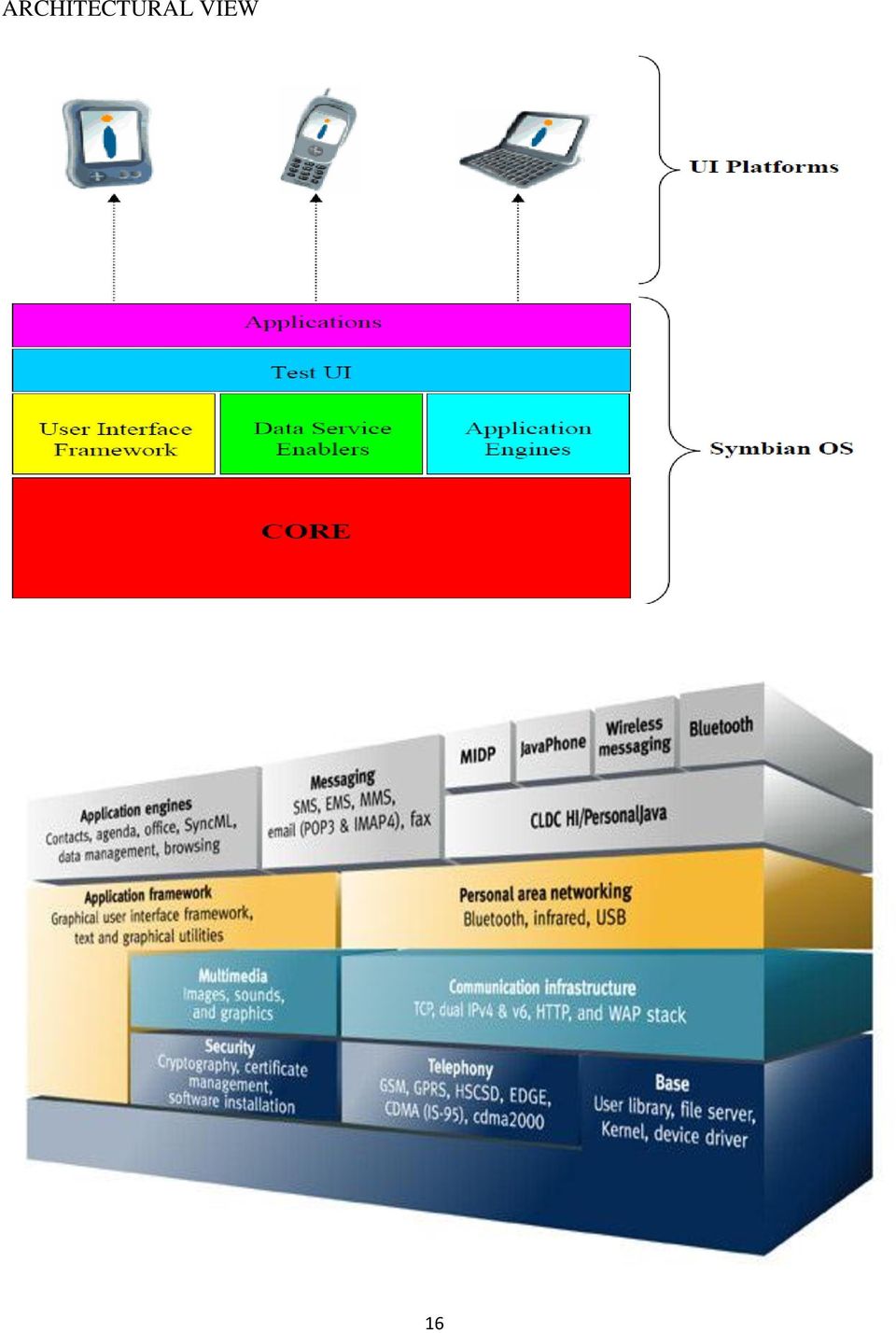
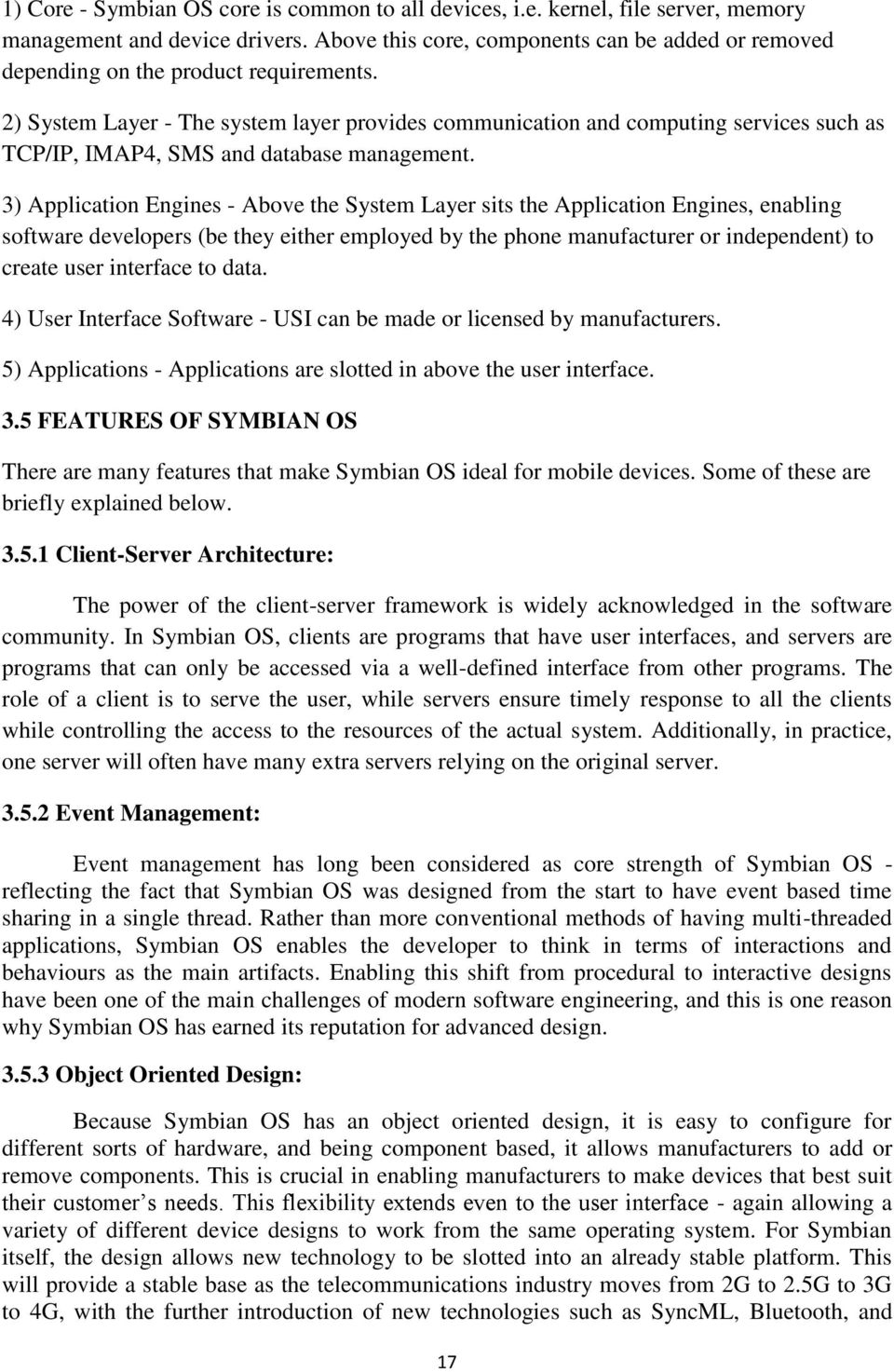
18 1) Core - Symbian OS core is common to all devices, i.e. kernel, file server, memory management and device drivers. Above this core, components can be added or removed depending on the product requirements. 2) System Layer - The system layer provides communication and computing services such as TCP/IP, IMAP4, SMS and database management. 3) Application Engines - Above the System Layer sits the Application Engines, enabling software developers (be they either employed by the phone manufacturer or independent) to create user interface to data. 4) User Interface Software - USI can be made or licensed by manufacturers. 5) Applications - Applications are slotted in above the user interface. 3.5 FEATURES OF SYMBIAN OS There are many features that make Symbian OS ideal for mobile devices. Some of these are briefly explained below Client-Server Architecture: The power of the client-server framework is widely acknowledged in the software community. In Symbian OS, clients are programs that have user interfaces, and servers are programs that can only be accessed via a well-defined interface from other programs. The role of a client is to serve the user, while servers ensure timely response to all the clients while controlling the access to the resources of the actual system. Additionally, in practice, one server will often have many extra servers relying on the original server Event Management: Event management has long been considered as core strength of Symbian OS - reflecting the fact that Symbian OS was designed from the start to have event based time sharing in a single thread. Rather than more conventional methods of having multi-threaded applications, Symbian OS enables the developer to think in terms of interactions and behaviours as the main artifacts. Enabling this shift from procedural to interactive designs have been one of the main challenges of modern software engineering, and this is one reason why Symbian OS has earned its reputation for advanced design Object Oriented Design: Because Symbian OS has an object oriented design, it is easy to configure for different sorts of hardware, and being component based, it allows manufacturers to add or remove components. This is crucial in enabling manufacturers to make devices that best suit their customer s needs. This flexibility extends even to the user interface - again allowing a variety of different device designs to work from the same operating system. For Symbian itself, the design allows new technology to be slotted into an already stable platform. This will provide a stable base as the telecommunications industry moves from 2G to 2.5G to 3G to 4G, with the further introduction of new technologies such as SyncML, Bluetooth, and 17
19 Multimedia Messaging amongst many. The picture will grow ever more complicated, especially when technologies are used in combination, but Symbian OS is ready!. For application developers, this separation of components allows them to program far richer applications - getting into the middle of the operating system Power Management: Symbian OS users are used to the performance of mobile phones - and so demand similar performance in terms of weight and operating times when they adopt new devices. Power management is built into the kernel of Symbian OS and is designed to make efficient use of the processors and peripherals and so minimize power usage. When peripherals are not being used they are switched off by the system. This lowers battery consumption, prolonging usage and allows for smaller batteries. This meets the requirement to work on stand-alone portable devices, enabling manufacturers to make phones that capture the optimum combination of size and weight for their target market Robust and Dependable: Symbian OS users will have experienced the performance levels achieved in this area by mobile phones. Devices should not lose user data, crash or require rebooting. Symbian achieves this in two ways: 1) Each process runs in a protected address space, thus it is not possible for one application to overwrite another s address space. 2) The kernel also runs in a protected address space, so that a bug in one application cannot overwrite the kernel s stack or heap. The client-server architecture of Symbian OS allows applications to exchange data without compromising overall system integrity. This meets the requirement to work on standalone portable devices, even though Symbian devices offer greatly enhanced functionality over standard mobile phones Memory Management: For stand-alone portable devices, memory management is important. The need to minimize weight, device size and cost means the amount of memory available on a Symbian OS device is often quite limited. Symbian OS always assumes that the memory available is limited, and minimizes consumption at every turn. Consequently, less memory is actually required by the system. Also having less memory helps to keep down power consumption. 18

20 Systems with No Virtual Memory Only storage available to the operating system on these platforms is memory; they do not come with a disk drive Do not support a demand paged virtual memory Memory space used in most small platform devices. Typically, have two types of storage: RAM and flash memory How Symbian OS Addresses Memory Symbian OS is a 32-bit operating system, addresses can range up to 4 GB Symbian OS divides memory into virtual pages and physical frames Symbian OS adopts a two-level page table strategy. Systems with No Virtual Memory RAM 19

21 Stores the operating system code (to be used when the system boots) flash memory used for both operating memory and permanent (file) storage it is possible to add extra flash memory to a device (such as a SD [Secure Digital] card), and this memory is used exclusively for permanent storage. Absence of demand-paged virtual memory does not mean the absence of memory management Smaller platforms are built on hardware that includes many of the management features of larger systems includes features such as : Paging Address Translation Virtual /Physical Address Abstraction Memory management consists of the following tasks: Management of application size Heap management Execution in-place Loading DLLs Offload memory management to hardware Full Multitasking: Symbian OS runs each application as a separate process, allowing multiple applications to run concurrently. For instance, if a user is checking the calendar, and receives a call, the system must allow the user to switch between applications instantaneously. Equally, should the phone call result in an appointment, the user must be able to check the calendar - and still maintain the phone call. As phones become more data enabled, this ability will become ever more important. 3.6 PLATFORM SECURITY Trust Access to private data Security Cost control Compromise important telephone functionality 20
22 Protection Software ownership DRM 21
23 3.7 STRENGTHS Memory Management The absence of demand-paged virtual memory does not mean the absence of memory management. In fact, smaller platforms are built on hardware that includes many of the management features of larger systems. This includes features such as paging, address translation, and virtual/physical address abstraction. The absence of virtual memory simply means that pages cannot be swapped from memory and stored in external storage, but the abstraction of memory pages is still used. Pages are replaced, but the page being replaced is just discarded. This means that only code pages can be replaced since only they are backed on the flash memory Execution in-place Platforms with no disk drives usually support execution in-place. What this means is that the flash memory is mapped into the virtual address space and programs can be executed directly from flash memory, without copying them into RAM first. Doing so reduces load time to zero, allowing applications to start instantly, and also does not require tying up scarce RAM. 3.8 Weakness No Virtual Memory Many computer systems do not have the facilities to provide full-blown virtual memory with demand paging. The only storage available to the operating system on these platforms is memory; they do not come with a disk drive. Because of this, smaller systems, from PDAs to smartphones to higher level handheld devices, do not support a demand paged virtual memory. Consider the memory space used in most small platform devices. Typically, these systems have two types of storage: RAM and flash memory. RAM stores the operating system code (to be used when the system boots); flash memory is used for both operating memory and permanent (file) storage. Often, it is possible to add extra flash memory to a device (such as a Secure Digital card), and this memory is used exclusively for permanent storage. 3.9 ADVANTAGES Greater range of applications. High quality games. Better inbuilt WAP browser. Connectivity is lot easier and faster. Real Player, Smart movie player etc. sort of application are not available with java phones. 22
24 You can install software and applications of any type You can download big files through your phone easily with 3G around. DIS-ADVANTAGE The OS is not available for PCs. The Symbian OS can be easily affected by a Virus. 4. DIFFERENCE BETWEEN ANDROID ANS SYMBIAN As we think according to its birth basis, android is the latest so we can say it will have all latest features so it is the best but at other end we also think that old is gold and become confused in between android and Symbian OS. Here is useful comparison 4.1 OPERATING SOFTWARE or FIRMWARE So if you got an Symbian phone suppose an. s60v3 and now you want an s60v5 then all you can do is trash your old phone and buy a new s60v5 by spending cash (like I did) but if you have an android phone with suppose an 1.6 android version running and you want to upgrade to 2.1 android version then all you have to do is do a software upgrade through your phone or by using a computer and as soon as the upgrade is finished you have your 1.6 replaced by 2.1 giving you new added features and some new user interface, no need of wasting your money on buying new cell phones. 4.2 FLASHING your phone with new FIRMWARE If you are a SYMBIAN user and hate the looks of your phones menu style then you have 2 options to change those looks a install a new theme for your phone or b Flash your phone with new firmware or rom by using a computer now everybody knows this is a risky procedure and if anything goes wrong your phone will be dead but if you r an ANDROID user and want to do the same then you have 3 options a) either install new theme b) either install new menu launcher c) flash your phone with new custom firmware You will need to download a new firmware or rom from internet. and flash it using your phone only by just using the RECOVERY MENU of your phone and if anything goes wrong and your phone is dead then you can actually get back your phone in working condition from the recovery menu itself it s as simple as clicking the button and everything in your phone will be like before nothing ever happened and all this can be don t from your phone itself no need of looking at the computer. 23
25 4.3 CHANGING PHONE FEATURES If you use a SYMBIAN phone and want to change the way how your menu looks, the way how your gallery looks and how your videos and music library looks and how your notes and documents and messages, mms, and phone book looks the way your browser and file manager looks. Then you can download and install new applications available out there and use them for the purpose but that will take all your precious phone memory and also will not act as your default application. If you don t want this to happen then you can find a custom firmware for your phone that satisfy all your needs and flash it but that s risky as we saw before but in an android you can actually do little tweaks and treks by removing your default file browser and downloading and installing new file browser. That s it no risky stuff no memory eaten by an extra useless application that you don t need. And the new downloaded application act as your default application. 4.4 PROCESSOR and its SPEED Now processor is very important to run high end applications, in a Symbian phone you cannot see what speed your processor runs on. In an android there are some applications. that not only gives you look of your processor speed but also can help you control it and help you save your battery by going to minimum speed or help you run high end applications on your phone smoothly by going to maximum speed. 4.5 MODIFICATIONS Symbian phones does not allow users to do modifications with their phones but why if you bought the phone it s yours, it s not Nokia phone anymore android people say it s your phone now so go ahead and do anything you want. 5. CONCLUSION In the small and rapidly growing world the need of mobiles and its applications are obvious. To meet the users, embedded OS are playing the vital. To speak in a sentence about Android and Symbian, Android is much advanced and provides more value to the end users. Symbian needs updates its features. 6. Reference [1] [2] [3] [4] [5] 24
Introduction to Android
 Introduction to Android Poll How many have an Android phone? How many have downloaded & installed the Android SDK? How many have developed an Android application? How many have deployed an Android application
Mobile Phones Operating Systems
 Mobile Phones Operating Systems José Costa Software for Embedded Systems Departamento de Engenharia Informática (DEI) Instituto Superior Técnico 2015-05-28 José Costa (DEI/IST) Mobile Phones Operating
An Introduction to Android
 An Introduction to Android Michalis Katsarakis M.Sc. Student [email protected] Tutorial: hy439 & hy539 16 October 2012 http://www.csd.uoc.gr/~hy439/ Outline Background What is Android Android as a
An Introduction to Android. Huang Xuguang Database Lab. Inha University 2009.11.2 Email: [email protected]
 An Introduction to Android Huang Xuguang Database Lab. Inha University 2009.11.2 Email: [email protected] Outline Background What is Android? Development for Android Background Internet users and Mobile
Mobile Operating Systems. Week I
 Mobile Operating Systems Week I Overview Introduction Mobile Operating System Structure Mobile Operating System Platforms Java ME Platform Palm OS Symbian OS Linux OS Windows Mobile OS BlackBerry OS iphone
Android 5.0: Lollipop OS
 IJISET - International Journal of Innovative Science, Engineering & Technology, Vol. 2 Issue 6, June 2015. www.ijiset.com Android 5.0: Lollipop OS ISSN 2348 7968 Meenakshi M.Tech Student, Department of
Creating and Using Databases for Android Applications
 Creating and Using Databases for Android Applications Sunguk Lee * 1 Research Institute of Industrial Science and Technology Pohang, Korea [email protected] *Correspondent Author: Sunguk Lee* ([email protected])
Praktikum Entwicklung Mediensysteme (für Master)
 Praktikum Entwicklung Mediensysteme (für Master) An Introduction to Android An Introduction to Android What is Android? Installation Getting Started Anatomy of an Android Application Life Cycle of an Android
Lecture 1 Introduction to Android
 These slides are by Dr. Jaerock Kwon at. The original URL is http://kettering.jrkwon.com/sites/default/files/2011-2/ce-491/lecture/alecture-01.pdf so please use that instead of pointing to this local copy
A Review of Different Comparative Studies on Mobile Operating System
 Research Journal of Applied Sciences, Engineering and Technology 7(12): 2578-2582, 2014 ISSN: 2040-7459; e-issn: 2040-7467 Maxwell Scientific Organization, 2014 Submitted: August 30, 2013 Accepted: September
CS378 -Mobile Computing. Android Overview and Android Development Environment
 CS378 -Mobile Computing Android Overview and Android Development Environment What is Android? A software stack for mobile devices that includes An operating system Middleware Key Applications Uses Linux
Reminders. Lab opens from today. Many students want to use the extra I/O pins on
 Reminders Lab opens from today Wednesday 4:00-5:30pm, Friday 1:00-2:30pm Location: MK228 Each student checks out one sensor mote for your Lab 1 The TA will be there to help your lab work Many students
Android Architecture. Alexandra Harrison & Jake Saxton
 Android Architecture Alexandra Harrison & Jake Saxton Overview History of Android Architecture Five Layers Linux Kernel Android Runtime Libraries Application Framework Applications Summary History 2003
Cell Phone Operating Systems
 Cell Phone Operating Systems The first smartphone was the IBM Simon and was designed in 1992. The phone themselves have changed. The most important changes are in the Operating System (OS) Operating Systems
ANDROID OPERATING SYSTEM
 ANDROID OPERATING SYSTEM Himanshi Grover,Devesh Agrawal IT Department, Dronacharya College Of Engg Gurgaon,Haryana,India Abstract - Android has become need rather than luxury these days. The computing
Example of Standard API
 16 Example of Standard API System Call Implementation Typically, a number associated with each system call System call interface maintains a table indexed according to these numbers The system call interface
Hacking your Droid ADITYA GUPTA
 Hacking your Droid ADITYA GUPTA adityagupta1991 [at] gmail [dot] com facebook[dot]com/aditya1391 Twitter : @adi1391 INTRODUCTION After the recent developments in the smart phones, they are no longer used
Overview of CS 282 & Android
 Overview of CS 282 & Android Douglas C. Schmidt [email protected] www.dre.vanderbilt.edu/~schmidt Institute for Software Integrated Systems Vanderbilt University Nashville, Tennessee, USA CS 282
01. Introduction of Android
 01. Introduction of Android Goal Understand the concepts and features of the Android Install the complete Android development environment Find out the one-click install Android development environment
Analysis of advanced issues in mobile security in android operating system
 Available online atwww.scholarsresearchlibrary.com Archives of Applied Science Research, 2015, 7 (2):34-38 (http://scholarsresearchlibrary.com/archive.html) ISSN 0975-508X CODEN (USA) AASRC9 Analysis of
Introduction to Android
 Introduction to Android Ref: Wei-Meng Lee, BEGINNING ANDROID 4 APPLICATION DEVELOPMENT, Ch1, John Wiley & Sons, 2012 1. What is Android Android is a mobile operating system that is based on a modified
Workshop on Android and Applications Development
 Workshop on Android and Applications Development Duration: 2 Days (8 hrs/day) Introduction: With over one billion devices activated, Android is an exciting space to make apps to help you communicate, organize,
Android Operating System
 Prajakta S.Adsule Student-M.B.A.[I.T.] BharatiVidyapeeth Deemed University,Pune(india) [email protected] Mob. No. 9850685985 Android Operating System Abstract- Android operating system is one
Comparative Study of Different Mobile Operating Systems
 International Journal of Advancements in Research & Technology, Volume 2, Issue3, March-2013 1 Comparative Study of Different Mobile Operating Systems T.N.Sharma, Mahender Kr. Beniwal, Arpita Sharma ABSTRACT:
Android Programming and Security
 Android Programming and Security Dependable and Secure Systems Andrea Saracino [email protected] Outlook (1) The Android Open Source Project Philosophy Players Outlook (2) Part I: Android System
Social Media & Mobile Handheld Devices: The Platforms, Operating Systems, devices& Applications. The wireless last mile & User Interface choices
 The wireless last mile & User Interface choices Manoj Pant CEO, Shankh Inc, Mumbai ( Social transformation via technology innovation ) [email protected] Mob : +91 9820018300 Social Media & Mobile
Operating Systems Overview As we have learned in working model of a computer we require a software system to control all the equipment that are
 Session 07 Operating Systems Overview As we have learned in working model of a computer we require a software system to control all the equipment that are connected to computer and provide good environment
Remote Desktop on Mobile
 Remote Desktop on Mobile SonamGavhane RasikaPhanse Monica Sadafule B.W.Balkhande Abstract In This paper we will see how the remote Desktop with static IP can be accessed using Android based mobile phones,to
Lecture 25 Symbian OS
 CS 423 Operating Systems Design Lecture 25 Symbian OS Klara Nahrstedt Fall 2011 Based on slides from Andrew S. Tanenbaum textbook and other web-material (see acknowledgements) cs423 Fall 2011 1 Overview
Android Application Development. Daniel Switkin Senior Software Engineer, Google Inc.
 Android Application Development Daniel Switkin Senior Software Engineer, Google Inc. Goal Get you an idea of how to start developing Android applications Introduce major Android application concepts Walk
ANDROID BASED MOBILE APPLICATION DEVELOPMENT and its SECURITY
 ANDROID BASED MOBILE APPLICATION DEVELOPMENT and its SECURITY Suhas Holla #1, Mahima M Katti #2 # Department of Information Science & Engg, R V College of Engineering Bangalore, India Abstract In the advancing
Symbian Operating System
 Symbian Operating System 1. Introduction Symbian s Introduction The Smartphone operating system Symbian OS is produced by the software development and licensing company Symbian Ltd. Symbian Ltd was
Evolution of Smartphones And Android Operating System
 Evolution of Smartphones And Android Operating System Evolution of Smartphones Background First telephone call was made on March 10, 1876 by Alexander Graham Bell. After that Pager continues to dominate
Chapter 5: System Software: Operating Systems and Utility Programs
 Understanding Computers Today and Tomorrow 12 th Edition Chapter 5: System Software: Operating Systems and Utility Programs Learning Objectives Understand the difference between system software and application
ANDROID. Programming basics
 ANDROID Programming basics Overview Mobile Hardware History Android evolution Android smartphone overview Hardware components at high level Operative system Android App development Why Android Apps? History
Mobile Development Discovery Document
 Mobile Development Discovery Document Prepared By: Abdul Wadood, Atifa Nadeem, Naima Khan and Haris Khan All Rights Reserved No part of this publication may be reproduced, reformatted or transmitted in
Review On Google Android a Mobile Platform
 IOSR Journal of Computer Engineering (IOSR-JCE) e-issn: 2278-0661, p- ISSN: 2278-8727Volume 10, Issue 5 (Mar. - Apr. 2013), PP 21-25 Review On Google Android a Mobile Platform Shyam Bhati 1, Sandeep Sharma
Mobile Operating Systems Lesson 07 Symbian OS
 Mobile Operating Systems Lesson 07 Symbian OS Oxford University Press 2007. All rights reserved. 1 Oxford University Press 2007. All rights reserved. 2 Symbian OS multi-modal communication support OS for
Università Degli Studi di Parma. Distributed Systems Group. Android Development. Lecture 1 Android SDK & Development Environment. Marco Picone - 2012
 Android Development Lecture 1 Android SDK & Development Environment Università Degli Studi di Parma Lecture Summary - 2 The Android Platform Android Environment Setup SDK Eclipse & ADT SDK Manager Android
Android Operating System:
 Android Operating System: An in depth introduction CS423 Project Mohammad Alian, Shuomeng Guang, Bo Teng Outline 1. What is Android 2. History 3. Android architecture 4. Android vs Linux 5. Process Management
Introduction to Android: Hello, Android! 26 Mar 2010 CMPT166 Dr. Sean Ho Trinity Western University
 Introduction to Android: Hello, Android! 26 Mar 2010 CMPT166 Dr. Sean Ho Trinity Western University Android OS Open-source mobile OS (mostly Apache licence) Developed by Google + Open Handset Alliance
ECWM511 MOBILE APPLICATION DEVELOPMENT Lecture 1: Introduction to Android
 Why Android? ECWM511 MOBILE APPLICATION DEVELOPMENT Lecture 1: Introduction to Android Dr Dimitris C. Dracopoulos A truly open, free development platform based on Linux and open source A component-based
Figure 6.1. Windows Phone 7 s hub-based interface, made up of live tiles and information aggregation
 6 Mobile Operating Systems Figure 6.1. Windows Phone 7 s hub-based interface, made up of live tiles and information aggregation Every phone needs some type of operating system to run its services: making
Symbian phone Security
 ITSX Overview Symbian OS. Risks and Features. Taking it apart. Conclusions. Symbian History Psion owner of EPOC OS, originally from 1989, released EPOC32 in 1996 EPOC32 was designed with OO in C++ 1998:
Development. SriSeshaa Technologies. Table of Contents
 SriSeshaa Technologies Development Table of Contents SriSeshaa Android Development... 2 Introduction to Android... 3 SriSeshaa Capabilities... 3 SriSeshaa Android Case Studies... 5 Privacy Guard... 5 Backup
Smartphone market share
 Smartphone market share Gartner predicts that Apple s ios will remain the second biggest platform worldwide through 2014 despite its share deceasing slightly after 2011. Android will become the most popular
1/5/2013. Technology in Action
 0 1 2 3 4 5 6 Technology in Action Chapter 5 Using System Software: The Operating System, Utility Programs, and File Management Chapter Topics System software basics Types of operating systems What the
Mobile Devices and Systems Lesson 02 Handheld Pocket Computers and Mobile System Operating Systems
 Mobile Devices and Systems Lesson 02 Handheld Pocket Computers and Mobile System Operating Systems Oxford University Press 2007. All rights reserved. 1 Handheld Pocket Computers Come in many manifestations
Issues in Android on Mobile Platform and Their Resolution
 Issues in Android on Mobile Platform and Their Resolution 1 Monika A. Ganpate, 2 Dipika R. Shinde 1, 2 Institute of Management and Computer Studies, Thane (West), India, University of Mumbai, India Abstract:
ANDROID PROGRAMMING - INTRODUCTION. Roberto Beraldi
 ANDROID PROGRAMMING - INTRODUCTION Roberto Beraldi Introduction Android is built on top of more than 100 open projects, including linux kernel To increase security, each application runs with a distinct
Developing Applications for ios
 Developing Applications for ios Lecture 1: Mobile Applications Development Radu Ionescu [email protected] Faculty of Mathematics and Computer Science University of Bucharest Content Key concepts
Introduction to Android
 Introduction to Android Android Smartphone Programming Matthias Keil Institute for Computer Science Faculty of Engineering October 19, 2015 Outline 1 What is Android? 2 Development on Android 3 Applications:
Технологии Java. Android: Введение. Кузнецов Андрей Николаевич. Санкт-Петербургский Государственный Политехнический Университет
 Технологии Java Android: Введение Санкт-Петербургский Государственный Политехнический Университет Кузнецов Андрей Николаевич 1 2 Архитектура ОС Android See http://www.android-app-market.com/android-architecture.html
Android v ios Mobile Operating Systems
 v ios Mobile Operating Systems is an open source operating system widely used on smartphones and tablets. has been available under a free and open source software license from October 21, 2008 and until
WIND RIVER SECURE ANDROID CAPABILITY
 WIND RIVER SECURE ANDROID CAPABILITY Cyber warfare has swiftly migrated from hacking into enterprise networks and the Internet to targeting, and being triggered from, mobile devices. With the recent explosion
ITG Software Engineering
 Basic Android Development Course ID: Page 1 Last Updated 12/15/2014 Basic Android Development ITG Software Engineering Course Overview: This 5 day course gives students the fundamental basics of Android
Introduction to Android
 Introduction to Android 26 October 2015 Lecture 1 26 October 2015 SE 435: Development in the Android Environment 1 Topics for Today What is Android? Terminology and Technical Terms Ownership, Distribution,
Publishing to TIZEN Using the Automated Conversion/Repackaging of Existing Android Apps. Hyeokgon Ryu, Infraware Technology, Ltd.
 Publishing to TIZEN Using the Automated Conversion/Repackaging of Existing Android Apps Hyeokgon Ryu, Infraware Technology, Ltd. Talking about Needs of Automated Converting from Android To Tizen Introduce
... Lecture 11. Market Overview of Mobile Operating Systems and Security Aspects. Mobile Business I (WS 2014/15) Prof. Dr.
 Lecture 11 Market Overview of Mobile Operating Systems and Security Aspects Mobile Business I (WS 2014/15) Prof. Dr. Kai Rannenberg Deutsche Telekom Chair of Mobile Business & Multilateral Security Johann
Chapter 7A. Functions of Operating Systems. Types of Operating Systems. Operating System Basics
 Chapter 7A Operating System Basics Functions of Operating Provide a user interface Run programs Manage hardware devices Organized file storage 2 Types of Operating Real-time operating system Very fast
SOFTWARE UNIT 1 PART B C O M P U T E R T E C H N O L O G Y ( S 1 O B J 2 2-3 A N D O B J 3-2)
 SOFTWARE UNIT 1 PART B C O M P U T E R T E C H N O L O G Y ( S 1 O B J 2 2-3 A N D O B J 3-2) SOFTWARE CATEGORIES There are two main type of software categories Operating Systems Software Application Software
DEVELOPING MOBILE APPLICATIONS USING ANDROID
 ISSN 2229-5518 2300 DEVELOPING MOBILE APPLICATIONS USING ANDROID M.VARUN KUMAR, S.THIRUMALINI, S.RAJESH KUMAR, N.VANISRI, PULIDINDI VENUGOPAL School of Information Technology &VITBS VIT University,Vellore-632014
Friendly ARM MINI2440 & Dalvik Virtual Machine with Android
 e t International Journal on Emerging Technologies (Special Issue on NCRIET-2015) 6(2): 197-202(2015) ISSN No. (Print) : 0975-8364 ISSN No. (Online) : 2249-3255 Friendly ARM MINI2440 & Dalvik Virtual Machine
History of Mobile Applications
 History of Mobile Applications MAS 490: Theory and Practice of Mobile Applications Professor John F. Clark Overview Mobile communication is so integrated into our lives that many people feel uncomfortable
Graduate presentation for CSCI 5448. By Janakiram Vantipalli ( [email protected] )
 Graduate presentation for CSCI 5448 By Janakiram Vantipalli ( [email protected] ) Content What is Android?? Versions and statistics Android Architecture Application Components Inter Application
Getting Started with iphone SDK, Android and others: Mobile Application Development Create your Mobile Applications Best Practices Guide
 Getting Started with iphone SDK, Android and others: Mobile Application Development Create your Mobile Applications Best Practices Guide Copyright 2008 Mobile Application Development 100 Success Secrets
Android Basics. Xin Yang 2016-05-06
 Android Basics Xin Yang 2016-05-06 1 Outline of Lectures Lecture 1 (45mins) Android Basics Programming environment Components of an Android app Activity, lifecycle, intent Android anatomy Lecture 2 (45mins)
Tablets in Data Acquisition
 Tablets in Data Acquisition Introduction In the drive to smaller and smaller data acquisition systems, tablet computers bring a great appeal. Desktop personal computers gave engineers the power to create
Operating Systems. Notice that, before you can run programs that you write in JavaScript, you need to jump through a few hoops first
 Operating Systems Notice that, before you can run programs that you write in JavaScript, you need to jump through a few hoops first JavaScript interpreter Web browser menu / icon / dock??? login??? CPU,
ipad, a revolutionary device - Apple
 Flash vs HTML5 ipad, a revolutionary device Apple Lightweight and portable Sufficient battery life Completely Wireless Convenient multitouch interface Huge number of apps (some of them are useful) No Flash
Remote Desktop Access through Android Mobiles and Android Mobiles Access through Web Browser
 Remote Desktop Access through Android Mobiles and Android Mobiles Access through Web Browser 1 Karan Sandeep Bhandari, 2 Vishnu Baliram Mandole, 3 Akash Dattatray Munde, 4 Sachin B. Takmare Bharati Vidyapeeth
COMMONLY, the problem that most any computing platform will have is interoperability, and
 Android OS: A robust, free, open-source operating system for mobile devices Paul Michael Kilgo Abstract Mobile devices have seen an extensive amount of development in recent years, but one question is
Lecture 6: Operating Systems and Utility Programs
 Lecture 6: Operating Systems and Utility Programs Chapter 8 Objectives Identify the types of system software Summarize the startup process on a personal computer Summarize the features of several stand-alone
GETTING STARTED WITH ANDROID DEVELOPMENT FOR EMBEDDED SYSTEMS
 Embedded Systems White Paper GETTING STARTED WITH ANDROID DEVELOPMENT FOR EMBEDDED SYSTEMS September 2009 ABSTRACT Android is an open source platform built by Google that includes an operating system,
Mobile Device Manual for 3G DVRs
 Mobile Device Manual for 3G DVRs The 3G DVR can be monitored with APPS for supported mobile device operating systems. Please refer to the table below for your specific mobile device application. Please
Mobile Operating Systems Lesson 03 PalmOS Part 1
 Mobile Operating Systems Lesson 03 PalmOS Part 1 Oxford University Press 2007. All rights reserved. 1 PalmOS An OS for handheld devices Designed for highly efficient running of small productivity programs
Technology in Action. Alan Evans Kendall Martin Mary Anne Poatsy. Eleventh Edition. Copyright 2015 Pearson Education, Inc.
 Technology in Action Alan Evans Kendall Martin Mary Anne Poatsy Eleventh Edition Technology in Action Chapter 4 System Software: The Operating System, Utility Programs, and File Management. Chapter Topics
Understand and Build Android Programming Environment. Presented by: Che-Wei Chang
 Real Time System Project 1 Understand and Build Android Programming Environment Advisor: Prof. Tei-Wei i Kuo Presented by: Che-Wei Chang Outline Introduction to Android Framework What is Android Android
MOBILE APPS. QA Testing for mobile applications
 MOBILE APPS QA Testing for mobile applications How familiar are you with Apple devices? This question can be asked for apple devices as well as Android devices - depending on the company your interviewing
ECWM511 MOBILE APPLICATION DEVELOPMENT Lecture 1: Introduction to Android
 Why Android? ECWM511 MOBILE APPLICATION DEVELOPMENT Lecture 1: Introduction to Android Dr Dimitris C. Dracopoulos A truly open, free development platform based on Linux and open source A component-based
Click to view Web Link, click Chapter 8, Click Web Link from left navigation, then click BIOS below Chapter 8 p. 395 Fig. 8-4.
 Chapter 8 Objectives Chapter 8 Operating Systems and Utility Programs Identify the the types types of of system software Summarize the the startup process on on a a personal computer Describe the the functions
1) SETUP ANDROID STUDIO
 1) SETUP ANDROID STUDIO This process takes approximately 15-20 Minutes dependent upon internet speed and computer power. We will only be covering the install on Windows. System Requirements Android Studio
Understanding Android s Security Framework
 Understanding Android s Security Framework William Enck and Patrick McDaniel Tutorial October 2008 Systems and Internet Infrastructure Security Laboratory (SIIS) 1 2 Telecommunications Nets. The telecommunications
Mobile Operating Systems Lesson 05 Windows CE Part 1
 Mobile Operating Systems Lesson 05 Windows CE Part 1 Oxford University Press 2007. All rights reserved. 1 Windows CE A 32 bit OS from Microsoft Customized for each specific hardware and processor in order
Getting Started with VMware Fusion. VMware Fusion for Mac OS X
 Getting Started with VMware Fusion VMware Fusion for Mac OS X 2 Getting Started with VMware Fusion Getting Started with VMware Fusion Item: EN-000189-00 You can find the most up-to-date technical documentation
Dual-boot Windows 10 alongside Windows 8
 Most of the people are very much interested to install the newly launched Operating System Windows 10 on their devices. But, it is not recommended to directly use Windows 10 as the primary OS because it
RIA DEVELOPMENT OPTIONS - AIR VS. SILVERLIGHT
 RIA DEVELOPMENT OPTIONS - AIR VS. SILVERLIGHT Oxagile 2010 www.oxagile.com TABLE OF CONTENTS 1 ATTRIBUTION... 3 2 ABOUT OXAGILE... 4 3 QUESTIONNAIRE... 5 3.1 DO YOU THINK AIR AND SILVERLIGHT ARE COMPARABLE
A+ Guide to Software: Managing, Maintaining, and Troubleshooting, 5e. Chapter 3 Installing Windows
 : Managing, Maintaining, and Troubleshooting, 5e Chapter 3 Installing Windows Objectives How to plan a Windows installation How to install Windows Vista How to install Windows XP How to install Windows
Mobile Device Management and Security Glossary
 Mobile Device Management and Security Glossary February, 2011 MOBILE OS ActiveSync Exchange ActiveSync (EAS) is a Microsoft technology that allows mobile users to access their Microsoft Exchange mailboxes
INSTALLATION GUIDE ENTERPRISE DYNAMICS 9.0
 INSTALLATION GUIDE ENTERPRISE DYNAMICS 9.0 PLEASE NOTE PRIOR TO INSTALLING On Windows 8, Windows 7 and Windows Vista you must have Administrator rights to install the software. Installing Enterprise Dynamics