
These materials are 2015 John Wiley & Sons, Inc. Any dissemination, distribution, or unauthorized use is strictly prohibited.
|
|
|
- John Bryan
- 10 years ago
- Views:
Transcription
1
2

3 Cloud Security Netskope Special Edition by Lebin Cheng, Ravi Ithal, Krishna Narayanaswamy, and Steve Malmskog
4 Cloud Security For Dummies, Netskope Special Edition Published by John Wiley & Sons, Inc. 111 River St. Hoboken, NJ Copyright 2015 by John Wiley & Sons, Inc., Hoboken, New Jersey No part of this publication may be reproduced, stored in a retrieval system or transmitted in any form or by any means, electronic, mechanical, photocopying, recording, scanning or otherwise, except as permitted under Sections 107 or 108 of the 1976 United States Copyright Act, without the prior written permission of the Publisher. Requests to the Publisher for permission should be addressed to the Permissions Department, John Wiley & Sons, Inc., 111 River Street, Hoboken, NJ 07030, (201) , fax (201) , or online at Trademarks: Wiley, For Dummies, the Dummies Man logo, The Dummies Way, Dummies.com, Making Everything Easier, and related trade dress are trademarks or registered trademarks of John Wiley & Sons, Inc. and/or its affiliates in the United States and other countries, and may not be used without written permission. All other trademarks are the property of their respective owners. John Wiley & Sons, Inc., is not associated with any product or vendor mentioned in this book. LIMIT OF LIABILITY/DISCLAIMER OF WARRANTY: THE PUBLISHER AND THE AUTHOR MAKE NO REPRESENTATIONS OR WARRANTIES WITH RESPECT TO THE ACCURACY OR COMPLETE- NESS OF THE CONTENTS OF THIS WORK AND SPECIFICALLY DISCLAIM ALL WARRANTIES, INCLUDING WITHOUT LIMITATION WARRANTIES OF FITNESS FOR A PARTICULAR PURPOSE. NO WARRANTY MAY BE CREATED OR EXTENDED BY SALES OR PROMOTIONAL MATERIALS. THE ADVICE AND STRATEGIES CONTAINED HEREIN MAY NOT BE SUITABLE FOR EVERY SITU- ATION. THIS WORK IS SOLD WITH THE UNDERSTANDING THAT THE PUBLISHER IS NOT ENGAGED IN RENDERING LEGAL, ACCOUNTING, OR OTHER PROFESSIONAL SERVICES. IF PRO- FESSIONAL ASSISTANCE IS REQUIRED, THE SERVICES OF A COMPETENT PROFESSIONAL PERSON SHOULD BE SOUGHT. NEITHER THE PUBLISHER NOR THE AUTHOR SHALL BE LIABLE FOR DAMAGES ARISING HEREFROM. THE FACT THAT AN ORGANIZATION OR WEBSITE IS REFERRED TO IN THIS WORK AS A CITATION AND/OR A POTENTIAL SOURCE OF FURTHER INFORMATION DOES NOT MEAN THAT THE AUTHOR OR THE PUBLISHER ENDORSES THE INFORMATION THE ORGANIZATION OR WEBSITE MAY PROVIDE OR RECOMMENDATIONS IT MAY MAKE. FURTHER, READERS SHOULD BE AWARE THAT INTERNET WEBSITES LISTED IN THIS WORK MAY HAVE CHANGED OR DISAPPEARED BETWEEN WHEN THIS WORK WAS WRIT- TEN AND WHEN IT IS READ. ISBN (pbk); ISBN (ebk) Manufactured in the United States of America For general information on our other products and services, or how to create a custom For Dummies book for your business or organization, please contact our Business Development Department in the U.S. at , contact [email protected], or visit For information about licensing the For Dummies brand for products or services, contact BrandedRights&[email protected]. Publisher s Acknowledgments Some of the people who helped bring this book to market include the following: Writer: Rebecca Senninger Development Editor: Elizabeth Kuball Project Editor: Elizabeth Kuball Acquisitions Editor: Amy Fandrei Editorial Manager: Rev Mengle Business Development Representative: Karen Hattan Project Coordinator: Melissa Cossell
5 Table of Contents Introduction... 1 About This Book... 1 Icons Used in This Book... 2 Beyond the Book... 2 Where to Go from Here... 2 Chapter 1: Assessing the Current State of Cloud Security Understanding the Growth of Cloud Adoption... 4 Reasons for cloud adoption... 4 Types of cloud offerings... 5 Checking Out Cloud App Security and Shadow IT... 6 Addressing Cloud App Security: CASB Solutions... 7 Accessing the Cloud Securely from a Mobile Device... 8 Accessing Apps through an Ecosystem... 9 Chapter 2: Finding and Evaluating Cloud Apps in Your Enterprise Discovering Cloud Apps: Perception versus Reality...11 Evaluating the Risk of Cloud Apps Inherent risk Contextual risk Cloud app activities: Not all are created equal Cracking Down: To Block or Not to Block? Chapter 3: Putting Cloud Security in Practice Discovering Cloud Apps Evaluating app use Auditing Activities Detecting Anomalies Chapter 4: Creating a Cloud Security Policy Sharing Responsibility in the Cloud Incorporating Data Loss Prevention Policies Including Data Encryption Policies Data at rest in an app Data traveling to an app Data leakage... 35

6 iv Cloud Security For Dummies, Netskope Special Edition Enforcing Policies Controlling cloud apps Defining actions Coaching End-Users and Giving Them a Say Blocking Risky Activities, Not Apps Chapter 5: Ten Must-Haves to Ensure Secure Usage of Cloud Apps... 43
7 Introduction Employees expect to work efficiently and flexibly wherever they are at the office, at home, or on the road using the most convenient way possible whether that s with a desktop computer, laptop, tablet, or smartphone. Increasingly that means people are getting their jobs done using cloud services. It also means that sensitive company data is being uploaded, downloaded, and shared on a daily basis. And many times, the apps being used to do that work aren t being used safely. That s where Cloud Security For Dummies, Netskope Special Edition, comes in. About This Book You may be intimidated by the idea of doing business in the cloud. But chances are, even if you don t know it, you probably are. Today, people buy and deploy cloud services often without IT s permission or involvement. This is called shadow IT. The question it brings up is: How do you keep your information secure when it s out of your control? This book helps you get started on your journey! Here you find the information you need to confidently adopt the cloud: Discover the cloud apps that employees are already using in your enterprise. Understand how employees are using these apps. Assess each app s risk level. Adopt a cloud policy tailored to fit the way you do business. Monitor ongoing cloud app usage and enforce compliance. By applying the principles outlined in this book, you can make a successful transition from using traditional on-premises applications to cloud-based applications.

8 2 Cloud Security For Dummies, Netskope Special Edition Icons Used in This Book Throughout this book, you find special icons to call attention to important information. Here s what you can expect: The Tip icon marks tips and shortcuts that you can take to make a specific task easier. The Remember icon marks the information that s especially important to know. The Technical Stuff icon marks information of a highly technical nature that you can safely skip over without harm. The Warning icon tells you to watch out! It marks important information that may save you headaches. Beyond the Book If you find yourself wanting more information after reading this book, go to where you can get more information about Netskope s products. You can find webinars, reports on the state of the cloud, best practices videos, and much more! Where to Go from Here If you re new to the cloud, start with Chapter 1 to check out not only why cloud adoption is essential for business success, but also why doing it securely is critical. Otherwise, check out the table of contents to find a topic that interests you!
9 Chapter 1 Assessing the Current State of Cloud Security In This Chapter Taking a look at the cloud adoption trend in business Assessing the use of sanctioned and unsanctioned apps Employing a cloud access security broker (CASB) Using apps securely on mobile devices and ecosystems The number of cloud apps being used in the enterprise is growing daily. This should come as no surprise: Cloud apps are easy for users to buy and require minimal effort to get up and running. Not only are cloud app adoption rates high, but users find that they can get their jobs done more quickly and flexibly with them. Furthermore, cloud apps often lend themselves well to mobile access, so growth in mobile has only served to increase their usage. Social media apps (such as Twitter and LinkedIn) and filesharing apps (such as Google Drive, Box, and Dropbox) are the most visible apps. But companies are also adopting the cloud for other purposes, whether for human resources (HR), finance, customer relationship management (CRM), or business intelligence. In this chapter, you find out why you should integrate the cloud into your daily business, the platforms you can use, and how to address any security concerns as you make the transition from a business that runs on traditional software to one that runs on cloud services. Cloud is no longer a question it s the way business is done.
10 4 Cloud Security For Dummies, Netskope Special Edition Understanding the Growth of Cloud Adoption When you think about cloud app growth in business, you probably think it s mostly people accessing file-sharing apps like Box and Dropbox. However, enterprise cloud adoption goes beyond file sharing. Entire functional groups including marketing, human resources, finance, and software development are doing business in the cloud. Reasons for cloud adoption Put simply, the cloud allows employees to get their jobs done more quickly, easily, and flexibly than traditional computing tools. Here are some reasons any organization including yours should consider embracing the cloud: Business agility: People want to be productive now; they don t want to wait until the next software rollout happens. Many cloud apps have more frequent release schedules than traditional software, which allows your company to take advantage of the latest feature sets. Device choice: The cloud gives people the flexibility to work on whatever device they want a desktop, laptop, tablet, or phone whenever they want. Turn to the upcoming section Accessing the Cloud Securely from a Mobile Device for more information. Collaboration: The cloud allows colleagues and business partners to share and access data in a seamless, frictionless way. Minimal expense: Deploying, maintaining, and updating on-premises software (along with the infrastructure to run them) can be expensive. You can reduce the expense of doing business, as well as more closely match expense with value, by using cloud apps. Because the reasons for cloud adoption are so compelling, your employees are most likely already using cloud apps without your knowledge (see Checking Out Cloud App

11 Chapter 1: Assessing the Current State of Cloud Security 5 Security and Shadow IT, later in this chapter), which can put your business at risk of data compromise or noncompliance. Officially adopting cloud apps allows you to set norms and establish policies to keep your sensitive corporate data secure and maintain compliance with regulatory policies. Types of cloud offerings When you re ready to start doing business in the cloud, you can choose one or more of the following. While all three are being adopted at a rapid clip, this book is focused mostly on SaaS because it is the most fragmented of the types, with thousands of choices across dozens of business categories. Infrastructure as a service (IaaS): This is the most basic model of cloud service. With this model, you outsource equipment for your day-to-day business operations, including storage, hardware, servers, and networking components. The service provider owns, houses, runs, and maintains the equipment. An IaaS gives you the most flexibility for your applications, but it requires operations expertise and development resources. Platform as a service (PaaS): With PaaS, you build your applications on top of a platform with a well-defined software development kit (SDK). The application is deployed on the PaaS vendor s datacenters. With PaaS, you have fewer items to set up and don t need as many development resources as IaaS, but you re still responsible for development and monitoring. Software as a service (SaaS): With SaaS, you use apps over a network typically, the Internet that the vendor makes available for your use. SaaS gets you up and running quickly because it works right out of the box and you don t need any additional development resources. On the downside, you re completely dependent on the vendor for additional features. No matter which model you choose (and you may end up with more than one), your corporate data is stored in the cloud, so you run the risk of unauthorized users accessing your data. If you use the cloud, consider establishing fine-grained cloud data loss prevention (DLP) policies to help you manage what gets stored in the cloud, how it gets stored, and what stays on-premises.

12 6 Cloud Security For Dummies, Netskope Special Edition Checking Out Cloud App Security and Shadow IT Apps or systems that are deployed and maintained by people or departments outside of IT s knowledge are known as shadow IT. If you assess cloud apps in your organization, you ll likely find that employees use both sanctioned and unsanctioned apps: Sanctioned cloud apps: Apps that the company provides for employee use and of which IT is aware. IT usually has full administrative control over these cloud apps and maintains them on behalf of the business. Even though IT may manage sanctioned apps, the department still may lack specific knowledge about how users are accessing these apps and what activities they re performing, including uploading, downloading, sharing, or editing corporate data. Unsanctioned cloud apps: Apps that the company doesn t know about. Very often, if IT doesn t provide the necessary tools to accomplish a needed business function, employees go outside of IT and procure their own apps. Employees can easily find, pay for, download, and administer these apps without IT s knowledge or assistance. On the one hand, this is a good thing because it gives employees a way to work efficiently. On the other hand, these unsanctioned cloud apps create risk for IT. Keeping apps and the data within them secure is impossible when IT doesn t know about them. IT can t properly enforce security or compliance in unsanctioned apps. Without important security features, such as strong user authentication and audit logging, these apps, and the data within them, are vulnerable to inadvertent or intentional data exposure. Finally, IT has no idea how users are using unsanctioned apps. Are they uploading sensitive data to high-risk apps, sharing data outside the company, or downloading to a mobile device? Safely enabling the cloud means you not only manage all the sanctioned apps but also find the unsanctioned cloud apps in use. You can then begin securing the apps and data, including
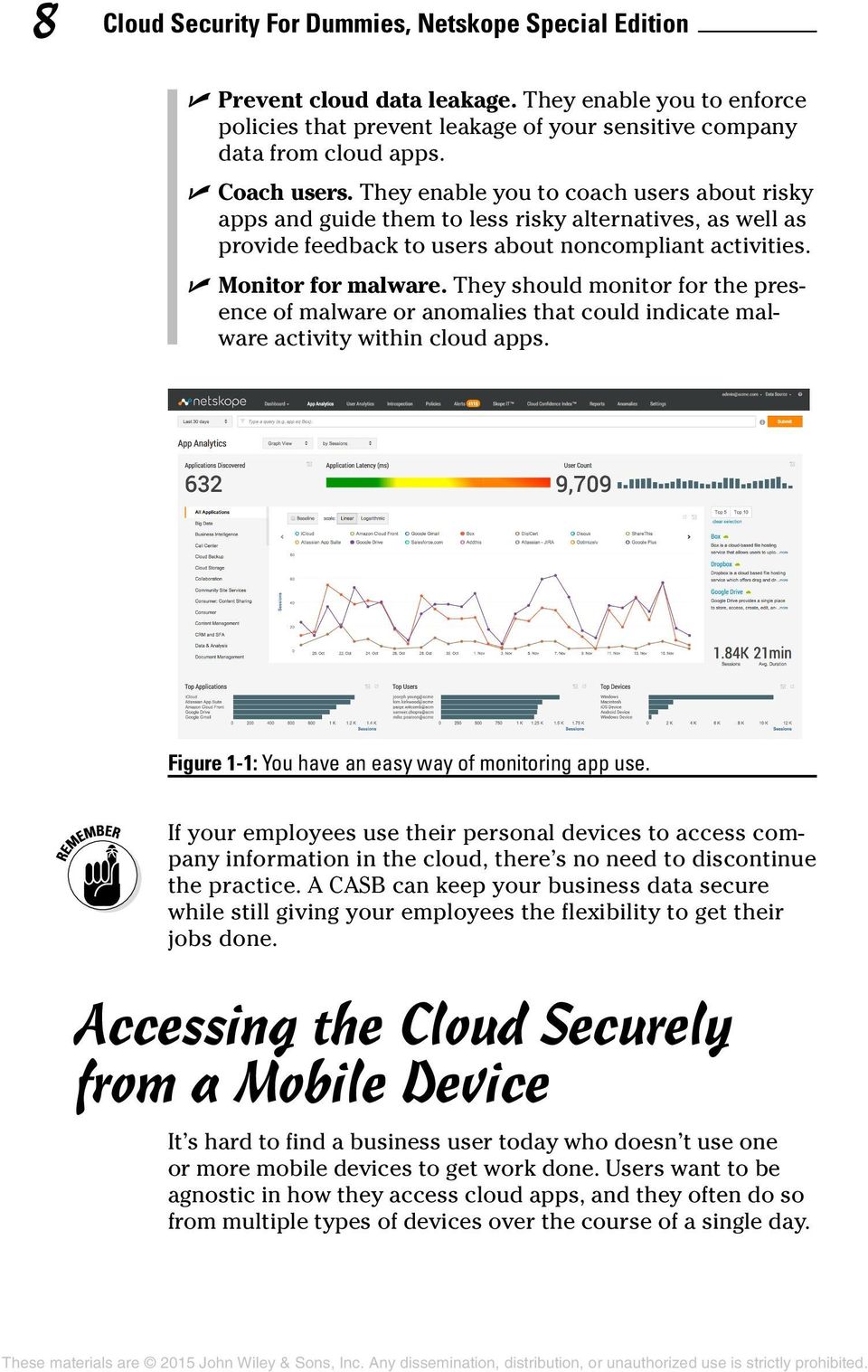
13 Chapter 1: Assessing the Current State of Cloud Security 7 implementing strong authentication, monitoring administrator and user activities, and preventing data leaks. IT can consistently manage and secure all the cloud apps running across the company and enforce security and compliance controls. Addressing Cloud App Security: CASB Solutions IT departments have limited visibility when it comes to apps in the cloud especially with shadow IT. They have no efficient way to track app usage or control sensitive data after it s uploaded. To bridge the gap in security, you can deploy a CASB. The advantage of a CASB is that it allows an organization to use the cloud without compromising compliance or security. By combining security functions within a single enforcement point, CASBs also reduce the complexity of securing data in the cloud. Some key capabilities CASBs enable include Discover and assign a risk score to all apps. They discover and assign a risk score to each identified app. This allows you to decide whether apps are acceptable for business use. Provide identity-based access management. They enable you to tap into your directory services and secure user access to cloud apps. They allow you to easily provision and deprovision user access. Monitor and set up alerts for users and admins. They help you understand user activity and its context (for example, who s sharing content outside the company). They may also alert you to anomalous activities or activities that could lead to data loss or exposure. Figure 1-1 shows a report that gives you insight into which activities were deemed risky and which were not.
14 8 Cloud Security For Dummies, Netskope Special Edition Prevent cloud data leakage. They enable you to enforce policies that prevent leakage of your sensitive company data from cloud apps. Coach users. They enable you to coach users about risky apps and guide them to less risky alternatives, as well as provide feedback to users about noncompliant activities. Monitor for malware. They should monitor for the presence of malware or anomalies that could indicate malware activity within cloud apps. Figure 1-1: You have an easy way of monitoring app use. If your employees use their personal devices to access company information in the cloud, there s no need to discontinue the practice. A CASB can keep your business data secure while still giving your employees the flexibility to get their jobs done. Accessing the Cloud Securely from a Mobile Device It s hard to find a business user today who doesn t use one or more mobile devices to get work done. Users want to be agnostic in how they access cloud apps, and they often do so from multiple types of devices over the course of a single day.
15 Chapter 1: Assessing the Current State of Cloud Security 9 You probably already give employees a variety of choices for how they can access cloud apps. These choices are a good thing, but they can also increase the risk to your sensitive business data. More than a third of all cloud data leakage policy violations occur on mobile devices. Employees may not even be aware of your organization s mobile and cloud policies. After adopting cloud apps and enabling mobile access to them, you need to make sure users understand what the policies are, how to follow them, and the consequences of noncompliance. Accessing Apps through an Ecosystem Many popular cloud app vendors encourage ecosystems, or third-party apps that integrate with them to share data and enable solutions that one app by itself may not be able to achieve. Anchor tenant apps typically do this by providing application programming interfaces (APIs) to their ecosystem partners. By using those APIs, those partners can share data back and forth with the anchor tenant app. For example, the enterprise file-sharing and collaboration app, Box, has an ecosystem of more than a thousand app partners that access and share content with Box to facilitate extended use cases such as electronic signature workflows, business intelligence reporting, and project management. It s important to note that, while an anchor tenant app like Box may have security features built in, its ecosystem apps may not be as enterprise-ready. Because those apps may share your content, you need to have similar visibility and control across not just the main app but the ecosystem as well.

16 10 Cloud Security For Dummies, Netskope Special Edition

17 Chapter 2 Finding and Evaluating Cloud Apps in Your Enterprise In This Chapter Finding the apps in your enterprise Evaluating the risk of those apps Deciding whether to block apps Cloud apps help your people get their jobs done more efficiently. But they re hardly risk-free. How can you ensure an app is in line with your organization s policies? Offers the right level of data encryption? Has a disaster recovery plan in place? In short, how do you know if an app is enterprise-ready? Organizations have an average of 579 cloud apps in use. Of these, 88.7 percent are not enterprise-ready, meaning they fail to meet enterprise standards for security, auditability, and business continuity. In this chapter, you learn the process you go through to find your apps, evaluate their enterprise-readiness, and assess whether you should block their use in your environment. Discovering Cloud Apps: Perception versus Reality You re ready to adopt a cloud app policy. The first step, of course, is finding all the apps currently in use in your company. You may think that most apps fit right in with

18 12 Cloud Security For Dummies, Netskope Special Edition company policy, but the reality is that most apps that people use even apps sanctioned by IT are not enterprise-ready. To get a complete picture, look for apps accessed from desktops and laptops within the office, as well as from home computers and mobile devices, regardless of whether the apps are web-based or native, such as a sync client. Table 2-1 shows the number of apps that people typically use in the enterprise, along with the percentage of apps that are not enterprise-ready in terms of security, auditability, and business continuity. In addition to the consumer and prosumer apps that you expect to find in use such as Twitter, Dropbox, and Evernote lineof-business apps are actually the most prevalent. The marketing category has the most apps, followed by collaboration, human resources (HR), productivity, and storage. Later in this chapter, you can find out how to evaluate the risk these apps pose, as well as whether you should block them from being used. Table 2-1 Category Apps Per Category Not Enterprise Ready Number per Enterprise Marketing 60 98% Collaboration 38 84% Human resources 36 96% Cloud storage 31 77% Productivity 31 90% Finance/accounting 29 98% Customer relationship 24 91% management (CRM)/sales force automation (SFA) Software development 23 90% Social 16 71% Project and program management 15 69% Percent That Aren t Enterprise Ready Report findings are based on tens of billions of cloud app events seen across millions of users and represent usage trends from July 2014 through September 2014.

19 Chapter 2: Finding and Evaluating Cloud Apps in Your Enterprise 13 Don t underestimate the number of unsanctioned apps being used in your company. Many companies underestimate that number by about 90 percent. Evaluating the Risk of Cloud Apps Companies that embrace the cloud must first understand, manage, and minimize the inherent risks in each cloud model. You can evaluate the enterprise readiness of an app based on objective criteria in the following functional areas: Identity and access control File sharing Data classification Encryption Audit and alert Certifications and compliance Disaster recovery and business continuity Security vulnerabilities and exploits Capability to proxy traffic for inspection and security controls Evaluate apps based on these objective measures, covered in the following sections. Inherent risk When your sensitive business data resides outside of your company, you take on a level of inherent risk. You re storing data and depending on the functionality from the public cloud losing your capability to have physical access to the servers hosting your information. As a result, potentially business-sensitive and confidential data is at risk because of the inherent capabilities of the apps in which they reside. For example, if the app doesn t separate one tenant s data from another s or doesn t offer access controls as part of its service, your data is beholden to those deficiencies. As a
20 14 Cloud Security For Dummies, Netskope Special Edition buyer, implementer, or approver of such services, you need to ensure that the inherent security capabilities you require are available in the cloud apps your organization is using. It is important to ensure that security measures, such as securing data at rest, are in place whenever data is stored in the cloud, because this is no longer in your control and you re dependent on the security of the cloud service providers. Your apps should follow these practices in order to limit your inherent risk: Certifications and compliance: Your apps and the datacenters in which they re hosted should be in compliance with regulations and industry guidance that matter to your business. The nearby sidebar explains the key certifications you should consider. Data classification: Apps that deal with your corporate data should enable you to classify that data according to your requirements. Those classifications can include public, confidential, and sensitive. Classifying your data enables you to Define which data can be stored in cloud apps and which must remain on-premises. Enforce policies on different types of data, including access and data protection policies. Automatically expire access to sensitive data via policy. Related to data classification is data ownership. Be aware that some apps specify who owns data (the vendor or the customer) that resides in an app as part of the terms and conditions. For any apps that contain your businesscritical data, only choose apps that specify that you own the data. Also look for terms that specify the process for retrieving your data should you discontinue the service. Disaster recovery and business continuity: Your apps should provide very clear details about disaster recovery plans and processes. Those details should reflect your business requirements for uptime and data access depending on criticality of the data. Know where your backup offsite location is, what the provider s disaster recovery plan is, and how your data will be backed up and failed over. Encryption: Your apps that store sensitive or regulated data should offer encryption of data at rest and should

21 Chapter 2: Finding and Evaluating Cloud Apps in Your Enterprise 15 give you choices for how to manage those encryption keys per your policies. (Find out more about encryption in Chapter 4.) Moreover, they should ensure that your data is managed separately from other tenants in the same cloud. Capability to proxy traffic: Your apps should enable you to inspect traffic to perform analytics and enforce your policies in real-time. Audits and alerts: Your apps that deal with critical business processes, contain sensitive data, or have access to your enterprise systems should offer robust administrator, user, and data access logging and alerting features (see Figure 2-1). This helps you detect noncompliant behavior as it s happening, as well as perform forensic audit trails after a suspected event occurs. Figure 2-1: A real-time alert. Policy enforcement and access control: Your apps should offer access controls and policy enforcement commensurate with your on-premises controls. These include features such as multifactor authentication, single sign-on support, and granular access controls. File sharing: Your apps that deal with your files should support file capacities that meet your large-file requirements. This will ensure that people will use the corporate cloud apps available to them and will be less likely to seek out a potential lower-quality app and one that you have no visibility into to support their file sharing requirements.
22 16 Cloud Security For Dummies, Netskope Special Edition Common cloud security certifications When it comes to certifications regarding apps, the cloud, and cloud security, you should be familiar with a few key certifications: SOC-1, SOC-2, and/or SOC-3: With these certifications, you get a baseline for physical and logical access, data security, and business continuity procedures of your data wherever it s housed. Make note of whether the certification is Type I or II; the former reports on the existence of control procedures, while the latter verifies those procedures in practice. SAS-70/SSAE-16: This certification details how you report on compliance controls, and how your system matches your control objectives. ISO27001: This certification defines a top-down approach for information security management. It includes a sixpart process, including policy Contextual risk definition, scope, risk assessment, risk management, control objectives, and statement of applicability. The latest HIPAA regulation: This regulation ensures privacy of personal health data, if applicable. The latest PCI-DSS security standard: This security standard ensures privacy of personal credit card information, if applicable. Safe Harbor certified: With this certification, users are informed if the app gathers their personal information and what that information will and won t be used for. TRUSTe certified: This certification indicates that the app has undergone a privacy assessment and audit for data privacy and regulatory requirement adherence. Before you even begin inspecting content and enforcing policies to protect data, you need the relevant context of the activity. Your CASB should allow you to see the following details: Which users and user groups are using specific apps What apps they re using What devices and browsers they re on
23 Chapter 2: Finding and Evaluating Cloud Apps in Your Enterprise 17 Where they re located Activity details (whether they re uploading, downloading, sharing, or viewing data) Which users are sharing, what they re sharing and with whom, and whether recipients are outside the company In the next section, you find out why these details are important. Not all activities are harmless! Cloud app activities: Not all are created equal It s not enough to know what apps are running in your organization; you also need to understand what activities people are using those apps for. Your cloud vendor should give you granular-level detail to all app activities, and provide you with real-time alerts when an action violates policy. (See the earlier section on inherent risk for more on alert functionality.) Downloading, uploading, sharing, or simply viewing data are all activities that can be benign for one employee, and not so benign for another: A professional in the human resources department who is working at the headquarters office may have a legitimate reason to download salary information from a cloud-based HR app to perform analysis. However, a similar professional working in a satellite office probably has no business downloading the same salary information. An authorized employee in the finance department may need to edit field-level data within a cloud-based financial management app. However, a different, unauthorized employee in the same finance department may need only to view documents, but not actually edit any of them. A business development professional may have a legitimate reason to share a presentation with a partner from a file-sharing app. However, it may not be wise to allow professionals from investor relations to share spreadsheets outside of the company from the same app during the company s quiet period.
24 18 Cloud Security For Dummies, Netskope Special Edition These are all situations you ll want to know about right away to prevent potential data exposure or noncompliant activity. Here are activities you need to make sure are secure: Activities that can get you into trouble: Cloud app activities that create the most policy violations on average include login, view, download, edit, upload, and create. Activities on mobile devices: Half of all cloud app activities occur on mobile devices, with more than half of send, approve, and download activities occurring on mobile. It s important to consider risks that are unique to mobile devices when you re setting policies in your cloud apps. With contextual information in hand such as who the users or groups are, what app or app category they re in, what device they re on, and what activity they re performing you can be precise in identifying potential risky scenarios so you can protect your organization and its data in a targeted way. This helps you increase the accuracy of sensitive data detection and protection. Cracking Down: To Block or Not to Block? As you find unknown apps, you ll probably be inclined to simply block them if they pose a risk. After all, up until now the only choices you ve had have been allow or block. Blocking policies don t work as well these days because people can usually get around your no. They may seek an exception, go off-network and connect directly to a cloud app, or use a mobile app. Because many of the cloud apps in question are actually used for legitimate business purposes that make the company more productive and competitive, exceptions need to be made. In fact, the majority of app activity happens in apps for which IT has made exceptions. This phenomenon is called exception sprawl. But with cloud apps you can take a more nuanced approach to deciding whether to block or not. Instead of taking a simple
25 Chapter 2: Finding and Evaluating Cloud Apps in Your Enterprise 19 binary approach to the apps people want to use, you could say yes to nearly all their apps. Then, like a surgeon, you could slice out certain activities to make the usage of those apps acceptable to your company from a security and compliance standpoint. This approach would put you in the position of partnering with and enabling the business rather than saying no in a wholesale way. And for the cloud apps that the company is slow to adopt because of security and compliance concerns, this approach lets you adopt them more quickly. Taking a scalpel instead of a sledgehammer to the problem paves the way to cloud confidence. The tool you use to manage your apps should let you create sophisticated, precise policies quickly and enforce those policies in real-time. In Chapter 4, you find out why enforcing policies on activities and data, rather than blocking apps outright, is often the right choice for businesses today.
26 20 Cloud Security For Dummies, Netskope Special Edition
27 Chapter 3 Putting Cloud Security in Practice In This Chapter Understanding how the apps in your environment are being used Logging activities Finding anomalies Cloud apps are an increasing part of doing business today, with thousands of apps being using across virtually every function. But many times, those apps are not being used safely or in accordance with company policy if there is a policy. As you make decisions and institute policies to make those apps secure and compliant, you re becoming cloud confident. In this chapter, you take the steps you need to be cloud confident. (In the next chapter, you learn how to create a policy for employees to follow.) Discovering Cloud Apps The first step is always to know exactly which apps people are using in your organization. Your CASB should give you a snapshot of all the enterprise-sanctioned cloud apps as well as discover any unknown apps in use.
28 22 Cloud Security For Dummies, Netskope Special Edition After those apps are discovered, IT should evaluate each of the discovered apps against a set of objective criteria: Score apps on enterprise-readiness, as measured by security, auditability, and business continuity. Evaluate those apps risk based on your organization s usage of them. Make risk-based decisions about whether to standardize on, and migrate users to, certain apps. Evaluating app use After you know what cloud apps everyone in your company is using, you should be able to drill down into the information surrounding those apps and understand how people are using them. This step actually involves understanding the contextual usage of those apps: Drill down into user identity. This includes An individual or group defined in your enterprises directory Where people are when they access the apps What devices and browsers they are using Understand the app. This includes the apps or app instances (different tenant accounts created within an app) that are being accessed and by whom. Ascertain cloud app activities. This includes What app services users are consuming What discrete actions they re taking (for example, log in, modify data, download content, upload content, share content, and administrative activities like escalation of privileges) See content details. This includes What content type and file or object name they are dealing with Whether the content is deemed sensitive given your organization s data loss prevention (DLP) profiles Where and with whom data is being shared
29 Chapter 3: Putting Cloud Security in Practice 23 User location App location Discover sensitive content. You re looking for the content existing at rest within an app, including any that violate a DLP profile. Figure 3-1 shows you the exposure of your sensitive data in your sanctioned cloud apps. Figure 3-1: Understand exposure of sensitive content in cloud apps. You also get one consistent view across app behaviors and can use that view to enforce one simple policy uniformly across all relevant apps instead of having to set policies app by app. For instance, share and send, download and save, and edit and change can each mean the same thing across different apps. With a cloud policy in place, you don t have to analyze app after app. All the user activities should be normalized across each category of apps so you don t have to understand each app and map its activities to understand what s going on. Auditing Activities The capability to audit activities is critical to show accurate forensic audit trails of who has accessed each app and what he or she did. To audit activities, you need to understand user activity and its context. For example, who s downloading from HR apps or who s sharing content outside the company?
30 24 Cloud Security For Dummies, Netskope Special Edition A CASB should let you query your security data and answer any business or security question, understanding the who, what, when, where, and with whom of any user s or administrator s activity within a cloud app, users activity overall, or activity compared to a baseline. You can Perform granular queries. Be alerted to granular behavioral anomalies; see Figure 3-2 for a report on anomalies. Figure 3-2: Find all the anomalies that violate cloud policy. Do forensic analysis after a security incident or breach. Set watch lists that alert you on any activity. Run analytics on app performance, slicing by any of the visibility parameters. Run deep analytics on user behavior, pivoting around parameters. View user behavior and activity against baselines to uncover anomalies. Analyze cloud app performance, uptime, latency, and service-level agreement (SLA) adherence. Perform forensic analysis on user activity leading up to an incident or breach. You must be able to analyze any activity against policy, pivoting around any of the parameters. You must also be able to use analytics to detect anomalies to identify risky behavior and potential data loss or breach.
31 Chapter 3: Putting Cloud Security in Practice 25 Depending on your business operations and regulations, compliance-oriented questions will rise to the top. IT should be able to answer specific questions. Here are a few examples: Who from my call center in Bulgaria is accessing my CRM system, and what specifically is he or she doing? Who from my Investor Relations group is sharing docs from our cloud storage app during the company s quiet period? Has any non-hr manager downloaded salary data in any cloud app in the past three months? Is there any excessive downloading or sharing that could signal a data breach? When you set a policy once, you can set it to be carried out across all the apps you want it to. So, when you set a granular policy such as Let people in my call center use CRM, but don t let them download customer contacts onto a mobile device if they re outside my country, or set policies about what apps you will and won t allow based on their risk score, you know that those policies will be enforced immediately before an undesired act occurs, and you can do it at network speed across the entire business. Beyond viewing app access and activity at a certain point, you should also have the capability to do continuous compliance ongoing and uninterrupted visibility of all activities that could impact compliance with your organization s policies. IT should be able to turn any analytics query into a watch list or report, where any defined event or any deviation from a baseline will trigger an action. For example, you can set up watch lists to do the following: Uncover suspicious behavior, prove a breach occurred, and clearly demonstrate malicious or even criminal activity. You can create a granular cloud activity audit trail following a suspected event, such as the theft of sensitive content upon employee departure. For example, an employee logged into Microsoft SharePoint or OneDrive using corporate credentials, downloaded sensitive content, logged into a totally different app such as Dropbox or Google Drive using personal credentials, uploaded that same content, and then shared it with a new employer. IT should be able to construct a forensic audit trail showing
32 26 Cloud Security For Dummies, Netskope Special Edition every cloud app action for that user leading up to and immediately following the incident. Reconstruct activities to understand just what that user did with which content in which app, and if he shared the content, with whom he shared it. You can create a granular cloud activity audit trail following a suspected event such as the theft of sensitive content upon employee departure. For example, an employee logged into Microsoft SharePoint or OneDrive using corporate credentials, downloaded sensitive content, logged into a totally different app such as Dropbox or Google Drive using personal credentials, uploaded that same content, and then shared it with a new employer. Detecting Anomalies You also need to be able to detect anomalies. For example, find out when an employee is excessively downloading, sharing, or uploading data from an app, or logins from multiple locations. These usage anomalies can indicate compromised credentials, out-of-compliance behaviors, and even the presence of malware. If an app doesn t support multifactor authentication, several anomalous attempted logins may be an indicator that someone is trying to hijack the user s account. Your CASB should offer protection by alerting you to the attempted access, preventing further access to the app, and reporting on any attempted accesses for security and compliance purposes. Behind the Netskope scenes So, how exactly does Netskope gain visibility and enforce policy dynamically on your enterprise s cloud app transactions and traffic? It enables and has production deployments on non-mutually exclusive, in-line, and out-of-band deployment options. Each of these methods has a different level of theoretical coverage, visibility, and enforcement, from the most basic to the most advanced and real-time, so it s important to choose the right one(s) to facilitate your use cases. Out-of-band options are Log-based discovery: You can upload logs from your perimeter networking equipment such as your web gateway or nextgeneration firewall to Netskope
33 Chapter 3: Putting Cloud Security in Practice 27 offline. Log analysis provides you information about what apps you have, and the Netskope Active Platform categorizes them, gives you a view of their enterprisereadiness, and gives you a risk view based on a combination of those apps enterprise- readiness. Though useful, it s only a small fraction of what you d be able to see and doesn t include the real-time policy enforcement that you d get with the other implementations. Sanctioned app introspection via APIs: Netskope uses secure APIs published by your sanctioned apps to control app behaviors and content residing in the apps. App introspection gives you a deep view within specific apps that you administer. It enables you to e-discover and inventory both content and users of that content. It then lets you take action on that content, including re-assigning ownership, setting sharing permissions, quarantining files, and applying encryption of data at rest. The in-line options are Agentless: Your users on-premises cloud network traffic is steered to the closest one of four Netskope SOC-1/SOC-2, SSAE 16 Type 2-certified datacenters around the world, which sits between your network and your cloud apps and is transparent to your users. This method provides you a touchless way to get on-premises cloud app network traffic from the user s PC or mobile device to the Netskope cloud for analysis. Because it sits at your network s egress point, it s limited to on-premises network traffic. Thin agent or mobile profile: Your users remote cloud network traffic is steered to Netskope via an agent or, if a mobile device, a mobile profile. The thin agent gives you the same visibility, analytics, and enforcement as in the agentless option, but it also covers any device that s outside of the four walls of your organization. Reverse proxy: Traffic is redirected to a modified URL of your sanctioned cloud apps. The reverse proxy method gives you a touchless way to get cloud app visibility and control; however, it is limited to apps you administer.
34 28 Cloud Security For Dummies, Netskope Special Edition
35 Chapter 4 Creating a Cloud Security Policy In This Chapter Operating in a shared-responsibility environment Creating data loss prevention policies Protecting sensitive data with encryption Enforcing your policies Educating your app users on policies Preventing activities that put the company at risk When your goal is to reduce the risk of companysensitive information getting into or being shared from your cloud apps, you need to create a cloud policy and then have an effective way to enforce the policy without compromising work getting completed. In this chapter, you find out how to create and enforce a cloud security policy. The better you define your cloud policy, the better everyone will understand how to leverage the cloud and reduce the risk to your organization. Sharing Responsibility in the Cloud With shared responsibility, both cloud app vendors and enterprises are responsible for a segment of cloud security:
36 30 Cloud Security For Dummies, Netskope Special Edition Cloud app vendors selling to enterprises build apps that are inherently enterprise ready. Apps or the vendor ecosystem should include key third-party certifications, enterprise security settings, and privacy features to meet its responsibility. Enterprises ensure that their users perform safe activities within the app. Unsafe activities include theft of confidential documents, inadvertent exposure to and disclosure of sensitive data, and compromise of authentication credentials. You maintain visibility, granular activity, and data-level control across any apps, integrated ecosystem apps, or any other cloud app your organization uses (sanctioned or unsanctioned). As an organization consuming cloud apps, be aware and hold your vendors to their part of the shared-responsibility model, and assume responsibility for your end, which is ensuring safe usage. Incorporating Data Loss Prevention Policies Look to your CASB to incorporate data loss prevention (DLP) profiles into your policies. You should be able to enforce DLP policies in context, including user, app category, and so on. Some DLP profiles you may want to consider include PII: Personally identifiable information PHI: Protected health information PCI: Payment card information Specific keywords: Keywords you specify, such as for intellectual property Source code You should also be able to create custom profiles. The contentmatching profiles can be applied to any user, user group, app, app category, app instance, geo-location, device, and OS types, as shown in Figure 4-1.
37 Chapter 4: Creating a Cloud Security Policy 31 Figure 4-1: Enforce policy in context. Be sure to pick a CASB that supports all the DLP profiles you need, whether they re predefined or custom ones that you build. For example, if you re a healthcare company and you want to detect PHI violations, you can create a DLP profile using a predefined dictionary that contains hundreds of PHI-related classifiers (patient s name, Social Security number, medical procedures and drugs, and so on). You can also create your own classifier using pattern matching, keyword search, and regular expressions. You can generate reports based on DLP violations. For example, you can find out which users are most often violating PCI rules, or the top apps and devices being used to violate PCI rules in the organization. You can also send these reports to other employees as attachments via to curb policy-violating activities. Figure 4-2 shows a compliance report in the Netskope interface. You can also download it as a PDF to send to violators. Here are some tips on creating DLP profiles in your enterprise: Create relevant DLP profiles for your cloud apps, including personally identifiable information, payment card information, electronic personal health information, and more. Base your DLP profiles on industry-standard data identifiers and rules and incorporate rich context (apps, users, time, location, and user activities) into your DLP policies.
38 32 Cloud Security For Dummies, Netskope Special Edition Figure 4-2: A PHI violations report. Discover content at rest already resident within your apps, and take action such as change ownership, quarantine content, or encrypt content. Set DLP policies that take effect not just in one app, but across an entire category or globally, if you need them to. Figure 4-3 shows how you can set up a DLP policy. Ensure that your DLP policies can be enforced in realtime before a data breach occurs. Figure 4-3: Set up your DLP profiles.
39 Chapter 4: Creating a Cloud Security Policy 33 For example, if your company has an internal policy that prevents employees from including a credit card number in , anyone who tries to do so will automatically receive a coaching message. Such a message can also be sent if he tries to send the credit card number via a cloud storage app. As another example, if your policy only allows upload of confidential documents to Microsoft OneDrive, you can detect and block anyone who tries to upload documents using another app, and redirect the user to OneDrive. Truly preventing data loss means making users part of your compliance process. See the upcoming section Coaching End-Users and Giving Them a Say for more about coaching end-users on company policies. DLP ensures that your business is not interrupted or delayed. Including Data Encryption Policies Every policy should outline how enterprise data is encrypted: Where does your data reside and how is it being secured in the cloud? How are keys managed? In the cloud or on-premises? Are they managed according to your corporate policies? Are they held in a hardware security module? Who controls the keys? How will the cloud vendor handle a data breach or exposure? These questions should be answered in your policy. Figure 4-4 shows how data travels between cloud apps and devices, between users via cloud sharing, and app-to-app. Data at rest in an app Data at rest refers to data that is physically stored in the cloud service provider s datacenter. Sensitive data should be protected while at rest within cloud apps. And, depending on the level of sensitivity or confidentiality, encryption standards
40 34 Cloud Security For Dummies, Netskope Special Edition matter. Some encryption standards you re likely to encounter include AES, RSA, DES, and each comes with a set of tradeoffs, usually along the dimensions of usability and level of protection. Figure 4-4: The complexity of the cloud. For highly sensitive or confidential data, consider strong encryption such as AES-256. When sensitive data is discovered at rest, it should be classified and inventoried. From there, you can take action such as quarantining it for legal review. Key management is one of the most important considerations when encrypting content: After data is encrypted, the party that holds the keys (that can be you) has complete access to the data. Manage your keys with great care. If you lose the keys, your data is unusable. You can specify that keys be managed on-premises (versus in the cloud) and in purpose-built modules called hardware security modules (HSMs) certified
41 Chapter 4: Creating a Cloud Security Policy 35 under Federal Information Processing Standard (FIPS) Publication standard. Look for Key Management Interoperability Protocol (KMIP) support in a CASB, to ensure maximum compatibility with key managers in the market. Related to encryption and key management is separation of data in the cloud. A best practice for cloud vendors dealing with business-critical data or processes is the separation of tenant data in the cloud. This is important because when customer data is co-mingled in the same cloud tenant, they run the risk of being exposed to each other. Plus, if one customer in the tenant experiences a technology failure or data corruption, all the others can be impacted as well. Data traveling to an app As users are uploading, sharing, editing, and downloading data, that data is at risk. Beyond encrypting data at rest, it s important that the data is secure when it s moving to and from the cloud. Data needs to be encrypted as it moves to and from the cloud. And be sure that only authorized users have the capability to gain access to the data. When sensitive content is discovered being uploaded into a cloud app where it s not supposed to be, the CASB should quarantine that content for review by a security, risk, or legal professional. Data leakage Even though in many ways cloud apps can be as secure as onpremises applications, they can also make it easy for data to be exposed or leaked. Traditional security measures tend not to cover mobile devices, where cloud apps can be accessed anywhere and anytime with any device. There s a bigger risk for an intentional or inadvertent leak. The cloud also makes it far easier than traditional computing to share data with unauthorized users and people outside the company.
42 36 Cloud Security For Dummies, Netskope Special Edition For these reasons, using the cloud means that data is often out of your control. Yet you need to protect the data you can least afford to lose your intellectual property (IP), nonpublic financials, strategic plans, customer lists, personally identifiable information belonging to customers or employees, and other sensitive data residing in your cloud apps. A good CASB provides robust and thorough DLP capabilities covering all major file types and with support for keyword search, pattern matching, data classification, validation, proximity, and regular expression. More than one-third (34 percent) of all data leakage policy violations (violating a DLP profile such as personally identifiable health information, payment card information, or confidential information) occur on mobile devices. The consequences of a data breach can be huge: Your company could end up spending millions of dollars to remediate systems, notify customers, pay fines, and settle legal actions following a significant data breach. Loss of reputation following a significant data breach can have a long-lasting negative impact on company value. Enforcing Policies A cloud security policy is only as good as you can enforce it. Here s how: Enforce activity-level and data-level policies rather than blocking apps. You allow people to still use their favorite apps, and only block certain activities. The last section in this chapter, Blocking Risky Activities, Not Apps, goes into greater depth. Enforce policies on data whether being uploaded to, downloaded from, or residing in apps. Inspecting content as it s being uploaded to and downloaded from the cloud Inspecting content that resides in your apps, regardless of when it was uploaded
43 Chapter 4: Creating a Cloud Security Policy 37 Introspection is useful when you need to retrieve, encrypt, or quarantine sensitive content that resides in cloud apps. It also covers data that is uploaded by other ecosystem apps. Enforce policies whether you manage the app or not. Enforce policies in real-time and in context. This includes user, app, category, device, activity, content type, and DLP profile. Coach users on policy violations. You can direct them to the right action (like a way to sign up for a sanctioned app), or give them the opportunity to report a false positive or bypass the policy with a short justification. Controlling cloud apps Controlling cloud apps is a big part of enforcing a cloud policy. You can set and enforce granular policies that take effect across whatever cloud apps you specify (one app, one app instance, a category of apps, or all the cloud apps in your environment) in a few clicks. In your CASB, you should be able to specify a variety of actions as an outcome of policy noncompliance. You can block, alert, bypass, encrypt, coach users, or begin a workflow to remediate, record, or report on an out- of-compliance event or activity. Defining actions There are number of actions you can take when you find company-sensitive information, as shown in Figure 4-5. You can set up a policy that Sends an alert when content matches your DLP profile Blocks cloud transactions (upload, download, and so on) Encrypts the content as it s being uploaded Quarantines the content for review by a designated IT or legal professional
44 38 Cloud Security For Dummies, Netskope Special Edition For example, if you want to set sophisticated, precise policies, here s the start to a policy: Enable the use of collaboration apps, but prevent or closely monitor sharing of data with people outside the company. Figure 4-5: You can set up several different actions based on information. Disallow file uploads to cloud-storage apps that contain highly sensitive data or intellectual property that, if ever leaked, stolen, or modified, could cause serious damage to the company. Allow people in the HR and finance groups worldwide to access HR or finance/accounting apps, but block anyone outside the U.S. from downloading salary information. Allow users in sales to share any public collateral while preventing them from downloading content deemed confidential from a cloud-storage app.
45 Chapter 4: Creating a Cloud Security Policy 39 Block any user located outside your country from downloading contacts from any customer relationship management (CRM) app. Encrypt sensitive content in context as it s being uploaded or when it s resident within apps. Alert IT if any user in investor relations shares content from a finance/accounting app with someone outside the company. Enforce granular, specific policies on any of the visibility parameters or DLP profiles. Set policies once and have them enforced in real-time in any app, at the app or category level, or globally. Enforce policies if there is sensitive data involved, whether or not you manage the app. Enforce policies in real-time, before an undesired event or behavior happens. Allow data uploads only to apps that have a risk score of Medium or above, and block uploads to the rest. Coach users on policy violations to educate them about risky behaviors and to create transparency. You have to enact a cloud app policy that people can get behind. It also needs to be transparent to users and not get in the way of their experience. Otherwise, they ll simply download unsanctioned apps to get around your policy. Coaching End-Users and Giving Them a Say People know how their apps work. And when their apps don t work the way they expect because you ve blocked the app or an activity, they get frustrated. When you need to enforce policies, it s always a good idea to coach users. Here s why: You can change the way employees use apps. You create transparency about policy and rationale.
46 40 Cloud Security For Dummies, Netskope Special Edition You give users some control and a say in policy. You can change in what circumstances people use an app with a fine-grained policy. Coaching can mean simply letting users know that you ve blocked them from an activity because it s against company policy, such as the alert shown in Figure 4-6. Figure 4-6: An alert telling the user he s blocked from that activity. But even more useful is to give employees alternatives: Block them from uploading content to an unsanctioned app. You can then redirect them to a sanctioned app to upload the content. When an activity is blocked, a custom coaching page takes the end-user through a step-by-step process to mitigate risks. Allow the activity anyway. You can configure the system to let the user continue and enter a short justification so you can report it for compliance at a later date. Let users indicate that the activity is a false positive, and let them continue. You gather useful user feedback, making your detection and policy enforcement stronger. When an activity is blocked, the user is routed to a coaching page giving these alternatives.
47 Chapter 4: Creating a Cloud Security Policy 41 Blocking Risky Activities, Not Apps Cloud policy enforcement doesn t need to be an all-or-nothing proposition. There s no need to block apps entirely when you can simply block risky activities from happening in apps. Some examples of blocking activities rather than blocking apps outright include the following: Downloading salary data after hours. Sharing documents outside the company during a quiet period. Uploading sensitive content to certain apps. If a user tries to upload content to an unsanctioned storage app, you can block the upload and direct the user to a sanctioned storage app to upload the content, but still allow the user to download content from the unsanctioned app. Viewing but not downloading information. A traveling sales person may be allowed to view a customer contact (maybe to look up an address), but can t generate and download a report about all the customers from an untrusted airport Wi-Fi hotspot. When you take a more nuanced approach blocking risky activities rather than apps employees will be more willing to adhere to your policy.
48 42 Cloud Security For Dummies, Netskope Special Edition
49 Chapter 5 Ten Must-Haves to Ensure Secure Usage of Cloud Apps In This Chapter Discovering, segmenting, and securing your apps Creating policies to audit app activities, detect anomalies, and protect data Coaching end-users to ensure compliance Embarking on cloud security can seem like a daunting task, even for the most experienced IT professionals. Here are ten must-haves you need to ensure that you re successful with the transition to the cloud: Discover apps. Discover the apps in your environment and assess their risk both inherent and in the context of how they re used. Segment apps. Segment your apps by whether they re sanctioned (managed by IT) or unsanctioned (brought in by departments or by individual users). Secure access. Secure access to your sanctioned and ideally unsanctioned business apps, with single sign-on (SSO). Audit activities. Understand user activity and its context. Who s downloading from HR apps? Who s sharing content outside the company, and with whom?
50 44 Cloud Security For Dummies, Netskope Special Edition Understand content. Understand and classify sensitive content residing in, or traveling to or from, your cloud apps. Detect anomalies. Monitor cloud apps for anomalous activity that could signal compromised credentials, security threats, noncompliant behavior, data theft or exposure, and even malware. Enforce granular policies. Define granular policies that are enforceable in real-time, across both sanctioned and unsanctioned apps, regardless of whether users are on-network or remote, and whether in a web-based or native cloud app. Protect data in context. Have a data protection strategy. For highly sensitive content that can t be in the cloud at all, define policies that prevent it from being uploaded to any cloud app. For the next tier of content that can reside in the cloud, apply the appropriate level of security policy. This may include encrypting data before it reaches the cloud and/or limiting sharing options. Ensure compliance. Ensure regulatory compliance with continuous cloud monitoring, maintenance and review of cloud audit trails, remediation, and reporting. Coach users. Coach users both through conversations and in an automated way. Let them know when they ve done something that s out of compliance (ideally in real-time, as the action is occurring), whether you block them, let them report a false positive, or let them bypass the policy with a justification.
51
52
53 WILEY END USER LICENSE AGREEMENT Go to to access Wiley s ebook EULA.
The 5 Steps to Cloud Confidence
 The 5 Steps to Cloud Confidence CLOUD APPS LET PEOPLE GO FAST Organizations are adopting cloud apps in a big way. Today accounting for 23 percent of IT spend, cloud computing has accelerated because it
The Netskope Active Platform
 The Netskope Active Platform Enabling Safe Migration to the Cloud Massive Cloud Adoption Netskope is the leader in safe cloud enablement. With Netskope, IT can protect data and ensure compliance across
SAFELY ENABLING MICROSOFT OFFICE 365: THREE MUST-DO BEST PRACTICES
 SAFELY ENABLING MICROSOFT OFFICE 365: THREE MUST-DO BEST PRACTICES Netskope 2015 Enterprises are rapidly adopting Microsoft Office 365. According to the Netskope Cloud Report, the suite is among the top
APERTURE. Safely enable your SaaS applications.
 APERTURE Safely enable your SaaS applications. Unsanctioned use of SaaS (Software as a Service) applications is creating gaps in security visibility and new risks for threat propagation, data leakage and
Netskope Cloud Report. Report Highlights. cloud report. Three of the top 10 cloud apps are Storage, and enterprises use an average of 26 such apps
 cloud report JAN 2014 Netskope Cloud Report In the second Netskope Cloud Report, we ve compiled the most interesting trends on cloud app adoption and usage based on aggregated, anonymized data from the
Netskope Cloud Report
 cloud report JUL 2014 Netskope Cloud Report In this quarterly Netskope Cloud Report, we ve compiled the most interesting trends on cloud app adoption and usage based on aggregated, anonymized data from
Assessment & Monitoring
 Cloud Services Shadow IT Risk Assessment Report Assessment & Monitoring Shadow IT Analytics & Business Readiness Ratings with Elastica CloudSOC & Audit November, 204 Based on all data sources from October,
Executive s Guide to Cloud Access Security Brokers
 Executive s Guide to Cloud Access Security Brokers Contents Executive s Guide to Cloud Access Security Brokers Contributor: Amy Newman 2 2 Why You Need a Cloud Access Security Broker 5 You Can t Achieve
These materials are the copyright of John Wiley & Sons, Inc. and any dissemination, distribution, or unauthorized use is strictly prohibited.
 Session Border Controllers For Dummies, Sonus Special Edition Published by John Wiley & Sons, Inc. 111 River Street Hoboken, NJ 07030-5774 www.wiley.com Copyright 2012 by John Wiley & Sons, Inc. Published
The Cloud App Visibility Blindspot
 The Cloud App Visibility Blindspot Understanding the Risks of Sanctioned and Unsanctioned Cloud Apps and How to Take Back Control Introduction Today, enterprise assets are more at risk than ever before
APRIL CLOUD REPORT. Netskope Cloud Report for Europe, Middle East, and Africa
 APRIL 2015 CLOUD REPORT Netskope Cloud Report for Europe, Middle East, and Africa REPORT HIGHLIGHTS Organisations have 511 cloud apps in use on average, 87.0 percent of which aren t enterprise-ready More
Secure any data, anywhere. The Vera security architecture
 2015 VERA TECHNICAL WHITEPAPER Secure any data, anywhere. The Vera security architecture At Vera TM, we believe that enterprise security perimeters are porous and data will travel. In a world of continuous
Privilege Gone Wild: The State of Privileged Account Management in 2015
 Privilege Gone Wild: The State of Privileged Account Management in 2015 March 2015 1 Table of Contents... 4 Survey Results... 5 1. Risk is Recognized, and Control is Viewed as a Cross-Functional Need...
Securing and Monitoring Access to Office 365
 WHITE PAPER Securing and Monitoring Access to Office 365 Introduction Enterprises of all sizes are considering moving some or all of their business-critical applications, such as email, CRM, or collaboration,
with Managing RSA the Lifecycle of Key Manager RSA Streamlining Security Operations Data Loss Prevention Solutions RSA Solution Brief
 RSA Solution Brief Streamlining Security Operations with Managing RSA the Lifecycle of Data Loss Prevention and Encryption RSA envision Keys with Solutions RSA Key Manager RSA Solution Brief 1 Who is asking
identity as the new perimeter: securely embracing cloud, mobile and social media agility made possible
 identity as the new perimeter: securely embracing cloud, mobile and social media agility made possible IT transformation and evolving identities A number of technology trends, including cloud, mobility,
APRIL CLOUD REPORT. Netskope Cloud Report Worldwide
 APRIL 2015 CLOUD REPORT Netskope Cloud Report Worldwide REPORT HIGHLIGHTS 13.6 percent of enterprise users have had their accounts credentials compromised 23.6 percent of access to cloud CRM apps is by
CLOUD ACCESS SECURITY BROKERS
 The Definitive Guide to CLOUD ACCESS SECURITY BROKERS WHITE PAPER For many enterprises, security and compliance concerns hamper adoption of cloud applications. In fact, 90% of companies have security concerns
Privilege Gone Wild: The State of Privileged Account Management in 2015
 Privilege Gone Wild: The State of Privileged Account Management in 2015 March 2015 1 Table of Contents... 4 Survey Results... 5 1. Risk is Recognized, and Control is Viewed as a Cross-Functional Need...
WHITE PAPER AUGUST 2014
 THE DEFINITIVE GUIDE TO CLOUD ACCESS SECURITY BROKERS WHITE PAPER AUGUST 2014 For many enterprises, security and compliance concerns hamper adoption of cloud applications. Furthermore, cloud applications
How to Provide Secure Single Sign-On and Identity-Based Access Control for Cloud Applications
 SOLUTION BRIEF: PROTECTING ACCESS TO THE CLOUD........................................ How to Provide Secure Single Sign-On and Identity-Based Access Control for Cloud Applications Who should read this
Cloud Security Implications for Financial Institutions By Scott Galyk Director of Software Development FIMAC Solutions, LLC
 Cloud Security Implications for Financial Institutions By Scott Galyk Director of Software Development FIMAC Solutions, LLC www.fmsinc.org 1 2015 Financial Managers Society, Inc. Cloud Security Implications
PREVENTIA. Skyhigh Best Practices and Use cases. Table of Contents
 PREVENTIA Forward Thinking Security Solutions Skyhigh Best Practices and Use cases. Table of Contents Discover Your Cloud 1. Identify all cloud services in use & evaluate risk 2. Encourage use of low-risk
Securing Content: The Core Currency of Your Business. Brian Davis President, Net Generation
 Box Security Whitepaper Box: Redefining Security for the Cloud Securing Content: The Core Currency of Your Business We know that your content is the core currency of your business. Product requirements,
FIVE KEY CONSIDERATIONS FOR ENABLING PRIVACY IN HEALTH INFORMATION EXCHANGES
 FIVE KEY CONSIDERATIONS FOR ENABLING PRIVACY IN HEALTH INFORMATION EXCHANGES The implications for privacy and security in the emergence of HIEs The emergence of health information exchanges (HIE) is widely
WHITE PAPER. Managed File Transfer: When Data Loss Prevention Is Not Enough Moving Beyond Stopping Leaks and Protecting Email
 WHITE PAPER Managed File Transfer: When Data Loss Prevention Is Not Enough Moving Beyond Stopping Leaks and Protecting Email EXECUTIVE SUMMARY Data Loss Prevention (DLP) monitoring products have greatly
IBM Data Security Services for endpoint data protection endpoint data loss prevention solution
 Automating policy enforcement to prevent endpoint data loss IBM Data Security Services for endpoint data protection endpoint data loss prevention solution Highlights Facilitate policy-based expertise and
Stay ahead of insiderthreats with predictive,intelligent security
 Stay ahead of insiderthreats with predictive,intelligent security Sarah Cucuz [email protected] IBM Security White Paper Executive Summary Stay ahead of insider threats with predictive, intelligent
defending against advanced persistent threats: strategies for a new era of attacks agility made possible
 defending against advanced persistent threats: strategies for a new era of attacks agility made possible security threats as we know them are changing The traditional dangers IT security teams have been
ProtectV. Securing Sensitive Data in Virtual and Cloud Environments. Executive Summary
 VISIBILITY DATA GOVERNANCE SYSTEM OS PARTITION UNIFIED MANAGEMENT CENTRAL AUDIT POINT ACCESS MONITORING ENCRYPTION STORAGE VOLUME POLICY ENFORCEMENT ProtectV SECURITY SNAPSHOT (backup) DATA PROTECTION
Websense Data Security Suite and Cyber-Ark Inter-Business Vault. The Power of Integration
 Websense Data Security Suite and Cyber-Ark Inter-Business Vault The Power of Integration Websense Data Security Suite Websense Data Security Suite is a leading solution to prevent information leaks; be
Securely Outsourcing to the Cloud: Five Key Questions to Ask
 WHITE PAPER JULY 2014 Securely Outsourcing to the Cloud: Five Key Questions to Ask Russell Miller Tyson Whitten CA Technologies, Security Management 2 WHITE PAPER: SECURELY OUTSOURCING TO THE CLOUD: FIVE
Solving the Online File-Sharing Problem Replacing Rogue Tools with the Right Tools
 White Paper Solving the Online File-Sharing Problem Replacing Rogue Tools with the Right Tools Introduction The modern workforce is on the hunt for tools that help them get stuff done. When the technology
How To Manage Security On A Networked Computer System
 Unified Security Reduce the Cost of Compliance Introduction In an effort to achieve a consistent and reliable security program, many organizations have adopted the standard as a key compliance strategy
Addressing Cloud Computing Security Considerations
 Addressing Cloud Computing Security Considerations with Microsoft Office 365 Protect more Contents 2 Introduction 3 Key Security Considerations 4 Office 365 Service Stack 5 ISO Certifications for the Microsoft
A Websense Research Brief Prevent Data Loss and Comply with Payment Card Industry Data Security Standards
 A Websense Research Brief Prevent Loss and Comply with Payment Card Industry Security Standards Prevent Loss and Comply with Payment Card Industry Security Standards Standards for Credit Card Security
Cloud Backup and Recovery for Endpoint Devices
 Cloud Backup and Recovery for Endpoint Devices Executive Summary Armed with their own devices and faster wireless speeds, your employees are looking to access corporate data on the move. They are creating,
National Cyber Security Month 2015: Daily Security Awareness Tips
 National Cyber Security Month 2015: Daily Security Awareness Tips October 1 New Threats Are Constantly Being Developed. Protect Your Home Computer and Personal Devices by Automatically Installing OS Updates.
SOOKASA WHITEPAPER CASB SECURITY OVERVIEW. www.sookasa.com
 SOOKASA WHITEPAPER CASB SECURITY OVERVIEW www.sookasa.com Sookasa Overview Nearly 90 percent of enterprises currently use the public cloud, and by 2020, practically every business across the country is
SAP White Paper Enterprise Mobility
 SAP White Paper Enterprise Mobility Mobile Content and Document Management Best Practices and Decision Checklist Enterprise-Grade Solutions Give IT Much-Needed Security and Control Over Company Content
Managing Cloud Computing Risk
 Managing Cloud Computing Risk Presented By: Dan Desko; Manager, Internal IT Audit & Risk Advisory Services Schneider Downs & Co. Inc. [email protected] Learning Objectives Understand how to identify
Securing SharePoint 101. Rob Rachwald Imperva
 Securing SharePoint 101 Rob Rachwald Imperva Major SharePoint Deployment Types Internal Portal Uses include SharePoint as a file repository Only accessible by internal users Company Intranet External Portal
Mapping Your Path to the Cloud. A Guide to Getting your Dental Practice Set to Transition to Cloud-Based Practice Management Software.
 Mapping Your Path to the Cloud A Guide to Getting your Dental Practice Set to Transition to Cloud-Based Practice Management Software. Table of Contents Why the Cloud? Mapping Your Path to the Cloud...4
Protecting Your Data On The Network, Cloud And Virtual Servers
 Protecting Your Data On The Network, Cloud And Virtual Servers How SafeGuard Encryption can secure your files everywhere The workplace is never static. Developments include the widespread use of public
IBM Data Security Services for endpoint data protection endpoint data loss prevention solution
 Automating policy enforcement to prevent endpoint data loss IBM Data Security Services for endpoint data protection endpoint data loss prevention solution Highlights Protecting your business value from
TECHNOLOGY PARTNER CERTIFICATION BENEFITS AND PROCESS
 TECHNOLOGY PARTNER CERTIFICATION BENEFITS AND PROCESS BUSINESS BENEFITS Use of the Certified Partner seal and the Secured by RSA brand on product packaging and advertising Exposure in the Secured by RSA
PROTECTED CLOUDS: Symantec solutions for consuming, building, or extending into the cloud
 PROTECTED CLOUDS: Symantec solutions for consuming, building, or extending into the cloud Blue skies ahead? Yes if you are protected when you move to the cloud. Lately, it seems as if every enterprise
how can I comprehensively control sensitive content within Microsoft SharePoint?
 SOLUTION BRIEF Information Lifecycle Control for Sharepoint how can I comprehensively control sensitive content within Microsoft SharePoint? agility made possible CA Information Lifecycle Control for SharePoint
Vulnerability Management
 Vulnerability Management Buyer s Guide Buyer s Guide 01 Introduction 02 Key Components 03 Other Considerations About Rapid7 01 INTRODUCTION Exploiting weaknesses in browsers, operating systems and other
EXECUTIVE BRIEF SPON. File Synchronization and Sharing Market Forecast, 2012-2017. Published May 2013. An Osterman Research Executive Brief
 EXECUTIVE BRIEF N Sharing Market Forecast, sponsored by An Osterman Research Executive Brief Published May 2013 SPON sponsored by Osterman Research, Inc. P.O. Box 1058 Black Diamond, Washington 98010-1058
THREE KEYS TO COST-EFFECTIVE SECURITY FOR YOUR SMALL BUSINESS
 THREE KEYS TO COST-EFFECTIVE SECURITY FOR YOUR SMALL BUSINESS Learn more about Symantec security here OVERVIEW Data and communication protection isn t a problem limited to large enterprises. Small and
INSTANT MESSAGING SECURITY
 INSTANT MESSAGING SECURITY February 2008 The Government of the Hong Kong Special Administrative Region The contents of this document remain the property of, and may not be reproduced in whole or in part
Beyond passwords: Protect the mobile enterprise with smarter security solutions
 IBM Software Thought Leadership White Paper September 2013 Beyond passwords: Protect the mobile enterprise with smarter security solutions Prevent fraud and improve the user experience with an adaptive
BYOD File Sharing Go Private Cloud to Mitigate Data Risks
 AN ACCELLION WHITE PAPER BYOD File Sharing Go Private Cloud to Mitigate Data Risks Accellion, Inc. Tel +1 650 485-4300 1804 Embarcadero Road Fax +1 650 485-4308 Suite 200 www.accellion.com Palo Alto, CA
Safeguarding the cloud with IBM Dynamic Cloud Security
 Safeguarding the cloud with IBM Dynamic Cloud Security Maintain visibility and control with proven security solutions for public, private and hybrid clouds Highlights Extend enterprise-class security from
Top Five Security Must-Haves for Office 365. Frank Cabri, Vice President, Marketing Shan Zhou, Senior Director, Security Engineering
 Top Five Security Must-Haves for Office 365 Frank Cabri, Vice President, Marketing Shan Zhou, Senior Director, Security Engineering Today s Agenda Introductions & Company Overview Cloud App Trends, Risks
The Challenge of Securing and Managing Data While Meeting Compliance
 ESG Brief Commvault: Integrating Enterprise File Sync and Share Capabilities with Data Protection and Backup Date: September 2015 Author: Terri McClure, Senior Analyst, and Leah Matuson, Research Analyst
INCREASINGLY, ORGANIZATIONS ARE ASKING WHAT CAN T GO TO THE CLOUD, RATHER THAN WHAT CAN. Albin Penič Technical Team Leader Eastern Europe
 INCREASINGLY, ORGANIZATIONS ARE ASKING WHAT CAN T GO TO THE CLOUD, RATHER THAN WHAT CAN Albin Penič Technical Team Leader Eastern Europe Trend Micro 27 years focused on security software Headquartered
Web Protection for Your Business, Customers and Data
 WHITE PAPER: WEB PROTECTION FOR YOUR BUSINESS, CUSTOMERS............ AND.... DATA........................ Web Protection for Your Business, Customers and Data Who should read this paper For security decision
Data Loss Prevention Best Practices to comply with PCI-DSS An Executive Guide
 Data Loss Prevention Best Practices to comply with PCI-DSS An Executive Guide. Four steps for success Implementing a Data Loss Prevention solution to address PCI requirements may be broken into four key
Trend Micro Cloud App Security for Office 365. October 27, 2015 Trevor Richmond
 Trend Micro Cloud App Security for Office 365 October 27, 2015 Trevor Richmond Too many malware incidents >90% Targeted Attacks Start with Email Attackers: Target specific companies or individuals Research
WhitePaper. Private Cloud Computing Essentials
 Private Cloud Computing Essentials The 2X Private Cloud Computing Essentials This white paper contains a brief guide to Private Cloud Computing. Contents Introduction.... 3 About Private Cloud Computing....
Secure Data Sharing in the Enterprise
 Secure Data Sharing in the Enterprise 2 Follow-me data and productivity for users with security and manageability for IT Productivity today depends on the ability of workers to access and share their data
ForeScout MDM Enterprise
 Highlights Features Automated real-time detection of mobile Seamless enrollment & installation of MDM agents on unmanaged Policy-based blocking of unauthorized Identify corporate vs. personal Identify
Security Overview Enterprise-Class Secure Mobile File Sharing
 Security Overview Enterprise-Class Secure Mobile File Sharing Accellion, Inc. 1 Overview 3 End to End Security 4 File Sharing Security Features 5 Storage 7 Encryption 8 Audit Trail 9 Accellion Public Cloud
10 Building Blocks for Securing File Data
 hite Paper 10 Building Blocks for Securing File Data Introduction Securing file data has never been more important or more challenging for organizations. Files dominate the data center, with analyst firm
ALERT LOGIC FOR HIPAA COMPLIANCE
 SOLUTION OVERVIEW: ALERT LOGIC FOR HIPAA COMPLIANCE AN OUNCE OF PREVENTION IS WORTH A POUND OF CURE Alert Logic provides organizations with the most advanced and cost-effective means to secure their healthcare
Top Ten Technology Risks Facing Colleges and Universities
 Top Ten Technology Risks Facing Colleges and Universities Chris Watson, MBA, CISA, CRISC Manager, Internal Audit and Risk Advisory Services [email protected] April 23, 2012 Overview Technology
White paper. Four Best Practices for Secure Web Access
 White paper Four Best Practices for Secure Web Access What can be done to protect web access? The Web has created a wealth of new opportunities enabling organizations to reduce costs, increase efficiency
Securing Privileges in the Cloud. A Clear View of Challenges, Solutions and Business Benefits
 A Clear View of Challenges, Solutions and Business Benefits Introduction Cloud environments are widely adopted because of the powerful, flexible infrastructure and efficient use of resources they provide
WHITEPAPER. Fraud Protection for Native Mobile Applications Benefits for Business Owners and End Users
 Fraud Protection for Native Mobile Applications Benefits for Business Owners and End Users Table of Contents How TrustDefender Mobile Works 4 Unique Capabilities and Technologies 5 Host Application Integrity
expanding web single sign-on to cloud and mobile environments agility made possible
 expanding web single sign-on to cloud and mobile environments agility made possible the world of online business is rapidly evolving In years past, customers once tiptoed cautiously into the realm of online
Extending Threat Protection and Control to Mobile Workers with Cloud-Based Security Services > White Paper
 with Cloud-Based Security Services > White Paper It s a phenomenon and a fact: employees are always on today. They connect to the network whenever they want, from wherever they happen to be, with laptops,
Adopt a unified, holistic approach to a broad range of data security challenges with IBM Data Security Services.
 Security solutions To support your IT objectives Adopt a unified, holistic approach to a broad range of data security challenges with IBM Data Security Services. Highlights Balance effective security with
HIPAA CRITICAL AREAS TECHNICAL SECURITY FOCUS FOR CLOUD DEPLOYMENT
 HIPAA CRITICAL AREAS TECHNICAL SECURITY FOCUS FOR CLOUD DEPLOYMENT A Review List This paper was put together with Security in mind, ISO, and HIPAA, for guidance as you move into a cloud deployment Dr.
Compliance and Security Solutions
 Content-aware Compliance and Security Solutions for Microsoft SharePoint SharePoint and the ECM Challenge The numbers tell the story. According to the consulting firm Doculabs, 80 percent of the information
DISCOVER, MONITOR AND PROTECT YOUR SENSITIVE INFORMATION Symantec Data Loss Prevention. symantec.com
 DISCOVER, MONITOR AND PROTECT YOUR SENSITIVE INFORMATION Symantec Data Loss Prevention symantec.com One of the interesting things we ve found is that a lot of the activity you d expect to be malicious
Kenna Platform Security. A technical overview of the comprehensive security measures Kenna uses to protect your data
 Kenna Platform Security A technical overview of the comprehensive security measures Kenna uses to protect your data V2.0, JULY 2015 Multiple Layers of Protection Overview Password Salted-Hash Thank you
The ForeScout Difference
 The ForeScout Difference Mobile Device Management (MDM) can help IT security managers secure mobile and the sensitive corporate data that is frequently stored on such. However, ForeScout delivers a complete
Data Storage That Looks at Business the Way You Do. Up. cloud
 Data Storage That Looks at Business the Way You Do. Up. cloud Now integrating enterprise information and business processes is as simple as a click or a swipe. Konica Minolta s FileAssist solution provides